{
  "issues": [
    {
      "url": "https://api.github.com/repos/community-scripts/ProxmoxVE/issues/11960",
      "id": 3945610398,
      "node_id": "I_kwDONJEens7rLTye",
      "number": 11960,
      "title": "slskd \"update\" throws  \"✖️   You need to set 'CTID' variable.\"",
      "user": {
        "login": "M4ST3R-CTRL",
        "id": 172227513,
        "node_id": "U_kgDOCkP7uQ",
        "avatar_url": "https://avatars.githubusercontent.com/u/172227513?v=4",
        "gravatar_id": "",
        "url": "https://api.github.com/users/M4ST3R-CTRL",
        "type": "User",
        "user_view_type": "public",
        "site_admin": false
      },
      "labels": {
        "0": {
          "id": 7687884409,
          "node_id": "LA_kwDONJEens8AAAAByjvOeQ",
          "url": "https://api.github.com/repos/community-scripts/ProxmoxVE/labels/bug",
          "name": "bug",
          "color": "d73a4a",
          "default": true,
          "description": "Something isn't working"
        }
      },
      "state": "open",
      "locked": false,
      "assignee": null,
      "assignees": {},
      "milestone": null,
      "comments": 0,
      "created_at": "2026-02-16T02:51:05Z",
      "updated_at": "2026-02-16T02:51:05Z",
      "closed_at": null,
      "author_association": "NONE",
      "type": null,
      "active_lock_reason": null,
      "sub_issues_summary": {
        "total": 0,
        "completed": 0,
        "percent_completed": 0
      },
      "issue_dependencies_summary": {
        "blocked_by": 0,
        "total_blocked_by": 0,
        "blocking": 0,
        "total_blocking": 0
      },
      "body": "### ✅ Have you read and understood the above guidelines?\n\nyes\n\n### 🔎 Did you run the script with verbose mode enabled?\n\nYes, verbose mode was enabled and the output is included below\n\n### 📜 What is the name of the script you are using?\n\nslskd\n\n### 📂 What was the exact command used to execute the script?\n\nupdate\n\n### ⚙️ What settings are you using?\n\n- [ ] Default Settings\n- [ ] Advanced Settings\n\n### 🖥️ Which Linux distribution are you using?\n\nDebian 13\n\n### 📈 Which Proxmox version are you on?\n\npve-manager/9.1.1/42db4a6cf33dac83 (running kernel: 6.17.2-1-pve)\n\n### 📝 Provide a clear and concise description of the issue.\n\nRunning \"update\" for slskd seems to cause the same issue seen in https://github.com/community-scripts/ProxmoxVE/issues/11739\n\n### 🔄 Steps to reproduce the issue.\n\nrun \"update\"\n\n### ❌ Paste the full error output (if available).\n\n✖️   You need to set 'CTID' variable.\n\n### 🖼️ Additional context (optional).\n\n_No response_",
      "closed_by": null,
      "reactions": {
        "url": "https://api.github.com/repos/community-scripts/ProxmoxVE/issues/11960/reactions",
        "total_count": 0,
        "+1": 0,
        "-1": 0,
        "laugh": 0,
        "hooray": 0,
        "confused": 0,
        "heart": 0,
        "rocket": 0,
        "eyes": 0
      },
      "performed_via_github_app": null,
      "state_reason": null,
      "pinned_comment": null,
      "linked_prs": []
    },
    {
      "url": "https://api.github.com/repos/community-scripts/ProxmoxVE/issues/11959",
      "id": 3945586097,
      "node_id": "I_kwDONJEens7rLN2x",
      "number": 11959,
      "title": "Cryptpad - unable to login after update",
      "user": {
        "login": "archiebug",
        "id": 152628552,
        "node_id": "U_kgDOCRjtSA",
        "avatar_url": "https://avatars.githubusercontent.com/u/152628552?v=4",
        "gravatar_id": "",
        "url": "https://api.github.com/users/archiebug",
        "type": "User",
        "user_view_type": "public",
        "site_admin": false
      },
      "labels": {
        "0": {
          "id": 7687884409,
          "node_id": "LA_kwDONJEens8AAAAByjvOeQ",
          "url": "https://api.github.com/repos/community-scripts/ProxmoxVE/labels/bug",
          "name": "bug",
          "color": "d73a4a",
          "default": true,
          "description": "Something isn't working"
        }
      },
      "state": "open",
      "locked": false,
      "assignee": null,
      "assignees": {},
      "milestone": null,
      "comments": 0,
      "created_at": "2026-02-16T02:38:22Z",
      "updated_at": "2026-02-16T02:40:10Z",
      "closed_at": null,
      "author_association": "NONE",
      "type": null,
      "active_lock_reason": null,
      "sub_issues_summary": {
        "total": 0,
        "completed": 0,
        "percent_completed": 0
      },
      "issue_dependencies_summary": {
        "blocked_by": 0,
        "total_blocked_by": 0,
        "blocking": 0,
        "total_blocking": 0
      },
      "body": "### ✅ Have you read and understood the above guidelines?\n\nyes\n\n### 🔎 Did you run the script with verbose mode enabled?\n\nYes, verbose mode was enabled and the output is included below\n\n### 📜 What is the name of the script you are using?\n\nCryptpad\n\n### 📂 What was the exact command used to execute the script?\n\nupdate\n\n### ⚙️ What settings are you using?\n\n- [x] Default Settings\n- [ ] Advanced Settings\n\n### 🖥️ Which Linux distribution are you using?\n\nDebian 12\n\n### 📈 Which Proxmox version are you on?\n\n9.1.4\n\n### 📝 Provide a clear and concise description of the issue.\n\nafter running the 'update' command and rebooting the LXC, I'm unable to login to cryptpad.\n\n### 🔄 Steps to reproduce the issue.\n\nlogin to LXC guest via SSH.\nrun 'update' command.\n\nIn the output, i noticed that it says \"config not found\" and it copies over a default config.\n\n### ❌ Paste the full error output (if available).\n\n```\n   ______                 __  ____            __\n  / ____/______  ______  / /_/ __ \\____ _____/ /\n / /   / ___/ / / / __ \\/ __/ /_/ / __ `/ __  / \n/ /___/ /  / /_/ / /_/ / /_/ ____/ /_/ / /_/ /  \n\\____/_/   \\__, / .___/\\__/_/    \\__,_/\\__,_/   \n          /____/_/                              \n\n  ✔️   Update available: cryptpad 2025.9.0 → 2026.2.0\n  ✔️   Backed up configuration\n  ✔️   Deployed: cryptpad (2026.2.0)\n\nadded 467 packages, and audited 468 packages in 17s\n\n78 packages are looking for funding\n  run `npm fund` for details\n\n2 vulnerabilities (1 low, 1 moderate)\n\nTo address issues that do not require attention, run:\n  npm audit fix\n\nTo address all issues, run:\n  npm audit fix --force\n\nRun `npm audit` for details.\nnpm notice\nnpm notice New major version of npm available! 10.9.4 -> 11.10.0\nnpm notice Changelog: https://github.com/npm/cli/releases/tag/v11.10.0\nnpm notice To update run: npm install -g npm@11.10.0\nnpm notice\n\n> cryptpad@2026.2.0 install:components\n> node scripts/copy-components.js\n\n\n> cryptpad@2026.2.0 build\n> node scripts/build.js\n\nConfig not found, loading the example config. You can customize the configuration by copying config/config.example.js to ../config/config.js\nCreating target directories\nParsing /opt/cryptpad/www/sheet/index.html\nCreating ./www/sheet/index.html\n\nParsing /opt/cryptpad/www/doc/index.html\nCreating ./www/doc/index.html\n\nParsing /opt/cryptpad/www/presentation/index.html\nCreating ./www/presentation/index.html\n\nParsing /opt/cryptpad/www/pad/index.html\nCreating ./www/pad/index.html\n\nParsing /opt/cryptpad/www/kanban/index.html\nCreating ./www/kanban/index.html\n\nParsing /opt/cryptpad/www/code/index.html\nCreating ./www/code/index.html\n\nParsing /opt/cryptpad/www/form/index.html\nCreating ./www/form/index.html\n\nParsing /opt/cryptpad/www/poll/index.html\nCreating ./www/poll/index.html\n\nParsing /opt/cryptpad/www/whiteboard/index.html\nCreating ./www/whiteboard/index.html\n\nParsing /opt/cryptpad/www/diagram/index.html\nCreating ./www/diagram/index.html\n\nParsing /opt/cryptpad/www/slide/index.html\nCreating ./www/slide/index.html\n\nParsing /opt/cryptpad/www/file/index.html\nCreating ./www/file/index.html\n\nParsing /opt/cryptpad/www/calendar/index.html\nCreating ./www/calendar/index.html\n\nParsing /opt/cryptpad/www/drive/index.html\nCreating ./www/drive/index.html\n\nParsing /opt/cryptpad/www/teams/index.html\nCreating ./www/teams/index.html\n\nParsing /opt/cryptpad/www/contacts/index.html\nCreating ./www/contacts/index.html\n\nParsing /opt/cryptpad/www/notifications/index.html\nCreating ./www/notifications/index.html\n\nParsing /opt/cryptpad/www/checkup/index.html\nCreating ./www/checkup/index.html\n\nParsing /opt/cryptpad/www/file/index.html\nCreating ./www/file/index.html\n\nParsing /opt/cryptpad/www/profile/index.html\nCreating ./www/profile/index.html\n\nParsing /opt/cryptpad/www/settings/index.html\nCreating ./www/settings/index.html\n\nParsing /opt/cryptpad/www/support/index.html\nCreating ./www/support/index.html\n\nParsing ./www/register/index.html\nCreating ./www/register/index.html\n\nParsing ./www/login/index.html\nCreating ./www/login/index.html\n\nParsing ./customize.dist/contact.html\nCreating ./www/contact.html\n\nParsing ./customize.dist/features.html\nCreating ./www/features.html\n\nParsing ./customize.dist/index.html\nCreating ./www/index.html\n\nCopying built files to target directory (/opt/cryptpad/customize)\nRemoving temporary build directory (/tmp/CRYPTPAD_TEMP_BUILD/)\nSuccessfully removed /tmp/CRYPTPAD_TEMP_BUILD/\n  ✔️   Updated CryptaPad\n  ✔️   Configuration restored\n  ✔️   Started Service\n  ✔️   Updated successfully!\n\n```\n\n### 🖼️ Additional context (optional).\n\n_No response_",
      "closed_by": null,
      "reactions": {
        "url": "https://api.github.com/repos/community-scripts/ProxmoxVE/issues/11959/reactions",
        "total_count": 0,
        "+1": 0,
        "-1": 0,
        "laugh": 0,
        "hooray": 0,
        "confused": 0,
        "heart": 0,
        "rocket": 0,
        "eyes": 0
      },
      "performed_via_github_app": null,
      "state_reason": null,
      "pinned_comment": null,
      "linked_prs": []
    },
    {
      "url": "https://api.github.com/repos/community-scripts/ProxmoxVE/issues/11958",
      "id": 3945368412,
      "node_id": "I_kwDONJEens7rKYtc",
      "number": 11958,
      "title": "Vaultwarden version is not returned on the frontend",
      "user": {
        "login": "romfir",
        "id": 33402460,
        "node_id": "MDQ6VXNlcjMzNDAyNDYw",
        "avatar_url": "https://avatars.githubusercontent.com/u/33402460?v=4",
        "gravatar_id": "",
        "url": "https://api.github.com/users/romfir",
        "type": "User",
        "user_view_type": "public",
        "site_admin": false
      },
      "labels": {
        "0": {
          "id": 7687884409,
          "node_id": "LA_kwDONJEens8AAAAByjvOeQ",
          "url": "https://api.github.com/repos/community-scripts/ProxmoxVE/labels/bug",
          "name": "bug",
          "color": "d73a4a",
          "default": true,
          "description": "Something isn't working"
        }
      },
      "state": "open",
      "locked": false,
      "assignee": null,
      "assignees": {},
      "milestone": null,
      "comments": 0,
      "created_at": "2026-02-16T01:05:07Z",
      "updated_at": "2026-02-16T01:05:07Z",
      "closed_at": null,
      "author_association": "NONE",
      "type": null,
      "active_lock_reason": null,
      "sub_issues_summary": {
        "total": 0,
        "completed": 0,
        "percent_completed": 0
      },
      "issue_dependencies_summary": {
        "blocked_by": 0,
        "total_blocked_by": 0,
        "blocking": 0,
        "total_blocking": 0
      },
      "body": "### ✅ Have you read and understood the above guidelines?\n\nyes\n\n### 🔎 Did you run the script with verbose mode enabled?\n\nNo (this issue will likely be closed automatically)\n\n### 📜 What is the name of the script you are using?\n\nVaultwarden \n\n### 📂 What was the exact command used to execute the script?\n\n-\n\n### ⚙️ What settings are you using?\n\n- [x] Default Settings\n- [ ] Advanced Settings\n\n### 🖥️ Which Linux distribution are you using?\n\nDebian 13\n\n### 📈 Which Proxmox version are you on?\n\n9.1.5\n\n### 📝 Provide a clear and concise description of the issue.\n\nIn vaultwarden under `/admin/diagnostics` `Server Installed` version is missing, it is read from git or from env variable ([link](https://github.com/dani-garcia/vaultwarden/discussions/6816)), previously when scripts were building Vaultwarden in place it worked correctly, now that update script downloads release from github the version is not reported\n\n<img width=\"1091\" height=\"346\" alt=\"Image\" src=\"https://github.com/user-attachments/assets/1aeebd9e-8415-4d5b-bbfa-722ae7b8d56f\" />\n\n### 🔄 Steps to reproduce the issue.\n\n-\n\n### ❌ Paste the full error output (if available).\n\n-\n\n### 🖼️ Additional context (optional).\n\n_No response_",
      "closed_by": null,
      "reactions": {
        "url": "https://api.github.com/repos/community-scripts/ProxmoxVE/issues/11958/reactions",
        "total_count": 0,
        "+1": 0,
        "-1": 0,
        "laugh": 0,
        "hooray": 0,
        "confused": 0,
        "heart": 0,
        "rocket": 0,
        "eyes": 0
      },
      "performed_via_github_app": null,
      "state_reason": null,
      "pinned_comment": null,
      "linked_prs": []
    },
    {
      "url": "https://api.github.com/repos/community-scripts/ProxmoxVE/issues/11952",
      "id": 3944811709,
      "node_id": "I_kwDONJEens7rIQy9",
      "number": 11952,
      "title": "Update fails in Zabbix LXC due to wrong agent service",
      "user": {
        "login": "lberrezoug",
        "id": 48010763,
        "node_id": "MDQ6VXNlcjQ4MDEwNzYz",
        "avatar_url": "https://avatars.githubusercontent.com/u/48010763?v=4",
        "gravatar_id": "",
        "url": "https://api.github.com/users/lberrezoug",
        "type": "User",
        "user_view_type": "public",
        "site_admin": false
      },
      "labels": {
        "0": {
          "id": 7687884409,
          "node_id": "LA_kwDONJEens8AAAAByjvOeQ",
          "url": "https://api.github.com/repos/community-scripts/ProxmoxVE/labels/bug",
          "name": "bug",
          "color": "d73a4a",
          "default": true,
          "description": "Something isn't working"
        }
      },
      "state": "open",
      "locked": false,
      "assignee": null,
      "assignees": {},
      "milestone": null,
      "comments": 2,
      "created_at": "2026-02-15T20:08:30Z",
      "updated_at": "2026-02-15T21:51:38Z",
      "closed_at": null,
      "author_association": "NONE",
      "type": null,
      "active_lock_reason": null,
      "sub_issues_summary": {
        "total": 0,
        "completed": 0,
        "percent_completed": 0
      },
      "issue_dependencies_summary": {
        "blocked_by": 0,
        "total_blocked_by": 0,
        "blocking": 0,
        "total_blocking": 0
      },
      "body": "### ✅ Have you read and understood the above guidelines?\n\nyes\n\n### 🔎 Did you run the script with verbose mode enabled?\n\nYes, verbose mode was enabled and the output is included below\n\n### 📜 What is the name of the script you are using?\n\nzabbix\n\n### 📂 What was the exact command used to execute the script?\n\nhttps://raw.githubusercontent.com/community-scripts/ProxmoxVE/main/ct/zabbix.sh\n\n### ⚙️ What settings are you using?\n\n- [x] Default Settings\n- [x] Advanced Settings\n\n### 🖥️ Which Linux distribution are you using?\n\ndebian 13\n\n### 📈 Which Proxmox version are you on?\n\nVirtual Environment 8.4\n\n### 📝 Provide a clear and concise description of the issue.\n\nWhen I run the update on my LXC using cli update, it fails with this error:\nStopping ServicesFailed to stop zabbix-agent.service: Unit zabbix-agent.service not loaded.\nin line 46: exit code 5 (Unknown error)\nOn my system, only zabbix-agent2.service exists\n\n<img width=\"1299\" height=\"384\" alt=\"Image\" src=\"https://github.com/user-attachments/assets/34b244b6-80d7-40dc-85d0-3b1cfee75f7a\" />\n\n<img width=\"1312\" height=\"528\" alt=\"Image\" src=\"https://github.com/user-attachments/assets/51f82bf9-8e40-4fac-b789-f7a16d8ac76b\" />\n\n### 🔄 Steps to reproduce the issue.\n\nRun the update script\n\n### ❌ Paste the full error output (if available).\n\ncat /tmp/create-lxc-cd7b3a92.log\n[2026-02-15 21:05:23] [INFO] Stopping Services\n[2026-02-15 21:05:23] [ERROR] in line 46: exit code 5 (Unknown error): while executing command systemctl stop \"$AGENT_SERVICE\"\n[2026-02-15 21:05:23] Full log: /tmp/create-lxc-cd7b3a92.log\n\n### 🖼️ Additional context (optional).\n\n_No response_",
      "closed_by": null,
      "reactions": {
        "url": "https://api.github.com/repos/community-scripts/ProxmoxVE/issues/11952/reactions",
        "total_count": 0,
        "+1": 0,
        "-1": 0,
        "laugh": 0,
        "hooray": 0,
        "confused": 0,
        "heart": 0,
        "rocket": 0,
        "eyes": 0
      },
      "performed_via_github_app": null,
      "state_reason": null,
      "pinned_comment": null,
      "linked_prs": []
    },
    {
      "url": "https://api.github.com/repos/community-scripts/ProxmoxVE/issues/11941",
      "id": 3944620605,
      "node_id": "I_kwDONJEens7rHiI9",
      "number": 11941,
      "title": "Tududi update breaks database",
      "user": {
        "login": "ape364",
        "id": 4036006,
        "node_id": "MDQ6VXNlcjQwMzYwMDY=",
        "avatar_url": "https://avatars.githubusercontent.com/u/4036006?v=4",
        "gravatar_id": "",
        "url": "https://api.github.com/users/ape364",
        "type": "User",
        "user_view_type": "public",
        "site_admin": false
      },
      "labels": {
        "0": {
          "id": 7687884409,
          "node_id": "LA_kwDONJEens8AAAAByjvOeQ",
          "url": "https://api.github.com/repos/community-scripts/ProxmoxVE/labels/bug",
          "name": "bug",
          "color": "d73a4a",
          "default": true,
          "description": "Something isn't working"
        }
      },
      "state": "open",
      "locked": false,
      "assignee": null,
      "assignees": {},
      "milestone": null,
      "comments": 5,
      "created_at": "2026-02-15T18:17:57Z",
      "updated_at": "2026-02-15T20:41:40Z",
      "closed_at": null,
      "author_association": "CONTRIBUTOR",
      "type": null,
      "active_lock_reason": null,
      "sub_issues_summary": {
        "total": 0,
        "completed": 0,
        "percent_completed": 0
      },
      "issue_dependencies_summary": {
        "blocked_by": 0,
        "total_blocked_by": 0,
        "blocking": 0,
        "total_blocking": 0
      },
      "body": "### ✅ Have you read and understood the above guidelines?\n\nyes\n\n### 🔎 Did you run the script with verbose mode enabled?\n\nYes, verbose mode was enabled and the output is included below\n\n### 📜 What is the name of the script you are using?\n\nTududi\n\n### 📂 What was the exact command used to execute the script?\n\nupdate\n\n### ⚙️ What settings are you using?\n\n- [x] Default Settings\n- [ ] Advanced Settings\n\n### 🖥️ Which Linux distribution are you using?\n\nDebian 12\n\n### 📈 Which Proxmox version are you on?\n\n8.4.16\n\n### 📝 Provide a clear and concise description of the issue.\n\nWhen I update the lxc then I can't log in with my credentials\n\n### 🔄 Steps to reproduce the issue.\n\n1. open LXC shell\n2. type `update`\n3. hit enter and wait\n4. open tududi\n5. login screen showing\n6. invalid credentials\n\n### ❌ Paste the full error output (if available).\n\n<code>\n  ______          __          ___ \n /_  __/_  ______/ /_  ______/ (_)\n  / / / / / / __  / / / / __  / / \n / / / /_/ / /_/ / /_/ / /_/ / /  \n/_/  \\__,_/\\__,_/\\__,_/\\__,_/_/   \n                                  \n\nHit:1 http://deb.debian.org/debian trixie InRelease\nGet:2 http://security.debian.org trixie-security InRelease [43.4 kB]       \nGet:3 http://deb.debian.org/debian trixie-updates InRelease [47.3 kB]                                        \nGet:4 https://deb.nodesource.com/node_22.x nodistro InRelease [12.1 kB]                                      \nErr:4 https://deb.nodesource.com/node_22.x nodistro InRelease\n  Sub-process /usr/bin/sqv returned an error code (1), error message is: Signing key on 6F71F525282841EEDAF851B42F59B5F99B1BE0B4 is not bound:            No binding signature at time 2026-01-23T18:12:38Z   because: Policy rejected non-revocation signature (PositiveCertification) requiring second pre-image resistance   because: SHA1 is not considered secure since 2026-02-01T00:00:00Z\nGet:5 http://security.debian.org trixie-security/main amd64 Packages [108 kB]\nGet:6 http://security.debian.org trixie-security/main Translation-en [69.9 kB]\nFetched 268 kB in 1s (225 kB/s)     \n8 packages can be upgraded. Run 'apt list --upgradable' to see them.\nWarning: An error occurred during the signature verification. The repository is not updated and the previous index files will be used. OpenPGP signature verification failed: https://deb.nodesource.com/node_22.x nodistro InRelease: Sub-process /usr/bin/sqv returned an error code (1), error message is: Signing key on 6F71F525282841EEDAF851B42F59B5F99B1BE0B4 is not bound:            No binding signature at time 2026-01-23T18:12:38Z   because: Policy rejected non-revocation signature (PositiveCertification) requiring second pre-image resistance   because: SHA1 is not considered secure since 2026-02-01T00:00:00Z\nWarning: Failed to fetch https://deb.nodesource.com/node_22.x/dists/nodistro/InRelease  Sub-process /usr/bin/sqv returned an error code (1), error message is: Signing key on 6F71F525282841EEDAF851B42F59B5F99B1BE0B4 is not bound:            No binding signature at time 2026-01-23T18:12:38Z   because: Policy rejected non-revocation signature (PositiveCertification) requiring second pre-image resistance   because: SHA1 is not considered secure since 2026-02-01T00:00:00Z\nWarning: Some index files failed to download. They have been ignored, or old ones used instead.\n\nremoved 1 package, and changed 27 packages in 5s\n\n15 packages are looking for funding\n  run `npm fund` for details\n  ✔️   Update Node.js 22\n  ✔️   Update available: tududi 0.88.4 → 0.88.5\n  ✔️   Stopped Service\n  ✔️   Backed up env file\n  ✔️   Deployed: tududi (0.88.5)\nnpm warn deprecated inflight@1.0.6: This module is not supported, and leaks memory. Do not use it. Check out lru-cache if you want a good and tested way to coalesce async requests by a key value, which is much more comprehensive and powerful.\nnpm warn deprecated @npmcli/move-file@1.1.2: This functionality has been moved to @npmcli/fs\nnpm warn deprecated lodash.get@4.4.2: This package is deprecated. Use the optional chaining (?.) operator instead.\nnpm warn deprecated npmlog@6.0.2: This package is no longer supported.\nnpm warn deprecated lodash.isequal@4.5.0: This package is deprecated. Use require('node:util').isDeepStrictEqual instead.\nnpm warn deprecated @humanwhocodes/config-array@0.13.0: Use @eslint/config-array instead\nnpm warn deprecated rimraf@3.0.2: Rimraf versions prior to v4 are no longer supported\nnpm warn deprecated rimraf@3.0.2: Rimraf versions prior to v4 are no longer supported\nnpm warn deprecated rimraf@3.0.2: Rimraf versions prior to v4 are no longer supported\nnpm warn deprecated rimraf@3.0.2: Rimraf versions prior to v4 are no longer supported\nnpm warn deprecated abab@2.0.6: Use your platform's native atob() and btoa() methods instead\nnpm warn deprecated glob@7.2.3: Glob versions prior to v9 are no longer supported\nnpm warn deprecated glob@7.1.6: Glob versions prior to v9 are no longer supported\nnpm warn deprecated @humanwhocodes/object-schema@2.0.3: Use @eslint/object-schema instead\nnpm warn deprecated are-we-there-yet@3.0.1: This package is no longer supported.\nnpm warn deprecated domexception@4.0.0: Use your platform's native DOMException instead\nnpm warn deprecated gauge@4.0.4: This package is no longer supported.\nnpm warn deprecated eslint@8.57.1: This version is no longer supported. Please see https://eslint.org/version-support for other options.\n\nadded 1517 packages, and audited 1518 packages in 29s\n\n375 packages are looking for funding\n  run `npm fund` for details\n\n14 vulnerabilities (1 low, 1 moderate, 12 high)\n\nTo address issues that do not require attention, run:\n  npm audit fix\n\nTo address all issues (including breaking changes), run:\n  npm audit fix --force\n\nRun `npm audit` for details.\n\n> tududi@v0.88.5 frontend:build\n> npm run clean && tsc --noEmit && webpack --config webpack.config.js\n\n\n> tududi@v0.88.5 clean\n> rimraf dist\n\n[baseline-browser-mapping] The data in this module is over two months old.  To ensure accurate Baseline data, please update: `npm i baseline-browser-mapping@latest -D`\nassets by path locales/ 1.72 MiB 50 assets\nassets by status 8.25 MiB [big]\n  assets by path banners/*.jpg 3.82 MiB\n    asset banners/jon-moore-5fIoyoKlz7A-unsplash.jpg 1.16 MiB [emitted] [from: public/banners/jon-moore-5fIoyoKlz7A-unsplash.jpg] [copied] [big]\n    + 7 assets\n  asset main.3ab2480aca10ea5e3518.js 2.8 MiB [emitted] [immutable] [minimized] [big] (name: main) 1 related asset\n  asset login-gfx.png 1.63 MiB [emitted] [from: public/login-gfx.png] [copied] [big]\nassets by path *.ico 3.4 KiB\n  asset favicon-dark.ico 1.13 KiB [emitted] [from: public/favicon-dark.ico] [copied]\n  asset favicon-light.ico 1.13 KiB [emitted] [from: public/favicon-light.ico] [copied]\n  asset favicon.ico 1.13 KiB [emitted] [from: public/favicon.ico] [copied]\nassets by path *.html 3.8 KiB\n  asset generate-favicon.html 1.99 KiB [emitted] [from: public/generate-favicon.html] [copied]\n  asset index.html 1.82 KiB [emitted]\n+ 11 assets\norphan modules 7.56 MiB [orphan] 2453 modules\nruntime modules 7.55 KiB 13 modules\ncacheable modules 6.68 MiB\n  modules by path ./node_modules/ 2.5 MiB 464 modules\n  modules by path ./frontend/ 4.18 MiB\n    modules by path ./frontend/components/ 217 KiB 11 modules\n    modules by path ./frontend/utils/*.ts 42.6 KiB 11 modules\n    modules by path ./frontend/styles/*.css 122 KiB\n      ./node_modules/css-loader/dist/cjs.js!./node_modules/postcss-loader/dist/cjs.js!./frontend/styles/markdown.css 7.39 KiB [built] [code generated]\n      ./node_modules/css-loader/dist/cjs.js!./node_modules/postcss-loader/dist/cjs.js!./frontend/styles/tailwind.css 115 KiB [built] [code generated]\n    + 6 modules\n  asset modules 568 bytes\n    data:image/svg+xml,%3csvg xmlns=%27.. 284 bytes [built] [code generated]\n    data:image/svg+xml,%3csvg xmlns=%27.. 284 bytes [built] [code generated]\n\nWARNING in asset size limit: The following asset(s) exceed the recommended size limit (244 KiB).\nThis can impact web performance.\nAssets: \n  login-gfx.png (1.63 MiB)\n  banners/erwan-hesry-Q34YB7yjAxA-unsplash.jpg (471 KiB)\n  banners/joanna-kosinska-spAkZnUleVw-unsplash.jpg (384 KiB)\n  banners/jon-moore-5fIoyoKlz7A-unsplash.jpg (1.16 MiB)\n  banners/marita-kavelashvili-ugnrXk1129g-unsplash.jpg (463 KiB)\n  banners/mike-kotsch-9wTWFyInJ4Y-unsplash.jpg (399 KiB)\n  banners/ohmky-uEusW9AW7QU-unsplash.jpg (333 KiB)\n  banners/osman-rana-GXEZuWo5m4I-unsplash.jpg (271 KiB)\n  banners/wil-stewart--m9PKhID7Nk-unsplash.jpg (406 KiB)\n  main.3ab2480aca10ea5e3518.js (2.8 MiB)\n\nWARNING in entrypoint size limit: The following entrypoint(s) combined asset size exceeds the recommended limit (244 KiB). This can impact web performance.\nEntrypoints:\n  main (2.8 MiB)\n      main.3ab2480aca10ea5e3518.js\n\n\nwebpack 5.102.1 compiled with 2 warnings in 34155 ms\n  ✔️   Updated Tududi\n  ✔️   Started Service\n  ✔️   Updated successfully!\n</code>\n\n### 🖼️ Additional context (optional).\n\n_No response_",
      "closed_by": null,
      "reactions": {
        "url": "https://api.github.com/repos/community-scripts/ProxmoxVE/issues/11941/reactions",
        "total_count": 0,
        "+1": 0,
        "-1": 0,
        "laugh": 0,
        "hooray": 0,
        "confused": 0,
        "heart": 0,
        "rocket": 0,
        "eyes": 0
      },
      "performed_via_github_app": null,
      "state_reason": null,
      "pinned_comment": null,
      "linked_prs": []
    },
    {
      "url": "https://api.github.com/repos/community-scripts/ProxmoxVE/issues/11933",
      "id": 3944514056,
      "node_id": "I_kwDONJEens7rHIII",
      "number": 11933,
      "title": "Wishlist - website note for reverse proxy users",
      "user": {
        "login": "summoningpixels",
        "id": 97950412,
        "node_id": "U_kgDOBdaazA",
        "avatar_url": "https://avatars.githubusercontent.com/u/97950412?v=4",
        "gravatar_id": "",
        "url": "https://api.github.com/users/summoningpixels",
        "type": "User",
        "user_view_type": "public",
        "site_admin": false
      },
      "labels": {
        "0": {
          "id": 7692504967,
          "node_id": "LA_kwDONJEens8AAAAByoJPhw",
          "url": "https://api.github.com/repos/community-scripts/ProxmoxVE/labels/website",
          "name": "website",
          "color": "fef2c0",
          "default": false,
          "description": "A change to the website"
        }
      },
      "state": "open",
      "locked": false,
      "assignee": null,
      "assignees": {},
      "milestone": null,
      "comments": 1,
      "created_at": "2026-02-15T17:16:14Z",
      "updated_at": "2026-02-15T17:43:36Z",
      "closed_at": null,
      "author_association": "NONE",
      "type": null,
      "active_lock_reason": null,
      "sub_issues_summary": {
        "total": 0,
        "completed": 0,
        "percent_completed": 0
      },
      "issue_dependencies_summary": {
        "blocked_by": 0,
        "total_blocked_by": 0,
        "blocking": 0,
        "total_blocking": 0
      },
      "body": "### Please verify that you have read and understood the guidelines.\n\nyes\n\n### What type of issue is this?\n\nDocumentation\n\n### A clear and concise description of the issue.\n\nMight be worth mentioning on the Wishlist LXC page that if you're running it under a reverse proxy, you need to edit the `ORIGIN` value in `/opt/wishlist/.env` to point to where the reverse proxy is pointing at. This was [discussed here too](https://github.com/cmintey/wishlist/issues/137).\n\nOtherwise, you get a 403 hang whether:\n- you register an admin account under the LXC's IP and then try to access it from your reverse proxy (sub)domain OR\n- you try registering an admin account from the reverse proxy (sub)domain without that value set\n\n### Which browser are you using?\n\nFirefox\n\n### If relevant, including screenshots or a code block can be helpful in clarifying the issue.\n\n_No response_\n\n### Please provide detailed steps to reproduce the issue.\n\n_No response_",
      "closed_by": null,
      "reactions": {
        "url": "https://api.github.com/repos/community-scripts/ProxmoxVE/issues/11933/reactions",
        "total_count": 0,
        "+1": 0,
        "-1": 0,
        "laugh": 0,
        "hooray": 0,
        "confused": 0,
        "heart": 0,
        "rocket": 0,
        "eyes": 0
      },
      "performed_via_github_app": null,
      "state_reason": null,
      "pinned_comment": null,
      "linked_prs": []
    },
    {
      "url": "https://api.github.com/repos/community-scripts/ProxmoxVE/issues/11929",
      "id": 3943942065,
      "node_id": "I_kwDONJEens7rE8ex",
      "number": 11929,
      "title": "TeamSpeak Alpine installation script fail",
      "user": {
        "login": "treyvian",
        "id": 42190889,
        "node_id": "MDQ6VXNlcjQyMTkwODg5",
        "avatar_url": "https://avatars.githubusercontent.com/u/42190889?v=4",
        "gravatar_id": "",
        "url": "https://api.github.com/users/treyvian",
        "type": "User",
        "user_view_type": "public",
        "site_admin": false
      },
      "labels": {
        "0": {
          "id": 7691612750,
          "node_id": "LA_kwDONJEens8AAAABynSyTg",
          "url": "https://api.github.com/repos/community-scripts/ProxmoxVE/labels/not%20a%20script%20issue",
          "name": "not a script issue",
          "color": "D93F0B",
          "default": false,
          "description": "This is not a script issue"
        }
      },
      "state": "open",
      "locked": false,
      "assignee": {
        "login": "tremor021",
        "id": 58952836,
        "node_id": "MDQ6VXNlcjU4OTUyODM2",
        "avatar_url": "https://avatars.githubusercontent.com/u/58952836?v=4",
        "gravatar_id": "",
        "url": "https://api.github.com/users/tremor021",
        "type": "User",
        "user_view_type": "public",
        "site_admin": false
      },
      "assignees": {
        "0": {
          "login": "tremor021",
          "id": 58952836,
          "node_id": "MDQ6VXNlcjU4OTUyODM2",
          "avatar_url": "https://avatars.githubusercontent.com/u/58952836?v=4",
          "gravatar_id": "",
          "url": "https://api.github.com/users/tremor021",
          "type": "User",
          "user_view_type": "public",
          "site_admin": false
        }
      },
      "milestone": null,
      "comments": 1,
      "created_at": "2026-02-15T12:06:48Z",
      "updated_at": "2026-02-15T13:49:41Z",
      "closed_at": null,
      "author_association": "NONE",
      "type": null,
      "active_lock_reason": null,
      "sub_issues_summary": {
        "total": 0,
        "completed": 0,
        "percent_completed": 0
      },
      "issue_dependencies_summary": {
        "blocked_by": 0,
        "total_blocked_by": 0,
        "blocking": 0,
        "total_blocking": 0
      },
      "body": "### ✅ Have you read and understood the above guidelines?\n\nyes\n\n### 🔎 Did you run the script with verbose mode enabled?\n\nYes, verbose mode was enabled and the output is included below\n\n### 📜 What is the name of the script you are using?\n\nTeamspeak-Server\n\n### 📂 What was the exact command used to execute the script?\n\nbash -c \"$(curl -fsSL https://raw.githubusercontent.com/community-scripts/ProxmoxVE/main/ct/alpine-teamspeak-server.sh)\"\n\n### ⚙️ What settings are you using?\n\n- [x] Default Settings\n- [ ] Advanced Settings\n\n### 🖥️ Which Linux distribution are you using?\n\nAlpine\n\n### 📈 Which Proxmox version are you on?\n\n8.4.16\n\n### 📝 Provide a clear and concise description of the issue.\n\nScript ends abruptly with pasted error\n\n### 🔄 Steps to reproduce the issue.\n\nInstall Alpine version of script pointing to GitHub:\nbash -c \"$(curl -fsSL https://raw.githubusercontent.com/community-scripts/ProxmoxVE/main/ct/teamspeak-server.sh)\"\n\n### ❌ Paste the full error output (if available).\n\n    ___    __      _                ______                    _____                  __        _____                          \n   /   |  / /___  (_)___  ___      /_  __/__  ____ _____ ___ / ___/____  ___  ____ _/ /__     / ___/___  ______   _____  _____\n  / /| | / / __ \\/ / __ \\/ _ \\______/ / / _ \\/ __ `/ __ `__ \\\\__ \\/ __ \\/ _ \\/ __ `/ //_/_____\\__ \\/ _ \\/ ___/ | / / _ \\/ ___/\n / ___ |/ / /_/ / / / / /  __/_____/ / /  __/ /_/ / / / / / /__/ / /_/ /  __/ /_/ / ,< /_____/__/ /  __/ /   | |/ /  __/ /    \n/_/  |_/_/ .___/_/_/ /_/\\___/     /_/  \\___/\\__,_/_/ /_/ /_/____/ .___/\\___/\\__,_/_/|_|     /____/\\___/_/    |___/\\___/_/     \n        /_/                                                    /_/                                                            \n  ⚙  Using Default Settings on node zimaboard\n  💡  PVE Version 8.4.16 (Kernel: 6.8.4-2-pve)\n  🆔  Container ID: 103\n  🖥  Operating System: alpine (3.23)\n  📦  Container Type: Unprivileged\n  💾  Disk Size: 2 GB\n  🧠  CPU Cores: 1\n  🛠  RAM Size: 256 MiB\n  🚀  Creating a Alpine-TeamSpeak-Server LXC using the above default settings\n  \n  ✔   Storage local (Free: 32.3GB  Used: 4.5GB) [Template]\n  ✔   Storage local-lvm (Free: 43.8GB  Used: 10.5GB) [Container]\n  ✔   Storage 'local-lvm' (lvmthin) validated\n  ✔   Template storage 'local' validated\n  ✔   Template search completed\n  ✔   Template alpine-3.23-default_20260116_amd64.tar.xz [local]\n  ✔   LXC Container 103 was successfully created.\n  ✔   Started LXC Container\n  ✔   Customized LXC Container\n  ✔   Set up Container OS\n  ✔   Network Connected: 192.168.178.245\n  ✔   Internet: ✔ IPv4  DNS: 140.82.121.3\n  ✔   Updated Container OS\n  ✔   Installed dependencies\n/dev/stdin: line 44: $1: unbound variable\n/dev/stdin: line 44: $1: unbound variable\n  ✖   Installation failed in container 103 (exit code: 1)\n 📋 Installation log: /tmp/alpine-teamspeak-server-103-9c15ecc3.log\n\n  ❓  Remove broken container 103? (Y/n) [auto-remove in 60s]: \n\n  ✔   Container 103 removed\n\nAnd below also the .log generated:\n================================================================================\nPHASE 1: CONTAINER CREATION (Host)\n================================================================================\n\n================================================================================\n[2026-02-15 13:03:28] CONTAINER SETTINGS - Alpine-TeamSpeak-Server\n================================================================================\n[2026-02-15 13:03:29] Application: Alpine-TeamSpeak-Server\n[2026-02-15 13:03:29] PVE Version: 8.4.16 (Kernel: 6.8.4-2-pve)\n[2026-02-15 13:03:29] Container ID: 103\n[2026-02-15 13:03:29] Operating System: alpine (3.23)\n[2026-02-15 13:03:29] Container Type: Unprivileged\n[2026-02-15 13:03:29] Disk Size: 2 GB\n[2026-02-15 13:03:29] CPU Cores: 1\n[2026-02-15 13:03:29] RAM Size: 256 MiB\n[2026-02-15 13:03:29] Session ID: 9c15ecc3\n\n================================================================================\nPHASE 2: APPLICATION INSTALLATION (Container)\n================================================================================\n[2026-02-15 12:04:31] [INFO] Setting up Container OS\n[2026-02-15 12:04:31] [OK] Set up Container OS\n[2026-02-15 12:04:31] [OK] Network Connected: 192.168.178.245\n[2026-02-15 12:04:31] [OK] Internet: ✔ IPv4  DNS: 140.82.121.3\n[2026-02-15 12:04:31] [INFO] Updating Container OS\nPreupgrading:\n(1/2) Upgrading libapk (3.0.3-r1 -> 3.0.4-r0)\n(2/2) Upgrading apk-tools (3.0.3-r1 -> 3.0.4-r0)\nExecuting busybox-1.37.0-r30.trigger\nContinuing with the main upgrade transaction:\n(1/4) Upgrading alpine-release (3.23.2-r0 -> 3.23.3-r0)\n(2/4) Upgrading libcrypto3 (3.5.4-r0 -> 3.5.5-r0)\n(3/4) Upgrading libssl3 (3.5.4-r0 -> 3.5.5-r0)\n(4/4) Upgrading alpine-base (3.23.2-r0 -> 3.23.3-r0)\nOK: 36.4 MiB in 73 packages\n[2026-02-15 12:04:34] [OK] Updated Container OS\n[2026-02-15 12:04:34] [INFO] Installing dependencies\n(1/6) Installing ca-certificates (20251003-r0)\n(2/6) Installing musl-obstack (1.2.3-r2)\n(3/6) Installing libucontext (1.3.3-r0)\n(4/6) Installing gcompat (1.1.0-r4)\n(5/6) Installing libgcc (15.2.0-r2)\n(6/6) Installing libstdc++ (15.2.0-r2)\nExecuting busybox-1.37.0-r30.trigger\nExecuting ca-certificates-20251003-r0.trigger\nOK: 39.6 MiB in 79 packages\n[2026-02-15 12:04:36] [OK] Installed dependencies\n\n[2026-02-15 13:04:48] Installation log: /tmp/alpine-teamspeak-server-103-9c15ecc3.log\n[2026-02-15 13:04:51] [INFO] Removing container 103\n[2026-02-15 13:05:01] [OK] Container 103 removed\n\n\n\n### 🖼️ Additional context (optional).\n\n_No response_",
      "closed_by": null,
      "reactions": {
        "url": "https://api.github.com/repos/community-scripts/ProxmoxVE/issues/11929/reactions",
        "total_count": 0,
        "+1": 0,
        "-1": 0,
        "laugh": 0,
        "hooray": 0,
        "confused": 0,
        "heart": 0,
        "rocket": 0,
        "eyes": 0
      },
      "performed_via_github_app": null,
      "state_reason": null,
      "pinned_comment": null,
      "linked_prs": []
    },
    {
      "url": "https://api.github.com/repos/community-scripts/ProxmoxVE/issues/11876",
      "id": 3936305694,
      "node_id": "I_kwDONJEens7qn0Ie",
      "number": 11876,
      "title": "Unifi: Repo Death - Investigation | Request to Unifi",
      "user": {
        "login": "MickLesk",
        "id": 47820557,
        "node_id": "MDQ6VXNlcjQ3ODIwNTU3",
        "avatar_url": "https://avatars.githubusercontent.com/u/47820557?v=4",
        "gravatar_id": "",
        "url": "https://api.github.com/users/MickLesk",
        "type": "User",
        "user_view_type": "public",
        "site_admin": false
      },
      "labels": {
        "0": {
          "id": 7748251837,
          "node_id": "LA_kwDONJEens8AAAABzdTwvQ",
          "url": "https://api.github.com/repos/community-scripts/ProxmoxVE/labels/breaking%20change",
          "name": "breaking change",
          "color": "B60205",
          "default": false,
          "description": "A change that is not backward compatible"
        }
      },
      "state": "open",
      "locked": false,
      "assignee": {
        "login": "MickLesk",
        "id": 47820557,
        "node_id": "MDQ6VXNlcjQ3ODIwNTU3",
        "avatar_url": "https://avatars.githubusercontent.com/u/47820557?v=4",
        "gravatar_id": "",
        "url": "https://api.github.com/users/MickLesk",
        "type": "User",
        "user_view_type": "public",
        "site_admin": false
      },
      "assignees": {
        "0": {
          "login": "MickLesk",
          "id": 47820557,
          "node_id": "MDQ6VXNlcjQ3ODIwNTU3",
          "avatar_url": "https://avatars.githubusercontent.com/u/47820557?v=4",
          "gravatar_id": "",
          "url": "https://api.github.com/users/MickLesk",
          "type": "User",
          "user_view_type": "public",
          "site_admin": false
        }
      },
      "milestone": null,
      "comments": 2,
      "created_at": "2026-02-13T09:49:02Z",
      "updated_at": "2026-02-13T10:56:27Z",
      "closed_at": null,
      "author_association": "MEMBER",
      "type": {
        "id": 24148918,
        "node_id": "IT_kwDOCyXm0M4BcHu2",
        "name": "Task",
        "description": "A specific piece of work",
        "color": "yellow",
        "created_at": "2024-11-01T19:40:25Z",
        "updated_at": "2024-11-01T19:40:25Z",
        "is_enabled": true
      },
      "active_lock_reason": null,
      "sub_issues_summary": {
        "total": 0,
        "completed": 0,
        "percent_completed": 0
      },
      "issue_dependencies_summary": {
        "blocked_by": 0,
        "total_blocked_by": 0,
        "blocking": 0,
        "total_blocking": 0
      },
      "body": "### 📌 Task summary\n\nUnifi: Repo Death - Investigation | Request to Unifi\n\n### 📋 Task details\n\nRepo is death and doesnt deliver any apt data. \nWebsite is reactjs, i cant crawl the newest version. Need to requested at Unifi, how to handle it. ",
      "closed_by": null,
      "reactions": {
        "url": "https://api.github.com/repos/community-scripts/ProxmoxVE/issues/11876/reactions",
        "total_count": 0,
        "+1": 0,
        "-1": 0,
        "laugh": 0,
        "hooray": 0,
        "confused": 0,
        "heart": 0,
        "rocket": 0,
        "eyes": 0
      },
      "performed_via_github_app": null,
      "state_reason": null,
      "pinned_comment": null,
      "linked_prs": []
    },
    {
      "url": "https://api.github.com/repos/community-scripts/ProxmoxVE/issues/11859",
      "id": 3934002935,
      "node_id": "I_kwDONJEens7qfB73",
      "number": 11859,
      "title": "Add VM masking options to Home Assistant OS installation script",
      "user": {
        "login": "heinrich-gif",
        "id": 225984471,
        "node_id": "U_kgDODXg_1w",
        "avatar_url": "https://avatars.githubusercontent.com/u/225984471?v=4",
        "gravatar_id": "",
        "url": "https://api.github.com/users/heinrich-gif",
        "type": "User",
        "user_view_type": "public",
        "site_admin": false
      },
      "labels": {
        "0": {
          "id": 7687884417,
          "node_id": "LA_kwDONJEens8AAAAByjvOgQ",
          "url": "https://api.github.com/repos/community-scripts/ProxmoxVE/labels/enhancement",
          "name": "enhancement",
          "color": "a2eeef",
          "default": true,
          "description": "New feature or request"
        }
      },
      "state": "open",
      "locked": false,
      "assignee": {
        "login": "MickLesk",
        "id": 47820557,
        "node_id": "MDQ6VXNlcjQ3ODIwNTU3",
        "avatar_url": "https://avatars.githubusercontent.com/u/47820557?v=4",
        "gravatar_id": "",
        "url": "https://api.github.com/users/MickLesk",
        "type": "User",
        "user_view_type": "public",
        "site_admin": false
      },
      "assignees": {
        "0": {
          "login": "MickLesk",
          "id": 47820557,
          "node_id": "MDQ6VXNlcjQ3ODIwNTU3",
          "avatar_url": "https://avatars.githubusercontent.com/u/47820557?v=4",
          "gravatar_id": "",
          "url": "https://api.github.com/users/MickLesk",
          "type": "User",
          "user_view_type": "public",
          "site_admin": false
        }
      },
      "milestone": null,
      "comments": 0,
      "created_at": "2026-02-12T20:59:26Z",
      "updated_at": "2026-02-15T13:52:26Z",
      "closed_at": null,
      "author_association": "NONE",
      "type": null,
      "active_lock_reason": null,
      "sub_issues_summary": {
        "total": 0,
        "completed": 0,
        "percent_completed": 0
      },
      "issue_dependencies_summary": {
        "blocked_by": 0,
        "total_blocked_by": 0,
        "blocking": 0,
        "total_blocking": 0
      },
      "body": "### 🌟 Briefly describe the feature\n\nAdd VM masking options to Home Assistant OS installation script\n\n### 📝 Detailed description\n\nProblem Statement\nSome Home Assistant integrations  detect when running inside a virtual machine and disable certain features like Grid Search optimization. The integration checks CPU flags and DMI information to identify virtualization.\nCurrently, the HAOS helper script (haos-vm.sh) creates a VM with default settings that are easily detectable as virtual:\n\nHypervisor CPU flag exposed in /proc/cpuinfo\nQEMU vendor strings in DMI (/sys/class/dmi/id/sys_vendor shows \"QEMU\")\nDefault SMBIOS information reveals VM status\n\nProposed Solution\nAdd optional VM masking configuration to the Home Assistant OS installation script. This would apply proven Proxmox techniques to hide virtualization from the guest OS:\n1. CPU Masking via args:\nbashargs: -cpu host,-hypervisor,kvm=off\n2. SMBIOS Customization:\nbashsmbios1: uuid=<generated-uuid>,manufacturer=ASRock,product=Desktop,version=1\n3. Disable QEMU Guest Agent (optional):\nbashagent: 0\n```\n\n### **Implementation Suggestion**\n\nAdd an interactive prompt during installation:\n```\nWould you like to mask VM detection? (Recommended for integrations)\n[Y/n]\nIf yes, apply the above configurations to /etc/pve/qemu-server/<vmid>.conf.\nBenefits\n\nEnables advanced features in HA integrations that refuse to run in VMs\nNo performance impact (unlike kvm=off alone, the -hypervisor flag only masks detection)\nMaintains compatibility - no changes for users who don't need this\nUses well-documented Proxmox techniques (see references below)\n\nReferences\nMultiple Proxmox Forum threads confirm this approach works:\n\nhttps://forum.proxmox.com/threads/cant-hide-vm-status-in-windows-guest.96779/\nhttps://forum.proxmox.com/threads/hide-virtualization.170034/\nhttps://forum.proxmox.com/threads/confusing-about-kvm-off-and-cpu-hidden-1.91285/\n\nTesting\nTested successfully on:\n\nProxmox VE 9.2.0\nHome Assistant OS (latest)\n\n\nVerification commands:\nbashcat /sys/class/dmi/id/sys_vendor  # Should show custom value instead of \"QEMU\"\ncat /proc/cpuinfo | grep hypervisor  # Hypervisor flag should be absent\nAdditional Notes\n\n\n### 💡 Why is this useful?\n\nThis is purely cosmetic virtualization masking - no actual hardware changes. The VM remains a VM, but certain software checks are bypassed. This is commonly used for:\n\nAnti-cheat software (gaming VMs)\nNVIDIA GPU passthrough\nSoftware with unnecessary VM restrictions\n\nWould appreciate feedback from the maintainers on the best way to integrate this!",
      "closed_by": null,
      "reactions": {
        "url": "https://api.github.com/repos/community-scripts/ProxmoxVE/issues/11859/reactions",
        "total_count": 0,
        "+1": 0,
        "-1": 0,
        "laugh": 0,
        "hooray": 0,
        "confused": 0,
        "heart": 0,
        "rocket": 0,
        "eyes": 0
      },
      "performed_via_github_app": null,
      "state_reason": null,
      "pinned_comment": null,
      "linked_prs": []
    },
    {
      "url": "https://api.github.com/repos/community-scripts/ProxmoxVE/issues/11811",
      "id": 3928529822,
      "node_id": "I_kwDONJEens7qKJue",
      "number": 11811,
      "title": "Plex update script cleanup",
      "user": {
        "login": "HNGamingUK",
        "id": 5269015,
        "node_id": "MDQ6VXNlcjUyNjkwMTU=",
        "avatar_url": "https://avatars.githubusercontent.com/u/5269015?v=4",
        "gravatar_id": "",
        "url": "https://api.github.com/users/HNGamingUK",
        "type": "User",
        "user_view_type": "public",
        "site_admin": false
      },
      "labels": {},
      "state": "open",
      "locked": false,
      "assignee": null,
      "assignees": {},
      "milestone": null,
      "comments": 0,
      "created_at": "2026-02-11T20:21:24Z",
      "updated_at": "2026-02-11T20:21:24Z",
      "closed_at": null,
      "author_association": "NONE",
      "type": null,
      "active_lock_reason": null,
      "sub_issues_summary": {
        "total": 0,
        "completed": 0,
        "percent_completed": 0
      },
      "issue_dependencies_summary": {
        "blocked_by": 0,
        "total_blocked_by": 0,
        "blocking": 0,
        "total_blocking": 0
      },
      "body": "### 📌 Task summary\n\nPlex LXC “update” cleanup\n\n### 📋 Task details\n\nAs discussed within the Discord I’m making this task for cleaning up the update script for the Plex LXC. Currently it gives two options, one to update the LXC and one to install a plexupdate script from here: https://github.com/mrworf/plexupdate\n\nI believe this can be tidied up so it is all within the update script and doesn’t require a separate tool.",
      "closed_by": null,
      "reactions": {
        "url": "https://api.github.com/repos/community-scripts/ProxmoxVE/issues/11811/reactions",
        "total_count": 0,
        "+1": 0,
        "-1": 0,
        "laugh": 0,
        "hooray": 0,
        "confused": 0,
        "heart": 0,
        "rocket": 0,
        "eyes": 0
      },
      "performed_via_github_app": null,
      "state_reason": null,
      "pinned_comment": null,
      "linked_prs": []
    },
    {
      "url": "https://api.github.com/repos/community-scripts/ProxmoxVE/issues/11771",
      "id": 3923187252,
      "node_id": "I_kwDONJEens7p1xY0",
      "number": 11771,
      "title": "Vaultwarden update",
      "user": {
        "login": "Kitchigo",
        "id": 43881668,
        "node_id": "MDQ6VXNlcjQzODgxNjY4",
        "avatar_url": "https://avatars.githubusercontent.com/u/43881668?v=4",
        "gravatar_id": "",
        "url": "https://api.github.com/users/Kitchigo",
        "type": "User",
        "user_view_type": "public",
        "site_admin": false
      },
      "labels": {
        "0": {
          "id": 7691612750,
          "node_id": "LA_kwDONJEens8AAAABynSyTg",
          "url": "https://api.github.com/repos/community-scripts/ProxmoxVE/labels/not%20a%20script%20issue",
          "name": "not a script issue",
          "color": "D93F0B",
          "default": false,
          "description": "This is not a script issue"
        }
      },
      "state": "open",
      "locked": false,
      "assignee": null,
      "assignees": {},
      "milestone": null,
      "comments": 5,
      "created_at": "2026-02-10T19:31:53Z",
      "updated_at": "2026-02-16T01:01:21Z",
      "closed_at": null,
      "author_association": "NONE",
      "type": null,
      "active_lock_reason": null,
      "sub_issues_summary": {
        "total": 0,
        "completed": 0,
        "percent_completed": 0
      },
      "issue_dependencies_summary": {
        "blocked_by": 0,
        "total_blocked_by": 0,
        "blocking": 0,
        "total_blocking": 0
      },
      "body": "### ✅ Have you read and understood the above guidelines?\n\nyes\n\n### 🔎 Did you run the script with verbose mode enabled?\n\nYes, verbose mode was enabled and the output is included below\n\n### 📜 What is the name of the script you are using?\n\nVaultwarden\n\n### 📂 What was the exact command used to execute the script?\n\nbash -c \"$(curl -fsSL https://raw.githubusercontent.com/community-scripts/ProxmoxVE/main/ct/vaultwarden.sh)\"\n\n### ⚙️ What settings are you using?\n\n- [x] Default Settings\n- [ ] Advanced Settings\n\n### 🖥️ Which Linux distribution are you using?\n\nDebian 12\n\n### 📈 Which Proxmox version are you on?\n\n8.4.14   |   6.8.12-15-pve\n\n### 📝 Provide a clear and concise description of the issue.\n\nHello, I have a problem, it clearly states that the update was successful, but when I check the version it is still at 1.34.2.\n\n<img width=\"742\" height=\"140\" alt=\"Image\" src=\"https://github.com/user-attachments/assets/948acafd-fc7a-4426-b06b-8b14d6ce9c37\" />\n\n<img width=\"841\" height=\"292\" alt=\"Image\" src=\"https://github.com/user-attachments/assets/aa7c1457-9277-4bb3-a45a-127717ba8755\" />\n\n### 🔄 Steps to reproduce the issue.\n\nUpdate the lxc\n\n### ❌ Paste the full error output (if available).\n\nno\n\n### 🖼️ Additional context (optional).\n\n_No response_",
      "closed_by": null,
      "reactions": {
        "url": "https://api.github.com/repos/community-scripts/ProxmoxVE/issues/11771/reactions",
        "total_count": 0,
        "+1": 0,
        "-1": 0,
        "laugh": 0,
        "hooray": 0,
        "confused": 0,
        "heart": 0,
        "rocket": 0,
        "eyes": 0
      },
      "performed_via_github_app": null,
      "state_reason": null,
      "pinned_comment": null,
      "linked_prs": []
    },
    {
      "url": "https://api.github.com/repos/community-scripts/ProxmoxVE/issues/11760",
      "id": 3921258232,
      "node_id": "I_kwDONJEens7puab4",
      "number": 11760,
      "title": "Mylar Updates",
      "user": {
        "login": "falo2k",
        "id": 1392563,
        "node_id": "MDQ6VXNlcjEzOTI1NjM=",
        "avatar_url": "https://avatars.githubusercontent.com/u/1392563?v=4",
        "gravatar_id": "",
        "url": "https://api.github.com/users/falo2k",
        "type": "User",
        "user_view_type": "public",
        "site_admin": false
      },
      "labels": {
        "0": {
          "id": 7691612750,
          "node_id": "LA_kwDONJEens8AAAABynSyTg",
          "url": "https://api.github.com/repos/community-scripts/ProxmoxVE/labels/not%20a%20script%20issue",
          "name": "not a script issue",
          "color": "D93F0B",
          "default": false,
          "description": "This is not a script issue"
        },
        "1": {
          "id": 7731471376,
          "node_id": "LA_kwDONJEens8AAAABzNTkEA",
          "url": "https://api.github.com/repos/community-scripts/ProxmoxVE/labels/external",
          "name": "external",
          "color": "d93f0b",
          "default": false,
          "description": "This problem is external"
        }
      },
      "state": "open",
      "locked": false,
      "assignee": null,
      "assignees": {},
      "milestone": null,
      "comments": 5,
      "created_at": "2026-02-10T12:43:04Z",
      "updated_at": "2026-02-10T13:53:43Z",
      "closed_at": null,
      "author_association": "NONE",
      "type": null,
      "active_lock_reason": null,
      "sub_issues_summary": {
        "total": 0,
        "completed": 0,
        "percent_completed": 0
      },
      "issue_dependencies_summary": {
        "blocked_by": 0,
        "total_blocked_by": 0,
        "blocking": 0,
        "total_blocking": 0
      },
      "body": "### 📌 Task summary\n\nReview the current state of Mylar due to repo changes\n\n### 📋 Task details\n\nAs discussed on discord, the latest published release of Mylar is out of date and has a fairly severe bug in it (triggered by 2026 roll).  We don't currently have access to publish new releases, or merge into the master branch.  A fork is being considered, but in the meantime we've added a new branch for unstable releases (`1000papercuts`) and are using the `python3-dev` branch as the \"live\" branch.  LSIO have created a new docker tag for their image to reflect this (`unstable`).\n\nI also noticed that you're currently basing your python env off 3.12 - Mylar doesn't strictly support above 3.11 right now, so that may have already been causing some isolated issues.  We are aiming to sort that out given it's a pain point for everyone.\n\nLet me know if there's anything you need on our end.  I'll remember to keep this updated if any further decisions are taken on the future of the repo / we get back to business as usual on master.",
      "closed_by": null,
      "reactions": {
        "url": "https://api.github.com/repos/community-scripts/ProxmoxVE/issues/11760/reactions",
        "total_count": 0,
        "+1": 0,
        "-1": 0,
        "laugh": 0,
        "hooray": 0,
        "confused": 0,
        "heart": 0,
        "rocket": 0,
        "eyes": 0
      },
      "performed_via_github_app": null,
      "state_reason": null,
      "pinned_comment": null,
      "linked_prs": []
    },
    {
      "url": "https://api.github.com/repos/community-scripts/ProxmoxVE/issues/11744",
      "id": 3918378590,
      "node_id": "I_kwDONJEens7pjbZe",
      "number": 11744,
      "title": "Grist installation fails",
      "user": {
        "login": "p1errick",
        "id": 160427267,
        "node_id": "U_kgDOCY_tAw",
        "avatar_url": "https://avatars.githubusercontent.com/u/160427267?v=4",
        "gravatar_id": "",
        "url": "https://api.github.com/users/p1errick",
        "type": "User",
        "user_view_type": "public",
        "site_admin": false
      },
      "labels": {
        "0": {
          "id": 7731471376,
          "node_id": "LA_kwDONJEens8AAAABzNTkEA",
          "url": "https://api.github.com/repos/community-scripts/ProxmoxVE/labels/external",
          "name": "external",
          "color": "d93f0b",
          "default": false,
          "description": "This problem is external"
        }
      },
      "state": "open",
      "locked": false,
      "assignee": null,
      "assignees": {},
      "milestone": null,
      "comments": 2,
      "created_at": "2026-02-09T22:08:11Z",
      "updated_at": "2026-02-12T16:23:31Z",
      "closed_at": null,
      "author_association": "NONE",
      "type": null,
      "active_lock_reason": null,
      "sub_issues_summary": {
        "total": 0,
        "completed": 0,
        "percent_completed": 0
      },
      "issue_dependencies_summary": {
        "blocked_by": 0,
        "total_blocked_by": 0,
        "blocking": 0,
        "total_blocking": 0
      },
      "body": "### ✅ Have you read and understood the above guidelines?\n\nyes\n\n### 🔎 Did you run the script with verbose mode enabled?\n\nYes, verbose mode was enabled and the output is included below\n\n### 📜 What is the name of the script you are using?\n\nGrist\n\n### 📂 What was the exact command used to execute the script?\n\nbash -c \"$(curl -fsSL https://raw.githubusercontent.com/community-scripts/ProxmoxVE/main/ct/grist.sh)\"\n\n### ⚙️ What settings are you using?\n\n- [x] Default Settings\n- [ ] Advanced Settings\n\n### 🖥️ Which Linux distribution are you using?\n\nDebian 13\n\n### 📈 Which Proxmox version are you on?\n\npve-manager/9.1.5/80cf92a64bef6889 (running kernel: 6.17.9-1-pve)\n\n### 📝 Provide a clear and concise description of the issue.\n\nHello,\n\nI have an issue when trying to install Grist : it fails.\nI installed it a few weeks ago and as it didn't had the Enterprise toggle I want to install it again as it was enabled.\n\nThere are 2 issues, but 1 is avoidable.\n\n1 : i have to press Enter. If verbose is enabled then the message appears and we can hit Enter to continue. Here is the message \n```\nyarn run v1.22.22\n$ buildtools/prepare_ee.sh\n+ This will place material in ../node_modules\n+ Hit ^C to abort, or Enter to continue\n```\n\n2 : after a few minutes the install fails.\n```error: metadata-generation-failed\n\n× Encountered error while generating package metadata.\n╰─> See above for output.\n\nnote: This is an issue with the package mentioned above, not pip.\nhint: See above for details.\nerror Command failed with exit code 1.\ninfo Visit https://yarnpkg.com/en/docs/cli/run for documentation about this command.\n  ✖️   in line 33: exit code 33 (Unknown error): while executing command  yarn run install:python\n  ✖️   Installation failed in container 116 (exit code: 33)\n```\nI tried a few times, using advanced (but letting default params), standard...but just doesn't work.\n\nIf i missed the information somewhere please excuse me (I read a lot of issues but nothing similar)\n\n### 🔄 Steps to reproduce the issue.\n\nRun the script\n\n### ❌ Paste the full error output (if available).\n```\n   ______     _      __ \n  / ____/____(_)____/ /_\n / / __/ ___/ / ___/ __/\n/ /_/ / /  / (__  ) /_  \n\\____/_/  /_/____/\\__/  \n                        \n  🧩  Using Advanced Install on node pve1\n\n  💡  PVE Version 9.1.5 (Kernel: 6.17.9-1-pve)\n  🖥️  Operating System: debian\n  🌟  Version: 13\n  📦  Container Type: Unprivileged\n  🆔  Container ID: 116\n  🏠  Hostname: grist\n  💾  Disk Size: 6 GB\n  🧠  CPU Cores: 2\n  🛠️  RAM Size: 3072 MiB\n  🌉  Bridge: vmbr0\n  📡  IPv4: dhcp\n  📡  IPv6: auto\n  🗂️  FUSE Support: no\n  📦  Nesting: Enabled\n  🎮  GPU Passthrough: no\n  💡  Timezone: Europe/Paris\n  🔍  Verbose Mode: yes\n  🚀  Creating an LXC of Grist using the above advanced settings\n  ✔️   Storage local (Free: 23.9GB  Used: 13.0GB) [Template]\n  ✔️   Storage PVE500 (Free: 352.0GB  Used: 125.0GB) [Container]\n  ✔️   Storage 'PVE500' (lvm) validated\n  ✔️   Template storage 'local' validated\n  ✔️   Template search completed\n  ✔️   Template debian-13-standard_13.1-2_amd64.tar.zst [local]\n  ✔️   LXC Container 116 was successfully created.\n  ✔️   Started LXC Container\n  ✔️   Network in LXC is reachable (ping)\n  ✔️   Customized LXC Container\n  ✔️   Set up Container OS\n  ✔️   Network Connected: 192.168.20.247 \n  ✔️   IPv4 Internet Connected\n  ✖️   IPv6 Internet Not Connected\n  ✔️   Git DNS: github.com:(✔️ ) raw.githubusercontent.com:(✔️ ) api.github.com:(✔️ ) git.community-scripts.org:(✔️ )\nHit:1 http://deb.debian.org/debian trixie InRelease\nHit:2 http://security.debian.org trixie-security InRelease\nHit:3 http://deb.debian.org/debian trixie-updates InRelease\nReading package lists... Done\nReading package lists... Done\nBuilding dependency tree... Done\nReading state information... Done\nCalculating upgrade... Done\nThe following packages will be upgraded:\n  base-files bash bind9-dnsutils bind9-host bind9-libs dhcpcd-base distro-info-data e2fsprogs inetutils-telnet\n  libc-bin libc-l10n libc6 libcap2 libcap2-bin libcom-err2 libext2fs2t64 libgnutls30t64 libnss-systemd\n  libpam-systemd libpam-wtmpdb libss2 libssl3t64 libsystemd-shared libsystemd0 libudev1 libwtmpdb0 libxml2 locales\n  logsave openssl openssl-provider-legacy postfix python3-urllib3 sqv systemd systemd-sysv systemd-timesyncd udev\n  wtmpdb\n39 upgraded, 0 newly installed, 0 to remove and 0 not upgraded.\nNeed to get 29.2 MB of archives.\nAfter this operation, 60.4 kB of additional disk space will be used.\nGet:1 http://security.debian.org trixie-security/main amd64 openssl-provider-legacy amd64 3.5.4-1~deb13u2 [308 kB]\nGet:2 http://deb.debian.org/debian trixie/main amd64 libc6 amd64 2.41-12+deb13u1 [2,851 kB]\nGet:3 http://security.debian.org trixie-security/main amd64 libssl3t64 amd64 3.5.4-1~deb13u2 [2,442 kB]\nGet:4 http://security.debian.org trixie-security/main amd64 bind9-dnsutils amd64 1:9.20.18-1~deb13u1 [166 kB]\nGet:5 http://security.debian.org trixie-security/main amd64 bind9-host amd64 1:9.20.18-1~deb13u1 [55.5 kB]\nGet:6 http://security.debian.org trixie-security/main amd64 bind9-libs amd64 1:9.20.18-1~deb13u1 [1,240 kB]\nGet:7 http://security.debian.org trixie-security/main amd64 inetutils-telnet amd64 2:2.6-3+deb13u1 [130 kB]\nGet:8 http://security.debian.org trixie-security/main amd64 openssl amd64 3.5.4-1~deb13u2 [1,495 kB]\nGet:9 http://security.debian.org trixie-security/main amd64 python3-urllib3 all 2.3.0-3+deb13u1 [115 kB]\nGet:10 http://deb.debian.org/debian trixie/main amd64 base-files amd64 13.8+deb13u3 [73.3 kB]\nGet:11 http://deb.debian.org/debian trixie/main amd64 bash amd64 5.2.37-2+b7 [1,501 kB]\nGet:12 http://deb.debian.org/debian trixie/main amd64 libc-bin amd64 2.41-12+deb13u1 [637 kB]\nGet:13 http://deb.debian.org/debian trixie/main amd64 logsave amd64 1.47.2-3+b7 [24.9 kB]\nGet:14 http://deb.debian.org/debian trixie/main amd64 libext2fs2t64 amd64 1.47.2-3+b7 [213 kB]\nGet:15 http://deb.debian.org/debian trixie/main amd64 e2fsprogs amd64 1.47.2-3+b7 [591 kB]\nGet:16 http://deb.debian.org/debian trixie/main amd64 libcap2 amd64 1:2.75-10+b3 [28.8 kB]\nGet:17 http://deb.debian.org/debian trixie/main amd64 libsystemd0 amd64 257.9-1~deb13u1 [453 kB]\nGet:18 http://deb.debian.org/debian trixie/main amd64 libnss-systemd amd64 257.9-1~deb13u1 [218 kB]\nGet:19 http://deb.debian.org/debian trixie/main amd64 systemd-sysv amd64 257.9-1~deb13u1 [64.5 kB]\nGet:20 http://deb.debian.org/debian trixie/main amd64 libpam-systemd amd64 257.9-1~deb13u1 [297 kB]\nGet:21 http://deb.debian.org/debian trixie/main amd64 libsystemd-shared amd64 257.9-1~deb13u1 [2,151 kB]\nGet:22 http://deb.debian.org/debian trixie/main amd64 systemd amd64 257.9-1~deb13u1 [3,096 kB]\nGet:23 http://deb.debian.org/debian trixie/main amd64 systemd-timesyncd amd64 257.9-1~deb13u1 [93.0 kB]\nGet:24 http://deb.debian.org/debian trixie/main amd64 udev amd64 257.9-1~deb13u1 [1,392 kB]\nGet:25 http://deb.debian.org/debian trixie/main amd64 libudev1 amd64 257.9-1~deb13u1 [152 kB]\nGet:26 http://deb.debian.org/debian trixie/main amd64 postfix amd64 3.10.5-1~deb13u1 [1,600 kB]\nGet:27 http://deb.debian.org/debian trixie/main amd64 sqv amd64 1.3.0-3+b2 [661 kB]\nGet:28 http://deb.debian.org/debian trixie/main amd64 dhcpcd-base amd64 1:10.1.0-11+deb13u2 [201 kB]\nGet:29 http://deb.debian.org/debian trixie/main amd64 libxml2 amd64 2.12.7+dfsg+really2.9.14-2.1+deb13u2 [698 kB]\nGet:30 http://deb.debian.org/debian trixie/main amd64 libcom-err2 amd64 1.47.2-3+b7 [25.0 kB]\nGet:31 http://deb.debian.org/debian trixie/main amd64 libc-l10n all 2.41-12+deb13u1 [738 kB]\nGet:32 http://deb.debian.org/debian trixie/main amd64 wtmpdb amd64 0.73.0-3+deb13u1 [21.8 kB]\nGet:33 http://deb.debian.org/debian trixie/main amd64 libpam-wtmpdb amd64 0.73.0-3+deb13u1 [10.8 kB]\nGet:34 http://deb.debian.org/debian trixie/main amd64 libwtmpdb0 amd64 0.73.0-3+deb13u1 [13.1 kB]\nGet:35 http://deb.debian.org/debian trixie/main amd64 locales all 2.41-12+deb13u1 [3,925 kB]\nGet:36 http://deb.debian.org/debian trixie/main amd64 distro-info-data all 0.66+deb13u1 [6,724 B]\nGet:37 http://deb.debian.org/debian trixie/main amd64 libcap2-bin amd64 1:2.75-10+b3 [36.4 kB]\nGet:38 http://deb.debian.org/debian trixie/main amd64 libgnutls30t64 amd64 3.8.9-3+deb13u1 [1,466 kB]\nGet:39 http://deb.debian.org/debian trixie/main amd64 libss2 amd64 1.47.2-3+b7 [29.7 kB]\nFetched 29.2 MB in 5s (5,650 kB/s) \napt-listchanges: Reading changelogs...\nExtracting templates from packages: 100%\nPreconfiguring packages ...\n(Reading database ... 20272 files and directories currently installed.)\nPreparing to unpack .../libc6_2.41-12+deb13u1_amd64.deb ...\nUnpacking libc6:amd64 (2.41-12+deb13u1) over (2.41-12) ...\nSetting up libc6:amd64 (2.41-12+deb13u1) ...\n(Reading database ... 20272 files and directories currently installed.)\nPreparing to unpack .../base-files_13.8+deb13u3_amd64.deb ...\nUnpacking base-files (13.8+deb13u3) over (13.8+deb13u1) ...\nSetting up base-files (13.8+deb13u3) ...\nInstalling new version of config file /etc/debian_version ...\n(Reading database ... 20272 files and directories currently installed.)\nPreparing to unpack .../bash_5.2.37-2+b7_amd64.deb ...\nUnpacking bash (5.2.37-2+b7) over (5.2.37-2+b5) ...\nSetting up bash (5.2.37-2+b7) ...\nupdate-alternatives: using /usr/share/man/man7/bash-builtins.7.gz to provide /usr/share/man/man7/builtins.7.gz (builtins.7.gz) in auto mode\n(Reading database ... 20272 files and directories currently installed.)\nPreparing to unpack .../libc-bin_2.41-12+deb13u1_amd64.deb ...\nUnpacking libc-bin (2.41-12+deb13u1) over (2.41-12) ...\nSetting up libc-bin (2.41-12+deb13u1) ...\n(Reading database ... 20272 files and directories currently installed.)\nPreparing to unpack .../logsave_1.47.2-3+b7_amd64.deb ...\nUnpacking logsave (1.47.2-3+b7) over (1.47.2-3+b3) ...\nPreparing to unpack .../libext2fs2t64_1.47.2-3+b7_amd64.deb ...\nLeaving 'diversion of /lib/x86_64-linux-gnu/libe2p.so.2 to /lib/x86_64-linux-gnu/libe2p.so.2.usr-is-merged by libext2fs2t64'\nLeaving 'diversion of /lib/x86_64-linux-gnu/libe2p.so.2.3 to /lib/x86_64-linux-gnu/libe2p.so.2.3.usr-is-merged by libext2fs2t64'\nLeaving 'diversion of /lib/x86_64-linux-gnu/libext2fs.so.2 to /lib/x86_64-linux-gnu/libext2fs.so.2.usr-is-merged by libext2fs2t64'\nLeaving 'diversion of /lib/x86_64-linux-gnu/libext2fs.so.2.4 to /lib/x86_64-linux-gnu/libext2fs.so.2.4.usr-is-merged by libext2fs2t64'\nUnpacking libext2fs2t64:amd64 (1.47.2-3+b7) over (1.47.2-3+b3) ...\nSetting up libext2fs2t64:amd64 (1.47.2-3+b7) ...\n(Reading database ... 20272 files and directories currently installed.)\nPreparing to unpack .../e2fsprogs_1.47.2-3+b7_amd64.deb ...\nUnpacking e2fsprogs (1.47.2-3+b7) over (1.47.2-3+b3) ...\nPreparing to unpack .../libcap2_1%3a2.75-10+b3_amd64.deb ...\nUnpacking libcap2:amd64 (1:2.75-10+b3) over (1:2.75-10+b1) ...\nSetting up libcap2:amd64 (1:2.75-10+b3) ...\n(Reading database ... 20272 files and directories currently installed.)\nPreparing to unpack .../libsystemd0_257.9-1~deb13u1_amd64.deb ...\nUnpacking libsystemd0:amd64 (257.9-1~deb13u1) over (257.8-1~deb13u2) ...\nSetting up libsystemd0:amd64 (257.9-1~deb13u1) ...\n(Reading database ... 20272 files and directories currently installed.)\nPreparing to unpack .../libnss-systemd_257.9-1~deb13u1_amd64.deb ...\nUnpacking libnss-systemd:amd64 (257.9-1~deb13u1) over (257.8-1~deb13u2) ...\nPreparing to unpack .../systemd-sysv_257.9-1~deb13u1_amd64.deb ...\nUnpacking systemd-sysv (257.9-1~deb13u1) over (257.8-1~deb13u2) ...\nPreparing to unpack .../libpam-systemd_257.9-1~deb13u1_amd64.deb ...\nUnpacking libpam-systemd:amd64 (257.9-1~deb13u1) over (257.8-1~deb13u2) ...\nPreparing to unpack .../libsystemd-shared_257.9-1~deb13u1_amd64.deb ...\nUnpacking libsystemd-shared:amd64 (257.9-1~deb13u1) over (257.8-1~deb13u2) ...\nSetting up libsystemd-shared:amd64 (257.9-1~deb13u1) ...\n(Reading database ... 20272 files and directories currently installed.)\nPreparing to unpack .../systemd_257.9-1~deb13u1_amd64.deb ...\nUnpacking systemd (257.9-1~deb13u1) over (257.8-1~deb13u2) ...\nPreparing to unpack .../systemd-timesyncd_257.9-1~deb13u1_amd64.deb ...\nUnpacking systemd-timesyncd (257.9-1~deb13u1) over (257.8-1~deb13u2) ...\nPreparing to unpack .../udev_257.9-1~deb13u1_amd64.deb ...\nUnpacking udev (257.9-1~deb13u1) over (257.8-1~deb13u2) ...\nPreparing to unpack .../libudev1_257.9-1~deb13u1_amd64.deb ...\nUnpacking libudev1:amd64 (257.9-1~deb13u1) over (257.8-1~deb13u2) ...\nSetting up libudev1:amd64 (257.9-1~deb13u1) ...\n(Reading database ... 20272 files and directories currently installed.)\nPreparing to unpack .../openssl-provider-legacy_3.5.4-1~deb13u2_amd64.deb ...\nUnpacking openssl-provider-legacy (3.5.4-1~deb13u2) over (3.5.1-1+deb13u1) ...\nSetting up openssl-provider-legacy (3.5.4-1~deb13u2) ...\n(Reading database ... 20272 files and directories currently installed.)\nPreparing to unpack .../libssl3t64_3.5.4-1~deb13u2_amd64.deb ...\nUnpacking libssl3t64:amd64 (3.5.4-1~deb13u2) over (3.5.1-1+deb13u1) ...\nSetting up libssl3t64:amd64 (3.5.4-1~deb13u2) ...\n(Reading database ... 20272 files and directories currently installed.)\nPreparing to unpack .../postfix_3.10.5-1~deb13u1_amd64.deb ...\nUnpacking postfix (3.10.5-1~deb13u1) over (3.10.4-1~deb13u1) ...\nPreparing to unpack .../sqv_1.3.0-3+b2_amd64.deb ...\nUnpacking sqv (1.3.0-3+b2) over (1.3.0-3) ...\nSetting up sqv (1.3.0-3+b2) ...\n(Reading database ... 20273 files and directories currently installed.)\nPreparing to unpack .../00-dhcpcd-base_1%3a10.1.0-11+deb13u2_amd64.deb ...\nUnpacking dhcpcd-base (1:10.1.0-11+deb13u2) over (1:10.1.0-11) ...\nPreparing to unpack .../01-libxml2_2.12.7+dfsg+really2.9.14-2.1+deb13u2_amd64.deb ...\nUnpacking libxml2:amd64 (2.12.7+dfsg+really2.9.14-2.1+deb13u2) over (2.12.7+dfsg+really2.9.14-2.1+deb13u1) ...\nPreparing to unpack .../02-bind9-dnsutils_1%3a9.20.18-1~deb13u1_amd64.deb ...\nUnpacking bind9-dnsutils (1:9.20.18-1~deb13u1) over (1:9.20.11-4) ...\nPreparing to unpack .../03-bind9-host_1%3a9.20.18-1~deb13u1_amd64.deb ...\nUnpacking bind9-host (1:9.20.18-1~deb13u1) over (1:9.20.11-4) ...\nPreparing to unpack .../04-bind9-libs_1%3a9.20.18-1~deb13u1_amd64.deb ...\nUnpacking bind9-libs:amd64 (1:9.20.18-1~deb13u1) over (1:9.20.11-4) ...\nPreparing to unpack .../05-libcom-err2_1.47.2-3+b7_amd64.deb ...\nUnpacking libcom-err2:amd64 (1.47.2-3+b7) over (1.47.2-3+b3) ...\nPreparing to unpack .../06-inetutils-telnet_2%3a2.6-3+deb13u1_amd64.deb ...\nUnpacking inetutils-telnet (2:2.6-3+deb13u1) over (2:2.6-3) ...\nPreparing to unpack .../07-libc-l10n_2.41-12+deb13u1_all.deb ...\nUnpacking libc-l10n (2.41-12+deb13u1) over (2.41-12) ...\nPreparing to unpack .../08-wtmpdb_0.73.0-3+deb13u1_amd64.deb ...\nUnpacking wtmpdb (0.73.0-3+deb13u1) over (0.73.0-3) ...\nPreparing to unpack .../09-libpam-wtmpdb_0.73.0-3+deb13u1_amd64.deb ...\nUnpacking libpam-wtmpdb:amd64 (0.73.0-3+deb13u1) over (0.73.0-3) ...\nPreparing to unpack .../10-libwtmpdb0_0.73.0-3+deb13u1_amd64.deb ...\nUnpacking libwtmpdb0:amd64 (0.73.0-3+deb13u1) over (0.73.0-3) ...\nPreparing to unpack .../11-locales_2.41-12+deb13u1_all.deb ...\nUnpacking locales (2.41-12+deb13u1) over (2.41-12) ...\nPreparing to unpack .../12-distro-info-data_0.66+deb13u1_all.deb ...\nUnpacking distro-info-data (0.66+deb13u1) over (0.66) ...\nPreparing to unpack .../13-libcap2-bin_1%3a2.75-10+b3_amd64.deb ...\nUnpacking libcap2-bin (1:2.75-10+b3) over (1:2.75-10+b1) ...\nPreparing to unpack .../14-libgnutls30t64_3.8.9-3+deb13u1_amd64.deb ...\nUnpacking libgnutls30t64:amd64 (3.8.9-3+deb13u1) over (3.8.9-3) ...\nPreparing to unpack .../15-libss2_1.47.2-3+b7_amd64.deb ...\nUnpacking libss2:amd64 (1.47.2-3+b7) over (1.47.2-3+b3) ...\nPreparing to unpack .../16-openssl_3.5.4-1~deb13u2_amd64.deb ...\nUnpacking openssl (3.5.4-1~deb13u2) over (3.5.1-1+deb13u1) ...\nPreparing to unpack .../17-python3-urllib3_2.3.0-3+deb13u1_all.deb ...\nUnpacking python3-urllib3 (2.3.0-3+deb13u1) over (2.3.0-3) ...\nSetting up libgnutls30t64:amd64 (3.8.9-3+deb13u1) ...\nSetting up libc-l10n (2.41-12+deb13u1) ...\nSetting up distro-info-data (0.66+deb13u1) ...\nSetting up systemd (257.9-1~deb13u1) ...\n/usr/lib/tmpfiles.d/legacy.conf:14: Duplicate line for path \"/run/lock\", ignoring.\nSetting up libcom-err2:amd64 (1.47.2-3+b7) ...\nSetting up locales (2.41-12+deb13u1) ...\nGenerating locales (this might take a while)...\n  en_US.UTF-8... done\nGeneration complete.\nSetting up libcap2-bin (1:2.75-10+b3) ...\nSetting up systemd-timesyncd (257.9-1~deb13u1) ...\nsystemd-time-wait-sync.service is a disabled or a static unit not running, not starting it.\nSetting up udev (257.9-1~deb13u1) ...\nsystemd-udevd.service is a disabled or a static unit not running, not starting it.\nSetting up libss2:amd64 (1.47.2-3+b7) ...\nSetting up dhcpcd-base (1:10.1.0-11+deb13u2) ...\nInstalling new version of config file /etc/dhcpcd.conf ...\nSetting up logsave (1.47.2-3+b7) ...\nSetting up python3-urllib3 (2.3.0-3+deb13u1) ...\nSetting up postfix (3.10.5-1~deb13u1) ...\n\nPostfix (main.cf) configuration was not modified by debconf.  If you need to \nmake changes, edit /etc/postfix/main.cf (and others) as needed.  To view \nPostfix configuration values, see postconf(1).\n\nAfter modifying main.cf, be sure to run 'systemctl reload postfix'.\n\nSetting up libwtmpdb0:amd64 (0.73.0-3+deb13u1) ...\nSetting up openssl (3.5.4-1~deb13u2) ...\nSetting up libxml2:amd64 (2.12.7+dfsg+really2.9.14-2.1+deb13u2) ...\nSetting up systemd-sysv (257.9-1~deb13u1) ...\nSetting up bind9-libs:amd64 (1:9.20.18-1~deb13u1) ...\nSetting up libpam-wtmpdb:amd64 (0.73.0-3+deb13u1) ...\nSetting up inetutils-telnet (2:2.6-3+deb13u1) ...\nSetting up libnss-systemd:amd64 (257.9-1~deb13u1) ...\nSetting up e2fsprogs (1.47.2-3+b7) ...\nSetting up wtmpdb (0.73.0-3+deb13u1) ...\nSetting up libpam-systemd:amd64 (257.9-1~deb13u1) ...\nSetting up bind9-host (1:9.20.18-1~deb13u1) ...\nSetting up bind9-dnsutils (1:9.20.18-1~deb13u1) ...\nProcessing triggers for man-db (2.13.1-1) ...\nProcessing triggers for dbus (1.16.2-2) ...\nProcessing triggers for shared-mime-info (2.4-5+b2) ...\nProcessing triggers for procps (2:4.0.4-9) ...\nProcessing triggers for debianutils (5.23.2) ...\nProcessing triggers for libc-bin (2.41-12+deb13u1) ...\nProcessing triggers for postfix (3.10.5-1~deb13u1) ...\nRestarting postfix\n  ✔️   Updated Container OS\nca-certificates is already the newest version (20250419).\nInstalling:\n  git  make  python3-venv\n\nInstalling dependencies:\n  git-man             liberror-perl  libngtcp2-crypto-gnutls8  python3-pip-whl         python3.13-venv\n  libcurl3t64-gnutls  libngtcp2-16   patch                     python3-setuptools-whl\n\nSuggested packages:\n  git-doc  git-email  git-gui  gitk  gitweb  git-cvs  git-mediawiki  git-svn  make-doc  ed  diffutils-doc\n\nSummary:\n  Upgrading: 0, Installing: 12, Removing: 0, Not Upgrading: 0\n  Download size: 15.0 MB\n  Space needed: 59.2 MB / 5,052 MB available\n\nGet:1 http://deb.debian.org/debian trixie/main amd64 libngtcp2-16 amd64 1.11.0-1 [131 kB]\nGet:2 http://deb.debian.org/debian trixie/main amd64 libngtcp2-crypto-gnutls8 amd64 1.11.0-1 [29.3 kB]\nGet:3 http://deb.debian.org/debian trixie/main amd64 libcurl3t64-gnutls amd64 8.14.1-2+deb13u2 [383 kB]\nGet:4 http://deb.debian.org/debian trixie/main amd64 liberror-perl all 0.17030-1 [26.9 kB]\nGet:5 http://deb.debian.org/debian trixie/main amd64 git-man all 1:2.47.3-0+deb13u1 [2,205 kB]\nGet:6 http://deb.debian.org/debian trixie/main amd64 git amd64 1:2.47.3-0+deb13u1 [8,862 kB]\nGet:7 http://deb.debian.org/debian trixie/main amd64 make amd64 4.4.1-2 [463 kB]\nGet:8 http://deb.debian.org/debian trixie/main amd64 patch amd64 2.8-2 [134 kB]\nGet:9 http://deb.debian.org/debian trixie/main amd64 python3-pip-whl all 25.1.1+dfsg-1 [1,507 kB]\nGet:10 http://deb.debian.org/debian trixie/main amd64 python3-setuptools-whl all 78.1.1-0.1 [1,268 kB]\nGet:11 http://deb.debian.org/debian trixie/main amd64 python3.13-venv amd64 3.13.5-2 [5,472 B]\nGet:12 http://deb.debian.org/debian trixie/main amd64 python3-venv amd64 3.13.5-1 [1,180 B]\nFetched 15.0 MB in 3s (4,518 kB/s)\nSelecting previously unselected package libngtcp2-16:amd64.\n(Reading database ... 20272 files and directories currently installed.)\nPreparing to unpack .../00-libngtcp2-16_1.11.0-1_amd64.deb ...\nUnpacking libngtcp2-16:amd64 (1.11.0-1) ...\nSelecting previously unselected package libngtcp2-crypto-gnutls8:amd64.\nPreparing to unpack .../01-libngtcp2-crypto-gnutls8_1.11.0-1_amd64.deb ...\nUnpacking libngtcp2-crypto-gnutls8:amd64 (1.11.0-1) ...\nSelecting previously unselected package libcurl3t64-gnutls:amd64.\nPreparing to unpack .../02-libcurl3t64-gnutls_8.14.1-2+deb13u2_amd64.deb ...\nUnpacking libcurl3t64-gnutls:amd64 (8.14.1-2+deb13u2) ...\nSelecting previously unselected package liberror-perl.\nPreparing to unpack .../03-liberror-perl_0.17030-1_all.deb ...\nUnpacking liberror-perl (0.17030-1) ...\nSelecting previously unselected package git-man.\nPreparing to unpack .../04-git-man_1%3a2.47.3-0+deb13u1_all.deb ...\nUnpacking git-man (1:2.47.3-0+deb13u1) ...\nSelecting previously unselected package git.\nPreparing to unpack .../05-git_1%3a2.47.3-0+deb13u1_amd64.deb ...\nUnpacking git (1:2.47.3-0+deb13u1) ...\nSelecting previously unselected package make.\nPreparing to unpack .../06-make_4.4.1-2_amd64.deb ...\nUnpacking make (4.4.1-2) ...\nSelecting previously unselected package patch.\nPreparing to unpack .../07-patch_2.8-2_amd64.deb ...\nUnpacking patch (2.8-2) ...\nSelecting previously unselected package python3-pip-whl.\nPreparing to unpack .../08-python3-pip-whl_25.1.1+dfsg-1_all.deb ...\nUnpacking python3-pip-whl (25.1.1+dfsg-1) ...\nSelecting previously unselected package python3-setuptools-whl.\nPreparing to unpack .../09-python3-setuptools-whl_78.1.1-0.1_all.deb ...\nUnpacking python3-setuptools-whl (78.1.1-0.1) ...\nSelecting previously unselected package python3.13-venv.\nPreparing to unpack .../10-python3.13-venv_3.13.5-2_amd64.deb ...\nUnpacking python3.13-venv (3.13.5-2) ...\nSelecting previously unselected package python3-venv.\nPreparing to unpack .../11-python3-venv_3.13.5-1_amd64.deb ...\nUnpacking python3-venv (3.13.5-1) ...\nSetting up python3-setuptools-whl (78.1.1-0.1) ...\nSetting up python3-pip-whl (25.1.1+dfsg-1) ...\nSetting up python3.13-venv (3.13.5-2) ...\nSetting up liberror-perl (0.17030-1) ...\nSetting up python3-venv (3.13.5-1) ...\nSetting up make (4.4.1-2) ...\nSetting up patch (2.8-2) ...\nSetting up git-man (1:2.47.3-0+deb13u1) ...\nSetting up libngtcp2-16:amd64 (1.11.0-1) ...\nSetting up libngtcp2-crypto-gnutls8:amd64 (1.11.0-1) ...\nSetting up libcurl3t64-gnutls:amd64 (8.14.1-2+deb13u2) ...\nSetting up git (1:2.47.3-0+deb13u1) ...\nProcessing triggers for man-db (2.13.1-1) ...\nProcessing triggers for libc-bin (2.41-12+deb13u1) ...\n  ✔️   Installed Dependencies\nHit:1 http://security.debian.org trixie-security InRelease\nHit:2 http://deb.debian.org/debian trixie InRelease\nHit:3 http://deb.debian.org/debian trixie-updates InRelease\nAll packages are up to date.    \nHit:1 http://security.debian.org trixie-security InRelease\nHit:2 http://deb.debian.org/debian trixie InRelease                         \nHit:3 http://deb.debian.org/debian trixie-updates InRelease                 \nGet:4 https://deb.nodesource.com/node_22.x nodistro InRelease [12.1 kB]    \nGet:5 https://deb.nodesource.com/node_22.x nodistro/main amd64 Packages [9,068 B]\nFetched 21.2 kB in 0s (128 kB/s)     \nAll packages are up to date.    \nInstalling:                     \n  nodejs\n\nSummary:\n  Upgrading: 0, Installing: 1, Removing: 0, Not Upgrading: 0\n  Download size: 37.6 MB\n  Space needed: 237 MB / 4,990 MB available\n\nGet:1 https://deb.nodesource.com/node_22.x nodistro/main amd64 nodejs amd64 22.22.0-1nodesource1 [37.6 MB]\nFetched 37.6 MB in 1s (35.1 MB/s)  \nSelecting previously unselected package nodejs.\n(Reading database ... 21517 files and directories currently installed.)\nPreparing to unpack .../nodejs_22.22.0-1nodesource1_amd64.deb ...\nUnpacking nodejs (22.22.0-1nodesource1) ...\nSetting up nodejs (22.22.0-1nodesource1) ...\nProcessing triggers for man-db (2.13.1-1) ...\n\nremoved 57 packages, and changed 101 packages in 3s\n\n15 packages are looking for funding\n  run `npm fund` for details\n  ✔️   Setup Node.js 22\n  ⏳   Installing yarn@latest\nadded 1 package in 745ms\n  ✔️   Installed Node.js modules: yarn@latest\n  ✔️   Deployed: grist (1.7.10)\nyarn install v1.22.22\n[1/4] Resolving packages...\n[2/4] Fetching packages...\n[3/4] Linking dependencies...\n[4/4] Building fresh packages...\nDone in 22.52s.\nyarn run v1.22.22\n$ buildtools/prepare_ee.sh\n+ This will place material in ../node_modules\n+ Hit ^C to abort, or Enter to continue\n\n+ ./buildtools/checkout-ext-directory.sh grist-ee\n+ Fetching grist-ee\nremote: Enumerating objects: 18, done.\nremote: Counting objects: 100% (18/18), done.\nremote: Compressing objects: 100% (12/12), done.\nremote: Total 18 (delta 0), reused 16 (delta 0), pack-reused 0 (from 0)\nReceiving objects: 100% (18/18), 3.78 KiB | 3.78 MiB/s, done.\nremote: Enumerating objects: 90, done.\nremote: Counting objects: 100% (90/90), done.\nremote: Compressing objects: 100% (86/86), done.\nremote: Total 90 (delta 15), reused 28 (delta 1), pack-reused 0 (from 0)\nReceiving objects: 100% (90/90), 144.18 KiB | 1.70 MiB/s, done.\nResolving deltas: 100% (15/15), done.\n+ Installing as ext directory\n+ yarn install --cwd ext --modules-folder ../../node_modules/\n[1/4] Resolving packages...\n[2/4] Fetching packages...\n[3/4] Linking dependencies...\n[4/4] Building fresh packages...\n+ Updated ext and ../node_modules\nDone in 67.97s.\nyarn run v1.22.22\n$ buildtools/build.sh prod\nUsing extra app directory\n+ node buildtools/sanitize_translations.js\n+ tsc --build tsconfig-ext.json\n+ buildtools/update_type_info.sh app\nUpdating app/common/Features-ti.ts from app/common/Features.ts\nUpdating app/common/ICommonUrls-ti.ts from app/common/ICommonUrls.ts\nUpdating app/common/Config-ti.ts from app/common/Config.ts\nUpdating app/common/DocumentSettings-ti.ts from app/common/DocumentSettings.ts\nUpdating app/common/ServiceAccountTypes-ti.ts from app/common/ServiceAccountTypes.ts\nUpdating app/common/Triggers-ti.ts from app/common/Triggers.ts\nUpdating app/plugin/GristTable-ti.ts from app/plugin/GristTable.ts\nUpdating app/plugin/FileParserAPI-ti.ts from app/plugin/FileParserAPI.ts\nUpdating app/plugin/CustomSectionAPI-ti.ts from app/plugin/CustomSectionAPI.ts\nUpdating app/plugin/RenderOptions-ti.ts from app/plugin/RenderOptions.ts\nUpdating app/plugin/DocApiTypes-ti.ts from app/plugin/DocApiTypes.ts\nUpdating app/plugin/GristAPI-ti.ts from app/plugin/GristAPI.ts\nUpdating app/plugin/GristData-ti.ts from app/plugin/GristData.ts\nUpdating app/plugin/WidgetAPI-ti.ts from app/plugin/WidgetAPI.ts\nUpdating app/plugin/PluginManifest-ti.ts from app/plugin/PluginManifest.ts\nUpdating app/plugin/ImportSourceAPI-ti.ts from app/plugin/ImportSourceAPI.ts\nUpdating app/plugin/InternalImportSourceAPI-ti.ts from app/plugin/InternalImportSourceAPI.ts\nUpdating app/plugin/StorageAPI-ti.ts from app/plugin/StorageAPI.ts\nUpdating app/server/lib/configCoreFileFormats-ti.ts from app/server/lib/configCoreFileFormats.ts\nUpdating app/server/lib/ITestingHooks-ti.ts from app/server/lib/ITestingHooks.ts\n+ webpack --config buildtools/webpack.config.js --mode production\nIncluding ../node_modules because ext is present\nassets by status 9.98 MiB [big]\n  assets by chunk 2.28 MiB (id hint: vendors)\n    asset plotly.bundle.js 995 KiB [emitted] [minimized] [big] (name: plotly) (id hint: vendors) 2 related assets\n    asset 81.bundle.js 498 KiB [emitted] [minimized] [big] (id hint: vendors) 1 related asset\n    asset 499.bundle.js 420 KiB [emitted] [minimized] [big] (id hint: vendors) 2 related assets\n    asset 275.bundle.js 417 KiB [emitted] [minimized] [big] (id hint: vendors) 2 related assets\n  + 9 assets\n+ 24 assets\norphan modules 2.1 MiB [orphan] 593 modules\nruntime modules 45.1 KiB 76 modules\ncacheable modules 12.3 MiB\n  modules by path ./node_modules/ 8.2 MiB 470 modules\n  modules by path ./app/ 3.84 MiB 323 modules\n  modules by path ./test/ 225 KiB 28 modules\n  modules by path ./ext/app/client/ 57.2 KiB 6 modules\n  modules by path ./stubs/app/ 8.24 KiB\n    ./stubs/app/common/version.ts + 1 modules 8.07 KiB [built] [code generated]\n    ./stubs/app/client/ui/BillingPage.ts 166 bytes [built] [code generated]\n  ../node_modules/perfect-debounce/dist/index.mjs 1.51 KiB [built] [code generated]\nexternal \"jQuery\" 42 bytes [built] [code generated]\nexternal \"alert\" 42 bytes [built] [code generated]\n./node_modules/moment/locale/ sync \\b\\B 160 bytes [optional] [built] [code generated]\n\nWARNING in asset size limit: The following asset(s) exceed the recommended size limit (244 KiB).\nThis can impact web performance.\nAssets: \n  main.bundle.js (1.57 MiB)\n  errorPages.bundle.js (840 KiB)\n  apiconsole.bundle.js (725 KiB)\n  billing.bundle.js (720 KiB)\n  form.bundle.js (784 KiB)\n  test.bundle.js (1.86 MiB)\n  GristDoc.bundle.js (249 KiB)\n  499.bundle.js (420 KiB)\n  plotly.bundle.js (995 KiB)\n  275.bundle.js (417 KiB)\n  81.bundle.js (498 KiB)\n  958.bundle.js (562 KiB)\n  396.bundle.js (501 KiB)\n\nWARNING in entrypoint size limit: The following entrypoint(s) combined asset size exceeds the recommended limit (244 KiB). This can impact web performance.\nEntrypoints:\n  main (1.57 MiB)\n      main.bundle.js\n  errorPages (840 KiB)\n      errorPages.bundle.js\n  apiconsole (725 KiB)\n      apiconsole.bundle.js\n  billing (720 KiB)\n      billing.bundle.js\n  form (784 KiB)\n      form.bundle.js\n  test (1.86 MiB)\n      test.bundle.js\n\n\nwebpack 5.97.1 compiled with 2 warnings in 81744 ms\n+ webpack --config buildtools/webpack.check.js --mode production\nasset browser-check.js 110 KiB [emitted] [minimized] (name: main)\nruntime modules 663 bytes 3 modules\ncacheable modules 111 KiB\n  ./app/client/browserCheck.ts 1.79 KiB [built] [code generated]\n  ./node_modules/bowser/bundled.js 110 KiB [built] [code generated]\nwebpack 5.97.1 compiled successfully in 3304 ms\n+ webpack --config buildtools/webpack.api.config.js --mode production\nasset grist-plugin-api.js 288 KiB [emitted] [big] (name: grist-plugin-api) 1 related asset\norphan modules 7.56 KiB [orphan] 10 modules\nruntime modules 1.04 KiB 5 modules\nmodules by path ./node_modules/lodash/*.js 110 KiB 153 modules\nmodules by path ./app/plugin/*.ts 34.7 KiB\n  ./app/plugin/grist-plugin-api.ts 12.8 KiB [built] [code generated]\n  + 12 modules\nmodules by path ./node_modules/grain-rpc/dist/lib/*.js 23.4 KiB\n  ./node_modules/grain-rpc/dist/lib/index.js 234 bytes [built] [code generated]\n  + 2 modules\nmodules by path ./node_modules/ts-interface-checker/dist/*.js 45.1 KiB\n  ./node_modules/ts-interface-checker/dist/index.js 11 KiB [built] [code generated]\n  + 2 modules\n./node_modules/mousetrap/mousetrap.js 32.3 KiB [built] [code generated]\n./node_modules/events/events.js 8.13 KiB [built] [code generated]\n\nWARNING in asset size limit: The following asset(s) exceed the recommended size limit (244 KiB).\nThis can impact web performance.\nAssets: \n  grist-plugin-api.js (288 KiB)\n\nWARNING in entrypoint size limit: The following entrypoint(s) combined asset size exceeds the recommended limit (244 KiB). This can impact web performance.\nEntrypoints:\n  grist-plugin-api (288 KiB)\n      grist-plugin-api.js\n\n\nWARNING in webpack performance recommendations: \nYou can limit the size of your bundles by using import() or require.ensure to lazy load some parts of your application.\nFor more info visit https://webpack.js.org/guides/code-splitting/\n\nwebpack 5.97.1 compiled with 3 warnings in 671 ms\n+ cat app/client/app.css app/client/logo.css app/client/components/AceEditor.css app/client/components/ActionLog.css app/client/components/ChartView.css app/client/components/Clipboard.css app/client/components/CodeEditorPanel.css app/client/components/ColumnFilters.css app/client/components/commands.css app/client/components/CustomView.css app/client/components/DetailView.css app/client/components/EmbedForm.css app/client/components/FieldConfigTab.css app/client/components/GridView.css app/client/components/GristDoc.css app/client/components/Layout.css app/client/components/LayoutEditor.css app/client/components/Login.css app/client/components/Printing.css app/client/components/RecordLayout.css app/client/components/SearchBar.css app/client/components/viewCommon.css app/client/components/ViewConfigTab.css app/client/components/ViewLayout.css app/client/components/ViewLinker.css app/client/lib/koDomScrolly.css app/client/lib/koForm.css app/client/lib/SafeBrowserProcess.css app/client/ui/App.css app/client/ui/DocTutorial.css app/client/widgets/CheckBox.css app/client/widgets/DateTimeEditor.css app/client/widgets/FieldBuilder.css app/client/widgets/Reference.css app/client/widgets/Spinner.css app/client/widgets/TextBox.css app/client/widgets/TextEditor.css\nDone in 165.54s.\nyarn run v1.22.22\n$ buildtools/prepare_python.sh\nUse Python3 if available and recent enough\nMaking Python3 sandbox\nUpdating Python3 packages\nCollecting astroid==2.14.2 (from -r sandbox/requirements.txt (line 7))\n  Downloading astroid-2.14.2-py3-none-any.whl.metadata (4.7 kB)\nCollecting asttokens==2.4.0 (from -r sandbox/requirements.txt (line 9))\n  Downloading asttokens-2.4.0-py2.py3-none-any.whl.metadata (4.9 kB)\nCollecting chardet==5.1.0 (from -r sandbox/requirements.txt (line 13))\n  Downloading chardet-5.1.0-py3-none-any.whl.metadata (3.4 kB)\nCollecting et-xmlfile==1.0.1 (from -r sandbox/requirements.txt (line 15))\n  Downloading et_xmlfile-1.0.1.tar.gz (8.4 kB)\n  Installing build dependencies ... done\n  Getting requirements to build wheel ... done\n  Preparing metadata (pyproject.toml) ... done\nCollecting executing==1.1.1 (from -r sandbox/requirements.txt (line 17))\n  Downloading executing-1.1.1-py2.py3-none-any.whl.metadata (8.9 kB)\nCollecting friendly-traceback==0.7.48 (from -r sandbox/requirements.txt (line 21))\n  Downloading friendly_traceback-0.7.48-py3-none-any.whl.metadata (5.6 kB)\nCollecting iso8601==0.1.12 (from -r sandbox/requirements.txt (line 23))\n  Downloading iso8601-0.1.12-py3-none-any.whl.metadata (7.5 kB)\nCollecting lazy-object-proxy==1.6.0 (from -r sandbox/requirements.txt (line 25))\n  Downloading lazy-object-proxy-1.6.0.tar.gz (44 kB)\n  Installing build dependencies ... done\n  Getting requirements to build wheel ... done\n  Preparing metadata (pyproject.toml) ... error\n  error: subprocess-exited-with-error\n  \n  × Preparing metadata (pyproject.toml) did not run successfully.\n  │ exit code: 1\n  ╰─> [57 lines of output]\n      Traceback (most recent call last):\n        File \"/opt/grist/sandbox_venv3/lib/python3.13/site-packages/pip/_vendor/pyproject_hooks/_in_process/_in_process.py\", line 389, in <module>\n          main()\n          ~~~~^^\n        File \"/opt/grist/sandbox_venv3/lib/python3.13/site-packages/pip/_vendor/pyproject_hooks/_in_process/_in_process.py\", line 373, in main\n          json_out[\"return_val\"] = hook(**hook_input[\"kwargs\"])\n                                   ~~~~^^^^^^^^^^^^^^^^^^^^^^^^\n        File \"/opt/grist/sandbox_venv3/lib/python3.13/site-packages/pip/_vendor/pyproject_hooks/_in_process/_in_process.py\", line 175, in prepare_metadata_for_build_wheel\n          return hook(metadata_directory, config_settings)\n        File \"/tmp/pip-build-env-2jt7j1xf/overlay/lib/python3.13/site-packages/setuptools/build_meta.py\", line 380, in prepare_metadata_for_build_wheel\n          self.run_setup()\n          ~~~~~~~~~~~~~~^^\n        File \"/tmp/pip-build-env-2jt7j1xf/overlay/lib/python3.13/site-packages/setuptools/build_meta.py\", line 520, in run_setup\n          super().run_setup(setup_script=setup_script)\n          ~~~~~~~~~~~~~~~~~^^^^^^^^^^^^^^^^^^^^^^^^^^^\n        File \"/tmp/pip-build-env-2jt7j1xf/overlay/lib/python3.13/site-packages/setuptools/build_meta.py\", line 317, in run_setup\n          exec(code, locals())\n          ~~~~^^^^^^^^^^^^^^^^\n        File \"<string>\", line 65, in <module>\n        File \"/tmp/pip-build-env-2jt7j1xf/overlay/lib/python3.13/site-packages/setuptools/__init__.py\", line 117, in setup\n          return distutils.core.setup(**attrs)  # type: ignore[return-value]\n                 ~~~~~~~~~~~~~~~~~~~~^^^^^^^^^\n        File \"/tmp/pip-build-env-2jt7j1xf/overlay/lib/python3.13/site-packages/setuptools/_distutils/core.py\", line 148, in setup\n          _setup_distribution = dist = klass(attrs)\n                                       ~~~~~^^^^^^^\n        File \"/tmp/pip-build-env-2jt7j1xf/overlay/lib/python3.13/site-packages/setuptools/dist.py\", line 321, in __init__\n          _Distribution.__init__(self, dist_attrs)\n          ~~~~~~~~~~~~~~~~~~~~~~^^^^^^^^^^^^^^^^^^\n        File \"/tmp/pip-build-env-2jt7j1xf/overlay/lib/python3.13/site-packages/setuptools/_distutils/dist.py\", line 307, in __init__\n          self.finalize_options()\n          ~~~~~~~~~~~~~~~~~~~~~^^\n        File \"/tmp/pip-build-env-2jt7j1xf/overlay/lib/python3.13/site-packages/setuptools/dist.py\", line 789, in finalize_options\n          for ep in sorted(loaded, key=by_order):\n                    ~~~~~~^^^^^^^^^^^^^^^^^^^^^^\n        File \"/tmp/pip-build-env-2jt7j1xf/overlay/lib/python3.13/site-packages/setuptools/dist.py\", line 788, in <lambda>\n          loaded = map(lambda e: e.load(), filtered)\n                                 ~~~~~~^^\n        File \"/usr/lib/python3.13/importlib/metadata/__init__.py\", line 179, in load\n          module = import_module(match.group('module'))\n        File \"/usr/lib/python3.13/importlib/__init__.py\", line 88, in import_module\n          return _bootstrap._gcd_import(name[level:], package, level)\n                 ~~~~~~~~~~~~~~~~~~~~~~^^^^^^^^^^^^^^^^^^^^^^^^^^^^^^\n        File \"<frozen importlib._bootstrap>\", line 1387, in _gcd_import\n        File \"<frozen importlib._bootstrap>\", line 1360, in _find_and_load\n        File \"<frozen importlib._bootstrap>\", line 1310, in _find_and_load_unlocked\n        File \"<frozen importlib._bootstrap>\", line 488, in _call_with_frames_removed\n        File \"<frozen importlib._bootstrap>\", line 1387, in _gcd_import\n        File \"<frozen importlib._bootstrap>\", line 1360, in _find_and_load\n        File \"<frozen importlib._bootstrap>\", line 1331, in _find_and_load_unlocked\n        File \"<frozen importlib._bootstrap>\", line 935, in _load_unlocked\n        File \"<frozen importlib._bootstrap_external>\", line 1026, in exec_module\n        File \"<frozen importlib._bootstrap>\", line 488, in _call_with_frames_removed\n        File \"/tmp/pip-build-env-2jt7j1xf/overlay/lib/python3.13/site-packages/setuptools_scm/__init__.py\", line 15, in <module>\n          from .version import format_version, meta\n        File \"/tmp/pip-build-env-2jt7j1xf/overlay/lib/python3.13/site-packages/setuptools_scm/version.py\", line 11, in <module>\n          from pkg_resources import iter_entry_points\n      ModuleNotFoundError: No module named 'pkg_resources'\n      [end of output]\n  \n  note: This error originates from a subprocess, and is likely not a problem with pip.\nerror: metadata-generation-failed\n\n× Encountered error while generating package metadata.\n╰─> See above for output.\n\nnote: This is an issue with the package mentioned above, not pip.\nhint: See above for details.\nerror Command failed with exit code 1.\ninfo Visit https://yarnpkg.com/en/docs/cli/run for documentation about this command.\n  ✖️   in line 33: exit code 33 (Unknown error): while executing command  yarn run install:python\n  ✖️   Installation failed in container 116 (exit code: 33)\n```\n### 🖼️ Additional context (optional).\n\n_No response_",
      "closed_by": null,
      "reactions": {
        "url": "https://api.github.com/repos/community-scripts/ProxmoxVE/issues/11744/reactions",
        "total_count": 1,
        "+1": 1,
        "-1": 0,
        "laugh": 0,
        "hooray": 0,
        "confused": 0,
        "heart": 0,
        "rocket": 0,
        "eyes": 0
      },
      "performed_via_github_app": null,
      "state_reason": null,
      "pinned_comment": null,
      "linked_prs": []
    },
    {
      "url": "https://api.github.com/repos/community-scripts/ProxmoxVE/issues/11651",
      "id": 3910309277,
      "node_id": "I_kwDONJEens7pEpWd",
      "number": 11651,
      "title": "Revert Reactive Resume source back to original repo",
      "user": {
        "login": "TheRealKerel",
        "id": 17928344,
        "node_id": "MDQ6VXNlcjE3OTI4MzQ0",
        "avatar_url": "https://avatars.githubusercontent.com/u/17928344?v=4",
        "gravatar_id": "",
        "url": "https://api.github.com/users/TheRealKerel",
        "type": "User",
        "user_view_type": "public",
        "site_admin": false
      },
      "labels": {},
      "state": "open",
      "locked": false,
      "assignee": {
        "login": "tremor021",
        "id": 58952836,
        "node_id": "MDQ6VXNlcjU4OTUyODM2",
        "avatar_url": "https://avatars.githubusercontent.com/u/58952836?v=4",
        "gravatar_id": "",
        "url": "https://api.github.com/users/tremor021",
        "type": "User",
        "user_view_type": "public",
        "site_admin": false
      },
      "assignees": {
        "0": {
          "login": "tremor021",
          "id": 58952836,
          "node_id": "MDQ6VXNlcjU4OTUyODM2",
          "avatar_url": "https://avatars.githubusercontent.com/u/58952836?v=4",
          "gravatar_id": "",
          "url": "https://api.github.com/users/tremor021",
          "type": "User",
          "user_view_type": "public",
          "site_admin": false
        }
      },
      "milestone": null,
      "comments": 0,
      "created_at": "2026-02-07T13:43:48Z",
      "updated_at": "2026-02-09T09:20:38Z",
      "closed_at": null,
      "author_association": "NONE",
      "type": {
        "id": 24148918,
        "node_id": "IT_kwDOCyXm0M4BcHu2",
        "name": "Task",
        "description": "A specific piece of work",
        "color": "yellow",
        "created_at": "2024-11-01T19:40:25Z",
        "updated_at": "2024-11-01T19:40:25Z",
        "is_enabled": true
      },
      "active_lock_reason": null,
      "sub_issues_summary": {
        "total": 0,
        "completed": 0,
        "percent_completed": 0
      },
      "issue_dependencies_summary": {
        "blocked_by": 0,
        "total_blocked_by": 0,
        "blocking": 0,
        "total_blocking": 0
      },
      "body": "### 📌 Task summary\n\nchange source repo from lazy-media/Reactive-Resume to amruthpillai/reactive-resume\n\n### 📋 Task details\n\nThe original maintainer is active and releasing updates again. Can we switch back to the original source?\nThis was discussed in #5920 but this was a month ago. \n\nI wanted to ask if there are any news on this?\n\nBased on my testing it won't be possible for existing installations to just upgrade from the forked version. Maybe add a breaking point for them with the notice to export all existing resumes as JSON over the built in functionality?",
      "closed_by": null,
      "reactions": {
        "url": "https://api.github.com/repos/community-scripts/ProxmoxVE/issues/11651/reactions",
        "total_count": 1,
        "+1": 1,
        "-1": 0,
        "laugh": 0,
        "hooray": 0,
        "confused": 0,
        "heart": 0,
        "rocket": 0,
        "eyes": 0
      },
      "performed_via_github_app": null,
      "state_reason": null,
      "pinned_comment": null,
      "linked_prs": []
    }
  ],
  "pulls": [
    {
      "url": "https://api.github.com/repos/community-scripts/ProxmoxVE/pulls/11887",
      "id": 3280809251,
      "node_id": "PR_kwDONJEens7DjS0j",
      "number": 11887,
      "state": "open",
      "locked": false,
      "title": "Frigate v16.4",
      "user": {
        "login": "MickLesk",
        "id": 47820557,
        "node_id": "MDQ6VXNlcjQ3ODIwNTU3",
        "avatar_url": "https://avatars.githubusercontent.com/u/47820557?v=4",
        "gravatar_id": "",
        "url": "https://api.github.com/users/MickLesk",
        "type": "User",
        "user_view_type": "public",
        "site_admin": false
      },
      "body": "<!--🛑 New scripts must be submitted to [ProxmoxVED](https://github.com/community-scripts/ProxmoxVED) for testing.\r\nPRs without prior testing will be closed. -->\r\n\r\n## ✍️ Description\r\nReadded Frigate with major changes.\r\n\r\nPOSSIBLE NO SUPPORT OF OLD HARDWARE (OpenVino)\r\nNO SemanticSearch PreInstalled\r\n\r\n## 🔗 Related Issue\r\n\r\nFixes #\r\n\r\n## ✅ Prerequisites (**X** in brackets)\r\n\r\n- [x] **Self-review completed** – Code follows project standards.\r\n- [x] **Tested thoroughly** – Changes work as expected.\r\n- [x] **No security risks** – No hardcoded secrets, unnecessary privilege escalations, or permission issues.\r\n\r\n---\r\n\r\n## 🛠️ Type of Change (**X** in brackets)\r\n\r\n- [ ] 🐞 **Bug fix** – Resolves an issue without breaking functionality.\r\n- [ ] ✨ **New feature** – Adds new, non-breaking functionality.\r\n- [ ] 💥 **Breaking change** – Alters existing functionality in a way that may require updates.\r\n- [x] 🆕 **New script** – A fully functional and tested script or script set.\r\n- [ ] 🌍 **Website update** – Changes to website-related JSON files or metadata.\r\n- [ ] 🔧 **Refactoring / Code Cleanup** – Improves readability or maintainability without changing functionality.\r\n- [ ] 📝 **Documentation update** – Changes to `README`, `AppName.md`, `CONTRIBUTING.md`, or other docs.\r\n",
      "created_at": "2026-02-13T12:57:48Z",
      "updated_at": "2026-02-13T12:58:06Z",
      "closed_at": null,
      "merged_at": null,
      "merge_commit_sha": "b4c25e7b647b89d3f0d6ac88961fee50c440a64b",
      "assignee": null,
      "assignees": {},
      "requested_reviewers": {},
      "requested_teams": {},
      "labels": {
        "0": {
          "id": 7748037114,
          "node_id": "LA_kwDONJEens8AAAABzdGp-g",
          "url": "https://api.github.com/repos/community-scripts/ProxmoxVE/labels/update%20script",
          "name": "update script",
          "color": "ADE547",
          "default": false,
          "description": "A change that updates a script"
        },
        "1": {
          "id": 7748249345,
          "node_id": "LA_kwDONJEens8AAAABzdTnAQ",
          "url": "https://api.github.com/repos/community-scripts/ProxmoxVE/labels/new%20script",
          "name": "new script",
          "color": "FBCA04",
          "default": false,
          "description": "A change that adds a new script"
        }
      },
      "milestone": null,
      "draft": true,
      "head": {
        "label": "community-scripts:readd_frigate",
        "ref": "readd_frigate",
        "sha": "4a88c9c88932408a81798e9634e86dcf6228f5e5",
        "user": {
          "login": "community-scripts",
          "id": 187033296,
          "node_id": "O_kgDOCyXm0A",
          "avatar_url": "https://avatars.githubusercontent.com/u/187033296?v=4",
          "gravatar_id": "",
          "url": "https://api.github.com/users/community-scripts",
          "type": "Organization",
          "user_view_type": "public",
          "site_admin": false
        },
        "repo": {
          "id": 881925790,
          "node_id": "R_kgDONJEeng",
          "name": "ProxmoxVE",
          "full_name": "community-scripts/ProxmoxVE",
          "private": false,
          "owner": {
            "login": "community-scripts",
            "id": 187033296,
            "node_id": "O_kgDOCyXm0A",
            "avatar_url": "https://avatars.githubusercontent.com/u/187033296?v=4",
            "gravatar_id": "",
            "url": "https://api.github.com/users/community-scripts",
            "type": "Organization",
            "user_view_type": "public",
            "site_admin": false
          },
          "description": "Proxmox VE Helper-Scripts (Community Edition) ",
          "fork": false,
          "url": "https://api.github.com/repos/community-scripts/ProxmoxVE",
          "created_at": "2024-11-01T14:06:43Z",
          "updated_at": "2026-02-16T03:06:23Z",
          "pushed_at": "2026-02-16T00:34:16Z",
          "homepage": "https://Helper-Scripts.com",
          "size": 35903,
          "stargazers_count": 26155,
          "watchers_count": 26155,
          "language": "Shell",
          "has_issues": true,
          "has_projects": true,
          "has_downloads": true,
          "has_wiki": true,
          "has_pages": true,
          "has_discussions": true,
          "forks_count": 2430,
          "archived": false,
          "disabled": false,
          "open_issues_count": 18,
          "license": {
            "key": "mit",
            "name": "MIT License",
            "spdx_id": "MIT",
            "url": "https://api.github.com/licenses/mit",
            "node_id": "MDc6TGljZW5zZTEz"
          },
          "allow_forking": true,
          "is_template": false,
          "web_commit_signoff_required": false,
          "has_pull_requests": true,
          "pull_request_creation_policy": "all",
          "topics": {
            "0": "alpine",
            "1": "authentification",
            "2": "container",
            "3": "debian",
            "4": "docker",
            "5": "home-assistant",
            "6": "home-automation",
            "7": "homelab",
            "8": "homelab-setup",
            "9": "lxc",
            "10": "network",
            "11": "proxmox",
            "12": "proxmox-ve",
            "13": "scripts",
            "14": "security",
            "15": "self-hosted",
            "16": "self-hosting",
            "17": "smarthome",
            "18": "ubuntu",
            "19": "vm"
          },
          "visibility": "public",
          "forks": 2430,
          "open_issues": 18,
          "watchers": 26155,
          "default_branch": "main"
        }
      },
      "base": {
        "label": "community-scripts:main",
        "ref": "main",
        "sha": "9f3588dd8d2c1aa24ea52d53b71e8c70dc81eb2c",
        "user": {
          "login": "community-scripts",
          "id": 187033296,
          "node_id": "O_kgDOCyXm0A",
          "avatar_url": "https://avatars.githubusercontent.com/u/187033296?v=4",
          "gravatar_id": "",
          "url": "https://api.github.com/users/community-scripts",
          "type": "Organization",
          "user_view_type": "public",
          "site_admin": false
        },
        "repo": {
          "id": 881925790,
          "node_id": "R_kgDONJEeng",
          "name": "ProxmoxVE",
          "full_name": "community-scripts/ProxmoxVE",
          "private": false,
          "owner": {
            "login": "community-scripts",
            "id": 187033296,
            "node_id": "O_kgDOCyXm0A",
            "avatar_url": "https://avatars.githubusercontent.com/u/187033296?v=4",
            "gravatar_id": "",
            "url": "https://api.github.com/users/community-scripts",
            "type": "Organization",
            "user_view_type": "public",
            "site_admin": false
          },
          "description": "Proxmox VE Helper-Scripts (Community Edition) ",
          "fork": false,
          "url": "https://api.github.com/repos/community-scripts/ProxmoxVE",
          "created_at": "2024-11-01T14:06:43Z",
          "updated_at": "2026-02-16T03:06:23Z",
          "pushed_at": "2026-02-16T00:34:16Z",
          "homepage": "https://Helper-Scripts.com",
          "size": 35903,
          "stargazers_count": 26155,
          "watchers_count": 26155,
          "language": "Shell",
          "has_issues": true,
          "has_projects": true,
          "has_downloads": true,
          "has_wiki": true,
          "has_pages": true,
          "has_discussions": true,
          "forks_count": 2430,
          "archived": false,
          "disabled": false,
          "open_issues_count": 18,
          "license": {
            "key": "mit",
            "name": "MIT License",
            "spdx_id": "MIT",
            "url": "https://api.github.com/licenses/mit",
            "node_id": "MDc6TGljZW5zZTEz"
          },
          "allow_forking": true,
          "is_template": false,
          "web_commit_signoff_required": false,
          "has_pull_requests": true,
          "pull_request_creation_policy": "all",
          "topics": {
            "0": "alpine",
            "1": "authentification",
            "2": "container",
            "3": "debian",
            "4": "docker",
            "5": "home-assistant",
            "6": "home-automation",
            "7": "homelab",
            "8": "homelab-setup",
            "9": "lxc",
            "10": "network",
            "11": "proxmox",
            "12": "proxmox-ve",
            "13": "scripts",
            "14": "security",
            "15": "self-hosted",
            "16": "self-hosting",
            "17": "smarthome",
            "18": "ubuntu",
            "19": "vm"
          },
          "visibility": "public",
          "forks": 2430,
          "open_issues": 18,
          "watchers": 26155,
          "default_branch": "main"
        }
      },
      "_links": {
        "self": {
          "href": "https://api.github.com/repos/community-scripts/ProxmoxVE/pulls/11887"
        },
        "html": {
          "href": "https://github.com/community-scripts/ProxmoxVE/pull/11887"
        },
        "issue": {
          "href": "https://api.github.com/repos/community-scripts/ProxmoxVE/issues/11887"
        },
        "comments": {
          "href": "https://api.github.com/repos/community-scripts/ProxmoxVE/issues/11887/comments"
        },
        "review_comments": {
          "href": "https://api.github.com/repos/community-scripts/ProxmoxVE/pulls/11887/comments"
        },
        "review_comment": {
          "href": "https://api.github.com/repos/community-scripts/ProxmoxVE/pulls/comments{/number}"
        },
        "commits": {
          "href": "https://api.github.com/repos/community-scripts/ProxmoxVE/pulls/11887/commits"
        },
        "statuses": {
          "href": "https://api.github.com/repos/community-scripts/ProxmoxVE/statuses/4a88c9c88932408a81798e9634e86dcf6228f5e5"
        }
      },
      "author_association": "MEMBER",
      "auto_merge": null,
      "active_lock_reason": null,
      "linked_issues": []
    },
    {
      "url": "https://api.github.com/repos/community-scripts/ProxmoxVE/pulls/11765",
      "id": 3267467483,
      "node_id": "PR_kwDONJEens7CwZjb",
      "number": 11765,
      "state": "open",
      "locked": false,
      "title": "fix: wealthfolio for v3",
      "user": {
        "login": "CrazyWolf13",
        "id": 96661824,
        "node_id": "U_kgDOBcLxQA",
        "avatar_url": "https://avatars.githubusercontent.com/u/96661824?v=4",
        "gravatar_id": "",
        "url": "https://api.github.com/users/CrazyWolf13",
        "type": "User",
        "user_view_type": "public",
        "site_admin": false
      },
      "body": "<!--🛑 New scripts must be submitted to [ProxmoxVED](https://github.com/community-scripts/ProxmoxVED) for testing.\r\nPRs without prior testing will be closed. -->\r\n\r\n## ✍️ Description\r\nFix Wealthfolio for v3\r\n\r\n## 🔗 Related Issue\r\n\r\nFixes #\r\n\r\n## ✅ Prerequisites (**X** in brackets)\r\n\r\n- [x] **Self-review completed** – Code follows project standards.\r\n- [x] **Tested thoroughly** – Changes work as expected.\r\n- [x] **No security risks** – No hardcoded secrets, unnecessary privilege escalations, or permission issues.\r\n\r\n---\r\n\r\n## 🛠️ Type of Change (**X** in brackets)\r\n\r\n- [x] 🐞 **Bug fix** – Resolves an issue without breaking functionality.\r\n- [ ] ✨ **New feature** – Adds new, non-breaking functionality.\r\n- [x] 💥 **Breaking change** – Alters existing functionality in a way that may require updates.\r\n- [ ] 🆕 **New script** – A fully functional and tested script or script set.\r\n- [ ] 🌍 **Website update** – Changes to website-related JSON files or metadata.\r\n- [x] 🔧 **Refactoring / Code Cleanup** – Improves readability or maintainability without changing functionality.\r\n- [ ] 📝 **Documentation update** – Changes to `README`, `AppName.md`, `CONTRIBUTING.md`, or other docs.\r\n",
      "created_at": "2026-02-10T14:19:51Z",
      "updated_at": "2026-02-15T12:34:10Z",
      "closed_at": null,
      "merged_at": null,
      "merge_commit_sha": "2a4d312c090887f2cc61130539fdcd5ad631a987",
      "assignee": null,
      "assignees": {},
      "requested_reviewers": {
        "0": {
          "login": "MickLesk",
          "id": 47820557,
          "node_id": "MDQ6VXNlcjQ3ODIwNTU3",
          "avatar_url": "https://avatars.githubusercontent.com/u/47820557?v=4",
          "gravatar_id": "",
          "url": "https://api.github.com/users/MickLesk",
          "type": "User",
          "user_view_type": "public",
          "site_admin": false
        },
        "1": {
          "login": "tremor021",
          "id": 58952836,
          "node_id": "MDQ6VXNlcjU4OTUyODM2",
          "avatar_url": "https://avatars.githubusercontent.com/u/58952836?v=4",
          "gravatar_id": "",
          "url": "https://api.github.com/users/tremor021",
          "type": "User",
          "user_view_type": "public",
          "site_admin": false
        }
      },
      "requested_teams": {},
      "labels": {
        "0": {
          "id": 7748037114,
          "node_id": "LA_kwDONJEens8AAAABzdGp-g",
          "url": "https://api.github.com/repos/community-scripts/ProxmoxVE/labels/update%20script",
          "name": "update script",
          "color": "ADE547",
          "default": false,
          "description": "A change that updates a script"
        },
        "1": {
          "id": 7748251837,
          "node_id": "LA_kwDONJEens8AAAABzdTwvQ",
          "url": "https://api.github.com/repos/community-scripts/ProxmoxVE/labels/breaking%20change",
          "name": "breaking change",
          "color": "B60205",
          "default": false,
          "description": "A change that is not backward compatible"
        },
        "2": {
          "id": 8180257125,
          "node_id": "LA_kwDONJEens8AAAAB55TRZQ",
          "url": "https://api.github.com/repos/community-scripts/ProxmoxVE/labels/bugfix",
          "name": "bugfix",
          "color": "0e8a16",
          "default": false,
          "description": ""
        },
        "3": {
          "id": 8312353370,
          "node_id": "LA_kwDONJEens8AAAAB73RyWg",
          "url": "https://api.github.com/repos/community-scripts/ProxmoxVE/labels/refactor",
          "name": "refactor",
          "color": "fef2c0",
          "default": false,
          "description": ""
        }
      },
      "milestone": null,
      "draft": true,
      "head": {
        "label": "community-scripts:wealthfolio-v3",
        "ref": "wealthfolio-v3",
        "sha": "4a9594aee70c6b754d50b229da93475f8032554a",
        "user": {
          "login": "community-scripts",
          "id": 187033296,
          "node_id": "O_kgDOCyXm0A",
          "avatar_url": "https://avatars.githubusercontent.com/u/187033296?v=4",
          "gravatar_id": "",
          "url": "https://api.github.com/users/community-scripts",
          "type": "Organization",
          "user_view_type": "public",
          "site_admin": false
        },
        "repo": {
          "id": 881925790,
          "node_id": "R_kgDONJEeng",
          "name": "ProxmoxVE",
          "full_name": "community-scripts/ProxmoxVE",
          "private": false,
          "owner": {
            "login": "community-scripts",
            "id": 187033296,
            "node_id": "O_kgDOCyXm0A",
            "avatar_url": "https://avatars.githubusercontent.com/u/187033296?v=4",
            "gravatar_id": "",
            "url": "https://api.github.com/users/community-scripts",
            "type": "Organization",
            "user_view_type": "public",
            "site_admin": false
          },
          "description": "Proxmox VE Helper-Scripts (Community Edition) ",
          "fork": false,
          "url": "https://api.github.com/repos/community-scripts/ProxmoxVE",
          "created_at": "2024-11-01T14:06:43Z",
          "updated_at": "2026-02-16T03:06:23Z",
          "pushed_at": "2026-02-16T00:34:16Z",
          "homepage": "https://Helper-Scripts.com",
          "size": 35903,
          "stargazers_count": 26155,
          "watchers_count": 26155,
          "language": "Shell",
          "has_issues": true,
          "has_projects": true,
          "has_downloads": true,
          "has_wiki": true,
          "has_pages": true,
          "has_discussions": true,
          "forks_count": 2430,
          "archived": false,
          "disabled": false,
          "open_issues_count": 18,
          "license": {
            "key": "mit",
            "name": "MIT License",
            "spdx_id": "MIT",
            "url": "https://api.github.com/licenses/mit",
            "node_id": "MDc6TGljZW5zZTEz"
          },
          "allow_forking": true,
          "is_template": false,
          "web_commit_signoff_required": false,
          "has_pull_requests": true,
          "pull_request_creation_policy": "all",
          "topics": {
            "0": "alpine",
            "1": "authentification",
            "2": "container",
            "3": "debian",
            "4": "docker",
            "5": "home-assistant",
            "6": "home-automation",
            "7": "homelab",
            "8": "homelab-setup",
            "9": "lxc",
            "10": "network",
            "11": "proxmox",
            "12": "proxmox-ve",
            "13": "scripts",
            "14": "security",
            "15": "self-hosted",
            "16": "self-hosting",
            "17": "smarthome",
            "18": "ubuntu",
            "19": "vm"
          },
          "visibility": "public",
          "forks": 2430,
          "open_issues": 18,
          "watchers": 26155,
          "default_branch": "main"
        }
      },
      "base": {
        "label": "community-scripts:main",
        "ref": "main",
        "sha": "236c5296b8f7530a4483a615150f50eaf196a224",
        "user": {
          "login": "community-scripts",
          "id": 187033296,
          "node_id": "O_kgDOCyXm0A",
          "avatar_url": "https://avatars.githubusercontent.com/u/187033296?v=4",
          "gravatar_id": "",
          "url": "https://api.github.com/users/community-scripts",
          "type": "Organization",
          "user_view_type": "public",
          "site_admin": false
        },
        "repo": {
          "id": 881925790,
          "node_id": "R_kgDONJEeng",
          "name": "ProxmoxVE",
          "full_name": "community-scripts/ProxmoxVE",
          "private": false,
          "owner": {
            "login": "community-scripts",
            "id": 187033296,
            "node_id": "O_kgDOCyXm0A",
            "avatar_url": "https://avatars.githubusercontent.com/u/187033296?v=4",
            "gravatar_id": "",
            "url": "https://api.github.com/users/community-scripts",
            "type": "Organization",
            "user_view_type": "public",
            "site_admin": false
          },
          "description": "Proxmox VE Helper-Scripts (Community Edition) ",
          "fork": false,
          "url": "https://api.github.com/repos/community-scripts/ProxmoxVE",
          "created_at": "2024-11-01T14:06:43Z",
          "updated_at": "2026-02-16T03:06:23Z",
          "pushed_at": "2026-02-16T00:34:16Z",
          "homepage": "https://Helper-Scripts.com",
          "size": 35903,
          "stargazers_count": 26155,
          "watchers_count": 26155,
          "language": "Shell",
          "has_issues": true,
          "has_projects": true,
          "has_downloads": true,
          "has_wiki": true,
          "has_pages": true,
          "has_discussions": true,
          "forks_count": 2430,
          "archived": false,
          "disabled": false,
          "open_issues_count": 18,
          "license": {
            "key": "mit",
            "name": "MIT License",
            "spdx_id": "MIT",
            "url": "https://api.github.com/licenses/mit",
            "node_id": "MDc6TGljZW5zZTEz"
          },
          "allow_forking": true,
          "is_template": false,
          "web_commit_signoff_required": false,
          "has_pull_requests": true,
          "pull_request_creation_policy": "all",
          "topics": {
            "0": "alpine",
            "1": "authentification",
            "2": "container",
            "3": "debian",
            "4": "docker",
            "5": "home-assistant",
            "6": "home-automation",
            "7": "homelab",
            "8": "homelab-setup",
            "9": "lxc",
            "10": "network",
            "11": "proxmox",
            "12": "proxmox-ve",
            "13": "scripts",
            "14": "security",
            "15": "self-hosted",
            "16": "self-hosting",
            "17": "smarthome",
            "18": "ubuntu",
            "19": "vm"
          },
          "visibility": "public",
          "forks": 2430,
          "open_issues": 18,
          "watchers": 26155,
          "default_branch": "main"
        }
      },
      "_links": {
        "self": {
          "href": "https://api.github.com/repos/community-scripts/ProxmoxVE/pulls/11765"
        },
        "html": {
          "href": "https://github.com/community-scripts/ProxmoxVE/pull/11765"
        },
        "issue": {
          "href": "https://api.github.com/repos/community-scripts/ProxmoxVE/issues/11765"
        },
        "comments": {
          "href": "https://api.github.com/repos/community-scripts/ProxmoxVE/issues/11765/comments"
        },
        "review_comments": {
          "href": "https://api.github.com/repos/community-scripts/ProxmoxVE/pulls/11765/comments"
        },
        "review_comment": {
          "href": "https://api.github.com/repos/community-scripts/ProxmoxVE/pulls/comments{/number}"
        },
        "commits": {
          "href": "https://api.github.com/repos/community-scripts/ProxmoxVE/pulls/11765/commits"
        },
        "statuses": {
          "href": "https://api.github.com/repos/community-scripts/ProxmoxVE/statuses/4a9594aee70c6b754d50b229da93475f8032554a"
        }
      },
      "author_association": "MEMBER",
      "auto_merge": null,
      "active_lock_reason": null,
      "linked_issues": []
    },
    {
      "url": "https://api.github.com/repos/community-scripts/ProxmoxVE/pulls/11221",
      "id": 3213545035,
      "node_id": "PR_kwDONJEens6_is5L",
      "number": 11221,
      "state": "open",
      "locked": false,
      "title": "core: smart recovery for failed installs | extend exit_codes ",
      "user": {
        "login": "MickLesk",
        "id": 47820557,
        "node_id": "MDQ6VXNlcjQ3ODIwNTU3",
        "avatar_url": "https://avatars.githubusercontent.com/u/47820557?v=4",
        "gravatar_id": "",
        "url": "https://api.github.com/users/MickLesk",
        "type": "User",
        "user_view_type": "public",
        "site_admin": false
      },
      "body": "<!--🛑 New scripts must be submitted to [ProxmoxVED](https://github.com/community-scripts/ProxmoxVED) for testing.\r\nPRs without prior testing will be closed. -->\r\n\r\n## ✍️ Description\r\ntbd\r\n\r\n## 🔗 Related Issue\r\n\r\nFixes #\r\n\r\n## ✅ Prerequisites (**X** in brackets)\r\n\r\n- [ ] **Self-review completed** – Code follows project standards.\r\n- [ ] **Tested thoroughly** – Changes work as expected.\r\n- [ ] **No security risks** – No hardcoded secrets, unnecessary privilege escalations, or permission issues.\r\n\r\n---\r\n\r\n## 🛠️ Type of Change (**X** in brackets)\r\n\r\n- [ ] 🐞 **Bug fix** – Resolves an issue without breaking functionality.\r\n- [ ] ✨ **New feature** – Adds new, non-breaking functionality.\r\n- [ ] 💥 **Breaking change** – Alters existing functionality in a way that may require updates.\r\n- [ ] 🆕 **New script** – A fully functional and tested script or script set.\r\n- [ ] 🌍 **Website update** – Changes to website-related JSON files or metadata.\r\n- [ ] 🔧 **Refactoring / Code Cleanup** – Improves readability or maintainability without changing functionality.\r\n- [ ] 📝 **Documentation update** – Changes to `README`, `AppName.md`, `CONTRIBUTING.md`, or other docs.\r\n",
      "created_at": "2026-01-27T08:22:12Z",
      "updated_at": "2026-01-27T09:03:08Z",
      "closed_at": null,
      "merged_at": null,
      "merge_commit_sha": null,
      "assignee": null,
      "assignees": {},
      "requested_reviewers": {},
      "requested_teams": {},
      "labels": {
        "0": {
          "id": 8126830223,
          "node_id": "LA_kwDONJEens8AAAAB5GWWjw",
          "url": "https://api.github.com/repos/community-scripts/ProxmoxVE/labels/api",
          "name": "api",
          "color": "FCA83F",
          "default": false,
          "description": "Changes to the API"
        },
        "1": {
          "id": 8214612559,
          "node_id": "LA_kwDONJEens8AAAAB6aEKTw",
          "url": "https://api.github.com/repos/community-scripts/ProxmoxVE/labels/core",
          "name": "core",
          "color": "ededed",
          "default": false,
          "description": null
        }
      },
      "milestone": null,
      "draft": true,
      "head": {
        "label": "community-scripts:feature/smart-error-recovery",
        "ref": "feature/smart-error-recovery",
        "sha": "28c19a79d33e8001b52ee5ed9adef877c54c411c",
        "user": {
          "login": "community-scripts",
          "id": 187033296,
          "node_id": "O_kgDOCyXm0A",
          "avatar_url": "https://avatars.githubusercontent.com/u/187033296?v=4",
          "gravatar_id": "",
          "url": "https://api.github.com/users/community-scripts",
          "type": "Organization",
          "user_view_type": "public",
          "site_admin": false
        },
        "repo": {
          "id": 881925790,
          "node_id": "R_kgDONJEeng",
          "name": "ProxmoxVE",
          "full_name": "community-scripts/ProxmoxVE",
          "private": false,
          "owner": {
            "login": "community-scripts",
            "id": 187033296,
            "node_id": "O_kgDOCyXm0A",
            "avatar_url": "https://avatars.githubusercontent.com/u/187033296?v=4",
            "gravatar_id": "",
            "url": "https://api.github.com/users/community-scripts",
            "type": "Organization",
            "user_view_type": "public",
            "site_admin": false
          },
          "description": "Proxmox VE Helper-Scripts (Community Edition) ",
          "fork": false,
          "url": "https://api.github.com/repos/community-scripts/ProxmoxVE",
          "created_at": "2024-11-01T14:06:43Z",
          "updated_at": "2026-02-16T03:06:23Z",
          "pushed_at": "2026-02-16T00:34:16Z",
          "homepage": "https://Helper-Scripts.com",
          "size": 35903,
          "stargazers_count": 26155,
          "watchers_count": 26155,
          "language": "Shell",
          "has_issues": true,
          "has_projects": true,
          "has_downloads": true,
          "has_wiki": true,
          "has_pages": true,
          "has_discussions": true,
          "forks_count": 2430,
          "archived": false,
          "disabled": false,
          "open_issues_count": 18,
          "license": {
            "key": "mit",
            "name": "MIT License",
            "spdx_id": "MIT",
            "url": "https://api.github.com/licenses/mit",
            "node_id": "MDc6TGljZW5zZTEz"
          },
          "allow_forking": true,
          "is_template": false,
          "web_commit_signoff_required": false,
          "has_pull_requests": true,
          "pull_request_creation_policy": "all",
          "topics": {
            "0": "alpine",
            "1": "authentification",
            "2": "container",
            "3": "debian",
            "4": "docker",
            "5": "home-assistant",
            "6": "home-automation",
            "7": "homelab",
            "8": "homelab-setup",
            "9": "lxc",
            "10": "network",
            "11": "proxmox",
            "12": "proxmox-ve",
            "13": "scripts",
            "14": "security",
            "15": "self-hosted",
            "16": "self-hosting",
            "17": "smarthome",
            "18": "ubuntu",
            "19": "vm"
          },
          "visibility": "public",
          "forks": 2430,
          "open_issues": 18,
          "watchers": 26155,
          "default_branch": "main"
        }
      },
      "base": {
        "label": "community-scripts:main",
        "ref": "main",
        "sha": "e6b448c31469037bc9e96d1470558937082475ca",
        "user": {
          "login": "community-scripts",
          "id": 187033296,
          "node_id": "O_kgDOCyXm0A",
          "avatar_url": "https://avatars.githubusercontent.com/u/187033296?v=4",
          "gravatar_id": "",
          "url": "https://api.github.com/users/community-scripts",
          "type": "Organization",
          "user_view_type": "public",
          "site_admin": false
        },
        "repo": {
          "id": 881925790,
          "node_id": "R_kgDONJEeng",
          "name": "ProxmoxVE",
          "full_name": "community-scripts/ProxmoxVE",
          "private": false,
          "owner": {
            "login": "community-scripts",
            "id": 187033296,
            "node_id": "O_kgDOCyXm0A",
            "avatar_url": "https://avatars.githubusercontent.com/u/187033296?v=4",
            "gravatar_id": "",
            "url": "https://api.github.com/users/community-scripts",
            "type": "Organization",
            "user_view_type": "public",
            "site_admin": false
          },
          "description": "Proxmox VE Helper-Scripts (Community Edition) ",
          "fork": false,
          "url": "https://api.github.com/repos/community-scripts/ProxmoxVE",
          "created_at": "2024-11-01T14:06:43Z",
          "updated_at": "2026-02-16T03:06:23Z",
          "pushed_at": "2026-02-16T00:34:16Z",
          "homepage": "https://Helper-Scripts.com",
          "size": 35903,
          "stargazers_count": 26155,
          "watchers_count": 26155,
          "language": "Shell",
          "has_issues": true,
          "has_projects": true,
          "has_downloads": true,
          "has_wiki": true,
          "has_pages": true,
          "has_discussions": true,
          "forks_count": 2430,
          "archived": false,
          "disabled": false,
          "open_issues_count": 18,
          "license": {
            "key": "mit",
            "name": "MIT License",
            "spdx_id": "MIT",
            "url": "https://api.github.com/licenses/mit",
            "node_id": "MDc6TGljZW5zZTEz"
          },
          "allow_forking": true,
          "is_template": false,
          "web_commit_signoff_required": false,
          "has_pull_requests": true,
          "pull_request_creation_policy": "all",
          "topics": {
            "0": "alpine",
            "1": "authentification",
            "2": "container",
            "3": "debian",
            "4": "docker",
            "5": "home-assistant",
            "6": "home-automation",
            "7": "homelab",
            "8": "homelab-setup",
            "9": "lxc",
            "10": "network",
            "11": "proxmox",
            "12": "proxmox-ve",
            "13": "scripts",
            "14": "security",
            "15": "self-hosted",
            "16": "self-hosting",
            "17": "smarthome",
            "18": "ubuntu",
            "19": "vm"
          },
          "visibility": "public",
          "forks": 2430,
          "open_issues": 18,
          "watchers": 26155,
          "default_branch": "main"
        }
      },
      "_links": {
        "self": {
          "href": "https://api.github.com/repos/community-scripts/ProxmoxVE/pulls/11221"
        },
        "html": {
          "href": "https://github.com/community-scripts/ProxmoxVE/pull/11221"
        },
        "issue": {
          "href": "https://api.github.com/repos/community-scripts/ProxmoxVE/issues/11221"
        },
        "comments": {
          "href": "https://api.github.com/repos/community-scripts/ProxmoxVE/issues/11221/comments"
        },
        "review_comments": {
          "href": "https://api.github.com/repos/community-scripts/ProxmoxVE/pulls/11221/comments"
        },
        "review_comment": {
          "href": "https://api.github.com/repos/community-scripts/ProxmoxVE/pulls/comments{/number}"
        },
        "commits": {
          "href": "https://api.github.com/repos/community-scripts/ProxmoxVE/pulls/11221/commits"
        },
        "statuses": {
          "href": "https://api.github.com/repos/community-scripts/ProxmoxVE/statuses/28c19a79d33e8001b52ee5ed9adef877c54c411c"
        }
      },
      "author_association": "MEMBER",
      "auto_merge": null,
      "active_lock_reason": null,
      "linked_issues": []
    },
    {
      "url": "https://api.github.com/repos/community-scripts/ProxmoxVE/pulls/10351",
      "id": 3131526729,
      "node_id": "PR_kwDONJEens66p05J",
      "number": 10351,
      "state": "open",
      "locked": false,
      "title": "Refactor/tools func stability",
      "user": {
        "login": "MickLesk",
        "id": 47820557,
        "node_id": "MDQ6VXNlcjQ3ODIwNTU3",
        "avatar_url": "https://avatars.githubusercontent.com/u/47820557?v=4",
        "gravatar_id": "",
        "url": "https://api.github.com/users/MickLesk",
        "type": "User",
        "user_view_type": "public",
        "site_admin": false
      },
      "body": "<!--🛑 New scripts must be submitted to [ProxmoxVED](https://github.com/community-scripts/ProxmoxVED) for testing.\r\nPRs without prior testing will be closed. -->\r\n\r\n## ✍️ Description\r\ntbd\r\n\r\n## 🔗 Related Issue\r\n\r\nFixes #\r\n\r\n## ✅ Prerequisites (**X** in brackets)\r\n\r\n- [ ] **Self-review completed** – Code follows project standards.\r\n- [ ] **Tested thoroughly** – Changes work as expected.\r\n- [ ] **No security risks** – No hardcoded secrets, unnecessary privilege escalations, or permission issues.\r\n\r\n---\r\n\r\n## 🛠️ Type of Change (**X** in brackets)\r\n\r\n- [ ] 🐞 **Bug fix** – Resolves an issue without breaking functionality.\r\n- [ ] ✨ **New feature** – Adds new, non-breaking functionality.\r\n- [ ] 💥 **Breaking change** – Alters existing functionality in a way that may require updates.\r\n- [ ] 🆕 **New script** – A fully functional and tested script or script set.\r\n- [ ] 🌍 **Website update** – Changes to website-related JSON files or metadata.\r\n- [ ] 🔧 **Refactoring / Code Cleanup** – Improves readability or maintainability without changing functionality.\r\n- [ ] 📝 **Documentation update** – Changes to `README`, `AppName.md`, `CONTRIBUTING.md`, or other docs.\r\n",
      "created_at": "2025-12-26T18:30:25Z",
      "updated_at": "2026-01-05T16:37:09Z",
      "closed_at": null,
      "merged_at": null,
      "merge_commit_sha": null,
      "assignee": null,
      "assignees": {},
      "requested_reviewers": {},
      "requested_teams": {},
      "labels": {
        "0": {
          "id": 8214612559,
          "node_id": "LA_kwDONJEens8AAAAB6aEKTw",
          "url": "https://api.github.com/repos/community-scripts/ProxmoxVE/labels/core",
          "name": "core",
          "color": "ededed",
          "default": false,
          "description": null
        }
      },
      "milestone": null,
      "draft": true,
      "head": {
        "label": "community-scripts:refactor/tools-func-stability",
        "ref": "refactor/tools-func-stability",
        "sha": "950b32fef8d4a8ada819439143b20d12e093390e",
        "user": {
          "login": "community-scripts",
          "id": 187033296,
          "node_id": "O_kgDOCyXm0A",
          "avatar_url": "https://avatars.githubusercontent.com/u/187033296?v=4",
          "gravatar_id": "",
          "url": "https://api.github.com/users/community-scripts",
          "type": "Organization",
          "user_view_type": "public",
          "site_admin": false
        },
        "repo": {
          "id": 881925790,
          "node_id": "R_kgDONJEeng",
          "name": "ProxmoxVE",
          "full_name": "community-scripts/ProxmoxVE",
          "private": false,
          "owner": {
            "login": "community-scripts",
            "id": 187033296,
            "node_id": "O_kgDOCyXm0A",
            "avatar_url": "https://avatars.githubusercontent.com/u/187033296?v=4",
            "gravatar_id": "",
            "url": "https://api.github.com/users/community-scripts",
            "type": "Organization",
            "user_view_type": "public",
            "site_admin": false
          },
          "description": "Proxmox VE Helper-Scripts (Community Edition) ",
          "fork": false,
          "url": "https://api.github.com/repos/community-scripts/ProxmoxVE",
          "created_at": "2024-11-01T14:06:43Z",
          "updated_at": "2026-02-16T03:06:23Z",
          "pushed_at": "2026-02-16T00:34:16Z",
          "homepage": "https://Helper-Scripts.com",
          "size": 35903,
          "stargazers_count": 26155,
          "watchers_count": 26155,
          "language": "Shell",
          "has_issues": true,
          "has_projects": true,
          "has_downloads": true,
          "has_wiki": true,
          "has_pages": true,
          "has_discussions": true,
          "forks_count": 2430,
          "archived": false,
          "disabled": false,
          "open_issues_count": 18,
          "license": {
            "key": "mit",
            "name": "MIT License",
            "spdx_id": "MIT",
            "url": "https://api.github.com/licenses/mit",
            "node_id": "MDc6TGljZW5zZTEz"
          },
          "allow_forking": true,
          "is_template": false,
          "web_commit_signoff_required": false,
          "has_pull_requests": true,
          "pull_request_creation_policy": "all",
          "topics": {
            "0": "alpine",
            "1": "authentification",
            "2": "container",
            "3": "debian",
            "4": "docker",
            "5": "home-assistant",
            "6": "home-automation",
            "7": "homelab",
            "8": "homelab-setup",
            "9": "lxc",
            "10": "network",
            "11": "proxmox",
            "12": "proxmox-ve",
            "13": "scripts",
            "14": "security",
            "15": "self-hosted",
            "16": "self-hosting",
            "17": "smarthome",
            "18": "ubuntu",
            "19": "vm"
          },
          "visibility": "public",
          "forks": 2430,
          "open_issues": 18,
          "watchers": 26155,
          "default_branch": "main"
        }
      },
      "base": {
        "label": "community-scripts:main",
        "ref": "main",
        "sha": "3dfd7e5fc3e64e7f3dffdb8a116ce5154adba8ad",
        "user": {
          "login": "community-scripts",
          "id": 187033296,
          "node_id": "O_kgDOCyXm0A",
          "avatar_url": "https://avatars.githubusercontent.com/u/187033296?v=4",
          "gravatar_id": "",
          "url": "https://api.github.com/users/community-scripts",
          "type": "Organization",
          "user_view_type": "public",
          "site_admin": false
        },
        "repo": {
          "id": 881925790,
          "node_id": "R_kgDONJEeng",
          "name": "ProxmoxVE",
          "full_name": "community-scripts/ProxmoxVE",
          "private": false,
          "owner": {
            "login": "community-scripts",
            "id": 187033296,
            "node_id": "O_kgDOCyXm0A",
            "avatar_url": "https://avatars.githubusercontent.com/u/187033296?v=4",
            "gravatar_id": "",
            "url": "https://api.github.com/users/community-scripts",
            "type": "Organization",
            "user_view_type": "public",
            "site_admin": false
          },
          "description": "Proxmox VE Helper-Scripts (Community Edition) ",
          "fork": false,
          "url": "https://api.github.com/repos/community-scripts/ProxmoxVE",
          "created_at": "2024-11-01T14:06:43Z",
          "updated_at": "2026-02-16T03:06:23Z",
          "pushed_at": "2026-02-16T00:34:16Z",
          "homepage": "https://Helper-Scripts.com",
          "size": 35903,
          "stargazers_count": 26155,
          "watchers_count": 26155,
          "language": "Shell",
          "has_issues": true,
          "has_projects": true,
          "has_downloads": true,
          "has_wiki": true,
          "has_pages": true,
          "has_discussions": true,
          "forks_count": 2430,
          "archived": false,
          "disabled": false,
          "open_issues_count": 18,
          "license": {
            "key": "mit",
            "name": "MIT License",
            "spdx_id": "MIT",
            "url": "https://api.github.com/licenses/mit",
            "node_id": "MDc6TGljZW5zZTEz"
          },
          "allow_forking": true,
          "is_template": false,
          "web_commit_signoff_required": false,
          "has_pull_requests": true,
          "pull_request_creation_policy": "all",
          "topics": {
            "0": "alpine",
            "1": "authentification",
            "2": "container",
            "3": "debian",
            "4": "docker",
            "5": "home-assistant",
            "6": "home-automation",
            "7": "homelab",
            "8": "homelab-setup",
            "9": "lxc",
            "10": "network",
            "11": "proxmox",
            "12": "proxmox-ve",
            "13": "scripts",
            "14": "security",
            "15": "self-hosted",
            "16": "self-hosting",
            "17": "smarthome",
            "18": "ubuntu",
            "19": "vm"
          },
          "visibility": "public",
          "forks": 2430,
          "open_issues": 18,
          "watchers": 26155,
          "default_branch": "main"
        }
      },
      "_links": {
        "self": {
          "href": "https://api.github.com/repos/community-scripts/ProxmoxVE/pulls/10351"
        },
        "html": {
          "href": "https://github.com/community-scripts/ProxmoxVE/pull/10351"
        },
        "issue": {
          "href": "https://api.github.com/repos/community-scripts/ProxmoxVE/issues/10351"
        },
        "comments": {
          "href": "https://api.github.com/repos/community-scripts/ProxmoxVE/issues/10351/comments"
        },
        "review_comments": {
          "href": "https://api.github.com/repos/community-scripts/ProxmoxVE/pulls/10351/comments"
        },
        "review_comment": {
          "href": "https://api.github.com/repos/community-scripts/ProxmoxVE/pulls/comments{/number}"
        },
        "commits": {
          "href": "https://api.github.com/repos/community-scripts/ProxmoxVE/pulls/10351/commits"
        },
        "statuses": {
          "href": "https://api.github.com/repos/community-scripts/ProxmoxVE/statuses/950b32fef8d4a8ada819439143b20d12e093390e"
        }
      },
      "author_association": "MEMBER",
      "auto_merge": null,
      "active_lock_reason": null,
      "linked_issues": []
    }
  ],
  "discussions": [
    {
      "id": "D_kwDONJEens4AkKBv",
      "number": 11918,
      "title": "PBS LXC not getting IP - missing dhclient",
      "body": "I'm having an interesting problem with the proxmox backup server LXC, where the container has no IP when it starts.  All my other containers and VMs are fine. All my containers use DHCP, and i use my router to reserve fixed IP for each machine. The weird thing is that I first installed this container a couple of weeks ago and it got an IP set up fine. After that I immediately updated proxmox. Since that update I've had no ip on this single container. I even deleted and re-created the container and have the same issue. \r\n\r\nI checked the logs with journalctl and found an error configuring eth0 that pointed me to /var/log/ifupdown2, where I found the following in the logs for the most recent start of the container:\r\n\r\n```\r\n2026-02-09 13:59:42,087: MainThread: ifupdown.dhclient: utilsbase.py:65:read_file_oneline(): debug: reading '/sys/class/net/eth0/carrier'\r\n2026-02-09 13:59:43,087: MainThread: ifupdown: utils.py:301:_log_command_exec(): info: executing /sbin/dhclient -pf /run/dhclient.eth0.pid -lf /var/lib/dhcp/dhclient.eth0.leases eth0\r\n2026-02-09 13:59:43,087: MainThread: ifupdown.dhcp: dhcp.py:217:_up(): error: eth0: cmd '/sbin/dhclient -pf /run/dhclient.eth0.pid -lf /var/lib/dhcp/dhclient.eth0.leases eth0' failed ([Errno 2] No such file or directory: '/sbin/dhclient')\r\n\r\n```\r\n\r\nI also tried manually calling dhclient from the command line and it does seem to be missing in the container. I checked my other containers that are working, and they don't seem to be using ifupdown2 at all, and thus are not calling dhclient when initializing the network. \r\n\r\nI did search for posts with dhclient and didn't see anything, but if you know something I missed, i'd be happy to be pointed at it. I'm hoping that someone can help me figure out if I messed something up. Is this missing dhclient something I can/should fix by manually installing it in the container? Or is the container set up by the script mis-configured somehow?\r\n\r\nThanks",
      "created_at": "2026-02-14T20:11:23Z",
      "updated_at": "2026-02-16T00:26:26Z",
      "category": {
        "name": "Q&A",
        "emoji": ":pray:"
      },
      "answer": null,
      "user": {
        "login": "tuckertomlinson",
        "avatar_url": "https://avatars.githubusercontent.com/u/15915614?v=4"
      }
    },
    {
      "id": "D_kwDONJEens4AkLNa",
      "number": 11955,
      "title": "Jellyseer update to seer (error)",
      "body": "```\r\nroot@jellyseerr:~# update\r\n/usr/bin/update: line 40: syntax error near unexpected token `('\r\n/usr/bin/update: line 40: `    msg_info \"Creating Backup (Patience)\"'\r\n```\r\n\r\nGet this error after choose update to seer in console.\r\n",
      "created_at": "2026-02-15T23:00:53Z",
      "updated_at": "2026-02-15T23:41:35Z",
      "category": {
        "name": "General",
        "emoji": ":speech_balloon:"
      },
      "answer": null,
      "user": {
        "login": "Zignet64",
        "avatar_url": "https://avatars.githubusercontent.com/u/34964737?v=4"
      }
    },
    {
      "id": "D_kwDONJEens4Ajs3H",
      "number": 10900,
      "title": "[Script request]: Sure - The personal finance app for everyone",
      "body": "### Application Name\r\n\r\nSure\r\n\r\n### Website\r\n\r\nhttps://github.com/we-promise/sure\r\n\r\n### Description\r\n\r\nSure: The personal finance app for everyone\r\n\r\n### Due Diligence\r\n\r\n- [X] I have searched existing [scripts](https://community-scripts.github.io/Proxmox/scripts) and found no duplicates.\r\n- [X] I have searched existing [discussions](https://github.com/community-scripts/ProxmoxVE/discussions?discussions_q=) and found no duplicate requests.\r\n- [X] The application requested has 600+ stars on Github (if applicable), is older than 6 months, actively maintained and has release tarballs published.",
      "created_at": "2026-01-18T09:02:53Z",
      "updated_at": "2026-02-15T21:19:50Z",
      "category": {
        "name": "Request script",
        "emoji": ":sparkles:"
      },
      "answer": null,
      "user": {
        "login": "shrijayan",
        "avatar_url": "https://avatars.githubusercontent.com/u/81805145?u=46c74892bc1c9875c7fdb42631705b61416f227a&v=4"
      }
    },
    {
      "id": "D_kwDONJEens4AkKFQ",
      "number": 11921,
      "title": "Overseerr & Jellyseerr merging Codebase to Seerr",
      "body": "These amazing teams merged their projects. Both projects have their own community script\r\n\r\nThis required to find and test a path to upgrade existing setups. Also a new community script is most likely needed. \r\n\r\nI expect no downgrade is not possible after migration to seerr\r\n\r\nHow to proceed?\r\n\r\nhttps://docs.seerr.dev/blog/seerr-release",
      "created_at": "2026-02-14T21:27:04Z",
      "updated_at": "2026-02-15T19:44:55Z",
      "category": {
        "name": "Breaking Changes",
        "emoji": ":boom:"
      },
      "answer": null,
      "user": {
        "login": "WildEchoWanderer",
        "avatar_url": "https://avatars.githubusercontent.com/u/116340711?u=0d8f4912ff3ae5cd0bab55a3af4d1313568d48b6&v=4"
      }
    },
    {
      "id": "D_kwDONJEens4AjghV",
      "number": 10535,
      "title": "[Script request]: sure",
      "body": "### Application Name\n\nsure\n\n### Website\n\nhttps://sure.am\n\n### Description\n\n**Sure** is an all-in-one personal finance platform. Track, optimize, grow, and manage your money through every stage of life.\r\n\r\n<img width=\"2540\" height=\"2280\" alt=\"image\" src=\"https://github.com/user-attachments/assets/05c9f33e-4344-4b01-8b96-e912f7c1057c\" />\r\n\r\nOriginaly knows as [maybe](https://github.com/maybe-finance/maybe) it has been fork by the community due to the end of maybe-finance company.\r\n\r\nYou can find the new repo [here](https://github.com/we-promise/sure)\r\n\r\nThey also have a [live demo](https://app.sure.am)\n\n### Due Diligence\n\n- [X] I have searched existing [scripts](https://community-scripts.github.io/Proxmox/scripts) and found no duplicates.\n- [X] I have searched existing [discussions](https://github.com/community-scripts/ProxmoxVE/discussions?discussions_q=) and found no duplicate requests.",
      "created_at": "2026-01-04T21:59:25Z",
      "updated_at": "2026-02-15T17:18:31Z",
      "category": {
        "name": "Request script",
        "emoji": ":sparkles:"
      },
      "answer": null,
      "user": {
        "login": "HandyS11",
        "avatar_url": "https://avatars.githubusercontent.com/u/62420910?u=23143d0e84cb53c168951c0312ac502fa56d7b72&v=4"
      }
    },
    {
      "id": "D_kwDONJEens4AkKwJ",
      "number": 11932,
      "title": "Consolidated category for kitchen management services",
      "body": "The following services are currently split between two different categories:\r\n\r\n**Gaming & Leisure**\r\n- [Bar-Assistant](https://community-scripts.github.io/ProxmoxVE/scripts?id=bar-assistant&category=Gaming+%26+Leisure)\r\n- [Grocy](https://community-scripts.github.io/ProxmoxVE/scripts?id=grocy&category=Gaming+%26+Leisure)\r\n- [Tandoor Recipes](https://community-scripts.github.io/ProxmoxVE/scripts?id=tandoor&category=Gaming+%26+Leisure)\r\n\r\n**Media & Streaming**\r\n- [KitchenOwl](https://community-scripts.github.io/ProxmoxVE/scripts?id=kitchenowl&category=Media+%26+Streaming)\r\n- [Mealie](https://community-scripts.github.io/ProxmoxVE/scripts?id=mealie&category=Media+%26+Streaming)",
      "created_at": "2026-02-15T16:03:31Z",
      "updated_at": "2026-02-15T16:03:31Z",
      "category": {
        "name": "Polls",
        "emoji": ":bar_chart:"
      },
      "answer": null,
      "user": {
        "login": "glxzander",
        "avatar_url": "https://avatars.githubusercontent.com/u/139736269?v=4"
      }
    },
    {
      "id": "D_kwDONJEens4AjEB3",
      "number": 9509,
      "title": "[Script request]: seer",
      "body": "https://github.com/seerr-team/seerr\n\nOverseerr and jellyseerr are getting merged into this",
      "created_at": "2025-11-29T19:22:51Z",
      "updated_at": "2026-02-15T19:47:00Z",
      "category": {
        "name": "Request script",
        "emoji": ":sparkles:"
      },
      "answer": null,
      "user": {
        "login": "patrickweh",
        "avatar_url": "https://avatars.githubusercontent.com/u/40495041?u=38e2014bf32f18a0103274f3bc3728a5df85404e&v=4"
      }
    },
    {
      "id": "D_kwDONJEens4AkKbE",
      "number": 11928,
      "title": "[Script request]: LaSuite",
      "body": "### Application Name\n\n La Suite numérique\n\n### Website\n\nhttps://github.com/suitenumerique\n\n### Description\n\nLa Suite Numérique is the French government’s open-source collaborative toolkit, designed as a sovereign alternative to solutions like Microsoft 365.\r\n\r\nKey points:\r\n\r\nComprehensive Tools: It includes instant messaging (Tchap), video conferencing, cloud storage (Nuage), and online document editing.\r\n\r\nData Sovereignty: Everything is hosted in France to ensure data privacy and the administration's technological independence.\r\n\r\nTransparency: The code is public on GitHub, allowing any organization (public or private) to reuse or contribute to the software building blocks.\r\n\r\nIn short, it is the secure, open-source \"Google Workspace\" for the French public sector.\n\n### Due Diligence\n\n- [X] I have searched existing [scripts](https://community-scripts.github.io/Proxmox/scripts) and found no duplicates.\n- [X] I have searched existing [discussions](https://github.com/community-scripts/ProxmoxVE/discussions?discussions_q=) and found no duplicate requests.\n- [X] The application requested has 600+ stars on Github (if applicable), is older than 6 months, actively maintained and has release tarballs published.\n- [X] I understand that not all applications will be accepted due to various reasons and criteria by the community-scripts ORG.",
      "created_at": "2026-02-15T07:52:56Z",
      "updated_at": "2026-02-15T07:52:56Z",
      "category": {
        "name": "Request script",
        "emoji": ":sparkles:"
      },
      "answer": null,
      "user": {
        "login": "marko8787",
        "avatar_url": "https://avatars.githubusercontent.com/u/63120290?v=4"
      }
    },
    {
      "id": "D_kwDONJEens4AjJa9",
      "number": 9707,
      "title": "[Script request]: Listenarr",
      "body": "### Application Name\n\nLidtenarr\n\n### Website\n\nhttps://github.com/therobbiedavis/Listenarr\n\n### Description\n\n*arr suite companion for audio books\n\n### Due Diligence\n\n- [X] I have searched existing [scripts](https://community-scripts.github.io/Proxmox/scripts) and found no duplicates.\n- [X] I have searched existing [discussions](https://github.com/community-scripts/ProxmoxVE/discussions?discussions_q=) and found no duplicate requests.",
      "created_at": "2025-12-05T23:20:46Z",
      "updated_at": "2026-02-14T20:34:26Z",
      "category": {
        "name": "Request script",
        "emoji": ":sparkles:"
      },
      "answer": null,
      "user": {
        "login": "SchmidL",
        "avatar_url": "https://avatars.githubusercontent.com/u/9334090?v=4"
      }
    },
    {
      "id": "D_kwDONJEens4AkJym",
      "number": 11909,
      "title": "[Script request]: Pangolin Newt Addon",
      "body": "### Application Name\n\nPangolin Newt\n\n### Website\n\nhttps://docs.pangolin.net/manage/sites/install-site\n\n### Description\n\nThe Pangolin script is great, it would be nice to have an scripted addon for installing the Newt site connector.\r\n\r\nBasically just installing then adding a systemd service with a form for id/secret/url.\n\n### Due Diligence\n\n- [X] I have searched existing [scripts](https://community-scripts.github.io/Proxmox/scripts) and found no duplicates.\n- [X] I have searched existing [discussions](https://github.com/community-scripts/ProxmoxVE/discussions?discussions_q=) and found no duplicate requests.\n- [X] The application requested has 600+ stars on Github (if applicable), is older than 6 months, actively maintained and has release tarballs published.\n- [X] I understand that not all applications will be accepted due to various reasons and criteria by the community-scripts ORG.",
      "created_at": "2026-02-14T14:18:25Z",
      "updated_at": "2026-02-14T15:47:07Z",
      "category": {
        "name": "Request script",
        "emoji": ":sparkles:"
      },
      "answer": null,
      "user": {
        "login": "endigma",
        "avatar_url": "https://avatars.githubusercontent.com/u/34945114?u=d5d5c9029dc26a327d8a294971d5ca3990aa9fa5&v=4"
      }
    },
    {
      "id": "D_kwDONJEens4AkJpq",
      "number": 11900,
      "title": "Home Assistant Container LXC update 2026.2 fails",
      "body": "Running the Home Assistant Container LXC update fails with this error. It can't launch the HA container after pulling all updates. \r\nIn the past updates always worked fine but this time not.\r\n\r\nOld HA Version: 2025.12\r\nNew HA Version: 2026.2\r\n\r\nAre there any setting I missed?\r\n\r\n```\r\nDigest: sha256:3e2dff545c46e91f4ab2b21597016011d76d0de58bc8eaf51d75e841f337bf88\r\nStatus: Downloaded newer image for ghcr.io/home-assistant/home-assistant:stable\r\nghcr.io/home-assistant/home-assistant:stable\r\nRequirement already satisfied: runlike in /usr/local/lib/python3.11/dist-packages (1.5.4)\r\nRequirement already satisfied: click<9.0.0,>=8.0.1 in /usr/local/lib/python3.11/dist-packages (from runlike) (8.2.1)\r\nWARNING: Running pip as the 'root' user can result in broken permissions and conflicting behaviour with the system package manager. It is recommended to use a virtual environment instead: https://pip.pypa.io/warnings/venv\r\nUpdating bdcb47cc69ff image ghcr.io/home-assistant/home-assistant:stable\r\nbdcb47cc69ff\r\n5b94ac26b8832929899070d89509838c83c65c5c050a081f3306d80f60480c0a\r\ndocker: Error response from daemon: readdirent /dev/serial/by-id: no such file or directory\r\n\r\nRun 'docker run --help' for more information\r\n  ✖️   in line 49: exit code 127 (Command not found): while executing command docker run --name=homeassistant --hostname=homeassistant --volume hass_config:/config --volume /dev:/dev --volume /etc/localtime:/etc/localtime:ro --volume /var/run/docker.sock:/var/run/docker.sock --network=host --privileged --workdir=/config --restart=unless-stopped --log-driver=journald --runtime=runc --detach=true ghcr.io/home-assistant/home-assistant:stable\r\n```",
      "created_at": "2026-02-14T10:47:15Z",
      "updated_at": "2026-02-14T12:30:48Z",
      "category": {
        "name": "Q&A",
        "emoji": ":pray:"
      },
      "answer": null,
      "user": {
        "login": "radry",
        "avatar_url": "https://avatars.githubusercontent.com/u/8878118?v=4"
      }
    },
    {
      "id": "D_kwDONJEens4AkIDi",
      "number": 11873,
      "title": "[Script featurerequest]: PVE LXC Updater / make the script aware of patchmon-agent",
      "body": "### Application Name\n\nPVE LXC Updater\n\n### Website\n\nhttps://community-scripts.github.io/ProxmoxVE/scripts?id=update-lxcs\n\n### Description\n\nHi,\r\n\r\nI wondered if someone else would find it useful, if the \"PVE LXC Updater\" Script would detect a running patchmon-agent service and call `patchmon-agent report` after it has finished its task in every LXC. By doing so, it would cause\r\na little \"reporting spike\", but patchmon would immediately know about the current stat of updates.\r\n\r\nIf that's generally considered useless, never mind.\r\n\r\nRegards, \r\nStefan\n\n### Due Diligence\n\n- [X] I have searched existing [scripts](https://community-scripts.github.io/Proxmox/scripts) and found no duplicates.\n- [X] I have searched existing [discussions](https://github.com/community-scripts/ProxmoxVE/discussions?discussions_q=) and found no duplicate requests.\n- [X] The application requested has 600+ stars on Github (if applicable), is older than 6 months, actively maintained and has release tarballs published.\n- [X] I understand that not all applications will be accepted due to various reasons and criteria by the community-scripts ORG.",
      "created_at": "2026-02-13T08:57:06Z",
      "updated_at": "2026-02-14T11:52:50Z",
      "category": {
        "name": "Request script",
        "emoji": ":sparkles:"
      },
      "answer": null,
      "user": {
        "login": "failure101",
        "avatar_url": "https://avatars.githubusercontent.com/u/122152226?v=4"
      }
    },
    {
      "id": "D_kwDONJEens4AkJiB",
      "number": 11897,
      "title": "Proxmox Service Discovery",
      "body": "### Application Name\n\nProxmox\n\n### Website\n\nhttps://github.com/andrew-d/proxmox-service-discovery\n\n### Description\n\nProxmox Service Discovery creates DNS records for all your Proxmox VMs and containers, allowing you to access them by name instead of IP address. It automatically detects when VMs are started, stopped, or have their IPs changed.\r\n\r\nFeatures\r\nAutomatic service discovery - Finds all running VMs and containers in your Proxmox cluster\r\nDNS resolution - Access your VMs and containers by name (e.g., vm-name.lab.local)\r\nIPv4 and IPv6 support - Creates both A and AAAA records\r\nFlexible filtering - Filter services by type, tags, or networks\r\nWeb debug interface - View DNS records and configuration in a simple web UI\r\n\r\n\r\nCould be integrated into the current tag system also!\n\n### Due Diligence\n\n- [X] I have searched existing [scripts](https://community-scripts.github.io/Proxmox/scripts) and found no duplicates.\n- [X] I have searched existing [discussions](https://github.com/community-scripts/ProxmoxVE/discussions?discussions_q=) and found no duplicate requests.\n- [X] The application requested has 600+ stars on Github (if applicable), is older than 6 months, actively maintained and has release tarballs published.\n- [X] I understand that not all applications will be accepted due to various reasons and criteria by the community-scripts ORG.",
      "created_at": "2026-02-14T08:01:25Z",
      "updated_at": "2026-02-14T08:01:25Z",
      "category": {
        "name": "Request script",
        "emoji": ":sparkles:"
      },
      "answer": null,
      "user": {
        "login": "oOflyeyesOo",
        "avatar_url": "https://avatars.githubusercontent.com/u/27301749?v=4"
      }
    },
    {
      "id": "D_kwDONJEens4AkJgz",
      "number": 11896,
      "title": "[Script request]: Sharkord",
      "body": "### Application Name\r\n\r\nSharkord\r\n\r\n### Website\r\n\r\nhttps://sharkord.com/\r\n\r\n### Description\r\n\r\nDiscord-Alternative\r\nLightweight, self-hosted, open-source chat server with voice, video, text, and screen sharing. Built for small groups who want privacy, simplicity, and full control over their data. \r\n\r\nTheir github: https://github.com/sharkord/sharkord\r\nAlpha-Version!\r\n\r\n### Due Diligence\r\n\r\n- [X] I have searched existing [scripts](https://community-scripts.github.io/Proxmox/scripts) and found no duplicates.\r\n- [X] I have searched existing [discussions](https://github.com/community-scripts/ProxmoxVE/discussions?discussions_q=) and found no duplicate requests.\r\n- [X] The application requested has 600+ stars on Github (if applicable), is older than 6 months, actively maintained and has release tarballs published.\r\n- [X] I understand that not all applications will be accepted due to various reasons and criteria by the community-scripts ORG.",
      "created_at": "2026-02-14T07:31:57Z",
      "updated_at": "2026-02-14T07:43:11Z",
      "category": {
        "name": "Request script",
        "emoji": ":sparkles:"
      },
      "answer": null,
      "user": {
        "login": "albotroz",
        "avatar_url": "https://avatars.githubusercontent.com/u/67508404?v=4"
      }
    },
    {
      "id": "D_kwDONJEens4AkJBz",
      "number": 11891,
      "title": "issues with unifi os?",
      "body": "two issues- \r\n\r\nunable to start network app. When i try to launch the network app on this, i get this error 'Failed to start Network'\r\n\r\nunable to restore from backup. currently migrating from the legacy network manager to unifi OS, and it fails at the end. \r\n\r\nhttps://community-scripts.github.io/ProxmoxVE/scripts?id=unifi",
      "created_at": "2026-02-13T21:35:24Z",
      "updated_at": "2026-02-14T00:39:11Z",
      "category": {
        "name": "Q&A",
        "emoji": ":pray:"
      },
      "answer": null,
      "user": {
        "login": "theeeno",
        "avatar_url": "https://avatars.githubusercontent.com/u/64655625?u=b82d26aea0dad9e0605b7a772188b86c377616a0&v=4"
      }
    },
    {
      "id": "D_kwDONJEens4AiU7E",
      "number": 8193,
      "title": "Immich + NVIDIA GPU for Video Transcoding and ML",
      "body": "# NVIDIA GPU setup for Immich transcoding and ML\r\n\r\nThis is a quick-and-dirty guide to get your NVIDIA GPU working with the Immich LXC, which can be used for video transcoding and ML features like facial recognition.\r\n\r\n> [!WARNING]  \r\n> I'm just a hobbyist, and not in any way a developer on Immich. **Please make backups of your containers and follow this guide at your own risk**.\r\n\r\n___\r\n\r\n## Prerequisites\r\n\r\n- LXC (Proxmox) running Immich >=v2.0.1 ([Community Scripts](https://community-scripts.github.io/ProxmoxVE/scripts?id=immich)).\r\n   - OS should be Debian 13 (Trixie).\r\n   - This guide is tested with an unprivileged LXC.\r\n- Working NVIDIA driver on host (`nvidia-smi`).\r\n   - Check [this tutorial](https://forum.proxmox.com/threads/nvidia-drivers-instalation-proxmox-and-ct.156421/) on setting up the GPU on the host.\r\n\r\n## NVIDIA GPU LXC passthrough\r\n\r\n> [!IMPORTANT]  \r\n> If you have existing data in your Immich LXC, **back up your container!**\r\n\r\n1. In `/etc/pve/lxc/<CTID>.conf`, add these lines:\r\n\r\n    ```\r\n    lxc.cgroup2.devices.allow: c 195:* rwm\r\n    lxc.cgroup2.devices.allow: c 226:* rwm\r\n    lxc.mount.entry: /dev/nvidia0 dev/nvidia0 none bind,optional,create=file\r\n    lxc.mount.entry: /dev/nvidiactl dev/nvidiactl none bind,optional,create=file\r\n    lxc.mount.entry: /dev/nvidia-modeset dev/nvidia-modeset none bind,optional,create=file\r\n    lxc.mount.entry: /dev/nvidia-uvm dev/nvidia-uvm none bind,optional,create=file\r\n    lxc.mount.entry: /dev/nvidia-uvm-tools dev/nvidia-uvm-tools none bind,optional,create=file\r\n    ```\r\n\r\n   Reboot the container using `pct reboot <CTID>`.\r\n\r\n\r\n2. [Locate the NVIDIA Linux driver](https://www.nvidia.com/en-us/drivers/unix/) that corresponds with the NVIDIA driver version on the host (as seen in `nvidia-smi`; for me, it was `550.163.01`). Copy the URL of the `.run` file of the corresponding driver.\r\n\r\n   <img width=\"714\" height=\"290\" alt=\"Screenshot 2025-10-07 at 11 02 56 PM\" src=\"https://github.com/user-attachments/assets/892d9c13-d9fc-4dd6-8a8a-c4fddcaeeb22\" />\r\n\r\n\r\n3. In the LXC, enter these commands:\r\n    ```shell\r\n    wget https://download.nvidia.com/XFree86/Linux-x86_64/550.163.01/NVIDIA-Linux-x86_64-550.163.01.run # replace with your .run url\r\n    chmod +x NVIDIA-Linux-x86_64-550.163.01.run # replace with your .run file\r\n    ./NVIDIA-Linux-x86_64-550.163.01.run --no-kernel-module # --no-kernel-module is important!\r\n    ```\r\n\r\n   Reboot the container. After rebooting, you should now be able to run `nvidia-smi` from within the container:\r\n\r\n    ```\r\n    root@immich-demo:~# nvidia-smi\r\n    Tue Oct  7 23:11:28 2025       \r\n    +-----------------------------------------------------------------------------------------+\r\n    | NVIDIA-SMI 550.163.01             Driver Version: 550.163.01     CUDA Version: 12.4     |\r\n    |-----------------------------------------+------------------------+----------------------+\r\n    | GPU  Name                 Persistence-M | Bus-Id          Disp.A | Volatile Uncorr. ECC |\r\n    | Fan  Temp   Perf          Pwr:Usage/Cap |           Memory-Usage | GPU-Util  Compute M. |\r\n    |                                         |                        |               MIG M. |\r\n    |=========================================+========================+======================|\r\n    |   0  NVIDIA GeForce RTX 3060        Off |   00000000:2B:00.0 Off |                  N/A |\r\n    |  0%   40C    P8             14W /  170W |       2MiB /  12288MiB |      0%      Default |\r\n    |                                         |                        |                  N/A |\r\n    +-----------------------------------------+------------------------+----------------------+\r\n                                                                                             \r\n    +-----------------------------------------------------------------------------------------+\r\n    | Processes:                                                                              |\r\n    |  GPU   GI   CI        PID   Type   Process name                              GPU Memory |\r\n    |        ID   ID                                                               Usage      |\r\n    |=========================================================================================|\r\n    |  No running processes found                                                             |\r\n    +-----------------------------------------------------------------------------------------+\r\n    root@immich-demo:~# \r\n    ```\r\n\r\n## Transcoding configuration\r\n\r\n1. After following the previous steps for GPU passthrough, go to the Immich webapp and navigate to `Administration > Video Transcoding Settings`. Set \"Acceleration API\" to NVENC and save settings.\r\n\r\n   <img width=\"838\" height=\"707\" alt=\"image\" src=\"https://github.com/user-attachments/assets/9c38b398-1042-411e-9474-0f6903fea517\" />\r\n\r\n## CUDA configuration for ML features\r\n\r\n> [!NOTE]  \r\n> For these steps I will be using CUDA 12.4. For your installation please refer to your\r\n`nvidia-smi` output to determine which version of CUDA and related packages to install.\r\n\r\n1. In the LXC terminal, open the Immich ML logs:\r\n    ```shell\r\n    tail -f --lines 100 /var/log/immich/ml.log\r\n    ```\r\n\r\n2. In the Immich webapp, upload a new image. You should start to see some logs in the LXC terminal. (I enabled OpenVINO by mistake when setting up the demo LXC, so your logs might be different.)\r\n\r\n    <details>\r\n\r\n    <summary>You might see some logs like this:</summary>\r\n\r\n    ```\r\n    [10/07/25 23:11:21] INFO     Application startup complete.                      \r\n    [10/07/25 23:30:47] INFO     Downloading detection model 'buffalo_l'. This may  \r\n                                 take a while.                                      \r\n    Fetching 4 files: 100%|██████████| 4/4 [00:06<00:00,  1.69s/it]\r\n    [10/07/25 23:30:57] INFO     Loading detection model 'buffalo_l' to memory      \r\n    [10/07/25 23:30:58] INFO     Setting execution providers to                     \r\n                                 ['OpenVINOExecutionProvider',                      \r\n                                 'CPUExecutionProvider'], in descending order of    \r\n                                 preference                                         \r\n    75 warnings generated.\r\n    75 warnings generated.\r\n    75 warnings generated.\r\n    75 warnings generated.\r\n    75 warnings generated.\r\n    75 warnings generated.\r\n    75 warnings generated.\r\n    [10/07/25 23:30:59] INFO     Downloading visual model 'ViT-B-32__openai'. This  \r\n                                 may take a while.                                  \r\n    75 warnings generated.\r\n    Fetching 11 files:   0%|          | 0/11 [00:00<?, ?it/s]77 warnings generated.\r\n    75 warnings generated.\r\n    Fetching 11 files:   9%|▉         | 1/11 [00:00<00:01,  8.34it/s]77 warnings generated.\r\n    75 warnings generated.\r\n    77 warnings generated.\r\n    75 warnings generated.\r\n    77 warnings generated.\r\n    2025-10-07 23:31:00.014956587 [E:onnxruntime:, sequential_executor.cc:516 ExecuteKernel] Non-zero status code returned while running OpenVINO-EP-subgraph_1 node. Name:'OpenVINOExecutionProvider_OpenVINO-EP-subgraph_1_0' Status Message: /onnxruntime/onnxruntime/core/providers/openvino/ov_interface.cc:243 void onnxruntime::openvino_ep::OVInferRequest::WaitRequest() [OpenVINO-EP]  Wait Model Failed: Exception from src/inference/src/cpp/infer_request.cpp:245:\r\n    Check 'data_rank.is_dynamic() || filters_rank.is_dynamic() || data_shape[1].compatible(filters_shape[1])' failed at src/core/shape_inference/include/convolution_shape_inference_util.hpp:314:\r\n    While validating node 'opset1::Convolution Convolution_6646 () -> ()' with friendly_name 'Convolution_6646':\r\n    Data batch channel count (0) does not match filter input channel count (56).\r\n    \r\n    \r\n    \r\n    75 warnings generated.\r\n    75 warnings generated.\r\n    [10/07/25 23:31:00] ERROR    Exception in ASGI application                      \r\n                                                                                    \r\n                                 ╭─────── Traceback (most recent call last) ───────╮\r\n                                 │ /opt/immich/app/machine-learning/immich_ml/main │\r\n                                 │ .py:177 in predict                              │\r\n                                 │                                                 │\r\n                                 │   174 │   │   inputs = text                     │\r\n                                 │   175 │   else:                                 │\r\n                                 │   176 │   │   raise HTTPException(400, \"Either  │\r\n                                 │ ❱ 177 │   response = await run_inference(inputs │\r\n                                 │   178 │   return ORJSONResponse(response)       │\r\n                                 │   179                                           │\r\n                                 │   180                                           │\r\n                                 │                                                 │\r\n                                 │ /opt/immich/app/machine-learning/immich_ml/main │\r\n                                 │ .py:200 in run_inference                        │\r\n                                 │                                                 │\r\n                                 │   197 │   │   response[entry[\"task\"]] = output  │\r\n                                 │   198 │                                         │\r\n                                 │   199 │   without_deps, with_deps = entries     │\r\n                                 │ ❱ 200 │   await asyncio.gather(*[_run_inference │\r\n                                 │   201 │   if with_deps:                         │\r\n                                 │   202 │   │   await asyncio.gather(*[_run_infer │\r\n                                 │   203 │   if isinstance(payload, Image):        │\r\n                                 │                                                 │\r\n                                 │ /opt/immich/app/machine-learning/immich_ml/main │\r\n                                 │ .py:195 in _run_inference                       │\r\n                                 │                                                 │\r\n                                 │   192 │   │   │   │   message = f\"Task {entry[' │\r\n                                 │       output of {dep}\"                          │\r\n                                 │   193 │   │   │   │   raise HTTPException(400,  │\r\n                                 │   194 │   │   model = await load(model)         │\r\n                                 │ ❱ 195 │   │   output = await run(model.predict, │\r\n                                 │   196 │   │   outputs[model.identity] = output  │\r\n                                 │   197 │   │   response[entry[\"task\"]] = output  │\r\n                                 │   198                                           │\r\n                                 │                                                 │\r\n                                 │ /opt/immich/app/machine-learning/immich_ml/main │\r\n                                 │ .py:213 in run                                  │\r\n                                 │                                                 │\r\n                                 │   210 │   if thread_pool is None:               │\r\n                                 │   211 │   │   return func(*args, **kwargs)      │\r\n                                 │   212 │   partial_func = partial(func, *args, * │\r\n                                 │ ❱ 213 │   return await asyncio.get_running_loop │\r\n                                 │   214                                           │\r\n                                 │   215                                           │\r\n                                 │   216 async def load(model: InferenceModel) ->  │\r\n                                 │                                                 │\r\n                                 │ /opt/immich/.local/share/uv/python/cpython-3.11 │\r\n                                 │ .13-linux-x86_64-gnu/lib/python3.11/concurrent/ │\r\n                                 │ futures/thread.py:58 in run                     │\r\n                                 │                                                 │\r\n                                 │ /opt/immich/app/machine-learning/immich_ml/mode │\r\n                                 │ ls/base.py:61 in predict                        │\r\n                                 │                                                 │\r\n                                 │    58 │   │   self.load()                       │\r\n                                 │    59 │   │   if model_kwargs:                  │\r\n                                 │    60 │   │   │   self.configure(**model_kwargs │\r\n                                 │ ❱  61 │   │   return self._predict(*inputs, **m │\r\n                                 │    62 │                                         │\r\n                                 │    63 │   @abstractmethod                       │\r\n                                 │    64 │   def _predict(self, *inputs: Any, **mo │\r\n                                 │                                                 │\r\n                                 │ /opt/immich/app/machine-learning/immich_ml/mode │\r\n                                 │ ls/facial_recognition/detection.py:30 in        │\r\n                                 │ _predict                                        │\r\n                                 │                                                 │\r\n                                 │   27 │   def _predict(self, inputs: NDArray[np. │\r\n                                 │      FaceDetectionOutput:                       │\r\n                                 │   28 │   │   inputs = decode_cv2(inputs)        │\r\n                                 │   29 │   │                                      │\r\n                                 │ ❱ 30 │   │   bboxes, landmarks = self._detect(i │\r\n                                 │   31 │   │   return {                           │\r\n                                 │   32 │   │   │   \"boxes\": bboxes[:, :4].round() │\r\n                                 │   33 │   │   │   \"scores\": bboxes[:, 4],        │\r\n                                 │                                                 │\r\n                                 │ /opt/immich/app/machine-learning/immich_ml/mode │\r\n                                 │ ls/facial_recognition/detection.py:38 in        │\r\n                                 │ _detect                                         │\r\n                                 │                                                 │\r\n                                 │   35 │   │   }                                  │\r\n                                 │   36 │                                          │\r\n                                 │   37 │   def _detect(self, inputs: NDArray[np.u │\r\n                                 │      NDArray[np.float32]]:                      │\r\n                                 │ ❱ 38 │   │   return self.model.detect(inputs)   │\r\n                                 │   39 │                                          │\r\n                                 │   40 │   def configure(self, **kwargs: Any) ->  │\r\n                                 │   41 │   │   self.model.det_thresh = kwargs.pop │\r\n                                 │                                                 │\r\n                                 │ /opt/immich/app/machine-learning/ml-venv/lib/py │\r\n                                 │ thon3.11/site-packages/insightface/model_zoo/re │\r\n                                 │ tinaface.py:224 in detect                       │\r\n                                 │                                                 │\r\n                                 │   221 │   │   det_img = np.zeros( (input_size[1 │\r\n                                 │   222 │   │   det_img[:new_height, :new_width,  │\r\n                                 │   223 │   │                                     │\r\n                                 │ ❱ 224 │   │   scores_list, bboxes_list, kpss_li │\r\n                                 │   225 │   │                                     │\r\n                                 │   226 │   │   scores = np.vstack(scores_list)   │\r\n                                 │   227 │   │   scores_ravel = scores.ravel()     │\r\n                                 │                                                 │\r\n                                 │ /opt/immich/app/machine-learning/ml-venv/lib/py │\r\n                                 │ thon3.11/site-packages/insightface/model_zoo/re │\r\n                                 │ tinaface.py:152 in forward                      │\r\n                                 │                                                 │\r\n                                 │   149 │   │   kpss_list = []                    │\r\n                                 │   150 │   │   input_size = tuple(img.shape[0:2] │\r\n                                 │   151 │   │   blob = cv2.dnn.blobFromImage(img, │\r\n                                 │       (self.input_mean, self.input_mean, self.i │\r\n                                 │ ❱ 152 │   │   net_outs = self.session.run(self. │\r\n                                 │   153 │   │                                     │\r\n                                 │   154 │   │   input_height = blob.shape[2]      │\r\n                                 │   155 │   │   input_width = blob.shape[3]       │\r\n                                 │                                                 │\r\n                                 │ /opt/immich/app/machine-learning/immich_ml/sess │\r\n                                 │ ions/ort.py:49 in run                           │\r\n                                 │                                                 │\r\n                                 │    46 │   │   input_feed: dict[str, NDArray[np. │\r\n                                 │    47 │   │   run_options: Any = None,          │\r\n                                 │    48 │   ) -> list[NDArray[np.float32]]:       │\r\n                                 │ ❱  49 │   │   outputs: list[NDArray[np.float32] │\r\n                                 │       run_options)                              │\r\n                                 │    50 │   │   return outputs                    │\r\n                                 │    51 │                                         │\r\n                                 │    52 │   @property                             │\r\n                                 │                                                 │\r\n                                 │ /opt/immich/app/machine-learning/ml-venv/lib/py │\r\n                                 │ thon3.11/site-packages/onnxruntime/capi/onnxrun │\r\n                                 │ time_inference_collection.py:220 in run         │\r\n                                 │                                                 │\r\n                                 │    217 │   │   if not output_names:             │\r\n                                 │    218 │   │   │   output_names = [output.name  │\r\n                                 │    219 │   │   try:                             │\r\n                                 │ ❱  220 │   │   │   return self._sess.run(output │\r\n                                 │    221 │   │   except C.EPFail as err:          │\r\n                                 │    222 │   │   │   if self._enable_fallback:    │\r\n                                 │    223 │   │   │   │   print(f\"EP Error: {err!s │\r\n                                 ╰─────────────────────────────────────────────────╯\r\n                                 Fail: [ONNXRuntimeError] : 1 : FAIL : Non-zero     \r\n                                 status code returned while running                 \r\n                                 OpenVINO-EP-subgraph_1 node.                       \r\n                                 Name:'OpenVINOExecutionProvider_OpenVINO-EP-subgrap\r\n                                 h_1_0' Status Message:                             \r\n                                 /onnxruntime/onnxruntime/core/providers/openvino/ov\r\n                                 _interface.cc:243 void                             \r\n                                 onnxruntime::openvino_ep::OVInferRequest::WaitReque\r\n                                 st() [OpenVINO-EP]  Wait Model Failed: Exception   \r\n                                 from src/inference/src/cpp/infer_request.cpp:245:  \r\n                                 Check 'data_rank.is_dynamic() ||                   \r\n                                 filters_rank.is_dynamic() ||                       \r\n                                 data_shape[1].compatible(filters_shape[1])' failed \r\n                                 at                                                 \r\n                                 src/core/shape_inference/include/convolution_shape_\r\n                                 inference_util.hpp:314:                            \r\n                                 While validating node 'opset1::Convolution         \r\n                                 Convolution_6646 () -> ()' with friendly_name      \r\n                                 'Convolution_6646':                                \r\n                                 Data batch channel count (0) does not match filter \r\n                                 input channel count (56).                             \r\n    ```\r\n    </details>\r\n\r\n   The key line is here:\r\n\r\n    ```\r\n    [10/07/25 23:30:58] INFO     Setting execution providers to                     \r\n                                 ['OpenVINOExecutionProvider',                      \r\n                                 'CPUExecutionProvider'], in descending order of    \r\n                                 preference                                         \r\n    ```\r\n\r\n   We need the execution provider to be `CUDAExecutionProvider`, and to do that, we need `onnxruntime` to be able to detect our NVIDIA GPU.\r\n\r\n4. Stop the Immich services:\r\n   ```shell\r\n   systemctl stop immich-ml immich-web\r\n   ```\r\n\r\n5. Activate the `ml-venv` uv virtual environment and use `uv pip list` to find the currently installed `onnx` and\r\n   `cuda`/`cudnn` runtime DLLs:\r\n\r\n   ```shell\r\n   cd /opt/immich/app/machine-learning/\r\n   source ml-venv/bin/activate\r\n   uv pip list | grep 'onnx\\|cuda\\|cudnn'\r\n   ```\r\n\r\n   This is my output:\r\n   ```shell\r\n   Using Python 3.11.13 environment at: ml-venv\r\n   onnx 1.16.0\r\n   onnxruntime-openvino 1.18.0\r\n   ```\r\n\r\n   If you don't see `onnxruntime-gpu` or any `cuda` packages, install the `onnxruntime-gpu` package with `cuda` and `cudnn` extras (while the `ml-venv` virtualenv is still active):\r\n\r\n   ```shell\r\n   uv pip install onnxruntime-gpu[cuda,cudnn]\r\n   ```\r\n\r\n   You should now be able to see the installed `onnxruntime-gpu` package along with the relevant `cuda` and `cudnn` runtime DLLs:\r\n\r\n   ```shell\r\n   (immich-ml) root@immich:~# uv pip list | grep 'onnx\\|cuda\\|cudnn'\r\n   Using Python 3.11.13 environment at: /opt/immich/app/machine-learning/ml-venv\r\n   nvidia-cuda-nvrtc-cu12   12.9.86\r\n   nvidia-cuda-runtime-cu12 12.9.79\r\n   nvidia-cudnn-cu12        9.13.1.26\r\n   onnx                     1.16.0\r\n   onnxruntime-gpu          1.23.0\r\n   onnxruntime-openvino     1.18.0\r\n   ```\r\n\r\n> [!TIP]  \r\n> Refer to the `onnxruntime` [compatability matrix](https://onnxruntime.ai/docs/execution-providers/CUDA-ExecutionProvider.html#cuda-12x) for the compatible versions of `cuda` and `cudnn`.\r\n\r\n6. Install CUDA Toolkit for your expected CUDA version, as seen on `nvidia-smi`. For me, this was 12.4. These instructions can also be found on the [NVIDIA website](https://developer.nvidia.com/cuda-12-4-0-download-archive?target_os=Linux&target_arch=x86_64&Distribution=Debian&target_version=12&target_type=deb_network). Installing the keyring:\r\n   ```shell\r\n   wget https://developer.download.nvidia.com/compute/cuda/repos/debian12/x86_64/cuda-keyring_1.1-1_all.deb\r\n   sudo dpkg -i cuda-keyring_1.1-1_all.deb\r\n   sudo add-apt-repository contrib\r\n   sudo apt-get update\r\n   sudo apt-get -y install cuda-toolkit-12-4\r\n   ```\r\n\r\n   If the above doesn't work (`add-apt-repository not found`, `Depends: libtinfo5 but it is not installable`, etc.), try installing the libraries individually.\r\n\r\n   ```shell\r\n   sudo apt-get update\r\n   sudo apt-get install \\\r\n    cuda-toolkit-12-4-config-common \\\r\n    cuda-nvcc-12-4 \\\r\n    cuda-cudart-dev-12-4 \\\r\n    cuda-libraries-dev-12-4\r\n   ```\r\n\r\n   After installing verify your CUDA Toolkit installation by updating the `PATH` and `LD_LIBRARY_PATH` variables and verifying your output from `nvcc --version`. More post-installation instructions can be found [here](https://docs.nvidia.com/cuda/cuda-installation-guide-linux/#debian).\r\n\r\n   ```shell\r\n   export PATH=${PATH}:/usr/local/cuda-12.4/bin\r\n   export LD_LIBRARY_PATH=${LD_LIBRARY_PATH}:/usr/local/cuda-12.4/lib64\r\n   nvcc --version\r\n   ```\r\n\r\n7. To update `PATH` and `LD_LIBRARY_PATH` to point to `cuda` and `cudnn` in the ML systemd service, add these lines to `/etc/systemd/system/immich-ml.service`, under the `[Service]` block:\r\n\r\n   ```\r\n   Environment=\"PATH=/usr/local/cuda-12.4/bin\"\r\n   Environment=\"LD_LIBRARY_PATH=/usr/local/cuda-12.4/lib64:/opt/immich/app/machine-learning/ml-venv/lib/python3.11/site-packages/nvidia/curand/lib:/opt/immich/app/machine-learning/ml-venv/lib/python3.11/site-packages/nvidia/cufft/lib:/opt/immich/app/machine-learning/ml-venv/lib/python3.11/site-packages/nvidia/nvjitlink/lib:/opt/immich/app/machine-learning/ml-venv/lib/python3.11/site-packages/nvidia/cuda_runtime/lib:/opt/immich/app/machine-learning/ml-venv/lib/python3.11/site-packages/nvidia/cudnn/lib:/opt/immich/app/machine-learning/ml-venv/lib/python3.11/site-packages/nvidia/cuda_nvrtc/lib:/opt/immich/app/machine-learning/ml-venv/lib/python3.11/site-packages/nvidia/cublas/lib\"\r\n   ```\r\n\r\n> [!NOTE]  \r\n> Your paths may look a little different depending on what CUDA version you're running. To figure out your\r\n`LD_LIBRARY_PATH` value, you can run\r\n> ```shell\r\n> { echo \"/usr/local/cuda-12.4/lib64\"; find /opt/immich/app/machine-learning/ml-venv/lib/python3.11/site-packages/nvidia -type d -name \"lib\"; } | paste -sd:\r\n> ```\r\n\r\n> [!NOTE]\r\n> See [this comment](https://github.com/community-scripts/ProxmoxVE/discussions/8193#discussioncomment-14803695) for a fix for `LD_LIBRARY_PATH` if you come across any issues.\r\n\r\n8. Run `systemctl daemon-reload` and `systemctl start immich-ml immich-web`, or reboot the container. Open the logs again (`tail -f --lines 100 /var/log/immich/ml.log`) and upload an image again from the webapp. You should now see logs like this:\r\n\r\n   ```\r\n   [10/08/25 00:42:52] INFO     Starting gunicorn 23.0.0                           \r\n   [10/08/25 00:42:52] INFO     Listening at: http://[::]:3003 (1896)              \r\n   [10/08/25 00:42:52] INFO     Using worker: immich_ml.config.CustomUvicornWorker \r\n   [10/08/25 00:42:52] INFO     Booting worker with pid: 1897                      \r\n   [10/08/25 00:42:53] INFO     Started server process [1897]                      \r\n   [10/08/25 00:42:53] INFO     Waiting for application startup.                   \r\n   [10/08/25 00:42:53] INFO     Created in-memory cache with unloading after 300s  \r\n                                of inactivity.                                     \r\n   [10/08/25 00:42:53] INFO     Initialized request thread pool with 4 threads.    \r\n   [10/08/25 00:42:53] INFO     Application startup complete.                      \r\n   [10/08/25 00:43:32] INFO     Loading detection model 'buffalo_l' to memory      \r\n   [10/08/25 00:43:32] INFO     Setting execution providers to                     \r\n                                ['CUDAExecutionProvider', 'CPUExecutionProvider'], \r\n                                in descending order of preference                  \r\n   [10/08/25 00:43:33] INFO     Loading visual model 'ViT-B-32__openai' to memory  \r\n   [10/08/25 00:43:33] INFO     Setting execution providers to                     \r\n                                ['CUDAExecutionProvider', 'CPUExecutionProvider'], \r\n                                in descending order of preference                  \r\n   [10/08/25 00:43:33] INFO     Loading recognition model 'buffalo_l' to memory    \r\n   [10/08/25 00:43:33] INFO     Setting execution providers to                     \r\n                                ['CUDAExecutionProvider', 'CPUExecutionProvider'], \r\n                                in descending order of preference  \r\n   ```\r\n\r\n   If you see `CUDAExecutionProvider` and no errors, congratulations! You just set up your NVIDIA GPU with Immich for ML.\r\n\r\nTo verify that the GPU is being used, you can run `nvidia-smi` on the host and check the active processes while uploading images and videos to Immich:\r\n\r\n```\r\n> # nvidia-smi                                                                                                     \r\nTue Oct  7 02:23:51 2025       \r\n+-----------------------------------------------------------------------------------------+\r\n| NVIDIA-SMI 550.163.01             Driver Version: 550.163.01     CUDA Version: 12.4     |\r\n|-----------------------------------------+------------------------+----------------------+\r\n| GPU  Name                 Persistence-M | Bus-Id          Disp.A | Volatile Uncorr. ECC |\r\n| Fan  Temp   Perf          Pwr:Usage/Cap |           Memory-Usage | GPU-Util  Compute M. |\r\n|                                         |                        |               MIG M. |\r\n|=========================================+========================+======================|\r\n|   0  NVIDIA GeForce RTX 3060        On  |   00000000:2B:00.0 Off |                  N/A |\r\n|  0%   50C    P8             14W /  170W |    1548MiB /  12288MiB |      0%      Default |\r\n|                                         |                        |                  N/A |\r\n+-----------------------------------------+------------------------+----------------------+\r\n                                                                                         \r\n+-----------------------------------------------------------------------------------------+\r\n| Processes:                                                                              |\r\n|  GPU   GI   CI        PID   Type   Process name                              GPU Memory |\r\n|        ID   ID                                                               Usage      |\r\n|=========================================================================================|\r\n|    0   N/A  N/A   1577250      C   python                                       1542MiB |\r\n+-----------------------------------------------------------------------------------------+\r\n```\r\n\r\n## Troubleshooting\r\n\r\nHere are a few quick checks and common fixes for ML/GPU setup issues.\r\n\r\n### No `CUDAExecutionProvider` in the execution provider list (`/var/log/immich/ml.log`)\r\n\r\n> [!TIP]  \r\n> Quick checks:\r\n> - Ensure onnxruntime-gpu (with CUDA and cuDNN extras) is installed inside the Immich ML venv.\r\n> ```shell\r\n> source /opt/immich/app/machine-learning/ml-venv/bin/activate\r\n> uv pip list | grep 'onnx\\|cuda\\|cudnn'\r\n> ```\r\n> - Confirm the ML logs show CUDAExecutionProvider after restarting the service:\r\n> ```shell\r\n> tail -f --lines 100 /var/log/immich/ml.log\r\n> ```\r\n>\r\n> If CUDA isn’t listed, refer to the official `onnxruntime-gpu` documentation for required CUDA/cuDNN versions and setup:\r\n> https://onnxruntime.ai/docs/execution-providers/CUDA-ExecutionProvider.html#cuda-execution-provider\r\n\r\n### Failed to load library (`/var/log/immich/ml.log`)\r\n\r\n<img width=\"1072\" height=\"650\" alt=\"image\" src=\"https://github.com/user-attachments/assets/d316663c-b8f3-4421-ae6d-a81ec0fdf55e\" />\r\n\r\n> [!IMPORTANT]  \r\n> This usually indicates missing or incorrect library paths. Verify your environment variables in `/etc/systemd/system/immich-ml.service` under the `[Service]` section:\r\n> - `PATH` includes your CUDA bin directory (for example, `/usr/local/cuda-12.x/bin`).\r\n> - `LD_LIBRARY_PATH` includes the CUDA/cuDNN library directories from the ML venv.\r\n>\r\n> After making changes, reload and restart the service:\r\n>\r\n> ```shell\r\n> systemctl daemon-reload\r\n> systemctl restart immich-ml\r\n> ```\r\n\r\nIf the problem persists, check recent service logs for detailed errors:\r\n\r\n```shell\r\njournalctl -u immich-ml -n 200 --no-pager\r\n``` \r\n\r\n### Specify the number of threads explicitly so the affinity is not set. (`/var/log/immich/ml.log`)\r\n\r\nCheck this: https://github.com/community-scripts/ProxmoxVE/discussions/8193#discussioncomment-14637821\r\n\r\n- One other possible fix is to check\r\n  `nvidia-smi` on the host and ensure that the GPU is not being currently used by any other LXC.\r\n\r\n### No space left on device\r\n\r\nIncrease storage of the LXC by running this command on the PVE host:\r\n\r\n```shell\r\npve resize <CTID> rootfs +<storage to add>\r\n```\r\n\r\nFor example, to increase LXC 100 storage by 8GB:\r\n\r\n```shell\r\npve resize 100 rootfs +8G\r\n```\r\n\r\n## Notes\r\n\r\nIt would be really neat to have Community Scripts ask and configure the\r\n`onnxruntime-gpu` package with user-selected extras for GPU-supported ML features when initializing the LXC.\r\n\r\n___\r\n\r\n## Revisions\r\n- Edited for formatting, minor corrections\r\n- (Oct 11, 2025): Added steps for installing cuda-toolkit, updated troubleshooting \r\n- (Jan 12, 2026): Add link to comment for `LD_LIBRARY_PATH` fix. Thanks @dhenry437 @hmronline @GrandAmmor et al.!\r\n",
      "created_at": "2025-10-08T05:21:17Z",
      "updated_at": "2026-02-13T22:27:06Z",
      "category": {
        "name": "Guides",
        "emoji": ":books:"
      },
      "answer": null,
      "user": {
        "login": "adityataps",
        "avatar_url": "https://avatars.githubusercontent.com/u/39311849?u=4319d44276fef4599fa9677ad82a0b34dad4dc59&v=4"
      }
    },
    {
      "id": "D_kwDONJEens4Ad_MQ",
      "number": 1693,
      "title": "[Script request] Postiz",
      "body": "### Application Name\n\nPostiz\n\n### Website\n\nhttps://github.com/gitroomhq/postiz-app\n\n### Description\n\nPostiz helps you to manage all your social media accounts.\r\n\r\n- Schedule all your social media posts (many AI features)\r\n- Measure your work with analytics.\r\n- Collaborate with other team members to exchange or buy posts.\r\n- Invite your team members to collaborate, comment, and schedule posts. \n\n### Due Diligence\n\n- [X] I have searched existing [scripts](https://community-scripts.github.io/Proxmox/scripts) and found no duplicates.\n- [X] I have searched existing [discussions](https://github.com/community-scripts/ProxmoxVE/discussions?discussions_q=) and found no duplicate requests.\n- [X] This is not a game-related request.",
      "created_at": "2025-01-23T12:18:02Z",
      "updated_at": "2026-02-13T20:48:40Z",
      "category": {
        "name": "Request script",
        "emoji": ":sparkles:"
      },
      "answer": null,
      "user": {
        "login": "ocr99",
        "avatar_url": "https://avatars.githubusercontent.com/u/54455270?v=4"
      }
    },
    {
      "id": "D_kwDONJEens4AjPHs",
      "number": 9885,
      "title": "[Script request]: Gramps Web",
      "body": "### Application Name\n\nGramps Web\n\n### Website\n\nhttps://www.grampsweb.org/\n\n### Description\n\nThe free, open-source genealogy system for building your family tree – together. Use it standalone or as a companion to Gramps Desktop, with full control over your data and privacy as the top priority.\r\n\r\nComes in a docker container deployment, so it should be relatively straightforward to convert to an LXC.\n\n### Due Diligence\n\n- [X] I have searched existing [scripts](https://community-scripts.github.io/Proxmox/scripts) and found no duplicates.\n- [X] I have searched existing [discussions](https://github.com/community-scripts/ProxmoxVE/discussions?discussions_q=) and found no duplicate requests.",
      "created_at": "2025-12-11T10:19:50Z",
      "updated_at": "2026-02-13T19:03:40Z",
      "category": {
        "name": "Request script",
        "emoji": ":sparkles:"
      },
      "answer": null,
      "user": {
        "login": "Dwev",
        "avatar_url": "https://avatars.githubusercontent.com/u/46626050?u=da60187082c4864a37ebcc9ba6d671f76bdc51ae&v=4"
      }
    },
    {
      "id": "D_kwDONJEens4Ad8xJ",
      "number": 1624,
      "title": "[Script request] Plane.so",
      "body": "### Application Name\n\nPlane\n\n### Website\n\nhttps://plane.so/\n\n### Description\n\nIt’s an open source project management software \n\n### Due Diligence\n\n- [X] I have searched existing [scripts](https://community-scripts.github.io/Proxmox/scripts) and found no duplicates.\n- [X] I have searched existing [discussions](https://github.com/community-scripts/ProxmoxVE/discussions?discussions_q=) and found no duplicate requests.\n- [X] This is not a game-related request.",
      "created_at": "2025-01-21T01:19:26Z",
      "updated_at": "2026-02-13T11:19:31Z",
      "category": {
        "name": "Request script",
        "emoji": ":sparkles:"
      },
      "answer": null,
      "user": {
        "login": "jenilpateljp",
        "avatar_url": "https://avatars.githubusercontent.com/u/71510252?u=356da4ac1cd0275873d88743a15f516948823300&v=4"
      }
    },
    {
      "id": "D_kwDONJEens4Aj4YF",
      "number": 11344,
      "title": "TrueNAS CE VM install info",
      "body": "## Script specifics\r\n\r\n- The default settings use the latest stable release. You can use the advanced settings for more options.\r\n- Advanced settings script scrapes `https://download.truenas.com/` for ISO paths from the current and previous year, filtering out nightlies/alphas and returns the latest stable releases for each major version along with any beta or RC pre-releases.\r\n- Advanced settings script also offers a dialog to import any onboard disks (attached directly to the motherboard's SATA controller) you might want to use in TrueNAS. It lists all disks, but you have to make sure the disk is unused for the import to work.\r\n\r\n## Recommendations\r\n\r\n- 8 GB of RAM is the **minimum** requirement, but 16 GB+ is **recommended** for optimal performance.\r\n- **ECC RAM** is strongly recommended to ensure data integrity, as ZFS checksumming can be compromised by bad data in RAM before the data is written to the pool.\r\n- While you can import onboard disks during install, it is **highly recommended** to use an HBA to pass through disks for production environments. You must do that manually in post-installation by passing through your HBA card in the VM hardware as PCI Device. Results may vary depending on your specific hardware.\r\n\r\nExample PCI Device config to pass the HBA:\r\n<img width=\"932\" height=\"446\" alt=\"image\" src=\"https://github.com/user-attachments/assets/a527fb79-06d1-42a3-9a20-91dda91d0e60\" />\r\n\r\n\r\n\r\n## Post installation\r\n\r\n- You will be prompted to **unmount the media**. To do this go to the: VM's Hardware tab > select the CD/DVD Drive > Edit > select 'Do not use any media'\r\n",
      "created_at": "2026-01-29T20:00:11Z",
      "updated_at": "2026-02-13T11:12:54Z",
      "category": {
        "name": "Guides",
        "emoji": ":books:"
      },
      "answer": null,
      "user": {
        "login": "juronja",
        "avatar_url": "https://avatars.githubusercontent.com/u/101410098?u=2a3d4e26a36fee9f6e6a863198dcb68936b3bf29&v=4"
      }
    },
    {
      "id": "D_kwDONJEens4Aj8rJ",
      "number": 11504,
      "title": "step-ca + step-cli  install info and other useful tips",
      "body": "# Introduction\r\n\r\nPublic key encryption provides a secure method of transmitting data over insecure networks. It allows for secure communication by using a pair of keys:\r\n- a public key for encryption and\r\n- a private key for decryption.\r\n\r\nTLS (Transport Layer Security) certificates, which are based on public key encryption, ensure the authenticity and integrity of data exchanged between a server and a client. They provide trust and verification, protecting against unauthorized access, data tampering, and eavesdropping, thus establishing secure and encrypted connections.\r\n\r\nSmallstep `step-ca` and `step-cli` are Certificate Authority (CA) management tools for Windows, Linux, and macOS designed to simplify the process of creation, management, and revocation of certificates for use with TLS, mutual TLS (mTLS) authentication, document signing, and other X.509 authentication as well as SSH keys through a variety of provisioners.\r\n\r\nSee:\r\n- https://smallstep.com/docs/step-ca/\r\n\r\n# step-ca init options\r\n\r\n`step-ca` is built for robust certificate management in distributed systems. Running `step-ca` effectively in production requires some knowledge of its strengths and limitations.\r\n\r\nWhen you initialize a `two-tier CA`, two private keys are generated:\r\n- one `intermediate private key`, and\r\n- one `root private key`.\r\n\r\n**It is very important that these private keys be kept secret.**\r\n\r\n- The `intermediate key` is used by the CA to sign certificates.\r\n- The `root key` is not needed for day-to-day CA operation and should be stored offline.\r\n\r\n**A functional DNS infrastructure is required when provisioning TLS certificates for internal domains.**\r\n\r\nCertificates are created for a host's DNS name(s), which ACME uses to verify the client. You will have to **adapt** all below instructions **to** follow **your own DNS structure**.\r\n\r\nSee:\r\n- https://smallstep.com/docs/step-cli/reference/ca/init/\r\n- https://smallstep.com/docs/step-cli/reference/ca/provisioner/update/\r\n- https://smallstep.com/docs/step-ca/certificate-authority-server-production/\r\n\r\n## Default settings\r\n\r\n| Option  | Setting |  Description |\r\n| --- | --- | --- |\r\n| Deployment Type | standalone | An instance of step-ca that does not connect to any cloud services. You manage authority keys and configuration yourself. |\r\n| SSH | true | Create keys to sign SSH certificates. |\r\n| DNS names or IP addresses | FQDN=$(hostname -f)<BR>DomainName=$(hostname -d)<BR>IP=$(hostname -I) | These DNS names and IP addresses will be included in the CA certificates. |\r\n| Listener Address | :443 | This will bind to all IPs on port 443. If you proxy the app using Nginx or a load balancer, you can bind to the internal IP 127.0.0.1 and/or use another port. |\r\n| PKI Name | MyHomePKI | The name of the new PKI. For larger deployments, you should make this name descriptive to distinguish between test, dev, and production environments. |\r\n| Password File | /etc/step-ca/encryption/ca.pwd | Auto-generated strong password used by step-ca-service daemon. |\r\n| Provisioner Password File | /etc/step-ca/encryption/provisioner.pwd | Auto-generated strong password used by PKI and ACME provisioners. |\r\n| PKI Provisioner | pki@$DomainName | This is the equivalent of the superuser or root user of the PKI server. |\r\n| ACME Provisioner | acme@$DomainName | Enable ACME Challenges. |\r\n| X509MinDur | 48h (2 days) | The minimum duration for an x509 certificate. Value must be a sequence of decimal numbers, each with optional fraction, and a unit suffix, such as \"300ms\", \"-1.5h\" or \"2h45m\". Valid time units are \"ns\", \"us\" (or \"µs\"), \"ms\", \"s\", \"m\", \"h\". |\r\n| X509MaxDur | 87600h (10 years) | The maximum duration for an x509 certificate. Value must be a sequence of decimal numbers, each with optional fraction, and a unit suffix, such as \"300ms\", \"-1.5h\" or \"2h45m\". Valid time units are \"ns\", \"us\" (or \"µs\"), \"ms\", \"s\", \"m\", \"h\". |\r\n| X509DefaultDur | 168h (7 days) | The default duration for an x509 certificate. Value must be a sequence of decimal numbers, each with optional fraction, and a unit suffix, such as \"300ms\", \"-1.5h\" or \"2h45m\". Valid time units are \"ns\", \"us\" (or \"µs\"), \"ms\", \"s\", \"m\", \"h\". |\r\n\r\nAbove options can be partitually changed during the setup.\r\n\r\n`step-ca` config files:\r\n- `/etc/step-ca/config/ca.json` (main CA config file, containing all `provisioner settings`)\r\n- `/etc/step-ca/config/defaults.json` (default configuration, containing the `root fingerprint` generated during `step-ca init`)\r\n\r\n`step-ca` cert files:\r\n- `/etc/step-ca/certs/root_ca.crt`\r\n- `/etc/step-ca/certs/intermediate_ca.crt`\r\n\r\n`step-ca` key files:\r\n- `/etc/step-ca/secrets/root_ca_key`\r\n- `/etc/step-ca/secrets/intermediate_ca_key`\r\n\r\nSee:\r\n- https://smallstep.com/docs/step-ca/configuration/#basic-configuration-options\r\n\r\n## SystemD Service\r\n`systemctl status step-ca.service`\r\n\r\n<img width=\"796\" height=\"228\" alt=\"image\" src=\"https://github.com/user-attachments/assets/73ab49d9-f438-4b50-9947-2429208d12b4\" />\r\n\r\nsystemd config file:\r\n- `/etc/systemd/system/step-ca.service`\r\n\r\n# Trust your root CA\r\nYou’ll need to do this for every single computer which you use to access your sites, or you’ll get a certificate error. But once you add the root certificate, then you can continue to add homelab services without needing to individually trust each one on each user’s system.\r\n\r\n## Debian and others Linux OSs\r\n```\r\nwget --no-check-certificate https://{ca-host}.{DomainName}/roots.pem -O /usr/local/share/ca-certificates/{PKIName}_Root_CA.crt\r\nupdate-ca-certificates\r\n```\r\n\r\n## Windows workstation\r\n- Download root and intermediate certificates\r\n`https://{ca-host}.{DomainName}/roots.pem`\r\n`https://{ca-host}.{DomainName}/1.0/intermediates.pem`\r\n- Copy to a network share and rename both\r\n- Install the `root CA` by double click on the cert file\r\n- Install on `Local Computer`\r\n- Choose `automatic selection` and finish the import\r\n- Same procedure for the `Intermediate CA`\r\n- Reboot the workstation if necessary\r\n\r\n<img width=\"789\" height=\"389\" alt=\"image\" src=\"https://github.com/user-attachments/assets/a2fb743d-63da-4ac9-a580-39de3183e68a\" />\r\n\r\n<img width=\"1070\" height=\"406\" alt=\"image\" src=\"https://github.com/user-attachments/assets/8240636b-94f3-42d3-b749-6c138ed51b10\" />\r\n<img width=\"396\" height=\"505\" alt=\"image\" src=\"https://github.com/user-attachments/assets/b5979a36-5183-4578-b2c0-81b993788cf8\" />\r\n\r\n<img width=\"522\" height=\"506\" alt=\"image\" src=\"https://github.com/user-attachments/assets/d25ca486-1804-47e2-9ac5-6db220669429\" />\r\n\r\n<img width=\"528\" height=\"512\" alt=\"image\" src=\"https://github.com/user-attachments/assets/410bc0b1-39e1-4de4-8044-5cdce0af8cb7\" />\r\n\r\n<img width=\"1064\" height=\"399\" alt=\"image\" src=\"https://github.com/user-attachments/assets/06dff0f5-daf4-44f8-b880-d840bf6c78eb\" />\r\n<img width=\"396\" height=\"505\" alt=\"image\" src=\"https://github.com/user-attachments/assets/8405ea7d-7c53-4c22-9a29-83f6f651160a\" />\r\n<img width=\"398\" height=\"509\" alt=\"image\" src=\"https://github.com/user-attachments/assets/551ed889-72d8-491c-a107-be57d44e3023\" />\r\n\r\n# step-ca URLs\r\n- `https://{ca-host}.{DomainName}/roots.pem`\r\n- `https://{ca-host}.{DomainName}/1.0/intermediates.pem`\r\n- `https://{ca-host}.{DomainName}/provisioners`\r\n- `https://{ca-host}.{DomainName}/acme/acme@{DomainName}/directory`\r\n\r\n# Useful commands\r\n\r\n## Cert db export\r\n`$STEPHOME/step-badger-x509Certs.sh`\r\n`$STEPHOME/step-badger-sshCerts.sh`\r\n\r\n## Cert inspect\r\n`step certificate inspect <cert-file>`\r\n\r\nSee:\r\n- `ls -lisa $STEPHOME/certs/`\r\n- `ls -lisa $STEPPATH/certs/`\r\n\r\n## Cert request\r\n`$STEPHOME/step-ca-request.sh`\r\n\r\nPossible future improvement:\r\n```\r\n## Create a certificate to secure the www.example.com service and set the key type to RSA with a size of 4096 bits\r\nstep ca certificate www.example.com web-svc.crt web-svc.key --kty RSA --size 4096\r\n```\r\n\r\n## Cert revocation\r\n`step ca revoke {serialnumber}`\r\n\r\n# ACME client setup\r\n\r\nThe Automated Certificate Management Environment (ACME) protocol radically simplifies TLS deployment. With ACME, endpoints can obtain TLS certificates on their own, automatically. `step-ca` works with any ACME-compliant (specifically, ACMEv2; RFC8555) client.\r\n\r\nSee:\r\n- https://smallstep.com/docs/tutorials/acme-protocol-acme-clients/\r\n\r\n## PROXMOX VE LXCs\r\n\r\n- Install `step-cli Addon`\r\n- **Automating renewals** by `step ca renew` in `--daemon` mode under `systemd` control\r\n\r\n\r\n## PROXMOX VE Node\r\nnode > System > Certificates > ACME > `Add` Domain\r\n<img width=\"1392\" height=\"646\" alt=\"image\" src=\"https://github.com/user-attachments/assets/08d0a6ea-7e7d-42e5-b43e-f0ca59b2c2a9\" />\r\n\r\nnode > System > Certificates > ACME > `Add ACME Account`\r\n`Account Name`: acme\r\n`E-Mail`: acme@{DomainName}\r\n`ACME Directory`: Custom\r\n`URL`: https://{ca-host}.{DomainName}/acme/acme@{DomainName}/directory\r\n`Query URL`\r\n\r\n<img width=\"1391\" height=\"769\" alt=\"image\" src=\"https://github.com/user-attachments/assets/ce6ac288-4dc1-470b-b801-c656bc05d921\" />\r\n\r\n`Register`\r\n\r\n<img width=\"795\" height=\"207\" alt=\"image\" src=\"https://github.com/user-attachments/assets/59629222-9a8b-46e8-a8df-bf67b2aba551\" />\r\n\r\nnode > System > Certificates > ACME > `Order Certificates Now`\r\n\r\n<img width=\"792\" height=\"474\" alt=\"image\" src=\"https://github.com/user-attachments/assets/1f0dde5b-3006-4e49-9de7-58c413719ce8\" />\r\n\r\n## PROXMOX Backup Server\r\n- In GUI Custom `ACME Directory` actually not implemented\r\n- Use below shell commands\r\n\r\n`wget --no-check-certificate  https://{ca-host}.{DomainName}/roots.pem -O /usr/local/share/ca-certificates/{PKIName}_Root_CA.crt`\r\n`wget --no-check-certificate  https://{ca-host}.{DomainName}/roots.pem -O /usr/local/share/ca-certificates/{PKIName}_Intermediate_CA.crt`\r\n`update-ca-certificates`\r\n\r\n`proxmox-backup-manager acme account register default acme@{DomainName} --directory https://{ca-host}.{DomainName}/acme/acme@{DomainName}/directory`\r\n\r\n<img width=\"1332\" height=\"124\" alt=\"image\" src=\"https://github.com/user-attachments/assets/27938d72-c0e2-4c98-9754-7e422866428d\" />\r\n<img width=\"1394\" height=\"877\" alt=\"image\" src=\"https://github.com/user-attachments/assets/dc89c0b9-bba0-4ef1-884f-fd81436554db\" />\r\n\r\n## PROXMOX Datacenter Manager\r\n- In GUI Custom `ACME Directory` actually not implemented\r\n- In shell commands as well \r\n\r\nSee:\r\nhttps://forum.proxmox.com/threads/cli-based-tool-to-handle-acme-requests.178263/\r\nhttps://forum.proxmox.com/threads/pdm-acme-account-to-local-ca.177358/\r\n\r\n# References\r\n\r\n## step-ca\r\n`step-ca` is a private certificate authority (X.509 & SSH) & ACME server for secure automated certificate management, so you can use TLS everywhere & SSO for SSH.\r\n- https://smallstep.com/docs/step-ca/\r\n- https://github.com/smallstep/certificates\r\n- https://smallstep.com/docs/step-ca/acme-basics/\r\n- https://smallstep.com/docs/step-cli/reference/ca/init/\r\n- https://smallstep.com/docs/step-cli/reference/ca/provisioner/update/\r\n- https://smallstep.com/docs/step-ca/certificate-authority-server-production/\r\n\r\n\r\n## step-cli\r\n`step-cli` is an easy-to-use CLI tool for building, operating, and automating Public Key Infrastructure (PKI) systems and workflows.\r\nIt's also a client for the `step-ca` online Certificate Authority (CA) server.\r\n- https://smallstep.com/docs/step-cli/\r\n- https://github.com/smallstep/cli\r\n\r\n## step-badger\r\nExporting data out of the badger database of step-ca.\r\n- https://github.com/lukasz-lobocki/step-badger",
      "created_at": "2026-02-03T14:50:31Z",
      "updated_at": "2026-02-13T07:35:10Z",
      "category": {
        "name": "Guides",
        "emoji": ":books:"
      },
      "answer": null,
      "user": {
        "login": "heinemannj",
        "avatar_url": "https://avatars.githubusercontent.com/u/3251642?u=4128b10dcdfb654efdbdb7f155e5531f62a9cc7b&v=4"
      }
    },
    {
      "id": "D_kwDONJEens4Aj5VT",
      "number": 11374,
      "title": "[Script request]: OpenClaw",
      "body": "### Application Name\n\nOpenClaw\n\n### Website\n\nhttps://openclaw.ai\n\n### Description\n\nOpenClaw is a personal AI assistant you run on your own devices. It answers you on the channels you already use (WhatsApp, Telegram, Slack, Discord, Google Chat, Signal, iMessage, Microsoft Teams, WebChat), plus extension channels like BlueBubbles, Matrix, Zalo, and Zalo Personal. It can speak and listen on macOS/iOS/Android, and can render a live Canvas you control. The Gateway is just the control plane — the product is the assistant.\n\n### Due Diligence\n\n- [X] I have searched existing [scripts](https://community-scripts.github.io/Proxmox/scripts) and found no duplicates.\n- [X] I have searched existing [discussions](https://github.com/community-scripts/ProxmoxVE/discussions?discussions_q=) and found no duplicate requests.\n- [X] The application requested has 600+ stars on Github (if applicable), is older than 6 months, actively maintained and has release tarballs published.",
      "created_at": "2026-01-30T19:05:49Z",
      "updated_at": "2026-02-13T07:07:30Z",
      "category": {
        "name": "Request script",
        "emoji": ":sparkles:"
      },
      "answer": null,
      "user": {
        "login": "Sedation6612",
        "avatar_url": "https://avatars.githubusercontent.com/u/54220636?u=a4391357cf4155c19543b528e701c6908eaa1538&v=4"
      }
    },
    {
      "id": "D_kwDONJEens4AeY8E",
      "number": 2403,
      "title": "[Script request] llama.cpp (standalone or as part of openwebui installer)",
      "body": "### Application Name\n\nllama.cpp\n\n### Website\n\nhttps://github.com/ggerganov/llama.cpp\n\n### Description\n\nllama.cpp is a C++ implementation of ollama APIs that is faster and more efficient on many hardware setups.  It would be awesome to be able to deploy this as part of the openwebui installer like we can for ollama now, or to install it in a seperate LXC using a new script\n\n### Due Diligence\n\n- [X] I have searched existing [scripts](https://community-scripts.github.io/Proxmox/scripts) and found no duplicates.\n- [X] I have searched existing [discussions](https://github.com/community-scripts/ProxmoxVE/discussions?discussions_q=) and found no duplicate requests.",
      "created_at": "2025-02-14T16:41:25Z",
      "updated_at": "2026-02-13T06:55:20Z",
      "category": {
        "name": "Request script",
        "emoji": ":sparkles:"
      },
      "answer": null,
      "user": {
        "login": "xijio",
        "avatar_url": "https://avatars.githubusercontent.com/u/9671630?v=4"
      }
    },
    {
      "id": "D_kwDONJEens4Ai-jf",
      "number": 9385,
      "title": "[Script request]: Arcane",
      "body": "### Application Name\n\nArcane\n\n### Website\n\nhttps://github.com/getarcaneapp/arcane\n\n### Description\n\nDocker Management, like Komodo but with very active development and a nice and simple UI. Maybe you can add it as LXC or Addon. Thanks in advance!\n\n### Due Diligence\n\n- [X] I have searched existing [scripts](https://community-scripts.github.io/Proxmox/scripts) and found no duplicates.\n- [X] I have searched existing [discussions](https://github.com/community-scripts/ProxmoxVE/discussions?discussions_q=) and found no duplicate requests.",
      "created_at": "2025-11-23T13:59:16Z",
      "updated_at": "2026-02-12T21:07:17Z",
      "category": {
        "name": "Request script",
        "emoji": ":sparkles:"
      },
      "answer": null,
      "user": {
        "login": "forke24x7",
        "avatar_url": "https://avatars.githubusercontent.com/u/116459058?v=4"
      }
    },
    {
      "id": "D_kwDONJEens4AgCJg",
      "number": 4872,
      "title": "[Script request]: Split Pro",
      "body": "### Application Name\n\nSplit Pro\n\n### Website\n\nhttps://github.com/oss-apps/split-pro\n\n### Description\n\nSplitPro aims to provide an open-source way to share expenses with your friends.\r\n\r\nIt's meant to be a complete replacement for Splitwise.\r\n\r\nIt currently has most of the important features.\r\n\r\nAdd expenses with an individual or groups\r\nOverall balances across the groups\r\nMultiple currency support\r\nUpload expense bills\r\nPWA support\r\nSplit expense unequally (share, percentage, exact amounts, adjustments)\r\nPush notification\r\nDownload your data\r\nImport from splitwise\n\n### Due Diligence\n\n- [X] I have searched existing [scripts](https://community-scripts.github.io/Proxmox/scripts) and found no duplicates.\n- [X] I have searched existing [discussions](https://github.com/community-scripts/ProxmoxVE/discussions?discussions_q=) and found no duplicate requests.",
      "created_at": "2025-05-31T18:42:11Z",
      "updated_at": "2026-02-12T21:07:07Z",
      "category": {
        "name": "Request script",
        "emoji": ":sparkles:"
      },
      "answer": null,
      "user": {
        "login": "commanderturt",
        "avatar_url": "https://avatars.githubusercontent.com/u/145612722?v=4"
      }
    },
    {
      "id": "D_kwDONJEens4AkG6u",
      "number": 11830,
      "title": "Pangolin middleware-manager",
      "body": "Hi,\r\n\r\nwhat's the correct way to integrate https://github.com/hhftechnology/middleware-manager into an existing Pangolin installation?\r\n\r\nNot allowed to request this as a script as it has <600 stars.",
      "created_at": "2026-02-12T12:10:31Z",
      "updated_at": "2026-02-12T14:09:03Z",
      "category": {
        "name": "Q&A",
        "emoji": ":pray:"
      },
      "answer": null,
      "user": {
        "login": "jwgn",
        "avatar_url": "https://avatars.githubusercontent.com/u/15985023?v=4"
      }
    },
    {
      "id": "D_kwDONJEens4AkFs4",
      "number": 11803,
      "title": "[Script request]: LXC to VM converter",
      "body": "### Application Name\n\nProxmox lxc-to-vm\n\n### Website\n\nhttps://github.com/ArMaTeC/lxc-to-vm\n\n### Description\n\nHi all,\r\n\r\nGot annoyed with having to convert my proxmox lxc to vm's when I finish developing an application so i created this nice set(2) of scripts to automate the system there is a full readme with what it can do feel free to use and abuse it how you wish.\r\n\r\nhttps://github.com/ArMaTeC/lxc-to-vm\r\n\r\nNote i only released it today so feel free to reject this if you want as i know its not 600+ stars but just wanted to share some work with a community that has help me no end\r\n\n\n### Due Diligence\n\n- [X] I have searched existing [scripts](https://community-scripts.github.io/Proxmox/scripts) and found no duplicates.\n- [X] I have searched existing [discussions](https://github.com/community-scripts/ProxmoxVE/discussions?discussions_q=) and found no duplicate requests.\n- [X] The application requested has 600+ stars on Github (if applicable), is older than 6 months, actively maintained and has release tarballs published.\n- [X] I understand that not all applications will be accepted due to various reasons and criteria by the community-scripts ORG.",
      "created_at": "2026-02-11T16:06:59Z",
      "updated_at": "2026-02-12T12:53:45Z",
      "category": {
        "name": "Request script",
        "emoji": ":sparkles:"
      },
      "answer": null,
      "user": {
        "login": "ArMaTeC",
        "avatar_url": "https://avatars.githubusercontent.com/u/3974913?u=9a7164b5bcb46c36cef4e18ad860e5a0c75a49f7&v=4"
      }
    },
    {
      "id": "D_kwDONJEens4AkG6S",
      "number": 11828,
      "title": "Open WebUI - Minimum disk size with Ollama opt-in?",
      "body": "I'm not sure if Intel oneAPI was previously not installed or is a standard part of Ollama, but the script could be improved by indicating at the start that the 25gb default is not sufficient if you later opt in to install Ollama.\r\n\r\nI've tried 25 and 32gb so far and it keeps failing.  Got it to install now, total size is 30gb, but it pre-failed when i had 32 gb set, but installed at 50gb without issue.  Still issues with gpu-passthrough if you use the nvidia repo for driver install instead of debian, but i'll take care of that separately.\r\n\r\nI also notice this as the logs roll by, but I guess it isn't important.\r\n\r\n```\r\nSetting up intel-oneapi-vtune (2025.8.1-5) ...\r\nC compiler version: 14.2.0\r\n\r\nERROR: invalid or inaccessible make command \"make\" !\r\n\r\nPlease use the following command to install \"make\" on Debian:\r\n     apt install build-essential\r\n\r\n\r\nERROR: unable to find command \"pkg-config\" !\r\nPlease add the location to the above commands to your PATH and re-run the script ... exiting.\r\nSetting up intel-oneapi-compiler-cpp-eclipse-cfg-2024.1 (2024\r\n```",
      "created_at": "2026-02-12T12:04:15Z",
      "updated_at": "2026-02-12T12:04:15Z",
      "category": {
        "name": "Q&A",
        "emoji": ":pray:"
      },
      "answer": null,
      "user": {
        "login": "brainsoft1",
        "avatar_url": "https://avatars.githubusercontent.com/u/156866806?u=9fd321046d4473aa7847f478c41c66e1ea6995b0&v=4"
      }
    },
    {
      "id": "D_kwDONJEens4AfxlH",
      "number": 4505,
      "title": "Open WebUI minimum requirements",
      "body": "Hello.\r\n\r\nWhat are the minimum requrements if Open WebUI is installed without Ollama?\r\nI asked ChatGPT and it told me that 300–400 MB for disk, 300–500 MB RAM and 1 CPU is sufficient for multiple simultaneous users as it is a lightweight web frontend.\r\nThx",
      "created_at": "2025-05-15T12:26:24Z",
      "updated_at": "2026-02-12T11:40:57Z",
      "category": {
        "name": "Q&A",
        "emoji": ":pray:"
      },
      "answer": null,
      "user": {
        "login": "011V32",
        "avatar_url": "https://avatars.githubusercontent.com/u/22346481?u=4715fe3a3cd7f2c713fa7a67884c13631866e6f0&v=4"
      }
    },
    {
      "id": "D_kwDONJEens4Ai70L",
      "number": 9285,
      "title": "[Script request]: StoatChat",
      "body": "### Application Name\n\nStoatChat\n\n### Website\n\nhttps://stoat.chat/\n\n### Description\n\nStoat is an open-source, user-first chat platform.\n\n### Due Diligence\n\n- [X] I have searched existing [scripts](https://community-scripts.github.io/Proxmox/scripts) and found no duplicates.\n- [X] I have searched existing [discussions](https://github.com/community-scripts/ProxmoxVE/discussions?discussions_q=) and found no duplicate requests.",
      "created_at": "2025-11-19T17:52:12Z",
      "updated_at": "2026-02-12T11:22:36Z",
      "category": {
        "name": "Request script",
        "emoji": ":sparkles:"
      },
      "answer": null,
      "user": {
        "login": "Eruthon",
        "avatar_url": "https://avatars.githubusercontent.com/u/37985268?v=4"
      }
    },
    {
      "id": "D_kwDONJEens4AkGcs",
      "number": 11820,
      "title": "[Script request]: Alarik: S3 Storage with an Admin UI (MiniO Alternative)",
      "body": "### Application Name\n\nAlarik\n\n### Website\n\nhttps://alarik.io/\n\n### Description\n\nAlarik is a lightweight, open-source, S3-compatible object storage server designed for simple self-hosting. It provides a modern built-in web UI for managing buckets and access keys without requiring a paid license. Alarik is easy to deploy as a single binary or container, works well in homelab and small-scale environments, and is compatible with standard S3 tools and SDKs such as rclone and AWS clients. It serves as a straightforward alternative to MinIO for users who want self-hosted object storage without enterprise lock-ins or complex setups.\r\n\r\n(I realize this doesn't have 600+ stars on Github, but something like this is desperately needed since MiniO kinda screwed the open source community.)\n\n### Due Diligence\n\n- [X] I have searched existing [scripts](https://community-scripts.github.io/Proxmox/scripts) and found no duplicates.\n- [X] I have searched existing [discussions](https://github.com/community-scripts/ProxmoxVE/discussions?discussions_q=) and found no duplicate requests.\n- [X] The application requested has 600+ stars on Github (if applicable), is older than 6 months, actively maintained and has release tarballs published.\n- [X] I understand that not all applications will be accepted due to various reasons and criteria by the community-scripts ORG.",
      "created_at": "2026-02-12T05:06:39Z",
      "updated_at": "2026-02-12T11:07:35Z",
      "category": {
        "name": "Request script",
        "emoji": ":sparkles:"
      },
      "answer": null,
      "user": {
        "login": "ajtatum",
        "avatar_url": "https://avatars.githubusercontent.com/u/318022?u=a4c6a28d59127e325a9aea66aab1f5924bec2cc0&v=4"
      }
    },
    {
      "id": "D_kwDONJEens4AeE7E",
      "number": 1800,
      "title": "[Script request] LinkDing IMHO the best Bookmark Manager for Self-Hosters",
      "body": "### Application Name\n\nLinkDing\n\n### Website\n\nhttps://linkding.link/\n\n### Description\n\nI’d like to suggest adding [LinkDing](https://linkding.link/) as a Proxmox VE Helper Script. LinkDing is a lightweight, self-hosted bookmark manager (multi-user) that’s perfect for those who value privacy and simplicity.\r\n\r\nLinkDing is a hidden gem for organizing bookmarks, and adding it as a Helper Script would make it even more accessible to the Proxmox community.\r\n\r\nThanks for considering!\n\n### Due Diligence\n\n- [X] I have searched existing [scripts](https://community-scripts.github.io/Proxmox/scripts) and found no duplicates.\n- [X] I have searched existing [discussions](https://github.com/community-scripts/ProxmoxVE/discussions?discussions_q=) and found no duplicate requests.\n- [X] This is not a game-related request.",
      "created_at": "2025-01-28T08:31:58Z",
      "updated_at": "2026-02-12T10:34:02Z",
      "category": {
        "name": "Request script",
        "emoji": ":sparkles:"
      },
      "answer": null,
      "user": {
        "login": "Drallas",
        "avatar_url": "https://avatars.githubusercontent.com/u/24792888?u=7f8d872421d751efd190e55f814de4463acc3c27&v=4"
      }
    },
    {
      "id": "D_kwDONJEens4AkFj1",
      "number": 11798,
      "title": "[Script request]: Moodle",
      "body": "### Application Name\n\nMoodle\n\n### Website\n\nhttps://moodle.com/\n\n### Description\n\nMoodle is a powerful LMS that puts the power of eLearning in your hands\n\n### Due Diligence\n\n- [X] I have searched existing [scripts](https://community-scripts.github.io/Proxmox/scripts) and found no duplicates.\n- [X] I have searched existing [discussions](https://github.com/community-scripts/ProxmoxVE/discussions?discussions_q=) and found no duplicate requests.\n- [X] The application requested has 600+ stars on Github (if applicable), is older than 6 months, actively maintained and has release tarballs published.\n- [X] I understand that not all applications will be accepted due to various reasons and criteria by the community-scripts ORG.",
      "created_at": "2026-02-11T14:18:02Z",
      "updated_at": "2026-02-12T10:29:08Z",
      "category": {
        "name": "Request script",
        "emoji": ":sparkles:"
      },
      "answer": null,
      "user": {
        "login": "marian-hummel",
        "avatar_url": "https://avatars.githubusercontent.com/u/231674546?u=a9c228ab6b2fa3f6e7c6dd339e444b0394b26756&v=4"
      }
    },
    {
      "id": "D_kwDONJEens4Ai7sh",
      "number": 9278,
      "title": "Proxmox VE 9.1 Release - Now Available! (read TL;DR first)",
      "body": "## TL;DR\r\nProxmox VE 9.1 is now officially released.  \r\nIt brings **Debian 13.2**, **Linux Kernel 6.17**, **OCI-based LXC containers**, **TPM state in qcow2**, **fine-grained nested virtualization**, major SDN improvements, and more.\r\n\r\n> **Note:** We are not Proxmox, but we maintain helper scripts for the community.  \r\n> Our scripts are **not yet tested** with 9.1 due to relevant changes in networking, VM features, TPM, and kernel behavior. We were also surprised by this, as we unfortunately do not have any licenses (and Proxmox had responded negatively to our request) – so we were unable to test the version “in advance.” \r\n\r\n---\r\n\r\n# Release Highlights\r\n\r\n## Core Components\r\n- **Debian 13.2**\r\n- **Linux Kernel 6.17.2-1**\r\n- **QEMU 10.1.2**\r\n- **LXC 6.0.5**\r\n- **ZFS 2.3.4**\r\n- **Ceph Squid 19.2.3**\r\n\r\n---\r\n\r\n## New Features & Major Changes\r\n\r\n### OCI-Based LXC Containers\r\n- Pull or upload OCI images and use them as LXC templates.\r\n- Supports **system containers** and **(tech preview)**: application containers.\r\n- Host-managed DHCP for app containers without their own network stack.\r\n\r\n### TPM State in qcow2 Format\r\n- TPM state can now be stored in qcow2.\r\n- Allows snapshots of TPM-enabled VMs on NFS/CIFS/directory storages.\r\n- Compatible with snapshot volume chain support.\r\n\r\n### Fine-Grained Nested Virtualization (vCPU Flag)\r\n- New `nested-virt` flag for vendor-specific vCPU types.\r\n- Alternative to using full host CPU type.\r\n- Important for Hyper-V, WSL2, ESXi-in-VM use cases.\r\n\r\n### Improved SDN Stack & Fabrics\r\n- Fabrics visible in the resource tree.\r\n- Show routes, MACs, neighbors, and guest network mapping.\r\n- EVPN improvements.\r\n- Better documentation and API consistency.\r\n\r\n### Kernel 6.17 as New Default\r\n- Fixes Intel NIC MTU 9000 leak.\r\n- Broad performance and network enhancements.\r\n\r\n### Mobile Web UI Improvements (Rust/Yew)\r\n- OIDC login support.\r\n- Visible pending changes.\r\n- Option editing.\r\n- Better Firefox mobile support.\r\n- Updated icons and layout.\r\n\r\n---\r\n\r\n# Additional Improvements\r\n\r\n## Virtual Machines (QEMU/KVM)\r\n- TPM in qcow2.\r\n- Nested virtualization flag.\r\n- Initial Intel TDX support.\r\n- EFI disks contain Microsoft UEFI CA 2023.\r\n- Better PCI passthrough handling.\r\n- Live migration robustness & MTU mismatch fixes.\r\n- Fixes for SCSI passthrough, HPET, Windows clipboard, etc.\r\n\r\n## Containers (LXC)\r\n- Full OCI template support.\r\n- Entrypoint override.\r\n- Environment variables in container options.\r\n- DHCP fixes for Debian 13-based containers.\r\n- Regenerate snakeoil SSH keys in templates.\r\n- Nested container improvements.\r\n\r\n## General VM/CT Improvements\r\n- Node-independent bulk actions.\r\n- Improved RRD resolution.\r\n- Better freeze/thaw handling.\r\n- Improved migration error reporting.\r\n\r\n## HA Manager\r\n- Add HA resources after creation/restore.\r\n- Purge deleted resources from rule sets.\r\n- Faster CRS calculation.\r\n- GUI fixes for editing rules.\r\n- Better rule ordering & validation.\r\n\r\n## Cluster Improvements\r\n- More reliable remote shells.\r\n- Improved metrics API.\r\n- ACME provider compatibility fixes.\r\n- RRD migration no longer required.\r\n- Timing fixes for metrics writing.\r\n\r\n## Backup / Restore\r\n- Faster restore (parallel chunk downloads).\r\n- More memory for file-restore VMs.\r\n- Fleecing cleanup fixes.\r\n- Hardlink fix for CT restores.\r\n- Better ESXi import handling.\r\n\r\n## Storage\r\n- Snapshot chains improvements.\r\n- Early error detection for incompatible machine versions.\r\n- LVM-thick cleanup and activation fixes.\r\n- iSCSI hostname support.\r\n- ZFS stricter error detection fix.\r\n- ESXi FUSE cleanup.\r\n\r\n## Ceph\r\n- Dashboard fixes.\r\n- KRBD fix for Windows VMs.\r\n- Air-gapped install improvements.\r\n- OSD activation fixes.\r\n- WAL/DB OSD creation fixes.\r\n\r\n## Access Control\r\n- New fine-grained QEMU guest-agent privileges.\r\n- New privilege: **VM.Replicate**.\r\n- VM.Monitor privilege removed.\r\n- ACL fixes for NIC visibility.\r\n- Allow clearing API token comments.\r\n\r\n## Firewall & SDN\r\n- Full SDN fabric integration.\r\n- Support overlapping ipsets.\r\n- Legacy ipset compatibility.\r\n- Better nftables atomicity.\r\n- OVS + nftables bugfix.\r\n- Better documentation and tooling.\r\n\r\n## Node Management\r\n- Network interface pinning tool.\r\n- Support alternative interface names.\r\n- OpenTelemetry metrics exporter.\r\n- Better ZFS ARC reporting.\r\n- Better pressure stall metrics.\r\n- Better upgrade checks.\r\n- Faster certificate renewal.\r\n- Better RAID error reporting.\r\n- Secure Boot GRUB fix.\r\n\r\n## Installation ISO\r\n- Microcode installation enabled.\r\n- Better MAC-less NIC handling.\r\n- CIDR validation improvements.\r\n- RAID config validation.\r\n- Btrfs installation improvements.\r\n- Debian CDN used by default.\r\n- Improved auto-install diagnostics.\r\n\r\n---\r\n\r\n# Known Issues & Breaking Changes\r\n\r\n## NVIDIA vGPU not compatible with Kernel 6.17\r\nWorkaround:  \r\nPin kernel to **6.14** and remove default headers.\r\n\r\n## Kernel 6.17 boot issues on some Dell servers\r\nWorkaround: pin kernel to **6.14**.\r\n\r\n## DRBD/LINSTOR not compatible with Kernel 6.17\r\nWorkaround: pin kernel to **6.14**.\r\n\r\n## Network Interface Name Changes\r\nUse:\r\n```\r\npve-network-interface-pinning\r\n```\r\n\r\n## VirtIO NIC MTU Defaults Changed\r\nUnset MTU now inherits bridge MTU.\r\n\r\n## AppArmor 4 regressions possible\r\nUse:\r\n```\r\nabi <abi/3.0>,\r\n```\r\n\r\n## VM.Monitor privilege removed\r\nCustom roles must be adapted.\r\n\r\n## New Privilege: VM.Replicate\r\nRequired for storage replication.\r\n\r\n## Privileged Containers Require Sys.Modify\r\nRestoring existing privileged containers is unaffected.\r\n\r\n## maxfiles removed\r\nDeprecated since PVE 7.0.\r\n\r\n## GlusterFS support removed\r\nMigrate away before upgrading.\r\n\r\n---\r\n\r\n*Thanks to everyone in the community for testing, reporting, and contributing!*\r\n\r\n\r\nLinks: https://pve.proxmox.com/wiki/Roadmap#Proxmox_VE_9.1",
      "created_at": "2025-11-19T15:17:52Z",
      "updated_at": "2026-02-12T09:33:18Z",
      "category": {
        "name": "Announcements",
        "emoji": ":mega:"
      },
      "answer": null,
      "user": {
        "login": "MickLesk",
        "avatar_url": "https://avatars.githubusercontent.com/u/47820557?u=8b60c02f7c00d329787a3dd0e82f64306caa976d&v=4"
      }
    },
    {
      "id": "D_kwDONJEens4AkGOB",
      "number": 11819,
      "title": "Open WebUI does not respect image/template path",
      "body": "I am trying to install using advanced.  My template locations and guest image stores are accurately indicated in the pre-install settings, but the installation fails when it attemps to load the debian template from local: instead of pve_templates.\r\n\r\ndefaults.var\r\n```\r\nvar_template_storage=pve_templates\r\nvar_container_storage=guests\r\n```\r\n\r\n/usr/local/community-scripts/defaults/openwebui.vars\r\n```\r\nvar_unprivileged=1\r\nvar_cpu=4\r\nvar_ram=8192\r\nvar_disk=25\r\nvar_brg=vmbr0\r\nvar_net=dhcp\r\nvar_ipv6_method=none\r\nvar_ssh=yes\r\nvar_apt_cacher=no\r\nvar_fuse=no\r\nvar_tun=yes\r\nvar_gpu=yes\r\nvar_nesting=1\r\nvar_keyctl=1\r\nvar_mknod=0\r\nvar_protection=no\r\nvar_timezone=America/Toronto\r\nvar_tags=\r\nvar_verbose=yes\r\nvar_hostname=openwebui-ollama\r\nvar_template_storage=pve_templates\r\nvar_container_storage=guests\r\n```\r\n\r\n`+ pct create 110 local:vztmpl/debian-13-standard_13.1-2_amd64.tar.zst [...]`\r\n\r\nSo depiste the defaults indicating the actual storage paths, it is overriding to local?\r\n\r\nBug, or user error?",
      "created_at": "2026-02-12T00:47:06Z",
      "updated_at": "2026-02-12T01:06:47Z",
      "category": {
        "name": "Q&A",
        "emoji": ":pray:"
      },
      "answer": null,
      "user": {
        "login": "brainsoft1",
        "avatar_url": "https://avatars.githubusercontent.com/u/156866806?u=9fd321046d4473aa7847f478c41c66e1ea6995b0&v=4"
      }
    },
    {
      "id": "D_kwDONJEens4AkGFd",
      "number": 11815,
      "title": "[Script request]: Apache Superset",
      "body": "### Application Name\n\nApache Superset\n\n### Website\n\nhttps://superset.apache.org\n\n### Description\n\nSuperset is open-source tooling for users to explore and visualize their data, from simple line charts to highly detailed geospatial charts.\n\n### Due Diligence\n\n- [X] I have searched existing [scripts](https://community-scripts.github.io/Proxmox/scripts) and found no duplicates.\n- [X] I have searched existing [discussions](https://github.com/community-scripts/ProxmoxVE/discussions?discussions_q=) and found no duplicate requests.\n- [X] The application requested has 600+ stars on Github (if applicable), is older than 6 months, actively maintained and has release tarballs published.\n- [X] I understand that not all applications will be accepted due to various reasons and criteria by the community-scripts ORG.",
      "created_at": "2026-02-11T22:01:51Z",
      "updated_at": "2026-02-11T22:01:51Z",
      "category": {
        "name": "Request script",
        "emoji": ":sparkles:"
      },
      "answer": null,
      "user": {
        "login": "harmenkuijer",
        "avatar_url": "https://avatars.githubusercontent.com/u/44848183?v=4"
      }
    },
    {
      "id": "D_kwDONJEens4AkDDu",
      "number": 11728,
      "title": "HowTo run OpenCloud with PosixFS Collaborative Mode",
      "body": "I really wanted to have a file share, wich is easy to backup and restore on a simple file/folder structure level and also have the possibility to work on files outside of the application, without breaking the app.\r\nThus I've installed the new script for OpenCloud, only to find out that per default it is configured as something else than PosixFS.\r\nI've checked the official OpenCloud [documentation](https://docs.opencloud.eu/docs/admin/configuration/storage/storage-posix/#posixfs-collaborative-mode) and found the settings for PosixFS Collaborative Mode.\r\nAnd now I'm stuck... @vhsdream ...how do I configure these settings for your script?\r\nSimply paste the mentioned settings in opencloud.env didn't work - the Application wouldn't start anymore.\r\n\r\nMy setup should be as follows:\r\nSSD ZFS pool, including the containers and mountpoints for some containers. (done)\r\nOpenCloud in a LXC with the mentioned mountpoint configured. (done)\r\nAll uploaded files via PosixFS Collaborative Mode. (open)",
      "created_at": "2026-02-09T13:05:35Z",
      "updated_at": "2026-02-11T21:30:24Z",
      "category": {
        "name": "Q&A",
        "emoji": ":pray:"
      },
      "answer": {
        "id": "DC_kwDONJEens4A8Khk",
        "body": "@vhsdream @summoningpixels \r\nI think I found the solution. It was mainly a problem with the watcher and kernel limits. \r\nAs soon as I set `STORAGE_USERS_POSIX_WATCH_FS=false` the app would start.\r\nThus I had to increase the limits on the host:\r\n```\r\nsysctl -w fs.inotify.max_user_watches=1048576\r\nsysctl -w fs.inotify.max_user_instances=1024\r\n```\r\nand add some more variables to the config:\r\n```\r\nSTORAGE_USERS_DRIVER=posix\r\nSTORAGE_USERS_ID_CACHE_STORE=nats-js-kv\r\nSTORAGE_USERS_POSIX_ROOT=/mnt/data/userfiles\r\nSTORAGE_USERS_POSIX_WATCH_FS=true\r\nSTORAGE_USERS_POSIX_WATCH_PATH=/mnt/data/userfiles\r\nSTORAGE_USERS_POSIX_ENABLE_COLLABORATION=true\r\n```\r\nNow it starts and the uploaded files would be actually stored in my bind mount 😃 "
      },
      "user": {
        "login": "konkos1",
        "avatar_url": "https://avatars.githubusercontent.com/u/69350407?u=480c8f37c4bcf7686a6883e51f19b4f15f3fe29d&v=4"
      }
    },
    {
      "id": "D_kwDONJEens4Ae4gC",
      "number": 3163,
      "title": "[Script request] Draw.io",
      "body": "### Application Name\n\ndraw.io\n\n### Website\n\nhttps://www.drawio.com/\n\n### Description\n\n[draw.io](https://github.com/jgraph/drawio) is a whiteboarding / diagramming software application. This project contains various docker implementations of draw.io and associated tools:\r\n\r\nGithub: https://github.com/jgraph/docker-drawio\r\nDocker instructions: https://www.drawio.com/blog/diagrams-docker-app\n\n### Due Diligence\n\n- [X] I have searched existing [scripts](https://community-scripts.github.io/Proxmox/scripts) and found no duplicates.\n- [X] I have searched existing [discussions](https://github.com/community-scripts/ProxmoxVE/discussions?discussions_q=) and found no duplicate requests.",
      "created_at": "2025-03-17T23:49:18Z",
      "updated_at": "2026-02-11T16:23:34Z",
      "category": {
        "name": "Request script",
        "emoji": ":sparkles:"
      },
      "answer": {
        "id": "DC_kwDONJEens4A8Kh3",
        "body": "Done with #11788 "
      },
      "user": {
        "login": "ucramos",
        "avatar_url": "https://avatars.githubusercontent.com/u/146571888?v=4"
      }
    },
    {
      "id": "D_kwDONJEens4AjVva",
      "number": 10146,
      "title": "[Script request]: Mastodon",
      "body": "Hello! thanks to this community & devs, an essential part of proxmox ^^\r\n\r\nApplication Name\r\n\r\nMastodon\r\nhttps://docs.joinmastodon.org/admin/install/\r\nhttps://mastodon.social/explore\r\n\r\nDescription\r\n\r\n🐘 Mastodon\r\nMastodon is a decentralised, free and open-source social network based on the ActivityPub protocol.\r\nUnlike centralised platforms, Mastodon operates as a federation of independent instances that communicate with each other, forming what is known as the Fediverse.\r\nEach instance can be self-hosted or managed by a community, but all users can interact with each other, regardless of their server.\r\nThe experience is ad-free, without imposed algorithms, and centred on a chronological feed.\r\n\r\nDue Diligence\r\n\r\nI have searched existing [scripts](https://community-scripts.github.io/Proxmox/scripts) and found no duplicates.\r\nI have searched existing [discussions](https://github.com/community-scripts/ProxmoxVE/discussions?discussions_q=) and found no duplicate requests.",
      "created_at": "2025-12-19T12:45:01Z",
      "updated_at": "2026-02-11T15:33:22Z",
      "category": {
        "name": "Request script",
        "emoji": ":sparkles:"
      },
      "answer": null,
      "user": {
        "login": "sandwitcherz",
        "avatar_url": "https://avatars.githubusercontent.com/u/1787239?u=2a5febc74146917f239a2e53f521dd06f4525e86&v=4"
      }
    },
    {
      "id": "D_kwDONJEens4Ah-Me",
      "number": 7666,
      "title": "🚀 PVE Scripts Local - The Modern Way to Manage Proxmox Scripts!",
      "body": "Tired of manually downloading, managing, and executing Proxmox VE scripts and curl -> bash calls of scripts? **PVE Scripts Local** brings a modern web-based interface to your Proxmox environment, making script management as easy as clicking a button!\r\n\r\n## ⚠️ Beta Software\r\n\r\nThis is currently in alpha - perfect for testing and development environments. Always backup your Proxmox configuration before running scripts! Please report all Issues or Feature Requests on this [Repo](https://github.com/community-scripts/ProxmoxVE-Local), not directly in the Main ProxmoxVE Repo.\r\n\r\n\r\n## ✨ What Makes It Special?\r\n\r\n🎯 **One-Click Installation** - Use the helper script from our website to deploy a ready to use LXC. \n\n```bash\n\nbash -c \"$(curl -fsSL https://raw.githubusercontent.com/community-scripts/ProxmoxVE/main/ct/pve-scripts-local.sh)\"\n\n```\n\n\r\nPlease consider looking at the script befor blindly executing it.\r\n\r\n🖥️ **Modern Web Interface** - Beautiful React/Next.js frontend with real-time terminal emulation using xterm.js\r\n\r\n🔍 **Script Discovery** - Browse and search through community Proxmox scripts directly from GitHub\r\n\r\n\r\n## 🎬 How It Works\r\n\r\n1. **Install** - One command installs everything including Node.js, dependencies, and systemd service\r\n2. **Access** - Open `http://YOUR_PVE_IP:3000` in your browser\r\n3. **Browse** - Discover community scripts with search\r\n4. **Download** - One-click download from GitHub repositories\r\n5. **Execute** - Run scripts with full terminal interaction in your browser\r\n6. **Manage** - Track execution history and update scripts easily\r\n\r\n## 🛠️ Built With Modern Tech\r\n\r\n- **Frontend**: Next.js 15 + React 19 + TypeScript + Tailwind CSS\r\n- **Backend**: Node.js with WebSocket support for real-time communication\r\n- **Terminal**: xterm.js for full terminal emulation\r\n- **Database**: PostgreSQL for script metadata and history\r\n- **API**: tRPC for type-safe communication\r\n- \r\n## 🗺️ Roadmap\r\n\r\n- **LXC Update Management** - Coming soon! Automated LXC container updates with rollback capabilities\r\n- Enhanced script categorization and tagging\r\n- Advanced monitoring and logging\r\n\r\n\r\n\r\n---\r\n\r\n**Ready to modernize your Proxmox script management?** \r\n\r\nPlease report all Issues or Feature Requests on this [Repo](https://github.com/community-scripts/ProxmoxVE-Local).\r\n\r\n🐛 Report issues and help us improve\r\n🤝 Contribute with pull requests\r\n\r\n\r\n",
      "created_at": "2025-09-16T08:16:55Z",
      "updated_at": "2026-02-11T15:24:09Z",
      "category": {
        "name": "Announcements",
        "emoji": ":mega:"
      },
      "answer": null,
      "user": {
        "login": "michelroegl-brunner",
        "avatar_url": "https://avatars.githubusercontent.com/u/73236783?u=e1e494a86b44ad9ff36416fbe44df88ae53dec3d&v=4"
      }
    },
    {
      "id": "D_kwDONJEens4AdYwl",
      "number": 886,
      "title": "[Script request] Jellystat",
      "body": "### Application Name\n\nJellystat\n\n### Website\n\nhttps://github.com/CyferShepard/Jellystat\n\n### Description\n\nJellystat is a free and open source Statistics App for Jellyfin! \n\n### Due Diligence\n\n- [X] I have searched existing [scripts](https://community-scripts.github.io/Proxmox/scripts) and found no duplicates.\n- [X] I have searched existing [discussions](https://github.com/community-scripts/ProxmoxVE/discussions?discussions_q=) and found no duplicate requests.\n- [X] This is not a game-related request.",
      "created_at": "2024-12-17T20:30:49Z",
      "updated_at": "2026-02-11T14:48:46Z",
      "category": {
        "name": "Request script",
        "emoji": ":sparkles:"
      },
      "answer": null,
      "user": {
        "login": "pavleknezevic",
        "avatar_url": "https://avatars.githubusercontent.com/u/44981486?v=4"
      }
    },
    {
      "id": "D_kwDONJEens4AkFki",
      "number": 11800,
      "title": "[Script request]: Vert",
      "body": "### Application Name\n\nVert\n\n### Website\n\nhttps://vert.sh/\n\n### Description\n\nThe file converter that you will love!\r\nimages, audio und document files are converted on your device directly. Videos are being converted on blazing fast servers . No data limit, no commercial fully open source.\n\n### Due Diligence\n\n- [X] I have searched existing [scripts](https://community-scripts.github.io/Proxmox/scripts) and found no duplicates.\n- [X] I have searched existing [discussions](https://github.com/community-scripts/ProxmoxVE/discussions?discussions_q=) and found no duplicate requests.\n- [X] The application requested has 600+ stars on Github (if applicable), is older than 6 months, actively maintained and has release tarballs published.\n- [X] I understand that not all applications will be accepted due to various reasons and criteria by the community-scripts ORG.",
      "created_at": "2026-02-11T14:27:03Z",
      "updated_at": "2026-02-11T14:27:03Z",
      "category": {
        "name": "Request script",
        "emoji": ":sparkles:"
      },
      "answer": null,
      "user": {
        "login": "marian-hummel",
        "avatar_url": "https://avatars.githubusercontent.com/u/231674546?u=a9c228ab6b2fa3f6e7c6dd339e444b0394b26756&v=4"
      }
    },
    {
      "id": "D_kwDONJEens4AeGit",
      "number": 1855,
      "title": "[Script request] Kiwix",
      "body": "### Application Name\n\nKiwix\n\n### Website\n\nhttps://kiwix.org/en/\n\n### Description\n\nKiwix is an open-source software that allows users to access and browse offline copies of websites. It is particularly useful for situations where internet access is limited or unavailable. Kiwix is widely used to store and distribute offline versions of Wikipedia, TED Talks, Project Gutenberg, and many other educational resources.\r\n\r\n**Key features:**\r\n- Works without an internet connection.\r\n- Supports full-text search within offline datasets.\r\n- Can be used on various platforms, including Linux, Windows, macOS, Android, and Docker.\r\n\r\n**Benefits of integrating Kiwix into Proxmox Helper Scripts:**\r\n1. Easy Deployment: Automating Kiwix installation in a Proxmox LXC container or VM would streamline the setup for home lab users.\r\n2. Offline Access to Knowledge: Users could host offline versions of Wikipedia, Stack Exchange, or medical resources for remote areas or air-gapped networks.\r\n3. Lightweight and Efficient: Kiwix can run in a minimal container, making it ideal for a Proxmox home lab.\r\n4. Self-Hosted Information Hub: Users can provide local network access to large, structured information databases without relying on the internet.\r\n5. Resilience for Remote or Disaster Scenarios: Kiwix provides a way to access crucial information even when connectivity is lost.\n\n### Due Diligence\n\n- [X] I have searched existing [scripts](https://community-scripts.github.io/Proxmox/scripts) and found no duplicates.\n- [X] I have searched existing [discussions](https://github.com/community-scripts/ProxmoxVE/discussions?discussions_q=) and found no duplicate requests.\n- [X] This is not a game-related request.",
      "created_at": "2025-01-29T22:55:25Z",
      "updated_at": "2026-02-11T11:57:15Z",
      "category": {
        "name": "Request script",
        "emoji": ":sparkles:"
      },
      "answer": null,
      "user": {
        "login": "sidens",
        "avatar_url": "https://avatars.githubusercontent.com/u/419871?u=ae5407f1def4adb7b127ae7d89a4ecdcfdf187af&v=4"
      }
    },
    {
      "id": "D_kwDONJEens4AkEua",
      "number": 11776,
      "title": "[Script request]: Draw.io",
      "body": "### Application Name\n\nDraw.io\n\n### Website\n\nhttps://github.com/jgraph/docker-drawio\n\n### Description\n\ndraw.io is a whiteboarding / diagramming software application. the only self-hosted option is docker\n\n### Due Diligence\n\n- [X] I have searched existing [scripts](https://community-scripts.github.io/Proxmox/scripts) and found no duplicates.\n- [X] I have searched existing [discussions](https://github.com/community-scripts/ProxmoxVE/discussions?discussions_q=) and found no duplicate requests.\n- [X] The application requested has 600+ stars on Github (if applicable), is older than 6 months, actively maintained and has release tarballs published.\n- [X] I understand that not all applications will be accepted due to various reasons and criteria by the community-scripts ORG.",
      "created_at": "2026-02-10T21:50:28Z",
      "updated_at": "2026-02-10T23:13:11Z",
      "category": {
        "name": "Request script",
        "emoji": ":sparkles:"
      },
      "answer": null,
      "user": {
        "login": "smibrandon",
        "avatar_url": "https://avatars.githubusercontent.com/u/77370240?v=4"
      }
    },
    {
      "id": "D_kwDONJEens4Aj9nT",
      "number": 11532,
      "title": "Automate LXC Container Updates with update-apps.sh",
      "body": "# 🔄 LXC Container Update Tool - Complete Guide\r\n\r\n> **Automate updates for all your community-scripts LXC containers with a single command!**\r\n\r\nThe `update-apps.sh` tool allows you to update multiple LXC containers created with community-scripts, either interactively or fully automated via cron jobs.\r\n\r\n---\r\n\r\n## 📋 Table of Contents\r\n\r\n- [Quick Start](#-quick-start)\r\n- [Features](#-features)\r\n- [Configuration Variables](#-configuration-variables)\r\n- [Usage Examples](#-usage-examples)\r\n  - [Interactive Mode](#interactive-mode)\r\n  - [Unattended Mode](#unattended-mode)\r\n  - [Cron Job Automation](#cron-job-automation)\r\n- [Advanced Examples](#-advanced-examples)\r\n- [How It Works](#-how-it-works)\r\n- [Troubleshooting](#-troubleshooting)\r\n\r\n---\r\n\r\n## 🚀 Quick Start\r\n\r\n### Interactive Mode (Default)\r\n```bash\r\nbash -c \"$(curl -fsSL https://raw.githubusercontent.com/community-scripts/ProxmoxVE/main/tools/pve/update-apps.sh)\"\r\n```\r\n\r\n### Fully Automated (All Running Containers)\r\n```bash\r\nvar_backup=no var_container=all_running var_unattended=yes var_skip_confirm=yes var_auto_reboot=no \\\r\nbash -c \"$(curl -fsSL https://raw.githubusercontent.com/community-scripts/ProxmoxVE/main/tools/pve/update-apps.sh)\"\r\n```\r\n\r\n---\r\n\r\n## ✨ Features\r\n\r\n| Feature | Description |\r\n|---------|-------------|\r\n| 🎯 **Smart Detection** | Automatically detects containers with `community-script` or `proxmox-helper-scripts` tags (or specified tags of your choosing - see `var_tags` below) |\r\n| 💾 **Backup Support** | Optional vzdump backup before updating |\r\n| 🔄 **Auto-Restore** | Automatically restores from backup if update fails |\r\n| ⚡ **Resource Management** | Temporarily increases CPU/RAM during build if needed |\r\n| 🔇 **Silent Mode** | Run updates without any user interaction |\r\n| 🔁 **Auto-Reboot** | Optionally reboot containers that require it |\r\n| 📊 **Flexible Selection** | Update all, only running, only stopped, or specific containers |\r\n\r\n---\r\n\r\n## ⚙️ Configuration Variables\r\n\r\nAll variables can be set as environment variables before running the script.\r\n\r\n### `var_container` - Container Selection\r\n\r\n| Value | Description |\r\n|-------|-------------|\r\n| *(empty)* | Interactive selection via checklist dialog |\r\n| `all` | All containers with community-scripts tags |\r\n| `all_running` | Only running containers with matching tags |\r\n| `all_stopped` | Only stopped containers with matching tags |\r\n| `101,102,105` | Specific container IDs (comma-separated) |\r\n\r\n### `var_backup` - Backup Before Update\r\n\r\n| Value | Description |\r\n|-------|-------------|\r\n| *(empty)* | Interactive prompt (yes/no dialog) |\r\n| `yes` | Create vzdump backup before each update |\r\n| `no` | Skip backup |\r\n\r\n### `var_backup_storage` - Backup Storage Location\r\n\r\n| Value | Description |\r\n|-------|-------------|\r\n| *(empty)* | Interactive selection from available storages |\r\n| `local` | Use \"local\" storage |\r\n| `nas-backup` | Use \"nas-backup\" storage (example) |\r\n\r\n> ⚠️ Only storages with `backup` content type are valid!\r\n\r\n### `var_unattended` - Unattended Updates\r\n\r\n| Value | Description |\r\n|-------|-------------|\r\n| *(empty)* | Interactive prompt |\r\n| `yes` | Run updates silently (sets `PHS_SILENT=1` inside container) |\r\n| `no` | Show update progress interactively |\r\n\r\n### `var_skip_confirm` - Skip Initial Confirmation\r\n\r\n| Value | Description |\r\n|-------|-------------|\r\n| `no` *(default)* | Show \"Proceed?\" confirmation dialog |\r\n| `yes` | Skip confirmation and start immediately |\r\n\r\n### `var_auto_reboot` - Auto-Reboot Containers\r\n\r\n| Value | Description |\r\n|-------|-------------|\r\n| *(empty)* | Ask user at the end if containers need reboot |\r\n| `yes` | Automatically reboot containers that require it |\r\n| `no` | Don't reboot (just list containers needing reboot) |\r\n\r\n### `var_tags` - Override Default Tags For Auto-Detection\r\n\r\n| Value | Description |\r\n|-------|-------------|\r\n| *(empty)* - default | Auto-detect LXCs with 'community-script' or 'proxmox-helper-scripts' tags |\r\n| \"prod\\|DEV\\|\\<your-tag-here\\>\" | Auto-detect LXCs with the specified tags (separated with \\|) |\r\n\r\n---\r\n\r\n## 📖 Usage Examples\r\n\r\n### Interactive Mode\r\n\r\n**Full interactive experience with all dialogs:**\r\n```bash\r\nbash -c \"$(curl -fsSL https://raw.githubusercontent.com/community-scripts/ProxmoxVE/main/tools/pve/update-apps.sh)\"\r\n```\r\n\r\nThis will:\r\n1. Show confirmation dialog\r\n2. Display checklist to select containers\r\n3. Ask about backup\r\n4. Ask about unattended mode\r\n5. Ask about rebooting at the end\r\n\r\n---\r\n\r\n### Unattended Mode\r\n\r\n#### Update All Running Containers (No Backup)\r\n```bash\r\nvar_backup=no \\\r\nvar_container=all_running \\\r\nvar_unattended=yes \\\r\nvar_skip_confirm=yes \\\r\nvar_auto_reboot=no \\\r\nbash -c \"$(curl -fsSL https://raw.githubusercontent.com/community-scripts/ProxmoxVE/main/tools/pve/update-apps.sh)\"\r\n```\r\n\r\n#### Update All Containers with Backup\r\n```bash\r\nvar_backup=yes \\\r\nvar_backup_storage=local \\\r\nvar_container=all \\\r\nvar_unattended=yes \\\r\nvar_skip_confirm=yes \\\r\nvar_auto_reboot=yes \\\r\nbash -c \"$(curl -fsSL https://raw.githubusercontent.com/community-scripts/ProxmoxVE/main/tools/pve/update-apps.sh)\"\r\n```\r\n\r\n#### Update Specific Containers Only\r\n```bash\r\nvar_backup=no \\\r\nvar_container=101,105,110 \\\r\nvar_unattended=yes \\\r\nvar_skip_confirm=yes \\\r\nbash -c \"$(curl -fsSL https://raw.githubusercontent.com/community-scripts/ProxmoxVE/main/tools/pve/update-apps.sh)\"\r\n```\r\n\r\n#### Update Stopped Containers (Start → Update → Stop)\r\n```bash\r\nvar_backup=yes \\\r\nvar_backup_storage=nas-backup \\\r\nvar_container=all_stopped \\\r\nvar_unattended=yes \\\r\nvar_skip_confirm=yes \\\r\nbash -c \"$(curl -fsSL https://raw.githubusercontent.com/community-scripts/ProxmoxVE/main/tools/pve/update-apps.sh)\"\r\n```\r\n\r\n---\r\n\r\n### Cron Job Automation\r\n\r\n#### Weekly Update (Every Sunday at 3:00 AM)\r\n```bash\r\n# Edit crontab\r\ncrontab -e\r\n\r\n# Add this line:\r\n0 3 * * 0 var_backup=yes var_backup_storage=local var_container=all_running var_unattended=yes var_skip_confirm=yes var_auto_reboot=no bash -c \"$(curl -fsSL https://raw.githubusercontent.com/community-scripts/ProxmoxVE/main/tools/pve/update-apps.sh)\" >> /var/log/lxc-update.log 2>&1\r\n```\r\n\r\n#### Daily Update with Logging\r\n```bash\r\n# Create update script\r\ncat > /root/update-lxc.sh << 'EOF'\r\n#!/bin/bash\r\nexport var_backup=no\r\nexport var_container=all_running\r\nexport var_unattended=yes\r\nexport var_skip_confirm=yes\r\nexport var_auto_reboot=no\r\n\r\nLOG=\"/var/log/lxc-update-$(date +%Y%m%d).log\"\r\necho \"=== LXC Update started at $(date) ===\" >> \"$LOG\"\r\n\r\nbash -c \"$(curl -fsSL https://raw.githubusercontent.com/community-scripts/ProxmoxVE/main/tools/pve/update-apps.sh)\" >> \"$LOG\" 2>&1\r\n\r\necho \"=== LXC Update finished at $(date) ===\" >> \"$LOG\"\r\nEOF\r\n\r\nchmod +x /root/update-lxc.sh\r\n\r\n# Add to crontab (daily at 4:00 AM)\r\necho \"0 4 * * * /root/update-lxc.sh\" >> /etc/crontab\r\n```\r\n\r\n#### Monthly Full Backup + Update\r\n```bash\r\n# First Sunday of each month at 2:00 AM\r\n0 2 1-7 * 0 var_backup=yes var_backup_storage=nas-backup var_container=all var_unattended=yes var_skip_confirm=yes var_auto_reboot=yes bash -c \"$(curl -fsSL https://raw.githubusercontent.com/community-scripts/ProxmoxVE/main/tools/pve/update-apps.sh)\" >> /var/log/lxc-monthly-update.log 2>&1\r\n```\r\n\r\n---\r\n\r\n## 🔧 Advanced Examples\r\n\r\n### Update Script with Notifications (Email)\r\n```bash\r\n#!/bin/bash\r\n# /root/update-with-notify.sh\r\n\r\nexport var_backup=yes\r\nexport var_backup_storage=local\r\nexport var_container=all_running\r\nexport var_unattended=yes\r\nexport var_skip_confirm=yes\r\nexport var_auto_reboot=no\r\n\r\nLOG=$(mktemp)\r\nMAIL_TO=\"admin@example.com\"\r\n\r\nbash -c \"$(curl -fsSL https://raw.githubusercontent.com/community-scripts/ProxmoxVE/main/tools/pve/update-apps.sh)\" > \"$LOG\" 2>&1\r\nEXIT_CODE=$?\r\n\r\nif [ $EXIT_CODE -eq 0 ]; then\r\n    SUBJECT=\"✅ LXC Update Successful - $(hostname)\"\r\nelse\r\n    SUBJECT=\"❌ LXC Update Failed - $(hostname)\"\r\nfi\r\n\r\ncat \"$LOG\" | mail -s \"$SUBJECT\" \"$MAIL_TO\"\r\nrm -f \"$LOG\"\r\n```\r\n\r\n### Update Script with Telegram Notification\r\n```bash\r\n#!/bin/bash\r\n# /root/update-with-telegram.sh\r\n\r\nTELEGRAM_BOT_TOKEN=\"your_bot_token\"\r\nTELEGRAM_CHAT_ID=\"your_chat_id\"\r\n\r\nexport var_backup=no\r\nexport var_container=all_running\r\nexport var_unattended=yes\r\nexport var_skip_confirm=yes\r\nexport var_auto_reboot=no\r\n\r\nLOG=$(mktemp)\r\nbash -c \"$(curl -fsSL https://raw.githubusercontent.com/community-scripts/ProxmoxVE/main/tools/pve/update-apps.sh)\" > \"$LOG\" 2>&1\r\nEXIT_CODE=$?\r\n\r\nif [ $EXIT_CODE -eq 0 ]; then\r\n    MSG=\"✅ *LXC Update Complete*%0A%0AHost: $(hostname)%0ATime: $(date)\"\r\nelse\r\n    MSG=\"❌ *LXC Update Failed*%0A%0AHost: $(hostname)%0ATime: $(date)\"\r\nfi\r\n\r\ncurl -s -X POST \"https://api.telegram.org/bot${TELEGRAM_BOT_TOKEN}/sendMessage\" \\\r\n    -d chat_id=\"${TELEGRAM_CHAT_ID}\" \\\r\n    -d parse_mode=\"Markdown\" \\\r\n    -d text=\"${MSG}\"\r\n```\r\n\r\n### Conditional Update (Only on Weekdays)\r\n```bash\r\n#!/bin/bash\r\n# Skip weekends\r\nDOW=$(date +%u)\r\nif [ \"$DOW\" -gt 5 ]; then\r\n    echo \"Skipping update on weekend\"\r\n    exit 0\r\nfi\r\n\r\nvar_backup=no \\\r\nvar_container=all_running \\\r\nvar_unattended=yes \\\r\nvar_skip_confirm=yes \\\r\nbash -c \"$(curl -fsSL https://raw.githubusercontent.com/community-scripts/ProxmoxVE/main/tools/pve/update-apps.sh)\"\r\n```\r\n\r\n### Export Current Configuration\r\n```bash\r\nbash -c \"$(curl -fsSL https://raw.githubusercontent.com/community-scripts/ProxmoxVE/main/tools/pve/update-apps.sh)\" --export-config\r\n```\r\n\r\nOutput:\r\n```json\r\n{\r\n  \"var_backup\": \"\",\r\n  \"var_backup_storage\": \"\",\r\n  \"var_container\": \"\",\r\n  \"var_unattended\": \"\",\r\n  \"var_skip_confirm\": \"no\",\r\n  \"var_auto_reboot\": \"\"\r\n}\r\n```\r\n\r\n---\r\n\r\n## 🔍 How It Works\r\n\r\n```\r\n┌──────────────────────────────────────────────────────────────────┐\r\n│                    UPDATE-APPS.SH WORKFLOW                       │\r\n├──────────────────────────────────────────────────────────────────┤\r\n│                                                                  │\r\n│  1. DETECT CONTAINERS                                            │\r\n│     └─ Scan all LXC for tags: community-script,                  │\r\n│        proxmox-helper-scripts (or specified tags                 │\r\n│        using `var_tags`)                                         │\r\n|                                                                  |\r\n│  2. SELECT CONTAINERS                                            │\r\n│     └─ Interactive checklist OR var_container filter             │\r\n│                                                                  │\r\n│  3. FOR EACH CONTAINER:                                          │\r\n│     ┌───────────────────────────────────────────────────────┐    │\r\n│     │ a) Create backup (if var_backup=yes)                  │    │\r\n│     │ b) Detect installed service via /usr/bin/update       │    │\r\n│     │ c) Fetch build requirements from ct/<service>.sh      │    │\r\n│     │ d) Temporarily increase CPU/RAM if needed             │    │\r\n│     │ e) Execute update command inside container            │    │\r\n│     │ f) Restore original CPU/RAM                           │    │\r\n│     │ g) If update fails + backup exists → auto-restore     │    │\r\n│     │ h) Check /var/run/reboot-required                     │    │\r\n│     └───────────────────────────────────────────────────────┘    │\r\n│                                                                  │\r\n│  4. FINISH                                                       │\r\n│     └─ List containers needing reboot                            │\r\n│     └─ Optionally reboot them (var_auto_reboot)                  │\r\n│                                                                  │\r\n└──────────────────────────────────────────────────────────────────┘\r\n```\r\n\r\n### Resource Management\r\n\r\nThe script automatically handles build resources:\r\n\r\n1. **Reads** build requirements from the original install script (`var_cpu`, `var_ram`)\r\n2. **Compares** with current container resources\r\n3. **Temporarily increases** if build needs more resources\r\n4. **Restores** original resources after update completes\r\n\r\n---\r\n\r\n## ❓ Troubleshooting\r\n\r\n### \"No LXC containers available!\"\r\n- Ensure containers have the correct tags: `community-script` or `proxmox-helper-scripts`\r\n- Check tags with: `pct config <CTID> | grep tags`\r\n- Add tag: `pct set <CTID> -tags community-script`\r\n\r\n### \"Update script not found\"\r\n- The container's `/usr/bin/update` script is missing or invalid\r\n- This usually means the container wasn't created with community-scripts\r\n\r\n### \"Backup failed\"\r\n- Check storage has enough space\r\n- Verify storage supports `backup` content type\r\n- Check: `pvesm status`\r\n\r\n### \"Specified backup storage not found\"\r\n- The storage name in `var_backup_storage` doesn't exist\r\n- List available storages: `cat /etc/pve/storage.cfg`\r\n\r\n### Updates Fail Silently\r\n- Check container logs: `pct exec <CTID> -- cat /var/log/update.log`\r\n- Try running update manually: `pct exec <CTID> -- update`\r\n\r\n### Container Stuck After Update\r\n- Some services need reboot: `pct reboot <CTID>`\r\n- Check for `/var/run/reboot-required` inside container\r\n\r\n---\r\n\r\n## 📊 Quick Reference Card\r\n\r\n```bash\r\n# ═══════════════════════════════════════════════════════════════\r\n# QUICK COPY-PASTE COMMANDS\r\n# ═══════════════════════════════════════════════════════════════\r\n\r\n# Interactive (all dialogs)\r\nbash -c \"$(curl -fsSL https://raw.githubusercontent.com/community-scripts/ProxmoxVE/main/tools/pve/update-apps.sh)\"\r\n\r\n# Update ALL running, no backup, silent\r\nvar_backup=no var_container=all_running var_unattended=yes var_skip_confirm=yes bash -c \"$(curl -fsSL https://raw.githubusercontent.com/community-scripts/ProxmoxVE/main/tools/pve/update-apps.sh)\"\r\n\r\n# Update ALL with backup to 'local'\r\nvar_backup=yes var_backup_storage=local var_container=all var_unattended=yes var_skip_confirm=yes bash -c \"$(curl -fsSL https://raw.githubusercontent.com/community-scripts/ProxmoxVE/main/tools/pve/update-apps.sh)\"\r\n\r\n# Update specific containers (101, 102, 105)\r\nvar_backup=no var_container=101,102,105 var_unattended=yes var_skip_confirm=yes bash -c \"$(curl -fsSL https://raw.githubusercontent.com/community-scripts/ProxmoxVE/main/tools/pve/update-apps.sh)\"\r\n\r\n# Full auto with reboot\r\nvar_backup=yes var_backup_storage=local var_container=all_running var_unattended=yes var_skip_confirm=yes var_auto_reboot=yes bash -c \"$(curl -fsSL https://raw.githubusercontent.com/community-scripts/ProxmoxVE/main/tools/pve/update-apps.sh)\"\r\n```\r\n\r\n---\r\n\r\n## 📝 Notes\r\n\r\n- By default, only containers with matching tags (`community-script` or `proxmox-helper-scripts`) are detected\r\n  - Using `var_tags=\"custom-tag|OTHERTAG\"` will override this behaviour\r\n- Stopped containers will be started, updated, then stopped again\r\n- Template containers are skipped\r\n- Updates use the container's internal `/usr/bin/update` script\r\n- Backup uses `vzdump` with `zstd` compression\r\n\r\n---\r\n\r\n*Last updated: February 2026*\r\n",
      "created_at": "2026-02-04T10:33:44Z",
      "updated_at": "2026-02-10T20:21:03Z",
      "category": {
        "name": "Guides",
        "emoji": ":books:"
      },
      "answer": null,
      "user": {
        "login": "MickLesk",
        "avatar_url": "https://avatars.githubusercontent.com/u/47820557?u=8b60c02f7c00d329787a3dd0e82f64306caa976d&v=4"
      }
    },
    {
      "id": "D_kwDONJEens4AezOI",
      "number": 3032,
      "title": "[Script request] YaCy",
      "body": "### Application Name\n\nYaCy\n\n### Website\n\nhttps://yacy.net/\n\n### Description\n\nYaCy  ist eine P2P Suchmaschine, die sowohl im Internet als auch im LAN verwendbar ist.\n\n### Due Diligence\n\n- [X] I have searched existing [scripts](https://community-scripts.github.io/Proxmox/scripts) and found no duplicates.\n- [X] I have searched existing [discussions](https://github.com/community-scripts/ProxmoxVE/discussions?discussions_q=) and found no duplicate requests.",
      "created_at": "2025-03-12T23:12:12Z",
      "updated_at": "2026-02-10T18:46:47Z",
      "category": {
        "name": "Request script",
        "emoji": ":sparkles:"
      },
      "answer": null,
      "user": {
        "login": "omavoss",
        "avatar_url": "https://avatars.githubusercontent.com/u/17816125?v=4"
      }
    },
    {
      "id": "D_kwDONJEens4AeybS",
      "number": 3021,
      "title": "[Script request] opencloud",
      "body": "### Application Name\n\nopencloud\n\n### Website\n\nhttps://docs.opencloud.eu/de/\n\n### Description\n\nOpencloud is a new (german) self hosted, simple and easy cloud like Seafile.\r\nI tried it bare metal, docker and docker-compose on a ubuntu and a debian lxc, unfortunately nothing works. \r\n\r\nI guess this is a nice one for this community and \"easy\" for you guys.\n\n### Due Diligence\n\n- [X] I have searched existing [scripts](https://community-scripts.github.io/Proxmox/scripts) and found no duplicates.\n- [X] I have searched existing [discussions](https://github.com/community-scripts/ProxmoxVE/discussions?discussions_q=) and found no duplicate requests.",
      "created_at": "2025-03-12T10:42:37Z",
      "updated_at": "2026-02-10T14:46:58Z",
      "category": {
        "name": "Request script",
        "emoji": ":sparkles:"
      },
      "answer": {
        "id": "DC_kwDONJEens4A76lO",
        "body": "The day has finally come. [The OpenCloud LXC is here.](https://community-scripts.github.io/ProxmoxVE/scripts?id=opencloud)"
      },
      "user": {
        "login": "dancgn",
        "avatar_url": "https://avatars.githubusercontent.com/u/110062001?u=a3f8cd961b81000860d39b282509f55584a03d3b&v=4"
      }
    },
    {
      "id": "D_kwDONJEens4Ae94C",
      "number": 3338,
      "title": "[Script request] rocket.chat",
      "body": "### Application Name\n\nRocket Chat\n\n### Website\n\nhttps://de.rocket.chat/\n\n### Description\n\nEine sichere und souveräne Kommunikationsplattform für Regierungen, Verteidigungsunternehmen und kritische Infrastrukturbetriebe.\n\n### Due Diligence\n\n- [X] I have searched existing [scripts](https://community-scripts.github.io/Proxmox/scripts) and found no duplicates.\n- [X] I have searched existing [discussions](https://github.com/community-scripts/ProxmoxVE/discussions?discussions_q=) and found no duplicate requests.",
      "created_at": "2025-03-22T19:16:45Z",
      "updated_at": "2026-02-10T14:23:09Z",
      "category": {
        "name": "Request script",
        "emoji": ":sparkles:"
      },
      "answer": null,
      "user": {
        "login": "DamirHadzic",
        "avatar_url": "https://avatars.githubusercontent.com/u/103253714?v=4"
      }
    },
    {
      "id": "D_kwDONJEens4AkESC",
      "number": 11763,
      "title": "[Script request]: Gaseous Server",
      "body": "### Application Name\n\nGaseous Server\n\n### Website\n\nhttps://github.com/gaseous-project/gaseous-server\n\n### Description\n\nGaseous-server would be a nice to have. Its an advanced Game/Rom library. It supports basic in browser emulation, metadata lookup, saves, multi-user and can be exposed at ones own risk. Deployment seems to be pretty easy with docker, but baremetal is kind of cumbersome. \r\n\r\nThe most recent release is a preview 2.0. but 1.7.14 is considered stable. \n\n### Due Diligence\n\n- [X] I have searched existing [scripts](https://community-scripts.github.io/Proxmox/scripts) and found no duplicates.\n- [X] I have searched existing [discussions](https://github.com/community-scripts/ProxmoxVE/discussions?discussions_q=) and found no duplicate requests.\n- [X] The application requested has 600+ stars on Github (if applicable), is older than 6 months, actively maintained and has release tarballs published.\n- [X] I understand that not all applications will be accepted due to various reasons and criteria by the community-scripts ORG.",
      "created_at": "2026-02-10T14:10:43Z",
      "updated_at": "2026-02-10T14:10:43Z",
      "category": {
        "name": "Request script",
        "emoji": ":sparkles:"
      },
      "answer": null,
      "user": {
        "login": "TheKusja1",
        "avatar_url": "https://avatars.githubusercontent.com/u/230662145?v=4"
      }
    },
    {
      "id": "D_kwDONJEens4AjH6O",
      "number": 9641,
      "title": "[Script request]: Calibre-Web-Automated",
      "body": "### Application Name\n\nCalibre-Web-Automated\n\n### Website\n\nhttps://github.com/crocodilestick/Calibre-Web-Automated?tab=readme-ov-file#the-convert-library-tool\n\n### Description\n\nI would like to request a script for Calibre-Web-Automated. It is a Dockerized Calibre-Web stack that adds automatic ingest and conversion of ebooks, plus extra Calibre features, making it easy to run a fully automated ebook server on Proxmox VE\n\n### Due Diligence\n\n- [X] I have searched existing [scripts](https://community-scripts.github.io/Proxmox/scripts) and found no duplicates.\n- [X] I have searched existing [discussions](https://github.com/community-scripts/ProxmoxVE/discussions?discussions_q=) and found no duplicate requests.",
      "created_at": "2025-12-04T10:35:26Z",
      "updated_at": "2026-02-09T22:54:16Z",
      "category": {
        "name": "Request script",
        "emoji": ":sparkles:"
      },
      "answer": {
        "id": "DC_kwDONJEens4A51ND",
        "body": "The Script is removed, because many cve inside. For this We added autocaliweb"
      },
      "user": {
        "login": "Alarisco",
        "avatar_url": "https://avatars.githubusercontent.com/u/13868221?u=4320a8e2f15379a25c313dccb5694ce7608bbeb6&v=4"
      }
    },
    {
      "id": "D_kwDONJEens4AkDYW",
      "number": 11742,
      "title": "Where does the Element-Synapse script create the .well-known files?",
      "body": "Hello, I've been working with the Matrix/Element-Synapse script LXC lately, and I was able to eventually get federation working, since the script at some point creates the matrix/.well-known/client and /server files. However I can't for the life of me figure out where these files are on the LXC or how they're served to the network.  I would like to have the ability to modify them for federation changes, but since they aren't stored on my own webserver, I can't.  Is anyone able to tell me where these are created and stored?\r\n\r\nThanks!",
      "created_at": "2026-02-09T18:45:57Z",
      "updated_at": "2026-02-09T20:21:19Z",
      "category": {
        "name": "Q&A",
        "emoji": ":pray:"
      },
      "answer": null,
      "user": {
        "login": "StuckInAWell",
        "avatar_url": "https://avatars.githubusercontent.com/u/132392510?u=4c774875b2d07312a4b3ff9b69174ea8b1985722&v=4"
      }
    },
    {
      "id": "D_kwDONJEens4AkDEv",
      "number": 11733,
      "title": "[Script request]: Huly",
      "body": "### Application Name\n\nHuly\n\n### Website\n\nhttps://huly.io/\n\n### Description\n\nHuly, an open-source platform, serves as an all-in-one replacement of Linear, Jira, Slack, and Notion.\r\n\r\nDocker self host intructions are in this repo\r\n[https://github.com/hcengineering/huly-selfhost](https://github.com/hcengineering/huly-selfhost)\n\n### Due Diligence\n\n- [X] I have searched existing [scripts](https://community-scripts.github.io/Proxmox/scripts) and found no duplicates.\n- [X] I have searched existing [discussions](https://github.com/community-scripts/ProxmoxVE/discussions?discussions_q=) and found no duplicate requests.\n- [X] The application requested has 600+ stars on Github (if applicable), is older than 6 months, actively maintained and has release tarballs published.\n- [X] I understand that not all applications will be accepted due to various reasons and criteria by the community-scripts ORG.",
      "created_at": "2026-02-09T13:27:13Z",
      "updated_at": "2026-02-09T13:27:13Z",
      "category": {
        "name": "Request script",
        "emoji": ":sparkles:"
      },
      "answer": null,
      "user": {
        "login": "mr-u0b0dy",
        "avatar_url": "https://avatars.githubusercontent.com/u/63730630?u=40ed3ebbac345c86204c6df50b2f7a229ec6f4df&v=4"
      }
    },
    {
      "id": "D_kwDONJEens4AkCxH",
      "number": 11706,
      "title": "Error updating Technitium",
      "body": "I'm trying to update Technitium from 13.6 to 14.3, however, I'm getting errors when trying to update...\r\n\r\nOutput from running `update`:\r\n\r\n```\r\n[ERROR] in line 67: exit code 0: while executing command bash <(curl -fsSL https://download.technitium.com/dns/install.sh) &> /dev/null\r\n```\r\n\r\nPVE version: 8.2.4\r\nCurrent Technitium version: 13.6\r\nDebian version: 12\r\n\r\nI'm not sure what else I can give you to troubleshoot this",
      "created_at": "2026-02-09T07:09:08Z",
      "updated_at": "2026-02-09T10:44:39Z",
      "category": {
        "name": "General",
        "emoji": ":speech_balloon:"
      },
      "answer": null,
      "user": {
        "login": "daedalist",
        "avatar_url": "https://avatars.githubusercontent.com/u/11693391?v=4"
      }
    },
    {
      "id": "D_kwDONJEens4Agmiv",
      "number": 5776,
      "title": "Request for script update for Jellyfin",
      "body": "The steps in _install/jellyfin-install.sh_ replicate some of the steps in the official, jellyfin provided bash installer [here](https://repo.jellyfin.org/install-debuntu.sh) which is provided in their [documentation](https://jellyfin.org/docs/general/installation/linux)\r\n\r\nShouldn't community script installer script just call the official one? It will automatically get the patches for issues that the Jellyfin project is aware of. For example this [one](https://github.com/jellyfin/jellyfin-packaging/issues/37) which is mentioned in their install script on line 240.\r\n\r\nIf this idea is OK, I can work on it.",
      "created_at": "2025-07-07T02:55:56Z",
      "updated_at": "2026-02-10T04:18:09Z",
      "category": {
        "name": "General",
        "emoji": ":speech_balloon:"
      },
      "answer": null,
      "user": {
        "login": "keshav-c",
        "avatar_url": "https://avatars.githubusercontent.com/u/6380138?u=34972c832ea9f5faa309b410310ef322e86cb082&v=4"
      }
    },
    {
      "id": "D_kwDONJEens4AkCTG",
      "number": 11699,
      "title": "Am I even in the right place?",
      "body": "My Networking media needs.\r\n\r\nI want to build my own cloud server at home and I want to try to do it as cheaply as possible\r\n\r\nI want to be able to:\r\n\r\n-\tRun my 4 x 16TB 3.5’ HDD as a RAID5 NAS\r\n-\tStore all my digital multimedia files\r\n-\tRun a Media server (Plex, Jellyfin)\r\n-\tAllow cloud access to my media to my family from their own homes.\r\n-\tUse my Windows 11 Desktop ATX water cooled, with 16GB GPU\r\n\r\nI have been looking into various options as I do not want a Windows environment and I do not want to rely on a specific manufacturer’s proprietary hardware.\r\n\r\nOf the options, the most likely one to tick all the boxes seems to be Proxmox VE, with all the other things running as containers, not VM’s.\r\n\r\nI’m a little confused about it as each container has a different IP address, but I only have one ethernet port in my desktop pc, which I’ll be running as a server. I want all of these containers to be able to run at the same time as each other, so as to allow multiple users to access multiple services, e.g. Photo backups instead of cloud providers, Media streaming instead of paid on demand services, etc).\r\n\r\nDo I need to add multiple network cards to my desktop pc to do this?\r\n\r\nI’ve installed Proxmox VE (I’m not a linux programmer, I can get my) and I prefer to use a GUI instead of command line (but it if it cannot be avoided, then fine).\r\n\r\nI found the Proxmox helper scripts (which are great) and I’ve watched several youtube videos on this (but I’m still a bit confused) as I haven’t found a single video that deals with a desktop pc being used as a Proxmox VE host or server to run say Plex Server, TrueNAS, Home Assistant Server, etc) they all seem to come close to what I want to achieve but I end up with yet more unanswered questions!\r\n\r\nPlease help, am I trying to do the impossible or what?\r\nDo I need a dedicated hardware server rack thingy?",
      "created_at": "2026-02-08T19:10:26Z",
      "updated_at": "2026-02-09T06:41:37Z",
      "category": {
        "name": "Q&A",
        "emoji": ":pray:"
      },
      "answer": null,
      "user": {
        "login": "Wavey1975",
        "avatar_url": "https://avatars.githubusercontent.com/u/260284605?v=4"
      }
    },
    {
      "id": "D_kwDONJEens4AdoVf",
      "number": 1143,
      "title": "[Script request] PenPot",
      "body": "### Application Name\n\nPenPot\n\n### Website\n\nhttps://penpot.app/\n\n### Description\n\nA UX design tool a la Figma, but self-hosted.\n\n### Due Diligence\n\n- [X] I have searched existing [scripts](https://community-scripts.github.io/Proxmox/scripts) and found no duplicates.\n- [X] I have searched existing [discussions](https://github.com/community-scripts/ProxmoxVE/discussions?discussions_q=) and found no duplicate requests.\n- [X] This is not a game-related request.",
      "created_at": "2025-01-01T01:37:44Z",
      "updated_at": "2026-02-08T16:28:42Z",
      "category": {
        "name": "Request script",
        "emoji": ":sparkles:"
      },
      "answer": null,
      "user": {
        "login": "barndoor101",
        "avatar_url": "https://avatars.githubusercontent.com/u/5748668?u=7b3b19dd67c308b677e359d5a423725a26d640b0&v=4"
      }
    },
    {
      "id": "D_kwDONJEens4Acutz",
      "number": 425,
      "title": "[Script request] Manyfold",
      "body": "### Application Name\n\nManyfold\n\n### Website\n\nhttps://github.com/manyfold3d/manyfold\n\n### Description\n\nManyfold is a web application for managing and organizing 3D models, with a focus on models for 3D printing. Adding Manyfold to helper-scripts would make it easier for users to host this application on Proxmox and manage their models. This would be a nice accompaniment to Octoprint.\n\n### Due Diligence\n\n- [X] I have searched existing [scripts](https://community-scripts.github.io/Proxmox/scripts) and found no duplicates.\n- [X] I have searched existing [discussions](https://github.com/community-scripts/ProxmoxVE/discussions?discussions_q=) and found no duplicate requests.\n- [X] This is not a game-related request.",
      "created_at": "2024-11-22T05:37:55Z",
      "updated_at": "2026-02-08T11:43:02Z",
      "category": {
        "name": "Request script",
        "emoji": ":sparkles:"
      },
      "answer": null,
      "user": {
        "login": "DeltaAngle",
        "avatar_url": "https://avatars.githubusercontent.com/u/16471863?v=4"
      }
    },
    {
      "id": "D_kwDONJEens4AkBv_",
      "number": 11688,
      "title": "Make MongoDB installation a user-selectable option in new Nightscout script",
      "body": "### 🌟 Briefly describe the feature\n\nNeed to ask users if they want to install MongoDB or use an existing one\n\n### 📝 Detailed description\n\nHello!\n\nReally thrilled to see the new Nightscout script (https://github.com/community-scripts/ProxmoxVE/pull/11621)!\n\nWould be really helpful if when setting it up, users were asked whether or not they wanted MongoDB installing, or whether they wanted to use an existing MongoDB database elsewhere. mongodb.com offers free ones.\n\nAs it stands, if the machine doesn't have AVX, the installation script fails, but in this particular scenario, users should be notified that their machine doesn't have AVX so that a solution can be figured out rather than failing the installation. :- )\n\nThanks so much for working on Nightscout availability, it's amazing to see support for an admittedly niche thing.\n\n### 💡 Why is this useful?\n\nBecause AVX is necessary for MongoDB, this rules out a lot of cheap, low-wattage hardware available to the average Nightscout user, who is likely to mitigate this with a free database in the cloud. This also has a lot going for it in terms of availability and reliability as a store of data. :- )",
      "created_at": "2026-02-08T00:58:38Z",
      "updated_at": "2026-02-08T06:53:21Z",
      "category": {
        "name": "Ideas",
        "emoji": ":bulb:"
      },
      "answer": null,
      "user": {
        "login": "HammyHavoc",
        "avatar_url": "https://avatars.githubusercontent.com/u/503951?v=4"
      }
    },
    {
      "id": "D_kwDONJEens4Ajz3P",
      "number": 11186,
      "title": "[Script request]: Clawdbot",
      "body": "### Application Name\n\nClawdbot\n\n### Website\n\nhttps://clawd.bot/\n\n### Description\n\nClawdbot is a personal AI assistant you run on your own devices. Creating an LXC container could make it much easier to leverage your server to run it with local models\n\n### Due Diligence\n\n- [X] I have searched existing [scripts](https://community-scripts.github.io/Proxmox/scripts) and found no duplicates.\n- [X] I have searched existing [discussions](https://github.com/community-scripts/ProxmoxVE/discussions?discussions_q=) and found no duplicate requests.\n- [X] The application requested has 600+ stars on Github (if applicable), is older than 6 months, actively maintained and has release tarballs published.",
      "created_at": "2026-01-25T20:15:06Z",
      "updated_at": "2026-02-07T20:10:52Z",
      "category": {
        "name": "Request script",
        "emoji": ":sparkles:"
      },
      "answer": null,
      "user": {
        "login": "pfassina",
        "avatar_url": "https://avatars.githubusercontent.com/u/1872247?u=3dc8a91f886a803f69469edb82463d60f5ec1130&v=4"
      }
    },
    {
      "id": "D_kwDONJEens4AkBZ_",
      "number": 11667,
      "title": "[Script request]: Apprice",
      "body": "### Application Name\n\nApprice\n\n### Website\n\nhttps://appriseit.com/\n\n### Description\n\nApprise is a notification routing library that standardizes how messages are delivered to more than 100+ different services. It takes the complexity out of sending notifications.\r\n\r\nhttps://github.com/caronc/apprise\n\n### Due Diligence\n\n- [X] I have searched existing [scripts](https://community-scripts.github.io/Proxmox/scripts) and found no duplicates.\n- [X] I have searched existing [discussions](https://github.com/community-scripts/ProxmoxVE/discussions?discussions_q=) and found no duplicate requests.\n- [X] The application requested has 600+ stars on Github (if applicable), is older than 6 months, actively maintained and has release tarballs published.\n- [X] I understand that not all applications will be accepted due to various reasons and criteria by the community-scripts ORG.",
      "created_at": "2026-02-07T19:42:29Z",
      "updated_at": "2026-02-07T19:44:53Z",
      "category": {
        "name": "Request script",
        "emoji": ":sparkles:"
      },
      "answer": null,
      "user": {
        "login": "gl484",
        "avatar_url": "https://avatars.githubusercontent.com/u/260097349?v=4"
      }
    },
    {
      "id": "D_kwDONJEens4AfEdO",
      "number": 3493,
      "title": "[Script request] Cobalt Tools",
      "body": "### Application Name\n\nCobalt Tools\n\n### Website\n\nhttps://github.com/imputnet/cobalt?tab=readme-ov-file\n\n### Description\n\ncobalt is a media downloader that doesn't piss you off. it's friendly, efficient, and doesn't have ads, trackers, paywalls or other nonsense.\r\n\r\npaste the link, get the file, move on. that simple, just how it should be.\n\n### Due Diligence\n\n- [X] I have searched existing [scripts](https://community-scripts.github.io/Proxmox/scripts) and found no duplicates.\n- [X] I have searched existing [discussions](https://github.com/community-scripts/ProxmoxVE/discussions?discussions_q=) and found no duplicate requests.",
      "created_at": "2025-03-29T19:58:40Z",
      "updated_at": "2026-02-07T19:02:38Z",
      "category": {
        "name": "Request script",
        "emoji": ":sparkles:"
      },
      "answer": null,
      "user": {
        "login": "AnisHanniz",
        "avatar_url": "https://avatars.githubusercontent.com/u/123264316?v=4"
      }
    },
    {
      "id": "D_kwDONJEens4AfXsk",
      "number": 3960,
      "title": "[Script request]: Checkmate (Uptime Kuma meets Grafana)",
      "body": "### Application Name\r\n\r\nCheckmate\r\n\r\n### Website\r\n\r\nhttps://github.com/bluewave-labs/Checkmate\r\n\r\n### Description\r\n\r\nAn open source uptime and infrastructure monitoring application\r\n\r\n### Due Diligence\r\n\r\n- [X] I have searched existing [scripts](https://community-scripts.github.io/Proxmox/scripts) and found no duplicates.\r\n- [X] I have searched existing [discussions](https://github.com/community-scripts/ProxmoxVE/discussions?discussions_q=) and found no duplicate requests.",
      "created_at": "2025-04-20T14:27:10Z",
      "updated_at": "2026-02-07T20:16:37Z",
      "category": {
        "name": "Request script",
        "emoji": ":sparkles:"
      },
      "answer": null,
      "user": {
        "login": "dhoitink",
        "avatar_url": "https://avatars.githubusercontent.com/u/121588531?v=4"
      }
    },
    {
      "id": "D_kwDONJEens4Aco1b",
      "number": 336,
      "title": "Plex LXC using another device as storage?",
      "body": "Hey,\r\n\r\nI've got Plex LXC setup but I'd like to use the shared folder on my Synology NAS to store all forms of media. How can I add that devices folder to my plex LXC?\r\n\r\nMany Thanks",
      "created_at": "2024-11-18T16:19:57Z",
      "updated_at": "2026-02-07T16:39:27Z",
      "category": {
        "name": "Q&A",
        "emoji": ":pray:"
      },
      "answer": {
        "id": "DC_kwDONJEens4ArMbL",
        "body": "This worked for me...\r\n\r\n**Setting Up Plex LXC with Synology NAS Media via NFS on Proxmox**\r\n\r\nThis guide explains how to configure a Plex Media Server running in an unprivileged LXC container on Proxmox to access media stored on a Synology NAS via NFS. Replace placeholders like `<IP_ADDRESS>`, `<LXC_ID>`, and `<MOUNT_POINT>` with your specific details.\r\n\r\n1. Prerequisites\r\n- A Proxmox VE server with an unprivileged LXC running Plex.\r\n- Synology NAS with shared media folder(s).\r\n- Network connectivity between Proxmox, the Plex LXC, and the Synology NAS.\r\n\r\n2. Configure NFS on Synology NAS\r\n\r\nA. Enable NFS Service:\r\n   - Log into your Synology NAS web interface.\r\n   - Navigate to Control Panel > File Services > NFS Service.\r\n   - Enable the NFS service and click Apply.\r\n\r\nB. Set NFS Permissions for the Shared Folder:\r\n   - Go to Control Panel > Shared Folder.\r\n   - Select the shared folder (e.g., \"media\") and click Edit.\r\n   - Go to the Permissions tab and open NFS Permissions.\r\n   - Click Create and set the following:\r\n     - Hostname or IP: <LXC_NETWORK_SUBNET> (e.g., `192.168.1.0/24`) or just the LXC IP.\r\n     - Privilege: Read/Write.\r\n     - Squash: Map all users to admin\r\n     - Security: AUTH_SYS\r\n     - Allow connections from non-privileged ports: Enable.\r\n     - Allow users to access mounted subfolders: Enable.\r\n     - Enable asynchronous: Enable.\r\n   - Click OK to save the changes.\r\n\r\n3. Configure the Proxmox Host\r\n\r\nA. Install NFS Utilities on Proxmox:\r\nSSH into your Proxmox server and ensure NFS tools are installed:\r\n```\r\napt update\r\napt install nfs-common\r\n```\r\n\r\nB. Verify NFS Export:\r\nCheck if the NAS NFS share is accessible:\r\n`showmount -e <NAS_IP>`\r\n\r\nExample output:\r\n```\r\nExport list for <NAS_IP>:\r\n/volume1/media <LXC_NETWORK_SUBNET>\r\n```\r\n\r\nC. Mount the NFS Share on Proxmox:\r\nCreate a mount point on the Proxmox host:\r\n`mkdir -p /mnt/<MOUNT_POINT>`\r\n\r\nMount the NFS share:\r\n   ```\r\n   mount -t nfs <NAS_IP>:/volume1/media /mnt/<MOUNT_POINT>\r\n   ```\r\n   To make this permanent, add it to `/etc/fstab`:\r\n   ```\r\n   echo \"<NAS_IP>:/volume1/media /mnt/<MOUNT_POINT> nfs defaults 0 0\" >> /etc/fstab\r\n   ```\r\n   Test the configuration:\r\n   ```\r\n   mount -a\r\n   ```\r\n\r\n4. Bind-Mount NFS Share to the Plex LXC\r\n\r\nA. Edit LXC Configuration:\r\n   Open the LXC configuration file on the Proxmox host:\r\n   ```\r\n   nano /etc/pve/lxc/<LXC_ID>.conf\r\n   ```\r\n   Add a bind-mount entry for the NFS share:\r\n   ```\r\n   mp0: /mnt/<MOUNT_POINT>,mp=/mnt/<MOUNT_POINT>\r\n   ```\r\n\r\nB. Restart the Plex LXC:\r\n   Restart the container to apply changes:\r\n   ```\r\n   pct stop <LXC_ID>\r\n   pct start <LXC_ID>\r\n   ```\r\n\r\nC. Verify Mount in the LXC:\r\n   Log into the LXC and check the mount point:\r\n   ```\r\n   pct exec <LXC_ID> -- bash\r\n   ls /mnt/<MOUNT_POINT>\r\n   ```\r\n   You should see your media directories (e.g., `film`, `shows`).\r\n\r\n5. Configure Plex Media Server\r\n\r\nA. Open the Plex Web Interface:\r\n   Navigate to the Plex web interface using your LXC's IP and port (default `32400`):\r\n   ```\r\n   http://<LXC_IP>:32400\r\n   ```\r\n\r\nB. Add Media Libraries:\r\n   - Go to Settings > Manage > Libraries.\r\n   - Click Add Library and select the type of media (e.g., Movies, TV Shows).\r\n   - Click Browse for Media Folder and navigate to:\r\n     ```\r\n     /mnt/<MOUNT_POINT>/film\r\n     ```\r\n     or\r\n     ```\r\n     /mnt/<MOUNT_POINT>/shows\r\n     ```\r\n   - Save the library and let Plex scan the directory for media files."
      },
      "user": {
        "login": "Lockie85",
        "avatar_url": "https://avatars.githubusercontent.com/u/7091582?u=8e1dfe154355a77324383c77b02161197fa35c86&v=4"
      }
    },
    {
      "id": "D_kwDONJEens4AkAgd",
      "number": 11643,
      "title": "NextCloud AIO",
      "body": "### Application Name\n\nNextCloud AIO\n\n### Website\n\nhttps://github.com/nextcloud/all-in-one/tree/main\n\n### Description\n\nNextcloud AIO runs on Docker.\r\nI currently use the Docker script and then mount the container within it.\r\n\r\nA script with options for a reverse proxy would be very useful.\n\n### Due Diligence\n\n- [X] I have searched existing [scripts](https://community-scripts.github.io/Proxmox/scripts) and found no duplicates.\n- [X] I have searched existing [discussions](https://github.com/community-scripts/ProxmoxVE/discussions?discussions_q=) and found no duplicate requests.\n- [X] The application requested has 600+ stars on Github (if applicable), is older than 6 months, actively maintained and has release tarballs published.\n- [X] I understand that not all applications will be accepted due to various reasons and criteria by the community-scripts ORG.",
      "created_at": "2026-02-06T22:17:28Z",
      "updated_at": "2026-02-07T07:40:30Z",
      "category": {
        "name": "Request script",
        "emoji": ":sparkles:"
      },
      "answer": null,
      "user": {
        "login": "LeidenSpain",
        "avatar_url": "https://avatars.githubusercontent.com/u/45803748?u=7fcb3bc1cc471f4f12c692f635899cd817c72f8f&v=4"
      }
    },
    {
      "id": "D_kwDONJEens4Aj_Ud",
      "number": 11588,
      "title": "Just a small suggestion to modify graylog script documentation.",
      "body": "After installing graylog lxc, I couldn't access the graylog sever. I looked in graylog log (`/var/log/graylog-server/server.log`) and there was `http://admin:GENERATED_PWD@0.0.0.0:9000`. I accessed it form that link with password from the log and replaced my IP. After running initial setup I was able to use the credentials from  `~/graylog.creds`.\r\n\r\nMaybe someone can update the docs after testing. I don't think it needs and issue, probably it's just me.... ",
      "created_at": "2026-02-05T20:06:41Z",
      "updated_at": "2026-02-06T22:27:23Z",
      "category": {
        "name": "General",
        "emoji": ":speech_balloon:"
      },
      "answer": null,
      "user": {
        "login": "elvinu",
        "avatar_url": "https://avatars.githubusercontent.com/u/8569400?v=4"
      }
    },
    {
      "id": "D_kwDONJEens4AjLQg",
      "number": 9766,
      "title": "[Script request]: Drupal Website",
      "body": "### Application Name\n\nDrupal CMS\n\n### Website\n\nhttps://www.drupal.org\n\n### Description\n\n## Drupal — open-source, modular CMS & CMF\r\nDrupal provides a flexible, highly configurable platform for building and managing web sites or web applications (blogs, portals, intranets, e-commerce, knowledge bases, etc.). It supports user management, content creation/editing/publishing, customizable layouts and themes, and a large ecosystem of modules extending functionality. Its API-first design enables headless or decoupled use cases, servicing web, mobile, or other front ends. As a widely used, mature CMS with strong security, performance and scalability features, it serves both small sites and large enterprise deployments.\r\n\r\n## Why include a Drupal installer in Proxmox VE Helper-Scripts\r\nAdding Drupal to the helper-script suite enables automated, repeatable deployment of complete CMS instances inside Proxmox containers. It simplifies setup of websites, lowering the barrier for prototyping or running multiple isolated sites. An existing Helper-Script includes the WordPress framework for websites, but due to the highly commercialized progression of WordPress plugins, Drupal remains the better hosting environment without the need to install third-party plugins that force website features to be managed outside the completely self-hosted environment and no longer free to run the website.\r\n\r\nInstallation of Drupal is detailed in their documentation and has a community support environment. Do not use DDEV as it requires Docker. [https://www.drupal.org/docs/getting-started/installing-drupal](https://www.drupal.org/docs/getting-started/installing-drupal)\r\n\r\nThis was previously requested by @gabriellxxix ion #1861 which was just closed as outdated \n\n### Due Diligence\n\n- [X] I have searched existing [scripts](https://community-scripts.github.io/Proxmox/scripts) and found no duplicates.\n- [X] I have searched existing [discussions](https://github.com/community-scripts/ProxmoxVE/discussions?discussions_q=) and found no duplicate requests.",
      "created_at": "2025-12-07T22:54:50Z",
      "updated_at": "2026-02-06T12:22:04Z",
      "category": {
        "name": "Request script",
        "emoji": ":sparkles:"
      },
      "answer": null,
      "user": {
        "login": "mattxcnm",
        "avatar_url": "https://avatars.githubusercontent.com/u/48501111?u=39c343cb2702e919e0a65914b4f1c393760a0532&v=4"
      }
    },
    {
      "id": "D_kwDONJEens4Ah7sg",
      "number": 7635,
      "title": "[Script request]: shoko server",
      "body": "### Application Name\r\n\r\nshoko\r\n\r\n### Website\r\n\r\nhttps://shokoanime.com/\r\nhttps://docs.shokoanime.com/getting-started/installing-shoko-server#bare-metal-ubuntu\r\n\r\n### Description\r\n\r\nIt's a self hosted metadata/media manager specifically for anime, has media server plugins, etc. I currently run a LXC with the non docker install inside of it. it would be nice to have a script to make updating less involved. They do have a binary link somewhere, that's what I used on mine. I am just waiting for a reply on discord. I will link it later if necessary.\r\n\r\n### Due Diligence\r\n\r\n- [X] I have searched existing [scripts](https://community-scripts.github.io/Proxmox/scripts) and found no duplicates.\r\n- [X] I have searched existing [discussions](https://github.com/community-scripts/ProxmoxVE/discussions?discussions_q=) and found no duplicate requests.",
      "created_at": "2025-09-14T16:02:17Z",
      "updated_at": "2026-02-06T12:03:12Z",
      "category": {
        "name": "Request script",
        "emoji": ":sparkles:"
      },
      "answer": null,
      "user": {
        "login": "Data-PhiIe",
        "avatar_url": "https://avatars.githubusercontent.com/u/44756613?v=4"
      }
    },
    {
      "id": "D_kwDONJEens4Aj7QW",
      "number": 11462,
      "title": "[Script request]: Bichon - Rust email archiver with WebUI",
      "body": "### Application Name\n\nBichon\n\n### Website\n\nhttps://github.com/rustmailer/bichon\n\n### Description\n\nBichon is an open-source email archiving system that synchronizes emails from IMAP servers, indexes them for full-text search, and provides a REST API for programmatic access. Unlike email clients, Bichon is designed for archiving and searching rather than sending/receiving emails. It runs as a standalone server application that continuously synchronizes configured email accounts and maintains a searchable local archive. Built in Rust, it requires no external dependencies and provides fast, efficient email archiving, management, and search through a built-in WebUI. Its name is inspired by the puppy my daughter adopted last month.\n\n### Due Diligence\n\n- [X] I have searched existing [scripts](https://community-scripts.github.io/Proxmox/scripts) and found no duplicates.\n- [X] I have searched existing [discussions](https://github.com/community-scripts/ProxmoxVE/discussions?discussions_q=) and found no duplicate requests.\n- [X] The application requested has 600+ stars on Github (if applicable), is older than 6 months, actively maintained and has release tarballs published.",
      "created_at": "2026-02-02T09:34:20Z",
      "updated_at": "2026-02-06T09:39:31Z",
      "category": {
        "name": "Request script",
        "emoji": ":sparkles:"
      },
      "answer": {
        "id": "DC_kwDONJEens4A7yGp",
        "body": "@tremor021 reminder for myself. we already discussed this on discord. i'm gonna do this"
      },
      "user": {
        "login": "hammy1988",
        "avatar_url": "https://avatars.githubusercontent.com/u/30080459?u=023050dd98c6905b440fe0fff3c91e7f10515dd4&v=4"
      }
    },
    {
      "id": "D_kwDONJEens4Agqmh",
      "number": 5909,
      "title": "[Script request]: For rybbit",
      "body": "### Application Name\n\nrybbit\n\n### Website\n\nhttps://www.rybbit.io/\n\n### Description\n\ni mean it looks cool and has a nice ui and y not would be usefull for some and for me cause it seems really cool\n\n### Due Diligence\n\n- [X] I have searched existing [scripts](https://community-scripts.github.io/Proxmox/scripts) and found no duplicates.\n- [X] I have searched existing [discussions](https://github.com/community-scripts/ProxmoxVE/discussions?discussions_q=) and found no duplicate requests.",
      "created_at": "2025-07-10T10:24:39Z",
      "updated_at": "2026-02-06T09:37:34Z",
      "category": {
        "name": "Request script",
        "emoji": ":sparkles:"
      },
      "answer": null,
      "user": {
        "login": "ThisWasNotTaken",
        "avatar_url": "https://avatars.githubusercontent.com/u/145650421?v=4"
      }
    },
    {
      "id": "D_kwDONJEens4Aj_BV",
      "number": 11583,
      "title": "Immich LXC root filesystem getting full",
      "body": "I have installed an Immich LXC have been using it for a while. So far everything seems fine, updating works, upload is in a different location.\r\n\r\nHowever, the root filesystem has been growing over time and I don't really now why and if I can just extend it without breaking updates.\r\n\r\nIs there something that needs cleaning up?\r\n\r\n```\r\nroot@immich:~# du -cha --max-depth=1 / | grep -E \"M|G\" | sort -h\r\n2.3M    /dev\r\n6.2M    /etc\r\n15M     /tmp\r\n2.3G    /var\r\n3.3G    /usr\r\n5.5G    /root\r\n6.3G    /opt\r\n982G    /mnt\r\n999G    /\r\n999G    total\r\n```\r\n\r\n```\r\nroot@immich:~# df -h\r\nFilesystem                        Size  Used Avail Use% Mounted on\r\n/dev/mapper/pve-vm--111--disk--0   20G   18G  1.4G  93% /\r\n/dev/mapper/pve-vm--111--disk--1  126G   65G   56G  54% /mnt/upload\r\n//192.168.7.106/photos           1007G  917G   91G  92% /mnt/photos\r\nnone                              492K  4.0K  488K   1% /dev\r\nudev                               16G     0   16G   0% /dev/dri\r\ntmpfs                              16G  2.3M   16G   1% /dev/shm\r\ntmpfs                             6.3G  108K  6.3G   1% /run\r\ntmpfs                             5.0M     0  5.0M   0% /run/lock\r\ntmpfs                              16G   15M   16G   1% /tmp\r\n```",
      "created_at": "2026-02-05T14:51:34Z",
      "updated_at": "2026-02-06T08:42:16Z",
      "category": {
        "name": "Q&A",
        "emoji": ":pray:"
      },
      "answer": null,
      "user": {
        "login": "chris240189",
        "avatar_url": "https://avatars.githubusercontent.com/u/48352307?v=4"
      }
    },
    {
      "id": "D_kwDONJEens4Aj_l5",
      "number": 11599,
      "title": "docker.vm username/password not working",
      "body": "the docker.vm install script says to use root/docker as the login but it does not work. any ideas?",
      "created_at": "2026-02-06T02:47:29Z",
      "updated_at": "2026-02-06T06:12:41Z",
      "category": {
        "name": "General",
        "emoji": ":speech_balloon:"
      },
      "answer": null,
      "user": {
        "login": "dmbassett",
        "avatar_url": "https://avatars.githubusercontent.com/u/69784790?u=bb667a0698c4d51d25b59d392a86565d7b3ddff3&v=4"
      }
    },
    {
      "id": "D_kwDONJEens4Aj299",
      "number": 11295,
      "title": "NodeSource: Update GPG to prevent \"Policy will reject signature within a year, see --audit for details\"",
      "body": "This script runs on a Proxmox host and iterates over all running LXC containers.\r\nFor each container, it checks whether a NodeSource node_2x.x APT repository is configured and whether apt update --audit reports a GPG policy warning.\r\nIf the warning is detected, the script refreshes the NodeSource GPG key inside the container and reruns apt update to clear the issue.\r\n\r\nFixes: \r\n**Warning: https://deb.nodesource.com/node_24.x/dists/nodistro/InRelease: Policy will reject signature within a year, see --audit for details**\r\n\r\nLinks: \r\nhttps://github.com/nodesource/distributions/issues/1865\r\nhttps://github.com/community-scripts/ProxmoxVE/issues/7332\r\n\r\n```bash\r\nnano /opt/fix_nodejs_gpg.sh\r\n```\r\n\r\nEnter following:\r\n```bash\r\n #!/usr/bin/env bash\n\nfor CTID in $(pct list | awk '$2==\"running\"{print $1}'); do\n  echo \"==> CT $CTID: checking NodeSource repo\"\n\n  if pct exec \"$CTID\" -- grep -Rqs \"deb.nodesource.com/node_2\" \\\n    /etc/apt/sources.list /etc/apt/sources.list.d; then\n\n    echo \"    NodeSource repo detected\"\n\n    if pct exec \"$CTID\" -- bash -c '\n      apt update --audit 2>&1 | grep -Eq \\\n      \"Policy will reject signature|Policy rejected|SHA1 is not considered secure|sqv returned an error\"\n    '; then\n\n      echo \"    Policy issue detected – refreshing GPG key\"\n\n      pct exec \"$CTID\" -- bash -c '\n        set -e\n        mkdir -p /etc/apt/keyrings\n        rm -f /etc/apt/keyrings/nodesource.gpg\n        curl -fsSL https://deb.nodesource.com/gpgkey/nodesource-repo.gpg.key \\\n          | gpg --dearmor -o /etc/apt/keyrings/nodesource.gpg\n        chmod 644 /etc/apt/keyrings/nodesource.gpg\n        apt update &>/dev/null\n      '\n\n      echo \"    GPG key refreshed\"\n    else\n      echo \"    No policy issue\"\n    fi\n  else\n    echo \"    No NodeSource repo\"\n  fi\ndone\n\n```\n\r\n```bash\r\nchmod +x /opt/fix_nodejs_gpg.sh\r\n```\r\n\r\n```bash\r\nbash /opt/fix_nodejs_gpg.sh && rm -f /opt/fix_nodejs_gpg.sh\r\n```\r\n\r\n\r\nExample Output:\r\n```shell\r\n==> CT 400: checking NodeSource repo\r\n    NodeSource repo detected\r\n    Policy warning detected – refreshing GPG key\r\n    GPG key refreshed\r\n==> CT 401: checking NodeSource repo\r\n    No NodeSource repo\r\n==> CT 501: checking NodeSource repo\r\n    No NodeSource repo\r\n==> CT 502: checking NodeSource repo\r\n    No NodeSource repo\r\n==> CT 503: checking NodeSource repo\r\n    NodeSource repo detected\r\n    Policy warning detected – refreshing GPG key\r\n    GPG key refreshed\r\n==> CT 504: checking NodeSource repo\r\n    NodeSource repo detected\r\n    Policy warning detected – refreshing GPG key\r\n    GPG key refreshed\r\n==> CT 600: checking NodeSource repo\r\n    No NodeSource repo\r\n==> CT 999: checking NodeSource repo\r\n    NodeSource repo detected\r\n    Policy warning detected – refreshing GPG key\r\n    GPG key refreshed\r\n```",
      "created_at": "2026-01-28T15:20:33Z",
      "updated_at": "2026-02-05T22:59:34Z",
      "category": {
        "name": "Guides",
        "emoji": ":books:"
      },
      "answer": null,
      "user": {
        "login": "MickLesk",
        "avatar_url": "https://avatars.githubusercontent.com/u/47820557?u=8b60c02f7c00d329787a3dd0e82f64306caa976d&v=4"
      }
    },
    {
      "id": "D_kwDONJEens4Aj_We",
      "number": 11590,
      "title": "Homepage LXC update is deleting /images and /icons directories inside /opt/homepage/public",
      "body": "Updating from 1.8.0,\r\n/images and /icons directories in/opt/homepage/public are removed after an update.\r\nBackground image and services icons are no longer displayed. I have been updating homepage for a long time without an issue.",
      "created_at": "2026-02-05T20:46:40Z",
      "updated_at": "2026-02-05T20:52:10Z",
      "category": {
        "name": "Q&A",
        "emoji": ":pray:"
      },
      "answer": null,
      "user": {
        "login": "matkes",
        "avatar_url": "https://avatars.githubusercontent.com/u/24413415?v=4"
      }
    },
    {
      "id": "D_kwDONJEens4AfLkS",
      "number": 3718,
      "title": "Feature Request: Add script to install and manage nginx-ui in Proxmox environment",
      "body": "### 🌟 Briefly describe the feature\n\nIntegrate nginx-ui into the community-scripts for Proxmox VE.\n\n### 📝 Detailed description\n\nhttps://github.com/0xJacky/nginx-ui\n\nhttps://nginxui.com/\n\nThe idea is to include the ability to install and configure [nginx-ui](https://github.com/0xJacky/nginx-ui) via a community script for Proxmox VE.\nThis tool provides a modern and intuitive web interface to manage Nginx configuration files, monitor logs, and control the Nginx service.\nThe script would handle installation, setup as a systemd service, and potentially secure it behind a reverse proxy with SSL using Let's Encrypt.\n\nKey points:\n\nAuto-install nginx-ui from the GitHub repository\n\nSet up it as a service on the host or container\n\nOptionally configure reverse proxy via Nginx itself\n\nProvide a web UI to manage virtual hosts within Proxmox containers or VMs\n\n### 💡 Why is this useful?\n\nGreatly simplifies Nginx configuration and management for users who host multiple services or VMs on Proxmox\n\nReduces manual errors in Nginx configs\n\nUseful for users running self-hosted apps, homelabs, or public services\n\nFits naturally into the use cases of Proxmox admins who manage reverse proxies, SSL certificates, and port routing",
      "created_at": "2025-04-07T07:57:53Z",
      "updated_at": "2026-02-05T13:06:36Z",
      "category": {
        "name": "Request script",
        "emoji": ":sparkles:"
      },
      "answer": {
        "id": "DC_kwDONJEens4A76ih",
        "body": "Merged in Main!\r\n"
      },
      "user": {
        "login": "9BestAdmin",
        "avatar_url": "https://avatars.githubusercontent.com/u/150832993?v=4"
      }
    },
    {
      "id": "D_kwDONJEens4Aj-sb",
      "number": 11566,
      "title": "Booklore kobo sync fix",
      "body": "Hi 👋\r\nI’m running Booklore via LXC on Proxmox created with the Community Scripts installer and ran into an issue with Kobo sync not working (401 Unauthorized).\r\n\r\nAfter debugging with the AI, I found that the nginx reverse proxy on port 6060 does not forward the Authorization header to the backend.\r\nKobo uses a Bearer token for /api/kobo/*, and without this header Booklore always rejects the request.\r\n\r\nFix: add the following line to the nginx config inside the location /api/ {} block:\r\nproxy_set_header Authorization $http_authorization;\r\n\r\nFile affected (in my case):\r\n/etc/nginx/nginx.conf\r\n\r\nAfter reloading nginx, Kobo sync worked.\r\n\r\nMight be worth adding this to the Booklore LXC install script to avoid confusion for future users.\r\nHappy to provide more details if needed 👍\r\n\r\nCan someone do his magic as MR or template/issue or whatever the flow of approval is correct for this project? ",
      "created_at": "2026-02-05T09:31:51Z",
      "updated_at": "2026-02-05T09:31:51Z",
      "category": {
        "name": "General",
        "emoji": ":speech_balloon:"
      },
      "answer": null,
      "user": {
        "login": "mcmaur",
        "avatar_url": "https://avatars.githubusercontent.com/u/3799031?u=e2f0830f3cdf255ce39ab55a85d849d291740c39&v=4"
      }
    },
    {
      "id": "D_kwDONJEens4Aj8pM",
      "number": 11503,
      "title": "[Script request]: Immich Public Proxy (Add-on for Immich LXC)",
      "body": "### Application Name\n\nImmich Public Proxy\n\n### Website\n\nhttps://github.com/alangrainger/immich-public-proxy\n\n### Description\n\n**Description:** \r\nI would like to request the addition of immich-public-proxy as an add-on script or utility for the existing Immich LXC.\r\n\r\n**Why is this useful?** \r\nImmich is fantastic, but securely exposing it to the internet for public sharing (e.g., sharing albums with family) can be tricky regarding security headers and API protection.\r\n\r\nAlan Grainger's proxy is the \"gold standard\" lightweight solution recommended by the community. It sits in front of Immich and handles specific security rules, making it much safer to expose specific endpoints without exposing the entire administrative interface or raw API dangerously.\r\n\r\n**Implementation Idea:** \r\nIt could be implemented as:\r\n - An option within the existing Immich installation/update script (to install inside the same container).\r\n - A standalone add-on script that can be executed inside the Immich LXC.\r\n - A standalone lightweight LXC that points to the Immich IP.\r\n\r\nThanks for all the great work on these scripts!\n\n### Due Diligence\n\n- [X] I have searched existing [scripts](https://community-scripts.github.io/Proxmox/scripts) and found no duplicates.\n- [X] I have searched existing [discussions](https://github.com/community-scripts/ProxmoxVE/discussions?discussions_q=) and found no duplicate requests.\n- [X] The application requested has 600+ stars on Github (if applicable), is older than 6 months, actively maintained and has release tarballs published.",
      "created_at": "2026-02-03T14:22:03Z",
      "updated_at": "2026-02-05T08:46:13Z",
      "category": {
        "name": "Request script",
        "emoji": ":sparkles:"
      },
      "answer": {
        "id": "DC_kwDONJEens4A739s",
        "body": "It is merged."
      },
      "user": {
        "login": "tcarlsen",
        "avatar_url": "https://avatars.githubusercontent.com/u/145288?v=4"
      }
    },
    {
      "id": "D_kwDONJEens4AgLFe",
      "number": 5075,
      "title": "[HOW-TO] Immich: How to Change Your Immich Upload Directory and Other Useful Tips",
      "body": "### Immich in an LXC\r\n\r\nLove Immich? Hate Docker? Me too! That's why I wanted a Proxmox Helper Script for the best open-source, self-hosted photo management software to ever exist.\r\n\r\nSo the script is here, and it seems to work, and it's huge and kind of complex. Let's go over what the script CAN do and what it CANNOT do.\r\n\r\n### ✅ Can do\r\n\r\n- Install Immich, as an unprivileged (default) or privileged LXC.\r\n- Setup hardware-accelerated transcoding (QuickSync/VAAPI) if you have a modern Intel CPU/iGPU **AND** if you have made the proper modifications to your Proxmox host (not covered in this guide). All you need to do is turn this on in the Immich Settings panel.\r\n  - (It might also be able to do transcoding (VAAPI) with an AMD CPU/iGPU?).\r\n- Setup hardware-accelerated machine-learning (Smart Search, Facial Recognition) with OpenVINO, if you have a compatible Intel CPU/iGPU.\r\n\r\n### 🚫 Cannot Do\r\n\r\n- Setup hardware-accelerated transcoding or machine-learning with NVIDIA/AMD/Rockchip GPU/APUs. Perhaps subject to change.\r\n- **Setup a custom Immich media upload folder that differs from `/opt/immich/upload`.**\r\n- Your laundry or your taxes.\r\n\r\nSince so far we've been receiving feedback that the major problem people are having is related to using a different upload folder (with good reason!), this guide is mainly geared towards attempting to demystify that part.\r\n\r\n### 📁 The upload Folder\r\n\r\nIt's located by default in `/opt/immich/upload`, on the same disk as the LXC itself. Definitely not ideal, since you're gonna have to continuously increase the size of the disk as you add more media. I'd wager that pretty much all of us use some kind of NAS, which is likely on completely different disks, and that's where we want to store our Immich uploads.\r\n\r\nIt defaults to where it does because there are many different ways to configure storage on Proxmox, and the script is unable accommodate them as well as properly setup permissions in each use case. So this is left up to you to figure out. That being said, this guide is not going to cover how to properly mount a network share in your LXC, aside from the fact of whether you should choose to create an unprivileged LXC or a privileged LXC.\r\n\r\n### ❓ Choose Privileged if...\r\n\r\n- **You understand and accept the security risks of doing so**. Not going into that here.\r\n- You already have privileged LXCs with mounted external shares and you know how they work.\r\n- You want more of an \"Easy Mode\" for ensuring the `immich` user can write to the share.\r\n\r\n### ❔ Choose Unprivileged (default and recommended) if...\r\n\r\n- You know how to edit the LXC configuration file for Immich with UID and GID mapping configs.\r\n- You know how to add bind mounts to the LXC configuration file.\r\n- You are comfortable with modifying `/etc/subuid` and `/etc/subgid` entries on your Proxmox host.\r\n\r\nNeedless to say, regardless of the path you choose, you should have this figured out before proceeding. But to be a good sport and to get you started, I'll say you need to learn about how unprivileged LXCs operate in relation to the host, and how to leverage that to be able to mount a writable share in your Immich LXC. Try [this writeup](https://www.itsembedded.com/sysadmin/proxmox_bind_unprivileged_lxc/) for a good starting point. And now, the GUIDE.\r\n\r\n### ⚙ Changing the Immich upload directory in your Immich LXC\r\n\r\n1. Stop Immich services\r\n`systemctl stop immich-web immich-ml`\r\n2. Edit your Immich .env file (`/opt/immich/.env`) to reflect your chosen mount point\r\n```nano/vi /opt/immich/.env```\r\nLook for `IMMICH_MEDIA_LOCATION` and change it to the path of your bind mount.\r\nFor example, say your bind mount is at `/mnt/immich`. Do this:\r\n```\r\nIMMICH_MEDIA_LOCATION=/mnt/immich\r\n```\r\nSave and close the file.\r\n\r\n3. Copy all folders from the old upload directory to the new one, **especially** if you already have uploaded data. This is the easiest method, and it also proves that at least the `root` user can write to the folder. Even if you haven't uploaded data, there are files in each of those folders that must also be present for this to work.\r\n`cp -a /opt/immich/upload/* /mnt/immich` (or whatever your location is)\r\nYou want the folder structure to look like this:\r\n```\r\nroot@immich-dev:~# tree -a -L 1 /mnt/immich/\r\n/mnt/immich/\r\n├── backups\r\n├── encoded-video\r\n├── library\r\n├── profile\r\n├── thumbs\r\n└── upload\r\n```\r\nAnd within each of those dirs there should be an `.immich` file, and potentially a folder with a long alphanumeric name which is your user ID, if you have existing uploaded content.\r\n\r\n4. Recreate some symlinks. This is the step I was missing for those who were having issues. I didn't think of it because I have a slightly different setup (which I'll explain below).\r\n\r\nDelete these symlinks:\r\n```\r\nrm /opt/immich/app/upload\r\nrm /opt/immich/app/machine-learning/upload\r\n```\r\n\r\nRecreate them so they point to your new location:\r\n```\r\nln -sf </mnt/immich> (or whatever your location is) /opt/immich/app/upload\r\nln -sf </mnt/immich> (or whatever your location is) /opt/immich/app/machine-learning/upload\r\n```\r\nSo the folders should look like the below:\r\n```\r\nroot@immich-dev:/opt/immich# tree -a -L 1 app/ app/machine-learning/\r\napp/\r\n├── bin\r\n├── dist\r\n├── geodata -> /opt/immich/geodata\r\n├── LICENSE\r\n├── machine-learning\r\n├── node_modules\r\n├── package.json\r\n├── package-lock.json\r\n├── resources\r\n├── start.sh\r\n├── upload -> /mnt/immich\r\n└── www\r\napp/machine-learning/\r\n├── ann\r\n├── immich_ml\r\n├── ml_start.sh\r\n├── ml-venv\r\n└── upload -> /mnt/immich\r\n```\r\n\r\n5. Confirm ownership of the Immich folder in case it's changed.\r\n`chown -R immich:immich /opt/immich`\r\n\r\n6. **NEW STEP as of v1.136.0/July 31 2025.** Apparently changing your IMMICH_MEDIA_LOCATION can wreak some havok on how immich now handles path management. In their efforts to get to stable and to have a more sane handling of paths, with v1.136.0+ (actually I noticed something funny with some paths a couple versions earlier) you may need to run the following in order to have all your images/videos/thumbnails appear.\r\n```\r\ncd /opt/immich/app/bin\r\n./immich-admin change-media-location\r\n```\r\nThis will start an interactive script that allows you to update the path of assets in the DB from relative to absolute. Right now I can't tell if running this is absolutely necessary, but one tip off that you might need to is if you see lots of blurry thumbnails, or if you go to zoom into an image on the web and it suddenly disappears.\r\n\r\nI should also note that it's OK to run this later on, well after you've changed the location; just make sure that Immich services are stopped before you do it.\r\n\r\n**ANOTHER UPDATE** - literally as I posted the above, a new version dropped which apparently will detect a change to IMMICH_MEDIA_LOCATION and will do the above for you automatically.\r\n\r\n7. Restart Immich services and tail the web log, then go check out your Immich feed and open an image.\r\n```\r\nsystemctl start immich-ml immich-web\r\ntail -f /var/log/immich/web.log\r\n```\r\nYou need to check Immich because if you messed up or skipped the symlink thing, if you only check the log things will seem fine. As soon as you try to look at your timeline (all thumbnails blurred) or open a photo (it won't load), then you'll see the problem.\r\n\r\n8. Once you are convinced it's all working (maybe upload a new photo), then you can delete the previous upload folder.\r\n`rm -rf /opt/immich/upload`\r\n\r\nThat should be it.\r\n\r\n### 📝 A Note About Updating\r\n\r\nDuring the update process, the script deletes everything in the `/opt/immich/app/` directory, including those symlinks. But they get recreated, using the information from your .env, where `IMMICH_MEDIA_LOCATION` will point to your current upload directory! So you do not need to recreate anything yourself.\r\n\r\n### 🚀 Advanced Settings\r\n\r\nI mentioned earlier that my setup is a bit different, which caused me to overlook the symlink step. I actually have not changed `IMMICH_MEDIA_LOCATION` in my .env file. Instead I made an additional symlink from `/opt/immich/upload/upload` to my bind mount. I did this because I prefer to store the thumbnails, encoded videos and other data on the LXC (for the responsiveness and speed), while storing the photos themselves on the NAS. So far this has worked out for me, but keep in mind that if you want to do this, thumbnail and encoded video data do take up space on your LXC disk, so you'll have to make sure you increase your LXC disk size accordingly. You can also customise this to your liking, for example create another symlink for `/opt/immich/upload/backups` to your bind mount, to store the DB backups on your NAS (I might do this myself).\r\n\r\n#### Steps (Photo files only, as an example)\r\n\r\n1. **If you have any existing data in the `/opt/immich/upload/upload` folder, you better copy/move it to your bind mount location! And make double-certain that your destination has a `.immich` file (you can simply create an empty one if needed).\r\n2. Delete the `/opt/immich/upload/upload` dir, leaving the others intact.\r\n`rm -r /opt/immich/upload/upload`\r\n\r\n3. Create the symlink(s) and restore ownership\r\n```\r\nln -sf </media/photoLibrary> (or whatever) /opt/immich/upload/upload\r\nchown -R immich:immich /opt/immich\r\n```\r\n\r\nLooks like this:\r\n\r\n```\r\nroot@immich:~# ls -l /opt/immich/upload/\r\ntotal 11\r\ndrwx------ 2 immich immich 17 Jun  9 03:00 backups\r\ndrwx------ 3 immich immich  4 May 19 10:16 encoded-video\r\ndrwx------ 2 immich immich  3 May 19 09:39 library\r\ndrwx------ 3 immich immich  4 May 19 09:53 profile\r\ndrwx------ 3 immich immich  4 May 19 09:52 thumbs\r\nlrwxrwxrwx 1 immich immich 20 May 30 16:58 upload -> /media/photoLibrary/\r\n```\r\n4. Run `./immich-admin change-media-location` in `/opt/immich/app/bin`. See step 6 from above for more info.\r\n\r\nOK, that's all folks! If you think anything in this guide can be made more clear and/or explicit, or if you find any errors, please let me know and I will fix 👍🏼 ",
      "created_at": "2025-06-09T17:42:21Z",
      "updated_at": "2026-02-05T05:04:10Z",
      "category": {
        "name": "Guides",
        "emoji": ":books:"
      },
      "answer": null,
      "user": {
        "login": "vhsdream",
        "avatar_url": "https://avatars.githubusercontent.com/u/67816022?u=4f81babe7a1a2611cd815ae32f59e31233560f88&v=4"
      }
    },
    {
      "id": "D_kwDONJEens4Aj-dG",
      "number": 11559,
      "title": "[Script request]: Nomad (Hashicorp)",
      "body": "### Application Name\n\nNomad\n\n### Website\n\nhttps://developer.hashicorp.com/nomad\n\n### Description\n\nA simple and flexible scheduler and orchestrator to deploy and manage containers and non-containerized applications across on-prem and clouds at scale.\r\n\r\nThere are already requests for Vault & consul other Hashicorp software, nomad will complete the trifecta\r\n\n\n### Due Diligence\n\n- [X] I have searched existing [scripts](https://community-scripts.github.io/Proxmox/scripts) and found no duplicates.\n- [X] I have searched existing [discussions](https://github.com/community-scripts/ProxmoxVE/discussions?discussions_q=) and found no duplicate requests.\n- [X] The application requested has 600+ stars on Github (if applicable), is older than 6 months, actively maintained and has release tarballs published.",
      "created_at": "2026-02-05T04:12:11Z",
      "updated_at": "2026-02-05T04:12:26Z",
      "category": {
        "name": "Request script",
        "emoji": ":sparkles:"
      },
      "answer": null,
      "user": {
        "login": "TropicalShadow",
        "avatar_url": "https://avatars.githubusercontent.com/u/52831503?u=1e52bf602f9a20ed400e7c0f464567a279c0cec4&v=4"
      }
    },
    {
      "id": "D_kwDONJEens4Aj-UO",
      "number": 11556,
      "title": "[Script request]: Octelium",
      "body": "### Application Name\n\nOctelium\n\n### Website\n\nhttps://github.com/octelium/octelium\n\n### Description\n\nOctelium is a free and open source, self-hosted, unified zero trust secure access platform that is flexible enough to operate as a modern zero-config remote access VPN, a comprehensive Zero Trust Network Access (ZTNA)/BeyondCorp platform, an ngrok/Cloudflare Tunnel alternative, an API gateway, an AI/LLM gateway, a scalable infrastructure for access and deployment to build MCP gateways and A2A architectures/meshes, a PaaS-like platform, a Kubernetes gateway/ingress and even as a homelab infrastructure.\r\n\r\nOctelium provides a scalable zero trust architecture (ZTA) for identity-based, application-layer (L7) aware secretless secure access via both private client-based access over WireGuard/QUIC tunnels as well as public clientless access, for both humans and workloads, to any private/internal resource behind NAT in any environment as well as to publicly protected resources such as SaaS APIs and databases, via context-aware access control on a per-request basis.\n\n### Due Diligence\n\n- [X] I have searched existing [scripts](https://community-scripts.github.io/Proxmox/scripts) and found no duplicates.\n- [X] I have searched existing [discussions](https://github.com/community-scripts/ProxmoxVE/discussions?discussions_q=) and found no duplicate requests.\n- [X] The application requested has 600+ stars on Github (if applicable), is older than 6 months, actively maintained and has release tarballs published.",
      "created_at": "2026-02-04T23:50:45Z",
      "updated_at": "2026-02-04T23:50:45Z",
      "category": {
        "name": "Request script",
        "emoji": ":sparkles:"
      },
      "answer": null,
      "user": {
        "login": "jwgn",
        "avatar_url": "https://avatars.githubusercontent.com/u/15985023?v=4"
      }
    },
    {
      "id": "D_kwDONJEens4Aj-Ls",
      "number": 11552,
      "title": "Script Gladys Assistant (By me :) )",
      "body": "I've found a beginner-friendly alternative to Home Assistant. [GladysAssistant](https://gladysassistant.com/fr/) To support this French-made project, I developed a script for Docker integration on Proxmox (LXC). I’m looking for some help to properly publish the project so that other beginners can benefit from it. Any assistance is welcome!\r\n\r\n```\r\n#!/usr/bin/env bash\r\n\r\nfunction header_info {\r\n  clear\r\n  cat <<\"EOF\"\r\n   ______  __            __                ___              _      __              __\r\n  / ____/ / /____   ____/ /__  __  _____  /   |  __________(_)____/ /_____ _____  / /_\r\n / / __  / // __ \\ / __  // / / / / ___/ / /| | / ___/ ___/ / ___/ __/ __ `/ __ \\/ __/\r\n/ /_/ / / // /_/ // /_/ // /_/ / (__  ) / ___ |(__  |__  ) (__  ) /_/ /_/ / / / / /_\r\n\\____/ /_/ \\__,_/ \\__,_/ \\__, / /____/ /_/  |_/____/____/_/____/\\__/\\__,_/_/ /_/\\__/\r\n                        /____/                                             Script By Tabi\r\n\r\nEOF\r\n}\r\n\r\nset -e\r\nYW=$(echo \"\\033[33m\")\r\nBL=$(echo \"\\033[36m\")\r\nRD=$(echo \"\\033[01;31m\")\r\nBGN=$(echo \"\\033[4;92m\")\r\nGN=$(echo \"\\033[1;92m\")\r\nDGN=$(echo \"\\033[32m\")\r\nCL=$(echo \"\\033[m\")\r\nTAB=\"  \"\r\n\r\nCHECKMARK=\"\\033[0;32m\\xE2\\x9C\\x94\\033[0m\"\r\nINFO=\"${TAB}💡${TAB}${CL}\"\r\n\r\nMONITOR_PID=\"\"\r\n\r\nfunction draw_progress_bar() {\r\n  local percentage=$1\r\n  local label=$2\r\n  local width=40\r\n  local filled=$((percentage * width / 100))\r\n  local empty=$((width - filled))\r\n  \r\n  printf \"\\r\\033[K${TAB}${YW}${label}${CL}\\n\"\r\n  printf \"\\033[K${TAB}[\"\r\n  printf \"%${filled}s\" | tr ' ' '█'\r\n  printf \"%${empty}s\" | tr ' ' '░'\r\n  printf \"] ${percentage}%%\"\r\n  printf \"\\033[1A\" \r\n}\r\n\r\nfunction resource_monitor() {\r\n  local cid=$1\r\n  local interval=0.1 \r\n  local spinner=()\r\n  for i in {1..15}; do\r\n      local d=$(printf \"%${i}s\" | tr ' ' '.')\r\n      local p=$(printf \"%$((15-i))s\")\r\n      spinner+=(\"${d}${p}\")\r\n  done\r\n  local spin_idx=0\r\n  local spin_len=${#spinner[@]}\r\n  local last_bytes=$(lxc-info -n $cid 2>/dev/null | grep \"Total bytes\" | awk '{print $3}')\r\n  last_bytes=${last_bytes:-0}\r\n\r\n  while true; do\r\n    local stats=$(lxc-info -n $cid 2>/dev/null)\r\n    if [ -z \"$stats\" ]; then sleep \"$interval\"; continue; fi\r\n    local current_bytes=$(echo \"$stats\" | grep \"Total bytes\" | awk '{print $3}')\r\n    current_bytes=${current_bytes:-0}\r\n    local speed_label=$(awk -v curr=\"$current_bytes\" -v last=\"$last_bytes\" -v intv=\"$interval\" 'BEGIN {\r\n      diff = curr - last;\r\n      if (diff < 0) diff = 0;\r\n      kb = diff / 1024 / intv;\r\n      if (kb > 1024) {\r\n        printf \"%.2f Mo/s\", kb / 1024;\r\n      } else {\r\n        printf \"%.2f Ko/s\", kb;\r\n      }\r\n    }')\r\n    local total_mo=$(awk -v curr=\"$current_bytes\" 'BEGIN {\r\n      printf \"%.2f\", curr / 1048576;\r\n    }')\r\n    last_bytes=$current_bytes\r\n    local hdd=$(pct exec $cid -- df -h / 2>/dev/null | awk 'NR==2 {print $3 \"/\" $2}' || echo \"N/A\")\r\n    local s=${spinner[$spin_idx]}\r\n    spin_idx=$(((spin_idx + 1) % spin_len))\r\n    printf \"\\033[2B\\r\\033[K${TAB}${BL}Installation [${GN}${s}${BL}] | HDD: ${GN}${hdd}${BL} | Net: ${GN}${speed_label}${CL} (Tot: ${total_mo} Mo)\\033[2A\"\r\n    sleep \"$interval\"\r\n  done\r\n}\r\n\r\nfunction start_monitoring() {\r\n  resource_monitor $CT_ID &\r\n  MONITOR_PID=$!\r\n}\r\n\r\nfunction stop_monitoring() {\r\n  if [ -n \"$MONITOR_PID\" ]; then\r\n    kill $MONITOR_PID >/dev/null 2>&1 || true\r\n    wait $MONITOR_PID 2>/dev/null || true\r\n    printf \"\\033[2B\\r\\033[K\\033[2A\"\r\n  fi\r\n}\r\n\r\nfunction msg_info() {\r\n  local msg=\"$1\"\r\n  echo -ne \" ${TAB}${YW}${msg}...\"\r\n}\r\n\r\nfunction msg_ok() {\r\n  local msg=\"$1\"\r\n  echo -e \"\\r\\033[K ${CHECKMARK} ${DGN}${msg}${CL}\"\r\n}\r\n\r\nfunction msg_error() {\r\n  local msg=\"$1\"\r\n  echo -e \"\\r\\033[K ${RD}✖ ${msg}${CL}\"\r\n}\r\n\r\nif [[ \"$(id -u)\" -ne 0 ]]; then\r\n  msg_error \"Ce script doit être lancé en tant que root.\"\r\n  exit 1\r\nfi\r\n\r\nfunction get_next_free_id() {\r\n    local NEXT_ID=105\r\n    while pct status $NEXT_ID >/dev/null 2>&1 || qm status $NEXT_ID >/dev/null 2>&1; do\r\n        NEXT_ID=$((NEXT_ID + 1))\r\n    done\r\n    echo $NEXT_ID\r\n}\r\n\r\nheader_info\r\n\r\necho -e \"${BL}Veuillez configurer les paramètres du conteneur :${CL}\\n\"\r\n\r\nSUGGESTED_ID=$(get_next_free_id)\r\nwhile true; do\r\n  read -p \"  ID du conteneur [$SUGGESTED_ID] : \" CT_ID\r\n  CT_ID=${CT_ID:-\"$SUGGESTED_ID\"}\r\n  if [[ ! \"$CT_ID\" =~ ^[0-9]+$ ]]; then\r\n    echo -e \"${RD}    Erreur : L'ID doit être un nombre.${CL}\"\r\n  elif [ \"$CT_ID\" -lt 100 ]; then\r\n    echo -e \"${RD}    Erreur : L'ID doit être supérieur ou égal à 100.${CL}\"\r\n  elif pct status $CT_ID >/dev/null 2>&1 || qm status $CT_ID >/dev/null 2>&1; then\r\n    echo -e \"${RD}    Erreur : L'ID $CT_ID est déjà utilisé par un autre conteneur ou VM.${CL}\"\r\n  else\r\n    break\r\n  fi\r\ndone\r\n\r\nwhile true; do\r\n  read -p \"  Nom du conteneur [gladys-assistant] : \" CT_NAME\r\n  CT_NAME=${CT_NAME:-\"gladys-assistant\"}\r\n  [[ \"$CT_NAME\" =~ ^[a-zA-Z0-9-]+$ ]] && break || echo -e \"${RD}    Erreur : Uniquement lettres, chiffres et tirets.${CL}\"\r\ndone\r\n\r\nwhile true; do\r\n  read -p \"  Nombre de coeurs CPU (1-4) [2] : \" CORE_COUNT\r\n  CORE_COUNT=${CORE_COUNT:-\"2\"}\r\n  [[ \"$CORE_COUNT\" =~ ^[0-9]+$ ]] && [ \"$CORE_COUNT\" -ge 1 ] && [ \"$CORE_COUNT\" -le 4 ] && break || echo -e \"${RD}    Erreur : Entre 1 et 4.${CL}\"\r\ndone\r\n\r\nwhile true; do\r\n  read -p \"  Mémoire RAM en Mo (1024-16384) [2048] : \" RAM_SIZE\r\n  RAM_SIZE=${RAM_SIZE:-\"2048\"}\r\n  [[ \"$RAM_SIZE\" =~ ^[0-9]+$ ]] && [ \"$RAM_SIZE\" -ge 1024 ] && [ \"$RAM_SIZE\" -le 16384 ] && break || echo -e \"${RD}    Erreur : Entre 1024 et 16384.${CL}\"\r\ndone\r\n\r\nwhile true; do\r\n  read -p \"  Taille du disque en Go (8-64) [8] : \" DISK_SIZE\r\n  DISK_SIZE=${DISK_SIZE:-\"8\"}\r\n  [[ \"$DISK_SIZE\" =~ ^[0-9]+$ ]] && [ \"$DISK_SIZE\" -ge 8 ] && [ \"$DISK_SIZE\" -le 64 ] && break || echo -e \"${RD}    Erreur : Entre 8 et 64.${CL}\"\r\ndone\r\n\r\nwhile true; do\r\n  read -p \"  Définissez un mot de passe root (min 5 car.) [Défaut: ScriptGAbytabi] : \" ROOT_PASSWORD\r\n  if [ -z \"$ROOT_PASSWORD\" ]; then\r\n    ROOT_PASSWORD=\"ScriptGAbytabi\"\r\n    echo -e \"  ${GN}Mot de passe par défaut sélectionné : ${ROOT_PASSWORD}${CL}\"\r\n    break\r\n  fi\r\n  if [ ${#ROOT_PASSWORD} -lt 5 ]; then\r\n    echo -e \"${RD}    Erreur : Le mot de passe doit faire au moins 5 caractères.${CL}\"\r\n    continue\r\n  fi\r\n  read -p \"  Confirmez le mot de passe : \" ROOT_PASSWORD_CONFIRM\r\n  if [ \"$ROOT_PASSWORD\" != \"$ROOT_PASSWORD_CONFIRM\" ]; then\r\n    echo -e \"${RD}    Erreur : Les mots de passe ne correspondent pas.${CL}\"\r\n  else\r\n    break\r\n  fi\r\ndone\r\n\r\necho -e \"\\n${YW}Configuration réseau :${CL}\"\r\nread -p \"  Adresse IPv4 [dhcp] : \" IPV4\r\nIPV4=${IPV4:-\"dhcp\"}\r\nGW_OPT=\"\"\r\nif [ \"$IPV4\" != \"dhcp\" ]; then\r\n    read -p \"  Passerelle IPv4 (Gateway) : \" IPV4_GW\r\n    [ -n \"$IPV4_GW\" ] && GW_OPT=\",gw=$IPV4_GW\"\r\nfi\r\nread -p \"  Adresse IPv6 [dhcp] : \" IPV6\r\nIPV6=${IPV6:-\"dhcp\"}\r\n\r\nSTORAGE=$(pvesm status -content rootdir | awk 'NR==2 {print $1}')\r\n\r\nmsg_info \"Préparation du template\"\r\npveam update >/dev/null 2>&1\r\nTEMPLATE_NAME=$(pveam available | grep debian-12-standard | head -n 1 | awk '{print $2}')\r\nif ! pveam list local | grep -q \"$TEMPLATE_NAME\"; then\r\n     pveam download local \"$TEMPLATE_NAME\" >/dev/null\r\nfi\r\nOS_TEMPLATE=\"local:vztmpl/$TEMPLATE_NAME\"\r\nmsg_ok \"Template prêt\"\r\n\r\nmsg_info \"Création du conteneur LXC $CT_ID\"\r\nNET_CONF=\"name=eth0,bridge=vmbr0,ip=$IPV4$GW_OPT,ip6=$IPV6\"\r\npct create $CT_ID $OS_TEMPLATE --arch amd64 --hostname $CT_NAME --cores $CORE_COUNT --memory $RAM_SIZE --swap 0 --rootfs $STORAGE:$DISK_SIZE --net0 \"$NET_CONF\" --features nesting=1,keyctl=1 --ostype debian --unprivileged 0 --password \"$ROOT_PASSWORD\" >/dev/null\r\nmsg_ok \"Conteneur $CT_ID créé\"\r\n\r\npct start $CT_ID\r\nsleep 2\r\n\r\necho -e \"\\n${BL}Installation de Gladys Assistant${CL}\"\r\necho -e \"${INFO} Note: L'installation de Docker peut être longue (5-10 min en fonction de la connexion internet et des performances du serveur Proxmox)\"\r\necho -e \"\\n\\n\"\r\n\r\nstart_monitoring\r\n\r\ndraw_progress_bar 5 \"Recherche de mise à jour du Debian\"\r\npct exec $CT_ID -- bash -c \"export DEBIAN_FRONTEND=noninteractive; apt-get update -qq >/dev/null 2>&1\"\r\n\r\ndraw_progress_bar 15 \"Mise à jour complète du système (upgrade)\"\r\npct exec $CT_ID -- bash -c \"export DEBIAN_FRONTEND=noninteractive; apt-get upgrade -y -qq -o Dpkg::Options::='--force-confold' >/dev/null 2>&1\"\r\n\r\ndraw_progress_bar 30 \"Installation des dépendances\"\r\npct exec $CT_ID -- bash -c \"export DEBIAN_FRONTEND=noninteractive; apt-get install -y -qq curl ca-certificates gnupg >/dev/null 2>&1\"\r\n\r\ndraw_progress_bar 50 \"Installation de Docker (Téléchargement en cours...)\"\r\npct exec $CT_ID -- bash -c \"export DEBIAN_FRONTEND=noninteractive; curl -fsSL https://get.docker.com | sh >/dev/null 2>&1\"\r\n\r\ndraw_progress_bar 80 \"Configuration des volumes de données\"\r\npct exec $CT_ID -- bash -c \"mkdir -p /var/lib/gladysassistant\"\r\n\r\ndraw_progress_bar 90 \"Lancement de Gladys Assistant v4\"\r\npct exec $CT_ID -- bash -c \"docker run -d \\\r\n  --log-driver json-file \\\r\n  --log-opt max-size=10m \\\r\n  --cgroupns=host \\\r\n  --restart=always \\\r\n  --privileged \\\r\n  --network=host \\\r\n  --name gladys \\\r\n  -e NODE_ENV=production \\\r\n  -e SERVER_PORT=80 \\\r\n  -e TZ=Europe/Paris \\\r\n  -e SQLITE_FILE_PATH=/var/lib/gladysassistant/gladys-production.db \\\r\n  -v /var/run/docker.sock:/var/run/docker.sock \\\r\n  -v /var/lib/gladysassistant:/var/lib/gladysassistant \\\r\n  -v /dev:/dev \\\r\n  -v /run/udev:/run/udev:ro \\\r\n  gladysassistant/gladys:v4 >/dev/null 2>&1\"\r\n\r\ndraw_progress_bar 98 \"Installation de Watchtower (Mises à jour automatiques)\"\r\npct exec $CT_ID -- bash -c \"docker run -d \\\r\n  --name watchtower \\\r\n  --restart=always \\\r\n  -v /var/run/docker.sock:/var/run/docker.sock \\\r\n  containrrr/watchtower \\\r\n  --cleanup \\\r\n  --interval 86400 >/dev/null 2>&1\"\r\n\r\nstop_monitoring\r\n\r\ndraw_progress_bar 100 \"Installation terminée !\"\r\nprintf \"\\n\"\r\n\r\nFINAL_IP=$(pct exec $CT_ID -- ip a s dev eth0 | awk '/inet / {print $2}' | cut -d/ -f1 | head -n1)\r\necho -e \"\\n${DGN}Félicitations ! Gladys est opérationnel.${CL}\"\r\necho -e \"${INFO} ID  : ${CT_ID}\"\r\necho -e \"${INFO} URL : ${BGN}http://${FINAL_IP}${CL}\\n\"\r\necho -e \"${INFO} Login console : root\"\r\necho -e \"${INFO} Mot de passe  : ${ROOT_PASSWORD}\"\r\necho -e \"${INFO} Mises à jour  : Automatiques (via Watchtower)\"\r\n\r\necho -e \"\\n${BL}Libérez dès maintenant le plein potentiel de votre maison avec Gladys Assistant ! ${CL}\\n\"\r\n```",
      "created_at": "2026-02-04T21:10:46Z",
      "updated_at": "2026-02-04T22:20:24Z",
      "category": {
        "name": "Show and tell",
        "emoji": ":raised_hands:"
      },
      "answer": null,
      "user": {
        "login": "Tabi12221",
        "avatar_url": "https://avatars.githubusercontent.com/u/173671953?v=4"
      }
    },
    {
      "id": "D_kwDONJEens4Agsmu",
      "number": 5949,
      "title": "[Script request]: step-ca",
      "body": "### Application Name\n\nstep-ca\n\n### Website\n\nhttps://github.com/smallstep/certificates\n\n### Description\n\nstep-ca is an online certificate authority for secure, automated certificate management for DevOps. It's the server counterpart to the [step CLI tool](https://github.com/smallstep/cli) for working with certificates and keys.\n\n### Due Diligence\n\n- [X] I have searched existing [scripts](https://community-scripts.github.io/Proxmox/scripts) and found no duplicates.\n- [X] I have searched existing [discussions](https://github.com/community-scripts/ProxmoxVE/discussions?discussions_q=) and found no duplicate requests.",
      "created_at": "2025-07-12T15:57:30Z",
      "updated_at": "2026-02-04T17:04:09Z",
      "category": {
        "name": "Request script",
        "emoji": ":sparkles:"
      },
      "answer": null,
      "user": {
        "login": "trenchcoatjedi",
        "avatar_url": "https://avatars.githubusercontent.com/u/1992691?v=4"
      }
    },
    {
      "id": "D_kwDONJEens4AeJF9",
      "number": 1927,
      "title": "[Script request] RomM (ROM Manager)",
      "body": "### Application Name\n\nromm\n\n### Website\n\nhttps://github.com/rommapp\n\n### Description\n\nRomM (ROM Manager) allows you to scan, enrich, and browse your game collection with a clean and responsive interface. With support for multiple platforms, various naming schemes, and custom tags, RomM is a must-have for anyone who plays on emulators.\r\n\r\n[Discussion](https://github.com/rommapp/romm/discussions/344)\n\n### Due Diligence\n\n- [X] I have searched existing [scripts](https://community-scripts.github.io/Proxmox/scripts) and found no duplicates.\n- [X] I have searched existing [discussions](https://github.com/community-scripts/ProxmoxVE/discussions?discussions_q=) and found no duplicate requests.\n- [X] This is not a game-related request.",
      "created_at": "2025-02-01T22:35:58Z",
      "updated_at": "2026-02-04T18:30:44Z",
      "category": {
        "name": "Request script",
        "emoji": ":sparkles:"
      },
      "answer": null,
      "user": {
        "login": "Nemesis24",
        "avatar_url": "https://avatars.githubusercontent.com/u/25956796?u=c635a9210274d60c5b83b4d9135a43d55366e53e&v=4"
      }
    },
    {
      "id": "D_kwDONJEens4Aj9I0",
      "number": 11521,
      "title": "PVE Kernel Pin: Cannot pin another Kernel",
      "body": "https://community-scripts.github.io/ProxmoxVE/scripts?id=kernel-pin&category=Proxmox+%26+Virtualization\r\nProxmox 9.1.5\r\nKernel 6.14.11-5\r\n\r\nI cannot pin another Kernel. Someone with same problem?\r\nAfter restart it is still Kernel 6.14.11-5.\r\n\r\nAlthough it is pinned:\r\n\r\nproxmox-boot-tool kernel list\r\nManually selected kernels:\r\nNone.\r\n\r\nAutomatically selected kernels:\r\n6.14.11-5-pve\r\n6.17.4-1-pve\r\n6.17.4-2-pve\r\n\r\nPinned kernel:\r\n6.17.4-2-pve",
      "created_at": "2026-02-04T00:55:53Z",
      "updated_at": "2026-02-04T07:42:54Z",
      "category": {
        "name": "Q&A",
        "emoji": ":pray:"
      },
      "answer": null,
      "user": {
        "login": "albotroz",
        "avatar_url": "https://avatars.githubusercontent.com/u/67508404?v=4"
      }
    },
    {
      "id": "D_kwDONJEens4Aj5Bi",
      "number": 11367,
      "title": "ByteStash Export import functionality 1.5.10 Trixie",
      "body": "Hi all, \r\nI have Bytestash from which I can export snippets that is 1.5.8. \r\n\r\nSpinning off new 1.5.10 works well and I can make new snippets. \r\nImporting export file reports snippets are successfully imported but they dont show up. \r\nPutting a few manually works well but when trying to export them an empty josn is created. \r\n\r\nI found no reports of export/import braking changes on the official github. \r\nAm I doing something wrong or something needs to be adjusted?\r\n\r\nThank you ",
      "created_at": "2026-01-30T12:56:51Z",
      "updated_at": "2026-02-03T22:31:42Z",
      "category": {
        "name": "Q&A",
        "emoji": ":pray:"
      },
      "answer": {
        "id": "DC_kwDONJEens4A7t7P",
        "body": "https://github.com/jordan-dalby/ByteStash/issues/317\r\n\r\nThere is some fix for Markdown export here, maybe its also related to json export. Probably need to wait for next release"
      },
      "user": {
        "login": "drVLecter",
        "avatar_url": "https://avatars.githubusercontent.com/u/22920039?u=3fd6b768faee9d1eacb8656f2d6f3bba26e0d68d&v=4"
      }
    },
    {
      "id": "D_kwDONJEens4Ai1T0",
      "number": 9075,
      "title": "[Script request]: Docker VM on Debian 13",
      "body": "### Application Name\n\nDocker\n\n### Website\n\nhttps://www.docker.com/\n\n### Description\n\nHello,\r\n\r\nI wanted to ask if there is any plan in the short/medium term to update the script for the Docker VM to Debian 13 (currently the script installs Debian 12)?\r\n\r\nThe reason I'm asking is that I'm still on Proxmox 8.4 and I'm planning of upgrading to Proxmox 9, but I'm thinking if I should hold off until the Docker VM script is updated to Debian 13 so that I don't then need to upgrade the VM at a later time.\n\n### Due Diligence\n\n- [X] I have searched existing [scripts](https://community-scripts.github.io/Proxmox/scripts) and found no duplicates.\n- [X] I have searched existing [discussions](https://github.com/community-scripts/ProxmoxVE/discussions?discussions_q=) and found no duplicate requests.",
      "created_at": "2025-11-12T02:14:11Z",
      "updated_at": "2026-02-05T23:11:32Z",
      "category": {
        "name": "Request script",
        "emoji": ":sparkles:"
      },
      "answer": null,
      "user": {
        "login": "JSa1987",
        "avatar_url": "https://avatars.githubusercontent.com/u/62815008?v=4"
      }
    },
    {
      "id": "D_kwDONJEens4Aj6lV",
      "number": 11424,
      "title": "[Script request]: wealthfolio",
      "body": "### Application Name\n\nwealthfolio\n\n### Website\n\nhttps://github.com/afadil/wealthfolio\n\n### Description\n\nA Beautiful Private and Secure Desktop Investment Tracking Application\n\n### Due Diligence\n\n- [X] I have searched existing [scripts](https://community-scripts.github.io/Proxmox/scripts) and found no duplicates.\n- [X] I have searched existing [discussions](https://github.com/community-scripts/ProxmoxVE/discussions?discussions_q=) and found no duplicate requests.\n- [X] The application requested has 600+ stars on Github (if applicable), is older than 6 months, actively maintained and has release tarballs published.",
      "created_at": "2026-02-01T14:19:00Z",
      "updated_at": "2026-02-03T20:58:36Z",
      "category": {
        "name": "Request script",
        "emoji": ":sparkles:"
      },
      "answer": {
        "id": "DC_kwDONJEens4A707w",
        "body": "@E3-Sentry ready in VED, can you give it a go? https://community-scripts.github.io/ProxmoxVED/scripts?id=wealthfolio"
      },
      "user": {
        "login": "E3-Sentry",
        "avatar_url": "https://avatars.githubusercontent.com/u/217624725?v=4"
      }
    },
    {
      "id": "D_kwDONJEens4AeZJz",
      "number": 2407,
      "title": "Safeline WAF",
      "body": "### Application Name\n\nSafeline WAF\n\n### Website\n\nhttps://github.com/chaitin/SafeLine\n\n### Description\n\nSafeLine is a self-hosted WAF(Web Application Firewall) to protect your web apps from attacks and exploits.\n\n### Due Diligence\n\n- [X] I have searched existing [scripts](https://community-scripts.github.io/Proxmox/scripts) and found no duplicates.\n- [X] I have searched existing [discussions](https://github.com/community-scripts/ProxmoxVE/discussions?discussions_q=) and found no duplicate requests.",
      "created_at": "2025-02-14T20:23:23Z",
      "updated_at": "2026-02-03T17:05:09Z",
      "category": {
        "name": "Request script",
        "emoji": ":sparkles:"
      },
      "answer": null,
      "user": {
        "login": "mikesellt",
        "avatar_url": "https://avatars.githubusercontent.com/u/67391933?v=4"
      }
    },
    {
      "id": "D_kwDONJEens4Aj7oD",
      "number": 11484,
      "title": "Why should scripts always be executed from Proxmox VE Shell",
      "body": "Hello everyone,\r\n\r\nFirst of all, thank you for your effort developing and maintaining this project! Your work is much appreciated.\r\n\r\nI have a general question. On https://community-scripts.github.io/, it always says to use \"Proxmox VE Shell\" to execute the scripts. I assume that what is meant by Proxmox VE Shell is the shell available through Proxmox web UI under Datacenter -> pve -> Shell.\r\n\r\nI wonder why do I need to use this shell? Why can't I ssh to the Proxmox host and use the terminal shell? What is the difference? Does the Proxmox VE Shell use dome extra env variables or settings?\r\n\r\nWhy does this matter to me: I want to automate my Proxmox host setup using Ansible. Ansible uses SSH to interact with the controlled node. Should I expect everything to just work or not really?\r\n\r\n",
      "created_at": "2026-02-02T15:39:48Z",
      "updated_at": "2026-02-03T11:27:34Z",
      "category": {
        "name": "General",
        "emoji": ":speech_balloon:"
      },
      "answer": null,
      "user": {
        "login": "vsisl",
        "avatar_url": "https://avatars.githubusercontent.com/u/28457179?v=4"
      }
    },
    {
      "id": "D_kwDONJEens4Aj64U",
      "number": 11449,
      "title": "Will the Technitium script work in PVE 9.1.4?",
      "body": "Using pve 9.1.4 - I get an error and the Technitium script fails\r\n\r\n\r\nLoading...\r\n ✗ This version of Proxmox Virtual Environment is not supported\r\nRequires Proxmox Virtual Environment Version 8.1 or later.\r\nExiting...\r\n\r\n\r\nOr am I doing something stupid? (Easily true. . .)\r\n\r\nTIA - Lee\r\n\r\n",
      "created_at": "2026-02-02T00:04:26Z",
      "updated_at": "2026-02-02T22:36:08Z",
      "category": {
        "name": "Q&A",
        "emoji": ":pray:"
      },
      "answer": {
        "id": "DC_kwDONJEens4A7xSz",
        "body": "Mine works without issues.  I upgraded my Debian to 13 though a while back so that may or may not be a good start. \r\n\r\nDebian GNU/Linux 13 technitiumdns tty1\r\n\r\ntechnitiumdns login: root (automatic login)\r\n\r\n\r\nThe programs included with the Debian GNU/Linux system are free software;\r\nthe exact distribution terms for each program are described in the\r\nindividual files in /usr/share/doc/*/copyright.\r\n\r\nDebian GNU/Linux comes with ABSOLUTELY NO WARRANTY, to the extent\r\npermitted by applicable law.\r\nYou have mail.\r\n\r\nTechnitium DNS LXC Container\r\n    🌐   Provided by: community-scripts ORG | GitHub: https://github.com/community-scripts/ProxmoxVE\r\n\r\n    🖥️   OS: Debian GNU/Linux - Version: 13\r\n    🏠   Hostname: technitiumdns\r\n    💡   IP Address: 192.168.1.215\r\nroot@technitiumdns:~# \r\n\r\n"
      },
      "user": {
        "login": "flyyboyy10",
        "avatar_url": "https://avatars.githubusercontent.com/u/39447217?v=4"
      }
    },
    {
      "id": "D_kwDONJEens4Aj7KG",
      "number": 11454,
      "title": "Resize Volume of Immich LXC not possible.",
      "body": "I wanted to resize my Immic LXC container, as I usually do. Under Resources -> Root Disks -> Volume Action -> Resize. After restarting the container, the size was always correct.\r\n\r\nNow, however, the new size isn't showing up in the Summary, nor when I type \"df\" in the container. The correct size is displayed under Resources and in the \"VT Volumes\" menu.\r\n\r\nIt`s on the latest Version of VE 8\r\n\r\nCan someone help me with this?\r\n\r\n<img width=\"945\" height=\"583\" alt=\"image\" src=\"https://github.com/user-attachments/assets/781a50bf-6dd4-43cf-aa05-6503023f257f\" />\r\n\r\n\r\n<img width=\"945\" height=\"53\" alt=\"image\" src=\"https://github.com/user-attachments/assets/315fe4f4-8f30-4a2d-a5a5-98f31fc70711\" />\r\n\r\n\r\n<img width=\"945\" height=\"393\" alt=\"image\" src=\"https://github.com/user-attachments/assets/0ee2a8cc-e9a5-4fdb-9a28-bba5031b60cb\" />\r\n\r\n\r\n<img width=\"945\" height=\"428\" alt=\"image\" src=\"https://github.com/user-attachments/assets/bbe8df37-b746-4239-8212-7c52a0513421\" />\r\n\r\n\r\n\r\n\r\nRegards",
      "created_at": "2026-02-02T07:41:32Z",
      "updated_at": "2026-02-02T14:38:30Z",
      "category": {
        "name": "Q&A",
        "emoji": ":pray:"
      },
      "answer": null,
      "user": {
        "login": "M-G-86",
        "avatar_url": "https://avatars.githubusercontent.com/u/214465324?v=4"
      }
    },
    {
      "id": "D_kwDONJEens4Aj7O5",
      "number": 11459,
      "title": "SHA-1 is not considered secure when installing Nginx Proxy Manager",
      "body": "Hello, I'm a proxmox beginner and I've been trying to install Nginx Proxy Manager since yesterday, but everytime the script fails and returns `SHA1 is not considered secure since 2026-02-01T00:00:00Z` what can I do ? (if I can do anything to fix that).\r\n\r\nThank you in advance for your help !",
      "created_at": "2026-02-02T09:05:25Z",
      "updated_at": "2026-02-02T12:25:08Z",
      "category": {
        "name": "Q&A",
        "emoji": ":pray:"
      },
      "answer": {
        "id": "DC_kwDONJEens4A7yGi",
        "body": "This is one of those where we can't do anything until upstream is fixed"
      },
      "user": {
        "login": "Tudwall",
        "avatar_url": "https://avatars.githubusercontent.com/u/31382854?u=acdae896719fc2cac911f9e9fa5bc34fcab1aff1&v=4"
      }
    },
    {
      "id": "D_kwDONJEens4Adk9i",
      "number": 1078,
      "title": "[Script request] BirdNET",
      "body": "### Application Name\n\nBirdNET\n\n### Website\n\nhttps://github.com/tphakala/birdnet-go\n\n### Description\n\nBirdNET can be used to monitor and record bird sounds and identify the actual bird that produces the sound.\r\nThere are several different container versions online to select from, I personally had good experience with the BirdNET-go one that I linked.\n\n### Due Diligence\n\n- [X] I have searched existing [scripts](https://community-scripts.github.io/Proxmox/scripts) and found no duplicates.\n- [X] I have searched existing [discussions](https://github.com/community-scripts/ProxmoxVE/discussions?discussions_q=) and found no duplicate requests.\n- [X] This is not a game-related request.",
      "created_at": "2024-12-28T22:50:01Z",
      "updated_at": "2026-02-02T08:30:14Z",
      "category": {
        "name": "Request script",
        "emoji": ":sparkles:"
      },
      "answer": null,
      "user": {
        "login": "Depechie",
        "avatar_url": "https://avatars.githubusercontent.com/u/351693?v=4"
      }
    },
    {
      "id": "D_kwDONJEens4Acv0R",
      "number": 445,
      "title": "[Script request] KeepassXC LXC",
      "body": "### Application Name\n\nKeepassXC \n\n### Website\n\nhttps://github.com/linuxserver/docker-keepassxc\n\n### Description\n\nKeePassXC is a password management application that enables you to store, organize, and secure your credentials, passwords, and other sensitive information in a locally encrypted database. The [docker-keepassxc](https://github.com/linuxserver/docker-keepassxc) repository, maintained by LinuxServer.io, provides a Docker image of KeePassXC, ideal for quick deployment in a containerized environment. However, I would like to know if it is possible to make this application usable through an LXC container to take advantage of the specific benefits of this type of virtualization while retaining the features of KeePassXC.\n\n### Due Diligence\n\n- [X] I have searched existing [scripts](https://community-scripts.github.io/Proxmox/scripts) and found no duplicates.\n- [X] I have searched existing [discussions](https://github.com/community-scripts/ProxmoxVE/discussions?discussions_q=) and found no duplicate requests.\n- [X] This is not a game-related request.",
      "created_at": "2024-11-22T22:30:31Z",
      "updated_at": "2026-02-02T08:24:32Z",
      "category": {
        "name": "Request script",
        "emoji": ":sparkles:"
      },
      "answer": null,
      "user": {
        "login": "FaboulousSan",
        "avatar_url": "https://avatars.githubusercontent.com/u/185729228?u=1f1d5f337d8d034726562f572b4ef8cdb54fe4f3&v=4"
      }
    },
    {
      "id": "D_kwDONJEens4Ajm7m",
      "number": 10738,
      "title": "[Script request]: SillyTavern, a LLM User Interface for role playing",
      "body": "### Application Name\n\nSillyTavern\n\n### Website\n\nhttps://github.com/SillyTavern/SillyTavern\n\n### Description\n\nA Web UI for LLMs targeted towards role playing. Supports various backends such as OpenRouter or ollama.\n\n### Due Diligence\n\n- [X] I have searched existing [scripts](https://community-scripts.github.io/Proxmox/scripts) and found no duplicates.\n- [X] I have searched existing [discussions](https://github.com/community-scripts/ProxmoxVE/discussions?discussions_q=) and found no duplicate requests.\n- [X] The application requested has 200+ stars on Github (if applicable), is older than 6 months, actively maintained and has release tarballs published.",
      "created_at": "2026-01-12T13:34:58Z",
      "updated_at": "2026-02-02T06:21:01Z",
      "category": {
        "name": "Request script",
        "emoji": ":sparkles:"
      },
      "answer": null,
      "user": {
        "login": "julianschill",
        "avatar_url": "https://avatars.githubusercontent.com/u/13122110?v=4"
      }
    },
    {
      "id": "D_kwDONJEens4Aj4jO",
      "number": 11350,
      "title": "Problems installing Nginx Proxy Manager, openresty not available",
      "body": "  <pre> ```✖️   in line 52: exit code 100 (APT: Package manager error (broken packages / dependency problems))\r\n → apt -y install openresty\r\n--- Last 10 lines of silent log ---\r\nErr:3 http://openresty.org/package/debian bookworm/openresty amd64 openresty-pcre2 amd64 10.46-1~bookworm1\r\n  Connection timed out [IP: 3.74.86.167 80]\r\nGet:4 http://openresty.org/package/debian bookworm/openresty amd64 openresty amd64 1.27.1.2-1~bookworm1 [1,269 kB]\r\nErr:4 http://openresty.org/package/debian bookworm/openresty amd64 openresty amd64 1.27.1.2-1~bookworm1\r\n  Connection timed out [IP: 3.74.86.167 80]\r\nFetched 35.2 kB in 7min 56s (73 B/s)\r\nError: Failed to fetch http://openresty.org/package/debian/pool/openresty/o/openresty-openssl3/openresty-openssl3_3.5.4-1%7ebookworm1_amd64.deb  Connection timed out [IP: 3.74.86.167 80]\r\nError: Failed to fetch http://openresty.org/package/debian/pool/openresty/o/openresty-pcre2/openresty-pcre2_10.46-1%7ebookworm1_amd64.deb  Connection timed out [IP: 3.74.86.167 80]\r\nError: Failed to fetch http://openresty.org/package/debian/pool/openresty/o/openresty/openresty_1.27.1.2-1%7ebookworm1_amd64.deb  Connection timed out [IP: 3.74.86.167 80]\r\nError: Unable to fetch some archives, maybe run apt-get update or try with --fix-missing?\r\n-----------------------------------\r\n 📋 View full log (919 lines): /root/.install-1d924639.log\r\n  ✖️   Installation failed in container 106 (exit code: 100)\r\n\r\n✔ Installation log: /tmp/install-lxc-106-1d924639.log``` </pre>",
      "created_at": "2026-01-30T01:00:00Z",
      "updated_at": "2026-02-01T20:54:15Z",
      "category": {
        "name": "General",
        "emoji": ":speech_balloon:"
      },
      "answer": null,
      "user": {
        "login": "mrranger",
        "avatar_url": "https://avatars.githubusercontent.com/u/13420378?v=4"
      }
    },
    {
      "id": "D_kwDONJEens4Aj6sz",
      "number": 11432,
      "title": "[Script request]: rflink gateway to MQTT",
      "body": "### Application Name\n\nrflinkgateway\n\n### Website\n\nhttps://github.com/dmartinpro/RFLinkGateway\n\n### Description\n\nI would like to make RFLink independant of Home Assisant or whatever using a LXC Proxmox\n\n### Due Diligence\n\n- [X] I have searched existing [scripts](https://community-scripts.github.io/Proxmox/scripts) and found no duplicates.\n- [X] I have searched existing [discussions](https://github.com/community-scripts/ProxmoxVE/discussions?discussions_q=) and found no duplicate requests.\n- [X] The application requested has 600+ stars on Github (if applicable), is older than 6 months, actively maintained and has release tarballs published.",
      "created_at": "2026-02-01T17:33:52Z",
      "updated_at": "2026-02-01T20:22:30Z",
      "category": {
        "name": "Request script",
        "emoji": ":sparkles:"
      },
      "answer": {
        "id": "DC_kwDONJEens4A7wzb",
        "body": "I'm sorry, what part of:\r\n`The application requested has 600+ stars on Github (if applicable), is older than 6 months, actively maintained and has release tarballs published.`\r\nis not clear enough?\r\nYou even ticked that\r\n"
      },
      "user": {
        "login": "jolypas",
        "avatar_url": "https://avatars.githubusercontent.com/u/14258266?u=00e1c203e44a5cff82c0b280240723036ce887e1&v=4"
      }
    },
    {
      "id": "D_kwDONJEens4Aj6rt",
      "number": 11426,
      "title": "Autocaliweb has migrated to Codeberg",
      "body": "Hi, for your information, it seems that Autocaliweb has migrated to Codeberg, so the existing script has probably to be adapted as it points to github.\r\n\r\nThe new repository is here :  https://codeberg.org/gelbphoenix/autocaliweb",
      "created_at": "2026-02-01T17:03:09Z",
      "updated_at": "2026-02-03T06:41:28Z",
      "category": {
        "name": "Breaking Changes",
        "emoji": ":boom:"
      },
      "answer": null,
      "user": {
        "login": "hayvan96",
        "avatar_url": "https://avatars.githubusercontent.com/u/37040583?v=4"
      }
    },
    {
      "id": "D_kwDONJEens4Aj6qY",
      "number": 11425,
      "title": "Plex Media Server",
      "body": "Hi,\r\n\r\nHow do I claim the server?\r\nWhen I try and access the page ip:32400/web it gives me a messsage saying that I'm not authorized.\r\n\r\nEDIT: Solved. Don't be an idiot like me, be on same vlan.",
      "created_at": "2026-02-01T16:28:55Z",
      "updated_at": "2026-02-01T18:04:58Z",
      "category": {
        "name": "Q&A",
        "emoji": ":pray:"
      },
      "answer": null,
      "user": {
        "login": "Eldritzh",
        "avatar_url": "https://avatars.githubusercontent.com/u/205550697?v=4"
      }
    },
    {
      "id": "D_kwDONJEens4Aj6j_",
      "number": 11421,
      "title": "Barcody Buddy gone",
      "body": "Hi all,\r\n\r\nI was looking to install the Barcode Buddy LXC, but it has been removed from the repository. Also, I can't find any reference here as to why. Is anyone able why the script has been removed and if it will be re-added?",
      "created_at": "2026-02-01T13:37:26Z",
      "updated_at": "2026-02-01T17:31:49Z",
      "category": {
        "name": "Q&A",
        "emoji": ":pray:"
      },
      "answer": {
        "id": "DC_kwDONJEens4A7wY0",
        "body": "We have changelogs...\n\nhttps://github.com/community-scripts/ProxmoxVE/pull/9135"
      },
      "user": {
        "login": "therinz",
        "avatar_url": "https://avatars.githubusercontent.com/u/50236992?u=93eb2f224e6e063db5e53d39faa71aa2ff8f2a36&v=4"
      }
    },
    {
      "id": "D_kwDONJEens4Aj6gt",
      "number": 11418,
      "title": "[n8n] Missing dependency 'graphicsmagick' causes \"Edit Image\" node errors",
      "body": "\r\n### Script\r\nn8n LXC\r\n\r\n### Issue Description\r\nI installed n8n using the Proxmox VE Helper-Script. When attempting to use the **\"Edit Image\"** node within n8n workflows, the execution fails with an error indicating that the `gm` binary is missing.\r\n\r\nIt seems the `graphicsmagick` package is not included in the default installation script, which is required for n8n's image processing nodes.\r\n\r\n### Error Message\r\n```text\r\nCould not execute GraphicsMagick/ImageMagick: gm \"identify\" \"-ping\" \"-verbose\" \"-\" this most likely means the gm/convert binaries can't be found\r\n\r\n```\r\n\r\n### Solution / Workaround\r\n\r\nI was able to fix this manually by entering the LXC console and running:\r\n\r\n```bash\r\napt-get update\r\napt-get install -y graphicsmagick\r\n\r\n```\r\n\r\nAfter installing the package and restarting n8n, the \"Edit Image\" node works correctly.\r\n\r\n",
      "created_at": "2026-02-01T12:25:50Z",
      "updated_at": "2026-02-01T19:32:49Z",
      "category": {
        "name": "Q&A",
        "emoji": ":pray:"
      },
      "answer": null,
      "user": {
        "login": "14790897",
        "avatar_url": "https://avatars.githubusercontent.com/u/121866954?u=62b457929becbe822bfd1157f6cccc9331fa88b3&v=4"
      }
    },
    {
      "id": "D_kwDONJEens4Aj5rm",
      "number": 11387,
      "title": "I have installed comfyui in n100, but I can't open the website",
      "body": "```\r\n   ______                ____      __  ______\r\n  / ____/___  ____ ___  / __/_  __/ / / /  _/\r\n / /   / __ \\/ __ `__ \\/ /_/ / / / / / // /  \r\n/ /___/ /_/ / / / / / / __/ /_/ / /_/ // /   \r\n\\____/\\____/_/ /_/ /_/_/  \\__, /\\____/___/   \r\n                         /____/              \r\n  🧩  Using Advanced Install on node pve\r\n\r\n  💡  PVE Version 9.1.4 (Kernel: 6.17.4-2-pve)\r\n  🖥️  Operating System: debian\r\n  🌟  Version: 13\r\n  📦  Container Type: Unprivileged\r\n  🆔  Container ID: 122\r\n  🏠  Hostname: comfyui\r\n  💾  Disk Size: 25 GB\r\n  🧠  CPU Cores: 4\r\n  🛠️  RAM Size: 8192 MiB\r\n  🌉  Bridge: vmbr0\r\n  📡  IPv4: 192.168.0.58/24\r\n  📡  IPv6: auto\r\n  🗂️  FUSE Support: no\r\n  📦  Nesting: Enabled\r\n  🎮  GPU Passthrough: yes\r\n  💡  Timezone: Asia/Shanghai\r\n  🔍  Verbose Mode: no\r\n  🚀  Creating a ComfyUI LXC using the above advanced settings\r\n  ✔️   Saved app defaults: /usr/local/community-scripts/defaults/comfyui.vars\r\n  ✔️   Storage local (Free: 53.6GB  Used: 35.6GB) [Template]\r\n  ✔️   Storage local-lvm (Free: 91.1GB  Used: 258.4GB) [Container]\r\n  ✔️   Storage 'local-lvm' (lvmthin) validated\r\n  ✔️   Template storage 'local' validated\r\n  ✔️   Template search completed\r\n  ✔️   Template debian-13-standard_13.1-2_amd64.tar.zst [local]\r\n  ✔️   LXC Container 122 was successfully created.\r\n 🎮 Detected Intel GPU\r\n  ✔️   Automatically configuring INTEL GPU passthrough\r\n  ✔️   INTEL GPU passthrough configured (2 devices)\r\n  ✔️   Started LXC Container\r\n  ✔️   Network in LXC is reachable (ping)\r\n  ✔️   GPU passthrough configured (video:44, render:992)\r\n  ✔️   Customized LXC Container\r\n  ✔️   Set up Container OS\r\n  ✔️   Network Connected: 192.168.0.58 2409:8a1e:9120:57f0:be24:11ff:feb0:6af4 \r\n  ✔️   IPv4 Internet Connected\r\n  ✔️   IPv6 Internet Connected\r\n  ✔️   Git DNS: github.com:(✔️ ) raw.githubusercontent.com:(✔️ ) api.github.com:(✔️ ) git.community-scripts.org:(✔️ )\r\n  ✔️   Updated Container OS\r\n  ✔️   Detected GPU: Intel Corporation Alder Lake-N [UHD Graphics] (INTEL_GEN9+)\r\n  ✔️   Deployed: libigdgmm12 (26.01.36711.4)\r\n  ✔️   Deployed: intel-igc-core (2.27.10)\r\n  ✔️   Deployed: intel-igc-opencl (2.27.10)\r\n  ✔️   Deployed: intel-opencl-icd (26.01.36711.4)\r\n  ✔️   Intel Gen 9+ GPU configured\r\n  ✔️   Setup Hardware Acceleration\r\n\r\n      Choose the GPU type for ComfyUI:\r\n      [1]-None  [2]-NVIDIA  [3]-AMD  [4]-Intel\r\n      Enter your choice [1-4] (default: 1): 4\r\n\r\n  ✔️   Python 3.12 installed\r\n  ✔️   Setup uv 0.9.28\r\n  ✔️   Deployed: ComfyUI (0.11.1)\r\n  ✔️   Python dependencies\r\n  ✔️   Created Service\r\n  ✔️   Customized Container\r\n  ✔️   Cleaned\r\n  ✔️   Completed successfully!\r\n\r\n  🚀  ComfyUI setup has been successfully initialized!\r\n  💡   Access it using the following URL:\r\n    🌐  http://192.168.0.58:8188\r\n```\r\nas shown in the log, I  select Intel GPU\r\n```\r\n\r\nJan 31 16:38:24 comfyui python[11264]:     raise AssertionError(\"Torch not compiled with CUDA enabled\")\r\nJan 31 16:38:24 comfyui python[11264]: AssertionError: Torch not compiled with CUDA enabled\r\nJan 31 16:38:25 comfyui systemd[1]: comfyui.service: Main process exited, code=exited, status=1/FAILURE\r\nJan 31 16:38:25 comfyui systemd[1]: comfyui.service: Failed with result 'exit-code'.\r\nJan 31 16:38:25 comfyui systemd[1]: comfyui.service: Consumed 3.323s CPU time, 299.4M memory peak.\r\nJan 31 16:38:25 comfyui systemd[1]: comfyui.service: Scheduled restart job, restart counter is at 524.\r\nJan 31 16:38:25 comfyui systemd[1]: Started comfyui.service - ComfyUI Service.\r\nJan 31 16:38:27 comfyui python[11270]: Checkpoint files will always be loaded safely.\r\nJan 31 16:38:27 comfyui python[11270]: /opt/ComfyUI/venv/lib/python3.12/site-packages/torch/xpu/__init__.py:62: UserWarning: XPU device count is zero! (Triggered internally at /pytorch/c10/xpu/XPUFunctions.cpp:113.)\r\nJan 31 16:38:27 comfyui python[11270]:   return torch._C._xpu_getDeviceCount()\r\nJan 31 16:38:27 comfyui python[11270]: Traceback (most recent call last):\r\nJan 31 16:38:27 comfyui python[11270]:   File \"/opt/ComfyUI/main.py\", line 178, in <module>\r\nJan 31 16:38:27 comfyui python[11270]:     import execution\r\nJan 31 16:38:27 comfyui python[11270]:   File \"/opt/ComfyUI/execution.py\", line 15, in <module>\r\nJan 31 16:38:27 comfyui python[11270]:     import comfy.model_management\r\nJan 31 16:38:27 comfyui python[11270]:   File \"/opt/ComfyUI/comfy/model_management.py\", line 238, in <module>\r\nJan 31 16:38:27 comfyui python[11270]:     total_vram = get_total_memory(get_torch_device()) / (1024 * 1024)\r\nJan 31 16:38:27 comfyui python[11270]:                                   ^^^^^^^^^^^^^^^^^^\r\nJan 31 16:38:27 comfyui python[11270]:   File \"/opt/ComfyUI/comfy/model_management.py\", line 188, in get_torch_device\r\nJan 31 16:38:27 comfyui python[11270]:     return torch.device(torch.cuda.current_device())\r\nJan 31 16:38:27 comfyui python[11270]:                         ^^^^^^^^^^^^^^^^^^^^^^^^^^^\r\nJan 31 16:38:27 comfyui python[11270]:   File \"/opt/ComfyUI/venv/lib/python3.12/site-packages/torch/cuda/__init__.py\", line 1094, in current_device\r\nJan 31 16:38:27 comfyui python[11270]:     _lazy_init()\r\nJan 31 16:38:27 comfyui python[11270]:   File \"/opt/ComfyUI/venv/lib/python3.12/site-packages/torch/cuda/__init__.py\", line 417, in _lazy_init\r\nJan 31 16:38:27 comfyui python[11270]:     raise AssertionError(\"Torch not compiled with CUDA enabled\")\r\nJan 31 16:38:27 comfyui python[11270]: AssertionError: Torch not compiled with CUDA enabled\r\nJan 31 16:38:28 comfyui systemd[1]: comfyui.service: Main process exited, code=exited, status=1/FAILURE\r\nJan 31 16:38:28 comfyui systemd[1]: comfyui.service: Failed with result 'exit-code'.\r\nJan 31 16:38:28 comfyui systemd[1]: comfyui.service: Consumed 3.413s CPU time, 299.6M memory peak.\r\nJan 31 16:38:28 comfyui systemd[1]: comfyui.service: Scheduled restart job, restart counter is at 525.\r\nJan 31 16:38:28 comfyui systemd[1]: Started comfyui.service - ComfyUI Service.\r\n```\r\n<img width=\"2113\" height=\"1704\" alt=\"image\" src=\"https://github.com/user-attachments/assets/1c1cfa8a-22f6-4365-b667-3b9c9fe1169c\" />\r\n",
      "created_at": "2026-01-31T08:36:50Z",
      "updated_at": "2026-01-31T09:10:49Z",
      "category": {
        "name": "Q&A",
        "emoji": ":pray:"
      },
      "answer": null,
      "user": {
        "login": "14790897",
        "avatar_url": "https://avatars.githubusercontent.com/u/121866954?u=62b457929becbe822bfd1157f6cccc9331fa88b3&v=4"
      }
    },
    {
      "id": "D_kwDONJEens4AeN8B",
      "number": 2073,
      "title": "Radicale: After setup configuration steps",
      "body": "### Basics:\r\nThe LXC script installs only the application and creates the credentials for the first user, in our case its the user: admin.\r\nOn application launch, it loads the default config, which is basically a empty shell that only enables the application to bring up the UI which you can access via IP:5232\r\n\r\nThe application looks for configuration files in:\r\n```\r\n/etc/radicale/config\r\n~/.config/radicale/config\r\n```\r\nWhatever location you choose, it will work.\r\n\r\n### Creating users:\r\nDefault location for the users file is `/opt/radicale/users`. New users are added using he htpasswd utility that we install alongside the application. The encryption for the password is SHA-512, so the command to add new users would be:\r\n`htpasswd -b -5 /opt/radicale/users userhere passwordhere`\r\n\r\n### Server configuration:\r\nThis is how a simple server configuration looks like:\r\n```\r\n[server]\r\nhosts = 0.0.0.0:5232\r\n\r\n[auth]\r\ntype = htpasswd\r\nhtpasswd_filename = /opt/radicale/users\r\nhtpasswd_encryption = sha512\r\n\r\n[storage]\r\nfilesystem_folder=/home/root/.var/lib/radicale/collections\r\n```\r\nStorage section is where you point Radicale to the folder which will store all the data.\r\n\r\nFrom here on, you need to setup the server the way YOU want to use it or secure it. Here are some important documentation pages:\r\nhttps://radicale.org/master.html#reverse-proxy\r\nhttps://radicale.org/master.html#configuration\r\nhttps://radicale.org/master.html#authentication-and-rights\r\n\r\nRead carefuly and determine what kind of configuration you want to run.",
      "created_at": "2025-02-05T22:14:15Z",
      "updated_at": "2026-01-31T04:00:14Z",
      "category": {
        "name": "General",
        "emoji": ":speech_balloon:"
      },
      "answer": null,
      "user": {
        "login": "tremor021",
        "avatar_url": "https://avatars.githubusercontent.com/u/58952836?u=6dd65ee2e741e2d2163b36279432834b1ca3d9d5&v=4"
      }
    },
    {
      "id": "D_kwDONJEens4Aj4Z2",
      "number": 11345,
      "title": "use packages for vaultwarden and immich?",
      "body": "Hello dear Proxmox community,\r\n\r\nI'm the maintainer of the debian packages for [vaultwarden](https://github.com/dionysius/vaultwarden-deb) and [immich](https://github.com/dionysius/immich-deb). I wonder if you're interested in using those as source for your install scripts to make maintenance of the scripts easier - if at all. I can also see it to be fairly maintainable like it now if you always cross-check with their docker images. I also don't know if you overall prefer packages or always want to build by source. I'm using those services in an incus container (including hw-accelleration - i use the incus config gpu passthrough) so it should be reusable in your manual lxc container configs.\r\n\r\nWhile vaultwarden is probably easy to use, immich comes with its own complexity regarding updated libraries and hw-accelleration. I currently provide updated libraries only when essentially necessary - I consider back-ported libraries to be either explicitly opt-in or provided bundled with a separate prefix. So most of those extra built libraries are still needed if you want the latest. The hw-acceleration part is easily configurable in the config file - given the drivers are installed beforehand and the device is passed to the container.\r\n\r\nI just stumbled upon https://github.com/community-scripts/ProxmoxVE/discussions/8193 and thought this could be easier so I wanted to leave this suggestion.\r\n\r\nAt some point I may also tackle seafile-server since this is now docker only as well, but I have not yet a fleshed out plan.",
      "created_at": "2026-01-29T20:44:13Z",
      "updated_at": "2026-01-31T03:16:13Z",
      "category": {
        "name": "General",
        "emoji": ":speech_balloon:"
      },
      "answer": null,
      "user": {
        "login": "dionysius",
        "avatar_url": "https://avatars.githubusercontent.com/u/1341084?v=4"
      }
    },
    {
      "id": "D_kwDONJEens4AiBAU",
      "number": 7726,
      "title": "Migration Guide: Immich Bookworm to Immich Trixie for existing Immich LXCs 🙌🎉 🤯",
      "body": "Hey. It's vhsdream with another long-winded Immich screed.\r\n\r\nSo the Immich Base Images repo has moved to Debian Trixie already, and it wasn't a big deal for any Docker users, because well I guess that's a big benefit to Docker. Anyway, we've just pushed the Debian Trixie update to Immich and there are breaking changes for sure. I wouldn't blame you if you wanted to start fresh with a new Immich installation.\r\n\r\nThis guide is for those intrepid (and maybe foolish) souls who wish to make the transition to Immich Trixie (13), from their existing Immich Bookworm (12) installation. Perhaps some of you were brought here by your Immich instance refusing to update, because you are on Bookworm and if we allowed that to go through all hell would break loose. Read on!\r\n\r\n## Massive warning ⚠️⚠️⚠️\r\n\r\nI am still using Proxmox Virtual Environment 8.4. While I am pretty sure this is going to work for those of you who are on Proxmox VE 9, I have no first-hand experience with it. That being said, **TAKE A SNAPSHOT AND A BACKUP** before proceeding! Luckily the upgrade to Debian 13 on the part of Immich does not come with any mandatory DB/VectorChord changes (yet), so your photos/videos will be there and accessible afterwards. But still. Take 1000 backups and caution with your precious memories.\r\n\r\n## Upgrade your LXC to Trixie\r\n\r\nFollow these steps/copy and paste these commands into your LXC console. In this order.\r\n- `systemctl disable --now immich-web immich-ml`\r\n- `apt update && apt dist-upgrade -y`\r\n- `apt install screen -y`\r\n- `sed -i 's/bookworm/trixie/' /etc/apt/sources.list`\r\n- `sed -i 's/bookworm/trixie/' /etc/apt/sources.list.d/jellyfin.sources`\r\n- `sed -i 's/bookworm/trixie/' /etc/apt/sources.list.d/pgdg.list`\r\n- `rm -f /etc/apt/sources.list.d/immich.list`\r\n- **For OpenVINO users** - `apt-mark hold libigdgmm12`\r\n- `apt update`. Any errors? **DO NOT PROCEED**\r\n- `screen apt dist-upgrade`. Follow along with the upgrade and make your own choices regarding overwriting configs. You might see ones for `crontab`, `e2scrub_all`, or `sshd_config`. What you decide is up to you.\r\n- Any errors during the upgrade? **DO NOT PROCEED**\r\n- Remove and clean: `apt autoremove -y && apt autoclean -y`\r\n- `apt modernize-sources`, then approve the changes with a `y`.\r\n- OK you are going to see a warning, about the `postgres` repo. No worries, lets fix it!\r\n- `sed -i 's|Signed-By:|& /etc/apt/trusted.gpg.d/postgresql.gpg|' /etc/apt/sources.list.d/pgdg.sources`\r\n- `apt update`. You'll see a warning about NodeJS. Just ignore it.\r\n- Any other errors? **DO NOT PROCEED**\r\n- For those who elected to enable VAAPI for hardware transcoding, before rebooting you **_may_** need to change the GID of your `/dev/dri/renderD12x` device. Check if you need to do this like so: `ls -l /dev/dri`. If in place of the group name `render` you see some number (992 perhaps?), you will need to change the GID in the 'Resources' tab for the LXC in the ProxmoxVE UI:\r\n<img width=\"499\" height=\"231\" alt=\"image\" src=\"https://github.com/user-attachments/assets/68510424-969a-4bb9-a0cc-d0096d0922b8\" />\r\n\r\n- Then again, you might not. I think the GID change is for brand new installs that use the Debian 13 LXC template, but I thought I'd mention it just in case.\r\n- OK, time to restart the LXC, so do that, and reattach.\r\n\r\n## Update Immich\r\n\r\nFirst let's reset Immich to start on boot. Run `systemctl enable immich-ml immich-web`.\r\n\r\nNext, let's force an update to Immich. There's a chance your version is already up-to-date but we want to migrate.\r\n\r\nOpen the `/root/.immich` file in a terminal text editor (nano,vi,etc) and change the version number to something below what it is. For example, if the version is 1.141.1 then change it to 1.141.0. Save and exit the editor.\r\n\r\nNow the update should begin once you run the update command. I suggest choosing 'verbose' this time. You'll likely see Imagemagick recompiling so this update will take a bit longer than normal. And with any luck it will complete. As almost always with any update to Immich, you should make a habit of tailing the logs which will let you know if anything is broken.\r\n\r\n- Machine-learning: `tail -f /var/log/immich/ml.log`\r\n- Immich Web: `tail -f /var/log/immich/web.log`\r\n\r\n### You made it? Nice work 😉 \r\n\r\nProblems? I sure hope you have snapshots/backups! And let me know in this discussion what happened. I expect logs and informative screenshots!",
      "created_at": "2025-09-18T18:05:33Z",
      "updated_at": "2026-01-30T22:07:15Z",
      "category": {
        "name": "Guides",
        "emoji": ":books:"
      },
      "answer": null,
      "user": {
        "login": "vhsdream",
        "avatar_url": "https://avatars.githubusercontent.com/u/67816022?u=4f81babe7a1a2611cd815ae32f59e31233560f88&v=4"
      }
    },
    {
      "id": "D_kwDONJEens4Aj5R6",
      "number": 11372,
      "title": "Allow code comments",
      "body": "I think code comments are important for maintainability and contributor understanding. It's also mentioned [in the docs](https://github.com/community-scripts/ProxmoxVED/blob/main/docs/contribution/templates_install/AppName-install.md#12-comments) which conflicts with the current greptile reviews.",
      "created_at": "2026-01-30T17:30:57Z",
      "updated_at": "2026-01-30T18:53:56Z",
      "category": {
        "name": "General",
        "emoji": ":speech_balloon:"
      },
      "answer": null,
      "user": {
        "login": "bandogora",
        "avatar_url": "https://avatars.githubusercontent.com/u/26842354?u=f4e479a82812b0151d8fa33dcfdf1777f5d4e384&v=4"
      }
    },
    {
      "id": "D_kwDONJEens4AgSG9",
      "number": 5224,
      "title": "Immich LXC throws error while trying to update",
      "body": "Hi all!\r\n\r\nI tried to update my Immich LXC Container. It brings up this error:\r\n\r\n```\r\nrm: cannot remove '/root/Dockerfile': No such file or directory\r\n\r\n[ERROR] in line 46: exit code 0: while executing command rm ~/Dockerfile\r\n\r\nroot@immich:/opt/immich/app#\r\n\r\n```\r\nI tried it using the \"update\" command in the LXC and also pasted the Install link\r\n\r\n`bash -c \"$(curl -fsSL https://raw.githubusercontent.com/community-scripts/ProxmoxVE/main/ct/immich.sh)\"`\r\n\r\n in the LXC. Both bring the same error.\r\n\r\nAnyone any clue here?\r\n\r\nThanks in advance!\r\n\r\nBest!",
      "created_at": "2025-06-17T13:17:14Z",
      "updated_at": "2026-01-30T09:35:44Z",
      "category": {
        "name": "Q&A",
        "emoji": ":pray:"
      },
      "answer": {
        "id": "DC_kwDONJEens4AzfQH",
        "body": "@MarcMuc actually can you do this for me (take a snapshot/backup!):\r\n\r\n- Download the update script in your Immich LXC: `curl -fsSLO https://raw.githubusercontent.com/community-scripts/ProxmoxVE/main/ct/immich.sh`\r\n- Edit [this line](https://github.com/community-scripts/ProxmoxVE/blob/219a7853e15ce49a3aecbf51d287686831a4bce0/ct/immich.sh#L46) so it says `rm ./Dockerfile`\r\n- Then run the local script: `bash ./immich.sh`\r\n\r\nEdit: fixed by #5227  "
      },
      "user": {
        "login": "MarcMuc",
        "avatar_url": "https://avatars.githubusercontent.com/u/22708382?v=4"
      }
    },
    {
      "id": "D_kwDONJEens4Ac_X2",
      "number": 644,
      "title": "[Script request] add script for netbird self hosted as lxc",
      "body": "### Application Name\n\nnetbird\n\n### Website\n\nhttps://docs.netbird.io/selfhosted/selfhosted-quickstart\n\n### Description\n\nAs I recovered that netbird is quite smoothier and more polished than headscale I think a lot of people (including myself) would love to see a script for an netbird self-hosted server.\n\n### Due Diligence\n\n- [X] I have searched existing [scripts](https://community-scripts.github.io/Proxmox/scripts) and found no duplicates.\n- [X] I have searched existing [discussions](https://github.com/community-scripts/ProxmoxVE/discussions?discussions_q=) and found no duplicate requests.\n- [X] This is not a game-related request.",
      "created_at": "2024-12-02T17:43:26Z",
      "updated_at": "2026-01-30T08:51:24Z",
      "category": {
        "name": "Request script",
        "emoji": ":sparkles:"
      },
      "answer": null,
      "user": {
        "login": "protonaut",
        "avatar_url": "https://avatars.githubusercontent.com/u/75339252?v=4"
      }
    },
    {
      "id": "D_kwDONJEens4Aj4uN",
      "number": 11352,
      "title": "ebusd - Post Install",
      "body": "# Components\r\n\r\n![ebus adapter schema](https://adapter.ebusd.eu/v5-c6/img/schema.png)\r\n\r\n## eBUS Adapter Shield\r\n\r\nConnection to [ebusd LXC](https://community-scripts.github.io/ProxmoxVE/scripts?id=ebusd) by the usage of [ebusd enhanced protocol](https://github.com/john30/ebusd/blob/master/docs/enhanced_proto.md) via\r\n- WIFI or\r\n- Ethernet\r\n\r\n# Configuration\r\n\r\n1. Edit  `/etc/default/ebusd`\r\n3. Start the daemon with `systemctl start ebusd`\r\n4. Check the log file `/var/log/ebusd.log`\r\n5. Make the daemon autostart with `systemctl enable ebusd`\r\n\r\nWorking `/etc/default/ebusd` [options](https://github.com/john30/ebusd/wiki/2.-Run) for [ebus adapter shield v5](https://adapter.ebusd.eu/v5/) and [Home Assistant OS VM](https://community-scripts.github.io/ProxmoxVE/scripts?id=haos-vm) via [MQTT](https://community-scripts.github.io/ProxmoxVE/scripts?id=mqtt):\r\n\r\n```\r\nEBUSD_OPTS=\"\r\n\t--pidfile=/run/ebusd.pid\r\n\t--latency=100\r\n\t--scanconfig\r\n\t--configpath=https://cfg.ebusd.eu/\r\n\t--accesslevel=*\r\n\t--pollinterval=30\r\n\t--device=ens:XXX.XXX.XXX.XXX:9999\r\n\t--mqtthost=XXX.XXX.XXX.XXX\r\n\t--mqttport=1883\r\n\t--mqttuser=XXXXXX\r\n\t--mqttpass=XXXXXX\r\n\t--mqttjson\r\n\t--mqttlog\r\n\t--mqttretain\r\n\t--mqtttopic=ebusd\r\n\t--log=all:notice\r\n\t--log=main:notice\r\n\t--log=bus:notice\r\n\t--log=update:notice\r\n\t--log=network:notice\r\n\t--log=other:notice\"\r\n```\r\n\r\n**Attention:**\r\n- Change **IPs** and **ports** for `device` and `mqtthost`\r\n- Change `mqttuser` and `mqttpass`",
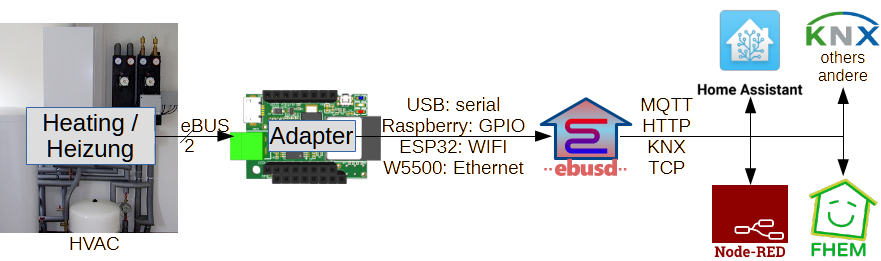
      "created_at": "2026-01-30T07:07:23Z",
      "updated_at": "2026-01-30T07:07:23Z",
      "category": {
        "name": "Guides",
        "emoji": ":books:"
      },
      "answer": null,
      "user": {
        "login": "heinemannj",
        "avatar_url": "https://avatars.githubusercontent.com/u/3251642?u=4128b10dcdfb654efdbdb7f155e5531f62a9cc7b&v=4"
      }
    },
    {
      "id": "D_kwDONJEens4AjJvd",
      "number": 9721,
      "title": "[Script request]: PDM Post Install",
      "body": "### Application Name\n\nProxmox Datacenter Manager\n\n### Website\n\nhttps://www.proxmox.com/en/products/proxmox-datacenter-manager/overview\n\n### Description\n\nProxmox Datacenter Manager is a centralized management solution to oversee and manage multiple nodes and clusters of Proxmox-based virtual environments. Designed for large-scale enterprise environments, it gives IT teams a complete overview of their distributed Proxmox virtualization infrastructures.\n\n### Due Diligence\n\n- [X] I have searched existing [scripts](https://community-scripts.github.io/Proxmox/scripts) and found no duplicates.\n- [X] I have searched existing [discussions](https://github.com/community-scripts/ProxmoxVE/discussions?discussions_q=) and found no duplicate requests.",
      "created_at": "2025-12-06T14:26:48Z",
      "updated_at": "2026-01-30T06:37:07Z",
      "category": {
        "name": "Request script",
        "emoji": ":sparkles:"
      },
      "answer": null,
      "user": {
        "login": "Nico83500",
        "avatar_url": "https://avatars.githubusercontent.com/u/6403141?v=4"
      }
    },
    {
      "id": "D_kwDONJEens4Ad1gf",
      "number": 1464,
      "title": "Podman LXC with ZFS",
      "body": "Hi there\n\nWhy doesn't the Podman LXC work with ZFS? Could someone please elaborate.\n\nThanks!\n\nhttps://community-scripts.github.io/ProxmoxVE/scripts?id=podman\n",
      "created_at": "2025-01-14T00:05:10Z",
      "updated_at": "2026-01-29T20:00:02Z",
      "category": {
        "name": "Q&A",
        "emoji": ":pray:"
      },
      "answer": null,
      "user": {
        "login": "DDPF02",
        "avatar_url": "https://avatars.githubusercontent.com/u/67828235?v=4"
      }
    },
    {
      "id": "D_kwDONJEens4Aj2Ln",
      "number": 11245,
      "title": "Error during Immich installation - Geonames issue",
      "body": "Please help, installation fails during geonames stage.\r\n\r\nAnd yes, I can reach all these files from my Proxmox PVE shell:\r\n```\r\nadmin1CodesASCII.txt;\r\ncities500.zip;\r\ncities500.zip;\r\nne_10m_admin_0_countries.geojson\r\n```\r\n\r\n**LOG:**\r\n  ✔️   Deployed: immich (2.4.1)\r\n  ✔️   Installed Immich Server, Web and Plugin Components\r\n  ✔️   Installed machine-learning\r\n⠦ Installing GeoNames datacurl: (56) Recv failure: Connection timed out\r\ncurl: (56) Recv failure: Connection timed out\r\ncurl: (56) Recv failure: Connection timed out\r\n  ✖️   in line 374: exit code 56 (Unknown error): while executing command curl -fsSLZ -O \"https://download.geonames.org/export/dump/admin1CodesASCII.txt\" -O \"https://download.geonames.org/export/dump/admin2Codes.txt\" -O \"https://download.geonames.org/export/dump/cities500.zip\" -O \"https://raw.githubusercontent.com/nvkelso/natural-earth-vector/v5.1.2/geojson/ne_10m_admin_0_countries.geojson\"\r\n--- Last 20 lines of silent log ---\r\n + tokenizers==0.22.1\r\n + tqdm==4.66.3\r\n + types-pyyaml==6.0.12.20250915\r\n + types-requests==2.32.4.20250913\r\n + types-setuptools==80.9.0.20250822\r\n + types-simplejson==3.20.0.20250822\r\n + types-ujson==5.10.0.20250822\r\n + typing-extensions==4.15.0\r\n + typing-inspection==0.4.2\r\n + urllib3==2.1.0\r\n + uvicorn==0.38.0\r\n + uvloop==0.19.0\r\n + watchfiles==0.21.0\r\n + wcwidth==0.2.13\r\n + websocket-client==1.8.0\r\n + websockets==12.0\r\n + werkzeug==3.0.3\r\n + wsproto==1.2.0\r\n + zope-event==5.0\r\n + zope-interface==6.1\r\n-----------------------------------\r\n 📋 Log saved to: /root/.install-51faf5c8.log\r\n  ✖️   Installation failed in container 102 (exit code: 56)\r\n",
      "created_at": "2026-01-27T21:42:30Z",
      "updated_at": "2026-01-29T19:48:07Z",
      "category": {
        "name": "Q&A",
        "emoji": ":pray:"
      },
      "answer": null,
      "user": {
        "login": "emishchenko",
        "avatar_url": "https://avatars.githubusercontent.com/u/97476214?v=4"
      }
    },
    {
      "id": "D_kwDONJEens4AeIm_",
      "number": 1916,
      "title": "[Script request] PowerDNS Authoritative Server & PowerDNS Recursor LXCs",
      "body": "### Application Name\r\n\r\nPowerDNS Authoritative Server & PowerDNS Recursor\r\n\r\n### Website\r\n\r\nhttps://www.powerdns.com/\r\n\r\n### Description\r\n\r\nPowerDNS provides open-source and commercial DNS software for large-scale DNS service providers, including mobile and fixed-line broadband operators, hosting and cloud service providers.\r\n\r\nPowerDNS is also the only DNS solution currently supported in Proxmox's SDN feature, and thus makes sense to have a LXC to easily set up a PowerDNS Authoritative Server for use in Proxmox's SDN. A PowerDNS Recursor LXC would be a bonus.\r\n\r\n### Due Diligence\r\n\r\n- [X] I have searched existing [scripts](https://community-scripts.github.io/Proxmox/scripts) and found no duplicates.\r\n- [X] I have searched existing [discussions](https://github.com/community-scripts/ProxmoxVE/discussions?discussions_q=) and found no duplicate requests.\r\n- [X] This is not a game-related request.",
      "created_at": "2025-02-01T03:22:05Z",
      "updated_at": "2026-01-29T12:39:07Z",
      "category": {
        "name": "Request script",
        "emoji": ":sparkles:"
      },
      "answer": null,
      "user": {
        "login": "Razaekel",
        "avatar_url": "https://avatars.githubusercontent.com/u/4242014?u=58b13299facc0eb09a1174b3acfb4bae73523b14&v=4"
      }
    },
    {
      "id": "D_kwDONJEens4Aj26y",
      "number": 11286,
      "title": "FileFlows Node Only",
      "body": "### Application Name\n\nFileFlows\n\n### Website\n\nhttps://fileflows.com\n\n### Description\n\nThere is all ready a FileFlows sever and node can we have just a node script\n\n### Due Diligence\n\n- [X] I have searched existing [scripts](https://community-scripts.github.io/Proxmox/scripts) and found no duplicates.\n- [X] I have searched existing [discussions](https://github.com/community-scripts/ProxmoxVE/discussions?discussions_q=) and found no duplicate requests.\n- [X] The application requested has 600+ stars on Github (if applicable), is older than 6 months, actively maintained and has release tarballs published.",
      "created_at": "2026-01-28T14:31:37Z",
      "updated_at": "2026-01-29T12:37:46Z",
      "category": {
        "name": "Request script",
        "emoji": ":sparkles:"
      },
      "answer": null,
      "user": {
        "login": "markgolding",
        "avatar_url": "https://avatars.githubusercontent.com/u/1782601?v=4"
      }
    },
    {
      "id": "D_kwDONJEens4Aj3yx",
      "number": 11312,
      "title": "api problem with bar-assistant",
      "body": "Hi everyone, I’m experiencing an issue when accessing Bar Assistant through my domain. Local access works correctly, but when accessing through the external domain (reverse proxy), the frontend shows this banner:\r\n\r\nUnable to connect to \"http://\"mycontainerip\"/bar API server. Make sure the server is running and accessible.\r\n\r\nThe frontend still tries to connect to the local LAN IP, even though my .env contains:\r\n\r\nAPP_URL=https://bar.mydomain.it/bar/\r\n\r\nThe backend seems to read the correct value, but the frontend keeps using the old local IP instead of the domain. It appears the frontend isn’t picking up the updated APP_URL or is using a cached build.\r\n\r\nAdditional Context / Logs\r\n\r\nInstalled inside a Proxmox LXC container\r\n\r\nBar Assistant located at /opt/bar-assistant\r\n\r\n.env updated but frontend still requests paths like http://192.168.1.34/bar/api/\r\n\r\n\r\n\r\nLocal endpoint works via LAN\r\n\r\nLooking for guidance on how to ensure the frontend correctly uses the APP_URL from .env when running behind a domain or reverse proxy.\r\n\r\nAlready tried to refresh browser cache or use anonymous mode but nothing works.",
      "created_at": "2026-01-29T09:07:24Z",
      "updated_at": "2026-01-29T11:45:18Z",
      "category": {
        "name": "Q&A",
        "emoji": ":pray:"
      },
      "answer": {
        "id": "DC_kwDONJEens4A7qBs",
        "body": "Bar-Assistant is an php tool, you can try to remove the caches / configs - like this, but the main config is in /opt/vue-salt-rim/public/config.js for this. \r\n\r\n```bash\r\ncd /opt/bar-assistant\r\n\r\n# Update .env with correct APP_URL\r\nnano .env\r\n# Set: APP_URL=https://bar.mydomain.it/bar/\r\n\r\n# edit the config.js of salt-rim:\r\nnano /opt/vue-salt-rim/public/config.js\r\n\r\n# Example:\r\nwindow.srConfig = {}\r\nwindow.srConfig.API_URL = \"https://bar.mydomain.it/bar\"\r\nwindow.srConfig.MEILISEARCH_URL = \"https://bar.mydomain.it/search\"\r\n\r\n# Clear cached config (maybe needed) \r\nphp artisan config:clear\r\nphp artisan cache:clear\r\n```"
      },
      "user": {
        "login": "Pietro0387",
        "avatar_url": "https://avatars.githubusercontent.com/u/48920608?u=08d3fde05dc75a10055c3f0e12655d5a97608c00&v=4"
      }
    },
    {
      "id": "D_kwDONJEens4AhBN4",
      "number": 6383,
      "title": "[Script request]: Anytype",
      "body": "### Application Name\n\nAnytype\n\n### Website\n\nhttps://anytype.io/\n\n### Description\n\nAnytype is a privacy-focused, local-first app for organizing notes, tasks, and knowledge using linked objects.\r\n\r\nHere’s a short list of what Anytype is useful for:\r\n\r\n📚 Organizing notes and knowledge – as linked objects (e.g. books, projects, tasks, ideas).\r\n\r\n🔐 Maintaining data sovereignty – everything stays local and end-to-end encrypted, no cloud required.\r\n\r\n🧠 Building a personal knowledge network – by connecting related objects (similar to a Zettelkasten).\r\n\r\n📊 Creating custom databases and templates – fully customizable (e.g. book tracker, project manager).\r\n\r\n🌐 Cross-platform and offline use – available on Windows, macOS, Linux, iOS, and Android.\r\n\r\n🔄 Device sync without central servers – peer-to-peer synchronization.\n\n### Due Diligence\n\n- [X] I have searched existing [scripts](https://community-scripts.github.io/Proxmox/scripts) and found no duplicates.\n- [X] I have searched existing [discussions](https://github.com/community-scripts/ProxmoxVE/discussions?discussions_q=) and found no duplicate requests.",
      "created_at": "2025-07-30T12:41:32Z",
      "updated_at": "2026-01-29T08:53:19Z",
      "category": {
        "name": "Request script",
        "emoji": ":sparkles:"
      },
      "answer": null,
      "user": {
        "login": "pafade89",
        "avatar_url": "https://avatars.githubusercontent.com/u/113902279?u=862cec0af3a99948adc952463981e8aafdc9d2ca&v=4"
      }
    },
    {
      "id": "D_kwDONJEens4AeYdD",
      "number": 2388,
      "title": "RustDesk Server Configuration & Deployment",
      "body": "### General\r\nThis is a followup guide on how the RustServer works and how its configured. I'm gonna make it short, because there is not really that much to it. All the \"good stuff\" is behind a paywalll aka needs you to buy a licence from RustDesk, that includes the nice config UI that we're not getting with the self-hosted free version of the software.\r\n\r\nScript link: https://community-scripts.github.io/ProxmoxVE/scripts?id=rustdesk-server\r\n\r\n### Installation\r\nAs you can tell, LXC installs everything automatically and there is no need for user interaction during the install process.\r\nThere are technically two executables (servers):\r\n\r\n**hbbs** - RustDesk ID (rendezvous / signaling) server, listen on TCP (21114 - for http in Pro only, 21115, 21116, 21118 for web socket) and UDP (21116)\r\n**hbbr** - RustDesk relay server, listen on TCP (21117, 21119 for web socket)\r\nOur script installs both of these servers and two services are created:\r\n\r\n**rustdesk-hbbr.service\r\nrustdesk-hbbs.service**\r\n\r\n### Server & Client configurations\r\nThe first time server is started, if no key is defined, it will create private and public key pair in the working directory. To check which one is that, you can check the service file:\r\n\r\n```\r\nroot@rustdeskserver:~# systemctl status rustdesk-hbbr.service\r\n● rustdesk-hbbr.service - Rustdesk Relay Server\r\n     Loaded: loaded (/lib/systemd/system/rustdesk-hbbr.service; enabled; preset: enabled)\r\n     Active: active (running) since Thu 2025-02-13 00:53:34 CET; 1 day 8h ago\r\n   Main PID: 4061 (hbbr)\r\n      Tasks: 4 (limit: 77006)\r\n     Memory: 536.0K\r\n        CPU: 9.738s\r\n     CGroup: /system.slice/rustdesk-hbbr.service\r\n             └─4061 /usr/bin/hbbr\r\n\r\nFeb 13 00:53:34 rustdeskserver systemd[1]: Started rustdesk-hbbr.service - Rustdesk Relay Server.\r\nroot@rustdeskserver:~#\r\n```\r\nSo, we can see that service is loaded from `/lib/systemd/system/rustdesk-hbbr.service`. If we `cat` the service file, we get this:\r\n```\r\nroot@rustdeskserver:~# cat /lib/systemd/system/rustdesk-hbbr.service \r\n\r\n[Unit]\r\nDescription=Rustdesk Relay Server\r\n\r\n[Service]\r\nType=simple\r\nLimitNOFILE=1000000\r\nExecStart=/usr/bin/hbbr\r\nWorkingDirectory=/var/lib/rustdesk-server/\r\nUser=\r\nGroup=\r\nRestart=always\r\nStandardOutput=append:/var/log/rustdesk-server/hbbr.log\r\nStandardError=append:/var/log/rustdesk-server/hbbr.error\r\n# Restart service after 10 seconds if node service crashes\r\nRestartSec=10\r\n\r\n[Install]\r\nWantedBy=multi-user.target\r\n\r\nroot@rustdeskserver:~# \r\n```\r\nService file states that the `WorkingDirectory` is `/var/lib/rustdesk-server/`. This is where the keypair is created. Let's look:\r\n```\r\nroot@rustdeskserver:~# ls -la /var/lib/rustdesk-server/\r\ntotal 136\r\ndrwxr-xr-x  2 root root  4096 Feb 14 09:10 .\r\ndrwxr-xr-x 19 root root  4096 Feb 13 00:53 ..\r\n-rw-r--r--  1 root root  4096 Feb 13 00:53 db_v2.sqlite3\r\n-rw-r--r--  1 root root 32768 Feb 14 08:28 db_v2.sqlite3-shm\r\n-rw-r--r--  1 root root 82432 Feb 14 08:28 db_v2.sqlite3-wal\r\n-rw-r--r--  1 root root    88 Feb 13 00:53 id_ed25519\r\n-rw-r--r--  1 root root    44 Feb 13 00:53 id_ed25519.pub\r\nroot@rustdeskserver:~# \r\n```\r\nFiles `id_ed25519` and `id_ed25519.pub` are the ones we're looking for. These are the keys used to encrypt communication between clients and server. You can create NEW keypair if you want by deleting these two files and restarting the services.\r\n\r\n`id_ed25519.pub` contains the public key that clients need to know in order to connect. So, let's cat that:\r\n```\r\nroot@rustdeskserver:~# cat /var/lib/rustdesk-server/id_ed25519.pub; echo\r\nkMtF+J8VMGEk2iLmUQ6AbVDkVRKce9r+p8n4YuQfl+c=\r\nroot@rustdeskserver:~#\r\n```\r\nSo, the servers public key is `kMtF+J8VMGEk2iLmUQ6AbVDkVRKce9r+p8n4YuQfl+c=`. We will use this to connect clients to our server. We will use Windows client as example. Get it from RustDesk GitHub:\r\n`https://github.com/rustdesk/rustdesk/releases/download/1.3.7/rustdesk-1.3.7-x86_64.exe`\r\n\r\nEDIT: [RustDesk Server: Add WebUI](https://github.com/community-scripts/ProxmoxVE/pull/4590) we added the custom WebUI by @lejianwen to the installation script, so the users can configure the server more easily, as opposed to using the CLI tools.\r\n\r\nAnyway, you will need the container IP and above mentioned public key. Insert those in the RustDesk client here:\r\n<img width=\"518\" height=\"302\" alt=\"image\" src=\"https://github.com/user-attachments/assets/e9d02659-2ecd-489d-9521-dd916088152b\" />\r\n\r\n### The end\r\nCongratulations, you're done with the configuration and everything should be working. PLEASE read the docs if you have any questions!\r\n\r\nhttps://rustdesk.com/docs/en/self-host/",
      "created_at": "2025-02-14T09:09:09Z",
      "updated_at": "2026-01-28T19:41:29Z",
      "category": {
        "name": "Guides",
        "emoji": ":books:"
      },
      "answer": null,
      "user": {
        "login": "tremor021",
        "avatar_url": "https://avatars.githubusercontent.com/u/58952836?u=6dd65ee2e741e2d2163b36279432834b1ca3d9d5&v=4"
      }
    },
    {
      "id": "D_kwDONJEens4AdBwu",
      "number": 671,
      "title": "SnipeIT: Update config from IP to Domain and set up SSL with or without reverse proxy.",
      "body": "To change how SnipeIT is reachable you need to change two files.\r\n\r\nThe first one you need to alter is the nginx config file.\r\n`vim /etc/nginx/conf.d/snipeit.conf`\r\n\r\nHere you need to change the value **server_name**. Change _snipeit.example.com_ to your domain name.\r\n`server_name snipeit.example.com`\r\n\r\nThe second file you need to change is the SnipeIT Webapp config.\r\n`vim /opt/snipe-it/.env `\r\n\r\nHere you need to change the value **APP_URL\". _Change http://snipeit.exampel.com_ to your domain name.\r\n`APP_URL=http://snipeit.example.com`\r\n\r\nThis are alle the changes needed for HTTP.\r\n\r\nFor HTTPS with reverse Proxy you need to set `proxy_set_header X-Forwarded-Proto $scheme;` (NGINX) or `RequestHeader set X-Forwarded-Proto \"https\"` (APACHE) at you proxy config. Below as an exmple are the settings for  [Nginx Proxy Manager](https://community-scripts.github.io/ProxmoxVE/scripts?id=nginxproxymanager)\r\n\r\n![nginx_reverse_proxy_snipeit2](https://github.com/user-attachments/assets/88573848-a1fd-41af-8d36-fa98039f9bbc)\r\n![nginx_reverse_proxy_snipeit](https://github.com/user-attachments/assets/928f593b-31f4-47cb-8af3-cb918ae5dbc2)\r\n\r\nAnd in the SnipeIT Webapp config you need to set **APP_TRUSTED_PROXIES** to the IP-Address of your proxy.\r\n`vim nano /opt/snipe-it/.env `\r\n\r\nTo get HTTPS working without reverse proxy you need to change the nginx config file.\r\nAnd again change the **server_name** from _snipeit.exampe.com_ to your own domain.\r\n\r\n`vim /etc/nginx/conf.d/snipeit.conf` \r\n\r\nReplace all content with:\r\n\r\n```\r\nserver {\r\n    listen 80;\r\n    server_name snipeit.example.com;\r\n    return 301 https://$server_name$request_uri;\r\n}\r\nserver {\r\n    listen 443 ssl;\r\n    server_name snipeit.exampe.com;\r\n    ssl_certificate /path/to/your.crt;\r\n    ssl_certificate_key /path/to/your.key;\r\n    ssl_protocols SSLv3 TLSv1 TLSv1.1 TLSv1.2;\r\n    ssl_prefer_server_ciphers on;\r\n    ssl_ciphers ECDHE-RSA-AES256-GCM-SHA384:ECDHE-RSA-AES128-GCM-SHA256:ECDHE-RSA-AES256-SHA384:ECDHE-RSA-AES128-SHA256:ECDHE-RSA-RC4-SHA:ECDHE-RSA-AES256-SHA:DHE-RSA-AES256-SHA:DHE-RSA-AES128-SHA:RC4-SHA:!aNULL:!eNULL:!EXPORT:!DES:!3DES:!MD5:!DSS:!PKS;\r\n    ssl_session_timeout 5m;\r\n    ssl_session_cache builtin:1000 shared:SSL:10m;\r\n    root /opt/snipe-it/public/;\r\n    index index.php index.html index.htm;\r\n    location / {\r\n        try_files $uri $uri/ /index.php$is_args$args;\r\n    }\r\n    location ~ \\.php$ {\r\n        try_files $uri $uri/ =404;\r\n        fastcgi_pass unix:/var/run/php8.2-fpm-www.sock;\r\n        fastcgi_index index.php;\r\n        fastcgi_param SCRIPT_FILENAME $document_root$fastcgi_script_name;\r\n        include fastcgi_params;\r\n    }\r\n}\r\n```\r\n",
      "created_at": "2024-12-04T10:07:06Z",
      "updated_at": "2026-01-28T18:22:06Z",
      "category": {
        "name": "Guides",
        "emoji": ":books:"
      },
      "answer": null,
      "user": {
        "login": "michelroegl-brunner",
        "avatar_url": "https://avatars.githubusercontent.com/u/73236783?u=e1e494a86b44ad9ff36416fbe44df88ae53dec3d&v=4"
      }
    },
    {
      "id": "D_kwDONJEens4Aj25C",
      "number": 11283,
      "title": "Multi-Line notes in Frontend script pages",
      "body": "Hello,\r\n\r\nactually there is a need for `Multi-Line notes` in Frontend script pages (https://github.com/community-scripts/ProxmoxVED/pull/1342).\r\n\r\nFor sure you can create an intruction file during the LXC initialisation as an quick and dirty workarround:\r\n\r\n```\r\n\"notes\": [\r\n{\r\n\"text\": \"Show configuration instructions: cat ~/ebusd-configuation-instructions.txt\",\r\n\"type\": \"info\"\r\n}\r\n]\r\n```\r\n\r\nBut during the reviews it was requested by the maintainer team to check out feasible `Multi-Line notes` solutions to improve the GUI in future - to make it a little bit more structured and readable.\r\n\r\n/[frontend](https://github.com/community-scripts/ProxmoxVE/tree/main/frontend)/[public](https://github.com/community-scripts/ProxmoxVE/tree/main/frontend/public)/[json](https://github.com/community-scripts/ProxmoxVE/tree/main/frontend/public/json)/ \r\n\r\n```\r\n  \"notes\": [\r\n    {\r\n      \"text\": \"Configuration Instructions: \\\r\n            1. Edit `/etc/default/ebusd` if necessary (especially if your device is not `/dev/ttyUSB0`) \\\r\n            2. Start the daemon with `systemctl start ebusd` \\\r\n            3. Check the log file `/var/log/ebusd.log` \\\r\n            4. Make the daemon autostart with `systemctl enable ebusd`\",\r\n      \"type\": \"info\"\r\n    }\r\n  ]\r\n```\r\n\r\nAny feedback and support is appreciated.\r\n\r\nCheers\r\nJoerg",
      "created_at": "2026-01-28T14:03:25Z",
      "updated_at": "2026-01-28T15:22:08Z",
      "category": {
        "name": "Ideas",
        "emoji": ":bulb:"
      },
      "answer": null,
      "user": {
        "login": "heinemannj",
        "avatar_url": "https://avatars.githubusercontent.com/u/3251642?u=4128b10dcdfb654efdbdb7f155e5531f62a9cc7b&v=4"
      }
    },
    {
      "id": "D_kwDONJEens4Aj2uB",
      "number": 11269,
      "title": "Immich: Pinned version 2.4.1 outdated. Timeline for update?",
      "body": "The 2.5 (and 2.5.1) updates of Immich seem to bring quite a bunch of nice changes.\r\nIs there a timeline for updating to the newest release?\r\n\r\nI'm tempted to make a backup and just change the version in the script, any reason this would not work?\r\n\r\nCheers for all the great work!",
      "created_at": "2026-01-28T11:02:10Z",
      "updated_at": "2026-01-28T11:53:57Z",
      "category": {
        "name": "Q&A",
        "emoji": ":pray:"
      },
      "answer": {
        "id": "DC_kwDONJEens4A7nVe",
        "body": "damn.. 1 look into prs"
      },
      "user": {
        "login": "schattenphoenix",
        "avatar_url": "https://avatars.githubusercontent.com/u/22476644?v=4"
      }
    },
    {
      "id": "D_kwDONJEens4Acusu",
      "number": 424,
      "title": "[Script request] Mailcow",
      "body": "### Application Name\n\nMailcow\n\n### Website\n\nhttps://github.com/mailcow/mailcow-dockerized\n\n### Description\n\nMailcow is a selfhosted E-Mail Server that makes hosting E-Mail Servers as easy as it can be. More information here: https://docs.mailcow.email/\n\n### Due Diligence\n\n- [X] I have searched existing [scripts](https://community-scripts.github.io/Proxmox/scripts) and found no duplicates.\n- [X] I have searched existing [discussions](https://github.com/community-scripts/ProxmoxVE/discussions?discussions_q=) and found no duplicate requests.\n- [X] This is not a game-related request.",
      "created_at": "2024-11-22T05:10:36Z",
      "updated_at": "2026-01-28T12:23:30Z",
      "category": {
        "name": "Request script",
        "emoji": ":sparkles:"
      },
      "answer": {
        "id": "DC_kwDONJEens4A7nTT",
        "body": "That is better suited as a Docker, as it has so much dependencies and moving parts. This would be a nightmare to maintain."
      },
      "user": {
        "login": "Felitendo",
        "avatar_url": "https://avatars.githubusercontent.com/u/95575686?v=4"
      }
    },
    {
      "id": "D_kwDONJEens4Aj2md",
      "number": 11255,
      "title": "[Script request]: BAMBUDDY",
      "body": "### Application Name\n\nBAMBUDDY\n\n### Website\n\nhttps://bambuddy.cool/\n\n### Description\n\nA powerful, self-hosted print archive and management system for Bambu Lab 3D printers. No cloud dependency, complete privacy, full control.\n\n### Due Diligence\n\n- [X] I have searched existing [scripts](https://community-scripts.github.io/Proxmox/scripts) and found no duplicates.\n- [X] I have searched existing [discussions](https://github.com/community-scripts/ProxmoxVE/discussions?discussions_q=) and found no duplicate requests.\n- [X] The application requested has 600+ stars on Github (if applicable), is older than 6 months, actively maintained and has release tarballs published.",
      "created_at": "2026-01-28T08:55:12Z",
      "updated_at": "2026-01-28T09:29:40Z",
      "category": {
        "name": "Request script",
        "emoji": ":sparkles:"
      },
      "answer": null,
      "user": {
        "login": "atze007",
        "avatar_url": "https://avatars.githubusercontent.com/u/33374175?v=4"
      }
    },
    {
      "id": "D_kwDONJEens4Aj2h2",
      "number": 11251,
      "title": "[Script request]: nodecast-tv",
      "body": "### Application Name\n\nnodecast-tv\n\n### Website\n\nhttps://github.com/technomancer702/nodecast-tv?tab=readme-ov-file\n\n### Description\n\nA self-hosted web application that lets you stream Live TV, Movies, and Series from your Xtream Codes or M3U provider directly in your browser. It's built with performance in mind and handles large libraries smoothly. \n\n### Due Diligence\n\n- [X] I have searched existing [scripts](https://community-scripts.github.io/Proxmox/scripts) and found no duplicates.\n- [X] I have searched existing [discussions](https://github.com/community-scripts/ProxmoxVE/discussions?discussions_q=) and found no duplicate requests.\n- [X] The application requested has 600+ stars on Github (if applicable), is older than 6 months, actively maintained and has release tarballs published.",
      "created_at": "2026-01-28T07:46:02Z",
      "updated_at": "2026-01-28T07:51:18Z",
      "category": {
        "name": "Request script",
        "emoji": ":sparkles:"
      },
      "answer": null,
      "user": {
        "login": "E3-Sentry",
        "avatar_url": "https://avatars.githubusercontent.com/u/217624725?v=4"
      }
    },
    {
      "id": "D_kwDONJEens4Aj2TW",
      "number": 11248,
      "title": "[Script request]: Posterr",
      "body": "### Application Name\n\nPosterr\n\n### Website\n\nhttps://github.com/petersem/posterr\n\n### Description\n\nFeatures\r\n\r\n    Displays movies, shows, music poster for what's currently playing.\r\n    Displays random (on-demand) titles from multiple Plex libraries.\r\n    Displays custom pictures, background art, and themes\r\n    Shows coming soon titles from Sonarr (or Season premieres).\r\n    Shows coming soon titles from Radarr.\r\n    Shows coming soon books from Readarr.\r\n    Optionally plays TV and Movies themes, if available\r\n    A playing progress bar (green for direct play and red for transcoding)\r\n    Various metadata displayed, such as run time, content rating, studio, etc.\r\n    Move the mouse cursor to the bottom footer of the page to hide it\r\n    Background artwork option for improved landscape view (when available)\r\n    Automatically scales for most display sizes and orientation.\r\n    'Sleep timer' disables the display during set hours.\r\n    Trivia Quiz (multiple selectable topics)\r\n    Support LED Matrix displays running Awtrix software\r\n    Display custom web pages as slides (if web page compatible) - EXPERIMENTAL!\r\n    Rotate display -90° (for running on display devices, like Firesticks, which do not support portait rotation)\r\n    Post API (at '/api/sleep') to toggle sleep mode. (Pass in header values 'psw: your Posterr password' and 'sleep: true|false')\r\n    Get API at the same endpoint will return the sleep status without any parsed parameters.\r\n    Supports CEC control of monitor inconjunction with the Posterr Sleep Timer.\r\n\n\n### Due Diligence\n\n- [X] I have searched existing [scripts](https://community-scripts.github.io/Proxmox/scripts) and found no duplicates.\n- [X] I have searched existing [discussions](https://github.com/community-scripts/ProxmoxVE/discussions?discussions_q=) and found no duplicate requests.\n- [X] The application requested has 600+ stars on Github (if applicable), is older than 6 months, actively maintained and has release tarballs published.",
      "created_at": "2026-01-28T01:30:20Z",
      "updated_at": "2026-01-28T01:32:03Z",
      "category": {
        "name": "Request script",
        "emoji": ":sparkles:"
      },
      "answer": null,
      "user": {
        "login": "Marco472",
        "avatar_url": "https://avatars.githubusercontent.com/u/69173371?v=4"
      }
    },
    {
      "id": "D_kwDONJEens4Aj2BI",
      "number": 11236,
      "title": "Dawarich not listening on IPv6",
      "body": "Hi,\r\n\r\ndeployed Dawarich, but I am unable to reach the WebUI via IPv6. It's listening on `0.0.0.0:80` only.\r\n\r\nTried modifying `/opt/dawarich/.env`  `APPLICATION_HOST` and `APPLICATION_HOSTS`, both with hostname and with IPv6 address, with and without brackets, but nginx is still listening only on IPv4. What do I need o do to make it listen on IPv6?",
      "created_at": "2026-01-27T17:51:54Z",
      "updated_at": "2026-01-27T19:09:10Z",
      "category": {
        "name": "Q&A",
        "emoji": ":pray:"
      },
      "answer": null,
      "user": {
        "login": "jwgn",
        "avatar_url": "https://avatars.githubusercontent.com/u/15985023?v=4"
      }
    },
    {
      "id": "D_kwDONJEens4Aj00V",
      "number": 11203,
      "title": "could Grist script include enterprise features?",
      "body": "I work at Grist, and we see a lot of self-hosters activating and using our Enterprise features. If they are using proxmox, this is awkward, since an extra build step is needed to include that option. If this line was added:\r\n```\r\nyarn run install:ee\r\n```\r\njust before:\r\n```\r\nyarn run build:prod\r\n```\r\nThen Grist would build just as it does now, but there would be an extra toggle available in its admin page to turn on enterprise features if the end-user wants that (otherwise nothing is different). Most self-hosters qualify to use those features for free.\r\n\r\nHope I'm posting in the right spot! Thanks for considering.",
      "created_at": "2026-01-26T17:38:31Z",
      "updated_at": "2026-02-01T18:09:01Z",
      "category": {
        "name": "Q&A",
        "emoji": ":pray:"
      },
      "answer": {
        "id": "DC_kwDONJEens4A7lWh",
        "body": "I see nothing against it, if the other @community-scripts/contributor are okay with it, feel free to create a PR to add those two commands to grist.sh and grist-install or ping me again and I create a PR in the evening. "
      },
      "user": {
        "login": "paulfitz",
        "avatar_url": "https://avatars.githubusercontent.com/u/118367?v=4"
      }
    },
    {
      "id": "D_kwDONJEens4Aj1tF",
      "number": 11230,
      "title": "[Script request]: shelfmark",
      "body": "### Application Name\n\nShelfmark\n\n### Website\n\nhttps://github.com/calibrain/shelfmark\n\n### Description\n\nShelfmark is a unified web interface for searching and aggregating books and audiobook downloads from multiple sources - all in one place. Works out of the box with popular web sources, no configuration required. Add metadata providers, additional release sources, and download clients to create a single hub for building your digital library.\n\n### Due Diligence\n\n- [X] I have searched existing [scripts](https://community-scripts.github.io/Proxmox/scripts) and found no duplicates.\n- [X] I have searched existing [discussions](https://github.com/community-scripts/ProxmoxVE/discussions?discussions_q=) and found no duplicate requests.\n- [X] The application requested has 600+ stars on Github (if applicable), is older than 6 months, actively maintained and has release tarballs published.",
      "created_at": "2026-01-27T12:44:47Z",
      "updated_at": "2026-01-27T14:25:13Z",
      "category": {
        "name": "Request script",
        "emoji": ":sparkles:"
      },
      "answer": null,
      "user": {
        "login": "Space010",
        "avatar_url": "https://avatars.githubusercontent.com/u/156844683?u=c445223fcf705000c27b082275fc348e40a7cba9&v=4"
      }
    },
    {
      "id": "D_kwDONJEens4Aj1Y3",
      "number": 11220,
      "title": "[Script request]: WEBTOP",
      "body": "### Application Name\n\nwebtop\n\n### Website\n\nhttps://github.com/linuxserver/docker-webtop\n\n### Description\n\na useful remote desktop on web browser.\r\nAllows use of personnal environment where network setting do not allow\n\n### Due Diligence\n\n- [X] I have searched existing [scripts](https://community-scripts.github.io/Proxmox/scripts) and found no duplicates.\n- [X] I have searched existing [discussions](https://github.com/community-scripts/ProxmoxVE/discussions?discussions_q=) and found no duplicate requests.\n- [X] The application requested has 600+ stars on Github (if applicable), is older than 6 months, actively maintained and has release tarballs published.",
      "created_at": "2026-01-27T07:39:56Z",
      "updated_at": "2026-01-27T13:22:38Z",
      "category": {
        "name": "Request script",
        "emoji": ":sparkles:"
      },
      "answer": null,
      "user": {
        "login": "captainabloc",
        "avatar_url": "https://avatars.githubusercontent.com/u/57308170?v=4"
      }
    },
    {
      "id": "D_kwDONJEens4Aj1L9",
      "number": 11216,
      "title": "[Script request]: Netronome",
      "body": "### Application Name\n\nNetronome\n\n### Website\n\nhttps://github.com/autobrr/netronome\n\n### Description\n\nMonitor. Analyze. Alert.\r\nA complete network performance monitoring solution with distributed agents, real-time metrics, and beautiful visualizations.\n\n### Due Diligence\n\n- [X] I have searched existing [scripts](https://community-scripts.github.io/Proxmox/scripts) and found no duplicates.\n- [X] I have searched existing [discussions](https://github.com/community-scripts/ProxmoxVE/discussions?discussions_q=) and found no duplicate requests.\n- [X] The application requested has 600+ stars on Github (if applicable), is older than 6 months, actively maintained and has release tarballs published.",
      "created_at": "2026-01-27T01:37:00Z",
      "updated_at": "2026-01-27T01:37:00Z",
      "category": {
        "name": "Request script",
        "emoji": ":sparkles:"
      },
      "answer": null,
      "user": {
        "login": "milandzuris",
        "avatar_url": "https://avatars.githubusercontent.com/u/42905545?u=c0ab5794b42e731a1bab8c5eebc38f5a9b4de1c9&v=4"
      }
    },
    {
      "id": "D_kwDONJEens4AcsFh",
      "number": 394,
      "title": "[Script request] Defguard",
      "body": "### Application Name\n\nDefguard\n\n### Website\n\nhttps://docs.defguard.net/\n\n### Description\n\nDefguard is a comprehensive Remote Access Management solution incorporating in one solution:\r\n- Remote Access secured by [WireGuard® VPN with 2FA/Multi-Factor Authentication](https://docs.defguard.net/admin-and-features/features-and-configuration/wireguard),\r\n- Identity Management with [SSO based on OpenID Identity Provider](https://docs.defguard.net/admin-and-features/features-and-configuration/openid-connect),\r\n- Account Lifecycle management with [secure remote account onboarding](https://docs.defguard.net/help/enrollment).\r\n\r\nThe project looks good since all enterprise features up to the following limits are free and [no license is required](https://docs.defguard.net/enterprise/license), which seems good for a home or even small office setup.\r\n- 5 active users\r\n- 10 devices\r\n- 1 location\n\n### Due Diligence\n\n- [X] I have searched existing [scripts](https://community-scripts.github.io/Proxmox/scripts) and found no duplicates.\n- [X] I have searched existing [discussions](https://github.com/community-scripts/ProxmoxVE/discussions?discussions_q=) and found no duplicate requests.\n- [X] This is not a game-related request.",
      "created_at": "2024-11-20T14:07:44Z",
      "updated_at": "2026-01-26T21:42:14Z",
      "category": {
        "name": "Request script",
        "emoji": ":sparkles:"
      },
      "answer": null,
      "user": {
        "login": "Aloe-recite",
        "avatar_url": "https://avatars.githubusercontent.com/u/154974285?u=44b31d5f9ce94763e459ff70e20dbed7b3bf028f&v=4"
      }
    },
    {
      "id": "D_kwDONJEens4Aj03m",
      "number": 11206,
      "title": "[Script request]: AutoSubs – Subtitles Made Simple",
      "body": "### Application Name\n\nAutoSubs\n\n### Website\n\nhttps://github.com/tmoroney/auto-subs\n\n### Description\n\nInstantly generate AI-powered subtitles on your device. Works standalone or connects to DaVinci Resolve.\n\n### Due Diligence\n\n- [X] I have searched existing [scripts](https://community-scripts.github.io/Proxmox/scripts) and found no duplicates.\n- [X] I have searched existing [discussions](https://github.com/community-scripts/ProxmoxVE/discussions?discussions_q=) and found no duplicate requests.\n- [X] The application requested has 600+ stars on Github (if applicable), is older than 6 months, actively maintained and has release tarballs published.",
      "created_at": "2026-01-26T18:40:55Z",
      "updated_at": "2026-01-26T18:40:55Z",
      "category": {
        "name": "Request script",
        "emoji": ":sparkles:"
      },
      "answer": null,
      "user": {
        "login": "shrijayan",
        "avatar_url": "https://avatars.githubusercontent.com/u/81805145?u=46c74892bc1c9875c7fdb42631705b61416f227a&v=4"
      }
    },
    {
      "id": "D_kwDONJEens4Aj02Q",
      "number": 11205,
      "title": "[Script request]: JellyPlex-Watched",
      "body": "### Application Name\n\nJellyPlex-Watched\n\n### Website\n\nhttps://github.com/luigi311/JellyPlex-Watched\n\n### Description\n\nKeep in sync all your users watched history between jellyfin, plex and emby servers locally. This uses file names and provider ids to find the correct episode/movie between the two.\r\n\r\nHaving the ability to sync between different media servers would be a great advantage for all those runnig jellyfin, plex and emby servers.\n\n### Due Diligence\n\n- [X] I have searched existing [scripts](https://community-scripts.github.io/Proxmox/scripts) and found no duplicates.\n- [X] I have searched existing [discussions](https://github.com/community-scripts/ProxmoxVE/discussions?discussions_q=) and found no duplicate requests.\n- [X] The application requested has 600+ stars on Github (if applicable), is older than 6 months, actively maintained and has release tarballs published.",
      "created_at": "2026-01-26T18:14:01Z",
      "updated_at": "2026-01-26T18:14:01Z",
      "category": {
        "name": "Request script",
        "emoji": ":sparkles:"
      },
      "answer": null,
      "user": {
        "login": "seneca13",
        "avatar_url": "https://avatars.githubusercontent.com/u/111911896?v=4"
      }
    },
    {
      "id": "D_kwDONJEens4AjuFs",
      "number": 10966,
      "title": "Paperless-NGX LXC v2.20.4 install from scratch failed - redis.exceptions.ConnectionError: Error 111 connecting to localhost:6379. Connection refused.",
      "body": "Hello everyone, \r\nI am currently not able to install paperless-ngx v2.20.4 from scratch on proxmox 9.1. \r\nThe setup stopped with the error message: \r\nredis.exceptions.ConnectionError: Error 111 connecting to localhost:6379. Connection refused.\r\n  ✖️   in line 83: exit code 83 (Unknown error): while executing command  uv run -- python manage.py migrate\r\n  ✖️   Installation failed in container 102 (exit code: 83)\r\n\r\nCan someone assist me completing the installation? \r\nHere are more insight related to the failure:\r\n\r\n Applying socialaccount.0005_socialtoken_nullable_app... OK\r\n  Applying socialaccount.0006_alter_socialaccount_extra_data... OK\r\nTraceback (most recent call last):\r\n  File \"/opt/paperless/.venv/lib/python3.13/site-packages/redis/connection.py\", line 357, in connect\r\n    sock = self.retry.call_with_retry(\r\n        lambda: self._connect(), lambda error: self.disconnect(error)\r\n    )\r\n  File \"/opt/paperless/.venv/lib/python3.13/site-packages/redis/retry.py\", line 62, in call_with_retry\r\n    return do()\r\n  File \"/opt/paperless/.venv/lib/python3.13/site-packages/redis/connection.py\", line 358, in <lambda>\r\n    lambda: self._connect(), lambda error: self.disconnect(error)\r\n            ~~~~~~~~~~~~~^^\r\n  File \"/opt/paperless/.venv/lib/python3.13/site-packages/redis/connection.py\", line 730, in _connect\r\n    raise err\r\n  File \"/opt/paperless/.venv/lib/python3.13/site-packages/redis/connection.py\", line 718, in _connect\r\n    sock.connect(socket_address)\r\n    ~~~~~~~~~~~~^^^^^^^^^^^^^^^^\r\nConnectionRefusedError: [Errno 111] Connection refused\r\n\r\nDuring handling of the above exception, another exception occurred:\r\n\r\nTraceback (most recent call last):\r\n  File \"/opt/paperless/src/manage.py\", line 10, in <module>\r\n    execute_from_command_line(sys.argv)\r\n    ~~~~~~~~~~~~~~~~~~~~~~~~~^^^^^^^^^^\r\n  File \"/opt/paperless/.venv/lib/python3.13/site-packages/django/core/management/__init__.py\", line 442, in execute_from_command_line\r\n    utility.execute()\r\n    ~~~~~~~~~~~~~~~^^\r\n  File \"/opt/paperless/.venv/lib/python3.13/site-packages/django/core/management/__init__.py\", line 436, in execute\r\n    self.fetch_command(subcommand).run_from_argv(self.argv)\r\n    ~~~~~~~~~~~~~~~~~~~~~~~~~~~~~~~~~~~~~~~~~~~~^^^^^^^^^^^\r\n  File \"/opt/paperless/.venv/lib/python3.13/site-packages/django/core/management/base.py\", line 416, in run_from_argv\r\n    self.execute(*args, **cmd_options)\r\n    ~~~~~~~~~~~~^^^^^^^^^^^^^^^^^^^^^^\r\n  File \"/opt/paperless/.venv/lib/python3.13/site-packages/django/core/management/base.py\", line 460, in execute\r\n    output = self.handle(*args, **options)\r\n  File \"/opt/paperless/.venv/lib/python3.13/site-packages/django/core/management/base.py\", line 107, in wrapper\r\n    res = handle_func(*args, **kwargs)\r\n  File \"/opt/paperless/.venv/lib/python3.13/site-packages/django/core/management/commands/migrate.py\", line 380, in handle\r\n    emit_post_migrate_signal(\r\n    ~~~~~~~~~~~~~~~~~~~~~~~~^\r\n        self.verbosity,\r\n        ^^^^^^^^^^^^^^^\r\n    ...<4 lines>...\r\n        plan=plan,\r\n        ^^^^^^^^^^\r\n    )\r\n    ^\r\n  File \"/opt/paperless/.venv/lib/python3.13/site-packages/django/core/management/sql.py\", line 52, in emit_post_migrate_signal\r\n    models.signals.post_migrate.send(\r\n    ~~~~~~~~~~~~~~~~~~~~~~~~~~~~~~~~^\r\n        sender=app_config,\r\n        ^^^^^^^^^^^^^^^^^^\r\n    ...<4 lines>...\r\n        **kwargs,\r\n        ^^^^^^^^^\r\n    )\r\n    ^\r\n  File \"/opt/paperless/.venv/lib/python3.13/site-packages/django/dispatch/dispatcher.py\", line 189, in send\r\n    response = receiver(signal=self, sender=sender, **named)\r\n  File \"/opt/paperless/.venv/lib/python3.13/site-packages/treenode/signals.py\", line 36, in post_migrate_treenode\r\n    sender_model.update_tree()\r\n    ~~~~~~~~~~~~~~~~~~~~~~~~^^\r\n  File \"/opt/paperless/.venv/lib/python3.13/site-packages/treenode/models.py\", line 455, in update_tree\r\n    update_cache(cls)\r\n    ~~~~~~~~~~~~^^^^^\r\n  File \"/opt/paperless/.venv/lib/python3.13/site-packages/treenode/cache.py\", line 65, in update_cache\r\n    ls, d = _get_cached_collections()\r\n            ~~~~~~~~~~~~~~~~~~~~~~~^^\r\n  File \"/opt/paperless/.venv/lib/python3.13/site-packages/treenode/cache.py\", line 32, in _get_cached_collections\r\n    ls = _get_cached_collection(\"treenode_list\", list)\r\n  File \"/opt/paperless/.venv/lib/python3.13/site-packages/treenode/cache.py\", line 24, in _get_cached_collection\r\n    value = c.get(key, None)\r\n  File \"/opt/paperless/.venv/lib/python3.13/site-packages/django/core/cache/backends/redis.py\", line 188, in get\r\n    return self._cache.get(key, default)\r\n           ~~~~~~~~~~~~~~~^^^^^^^^^^^^^^\r\n  File \"/opt/paperless/.venv/lib/python3.13/site-packages/django/core/cache/backends/redis.py\", line 100, in get\r\n    value = client.get(key)\r\n  File \"/opt/paperless/.venv/lib/python3.13/site-packages/redis/commands/core.py\", line 1822, in get\r\n    return self.execute_command(\"GET\", name, keys=[name])\r\n           ~~~~~~~~~~~~~~~~~~~~^^^^^^^^^^^^^^^^^^^^^^^^^^\r\n  File \"/opt/paperless/.venv/lib/python3.13/site-packages/redis/client.py\", line 559, in execute_command\r\n    return self._execute_command(*args, **options)\r\n           ~~~~~~~~~~~~~~~~~~~~~^^^^^^^^^^^^^^^^^^\r\n  File \"/opt/paperless/.venv/lib/python3.13/site-packages/redis/client.py\", line 565, in _execute_command\r\n    conn = self.connection or pool.get_connection(command_name, **options)\r\n                              ~~~~~~~~~~~~~~~~~~~^^^^^^^^^^^^^^^^^^^^^^^^^\r\n  File \"/opt/paperless/.venv/lib/python3.13/site-packages/redis/connection.py\", line 1422, in get_connection\r\n    connection.connect()\r\n    ~~~~~~~~~~~~~~~~~~^^\r\n  File \"/opt/paperless/.venv/lib/python3.13/site-packages/redis/connection.py\", line 363, in connect\r\n    raise ConnectionError(self._error_message(e))\r\nredis.exceptions.ConnectionError: Error 111 connecting to localhost:6379. Connection refused.\r\n  ✖️   in line 83: exit code 83 (Unknown error): while executing command  uv run -- python manage.py migrate\r\n  ✖️   Installation failed in container 102 (exit code: 83)",
      "created_at": "2026-01-19T18:08:10Z",
      "updated_at": "2026-01-26T13:16:18Z",
      "category": {
        "name": "Q&A",
        "emoji": ":pray:"
      },
      "answer": {
        "id": "DC_kwDONJEens4A7TOD",
        "body": "Try Default install"
      },
      "user": {
        "login": "PatrickSeltmann",
        "avatar_url": "https://avatars.githubusercontent.com/u/17511694?u=5620c22bfc1b30b11081b2f6be61060226179a64&v=4"
      }
    },
    {
      "id": "D_kwDONJEens4Aj0Yt",
      "number": 11194,
      "title": "LLDAP - Config file does not update LLDAP settings",
      "body": "Hello,\r\n\r\nI'm having issues with the LLDAP LXC script, I've attempted to change settings at **/etc/lldap/lldap_config,toml**. to no avail. I cannot figure out any other way to change the settings such as..\r\n\r\n**ldap_base_dn** (dc=example,dc=com)\r\n**ldaps_options**\r\n\r\nI've atttempted restarting the service via **systemctl restart lldap.service** as-well as reloading the daemon. I deleted the file that holds the default pool in-case that causes a reload to the config.\r\n\r\nI'm at a impase at this stage and would appreciate any help!",
      "created_at": "2026-01-26T10:33:15Z",
      "updated_at": "2026-01-28T07:52:53Z",
      "category": {
        "name": "Q&A",
        "emoji": ":pray:"
      },
      "answer": null,
      "user": {
        "login": "Shazori",
        "avatar_url": "https://avatars.githubusercontent.com/u/111950918?v=4"
      }
    },
    {
      "id": "D_kwDONJEens4Aifut",
      "number": 8476,
      "title": "Disk Passthrough Script",
      "body": "### 🌟 Briefly describe the feature\n\nA helper-script that can help format and set up disks inside your machine to then pass it through an LXC or VM automatically\n\n### 📝 Detailed description\n\nWhen you paste the script into the shell of your preferred node, the script will start up and will scan all detected drives inside the system. Once it's done, you can choose multiple drives and either format them, or don't. When they are ready to pass through, it will list all VM IDs inside your machine. When the user chooses their preferred destination, it will copy all of the selected hard drive's part-uuid (or similar), import them in, and assign each a drive number with your preferred interface (ex: sata, ide, scsi, and etc.)  \n\n### 💡 Why is this useful?\n\nUsers will have an easier way to passthrough their storage to a NAS or preferred operating system, instead of doing it manually by lsblk, formatting with cfdisk, finding their part-uuid with blkid and importing it with a command. And you have to pass one drive at a time, which can take some time, and could potentially make a mistake with one or more drives",
      "created_at": "2025-10-19T12:37:52Z",
      "updated_at": "2026-01-26T00:27:04Z",
      "category": {
        "name": "Request script",
        "emoji": ":sparkles:"
      },
      "answer": null,
      "user": {
        "login": "ehjr5u",
        "avatar_url": "https://avatars.githubusercontent.com/u/177082224?v=4"
      }
    },
    {
      "id": "D_kwDONJEens4AjzL8",
      "number": 11133,
      "title": "Please explain Auto Updates",
      "body": "Hi! I'm fairly new to Proxmox, so please forgive my dumbness.  On the GitHub ProxmoxVE README, it lists [Auto Updates](https://github.com/community-scripts/ProxmoxVE?tab=readme-ov-file#-auto-updates) under Key Features.  What exactly does this mean?  For example, if I use the [Docker LXC](https://community-scripts.github.io/ProxmoxVE/scripts?id=docker) script, will Debian be auto-updated to the latest version?  Would Docker be updated as well?  (I mean Docker itself, not individual containers) \r\n\r\n\r\n",
      "created_at": "2026-01-24T20:58:06Z",
      "updated_at": "2026-01-25T17:58:49Z",
      "category": {
        "name": "Q&A",
        "emoji": ":pray:"
      },
      "answer": null,
      "user": {
        "login": "mikesalz",
        "avatar_url": "https://avatars.githubusercontent.com/u/46855061?v=4"
      }
    },
    {
      "id": "D_kwDONJEens4Ajzku",
      "number": 11175,
      "title": "[Script request]: Airflow",
      "body": "### Application Name\r\n\r\nApache Airflow\r\n\r\n### Website\r\n\r\nhttps://airflow.apache.org/\r\n\r\n### Description\r\n\r\nApache Airflow is a powerful workflow automation and scheduling platform that allows users to programmatically author, schedule, and monitor data pipelines. It is widely used for orchestrating complex workflows, ETL processes, and task dependencies in a scalable and maintainable way.\r\n\r\nCurrently, running Airflow in Docker requires managing multiple containers (PostgreSQL, Redis, workers, scheduler, webserver, etc.), which becomes cumbersome and hard to maintain. A Proxmox LXC template would simplify deployment by consolidating these components into a single, lightweight container, making it easier to manage, update, and scale. \r\n\r\n### Due Diligence\r\n\r\n- [X] I have searched existing [scripts](https://community-scripts.github.io/Proxmox/scripts) and found no duplicates.\r\n- [X] I have searched existing [discussions](https://github.com/community-scripts/ProxmoxVE/discussions?discussions_q=) and found no duplicate requests.\r\n- [X] The application requested has 600+ stars on Github (if applicable), is older than 6 months, actively maintained and has release tarballs published.",
      "created_at": "2026-01-25T11:45:23Z",
      "updated_at": "2026-01-25T11:52:10Z",
      "category": {
        "name": "Request script",
        "emoji": ":sparkles:"
      },
      "answer": null,
      "user": {
        "login": "KoenD96",
        "avatar_url": "https://avatars.githubusercontent.com/u/139351664?v=4"
      }
    },
    {
      "id": "D_kwDONJEens4AjRYv",
      "number": 9949,
      "title": "[Script request]: adding \"Bambulab AMS Spoolman Filament Status\" to spoolman lxc",
      "body": "### Application Name\n\nBambulab AMS Spoolman Filament Status\n\n### Website\n\nhttps://github.com/Rdiger-36/bambulab-ams-spoolman-filamentstatus\n\n### Description\n\nThis project integrates Bambu Lab Printers with one or multiple AMS with Spoolman to synchronize filament spool usage. It listens for MQTT updates from the printers and manages spools on Spoolman.\r\n\r\nOnly original BambuLab Spools are supported!\n\n### Due Diligence\n\n- [X] I have searched existing [scripts](https://community-scripts.github.io/Proxmox/scripts) and found no duplicates.\n- [X] I have searched existing [discussions](https://github.com/community-scripts/ProxmoxVE/discussions?discussions_q=) and found no duplicate requests.",
      "created_at": "2025-12-14T16:36:25Z",
      "updated_at": "2026-01-25T10:32:22Z",
      "category": {
        "name": "Request script",
        "emoji": ":sparkles:"
      },
      "answer": null,
      "user": {
        "login": "smignon612",
        "avatar_url": "https://avatars.githubusercontent.com/u/96617928?v=4"
      }
    },
    {
      "id": "D_kwDONJEens4AjzPF",
      "number": 11154,
      "title": "Pangolin update",
      "body": "Hi there, I Just updated pangolin via update command to  version 1.15.1. After update i got Bad gateway on pangolin web UI. \r\nI was wondering if it could be a problem with the update script or something else. It was working perfectly before, but I restored the backup and now it works again. Thanks a lot.",
      "created_at": "2026-01-24T23:01:57Z",
      "updated_at": "2026-01-25T08:11:01Z",
      "category": {
        "name": "Q&A",
        "emoji": ":pray:"
      },
      "answer": null,
      "user": {
        "login": "darlezior",
        "avatar_url": "https://avatars.githubusercontent.com/u/107568398?v=4"
      }
    },
    {
      "id": "D_kwDONJEens4AjzXp",
      "number": 11164,
      "title": "Termix 'update' command breaks the script",
      "body": "They released a new version today to 1.11.0 and it correctly flagged it when I ran the update command from the LXC console.   It said it updated properly and started services properly.  I can confirm that the service is running.  However, going to the IP it shows no page and doesn't answer on port 80.  (Default).\r\n\r\nNGINX is not validating the config from what I can tell at the moment and fails to start.\r\n```Jan 24 20:35:10 termix systemd[1]: Starting nginx.service - A high performance web server and a reverse proxy server...\r\n░░ Subject: A start job for unit nginx.service has begun execution\r\n░░ Defined-By: systemd\r\n░░ Support: https://www.debian.org/support\r\n░░ \r\n░░ A start job for unit nginx.service has begun execution.\r\n░░ \r\n░░ The job identifier is 119.\r\nJan 24 20:35:10 termix nginx[88]: 2026/01/24 20:35:10 [emerg] 88#88: mkdir() \"/opt/termix/nginx/client_body\" failed (2: No such file or directory)\r\nJan 24 20:35:10 termix nginx[88]: nginx: configuration file /etc/nginx/nginx.conf test failed\r\nJan 24 20:35:10 termix systemd[1]: nginx.service: Control process exited, code=exited, status=1/FAILURE\r\n░░ Subject: Unit process exited\r\n░░ Defined-By: systemd\r\n░░ Support: https://www.debian.org/support\r\n░░ \r\n░░ An ExecStartPre= process belonging to unit nginx.service has exited.\r\n░░ \r\n░░ The process' exit code is 'exited' and its exit status is 1.\r\nJan 24 20:35:10 termix systemd[1]: nginx.service: Failed with result 'exit-code'.```\r\n\r\nThe issue I believe is it's not creating the nginx directories.  I was able to create those manually and NGINX starts but it's returning a 500 error on page load. \r\n",
      "created_at": "2026-01-25T04:21:50Z",
      "updated_at": "2026-01-25T16:30:09Z",
      "category": {
        "name": "General",
        "emoji": ":speech_balloon:"
      },
      "answer": null,
      "user": {
        "login": "Node815",
        "avatar_url": "https://avatars.githubusercontent.com/u/20736534?u=b47dd85a8017255e8444534a42a5d890f6c15c01&v=4"
      }
    },
    {
      "id": "D_kwDONJEens4Ah0oO",
      "number": 7489,
      "title": "Debian 13 Upgrade for existing LXC",
      "body": "### Looking for Debian 13 Upgrade Testers\r\n\r\nWe are currently looking for testers for Debian 13 (Trixie) in our LXC scripts.\r\nAt this stage, support will most likely only work on Proxmox VE 9 (currently 9.0). Proxmox VE 8.x is not targeted for Debian 13 support.\r\n\r\n> [!CAUTION]\r\n> The following post is intended as Beta-test, proceed with Caution and ensure full Backups are created.\r\n\r\nThe ideal commands we recommand to update a Debian 12 (Bookworm) LXC to Debian 13 Trixie: \r\n\r\n### What it does\r\nThis will install the latest updates, install screen (kinda like a virtual terminal) this makes sure the update continues to run even if the ssh session would get interrupted, the user can just run `screen -r` to re-attach to the update process.\r\nAfter that it will rewrite the sources to Trixie and upgrade everything.\r\nThen existin source files will be rewritten to the new deb822 format.\r\n\r\n> [!CAUTION]\r\n> Proceed with Caution, this may break your LXC, so be sure to create proper Backups beforehand.\r\n\r\n> [!IMPORTANT]  \r\n> Check out this thread for more info on what LXC have issues upgrading and keep up to date on their status:\r\n> https://github.com/community-scripts/ProxmoxVE/issues/7332\r\n\r\n```bash\r\napt update\r\napt install screen -y\r\napt upgrade -y\r\n\r\nsed -i 's/bookworm/trixie/g' /etc/apt/sources.list\r\napt update\r\n\r\nscreen apt dist-upgrade\r\napt autoremove\r\napt autoclean\r\napt modernize-sources\r\napt update\r\nreboot\r\n```\r\n\r\n> [!TIP]\r\n> After the upgrade the MOTD (Message displayed on SSH login, will still show Debian 12, check out this guide on how to regenerate it.\r\n> https://github.com/community-scripts/ProxmoxVE/discussions/7227\r\n\r\n> [!NOTE]  \r\n> For new installations of a LXC, check this thread:\r\n> https://github.com/community-scripts/ProxmoxVE/discussions/7485\r\n\r\n\r\n> [!WARNING]  \r\n> Please only report the apps that don't work. as otherwise this discussion get's a bit flooded.\r\n> Thanks! \r\n\r\n\r\nWe would appreciate your feedback\r\nSimply let us know which scripts are working and which are not.\r\nWe will continuously clean up and update this post based on your reports.\r\n\r\nThank you for helping us move Debian 13 support forward 🙌\r\nCrazyWolf13 (Community-Scripts-Team)",
      "created_at": "2025-09-08T17:58:24Z",
      "updated_at": "2026-01-25T01:58:29Z",
      "category": {
        "name": "Guides",
        "emoji": ":books:"
      },
      "answer": null,
      "user": {
        "login": "CrazyWolf13",
        "avatar_url": "https://avatars.githubusercontent.com/u/96661824?v=4"
      }
    },
    {
      "id": "D_kwDONJEens4AjzIp",
      "number": 11130,
      "title": "Updating Booklore loses Bookcovers 1.16.2 -> 1.18.5",
      "body": "Running update in console updates successfully but all book covers are gone post update. Below is the verbose update output:\r\n\r\n    ____              __   __                  \r\n   / __ )____  ____  / /__/ /   ____  ________ \r\n  / __  / __ \\/ __ \\/ //_/ /   / __ \\/ ___/ _ \\\r\n / /_/ / /_/ / /_/ / ,< / /___/ /_/ / /  /  __/\r\n/_____/\\____/\\____/_/|_/_____/\\____/_/   \\___/ \r\n                                               \r\n\r\n  ✔️   Update available: booklore 1.16.2 → 1.18.5\r\nGet:1 http://security.debian.org bookworm-security InRelease [48.0 kB]\r\nGet:2 http://deb.debian.org/debian bookworm InRelease [151 kB]                                               \r\nGet:3 http://deb.debian.org/debian bookworm-updates InRelease [55.4 kB]               \r\nGet:4 http://security.debian.org bookworm-security/main amd64 Packages [292 kB]   \r\nGet:5 http://security.debian.org bookworm-security/main Translation-en [178 kB]                   \r\nGet:6 http://deb.debian.org/debian bookworm/main amd64 Packages [8,792 kB]                                        \r\nGet:7 http://deb.debian.org/debian bookworm/main Translation-en [6,108 kB]\r\nHit:8 http://mirror.mariadb.org/repo/12.2.1/debian bookworm InRelease             \r\nGet:9 http://deb.debian.org/debian bookworm/contrib amd64 Packages [53.5 kB]      \r\nGet:10 http://deb.debian.org/debian bookworm/contrib Translation-en [48.4 kB]\r\nFetched 15.7 MB in 2s (9,530 kB/s)                               \r\nReading package lists... Done\r\nBuilding dependency tree... Done\r\nReading state information... Done\r\n37 packages can be upgraded. Run 'apt list --upgradable' to see them.\r\nN: Repository 'http://deb.debian.org/debian bookworm InRelease' changed its 'Version' value from '12.12' to '12.13'\r\nHit:1 http://security.debian.org bookworm-security InRelease\r\nHit:2 http://deb.debian.org/debian bookworm InRelease                                                                          \r\nHit:3 http://deb.debian.org/debian bookworm-updates InRelease                                                                  \r\nGet:4 https://packages.adoptium.net/artifactory/deb bookworm InRelease [7,507 B]                                               \r\nGet:5 https://packages.adoptium.net/artifactory/deb bookworm/main amd64 Packages [14.2 kB]\r\nHit:6 http://mirror.mariadb.org/repo/12.2.1/debian bookworm InRelease\r\nFetched 21.7 kB in 0s (53.9 kB/s)\r\nReading package lists... Done\r\nBuilding dependency tree... Done\r\nReading state information... Done\r\n38 packages can be upgraded. Run 'apt list --upgradable' to see them.\r\nHit:1 http://deb.debian.org/debian bookworm InRelease\r\nHit:2 http://security.debian.org bookworm-security InRelease                                                                                         \r\nHit:3 http://deb.debian.org/debian bookworm-updates InRelease                                                                                        \r\nHit:4 https://packages.adoptium.net/artifactory/deb bookworm InRelease                                                         \r\nHit:5 http://mirror.mariadb.org/repo/12.2.1/debian bookworm InRelease      \r\nReading package lists... Done\r\nBuilding dependency tree... Done\r\nReading state information... Done\r\n38 packages can be upgraded. Run 'apt list --upgradable' to see them.\r\nReading package lists... Done\r\nBuilding dependency tree... Done\r\nReading state information... Done\r\nThe following packages were automatically installed and are no longer required:\r\n  liblzo2-2 libnuma1 libsnappy1v5\r\nUse 'apt autoremove' to remove them.\r\nThe following packages will be upgraded:\r\n  temurin-21-jdk\r\n1 upgraded, 0 newly installed, 0 to remove and 37 not upgraded.\r\nNeed to get 177 MB of archives.\r\nAfter this operation, 47.1 kB of additional disk space will be used.\r\nGet:1 https://packages.adoptium.net/artifactory/deb bookworm/main amd64 temurin-21-jdk amd64 21.0.10.0.0+7-1 [177 MB]\r\nFetched 177 MB in 2s (90.8 MB/s)         \r\napt-listchanges: Reading changelogs...\r\n(Reading database ... 29718 files and directories currently installed.)\r\nPreparing to unpack .../temurin-21-jdk_21.0.10.0.0+7-1_amd64.deb ...\r\nupdate-alternatives: using /usr/lib/jvm/temurin-21-jdk-amd64/lib/jfr to provide /usr/bin/jfr (jfr) in auto mode\r\nUnpacking temurin-21-jdk (21.0.10.0.0+7-1) over (21.0.9.0.0+10-0) ...\r\nSetting up temurin-21-jdk (21.0.10.0.0+7-1) ...\r\nupdate-alternatives: using /usr/lib/jvm/temurin-21-jdk-amd64/bin/jar to provide /usr/bin/jar (jar) in auto mode\r\nupdate-alternatives: using /usr/lib/jvm/temurin-21-jdk-amd64/bin/jarsigner to provide /usr/bin/jarsigner (jarsigner) in auto mode\r\nupdate-alternatives: using /usr/lib/jvm/temurin-21-jdk-amd64/bin/java to provide /usr/bin/java (java) in auto mode\r\nupdate-alternatives: using /usr/lib/jvm/temurin-21-jdk-amd64/bin/javac to provide /usr/bin/javac (javac) in auto mode\r\nupdate-alternatives: using /usr/lib/jvm/temurin-21-jdk-amd64/bin/javadoc to provide /usr/bin/javadoc (javadoc) in auto mode\r\nupdate-alternatives: using /usr/lib/jvm/temurin-21-jdk-amd64/bin/javap to provide /usr/bin/javap (javap) in auto mode\r\nupdate-alternatives: using /usr/lib/jvm/temurin-21-jdk-amd64/bin/jcmd to provide /usr/bin/jcmd (jcmd) in auto mode\r\nupdate-alternatives: using /usr/lib/jvm/temurin-21-jdk-amd64/bin/jconsole to provide /usr/bin/jconsole (jconsole) in auto mode\r\nupdate-alternatives: using /usr/lib/jvm/temurin-21-jdk-amd64/bin/jdb to provide /usr/bin/jdb (jdb) in auto mode\r\nupdate-alternatives: using /usr/lib/jvm/temurin-21-jdk-amd64/bin/jdeprscan to provide /usr/bin/jdeprscan (jdeprscan) in auto mode\r\nupdate-alternatives: using /usr/lib/jvm/temurin-21-jdk-amd64/bin/jdeps to provide /usr/bin/jdeps (jdeps) in auto mode\r\nupdate-alternatives: using /usr/lib/jvm/temurin-21-jdk-amd64/bin/jfr to provide /usr/bin/jfr (jfr) in auto mode\r\nupdate-alternatives: using /usr/lib/jvm/temurin-21-jdk-amd64/bin/jhsdb to provide /usr/bin/jhsdb (jhsdb) in auto mode\r\nupdate-alternatives: using /usr/lib/jvm/temurin-21-jdk-amd64/bin/jimage to provide /usr/bin/jimage (jimage) in auto mode\r\nupdate-alternatives: using /usr/lib/jvm/temurin-21-jdk-amd64/bin/jinfo to provide /usr/bin/jinfo (jinfo) in auto mode\r\nupdate-alternatives: using /usr/lib/jvm/temurin-21-jdk-amd64/bin/jlink to provide /usr/bin/jlink (jlink) in auto mode\r\nupdate-alternatives: using /usr/lib/jvm/temurin-21-jdk-amd64/bin/jmap to provide /usr/bin/jmap (jmap) in auto mode\r\nupdate-alternatives: using /usr/lib/jvm/temurin-21-jdk-amd64/bin/jmod to provide /usr/bin/jmod (jmod) in auto mode\r\nupdate-alternatives: using /usr/lib/jvm/temurin-21-jdk-amd64/bin/jpackage to provide /usr/bin/jpackage (jpackage) in auto mode\r\nupdate-alternatives: using /usr/lib/jvm/temurin-21-jdk-amd64/bin/jps to provide /usr/bin/jps (jps) in auto mode\r\nupdate-alternatives: using /usr/lib/jvm/temurin-21-jdk-amd64/bin/jrunscript to provide /usr/bin/jrunscript (jrunscript) in auto mode\r\nupdate-alternatives: using /usr/lib/jvm/temurin-21-jdk-amd64/bin/jshell to provide /usr/bin/jshell (jshell) in auto mode\r\nupdate-alternatives: using /usr/lib/jvm/temurin-21-jdk-amd64/bin/jstack to provide /usr/bin/jstack (jstack) in auto mode\r\nupdate-alternatives: using /usr/lib/jvm/temurin-21-jdk-amd64/bin/jstat to provide /usr/bin/jstat (jstat) in auto mode\r\nupdate-alternatives: using /usr/lib/jvm/temurin-21-jdk-amd64/bin/jstatd to provide /usr/bin/jstatd (jstatd) in auto mode\r\nupdate-alternatives: using /usr/lib/jvm/temurin-21-jdk-amd64/bin/jwebserver to provide /usr/bin/jwebserver (jwebserver) in auto mode\r\nupdate-alternatives: using /usr/lib/jvm/temurin-21-jdk-amd64/bin/keytool to provide /usr/bin/keytool (keytool) in auto mode\r\nupdate-alternatives: using /usr/lib/jvm/temurin-21-jdk-amd64/bin/rmiregistry to provide /usr/bin/rmiregistry (rmiregistry) in auto mode\r\nupdate-alternatives: using /usr/lib/jvm/temurin-21-jdk-amd64/bin/serialver to provide /usr/bin/serialver (serialver) in auto mode\r\nupdate-alternatives: using /usr/lib/jvm/temurin-21-jdk-amd64/lib/jexec to provide /usr/bin/jexec (jexec) in auto mode\r\nupdate-alternatives: using /usr/lib/jvm/temurin-21-jdk-amd64/lib/jspawnhelper to provide /usr/bin/jspawnhelper (jspawnhelper) in auto mode\r\n  ✔️   Update Temurin JDK 21\r\nHit:1 http://security.debian.org bookworm-security InRelease\r\nHit:2 http://deb.debian.org/debian bookworm InRelease                                                                          \r\nHit:3 http://deb.debian.org/debian bookworm-updates InRelease                                                                  \r\nHit:4 https://packages.adoptium.net/artifactory/deb bookworm InRelease                                                         \r\nHit:5 http://mirror.mariadb.org/repo/12.2.1/debian bookworm InRelease      \r\nReading package lists... Done\r\nBuilding dependency tree... Done\r\nReading state information... Done\r\n37 packages can be upgraded. Run 'apt list --upgradable' to see them.\r\n\r\nremoved 39 packages, and changed 77 packages in 3s\r\n\r\n15 packages are looking for funding\r\n  run `npm fund` for details\r\n  ✔️   Update Node.js 22\r\nHit:1 http://deb.debian.org/debian bookworm InRelease to distribution packages)\r\nHit:2 http://security.debian.org bookworm-security InRelease                                      \r\nHit:3 http://deb.debian.org/debian bookworm-updates InRelease                                     \r\nHit:4 https://packages.adoptium.net/artifactory/deb bookworm InRelease      \r\nReading package lists... Done\r\nBuilding dependency tree... Done\r\nReading state information... Done\r\n36 packages can be upgraded. Run 'apt list --upgradable' to see them.\r\nHit:1 http://security.debian.org bookworm-security InRelease\r\nHit:2 http://deb.debian.org/debian bookworm InRelease                       \r\nHit:3 http://deb.debian.org/debian bookworm-updates InRelease               \r\nHit:4 https://packages.adoptium.net/artifactory/deb bookworm InRelease\r\nReading package lists... Done\r\nBuilding dependency tree... Done\r\nReading state information... Done\r\n36 packages can be upgraded. Run 'apt list --upgradable' to see them.\r\nReading package lists... Done\r\nBuilding dependency tree... Done\r\nReading state information... Done\r\nmariadb-server is already the newest version (1:12.2.1+maria~deb12).\r\nmariadb-client is already the newest version (1:12.2.1+maria~deb12).\r\nThe following packages were automatically installed and are no longer required:\r\n  liblzo2-2 libnuma1 libsnappy1v5\r\nUse 'apt autoremove' to remove them.\r\n0 upgraded, 0 newly installed, 0 to remove and 36 not upgraded.\r\n  ✔️   Setup MariaDB 12.2.1 (distribution packages)\r\n  ✔️   Stopped Service\r\n  ✔️   Migrated old environment variables\r\n  ✔️   Backed up old installation\r\n  ✔️   Deployed: booklore (1.18.5)\r\n  ⏳   Building Frontendnpm warn using --force Recommended protections disabled.\r\nnpm warn ERESOLVE overriding peer dependency\r\nnpm warn While resolving: @stomp/rx-stomp@2.3.0\r\nnpm warn Found: uuid@13.0.0\r\nnpm warn node_modules/uuid\r\nnpm warn   uuid@\"^13.0.0\" from the root project\r\nnpm warn\r\nnpm warn Could not resolve dependency:\r\nnpm warn peer uuid@\">=9.0.0 <12.0.0\" from @stomp/rx-stomp@2.3.0\r\nnpm warn node_modules/@stomp/rx-stomp\r\nnpm warn   @stomp/rx-stomp@\"^2.3.0\" from the root project\r\nnpm warn\r\nnpm warn Conflicting peer dependency: uuid@11.1.0\r\nnpm warn node_modules/uuid\r\nnpm warn   peer uuid@\">=9.0.0 <12.0.0\" from @stomp/rx-stomp@2.3.0\r\nnpm warn   node_modules/@stomp/rx-stomp\r\nnpm warn     @stomp/rx-stomp@\"^2.3.0\" from the root project\r\nnpm warn deprecated lodash.isequal@4.5.0: This package is deprecated. Use require('node:util').isDeepStrictEqual instead.\r\nnpm warn deprecated @primeng/themes@21.0.4: Deprecated. This package is no longer maintained. Please migrate to @primeuix/themes: https://www.npmjs.com/package/@primeuix/themes\r\n\r\nadded 665 packages, and audited 666 packages in 8s\r\n\r\n155 packages are looking for funding\r\n  run `npm fund` for details\r\n\r\n1 low severity vulnerability\r\n\r\nTo address all issues, run:\r\n  npm audit fix\r\n\r\nRun `npm audit` for details.\r\nnpm warn Unknown cli config \"--configuration\". This will stop working in the next major version of npm.\r\n\r\n> booklore@0.0.0 build\r\n> ng build\r\n\r\nInitial chunk files   | Names         |  Raw size | Estimated transfer size\r\nmain-4DKD642W.js      | main          |   4.92 MB |               775.20 kB\r\nchunk-XXI764GF.js     | -             | 193.10 kB |                55.22 kB\r\npolyfills-6ISPNSXF.js | polyfills     |  35.68 kB |                11.57 kB\r\nstyles-A3QZV66M.css   | styles        |  24.90 kB |                 5.15 kB\r\nchunk-CYMSMVVZ.js     | -             |  20.32 kB |                 6.61 kB\r\nchunk-E56DBW7A.js     | -             |   2.49 kB |                 1.04 kB\r\n\r\n                      | Initial total |   5.20 MB |               854.78 kB\r\n\r\nLazy chunk files      | Names         |  Raw size | Estimated transfer size\r\nchunk-65GSF4PE.js     | quill         | 184.53 kB |                47.15 kB\r\nchunk-WFIPJ3MJ.js     | browser       |  64.22 kB |                17.18 kB\r\n\r\nApplication bundle generation complete. [32.837 seconds] - 2026-01-24T19:30:04.038Z\r\n\r\nOutput location: /opt/booklore/booklore-ui/dist/booklore\r\n\r\n  ✔️   Built Frontend\r\n  ⏳   Building BackendTo honour the JVM settings for this build a single-use Daemon process will be forked. For more on this, please refer to https://docs.gradle.org/8.14.3/userguide/gradle_daemon.html#sec:disabling_the_daemon in the Gradle documentation.\r\nDaemon will be stopped at the end of the build \r\n\r\n> Task :compileJava\r\nNote: /opt/booklore/booklore-api/src/main/java/com/adityachandel/booklore/config/security/service/DynamicOidcJwtProcessor.java uses or overrides a deprecated API.\r\nNote: Recompile with -Xlint:deprecation for details.\r\nNote: Some input files use unchecked or unsafe operations.\r\nNote: Recompile with -Xlint:unchecked for details.\r\n\r\n> Task :compileTestJava\r\nNote: /opt/booklore/booklore-api/src/test/java/com/adityachandel/booklore/service/bookdrop/BookDropServiceTest.java uses or overrides a deprecated API.\r\nNote: Recompile with -Xlint:deprecation for details.\r\nNote: Some input files use unchecked or unsafe operations.\r\nNote: Recompile with -Xlint:unchecked for details.\r\nOpenJDK 64-Bit Server VM warning: Sharing is only supported for boot loader classes because bootstrap classpath has been appended\r\n2026-01-24T11:31:07.503-08:00  INFO 3001 --- [booklore-api] [ionShutdownHook] j.LocalContainerEntityManagerFactoryBean : Closing JPA EntityManagerFactory for persistence unit 'default'\r\nHibernate: drop table if exists annotations cascade \r\nHibernate: drop table if exists app_migration cascade \r\nHibernate: drop table if exists app_settings cascade \r\nHibernate: drop table if exists author cascade \r\nHibernate: drop table if exists book cascade \r\nHibernate: drop table if exists book_file cascade \r\nHibernate: drop table if exists book_marks cascade \r\nHibernate: drop table if exists book_metadata cascade \r\nHibernate: drop table if exists book_metadata_author_mapping cascade \r\nHibernate: drop table if exists book_metadata_category_mapping cascade \r\nHibernate: drop table if exists book_metadata_mood_mapping cascade \r\nHibernate: drop table if exists book_metadata_tag_mapping cascade \r\nHibernate: drop table if exists book_notes cascade \r\nHibernate: drop table if exists book_notes_v2 cascade \r\nHibernate: drop table if exists book_shelf_mapping cascade \r\nHibernate: drop table if exists bookdrop_file cascade \r\nHibernate: drop table if exists category cascade \r\nHibernate: drop table if exists cbx_viewer_preference cascade \r\nHibernate: drop table if exists custom_font cascade \r\nHibernate: drop table if exists ebook_viewer_preference cascade \r\nHibernate: drop table if exists email_provider_v2 cascade \r\nHibernate: drop table if exists email_recipient_v2 cascade \r\nHibernate: drop table if exists epub_viewer_preference cascade \r\nHibernate: drop table if exists jwt_secret cascade \r\nHibernate: drop table if exists kobo_library_snapshot cascade \r\nHibernate: drop table if exists kobo_library_snapshot_book cascade \r\nHibernate: drop table if exists kobo_reading_state cascade \r\nHibernate: drop table if exists kobo_removed_books_tracking cascade \r\nHibernate: drop table if exists kobo_user_settings cascade \r\nHibernate: drop table if exists koreader_user cascade \r\nHibernate: drop table if exists library cascade \r\nHibernate: drop table if exists library_path cascade \r\nHibernate: drop table if exists magic_shelf cascade \r\nHibernate: drop table if exists metadata_fetch_jobs cascade \r\nHibernate: drop table if exists metadata_fetch_proposals cascade \r\nHibernate: drop table if exists mood cascade \r\nHibernate: drop table if exists new_pdf_viewer_preference cascade \r\nHibernate: drop table if exists opds_user_v2 cascade \r\nHibernate: drop table if exists pdf_viewer_preference cascade \r\nHibernate: drop table if exists public_book_review cascade \r\nHibernate: drop table if exists reading_sessions cascade \r\nHibernate: drop table if exists refresh_token cascade \r\nHibernate: drop table if exists shelf cascade \r\nHibernate: drop table if exists tag cascade \r\nHibernate: drop table if exists task_cron_configuration cascade \r\nHibernate: drop table if exists tasks cascade \r\nHibernate: drop table if exists user_book_progress cascade \r\nHibernate: drop table if exists user_email_provider_preference cascade \r\nHibernate: drop table if exists user_library_mapping cascade \r\nHibernate: drop table if exists user_permissions cascade \r\nHibernate: drop table if exists user_settings cascade \r\nHibernate: drop table if exists users cascade \r\n\r\n[Incubating] Problems report is available at: file:///opt/booklore/booklore-api/build/reports/problems/problems-report.html\r\n\r\nDeprecated Gradle features were used in this build, making it incompatible with Gradle 9.0.\r\n\r\nYou can use '--warning-mode all' to show the individual deprecation warnings and determine if they come from your own scripts or plugins.\r\n\r\nFor more on this, please refer to https://docs.gradle.org/8.14.3/userguide/command_line_interface.html#sec:command_line_warnings in the Gradle documentation.\r\n\r\nBUILD SUCCESSFUL in 1m 3s\r\n8 actionable tasks: 7 executed, 1 up-to-date\r\n  ✔️   Built Backend\r\n  ✔️   Started Service\r\n  ✔️   Updated successfully!\r\n  \r\n  \r\n  I am unsure how to proceed. Reading the output during update doesn't seem to show any errors.\r\n  \r\n  Doing a metadata search and choosing a new cover works and persists.\r\n  \r\n  If this should be an issue I can refile it.\r\n\r\nLibrary without covers:\r\n\r\n<img width=\"1167\" height=\"967\" alt=\"image\" src=\"https://github.com/user-attachments/assets/eca333d6-c210-41ca-8a9f-a8f5d3ce236e\" />\r\n\r\n\r\nBook details without cover:\r\n\r\n<img width=\"1364\" height=\"1124\" alt=\"image\" src=\"https://github.com/user-attachments/assets/f9f4aecc-8fb4-4ce1-87ae-cedcf2f66578\" />\r\n\r\n\r\nI searched both here in PvE scripts and Booklore's github for others with similar issues with no luck.",
      "created_at": "2026-01-24T19:42:41Z",
      "updated_at": "2026-01-25T00:03:34Z",
      "category": {
        "name": "Q&A",
        "emoji": ":pray:"
      },
      "answer": {
        "id": "DC_kwDONJEens4A7fU5",
        "body": "Created. [https://github.com/community-scripts/ProxmoxVE/issues/11158](url)"
      },
      "user": {
        "login": "Vintercon",
        "avatar_url": "https://avatars.githubusercontent.com/u/131939836?v=4"
      }
    },
    {
      "id": "D_kwDONJEens4AjzPg",
      "number": 11156,
      "title": "FarmOS",
      "body": "### Application Name\n\nFarmOs\n\n### Website\n\nhttps://farmos.org\n\n### Description\n\nfarmOS is a web-based application for farm management, planning, and record keeping. It is developed by a community of farmers, developers, researchers, and organizations with the aim of providing a standard platform for agricultural data collection and management\n\n### Due Diligence\n\n- [X] I have searched existing [scripts](https://community-scripts.github.io/Proxmox/scripts) and found no duplicates.\n- [X] I have searched existing [discussions](https://github.com/community-scripts/ProxmoxVE/discussions?discussions_q=) and found no duplicate requests.\n- [X] The application requested has 600+ stars on Github (if applicable), is older than 6 months, actively maintained and has release tarballs published.",
      "created_at": "2026-01-24T23:17:40Z",
      "updated_at": "2026-01-24T23:18:08Z",
      "category": {
        "name": "Request script",
        "emoji": ":sparkles:"
      },
      "answer": null,
      "user": {
        "login": "marianopato",
        "avatar_url": "https://avatars.githubusercontent.com/u/105762999?u=dc0bde987c5fbf2ff85998939d95da20b75802e7&v=4"
      }
    },
    {
      "id": "D_kwDONJEens4Ad35b",
      "number": 1530,
      "title": "[Script request] Netboot.xyz",
      "body": "### Application Name\n\nNetboot.xyz\n\n### Website\n\nhttps://netboot.xyz/\n\n### Description\n\nnetboot.xyz enables you to boot into many types of operating systems using lightweight tooling to get you up and running as soon as possible.\r\nIts nice to have for your Proxmox and nice to have for your whole Home. \n\n### Due Diligence\n\n- [X] I have searched existing [scripts](https://community-scripts.github.io/Proxmox/scripts) and found no duplicates.\n- [X] I have searched existing [discussions](https://github.com/community-scripts/ProxmoxVE/discussions?discussions_q=) and found no duplicate requests.\n- [X] This is not a game-related request.",
      "created_at": "2025-01-16T13:31:03Z",
      "updated_at": "2026-01-24T17:25:51Z",
      "category": {
        "name": "Request script",
        "emoji": ":sparkles:"
      },
      "answer": null,
      "user": {
        "login": "beastyrabbit",
        "avatar_url": "https://avatars.githubusercontent.com/u/16068109?u=090249ce29269fe294d3a2b30d038544259945f2&v=4"
      }
    },
    {
      "id": "D_kwDONJEens4AemrM",
      "number": 2733,
      "title": "[Script request] smtp4dev",
      "body": "### Application Name\n\nsmtp4dev\n\n### Website\n\nhttps://github.com/rnwood/smtp4dev\n\n### Description\n\nsmtp4dev - the fake smtp email server for development and testing\n\n### Due Diligence\n\n- [X] I have searched existing [scripts](https://community-scripts.github.io/Proxmox/scripts) and found no duplicates.\n- [X] I have searched existing [discussions](https://github.com/community-scripts/ProxmoxVE/discussions?discussions_q=) and found no duplicate requests.",
      "created_at": "2025-02-28T01:34:00Z",
      "updated_at": "2026-01-24T16:22:29Z",
      "category": {
        "name": "Request script",
        "emoji": ":sparkles:"
      },
      "answer": null,
      "user": {
        "login": "MagnusIIIBR",
        "avatar_url": "https://avatars.githubusercontent.com/u/9530663?u=d9b276d63bb696c11da9631675d777d725041c33&v=4"
      }
    },
    {
      "id": "D_kwDONJEens4AfW2z",
      "number": 3946,
      "title": "iVentoy Dead",
      "body": "Just a heads up....  iVentoy appears to be dead.  Both the website for iventoy.com and ventoy.com are unreachable.  I just happen to install it as it seemed like a nice little project from the help scripts site.  But, I'm assuming this may mean it is no longer receiving security updates.  YMMV",
      "created_at": "2025-04-19T03:07:41Z",
      "updated_at": "2026-01-24T16:17:30Z",
      "category": {
        "name": "General",
        "emoji": ":speech_balloon:"
      },
      "answer": null,
      "user": {
        "login": "paulkakell",
        "avatar_url": "https://avatars.githubusercontent.com/u/59290939?u=df6f169843ab4249d9606fbea1aba444a532f172&v=4"
      }
    },
    {
      "id": "D_kwDONJEens4AgRXv",
      "number": 5203,
      "title": "[Script request]: Glueton",
      "body": "### Application Name\n\nGlueton\n\n### Website\n\nhttps://github.com/qdm12/gluetun?tab=readme-ov-file\n\n### Description\n\nLightweight swiss-army-knife-like VPN client to multiple VPN service providers\n\n### Due Diligence\n\n- [X] I have searched existing [scripts](https://community-scripts.github.io/Proxmox/scripts) and found no duplicates.\n- [X] I have searched existing [discussions](https://github.com/community-scripts/ProxmoxVE/discussions?discussions_q=) and found no duplicate requests.",
      "created_at": "2025-06-16T19:17:42Z",
      "updated_at": "2026-01-24T02:59:44Z",
      "category": {
        "name": "Request script",
        "emoji": ":sparkles:"
      },
      "answer": null,
      "user": {
        "login": "coem0",
        "avatar_url": "https://avatars.githubusercontent.com/u/41294245?v=4"
      }
    },
    {
      "id": "D_kwDONJEens4AjydV",
      "number": 11112,
      "title": "ActualBudget 25.3.1 LXC update process hangs, won't proceed",
      "body": "I have a working install of ActualBudget 25.3.1. When attempting to update from within the LXC, the process updates Node.js to 22 and hangs on the next line without progressing:\r\n```\r\nhttps://actualbudget.org/docs/backup-restore/backup\r\n```\r\n\r\nI assume that I could just export my data and install the newest version, but wanted to see if I could get this working first.",
      "created_at": "2026-01-24T00:23:05Z",
      "updated_at": "2026-01-24T00:23:05Z",
      "category": {
        "name": "Q&A",
        "emoji": ":pray:"
      },
      "answer": null,
      "user": {
        "login": "darrendavid",
        "avatar_url": "https://avatars.githubusercontent.com/u/5068656?u=6c2826be5c6736b9f32d8e2267e6deb79c7888be&v=4"
      }
    },
    {
      "id": "D_kwDONJEens4AjxuN",
      "number": 11073,
      "title": "Unable to update Nginx Proxy Manager LXC v2.10.4",
      "body": "I'm long overdue to update my NPM LXC which I've installed from the helper scripts, but the `update` command doesn't seem to be available:\r\n```\r\nroot@nginxproxymanager:~# update\r\n-bash: update: command not found\r\n```\r\nThis works fine in other LXCs. I haven't found an easy way to export the config for NPM or I'd just start with a fresh install. Is there a way to fix the broken update mechanism within the LXC?",
      "created_at": "2026-01-23T08:10:34Z",
      "updated_at": "2026-01-23T23:52:59Z",
      "category": {
        "name": "Q&A",
        "emoji": ":pray:"
      },
      "answer": {
        "id": "DC_kwDONJEens4A7bUo",
        "body": "nano /usr/bin/update \r\nEnter the bash from Website\r\nchmod +x /usr/bin/update \r\n\r\nDone \r\n\r\nBut tbh, you missed 18 Updates, 2 Years of Updates, Bugfixes, CVE's, Features and Breaking Change. So im sure, that the whole lxc would break. "
      },
      "user": {
        "login": "darrendavid",
        "avatar_url": "https://avatars.githubusercontent.com/u/5068656?u=6c2826be5c6736b9f32d8e2267e6deb79c7888be&v=4"
      }
    },
    {
      "id": "D_kwDONJEens4AgVz1",
      "number": 5341,
      "title": "[Script request]: Decypharr",
      "body": "### Application Name\n\nDecypharr\n\n### Website\n\nhttps://github.com/sirrobot01/decypharr\n\n### Description\n\nDecypharr combines the power of QBittorrent with popular Debrid services to enhance your media management. It provides a familiar interface for Sonarr, Radarr, and other *Arr applications while leveraging the capabilities of Debrid providers.\r\n\r\nAlternative to the existing real-debrid torrent client script\n\n### Due Diligence\n\n- [X] I have searched existing [scripts](https://community-scripts.github.io/Proxmox/scripts) and found no duplicates.\n- [X] I have searched existing [discussions](https://github.com/community-scripts/ProxmoxVE/discussions?discussions_q=) and found no duplicate requests.",
      "created_at": "2025-06-20T22:18:27Z",
      "updated_at": "2026-01-23T22:26:35Z",
      "category": {
        "name": "Request script",
        "emoji": ":sparkles:"
      },
      "answer": null,
      "user": {
        "login": "brnu26",
        "avatar_url": "https://avatars.githubusercontent.com/u/153053289?u=c12b7d4fe355993b005d1d1d92da4686a18f787e&v=4"
      }
    },
    {
      "id": "D_kwDONJEens4Ag1Q2",
      "number": 6094,
      "title": "[Script request]: GoAway DNS sinkhole / AdBlocker - Great looking new alternative to pi-hole/adguard home",
      "body": "### Application Name\r\n\r\nGoAway\r\n\r\n### Website\r\n\r\nhttps://github.com/pommee/goaway\r\n\r\n### Description\r\n\r\nVery good looking new alternative to Pi-Hole and Adguard Home. Been trying it out in Docker and thought it would be a great addition to the community scripts.\r\n\r\n\r\n### Due Diligence\r\n\r\n- [X] I have searched existing [scripts](https://community-scripts.github.io/Proxmox/scripts) and found no duplicates.\r\n- [X] I have searched existing [discussions](https://github.com/community-scripts/ProxmoxVE/discussions?discussions_q=) and found no duplicate requests.",
      "created_at": "2025-07-20T09:37:39Z",
      "updated_at": "2026-01-23T17:21:16Z",
      "category": {
        "name": "Request script",
        "emoji": ":sparkles:"
      },
      "answer": null,
      "user": {
        "login": "thezeagar",
        "avatar_url": "https://avatars.githubusercontent.com/u/39324345?v=4"
      }
    },
    {
      "id": "D_kwDONJEens4AdwsC",
      "number": 1348,
      "title": "[Script request] cal.com",
      "body": "### Application Name\n\nCal.com\n\n### Website\n\nhttps://github.com/calcom/cal.com\n\n### Description\n\nCal.com (formerly Calendly) is an open-source scheduling infrastructure and meeting management platform that would make a valuable addition to the Helper-Scripts collection.\r\n\r\nKey Benefits:\r\n- Self-hosted alternative to Calendly with full control over data\r\n- Seamless calendar integration (Google, Outlook, etc.)\r\n- Automated meeting scheduling and management\r\n- Team scheduling capabilities\r\n- Customizable booking pages\r\n- API support for integration with other services\r\n\r\nThe addition would benefit users who:\r\n- Need a privacy-focused scheduling solution\r\n- Want to avoid SaaS subscription costs\r\n- Require integration with existing self-hosted infrastructure\r\n- Need GDPR-compliant meeting management\n\n### Due Diligence\n\n- [X] I have searched existing [scripts](https://community-scripts.github.io/Proxmox/scripts) and found no duplicates.\n- [X] I have searched existing [discussions](https://github.com/community-scripts/ProxmoxVE/discussions?discussions_q=) and found no duplicate requests.\n- [X] This is not a game-related request.",
      "created_at": "2025-01-09T11:35:53Z",
      "updated_at": "2026-01-23T16:58:16Z",
      "category": {
        "name": "Request script",
        "emoji": ":sparkles:"
      },
      "answer": null,
      "user": {
        "login": "bahaman1971",
        "avatar_url": "https://avatars.githubusercontent.com/u/157380078?u=b4a60ed34b52ac20cbd3d275906e0aa588dcdb8c&v=4"
      }
    },
    {
      "id": "D_kwDONJEens4AjwrO",
      "number": 11047,
      "title": "Adding Hometube [Script request]:",
      "body": "### Application Name\n\nHometube\n\n### Website\n\nhttps://github.com/EgalitarianMonkey/hometube\n\n### Description\n\nHomeTube is a simple web UI for downloading single videos and playlists from the internet with the highest quality available and moving them to specific local locations automatically managed and integrated by media server such as Plex or Jellyfin.\r\n\r\nDifference with MeTube(already present in script list): HomeTube has Ad-Free Content: Block natively all videos' ads and sponsors\n\n### Due Diligence\n\n- [X] I have searched existing [scripts](https://community-scripts.github.io/Proxmox/scripts) and found no duplicates.\n- [X] I have searched existing [discussions](https://github.com/community-scripts/ProxmoxVE/discussions?discussions_q=) and found no duplicate requests.\n- [X] The application requested has 600+ stars on Github (if applicable), is older than 6 months, actively maintained and has release tarballs published.",
      "created_at": "2026-01-22T07:43:56Z",
      "updated_at": "2026-01-23T11:54:03Z",
      "category": {
        "name": "Request script",
        "emoji": ":sparkles:"
      },
      "answer": {
        "id": "DC_kwDONJEens4A7b1U",
        "body": "It is out since September 2025, so it dose not fullfill the 6 months rule yet...."
      },
      "user": {
        "login": "qwertykolea",
        "avatar_url": "https://avatars.githubusercontent.com/u/43876274?v=4"
      }
    },
    {
      "id": "D_kwDONJEens4AiGvx",
      "number": 7874,
      "title": "[Script request]: Termix",
      "body": "### Application Name\n\nTermix\n\n### Website\n\nhttps://github.com/LukeGus/Termix\n\n### Description\n\nTermix is a web-based server management platform with SSH terminal, tunneling, and file editing capabilities. \n\n### Due Diligence\n\n- [X] I have searched existing [scripts](https://community-scripts.github.io/Proxmox/scripts) and found no duplicates.\n- [X] I have searched existing [discussions](https://github.com/community-scripts/ProxmoxVE/discussions?discussions_q=) and found no duplicate requests.",
      "created_at": "2025-09-24T09:58:06Z",
      "updated_at": "2026-01-23T08:23:42Z",
      "category": {
        "name": "Request script",
        "emoji": ":sparkles:"
      },
      "answer": null,
      "user": {
        "login": "Space010",
        "avatar_url": "https://avatars.githubusercontent.com/u/156844683?u=c445223fcf705000c27b082275fc348e40a7cba9&v=4"
      }
    },
    {
      "id": "D_kwDONJEens4Ajxmm",
      "number": 11066,
      "title": "[Script request]: Plausible",
      "body": "### Application Name\n\nPlausible\n\n### Website\n\nhttps://plausible.io/\n\n### Description\n\nPlausible is powerful, intuitive and lightweight analytics. No cookies just insights. \r\nAdding it to helper-scripts would make it possible to get started very quickly. It is an alternative to umami.\r\n\r\nhttps://github.com/plausible/analytics\n\n### Due Diligence\n\n- [X] I have searched existing [scripts](https://community-scripts.github.io/Proxmox/scripts) and found no duplicates.\n- [X] I have searched existing [discussions](https://github.com/community-scripts/ProxmoxVE/discussions?discussions_q=) and found no duplicate requests.\n- [X] The application requested has 600+ stars on Github (if applicable), is older than 6 months, actively maintained and has release tarballs published.",
      "created_at": "2026-01-23T04:53:22Z",
      "updated_at": "2026-01-23T04:53:22Z",
      "category": {
        "name": "Request script",
        "emoji": ":sparkles:"
      },
      "answer": null,
      "user": {
        "login": "onerandomusername",
        "avatar_url": "https://avatars.githubusercontent.com/u/71233171?u=a3c2b8cea572b6a7e4fd62bf0e37eb32e05017a8&v=4"
      }
    },
    {
      "id": "D_kwDONJEens4Af7zb",
      "number": 4709,
      "title": "OMada install fails",
      "body": "Hi, installaing omada with default or advanced settings fails. \r\n I get this message\r\n\r\n> ✔️  Installed Dependencies\r\n>  ✖️  No AVX detected: TP-Link Canceled Support for Old MongoDB for Debian 12 \r\n> https://www.tp-link.com/baltic/support/faq/4160/\r\n> ✔️   Completed Successfully!\r\n\r\n > 🚀  Omada setup has been successfully initialized!\r\n\r\nBut under the listed IP and port is nothing. \r\n\r\nWhat to do?",
      "created_at": "2025-05-25T17:59:48Z",
      "updated_at": "2026-01-22T16:28:08Z",
      "category": {
        "name": "Q&A",
        "emoji": ":pray:"
      },
      "answer": null,
      "user": {
        "login": "simpsonetti",
        "avatar_url": "https://avatars.githubusercontent.com/u/57707812?v=4"
      }
    },
    {
      "id": "D_kwDONJEens4AfbRD",
      "number": 4024,
      "title": "[Script request]: Nexterm",
      "body": "### Application Name\n\nNexterm\n\n### Website\n\nhttps://github.com/gnmyt/Nexterm\n\n### Description\n\nQuite cool and nifty RDP/VNC Jumphost(with Proxmox utility)\n\n### Due Diligence\n\n- [X] I have searched existing [scripts](https://community-scripts.github.io/Proxmox/scripts) and found no duplicates.\n- [X] I have searched existing [discussions](https://github.com/community-scripts/ProxmoxVE/discussions?discussions_q=) and found no duplicate requests.",
      "created_at": "2025-04-24T09:53:46Z",
      "updated_at": "2026-01-22T13:14:23Z",
      "category": {
        "name": "Request script",
        "emoji": ":sparkles:"
      },
      "answer": null,
      "user": {
        "login": "Lonnroth",
        "avatar_url": "https://avatars.githubusercontent.com/u/122230348?v=4"
      }
    },
    {
      "id": "D_kwDONJEens4AcaUx",
      "number": 144,
      "title": "Install Guide for Turnkey VMs in Proxmox VE Helper-Scripts",
      "body": "This guide will explain how to fully install a Turnkey VM using [Proxmox VE Helper-Scripts](https://community-scripts.github.io/ProxmoxVE). These VMs comes with a Turnkey ISO image bootdisk and requires some extra installation steps to get the VM fully up and running.\r\n\r\n- Start by installing a Turnkey VM using [Proxmox VE Helper-Scripts](https://community-scripts.github.io/ProxmoxVE/). In this example I'll be installing a Turnkey Nextcloud VM: \r\n   `bash -c \"$(wget -qLO - https://github.com/community-scripts/ProxmoxVE/raw/main/vm/nextcloud-vm.sh)\"`\r\n     - The VM is created with two disks by default:\r\n          - `scsi0` - OS disk\r\n          - `scsi1` - Turnkey ISO image disk\r\n    \r\n![hardware](https://github.com/user-attachments/assets/aba88f75-a650-48de-87e1-b38feb390af0)\r\n\r\n(Expand sections for screenshots)\r\n\r\n<details>\r\n<summary>  <b>(Optional)</b> Before booting, resize the OS disk (scsi0) to your liking, since it will be partitioned on first boot</summary>\r\n\r\n![resize-disk](https://github.com/user-attachments/assets/5b9c7df2-6dd2-4676-9185-dabb461a5bdf)\r\n\r\n</details>\r\n\r\n<details>\r\n<summary>Start the VM (boots from Turnkey ISO image disk by default)</summary>\r\n\r\n![boot-screen](https://github.com/user-attachments/assets/e406397f-af6c-4cb7-9598-b91e7b0c939c)\r\n\r\n</details>\r\n\r\n<details>\r\n<summary>Partition the OS disk (this will also install the OS)</summary>\r\n\r\n![partition-1](https://github.com/user-attachments/assets/93638267-a4e6-4e2e-a721-5dfcc31104b6)\r\n![partition-2](https://github.com/user-attachments/assets/2e479121-90e1-4d84-8b39-64c62888d384)\r\n![partition-3](https://github.com/user-attachments/assets/1b10c734-88ea-4bd9-9f33-7aa57abd0583)\r\n![partition-4](https://github.com/user-attachments/assets/8ad5f872-cf9e-454b-b34c-ea303aa080e0)\r\n![partition-5](https://github.com/user-attachments/assets/04c9b975-534f-4d3d-aa5d-05cf5ed65c5e)\r\n\r\n</details>\r\n\r\n</details>\r\n\r\n<details>\r\n<summary>Install GRUB boot loader on OS disk</summary>\r\n\r\n![grub-1](https://github.com/user-attachments/assets/09868bf7-02dc-4cbd-aa1c-5ff3d8a9c03e)\r\n\r\n</details>\r\n\r\n<details>\r\n<summary>Stop the VM when installation is complete</summary>\r\n\r\n![hard-stop](https://github.com/user-attachments/assets/abb6e192-d4be-4a6e-a2cc-e30a3a2bb357)\r\n\r\n</details>\r\n\r\n<details>\r\n<summary>Change VM boot order to boot from OS disk first</summary>\r\n\r\n![boot-order](https://github.com/user-attachments/assets/0bd42f22-1a13-4902-b75b-5361f175386a)\r\n\r\n</details>\r\n\r\n<details>\r\n<summary>Start the VM and follow setup steps. <b>Important: Domain must be set to the IP address of the VM</b></summary>\r\n\r\n![turnkey-1](https://github.com/user-attachments/assets/8b7c3a5f-3dff-4225-a043-eb5a378d7a0e)\r\n![turnkey-2](https://github.com/user-attachments/assets/ae29c026-48b2-4872-a6eb-0c02df526a32)\r\n![turnkey-3](https://github.com/user-attachments/assets/6377d458-1cb3-4180-80bc-2bd4e9818e28)\r\n\r\n</details>\r\n\r\n### Your Turnkey Nextcloud VM is up and running, congrats!\r\n\r\n![turnkey-4](https://github.com/user-attachments/assets/ad42d5f1-e114-4aff-a092-90f843af7550)\r\n",
      "created_at": "2024-11-08T22:20:52Z",
      "updated_at": "2026-01-21T09:46:34Z",
      "category": {
        "name": "Guides",
        "emoji": ":books:"
      },
      "answer": null,
      "user": {
        "login": "havardthom",
        "avatar_url": "https://avatars.githubusercontent.com/u/34199185?u=532dde8dd8872f09088728277f369c6051800ad2&v=4"
      }
    },
    {
      "id": "D_kwDONJEens4Ajvwp",
      "number": 11026,
      "title": "[Script request]: Ory Dockertest",
      "body": "### Application Name\n\nOry Dockertest\n\n### Website\n\nhttps://github.com/ory/dockertest\n\n### Description\n\nWrite better integration tests! Dockertest helps you boot up ephermal docker images for your Go tests with minimal work.\n\n### Due Diligence\n\n- [X] I have searched existing [scripts](https://community-scripts.github.io/Proxmox/scripts) and found no duplicates.\n- [X] I have searched existing [discussions](https://github.com/community-scripts/ProxmoxVE/discussions?discussions_q=) and found no duplicate requests.\n- [X] The application requested has 600+ stars on Github (if applicable), is older than 6 months, actively maintained and has release tarballs published.",
      "created_at": "2026-01-21T09:39:55Z",
      "updated_at": "2026-01-21T09:39:55Z",
      "category": {
        "name": "Request script",
        "emoji": ":sparkles:"
      },
      "answer": null,
      "user": {
        "login": "shrijayan",
        "avatar_url": "https://avatars.githubusercontent.com/u/81805145?u=46c74892bc1c9875c7fdb42631705b61416f227a&v=4"
      }
    },
    {
      "id": "D_kwDONJEens4Ajvwk",
      "number": 11025,
      "title": "[Script request]: Ory Oathkeeper",
      "body": "### Application Name\n\nOry Oathkeeper\n\n### Website\n\nhttps://github.com/ory/oathkeeper\n\n### Description\n\nA cloud native Identity & Access Proxy / API (IAP) and Access Control Decision API that authenticates, authorizes, and mutates incoming HTTP(s) requests. Inspired by the BeyondCorp / Zero Trust white paper. Written in Go.\n\n### Due Diligence\n\n- [X] I have searched existing [scripts](https://community-scripts.github.io/Proxmox/scripts) and found no duplicates.\n- [X] I have searched existing [discussions](https://github.com/community-scripts/ProxmoxVE/discussions?discussions_q=) and found no duplicate requests.\n- [X] The application requested has 600+ stars on Github (if applicable), is older than 6 months, actively maintained and has release tarballs published.",
      "created_at": "2026-01-21T09:39:03Z",
      "updated_at": "2026-01-21T09:39:03Z",
      "category": {
        "name": "Request script",
        "emoji": ":sparkles:"
      },
      "answer": null,
      "user": {
        "login": "shrijayan",
        "avatar_url": "https://avatars.githubusercontent.com/u/81805145?u=46c74892bc1c9875c7fdb42631705b61416f227a&v=4"
      }
    },
    {
      "id": "D_kwDONJEens4Ajvwh",
      "number": 11024,
      "title": "[Script request]: Ory Polis",
      "body": "### Application Name\n\nOry Polis\n\n### Website\n\nhttps://github.com/ory/polis\n\n### Description\n\nStreamline your web application's authentication with Polis, an SSO service supporting SAML and OpenID Connect protocols. Beyond enterprise-grade Single Sign-On, it also supports Directory Sync via the SCIM 2.0 protocol for automatic user and group provisioning/de-provisioning.\n\n### Due Diligence\n\n- [X] I have searched existing [scripts](https://community-scripts.github.io/Proxmox/scripts) and found no duplicates.\n- [X] I have searched existing [discussions](https://github.com/community-scripts/ProxmoxVE/discussions?discussions_q=) and found no duplicate requests.\n- [X] The application requested has 600+ stars on Github (if applicable), is older than 6 months, actively maintained and has release tarballs published.",
      "created_at": "2026-01-21T09:38:20Z",
      "updated_at": "2026-01-21T09:38:20Z",
      "category": {
        "name": "Request script",
        "emoji": ":sparkles:"
      },
      "answer": null,
      "user": {
        "login": "shrijayan",
        "avatar_url": "https://avatars.githubusercontent.com/u/81805145?u=46c74892bc1c9875c7fdb42631705b61416f227a&v=4"
      }
    },
    {
      "id": "D_kwDONJEens4Ajvwc",
      "number": 11023,
      "title": "[Script request]: Ory Keto",
      "body": "### Application Name\n\nOry Keto\n\n### Website\n\nhttps://github.com/ory/keto\n\n### Description\n\nThe most scalable and customizable permission server on the market. Fix your slow or broken permission system with Google's proven \"Zanzibar\" approach. Supports ACL, RBAC, and more. Written in Go, cloud native, headless, API-first. Available as a service on Ory Network and for self-hosters.\n\n### Due Diligence\n\n- [X] I have searched existing [scripts](https://community-scripts.github.io/Proxmox/scripts) and found no duplicates.\n- [X] I have searched existing [discussions](https://github.com/community-scripts/ProxmoxVE/discussions?discussions_q=) and found no duplicate requests.\n- [X] The application requested has 600+ stars on Github (if applicable), is older than 6 months, actively maintained and has release tarballs published.",
      "created_at": "2026-01-21T09:37:38Z",
      "updated_at": "2026-01-21T09:37:38Z",
      "category": {
        "name": "Request script",
        "emoji": ":sparkles:"
      },
      "answer": null,
      "user": {
        "login": "shrijayan",
        "avatar_url": "https://avatars.githubusercontent.com/u/81805145?u=46c74892bc1c9875c7fdb42631705b61416f227a&v=4"
      }
    },
    {
      "id": "D_kwDONJEens4Ajvwb",
      "number": 11022,
      "title": "[Script request]: Ory Hydra",
      "body": "### Application Name\n\nOry Hydra\n\n### Website\n\nhttps://github.com/ory/hydra\n\n### Description\n\nInternet-scale OpenID Certified™ OpenID Connect and OAuth2.1 provider that integrates with your user management through headless APIs. Solve OIDC/OAuth2 user cases over night. Consume as a service on Ory Network or self-host. Trusted by OpenAI and many others for scale and security. Written in Go.\n\n### Due Diligence\n\n- [X] I have searched existing [scripts](https://community-scripts.github.io/Proxmox/scripts) and found no duplicates.\n- [X] I have searched existing [discussions](https://github.com/community-scripts/ProxmoxVE/discussions?discussions_q=) and found no duplicate requests.\n- [X] The application requested has 600+ stars on Github (if applicable), is older than 6 months, actively maintained and has release tarballs published.",
      "created_at": "2026-01-21T09:36:58Z",
      "updated_at": "2026-01-21T09:36:58Z",
      "category": {
        "name": "Request script",
        "emoji": ":sparkles:"
      },
      "answer": null,
      "user": {
        "login": "shrijayan",
        "avatar_url": "https://avatars.githubusercontent.com/u/81805145?u=46c74892bc1c9875c7fdb42631705b61416f227a&v=4"
      }
    },
    {
      "id": "D_kwDONJEens4AjvwW",
      "number": 11021,
      "title": "[Script request]: Ory Kratos",
      "body": "### Application Name\n\nOry Kratos\n\n### Website\n\nhttps://github.com/ory/kratos\n\n### Description\n\nHeadless cloud-native authentication and identity management written in Go. Scales to a billion+ users. Replace Homegrown, Auth0, Okta, Firebase with better UX and DX. Passkeys, Social Sign In, OIDC, Magic Link, Multi-Factor Auth, SMS, SAML, TOTP, and more. Runs everywhere, runs best on Ory Network.\n\n### Due Diligence\n\n- [X] I have searched existing [scripts](https://community-scripts.github.io/Proxmox/scripts) and found no duplicates.\n- [X] I have searched existing [discussions](https://github.com/community-scripts/ProxmoxVE/discussions?discussions_q=) and found no duplicate requests.\n- [X] The application requested has 600+ stars on Github (if applicable), is older than 6 months, actively maintained and has release tarballs published.",
      "created_at": "2026-01-21T09:36:19Z",
      "updated_at": "2026-01-21T09:36:19Z",
      "category": {
        "name": "Request script",
        "emoji": ":sparkles:"
      },
      "answer": null,
      "user": {
        "login": "shrijayan",
        "avatar_url": "https://avatars.githubusercontent.com/u/81805145?u=46c74892bc1c9875c7fdb42631705b61416f227a&v=4"
      }
    },
    {
      "id": "D_kwDONJEens4Ajssc",
      "number": 10894,
      "title": "[Script request]: Dockhand",
      "body": "### Application Name\n\nDockhand\n\n### Website\n\nhttps://dockhand.pro/\n\n### Description\n\nDockhand is a lightweight web-based management dashboard designed to simplify working with Docker containers, images, and stacks through an easy-to-use interface. It provides a clean central place to view container status, start/stop/restart services, monitor resource usage, and manage deployments without needing constant CLI access.\r\n\r\nAdding Dockhand to Proxmox VE Helper-Scripts would make it quick and consistent for users to deploy as a container or VM service inside Proxmox, especially for homelabs and small server environments. A helper script would ensure a reliable install process (including dependencies, networking, and service startup), saving time and reducing setup errors, while giving Proxmox users a simple “single-pane” tool for managing Docker workloads.\r\n\r\n![dashboard4](https://github.com/user-attachments/assets/fea92a5c-bf9b-463a-b11b-03a40cd67e42)\r\n\n\n### Due Diligence\n\n- [X] I have searched existing [scripts](https://community-scripts.github.io/Proxmox/scripts) and found no duplicates.\n- [X] I have searched existing [discussions](https://github.com/community-scripts/ProxmoxVE/discussions?discussions_q=) and found no duplicate requests.\n- [X] The application requested has 200+ stars on Github (if applicable), is older than 6 months, actively maintained and has release tarballs published.",
      "created_at": "2026-01-18T01:44:30Z",
      "updated_at": "2026-01-21T00:54:25Z",
      "category": {
        "name": "Request script",
        "emoji": ":sparkles:"
      },
      "answer": null,
      "user": {
        "login": "zoro-mtv",
        "avatar_url": "https://avatars.githubusercontent.com/u/120339711?v=4"
      }
    },
    {
      "id": "D_kwDONJEens4Ah0M3",
      "number": 7485,
      "title": "Debian 13 Template - Testers wanted!",
      "body": "## Looking for Debian 13 Testers\r\n\r\nWe are currently looking for **testers for Debian 13 (Trixie)** in our LXC scripts.  \r\nAt this stage, support will most likely **only work on Proxmox VE 9 (currently 9.0)**. Proxmox VE 8.x is not targeted for Debian 13 support.\r\n\r\n**How to test a script:**\r\n```bash\r\nvar_version=13 bash -c \"$(curl -fsSL https://raw.githubusercontent.com/community-scripts/ProxmoxVE/main/ct/<SCRIPTNAME>.sh)\"\r\n```\r\n\r\nReplace <SCRIPTNAME>.sh with the name from the ScriptName column above or copy the bash call directly.\r\n\r\nWe would appreciate your feedback\r\nSimply let us know which scripts are working and which are not.\r\nWe will continuously clean up and update this post based on your reports.\r\n\r\nThank you for helping us move Debian 13 support forward 🙌\r\n\r\n\r\n### If you get following issue:\r\n  ✔️   Cluster is quorate\r\n  ✔️   Template debian-13-standard_13.0-1_amd64.tar.zst [local]\r\n   💡   Template debian-13-standard_13.0-1_amd64.tar.zst is missing or corrupted. Re-downloading.\r\n   ✖️   Failed after 3 attempts. Please check network access or manually run:\r\n  pveam download local debian-13-standard_13.0-1_amd64.tar.zst\r\n  \r\n  you can do following steps: (sometimes the template cannot be downloaded - i think there are currently to many requests)\r\n  1. pveam update\r\n  2. Re-Execute the script\r\n\r\nIf it failed again, check that these updates are available & install it:\r\n<img width=\"767\" height=\"164\" alt=\"image\" src=\"https://github.com/user-attachments/assets/d865dec9-c680-4dc0-925f-8d41115cfb07\" />\r\n\r\n\r\n\r\n--- \r\n\r\n| ScriptName | App Name | Bash-Call | Working on Debian 13? |\r\n|------------|----------|-----------|------------------------|\r\n| apache-couchdb.sh | Apache-CouchDB | `var_version=13 bash -c \"$(curl -fsSL https://raw.githubusercontent.com/community-scripts/ProxmoxVE/main/ct/apache-couchdb.sh)\"` | ❌ no trixie repo |\r\n| apache-guacamole.sh | Apache-Guacamole | `var_version=13 bash -c \"$(curl -fsSL https://raw.githubusercontent.com/community-scripts/ProxmoxVE/main/ct/apache-guacamole.sh)\"` | ❌ freerdp2-dev package missing |\r\n| apache-tika.sh | Apache-Tika | `var_version=13 bash -c \"$(curl -fsSL https://raw.githubusercontent.com/community-scripts/ProxmoxVE/main/ct/apache-tika.sh)\"` | ❌ missing software-properties-common |\r\n| apache-tomcat.sh | Apache-Tomcat | `var_version=13 bash -c \"$(curl -fsSL https://raw.githubusercontent.com/community-scripts/ProxmoxVE/main/ct/apache-tomcat.sh)\"` | ✅  |\r\n| apt-cacher-ng.sh | Apt-Cacher-NG | `var_version=13 bash -c \"$(curl -fsSL https://raw.githubusercontent.com/community-scripts/ProxmoxVE/main/ct/apt-cacher-ng.sh)\"` | ✅  |\r\n| archivebox.sh | ArchiveBox | `var_version=13 bash -c \"$(curl -fsSL https://raw.githubusercontent.com/community-scripts/ProxmoxVE/main/ct/archivebox.sh)\"` | ❌  |\r\n| argus.sh | Argus | `var_version=13 bash -c \"$(curl -fsSL https://raw.githubusercontent.com/community-scripts/ProxmoxVE/main/ct/argus.sh)\"` |✅  |\r\n| aria2.sh | Aria2 | `var_version=13 bash -c \"$(curl -fsSL https://raw.githubusercontent.com/community-scripts/ProxmoxVE/main/ct/aria2.sh)\"` | ❌ login not working? |\r\n| asterisk.sh | Asterisk | `var_version=13 bash -c \"$(curl -fsSL https://raw.githubusercontent.com/community-scripts/ProxmoxVE/main/ct/asterisk.sh)\"` |✅ |\r\n| audiobookshelf.sh | audiobookshelf | `var_version=13 bash -c \"$(curl -fsSL https://raw.githubusercontent.com/community-scripts/ProxmoxVE/main/ct/audiobookshelf.sh)\"` | |\r\n| authelia.sh | Authelia | `var_version=13 bash -c \"$(curl -fsSL https://raw.githubusercontent.com/community-scripts/ProxmoxVE/main/ct/authelia.sh)\"` | |\r\n| autobrr.sh | Autobrr | `var_version=13 bash -c \"$(curl -fsSL https://raw.githubusercontent.com/community-scripts/ProxmoxVE/main/ct/autobrr.sh)\"` | |\r\n| babybuddy.sh | Baby Buddy | `var_version=13 bash -c \"$(curl -fsSL https://raw.githubusercontent.com/community-scripts/ProxmoxVE/main/ct/babybuddy.sh)\"` | |\r\n| backrest.sh | Backrest | `var_version=13 bash -c \"$(curl -fsSL https://raw.githubusercontent.com/community-scripts/ProxmoxVE/main/ct/backrest.sh)\"` | |\r\n| baikal.sh | Baikal | `var_version=13 bash -c \"$(curl -fsSL https://raw.githubusercontent.com/community-scripts/ProxmoxVE/main/ct/baikal.sh)\"` | ✅ |\r\n| bar-assistant.sh | Bar-Assistant | `var_version=13 bash -c \"$(curl -fsSL https://raw.githubusercontent.com/community-scripts/ProxmoxVE/main/ct/bar-assistant.sh)\"` | |\r\n| barcode-buddy.sh | Barcode-Buddy | `var_version=13 bash -c \"$(curl -fsSL https://raw.githubusercontent.com/community-scripts/ProxmoxVE/main/ct/barcode-buddy.sh)\"` | |\r\n| bazarr.sh | Bazarr | `var_version=13 bash -c \"$(curl -fsSL https://raw.githubusercontent.com/community-scripts/ProxmoxVE/main/ct/bazarr.sh)\"` | ✅ |\r\n| beszel.sh | Beszel | `var_version=13 bash -c \"$(curl -fsSL https://raw.githubusercontent.com/community-scripts/ProxmoxVE/main/ct/beszel.sh)\"` | |\r\n| bitmagnet.sh | Bitmagnet | `var_version=13 bash -c \"$(curl -fsSL https://raw.githubusercontent.com/community-scripts/ProxmoxVE/main/ct/bitmagnet.sh)\"` | ✅ |\r\n| blocky.sh | Blocky | `var_version=13 bash -c \"$(curl -fsSL https://raw.githubusercontent.com/community-scripts/ProxmoxVE/main/ct/blocky.sh)\"` | |\r\n| booklore.sh | BookLore | `var_version=13 bash -c \"$(curl -fsSL https://raw.githubusercontent.com/community-scripts/ProxmoxVE/main/ct/booklore.sh)\"` |✅  |\r\n| bookstack.sh | Bookstack | `var_version=13 bash -c \"$(curl -fsSL https://raw.githubusercontent.com/community-scripts/ProxmoxVE/main/ct/bookstack.sh)\"` | |\r\n| bunkerweb.sh | BunkerWeb | `var_version=13 bash -c \"$(curl -fsSL https://raw.githubusercontent.com/community-scripts/ProxmoxVE/main/ct/bunkerweb.sh)\"` | |\r\n| bytestash.sh | ByteStash | `var_version=13 bash -c \"$(curl -fsSL https://raw.githubusercontent.com/community-scripts/ProxmoxVE/main/ct/bytestash.sh)\"` | |\r\n| caddy.sh | Caddy | `var_version=13 bash -c \"$(curl -fsSL https://raw.githubusercontent.com/community-scripts/ProxmoxVE/main/ct/caddy.sh)\"` | ✅ |\r\n| autocalibreweb.sh | AutoalibreWeb | `var_version=13 bash -c \"$(curl -fsSL https://raw.githubusercontent.com/community-scripts/ProxmoxVE/main/ct/autocalibreweb.sh)\"` |✅  |\r\n| casaos.sh | CasaOS | `var_version=13 bash -c \"$(curl -fsSL https://raw.githubusercontent.com/community-scripts/ProxmoxVE/main/ct/casaos.sh)\"` | ❌ Cannot connect to the Docker daemon |\r\n| changedetection.sh | Change Detection | `var_version=13 bash -c \"$(curl -fsSL https://raw.githubusercontent.com/community-scripts/ProxmoxVE/main/ct/changedetection.sh)\"` | ❌ |\r\n| channels.sh | Channels | `var_version=13 bash -c \"$(curl -fsSL https://raw.githubusercontent.com/community-scripts/ProxmoxVE/main/ct/channels.sh)\"` | ❌ Unable to locate package intel-opencl-icd |\r\n| checkmk.sh | checkmk | `var_version=13 bash -c \"$(curl -fsSL https://raw.githubusercontent.com/community-scripts/ProxmoxVE/main/ct/checkmk.sh)\"` |❌ unmet dependencies |\r\n| cleanuparr.sh | Cleanuparr | `var_version=13 bash -c \"$(curl -fsSL https://raw.githubusercontent.com/community-scripts/ProxmoxVE/main/ct/cleanuparr.sh)\"` | ✅ |\r\n| cloudflare-ddns.sh | Cloudflare-DDNS | `var_version=13 bash -c \"$(curl -fsSL https://raw.githubusercontent.com/community-scripts/ProxmoxVE/main/ct/cloudflare-ddns.sh)\"` | |\r\n| cloudreve.sh | Cloudreve | `var_version=13 bash -c \"$(curl -fsSL https://raw.githubusercontent.com/community-scripts/ProxmoxVE/main/ct/cloudreve.sh)\"` | ✅ |\r\n| cockpit.sh | Cockpit | `var_version=13 bash -c \"$(curl -fsSL https://raw.githubusercontent.com/community-scripts/ProxmoxVE/main/ct/cockpit.sh)\"` | |\r\n| commafeed.sh | CommaFeed | `var_version=13 bash -c \"$(curl -fsSL https://raw.githubusercontent.com/community-scripts/ProxmoxVE/main/ct/commafeed.sh)\"` |✅  |\r\n| configarr.sh | Configarr | `var_version=13 bash -c \"$(curl -fsSL https://raw.githubusercontent.com/community-scripts/ProxmoxVE/main/ct/configarr.sh)\"` |✅  |\r\n| convertx.sh | ConvertX | `var_version=13 bash -c \"$(curl -fsSL https://raw.githubusercontent.com/community-scripts/ProxmoxVE/main/ct/convertx.sh)\"` |❌ errors after install |\r\n| cosmos.sh | cosmos | `var_version=13 bash -c \"$(curl -fsSL https://raw.githubusercontent.com/community-scripts/ProxmoxVE/main/ct/cosmos.sh)\"` | |\r\n| crafty-controller.sh | Crafty-Controller | `var_version=13 bash -c \"$(curl -fsSL https://raw.githubusercontent.com/community-scripts/ProxmoxVE/main/ct/crafty-controller.sh)\"` | |\r\n| cronicle.sh | Cronicle | `var_version=13 bash -c \"$(curl -fsSL https://raw.githubusercontent.com/community-scripts/ProxmoxVE/main/ct/cronicle.sh)\"` | |\r\n| cross-seed.sh | cross-seed | `var_version=13 bash -c \"$(curl -fsSL https://raw.githubusercontent.com/community-scripts/ProxmoxVE/main/ct/cross-seed.sh)\"` |✅   |\r\n| cryptpad.sh | CryptPad | `var_version=13 bash -c \"$(curl -fsSL https://raw.githubusercontent.com/community-scripts/ProxmoxVE/main/ct/cryptpad.sh)\"` | |\r\n| daemonsync.sh | Daemon Sync | `var_version=13 bash -c \"$(curl -fsSL https://raw.githubusercontent.com/community-scripts/ProxmoxVE/main/ct/daemonsync.sh)\"` | |\r\n| dashy.sh | Dashy | `var_version=13 bash -c \"$(curl -fsSL https://raw.githubusercontent.com/community-scripts/ProxmoxVE/main/ct/dashy.sh)\"` | |\r\n| deconz.sh | deCONZ | `var_version=13 bash -c \"$(curl -fsSL https://raw.githubusercontent.com/community-scripts/ProxmoxVE/main/ct/deconz.sh)\"` | |\r\n| deluge.sh | Deluge | `var_version=13 bash -c \"$(curl -fsSL https://raw.githubusercontent.com/community-scripts/ProxmoxVE/main/ct/deluge.sh)\"` | ✅ |\r\n| docker.sh | Docker | `var_version=13 bash -c \"$(curl -fsSL https://raw.githubusercontent.com/community-scripts/ProxmoxVE/main/ct/docker.sh)\"` | ✅ |\r\n| dockge.sh | Dockge | `var_version=13 bash -c \"$(curl -fsSL https://raw.githubusercontent.com/community-scripts/ProxmoxVE/main/ct/dockge.sh)\"` |✅ |\r\n| docmost.sh | Docmost | `var_version=13 bash -c \"$(curl -fsSL https://raw.githubusercontent.com/community-scripts/ProxmoxVE/main/ct/docmost.sh)\"` | |\r\n| documenso.sh | Documenso | `var_version=13 bash -c \"$(curl -fsSL https://raw.githubusercontent.com/community-scripts/ProxmoxVE/main/ct/documenso.sh)\"` | |\r\n| dolibarr.sh | Dolibarr | `var_version=13 bash -c \"$(curl -fsSL https://raw.githubusercontent.com/community-scripts/ProxmoxVE/main/ct/dolibarr.sh)\"` |❌ - missing php-imap |\r\n| duplicati.sh | Duplicati | `var_version=13 bash -c \"$(curl -fsSL https://raw.githubusercontent.com/community-scripts/ProxmoxVE/main/ct/duplicati.sh)\"` | ❌ - missing libicu, fix with next release |\r\n| elementsynapse.sh | Element Synapse | `var_version=13 bash -c \"$(curl -fsSL https://raw.githubusercontent.com/community-scripts/ProxmoxVE/main/ct/elementsynapse.sh)\"` | |\r\n| emqx.sh | EMQX | `var_version=13 bash -c \"$(curl -fsSL https://raw.githubusercontent.com/community-scripts/ProxmoxVE/main/ct/emqx.sh)\"` | ✅ |\r\n| ersatztv.sh | ErsatzTV | `var_version=13 bash -c \"$(curl -fsSL https://raw.githubusercontent.com/community-scripts/ProxmoxVE/main/ct/ersatztv.sh)\"` | |\r\n| esphome.sh | ESPHome | `var_version=13 bash -c \"$(curl -fsSL https://raw.githubusercontent.com/community-scripts/ProxmoxVE/main/ct/esphome.sh)\"` |✅  |\r\n| evcc.sh | evcc | `var_version=13 bash -c \"$(curl -fsSL https://raw.githubusercontent.com/community-scripts/ProxmoxVE/main/ct/evcc.sh)\"` | |\r\n| excalidraw.sh | Excalidraw | `var_version=13 bash -c \"$(curl -fsSL https://raw.githubusercontent.com/community-scripts/ProxmoxVE/main/ct/excalidraw.sh)\"` | |\r\n| fenrus.sh | Fenrus | `var_version=13 bash -c \"$(curl -fsSL https://raw.githubusercontent.com/community-scripts/ProxmoxVE/main/ct/fenrus.sh)\"` | |\r\n| fhem.sh | FHEM | `var_version=13 bash -c \"$(curl -fsSL https://raw.githubusercontent.com/community-scripts/ProxmoxVE/main/ct/fhem.sh)\"` | |\r\n| fileflows.sh | FileFlows | `var_version=13 bash -c \"$(curl -fsSL https://raw.githubusercontent.com/community-scripts/ProxmoxVE/main/ct/fileflows.sh)\"` | ❌   Do you need the intel-media-va-driver-non-free driver for HW encoding (Debian 12 only)? <y/N> n |\r\n| firefly.sh | Firefly | `var_version=13 bash -c \"$(curl -fsSL https://raw.githubusercontent.com/community-scripts/ProxmoxVE/main/ct/firefly.sh)\"` | ✅ |\r\n| flaresolverr.sh | FlareSolverr | `var_version=13 bash -c \"$(curl -fsSL https://raw.githubusercontent.com/community-scripts/ProxmoxVE/main/ct/flaresolverr.sh)\"` |✅ |\r\n| flowiseai.sh | FlowiseAI | `var_version=13 bash -c \"$(curl -fsSL https://raw.githubusercontent.com/community-scripts/ProxmoxVE/main/ct/flowiseai.sh)\"` | ❌ |\r\n| fluid-calendar.sh | fluid-calendar | `var_version=13 bash -c \"$(curl -fsSL https://raw.githubusercontent.com/community-scripts/ProxmoxVE/main/ct/fluid-calendar.sh)\"` |✅  |\r\n| forgejo.sh | Forgejo | `var_version=13 bash -c \"$(curl -fsSL https://raw.githubusercontent.com/community-scripts/ProxmoxVE/main/ct/forgejo.sh)\"` | |\r\n| freepbx.sh | FreePBX | `var_version=13 bash -c \"$(curl -fsSL https://raw.githubusercontent.com/community-scripts/ProxmoxVE/main/ct/freepbx.sh)\"` | |\r\n| freshrss.sh | FreshRSS | `var_version=13 bash -c \"$(curl -fsSL https://raw.githubusercontent.com/community-scripts/ProxmoxVE/main/ct/freshrss.sh)\"` | |\r\n| fumadocs.sh | Fumadocs | `var_version=13 bash -c \"$(curl -fsSL https://raw.githubusercontent.com/community-scripts/ProxmoxVE/main/ct/fumadocs.sh)\"` | |\r\n| gatus.sh | gatus | `var_version=13 bash -c \"$(curl -fsSL https://raw.githubusercontent.com/community-scripts/ProxmoxVE/main/ct/gatus.sh)\"` | ✅ |\r\n| ghost.sh | Ghost | `var_version=13 bash -c \"$(curl -fsSL https://raw.githubusercontent.com/community-scripts/ProxmoxVE/main/ct/ghost.sh)\"` |❌ - mysql no trixie repo |\r\n| gitea-mirror.sh | gitea-mirror | `var_version=13 bash -c \"$(curl -fsSL https://raw.githubusercontent.com/community-scripts/ProxmoxVE/main/ct/gitea-mirror.sh)\"` |✅  |\r\n| gitea.sh | Gitea | `var_version=13 bash -c \"$(curl -fsSL https://raw.githubusercontent.com/community-scripts/ProxmoxVE/main/ct/gitea.sh)\"` |✅  |\r\n| glance.sh | Glance | `var_version=13 bash -c \"$(curl -fsSL https://raw.githubusercontent.com/community-scripts/ProxmoxVE/main/ct/glance.sh)\"` | ✅ |\r\n| glpi.sh | GLPI | `var_version=13 bash -c \"$(curl -fsSL https://raw.githubusercontent.com/community-scripts/ProxmoxVE/main/ct/glpi.sh)\"` | |\r\n| go2rtc.sh | go2rtc | `var_version=13 bash -c \"$(curl -fsSL https://raw.githubusercontent.com/community-scripts/ProxmoxVE/main/ct/go2rtc.sh)\"` | ✅ |\r\n| gokapi.sh | Gokapi | `var_version=13 bash -c \"$(curl -fsSL https://raw.githubusercontent.com/community-scripts/ProxmoxVE/main/ct/gokapi.sh)\"` | |\r\n| gomft.sh | GoMFT | `var_version=13 bash -c \"$(curl -fsSL https://raw.githubusercontent.com/community-scripts/ProxmoxVE/main/ct/gomft.sh)\"` | |\r\n| gotify.sh | Gotify | `var_version=13 bash -c \"$(curl -fsSL https://raw.githubusercontent.com/community-scripts/ProxmoxVE/main/ct/gotify.sh)\"` | ✅ |\r\n| grafana.sh | Grafana | `var_version=13 bash -c \"$(curl -fsSL https://raw.githubusercontent.com/community-scripts/ProxmoxVE/main/ct/grafana.sh)\"` |❌ - missing software properties common |\r\n| graylog.sh | Graylog | `var_version=13 bash -c \"$(curl -fsSL https://raw.githubusercontent.com/community-scripts/ProxmoxVE/main/ct/graylog.sh)\"` | ❌ MongoDB for Trixie Missing |\r\n| grist.sh | Grist | `var_version=13 bash -c \"$(curl -fsSL https://raw.githubusercontent.com/community-scripts/ProxmoxVE/main/ct/grist.sh)\"` | fixed #7681 |\r\n| grocy.sh | grocy | `var_version=13 bash -c \"$(curl -fsSL https://raw.githubusercontent.com/community-scripts/ProxmoxVE/main/ct/grocy.sh)\"` | ✅ |\r\n| habitica.sh | Habitica | `var_version=13 bash -c \"$(curl -fsSL https://raw.githubusercontent.com/community-scripts/ProxmoxVE/main/ct/habitica.sh)\"` | ❌ MongoDB for Trixie Missing |\r\n| headscale.sh | Headscale | `var_version=13 bash -c \"$(curl -fsSL https://raw.githubusercontent.com/community-scripts/ProxmoxVE/main/ct/headscale.sh)\"` |✅   |\r\n| healthchecks.sh | healthchecks | `var_version=13 bash -c \"$(curl -fsSL https://raw.githubusercontent.com/community-scripts/ProxmoxVE/main/ct/healthchecks.sh)\"` | |\r\n| heimdall-dashboard.sh | Heimdall-Dashboard | `var_version=13 bash -c \"$(curl -fsSL https://raw.githubusercontent.com/community-scripts/ProxmoxVE/main/ct/heimdall-dashboard.sh)\"` | Couldn't find any package by glob 'php8.2-* |\r\n| hev-socks5-server.sh | hev-socks5-server | `var_version=13 bash -c \"$(curl -fsSL https://raw.githubusercontent.com/community-scripts/ProxmoxVE/main/ct/hev-socks5-server.sh)\"` | ✅  |\r\n| hivemq.sh | HiveMQ | `var_version=13 bash -c \"$(curl -fsSL https://raw.githubusercontent.com/community-scripts/ProxmoxVE/main/ct/hivemq.sh)\"` | ✅ |\r\n| homarr.sh | homarr | `var_version=13 bash -c \"$(curl -fsSL https://raw.githubusercontent.com/community-scripts/ProxmoxVE/main/ct/homarr.sh)\"` | ✅  |\r\n| homeassistant.sh | Home Assistant | `var_version=13 bash -c \"$(curl -fsSL https://raw.githubusercontent.com/community-scripts/ProxmoxVE/main/ct/homeassistant.sh)\"` |✅   |\r\n| homebox.sh | HomeBox | `var_version=13 bash -c \"$(curl -fsSL https://raw.githubusercontent.com/community-scripts/ProxmoxVE/main/ct/homebox.sh)\"` | ✅|\r\n| homebridge.sh | Homebridge | `var_version=13 bash -c \"$(curl -fsSL https://raw.githubusercontent.com/community-scripts/ProxmoxVE/main/ct/homebridge.sh)\"` | |\r\n| homepage.sh | Homepage | `var_version=13 bash -c \"$(curl -fsSL https://raw.githubusercontent.com/community-scripts/ProxmoxVE/main/ct/homepage.sh)\"` |✅  |\r\n| homer.sh | Homer | `var_version=13 bash -c \"$(curl -fsSL https://raw.githubusercontent.com/community-scripts/ProxmoxVE/main/ct/homer.sh)\"` | ✅|\r\n| hortusfox.sh | HortusFox | `var_version=13 bash -c \"$(curl -fsSL https://raw.githubusercontent.com/community-scripts/ProxmoxVE/main/ct/hortusfox.sh)\"` | ✅ |\r\n| huntarr.sh | huntarr | `var_version=13 bash -c \"$(curl -fsSL https://raw.githubusercontent.com/community-scripts/ProxmoxVE/main/ct/huntarr.sh)\"` |❌ - problem with venv |\r\n| hyperhdr.sh | HyperHDR | `var_version=13 bash -c \"$(curl -fsSL https://raw.githubusercontent.com/community-scripts/ProxmoxVE/main/ct/hyperhdr.sh)\"` |❌ - missing repo for trixie |\r\n| hyperion.sh | Hyperion | `var_version=13 bash -c \"$(curl -fsSL https://raw.githubusercontent.com/community-scripts/ProxmoxVE/main/ct/hyperion.sh)\"` | ❌ |\r\n| immich.sh | immich | `var_version=13 bash -c \"$(curl -fsSL https://raw.githubusercontent.com/community-scripts/ProxmoxVE/main/ct/immich.sh)\"` |❌ - Draft PR  |\r\n| influxdb.sh | InfluxDB | `var_version=13 bash -c \"$(curl -fsSL https://raw.githubusercontent.com/community-scripts/ProxmoxVE/main/ct/influxdb.sh)\"` |✅  |\r\n| inspircd.sh | InspIRCd | `var_version=13 bash -c \"$(curl -fsSL https://raw.githubusercontent.com/community-scripts/ProxmoxVE/main/ct/inspircd.sh)\"` | |\r\n| inventree.sh | InvenTree | `var_version=13 bash -c \"$(curl -fsSL https://raw.githubusercontent.com/community-scripts/ProxmoxVE/main/ct/inventree.sh)\"` | |\r\n| iobroker.sh | ioBroker | `var_version=13 bash -c \"$(curl -fsSL https://raw.githubusercontent.com/community-scripts/ProxmoxVE/main/ct/iobroker.sh)\"` | |\r\n| itsm-ng.sh | ITSM-NG | `var_version=13 bash -c \"$(curl -fsSL https://raw.githubusercontent.com/community-scripts/ProxmoxVE/main/ct/itsm-ng.sh)\"` | |\r\n| iventoy.sh | iVentoy | `var_version=13 bash -c \"$(curl -fsSL https://raw.githubusercontent.com/community-scripts/ProxmoxVE/main/ct/iventoy.sh)\"` | ✅ |\r\n| jackett.sh | Jackett | `var_version=13 bash -c \"$(curl -fsSL https://raw.githubusercontent.com/community-scripts/ProxmoxVE/main/ct/jackett.sh)\"` |✅   |\r\n| jeedom.sh | Jeedom | `var_version=13 bash -c \"$(curl -fsSL https://raw.githubusercontent.com/community-scripts/ProxmoxVE/main/ct/jeedom.sh)\"` | |\r\n| jellyseerr.sh | Jellyseerr | `var_version=13 bash -c \"$(curl -fsSL https://raw.githubusercontent.com/community-scripts/ProxmoxVE/main/ct/jellyseerr.sh)\"` | ✅ |\r\n| jenkins.sh | Jenkins | `var_version=13 bash -c \"$(curl -fsSL https://raw.githubusercontent.com/community-scripts/ProxmoxVE/main/ct/jenkins.sh)\"` |❌  |\r\n| kapowarr.sh | Kapowarr | `var_version=13 bash -c \"$(curl -fsSL https://raw.githubusercontent.com/community-scripts/ProxmoxVE/main/ct/kapowarr.sh)\"` | |\r\n| karakeep.sh | karakeep | `var_version=13 bash -c \"$(curl -fsSL https://raw.githubusercontent.com/community-scripts/ProxmoxVE/main/ct/karakeep.sh)\"` | |\r\n| kasm.sh | Kasm | `var_version=13 bash -c \"$(curl -fsSL https://raw.githubusercontent.com/community-scripts/ProxmoxVE/main/ct/kasm.sh)\"` | |\r\n| kavita.sh | Kavita | `var_version=13 bash -c \"$(curl -fsSL https://raw.githubusercontent.com/community-scripts/ProxmoxVE/main/ct/kavita.sh)\"` | ✅  |\r\n| keycloak.sh | Keycloak | `var_version=13 bash -c \"$(curl -fsSL https://raw.githubusercontent.com/community-scripts/ProxmoxVE/main/ct/keycloak.sh)\"` | |\r\n| kimai.sh | Kimai | `var_version=13 bash -c \"$(curl -fsSL https://raw.githubusercontent.com/community-scripts/ProxmoxVE/main/ct/kimai.sh)\"` | |\r\n| koillection.sh | Koillection | `var_version=13 bash -c \"$(curl -fsSL https://raw.githubusercontent.com/community-scripts/ProxmoxVE/main/ct/koillection.sh)\"` | |\r\n| kometa.sh | Kometa | `var_version=13 bash -c \"$(curl -fsSL https://raw.githubusercontent.com/community-scripts/ProxmoxVE/main/ct/kometa.sh)\"` | |\r\n| komga.sh | Komga | `var_version=13 bash -c \"$(curl -fsSL https://raw.githubusercontent.com/community-scripts/ProxmoxVE/main/ct/komga.sh)\"` | |\r\n| komodo.sh | Komodo | `var_version=13 bash -c \"$(curl -fsSL https://raw.githubusercontent.com/community-scripts/ProxmoxVE/main/ct/komodo.sh)\"` | ✅  |\r\n| kubo.sh | Kubo | `var_version=13 bash -c \"$(curl -fsSL https://raw.githubusercontent.com/community-scripts/ProxmoxVE/main/ct/kubo.sh)\"` | |\r\n| lazylibrarian.sh | LazyLibrarian | `var_version=13 bash -c \"$(curl -fsSL https://raw.githubusercontent.com/community-scripts/ProxmoxVE/main/ct/lazylibrarian.sh)\"` | ❌ (✅) needs update to new gitlab repo |\r\n| leantime.sh | Leantime | `var_version=13 bash -c \"$(curl -fsSL https://raw.githubusercontent.com/community-scripts/ProxmoxVE/main/ct/leantime.sh)\"` | |\r\n| librespeed-rust.sh | Librespeed-Rust | `var_version=13 bash -c \"$(curl -fsSL https://raw.githubusercontent.com/community-scripts/ProxmoxVE/main/ct/librespeed-rust.sh)\"` | ✅ |\r\n| libretranslate.sh | LibreTranslate | `var_version=13 bash -c \"$(curl -fsSL https://raw.githubusercontent.com/community-scripts/ProxmoxVE/main/ct/libretranslate.sh)\"` | ❌ |\r\n| lidarr.sh | Lidarr | `var_version=13 bash -c \"$(curl -fsSL https://raw.githubusercontent.com/community-scripts/ProxmoxVE/main/ct/lidarr.sh)\"` | ✅ |\r\n| linkstack.sh | LinkStack | `var_version=13 bash -c \"$(curl -fsSL https://raw.githubusercontent.com/community-scripts/ProxmoxVE/main/ct/linkstack.sh)\"` | |\r\n| listmonk.sh | listmonk | `var_version=13 bash -c \"$(curl -fsSL https://raw.githubusercontent.com/community-scripts/ProxmoxVE/main/ct/listmonk.sh)\"` | |\r\n| litellm.sh | LiteLLM | `var_version=13 bash -c \"$(curl -fsSL https://raw.githubusercontent.com/community-scripts/ProxmoxVE/main/ct/litellm.sh)\"` | ✅ |\r\n| lldap.sh | lldap | `var_version=13 bash -c \"$(curl -fsSL https://raw.githubusercontent.com/community-scripts/ProxmoxVE/main/ct/lldap.sh)\"` | ✅ |\r\n| lubelogger.sh | LubeLogger | `var_version=13 bash -c \"$(curl -fsSL https://raw.githubusercontent.com/community-scripts/ProxmoxVE/main/ct/lubelogger.sh)\"` | |\r\n| lyrionmusicserver.sh | Lyrion Music Server | `var_version=13 bash -c \"$(curl -fsSL https://raw.githubusercontent.com/community-scripts/ProxmoxVE/main/ct/lyrionmusicserver.sh)\"` | ✅ |\r\n| mafl.sh | Mafl | `var_version=13 bash -c \"$(curl -fsSL https://raw.githubusercontent.com/community-scripts/ProxmoxVE/main/ct/mafl.sh)\"` | |\r\n| magicmirror.sh | MagicMirror | `var_version=13 bash -c \"$(curl -fsSL https://raw.githubusercontent.com/community-scripts/ProxmoxVE/main/ct/magicmirror.sh)\"` | |\r\n| managemydamnlife.sh | Manage My Damn Life | `var_version=13 bash -c \"$(curl -fsSL https://raw.githubusercontent.com/community-scripts/ProxmoxVE/main/ct/managemydamnlife.sh)\"` | ❌ |\r\n| mariadb.sh | MariaDB | `var_version=13 bash -c \"$(curl -fsSL https://raw.githubusercontent.com/community-scripts/ProxmoxVE/main/ct/mariadb.sh)\"` | ✅ |\r\n| matterbridge.sh | Matterbridge | `var_version=13 bash -c \"$(curl -fsSL https://raw.githubusercontent.com/community-scripts/ProxmoxVE/main/ct/matterbridge.sh)\"` | |\r\n| mealie.sh | Mealie | `var_version=13 bash -c \"$(curl -fsSL https://raw.githubusercontent.com/community-scripts/ProxmoxVE/main/ct/mealie.sh)\"` | ✅ Installs, but errors/warnings? |\r\n| mediamanager.sh | MediaManager | `var_version=13 bash -c \"$(curl -fsSL https://raw.githubusercontent.com/community-scripts/ProxmoxVE/main/ct/mediamanager.sh)\"` | ✅ |\r\n| mediamtx.sh | MediaMTX | `var_version=13 bash -c \"$(curl -fsSL https://raw.githubusercontent.com/community-scripts/ProxmoxVE/main/ct/mediamtx.sh)\"` | |\r\n| medusa.sh | Medusa | `var_version=13 bash -c \"$(curl -fsSL https://raw.githubusercontent.com/community-scripts/ProxmoxVE/main/ct/medusa.sh)\"` | |\r\n| meilisearch.sh | Meilisearch | `var_version=13 bash -c \"$(curl -fsSL https://raw.githubusercontent.com/community-scripts/ProxmoxVE/main/ct/meilisearch.sh)\"` | ✅ |\r\n| memos.sh | Memos | `var_version=13 bash -c \"$(curl -fsSL https://raw.githubusercontent.com/community-scripts/ProxmoxVE/main/ct/memos.sh)\"` |✅ |\r\n| meshcentral.sh | MeshCentral | `var_version=13 bash -c \"$(curl -fsSL https://raw.githubusercontent.com/community-scripts/ProxmoxVE/main/ct/meshcentral.sh)\"` | |\r\n| metube.sh | MeTube | `var_version=13 bash -c \"$(curl -fsSL https://raw.githubusercontent.com/community-scripts/ProxmoxVE/main/ct/metube.sh)\"` | ✅ |\r\n| minarca.sh | Minarca | `var_version=13 bash -c \"$(curl -fsSL https://raw.githubusercontent.com/community-scripts/ProxmoxVE/main/ct/minarca.sh)\"` | |\r\n| minio.sh | MinIO | `var_version=13 bash -c \"$(curl -fsSL https://raw.githubusercontent.com/community-scripts/ProxmoxVE/main/ct/minio.sh)\"` |❌✅latest broken, recommended works|\r\n| mongodb.sh | MongoDB | `var_version=13 bash -c \"$(curl -fsSL https://raw.githubusercontent.com/community-scripts/ProxmoxVE/main/ct/mongodb.sh)\"` |❌MongoDB for Trixie Missing |\r\n| monica.sh | Monica | `var_version=13 bash -c \"$(curl -fsSL https://raw.githubusercontent.com/community-scripts/ProxmoxVE/main/ct/monica.sh)\"` | |\r\n| motioneye.sh | Motioneye | `var_version=13 bash -c \"$(curl -fsSL https://raw.githubusercontent.com/community-scripts/ProxmoxVE/main/ct/motioneye.sh)\"` | |\r\n| mqtt.sh | MQTT | `var_version=13 bash -c \"$(curl -fsSL https://raw.githubusercontent.com/community-scripts/ProxmoxVE/main/ct/mqtt.sh)\"` | ✅ |\r\n| mylar3.sh | Mylar3 | `var_version=13 bash -c \"$(curl -fsSL https://raw.githubusercontent.com/community-scripts/ProxmoxVE/main/ct/mylar3.sh)\"` | |\r\n| myspeed.sh | MySpeed | `var_version=13 bash -c \"$(curl -fsSL https://raw.githubusercontent.com/community-scripts/ProxmoxVE/main/ct/myspeed.sh)\"` | |\r\n| mysql.sh | MySQL | `var_version=13 bash -c \"$(curl -fsSL https://raw.githubusercontent.com/community-scripts/ProxmoxVE/main/ct/mysql.sh)\"` |❌no repo for trixie|\r\n| n8n.sh | n8n | `var_version=13 bash -c \"$(curl -fsSL https://raw.githubusercontent.com/community-scripts/ProxmoxVE/main/ct/n8n.sh)\"` | |\r\n| navidrome.sh | Navidrome | `var_version=13 bash -c \"$(curl -fsSL https://raw.githubusercontent.com/community-scripts/ProxmoxVE/main/ct/navidrome.sh)\"` |✅|\r\n| neo4j.sh | Neo4j | `var_version=13 bash -c \"$(curl -fsSL https://raw.githubusercontent.com/community-scripts/ProxmoxVE/main/ct/neo4j.sh)\"` | |\r\n| netbox.sh | NetBox | `var_version=13 bash -c \"$(curl -fsSL https://raw.githubusercontent.com/community-scripts/ProxmoxVE/main/ct/netbox.sh)\"` |✅|\r\n| nextcloudpi.sh | NextCloudPi | `var_version=13 bash -c \"$(curl -fsSL https://raw.githubusercontent.com/community-scripts/ProxmoxVE/main/ct/nextcloudpi.sh)\"` |❌Distro not supported |\r\n| nextpvr.sh | NextPVR | `var_version=13 bash -c \"$(curl -fsSL https://raw.githubusercontent.com/community-scripts/ProxmoxVE/main/ct/nextpvr.sh)\"` |✅|\r\n| nginxproxymanager.sh | Nginx Proxy Manager | `var_version=13 bash -c \"$(curl -fsSL https://raw.githubusercontent.com/community-scripts/ProxmoxVE/main/ct/nginxproxymanager.sh)\"` | ❌- Failed building wheel for certbot-dns-multi|\r\n| notifiarr.sh | Notifiarr | `var_version=13 bash -c \"$(curl -fsSL https://raw.githubusercontent.com/community-scripts/ProxmoxVE/main/ct/notifiarr.sh)\"` |✅|\r\n| nzbget.sh | NZBGet | `var_version=13 bash -c \"$(curl -fsSL https://raw.githubusercontent.com/community-scripts/ProxmoxVE/main/ct/nzbget.sh)\"` |✅|\r\n| oauth2-proxy.sh | oauth2-proxy | `var_version=13 bash -c \"$(curl -fsSL https://raw.githubusercontent.com/community-scripts/ProxmoxVE/main/ct/oauth2-proxy.sh)\"` |✅|\r\n| octoprint.sh | OctoPrint | `var_version=13 bash -c \"$(curl -fsSL https://raw.githubusercontent.com/community-scripts/ProxmoxVE/main/ct/octoprint.sh)\"` | |\r\n| odoo.sh | Odoo | `var_version=13 bash -c \"$(curl -fsSL https://raw.githubusercontent.com/community-scripts/ProxmoxVE/main/ct/odoo.sh)\"` |❌missing python3-pypdf2 |\r\n| omada.sh | Omada | `var_version=13 bash -c \"$(curl -fsSL https://raw.githubusercontent.com/community-scripts/ProxmoxVE/main/ct/omada.sh)\"` |❌MongoDB for Trixie Missing |\r\n| ombi.sh | Ombi | `var_version=13 bash -c \"$(curl -fsSL https://raw.githubusercontent.com/community-scripts/ProxmoxVE/main/ct/ombi.sh)\"` |✅|\r\n| omv.sh | OMV | `var_version=13 bash -c \"$(curl -fsSL https://raw.githubusercontent.com/community-scripts/ProxmoxVE/main/ct/omv.sh)\"` |❌missing php-pam, cpufrequtils, chrony |\r\n| onedev.sh | OneDev | `var_version=13 bash -c \"$(curl -fsSL https://raw.githubusercontent.com/community-scripts/ProxmoxVE/main/ct/onedev.sh)\"` | |\r\n| onlyoffice.sh | ONLYOFFICE | `var_version=13 bash -c \"$(curl -fsSL https://raw.githubusercontent.com/community-scripts/ProxmoxVE/main/ct/onlyoffice.sh)\"` |❌software-properties-common missing |\r\n| opengist.sh | Opengist | `var_version=13 bash -c \"$(curl -fsSL https://raw.githubusercontent.com/community-scripts/ProxmoxVE/main/ct/opengist.sh)\"` |✅|\r\n| openhab.sh | openHAB | `var_version=13 bash -c \"$(curl -fsSL https://raw.githubusercontent.com/community-scripts/ProxmoxVE/main/ct/openhab.sh)\"` | |\r\n| openobserve.sh | OpenObserve | `var_version=13 bash -c \"$(curl -fsSL https://raw.githubusercontent.com/community-scripts/ProxmoxVE/main/ct/openobserve.sh)\"` |✅|\r\n| openproject.sh | OpenProject | `var_version=13 bash -c \"$(curl -fsSL https://raw.githubusercontent.com/community-scripts/ProxmoxVE/main/ct/openproject.sh)\"` |✅|\r\n| openwebui.sh | Open WebUI | `var_version=13 bash -c \"$(curl -fsSL https://raw.githubusercontent.com/community-scripts/ProxmoxVE/main/ct/openwebui.sh)\"` |❌missing pg_config |\r\n| ots.sh | OTS | `var_version=13 bash -c \"$(curl -fsSL https://raw.githubusercontent.com/community-scripts/ProxmoxVE/main/ct/ots.sh)\"` |✅|\r\n| outline.sh | Outline | `var_version=13 bash -c \"$(curl -fsSL https://raw.githubusercontent.com/community-scripts/ProxmoxVE/main/ct/outline.sh)\"` |✅|\r\n| overseerr.sh | Overseerr | `var_version=13 bash -c \"$(curl -fsSL https://raw.githubusercontent.com/community-scripts/ProxmoxVE/main/ct/overseerr.sh)\"` | |\r\n| owncast.sh | Owncast | `var_version=13 bash -c \"$(curl -fsSL https://raw.githubusercontent.com/community-scripts/ProxmoxVE/main/ct/owncast.sh)\"` |✅|\r\n| pairdrop.sh | PairDrop | `var_version=13 bash -c \"$(curl -fsSL https://raw.githubusercontent.com/community-scripts/ProxmoxVE/main/ct/pairdrop.sh)\"` | |\r\n| palmr.sh | Palmr | `var_version=13 bash -c \"$(curl -fsSL https://raw.githubusercontent.com/community-scripts/ProxmoxVE/main/ct/palmr.sh)\"` | |\r\n| paperless-ai.sh | Paperless-AI | `var_version=13 bash -c \"$(curl -fsSL https://raw.githubusercontent.com/community-scripts/ProxmoxVE/main/ct/paperless-ai.sh)\"` | ❌ hung on Downloading nvidia_cufft via pip |\r\n| paperless-gpt.sh | Paperless-GPT | `var_version=13 bash -c \"$(curl -fsSL https://raw.githubusercontent.com/community-scripts/ProxmoxVE/main/ct/paperless-gpt.sh)\"` | ✅/❌warnings and the frontend is glitchy |\r\n| paperless-ngx.sh | Paperless-ngx | `var_version=13 bash -c \"$(curl -fsSL https://raw.githubusercontent.com/community-scripts/ProxmoxVE/main/ct/paperless-ngx.sh)\"` |❌ mime-support' has no installation candidate|\r\n| part-db.sh | Part-DB | `var_version=13 bash -c \"$(curl -fsSL https://raw.githubusercontent.com/community-scripts/ProxmoxVE/main/ct/part-db.sh)\"` |❌|\r\n| paymenter.sh | Paymenter | `var_version=13 bash -c \"$(curl -fsSL https://raw.githubusercontent.com/community-scripts/ProxmoxVE/main/ct/paymenter.sh)\"` |❌frontend broken |\r\n| peanut.sh | PeaNUT | `var_version=13 bash -c \"$(curl -fsSL https://raw.githubusercontent.com/community-scripts/ProxmoxVE/main/ct/peanut.sh)\"` |✅|\r\n| pelican-panel.sh | Pelican-Panel | `var_version=13 bash -c \"$(curl -fsSL https://raw.githubusercontent.com/community-scripts/ProxmoxVE/main/ct/pelican-panel.sh)\"` |✅|\r\n| pelican-wings.sh | Pelican-Wings | `var_version=13 bash -c \"$(curl -fsSL https://raw.githubusercontent.com/community-scripts/ProxmoxVE/main/ct/pelican-wings.sh)\"` |✅|\r\n| pf2etools.sh | Pf2eTools | `var_version=13 bash -c \"$(curl -fsSL https://raw.githubusercontent.com/community-scripts/ProxmoxVE/main/ct/pf2etools.sh)\"` |✅|\r\n| photoprism.sh | PhotoPrism | `var_version=13 bash -c \"$(curl -fsSL https://raw.githubusercontent.com/community-scripts/ProxmoxVE/main/ct/photoprism.sh)\"` |❌|\r\n| phpipam.sh | phpIPAM | `var_version=13 bash -c \"$(curl -fsSL https://raw.githubusercontent.com/community-scripts/ProxmoxVE/main/ct/phpipam.sh)\"` |❌php issues|\r\n| pialert.sh | PiAlert | `var_version=13 bash -c \"$(curl -fsSL https://raw.githubusercontent.com/community-scripts/ProxmoxVE/main/ct/pialert.sh)\"` |✅|\r\n| pihole.sh | Pihole | `var_version=13 bash -c \"$(curl -fsSL https://raw.githubusercontent.com/community-scripts/ProxmoxVE/main/ct/pihole.sh)\"` |✅|\r\n| pingvin.sh | Pingvin | `var_version=13 bash -c \"$(curl -fsSL https://raw.githubusercontent.com/community-scripts/ProxmoxVE/main/ct/pingvin.sh)\"` | |\r\n| planka.sh | PLANKA | `var_version=13 bash -c \"$(curl -fsSL https://raw.githubusercontent.com/community-scripts/ProxmoxVE/main/ct/planka.sh)\"` | |\r\n| plant-it.sh | Plant-it | `var_version=13 bash -c \"$(curl -fsSL https://raw.githubusercontent.com/community-scripts/ProxmoxVE/main/ct/plant-it.sh)\"` | |\r\n| pocketbase.sh | Pocketbase | `var_version=13 bash -c \"$(curl -fsSL https://raw.githubusercontent.com/community-scripts/ProxmoxVE/main/ct/pocketbase.sh)\"` |✅|\r\n| pocketid.sh | PocketID | `var_version=13 bash -c \"$(curl -fsSL https://raw.githubusercontent.com/community-scripts/ProxmoxVE/main/ct/pocketid.sh)\"` |✅|\r\n| podman-homeassistant.sh | Podman-Home Assistant | `var_version=13 bash -c \"$(curl -fsSL https://raw.githubusercontent.com/community-scripts/ProxmoxVE/main/ct/podman-homeassistant.sh)\"` | |\r\n| podman.sh | Podman | `var_version=13 bash -c \"$(curl -fsSL https://raw.githubusercontent.com/community-scripts/ProxmoxVE/main/ct/podman.sh)\"` | |\r\n| postgresql.sh | PostgreSQL | `var_version=13 bash -c \"$(curl -fsSL https://raw.githubusercontent.com/community-scripts/ProxmoxVE/main/ct/postgresql.sh)\"` |✅|\r\n| privatebin.sh | PrivateBin | `var_version=13 bash -c \"$(curl -fsSL https://raw.githubusercontent.com/community-scripts/ProxmoxVE/main/ct/privatebin.sh)\"` | |\r\n| projectsend.sh | ProjectSend | `var_version=13 bash -c \"$(curl -fsSL https://raw.githubusercontent.com/community-scripts/ProxmoxVE/main/ct/projectsend.sh)\"` | |\r\n| prometheus-alertmanager.sh | Prometheus-Alertmanager | `var_version=13 bash -c \"$(curl -fsSL https://raw.githubusercontent.com/community-scripts/ProxmoxVE/main/ct/prometheus-alertmanager.sh)\"` | |\r\n| prometheus-paperless-ngx-exporter.sh | Prometheus-Paperless-NGX-Exporter | `var_version=13 bash -c \"$(curl -fsSL https://raw.githubusercontent.com/community-scripts/ProxmoxVE/main/ct/prometheus-paperless-ngx-exporter.sh)\"` | |\r\n| prometheus-pve-exporter.sh | Prometheus-PVE-Exporter | `var_version=13 bash -c \"$(curl -fsSL https://raw.githubusercontent.com/community-scripts/ProxmoxVE/main/ct/prometheus-pve-exporter.sh)\"` | |\r\n| prometheus.sh | Prometheus | `var_version=13 bash -c \"$(curl -fsSL https://raw.githubusercontent.com/community-scripts/ProxmoxVE/main/ct/prometheus.sh)\"` |✅|\r\n| prowlarr.sh | Prowlarr | `var_version=13 bash -c \"$(curl -fsSL https://raw.githubusercontent.com/community-scripts/ProxmoxVE/main/ct/prowlarr.sh)\"` |✅|\r\n| proxmox-backup-server.sh | Proxmox-Backup-Server | `var_version=13 bash -c \"$(curl -fsSL https://raw.githubusercontent.com/community-scripts/ProxmoxVE/main/ct/proxmox-backup-server.sh)\"` |❌|\r\n| proxmox-datacenter-manager.sh | Proxmox-Datacenter-Manager | `var_version=13 bash -c \"$(curl -fsSL https://raw.githubusercontent.com/community-scripts/ProxmoxVE/main/ct/proxmox-datacenter-manager.sh)\"` |❌|\r\n| proxmox-mail-gateway.sh | Proxmox-Mail-Gateway | `var_version=13 bash -c \"$(curl -fsSL https://raw.githubusercontent.com/community-scripts/ProxmoxVE/main/ct/proxmox-mail-gateway.sh)\"` |❌|\r\n| ps5-mqtt.sh | PS5-MQTT | `var_version=13 bash -c \"$(curl -fsSL https://raw.githubusercontent.com/community-scripts/ProxmoxVE/main/ct/ps5-mqtt.sh)\"` | |\r\n| pterodactyl-panel.sh | Pterodactyl-Panel | `var_version=13 bash -c \"$(curl -fsSL https://raw.githubusercontent.com/community-scripts/ProxmoxVE/main/ct/pterodactyl-panel.sh)\"` | |\r\n| pterodactyl-wings.sh | Pterodactyl-Wings | `var_version=13 bash -c \"$(curl -fsSL https://raw.githubusercontent.com/community-scripts/ProxmoxVE/main/ct/pterodactyl-wings.sh)\"` | |\r\n| pulse.sh | Pulse | `var_version=13 bash -c \"$(curl -fsSL https://raw.githubusercontent.com/community-scripts/ProxmoxVE/main/ct/pulse.sh)\"` |❌missing packets|\r\n| qbittorrent.sh | qBittorrent | `var_version=13 bash -c \"$(curl -fsSL https://raw.githubusercontent.com/community-scripts/ProxmoxVE/main/ct/qbittorrent.sh)\"` |✅|\r\n| rabbitmq.sh | RabbitMQ | `var_version=13 bash -c \"$(curl -fsSL https://raw.githubusercontent.com/community-scripts/ProxmoxVE/main/ct/rabbitmq.sh)\"` | |\r\n| radarr.sh | Radarr | `var_version=13 bash -c \"$(curl -fsSL https://raw.githubusercontent.com/community-scripts/ProxmoxVE/main/ct/radarr.sh)\"` |✅|\r\n| radicale.sh | Radicale | `var_version=13 bash -c \"$(curl -fsSL https://raw.githubusercontent.com/community-scripts/ProxmoxVE/main/ct/radicale.sh)\"` |❌ - venv |\r\n| rclone.sh | Rclone | `var_version=13 bash -c \"$(curl -fsSL https://raw.githubusercontent.com/community-scripts/ProxmoxVE/main/ct/rclone.sh)\"` |✅|\r\n| rdtclient.sh | RDTClient | `var_version=13 bash -c \"$(curl -fsSL https://raw.githubusercontent.com/community-scripts/ProxmoxVE/main/ct/rdtclient.sh)\"` | |\r\n| reactive-resume.sh | Reactive-Resume | `var_version=13 bash -c \"$(curl -fsSL https://raw.githubusercontent.com/community-scripts/ProxmoxVE/main/ct/reactive-resume.sh)\"` | |\r\n| readarr.sh | Readarr | `var_version=13 bash -c \"$(curl -fsSL https://raw.githubusercontent.com/community-scripts/ProxmoxVE/main/ct/readarr.sh)\"` | |\r\n| readeck.sh | Readeck | `var_version=13 bash -c \"$(curl -fsSL https://raw.githubusercontent.com/community-scripts/ProxmoxVE/main/ct/readeck.sh)\"` | |\r\n| recyclarr.sh | Recyclarr | `var_version=13 bash -c \"$(curl -fsSL https://raw.githubusercontent.com/community-scripts/ProxmoxVE/main/ct/recyclarr.sh)\"` | |\r\n| redis.sh | Redis | `var_version=13 bash -c \"$(curl -fsSL https://raw.githubusercontent.com/community-scripts/ProxmoxVE/main/ct/redis.sh)\"` |❌no package found |\r\n| resiliosync.sh | Resilio Sync | `var_version=13 bash -c \"$(curl -fsSL https://raw.githubusercontent.com/community-scripts/ProxmoxVE/main/ct/resiliosync.sh)\"` | |\r\n| revealjs.sh | RevealJS | `var_version=13 bash -c \"$(curl -fsSL https://raw.githubusercontent.com/community-scripts/ProxmoxVE/main/ct/revealjs.sh)\"` | |\r\n| runtipi.sh | Runtipi | `var_version=13 bash -c \"$(curl -fsSL https://raw.githubusercontent.com/community-scripts/ProxmoxVE/main/ct/runtipi.sh)\"` |✅|\r\n| rustdeskserver.sh | RustDesk Server | `var_version=13 bash -c \"$(curl -fsSL https://raw.githubusercontent.com/community-scripts/ProxmoxVE/main/ct/rustdeskserver.sh)\"` |✅|\r\n| sabnzbd.sh | SABnzbd | `var_version=13 bash -c \"$(curl -fsSL https://raw.githubusercontent.com/community-scripts/ProxmoxVE/main/ct/sabnzbd.sh)\"` |✅ |\r\n| salt.sh | Salt | `var_version=13 bash -c \"$(curl -fsSL https://raw.githubusercontent.com/community-scripts/ProxmoxVE/main/ct/salt.sh)\"` | |\r\n| searxng.sh | SearXNG | `var_version=13 bash -c \"$(curl -fsSL https://raw.githubusercontent.com/community-scripts/ProxmoxVE/main/ct/searxng.sh)\"` |✅|\r\n| seelf.sh | seelf | `var_version=13 bash -c \"$(curl -fsSL https://raw.githubusercontent.com/community-scripts/ProxmoxVE/main/ct/seelf.sh)\"` | |\r\n| semaphore.sh | Semaphore | `var_version=13 bash -c \"$(curl -fsSL https://raw.githubusercontent.com/community-scripts/ProxmoxVE/main/ct/semaphore.sh)\"` | |\r\n| sftpgo.sh | SFTPGo | `var_version=13 bash -c \"$(curl -fsSL https://raw.githubusercontent.com/community-scripts/ProxmoxVE/main/ct/sftpgo.sh)\"` | |\r\n| silverbullet.sh | Silverbullet | `var_version=13 bash -c \"$(curl -fsSL https://raw.githubusercontent.com/community-scripts/ProxmoxVE/main/ct/silverbullet.sh)\"` | |\r\n| slskd.sh | slskd | `var_version=13 bash -c \"$(curl -fsSL https://raw.githubusercontent.com/community-scripts/ProxmoxVE/main/ct/slskd.sh)\"` | |\r\n| smokeping.sh | SmokePing | `var_version=13 bash -c \"$(curl -fsSL https://raw.githubusercontent.com/community-scripts/ProxmoxVE/main/ct/smokeping.sh)\"` | |\r\n| snipeit.sh | SnipeIT | `var_version=13 bash -c \"$(curl -fsSL https://raw.githubusercontent.com/community-scripts/ProxmoxVE/main/ct/snipeit.sh)\"` | |\r\n| sonarr.sh | Sonarr | `var_version=13 bash -c \"$(curl -fsSL https://raw.githubusercontent.com/community-scripts/ProxmoxVE/main/ct/sonarr.sh)\"` | |\r\n| spoolman.sh | Spoolman | `var_version=13 bash -c \"$(curl -fsSL https://raw.githubusercontent.com/community-scripts/ProxmoxVE/main/ct/spoolman.sh)\"` | |\r\n| stirling-pdf.sh | Stirling-PDF | `var_version=13 bash -c \"$(curl -fsSL https://raw.githubusercontent.com/community-scripts/ProxmoxVE/main/ct/stirling-pdf.sh)\"` | |\r\n| streamlink-webui.sh | streamlink-webui | `var_version=13 bash -c \"$(curl -fsSL https://raw.githubusercontent.com/community-scripts/ProxmoxVE/main/ct/streamlink-webui.sh)\"` | |\r\n| suwayomiserver.sh | SuwayomiServer | `var_version=13 bash -c \"$(curl -fsSL https://raw.githubusercontent.com/community-scripts/ProxmoxVE/main/ct/suwayomiserver.sh)\"` | |\r\n| swizzin.sh | Swizzin | `var_version=13 bash -c \"$(curl -fsSL https://raw.githubusercontent.com/community-scripts/ProxmoxVE/main/ct/swizzin.sh)\"` | |\r\n| syncthing.sh | Syncthing | `var_version=13 bash -c \"$(curl -fsSL https://raw.githubusercontent.com/community-scripts/ProxmoxVE/main/ct/syncthing.sh)\"` |✅|\r\n| yunohost.sh | YunoHost | `var_version=13 bash -c \"$(curl -fsSL https://raw.githubusercontent.com/community-scripts/ProxmoxVE/main/ct/yunohost.sh)\"` | ❌ [FAIL] YunoHost is only available for the version 12 (Bookworm) of Debian, you are using '13.1'. |\r\n",
      "created_at": "2025-09-08T12:20:25Z",
      "updated_at": "2026-01-20T22:26:20Z",
      "category": {
        "name": "General",
        "emoji": ":speech_balloon:"
      },
      "answer": null,
      "user": {
        "login": "MickLesk",
        "avatar_url": "https://avatars.githubusercontent.com/u/47820557?u=8b60c02f7c00d329787a3dd0e82f64306caa976d&v=4"
      }
    },
    {
      "id": "D_kwDONJEens4AeCQc",
      "number": 1773,
      "title": "[Script request] Affine",
      "body": "### Application Name\n\nAffine\n\n### Website\n\nhttps://affine.pro/\n\n### Description\n\nNext-gen knowledge base that brings planning, sorting, and creating all together\r\n[GitHub project](https://github.com/toeverything/AFFiNE)\r\nAlready setup for [self-hosting](https://docs.affine.pro/docs/self-host-affine) as a Docker container\n\n### Due Diligence\n\n- [X] I have searched existing [scripts](https://community-scripts.github.io/Proxmox/scripts) and found no duplicates.\n- [X] I have searched existing [discussions](https://github.com/community-scripts/ProxmoxVE/discussions?discussions_q=) and found no duplicate requests.\n- [X] This is not a game-related request.",
      "created_at": "2025-01-26T16:01:10Z",
      "updated_at": "2026-01-20T12:33:45Z",
      "category": {
        "name": "Request script",
        "emoji": ":sparkles:"
      },
      "answer": null,
      "user": {
        "login": "jcgillespie",
        "avatar_url": "https://avatars.githubusercontent.com/u/1760760?u=a9726c4646f12277770fe4b08c81bf8239326f48&v=4"
      }
    },
    {
      "id": "D_kwDONJEens4AjMJ4",
      "number": 9778,
      "title": "opencloud in a single click proxmox script",
      "body": "Hello,\r\nI would like to get my own cloud solution using opencloud.\r\nAny idea if it would be in https://community-scripts.github.io/ProxmoxVE/scripts ???\r\nThank you,\r\nGood evening everyone ;-)",
      "created_at": "2025-12-08T16:04:50Z",
      "updated_at": "2026-01-20T07:50:15Z",
      "category": {
        "name": "Ideas",
        "emoji": ":bulb:"
      },
      "answer": null,
      "user": {
        "login": "jokernapier",
        "avatar_url": "https://avatars.githubusercontent.com/u/30345297?v=4"
      }
    },
    {
      "id": "D_kwDONJEens4AgKTD",
      "number": 5062,
      "title": "Question about 'read' prompts after initial Q&A for setup",
      "body": "The Immich installer uses a `read` statement to ask if the user wants to install openvino. This is after the initial Q&A for CPUs, IP, etc. Is this the standard behavior? I sat and watched the installer go past for at least 15 minutes waiting on it to finish before realizing I needed to answer Y or N.\r\n\r\nThis is very much antithetical to what I thought these scripts should be doing. I thought the scripts were supposed to gather all the needed info up front and then install atomically (as one unit) or fail.\r\n\r\nFor the record, I've used at least 20 tteck/community-scripts installs and have not seen this behavior before.",
      "created_at": "2025-06-08T21:39:04Z",
      "updated_at": "2026-01-20T07:10:34Z",
      "category": {
        "name": "General",
        "emoji": ":speech_balloon:"
      },
      "answer": null,
      "user": {
        "login": "ehcloninger",
        "avatar_url": "https://avatars.githubusercontent.com/u/398033?u=78837603814cf9b062704997b9f6794c9293cdb3&v=4"
      }
    },
    {
      "id": "D_kwDONJEens4AjJFx",
      "number": 9680,
      "title": "LanguageTool",
      "body": "### 🌟 Briefly describe the feature\n\nAdd script for LanguageTool\n\n### 📝 Detailed description\n\n\n[LanguageTool](https://www.languagetool.org/) is an open-source proofreading tool for English, French, German, Polish, Russian, and [more than 20 other languages](https://languagetool.org/languages/). It can detect many grammar and style issues that a simple spell checker will miss.\n\nRecently the LanguageTool team has started limiting / deprecating free usage for the official browser extension and cloud service. However, because the core project is open source, it is still possible to self-host LanguageTool and point the browser extension (or other clients) to a custom server instead of their cloud.\n\nThere are already community Docker images (for example `erikvl87/languagetool`) and various guides on how to run LanguageTool in a container, but setting this up manually still requires some effort:\n\n- provisioning a container or VM,\n- installing Java / pulling the image,\n- setting sane memory limits (LanguageTool can be quite RAM-hungry),\n- exposing the API on a local URL/port,\n- optionally putting it behind a reverse proxy with TLS.\n\nI’d like to request a **community script for Proxmox VE** that automates deployment of a self-hosted LanguageTool instance. For example, a script that:\n\n- creates an LXC container (or VM) with recommended resources (e.g. 1–2 vCPU, 2–4 GB RAM),\n- installs and configures LanguageTool, either:\n  - via a Docker image, or\n  - directly via the official JAR,\n- configures reasonable Java heap limits and basic logging,\n- exposes the HTTP API on a configurable port (e.g. `http://pve-lt.local:8010`),\n- optionally sets up a simple reverse proxy with TLS (nginx/Traefik/Caddy), so the browser extension can connect over HTTPS.\n\nA minimal version (no reverse proxy, just an HTTP API inside the LAN) would already be very helpful. Advanced options (TLS, n-gram data, custom memory limits) could be exposed as script parameters.\n\n\n### 💡 Why is this useful?\n\n- **Privacy & control**: All text stays on the user’s own infrastructure instead of being sent to a third-party cloud service. This is important for anyone handling internal documentation, customer data, or other sensitive content.\n\n- **Future-proofing**: If the free plans or terms for the official LanguageTool cloud continue to change, self-hosting ensures users can keep using the same functionality without relying on pricing or policy decisions of a commercial service.\n\n- **Multi-language proofreading for homelabs**: LanguageTool supports many languages out of the box (including English, Polish, German, etc.), making it a great addition to a Proxmox-based homelab where people already host services like Wikis, documentation portals, or note-taking apps.\n\n- **Lower barrier for self-hosting**: While it is possible to deploy LanguageTool manually, a ready-to-use Proxmox VE community script would make it much easier and more consistent — especially for users who are comfortable with Proxmox but don’t want to spend time on Java/Docker tuning, reverse proxies, and memory parameters.\n\n- **Nice fit for existing Proxmox setups**: Many Proxmox users already run containers for things like Git, documentation, and collaboration tools. A “one-command” script to add a LanguageTool container would integrate naturally into this ecosystem and encourage more people to self-host their proofreading instead of relying on external SaaS.\n\nIn short, a LanguageTool script would add a privacy-friendly, multi-language grammar checker to the catalog of community scripts and help more Proxmox VE users get a robust, self-hosted alternative to the official LanguageTool cloud.",
      "created_at": "2025-12-05T15:02:03Z",
      "updated_at": "2026-02-07T20:16:27Z",
      "category": {
        "name": "Request script",
        "emoji": ":sparkles:"
      },
      "answer": null,
      "user": {
        "login": "evanre",
        "avatar_url": "https://avatars.githubusercontent.com/u/12615906?u=bfcf5bf0d2a099ecc5e0cb4582a6eb782c7012d4&v=4"
      }
    },
    {
      "id": "D_kwDONJEens4Ajauq",
      "number": 10352,
      "title": "Linkwarden update fail",
      "body": "Hi, I have tried to update from Version 2.13.1 to 2.13.4 with the update command in the shell. \r\nIt worked and downloaded / compiled a lot of file. But then it fail with the following output:\r\n\r\n```\r\n  ✔️   Upgraded monolith to v2.10.1\r\n  ✔️   Processed Rust crates\r\n  ✔️   Backed up data\r\n  ✔️   Deployed: linkwarden (2.13.4)\r\nerror This project's package.json defines \"packageManager\": \"yarn@4.12.0\". However the current global version of Yarn is 1.22.22.\r\n\r\nPresence of the \"packageManager\" field indicates that the project is meant to be used with Corepack, a tool included by default with all official Node.js distributions starting from 16.9 and 14.19.\r\nCorepack must currently be enabled by running corepack enable in your terminal. For more information, check out https://yarnpkg.com/corepack.\r\n  ✖️   in line 47: exit code 1 (General error / Operation not permitted): while executing command  yarn\r\n\r\n```\r\nHow can I update?\r\nThank you.\r\n",
      "created_at": "2025-12-26T18:44:11Z",
      "updated_at": "2026-01-19T21:43:13Z",
      "category": {
        "name": "Q&A",
        "emoji": ":pray:"
      },
      "answer": null,
      "user": {
        "login": "msman0",
        "avatar_url": "https://avatars.githubusercontent.com/u/89157660?v=4"
      }
    },
    {
      "id": "D_kwDONJEens4Ajtet",
      "number": 10938,
      "title": "[Script request]: ExcaliDash",
      "body": "### Application Name\n\nExcaliDash\n\n### Website\n\nhttps://github.com/ZimengXiong/ExcaliDash\n\n### Description\n\nA self hosted dashboard and organizer for Excalidraw with live collaboration.\r\n\r\nThis is just growing, 587 Stars. This will be very useful.\n\n### Due Diligence\n\n- [X] I have searched existing [scripts](https://community-scripts.github.io/Proxmox/scripts) and found no duplicates.\n- [X] I have searched existing [discussions](https://github.com/community-scripts/ProxmoxVE/discussions?discussions_q=) and found no duplicate requests.\n- [X] The application requested has 600+ stars on Github (if applicable), is older than 6 months, actively maintained and has release tarballs published.",
      "created_at": "2026-01-19T05:42:07Z",
      "updated_at": "2026-01-19T12:42:06Z",
      "category": {
        "name": "Request script",
        "emoji": ":sparkles:"
      },
      "answer": {
        "id": "DC_kwDONJEens4A7Rkk",
        "body": "You can reopen it when all requirements are met. (6 Months old, not all Stars, no Tarball at release)...."
      },
      "user": {
        "login": "shrijayan",
        "avatar_url": "https://avatars.githubusercontent.com/u/81805145?u=46c74892bc1c9875c7fdb42631705b61416f227a&v=4"
      }
    },
    {
      "id": "D_kwDONJEens4AjrVn",
      "number": 10858,
      "title": "[Script request]: websurfx",
      "body": "### Application Name\n\nwebsurfx\n\n### Website\n\nhttps://github.com/neon-mmd/websurfx\n\n### Description\n\n🚀 An open source alternative to searx which provides a modern-looking ✨, lightning-fast ⚡, privacy respecting 🥸, secure 🔒 meta search engine\n\n### Due Diligence\n\n- [X] I have searched existing [scripts](https://community-scripts.github.io/Proxmox/scripts) and found no duplicates.\n- [X] I have searched existing [discussions](https://github.com/community-scripts/ProxmoxVE/discussions?discussions_q=) and found no duplicate requests.\n- [X] The application requested has 200+ stars on Github (if applicable), is older than 6 months, actively maintained and has release tarballs published.",
      "created_at": "2026-01-16T10:40:37Z",
      "updated_at": "2026-01-18T21:24:53Z",
      "category": {
        "name": "Request script",
        "emoji": ":sparkles:"
      },
      "answer": null,
      "user": {
        "login": "Space010",
        "avatar_url": "https://avatars.githubusercontent.com/u/156844683?u=c445223fcf705000c27b082275fc348e40a7cba9&v=4"
      }
    },
    {
      "id": "D_kwDONJEens4AivVt",
      "number": 8868,
      "title": "[Script request]: OpenHands",
      "body": "### Application Name\n\nOpenHands\n\n### Website\n\nhttps://github.com/OpenHands/OpenHands\n\n### Description\n\nI'd be grateful if a script could be made to install and update OpenHands on an LXC container if possible. The installation guides are focused on Docker and Python install. Seems like a really great tool for rapid Dev and MVP design testing. OpenHands is in the top 10 Agents on Terminal Bench and 1st on the SWE-Bench Verified \"All Filters\" Leaderboard. \r\n\r\nThanks in advance\n\n### Due Diligence\n\n- [x] I have searched existing [scripts](https://community-scripts.github.io/Proxmox/scripts) and found no duplicates.\n- [x] I have searched existing [discussions](https://github.com/community-scripts/ProxmoxVE/discussions?discussions_q=) and found no duplicate requests.",
      "created_at": "2025-11-05T01:53:05Z",
      "updated_at": "2026-01-18T18:20:52Z",
      "category": {
        "name": "Request script",
        "emoji": ":sparkles:"
      },
      "answer": null,
      "user": {
        "login": "CarloGoncalves",
        "avatar_url": "https://avatars.githubusercontent.com/u/25886096?u=a957011ba3246966610659e6477cd59f8c3a2941&v=4"
      }
    },
    {
      "id": "D_kwDONJEens4AceqE",
      "number": 184,
      "title": "[Script request] Dawarich",
      "body": "### Application Name\n\nDawarich\n\n### Website\n\nhttps://dawarich.app\n\n### Description\n\nDawarich is a self-hosted web app designed to replace Google Timeline (aka Google Location History). It enables you to:\r\n1. Visualize your data on an interactive map.\r\n2. Import your location history from Google Maps Timeline and Owntracks.\r\n3. Explore statistics like the number of countries and cities visited, total distance traveled, and more!\r\n\r\nIt's not something \"necessary\" for most of us, but indeed funny and useful.\r\n\n\n### Due Diligence\n\n- [X] I have searched existing [scripts](https://community-scripts.github.io/Proxmox/scripts) and found no duplicates.\n- [X] I have searched existing [discussions](https://github.com/community-scripts/ProxmoxVE/discussions?discussions_q=) and found no duplicate requests.\n- [X] This is not a game-related request.",
      "created_at": "2024-11-11T17:28:36Z",
      "updated_at": "2026-01-23T12:47:50Z",
      "category": {
        "name": "Request script",
        "emoji": ":sparkles:"
      },
      "answer": null,
      "user": {
        "login": "Aloe-recite",
        "avatar_url": "https://avatars.githubusercontent.com/u/154974285?u=44b31d5f9ce94763e459ff70e20dbed7b3bf028f&v=4"
      }
    },
    {
      "id": "D_kwDONJEens4AdpyB",
      "number": 1189,
      "title": "[Script request] AzuraCast",
      "body": "### Application Name\n\nAzuraCast\n\n### Website\n\nhttps://github.com/AzuraCast/AzuraCast\n\n### Description\n\nAzuraCast is a self-hosted, all-in-one web radio management suite. Using its easy installer and powerful but intuitive web interface, you can start up a fully working web radio station in a few quick minutes. AzuraCast works for web radio stations of all types and sizes, and is built to run on even the most affordable VPS web hosts. AzuraCast is currently beta software.\r\n\r\nhttps://github.com/AzuraCast/ansible-installer\n\n### Due Diligence\n\n- [X] I have searched existing [scripts](https://community-scripts.github.io/Proxmox/scripts) and found no duplicates.\n- [X] I have searched existing [discussions](https://github.com/community-scripts/ProxmoxVE/discussions?discussions_q=) and found no duplicate requests.\n- [X] This is not a game-related request.",
      "created_at": "2025-01-03T03:39:28Z",
      "updated_at": "2026-01-18T09:25:55Z",
      "category": {
        "name": "Request script",
        "emoji": ":sparkles:"
      },
      "answer": null,
      "user": {
        "login": "brnu26",
        "avatar_url": "https://avatars.githubusercontent.com/u/153053289?u=c12b7d4fe355993b005d1d1d92da4686a18f787e&v=4"
      }
    },
    {
      "id": "D_kwDONJEens4Ach-Q",
      "number": 237,
      "title": "Update",
      "body": "Good afternoon! I am tteckster's wife. I don't have a clue if anyone will even see this because I'm not the computer savvy person that my husband was, but I wanted to try. I know that he posted an update regarding his health the other week, and I wanted to let you all know that he passed away a few days ago. If anyone sees this, maybe you could make a better post. Thank you for all that supported him. Angie\r\n\r\n---\r\n*******This is Angie, and to say I am overwhelmed by all the comments, thoughts, love, prayers, and condolences is an understatement. As well as the donations. My husband loved this site, and he was passionate about computers, coding, and all the stuff that goes with it. He showed me a lot of the comments that were made when he posted about his cancer and it made him smile. Thank you all for the love and support that you have shown to him, and now me.\r\nHe would be amazed that I even found his sight and was able to make a post. Thank you all again, it warms my heart that he touched so many lives.********\r\n\r\n€dit by @MickLesk (Maintainer) 14.11.2024:\r\nThe Ko-Fi link is still available and as far as we have seen this donation goes to Angie.\r\n\r\nHere is the link if you want to support Angie and tteck's family (unfortunately I never knew his name):\r\nhttps://ko-fi.com/proxmoxhelperscripts",
      "created_at": "2024-11-13T21:48:50Z",
      "updated_at": "2026-01-18T05:52:22Z",
      "category": {
        "name": "Announcements",
        "emoji": ":mega:"
      },
      "answer": null,
      "user": {
        "login": "tteck",
        "avatar_url": "https://avatars.githubusercontent.com/u/21342670?u=ae484e018e0e48ea55977abb0231ef9cbe7ed5be&v=4"
      }
    },
    {
      "id": "D_kwDONJEens4AdYVR",
      "number": 878,
      "title": "[Script request] Habitica",
      "body": "### Application Name\n\nHabitica\n\n### Website\n\nhttps://github.com/HabitRPG/habitica\n\n### Description\n\nHabitica is a productivity app that gamifies task management by turning your to-do list, habits, and goals into a role-playing game. Completing tasks earns rewards like experience points and gear, while neglecting them can cause in-game setbacks. It helps users build good habits, stay organized, and remain motivated through a fun and engaging system.\r\n\r\nIf this is considered a game-related request then please accept my apology and delete my request. To my understanding this is not a game but a productivity app with several mechanisms for positive feedback that makes it feel like a game.\n\n### Due Diligence\n\n- [X] I have searched existing [scripts](https://community-scripts.github.io/Proxmox/scripts) and found no duplicates.\n- [X] I have searched existing [discussions](https://github.com/community-scripts/ProxmoxVE/discussions?discussions_q=) and found no duplicate requests.\n- [X] This is not a game-related request.",
      "created_at": "2024-12-17T15:02:37Z",
      "updated_at": "2026-01-17T22:27:35Z",
      "category": {
        "name": "Request script",
        "emoji": ":sparkles:"
      },
      "answer": {
        "id": "DC_kwDONJEens4AvNwk",
        "body": "done"
      },
      "user": {
        "login": "stefan131",
        "avatar_url": "https://avatars.githubusercontent.com/u/9026163?u=9d96712fd85a7409d74d2c74cab62d7b43bd404e&v=4"
      }
    },
    {
      "id": "D_kwDONJEens4AjSdy",
      "number": 10014,
      "title": "[Script request]: kptv-fast",
      "body": "### Application Name\n\nkptv-fast\n\n### Website\n\nhttps://github.com/kpirnie/kptv-fast\n\n### Description\n\nA high-performance streaming service aggregator that combines multiple free streaming platforms into a single M3U playlist and EPG. Perfect for use with Channels DVR, Plex, or any IPTV client.\n\n### Due Diligence\n\n- [X] I have searched existing [scripts](https://community-scripts.github.io/Proxmox/scripts) and found no duplicates.\n- [X] I have searched existing [discussions](https://github.com/community-scripts/ProxmoxVE/discussions?discussions_q=) and found no duplicate requests.",
      "created_at": "2025-12-16T01:19:45Z",
      "updated_at": "2026-01-17T21:49:31Z",
      "category": {
        "name": "Request script",
        "emoji": ":sparkles:"
      },
      "answer": {
        "id": "DC_kwDONJEens4A7PAb",
        "body": "The application requested doesn't have 600+ stars on Github (if applicable), is older than 6 months and doesn't have release tarballs published.\r\nUntil above mentioned requirements are met, we won't be making a script for it"
      },
      "user": {
        "login": "clartek",
        "avatar_url": "https://avatars.githubusercontent.com/u/1207147?u=188159f64a688f8a64ce445359c015ff0e8f7ad3&v=4"
      }
    },
    {
      "id": "D_kwDONJEens4Ajsd7",
      "number": 10888,
      "title": "Help with N8N v2+ Code in Python Node Setup",
      "body": "My _Code in Python_ Node worked fine in my n8n v1+ setup, but I'm  unable to get it to work after upgrading to V2+.\r\n\r\nIn n8n v1 python was bundled with the application, but Python in n8n v2+ only works via task runners, but all the documentation (and AI) refer to an _External Task Runner_ that is a completely separate Docker container that only handles code execution.\r\n\r\nAs the community script install is a systemd service and not a docker container, I'm lost as to how to setup the runner for the _Code in Python_ Node.\r\n\r\nThe n8n error I get executing the node is:\r\n```\r\nProblem in node ‘Code in Python‘\r\nPython runner unavailable: Virtual environment is missing from this system\r\n\r\n```\r\nHas anyone sorted this out?",
      "created_at": "2026-01-17T16:40:06Z",
      "updated_at": "2026-01-17T16:45:20Z",
      "category": {
        "name": "Q&A",
        "emoji": ":pray:"
      },
      "answer": null,
      "user": {
        "login": "gh2023-aesun",
        "avatar_url": "https://avatars.githubusercontent.com/u/140641537?v=4"
      }
    },
    {
      "id": "D_kwDONJEens4AjsaE",
      "number": 10885,
      "title": "apache-guacamole update fails",
      "body": "When running the update command for apache-guacamole, I am getting the following errors:\r\nmake[1]: Leaving directory '/opt/apache-guacamole/server'\r\n  ✔️   Updated Guacamole Server\r\n  ✔️   Updated Guacamole Auth JDBC\r\n  ✔️   Updated Guacamole Client\r\n  ✔️   Updated MySQL Connector\r\n  ⏳   Applying MySQL Schema Upgradesenvironment: line 125: cd: /tmp/guacamole-auth-jdbc-1.6.0/mysql/schema/upgrade/: No such file or directory\r\n  ✖️   in line 125: exit code 1 (General error / Operation not permitted): while executing command cd /tmp/guacamole-auth-jdbc-\"${LATEST_SERVER}\"/mysql/schema/upgrade/\r\n\r\nAnyone else experience this issue? Were you able to resolve it? What did you do? Or should I open this as a script issue?\r\n\r\nIf you need additional logs I can post them, but they are large/long output.\r\n\r\nThis is not a new install just an update/upgrade of an existing install, I was able to roll back from snapshot, but any attempt to run the update results in the same error.\r\n\r\nThanks in advance!",
      "created_at": "2026-01-17T14:46:47Z",
      "updated_at": "2026-01-17T15:08:10Z",
      "category": {
        "name": "Q&A",
        "emoji": ":pray:"
      },
      "answer": {
        "id": "DC_kwDONJEens4A7Ogo",
        "body": "Gonna close this one. Open up a Issue"
      },
      "user": {
        "login": "BrianBonnell",
        "avatar_url": "https://avatars.githubusercontent.com/u/204386249?v=4"
      }
    },
    {
      "id": "D_kwDONJEens4Ainxa",
      "number": 8659,
      "title": "project send webui error 500",
      "body": "hi\r\ni am trying to install project send on my proxmox server\r\nthe script completes with no issue but entering the ip in a webbrowser gives me a error 500\r\ni can go manualy to ip/install and that works i can install project send afther the install it sends me back to http:// local-ip\r\nand i get another 500\r\nive tried to install the script multiple times always the same\r\ni dint find any post here about project send and online in general i cant find much about it\r\ni think this belongs in the issues tab but i am asking here to be sure its not a issue on my side",
      "created_at": "2025-10-27T11:05:56Z",
      "updated_at": "2026-01-17T12:39:58Z",
      "category": {
        "name": "Q&A",
        "emoji": ":pray:"
      },
      "answer": {
        "id": "DC_kwDONJEens4A4cAf",
        "body": " rm -rf /opt/projectsend/includes/upgrades/2022102701.php\r\nreboot lxc and it work"
      },
      "user": {
        "login": "undeadb0b",
        "avatar_url": "https://avatars.githubusercontent.com/u/51335606?v=4"
      }
    },
    {
      "id": "D_kwDONJEens4AjsOZ",
      "number": 10876,
      "title": "[Script request]: Feishin",
      "body": "### Application Name\n\nFeishin\n\n### Website\n\nhttps://github.com/jeffvli/feishin?tab=readme-ov-file#feishin\n\n### Description\n\nA modern self-hosted music player. \n\n### Due Diligence\n\n- [X] I have searched existing [scripts](https://community-scripts.github.io/Proxmox/scripts) and found no duplicates.\n- [X] I have searched existing [discussions](https://github.com/community-scripts/ProxmoxVE/discussions?discussions_q=) and found no duplicate requests.\n- [X] The application requested has 200+ stars on Github (if applicable), is older than 6 months, actively maintained and has release tarballs published.",
      "created_at": "2026-01-17T07:33:56Z",
      "updated_at": "2026-01-17T07:45:19Z",
      "category": {
        "name": "Request script",
        "emoji": ":sparkles:"
      },
      "answer": null,
      "user": {
        "login": "E3-Sentry",
        "avatar_url": "https://avatars.githubusercontent.com/u/217624725?v=4"
      }
    },
    {
      "id": "D_kwDONJEens4Ack8m",
      "number": 272,
      "title": "Useful Ubuntu 22.04/24.04 VM Commands",
      "body": "Copied from original post: https://github.com/tteck/Proxmox/discussions/2072\r\n\r\n## Setting up Cloud-Init\r\n![image](https://github.com/user-attachments/assets/eac14e5b-6013-4bcc-8b78-602dffa09af1)\r\n\r\n1. Set user to root\r\n2. Give root user a password\r\n3. Set to no (not enough storage, yet)\r\n4. Set network settings\r\n5. Regenerate Image\r\n\r\n**Now you can start the VM**\r\n\r\n### Select xterm.js under the Console pull down for copy/paste functions\r\n![image](https://github.com/user-attachments/assets/32ce91c3-ea63-47de-aaa4-86821c190d17)\r\n\r\n## Resize the Bootdisk (/dev/sda)\r\n\r\n### Hardware > Hard Disk (scsi0) > Disk Action > Resize\r\n![image](https://github.com/user-attachments/assets/e55da74d-5684-457d-98a0-9b99eff85dd3)\r\n\r\n## Expand VM Disk using parted (/dev/sda1)\r\n`parted /dev/sda`\r\n`resizepart 1`\r\nFix/Ignore? `Fix`\r\nPartition number? `1`\r\nYes/No? `Yes`\r\nEnd? [2146MB]? `-0`\r\n(parted) `quit`\r\n**reboot**\r\n\r\n## Get SSH Going\r\n```\r\nsed -i -e 's/#PermitRootLogin prohibit-password/PermitRootLogin yes/g' -e 's/^PasswordAuthentication.*/PasswordAuthentication yes/' /etc/ssh/sshd_config\r\nrm /etc/ssh/sshd_config.d/60-cloudimg-settings.conf\r\nsystemctl restart sshd\r\n```\r\n\r\n## Add Guest Agent\r\n```\r\napt-get update && apt-get -y upgrade\r\napt-get install -y qemu-guest-agent\r\n```\r\n**reboot**\r\n\r\n## Install Docker\r\n```\r\nsh <(curl -sSL https://get.docker.com)\r\n```\r\n\r\n## Install Docker Compose\r\n```\r\nLATEST=$(curl -sL https://api.github.com/repos/docker/compose/releases/latest | grep '\"tag_name\":' | cut -d'\"' -f4)\r\nDOCKER_CONFIG=${DOCKER_CONFIG:-$HOME/.docker}\r\nmkdir -p $DOCKER_CONFIG/cli-plugins\r\ncurl -sSL https://github.com/docker/compose/releases/download/$LATEST/docker-compose-linux-x86_64 -o ~/.docker/cli-plugins/docker-compose\r\nchmod +x $DOCKER_CONFIG/cli-plugins/docker-compose\r\ndocker compose version\r\n```\r\n\r\n## Add Dockge\r\n\r\n- Install Docker Compose first\r\n\r\n```\r\nmkdir -p /opt/{dockge,stacks}\r\nwget -q -O /opt/dockge/compose.yaml https://raw.githubusercontent.com/louislam/dockge/master/compose.yaml\r\ncd /opt/dockge\r\ndocker compose up -d\r\n```\r\nDockge GUI, **https:// IP:5001**\r\n\r\n## Add Portainer\r\n\r\n- Docker run\r\n\r\n```\r\ndocker volume create portainer_data\r\ndocker run -d \\\r\n  -p 8000:8000 \\\r\n  -p 9443:9443 \\\r\n  --name=portainer \\\r\n  --restart=always \\\r\n  -v /var/run/docker.sock:/var/run/docker.sock \\\r\n  -v portainer_data:/data \\\r\n  portainer/portainer-ce:latest\r\n```\r\n\r\nPortainer GUI, **https:// IP:9443**",
      "created_at": "2024-11-15T22:09:03Z",
      "updated_at": "2026-01-16T14:03:08Z",
      "category": {
        "name": "Guides",
        "emoji": ":books:"
      },
      "answer": null,
      "user": {
        "login": "havardthom",
        "avatar_url": "https://avatars.githubusercontent.com/u/34199185?u=532dde8dd8872f09088728277f369c6051800ad2&v=4"
      }
    },
    {
      "id": "D_kwDONJEens4AhC8x",
      "number": 6456,
      "title": "[Script request]: Unifi OS Server",
      "body": "### Application Name\n\nUnify OS Server\n\n### Website\n\nhttps://community.ui.com/releases/UniFi-OS-Server-4-2-23/21df94e9-55d6-4298-b849-fbef3e3b1dd6\n\n### Description\n\n**Note**\r\n- Unify OS Server is still in EA, and it doesn't replace the UniFi Network Server but supersedes it.\r\n- Unlike UniFi Network Server, sources appear to be already containerised\r\n\r\n**Overview**\r\nUniFi OS Server allows users to run the full UniFi OS experience on their own Windows, macOS, or Linux hardware. Initially, it will support the UniFi Network and InnerSpace application.\r\n\r\n**Benefits of UniFi OS Server (Compared to Self-Hosting Only the Network Application)**\r\nOpting for a UniFi OS Server provides several advantages over simply running the standalone UniFi Network application:\r\n- **Full UniFi OS Experience**: Enjoy the comprehensive and unified UniFi OS interface, providing a consistent management experience similar to that found on official UniFi Consoles.\r\n- **Future-Proof Platform**: Built on the UniFi OS foundation, this self-hosted solution is better positioned to support new features, updates, and upcoming UniFi applications, offering greater extensibility.\r\n- **Unified Updates**: Manage updates for the underlying UniFi OS and its applications through a more integrated process.\r\n\r\n**System Requirements**\r\n- **Storage:**\r\n    - Minimum: 20GB of free disk space.\r\n- **Software Dependencies**:\r\n    - The UniFi OS Server installer will typically include necessary dependencies or guide you through their setup.\r\n    - On Linux - Podman 4.3.1 or higher.\r\n    - On Windows - WSL (Windows Subsystem for Linux) version 2 - installed during setup.\r\n- **Ports used**:\r\n    - 3478, 5005, 5514, 6789, 8080, 8444, 8880, 8881, 8882, 9543, 10003, 11443.\n\n### Due Diligence\n\n- [X] I have searched existing [scripts](https://community-scripts.github.io/Proxmox/scripts) and found no duplicates.\n- [X] I have searched existing [discussions](https://github.com/community-scripts/ProxmoxVE/discussions?discussions_q=) and found no duplicate requests.",
      "created_at": "2025-08-01T05:39:43Z",
      "updated_at": "2026-01-16T14:55:54Z",
      "category": {
        "name": "Request script",
        "emoji": ":sparkles:"
      },
      "answer": null,
      "user": {
        "login": "jeremyswann",
        "avatar_url": "https://avatars.githubusercontent.com/u/31303832?v=4"
      }
    },
    {
      "id": "D_kwDONJEens4Aixuu",
      "number": 8951,
      "title": "[Script request]:  K3S Cluster",
      "body": "### Application Name\n\nK3S\n\n### Website\n\nhttps://k3s.io/\n\n### Description\n\nat this moment i needed to create alone. works only on full vm instead of lxc, but works best with debian  vm. \r\nCould be nice to have \"easy \" starter to have all in one. \r\n- with nfs \r\n- with privilage\n\n### Due Diligence\n\n- [X] I have searched existing [scripts](https://community-scripts.github.io/Proxmox/scripts) and found no duplicates.\n- [X] I have searched existing [discussions](https://github.com/community-scripts/ProxmoxVE/discussions?discussions_q=) and found no duplicate requests.",
      "created_at": "2025-11-07T12:12:33Z",
      "updated_at": "2026-01-15T23:04:59Z",
      "category": {
        "name": "Request script",
        "emoji": ":sparkles:"
      },
      "answer": null,
      "user": {
        "login": "aluspl",
        "avatar_url": "https://avatars.githubusercontent.com/u/1876578?u=03c2150bf135c3aaa6fe48cc804e38eddb82ac81&v=4"
      }
    },
    {
      "id": "D_kwDONJEens4AjqGx",
      "number": 10826,
      "title": "[Script request]: SeaweedFS",
      "body": "### Application Name\n\nSeaweedFS\n\n### Website\n\nhttps://github.com/seaweedfs/seaweedfs\n\n### Description\n\ni everyone,\r\n\r\nI’d like to suggest adding a new installation script for SeaweedFS as an alternative to MinIO.\r\n\r\nSeaweedFS is a fast, simple, and highly scalable distributed object storage system, fully compatible with the S3 API. It’s optimized for small files and offers replication, erasure coding, and tiered storage options.\r\n\r\nThank you!\r\n\r\n\r\n#####\r\n\r\n\r\nGostaria de sugerir a adição de um novo script de instalação para o SeaweedFS como alternativa ao MinIO.\r\n\r\nO SeaweedFS é um sistema de armazenamento de objetos distribuído rápido, simples e altamente escalável, totalmente compatível com a API S3. Ele é otimizado para arquivos pequenos e oferece opções de replicação, codificação de apagamento e armazenamento em camadas.\r\n\r\nObrigado!\r\n\n\n### Due Diligence\n\n- [X] I have searched existing [scripts](https://community-scripts.github.io/Proxmox/scripts) and found no duplicates.\n- [X] I have searched existing [discussions](https://github.com/community-scripts/ProxmoxVE/discussions?discussions_q=) and found no duplicate requests.\n- [X] The application requested has 200+ stars on Github (if applicable), is older than 6 months, actively maintained and has release tarballs published.",
      "created_at": "2026-01-15T12:00:30Z",
      "updated_at": "2026-01-15T12:00:30Z",
      "category": {
        "name": "Request script",
        "emoji": ":sparkles:"
      },
      "answer": null,
      "user": {
        "login": "pedrostefanogv",
        "avatar_url": "https://avatars.githubusercontent.com/u/2353264?u=4b7286c67f8c81304a0740aa904fadd8595efc4d&v=4"
      }
    },
    {
      "id": "D_kwDONJEens4AdwEs",
      "number": 1332,
      "title": "[Script request] LanCache - Windows & Games caching server",
      "body": "### Application Name\n\nLanCache\n\n### Website\n\nhttps://lancache.net/\n\n### Description\n\nLanCache is a cache service for Windows Updates as well as multiple gaming platforms. It aims at reducing WAN transfer by caching the data locally and serving it by intercepting DNS requests for different http services (such as Windows update, Steam, etc) and serving the requested files locally.\r\n\r\nAlthough it offers performance advantages for small deployments (2+ computers), it really shines on larger networks or specific events.\r\n\r\nBy default, the devs provide a docker-compose solution but an LXC machine would be much better for people running proxmox.\n\n### Due Diligence\n\n- [X] I have searched existing [scripts](https://community-scripts.github.io/Proxmox/scripts) and found no duplicates.\n- [X] I have searched existing [discussions](https://github.com/community-scripts/ProxmoxVE/discussions?discussions_q=) and found no duplicate requests.\n- [X] This is not a game-related request.",
      "created_at": "2025-01-08T18:53:53Z",
      "updated_at": "2026-01-15T03:54:56Z",
      "category": {
        "name": "Request script",
        "emoji": ":sparkles:"
      },
      "answer": {
        "id": "DC_kwDONJEens4A6Ftb",
        "body": "its deferred / declined? "
      },
      "user": {
        "login": "kbftech",
        "avatar_url": "https://avatars.githubusercontent.com/u/77502706?u=ab84a372dcc05896f7da5823c7ebe92dd9be9113&v=4"
      }
    },
    {
      "id": "D_kwDONJEens4Ajply",
      "number": 10821,
      "title": "[Script request]: Readur",
      "body": "### Application Name\n\nReadur\n\n### Website\n\nhttps://github.com/readur/readur\n\n### Description\n\nReadur is a powerful and modern document management system designed to help individuals and teams efficiently organize, process, and access their digital documents. It combines a high-performance backend with a sleek and intuitive web interface to deliver a smooth and reliable user experience.\n\n### Due Diligence\n\n- [X] I have searched existing [scripts](https://community-scripts.github.io/Proxmox/scripts) and found no duplicates.\n- [X] I have searched existing [discussions](https://github.com/community-scripts/ProxmoxVE/discussions?discussions_q=) and found no duplicate requests.\n- [X] The application requested has 200+ stars on Github (if applicable), is older than 6 months, actively maintained and has release tarballs published.",
      "created_at": "2026-01-14T23:09:58Z",
      "updated_at": "2026-01-14T23:09:58Z",
      "category": {
        "name": "Request script",
        "emoji": ":sparkles:"
      },
      "answer": null,
      "user": {
        "login": "drackohome",
        "avatar_url": "https://avatars.githubusercontent.com/u/5454934?v=4"
      }
    },
    {
      "id": "D_kwDONJEens4AhoYH",
      "number": 7296,
      "title": "Website redesign - feature requests - nitpicks etc",
      "body": "Hi all, as some of you may know, I built this website in 2024 as a school project. It has since then branched out to being the main website for community scripts. Now I'm seeking requests and feedback on some of the things that you guys may really like or maybe not like as much. Feedback given here will be directly used in the redesign of the new website. All feedback is appreciated.",
      "created_at": "2025-08-29T18:59:14Z",
      "updated_at": "2026-01-14T13:20:09Z",
      "category": {
        "name": "Q&A",
        "emoji": ":pray:"
      },
      "answer": null,
      "user": {
        "login": "BramSuurdje",
        "avatar_url": "https://avatars.githubusercontent.com/u/78373894?u=0768ddf5a7bf83423760a47bfae64fa4bc0301bf&v=4"
      }
    },
    {
      "id": "D_kwDONJEens4AiRt0",
      "number": 8126,
      "title": "“unsupported debian version” / Container Creation Failures on PVE 8 & 9",
      "body": "# 🧩 Proxmox VE — “unsupported debian version '13.1'” Error During LXC Creation\r\n\r\nWe receive **multiple reports every day** regarding this issue.  \r\nPlease note:  \r\n➡️ **This is not caused by the Community Scripts.**  \r\n➡️ **It’s a known Proxmox VE bug**, specifically within the `pve-container` package.\r\n\r\nExamples:  \r\n[#8095](https://github.com/community-scripts/ProxmoxVE/issues/8095) · [#8106](https://github.com/community-scripts/ProxmoxVE/issues/8106) · [#8058](https://github.com/community-scripts/ProxmoxVE/issues/8058) · [#8085](https://github.com/community-scripts/ProxmoxVE/issues/8085)\r\n\r\n---\r\n\r\n## 🧠 Problem\r\n\r\nWhen creating a container (e.g., via a Community Script), you may see:\r\n\r\n```\r\nTASK ERROR: unable to create CT 129 - unsupported debian version '13.1'\r\n```\r\nor\r\n```\r\n✖️ Container creation failed. Checking if template is corrupted or incomplete.\r\n✖️ Template is valid, but container creation still failed.\r\n```\r\n\r\nThese messages are **not script errors** — they come directly from the **Proxmox VE LXC subsystem** (`pve-container`).\r\n\r\n---\r\n\r\n## ⚙️ Root Cause\r\n\r\nOlder versions of `pve-container` incorrectly flag Debian 13.1 (“Trixie”) as **unsupported**.\r\n\r\nAffected versions:\r\n- ✅ Proxmox VE 8.x\r\n- ✅ Proxmox VE 9.x\r\n- ❌ Not related to Community Scripts or corrupted templates\r\n\r\n---\r\n\r\n## 🛠 Solutions\r\n\r\n> Choose one of the following — start with **Solution 1** if your system is outdated.\r\n\r\n---\r\n\r\n### 🩵 **1. Solution – Full System Upgrade**\r\n\r\nRecommended if your system hasn’t been updated recently.\r\n\r\n```bash\r\napt update\r\napt full-upgrade -y\r\nreboot\r\n```\r\n\r\nThen verify:\r\n\r\n```bash\r\ndpkg -l pve-container\r\n```\r\n\r\nFor PVE 8 → latest is **5.3.3**  \r\nFor PVE 9 → latest is **6.0.13**\r\n\r\n---\r\n\r\n### 💚 **2. Solution – Update Only `pve-container`**\r\n\r\nIf your system is otherwise current:\r\n\r\n```bash\r\napt update\r\napt install --only-upgrade pve-container -y\r\n```\r\n\r\nCheck version afterwards:\r\n\r\n```bash\r\ndpkg -l pve-container\r\n```\r\n\r\n> ⚠️ Note: If `libpve-storage-perl` or `pve-firewall` are also updated, that’s **normal**.  \r\n> If Proxmox fails to boot or start services afterwards, your system was already inconsistent.  \r\n> → Perform **Solution 1** (Full Upgrade).\r\n\r\n---\r\n\r\n### 🧩 **3. Solution – Verify Repository Configuration**\r\n\r\nMany users disable Enterprise repos but forget to **add the no-subscription ones** — leaving APT with incomplete sources.\r\n\r\nCheck your repo file:\r\n\r\n```bash\r\ncat /etc/apt/sources.list.d/pve-no-subscription.list\r\n```\r\n\r\n#### For PVE 9 (Trixie):\r\n```\r\ndeb http://download.proxmox.com/debian/pve trixie pve-no-subscription\r\ndeb http://download.proxmox.com/debian/ceph-squid trixie no-subscription\r\n```\r\n\r\n#### For PVE 8 (Bookworm):\r\n```\r\ndeb http://download.proxmox.com/debian/pve bookworm pve-no-subscription\r\ndeb http://download.proxmox.com/debian/ceph-quincy bookworm no-subscription\r\n```\r\n\r\nThen run:\r\n```bash\r\napt update\r\napt full-upgrade -y\r\n```\r\n\r\nThis ensures you receive the correct `pve-container` (5.3.3 or 6.0.13).\r\n\r\n---\r\n\r\n### ⚠️ **4. Solution – Manual Patch (PVE 8 Only, Not Recommended)**\r\n\r\n> Only use this if updating is not possible.\r\n\r\nEdit:\r\n```bash\r\nnano /usr/share/perl5/PVE/LXC/Setup/Debian.pm\r\n```\r\n\r\nFind:\r\n```perl\r\ndie \"unsupported debian version '$version'\\n\" if !($version >= 4 && $version <= 13);\r\n```\r\n\r\nChange to:\r\n```perl\r\ndie \"unsupported debian version '$version'\\n\" if !($version >= 4 && $version <= 14);\r\n```\r\n\r\nThen restart services:\r\n```bash\r\nsystemctl restart pvedaemon pve-cluster pveproxy\r\n```\r\n\r\n> ⚠️ This is a **temporary workaround**. Future updates will overwrite this file.\r\n\r\n---\r\n\r\n## ✅ Summary\r\n\r\n| Issue | Cause | Fix |\r\n|--------|--------|-----|\r\n| `unsupported debian version '13.1'` | Outdated `pve-container` | Update the package or full system |\r\n| Template missing/corrupted | Interrupted download or full disk | Re-download template |\r\n| “No space left on device” | Storage full | Free up `/var/lib/vz` |\r\n| “All up to date” but issue persists | Missing/no-subscription repos | Reconfigure repos |\r\n\r\n---\r\n\r\n## 📢 Note\r\n\r\nBecause this issue is **reported multiple times daily**, this post serves as the **official reference**.  \r\nNew reports about this Proxmox bug will be **closed with a link** to this document.\r\n\r\n> 💡 TL;DR:  \r\n> This is a Proxmox issue — not a script issue.  \r\n> Keep your Proxmox host and `pve-container` up to date to resolve it permanently.\r\n\r\n---\r\n\r\n## 🧭 Conclusion\r\n\r\n- This is **not** a Community Scripts bug  \r\n- Caused by outdated or missing `pve-container` updates  \r\n- Fix = Update Proxmox or enable correct repos  \r\n- Manual edits are only temporary workarounds\r\n\r\n---\r\n",
      "created_at": "2025-10-05T18:24:46Z",
      "updated_at": "2026-01-14T06:58:25Z",
      "category": {
        "name": "Announcements",
        "emoji": ":mega:"
      },
      "answer": null,
      "user": {
        "login": "MickLesk",
        "avatar_url": "https://avatars.githubusercontent.com/u/47820557?u=8b60c02f7c00d329787a3dd0e82f64306caa976d&v=4"
      }
    },
    {
      "id": "D_kwDONJEens4AiZQq",
      "number": 8314,
      "title": "[Script request]: qui",
      "body": "### Application Name\n\nqui\n\n### Website\n\nhttps://github.com/autobrr/qui\n\n### Description\n\nA fast, modern web interface for qBittorrent. Supports managing multiple qBittorrent instances from a single, lightweight application.\n\n### Due Diligence\n\n- [X] I have searched existing [scripts](https://community-scripts.github.io/Proxmox/scripts) and found no duplicates.\n- [X] I have searched existing [discussions](https://github.com/community-scripts/ProxmoxVE/discussions?discussions_q=) and found no duplicate requests.",
      "created_at": "2025-10-12T19:45:45Z",
      "updated_at": "2026-01-27T10:56:45Z",
      "category": {
        "name": "Request script",
        "emoji": ":sparkles:"
      },
      "answer": {
        "id": "DC_kwDONJEens4A7EWR",
        "body": "https://github.com/community-scripts/ProxmoxVED/issues/1279\r\n\r\nThe qui script is ready for testing:\r\n```bash -c \"$(curl -fsSL https://github.com/community-scripts/ProxmoxVED/raw/main/ct/qui.sh)\"```\r\nNote: This is not in the official repo yet—it's just a dev version! After merging into ProxmoxVE, it will need to be recreated.\r\n\r\n"
      },
      "user": {
        "login": "jonriec",
        "avatar_url": "https://avatars.githubusercontent.com/u/38163554?u=452fe0bbf0cf43390593c87f6a6c31b32cdd1dee&v=4"
      }
    },
    {
      "id": "D_kwDONJEens4AeHl_",
      "number": 1888,
      "title": "[Script request] Maloja",
      "body": "### Application Name\n\nMaloja\n\n### Website\n\nmaloja.krateng.ch\n\n### Description\n\nSelf-hosted music scrobble database to create personal listening statistics and charts\n\n### Due Diligence\n\n- [X] I have searched existing [scripts](https://community-scripts.github.io/Proxmox/scripts) and found no duplicates.\n- [X] I have searched existing [discussions](https://github.com/community-scripts/ProxmoxVE/discussions?discussions_q=) and found no duplicate requests.\n- [X] This is not a game-related request.",
      "created_at": "2025-01-31T02:34:03Z",
      "updated_at": "2026-01-13T10:02:37Z",
      "category": {
        "name": "Request script",
        "emoji": ":sparkles:"
      },
      "answer": null,
      "user": {
        "login": "clartek",
        "avatar_url": "https://avatars.githubusercontent.com/u/1207147?u=188159f64a688f8a64ce445359c015ff0e8f7ad3&v=4"
      }
    },
    {
      "id": "D_kwDONJEens4AinXv",
      "number": 8651,
      "title": "Does ComfyUI script includes ComfyUI-Manager?",
      "body": "ComfyUI-Manager : https://github.com/Comfy-Org/ComfyUI-Manager\r\nHelps with installing Models that are missing from Comfy. I don't think it is included with the script. it would be great to included it or add a guide to help in adding it to the LXC. to avoid the following message when using Comfy\r\nMissing Models\r\nWhen loading the graph, the following models were not found\r\n",
      "created_at": "2025-10-26T22:19:09Z",
      "updated_at": "2026-01-14T20:48:20Z",
      "category": {
        "name": "Q&A",
        "emoji": ":pray:"
      },
      "answer": {
        "id": "DC_kwDONJEens4A7Cvu",
        "body": "cd /opt/ComfyUI/custom_nodes\r\nand follow this guide https://github.com/Comfy-Org/ComfyUI-Manager"
      },
      "user": {
        "login": "Najdat",
        "avatar_url": "https://avatars.githubusercontent.com/u/9357766?u=ed1375ebc8e3b367ea3e81218bff24f31ed2f22a&v=4"
      }
    },
    {
      "id": "D_kwDONJEens4Agg0X",
      "number": 5649,
      "title": "[Script request]: ByParr, a FlareSolverr alternative",
      "body": "### Application Name\r\n\r\nByParr\r\n\r\n### Website\r\n\r\nhttps://github.com/ThePhaseless/Byparr\r\n\r\n### Description\r\n\r\nAn alternative to [FlareSolverr](https://github.com/FlareSolverr/FlareSolverr) as a drop-in replacement, built with [seleniumbase](https://seleniumbase.io/) and [FastAPI](https://fastapi.tiangolo.com/).\r\n\r\nI am currently using this instead of FlareSolver (as a docker container, but I'd prefer not to user docker), because not only it has a more active development, but also, from my own setup, lighter\r\n\r\n### Due Diligence\r\n\r\n- [X] I have searched existing [scripts](https://community-scripts.github.io/Proxmox/scripts) and found no duplicates.\r\n- [X] I have searched existing [discussions](https://github.com/community-scripts/ProxmoxVE/discussions?discussions_q=) and found no duplicate requests.",
      "created_at": "2025-07-02T15:20:46Z",
      "updated_at": "2026-02-07T20:14:51Z",
      "category": {
        "name": "Request script",
        "emoji": ":sparkles:"
      },
      "answer": null,
      "user": {
        "login": "Maxter3185",
        "avatar_url": "https://avatars.githubusercontent.com/u/100537113?v=4"
      }
    },
    {
      "id": "D_kwDONJEens4AioXC",
      "number": 8678,
      "title": "[Script request]: Flarum Forum",
      "body": "### Application Name\n\nFlarum\n\n### Website\n\nhttps://flarum.org/\n\n### Description\n\nWe should have an alternative to nodebb like flarum\r\na forum software that is free and open source forum software, i believe it should be easy to integrate and run up instantly.\r\n\r\ni looked and there was a discussion about discourse but not about flarum as a subject\n\n### Due Diligence\n\n- [X] I have searched existing [scripts](https://community-scripts.github.io/Proxmox/scripts) and found no duplicates.\n- [X] I have searched existing [discussions](https://github.com/community-scripts/ProxmoxVE/discussions?discussions_q=) and found no duplicate requests.",
      "created_at": "2025-10-28T00:36:21Z",
      "updated_at": "2026-01-12T16:14:27Z",
      "category": {
        "name": "Request script",
        "emoji": ":sparkles:"
      },
      "answer": null,
      "user": {
        "login": "ZEROPOINTBRUH",
        "avatar_url": "https://avatars.githubusercontent.com/u/50062288?u=f6e3063adb3b76d9e527188f8eb9fa1c748fb513&v=4"
      }
    },
    {
      "id": "D_kwDONJEens4Afy7N",
      "number": 4533,
      "title": "[Script request]: yamtrack",
      "body": "### Application Name\n\nYamtrack\n\n### Website\n\nhttps://github.com/FuzzyGrim/Yamtrack\n\n### Description\n\nThis is a self hosted media tracker.\n\n### Due Diligence\n\n- [X] I have searched existing [scripts](https://community-scripts.github.io/Proxmox/scripts) and found no duplicates.\n- [X] I have searched existing [discussions](https://github.com/community-scripts/ProxmoxVE/discussions?discussions_q=) and found no duplicate requests.",
      "created_at": "2025-05-16T13:49:06Z",
      "updated_at": "2026-01-12T07:05:45Z",
      "category": {
        "name": "Request script",
        "emoji": ":sparkles:"
      },
      "answer": null,
      "user": {
        "login": "Jmanko16",
        "avatar_url": "https://avatars.githubusercontent.com/u/121908758?v=4"
      }
    },
    {
      "id": "D_kwDONJEens4Ajmcn",
      "number": 10711,
      "title": "[Script request]: Flatnotes",
      "body": "### Application Name\n\nFlatnotes\n\n### Website\n\nhttps://github.com/dullage/flatnotes\n\n### Description\n\nDisplays a folder of Markdown files in a searchable Web interface and has features for editing them. Similar to existing scripts like jotty and Trillium, but based around Markdown.\n\n### Due Diligence\n\n- [X] I have searched existing [scripts](https://community-scripts.github.io/Proxmox/scripts) and found no duplicates.\n- [X] I have searched existing [discussions](https://github.com/community-scripts/ProxmoxVE/discussions?discussions_q=) and found no duplicate requests.\n- [X] The application requested has 200+ stars on Github (if applicable), is older than 6 months, actively maintained and has release tarballs published.",
      "created_at": "2026-01-11T22:33:37Z",
      "updated_at": "2026-01-11T22:33:37Z",
      "category": {
        "name": "Request script",
        "emoji": ":sparkles:"
      },
      "answer": null,
      "user": {
        "login": "augmentedfourth",
        "avatar_url": "https://avatars.githubusercontent.com/u/538363?v=4"
      }
    },
    {
      "id": "D_kwDONJEens4Ajlb3",
      "number": 10684,
      "title": "[Script request]: Kutt",
      "body": "### Application Name\n\nKutt\n\n### Website\n\nhttps://kutt.it/\n\n### Description\n\nFree Modern URL Shortener.\n\n### Due Diligence\n\n- [X] I have searched existing [scripts](https://community-scripts.github.io/Proxmox/scripts) and found no duplicates.\n- [X] I have searched existing [discussions](https://github.com/community-scripts/ProxmoxVE/discussions?discussions_q=) and found no duplicate requests.\n- [X] The application requested has 200+ stars on Github (if applicable), is older than 6 months, actively maintained and has release tarballs published.",
      "created_at": "2026-01-10T09:01:30Z",
      "updated_at": "2026-02-07T20:13:41Z",
      "category": {
        "name": "Request script",
        "emoji": ":sparkles:"
      },
      "answer": {
        "id": "DC_kwDONJEens4A7Asg",
        "body": "Already in Dev Repo:\n\nhttps://community-scripts.github.io/ProxmoxVED/scripts?id=kutt"
      },
      "user": {
        "login": "marian-hummel",
        "avatar_url": "https://avatars.githubusercontent.com/u/231674546?u=a9c228ab6b2fa3f6e7c6dd339e444b0394b26756&v=4"
      }
    },
    {
      "id": "D_kwDONJEens4Ajl7g",
      "number": 10694,
      "title": "[Script request]:  Alta Labs Self Hosted Controller",
      "body": "### Application Name\n\nAlta Labs Self Hosted Controller\n\n### Website\n\nhttps://www.alta.inc/control\n\n### Description\n\nhttps://media.alta.inc/installation_guide/Alta_Labs_Control_Installation_Guide.pdf\r\nhttps://help.alta.inc/hc/en-us/articles/25412064221723-Setting-Up-Alta-Control-With-LXD\r\nhttps://help.alta.inc/hc/en-us/articles/25411696788507-Setting-Up-Alta-Control-With-Docker\n\n### Due Diligence\n\n- [X] I have searched existing [scripts](https://community-scripts.github.io/Proxmox/scripts) and found no duplicates.\n- [X] I have searched existing [discussions](https://github.com/community-scripts/ProxmoxVE/discussions?discussions_q=) and found no duplicate requests.\n- [ ] The application requested has 200+ stars on Github (if applicable), is older than 6 months, actively maintained and has release tarballs published.",
      "created_at": "2026-01-11T00:15:43Z",
      "updated_at": "2026-01-11T17:09:30Z",
      "category": {
        "name": "Request script",
        "emoji": ":sparkles:"
      },
      "answer": null,
      "user": {
        "login": "DariukaB",
        "avatar_url": "https://avatars.githubusercontent.com/u/105666260?v=4"
      }
    },
    {
      "id": "D_kwDONJEens4AhNhN",
      "number": 6722,
      "title": "[Script request]: I'd like the FreeTub.",
      "body": "I'd like the FreeTub program.\r\nThe kid and I would have youtube shows in the same place. And safe.\r\nThank you!\r\n\r\n[FreeTube](https://github.com/FreeTubeApp/FreeTube)",
      "created_at": "2025-08-09T21:06:53Z",
      "updated_at": "2026-01-11T11:41:06Z",
      "category": {
        "name": "Request script",
        "emoji": ":sparkles:"
      },
      "answer": {
        "id": "DC_kwDONJEens4A7ATb",
        "body": "This app has no release tarballs published on github. We will not be making a script for it until it does"
      },
      "user": {
        "login": "Pipitapi",
        "avatar_url": "https://avatars.githubusercontent.com/u/77921508?v=4"
      }
    },
    {
      "id": "D_kwDONJEens4AjmG7",
      "number": 10701,
      "title": "I'd like the Spotube program.",
      "body": "### Application Name\n\nSpotube\n\n### Website\n\nhttps://spotube.krtirtho.dev/downloads/\n\n### Description\n\nI'd like the FreeTub program.\r\nThe kid and I would have youtube shows in the same place. And safe.\r\nThank you!\n\n### Due Diligence\n\n- [X] I have searched existing [scripts](https://community-scripts.github.io/Proxmox/scripts) and found no duplicates.\n- [X] I have searched existing [discussions](https://github.com/community-scripts/ProxmoxVE/discussions?discussions_q=) and found no duplicate requests.\n- [X] The application requested has 200+ stars on Github (if applicable), is older than 6 months, actively maintained and has release tarballs published.",
      "created_at": "2026-01-11T10:12:28Z",
      "updated_at": "2026-01-11T11:41:12Z",
      "category": {
        "name": "Request script",
        "emoji": ":sparkles:"
      },
      "answer": {
        "id": "DC_kwDONJEens4A7ATT",
        "body": "This is a GUI application, its not possible to make LXC"
      },
      "user": {
        "login": "Pipitapi",
        "avatar_url": "https://avatars.githubusercontent.com/u/77921508?v=4"
      }
    },
    {
      "id": "D_kwDONJEens4AjlHV",
      "number": 10673,
      "title": "What to do after updating a script ?",
      "body": "Hi,\r\n\r\nI’m pretty new with this projet, and it’s amazing.\r\n\r\nI have a question regarding script update. Later this week, I installed Traccar via the webui, and today the ui showed that an update was available for this script.\r\n\r\nI made the script update, but now what should I do ?\r\n\r\n1. Updating LXC only with « update » command inside the container, will bring the new change of the script to the container ?\r\n2. Recreating the LXC with the freshly updated script and migrate my data to the new LXC ?\r\n\r\nThanks",
      "created_at": "2026-01-09T19:30:32Z",
      "updated_at": "2026-01-11T09:41:24Z",
      "category": {
        "name": "Q&A",
        "emoji": ":pray:"
      },
      "answer": null,
      "user": {
        "login": "Vercety87",
        "avatar_url": "https://avatars.githubusercontent.com/u/44375309?u=865a7475c257fce260d89b6e30bd32651f4e38cd&v=4"
      }
    },
    {
      "id": "D_kwDONJEens4Ajl_7",
      "number": 10699,
      "title": "[Script request]: Folding@home",
      "body": "### Application Name\n\nFolding@home\n\n### Website\n\nhttps://foldingathome.org/start-folding/\n\n### Description\n\nA distrusted computing network that allows you to contribute your compute power to help fight global health threats like COVID19, Alzheimer’s Disease, and cancer.\n\n### Due Diligence\n\n- [X] I have searched existing [scripts](https://community-scripts.github.io/Proxmox/scripts) and found no duplicates.\n- [X] I have searched existing [discussions](https://github.com/community-scripts/ProxmoxVE/discussions?discussions_q=) and found no duplicate requests.\n- [X] The application requested has 200+ stars on Github (if applicable), is older than 6 months, actively maintained and has release tarballs published.",
      "created_at": "2026-01-11T04:37:18Z",
      "updated_at": "2026-01-11T04:37:18Z",
      "category": {
        "name": "Request script",
        "emoji": ":sparkles:"
      },
      "answer": null,
      "user": {
        "login": "Sedation6612",
        "avatar_url": "https://avatars.githubusercontent.com/u/54220636?u=a4391357cf4155c19543b528e701c6908eaa1538&v=4"
      }
    },
    {
      "id": "D_kwDONJEens4Aicul",
      "number": 8362,
      "title": "Add Device Builder to ESPHome",
      "body": "### Application Name\n\nESPHOme Device Builder\n\n### Website\n\nhttps://esphome.io/guides/getting_started_command_line/#bonus-esphome-device-builder\n\n### Description\n\nAdding this as a request.  It was mentioned this [issue](https://github.com/community-scripts/ProxmoxVE/issues/6873)\r\nDevice Builder can be added to the ESPHome container.\r\n\r\nThanks\n\n### Due Diligence\n\n- [X] I have searched existing [scripts](https://community-scripts.github.io/Proxmox/scripts) and found no duplicates.\n- [X] I have searched existing [discussions](https://github.com/community-scripts/ProxmoxVE/discussions?discussions_q=) and found no duplicate requests.",
      "created_at": "2025-10-15T16:00:18Z",
      "updated_at": "2026-01-11T01:42:56Z",
      "category": {
        "name": "Request script",
        "emoji": ":sparkles:"
      },
      "answer": null,
      "user": {
        "login": "uSlackr",
        "avatar_url": "https://avatars.githubusercontent.com/u/25751399?u=cdd820b3c1de9ef0da5444bf90df8f2355700db2&v=4"
      }
    },
    {
      "id": "D_kwDONJEens4AcZTv",
      "number": 128,
      "title": "[Script request] Autoscale VM/LXC",
      "body": "Hi,\r\n\r\nI came across these belows:\r\n**- https://github.com/fabriziosalmi/proxmox-lxc-autoscale**\r\n- LXC AutoScale is a resource management daemon specifically designed for Proxmox environments. It automatically adjusts CPU and memory allocations with no downtime and can clone LXC containers based on real-time usage metrics and predefined thresholds. Can be run locally or remotely to make your containers always optimized for performance, managing spikes in demand, and optionally preserving resources during off-peak hours.\r\n\r\n**- https://github.com/fabriziosalmi/proxmox-vm-autoscale**\r\n- Proxmox VM Autoscale is a dynamic scaling service that automatically adjusts virtual machine (VM) resources (CPU cores and RAM) on your Proxmox Virtual Environment (VE) based on real-time metrics and user-defined thresholds. This solution helps ensure efficient resource usage, optimizing performance and resource availability dynamically.\r\nThe service supports multiple Proxmox hosts via SSH connections and can be easily installed and managed as a systemd service for seamless automation.\r\n\r\nMight this be interesting to implement?",
      "created_at": "2024-11-08T06:36:39Z",
      "updated_at": "2026-01-10T15:34:37Z",
      "category": {
        "name": "Request script",
        "emoji": ":sparkles:"
      },
      "answer": null,
      "user": {
        "login": "deku-m",
        "avatar_url": "https://avatars.githubusercontent.com/u/37069737?v=4"
      }
    },
    {
      "id": "D_kwDONJEens4Ajlb4",
      "number": 10685,
      "title": "Proxmox Notification Webhooks too long",
      "body": "Hi guys,\r\n\r\nI tried to set up Notification Webhooks for Discord on proxmox (typically for backups) but it is not working because the body is too big for Discord.\r\n\r\nI will try to build a relay in python that would run inside an LXC container, summarizing the logs (not with an LLM).\r\n\r\nWhat do you think about this idea ?\r\n\r\nI'm new to building for LXCs so any guide or tips is welcome.",
      "created_at": "2026-01-10T09:02:26Z",
      "updated_at": "2026-01-10T09:02:26Z",
      "category": {
        "name": "Ideas",
        "emoji": ":bulb:"
      },
      "answer": null,
      "user": {
        "login": "louanrobert",
        "avatar_url": "https://avatars.githubusercontent.com/u/33395798?v=4"
      }
    },
    {
      "id": "D_kwDONJEens4AfjMi",
      "number": 4174,
      "title": "[Script request]: shlink.io",
      "body": "### Application Name\n\nShlink\n\n### Website\n\nhttps://shlink.io/\n\n### Description\n\nShlink is a self-hosted URL shortener developed in PHP. It's an open-source alternative to services like Bitly, but designed to give you full control by hosting it on your infrastructure. Some of its core features include:\r\n- Creating and managing short URLs.\r\n- Detailed analytics (clicks by location, referrer, device, etc.).\r\n- QR code generation.\r\n- REST API for integration with other tools.\r\n- Tags and expiration dates for links.\r\n- Integrations with third-party services via webhooks or plugins.\r\nThere's also a companion web UI (Shlink Web Client) and a CLI tool for management.\r\n\r\nLink to github : https://github.com/shlinkio/shlink\n\n### Due Diligence\n\n- [X] I have searched existing [scripts](https://community-scripts.github.io/Proxmox/scripts) and found no duplicates.\n- [X] I have searched existing [discussions](https://github.com/community-scripts/ProxmoxVE/discussions?discussions_q=) and found no duplicate requests.",
      "created_at": "2025-05-01T21:27:40Z",
      "updated_at": "2026-01-10T08:37:04Z",
      "category": {
        "name": "Request script",
        "emoji": ":sparkles:"
      },
      "answer": null,
      "user": {
        "login": "Najdat",
        "avatar_url": "https://avatars.githubusercontent.com/u/9357766?u=ed1375ebc8e3b367ea3e81218bff24f31ed2f22a&v=4"
      }
    },
    {
      "id": "D_kwDONJEens4AjlZQ",
      "number": 10682,
      "title": "[Script request]: Databasus",
      "body": "### Application Name\n\nDatabasus\n\n### Website\n\nhttps://databasus.com/\n\n### Description\n\nDatabasus is a free, open source and self-hosted tool to backup PostgreSQL. Make backups with different storages (S3, Google Drive, FTP, etc.) and notifications about progress (Slack, Discord, Telegram, etc.). MySQL, MariaDB and MongoDB are supported too\n\n### Due Diligence\n\n- [X] I have searched existing [scripts](https://community-scripts.github.io/Proxmox/scripts) and found no duplicates.\n- [X] I have searched existing [discussions](https://github.com/community-scripts/ProxmoxVE/discussions?discussions_q=) and found no duplicate requests.\n- [X] The application requested has 200+ stars on Github (if applicable), is older than 6 months, actively maintained and has release tarballs published.",
      "created_at": "2026-01-10T07:08:24Z",
      "updated_at": "2026-01-10T07:43:29Z",
      "category": {
        "name": "Request script",
        "emoji": ":sparkles:"
      },
      "answer": {
        "id": "DC_kwDONJEens4A6-h-",
        "body": "Just another Name of postgresus #8743"
      },
      "user": {
        "login": "marian-hummel",
        "avatar_url": "https://avatars.githubusercontent.com/u/231674546?u=a9c228ab6b2fa3f6e7c6dd339e444b0394b26756&v=4"
      }
    },
    {
      "id": "D_kwDONJEens4Aiq1Q",
      "number": 8743,
      "title": "[Script request]: Postgresus / Databasus",
      "body": "### Application Name\n\nPostgresus\n\n### Website\n\nhttps://github.com/RostislavDugin/postgresus\n\n### Description\n\nA free, open-source, self-hosted tool for monitoring PostgreSQL and automating backups with multiple storage options and notifications.\n\n### Due Diligence\n\n- [X] I have searched existing [scripts](https://community-scripts.github.io/Proxmox/scripts) and found no duplicates.\n- [X] I have searched existing [discussions](https://github.com/community-scripts/ProxmoxVE/discussions?discussions_q=) and found no duplicate requests.",
      "created_at": "2025-10-30T10:15:00Z",
      "updated_at": "2026-01-10T07:42:33Z",
      "category": {
        "name": "Request script",
        "emoji": ":sparkles:"
      },
      "answer": null,
      "user": {
        "login": "udaykapur",
        "avatar_url": "https://avatars.githubusercontent.com/u/15121710?v=4"
      }
    },
    {
      "id": "D_kwDONJEens4AfIXR",
      "number": 3631,
      "title": "[Script request] Fider, Feature Voting",
      "body": "### Application Name\n\nFider\n\n### Website\n\nhttps://docs.fider.io/self-hosted/\n\n### Description\n\nI don't think we have any scripts for feedback gathering tools, Fider is a good one to start!\n\n### Due Diligence\n\n- [X] I have searched existing [scripts](https://community-scripts.github.io/Proxmox/scripts) and found no duplicates.\n- [X] I have searched existing [discussions](https://github.com/community-scripts/ProxmoxVE/discussions?discussions_q=) and found no duplicate requests.",
      "created_at": "2025-04-03T03:44:57Z",
      "updated_at": "2026-01-10T07:30:14Z",
      "category": {
        "name": "Request script",
        "emoji": ":sparkles:"
      },
      "answer": null,
      "user": {
        "login": "Sedation6612",
        "avatar_url": "https://avatars.githubusercontent.com/u/54220636?u=a4391357cf4155c19543b528e701c6908eaa1538&v=4"
      }
    },
    {
      "id": "D_kwDONJEens4AjlZn",
      "number": 10683,
      "title": "[Script request]: Weblate",
      "body": "### Application Name\n\nWeblate\n\n### Website\n\nhttps://weblate.org/\n\n### Description\n\nWeb-based continuous localization\r\nCopylefted libre software, used by over 2,500 libre software projects and companies in over 165 countries.\n\n### Due Diligence\n\n- [X] I have searched existing [scripts](https://community-scripts.github.io/Proxmox/scripts) and found no duplicates.\n- [X] I have searched existing [discussions](https://github.com/community-scripts/ProxmoxVE/discussions?discussions_q=) and found no duplicate requests.\n- [X] The application requested has 200+ stars on Github (if applicable), is older than 6 months, actively maintained and has release tarballs published.",
      "created_at": "2026-01-10T07:20:31Z",
      "updated_at": "2026-02-07T20:14:39Z",
      "category": {
        "name": "Request script",
        "emoji": ":sparkles:"
      },
      "answer": null,
      "user": {
        "login": "marian-hummel",
        "avatar_url": "https://avatars.githubusercontent.com/u/231674546?u=a9c228ab6b2fa3f6e7c6dd339e444b0394b26756&v=4"
      }
    },
    {
      "id": "D_kwDONJEens4AhHva",
      "number": 6566,
      "title": "[Script request]: SparkyFitness",
      "body": "### Application Name\n\nSparkyFitness\n\n### Website\n\nhttps://github.com/CodeWithCJ/SparkyFitness\n\n### Description\n\nSparkyFitness is a comprehensive fitness tracking and management application designed to help users monitor their nutrition, exercise, and body measurements. It provides tools for daily progress tracking, goal setting, and insightful reports to support a healthy lifestyle.\r\n\r\nDocs: https://codewithcj.github.io/SparkyFitness\n\n### Due Diligence\n\n- [X] I have searched existing [scripts](https://community-scripts.github.io/Proxmox/scripts) and found no duplicates.\n- [X] I have searched existing [discussions](https://github.com/community-scripts/ProxmoxVE/discussions?discussions_q=) and found no duplicate requests.",
      "created_at": "2025-08-04T19:53:11Z",
      "updated_at": "2026-01-10T06:49:05Z",
      "category": {
        "name": "Request script",
        "emoji": ":sparkles:"
      },
      "answer": null,
      "user": {
        "login": "deku-m",
        "avatar_url": "https://avatars.githubusercontent.com/u/37069737?v=4"
      }
    },
    {
      "id": "D_kwDONJEens4AjlPv",
      "number": 10680,
      "title": "[Script request]: ERPNEXT V15",
      "body": "### Application Name\n\nERPNEXT V15\n\n### Website\n\nhttps://github.com/frappe/erpnext\n\n### Description\n\n100% Open-Source ERP system to help you run your business.\r\n\r\nMotivation\r\nRunning a business is a complex task - handling invoices, tracking stock, managing personnel and even more ad-hoc activities. In a market where software is sold separately to manage each of these tasks, ERPNext does all of the above and more, for free.\r\n\r\nKey Features\r\nAccounting: All the tools you need to manage cash flow in one place, right from recording transactions to summarizing and analyzing financial reports.\r\nOrder Management: Track inventory levels, replenish stock, and manage sales orders, customers, suppliers, shipments, deliverables, and order fulfillment.\r\nManufacturing: Simplifies the production cycle, helps track material consumption, exhibits capacity planning, handles subcontracting, and more!\r\nAsset Management: From purchase to perishment, IT infrastructure to equipment. Cover every branch of your organization, all in one centralized system.\r\nProjects: Delivery both internal and external Projects on time, budget and Profitability. Track tasks, timesheets, and issues by project.\n\n### Due Diligence\n\n- [X] I have searched existing [scripts](https://community-scripts.github.io/Proxmox/scripts) and found no duplicates.\n- [X] I have searched existing [discussions](https://github.com/community-scripts/ProxmoxVE/discussions?discussions_q=) and found no duplicate requests.\n- [X] The application requested has 200+ stars on Github (if applicable), is older than 6 months, actively maintained and has release tarballs published.",
      "created_at": "2026-01-10T00:19:00Z",
      "updated_at": "2026-01-10T00:19:00Z",
      "category": {
        "name": "Request script",
        "emoji": ":sparkles:"
      },
      "answer": null,
      "user": {
        "login": "cianmengy",
        "avatar_url": "https://avatars.githubusercontent.com/u/104552257?u=99b37367f1d99e7710bb096dc713e516e8e0dd23&v=4"
      }
    },
    {
      "id": "D_kwDONJEens4AjlM4",
      "number": 10676,
      "title": "Jellyfin Media Server error",
      "body": "Hello it is impossible for me to install JELLYfin on proxmox 9 (see PJ error) to get an idea with you\r\n\r\n<img width=\"1071\" height=\"619\" alt=\"2026-01-09 23 13 54 192 168 50 100 185ab2312c8d\" src=\"https://github.com/user-attachments/assets/165870f5-5db4-421c-8d6e-08b5f46376ed\" />\r\n",
      "created_at": "2026-01-09T22:16:01Z",
      "updated_at": "2026-01-09T22:23:54Z",
      "category": {
        "name": "Q&A",
        "emoji": ":pray:"
      },
      "answer": null,
      "user": {
        "login": "hackro28",
        "avatar_url": "https://avatars.githubusercontent.com/u/172262383?v=4"
      }
    },
    {
      "id": "D_kwDONJEens4AjlAr",
      "number": 10670,
      "title": "[Script request]: Unifi OS Server",
      "body": "### Application Name\n\nUnifi OS Server\n\n### Website\n\nhttps://help.ui.com/hc/en-us/articles/34210126298775-Self-Hosting-UniFi\n\n### Description\n\nUnifi OS Server is the new replacement for the legacy  UniFi Network Server, according to Unifi themself.\r\n\r\nIt will allow us to continue to use Unifi LXC containers, for maintaining Unifi equipment.\n\n### Due Diligence\n\n- [X] I have searched existing [scripts](https://community-scripts.github.io/Proxmox/scripts) and found no duplicates.\n- [X] I have searched existing [discussions](https://github.com/community-scripts/ProxmoxVE/discussions?discussions_q=) and found no duplicate requests.\n- [X] The application requested has 200+ stars on Github (if applicable), is older than 6 months, actively maintained and has release tarballs published.",
      "created_at": "2026-01-09T16:56:30Z",
      "updated_at": "2026-01-09T21:29:52Z",
      "category": {
        "name": "Request script",
        "emoji": ":sparkles:"
      },
      "answer": null,
      "user": {
        "login": "ksl28",
        "avatar_url": "https://avatars.githubusercontent.com/u/53445047?u=d8b3cf0eee896a7d47f1055c3e60f03874723391&v=4"
      }
    },
    {
      "id": "D_kwDONJEens4Ajk5G",
      "number": 10667,
      "title": "Config directory for changing public port 443 > NGINX Proxy Manager",
      "body": "My ISP doesn't allow me to open port 443. Docker containers have a simple configuration to map port 443 to something else, such as 8260 : 443. How can I do something similar with the script container? A method that won't override with every update",
      "created_at": "2026-01-09T14:26:40Z",
      "updated_at": "2026-01-09T14:26:40Z",
      "category": {
        "name": "Q&A",
        "emoji": ":pray:"
      },
      "answer": null,
      "user": {
        "login": "DastardlyBaker",
        "avatar_url": "https://avatars.githubusercontent.com/u/56466537?v=4"
      }
    },
    {
      "id": "D_kwDONJEens4AfCbr",
      "number": 3442,
      "title": "[Script request] lingarr as part of the *arr suite/category",
      "body": "### Application Name\n\nlingarr\n\n### Website\n\nhttps://github.com/lingarr-translate/lingarr\n\n### Description\n\nLingarr is an application that leverages translation technologies to automatically translate subtitle files to your desired target language. With support for both LibreTranslate, DeepL and AI Lingarr offers a flexible solution for all your subtitle translation needs.\r\n\n\n### Due Diligence\n\n- [X] I have searched existing [scripts](https://community-scripts.github.io/Proxmox/scripts) and found no duplicates.\n- [X] I have searched existing [discussions](https://github.com/community-scripts/ProxmoxVE/discussions?discussions_q=) and found no duplicate requests.",
      "created_at": "2025-03-27T14:25:52Z",
      "updated_at": "2026-01-09T10:12:58Z",
      "category": {
        "name": "Request script",
        "emoji": ":sparkles:"
      },
      "answer": null,
      "user": {
        "login": "viny182",
        "avatar_url": "https://avatars.githubusercontent.com/u/65199912?v=4"
      }
    },
    {
      "id": "D_kwDONJEens4Agd0v",
      "number": 5565,
      "title": "[Script request]: TeslaMate",
      "body": "### Application Name\n\nTeslaMate\n\n### Website\n\nhttps://github.com/teslamate-org/teslamate\n\n### Description\n\nA powerful, self-hosted data logger for your Tesla.\r\n\r\n- Written in [Elixir]\r\n- Data is stored in a Postgres database\r\n- Visualization and data analysis with Grafana\r\n- Vehicle data is published to a local MQTT Broker\r\n\r\nGeneral\r\n\r\n- High precision drive data recording\r\n- No additional vampire drain: the car will fall asleep as soon as possible\r\n- Automatic address lookup\r\n- Easy integration into Home Assistant (via MQTT)\r\n- Easy integration into Node-Red & Telegram (via MQTT)\r\n- Geo-fencing feature to create custom locations\r\n- Supports multiple vehicles per Tesla Account\r\n- Charge cost tracking\r\n- Import from TeslaFi and tesla-apiscraper\r\n\n\n### Due Diligence\n\n- [X] I have searched existing [scripts](https://community-scripts.github.io/Proxmox/scripts) and found no duplicates.\n- [X] I have searched existing [discussions](https://github.com/community-scripts/ProxmoxVE/discussions?discussions_q=) and found no duplicate requests.",
      "created_at": "2025-06-29T17:06:25Z",
      "updated_at": "2026-01-08T20:48:54Z",
      "category": {
        "name": "Request script",
        "emoji": ":sparkles:"
      },
      "answer": null,
      "user": {
        "login": "andreasgapsch",
        "avatar_url": "https://avatars.githubusercontent.com/u/63810764?u=33405f4b04619d7623c96fd352b75c8dfdc12dc8&v=4"
      }
    },
    {
      "id": "D_kwDONJEens4AdRH-",
      "number": 807,
      "title": "Actual Budget - Post Install",
      "body": "![image](https://github.com/user-attachments/assets/e3a1addd-206a-4e05-a6bf-ad8975130e0b)\r\n\r\n![image](https://github.com/user-attachments/assets/f64c909c-cd55-4c98-88e3-fa902a84bccc)\r\n\r\n",
      "created_at": "2024-12-13T12:38:41Z",
      "updated_at": "2026-01-08T06:06:15Z",
      "category": {
        "name": "Guides",
        "emoji": ":books:"
      },
      "answer": null,
      "user": {
        "login": "MickLesk",
        "avatar_url": "https://avatars.githubusercontent.com/u/47820557?u=8b60c02f7c00d329787a3dd0e82f64306caa976d&v=4"
      }
    },
    {
      "id": "D_kwDONJEens4AjjKO",
      "number": 10629,
      "title": "[Script request]: GWN Manager",
      "body": "### Application Name\n\nGWN Manager\n\n### Website\n\nhttps://www.grandstream.com/products/networking-solutions/wi-fi-management/product/gwn-manager\n\n### Description\n\n**On-Premise Software Controller for Grandstream's GWN Series**\r\nGWN Manager is a free on-premise enterprise-grade, management platform for Grandstream GWN series devices. Typically deployed on a customer’s private network, this flexible, scalable solution offers simplified configuration and management. Thanks to streamlined monitoring and maintenance, managing your network has never been easier. Keep an eye on the network’s performance with real-time monitoring, alerts, statistics, and reports that can be viewed using a web browser or the mobile application.\r\n\r\n- Complete scalability with no software limits on APs, but depending on hardware specifications\r\n- Full network monitoring and reporting\r\n- High reliability thanks to being hosted by Amazon Web Services (AWS)\r\n- Bank-grade TLS encryption from end-to-end\r\n- X.509 certificate-based authentication\r\n- Resiliency from cloud disruptions\n\n### Due Diligence\n\n- [X] I have searched existing [scripts](https://community-scripts.github.io/Proxmox/scripts) and found no duplicates.\n- [X] I have searched existing [discussions](https://github.com/community-scripts/ProxmoxVE/discussions?discussions_q=) and found no duplicate requests.\n- [X] The application requested has 200+ stars on Github (if applicable), is older than 6 months, actively maintained and has release tarballs published.",
      "created_at": "2026-01-07T18:52:30Z",
      "updated_at": "2026-01-09T21:32:56Z",
      "category": {
        "name": "Request script",
        "emoji": ":sparkles:"
      },
      "answer": null,
      "user": {
        "login": "tremor021",
        "avatar_url": "https://avatars.githubusercontent.com/u/58952836?u=6dd65ee2e741e2d2163b36279432834b1ca3d9d5&v=4"
      }
    },
    {
      "id": "D_kwDONJEens4AcXVw",
      "number": 98,
      "title": "[Script request] InvoiceNinja",
      "body": "### Application Name\r\n\r\nInvoiceNinja\r\n\r\n### Website\r\n\r\nhttps://www.invoiceninja.org/\r\n\r\n### Description\r\n\r\nSelf-hosted requires a Mariadb or mysql db instance.  Not sure how these scripts handle that.  Willing to help test as we go.\r\n\r\nThere is a Turnkey instance, but 1) it appears months behind current release and 2) Did the things but I'm not getting my account approved.  \r\n\r\n### Due Diligence\r\n\r\n- [X] I have searched existing [scripts](https://community-scripts.github.io/Proxmox/scripts) and found no duplicates.\r\n- [X] I have searched existing [discussions](https://github.com/community-scripts/ProxmoxVE/discussions?discussions_q=) and found no duplicate requests.\r\n- [X] This is not a game-related request.",
      "created_at": "2024-11-06T16:22:11Z",
      "updated_at": "2026-01-07T15:44:41Z",
      "category": {
        "name": "Request script",
        "emoji": ":sparkles:"
      },
      "answer": null,
      "user": {
        "login": "uSlackr",
        "avatar_url": "https://avatars.githubusercontent.com/u/25751399?u=cdd820b3c1de9ef0da5444bf90df8f2355700db2&v=4"
      }
    },
    {
      "id": "D_kwDONJEens4Aje1A",
      "number": 10478,
      "title": "Prowlarr custom config",
      "body": "Hello, \r\n\r\nI'm trying to add a custom indexer on my Prowlarr app, but I'm unable to find the .config file that should be at \"/home/$USER/.config/Prowlarr/Definitions/Custom\", but I'm unable to find it :(\r\n\r\n```\r\nroot@prowlarr:/# cd /home/$USER/.config/Prowlarr\r\n-bash: cd: /home/root/.config/Prowlarr: No such file or directory\r\n```\r\n\r\nDo you now where I shold add my yaml file?\r\n\r\nThanks in advance for your help,\r\n\r\nBest regards\r\nMarc",
      "created_at": "2026-01-02T11:30:49Z",
      "updated_at": "2026-01-07T15:00:17Z",
      "category": {
        "name": "Q&A",
        "emoji": ":pray:"
      },
      "answer": {
        "id": "DC_kwDONJEens4A6u4r",
        "body": "`/var/lib/prowlarr/` is the data directory."
      },
      "user": {
        "login": "MuadDibIII",
        "avatar_url": "https://avatars.githubusercontent.com/u/5659533?v=4"
      }
    },
    {
      "id": "D_kwDONJEens4Aji6-",
      "number": 10626,
      "title": "[Script request]: distributed-llama (dllama)",
      "body": "### Application Name\n\ndistributed-llama (dllama)\n\n### Website\n\nhttps://github.com/b4rtaz/distributed-llama\n\n### Description\n\n**Distributed Llama** is a tensor-parallel inference engine that enables running large language models (LLMs) across multiple networked machines by distributing computational workloads. This makes it an ideal candidate for Proxmox VE environments where users commonly operate multi-node clusters.\r\n\r\n**Why it's perfect for Proxmox VE:**\r\nProxmox's clustering architecture (typically 3+ nodes for quorum) aligns perfectly with distributed-llama's design philosophy. Rather than requiring expensive single machines with high-end GPUs, distributed-llama leverages the aggregate computational power of multiple nodes—exactly the infrastructure Proxmox users already have. This allows homelab enthusiasts and enterprise users to:\r\n\r\n- **Utilize existing cluster resources**: Run inference workloads across idle CPU/GPU capacity on existing Proxmox nodes rather than provisioning dedicated AI hardware\r\n- **Scale horizontally**: Add more nodes to handle larger models or improve inference speed, matching Proxmox's distributed architecture\r\n- **Self-host AI capabilities**: Keep LLM inference entirely on-premises with full privacy and control, fitting the self-hosted philosophy common among Proxmox users\r\n- **Efficient resource utilization**: Distribute workloads across the cluster during off-peak hours without impacting production VMs/containers\r\n\r\nThe combination of Proxmox's native clustering capabilities with distributed-llama's tensor parallelism creates a cost-effective pathway for users to run sophisticated AI workloads (Llama 2, Llama 3, Mistral, etc.) without requiring specialized hardware, leveraging the distributed compute infrastructure they've already built.\r\n\r\nThis would make Proxmox VE an attractive platform for AI/ML workloads while providing users with easy deployment through the Helper-Scripts framework.\n\n### Due Diligence\n\n- [X] I have searched existing [scripts](https://community-scripts.github.io/Proxmox/scripts) and found no duplicates.\n- [X] I have searched existing [discussions](https://github.com/community-scripts/ProxmoxVE/discussions?discussions_q=) and found no duplicate requests.\n- [X] The application requested has 200+ stars on Github (if applicable), is older than 6 months, actively maintained and has release tarballs published.",
      "created_at": "2026-01-07T13:40:04Z",
      "updated_at": "2026-01-07T13:40:04Z",
      "category": {
        "name": "Request script",
        "emoji": ":sparkles:"
      },
      "answer": null,
      "user": {
        "login": "ascarola",
        "avatar_url": "https://avatars.githubusercontent.com/u/76138681?v=4"
      }
    },
    {
      "id": "D_kwDONJEens4Ajicv",
      "number": 10618,
      "title": "Tdarr LXC Battlemage GPUS.",
      "body": "",
      "created_at": "2026-01-07T01:44:33Z",
      "updated_at": "2026-01-07T01:53:00Z",
      "category": {
        "name": "Ideas",
        "emoji": ":bulb:"
      },
      "answer": null,
      "user": {
        "login": "InFeXIoN1",
        "avatar_url": "https://avatars.githubusercontent.com/u/253400473?v=4"
      }
    },
    {
      "id": "D_kwDONJEens4Aiqr6",
      "number": 8734,
      "title": "Jellyfin unprivileged LXC hardware acceleration possibly assigning wrong group ownership to the render device?",
      "body": "### ✅ Have you read and understood the above guidelines?\n\nyes\n\n### 📜 What is the name of the script you are using?\n\nJellyfin Media Server\n\n### 📂 What was the exact command used to execute the script?\n\nbash -c \"$(curl -fsSL https://raw.githubusercontent.com/community-scripts/ProxmoxVE/main/ct/jellyfin.sh)\"\n\n### ⚙️ What settings are you using?\n\n- [ ] Default Settings\n- [x] Advanced Settings\n\n### 🖥️ Which Linux distribution are you using?\n\nUbuntu 24.04\n\n### 📈 Which Proxmox version are you on?\n\npve-manager/9.0.10/deb1ca707ec72a89 (running kernel: 6.14.11-2-pve)\n\n### 📝 Provide a clear and concise description of the issue.\n\nI'm running proxmox on a host with an Intel i7-9700T. I installed the Jellyfin LXC in unprivileged mode. Only \"advanced\" setting I changed was core count and disk size. I answered \"yes\" to hardware acceleration during script setup. I enabled hardware acceleration in the Jellyfin admin panel (using Intel QSV). Forcing a video to transcode to a lower quality crashes with a fatal error. The log ends with the following output from ffmpeg:\n\n```\nDevice creation failed: -542398533.\nFailed to set value 'vaapi=va:,vendor_id=0x8086,driver=iHD' for option 'init_hw_device': Generic error in an external library\nError parsing global options: Generic error in an external library\n```\n\nSome Googling shows similar (but not identical) errors. [Here](https://github.com/tteck/Proxmox/issues/3489#issuecomment-2286259711) is one example. I checked and the `renderD128` device by default has the group ownership set to `_ssh`. I did the following (inside the LXC):\n\n```console\nroot@jellyfin:~# cd /dev/dri\nroot@jellyfin:/dev/dri# ll\ntotal 0\ndrwxr-xr-x 2 root root        80 Sep 24 20:26 ./\ndrwxr-xr-x 7 root root       500 Sep 24 20:26 ../\ncrw-rw---- 1 root video 226,   0 Sep 24 20:26 card0\ncrw-rw---- 1 root _ssh  226, 128 Sep 24 20:26 renderD128\nroot@jellyfin:/dev/dri# chown :render renderD128\nroot@jellyfin:/dev/dri# ll\ntotal 0\ndrwxr-xr-x 2 root root         80 Sep 24 20:26 ./\ndrwxr-xr-x 7 root root        500 Sep 24 20:26 ../\ncrw-rw---- 1 root video  226,   0 Sep 24 20:26 card0\ncrw-rw---- 1 root render 226, 128 Sep 24 20:26 renderD128\n```\n\nProblem is solved entirely.\n\n### 🔄 Steps to reproduce the issue.\n\n1. Install Jellyfin LXC from helper script (unprivileged mode)\n2. Allow it to enable hardware acceleration\n3. Go to Jellyfin admin page in browser\n4. Go to `dashboard > playback > transcoding` to enable hardware acceleration (in my case, Intel QSV)\n5. Play a video file and use the settings cog to set it to a lower bitrate which forces transcoding to occur\n6. Get a fatal error, video crashes\n\n### ❌ Paste the full error output (if available).\n\nN/A\n\n### 🖼️ Additional context (optional).\n\n_No response_",
      "created_at": "2025-09-26T01:04:52Z",
      "updated_at": "2026-01-06T19:44:32Z",
      "category": {
        "name": "General",
        "emoji": ":speech_balloon:"
      },
      "answer": null,
      "user": {
        "login": "nalabrie",
        "avatar_url": "https://avatars.githubusercontent.com/u/29314595?v=4"
      }
    },
    {
      "id": "D_kwDONJEens4AcXSC",
      "number": 97,
      "title": "[Script request] Maintainerr",
      "body": "### Application Name\n\nMaintainerr\n\n### Website\n\nhttps://maintainerr.info/\n\n### Description\n\nMaintainerr makes managing your media easy. Maintainerr is a way to systematically remove media from your server that is taking up space. You can set rules and Maintainerr will create a collection of media items that match your rules, and set them up for future deletion.\n\n### Due Diligence\n\n- [X] I have searched existing [scripts](https://community-scripts.github.io/Proxmox/scripts) and found no duplicates.\n- [X] I have searched existing [discussions](https://github.com/community-scripts/ProxmoxVE/discussions?discussions_q=) and found no duplicate requests.\n- [X] This is not a game-related request.",
      "created_at": "2024-11-06T15:34:09Z",
      "updated_at": "2026-01-06T18:47:58Z",
      "category": {
        "name": "Request script",
        "emoji": ":sparkles:"
      },
      "answer": null,
      "user": {
        "login": "Washday101",
        "avatar_url": "https://avatars.githubusercontent.com/u/143710409?v=4"
      }
    },
    {
      "id": "D_kwDONJEens4Ajh9D",
      "number": 10592,
      "title": "[Script request]: DAshy",
      "body": "### Application Name\n\nDashy\n\n### Website\n\nhttps://github.com/Lissy93/dashy\n\n### Description\n\nI saw that it was removed for lack of development. I see in the commit history that it's in active development. I think it can be reintegrated or at least investigated if it's possible to reintegrate it\n\n### Due Diligence\n\n- [X] I have searched existing [scripts](https://community-scripts.github.io/Proxmox/scripts) and found no duplicates.\n- [X] I have searched existing [discussions](https://github.com/community-scripts/ProxmoxVE/discussions?discussions_q=) and found no duplicate requests.",
      "created_at": "2026-01-06T12:39:06Z",
      "updated_at": "2026-01-06T12:46:01Z",
      "category": {
        "name": "Request script",
        "emoji": ":sparkles:"
      },
      "answer": null,
      "user": {
        "login": "ziriuz84",
        "avatar_url": "https://avatars.githubusercontent.com/u/464498?u=9adf806b0d26f0f3d6f00133ae920dac5ecae2b5&v=4"
      }
    },
    {
      "id": "D_kwDONJEens4Ajh4Z",
      "number": 10582,
      "title": "[Script request]: SparkyFitness",
      "body": "### Application Name\n\nSparkyFitness\n\n### Website\n\nhttps://github.com/CodeWithCJ/SparkyFitness\n\n### Description\n\nSparkyFitness is a comprehensive fitness tracking and management application designed to help users monitor their nutrition, exercise, and body measurements. It provides tools for daily progress tracking, goal setting, and insightful reports to support a healthy lifestyle.\n\n### Due Diligence\n\n- [X] I have searched existing [scripts](https://community-scripts.github.io/Proxmox/scripts) and found no duplicates.\n- [X] I have searched existing [discussions](https://github.com/community-scripts/ProxmoxVE/discussions?discussions_q=) and found no duplicate requests.",
      "created_at": "2026-01-06T10:49:01Z",
      "updated_at": "2026-01-06T11:30:33Z",
      "category": {
        "name": "Request script",
        "emoji": ":sparkles:"
      },
      "answer": null,
      "user": {
        "login": "Ale1x",
        "avatar_url": "https://avatars.githubusercontent.com/u/71466131?u=94f5e1e9ffe6b8ffc1a4aca30b7284e14612420e&v=4"
      }
    },
    {
      "id": "D_kwDONJEens4Ajhyb",
      "number": 10581,
      "title": "[Script request]: Borg-UI",
      "body": "### Application Name\n\nBorg-UI\n\n### Website\n\nhttps://github.com/karanhudia/borg-ui\n\n### Description\n\nA modern web interface for [Borg Backup](https://borgbackup.readthedocs.io/). Zero-configuration deployment\r\nBorgBackup often ranks among the [best open-source backup options](https://www.xda-developers.com/best-open-source-backup-options/). It's not a new or particularly flashy tool, but it's one of the most trusted and robust backup tools on Linux. For those who prefer a GUI instead of the command line interface (CLI), Borg Web UI takes BorgBackup's utility to another level, thanks to an intuitive and beautiful web interface. You can use all of BorgBackup's deduplication, encryption, and storage-efficient features with this seamless web interface.\n\n### Due Diligence\n\n- [X] I have searched existing [scripts](https://community-scripts.github.io/Proxmox/scripts) and found no duplicates.\n- [X] I have searched existing [discussions](https://github.com/community-scripts/ProxmoxVE/discussions?discussions_q=) and found no duplicate requests.",
      "created_at": "2026-01-06T08:35:08Z",
      "updated_at": "2026-01-06T08:35:08Z",
      "category": {
        "name": "Request script",
        "emoji": ":sparkles:"
      },
      "answer": null,
      "user": {
        "login": "hempelr",
        "avatar_url": "https://avatars.githubusercontent.com/u/32638210?v=4"
      }
    },
    {
      "id": "D_kwDONJEens4AddJ-",
      "number": 949,
      "title": "How to update Open WebUI?",
      "body": "I couldn't find a way to update Open WebUI\r\nanyway to do that?\r\nthank you",
      "created_at": "2024-12-20T18:55:05Z",
      "updated_at": "2026-01-05T22:22:43Z",
      "category": {
        "name": "Q&A",
        "emoji": ":pray:"
      },
      "answer": {
        "id": "DC_kwDONJEens4AsY3a",
        "body": "this way didn't work for me, but here it's what i did and solve my problem\r\n\r\n`cd /opt/open-webui\r\ngit pull origin main\r\nnpm install\r\nsystemctl restart open-webui\r\njournalctl -u open-webui`\r\n and voila your Open WebUI is updated"
      },
      "user": {
        "login": "egypsiano",
        "avatar_url": "https://avatars.githubusercontent.com/u/7405832?v=4"
      }
    },
    {
      "id": "D_kwDONJEens4AjhPS",
      "number": 10568,
      "title": "[Script request]: Zerobyte",
      "body": "### Application Name\n\nZerobyte\n\n### Website\n\nhttps://github.com/nicotsx/zerobyte\n\n### Description\n\nZerobyte is a backup automation tool similar to Backrest. It is built on top of Restic just like Backrest and also uses a web UI to deal with encrypted backups of your remote storage.\r\n\r\nPros: I like the UI and think it's a bit more friendly compared to Backrest. \r\n\r\nCons: The developer says Zerobyte is still in version 0.x.x and is subject to major changes from version to version.\n\n### Due Diligence\n\n- [X] I have searched existing [scripts](https://community-scripts.github.io/Proxmox/scripts) and found no duplicates.\n- [X] I have searched existing [discussions](https://github.com/community-scripts/ProxmoxVE/discussions?discussions_q=) and found no duplicate requests.",
      "created_at": "2026-01-05T16:25:44Z",
      "updated_at": "2026-01-06T18:39:39Z",
      "category": {
        "name": "Request script",
        "emoji": ":sparkles:"
      },
      "answer": {
        "id": "DC_kwDONJEens4A60Um",
        "body": "Hello @MickLesk thanks for reaching out! I would still not call it stable enough. I'm iterating fast and still in a building phase. While I do my best to keep it as stable as possible I cannot guarantee anything regarding breaking updates or bugs and I still have a good chunks of reported issues to address"
      },
      "user": {
        "login": "joon-im",
        "avatar_url": "https://avatars.githubusercontent.com/u/32493276?v=4"
      }
    },
    {
      "id": "D_kwDONJEens4AjhSd",
      "number": 10572,
      "title": "Cant update sonarr",
      "body": "I've got Sonarr running and its saying there is a new update available: v4.0.16.2946. But when I try to do the internal update it failes, and if I use the update script it fails also. I tried a fresh install, but still no joy. I cant get a log of the problem, as it either crashes out, crashes due to OOM, or it just pegs out my CPU 100% till I force reset it. Any ideas?",
      "created_at": "2026-01-05T17:26:09Z",
      "updated_at": "2026-01-05T18:12:30Z",
      "category": {
        "name": "General",
        "emoji": ":speech_balloon:"
      },
      "answer": null,
      "user": {
        "login": "ricostuart",
        "avatar_url": "https://avatars.githubusercontent.com/u/5803722?v=4"
      }
    },
    {
      "id": "D_kwDONJEens4AjhHl",
      "number": 10564,
      "title": "All of a sudden None of the Paperless-NGX services will start",
      "body": "Just opened a issue case on the Paperless-NGX Github (#11714) not sure if anyone else is seeing this issue today (1/5/2025) but my instance was working up until today, no changes were made to my ProxmoxLXC container.:\r\n\r\nWhen attempting to start any and all services of Paperless-NGX in a baremetal/LXC container in Proxmox. This errors is generated for each service:\r\n\r\nroot@paperless-ngx:~# systemctl --state=failed\r\nUNIT LOAD ACTIVE SUB DESCRIPTION\r\n● paperless-consumer.service loaded failed failed Paperless consumer\r\n● paperless-scheduler.service loaded failed failed Paperless Celery beat\r\n● paperless-task-queue.service loaded failed failed Paperless Celery Workers\r\n● paperless-webserver.service loaded failed failed Paperless webserver\r\n\r\nJan 05 09:04:25 paperless-ngx systemd[1]: Started paperless-webserver.service - Paperless webserver.\r\nJan 05 09:04:28 paperless-ngx uv[429]: error: Failed to generate package metadata for zxing-cpp==2.3.0 @ direct+https://github.com/paperless-ngx/builder/releases/download/zxing-2.3.0/zxing_cpp-2.3.0-cp312-cp312-linux_aarch64.whl\r\nJan 05 09:04:28 paperless-ngx uv[429]: Caused by: Failed to fetch: https://github.com/paperless-ngx/builder/releases/download/zxing-2.3.0/zxing_cpp-2.3.0-cp312-cp312-linux_aarch64.whl\r\nJan 05 09:04:28 paperless-ngx uv[429]: Caused by: Request failed after 3 retries\r\nJan 05 09:04:28 paperless-ngx uv[429]: Caused by: error sending request for url ([https://release-assets.githubusercontent.com/github-production-release-asset/633903140/dec9c2ff-deea-427d-bc78-050711216680?sp=r&sv=2018-11-09&sr=b&spr=h>](https://release-assets.githubusercontent.com/github-production-release-asset/633903140/dec9c2ff-deea-427d-bc78-050711216680?sp=r&sv=2018-11-09&sr=b&spr=h%3E)\r\nJan 05 09:04:28 paperless-ngx uv[429]: Caused by: client error (Connect)\r\nJan 05 09:04:28 paperless-ngx uv[429]: Caused by: received corrupt message of type InvalidContentType\r\nJan 05 09:04:28 paperless-ngx systemd[1]: paperless-webserver.service: Main process exited, code=exited, status=2/INVALIDARGUMENT\r\nJan 05 09:04:28 paperless-ngx systemd[1]: paperless-webserver.service: Failed with result 'exit-code'.\r\n\r\nChanging DNS does not fix the issue and the site (https://release-assets.githubusercontent.com/) is no longer available.\r\n\r\nBrowser error:\r\nHmmm… can't reach this page\r\nIt looks like release-assets.githubusercontent.com closed the connection.\r\n\r\nAttempted these steps to resolve or workaround issue with no success:\r\nThis error occurs because the uv package manager is failing to download the pre-built zxing-cpp binary from the Paperless-ngx GitHub repository. This is typically caused by a corrupted local cache or a transient network issue connecting to GitHub's release assets.\r\nTo resolve this issue, try the following steps:\r\n\r\nClear the uv Cache\r\nThe error InvalidContentType or corrupt message often indicates that uv has cached a partial or broken download.\r\nRun the following command to clear the cache:\r\nbash\r\nuv cache clean\r\nUse code with caution.\r\nIf you are running in a CI/Docker environment, you may need to manually remove the cache directory: rm -rf ~/.cache/uv.\r\n2. Update Paperless-ngx\r\nThere have been reported bugs regarding SHA256 hash mismatches for zxing-cpp in certain versions of the requirements.txt or uv.lock files.\r\nEnsure you are running the latest version of Paperless-ngx by pulling the latest Docker image or updating your bare-metal installation.\r\nIf you are on a bare-metal setup, verify your requirements.txt matches the version released by the Paperless-ngx team.\r\n3. Workaround: Disable Barcode Scanning\r\nIf you cannot restore the connection and need the service to start immediately, you can temporarily disable the feature that requires zxing-cpp (barcode scanning):\r\nSet the following environment variable in your configuration:\r\nenv\r\nPAPERLESS_CONSUMER_ENABLE_BARCODES=false\r\nUse code with caution.\r\n\r\nCheck Network Restrictions\r\nIf your server is behind a proxy or in a region where GitHub is restricted, uv may fail to fetch release assets.\r\nVerify that your server can reach https://release-assets.githubusercontent.com/.\r\nIf you are offline, uv will fail to start by default unless you explicitly set it to offline mode.\r\n\r\nNothing seems to work or provide a workaround for this issue.....for all practical purposes my Paperless-NGX instance is dead. Even restoring the last known good version via PBS end with the services not starting as well. I have checked my own DNS and use public DNS with the same end result. This might be a larger issue than just me so thought I'd post here and get feedback.\r\n",
      "created_at": "2026-01-05T14:27:21Z",
      "updated_at": "2026-01-05T23:38:11Z",
      "category": {
        "name": "General",
        "emoji": ":speech_balloon:"
      },
      "answer": null,
      "user": {
        "login": "BrianBonnell",
        "avatar_url": "https://avatars.githubusercontent.com/u/204386249?v=4"
      }
    },
    {
      "id": "D_kwDONJEens4AjfMk",
      "number": 10488,
      "title": "[Script request]: RustFS",
      "body": "### Application Name\n\nRustFS\n\n### Website\n\nhttps://github.com/RustFS/RustFS\n\n### Description\n\n> RustFS is a high-performance, distributed object storage system built in Rust—one of the most loved programming languages worldwide. RustFS combines the simplicity of MinIO with the memory safety and raw performance of Rust. It offers full S3 compatibility, is completely open-source, and is optimized for data lakes, AI, and big data workloads.\r\n\r\nIt would be an alternative to MinIO with increased performance\n\n### Due Diligence\n\n- [X] I have searched existing [scripts](https://community-scripts.github.io/Proxmox/scripts) and found no duplicates.\n- [X] I have searched existing [discussions](https://github.com/community-scripts/ProxmoxVE/discussions?discussions_q=) and found no duplicate requests.",
      "created_at": "2026-01-02T21:54:16Z",
      "updated_at": "2026-01-05T13:08:23Z",
      "category": {
        "name": "Request script",
        "emoji": ":sparkles:"
      },
      "answer": null,
      "user": {
        "login": "Timofey-Makhankov",
        "avatar_url": "https://avatars.githubusercontent.com/u/112620637?u=e124fb384bd3b9ab0366cfed3b7b5430fb382bf8&v=4"
      }
    },
    {
      "id": "D_kwDONJEens4AjgdD",
      "number": 10533,
      "title": "[Script request]: Supabase",
      "body": "### Application Name\r\n\r\nSupabase\r\n\r\n### Website\r\n\r\nhttps://github.com/supabase/supabase\r\n\r\n### Description\r\n\r\n[Supabase](https://supabase.com/) is the Postgres development platform. We're building the features of Firebase using enterprise-grade open source tools.\r\n\r\n Hosted Postgres Database. [Docs](https://supabase.com/docs/guides/database)\r\n Authentication and Authorization. [Docs](https://supabase.com/docs/guides/auth)\r\n Auto-generated APIs.\r\n REST. [Docs](https://supabase.com/docs/guides/api)\r\n GraphQL. [Docs](https://supabase.com/docs/guides/graphql)\r\n Realtime subscriptions. [Docs](https://supabase.com/docs/guides/realtime)\r\n Functions.\r\n Database Functions. [Docs](https://supabase.com/docs/guides/database/functions)\r\n Edge Functions [Docs](https://supabase.com/docs/guides/functions)\r\n File Storage. [Docs](https://supabase.com/docs/guides/storage)\r\n AI + Vector/Embeddings Toolkit. [Docs](https://supabase.com/docs/guides/ai)\r\n Dashboard\r\n\r\n### Due Diligence\r\n\r\n- [X] I have searched existing [scripts](https://community-scripts.github.io/Proxmox/scripts) and found no duplicates.\r\n- [X] I have searched existing [discussions](https://github.com/community-scripts/ProxmoxVE/discussions?discussions_q=) and found no duplicate requests.",
      "created_at": "2026-01-04T20:38:41Z",
      "updated_at": "2026-01-04T20:39:35Z",
      "category": {
        "name": "Request script",
        "emoji": ":sparkles:"
      },
      "answer": null,
      "user": {
        "login": "KoekieWaus",
        "avatar_url": "https://avatars.githubusercontent.com/u/4086369?v=4"
      }
    },
    {
      "id": "D_kwDONJEens4AjHTH",
      "number": 9630,
      "title": "Vaultwarden and Cloudflared",
      "body": "Hi there,\r\n\r\nI have installed the script, followed the instructions and can access it using the IP address and port number. When I try to access it through the cloudflare tunnel all I get is 'Bad Gateway'. I was wondering if anyone had any idea where I am going wrong?\r\n\r\nThank you in advance for any help anyone is able to offer. ",
      "created_at": "2025-12-03T18:06:02Z",
      "updated_at": "2026-01-04T11:35:29Z",
      "category": {
        "name": "Q&A",
        "emoji": ":pray:"
      },
      "answer": null,
      "user": {
        "login": "VOGUK",
        "avatar_url": "https://avatars.githubusercontent.com/u/106017730?v=4"
      }
    },
    {
      "id": "D_kwDONJEens4AdGVD",
      "number": 728,
      "title": "[Script request] Woodpecker CI",
      "body": "### Application Name\n\nWoodpecker CI\n\n### Website\n\nhttps://woodpecker-ci.org/\n\n### Description\n\nI'm currently hosting my repos on Forgejo (thank you for the script BTW!) and it's working great but I lack running tests on every push.  There's [Forgejo Actions](https://forgejo.org/docs/latest/user/actions/) but it looks pretty new and setting it up requires additional manual setup not covered by the script to host [forgejo runner](https://code.forgejo.org/forgejo/runner) which is also alpha-quality software.  Same applies for Gitea (Actions).\r\n\r\nOTOH, Woodpecker looks more mature and has [an ecosystem of plugins available](https://woodpecker-ci.org/plugins).  I'm also hoping I could use it with external code forges like GitHub.\n\n### Due Diligence\n\n- [X] I have searched existing [scripts](https://community-scripts.github.io/Proxmox/scripts) and found no duplicates.\n- [X] I have searched existing [discussions](https://github.com/community-scripts/ProxmoxVE/discussions?discussions_q=) and found no duplicate requests.\n- [X] This is not a game-related request.",
      "created_at": "2024-12-07T12:37:20Z",
      "updated_at": "2026-01-04T04:36:45Z",
      "category": {
        "name": "Request script",
        "emoji": ":sparkles:"
      },
      "answer": null,
      "user": {
        "login": "adaszko",
        "avatar_url": "https://avatars.githubusercontent.com/u/165678?u=84eeee38bf13a25b50411e90fa4b81f9054a26d6&v=4"
      }
    },
    {
      "id": "D_kwDONJEens4Adimm",
      "number": 1011,
      "title": "[Script request]  Ryot",
      "body": "### Application Name\n\nRyot\n\n### Website\n\nhttps://github.com/IgnisDa/ryot?tab=readme-ov-file\n\n### Description\n\nRoll your own tracker allows you to track media such as books, audiobooks, movies, fitness etc.  Has some overlap with an app such as trakt.\n\n### Due Diligence\n\n- [X] I have searched existing [scripts](https://community-scripts.github.io/Proxmox/scripts) and found no duplicates.\n- [X] I have searched existing [discussions](https://github.com/community-scripts/ProxmoxVE/discussions?discussions_q=) and found no duplicate requests.\n- [X] This is not a game-related request.",
      "created_at": "2024-12-25T22:20:29Z",
      "updated_at": "2026-01-03T21:00:00Z",
      "category": {
        "name": "Request script",
        "emoji": ":sparkles:"
      },
      "answer": null,
      "user": {
        "login": "Jmanko16",
        "avatar_url": "https://avatars.githubusercontent.com/u/121908758?v=4"
      }
    },
    {
      "id": "D_kwDONJEens4AemFG",
      "number": 2713,
      "title": "Guide: Manage Proxmox LXCs using PCT over SSH with Ansible",
      "body": "## Introduction\r\n\r\nBecause of some extensive work (https://github.com/ansible-collections/community.general/pull/8424) by @mietzen, the ansible `community.proxmox` collection[^1] now supports managing Proxmox LXCs using PCT over SSH (`community.proxmox.proxmox_pct_remote`[^2]).\r\nThis enables management of Proxmox containers without the need to setup SSH access to the containers themselves. \r\nBelow I will show you how to set this up, and give an example of how to use it. Hope this will be useful to you!\r\n\r\n## Prerequisites\r\n\r\nBefore we begin, ensure you have the following:\r\n\r\n1. A Proxmox server with LXC containers.\r\n2. Ansible installed on your local machine.\r\n3. SSH access to your Proxmox server.\r\n\r\n## Step-by-Step Guide\r\n\r\n### Step 1: Install/update the `community.proxmox` collection\r\n\r\nThe `proxmox_pct_remote` connection module is part of the `community.proxmox` collection. You can install/update it using the following command:\r\n\r\n```bash\r\nansible-galaxy collection install -U community.proxmox\r\n```\r\n\r\n### Step 2: Create an inventory of your Proxmox LXCs\r\n\r\nIt is possible to create a static or dynamic inventory. Below is an example of how to create a dynamic inventory using `proxmox.inventory`[^3] (for a static example see[^2])): \r\n\r\n```yaml\r\n# ~/ansible/inventory/proxmox.yml\r\nplugin: community.proxmox.proxmox\r\nurl: \"http://192.168.2.3:8006\" # Proxmox host (replace with your IP/URL)\r\nuser: root@pam\r\npassword: <YOUR_PASSWORD>\r\nvalidate_certs: false   \r\nwant_facts: true\r\nkeyed_groups:\r\n  - key: proxmox_tags_parsed\r\n    separator: \"\"\r\n    prefix: proxmox_tags_\r\ncompose:\r\n  ansible_host: \"'192.168.2.3'\"\r\n  ansible_connection: \"'community.proxmox.proxmox_pct_remote'\"\r\n  ansible_user: \"'root'\"\r\n  ansible_private_key_file: \"'~/.ssh/pve'\"\r\n```\r\n\r\nSome notes:\r\n* it is also possible to use environment variables or API tokens for the password, see the documentation[^3].\r\n* the `keyed_groups` groups proxmox LXCs/VMs by their tags, so for example, all containers tagged with 'docker' will be in the ansible hosts group `proxmox_tags_docker`\r\n* **the `compose` section is key here**, we can use it to add some default variables to the hosts in this inventory. In this case we specify that we want to use the `community.proxmox.proxmox_pct_remote` connection plugin over SSH to the Proxmox host (192.168.2.3 in my case). **Note the double quotes in the compose section, this is because these are Jinja expressions IIRC**.\r\n\r\n\r\n#### Test the inventory and `community.proxmox.proxmox_pct_remote`\r\n\r\nYou can test the inventory by running the following command:\r\n\r\n```bash\r\nansible-inventory --list\r\n```\r\n\r\nTo test the `community.proxmox.proxmox_pct_remote` connection plugin, you can run the following command (`proxmox_all_running` is a group that is created by the inventory plugin):\r\n\r\n```bash\r\nansible proxmox_all_running -m ping\r\n```\r\n\r\n#### (Optional) Speeding it up \r\n\r\nBy default, the dynamic inventory will be recreated every time you run a playbook. This can be slow if you have many containers. To speed it up, you can cache the inventory, by adding the following to your `ansible.cfg`:\r\n\r\n```ini\r\n[defaults]\r\n# Directory containing inventory files\r\ninventory = ./inventory\r\nfact_caching_connection = .cache\r\nfact_caching = jsonfile\r\n\r\n[inventory]\r\ncache = True\r\ncache_plugin = jsonfile\r\n```\r\n\r\nIn addition, the PCT over SSH it quite slow, because the paramiko ssh plugin (used by this plugin) doesn't support persistent connections. You can use parallel execution to speed it up a bit, by adding the following to your `ansible.cfg`:\r\n\r\n```ini\r\n[defaults]\r\nforks = 8 # Number of parallel processes to use\r\n```\r\n\r\nAlso gathering facts can be slow, you can disable it by setting `gather_facts: false` in your playbook. (it can even crash ansible if you have many containers, because many devices are shared between containers, in that case you can use the `gather_subset` option to limit the facts gathered, for example `gather_subset: [\"!devices\"]`).\r\n\r\n## Example use\r\n\r\nYou can now use the inventory to run regular playbooks on your Proxmox containers. For example, I use the following playbook (based on https://docs.portainer.io/start/upgrade/docker) to update portainer and the `portainer_agent` container to 2.27.1 on all my LXCs I tagged in proxmox with `docker`:\r\n\r\n```yaml\r\n# ~/ansible/playbooks/update_portainer.yml\r\n---\r\n- name: Update portainer\r\n  hosts: portainer\r\n  gather_subset: [\"!devices\"]\r\n  tasks:\r\n    - name: Update and restart portainer\r\n      community.docker.docker_container:\r\n        name: portainer\r\n        image: portainer/portainer-ce:2.27.1\r\n        state: started\r\n        volumes:\r\n          - \"/var/run/docker.sock:/var/run/docker.sock\"\r\n          - \"portainer_data:/data\"\r\n        ports:\r\n          - \"9443:9443\"\r\n          - \"8000:8000\"\r\n        restart_policy: \"always\"\r\n- name: Update portainer_agent\r\n  hosts: proxmox_tags_docker\r\n  gather_subset: [\"!devices\"]\r\n  tasks:\r\n    - name: Check if portainer_agent container exists\r\n      docker_container_info:\r\n        name: portainer_agent\r\n      register: result\r\n    - name: Update and restart portainer_agent\r\n      community.docker.docker_container:\r\n        name: portainer_agent\r\n        image: portainer/agent:2.27.1\r\n        state: started\r\n        volumes:\r\n          - \"/var/run/docker.sock:/var/run/docker.sock\"\r\n          - \"/var/lib/docker/volumes:/var/lib/docker/volumes\"\r\n        ports:\r\n          - \"9001:9001\"\r\n        restart_policy: \"always\"\r\n      when: result.exists\r\n```\r\nEnjoy!\r\n\r\n---\r\n**Updates**\r\n* 2026-01-03: Update `community.general` collection to `community.proxmox`\r\n\r\n[^1]: https://galaxy.ansible.com/ui/repo/published/community/proxmox/\r\n[^2]: https://docs.ansible.com/ansible/latest/collections/community/proxmox/proxmox_pct_remote_connection.html\r\n[^3]: https://docs.ansible.com/ansible/latest/collections/community/proxmox/proxmox_inventory.html",
      "created_at": "2025-02-27T12:55:45Z",
      "updated_at": "2026-01-03T13:59:39Z",
      "category": {
        "name": "Guides",
        "emoji": ":books:"
      },
      "answer": null,
      "user": {
        "login": "burgerga",
        "avatar_url": "https://avatars.githubusercontent.com/u/907362?u=a3f930604834d382f07d6b92e0c2fc54c43a65b1&v=4"
      }
    },
    {
      "id": "D_kwDONJEens4AjfVu",
      "number": 10492,
      "title": "[Script request]: Hypermind",
      "body": "### Application Name\n\nHypermind\n\n### Website\n\nhttps://github.com/lklynet/hypermind\n\n### Description\n\nIt's the pinnacle of Open Source Software, It does nothing and uses resources to make a number go up. We have truly hit the peak of technology!!\r\n\r\nIt is just a fun goof ultimately.\n\n### Due Diligence\n\n- [X] I have searched existing [scripts](https://community-scripts.github.io/Proxmox/scripts) and found no duplicates.\n- [X] I have searched existing [discussions](https://github.com/community-scripts/ProxmoxVE/discussions?discussions_q=) and found no duplicate requests.",
      "created_at": "2026-01-03T05:53:36Z",
      "updated_at": "2026-01-03T05:53:36Z",
      "category": {
        "name": "Request script",
        "emoji": ":sparkles:"
      },
      "answer": null,
      "user": {
        "login": "WagonWheelz",
        "avatar_url": "https://avatars.githubusercontent.com/u/216367474?u=e56349cab3f0ebd405f2c6694c769cf1bfc4de82&v=4"
      }
    },
    {
      "id": "D_kwDONJEens4Ad7Jq",
      "number": 1593,
      "title": "[Script request] Loki",
      "body": "### Application Name\n\nLoki\n\n### Website\n\nhttps://github.com/grafana/loki/tree/main\n\n### Description\n\nLoki for logging actual logs.  There is currently a script of Influx and Prometheus but nothing to capture actual logs.\n\n### Due Diligence\n\n- [X] I have searched existing [scripts](https://community-scripts.github.io/Proxmox/scripts) and found no duplicates.\n- [X] I have searched existing [discussions](https://github.com/community-scripts/ProxmoxVE/discussions?discussions_q=) and found no duplicate requests.\n- [X] This is not a game-related request.",
      "created_at": "2025-01-19T23:06:36Z",
      "updated_at": "2026-01-02T20:34:10Z",
      "category": {
        "name": "Request script",
        "emoji": ":sparkles:"
      },
      "answer": null,
      "user": {
        "login": "MFDoombino",
        "avatar_url": "https://avatars.githubusercontent.com/u/159069987?u=6d728477f6ac7fafcae26edd4e4e425c27a2844c&v=4"
      }
    },
    {
      "id": "D_kwDONJEens4AjfIo",
      "number": 10486,
      "title": "[Script request]: Intercept",
      "body": "### Application Name\n\nIntercept\n\n### Website\n\nhttps://github.com/smittix/intercept\n\n### Description\n\nA sleek, modern web-based front-end for signal intelligence tools.\r\nUnified interface for pager decoding, 433MHz sensors, ADS-B aircraft tracking, satellite monitoring, WiFi reconnaissance, and Bluetooth scanning.\n\n### Due Diligence\n\n- [X] I have searched existing [scripts](https://community-scripts.github.io/Proxmox/scripts) and found no duplicates.\n- [X] I have searched existing [discussions](https://github.com/community-scripts/ProxmoxVE/discussions?discussions_q=) and found no duplicate requests.",
      "created_at": "2026-01-02T20:00:23Z",
      "updated_at": "2026-01-02T20:00:23Z",
      "category": {
        "name": "Request script",
        "emoji": ":sparkles:"
      },
      "answer": null,
      "user": {
        "login": "DocDrydenn",
        "avatar_url": "https://avatars.githubusercontent.com/u/48564375?u=d66ac630309911687f24fa91abd8b0b08b66635e&v=4"
      }
    },
    {
      "id": "D_kwDONJEens4Aje9T",
      "number": 10483,
      "title": "[Script request]: Minecraft Server",
      "body": "### Application Name\n\nMinecraft Server\n\n### Website\n\nhttps://github.com/TimInTech/minecraft-server-Proxmox\n\n### Description\n\nMinecraft Server is the dedicated server software that allows players to host persistent multiplayer worlds for the popular sandbox game. Adding it to Proxmox VE Helper-Scripts would streamline the complex installation process (Java dependencies, EULA, systemd services), letting users quickly deploy a performance-optimized, self-hosted game server in a lightweight LXC container.\n\n### Due Diligence\n\n- [X] I have searched existing [scripts](https://community-scripts.github.io/Proxmox/scripts) and found no duplicates.\n- [X] I have searched existing [discussions](https://github.com/community-scripts/ProxmoxVE/discussions?discussions_q=) and found no duplicate requests.",
      "created_at": "2026-01-02T15:09:40Z",
      "updated_at": "2026-01-02T15:09:40Z",
      "category": {
        "name": "Request script",
        "emoji": ":sparkles:"
      },
      "answer": null,
      "user": {
        "login": "MaitreGEEK",
        "avatar_url": "https://avatars.githubusercontent.com/u/90345438?u=d6ebc02b73e008bbbe9762537d2a448a142f17ce&v=4"
      }
    },
    {
      "id": "D_kwDONJEens4Acq7l",
      "number": 373,
      "title": "[Script request] ente io (alternative to Google Photos and Apple Photos)",
      "body": "### Application Name\n\nente io\n\n### Website\n\nhttps://github.com/ente-io/ente\n\n### Description\n\nEnte is a service that provides a fully open source, end-to-end encrypted platform for you to store your data in the cloud without needing to trust the service provider. On top of this platform, we have built two apps so far: Ente Photos (an alternative to Apple and Google Photos) and Ente Auth (a 2FA alternative to the deprecated Authy).\n\n### Due Diligence\n\n- [X] I have searched existing [scripts](https://community-scripts.github.io/Proxmox/scripts) and found no duplicates.\n- [X] I have searched existing [discussions](https://github.com/community-scripts/ProxmoxVE/discussions?discussions_q=) and found no duplicate requests.\n- [X] This is not a game-related request.",
      "created_at": "2024-11-19T22:05:52Z",
      "updated_at": "2026-01-02T10:00:30Z",
      "category": {
        "name": "Request script",
        "emoji": ":sparkles:"
      },
      "answer": {
        "id": "DC_kwDONJEens4ArKBX",
        "body": "Not possible for now.\n\n1st.) documentation is bad af. (Truly one of the worst docus I've ever seen in any script. Even though they look so \"modern\".)\n2nd.) there are to many dependencies which are not defined\n3th.) Ente doesn't really run under docker, or only damn poorly.\n\n\n"
      },
      "user": {
        "login": "lappiesja",
        "avatar_url": "https://avatars.githubusercontent.com/u/7557118?v=4"
      }
    },
    {
      "id": "D_kwDONJEens4AcwsI",
      "number": 459,
      "title": "[Script request] Tube Archivist",
      "body": "### Application Name\n\nTube Archivist\n\n### Website\n\nhttps://github.com/tubearchivist/tubearchivist\n\n### Description\n\nHi,\r\n\r\nlove to see a script for this project come alive\r\n\r\nKind regards\n\n### Due Diligence\n\n- [X] I have searched existing [scripts](https://community-scripts.github.io/Proxmox/scripts) and found no duplicates.\n- [X] I have searched existing [discussions](https://github.com/community-scripts/ProxmoxVE/discussions?discussions_q=) and found no duplicate requests.\n- [X] This is not a game-related request.",
      "created_at": "2024-11-23T16:33:54Z",
      "updated_at": "2026-01-02T01:33:31Z",
      "category": {
        "name": "Request script",
        "emoji": ":sparkles:"
      },
      "answer": {
        "id": "DC_kwDONJEens4AuyCV",
        "body": "**Update - 20-02-2025:** \r\nDeferred, zipfile doesnt contain frontend/backend, no automatic build possible"
      },
      "user": {
        "login": "Mightyretro",
        "avatar_url": "https://avatars.githubusercontent.com/u/44081135?v=4"
      }
    },
    {
      "id": "D_kwDONJEens4Ajedt",
      "number": 10464,
      "title": "[Script request]: NetalertX",
      "body": "### Application Name\n\nNetalertX\n\n### Website\n\nhttps://netalertx.com/#Features\n\n### Description\n\nHi all,\r\n\r\nEasily visualize all your networks in one place, enhance security with real-time alerts, and enjoy seamless integration with your smart home—no matter what hardware you use\r\n\r\nThis tool is very interesting in order to follow up the network.\r\n\r\nThanks for help for a script.\n\n### Due Diligence\n\n- [X] I have searched existing [scripts](https://community-scripts.github.io/Proxmox/scripts) and found no duplicates.\n- [X] I have searched existing [discussions](https://github.com/community-scripts/ProxmoxVE/discussions?discussions_q=) and found no duplicate requests.",
      "created_at": "2026-01-01T18:52:17Z",
      "updated_at": "2026-01-01T18:52:17Z",
      "category": {
        "name": "Request script",
        "emoji": ":sparkles:"
      },
      "answer": null,
      "user": {
        "login": "ernie95",
        "avatar_url": "https://avatars.githubusercontent.com/u/10350723?v=4"
      }
    },
    {
      "id": "D_kwDONJEens4AjeO4",
      "number": 10457,
      "title": "[Script request]: ephemera",
      "body": "### Application Name\n\nephemera\n\n### Website\n\nhttps://github.com/OrwellianEpilogue/ephemera\n\n### Description\n\nSearch and download books from your girl's favorite archive. Includes a request system to auto-download books once they're available. Supports auto-move to a [BookLore](https://github.com/booklore-app/booklore) or [Calibre-Web-Automated](https://github.com/crocodilestick/Calibre-Web-Automated) ingest folder or BookLore API upload.\n\n### Due Diligence\n\n- [X] I have searched existing [scripts](https://community-scripts.github.io/Proxmox/scripts) and found no duplicates.\n- [X] I have searched existing [discussions](https://github.com/community-scripts/ProxmoxVE/discussions?discussions_q=) and found no duplicate requests.",
      "created_at": "2026-01-01T09:11:06Z",
      "updated_at": "2026-01-01T09:11:06Z",
      "category": {
        "name": "Request script",
        "emoji": ":sparkles:"
      },
      "answer": null,
      "user": {
        "login": "jensdufour",
        "avatar_url": "https://avatars.githubusercontent.com/u/25767022?u=57618790736cfa59747d858c520ed7deef35b241&v=4"
      }
    },
    {
      "id": "D_kwDONJEens4AgSHr",
      "number": 5225,
      "title": "[Script request]: iperf3",
      "body": "### Application Name\n\niperf3\n\n### Website\n\nhttps://github.com/esnet/iperf\n\n### Description\n\niPerf3 is a lightweight and widely-used network testing utility that measures bandwidth between two systems, making it ideal for diagnosing local network performance or testing throughput between remote machines across the internet.\r\n\r\nSince there’s already a script for MySpeed—which is great for checking ISP speed—iperf3 would nicely complement it by focusing on direct network performance between systems you control. This can help pinpoint issues beyond just the WAN connection.\n\n### Due Diligence\n\n- [X] I have searched existing [scripts](https://community-scripts.github.io/Proxmox/scripts) and found no duplicates.\n- [X] I have searched existing [discussions](https://github.com/community-scripts/ProxmoxVE/discussions?discussions_q=) and found no duplicate requests.",
      "created_at": "2025-06-17T13:28:50Z",
      "updated_at": "2026-01-01T08:52:56Z",
      "category": {
        "name": "Request script",
        "emoji": ":sparkles:"
      },
      "answer": null,
      "user": {
        "login": "klamouri",
        "avatar_url": "https://avatars.githubusercontent.com/u/15835788?v=4"
      }
    },
    {
      "id": "D_kwDONJEens4Ajd9C",
      "number": 10448,
      "title": "Immich script web page \"change upload location\" instructions are incomplete",
      "body": "### ✅ Have you read and understood the above guidelines?\n\nyes\n\n### 🔎 Did you run the script with verbose mode enabled?\n\nYes, verbose mode was enabled and the output is included below\n\n### 📜 What is the name of the script you are using?\n\nImmich\n\n### 📂 What was the exact command used to execute the script?\n\nbash -c \"$(curl -fsSL https://raw.githubusercontent.com/community-scripts/ProxmoxVE/main/ct/immich.sh)\"\n\n### ⚙️ What settings are you using?\n\n- [x] Default Settings\n- [ ] Advanced Settings\n\n### 🖥️ Which Linux distribution are you using?\n\nDebian 13\n\n### 📈 Which Proxmox version are you on?\n\npve-manager/9.0.10/deb1ca707ec72a89 (running kernel: 6.14.11-3-pve)\n\n### 📝 Provide a clear and concise description of the issue.\n\nAfter successfully running the Immich installation helper script, I followed the instructions on the [script's web page](https://community-scripts.github.io/ProxmoxVE/scripts?id=immich) to change the photo upload location. Immich would not restart.\n\nThe instructions omit a necessary step: Copy the contents of original upload directory to the new location.\n\nI recommend adding the missing step to the instructions and possibly referencing #5075, which I found while preparing this script issue report.\n\n### 🔄 Steps to reproduce the issue.\n\nStep 1: In a Proxmox VE node shell, run the installation script with the command copied from the helper script documentation. The command is shown above. Choose these options:\n\n- Send Diagnostics of LXC Installation? _Yes_\n- _Default Install_\n- Update Proxmox LXC stack? _Yes_\n- Install OpenVINO dependencies for Intel HW-accelerated machine-learning? _Yes_\n\nThe output is shown in the error output section below.\n\nStep 2: Open http://192.168.1.162:2283 in a web browser. Observe the \"Welcome to Immich\" page, confirming that the Immich server is running.\n\nStep 3: In the Proxmox VE web GUI, navigate to the Immich LXC's Resources tab. Click the Add button and select Mount Point. Fill in the form and click Create.\n\n<img width=\"679\" height=\"199\" alt=\"Image\" src=\"https://github.com/user-attachments/assets/18bdb2b1-06f9-4c3c-8f91-1ef7a88b95ed\" />\n\nStep 4: In the Proxmox VE web GUI, navigate to the Immich LXC's Console tab.\n```\nDebian GNU/Linux 13 immich tty1\n\nimmich login: root (automatic login)\n\n\nThe programs included with the Debian GNU/Linux system are free software;\nthe exact distribution terms for each program are described in the\nindividual files in /usr/share/doc/*/copyright.\n\nDebian GNU/Linux comes with ABSOLUTELY NO WARRANTY, to the extent\npermitted by applicable law.\n\nimmich LXC Container\n    🌐   Provided by: community-scripts ORG | GitHub: https://github.com/community-scripts/ProxmoxVE\n\n    🖥️   OS: Debian GNU/Linux - Version: 13\n    🏠   Hostname: immich\n    💡   IP Address: 192.168.1.162\n```\n\nStep 5: Create an upload directory within the new mount point.\n```\nroot@immich:~# mkdir /mnt/immich-upload/upload\nroot@immich:~# chown immich:immich /mnt/immich-upload/upload\nroot@immich:~# ls -ld /mnt/immich-upload/upload\ndrwxr-xr-x 2 immich immich 2 Dec 31 10:48 /mnt/immich-upload/upload\n```\n\nStep 6: Follow these instructions from the Immich helper script web page, https://community-scripts.github.io/ProxmoxVE/scripts?id=immich. \n\n> To change upload location, edit 'IMMICH_MEDIA_LOCATION' in `/opt/immich/.env`, and create the symlink 'upload' in /opt/immich/app & /opt/immich/app/machine-learning to your new upload location\n\n\n\nStep 6a: Edit `/opt/immich/.env`, changing the last line to:\n```\nIMMICH_MEDIA_LOCATION=/mnt/immich-upload/upload\n``` \n\nStep 6b: Replace the symlink 'upload' in /opt/immich/app.\n```\nroot@immich:/opt/immich/app# ls -l upload\nlrwxrwxrwx 1 immich immich 18 Dec 31 09:53 upload -> /opt/immich/upload\nroot@immich:/opt/immich/app# rm upload\nroot@immich:/opt/immich/app# ln -s /mnt/immich-upload/upload\nroot@immich:/opt/immich/app# ls -l upload\nlrwxrwxrwx 1 root root 25 Dec 31 10:55 upload -> /mnt/immich-upload/upload\n```\nStep 6c: Replace the symlink 'upload' in /opt/immich/app/machine-learning.\n```\nroot@immich:/opt/immich/app# cd /opt/immich/app/machine-learning\nroot@immich:/opt/immich/app/machine-learning# ls -l upload\nlrwxrwxrwx 1 immich immich 18 Dec 31 09:53 upload -> /opt/immich/upload\nroot@immich:/opt/immich/app/machine-learning# rm upload\nroot@immich:/opt/immich/app/machine-learning# ln -s /mnt/immich-upload/upload\nroot@immich:/opt/immich/app/machine-learning# ls -l upload\nlrwxrwxrwx 1 root root 25 Dec 31 11:00 upload -> /mnt/immich-upload/upload\n```\nStep 7: Reboot the Immich LXC to apply the changes.\n\n<img width=\"297\" height=\"133\" alt=\"Image\" src=\"https://github.com/user-attachments/assets/7b2aafa4-5fb6-4cff-80cf-64a6c40e62dc\" />\n\nStep 8: Reload http://192.168.1.162:2283 in a web browser. Observe the error message, \"Firefox can’t establish a connection to the server at 192.168.1.162:2283.\"\n\nStep 9: In the Proxmox VE web GUI, navigate to the Immich LXC's Console tab. Examine Immich log files at /var/log/immich.\n```\nroot@immich:~# cd /var/log/immich\nroot@immich:/var/log/immich# ls\nml.log  web.log\nroot@immich:/var/log/immich# vi web.log\n```\nObserve many error messages reporting that /mnt/immich-upload/upload/encoded-video/.immich does not exist. An example pair of messages is shown in Additional Context (below).\n\nStep 10: Look for .immich files in the original upload directory.\n```\nroot@immich:/var/log/immich# find /opt/immich/upload/ -name \"*.immich\"\n/opt/immich/upload/encoded-video/.immich\n/opt/immich/upload/upload/.immich\n/opt/immich/upload/library/.immich\n/opt/immich/upload/backups/.immich\n/opt/immich/upload/profile/.immich\n/opt/immich/upload/thumbs/.immich\n```\nStep 11: Copy the contents of original upload directory to the new location.\n```\nroot@immich:/var/log/immich# cp -av /opt/immich/upload/ /mnt/immich-upload/\n'/opt/immich/upload/encoded-video' -> '/mnt/immich-upload/upload/encoded-video'\n'/opt/immich/upload/encoded-video/.immich' -> '/mnt/immich-upload/upload/encoded-video/.immich'\n'/opt/immich/upload/library' -> '/mnt/immich-upload/upload/library'\n'/opt/immich/upload/library/.immich' -> '/mnt/immich-upload/upload/library/.immich'\n'/opt/immich/upload/upload' -> '/mnt/immich-upload/upload/upload'\n'/opt/immich/upload/upload/.immich' -> '/mnt/immich-upload/upload/upload/.immich'\n'/opt/immich/upload/profile' -> '/mnt/immich-upload/upload/profile'\n'/opt/immich/upload/profile/.immich' -> '/mnt/immich-upload/upload/profile/.immich'\n'/opt/immich/upload/thumbs' -> '/mnt/immich-upload/upload/thumbs'\n'/opt/immich/upload/thumbs/.immich' -> '/mnt/immich-upload/upload/thumbs/.immich'\n'/opt/immich/upload/backups' -> '/mnt/immich-upload/upload/backups'\n'/opt/immich/upload/backups/.immich' -> '/mnt/immich-upload/upload/backups/.immich'\n```\nStep 12: Reboot the Immich LXC to apply the changes as in step 7.\n\nStep 13: Reload http://192.168.1.162:2283 in a web browser. Observe the \"Welcome to Immich\" page, confirming that the Immich server is running.\n\n\n\n\n### ❌ Paste the full error output (if available).\n\n### Installation Output\n\n```\n    _                     _      __  \n   (_)___ ___  ____ ___  (_)____/ /_ \n  / / __ `__ \\/ __ `__ \\/ / ___/ __ \\\n / / / / / / / / / / / / / /__/ / / /\n/_/_/ /_/ /_/_/ /_/ /_/_/\\___/_/ /_/ \n                                     \n  ⚙️  Using Default Settings on node proxmox3\n  💡  PVE Version 9.0.10 (Kernel: 6.14.11-3-pve)\n  🆔  Container ID: 100\n  🖥️  Operating System: debian (13)\n  📦  Container Type: Unprivileged\n  💾  Disk Size: 20 GB\n  🧠  CPU Cores: 4\n  🛠️  RAM Size: 4096 MiB\n  🎮  GPU Passthrough: Enabled\n  🚀  Creating a immich LXC using the above default settings\n  \n  ✔️   Storage local (Free: 444.1MB  Used: 128.0B) [Template]\n  ✔️   Storage local-zfs (Free: 444.1MB  Used: 96.0B) [Container]\n  ✔️   Storage 'local-zfs' (zfspool) validated\n  ✔️   Template storage 'local' validated\n  ✔️   Template search completed\n  ✔️   Template debian-13-standard_13.1-2_amd64.tar.zst [online]\n  ✔️   Template download successful.\n\nAn update for the Proxmox LXC stack is available:\n  pve-container: installed=6.0.13  candidate=6.0.18\n  lxc-pve     : installed=6.0.5-1  candidate=6.0.5-3\n\nDo you want to upgrade now? [y/N] y\n  ✔️   LXC stack upgraded.\n  ✔️   LXC Container 100 was successfully created.\n 🎮 Detected Intel GPU\n  ✔️   Automatically configuring INTEL GPU passthrough\n  ✔️   INTEL GPU passthrough configured (2 devices)\n  ✔️   Started LXC Container\n  ✔️   Network in LXC is reachable (ping)\n  ✔️   GPU passthrough configured (video:44, render:992)\n  ✔️   Customized LXC Container\n  ✔️   Set up Container OS\n  ✔️   Network Connected: 192.168.1.162 \n  ✔️   IPv4 Internet Connected\n  ✖️   IPv6 Internet Not Connected\n  ✔️   Git DNS: github.com:(✔️ ) raw.githubusercontent.com:(✔️ ) api.github.com:(✔️ ) git.community-scripts.org:(✔️ )\n  ✔️   Updated Container OS\n  ✔️   Setup uv 0.9.21\n  ✔️   Dependencies Installed\n⠙ Installing Misedeb [signed-by=/etc/apt/keyrings/mise-archive-keyring.pub arch=amd64] https://mise.jdx.dev/deb stable main\n  ✔️   Installed Mise\n      Install OpenVINO dependencies for Intel HW-accelerated machine-learning? y/N y\n  ✔️   Installed OpenVINO dependencies\n  ✔️   Configured Debian Testing repo\n  ✔️   Installed libmimalloc3\n  ✔️   Setup Node.js 24\n⠋ Installing pnpm@10.24.0+sha512.01ff8ae71b4419903b65c60fb2dc9d34cf8bb6e06d03bde112ef38f7a34d6904c424ba\n⠙ Installing pnpm@10.24.0+sha512.01ff8ae71b4419903b65c60fb2dc9d34cf8bb6e06d03bde112ef38f7a34d6904c424ba\n⠹ Installing pnpm@10.24.0+sha512.01ff8ae71b4419903b65c60fb2dc9d34cf8bb6e06d03bde112ef38f7a34d6904c424ba\n⠸ Installing pnpm@10.24.0+sha512.01ff8ae71b4419903b65c60fb2dc9d34cf8bb6e06d03bde112ef38f7a34d6904c424ba\n⠼ Installing pnpm@10.24.0+sha512.01ff8ae71b4419903b65c60fb2dc9d34cf8bb6e06d03bde112ef38f7a34d6904c424ba\n⠴ Installing pnpm@10.24.0+sha512.01ff8ae71b4419903b65c60fb2dc9d34cf8bb6e06d03bde112ef38f7a34d6904c424ba\n⠦ Installing pnpm@10.24.0+sha512.01ff8ae71b4419903b65c60fb2dc9d34cf8bb6e06d03bde112ef38f7a34d6904c424ba\n⠧ Installing pnpm@10.24.0+sha512.01ff8ae71b4419903b65c60fb2dc9d34cf8bb6e06d03bde112ef38f7a34d6904c424ba\n⠇ Installing pnpm@10.24.0+sha512.01ff8ae71b4419903b65c60fb2dc9d34cf8bb6e06d03bde112ef38f7a34d6904c424ba\n  ✔️   Installed Node.js modules: pnpm@10.24.0+sha512.01ff8ae71b4419903b65c60fb2dc9d34cf8bb6e06d03bde112ef38f7a34d6904c424ba66bea5cdcf12890230bf39f9580473140ed9c946fef328b6e5238a345a\n  ✔️   Setup PostgreSQL 16\n  ✔️   Set up Postgresql Database\n  ✔️   (1/5) Compiled libjxl\n  ✔️   (2/5) Compiled libheif\n  ✔️   (3/5) Compiled libraw\n  ✔️   (4/5) Compiled imagemagick\n  ✔️   (5/5) Compiled libvips\n  ✔️   Custom Photo-processing Libraries Compiled Successfully\n  ✔️   Deployed: immich (2.4.1)\n  ✔️   Installed Immich Server, Web and Plugin Components\n  ✔️   Installed HW-accelerated machine-learning\n  ✔️   Installed GeoNames data\n  ✔️   Installed immich\n  ✔️   Modified user, created env file, scripts and services\n  ✔️   Customized Container\n  ✔️   Cleaned\n  ✔️   Completed Successfully!\n\n  🚀  immich setup has been successfully initialized!\n  💡   Access it using the following URL:\n    🌐  http://192.168.1.162:2283\n``` \n\n### 🖼️ Additional context (optional).\n\n### web.log\n```\nFailed to read (/mnt/immich-upload/upload/encoded-video/.immich): Error: ENOENT: no such file or directory, open '/mnt/immich-upload/upload/encoded-video/.immich'\nmicroservices worker error: Error: Failed to read: \"<UPLOAD_LOCATION>/encoded-video/.immich (/mnt/immich-upload/upload/encoded-video/.immich) - Please see https://docs.immich.app/administration/system-integrity#folder-checks for more information.\", stack: Error: Failed to read: \"<UPLOAD_LOCATION>/encoded-video/.immich (/mnt/immich-upload/upload/encoded-video/.immich) - Please see https://docs.immich.app/administration/system-integrity#folder-checks for more information.\"\n```",
      "created_at": "2025-12-31T17:00:38Z",
      "updated_at": "2025-12-31T17:14:34Z",
      "category": {
        "name": "Q&A",
        "emoji": ":pray:"
      },
      "answer": null,
      "user": {
        "login": "jshprentz",
        "avatar_url": "https://avatars.githubusercontent.com/u/5303785?u=5dcd4f1592abb6f9950542ac5eb68781d37037cb&v=4"
      }
    },
    {
      "id": "D_kwDONJEens4AduSX",
      "number": 1308,
      "title": "[Script request] VoucherVault LXC",
      "body": "### Application Name\n\nVoucherVault\n\n### Website\n\nhttps://github.com/l4rm4nd/VoucherVault\n\n### Description\n\nDjango web application to store and manage vouchers, coupons, loyalty and gift cards digitally. Adding it to CommunityScripts would make setup and management on Proxmox easy, letting users decide between docker (through portainer for instance) or directly through LXC.\r\n\r\nIt's quite handy to track voucher expiration in a household and I didn't find a similar tool in the repo at time of writing.\n\n### Due Diligence\n\n- [X] I have searched existing [scripts](https://community-scripts.github.io/Proxmox/scripts) and found no duplicates.\n- [X] I have searched existing [discussions](https://github.com/community-scripts/ProxmoxVE/discussions?discussions_q=) and found no duplicate requests.\n- [X] This is not a game-related request.",
      "created_at": "2025-01-07T07:41:53Z",
      "updated_at": "2025-12-31T11:49:22Z",
      "category": {
        "name": "Request script",
        "emoji": ":sparkles:"
      },
      "answer": null,
      "user": {
        "login": "Mirabis",
        "avatar_url": "https://avatars.githubusercontent.com/u/3105038?v=4"
      }
    },
    {
      "id": "D_kwDONJEens4AdqBZ",
      "number": 1193,
      "title": "[Script request] Firefly Importer",
      "body": "### Application Name\n\nFirefly III Importer\n\n### Website\n\nhttps://docs.firefly-iii.org/explanation/data-importer/about/introduction/\n\n### Description\n\nFirefly III Data Importer\r\n\r\nThe Firefly III data importer can be used to import data into Firefly III. It is a [separate tool](https://docs.firefly-iii.org/explanation/data-importer/separate-tool/) from Firefly III with its own [installation guide](https://docs.firefly-iii.org/how-to/data-importer/installation/docker/).\r\n\r\nThe importer can import CSV files and CAMT.053 files. It can also connect to banks using third party services, namely [Salt Edge's Spectre API and GoCardless' bank API](https://docs.firefly-iii.org/explanation/data-importer/about/gocardless-salt-edge/).\r\n\r\nImporting transactions can be complicated, so be sure to check out the following pages:\r\n\r\n[Tutorial: Import a basic CSV file](https://docs.firefly-iii.org/tutorials/data-importer/csv/)\r\n[Tutorial: Import from GoCardless](https://docs.firefly-iii.org/tutorials/data-importer/gocardless/)\r\n[How to install using Docker](https://docs.firefly-iii.org/how-to/data-importer/installation/docker/)\r\n[How to configure the data imporer](https://docs.firefly-iii.org/how-to/data-importer/how-to-configure/)\r\nCan the data importer sync with my bank?\r\n\r\nYes. The data importer uses Spectre and GoCardless to connect to over 6000 banks. Please see the [configuration page](https://docs.firefly-iii.org/how-to/data-importer/how-to-configure/) for more details and read up on [GoCardless and Salt Edge / Spectre](https://docs.firefly-iii.org/explanation/data-importer/about/gocardless-salt-edge/).\r\n\r\nThere is also a [Firefly III API](https://docs.firefly-iii.org/references/firefly-iii/api/) that you can connect to [YOUR BANK HERE], if you are clever enough to build something in your favorite programming language.\r\n\r\nCan you clean-up the transactions from [my bank]?\r\n\r\nIf your bank delivers terrible files, or when the GoCardless / Salt Edge import is exceptionally messy, there is not much I can do about it.\r\n\r\nThere aretoo many banks and financial institutions in the world for me to manage exceptions or options for. If you run into a data quality issue, the best place to get it addressed is at the source: your bank.\r\n\r\nWill manually entered transactions match with imported bank transactions?\r\n\r\nProbably not. Most imported transactions have different fields with different values, which break the matching algorithm.\r\n\r\nI want to auto-import transactions from [my bank] out of the box!\r\n\r\nThere are several ways to do this:\r\n\r\n[Using the CLI (and a cron job)](https://docs.firefly-iii.org/how-to/data-importer/advanced/cli/)\r\n[Using the web (and a cron job)](https://docs.firefly-iii.org/how-to/data-importer/advanced/post/)\r\nIs the data importer multi-user?\r\n\r\nYes. It borrows login information from Firefly III using OAuth. To make sure it redirects to Firefly III, where you can log in, do not set the FIREFLY_III_ACCESS_TOKEN in the data importer environment variables. Use only the FIREFLY_III_URL variable. This way, each user must authenticate to the data importer.\r\n\r\nSome features are not available when you set up a multi-user data importer: you cannot use the POST import function, and you can't import over the command line.\r\n\r\nIf you use Firefly III with \"remote user authentication\" (for example Authelia) the data importer can only use personal access tokens. That means that it cannot be made multi-user.\r\n\r\nIn such cases, you must set up multiple data importers, one for each user.\n\n### Due Diligence\n\n- [X] I have searched existing [scripts](https://community-scripts.github.io/Proxmox/scripts) and found no duplicates.\n- [X] I have searched existing [discussions](https://github.com/community-scripts/ProxmoxVE/discussions?discussions_q=) and found no duplicate requests.\n- [X] This is not a game-related request.",
      "created_at": "2025-01-03T11:59:56Z",
      "updated_at": "2025-12-31T06:41:35Z",
      "category": {
        "name": "Request script",
        "emoji": ":sparkles:"
      },
      "answer": {
        "id": "DC_kwDONJEens4AzWdF",
        "body": "@bjk201 @bobloadmire @Pyromane @arlequii @a-hersa \r\nDo this inside FireFly LXC:\r\n\r\n```bash\r\ncd $HOME\r\ncurl -fsSL https://github.com/firefly-iii/data-importer/releases/download/v1.6.3/DataImporter-v1.6.3.tar.gz -o DataImporter-v1.6.3.tar.gz\r\nmkdir -p /opt/firefly/public/data-importer\r\ntar -xvf DataImporter-v1.6.3.tar.gz -C /opt/firefly/public/data-importer\r\ncp /opt/firefly/public/data-importer/.env.example /opt/firefly/public/data-importer/.env\r\n```\r\nedit the .env file to match your environment, save it, then do:\r\n```bash\r\nchown -R www-data:www-data /opt/firefly\r\nrm -f $HOME/DataImporter-v1.6.3.tar.gz\r\n```\r\n\r\nYour importer awaits you at http://<YOUR_LXC_IP>/data-importer/public/\r\n\r\nIf you want to delete the importer, do:\r\n\r\n```bash\r\nrm -rf /opt/firefly/public/data-importer\r\n```\r\n\r\nI'm gonna be away from home for a day or two, but the Importer will become a part of the install script in coming days. Stay tuned"
      },
      "user": {
        "login": "bjk201",
        "avatar_url": "https://avatars.githubusercontent.com/u/75995347?v=4"
      }
    },
    {
      "id": "D_kwDONJEens4AjOhf",
      "number": 9851,
      "title": "[Script request] Papra",
      "body": "Papra is an open-source document management platform designed to help you organize, secure, and archive your files effortlessly.\n\nhttps://papra.app/en/",
      "created_at": "2025-12-10T17:43:07Z",
      "updated_at": "2025-12-30T14:47:01Z",
      "category": {
        "name": "Request script",
        "emoji": ":sparkles:"
      },
      "answer": null,
      "user": {
        "login": "kuduacz",
        "avatar_url": "https://avatars.githubusercontent.com/u/77231628?v=4"
      }
    },
    {
      "id": "D_kwDONJEens4Ae2PU",
      "number": 3099,
      "title": "[Script request] Mermaid",
      "body": "### Application Name\n\nMermaid\n\n### Website\n\nhttps://mermaid.js.org/\n\n### Description\n\nMermaid is a JavaScript-based diagramming and charting tool that uses Markdown-inspired text definitions and a renderer to create and modify complex diagrams. The main purpose of Mermaid is to help documentation catch up with development.\r\n\r\nGithub: https://github.com/mermaid-js/mermaid\n\n### Due Diligence\n\n- [X] I have searched existing [scripts](https://community-scripts.github.io/Proxmox/scripts) and found no duplicates.\n- [X] I have searched existing [discussions](https://github.com/community-scripts/ProxmoxVE/discussions?discussions_q=) and found no duplicate requests.",
      "created_at": "2025-03-15T12:25:31Z",
      "updated_at": "2025-12-30T14:03:07Z",
      "category": {
        "name": "Request script",
        "emoji": ":sparkles:"
      },
      "answer": null,
      "user": {
        "login": "ucramos",
        "avatar_url": "https://avatars.githubusercontent.com/u/146571888?v=4"
      }
    },
    {
      "id": "D_kwDONJEens4AhAco",
      "number": 6360,
      "title": "[Script request]: Wishlist",
      "body": "### Application Name\n\nWishlist\n\n### Website\n\nhttps://github.com/cmintey/wishlist\n\n### Description\n\nWishlist is a self-hosted wishlist application that you can share with your friends and family. You no longer have to wonder what to get your parents for the holidays, simply check their wishlist and claim any available item. With a simple user interface, even the grandparents can get involved!\n\n### Due Diligence\n\n- [X] I have searched existing [scripts](https://community-scripts.github.io/Proxmox/scripts) and found no duplicates.\n- [X] I have searched existing [discussions](https://github.com/community-scripts/ProxmoxVE/discussions?discussions_q=) and found no duplicate requests.",
      "created_at": "2025-07-29T18:43:40Z",
      "updated_at": "2025-12-29T21:48:10Z",
      "category": {
        "name": "Request script",
        "emoji": ":sparkles:"
      },
      "answer": null,
      "user": {
        "login": "nskoy34",
        "avatar_url": "https://avatars.githubusercontent.com/u/36482879?u=426fd028b23dfbfff4de3239f47cbc08740410ff&v=4"
      }
    },
    {
      "id": "D_kwDONJEens4AjcmL",
      "number": 10417,
      "title": "[REQ]Update to WGDashboard [wireguard] LXC container",
      "body": "New release for WGDashboard, version on LXC is 4.0.4, github shows 4.3.1\r\nDo we update the lxc container directly, or can we get a script to update from proxmox shell?\r\nPlease advise...thanks\r\nDisregard...found it\r\nhttps://github.com/community-scripts/ProxmoxVE/blob/62ca1552a86660cc1ba6bb8f904276b1c80123ca/ct/wireguard.sh#L39",
      "created_at": "2025-12-29T18:20:34Z",
      "updated_at": "2025-12-29T19:43:19Z",
      "category": {
        "name": "Ideas",
        "emoji": ":bulb:"
      },
      "answer": null,
      "user": {
        "login": "WarHawk8080",
        "avatar_url": "https://avatars.githubusercontent.com/u/25493324?v=4"
      }
    },
    {
      "id": "D_kwDONJEens4AjY-M",
      "number": 10266,
      "title": "[Script request]: Sportarr",
      "body": "### Application Name\n\nSportarr\n\n### Website\n\nhttps://sportarr.net/\n\n### Description\n\nLike Sonarr and Radarr, but for sporting events.\n\n### Due Diligence\n\n- [X] I have searched existing [scripts](https://community-scripts.github.io/Proxmox/scripts) and found no duplicates.\n- [X] I have searched existing [discussions](https://github.com/community-scripts/ProxmoxVE/discussions?discussions_q=) and found no duplicate requests.",
      "created_at": "2025-12-23T22:16:55Z",
      "updated_at": "2025-12-29T14:42:44Z",
      "category": {
        "name": "Request script",
        "emoji": ":sparkles:"
      },
      "answer": null,
      "user": {
        "login": "jasonb194",
        "avatar_url": "https://avatars.githubusercontent.com/u/8385893?u=2363e1dcec33d17799e43391e007b800c0d737be&v=4"
      }
    },
    {
      "id": "D_kwDONJEens4Ag2Ow",
      "number": 6105,
      "title": "Should a \"deprecated\" tag (or similar) be added?",
      "body": "I just installed dashy, and started playing with it a bit. Then I went to the github page for the project, and saw that the last release was a bit more than a year ago - the project does not seem to be supported anymore.\r\n\r\nMy question, that came from this, is wouldn't it be nice to add a tag on the frontend for these kinds of projects, so that the lazy homelabber knows what they get themselves into?\r\n\r\nJust a thought, feel free to share your thoughts!",
      "created_at": "2025-07-20T22:42:26Z",
      "updated_at": "2025-12-29T13:45:39Z",
      "category": {
        "name": "Ideas",
        "emoji": ":bulb:"
      },
      "answer": null,
      "user": {
        "login": "meszolym",
        "avatar_url": "https://avatars.githubusercontent.com/u/62993044?u=e0dad5f0875a4c53906564a40cf32baaa0464285&v=4"
      }
    },
    {
      "id": "D_kwDONJEens4Ajbww",
      "number": 10401,
      "title": "[Script request]: Frigate NVR",
      "body": "### Application Name\n\nFrigate NVR\n\n### Website\n\nhttps://frigate.video/\n\n### Description\n\nFrigate is an open source NVR built around real-time AI object detection. All processing is performed locally on your own hardware, and your camera feeds never leave your home.\n\n### Due Diligence\n\n- [X] I have searched existing [scripts](https://community-scripts.github.io/Proxmox/scripts) and found no duplicates.\n- [X] I have searched existing [discussions](https://github.com/community-scripts/ProxmoxVE/discussions?discussions_q=) and found no duplicate requests.",
      "created_at": "2025-12-28T23:06:09Z",
      "updated_at": "2025-12-29T07:52:25Z",
      "category": {
        "name": "Request script",
        "emoji": ":sparkles:"
      },
      "answer": null,
      "user": {
        "login": "miatoszs",
        "avatar_url": "https://avatars.githubusercontent.com/u/73642336?u=7418ac79b07c3abe422cc40702e2b11a64326dd9&v=4"
      }
    },
    {
      "id": "D_kwDONJEens4Ajbua",
      "number": 10399,
      "title": "WireGuard Setup Assistance",
      "body": "Hi,\r\n\r\nI’m having issues getting WireGuard working on Proxmox VE and was hoping for some guidance. I installed WireGuard using the script provided in Proxmox VE Helper-Scripts, running inside an unprivileged LXC container.\r\n\r\nEnvironment details:\r\n\r\nProxmox VE\r\n\r\nWireGuard installed via Proxmox VE Helper-Scripts\r\n\r\nLXC container (unprivileged)\r\n\r\nVodafone Station router\r\n\r\nIPv4 enabled (no CGNAT)\r\n\r\nUDP port 51820 forwarded to the container\r\n\r\nDynamic DNS configured via afraid.org\r\n\r\nWireGuard starts correctly, but the tunnel does not establish (no handshake). Current status inside the container:\r\n\r\ninterface: wg0\r\n  listening port: 51820\r\n  peer: <client>\r\n  allowed ips: 10.0.0.2/32\r\n\r\n\r\nThe interface is up and listening, but clients cannot connect.\r\n\r\nPlease let me know what additional information is needed (LXC config, Proxmox firewall status, WireGuard configs, sysctl settings, etc.), and I’ll provide it.\r\n\r\nThanks.",
      "created_at": "2025-12-28T21:33:28Z",
      "updated_at": "2025-12-28T21:33:28Z",
      "category": {
        "name": "Q&A",
        "emoji": ":pray:"
      },
      "answer": null,
      "user": {
        "login": "Najdat",
        "avatar_url": "https://avatars.githubusercontent.com/u/9357766?u=ed1375ebc8e3b367ea3e81218bff24f31ed2f22a&v=4"
      }
    },
    {
      "id": "D_kwDONJEens4AjbnP",
      "number": 10384,
      "title": "cant update my docker/portainer container",
      "body": "Hi everyone, I get this error when I try to update it. \r\n\r\n--- Last 10 lines of silent log ---\r\nlatest: Pulling from portainer/portainer-ce\r\nDigest: sha256:4786931dc7c588ff1c242696fe1eb3f7f9c5dafb136b6c713aff7745dd5bd407\r\nStatus: Image is up to date for portainer/portainer-ce:latest\r\ndocker.io/portainer/portainer-ce:latest\r\nportainer\r\nportainer_data\r\n395213224e240b66a5a12d9cdf09891c04815ab7632b8d09748b1047d76621c8\r\ndocker: Error response from daemon: failed to create task for container: failed to create shim task: OCI runtime create failed: runc create failed: unable to start container process: error during container init: open sysctl net.ipv4.ip_unprivileged_port_start file: reopen fd 8: permission denied\r\n\r\nRun 'docker run --help' for more information\r\n\r\nWhat do I need to do here? ",
      "created_at": "2025-12-28T16:23:11Z",
      "updated_at": "2025-12-28T21:32:28Z",
      "category": {
        "name": "Q&A",
        "emoji": ":pray:"
      },
      "answer": null,
      "user": {
        "login": "KemMuammer",
        "avatar_url": "https://avatars.githubusercontent.com/u/32688950?v=4"
      }
    },
    {
      "id": "D_kwDONJEens4AjbuS",
      "number": 10398,
      "title": "Open WebUI Update Script does not update Open WebUI ?",
      "body": "Does the update script for Open WebUI only update Ollama and not Open WebUI itself?\r\nI am on Open WebUI v0.6.41 and there is already v0.6.43 out, but if I start the update script it only checks Ollama and thus states \"Nothing to upgrade\".",
      "created_at": "2025-12-28T21:26:33Z",
      "updated_at": "2025-12-28T23:33:16Z",
      "category": {
        "name": "Q&A",
        "emoji": ":pray:"
      },
      "answer": null,
      "user": {
        "login": "konkos1",
        "avatar_url": "https://avatars.githubusercontent.com/u/69350407?u=480c8f37c4bcf7686a6883e51f19b4f15f3fe29d&v=4"
      }
    },
    {
      "id": "D_kwDONJEens4AcflD",
      "number": 188,
      "title": "[Script request] NetAlertX - new name for PiAlert",
      "body": "### Application Name\n\nNetAlertX\n\n### Website\n\nhttps://github.com/jokob-sk/NetAlertX\n\n### Description\n\nPi.Alert has been archived now and upgraded to the new NetAlertX on github. If either the install is changed to the new version, or a replacement made instead, that would be great\n\n### Due Diligence\n\n- [X] I have searched existing [scripts](https://community-scripts.github.io/Proxmox/scripts) and found no duplicates.\n- [X] I have searched existing [discussions](https://github.com/community-scripts/ProxmoxVE/discussions?discussions_q=) and found no duplicate requests.\n- [X] This is not a game-related request.",
      "created_at": "2024-11-12T11:07:01Z",
      "updated_at": "2025-12-27T18:30:41Z",
      "category": {
        "name": "Request script",
        "emoji": ":sparkles:"
      },
      "answer": {
        "id": "DC_kwDONJEens4AvV4i",
        "body": "The bare metal install for this app is highly experimental, prone to breaking and not supported by the developer. Even though he added some instructions how to make it run.\r\n\r\nAs much as  i think we would like to have this as a LXC, i'm afraid that it would just lead to many reports of broken containers or lost data.\r\nMaybe once developer makes a more stable version that can reliably work on bare metal, sure we can take a look and make it a LXC."
      },
      "user": {
        "login": "ricostuart",
        "avatar_url": "https://avatars.githubusercontent.com/u/5803722?v=4"
      }
    },
    {
      "id": "D_kwDONJEens4AjbNL",
      "number": 10365,
      "title": "[Script request]: Rackula",
      "body": "### Application Name\n\nRackula\n\n### Website\n\nhttps://github.com/RackulaLives/Rackula\n\n### Description\n\nPlan your rack layout. Drag your devices in, move them around, export it. It runs in your browser. You can close the tab whenever you want.\n\n### Due Diligence\n\n- [X] I have searched existing [scripts](https://community-scripts.github.io/Proxmox/scripts) and found no duplicates.\n- [X] I have searched existing [discussions](https://github.com/community-scripts/ProxmoxVE/discussions?discussions_q=) and found no duplicate requests.",
      "created_at": "2025-12-27T18:07:43Z",
      "updated_at": "2025-12-27T18:07:43Z",
      "category": {
        "name": "Request script",
        "emoji": ":sparkles:"
      },
      "answer": null,
      "user": {
        "login": "DocDrydenn",
        "avatar_url": "https://avatars.githubusercontent.com/u/48564375?u=d66ac630309911687f24fa91abd8b0b08b66635e&v=4"
      }
    },
    {
      "id": "D_kwDONJEens4AjbEu",
      "number": 10364,
      "title": "72GB 3 GPUs (2x 3090, 1x 4090) missing GPU in VM",
      "body": " /I've done passthrough of the full functions, pcie, ROM bar, updated after install and the gpus show up on new installation most of the time then the next reboot one is missing mostly 3090. I've conversed and followed most of the instructions except for modifying too much of BIOS and grub. What would you do?\r\n\r\nServer:\r\n- ASRock x299 extreme4\r\n- Intel CPU\r\n- multiple nvme\r\n- full pcie slots used\r\n- pop os 22.04 VM / EFI / HOST CPU\r\nShould I follow these instructions: https://humanisticsystems.notion.site/salvage",
      "created_at": "2025-12-27T12:31:30Z",
      "updated_at": "2025-12-29T07:53:15Z",
      "category": {
        "name": "Q&A",
        "emoji": ":pray:"
      },
      "answer": {
        "id": "DC_kwDONJEens4A6kJc",
        "body": "This kind of issue is **out of scope for Community-Scripts**.  \nCommunity-Scripts does not cover GPU passthrough, BIOS tuning, or PCIe reset/debugging, but following information; \n\nThis is very likely not a VM or NVIDIA driver issue, but a host-level PCIe / IOMMU / GPU reset problem, which is common with **RTX 3090 (Ampere)** in multi-GPU passthrough setups.\n\nYour messae: *“works after fresh install, missing after reboot”* is typical for the **Ampere reset bug** or incomplete PCIe slot resets.  \nThat also explains why the **3090 disappears**, while the 4090 usually does not.\n\nWith **3 GPUs + full Pcie slots + Nvme on X299**, BIOS and kernel settings are critical.  \nMany passthrough guides assume single-GPU systems and do not cover this case well.\n\nThings that usually matter:\n- Above 4G Decoding enabled  \n- Resizable BAR enabled  \n- CSM disabled  \n- PCIe forced to Gen3  \n- VT-d / IOMMU enabled  \n- ASPM disabled  \n\nOn the host, proper kernel parameters are required (e.g. `intel_iommu=on iommu=pt`).  \nDisabling the EFI framebuffer is often necessary, otherwise one GPU gets claimed by the host.\n\nAll GPUs should be bound to `vfio-pci` at boot, not dynamically.  \nFor Ampere cards, explicitly passing a ROM file is often needed.\n\nIf `dmesg` shows reset or vfio errors after reboot, the root cause is confirmed."
      },
      "user": {
        "login": "ICHarmony",
        "avatar_url": "https://avatars.githubusercontent.com/u/103720519?u=d0f5f7d807530d6fe677c11478b4840d3cdb5461&v=4"
      }
    },
    {
      "id": "D_kwDONJEens4Aehv3",
      "number": 2556,
      "title": "Dotnet ASP.NET Web Server - Post Install",
      "body": "# Deploying an ASP.NET Project to ASP.NET LXC on Proxmox\r\n\r\n## Prerequisites\r\n\r\nBefore you begin, ensure you have the following:\r\n\r\n- **Installed ASP.NET LXC** via [Proxmox VE Helper-Scripts](https://community-scripts.github.io/ProxmoxVE/scripts?id=dotnetaspwebapi)\r\n- **FTP credentials** (retrieve them using: `cat ~/ftp.creds`)\r\n- **IP address** of the LXC\r\n- **Visual Studio** with an **ASP.NET (.NET 9) project ** ready for deployment\r\n\r\n## Creating the LXC\r\n\r\nWhen setting up the LXC, the script will prompt you for an assembly name. This should match the assembly name of the ASP.NET project you want to publish.\r\n\r\n**_Visual Studio Project:_**\r\n> ![image](https://github.com/user-attachments/assets/cb3eefd7-34f9-4151-8381-95699651f92c)\r\n\r\n**_LXC creation (see the assembly name matches the Visual Studio Project):_**\r\n> ![image](https://github.com/user-attachments/assets/a007702e-2999-45fa-85db-22101c203905)\r\n\r\n## Publishing Your ASP.NET Project\r\n\r\n1. **Open Visual Studio** and load the ASP.NET project you want to deploy.\r\n> ![image](https://github.com/user-attachments/assets/f78493ca-7d77-4f43-9615-b1b4122b3e4b)\r\n2. **Navigate to** `Build` > `Publish **solutionname**`.\r\n> ![image](https://github.com/user-attachments/assets/d447178d-5da8-447c-91d4-7be2e877a585)\r\n3. In the **Publish** window, select **FTP/FTPS Server** as the target.\r\n> ![image](https://github.com/user-attachments/assets/6ae86ef7-33f0-430a-9b9b-f1bc4e2040d4)\r\n4. Enter the following details and press on Finish and close:\r\n   \r\n   - **Server:** IP address of the LXC\r\n   - **Site path:** (leave empty)\r\n   - **Destination URL:** (leave empty)\r\n   - **User name:** `ftpuser`\r\n   - **Password:** Retrieve from `cat ~/ftp.creds`\r\n\r\nGet your IP and Password in ASP.NET LXC Shell:\r\n>![image](https://github.com/user-attachments/assets/4d842d5e-ebc1-4eb7-9245-85d386fe61c3)\r\n\r\nEnter the details in Visual Studio:\r\n>![image](https://github.com/user-attachments/assets/f59de91b-aba5-4571-8d6d-a380f40154dc)\r\n5. Click **Publish** to deploy your project to the LXC.\r\n>![image](https://github.com/user-attachments/assets/bc42d825-2dcf-4ff4-aa6c-da5c670c469d)\r\n\r\n6. After the publishing is done you can access your ASP.NET project via the IP-address in a webbrowser.\r\n>![image](https://github.com/user-attachments/assets/36c057e1-dd80-4938-b6a5-e707930ca432)\r\n\r\n",
      "created_at": "2025-02-22T19:29:20Z",
      "updated_at": "2025-12-27T10:09:38Z",
      "category": {
        "name": "Guides",
        "emoji": ":books:"
      },
      "answer": null,
      "user": {
        "login": "bvdberg01",
        "avatar_url": "https://avatars.githubusercontent.com/u/74251551?u=ffdd912aba459cf4555b4cff75a828e1b73aa451&v=4"
      }
    },
    {
      "id": "D_kwDONJEens4AjYDu",
      "number": 10224,
      "title": "Open WebUI Helper Script deploys v0.6.41 instead of latest v0.6.43 (Update / Fresh Install Issue)",
      "body": "Hello everyone,\r\n\r\nI'm experiencing an issue with Open WebUI installations and updates when using the Proxmox community helper scripts. It appears that both existing instances and fresh deployments are consistently installing an older version of Open WebUI, specifically v0.6.41, despite v0.6.43 being the latest available stable version.\r\n\r\nThis behavior is observed across different scenarios, suggesting a potential issue within the helper script's versioning or pulling mechanism.",
      "created_at": "2025-12-22T18:37:18Z",
      "updated_at": "2025-12-26T23:30:36Z",
      "category": {
        "name": "Q&A",
        "emoji": ":pray:"
      },
      "answer": null,
      "user": {
        "login": "publikummedia",
        "avatar_url": "https://avatars.githubusercontent.com/u/227391486?v=4"
      }
    },
    {
      "id": "D_kwDONJEens4Ajat_",
      "number": 10350,
      "title": "[Script request]: Janitorr",
      "body": "### Application Name\n\nJanitorr\n\n### Website\n\nhttps://github.com/Schaka/janitorr\n\n### Description\n\nJanitorr manages your media and cleans up after you. Features:\r\n\r\n- Remote deletion, disk space aware deletion as well as tag based delete schedules\r\n- Exclude items from deletion via tags in Sonarr/Radarr\r\n- Configure expiration times for your media in the *arrs - optionally via Jellystat\r\n- Season by season removal for TV shows, removing entire shows or only keep a minimum number of episodes for weekly shows\r\n- Clear requests from Jellyseerr and clean up leftover metadata in Jellyfin so no orphaned files are left\r\n- Show a collection, containing rule matched media, on the Jellyfin home screen for a specific duration before deletion. Think: \"Leaving soon\"\r\n\r\nWould be a pretty useful tool to have alongside the *Arr stack.\n\n### Due Diligence\n\n- [X] I have searched existing [scripts](https://community-scripts.github.io/Proxmox/scripts) and found no duplicates.\n- [X] I have searched existing [discussions](https://github.com/community-scripts/ProxmoxVE/discussions?discussions_q=) and found no duplicate requests.",
      "created_at": "2025-12-26T18:12:37Z",
      "updated_at": "2025-12-26T18:12:37Z",
      "category": {
        "name": "Request script",
        "emoji": ":sparkles:"
      },
      "answer": null,
      "user": {
        "login": "artogahr",
        "avatar_url": "https://avatars.githubusercontent.com/u/22445057?u=cba82e1b72b130d6355d393e1e9b21693345497d&v=4"
      }
    },
    {
      "id": "D_kwDONJEens4AjanF",
      "number": 10341,
      "title": "[Script request]: Matter Server",
      "body": "### Application Name\n\nMatter Server\n\n### Website\n\nhttps://github.com/matter-js/python-matter-server\n\n### Description\n\nThe Open Home Foundation Matter Server is an [officially certified](https://csa-iot.org/csa_product/open-home-foundation-matter-server/) Software Component to create a Matter controller. It serves as the foundation to provide Matter support to [Home Assistant](https://home-assistant.io/) but its universal approach makes it suitable to be used in other projects too.\n\n### Due Diligence\n\n- [X] I have searched existing [scripts](https://community-scripts.github.io/Proxmox/scripts) and found no duplicates.\n- [X] I have searched existing [discussions](https://github.com/community-scripts/ProxmoxVE/discussions?discussions_q=) and found no duplicate requests.",
      "created_at": "2025-12-26T14:07:16Z",
      "updated_at": "2025-12-26T14:07:16Z",
      "category": {
        "name": "Request script",
        "emoji": ":sparkles:"
      },
      "answer": null,
      "user": {
        "login": "eduardobittencourt",
        "avatar_url": "https://avatars.githubusercontent.com/u/25224459?u=70946e7d7d3f6ddd903fdf715719a8a5432b4c6f&v=4"
      }
    },
    {
      "id": "D_kwDONJEens4AjZ_e",
      "number": 10321,
      "title": "qbittorrent on unprivileged LXC container",
      "body": "I’m fairly new to Proxmox and LXC containers and I’m in the process of finishing my homelab setup. I installed qBittorrent using this script(https://raw.githubusercontent.com/community-scripts/ProxmoxVE/main/install/qbittorrent-install.sh), but I’ve run into an issue.\r\n\r\nThe container only works if I change it from unprivileged to privileged. When it’s unprivileged, qBittorrent does not start/work correctly. I haven’t been able to identify what exactly causes the problem.\r\n\r\nIs it safe to leave this container running as privileged, or should this be fixed to work properly in an unprivileged container? If so, what could be the likely cause?\r\n\r\nI am using Proxmox 9.1.",
      "created_at": "2025-12-25T12:27:29Z",
      "updated_at": "2025-12-26T11:37:17Z",
      "category": {
        "name": "Q&A",
        "emoji": ":pray:"
      },
      "answer": null,
      "user": {
        "login": "nnerijuss",
        "avatar_url": "https://avatars.githubusercontent.com/u/1935054?v=4"
      }
    },
    {
      "id": "D_kwDONJEens4AjaRW",
      "number": 10335,
      "title": "Domain Monitor MariaDB Issue After Reboot",
      "body": "I'm not sure if this is an issue in the script or MariaDB itself but I setup a new Domain Monitor LXC and after a reboot, I keep getting the error page for the app stating that it can't connect to the database. \r\n\r\nHere is the output when trying to start MariaDB from within the LXC itself. \r\n\r\n```\r\n2025-12-25 20:57:03 0 [ERROR] Can't start server : Bind on unix socket: No such file or directory\r\n2025-12-25 20:57:03 0 [ERROR] Do you already have another server running on socket: /run/mysqld/mysqld.sock ?\r\n2025-12-25 20:57:03 0 [ERROR] Aborting\r\n```\r\n\r\nI am able to resolve it, at least temporarily, by running the following.\r\n\r\n```\r\nroot@domain-monitor:~# mkdir -p /run/mysqld\r\nroot@domain-monitor:~# chown mysql:mysql /run/mysqld\r\nroot@domain-monitor:~# chmod 755 /run/mysqld\r\nroot@domain-monitor:~# systemctl start mariadb\r\n```\r\nBut on reboot, I'm back to square one. Does anyone have any thoughts on how to resolve this so I can reboot the LXC? ",
      "created_at": "2025-12-26T02:04:41Z",
      "updated_at": "2025-12-26T02:19:55Z",
      "category": {
        "name": "Q&A",
        "emoji": ":pray:"
      },
      "answer": null,
      "user": {
        "login": "adamsewell",
        "avatar_url": "https://avatars.githubusercontent.com/u/911426?v=4"
      }
    },
    {
      "id": "D_kwDONJEens4AjZ-S",
      "number": 10318,
      "title": "[Script request]: more complete IPv6 validation in manual IPv6 dialog of adv. install",
      "body": "It would be nice, if a wrong IPv6 format for example misstyping like 2003:bda:1234:1234:54/64 in contrast to 2003:bda:1234:1234**:**:54/64  (missing colon) will already be detected during IPv6 dialog and not afterwards during setup, because of invalid IPv6.",
      "created_at": "2025-12-25T11:39:32Z",
      "updated_at": "2025-12-25T11:39:32Z",
      "category": {
        "name": "Ideas",
        "emoji": ":bulb:"
      },
      "answer": null,
      "user": {
        "login": "Marsupilani",
        "avatar_url": "https://avatars.githubusercontent.com/u/13222240?v=4"
      }
    },
    {
      "id": "D_kwDONJEens4AjGDn",
      "number": 9590,
      "title": "[core]: Container Defaults System",
      "body": "# Defaults System Guide\r\n\r\n## 🎯 Overview\r\n\r\nThe community-scripts for Proxmox VE feature a powerful **three-tier defaults system** that replaces the old config file approach with a more flexible, secure, and user-friendly configuration management system.\r\n\r\n### What You Can Do\r\n\r\n✅ **Save global defaults** for all containers\r\n✅ **Create app-specific configurations** that persist across deployments\r\n✅ **Override any setting** via environment variables on-the-fly\r\n✅ **Automate container deployments** with zero interaction\r\n✅ **Compare configurations** before updating with built-in diff view\r\n✅ **Secure variable handling** - no arbitrary code execution\r\n✅ **Whitelist validation** - only allowed variables can be saved\r\n\r\n### Why Use This System?\r\n\r\n| Old Config File | New Defaults System |\r\n|----------------|---------------------|\r\n| Single config file | Three-tier priority system |\r\n| Manual editing required | Interactive or automated |\r\n| No validation | Whitelist + sanitization |\r\n| Uses `source` (security risk) | Safe parser (no eval) |\r\n| No diff view | Built-in comparison |\r\n| One size fits all | Global + per-app configs |\r\n\r\n---\r\n\r\n## Table of Contents\r\n\r\n1. [Quick Start](#quick-start)\r\n2. [Understanding the Priority System](#understanding-the-priority-system)\r\n3. [Interactive Workflow](#interactive-workflow)\r\n4. [Global User Defaults](#global-user-defaults)\r\n5. [App-Specific Defaults](#app-specific-defaults)\r\n6. [Environment Variable Overrides](#environment-variable-overrides)\r\n7. [File Format & Syntax](#file-format--syntax)\r\n8. [Unattended Deployments](#unattended-deployments)\r\n9. [Advanced Use Cases](#advanced-use-cases)\r\n10. [Migration from Config File](#migration-from-config-file)\r\n11. [Security Features](#security-features)\r\n12. [Troubleshooting](#troubleshooting)\r\n\r\n---\r\n\r\n## Quick Start\r\n\r\n### Your First Container (Interactive)\r\n\r\n```bash\r\nbash -c \"$(curl -fsSL https://raw.githubusercontent.com/community-scripts/ProxmoxVE/main/ct/debian.sh)\"\r\n```\r\n\r\n**You'll see this menu:**\r\n\r\n```\r\n┌─────────────── ProxmoxVE Helper Scripts ───────────────┐\r\n│                                                         │\r\n│  Select Installation Mode:                             │\r\n│                                                         │\r\n│    1) Default Settings                                 │\r\n│    2) Advanced Settings                                │\r\n│    3) User Defaults                                    │\r\n│    4) App Defaults                                     │\r\n│    5) Settings Menu                                    │\r\n│                                                         │\r\n│                      <Select>  <Exit>                  │\r\n│                                                         │\r\n└─────────────────────────────────────────────────────────┘\r\n```\r\n\r\n**What each option does:**\r\n\r\n1. **Default Settings** 🚀\r\n   - Fastest option - one click deployment\r\n   - Uses built-in defaults optimized for the app\r\n   - Good for testing or first-time users\r\n\r\n2. **Advanced Settings** ⚙️\r\n   - Full control over all parameters\r\n   - 19-step configuration wizard\r\n   - Navigate back with BACK button\r\n   - Shows summary before confirmation\r\n   - **Offers to save as App Defaults at the end**\r\n\r\n3. **User Defaults** 👤\r\n   - Uses your global settings from `/usr/local/community-scripts/default.vars`\r\n   - Shows what settings will be used\r\n   - Good for consistent deployments across all apps\r\n\r\n4. **App Defaults** 📱\r\n   - Uses saved app-specific configuration\r\n   - Only appears if defaults file exists for this app\r\n   - Example: `/usr/local/community-scripts/defaults/pihole.vars`\r\n\r\n5. **Settings Menu** 🛠️\r\n   - View current configuration\r\n   - Manage defaults location\r\n   - Edit storage selections\r\n\r\n### Save Your First Defaults\r\n\r\n**Step-by-step walkthrough:**\r\n\r\n1. **Run any script:**\r\n   ```bash\r\n   bash -c \"$(curl -fsSL https://raw.githubusercontent.com/community-scripts/ProxmoxVE/main/ct/pihole.sh)\"\r\n   ```\r\n\r\n2. **Select \"Advanced Settings\"**\r\n\r\n3. **Configure through the wizard:**\r\n   ```\r\n   Step 1/19: Container ID → [Select automatically]\r\n   Step 2/19: Hostname → pihole\r\n   Step 3/19: Disk Size → 8 GB\r\n   Step 4/19: CPU Cores → 2\r\n   Step 5/19: RAM → 1024 MB\r\n   Step 6/19: Network Type → DHCP\r\n   ... and so on ...\r\n   ```\r\n\r\n4. **Review summary:**\r\n   ```\r\n   ┌───────── Configuration Summary ─────────┐\r\n   │                                         │\r\n   │  Container ID: 100                      │\r\n   │  Hostname: pihole                       │\r\n   │  Disk: 8 GB                             │\r\n   │  CPU: 2 cores                           │\r\n   │  RAM: 1024 MB                           │\r\n   │  Network: DHCP                          │\r\n   │  SSH: Enabled                           │\r\n   │  ...                                    │\r\n   │                                         │\r\n   │     <Continue>  <Back>  <Cancel>       │\r\n   └─────────────────────────────────────────┘\r\n   ```\r\n\r\n5. **At the end, you'll see:**\r\n   ```\r\n   ┌─────────── Save Configuration ───────────┐\r\n   │                                           │\r\n   │  Save these settings as App Defaults     │\r\n   │  for PiHole?                             │\r\n   │                                           │\r\n   │  Future deployments can use these        │\r\n   │  settings automatically.                 │\r\n   │                                           │\r\n   │           <Yes>  <No>                    │\r\n   └───────────────────────────────────────────┘\r\n   ```\r\n\r\n6. **Select \"Yes\"** - Settings saved to `/usr/local/community-scripts/defaults/pihole.vars`\r\n\r\n7. **Next time:** Run the script again → Select \"App Defaults\" → Instant deployment!\r\n\r\n---\r\n\r\n## Interactive Workflow\r\n\r\n### Visual Guide\r\n\r\n```mermaid\r\ngraph TD\r\n    Start([Run Script]) --> SelectMode[Select Mode]\r\n\r\n    SelectMode --> DefSet[Def. Set.]\r\n    SelectMode --> AdvSet[Adv. Set.]\r\n    SelectMode --> UserDef[User Def.]\r\n    SelectMode --> AppDef[App Def.]\r\n    SelectMode --> SetMenu[Set. Menu]\r\n\r\n    AdvSet --> Wizard[19-Step Wizard with BACK]\r\n    Wizard --> Summary[Show Summary]\r\n    Summary --> Confirm{Confirm?}\r\n    \r\n    Confirm -- Yes --> CreateCT[Create CT]\r\n    \r\n    CreateCT --> SaveDefaults{Save Defaults?}\r\n    \r\n    SaveDefaults -- Yes --> FileExists{Check if file exists}\r\n    \r\n    FileExists -- No --> Save[Save]\r\n    FileExists -- Yes --> ShowDiff[Show Diff]\r\n    \r\n    ShowDiff --> FileAction[Update/Keep/View]\r\n```\r\n\r\n### The 19-Step Advanced Configuration Wizard\r\n\r\nEach step allows you to configure a specific aspect:\r\n\r\n```\r\nStep 1:  Container ID (auto-assign or manual)\r\nStep 2:  Hostname\r\nStep 3:  Disk Size (GB)\r\nStep 4:  CPU Cores\r\nStep 5:  RAM (MB)\r\nStep 6:  Bridge (vmbr0, vmbr1, etc.)\r\nStep 7:  IPv4 Method (DHCP or Static)\r\n  7a:    [If Static] IPv4 Address\r\n  7b:    [If Static] Gateway\r\nStep 8:  MTU Size\r\nStep 9:  VLAN Tag\r\nStep 10: IPv6 Method (auto/dhcp/static/none/disable)\r\n  10a:   [If not none/disable] IPv6 Address\r\n  10b:   [If not none/disable] IPv6 Gateway\r\nStep 11: MAC Address\r\nStep 12: Root Password (empty = auto-login)\r\nStep 13: Container Type (Privileged/Unprivileged)\r\nStep 14: Features (Nesting, Keyctl, Fuse, etc.)\r\nStep 15: Mount Filesystems\r\nStep 16: SSH Access\r\n  16a:   [If Yes] SSH Key Management\r\nStep 17: Container Tags\r\nStep 18: Deletion Protection\r\nStep 19: Verbose Mode\r\n```\r\n\r\n**Navigation:**\r\n- **OK**: Move to next step\r\n- **BACK**: Return to previous step\r\n- **CANCEL**: Exit (Step 1 only) or go back (other steps)\r\n\r\n---\r\n\r\n## Understanding the Priority System\r\n\r\nThe system follows a clear hierarchy when determining values:\r\n\r\n```\r\nPriority Hierarchy (Highest to Lowest):\r\n┌──────────────────────────────────────────────────────┐\r\n│ 1. Environment Variables (var_*)                    │ ← HIGHEST\r\n│    Example: var_cpu=8 bash -c \"$(curl ...)\"         │\r\n├──────────────────────────────────────────────────────┤\r\n│ 2. App-Specific Defaults (.vars files)              │\r\n│    Location: /usr/local/community-scripts/          │\r\n│              defaults/<app>.vars                     │\r\n├──────────────────────────────────────────────────────┤\r\n│ 3. User Global Defaults (default.vars)              │\r\n│    Location: /usr/local/community-scripts/          │\r\n│              default.vars                            │\r\n├──────────────────────────────────────────────────────┤\r\n│ 4. Built-in Script Defaults                         │ ← LOWEST\r\n│    Defined in the app script itself                 │\r\n└──────────────────────────────────────────────────────┘\r\n```\r\n\r\n### How It Works - Example\r\n\r\n**Scenario:** Deploying a PiHole container\r\n\r\n**Built-in defaults** (in pihole.sh script):\r\n```bash\r\nvar_cpu=2\r\nvar_ram=1024\r\nvar_disk=8\r\n```\r\n\r\n**User global defaults** (/usr/local/community-scripts/default.vars):\r\n```bash\r\nvar_cpu=4        # Override built-in\r\nvar_ram=2048     # Override built-in\r\n# var_disk not specified - uses built-in (8)\r\n```\r\n\r\n**App defaults** (/usr/local/community-scripts/defaults/pihole.vars):\r\n```bash\r\nvar_cpu=2        # Override user default\r\n# var_ram not specified - uses user default (2048)\r\n# var_disk not specified - uses built-in (8)\r\n```\r\n\r\n**Environment variable**:\r\n```bash\r\nvar_cpu=8 bash -c \"$(curl .../pihole.sh)\"\r\n```\r\n\r\n**Result:**\r\n```\r\nvar_cpu=8       # From ENV (highest priority)\r\nvar_ram=2048    # From user defaults\r\nvar_disk=8      # From built-in defaults\r\n```\r\n\r\n### Visual Example\r\n\r\n```\r\nSetting: var_cpu\r\n\r\nStep 1: Check Environment Variable\r\n   var_cpu=8 bash -c \"...\"  → Found! Use 8 ✓\r\n\r\n   ⚠️ If not found, continue to Step 2\r\n\r\nStep 2: Check App Defaults\r\n   /usr/local/community-scripts/defaults/pihole.vars\r\n   var_cpu=2  → Found! Use 2 ✓\r\n\r\n   ⚠️ If not found, continue to Step 3\r\n\r\nStep 3: Check User Defaults\r\n   /usr/local/community-scripts/default.vars\r\n   var_cpu=4  → Found! Use 4 ✓\r\n\r\n   ⚠️ If not found, continue to Step 4\r\n\r\nStep 4: Use Built-in Default\r\n   var_cpu=2  → Use script default ✓\r\n```\r\n\r\n### Practical Examples\r\n\r\n**Example 1: Empty system**\r\n```bash\r\n# No defaults files exist\r\nbash -c \"$(curl .../debian.sh)\"\r\n\r\nResult:\r\n- All values from built-in defaults\r\n- Quick deployment with sensible values\r\n```\r\n\r\n**Example 2: Global defaults only**\r\n```bash\r\n# /usr/local/community-scripts/default.vars exists\r\n# Contains: var_cpu=4, var_ram=4096\r\n\r\nbash -c \"$(curl .../debian.sh)\"\r\n\r\nResult:\r\n- CPU: 4 (from user defaults)\r\n- RAM: 4096 (from user defaults)\r\n- Disk: 4 (from built-in defaults)\r\n- All containers use these values\r\n```\r\n\r\n**Example 3: App defaults override**\r\n```bash\r\n# User defaults: var_cpu=4\r\n# App defaults (pihole): var_cpu=2\r\n\r\nbash -c \"$(curl .../pihole.sh)\"\r\n\r\nResult:\r\n- CPU: 2 (app defaults override user defaults)\r\n- Specific configuration for PiHole\r\n```\r\n\r\n**Example 4: One-off override**\r\n```bash\r\n# User defaults: var_cpu=4\r\n# App defaults: var_cpu=2\r\n# ENV override: var_cpu=8\r\n\r\nvar_cpu=8 bash -c \"$(curl .../pihole.sh)\"\r\n\r\nResult:\r\n- CPU: 8 (ENV overrides everything)\r\n- Defaults files unchanged\r\n- Perfect for testing or exceptions\r\n```\r\n\r\n---\r\n\r\n## Global User Defaults\r\n\r\nGlobal defaults apply to **all containers** unless overridden by app-specific settings.\r\n\r\n### Location\r\n\r\n```\r\n/usr/local/community-scripts/default.vars\r\n```\r\n\r\n### Creating Global Defaults\r\n\r\n**Method 1: Automatic Creation**\r\nThe file is automatically created on first script run with sensible defaults:\r\n\r\n```bash\r\n# First run creates default.vars automatically\r\nbash -c \"$(curl -fsSL https://raw.githubusercontent.com/community-scripts/ProxmoxVE/main/ct/debian.sh)\"\r\n```\r\n\r\n**Method 2: Manual Creation**\r\n```bash\r\nmkdir -p /usr/local/community-scripts\r\ncat > /usr/local/community-scripts/default.vars <<'EOF'\r\n# Global defaults for all containers\r\nvar_unprivileged=1\r\nvar_cpu=2\r\nvar_ram=2048\r\nvar_disk=10\r\nvar_brg=vmbr0\r\nvar_ipv6_method=none\r\nvar_ssh=yes\r\nvar_tags=community-script,production\r\nvar_verbose=no\r\nEOF\r\n```\r\n\r\n### Example: Set Your Preferred Defaults\r\n\r\n```bash\r\n# Edit global defaults\r\nnano /usr/local/community-scripts/default.vars\r\n```\r\n\r\n**Common Settings:**\r\n```bash\r\n# Resources (adjust to your needs)\r\nvar_cpu=4\r\nvar_ram=4096\r\nvar_disk=20\r\n\r\n# Network\r\nvar_brg=vmbr0\r\nvar_gateway=192.168.1.1\r\nvar_ipv6_method=none\r\n\r\n# SSH Access\r\nvar_ssh=yes\r\nvar_ssh_authorized_key=ssh-rsa AAAAB3NzaC1yc2EAAAADAQABAAABAQ...\r\n\r\n# Features\r\nvar_unprivileged=1\r\nvar_nesting=1\r\nvar_tags=community-script,homelab\r\n```\r\n\r\nNow **every container** will use these values by default!\r\n\r\n---\r\n\r\n## App-Specific Defaults\r\n\r\nApp defaults override global defaults for specific applications.\r\n\r\n### Location\r\n\r\n```\r\n/usr/local/community-scripts/defaults/<app>.vars\r\n```\r\n\r\nExamples:\r\n- `/usr/local/community-scripts/defaults/pihole.vars`\r\n- `/usr/local/community-scripts/defaults/docker.vars`\r\n- `/usr/local/community-scripts/defaults/homeassistant.vars`\r\n\r\n### Creating App Defaults\r\n\r\n**Method 1: Interactive (Recommended)**\r\n\r\n1. Run your desired app script:\r\n   ```bash\r\n   bash -c \"$(curl -fsSL https://raw.githubusercontent.com/community-scripts/ProxmoxVE/main/ct/pihole.sh)\"\r\n   ```\r\n\r\n2. Select **Advanced Settings**\r\n\r\n3. Configure all parameters:\r\n   - CPU: 2 cores\r\n   - RAM: 1024 MB\r\n   - Disk: 8 GB\r\n   - Network: Static IP\r\n   - etc.\r\n\r\n4. When prompted: **\"Save as App Defaults for PiHole?\"**\r\n   - Select **Yes**\r\n\r\n5. Done! File saved to `/usr/local/community-scripts/defaults/pihole.vars`\r\n\r\n**Method 2: Manual Creation**\r\n\r\n```bash\r\nmkdir -p /usr/local/community-scripts/defaults\r\n\r\ncat > /usr/local/community-scripts/defaults/pihole.vars <<'EOF'\r\n# PiHole-specific configuration\r\nvar_unprivileged=1\r\nvar_cpu=2\r\nvar_ram=1024\r\nvar_disk=8\r\nvar_brg=vmbr0\r\nvar_net=dhcp\r\nvar_ipv6_method=none\r\nvar_hostname=pihole\r\nvar_tags=dns,pihole,network\r\nEOF\r\n```\r\n\r\n### Updating Existing App Defaults\r\n\r\n1. Run the script again with **Advanced Settings**\r\n2. Change your desired parameters\r\n3. When prompted to save, you'll see a **diff view**:\r\n\r\n```diff\r\nDifferences between current and saved defaults:\r\n\r\n- var_cpu=2\r\n+ var_cpu=4\r\n\r\n- var_ram=1024\r\n+ var_ram=2048\r\n```\r\n\r\n4. Choose:\r\n   - **Update** - Replace with new values\r\n   - **Keep** - Keep existing file\r\n   - **View Diff** - Show differences again\r\n   - **Cancel** - Don't save\r\n\r\n---\r\n\r\n## Environment Variable Overrides\r\n\r\nOverride **any** setting on-the-fly without changing saved defaults.\r\n\r\n### Basic Syntax\r\n\r\n```bash\r\nvar_<setting>=<value> bash -c \"$(curl -fsSL <script-url>)\"\r\n```\r\n\r\n### Single Override Examples\r\n\r\n**Override CPU:**\r\n```bash\r\nvar_cpu=8 bash -c \"$(curl -fsSL https://raw.githubusercontent.com/community-scripts/ProxmoxVE/main/ct/debian.sh)\"\r\n```\r\n\r\n**Override Hostname:**\r\n```bash\r\nvar_hostname=myserver bash -c \"$(curl -fsSL https://raw.githubusercontent.com/community-scripts/ProxmoxVE/main/ct/debian.sh)\"\r\n```\r\n\r\n**Override Network:**\r\n```bash\r\nvar_net=dhcp bash -c \"$(curl -fsSL https://raw.githubusercontent.com/community-scripts/ProxmoxVE/main/ct/docker.sh)\"\r\n```\r\n\r\n### Multiple Overrides\r\n\r\n```bash\r\nvar_cpu=4 var_ram=4096 var_disk=30 var_hostname=production-server \\\r\n  bash -c \"$(curl -fsSL https://raw.githubusercontent.com/community-scripts/ProxmoxVE/main/ct/debian.sh)\"\r\n```\r\n\r\n### Complete Override Example\r\n\r\n```bash\r\nvar_unprivileged=1 \\\r\nvar_cpu=6 \\\r\nvar_ram=8192 \\\r\nvar_disk=50 \\\r\nvar_hostname=homeassistant-prod \\\r\nvar_brg=vmbr1 \\\r\nvar_net=dhcp \\\r\nvar_ipv6_method=disable \\\r\nvar_ssh=yes \\\r\nvar_nesting=1 \\\r\nvar_tags=production,ha,automation \\\r\n  bash -c \"$(curl -fsSL https://raw.githubusercontent.com/community-scripts/ProxmoxVE/main/ct/homeassistant.sh)\"\r\n```\r\n\r\n---\r\n\r\n## Unattended Deployments\r\n\r\nFully automated container creation with zero interaction.\r\n\r\n### Method 1: Using App Defaults\r\n\r\n**Step 1: Create App Defaults (once)**\r\n```bash\r\n# Run interactively first time\r\nbash -c \"$(curl -fsSL https://raw.githubusercontent.com/community-scripts/ProxmoxVE/main/ct/pihole.sh)\"\r\n# Select Advanced Settings → Configure → Save as App Defaults\r\n```\r\n\r\n**Step 2: Automated Deployment**\r\n```bash\r\n# Future deployments are instant\r\nbash -c \"$(curl -fsSL https://raw.githubusercontent.com/community-scripts/ProxmoxVE/main/ct/pihole.sh)\"\r\n# Select \"App Defaults\" → Container created automatically\r\n```\r\n\r\n### Method 2: Environment Variables Only\r\n\r\n```bash\r\n#!/bin/bash\r\n# deploy-pihole.sh - Fully unattended PiHole deployment\r\n\r\nvar_unprivileged=1 \\\r\nvar_cpu=2 \\\r\nvar_ram=1024 \\\r\nvar_disk=8 \\\r\nvar_hostname=pihole \\\r\nvar_brg=vmbr0 \\\r\nvar_net=dhcp \\\r\nvar_ipv6_method=none \\\r\nvar_ssh=yes \\\r\nvar_tags=dns,pihole \\\r\nvar_verbose=no \\\r\n  bash -c \"$(curl -fsSL https://raw.githubusercontent.com/community-scripts/ProxmoxVE/main/ct/pihole.sh)\"\r\n```\r\n\r\nMake executable and run:\r\n```bash\r\nchmod +x deploy-pihole.sh\r\n./deploy-pihole.sh\r\n```\r\n\r\n### Method 3: Ansible Automation\r\n\r\n```yaml\r\n---\r\n# playbook.yml\r\n- name: Deploy ProxmoxVE Containers\r\n  hosts: proxmox\r\n  tasks:\r\n    - name: Deploy PiHole\r\n      shell: |\r\n        var_cpu=2 \\\r\n        var_ram=1024 \\\r\n        var_hostname=pihole \\\r\n        var_net=dhcp \\\r\n        bash -c \"$(curl -fsSL https://raw.githubusercontent.com/community-scripts/ProxmoxVE/main/ct/pihole.sh)\"\r\n      args:\r\n        executable: /bin/bash\r\n```\r\n\r\n### Method 4: Batch Deployment Script\r\n\r\n```bash\r\n#!/bin/bash\r\n# batch-deploy.sh - Deploy multiple containers\r\n\r\napps=(\r\n  \"pihole:2:1024:8\"\r\n  \"homeassistant:4:4096:20\"\r\n  \"docker:6:8192:50\"\r\n)\r\n\r\nfor app_config in \"${apps[@]}\"; do\r\n  IFS=':' read -r app cpu ram disk <<< \"$app_config\"\r\n\r\n  echo \"Deploying $app...\"\r\n  var_cpu=$cpu \\\r\n  var_ram=$ram \\\r\n  var_disk=$disk \\\r\n  var_hostname=$app \\\r\n  var_net=dhcp \\\r\n    bash -c \"$(curl -fsSL https://raw.githubusercontent.com/community-scripts/ProxmoxVE/main/ct/${app}.sh)\"\r\n\r\n  echo \"✓ $app deployed\"\r\n  sleep 5\r\ndone\r\n```\r\n\r\n---\r\n\r\n## Advanced Use Cases\r\n\r\n### 1. Development vs Production Environments\r\n\r\n**Development defaults:**\r\n```bash\r\n# /usr/local/community-scripts/defaults/docker-dev.vars\r\nvar_cpu=2\r\nvar_ram=2048\r\nvar_disk=20\r\nvar_hostname=docker-dev\r\nvar_tags=development,testing\r\n```\r\n\r\n**Production defaults:**\r\n```bash\r\n# /usr/local/community-scripts/defaults/docker-prod.vars\r\nvar_cpu=8\r\nvar_ram=16384\r\nvar_disk=100\r\nvar_hostname=docker-prod\r\nvar_tags=production,critical\r\nvar_protection=yes\r\n```\r\n\r\nDeploy with:\r\n```bash\r\n# Development\r\nbash -c \"$(curl -fsSL .../docker.sh)\"  # Select \"App Defaults\" (docker-dev)\r\n\r\n# Production override\r\nvar_hostname=docker-prod var_cpu=8 var_ram=16384 \\\r\n  bash -c \"$(curl -fsSL .../docker.sh)\"\r\n```\r\n\r\n### 2. Multi-Node Deployment with Different Networks\r\n\r\n```bash\r\n# Node 1 (Main Network - vmbr0)\r\nvar_brg=vmbr0 var_gateway=192.168.1.1 var_vlan=10 \\\r\n  bash -c \"$(curl -fsSL .../pihole.sh)\"\r\n\r\n# Node 2 (Guest Network - vmbr1)\r\nvar_brg=vmbr1 var_gateway=192.168.100.1 var_vlan=100 \\\r\n  bash -c \"$(curl -fsSL .../pihole.sh)\"\r\n\r\n# Node 3 (IoT Network - vmbr2)\r\nvar_brg=vmbr2 var_gateway=192.168.200.1 var_vlan=200 \\\r\n  bash -c \"$(curl -fsSL .../pihole.sh)\"\r\n```\r\n\r\n### 3. SSH Key Deployment\r\n\r\n**Single key:**\r\n```bash\r\nvar_ssh=yes \\\r\nvar_ssh_authorized_key=\"ssh-rsa AAAAB3NzaC1yc2EAAAADAQABAAABAQ... user@host\" \\\r\n  bash -c \"$(curl -fsSL .../debian.sh)\"\r\n```\r\n\r\n**Multiple keys in global defaults:**\r\n```bash\r\n# /usr/local/community-scripts/default.vars\r\nvar_ssh=yes\r\nvar_ssh_authorized_key=ssh-rsa AAAAB3NzaC1yc2EAAAADAQABAAABAQ... admin@workstation\r\n```\r\n\r\n### 4. Storage Selection\r\n\r\n**Specify storage:**\r\n```bash\r\nvar_container_storage=local-zfs \\\r\nvar_template_storage=local \\\r\n  bash -c \"$(curl -fsSL .../debian.sh)\"\r\n```\r\n\r\n### 5. IPv6 Configuration Options\r\n\r\n```bash\r\n# Disable IPv6 completely\r\nvar_ipv6_method=disable bash -c \"$(curl -fsSL .../debian.sh)\"\r\n\r\n# Use DHCP for IPv6\r\nvar_ipv6_method=dhcp bash -c \"$(curl -fsSL .../debian.sh)\"\r\n\r\n# Static IPv6 (requires advanced settings)\r\nvar_ipv6_method=static bash -c \"$(curl -fsSL .../debian.sh)\"\r\n\r\n# Auto configuration\r\nvar_ipv6_method=auto bash -c \"$(curl -fsSL .../debian.sh)\"\r\n\r\n# No IPv6 (default)\r\nvar_ipv6_method=none bash -c \"$(curl -fsSL .../debian.sh)\"\r\n```\r\n\r\n### 6. Container Features\r\n\r\n```bash\r\n# Docker host with all features\r\nvar_unprivileged=1 \\\r\nvar_nesting=1 \\\r\nvar_keyctl=1 \\\r\nvar_fuse=1 \\\r\n  bash -c \"$(curl -fsSL .../docker.sh)\"\r\n\r\n# Secure container (minimal features)\r\nvar_unprivileged=1 \\\r\nvar_nesting=0 \\\r\nvar_keyctl=0 \\\r\nvar_protection=yes \\\r\n  bash -c \"$(curl -fsSL .../debian.sh)\"\r\n```\r\n\r\n---\r\n\r\n## File Format & Syntax\r\n\r\n### Basic Rules\r\n\r\n```bash\r\n# This is a comment (lines starting with #)\r\nvar_setting=value\r\n\r\n# ✓ Correct - no spaces around =\r\nvar_cpu=4\r\n\r\n# ✗ Wrong - spaces around =\r\nvar_cpu = 4\r\n\r\n# ✓ Correct - quotes for strings with spaces\r\nvar_tags=production,webserver\r\n\r\n# ✓ Correct - empty value\r\nvar_pw=\r\n\r\n# Variable names must start with var_\r\n# Only whitelisted variables are allowed\r\n```\r\n\r\n### Example: Complete Default.vars File\r\n\r\n```bash\r\n# /usr/local/community-scripts/default.vars\r\n# Global defaults for all containers\r\n# Edit this file to customize your preferences\r\n\r\n#━━━━━━━━━━━━━━━━━━━━━━━━━━━━━━━━━━━━━━━━\r\n# Container Type\r\n#━━━━━━━━━━━━━━━━━━━━━━━━━━━━━━━━━━━━━━━━\r\nvar_unprivileged=1        # 1=unprivileged (recommended), 0=privileged\r\n\r\n#━━━━━━━━━━━━━━━━━━━━━━━━━━━━━━━━━━━━━━━━\r\n# Resources\r\n#━━━━━━━━━━━━━━━━━━━━━━━━━━━━━━━━━━━━━━━━\r\nvar_cpu=2                 # CPU cores\r\nvar_disk=10               # Disk size in GB\r\nvar_ram=2048              # RAM in MB\r\n\r\n#━━━━━━━━━━━━━━━━━━━━━━━━━━━━━━━━━━━━━━━━\r\n# Network Configuration\r\n#━━━━━━━━━━━━━━━━━━━━━━━━━━━━━━━━━━━━━━━━\r\nvar_brg=vmbr0             # Network bridge\r\nvar_net=dhcp              # dhcp or static\r\nvar_ipv6_method=none      # auto/dhcp/static/none/disable\r\n# var_gateway=            # Gateway IP (leave empty for auto-detect)\r\n# var_vlan=               # VLAN tag (leave empty for none)\r\n# var_mtu=                # MTU (leave empty for 1500)\r\n# var_mac=                # MAC address (leave empty for auto)\r\n# var_ns=                 # Nameserver IP (leave empty for auto)\r\n\r\n#━━━━━━━━━━━━━━━━━━━━━━━━━━━━━━━━━━━━━━━━\r\n# SSH Access\r\n#━━━━━━━━━━━━━━━━━━━━━━━━━━━━━━━━━━━━━━━━\r\nvar_ssh=no                # Enable SSH? (yes/no)\r\n# var_ssh_authorized_key= # SSH public key (paste your key here)\r\n\r\n#━━━━━━━━━━━━━━━━━━━━━━━━━━━━━━━━━━━━━━━━\r\n# APT Cacher (Optional - speeds up package installs)\r\n#━━━━━━━━━━━━━━━━━━━━━━━━━━━━━━━━━━━━━━━━\r\n# var_apt_cacher=yes\r\n# var_apt_cacher_ip=192.168.1.10\r\n\r\n#━━━━━━━━━━━━━━━━━━━━━━━━━━━━━━━━━━━━━━━━\r\n# Container Features\r\n#━━━━━━━━━━━━━━━━━━━━━━━━━━━━━━━━━━━━━━━━\r\nvar_fuse=no               # FUSE support (0 or 1)\r\nvar_tun=no                # TUN/TAP support (0 or 1)\r\nvar_nesting=1             # Container nesting (required for Docker)\r\nvar_keyctl=0              # Keyctl support (0 or 1)\r\nvar_mknod=0               # Allow device node creation (0 or 1)\r\n# var_mount_fs=           # Allowed filesystems (e.g., nfs,ext4)\r\n\r\n#━━━━━━━━━━━━━━━━━━━━━━━━━━━━━━━━━━━━━━━━\r\n# System Configuration\r\n#━━━━━━━━━━━━━━━━━━━━━━━━━━━━━━━━━━━━━━━━\r\nvar_protection=no         # Deletion protection (yes/no)\r\n# var_timezone=           # Timezone (e.g., Europe/Berlin)\r\nvar_tags=community-script # Container tags (comma-separated)\r\nvar_verbose=no            # Verbose output (yes/no)\r\n\r\n#━━━━━━━━━━━━━━━━━━━━━━━━━━━━━━━━━━━━━━━━\r\n# Security\r\n#━━━━━━━━━━━━━━━━━━━━━━━━━━━━━━━━━━━━━━━━\r\n# var_pw=                 # Root password (leave empty for auto-login)\r\n```\r\n\r\n### Example: App-Specific Defaults\r\n\r\n```bash\r\n# /usr/local/community-scripts/defaults/pihole.vars\r\n# PiHole-specific configuration\r\n\r\nvar_unprivileged=1\r\nvar_cpu=2\r\nvar_ram=1024\r\nvar_disk=8\r\nvar_brg=vmbr0\r\nvar_net=dhcp\r\nvar_ipv6_method=none\r\nvar_hostname=pihole\r\nvar_tags=dns,pihole,network\r\nvar_ssh=yes\r\nvar_ssh_authorized_key=ssh-rsa AAAAB3NzaC1yc2EAAAADAQABAAABAQ... admin@workstation\r\n```\r\n\r\n### Syntax Validation\r\n\r\n**The system automatically validates:**\r\n- ✅ Variable names (must be whitelisted)\r\n- ✅ No command injection (`$(...)`, backticks, semicolons)\r\n- ✅ Proper key=value format\r\n- ✅ No dangerous patterns\r\n\r\n**Rejected patterns:**\r\n```bash\r\n# ✗ Command injection attempts\r\nvar_cpu=$(rm -rf /)\r\nvar_hostname=`whoami`\r\nvar_tags=test; rm file\r\n\r\n# ✗ Invalid variable names\r\ncpu=4                    # Missing var_ prefix\r\nvar_fake=value           # Not in whitelist\r\n\r\n# ✗ Syntax errors\r\nvar_cpu = 4              # Spaces around =\r\nvar_ram:2048             # Wrong separator\r\n```\r\n\r\n---\r\n\r\n## Available Variables\r\n\r\n> **Note:** Only whitelisted variables can be saved to defaults files. All other variables are ignored for security.\r\n\r\n### 🔧 Resources\r\n\r\n| Variable | Type | Default | Description | Example |\r\n|----------|------|---------|-------------|---------|\r\n| `var_cpu` | Integer | 1 | Number of CPU cores | `var_cpu=4` |\r\n| `var_ram` | Integer | 1024 | RAM in MB | `var_ram=4096` |\r\n| `var_disk` | Integer | 4 | Disk size in GB | `var_disk=30` |\r\n| `var_unprivileged` | Boolean | 1 | Unprivileged container (1) or privileged (0) | `var_unprivileged=1` |\r\n\r\n### 🌐 Network Configuration\r\n\r\n| Variable | Type | Default | Description | Example |\r\n|----------|------|---------|-------------|---------|\r\n| `var_net` | String | dhcp | Network mode: `dhcp` or `static` | `var_net=dhcp` |\r\n| `var_brg` | String | vmbr0 | Network bridge name | `var_brg=vmbr1` |\r\n| `var_gateway` | IP Address | Auto | Gateway IP address | `var_gateway=192.168.1.1` |\r\n| `var_ipv6_method` | String | none | IPv6 mode: `auto`, `dhcp`, `static`, `none`, `disable` | `var_ipv6_method=disable` |\r\n| `var_vlan` | Integer | - | VLAN tag | `var_vlan=100` |\r\n| `var_mtu` | Integer | 1500 | MTU size | `var_mtu=9000` |\r\n| `var_mac` | MAC Address | Auto | MAC address | `var_mac=02:00:00:00:00:01` |\r\n| `var_ns` | IP Address | Auto | DNS nameserver | `var_ns=8.8.8.8` |\r\n\r\n### 🏷️ Identity & Metadata\r\n\r\n| Variable | Type | Default | Description | Example |\r\n|----------|------|---------|-------------|---------|\r\n| `var_hostname` | String | App name | Container hostname | `var_hostname=myserver` |\r\n| `var_pw` | String | Random | Root password (empty = auto-login) | `var_pw=SecurePass123!` |\r\n| `var_tags` | String | community-script | Container tags (comma-separated) | `var_tags=production,web` |\r\n\r\n### 🔐 SSH Access\r\n\r\n| Variable | Type | Default | Description | Example |\r\n|----------|------|---------|-------------|---------|\r\n| `var_ssh` | Boolean | no | Enable SSH server | `var_ssh=yes` |\r\n| `var_ssh_authorized_key` | String | - | SSH public key for root | `var_ssh_authorized_key=ssh-rsa AAAA...` |\r\n\r\n### ⚙️ Container Features\r\n\r\n| Variable | Type | Default | Description | Example |\r\n|----------|------|---------|-------------|---------|\r\n| `var_nesting` | Boolean | 1 | Allow nested containers (required for Docker) | `var_nesting=1` |\r\n| `var_fuse` | Boolean | 0 | Enable FUSE filesystem support | `var_fuse=1` |\r\n| `var_keyctl` | Boolean | 0 | Enable keyctl (needed for some Docker setups) | `var_keyctl=1` |\r\n| `var_mknod` | Boolean | 0 | Allow device node creation | `var_mknod=1` |\r\n| `var_mount_fs` | String | - | Allowed mountable filesystems | `var_mount_fs=nfs,cifs` |\r\n| `var_protection` | Boolean | no | Deletion protection | `var_protection=yes` |\r\n\r\n### 🖥️ System Configuration\r\n\r\n| Variable | Type | Default | Description | Example |\r\n|----------|------|---------|-------------|---------|\r\n| `var_timezone` | String | System | Container timezone | `var_timezone=Europe/Berlin` |\r\n| `var_verbose` | Boolean | no | Verbose output for debugging | `var_verbose=yes` |\r\n| `var_apt_cacher` | Boolean | no | Use APT caching proxy | `var_apt_cacher=yes` |\r\n| `var_apt_cacher_ip` | IP Address | - | APT cacher IP address | `var_apt_cacher_ip=192.168.1.10` |\r\n\r\n### 💾 Storage Selection\r\n\r\n| Variable | Type | Default | Description | Example |\r\n|----------|------|---------|-------------|---------|\r\n| `var_container_storage` | String | Auto | Storage for container | `var_container_storage=local-zfs` |\r\n| `var_template_storage` | String | Auto | Storage for templates | `var_template_storage=local` |\r\n\r\n### ⚠️ Input Validation\r\n\r\n> **Caution:** While the system validates syntax and prevents injection, incorrect values may still cause issues.\r\n\r\n**Common mistakes:**\r\n```bash\r\n# ✗ Wrong type\r\nvar_cpu=lots              # Should be integer\r\nvar_ram=4G                # Should be MB (e.g., 4096)\r\n\r\n# ✗ Invalid options\r\nvar_ipv6_method=disabled  # Should be 'disable'\r\nvar_ssh=1                 # Should be 'yes' or 'no'\r\n\r\n# ✓ Correct\r\nvar_cpu=4\r\nvar_ram=4096\r\nvar_ipv6_method=disable\r\nvar_ssh=yes\r\n```\r\n\r\n---\r\n\r\n## Migration from Config File\r\n\r\n> **For users coming from the old config file system**\r\n\r\n### What Changed?\r\n\r\n| Old System | New System |\r\n|------------|------------|\r\n| `/opt/community-scripts/.settings` | `/usr/local/community-scripts/default.vars` + app-specific files |\r\n| `CT_ID=100` | Automatically assigned (or `var_ctid` ENV override) |\r\n| `var_os=debian` + `var_version=12` | Built into app scripts |\r\n| `CT_TYPE=1` | `var_unprivileged=1` |\r\n| `PW=password` | `var_pw=password` |\r\n| `HN=hostname` | `var_hostname=hostname` |\r\n| `DISK_SIZE=25` | `var_disk=25` |\r\n| `CORE_COUNT=4` | `var_cpu=4` |\r\n| `RAM_SIZE=4096` | `var_ram=4096` |\r\n| `BRG=vmbr0` | `var_brg=vmbr0` |\r\n| `NET=192.168.0.1/24` | `var_net=static` (IP configured in advanced settings) |\r\n| `GATE=192.168.0.254` | `var_gateway=192.168.0.254` |\r\n| `APT_CACHER_IP=192.168.0.2` | `var_apt_cacher=yes` + `var_apt_cacher_ip=192.168.0.2` |\r\n| `DISABLEIP6=yes` | `var_ipv6_method=disable` |\r\n| `MTU=1500` | `var_mtu=1500` |\r\n| `SD=example.com` | Configured in advanced settings |\r\n| `NS=192.168.0.100` | `var_ns=192.168.0.100` |\r\n| `MAC=00:00:00:00:00:00` | `var_mac=00:00:00:00:00:00` |\r\n| `VLAN=100` | `var_vlan=100` |\r\n| `TAGS=dev;testing` | `var_tags=dev,testing` (comma-separated now) |\r\n| `SSH=yes` | `var_ssh=yes` |\r\n| `SSH_AUTHORIZED_KEY=key` | `var_ssh_authorized_key=key` |\r\n| `VERB=yes` | `var_verbose=yes` |\r\n\r\n### Converting Your Old Config\r\n\r\n**Old config file:**\r\n```bash\r\n# /opt/community-scripts/.settings\r\nDISK_SIZE=\"25\"\r\nCORE_COUNT=\"4\"\r\nRAM_SIZE=\"4500\"\r\nHN=\"TEST\"\r\nBRG=\"vmbr1\"\r\nNET=\"10.10.10.171/24\"\r\nGATE=\"10.10.10.254\"\r\nVLAN=\"100\"\r\nSSH=\"yes\"\r\nTAGS=\"dev;testing\"\r\nSSH_AUTHORIZED_KEY=\"ssh-rsa AAAA...\"\r\n```\r\n\r\n**New default.vars:**\r\n```bash\r\n# /usr/local/community-scripts/default.vars\r\nvar_disk=25\r\nvar_cpu=4\r\nvar_ram=4500\r\nvar_hostname=TEST\r\nvar_brg=vmbr1\r\nvar_net=static\r\nvar_gateway=10.10.10.254\r\nvar_vlan=100\r\nvar_ssh=yes\r\nvar_tags=dev,testing\r\nvar_ssh_authorized_key=ssh-rsa AAAA...\r\n```\r\n\r\n### Key Improvements\r\n\r\n✅ **No more manual file path entry** - Standard location\r\n✅ **Per-app configurations** - Different settings per application\r\n✅ **Environment variable overrides** - One-off changes without editing files\r\n✅ **Diff view** - See what changes before updating\r\n✅ **Validation** - Prevents invalid values\r\n✅ **No code execution** - Secure parsing instead of `source`\r\n\r\n---\r\n\r\n## Security Features\r\n\r\n### Why the New System is More Secure\r\n\r\n#### 1. No Source/Eval\r\n\r\n**Old system (dangerous):**\r\n```bash\r\nsource /opt/community-scripts/.settings  # Executes any code in file!\r\n```\r\n\r\n**New system (safe):**\r\n```bash\r\nload_vars_file() {\r\n  # Manual parsing - no code execution\r\n  while IFS= read -r line; do\r\n    [[ \"$line\" =~ ^var_([a-z_]+)=(.*)$ ]] && echo \"${BASH_REMATCH[1]}=${BASH_REMATCH[2]}\"\r\n  done < \"$file\"\r\n}\r\n```\r\n\r\n#### 2. Variable Whitelisting\r\n\r\nOnly explicitly allowed variables can be saved:\r\n\r\n```bash\r\nVAR_WHITELIST=(\r\n  var_apt_cacher var_apt_cacher_ip var_brg var_cpu var_disk var_fuse\r\n  var_gateway var_hostname var_ipv6_method var_mac var_mknod var_mount_fs\r\n  var_mtu var_net var_nesting var_ns var_protection var_pw var_ram\r\n  var_tags var_timezone var_tun var_unprivileged var_verbose var_vlan\r\n  var_ssh var_ssh_authorized_key var_container_storage var_template_storage\r\n)\r\n```\r\n\r\n**Attempt to save unlisted variable:**\r\n```bash\r\nvar_malicious_code=\"$(rm -rf /)\"  # ✗ Rejected - not in whitelist\r\n```\r\n\r\n#### 3. Value Sanitization\r\n\r\nAll values are checked for dangerous patterns:\r\n\r\n```bash\r\n_sanitize_value() {\r\n  case \"$1\" in\r\n    *'$('* | *'`'* | *';'* | *'&'* | *'<('*)\r\n      return 1  # Reject command injection attempts\r\n      ;;\r\n  esac\r\n  echo \"$1\"\r\n}\r\n```\r\n\r\n**Examples:**\r\n```bash\r\nvar_hostname=test           # ✓ Safe\r\nvar_hostname=$(whoami)      # ✗ Rejected\r\nvar_hostname=`id`           # ✗ Rejected\r\nvar_hostname=test;rm -rf /  # ✗ Rejected\r\n```\r\n\r\n#### 4. File Permissions\r\n\r\nDefaults files are readable only by root:\r\n\r\n```bash\r\n# Automatic permission setting\r\n-rw-r--r-- root root /usr/local/community-scripts/default.vars\r\n-rw-r--r-- root root /usr/local/community-scripts/defaults/*.vars\r\n```\r\n\r\n#### 5. Safe Defaults\r\n\r\n**Secure by default:**\r\n- Unprivileged containers (var_unprivileged=1)\r\n- No SSH unless explicitly enabled\r\n- No root password (auto-login in console only)\r\n- Minimal features enabled\r\n\r\n---\r\n\r\n## Troubleshooting\r\n\r\n### Issue: Defaults Not Loading\r\n\r\n**Check if file exists:**\r\n```bash\r\nls -la /usr/local/community-scripts/default.vars\r\nls -la /usr/local/community-scripts/defaults/\r\n```\r\n\r\n**Verify syntax:**\r\n```bash\r\ncat /usr/local/community-scripts/default.vars\r\n# Look for syntax errors (spaces around =, special characters)\r\n```\r\n\r\n**Fix permissions:**\r\n```bash\r\nsudo chown root:root /usr/local/community-scripts/default.vars\r\nsudo chmod 644 /usr/local/community-scripts/default.vars\r\n```\r\n\r\n### Issue: Variable Not Applied\r\n\r\n**Check variable name:**\r\n- Must start with `var_`\r\n- Must be in whitelist (see Available Variables)\r\n\r\n**Check syntax:**\r\n```bash\r\n# ✓ Correct\r\nvar_cpu=4\r\n\r\n# ✗ Wrong (spaces around =)\r\nvar_cpu = 4\r\n\r\n# ✗ Wrong (missing var_ prefix)\r\ncpu=4\r\n```\r\n\r\n### Issue: App Defaults Not Found\r\n\r\n**List available app defaults:**\r\n```bash\r\nls -la /usr/local/community-scripts/defaults/\r\n```\r\n\r\n**Create directory if missing:**\r\n```bash\r\nsudo mkdir -p /usr/local/community-scripts/defaults/\r\n```\r\n\r\n### Issue: Environment Variable Not Overriding\r\n\r\n**Check priority:**\r\nEnvironment variables have **highest priority** and should always override.\r\n\r\n**Verify syntax:**\r\n```bash\r\n# ✓ Correct\r\nvar_cpu=8 bash -c \"$(curl -fsSL .../debian.sh)\"\r\n\r\n# ✗ Wrong (var exported separately)\r\nexport var_cpu=8\r\nbash -c \"$(curl -fsSL .../debian.sh)\"\r\n```\r\n\r\n### Debug Mode\r\n\r\n**Enable verbose output:**\r\n```bash\r\nvar_verbose=yes bash -c \"$(curl -fsSL .../debian.sh)\"\r\n```\r\n\r\nThis shows:\r\n- All loaded defaults\r\n- Variable precedence\r\n- Configuration decisions\r\n- Command execution details\r\n\r\n---\r\n\r\n## Best Practices\r\n\r\n1. **Start with Global Defaults**\r\n   - Set sensible defaults for your infrastructure\r\n   - Adjust resources to your typical needs\r\n\r\n2. **Use App Defaults for Repeat Deployments**\r\n   - Save time on applications you deploy often\r\n   - Keep configurations consistent\r\n\r\n3. **Use Environment Variables for Overrides**\r\n   - One-off changes without modifying files\r\n   - Scripting and automation\r\n\r\n4. **Version Control Your Defaults**\r\n   ```bash\r\n   # Backup defaults\r\n   tar -czf defaults-backup.tar.gz /usr/local/community-scripts/\r\n   ```\r\n\r\n5. **Document Custom Configurations**\r\n   - Add comments to .vars files\r\n   - Keep notes on why specific settings were chosen\r\n\r\n6. **Test Before Production**\r\n   - Create test containers with your defaults\r\n   - Verify all settings work as expected\r\n\r\n7. **Use Protection for Critical Containers**\r\n   ```bash\r\n   var_protection=yes  # Prevents accidental deletion\r\n   ```\r\n\r\n---\r\n\r\n## Examples Repository\r\n\r\n### Minimal Container\r\n```bash\r\nvar_cpu=1 var_ram=512 var_disk=4 \\\r\n  bash -c \"$(curl -fsSL .../debian.sh)\"\r\n```\r\n\r\n### High-Performance Container\r\n```bash\r\nvar_cpu=16 var_ram=32768 var_disk=200 var_unprivileged=0 \\\r\n  bash -c \"$(curl -fsSL .../debian.sh)\"\r\n```\r\n\r\n### Secure Web Server\r\n```bash\r\nvar_ssh=yes \\\r\nvar_ssh_authorized_key=\"$(cat ~/.ssh/id_rsa.pub)\" \\\r\nvar_protection=yes \\\r\nvar_tags=production,webserver \\\r\n  bash -c \"$(curl -fsSL .../debian.sh)\"\r\n```\r\n\r\n### Development Environment\r\n```bash\r\nvar_hostname=dev-environment \\\r\nvar_cpu=4 \\\r\nvar_ram=8192 \\\r\nvar_nesting=1 \\\r\nvar_fuse=1 \\\r\nvar_tags=development,testing \\\r\n  bash -c \"$(curl -fsSL .../docker.sh)\"\r\n```\r\n\r\n",
      "created_at": "2025-12-02T13:20:55Z",
      "updated_at": "2025-12-25T00:09:08Z",
      "category": {
        "name": "Guides",
        "emoji": ":books:"
      },
      "answer": null,
      "user": {
        "login": "MickLesk",
        "avatar_url": "https://avatars.githubusercontent.com/u/47820557?u=8b60c02f7c00d329787a3dd0e82f64306caa976d&v=4"
      }
    },
    {
      "id": "D_kwDONJEens4AjZp1",
      "number": 10305,
      "title": "[Script request]: Diskover",
      "body": "### Application Name\n\nDiskover CE\n\n### Website\n\nhttps://github.com/diskoverdata/diskover-community\n\n### Description\n\nOpen-source file indexer, search engine, data analytics and management platform powered by Elasticsearch.\n\n### Due Diligence\n\n- [X] I have searched existing [scripts](https://community-scripts.github.io/Proxmox/scripts) and found no duplicates.\n- [X] I have searched existing [discussions](https://github.com/community-scripts/ProxmoxVE/discussions?discussions_q=) and found no duplicate requests.",
      "created_at": "2025-12-24T22:10:01Z",
      "updated_at": "2025-12-24T22:10:01Z",
      "category": {
        "name": "Request script",
        "emoji": ":sparkles:"
      },
      "answer": null,
      "user": {
        "login": "msman0",
        "avatar_url": "https://avatars.githubusercontent.com/u/89157660?v=4"
      }
    },
    {
      "id": "D_kwDONJEens4AjZn9",
      "number": 10299,
      "title": "Element Server Suite Community",
      "body": "### Application Name\n\nElement Server Suite Community\n\n### Website\n\nhttps://github.com/element-hq/ess-helm\n\n### Description\n\nThis could be a great addition to the helper scripts, since synapse is not easy to configure with Element Call\n\n### Due Diligence\n\n- [X] I have searched existing [scripts](https://community-scripts.github.io/Proxmox/scripts) and found no duplicates.\n- [X] I have searched existing [discussions](https://github.com/community-scripts/ProxmoxVE/discussions?discussions_q=) and found no duplicate requests.",
      "created_at": "2025-12-24T20:22:29Z",
      "updated_at": "2025-12-24T20:22:29Z",
      "category": {
        "name": "Request script",
        "emoji": ":sparkles:"
      },
      "answer": null,
      "user": {
        "login": "TertiaWorks",
        "avatar_url": "https://avatars.githubusercontent.com/u/159484210?v=4"
      }
    },
    {
      "id": "D_kwDONJEens4AjZbd",
      "number": 10284,
      "title": "🎄 2025 Wrap-Up & Happy Holidays!",
      "body": "Hey everyone :smile:,\r\n\r\nThe year is coming to an end and we wanted to take a moment to look back.\r\n\r\n## Some numbers\r\n\r\n- **24,000+ stars** on GitHub\r\n- **7,000+ members** on Discord\r\n- **400+ scripts** in the repo\r\n- Countless bug reports, feature requests, and ideas\r\n\r\nWhen we look at these numbers, it's hard to believe how far we've come. This isn't just a project anymore — it's a community.\r\n\r\n## Thank you\r\n\r\nTo everyone who contributed this year — whether you wrote code, fixed bugs, came up with ideas, improved documentation, or just helped someone out in Discord. Every single contribution matters.\r\n\r\nSpecial shoutout to our regular contributors who keep showing up, week after week. You know who you are.\r\n\r\nAnd of course — tteck started all of this. The fact that it keeps growing and improving is a testament to what he built and to all of you carrying it forward.\r\n\r\n## Highlights from 2025\r\n\r\nLooking back at the changelog, we shipped a lot this year:\r\n\r\n- Major core improvements to how scripts work\r\n- Tons of new application scripts\r\n- more Alpine-based variants for lightweight deployments\r\n- Better documentation and contribution guides\r\n- Website improvements and new features\r\n- And probably a hundred things we're forgetting right now\r\n\r\n## Holidays\r\n\r\nReal talk: the next few days will be quiet. We're all spending time with friends and family — as we should.\r\n\r\nPRs and issues will be handled slower. Nothing urgent will be ignored, but don't expect fast turnarounds until after New Year's.\r\n\r\nTake a break. Touch grass. Eat too much. We'll be back.\r\n\r\n## What's coming in 2026?\r\n\r\nA small preview of what we're working on:\r\n\r\n- **More base OS templates** — besides Debian, Ubuntu, and Alpine, we're adding more options that Proxmox supports (think Rocky, Fedora, and others)\r\n- **Polishing** the new features from the past weeks — there's always room for improvement\r\n- **Better tooling** for script development and testing\r\n- Your feedback drives what we build — keep it coming\r\n\r\nGot ideas? Drop them in Discussions or Discord. We read everything.\r\n\r\n---\r\n\r\nMerry Christmas, Happy Hanukkah, and whatever else you celebrate — have a good one. 🎆\r\n\r\nSee you in 2026!\r\n\r\n_— The Proxmox VE Helper-Scripts Team_\r\n@CrazyWolf13 | @BramSuurdje | @michelroegl-brunner  | @tremor021  | @vhsdream | @MickLesk ",
      "created_at": "2025-12-24T12:37:23Z",
      "updated_at": "2025-12-24T14:37:49Z",
      "category": {
        "name": "Announcements",
        "emoji": ":mega:"
      },
      "answer": null,
      "user": {
        "login": "MickLesk",
        "avatar_url": "https://avatars.githubusercontent.com/u/47820557?u=8b60c02f7c00d329787a3dd0e82f64306caa976d&v=4"
      }
    },
    {
      "id": "D_kwDONJEens4AgZ__",
      "number": 5473,
      "title": "Timescaledb",
      "body": "### Application Name\n\ntimescaledb\n\n### Website\n\ntimescale.com\n\n### Description\n\nThe URL timescale.com redirects to tigerdata.com.\r\n\r\nTimescaledb is an extension to PostgreSQL. It provides the same service as InfluxDB.\r\n\r\nI tried using the Postgres script and installing it on top of it. There were issues that might have been of my own making. I then created a Debian LXC using your script and followed the instructions on the Tigerdata site to complete the install. I had to add remote access to Postgres. \r\n\r\nThere's a Docker image for the install so I'm guessing it's not too difficult to do.\r\n\r\nThis would be a useful script for Home Assistant users using Proxmox wishing to set it up. The application has a large number of users in industry.\n\n### Due Diligence\n\n- [X] I have searched existing [scripts](https://community-scripts.github.io/Proxmox/scripts) and found no duplicates.\n- [X] I have searched existing [discussions](https://github.com/community-scripts/ProxmoxVE/discussions?discussions_q=) and found no duplicate requests.",
      "created_at": "2025-06-25T20:14:55Z",
      "updated_at": "2025-12-23T19:58:14Z",
      "category": {
        "name": "Request script",
        "emoji": ":sparkles:"
      },
      "answer": {
        "id": "DC_kwDONJEens4A3kks",
        "body": "Not gonna happen as it is not OpenSource/has no free tier.\nWe dont provide scripts for paid for software."
      },
      "user": {
        "login": "gcortes",
        "avatar_url": "https://avatars.githubusercontent.com/u/5271010?u=95d5b20da68a5d43f8e7f0636e7324c57103cadf&v=4"
      }
    },
    {
      "id": "D_kwDONJEens4AjX9X",
      "number": 10221,
      "title": "Zitadel: Cannot create first user - mail is not being send",
      "body": "The installation itself seems to work fine, reconfigured as requested, etc. - starts up fine.\r\nWhen I try to create the first account, it tries to send a mail but fails with the following error message:\r\n\r\n\r\n```\r\nDec 22 17:32:14 zitadel zitadel[305]: time=\"2025-12-22T17:32:14+01:00\" level=warning msg=\"missing translation\" args=\"map[ChangeDate:2025-12-22 17:13:12.984963 +0100 CET Code:UMFGRF CreationDate:2025-12-22 17:13:12.984963 +0100 CET DisplayName:Thoralf Will FirstName:Thoralf LastEmail:<redacted> LastName:Will LastPhone: LoginName:<redacted> LoginNames:[<redacted>] NickName: OrgID:352183875872600866 PreferredLoginName:<redacted> UserID:352194016038662946 UserName:<redacted> VerifiedEmail: VerifiedPhone:]\" caller=\"/home/runner/work/zitadel/zitadel/internal/i18n/translator.go:169\" error=\"message \\\"InitCode.Footer\\\" not found in language \\\"de\\\"\" id=InitCode.Footer\r\nDec 22 17:32:14 zitadel zitadel[305]: time=\"2025-12-22T17:32:14+01:00\" level=error msg=\"could not create email channel\" caller=\"/home/runner/work/zitadel/zitadel/internal/notification/types/user_email.go:29\" error=\"ID=QUERY-fwofw Message=Errors.SMTPConfig.NotFound Parent=(sql: no rows in result set)\"\r\n```\r\n\r\nWhat am I missing?\r\n\r\n(I set a relayhost in main.cf and restarted postfix - but it doesn't even get that far.)",
      "created_at": "2025-12-22T16:34:48Z",
      "updated_at": "2025-12-22T21:27:11Z",
      "category": {
        "name": "Q&A",
        "emoji": ":pray:"
      },
      "answer": {
        "id": "DC_kwDONJEens4A6cfh",
        "body": "the first user is pre installed...."
      },
      "user": {
        "login": "umrath",
        "avatar_url": "https://avatars.githubusercontent.com/u/1010437?v=4"
      }
    },
    {
      "id": "D_kwDONJEens4AjW1C",
      "number": 10194,
      "title": "Contribution guide outdated",
      "body": "Hey i might be completely blind or dumb, but i can't seem to find an up to date docs for contributing, i see the guides and i check the scripts existing and i see a large difference in implementation.\r\n\r\ncan anyone guide me to the latest guide or just explain the differences to me?",
      "created_at": "2025-12-21T09:33:29Z",
      "updated_at": "2025-12-21T14:13:33Z",
      "category": {
        "name": "Q&A",
        "emoji": ":pray:"
      },
      "answer": {
        "id": "DC_kwDONJEens4A6ZwK",
        "body": "Ive begin in Last weeks to overhaul this. But its not finished yet. Now its Christmas season and im Not every day on my PC\n\nhttps://github.com/community-scripts/ProxmoxVE/tree/main/docs%2Fcontribution"
      },
      "user": {
        "login": "GoldenSpringness",
        "avatar_url": "https://avatars.githubusercontent.com/u/210920185?v=4"
      }
    },
    {
      "id": "D_kwDONJEens4AjWh1",
      "number": 10176,
      "title": "Installation of OpenWebUI with the last update \"Hardware Accelaration\" not working on Proxmox",
      "body": "In this script, I have seen in the file [ProxmoxVE] > [misc] > [tools.func] this line:\r\n`$STD apt -y install firmware-amd-graphics 2>/dev/null || true`\r\n\r\nBut this seems to be wrong? In my point, the installation fails.\r\n\r\nFrom a forum post of a Proxmox Staff Member here I would like to quote the following sentence:\r\n\r\n> Our pve-firmware package already ships those files, and thus conflicts with \"firmware-amd-graphics\", so when you try to install it apt sees the conflict and suggest trying to remove pve-firmware, which then in a chain would remove proxmox-ve et al., on current PVE 5.4 a apt hook will avoid that (if not special flag is set) from happening independent of your choice, FYI.\r\n> \r\n> The firmware files shipped by pve-firmware should be as uptodate, and probably even newer, than the ones from Debian upstream anyway, so I'm do not think those will help you...\r\n\r\nSource:\r\nhttps://forum.proxmox.com/threads/apt-wants-to-remove-proxmox-ve-pve-firmware-and-autoremove-essentials.54959/post-253019\r\n\r\nI am asking, because the script installation fails:\r\n\r\n1. Helper Scripts: https://community-scripts.github.io/ProxmoxVE/scripts?id=openwebui\r\n2. Install on Proxmox with cmd:\r\n`bash -c \"$(curl -fsSL https://raw.githubusercontent.com/community-scripts/ProxmoxVE/main/ct/openwebui.sh)\"`\r\n4. Standard Installation\r\n\r\nScreen:\r\n```\r\n   ____                      _       __     __    __  ______\r\n  / __ \\____  ___  ____     | |     / /__  / /_  / / / /  _/\r\n / / / / __ \\/ _ \\/ __ \\    | | /| / / _ \\/ __ \\/ / / // /  \r\n/ /_/ / /_/ /  __/ / / /    | |/ |/ /  __/ /_/ / /_/ // /   \r\n\\____/ .___/\\___/_/ /_/     |__/|__/\\___/_.___/\\____/___/   \r\n    /_/                                                     \r\n  ⚙️  Using Default Settings on node pve\r\n  💡  PVE Version 9.1.2 (Kernel: 6.17.4-1-pve)\r\n  🆔  Container ID: 102\r\n  🖥️  Operating System: debian (13)\r\n  📦  Container Type: Unprivileged\r\n  💾  Disk Size: 25 GB\r\n  🧠  CPU Cores: 4\r\n  🛠️  RAM Size: 8192 MiB\r\n  🎮  GPU Passthrough: Enabled\r\n  🚀  Creating a Open WebUI LXC using the above default settings\r\n  \r\n  ✔️   Storage local (Free: 81.1GB  Used: 6.0GB) [Template]\r\n  ✔️   Storage local-lvm (Free: 791.5GB  Used: 5.7GB) [Container]\r\n  ✔️   Storage 'local-lvm' (lvmthin) validated\r\n  ✔️   Template storage 'local' validated\r\n  ✔️   Template search completed\r\n  ✔️   Template debian-13-standard_13.1-2_amd64.tar.zst [online]\r\n  ✔️   LXC Container 102 was successfully created.\r\n 🎮 Detected AMD GPU\r\n  ✔️   Automatically configuring AMD GPU passthrough\r\n  ✔️   AMD GPU passthrough configured (2 devices)\r\n  ✔️   Started LXC Container\r\n  ✔️   Network in LXC is reachable (ping)\r\n  ✔️   GPU passthrough configured (video:44, render:992)\r\n  ✔️   Customized LXC Container\r\n  ✔️   Set up Container OS\r\n  ✔️   Network Connected: 192.168.0.174 \r\n  ✔️   IPv4 Internet Connected\r\n  ✖️   IPv6 Internet Not Connected\r\n  ✔️   Git DNS: github.com:(✔️ ) raw.githubusercontent.com:(✔️ ) api.github.com:(✔️ ) git.community-scripts.org:(✔️ )\r\n  ✔️   Updated Container OS\r\n  ✔️   Installed Dependencies\r\n → apt -y install firmware-amd-graphics\r\n--- Last 10 lines of silent log ---\r\nWARNING: apt does not have a stable CLI interface. Use with caution in scripts.\r\n\r\nReading package lists...\r\nBuilding dependency tree...\r\nReading state information...\r\nPackage firmware-amd-graphics is not available, but is referred to by another package.\r\nThis may mean that the package is missing, has been obsoleted, or\r\nis only available from another source\r\n\r\nError: Package 'firmware-amd-graphics' has no installation candidate\r\n-----------------------------------\r\n 📋 View full log (1547 lines): /root/.install-558fe815.log\r\n  ✖️   Installation failed in container 102 (exit code: 100)\r\n\r\n✔ Installation log: /tmp/install-lxc-102-558fe815.log\r\n\r\nRemove broken container 102? (Y/n) [auto-remove in 60s]: \r\nNo response - auto-removing container\r\n   Removing container 102\r\n  ✔️  Container 102 removed\r\n```\r\n\r\nLast lines of the .log file:\r\n```\r\n`Setting up mesa-opencl-icd:amd64 (25.0.7-2) ...\r\nProcessing triggers for man-db (2.13.1-1) ...\r\nProcessing triggers for base-files (13.8+deb13u2) ...\r\nProcessing triggers for libc-bin (2.41-12) ...\r\n\r\nWARNING: apt does not have a stable CLI interface. Use with caution in scripts.\r\n\r\nReading package lists...\r\nBuilding dependency tree...\r\nReading state information...\r\nPackage firmware-amd-graphics is not available, but is referred to by another package.\r\nThis may mean that the package is missing, has been obsoleted, or\r\nis only available from another source\r\n\r\nError: Package 'firmware-amd-graphics' has no installation candidate\r\nroot@pve:~# `\r\n```\r\n\r\n",
      "created_at": "2025-12-20T19:22:26Z",
      "updated_at": "2025-12-20T20:24:28Z",
      "category": {
        "name": "Q&A",
        "emoji": ":pray:"
      },
      "answer": null,
      "user": {
        "login": "Daniel-Leito",
        "avatar_url": "https://avatars.githubusercontent.com/u/105650268?v=4"
      }
    },
    {
      "id": "D_kwDONJEens4Ag3Jj",
      "number": 6111,
      "title": "[Script request]: Stremio service",
      "body": "### Application Name\n\nStremio service\n\n### Website\n\nhttps://www.stremio.com/download-service\n\n### Description\n\nStremio is an app with support for various plugins and allows for media streaming.\n\n### Due Diligence\n\n- [X] I have searched existing [scripts](https://community-scripts.github.io/Proxmox/scripts) and found no duplicates.\n- [X] I have searched existing [discussions](https://github.com/community-scripts/ProxmoxVE/discussions?discussions_q=) and found no duplicate requests.",
      "created_at": "2025-07-21T07:36:58Z",
      "updated_at": "2025-12-20T18:23:29Z",
      "category": {
        "name": "Request script",
        "emoji": ":sparkles:"
      },
      "answer": null,
      "user": {
        "login": "rp1231",
        "avatar_url": "https://avatars.githubusercontent.com/u/47380919?v=4"
      }
    },
    {
      "id": "D_kwDONJEens4Acg9a",
      "number": 211,
      "title": "[Script request] Bitwarden Server",
      "body": "### Application Name\n\nBitwarden\n\n### Website\n\nhttps://github.com/bitwarden/server\n\n### Description\n\nSelf hosted password manager\n\n### Due Diligence\n\n- [X] I have searched existing [scripts](https://community-scripts.github.io/Proxmox/scripts) and found no duplicates.\n- [X] I have searched existing [discussions](https://github.com/community-scripts/ProxmoxVE/discussions?discussions_q=) and found no duplicate requests.\n- [X] This is not a game-related request.",
      "created_at": "2024-11-13T08:09:02Z",
      "updated_at": "2025-12-20T14:37:54Z",
      "category": {
        "name": "Request script",
        "emoji": ":sparkles:"
      },
      "answer": {
        "id": "DC_kwDONJEens4Aq3iX",
        "body": "Why not use Vaultwarden?\r\n\r\nhttps://community-scripts.github.io/ProxmoxVE/scripts?id=vaultwarden\r\nhttps://github.com/dani-garcia/vaultwarden"
      },
      "user": {
        "login": "serpyxa",
        "avatar_url": "https://avatars.githubusercontent.com/u/16181769?u=a1104f51bd6a2498102cc44df23570c5c0cdbeff&v=4"
      }
    },
    {
      "id": "D_kwDONJEens4AjWLQ",
      "number": 10169,
      "title": "SpeedTest Tracker (new script) breaks after update",
      "body": "\r\nNew script:\r\nhttps://community-scripts.github.io/ProxmoxVE/scripts?id=speedtest-tracker\r\n\r\nWorked well on the previous version. \r\nAfter \"update\" command updates normally and it is accessible but fails speedtests and all the testing reports following error:\r\nFailed to connected to hostname \"icanhazip.com\". Error received \"unknownError\".\r\n\r\nHavent been able to fix with basic tweaking. \r\nFinally removing and redeploying produces same mistake\r\nNew version that doesnt work is 1.13.2. Previously I think it was 1.12.Something\r\n\r\nThere was no any other change in the ecosystem. \r\nThere is no pihole or any other DNS filter. \r\n\r\n",
      "created_at": "2025-12-20T02:10:20Z",
      "updated_at": "2025-12-20T06:46:13Z",
      "category": {
        "name": "Breaking Changes",
        "emoji": ":boom:"
      },
      "answer": null,
      "user": {
        "login": "drVLecter",
        "avatar_url": "https://avatars.githubusercontent.com/u/22920039?u=3fd6b768faee9d1eacb8656f2d6f3bba26e0d68d&v=4"
      }
    },
    {
      "id": "D_kwDONJEens4Ai4O6",
      "number": 9161,
      "title": "Ollama hardware acceleration not working on intel iGPU.",
      "body": "Installed using the ollama script, enabled HW acceleration, in the logs I can see all of the intel drivers being loaded, I see the card0 and render being passed through to the lxc, however everything is sitll being CPU rendered, intel_gpu_top shows nothing. I check all of the permissions on the LXC, doesn't look like a permissions issue. any other ideas? 12th gen intel i5 with Xe graphics.",
      "created_at": "2025-11-15T04:42:08Z",
      "updated_at": "2025-12-19T15:49:35Z",
      "category": {
        "name": "Q&A",
        "emoji": ":pray:"
      },
      "answer": null,
      "user": {
        "login": "bobloadmire",
        "avatar_url": "https://avatars.githubusercontent.com/u/4238740?v=4"
      }
    },
    {
      "id": "D_kwDONJEens4AjV2t",
      "number": 10150,
      "title": "LXC Update Notification",
      "body": "Hello,\r\n\r\nI don’t know if there is a solution to this problem. I have to manually check each LXC for updates, but I’m lazy! :D I just tried the following script to notify me once daily if an update is available.\r\n\r\nI am using n8n with a webhook and Pushover\r\n\r\n### For example, I am considering using Open Archiver\r\n\r\n```                                     \r\n#!/usr/bin/env bash\r\nsource <(curl -fsSL https://raw.githubusercontent.com/community-scripts/ProxmoxVE/00137d4441c87ff7aa06c76903624e866e933b15/misc/tools.func)\r\nsource <(curl -fsSL https://raw.githubusercontent.com/community-scripts/ProxmoxVE/main/misc/build.func)\r\n\r\n# Konfiguration\r\nWEBHOOK_URL=\"http://webhook.url\"\r\nAPP=\"Open-Archiver\"\r\n\r\n# Funktion zur Überprüfung auf neue Version\r\nfunction check_for_update() {\r\n    if check_for_gh_release \"openarchiver\" \"LogicLabs-OU/OpenArchiver\"; then\r\n        echo \"Neue Version gefunden für $APP.\"\r\n        send_webhook \"$APP\"\r\n    else\r\n        echo \"Keine neue Version für $APP.\"\r\n    fi\r\n}\r\n\r\n# Funktion zum Senden des Webhooks\r\nfunction send_webhook() {\r\n    local app_name=\"$1\"\r\n    curl -X POST \"$WEBHOOK_URL\" -H \"Content-Type: application/json\" -d \"{\\\"status\\\":\\\"Neue Version verfügbar für\\\", \\\"app\\\": \\\"$app_name\\\">\r\n    echo \"Webhook gesendet.\"\r\n}\r\n\r\n# Hauptlogik\r\ncheck_for_update\r\n\r\n```\r\n### Installation Script\r\n\r\n```\r\n#!/usr/bin/env bash\r\n\r\n# Erstelle das check_version.sh Skript\r\ncat << 'EOF' > /usr/local/bin/check_version.sh\r\n#!/usr/bin/env bash\r\nsource <(curl -fsSL https://raw.githubusercontent.com/community-scripts/ProxmoxVE/00137d4441c87ff7aa06c76903624e866e933b15/misc/tools.func)\r\nsource <(curl -fsSL https://raw.githubusercontent.com/community-scripts/ProxmoxVE/main/misc/build.func)\r\n\r\n# Konfiguration\r\nWEBHOOK_URL=\"http://webhook.url\"\r\nAPP=\"Docmost\"\r\n\r\n# Funktion zur Überprüfung auf neue Version\r\nfunction check_for_update() {\r\n    if check_for_gh_release \"$APP\" \"$APP/$APP\"; then\r\n        echo \"Neue Version gefunden für $APP.\"\r\n        send_webhook \"$APP\"\r\n    else\r\n        echo \"Keine neue Version für $APP.\"\r\n    fi\r\n}\r\n\r\n# Funktion zum Senden des Webhooks\r\nfunction send_webhook() {\r\n    local app_name=\"$1\"\r\n    curl -X POST \"$WEBHOOK_URL\" -H \"Content-Type: application/json\" -d \"{\\\"status\\\":\\\"Neuer Version verfügbar für\\\", \\\"app\\\": \\\"$app_name\\\"}\"\r\n    echo \"Webhook gesendet.\"\r\n}\r\n\r\n# Hauptlogik\r\ncheck_for_update\r\nEOF\r\n\r\n# Setze die Berechtigungen für das Skript\r\nchmod +x /usr/local/bin/check_version.sh\r\n\r\n# Cronjob hinzufügen\r\nCRON_JOB=\"0 15 * * * /usr/local/bin/check_version.sh\"\r\n( crontab -l; echo \"$CRON_JOB\" ) | crontab -\r\necho \"Cronjob für das Skript wurde eingerichtet: einmal täglich um 15 Uhr.\"\r\n\r\necho \"Das Skript check_version.sh wurde erstellt und die Berechtigungen gesetzt.\"\r\n\r\n```",
      "created_at": "2025-12-19T15:26:36Z",
      "updated_at": "2025-12-19T15:26:36Z",
      "category": {
        "name": "Ideas",
        "emoji": ":bulb:"
      },
      "answer": null,
      "user": {
        "login": "treffNIX9815",
        "avatar_url": "https://avatars.githubusercontent.com/u/160405873?v=4"
      }
    },
    {
      "id": "D_kwDONJEens4AjVvC",
      "number": 10143,
      "title": "[Script request]: Iredmail",
      "body": "Hello! thanks to this community & devs, an essential part of proxmox ^^\r\n\r\nApplication Name\r\n\r\nIredmail\r\nhttps://www.iredmail.org/\r\n\r\nDescription\r\n\r\n📌 What is iRedMail?\r\niRedMail is an open-source solution that allows you to install a complete mail server in just a few minutes.\r\nIt automatically brings together everything you need to run a modern email system:\r\n•     Postfix → SMTP server\r\n•     Dovecot → IMAP/POP3\r\n•     SpamAssassin + ClamAV → anti-spam/anti-virus\r\n•     Nginx or Apache → webmail and interfaces\r\n•     Roundcube → webmail\r\n•     OpenLDAP or MariaDB/PostgreSQL → account management\r\n•     Fail2ban → security\r\nThe goal: to provide a turnkey, secure, maintainable and 100% open-source mail server.\r\n\r\n\r\nDue Diligence\r\n\r\nI have searched existing [scripts](https://community-scripts.github.io/Proxmox/scripts) and found no duplicates.\r\nI have searched existing [discussions](https://github.com/community-scripts/ProxmoxVE/discussions?discussions_q=) and found no duplicate requests.",
      "created_at": "2025-12-19T12:38:53Z",
      "updated_at": "2025-12-19T13:27:20Z",
      "category": {
        "name": "Request script",
        "emoji": ":sparkles:"
      },
      "answer": {
        "id": "DC_kwDONJEens4A6XHN",
        "body": "Duplicate of #2382"
      },
      "user": {
        "login": "sandwitcherz",
        "avatar_url": "https://avatars.githubusercontent.com/u/1787239?u=2a5febc74146917f239a2e53f521dd06f4525e86&v=4"
      }
    },
    {
      "id": "D_kwDONJEens4AjVv5",
      "number": 10149,
      "title": "[Script request]: OpenLiteSpeed",
      "body": "Hello! thanks to this community & devs, an essential part of proxmox ^^\r\n\r\nApplication Name\r\n\r\nOpenLiteSpeed\r\nhttps://openlitespeed.org/\r\n\r\nDescription\r\n\r\n⚡ OpenLiteSpeed\r\nOpenLiteSpeed is a lightweight, high-performance open-source web server developed by LiteSpeed Technologies.\r\nIt features an asynchronous architecture optimised for high performance, low resource consumption, and efficient traffic management.\r\nIt natively supports HTTP/3 (QUIC), which improves loading speed, latency, and connection reliability, especially on mobile or unstable networks.\r\nOpenLiteSpeed also includes an integrated administration panel, advanced caching (LSCache), PHP support via LSAPI, and compatibility with popular CMSs such as WordPress.\r\n\r\nDue Diligence\r\n\r\nI have searched existing [scripts](https://community-scripts.github.io/Proxmox/scripts) and found no duplicates.\r\nI have searched existing [discussions](https://github.com/community-scripts/ProxmoxVE/discussions?discussions_q=) and found no duplicate requests.",
      "created_at": "2025-12-19T12:53:08Z",
      "updated_at": "2025-12-19T12:53:15Z",
      "category": {
        "name": "Request script",
        "emoji": ":sparkles:"
      },
      "answer": null,
      "user": {
        "login": "sandwitcherz",
        "avatar_url": "https://avatars.githubusercontent.com/u/1787239?u=2a5febc74146917f239a2e53f521dd06f4525e86&v=4"
      }
    },
    {
      "id": "D_kwDONJEens4AjVvn",
      "number": 10148,
      "title": "[Script request]: Peertube",
      "body": "",
      "created_at": "2025-12-19T12:48:05Z",
      "updated_at": "2025-12-19T12:50:17Z",
      "category": {
        "name": "Request script",
        "emoji": ":sparkles:"
      },
      "answer": null,
      "user": {
        "login": "sandwitcherz",
        "avatar_url": "https://avatars.githubusercontent.com/u/1787239?u=2a5febc74146917f239a2e53f521dd06f4525e86&v=4"
      }
    },
    {
      "id": "D_kwDONJEens4AjVvL",
      "number": 10145,
      "title": "[Script request]: Cloudpanel",
      "body": "Hello! thanks to this community & devs, an essential part of proxmox ^^\r\n\r\nApplication Name\r\n\r\nCloudpanel\r\nhttps://www.cloudpanel.io/\r\n\r\nDescription\r\n\r\n⚡ CloudPanel\r\nCloudPanel is a free control panel designed to easily manage a Linux server and host web applications with a strong focus on simplicity and performance.\r\nIt allows you to deploy and manage PHP, Node.js, Python, static or reverse proxy sites via a modern and fast interface.\r\nIt is optimised for cloud environments (AWS, DigitalOcean, Hetzner, Azure, Google Cloud, Vultr, etc.) and runs on Debian 11/12 or Ubuntu 22.04/24.04.\r\nCloudPanel automatically configures Nginx, manages MySQL/MariaDB, offers monitoring tools, integrated backups, and simple domain and SSL certificate management.\r\n\r\n\r\n\r\nDue Diligence\r\n\r\nI have searched existing [scripts](https://community-scripts.github.io/Proxmox/scripts) and found no duplicates.\r\nI have searched existing [discussions](https://github.com/community-scripts/ProxmoxVE/discussions?discussions_q=) and found no duplicate requests.",
      "created_at": "2025-12-19T12:41:56Z",
      "updated_at": "2025-12-19T12:45:50Z",
      "category": {
        "name": "Request script",
        "emoji": ":sparkles:"
      },
      "answer": null,
      "user": {
        "login": "sandwitcherz",
        "avatar_url": "https://avatars.githubusercontent.com/u/1787239?u=2a5febc74146917f239a2e53f521dd06f4525e86&v=4"
      }
    },
    {
      "id": "D_kwDONJEens4AjUyF",
      "number": 10112,
      "title": "z2m - zigbee2MQTT -  update error in line 337 while updating nodejs 23->24",
      "body": "Hi All,\r\nI have the z2m container installed still from the tteck script. It has been transferred to the community scripts and updates has always been working flawlessly.\r\n\r\nI typed 'update' in the console and started in verbose mode.\r\n\r\nWhen the scripts starts the update, nodejs wants to update from 23 to 24 but returns following error:\r\n\r\nin line 337: exit code 1 (General error / Operation not permitted): while executing command awk '{print $1}'\r\n\r\nI am unfortunately not able to fix it. \r\nUpdating to nodejs 24 manually and issue the script again doesn't work.\r\n\r\nCan anyone please assist to fix?\r\nThanks!",
      "created_at": "2025-12-18T12:17:29Z",
      "updated_at": "2025-12-19T12:13:14Z",
      "category": {
        "name": "General",
        "emoji": ":speech_balloon:"
      },
      "answer": null,
      "user": {
        "login": "bub4",
        "avatar_url": "https://avatars.githubusercontent.com/u/77642206?v=4"
      }
    },
    {
      "id": "D_kwDONJEens4AjVou",
      "number": 10136,
      "title": "[Scripts Requests] Some ideas of usefull scripts",
      "body": "Hello! thanks for this community, an essential part of proxmox ^^\r\n\r\nI have some scripts ideas if anyone see that ^^:\r\n\r\n1 - Iredmail script, for LXC ( free version ) [https://www.iredmail.org/]\r\n2 - Cloudpanel script, for LXC [https://www.cloudpanel.io/]\r\n3 - Mastodon script, for LXC [https://mastodon.social/explore]\r\n4 - Peertube script, for LXC [https://joinpeertube.org/]\r\n5 - PowerDNS + PowerDNS-Admin script, for LXC [https://www.powerdns.com/] + [https://github.com/PowerDNS-Admin/PowerDNS-Admin]\r\n6 - OpenLightSpeed script, for LXC [https://openlitespeed.org/] ( for HTTP/3 )\r\n\r\nI know this is not so easy to make scripts, if anyone whants i could help.\r\n\r\nThank you ^^",
      "created_at": "2025-12-19T10:10:41Z",
      "updated_at": "2025-12-19T11:03:59Z",
      "category": {
        "name": "Ideas",
        "emoji": ":bulb:"
      },
      "answer": null,
      "user": {
        "login": "sandwitcherz",
        "avatar_url": "https://avatars.githubusercontent.com/u/1787239?u=2a5febc74146917f239a2e53f521dd06f4525e86&v=4"
      }
    },
    {
      "id": "D_kwDONJEens4AdXvi",
      "number": 864,
      "title": "Small screen on Playwright - Changedetection",
      "body": "Hello!\r\n\r\nWell I'm having this problem using playwright that the visual filter selector screen looks very small... on some sites, on https://community-scripts.github.io/ProxmoxVE/ I see it like this:\r\n<img width=\"1432\" alt=\"brave_sG5cyvkhSB\" src=\"https://github.com/user-attachments/assets/d259262a-0998-4337-a5c6-2cb60d30b4ec\" />\r\n\r\nBut on https://github.com/community-scripts/ProxmoxVE:\r\n<img width=\"1238\" alt=\"brave_ZZRG51rOMq\" src=\"https://github.com/user-attachments/assets/4af0a33f-9f7b-4715-b02f-22bc456da0a8\" />\r\n\r\n\r\nPlaywright is set to: `ws://localhost:3000/chrome?launch={defaultViewport:{height:1920,width:1080},headless:false,stealth:true}&blockAds=true`\r\n",
      "created_at": "2024-12-17T08:46:27Z",
      "updated_at": "2025-12-19T10:08:13Z",
      "category": {
        "name": "Q&A",
        "emoji": ":pray:"
      },
      "answer": null,
      "user": {
        "login": "SrPeterr",
        "avatar_url": "https://avatars.githubusercontent.com/u/21348463?u=03cd123a66f1a2f311a4054a54f06034d2a80579&v=4"
      }
    },
    {
      "id": "D_kwDONJEens4AjUzV",
      "number": 10113,
      "title": "update command not working",
      "body": "im thing to update some of my containers and there is a update command for it but when i use that i get a `curl: (6) Could not resolve host: raw.githubusercontent.com` error is there something i need to change i have it on all my containers only thing that changes is the number somethime also have seen curl: (22)\r\n\r\nif u just put in the command to update it works normaaly",
      "created_at": "2025-12-18T12:43:25Z",
      "updated_at": "2025-12-18T21:37:38Z",
      "category": {
        "name": "Q&A",
        "emoji": ":pray:"
      },
      "answer": {
        "id": "DC_kwDONJEens4A6U73",
        "body": "Curl errors indicate a network issue: `could not resolve host` usually means the container can not resolve the domain name to a IP. So check your network settings."
      },
      "user": {
        "login": "Goten87",
        "avatar_url": "https://avatars.githubusercontent.com/u/1938598?u=2e6c8278910b499a3bbf4305ef35728b9886829a&v=4"
      }
    },
    {
      "id": "D_kwDONJEens4AhOyp",
      "number": 6747,
      "title": "[Script request]: IPEX-LLM option added to the OPENWEBUI install script/update script",
      "body": "### Application Name\n\nOPENWEBUI\n\n### Website\n\nhttps://openwebui.com\n\n### Description\n\nHello folks,\r\nI am wondering if it is possible at all to incorporate the IPEX-LLM fork for the OLLAMA that supports INTEL ARC GPUs. \r\nProject: https://github.com/intel/ipex-llm\r\nThey have a portable install option that creates a conda enviroment to run ollama with the intel library, which I think can make adding this as an option pretty easy: \r\nhttps://github.com/intel/ipex-llm/blob/main/docs/mddocs/Quickstart/ollama_portable_zip_quickstart.md#linux-quickstart\r\n\r\nI think it is a fantastic option to have this added to the install script and also the update script in case someone decides to get an ARC gpu and want to update their installation to work with it.\n\n### Due Diligence\n\n- [X] I have searched existing [scripts](https://community-scripts.github.io/Proxmox/scripts) and found no duplicates.\n- [X] I have searched existing [discussions](https://github.com/community-scripts/ProxmoxVE/discussions?discussions_q=) and found no duplicate requests.",
      "created_at": "2025-08-10T22:17:43Z",
      "updated_at": "2025-12-18T16:12:38Z",
      "category": {
        "name": "Request script",
        "emoji": ":sparkles:"
      },
      "answer": null,
      "user": {
        "login": "PinkWaters00",
        "avatar_url": "https://avatars.githubusercontent.com/u/121739597?v=4"
      }
    },
    {
      "id": "D_kwDONJEens4AjSfN",
      "number": 10015,
      "title": "Domain Monitor issue adding more than one domain",
      "body": "I set up a LXC on Proxmox for domain monitor. I added a domain OK but when I try to add another I get an error - see below.\r\n\r\nCan anyone advise please.\r\n\r\nThe error report is:\r\n\r\n=== DOMAIN MONITOR ERROR REPORT ===\r\n\r\nERROR INFORMATION:\r\n- Error ID: 3096AA1E8C45\r\n- Type: ErrorException\r\n- Message: file_put_contents(/opt/domain-monitor/app/Services/../../logs/app_2025-12-16.log): Failed to open stream: Permission denied\r\n\r\nLOCATION:\r\n- File: /opt/domain-monitor/app/Services/Logger.php\r\n- Line: 39\r\n\r\nREQUEST DETAILS:\r\n- Method: POST\r\n- URI: /domains/store\r\n- Timestamp: 2025-12-16 02:03:16\r\n\r\nUSER CONTEXT:\r\n- User: admin (admin, ID: 1)\r\n- IP Address: 192.168.65.100\r\n- User Agent: Mozilla/5.0 (Windows NT 10.0; Win64; x64) AppleWebKit/537.36 (KHTML, like Gecko) Chrome/143.0.0.0 Safari/537.36 Edg/143.0.0.0\r\n\r\nSYSTEM INFORMATION:\r\n- PHP Version: 8.4.15\r\n- Memory Usage: 2MB\r\n- Peak Memory: 2MB\r\n\r\nSTACK TRACE:\r\n#0 App\\Services\\ErrorHandler->handleError()\r\n#1 /opt/domain-monitor/app/Services/Logger.php(39): file_put_contents()\r\n#2 /opt/domain-monitor/app/Services/Logger.php(47): App\\Services\\Logger->log()\r\n#3 /opt/domain-monitor/app/Services/WhoisService.php(432): App\\Services\\Logger->debug()\r\n#4 /opt/domain-monitor/app/Services/WhoisService.php(66): App\\Services\\WhoisService->queryRDAPGeneric()\r\n#5 /opt/domain-monitor/app/Controllers/DomainController.php(206): App\\Services\\WhoisService->getDomainInfo()\r\n#6 App\\Controllers\\DomainController->store()\r\n#7 /opt/domain-monitor/core/Router.php(72): call_user_func()\r\n#8 /opt/domain-monitor/core/Application.php(43): Core\\Router->resolve()\r\n#9 /opt/domain-monitor/public/index.php(119): Core\\Application->run()\r\n\r\n=== END OF ERROR REPORT ===\r\n\r\nReference ID: 3096AA1E8C45\r\nPlease include this report when reporting bugs.",
      "created_at": "2025-12-16T02:06:57Z",
      "updated_at": "2025-12-18T15:57:07Z",
      "category": {
        "name": "Q&A",
        "emoji": ":pray:"
      },
      "answer": null,
      "user": {
        "login": "ACNSolutions",
        "avatar_url": "https://avatars.githubusercontent.com/u/121241551?v=4"
      }
    },
    {
      "id": "D_kwDONJEens4AjUjy",
      "number": 10104,
      "title": "Homey SHS (Self Hosted Server)",
      "body": "### Application Name\n\nHomey SHS\n\n### Website\n\nhttps://homey.app/en-us/homey-self-hosted-server/\n\n### Description\n\nHomey Self-Hosted Server is based on Homey Pro’s operating system, but hosted on your own hardware. Extend with Homey Bridge to connect your Bluetooth, Zigbee, Z-Wave, 433 MHz, and Infrared devices. Bring all Homey features to your own hardware. Connect devices from over 1,000 brands, automate with Flow and Advanced Flow, create custom Homey Dashboards, and track energy usage with Homey Energy. Cloud services like remote access, the Homey App Store, and voice assistant integration are also included.\n\n### Due Diligence\n\n- [X] I have searched existing [scripts](https://community-scripts.github.io/Proxmox/scripts) and found no duplicates.\n- [X] I have searched existing [discussions](https://github.com/community-scripts/ProxmoxVE/discussions?discussions_q=) and found no duplicate requests.",
      "created_at": "2025-12-18T07:40:57Z",
      "updated_at": "2025-12-18T14:46:11Z",
      "category": {
        "name": "Request script",
        "emoji": ":sparkles:"
      },
      "answer": {
        "id": "DC_kwDONJEens4A6U5X",
        "body": "Not gonna happen as this needs a paid subscription."
      },
      "user": {
        "login": "harmenkuijer",
        "avatar_url": "https://avatars.githubusercontent.com/u/44848183?v=4"
      }
    },
    {
      "id": "D_kwDONJEens4AjU2G",
      "number": 10114,
      "title": "[Script request]: imgproxy",
      "body": "### Application Name\n\nimgproxy\n\n### Website\n\nhttps://imgproxy.net/\n\n### Description\n\nimgproxy is a fast and secure standalone server for resizing, processing, and converting images. The guiding principles behind imgproxy are speed, security, and simplicity.\r\n\r\nimgproxy is able to quickly and easily resize, process, and optimize images on the fly, and it's well-equipped to handle a large amount of image processing. imgproxy is a drop-in replacement for all the image processing code inside your web application (such as using image processing libraries or calling command-line tools). With imgproxy, you don’t need to repeatedly re-prepare images to fit your design every time it changes, as imgproxy does this on demand.\r\n\r\nGithub: https://github.com/imgproxy/imgproxy\r\nDocs: https://docs.imgproxy.net/\r\nInstall: https://docs.imgproxy.net/installation\n\n### Due Diligence\n\n- [X] I have searched existing [scripts](https://community-scripts.github.io/Proxmox/scripts) and found no duplicates.\n- [X] I have searched existing [discussions](https://github.com/community-scripts/ProxmoxVE/discussions?discussions_q=) and found no duplicate requests.",
      "created_at": "2025-12-18T13:36:04Z",
      "updated_at": "2025-12-18T13:36:04Z",
      "category": {
        "name": "Request script",
        "emoji": ":sparkles:"
      },
      "answer": null,
      "user": {
        "login": "DocDrydenn",
        "avatar_url": "https://avatars.githubusercontent.com/u/48564375?u=d66ac630309911687f24fa91abd8b0b08b66635e&v=4"
      }
    },
    {
      "id": "D_kwDONJEens4AjUQ8",
      "number": 10094,
      "title": "[Script request]: Fireshare",
      "body": "### Application Name\n\nFireshare\n\n### Website\n\nhttps://github.com/ShaneIsrael/fireshare\n\n### Description\n\nA software for sharing clips, mainly intended for videogames. Open source alternative to short-video hosting platforms to share your best plays from videogames. All your friends can upload their own clips here if desired.\r\n\r\nTry a demo at https://v.fireshare.net/\n\n### Due Diligence\n\n- [X] I have searched existing [scripts](https://community-scripts.github.io/Proxmox/scripts) and found no duplicates.\n- [X] I have searched existing [discussions](https://github.com/community-scripts/ProxmoxVE/discussions?discussions_q=) and found no duplicate requests.",
      "created_at": "2025-12-17T21:18:53Z",
      "updated_at": "2025-12-17T21:18:53Z",
      "category": {
        "name": "Request script",
        "emoji": ":sparkles:"
      },
      "answer": null,
      "user": {
        "login": "JoaGamo",
        "avatar_url": "https://avatars.githubusercontent.com/u/38228615?u=828ea76144dbe168d4cac7c9edc1f98c00d20c55&v=4"
      }
    },
    {
      "id": "D_kwDONJEens4AcUMz",
      "number": 52,
      "title": "[Script request] ERPNext",
      "body": "### Application Name\n\nERPNext\n\n### Website\n\nhttps://erpnext.com/\n\n### Description\n\nERPNext is the world's best free and open source ERP\n\n### Due Diligence\n\n- [X] I have searched existing [scripts](https://community-scripts.github.io/Proxmox/scripts) and found no duplicates.\n- [X] I have searched existing [discussions](https://github.com/community-scripts/ProxmoxVE/discussions?discussions_q=) and found no duplicate requests.\n- [X] This is not a game-related request.",
      "created_at": "2024-11-04T10:43:46Z",
      "updated_at": "2025-12-17T15:28:13Z",
      "category": {
        "name": "Request script",
        "emoji": ":sparkles:"
      },
      "answer": null,
      "user": {
        "login": "Feramance",
        "avatar_url": "https://avatars.githubusercontent.com/u/38938175?v=4"
      }
    },
    {
      "id": "D_kwDONJEens4AjT9l",
      "number": 10076,
      "title": "[Script request]: duplistatus - Another Duplicati Dashboard",
      "body": "### Application Name\n\nduplistatus \n\n### Website\n\nhttps://github.com/wsj-br/duplistatus\n\n### Description\n\nThis web application monitors and visualises backup operations from [Duplicati](https://github.com/duplicati/duplicati). duplistatus provides a comprehensive dashboard to track backup statuses, execution, metrics, and performance across multiple servers.\r\n\r\nIt also provides API endpoints that can be integrated with third-party tools such as [Homepage](https://gethomepage.dev/).\n\n### Due Diligence\n\n- [X] I have searched existing [scripts](https://community-scripts.github.io/Proxmox/scripts) and found no duplicates.\n- [X] I have searched existing [discussions](https://github.com/community-scripts/ProxmoxVE/discussions?discussions_q=) and found no duplicate requests.",
      "created_at": "2025-12-17T14:01:18Z",
      "updated_at": "2025-12-17T14:01:18Z",
      "category": {
        "name": "Request script",
        "emoji": ":sparkles:"
      },
      "answer": null,
      "user": {
        "login": "TheChemicalWorkshop",
        "avatar_url": "https://avatars.githubusercontent.com/u/45603583?v=4"
      }
    },
    {
      "id": "D_kwDONJEens4AjRoR",
      "number": 9963,
      "title": "Help! Jellyfin Install script stuck on customizing LXC",
      "body": "Super noob here. I am trying to run the install script to just get Jellyfin running and it wont go through with the full install. I looked through the discussions and found one other person with a similar issue but they ran the script a second time and it fixed their issue. I tried that and the same issue persists. I decided to hit cntrl C to see if it would spit out something and it said \"apt-get base packages installation failed.\" Any help would be greatly appreciated to get this up and running!\r\n<img width=\"2249\" height=\"1051\" alt=\"Screenshot 2025-12-14 231104\" src=\"https://github.com/user-attachments/assets/afc8fac9-551a-4ece-b49d-a7cc05636f06\" />\r\n",
      "created_at": "2025-12-15T04:16:24Z",
      "updated_at": "2025-12-17T02:33:41Z",
      "category": {
        "name": "Q&A",
        "emoji": ":pray:"
      },
      "answer": {
        "id": "DC_kwDONJEens4A6NlO",
        "body": "https://github.com/community-scripts/ProxmoxVE/discussions/7751\r\n\r\nhttps://github.com/community-scripts/ProxmoxVE/issues/7674"
      },
      "user": {
        "login": "ZacVick",
        "avatar_url": "https://avatars.githubusercontent.com/u/160073114?v=4"
      }
    },
    {
      "id": "D_kwDONJEens4AjQyu",
      "number": 9929,
      "title": "Upgrading Booklore fails",
      "body": "When I try to update the Booklore-LXC via the update command the build-proccess fails at the \"Building Backend\"-Stage. \r\n\r\nFirst it failed, because \"yq\" was missing in the container, although I deployed the container through the helper-skript. I installed yq via apt an ran \"update\" again, after changing /root/.booklore to the old version again. The update still fails. I reverted to the last Backup, installed yq prior to the update, but that didn't help either.\r\n\r\nHere is the full verbose output of the process:\r\n\r\n```\r\n  ✔️   Update available: booklore 1.13.2 → 1.14.1\r\n  ✔️   backup done\r\n  ✔️   Deployed: booklore (1.14.1)\r\n  ⏳   Building Frontendnpm warn using --force Recommended protections disabled.\r\nnpm warn ERESOLVE overriding peer dependency\r\nnpm warn While resolving: @angular/core@20.3.14\r\nnpm warn Found: zone.js@0.16.0\r\nnpm warn node_modules/zone.js\r\nnpm warn   zone.js@\"^0.16.0\" from the root project\r\nnpm warn\r\nnpm warn Could not resolve dependency:\r\nnpm warn peerOptional zone.js@\"~0.15.0\" from @angular/core@20.3.14\r\nnpm warn node_modules/@angular/core\r\nnpm warn   @angular/core@\"^20.3.5\" from the root project\r\nnpm warn   15 more (@angular-devkit/build-angular, @angular/animations, ...)\r\nnpm warn\r\nnpm warn Conflicting peer dependency: zone.js@0.15.1\r\nnpm warn node_modules/zone.js\r\nnpm warn   peerOptional zone.js@\"~0.15.0\" from @angular/core@20.3.14\r\nnpm warn   node_modules/@angular/core\r\nnpm warn     @angular/core@\"^20.3.5\" from the root project\r\nnpm warn     15 more (@angular-devkit/build-angular, @angular/animations, ...)\r\nnpm warn deprecated rimraf@3.0.2: Rimraf versions prior to v4 are no longer supported\r\nnpm warn deprecated lodash.isequal@4.5.0: This package is deprecated. Use require('node:util').isDeepStrictEqual instead.\r\nnpm warn deprecated inflight@1.0.6: This module is not supported, and leaks memory. Do not use it. Check out lru-cache if you want a good and tested way to coalesce async requests by a key value, which is much more comprehensive and powerful.\r\nnpm warn deprecated glob@7.2.3: Glob versions prior to v9 are no longer supported\r\nnpm warn deprecated @xmldom/xmldom@0.7.13: this version is no longer supported, please update to at least 0.8.*\r\nnpm warn deprecated @types/localforage@0.0.34: This is a stub types definition for localforage (https://github.com/localForage/localForage). localforage provides its own type definitions, so you don't need @types/localforage installed!\r\n\r\nadded 1176 packages, and audited 1177 packages in 11s\r\n\r\n204 packages are looking for funding\r\n  run `npm fund` for details\r\n\r\n11 high severity vulnerabilities\r\n\r\nTo address all issues, run:\r\n  npm audit fix\r\n\r\nRun `npm audit` for details.\r\nnpm warn Unknown cli config \"--configuration\". This will stop working in the next major version of npm.\r\n\r\n> booklore@0.0.0 build\r\n> ng build\r\n\r\nInitial chunk files   | Names         |  Raw size | Estimated transfer size\r\nmain-GN3AHS2K.js      | main          |   4.43 MB |               759.63 kB\r\nchunk-ENSO5NCQ.js     | -             | 181.23 kB |                52.51 kB\r\nstyles-54HST3MD.css   | styles        |  63.74 kB |                10.93 kB\r\npolyfills-6ISPNSXF.js | polyfills     |  35.68 kB |                11.57 kB\r\nchunk-FVXDG74B.js     | -             |  20.31 kB |                 6.61 kB\r\nchunk-WWX6BADO.js     | -             |   1.60 kB |               680 bytes\r\n\r\n                      | Initial total |   4.73 MB |               841.93 kB\r\n\r\nLazy chunk files      | Names         |  Raw size | Estimated transfer size\r\nchunk-N4ZPLQRL.js     | quill         | 184.50 kB |                47.15 kB\r\nchunk-3AV5AYLG.js     | browser       |  64.24 kB |                17.20 kB\r\n\r\nApplication bundle generation complete. [18.565 seconds] - 2025-12-13T13:10:35.360Z\r\n\r\n▲ [WARNING] Ignoring this import because \"node_modules/chartjs-chart-matrix/dist/chartjs-chart-matrix.esm.js\" was marked as having no side effects [ignored-bare-import]\r\n\r\n    src/app/features/stats/component/stats-component.ts:4:7:\r\n      4 │ import 'chartjs-chart-matrix';\r\n        ╵        ~~~~~~~~~~~~~~~~~~~~~~\r\n\r\n  It was excluded from the \"sideEffects\" array in the enclosing \"package.json\" file:\r\n\r\n    node_modules/chartjs-chart-matrix/package.json:17:2:\r\n      17 │   \"sideEffects\": [\r\n         ╵   ~~~~~~~~~~~~~\r\n\r\n\r\nOutput location: /opt/booklore/booklore-ui/dist/booklore\r\n\r\n  ✔️   Built Frontend\r\nHit:1 http://deb.debian.org/debian bookworm InRelease\r\nHit:2 http://security.debian.org bookworm-security InRelease                                    \r\nHit:3 http://mirror.mariadb.org/repo/12.2.1/debian bookworm InRelease                           \r\nHit:4 http://deb.debian.org/debian bookworm-updates InRelease                                   \r\nHit:5 https://deb.nodesource.com/node_22.x nodistro InRelease\r\nReading package lists... Done\r\nBuilding dependency tree... Done\r\nReading state information... Done\r\nAll packages are up to date.\r\nHit:1 http://deb.debian.org/debian bookworm InRelease\r\nHit:2 http://security.debian.org bookworm-security InRelease                                                                                        \r\nHit:3 http://mirror.mariadb.org/repo/12.2.1/debian bookworm InRelease                                                                               \r\nHit:4 http://deb.debian.org/debian bookworm-updates InRelease                                                         \r\nHit:5 https://deb.nodesource.com/node_22.x nodistro InRelease       \r\nGet:6 https://packages.adoptium.net/artifactory/deb bookworm InRelease [7,507 B]\r\nGet:7 https://packages.adoptium.net/artifactory/deb bookworm/main amd64 Packages [13.4 kB]\r\nFetched 20.9 kB in 1s (19.1 kB/s)   \r\nReading package lists... Done\r\nBuilding dependency tree... Done\r\nReading state information... Done\r\nAll packages are up to date.\r\nHit:1 http://security.debian.org bookworm-security InRelease\r\nHit:2 http://deb.debian.org/debian bookworm InRelease                                                                                                \r\nHit:3 http://mirror.mariadb.org/repo/12.2.1/debian bookworm InRelease                                                                                \r\nHit:4 http://deb.debian.org/debian bookworm-updates InRelease                                                           \r\nHit:5 https://deb.nodesource.com/node_22.x nodistro InRelease       \r\nHit:6 https://packages.adoptium.net/artifactory/deb bookworm InRelease\r\nReading package lists... Done\r\nBuilding dependency tree... Done\r\nReading state information... Done\r\nAll packages are up to date.\r\nReading package lists... Done\r\nBuilding dependency tree... Done\r\nReading state information... Done\r\ntemurin-21-jdk is already the newest version (21.0.9.0.0+10-0).\r\n0 upgraded, 0 newly installed, 0 to remove and 0 not upgraded.\r\n  ✔️   Update Temurin JDK 21\r\n  ⏳   Building Backendusage: yq [-h] [--yaml-output] [--yaml-roundtrip] [--yaml-output-grammar-version {1.1,1.2}] [--width WIDTH] [--indentless-lists] [--in-place] [--version] [jq_filter] [files ...]\r\nyq: error: argument files: can't open '.app.version = \"\"v1.14.1\"\"': [Errno 2] No such file or directory: '.app.version = \"\"v1.14.1\"\"'\r\n  ✖️   in line 53: exit code 2 (Misuse of shell builtins (e.g. syntax error)): while executing command yq eval \".app.version = \\\"${APP_VERSION}\\\"\" -i src/main/resources/application.yaml\r\n```\r\n  ",
      "created_at": "2025-12-13T14:19:07Z",
      "updated_at": "2025-12-22T23:53:19Z",
      "category": {
        "name": "Breaking Changes",
        "emoji": ":boom:"
      },
      "answer": null,
      "user": {
        "login": "ByteChild",
        "avatar_url": "https://avatars.githubusercontent.com/u/81989472?u=0d586c65060139bf46fc6e33aaf91553f5aad81d&v=4"
      }
    },
    {
      "id": "D_kwDONJEens4AjTTu",
      "number": 10048,
      "title": "[Script request]: etcd container",
      "body": "### Application Name\n\netcd\n\n### Website\n\nhttps://etcd.io/\n\n### Description\n\nLXC containers are awesome and extremely lightweight!\r\nIts the perfect fit, for when you need to have a dedicated quorum node, that is running the tie breaker for different clusters and so on.\n\n### Due Diligence\n\n- [X] I have searched existing [scripts](https://community-scripts.github.io/Proxmox/scripts) and found no duplicates.\n- [X] I have searched existing [discussions](https://github.com/community-scripts/ProxmoxVE/discussions?discussions_q=) and found no duplicate requests.",
      "created_at": "2025-12-16T19:53:19Z",
      "updated_at": "2025-12-16T19:53:19Z",
      "category": {
        "name": "Request script",
        "emoji": ":sparkles:"
      },
      "answer": null,
      "user": {
        "login": "ksl28",
        "avatar_url": "https://avatars.githubusercontent.com/u/53445047?u=d8b3cf0eee896a7d47f1055c3e60f03874723391&v=4"
      }
    },
    {
      "id": "D_kwDONJEens4AjS_P",
      "number": 10037,
      "title": "Immich Installation Error",
      "body": "An error occurs during the installation of Immich and the installation is aborted.\r\nHere is the error code:\r\n```\r\nError: Failed to fetch https://ams1.mirror.jellyfin.org/files/debian/pool/main/j/jellyfin-ffmpeg/jellyfin-ffmpeg7_7.1.3-1-trixie_amd64.deb  Connection timed out [IP: 146.190.237.6 443]\r\nError: Unable to fetch some archives, maybe run apt-get update or try with --fix-missing?\r\n```\r\n<img width=\"1431\" height=\"619\" alt=\"{E7D5DDE1-5C9F-4270-96B7-3122CC1C2A08}\" src=\"https://github.com/user-attachments/assets/2e1c6456-a0a7-46c2-a01b-ad7f7ccd4647\" />\r\n",
      "created_at": "2025-12-16T14:00:16Z",
      "updated_at": "2025-12-16T18:11:29Z",
      "category": {
        "name": "Q&A",
        "emoji": ":pray:"
      },
      "answer": null,
      "user": {
        "login": "billsorta",
        "avatar_url": "https://avatars.githubusercontent.com/u/63728416?v=4"
      }
    },
    {
      "id": "D_kwDONJEens4AjRv2",
      "number": 9966,
      "title": "[Script request]: mail-archiver",
      "body": "### Application Name\n\nMail-Archiver\n\n### Website\n\nhttps://github.com/s1t5/mail-archiver\n\n### Description\n\nMail Archiver\n\n### Due Diligence\n\n- [X] I have searched existing [scripts](https://community-scripts.github.io/Proxmox/scripts) and found no duplicates.\n- [X] I have searched existing [discussions](https://github.com/community-scripts/ProxmoxVE/discussions?discussions_q=) and found no duplicate requests.",
      "created_at": "2025-12-15T08:04:43Z",
      "updated_at": "2025-12-16T17:02:09Z",
      "category": {
        "name": "Request script",
        "emoji": ":sparkles:"
      },
      "answer": null,
      "user": {
        "login": "koljasagorski",
        "avatar_url": "https://avatars.githubusercontent.com/u/37582741?u=dd5fe162c313e416c2424828dcdabbd525da0b1f&v=4"
      }
    },
    {
      "id": "D_kwDONJEens4Ai-Ae",
      "number": 9349,
      "title": "[Script request]: mailrise (smtp to push notifications)",
      "body": "### Application Name\n\nmailrise\n\n### Website\n\nhttps://github.com/YoRyan/mailrise\n\n### Description\n\nMailrise is an SMTP server that converts the emails it receives into [Apprise](https://github.com/caronc/apprise) notifications. The intended use case is as an email relay for a home lab or network. By accepting ordinary email, Mailrise enables Linux servers, Internet of Things devices, surveillance systems, and outdated software to gain access to the full suite of 60+ notification services supported by Apprise, from Matrix to Nextcloud to your desktop or mobile device.\n\n### Due Diligence\n\n- [X] I have searched existing [scripts](https://community-scripts.github.io/Proxmox/scripts) and found no duplicates.\n- [X] I have searched existing [discussions](https://github.com/community-scripts/ProxmoxVE/discussions?discussions_q=) and found no duplicate requests.",
      "created_at": "2025-11-22T11:47:18Z",
      "updated_at": "2025-12-16T15:56:51Z",
      "category": {
        "name": "Request script",
        "emoji": ":sparkles:"
      },
      "answer": {
        "id": "DC_kwDONJEens4A5f9D",
        "body": "Sadly, this only publishes docker images, no direct Release. You can open a Issue there and ask if they are willing to publish a tagged Release on every Update. If that dose not happen, we are unable to install this."
      },
      "user": {
        "login": "uppsju",
        "avatar_url": "https://avatars.githubusercontent.com/u/146095817?v=4"
      }
    },
    {
      "id": "D_kwDONJEens4AjIEn",
      "number": 9649,
      "title": "Cannot update Paperless-AI from 3.0.7 to 3.0.9",
      "body": "When using the \"update\" directive in the LXC  the following is returned:\r\n\r\n ✔️   Update available: paperless-ai 3.0.7 → 3.0.9\r\n  ✔️   Stopped Service\r\n  ✔️   Deployed: paperless-ai (3.0.9)\r\n  ⏳   Updating Paperless-AIenvironment: line 40: /opt/paperless-ai/venv/bin/activate: No such file or directory\r\n\r\nI poked around and there is no /opt/paperless-ai/venv directory.  I would hate to lose all my configurations and start from scratch.",
      "created_at": "2025-12-04T13:47:31Z",
      "updated_at": "2025-12-16T12:27:30Z",
      "category": {
        "name": "Q&A",
        "emoji": ":pray:"
      },
      "answer": null,
      "user": {
        "login": "RonV42",
        "avatar_url": "https://avatars.githubusercontent.com/u/34961476?v=4"
      }
    },
    {
      "id": "D_kwDONJEens4AjSud",
      "number": 10016,
      "title": "Script to update both LXC OS and applications?",
      "body": "I was trying to create a script that we can run thru node to update all LXC OS and applications using the built in command `update` but  `update` command requires an manual intervention.\r\nIs there a parameter to provide to `update` command like `update --silent` to not ask for manual intervention?\r\nOther's ideas of script will be welcomed.",
      "created_at": "2025-12-16T09:00:39Z",
      "updated_at": "2025-12-16T10:11:46Z",
      "category": {
        "name": "Q&A",
        "emoji": ":pray:"
      },
      "answer": null,
      "user": {
        "login": "edersong",
        "avatar_url": "https://avatars.githubusercontent.com/u/64137913?v=4"
      }
    },
    {
      "id": "D_kwDONJEens4Ai4yW",
      "number": 9189,
      "title": "[Script request]: Frigate",
      "body": "### Application Name\n\nFrigate\n\n### Website\n\nhttps://frigate.video/\n\n### Description\n\nFrigate is an open source NVR built around real-time AI object detection. All processing is performed locally on your own hardware, and your camera feeds never leave your home.\r\n\r\nIt seems like there was a script already in the past, but it is not available anymore on the community-scripts website. I saw an older locked request for Frigate where there was a comment which basically said \"we will wait until version 0.16\", now Frigate is at 0.16.2.\r\nSorry for the duplicate, if it's not okay please delete it. \r\n\r\nWould be great to have Frigate back as a Helper-Script! Thank you!\n\n### Due Diligence\n\n- [X] I have searched existing [scripts](https://community-scripts.github.io/Proxmox/scripts) and found no duplicates.\n- [X] I have searched existing [discussions](https://github.com/community-scripts/ProxmoxVE/discussions?discussions_q=) and found no duplicate requests.",
      "created_at": "2025-11-16T08:55:32Z",
      "updated_at": "2025-12-16T10:11:08Z",
      "category": {
        "name": "Request script",
        "emoji": ":sparkles:"
      },
      "answer": null,
      "user": {
        "login": "VisixAndreasHaas",
        "avatar_url": "https://avatars.githubusercontent.com/u/117977903?v=4"
      }
    },
    {
      "id": "D_kwDONJEens4AjRsJ",
      "number": 9964,
      "title": "New user, but stuck with Proxmox datacenter manager installation",
      "body": "I've just found this repository and am trying to setup a new container with Proxmox Datacenter Manager. So far so good: installation succeeded and I can reach the application through the webbrowser. However, when I log into the container through ssh, it seems the syslog/journalctl service isn't started. I receive lot's of annoying warnings like\r\n\r\n```\r\nlogger: socket /dev/log: Connection refused\r\nlogging to syslog failed: command line logger --id=651 --tag=adduser --priority=user.crit  -- \r\n```\r\n\r\nBefore I spend a lot of time debugging: is this a newby failure? Have I misread something? ",
      "created_at": "2025-12-15T06:32:12Z",
      "updated_at": "2025-12-15T22:50:55Z",
      "category": {
        "name": "Q&A",
        "emoji": ":pray:"
      },
      "answer": {
        "id": "DC_kwDONJEens4A6N15",
        "body": "Hi,\r\n\r\nthe issue is that Debian 13 (trixie) minimal container templates don't include rsyslog by default, so /dev/log socket doesn't exist. Commands that use logger (like adduser and other system utilities) fail with \"Connection refused\".\r\n\r\nyou can try following;\r\n```bash\r\napt install -y rsyslog\r\nsystemctl enable --now rsyslog\r\n```\r\n\r\nFeel free to give feedback, then we add this into the installer"
      },
      "user": {
        "login": "JarnoBoks",
        "avatar_url": "https://avatars.githubusercontent.com/u/16635900?u=89d863c1389ae8119deb13f9f0f4980ad7686624&v=4"
      }
    },
    {
      "id": "D_kwDONJEens4AjSXC",
      "number": 10007,
      "title": "[Script request]: Pinchflat Youtube Video Downloader",
      "body": "### Application Name\n\nPinchflat\n\n### Website\n\nhttps://github.com/kieraneglin/pinchflat\n\n### Description\n\nI think this has more features than `yt-dlp-webui`, which of course has it's pros and cons. For instance it allows \"subscribing\" to creators and playlists.\n\n### Due Diligence\n\n- [X] I have searched existing [scripts](https://community-scripts.github.io/Proxmox/scripts) and found no duplicates.\n- [X] I have searched existing [discussions](https://github.com/community-scripts/ProxmoxVE/discussions?discussions_q=) and found no duplicate requests.",
      "created_at": "2025-12-15T21:23:54Z",
      "updated_at": "2025-12-15T21:23:54Z",
      "category": {
        "name": "Request script",
        "emoji": ":sparkles:"
      },
      "answer": null,
      "user": {
        "login": "cachho",
        "avatar_url": "https://avatars.githubusercontent.com/u/14180064?u=dbe59ec511f29f708f77933931311b4a56c622c5&v=4"
      }
    },
    {
      "id": "D_kwDONJEens4AdByB",
      "number": 673,
      "title": "[Script request] rclone + GUI + shares",
      "body": "### Application Name\n\nrclone\n\n### Website\n\nhttps://rclone.org/\n\n### Description\n\nRclone is a command-line program to manage files on cloud storage. It is a feature-rich alternative to cloud vendors' web storage interfaces. [Over 70 cloud storage products](https://rclone.org/#providers) support rclone including S3 object stores, business & consumer file storage services, as well as standard transfer protocols.\r\n\r\nRclone has powerful cloud equivalents to the unix commands rsync, cp, mv, mount, ls, ncdu, tree, rm, and cat. Rclone's familiar syntax includes shell pipeline support, and --dry-run protection. It is used at the command line, in scripts or via its [API](https://rclone.org/rc).\r\n\r\nUsers call rclone \"The Swiss army knife of cloud storage\", and \"Technology indistinguishable from magic\".\r\n\r\n\r\nwould be useful to have installation inside existing lxc as well as standalone with capabilites to add shared folders with other lxc \r\nGUI as extra !\r\n\n\n### Due Diligence\n\n- [X] I have searched existing [scripts](https://community-scripts.github.io/Proxmox/scripts) and found no duplicates.\n- [X] I have searched existing [discussions](https://github.com/community-scripts/ProxmoxVE/discussions?discussions_q=) and found no duplicate requests.\n- [X] This is not a game-related request.",
      "created_at": "2024-12-04T10:29:24Z",
      "updated_at": "2025-12-15T21:06:22Z",
      "category": {
        "name": "Request script",
        "emoji": ":sparkles:"
      },
      "answer": {
        "id": "DC_kwDONJEens4A6OYr",
        "body": "https://community-scripts.github.io/ProxmoxVE/scripts?id=rclone"
      },
      "user": {
        "login": "jsapede",
        "avatar_url": "https://avatars.githubusercontent.com/u/66303110?v=4"
      }
    },
    {
      "id": "D_kwDONJEens4AjQ8x",
      "number": 9935,
      "title": "Updating Linkwarden from 2.11.5 to 2.13.2, General error / Operation not permitted: while executing command awk",
      "body": "Last time I updated linkwarden I ended up blowing the whole thing away and starting over, restoring backup etc.  So I was a bit gun-shy in doing it since then.\r\n\r\nToday I went to do that, and it errors out.  Trouble is, I dont know what it's telling me and where I can go from here.\r\n\r\nFully updated machine, here is the logs:\r\n\r\n`   \r\nUpdate available: linkwarden 2.11.5 → 2.13.2\r\nHit:1 https://deb.nodesource.com/node_22.x nodistro InRelease\r\nHit:2 https://apt.postgresql.org/pub/repos/apt noble-pgdg InRelease                     \r\nHit:3 http://archive.ubuntu.com/ubuntu noble InRelease                                 \r\nHit:4 http://archive.ubuntu.com/ubuntu noble-updates InRelease\r\nHit:5 http://archive.ubuntu.com/ubuntu noble-security InRelease\r\nReading package lists... Done\r\nBuilding dependency tree... Done\r\nReading state information... Done\r\nAll packages are up to date.\r\n\r\nchanged 10 packages in 2s\r\n\r\n16 packages are looking for funding\r\n  run `npm fund` for details\r\n  ✔️   Update Node.js 22\r\n  ⏳   Updating yarn to latest version\r\nchanged 1 package in 730ms\r\n  ✔️   Installed Node.js modules: yarn@latest\r\n  ✔️   Stopped Service\r\n  ✖️   in line 4427: exit code 1 (General error / Operation not permitted): while executing command awk '{print $2}'\r\n  ✖️   in line 4427: exit code 1 (General error / Operation not permitted): while executing command CURRENT_VERSION=$(rustc --version 2> /dev/null | awk '{print $2}')\r\n`\r\n\r\nAny help or direction would be appreciated. ",
      "created_at": "2025-12-13T20:08:57Z",
      "updated_at": "2025-12-15T13:27:09Z",
      "category": {
        "name": "Q&A",
        "emoji": ":pray:"
      },
      "answer": null,
      "user": {
        "login": "HackerJL",
        "avatar_url": "https://avatars.githubusercontent.com/u/2029947?v=4"
      }
    },
    {
      "id": "D_kwDONJEens4AjRbp",
      "number": 9952,
      "title": "[Script request]: OpnForm or  OhMyForm or  Formbricks",
      "body": "### Application Name\n\nOpnForm or  OhMyForm or  Formbricks\n\n### Website\n\nhttps://opnform.com/ or https://github.com/ohmyform/ohmyform or https://formbricks.com/\n\n### Description\n\nOpnForm\r\nhttps://opnform.com/\r\nOpnForm is an open-source, self-hosted online form builder similar to Canva Forms.\r\nIt provides a visual form editor, customizable fields, and secure response storage on our own servers.\r\nSelf-hosting ensures full data ownership, privacy, and integration with internal systems.\r\n\r\nOhMyForm\r\nhttps://github.com/ohmyform/ohmyform\r\nOhMyForm is an open-source, self-hosted alternative to Canva and Typeform.\r\nIt allows creation of branded online forms with multiple question types and response tracking.\r\nHosting internally keeps all collected data under our organization’s control.\r\n\r\nFormbricks\r\nhttps://formbricks.com/\r\nFormbricks is an open-source, self-hosted form and survey platform focused on privacy.\r\nIt supports link-based forms, embeds, and structured response collection.\r\nSelf-hosting allows compliance with internal data governance and security policies.\n\n### Due Diligence\n\n- [X] I have searched existing [scripts](https://community-scripts.github.io/Proxmox/scripts) and found no duplicates.\n- [X] I have searched existing [discussions](https://github.com/community-scripts/ProxmoxVE/discussions?discussions_q=) and found no duplicate requests.",
      "created_at": "2025-12-14T18:42:46Z",
      "updated_at": "2025-12-14T18:42:46Z",
      "category": {
        "name": "Request script",
        "emoji": ":sparkles:"
      },
      "answer": null,
      "user": {
        "login": "Najdat",
        "avatar_url": "https://avatars.githubusercontent.com/u/9357766?u=ed1375ebc8e3b367ea3e81218bff24f31ed2f22a&v=4"
      }
    },
    {
      "id": "D_kwDONJEens4AhlWQ",
      "number": 7225,
      "title": "Stirling-PDF OCR clean-up yields no visible UI (with fix)",
      "body": "I was trying to clean-up various PDF files to be used with a local LLM. When the nordic encoder is used it reads a lot of data as garbled mess. To fix this, I went to my local Stirling-PDF install to try and clean up the OCR, but when I tried, it didn't show anything!\r\n\r\nDigging some more, I found that the tesseract-data was not installed correctly. A couple things I found out:\r\n\r\n1. The tesseract-data was installed in `/usr/share/tesseract-ocr/5` when Stirling-PDF is looking for `/usr/share/tessdata` by default\r\n2. The `/opt/Stirling-PDF/.env` does not contain the `TESSDATA_PREFIX` which is the path to the data location. (You could use the existing path, but the Stirling-PDF docs suggest the `tessdata` directory).\r\n\r\nI fixed these items and restarted the service and everything looks to work!\r\n\r\nI think the Stirling-PDF install/update script should be adding this info to make it work out of the box.\r\n\r\nAnyone else have this issue? Or is it my install being bad? I did make this LXC before the refactor.",
      "created_at": "2025-08-26T17:17:30Z",
      "updated_at": "2025-12-14T12:06:57Z",
      "category": {
        "name": "General",
        "emoji": ":speech_balloon:"
      },
      "answer": null,
      "user": {
        "login": "stiggy87",
        "avatar_url": "https://avatars.githubusercontent.com/u/565013?v=4"
      }
    },
    {
      "id": "D_kwDONJEens4AdhKM",
      "number": 999,
      "title": "Cloudflare DNS Updater",
      "body": "### Application Name\n\nCloudflare DNS Updater\n\n### Website\n\nhttps://www.cloudflare.com\n\n### Description\n\nFor those of us that use Cloudflare, have dynamic IP's, and need an automated way to update our zone when our WAN ip changes - I hacked together the attached script.  Perhaps you'd want to add it so others can use.\r\n[cloudflareddns.sh.md](https://github.com/user-attachments/files/18233885/cloudflareddns.sh.md)\r\n\n\n### Due Diligence\n\n- [X] I have searched existing [scripts](https://community-scripts.github.io/Proxmox/scripts) and found no duplicates.\n- [X] I have searched existing [discussions](https://github.com/community-scripts/ProxmoxVE/discussions?discussions_q=) and found no duplicate requests.\n- [X] This is not a game-related request.",
      "created_at": "2024-12-23T22:35:08Z",
      "updated_at": "2025-12-14T07:33:18Z",
      "category": {
        "name": "Request script",
        "emoji": ":sparkles:"
      },
      "answer": null,
      "user": {
        "login": "JesseWebDotCom",
        "avatar_url": "https://avatars.githubusercontent.com/u/20848952?u=aab4dc0d226ce7cad77993515abbe96c0cb71937&v=4"
      }
    },
    {
      "id": "D_kwDONJEens4Ai6jo",
      "number": 9249,
      "title": "[Script request]: nextExplorer",
      "body": "### Application Name\n\nnextExplorer\n\n### Website\n\nhttps://github.com/vikramsoni2/nextExplorer\n\n### Description\n\nHello folks,\r\n\r\nit would be nice to create a script for nextexplorer.\r\nThanks in advance.\r\nYour work here is really great. Thank you for this.\r\n\n\n### Due Diligence\n\n- [X] I have searched existing [scripts](https://community-scripts.github.io/Proxmox/scripts) and found no duplicates.\n- [X] I have searched existing [discussions](https://github.com/community-scripts/ProxmoxVE/discussions?discussions_q=) and found no duplicate requests.",
      "created_at": "2025-11-18T11:57:12Z",
      "updated_at": "2025-12-13T18:12:40Z",
      "category": {
        "name": "Request script",
        "emoji": ":sparkles:"
      },
      "answer": null,
      "user": {
        "login": "Homie13",
        "avatar_url": "https://avatars.githubusercontent.com/u/32713567?v=4"
      }
    },
    {
      "id": "D_kwDONJEens4AePDI",
      "number": 2118,
      "title": "[Script request] Coolify",
      "body": "### Application Name\n\nHosting\n\n### Website\n\nhttps://github.com/coollabsio/coolify\n\n### Description\n\nI found a really cool self-hosted service project that can replace heroku, vercel or netilify called coolify. Is it possible to add this script?\r\n[https://github.com/coollabsio/coolify](https://github.com/coollabsio/coolify)\n\n### Due Diligence\n\n- [X] I have searched existing [scripts](https://community-scripts.github.io/Proxmox/scripts) and found no duplicates.\n- [X] I have searched existing [discussions](https://github.com/community-scripts/ProxmoxVE/discussions?discussions_q=) and found no duplicate requests.\n- [X] This is not a game-related request.",
      "created_at": "2025-02-07T00:52:36Z",
      "updated_at": "2025-12-13T15:04:14Z",
      "category": {
        "name": "Request script",
        "emoji": ":sparkles:"
      },
      "answer": {
        "id": "DC_kwDONJEens4A4xYQ",
        "body": "no script for either needed. They have a great install script, just create a debian lxc and copy in there script. Same for Dockploy"
      },
      "user": {
        "login": "icarojobs",
        "avatar_url": "https://avatars.githubusercontent.com/u/16943171?u=06be4ab713a18f6afdbe600738c9d9eaf99b2a69&v=4"
      }
    },
    {
      "id": "D_kwDONJEens4AjQoZ",
      "number": 9916,
      "title": "[Script request]: MISP Application Proposal",
      "body": "### Application Name\n\nMISP\n\n### Website\n\nhttps://www.misp-project.org/\n\n### Description\n\n# MISP Application Proposal for Proxmox VE Helper-Scripts\r\n\r\n---\r\n\r\n## **What is MISP?**\r\n\r\n**MISP** (Malware Information Sharing Platform & Threat Sharing) is an open-source threat intelligence platform designed to collect, store, distribute, and share cybersecurity indicators and threats.\r\n\r\n---\r\n\r\n## **What Does MISP Do?**\r\n\r\n### **Core Features**\r\n\r\n| Feature | Description |\r\n|---------|-------------|\r\n| **Threat Intelligence** | Collect and correlate indicators of compromise (IOCs) |\r\n| **Information Sharing** | Share threat data with trusted organizations |\r\n| **Event Management** | Create, manage, and analyze security events |\r\n| **Correlation Engine** | Automatically find relationships between threats |\r\n| **Feed Integration** | Import threat feeds from OSINT and commercial sources |\r\n| **API Access** | RESTful API for automation and integration |\r\n| **Taxonomy & Tagging** | Classify threats using standardized taxonomies |\r\n| **STIX/TAXII Support** | Industry-standard threat intelligence formats |\r\n| **Sighting System** | Track when indicators are observed |\r\n| **Collaboration** | Multi-organization sharing with granular permissions |\r\n\r\n### **Use Cases**\r\n\r\n- 🔍 **SOC Teams** - Centralize threat intelligence for security analysts\r\n- 🛡️ **Incident Response** - Track and correlate IOCs during investigations\r\n- 🤝 **Information Sharing** - Share threats with ISACs and trusted partners\r\n- 🤖 **Automation** - Feed SIEM, firewall, and EDR systems with fresh IOCs\r\n- 📊 **Threat Analysis** - Analyze malware campaigns and attack patterns\r\n- 🏢 **Enterprise Security** - Centralized threat intelligence management\r\n\r\n---\r\n\r\n## **Why Add MISP to Proxmox VE Helper-Scripts?**\r\n\r\n### **1. High Demand**\r\n\r\n- MISP is one of the most popular open-source threat intelligence platforms\r\n- Used by governments, CERTs, enterprises, and security researchers worldwide\r\n- Over 6,000+ organizations use MISP globally\r\n\r\n### **2. Complex Installation**\r\n\r\nThe standard MISP installation is notoriously complex:\r\n\r\n```\r\nDependencies: PHP, Python, Redis, MySQL/MariaDB, Apache/Nginx,\r\n              Multiple PHP extensions, Python libraries,\r\n              MISP modules, Background workers, etc.\r\n```\r\n\r\nA helper script would dramatically simplify deployment.\r\n\r\n### **3. Perfect for Proxmox**\r\n\r\n| Benefit | Description |\r\n|---------|-------------|\r\n| **Isolation** | LXC container provides security isolation for sensitive threat data |\r\n| **Resource Control** | Easy CPU/RAM allocation for MISP's requirements |\r\n| **Snapshots** | Backup before updates or configuration changes |\r\n| **Templates** | Create golden image for multiple deployments |\r\n| **Integration** | Pairs well with other security tools on Proxmox |\r\n\r\n### **4. Homelab & Enterprise Appeal**\r\n\r\n- **Homelabbers** - Learn threat intelligence, integrate with pfSense/OPNsense\r\n- **Small Business** - Affordable threat intelligence without commercial tools\r\n- **Enterprise** - Quick POC deployments and lab environments\r\n- **Security Researchers** - Analyze and share malware indicators\r\n\r\n### **5. Complements Existing Scripts**\r\n\r\nWorks well with other Proxmox helper script applications:\r\n\r\n```\r\nMISP + Wazuh = SIEM with threat intelligence\r\nMISP + Pi-hole = Block malicious domains\r\nMISP + CrowdSec = Enhanced threat blocking\r\nMISP + Nginx Proxy Manager = Secure external access\r\n```\r\n\r\n---\r\n\r\n## **Proposed Script Specifications**\r\n\r\n### **Container Requirements**\r\n\r\n```\r\nOS: Debian 12 / Ubuntu 22.04\r\nCPU: 2 cores (minimum)\r\nRAM: 4GB (minimum), 8GB (recommended)\r\nDisk: 32GB (minimum)\r\nNetwork: Static IP recommended\r\n```\r\n\r\n### **Components Installed**\r\n\r\n- MISP Core Application\r\n- MariaDB Database\r\n- Redis Cache\r\n- Apache2 / Nginx Web Server\r\n- PHP 8.x with required extensions\r\n- Python 3 with PyMISP\r\n- MISP Modules (optional)\r\n- Background Workers\r\n\r\n### **Script Features**\r\n\r\n```bash\r\n# Installation options\r\n- Full install (all components)\r\n- Update existing installation\r\n- Configure SSL (self-signed or Let's Encrypt)\r\n- Enable/disable MISP modules\r\n- Configure backup schedule\r\n```\r\n\r\n---\r\n\r\n## **Example Usage**\r\n\r\n```bash\r\n# One-liner installation\r\nbash -c \"$(wget -qLO - https://github.com/community-scripts/ProxmoxVE/raw/main/ct/misp.sh)\"\r\n```\r\n\r\nUser prompted for:\r\n- Container ID\r\n- Hostname (e.g., `misp`)\r\n- Resources (CPU, RAM, Disk)\r\n- Network configuration\r\n- Admin email\r\n- Initial password\r\n\r\n---\r\n\r\n## **Community Interest**\r\n\r\n### **GitHub Stars & Activity**\r\n\r\n- **MISP Core**: 5,000+ stars\r\n- **Active Development**: Regular releases\r\n- **Large Community**: Active forums and Discord\r\n\r\n### **Related Requests**\r\n\r\nSecurity-focused tools are frequently requested:\r\n- Wazuh ✅ (already added)\r\n- CrowdSec ✅ (already added)\r\n- **MISP** ❌ (not yet available)\r\n\r\n---\r\n\r\n## **Summary**\r\n\r\n| Criteria | MISP |\r\n|----------|------|\r\n| **Popularity** | ⭐⭐⭐⭐⭐ Top threat intelligence platform |\r\n| **Complexity** | ⭐⭐⭐⭐⭐ Very complex manual install |\r\n| **Proxmox Fit** | ⭐⭐⭐⭐⭐ Perfect for LXC deployment |\r\n| **Community Demand** | ⭐⭐⭐⭐ High interest in security tools |\r\n| **Integration** | ⭐⭐⭐⭐⭐ Works with many other tools |\r\n\r\n**MISP would be an excellent addition** to the Proxmox VE Helper-Scripts, simplifying deployment of a critical security tool that is otherwise challenging to install.\r\n\r\n---\r\n\r\n## **References**\r\n\r\n- **MISP Project**: https://www.misp-project.org/\r\n- **GitHub**: https://github.com/MISP/MISP\r\n- **Documentation**: https://www.circl.lu/doc/misp/\r\n- **Docker Version**: https://github.com/MISP/misp-docker\r\n\r\n---\r\n\r\nWould you like me to help draft the actual installation script?\n\n### Due Diligence\n\n- [X] I have searched existing [scripts](https://community-scripts.github.io/Proxmox/scripts) and found no duplicates.\n- [X] I have searched existing [discussions](https://github.com/community-scripts/ProxmoxVE/discussions?discussions_q=) and found no duplicate requests.",
      "created_at": "2025-12-13T06:19:47Z",
      "updated_at": "2025-12-13T08:33:12Z",
      "category": {
        "name": "Request script",
        "emoji": ":sparkles:"
      },
      "answer": null,
      "user": {
        "login": "realstuffie",
        "avatar_url": "https://avatars.githubusercontent.com/u/118485186?v=4"
      }
    },
    {
      "id": "D_kwDONJEens4AghRW",
      "number": 5656,
      "title": "How do I upgrade my installed container?",
      "body": "I installed qbittorrent into a lxc via the VE Helper script. There's a new version of Qbittorrent available.  According to the web page, this is updatable. How do I update it?  The docs says to re-run the scripts, but I dont see any update options there and it wont reinstall on the same container CT number.    \r\n\r\nIt also says you can just type Update in the container host, but that didn't work. (unknown command)\r\n\r\nThere is a discord link on sites, but the invites are expired. \r\n\r\nSo, I'm reaching out through Q&A.  I'm new to proxmox and scripts, and can't figure out how to update to the latest version of my container ",
      "created_at": "2025-07-03T04:40:31Z",
      "updated_at": "2025-12-13T08:18:14Z",
      "category": {
        "name": "Q&A",
        "emoji": ":pray:"
      },
      "answer": null,
      "user": {
        "login": "cdarrigo",
        "avatar_url": "https://avatars.githubusercontent.com/u/5930755?u=ebb16b4463cdadbba1fc074ccb8051e1ba3d6fff&v=4"
      }
    },
    {
      "id": "D_kwDONJEens4AjPbY",
      "number": 9892,
      "title": "NPM Plus lxc activating crowdsec",
      "body": "Has someone managed to activate the crowdsec feature in the NPM plus LXC? \r\nThe original NPM plus documentation calls for \r\n1. modifying the original yaml,\r\nThe modified yaml is at the path /opt/compose.yaml. Following this did a docker compose up -d\r\n2. The above compose -d does not seem to be startiing the crowsedsec docker at all, docker ps only list npmplus as running\r\n3. Only when the crowdsec docker is running its possible to genreate the API before adding this key to\r\n4. crowsec config in the npmplus docker\r\n\r\nWhat is correct steps to modifying & restarting the yaml and have both crowsdsec and npmplus dockers running in this lxc?\r\n\r\nAnyone might have managed to achieve this in this (valuable) script generated NPM plus LXC?\r\n",
      "created_at": "2025-12-11T17:10:03Z",
      "updated_at": "2025-12-13T06:29:43Z",
      "category": {
        "name": "Q&A",
        "emoji": ":pray:"
      },
      "answer": null,
      "user": {
        "login": "avidracer",
        "avatar_url": "https://avatars.githubusercontent.com/u/193040714?v=4"
      }
    },
    {
      "id": "D_kwDONJEens4Ais8E",
      "number": 8817,
      "title": "PVE Script to upgrade PBS from 3.4.6 to 4.x not working",
      "body": "As the tyle says, I tried upgrading my PBS from 3.4.6 to the latest 4.x via the PVE upgrade script - it upgraded me to 3.4.7.\r\n\r\nChecked apt update and apt upgrade and all is clear. \r\n\r\nPVE environment current on 9.0.6 and working good. \r\n\r\nThoughts?",
      "created_at": "2025-11-02T03:01:52Z",
      "updated_at": "2025-12-12T23:05:21Z",
      "category": {
        "name": "Q&A",
        "emoji": ":pray:"
      },
      "answer": null,
      "user": {
        "login": "Ithrial",
        "avatar_url": "https://avatars.githubusercontent.com/u/40393234?v=4"
      }
    },
    {
      "id": "D_kwDONJEens4AixhO",
      "number": 8934,
      "title": "Pangolin dosn't work",
      "body": "Hi erveryone,\r\n\r\ni have tested the pangolin script. I couldn't get it to work. And i have no clue why. I can login localy with Port 3002, but the proxy isnt working. Pangollin is using traefik as proxy, but i think its not even installled ?!?!?",
      "created_at": "2025-11-07T07:05:10Z",
      "updated_at": "2025-12-12T12:46:13Z",
      "category": {
        "name": "Q&A",
        "emoji": ":pray:"
      },
      "answer": null,
      "user": {
        "login": "MortRainey",
        "avatar_url": "https://avatars.githubusercontent.com/u/125736636?v=4"
      }
    },
    {
      "id": "D_kwDONJEens4AjNeF",
      "number": 9828,
      "title": "Once again a problem with the document_exporter",
      "body": "I'm running two ngx-setups. One done with community script on version 2.20.1, and the other on bare metal.\r\nOn the version from the community script, I'm unable to run the document_exporter.\r\n\r\nSearching document_exporter with find results in\r\n`root@paperless-ngx-lxc:/# find / -name document_exporter\r\n\r\nfind: ‘/dev/.lxc/proc/19175’: Permission denied\r\nfind: ‘/dev/.lxc/proc/19182’: Permission denied\r\n/tmp/tmp.uCeRfJv9mU/paperless-ngx/docker/rootfs/usr/local/bin/document_exporter\r\n/opt/paperless/docker/rootfs/usr/local/bin/document_exporter\r\nroot@paperless-ngx-lxc:/`\r\n\r\nCan someone explain me the correct syntax for running document_exporter?\r\n\r\nThank you",
      "created_at": "2025-12-09T22:24:37Z",
      "updated_at": "2025-12-12T09:44:07Z",
      "category": {
        "name": "Q&A",
        "emoji": ":pray:"
      },
      "answer": null,
      "user": {
        "login": "kangaroo72",
        "avatar_url": "https://avatars.githubusercontent.com/u/6906390?v=4"
      }
    },
    {
      "id": "D_kwDONJEens4Aee5-",
      "number": 2500,
      "title": "[Script request] Fossorial / Pangolin",
      "body": "### Application Name\n\nFossorial\n\n### Website\n\nhttps://docs.fossorial.io/overview\n\n### Description\n\nThe Fossorial system - with Pangolin at its core - is a self-hosted tunneled reverse proxy with identity and access management, designed to securely expose private resources through encrypted [WireGuard](https://www.wireguard.com/) tunnels running in user space. Think self hosted Cloudflare tunnels.\r\n\r\nPangolin uses Traefik under the hood to do the actual HTTP proxying. A plugin, Badger, provides a way to authenticate every request with Pangolin. A second service, Gerbil, provides a WireGuard management server that Pangolin can use to create peers for connectivity. And finally, there is Newt, a CLI tool and Docker container that connects back to Newt and Gerbil with WireGuard fully in user space and proxies your local resources. This means that you do not need to run a privileged process or container in order to expose your services!\n\n### Due Diligence\n\n- [x] I have searched existing [scripts](https://community-scripts.github.io/Proxmox/scripts) and found no duplicates.\n- [X] I have searched existing [discussions](https://github.com/community-scripts/ProxmoxVE/discussions?discussions_q=) and found no duplicate requests.",
      "created_at": "2025-02-19T18:33:06Z",
      "updated_at": "2025-12-11T10:18:00Z",
      "category": {
        "name": "Request script",
        "emoji": ":sparkles:"
      },
      "answer": null,
      "user": {
        "login": "jwgn",
        "avatar_url": "https://avatars.githubusercontent.com/u/15985023?v=4"
      }
    },
    {
      "id": "D_kwDONJEens4AeyUB",
      "number": 3020,
      "title": "[Script request] Obsidian",
      "body": "### Application Name\n\nObsidian\n\n### Website\n\nhttps://obsidian.md\n\n### Description\n\nObsidian is now free license application\r\n [https://obsidian.md/blog/free-for-work/?ref=dailydev](https://obsidian.md/blog/free-for-work/?ref=dailydev)\r\n\r\nalso availaible as docker image: [https://hub.docker.com/r/linuxserver/obsidian](https://hub.docker.com/r/linuxserver/obsidian)\n\n### Due Diligence\n\n- [X] I have searched existing [scripts](https://community-scripts.github.io/Proxmox/scripts) and found no duplicates.\n- [X] I have searched existing [discussions](https://github.com/community-scripts/ProxmoxVE/discussions?discussions_q=) and found no duplicate requests.",
      "created_at": "2025-03-12T08:51:08Z",
      "updated_at": "2025-12-11T09:24:59Z",
      "category": {
        "name": "Request script",
        "emoji": ":sparkles:"
      },
      "answer": null,
      "user": {
        "login": "BoB5231",
        "avatar_url": "https://avatars.githubusercontent.com/u/25736804?u=94f1c769b177ae62cbf07a437efed6cf8ec9e478&v=4"
      }
    },
    {
      "id": "D_kwDONJEens4AjPCt",
      "number": 9877,
      "title": "[Script request]: OpenSearch",
      "body": "### Application Name\n\nOpenSearch\n\n### Website\n\nhttps://opensearch.org/\n\n### Description\n\nOpenSearch is an open source, enterprise-grade search and observability suite that brings order to unstructured data at scale.\n\n### Due Diligence\n\n- [X] I have searched existing [scripts](https://community-scripts.github.io/Proxmox/scripts) and found no duplicates.\n- [X] I have searched existing [discussions](https://github.com/community-scripts/ProxmoxVE/discussions?discussions_q=) and found no duplicate requests.",
      "created_at": "2025-12-11T08:59:58Z",
      "updated_at": "2025-12-11T08:59:58Z",
      "category": {
        "name": "Request script",
        "emoji": ":sparkles:"
      },
      "answer": null,
      "user": {
        "login": "vongmengty",
        "avatar_url": "https://avatars.githubusercontent.com/u/19471093?u=23797663b672f92569f3561dd3c0084fdb60a45c&v=4"
      }
    },
    {
      "id": "D_kwDONJEens4AjOJN",
      "number": 9844,
      "title": "[Script request]: SurfSense",
      "body": "### Application Name\n\nSurfSense\n\n### Website\n\nhttps://github.com/MODSetter/SurfSense\n\n### Description\n\nSurfSense is an open-source AI assistant platform that connects to tools like Slack, Notion, GitHub, YouTube, and search engines to deliver contextual answers and smart automation. Adding it to Proxmox VE Helper-Scripts would supercharge self-hosted environments with instant access to a privacy-respecting, locally deployed RAG assistant. With support for Ollama, LangChain, and custom LLMs, users can spin up a powerful knowledge engine that rivals commercial copilots — all from their own infrastructure, no cloud lock-in, no compromises.\n\n### Due Diligence\n\n- [X] I have searched existing [scripts](https://community-scripts.github.io/Proxmox/scripts) and found no duplicates.\n- [X] I have searched existing [discussions](https://github.com/community-scripts/ProxmoxVE/discussions?discussions_q=) and found no duplicate requests.",
      "created_at": "2025-12-10T13:05:50Z",
      "updated_at": "2025-12-10T13:05:50Z",
      "category": {
        "name": "Request script",
        "emoji": ":sparkles:"
      },
      "answer": null,
      "user": {
        "login": "yoswa",
        "avatar_url": "https://avatars.githubusercontent.com/u/8811826?u=7f0581ae64c849673280a8006b68590fa1088040&v=4"
      }
    },
    {
      "id": "D_kwDONJEens4AjNcj",
      "number": 9827,
      "title": "[Script request]: BetterShift",
      "body": "### Application Name\n\nBetterShift\n\n### Website\n\nhttps://github.com/panteLx/BetterShift\n\n### Description\n\nBetterShift is a modern shift management application built with Next.js 16 and SQLite. It helps you organize and manage work shifts across multiple calendars with customizable presets, color coding, password protection and external calendar synchronization. Perfect for anyone managing variable work schedules.\n\n### Due Diligence\n\n- [X] I have searched existing [scripts](https://community-scripts.github.io/Proxmox/scripts) and found no duplicates.\n- [X] I have searched existing [discussions](https://github.com/community-scripts/ProxmoxVE/discussions?discussions_q=) and found no duplicate requests.",
      "created_at": "2025-12-09T21:43:08Z",
      "updated_at": "2025-12-09T21:43:08Z",
      "category": {
        "name": "Request script",
        "emoji": ":sparkles:"
      },
      "answer": null,
      "user": {
        "login": "yousaf465",
        "avatar_url": "https://avatars.githubusercontent.com/u/83491212?v=4"
      }
    },
    {
      "id": "D_kwDONJEens4AjNaC",
      "number": 9826,
      "title": "Paperless-NGX recent change",
      "body": "Hello,\r\nafter recent breaking change: https://github.com/community-scripts/ProxmoxVE/pull/9223\r\nIm not sure where to put my scripts. The wrapper was at: /opt/paperless/scripts/pre-consumption-wrapper.sh.\r\n\r\nBut since this directory gets pruned, i guess it would be better to move it, but to where? The /opt/paperless_data/ as well? Im debating becaues its no real data right?\r\nThanks",
      "created_at": "2025-12-09T20:19:25Z",
      "updated_at": "2025-12-09T20:19:25Z",
      "category": {
        "name": "Q&A",
        "emoji": ":pray:"
      },
      "answer": null,
      "user": {
        "login": "Tunebox1",
        "avatar_url": "https://avatars.githubusercontent.com/u/62221048?v=4"
      }
    },
    {
      "id": "D_kwDONJEens4AfnbP",
      "number": 4286,
      "title": "Searxng Update not possible although it is labeled as updateable",
      "body": "If I try to update Searxng Container I always get:\r\n```\r\nerror: Your local changes to the following files would be overwritten by merge:\r\n        Dockerfile\r\n        client/simple/package-lock.json\r\n        client/simple/package.json\r\n        dockerfiles/uwsgi.ini\r\n        docs/admin/installation-searxng.rst\r\n        docs/admin/settings/settings_engines.rst\r\n        docs/admin/settings/settings_general.rst\r\n        docs/admin/settings/settings_search.rst\r\n        docs/admin/settings/settings_server.rst\r\n        docs/dev/contribution_guide.rst\r\n        docs/dev/engines/enginelib.rst\r\n        docs/dev/engines/offline_concept.rst\r\n        docs/dev/engines/online/mullvad_leta.rst\r\n        docs/dev/templates.rst\r\n        docs/src/searx.botdetection.rst\r\n        requirements-dev.txt\r\n        requirements.txt\r\n        searx/__init__.py\r\n        searx/botdetection/_helpers.py\r\n        searx/data/ahmia_blacklist.txt\r\n        searx/data/currencies.json\r\n        searx/data/engine_descriptions.json\r\n        searx/data/engine_traits.json\r\n        searx/data/external_bangs.json\r\n        searx/data/useragents.json\r\n        searx/data/wikidata_units.json\r\n        searx/enginelib/__init__.py\r\n        searx/engines/brave.py\r\n        searx/engines/chinaso.py\r\n        searx/engines/demo_offline.py\r\n        searx/engines/doku.py\r\n        searx/engines/duckduckgo.py\r\n        searx/engines/mullvad_leta.py\r\n        searx/engines/public_domain_image_archive.py\r\n        searx/engines/quark.py\r\n        searx/engines/radio_browser.py\r\n        searx/engines/semantic_scholar.py\r\n        searx/engines/soundcloud.py\r\n        searx/engines/startpage.py\r\n        searx/engines/wolframalpha_api.py\r\n        searx/engines/wolframalpha_noapi.py\r\n        searx/engines/yahoo.py\r\n        searx/favicons/__init__.py\r\n        searx/favicons/cache.py\r\n        searx/limiter.py\r\n        searx/network/network.py\r\n        searx/query.py\r\n        searx/result_types/_base.py\r\n        searx/search/checker/background.py\r\n        searx/settings.yml\r\n        searx/settings_defaults.py\r\n        searx/sqlitedb.py\r\n        searx/sxng_locales.py\r\n        searx/translations/ar/LC_MESSAGES/messages.mo\r\n        searx/translations/ar/LC_MESSAGES/messages.po\r\n        searx/translations/es/LC_MESSAGES/messages.mo\r\n        searx/translations/es/LC_MESSAGES/messages.po\r\n        searx/translations/fil/LC_MESSAGES/messages.mo\r\n        searx/translations/fil/LC_MESSAGES/messages.po\r\n        searx/translations/ga/LC_MESSAGES/messages.mo\r\n        searx/translations/ga/LC_MESSAGES/messages.po\r\n        searx/translations/it/LC_MESSAGES/messages.mo\r\n        searx/translations/it/LC_MESSAGES/messages.po\r\n        searx/translations/ja/LC_MESSAGES/messages.mo\r\n        searx/translations/ja/LC_MESSAGES/messages.po\r\n        searx/translations/lt/LC_MESSAGES/messages.mo\r\n        searx/translations/lt/LC_MESSAGES/messages.po\r\n        searx/translations/pt/LC_MESSAGES/messages.mo\r\n        searx/translations/pt/LC_MESSAGES/messages.po\r\n        searx/translations/ro/LC_MESSAGES/messages.mo\r\n        searx/translations/ro/LC_MESSAGES/messages.po\r\n        searx/translations/sk/LC_MESSAGES/messages.mo\r\n        searx/translations/sk/LC_MESSAGES/messages.po\r\n        searx/translations/ta/LC_MESSAGES/messages.mo\r\n        searx/translations/ta/LC_MESSAGES/messages.po\r\n        searx/translations/th/LC_MESSAGES/messages.mo\r\n        searx/translations/th/LC_MESSAGES/messages.po\r\n        searx/translations/zh_Hant_TW/LC_MESSAGES/messages.mo\r\n        searx/translations/zh_Hant_TW/LC_MESSAGES/messages.po\r\n        searx/webutils.py\r\n        tests/__init__.py\r\n        tests/robot/__main__.py\r\n        utils/templates/etc/searxng/settings.yml\r\nPlease commit your changes or stash them before you merge.\r\nAborting\r\n```\r\n\r\nEdit: Completely broken. Doesn't work anymore. I didn't even change anything after I installed my instance, set it up and it worked.\r\nAnd a week later now I wanted to test the instance and it is unusable.\r\n\r\nVersion:\r\n2025.4.9+15384e8fc+dirty",
      "created_at": "2025-05-07T04:02:31Z",
      "updated_at": "2025-12-09T19:32:24Z",
      "category": {
        "name": "Q&A",
        "emoji": ":pray:"
      },
      "answer": null,
      "user": {
        "login": "albotroz",
        "avatar_url": "https://avatars.githubusercontent.com/u/67508404?v=4"
      }
    },
    {
      "id": "D_kwDONJEens4AdlIC",
      "number": 1084,
      "title": "Paperless-ngx LXC Export Documents",
      "body": "Hi, I installed Paperless-ngx LXC with the helper script https://community-scripts.github.io/ProxmoxVE/scripts?id=paperless-ngx. How can I get my documents for an export? How can I start the document exporter?",
      "created_at": "2024-12-29T08:20:53Z",
      "updated_at": "2025-12-09T18:48:38Z",
      "category": {
        "name": "Q&A",
        "emoji": ":pray:"
      },
      "answer": null,
      "user": {
        "login": "Maagi93",
        "avatar_url": "https://avatars.githubusercontent.com/u/59511703?v=4"
      }
    },
    {
      "id": "D_kwDONJEens4AjNRE",
      "number": 9823,
      "title": "LXC reverts to DHCP after restarting",
      "body": "The LXC server was initially created using DHCP, and when I edit the /etc/network/interfaces file,\r\n\r\nand manually configure a static IP address, everything is OK. However, after restarting the CT server, it automatically reverts to DHCP, as if my file had never been edited.",
      "created_at": "2025-12-09T16:50:21Z",
      "updated_at": "2025-12-09T16:50:21Z",
      "category": {
        "name": "Q&A",
        "emoji": ":pray:"
      },
      "answer": null,
      "user": {
        "login": "Blastmun",
        "avatar_url": "https://avatars.githubusercontent.com/u/106776511?v=4"
      }
    },
    {
      "id": "D_kwDONJEens4AiryP",
      "number": 8783,
      "title": "[Script request]: Viseron",
      "body": "### Application Name\n\nViseron\n\n### Website\n\nhttps://github.com/roflcoopter/viseron\n\n### Description\n\nSelf-hosted, local only NVR and AI Computer Vision software.\r\nWith features such as object detection, motion detection, face recognition and more, it gives you the power to keep an eye on your home, office or any other place you want to monitor.\n\n### Due Diligence\n\n- [X] I have searched existing [scripts](https://community-scripts.github.io/Proxmox/scripts) and found no duplicates.\n- [X] I have searched existing [discussions](https://github.com/community-scripts/ProxmoxVE/discussions?discussions_q=) and found no duplicate requests.",
      "created_at": "2025-10-31T10:01:49Z",
      "updated_at": "2025-12-09T14:05:25Z",
      "category": {
        "name": "Request script",
        "emoji": ":sparkles:"
      },
      "answer": null,
      "user": {
        "login": "391a",
        "avatar_url": "https://avatars.githubusercontent.com/u/116808736?v=4"
      }
    },
    {
      "id": "D_kwDONJEens4AjNDj",
      "number": 9798,
      "title": "[Alpine Nextcloud] Installation completes successfully but no credentials",
      "body": "I used the Alpine-Nextcloud LXC script to create a new container. The installation process finished with a \"Completed Successfully!\" message, but it did not display the Admin username or password at the end. I can't enter nextcloud.\r\n<img width=\"1908\" height=\"1550\" alt=\"image\" src=\"https://github.com/user-attachments/assets/30bb0572-27a9-40fa-834c-eca21cdec35d\" />\r\n\r\n```sh\r\n    ___    __      _                  _   __          __       __                __\r\n   /   |  / /___  (_)___  ___        / | / /__  _  __/ /______/ /___  __  ______/ /\r\n  / /| | / / __ \\/ / __ \\/ _ \\______/  |/ / _ \\| |/_/ __/ ___/ / __ \\/ / / / __  / \r\n / ___ |/ / /_/ / / / / /  __/_____/ /|  /  __/>  </ /_/ /__/ / /_/ / /_/ / /_/ /  \r\n/_/  |_/_/ .___/_/_/ /_/\\___/     /_/ |_/\\___/_/|_|\\__/\\___/_/\\____/\\__,_/\\__,_/   \r\n        /_/                                                                        \r\n  🧩  Using Advanced Install on node pve\r\n  💡  PVE Version 9.1.2 (Kernel: 6.14.8-2-pve)\r\n\r\n  💡  PVE Version 9.1.2 (Kernel: 6.14.8-2-pve)\r\n  🖥️  Operating System: alpine\r\n  🌟  Version: 3.22\r\n  📦  Container Type: Unprivileged\r\n  🆔  Container ID: 108\r\n  🏠  Hostname: alpine-nextcloud\r\n  💾  Disk Size: 2 GB\r\n  🧠  CPU Cores: 2\r\n  🛠️  RAM Size: 1024 MiB\r\n  🌉  Bridge: vmbr0\r\n  📡  IPv4: 192.168.0.24/24\r\n  📡  IPv6: auto\r\n  🗂️  FUSE Support: no\r\n  🎮  GPU Passthrough: no\r\n  🔍  Verbose Mode: no\r\n  🚀  Creating a Alpine-Nextcloud LXC using the above advanced settings\r\n  ✔️   Saved app defaults: /usr/local/community-scripts/defaults/alpine-nextcloud.vars\r\n  ✔️   Storage local (Free: 68.6GB  Used: 18.6GB) [Template]\r\n  ✔️   Storage local-lvm (Free: 277.7GB  Used: 63.6GB) [Container]\r\n  ✔️   Storage 'local-lvm' (lvmthin) validated\r\n  ✔️   Template storage 'local' validated\r\n  ✔️   Template search completed\r\n  ✔️   Template alpine-3.22-default_20250617_amd64.tar.xz [online]\r\n  ✔️   LXC Container 108 was successfully created.\r\n  ✔️   Started LXC Container\r\n  ✔️   Customized LXC Container\r\n  ✔️   Set up Container OS\r\n  ✔️   Network Connected: 192.168.0.24\r\n  ✔️   Internet: ✔ IPv4  DNS: 20.27.177.113\r\n  ✔️   Updated Container OS\r\n  ✔️   Installed Dependencies\r\n  ✔️   Installed PHP/Redis\r\n  ✔️   Installed MySQL Database\r\n  ✔️   Installed Nextcloud\r\n  ✔️   Added Additional Nextcloud Packages\r\n  ✔️   Started Services\r\n  ✔️   Finished Nextcloud Setup-Wizard\r\n  ✔️   Customized Container\r\n  ✔️   Completed Successfully!\r\n\r\nAlpine-Nextcloud should be reachable by going to the following URL.\r\n         https://192.168.0.24 \r\n```",
      "created_at": "2025-12-09T12:45:36Z",
      "updated_at": "2025-12-09T13:38:24Z",
      "category": {
        "name": "Q&A",
        "emoji": ":pray:"
      },
      "answer": {
        "id": "DC_kwDONJEens4A6BEN",
        "body": "This never ceases to amaze me\r\n<img width=\"1082\" height=\"463\" alt=\"image\" src=\"https://github.com/user-attachments/assets/aef42dad-c88d-480a-a338-1ea32eb694be\" />"
      },
      "user": {
        "login": "14790897",
        "avatar_url": "https://avatars.githubusercontent.com/u/121866954?u=62b457929becbe822bfd1157f6cccc9331fa88b3&v=4"
      }
    },
    {
      "id": "D_kwDONJEens4AfcST",
      "number": 4054,
      "title": "[Script request]:  AdGuardHome sync",
      "body": "### Application Name\n\nAdGuardHome sync\n\n### Website\n\nhttps://github.com/bakito/adguardhome-sync\n\n### Description\n\nAdGuardHome  sync will allow a primary instance of adguard home to be synchronised with one or multiple replica instances.\r\n it currently syncs the following: \r\nGeneral Settings\r\nFilters\r\nRewrites\r\nServices\r\nClients\r\nDNS Config\r\nDHCP Config\r\nTheme\r\n\r\nthis is greatly helpful to users who want to use more than one instance of adgaurd home\n\n### Due Diligence\n\n- [X] I have searched existing [scripts](https://community-scripts.github.io/Proxmox/scripts) and found no duplicates.\n- [X] I have searched existing [discussions](https://github.com/community-scripts/ProxmoxVE/discussions?discussions_q=) and found no duplicate requests.",
      "created_at": "2025-04-25T09:47:55Z",
      "updated_at": "2026-01-07T07:40:53Z",
      "category": {
        "name": "Request script",
        "emoji": ":sparkles:"
      },
      "answer": null,
      "user": {
        "login": "redpoisonv3",
        "avatar_url": "https://avatars.githubusercontent.com/u/16755634?v=4"
      }
    },
    {
      "id": "D_kwDONJEens4AcvoW",
      "number": 437,
      "title": "[Script request] Wallabag",
      "body": "### Application Name\n\nWallabag\n\n### Website\n\nhttps://wallabag.org/\n\n### Description\n\nRead it later app\n\n### Due Diligence\n\n- [X] I have searched existing [scripts](https://community-scripts.github.io/Proxmox/scripts) and found no duplicates.\n- [X] I have searched existing [discussions](https://github.com/community-scripts/ProxmoxVE/discussions?discussions_q=) and found no duplicate requests.\n- [X] This is not a game-related request.",
      "created_at": "2024-11-22T18:15:24Z",
      "updated_at": "2025-12-09T10:33:51Z",
      "category": {
        "name": "Request script",
        "emoji": ":sparkles:"
      },
      "answer": null,
      "user": {
        "login": "clartek",
        "avatar_url": "https://avatars.githubusercontent.com/u/1207147?u=188159f64a688f8a64ce445359c015ff0e8f7ad3&v=4"
      }
    },
    {
      "id": "D_kwDONJEens4AjM0H",
      "number": 9791,
      "title": "Spotweb + Themes + Theme Editor",
      "body": "### Application Name\n\nSpotweb\n\n### Website\n\nhttps://github.com/VenimK/spotweb/tree/themes-only\n\n### Description\n\nWhat it is\r\nSpotweb is a web-based front‑end for the Spotnet protocol, which runs over Usenet.\r\nThink of it as a web application that lets you browse, search and manage “spots” (posts) that are distributed via Usenet.\r\nWhat it does\r\nIndexes Usenet spots (mostly media/content posts).\r\nProvides a web interface with categories, filters and search.\r\nSupports user accounts, comments, ratings, filters, watchlists, etc.\r\nCan act as a “server” for multiple users, not just a single client.\r\nHow it runs\r\nPHP web application (Apache or Nginx + PHP-FPM).\r\nUses MySQL/MariaDB or PostgreSQL to store all spot data.\r\nNeeds one or more Usenet server accounts to fetch headers/content.\n\n### Due Diligence\n\n- [X] I have searched existing [scripts](https://community-scripts.github.io/Proxmox/scripts) and found no duplicates.\n- [X] I have searched existing [discussions](https://github.com/community-scripts/ProxmoxVE/discussions?discussions_q=) and found no duplicate requests.",
      "created_at": "2025-12-09T07:50:40Z",
      "updated_at": "2025-12-09T07:50:40Z",
      "category": {
        "name": "Request script",
        "emoji": ":sparkles:"
      },
      "answer": null,
      "user": {
        "login": "VenimK",
        "avatar_url": "https://avatars.githubusercontent.com/u/666520?u=8c63052d59b328bcb9111363cdcd542a5ea9c606&v=4"
      }
    },
    {
      "id": "D_kwDONJEens4AjMsp",
      "number": 9790,
      "title": "prometheus-paperless-ngx-exporter.service: Unable to locate executable",
      "body": "Hi,\r\nI have tried several times to install prometheus-paperless-ngx-exporter on Proxmox 9.1.2, but no matter which setup option I use, I either get a script error or with the Advanced Setup option the installation completes, but the service does not start.\r\n\r\nHere's what I've done\r\nproxmox shell\r\n`bash -c \"$(curl -fsSL https://raw.githubusercontent.com/community-scripts/ProxmoxVE/main/ct/prometheus-paperless-ngx-exporter.sh)\"`\r\n\r\nFiles edited\r\n```\r\n# vi /etc/systemd/system/prometheus-paperless-ngx-exporter.service \r\n--paperless_url=http://172.21.21.5:8000\r\n\r\n# vi /etc/prometheus-paperless-ngx-exporter/paperless_auth_token_file \r\nSECRET_AUTH_TOKEN xyzblabla123\r\n```\r\n\r\n`reboot`\r\n\r\nService does not start\r\n```\r\njournalctl -f\r\nDec 09 05:07:59 prometheus-paperless-ngx-exporter systemd[1]: Started prometheus-paperless-ngx-exporter.service - Prometheus Paperless NGX Exporter.\r\nDec 09 05:07:59 prometheus-paperless-ngx-exporter (exporter)[327]: prometheus-paperless-ngx-exporter.service: Unable to locate executable '/usr/local/bin/prometheus-paperless-exporter': No such file or directory\r\nDec 09 05:07:59 prometheus-paperless-ngx-exporter (exporter)[327]: prometheus-paperless-ngx-exporter.service: Failed at step EXEC spawning /usr/local/bin/prometheus-paperless-exporter: No such file or directory\r\nDec 09 05:07:59 prometheus-paperless-ngx-exporter systemd[1]: prometheus-paperless-ngx-exporter.service: Main process exited, code=exited, status=203/EXEC\r\nDec 09 05:07:59 prometheus-paperless-ngx-exporter systemd[1]: prometheus-paperless-ngx-exporter.service: Failed with result 'exit-code'.\r\nDec 09 05:07:59 prometheus-paperless-ngx-exporter systemd[1]: prometheus-paperless-ngx-exporter.service: Scheduled restart job, restart counter is at 5.\r\nDec 09 05:07:59 prometheus-paperless-ngx-exporter systemd[1]: prometheus-paperless-ngx-exporter.service: Start request repeated too quickly.\r\nDec 09 05:07:59 prometheus-paperless-ngx-exporter systemd[1]: prometheus-paperless-ngx-exporter.service: Failed with result 'exit-code'.\r\nDec 09 05:07:59 prometheus-paperless-ngx-exporter systemd[1]: Failed to start prometheus-paperless-ngx-exporter.service - Prometheus Paperless NGX Exporter.\r\n```\r\n\r\n\r\nedit:\r\nI've made some progress, I've adjusted the path in the service file.\r\nThe correct path is \"/usr/bin/prometheus-paperless-exporter\"\r\nNow I'm getting this error message.\r\n```\r\nroot@prometheus-paperless-ngx-exporter:~# journalctl -f\r\nDec 09 05:48:53 prometheus-paperless-ngx-exporter postfix/master[287]: daemon started -- version 3.10.5, configuration /etc/postfix\r\nDec 09 05:48:53 prometheus-paperless-ngx-exporter systemd[1]: Started postfix.service - Postfix Mail Transport Agent (main/default instance).\r\nDec 09 05:48:53 prometheus-paperless-ngx-exporter systemd[1]: Reached target multi-user.target - Multi-User System.\r\nDec 09 05:48:53 prometheus-paperless-ngx-exporter systemd[1]: Reached target graphical.target - Graphical Interface.\r\nDec 09 05:48:53 prometheus-paperless-ngx-exporter systemd[1]: Finished networking.service - Network initialization.\r\nDec 09 05:48:53 prometheus-paperless-ngx-exporter systemd[1]: Startup finished in 563ms.\r\nDec 09 05:48:53 prometheus-paperless-ngx-exporter login[109]: pam_unix(login:session): session opened for user root(uid=0) by root(uid=0)\r\nDec 09 05:48:53 prometheus-paperless-ngx-exporter login[109]: pam_systemd(login:session): Failed to create session: Seat has no VTs but VT number not 0\r\nDec 09 05:48:53 prometheus-paperless-ngx-exporter login[109]: ROOT LOGIN ON tty1\r\nDec 09 05:48:54 prometheus-paperless-ngx-exporter systemd-networkd[194]: eth0: Gained IPv6LL\r\n```\r\n\r\n\r\nedit2:\r\nNever mind, it's sorted now. \r\nKnowing that the Paperless-ngx Secret Key is not the API key makes it easier ;)",
      "created_at": "2025-12-09T04:35:42Z",
      "updated_at": "2025-12-09T05:46:50Z",
      "category": {
        "name": "Q&A",
        "emoji": ":pray:"
      },
      "answer": null,
      "user": {
        "login": "Janos66",
        "avatar_url": "https://avatars.githubusercontent.com/u/208902387?v=4"
      }
    },
    {
      "id": "D_kwDONJEens4AgyhZ",
      "number": 6053,
      "title": "[Script request]: hoppscotch",
      "body": "### Application Name\n\nhoppscotch\n\n### Website\n\nhttps://github.com/hoppscotch/hoppscotch\n\n### Description\n\nOpen source API development ecosystem - https://hoppscotch.io/ (open-source alternative to Postman, Insomnia)\n\n### Due Diligence\n\n- [X] I have searched existing [scripts](https://community-scripts.github.io/Proxmox/scripts) and found no duplicates.\n- [X] I have searched existing [discussions](https://github.com/community-scripts/ProxmoxVE/discussions?discussions_q=) and found no duplicate requests.",
      "created_at": "2025-07-17T15:28:18Z",
      "updated_at": "2025-12-08T16:41:29Z",
      "category": {
        "name": "Request script",
        "emoji": ":sparkles:"
      },
      "answer": null,
      "user": {
        "login": "neocharles",
        "avatar_url": "https://avatars.githubusercontent.com/u/25155912?v=4"
      }
    },
    {
      "id": "D_kwDONJEens4AjLsx",
      "number": 9769,
      "title": "Omada controller just quits",
      "body": "Running latest Proxmox VE 9.1, just installed Omada Controller yesterday.  Everything runs fine for a few hours, then the Omada controller just quits - the LXC goes down to about 230MB RAM used, 0% CPU.  The LXC continues to run, just the controller dies. Nothing in the Proxmox logs that I can see.  \r\n\r\nNo other LXCs or VMs on the machine have the same issue.  \r\n\r\nMachine is a Minisforum MS-01 with i5-12600H and 32GB RAM, Proxmox is running on a ZFS RAID1 of 2x 1TB WD Blue SN570 NVMe drives.\r\n\r\nAny ideas how to troubleshoot?",
      "created_at": "2025-12-08T08:34:58Z",
      "updated_at": "2025-12-08T09:14:13Z",
      "category": {
        "name": "Q&A",
        "emoji": ":pray:"
      },
      "answer": null,
      "user": {
        "login": "andrewdavidson64",
        "avatar_url": "https://avatars.githubusercontent.com/u/100464155?v=4"
      }
    },
    {
      "id": "D_kwDONJEens4Ai3p7",
      "number": 9147,
      "title": "[Script request]: Garage WebUI",
      "body": "### Application Name\n\nGarage Web UI\n\n### Website\n\nhttps://github.com/khairul169/garage-webui\n\n### Description\n\nGarage WebUI is a simple admin web UI for [Garage](https://garagehq.deuxfleurs.fr/), a self-hosted, S3-compatible, distributed object storage service.\n\n### Due Diligence\n\n- [X] I have searched existing [scripts](https://community-scripts.github.io/Proxmox/scripts) and found no duplicates.\n- [X] I have searched existing [discussions](https://github.com/community-scripts/ProxmoxVE/discussions?discussions_q=) and found no duplicate requests.",
      "created_at": "2025-11-14T12:30:32Z",
      "updated_at": "2025-12-07T17:12:10Z",
      "category": {
        "name": "Request script",
        "emoji": ":sparkles:"
      },
      "answer": null,
      "user": {
        "login": "Bensonheimer992",
        "avatar_url": "https://avatars.githubusercontent.com/u/101340634?u=aef89c96eec0d257de1a4eab38d0efe32efca885&v=4"
      }
    },
    {
      "id": "D_kwDONJEens4Ahwxr",
      "number": 7443,
      "title": "Updated Part-DB and get Invalid CSRF token",
      "body": "Hello,\r\nI updated my Part-DB container and now I'm getting the error message \"Invalid CSRF token\" when trying to log in. I don't get this message when I log in locally on the network. Only when I log in via my domain using Cloudflare and Pihole. But is that possibly the cause, and what do I need to configure where? Thank you.",
      "created_at": "2025-09-06T17:20:39Z",
      "updated_at": "2025-12-07T10:35:36Z",
      "category": {
        "name": "General",
        "emoji": ":speech_balloon:"
      },
      "answer": null,
      "user": {
        "login": "CommanderDer",
        "avatar_url": "https://avatars.githubusercontent.com/u/94107202?v=4"
      }
    },
    {
      "id": "D_kwDONJEens4Ac6wT",
      "number": 594,
      "title": "[Script request] PHPIPAM",
      "body": "### Application Name\n\nPHPIPAM\n\n### Website\n\nhttps://phpipam.net/\n\n### Description\n\nNetbox is already a script, a great other choice is phpipam. It's easy to use and can do scheduled scans out of the box to automatically update inventory.\n\n### Due Diligence\n\n- [X] I have searched existing [scripts](https://community-scripts.github.io/Proxmox/scripts) and found no duplicates.\n- [X] I have searched existing [discussions](https://github.com/community-scripts/ProxmoxVE/discussions?discussions_q=) and found no duplicate requests.\n- [X] This is not a game-related request.",
      "created_at": "2024-11-29T23:30:27Z",
      "updated_at": "2025-12-07T08:34:44Z",
      "category": {
        "name": "Request script",
        "emoji": ":sparkles:"
      },
      "answer": null,
      "user": {
        "login": "darthrater78",
        "avatar_url": "https://avatars.githubusercontent.com/u/94141126?u=6a32078ee1ba788cb60adca593befe0e8943f22a&v=4"
      }
    },
    {
      "id": "D_kwDONJEens4AeGqx",
      "number": 1861,
      "title": "[Script request] Drupal",
      "body": "### Application Name\n\nDrupal \n\n### Website\n\nhttps://new.drupal.org/home\n\n### Description\n\nDrupal is an open-source content management system (CMS) written in PHP and distributed under the GNU General Public License. It is used to create and manage a wide variety of websites, from personal blogs to corporate and government portals. Its flexibility and scalability allow users to design ambitious and customized digital experiences.\n\nConsider adding an option to preinstall Composer and Drush in the Drupal LXC container. These tools are essential for managing a Drupal installation efficiently. Providing this as an optional feature would allow users to choose based on their needs.\n\nTool Overview\n\nComposer: A dependency manager for PHP that simplifies the installation and management of Drupal modules, themes, and libraries. It ensures that all required packages are correctly installed and updated.\n\nDrush: A command-line tool for Drupal that streamlines administrative tasks such as clearing caches, updating databases, managing modules, and running cron jobs, making Drupal site management more efficient.\n\n\n### Due Diligence\n\n- [X] I have searched existing [scripts](https://community-scripts.github.io/Proxmox/scripts) and found no duplicates.\n- [X] I have searched existing [discussions](https://github.com/community-scripts/ProxmoxVE/discussions?discussions_q=) and found no duplicate requests.\n- [X] This is not a game-related request.",
      "created_at": "2025-01-30T03:41:01Z",
      "updated_at": "2025-12-07T21:58:21Z",
      "category": {
        "name": "Request script",
        "emoji": ":sparkles:"
      },
      "answer": null,
      "user": {
        "login": "gabriellxxix",
        "avatar_url": "https://avatars.githubusercontent.com/u/105893834?v=4"
      }
    },
    {
      "id": "D_kwDONJEens4AjKI0",
      "number": 9733,
      "title": "Proxmox Datacenter Manager 1.0 available",
      "body": "### 📌 Task summary\n\nProxmox Datacenter Manager 1.0 available - please update to include.\n\n### 📋 Task details\n\n[https://www.proxmox.com/en/about/company-details/press-releases/proxmox-datacenter-manager-1-0](url)\n\n[https://enterprise.proxmox.com/iso/proxmox-datacenter-manager_1.0-1.iso](url)\n\n",
      "created_at": "2025-12-06T22:43:30Z",
      "updated_at": "2025-12-07T01:48:35Z",
      "category": {
        "name": "Request script",
        "emoji": ":sparkles:"
      },
      "answer": {
        "id": "DC_kwDONJEens4A56sL",
        "body": "Whats Missing or is this an random Task without any Input?\r\n\r\nhttps://github.com/community-scripts/ProxmoxVE/blob/main/install%2Fproxmox-datacenter-manager-install.sh#L16-L39\r\n\r\nWe use the Repo, Not the ISO. The ISO is for VMS."
      },
      "user": {
        "login": "TheColetrain",
        "avatar_url": "https://avatars.githubusercontent.com/u/8950046?u=e370e280b09a430e2641f6550e45087ad0acd136&v=4"
      }
    },
    {
      "id": "D_kwDONJEens4AjCyS",
      "number": 9484,
      "title": "Update to Node 24?",
      "body": "Hi, many containers are stuck on Node 22, I manually updated to 24 and all were working fine, but i see the \"update\" command overwrites with node 22 again (node 22 is also giving me signature warnings in APT?).\r\nIs it feasible to maually update to 24 and keep it that way, or is a general update coming?\r\nTIA",
      "created_at": "2025-11-27T22:20:49Z",
      "updated_at": "2025-12-06T21:17:21Z",
      "category": {
        "name": "Q&A",
        "emoji": ":pray:"
      },
      "answer": {
        "id": "DC_kwDONJEens4A5mti",
        "body": "Outline\r\n<img width=\"270\" height=\"33\" alt=\"image\" src=\"https://github.com/user-attachments/assets/279b7f7f-d7bc-4bf2-9c10-4ac24f781ebc\" />\r\nKarakeep\r\n<img width=\"239\" height=\"51\" alt=\"image\" src=\"https://github.com/user-attachments/assets/48c4860d-36b7-4f9a-8fd9-aa1a263fced5\" />\r\n\r\nCronicle\r\n<img width=\"1024\" height=\"77\" alt=\"image\" src=\"https://github.com/user-attachments/assets/0ccae1c5-7403-4c30-871f-d71cb4c6d707\" />\r\n\r\nUptimeKuma\r\n<img width=\"530\" height=\"80\" alt=\"image\" src=\"https://github.com/user-attachments/assets/0b9cb89c-7f21-4e06-9a36-c4ff58a9ddea\" />\r\n\r\nHomePage\r\n<img width=\"256\" height=\"89\" alt=\"image\" src=\"https://github.com/user-attachments/assets/5df596c8-4c5f-4ac6-9373-fbb48ccdd6a5\" />\r\n\r\nPeaNUT\r\n<img width=\"227\" height=\"39\" alt=\"image\" src=\"https://github.com/user-attachments/assets/3be2a7ea-e95e-4a4b-9bdc-507fb3aed3ab\" />\r\n\r\nLTS was 22\r\n\r\nSo, basically you want us to update these apps to Node.js 24 even though apps themselves are not supporting that yet?\r\nInteresting... Surely nothing can go wrong there\r\n\r\n\r\n"
      },
      "user": {
        "login": "Aloe-recite",
        "avatar_url": "https://avatars.githubusercontent.com/u/154974285?u=44b31d5f9ce94763e459ff70e20dbed7b3bf028f&v=4"
      }
    },
    {
      "id": "D_kwDONJEens4AjJmV",
      "number": 9714,
      "title": "[Script request]: OpenVAS",
      "body": "### Application Name\n\nOpenVAS\n\n### Website\n\nhttps://github.com/greenbone/openvas-scanner\n\n### Description\n\nOpenVAS (Open Vulnerability Assessment Scanner) is the scanning engine of the Greenbone Vulnerability Management (GVM) framework, an open-source suite of tools dedicated to vulnerability scanning and vulnerability management. As a full-featured and continuously updated vulnerability scanner, OpenVAS performs comprehensive security assessments by identifying, classifying, and prioritizing weaknesses across systems, networks, and applications. It relies on thousands of regularly updated Network Vulnerability Tests (NVTs) and supports advanced features such as authenticated scanning, compliance checks, and detailed reporting. \n\n### Due Diligence\n\n- [X] I have searched existing [scripts](https://community-scripts.github.io/Proxmox/scripts) and found no duplicates.\n- [X] I have searched existing [discussions](https://github.com/community-scripts/ProxmoxVE/discussions?discussions_q=) and found no duplicate requests.",
      "created_at": "2025-12-06T08:10:47Z",
      "updated_at": "2025-12-06T08:10:47Z",
      "category": {
        "name": "Request script",
        "emoji": ":sparkles:"
      },
      "answer": null,
      "user": {
        "login": "Daystinay",
        "avatar_url": "https://avatars.githubusercontent.com/u/248125251?v=4"
      }
    },
    {
      "id": "D_kwDONJEens4AjJmA",
      "number": 9713,
      "title": "[Script request]: OpenAEV",
      "body": "### Application Name\n\nOpenAEV\n\n### Website\n\nhttps://github.com/OpenAEV-Platform/openaev\n\n### Description\n\nOpenAEV (Adversarial Exposure Validation) is an open-source cybersecurity validation platform that enables organizations to simulate realistic cyberattacks in order to test and improve both their technical and human defenses. It leverages threat intelligence and the MITRE ATT&CK framework to proactively identify and remediate vulnerabilities before they can be exploited.\r\n\r\nLaunched by Filigran (formerly OpenBAS), it advances attack simulation by integrating adaptive scenarios, AI-driven capabilities to generate tests and remediation recommendations, and native integration with existing security tools.\n\n### Due Diligence\n\n- [X] I have searched existing [scripts](https://community-scripts.github.io/Proxmox/scripts) and found no duplicates.\n- [X] I have searched existing [discussions](https://github.com/community-scripts/ProxmoxVE/discussions?discussions_q=) and found no duplicate requests.",
      "created_at": "2025-12-06T07:52:09Z",
      "updated_at": "2025-12-06T07:52:09Z",
      "category": {
        "name": "Request script",
        "emoji": ":sparkles:"
      },
      "answer": null,
      "user": {
        "login": "Daystinay",
        "avatar_url": "https://avatars.githubusercontent.com/u/248125251?v=4"
      }
    },
    {
      "id": "D_kwDONJEens4AjJlY",
      "number": 9712,
      "title": "[Script request]: OpenCTI",
      "body": "### Application Name\n\nOpenCTI\n\n### Website\n\nhttps://github.com/OpenCTI-Platform/opencti\n\n### Description\n\nOpenCTI is an open source platform allowing organizations to manage their cyber threat intelligence knowledge and observables. It has been created in order to structure, store, organize and visualize technical and non-technical information about cyber threats.\r\n\r\nThe structuration of the data is performed using a knowledge schema based on the [STIX2 standards](https://oasis-open.github.io/cti-documentation/). It has been designed as a modern web application including a [GraphQL API](https://graphql.org/) and an UX oriented frontend. Also, OpenCTI can be integrated with other tools and applications such as [MISP](https://github.com/MISP/MISP), [TheHive](https://github.com/TheHive-Project/TheHive), [MITRE ATT&CK](https://github.com/mitre/cti), etc.\n\n### Due Diligence\n\n- [X] I have searched existing [scripts](https://community-scripts.github.io/Proxmox/scripts) and found no duplicates.\n- [X] I have searched existing [discussions](https://github.com/community-scripts/ProxmoxVE/discussions?discussions_q=) and found no duplicate requests.",
      "created_at": "2025-12-06T07:34:19Z",
      "updated_at": "2025-12-06T07:34:37Z",
      "category": {
        "name": "Request script",
        "emoji": ":sparkles:"
      },
      "answer": null,
      "user": {
        "login": "Daystinay",
        "avatar_url": "https://avatars.githubusercontent.com/u/248125251?v=4"
      }
    },
    {
      "id": "D_kwDONJEens4AjJNp",
      "number": 9685,
      "title": "Immich installation stuck on customizing LXC container",
      "body": "Hello, the installation doesnt seem to continue and stuck at customizing LXC container, i also try to install photoprism and get the same kind of error. Its Linux Debian issue? bcs both of this script use debian. Last time i used the script to install jellyfin, it working fine. \r\n\r\nother than that, i ask chatgpt for solution, and stumbled across \"apt-get\" stuck in process. \r\n\r\nThanks in advance!\r\n\r\n<img width=\"773\" height=\"570\" alt=\"image\" src=\"https://github.com/user-attachments/assets/698f2458-edfd-47a3-b46b-2de0dfdf1c9a\" />\r\n\r\n<img width=\"817\" height=\"172\" alt=\"image\" src=\"https://github.com/user-attachments/assets/d9778e02-54f0-4993-bfd0-ddb24e3bd603\" />\r\n\r\n",
      "created_at": "2025-12-05T17:12:31Z",
      "updated_at": "2025-12-06T01:27:40Z",
      "category": {
        "name": "Q&A",
        "emoji": ":pray:"
      },
      "answer": {
        "id": "DC_kwDONJEens4A55gs",
        "body": "nvrmind, the script go through after i run the script 2 times which created 2 container. i dont know how and why but it solved haha"
      },
      "user": {
        "login": "Lincold01",
        "avatar_url": "https://avatars.githubusercontent.com/u/117889555?v=4"
      }
    },
    {
      "id": "D_kwDONJEens4AjIDs",
      "number": 9647,
      "title": "Install fails when google is blocked.",
      "body": "When trying to install via the PVEScripts-Local, it fails when trying to access google fonts when google domains are not accessible.\r\n\r\n--- Last 10 lines of silent log ---\r\n  hostname: 'fonts.googleapis.com'\r\n}\r\nFailed to compile.\r\n\r\nsrc/app/layout.tsx\r\n`next/font` error:\r\nFailed to fetch `Geist` from Google Fonts.\r\n\r\n\r\n> Build failed because of webpack errors\r\n-----------------------------------\r\n",
      "created_at": "2025-12-04T13:35:08Z",
      "updated_at": "2025-12-05T22:14:47Z",
      "category": {
        "name": "Q&A",
        "emoji": ":pray:"
      },
      "answer": {
        "id": "DC_kwDONJEens4A53cy",
        "body": "Then you will not be able to install the script."
      },
      "user": {
        "login": "Kneit0r",
        "avatar_url": "https://avatars.githubusercontent.com/u/102265268?v=4"
      }
    },
    {
      "id": "D_kwDONJEens4AjJQL",
      "number": 9693,
      "title": "[Script request]: Viniplay - iptv player",
      "body": "### Application Name\n\nViniPlay\n\n### Website\n\nhttps://github.com/ardoviniandrea/ViniPlay\n\n### Description\n\nViniPlay transforms your M3U and EPG files into a polished, high-performance streaming experience. It's a full-featured IPTV solution that runs in a Docker container, providing a robust Node.js backend to handle streams and a sleek, responsive frontend for an exceptional user experience.\r\n\r\nThe server-side backend resolves common CORS and browser compatibility issues by proxying or transcoding streams with FFMPEG, while the feature-rich frontend provides a user experience comparable to premium IPTV services.\n\n### Due Diligence\n\n- [X] I have searched existing [scripts](https://community-scripts.github.io/Proxmox/scripts) and found no duplicates.\n- [X] I have searched existing [discussions](https://github.com/community-scripts/ProxmoxVE/discussions?discussions_q=) and found no duplicate requests.",
      "created_at": "2025-12-05T18:04:04Z",
      "updated_at": "2025-12-05T18:04:04Z",
      "category": {
        "name": "Request script",
        "emoji": ":sparkles:"
      },
      "answer": null,
      "user": {
        "login": "spants",
        "avatar_url": "https://avatars.githubusercontent.com/u/7288384?v=4"
      }
    },
    {
      "id": "D_kwDONJEens4AjIqf",
      "number": 9665,
      "title": "[Script request]: CoreDNS - Authoritative DNS Server for Homelabs & Automated Proxmox Deployments",
      "body": "### Application Name\n\nCoreDNS\n\n### Website\n\nhttps://github.com/coredns/coredns\n\n### Description\n\nCoreDNS is a modern, lightweight, and highly extensible DNS server designed to provide fast, reliable, and modular DNS services. It is the default DNS engine for Kubernetes and is widely used in cloud-native environments because of its simplicity, performance, and plugin-driven architecture.\r\n\r\nIn a Proxmox VE homelab, CoreDNS serves a critical role as a local authoritative DNS server, enabling automated creation of internal DNS records for LXCs, VMs, containers, and services, especially in setups where users employ automation tools like Ansible, Semaphore, Traefik, or cloudflare-ddns.\r\n\r\nWhy CoreDNS Is a Perfect Fit for Proxmox VE Helper-Scripts\r\n1. Ideal for Automated Homelabs\r\n\r\nProxmox users increasingly rely on automated provisioning pipelines (e.g., create_lxc.sh, Ansible playbooks, cloud-init). CoreDNS fits perfectly into this workflow:\r\n\r\n      - Zone files can be generated automatically.\r\n      - Reloads are instant (systemctl reload coredns).\r\n      - DNS integration becomes fully automated and reproducible.\r\n\r\nThis is extremely useful when spinning up many LXCs or VMs that need immediate DNS availability.\r\n\r\n2. Lightweight, Fast, and Resource-Efficient\r\n\r\nCoreDNS has a tiny footprint and runs flawlessly inside a minimal Debian LXC. Compared to heavier DNS stacks (BIND, PowerDNS), CoreDNS:\r\n\r\n      - Starts instantly\r\n      - Uses minimal memory\r\n      - Handles thousands of requests per second\r\n      - Has predictable, clean configuration files\r\n\r\nThis matches the Proxmox philosophy: small, efficient, single-purpose containers.\r\n \r\n3. Clean Separation of DNS Roles\r\n      \r\nIn modern homelab deployments, DNS is split into:\r\n\r\n      - Authoritative DNS (for internal zones → CoreDNS)\r\n      - Ad-blocking filters (AdGuard Home / Pi-hole)\r\n      - Recursive DNS with DNSSEC & DoT/DoH upstreams (Unbound LXC or OPNsense)\r\n\r\nCoreDNS fits perfectly into this model because it focuses ONLY on authoritative DNS, without bundling recursion, blocking, or forwarding logic. This makes it extremely stable and reduces complexity.\r\n\r\n4. Works Perfectly With Other PVE Community Scripts\r\n\r\nCoreDNS complements other community LXC scripts, such as:\r\n\r\n      - Unbound LXC (recursive resolver with DNSSEC validation)\r\n      - cloudflare-ddns LXC (dynamic DNS updates for public IPs)\r\n      - Traefik LXC (reverse proxy for local services)\r\n\r\nTogether, they form a complete, modular DNS stack that can survive router failures and operate independently of external hardware.\r\n\r\n5. Enhances Reliability of Proxmox Clusters\r\n\r\nMany users want DNS to remain available even if:\r\n\r\n      - OPNsense or the router is down\r\n      - DHCP fails temporarily\r\n      - WAN link drops\r\n      - VLANs are reorganized\r\n      - Running CoreDNS inside Proxmox ensures:\r\n      - DNS remains under hypervisor control\r\n      - High availability through snapshots or replication\r\n      - Easy backup & restore\r\n      - Fully internal, independent DNS for all nodes and services\r\n\r\nThis is especially beneficial for multi-node Proxmox clusters where reliable DNS resolution is required for Ceph, HA, and API access.\r\n\r\n6. Streamlined for Homelab Naming Conventions\r\n\r\nHomelab users typically run dozens of internal services with names like:\r\n\r\n      - grafana.home.lab\r\n      - traefik.lan\r\n      - influxdb.home.domain.tld\r\n\r\nCoreDNS allows homelab owners to manage internal zones cleanly, without relying on router-based DNS overrides or ad-blocker DNS hacks.\r\n\r\n7. CoreDNS Is a Modern Standard\r\n\r\nIts inclusion strengthens the PVE community library with a future-proof DNS service that:\r\n\r\n      - Is actively maintained\r\n      - Widely used across cloud and container ecosystems\r\n      - Has fast release cycles\r\n      - Has excellent documentation\r\n      - Scales from tiny homelabs to enterprise deployments\r\n\r\nThis aligns perfectly with the quality and purpose of the Proxmox VE Helper-Scripts collection.\r\n\r\nSummary\r\n\r\nA CoreDNS LXC script would be a major asset to the Proxmox VE Helper-Scripts ecosystem because:\r\n\r\n      - It fills a missing piece in the homelab DNS stack\r\n      - It integrates seamlessly with existing community LXCs (Unbound, Cloudflare-DDNS, Traefik, Pi-hole/AdGuard)\r\n      - It is lightweight, fast, modern, and automation-friendly\r\n      - It enhances reliability of both Proxmox clusters and homelab infrastructure\r\n      - It empowers users to run a clean, modular, professional-grade DNS architecture inside Proxmox\r\n\r\nCoreDNS is an ideal candidate for a dedicated helper script and would be widely appreciated by the rapidly growing homelab community using Proxmox as their main platform.\n\n### Due Diligence\n\n- [X] I have searched existing [scripts](https://community-scripts.github.io/Proxmox/scripts) and found no duplicates.\n- [X] I have searched existing [discussions](https://github.com/community-scripts/ProxmoxVE/discussions?discussions_q=) and found no duplicate requests.",
      "created_at": "2025-12-05T06:19:47Z",
      "updated_at": "2025-12-05T06:19:47Z",
      "category": {
        "name": "Request script",
        "emoji": ":sparkles:"
      },
      "answer": null,
      "user": {
        "login": "mongo-56",
        "avatar_url": "https://avatars.githubusercontent.com/u/18215906?v=4"
      }
    },
    {
      "id": "D_kwDONJEens4AjIiL",
      "number": 9661,
      "title": "Valkey: Persistence & LXC Backups",
      "body": "# Valkey persistence and Proxmox backups\r\n\r\nThis guide walks through setting up persistence in the [Valkey LXC](https://community-scripts.github.io/ProxmoxVE/scripts?id=valkey) and how it works with Proxmox backups and restores. \r\n\r\nPersistence in Valkey refers to retaining data across restarts by writing it to disk. Proxmox provides backup and restore for LXC containers, so once Valkey is persisting to disk, Proxmox can back it up and restore it as needed.\r\n\r\nValkey includes RDB defaults: `3600 1 300 100 60 10000`, but depending on your use case, you might want to change this. Below are some common persistence profiles and an example of how they behave with Proxmox backups.\r\n\r\n## Persistence profiles\r\n\r\nAll example snippets can be placed in `/etc/valkey/valkey.conf` and then restart the service:\r\n```bash\r\nsudo systemctl restart valkey-server\r\n```\r\n\r\n### RDB (default persistence)\r\nThis uses point-in-time snapshots (`dump.rdb`) to persist data. On a fresh Debian-based Valkey LXC, RDB is enabled with the following defaults ( retrievable via `valkey-cli CONFIG GET save` ):\r\n```bash \r\nsave 3600 1 300 100 60 10000\r\nappendonly no\r\n```\r\n\r\n### AOF (Append Only File) persistence\r\nDebian does not enable AOF by default. Once enabled, AOF logs each write operation by the server. On restart, Valkey replays the log to rebuild your dataset.\r\n```conf\r\nappendonly yes\r\nsave \"\"  # disable RDB snapshots\r\n```\r\n\r\n### No persistence\r\nThis disables persistence completely so the instance behaves like a cache. All data is lost on restart.\r\n```conf\r\nsave \"\"\r\nappendonly no # already the default\r\n```\r\n\r\n### RDB + AOF hybrid\r\nIf you want durability similar to what PostgreSQL offers, turn on RDB snapshots and AOF.\r\n```conf\r\nsave 3600 1 300 100 60 10000 # RDB defaults\r\nappendonly yes\r\n```\r\n\r\n> In all cases, Debian's default paths for data files remain unchanged, so RDB and AOF files continue to live under `/var/lib/valkey` where Proxmox CT backups can find them.\r\n\r\n## Proxmox backup integration steps\r\n\r\n### 1. Edit `/etc/valkey/valkey.conf` inside the container and set one of the profiles, then restart. \r\n\r\nYou should see files like this, depending on the profile:    \r\n```bash\r\n/var/lib/valkey:\r\nappendonlydir  dump.rdb\r\n\r\n/var/lib/valkey/appendonlydir:\r\nappendonly.aof.1.base.rdb\r\nappendonly.aof.1.incr.aof\r\nappendonly.aof.manifest\r\n```\r\n\r\n### 2. Write some data to Valkey: \r\n```bash\r\nPASS=\"$(cat ~/valkey.creds)\"\r\n\r\nvalkey-cli -a $PASS SET foo bar\r\nvalkey-cli -a $PASS SET counter 42\r\n```\r\n\r\n### 3. On the host, run a backup of the container:\r\n```bash\r\nvzdump <CTID> --mode snapshot --storage <STORAGE> --compress zstd\r\n```\r\nThis creates an archive at a templatized path: \r\n```text\r\n/var/lib/vz/dump/vzdump-lxc-<CTID>-YYYY_MM_DD-HH_MM_SS.tar.zst\r\n``` \r\n\r\n### 4. Restore into a new container:\r\n```bash\r\npct restore <NEW_CTID> /var/lib/vz/dump/vzdump-lxc-<CTID>-YYYY_MM_DD-HH_MM_SS.tar.zst --storage <STORAGE>\r\npct start <NEW_CTID>\r\npct enter <NEW_CTID>\r\n```\r\n\r\n### 5. Verify the data:\r\n```bash\r\nPASS=\"$(cat ~/valkey.creds)\"\r\n\r\nvalkey-cli -a $PASS GET foo\r\nvalkey-cli -a $PASS GET counter\r\n```\r\n\r\nIf you get `bar` and `42`, then your persistence and backup are successfully capturing and restoring your Valkey dataset!",
      "created_at": "2025-12-05T01:38:13Z",
      "updated_at": "2025-12-05T01:38:13Z",
      "category": {
        "name": "Guides",
        "emoji": ":books:"
      },
      "answer": null,
      "user": {
        "login": "pshankinclarke",
        "avatar_url": "https://avatars.githubusercontent.com/u/38367844?u=8f71af5c8da91c1f8348ab402c0e24539e211967&v=4"
      }
    },
    {
      "id": "D_kwDONJEens4AjIbZ",
      "number": 9657,
      "title": "[Script request]: RTL 433",
      "body": "### Application Name\n\nRTL 433\n\n### Website\n\nhttps://github.com/merbanan/rtl_433\n\n### Description\n\nProgram to decode radio transmissions from devices on the ISM bands (and other frequencies).\r\nThis is useful to decode 433Mhz radio waves and resend the information to MQTT\r\n\r\nI found this guide that can be useful:\r\nhttps://gist.github.com/billchurch/8ce87fdf248a01d0d8c78ecb369938ab\n\n### Due Diligence\n\n- [X] I have searched existing [scripts](https://community-scripts.github.io/Proxmox/scripts) and found no duplicates.\n- [X] I have searched existing [discussions](https://github.com/community-scripts/ProxmoxVE/discussions?discussions_q=) and found no duplicate requests.",
      "created_at": "2025-12-04T21:56:46Z",
      "updated_at": "2025-12-04T21:56:46Z",
      "category": {
        "name": "Request script",
        "emoji": ":sparkles:"
      },
      "answer": null,
      "user": {
        "login": "crazyserver",
        "avatar_url": "https://avatars.githubusercontent.com/u/557037?v=4"
      }
    },
    {
      "id": "D_kwDONJEens4AjIZf",
      "number": 9655,
      "title": "[Script request]: MollySocket",
      "body": "### Application Name\n\nMollySocket\n\n### Website\n\nhttps://github.com/mollyim/mollysocket\n\n### Description\n\nMollySocket allows for usage of UnifiedPush in Signal-fork Molly.\n\n### Due Diligence\n\n- [X] I have searched existing [scripts](https://community-scripts.github.io/Proxmox/scripts) and found no duplicates.\n- [X] I have searched existing [discussions](https://github.com/community-scripts/ProxmoxVE/discussions?discussions_q=) and found no duplicate requests.",
      "created_at": "2025-12-04T21:12:36Z",
      "updated_at": "2025-12-04T21:12:36Z",
      "category": {
        "name": "Request script",
        "emoji": ":sparkles:"
      },
      "answer": null,
      "user": {
        "login": "smnwl",
        "avatar_url": "https://avatars.githubusercontent.com/u/155017171?v=4"
      }
    },
    {
      "id": "D_kwDONJEens4AfzVR",
      "number": 4544,
      "title": "[Script request]: Tor node / Bridge",
      "body": "### Application Name\r\n\r\nTor node / Bridge / Relay\r\n\r\n### Website\r\n\r\nhttps://community.torproject.org/relay/setup/\r\n\r\n### Description\r\n\r\nTor Nodes OR Bridges are essential components of the Tor network, enabling anonymous browsing on the internet. While nodes relay traffic, bridges help bypass restrictions and provide access to Tor in regions with internet censorship. A simple integration into existing hosting or server management scripts could make it easier for users to set up their own infrastructure for a free and open internet.\r\n\r\n### Due Diligence\r\n\r\n- [X] I have searched existing [scripts](https://community-scripts.github.io/Proxmox/scripts) and found no duplicates.\r\n- [X] I have searched existing [discussions](https://github.com/community-scripts/ProxmoxVE/discussions?discussions_q=) and found no duplicate requests.",
      "created_at": "2025-05-16T20:38:31Z",
      "updated_at": "2025-12-04T16:24:12Z",
      "category": {
        "name": "Request script",
        "emoji": ":sparkles:"
      },
      "answer": {
        "id": "DC_kwDONJEens4AzVX7",
        "body": "```bash\r\napt-get install -y apt-transport-https curl gnupg2\r\ncurl -fsSL https://deb.torproject.org/torproject.org/A3C4F0F979CAA22CDBA8F512EE8CBC9E886DDD89.asc | gpg --dearmor  >/usr/share/keyrings/deb.torproject.org-keyring.gpg\r\necho \"deb     [signed-by=/usr/share/keyrings/deb.torproject.org-keyring.gpg] https://deb.torproject.org/torproject.org bookworm main\" >/etc/apt/sources.list.d/tor.list\r\necho \"deb-src [signed-by=/usr/share/keyrings/deb.torproject.org-keyring.gpg] https://deb.torproject.org/torproject.org bookworm main\" >>/etc/apt/sources.list.d/tor.list\r\napt-get update\r\napt-get install -y tor deb.torproject.org-keyring\r\n```\r\nHere, for the people who dont want to deal with it"
      },
      "user": {
        "login": "Baumart",
        "avatar_url": "https://avatars.githubusercontent.com/u/89712869?u=ce55aab01a5dee6a250d397af592857d2b5d959c&v=4"
      }
    },
    {
      "id": "D_kwDONJEens4Aini8",
      "number": 8655,
      "title": "Nginx Proxy Manager Coudflare SSL Handshake issue",
      "body": "Hi everyone,\r\n\r\nI'm relatively new to Proxmox and have hit a wall trying to set up a Wireguard tunnel for my web services. I've searched the forum and read the documentation, but I can't seem to resolve an SSL 525 error.\r\n\r\n**My Goal​**\r\nTo route traffic from Cloudflare through a Wireguard tunnel to an NPM (Nginx Proxy Manager) instance running inside a Proxmox LXC container, all for added security.\r\n\r\n**My Network Setup​**\r\nThe traffic flow is: Internet -> Cloudflare -> VPS (WG Server) -> Proxmox LXC (NPM) with WG Client\r\n- Cloudflare: DNS and proxy enabled (orange cloud).\r\n- VPS (Wireguard Server): Has a public IP. Runs a Wireguard server. This part is confirmed working.\r\n- LXC NPM: The final destination for web traffic. \r\n\r\n**The Problem​**\r\nWhen I try to access my domain, I get a Cloudflare 525 \"SSL handshake failed\" error. This indicates that Cloudflare can reach my VPS, and the VPS can probably forward the traffic through the tunnel, but the NPM instance behind the tunnel is either not responding correctly or not completing the TLS handshake.\r\n\r\n**Key Details & What I've Checked​**\r\nThe issue does not happens when I run NPM docker on debian 13 standard CT. \r\nThe issue only occur when I use NPM community script\r\n\r\n\r\nWireguard Config\r\n```\r\nServer\r\n    interface: wg1\r\n      public key: (hidden)\r\n      private key: (hidden)\r\n      listening port: 51820\r\n\r\n    peer: xxxxx/c9aSk=\r\n      endpoint: xx.xx.xx.xx:34520\r\n      allowed ips: 10.200.200.2/32\r\n      latest handshake: 1 minute, 43 seconds ago\r\n      transfer: 177.78 KiB received, 1.41 MiB sent\r\n\r\n    Client\r\n    interface: wg1\r\n      public key: (hidden)\r\n      private key: (hidden)\r\n      listening port: 40580\r\n      fwmark: 0xca6c\r\n\r\n    peer: xxxxxxx=\r\n      endpoint: xx.xx.xx.xx:51820\r\n      allowed ips: 0.0.0.0/0\r\n      latest handshake: 2 seconds ago\r\n      transfer: 92 B received, 180 B sent\r\n      persistent keepalive: every 25 seconds\r\n```\r\n\r\n",
      "created_at": "2025-10-27T05:26:19Z",
      "updated_at": "2025-12-04T08:35:40Z",
      "category": {
        "name": "Q&A",
        "emoji": ":pray:"
      },
      "answer": null,
      "user": {
        "login": "Agus-Wei",
        "avatar_url": "https://avatars.githubusercontent.com/u/39578488?u=796a1204dc5d86612304b535bdd11f3fe11da38d&v=4"
      }
    },
    {
      "id": "D_kwDONJEens4AjG4T",
      "number": 9622,
      "title": "Kasm installation error?",
      "body": "I wanted to install kasm, but I get the following error.\r\n```\r\n    __ __                   \r\n   / //_/___ __________ ___ \r\n  / ,< / __ `/ ___/ __ `__ \\\r\n / /| / /_/ (__  ) / / / / /\r\n/_/ |_\\__,_/____/_/ /_/ /_/ \r\n                            \r\n  🧩  Using Advanced Settings on node pve\r\n  🖥️  Operating System: debian\r\n  🌟  Version: 13\r\n  📦  Container Type: Privileged\r\n  🔐  Root Password: ********\r\n  🆔  Container ID: 250\r\n  🏠  Hostname: kasm\r\n  💾  Disk Size: 50 GB\r\n  🧠  CPU Cores: 4\r\n  🛠️  RAM Size: 8192 MiB\r\n  🌉  Bridge: vmbr0\r\n  📡  IPv4: DHCP\r\n  📡  IPv6: SLAAC/AUTO\r\n  📡  APT-Cacher IP Address: Default\r\n  ⚙️  Interface MTU Size: Default\r\n  🔍  DNS Search Domain: Host\r\n  📡  DNS Server IP Address: Host\r\n  🏷️  Vlan: Default\r\n  📡  Tags: ;\r\n  🔑  Root SSH Access: no\r\n  🗂️  Enable FUSE Support: no\r\n  🔍  Verbose Mode: no\r\n  🚀  Creating a Kasm LXC using the above advanced settings\r\n  ✔️   Storage local (Free: 64.6GB  Used: 22.5GB) [Template]\r\n  ✔️   Storage local-lvm (Free: 224.8GB  Used: 115.9GB) [Container]\r\n  ✔️   Template debian-13-standard_13.1-2_amd64.tar.zst [local]\r\n  ✔️   LXC Container 250 was successfully created.\r\n\r\n ⚙️  Configuring VAAPI passthrough for LXC container\r\n ℹ️  VAAPI enables GPU hardware acceleration (e.g., for video transcoding in Jellyfin or Plex).\r\n\r\n➤ Automatically mount all available VAAPI devices? [Y/n]: Y\r\n  ✔️   Started LXC Container\r\n  ✔️   Network in LXC is reachable (ping)\r\n  ✔️   Customized LXC Container\r\n  ✔️   Set up Container OS\r\n  ✔️   Network Connected: 192.168.10.155 \r\n  ✔️   IPv4 Internet Connected\r\n   ✖️   IPv6 Internet Not Connected\r\n  ✔️   Git DNS: github.com:(✔️ ) raw.githubusercontent.com:(✔️ ) api.github.com:(✔️ ) git.community-scripts.org:(✔️ )\r\n  ✔️   Updated Container OS\r\n  ✔️   Installed Docker\r\n  ✔️   Detected Kasm Workspaces version 1.18.0\r\n   💡   WARNING: This script will run an external installer from a third-party source (https://www.kasmweb.com/).\r\n   💡   The following code is NOT maintained or audited by our repository.\r\n   💡   If you have any doubts or concerns, please review the installer code before proceeding:\r\n         🌐   →  install.sh inside tar.gz https://kasm-static-content.s3.amazonaws.com/kasm_release_1.18.0.09f70a.tar.gz\r\n\r\n      Do you want to continue? [y/N]: y\r\n⠙ Installing Kasm Workspaces\r\n[ERROR] in line 45: exit code 0: while executing command bash /opt/kasm_release/install.sh > ~/kasm-install.output 2>&1\r\n\r\n[ERROR] in line 1361: exit code 0: while executing command lxc-attach -n \"$CTID\" -- bash -c \"$(curl -fsSL https://raw.githubusercontent.com/community-scripts/ProxmoxVE/main/install/${var_install}.sh)\"\r\n```\r\nIs this a problem on my side?\r\n(I installed all updates on my PVE 8.4.14)",
      "created_at": "2025-12-03T10:11:20Z",
      "updated_at": "2025-12-04T06:45:07Z",
      "category": {
        "name": "Q&A",
        "emoji": ":pray:"
      },
      "answer": {
        "id": "DC_kwDONJEens4A5yWF",
        "body": "Error response from daemon: error gathering device information while adding custom device \"/dev/fuse\": no such file or directory\r\nAn error has occurred, please review the log at ./kasm_install_1764757474.log\r\n\r\n\r\ntry following:\r\nvar_fuse=yes var_verbose=yes bash -c \"$(curl -fsSL https://raw.githubusercontent.com/community-scripts/ProxmoxVE/main/ct/kasm.sh)\"\r\nor \r\nvar_fuse=1 var_verbose=yes bash -c \"$(curl -fsSL https://raw.githubusercontent.com/community-scripts/ProxmoxVE/main/ct/kasm.sh)\""
      },
      "user": {
        "login": "011V32",
        "avatar_url": "https://avatars.githubusercontent.com/u/22346481?u=4715fe3a3cd7f2c713fa7a67884c13631866e6f0&v=4"
      }
    },
    {
      "id": "D_kwDONJEens4AjG4A",
      "number": 9621,
      "title": "[Script request]: Opentread border router lxc",
      "body": "### Application Name\n\nopentread border router\n\n### Website\n\nhttps://github.com/openthread/openthread\n\n### Description\n\nis there anyone who can make a script for an Opentread LXC for proxmox?\n\n### Due Diligence\n\n- [X] I have searched existing [scripts](https://community-scripts.github.io/Proxmox/scripts) and found no duplicates.\n- [X] I have searched existing [discussions](https://github.com/community-scripts/ProxmoxVE/discussions?discussions_q=) and found no duplicate requests.",
      "created_at": "2025-12-03T10:07:39Z",
      "updated_at": "2025-12-03T14:29:34Z",
      "category": {
        "name": "Request script",
        "emoji": ":sparkles:"
      },
      "answer": null,
      "user": {
        "login": "kalmma",
        "avatar_url": "https://avatars.githubusercontent.com/u/1147640?v=4"
      }
    },
    {
      "id": "D_kwDONJEens4AjEMH",
      "number": 9521,
      "title": "Proxmox VE 9.1",
      "body": "New release of the virtualization platform that adds support for running OCI (Open Container Initiative) images as LXC containers, allows for saving the Trusted Platform Module (TPM) state in QCOW2 disk images, and includes a new vCPU flag for nested virtualization. It is based on Debian 13.2 (Trixie) and uses a new default kernel, 6.17.2. ",
      "created_at": "2025-11-30T04:40:14Z",
      "updated_at": "2025-12-03T10:22:20Z",
      "category": {
        "name": "General",
        "emoji": ":speech_balloon:"
      },
      "answer": null,
      "user": {
        "login": "shrijayan",
        "avatar_url": "https://avatars.githubusercontent.com/u/81805145?u=46c74892bc1c9875c7fdb42631705b61416f227a&v=4"
      }
    },
    {
      "id": "D_kwDONJEens4AjGdW",
      "number": 9608,
      "title": "Unattended mode",
      "body": "I am trying to setup an ansible playbook that setups up a LXC trough the community scripts and does some extra configuration later on.\r\nBut i cant get the installs script to run in an unattended way, i tried to follow the documentation that was added in https://github.com/community-scripts/ProxmoxVE/pull/9591 but it always opens the UI.\r\n",
      "created_at": "2025-12-02T22:28:51Z",
      "updated_at": "2025-12-04T07:33:28Z",
      "category": {
        "name": "General",
        "emoji": ":speech_balloon:"
      },
      "answer": null,
      "user": {
        "login": "Florioo",
        "avatar_url": "https://avatars.githubusercontent.com/u/1660226?v=4"
      }
    },
    {
      "id": "D_kwDONJEens4Aizvx",
      "number": 9020,
      "title": "phpIPAM v1.7.3 LXC",
      "body": "Hello everyone,\r\n\r\nI think something is wrong with the script phpIPAM v1.7.3 LXC:\r\n```\r\n⠙ Upgrade PHP from 8.4 to 8.2\r\n[ERROR] in line 78: exit code 0: while executing command sort -u\r\n⠇ Upgrade PHP from 8.4 to 8.2\r\n[ERROR] in line 1345: exit code 0: while executing command lxc-attach -n \"$CTID\" -- bash -c \"$(curl -fsSL https://git.community-scripts.org/community-scripts/ProxmoxVE/raw/branch/main/install/${var_install}.sh)\"\r\n```\r\nOr do I have a problem in my Proxmox?\r\n\r\nregards\r\nMartin\r\n",
      "created_at": "2025-11-10T11:43:14Z",
      "updated_at": "2025-12-03T00:45:44Z",
      "category": {
        "name": "General",
        "emoji": ":speech_balloon:"
      },
      "answer": null,
      "user": {
        "login": "martin8310",
        "avatar_url": "https://avatars.githubusercontent.com/u/62466200?v=4"
      }
    },
    {
      "id": "D_kwDONJEens4Ai-uQ",
      "number": 9394,
      "title": "OpenCCU (Raspberrymatic)",
      "body": "### Application Name\r\n\r\nOpenCCU\r\n\r\n### Website\r\n\r\nhttps://github.com/OpenCCU and www.openccu.de\r\n\r\n### Description\r\n\r\nOpenccu is athe new name vor raspberrymatic an os / suite / server for homeatic / homematic ip \r\n\r\nA install Guide for Proxmox is existing  https://github.com/OpenCCU/OpenCCU/wiki/Installation-Proxmox-VE\r\n\r\nan automatic installaition over a helper script would be geniues\r\n\r\n### Due Diligence\r\n\r\n- [X] I have searched existing [scripts](https://community-scripts.github.io/Proxmox/scripts) and found no duplicates.\r\n- [X] I have searched existing [discussions](https://github.com/community-scripts/ProxmoxVE/discussions?discussions_q=) and found no duplicate requests.",
      "created_at": "2025-11-23T20:55:50Z",
      "updated_at": "2025-12-02T19:20:59Z",
      "category": {
        "name": "Request script",
        "emoji": ":sparkles:"
      },
      "answer": null,
      "user": {
        "login": "mastertape",
        "avatar_url": "https://avatars.githubusercontent.com/u/42982955?v=4"
      }
    },
    {
      "id": "D_kwDONJEens4AjGQT",
      "number": 9601,
      "title": "[Script request]: Github Self-hosted runners",
      "body": "### Application Name\n\nGithub Self-hosted runners\n\n### Website\n\nhttps://docs.github.com/en/actions/reference/runners/self-hosted-runners\n\n### Description\n\nA self-hosted runner is a system that you deploy and manage to execute jobs from GitHub Actions on GitHub.\n\n### Due Diligence\n\n- [X] I have searched existing [scripts](https://community-scripts.github.io/Proxmox/scripts) and found no duplicates.\n- [X] I have searched existing [discussions](https://github.com/community-scripts/ProxmoxVE/discussions?discussions_q=) and found no duplicate requests.",
      "created_at": "2025-12-02T17:11:16Z",
      "updated_at": "2025-12-02T17:11:16Z",
      "category": {
        "name": "Request script",
        "emoji": ":sparkles:"
      },
      "answer": null,
      "user": {
        "login": "vladciobancai",
        "avatar_url": "https://avatars.githubusercontent.com/u/791109?v=4"
      }
    },
    {
      "id": "D_kwDONJEens4AjGFR",
      "number": 9595,
      "title": "[Script request]: MeshMonitor",
      "body": "### Application Name\n\nMeshMonitor\n\n### Website\n\nhttps://meshmonitor.org/\n\n### Description\n\nA web application for monitoring Meshtastic nodes over IP with real-time updates, interactive maps, and comprehensive network analytics.\r\n\r\nLooks like there's already instructions for an LXC\r\nhttps://github.com/Yeraze/meshmonitor/blob/main/docs/deployment/PROXMOX_LXC_GUIDE.md\n\n### Due Diligence\n\n- [X] I have searched existing [scripts](https://community-scripts.github.io/Proxmox/scripts) and found no duplicates.\n- [X] I have searched existing [discussions](https://github.com/community-scripts/ProxmoxVE/discussions?discussions_q=) and found no duplicate requests.",
      "created_at": "2025-12-02T13:47:42Z",
      "updated_at": "2025-12-02T13:47:43Z",
      "category": {
        "name": "Request script",
        "emoji": ":sparkles:"
      },
      "answer": null,
      "user": {
        "login": "devbyaccident",
        "avatar_url": "https://avatars.githubusercontent.com/u/12488263?u=0aad7f41ceecce1ae55afdf6822232796a9db3dd&v=4"
      }
    },
    {
      "id": "D_kwDONJEens4AjF98",
      "number": 9581,
      "title": "[Script request]: Deepdetect",
      "body": "### Application Name\n\nDeepdetect\n\n### Website\n\nhttps://www.deepdetect.com/\n\n### Description\n\nDeepDetect is an open-source AI inference server that makes it easy to run machine-learning and computer-vision models. \r\nIt supports image detection, Signatureless Malware detection, OCR, classification and many other AI use-cases out of the box.\r\nThe platform is lightweight and adding DeepDetect to the Proxmox VE Helper-Scripts would give users a quick and easy way to deploy an AI inference stack on their homelab to see if there hardware can handel it. And its easy to use😅\n\n### Due Diligence\n\n- [X] I have searched existing [scripts](https://community-scripts.github.io/Proxmox/scripts) and found no duplicates.\n- [X] I have searched existing [discussions](https://github.com/community-scripts/ProxmoxVE/discussions?discussions_q=) and found no duplicate requests.",
      "created_at": "2025-12-02T11:26:05Z",
      "updated_at": "2025-12-02T11:26:06Z",
      "category": {
        "name": "Request script",
        "emoji": ":sparkles:"
      },
      "answer": null,
      "user": {
        "login": "Marfnl",
        "avatar_url": "https://avatars.githubusercontent.com/u/46224310?v=4"
      }
    },
    {
      "id": "D_kwDONJEens4AcoDm",
      "number": 326,
      "title": "Cockpit Authentication Failed After Installation",
      "body": "### Please verify that you have read and understood the guidelines.\n\nyes\n\n### A clear and concise description of the issue.\n\nWhen attempting to log in to Cockpit after installation using the Proxmox VE script, authentication fails and returns to the login screen. The console shows a 401 Authentication Failed error.\r\n\r\nEnvironment:\r\n- Proxmox VE 8.2.8\r\n- Debian 12 Bookworm\r\n- Cockpit version: 287.1-0+deb12u3\r\n- Browser: Floorp Version 11.20.0 (64-bit) | Firefox: 128.5.0\r\n\r\nSteps to reproduce:\r\n1. Install Cockpit using the Proxmox VE script\r\n2. Navigate to https://[IP]:9090\r\n3. Enter root credentials\r\n4. Login attempt fails and returns to login screen\n\n### What settings are you currently utilizing?\n\nDefault Settings\n\n### Which Linux distribution are you employing?\n\nDebian 12\n\n### If relevant, including screenshots or a code block can be helpful in clarifying the issue.\n\nError message from browser console:\r\n```\r\ncockpit-certificate-ensure[3927]: /usr/lib/cockpit/cockpit-certificate-helper: line 25: sscg: command not found\r\ncockpit-tls[3933]: cockpit-tls: gnutls_handshake failed: A TLS fatal alert has been received.\r\n```\n\n### Please provide detailed steps to reproduce the issue.\n\njournalctl -u cockpit shows:\r\ncockpit-tls[3933]: cockpit-tls: gnutls_handshake failed: A TLS fatal alert has been received.",
      "created_at": "2024-11-17T17:11:12Z",
      "updated_at": "2025-12-01T18:46:15Z",
      "category": {
        "name": "Q&A",
        "emoji": ":pray:"
      },
      "answer": null,
      "user": {
        "login": "bannert1337",
        "avatar_url": "https://avatars.githubusercontent.com/u/58707896?u=1441768048e6cb92c3f1f3bdc4035d4321bbf906&v=4"
      }
    },
    {
      "id": "D_kwDONJEens4AjFH5",
      "number": 9542,
      "title": "[Script request]: Oxidized - Network device configuration backup tool",
      "body": "### Application Name\n\nOxidized\n\n### Website\n\nhttps://github.com/ytti/oxidized/\n\n### Description\n\nOxidized is a network device configuration backup tool. It's a RANCID replacement!\r\n\r\nIt is light and extensible and supports over 130 operating system types.\r\n\r\nFeature highlights:\r\n\r\nAutomatically adds/removes threads to meet configured retrieval interval\r\nRestful API to a move node immediately to head-of-queue (GET/PUT /node/next/[NODE])\r\nSyslog udp+file example to catch config change events (IOS/JunOS) and trigger a config fetch\r\nWill signal which IOS/JunOS user made the change, can then be used by output modules (via POST)\r\nThe git output module uses this info - 'git blame' will show who changed each line\r\nRestful API to reload list of nodes (GET /reload)\r\nRestful API to fetch configurations (/node/fetch/[NODE] or /node/fetch/group/[NODE])\r\nRestful API to show list of nodes (GET /nodes)\r\nRestful API to show list of version for a node (/node/version[NODE]) and diffs\n\n### Due Diligence\n\n- [X] I have searched existing [scripts](https://community-scripts.github.io/Proxmox/scripts) and found no duplicates.\n- [x] I have searched existing [discussions](https://github.com/community-scripts/ProxmoxVE/discussions?discussions_q=) and found no duplicate requests.",
      "created_at": "2025-12-01T13:17:08Z",
      "updated_at": "2025-12-01T13:51:10Z",
      "category": {
        "name": "Request script",
        "emoji": ":sparkles:"
      },
      "answer": null,
      "user": {
        "login": "dartus95",
        "avatar_url": "https://avatars.githubusercontent.com/u/29777845?u=64ef29bbf1edede7b708f5211acaf573083da6e3&v=4"
      }
    },
    {
      "id": "D_kwDONJEens4AiBlo",
      "number": 7738,
      "title": "Incorrect SSH Warning",
      "body": "On some of my nodes but not all I'm getting erroneous warning running scripts in the shell.\r\n```\r\n │ It's advisable to utilize the Proxmox shell rather than SSH, as      │ \r\n         │ there may be potential complications with variable retrieval.        │ \r\n                                   │ Proceed using SSH?   \r\n```\r\n\r\nAnyone else get this?",
      "created_at": "2025-09-19T09:47:43Z",
      "updated_at": "2025-11-30T19:02:26Z",
      "category": {
        "name": "Q&A",
        "emoji": ":pray:"
      },
      "answer": null,
      "user": {
        "login": "Builder-DE-TH",
        "avatar_url": "https://avatars.githubusercontent.com/u/109861242?u=714847924303044e627b47aedf36e12c473f8f15&v=4"
      }
    },
    {
      "id": "D_kwDONJEens4AceXL",
      "number": 175,
      "title": "[HowTo]: Mount Additional Storage in OMV LXC on Proxmox",
      "body": "# Mounting Additional Storage in OMV LXC on Proxmox\r\n\r\nThis guide explains how to mount additional storage in an OpenMediaVault (OMV) container running on Proxmox Virtual Environment (PVE).\r\n\r\n## Prerequisites\r\n- Proxmox Virtual Environment (PVE) host\r\n- Existing OMV LXC container\r\n\r\n## Steps\r\n\r\n### 1. Create OMV LXC Container\r\nCreate an OMV LXC container on your Proxmox host using the corresponding script. Ensure the container is set to \"Privileged\" during creation.\r\n\r\n### 2. Add Storage Mount Point\r\n1. Stop the OMV container.\r\n2. In the Proxmox shell, add a mount point for additional storage:\r\n   ```\r\n   pct set <CT_ID> -mp0 local-lvm:10,mp=/data\r\n   ```\r\n   This will create a 10GB storage mount point at `/data`.\r\n\r\n### 3. Find Block Device IDs\r\n1. Run `lvdisplay` in the Proxmox shell.\r\n2. Look for the Logical Volume like `/dev/pve/vm-<CT_ID>-disk-X`.\r\n3. Note the \"Block device\" numbers, e.g., 253 9.\r\n\r\n![image](https://github.com/user-attachments/assets/332b54ee-38ed-470d-85fb-5d8adaeffa19)\r\n\r\n\r\n### 4. Create Mount Hook Script\r\n1. Create the mount hook script file:\r\n   ```\r\n   echo '#!/bin/sh' > /var/lib/lxc/<CT_ID>/mount-hook.sh\r\n   echo 'mknod -m 777 ${LXC_ROOTFS_MOUNT}/dev/sda1 b 253 9' >> /var/lib/lxc/<CT_ID>/mount-hook.sh\r\n   ```\r\n   Replace `253 9` with the block device numbers you found in the previous step.\r\n2. Make the script executable:\r\n   ```\r\n   chmod a+x /var/lib/lxc/<CT_ID>/mount-hook.sh\r\n   ```\r\n\r\n### 5. Add Hook to LXC Config\r\nEdit the LXC config file:\r\n```\r\necho 'lxc.hook.autodev: /var/lib/lxc/<CT_ID>/mount-hook.sh' >> /etc/pve/lxc/<CT_ID>.conf\r\n```\r\n\r\n### 6. Start the OMV Container\r\nStart the OMV container.\r\n\r\n### 7. Mount the Storage\r\n1. In the OMV web interface, go to \"Storage\" -> \"File Systems\".\r\n2. Click \"Mount existing file system\" and add `/dev/sda1`.\r\n\r\nAt this point, the additional storage should be available in the OMV interface. You can then create shares, set permissions, and use the storage as needed.\r\n\r\nPlease note that some users reported issues with this method, particularly around the block device numbers changing after a reboot. In such cases, you may need to modify the mount hook script to use the LVM volume UUID instead of the block device numbers.\r\n\r\n\r\nOriginal-Thread: https://github.com/tteck/Proxmox/discussions/1075",
      "created_at": "2024-11-11T13:16:05Z",
      "updated_at": "2025-11-30T18:28:15Z",
      "category": {
        "name": "Guides",
        "emoji": ":books:"
      },
      "answer": null,
      "user": {
        "login": "MickLesk",
        "avatar_url": "https://avatars.githubusercontent.com/u/47820557?u=8b60c02f7c00d329787a3dd0e82f64306caa976d&v=4"
      }
    },
    {
      "id": "D_kwDONJEens4AjEeV",
      "number": 9528,
      "title": "Authentik Helper Script",
      "body": "I have created a helper script for Authentik. I have not tested it yet, but I see no reason it will not work. Please read the script through before using it. If for some reason it does not work properly, feel free to fix it and re-upload it. \r\n\r\nI have also added a helper-script that will edit your LXC's that can be pointed toward Authentik. This one is much less likely to work and **WILL** need to be edited to function on your system. \r\n\r\nLastly, I have added a README.md. It will give you any information I have not already added here. \r\n\r\n[Authentik-helper.sh](https://github.com/user-attachments/files/23841023/Authentik-helper.sh)\r\n[Authentik.sh](https://github.com/user-attachments/files/23841024/Authentik.sh)\r\n[README.md](https://github.com/user-attachments/files/23841025/README.md)\r\n",
      "created_at": "2025-11-30T17:42:20Z",
      "updated_at": "2025-11-30T18:15:05Z",
      "category": {
        "name": "Ideas",
        "emoji": ":bulb:"
      },
      "answer": null,
      "user": {
        "login": "timmyd2434",
        "avatar_url": "https://avatars.githubusercontent.com/u/214822862?v=4"
      }
    },
    {
      "id": "D_kwDONJEens4AjD7R",
      "number": 9504,
      "title": "[Script request]: Bruno",
      "body": "### Application Name\n\nBruno\n\n### Website\n\nhttps://github.com/usebruno/bruno\n\n### Description\n\nOpensource IDE For Exploring and Testing API's (lightweight alternative to Postman/Insomnia)\n\n### Due Diligence\n\n- [X] I have searched existing [scripts](https://community-scripts.github.io/Proxmox/scripts) and found no duplicates.\n- [X] I have searched existing [discussions](https://github.com/community-scripts/ProxmoxVE/discussions?discussions_q=) and found no duplicate requests.",
      "created_at": "2025-11-29T14:54:44Z",
      "updated_at": "2025-11-30T04:37:09Z",
      "category": {
        "name": "Request script",
        "emoji": ":sparkles:"
      },
      "answer": {
        "id": "DC_kwDONJEens4A5qKw",
        "body": "Bruno is not a server app, so you cannot self-host it like a Postman Server or Postman Cloud.\r\n\r\nBruno is:\r\n\r\nA desktop application (like VS Code)\r\n\r\nEverything is stored in local files (called “Bruno Collections”)\r\n\r\nYou can sync those files using your own Git, GitLab, Gitea, etc.\r\n\r\n✔ So while Bruno isn’t \"self-hosted\",\r\n✔ your data is 100% self-hosted because Bruno stores everything locally."
      },
      "user": {
        "login": "shrijayan",
        "avatar_url": "https://avatars.githubusercontent.com/u/81805145?u=46c74892bc1c9875c7fdb42631705b61416f227a&v=4"
      }
    },
    {
      "id": "D_kwDONJEens4AjADF",
      "number": 9421,
      "title": "[Script request]: Qdrant",
      "body": "### Application Name\n\nQdrant\n\n### Website\n\nhttps://qdrant.tech\n\n### Description\n\nQdrant - High-performance, massive-scale Vector Database and Vector Search Engine for the next generation of AI. Also available in the cloud\n\n### Due Diligence\n\n- [X] I have searched existing [scripts](https://community-scripts.github.io/Proxmox/scripts) and found no duplicates.\n- [X] I have searched existing [discussions](https://github.com/community-scripts/ProxmoxVE/discussions?discussions_q=) and found no duplicate requests.",
      "created_at": "2025-11-25T06:50:46Z",
      "updated_at": "2025-11-30T06:23:30Z",
      "category": {
        "name": "Request script",
        "emoji": ":sparkles:"
      },
      "answer": {
        "id": "DC_kwDONJEens4A5fun",
        "body": "no. its simple. \r\n\r\nhttps://github.com/community-scripts/ProxmoxVED/issues/1149"
      },
      "user": {
        "login": "shrijayan",
        "avatar_url": "https://avatars.githubusercontent.com/u/81805145?u=46c74892bc1c9875c7fdb42631705b61416f227a&v=4"
      }
    },
    {
      "id": "D_kwDONJEens4AjEFP",
      "number": 9514,
      "title": "[Script request]: aMule",
      "body": "### Application Name\n\naMule\n\n### Website\n\nhttps://www.amule.org\n\n### Description\n\naMule is an open-source peer-to-peer (P2P) file-sharing application based on the eDonkey and Kademlia (KAD) networks. It allows users to download and share files in a decentralized way, without depending on a central server. aMule provides features such as queue management, search indexing, remote control via web interface, and low resource consumption, making it suitable for continuous background operation.\r\n\r\nAdding aMule to the Proxmox VE Helper-Scripts collection would simplify and standardize the deployment of this service on containers or virtual machines within a Proxmox environment. Since aMule benefits from running 24/7, a preconfigured installation script would help users quickly set up a reliable, isolated P2P node with minimal manual configuration. This improves reproducibility, reduces setup time, and ensures that best practices (such as correct permissions, firewall rules, and service management) are applied automatically.\n\n### Due Diligence\n\n- [X] I have searched existing [scripts](https://community-scripts.github.io/Proxmox/scripts) and found no duplicates.\n- [X] I have searched existing [discussions](https://github.com/community-scripts/ProxmoxVE/discussions?discussions_q=) and found no duplicate requests.",
      "created_at": "2025-11-29T22:31:38Z",
      "updated_at": "2025-11-30T00:18:29Z",
      "category": {
        "name": "Request script",
        "emoji": ":sparkles:"
      },
      "answer": {
        "id": "DC_kwDONJEens4A5qAl",
        "body": "<img width=\"621\" height=\"49\" alt=\"image\" src=\"https://github.com/user-attachments/assets/6487fe58-7bfa-4634-a7ac-6cba88f2a33a\" />\r\n\r\nWay too old, no updates"
      },
      "user": {
        "login": "emmanuelvq",
        "avatar_url": "https://avatars.githubusercontent.com/u/163588868?v=4"
      }
    },
    {
      "id": "D_kwDONJEens4AcYVr",
      "number": 118,
      "title": "[Script request] Speedtest tracker",
      "body": "### Application Name\n\nSpeedtest Tracker\n\n### Website\n\nhttps://github.com/alexjustesen/speedtest-tracker\n\n### Description\n\nSpeedtest Tracker is a self-hosted internet performance tracking application that runs speedtests using Ookla's Speedtest service.\r\nThe main use case for Speedtest Tracker is to build a history of your internet's performance so that you can be informed when you're not receiving your ISP's advertised rates.\r\n\r\n\n\n### Due Diligence\n\n- [X] I have searched existing [scripts](https://community-scripts.github.io/Proxmox/scripts) and found no duplicates.\n- [X] I have searched existing [discussions](https://github.com/community-scripts/ProxmoxVE/discussions?discussions_q=) and found no duplicate requests.\n- [X] This is not a game-related request.",
      "created_at": "2024-11-07T12:02:33Z",
      "updated_at": "2025-12-11T08:23:36Z",
      "category": {
        "name": "Request script",
        "emoji": ":sparkles:"
      },
      "answer": null,
      "user": {
        "login": "Aloe-recite",
        "avatar_url": "https://avatars.githubusercontent.com/u/154974285?u=44b31d5f9ce94763e459ff70e20dbed7b3bf028f&v=4"
      }
    },
    {
      "id": "D_kwDONJEens4AjD8g",
      "number": 9506,
      "title": "autocaliweb: Change INGEST_DIR",
      "body": "Is it possible to change the ingest directory? I don't found the .env or config file to change this",
      "created_at": "2025-11-29T15:54:20Z",
      "updated_at": "2025-11-29T19:28:26Z",
      "category": {
        "name": "Q&A",
        "emoji": ":pray:"
      },
      "answer": {
        "id": "DC_kwDONJEens4A5pxD",
        "body": "`/opt/autocaliweb/dirs.json`\r\n\r\nPlease read the documentation on how to configure"
      },
      "user": {
        "login": "SandraCHC",
        "avatar_url": "https://avatars.githubusercontent.com/u/161034128?v=4"
      }
    },
    {
      "id": "D_kwDONJEens4AfDM_",
      "number": 3454,
      "title": "Uptime Kuma not upgrading to latest version",
      "body": "Uptime Kuma not updating to the latest version when running \"update\" in the container.",
      "created_at": "2025-03-28T08:35:28Z",
      "updated_at": "2025-11-28T23:08:27Z",
      "category": {
        "name": "General",
        "emoji": ":speech_balloon:"
      },
      "answer": null,
      "user": {
        "login": "epsilonion-liam",
        "avatar_url": "https://avatars.githubusercontent.com/u/164168154?u=49764004c6481f6dc5d2b42dd891f4f144d76da3&v=4"
      }
    },
    {
      "id": "D_kwDONJEens4AjBO5",
      "number": 9453,
      "title": "creating an LXC within a VLAN fails",
      "body": "Hello, and thank you for this great resource this repository and community is.\r\n\r\nI recently tried to create an MQTT LXC using the available script and I have chosen the advanced method, and setup the network to use a VLAN. At some point the script hang up trying to connect to the LXC, and while it is true that the LXC got created, it had nothing of the expected services running or configs setup.\r\nIs it not possible to configure an LXC to use a VLAN? Why is network connectivity required? Can not the script connect through the hypervisor?\r\nWhat is the right way to create an LXC that uses certain VLAN?\r\n\r\nThanks!",
      "created_at": "2025-11-26T08:24:07Z",
      "updated_at": "2025-11-28T15:03:28Z",
      "category": {
        "name": "Q&A",
        "emoji": ":pray:"
      },
      "answer": null,
      "user": {
        "login": "danielo515",
        "avatar_url": "https://avatars.githubusercontent.com/u/2270425?u=85a40c344f9f2b55652cede930cc8e1f8eaf32ad&v=4"
      }
    },
    {
      "id": "D_kwDONJEens4Ai16G",
      "number": 9087,
      "title": "[Script request]: Kurrier",
      "body": "### Application Name\n\nKurrier\n\n### Website\n\nhttps://www.kurrier.org/\n\n### Description\n\nKurrier is a modern, self-hosted webmail built for people who don't want the hassle to run their own email stack, yet want control over their data and privacy and ability to connect and manage multiple providers and email identities. It connects to standard protocols and providers — IMAP, SMTP, SES, SendGrid, Mailgun, and more — giving you a single, fast interface to turn any email service provider into a full-featured webmail.\r\n\r\nhttps://github.com/kurrier-org/kurrier\n\n### Due Diligence\n\n- [X] I have searched existing [scripts](https://community-scripts.github.io/Proxmox/scripts) and found no duplicates.\n- [X] I have searched existing [discussions](https://github.com/community-scripts/ProxmoxVE/discussions?discussions_q=) and found no duplicate requests.",
      "created_at": "2025-11-12T14:47:44Z",
      "updated_at": "2025-11-27T17:23:54Z",
      "category": {
        "name": "Request script",
        "emoji": ":sparkles:"
      },
      "answer": null,
      "user": {
        "login": "NekoRem",
        "avatar_url": "https://avatars.githubusercontent.com/u/31341992?u=fdf64da7e8cb6b48a3f7ad596064a071f20e6fe0&v=4"
      }
    },
    {
      "id": "D_kwDONJEens4AjCes",
      "number": 9480,
      "title": "Why are scripts attempting to run PBS without permission??  \"proxmox-backup-client failed:\"",
      "body": "[edit] I'm pretty sure this is just me doing weird things and somewhere in the process the datasets are being polled, while pbs is offline or crashing out.   If it's not actually part of the script process I'll just close this post with my thanks for your time!\r\n\r\nPVE9.1.1, \r\nAttempted scripts: Graylog, Grafana\r\n\r\nI never used to see this but I get this for every install attempt now.  Why is the community script attempting to touch my PBS?  I never asked it to do that, and I was never asked in the advanced settings if I wanted it to.\r\n\r\nI've tried troubleshooting a bit with AI but it's just running around in circles, accusing me of installing from the gui or running the scripts inside the lxc..  The only thing I can see so far is that it comes from the cleanup_lxc function, but I can't find where those are coming from.  Google is about as useful as ever these days.\r\n\r\nThe PBS function is failing because I have PBS running in an LXC with a bindmount to a local zfs vault (vault exported to the other nodes via nfs/autofs).  I have custom UID/GID mapping for the bindmount on both sides and custom ACLS set. PBS automatic backup works flawlessly.  I will not map UID 100000 on the host beause it is common to every unprivileged LXC, hence the custom service users.  \r\n\r\nThe only issue is the scripts are trying to do something I never asked for, never gave permission for, and isn't compatible with my installation as it currently sit.  I'm sure this is because I'm not following a common pattern, but the script shouldn't be doing something that isn't identified.  I assume it is ignore if there is no PBS, and it \"just works\" the rest of the time, but I just don't want it to try.\r\n\r\nThe only thing AI came up with is to export SKIP_PBS_BACKUP=true in /root/.bashrc, but that was ignored.  I'm fine if something like that is the solution, but there is definately something I am missing here.\r\n\r\nShouldn't this be a question in the advanced setup?  I don't want backups happening every time i install an lxc to test something out.",
      "created_at": "2025-11-27T13:16:00Z",
      "updated_at": "2025-11-27T15:54:44Z",
      "category": {
        "name": "Q&A",
        "emoji": ":pray:"
      },
      "answer": {
        "id": "DC_kwDONJEens4A5l5m",
        "body": "This is a PVE/PBS/Unpriviledged LXC issue, not a script issue.\r\n\r\nThank-you everyone! IW as going crazy but not paying attention."
      },
      "user": {
        "login": "brainsoft1",
        "avatar_url": "https://avatars.githubusercontent.com/u/156866806?u=9fd321046d4473aa7847f478c41c66e1ea6995b0&v=4"
      }
    },
    {
      "id": "D_kwDONJEens4Ai0Iq",
      "number": 9033,
      "title": "Omada Error while updating LXC",
      "body": "Hello,\r\nI tried to run the LXC Omada update today. I've had Trixi for a while now. But today I was met with a surprise: the error below and several warnings.\r\n\r\n` \r\nHit:1 http://security.debian.org trixie-security InRelease\r\nHit:2 http://deb.debian.org/debian trixie InRelease\r\nHit:3 https://repos.azul.com/zulu/deb stable InRelease\r\nHit:4 http://deb.debian.org/debian trixie-updates InRelease\r\nAll packages are up to date.    \r\nWarning: https://repos.azul.com/zulu/deb/dists/stable/InRelease: Policy will reject signature within a year, see --audit for details\r\nHit:1 http://security.debian.org trixie-security InRelease\r\nHit:2 http://deb.debian.org/debian trixie InRelease                 \r\nHit:3 http://deb.debian.org/debian trixie-updates InRelease         \r\nHit:4 https://repos.azul.com/zulu/deb stable InRelease              \r\nGet:5 https://repo.mongodb.org/apt/debian bookworm/mongodb-org/8.0 InRelease [2,906 B]\r\nGet:6 https://repo.mongodb.org/apt/debian bookworm/mongodb-org/8.0/main amd64 Packages [53.3 kB]\r\nFetched 56.2 kB in 1s (101 kB/s)\r\nAll packages are up to date.    \r\nWarning: https://repos.azul.com/zulu/deb/dists/stable/InRelease: Policy will reject signature within a year, see --audit for details\r\n   💡   Package installation failed, retrying (1/2)...\r\nHit:1 http://security.debian.org trixie-security InRelease\r\nHit:2 http://deb.debian.org/debian trixie InRelease                 \r\nHit:3 http://deb.debian.org/debian trixie-updates InRelease         \r\nHit:4 https://repos.azul.com/zulu/deb stable InRelease              \r\nHit:5 https://repo.mongodb.org/apt/debian bookworm/mongodb-org/8.0 InRelease\r\nAll packages are up to date.    \r\n   💡   Package installation failed, retrying (2/2)...\r\nHit:1 http://deb.debian.org/debian trixie InRelease\r\nHit:2 http://security.debian.org trixie-security InRelease                                \r\nHit:3 http://deb.debian.org/debian trixie-updates InRelease                               \r\nHit:4 https://repos.azul.com/zulu/deb stable InRelease              \r\nHit:5 https://repo.mongodb.org/apt/debian bookworm/mongodb-org/8.0 InRelease\r\nAll packages are up to date.    \r\n   ✖️   Failed to install MongoDB packages\r\n\r\n[ERROR] in line 33: exit code 0: while executing command return 1`",
      "created_at": "2025-11-10T18:25:12Z",
      "updated_at": "2025-11-27T01:14:52Z",
      "category": {
        "name": "Q&A",
        "emoji": ":pray:"
      },
      "answer": null,
      "user": {
        "login": "keysim86",
        "avatar_url": "https://avatars.githubusercontent.com/u/153317279?v=4"
      }
    },
    {
      "id": "D_kwDONJEens4Acqn7",
      "number": 368,
      "title": "[Script request] Ghostfolio",
      "body": "### Application Name\n\nGhostfolio\n\n### Website\n\nhttps://github.com/ghostfolio/ghostfolio\n\n### Description\n\nGhostfolio is an open source wealth management software built with web technology. The application empowers busy people to keep track of stocks, ETFs or cryptocurrencies and make solid, data-driven investment decisions. The software is designed for personal use in continuous operation. \n\n### Due Diligence\n\n- [X] I have searched existing [scripts](https://community-scripts.github.io/Proxmox/scripts) and found no duplicates.\n- [X] I have searched existing [discussions](https://github.com/community-scripts/ProxmoxVE/discussions?discussions_q=) and found no duplicate requests.\n- [X] This is not a game-related request.",
      "created_at": "2024-11-19T17:24:25Z",
      "updated_at": "2025-11-27T07:32:17Z",
      "category": {
        "name": "Request script",
        "emoji": ":sparkles:"
      },
      "answer": {
        "id": "DC_kwDONJEens4A5kb9",
        "body": "This one is available in main repo. \r\nShould maybe move it on the project board from Backlog to Done:\r\n\r\nhttps://github.com/orgs/community-scripts/projects/9/views/1?pane=issue&itemId=87952108"
      },
      "user": {
        "login": "Dajestar",
        "avatar_url": "https://avatars.githubusercontent.com/u/45947543?u=3c6045a3ba2274fe79a60be94c8121fd3aba69fd&v=4"
      }
    },
    {
      "id": "D_kwDONJEens4AeIjB",
      "number": 1915,
      "title": "[Script request] AliasVault",
      "body": "### Application Name\n\nAliasVault\n\n### Website\n\nhttps://github.com/lanedirt/AliasVault?tab=readme-ov-file#self-host\n\n### Description\n\nAliasVault is an end-to-end encrypted password and (email) alias manager that protects your privacy by creating alternative identities, passwords and email addresses for every website you use.\n\n### Due Diligence\n\n- [X] I have searched existing [scripts](https://community-scripts.github.io/Proxmox/scripts) and found no duplicates.\n- [X] I have searched existing [discussions](https://github.com/community-scripts/ProxmoxVE/discussions?discussions_q=) and found no duplicate requests.\n- [X] This is not a game-related request.",
      "created_at": "2025-02-01T00:24:13Z",
      "updated_at": "2025-11-26T23:50:33Z",
      "category": {
        "name": "Request script",
        "emoji": ":sparkles:"
      },
      "answer": null,
      "user": {
        "login": "mon5termatt",
        "avatar_url": "https://avatars.githubusercontent.com/u/43628254?u=fd0478ba8a69c2f35ccb85b178902a3194a44bb5&v=4"
      }
    },
    {
      "id": "D_kwDONJEens4AjAVg",
      "number": 9427,
      "title": "Open WebUI is not updating.",
      "body": "Open-WebUI says after running the update script that everything is up to date and shows the latest version, but the update did not actually go through. I think something is wrong with displaying the actually installed version.\r\n",
      "created_at": "2025-11-25T11:32:27Z",
      "updated_at": "2025-11-27T07:32:34Z",
      "category": {
        "name": "Q&A",
        "emoji": ":pray:"
      },
      "answer": {
        "id": "DC_kwDONJEens4A5kZD",
        "body": "Fixed in #9461"
      },
      "user": {
        "login": "pafade89",
        "avatar_url": "https://avatars.githubusercontent.com/u/113902279?u=862cec0af3a99948adc952463981e8aafdc9d2ca&v=4"
      }
    },
    {
      "id": "D_kwDONJEens4Ag9_A",
      "number": 6291,
      "title": "[Script request]: nebula-sync",
      "body": "### Application Name\n\nnebula-sync \n\n### Website\n\nhttps://github.com/lovelaze/nebula-sync\n\n### Description\n\nNebula sync is use to sync configuration between two pihole to achive HA \r\nhttps://github.com/lovelaze/nebula-sync\n\n### Due Diligence\n\n- [X] I have searched existing [scripts](https://community-scripts.github.io/Proxmox/scripts) and found no duplicates.\n- [X] I have searched existing [discussions](https://github.com/community-scripts/ProxmoxVE/discussions?discussions_q=) and found no duplicate requests.",
      "created_at": "2025-07-28T01:36:37Z",
      "updated_at": "2025-11-26T22:06:24Z",
      "category": {
        "name": "Request script",
        "emoji": ":sparkles:"
      },
      "answer": null,
      "user": {
        "login": "tejasthakur123",
        "avatar_url": "https://avatars.githubusercontent.com/u/36739684?u=5359eb6fb3a2b206f90cf8deebcd0d43acb22c17&v=4"
      }
    },
    {
      "id": "D_kwDONJEens4AjB22",
      "number": 9468,
      "title": "[Script request]: OpenDroneMap/WebODM",
      "body": "### Application Name\n\nWeb OpenDroneMap\n\n### Website\n\nhttps://github.com/OpenDroneMap/WebODM\n\n### Description\n\nWeb ODM is an image software that renders drone aerial images into 3d models and diagrams. Having a LXC or vm script for it would be awesome!\n\n### Due Diligence\n\n- [X] I have searched existing [scripts](https://community-scripts.github.io/Proxmox/scripts) and found no duplicates.\n- [X] I have searched existing [discussions](https://github.com/community-scripts/ProxmoxVE/discussions?discussions_q=) and found no duplicate requests.",
      "created_at": "2025-11-26T20:39:12Z",
      "updated_at": "2025-11-26T21:30:47Z",
      "category": {
        "name": "Request script",
        "emoji": ":sparkles:"
      },
      "answer": null,
      "user": {
        "login": "maxlingenfelter",
        "avatar_url": "https://avatars.githubusercontent.com/u/36557751?u=185f7d640d82d9b54a7e01bdc04c9627ef6da153&v=4"
      }
    },
    {
      "id": "D_kwDONJEens4AjBvG",
      "number": 9467,
      "title": "AMD transcoding for Immich Jellyfin etc",
      "body": "Hi folks, I am looking to migrate my porxmox services to a new AMD based machine from an Intel one, this means switching from openVino/QSV to the AMD equivalents for video transcoding (Jellyfin) as well as ML inference (Immich).\r\n\r\nI dont see any guides anywhere so wanted to start a discussion on the best way to do this. I've seen other guides on how to do it for jellyfin but not had any success with transcoding. Happy to help bring up the scripting needed to support the platform incase others dont have access to the HW but wanted to check first.\r\n\r\nThe CPU is a AMD Ryzen 7 9700X 8-Core Processor which features a basic Radeon 610M.",
      "created_at": "2025-11-26T17:44:43Z",
      "updated_at": "2025-11-26T17:44:46Z",
      "category": {
        "name": "Q&A",
        "emoji": ":pray:"
      },
      "answer": null,
      "user": {
        "login": "wtangofoxtrot",
        "avatar_url": "https://avatars.githubusercontent.com/u/15003248?u=473004db97ad19ef79872ad4bf1d250c9f49c4c8&v=4"
      }
    },
    {
      "id": "D_kwDONJEens4AjBmB",
      "number": 9464,
      "title": "Apache Guacamole Error in Script?",
      "body": "Hello.\r\n\r\nI trie to install the Apache Guacamole in Proxmox VE, but I get the following error during the installation of the Database\r\n\r\n```\r\n  ✔️   Setup Apache Guacamole\r\n  ⏳   Setup Database\r\nbash: line 91: cd: guacamole-auth-jdbc-1.6.0/mysql/schema: No such file or directory\r\n\r\n[ERROR] in line 91: exit code 0: while executing command cd guacamole-auth-jdbc-${RELEASE_SERVER}/mysql/schema\r\n\r\n[ERROR] in line 1361: exit code 0: while executing command lxc-attach -n \"$CTID\" -- bash -c \"$(curl -fsSL https://raw.githubusercontent.com/community-scripts/ProxmoxVE/main/install/${var_install}.sh)\"\r\n```\r\nI have the Proxmox VE 8.4.14 with all update installed today (and a fresh reboot of the system).\r\nIs this an error of the script or what is wrong here?\r\nThx",
      "created_at": "2025-11-26T14:50:44Z",
      "updated_at": "2025-11-27T07:59:54Z",
      "category": {
        "name": "Q&A",
        "emoji": ":pray:"
      },
      "answer": {
        "id": "DC_kwDONJEens4A5jgP",
        "body": "https://github.com/community-scripts/ProxmoxVE/issues/9458"
      },
      "user": {
        "login": "011V32",
        "avatar_url": "https://avatars.githubusercontent.com/u/22346481?u=4715fe3a3cd7f2c713fa7a67884c13631866e6f0&v=4"
      }
    },
    {
      "id": "D_kwDONJEens4AdOQn",
      "number": 782,
      "title": "Mosquitto post-install info",
      "body": "Original thread: https://github.com/tteck/Proxmox/discussions/2921\r\n\r\nMosquitto comes with a password file generating utility called mosquitto_passwd.\r\n\r\n```\r\nmosquitto_passwd -c /etc/mosquitto/passwd <user>\r\n```\r\n\r\nEnsure that the file is managed by the appropriate user and group.\r\n\r\n```\r\nchown mosquitto:mosquitto /etc/mosquitto/passwd\r\n```\r\n\r\nNow restart Mosquitto server.\r\n\r\n```\r\nsystemctl restart mosquitto\r\n```\r\n\r\nThe command below will show what ports are listening (look for *:1883 (LISTEN))\r\n\r\n```\r\nlsof -i -P -n | grep LISTEN\r\n```",
      "created_at": "2024-12-11T21:03:29Z",
      "updated_at": "2025-11-26T10:18:27Z",
      "category": {
        "name": "Guides",
        "emoji": ":books:"
      },
      "answer": null,
      "user": {
        "login": "havardthom",
        "avatar_url": "https://avatars.githubusercontent.com/u/34199185?u=532dde8dd8872f09088728277f369c6051800ad2&v=4"
      }
    },
    {
      "id": "D_kwDONJEens4Ai2ia",
      "number": 9117,
      "title": "Update Homarr 502 Bad Gateway",
      "body": "Hello,\r\n\r\nYesterday, I updated Homarr with the update command. After that, I received the following error: 502 Bad Gateway. I read issue #8804, but I didn't understand where the problem lies.\r\n\r\nCan you please help me?\r\n\r\nThanks!",
      "created_at": "2025-11-13T08:20:47Z",
      "updated_at": "2025-11-25T20:04:29Z",
      "category": {
        "name": "General",
        "emoji": ":speech_balloon:"
      },
      "answer": null,
      "user": {
        "login": "treffNIX9815",
        "avatar_url": "https://avatars.githubusercontent.com/u/160405873?v=4"
      }
    },
    {
      "id": "D_kwDONJEens4AdWDk",
      "number": 836,
      "title": "Useful Debian 12 VM Commands",
      "body": "### Select xterm.js under the Console pull down for copy/paste functions\r\n![image](https://github.com/user-attachments/assets/1780966c-005a-419b-ab00-cb70c5759fe3)\r\n\r\n---\r\n\r\n### Get SSH Going\r\n\r\n```bash\r\napt install openssh-client\r\napt install openssh-server\r\npasswd root\r\n```\r\n```bash\r\nsed -i -e 's/#PermitRootLogin prohibit-password/PermitRootLogin yes/g' -e 's/^PasswordAuthentication.*/PasswordAuthentication yes/' /etc/ssh/sshd_config\r\nssh-keygen -A\r\nsystemctl restart sshd\r\n```\r\n\r\n---\r\n\r\n### Resize the Bootdisk (/dev/sda)\r\n**Hardware > Hard Disk (scsi0) > Disk Action > Resize**\r\n![image](https://github.com/user-attachments/assets/8c4dae13-fc40-4c69-8b1a-3fc5601eceb6)\r\n\r\n---\r\n\r\n### Expand VM Disk using parted (/dev/sda1)\r\n```bash\r\napt-get update\r\napt-get install -y parted\r\n```\r\nparted **/dev/sda**\r\nresizepart **1**\r\nFix/Ignore? **Fix**\r\nPartition number? **1**\r\nYes/No? **Yes**\r\nEnd? [2146MB]? **-0**\r\n(parted) **quit**\r\n(reboot if not going further)\r\n\r\n---\r\n\r\n### Add Guest Agent\r\n```bash\r\napt-get install qemu-guest-agent\r\n```\r\n\r\n---\r\n\r\n### Change Hostname (replace \"docker-vm\" with whatever you want)\r\n```bash\r\nhostnamectl set-hostname docker-vm\r\nsed -i '2i127.0.1.1       docker-vm' /etc/hosts\r\nreboot\r\n```\r\n\r\n---\r\n\r\n### Install Docker\r\n```bash\r\nsh <(curl -sSL https://get.docker.com)\r\n```\r\n\r\n---\r\n\r\n### Add Dockge\r\n- Install Docker Compose first\r\n```bash\r\nmkdir -p /opt/{dockge,stacks}\r\ncurl -sSL https://raw.githubusercontent.com/louislam/dockge/master/compose.yaml --output /opt/dockge/compose.yaml\r\ncd /opt/dockge\r\ndocker compose up -d\r\n```\r\nDockge GUI, **https:// IP:5001**\r\n\r\n---\r\n\r\n### Add Portainer\r\n- Docker run\r\n```bash\r\ndocker volume create portainer_data\r\ndocker run -d \\\r\n  -p 8000:8000 \\\r\n  -p 9443:9443 \\\r\n  --name=portainer \\\r\n  --restart=always \\\r\n  -v /var/run/docker.sock:/var/run/docker.sock \\\r\n  -v portainer_data:/data \\\r\n  portainer/portainer-ce:latest\r\n```\r\nPortainer GUI, **https:// IP:9443**\r\n\r\n\r\n\r\nMigrated from: https://github.com/tteck/Proxmox/discussions/1988\r\n\r\n\r\n## Added 2025-02-25 - Debian Cloud Networking\r\nset a static ip by editing /etc/netplan/90-default.yaml from:\r\n```bash\r\n    network:\r\n        version: 2\r\n        ethernets:\r\n            all-en:\r\n                match:\r\n                    name: en*\r\n                dhcp4: true\r\n                dhcp4-overrides:\r\n                    use-domains: true\r\n                dhcp6: true\r\n                dhcp6-overrides:\r\n                    use-domains: true\r\n            all-eth:\r\n                match:\r\n                    name: eth*\r\n                dhcp4: true\r\n                dhcp4-overrides:\r\n                    use-domains: true\r\n                dhcp6: true\r\n                dhcp6-overrides:\r\n                        use-domains: true\r\n    \r\n```\r\n\r\nTo:\r\n\r\n```bash\r\n   network:\r\n        version: 2\r\n        renderer: networkd\r\n        ethernets:\r\n          ens18:\r\n            dhcp4: no\r\n            addresses: [x.x.x.x/24]\r\n            routes:\r\n              - to: default\r\n                via: x.x.x.x\r\n            nameservers:\r\n              addresses: [x.x.x.x,x.x.x.x]\r\n              search: []\r\n``` \r\n",
      "created_at": "2024-12-16T09:12:28Z",
      "updated_at": "2025-11-25T18:40:06Z",
      "category": {
        "name": "Guides",
        "emoji": ":books:"
      },
      "answer": null,
      "user": {
        "login": "MickLesk",
        "avatar_url": "https://avatars.githubusercontent.com/u/47820557?u=8b60c02f7c00d329787a3dd0e82f64306caa976d&v=4"
      }
    },
    {
      "id": "D_kwDONJEens4Ai_wA",
      "number": 9417,
      "title": "Linkwarden Failed to Update due to Too Small Disk",
      "body": "Dear Community,\r\nI experienced an issue after using the update script to update my Linkwarden instance. During the run the yarn build process failed because the disk was full (all of 12GB were used). So I went and increased the size to 20 GB. Unfortunately it doesn't recognize the update as necessary now and the update script just returns `No update available: linkwarden (2.13.1)`. Currently the install seems broken and Linkwarden also doesn't connect.\r\nIs there a way to override this and reinstall Linkwarden and its dependencies?\r\n\r\nCheers, \r\nJeroen",
      "created_at": "2025-11-24T21:18:45Z",
      "updated_at": "2025-11-25T18:02:22Z",
      "category": {
        "name": "Q&A",
        "emoji": ":pray:"
      },
      "answer": {
        "id": "DC_kwDONJEens4A5ecg",
        "body": "`nano ~/.linkwarden`\r\n\r\nChange to any version then try running `update` again"
      },
      "user": {
        "login": "J-Schaefer",
        "avatar_url": "https://avatars.githubusercontent.com/u/28501882?u=754c00f0f6d909094c85a8e41230bb9878c145e0&v=4"
      }
    },
    {
      "id": "D_kwDONJEens4AjAqP",
      "number": 9435,
      "title": "Wireguard LXC with LXC and Public IP (OVH)",
      "body": "I have an interesting thing I am trying to test but seems it's not working 100% and I am not sure why.  First off I have a working WG LXC in PVE on OVH bare metal using a private IP and the public IP of the PVE host for routing and masquared, so that is not the issue.\r\n\r\nI ordered another public IP which I can successfully deploy the LXC using by inserting the public IP and the assigned virtual MAC address during the script.  The LXC is on the internet, can download updates and I can even SSH to it staight away and there is no OVH edge firewall enabled as well.  It's a live public IP out there on the internet.\r\n\r\nWhat does not seem to work using the script is wg0 listening on port 51820.  I built this on a VPS with Debian 13 native on it fine, but my suspician is there is something not passing from the public IP on eth0 to wg0.  I can't even get a telnet test to work it comes back as connection blocked/terminated.  The OVH VPS is a similar setup just not LXC based.\r\n\r\nIs there something in the LXC config specifically I need to look at to pass the traffic via eth0 with a pure public IP over to wg0?  That seems to be the blocker. \r\n\r\nI was also going to build a regular VM with Debian on PVE to duplicate the VPS and try to compare if the WG install updates IPTABLES or something in the process but figured I's post here as well.  I have looked into a DNAT but nothing seems to stand out given the LXC is deployed with a full Public IP, but just not responding to the publicIP:51820",
      "created_at": "2025-11-25T16:13:04Z",
      "updated_at": "2025-11-25T16:22:27Z",
      "category": {
        "name": "Q&A",
        "emoji": ":pray:"
      },
      "answer": null,
      "user": {
        "login": "ChrisColotti",
        "avatar_url": "https://avatars.githubusercontent.com/u/25350142?u=accc46662786dad6081d5752886ac93b536c06f4&v=4"
      }
    },
    {
      "id": "D_kwDONJEens4Ai_oe",
      "number": 9410,
      "title": "Inventree errors on install - Not working",
      "body": "Hi, I need your help. The script creates the LXC container, but then seems to crash somewhere during the Intentree installation. I don't know what the problem is. Even the standard installation with default values ​​doesn't work.\r\nMy Proxmox Version is newest. V. 9.1.1\r\n\r\n<img width=\"2678\" height=\"990\" alt=\"chrome_57hmmUi0Fa\" src=\"https://github.com/user-attachments/assets/446de323-aa50-4b5b-9ec2-ed3999c3e7bf\" />\r\n",
      "created_at": "2025-11-24T18:16:03Z",
      "updated_at": "2025-11-25T16:07:30Z",
      "category": {
        "name": "Q&A",
        "emoji": ":pray:"
      },
      "answer": null,
      "user": {
        "login": "Manemm2103",
        "avatar_url": "https://avatars.githubusercontent.com/u/79537876?v=4"
      }
    },
    {
      "id": "D_kwDONJEens4Aif_q",
      "number": 8479,
      "title": "Immich LXC shows error during update",
      "body": "### ✅ Have you read and understood the above guidelines?\n\nyes\n\n### 📜 What is the name of the script you are using?\n\nImmich\n\n### 📂 What was the exact command used to execute the script?\n\nupdate\n\n### ⚙️ What settings are you using?\n\n- [x] Default Settings\n- [ ] Advanced Settings\n\n### 🖥️ Which Linux distribution are you using?\n\n_No response_\n\n### 📈 Which Proxmox version are you on?\n\npve-manager/9.0.11/3bf5476b8a4699e2 (running kernel: 6.14.11-4-pve)\n\n### 📝 Provide a clear and concise description of the issue.\n\nHi!\nafter I type update on the Immich LXC console I get this error:\n\n```\n⠼ Recompiling libheif\n[ERROR] in line 159: exit code 0: while executing command \"$@\" > /dev/null 2>&1\n```\n\nI also noted that the LXC container has all its resources pinned at 100% before the error\n\n### 🔄 Steps to reproduce the issue.\n\nStep 1: Open immich container console\nStep 2: type `update`\n\n### ❌ Paste the full error output (if available).\n\nAnd here is the detailed error when updating with Verbose:\n\n```\n[ 66%] Building CXX object libheif/CMakeFiles/heif.dir/image-items/tiled.cc.o\nIn file included from /usr/include/c++/14/vector:72,\n                 from /opt/staging/image-source/libheif/libheif/context.h:28,\n                 from /opt/staging/image-source/libheif/libheif/api/libheif/heif_uncompressed.cc:22:\n/usr/include/c++/14/bits/vector.tcc: In instantiation of ‘constexpr void std::vector<_Tp, _Alloc>::_M_realloc_append(_Args&& ...) [with _Args = {const std::shared_ptr<Box>&}; _Tp = std::shared_ptr<Box>; _Alloc = std::allocator<std::shared_ptr<Box> >]’:\n/usr/include/c++/14/bits/stl_vector.h:1294:21:   required from ‘constexpr void std::vector<_Tp, _Alloc>::push_back(const value_type&) [with _Tp = std::shared_ptr<Box>; _Alloc = std::allocator<std::shared_ptr<Box> >; value_type = std::shared_ptr<Box>]’\n 1294 |           _M_realloc_append(__x);\n      |           ~~~~~~~~~~~~~~~~~^~~~~\n/opt/staging/image-source/libheif/libheif/box.h:248:25:   required from here\n  248 |     m_children.push_back(box);\n      |     ~~~~~~~~~~~~~~~~~~~~^~~~~\n/usr/include/c++/14/bits/vector.tcc:590:43: internal compiler error: Segmentation fault\n  590 |       const size_type __len = _M_check_len(1u, \"vector::_M_realloc_append\");\n      |                               ~~~~~~~~~~~~^~~~~~~~~~~~~~~~~~~~~~~~~~~~~~~~~\n0x14094c3 internal_error(char const*, ...)\n        ???:0\n0x1572ece check_function_arguments(unsigned int, tree_node const*, tree_node const*, int, tree_node**, vec<unsigned int, va_heap, vl_ptr>*)\n        ???:0\n0x172e5cf build_new_method_call(tree_node*, tree_node*, vec<tree_node*, va_gc, vl_embed>**, tree_node*, int, tree_node**, int)\n        ???:0\n0x1651cec finish_call_expr(tree_node*, vec<tree_node*, va_gc, vl_embed>**, bool, bool, int)\n        ???:0\n0x1765ec3 tsubst_expr(tree_node*, tree_node*, int, tree_node*)\n        ???:0\n0x184f890 instantiate_decl(tree_node*, bool, bool)\n        ???:0\n0x158b3df instantiate_pending_templates(int)\n        ???:0\n0x1583aab c_parse_final_cleanups()\n        ???:0\n0x1abf321 c_common_parse_file()\n        ???:0\nPlease submit a full bug report, with preprocessed source (by using -freport-bug).\nPlease include the complete backtrace with any bug report.\nSee <file:///usr/share/doc/gcc-14/README.Bugs> for instructions.\nmake[2]: *** [libheif/CMakeFiles/heif.dir/build.make:597: libheif/CMakeFiles/heif.dir/api/libheif/heif_uncompressed.cc.o] Error 1\nmake[2]: *** Waiting for unfinished jobs....\nIn file included from /usr/include/c++/14/tr1/gamma.tcc:49,\n                 from /usr/include/c++/14/bits/specfun.h:47,\n                 from /usr/include/c++/14/cmath:3906,\n                 from /opt/staging/image-source/libheif/libheif/image-items/avif.h:25,\n                 from /opt/staging/image-source/libheif/libheif/file.h:26,\n                 from /opt/staging/image-source/libheif/libheif/codecs/decoder.h:27,\n                 from /opt/staging/image-source/libheif/libheif/image-items/tiled.h:26,\n                 from /opt/staging/image-source/libheif/libheif/api/libheif/heif_tiling.cc:24:\n/usr/include/c++/14/tr1/special_function_util.h: In instantiation of ‘struct std::__detail::__numeric_constants<long double>’:\n/usr/include/c++/14/tr1/ell_integral.tcc:231:76:   required from ‘_Tp std::__detail::__ellint_1(_Tp, _Tp) [with _Tp = long double]’\n  231 |           const int __n = std::floor(__phi / __numeric_constants<_Tp>::__pi()\n      |                                              ~~~~~~~~~~~~~~~~~~~~~~~~~~~~~~^~\n/usr/include/c++/14/bits/specfun.h:705:45:   required from here\n  705 |   { return __detail::__ellint_1<long double>(__k, __phi); }\n      |            ~~~~~~~~~~~~~~~~~~~~~~~~~~~~~~~~~^~~~~~~~~~~~\n/usr/include/c++/14/tr1/special_function_util.h:100:20: internal compiler error: in iterative_hash_template_arg, at cp/pt.cc:1950\n  100 |         static _Tp __gamma_e() throw()\n      |                    ^~~~~~~~~\n0x14094c3 internal_error(char const*, ...)\n        ???:0\n0x14051f1 fancy_abort(char const*, int, char const*)\n        ???:0\n0x14f1d04 iterative_hash_template_arg(tree_node*, unsigned int)\n        ???:0\n0x14f1d17 iterative_hash_template_arg(tree_node*, unsigned int)\n        ???:0\n0x17c63ad instantiate_class_template(tree_node*)\n        ???:0\n0x14e9e8b complete_type(tree_node*)\n        ???:0\n0x15c04f0 lookup_member(tree_node*, tree_node*, int, bool, int, access_failure_info*)\n        ???:0\n0x15877cf lookup_qualified_name(tree_node*, tree_node*, LOOK_want, bool)\n        ???:0\n0x176614e tsubst_expr(tree_node*, tree_node*, int, tree_node*)\n        ???:0\n0x17661a3 tsubst_expr(tree_node*, tree_node*, int, tree_node*)\n        ???:0\n0x176618c tsubst_expr(tree_node*, tree_node*, int, tree_node*)\n        ???:0\n0x1765dd3 tsubst_expr(tree_node*, tree_node*, int, tree_node*)\n        ???:0\n0x184f890 instantiate_decl(tree_node*, bool, bool)\n        ???:0\n0x158b3df instantiate_pending_templates(int)\n        ???:0\n0x1583aab c_parse_final_cleanups()\n        ???:0\n0x1abf321 c_common_parse_file()\n        ???:0\nPlease submit a full bug report, with preprocessed source (by using -freport-bug).\nPlease include the complete backtrace with any bug report.\nSee <file:///usr/share/doc/gcc-14/README.Bugs> for instructions.\nmake[2]: *** [libheif/CMakeFiles/heif.dir/build.make:583: libheif/CMakeFiles/heif.dir/api/libheif/heif_tiling.cc.o] Error 1\nmake[1]: *** [CMakeFiles/Makefile2:229: libheif/CMakeFiles/heif.dir/all] Error 2\nmake: *** [Makefile:156: all] Error 2\n\n[ERROR] in line 294: exit code 0: while executing command $STD make install -j \"$(nproc)\"\n```\n\n### 🖼️ Additional context (optional).\n\n_No response_",
      "created_at": "2025-10-17T07:28:05Z",
      "updated_at": "2025-11-25T10:27:10Z",
      "category": {
        "name": "Q&A",
        "emoji": ":pray:"
      },
      "answer": null,
      "user": {
        "login": "drrcastro",
        "avatar_url": "https://avatars.githubusercontent.com/u/114810126?v=4"
      }
    },
    {
      "id": "D_kwDONJEens4Ai7af",
      "number": 9270,
      "title": "[Script request]: Add support for gitlab (Registry + Runner)",
      "body": "### Application Name\n\nAdd support for gitlab (Registry + Runner)\n\n### Website\n\nhttps://urunsal.com\n\n### Description\n\nHello,\r\nFirst of all, thank you for creating and maintaining the Proxmox VE helper-scripts collection. It’s extremely helpful and widely appreciated by the community.\r\n\r\nI would like to request a similar helper-scripts collection for GitLab, ideally including support for both GitLab Runner and the GitLab Container Registry. Many self-hosted GitLab administrators could benefit from scripts that help with:\r\n\r\nInstallation and initial configuration\r\n\r\nAutomated updates and maintenance\r\n\r\nBackup and restore procedures\r\n\r\nMonitoring, health checks, and status reporting\r\n\r\nCleanup utilities (logs, artifacts, registry cleanup, etc.)\r\n\r\nGitLab Runner installation, registration, and lifecycle management\r\n\r\nContainer Registry setup, cleanup, GC automation, and troubleshooting\r\n\r\nTroubleshooting tools for common GitLab issues\r\n\r\nA dedicated helper-scripts collection similar to the Proxmox VE project would greatly simplify the overall management of GitLab instances.\r\n\r\nIf this is something you might consider developing, I would be happy to provide feedback or help with testing.\r\n\r\nThank you for your time and for all your work!\n\n### Due Diligence\n\n- [X] I have searched existing [scripts](https://community-scripts.github.io/Proxmox/scripts) and found no duplicates.\n- [X] I have searched existing [discussions](https://github.com/community-scripts/ProxmoxVE/discussions?discussions_q=) and found no duplicate requests.",
      "created_at": "2025-11-19T09:45:48Z",
      "updated_at": "2025-11-25T10:23:53Z",
      "category": {
        "name": "Request script",
        "emoji": ":sparkles:"
      },
      "answer": {
        "id": "DC_kwDONJEens4A5f_4",
        "body": "To be honest, this is totally out of scope for our scripts. We aim to provide useres with a easy way to get a APP with default values running, all configs or settings beyond that are in the hands of the user. The installation and initial default configuration we got covered already, the rest is not in our scope."
      },
      "user": {
        "login": "urunsalcom",
        "avatar_url": "https://avatars.githubusercontent.com/u/194797692?v=4"
      }
    },
    {
      "id": "D_kwDONJEens4Ai_c6",
      "number": 9404,
      "title": "Gitea script database?",
      "body": "I've been looking through open and closed issues and couldn't really find anyone asking the same thing except one old issue referencing the old scripts.\r\n\r\nWhen installing gitea through the scripts, the config defaults to MySQL, but checking the typical port and systemctl status for MariaDB or MySQL I can't find it.\r\n\r\nVery likely I'm just missing something but could it be that the Gitea script doesn't install any database?\r\n\r\nThere is no service listening on port 3306 on my container, which I would usually expect if either MariaDB or MySQL would be running.\r\n\r\nGreetings\r\nAlex",
      "created_at": "2025-11-24T14:16:53Z",
      "updated_at": "2025-11-24T21:26:26Z",
      "category": {
        "name": "Q&A",
        "emoji": ":pray:"
      },
      "answer": {
        "id": "DC_kwDONJEens4A5don",
        "body": "It installs SQLite3. Info is added to the website in #9406 "
      },
      "user": {
        "login": "schattenphoenix",
        "avatar_url": "https://avatars.githubusercontent.com/u/22476644?v=4"
      }
    },
    {
      "id": "D_kwDONJEens4Ai-se",
      "number": 9391,
      "title": "Proxmox 9 Debian Repos",
      "body": "Bash script to replace Proxmox enterprise repositories with Debian Trixie and Proxmox no-subscription repositories.\r\nhttps://github.com/Derbosoft/proxmox9-debian-repos",
      "created_at": "2025-11-23T19:41:16Z",
      "updated_at": "2025-11-23T22:29:13Z",
      "category": {
        "name": "Show and tell",
        "emoji": ":raised_hands:"
      },
      "answer": null,
      "user": {
        "login": "Derbosoft",
        "avatar_url": "https://avatars.githubusercontent.com/u/200386924?u=b522e5cd0add11617930dae642cf73c3b490947d&v=4"
      }
    },
    {
      "id": "D_kwDONJEens4Ai-jn",
      "number": 9386,
      "title": "PVE Kernel Clean: Display current Kernel version",
      "body": "I know the script only removes 'removable' kernels, but  I feel it would be a good idea to display the `Current` Kernel version in use, that way it is clear that you're not removing anything unnecessarily.\r\n\r\nScript: https://community-scripts.github.io/ProxmoxVE/scripts?id=kernel-clean&category=Proxmox+%26+Virtualization",
      "created_at": "2025-11-23T14:03:38Z",
      "updated_at": "2025-11-23T19:32:08Z",
      "category": {
        "name": "Ideas",
        "emoji": ":bulb:"
      },
      "answer": null,
      "user": {
        "login": "oerix",
        "avatar_url": "https://avatars.githubusercontent.com/u/161945818?v=4"
      }
    },
    {
      "id": "D_kwDONJEens4Ai-ax",
      "number": 9376,
      "title": "[Script request]: FossBiliing",
      "body": "### Application Name\n\nFossBiliing\n\n### Website\n\nhttps://fossbilling.org\n\n### Description\n\nEmpower your hosting business with FOSSBilling, the free and open-source solution for efficient billing and client management.\n\n### Due Diligence\n\n- [X] I have searched existing [scripts](https://community-scripts.github.io/Proxmox/scripts) and found no duplicates.\n- [X] I have searched existing [discussions](https://github.com/community-scripts/ProxmoxVE/discussions?discussions_q=) and found no duplicate requests.",
      "created_at": "2025-11-23T08:12:32Z",
      "updated_at": "2025-11-23T08:12:33Z",
      "category": {
        "name": "Request script",
        "emoji": ":sparkles:"
      },
      "answer": null,
      "user": {
        "login": "shrijayan",
        "avatar_url": "https://avatars.githubusercontent.com/u/81805145?u=46c74892bc1c9875c7fdb42631705b61416f227a&v=4"
      }
    },
    {
      "id": "D_kwDONJEens4Aif7G",
      "number": 8477,
      "title": "How to migrate from GLPI 10 LXC to GLPI 11 ?",
      "body": "What is the best strategy ? Upgrade GLPI 10 to 11 (there are some tutos on how to do it), or install a new GLPI 11 LXC and migrate data ?\r\n\r\nI've used first option but debian, mariadb and php stayed at their versions. The new LXC has uses new versions of these tools but I've failed to migrate the glpi_db folder (when logging on glpi there is an error, probably because the `install` folder was removed during installation)",
      "created_at": "2025-10-19T14:55:16Z",
      "updated_at": "2025-11-22T16:04:10Z",
      "category": {
        "name": "Guides",
        "emoji": ":books:"
      },
      "answer": null,
      "user": {
        "login": "moodyblue",
        "avatar_url": "https://avatars.githubusercontent.com/u/6073615?u=0fc8e0d9fb71205449c9d74ad5a04c7aaa44aded&v=4"
      }
    },
    {
      "id": "D_kwDONJEens4AduSQ",
      "number": 1307,
      "title": "Add Mirror Site Support",
      "body": "Hello everyone,\r\n\r\nI've noticed that most of the script's resource files are sourced from official sites like Github and Debian. However, due to international network restrictions, these resources have slow download speeds in certain regions (such as mainland China). Could we consider adding mirror site functionality?\r\n\r\nSpecifically, we could add jsDelivr support for Github resources, and enable repository mirrors for Debian/Ubuntu.",
      "created_at": "2025-01-07T07:38:30Z",
      "updated_at": "2025-11-22T14:19:27Z",
      "category": {
        "name": "General",
        "emoji": ":speech_balloon:"
      },
      "answer": null,
      "user": {
        "login": "hexgu",
        "avatar_url": "https://avatars.githubusercontent.com/u/85490069?u=12a5ea0b1026f4ad9d1bb2294b321ec02357915d&v=4"
      }
    },
    {
      "id": "D_kwDONJEens4Ai-Ck",
      "number": 9355,
      "title": "Home Assistant Script not working on Proxmox version 9.1.1",
      "body": "Hi Team, when using the Home assistant OS script, i get the error \"This version of Proxmox VE is not yet supported.\" and the supported version is 9.0, I am on 9.1.1",
      "created_at": "2025-11-22T13:25:08Z",
      "updated_at": "2025-11-22T14:18:44Z",
      "category": {
        "name": "Breaking Changes",
        "emoji": ":boom:"
      },
      "answer": null,
      "user": {
        "login": "alphamittal",
        "avatar_url": "https://avatars.githubusercontent.com/u/60064120?v=4"
      }
    },
    {
      "id": "D_kwDONJEens4Ai-Af",
      "number": 9350,
      "title": "Paperless-ngx update",
      "body": "Running paperless-ngx 2.19.4 and did all the steps from the [Migration Guide](https://github.com/community-scripts/ProxmoxVE/pull/9223).\r\n\r\nBut after that the update command fails.\r\n\r\n```\r\n  ⏳   Checking for update: paperlesscurl: (22) The requested URL returned error: 403\r\n   ✖️   Unable to fetch releases for paperless\r\n```\r\n\r\n",
      "created_at": "2025-11-22T11:47:24Z",
      "updated_at": "2025-11-22T12:38:47Z",
      "category": {
        "name": "Q&A",
        "emoji": ":pray:"
      },
      "answer": null,
      "user": {
        "login": "moxdrox",
        "avatar_url": "https://avatars.githubusercontent.com/u/197786312?v=4"
      }
    },
    {
      "id": "D_kwDONJEens4Ai9t-",
      "number": 9340,
      "title": "Special characters and search",
      "body": "Hi, I was looking for Baïkal on helper-scripts.com site's search and couldn't find it when I was searching for \"baikal\".\r\nIt took me a few moments to realise why and then I searched for \"kal\" in hopes I would find it, as I didn't remember the special character in the name and don't even know how to input it on my english keyboard 😅\r\n\r\nThis is a request for adding alternative search keywords for Baïkal and potentially other similar tools if possible for ease of use 🙏 \r\n\r\nThanks!\r\n ",
      "created_at": "2025-11-21T21:04:31Z",
      "updated_at": "2025-11-22T09:48:46Z",
      "category": {
        "name": "Ideas",
        "emoji": ":bulb:"
      },
      "answer": null,
      "user": {
        "login": "ledakis",
        "avatar_url": "https://avatars.githubusercontent.com/u/3686167?u=553b92e79f8b4997b78a926f5e67396b3b8be3cf&v=4"
      }
    },
    {
      "id": "D_kwDONJEens4Ai9Wh",
      "number": 9331,
      "title": "home assistante en proxmox 9.1.1",
      "body": "He probado el script haos-vm en Proxmox VE 9.1.1 y funciona correctamente sin errores.\r\n\r\nLo único que he tenido que modificar es el bloqueo de versión en el script, ya que por defecto solo acepta Proxmox 9.0, pero en 9.1 también funciona sin problemas.\r\n\r\n✔️ Mi sistema donde lo he probado:\r\n\r\nCPU:\r\n4 × Intel(R) Core(TM) i7-7500U CPU @ 2.70GHz (1 zócalo)\r\n\r\nKernel:\r\nLinux 6.17.2-1-pve (2025-10-21)\r\n\r\nModo de arranque:\r\nEFI\r\n\r\nVersión de Proxmox:\r\npve-manager 9.1.1 / 42db4a6cf33dac83\r\n\r\n✔️ Resultado:\r\n\r\nLa creación de la VM de Home Assistant OS funciona sin errores, arranca correctamente y no presenta problemas en Proxmox VE 9.1.1.\r\n\r\nSugiero ampliar la validación del script para permitir versiones 9.1.x, ya que son totalmente compatibles.\r\n ",
      "created_at": "2025-11-21T12:05:59Z",
      "updated_at": "2025-11-22T14:19:39Z",
      "category": {
        "name": "General",
        "emoji": ":speech_balloon:"
      },
      "answer": null,
      "user": {
        "login": "artu-R3D",
        "avatar_url": "https://avatars.githubusercontent.com/u/201943217?v=4"
      }
    },
    {
      "id": "D_kwDONJEens4Ai8jC",
      "number": 9309,
      "title": "Version for Mealie",
      "body": "Is it possible in Mealie to display the current version?\r\n\r\n<img width=\"161\" height=\"95\" alt=\"image\" src=\"https://github.com/user-attachments/assets/7d549572-6e88-4c6d-bdff-c1fc5a38534d\" />\r\n",
      "created_at": "2025-11-20T13:35:22Z",
      "updated_at": "2025-11-21T13:37:46Z",
      "category": {
        "name": "Ideas",
        "emoji": ":bulb:"
      },
      "answer": null,
      "user": {
        "login": "pafade89",
        "avatar_url": "https://avatars.githubusercontent.com/u/113902279?u=862cec0af3a99948adc952463981e8aafdc9d2ca&v=4"
      }
    },
    {
      "id": "D_kwDONJEens4Ai9Hc",
      "number": 9325,
      "title": "[Script request]: Firecrawl",
      "body": "### Application Name\n\nFirecrawl\n\n### Website\n\nhttps://www.firecrawl.dev/\n\n### Description\n\nhttps://github.com/firecrawl/firecrawl - This is OSS best web crawler in the market.\n\n### Due Diligence\n\n- [X] I have searched existing [scripts](https://community-scripts.github.io/Proxmox/scripts) and found no duplicates.\n- [X] I have searched existing [discussions](https://github.com/community-scripts/ProxmoxVE/discussions?discussions_q=) and found no duplicate requests.",
      "created_at": "2025-11-21T06:59:42Z",
      "updated_at": "2025-11-21T06:59:43Z",
      "category": {
        "name": "Request script",
        "emoji": ":sparkles:"
      },
      "answer": null,
      "user": {
        "login": "shrijayan",
        "avatar_url": "https://avatars.githubusercontent.com/u/81805145?u=46c74892bc1c9875c7fdb42631705b61416f227a&v=4"
      }
    },
    {
      "id": "D_kwDONJEens4Ai8md",
      "number": 9311,
      "title": "Immich update to 2.3.1",
      "body": "There is an issue with Immich V 2.2.3 which is currently pinned to the Proxmox Helper script. An update notification leads to a freeze of the web App. See https://github.com/immich-app/immich/issues/24009#issuecomment-3555408681. The Web App is unusable at the moment.\r\n\r\nIs it possible to make the update script to update to 2.3.1, which apparently fixes the issue? Or is there another way to fix it?\r\n\r\nThank you!",
      "created_at": "2025-11-20T14:38:32Z",
      "updated_at": "2025-11-20T20:32:49Z",
      "category": {
        "name": "Q&A",
        "emoji": ":pray:"
      },
      "answer": null,
      "user": {
        "login": "gnissoer",
        "avatar_url": "https://avatars.githubusercontent.com/u/137762700?v=4"
      }
    },
    {
      "id": "D_kwDONJEens4Ai8hk",
      "number": 9307,
      "title": "full-auto deployment compatibility passing -variables",
      "body": "### 🌟 Briefly describe the feature\n\nfull-auto deployment compatibility passing -variables\n\n### 📝 Detailed description\n\nI'd love to get a oneliner or something when deploying a new vm which makes it possible to create this exact vm without any dialog for it.\n\n### 💡 Why is this useful?\n\nit makes deployments scriptable and faster, instead of waiting for dialog options just passing them would be nice sometimes.",
      "created_at": "2025-11-20T12:27:44Z",
      "updated_at": "2025-11-20T13:06:06Z",
      "category": {
        "name": "Ideas",
        "emoji": ":bulb:"
      },
      "answer": null,
      "user": {
        "login": "ne0YT",
        "avatar_url": "https://avatars.githubusercontent.com/u/97364807?u=a34a4dfc53b9f57df891ecaacbdf85193878728b&v=4"
      }
    },
    {
      "id": "D_kwDONJEens4Ae5kK",
      "number": 3246,
      "title": "[Script request] SimpleLogin",
      "body": "### Application Name\n\nSimpleLogin\n\n### Website\n\nhttps://github.com/simple-login/app\n\n### Description\n\nWith email aliases, you can be anonymous online and protect your inbox against spams and phishing. [Open source](https://github.com/simple-login/).\n\n### Due Diligence\n\n- [X] I have searched existing [scripts](https://community-scripts.github.io/Proxmox/scripts) and found no duplicates.\n- [X] I have searched existing [discussions](https://github.com/community-scripts/ProxmoxVE/discussions?discussions_q=) and found no duplicate requests.",
      "created_at": "2025-03-18T19:25:42Z",
      "updated_at": "2025-11-19T21:36:18Z",
      "category": {
        "name": "Request script",
        "emoji": ":sparkles:"
      },
      "answer": null,
      "user": {
        "login": "semaforceOne",
        "avatar_url": "https://avatars.githubusercontent.com/u/93925566?u=fec48593ba7d71dc5e6e6f5331b5371201536a62&v=4"
      }
    },
    {
      "id": "D_kwDONJEens4Ai7aF",
      "number": 9268,
      "title": "SECURITY: [Homarr] XSS vulnerability",
      "body": "Hi,\r\n\r\nForwarding an important note from Homarr Team.\r\n\r\n```md\r\nI'd like to notify you of a high-severity vulnerability within Homarr. If you updated to >=1.43.3, you're already safe and no action is needed.\r\nFor 1.43.2and any previous release, please update as soon as possible.\r\n\r\nShort summary of CVE\r\n[GHSA-wj62-c5gr-2x53](https://github.com/homarr-labs/homarr/security/advisories/GHSA-wj62-c5gr-2x53) allows XSS using the user medias and the iframe widget. An attacker can abuse these to escalate to administrator privileges, distribute malware or perform phishing.\r\n\r\nWhy is this advisory after the release?\r\nWe were in close communication with the reporter of the vulnerability and decided to postpone the publishing, so most instances have been updated to a fixed version. This reduces the risk of bad actors taking advantage of the CVE.\r\n\r\nHow has the vulnerability been remedied?\r\nWe implemented sanitazation for the user media files. It removes any malicious content before it is sent to the user and we confirmed with the reporter that the exploit is no longer possible\r\nWe hardened the security of the iframe widget (also see [#4499](https://github.com/homarr-labs/homarr/issues/4499)). We manually confirmed that this fixed the vulnerability.\r\n\r\nHow do I know if I was affected?\r\nIt is unlikely that this vulnerability was actively exploited, as it was not publicly known until today. Privilege escalation can be seen in the Web UI (e.g. some random users have admin?).\r\nWe can also confirm that no passwords or no secrets (e.g. API tokens, ...) have been leaked, since they are encrypted in the database and the reported vulnerability did not make it possible to decrypt them in any way.\r\n\r\nWhat is next?\r\nVulnerabilities are part of software-development. We reacted as fast as possible and were in close contact with the [reporter](https://github.com/acfirthh). As a general guideline, it's always recommended to rotate credentials frequently and block any untrusted users from accessing your network (e.g. only allow access within your local network and do not expose it).\r\n\r\n------\r\n\r\nWe take security seriously and will continue to react to advisories. Please [report vulnerabilities using our policy](https://github.com/homarr-labs/homarr/security/policy) if you encountered any and we'll be happy to look into them with you.\r\n\r\nSee you soon again 👋\r\n```\r\n\r\nGithub Advisory: https://github.com/homarr-labs/homarr/security/advisories/GHSA-wj62-c5gr-2x53\r\n\r\nSource: Homarr Discord: (https://discord.com/channels/972958686051962910/974370615752531988/1440629955548680284) Invite Link: https://discord.gg/aCsmEV5RgA\r\n\r\n\r\nThanks again to @manuel-rw @Meierschlumpf and the Homarr Team for this quick fix and the public note!\r\n",
      "created_at": "2025-11-19T09:37:54Z",
      "updated_at": "2025-11-19T09:39:34Z",
      "category": {
        "name": "Announcements",
        "emoji": ":mega:"
      },
      "answer": null,
      "user": {
        "login": "CrazyWolf13",
        "avatar_url": "https://avatars.githubusercontent.com/u/96661824?v=4"
      }
    },
    {
      "id": "D_kwDONJEens4Ai7Vu",
      "number": 9264,
      "title": "Error during LXC setup for Nginx Proxy Manager — Frontend build fails at line 159 / 1346",
      "body": "Hi!\r\nI’m trying to deploy the Nginx Proxy Manager LXC container on Proxmox VE 9 using the script from:\r\n`bash -c \"$(curl -fsSL https://git.community-scripts.org/community-scripts/ProxmoxVE/raw/branch/main/ct/nginxproxymanager.sh)\"`\r\n\r\nThe installation fails during the “Building Frontend” stage with these errors:\r\n```\r\nwarning \" > @uiw/react-textarea-code-editor@3.1.1\" has unmet peer dependency \"@babel/runtime@>=7.10.0\".\r\n[4/4] Building fresh packages...\r\nDone in 58.10s.\r\nyarn run v1.22.22\r\n$ tsc && vite build\r\nsrc/locale/IntlProvider.tsx:2:20 - error TS2307: Cannot find module './lang/de.json' or its corresponding type declarations.\r\n\r\n2 import langDe from \"./lang/de.json\";\r\n                     ~~~~~~~~~~~~~~~~\r\n\r\nsrc/locale/IntlProvider.tsx:3:20 - error TS2307: Cannot find module './lang/en.json' or its corresponding type declarations.\r\n\r\n3 import langEn from \"./lang/en.json\";\r\n                     ~~~~~~~~~~~~~~~~\r\n\r\nsrc/locale/IntlProvider.tsx:4:20 - error TS2307: Cannot find module './lang/es.json' or its corresponding type declarations.\r\n\r\n4 import langEs from \"./lang/es.json\";\r\n                     ~~~~~~~~~~~~~~~~\r\n\r\nsrc/locale/IntlProvider.tsx:5:20 - error TS2307: Cannot find module './lang/it.json' or its corresponding type declarations.\r\n\r\n5 import langIt from \"./lang/it.json\";\r\n                     ~~~~~~~~~~~~~~~~\r\n\r\nsrc/locale/IntlProvider.tsx:6:20 - error TS2307: Cannot find module './lang/ja.json' or its corresponding type declarations.\r\n\r\n6 import langJa from \"./lang/ja.json\";\r\n                     ~~~~~~~~~~~~~~~~\r\n\r\nsrc/locale/IntlProvider.tsx:7:22 - error TS2307: Cannot find module './lang/lang-list.json' or its corresponding type declarations.\r\n\r\n7 import langList from \"./lang/lang-list.json\";\r\n                       ~~~~~~~~~~~~~~~~~~~~~~~\r\n\r\nsrc/locale/IntlProvider.tsx:8:20 - error TS2307: Cannot find module './lang/nl.json' or its corresponding type declarations.\r\n\r\n8 import langNl from \"./lang/nl.json\";\r\n                     ~~~~~~~~~~~~~~~~\r\n\r\nsrc/locale/IntlProvider.tsx:9:20 - error TS2307: Cannot find module './lang/pl.json' or its corresponding type declarations.\r\n\r\n9 import langPl from \"./lang/pl.json\";\r\n                     ~~~~~~~~~~~~~~~~\r\n\r\nsrc/locale/IntlProvider.tsx:10:20 - error TS2307: Cannot find module './lang/ru.json' or its corresponding type declarations.\r\n\r\n10 import langRu from \"./lang/ru.json\";\r\n                      ~~~~~~~~~~~~~~~~\r\n\r\nsrc/locale/IntlProvider.tsx:11:20 - error TS2307: Cannot find module './lang/sk.json' or its corresponding type declarations.\r\n\r\n11 import langSk from \"./lang/sk.json\";\r\n                      ~~~~~~~~~~~~~~~~\r\n\r\nsrc/locale/IntlProvider.tsx:12:20 - error TS2307: Cannot find module './lang/vi.json' or its corresponding type declarations.\r\n\r\n12 import langVi from \"./lang/vi.json\";\r\n                      ~~~~~~~~~~~~~~~~\r\n\r\nsrc/locale/IntlProvider.tsx:13:20 - error TS2307: Cannot find module './lang/zh.json' or its corresponding type declarations.\r\n\r\n13 import langZh from \"./lang/zh.json\";\r\n                      ~~~~~~~~~~~~~~~~\r\n\r\n\r\nFound 12 errors in the same file, starting at: src/locale/IntlProvider.tsx:2\r\n\r\nerror Command failed with exit code 2.\r\ninfo Visit https://yarnpkg.com/en/docs/cli/run for documentation about this command.\r\n\r\n[ERROR] in line 119: exit code 0: while executing command $STD yarn build\r\n\r\n[ERROR] in line 1346: exit code 0: while executing command lxc-attach -n \"$CTID\" -- bash -c \"$(curl -fsSL https://raw.githubusercontent.com/community-scripts/ProxmoxVE/main/install/${var_install}.sh)\"\r\n```\r\n\r\nWhat I tried:\r\n\r\nFresh install of Proxmox VE 9\r\n\r\nCreating the container both with and without VPN (to avoid possible regional blocking)\r\n\r\nVerified network access on both host and inside the LXC\r\n\r\nRecreated container multiple times\r\n\r\nThe error occurs consistently.\r\n\r\nThe error persists and the container never completes setup.\r\n\r\nCould you please help identify what might be wrong or whether the current NPM installer is fully compatible with PVE 9 LXC?\r\n\r\nThanks!",
      "created_at": "2025-11-19T08:13:01Z",
      "updated_at": "2025-11-19T09:18:49Z",
      "category": {
        "name": "Q&A",
        "emoji": ":pray:"
      },
      "answer": null,
      "user": {
        "login": "kamik995",
        "avatar_url": "https://avatars.githubusercontent.com/u/103254933?v=4"
      }
    },
    {
      "id": "D_kwDONJEens4Ai6_M",
      "number": 9260,
      "title": "Paperless-ngx 2.19.5 Update Script does not start",
      "body": "Hello together,\r\n\r\njust wanted to update my LXC Container from paperless-ngx 2.19.5 to 2.19.6, but nothing happens when starting the update script.\r\n\r\nI already have restarted the container, but nothing happens either. Paperless-ngx 2.19.5 is running fine though an updates till this version were running fine until now.\r\n\r\nOn the disks there is plenty of space available.\r\n\r\nhttps://github.com/user-attachments/assets/7af2272f-0b9e-4825-916f-79e135e37e7c\r\n\r\nDoes somebody have an idea for this?\r\n\r\nBest regards\r\nKapUtty\r\n",
      "created_at": "2025-11-18T21:06:39Z",
      "updated_at": "2025-11-19T07:06:10Z",
      "category": {
        "name": "Q&A",
        "emoji": ":pray:"
      },
      "answer": null,
      "user": {
        "login": "KapUttyy",
        "avatar_url": "https://avatars.githubusercontent.com/u/22011945?v=4"
      }
    },
    {
      "id": "D_kwDONJEens4Ai684",
      "number": 9257,
      "title": "[Script request]: MythTV",
      "body": "### Application Name\n\nMythTV\n\n### Website\n\nhttps://www.mythtv.org/\n\n### Description\n\nMythTV is a Free Open Source software digital video recorder (DVR) project distributed under the terms of the GNU GPL. It has been under heavy development since 2002, and now contains most features one would expect from a good DVR (and many new ones that you soon won't be able to live without). \n\n### Due Diligence\n\n- [X] I have searched existing [scripts](https://community-scripts.github.io/Proxmox/scripts) and found no duplicates.\n- [X] I have searched existing [discussions](https://github.com/community-scripts/ProxmoxVE/discussions?discussions_q=) and found no duplicate requests.",
      "created_at": "2025-11-18T20:02:25Z",
      "updated_at": "2025-11-18T20:02:26Z",
      "category": {
        "name": "Request script",
        "emoji": ":sparkles:"
      },
      "answer": null,
      "user": {
        "login": "CustomerJFK",
        "avatar_url": "https://avatars.githubusercontent.com/u/75840860?v=4"
      }
    },
    {
      "id": "D_kwDONJEens4Ai6yu",
      "number": 9256,
      "title": "Quenti: The ultimate Open Source Learning Platform",
      "body": "I saw this repository today, and was super interested! I am not as experienced, do you think this is something we could get stably running on Proxmox? I guess the main thing you can't throw in a script is the Google OAuth stuff. Any thoughts?\r\n\r\nhttps://github.com/quenti-io/quenti",
      "created_at": "2025-11-18T16:32:15Z",
      "updated_at": "2025-11-18T17:00:16Z",
      "category": {
        "name": "Ideas",
        "emoji": ":bulb:"
      },
      "answer": null,
      "user": {
        "login": "DrSchnitzel57",
        "avatar_url": "https://avatars.githubusercontent.com/u/83051957?v=4"
      }
    },
    {
      "id": "D_kwDONJEens4Ai6pw",
      "number": 9254,
      "title": "✅  I finally got Portainer to work with the Docker LXC Helper Script",
      "body": "I could not get Portainer to **connect to local environment** after having run the [Docker LXC helper script](https://community-scripts.github.io/ProxmoxVE/scripts?id=docker&category=Containers+%26+Docker) via [ProxMenux](https://github.com/MacRimi/ProxMenux).\r\n\r\n1) I uninstalled Portainer that the script provided and instead ran `docker run -d -p 8000:8000 -p 9443:9443 --name portainer --restart=always -v /var/run/docker.sock:/var/run/docker.sock -v portainer_data:/data portainer/portainer-ce:lts` as per the [Portainer web site](https://docs.portainer.io/start/install-ce/server/docker/linux).\r\n2) I also had to(?)/ran `nano /etc/sysctl.conf` and uncommented `sysctl net.ipv4.ip_forward=1`\r\n3) With `systemctl edit docker` I had to(?) / added `Environment=DOCKER_MIN_API_VERSION=1.24` to [Service]\r\n\r\nAfter this I could access Portainer at <ip-address>:9443 and it was connected to the local environment.\r\n\r\n⚠️ I'm a Docker and Proxmox amateur so these edits might undo/void any security measures the script might take into consideration.  ",
      "created_at": "2025-11-18T13:55:33Z",
      "updated_at": "2025-11-18T13:55:38Z",
      "category": {
        "name": "Guides",
        "emoji": ":books:"
      },
      "answer": null,
      "user": {
        "login": "tfriberg",
        "avatar_url": "https://avatars.githubusercontent.com/u/867763?u=ca5add3bbcbdb229a9346554edc06d4c61987c4a&v=4"
      }
    },
    {
      "id": "D_kwDONJEens4Aiw33",
      "number": 8911,
      "title": "[Script request]: Domain Monitor",
      "body": "### Application Name\n\nDomain Monitor\n\n### Website\n\nhttps://github.com/Hosteroid/domain-monitor\n\n### Description\n\nA modern PHP MVC application for monitoring domain expiration dates and sending notifications through multiple channels (Email, Telegram, Discord, Slack). Never lose a domain again with automated monitoring and timely alerts.\n\n### Due Diligence\n\n- [X] I have searched existing [scripts](https://community-scripts.github.io/Proxmox/scripts) and found no duplicates.\n- [X] I have searched existing [discussions](https://github.com/community-scripts/ProxmoxVE/discussions?discussions_q=) and found no duplicate requests.",
      "created_at": "2025-11-06T14:08:25Z",
      "updated_at": "2025-11-17T22:59:39Z",
      "category": {
        "name": "Request script",
        "emoji": ":sparkles:"
      },
      "answer": {
        "id": "DC_kwDONJEens4A5Ekm",
        "body": "@Hosteroid @krestaino Script is added to the website:\r\nhttps://community-scripts.github.io/ProxmoxVE/scripts?id=domain-monitor"
      },
      "user": {
        "login": "krestaino",
        "avatar_url": "https://avatars.githubusercontent.com/u/5562514?v=4"
      }
    },
    {
      "id": "D_kwDONJEens4Ai56m",
      "number": 9237,
      "title": "RaspAP",
      "body": "Been looking for existing examples of installing this via proxmox and not come across anything.\n\nFor those that don’t know, RaspAP is feature-rich wireless router software that just works on many popular Debian-based devices.\n\nhttps://raspap.com",
      "created_at": "2025-11-17T18:53:58Z",
      "updated_at": "2025-11-17T19:00:26Z",
      "category": {
        "name": "Request script",
        "emoji": ":sparkles:"
      },
      "answer": null,
      "user": {
        "login": "aptonline",
        "avatar_url": "https://avatars.githubusercontent.com/u/190136?u=3102abc240b4bc3c68154f97b435e827d95a5b8b&v=4"
      }
    },
    {
      "id": "D_kwDONJEens4Ae47D",
      "number": 3196,
      "title": "[Script request] Stalwart Mail Server",
      "body": "### Application Name\n\nStalwart Mail Server\n\n### Website\n\nhttps://github.com/stalwartlabs/mail-server\n\n### Description\n\nStalwart Mail Server is an open-source mail server solution with JMAP, IMAP4, POP3, and SMTP support and a wide range of modern features. It is written in Rust and designed to be secure, fast, robust and scalable.\n\n### Due Diligence\n\n- [X] I have searched existing [scripts](https://community-scripts.github.io/Proxmox/scripts) and found no duplicates.\n- [X] I have searched existing [discussions](https://github.com/community-scripts/ProxmoxVE/discussions?discussions_q=) and found no duplicate requests.",
      "created_at": "2025-03-18T10:22:22Z",
      "updated_at": "2025-11-17T18:42:44Z",
      "category": {
        "name": "Request script",
        "emoji": ":sparkles:"
      },
      "answer": null,
      "user": {
        "login": "jwgn",
        "avatar_url": "https://avatars.githubusercontent.com/u/15985023?v=4"
      }
    },
    {
      "id": "D_kwDONJEens4Adk90",
      "number": 1079,
      "title": "[Script request] Passbolt",
      "body": "### Application Name\n\nPassbolt\n\n### Website\n\nhttps://www.passbolt.com/ce/docker\n\n### Description\n\nPassbolt is an open source credential platform for modern teams. A versatile, battle-tested solution to manage and collaborate on passwords, accesses, and secrets.\r\nThe Community Edition is free.\n\n### Due Diligence\n\n- [X] I have searched existing [scripts](https://community-scripts.github.io/Proxmox/scripts) and found no duplicates.\n- [X] I have searched existing [discussions](https://github.com/community-scripts/ProxmoxVE/discussions?discussions_q=) and found no duplicate requests.\n- [X] This is not a game-related request.",
      "created_at": "2024-12-28T22:56:06Z",
      "updated_at": "2025-11-17T16:14:08Z",
      "category": {
        "name": "Request script",
        "emoji": ":sparkles:"
      },
      "answer": {
        "id": "DC_kwDONJEens4A5MEZ",
        "body": "Done with #9226 "
      },
      "user": {
        "login": "Depechie",
        "avatar_url": "https://avatars.githubusercontent.com/u/351693?v=4"
      }
    },
    {
      "id": "D_kwDONJEens4Ai5Np",
      "number": 9212,
      "title": "[Script request]: request-tracker",
      "body": "### Application Name\n\nRequest Tracker\n\n### Website\n\nhttps://requesttracker.com/\n\n### Description\n\nPowerful, flexible, and faster than ever – RT 6 is the next generation of our open source ticketing system. Designed for teams that need control without the blot, RT 6 simplifies your workflows while scaling with your organization\n\n### Due Diligence\n\n- [X] I have searched existing [scripts](https://community-scripts.github.io/Proxmox/scripts) and found no duplicates.\n- [X] I have searched existing [discussions](https://github.com/community-scripts/ProxmoxVE/discussions?discussions_q=) and found no duplicate requests.",
      "created_at": "2025-11-17T01:40:52Z",
      "updated_at": "2025-11-17T01:40:52Z",
      "category": {
        "name": "Request script",
        "emoji": ":sparkles:"
      },
      "answer": null,
      "user": {
        "login": "certifiedcomputergeek",
        "avatar_url": "https://avatars.githubusercontent.com/u/137321227?v=4"
      }
    },
    {
      "id": "D_kwDONJEens4Ai5NI",
      "number": 9211,
      "title": "MCP Server for Managing LCX",
      "body": "I'm working on an MCP server that will enable LCX management via LLMs. Looking for testers. https://github.com/mdlmarkham/TailOpsMCP",
      "created_at": "2025-11-17T01:21:04Z",
      "updated_at": "2025-11-17T01:21:05Z",
      "category": {
        "name": "Ideas",
        "emoji": ":bulb:"
      },
      "answer": null,
      "user": {
        "login": "mdlmarkham",
        "avatar_url": "https://avatars.githubusercontent.com/u/17630651?u=099db97eceb8b13e41eb33296387b7cbaf259857&v=4"
      }
    },
    {
      "id": "D_kwDONJEens4Ai49c",
      "number": 9200,
      "title": "No network in LXC yet",
      "body": "I've been using community scripts since for some time. Recently, regardless of the script I try to install, I get the below error.  Any ideas on how to fix?  All previously installed scripts are working perfectly.  \r\n\r\n<img width=\"747\" height=\"553\" alt=\"image\" src=\"https://github.com/user-attachments/assets/0114cffb-2c06-4607-bb8c-c61c106c20a4\" />\r\n",
      "created_at": "2025-11-16T15:28:14Z",
      "updated_at": "2025-11-16T16:00:25Z",
      "category": {
        "name": "Q&A",
        "emoji": ":pray:"
      },
      "answer": null,
      "user": {
        "login": "di5cord20",
        "avatar_url": "https://avatars.githubusercontent.com/u/140566995?v=4"
      }
    },
    {
      "id": "D_kwDONJEens4AeLMZ",
      "number": 1981,
      "title": "[Script request] Metabase",
      "body": "### Application Name\n\nMetabase\n\n### Website\n\nhttps://github.com/metabase/metabase\n\n### Description\n\n\r\nMetabase is an analytics tool that can be selfhosted. It's currently Docker-only, but it would be nice to have in an LXC.\r\n\n\n### Due Diligence\n\n- [X] I have searched existing [scripts](https://community-scripts.github.io/Proxmox/scripts) and found no duplicates.\n- [X] I have searched existing [discussions](https://github.com/community-scripts/ProxmoxVE/discussions?discussions_q=) and found no duplicate requests.\n- [X] This is not a game-related request.",
      "created_at": "2025-02-03T12:30:44Z",
      "updated_at": "2025-11-16T15:21:22Z",
      "category": {
        "name": "Request script",
        "emoji": ":sparkles:"
      },
      "answer": {
        "id": "DC_kwDONJEens4A5JtK",
        "body": "Added to main repo with #9190 "
      },
      "user": {
        "login": "drVLecter",
        "avatar_url": "https://avatars.githubusercontent.com/u/22920039?u=3fd6b768faee9d1eacb8656f2d6f3bba26e0d68d&v=4"
      }
    },
    {
      "id": "D_kwDONJEens4Ai48R",
      "number": 9197,
      "title": "[Script request]: Prometheus pushgateway",
      "body": "### Application Name\n\nPrometheus pushgateway\n\n### Website\n\nhttps://github.com/prometheus/pushgateway\n\n### Description\n\nThe Prometheus Pushgateway exists to allow ephemeral and batch jobs to expose their metrics to Prometheus. Since these kinds of jobs may not exist long enough to be scraped, they can instead push their metrics to a Pushgateway. The Pushgateway then exposes these metrics to Prometheus.\n\n### Due Diligence\n\n- [X] I have searched existing [scripts](https://community-scripts.github.io/Proxmox/scripts) and found no duplicates.\n- [X] I have searched existing [discussions](https://github.com/community-scripts/ProxmoxVE/discussions?discussions_q=) and found no duplicate requests.",
      "created_at": "2025-11-16T14:43:38Z",
      "updated_at": "2025-11-16T14:43:38Z",
      "category": {
        "name": "Request script",
        "emoji": ":sparkles:"
      },
      "answer": null,
      "user": {
        "login": "xkapr",
        "avatar_url": "https://avatars.githubusercontent.com/u/48494399?v=4"
      }
    },
    {
      "id": "D_kwDONJEens4Ai3h0",
      "number": 9143,
      "title": "Paperless NGX backup / Copying is forcing me to have a bigger disk than needed",
      "body": "Hi,\r\n\r\ndo not want to open an issue since this is no real bug.\r\n\r\nSee here:\r\nhttps://github.com/community-scripts/ProxmoxVE/blob/9710f32a16b4306b0c5af366be37dc2a9b59726d/ct/paperless-ngx.sh#L43\r\n\r\nThis copies the whole data (which is a lot for my setup) and forces me to double the space for the LXC disk.\r\n\r\nWhy not moving data aside and then back after update?\r\n\r\nBest regards.\r\n\r\nPS: @MickLesk, tagging you, since you did change a lot in there the last days. Thank you for taking care to make this even better.",
      "created_at": "2025-11-14T09:31:11Z",
      "updated_at": "2025-11-16T18:57:25Z",
      "category": {
        "name": "Ideas",
        "emoji": ":bulb:"
      },
      "answer": null,
      "user": {
        "login": "ProfDrYoMan",
        "avatar_url": "https://avatars.githubusercontent.com/u/510353?u=f1e9ed81d3d91d425538754f5c85c4e54b221ca3&v=4"
      }
    },
    {
      "id": "D_kwDONJEens4Ai43n",
      "number": 9194,
      "title": "[Script request]: Ironmount",
      "body": "### Application Name\n\nIronmount\n\n### Website\n\nhttps://github.com/nicotsx/ironmount\n\n### Description\n\nIronmount is a backup automation tool that helps you save your data across multiple storage backends. Built on top of Restic, it provides an modern web interface to schedule, manage, and monitor encrypted backups of your remote storage.\n\n### Due Diligence\n\n- [X] I have searched existing [scripts](https://community-scripts.github.io/Proxmox/scripts) and found no duplicates.\n- [X] I have searched existing [discussions](https://github.com/community-scripts/ProxmoxVE/discussions?discussions_q=) and found no duplicate requests.",
      "created_at": "2025-11-16T12:32:40Z",
      "updated_at": "2025-11-16T12:32:41Z",
      "category": {
        "name": "Request script",
        "emoji": ":sparkles:"
      },
      "answer": null,
      "user": {
        "login": "jwgn",
        "avatar_url": "https://avatars.githubusercontent.com/u/15985023?v=4"
      }
    },
    {
      "id": "D_kwDONJEens4AdUuT",
      "number": 833,
      "title": "[Script request] Storyteller",
      "body": "### Application Name\n\nStoryteller\n\n### Website\n\nhttps://smoores.gitlab.io/storyteller/\n\n### Description\n\nStoryteller is a self-hosted platform for creating and reading ebooks with synced narration. It's made of of two components: the synchronization server, and the mobile apps. Together, these components allow you to take audiobooks and ebooks that you already own and automatically synchronize them, as well as read or listen to (or both!) the resulting synced books.\n\n### Due Diligence\n\n- [X] I have searched existing [scripts](https://community-scripts.github.io/Proxmox/scripts) and found no duplicates.\n- [X] I have searched existing [discussions](https://github.com/community-scripts/ProxmoxVE/discussions?discussions_q=) and found no duplicate requests.\n- [X] This is not a game-related request.",
      "created_at": "2024-12-15T21:11:27Z",
      "updated_at": "2025-11-16T11:56:12Z",
      "category": {
        "name": "Request script",
        "emoji": ":sparkles:"
      },
      "answer": null,
      "user": {
        "login": "mikemathewson",
        "avatar_url": "https://avatars.githubusercontent.com/u/22248626?v=4"
      }
    },
    {
      "id": "D_kwDONJEens4Ai2UP",
      "number": 9114,
      "title": "[Script request]: Networking-Toolbox",
      "body": "### Application Name\r\n\r\nNetworking Toolbox\r\n\r\n### Website\r\n\r\nhttps://networkingtoolbox.net\r\n\r\n### Description\r\n\r\nNetworking Toolbox is a collection of free, open-source networking utilities designed to simplify common network-related tasks for system administrators and network engineers.\r\n\r\n_This looks like the perfect companion to IT-tools, but for network. Currently running in Docker and experimenting with how to create an LXC script for it, but i feel it would be an excellent addition to the PVE scripts collection_\r\n\r\n### Due Diligence\r\n\r\n- [X] I have searched existing [scripts](https://community-scripts.github.io/Proxmox/scripts) and found no duplicates.\r\n- [X] I have searched existing [discussions](https://github.com/community-scripts/ProxmoxVE/discussions?discussions_q=) and found no duplicate requests.",
      "created_at": "2025-11-13T02:03:13Z",
      "updated_at": "2025-11-15T23:19:53Z",
      "category": {
        "name": "Request script",
        "emoji": ":sparkles:"
      },
      "answer": null,
      "user": {
        "login": "mihaiCroitoru",
        "avatar_url": "https://avatars.githubusercontent.com/u/7520804?v=4"
      }
    },
    {
      "id": "D_kwDONJEens4Ai4H8",
      "number": 9157,
      "title": "[Script request]: Chandra OCR",
      "body": "### Application Name\n\nChandra OCR\n\n### Website\n\nhttps://share.google/43wizK3mXaf7WsFu5\n\n### Description\n\nChandra is a highly accurate OCR model - better than Deep seek OCR - that converts images and PDFs into structured HTML/Markdown/JSON while preserving layout information.\n\n### Due Diligence\n\n- [X] I have searched existing [scripts](https://community-scripts.github.io/Proxmox/scripts) and found no duplicates.\n- [X] I have searched existing [discussions](https://github.com/community-scripts/ProxmoxVE/discussions?discussions_q=) and found no duplicate requests.",
      "created_at": "2025-11-14T22:44:38Z",
      "updated_at": "2025-11-14T22:44:39Z",
      "category": {
        "name": "Request script",
        "emoji": ":sparkles:"
      },
      "answer": null,
      "user": {
        "login": "vijaybtailor",
        "avatar_url": "https://avatars.githubusercontent.com/u/121227304?v=4"
      }
    },
    {
      "id": "D_kwDONJEens4AhtQU",
      "number": 7381,
      "title": "[Script request]: Garage - An open-source distributed object storage service tailored for self-hosting",
      "body": "### Application Name\n\nGarage\n\n### Website\n\nhttps://garagehq.deuxfleurs.fr/\n\n### Description\n\nGarage is an open-source, S3-compatible distributed object storage service specifically designed for self-hosting environments and geo-distributed setups.\r\n\r\nAlternative to traditional NAS/SAN solutions for small-to-medium scale deployments\r\n\r\nSelf-hosted object storage for applications requiring S3 API compatibility\n\n### Due Diligence\n\n- [X] I have searched existing [scripts](https://community-scripts.github.io/Proxmox/scripts) and found no duplicates.\n- [X] I have searched existing [discussions](https://github.com/community-scripts/ProxmoxVE/discussions?discussions_q=) and found no duplicate requests.",
      "created_at": "2025-09-03T14:34:51Z",
      "updated_at": "2025-11-14T21:17:32Z",
      "category": {
        "name": "Request script",
        "emoji": ":sparkles:"
      },
      "answer": null,
      "user": {
        "login": "pedrostefanogv",
        "avatar_url": "https://avatars.githubusercontent.com/u/2353264?u=4b7286c67f8c81304a0740aa904fadd8595efc4d&v=4"
      }
    },
    {
      "id": "D_kwDONJEens4Ai4EJ",
      "number": 9154,
      "title": "[Script request]:  SolidInvoice using postgresql",
      "body": "### Application Name\n\nSolidInvoice\n\n### Website\n\nhttps://solidinvoice.co/\n\n### Description\n\nI can't seem to get Solidinvoice to work on a lxc, I have it working with a docker and postgresql but would rather have it run in an lxc.\n\n### Due Diligence\n\n- [X] I have searched existing [scripts](https://community-scripts.github.io/Proxmox/scripts) and found no duplicates.\n- [X] I have searched existing [discussions](https://github.com/community-scripts/ProxmoxVE/discussions?discussions_q=) and found no duplicate requests.",
      "created_at": "2025-11-14T20:48:12Z",
      "updated_at": "2025-11-14T20:48:13Z",
      "category": {
        "name": "Request script",
        "emoji": ":sparkles:"
      },
      "answer": null,
      "user": {
        "login": "nzealander",
        "avatar_url": "https://avatars.githubusercontent.com/u/53880956?v=4"
      }
    },
    {
      "id": "D_kwDONJEens4Aiop1",
      "number": 8680,
      "title": "hev-socks5-server can't start",
      "body": "Hi, did a fresh install of hev-socks5 server and the install log was fine. \r\nbut login with ssh and start socks5 i get this:\r\n```\r\nOct 28 10:44:54 bshevsocks5 systemd[1]: hev-socks5-server.service: Main process exited, code=exited, status=254/n/a\r\nOct 28 10:44:54 bshevsocks5 systemd[1]: hev-socks5-server.service: Failed with result 'exit-code'.\r\nOct 28 10:44:55 bshevsocks5 systemd[1]: hev-socks5-server.service: Scheduled restart job, restart counter is at 5.\r\nOct 28 10:44:55 bshevsocks5 systemd[1]: Stopped hev-socks5-server.service - hev-socks5-server Service.\r\nOct 28 10:44:55 bshevsocks5 systemd[1]: hev-socks5-server.service: Start request repeated too quickly.\r\nOct 28 10:44:55 bshevsocks5 systemd[1]: hev-socks5-server.service: Failed with result 'exit-code'.\r\nOct 28 10:44:55 bshevsocks5 systemd[1]: Failed to start hev-socks5-server.service - hev-socks5-server Service.\r\n\r\n```\r\nAny idea? This is the second try, first was installation with privileged=1 and now with unprivileged=1 \r\nThanks and regards\r\n",
      "created_at": "2025-10-28T09:50:43Z",
      "updated_at": "2025-11-14T14:04:26Z",
      "category": {
        "name": "Q&A",
        "emoji": ":pray:"
      },
      "answer": null,
      "user": {
        "login": "simpsonetti",
        "avatar_url": "https://avatars.githubusercontent.com/u/57707812?v=4"
      }
    },
    {
      "id": "D_kwDONJEens4AfQzH",
      "number": 3855,
      "title": "Updating LXC Template List",
      "body": "Im trying to install several LXC, and Always it´s frozen  in a \"Updating LXC Template List\"\r\n\r\nIf I install a VM, or installa another LXC from another repositiories or templates works\r\n\r\n  ⚙️  Using Default Settings on node proxmox1\r\n  🖥️  Operating System: ubuntu\r\n  🌟  Version: 24.04\r\n  📦  Container Type: Unprivileged\r\n  💾  Disk Size: 2 GB\r\n  🧠  CPU Cores: 1\r\n  🛠️  RAM Size: 512 MiB\r\n  🆔  Container ID: 113\r\n  🚀  Creating a Ubuntu LXC using the above default settings\r\n  \r\n  ✔️  Using local for Template Storage.\r\n  ✔️  Using local-lvm for Container Storage.\r\n ⠏ Updating LXC Template List \r\n\r\nAny recomendation?",
      "created_at": "2025-04-12T16:02:21Z",
      "updated_at": "2025-11-14T10:41:38Z",
      "category": {
        "name": "Q&A",
        "emoji": ":pray:"
      },
      "answer": null,
      "user": {
        "login": "aperezva",
        "avatar_url": "https://avatars.githubusercontent.com/u/58134028?v=4"
      }
    },
    {
      "id": "D_kwDONJEens4Ai2sY",
      "number": 9122,
      "title": "[Script request]: Teamspeak-Server NO Token Help",
      "body": "### Application Name\n\nHome Server\n\n### Website\n\nhttps://community-scripts.github.io/ProxmoxVE/scripts?id=teamspeak-server\n\n### Description\n\nHello everyone, I need your assistance.\r\nI have installed the following on my Proxmox:\r\nbash -c \"$(curl -fsSL https://raw.githubusercontent.com/community-scripts/ProxmoxVE/main/ct/teamspeak-server.sh)\"\r\nUnfortunately, I am unable to locate an admin token / no admin token is appearing.\r\n\r\nI apologize for my poor English.\n\n### Due Diligence\n\n- [X] I have searched existing [scripts](https://community-scripts.github.io/Proxmox/scripts) and found no duplicates.\n- [X] I have searched existing [discussions](https://github.com/community-scripts/ProxmoxVE/discussions?discussions_q=) and found no duplicate requests.",
      "created_at": "2025-11-13T10:42:14Z",
      "updated_at": "2025-11-13T11:18:48Z",
      "category": {
        "name": "Q&A",
        "emoji": ":pray:"
      },
      "answer": {
        "id": "DC_kwDONJEens4A5DzP",
        "body": "<img width=\"998\" height=\"478\" alt=\"image\" src=\"https://github.com/user-attachments/assets/5b8d856d-1dda-40d0-8a9a-7d518cb4c80b\" />\r\n\r\nWorks fine. Please read the webpage properly"
      },
      "user": {
        "login": "xd1rkx",
        "avatar_url": "https://avatars.githubusercontent.com/u/243759162?v=4"
      }
    },
    {
      "id": "D_kwDONJEens4Ai2LS",
      "number": 9106,
      "title": "Debian 13 VM - possible to install with BIOS instead of UEFI?",
      "body": "Is there a way to make a Debian 13 VM with BIOS rather than UEFI?\r\n\r\nI used advanced settings and found no such option.  Is there a way?\r\n\r\nTIA!",
      "created_at": "2025-11-12T20:53:02Z",
      "updated_at": "2025-11-12T21:09:19Z",
      "category": {
        "name": "General",
        "emoji": ":speech_balloon:"
      },
      "answer": null,
      "user": {
        "login": "samwathegreat",
        "avatar_url": "https://avatars.githubusercontent.com/u/4813336?v=4"
      }
    },
    {
      "id": "D_kwDONJEens4Ai2LP",
      "number": 9105,
      "title": "[Script request]: Tines",
      "body": "### Application Name\r\n\r\nTines\r\n\r\n### Website\r\n\r\nhttps://www.tines.com/\r\n\r\n### Description\r\n\r\nTines is a powerful API automation engine that allows their users to create and run workflows that touch various APIs. They recently created a [community edition](https://www.tines.com/blog/announcing-the-tines-community-edition/). Their self-hosted install process is complicated and not very user friendly.\r\n\r\nI am not sure that their licensing will allow for installers like this and I know they make you log in to download the application so I fully expect that this request will be rejected.\r\n\r\n### Due Diligence\r\n\r\n- [X] I have searched existing [scripts](https://community-scripts.github.io/Proxmox/scripts) and found no duplicates.\r\n- [X] I have searched existing [discussions](https://github.com/community-scripts/ProxmoxVE/discussions?discussions_q=) and found no duplicate requests.",
      "created_at": "2025-11-12T20:50:50Z",
      "updated_at": "2025-11-12T20:51:15Z",
      "category": {
        "name": "Request script",
        "emoji": ":sparkles:"
      },
      "answer": null,
      "user": {
        "login": "archer31",
        "avatar_url": "https://avatars.githubusercontent.com/u/3753546?u=d60ef93108827268a1937b5868973e08f493749d&v=4"
      }
    },
    {
      "id": "D_kwDONJEens4Ai181",
      "number": 9089,
      "title": "Create template VM based on Alpine lightweight distribution",
      "body": "### Application Name\n\nVM\n\n### Website\n\nhttps://github.com/community-scripts/ProxmoxVE/tree/main/vm\n\n### Description\n\nRequest creation of a virtual machine template using Alpine Linux in the ProxmoxVE repository. Alpine is a minimal distribution suitable for lightweight virtualization. Steps should include downloading the Alpine cloud image, importing it into Proxmox, configuring basic networking, and making the template ready for rapid deployment of lightweight VMs.\n\n### Due Diligence\n\n- [X] I have searched existing [scripts](https://community-scripts.github.io/Proxmox/scripts) and found no duplicates.\n- [X] I have searched existing [discussions](https://github.com/community-scripts/ProxmoxVE/discussions?discussions_q=) and found no duplicate requests.",
      "created_at": "2025-11-12T15:33:02Z",
      "updated_at": "2025-11-12T15:33:04Z",
      "category": {
        "name": "Request script",
        "emoji": ":sparkles:"
      },
      "answer": null,
      "user": {
        "login": "aguyonp",
        "avatar_url": "https://avatars.githubusercontent.com/u/24660607?u=fa1f970dd50d9ec65e602dc749bc92a4c2987a74&v=4"
      }
    },
    {
      "id": "D_kwDONJEens4Ai12S",
      "number": 9085,
      "title": "[Script request]: Journiv",
      "body": "### Application Name\n\nJourniv\n\n### Website\n\nhttps://github.com/journiv/journiv-app\n\n### Description\n\nIts like the Todudi App i guess.. but in a different way? idk :-D \n\n### Due Diligence\n\n- [X] I have searched existing [scripts](https://community-scripts.github.io/Proxmox/scripts) and found no duplicates.\n- [X] I have searched existing [discussions](https://github.com/community-scripts/ProxmoxVE/discussions?discussions_q=) and found no duplicate requests.",
      "created_at": "2025-11-12T13:30:02Z",
      "updated_at": "2025-11-12T13:30:03Z",
      "category": {
        "name": "Request script",
        "emoji": ":sparkles:"
      },
      "answer": null,
      "user": {
        "login": "Kaputtnique",
        "avatar_url": "https://avatars.githubusercontent.com/u/42043889?u=2fa87ffdb9551cfe2e5e9cda83499f40c0b8693b&v=4"
      }
    },
    {
      "id": "D_kwDONJEens4Ai1Fw",
      "number": 9068,
      "title": "After using \"update\" on the Trilium LXC, it throws a \"502 Bad Gateway\" error on the webpage.",
      "body": "It seems there is a known problem with Trilium.\r\n\r\nI tried multiple times to upgrade Trilium and multiple things to try and mitigate the failure. After some digging, I found this thread on the Trilium Github site: \r\n\r\nhttps://github.com/TriliumNext/Trilium/issues/7674\r\n\r\nIt looks like they know there is a _problem with node.js_ version compatibility, which seems to affect some installations. \r\n\r\nI've posted this message here to see if there needs to be any change on the part of community-scripts to help (our) situation, or just wait and see if Trilium fixes this in the next update (which it seems is \"the plan\".) \r\n\r\nAt this time though, I just run 0.99.3 and it's fine after a snapshot rollback from 0.99.4.",
      "created_at": "2025-11-11T18:47:09Z",
      "updated_at": "2025-11-12T05:58:37Z",
      "category": {
        "name": "Breaking Changes",
        "emoji": ":boom:"
      },
      "answer": null,
      "user": {
        "login": "ChessMaster55",
        "avatar_url": "https://avatars.githubusercontent.com/u/66532339?v=4"
      }
    },
    {
      "id": "D_kwDONJEens4AglfI",
      "number": 5763,
      "title": "[Script request]: iGotify",
      "body": "### Application Name\n\niGotify\n\n### Website\n\nhttps://github.com/androidseb25/iGotify-Notification-Assistent\n\n### Description\n\niGotify is an \"extension\" to make Gotify usable for Apple devices (e.g. iPhone / iPad).\r\nThis is neccessary, because Apple has a more restricted approche how background update / notifications has to be implemented. \r\n\r\niGotify works as an Assisten in between Apple requirements and Gotify.\r\nhttps://apps.apple.com/de/app/igotify/id6473452512\r\n\r\n\n\n### Due Diligence\n\n- [X] I have searched existing [scripts](https://community-scripts.github.io/Proxmox/scripts) and found no duplicates.\n- [X] I have searched existing [discussions](https://github.com/community-scripts/ProxmoxVE/discussions?discussions_q=) and found no duplicate requests.",
      "created_at": "2025-07-06T15:10:10Z",
      "updated_at": "2025-11-12T01:45:57Z",
      "category": {
        "name": "Request script",
        "emoji": ":sparkles:"
      },
      "answer": null,
      "user": {
        "login": "mtonnie",
        "avatar_url": "https://avatars.githubusercontent.com/u/7443153?v=4"
      }
    },
    {
      "id": "D_kwDONJEens4Ai0J4",
      "number": 9035,
      "title": "Please update techitium",
      "body": "Technitium team released their version 14 update please update the existing script to support this new version.",
      "created_at": "2025-11-10T18:53:51Z",
      "updated_at": "2025-11-11T15:21:55Z",
      "category": {
        "name": "General",
        "emoji": ":speech_balloon:"
      },
      "answer": null,
      "user": {
        "login": "Gamechiefx",
        "avatar_url": "https://avatars.githubusercontent.com/u/14176836?u=323698514de0d2a1fa76fb2acb7561e36e14c83e&v=4"
      }
    },
    {
      "id": "D_kwDONJEens4AiuzQ",
      "number": 8862,
      "title": "nginx-proxy-manager fails to update from 2.12.6 to 2.13",
      "body": "Updating the LXC gives error about node versions. So I created a new LXC, but this one also installs 2.12.6 and not 2.13\r\nWhat we I do to update to 2.13?",
      "created_at": "2025-11-04T13:16:36Z",
      "updated_at": "2025-11-10T20:28:05Z",
      "category": {
        "name": "Q&A",
        "emoji": ":pray:"
      },
      "answer": {
        "id": "DC_kwDONJEens4A4uW3",
        "body": "Its not marked as latest Release. "
      },
      "user": {
        "login": "DarkAllMan",
        "avatar_url": "https://avatars.githubusercontent.com/u/1582343?v=4"
      }
    },
    {
      "id": "D_kwDONJEens4AdeHb",
      "number": 966,
      "title": "Frigate LXC with nvidia driver support",
      "body": "I briefly had the @remz1337 fork of the frigate script working with proxmox using NVIDIA-Linux-x86_64-550.135.run on the host using \"bash -c \"$(wget -qLO - https://github.com/remz1337/Proxmox/raw/remz/ct/frigate.sh)\"\".  But then I was having trouble with the nvidia driver in another lxc and removed the 550.135 drivers and installed the proxmox nvidia-driver from apt (535.183.01). This broke the @remz1337 installed Frigate due to driver mismatch.  I've been trying for a full day now to get either the lxc to match the driver of the host, or move the host back to 550.135 drivers and I'm faceplanting hard.\r\n\r\nPassing GPUs to LXCs just seems really complicated.  The @remz1337 fork worked for a while, but broke when I made a change and now when I try to run again to redeploy it errors out.  I was going to post in that repo, but it has been archived as of the 17th.  This brings me to my question:\r\n\r\nIs there a possiblity of getting a frigate lxc script with nvidia driver support to be a part of the repo?  If not, what is the recommended way to enable nvidia graphic support on the current script?\r\n\r\nThank you in advance!",
      "created_at": "2024-12-21T19:52:28Z",
      "updated_at": "2025-11-10T20:23:39Z",
      "category": {
        "name": "General",
        "emoji": ":speech_balloon:"
      },
      "answer": null,
      "user": {
        "login": "xijio",
        "avatar_url": "https://avatars.githubusercontent.com/u/9671630?v=4"
      }
    },
    {
      "id": "D_kwDONJEens4Ai0Em",
      "number": 9030,
      "title": "Paperless-ngx Updating from 2.19.4 → 2.19.5 deletes trashfolder and update fails",
      "body": "Iam trying to update paperless-ngx from 2.19.4 to 2.19.5.\r\nBefore the update starts, the trashfolder under /opt/paperless/ is still present.\r\nWhile updating, the folder gets removed an the update fails at the end with\r\n\r\n```\r\n?: PAPERLESS_EMPTY_TRASH_DIR is set but doesn't exist.\r\n        HINT: Create a directory at /opt/paperless/trash\r\n```\r\n\r\nI also checked the Paperless Git rep. The maintainer there told me that \"Whatever is generating this is not our script.\r\nPaperless does not remove directories; there is nothing here that would do that.\". So i assume, that error will be generated from the update-script.\r\n\r\nHere ist the Output:\r\n```\r\n\r\nlast login: Thu Oct 30 15:49:40 CET 2025 on tty1\r\nroot@paperless-ngx:~# cd /opt/paperless/\r\nroot@paperless-ngx:/opt/paperless# ls -la\r\ntotal 865\r\ndrwxr-xr-x 13 1000 1000     25 Oct 21 19:26 .\r\ndrwxr-xr-x  4 root root      5 Aug 23 16:15 ..\r\ndrwxr-xr-x  4 root root      5 Aug 23 16:14 backup\r\ndrwxr-xr-x  2 root root      2 Dec 30  2024 consume\r\ndrwxr-xr-x  4 root root      8 Nov 10 16:01 data\r\ndrwxr-xr-x  4 root root     15 May  8  2025 docker\r\n-rw-r--r--  1 1000 1000  10553 Nov  4 19:58 Dockerfile\r\n-rw-r--r--  1 1000 1000    375 Nov  4 19:58 .dockerignore\r\ndrwxr-xr-x 14 1000 1000     18 Nov 10  2024 docs\r\n-rw-r--r--  1 1000 1000     31 Nov  4 19:58 .env\r\n-rw-r--r--  1 1000 1000   1351 Feb 27  2025 gunicorn.conf.py\r\n-rw-r--r--  1 1000 1000  35142 Nov  4 19:58 LICENSE\r\ndrwxr-xr-x  4 root root      5 Nov 10 16:01 media\r\n-rw-r--r--  1 1000 1000   3217 Nov  4 19:58 paperless.conf\r\n-rw-r--r--  1 1000 1000   2306 Feb 27  2025 Pipfile\r\n-rw-r--r--  1 1000 1000 332365 Feb 27  2025 Pipfile.lock\r\n-rw-r--r--  1 root root   8649 Nov  4 19:58 pyproject.toml\r\n-rw-r--r--  1 1000 1000   7181 Nov  4 19:58 README.md\r\n-rw-r--r--  1 1000 1000 156180 Nov  4 19:58 requirements.txt\r\ndrwxr-xr-x  2 1000 1000      9 Nov 10  2024 scripts\r\ndrwxr-xr-x  9 1000 1000     11 Nov 10  2024 src\r\ndrwxr-xr-x 11 1000 1000     17 Oct 22 15:55 static\r\ndrwxr-xr-x  2 root root     26 Nov 10 16:01 trash\r\n-rw-r--r--  1 root root 745190 Nov  4 19:58 uv.lock\r\ndrwxr-xr-x  5 root root     10 Aug 23 16:25 .venv\r\nroot@paperless-ngx:/opt/paperless# cd trash/\r\nroot@paperless-ngx:/opt/paperless/trash# ls -la\r\ntotal 49745\r\ndrwxr-xr-x  2 root root      26 Nov 10 16:01 .\r\ndrwxr-xr-x 13 1000 1000      25 Oct 21 19:26 ..\r\n-rw-r--r--  1 root root 3855906 Feb 19  2025 0000348.pdf\r\n-rw-r--r--  1 root root 1504243 Mar 14  2025 0000358.pdf\r\n-rw-r--r--  1 root root  484460 Apr  2  2025 0000417.pdf\r\n-rw-r--r--  1 root root 1353145 May  8  2025 0000431.pdf\r\n-rw-r--r--  1 root root 1359366 May 24 22:02 0000443.pdf\r\n-rw-r--r--  1 root root 1308395 Jun 12 12:19 0000448.pdf\r\n-rw-r--r--  1 root root 1312410 Jun 12 12:19 0000450.pdf\r\n-rw-r--r--  1 root root 1468705 Jun 29 18:27 0000451.pdf\r\n-rw-r--r--  1 root root  662294 Jul  3 14:51 0000461.pdf\r\n-rw-r--r--  1 root root  140228 Jul  3 14:50 0000462.pdf\r\n-rw-r--r--  1 root root  140285 Jul 15 13:12 0000474.pdf\r\n-rw-r--r--  1 root root 1771941 Aug 23 16:24 0000488.pdf\r\n-rw-r--r--  1 root root 1767301 Aug 23 16:24 0000489.pdf\r\n-rw-r--r--  1 root root  585181 Aug 23 16:24 0000490.pdf\r\n-rw-r--r--  1 root root 5617733 Sep 13 11:11 0000506.pdf\r\n-rw-r--r--  1 root root 4696724 Sep 13 11:11 0000507.pdf\r\n-rw-r--r--  1 root root 4657303 Sep 13 11:11 0000508.pdf\r\n-rw-r--r--  1 root root 4675673 Sep 13 11:11 0000509.pdf\r\n-rw-r--r--  1 root root 4668600 Sep 13 11:11 0000510.pdf\r\n-rw-r--r--  1 root root 4654534 Sep 13 11:11 0000511.pdf\r\n-rw-r--r--  1 root root 2314704 Sep 13 11:11 0000518.pdf\r\n-rw-r--r--  1 root root 2149718 Sep 13 17:39 0000522.pdf\r\n-rw-r--r--  1 root root 3369379 Nov  4 19:58 0000530.pdf\r\n-rw-r--r--  1 root root 3411736 Nov  4 19:58 0000531.pdf\r\nroot@paperless-ngx:/opt/paperless/trash# update\r\n\r\n✔️   Update available: paperless 2.19.4 → 2.19.5\r\n  ✔️   Stopped all Paperless-ngx Services\r\n  ✔️   Backup completed\r\n  ⏳   Upgrade uv from 0.9.7 to 0.9.8/dev/fd/63: line 4348: /usr/share/zsh/site-functions/_uv: No such file or directory\r\n  ⏳   Installing Python 3.13 via uvPython 3.13 is already installed\r\n  ✔️   Python 3.13 installed\r\n  ✔️   Setup uv 0.9.8\r\n  ✔️   Deployed: paperless (2.19.5)\r\n  ✔️   jbig2enc is already up-to-date (v0.29)\r\n  ⏳   Updating Paperless-ngxResolved 228 packages in 951ms\r\nAudited 193 packages in 27ms\r\nSystemCheckError: System check identified some issues:\r\n\r\nERRORS:\r\n?: PAPERLESS_EMPTY_TRASH_DIR is set but doesn't exist.\r\n        HINT: Create a directory at /opt/paperless/trash\r\n\r\n[ERROR] in line 65: exit code 0: while executing command $STD uv run -- python manage.py migrate\r\n\r\nroot@paperless-ngx:/opt/paperless/trash# ls -la\r\ntotal 0\r\nroot@paperless-ngx:/opt/paperless/trash# cd ..\r\nroot@paperless-ngx:/opt/paperless# ls -la\r\ntotal 622\r\ndrwxr-xr-x 10 1000 1000     19 Nov 10 17:49 .\r\ndrwxr-xr-x  5 root root      6 Nov 10 17:49 ..\r\ndrwxr-xr-x  4 root root      6 Nov 10 17:49 data\r\ndrwxr-xr-x  4 root root      7 Nov 10 17:49 docker\r\n-rw-r--r--  1 root root  10553 Nov 10 17:49 Dockerfile\r\n-rw-r--r--  1 1000 1000    375 Nov 10 17:49 .dockerignore\r\ndrwxr-xr-x 14 root root     18 Nov 10 17:49 docs\r\n-rw-r--r--  1 1000 1000     31 Nov 10 17:49 .env\r\n-rw-r--r--  1 root root  35142 Nov 10 17:49 LICENSE\r\ndrwxr-xr-x  4 root root      5 Nov 10 17:49 media\r\n-rw-r--r--  1 root root   3217 Nov 10 17:49 paperless.conf\r\n-rw-r--r--  1 root root   8649 Nov 10 17:49 pyproject.toml\r\n-rw-r--r--  1 root root   7181 Nov 10 17:49 README.md\r\n-rw-r--r--  1 root root 156180 Nov 10 17:49 requirements.txt\r\ndrwxr-xr-x  2 root root      9 Nov 10 17:49 scripts\r\ndrwxr-xr-x  9 root root     10 Nov 10 17:49 src\r\ndrwxr-xr-x 11 root root     17 Nov 10 17:49 static\r\n-rw-r--r--  1 root root 745190 Nov 10 17:49 uv.lock\r\ndrwxr-xr-x  5 root root     10 Aug 23 16:25 .venv\r\nroot@paperless-ngx:/opt/paperless#\r\n```\r\n\r\nAny suggests?",
      "created_at": "2025-11-10T17:35:26Z",
      "updated_at": "2025-11-10T19:25:15Z",
      "category": {
        "name": "Q&A",
        "emoji": ":pray:"
      },
      "answer": {
        "id": "DC_kwDONJEens4A48iD",
        "body": "My Suggestion is, Change your conf and Switch the Trash in /opt/paperless_trash\nIts the better way, because its a little Bit stupid that the Trash is inside an Node/Python tool which completly rewrite at every update"
      },
      "user": {
        "login": "z400MB",
        "avatar_url": "https://avatars.githubusercontent.com/u/113502909?v=4"
      }
    },
    {
      "id": "D_kwDONJEens4Ai0Jz",
      "number": 9034,
      "title": "[Script request]: requesting openbao",
      "body": "### Application Name\n\nOpenbao\n\n### Website\n\nhttps://openbao.org/\n\n### Description\n\nPlease support openbao we do not have a good vault solution that handles automated secrets management. Openbao is a fork of hashicorp\n\n### Due Diligence\n\n- [X] I have searched existing [scripts](https://community-scripts.github.io/Proxmox/scripts) and found no duplicates.\n- [X] I have searched existing [discussions](https://github.com/community-scripts/ProxmoxVE/discussions?discussions_q=) and found no duplicate requests.",
      "created_at": "2025-11-10T18:51:21Z",
      "updated_at": "2025-11-10T18:51:24Z",
      "category": {
        "name": "Request script",
        "emoji": ":sparkles:"
      },
      "answer": null,
      "user": {
        "login": "Gamechiefx",
        "avatar_url": "https://avatars.githubusercontent.com/u/14176836?u=323698514de0d2a1fa76fb2acb7561e36e14c83e&v=4"
      }
    },
    {
      "id": "D_kwDONJEens4Aizj1",
      "number": 9018,
      "title": "[Script request]: InvoicePlane",
      "body": "### Application Name\n\nInvoicePlane\n\n### Website\n\nhttps://www.invoiceplane.com/\n\n### Description\n\nFairly popular self-hosted invoicing application.\n\n### Due Diligence\n\n- [X] I have searched existing [scripts](https://community-scripts.github.io/Proxmox/scripts) and found no duplicates.\n- [X] I have searched existing [discussions](https://github.com/community-scripts/ProxmoxVE/discussions?discussions_q=) and found no duplicate requests.",
      "created_at": "2025-11-10T07:56:13Z",
      "updated_at": "2025-11-10T07:56:14Z",
      "category": {
        "name": "Request script",
        "emoji": ":sparkles:"
      },
      "answer": null,
      "user": {
        "login": "cachho",
        "avatar_url": "https://avatars.githubusercontent.com/u/14180064?u=dbe59ec511f29f708f77933931311b4a56c622c5&v=4"
      }
    },
    {
      "id": "D_kwDONJEens4AizKG",
      "number": 9012,
      "title": "Script Pi-Hole v6.2.2",
      "body": "Hello everyone,\r\n\r\nit is mentioned that \"To set your password, log in to the container, and type the following: pihole setpassword\" but what is the login to the container? regards Martin",
      "created_at": "2025-11-09T19:03:16Z",
      "updated_at": "2025-11-09T19:30:39Z",
      "category": {
        "name": "Q&A",
        "emoji": ":pray:"
      },
      "answer": null,
      "user": {
        "login": "martin8310",
        "avatar_url": "https://avatars.githubusercontent.com/u/62466200?v=4"
      }
    },
    {
      "id": "D_kwDONJEens4Aiy61",
      "number": 8998,
      "title": "Script Docker VM Shortcuts copy + paste",
      "body": "Hello everyone, \r\n\r\nCan someone explain to me why the shortcuts in the image don't work?\r\n\r\nregards Martin",
      "created_at": "2025-11-09T10:02:52Z",
      "updated_at": "2025-11-09T14:11:59Z",
      "category": {
        "name": "Q&A",
        "emoji": ":pray:"
      },
      "answer": null,
      "user": {
        "login": "martin8310",
        "avatar_url": "https://avatars.githubusercontent.com/u/62466200?v=4"
      }
    },
    {
      "id": "D_kwDONJEens4Aiquu",
      "number": 8741,
      "title": "[Script request]: Infisical",
      "body": "### Application Name\n\nInfisical\n\n### Website\n\nhttps://github.com/Infisical/infisical\n\n### Description\n\nThe open-source secret management platform: Sync secrets/configs across your team/infrastructure and prevent secret leaks.\n\n### Due Diligence\n\n- [X] I have searched existing [scripts](https://community-scripts.github.io/Proxmox/scripts) and found no duplicates.\n- [X] I have searched existing [discussions](https://github.com/community-scripts/ProxmoxVE/discussions?discussions_q=) and found no duplicate requests.",
      "created_at": "2025-10-30T08:17:34Z",
      "updated_at": "2025-11-09T11:13:24Z",
      "category": {
        "name": "Request script",
        "emoji": ":sparkles:"
      },
      "answer": null,
      "user": {
        "login": "Aperrix",
        "avatar_url": "https://avatars.githubusercontent.com/u/26674548?u=15fc5468d71a2ec97ba08340a869971d3f8c999c&v=4"
      }
    },
    {
      "id": "D_kwDONJEens4Aiypr",
      "number": 8991,
      "title": "[Solved]: Update installation of Technitium DNS",
      "body": "### Application Name\n\nTechnitium DNS\n\n### Website\n\nhttps://blog.technitium.com/2017/11/running-dns-server-on-ubuntu-linux.html\n\n### Description\n\nHi there,\r\nwould anyone have pointer on how to update the Technitium DNS LXC ?\r\n\r\nhttps://community-scripts.github.io/ProxmoxVE/scripts?id=technitiumdns\r\n\r\nhttps://www.reddit.com/r/technitium/comments/1orms0y/technitium_dns_server_v14_released/\n\n### Due Diligence\n\n- [X] I have searched existing [scripts](https://community-scripts.github.io/Proxmox/scripts) and found no duplicates.\n- [X] I have searched existing [discussions](https://github.com/community-scripts/ProxmoxVE/discussions?discussions_q=) and found no duplicate requests.",
      "created_at": "2025-11-08T20:47:55Z",
      "updated_at": "2025-11-08T21:47:49Z",
      "category": {
        "name": "Request script",
        "emoji": ":sparkles:"
      },
      "answer": {
        "id": "DC_kwDONJEens4A44uh",
        "body": "have you tried typing `update` in LXC console?"
      },
      "user": {
        "login": "RomainLG",
        "avatar_url": "https://avatars.githubusercontent.com/u/13045542?v=4"
      }
    },
    {
      "id": "D_kwDONJEens4Aiyk-",
      "number": 8984,
      "title": "Open WebUI (No Open WebUI Installation Found!)",
      "body": "The update script for OpenWebUI seems to have broke after the latest updates from OpenWebUI. Was trying to update to the newest version but I only get (No Open WebUI Installation Found!) when I run the command now.",
      "created_at": "2025-11-08T17:08:25Z",
      "updated_at": "2025-11-08T17:13:28Z",
      "category": {
        "name": "Breaking Changes",
        "emoji": ":boom:"
      },
      "answer": null,
      "user": {
        "login": "GameEnder",
        "avatar_url": "https://avatars.githubusercontent.com/u/8108255?u=8817e9274209e185b573b424db638355a564ba84&v=4"
      }
    },
    {
      "id": "D_kwDONJEens4Ag6qQ",
      "number": 6209,
      "title": "[Script request]: Roundcube",
      "body": "### Application Name\n\nRoundcube webmail\n\n### Website\n\nhttps://roundcube.net/\n\n### Description\n\nOne of the most-common email web clients. \r\n\r\nRelated script request for iRedMail: https://github.com/community-scripts/ProxmoxVE/discussions/2382\n\n### Due Diligence\n\n- [X] I have searched existing [scripts](https://community-scripts.github.io/Proxmox/scripts) and found no duplicates.\n- [X] I have searched existing [discussions](https://github.com/community-scripts/ProxmoxVE/discussions?discussions_q=) and found no duplicate requests.",
      "created_at": "2025-07-24T14:18:40Z",
      "updated_at": "2025-11-08T16:59:40Z",
      "category": {
        "name": "Request script",
        "emoji": ":sparkles:"
      },
      "answer": null,
      "user": {
        "login": "mammuth",
        "avatar_url": "https://avatars.githubusercontent.com/u/3121306?u=247affd945306b7f4ba395b8597f32d8827eee41&v=4"
      }
    },
    {
      "id": "D_kwDONJEens4AiyB2",
      "number": 8958,
      "title": "docker LXC error",
      "body": "getting the following error when trying to install docker LXC.  Not sure what this means.  I get same error with both GitHub and gitea.\r\n\r\n[ERROR] in line 159: exit code 0: while executing command \"$@\" > /dev/null 2>&1\r\n\r\n[ERROR] in line 1345: exit code 0: while executing command lxc-attach -n \"$CTID\" -- bash -c \"$(curl -fsSL https://git.community-scripts.org/community-scripts/ProxmoxVE/raw/branch/main/install/${var_install}.sh)\"",
      "created_at": "2025-11-07T18:16:33Z",
      "updated_at": "2025-11-08T06:31:53Z",
      "category": {
        "name": "Q&A",
        "emoji": ":pray:"
      },
      "answer": null,
      "user": {
        "login": "Jmanko16",
        "avatar_url": "https://avatars.githubusercontent.com/u/121908758?v=4"
      }
    },
    {
      "id": "D_kwDONJEens4AiyMF",
      "number": 8960,
      "title": "Paperless-NGX-Script - Unable to use document_exporter?",
      "body": "Hi all,\r\nsince weeks/months, I'm using paperless-ngx and it's a great tool.\r\nFor backup, I actually make the backup of the whole LXC within PVE, but I think, there's a massive overhead.\r\nPaperless usually has a built-in document exporter, but I'm unable to use.\r\nStarting \"python3 manage.py document_exporter test\" results in...\r\n`Traceback (most recent call last):\r\n  File \"/opt/paperless/src/manage.py\", line 10, in <module>\r\n    execute_from_command_line(sys.argv)\r\n  File \"/usr/local/lib/python3.11/dist-packages/django/core/management/__init__.py\", line 442, in execute_from_command_line\r\n    utility.execute()\r\n  File \"/usr/local/lib/python3.11/dist-packages/django/core/management/__init__.py\", line 436, in execute\r\n    self.fetch_command(subcommand).run_from_argv(self.argv)\r\n  File \"/usr/local/lib/python3.11/dist-packages/django/core/management/base.py\", line 413, in run_from_argv\r\n    self.execute(*args, **cmd_options)\r\n  File \"/usr/local/lib/python3.11/dist-packages/django/core/management/base.py\", line 454, in execute\r\n    self.check()\r\n  File \"/usr/local/lib/python3.11/dist-packages/django/core/management/base.py\", line 486, in check\r\n    all_issues = checks.run_checks(\r\n                 ^^^^^^^^^^^^^^^^^^\r\n  File \"/usr/local/lib/python3.11/dist-packages/django/core/checks/registry.py\", line 88, in run_checks\r\n    new_errors = check(app_configs=app_configs, databases=databases)\r\n                 ^^^^^^^^^^^^^^^^^^^^^^^^^^^^^^^^^^^^^^^^^^^^^^^^^^^\r\n  File \"/usr/local/lib/python3.11/dist-packages/django/core/checks/urls.py\", line 16, in check_url_config\r\n    return check_resolver(resolver)\r\n           ^^^^^^^^^^^^^^^^^^^^^^^^\r\n  File \"/usr/local/lib/python3.11/dist-packages/django/core/checks/urls.py\", line 26, in check_resolver\r\n    return check_method()\r\n           ^^^^^^^^^^^^^^\r\n  File \"/usr/local/lib/python3.11/dist-packages/django/urls/resolvers.py\", line 531, in check\r\n    for pattern in self.url_patterns:\r\n                   ^^^^^^^^^^^^^^^^^\r\n  File \"/usr/local/lib/python3.11/dist-packages/django/utils/functional.py\", line 47, in __get__\r\n    res = instance.__dict__[self.name] = self.func(instance)\r\n                                         ^^^^^^^^^^^^^^^^^^^\r\n  File \"/usr/local/lib/python3.11/dist-packages/django/urls/resolvers.py\", line 718, in url_patterns\r\n    patterns = getattr(self.urlconf_module, \"urlpatterns\", self.urlconf_module)\r\n                       ^^^^^^^^^^^^^^^^^^^\r\n  File \"/usr/local/lib/python3.11/dist-packages/django/utils/functional.py\", line 47, in __get__\r\n    res = instance.__dict__[self.name] = self.func(instance)\r\n                                         ^^^^^^^^^^^^^^^^^^^\r\n  File \"/usr/local/lib/python3.11/dist-packages/django/urls/resolvers.py\", line 711, in urlconf_module\r\n    return import_module(self.urlconf_name)\r\n           ^^^^^^^^^^^^^^^^^^^^^^^^^^^^^^^^\r\n  File \"/usr/lib/python3.11/importlib/__init__.py\", line 126, in import_module\r\n    return _bootstrap._gcd_import(name[level:], package, level)\r\n           ^^^^^^^^^^^^^^^^^^^^^^^^^^^^^^^^^^^^^^^^^^^^^^^^^^^^\r\n  File \"<frozen importlib._bootstrap>\", line 1206, in _gcd_import\r\n  File \"<frozen importlib._bootstrap>\", line 1178, in _find_and_load\r\n  File \"<frozen importlib._bootstrap>\", line 1149, in _find_and_load_unlocked\r\n  File \"<frozen importlib._bootstrap>\", line 690, in _load_unlocked\r\n  File \"<frozen importlib._bootstrap_external>\", line 940, in exec_module\r\n  File \"<frozen importlib._bootstrap>\", line 241, in _call_with_frames_removed\r\n  File \"/opt/paperless/src/paperless/urls.py\", line 57, in <module>\r\n    from paperless_mail.views import MailAccountViewSet\r\n  File \"/opt/paperless/src/paperless_mail/views.py\", line 30, in <module>\r\n    from paperless_mail.mail import MailError\r\n  File \"/opt/paperless/src/paperless_mail/mail.py\", line 32, in <module>\r\n    from imap_tools.mailbox import MailBoxStartTls\r\nImportError: cannot import name 'MailBoxStartTls' from 'imap_tools.mailbox' (/usr/local/lib/python3.11/dist-packages/imap_tools/mailbox.py)`\r\nI'm a little bit lost?\r\nAny idea?\r\nThank you",
      "created_at": "2025-11-07T22:23:06Z",
      "updated_at": "2025-11-08T06:02:43Z",
      "category": {
        "name": "Q&A",
        "emoji": ":pray:"
      },
      "answer": null,
      "user": {
        "login": "kangaroo72",
        "avatar_url": "https://avatars.githubusercontent.com/u/6906390?v=4"
      }
    },
    {
      "id": "D_kwDONJEens4AiyS1",
      "number": 8964,
      "title": "[Script request]:  Koillection",
      "body": "### Application Name\n\nKoillection\n\n### Website\n\nhttps://github.com/benjaminjonard/koillection\n\n### Description\n\nKoillection is a self hosted collection management system designed to track and display your collections. From DVD's to Manga or trading cards, Koillection is versatile that you could even use it for Hotwheels if you wanted.\r\n\r\nThis is a duplicate request, Original request from 2024 went unanswered and clsoed.\n\n### Due Diligence\n\n- [X] I have searched existing [scripts](https://community-scripts.github.io/Proxmox/scripts) and found no duplicates.\n- [X] I have searched existing [discussions](https://github.com/community-scripts/ProxmoxVE/discussions?discussions_q=) and found no duplicate requests.",
      "created_at": "2025-11-08T03:53:49Z",
      "updated_at": "2025-11-08T07:03:21Z",
      "category": {
        "name": "Request script",
        "emoji": ":sparkles:"
      },
      "answer": {
        "id": "DC_kwDONJEens4A431m",
        "body": "https://community-scripts.github.io/ProxmoxVE/scripts?id=koillection\n\n"
      },
      "user": {
        "login": "WagonWheelz",
        "avatar_url": "https://avatars.githubusercontent.com/u/216367474?u=e56349cab3f0ebd405f2c6694c769cf1bfc4de82&v=4"
      }
    },
    {
      "id": "D_kwDONJEens4Aix6v",
      "number": 8956,
      "title": "OPNsense script missing",
      "body": "Can't find the OPNsense script. Has it been removed?",
      "created_at": "2025-11-07T16:05:24Z",
      "updated_at": "2025-11-07T21:13:58Z",
      "category": {
        "name": "General",
        "emoji": ":speech_balloon:"
      },
      "answer": null,
      "user": {
        "login": "moxdrox",
        "avatar_url": "https://avatars.githubusercontent.com/u/197786312?v=4"
      }
    },
    {
      "id": "D_kwDONJEens4AixBP",
      "number": 8918,
      "title": "Falresolverr Latest problem",
      "body": "Just wondering if the flaresolverr lxc can me migrated back to version 3.4.3 as ther are big problems with ver3.4.4 and they also recomend going back to ver v3.4.3\r\n\r\na bit more info is avail here.\r\n[https://github.com/FlareSolverr/FlareSolverr/issues/1610](url)\r\n\r\nA big thanks to everyone involved ib this community.\r\n\r\nAlan",
      "created_at": "2025-11-06T16:50:38Z",
      "updated_at": "2025-11-07T13:54:26Z",
      "category": {
        "name": "Breaking Changes",
        "emoji": ":boom:"
      },
      "answer": null,
      "user": {
        "login": "tazd999",
        "avatar_url": "https://avatars.githubusercontent.com/u/56349400?v=4"
      }
    },
    {
      "id": "D_kwDONJEens4AixtC",
      "number": 8949,
      "title": "[Script request]: DRYTRIX/TimeTracker",
      "body": "### Application Name\n\nTimeTracker\n\n### Website\n\nhttps://github.com/DRYTRIX/TimeTracker\n\n### Description\n\nTimeTracker is a self-hosted, web-based time tracking application designed for freelancers, teams, and businesses who need professional time management with complete control over their data.\n\n### Due Diligence\n\n- [X] I have searched existing [scripts](https://community-scripts.github.io/Proxmox/scripts) and found no duplicates.\n- [X] I have searched existing [discussions](https://github.com/community-scripts/ProxmoxVE/discussions?discussions_q=) and found no duplicate requests.",
      "created_at": "2025-11-07T11:31:16Z",
      "updated_at": "2025-11-07T11:31:18Z",
      "category": {
        "name": "Request script",
        "emoji": ":sparkles:"
      },
      "answer": null,
      "user": {
        "login": "LouisOverhoff",
        "avatar_url": "https://avatars.githubusercontent.com/u/76096813?u=b235d2b104373b2eb0df1fc9c9309367bc0d523b&v=4"
      }
    },
    {
      "id": "D_kwDONJEens4Aixs3",
      "number": 8948,
      "title": "Jellyfin hardware acceleration with Intel cpu: QSV or VAAPI?",
      "body": "It is not clear if I should choose QSV or VAAPI at hardware acceleration. \r\nDuring the installation VAAPI is mentioned but I have an Intel cpu.\r\n\r\nIt would be good to know what to choose, thanks!",
      "created_at": "2025-11-07T11:28:37Z",
      "updated_at": "2025-11-07T11:28:38Z",
      "category": {
        "name": "Q&A",
        "emoji": ":pray:"
      },
      "answer": null,
      "user": {
        "login": "tommetje",
        "avatar_url": "https://avatars.githubusercontent.com/u/33425944?v=4"
      }
    },
    {
      "id": "D_kwDONJEens4Aixr_",
      "number": 8945,
      "title": "[Script request]: happydeliver",
      "body": "### Application Name\n\nhappydeliver\n\n### Website\n\nhttps://github.com/happyDomain/happydeliver\n\n### Description\n\nAn open-source email deliverability testing platform that analyzes test emails and provides detailed deliverability reports with scoring.\n\n### Due Diligence\n\n- [X] I have searched existing [scripts](https://community-scripts.github.io/Proxmox/scripts) and found no duplicates.\n- [X] I have searched existing [discussions](https://github.com/community-scripts/ProxmoxVE/discussions?discussions_q=) and found no duplicate requests.",
      "created_at": "2025-11-07T11:06:32Z",
      "updated_at": "2025-11-07T11:06:32Z",
      "category": {
        "name": "Request script",
        "emoji": ":sparkles:"
      },
      "answer": null,
      "user": {
        "login": "jwgn",
        "avatar_url": "https://avatars.githubusercontent.com/u/15985023?v=4"
      }
    },
    {
      "id": "D_kwDONJEens4Aixa4",
      "number": 8931,
      "title": "[Script request]: Davis",
      "body": "### Application Name\n\nDavis\n\n### Website\n\nhttps://github.com/tchapi/davis\n\n### Description\n\nDavis is a DAV server based on sabre/dav that supports CalDAV, CardDAV, WebDAV, calendar sharing, scheduling, mail notifications, and server-side subscriptions. The project itself only offers Docker images for containerized deployment. It would be great to have a simple way to spin it up as an LXC.\n\n### Due Diligence\n\n- [X] I have searched existing [scripts](https://community-scripts.github.io/Proxmox/scripts) and found no duplicates.\n- [X] I have searched existing [discussions](https://github.com/community-scripts/ProxmoxVE/discussions?discussions_q=) and found no duplicate requests.",
      "created_at": "2025-11-07T03:41:08Z",
      "updated_at": "2025-11-07T03:41:09Z",
      "category": {
        "name": "Request script",
        "emoji": ":sparkles:"
      },
      "answer": null,
      "user": {
        "login": "XanderHess",
        "avatar_url": "https://avatars.githubusercontent.com/u/5012529?u=c6aa670818343b9427a90e875ef282813fbe532a&v=4"
      }
    },
    {
      "id": "D_kwDONJEens4Aiw-p",
      "number": 8916,
      "title": "[OPEN PROJECT] - Unable to open the application website",
      "body": "Hello,\r\nI deployed an OPEN PROJECT LXC container.\r\nThe deployment has going good.\r\nBut, when I want to connect on the application http://IPADRESS/openproject/ I just had anavailable site response.\r\n\r\nI veryfied the if the IP adress is correct. I tryed to redeploy the LXC, I tryed also the verbose mode (no error showed), but in all cases it's not working.\r\nMaybe I missed something, but I don't know why. I'm newbe in this kind of deployement.\r\n\r\nThank you all in advance for your help.\r\nRegards\r\nStephane",
      "created_at": "2025-11-06T16:04:08Z",
      "updated_at": "2025-11-06T19:48:38Z",
      "category": {
        "name": "Q&A",
        "emoji": ":pray:"
      },
      "answer": {
        "id": "DC_kwDONJEens4A40Qk",
        "body": "Typo in the script. Fixed with #8919 "
      },
      "user": {
        "login": "stephanetr",
        "avatar_url": "https://avatars.githubusercontent.com/u/113980259?v=4"
      }
    },
    {
      "id": "D_kwDONJEens4AixET",
      "number": 8922,
      "title": "[Script request]: adguardhome-unbound-redis",
      "body": "### Application Name\n\nadguardhome-unbound-redis\n\n### Website\n\nhttps://github.com/imTHAI/adguardhome-unbound-redis\n\n### Description\n\nA Docker container combining [AdGuard Home](https://github.com/AdguardTeam/AdGuardHome), [Unbound](https://unbound.docs.nlnetlabs.nl/en/latest/) (with DNS prefetching), and [Redis](https://redis.io/docs/latest/get-started/) as an in-memory caching layer — built for speed, privacy, and performance.\r\n\r\n🔍 Why This Setup?\r\n✅ Benefits of Unbound with Prefetching:\r\nFaster DNS Resolution: Frequently accessed DNS records are proactively resolved and cached.\r\nLower Latency: Reduces delays caused by DNS lookups, especially useful for latency-sensitive applications.\r\nBetter Network Performance: Prefetched responses are immediately available, reducing wait times.\r\n\r\n🧠 Benefits of Using Redis:\r\nIn-Memory Speed: Redis caches DNS results in memory, offering near-instant retrieval.\r\nImproved Throughput: Offloads repetitive DNS requests from upstream servers.\r\nReduced Load: Minimizes the number of external DNS queries.\r\nReliable Caching: Maintains fast access even under heavy load.\n\n### Due Diligence\n\n- [X] I have searched existing [scripts](https://community-scripts.github.io/Proxmox/scripts) and found no duplicates.\n- [X] I have searched existing [discussions](https://github.com/community-scripts/ProxmoxVE/discussions?discussions_q=) and found no duplicate requests.",
      "created_at": "2025-11-06T17:53:05Z",
      "updated_at": "2025-11-06T18:42:40Z",
      "category": {
        "name": "Request script",
        "emoji": ":sparkles:"
      },
      "answer": {
        "id": "DC_kwDONJEens4A40ZD",
        "body": "No.\r\n1. This makes no sense. Its just a container with 3 packages, 2 of those you install with one command\r\n2. No stable release tarball\r\n3. You will be the only user of this"
      },
      "user": {
        "login": "sero2kk",
        "avatar_url": "https://avatars.githubusercontent.com/u/35378012?v=4"
      }
    },
    {
      "id": "D_kwDONJEens4AixAE",
      "number": 8917,
      "title": "Wire guard installation Error",
      "body": "Getting Error while trying to install Wire guard using : bash -c \"$(curl -fsSL https://raw.githubusercontent.com/community-scripts/ProxmoxVE/main/ct/wireguard.sh)\" \r\n<img width=\"1434\" height=\"416\" alt=\"Screenshot 2025-11-06 092249\" src=\"https://github.com/user-attachments/assets/92ea888c-cedf-4cd4-8956-6b8666ed305e\" />\r\n",
      "created_at": "2025-11-06T16:25:25Z",
      "updated_at": "2025-11-06T17:34:34Z",
      "category": {
        "name": "Q&A",
        "emoji": ":pray:"
      },
      "answer": null,
      "user": {
        "login": "Sasanamini68",
        "avatar_url": "https://avatars.githubusercontent.com/u/242458052?v=4"
      }
    },
    {
      "id": "D_kwDONJEens4Aiw1Y",
      "number": 8908,
      "title": "[Script request]: MISP Open Source Threat Intelligence Platform",
      "body": "### Application Name\n\nMISP\n\n### Website\n\nhttps://www.misp-project.org/\n\n### Description\n\nMISP Threat Sharing (MISP), Malware Information Sharing Platform is an open source threat intelligence platform. The project develops utilities and documentation for more effective threat intelligence, by sharing indicators of compromise. There are several organizations who run MISP instances, who are listed on the website.\n\n### Due Diligence\n\n- [X] I have searched existing [scripts](https://community-scripts.github.io/Proxmox/scripts) and found no duplicates.\n- [X] I have searched existing [discussions](https://github.com/community-scripts/ProxmoxVE/discussions?discussions_q=) and found no duplicate requests.",
      "created_at": "2025-11-06T13:23:43Z",
      "updated_at": "2025-11-06T13:23:43Z",
      "category": {
        "name": "Request script",
        "emoji": ":sparkles:"
      },
      "answer": null,
      "user": {
        "login": "drego85",
        "avatar_url": "https://avatars.githubusercontent.com/u/2007233?v=4"
      }
    },
    {
      "id": "D_kwDONJEens4AiwtF",
      "number": 8903,
      "title": "Immich power tools",
      "body": "### 📌 Task summary\n\na way to add immich powertools when installing immich, as I dont think there is a way to get it installed\n\n### 📋 Task details\n\nWould there be a way to add the immich power tools project to the script, like installing OpenVINO, that it is a yes or no option? It would be great, as I use it for mass mapping of people, and can't figure out a way to get it installed and working.",
      "created_at": "2025-11-06T09:11:41Z",
      "updated_at": "2025-11-06T11:49:26Z",
      "category": {
        "name": "Request script",
        "emoji": ":sparkles:"
      },
      "answer": null,
      "user": {
        "login": "lukee12zakk",
        "avatar_url": "https://avatars.githubusercontent.com/u/156796366?v=4"
      }
    },
    {
      "id": "D_kwDONJEens4Ah_ph",
      "number": 7695,
      "title": "[Script request]: LibreBooking",
      "body": "### Application Name\n\nLibreBooking\n\n### Website\n\nhttps://github.com/LibreBooking/app\n\n### Description\n\nLibreBooking is an open-source resource scheduling solution. It provides a flexible, mobile-friendly, and extensible interface for organizations to manage resource reservations.\n\n### Due Diligence\n\n- [X] I have searched existing [scripts](https://community-scripts.github.io/Proxmox/scripts) and found no duplicates.\n- [X] I have searched existing [discussions](https://github.com/community-scripts/ProxmoxVE/discussions?discussions_q=) and found no duplicate requests.",
      "created_at": "2025-09-17T14:49:56Z",
      "updated_at": "2025-11-06T04:06:34Z",
      "category": {
        "name": "Request script",
        "emoji": ":sparkles:"
      },
      "answer": null,
      "user": {
        "login": "jihemsey",
        "avatar_url": "https://avatars.githubusercontent.com/u/188191629?v=4"
      }
    },
    {
      "id": "D_kwDONJEens4AiwPr",
      "number": 8892,
      "title": "Can't update: \"No Open WebUI Installation Found!\"",
      "body": "The last time I updated was in May and it worked then. Now however, both the update command and the curl installer script say the same thing: No Open WebUI Installation Found!\r\nOpenWebUI works just fine of course, as does Ollama. How to start debugging? Or manually update at least Ollama?\r\nMy install should be standard, apart from having bind mounted /root/.ollama and /home/user from another drive. But I don't think that should matter, as it worked before?",
      "created_at": "2025-11-05T21:50:10Z",
      "updated_at": "2025-11-06T10:04:39Z",
      "category": {
        "name": "Q&A",
        "emoji": ":pray:"
      },
      "answer": {
        "id": "DC_kwDONJEens4A4yLv",
        "body": "https://github.com/community-scripts/ProxmoxVE/pull/8874"
      },
      "user": {
        "login": "tekuusne",
        "avatar_url": "https://avatars.githubusercontent.com/u/204087867?v=4"
      }
    },
    {
      "id": "D_kwDONJEens4AiwMt",
      "number": 8891,
      "title": "[Script request]: OpenStock",
      "body": "### Application Name\r\n\r\nOpenStock\r\n\r\n### Website\r\n\r\nhttps://openstock-ods.vercel.app\r\n\r\n### Description\r\n\r\nOpenStock is an open-source alternative to expensive market platforms. Track real-time prices, set personalized alerts, and explore detailed company insights — built openly, for everyone, forever free.\r\n\r\nhttps://github.com/Open-Dev-Society/OpenStock\r\n\r\n### Due Diligence\r\n\r\n- [X] I have searched existing [scripts](https://community-scripts.github.io/Proxmox/scripts) and found no duplicates.\r\n- [X] I have searched existing [discussions](https://github.com/community-scripts/ProxmoxVE/discussions?discussions_q=) and found no duplicate requests.",
      "created_at": "2025-11-05T20:16:38Z",
      "updated_at": "2025-11-05T20:37:28Z",
      "category": {
        "name": "Request script",
        "emoji": ":sparkles:"
      },
      "answer": null,
      "user": {
        "login": "HandyS11",
        "avatar_url": "https://avatars.githubusercontent.com/u/62420910?u=23143d0e84cb53c168951c0312ac502fa56d7b72&v=4"
      }
    },
    {
      "id": "D_kwDONJEens4Ahghr",
      "number": 7131,
      "title": "[Script request]: Dockploy",
      "body": "### Application Name\n\nDockploy\n\n### Website\n\nhttps://dokploy.com\n\n### Description\n\nDokploy is an open-source, self-hosted deployment and application management platform designed to simplify running services on your own infrastructure. It acts like a lightweight PaaS (Platform as a Service), sitting on top of Docker and Docker Compose, and provides:\r\n\r\n\t•\tA web UI and CLI for deploying and managing apps.\r\n\t•\tMulti-server orchestration with role-based user access.\r\n\t•\tBuilt-in support for databases, backups, monitoring, and logs.\r\n\t•\tGit integration for automated deployments, with rollback and version control.\r\n\t•\tReverse proxy and SSL management (via Traefik).\r\n\r\nIn short: Dokploy streamlines container deployment and management, making it easier to run production-style apps on Proxmox or other self-hosted setups without writing complex orchestration scripts yourself.\n\n### Due Diligence\n\n- [X] I have searched existing [scripts](https://community-scripts.github.io/Proxmox/scripts) and found no duplicates.\n- [X] I have searched existing [discussions](https://github.com/community-scripts/ProxmoxVE/discussions?discussions_q=) and found no duplicate requests.",
      "created_at": "2025-08-23T10:45:09Z",
      "updated_at": "2025-12-09T08:24:24Z",
      "category": {
        "name": "Request script",
        "emoji": ":sparkles:"
      },
      "answer": {
        "id": "DC_kwDONJEens4A4xYp",
        "body": "no script for either needed. They have a great install script, just create a debian lxc and copy in there script. Same for Coolify."
      },
      "user": {
        "login": "aptonline",
        "avatar_url": "https://avatars.githubusercontent.com/u/190136?u=3102abc240b4bc3c68154f97b435e827d95a5b8b&v=4"
      }
    },
    {
      "id": "D_kwDONJEens4AfuHS",
      "number": 4428,
      "title": "[Script request]: Request for adding Scrutiny",
      "body": "### Application Name\n\nScrutiny\n\n### Website\n\nhttps://github.com/AnalogJ/scrutiny\n\n### Description\n\nHard Drive S.M.A.R.T Monitoring, Historical Trends & Real World Failure Thresholds\r\n\r\nSee https://github.com/tteck/Proxmox/discussions/2063\n\n### Due Diligence\n\n- [X] I have searched existing [scripts](https://community-scripts.github.io/Proxmox/scripts) and found no duplicates.\n- [X] I have searched existing [discussions](https://github.com/community-scripts/ProxmoxVE/discussions?discussions_q=) and found no duplicate requests.",
      "created_at": "2025-05-13T03:49:41Z",
      "updated_at": "2025-11-05T14:35:32Z",
      "category": {
        "name": "Request script",
        "emoji": ":sparkles:"
      },
      "answer": null,
      "user": {
        "login": "robocrax",
        "avatar_url": "https://avatars.githubusercontent.com/u/12411330?u=926c81402a90a802f761fcfee786e169a1e4a38b&v=4"
      }
    },
    {
      "id": "D_kwDONJEens4Aiv2m",
      "number": 8876,
      "title": "Transfer ZFS disk to Proxmox Backup Server LXC",
      "body": "Hi,\r\n\r\nI created a LXC of PBS using the community script.\r\n\r\nI have a SATA HDD connected to the host, and I want PBS to use this drive for backups.\r\n\r\nI tried transferring the /dev/sda drive, but PBS doesn't recognize it.\r\nI also tried creating the ZFS partition from the host and transferring it to PBS, but that didn't work either.\r\n\r\nDoes anyone know how to get it?\r\n\r\nThanks",
      "created_at": "2025-11-05T12:52:01Z",
      "updated_at": "2025-11-05T12:52:01Z",
      "category": {
        "name": "Q&A",
        "emoji": ":pray:"
      },
      "answer": null,
      "user": {
        "login": "LeidenSpain",
        "avatar_url": "https://avatars.githubusercontent.com/u/45803748?u=7fcb3bc1cc471f4f12c692f635899cd817c72f8f&v=4"
      }
    },
    {
      "id": "D_kwDONJEens4AivB3",
      "number": 8863,
      "title": "UmlautAdaptarr appsettings.json right settings for prowlarr",
      "body": "Hi all. \r\n\r\nUnfortunately, I'm stuck at the moment. What do I need to configure in appsettings.json to make this work?\r\nI always get the following error message from prolwarr, but I can't figure out the correct configuration.\r\n\r\n`Unable to connect to proxy: Connection refused (IP.from.LCX.Container:5005). Check the log surrounding this error for details`\r\n\r\nThis is my config file\r\n```\r\n{\r\n  \"Logging\": {\r\n    \"LogLevel\": {\r\n      \"Default\": \"Information\",\r\n      \"Microsoft.AspNetCore\": \"Warning\"\r\n    },\r\n    \"Console\": {\r\n      \"TimestampFormat\": \"yyyy-MM-dd HH:mm:ss::\"\r\n    }\r\n  },\r\n  \"AllowedHosts\": \"*\",\r\n  \"Kestrel\": {\r\n    \"Endpoints\": {\r\n      \"Http\": {\r\n        \"Url\": \"http://IP.from.LCX.Container:5005\"\r\n      }\r\n    }\r\n  },\r\n  \"Settings\": {\r\n    \"UserAgent\": \"UmlautAdaptarr/1.0\",\r\n    \"UmlautAdaptarrApiHost\": \"https://umlautadaptarr.pcjones.de/api/v1\",\r\n    \"IndexerRequestsCacheDurationInMinutes\": 12\r\n  },\r\n\"Radarr\": [\r\n    {\r\n      \"Enabled\": true,\r\n      \"Name\": \"Radarr\",\r\n      \"Host\": \"http://IP.from.Radarr.LCX:7878\",\r\n      \"ApiKey\": \"*********************************\"\r\n    }\r\n  ]\r\n}\r\n```",
      "created_at": "2025-11-04T17:39:26Z",
      "updated_at": "2025-11-04T18:38:55Z",
      "category": {
        "name": "Q&A",
        "emoji": ":pray:"
      },
      "answer": {
        "id": "DC_kwDONJEens4A4vAy",
        "body": "https://github.com/PCJones/UmlautAdaptarr/issues/new"
      },
      "user": {
        "login": "thehagsn",
        "avatar_url": "https://avatars.githubusercontent.com/u/187705279?v=4"
      }
    },
    {
      "id": "D_kwDONJEens4AdbHH",
      "number": 915,
      "title": "[Script request] script.service.easyepg-lite",
      "body": "### Application Name\n\nscript.service.easyepg-lite\n\n### Website\n\nhttps://github.com/sunsettrack4/script.service.easyepg-lite\n\n### Description\n\nHello \r\nCan anyone be so kind to create a Proxmox LXC script for - script.service.easyepg-lite?\r\n\r\nThanks\n\n### Due Diligence\n\n- [X] I have searched existing [scripts](https://community-scripts.github.io/Proxmox/scripts) and found no duplicates.\n- [X] I have searched existing [discussions](https://github.com/community-scripts/ProxmoxVE/discussions?discussions_q=) and found no duplicate requests.\n- [X] This is not a game-related request.",
      "created_at": "2024-12-19T07:50:54Z",
      "updated_at": "2025-11-04T07:45:18Z",
      "category": {
        "name": "Request script",
        "emoji": ":sparkles:"
      },
      "answer": {
        "id": "DC_kwDONJEens4A4tdP",
        "body": "Has no release tarballs on github, no updates in years... Nope @MickLesk "
      },
      "user": {
        "login": "CustomerJFK",
        "avatar_url": "https://avatars.githubusercontent.com/u/75840860?v=4"
      }
    },
    {
      "id": "D_kwDONJEens4AgR66",
      "number": 5214,
      "title": "[Script request]: Donetick",
      "body": "### Application Name\r\n\r\nDonetick\r\n\r\n### Website\r\n\r\nhttps://donetick.com/\r\n\r\n### Description\r\n\r\nAn open-source, user-friendly app for managing tasks and chores, featuring customizable options to help you and others stay organized.\r\n\r\n\r\n### Due Diligence\r\n\r\n- [X] I have searched existing [scripts](https://community-scripts.github.io/Proxmox/scripts) and found no duplicates.\r\n- [X] I have searched existing [discussions](https://github.com/community-scripts/ProxmoxVE/discussions?discussions_q=) and found no duplicate requests.",
      "created_at": "2025-06-17T09:47:21Z",
      "updated_at": "2025-11-02T17:45:26Z",
      "category": {
        "name": "Request script",
        "emoji": ":sparkles:"
      },
      "answer": null,
      "user": {
        "login": "Tommywelle",
        "avatar_url": "https://avatars.githubusercontent.com/u/6570709?v=4"
      }
    },
    {
      "id": "D_kwDONJEens4Ad8kj",
      "number": 1620,
      "title": "[Script request] Stable Diffusion Webui",
      "body": "### Application Name\n\nStable Diffusion Webui\n\n### Website\n\nhttps://github.com/AUTOMATIC1111/stable-diffusion-webui\n\n### Description\n\nA web interface for Stable Diffusion, to allow for Open Web UI to be easily setup to do image generation.\n\n### Due Diligence\n\n- [X] I have searched existing [scripts](https://community-scripts.github.io/Proxmox/scripts) and found no duplicates.\n- [X] I have searched existing [discussions](https://github.com/community-scripts/ProxmoxVE/discussions?discussions_q=) and found no duplicate requests.\n- [X] This is not a game-related request.",
      "created_at": "2025-01-20T18:24:28Z",
      "updated_at": "2025-11-02T09:04:34Z",
      "category": {
        "name": "Request script",
        "emoji": ":sparkles:"
      },
      "answer": null,
      "user": {
        "login": "GameEnder",
        "avatar_url": "https://avatars.githubusercontent.com/u/8108255?u=8817e9274209e185b573b424db638355a564ba84&v=4"
      }
    },
    {
      "id": "D_kwDONJEens4Aisue",
      "number": 8808,
      "title": "Adding install detail to \"Notes\" as part of the install",
      "body": "When the script completes you are greeted with something along the lines of the following ....\r\n\r\n    🖥️   OS: Debian GNU/Linux - Version: 12\r\n    🏠   Hostname: docker\r\n    💡   IP Address: 10.3.2.190\r\n\r\n\r\nHow can I also append the default \"Notes\" with the same data and maybe a link to instructions for creds as many have ... \r\n\r\n<img width=\"455\" height=\"298\" alt=\"image\" src=\"https://github.com/user-attachments/assets/64033b2b-82e9-4066-8b3f-42349e19f6c3\" />\r\n\r\nDoing it manually now but it occurs to me I can probably automate this.",
      "created_at": "2025-11-01T16:32:52Z",
      "updated_at": "2025-11-02T03:52:13Z",
      "category": {
        "name": "Q&A",
        "emoji": ":pray:"
      },
      "answer": {
        "id": "DC_kwDONJEens4A4o3I",
        "body": "Ah, we've had this request before. The problem is that we can only do this at runtime, as it is set from the core (Proxmox). In other words, if the IP changes, or the OS, or anything else, we can't update it retrospectively (from within the LXC), so it will cause more problems or shitstorms than it's worth."
      },
      "user": {
        "login": "esevato",
        "avatar_url": "https://avatars.githubusercontent.com/u/60022925?u=0246501c286020070f45b9ae25772a12c2c28aca&v=4"
      }
    },
    {
      "id": "D_kwDONJEens4AfOYK",
      "number": 3798,
      "title": "[Script request] Rotki LXC",
      "body": "### Application Name\n\nRotki\n\n### Website\n\nhttps://rotki.com/\n\n### Description\n\nrotki is an open source, self-hosted portfolio manager, accounting and analytics tool that protects your privacy. rotki is built to support a hybrid portfolio of crypto and fiat assets, with support for manual entry, CSV file import/exports, multiple currencies/forex support, automated API integration with centralized crypto exchanges, and automated blockchain address monitoring, including DeFi and staking positions. This would complement the existing financial planner apps which currently exist in the community scripts repository, as they are missing certain features and do a poor job of supporting different currencies and crypto assets. Additionally, through manual data entry and/or file imports, completely custom assets and investments such as real estate, artwork, and equity positions can be tracked.\r\n\r\nPer the [installation docs](https://docs.rotki.com/requirement-and-installation/packaged-binaries.html) there are already packaged linux binaries (as well as a Docker instance), so hopefully it shouldn't be too difficult to make and maintain.\r\n\r\nDevelopment is still active, and there have been consistent improvements and new features added since initial release. The project is open-source, but supported through a freemium model. (There are certain advanced features and analytics which are paywalled behind a subscription, but the free version has a robust feature set and doesn't have a time limit).\n\n### Due Diligence\n\n- [X] I have searched existing [scripts](https://community-scripts.github.io/Proxmox/scripts) and found no duplicates.\n- [X] I have searched existing [discussions](https://github.com/community-scripts/ProxmoxVE/discussions?discussions_q=) and found no duplicate requests.",
      "created_at": "2025-04-09T21:55:16Z",
      "updated_at": "2025-11-01T18:38:48Z",
      "category": {
        "name": "Request script",
        "emoji": ":sparkles:"
      },
      "answer": null,
      "user": {
        "login": "LoaneShark",
        "avatar_url": "https://avatars.githubusercontent.com/u/8967596?u=485ddce29485beddcd607eda76550ea5bb0d1fd2&v=4"
      }
    },
    {
      "id": "D_kwDONJEens4Aisw-",
      "number": 8810,
      "title": "Plex AutoUpdate and beta?",
      "body": "My Plex LXC was from the original tteck scripts, which also used to have Plex autoupdate, and the ability to run the beta version as a plexpass holder.\r\n\r\nAfter installing with this repo, I didn't see these two options, are they available with this container?",
      "created_at": "2025-11-01T18:07:10Z",
      "updated_at": "2025-11-01T18:07:10Z",
      "category": {
        "name": "General",
        "emoji": ":speech_balloon:"
      },
      "answer": null,
      "user": {
        "login": "frasderp",
        "avatar_url": "https://avatars.githubusercontent.com/u/67165865?v=4"
      }
    },
    {
      "id": "D_kwDONJEens4Afb-T",
      "number": 4048,
      "title": "[Script request]: OCIS (Owncloud Infinte Scale) - a rewrite of Owncloud in Go that is much faster",
      "body": "### Application Name\n\nOwncloud Infinite Scale (OCIS)\n\n### Website\n\nhttps://github.com/owncloud/ocis\n\n### Description\n\nOCIS is a re-write of Owncloud (which itself is slow and clunky) and appears to be the future of Owncloud. \r\n\r\nTheir pitch:  \"ownCloud Infinite Scale 4.0 is the new and most secure version of the ownCloud real-time Content Collaboration and Data Management Platform providing the tools to integrate, organize, share and govern data and metadata, thus making collaboration easy for users.Infinite Scale 4.0 supports building Enterprise Clouds either operated within a single Infinite Scale instance or by federating multiple Infinite Scale instances. They can be operated on-premises and/or in private-, public- or hybrid-cloud environments.\"\r\n\r\nGiven how both the original owncloud and the Nextcloud fork are criticized for being slow and/or bloated, having this new fast and lean alternative would be great!\n\n### Due Diligence\n\n- [X] I have searched existing [scripts](https://community-scripts.github.io/Proxmox/scripts) and found no duplicates.\n- [X] I have searched existing [discussions](https://github.com/community-scripts/ProxmoxVE/discussions?discussions_q=) and found no duplicate requests.",
      "created_at": "2025-04-25T02:36:49Z",
      "updated_at": "2025-11-01T15:21:15Z",
      "category": {
        "name": "Request script",
        "emoji": ":sparkles:"
      },
      "answer": null,
      "user": {
        "login": "tismondo",
        "avatar_url": "https://avatars.githubusercontent.com/u/28991862?v=4"
      }
    },
    {
      "id": "D_kwDONJEens4AisXL",
      "number": 8793,
      "title": "pulse script broken",
      "body": "Creating user 'polkitd' (User for polkitd) with UID 988 and GID 988.\r\n  ✔️   Installed Dependencies\r\n  ✔️   Created User\r\ncurl: (7) Failed to connect to api.github.com port 443 after 3084 ms: Could not connect to server\r\ncurl: (7) Failed to connect to api.github.com port 443 after 3106 ms: Could not connect to server\r\ncurl: (7) Failed to connect to api.github.com port 443 after 3095 ms: Could not connect to server\r\n   ✖️   Failed to fetch release metadata from https://api.github.com/repos/rcourtman/Pulse/releases/latest after 3 attempts\r\n\r\n[ERROR] in line 32: exit code 0: while executing command return 1\r\n\r\n[ERROR] in line 1345: exit code 0: while executing command lxc-attach -n \"$CTID\" -- bash -c \"$(curl -fsSL https://raw.githubusercontent.com/community-scripts/ProxmoxVE/main/install/${var_install}.sh)\"\r\n\r\nroot@cMP51:~# lxc-attach -n \"7655\" -- bash -c \"$(curl -fsSL https://raw.githubusercontent.com/community-scripts/ProxmoxVE/main/install/${var_install}.sh)\"\r\ncurl: (22) The requested URL returned error: 404\r\nroot@cMP51:~# lxc-attach -n 7655 -- bash -c \"$(curl -fsSL https://raw.githubusercontent.com/community-scripts/ProxmoxVE/main/install/${var_install}.sh)\"\r\ncurl: (22) The requested URL returned error: 404\r\nroot@cMP51:~# lxc-attach -n 7655 -- bash -c \"$(curl -fsSL https://raw.githubusercontent.com/community-scripts/ProxmoxVE/main/install/.sh)\"\r\ncurl: (22) The requested URL returned error: 404\r\nroot@cMP51:~# lxc-attach -n 7655 -- bash -c \"$(curl -fsSL https://raw.githubusercontent.com/community-scripts/ProxmoxVE/main/install/pulse-install.sh)\"\r\nbash: line 10: color: command not found\r\nbash: line 11: verb_ip6: command not found\r\nbash: line 12: catch_errors: command not found\r\nbash: line 13: setting_up_container: command not found\r\nbash: line 14: network_check: command not found\r\nbash: line 15: update_os: command not found\r\nbash: line 17: msg_info: command not found\r\ndiffutils is already the newest version (1:3.10-4).\r\npolkitd is already the newest version (126-2).\r\nSummary:\r\n  Upgrading: 0, Installing: 0, Removing: 0, Not Upgrading: 0\r\nbash: line 21: msg_ok: command not found\r\nbash: line 23: msg_info: command not found\r\nuseradd: user 'pulse' already exists\r\nbash: line 27: msg_error: command not found\r\nroot@cMP51:~# ",
      "created_at": "2025-10-31T23:06:44Z",
      "updated_at": "2025-11-01T05:49:24Z",
      "category": {
        "name": "Breaking Changes",
        "emoji": ":boom:"
      },
      "answer": null,
      "user": {
        "login": "Sideflare",
        "avatar_url": "https://avatars.githubusercontent.com/u/20179414?u=73f0749c4e1189b4123e3f028417452e0a9b30fa&v=4"
      }
    },
    {
      "id": "D_kwDONJEens4Aim5n",
      "number": 8639,
      "title": "Trilium Notes - Unable to upload images",
      "body": "https://community-scripts.github.io/ProxmoxVE/scripts?id=trilium\r\nTrilium Notes v0.95.0LXC\r\n\r\nProxmox Virtual Environment 9.0.11\r\nCloudflared 2025.10.0\r\n\r\n\r\nI use Trilium Notes with Cloudflare (also via helper scripts).\r\n\r\nUnfortunately, I am unable to add an image to a note or upload one from a client.\r\n\r\nWhen I access Trilium via local IP and try to upload an image to a note, I get the message “Upload failed.”\r\n\r\n\r\nWhen I access Trilium via subdomain and try to upload an image to a note I get the message\r\n\r\n```\r\n502 PUT notes/K0xw8IoGYL4e/data Bad gateway \r\n\r\nError code 502 \r\n\r\nVisit cloudflare.com for more information.\r\n```\r\n\r\nIn Cloudflared (/etc/cloudflared/config.yml), I have the following for Trilium:\r\n\r\n\r\n```\r\ningress:\r\n  - hostname: my.subdomain-for-trilium.org\r\n    service: http://192.168.***.***:8080\r\n\r\nDoes anyone have any idea how I can fix this?\r\n```",
      "created_at": "2025-10-26T00:10:47Z",
      "updated_at": "2025-10-31T16:13:58Z",
      "category": {
        "name": "Q&A",
        "emoji": ":pray:"
      },
      "answer": {
        "id": "DC_kwDONJEens4A4muh",
        "body": "In a way, it does have something to do with the script.\r\nBy default, the script sets up 512MB of RAM, although at least 1GB of RAM is required—and 2GB of RAM is even recommended.\r\nWith 512MB of RAM, uploads of images, for example, do not work."
      },
      "user": {
        "login": "albotroz",
        "avatar_url": "https://avatars.githubusercontent.com/u/67508404?v=4"
      }
    },
    {
      "id": "D_kwDONJEens4AiXWG",
      "number": 8248,
      "title": "Upgrading Zigbee2Mqtt alpine LXC - doesn't 'update'?",
      "body": "Current installed version is 2.3.0, I had to update `/usr/bin/update` from \r\n`https://raw.githubusercontent.com/community-scripts/ProxmoxVE/raw/main/ct/alpine-zigbee2mqtt.sh`\r\nto\r\n`https://raw.githubusercontent.com/community-scripts/ProxmoxVE/main/ct/alpine-zigbee2mqtt.sh`\r\n\r\nbecause it seems like the URL has changed.\r\nThen tried to run `update`, it did go through the menu and did 'things', seen some packages being..downloaded? Installed?\r\n\r\nAfter that I also run `apk update && apk upgrade` but after a reboot still stuck on version 2.3.0.\r\n\r\nWhat am I missing?\r\n\r\nOS: Alpine Linux - Version: 3.21.3\r\n",
      "created_at": "2025-10-10T13:24:04Z",
      "updated_at": "2025-10-31T09:53:55Z",
      "category": {
        "name": "Q&A",
        "emoji": ":pray:"
      },
      "answer": {
        "id": "DC_kwDONJEens4A37Mu",
        "body": "Seemed to be easier than changing the complete repositories and be on edge than a stable release:\r\n\r\n1. `apk list --installed | grep zigbee2mqtt` Look first what version is installed\r\n2. `echo \"@community-edge https://dl-cdn.alpinelinux.org/alpine/edge/community\" >> /etc/apk/repositories` Add the edge-community repository with a tag to the repositories-file.\r\n3.  `apk add zigbee2mqtt@community-edge` Install only zigbee2mqtt apk from the edge branch\r\n4. `apk list --installed | grep zigbee2mqtt` Look again if the new version is installed\r\n5. I reboot the container\r\n\r\nProbably the best way to get the actual (maybe instable) version of zigbee2mqtt without waiting 6 month.\r\n\r\nThanks to the answers of this thread:\r\nhttps://stackoverflow.com/questions/52899227/alpine-add-package-from-edge-repository\r\n\r\n"
      },
      "user": {
        "login": "Ruud-cb",
        "avatar_url": "https://avatars.githubusercontent.com/u/10037514?v=4"
      }
    },
    {
      "id": "D_kwDONJEens4Airdw",
      "number": 8775,
      "title": "WGdashboard SSL for dashboard?",
      "body": "I was trying to setup a SSL certificate for the dashboard\r\n\r\nI copied my keys to\r\n/etc/wgdashboard/ssl/cert.pem\r\n/etc/wgdashboard/ssl/key.pem\r\n\r\nmodified /etc/wgdashboard/src/gunicorn.conf.py\r\ncertfile = \"/etc/wgdashboard/ssl/cert.pem\"\r\nkeyfile = \"/etc/wgdashboard/ssl/key.pem\"\r\n\r\nDo I need to add bind = \"0.0.0.0:443\" or I see bind = f\"{app_host}:{app_port}\" in the gunicorn.conf.py\r\nCan is just change it in the gui to 443?\r\n\r\nthen\r\npkill -f gunicorn\r\n\r\ncd /etc/wgdashboard/src/\r\n/etc/wgdashboard/src/./venv/bin/gunicorn --config ./gunicorn.conf.py\r\n\r\nreboot\r\n\r\n",
      "created_at": "2025-10-31T01:49:14Z",
      "updated_at": "2025-10-31T08:06:06Z",
      "category": {
        "name": "Q&A",
        "emoji": ":pray:"
      },
      "answer": null,
      "user": {
        "login": "mikesbau",
        "avatar_url": "https://avatars.githubusercontent.com/u/19277330?v=4"
      }
    },
    {
      "id": "D_kwDONJEens4AcYs3",
      "number": 122,
      "title": "[Script request] SearXNG",
      "body": "### Application Name\n\nSearXNG\n\n### Website\n\nhttps://github.com/searxng/searxng\n\n### Description\n\nthere where a lot of requests, \r\n\r\nso i decided to open discussion here even if it may just become a place to sort things out. \r\nApparently the official documentation is not good. so it is hard to build a scrip lets try to be patient and understanding <3 \r\n\r\nHere is an attempt from a community member: \r\nhttps://github.com/tteck/Proxmox/discussions/318#discussioncomment-11128753\r\n\r\n\n\n### Due Diligence\n\n- [X] I have searched existing [scripts](https://community-scripts.github.io/Proxmox/scripts) and found no duplicates.\n- [X] I have searched existing [discussions](https://github.com/community-scripts/ProxmoxVE/discussions?discussions_q=) and found no duplicate requests.\n- [X] This is not a game-related request.",
      "created_at": "2024-11-07T16:24:52Z",
      "updated_at": "2025-10-31T02:58:35Z",
      "category": {
        "name": "Request script",
        "emoji": ":sparkles:"
      },
      "answer": null,
      "user": {
        "login": "DSDV",
        "avatar_url": "https://avatars.githubusercontent.com/u/5504857?u=7f9a3032747b5a46e7215e3a1828b808d1d89755&v=4"
      }
    },
    {
      "id": "D_kwDONJEens4Aip5a",
      "number": 8715,
      "title": "Alpine Zigbee2MQTT seems to delete all disk content",
      "body": "Steps to reproduce:\r\n\r\n- Running `bash -c \"$(curl -fsSL https://raw.githubusercontent.com/community-scripts/ProxmoxVE/main/ct/alpine-zigbee2mqtt.sh)\"`\r\n- Copy over my old config files\r\n- Restart Z2M: ` service zigbee2mqtt restart` \r\n- Trying to verify that it is running by running: `ps aux` \r\n`# service zigbee2mqtt start\r\n * Starting Zigbee2MQTT ... \r\n/var/lib/zigbee2mqtt # ps\r\n/bin/sh: ps: not found\r\ndmesg\r\n/bin/sh: dmesg: not found\r\n`\r\n - On the host proxmox I notice that the subvol is almost empty (subvol-111):\r\n```  \r\n :/rpool/data# zfs list\r\nNAME                                USED  AVAIL  REFER  MOUNTPOINT\r\nrpool                               110G   275G   104K  /rpool\r\nrpool/ROOT                         2.63G   275G    96K  /rpool/ROOT\r\nrpool/ROOT/pve-1                   2.63G   275G  2.63G  /\r\nrpool/data                         78.9G   275G  3.55G  /rpool/data\r\nrpool/data/homeassistant-dsk1.vhd  3.96G   275G  3.96G  -\r\nrpool/data/subvol-100-disk-0        781M  3.24G   781M  /rpool/data/subvol-100-disk-0\r\nrpool/data/subvol-101-disk-0        124M   183M   124M  /rpool/data/subvol-101-disk-0\r\nrpool/data/subvol-102-disk-0       25.1G  14.9G  25.1G  /rpool/data/subvol-102-disk-0\r\nrpool/data/subvol-104-disk-0        465M  1.55G   465M  /rpool/data/subvol-104-disk-0\r\nrpool/data/subvol-105-disk-0       3.80G  4.20G  3.80G  /rpool/data/subvol-105-disk-0\r\nrpool/data/subvol-106-disk-0       1.43G  1.57G  1.43G  /rpool/data/subvol-106-disk-0\r\nrpool/data/subvol-107-disk-0        349M  7.66G   349M  /rpool/data/subvol-107-disk-0\r\nrpool/data/subvol-108-disk-0       4.11G  3.89G  4.11G  /rpool/data/subvol-108-disk-0\r\nrpool/data/subvol-109-disk-0       1.05G   975M  1.05G  /rpool/data/subvol-109-disk-0\r\nrpool/data/subvol-110-disk-1       1.78G  2.22G  1.78G  /rpool/data/subvol-110-disk-1\r\nrpool/data/subvol-111-disk-0       3.82M  1020M  3.82M  /rpool/data/subvol-111-disk-0\r\nrpool/data/subvol-112-disk-0       4.89M  1019M  4.89M  /rpool/data/subvol-112-disk-0\r\nrpool/data/vm-103-disk-0              3M   275G    56K  -\r\nrpool/data/vm-103-disk-2           32.5G   303G  4.57G  -\r\nrpool/data/vm-110-disk-0              6M   275G    56K  -\r\nrpool/var-lib-vz                   28.5G   275G  28.5G  /var/lib/vz\r\n``` \r\nI tried one more time, same thing is happening (subvol-112) -- I cannot understand why this is happening?!\r\n\r\nAny tips for how to troubleshoot this?\r\n\r\nThanks in advance!",
      "created_at": "2025-10-29T11:33:41Z",
      "updated_at": "2025-10-30T19:12:16Z",
      "category": {
        "name": "Q&A",
        "emoji": ":pray:"
      },
      "answer": null,
      "user": {
        "login": "nimonimonimo",
        "avatar_url": "https://avatars.githubusercontent.com/u/22291839?v=4"
      }
    },
    {
      "id": "D_kwDONJEens4AirOk",
      "number": 8767,
      "title": "Open-Archiver 0.4.0 -> Update crashed installation",
      "body": "Hello there,\r\nafter update to 0.4.0 with the script the open-archiver.service stops crashing.\r\n\r\n`root@open-archiver:~# systemctl status openarchiver.service\r\n× openarchiver.service - Open Archiver Service\r\n     Loaded: loaded (/etc/systemd/system/openarchiver.service; enabled; preset: enabled)\r\n     Active: failed (Result: exit-code) since Thu 2025-10-30 19:03:53 CET; 8s ago\r\n   Duration: 644ms\r\n Invocation: 9207483327554210b453815171057854\r\n    Process: 976 ExecStart=/usr/bin/pnpm docker-start (code=exited, status=254)\r\n   Main PID: 976 (code=exited, status=254)\r\n\r\nOkt 30 19:03:53 open-archiver systemd[1]: openarchiver.service: Scheduled restart job, restart cou>\r\nOkt 30 19:03:53 open-archiver systemd[1]: openarchiver.service: Start request repeated too quickly.\r\nOkt 30 19:03:53 open-archiver systemd[1]: openarchiver.service: Failed with result 'exit-code'.\r\nOkt 30 19:03:53 open-archiver systemd[1]: Failed to start openarchiver.service - Open Archiver Ser>\r\n`",
      "created_at": "2025-10-30T18:08:08Z",
      "updated_at": "2025-10-30T18:50:58Z",
      "category": {
        "name": "Breaking Changes",
        "emoji": ":boom:"
      },
      "answer": null,
      "user": {
        "login": "dancgn",
        "avatar_url": "https://avatars.githubusercontent.com/u/110062001?u=a3f8cd961b81000860d39b282509f55584a03d3b&v=4"
      }
    },
    {
      "id": "D_kwDONJEens4AirJK",
      "number": 8761,
      "title": "[Script request]: ECMR",
      "body": "### Application Name\n\nECMR\n\n### Website\n\nhttps://git.openlogisticsfoundation.org/wg-electronictransportdocuments/ecmr\n\n### Description\n\nUnder the WG ETD, eCMR allows companies to create, edit, save, forward, and archive shipping documents in a human- and machine-readable format, adhering to international standards. Learn more: https://openlogisticsfoundation.org/project/ecmr/\n\n### Due Diligence\n\n- [X] I have searched existing [scripts](https://community-scripts.github.io/Proxmox/scripts) and found no duplicates.\n- [X] I have searched existing [discussions](https://github.com/community-scripts/ProxmoxVE/discussions?discussions_q=) and found no duplicate requests.",
      "created_at": "2025-10-30T16:25:57Z",
      "updated_at": "2025-10-30T16:25:58Z",
      "category": {
        "name": "Request script",
        "emoji": ":sparkles:"
      },
      "answer": null,
      "user": {
        "login": "icf20",
        "avatar_url": "https://avatars.githubusercontent.com/u/17784575?v=4"
      }
    },
    {
      "id": "D_kwDONJEens4Aiq4x",
      "number": 8751,
      "title": "[Script request]: Docker VM Debian 13",
      "body": "Hello,\r\n\r\nI wanted to ask if there is any plan in the short/medium term to update the script for the Docker VM to Debian 13 (currently the script installs Debian 12)?\r\n\r\nThe reason I'm asking is that I'm still on Proxmox 8.4 and I'm planning of upgrading to Proxmox 9, but I'm thinking if I should hold off until the Docker VM script is updated to Debian 13 so that I don't then need to upgrade the VM at a later time.",
      "created_at": "2025-10-30T11:28:13Z",
      "updated_at": "2025-11-12T02:12:22Z",
      "category": {
        "name": "Breaking Changes",
        "emoji": ":boom:"
      },
      "answer": null,
      "user": {
        "login": "JSa1987",
        "avatar_url": "https://avatars.githubusercontent.com/u/62815008?v=4"
      }
    },
    {
      "id": "D_kwDONJEens4Aiqsn",
      "number": 8737,
      "title": "Reitti / Photon: Importing Data into Photon",
      "body": "# 🗺️ Importing Data into Photon\r\n\r\nPhoton is a fast, open-source geocoding service built by [komoot](https://github.com/komoot/photon).\r\nIt uses OpenStreetMap data and stores it in an embedded [Elasticsearch](https://www.elastic.co/) index for search.\r\n\r\nThis guide explains how to **import Photon datasets (JSONL dumps)** into your own Reitti / Photon instance — for example, for Switzerland & Liechtenstein.\r\n\r\n---\r\n\r\n## 🌍 1. Choose a Dataset\r\n\r\nPhoton provides preprocessed JSONL dumps for each region.\r\nYou can browse available regions here:\r\n\r\n> 🔗 [https://download1.graphhopper.com/public/](https://download1.graphhopper.com/public/)\r\n\r\nExample (Switzerland & Liechtenstein):\r\n\r\n- [https://download1.graphhopper.com/public/europe/switzerland-liechtenstein/](https://download1.graphhopper.com/public/europe/switzerland-liechtenstein/)\r\n\r\nYou’ll typically see entries like:\r\n\r\n| Photon version | File                                                                                                                                                                                                 | Size   | Updated    |\r\n| -------------- | ---------------------------------------------------------------------------------------------------------------------------------------------------------------------------------------------------- | ------ | ---------- |\r\n| `0.7.x`        | [`photon-dump-switzerland-liechtenstein-0.7-latest.jsonl.zst`](https://download1.graphhopper.com/public/europe/switzerland-liechtenstein/photon-dump-switzerland-liechtenstein-0.7-latest.jsonl.zst) | 257 MB | 2025-10-27 |\r\n\r\n> ✅ Use the **`0.7.x`** dump when running Photon 0.7.x (Elasticsearch backend).\r\n> The `master` dumps are for the latest development versions and may not be compatible.\r\n\r\n---\r\n\r\n## 🧰 2. Download and Import the Data\r\n\r\nRun the following commands to download and import the JSONL dump.\r\n\r\n# Increase your HDD/SSD Space for the LXC before, the files are really big.\r\n\r\n# It is recommended to write everything to an SSD or NVME.\r\n\r\nYou can increase the CPU to 4+ and RAM/SWAP to 4+, for faster Imports.\r\n\r\n```bash\r\n# Stop Photon if it's already running\r\nsystemctl stop photon\r\n\r\n# Create target directories\r\nmkdir -p /opt/photon\r\ncd /opt/photon\r\n\r\n# Download the latest Switzerland+Liechtenstein dump (0.7.x)\r\ncurl -fsSL -o photon-dump-switzerland-liechtenstein.jsonl.zst   https://download1.graphhopper.com/public/europe/switzerland-liechtenstein/photon-dump-switzerland-liechtenstein-0.7-latest.jsonl.zst\r\n\r\n# Import into Photon (creates photon_data index) -- This takes some Minutes!\r\nzstd --stdout -d photon-dump-switzerland-liechtenstein.jsonl.zst   | java --enable-native-access=ALL-UNNAMED -Xmx4g -jar photon.jar       -nominatim-import       -import-file -       -data-dir /opt/photon       -languages de,en,fr,it\r\n\r\n# Remove dump to save space\r\nrm -f photon-dump-switzerland-liechtenstein.jsonl.zst\r\n\r\n# Start Photon\r\nsystemctl start photon\r\n```\r\n\r\nAfter this import, you’ll have:\r\n\r\n```\r\n/opt/photon/\r\n ├── photon.jar\r\n ├── photon_data/\r\n │   ├── nodes\r\n │   ├── segments\r\n │   ├── _state\r\n │   └── ...\r\n```\r\n\r\n---\r\n\r\n## 🔎 3. Test the API\r\n\r\nOnce running, you can query Photon’s REST API:\r\n\r\n```bash\r\ncurl \"http://127.0.0.1:2322/api?q=zurich\"\r\n```\r\n\r\nExample response:\r\n\r\n```json\r\n{\r\n  \"features\": [\r\n    {\r\n      \"geometry\": { \"coordinates\": [8.55, 47.36667] },\r\n      \"properties\": {\r\n        \"name\": \"Zürich\",\r\n        \"country\": \"Switzerland\",\r\n        \"osm_id\": 240109189,\r\n        \"osm_type\": \"N\",\r\n        \"extent\": [8.4, 47.5, 8.7, 47.3]\r\n      }\r\n    }\r\n  ]\r\n}\r\n```\r\n\r\n---\r\n\r\n## 🧹 4. Notes & Maintenance\r\n\r\n- Re-import the dataset periodically to keep it updated.\r\n- Photon can handle multiple languages (`-languages de,en,fr,it,...`).\r\n- For other regions, replace the dataset URL with your desired country or continent.\r\n- On large imports (e.g. Germany, Europe), increase `-Xmx` to at least 8–12 GB.\r\n\r\n---\r\n\r\n## 🧭 Example: Full One-liner Import\r\n\r\n```bash\r\nzstd --stdout -d <(curl -fsSL https://download1.graphhopper.com/public/europe/switzerland-liechtenstein/photon-dump-switzerland-liechtenstein-0.7-latest.jsonl.zst)   | java -Xmx4g -jar photon.jar       -nominatim-import -import-file - -data-dir /opt/photon -languages de,en,fr,it\r\n```\r\n\r\n---\r\n\r\n## 🧩 Related Links\r\n\r\n- **Photon GitHub:** [https://github.com/komoot/photon](https://github.com/komoot/photon)\r\n- **Photon Demo:** [https://photon.komoot.io](https://photon.komoot.io)\r\n- **Graphhopper Dumps:** [https://download1.graphhopper.com/public/](https://download1.graphhopper.com/public/)\r\n- **OpenStreetMap License:** [ODbL 1.0](https://opendatacommons.org/licenses/odbl/)\r\n\r\n---\r\n\r\n> 🟢 **Tip:** The `.jsonl.zst` dumps are fully compatible with Elasticsearch/OpenSearch-based Photon releases ≥ 0.7.\r\n> Always match the dump version to your Photon binary (`0.7.x` ↔ `photon-0.7.x.jar`).\r\n",
      "created_at": "2025-10-30T07:39:27Z",
      "updated_at": "2025-10-30T07:39:28Z",
      "category": {
        "name": "Guides",
        "emoji": ":books:"
      },
      "answer": null,
      "user": {
        "login": "MickLesk",
        "avatar_url": "https://avatars.githubusercontent.com/u/47820557?u=8b60c02f7c00d329787a3dd0e82f64306caa976d&v=4"
      }
    },
    {
      "id": "D_kwDONJEens4AiqVW",
      "number": 8729,
      "title": "[Script request]: Tugtainer",
      "body": "### Application Name\n\nTugtainer\n\n### Website\n\nhttps://github.com/Quenary/tugtainer\n\n### Description\n\nTugtainer is a self-hosted app for automating updates of your docker containers, It's like well-known [watchtower](https://github.com/containrrr/watchtower), but with a web UI where you can change most of the settings or view the current state of the containers.\n\n### Due Diligence\n\n- [x] I have searched existing [scripts](https://community-scripts.github.io/Proxmox/scripts) and found no duplicates.\n- [X] I have searched existing [discussions](https://github.com/community-scripts/ProxmoxVE/discussions?discussions_q=) and found no duplicate requests.",
      "created_at": "2025-10-29T20:04:54Z",
      "updated_at": "2025-11-15T08:36:48Z",
      "category": {
        "name": "Request script",
        "emoji": ":sparkles:"
      },
      "answer": null,
      "user": {
        "login": "stavg91",
        "avatar_url": "https://avatars.githubusercontent.com/u/45798907?v=4"
      }
    },
    {
      "id": "D_kwDONJEens4Aio4q",
      "number": 8692,
      "title": "[Script request]: BentoPDF",
      "body": "### Application Name\r\n\r\nBentoPDF\r\n\r\n### Website\r\n\r\nhttps://www.bentopdf.com/\r\n\r\n### Description\r\n\r\nPrivacy-focused PDF toolkit that works 100% client-side, meaning no files are uploaded to a server, all processing is done in the browser.\r\n\r\n### Due Diligence\r\n\r\n- [X] I have searched existing [scripts](https://community-scripts.github.io/Proxmox/scripts) and found no duplicates.\r\n- [X] I have searched existing [discussions](https://github.com/community-scripts/ProxmoxVE/discussions?discussions_q=) and found no duplicate requests.",
      "created_at": "2025-10-28T14:36:55Z",
      "updated_at": "2025-10-30T14:17:18Z",
      "category": {
        "name": "Request script",
        "emoji": ":sparkles:"
      },
      "answer": null,
      "user": {
        "login": "vhsdream",
        "avatar_url": "https://avatars.githubusercontent.com/u/67816022?u=4f81babe7a1a2611cd815ae32f59e31233560f88&v=4"
      }
    },
    {
      "id": "D_kwDONJEens4Aip1k",
      "number": 8714,
      "title": "Cronicle Default Login",
      "body": "Hello\r\ni Installed Cronicle over the Helper Script.\r\nBut there are no Default Admin login for this script..\r\n\r\nHow can i set an default login or are there default login credentials..?",
      "created_at": "2025-10-29T10:20:26Z",
      "updated_at": "2025-10-29T14:52:27Z",
      "category": {
        "name": "Q&A",
        "emoji": ":pray:"
      },
      "answer": {
        "id": "DC_kwDONJEens4A4hLF",
        "body": "admin / admin is default at cronicle. i can add it to website"
      },
      "user": {
        "login": "axiades",
        "avatar_url": "https://avatars.githubusercontent.com/u/19848667?v=4"
      }
    },
    {
      "id": "D_kwDONJEens4Aipso",
      "number": 8707,
      "title": "Backrest helper script",
      "body": "Hello everyone\r\nI'm in the process of setting up backrest (or restic) to backup Proxmox host it self (like the /ect folder) and maybe some data inside some container/vm.\r\n\r\nI just found the [helper script](https://community-scripts.github.io/ProxmoxVE/scripts?id=backrest) that creates an LXC with backrest. But: how is it meant to be used? How can he read the host directories/files? Should I pass N entry points with mount points of host paths in the LXC config? \r\nSomething like:\r\n```\r\nmp0: /etc/,mp=/mnt/dataToBackup/etc/,ro=1\r\nmp1: ...\r\n```\r\nOr there are any better ways to doing this? \r\nAlso: there could be any problems due to premission uid/gid of LXC with files?\r\n\r\nBecause alternatively I was thinking to install backrest in the host. I think it's quicker.\r\n\r\nThanks",
      "created_at": "2025-10-29T08:20:33Z",
      "updated_at": "2025-10-29T13:09:59Z",
      "category": {
        "name": "Q&A",
        "emoji": ":pray:"
      },
      "answer": null,
      "user": {
        "login": "sononicola",
        "avatar_url": "https://avatars.githubusercontent.com/u/46779155?u=d39b2735305849a59d157d716c4472e61c051a47&v=4"
      }
    },
    {
      "id": "D_kwDONJEens4AglKx",
      "number": 5756,
      "title": "Proxmox can't connect to community scripts.",
      "body": "I'm pretty new with Proxmox. It was all running great, and suddenly I couldn't run scripts anymore. I'm not sure what I could have changed to trigger this. At first I thought it was an error with a particular script, but it happens with all of them.\r\n\r\nThis is the output I'm getting when trying to install Dockge with the script. Please let me know if I'd need to verbose it, but it's all green until that same error.\r\n\r\n\r\n\r\n\r\n\r\n```\r\n\r\n   / __ \\____  _____/ /______ ____\r\n\r\n  / / / / __ \\/ ___/ //_/ __ `/ _ \\\r\n\r\n / /_/ / /_/ / /__/ ,< / /_/ /  __/\r\n\r\n/_____/\\____/\\___/_/|_|\\__, /\\___/\r\n\r\n                      /____/      \r\n\r\n  ⚙️  Using Default Settings on node pve\r\n\r\n    Container ID: 115\r\n\r\n  ️  Operating System: debian (12)\r\n\r\n    Container Type: Unprivileged\r\n\r\n    Disk Size: 18 GB\r\n\r\n    CPU Cores: 2\r\n\r\n  ️  RAM Size: 2048 MiB\r\n\r\n    Creating a Dockge LXC using the above default settings\r\n\r\n \r\n\r\n  ✔️   Validated Storage (rootdir / vztmpl).\r\n\r\n  ✔️   LXC Template List Updated\r\n\r\n  ✔️   Started LXC Container\r\n\r\n  ✔️   Customized LXC Container\r\n\r\n  ✔️   Set up Container OS\r\n\r\n  ✔️   Network Connected: 192.168.2.102 2a02:a441:9e94:**** fd4e:3732:3530:0:****\r\n\r\n  ✔️   IPv4 Internet Connected\r\n\r\n  ✔️   IPv6 Internet Connected\r\n\r\n  ✔️   Git DNS: github.com:(✔️ ) raw.githubusercontent.com:(✔️ ) api.github.com:(✔️ ) git.community-scripts.org:(✔️ )\r\n\r\n  ✔️   Updated Container OS\r\n\r\ncurl: (22) The requested URL returned error: 403\r\n\r\n\r\n\r\n[ERROR] in line 20: exit code 0: while executing command DOCKER_LATEST_VERSION=$(get_latest_release \"moby/moby\")\r\n\r\n\r\n\r\n[ERROR] in line 1249: exit code 0: while executing command lxc-attach -n \"$CTID\" -- bash -c \"$(curl -fsSL https://git.community-scripts.org/community-scripts/ProxmoxVE/raw/branch/main/install/\"$var_install\".sh)\" $?\r\n```\r\n\r\n\r\n\r\n\r\n\r\nI've tried a few things, I have Pihole, I stopped using it to test.\r\n\r\nI also tried cloning the scripts repo into Bitbucket.\r\n\r\nI tried these two call, just to check what's going on.\r\n\r\n\r\n\r\n```\r\n\r\nroot@pve:~# curl -I https://github.com\r\n\r\nHTTP/2 200 (... rest of the output)\r\n\r\n```\r\n\r\n\r\n\r\nAnd checked the rate limit from Github, after a few times the rate limit is blocking me\r\n\r\n\r\n\r\n```\r\n\r\nroot@pve:~# curl -i https://api.github.com/rate_limit\r\n\r\nHTTP/2 200\r\n\r\naccess-control-allow-origin: *\r\n\r\naccess-control-expose-headers: ETag, Link, Location, Retry-After, X-GitHub-OTP, X-RateLimit-Limit, X-RateLimit-Remaining, X-RateLimit-Reset, X-OAuth-Scopes, X-Accepted-OAuth-Scopes, X-Poll-Interval, X-GitHub-Media-Type, Deprecation, Sunset\r\n\r\ncache-control: no-cache\r\n\r\ncontent-security-policy: default-src 'none'\r\n\r\ncontent-type: application/json; charset=utf-8\r\n\r\nreferrer-policy: origin-when-cross-origin, strict-origin-when-cross-origin\r\n\r\nx-content-type-options: nosniff\r\n\r\nx-frame-options: deny\r\n\r\nx-github-media-type: github.v3; format=json\r\n\r\nx-ratelimit-limit: 60\r\n\r\nx-ratelimit-remaining: 0\r\n\r\nx-ratelimit-reset: 1751787552\r\n\r\nx-ratelimit-resource: core\r\n\r\nx-ratelimit-used: 60\r\n\r\nx-xss-protection: 1; mode=block\r\n\r\ndate: Sun, 06 Jul 2025 06:46:17 GMT\r\n\r\ncontent-length: 714\r\n\r\nx-github-request-id: DD50:38E22:8AC537E:8F2FFCF:686A1BB9\r\n\r\n\r\n\r\n{\r\n\r\n  \"resources\": {\r\n\r\n    \"core\": {\r\n\r\n      \"limit\": 60,\r\n\r\n      \"remaining\": 0,\r\n\r\n      \"reset\": 1751787552,\r\n\r\n      \"used\": 60,\r\n\r\n      \"resource\": \"core\"\r\n\r\n    },\r\n\r\n    \"graphql\": {\r\n\r\n      \"limit\": 0,\r\n\r\n      \"remaining\": 0,\r\n\r\n      \"reset\": 1751787977,\r\n\r\n      \"used\": 0,\r\n\r\n      \"resource\": \"graphql\"\r\n\r\n    },\r\n\r\n    \"integration_manifest\": {\r\n\r\n      \"limit\": 5000,\r\n\r\n      \"remaining\": 5000,\r\n\r\n      \"reset\": 1751787977,\r\n\r\n      \"used\": 0,\r\n\r\n      \"resource\": \"integration_manifest\"\r\n\r\n    },\r\n\r\n    \"search\": {\r\n\r\n      \"limit\": 10,\r\n\r\n      \"remaining\": 10,\r\n\r\n      \"reset\": 1751784437,\r\n\r\n      \"used\": 0,\r\n\r\n      \"resource\": \"search\"\r\n\r\n    }\r\n\r\n  },\r\n\r\n  \"rate\": {\r\n\r\n    \"limit\": 60,\r\n\r\n    \"remaining\": 0,\r\n\r\n    \"reset\": 1751787552,\r\n\r\n    \"used\": 60,\r\n\r\n    \"resource\": \"core\"\r\n\r\n  }\r\n\r\n}\r\n\r\n```\r\n\r\n\r\nI honestly have no idea what else I could check to find the problem.\r\n\r\nI'd greatly appreciate any hint on this.",
      "created_at": "2025-07-06T10:09:05Z",
      "updated_at": "2025-10-29T06:37:52Z",
      "category": {
        "name": "Q&A",
        "emoji": ":pray:"
      },
      "answer": {
        "id": "DC_kwDONJEens4A2qpp",
        "body": "I just discovered that one of the containers on my NAS was sending requests to api.github.com every second. Disabling that container stopped the traffic. I’ll wait for the request limit to reset and then check again."
      },
      "user": {
        "login": "JorgeAnzola",
        "avatar_url": "https://avatars.githubusercontent.com/u/15676614?u=c506f1c580ccd11b6b592dd1eff3378aa701ebdf&v=4"
      }
    },
    {
      "id": "D_kwDONJEens4Aiofa",
      "number": 8679,
      "title": "[Script request]:  ArchiveWarrior version 4.1",
      "body": "### Application Name\n\nArchive Warrior\n\n### Website\n\nhttps://tracker.archiveteam.org\n\n### Description\n\nArchiveWarrior is an appliance that you can set to archive websites, systems interfaces to the Internet Archive.  Important during these times of change across the world to have a digital history of the goings on. Version 4.1 is the latest and is available to download here: https://warriorhq.archiveteam.org/downloads/warrior4/\n\n### Due Diligence\n\n- [X] I have searched existing [scripts](https://community-scripts.github.io/Proxmox/scripts) and found no duplicates.\n- [X] I have searched existing [discussions](https://github.com/community-scripts/ProxmoxVE/discussions?discussions_q=) and found no duplicate requests.",
      "created_at": "2025-10-28T05:41:40Z",
      "updated_at": "2025-10-29T06:18:29Z",
      "category": {
        "name": "Request script",
        "emoji": ":sparkles:"
      },
      "answer": null,
      "user": {
        "login": "chado99",
        "avatar_url": "https://avatars.githubusercontent.com/u/17997784?v=4"
      }
    },
    {
      "id": "D_kwDONJEens4AipG3",
      "number": 8701,
      "title": "[Script request]: Redmine",
      "body": "### Application Name\n\nRedmine\n\n### Website\n\nwww.redmine.org\n\n### Description\n\nHello, I'd like you to consider implementing an LXC script to install and maintain Redmine. Thank you.\n\n### Due Diligence\n\n- [X] I have searched existing [scripts](https://community-scripts.github.io/Proxmox/scripts) and found no duplicates.\n- [X] I have searched existing [discussions](https://github.com/community-scripts/ProxmoxVE/discussions?discussions_q=) and found no duplicate requests.",
      "created_at": "2025-10-28T18:58:28Z",
      "updated_at": "2025-10-28T19:22:14Z",
      "category": {
        "name": "Request script",
        "emoji": ":sparkles:"
      },
      "answer": {
        "id": "DC_kwDONJEens4A4fH_",
        "body": "#7285 Please use search"
      },
      "user": {
        "login": "matbott",
        "avatar_url": "https://avatars.githubusercontent.com/u/6383365?v=4"
      }
    },
    {
      "id": "D_kwDONJEens4AipEW",
      "number": 8699,
      "title": "Overleaf",
      "body": "### Application Name\n\nOverleaf\n\n### Website\n\nhttps://github.com/overleaf/overleaf\n\n### Description\n\nOverleaf is a great tool for those who wants to build their resume or make their own business card or to write their thesis \n\n### Due Diligence\n\n- [X] I have searched existing [scripts](https://community-scripts.github.io/Proxmox/scripts) and found no duplicates.\n- [X] I have searched existing [discussions](https://github.com/community-scripts/ProxmoxVE/discussions?discussions_q=) and found no duplicate requests.",
      "created_at": "2025-10-28T17:57:40Z",
      "updated_at": "2025-10-28T18:38:19Z",
      "category": {
        "name": "Request script",
        "emoji": ":sparkles:"
      },
      "answer": {
        "id": "DC_kwDONJEens4A4fDo",
        "body": "Doesnt have a release on github. Until they make a release, we wont be doing a script for it."
      },
      "user": {
        "login": "wiebereu",
        "avatar_url": "https://avatars.githubusercontent.com/u/58167538?v=4"
      }
    },
    {
      "id": "D_kwDONJEens4AipB9",
      "number": 8696,
      "title": "[Script request]: Piler",
      "body": "### Application Name\n\nPiler\n\n### Website\n\nhttps://www.mailpiler.org/\n\n### Description\n\nEmail archiving provides [lots of benefits](https://www.mailpiler.org/benefits-of-email-archiving/) to your company. Piler is a [feature rich](https://www.mailpiler.org/features-of-piler/) open source email archiving solution, and a viable alternative to commercial email archiving products.\r\n\r\nPiler has a nice GUI written in PHP supporting several authentication methods (AD/LDAP, SSO, Google OAuth, 2 FA, IMAP, POP3). Be sure to try the [online demo](https://demo.mailpiler.com/)!\r\n\r\nPiler supports\r\n\r\narchiving and retention rules\r\nlegal hold\r\ndeduplication\r\ndigital fingerprinting and verification\r\nfull text search\r\ntagging emails\r\nview, export, restore emails\r\nbulk import/export messages\r\naudit logs\r\nGoogle Apps\r\nOffice 365\r\nand many more\n\n### Due Diligence\n\n- [X] I have searched existing [scripts](https://community-scripts.github.io/Proxmox/scripts) and found no duplicates.\n- [X] I have searched existing [discussions](https://github.com/community-scripts/ProxmoxVE/discussions?discussions_q=) and found no duplicate requests.",
      "created_at": "2025-10-28T17:13:45Z",
      "updated_at": "2025-10-28T17:13:46Z",
      "category": {
        "name": "Request script",
        "emoji": ":sparkles:"
      },
      "answer": null,
      "user": {
        "login": "tremor021",
        "avatar_url": "https://avatars.githubusercontent.com/u/58952836?u=6dd65ee2e741e2d2163b36279432834b1ca3d9d5&v=4"
      }
    },
    {
      "id": "D_kwDONJEens4AhmWh",
      "number": 7242,
      "title": "openproject - using https",
      "body": "Dear all, i am facing issue while trying to run openproject in https !\r\n\r\nProblems encountered:\r\n\r\nInvalid host_name configuration\r\n\r\nWhen accessing OpenProject via a hostname (e.g., px-openproject.chtiloft), the app responds with Invalid host_name configuration.\r\n\r\nTried setting OPENPROJECT_HOST_NAME in systemd override (override.conf) and /etc/default/openproject with multiple entries (hostname, container IP, localhost, 127.0.0.1), but the error persists.\r\n\r\nTested both via curl and browser; the error occurs when the Host header is the public hostname.\r\n\r\nHTTPS mode mismatch\r\n\r\nDirect access via IP (http://192.168.2.135:6000) works.\r\n\r\nAccess via HTTPS (https://192.168.2.135/openproject/) triggers a warning:\r\n\r\nYour application is running with HTTPS mode set to http, but the request is an https request. You will need to set the following configuration value: OPENPROJECT_HTTPS=true\r\n\r\nSetting OPENPROJECT_HTTPS=true in systemd override seems not to be picked up correctly by OpenProject.\r\n\r\nSystemd override issues\r\n\r\nPrevious attempts to modify ExecStart and environment variables broke the service entirely (Failed to locate executable /opt/openproject/packager/packager).\r\n\r\nThe correct packager path does not exist in the current installation (which packager returns nothing), so custom ExecStart lines fail.\r\n\r\nTesting observations\r\n\r\nCurl tests with Host header variations show that OpenProject only works when Host matches the container IP directly. Hostnames always trigger the host_name error.\r\n\r\nEnvironment variables set in systemd overrides are correctly listed via systemctl show, but OpenProject still rejects them.\r\n\r\nKey points needing guidance from the community:\r\n\r\nCorrect way to configure OPENPROJECT_HOST_NAME for multiple hostnames / IPs in a LXC container setup.\r\n\r\nHow to ensure OpenProject picks up OPENPROJECT_HTTPS=true correctly with systemd.\r\n\r\nRecommended method for enabling HTTPS via reverse proxy (Apache) without breaking OpenProject host validation.\r\n\r\nAny caveats specific to the Proxmox community script installation path.",
      "created_at": "2025-08-27T18:06:34Z",
      "updated_at": "2025-10-28T18:24:13Z",
      "category": {
        "name": "Q&A",
        "emoji": ":pray:"
      },
      "answer": null,
      "user": {
        "login": "acognard",
        "avatar_url": "https://avatars.githubusercontent.com/u/11726569?v=4"
      }
    },
    {
      "id": "D_kwDONJEens4Ail-Y",
      "number": 8625,
      "title": "Help Wanted The requested URL returned error: 429",
      "body": "Hi guys\r\nI get curl: (22) The requested URL returned error: 429 from any script I try\r\n\r\n429: Too Many Requests\r\nFor more on scraping GitHub and how it may affect your rights, please review our Terms of Service (https://docs.github.com/en/site-policy/github-terms/github-terms-of-service).\r\n\r\nI have a static IP v4 so I try from other location with other IP, same result\r\n\r\nAny one, any Idea?\r\n\r\nThanks ",
      "created_at": "2025-10-25T00:20:29Z",
      "updated_at": "2025-10-28T16:17:59Z",
      "category": {
        "name": "General",
        "emoji": ":speech_balloon:"
      },
      "answer": null,
      "user": {
        "login": "fofware",
        "avatar_url": "https://avatars.githubusercontent.com/u/4297422?v=4"
      }
    },
    {
      "id": "D_kwDONJEens4Aio4S",
      "number": 8691,
      "title": "[Script request]: TOR SOCKS5 Proxy Home Gateway",
      "body": "### Application Name\n\nTOR SOCKS5 Proxy Home Gateway\n\n### Website\n\nhttps://github.com/redoracle/tor-gateway\n\n### Description\n\nI'd like to see a TOR SOCKS5 gateway proxy script to get this as a service on my home network, so I could route all traffic thru it without running TOR on each individual client.  It's important that granular exit node selection be part of the solution.  A similar request #6774 does not show any provisions for this capability.\n\n### Due Diligence\n\n- [X] I have searched existing [scripts](https://community-scripts.github.io/Proxmox/scripts) and found no duplicates.\n- [X] I have searched existing [discussions](https://github.com/community-scripts/ProxmoxVE/discussions?discussions_q=) and found no duplicate requests.",
      "created_at": "2025-10-28T14:30:21Z",
      "updated_at": "2025-10-28T14:30:22Z",
      "category": {
        "name": "Request script",
        "emoji": ":sparkles:"
      },
      "answer": null,
      "user": {
        "login": "networkr0",
        "avatar_url": "https://avatars.githubusercontent.com/u/143915866?v=4"
      }
    },
    {
      "id": "D_kwDONJEens4Aio4M",
      "number": 8690,
      "title": "[Script request]: Sonobarr",
      "body": "### Application Name\n\nSonobarr\n\n### Website\n\nhttps://github.com/Dodelidoo-Labs/sonobarr\n\n### Description\n\nMusic discovery tool that integrates with Lidarr and provides recommendations using Last.fm/Listenbrainz. Initial support for natural-language queries via an 'AI Assistant' (currently only OpenAI - support for local LLMs coming later).\n\n### Due Diligence\n\n- [X] I have searched existing [scripts](https://community-scripts.github.io/Proxmox/scripts) and found no duplicates.\n- [X] I have searched existing [discussions](https://github.com/community-scripts/ProxmoxVE/discussions?discussions_q=) and found no duplicate requests.",
      "created_at": "2025-10-28T14:29:36Z",
      "updated_at": "2025-10-28T14:29:37Z",
      "category": {
        "name": "Request script",
        "emoji": ":sparkles:"
      },
      "answer": null,
      "user": {
        "login": "vhsdream",
        "avatar_url": "https://avatars.githubusercontent.com/u/67816022?u=4f81babe7a1a2611cd815ae32f59e31233560f88&v=4"
      }
    },
    {
      "id": "D_kwDONJEens4Aior4",
      "number": 8682,
      "title": "Calibre LXC is nowhere to be found",
      "body": "I have previously installed Calibre-web as a LXC container. I used the community script for the installation in Proxmox, but i can't find the script anymore. It seems that it was removed. \r\nHow can i update the container? ",
      "created_at": "2025-10-28T10:34:33Z",
      "updated_at": "2025-10-28T11:20:10Z",
      "category": {
        "name": "Q&A",
        "emoji": ":pray:"
      },
      "answer": {
        "id": "DC_kwDONJEens4A4d_t",
        "body": "https://github.com/community-scripts/ProxmoxVE/pull/6257"
      },
      "user": {
        "login": "wiebereu",
        "avatar_url": "https://avatars.githubusercontent.com/u/58167538?v=4"
      }
    },
    {
      "id": "D_kwDONJEens4AfhNe",
      "number": 4145,
      "title": "[Script request]: dispatcharr",
      "body": "### Application Name\n\ndispatcharr\n\n### Website\n\nhttps://github.com/Dispatcharr/Dispatcharr\n\n### Description\n\nDispatcharr is an open-source powerhouse for managing IPTV streams and EPG data with elegance and control.\r\nBorn from necessity and built with passion, it started as a personal project by [OkinawaBoss](https://github.com/OkinawaBoss) and evolved with contributions from legends like [dekzter](https://github.com/dekzter), [SergeantPanda](https://github.com/SergeantPanda) and Bucatini.\r\n\r\nThink of Dispatcharr as the *arr family’s IPTV cousin — simple, smart, and designed for streamers who want reliability and flexibility.\n\n### Due Diligence\n\n- [X] I have searched existing [scripts](https://community-scripts.github.io/Proxmox/scripts) and found no duplicates.\n- [X] I have searched existing [discussions](https://github.com/community-scripts/ProxmoxVE/discussions?discussions_q=) and found no duplicate requests.",
      "created_at": "2025-04-30T01:05:40Z",
      "updated_at": "2025-10-27T19:25:33Z",
      "category": {
        "name": "Request script",
        "emoji": ":sparkles:"
      },
      "answer": null,
      "user": {
        "login": "di5cord20",
        "avatar_url": "https://avatars.githubusercontent.com/u/140566995?v=4"
      }
    },
    {
      "id": "D_kwDONJEens4Ain0S",
      "number": 8660,
      "title": "Open Archiver Update",
      "body": "Hi, I have installed Open Archiver and it seems to work correctly. The version which is shown in the web interface is 0.3.3 and it says that there is an update available. \r\nWhen I type update in the console it says Version 0.3.4 is installed and don't do an update.\r\nWhat is going wrong? Do I make a mistake to update the software?\r\nThank you very much.",
      "created_at": "2025-10-27T12:03:02Z",
      "updated_at": "2025-10-27T12:16:54Z",
      "category": {
        "name": "Q&A",
        "emoji": ":pray:"
      },
      "answer": {
        "id": "DC_kwDONJEens4A4bjv",
        "body": "This is the error in their release. Wait for a new release.\r\n\r\nAlso duplicate of #8526 . Please use search"
      },
      "user": {
        "login": "msman0",
        "avatar_url": "https://avatars.githubusercontent.com/u/89157660?v=4"
      }
    },
    {
      "id": "D_kwDONJEens4Aina6",
      "number": 8654,
      "title": "RouterOS addition",
      "body": "A few ideas:\r\n\r\nThe RouterOS image supports the QEMU guest agent out of the box.\r\n\r\nIn the Proxmox shell, you can enable it with qm set <VMID> --agent 1 (for example, qm set 100 --agent 1).\r\n\r\nBenefit: The assigned DHCP IP will be displayed immediately in the Proxmox web interface, so you don't have to search for it.\r\n\r\nThe default admin web interface always uses port 80.\r\n\r\nAdditionally, perhaps include a note that the system can also be administered using MikroTik's own free \"WinBox\" tool.\r\n\r\n( https://mikrotik.com/download )\r\n\r\nA RouterOS warning: not for beginners / advanced users irony",
      "created_at": "2025-10-27T00:41:29Z",
      "updated_at": "2025-10-27T00:41:30Z",
      "category": {
        "name": "Ideas",
        "emoji": ":bulb:"
      },
      "answer": null,
      "user": {
        "login": "2runX",
        "avatar_url": "https://avatars.githubusercontent.com/u/175145596?v=4"
      }
    },
    {
      "id": "D_kwDONJEens4AgyxZ",
      "number": 6059,
      "title": "Par2cmdline-turbo not installed for sabnzbd?",
      "body": "I've just installed my first LXC container after many years of self maintaining thick VM's on proxmox. One thing I noticed when spinning up the sabnzbd is that it's giving me an error that the **Par2cmdline-turbo** feature is not installed. Is there a reason for this? I searched the whole repo and no one has mentioned it before, which makes me think that it's an odd oversight.",
      "created_at": "2025-07-17T20:39:36Z",
      "updated_at": "2025-10-26T15:52:04Z",
      "category": {
        "name": "Q&A",
        "emoji": ":pray:"
      },
      "answer": null,
      "user": {
        "login": "SimonHova",
        "avatar_url": "https://avatars.githubusercontent.com/u/879342?v=4"
      }
    },
    {
      "id": "D_kwDONJEens4AinDZ",
      "number": 8643,
      "title": "[Script request]: Alpine Linux version for Pi-Hole & Unbound LXC ?",
      "body": "### Application Name\n\nPi-Hole\n\n### Website\n\nhttps://github.com/pi-hole/pi-hole/releases/tag/v6.2\n\n### Description\n\nSince the release of the latest version of pi-hole 6.2.x, there is support for Alpine Linux.\r\n[See Alpine Linux Support and Tests](https://github.com/pi-hole/pi-hole/pull/6275)\r\nCan someone add Alpine Linux support for the LXC Pi-Hole + Unbound ?\n\n### Due Diligence\n\n- [X] I have searched existing [scripts](https://community-scripts.github.io/Proxmox/scripts) and found no duplicates.\n- [X] I have searched existing [discussions](https://github.com/community-scripts/ProxmoxVE/discussions?discussions_q=) and found no duplicate requests.",
      "created_at": "2025-10-26T09:16:15Z",
      "updated_at": "2025-10-26T10:39:23Z",
      "category": {
        "name": "Request script",
        "emoji": ":sparkles:"
      },
      "answer": {
        "id": "DC_kwDONJEens4A4Zal",
        "body": "If they officially support Alpine via their install script (which we use for the Debian install), I see no reason for this to not happen eventually.\r\nIf @MickLesk or @CrazyWolf13 don't do it, I will take a look at it, but i can't really say it will be anytime soon. Its not a priority at the moment"
      },
      "user": {
        "login": "sganarel",
        "avatar_url": "https://avatars.githubusercontent.com/u/2787919?v=4"
      }
    },
    {
      "id": "D_kwDONJEens4Aiev2",
      "number": 8441,
      "title": "How to move from PDM Alpha to Beta",
      "body": "I see there was a patch to move from Alpha to Beta for PDM.  How do I make use of this with an existing Alpha LXC.  Update seems blissfuly unaware",
      "created_at": "2025-10-17T18:18:14Z",
      "updated_at": "2025-10-26T07:31:46Z",
      "category": {
        "name": "Q&A",
        "emoji": ":pray:"
      },
      "answer": {
        "id": "DC_kwDONJEens4A4Ip1",
        "body": "https://pve.proxmox.com/wiki/Proxmox_Datacenter_Manager_Upgrade_from_Alpha_to_Beta"
      },
      "user": {
        "login": "cannfoddr",
        "avatar_url": "https://avatars.githubusercontent.com/u/1035066?v=4"
      }
    },
    {
      "id": "D_kwDONJEens4Ail7_",
      "number": 8621,
      "title": "Clarification Needed: \"Proxmox VE Shell\" Definition",
      "body": "**Core Issue:** The \"run only in the Proxmox VE Shell\" warning appears designed to ensure *environmental consistency* for scripts, but it's unclear whether SSH + tmux can provide that consistent environment, or if there's a way to invoke one of the four known-good shell options from an SSH session.\r\n\r\n**The Ambiguity**\r\n\r\nYour README says: \"Open the Proxmox shell on your main node and paste the command.\"\r\n\r\nBut scripts warn: \"run the command below only in the Proxmox VE Shell\"\r\n\r\nThe Proxmox Web UI offers four shell options:\r\n- Shell (standard terminal)\r\n- noVNC (remote console)\r\n- SPICE (remote protocol)\r\n- xterm.js (web-based terminal)\r\n\r\n**Question:** Can these shell environments be accessed or invoked from an SSH + tmux session on the Proxmox host itself, or is SSH fundamentally incompatible with the intended execution environment?\r\n\r\n## What I've Found\r\n\r\nBased on discussion comments in similar threads (e.g., [[this discussion](https://github.com/community-scripts/ProxmoxVE/discussions/7738#discussioncomment-14553701)](https://github.com/community-scripts/ProxmoxVE/discussions/7738#discussioncomment-14553701)), the \"Proxmox VE Shell\" validation appears to check whether `SSH_CLIENT` is null in the session environment.\r\n\r\n**If this is the actual check**, it suggests the warning is designed to ensure scripts run in the *intended execution context*—likely the Web UI shell interfaces (Shell, xterm.js, noVNC, SPICE)—rather than in a remote SSH connection.\r\n\r\nHowever, this creates a practical question: **If I SSH into the Proxmox host itself (not remote execution), can I access one of these four shell environments from my terminal?**\r\n\r\nFor example, is there a CLI method or tool that would let me:\r\n\r\n```bash\r\n# SSH into Proxmox host\r\nssh root@pve-host\r\n\r\n# Then access one of the shell interfaces?\r\npve-shell --method=xterm.js\r\n# or\r\npve-terminal\r\n# or some other mechanism\r\n```\r\n\r\nOr, if these shell interfaces are only accessible through the Web UI:\r\n\r\n```bash\r\n# SSH + tmux session\r\nssh root@pve-host\r\ntmux new-session -s pve-work\r\n\r\n# Then tunneling into the Web UI shell?\r\nssh -L 8006:localhost:8006 root@pve-host  # then browser to http://localhost:8006?\r\n```\r\n\r\n**The core question:** Is there an official way to access the intended shell environment from SSH + tmux, or is this fundamentally a Web UI-only feature?\r\n\r\n## My Questions\r\n\r\n**1. Is the warning designed to ensure a specific execution environment (Web UI shell interfaces)?**\r\n\r\nIf so, is there an official way to access these environments from SSH + tmux, or are they Web UI-only?\r\n\r\n**2. If SSH + tmux cannot access these shell environments, would directly running scripts via SSH still provide equivalent environmental consistency?**\r\n\r\nFor example, would `ssh root@pve-host \"bash -c '$(wget -qLO - script.sh)'\"` provide the same consistent environment as the Web UI, even if technically executed over SSH?\r\n\r\n**3. What specific environmental variables, PATH settings, or configurations does the script depend on?**\r\n\r\nUnderstanding the \"environmental consistency\" being enforced would clarify whether SSH + tmux actually fails to provide it, or just approaches it differently.\r\n\r\n## Why This Matters\r\n\r\n**Environmental Consistency Matters.** If the warning exists to ensure scripts run in a consistent, predictable environment, that's a legitimate concern. Helper scripts might depend on specific variables, PATH configurations, or shell behaviors that only the Web UI provides.\r\n\r\n**But This Has Practical Implications:**\r\n\r\nIf the warning is *only* about excluding remote SSH execution (commands run from a different host), that's fine—I wouldn't want to run these scripts remotely either.\r\n\r\nBut if it's excluding all SSH sessions, that unnecessarily prevents SSH + tmux workflows, which offer real advantages for long-running system scripts (session persistence, disconnection resilience, automation, history preservation).\r\n\r\n**What Users Need to Know:**\r\n\r\n- Can I use SSH + tmux safely for these scripts? (Yes/No)\r\n- If no, what specific environment requirements prevent it?\r\n- If yes, what's the recommended SSH-based workflow?\r\n\r\nThis clarity would help users choose the right approach and contribute more confidently to the project.\r\n\r\nThis would clarify whether SSH is a viable option or a known limitation, and help users like me understand the reasoning behind the requirement.",
      "created_at": "2025-10-24T22:05:52Z",
      "updated_at": "2025-10-26T02:16:06Z",
      "category": {
        "name": "Q&A",
        "emoji": ":pray:"
      },
      "answer": null,
      "user": {
        "login": "ggfevans",
        "avatar_url": "https://avatars.githubusercontent.com/u/63365672?u=e0c1aac76b5ddbdddf8d033a8389999c4b13622d&v=4"
      }
    },
    {
      "id": "D_kwDONJEens4Aij9E",
      "number": 8582,
      "title": "[Script request]: PatchMon - Linux patch management with LXC auto-enrolment",
      "body": "### Application Name\n\nPatchMon\n\n### Website\n\nhttps://patchmon.net\n\n### Description\n\nMonitor Linux patches across all your hosts with real-time visibility, security update tracking, and comprehensive package management.\n\n### Due Diligence\n\n- [X] I have searched existing [scripts](https://community-scripts.github.io/Proxmox/scripts) and found no duplicates.\n- [X] I have searched existing [discussions](https://github.com/community-scripts/ProxmoxVE/discussions?discussions_q=) and found no duplicate requests.",
      "created_at": "2025-10-22T20:05:26Z",
      "updated_at": "2025-10-25T18:36:24Z",
      "category": {
        "name": "Request script",
        "emoji": ":sparkles:"
      },
      "answer": null,
      "user": {
        "login": "vhsdream",
        "avatar_url": "https://avatars.githubusercontent.com/u/67816022?u=4f81babe7a1a2611cd815ae32f59e31233560f88&v=4"
      }
    },
    {
      "id": "D_kwDONJEens4AimyB",
      "number": 8637,
      "title": "Jellyfin suddenly stopped transcoding",
      "body": "### ✅ Have you read and understood the above guidelines?\n\nyes\n\n### 📜 What is the name of the script you are using?\n\nJellyfin\n\n### 📂 What was the exact command used to execute the script?\n\nbash -c \"$(curl -fsSL https://raw.githubusercontent.com/community-scripts/ProxmoxVE/main/ct/jellyfin.sh)\"\n\n### ⚙️ What settings are you using?\n\n- [x] Default Settings\n- [x] Advanced Settings\n\n### 🖥️ Which Linux distribution are you using?\n\nDebian 12\n\n### 📈 Which Proxmox version are you on?\n\n9\n\n### 📝 Provide a clear and concise description of the issue.\n\nI am using Jellyfin as LXC container thanks to the script. Installed it, configured it and used for a lot of weeks already. However, since today I am not able to transcode videos using an NVIDIA GPU. Nothing was touched or changed. The .conf of the LXC container is as follows:\n\n`arch: amd64\ncores: 2\nfeatures: nesting=1,fuse=1\nhostname: jellyfin-capricorn\nmemory: 2048\nmp0: /mnt/decrux-media-nfs,mp=/mnt/decrux-media-nfs\nnet0: name=eth0,bridge=vmbr0,gw=192.168.0.1,hwaddr=BC:24:11:FE:9A:9F,ip=192.168.0.204/24,ip6=auto,type=veth\nonboot: 0\nostype: ubuntu\nrootfs: local-lvm:vm-103-disk-0,size=16G\nswap: 512\ntags: 192.168.0.204;community-script;media\nlxc.cgroup2.devices.allow: a\nlxc.cap.drop:\nlxc.cgroup2.devices.allow: c 188:* rwm\nlxc.cgroup2.devices.allow: c 189:* rwm\nlxc.mount.entry: /dev/serial/by-id  dev/serial/by-id  none bind,optional,create=dir\nlxc.mount.entry: /dev/ttyUSB0       dev/ttyUSB0       none bind,optional,create=file\nlxc.mount.entry: /dev/ttyUSB1       dev/ttyUSB1       none bind,optional,create=file\nlxc.mount.entry: /dev/ttyACM0       dev/ttyACM0       none bind,optional,create=file\nlxc.mount.entry: /dev/ttyACM1       dev/ttyACM1       none bind,optional,create=file\nlxc.cgroup2.devices.allow: c 226:128 rwm\nlxc.mount.entry: /dev/dri/renderD128 dev/dri/renderD128 none bind,optional,create=file\nlxc.cgroup2.devices.allow: c 226:0 rwm\nlxc.mount.entry: /dev/dri/card0 dev/dri/card0 none bind,optional,create=file\nlxc.mount.entry: /dev/dri dev/dri none bind,optional,create=dir`\n\nFrom what I can understand of the logs, there is something wrong with CUDA. However, I have no idea what happened.\n\n### 🔄 Steps to reproduce the issue.\n\nI have no idea how to reproduce it.\n\n### ❌ Paste the full error output (if available).\n\nthe jellyfin log shows this error:\n`[2025-10-23 22:27:00.842 +03:00] [ERR] FFmpeg exited with code 187\n[2025-10-23 22:27:00.927 +03:00] [ERR] Error processing request. URL \"GET\" \"/videos/e9f5eac6-ccfe-18b7-b04f-d819d5e7e986/hls1/main/-1.mp4\".\nMediaBrowser.Common.FfmpegException: FFmpeg exited with code 187\n   at MediaBrowser.MediaEncoding.Transcoding.TranscodeManager.StartFfMpeg(StreamState state, String outputPath, String commandLineArguments, Guid userId, TranscodingJobType transcodingJobType, CancellationTokenSource cancellationTokenSource, String workingDirectory)\n   at Jellyfin.Api.Controllers.DynamicHlsController.GetDynamicSegment(StreamingRequestDto streamingRequest, Int32 segmentId)\n   at Jellyfin.Api.Controllers.DynamicHlsController.GetHlsVideoSegment(Guid itemId, String playlistId, Int32 segmentId, String container, Int64 runtimeTicks, Int64 actualSegmentLengthTicks, Nullable`1 static, String params, String tag, String deviceProfileId, String playSessionId, String segmentContainer, Nullable`1 segmentLength, Nullable`1 minSegments, String mediaSourceId, String deviceId, String audioCodec, Nullable`1 enableAutoStreamCopy, Nullable`1 allowVideoStreamCopy, Nullable`1 allowAudioStreamCopy, Nullable`1 breakOnNonKeyFrames, Nullable`1 audioSampleRate, Nullable`1 maxAudioBitDepth, Nullable`1 audioBitRate, Nullable`1 audioChannels, Nullable`1 maxAudioChannels, String profile, String level, Nullable`1 framerate, Nullable`1 maxFramerate, Nullable`1 copyTimestamps, Nullable`1 startTimeTicks, Nullable`1 width, Nullable`1 height, Nullable`1 maxWidth, Nullable`1 maxHeight, Nullable`1 videoBitRate, Nullable`1 subtitleStreamIndex, Nullable`1 subtitleMethod, Nullable`1 maxRefFrames, Nullable`1 maxVideoBitDepth, Nullable`1 requireAvc, Nullable`1 deInterlace, Nullable`1 requireNonAnamorphic, Nullable`1 transcodingMaxAudioChannels, Nullable`1 cpuCoreLimit, String liveStreamId, Nullable`1 enableMpegtsM2TsMode, String videoCodec, String subtitleCodec, String transcodeReasons, Nullable`1 audioStreamIndex, Nullable`1 videoStreamIndex, Nullable`1 context, Dictionary`2 streamOptions, Boolean enableAudioVbrEncoding, Boolean alwaysBurnInSubtitleWhenTranscoding)\n   at lambda_method1212(Closure, Object)\n   at Microsoft.AspNetCore.Mvc.Infrastructure.ActionMethodExecutor.TaskOfActionResultExecutor.Execute(ActionContext actionContext, IActionResultTypeMapper mapper, ObjectMethodExecutor executor, Object controller, Object[] arguments)\n   at Microsoft.AspNetCore.Mvc.Infrastructure.ControllerActionInvoker.<InvokeActionMethodAsync>g__Awaited|12_0(ControllerActionInvoker invoker, ValueTask`1 actionResultValueTask)\n   at Microsoft.AspNetCore.Mvc.Infrastructure.ControllerActionInvoker.<InvokeNextActionFilterAsync>g__Awaited|10_0(ControllerActionInvoker invoker, Task lastTask, State next, Scope scope, Object state, Boolean isCompleted)\n   at Microsoft.AspNetCore.Mvc.Infrastructure.ControllerActionInvoker.Rethrow(ActionExecutedContextSealed context)\n   at Microsoft.AspNetCore.Mvc.Infrastructure.ControllerActionInvoker.Next(State& next, Scope& scope, Object& state, Boolean& isCompleted)\n   at Microsoft.AspNetCore.Mvc.Infrastructure.ControllerActionInvoker.<InvokeInnerFilterAsync>g__Awaited|13_0(ControllerActionInvoker invoker, Task lastTask, State next, Scope scope, Object state, Boolean isCompleted)\n   at Microsoft.AspNetCore.Mvc.Infrastructure.ResourceInvoker.<InvokeNextResourceFilter>g__Awaited|25_0(ResourceInvoker invoker, Task lastTask, State next, Scope scope, Object state, Boolean isCompleted)\n   at Microsoft.AspNetCore.Mvc.Infrastructure.ResourceInvoker.Rethrow(ResourceExecutedContextSealed context)\n   at Microsoft.AspNetCore.Mvc.Infrastructure.ResourceInvoker.Next(State& next, Scope& scope, Object& state, Boolean& isCompleted)\n   at Microsoft.AspNetCore.Mvc.Infrastructure.ResourceInvoker.<InvokeFilterPipelineAsync>g__Awaited|20_0(ResourceInvoker invoker, Task lastTask, State next, Scope scope, Object state, Boolean isCompleted)\n   at Microsoft.AspNetCore.Mvc.Infrastructure.ResourceInvoker.<InvokeAsync>g__Awaited|17_0(ResourceInvoker invoker, Task task, IDisposable scope)\n   at Microsoft.AspNetCore.Mvc.Infrastructure.ResourceInvoker.<InvokeAsync>g__Awaited|17_0(ResourceInvoker invoker, Task task, IDisposable scope)\n   at Jellyfin.Api.Middleware.ServerStartupMessageMiddleware.Invoke(HttpContext httpContext, IServerApplicationHost serverApplicationHost, ILocalizationManager localizationManager)\n   at Jellyfin.Api.Middleware.WebSocketHandlerMiddleware.Invoke(HttpContext httpContext, IWebSocketManager webSocketManager)\n   at Jellyfin.Api.Middleware.IPBasedAccessValidationMiddleware.Invoke(HttpContext httpContext, INetworkManager networkManager)\n   at Jellyfin.Api.Middleware.LanFilteringMiddleware.Invoke(HttpContext httpContext, INetworkManager networkManager, IServerConfigurationManager serverConfigurationManager)\n   at Microsoft.AspNetCore.Authorization.AuthorizationMiddleware.Invoke(HttpContext context)\n   at Jellyfin.Api.Middleware.QueryStringDecodingMiddleware.Invoke(HttpContext httpContext)\n   at Swashbuckle.AspNetCore.ReDoc.ReDocMiddleware.Invoke(HttpContext httpContext)\n   at Swashbuckle.AspNetCore.SwaggerUI.SwaggerUIMiddleware.Invoke(HttpContext httpContext)\n   at Swashbuckle.AspNetCore.Swagger.SwaggerMiddleware.Invoke(HttpContext httpContext, ISwaggerProvider swaggerProvider)\n   at Microsoft.AspNetCore.Authentication.AuthenticationMiddleware.Invoke(HttpContext context)\n   at Jellyfin.Api.Middleware.RobotsRedirectionMiddleware.Invoke(HttpContext httpContext)\n   at Jellyfin.Api.Middleware.LegacyEmbyRouteRewriteMiddleware.Invoke(HttpContext httpContext)\n   at Microsoft.AspNetCore.ResponseCompression.ResponseCompressionMiddleware.InvokeCore(HttpContext context)\n   at Jellyfin.Api.Middleware.ResponseTimeMiddleware.Invoke(HttpContext context, IServerConfigurationManager serverConfigurationManager)\n   at Jellyfin.Api.Middleware.ExceptionMiddleware.Invoke(HttpContext context)`\n\nand the specific playback log shows:\n`[AVHWDeviceContext @ 0x5b728ecb6040] cu->cuInit(0) failed -> CUDA_ERROR_UNKNOWN: unknown error\nDevice creation failed: -542398533.\nFailed to set value 'cuda=cu:0' for option 'init_hw_device': Generic error in an external library\nError parsing global options: Generic error in an external library`\n\nand the video playback ends up with the following error:\n\nPlayback Error\nPlayback failed due to a fatal player error.\n\n### 🖼️ Additional context (optional).\n\n_No response_",
      "created_at": "2025-10-23T19:30:10Z",
      "updated_at": "2025-10-25T18:35:04Z",
      "category": {
        "name": "Q&A",
        "emoji": ":pray:"
      },
      "answer": null,
      "user": {
        "login": "devdecrux",
        "avatar_url": "https://avatars.githubusercontent.com/u/28625100?u=d79910361526291b45e70c18b5637f57f5b8d824&v=4"
      }
    },
    {
      "id": "D_kwDONJEens4AimeC",
      "number": 8630,
      "title": "The Vaultwarden update isn't working",
      "body": "Hi,\r\nI need help updating Vaultwarden to the latest version.\r\nWhen updating, I get the following error. I was also unable to update openssl manually.\r\n\r\n```\r\nerror: failed to run custom build command for `webauthn-attestation-ca v0.5.2`\r\n\r\nCaused by:\r\n  process didn't exit successfully: `/root/vaultwarden/target/release/build/webauthn-attestation-ca-efe966c80d1e94b4/build-script-build` (exit status: 101)\r\n  --- stdout\r\n\r\n\r\n  Your version of OpenSSL is out of date, and not supported by this library.\r\n\r\n  Please upgrade to OpenSSL v3.0.0 or later.\r\n\r\n  More info: https://github.com/kanidm/webauthn-rs/blob/master/OpenSSL.md\r\n  OpenSSL version string: 269488511\r\n\r\n\r\n  --- stderr\r\n\r\n  thread 'main' panicked at /root/.cargo/registry/src/index.crates.io-1949cf8c6b5b557f/webauthn-attestation-ca-0.5.2/build.rs:24:13:\r\n  The installed version of OpenSSL is unusable.\r\n  note: run with `RUST_BACKTRACE=1` environment variable to display a backtrace\r\nwarning: build failed, waiting for other jobs to finish...\r\n\r\n[ERROR] in line 53: exit code 0: while executing command $STD cargo build --features \"sqlite,mysql,postgresql\" --release\r\n\r\nroot@vaultwarden:~#\r\n\r\n```\r\nI would appreciate any help.\r\n\r\nCurrent version: 1.34.1\r\n",
      "created_at": "2025-10-25T12:38:12Z",
      "updated_at": "2025-10-25T13:07:56Z",
      "category": {
        "name": "Q&A",
        "emoji": ":pray:"
      },
      "answer": null,
      "user": {
        "login": "DimonXe",
        "avatar_url": "https://avatars.githubusercontent.com/u/97387512?v=4"
      }
    },
    {
      "id": "D_kwDONJEens4AikuM",
      "number": 8600,
      "title": "[Script request]: Local-only, self-hosted fetchmail IMAP server appliance",
      "body": "### Application Name\r\n\r\nFetchmail/Dovecot or other IMAP server\r\n\r\n### Website\r\n\r\nhttps://fetchmail.sourceforge.io/index.html\r\n\r\n### Description\r\n\r\nCurrently, I've been unable to find a user friendly appliance that performs the function of downloading email from all my external email accounts into one local consolidated account and serving that to my LAN clients on my home network via IMAP, where I can filter on source account and instead of using Thunderbird to store the emails archived locally, I'll always have all my emails on a server residing on my Proxmox instance, accessible to all my devices on my LAN.  This appliance need not perform SMTP functions and should not require a domain or even a public IP address, but rather have configuration entries at account registration to specify SMTP settings as you would in Thunderbird or similar email client.  I did this years ago with Debian/Exim/Fetchmail out of the box with help of Webmin, but I've been unable to recreate the scenario due to lack of literacy in configuring mail services.  I'm wondering if there's a call for this with other Home Proxmox users, as I would find it one of my most valuable appliances yet were a modern elegant solution for this to become available.  Food for thought.  Reply if you have similar needs or if you are embarked on a similar effort.  Think the \"Open Archiver\" LXC container script with an IMAP server added that can only be addressed on the LAN, so no DNS records required.  This allows me to still keep using my Thunderbird email client, but hosts the emails from a local server instead of going directly to the email providers site.  I've seen outgoing messages handled both ways, with a redirector in the local mail server, or just by specifying the external outgoing SMTP server in the email client.  Better if it were done locally, so offline operation would not lose messages, but there's some wiggle room on this requirement. \r\n\r\n### Due Diligence\r\n\r\n- [X] I have searched existing [scripts](https://community-scripts.github.io/Proxmox/scripts) and found no duplicates.\r\n- [X] I have searched existing [discussions](https://github.com/community-scripts/ProxmoxVE/discussions?discussions_q=) and found no duplicate requests.",
      "created_at": "2025-10-23T15:10:43Z",
      "updated_at": "2025-10-25T01:06:50Z",
      "category": {
        "name": "Request script",
        "emoji": ":sparkles:"
      },
      "answer": null,
      "user": {
        "login": "networkr0",
        "avatar_url": "https://avatars.githubusercontent.com/u/143915866?v=4"
      }
    },
    {
      "id": "D_kwDONJEens4Ailnv",
      "number": 8614,
      "title": "[Script request]: GoPhish",
      "body": "### Application Name\n\nGoPhish\n\n### Website\n\nhttps://getgophish.com/\n\n### Description\n\nGophish is a powerful, open-source phishing framework that makes it easy to test your organization's exposure to phishing.\n\n### Due Diligence\n\n- [X] I have searched existing [scripts](https://community-scripts.github.io/Proxmox/scripts) and found no duplicates.\n- [X] I have searched existing [discussions](https://github.com/community-scripts/ProxmoxVE/discussions?discussions_q=) and found no duplicate requests.",
      "created_at": "2025-10-24T13:46:52Z",
      "updated_at": "2025-10-24T13:46:53Z",
      "category": {
        "name": "Request script",
        "emoji": ":sparkles:"
      },
      "answer": null,
      "user": {
        "login": "drunkbad",
        "avatar_url": "https://avatars.githubusercontent.com/u/30542797?u=5e7b9269e664fc2398aeb73fad8a916e0938c64c&v=4"
      }
    },
    {
      "id": "D_kwDONJEens4AikWD",
      "number": 8586,
      "title": "PBS 4 Upgrade",
      "body": "I updated my Proxmox backup server from 3 to 4 using this command:\r\n\r\n`bash -c \"$(curl -fsSL https://raw.githubusercontent.com/community-scripts/ProxmoxVE/main/tools/pve/pbs4-upgrade.sh)\"`\r\n\r\nThe installation went smoothly. I logged into the backup server and the version is still 3.4.7. Cookies and restart have already been done. Can someone explain this to me, please? Maybe I'm overlooking something. Thank you. ",
      "created_at": "2025-10-23T08:02:53Z",
      "updated_at": "2025-10-26T10:28:40Z",
      "category": {
        "name": "Q&A",
        "emoji": ":pray:"
      },
      "answer": {
        "id": "DC_kwDONJEens4A4UWb",
        "body": "All bookworm, script doesnt Run. Run again and Post output"
      },
      "user": {
        "login": "bsoener",
        "avatar_url": "https://avatars.githubusercontent.com/u/77502899?v=4"
      }
    },
    {
      "id": "D_kwDONJEens4Aij0-",
      "number": 8580,
      "title": "[Script request]: HedgeDoc",
      "body": "### Application Name\n\nHedgeDoc\n\n### Website\n\nhttps://hedgedoc.org/\n\n### Description\n\nHedgeDoc (formerly known as CodiMD) is an open-source, web-based, self-hosted, collaborative markdown editor.\r\n\r\nYou can use it to easily collaborate on notes, graphs and even presentations in real-time. All you need to do is to share your note-link to your co-workers and they’re ready to go.\n\n### Due Diligence\n\n- [X] I have searched existing [scripts](https://community-scripts.github.io/Proxmox/scripts) and found no duplicates.\n- [X] I have searched existing [discussions](https://github.com/community-scripts/ProxmoxVE/discussions?discussions_q=) and found no duplicate requests.",
      "created_at": "2025-10-22T16:50:49Z",
      "updated_at": "2025-10-22T16:50:50Z",
      "category": {
        "name": "Request script",
        "emoji": ":sparkles:"
      },
      "answer": null,
      "user": {
        "login": "oalbe",
        "avatar_url": "https://avatars.githubusercontent.com/u/3052609?v=4"
      }
    },
    {
      "id": "D_kwDONJEens4AijpV",
      "number": 8573,
      "title": "Help with migrating technitiumdns container to trixie",
      "body": "Hey guys!\r\n\r\nI'm slowly migrating my containers over to trixie using the guides here, and have successfully moved many over already without issue.\r\n\r\nI'm running into an issue specifically with the technitiumdns container because it has an extra repository.\r\n\r\n`deb [arch=amd64,arm64,armhf signed-by=/usr/share/keyrings/microsoft-prod.gpg] https://packages.microsoft.com/debian/12/prod bookworm main`\r\n\r\nSimply changing the \"12\" to \"13\" and \"bookworm\" to \"trixie\" doesn't work and then it complains about the signature.\r\n\r\nI'm not sure why this container has a microsoft repository, but I'm sure that there is/was a reason for it.  But does anyone know how I can go about getting that switched over?  Obviously I don't want to update to trixie and leave that repository on bookworm...\r\n\r\nI'd really prefer not to generate a new container unless someone knows a REALLY simple way to migrate the config over - I've changed many settings and custom dns records, etc. for me to consider spinning up a new container and setting it all back up.\r\n\r\nThanks in advance!",
      "created_at": "2025-10-22T13:26:49Z",
      "updated_at": "2025-10-22T15:43:45Z",
      "category": {
        "name": "Q&A",
        "emoji": ":pray:"
      },
      "answer": null,
      "user": {
        "login": "samwathegreat",
        "avatar_url": "https://avatars.githubusercontent.com/u/4813336?v=4"
      }
    },
    {
      "id": "D_kwDONJEens4Aijo7",
      "number": 8571,
      "title": "InfluxDB LXC - No Login to WebUI possible",
      "body": "Hi,\r\n2 weeks ago I've installed an InfluxDB LXC Container on my Proxmox Cluster. Goal is to migrate data from an old instance. After installing and initial testing everything works well. Since then I'm feeding one Bucket with data via node-red and visualize them with Grafana. This also works.\r\nHowever, today I'm not able to login to the WebUI anymore whereas Console access works.\r\nIs this a known issue? Is there any solution?\r\n\r\nThanks\r\nDieter\r\n",
      "created_at": "2025-10-22T13:19:55Z",
      "updated_at": "2025-10-22T13:42:39Z",
      "category": {
        "name": "Q&A",
        "emoji": ":pray:"
      },
      "answer": null,
      "user": {
        "login": "DKuefner",
        "avatar_url": "https://avatars.githubusercontent.com/u/78859598?u=d46a192073496560bfc613030d7b37ee3ffd2546&v=4"
      }
    },
    {
      "id": "D_kwDONJEens4Aijck",
      "number": 8567,
      "title": "Automated Proxmox Host & LXC upgrade script with scheduling",
      "body": "I’d like to suggest adding a helper script that can automatically perform a complete Proxmox upgrade.\r\n\r\nThe script should support running via a cronjob and automatically handle:\r\n\r\n- Host: Run apt update && apt distupgrade\r\n- LXC: Run apt update && apt distupgrade silently, followed by the update command\r\n- Allow manual scheduling of when the routine should run",
      "created_at": "2025-10-22T09:35:16Z",
      "updated_at": "2025-10-22T13:03:48Z",
      "category": {
        "name": "Ideas",
        "emoji": ":bulb:"
      },
      "answer": null,
      "user": {
        "login": "snickerweb",
        "avatar_url": "https://avatars.githubusercontent.com/u/7456455?u=4131ea4e1ab1841ca86e61e5f4e1655e2296ca22&v=4"
      }
    },
    {
      "id": "D_kwDONJEens4AijSc",
      "number": 8565,
      "title": "Upgrading nginxproxymanager from 2.10.4 to 2.12.6",
      "body": "I'm currently running nginxproxymanager 2.10.4 from the scripts and the `update` command inside the LXC is broken. I've installed a new LXC running 2.12.6, but once I migrate my sqlite database over the application is no longer accessible via the webui, it won't connect. I've checked the [NPM releases changelog](https://github.com/NginxProxyManager/nginx-proxy-manager/releases?page=1) and don't see anything obvious about this particular upgrade path. Is there a way to upgrade version by version instead? Or perhaps to upgrade my existing LXC? When I run `update` from within i just get a `command not found` error, and I'm wary of running the installer script from the Proxmox VM on the same LXC ID as I'm not exactly sure how that process works. ",
      "created_at": "2025-10-22T06:34:13Z",
      "updated_at": "2025-10-22T06:46:27Z",
      "category": {
        "name": "Q&A",
        "emoji": ":pray:"
      },
      "answer": null,
      "user": {
        "login": "darrendavid",
        "avatar_url": "https://avatars.githubusercontent.com/u/5068656?u=6c2826be5c6736b9f32d8e2267e6deb79c7888be&v=4"
      }
    },
    {
      "id": "D_kwDONJEens4Aii1S",
      "number": 8550,
      "title": "Install Script Error: missing release file",
      "body": "Howdy all, I hope this is the right place. \r\n\r\nI've tried a couple different scripts from the helper-scripts site and both have resulted in this error when trying to utilize the `debian-13-standard_13.1-2_amd64.tar.zst` container template:\r\n\r\n\r\n```\r\nIgn:5 http://repo.mongodb.org/apt/debian trixie/mongodb-org/7.0 InRelease\r\nErr:6 http://repo.mongodb.org/apt/debian trixie/mongodb-org/7.0 Release\r\n  404  Not Found [IP: 108.156.211.15 80]\r\nError: The repository 'http://repo.mongodb.org/apt/debian trixie/mongodb-org/7.0 Release' does not have a Release file.\r\nNotice: Updating from such a repository can't be done securely, and is therefore disabled by default.\r\nNotice: See apt-secure(8) manpage for repository creation and user configuration details.\r\n\r\n[ERROR] in line 54: exit code 0: while executing command $STD apt update\r\n\r\n[ERROR] in line 1345: exit code 0: while executing command lxc-attach -n \"$CTID\" -- bash -c \"$(curl -fsSL https://raw.githubusercontent.com/community-scripts/ProxmoxVE/main/install/${var_install}.sh)\"\r\n```\r\n\r\nUnfortunately I am a novice with scripting and I do not have any coding experience, so it is not obvious to me if this is a script issue or a template image issue. Please let me know if there is any additional info I can provide.\r\n\r\n\r\nFull terminal output for reference:\r\n\r\n```\r\n  ⚙️  Using Default Settings on node astropolis (🔍  Verbose)\r\n  🆔  Container ID: 100\r\n  🖥️  Operating System: debian (13)\r\n  📦  Container Type: Unprivileged\r\n  💾  Disk Size: 8 GB\r\n  🧠  CPU Cores: 2\r\n  🛠️  RAM Size: 3072 MiB\r\n  🔍  Verbose Mode: Enabled\r\n  🚀  Creating a Omada LXC using the above default settings\r\n  \r\n  ✔️   Storage local (Free: 30.6GB  Used: 56.5GB) [Template]\r\n  ✔️   Storage local-lvm (Free: 7.2TB  Used: 2.8TB) [Container]\r\n  ✔️   Template debian-13-standard_13.1-2_amd64.tar.zst [local]\r\n  ✔️   LXC Container 100 was successfully created.\r\n  ✔️   Started LXC Container\r\n   💡   No network in LXC yet (try 1/10) – waiting...\r\n  ✔️   Network in LXC is reachable (ping)\r\n  ✔️   Customized LXC Container\r\n  ✔️   Set up Container OS\r\n  ✔️   Network Connected: 10.17.17.93 \r\n  ✔️   IPv4 Internet Connected\r\n   ✖️   IPv6 Internet Not Connected\r\n  ✔️   Git DNS: github.com:(✔️ ) raw.githubusercontent.com:(✔️ ) api.github.com:(✔️ ) git.community-scripts.org:(✔️ )\r\nHit:1 http://deb.debian.org/debian trixie InRelease\r\nHit:2 http://deb.debian.org/debian trixie-updates InRelease\r\nHit:3 http://security.debian.org trixie-security InRelease\r\nReading package lists... Done\r\nReading package lists... Done\r\nBuilding dependency tree... Done\r\nReading state information... Done\r\nCalculating upgrade... Done\r\n0 upgraded, 0 newly installed, 0 to remove and 0 not upgraded.\r\n  ✔️   Updated Container OS\r\nInstalling:                     \r\n  jsvc\r\n\r\nInstalling dependencies:\r\n  alsa-topology-conf    default-jre-headless  fonts-dejavu-mono  libasound2t64         libavahi-common3        libfontconfig1  libharfbuzz0b    libnspr4      libpng16-16t64\r\n  alsa-ucm-conf         fontconfig-config     java-common        libavahi-client3      libcommons-daemon-java  libfreetype6    libjpeg62-turbo  libnss3       openjdk-21-jre-headless\r\n  ca-certificates-java  fonts-dejavu-core     libasound2-data    libavahi-common-data  libcups2t64             libgraphite2-3  liblcms2-2       libpcsclite1\r\n\r\nSuggested packages:\r\n  default-jre  libasound2-plugins    cups-common     pcscd        fonts-dejavu-extra    fonts-ipafont-mincho  | fonts-wqy-zenhei\r\n  alsa-utils   java-virtual-machine  liblcms2-utils  libnss-mdns  fonts-ipafont-gothic  fonts-wqy-microhei    fonts-indic\r\n\r\nSummary:\r\n  Upgrading: 0, Installing: 27, Removing: 0, Not Upgrading: 0\r\n  Download size: 48.1 MB\r\n  Space needed: 223 MB / 7,096 MB available\r\n\r\nGet:1 http://security.debian.org trixie-security/main amd64 libcups2t64 amd64 2.4.10-3+deb13u1 [251 kB]\r\nGet:2 http://deb.debian.org/debian trixie/main amd64 alsa-topology-conf all 1.2.5.1-3 [15.3 kB]\r\n\r\n...\r\n\r\nAdding debian:XRamp_Global_CA_Root.pem\r\ndone.\r\nSetting up default-jre-headless (2:1.21-76) ...\r\n  ✔️   Installed Dependencies\r\n  ✔️   AVX detected: Using MongoDB 7.0\r\n  ⏳   Installing Azul Zulu JavaSelecting previously unselected package zulu-repo.\r\n(Reading database ... 22100 files and directories currently installed.)\r\nPreparing to unpack zulu-repo.deb ...\r\nUnpacking zulu-repo (1.0.0-3) ...\r\nSetting up zulu-repo (1.0.0-3) ...\r\nHit:1 http://security.debian.org trixie-security InRelease\r\nHit:2 http://deb.debian.org/debian trixie InRelease                    \r\nHit:3 http://deb.debian.org/debian trixie-updates InRelease            \r\nGet:4 https://repos.azul.com/zulu/deb stable InRelease [5,289 B]       \r\nGet:5 https://repos.azul.com/zulu/deb stable/main amd64 Packages [371 kB]\r\nGet:6 https://repos.azul.com/zulu/deb stable/main arm64 Packages [246 kB]\r\nFetched 623 kB in 0s (1,569 kB/s)                    \r\nAll packages are up to date.    \r\nInstalling:                     \r\n  zulu21-jre-headless\r\n\r\nInstalling dependencies:\r\n  zulu21-ca-jre-headless\r\n\r\nSummary:\r\n  Upgrading: 0, Installing: 2, Removing: 0, Not Upgrading: 0\r\n  Download size: 42.8 MB\r\n  Space needed: 209 MB / 6,861 MB available\r\n\r\nGet:1 https://repos.azul.com/zulu/deb stable/main amd64 zulu21-ca-jre-headless amd64 21.0.8-3 [42.8 MB]\r\nGet:2 https://repos.azul.com/zulu/deb stable/main amd64 zulu21-jre-headless amd64 21.0.8-3 [2,946 B]\r\nFetched 42.8 MB in 1s (55.5 MB/s)         \r\nSelecting previously unselected package zulu21-ca-jre-headless.\r\n(Reading database ... 22103 files and directories currently installed.)\r\nPreparing to unpack .../zulu21-ca-jre-headless_21.0.8-3_amd64.deb ...\r\nUnpacking zulu21-ca-jre-headless (21.0.8-3) ...\r\nSelecting previously unselected package zulu21-jre-headless.\r\nPreparing to unpack .../zulu21-jre-headless_21.0.8-3_amd64.deb ...\r\nUnpacking zulu21-jre-headless (21.0.8-3) ...\r\nSetting up zulu21-ca-jre-headless (21.0.8-3) ...\r\nupdate-alternatives: using /usr/lib/jvm/zulu21-ca-amd64/bin/java to provide /usr/bin/java (java) in auto mode\r\nupdate-alternatives: using /usr/lib/jvm/zulu21-ca-amd64/bin/jfr to provide /usr/bin/jfr (jfr) in auto mode\r\nupdate-alternatives: using /usr/lib/jvm/zulu21-ca-amd64/bin/keytool to provide /usr/bin/keytool (keytool) in auto mode\r\nupdate-alternatives: using /usr/lib/jvm/zulu21-ca-amd64/bin/rmiregistry to provide /usr/bin/rmiregistry (rmiregistry) in auto mode\r\nSetting up zulu21-jre-headless (21.0.8-3) ...\r\n  ✔️   Installed Azul Zulu Java\r\n  ⏳   Installing libssl (if needed)Selecting previously unselected package libssl1.1:amd64.\r\n(Reading database ... 22518 files and directories currently installed.)\r\nPreparing to unpack /tmp/libssl.deb ...\r\nUnpacking libssl1.1:amd64 (1.1.1w-0+deb11u4) ...\r\nSetting up libssl1.1:amd64 (1.1.1w-0+deb11u4) ...\r\nProcessing triggers for libc-bin (2.41-12) ...\r\n  ✔️   Installed libssl1.1\r\nHit:1 http://deb.debian.org/debian trixie InRelease\r\nHit:2 http://deb.debian.org/debian trixie-updates InRelease                                 \r\nHit:3 http://security.debian.org trixie-security InRelease                                  \r\nHit:4 https://repos.azul.com/zulu/deb stable InRelease                                      \r\nIgn:5 http://repo.mongodb.org/apt/debian trixie/mongodb-org/7.0 InRelease\r\nErr:6 http://repo.mongodb.org/apt/debian trixie/mongodb-org/7.0 Release\r\n  404  Not Found [IP: 108.156.211.15 80]\r\nError: The repository 'http://repo.mongodb.org/apt/debian trixie/mongodb-org/7.0 Release' does not have a Release file.\r\nNotice: Updating from such a repository can't be done securely, and is therefore disabled by default.\r\nNotice: See apt-secure(8) manpage for repository creation and user configuration details.\r\n\r\n[ERROR] in line 54: exit code 0: while executing command $STD apt update\r\n\r\n[ERROR] in line 1345: exit code 0: while executing command lxc-attach -n \"$CTID\" -- bash -c \"$(curl -fsSL https://raw.githubusercontent.com/community-scripts/ProxmoxVE/main/install/${var_install}.sh)\"\r\n\r\n``` \r\n\r\n",
      "created_at": "2025-10-21T16:48:16Z",
      "updated_at": "2025-10-21T20:16:08Z",
      "category": {
        "name": "Breaking Changes",
        "emoji": ":boom:"
      },
      "answer": null,
      "user": {
        "login": "brykap",
        "avatar_url": "https://avatars.githubusercontent.com/u/169095786?v=4"
      }
    },
    {
      "id": "D_kwDONJEens4Aif89",
      "number": 8478,
      "title": "PaperlessAI deploy stalling out on nvidia_cufft download",
      "body": "![IMG_0045](https://github.com/user-attachments/assets/ec70571a-bb88-405b-a22c-154e6684c3c9)\r\nThis doesn't appear to be a script issue, but for the past couple of days the nvidia_cufft download gets stuck somewhere between 48MB and 61MB. Would appreciate at thoughts around a different mirror or how to bypass and then install separately. Thanks",
      "created_at": "2025-10-19T15:20:22Z",
      "updated_at": "2025-10-21T19:41:55Z",
      "category": {
        "name": "Q&A",
        "emoji": ":pray:"
      },
      "answer": {
        "id": "DC_kwDONJEens4A4PmG",
        "body": "Appears to have self-resolved"
      },
      "user": {
        "login": "rucknapucknavitz",
        "avatar_url": "https://avatars.githubusercontent.com/u/24868493?u=7116e1bbe956caf2c4379777f0a896b1c7fe6686&v=4"
      }
    },
    {
      "id": "D_kwDONJEens4Aii7i",
      "number": 8555,
      "title": "Immich script prevents from adding mounts on boot",
      "body": "### ✅ Have you read and understood the above guidelines?\n\nyes\n\n### 📜 What is the name of the script you are using?\n\nImmich\n\n### 📂 What was the exact command used to execute the script?\n\nbash -c \"$(curl -fsSL https://raw.githubusercontent.com/community-scripts/ProxmoxVE/main/ct/immich.sh)\"\n\n### ⚙️ What settings are you using?\n\n- [ ] Default Settings\n- [x] Advanced Settings\n\n### 🖥️ Which Linux distribution are you using?\n\nDebian 13\n\n### 📈 Which Proxmox version are you on?\n\n9.0.10\n\n### 📝 Provide a clear and concise description of the issue.\n\nAfter initial installing a privilegded container i was unable to mount any cifs storage.\nI did not do any configuration to immich after install, adding the cifs to /etc/fstab and reboot doesnt not bring up the mount. if i execute the mount -a command everything is mounted just fine.\n\n### 🔄 Steps to reproduce the issue.\n\n1) install privieledged container via script\n2) apt-get install cifs-utils\n3) create mount folder /mnt/immich\n4) edit fstab: //host/immich /mnt/immich cifs username=user,password=password,domain=domain\n5) reboot\n\n### ❌ Paste the full error output (if available).\n\nI couldnt find any error information.\n\n### 🖼️ Additional context (optional).\n\nI tested with various mounting options like: x-systemd.after=network-online.target or _netdev same result.",
      "created_at": "2025-10-21T15:00:14Z",
      "updated_at": "2025-10-21T18:58:34Z",
      "category": {
        "name": "Q&A",
        "emoji": ":pray:"
      },
      "answer": null,
      "user": {
        "login": "ethillias-spec",
        "avatar_url": "https://avatars.githubusercontent.com/u/239380257?v=4"
      }
    },
    {
      "id": "D_kwDONJEens4AiGM_",
      "number": 7865,
      "title": "Plex LXC from Ubuntu 22.04.5 to 24.04",
      "body": "I noticed that Plex LXC script got bumped from Using Ubuntu 22.04 to 24.04.  When I used the console to manually upgrade ubuntu to 24.04 it broke the \"update\" function. I removed the LXC and restored from a backup.\r\n\r\nWhat is the proper way to upgrade without breaking anything?\r\n",
      "created_at": "2025-09-23T19:19:03Z",
      "updated_at": "2025-10-21T15:40:23Z",
      "category": {
        "name": "Q&A",
        "emoji": ":pray:"
      },
      "answer": {
        "id": "DC_kwDONJEens4A4NXh",
        "body": "I'm certain this isn't the 'proper' way, but here's what I did to update from an old tteck script version of Plex (on 22.04) to 24.04. Everything works post-update including `update` function.\r\n\r\n---\r\n\r\n## 1. Backup Plex Configuration\r\n\r\nStop Plex and create a backup of your Plex settings\r\n\r\n```bash\r\n#Remove the tteck motd\r\necho \"\" > /etc/motd\r\n#Stop and backup Plex\r\nsystemctl stop plexmediaserver.service\r\ntar -czvf /root/plex_backup_$(date +%F).tar.gz /var/lib/plexmediaserver/\r\n```\r\n\r\n>Optional: copy the backup someplace other than the LXC as well\r\n\r\n---\r\n\r\n## 2. Update and Clean Current System\r\n\r\n```bash\r\nsudo apt update\r\nsudo apt upgrade -y\r\nsudo apt dist-upgrade -y\r\nsudo apt autoremove -y\r\n```\r\n\r\n---\r\n\r\n## 3. Perform the Ubuntu Release Upgrade\r\n\r\n```bash\r\nsudo do-release-upgrade\r\n```\r\n\r\nIf prompted:\r\n\r\n* Continue with **Y** or **ENTER**\r\n* Choose **Y** or **I** to install the package maintainer’s version for configs\r\n\r\nAfter it's done, it should prompt a reboot, if not:\r\n\r\n```bash\r\nreboot\r\n```\r\n\r\n---\r\n\r\n## 4. Reinstall Dependencies\r\n\r\nAfter rebooting:\r\n\r\n```bash\r\napt-get install -y \\\r\n  curl \\\r\n  wget \\\r\n  sudo \\\r\n  gnupg \\\r\n  ca-certificates \\\r\n  software-properties-common \\\r\n  ffmpeg \\\r\n  libssl-dev \\\r\n  libffi-dev \\\r\n  libexpat1 \\\r\n  libtiff6 \\\r\n  libopenjp2-7 \\\r\n  libturbojpeg0-dev \\\r\n  apt-transport-https\r\n```\r\n\r\n---\r\n\r\n## 5. Restore Plex Repository\r\n\r\n```bash\r\ncurl https://downloads.plex.tv/plex-keys/PlexSign.key | gpg --dearmor | tee /usr/share/keyrings/plex.gpg >/dev/null\r\necho \"deb [signed-by=/usr/share/keyrings/plex.gpg] https://downloads.plex.tv/repo/deb public main\" | tee /etc/apt/sources.list.d/plexmediaserver.list\r\napt update\r\n```\r\n\r\n---\r\n\r\n## 6. Update/Reinstall Plex\r\n\r\n```bash\r\napt -y upgrade plexmediaserver\r\n```\r\n\r\n## 7. Start Plex\r\n\r\n```bash\r\nsystemctl daemon-reload\r\nsystemctl enable plexmediaserver\r\nsystemctl start plexmediaserver\r\nsystemctl status plexmediaserver\r\n```\r\n>Note: Yes, I had to start it once before restoring the backup or else it wouldn't restore my libraries. You can open up Plex in the browser here and double check, if your libraries aren't there, then restore from backup. If they are you can skip the next step.\r\n\r\n---\r\n\r\n## 8. Restore Backup\r\n\r\nRestore backed up Plex settings\r\n```bash\r\n# Extract backup\r\nsystemctl stop plexmediaserver\r\nrm -rf /var/lib/plexmediaserver/Library\r\ntar -xzf /root/plex_backup_YYYY-MM-DD.tar.gz -C /\r\n#e.g., tar -xzf /root/plex_backup_2025-10-20.tar.gz -C /\r\n# Fix ownership\r\nchown -R plex:plex /var/lib/plexmediaserver\r\nchmod -R 755 /var/lib/plexmediaserver\r\n\r\n```\r\n\r\nReplace `YYYY-MM-DD` with the date of your backup.\r\n\r\n---\r\n\r\n## 9. Start Plex, Again\r\n\r\n```bash\r\nsystemctl daemon-reload\r\nsystemctl enable plexmediaserver\r\nsystemctl start plexmediaserver\r\nsystemctl status plexmediaserver\r\n```\r\n\r\n>Note: Open Plex in a browser: `http://<LXC_IP>:32400/web`, make sure everything's there.\r\n\r\n---\r\n\r\n## 10. Clean Up\r\n\r\n```bash\r\napt autoremove -y\r\napt autoclean\r\n```\r\n\r\n---\r\n\r\n## 10. Update to the new MOTD\r\n\r\n```\r\nread -e -p \"Enter APPLICATION name: \" APPLICATION\r\nsource <(curl -fsSL https://raw.githubusercontent.com/community-scripts/ProxmoxVE/main/misc/install.func)\r\nmotd_ssh\r\n```"
      },
      "user": {
        "login": "Riggspsk",
        "avatar_url": "https://avatars.githubusercontent.com/u/180296429?v=4"
      }
    },
    {
      "id": "D_kwDONJEens4Aih61",
      "number": 8516,
      "title": "[Script request]: Cube Coders AMP Game Server",
      "body": "### Application Name\n\nAMP\n\n### Website\n\nhttps://cubecoders.com/AMP\n\n### Description\n\nThis is a All In One Game Server Hosting Platform. It allows for easy deployment of game servers using a webUI. It has tons of features and does not require Docker if elected not to use it. It has integrations to allow Cert pulling for HTTPS and other great features. \r\n\r\nFrom their website:\r\n\r\n> AMP is the control panel for getting things done\r\n> Simple installation, fully integrated application, massive game library support.\r\n> AMP (Application Management Panel) is a simple to use, self-hosted web control panel for game servers that runs on both Windows and Linux systems with a focus on ease of use through its intuitive user interface and simple setup process.\r\n> \r\n> AMP is built on a modular framework which allows it to be easily extended with additional functionality without compromising on security or performance. This makes it highly flexible while allowing it great in-depth handling of various game server functions - including automatically generating configuration files and command line arguments.\r\n> \r\n> One of AMPs main design goals is to make setting up game servers extremely easy for novice users, without preventing experienced administrators from making custom changes to their servers. AMP will help you out as much as you like, but you've always got the option to take the reigns if that is what you would prefer to do.\r\n\r\n\r\n[Supported game list](https://discourse.cubecoders.com/docs?topic=1828)\r\n\r\nCubeCoders Recommended distro is **Debian** and installs using this command:\r\n```bash <(curl -fsSL getamp.sh)``` \r\n\r\nMaybe diving into their script might give the insight to create a proxmox LXC/VM script.\n\n### Due Diligence\n\n- [X] I have searched existing [scripts](https://community-scripts.github.io/Proxmox/scripts) and found no duplicates.\n- [X] I have searched existing [discussions](https://github.com/community-scripts/ProxmoxVE/discussions?discussions_q=) and found no duplicate requests.",
      "created_at": "2025-10-20T16:45:51Z",
      "updated_at": "2025-10-21T15:06:05Z",
      "category": {
        "name": "Request script",
        "emoji": ":sparkles:"
      },
      "answer": {
        "id": "DC_kwDONJEens4A4N1l",
        "body": "There script is some BASE64 encoded hot garbage. I dont want to even get in the near of that... Unless the provide any Documentation on how to install that it is defered and will not be accepted."
      },
      "user": {
        "login": "VoidLock",
        "avatar_url": "https://avatars.githubusercontent.com/u/37760961?u=e071547d4b90c279b70797e27f61ab7edb96bea0&v=4"
      }
    },
    {
      "id": "D_kwDONJEens4Aiid9",
      "number": 8541,
      "title": "[Script request]: cal.com",
      "body": "### Application Name\n\ncal.com\n\n### Website\n\nhttps://github.com/calcom/cal.com\n\n### Description\n\nCal.com is an open‑source scheduling platform for individuals and teams that lets people book meetings via a simple link or embedded widget, with Google/Outlook calendar sync to avoid double‑bookings.﻿​\r\nIt supports team scheduling types like collective (everyone joins the same slot) and round robin (auto‑distribute bookings), plus smart time suggestions and configurable buffers and working hours.﻿​\n\n### Due Diligence\n\n- [X] I have searched existing [scripts](https://community-scripts.github.io/Proxmox/scripts) and found no duplicates.\n- [X] I have searched existing [discussions](https://github.com/community-scripts/ProxmoxVE/discussions?discussions_q=) and found no duplicate requests.",
      "created_at": "2025-10-21T09:19:14Z",
      "updated_at": "2025-10-21T09:35:46Z",
      "category": {
        "name": "Request script",
        "emoji": ":sparkles:"
      },
      "answer": null,
      "user": {
        "login": "spijkey87",
        "avatar_url": "https://avatars.githubusercontent.com/u/60888515?v=4"
      }
    },
    {
      "id": "D_kwDONJEens4AifVu",
      "number": 8465,
      "title": "Changedetection not updating (error)",
      "body": "Running `update` on changedetection.io LXC gives me the following error:\r\n\r\n```bash\r\n  ✔️   Updated Change Detection\r\n  ✔️   Updated Playwright\r\n⠧ Updating Browserless (Patience)\r\n[ERROR] in line 159: exit code 0: while executing command \"$@\" > /dev/null 2>&1\r\n```\r\n\r\nI also tried installing a fresh changedetection LXC as well, same error using the `update` command. ",
      "created_at": "2025-10-18T20:03:48Z",
      "updated_at": "2025-10-21T09:31:35Z",
      "category": {
        "name": "Q&A",
        "emoji": ":pray:"
      },
      "answer": null,
      "user": {
        "login": "mgrimace",
        "avatar_url": "https://avatars.githubusercontent.com/u/55518507?v=4"
      }
    },
    {
      "id": "D_kwDONJEens4AiiRH",
      "number": 8533,
      "title": "[Script request]: Docusaurus",
      "body": "### Application Name\n\nDocusaurus\n\n### Website\n\nhttps://docusaurus.io/\n\n### Description\n\nDocusaurus will help you ship a beautiful documentation site in no time.\r\n\r\nBuilding a custom tech stack is expensive. Instead, focus on your content and just write Markdown files.\r\n\r\nDocusaurus is a static-site generator. It builds a single-page application with fast client-side navigation, leveraging the full power of React to make your site interactive. It provides out-of-the-box documentation features but can be used to create any kind of site (personal website, product, blog, marketing landing pages, etc).\r\n\n\n### Due Diligence\n\n- [X] I have searched existing [scripts](https://community-scripts.github.io/Proxmox/scripts) and found no duplicates.\n- [X] I have searched existing [discussions](https://github.com/community-scripts/ProxmoxVE/discussions?discussions_q=) and found no duplicate requests.",
      "created_at": "2025-10-21T04:19:57Z",
      "updated_at": "2025-10-21T04:19:58Z",
      "category": {
        "name": "Request script",
        "emoji": ":sparkles:"
      },
      "answer": null,
      "user": {
        "login": "mscodemonkey",
        "avatar_url": "https://avatars.githubusercontent.com/u/1126120?v=4"
      }
    },
    {
      "id": "D_kwDONJEens4AiiJV",
      "number": 8527,
      "title": "[Script request]: Robosats",
      "body": "### Application Name\n\nRobosats\n\n### Website\n\nhttps://github.com/RoboSats/robosats\n\n### Description\n\nLet you buy bitcoin P2P. At today the only easy way to deploy an instance is using Umbrel.\n\n### Due Diligence\n\n- [X] I have searched existing [scripts](https://community-scripts.github.io/Proxmox/scripts) and found no duplicates.\n- [X] I have searched existing [discussions](https://github.com/community-scripts/ProxmoxVE/discussions?discussions_q=) and found no duplicate requests.",
      "created_at": "2025-10-20T23:32:38Z",
      "updated_at": "2025-10-20T23:32:39Z",
      "category": {
        "name": "Request script",
        "emoji": ":sparkles:"
      },
      "answer": null,
      "user": {
        "login": "mario-rossi78",
        "avatar_url": "https://avatars.githubusercontent.com/u/145785625?v=4"
      }
    },
    {
      "id": "D_kwDONJEens4Ahla0",
      "number": 7227,
      "title": "Regenerating the MOTD login message",
      "body": "Hi,\r\n\r\nSome Parts of the Login Message when accessing an LXC created by community-scripts are static, for example the OS Version is once read and saved, therefore it's best to regenerate the MOTD after a big system update like debian bookworm to trixie.\r\n\r\nThe same commands can also be used to \"create\" the MOTD if the LXC was created before this MOTD was implemented.\r\n\r\nExecute these commands in an LXC shell:\r\n```bash\r\n# remove the old motd\r\nrm /etc/profile.d/00_lxc-details.sh\r\n# Enter here the Application which is installed, this will get the \"name\".\r\nread -e -p \"Enter APPLICATION name: \" APPLICATION\r\nsource <(curl -fsSL https://raw.githubusercontent.com/community-scripts/ProxmoxVE/main/misc/install.func)\r\nmotd_ssh\r\n\r\n# The following is to revert the old tteck-motd:\r\ncat>/etc/motd<<'EOF'\r\nThe programs included with the Debian GNU/Linux system are free software;\r\nthe exact distribution terms for each program are described in the\r\nindividual files in /usr/share/doc/*/copyright.\r\n\r\nDebian GNU/Linux comes with ABSOLUTELY NO WARRANTY, to the extent\r\npermitted by applicable law.\r\nEOF\r\nchmod -x /etc/update-motd.d/*\r\n\r\n# Uncomment the next line to enable the default `uname` to show kernel version at the top\r\n# chmod +x /etc/update-motd.d/*\r\n```\r\n\r\n- CrazyWolf13",
      "created_at": "2025-08-26T19:18:31Z",
      "updated_at": "2025-10-20T22:19:16Z",
      "category": {
        "name": "Guides",
        "emoji": ":books:"
      },
      "answer": null,
      "user": {
        "login": "CrazyWolf13",
        "avatar_url": "https://avatars.githubusercontent.com/u/96661824?v=4"
      }
    },
    {
      "id": "D_kwDONJEens4Aih7y",
      "number": 8518,
      "title": "[Script request]: Notifuse LXC",
      "body": "### Application Name\n\nNotifuse\n\n### Website\n\nhttps://github.com/notifuse/notifuse\n\n### Description\n\nNotifuse is a modern, self-hosted emailing platform that allows you to send newsletters and transactional emails at a fraction of the cost.\n\n### Due Diligence\n\n- [X] I have searched existing [scripts](https://community-scripts.github.io/Proxmox/scripts) and found no duplicates.\n- [X] I have searched existing [discussions](https://github.com/community-scripts/ProxmoxVE/discussions?discussions_q=) and found no duplicate requests.",
      "created_at": "2025-10-20T17:10:25Z",
      "updated_at": "2025-10-20T17:10:26Z",
      "category": {
        "name": "Request script",
        "emoji": ":sparkles:"
      },
      "answer": null,
      "user": {
        "login": "spTluxX",
        "avatar_url": "https://avatars.githubusercontent.com/u/142758248?u=d174c34b754c916306be5666e0d2dc14fc4599b9&v=4"
      }
    },
    {
      "id": "D_kwDONJEens4AihpU",
      "number": 8503,
      "title": "HOW TO UPDATE ESPHOME CONTAINER",
      "body": "I have installed Esphome in a LXC container with a helper script, now there is a new version of esphome, ¿how can I update?\r\n\r\nThanks. ",
      "created_at": "2025-10-20T10:45:32Z",
      "updated_at": "2025-10-20T14:16:47Z",
      "category": {
        "name": "Q&A",
        "emoji": ":pray:"
      },
      "answer": null,
      "user": {
        "login": "ifajardoj",
        "avatar_url": "https://avatars.githubusercontent.com/u/65240176?v=4"
      }
    },
    {
      "id": "D_kwDONJEens4AfNDy",
      "number": 3755,
      "title": "How to change of release or branch for zigbee2mqtt",
      "body": "Hello\r\nI made a zigbee2mqtt LXC on my Proxmox but I need to try to change of version, lower than 2.2.1 and idealy of branch. \r\nhttps://github.com/Koenkk/zigbee2mqtt/issues/27041\r\n\r\nIs there an easy way to do so? I was thinking to use a different curl but no idea how to change it.\r\n\r\nTx\r\n\r\nAntoine\r\n\r\n",
      "created_at": "2025-04-08T16:34:55Z",
      "updated_at": "2025-10-20T11:48:47Z",
      "category": {
        "name": "Q&A",
        "emoji": ":pray:"
      },
      "answer": null,
      "user": {
        "login": "Tonio16",
        "avatar_url": "https://avatars.githubusercontent.com/u/48793860?v=4"
      }
    },
    {
      "id": "D_kwDONJEens4AihrZ",
      "number": 8505,
      "title": "[Script request]: NTopNG",
      "body": "### Application Name\n\nNTOpNG\n\n### Website\n\nhttps://www.ntop.org/products/traffic-analysis/ntopng/\n\n### Description\n\nntopng is a network traffic probe that provides 360° Network visibility, with its ability to gather traffic information from traffic mirrors, NetFlow exporters, SNMP devices, Firewall logs, Intrusion Detection systems.\n\n### Due Diligence\n\n- [X] I have searched existing [scripts](https://community-scripts.github.io/Proxmox/scripts) and found no duplicates.\n- [X] I have searched existing [discussions](https://github.com/community-scripts/ProxmoxVE/discussions?discussions_q=) and found no duplicate requests.",
      "created_at": "2025-10-20T11:32:11Z",
      "updated_at": "2025-10-20T11:32:11Z",
      "category": {
        "name": "Request script",
        "emoji": ":sparkles:"
      },
      "answer": null,
      "user": {
        "login": "Bensonheimer992",
        "avatar_url": "https://avatars.githubusercontent.com/u/101340634?u=aef89c96eec0d257de1a4eab38d0efe32efca885&v=4"
      }
    },
    {
      "id": "D_kwDONJEens4Aihon",
      "number": 8502,
      "title": "[Script request]: SteVe, an opensource implementation of Charge Point Management System (CPMS)",
      "body": "### Application Name\n\nSteVe\n\n### Website\n\nhttps://github.com/steve-community/steve\n\n### Description\n\nSteVe is an opensource electric vehicle charging point manager using the almost universal OCCP 1.6j protocol, avoiding owners to subscribe to the \"necessary\" propriety cloud.\n\n### Due Diligence\n\n- [X] I have searched existing [scripts](https://community-scripts.github.io/Proxmox/scripts) and found no duplicates.\n- [X] I have searched existing [discussions](https://github.com/community-scripts/ProxmoxVE/discussions?discussions_q=) and found no duplicate requests.",
      "created_at": "2025-10-20T10:26:44Z",
      "updated_at": "2025-10-20T10:26:45Z",
      "category": {
        "name": "Request script",
        "emoji": ":sparkles:"
      },
      "answer": null,
      "user": {
        "login": "NarsilAnduril",
        "avatar_url": "https://avatars.githubusercontent.com/u/6004824?v=4"
      }
    },
    {
      "id": "D_kwDONJEens4AihSV",
      "number": 8496,
      "title": "OCR modes not applying",
      "body": "Hello everyone,\r\n\r\nI would like to set paperless so that no matter what kind of PDF is uploaded, a new OCR is performed with OCRmypdf.\r\n\r\nThis should actually be done with PAPERLESS_OCR_MODE=redo or force. But I've been working on this for half the day now. No matter what I set in paperless.conf or the WebUI, I always get [DEBUG] [paperless.parsing.tesseract] Document has text, skipping OCRmyPDF entirely in the log.\r\n\r\nPaperless is installed in an LXC and otherwise runs without any problems. The paperless.conf is also read; I tested this by entering an incorrect DB password there, after which Paperless no longer ran. So the conf is read correctly.\r\n\r\nI'm really at my wit's end. Maybe you have an idea.\r\n\r\nRegards\r\n\r\nBytec",
      "created_at": "2025-10-20T06:40:30Z",
      "updated_at": "2025-10-20T06:40:31Z",
      "category": {
        "name": "Q&A",
        "emoji": ":pray:"
      },
      "answer": null,
      "user": {
        "login": "bytec77",
        "avatar_url": "https://avatars.githubusercontent.com/u/36108038?v=4"
      }
    },
    {
      "id": "D_kwDONJEens4Aifk-",
      "number": 8472,
      "title": "nginx-proxy-manager fails to update from 2.12.3 to 2.12.6",
      "body": "Hi,\r\n\r\nwhat's wrong here?\r\n\r\nupdate run in verbose mode:\r\n\r\n>   ✔️   Downloaded NPM v2.12.6\r\n  ⏳   Building Frontendnode: --openssl-legacy-provider is not allowed in NODE_OPTIONS\r\n\r\n[ERROR] in line 55: exit code 0: while executing command $STD yarn install --network-timeout 600000\r\n\r\n\r\n[ERROR] in line 57: exit code 0: while executing command ( sed -i \"s|\\\"version\\\": \\\"0.0.0\\\"|\\\"version\\\": \\\"$RELEASE\\\"|\" backend/package.json; sed -i \"s|\\\"version\\\": \\\"0.0.0\\\"|\\\"version\\\": \\\"$RELEASE\\\"|\" frontend/package.json; cd ./frontend || exit; sed -i 's/\"node-sass\".*$/\"sass\": \"^1.92.1\",/g' package.json; $STD yarn install --network-timeout 600000; $STD yarn build )\r\n\r\nroot@nginxproxymanager:~# ",
      "created_at": "2025-10-19T08:19:36Z",
      "updated_at": "2025-10-20T05:53:20Z",
      "category": {
        "name": "Q&A",
        "emoji": ":pray:"
      },
      "answer": {
        "id": "DC_kwDONJEens4A4J8f",
        "body": "Create an new LXC. NPM is again broken, this tool is annoying (they Mixed and switched node-versions) "
      },
      "user": {
        "login": "cryptosteve2",
        "avatar_url": "https://avatars.githubusercontent.com/u/6260784?u=dfa25794824fc3eb4ded40ec5d4efdbce202d639&v=4"
      }
    },
    {
      "id": "D_kwDONJEens4Aigha",
      "number": 8487,
      "title": "[Script request]: Dangerzone as a server",
      "body": "### Application Name\n\nDangerzone\n\n### Website\n\nhttps://dangerzone.rocks/about/\n\n### Description\n\nI'm not sure if this is even possible, I just wanted to introduce this idea to this community and see if this program, or a similar one can be developed for Proxmox.  As I understand it, it uses Docker, so it wades into the virtualization ecosystem.  I'm not a developer, but I can see a tool like this in a Proxmox LXC container might be a useful appliance to have around.  Add ons for Thunderbird and other programs that might attempt to open pdf files would be good companions, much like Bitwarden is a good companion for Vaultwarden, or Joplin Web Clipper is a good companion browser extension for Joplin.  Anyway, it seemed like a good idea, but it's beyond my expertise to assess it's feasibility, so chime in and I'll watch comments, thanks all.\n\n### Due Diligence\n\n- [X] I have searched existing [scripts](https://community-scripts.github.io/Proxmox/scripts) and found no duplicates.\n- [X] I have searched existing [discussions](https://github.com/community-scripts/ProxmoxVE/discussions?discussions_q=) and found no duplicate requests.",
      "created_at": "2025-10-19T22:11:40Z",
      "updated_at": "2025-10-19T22:11:40Z",
      "category": {
        "name": "Request script",
        "emoji": ":sparkles:"
      },
      "answer": null,
      "user": {
        "login": "networkr0",
        "avatar_url": "https://avatars.githubusercontent.com/u/143915866?v=4"
      }
    },
    {
      "id": "D_kwDONJEens4Aid7t",
      "number": 8411,
      "title": "Planka don't start after change IP Adress",
      "body": "I installed Planka with the helper script and it works fine.\r\n\r\nBut if I want to change the IP Adress (set a fixed IP Adress in my Router for Planka), Planka will not open (loading forever)\r\n\r\nAlso if I set a DNS name in my router for Planka (e.g. xy.planka.internal), it will not open with that adress.\r\n\r\nIf I change back the IP for Planka to the original IP that was used during installation, it will work again.\r\n\r\n\r\nWhat do I need to reconfigurate (and where?) that Planka will run with a changed IP, or better, with the DNS Name?\r\nI didn't find the configuration files?",
      "created_at": "2025-10-16T21:28:39Z",
      "updated_at": "2025-10-19T18:35:52Z",
      "category": {
        "name": "Q&A",
        "emoji": ":pray:"
      },
      "answer": {
        "id": "DC_kwDONJEens4A4Fsm",
        "body": "Please read the documentation of the apps you're installing..."
      },
      "user": {
        "login": "nubbler",
        "avatar_url": "https://avatars.githubusercontent.com/u/46874848?v=4"
      }
    },
    {
      "id": "D_kwDONJEens4AifYF",
      "number": 8466,
      "title": "[Script request]: Elegoo Connect (by Octoeverywhere)",
      "body": "### Application Name\n\nElegoo Connect\n\n### Website\n\nhttps://octoeverywhere.com/elegoo-centauri?source=help_docs_find_ip\n\n### Description\n\nElegoo Connect enables free & unlimited AI 3D print failure detection, remote access, print notifications, and more with OctoEverywhere, for the Elegoo Centauri series FDM 3D printers. It offers a secure bridge if you will between your local Elegoo 3D printer and the free (or paid) OctoEverywhere cloud service.\r\nIt is similar to OctoPrint (script already exists), however due to Elegoo’s closed source firmware OctoPrint does not work with the Elegoo Centauri series and instead “Elegoo Connect” is needed.\n\n### Due Diligence\n\n- [X] I have searched existing [scripts](https://community-scripts.github.io/Proxmox/scripts) and found no duplicates.\n- [X] I have searched existing [discussions](https://github.com/community-scripts/ProxmoxVE/discussions?discussions_q=) and found no duplicate requests.",
      "created_at": "2025-10-18T21:42:45Z",
      "updated_at": "2025-10-19T10:48:18Z",
      "category": {
        "name": "Request script",
        "emoji": ":sparkles:"
      },
      "answer": null,
      "user": {
        "login": "Hansaplast",
        "avatar_url": "https://avatars.githubusercontent.com/u/2313949?v=4"
      }
    },
    {
      "id": "D_kwDONJEens4Aifez",
      "number": 8470,
      "title": "[Script request]: Artwork Uploader for Plex",
      "body": "### Application Name\n\nArtwork Uploader for Plex\n\n### Website\n\nhttps://github.com/mscodemonkey/artwork-uploader-plex\n\n### Description\n\nArtwork Uploader for Plex makes it fast and simple to add custom posters from ThePosterDB or MediUX to your Plex library. You can upload downloaded artwork or paste a URL to fetch and apply it automatically. The built-in scheduler keeps your episode title cards updated without manual effort.\n\n### Due Diligence\n\n- [X] I have searched existing [scripts](https://community-scripts.github.io/Proxmox/scripts) and found no duplicates.\n- [X] I have searched existing [discussions](https://github.com/community-scripts/ProxmoxVE/discussions?discussions_q=) and found no duplicate requests.",
      "created_at": "2025-10-19T02:44:27Z",
      "updated_at": "2025-10-19T02:44:28Z",
      "category": {
        "name": "Request script",
        "emoji": ":sparkles:"
      },
      "answer": null,
      "user": {
        "login": "mscodemonkey",
        "avatar_url": "https://avatars.githubusercontent.com/u/1126120?v=4"
      }
    },
    {
      "id": "D_kwDONJEens4Aifes",
      "number": 8469,
      "title": "[Script request]: Overtalkerr",
      "body": "### Application Name\n\nOvertalkerr\n\n### Website\n\nhttps://github.com/mscodemonkey/overtalkerr\n\n### Description\n\nOvertalkerr provides your voice assistant of choice an interface to request movies and tv shows using Overseerr, Jellyseerr and Ombi.  Use Alexa, Google or Siri to add requests to your favourite request management software.  There is a proxmox installer already there, but it gives no customisation options like these Community Scripts.\n\n### Due Diligence\n\n- [X] I have searched existing [scripts](https://community-scripts.github.io/Proxmox/scripts) and found no duplicates.\n- [X] I have searched existing [discussions](https://github.com/community-scripts/ProxmoxVE/discussions?discussions_q=) and found no duplicate requests.",
      "created_at": "2025-10-19T02:39:38Z",
      "updated_at": "2025-10-19T02:39:39Z",
      "category": {
        "name": "Request script",
        "emoji": ":sparkles:"
      },
      "answer": null,
      "user": {
        "login": "mscodemonkey",
        "avatar_url": "https://avatars.githubusercontent.com/u/1126120?v=4"
      }
    },
    {
      "id": "D_kwDONJEens4AhHvm",
      "number": 6567,
      "title": "[Script request]: OpenArchiver",
      "body": "### Application Name\r\n\r\nOpenArchiver\r\n\r\n### Website\r\n\r\nhttps://openarchiver.com\r\n\r\n### Description\r\n\r\nOpen Archiver provides a robust, self-hosted solution for archiving, storing, indexing, and searching emails from major platforms, including Google Workspace (Gmail), Microsoft 365, as well as generic IMAP-enabled email inboxes. Use Open Archiver to keep a permanent, tamper-proof record of your communication history, free from vendor lock-in.\r\n \r\nDocs: https://docs.openarchiver.com\r\n\r\n### Due Diligence\r\n\r\n- [X] I have searched existing [scripts](https://community-scripts.github.io/Proxmox/scripts) and found no duplicates.\r\n- [X] I have searched existing [discussions](https://github.com/community-scripts/ProxmoxVE/discussions?discussions_q=) and found no duplicate requests.",
      "created_at": "2025-08-04T19:57:36Z",
      "updated_at": "2025-10-18T18:10:21Z",
      "category": {
        "name": "Request script",
        "emoji": ":sparkles:"
      },
      "answer": {
        "id": "DC_kwDONJEens4A4JVN",
        "body": "Merged with #8452 "
      },
      "user": {
        "login": "deku-m",
        "avatar_url": "https://avatars.githubusercontent.com/u/37069737?v=4"
      }
    },
    {
      "id": "D_kwDONJEens4Aieri",
      "number": 8437,
      "title": "Issues with GLPI 11 LXC Installation",
      "body": "I have GLPI 10 already running in production. I am attempting to setup a new GLPI 11 Instance to migrate to. I am installing this on my Proxmox VE 9.x environments (both production and dev are VE 9.0 now). It appears that the Bookworm LXC installation fails for GLPI 11\r\n\r\nProxmox Helper Script Fails to install:\r\n\r\n 🧩  Using Advanced Settings on node pve6b\r\n  🖥️  Operating System: debian\r\n  🌟  Version: 12\r\n  📦  Container Type: Unprivileged\r\n  🔐  Root Password: ********\r\n  🆔  Container ID: 138\r\n  🏠  Hostname: glpi11\r\n  💾  Disk Size: 200 GB\r\n  🧠  CPU Cores: 2\r\n  🛠️  RAM Size: 2048 MiB\r\n  🌉  Bridge: Office\r\n  📡  IPv4: DHCP\r\n  📡  IPv6: Disabled\r\n  📡  APT-Cacher IP Address: Default\r\n  ⚙️  Interface MTU Size: Default\r\n  🔍  DNS Search Domain: Host\r\n  📡  DNS Server IP Address: Host\r\n  🏷️  Vlan: Default\r\n  📡  Tags: community-script;asset-management;foss\r\n  🔑  Root SSH Access: yes\r\n  🗂️  Enable FUSE Support: yes\r\n  🔍  Verbose Mode: yes\r\n  🚀  Creating a GLPI LXC using the above advanced settings\r\n  💡  Writing configuration to /opt/community-scripts/glpi.conf\r\n  ✔️   Storage local (Free: 1.5TB  Used: 237.8GB) [Template]\r\n  ✔️   Storage local-zfs (Free: 1.5TB  Used: 1.8TB) [Container]\r\n  ✔️   Cluster is quorate\r\n  ✔️   Template debian-12-standard_12.12-1_amd64.tar.zst [local]\r\n  ✔️   LXC Container 138 was successfully created.\r\n  ✔️   Started LXC Container\r\n   💡   No network in LXC yet (try 1/10) – waiting...\r\n   💡   No network in LXC yet (try 2/10) – waiting...\r\n   💡   No network in LXC yet (try 3/10) – waiting...\r\n  ✔️   Network in LXC is reachable (ping)\r\n  ✔️   Customized LXC Container\r\n  ✔️   Set up Container OS\r\n  ✔️   Network Connected: 192.168.100.86 \r\n  ✔️   IPv4 Internet Connected\r\n   ✖️   IPv6 Internet Not Connected\r\n  ✔️   Git DNS: github.com:(✔️ ) raw.githubusercontent.com:(✔️ ) api.github.com:(✔️ ) git.community-scripts.org:(✔️ )\r\nHit:1 http://deb.debian.org/debian bookworm InRelease\r\nHit:2 http://deb.debian.org/debian bookworm-updates InRelease\r\nHit:3 http://security.debian.org/ bookworm-security InRelease\r\nReading package lists... Done\r\nReading package lists... Done\r\nBuilding dependency tree... Done\r\nReading state information... Done\r\nCalculating upgrade... Done\r\nThe following packages will be upgraded:\r\n  libssl3 openssl\r\n2 upgraded, 0 newly installed, 0 to remove and 0 not upgraded.\r\nNeed to get 3,463 kB of archives.\r\nAfter this operation, 0 B of additional disk space will be used.\r\nGet:1 http://security.debian.org/ bookworm-security/main amd64 libssl3 amd64 3.0.17-1~deb12u3 [2,028 kB]\r\nGet:2 http://security.debian.org/ bookworm-security/main amd64 openssl amd64 3.0.17-1~deb12u3 [1,434 kB]\r\nFetched 3,463 kB in 0s (72.6 MB/s)\r\napt-listchanges: Reading changelogs...\r\n(Reading database ... 20346 files and directories currently installed.)\r\nPreparing to unpack .../libssl3_3.0.17-1~deb12u3_amd64.deb ...\r\nUnpacking libssl3:amd64 (3.0.17-1~deb12u3) over (3.0.17-1~deb12u2) ...\r\nPreparing to unpack .../openssl_3.0.17-1~deb12u3_amd64.deb ...\r\nUnpacking openssl (3.0.17-1~deb12u3) over (3.0.17-1~deb12u2) ...\r\nSetting up libssl3:amd64 (3.0.17-1~deb12u3) ...\r\nSetting up openssl (3.0.17-1~deb12u3) ...\r\nProcessing triggers for man-db (2.11.2-2) ...\r\nProcessing triggers for libc-bin (2.36-9+deb12u13) ...\r\n  ✔️   Updated Container OS\r\nReading package lists... Done\r\nBuilding dependency tree... Done\r\nReading state information... Done\r\nE: Unable to locate package php8.4-apcu\r\nE: Couldn't find any package by glob 'php8.4-apcu'\r\nE: Couldn't find any package by regex 'php8.4-apcu'\r\nE: Unable to locate package php8.4-cli\r\nE: Couldn't find any package by glob 'php8.4-cli'\r\nE: Couldn't find any package by regex 'php8.4-cli'\r\nE: Unable to locate package php8.4-common\r\nE: Couldn't find any package by glob 'php8.4-common'\r\nE: Couldn't find any package by regex 'php8.4-common'\r\nE: Unable to locate package php8.4-curl\r\nE: Couldn't find any package by glob 'php8.4-curl'\r\nE: Couldn't find any package by regex 'php8.4-curl'\r\nE: Unable to locate package php8.4-gd\r\nE: Couldn't find any package by glob 'php8.4-gd'\r\nE: Couldn't find any package by regex 'php8.4-gd'\r\nE: Unable to locate package php8.4-ldap\r\nE: Couldn't find any package by glob 'php8.4-ldap'\r\nE: Couldn't find any package by regex 'php8.4-ldap'\r\nE: Unable to locate package php8.4-mysql\r\nE: Couldn't find any package by glob 'php8.4-mysql'\r\nE: Couldn't find any package by regex 'php8.4-mysql'\r\nE: Unable to locate package php8.4-xmlrpc\r\nE: Couldn't find any package by glob 'php8.4-xmlrpc'\r\nE: Couldn't find any package by regex 'php8.4-xmlrpc'\r\nE: Unable to locate package php8.4-xml\r\nE: Couldn't find any package by glob 'php8.4-xml'\r\nE: Couldn't find any package by regex 'php8.4-xml'\r\nE: Unable to locate package php8.4-mbstring\r\nE: Couldn't find any package by glob 'php8.4-mbstring'\r\nE: Couldn't find any package by regex 'php8.4-mbstring'\r\nE: Unable to locate package php8.4-bcmath\r\nE: Couldn't find any package by glob 'php8.4-bcmath'\r\nE: Couldn't find any package by regex 'php8.4-bcmath'\r\nE: Unable to locate package php8.4-intl\r\nE: Couldn't find any package by glob 'php8.4-intl'\r\nE: Couldn't find any package by regex 'php8.4-intl'\r\nE: Unable to locate package php8.4-zip\r\nE: Couldn't find any package by glob 'php8.4-zip'\r\nE: Couldn't find any package by regex 'php8.4-zip'\r\nE: Unable to locate package php8.4-redis\r\nE: Couldn't find any package by glob 'php8.4-redis'\r\nE: Couldn't find any package by regex 'php8.4-redis'\r\nE: Unable to locate package php8.4-bz2\r\nE: Couldn't find any package by glob 'php8.4-bz2'\r\nE: Couldn't find any package by regex 'php8.4-bz2'\r\nE: Unable to locate package php8.4-soap\r\nE: Couldn't find any package by glob 'php8.4-soap'\r\nE: Couldn't find any package by regex 'php8.4-soap'\r\n\r\n[ERROR] in line 17: exit code 0: while executing command $STD apt-get install -y git apache2 php8.4-{apcu,cli,common,curl,gd,ldap,mysql,xmlrpc,xml,mbstring,bcmath,intl,zip,redis,bz2,soap} php-cas libapache2-mod-php\r\n\r\n[ERROR] in line 1345: exit code 0: while executing command lxc-attach -n \"$CTID\" -- bash -c \"$(curl -fsSL https://raw.githubusercontent.com/community-scripts/ProxmoxVE/main/install/${var_install}.sh)\"\r\n\r\nPlease advise.\r\nThanks in advance.",
      "created_at": "2025-10-17T16:38:32Z",
      "updated_at": "2025-10-18T11:55:48Z",
      "category": {
        "name": "Q&A",
        "emoji": ":pray:"
      },
      "answer": {
        "id": "DC_kwDONJEens4A4ITS",
        "body": "Will be fixed when #8443 merges. Next time please use proper Issue template"
      },
      "user": {
        "login": "BrianBonnell",
        "avatar_url": "https://avatars.githubusercontent.com/u/204386249?v=4"
      }
    },
    {
      "id": "D_kwDONJEens4Aie78",
      "number": 8448,
      "title": "unable to update docker lxc",
      "body": "I ran the PVE repo updates script, but I get this error when I use `update` on my docker LXC:\r\n```bash\r\nReading package lists... Done\r\nE: Could not open lock file /var/lib/apt/lists/lock - open (13: Permission denied)\r\nE: Unable to lock directory /var/lib/apt/lists/\r\nW: Problem unlinking the file /var/cache/apt/pkgcache.bin - RemoveCaches (13: Permission denied)\r\nW: Problem unlinking the file /var/cache/apt/srcpkgcache.bin - RemoveCaches (13: Permission denied)\r\n\r\n[ERROR] in line 32: exit code 0: while executing command $STD apt-get update\r\n```",
      "created_at": "2025-10-18T02:42:02Z",
      "updated_at": "2025-10-18T02:43:01Z",
      "category": {
        "name": "Q&A",
        "emoji": ":pray:"
      },
      "answer": {
        "id": "DC_kwDONJEens4A4IhK",
        "body": "I'm dumb, needed `sudo` for this user"
      },
      "user": {
        "login": "mgrimace",
        "avatar_url": "https://avatars.githubusercontent.com/u/55518507?v=4"
      }
    },
    {
      "id": "D_kwDONJEens4Aidrw",
      "number": 8406,
      "title": "Error Installing Open WebUI script",
      "body": "Hi!\r\nWhen I try to install the Open WebUI usind the Default Settings I get this error:\r\n```\r\n⠏ Installing Open WebUI (Patience)\r\n[ERROR] in line 159: exit code 0: while executing command \"$@\" > /dev/null 2>&1\r\n⠋ Installing Open WebUI (Patience)\r\n[ERROR] in line 1345: exit code 0: while executing command lxc-attach -n \"$CTID\" -- bash -c \"$(curl -fsSL https://raw.githubusercontent.com/community-scripts/ProxmoxVE/main/install/${var_install}.sh)\"\r\n```",
      "created_at": "2025-10-16T15:16:45Z",
      "updated_at": "2025-10-17T15:59:37Z",
      "category": {
        "name": "Q&A",
        "emoji": ":pray:"
      },
      "answer": null,
      "user": {
        "login": "drrcastro",
        "avatar_url": "https://avatars.githubusercontent.com/u/114810126?v=4"
      }
    },
    {
      "id": "D_kwDONJEens4AiehF",
      "number": 8429,
      "title": "n8n failing to create lxc",
      "body": "i was attempting to create n8n using the bash command provided on the official website but its encountering an error while running the create-lxc.sh file in the misc tab and here what im getting everytime\r\n<img width=\"901\" height=\"701\" alt=\"image_2025-10-17_160928473\" src=\"https://github.com/user-attachments/assets/35006af5-346c-4b5d-bdef-b8d92a96982d\" />\r\n ",
      "created_at": "2025-10-17T13:09:38Z",
      "updated_at": "2025-10-17T13:10:47Z",
      "category": {
        "name": "Q&A",
        "emoji": ":pray:"
      },
      "answer": null,
      "user": {
        "login": "az-six",
        "avatar_url": "https://avatars.githubusercontent.com/u/149536325?v=4"
      }
    },
    {
      "id": "D_kwDONJEens4Aid8t",
      "number": 8413,
      "title": "Planka config has no effect",
      "body": "Sorry for writing again, but the old discussion was closed very fast:\r\n\r\nI installed Planka with the helper script and it works fine.\r\nBut if I want to change the IP Adress (set a fixed IP Adress in my Router for Planka), Planka will not open (loading forever)\r\nAlso if I set a DNS name in my router for Planka (e.g. xy.planka.internal), it will not open with that adress.\r\nIf I change back the IP for Planka to the original IP that was used during installation, it will work again.\r\n\r\nFor the helper script the location for the config file was given:\r\n\r\nLocation of config file\r\n/opt/planka/planka/.env\r\n\r\nBut in /opt/planka there is no folder planka.\r\n\r\nIf I create /opt/planka/planka/.env by myself and file the BASE URL\r\nBASE_URL=http://#new IP#:1337\r\nIt didn't work.\r\n\r\nBut if I understand the planka documentation right, there must be alredy a .env file, also for the database parameters. But there is it? THe planka docu didn'T help me much for this....\r\n\r\nIs there no .env file by default after running the helper-script and I need to create it manualy?\r\nOr is the location given in https://community-scripts.github.io/ProxmoxVE/scripts?id=planka a typo?\r\n\r\nWhat do I wrong?",
      "created_at": "2025-10-16T22:10:11Z",
      "updated_at": "2025-10-17T06:50:43Z",
      "category": {
        "name": "Q&A",
        "emoji": ":pray:"
      },
      "answer": {
        "id": "DC_kwDONJEens4A4GW9",
        "body": "Typo. If you take a look into the install.sh you see the .env is in /opt/planka "
      },
      "user": {
        "login": "nubbler",
        "avatar_url": "https://avatars.githubusercontent.com/u/46874848?v=4"
      }
    },
    {
      "id": "D_kwDONJEens4Aid4r",
      "number": 8410,
      "title": "Error installing LimeSurvey",
      "body": "\r\n![Capture d’écran 2025-10-16 155751](https://github.com/user-attachments/assets/6afa9e21-7143-47c0-84ab-1891ca8d60f9)\r\nHello,\r\n\r\nDo you have same problem like me ?\r\nI can't install with github and gitea script ?\r\n\r\nCan anyone help me ?\r\n\r\nThanks\r\n",
      "created_at": "2025-10-16T20:00:18Z",
      "updated_at": "2025-10-16T21:40:28Z",
      "category": {
        "name": "Q&A",
        "emoji": ":pray:"
      },
      "answer": {
        "id": "DC_kwDONJEens4A4FkU",
        "body": "#8126 \r\nPlease use search before opening issues"
      },
      "user": {
        "login": "rocketrt",
        "avatar_url": "https://avatars.githubusercontent.com/u/5297805?v=4"
      }
    },
    {
      "id": "D_kwDONJEens4Aicq0",
      "number": 8360,
      "title": "Prevent a non-working loop of Pi-Hole LXC pointing to itself for DNS",
      "body": "Hi folks, when using Pi-Hole LXC, what's the best way to prevent the LXC from using itself as it's own DNS provider? For example, if Proxmox is using the DNS settings from the router, which, in turn, point to the Pi-Hole, potentially creating a loop.\r\n\r\nWould setting the LXC's DNS server as say `1.1.1.1` (Cloudflare) 'hardcode' it just for that particular LXC or does it use Proxmox's DNS server by default?\r\n\r\nHopefully that makes sense. And to clarify, I'm not speaking to the upstream server (e.g., unbound, DNScrypt-proxy, etc.) for Pi-Hole, I'm speaking to the LXC's DNS server, which shouldn't be itself. \r\n",
      "created_at": "2025-10-15T14:59:26Z",
      "updated_at": "2025-10-16T21:07:25Z",
      "category": {
        "name": "Q&A",
        "emoji": ":pray:"
      },
      "answer": {
        "id": "DC_kwDONJEens4A4Eh6",
        "body": "When you configured the Pi-hole LXC and you did not change the DNS settings, the default DNS will follow the Proxmox host. So, setting the DNS server of the LXC to, for example, 1.1.1.1 or 8.8.8.8 will hardcode it to only the Pi-Hole LXC and will also prevent it from breaking as you mentioned."
      },
      "user": {
        "login": "mgrimace",
        "avatar_url": "https://avatars.githubusercontent.com/u/55518507?v=4"
      }
    },
    {
      "id": "D_kwDONJEens4AgnUv",
      "number": 5790,
      "title": "IP-Tag Configuration Guide",
      "body": "\r\n# 📘 IP-Tag Configuration Guide\r\n\r\nThe `IP-Tag` script automatically applies IP-based tags to LXC containers and VMs in Proxmox VE. This allows you to quickly identify machines by IP (or partial IP) directly in the Proxmox web UI.\r\n\r\nThis guide explains:\r\n- What the config values mean\r\n- How to adjust them to lower CPU usage\r\n- How to manually run the script on demand\r\n\r\n---\r\n\r\n## 📁 Configuration File\r\n\r\nThe config file is located at:\r\n\r\n```\r\n/opt/iptag/iptag.conf\r\n```\r\n\r\nIt contains all runtime settings and can be edited at any time. After editing, run:\r\n\r\n```bash\r\nsystemctl restart iptag\r\n```\r\n\r\nto apply the changes.\r\n\r\n---\r\n\r\n## ⚙️ General Settings\r\n\r\n| Variable                        | Description                                                                 | Default             |\r\n|---------------------------------|-----------------------------------------------------------------------------|---------------------|\r\n| `TAG_FORMAT`                    | Format for tags created from IPs                                            | `last_two_octets`   |\r\n| `CIDR_LIST`                     | Allowed IP ranges for tagging (others are ignored)                          | See below           |\r\n| `LOOP_INTERVAL`                | Time (in seconds) between script executions (when running as a service)    | `300`               |\r\n| `FORCE_UPDATE_INTERVAL`        | Maximum time between forced re-checks (even without changes)                | `7200`              |\r\n\r\n### 🔹 Example: `TAG_FORMAT`\r\n\r\n```bash\r\nTAG_FORMAT=\"full\"\r\n# Tags like: 192.168.1.123\r\n\r\nTAG_FORMAT=\"last_octet\"\r\n# Tags like: 123\r\n\r\nTAG_FORMAT=\"last_two_octets\"\r\n# Tags like: 1.123\r\n```\r\n\r\n---\r\n\r\n## 🔄 Update Intervals\r\n\r\n| Variable                        | What it checks                         | Default (seconds) |\r\n|---------------------------------|----------------------------------------|-------------------|\r\n| `VM_STATUS_CHECK_INTERVAL`      | Checks if VM state changed             | `600`             |\r\n| `LXC_STATUS_CHECK_INTERVAL`     | Checks if LXC state changed            | `300`             |\r\n| `FW_NET_INTERFACE_CHECK_INTERVAL` | Detects bridge/interface changes     | `900`             |\r\n\r\n---\r\n\r\n## 🧠 Performance Tuning\r\n\r\nThese values control how aggressively and in parallel the script scans containers/VMs. Lower values = lower CPU.\r\n\r\n### 🔧 VM Performance\r\n\r\n| Variable               | Description                                           | Suggested for Homelab |\r\n|------------------------|-------------------------------------------------------|------------------------|\r\n| `VM_IP_CACHE_TTL`      | How long (in sec) to cache found IPs                 | `300`                  |\r\n| `MAX_PARALLEL_VM_CHECKS` | Max VMs to process in parallel                    | `2–4`                  |\r\n\r\n### 🔧 LXC Performance\r\n\r\n| Variable                   | Description                                                   | Suggested for Homelab |\r\n|----------------------------|---------------------------------------------------------------|------------------------|\r\n| `LXC_IP_CACHE_TTL`         | Time (in sec) to cache LXC IPs                                | `300`                  |\r\n| `LXC_STATUS_CACHE_TTL`     | Cache status (running/stopped) of LXC                         | `300`                  |\r\n| `LXC_BATCH_SIZE`           | How many LXCs to process at once in a batch                   | `3–5`                  |\r\n| `MAX_PARALLEL_LXC_CHECKS`  | How many containers to check at the same time                 | `2–3`                  |\r\n| `LXC_AGGRESSIVE_CACHING`   | Enables smart caching logic                                   | `true`                 |\r\n| `LXC_SKIP_SLOW_METHODS`    | Disables `pct exec` and `lxc-attach` fallback (less accurate) | `true`                 |\r\n\r\n---\r\n\r\n## 🧪 Example: Optimized Config for Homelab\r\n\r\n```bash\r\n# Use simplified IP format\r\nTAG_FORMAT=\"last_octet\"\r\n\r\n# Only tag private subnets\r\nCIDR_LIST=(\r\n  192.168.0.0/16\r\n  10.0.0.0/8\r\n)\r\n\r\n# Lower background frequency\r\nLOOP_INTERVAL=600\r\nFORCE_UPDATE_INTERVAL=7200\r\n\r\n# Reduce VM scan load\r\nVM_IP_CACHE_TTL=300\r\nMAX_PARALLEL_VM_CHECKS=2\r\n\r\n# Reduce LXC scan load\r\nLXC_IP_CACHE_TTL=300\r\nLXC_STATUS_CACHE_TTL=300\r\nLXC_BATCH_SIZE=3\r\nMAX_PARALLEL_LXC_CHECKS=2\r\nLXC_AGGRESSIVE_CACHING=true\r\nLXC_SKIP_SLOW_METHODS=true\r\n```\r\n\r\n---\r\n\r\n## 📌 Manual Execution (no systemd required)\r\n\r\nIf you don’t want to run `iptag` as a service, you can **run it manually** at any time:\r\n\r\n```bash\r\niptag-run\r\n```\r\n\r\n> This command executes the tag update logic once and exits.  \r\n> It does **not** stay running in the background.\r\n\r\nThe script is installed to:\r\n```bash\r\n/usr/local/bin/iptag-run\r\n```\r\n\r\n---\r\n\r\n## 🚫 Disabling the Service\r\n\r\nTo fully disable the background service:\r\n\r\n```bash\r\nsystemctl disable --now iptag\r\n```\r\n\r\nThen use `iptag-run` whenever you want to apply tags.\r\n\r\n---\r\n\r\n## 🪵 Log Output & Debugging\r\n\r\nTo avoid log spam, the service outputs minimal info. You can enable verbose logs for debugging:\r\n\r\n```bash\r\nDEBUG=true\r\n```\r\n\r\nThen run manually or restart the service.\r\n\r\n---\r\n\r\n## 🧩 Troubleshooting\r\n\r\n| Problem                           | Solution                                                       |\r\n|----------------------------------|----------------------------------------------------------------|\r\n| High CPU load                    | Lower `LXC_BATCH_SIZE`, `MAX_PARALLEL_*`, increase TTL values |\r\n| Tags get removed unexpectedly    | Check `TAG_FORMAT`, `CIDR_LIST` and IP detection logic         |\r\n| Systemd restarts the service too often | Ensure loop is internal, not via `Restart=always`     |\r\n\r\n---\r\n\r\n## 📥 Support & Feedback\r\n\r\nIf you're using the [community-scripts](https://github.com/community-scripts/ProxmoxVE) version of IP-Tag, please open issues or pull requests on GitHub.\r\n\r\nYou can also join the Discord server:  \r\n👉 **https://discord.gg/UHrpNWGwkH**\r\n\r\n---\r\n",
      "created_at": "2025-07-07T11:18:34Z",
      "updated_at": "2025-10-16T18:56:55Z",
      "category": {
        "name": "Guides",
        "emoji": ":books:"
      },
      "answer": null,
      "user": {
        "login": "MickLesk",
        "avatar_url": "https://avatars.githubusercontent.com/u/47820557?u=8b60c02f7c00d329787a3dd0e82f64306caa976d&v=4"
      }
    },
    {
      "id": "D_kwDONJEens4Aidnk",
      "number": 8403,
      "title": "Updating the Immich LXC shows error",
      "body": "Hi!\r\nafter I type `update` on the Immich LXC console I get this error:\r\n```\r\n⠼ Recompiling libheif\r\n[ERROR] in line 159: exit code 0: while executing command \"$@\" > /dev/null 2>&1\r\n```",
      "created_at": "2025-10-16T14:24:40Z",
      "updated_at": "2025-10-16T17:14:49Z",
      "category": {
        "name": "Q&A",
        "emoji": ":pray:"
      },
      "answer": null,
      "user": {
        "login": "drrcastro",
        "avatar_url": "https://avatars.githubusercontent.com/u/114810126?v=4"
      }
    },
    {
      "id": "D_kwDONJEens4AidbR",
      "number": 8394,
      "title": "Immich update error #2025-10-15",
      "body": "After https://github.com/community-scripts/ProxmoxVE/releases/tag/2025-10-15, when I type 'update' in the Immich LXC this is the output: \r\n\r\n```\r\n⠋ Adding Debian Testing reposed: can't read /etc/apt/sources.list.d/debian.sources: No such file or directory\r\n⠦ Adding Debian Testing repo\r\n[ERROR] in line 44: exit code 0: while executing command sed -i 's/ trixie-updates/ trixie-updates testing/g' /etc/apt/sources.list.d/debian.sources\r\n```\r\n\r\nCan anyone help me? \r\n\r\nI did not tweak anything on the LXC. ",
      "created_at": "2025-10-16T10:50:39Z",
      "updated_at": "2025-10-16T12:36:58Z",
      "category": {
        "name": "Q&A",
        "emoji": ":pray:"
      },
      "answer": {
        "id": "DC_kwDONJEens4A4EhU",
        "body": "I did the assumption that the update command updates the whole OS, but that was a wrong assumption. What fixed is was:\r\n\r\n1. apt dist-upgrade\r\n2. apt modernize-sources\r\n3. reboot\r\n4. update"
      },
      "user": {
        "login": "jackspiering",
        "avatar_url": "https://avatars.githubusercontent.com/u/46534141?u=c66ca2c48d261b5637e7d7e5883dc1b1f9272f94&v=4"
      }
    },
    {
      "id": "D_kwDONJEens4AidJ3",
      "number": 8386,
      "title": "paperless Classifier stopped working",
      "body": "Hello, hope to get help in this forum. I asked already here: https://github.com/paperless-ngx/paperless-ngx/discussions/11058 and got the advice to ask again in this forum. \r\n\r\nI moved my consume and media folders to my NAS and mounted accordingly. All works well, except the classifier. The System Status is showing an error and when I click on it, it is says \"classifier_error\":  `\"[Errno 2] No such file or directory: '/opt/paperless/data/classification_model.pickle.part'\"` Note the .part piece of the filename.\r\n\r\nI searched the docs and forums and found to delete the .pickle file and then to re-build by running `python3 /opt/paperless/src/manage.py document_create_classifier`. That causes error messages by python pointing to `imap_tools` and doesn't create a new .pickle file. See the details in the link above.\r\n\r\nI got the advice to re-install the python dependencies. \r\n\r\nIs there a way to fix my paperless setup and make the classifier work again?",
      "created_at": "2025-10-16T05:52:58Z",
      "updated_at": "2025-10-16T10:53:49Z",
      "category": {
        "name": "Q&A",
        "emoji": ":pray:"
      },
      "answer": {
        "id": "DC_kwDONJEens4A4EQc",
        "body": "Thanks a lot for clarification, MickLesk, and sorry for my lack of knowledge. \r\n\r\nWith your answer and with this post https://github.com/community-scripts/ProxmoxVE/discussions/2192#discussioncomment-12276060 I figured that I had 2 issues.\r\n\r\n1. By replacing python3 with `uv run` in the above command, everything works again. \r\n2. After deleting the `celerybeat-schedule.db` the hourly check started working again "
      },
      "user": {
        "login": "gnissoer",
        "avatar_url": "https://avatars.githubusercontent.com/u/137762700?v=4"
      }
    },
    {
      "id": "D_kwDONJEens4AidUW",
      "number": 8389,
      "title": "Zabbix script",
      "body": "Hi, I want to run a script when some alertes pop-up.\r\nBut I can't find remote command in \"actions triggers\". I only can use send message.\r\n\r\nI create a local script : curl -k -X POST \"https://xxx.xxx.fr:8006/api2/json/nodes/pve/qemu/104/status/stop\" \\\r\n  -H 'Authorization: PVEAPIToken=XxX@pam!api-token=XxX-XxX-XxX' \\\r\n  -d \"forceStop=true\"\r\n  How can I run the script when alert is created.",
      "created_at": "2025-10-16T08:54:39Z",
      "updated_at": "2025-10-16T08:54:40Z",
      "category": {
        "name": "Q&A",
        "emoji": ":pray:"
      },
      "answer": null,
      "user": {
        "login": "lilp69",
        "avatar_url": "https://avatars.githubusercontent.com/u/2299569?u=a923ff8ed35fd8252f98438035e7afa29f69643f&v=4"
      }
    },
    {
      "id": "D_kwDONJEens4AidKm",
      "number": 8387,
      "title": "[Script request]: element.io",
      "body": "### Application Name\n\nelement\n\n### Website\n\nhttps://element.io/\n\n### Description\n\nElement is a secure messaging app based on the Matrix protocol. It offers end-to-end encrypted communications, enabling private and secure chats. The site likely features interoperability with other messaging services, cross-platform applications (desktop and mobile), and solutions suitable for both individual users and teams. Element emphasized its open source code and its ability to offer decentralized messaging.\n\n### Due Diligence\n\n- [X] I have searched existing [scripts](https://community-scripts.github.io/Proxmox/scripts) and found no duplicates.\n- [X] I have searched existing [discussions](https://github.com/community-scripts/ProxmoxVE/discussions?discussions_q=) and found no duplicate requests.",
      "created_at": "2025-10-16T06:13:31Z",
      "updated_at": "2025-10-16T06:13:32Z",
      "category": {
        "name": "Request script",
        "emoji": ":sparkles:"
      },
      "answer": null,
      "user": {
        "login": "enamaryn",
        "avatar_url": "https://avatars.githubusercontent.com/u/40593656?v=4"
      }
    },
    {
      "id": "D_kwDONJEens4AiWvP",
      "number": 8234,
      "title": "LimeSurvey Community Edition[Script request]:",
      "body": "### Application Name\n\nLimeSurvey\n\n### Website\n\nhttps://community.limesurvey.org\n\n### Description\n\nLimesurvey is a tool to generate web bases surveys of nearly any kind.\n\n### Due Diligence\n\n- [X] I have searched existing [scripts](https://community-scripts.github.io/Proxmox/scripts) and found no duplicates.\n- [X] I have searched existing [discussions](https://github.com/community-scripts/ProxmoxVE/discussions?discussions_q=) and found no duplicate requests.",
      "created_at": "2025-10-09T20:41:52Z",
      "updated_at": "2025-10-15T20:38:37Z",
      "category": {
        "name": "Request script",
        "emoji": ":sparkles:"
      },
      "answer": {
        "id": "DC_kwDONJEens4A4Cw6",
        "body": "Added to main repo with #8364 "
      },
      "user": {
        "login": "Binary-System",
        "avatar_url": "https://avatars.githubusercontent.com/u/57272041?u=f53f22052f67c1c848915af16ecb17408419339a&v=4"
      }
    },
    {
      "id": "D_kwDONJEens4Aicws",
      "number": 8363,
      "title": "LazyLibrarian logon details?",
      "body": "I just set this up using the Proxmox VE Helper-Script and the web interface isn't loading and I can't seem to logon at the console level.\r\n\r\nWhats the default username and password please?",
      "created_at": "2025-10-15T16:43:36Z",
      "updated_at": "2025-10-21T10:44:24Z",
      "category": {
        "name": "Q&A",
        "emoji": ":pray:"
      },
      "answer": {
        "id": "DC_kwDONJEens4A4CYC",
        "body": "Installation failed. Try again"
      },
      "user": {
        "login": "kitenski",
        "avatar_url": "https://avatars.githubusercontent.com/u/302805?v=4"
      }
    },
    {
      "id": "D_kwDONJEens4AicWD",
      "number": 8355,
      "title": "Zoraxy error installation",
      "body": "I have a problem with the installation of Zoraxy on proxmox 9.0.3.\r\n\r\n<img width=\"1876\" height=\"624\" alt=\"Capture d'écran 2025-10-15 105602\" src=\"https://github.com/user-attachments/assets/173d9bee-ba63-4cbb-854f-189bead58581\" />\r\n",
      "created_at": "2025-10-15T08:58:13Z",
      "updated_at": "2025-10-15T09:36:18Z",
      "category": {
        "name": "Q&A",
        "emoji": ":pray:"
      },
      "answer": {
        "id": "DC_kwDONJEens4A4BTK",
        "body": "#8126 "
      },
      "user": {
        "login": "leakcim78",
        "avatar_url": "https://avatars.githubusercontent.com/u/223732986?v=4"
      }
    },
    {
      "id": "D_kwDONJEens4AicJs",
      "number": 8353,
      "title": "PVE Processor Microcode does not install/activate microcode",
      "body": "https://community-scripts.github.io/ProxmoxVE/scripts?id=microcode&category=Proxmox+%26+Virtualization\r\n\r\n```\r\n\r\n ✓ GenuineIntel was detected\r\n ✓ Intel iucode-tool is already installed\r\n```\r\n\r\nI have 3 entries to choose from\r\n<img width=\"557\" height=\"326\" alt=\"15_10_2025_008\" src=\"https://github.com/user-attachments/assets/55a9b623-68d7-45d5-a889-6b53f1d165b0\" />\r\n\r\n\r\n\r\nI select the last entry (20250812), restart, and enter the following: `journalctl -k | grep -E “microcode” | head -n 1`\r\n\r\nAnd the result is: `Oct 15 06:00:05 proxmox1 kernel: GDS: Vulnerable: No microcode`\r\n\r\n\r\nAm I doing something wrong?\r\n\r\nSo with Proxmox 8, I remember that after the use of this script, a microcode was displayed afterwards - I upgraded from v8 to Proxmox v9.",
      "created_at": "2025-10-15T04:10:21Z",
      "updated_at": "2025-10-15T04:13:53Z",
      "category": {
        "name": "Q&A",
        "emoji": ":pray:"
      },
      "answer": null,
      "user": {
        "login": "albotroz",
        "avatar_url": "https://avatars.githubusercontent.com/u/67508404?v=4"
      }
    },
    {
      "id": "D_kwDONJEens4Ah2M5",
      "number": 7520,
      "title": "Installation issues with Jellyfin - No network in LXC",
      "body": "Let me first start with, this could just be my setup, but I had been dealing with this problem for a few weeks, found a work around, but I can still recreate it and haven't had issues with other community scripts for LXC's like Home Assistant or Backrest.\r\n\r\nWhen installing it will always fail with:\r\n\r\nNo network in LXC yet... \r\n\r\nBut if I try an install with advanced settings and put in a DNS server (tried my gateway and 8.8.8.8) it works.\r\n\r\nIf I run resolvectl status on a LXC that successfully installed and one that failed, the DNS servers are the same, but the unsuccessful install has an IPV6 DNS server listed after, not sure if that's what is breaking it for me. The failed server will still get an IP from the gateway, but not have internet access. ",
      "created_at": "2025-09-09T20:15:43Z",
      "updated_at": "2025-10-15T01:53:23Z",
      "category": {
        "name": "General",
        "emoji": ":speech_balloon:"
      },
      "answer": null,
      "user": {
        "login": "ZacDonald",
        "avatar_url": "https://avatars.githubusercontent.com/u/7554117?v=4"
      }
    },
    {
      "id": "D_kwDONJEens4AiN4V",
      "number": 8032,
      "title": "[Script request]: Add optional vaultwarden-backup to the vaultwarden script",
      "body": "### Application Name\n\nVaultwarden\n\n### Website\n\nhttps://github.com/dani-garcia/vaultwarden\n\n### Description\n\nWould it be possibly to add an optional installation for `valult-warden backup` to the vaultwarden script?\r\nhttps://github.com/Bruceforce/vaultwarden-backup\r\n\r\nI'd basically like to move this docker compose stack into a lxc:\r\n```\r\nservices:\r\n  vaultwarden:\r\n    image: vaultwarden/server:latest\r\n    container_name: vaultwarden\r\n    restart: unless-stopped\r\n    volumes:\r\n      - ./vw-data:/data\r\n    environment:\r\n      - WEBSOCKET_ENABLED=true\r\n    ports:\r\n      - \"8080:80\"\r\n\r\n  vaultwarden-backup:\r\n    image: bruceforce/vaultwarden-backup:latest\r\n    container_name: vaultwarden-backup\r\n    hostname: vaultwarden-backup\r\n    restart: unless-stopped\r\n    init: true\r\n    depends_on:\r\n      - vaultwarden\r\n    volumes:\r\n      - ./vw-data:/data/\r\n      - ./backup:/backup/\r\n    environment:\r\n      - TIMESTAMP=true\r\n      - DELETE_AFTER=7\r\n      - UID=1000\r\n      - GID=1000\r\n      - TZ=Europe/Zagreb\r\n      - CRON_TIME=50 3 * * *\r\n```\r\n\r\nI also found another project which does the same thing:\r\nhttps://github.com/ttionya/vaultwarden-backup\r\n\r\nIt seems more recently maintained, but I haven't used it before, so I don't know the details. But I'm fine with either one, as long as it makes backups\n\n### Due Diligence\n\n- [X] I have searched existing [scripts](https://community-scripts.github.io/Proxmox/scripts) and found no duplicates.\n- [X] I have searched existing [discussions](https://github.com/community-scripts/ProxmoxVE/discussions?discussions_q=) and found no duplicate requests.",
      "created_at": "2025-10-01T12:17:06Z",
      "updated_at": "2025-10-14T13:14:12Z",
      "category": {
        "name": "Request script",
        "emoji": ":sparkles:"
      },
      "answer": null,
      "user": {
        "login": "zolakt",
        "avatar_url": "https://avatars.githubusercontent.com/u/1048531?u=b3a6f7d3f41631bc49d865aed79ab0738bac83d9&v=4"
      }
    },
    {
      "id": "D_kwDONJEens4AfgAp",
      "number": 4116,
      "title": "Whats up with the Syncthing script? It's not updatable, and the version it's installing is ahead of the public release version",
      "body": "I want to install the syncthing LXC, but it's going to install the v2 beta 9, which isn't even the latest beta. latest release is 1.29.5. It also says its not updatable? it was added about a  year ago, so wondering whats going on, and if we can get a script for the latest release?",
      "created_at": "2025-04-29T00:15:23Z",
      "updated_at": "2025-10-14T11:26:33Z",
      "category": {
        "name": "Q&A",
        "emoji": ":pray:"
      },
      "answer": null,
      "user": {
        "login": "bobloadmire",
        "avatar_url": "https://avatars.githubusercontent.com/u/4238740?v=4"
      }
    },
    {
      "id": "D_kwDONJEens4AiYgg",
      "number": 8306,
      "title": "502 Bad gateway InvenTree",
      "body": "Hi Everyone! \r\n\r\nAfter install i get\r\n```\r\n\r\n502 Bad Gateway\r\nnginx/1.22.\r\n```\r\n```\r\n> pveversion\r\n\r\npve-manager/9.0.10/deb1ca707ec72a89 (running kernel: 6.14.11-3-pve)\r\n```\r\n\r\nHere is the install log.\r\n\r\n```\r\n    ____                    ______\r\n   /  _/___ _   _____  ____/_  __/_______  ___\r\n   / // __ \\ | / / _ \\/ __ \\/ / / ___/ _ \\/ _ \\\r\n _/ // / / / |/ /  __/ / / / / / /  /  __/  __/\r\n/___/_/ /_/|___/\\___/_/ /_/_/ /_/   \\___/\\___/\r\n\r\n  💡    Using Config File on node pve\r\n  💡  Using config File: /opt/community-scripts/.settings\r\n  🆔  Container ID: 127\r\n  📦  Container Type: Unprivileged\r\n  🏠  Hostname: inventree\r\n  💾  Disk Size: 6 GB\r\n  🧠  CPU Cores: 2\r\n  🛠️  RAM Size: 2048 MiB\r\n  🌉  Bridge: vmbr30\r\n  📡  IP Address: DHCP\r\n  🌐  Gateway IP Address: Default\r\n  📡  APT-Cacher IP Address: No\r\n  ⚙️  Interface MTU Size: 1500\r\n  📡  IPv6 Address: none\r\n  🔍  DNS Search Domain: Host\r\n  📡  DNS Server IP Address: Host\r\n  🔗  MAC Address: Host\r\n  🏷️  Vlan: Host\r\n  📡  Tags: community-scripts;\r\n  🔑  Root SSH Access: yes\r\n  🔑  SSH Authorized Key: ********************\r\n  🗂️  Enable FUSE: No\r\n  🗂️  Enable TUN: No\r\n  🔍  Verbose Mode: yes\r\n  🚀  Creating a InvenTree LXC using the above settings\r\n  ✔️   Storage local (Free: 46.1GB  Used: 41.1GB) [Template]\r\n  ✔️   Storage local-lvm (Free: 474.2GB  Used: 301.6GB) [Container]\r\n  ✔️   Template debian-12-standard_12.12-1_amd64.tar.zst [local]\r\n  ✔️   LXC Container 127 was successfully created.\r\n  ✔️   Started LXC Container\r\n  ✔️   Network in LXC is reachable (ping)\r\n  ✔️   Customized LXC Container\r\n  ✔️   Set up Container OS\r\n  ✔️   Network Connected: 192.168.30.7\r\n  ✔️   IPv4 Internet Connected\r\n   ✖️   IPv6 Internet Not Connected\r\n  ✔️   Git DNS: github.com:(✔️ ) raw.githubusercontent.com:(✔️ ) api.github.com:(✔️ ) git.community-scripts.org:(✔️ )\r\nHit:1 http://deb.debian.org/debian bookworm InRelease\r\nHit:2 http://security.debian.org bookworm-security InRelease\r\nHit:3 http://deb.debian.org/debian bookworm-updates InRelease\r\nReading package lists... Done\r\nReading package lists... Done\r\nBuilding dependency tree... Done\r\nReading state information... Done\r\nCalculating upgrade... Done\r\nThe following packages will be upgraded:\r\n  libssl3 openssl\r\n2 upgraded, 0 newly installed, 0 to remove and 0 not upgraded.\r\nNeed to get 3,463 kB of archives.\r\nAfter this operation, 0 B of additional disk space will be used.\r\nGet:1 http://security.debian.org bookworm-security/main amd64 libssl3 amd64 3.0.17-1~deb12u3 [2,028 kB]\r\nGet:2 http://security.debian.org bookworm-security/main amd64 openssl amd64 3.0.17-1~deb12u3 [1,434 kB]\r\nFetched 3,463 kB in 0s (16.8 MB/s)\r\napt-listchanges: Reading changelogs...\r\n(Reading database ... 20346 files and directories currently installed.)\r\nPreparing to unpack .../libssl3_3.0.17-1~deb12u3_amd64.deb ...\r\nUnpacking libssl3:amd64 (3.0.17-1~deb12u3) over (3.0.17-1~deb12u2) ...\r\nPreparing to unpack .../openssl_3.0.17-1~deb12u3_amd64.deb ...\r\nUnpacking openssl (3.0.17-1~deb12u3) over (3.0.17-1~deb12u2) ...\r\nSetting up libssl3:amd64 (3.0.17-1~deb12u3) ...\r\nSetting up openssl (3.0.17-1~deb12u3) ...\r\nProcessing triggers for man-db (2.11.2-2) ...\r\nProcessing triggers for libc-bin (2.36-9+deb12u13) ...\r\n  ✔️   Updated Container OS\r\n  ⏳   Installing DependenciesSelecting previously unselected package libssl1.1:amd64.\r\n(Reading database ... 20346 files and directories currently installed.)\r\nPreparing to unpack /tmp/tmp.BGUEe87abs ...\r\nUnpacking libssl1.1:amd64 (1.1.1f-1ubuntu2) ...\r\nSetting up libssl1.1:amd64 (1.1.1f-1ubuntu2) ...\r\nProcessing triggers for libc-bin (2.36-9+deb12u13) ...\r\n  ✔️   Installed Dependencies\r\n  ✔️   Set up InvenTree Repository\r\nHit:1 http://security.debian.org bookworm-security InRelease\r\nHit:2 http://deb.debian.org/debian bookworm InRelease\r\nHit:3 http://deb.debian.org/debian bookworm-updates InRelease\r\nGet:4 https://dl.packager.io/srv/deb/inventree/InvenTree/stable/ubuntu 20.04 InRelease [1,863 B]\r\nGet:5 https://dl.packager.io/srv/deb/inventree/InvenTree/stable/ubuntu 20.04/main amd64 Packages [9,117 B]\r\nFetched 11.0 kB in 1s (21.1 kB/s)\r\nReading package lists... Done\r\nReading package lists... Done\r\nBuilding dependency tree... Done\r\nReading state information... Done\r\nThe following additional packages will be installed:\r\n  binutils binutils-common binutils-x86-64-linux-gnu build-essential cpp cpp-12 dpkg-dev fakeroot fontconfig fontconfig-config fonts-dejavu-core g++ g++-12 gcc gcc-12 gettext javascript-common libabsl2022062\r\n  libavif15 libbinutils libc-dev-bin libc-devtools libc6-dev libcc1-0 libcrypt-dev libctf-nobfd0 libctf0 libdatrie1 libdav1d6 libde265-0 libdeflate0 libdpkg-perl libevent-2.1-7 libevent-core-2.1-7 libevent-e\r\n  libgav1-1 libgcc-12-dev libgd3 libgomp1 libgprofng0 libgraphite2-3 libharfbuzz0b libheif1 libisl23 libitm1 libjbig0 libjpeg62-turbo libjs-jquery libjs-sphinxdoc libjs-underscore liblerc4 liblsan0 libmpc3 l\r\n  libpython3.11-dev libquadmath0 librav1e0 libstdc++-12-dev libsvtav1enc1 libthai-data libthai0 libtiff6 libtirpc-dev libtsan2 libubsan1 libwebp7 libx11-6 libx11-data libx265-199 libxau6 libxcb1 libxdmcp6 li\r\n  python3-cffi python3-cffi-backend python3-dev python3-distutils python3-lib2to3 python3-pip python3-pip-whl python3-ply python3-pycparser python3-setuptools python3-setuptools-whl python3-wheel python3.11-\r\nSuggested packages:\r\n  binutils-doc cpp-doc gcc-12-locales cpp-12-doc debian-keyring g++-multilib g++-12-multilib gcc-12-doc gcc-multilib autoconf automake libtool flex bison gdb gcc-doc gcc-12-multilib autopoint gettext-doc lib\r\n  diffutils-doc python-ply-doc python-setuptools-doc\r\nThe following NEW packages will be installed:\r\n  binutils binutils-common binutils-x86-64-linux-gnu build-essential cpp cpp-12 dpkg-dev fakeroot fontconfig fontconfig-config fonts-dejavu-core g++ g++-12 gcc gcc-12 gettext inventree javascript-common liba\r\n  libatomic1 libavif15 libbinutils libc-dev-bin libc-devtools libc6-dev libcc1-0 libcrypt-dev libctf-nobfd0 libctf0 libdatrie1 libdav1d6 libde265-0 libdeflate0 libdpkg-perl libevent-2.1-7 libevent-core-2.1-7\r\n  libfribidi0 libgav1-1 libgcc-12-dev libgd3 libgomp1 libgprofng0 libgraphite2-3 libharfbuzz0b libheif1 libisl23 libitm1 libjbig0 libjpeg62-turbo libjs-jquery libjs-sphinxdoc libjs-underscore liblerc4 liblsa\r\n  libpython3.11 libpython3.11-dev libquadmath0 librav1e0 libstdc++-12-dev libsvtav1enc1 libthai-data libthai0 libtiff6 libtirpc-dev libtsan2 libubsan1 libwebp7 libx11-6 libx11-data libx265-199 libxau6 libxcb\r\n  python3-brotli python3-cffi python3-cffi-backend python3-dev python3-distutils python3-lib2to3 python3-pip python3-pip-whl python3-ply python3-pycparser python3-setuptools python3-setuptools-whl python3-wh\r\n0 upgraded, 119 newly installed, 0 to remove and 0 not upgraded.\r\nNeed to get 198 MB of archives.\r\nAfter this operation, 583 MB of additional disk space will be used.\r\nGet:1 http://security.debian.org bookworm-security/main amd64 linux-libc-dev amd64 6.1.153-1 [2,192 kB]\r\nGet:2 http://deb.debian.org/debian bookworm/main amd64 binutils-common amd64 2.40-2 [2,487 kB]\r\nGet:3 http://security.debian.org bookworm-security/main amd64 libxslt1.1 amd64 1.1.35-1+deb12u3 [231 kB]\r\nGet:4 http://security.debian.org bookworm-security/main amd64 libtiff6 amd64 4.5.0-6+deb12u3 [316 kB]\r\nGet:5 http://deb.debian.org/debian bookworm/main amd64 libbinutils amd64 2.40-2 [572 kB]\r\nGet:6 http://deb.debian.org/debian bookworm/main amd64 libctf-nobfd0 amd64 2.40-2 [153 kB]\r\nGet:7 http://deb.debian.org/debian bookworm/main amd64 libctf0 amd64 2.40-2 [89.8 kB]\r\nGet:8 http://deb.debian.org/debian bookworm/main amd64 libgprofng0 amd64 2.40-2 [812 kB]\r\nGet:9 http://deb.debian.org/debian bookworm/main amd64 binutils-x86-64-linux-gnu amd64 2.40-2 [2,246 kB]\r\nGet:11 http://deb.debian.org/debian bookworm/main amd64 binutils amd64 2.40-2 [65.0 kB]\r\nGet:12 http://deb.debian.org/debian bookworm/main amd64 libc-dev-bin amd64 2.36-9+deb12u13 [47.4 kB]\r\nGet:13 http://deb.debian.org/debian bookworm/main amd64 libcrypt-dev amd64 1:4.4.33-2 [118 kB]\r\nGet:14 http://deb.debian.org/debian bookworm/main amd64 libtirpc-dev amd64 1.3.3+ds-1 [191 kB]\r\nGet:15 http://deb.debian.org/debian bookworm/main amd64 libnsl-dev amd64 1.3.0-2 [66.4 kB]\r\nGet:16 http://deb.debian.org/debian bookworm/main amd64 rpcsvc-proto amd64 1.4.3-1 [63.3 kB]\r\nGet:17 http://deb.debian.org/debian bookworm/main amd64 libc6-dev amd64 2.36-9+deb12u13 [1,904 kB]\r\nGet:18 http://deb.debian.org/debian bookworm/main amd64 libisl23 amd64 0.25-1.1 [683 kB]\r\nGet:19 http://deb.debian.org/debian bookworm/main amd64 libmpfr6 amd64 4.2.0-1 [701 kB]\r\nGet:20 http://deb.debian.org/debian bookworm/main amd64 libmpc3 amd64 1.3.1-1 [51.5 kB]\r\nGet:21 http://deb.debian.org/debian bookworm/main amd64 cpp-12 amd64 12.2.0-14+deb12u1 [9,768 kB]\r\nGet:10 https://dl.packager.io/srv/deb/inventree/InvenTree/stable/ubuntu 20.04/main amd64 inventree amd64 1.0.5-1759798696.be3e2b4e.focal [97.2 MB]\r\nGet:22 http://deb.debian.org/debian bookworm/main amd64 cpp amd64 4:12.2.0-3 [6,836 B]\r\nGet:23 http://deb.debian.org/debian bookworm/main amd64 libcc1-0 amd64 12.2.0-14+deb12u1 [41.7 kB]\r\nGet:24 http://deb.debian.org/debian bookworm/main amd64 libgomp1 amd64 12.2.0-14+deb12u1 [116 kB]\r\nGet:25 http://deb.debian.org/debian bookworm/main amd64 libitm1 amd64 12.2.0-14+deb12u1 [26.1 kB]\r\nGet:26 http://deb.debian.org/debian bookworm/main amd64 libatomic1 amd64 12.2.0-14+deb12u1 [9,376 B]\r\nGet:27 http://deb.debian.org/debian bookworm/main amd64 libasan8 amd64 12.2.0-14+deb12u1 [2,193 kB]\r\nGet:28 http://deb.debian.org/debian bookworm/main amd64 liblsan0 amd64 12.2.0-14+deb12u1 [969 kB]\r\nGet:29 http://deb.debian.org/debian bookworm/main amd64 libtsan2 amd64 12.2.0-14+deb12u1 [2,197 kB]\r\nGet:30 http://deb.debian.org/debian bookworm/main amd64 libubsan1 amd64 12.2.0-14+deb12u1 [883 kB]\r\nGet:31 http://deb.debian.org/debian bookworm/main amd64 libquadmath0 amd64 12.2.0-14+deb12u1 [145 kB]\r\nGet:32 http://deb.debian.org/debian bookworm/main amd64 libgcc-12-dev amd64 12.2.0-14+deb12u1 [2,437 kB]\r\nGet:33 http://deb.debian.org/debian bookworm/main amd64 gcc-12 amd64 12.2.0-14+deb12u1 [19.3 MB]\r\nGet:34 http://deb.debian.org/debian bookworm/main amd64 gcc amd64 4:12.2.0-3 [5,216 B]\r\nGet:35 http://deb.debian.org/debian bookworm/main amd64 libstdc++-12-dev amd64 12.2.0-14+deb12u1 [2,047 kB]\r\nGet:36 http://deb.debian.org/debian bookworm/main amd64 g++-12 amd64 12.2.0-14+deb12u1 [10.7 MB]\r\nGet:37 http://deb.debian.org/debian bookworm/main amd64 g++ amd64 4:12.2.0-3 [1,356 B]\r\nGet:38 http://deb.debian.org/debian bookworm/main amd64 make amd64 4.3-4.1 [396 kB]\r\nGet:39 http://deb.debian.org/debian bookworm/main amd64 libdpkg-perl all 1.21.22 [603 kB]\r\nGet:40 http://deb.debian.org/debian bookworm/main amd64 patch amd64 2.7.6-7 [128 kB]\r\nGet:41 http://deb.debian.org/debian bookworm/main amd64 dpkg-dev all 1.21.22 [1,353 kB]\r\nGet:42 http://deb.debian.org/debian bookworm/main amd64 build-essential amd64 12.9 [7,704 B]\r\nGet:43 http://deb.debian.org/debian bookworm/main amd64 libfakeroot amd64 1.31-1.2 [28.3 kB]\r\nGet:44 http://deb.debian.org/debian bookworm/main amd64 fakeroot amd64 1.31-1.2 [66.9 kB]\r\nGet:45 http://deb.debian.org/debian bookworm/main amd64 libpng16-16 amd64 1.6.39-2 [276 kB]\r\nGet:46 http://deb.debian.org/debian bookworm/main amd64 libfreetype6 amd64 2.12.1+dfsg-5+deb12u4 [398 kB]\r\nGet:47 http://deb.debian.org/debian bookworm/main amd64 fonts-dejavu-core all 2.37-6 [1,068 kB]\r\nGet:48 http://deb.debian.org/debian bookworm/main amd64 fontconfig-config amd64 2.14.1-4 [315 kB]\r\nGet:49 http://deb.debian.org/debian bookworm/main amd64 libfontconfig1 amd64 2.14.1-4 [386 kB]\r\nGet:50 http://deb.debian.org/debian bookworm/main amd64 fontconfig amd64 2.14.1-4 [449 kB]\r\nGet:51 http://deb.debian.org/debian bookworm/main amd64 gettext amd64 0.21-12 [1,300 kB]\r\nGet:52 http://deb.debian.org/debian bookworm/main amd64 libpq5 amd64 15.14-0+deb12u1 [194 kB]\r\nGet:53 http://deb.debian.org/debian bookworm/main amd64 libevent-2.1-7 amd64 2.1.12-stable-8 [180 kB]\r\nGet:54 http://deb.debian.org/debian bookworm/main amd64 libevent-core-2.1-7 amd64 2.1.12-stable-8 [131 kB]\r\nGet:55 http://deb.debian.org/debian bookworm/main amd64 libevent-extra-2.1-7 amd64 2.1.12-stable-8 [107 kB]\r\nGet:56 http://deb.debian.org/debian bookworm/main amd64 python3-pip-whl all 23.0.1+dfsg-1 [1,717 kB]\r\nGet:57 http://deb.debian.org/debian bookworm/main amd64 python3-setuptools-whl all 66.1.1-1+deb12u2 [1,112 kB]\r\nGet:58 http://deb.debian.org/debian bookworm/main amd64 python3-lib2to3 all 3.11.2-3 [76.3 kB]\r\nGet:59 http://deb.debian.org/debian bookworm/main amd64 python3-distutils all 3.11.2-3 [131 kB]\r\nGet:60 http://deb.debian.org/debian bookworm/main amd64 python3.11-venv amd64 3.11.2-6+deb12u6 [5,896 B]\r\nGet:61 http://deb.debian.org/debian bookworm/main amd64 libpython3.11 amd64 3.11.2-6+deb12u6 [1,987 kB]\r\nGet:62 http://deb.debian.org/debian bookworm/main amd64 libexpat1-dev amd64 2.5.0-1+deb12u2 [151 kB]\r\nGet:63 http://deb.debian.org/debian bookworm/main amd64 zlib1g-dev amd64 1:1.2.13.dfsg-1 [916 kB]\r\nGet:64 http://deb.debian.org/debian bookworm/main amd64 libpython3.11-dev amd64 3.11.2-6+deb12u6 [4,742 kB]\r\nGet:65 http://deb.debian.org/debian bookworm/main amd64 python3.11-dev amd64 3.11.2-6+deb12u6 [615 kB]\r\nGet:66 http://deb.debian.org/debian bookworm/main amd64 python3-setuptools all 66.1.1-1+deb12u2 [522 kB]\r\nGet:67 http://deb.debian.org/debian bookworm/main amd64 python3-wheel all 0.38.4-2 [30.8 kB]\r\nGet:68 http://deb.debian.org/debian bookworm/main amd64 python3-pip all 23.0.1+dfsg-1 [1,325 kB]\r\nGet:69 http://deb.debian.org/debian bookworm/main amd64 python3-cffi-backend amd64 1.15.1-5+b1 [84.6 kB]\r\nGet:70 http://deb.debian.org/debian bookworm/main amd64 python3-ply all 3.11-5 [65.8 kB]\r\nGet:71 http://deb.debian.org/debian bookworm/main amd64 python3-pycparser all 2.21-1 [78.8 kB]\r\nGet:72 http://deb.debian.org/debian bookworm/main amd64 python3-cffi all 1.15.1-5 [86.2 kB]\r\nGet:73 http://deb.debian.org/debian bookworm/main amd64 python3-brotli amd64 1.0.9-2+b6 [281 kB]\r\nGet:74 http://deb.debian.org/debian bookworm/main amd64 libfribidi0 amd64 1.0.8-2.1 [65.0 kB]\r\nGet:75 http://deb.debian.org/debian bookworm/main amd64 libgraphite2-3 amd64 1.3.14-1 [81.2 kB]\r\nGet:76 http://deb.debian.org/debian bookworm/main amd64 libharfbuzz0b amd64 6.0.0+dfsg-3 [1,945 kB]\r\nGet:77 http://deb.debian.org/debian bookworm/main amd64 libthai-data all 0.1.29-1 [176 kB]\r\nGet:78 http://deb.debian.org/debian bookworm/main amd64 libdatrie1 amd64 0.2.13-2+b1 [43.3 kB]\r\nGet:79 http://deb.debian.org/debian bookworm/main amd64 libthai0 amd64 0.1.29-1 [57.5 kB]\r\nGet:80 http://deb.debian.org/debian bookworm/main amd64 libpango-1.0-0 amd64 1.50.12+ds-1 [212 kB]\r\nGet:81 http://deb.debian.org/debian bookworm/main amd64 libpangoft2-1.0-0 amd64 1.50.12+ds-1 [47.4 kB]\r\nGet:82 http://deb.debian.org/debian bookworm/main amd64 nginx-common all 1.22.1-9+deb12u3 [112 kB]\r\nGet:83 http://deb.debian.org/debian bookworm/main amd64 nginx amd64 1.22.1-9+deb12u3 [528 kB]\r\nGet:84 http://deb.debian.org/debian bookworm/main amd64 javascript-common all 11+nmu1 [6,260 B]\r\nGet:85 http://deb.debian.org/debian bookworm/main amd64 libabsl20220623 amd64 20220623.1-1+deb12u2 [391 kB]\r\nGet:86 http://deb.debian.org/debian bookworm/main amd64 libalgorithm-diff-perl all 1.201-1 [43.3 kB]\r\nGet:87 http://deb.debian.org/debian bookworm/main amd64 libalgorithm-diff-xs-perl amd64 0.04-8+b1 [11.4 kB]\r\nGet:88 http://deb.debian.org/debian bookworm/main amd64 libalgorithm-merge-perl all 0.08-5 [11.8 kB]\r\nGet:89 http://deb.debian.org/debian bookworm/main amd64 libaom3 amd64 3.6.0-1+deb12u2 [1,850 kB]\r\nGet:90 http://deb.debian.org/debian bookworm/main amd64 libdav1d6 amd64 1.0.0-2+deb12u1 [513 kB]\r\nGet:91 http://deb.debian.org/debian bookworm/main amd64 libgav1-1 amd64 0.18.0-1+b1 [332 kB]\r\nGet:92 http://deb.debian.org/debian bookworm/main amd64 librav1e0 amd64 0.5.1-6 [763 kB]\r\nGet:93 http://deb.debian.org/debian bookworm/main amd64 libsvtav1enc1 amd64 1.4.1+dfsg-1 [2,121 kB]\r\nGet:94 http://deb.debian.org/debian bookworm/main amd64 libjpeg62-turbo amd64 1:2.1.5-2 [166 kB]\r\nGet:95 http://deb.debian.org/debian bookworm/main amd64 libyuv0 amd64 0.0~git20230123.b2528b0-1 [168 kB]\r\nGet:96 http://deb.debian.org/debian bookworm/main amd64 libavif15 amd64 0.11.1-1+deb12u1 [94.4 kB]\r\nGet:97 http://deb.debian.org/debian bookworm/main amd64 libde265-0 amd64 1.0.11-1+deb12u2 [185 kB]\r\nGet:98 http://deb.debian.org/debian bookworm/main amd64 libnuma1 amd64 2.0.16-1 [21.0 kB]\r\nGet:99 http://deb.debian.org/debian bookworm/main amd64 libx265-199 amd64 3.5-2+b1 [1,150 kB]\r\nGet:100 http://deb.debian.org/debian bookworm/main amd64 libheif1 amd64 1.15.1-1+deb12u1 [215 kB]\r\nGet:101 http://deb.debian.org/debian bookworm/main amd64 libdeflate0 amd64 1.14-1 [61.4 kB]\r\nGet:102 http://deb.debian.org/debian bookworm/main amd64 libjbig0 amd64 2.1-6.1 [31.7 kB]\r\nGet:103 http://deb.debian.org/debian bookworm/main amd64 liblerc4 amd64 4.0.0+ds-2 [170 kB]\r\nGet:104 http://deb.debian.org/debian bookworm/main amd64 libwebp7 amd64 1.2.4-0.2+deb12u1 [286 kB]\r\nGet:105 http://deb.debian.org/debian bookworm/main amd64 libxau6 amd64 1:1.0.9-1 [19.7 kB]\r\nGet:106 http://deb.debian.org/debian bookworm/main amd64 libxdmcp6 amd64 1:1.1.2-3 [26.3 kB]\r\nGet:107 http://deb.debian.org/debian bookworm/main amd64 libxcb1 amd64 1.15-1 [144 kB]\r\nGet:108 http://deb.debian.org/debian bookworm/main amd64 libx11-data all 2:1.8.4-2+deb12u2 [292 kB]\r\nGet:109 http://deb.debian.org/debian bookworm/main amd64 libx11-6 amd64 2:1.8.4-2+deb12u2 [760 kB]\r\nGet:110 http://deb.debian.org/debian bookworm/main amd64 libxpm4 amd64 1:3.5.12-1.1+deb12u1 [48.6 kB]\r\nGet:111 http://deb.debian.org/debian bookworm/main amd64 libgd3 amd64 2.3.3-9 [124 kB]\r\nGet:112 http://deb.debian.org/debian bookworm/main amd64 libc-devtools amd64 2.36-9+deb12u13 [55.0 kB]\r\nGet:113 http://deb.debian.org/debian bookworm/main amd64 libfile-fcntllock-perl amd64 0.22-4+b1 [34.8 kB]\r\nGet:114 http://deb.debian.org/debian bookworm/main amd64 libjs-jquery all 3.6.1+dfsg+~3.5.14-1 [326 kB]\r\nGet:115 http://deb.debian.org/debian bookworm/main amd64 libjs-underscore all 1.13.4~dfsg+~1.11.4-3 [116 kB]\r\nGet:116 http://deb.debian.org/debian bookworm/main amd64 libjs-sphinxdoc all 5.3.0-4 [130 kB]\r\nGet:117 http://deb.debian.org/debian bookworm/main amd64 libpython3-dev amd64 3.11.2-1+b1 [9,572 B]\r\nGet:118 http://deb.debian.org/debian bookworm/main amd64 manpages-dev all 6.03-2 [2,030 kB]\r\nGet:119 http://deb.debian.org/debian bookworm/main amd64 python3-dev amd64 3.11.2-1+b1 [26.2 kB]\r\nFetched 198 MB in 5s (37.6 MB/s)\r\nExtracting templates from packages: 100%\r\nPreconfiguring packages ...\r\nSelecting previously unselected package binutils-common:amd64.\r\n(Reading database ... 20356 files and directories currently installed.)\r\nPreparing to unpack .../000-binutils-common_2.40-2_amd64.deb ...\r\nUnpacking binutils-common:amd64 (2.40-2) ...\r\nSelecting previously unselected package libbinutils:amd64.\r\nPreparing to unpack .../001-libbinutils_2.40-2_amd64.deb ...\r\nUnpacking libbinutils:amd64 (2.40-2) ...\r\nSelecting previously unselected package libctf-nobfd0:amd64.\r\nPreparing to unpack .../002-libctf-nobfd0_2.40-2_amd64.deb ...\r\nUnpacking libctf-nobfd0:amd64 (2.40-2) ...\r\nSelecting previously unselected package libctf0:amd64.\r\nPreparing to unpack .../003-libctf0_2.40-2_amd64.deb ...\r\nUnpacking libctf0:amd64 (2.40-2) ...\r\nSelecting previously unselected package libgprofng0:amd64.\r\nPreparing to unpack .../004-libgprofng0_2.40-2_amd64.deb ...\r\nUnpacking libgprofng0:amd64 (2.40-2) ...\r\nSelecting previously unselected package binutils-x86-64-linux-gnu.\r\nPreparing to unpack .../005-binutils-x86-64-linux-gnu_2.40-2_amd64.deb ...\r\nUnpacking binutils-x86-64-linux-gnu (2.40-2) ...\r\nSelecting previously unselected package binutils.\r\nPreparing to unpack .../006-binutils_2.40-2_amd64.deb ...\r\nUnpacking binutils (2.40-2) ...\r\nSelecting previously unselected package libc-dev-bin.\r\nPreparing to unpack .../007-libc-dev-bin_2.36-9+deb12u13_amd64.deb ...\r\nUnpacking libc-dev-bin (2.36-9+deb12u13) ...\r\nSelecting previously unselected package linux-libc-dev:amd64.\r\nPreparing to unpack .../008-linux-libc-dev_6.1.153-1_amd64.deb ...\r\nUnpacking linux-libc-dev:amd64 (6.1.153-1) ...\r\nSelecting previously unselected package libcrypt-dev:amd64.\r\nPreparing to unpack .../009-libcrypt-dev_1%3a4.4.33-2_amd64.deb ...\r\nUnpacking libcrypt-dev:amd64 (1:4.4.33-2) ...\r\nSelecting previously unselected package libtirpc-dev:amd64.\r\nPreparing to unpack .../010-libtirpc-dev_1.3.3+ds-1_amd64.deb ...\r\nUnpacking libtirpc-dev:amd64 (1.3.3+ds-1) ...\r\nSelecting previously unselected package libnsl-dev:amd64.\r\nPreparing to unpack .../011-libnsl-dev_1.3.0-2_amd64.deb ...\r\nUnpacking libnsl-dev:amd64 (1.3.0-2) ...\r\nSelecting previously unselected package rpcsvc-proto.\r\nPreparing to unpack .../012-rpcsvc-proto_1.4.3-1_amd64.deb ...\r\nUnpacking rpcsvc-proto (1.4.3-1) ...\r\nSelecting previously unselected package libc6-dev:amd64.\r\nPreparing to unpack .../013-libc6-dev_2.36-9+deb12u13_amd64.deb ...\r\nUnpacking libc6-dev:amd64 (2.36-9+deb12u13) ...\r\nSelecting previously unselected package libisl23:amd64.\r\nPreparing to unpack .../014-libisl23_0.25-1.1_amd64.deb ...\r\nUnpacking libisl23:amd64 (0.25-1.1) ...\r\nSelecting previously unselected package libmpfr6:amd64.\r\nPreparing to unpack .../015-libmpfr6_4.2.0-1_amd64.deb ...\r\nUnpacking libmpfr6:amd64 (4.2.0-1) ...\r\nSelecting previously unselected package libmpc3:amd64.\r\nPreparing to unpack .../016-libmpc3_1.3.1-1_amd64.deb ...\r\nUnpacking libmpc3:amd64 (1.3.1-1) ...\r\nSelecting previously unselected package cpp-12.\r\nPreparing to unpack .../017-cpp-12_12.2.0-14+deb12u1_amd64.deb ...\r\nUnpacking cpp-12 (12.2.0-14+deb12u1) ...\r\nSelecting previously unselected package cpp.\r\nPreparing to unpack .../018-cpp_4%3a12.2.0-3_amd64.deb ...\r\nUnpacking cpp (4:12.2.0-3) ...\r\nSelecting previously unselected package libcc1-0:amd64.\r\nPreparing to unpack .../019-libcc1-0_12.2.0-14+deb12u1_amd64.deb ...\r\nUnpacking libcc1-0:amd64 (12.2.0-14+deb12u1) ...\r\nSelecting previously unselected package libgomp1:amd64.\r\nPreparing to unpack .../020-libgomp1_12.2.0-14+deb12u1_amd64.deb ...\r\nUnpacking libgomp1:amd64 (12.2.0-14+deb12u1) ...\r\nSelecting previously unselected package libitm1:amd64.\r\nPreparing to unpack .../021-libitm1_12.2.0-14+deb12u1_amd64.deb ...\r\nUnpacking libitm1:amd64 (12.2.0-14+deb12u1) ...\r\nSelecting previously unselected package libatomic1:amd64.\r\nPreparing to unpack .../022-libatomic1_12.2.0-14+deb12u1_amd64.deb ...\r\nUnpacking libatomic1:amd64 (12.2.0-14+deb12u1) ...\r\nSelecting previously unselected package libasan8:amd64.\r\nPreparing to unpack .../023-libasan8_12.2.0-14+deb12u1_amd64.deb ...\r\nUnpacking libasan8:amd64 (12.2.0-14+deb12u1) ...\r\nSelecting previously unselected package liblsan0:amd64.\r\nPreparing to unpack .../024-liblsan0_12.2.0-14+deb12u1_amd64.deb ...\r\nUnpacking liblsan0:amd64 (12.2.0-14+deb12u1) ...\r\nSelecting previously unselected package libtsan2:amd64.\r\nPreparing to unpack .../025-libtsan2_12.2.0-14+deb12u1_amd64.deb ...\r\nUnpacking libtsan2:amd64 (12.2.0-14+deb12u1) ...\r\nSelecting previously unselected package libubsan1:amd64.\r\nPreparing to unpack .../026-libubsan1_12.2.0-14+deb12u1_amd64.deb ...\r\nUnpacking libubsan1:amd64 (12.2.0-14+deb12u1) ...\r\nSelecting previously unselected package libquadmath0:amd64.\r\nPreparing to unpack .../027-libquadmath0_12.2.0-14+deb12u1_amd64.deb ...\r\nUnpacking libquadmath0:amd64 (12.2.0-14+deb12u1) ...\r\nSelecting previously unselected package libgcc-12-dev:amd64.\r\nPreparing to unpack .../028-libgcc-12-dev_12.2.0-14+deb12u1_amd64.deb ...\r\nUnpacking libgcc-12-dev:amd64 (12.2.0-14+deb12u1) ...\r\nSelecting previously unselected package gcc-12.\r\nPreparing to unpack .../029-gcc-12_12.2.0-14+deb12u1_amd64.deb ...\r\nUnpacking gcc-12 (12.2.0-14+deb12u1) ...\r\nSelecting previously unselected package gcc.\r\nPreparing to unpack .../030-gcc_4%3a12.2.0-3_amd64.deb ...\r\nUnpacking gcc (4:12.2.0-3) ...\r\nSelecting previously unselected package libstdc++-12-dev:amd64.\r\nPreparing to unpack .../031-libstdc++-12-dev_12.2.0-14+deb12u1_amd64.deb ...\r\nUnpacking libstdc++-12-dev:amd64 (12.2.0-14+deb12u1) ...\r\nSelecting previously unselected package g++-12.\r\nPreparing to unpack .../032-g++-12_12.2.0-14+deb12u1_amd64.deb ...\r\nUnpacking g++-12 (12.2.0-14+deb12u1) ...\r\nSelecting previously unselected package g++.\r\nPreparing to unpack .../033-g++_4%3a12.2.0-3_amd64.deb ...\r\nUnpacking g++ (4:12.2.0-3) ...\r\nSelecting previously unselected package make.\r\nPreparing to unpack .../034-make_4.3-4.1_amd64.deb ...\r\nUnpacking make (4.3-4.1) ...\r\nSelecting previously unselected package libdpkg-perl.\r\nPreparing to unpack .../035-libdpkg-perl_1.21.22_all.deb ...\r\nUnpacking libdpkg-perl (1.21.22) ...\r\nSelecting previously unselected package patch.\r\nPreparing to unpack .../036-patch_2.7.6-7_amd64.deb ...\r\nUnpacking patch (2.7.6-7) ...\r\nSelecting previously unselected package dpkg-dev.\r\nPreparing to unpack .../037-dpkg-dev_1.21.22_all.deb ...\r\nUnpacking dpkg-dev (1.21.22) ...\r\nSelecting previously unselected package build-essential.\r\nPreparing to unpack .../038-build-essential_12.9_amd64.deb ...\r\nUnpacking build-essential (12.9) ...\r\nSelecting previously unselected package libfakeroot:amd64.\r\nPreparing to unpack .../039-libfakeroot_1.31-1.2_amd64.deb ...\r\nUnpacking libfakeroot:amd64 (1.31-1.2) ...\r\nSelecting previously unselected package fakeroot.\r\nPreparing to unpack .../040-fakeroot_1.31-1.2_amd64.deb ...\r\nUnpacking fakeroot (1.31-1.2) ...\r\nSelecting previously unselected package libpng16-16:amd64.\r\nPreparing to unpack .../041-libpng16-16_1.6.39-2_amd64.deb ...\r\nUnpacking libpng16-16:amd64 (1.6.39-2) ...\r\nSelecting previously unselected package libfreetype6:amd64.\r\nPreparing to unpack .../042-libfreetype6_2.12.1+dfsg-5+deb12u4_amd64.deb ...\r\nUnpacking libfreetype6:amd64 (2.12.1+dfsg-5+deb12u4) ...\r\nSelecting previously unselected package fonts-dejavu-core.\r\nPreparing to unpack .../043-fonts-dejavu-core_2.37-6_all.deb ...\r\nUnpacking fonts-dejavu-core (2.37-6) ...\r\nSelecting previously unselected package fontconfig-config.\r\nPreparing to unpack .../044-fontconfig-config_2.14.1-4_amd64.deb ...\r\nUnpacking fontconfig-config (2.14.1-4) ...\r\nSelecting previously unselected package libfontconfig1:amd64.\r\nPreparing to unpack .../045-libfontconfig1_2.14.1-4_amd64.deb ...\r\nUnpacking libfontconfig1:amd64 (2.14.1-4) ...\r\nSelecting previously unselected package fontconfig.\r\nPreparing to unpack .../046-fontconfig_2.14.1-4_amd64.deb ...\r\nUnpacking fontconfig (2.14.1-4) ...\r\nSelecting previously unselected package gettext.\r\nPreparing to unpack .../047-gettext_0.21-12_amd64.deb ...\r\nUnpacking gettext (0.21-12) ...\r\nSelecting previously unselected package libpq5:amd64.\r\nPreparing to unpack .../048-libpq5_15.14-0+deb12u1_amd64.deb ...\r\nUnpacking libpq5:amd64 (15.14-0+deb12u1) ...\r\nSelecting previously unselected package libxslt1.1:amd64.\r\nPreparing to unpack .../049-libxslt1.1_1.1.35-1+deb12u3_amd64.deb ...\r\nUnpacking libxslt1.1:amd64 (1.1.35-1+deb12u3) ...\r\nSelecting previously unselected package libevent-2.1-7:amd64.\r\nPreparing to unpack .../050-libevent-2.1-7_2.1.12-stable-8_amd64.deb ...\r\nUnpacking libevent-2.1-7:amd64 (2.1.12-stable-8) ...\r\nSelecting previously unselected package libevent-core-2.1-7:amd64.\r\nPreparing to unpack .../051-libevent-core-2.1-7_2.1.12-stable-8_amd64.deb ...\r\nUnpacking libevent-core-2.1-7:amd64 (2.1.12-stable-8) ...\r\nSelecting previously unselected package libevent-extra-2.1-7:amd64.\r\nPreparing to unpack .../052-libevent-extra-2.1-7_2.1.12-stable-8_amd64.deb ...\r\nUnpacking libevent-extra-2.1-7:amd64 (2.1.12-stable-8) ...\r\nSelecting previously unselected package python3-pip-whl.\r\nPreparing to unpack .../053-python3-pip-whl_23.0.1+dfsg-1_all.deb ...\r\nUnpacking python3-pip-whl (23.0.1+dfsg-1) ...\r\nSelecting previously unselected package python3-setuptools-whl.\r\nPreparing to unpack .../054-python3-setuptools-whl_66.1.1-1+deb12u2_all.deb ...\r\nUnpacking python3-setuptools-whl (66.1.1-1+deb12u2) ...\r\nSelecting previously unselected package python3-lib2to3.\r\nPreparing to unpack .../055-python3-lib2to3_3.11.2-3_all.deb ...\r\nUnpacking python3-lib2to3 (3.11.2-3) ...\r\nSelecting previously unselected package python3-distutils.\r\nPreparing to unpack .../056-python3-distutils_3.11.2-3_all.deb ...\r\nUnpacking python3-distutils (3.11.2-3) ...\r\nSelecting previously unselected package python3.11-venv.\r\nPreparing to unpack .../057-python3.11-venv_3.11.2-6+deb12u6_amd64.deb ...\r\nUnpacking python3.11-venv (3.11.2-6+deb12u6) ...\r\nSelecting previously unselected package libpython3.11:amd64.\r\nPreparing to unpack .../058-libpython3.11_3.11.2-6+deb12u6_amd64.deb ...\r\nUnpacking libpython3.11:amd64 (3.11.2-6+deb12u6) ...\r\nSelecting previously unselected package libexpat1-dev:amd64.\r\nPreparing to unpack .../059-libexpat1-dev_2.5.0-1+deb12u2_amd64.deb ...\r\nUnpacking libexpat1-dev:amd64 (2.5.0-1+deb12u2) ...\r\nSelecting previously unselected package zlib1g-dev:amd64.\r\nPreparing to unpack .../060-zlib1g-dev_1%3a1.2.13.dfsg-1_amd64.deb ...\r\nUnpacking zlib1g-dev:amd64 (1:1.2.13.dfsg-1) ...\r\nSelecting previously unselected package libpython3.11-dev:amd64.\r\nPreparing to unpack .../061-libpython3.11-dev_3.11.2-6+deb12u6_amd64.deb ...\r\nUnpacking libpython3.11-dev:amd64 (3.11.2-6+deb12u6) ...\r\nSelecting previously unselected package python3.11-dev.\r\nPreparing to unpack .../062-python3.11-dev_3.11.2-6+deb12u6_amd64.deb ...\r\nUnpacking python3.11-dev (3.11.2-6+deb12u6) ...\r\nSelecting previously unselected package python3-setuptools.\r\nPreparing to unpack .../063-python3-setuptools_66.1.1-1+deb12u2_all.deb ...\r\nUnpacking python3-setuptools (66.1.1-1+deb12u2) ...\r\nSelecting previously unselected package python3-wheel.\r\nPreparing to unpack .../064-python3-wheel_0.38.4-2_all.deb ...\r\nUnpacking python3-wheel (0.38.4-2) ...\r\nSelecting previously unselected package python3-pip.\r\nPreparing to unpack .../065-python3-pip_23.0.1+dfsg-1_all.deb ...\r\nUnpacking python3-pip (23.0.1+dfsg-1) ...\r\nSelecting previously unselected package python3-cffi-backend:amd64.\r\nPreparing to unpack .../066-python3-cffi-backend_1.15.1-5+b1_amd64.deb ...\r\nUnpacking python3-cffi-backend:amd64 (1.15.1-5+b1) ...\r\nSelecting previously unselected package python3-ply.\r\nPreparing to unpack .../067-python3-ply_3.11-5_all.deb ...\r\nUnpacking python3-ply (3.11-5) ...\r\nSelecting previously unselected package python3-pycparser.\r\nPreparing to unpack .../068-python3-pycparser_2.21-1_all.deb ...\r\nUnpacking python3-pycparser (2.21-1) ...\r\nSelecting previously unselected package python3-cffi.\r\nPreparing to unpack .../069-python3-cffi_1.15.1-5_all.deb ...\r\nUnpacking python3-cffi (1.15.1-5) ...\r\nSelecting previously unselected package python3-brotli.\r\nPreparing to unpack .../070-python3-brotli_1.0.9-2+b6_amd64.deb ...\r\nUnpacking python3-brotli (1.0.9-2+b6) ...\r\nSelecting previously unselected package libfribidi0:amd64.\r\nPreparing to unpack .../071-libfribidi0_1.0.8-2.1_amd64.deb ...\r\nUnpacking libfribidi0:amd64 (1.0.8-2.1) ...\r\nSelecting previously unselected package libgraphite2-3:amd64.\r\nPreparing to unpack .../072-libgraphite2-3_1.3.14-1_amd64.deb ...\r\nUnpacking libgraphite2-3:amd64 (1.3.14-1) ...\r\nSelecting previously unselected package libharfbuzz0b:amd64.\r\nPreparing to unpack .../073-libharfbuzz0b_6.0.0+dfsg-3_amd64.deb ...\r\nUnpacking libharfbuzz0b:amd64 (6.0.0+dfsg-3) ...\r\nSelecting previously unselected package libthai-data.\r\nPreparing to unpack .../074-libthai-data_0.1.29-1_all.deb ...\r\nUnpacking libthai-data (0.1.29-1) ...\r\nSelecting previously unselected package libdatrie1:amd64.\r\nPreparing to unpack .../075-libdatrie1_0.2.13-2+b1_amd64.deb ...\r\nUnpacking libdatrie1:amd64 (0.2.13-2+b1) ...\r\nSelecting previously unselected package libthai0:amd64.\r\nPreparing to unpack .../076-libthai0_0.1.29-1_amd64.deb ...\r\nUnpacking libthai0:amd64 (0.1.29-1) ...\r\nSelecting previously unselected package libpango-1.0-0:amd64.\r\nPreparing to unpack .../077-libpango-1.0-0_1.50.12+ds-1_amd64.deb ...\r\nUnpacking libpango-1.0-0:amd64 (1.50.12+ds-1) ...\r\nSelecting previously unselected package libpangoft2-1.0-0:amd64.\r\nPreparing to unpack .../078-libpangoft2-1.0-0_1.50.12+ds-1_amd64.deb ...\r\nUnpacking libpangoft2-1.0-0:amd64 (1.50.12+ds-1) ...\r\nSelecting previously unselected package nginx-common.\r\nPreparing to unpack .../079-nginx-common_1.22.1-9+deb12u3_all.deb ...\r\nUnpacking nginx-common (1.22.1-9+deb12u3) ...\r\nSelecting previously unselected package nginx.\r\nPreparing to unpack .../080-nginx_1.22.1-9+deb12u3_amd64.deb ...\r\nUnpacking nginx (1.22.1-9+deb12u3) ...\r\nSelecting previously unselected package inventree.\r\nPreparing to unpack .../081-inventree_1.0.5-1759798696.be3e2b4e.focal_amd64.deb ...\r\n# PRI01| Running preinstall script - start - Sun Oct 12 12:33:15 PM CEST 2025\r\n# PRI02| No python environment found - skipping\r\n# PRI03| Running preinstall script - done - Sun Oct 12 12:33:15 PM CEST 2025\r\nUnpacking inventree (1.0.5-1759798696.be3e2b4e.focal) ...\r\nSelecting previously unselected package javascript-common.\r\nPreparing to unpack .../082-javascript-common_11+nmu1_all.deb ...\r\nUnpacking javascript-common (11+nmu1) ...\r\nSelecting previously unselected package libabsl20220623:amd64.\r\nPreparing to unpack .../083-libabsl20220623_20220623.1-1+deb12u2_amd64.deb ...\r\nUnpacking libabsl20220623:amd64 (20220623.1-1+deb12u2) ...\r\nSelecting previously unselected package libalgorithm-diff-perl.\r\nPreparing to unpack .../084-libalgorithm-diff-perl_1.201-1_all.deb ...\r\nUnpacking libalgorithm-diff-perl (1.201-1) ...\r\nSelecting previously unselected package libalgorithm-diff-xs-perl:amd64.\r\nPreparing to unpack .../085-libalgorithm-diff-xs-perl_0.04-8+b1_amd64.deb ...\r\nUnpacking libalgorithm-diff-xs-perl:amd64 (0.04-8+b1) ...\r\nSelecting previously unselected package libalgorithm-merge-perl.\r\nPreparing to unpack .../086-libalgorithm-merge-perl_0.08-5_all.deb ...\r\nUnpacking libalgorithm-merge-perl (0.08-5) ...\r\nSelecting previously unselected package libaom3:amd64.\r\nPreparing to unpack .../087-libaom3_3.6.0-1+deb12u2_amd64.deb ...\r\nUnpacking libaom3:amd64 (3.6.0-1+deb12u2) ...\r\nSelecting previously unselected package libdav1d6:amd64.\r\nPreparing to unpack .../088-libdav1d6_1.0.0-2+deb12u1_amd64.deb ...\r\nUnpacking libdav1d6:amd64 (1.0.0-2+deb12u1) ...\r\nSelecting previously unselected package libgav1-1:amd64.\r\nPreparing to unpack .../089-libgav1-1_0.18.0-1+b1_amd64.deb ...\r\nUnpacking libgav1-1:amd64 (0.18.0-1+b1) ...\r\nSelecting previously unselected package librav1e0:amd64.\r\nPreparing to unpack .../090-librav1e0_0.5.1-6_amd64.deb ...\r\nUnpacking librav1e0:amd64 (0.5.1-6) ...\r\nSelecting previously unselected package libsvtav1enc1:amd64.\r\nPreparing to unpack .../091-libsvtav1enc1_1.4.1+dfsg-1_amd64.deb ...\r\nUnpacking libsvtav1enc1:amd64 (1.4.1+dfsg-1) ...\r\nSelecting previously unselected package libjpeg62-turbo:amd64.\r\nPreparing to unpack .../092-libjpeg62-turbo_1%3a2.1.5-2_amd64.deb ...\r\nUnpacking libjpeg62-turbo:amd64 (1:2.1.5-2) ...\r\nSelecting previously unselected package libyuv0:amd64.\r\nPreparing to unpack .../093-libyuv0_0.0~git20230123.b2528b0-1_amd64.deb ...\r\nUnpacking libyuv0:amd64 (0.0~git20230123.b2528b0-1) ...\r\nSelecting previously unselected package libavif15:amd64.\r\nPreparing to unpack .../094-libavif15_0.11.1-1+deb12u1_amd64.deb ...\r\nUnpacking libavif15:amd64 (0.11.1-1+deb12u1) ...\r\nSelecting previously unselected package libde265-0:amd64.\r\nPreparing to unpack .../095-libde265-0_1.0.11-1+deb12u2_amd64.deb ...\r\nUnpacking libde265-0:amd64 (1.0.11-1+deb12u2) ...\r\nSelecting previously unselected package libnuma1:amd64.\r\nPreparing to unpack .../096-libnuma1_2.0.16-1_amd64.deb ...\r\nUnpacking libnuma1:amd64 (2.0.16-1) ...\r\nSelecting previously unselected package libx265-199:amd64.\r\nPreparing to unpack .../097-libx265-199_3.5-2+b1_amd64.deb ...\r\nUnpacking libx265-199:amd64 (3.5-2+b1) ...\r\nSelecting previously unselected package libheif1:amd64.\r\nPreparing to unpack .../098-libheif1_1.15.1-1+deb12u1_amd64.deb ...\r\nUnpacking libheif1:amd64 (1.15.1-1+deb12u1) ...\r\nSelecting previously unselected package libdeflate0:amd64.\r\nPreparing to unpack .../099-libdeflate0_1.14-1_amd64.deb ...\r\nUnpacking libdeflate0:amd64 (1.14-1) ...\r\nSelecting previously unselected package libjbig0:amd64.\r\nPreparing to unpack .../100-libjbig0_2.1-6.1_amd64.deb ...\r\nUnpacking libjbig0:amd64 (2.1-6.1) ...\r\nSelecting previously unselected package liblerc4:amd64.\r\nPreparing to unpack .../101-liblerc4_4.0.0+ds-2_amd64.deb ...\r\nUnpacking liblerc4:amd64 (4.0.0+ds-2) ...\r\nSelecting previously unselected package libwebp7:amd64.\r\nPreparing to unpack .../102-libwebp7_1.2.4-0.2+deb12u1_amd64.deb ...\r\nUnpacking libwebp7:amd64 (1.2.4-0.2+deb12u1) ...\r\nSelecting previously unselected package libtiff6:amd64.\r\nPreparing to unpack .../103-libtiff6_4.5.0-6+deb12u3_amd64.deb ...\r\nUnpacking libtiff6:amd64 (4.5.0-6+deb12u3) ...\r\nSelecting previously unselected package libxau6:amd64.\r\nPreparing to unpack .../104-libxau6_1%3a1.0.9-1_amd64.deb ...\r\nUnpacking libxau6:amd64 (1:1.0.9-1) ...\r\nSelecting previously unselected package libxdmcp6:amd64.\r\nPreparing to unpack .../105-libxdmcp6_1%3a1.1.2-3_amd64.deb ...\r\nUnpacking libxdmcp6:amd64 (1:1.1.2-3) ...\r\nSelecting previously unselected package libxcb1:amd64.\r\nPreparing to unpack .../106-libxcb1_1.15-1_amd64.deb ...\r\nUnpacking libxcb1:amd64 (1.15-1) ...\r\nSelecting previously unselected package libx11-data.\r\nPreparing to unpack .../107-libx11-data_2%3a1.8.4-2+deb12u2_all.deb ...\r\nUnpacking libx11-data (2:1.8.4-2+deb12u2) ...\r\nSelecting previously unselected package libx11-6:amd64.\r\nPreparing to unpack .../108-libx11-6_2%3a1.8.4-2+deb12u2_amd64.deb ...\r\nUnpacking libx11-6:amd64 (2:1.8.4-2+deb12u2) ...\r\nSelecting previously unselected package libxpm4:amd64.\r\nPreparing to unpack .../109-libxpm4_1%3a3.5.12-1.1+deb12u1_amd64.deb ...\r\nUnpacking libxpm4:amd64 (1:3.5.12-1.1+deb12u1) ...\r\nSelecting previously unselected package libgd3:amd64.\r\nPreparing to unpack .../110-libgd3_2.3.3-9_amd64.deb ...\r\nUnpacking libgd3:amd64 (2.3.3-9) ...\r\nSelecting previously unselected package libc-devtools.\r\nPreparing to unpack .../111-libc-devtools_2.36-9+deb12u13_amd64.deb ...\r\nUnpacking libc-devtools (2.36-9+deb12u13) ...\r\nSelecting previously unselected package libfile-fcntllock-perl.\r\nPreparing to unpack .../112-libfile-fcntllock-perl_0.22-4+b1_amd64.deb ...\r\nUnpacking libfile-fcntllock-perl (0.22-4+b1) ...\r\nSelecting previously unselected package libjs-jquery.\r\nPreparing to unpack .../113-libjs-jquery_3.6.1+dfsg+~3.5.14-1_all.deb ...\r\nUnpacking libjs-jquery (3.6.1+dfsg+~3.5.14-1) ...\r\nSelecting previously unselected package libjs-underscore.\r\nPreparing to unpack .../114-libjs-underscore_1.13.4~dfsg+~1.11.4-3_all.deb ...\r\nUnpacking libjs-underscore (1.13.4~dfsg+~1.11.4-3) ...\r\nSelecting previously unselected package libjs-sphinxdoc.\r\nPreparing to unpack .../115-libjs-sphinxdoc_5.3.0-4_all.deb ...\r\nUnpacking libjs-sphinxdoc (5.3.0-4) ...\r\nSelecting previously unselected package libpython3-dev:amd64.\r\nPreparing to unpack .../116-libpython3-dev_3.11.2-1+b1_amd64.deb ...\r\nUnpacking libpython3-dev:amd64 (3.11.2-1+b1) ...\r\nSelecting previously unselected package manpages-dev.\r\nPreparing to unpack .../117-manpages-dev_6.03-2_all.deb ...\r\nUnpacking manpages-dev (6.03-2) ...\r\nSelecting previously unselected package python3-dev.\r\nPreparing to unpack .../118-python3-dev_3.11.2-1+b1_amd64.deb ...\r\nUnpacking python3-dev (3.11.2-1+b1) ...\r\nSetting up javascript-common (11+nmu1) ...\r\nSetting up libgraphite2-3:amd64 (1.3.14-1) ...\r\nSetting up libaom3:amd64 (3.6.0-1+deb12u2) ...\r\nSetting up manpages-dev (6.03-2) ...\r\nSetting up libabsl20220623:amd64 (20220623.1-1+deb12u2) ...\r\nSetting up libxau6:amd64 (1:1.0.9-1) ...\r\nSetting up libxdmcp6:amd64 (1:1.1.2-3) ...\r\nSetting up python3-setuptools-whl (66.1.1-1+deb12u2) ...\r\nSetting up libxcb1:amd64 (1.15-1) ...\r\nSetting up liblerc4:amd64 (4.0.0+ds-2) ...\r\nSetting up libpython3.11:amd64 (3.11.2-6+deb12u6) ...\r\nSetting up libdatrie1:amd64 (0.2.13-2+b1) ...\r\nSetting up libfile-fcntllock-perl (0.22-4+b1) ...\r\nSetting up python3-pip-whl (23.0.1+dfsg-1) ...\r\nSetting up libalgorithm-diff-perl (1.201-1) ...\r\nSetting up python3-ply (3.11-5) ...\r\nSetting up binutils-common:amd64 (2.40-2) ...\r\nSetting up libpq5:amd64 (15.14-0+deb12u1) ...\r\nSetting up libdeflate0:amd64 (1.14-1) ...\r\nSetting up linux-libc-dev:amd64 (6.1.153-1) ...\r\nSetting up libctf-nobfd0:amd64 (2.40-2) ...\r\nSetting up nginx-common (1.22.1-9+deb12u3) ...\r\nCreated symlink /etc/systemd/system/multi-user.target.wants/nginx.service → /lib/systemd/system/nginx.service.\r\nSetting up libsvtav1enc1:amd64 (1.4.1+dfsg-1) ...\r\nSetting up libgomp1:amd64 (12.2.0-14+deb12u1) ...\r\nSetting up libjbig0:amd64 (2.1-6.1) ...\r\nSetting up librav1e0:amd64 (0.5.1-6) ...\r\nSetting up libfakeroot:amd64 (1.31-1.2) ...\r\nSetting up python3-pycparser (2.21-1) ...\r\nSetting up fakeroot (1.31-1.2) ...\r\nupdate-alternatives: using /usr/bin/fakeroot-sysv to provide /usr/bin/fakeroot (fakeroot) in auto mode\r\nSetting up libtirpc-dev:amd64 (1.3.3+ds-1) ...\r\nSetting up rpcsvc-proto (1.4.3-1) ...\r\nSetting up libjpeg62-turbo:amd64 (1:2.1.5-2) ...\r\nSetting up libx11-data (2:1.8.4-2+deb12u2) ...\r\nSetting up make (4.3-4.1) ...\r\nSetting up libmpfr6:amd64 (4.2.0-1) ...\r\nSetting up python3-brotli (1.0.9-2+b6) ...\r\nSetting up libfribidi0:amd64 (1.0.8-2.1) ...\r\nSetting up libquadmath0:amd64 (12.2.0-14+deb12u1) ...\r\nSetting up libpng16-16:amd64 (1.6.39-2) ...\r\nSetting up libmpc3:amd64 (1.3.1-1) ...\r\nSetting up libevent-core-2.1-7:amd64 (2.1.12-stable-8) ...\r\nSetting up libatomic1:amd64 (12.2.0-14+deb12u1) ...\r\nSetting up libevent-2.1-7:amd64 (2.1.12-stable-8) ...\r\nSetting up patch (2.7.6-7) ...\r\nSetting up fonts-dejavu-core (2.37-6) ...\r\nSetting up libgav1-1:amd64 (0.18.0-1+b1) ...\r\nSetting up libdav1d6:amd64 (1.0.0-2+deb12u1) ...\r\nSetting up libdpkg-perl (1.21.22) ...\r\nSetting up libwebp7:amd64 (1.2.4-0.2+deb12u1) ...\r\nSetting up libubsan1:amd64 (12.2.0-14+deb12u1) ...\r\nSetting up libnuma1:amd64 (2.0.16-1) ...\r\nSetting up libnsl-dev:amd64 (1.3.0-2) ...\r\nSetting up libcrypt-dev:amd64 (1:4.4.33-2) ...\r\nSetting up libtiff6:amd64 (4.5.0-6+deb12u3) ...\r\nSetting up libasan8:amd64 (12.2.0-14+deb12u1) ...\r\nSetting up libxslt1.1:amd64 (1.1.35-1+deb12u3) ...\r\nSetting up libx11-6:amd64 (2:1.8.4-2+deb12u2) ...\r\nSetting up libthai-data (0.1.29-1) ...\r\nSetting up libtsan2:amd64 (12.2.0-14+deb12u1) ...\r\nSetting up libjs-jquery (3.6.1+dfsg+~3.5.14-1) ...\r\nSetting up libbinutils:amd64 (2.40-2) ...\r\nSetting up libisl23:amd64 (0.25-1.1) ...\r\nSetting up libde265-0:amd64 (1.0.11-1+deb12u2) ...\r\nSetting up libc-dev-bin (2.36-9+deb12u13) ...\r\nSetting up python3-lib2to3 (3.11.2-3) ...\r\nSetting up libyuv0:amd64 (0.0~git20230123.b2528b0-1) ...\r\nSetting up libalgorithm-diff-xs-perl:amd64 (0.04-8+b1) ...\r\nSetting up libcc1-0:amd64 (12.2.0-14+deb12u1) ...\r\nSetting up liblsan0:amd64 (12.2.0-14+deb12u1) ...\r\nSetting up libitm1:amd64 (12.2.0-14+deb12u1) ...\r\nSetting up python3-cffi-backend:amd64 (1.15.1-5+b1) ...\r\nSetting up libjs-underscore (1.13.4~dfsg+~1.11.4-3) ...\r\nSetting up libalgorithm-merge-perl (0.08-5) ...\r\nSetting up libctf0:amd64 (2.40-2) ...\r\nSetting up python3-distutils (3.11.2-3) ...\r\nSetting up libevent-extra-2.1-7:amd64 (2.1.12-stable-8) ...\r\nSetting up cpp-12 (12.2.0-14+deb12u1) ...\r\nSetting up gettext (0.21-12) ...\r\nSetting up python3-setuptools (66.1.1-1+deb12u2) ...\r\nSetting up libxpm4:amd64 (1:3.5.12-1.1+deb12u1) ...\r\nSetting up libavif15:amd64 (0.11.1-1+deb12u1) ...\r\nSetting up nginx (1.22.1-9+deb12u3) ...\r\nUpgrading binary: nginx.\r\nSetting up fontconfig-config (2.14.1-4) ...\r\nSetting up python3-cffi (1.15.1-5) ...\r\nSetting up python3-wheel (0.38.4-2) ...\r\nSetting up libthai0:amd64 (0.1.29-1) ...\r\nSetting up libgprofng0:amd64 (2.40-2) ...\r\nSetting up python3.11-venv (3.11.2-6+deb12u6) ...\r\nSetting up libfreetype6:amd64 (2.12.1+dfsg-5+deb12u4) ...\r\nSetting up libgcc-12-dev:amd64 (12.2.0-14+deb12u1) ...\r\nSetting up python3-pip (23.0.1+dfsg-1) ...\r\nSetting up libjs-sphinxdoc (5.3.0-4) ...\r\nSetting up libx265-199:amd64 (3.5-2+b1) ...\r\nSetting up cpp (4:12.2.0-3) ...\r\nSetting up libc6-dev:amd64 (2.36-9+deb12u13) ...\r\nSetting up libharfbuzz0b:amd64 (6.0.0+dfsg-3) ...\r\nSetting up libfontconfig1:amd64 (2.14.1-4) ...\r\nSetting up binutils-x86-64-linux-gnu (2.40-2) ...\r\nSetting up fontconfig (2.14.1-4) ...\r\nRegenerating fonts cache... done.\r\nSetting up libstdc++-12-dev:amd64 (12.2.0-14+deb12u1) ...\r\nSetting up libpango-1.0-0:amd64 (1.50.12+ds-1) ...\r\nSetting up libheif1:amd64 (1.15.1-1+deb12u1) ...\r\nSetting up binutils (2.40-2) ...\r\nSetting up dpkg-dev (1.21.22) ...\r\nSetting up libexpat1-dev:amd64 (2.5.0-1+deb12u2) ...\r\nSetting up gcc-12 (12.2.0-14+deb12u1) ...\r\nSetting up libgd3:amd64 (2.3.3-9) ...\r\nSetting up zlib1g-dev:amd64 (1:1.2.13.dfsg-1) ...\r\nSetting up libpangoft2-1.0-0:amd64 (1.50.12+ds-1) ...\r\nSetting up libc-devtools (2.36-9+deb12u13) ...\r\nSetting up g++-12 (12.2.0-14+deb12u1) ...\r\nSetting up gcc (4:12.2.0-3) ...\r\nSetting up libpython3.11-dev:amd64 (3.11.2-6+deb12u6) ...\r\nSetting up g++ (4:12.2.0-3) ...\r\nupdate-alternatives: using /usr/bin/g++ to provide /usr/bin/c++ (c++) in auto mode\r\nSetting up build-essential (12.9) ...\r\nSetting up libpython3-dev:amd64 (3.11.2-1+b1) ...\r\nSetting up python3.11-dev (3.11.2-6+deb12u6) ...\r\nSetting up inventree (1.0.5-1759798696.be3e2b4e.focal) ...\r\n# POI01| Running postinstall script - start - Sun Oct 12 12:33:29 PM CEST 2025\r\n# POI01| Importing functions\r\n# POI01| Functions imported\r\nstrings: '/proc/0/environ': No such file\r\nerror: process ID out of range\r\n\r\nUsage:\r\n ps [options]\r\n\r\n Try 'ps --help <simple|list|output|threads|misc|all>'\r\n  or 'ps --help <s|l|o|t|m|a>'\r\n for additional help text.\r\n\r\nFor more details see ps(1).\r\nstrings: '/proc//environ': No such file\r\n/opt/inventree/contrib/packager.io/functions.sh: line 94: [: too many arguments\r\nstrings: '/proc/0/environ': No such file\r\nerror: process ID out of range\r\n\r\nUsage:\r\n ps [options]\r\n\r\n Try 'ps --help <simple|list|output|threads|misc|all>'\r\n  or 'ps --help <s|l|o|t|m|a>'\r\n for additional help text.\r\n\r\nFor more details see ps(1).\r\nstrings: '/proc//environ': No such file\r\n/opt/inventree/contrib/packager.io/functions.sh: line 94: [: too many arguments\r\nstrings: '/proc/0/environ': No such file\r\nerror: process ID out of range\r\n\r\nUsage:\r\n ps [options]\r\n\r\n Try 'ps --help <simple|list|output|threads|misc|all>'\r\n  or 'ps --help <s|l|o|t|m|a>'\r\n for additional help text.\r\n\r\nFor more details see ps(1).\r\nstrings: '/proc//environ': No such file\r\n/opt/inventree/contrib/packager.io/functions.sh: line 94: [: too many arguments\r\nstrings: '/proc/0/environ': No such file\r\nerror: process ID out of range\r\n\r\nUsage:\r\n ps [options]\r\n\r\n Try 'ps --help <simple|list|output|threads|misc|all>'\r\n  or 'ps --help <s|l|o|t|m|a>'\r\n for additional help text.\r\n\r\nFor more details see ps(1).\r\nstrings: '/proc//environ': No such file\r\n/opt/inventree/contrib/packager.io/functions.sh: line 94: [: too many arguments\r\nstrings: '/proc/0/environ': No such file\r\nerror: process ID out of range\r\n\r\nUsage:\r\n ps [options]\r\n\r\n Try 'ps --help <simple|list|output|threads|misc|all>'\r\n  or 'ps --help <s|l|o|t|m|a>'\r\n for additional help text.\r\n\r\nFor more details see ps(1).\r\nstrings: '/proc//environ': No such file\r\n/opt/inventree/contrib/packager.io/functions.sh: line 94: [: too many arguments\r\nstrings: '/proc/0/environ': No such file\r\nerror: process ID out of range\r\n\r\nUsage:\r\n ps [options]\r\n\r\n Try 'ps --help <simple|list|output|threads|misc|all>'\r\n  or 'ps --help <s|l|o|t|m|a>'\r\n for additional help text.\r\n\r\nFor more details see ps(1).\r\nstrings: '/proc//environ': No such file\r\n/opt/inventree/contrib/packager.io/functions.sh: line 94: [: too many arguments\r\nstrings: '/proc/0/environ': No such file\r\nerror: process ID out of range\r\n\r\nUsage:\r\n ps [options]\r\n\r\n Try 'ps --help <simple|list|output|threads|misc|all>'\r\n  or 'ps --help <s|l|o|t|m|a>'\r\n for additional help text.\r\n\r\nFor more details see ps(1).\r\nstrings: '/proc//environ': No such file\r\n/opt/inventree/contrib/packager.io/functions.sh: line 94: [: too many arguments\r\nstrings: '/proc/0/environ': No such file\r\nerror: process ID out of range\r\n\r\nUsage:\r\n ps [options]\r\n\r\n Try 'ps --help <simple|list|output|threads|misc|all>'\r\n  or 'ps --help <s|l|o|t|m|a>'\r\n for additional help text.\r\n\r\nFor more details see ps(1).\r\nstrings: '/proc//environ': No such file\r\n/opt/inventree/contrib/packager.io/functions.sh: line 94: [: too many arguments\r\nstrings: '/proc/0/environ': No such file\r\nerror: process ID out of range\r\n\r\nUsage:\r\n ps [options]\r\n\r\n Try 'ps --help <simple|list|output|threads|misc|all>'\r\n  or 'ps --help <s|l|o|t|m|a>'\r\n for additional help text.\r\n\r\nFor more details see ps(1).\r\nstrings: '/proc//environ': No such file\r\n/opt/inventree/contrib/packager.io/functions.sh: line 94: [: too many arguments\r\nstrings: '/proc/0/environ': No such file\r\nerror: process ID out of range\r\n\r\nUsage:\r\n ps [options]\r\n\r\n Try 'ps --help <simple|list|output|threads|misc|all>'\r\n  or 'ps --help <s|l|o|t|m|a>'\r\n for additional help text.\r\n\r\nFor more details see ps(1).\r\nstrings: '/proc//environ': No such file\r\n/opt/inventree/contrib/packager.io/functions.sh: line 94: [: too many arguments\r\nstrings: '/proc/0/environ': No such file\r\nerror: process ID out of range\r\n\r\nUsage:\r\n ps [options]\r\n\r\n Try 'ps --help <simple|list|output|threads|misc|all>'\r\n  or 'ps --help <s|l|o|t|m|a>'\r\n for additional help text.\r\n\r\nFor more details see ps(1).\r\nstrings: '/proc//environ': No such file\r\n/opt/inventree/contrib/packager.io/functions.sh: line 94: [: too many arguments\r\nstrings: '/proc/0/environ': No such file\r\nerror: process ID out of range\r\n\r\nUsage:\r\n ps [options]\r\n\r\n Try 'ps --help <simple|list|output|threads|misc|all>'\r\n  or 'ps --help <s|l|o|t|m|a>'\r\n for additional help text.\r\n\r\nFor more details see ps(1).\r\nstrings: '/proc//environ': No such file\r\n/opt/inventree/contrib/packager.io/functions.sh: line 94: [: too many arguments\r\nstrings: '/proc/0/environ': No such file\r\nerror: process ID out of range\r\n\r\nUsage:\r\n ps [options]\r\n\r\n Try 'ps --help <simple|list|output|threads|misc|all>'\r\n  or 'ps --help <s|l|o|t|m|a>'\r\n for additional help text.\r\n\r\nFor more details see ps(1).\r\nstrings: '/proc//environ': No such file\r\n/opt/inventree/contrib/packager.io/functions.sh: line 94: [: too many arguments\r\nstrings: '/proc/0/environ': No such file\r\nerror: process ID out of range\r\n\r\nUsage:\r\n ps [options]\r\n\r\n Try 'ps --help <simple|list|output|threads|misc|all>'\r\n  or 'ps --help <s|l|o|t|m|a>'\r\n for additional help text.\r\n\r\nFor more details see ps(1).\r\nstrings: '/proc//environ': No such file\r\n/opt/inventree/contrib/packager.io/functions.sh: line 94: [: too many arguments\r\nstrings: '/proc/0/environ': No such file\r\nerror: process ID out of range\r\n\r\nUsage:\r\n ps [options]\r\n\r\n Try 'ps --help <simple|list|output|threads|misc|all>'\r\n  or 'ps --help <s|l|o|t|m|a>'\r\n for additional help text.\r\n\r\nFor more details see ps(1).\r\nstrings: '/proc//environ': No such file\r\n/opt/inventree/contrib/packager.io/functions.sh: line 94: [: too many arguments\r\nstrings: '/proc/0/environ': No such file\r\nerror: process ID out of range\r\n\r\nUsage:\r\n ps [options]\r\n\r\n Try 'ps --help <simple|list|output|threads|misc|all>'\r\n  or 'ps --help <s|l|o|t|m|a>'\r\n for additional help text.\r\n\r\nFor more details see ps(1).\r\nstrings: '/proc//environ': No such file\r\n/opt/inventree/contrib/packager.io/functions.sh: line 94: [: too many arguments\r\nstrings: '/proc/0/environ': No such file\r\nerror: process ID out of range\r\n\r\nUsage:\r\n ps [options]\r\n\r\n Try 'ps --help <simple|list|output|threads|misc|all>'\r\n  or 'ps --help <s|l|o|t|m|a>'\r\n for additional help text.\r\n\r\nFor more details see ps(1).\r\nstrings: '/proc//environ': No such file\r\n/opt/inventree/contrib/packager.io/functions.sh: line 94: [: too many arguments\r\nstrings: '/proc/0/environ': No such file\r\nerror: process ID out of range\r\n\r\nUsage:\r\n ps [options]\r\n\r\n Try 'ps --help <simple|list|output|threads|misc|all>'\r\n  or 'ps --help <s|l|o|t|m|a>'\r\n for additional help text.\r\n\r\nFor more details see ps(1).\r\nstrings: '/proc//environ': No such file\r\n/opt/inventree/contrib/packager.io/functions.sh: line 94: [: too many arguments\r\nstrings: '/proc/0/environ': No such file\r\nerror: process ID out of range\r\n\r\nUsage:\r\n ps [options]\r\n\r\n Try 'ps --help <simple|list|output|threads|misc|all>'\r\n  or 'ps --help <s|l|o|t|m|a>'\r\n for additional help text.\r\n\r\nFor more details see ps(1).\r\nstrings: '/proc//environ': No such file\r\n/opt/inventree/contrib/packager.io/functions.sh: line 94: [: too many arguments\r\nstrings: '/proc/0/environ': No such file\r\nerror: process ID out of range\r\n\r\nUsage:\r\n ps [options]\r\n\r\n Try 'ps --help <simple|list|output|threads|misc|all>'\r\n  or 'ps --help <s|l|o|t|m|a>'\r\n for additional help text.\r\n\r\nFor more details see ps(1).\r\nstrings: '/proc//environ': No such file\r\n/opt/inventree/contrib/packager.io/functions.sh: line 94: [: too many arguments\r\nstrings: '/proc/0/environ': No such file\r\nerror: process ID out of range\r\n\r\nUsage:\r\n ps [options]\r\n\r\n Try 'ps --help <simple|list|output|threads|misc|all>'\r\n  or 'ps --help <s|l|o|t|m|a>'\r\n for additional help text.\r\n\r\nFor more details see ps(1).\r\nstrings: '/proc//environ': No such file\r\n/opt/inventree/contrib/packager.io/functions.sh: line 94: [: too many arguments\r\nstrings: '/proc/0/environ': No such file\r\nerror: process ID out of range\r\n\r\nUsage:\r\n ps [options]\r\n\r\n Try 'ps --help <simple|list|output|threads|misc|all>'\r\n  or 'ps --help <s|l|o|t|m|a>'\r\n for additional help text.\r\n\r\nFor more details see ps(1).\r\nstrings: '/proc//environ': No such file\r\n/opt/inventree/contrib/packager.io/functions.sh: line 94: [: too many arguments\r\nstrings: '/proc/0/environ': No such file\r\nerror: process ID out of range\r\n\r\nUsage:\r\n ps [options]\r\n\r\n Try 'ps --help <simple|list|output|threads|misc|all>'\r\n  or 'ps --help <s|l|o|t|m|a>'\r\n for additional help text.\r\n\r\nFor more details see ps(1).\r\nstrings: '/proc//environ': No such file\r\n/opt/inventree/contrib/packager.io/functions.sh: line 94: [: too many arguments\r\nstrings: '/proc/0/environ': No such file\r\nerror: process ID out of range\r\n\r\nUsage:\r\n ps [options]\r\n\r\n Try 'ps --help <simple|list|output|threads|misc|all>'\r\n  or 'ps --help <s|l|o|t|m|a>'\r\n for additional help text.\r\n\r\nFor more details see ps(1).\r\nstrings: '/proc//environ': No such file\r\n/opt/inventree/contrib/packager.io/functions.sh: line 94: [: too many arguments\r\n# POI02| Loading environment variables from VERSION file\r\nRunning in a package environment build on branch '1.0.x for target 'ubuntu:20.04'\r\n# POI03| Setting base environment variables\r\n# POI03| No config file found: /etc/inventree/config.yaml, using envs or defaults\r\n# POI03| Collected environment variables:\r\n# POI03|    INVENTREE_MEDIA_ROOT=/opt/inventree/data/media\r\n# POI03|    INVENTREE_STATIC_ROOT=/opt/inventree/data/static\r\n# POI03|    INVENTREE_BACKUP_DIR=/opt/inventree/data/backup\r\n# POI03|    INVENTREE_PLUGINS_ENABLED=true\r\n# POI03|    INVENTREE_PLUGIN_FILE=/etc/inventree/plugins.txt\r\n# POI03|    INVENTREE_SECRET_KEY_FILE=/etc/inventree/secret_key.txt\r\n# POI03|    INVENTREE_DB_ENGINE=sqlite3\r\n# POI03|    INVENTREE_DB_NAME=/opt/inventree/data/database.sqlite3\r\n# POI03|    INVENTREE_DB_USER=sampleuser\r\n# POI03|    INVENTREE_DB_HOST=samplehost\r\n# POI03|    INVENTREE_DB_PORT=123456\r\n# POI03|    INVENTREE_SITE_URL=\r\n# POI04| Running in docker: no\r\n# POI05| Using init command: systemctl\r\n# POI06| Getting the IP address of the server via web service\r\n# POI06| IP address is 178.116.244.41\r\n# POI07| No python environment found - using environment variable: python3.9\r\n# POI07| Trying to detecting python3.9 to python3.12 - using newest version\r\n# POI07| Checking for python3.12\r\n# POI07| Checking for python3.11\r\n# POI07| Found python3.11 installed - using for setup python3.11\r\n# POI07| Using python command: python3.11\r\n# POI08| Checking if update checks are needed\r\n# POI08| Normal install - no need for checks\r\n# POI09| Setting up python environment\r\nCollecting invoke\r\n  Downloading invoke-2.2.1-py3-none-any.whl (160 kB)\r\n     ━━━━━━━━━━━━━━━━━━━━━━━━━━━━━━━━━━━━━━━━ 160.3/160.3 kB 3.0 MB/s eta 0:00:00\r\nCollecting wheel\r\n  Downloading wheel-0.45.1-py3-none-any.whl (72 kB)\r\n     ━━━━━━━━━━━━━━━━━━━━━━━━━━━━━━━━━━━━━━━━ 72.5/72.5 kB 8.1 MB/s eta 0:00:00\r\nInstalling collected packages: wheel, invoke\r\nSuccessfully installed invoke-2.2.1 wheel-0.45.1\r\n# POI09| Unlinking default nginx config\\n# POI09| Old file still in /etc/nginx/sites-available/default\r\n# POI09| Unlinked default nginx config\r\n# POI09| Stopping nginx\r\n# POI09| Stopped nginx\r\n# POI09| Setting up nginx to /etc/nginx/sites-enabled/inventree.conf\r\n# POI09| Starting nginx\r\n# POI09| Started nginx\r\n# POI09| (Re)creating init scripts\r\nCreated symlink /etc/systemd/system/multi-user.target.wants/inventree.service → /etc/systemd/system/inventree.service.\r\nCreated symlink /etc/systemd/system/inventree.service.wants/inventree-web.service → /etc/systemd/system/inventree-web.service.\r\nScaling up...\r\nCreated symlink /etc/systemd/system/inventree-web.service.wants/inventree-web-1.service → /etc/systemd/system/inventree-web-1.service.\r\n--> done.\r\nCreated symlink /etc/systemd/system/inventree.service.wants/inventree-worker.service → /etc/systemd/system/inventree-worker.service.\r\nScaling up...\r\nCreated symlink /etc/systemd/system/inventree-worker.service.wants/inventree-worker-1.service → /etc/systemd/system/inventree-worker-1.service.\r\n--> done.\r\n# POI09| Enabling InvenTree on boot\r\n# POI09| Enabled InvenTree on boot\r\n# POI10| Creating admin user data\r\n# POI11| Stopping InvenTree\r\n# POI11| Stopped InvenTree\r\n# POI12| Updating InvenTree\r\nRequirement already satisfied: wheel in ./env/lib/python3.11/site-packages (0.45.1)\r\n# POI12| u | ERROR: dotenv package not installed. You might not be running in the right environment.\r\n# POI12| u | Unknown environment, not checking used invoke command\r\n# POI12| u | Updating InvenTree installation...\r\n# POI12| u | Installing required python packages from '/opt/inventree/src/backend/requirements.txt'\r\n# POI12| u | Requirement already satisfied: pip in ./env/lib/python3.11/site-packages (23.0.1)\r\n# POI12| u | Collecting pip\r\n# POI12| u |   Downloading pip-25.2-py3-none-any.whl (1.8 MB)\r\n# POI12| u |      ━━━━━━━━━━━━━━━━━━━━━━━━━━━━━━━━━━━━━━━━ 1.8/1.8 MB 16.1 MB/s eta 0:00:00\r\n# POI12| u | Requirement already satisfied: setuptools in ./env/lib/python3.11/site-packages (66.1.1)\r\n# POI12| u | Collecting setuptools\r\n# POI12| u |   Downloading setuptools-80.9.0-py3-none-any.whl (1.2 MB)\r\n# POI12| u |      ━━━━━━━━━━━━━━━━━━━━━━━━━━━━━━━━━━━━━━━━ 1.2/1.2 MB 60.4 MB/s eta 0:00:00\r\n# POI12| u | Installing collected packages: setuptools, pip\r\n# POI12| u |   Attempting uninstall: setuptools\r\n# POI12| u |     Found existing installation: setuptools 66.1.1\r\n# POI12| u |     Uninstalling setuptools-66.1.1:\r\n# POI12| u |       Successfully uninstalled setuptools-66.1.1\r\n# POI12| u |   Attempting uninstall: pip\r\n# POI12| u |     Found existing installation: pip 23.0.1\r\n# POI12| u |     Uninstalling pip-23.0.1:\r\n# POI12| u |       Successfully uninstalled pip-23.0.1\r\n# POI12| u | Successfully installed pip-25.2 setuptools-80.9.0\r\n# POI12| u | Collecting asgiref==3.9.1 (from -r /opt/inventree/src/backend/requirements.txt (line 3))\r\n# POI12| u |   Downloading asgiref-3.9.1-py3-none-any.whl (23 kB)\r\n# POI12| u | Collecting async-timeout==5.0.1 (from -r /opt/inventree/src/backend/requirements.txt (line 11))\r\n# POI12| u |   Downloading async_timeout-5.0.1-py3-none-any.whl (6.2 kB)\r\n# POI12| u | Collecting attrs==25.3.0 (from -r /opt/inventree/src/backend/requirements.txt (line 15))\r\n# POI12| u |   Downloading attrs-25.3.0-py3-none-any.whl (63 kB)\r\n# POI12| u | Collecting babel==2.17.0 (from -r /opt/inventree/src/backend/requirements.txt (line 21))\r\n# POI12| u |   Downloading babel-2.17.0-py3-none-any.whl (10.2 MB)\r\n# POI12| u |      ━━━━━━━━━━━━━━━━━━━━━━━━━━━━━━━━━━━━━━━━ 10.2/10.2 MB 51.9 MB/s  0:00:00\r\n# POI12| u | Collecting bleach==6.2.0 (from bleach[css]==6.2.0->-r /opt/inventree/src/backend/requirements.txt (line 25))\r\n# POI12| u |   Downloading bleach-6.2.0-py3-none-any.whl (163 kB)\r\n# POI12| u | Collecting blessed==1.21.0 (from -r /opt/inventree/src/backend/requirements.txt (line 29))\r\n# POI12| u |   Downloading blessed-1.21.0-py2.py3-none-any.whl (84 kB)\r\n# POI12| u | Collecting boto3==1.40.5 (from -r /opt/inventree/src/backend/requirements.txt (line 33))\r\n# POI12| u |   Downloading boto3-1.40.5-py3-none-any.whl (140 kB)\r\n# POI12| u | Collecting botocore==1.40.5 (from -r /opt/inventree/src/backend/requirements.txt (line 37))\r\n# POI12| u |   Downloading botocore-1.40.5-py3-none-any.whl (14.0 MB)\r\n# POI12| u |      ━━━━━━━━━━━━━━━━━━━━━━━━━━━━━━━━━━━━━━━━ 14.0/14.0 MB 56.8 MB/s  0:00:00\r\n# POI12| u | Collecting brotli==1.1.0 (from -r /opt/inventree/src/backend/requirements.txt (line 43))\r\n# POI12| u |   Downloading Brotli-1.1.0-cp311-cp311-manylinux_2_17_x86_64.manylinux2014_x86_64.whl (2.9 MB)\r\n# POI12| u |      ━━━━━━━━━━━━━━━━━━━━━━━━━━━━━━━━━━━━━━━━ 2.9/2.9 MB 60.1 MB/s  0:00:00\r\n# POI12| u | Collecting certifi==2025.8.3 (from -r /opt/inventree/src/backend/requirements.txt (line 170))\r\n# POI12| u |   Downloading certifi-2025.8.3-py3-none-any.whl (161 kB)\r\n# POI12| u | Collecting cffi==1.17.1 (from -r /opt/inventree/src/backend/requirements.txt (line 176))\r\n# POI12| u |   Downloading cffi-1.17.1-cp311-cp311-manylinux_2_17_x86_64.manylinux2014_x86_64.whl (467 kB)\r\n# POI12| u | Collecting charset-normalizer==3.4.2 (from -r /opt/inventree/src/backend/requirements.txt (line 247))\r\n# POI12| u |   Downloading charset_normalizer-3.4.2-cp311-cp311-manylinux_2_17_x86_64.manylinux2014_x86_64.whl (147 kB)\r\n# POI12| u | Collecting cryptography==44.0.3 (from -r /opt/inventree/src/backend/requirements.txt (line 341))\r\n# POI12| u |   Downloading cryptography-44.0.3-cp39-abi3-manylinux_2_34_x86_64.whl (4.2 MB)\r\n# POI12| u |      ━━━━━━━━━━━━━━━━━━━━━━━━━━━━━━━━━━━━━━━━ 4.2/4.2 MB 59.2 MB/s  0:00:00\r\n# POI12| u | Collecting cssselect2==0.8.0 (from -r /opt/inventree/src/backend/requirements.txt (line 386))\r\n# POI12| u |   Downloading cssselect2-0.8.0-py3-none-any.whl (15 kB)\r\n# POI12| u | Collecting defusedxml==0.7.1 (from -r /opt/inventree/src/backend/requirements.txt (line 390))\r\n# POI12| u |   Downloading defusedxml-0.7.1-py2.py3-none-any.whl (25 kB)\r\n# POI12| u | Collecting django==4.2.25 (from -r /opt/inventree/src/backend/requirements.txt (line 394))\r\n# POI12| u |   Downloading django-4.2.25-py3-none-any.whl (8.0 MB)\r\n# POI12| u |      ━━━━━━━━━━━━━━━━━━━━━━━━━━━━━━━━━━━━━━━━ 8.0/8.0 MB 59.7 MB/s  0:00:00\r\n# POI12| u | Collecting django-allauth==65.10.0 (from django-allauth[mfa,openid,saml,socialaccount]==65.10.0->-r /opt/inventree/src/backend/requirements.txt (line 426))\r\n# POI12| u |   Downloading django_allauth-65.10.0.tar.gz (1.9 MB)\r\n# POI12| u |      ━━━━━━━━━━━━━━━━━━━━━━━━━━━━━━━━━━━━━━━━ 1.9/1.9 MB 60.9 MB/s  0:00:00\r\n# POI12| u |   Installing build dependencies: started\r\n# POI12| u |   Installing build dependencies: finished with status 'done'\r\n# POI12| u |   Getting requirements to build wheel: started\r\n# POI12| u |   Getting requirements to build wheel: finished with status 'done'\r\n# POI12| u |   Preparing metadata (pyproject.toml): started\r\n# POI12| u |   Preparing metadata (pyproject.toml): finished with status 'done'\r\n# POI12| u | Collecting django-anymail==13.0.1 (from django-anymail[amazon-ses,postal]==13.0.1->-r /opt/inventree/src/backend/requirements.txt (line 429))\r\n# POI12| u |   Downloading django_anymail-13.0.1-py3-none-any.whl (130 kB)\r\n# POI12| u | Collecting django-cleanup==9.0.0 (from -r /opt/inventree/src/backend/requirements.txt (line 433))\r\n# POI12| u |   Downloading django_cleanup-9.0.0-py3-none-any.whl (10 kB)\r\n# POI12| u | Collecting django-cors-headers==4.7.0 (from -r /opt/inventree/src/backend/requirements.txt (line 437))\r\n# POI12| u |   Downloading django_cors_headers-4.7.0-py3-none-any.whl (12 kB)\r\n# POI12| u | Collecting django-dbbackup==4.3.0 (from -r /opt/inventree/src/backend/requirements.txt (line 441))\r\n# POI12| u |   Downloading django_dbbackup-4.3.0-py3-none-any.whl (58 kB)\r\n# POI12| u | Collecting django-error-report-2==0.4.2 (from -r /opt/inventree/src/backend/requirements.txt (line 445))\r\n# POI12| u |   Downloading django_error_report_2-0.4.2-py3-none-any.whl (7.8 kB)\r\n# POI12| u | Collecting django-filter==25.1 (from -r /opt/inventree/src/backend/requirements.txt (line 449))\r\n# POI12| u |   Downloading django_filter-25.1-py3-none-any.whl (94 kB)\r\n# POI12| u | Collecting django-flags==5.0.14 (from -r /opt/inventree/src/backend/requirements.txt (line 453))\r\n# POI12| u |   Downloading django_flags-5.0.14-py3-none-any.whl (42 kB)\r\n# POI12| u | Collecting django-ical==1.9.2 (from -r /opt/inventree/src/backend/requirements.txt (line 457))\r\n# POI12| u |   Downloading django_ical-1.9.2-py3-none-any.whl (15 kB)\r\n# POI12| u | Collecting django-ipware==7.0.1 (from -r /opt/inventree/src/backend/requirements.txt (line 461))\r\n# POI12| u |   Downloading django_ipware-7.0.1-py2.py3-none-any.whl (6.4 kB)\r\n# POI12| u | Collecting django-js-asset==2.2.0 (from -r /opt/inventree/src/backend/requirements.txt (line 465))\r\n# POI12| u |   Downloading django_js_asset-2.2.0-py3-none-any.whl (4.7 kB)\r\n# POI12| u | Collecting django-mailbox==4.10.1 (from -r /opt/inventree/src/backend/requirements.txt (line 469))\r\n# POI12| u |   Downloading django-mailbox-4.10.1.tar.gz (3.0 MB)\r\n# POI12| u |      ━━━━━━━━━━━━━━━━━━━━━━━━━━━━━━━━━━━━━━━━ 3.0/3.0 MB 60.1 MB/s  0:00:00\r\n# POI12| u |   Preparing metadata (setup.py): started\r\n# POI12| u |   Preparing metadata (setup.py): finished with status 'done'\r\n# POI12| u | Collecting django-maintenance-mode==0.22.0 (from -r /opt/inventree/src/backend/requirements.txt (line 472))\r\n# POI12| u |   Downloading django_maintenance_mode-0.22.0-py3-none-any.whl (16 kB)\r\n# POI12| u | Collecting django-markdownify==0.9.5 (from -r /opt/inventree/src/backend/requirements.txt (line 476))\r\n# POI12| u |   Downloading django_markdownify-0.9.5-py3-none-any.whl (10 kB)\r\n# POI12| u | Collecting django-money==3.5.4 (from -r /opt/inventree/src/backend/requirements.txt (line 480))\r\n# POI12| u |   Downloading django_money-3.5.4-py3-none-any.whl (36 kB)\r\n# POI12| u | Collecting django-mptt==0.18.0 (from -r /opt/inventree/src/backend/requirements.txt (line 484))\r\n# POI12| u |   Downloading django_mptt-0.18.0-py3-none-any.whl (120 kB)\r\n# POI12| u | Collecting django-oauth-toolkit==3.0.1 (from -r /opt/inventree/src/backend/requirements.txt (line 488))\r\n# POI12| u |   Downloading django_oauth_toolkit-3.0.1-py3-none-any.whl (77 kB)\r\n# POI12| u | Collecting django-otp==1.3.0 (from -r /opt/inventree/src/backend/requirements.txt (line 492))\r\n# POI12| u |   Downloading django_otp-1.3.0-py3-none-any.whl (76 kB)\r\n# POI12| u | Collecting django-picklefield==3.3 (from -r /opt/inventree/src/backend/requirements.txt (line 496))\r\n# POI12| u |   Downloading django_picklefield-3.3-py3-none-any.whl (9.6 kB)\r\n# POI12| u | Collecting django-q-sentry==0.1.6 (from -r /opt/inventree/src/backend/requirements.txt (line 500))\r\n# POI12| u |   Downloading django_q_sentry-0.1.6-py3-none-any.whl (3.8 kB)\r\n# POI12| u | Collecting django-q2==1.8.0 (from -r /opt/inventree/src/backend/requirements.txt (line 503))\r\n# POI12| u |   Downloading django_q2-1.8.0-py3-none-any.whl (89 kB)\r\n# POI12| u | Collecting django-recurrence==1.11.1 (from -r /opt/inventree/src/backend/requirements.txt (line 507))\r\n# POI12| u |   Downloading django_recurrence-1.11.1-py3-none-any.whl (127 kB)\r\n# POI12| u | Collecting django-redis==6.0.0 (from -r /opt/inventree/src/backend/requirements.txt (line 511))\r\n# POI12| u |   Downloading django_redis-6.0.0-py3-none-any.whl (33 kB)\r\n# POI12| u | Collecting django-sesame==3.2.3 (from -r /opt/inventree/src/backend/requirements.txt (line 515))\r\n# POI12| u |   Downloading django_sesame-3.2.3-py3-none-any.whl (20 kB)\r\n# POI12| u | Collecting django-sql-utils==0.7.0 (from -r /opt/inventree/src/backend/requirements.txt (line 519))\r\n# POI12| u |   Downloading django_sql_utils-0.7.0-py3-none-any.whl (8.1 kB)\r\n# POI12| u | Collecting django-sslserver==0.22 (from -r /opt/inventree/src/backend/requirements.txt (line 523))\r\n# POI12| u |   Downloading django_sslserver-0.22-py3-none-any.whl (10 kB)\r\n# POI12| u | Collecting django-stdimage==6.0.2 (from -r /opt/inventree/src/backend/requirements.txt (line 526))\r\n# POI12| u |   Downloading django_stdimage-6.0.2-py2.py3-none-any.whl (19 kB)\r\n# POI12| u | Collecting django-structlog==9.1.1 (from -r /opt/inventree/src/backend/requirements.txt (line 530))\r\n# POI12| u |   Downloading django_structlog-9.1.1-py3-none-any.whl (18 kB)\r\n# POI12| u | Collecting django-taggit==6.1.0 (from -r /opt/inventree/src/backend/requirements.txt (line 534))\r\n# POI12| u |   Downloading django_taggit-6.1.0-py3-none-any.whl (75 kB)\r\n# POI12| u | Collecting django-xforwardedfor-middleware==2.0 (from -r /opt/inventree/src/backend/requirements.txt (line 538))\r\n# POI12| u |   Downloading django-xforwardedfor-middleware-2.0.tar.gz (1.6 kB)\r\n# POI12| u |   Preparing metadata (setup.py): started\r\n# POI12| u |   Preparing metadata (setup.py): finished with status 'done'\r\n# POI12| u | Collecting djangorestframework==3.16.1 (from -r /opt/inventree/src/backend/requirements.txt (line 541))\r\n# POI12| u |   Downloading djangorestframework-3.16.1-py3-none-any.whl (1.1 MB)\r\n# POI12| u |      ━━━━━━━━━━━━━━━━━━━━━━━━━━━━━━━━━━━━━━━━ 1.1/1.1 MB 60.9 MB/s  0:00:00\r\n# POI12| u | Collecting djangorestframework-simplejwt==5.5.1 (from djangorestframework-simplejwt[crypto]==5.5.1->-r /opt/inventree/src/backend/requirements.txt (line 548))\r\n# POI12| u |   Downloading djangorestframework_simplejwt-5.5.1-py3-none-any.whl (107 kB)\r\n# POI12| u | Collecting docutils==0.22 (from -r /opt/inventree/src/backend/requirements.txt (line 552))\r\n# POI12| u |   Downloading docutils-0.22-py3-none-any.whl (630 kB)\r\n# POI12| u |      ━━━━━━━━━━━━━━━━━━━━━━━━━━━━━━━━━━━━━━━━ 630.7/630.7 kB 59.7 MB/s  0:00:00\r\n# POI12| u | Collecting drf-spectacular==0.28.0 (from -r /opt/inventree/src/backend/requirements.txt (line 556))\r\n# POI12| u |   Downloading drf_spectacular-0.28.0-py3-none-any.whl (103 kB)\r\n# POI12| u | Collecting dulwich==0.24.1 (from -r /opt/inventree/src/backend/requirements.txt (line 560))\r\n# POI12| u |   Downloading dulwich-0.24.1-cp311-cp311-manylinux_2_28_x86_64.whl (1.2 MB)\r\n# POI12| u |      ━━━━━━━━━━━━━━━━━━━━━━━━━━━━━━━━━━━━━━━━ 1.2/1.2 MB 60.6 MB/s  0:00:00\r\n# POI12| u | Collecting et-xmlfile==2.0.0 (from -r /opt/inventree/src/backend/requirements.txt (line 589))\r\n# POI12| u |   Downloading et_xmlfile-2.0.0-py3-none-any.whl (18 kB)\r\n# POI12| u | Collecting feedparser==6.0.11 (from -r /opt/inventree/src/backend/requirements.txt (line 593))\r\n# POI12| u |   Downloading feedparser-6.0.11-py3-none-any.whl (81 kB)\r\n# POI12| u | Collecting fido2==1.2.0 (from -r /opt/inventree/src/backend/requirements.txt (line 597))\r\n# POI12| u |   Downloading fido2-1.2.0-py3-none-any.whl (219 kB)\r\n# POI12| u | Collecting flexcache==0.3 (from -r /opt/inventree/src/backend/requirements.txt (line 601))\r\n# POI12| u |   Downloading flexcache-0.3-py3-none-any.whl (13 kB)\r\n# POI12| u | Collecting flexparser==0.4 (from -r /opt/inventree/src/backend/requirements.txt (line 605))\r\n# POI12| u |   Downloading flexparser-0.4-py3-none-any.whl (27 kB)\r\n# POI12| u | Collecting fonttools==4.59.0 (from fonttools[woff]==4.59.0->-r /opt/inventree/src/backend/requirements.txt (line 609))\r\n# POI12| u |   Downloading fonttools-4.59.0-cp311-cp311-manylinux2014_x86_64.manylinux_2_17_x86_64.whl (5.0 MB)\r\n# POI12| u |      ━━━━━━━━━━━━━━━━━━━━━━━━━━━━━━━━━━━━━━━━ 5.0/5.0 MB 59.7 MB/s  0:00:00\r\n# POI12| u | Collecting googleapis-common-protos==1.70.0 (from -r /opt/inventree/src/backend/requirements.txt (line 653))\r\n# POI12| u |   Downloading googleapis_common_protos-1.70.0-py3-none-any.whl (294 kB)\r\n# POI12| u | Collecting grpcio==1.74.0 (from -r /opt/inventree/src/backend/requirements.txt (line 659))\r\n# POI12| u |   Downloading grpcio-1.74.0-cp311-cp311-manylinux_2_17_x86_64.manylinux2014_x86_64.whl (6.2 MB)\r\n# POI12| u |      ━━━━━━━━━━━━━━━━━━━━━━━━━━━━━━━━━━━━━━━━ 6.2/6.2 MB 59.9 MB/s  0:00:00\r\n# POI12| u | Collecting gunicorn==23.0.0 (from -r /opt/inventree/src/backend/requirements.txt (line 714))\r\n# POI12| u |   Downloading gunicorn-23.0.0-py3-none-any.whl (85 kB)\r\n# POI12| u | Collecting icalendar==6.3.1 (from -r /opt/inventree/src/backend/requirements.txt (line 718))\r\n# POI12| u |   Downloading icalendar-6.3.1-py3-none-any.whl (242 kB)\r\n# POI12| u | Collecting idna==3.10 (from -r /opt/inventree/src/backend/requirements.txt (line 722))\r\n# POI12| u |   Downloading idna-3.10-py3-none-any.whl (70 kB)\r\n# POI12| u | Collecting importlib-metadata==8.7.0 (from -r /opt/inventree/src/backend/requirements.txt (line 726))\r\n# POI12| u |   Downloading importlib_metadata-8.7.0-py3-none-any.whl (27 kB)\r\n# POI12| u | Collecting inflection==0.5.1 (from -r /opt/inventree/src/backend/requirements.txt (line 733))\r\n# POI12| u |   Downloading inflection-0.5.1-py2.py3-none-any.whl (9.5 kB)\r\n# POI12| u | Collecting isodate==0.7.2 (from -r /opt/inventree/src/backend/requirements.txt (line 737))\r\n# POI12| u |   Downloading isodate-0.7.2-py3-none-any.whl (22 kB)\r\n# POI12| u | Collecting jinja2==3.1.6 (from -r /opt/inventree/src/backend/requirements.txt (line 741))\r\n# POI12| u |   Downloading jinja2-3.1.6-py3-none-any.whl (134 kB)\r\n# POI12| u | Collecting jmespath==1.0.1 (from -r /opt/inventree/src/backend/requirements.txt (line 745))\r\n# POI12| u |   Downloading jmespath-1.0.1-py3-none-any.whl (20 kB)\r\n# POI12| u | Collecting jsonschema==4.25.0 (from -r /opt/inventree/src/backend/requirements.txt (line 751))\r\n# POI12| u |   Downloading jsonschema-4.25.0-py3-none-any.whl (89 kB)\r\n# POI12| u | Collecting jsonschema-specifications==2025.4.1 (from -r /opt/inventree/src/backend/requirements.txt (line 755))\r\n# POI12| u |   Downloading jsonschema_specifications-2025.4.1-py3-none-any.whl (18 kB)\r\n# POI12| u | Collecting jwcrypto==1.5.6 (from -r /opt/inventree/src/backend/requirements.txt (line 759))\r\n# POI12| u |   Downloading jwcrypto-1.5.6-py3-none-any.whl (92 kB)\r\n# POI12| u | Collecting lxml==6.0.0 (from -r /opt/inventree/src/backend/requirements.txt (line 763))\r\n# POI12| u |   Downloading lxml-6.0.0-cp311-cp311-manylinux_2_27_x86_64.manylinux_2_28_x86_64.whl (5.2 MB)\r\n# POI12| u |      ━━━━━━━━━━━━━━━━━━━━━━━━━━━━━━━━━━━━━━━━ 5.2/5.2 MB 60.0 MB/s  0:00:00\r\n# POI12| u | Collecting markdown==3.8.2 (from -r /opt/inventree/src/backend/requirements.txt (line 861))\r\n# POI12| u |   Downloading markdown-3.8.2-py3-none-any.whl (106 kB)\r\n# POI12| u | Collecting markupsafe==3.0.2 (from -r /opt/inventree/src/backend/requirements.txt (line 865))\r\n# POI12| u |   Downloading MarkupSafe-3.0.2-cp311-cp311-manylinux_2_17_x86_64.manylinux2014_x86_64.whl (23 kB)\r\n# POI12| u | Collecting oauthlib==3.3.1 (from -r /opt/inventree/src/backend/requirements.txt (line 928))\r\n# POI12| u |   Downloading oauthlib-3.3.1-py3-none-any.whl (160 kB)\r\n# POI12| u | Collecting openpyxl==3.1.5 (from -r /opt/inventree/src/backend/requirements.txt (line 934))\r\n# POI12| u |   Downloading openpyxl-3.1.5-py2.py3-none-any.whl (250 kB)\r\n# POI12| u | Collecting opentelemetry-api==1.36.0 (from -r /opt/inventree/src/backend/requirements.txt (line 938))\r\n# POI12| u |   Downloading opentelemetry_api-1.36.0-py3-none-any.whl (65 kB)\r\n# POI12| u | Collecting opentelemetry-exporter-otlp==1.36.0 (from -r /opt/inventree/src/backend/requirements.txt (line 957))\r\n# POI12| u |   Downloading opentelemetry_exporter_otlp-1.36.0-py3-none-any.whl (7.0 kB)\r\n# POI12| u | Collecting opentelemetry-exporter-otlp-proto-common==1.36.0 (from -r /opt/inventree/src/backend/requirements.txt (line 961))\r\n# POI12| u |   Downloading opentelemetry_exporter_otlp_proto_common-1.36.0-py3-none-any.whl (18 kB)\r\n# POI12| u | Collecting opentelemetry-exporter-otlp-proto-grpc==1.36.0 (from -r /opt/inventree/src/backend/requirements.txt (line 967))\r\n# POI12| u |   Downloading opentelemetry_exporter_otlp_proto_grpc-1.36.0-py3-none-any.whl (18 kB)\r\n# POI12| u | Collecting opentelemetry-exporter-otlp-proto-http==1.36.0 (from -r /opt/inventree/src/backend/requirements.txt (line 971))\r\n# POI12| u |   Downloading opentelemetry_exporter_otlp_proto_http-1.36.0-py3-none-any.whl (18 kB)\r\n# POI12| u | Collecting opentelemetry-instrumentation==0.57b0 (from -r /opt/inventree/src/backend/requirements.txt (line 975))\r\n# POI12| u |   Downloading opentelemetry_instrumentation-0.57b0-py3-none-any.whl (32 kB)\r\n# POI12| u | Collecting opentelemetry-instrumentation-dbapi==0.57b0 (from -r /opt/inventree/src/backend/requirements.txt (line 988))\r\n# POI12| u |   Downloading opentelemetry_instrumentation_dbapi-0.57b0-py3-none-any.whl (12 kB)\r\n# POI12| u | Collecting opentelemetry-instrumentation-django==0.57b0 (from -r /opt/inventree/src/backend/requirements.txt (line 995))\r\n# POI12| u |   Downloading opentelemetry_instrumentation_django-0.57b0-py3-none-any.whl (19 kB)\r\n# POI12| u | Collecting opentelemetry-instrumentation-psycopg==0.57b0 (from -r /opt/inventree/src/backend/requirements.txt (line 999))\r\n# POI12| u |   Downloading opentelemetry_instrumentation_psycopg-0.57b0-py3-none-any.whl (11 kB)\r\n# POI12| u | Collecting opentelemetry-instrumentation-pymysql==0.57b0 (from -r /opt/inventree/src/backend/requirements.txt (line 1003))\r\n# POI12| u |   Downloading opentelemetry_instrumentation_pymysql-0.57b0-py3-none-any.whl (10.0 kB)\r\n# POI12| u | Collecting opentelemetry-instrumentation-redis==0.57b0 (from -r /opt/inventree/src/backend/requirements.txt (line 1007))\r\n# POI12| u |   Downloading opentelemetry_instrumentation_redis-0.57b0-py3-none-any.whl (14 kB)\r\n# POI12| u | Collecting opentelemetry-instrumentation-requests==0.57b0 (from -r /opt/inventree/src/backend/requirements.txt (line 1011))\r\n# POI12| u |   Downloading opentelemetry_instrumentation_requests-0.57b0-py3-none-any.whl (12 kB)\r\n# POI12| u | Collecting opentelemetry-instrumentation-sqlite3==0.57b0 (from -r /opt/inventree/src/backend/requirements.txt (line 1015))\r\n# POI12| u |   Downloading opentelemetry_instrumentation_sqlite3-0.57b0-py3-none-any.whl (9.3 kB)\r\n# POI12| u | Collecting opentelemetry-instrumentation-system-metrics==0.57b0 (from -r /opt/inventree/src/backend/requirements.txt (line 1019))\r\n# POI12| u |   Downloading opentelemetry_instrumentation_system_metrics-0.57b0-py3-none-any.whl (13 kB)\r\n# POI12| u | Collecting opentelemetry-instrumentation-wsgi==0.57b0 (from -r /opt/inventree/src/backend/requirements.txt (line 1023))\r\n# POI12| u |   Downloading opentelemetry_instrumentation_wsgi-0.57b0-py3-none-any.whl (14 kB)\r\n# POI12| u | Collecting opentelemetry-proto==1.36.0 (from -r /opt/inventree/src/backend/requirements.txt (line 1029))\r\n# POI12| u |   Downloading opentelemetry_proto-1.36.0-py3-none-any.whl (72 kB)\r\n# POI12| u | Collecting opentelemetry-sdk==1.36.0 (from -r /opt/inventree/src/backend/requirements.txt (line 1036))\r\n# POI12| u |   Downloading opentelemetry_sdk-1.36.0-py3-none-any.whl (119 kB)\r\n# POI12| u | Collecting opentelemetry-semantic-conventions==0.57b0 (from -r /opt/inventree/src/backend/requirements.txt (line 1043))\r\n# POI12| u |   Downloading opentelemetry_semantic_conventions-0.57b0-py3-none-any.whl (201 kB)\r\n# POI12| u | Collecting opentelemetry-util-http==0.57b0 (from -r /opt/inventree/src/backend/requirements.txt (line 1054))\r\n# POI12| u |   Downloading opentelemetry_util_http-0.57b0-py3-none-any.whl (7.6 kB)\r\n# POI12| u | Collecting packaging==25.0 (from -r /opt/inventree/src/backend/requirements.txt (line 1061))\r\n# POI12| u |   Downloading packaging-25.0-py3-none-any.whl (66 kB)\r\n# POI12| u | Collecting pdf2image==1.17.0 (from -r /opt/inventree/src/backend/requirements.txt (line 1067))\r\n# POI12| u |   Downloading pdf2image-1.17.0-py3-none-any.whl (11 kB)\r\n# POI12| u | Collecting pillow==11.3.0 (from -r /opt/inventree/src/backend/requirements.txt (line 1071))\r\n# POI12| u |   Downloading pillow-11.3.0-cp311-cp311-manylinux_2_27_x86_64.manylinux_2_28_x86_64.whl (6.6 MB)\r\n# POI12| u |      ━━━━━━━━━━━━━━━━━━━━━━━━━━━━━━━━━━━━━━━━ 6.6/6.6 MB 59.8 MB/s  0:00:00\r\n# POI12| u | Collecting pint==0.24.4 (from -r /opt/inventree/src/backend/requirements.txt (line 1185))\r\n# POI12| u |   Downloading Pint-0.24.4-py3-none-any.whl (302 kB)\r\n# POI12| u | Collecting pip-licenses==5.0.0 (from -r /opt/inventree/src/backend/requirements.txt (line 1189))\r\n# POI12| u |   Downloading pip_licenses-5.0.0-py3-none-any.whl (20 kB)\r\n# POI12| u | Collecting platformdirs==4.3.8 (from -r /opt/inventree/src/backend/requirements.txt (line 1193))\r\n# POI12| u |   Downloading platformdirs-4.3.8-py3-none-any.whl (18 kB)\r\n# POI12| u | Collecting ppf-datamatrix==0.2 (from -r /opt/inventree/src/backend/requirements.txt (line 1197))\r\n# POI12| u |   Downloading ppf_datamatrix-0.2-py3-none-any.whl (13 kB)\r\n# POI12| u | Collecting prettytable==3.16.0 (from -r /opt/inventree/src/backend/requirements.txt (line 1201))\r\n# POI12| u |   Downloading prettytable-3.16.0-py3-none-any.whl (33 kB)\r\n# POI12| u | Collecting protobuf==6.31.1 (from -r /opt/inventree/src/backend/requirements.txt (line 1205))\r\n# POI12| u |   Downloading protobuf-6.31.1-cp39-abi3-manylinux2014_x86_64.whl (321 kB)\r\n# POI12| u | Collecting psutil==7.0.0 (from -r /opt/inventree/src/backend/requirements.txt (line 1218))\r\n# POI12| u |   Downloading psutil-7.0.0-cp36-abi3-manylinux_2_12_x86_64.manylinux2010_x86_64.manylinux_2_17_x86_64.manylinux2014_x86_64.whl (277 kB)\r\n# POI12| u | Collecting py-moneyed==3.0 (from -r /opt/inventree/src/backend/requirements.txt (line 1230))\r\n# POI12| u |   Downloading py_moneyed-3.0-py3-none-any.whl (11 kB)\r\n# POI12| u | Collecting pycparser==2.22 (from -r /opt/inventree/src/backend/requirements.txt (line 1234))\r\n# POI12| u |   Downloading pycparser-2.22-py3-none-any.whl (117 kB)\r\n# POI12| u | Collecting pydyf==0.11.0 (from -r /opt/inventree/src/backend/requirements.txt (line 1238))\r\n# POI12| u |   Downloading pydyf-0.11.0-py3-none-any.whl (8.1 kB)\r\n# POI12| u | Collecting pyjwt==2.10.1 (from pyjwt[crypto]==2.10.1->-r /opt/inventree/src/backend/requirements.txt (line 1242))\r\n# POI12| u |   Downloading PyJWT-2.10.1-py3-none-any.whl (22 kB)\r\n# POI12| u | Collecting pypdf==6.0.0 (from -r /opt/inventree/src/backend/requirements.txt (line 1248))\r\n# POI12| u |   Downloading pypdf-6.0.0-py3-none-any.whl (310 kB)\r\n# POI12| u | Collecting pyphen==0.17.2 (from -r /opt/inventree/src/backend/requirements.txt (line 1252))\r\n# POI12| u |   Downloading pyphen-0.17.2-py3-none-any.whl (2.1 MB)\r\n# POI12| u |      ━━━━━━━━━━━━━━━━━━━━━━━━━━━━━━━━━━━━━━━━ 2.1/2.1 MB 59.8 MB/s  0:00:00\r\n# POI12| u | Collecting python-barcode==0.16.1 (from python-barcode[images]==0.16.1->-r /opt/inventree/src/backend/requirements.txt (line 1256))\r\n# POI12| u |   Downloading python_barcode-0.16.1-py3-none-any.whl (228 kB)\r\n# POI12| u | Collecting python-dateutil==2.9.0.post0 (from -r /opt/inventree/src/backend/requirements.txt (line 1260))\r\n# POI12| u |   Downloading python_dateutil-2.9.0.post0-py2.py3-none-any.whl (229 kB)\r\n# POI12| u | Collecting python-dotenv==1.1.1 (from -r /opt/inventree/src/backend/requirements.txt (line 1267))\r\n# POI12| u |   Downloading python_dotenv-1.1.1-py3-none-any.whl (20 kB)\r\n# POI12| u | Collecting python-fsutil==0.15.0 (from -r /opt/inventree/src/backend/requirements.txt (line 1271))\r\n# POI12| u |   Downloading python_fsutil-0.15.0-py3-none-any.whl (20 kB)\r\n# POI12| u | Collecting python-ipware==3.0.0 (from -r /opt/inventree/src/backend/requirements.txt (line 1275))\r\n# POI12| u |   Downloading python_ipware-3.0.0-py3-none-any.whl (10 kB)\r\n# POI12| u | Collecting python3-openid==3.2.0 (from -r /opt/inventree/src/backend/requirements.txt (line 1279))\r\n# POI12| u |   Downloading python3_openid-3.2.0-py3-none-any.whl (133 kB)\r\n# POI12| u | Collecting python3-saml==1.16.0 (from -r /opt/inventree/src/backend/requirements.txt (line 1283))\r\n# POI12| u |   Downloading python3_saml-1.16.0-py3-none-any.whl (76 kB)\r\n# POI12| u | Collecting pytz==2025.2 (from -r /opt/inventree/src/backend/requirements.txt (line 1288))\r\n# POI12| u |   Downloading pytz-2025.2-py2.py3-none-any.whl (509 kB)\r\n# POI12| u | Collecting pyyaml==6.0.2 (from -r /opt/inventree/src/backend/requirements.txt (line 1292))\r\n# POI12| u |   Downloading PyYAML-6.0.2-cp311-cp311-manylinux_2_17_x86_64.manylinux2014_x86_64.whl (762 kB)\r\n# POI12| u |      ━━━━━━━━━━━━━━━━━━━━━━━━━━━━━━━━━━━━━━━━ 763.0/763.0 kB 61.7 MB/s  0:00:00\r\n# POI12| u | Collecting qrcode==8.2 (from qrcode[pil]==8.2->-r /opt/inventree/src/backend/requirements.txt (line 1350))\r\n# POI12| u |   Downloading qrcode-8.2-py3-none-any.whl (45 kB)\r\n# POI12| u | Collecting rapidfuzz==3.13.0 (from -r /opt/inventree/src/backend/requirements.txt (line 1356))\r\n# POI12| u |   Downloading rapidfuzz-3.13.0-cp311-cp311-manylinux_2_17_x86_64.manylinux2014_x86_64.whl (3.1 MB)\r\n# POI12| u |      ━━━━━━━━━━━━━━━━━━━━━━━━━━━━━━━━━━━━━━━━ 3.1/3.1 MB 60.4 MB/s  0:00:00\r\n# POI12| u | Collecting redis==6.4.0 (from -r /opt/inventree/src/backend/requirements.txt (line 1452))\r\n# POI12| u |   Downloading redis-6.4.0-py3-none-any.whl (279 kB)\r\n# POI12| u | Collecting referencing==0.36.2 (from -r /opt/inventree/src/backend/requirements.txt (line 1456))\r\n# POI12| u |   Downloading referencing-0.36.2-py3-none-any.whl (26 kB)\r\n# POI12| u | Collecting requests==2.32.5 (from -r /opt/inventree/src/backend/requirements.txt (line 1462))\r\n# POI12| u |   Downloading requests-2.32.5-py3-none-any.whl (64 kB)\r\n# POI12| u | Collecting rpds-py==0.27.0 (from -r /opt/inventree/src/backend/requirements.txt (line 1470))\r\n# POI12| u |   Downloading rpds_py-0.27.0-cp311-cp311-manylinux_2_17_x86_64.manylinux2014_x86_64.whl (383 kB)\r\n# POI12| u | Collecting s3transfer==0.13.1 (from -r /opt/inventree/src/backend/requirements.txt (line 1629))\r\n# POI12| u |   Downloading s3transfer-0.13.1-py3-none-any.whl (85 kB)\r\n# POI12| u | Collecting sentry-sdk==2.35.1 (from -r /opt/inventree/src/backend/requirements.txt (line 1633))\r\n# POI12| u |   Downloading sentry_sdk-2.35.1-py2.py3-none-any.whl (363 kB)\r\n# POI12| u | Requirement already satisfied: setuptools==80.9.0 in ./env/lib/python3.11/site-packages (from -r /opt/inventree/src/backend/requirements.txt (line 1639)) (80.9.0)\r\n# POI12| u | Collecting sgmllib3k==1.0.0 (from -r /opt/inventree/src/backend/requirements.txt (line 1645))\r\n# POI12| u |   Downloading sgmllib3k-1.0.0.tar.gz (5.8 kB)\r\n# POI12| u |   Preparing metadata (setup.py): started\r\n# POI12| u |   Preparing metadata (setup.py): finished with status 'done'\r\n# POI12| u | Collecting six==1.17.0 (from -r /opt/inventree/src/backend/requirements.txt (line 1648))\r\n# POI12| u |   Downloading six-1.17.0-py2.py3-none-any.whl (11 kB)\r\n# POI12| u | Collecting sqlparse==0.5.3 (from -r /opt/inventree/src/backend/requirements.txt (line 1652))\r\n# POI12| u |   Downloading sqlparse-0.5.3-py3-none-any.whl (44 kB)\r\n# POI12| u | Collecting structlog==25.4.0 (from -r /opt/inventree/src/backend/requirements.txt (line 1658))\r\n# POI12| u |   Downloading structlog-25.4.0-py3-none-any.whl (68 kB)\r\n# POI12| u | Collecting tablib==3.8.0 (from tablib[xls,xlsx,yaml]==3.8.0->-r /opt/inventree/src/backend/requirements.txt (line 1662))\r\n# POI12| u |   Downloading tablib-3.8.0-py3-none-any.whl (47 kB)\r\n# POI12| u | Collecting tinycss2==1.4.0 (from -r /opt/inventree/src/backend/requirements.txt (line 1666))\r\n# POI12| u |   Downloading tinycss2-1.4.0-py3-none-any.whl (26 kB)\r\n# POI12| u | Collecting tinyhtml5==2.0.0 (from -r /opt/inventree/src/backend/requirements.txt (line 1673))\r\n# POI12| u |   Downloading tinyhtml5-2.0.0-py3-none-any.whl (39 kB)\r\n# POI12| u | Collecting tomli==2.2.1 (from -r /opt/inventree/src/backend/requirements.txt (line 1677))\r\n# POI12| u |   Downloading tomli-2.2.1-cp311-cp311-manylinux_2_17_x86_64.manylinux2014_x86_64.whl (236 kB)\r\n# POI12| u | Collecting typing-extensions==4.14.1 (from -r /opt/inventree/src/backend/requirements.txt (line 1711))\r\n# POI12| u |   Downloading typing_extensions-4.14.1-py3-none-any.whl (43 kB)\r\n# POI12| u | Collecting tzdata==2025.2 (from -r /opt/inventree/src/backend/requirements.txt (line 1731))\r\n# POI12| u |   Downloading tzdata-2025.2-py2.py3-none-any.whl (347 kB)\r\n# POI12| u | Collecting uritemplate==4.2.0 (from -r /opt/inventree/src/backend/requirements.txt (line 1735))\r\n# POI12| u |   Downloading uritemplate-4.2.0-py3-none-any.whl (11 kB)\r\n# POI12| u | Collecting urllib3==1.26.20 (from -r /opt/inventree/src/backend/requirements.txt (line 1739))\r\n# POI12| u |   Downloading urllib3-1.26.20-py2.py3-none-any.whl (144 kB)\r\n# POI12| u | Collecting wcwidth==0.2.13 (from -r /opt/inventree/src/backend/requirements.txt (line 1748))\r\n# POI12| u |   Downloading wcwidth-0.2.13-py2.py3-none-any.whl (34 kB)\r\n# POI12| u | Collecting weasyprint==66.0 (from -r /opt/inventree/src/backend/requirements.txt (line 1754))\r\n# POI12| u |   Downloading weasyprint-66.0-py3-none-any.whl (301 kB)\r\n# POI12| u | Collecting webencodings==0.5.1 (from -r /opt/inventree/src/backend/requirements.txt (line 1758))\r\n# POI12| u |   Downloading webencodings-0.5.1-py2.py3-none-any.whl (11 kB)\r\n# POI12| u | Collecting whitenoise==6.9.0 (from -r   DEPRECATION: Building 'django-mailbox' using the legacy setup.py bdist_wheel mechanism, which will be removed in a future version. pip 25.3 will enforce this behaviour change. A possible replacement is to use the standardized build interface by setting the `--use-pep517` option, (possibly combined with `--no-build-isolation`), or adding a `pyproject.toml` file to the source tree of 'django-mailbox'. Discussion can be found at https://github.com/pypa/pip/issues/6334\r\n  DEPRECATION: Building 'django-xforwardedfor-middleware' using the legacy setup.py bdist_wheel mechanism, which will be removed in a future version. pip 25.3 will enforce this behaviour change. A possible replacement is to use the standardized build interface by setting the `--use-pep517` option, (possibly combined with `--no-build-isolation`), or adding a `pyproject.toml` file to the source tree of 'django-xforwardedfor-middleware'. Discussion can be found at https://github.com/pypa/pip/issues/6334\r\n  DEPRECATION: Building 'sgmllib3k' using the legacy setup.py bdist_wheel mechanism, which will be removed in a future version. pip 25.3 will enforce this behaviour change. A possible replacement is to use the standardized build interface by setting the `--use-pep517` option, (possibly combined with `--no-build-isolation`), or adding a `pyproject.toml` file to the source tree of 'sgmllib3k'. Discussion can be found at https://github.com/pypa/pip/issues/6334\r\n/opt/inventree/src/backend/requirements.txt (line 1766))\r\n# POI12| u |   Downloading whitenoise-6.9.0-py3-none-any.whl (20 kB)\r\n# POI12| u | Collecting wrapt==1.17.2 (from -r /opt/inventree/src/backend/requirements.txt (line 1770))\r\n# POI12| u |   Downloading wrapt-1.17.2-cp311-cp311-manylinux_2_5_x86_64.manylinux1_x86_64.manylinux_2_17_x86_64.manylinux2014_x86_64.whl (83 kB)\r\n# POI12| u | Collecting xlrd==2.0.2 (from -r /opt/inventree/src/backend/requirements.txt (line 1854))\r\n# POI12| u |   Downloading xlrd-2.0.2-py2.py3-none-any.whl (96 kB)\r\n# POI12| u | Collecting xlwt==1.3.0 (from -r /opt/inventree/src/backend/requirements.txt (line 1858))\r\n# POI12| u |   Downloading xlwt-1.3.0-py2.py3-none-any.whl (99 kB)\r\n# POI12| u | Collecting xmlsec==1.3.14 (from -r /opt/inventree/src/backend/requirements.txt (line 1862))\r\n# POI12| u |   Downloading xmlsec-1.3.14-cp311-cp311-manylinux_2_17_x86_64.manylinux2014_x86_64.whl (3.9 MB)\r\n# POI12| u |      ━━━━━━━━━━━━━━━━━━━━━━━━━━━━━━━━━━━━━━━━ 3.9/3.9 MB 59.9 MB/s  0:00:00\r\n# POI12| u | Collecting zipp==3.23.0 (from -r /opt/inventree/src/backend/requirements.txt (line 1924))\r\n# POI12| u |   Downloading zipp-3.23.0-py3-none-any.whl (10 kB)\r\n# POI12| u | Collecting zopfli==0.2.3.post1 (from -r /opt/inventree/src/backend/requirements.txt (line 1928))\r\n# POI12| u |   Downloading zopfli-0.2.3.post1-cp311-cp311-manylinux_2_17_x86_64.manylinux2014_x86_64.whl (850 kB)\r\n# POI12| u |      ━━━━━━━━━━━━━━━━━━━━━━━━━━━━━━━━━━━━━━━━ 850.6/850.6 kB 62.4 MB/s  0:00:00\r\n# POI12| u | Building wheels for collected packages: django-allauth, django-mailbox, django-xforwardedfor-middleware, sgmllib3k\r\n# POI12| u |   Building wheel for django-allauth (pyproject.toml): started\r\n# POI12| u |   Building wheel for django-allauth (pyproject.toml): finished with status 'done'\r\n# POI12| u |   Created wheel for django-allauth: filename=django_allauth-65.10.0-py3-none-any.whl size=1700458 sha256=68b11d258739e4cdb08d4185363d220877dbf15502d6c1a1d2ab649ec38906db\r\n# POI12| u |   Stored in directory: /tmp/pip-ephem-wheel-cache-hu6ggsbi/wheels/dd/5f/21/e6a6a0dbe39999cb977bba474116659270717d8e00bec29a24\r\n# POI12| u |   Building wheel for django-mailbox (setup.py): started\r\n# POI12| u |   Building wheel for django-mailbox (setup.py): finished with status 'done'\r\n# POI12| u |   Created wheel for django-mailbox: filename=django_mailbox-4.10.1-py3-none-any.whl size=2986759 sha256=1b9969748f13f09384ab7fc193a2280a1f7bc44e99cb36402ad8eeae23516c55\r\n# POI12| u |   Stored in directory: /tmp/pip-ephem-wheel-cache-hu6ggsbi/wheels/0e/53/05/578e57882bc77a432985488643639456ec7ab1ee131075f896\r\n# POI12| u |   Building wheel for django-xforwardedfor-middleware (setup.py): started\r\n# POI12| u |   Building wheel for django-xforwardedfor-middleware (setup.py): finished with status 'done'\r\n# POI12| u |   Created wheel for django-xforwardedfor-middleware: filename=django_xforwardedfor_middleware-2.0-py3-none-any.whl size=1971 sha256=813170d61129277184407211a18bf1bab9fb7ea734badf3a79535633c52f4993\r\n# POI12| u |   Stored in directory: /tmp/pip-ephem-wheel-cache-hu6ggsbi/wheels/a2/9a/1e/f2926e92e08b0381783e437ef1a02d8a597c75e635fb1aca41\r\n# POI12| u |   Building wheel for sgmllib3k (setup.py): started\r\n# POI12| u |   Building wheel for sgmllib3k (setup.py): finished with status 'done'\r\n# POI12| u |   Created wheel for sgmllib3k: filename=sgmllib3k-1.0.0-py3-none-any.whl size=6089 sha256=d893ff23e1f744e2dee7b05e0b89896dcab2d271c192d5709c8116ba7a0c6b3a\r\n# POI12| u |   Stored in directory: /tmp/pip-ephem-wheel-cache-hu6ggsbi/wheels/3b/25/2a/105d6a15df6914f4d15047691c6c28f9052cc1173e40285d03\r\n# POI12| u | Successfully built django-allauth django-mailbox django-xforwardedfor-middleware sgmllib3k\r\n# POI12| u | Installing collected packages: xlwt, webencodings, wcwidth, sgmllib3k, pytz, python-fsutil, brotli, zopfli, zipp, xlrd, wrapt, whitenoise, urllib3, uritemplate, tzdata, typing-extensions, tomli, tinyhtml5, tinycss2, tablib, structlog, sqlparse, six, rpds-py, rapidfuzz, qrcode, pyyaml, python-ipware, python-dotenv, python-barcode, pyphen, pypdf, pyjwt, pydyf, pycparser, psutil, protobuf, prettytable, ppf-datamatrix, platformdirs, pillow, packaging, opentelemetry-util-http, oauthlib, markupsafe, markdown, lxml, jmespath, isodate, inflection, idna, grpcio, fonttools, feedparser, et-xmlfile, docutils, django-maintenance-mode, django-mailbox, django-cleanup, defusedxml, charset-normalizer, certifi, blessed, bleach, babel, attrs, async-timeout, asgiref, xmlsec, sentry-sdk, requests, referencing, redis, python3-openid, python-dateutil, py-moneyed, pip-licenses, pdf2image, opentelemetry-proto, openpyxl, jinja2, importlib-metadata, gunicorn, googleapis-common-protos, flexparser, flexcache, dulwich, django-ipware, django, cssselect2, cffi, weasyprint, python3-saml, pint, opentelemetry-exporter-otlp-proto-common, opentelemetry-api, jsonschema-specifications, icalendar, djangorestframework, django-xforwardedfor-middleware, django-taggit, django-structlog, django-stdimage, django-sslserver, django-sql-utils, django-sesame, django-redis, django-recurrence, django-q-sentry, django-picklefield, django-otp, django-money, django-markdownify, django-js-asset, django-flags, django-filter, django-error-report-2, django-dbbackup, django-cors-headers, django-anymail, django-allauth, cryptography, botocore, s3transfer, opentelemetry-semantic-conventions, jwcrypto, jsonschema, fido2, djangorestframework-simplejwt, django-q2, django-mptt, django-ical, opentelemetry-sdk, opentelemetry-instrumentation, drf-spectacular, django-oauth-toolkit, boto3, opentelemetry-instrumentation-wsgi, opentelemetry-instrumentation-system-metrics, opentelemetry-instrumentation-requests, opentelemetry-instrumentation-redis, opentelemetry-instrumentation-dbapi, opentelemetry-exporter-otlp-proto-http, opentelemetry-exporter-otlp-proto-grpc, opentelemetry-instrumentation-sqlite3, opentelemetry-instrumentation-pymysql, opentelemetry-instrumentation-psycopg, opentelemetry-instrumentation-django, opentelemetry-exporter-otlp\r\n# POI12| u |\r\n# POI12| u | Successfully installed asgiref-3.9.1 async-timeout-5.0.1 attrs-25.3.0 babel-2.17.0 bleach-6.2.0 blessed-1.21.0 boto3-1.40.5 botocore-1.40.5 brotli-1.1.0 certifi-2025.8.3 cffi-1.17.1 charset-normalizer-3.4.2 cryptography-44.0.3 cssselect2-0.8.0 defusedxml-0.7.1 django-4.2.25 django-allauth-65.10.0 django-anymail-13.0.1 django-cleanup-9.0.0 django-cors-headers-4.7.0 django-dbbackup-4.3.0 django-error-report-2-0.4.2 django-filter-25.1 django-flags-5.0.14 django-ical-1.9.2 django-ipware-7.0.1 django-js-asset-2.2.0 django-mailbox-4.10.1 django-maintenance-mode-0.22.0 django-markdownify-0.9.5 django-money-3.5.4 django-mptt-0.18.0 django-oauth-toolkit-3.0.1 django-otp-1.3.0 django-picklefield-3.3 django-q-sentry-0.1.6 django-q2-1.8.0 django-recurrence-1.11.1 django-redis-6.0.0 django-sesame-3.2.3 django-sql-utils-0.7.0 django-sslserver-0.22 django-stdimage-6.0.2 django-structlog-9.1.1 django-taggit-6.1.0 django-xforwardedfor-middleware-2.0 djangorestframework-3.16.1 djangorestframework-simplejwt-5.5.1 docutils-0.22 drf-spectacular-0.28.0 dulwich-0.24.1 et-xmlfile-2.0.0 feedparser-6.0.11 fido2-1.2.0 flexcache-0.3 flexparser-0.4 fonttools-4.59.0 googleapis-common-protos-1.70.0 grpcio-1.74.0 gunicorn-23.0.0 icalendar-6.3.1 idna-3.10 importlib-metadata-8.7.0 inflection-0.5.1 isodate-0.7.2 jinja2-3.1.6 jmespath-1.0.1 jsonschema-4.25.0 jsonschema-specifications-2025.4.1 jwcrypto-1.5.6 lxml-6.0.0 markdown-3.8.2 markupsafe-3.0.2 oauthlib-3.3.1 openpyxl-3.1.5 opentelemetry-api-1.36.0 opentelemetry-exporter-otlp-1.36.0 opentelemetry-exporter-otlp-proto-common-1.36.0 opentelemetry-exporter-otlp-proto-grpc-1.36.0 opentelemetry-exporter-otlp-proto-http-1.36.0 opentelemetry-instrumentation-0.57b0 opentelemetry-instrumentation-dbapi-0.57b0 opentelemetry-instrumentation-django-0.57b0 opentelemetry-instrumentation-psycopg-0.57b0 opentelemetry-instrumentation-pymysql-0.57b0 opentelemetry-instrumentation-redis-0.57b0 opentelemetry-instrumentation-requests-0.57b0 opentelemePlugin configuration file does not exist - creating default file\r\nINVE-W10 - Config for 'INVENTREE_PLUGIN_FILE' not in recommended directory '/opt/inventree/config'.\r\nINVE-W3: Could not detect git information.\r\nINVE-W10 - Config for 'INVENTREE_CONFIG_FILE' not in recommended directory '/opt/inventree/config'.\r\n2025-10-12 05:34:16,623 WARNING {'event': 'No SITE_URL specified. Some features may not work correctly', 'timestamp': '2025-10-12T10:34:16.623873Z', 'logger': 'inventree', 'level': 'warning'}\r\n2025-10-12 05:34:16,624 WARNING {'event': 'Specify a SITE_URL in the configuration file or via an environment variable', 'timestamp': '2025-10-12T10:34:16.623984Z', 'logger': 'inventree', 'level': 'warning'}\r\n2025-10-12 05:34:16,624 ERROR {'event': 'No CSRF_TRUSTED_ORIGINS specified. Please provide a list of trusted origins, or specify INVENTREE_SITE_URL', 'timestamp': '2025-10-12T10:34:16.624077Z', 'logger': 'inventree', 'level': 'error'}\r\ntry-instrumentation-sqlite3-0.57b0 opentelemetry-instrumentation-system-metrics-0.57b0 opentelemetry-instrumentation-wsgi-0.57b0 opentelemetry-proto-1.36.0 opentelemetry-sdk-1.36.0 opentelemetry-semantic-conventions-0.57b0 opentelemetry-util-http-0.57b0 packaging-25.0 pdf2image-1.17.0 pillow-11.3.0 pint-0.24.4 pip-licenses-5.0.0 platformdirs-4.3.8 ppf-datamatrix-0.2 prettytable-3.16.0 protobuf-6.31.1 psutil-7.0.0 py-moneyed-3.0 pycparser-2.22 pydyf-0.11.0 pyjwt-2.10.1 pypdf-6.0.0 pyphen-0.17.2 python-barcode-0.16.1 python-dateutil-2.9.0.post0 python-dotenv-1.1.1 python-fsutil-0.15.0 python-ipware-3.0.0 python3-openid-3.2.0 python3-saml-1.16.0 pytz-2025.2 pyyaml-6.0.2 qrcode-8.2 rapidfuzz-3.13.0 redis-6.4.0 referencing-0.36.2 requests-2.32.5 rpds-py-0.27.0 s3transfer-0.13.1 sentry-sdk-2.35.1 sgmllib3k-1.0.0 six-1.17.0 sqlparse-0.5.3 structlog-25.4.0 tablib-3.8.0 tinycss2-1.4.0 tinyhtml5-2.0.0 tomli-2.2.1 typing-extensions-4.14.1 tzdata-2025.2 uritemplate-4.2.0 urllib3-1.26.20 wcwidth-0.2.13 weasyprint-66.0 webencodings-0.5.1 whitenoise-6.9.0 wrapt-1.17.2 xlrd-2.0.2 xlwt-1.3.0 xmlsec-1.3.14 zipp-3.23.0 zopfli-0.2.3.post1\r\n# POI12| u | Installing plugin packages from '/etc/inventree/plugins.txt'\r\n# POI12| u | Python version 3.11.2 - /opt/inventree/env/bin/python3\r\n# POI12| u | InvenTree configuration file 'config.yaml' not found - creating default file\r\n# POI12| u | Created config file /etc/inventree/config.yaml\r\n# POI12| u | ERROR: InvenTree command failed: 'python3 manage.py collectplugins'\r\n# POI12| u | - Refer to the error messages in the log above for more information\r\n# POI12| Set permissions for data dir and media: /opt/inventree/data\r\n# POI13| Setting up InvenTree config values\r\n# POI13| Writing the settings to the config file /etc/inventree/config.yaml\r\n# POI13| Done setting up InvenTree config values\r\n# POI14| Setting up InvenTree site URL\r\n# POI15| Starting InvenTree\r\n# POI15| Started InvenTree\r\n# POI16| Printing Final message\r\n####################################################################################\r\nThis InvenTree install uses nginx, the settings for the webserver can be found in\r\n/etc/nginx/sites-enabled/inventree.conf\r\nTry opening InvenTree with any of\r\n , http://localhost/ or http://178.116.244.41/\r\n\r\n/opt/inventree/contrib/packager.io/functions.sh: line 410: [admin: command not found\r\n/opt/inventree/contrib/packager.io/functions.sh: line 416: /etc/inventree/admin_password.txt: Permission denied\r\nNo admin set during this operation - depending on the deployment method a admin user might have been created with an initial password saved in\r\n####################################################################################\r\n# POI17| Running postinstall script - done - Sun Oct 12 12:34:16 PM CEST 2025\r\nSetting up python3-dev (3.11.2-1+b1) ...\r\nProcessing triggers for man-db (2.11.2-2) ...\r\nProcessing triggers for libc-bin (2.36-9+deb12u13) ...\r\n  ✔️   Setup InvenTree\r\n  ✔️   Customized Container\r\nReading package lists... Done\r\nBuilding dependency tree... Done\r\nReading state information... Done\r\n0 upgraded, 0 newly installed, 0 to remove and 0 not upgraded.\r\nReading package lists... Done\r\nBuilding dependency tree... Done\r\nReading state information... Done\r\n  ✔️   Cleaned\r\n  ✔️   Completed Successfully!\r\n\r\n  🚀  InvenTree setup has been successfully initialized!\r\n  💡   Access it using the following URL:\r\n    🌐  http://192.168.30.7\r\n```\r\n",
      "created_at": "2025-10-12T10:43:00Z",
      "updated_at": "2025-10-14T10:03:35Z",
      "category": {
        "name": "Q&A",
        "emoji": ":pray:"
      },
      "answer": {
        "id": "DC_kwDONJEens4A3-mW",
        "body": "#8340 "
      },
      "user": {
        "login": "Citroene",
        "avatar_url": "https://avatars.githubusercontent.com/u/56793809?u=ff41c13323fa2a91f419e5416002909af559b632&v=4"
      }
    },
    {
      "id": "D_kwDONJEens4Ag8qK",
      "number": 6273,
      "title": "LXC package update unattended mode with parameter possible?",
      "body": "Would it be possible to run the update command inside a lxc optionally in an unattended mode. This would be very helpful for automated updates from ansible e.g.",
      "created_at": "2025-07-27T08:08:00Z",
      "updated_at": "2025-10-14T07:22:18Z",
      "category": {
        "name": "Ideas",
        "emoji": ":bulb:"
      },
      "answer": null,
      "user": {
        "login": "bkemmler",
        "avatar_url": "https://avatars.githubusercontent.com/u/49644093?v=4"
      }
    },
    {
      "id": "D_kwDONJEens4AibOy",
      "number": 8337,
      "title": "MediaManager LXC Helper Script Fails",
      "body": "Hi\r\nI'm repeatedly facing a frustrating issue while trying to install MediaManager on a Proxmox  using a helper script.\r\nThe problem is that the script fails with a recurring error.\r\nI have attempted all available script options: Default, Default Verbose, and Advanced, but the installation failed in every mode\r\nThank you.\r\n<img width=\"1949\" height=\"936\" alt=\"لقطة شاشة 2025-10-14 064930\" src=\"https://github.com/user-attachments/assets/a86be050-2a90-4e8e-8368-6978a2332847\" />\r\n",
      "created_at": "2025-10-14T04:20:03Z",
      "updated_at": "2025-10-14T06:59:50Z",
      "category": {
        "name": "Q&A",
        "emoji": ":pray:"
      },
      "answer": null,
      "user": {
        "login": "Thamer03x",
        "avatar_url": "https://avatars.githubusercontent.com/u/219365740?u=28039c7c5f93e218244a824332f61cdbb2b8ceaa&v=4"
      }
    },
    {
      "id": "D_kwDONJEens4AibOo",
      "number": 8336,
      "title": "[Script request]: FreedomBox LXC container for Proxmox",
      "body": "### Application Name\n\nFreedomBox\n\n### Website\n\nhttps://freedombox.org/\n\n### Description\n\nIt's like Yunohost, like a home server that performs many useful functions that assist in decentralizing our personal data from cloud providers to a self-hosted solution.  Here's an excerpt from their site:\r\n\r\nFreedomBox is a private server for non-experts: it lets you install and configure server applications with only a few clicks. It runs on cheap hardware of your choice, uses your internet connection and power, and is under your control. \n\n### Due Diligence\n\n- [X] I have searched existing [scripts](https://community-scripts.github.io/Proxmox/scripts) and found no duplicates.\n- [X] I have searched existing [discussions](https://github.com/community-scripts/ProxmoxVE/discussions?discussions_q=) and found no duplicate requests.",
      "created_at": "2025-10-14T04:14:47Z",
      "updated_at": "2025-10-14T04:14:47Z",
      "category": {
        "name": "Request script",
        "emoji": ":sparkles:"
      },
      "answer": null,
      "user": {
        "login": "networkr0",
        "avatar_url": "https://avatars.githubusercontent.com/u/143915866?v=4"
      }
    },
    {
      "id": "D_kwDONJEens4AcdGp",
      "number": 168,
      "title": "[Script request] Baikal",
      "body": "### Application Name\n\nBaikal\n\n### Website\n\nhttps://sabre.io/baikal/install/\n\n### Description\n\nBaïkal is a lightweight CalDAV+CardDAV server. It offers an extensive web interface with easy management of users, address books and calendars. It is fast and simple to install and only needs a basic php capable server. The data can be stored in a MySQL or a SQLite database.\r\n\r\nBaïkal allows to seamlessly access your contacts and calendars from every device. It is compatible with iOS, Mac OS X, DAVx5 on Android, Mozilla Thunderbird and every other CalDAV and CardDAV capable application. Protect your privacy by hosting calendars and contacts yourself - with Baïkal.\n\n### Due Diligence\n\n- [X] I have searched existing [scripts](https://community-scripts.github.io/Proxmox/scripts) and found no duplicates.\n- [X] I have searched existing [discussions](https://github.com/community-scripts/ProxmoxVE/discussions?discussions_q=) and found no duplicate requests.\n- [X] This is not a game-related request.",
      "created_at": "2024-11-10T23:40:02Z",
      "updated_at": "2025-10-14T02:56:12Z",
      "category": {
        "name": "Request script",
        "emoji": ":sparkles:"
      },
      "answer": null,
      "user": {
        "login": "kiwinh0",
        "avatar_url": "https://avatars.githubusercontent.com/u/151359530?u=24ee944ddfcae8018e9b084a2fc947c22cf41a0c&v=4"
      }
    },
    {
      "id": "D_kwDONJEens4AiCYU",
      "number": 7761,
      "title": "Immich: Error in line 1152 while installing community script",
      "body": "Hello,\r\nwhen I try to install Immich via the community script, I get the following error message:\r\n`[ERROR] in line 1152: exit code 0: while executing command bash -c \"$(curl -fsSL https://raw.githubusercontent.com/community-scripts/ProxmoxVE/main/misc/create_lxc.sh)\" $?`\r\n\r\n\r\n\r\ncomplete Output:\r\n ```\r\n  ⚙️  Using Default Settings on node pve (🔍  Verbose)\r\n  🆔  Container ID: 102\r\n  🖥️  Operating System: debian (13)\r\n  📦  Container Type: Unprivileged\r\n  💾  Disk Size: 20 GB\r\n  🧠  CPU Cores: 4\r\n  🛠️  RAM Size: 4096 MiB\r\n  🔍  Verbose Mode: Enabled\r\n  🚀  Creating a immich LXC using the above default settings\r\n  \r\n  ✔️   Storage local (Free: 31.3GB  Used: 4.9GB) [Template]\r\n  ✔️   Storage local-lvm (Free: 39.7GB  Used: 14.0GB) [Container]\r\n  ✔️   Template debian-13-standard_13.1-1_amd64.tar.zst [local]\r\n   ✖️   Container creation failed. Checking if template is corrupted or incomplete.\r\n   ✖️   Template is valid, but container creation still failed.\r\n\r\n[ERROR] in line 1152: exit code 0: while executing command bash -c \"$(curl -fsSL https://raw.githubusercontent.com/community-scripts/ProxmoxVE/main/misc/create_lxc.sh)\" $?\r\n```",
      "created_at": "2025-09-20T10:17:51Z",
      "updated_at": "2025-10-14T01:39:44Z",
      "category": {
        "name": "Q&A",
        "emoji": ":pray:"
      },
      "answer": {
        "id": "DC_kwDONJEens4A3LSD",
        "body": "Update your pve-container (Host -> Updates), its an bug from Proxmox."
      },
      "user": {
        "login": "05x",
        "avatar_url": "https://avatars.githubusercontent.com/u/21167935?u=2c6ec965024d835481f71ea2a5e2b4272df68164&v=4"
      }
    },
    {
      "id": "D_kwDONJEens4Aia51",
      "number": 8332,
      "title": "PaperlessNGX Script not possible to use document_importer",
      "body": "Hi,\r\ni just installed the PaperlessNGX container with the script and wanted to import my current docker backup.\r\n\r\ni get an error that the module named \"django\" is missing.\r\n\r\n\r\n`root@TS-PaperlessNGX:/opt/paperless/src# /usr/bin/python3 /opt/paperless/src/manage.py document_importer /mnt/media/export-2025-10-13.zip \r\nTraceback (most recent call last):\r\n  File \"/opt/paperless/src/manage.py\", line 8, in <module>\r\n    from django.core.management import execute_from_command_line\r\nModuleNotFoundError: No module named 'django'`\r\n\r\nthe only thing i installed after the script was the cifs package to mount the storage.\r\n\r\nAm i doing something wrong? Please help.",
      "created_at": "2025-10-13T18:10:20Z",
      "updated_at": "2025-10-13T19:30:40Z",
      "category": {
        "name": "Q&A",
        "emoji": ":pray:"
      },
      "answer": {
        "id": "DC_kwDONJEens4A39Is",
        "body": "uv Run..  Not Python its an UV Tool, with Python you Break the packages\n\nLike Here: https://github.com/community-scripts/ProxmoxVE/issues/8186"
      },
      "user": {
        "login": "TimoS911",
        "avatar_url": "https://avatars.githubusercontent.com/u/80464022?v=4"
      }
    },
    {
      "id": "D_kwDONJEens4Afg7r",
      "number": 4137,
      "title": "Plex Media Server: Install Stuck on Updating Container OS",
      "body": "Hi,\r\n\r\nI have Proxmox up and running, with Home Assistant working fine.\r\n\r\nHowever, I am trying to install Plex Media Server (using the Proxmox VE helper script `bash -c \"$(curl -fsSL https://raw.githubusercontent.com/community-scripts/ProxmoxVE/main/ct/plex.sh)\"),` and it keeps getting stuck at \"Updating Container OS\".  I've left it for hours even and its still stuck there.  I am installing it to LVM-thin storage if that makes a difference.  Thanks in advance for any help!",
      "created_at": "2025-04-29T16:45:17Z",
      "updated_at": "2025-10-13T19:15:03Z",
      "category": {
        "name": "Q&A",
        "emoji": ":pray:"
      },
      "answer": {
        "id": "DC_kwDONJEens4AxkeD",
        "body": "Erm... that shouldn't be that slow... You have a serious throtling issue with the repo its downloading from"
      },
      "user": {
        "login": "qbirdee",
        "avatar_url": "https://avatars.githubusercontent.com/u/67809137?v=4"
      }
    },
    {
      "id": "D_kwDONJEens4Aialy",
      "number": 8322,
      "title": "Add logo to the Container Description(Notes)",
      "body": "Currently, All containers created by the community scripts show the community script logo and refer to the community script github...\r\nThis is good.\r\n<img width=\"671\" height=\"356\" alt=\"Bildschirmfoto 2025-10-13 um 13 37 05\" src=\"https://github.com/user-attachments/assets/4e7cc00b-7f6a-403b-a842-60ad0c4cec71\" />\r\n\r\nHowever, a configurable logo for the app would be nice.\r\nThe **build.func description** function could get an optional  parameter containing the logo url.\r\nThis could be placed near  the existing logo.\r\n\r\nThus, it's easier to distinguish the different nodes.\r\n\r\nWhat do you think?\r\n\r\n\r\n\r\n",
      "created_at": "2025-10-13T11:39:47Z",
      "updated_at": "2025-10-13T12:18:16Z",
      "category": {
        "name": "Ideas",
        "emoji": ":bulb:"
      },
      "answer": null,
      "user": {
        "login": "modbus2mqtt",
        "avatar_url": "https://avatars.githubusercontent.com/u/149942388?v=4"
      }
    },
    {
      "id": "D_kwDONJEens4AialQ",
      "number": 8321,
      "title": "Kottster | Database admin panel and app builder",
      "body": "### Application Name\n\nKottster\n\n### Website\n\nhttps://kottster.app/\n\n### Description\n\nKottster is a self-hosted, open-source Node.js admin panel generator. It connects to databases like PostgreSQL, MySQL, MariaDB, SQL Server, or SQLite and lets you build admin pages, dashboards, and custom React-based tools using a visual builder or direct code edits. It includes built-in authentication, user management, and full source control for secure, customizable deployment.\r\n\r\nSince [version 3.2](https://kottster.app/blog/kottster-is-now-fully-self-hosted) the app is fully selfhosted and does not rely on external services, this could come in handy for some people.\n\n### Due Diligence\n\n- [X] I have searched existing [scripts](https://community-scripts.github.io/Proxmox/scripts) and found no duplicates.\n- [X] I have searched existing [discussions](https://github.com/community-scripts/ProxmoxVE/discussions?discussions_q=) and found no duplicate requests.",
      "created_at": "2025-10-13T11:27:45Z",
      "updated_at": "2025-10-21T19:22:41Z",
      "category": {
        "name": "Request script",
        "emoji": ":sparkles:"
      },
      "answer": null,
      "user": {
        "login": "clemone210",
        "avatar_url": "https://avatars.githubusercontent.com/u/43761260?u=1b344e3aa855ae95aef470993a3a28d35326bcd6&v=4"
      }
    },
    {
      "id": "D_kwDONJEens4AiZVX",
      "number": 8315,
      "title": "[Script request]: ytptube - alternative to yt-dlp-webui",
      "body": "### Application Name\n\nytptube\n\n### Website\n\nhttps://github.com/arabcoders/ytptube\n\n### Description\n\nYTPTube is a web-based GUI for [yt-dlp](https://github.com/yt-dlp/yt-dlp), designed to make downloading videos from video platforms easier and user-friendly. It supports downloading playlists, channels, live streams and includes features like scheduling downloads, sending notifications, and built-in video player.\n\n### Due Diligence\n\n- [X] I have searched existing [scripts](https://community-scripts.github.io/Proxmox/scripts) and found no duplicates.\n- [X] I have searched existing [discussions](https://github.com/community-scripts/ProxmoxVE/discussions?discussions_q=) and found no duplicate requests.",
      "created_at": "2025-10-12T20:26:58Z",
      "updated_at": "2025-10-12T20:26:59Z",
      "category": {
        "name": "Request script",
        "emoji": ":sparkles:"
      },
      "answer": null,
      "user": {
        "login": "tOOmki",
        "avatar_url": "https://avatars.githubusercontent.com/u/7602373?v=4"
      }
    },
    {
      "id": "D_kwDONJEens4Ad50A",
      "number": 1575,
      "title": "[Script request] Wanderer - The trail catalogue",
      "body": "### Application Name\n\nWanderer\n\n### Website\n\nhttps://wanderer.to/\n\n### Description\n\nwanderer is a self-hosted trail database. You can upload your recorded tracks or create new ones and add various metadata to build an easily searchable catalogue.\r\nManage your trails\r\nPlan new routes\r\nExtensive map integration and visualization\r\nShare trails with other people and explore theirs\r\nAdvanced filter and search functionality\r\nCreate custom lists to organize your trails further\r\n\r\nhttps://github.com/Flomp/wanderer\n\n### Due Diligence\n\n- [x] I have searched existing [scripts](https://community-scripts.github.io/Proxmox/scripts) and found no duplicates.\n- [X] I have searched existing [discussions](https://github.com/community-scripts/ProxmoxVE/discussions?discussions_q=) and found no duplicate requests.\n- [X] This is not a game-related request.",
      "created_at": "2025-01-18T20:06:33Z",
      "updated_at": "2025-12-11T08:23:52Z",
      "category": {
        "name": "Request script",
        "emoji": ":sparkles:"
      },
      "answer": null,
      "user": {
        "login": "knario",
        "avatar_url": "https://avatars.githubusercontent.com/u/48197666?v=4"
      }
    },
    {
      "id": "D_kwDONJEens4AiZGm",
      "number": 8312,
      "title": "Problems with rwMarkable",
      "body": "I get the following output during installation:\r\n\r\n⚙️  Using Default Settings on node pve\r\n  🆔  Container ID: 108\r\n  🖥️  Operating System: debian (13)\r\n  📦  Container Type: Unprivileged\r\n  💾  Disk Size: 6 GB\r\n  🧠  CPU Cores: 2\r\n  🛠️  RAM Size: 2048 MiB\r\n  🚀  Creating a rwMarkable LXC using the above default settings\r\n  \r\n  ✔️   Storage local (Free: 14.1TB  Used: 1023.6MB) [Template]\r\n  ✔️   Storage local-zfs (Free: 14.1TB  Used: 55.4GB) [Container]\r\n  ✔️   Template debian-13-standard_13.1-2_amd64.tar.zst [online]\r\n   💡   Template debian-13-standard_13.1-2_amd64.tar.zst is missing or corrupted. Re-downloading.\r\n  ✔️   Template download successful.\r\n  ✔️   LXC Container 108 was successfully created.\r\n  ✔️   Started LXC Container\r\n  ✔️   Network in LXC is reachable (ping)\r\n  ✔️   Customized LXC Container\r\n  ✔️   Set up Container OS\r\n  ✔️   Network Connected: 192.168.11.164 \r\n  ✔️   IPv4 Internet Connected\r\n   ✖️   IPv6 Internet Not Connected\r\n  ✔️   Git DNS: github.com:(✔️ ) raw.githubusercontent.com:(✔️ ) api.github.com:(✔️ ) git.community-scripts.org:(✔️ )\r\n  ✔️   Updated Container OS\r\n  ✔️   Setup Node.js 22\r\n  ✔️   Installed Node.js modules: yarn\r\n  ✔️   Deployed: rwMarkable (1.6.1)\r\n⠦ Installing rwMarkable\r\n[ERROR] in line 159: exit code 0: while executing command \"$@\" > /dev/null 2>&1\r\n⠧ Installing rwMarkable\r\n[ERROR] in line 1345: exit code 0: while executing command lxc-attach -n \"$CTID\" -- bash -c \"$(curl -fsSL https://raw.githubusercontent.com/community-scripts/ProxmoxVE/main/install/${var_install}.sh)\"\r\n\r\nCan anyone verify this?",
      "created_at": "2025-10-12T18:12:31Z",
      "updated_at": "2025-10-12T20:55:20Z",
      "category": {
        "name": "General",
        "emoji": ":speech_balloon:"
      },
      "answer": null,
      "user": {
        "login": "Der-Norden",
        "avatar_url": "https://avatars.githubusercontent.com/u/45202624?v=4"
      }
    },
    {
      "id": "D_kwDONJEens4AiYeJ",
      "number": 8304,
      "title": "Using a pre-built base container to link to for lxc creation.",
      "body": "First, Love the scripts and how simple they make deploying all these great apps.\r\n\r\nWould it be possible to create a say debian 12 lxc, Add all the things you might need, cuda, video drivers, etc, convert it to a template and then when running lxc scripts that have a base of a debian 12 ask if you want to link it to a template or continue as usual?\r\n\r\nI'm just now having like 30 lxc containers and it seems like it would save a lot of space and have higher cache hits if this could be done. ",
      "created_at": "2025-10-12T09:07:58Z",
      "updated_at": "2025-10-12T09:07:59Z",
      "category": {
        "name": "Ideas",
        "emoji": ":bulb:"
      },
      "answer": null,
      "user": {
        "login": "Mikec78660",
        "avatar_url": "https://avatars.githubusercontent.com/u/108021920?v=4"
      }
    },
    {
      "id": "D_kwDONJEens4AiYRR",
      "number": 8299,
      "title": "[Script request]: PigeonPod",
      "body": "### Application Name\n\nPigeonPod\n\n### Website\n\nhttps://github.com/aizhimou/pigeon-pod\n\n### Description\n\nListen to YouTube. Anywhere.\r\nYouTube to Podcast\r\n\r\n🎯 Smart Subscription: Quickly add and sync YouTube channels or playlists with one click.\r\n🤖 Auto Sync Updates: Automatically check and sync latest channel content with incremental updates.\r\n📻 RSS Podcast Subscription: Generate standard RSS subscription links, compatible with any podcast client.\r\n🔍 Content Filtering: Support keyword filtering (include/exclude) and episode duration filtering.\r\n📊 Episode Management: View, delete, and retry failed episode downloads.\r\n🎚 Audio Quality Controls: Choose between 0–10 quality levels or keep the original track to balance fidelity and size.\r\n✨ Ad-free Listening: Automatically remove intro and mid-roll ads from episodes.\r\n🍪 Custom Cookies: Supports subscription of age-restricted content and membership content by uploading cookies.\r\n🌐 Multi-language Support: Complete support for English, Chinese, Spanish, Portuguese, Japanese, French, German, Korean interfaces.\r\n📱 Responsive UI: Excellent experience on any device, anytime, anywhere.\n\n### Due Diligence\n\n- [X] I have searched existing [scripts](https://community-scripts.github.io/Proxmox/scripts) and found no duplicates.\n- [X] I have searched existing [discussions](https://github.com/community-scripts/ProxmoxVE/discussions?discussions_q=) and found no duplicate requests.",
      "created_at": "2025-10-11T21:44:21Z",
      "updated_at": "2025-10-11T21:44:21Z",
      "category": {
        "name": "Request script",
        "emoji": ":sparkles:"
      },
      "answer": null,
      "user": {
        "login": "itsdoublearon",
        "avatar_url": "https://avatars.githubusercontent.com/u/114362784?v=4"
      }
    },
    {
      "id": "D_kwDONJEens4AfqhG",
      "number": 4349,
      "title": "[Script request]: bluecherrydvr linux video surveillance application.",
      "body": "### Application Name\n\nbluescherrydvr\n\n### Website\n\nhttps://www.bluecherrydvr.com/\n\n### Description\n\nWhat is Bluecherry?\r\nBluecherry is a sophisticated Linux video surveillance application designed for Linux  operating systems. Specifically tailored to support network (IP) cameras, Bluecherry boasts a minimal memory footprint, ONVIF compatibility, and is engineered for optimal resource utilization, ensuring low CPU usage. This makes it an ideal choice for servers with modest specifications.\r\n\r\nYou get 4 camera's for free and can buy licenses for more, it is \"cpu\"  friendly.\n\n### Due Diligence\n\n- [X] I have searched existing [scripts](https://community-scripts.github.io/Proxmox/scripts) and found no duplicates.\n- [X] I have searched existing [discussions](https://github.com/community-scripts/ProxmoxVE/discussions?discussions_q=) and found no duplicate requests.",
      "created_at": "2025-05-09T14:35:35Z",
      "updated_at": "2025-10-11T19:58:12Z",
      "category": {
        "name": "Request script",
        "emoji": ":sparkles:"
      },
      "answer": null,
      "user": {
        "login": "eissens",
        "avatar_url": "https://avatars.githubusercontent.com/u/124260475?u=851d15aa0fecc2fd936919d5a72762f7f9ba9d83&v=4"
      }
    },
    {
      "id": "D_kwDONJEens4Ad7Dy",
      "number": 1591,
      "title": "[Script request] your_spotify",
      "body": "### Application Name\n\nyour_sportify\n\n### Website\n\nhttps://github.com/Yooooomi/your_spotify\n\n### Description\n\nYourSpotify is a self-hosted application that tracks what you listen and offers you a dashboard to explore statistics about it! It's composed of a web server which polls the Spotify API every now and then and a web application on which you can explore your statistics.\n\n### Due Diligence\n\n- [X] I have searched existing [scripts](https://community-scripts.github.io/Proxmox/scripts) and found no duplicates.\n- [X] I have searched existing [discussions](https://github.com/community-scripts/ProxmoxVE/discussions?discussions_q=) and found no duplicate requests.\n- [X] This is not a game-related request.",
      "created_at": "2025-01-19T21:54:40Z",
      "updated_at": "2025-10-11T17:59:48Z",
      "category": {
        "name": "Request script",
        "emoji": ":sparkles:"
      },
      "answer": null,
      "user": {
        "login": "aurel-f",
        "avatar_url": "https://avatars.githubusercontent.com/u/24464238?v=4"
      }
    },
    {
      "id": "D_kwDONJEens4AiYFc",
      "number": 8278,
      "title": "[Script request]: enshrouded-server",
      "body": "### Application Name\n\nEnshrouded Server\n\n### Website\n\nhttps://github.com/jsknnr/enshrouded-server\n\n### Description\n\nThe repository jsknnr/enshrouded-server provides a way to run an Enshrouded dedicated server in a container.\n\n### Due Diligence\n\n- [X] I have searched existing [scripts](https://community-scripts.github.io/Proxmox/scripts) and found no duplicates.\n- [X] I have searched existing [discussions](https://github.com/community-scripts/ProxmoxVE/discussions?discussions_q=) and found no duplicate requests.",
      "created_at": "2025-10-11T14:54:07Z",
      "updated_at": "2025-10-11T15:59:12Z",
      "category": {
        "name": "Request script",
        "emoji": ":sparkles:"
      },
      "answer": null,
      "user": {
        "login": "kipavy",
        "avatar_url": "https://avatars.githubusercontent.com/u/88386090?u=6a127cb2b75f6f63cf68dde06bcb8e06838182c8&v=4"
      }
    },
    {
      "id": "D_kwDONJEens4AiXjw",
      "number": 8252,
      "title": "[Script request]: Subsonic",
      "body": "### Application Name\n\nSubsonic\n\n### Website\n\nhttps://www.subsonic.org\n\n### Description\n\nSubsonic is a self-hosted music streaming platform. It's easy to setup, maintain and user friendly. This would be a great application to have setup in a proxmox lxc.\n\n### Due Diligence\n\n- [X] I have searched existing [scripts](https://community-scripts.github.io/Proxmox/scripts) and found no duplicates.\n- [X] I have searched existing [discussions](https://github.com/community-scripts/ProxmoxVE/discussions?discussions_q=) and found no duplicate requests.",
      "created_at": "2025-10-10T17:34:03Z",
      "updated_at": "2025-10-11T13:39:52Z",
      "category": {
        "name": "Request script",
        "emoji": ":sparkles:"
      },
      "answer": null,
      "user": {
        "login": "jphstarwars",
        "avatar_url": "https://avatars.githubusercontent.com/u/71910045?v=4"
      }
    },
    {
      "id": "D_kwDONJEens4AcR7_",
      "number": 36,
      "title": "[Script request] Element Synapse",
      "body": "### Application Name\n\nElement Synapse\n\n### Website\n\nhttps://github.com/element-hq/synapse\n\n### Description\n\nSynapse is an open source [Matrix](https://matrix.org/) homeserver implementation, written and maintained by [Element](https://element.io/). [Matrix](https://github.com/matrix-org) is the open standard for secure and interoperable real time communications. You can directly run and manage the source code in this repository, available under an AGPL license. There is no support provided from Element unless you have a subscription.\n\n### Due Diligence\n\n- [X] I have searched existing [scripts](https://community-scripts.github.io/Proxmox/scripts) and found no duplicates.\n- [X] I have searched existing [discussions](https://github.com/community-scripts/ProxmoxVE/discussions?discussions_q=) and found no duplicate requests.",
      "created_at": "2024-11-03T11:37:27Z",
      "updated_at": "2025-10-11T13:18:42Z",
      "category": {
        "name": "Request script",
        "emoji": ":sparkles:"
      },
      "answer": null,
      "user": {
        "login": "CrazyWolf13",
        "avatar_url": "https://avatars.githubusercontent.com/u/96661824?v=4"
      }
    },
    {
      "id": "D_kwDONJEens4AhDCS",
      "number": 6460,
      "title": "[Script request]: UniFi OS Server - LXC",
      "body": "### Application Name\n\nUniFi OS Server\n\n### Website\n\nhttps://lazyadmin.nl/home-network/unifi-os-server/\n\n### Description\n\nUniFi OS Server\r\nSelf‑hosted software package that delivers UniFi Network, and soon additional applications in the UniFi ecosystem, from a single install.\r\n\r\nRuns the entire UniFi Network application suite in one containerized stack.\r\nScales to serve many customer sites from a central footprint.\r\nFits into existing backup, monitoring, and compliance workflows.\r\nEvolves directly from the proven UniFi Network Server lineage, with easier updates and rich API support.\n\n### Due Diligence\n\n- [X] I have searched existing [scripts](https://community-scripts.github.io/Proxmox/scripts) and found no duplicates.\n- [X] I have searched existing [discussions](https://github.com/community-scripts/ProxmoxVE/discussions?discussions_q=) and found no duplicate requests.",
      "created_at": "2025-08-01T07:30:40Z",
      "updated_at": "2025-10-11T10:10:54Z",
      "category": {
        "name": "Request script",
        "emoji": ":sparkles:"
      },
      "answer": null,
      "user": {
        "login": "kriziw",
        "avatar_url": "https://avatars.githubusercontent.com/u/26272681?v=4"
      }
    },
    {
      "id": "D_kwDONJEens4AiX2d",
      "number": 8267,
      "title": "Cant install Tautulli",
      "body": "Hey together,\r\nIm trying to install Tautulli on my PVE like i did with several other LXCs before but the isntallation stop with the following error:\r\n`[ERROR] in line 159: exit code 0: while executing command \"$@\" > /dev/null 2>&1\r\n\r\n[ERROR] in line 1345: exit code 0: while executing command lxc-attach -n \"$CTID\" -- bash -c \"$(curl -fsSL https://raw.githubusercontent.com/community-scripts/ProxmoxVE/main/install/${var_install}.sh)\"`\r\n\r\nThere was just one warning \"IPv6 Internet Not Connected\" but I dont think this should be a problem.\r\n\r\nbash -c \"$(curl -fsSL https://raw.githubusercontent.com/community-scripts/ProxmoxVE/main/ct/tautulli.sh)\"\r\n\r\nSorry, I cant provide logs or further information because I dont know the ssh login to Tautulli machine.\r\n\r\nDoes anybody give me a hint to get it running?\r\n\r\nRegards\r\nX_Burner",
      "created_at": "2025-10-11T04:44:38Z",
      "updated_at": "2025-10-11T07:21:16Z",
      "category": {
        "name": "Q&A",
        "emoji": ":pray:"
      },
      "answer": null,
      "user": {
        "login": "xburner1975",
        "avatar_url": "https://avatars.githubusercontent.com/u/237372023?v=4"
      }
    },
    {
      "id": "D_kwDONJEens4AiX4S",
      "number": 8268,
      "title": "PASSWORDS PUT ON THE EACH SCRIPT PAGE",
      "body": "Hi there are some major issues I am having trying to find the info for many of these scripts. There are little to no setup info. \r\n1) No default passwords provided, for example, Ubuntu VM and no idea where to look to find them. \r\n2) The ports for many of them. I have to look them up on my own and some I am not able to find. \r\n3) I love the scripts and the effort put and I amnot sure how I could help ",
      "created_at": "2025-10-11T06:13:31Z",
      "updated_at": "2025-10-11T06:53:37Z",
      "category": {
        "name": "Breaking Changes",
        "emoji": ":boom:"
      },
      "answer": null,
      "user": {
        "login": "cdvankammen",
        "avatar_url": "https://avatars.githubusercontent.com/u/31197020?v=4"
      }
    },
    {
      "id": "D_kwDONJEens4AiXt4",
      "number": 8264,
      "title": "InfluxDB LXC, change database storage to network share",
      "body": "Hi everyone,\r\n\r\nI'm new into self-hosting. I need your help to configure the influxdb 2 lxc to store it's data on network share.\r\n\r\nI can do bind mount if its needed (mount the network share via fstab in proxmox, then bind mount it to lxc)\r\n\r\nI have OMV VM on same host, passed thru sata controller. \r\n\r\nSo I need help to configure influxdb to store its database to HDD thats exposed to network via OMV.\r\n\r\nInfluxDB will kill my nvme and run out of default 8gb lvm storage if i do not do this.\r\n\r\n",
      "created_at": "2025-10-10T22:23:42Z",
      "updated_at": "2025-10-10T22:39:10Z",
      "category": {
        "name": "Q&A",
        "emoji": ":pray:"
      },
      "answer": null,
      "user": {
        "login": "DjordjeMandic",
        "avatar_url": "https://avatars.githubusercontent.com/u/6750655?u=55d9502a1fcf2645f065b30ba7653f573147f8ac&v=4"
      }
    },
    {
      "id": "D_kwDONJEens4AiWpV",
      "number": 8232,
      "title": "Support for fetch_and_deploy_gh_release for alpine",
      "body": "Hi guys,\r\n\r\nI’m currently building an Alpine-based application and using the fetch_and_deploy_gh_release function. However, when I try to install it on my Proxmox, I get the following error message:\r\n\r\n```\r\n\r\n  ✔️   LXC Container 137 was successfully created.\r\n  ✔️   Started LXC Container\r\n  ✔️   Customized LXC Container\r\n  ✔️   Set up Container OS\r\n  ✔️   Network Connected: 192.168.1.202\r\n   ✖️   Internet NOT Connected\r\nWould you like to continue anyway? <y/N> y\r\n  💡  Expect Issues Without Internet\r\n  ✔️   DNS Resolved github.com to 64:ff9b::8c52:7904\r\n  ✔️   Updated Container OS\r\n  ✔️   Installed Dependencies\r\n  ⏳   **Installing Alpine-Lidatube LXCbash: line 24: fetch_and_deploy_gh_release: command not found**\r\n/dev/stdin: line 33: $1: unbound variable\r\n```\r\n\r\nI noticed that the build.func script includes the Alpine toolkit when it detects an Alpine base, and in that toolkit, the function is named fetch_and_deploy_gh.\r\n\r\nThat makes sense, but what I don’t understand is why the installation script alpine-redlib.sh, which calls fetch_and_deploy_gh_release in the same way, works fine.\r\n",
      "created_at": "2025-10-09T18:42:51Z",
      "updated_at": "2025-10-10T15:04:06Z",
      "category": {
        "name": "Q&A",
        "emoji": ":pray:"
      },
      "answer": null,
      "user": {
        "login": "SunFlowerOwl",
        "avatar_url": "https://avatars.githubusercontent.com/u/85146049?u=119cb07221a53520846a3e5b2114b4be62becc42&v=4"
      }
    },
    {
      "id": "D_kwDONJEens4AiXWR",
      "number": 8249,
      "title": "[Script request]: Glass Keep",
      "body": "### Application Name\n\nGlass Keep\n\n### Website\n\nhttps://github.com/nikunjsingh93/react-glass-keep\n\n### Description\n\nI think this script needs a spotlight...\n\n### Due Diligence\n\n- [X] I have searched existing [scripts](https://community-scripts.github.io/Proxmox/scripts) and found no duplicates.\n- [X] I have searched existing [discussions](https://github.com/community-scripts/ProxmoxVE/discussions?discussions_q=) and found no duplicate requests.",
      "created_at": "2025-10-10T13:25:45Z",
      "updated_at": "2025-10-10T13:25:46Z",
      "category": {
        "name": "Request script",
        "emoji": ":sparkles:"
      },
      "answer": null,
      "user": {
        "login": "djafrika",
        "avatar_url": "https://avatars.githubusercontent.com/u/22333440?v=4"
      }
    },
    {
      "id": "D_kwDONJEens4Adtmn",
      "number": 1294,
      "title": "Add a 'more' button to 'Most Viewed Scripts' on the website?",
      "body": "I absolutely love the rate that newly created scripts are coming out and the 'more' button ensures I can go back and make sure I didnt miss any. I think it would also be great to be able to more than just the top 3 viewed scripts. ",
      "created_at": "2025-01-06T14:51:36Z",
      "updated_at": "2025-10-10T07:14:57Z",
      "category": {
        "name": "Ideas",
        "emoji": ":bulb:"
      },
      "answer": null,
      "user": {
        "login": "RossLopez",
        "avatar_url": "https://avatars.githubusercontent.com/u/10959913?u=1be7e77eb716196c9054cb31770996c2bf7c05e0&v=4"
      }
    },
    {
      "id": "D_kwDONJEens4AiWdP",
      "number": 8224,
      "title": "lxc or vm akvorado auto installer",
      "body": "### Application Name\n\nakvorado\n\n### Website\n\nhttps://github.com/akvorado/akvorado/releases\n\n### Description\n\nPlease make a script to auto install Akvorado on Proxmox and combine it with Grafana.\n\n### Due Diligence\n\n- [X] I have searched existing [scripts](https://community-scripts.github.io/Proxmox/scripts) and found no duplicates.\n- [X] I have searched existing [discussions](https://github.com/community-scripts/ProxmoxVE/discussions?discussions_q=) and found no duplicate requests.",
      "created_at": "2025-10-09T14:59:04Z",
      "updated_at": "2025-10-09T14:59:07Z",
      "category": {
        "name": "Request script",
        "emoji": ":sparkles:"
      },
      "answer": null,
      "user": {
        "login": "devlhi",
        "avatar_url": "https://avatars.githubusercontent.com/u/57976936?v=4"
      }
    },
    {
      "id": "D_kwDONJEens4AcSwW",
      "number": 42,
      "title": "[Script request] Venus OS - Victron Energy Unix/Linux OS",
      "body": "### Application Name\n\nVenus OS\n\n### Website\n\nhttps://github.com/victronenergy/venus/wiki\n\n### Description\n\nTwo routes to go about this it seems:\r\n\r\nVenusOS packages on top of a Debian VM.\r\nhttps://github.com/victronenergy/venus/wiki/install-venus-packages-on-Debian\r\n\r\nRunning an ARM64 VM and then getting the VenusOS raspberrypi distro installed on it.\r\nhttps://dev.to/duelnm/setting-up-arm-vm-on-proxmox-ve-47a0\n\n### Due Diligence\n\n- [X] I have searched existing [scripts](https://community-scripts.github.io/Proxmox/scripts) and found no duplicates.\n- [X] I have searched existing [discussions](https://github.com/community-scripts/ProxmoxVE/discussions?discussions_q=) and found no duplicate requests.\n- [X] This is not a game-related request.",
      "created_at": "2024-11-03T19:57:59Z",
      "updated_at": "2025-10-09T14:14:09Z",
      "category": {
        "name": "Request script",
        "emoji": ":sparkles:"
      },
      "answer": null,
      "user": {
        "login": "ps915",
        "avatar_url": "https://avatars.githubusercontent.com/u/3420935?u=dcb598db3108ed7a2aefa464a53cdd1c75892a26&v=4"
      }
    },
    {
      "id": "D_kwDONJEens4Afzay",
      "number": 4545,
      "title": "[Script request]: Nutify a Better UPS Monitoring TOOL",
      "body": "### Application Name\n\nNutify\n\n### Website\n\nhttps://github.com/DartSteven/Nutify\n\n### Description\n\nNutify is a comprehensive monitoring system designed to track the health and performance of your Uninterruptible Power Supply (UPS) devices. It provides real-time insights into critical UPS metrics, allowing you to ensure the continuous operation and protection of your valuable equipment. Nutify collects data, generates detailed reports, and visualizes key parameters through interactive charts, all accessible via a user-friendly web interface.\n\n### Due Diligence\n\n- [X] I have searched existing [scripts](https://community-scripts.github.io/Proxmox/scripts) and found no duplicates.\n- [X] I have searched existing [discussions](https://github.com/community-scripts/ProxmoxVE/discussions?discussions_q=) and found no duplicate requests.",
      "created_at": "2025-05-16T22:00:52Z",
      "updated_at": "2025-10-09T14:10:48Z",
      "category": {
        "name": "Request script",
        "emoji": ":sparkles:"
      },
      "answer": {
        "id": "DC_kwDONJEens4A2VOK",
        "body": "Sorry, that application has no releases on github"
      },
      "user": {
        "login": "VeUni45",
        "avatar_url": "https://avatars.githubusercontent.com/u/171189064?u=cc31bc979c595e43583a71d01452d310e3d5f0d8&v=4"
      }
    },
    {
      "id": "D_kwDONJEens4AfFi_",
      "number": 3525,
      "title": "[Script request] Add option for PhpMyAdmin to Wordpress LXC",
      "body": "### Application Name\n\nPhpMyAdmin\n\n### Website\n\n[Script request] Add option for PhpMyAdmin to Wordpress LXC\n\n### Description\n\nWould be useful to connect to the database to make changes and manage the database the LXC creates.\n\n### Due Diligence\n\n- [X] I have searched existing [scripts](https://community-scripts.github.io/Proxmox/scripts) and found no duplicates.\n- [X] I have searched existing [discussions](https://github.com/community-scripts/ProxmoxVE/discussions?discussions_q=) and found no duplicate requests.",
      "created_at": "2025-03-31T10:55:58Z",
      "updated_at": "2025-10-09T14:05:41Z",
      "category": {
        "name": "Request script",
        "emoji": ":sparkles:"
      },
      "answer": {
        "id": "DC_kwDONJEens4A3jWr",
        "body": "Add PR as addon:\nhttps://github.com/community-scripts/ProxmoxVE/pull/8030"
      },
      "user": {
        "login": "Popcorncandy09",
        "avatar_url": "https://avatars.githubusercontent.com/u/41139623?v=4"
      }
    },
    {
      "id": "D_kwDONJEens4AiVmu",
      "number": 8205,
      "title": "[Script request]: coder-code-server alpine support",
      "body": "### Application Name\n\nCoder Code Server\n\n### Website\n\nhttps://coder.com/\n\n### Description\n\nThere's already an addon for [Coder Code Server](https://community-scripts.github.io/ProxmoxVE/scripts?id=coder-code-server), but it only supports debian currently.  Since there are LXCs that can be alpine, in addition to debian, it seems like it would make sense to enhance this addon to support both OSes.\n\n### Due Diligence\n\n- [X] I have searched existing [scripts](https://community-scripts.github.io/Proxmox/scripts) and found no duplicates.\n- [X] I have searched existing [discussions](https://github.com/community-scripts/ProxmoxVE/discussions?discussions_q=) and found no duplicate requests.",
      "created_at": "2025-10-08T19:36:52Z",
      "updated_at": "2025-10-08T21:50:20Z",
      "category": {
        "name": "Request script",
        "emoji": ":sparkles:"
      },
      "answer": null,
      "user": {
        "login": "tradiuz",
        "avatar_url": "https://avatars.githubusercontent.com/u/3505986?u=73e9ac1c410437b0a4344c5bafb3d2cf7e6e3df9&v=4"
      }
    },
    {
      "id": "D_kwDONJEens4AiVL5",
      "number": 8200,
      "title": "Element Call Possible integration with the Existing Element Synapse Script",
      "body": "https://github.com/element-hq/element-call\r\n\r\nThis can be a great addition to the existing script.",
      "created_at": "2025-10-08T11:36:17Z",
      "updated_at": "2025-10-08T13:37:13Z",
      "category": {
        "name": "Ideas",
        "emoji": ":bulb:"
      },
      "answer": null,
      "user": {
        "login": "TertiaWorks",
        "avatar_url": "https://avatars.githubusercontent.com/u/159484210?v=4"
      }
    },
    {
      "id": "D_kwDONJEens4AiVDS",
      "number": 8197,
      "title": "[Script request]: Mail-archiver",
      "body": "### Application Name\n\nMail-Archiver\n\n### Website\n\nhttps://github.com/s1t5/mail-archiver\n\n### Description\n\nWould be great to automaticly backup mails :)\n\n### Due Diligence\n\n- [X] I have searched existing [scripts](https://community-scripts.github.io/Proxmox/scripts) and found no duplicates.\n- [X] I have searched existing [discussions](https://github.com/community-scripts/ProxmoxVE/discussions?discussions_q=) and found no duplicate requests.",
      "created_at": "2025-10-08T08:31:58Z",
      "updated_at": "2025-10-08T08:31:59Z",
      "category": {
        "name": "Request script",
        "emoji": ":sparkles:"
      },
      "answer": null,
      "user": {
        "login": "Nazgile94",
        "avatar_url": "https://avatars.githubusercontent.com/u/110555956?u=e135805c11bf53430b238d5e0f4ccdf9a96da827&v=4"
      }
    },
    {
      "id": "D_kwDONJEens4AiUt_",
      "number": 8187,
      "title": "[Script request]: Snapcast",
      "body": "### Application Name\n\nSnapcast\n\n### Website\n\nhttps://github.com/badaix/snapcast\n\n### Description\n\nSnapcast is a multiroom client-server audio player, where all clients are time synchronized with the server to play perfectly synced audio. It's not a standalone player, but an extension that turns your existing audio player into a Sonos-like multiroom solution.\r\nAudio is captured by the server and routed to the connected clients. Several players can feed audio to the server in parallel and clients can be grouped to play the same audio stream.\r\n\r\nIt would be great addition to the LXC easy scripts.\n\n### Due Diligence\n\n- [X] I have searched existing [scripts](https://community-scripts.github.io/Proxmox/scripts) and found no duplicates.\n- [X] I have searched existing [discussions](https://github.com/community-scripts/ProxmoxVE/discussions?discussions_q=) and found no duplicate requests.",
      "created_at": "2025-10-07T21:18:41Z",
      "updated_at": "2025-10-07T21:18:42Z",
      "category": {
        "name": "Request script",
        "emoji": ":sparkles:"
      },
      "answer": null,
      "user": {
        "login": "NaturalDevCR",
        "avatar_url": "https://avatars.githubusercontent.com/u/35145882?u=81d3fd6187ea1b8459a228258036b1597eb83aad&v=4"
      }
    },
    {
      "id": "D_kwDONJEens4AiQpY",
      "number": 8109,
      "title": "Immich errors and Quicksync",
      "body": "I have used the community script to install Immich multiple times on 2 different nodes over the last 24 hours.  Each instance has an error with Quicksync.  I have Plex Server running without problems in another container, and it transcodes using Quicksync without problems. Intel Gen 12 i7.\r\nLog:\r\n```\r\n`  built with gcc 14 (Debian 14.2.0-19)\r\n  configuration: --prefix=/usr/lib/jellyfin-ffmpeg --target-os=linux --extra-version=Jellyfin --disable-doc --disable-ffplay --disable-static --disable-libxcb --disable-sdl2 --disable-xlib --enable-lto=auto --enable-gpl --enable-v>\r\n  libavutil      59. 39.100 / 59. 39.100\r\n  libavcodec     61. 19.101 / 61. 19.101\r\n  libavformat    61.  7.100 / 61.  7.100\r\n  libavdevice    61.  3.100 / 61.  3.100\r\n  libavfilter    10.  4.100 / 10.  4.100\r\n  libswscale      8.  3.100 /  8.  3.100\r\n  libswresample   5.  3.100 /  5.  3.100\r\n  libpostproc    58.  3.100 / 58.  3.100\r\n[AVHWDeviceContext @ 0x6211c2ce9cc0] Failed to open /dev/dri/renderD128 as DRM device node.\r\n[AVHWDeviceContext @ 0x6211c2ce9cc0] No VA display found for device /dev/dri/renderD128.\r\nDevice creation failed: -22.\r\nFailed to set value 'qsv=hw,child_device=/dev/dri/renderD128' for option 'init_hw_device': Invalid argument\r\nError parsing global options: Invalid argument\r\n^[[39m\r\n^[[31m[Nest] 173  - ^[[39m10/04/2025, 12:25:10 PM ^[[31m  ERROR^[[39m ^[[33m[Microservices:MediaService]^[[39m ^[[31mError occurred during transcoding: ffmpeg exited with code 234: Device creation failed: -22.\r\nFailed to set value 'qsv=hw,child_device=/dev/dri/renderD128' for option 'init_hw_device': Invalid argument\r\nError parsing global options: Invalid argument\r\n^[[39m\r\n^[[31m[Nest] 173  - ^[[39m10/04/2025, 12:25:10 PM ^[[31m  ERROR^[[39m ^[[33m[Microservices:MediaService]^[[39m ^[[31mRetrying with QSV acceleration disabled^[[39m\r\n^[[32m[Nest] 173  - ^[[39m10/04/2025, 12:25:17 PM ^[[32m    LOG^[[39m ^[[33m[Microservices:MediaService]^[[39m ^[[32mSuccessfully encoded 416fdc19-d944-487b-835f-3b6ec0dc0ba9^[[39m\r\n^[[32m[Nest] 173  - ^[[39m10/04/2025, 12:25:30 PM ^[[32m    LOG^[[39m ^[[33m[Microservices:MediaService]^[[39m ^[[32mTranscoding video 21bc8bad-79b2-4f51-bca8-b303f4899110 with QSV-accelerated encoding and decoding^[[39m\r\n^[[31m[Nest] 173  - ^[[39m10/04/2025, 12:25:30 PM ^[[31m  ERROR^[[39m ^[[33m[Microservices:MediaRepository]^[[39m ^[[31mffmpeg version 7.1.2-Jellyfin Copyright (c) 2000-2025 the FFmpeg developers`\r\n```",
      "created_at": "2025-10-04T16:31:11Z",
      "updated_at": "2025-10-07T19:20:41Z",
      "category": {
        "name": "Q&A",
        "emoji": ":pray:"
      },
      "answer": {
        "id": "DC_kwDONJEens4A3weo",
        "body": "No it's not correct, your image proves it: The group that owns `/dev/dri/renderD128` **must** be `render`. \r\n\r\nChange it: `chown root:render /dev/dri/renderD128`"
      },
      "user": {
        "login": "Riggspsk",
        "avatar_url": "https://avatars.githubusercontent.com/u/180296429?v=4"
      }
    },
    {
      "id": "D_kwDONJEens4AiJo3",
      "number": 7942,
      "title": "Restoring db from Immich docker into Immich LXC",
      "body": "Hello, bit new with working with databases and seeking help with how exactly to handle this.\r\nI'm moving data from a broken and now gone CasaOS system with Immich to a shiny new Proxmox-based setup. I managed to recover the `upload` directory from the old instance, but I'm a bit stuck on how to move it into the LXC correctly. I've combed over [Immich's docs for this](https://docs.immich.app/administration/backup-and-restore#database), but I'm a bit over my head on what I'm looking at here.\r\n\r\nI have a bunch of .gz files in `/upload/backup` from the old instance as well, the latest one decompressed into a .sql file, I imagine this is a database dump. I've already created an LXC using the immich community script. To be clear I'd like to use the default `/opt/immich/upload` directory, since the LXC is created on a very spacious drive, I just need a bit of a push in understanding postgres and how to perform the database import. \r\n\r\nAs for posts similar to my issue:\r\nI've read over https://github.com/community-scripts/ProxmoxVE/discussions/5075 however its not clear to me what applies to my situation.\r\nhttps://github.com/community-scripts/ProxmoxVE/discussions/5384 - my LXC instance seems to be missing the \"postgres\" command, I am unsure how to work around that.\r\n\r\nin short; i am stupid and lost :(\r\n\r\nI'm humbly coming to this community in hopes for an \"explain it like im 5\" kind of approach to getting this move in complete, I have some command line experience, I promise, I was just terribly unprepared for what I'd be getting into with Docker and database management. ",
      "created_at": "2025-09-27T18:11:41Z",
      "updated_at": "2025-10-07T14:31:00Z",
      "category": {
        "name": "Q&A",
        "emoji": ":pray:"
      },
      "answer": null,
      "user": {
        "login": "Inderix",
        "avatar_url": "https://avatars.githubusercontent.com/u/88416096?u=f5334dd46686b06c00a745372ddcf9533858d81b&v=4"
      }
    },
    {
      "id": "D_kwDONJEens4AiUJP",
      "number": 8159,
      "title": "[Script request]: bookshelf (revival of Readarr)",
      "body": "### Application Name\n\nbookshelf\n\n### Website\n\nhttps://github.com/pennydreadful/bookshelf\n\n### Description\n\nbookshelf is a revival of [Readarr](https://github.com/Readarr/Readarr). The images published are configured to use working Goodreads or **Hardcover** metadata out of the box.\r\n\r\nBookshelf is an ebook and audiobook collection manager for Usenet and BitTorrent users. It can monitor multiple RSS feeds for new books from your favorite authors and will grab, sort, and rename them. Note that only one type of a given book is supported. If you want both an audiobook and ebook of a given book you will need multiple instances.\n\n### Due Diligence\n\n- [X] I have searched existing [scripts](https://community-scripts.github.io/Proxmox/scripts) and found no duplicates.\n- [X] I have searched existing [discussions](https://github.com/community-scripts/ProxmoxVE/discussions?discussions_q=) and found no duplicate requests.",
      "created_at": "2025-10-07T09:54:50Z",
      "updated_at": "2025-10-07T13:36:49Z",
      "category": {
        "name": "Request script",
        "emoji": ":sparkles:"
      },
      "answer": {
        "id": "DC_kwDONJEens4A3wFa",
        "body": "Our scripts don't use docker containers, unless really necessary, and such apps are rare. We do bare-metal installs of github releases OR official packages.\r\n\r\nSo, in order for us to ship these apps, we need to have something to latch on to, either github release or a official install script or official packages. W/e this dev can provide will suffice, with some caveats:\r\n\r\n1. If they provide official install script, all support is then up to them. We will not deal with it unless its a clear problem with some backend interaction that breaks the script.\r\n2. If its a official .deb package or binary, its also up to the devs to deal with the bugs because in that case we are installing their own official packages or binaries (following his documentation)\r\n3. If the app is built from source, we need clear documentation on how to install, update and maintain. Many of the apps don't have this sorted out, so we have to resort into our own reverse engineering of the github repo/docs/dockerfiles and that takes time. Any help from the devs that can make a bare-metal installation easy on the user is highly appreciated."
      },
      "user": {
        "login": "Shebuka",
        "avatar_url": "https://avatars.githubusercontent.com/u/10927011?v=4"
      }
    },
    {
      "id": "D_kwDONJEens4Ahnh-",
      "number": 7268,
      "title": "Timeout on certain scripts",
      "body": "I installed Proxmox on an old machine at work, but I`m having problems running some helpers. \r\n\r\n* Tried some of the same helpers at home, no problem.\r\n* The main difference is that at work we have a Squid proxy. (this is probably the cause of this)\r\n  * I configured the proxy on Proxmox UI and on nano /etc/profile.d/proxy.sh\r\n* The scripts that worked are newer than the ones that dont. It may be a coincidence, but the ones that worked are from 2025 and the ones who dont are from 2024.\r\n\r\nThe ones that failead are Komodo, Linkwarden, Parakeep and a couple of others. \r\n\r\nOne example of the error:\r\n\r\n```\r\n ✔️   Installed Docker\r\n      Choose the database for Komodo installation:\r\n      1) MongoDB (recommended)\r\n      2) FerretDB\r\n      Enter your choice (default: 1): 1\r\n  ✔️   Setup Komodo Environment\r\n[+] Running 3/3e Komodo\r\n ! periphery   Interrupted                                                                                                 15.1s \r\n ✘ mongo Error Get \"https://registry-1.docker.io/v2/\": net/http: request canceled while waiting for connect...             15.1s \r\n ! core        Interrupted                                                                                                 15.1s \r\nError response from daemon: Get \"https://registry-1.docker.io/v2/\": net/http: request canceled while waiting for connection (Client.Timeout exceeded while awaiting headers)\r\n\r\n[ERROR] in line 85: exit code 0: while executing command $STD docker compose -p komodo -f /opt/komodo/$DB_COMPOSE_FILE --env-file /opt/komodo/compose.env up -d\r\n\r\n[ERROR] in line 1353: exit code 0: while executing command lxc-attach -n \"$CTID\" -- bash -c \"$(curl -fsSL https://git.community-scripts.org/community-scripts/ProxmoxVE/raw/branch/main/install/${var_install}.sh)\"\r\n```\r\n\r\nAny idea about this?\r\n",
      "created_at": "2025-08-28T21:16:43Z",
      "updated_at": "2025-10-07T13:13:09Z",
      "category": {
        "name": "Q&A",
        "emoji": ":pray:"
      },
      "answer": null,
      "user": {
        "login": "jgastald",
        "avatar_url": "https://avatars.githubusercontent.com/u/890919?v=4"
      }
    },
    {
      "id": "D_kwDONJEens4AiQ_Z",
      "number": 8118,
      "title": "How to install Nginx Proxy Manager on PVE9",
      "body": "Sorry, if this is a stupid question, and I should find an answer from existing discussions. I've tried and I can't. I find some things really confusing:\r\n- [this thread](https://github.com/community-scripts/ProxmoxVE/issues/7332) says there is a non-breaking openresty issue\r\n- [this thread](https://github.com/community-scripts/ProxmoxVE/discussions/7485) says \"Failed building wheel for certbot-dns-multi\"\r\n- on the other hand, [the docs](https://community-scripts.github.io/ProxmoxVE/scripts?id=nginxproxymanager) of the script say that I need to install certbots manually\r\n- [in this thread](https://github.com/community-scripts/ProxmoxVE/issues/7889) it runs in docker\r\n- on top of that there are numerous other, older, bug reports for both install and update... so it seems this script is quite problematic\r\n\r\nOverall, I'm quite confused what is the current state of this. Does it work at all currently? What is the cleaneast way to get it running right now? Should I just give up on this, deploy a docker lxc, and run it that way?",
      "created_at": "2025-10-05T08:15:02Z",
      "updated_at": "2025-10-07T12:47:08Z",
      "category": {
        "name": "Q&A",
        "emoji": ":pray:"
      },
      "answer": null,
      "user": {
        "login": "zolakt",
        "avatar_url": "https://avatars.githubusercontent.com/u/1048531?u=b3a6f7d3f41631bc49d865aed79ab0738bac83d9&v=4"
      }
    },
    {
      "id": "D_kwDONJEens4ActN9",
      "number": 410,
      "title": "Zigbee2MQTT Post Install | USB-Adapter",
      "body": "Copied from original post: https://github.com/tteck/Proxmox/discussions/2917\r\n\r\n# Zigbee2MQTT Setup Guide\r\n\r\nThis guide will help you set up Zigbee2MQTT on your system. Follow the steps carefully to ensure a smooth installation and configuration process.\r\n\r\n## ⚙️ Determine the Location of Your Adapter\r\n\r\nRun the following command to find the location of your Zigbee adapter:\r\n\r\n```bash\r\nls -l /dev/serial/by-id\r\n```\r\n\r\n**Example Output:**\r\n```bash\r\nlrwxrwxrwx 1 root root 13 Jun 19 17:30 usb-1a86_USB_Serial-if00-port0 -> ../../ttyUSB0\r\n```\r\n⚠️Make a note of the value after -> (e.g., /dev/ttyUSB0 or /dev/serial/by-id/usb-...), as you will need it in the configuration file.\r\n\r\n## ⚙️ Edit the Configuration File\r\nBefore starting Zigbee2MQTT, edit the configuration.yaml file.\r\n\r\n📃**For Debian:**\r\n```bash\r\nnano /opt/zigbee2mqtt/data/configuration.yaml\r\n```\r\n\r\n📃**For Alpine:** \r\n```bash\r\nnano /etc/zigbee2mqtt/configuration.yaml\r\n```\r\n\r\nSave and exit the editor using: Ctrl+O, then Enter, and Ctrl+X.\r\n\r\n## 🔏 Example Configuration:\r\n\r\n```yaml\r\nfrontend:\r\n  port: 9442\r\nhomeassistant: true\r\npermit_join: false\r\nmqtt:\r\n  base_topic: zigbee2mqtt\r\n  server: 'mqtt://192.168.86.224:1883'\r\n  user: usr\r\n  password: pwd\r\n  keepalive: 60\r\n  reject_unauthorized: true\r\n  version: 4\r\nserial:\r\n  # Location of the adapter\r\n  # USB adapters - use format \"port: /dev/serial/by-id/XXX\"\r\n  # Ethernet adapters - use format \"port: tcp://192.168.1.12:6638\"\r\n  port: /dev/serial/by-id/usb-Texas_Instruments_TI_CC2531_USB_CDC___0X00124B0018ED3DDF-if00\r\n  # Adapter type, allowed values: `zstack`, `ember`, `deconz`, `zigate` or `zboss`\r\n  adapter: zstack\r\nadvanced:\r\n  pan_id: GENERATE\r\n  network_key: GENERATE\r\n  channel: 20\r\n```\r\n\r\nMake sure to update the serial section with your adapter's location and uncomment the appropriate adapter type if necessary.\r\n\r\n\r\n## ⚙️ Start Zigbee2MQTT\r\nAfter completing the configuration, you can start Zigbee2MQTT.\r\n\r\n📃**For Debian:**\r\n```bash\r\nsystemctl restart zigbee2mqtt\r\n```\r\n\r\n📃**For Alpine:** \r\n```bash\r\nrc-update add zigbee2mqtt default\r\n```",
      "created_at": "2024-11-21T07:13:57Z",
      "updated_at": "2025-10-06T18:23:01Z",
      "category": {
        "name": "Guides",
        "emoji": ":books:"
      },
      "answer": null,
      "user": {
        "login": "MickLesk",
        "avatar_url": "https://avatars.githubusercontent.com/u/47820557?u=8b60c02f7c00d329787a3dd0e82f64306caa976d&v=4"
      }
    },
    {
      "id": "D_kwDONJEens4AiTLX",
      "number": 8137,
      "title": "[Script request]: m3u-editor",
      "body": "### Application Name\n\nm3u editor\n\n### Website\n\nhttps://github.com/sparkison/m3u-editor\n\n### Description\n\nA full-featured and powerful IPTV editor, including features similar to xteve or threadfin. Also includes full EPG management, full Xtream API output, series management with ability to store and sync .strm files, post processing with ability to call custom scripts, send webhook requests, or send an email, and much more!\r\n\r\nWorks with m3u, m3u8, m3u+ and Xtream codes api!\r\n\r\nEPG support for XMLTV files (local or remote), XMLTV URLs, and full Schedules Direct integration.\n\n### Due Diligence\n\n- [X] I have searched existing [scripts](https://community-scripts.github.io/Proxmox/scripts) and found no duplicates.\n- [X] I have searched existing [discussions](https://github.com/community-scripts/ProxmoxVE/discussions?discussions_q=) and found no duplicate requests.",
      "created_at": "2025-10-06T10:21:33Z",
      "updated_at": "2025-10-06T10:21:33Z",
      "category": {
        "name": "Request script",
        "emoji": ":sparkles:"
      },
      "answer": null,
      "user": {
        "login": "Cngz44",
        "avatar_url": "https://avatars.githubusercontent.com/u/120463316?v=4"
      }
    },
    {
      "id": "D_kwDONJEens4AiS77",
      "number": 8135,
      "title": "[Script request]: Rocket.CHAT",
      "body": "### Application Name\r\n\r\nrocket.chat\r\n\r\n### Website\r\n\r\nhttps://de.rocket.chat/install\r\n\r\n### Description\r\n\r\ni did just walk around zabbix.. and saw, that zabbix can send a rocket.chat message.. so i wonder, if a lxc script is avaiable, but its not i guess (i used the search bar xD) \r\n\r\nSo, if this is possible may add rocket.chat? \r\n\r\n### Due Diligence\r\nok, 1 another request is pending from another guy (#3338)\r\n\r\n- [X] I have searched existing [scripts](https://community-scripts.github.io/Proxmox/scripts) and found no duplicates.\r\n- [X] I have searched existing [discussions](https://github.com/community-scripts/ProxmoxVE/discussions?discussions_q=) and found no duplicate requests.",
      "created_at": "2025-10-06T07:39:49Z",
      "updated_at": "2025-10-06T08:51:41Z",
      "category": {
        "name": "Request script",
        "emoji": ":sparkles:"
      },
      "answer": null,
      "user": {
        "login": "Kaputtnique",
        "avatar_url": "https://avatars.githubusercontent.com/u/42043889?u=2fa87ffdb9551cfe2e5e9cda83499f40c0b8693b&v=4"
      }
    },
    {
      "id": "D_kwDONJEens4Ah7r6",
      "number": 7634,
      "title": "[Script request]: xBrowserSync",
      "body": "### Application Name\r\n\r\nxBrowserSync\r\n\r\n### Website\r\n\r\nhttps://www.xbrowsersync.org/#about\r\nhttps://github.com/xbrowsersync\r\n\r\n### Description\r\n\r\nI'm sure I don't need to explain what xBrowserSync is. However just in case; it's a cross platform bookmark/setting sync extension + server. The server can be self hosted; Not sure if you want the api-docker link or the api link; so I Just linked their overview page.\r\n\r\n### Due Diligence\r\n\r\n- [X] I have searched existing [scripts](https://community-scripts.github.io/Proxmox/scripts) and found no duplicates.\r\n- [X] I have searched existing [discussions](https://github.com/community-scripts/ProxmoxVE/discussions?discussions_q=) and found no duplicate requests.",
      "created_at": "2025-09-14T15:39:09Z",
      "updated_at": "2025-10-05T22:27:01Z",
      "category": {
        "name": "Request script",
        "emoji": ":sparkles:"
      },
      "answer": {
        "id": "DC_kwDONJEens4A279s",
        "body": "No updates to the app in over 4 years. Sorry, but no"
      },
      "user": {
        "login": "Data-PhiIe",
        "avatar_url": "https://avatars.githubusercontent.com/u/44756613?v=4"
      }
    },
    {
      "id": "D_kwDONJEens4Ah7s9",
      "number": 7636,
      "title": "[Script request]: easy-wi",
      "body": "### Application Name\r\n\r\neasy-wi\r\n\r\n### Website\r\n\r\nhttps://easy-wi.com/\r\nhttps://github.com/easy-wi/installer/tree/3.3\r\n\r\n### Description\r\n\r\nAnother game server frontend/dashboard. An alternative to pterodactyl/pelican.\r\n\r\n### Due Diligence\r\n\r\n- [X] I have searched existing [scripts](https://community-scripts.github.io/Proxmox/scripts) and found no duplicates.\r\n- [X] I have searched existing [discussions](https://github.com/community-scripts/ProxmoxVE/discussions?discussions_q=) and found no duplicate requests.",
      "created_at": "2025-09-14T16:07:59Z",
      "updated_at": "2025-10-05T22:09:37Z",
      "category": {
        "name": "Request script",
        "emoji": ":sparkles:"
      },
      "answer": {
        "id": "DC_kwDONJEens4A27GB",
        "body": "No, this has no updates in almost 3 years"
      },
      "user": {
        "login": "Data-PhiIe",
        "avatar_url": "https://avatars.githubusercontent.com/u/44756613?v=4"
      }
    },
    {
      "id": "D_kwDONJEens4AiQuf",
      "number": 8112,
      "title": "project’s policy regarding database dependencies?",
      "body": "Hi,\r\nI’m currently working on installation scripts for Redmine and MantisBT. Both applications require a database to function.\r\n\r\nMy question is about the project’s policy regarding database dependencies:\r\nShould the script only install the application (leaving it non-functional until the user sets up and configures their own database URL), or should it also include the database installation in which case I’d have to choose the database type for the user (MySQL, PostgreSQL, etc.)?\r\n\r\nI noticed that the Gitea installation script doesn’t embed a database. Instead, the application itself prompts the user to provide the database URL. The user can still access the app, so technically it works but in a specific way.",
      "created_at": "2025-10-04T19:15:01Z",
      "updated_at": "2025-10-05T10:30:01Z",
      "category": {
        "name": "Q&A",
        "emoji": ":pray:"
      },
      "answer": {
        "id": "DC_kwDONJEens4A3rao",
        "body": "Ok, thank you for your answers, @tremor021 1 and @michelroegl-brunner. That makes sense to me that the application should work right after the installation, and if a user is knowledgeable enough to want a different database, they should be able to change it themselves via the config file and then remove package from the container."
      },
      "user": {
        "login": "SunFlowerOwl",
        "avatar_url": "https://avatars.githubusercontent.com/u/85146049?u=119cb07221a53520846a3e5b2114b4be62becc42&v=4"
      }
    },
    {
      "id": "D_kwDONJEens4AiQMy",
      "number": 8097,
      "title": "Postgresql",
      "body": "Hi, i tried today the postgresql installer. Unfortunately it installs version 17.x and not 18.0. How can you change the version ?\r\nI can only change the debian version to 13 instead of 12.\r\nYou can check https://www.postgresql.org/download/linux/debian/  how to do it manually.",
      "created_at": "2025-10-03T23:02:47Z",
      "updated_at": "2025-10-05T07:32:52Z",
      "category": {
        "name": "Q&A",
        "emoji": ":pray:"
      },
      "answer": {
        "id": "DC_kwDONJEens4A3rTR",
        "body": "#8103 "
      },
      "user": {
        "login": "sulfatchlorid",
        "avatar_url": "https://avatars.githubusercontent.com/u/26301136?v=4"
      }
    },
    {
      "id": "D_kwDONJEens4AiQMo",
      "number": 8096,
      "title": "Immich update 2.0.0 to 2.0.1",
      "body": "Hello,\r\n\r\n Immch tells me there is a update to 2.0.1. I did it and it goes wrong. So i take a look here and i read the Information that it will not update as compatibilty is given. It says 2.0.0 here but updates to 2.0.1 and gives me \"502 Bad Gateway\r\nopenresty\" and \"no sync\" in the App. Is there a way back to 2.0.0? \r\n\r\nThx ",
      "created_at": "2025-10-03T22:48:53Z",
      "updated_at": "2025-10-05T00:23:54Z",
      "category": {
        "name": "General",
        "emoji": ":speech_balloon:"
      },
      "answer": null,
      "user": {
        "login": "maggos1211",
        "avatar_url": "https://avatars.githubusercontent.com/u/76815832?v=4"
      }
    },
    {
      "id": "D_kwDONJEens4Adfg_",
      "number": 980,
      "title": "[Script request] Lemmy",
      "body": "### Application Name\n\nLemmy\n\n### Website\n\nhttps://join-lemmy.org\n\n### Description\n\nA link aggregator for the fediverse\n\n### Due Diligence\n\n- [X] I have searched existing [scripts](https://community-scripts.github.io/Proxmox/scripts) and found no duplicates.\n- [X] I have searched existing [discussions](https://github.com/community-scripts/ProxmoxVE/discussions?discussions_q=) and found no duplicate requests.\n- [X] This is not a game-related request.",
      "created_at": "2024-12-22T22:33:19Z",
      "updated_at": "2025-10-04T14:38:17Z",
      "category": {
        "name": "Request script",
        "emoji": ":sparkles:"
      },
      "answer": null,
      "user": {
        "login": "tifriis208",
        "avatar_url": "https://avatars.githubusercontent.com/u/40381365?v=4"
      }
    },
    {
      "id": "D_kwDONJEens4Ag5nW",
      "number": 6179,
      "title": "[Script request]: YOURLS",
      "body": "### Application Name\n\nYOURLS\n\n### Website\n\nhttps://yourls.org/\n\n### Description\n\nYOURLS is a set of PHP scripts that will allow you to run Your Own URL Shortener, on your server. You'll have full control over your data, detailed stats, analytics, plugins, and more. It's free and open-source.\n\n### Due Diligence\n\n- [X] I have searched existing [scripts](https://community-scripts.github.io/Proxmox/scripts) and found no duplicates.\n- [X] I have searched existing [discussions](https://github.com/community-scripts/ProxmoxVE/discussions?discussions_q=) and found no duplicate requests.",
      "created_at": "2025-07-23T13:01:52Z",
      "updated_at": "2025-10-04T14:33:36Z",
      "category": {
        "name": "Request script",
        "emoji": ":sparkles:"
      },
      "answer": null,
      "user": {
        "login": "sero2kk",
        "avatar_url": "https://avatars.githubusercontent.com/u/35378012?v=4"
      }
    },
    {
      "id": "D_kwDONJEens4AiQcb",
      "number": 8104,
      "title": "[Script request]: Openarchiver - Open Source Email Archiving & eDiscovery",
      "body": "### Application Name\n\nOpenArchiver\n\n### Website\n\nhttps://openarchiver.com/\n\n### Description\n\nOpen Archiver is a secure, self-hosted email archiving solution, and it's completely open source. Get an email archiver that enables full-text search across email and attachments. Create a permanent, searchable, and compliant mail archive from Google Workspace, Microsoft 35, and any IMAP server.\n\n### Due Diligence\n\n- [X] I have searched existing [scripts](https://community-scripts.github.io/Proxmox/scripts) and found no duplicates.\n- [X] I have searched existing [discussions](https://github.com/community-scripts/ProxmoxVE/discussions?discussions_q=) and found no duplicate requests.",
      "created_at": "2025-10-04T11:01:08Z",
      "updated_at": "2025-10-20T20:10:17Z",
      "category": {
        "name": "Request script",
        "emoji": ":sparkles:"
      },
      "answer": {
        "id": "DC_kwDONJEens4A3qOU",
        "body": "Duplicate of: https://github.com/community-scripts/ProxmoxVE/discussions/6567"
      },
      "user": {
        "login": "emsofo",
        "avatar_url": "https://avatars.githubusercontent.com/u/107464168?v=4"
      }
    },
    {
      "id": "D_kwDONJEens4AiL0p",
      "number": 7971,
      "title": "[Script request]: Open Archiver – Open Source Email Archiving & eDiscovery",
      "body": "### Application Name\n\nOpen Archiver\n\n### Website\n\nhttps://openarchiver.com\n\n### Description\n\nOpen Archiver is a secure, self-hosted email archiving solution, and it's completely open source. Get an email archiver that enables full-text search across email and attachments. Create a permanent, searchable, and compliant mail archive from Google Workspace, Microsoft 35, and any IMAP server.\n\n### Due Diligence\n\n- [X] I have searched existing [scripts](https://community-scripts.github.io/Proxmox/scripts) and found no duplicates.\n- [X] I have searched existing [discussions](https://github.com/community-scripts/ProxmoxVE/discussions?discussions_q=) and found no duplicate requests.",
      "created_at": "2025-09-29T08:07:52Z",
      "updated_at": "2025-10-20T20:10:07Z",
      "category": {
        "name": "Request script",
        "emoji": ":sparkles:"
      },
      "answer": {
        "id": "DC_kwDONJEens4A3qOR",
        "body": "Duplicate of https://github.com/community-scripts/ProxmoxVE/discussions/6567"
      },
      "user": {
        "login": "maximimaxima",
        "avatar_url": "https://avatars.githubusercontent.com/u/65853927?u=6f7428b90907e84147e59bcba608094fc82aa74b&v=4"
      }
    },
    {
      "id": "D_kwDONJEens4AiQVj",
      "number": 8102,
      "title": "[Script request]: metamcp",
      "body": "### Application Name\n\nmetamcp\n\n### Website\n\nhttps://metamcp.com/\n\n### Description\n\nConnect your favorite MCP clients to MetaMCP's local MCP server. MetaMCP proxies and aggregates all your MCPs that you have installed and configured through our GUI within one-click\r\n\r\nMetamcp provides easy docker install but adding extra tools to docker (like plyywright) environnement needs dockerfile re building\r\n\r\nhaving a bare install  would be easier ton evolve and add specific mcp servers \n\n### Due Diligence\n\n- [X] I have searched existing [scripts](https://community-scripts.github.io/Proxmox/scripts) and found no duplicates.\n- [X] I have searched existing [discussions](https://github.com/community-scripts/ProxmoxVE/discussions?discussions_q=) and found no duplicate requests.",
      "created_at": "2025-10-04T06:30:05Z",
      "updated_at": "2025-10-04T06:30:07Z",
      "category": {
        "name": "Request script",
        "emoji": ":sparkles:"
      },
      "answer": null,
      "user": {
        "login": "jsapede",
        "avatar_url": "https://avatars.githubusercontent.com/u/66303110?v=4"
      }
    },
    {
      "id": "D_kwDONJEens4AiQT3",
      "number": 8101,
      "title": "keep on getting theres erros on diffrent scripts",
      "body": "`    ____ _    ________    _____           _       __             __                     __\r\n   / __ \\ |  / / ____/   / ___/__________(_)___  / /______      / /   ____  _________ _/ /\r\n  / /_/ / | / / __/______\\__ \\/ ___/ ___/ / __ \\/ __/ ___/_____/ /   / __ \\/ ___/ __ `/ / \r\n / ____/| |/ / /__/_____/__/ / /__/ /  / / /_/ / /_(__  )_____/ /___/ /_/ / /__/ /_/ / /  \r\n/_/     |___/_____/    /____/\\___/_/  /_/ .___/\\__/____/     /_____/\\____/\\___/\\__,_/_/   \r\n                                       /_/                                                \r\n  ⚙️  Using Default Settings on node pve\r\n  🆔  Container ID: 103\r\n  🖥️  Operating System: debian (13)\r\n  📦  Container Type: Unprivileged\r\n  💾  Disk Size: 4 GB\r\n  🧠  CPU Cores: 2\r\n  🛠️  RAM Size: 4096 MiB\r\n  🚀  Creating a PVE-Scripts-Local LXC using the above default settings\r\n  \r\n  ✔️   Storage local (Free: 43.7GB  Used: 43.4GB) [Template]\r\n  ✔️   Storage local-lvm (Free: 231.7GB  Used: 109.1GB) [Container]\r\n  ✔️   Cluster is quorate\r\n  ✔️   Template debian-13-standard_13.1-1_amd64.tar.zst [local]\r\n   ✖️   Container creation failed. Checking if template is corrupted or incomplete.\r\n   ✖️   Template is valid, but container creation still failed.\r\n\r\n[ERROR] in line 1152: exit code 0: while executing command bash -c \"$(curl -fsSL https://raw.githubusercontent.com/community-scripts/ProxmoxVE/main/misc/create_lxc.sh)\" $?`\r\n\r\n\r\n`   __  __     _____                 \r\n  / / / /___ / ___/____  ____ _____ \r\n / / / / __ \\\\__ \\/ __ \\/ __ `/ __ \\\r\n/ /_/ / /_/ /__/ / / / / /_/ / /_/ /\r\n\\____/ .___/____/_/ /_/\\__,_/ .___/ \r\n    /_/                    /_/      \r\n  ⚙️  Using Default Settings on node pve\r\n  🆔  Container ID: 103\r\n  🖥️  Operating System: debian (13)\r\n  📦  Container Type: Unprivileged\r\n  💾  Disk Size: 2 GB\r\n  🧠  CPU Cores: 1\r\n  🛠️  RAM Size: 512 MiB\r\n  🚀  Creating a UpSnap LXC using the above default settings\r\n  \r\n  ✔️   Storage local (Free: 43.7GB  Used: 43.4GB) [Template]\r\n  ✔️   Storage local-lvm (Free: 231.7GB  Used: 109.1GB) [Container]\r\n  ✔️   Cluster is quorate\r\n  ✔️   Template debian-13-standard_13.1-1_amd64.tar.zst [local]\r\n   ✖️   Container creation failed. Checking if template is corrupted or incomplete.\r\n   ✖️   Template is valid, but container creation still failed.\r\n\r\n[ERROR] in line 1152: exit code 0: while executing command bash -c \"$(curl -fsSL https://raw.githubusercontent.com/community-scripts/ProxmoxVE/main/misc/create_lxc.sh)\" $?`\r\n\r\n\r\nand more. and im not sure why it happens i have tried to delet the template but i get the same thing",
      "created_at": "2025-10-04T05:01:20Z",
      "updated_at": "2025-10-04T05:59:34Z",
      "category": {
        "name": "Q&A",
        "emoji": ":pray:"
      },
      "answer": null,
      "user": {
        "login": "ThisWasNotTaken",
        "avatar_url": "https://avatars.githubusercontent.com/u/145650421?v=4"
      }
    },
    {
      "id": "D_kwDONJEens4AiKeq",
      "number": 7961,
      "title": "Idea: LXC / VM ID Changer for Proxmox",
      "body": "# Idea: LXC / VM ID Changer for Proxmox\r\n\r\nAn interesting idea for **Proxmox helper-scripts** would be a tool to **change the ID of an LXC container or a VM**. Currently, there’s no straightforward way to rename IDs without manually editing configuration files and storage paths, which can be risky and error-prone.\r\n\r\n## Features this script could include:\r\n- Automate ID changes for both LXCs and VMs  \r\n- Check for conflicts with existing IDs before making changes  \r\n- Automatically update storage paths and configuration references  \r\n\r\n## Benefits:\r\n- Reorganize a lab or production environment  \r\n- Standardize container and VM numbering  \r\n- Avoid ID conflicts during migrations or cloning\r\n",
      "created_at": "2025-09-28T17:21:26Z",
      "updated_at": "2025-10-03T22:53:54Z",
      "category": {
        "name": "Ideas",
        "emoji": ":bulb:"
      },
      "answer": null,
      "user": {
        "login": "SunFlowerOwl",
        "avatar_url": "https://avatars.githubusercontent.com/u/85146049?u=119cb07221a53520846a3e5b2114b4be62becc42&v=4"
      }
    },
    {
      "id": "D_kwDONJEens4AiPyo",
      "number": 8080,
      "title": "Having issues on quicksync for Jellyfin",
      "body": "trying to get qucksync working, but I have this output for intel_gpu_top: intel_gpu_top: ../tools/intel_gpu_top.c:557: get_num_gts: Assertion `!errno || errno == ENOENT' failed.\r\nAborted\r\n\r\nAny ideas? I'm pretty new to this but keen to learn ",
      "created_at": "2025-10-03T12:33:31Z",
      "updated_at": "2025-10-03T20:58:23Z",
      "category": {
        "name": "Q&A",
        "emoji": ":pray:"
      },
      "answer": {
        "id": "DC_kwDONJEens4A3oti",
        "body": "Look at the Jellyfin repo, not here."
      },
      "user": {
        "login": "n-meehan",
        "avatar_url": "https://avatars.githubusercontent.com/u/230258578?v=4"
      }
    },
    {
      "id": "D_kwDONJEens4AdedL",
      "number": 973,
      "title": "[Script request] Dolibarr ERP & CRM",
      "body": "### Application Name\n\nDolibarr\n\n### Website\n\nhttps://www.dolibarr.org/\n\n### Description\n\nDolibarr ERP & CRM is a modern software package that helps manage your organization's activities (contacts, quotes, invoices, orders, stocks, agenda, human resources, ecm, manufacturing…).\r\nhttps://github.com/Dolibarr/dolibarr\r\n\n\n### Due Diligence\n\n- [X] I have searched existing [scripts](https://community-scripts.github.io/Proxmox/scripts) and found no duplicates.\n- [X] I have searched existing [discussions](https://github.com/community-scripts/ProxmoxVE/discussions?discussions_q=) and found no duplicate requests.\n- [X] This is not a game-related request.",
      "created_at": "2024-12-22T10:05:32Z",
      "updated_at": "2025-10-03T10:29:33Z",
      "category": {
        "name": "Request script",
        "emoji": ":sparkles:"
      },
      "answer": {
        "id": "DC_kwDONJEens4AuyK-",
        "body": "#2502 "
      },
      "user": {
        "login": "391a",
        "avatar_url": "https://avatars.githubusercontent.com/u/116808736?v=4"
      }
    },
    {
      "id": "D_kwDONJEens4AiNAH",
      "number": 8009,
      "title": "Dockge File downloads",
      "body": "Hello im wanting to setup Dockge for a minceraft server and want to later download the world when i stop the server\r\nis there a way to download them somehow\r\ni want to use this for my base https://community-scripts.github.io/ProxmoxVE/scripts?id=dockge",
      "created_at": "2025-09-30T12:19:20Z",
      "updated_at": "2025-10-03T09:12:21Z",
      "category": {
        "name": "Q&A",
        "emoji": ":pray:"
      },
      "answer": null,
      "user": {
        "login": "Goten87",
        "avatar_url": "https://avatars.githubusercontent.com/u/1938598?u=2e6c8278910b499a3bbf4305ef35728b9886829a&v=4"
      }
    },
    {
      "id": "D_kwDONJEens4AiOoM",
      "number": 8049,
      "title": "[Script request]: FreeIPA (LDAP Server)",
      "body": "### Application Name\n\nFreeIPA\n\n### Website\n\nhttps://www.freeipa.org/\n\n### Description\n\nFreeIPA is an integrated Identity and Authentication solution for Linux/UNIX networked environments. A FreeIPA server provides centralized authentication, authorization and account information by storing data about user, groups, hosts and other objects necessary to manage the security aspects of a network of computers.\n\n### Due Diligence\n\n- [X] I have searched existing [scripts](https://community-scripts.github.io/Proxmox/scripts) and found no duplicates.\n- [X] I have searched existing [discussions](https://github.com/community-scripts/ProxmoxVE/discussions?discussions_q=) and found no duplicate requests.",
      "created_at": "2025-10-02T08:28:49Z",
      "updated_at": "2025-10-03T09:09:37Z",
      "category": {
        "name": "Request script",
        "emoji": ":sparkles:"
      },
      "answer": null,
      "user": {
        "login": "mapime",
        "avatar_url": "https://avatars.githubusercontent.com/u/50409461?v=4"
      }
    },
    {
      "id": "D_kwDONJEens4AiPgc",
      "number": 8066,
      "title": "[Script request]: UniFi OS Server",
      "body": "### Application Name\n\nUniFi OS Server\n\n### Website\n\nhttps://community.ui.com/releases/UniFi-OS-Server-4-3-6/6203a43a-d19b-43ee-9cf9-835522f19eae\n\n### Description\n\nOverview\r\nUniFi OS Server allows users to run the full UniFi OS experience on their own Windows, macOS, or Linux hardware. Initially, it will support the UniFi Network and InnerSpace application.\r\n\r\n \r\n\r\nBenefits of UniFi OS Server (Compared to Self-Hosting Only the Network Application)\r\n\r\nOpting for a UniFi OS Server provides several advantages over simply running the standalone UniFi Network application:\r\n\r\nFull UniFi OS Experience: Enjoy the comprehensive and unified UniFi OS interface, providing a consistent management experience similar to that found on official UniFi Consoles.\r\nFuture-Proof Platform: Built on the UniFi OS foundation, this self-hosted solution is better positioned to support new features, updates, and upcoming UniFi applications, offering greater extensibility.\r\nUnified Updates: Manage updates for the underlying UniFi OS and its applications through a more integrated process.\r\n \r\n\r\nSystem Requirements\r\n\r\nStorage:\r\nMinimum: 20GB of free disk space.\r\nSoftware Dependencies: \r\nThe UniFi OS Server installer will typically include necessary dependencies or guide you through their setup.\r\nOn Linux - Podman 4.3.1 or higher.\r\nOn Windows - WSL (Windows Subsystem for Linux) version 2 - installed during setup.\r\nPorts used:\r\n3478, 5005, 5514, 6789, 8080, 8444, 8880, 8881, 8882, 9543, 10003, 11084, 11443.\r\n\r\nWith the new Unifi OS Server release replacing the old Ùnifi Network Controller. it would be good to have this in a LXC if avalible. :)\n\n### Due Diligence\n\n- [X] I have searched existing [scripts](https://community-scripts.github.io/Proxmox/scripts) and found no duplicates.\n- [X] I have searched existing [discussions](https://github.com/community-scripts/ProxmoxVE/discussions?discussions_q=) and found no duplicate requests.",
      "created_at": "2025-10-03T05:09:46Z",
      "updated_at": "2025-10-03T05:21:25Z",
      "category": {
        "name": "Request script",
        "emoji": ":sparkles:"
      },
      "answer": null,
      "user": {
        "login": "morno",
        "avatar_url": "https://avatars.githubusercontent.com/u/4466331?v=4"
      }
    },
    {
      "id": "D_kwDONJEens4AiOBl",
      "number": 8035,
      "title": "Proxy for LXC",
      "body": "Hello , \n\ni have zhe problems that my LXC containers are behind a proxy . \n\nHow can i modify the scripts that a proxy is used to download a packets etc.. ?",
      "created_at": "2025-10-01T15:06:57Z",
      "updated_at": "2025-10-02T06:38:20Z",
      "category": {
        "name": "Q&A",
        "emoji": ":pray:"
      },
      "answer": null,
      "user": {
        "login": "user858753257",
        "avatar_url": "https://avatars.githubusercontent.com/u/8161283?v=4"
      }
    },
    {
      "id": "D_kwDONJEens4AiOCP",
      "number": 8037,
      "title": "[Script request]: XBackBone",
      "body": "### Application Name\n\n XBackBone\n\n### Website\n\nhttps://xbackbone.app/\n\n### Description\n\nXBackBone is an Image Host\n\n### Due Diligence\n\n- [X] I have searched existing [scripts](https://community-scripts.github.io/Proxmox/scripts) and found no duplicates.\n- [X] I have searched existing [discussions](https://github.com/community-scripts/ProxmoxVE/discussions?discussions_q=) and found no duplicate requests.",
      "created_at": "2025-10-01T15:19:10Z",
      "updated_at": "2025-10-01T15:19:11Z",
      "category": {
        "name": "Request script",
        "emoji": ":sparkles:"
      },
      "answer": null,
      "user": {
        "login": "xyzdamian",
        "avatar_url": "https://avatars.githubusercontent.com/u/176897834?u=fc75374d5b7b86909be8659d877013d2d5d5e4ab&v=4"
      }
    },
    {
      "id": "D_kwDONJEens4AiNAB",
      "number": 8008,
      "title": "Version 2.18.4 Paperless-ngx shutting down every few days with OOM message",
      "body": "I am running the latest paperless-ngx from proxmox helper scripts and every few days the UI is shutting down with OOM (Out of memory):\r\n\r\n```\r\nSep 29 09:05:35 paperless-ngx240 systemd[1]: paperless-webserver.service: A process of this unit has been killed by the OOM killer.\r\nSep 29 09:05:35 paperless-ngx240 uv[371]: [INFO] Shutting down granian\r\nSep 29 09:05:35 paperless-ngx240 systemd[1]: paperless-webserver.service: Failed with result 'oom-kill'.\r\nSep 29 09:05:35 paperless-ngx240 systemd[1]: paperless-webserver.service: Consumed 4min 37.367s CPU time.\r\nSep 30 07:08:16 paperless-ngx240 systemd[1]: Started paperless-webserver.service - Paperless webserver.\r\nSep 30 07:08:17 paperless-ngx240 uv[32176]: [INFO] Starting granian (main PID: 32176)\r\nSep 30 07:08:17 paperless-ngx240 uv[32176]: [INFO] Listening at: http://:::8000\r\n```\r\n\r\nWhen looking at memory in the LXC its set to 2GB with about 1.5 GB used at any given time.   What triggers the OOM?  I have been restarting the service by running:\r\n\r\n`systemctl start  paperless-webserver`\r\n\r\nAnd it will run again for about 3 to 4 days.",
      "created_at": "2025-09-30T12:18:29Z",
      "updated_at": "2025-09-30T15:44:24Z",
      "category": {
        "name": "Q&A",
        "emoji": ":pray:"
      },
      "answer": null,
      "user": {
        "login": "RonV42",
        "avatar_url": "https://avatars.githubusercontent.com/u/34961476?v=4"
      }
    },
    {
      "id": "D_kwDONJEens4AiM9V",
      "number": 8003,
      "title": "Vaultwarden - how to enable AdminPage",
      "body": "Hi guys,\r\nI set up the vaultwarden tool by the provided script. Can you give me some step by step information on how to enable the admin page for finalizing the setup (mail function, user administration etc.)\r\n\r\nthanks",
      "created_at": "2025-09-30T11:23:14Z",
      "updated_at": "2025-09-30T12:44:26Z",
      "category": {
        "name": "Q&A",
        "emoji": ":pray:"
      },
      "answer": {
        "id": "DC_kwDONJEens4A3g3A",
        "body": "Read the instructions carefully.\r\n\r\n\\\\Greg\r\n\r\n________________________________\r\nFrom: rgries-debug ***@***.***>\r\nSent: Tuesday, September 30, 2025 7:23:36 AM\r\nTo: community-scripts/ProxmoxVE ***@***.***>\r\nCc: Subscribed ***@***.***>\r\nSubject: [community-scripts/ProxmoxVE] Vaultwarden - how to enable AdminPage (Discussion #8003)\r\n\r\n\r\nHi guys,\r\nI set up the vaultwarden tool by the provided script. Can you give me some step by step information on how to enable the admin page for finalizing the setup (mail function, user administration etc.)\r\n\r\nthanks\r\n\r\n—\r\nReply to this email directly, view it on GitHub<https://github.com/community-scripts/ProxmoxVE/discussions/8003>, or unsubscribe<https://github.com/notifications/unsubscribe-auth/AGEO6Z6UWWIVYBSGY7RDF6T3VJR3RAVCNFSM6AAAAACH4M4LXGVHI2DSMVQWIX3LMV43ERDJONRXK43TNFXW4OZYHE3DKOJXGM>.\r\nYou are receiving this because you are subscribed to this thread.Message ID: ***@***.***>\r\n"
      },
      "user": {
        "login": "rgries-debug",
        "avatar_url": "https://avatars.githubusercontent.com/u/178944871?v=4"
      }
    },
    {
      "id": "D_kwDONJEens4AiMyb",
      "number": 7999,
      "title": "[Script request]: AirTrail",
      "body": "### Application Name\n\nAirTrail\n\n### Website\n\nhttps://github.com/johanohly/AirTrail\n\n### Description\n\nA modern, open-source personal flight tracking system \n\n### Due Diligence\n\n- [X] I have searched existing [scripts](https://community-scripts.github.io/Proxmox/scripts) and found no duplicates.\n- [X] I have searched existing [discussions](https://github.com/community-scripts/ProxmoxVE/discussions?discussions_q=) and found no duplicate requests.",
      "created_at": "2025-09-30T07:55:53Z",
      "updated_at": "2025-09-30T07:55:54Z",
      "category": {
        "name": "Request script",
        "emoji": ":sparkles:"
      },
      "answer": null,
      "user": {
        "login": "Space010",
        "avatar_url": "https://avatars.githubusercontent.com/u/156844683?u=c445223fcf705000c27b082275fc348e40a7cba9&v=4"
      }
    },
    {
      "id": "D_kwDONJEens4AiMf3",
      "number": 7995,
      "title": "I cant get MyIP to work",
      "body": "I am using Proxmox 8.2.2\r\nI got this error when I try to install it with the script:\r\n  Logical volume \"vm-128-disk-0\" created.\r\nCreating filesystem with 1048576 4k blocks and 262144 inodes\r\nFilesystem UUID: d73deceb-d061-46fd-9a86-6a74ccb0302f\r\nSuperblock backups stored on blocks: \r\n\t32768, 98304, 163840, 229376, 294912, 819200, 884736\r\nextracting archive '/var/lib/vz/template/cache/debian-13-standard_13.1-1_amd64.tar.zst'\r\nTotal bytes read: 545423360 (521MiB, 370MiB/s)\r\n  Logical volume \"vm-128-disk-0\" successfully removed.\r\n\r\nTASK ERROR: unable to create CT 128 - unsupported debian version '13.1'\r\n<img width=\"520\" height=\"205\" alt=\"grafik\" src=\"https://github.com/user-attachments/assets/adb5cef7-a605-4269-a829-84404d15510b\" />\r\n\r\n\r\nand this: \r\n[ERROR] in line 1152: exit code 0: while executing command bash -c \"$(curl -fsSL https://raw.githubusercontent.com/community-scripts/ProxmoxVE/main/misc/create_lxc.sh)\" $? \r\n<img width=\"1421\" height=\"322\" alt=\"grafik\" src=\"https://github.com/user-attachments/assets/6846d916-6731-4d08-8db9-d886e81e5369\" />\r\n\r\nDoes somebody have an Idea?\r\n",
      "created_at": "2025-09-29T21:36:04Z",
      "updated_at": "2025-09-30T06:22:04Z",
      "category": {
        "name": "Q&A",
        "emoji": ":pray:"
      },
      "answer": {
        "id": "DC_kwDONJEens4A3fYp",
        "body": "Update your pve-container and done. Here are 40 similiar Issues with Debian 13. So you can find out without an new topic..."
      },
      "user": {
        "login": "KemMuammer",
        "avatar_url": "https://avatars.githubusercontent.com/u/32688950?v=4"
      }
    },
    {
      "id": "D_kwDONJEens4AiMZq",
      "number": 7992,
      "title": "[Script request]: Adguard Sync",
      "body": "### Application Name\n\nAdguard Sync\n\n### Website\n\nhttps://github.com/bakito/adguardhome-sync\n\n### Description\n\nAdguard we all know and, the ones that use it, love.\r\nHowever as recommended one should run at least two redundant services maintaining two separate equal services, keeping them in sync is not straight.\r\n\r\nThis service should be capable of keeping two or more in sync.\r\nPreferably the sync service could be an option in the normal Adguard installation script?\r\nAnyone else missing this capability?\n\n### Due Diligence\n\n- [X] I have searched existing [scripts](https://community-scripts.github.io/Proxmox/scripts) and found no duplicates.\n- [X] I have searched existing [discussions](https://github.com/community-scripts/ProxmoxVE/discussions?discussions_q=) and found no duplicate requests.",
      "created_at": "2025-09-29T19:10:15Z",
      "updated_at": "2025-09-29T19:57:10Z",
      "category": {
        "name": "Request script",
        "emoji": ":sparkles:"
      },
      "answer": null,
      "user": {
        "login": "Nornode",
        "avatar_url": "https://avatars.githubusercontent.com/u/10966757?u=1698801e0a3d54d11dab0707ec35506d24e1a368&v=4"
      }
    },
    {
      "id": "D_kwDONJEens4AgTlP",
      "number": 5255,
      "title": "[Script request]: Warracker",
      "body": "### Application Name\r\n\r\nWarracker\r\n\r\n### Website\r\n\r\nhttps://warracker.com\r\n\r\n### Description\r\n\r\nWarracker is an open source, self-hostable warranty tracker to monitor expirations, store receipts, files. \r\n\r\nIt has many futures for asset managemengt, such as email notifications, apprise notifications, paperless-ngx integration, multi user support, OIDC. \r\n\r\nPlease note, I am the creator and maintainer of this open source web application, and a [user has asked](https://github.com/sassanix/Warracker/issues/86) me to add it to your project, as it will help with the growth of warracker.\r\n\r\nIf there's anything you'd need from me, please let me know.\r\n\r\n### Due Diligence\r\n\r\n- [X] I have searched existing [scripts](https://community-scripts.github.io/Proxmox/scripts) and found no duplicates.\r\n- [X] I have searched existing [discussions](https://github.com/community-scripts/ProxmoxVE/discussions?discussions_q=) and found no duplicate requests.",
      "created_at": "2025-06-18T15:05:56Z",
      "updated_at": "2025-09-29T18:13:27Z",
      "category": {
        "name": "Request script",
        "emoji": ":sparkles:"
      },
      "answer": {
        "id": "DC_kwDONJEens4AzkM2",
        "body": "Alright, i will put it in our Project pipeline, doesn't seem too complicated to put together."
      },
      "user": {
        "login": "sassanix",
        "avatar_url": "https://avatars.githubusercontent.com/u/39465071?u=4c02747a3dea138792b8e267c5447316c3d22567&v=4"
      }
    },
    {
      "id": "D_kwDONJEens4AiJax",
      "number": 7938,
      "title": "[isc-kea-dhcp + stork] : request script for installation and setup in a LXC",
      "body": "### Application Name\n\nisc-kea-dhcp + Stork\n\n### Website\n\nhttps://www.isc.org/kea/\n\n### Description\n\nHi,\r\nA script for a LXC container with isc-kea packets + Stork, will be useful.\r\nI am not an expert but I find the way for the installation.\r\nThe script can be made based on my inputs and we can add a part in order to download configuration (dhcp4 and/or dhcp6 and kea-agent-control,... via upload if we have already files, or just some key questions and then we can modify manually the files).\r\nThanks for your help\n\n### Due Diligence\n\n- [X] I have searched existing [scripts](https://community-scripts.github.io/Proxmox/scripts) and found no duplicates.\n- [X] I have searched existing [discussions](https://github.com/community-scripts/ProxmoxVE/discussions?discussions_q=) and found no duplicate requests.",
      "created_at": "2025-09-27T09:31:39Z",
      "updated_at": "2025-09-29T17:48:41Z",
      "category": {
        "name": "Request script",
        "emoji": ":sparkles:"
      },
      "answer": null,
      "user": {
        "login": "ernie95",
        "avatar_url": "https://avatars.githubusercontent.com/u/10350723?v=4"
      }
    },
    {
      "id": "D_kwDONJEens4AiKG0",
      "number": 7959,
      "title": "[Script request]: Prometheus Blackbox Exporter",
      "body": "### Application Name\n\nPrometheus Blackbox Exporter\n\n### Website\n\nhttps://github.com/prometheus/blackbox_exporter\n\n### Description\n\nPrometheus Blackbox Exporter enables monitoring of external endpoints (HTTP, HTTPS, TCP, ICMP, DNS, etc.) from the outside, to verify availability, response times, and connection quality. To my knowledge, the current ProxmoxVE Helper-Scripts collection includes a prometheus-pve-exporter script that integrates internal metrics, but it does not support external endpoint probing.\r\n\r\nBy introducing a Blackbox Exporter integration, users could complement the internal metrics collection with external health checks—making full-stack monitoring more complete in Proxmox environments.\r\n\r\nTo my understanding, it should be relatively straightforward to implement using the existing [scraparr](https://community-scripts.github.io/ProxmoxVE/scripts?id=scraparr)\r\n script as a jumping-off point, since it already demonstrates a similar lightweight exporter setup flow.\n\n### Due Diligence\n\n- [X] I have searched existing [scripts](https://community-scripts.github.io/Proxmox/scripts) and found no duplicates.\n- [X] I have searched existing [discussions](https://github.com/community-scripts/ProxmoxVE/discussions?discussions_q=) and found no duplicate requests.",
      "created_at": "2025-09-28T13:14:42Z",
      "updated_at": "2025-09-29T12:19:47Z",
      "category": {
        "name": "Request script",
        "emoji": ":sparkles:"
      },
      "answer": null,
      "user": {
        "login": "Marfnl",
        "avatar_url": "https://avatars.githubusercontent.com/u/46224310?v=4"
      }
    },
    {
      "id": "D_kwDONJEens4AiH2k",
      "number": 7899,
      "title": "Scripts compatibility with Proxmox 9",
      "body": "Hi all\r\n\r\nIs there any advice on scripts compatibility with Proxmox 9?\r\n\r\nAnything I should worry before using them? \r\n\r\nThanks \r\n",
      "created_at": "2025-09-25T12:26:03Z",
      "updated_at": "2025-09-29T07:24:47Z",
      "category": {
        "name": "General",
        "emoji": ":speech_balloon:"
      },
      "answer": null,
      "user": {
        "login": "woody4165",
        "avatar_url": "https://avatars.githubusercontent.com/u/6501444?u=4717d8e182034bd6fb96371da5cd2f45c80ccfa2&v=4"
      }
    },
    {
      "id": "D_kwDONJEens4AiJ9Q",
      "number": 7954,
      "title": "[Script request]: Pangolin",
      "body": "### Application Name\n\nPangolin\n\n### Website\n\nhttps://github.com/fosrl/pangolin\n\n### Description\n\nPangolin is a self-hosted tunneled reverse proxy server with identity and access control, designed to securely expose private resources on distributed networks. Acting as a central hub, it connects isolated networks — even those behind restrictive firewalls — through encrypted tunnels, enabling easy access to remote services without opening ports.\r\nGreat self-hosted alternative to Cloudflare.\n\n### Due Diligence\n\n- [X] I have searched existing [scripts](https://community-scripts.github.io/Proxmox/scripts) and found no duplicates.\n- [X] I have searched existing [discussions](https://github.com/community-scripts/ProxmoxVE/discussions?discussions_q=) and found no duplicate requests.",
      "created_at": "2025-09-28T10:13:15Z",
      "updated_at": "2025-09-28T11:08:19Z",
      "category": {
        "name": "Request script",
        "emoji": ":sparkles:"
      },
      "answer": null,
      "user": {
        "login": "kiwinh0",
        "avatar_url": "https://avatars.githubusercontent.com/u/151359530?u=24ee944ddfcae8018e9b084a2fc947c22cf41a0c&v=4"
      }
    },
    {
      "id": "D_kwDONJEens4AiJwN",
      "number": 7952,
      "title": "[Script request]: Mysterium Network -  distributed VPN network (dVPN) protocol",
      "body": "### Application Name\r\n\r\nMysterium Network Node\r\n\r\n### Website\r\n\r\nhttps://github.com/mysteriumnetwork/node\r\n\r\n### Description\r\n\r\nAn open-source ecosystem of protocols, tools and infrastructure to liberate the web\r\nMysterium Network Node - official implementation of distributed VPN network (dVPN) protocol\r\n\r\nIt can be installed from Personal Package Archive on Ubuntu 24.04 but but at this moment is **failed** on add-apt-repository ppa:mysteriumnetwork/node-dev\r\n<img width=\"411\" height=\"241\" alt=\"image\" src=\"https://github.com/user-attachments/assets/8f67b763-8c25-4d88-a3a2-320fb4f3eb4c\" />\r\n\r\nShould be installed from **https://github.com/mysteriumnetwork/node/releases/latest**\r\n\r\n### Due Diligence\r\n\r\n- [X] I have searched existing [scripts](https://community-scripts.github.io/Proxmox/scripts) and found no duplicates.\r\n- [X] I have searched existing [discussions](https://github.com/community-scripts/ProxmoxVE/discussions?discussions_q=) and found no duplicate requests.",
      "created_at": "2025-09-28T00:28:49Z",
      "updated_at": "2025-09-28T00:44:20Z",
      "category": {
        "name": "Request script",
        "emoji": ":sparkles:"
      },
      "answer": null,
      "user": {
        "login": "badi713",
        "avatar_url": "https://avatars.githubusercontent.com/u/134585937?u=0d1b4b36e163575ae38713bfaae4d15720f3480a&v=4"
      }
    },
    {
      "id": "D_kwDONJEens4AeGFt",
      "number": 1836,
      "title": "New feature: Community-Scripts API",
      "body": "**Introducing Our New LXC Diagnostics API**\r\n\r\nWe're excited to introduce a new API that collects diagnostic data during the creation of LXC containers. This feature aims to enhance troubleshooting, performance analysis, and overall system insight while ensuring a seamless container deployment experience.\r\nRelated Pull Request: #1801\r\n\r\n## What Data is Collected?\r\nOur diagnostics API captures essential details about each container, including the following list, but no user data gets stored!\r\n\r\n- `ct_type` – Type of container\r\n- `disk_size` – Allocated disk space\r\n- `core_count` – Number of CPU cores assigned\r\n- `ram_size` – Amount of allocated RAM\r\n- `os_type` – Operating system type\r\n- `os_version` – Version of the OS\r\n- `disableip6` – Whether IPv6 is disabled\r\n- `nsapp` – Namespace application\r\n- `method` – Method used for container creation\r\n- `pve_version` – Proxmox Virtual Environment version\r\n\r\n## How to Disable Diagnostics\r\nIf you prefer not to use this feature, you can disable it by setting `DIAGNOSTICS=no` in the configuration file, or in the menu:\r\n\r\n```sh\r\nnano /usr/local/community-scripts/diagnostics\r\n```\r\n\r\nIf this file does not exist, it will be created automatically during container creation with the value set according to your choice. Additionally, you can disable diagnostics through the interactive menu during the setup process.\r\n\r\n## Why Use This Feature?\r\nBy enabling diagnostics, you gain valuable insights into your LXC deployments, making it easier to track resource allocation, system performance, and troubleshoot issues effectively.\r\n\r\nWe’re committed to improving the LXC experience, and we welcome feedback on this new API. Let us know how it helps you, and feel free to share any suggestions for enhancements!\r\n\r\n## Where to find the data?\r\n\r\nAs with the merge of #1841, you can review the data [here](https://community-scripts.github.io/ProxmoxVE/data)\r\n\r\n## Screenshots\r\n\r\n- First use on a Proxmox node\r\n![image](https://github.com/user-attachments/assets/0b82e324-f8c7-41f4-9c41-af00122fb1df)\r\n\r\n\r\n- New menu\r\n![image](https://github.com/user-attachments/assets/667aed81-e68f-4ce5-a4d6-534ac318af1a)\r\n\r\n- Diagnostic Settings\r\n![image](https://github.com/user-attachments/assets/e22cb4a8-fa63-4b4b-9258-5eac23c0181b)\r\n![image](https://github.com/user-attachments/assets/a770eda1-3898-4fd2-bd04-5159ba3617a5)\r\n\r",
      "created_at": "2025-01-29T13:09:42Z",
      "updated_at": "2025-09-27T21:14:13Z",
      "category": {
        "name": "Announcements",
        "emoji": ":mega:"
      },
      "answer": null,
      "user": {
        "login": "michelroegl-brunner",
        "avatar_url": "https://avatars.githubusercontent.com/u/73236783?u=e1e494a86b44ad9ff36416fbe44df88ae53dec3d&v=4"
      }
    },
    {
      "id": "D_kwDONJEens4AiJB7",
      "number": 7925,
      "title": "Frigate LXC script : error",
      "body": "Hi All,\r\nI am new on this discussion and a big thanks for these helpful scripts\r\nI tried the script in order to create Frigate LXC.\r\nBut an error appear and then nothing (default settings) : \r\n`Using Default Settings on node pve\r\n  🆔  Container ID: 100\r\n  🖥️  Operating System: debian (11)\r\n  📦  Container Type: Privileged\r\n  💾  Disk Size: 20 GB\r\n  🧠  CPU Cores: 4\r\n  🛠️  RAM Size: 4096 MiB\r\n  🚀  Creating a Frigate LXC using the above default settings\r\n  \r\n  ✔️   Storage NAS-SHARE (Free: 7.6TB  Used: 23.6GB) [Template]\r\n  ✔️   Storage vmdata (Free: 762.9GB  Used: 72.7GB) [Container]\r\n⠧ No local template found, checking online repository0: line 287: TEMPLATES: bad array subscript\r\n⠇ No local template found, checking online repository\r\n[ERROR] in line 1152: exit code 0: while executing command bash -c \"$(curl -fsSL https://raw.githubusercontent.com/community-scripts/ProxmoxVE/main/misc/create_lxc.sh)\" $?\r\n\r\n⠋ No local template found, checking online repository`\r\n\r\nAny advice ?",
      "created_at": "2025-09-26T16:08:30Z",
      "updated_at": "2025-09-27T08:20:38Z",
      "category": {
        "name": "General",
        "emoji": ":speech_balloon:"
      },
      "answer": null,
      "user": {
        "login": "ernie95",
        "avatar_url": "https://avatars.githubusercontent.com/u/10350723?v=4"
      }
    },
    {
      "id": "D_kwDONJEens4AiIes",
      "number": 7912,
      "title": "Use of georgmangold/console fork of MinIO console",
      "body": "This is a more maintained fork of MinIO console, with some features being retrospectively added to the last \"feature complete\" community version. \r\n\r\nhttps://github.com/georgmangold/console",
      "created_at": "2025-09-26T04:22:23Z",
      "updated_at": "2025-09-27T06:47:41Z",
      "category": {
        "name": "Ideas",
        "emoji": ":bulb:"
      },
      "answer": null,
      "user": {
        "login": "TheMagnetar",
        "avatar_url": "https://avatars.githubusercontent.com/u/11097475?v=4"
      }
    },
    {
      "id": "D_kwDONJEens4AiICf",
      "number": 7906,
      "title": "[Script request]: 13 Foot Ladder",
      "body": "### Application Name\n\n13_footladder\n\n### Website\n\nhttps://github.com/wasi-master/13ft\n\n### Description\n\nThis is a simple self hosted server that has a simple but powerful interface to block ads, paywalls, and other nonsense. Specially for sites like medium, new york times which have paid articles that you normally cannot read. Now I do want you to support the creators you benefit from but if you just wanna see one single article and move on with your day then this might be helpful.\n\n### Due Diligence\n\n- [X] I have searched existing [scripts](https://community-scripts.github.io/Proxmox/scripts) and found no duplicates.\n- [X] I have searched existing [discussions](https://github.com/community-scripts/ProxmoxVE/discussions?discussions_q=) and found no duplicate requests.",
      "created_at": "2025-09-25T15:34:58Z",
      "updated_at": "2025-09-26T21:10:47Z",
      "category": {
        "name": "Request script",
        "emoji": ":sparkles:"
      },
      "answer": null,
      "user": {
        "login": "ksj9877us",
        "avatar_url": "https://avatars.githubusercontent.com/u/171623933?v=4"
      }
    },
    {
      "id": "D_kwDONJEens4Adeqy",
      "number": 977,
      "title": "[Script request] qBit_Manage",
      "body": "### Application Name\n\nqBit_Manage\n\n### Website\n\nhttps://github.com/StuffAnThings/qbit_manage\n\n### Description\n\nThis tool will help manage tedious tasks in qBittorrent and automate them. Tag, categorize, remove Orphaned data, remove unregistered torrents and much much more.\r\n\r\nIt would be good to have the ability to add this into it's own LXC, as well as an optional install along side qBittorrent.\n\n### Due Diligence\n\n- [X] I have searched existing [scripts](https://community-scripts.github.io/Proxmox/scripts) and found no duplicates.\n- [X] I have searched existing [discussions](https://github.com/community-scripts/ProxmoxVE/discussions?discussions_q=) and found no duplicate requests.\n- [X] This is not a game-related request.",
      "created_at": "2024-12-22T13:40:50Z",
      "updated_at": "2025-09-26T18:27:20Z",
      "category": {
        "name": "Request script",
        "emoji": ":sparkles:"
      },
      "answer": null,
      "user": {
        "login": "oOStroudyOo",
        "avatar_url": "https://avatars.githubusercontent.com/u/111181956?u=75573f32ebc23aed326a87e99e79068217f439d0&v=4"
      }
    },
    {
      "id": "D_kwDONJEens4AiJEt",
      "number": 7928,
      "title": "Homepage LXC Script Change port number",
      "body": "I have installed Hompage eith the script.\r\nDoes anyone know how to change the port from 3000 to 80.\r\n",
      "created_at": "2025-09-26T17:10:23Z",
      "updated_at": "2025-09-26T17:41:10Z",
      "category": {
        "name": "Q&A",
        "emoji": ":pray:"
      },
      "answer": null,
      "user": {
        "login": "tnemrap",
        "avatar_url": "https://avatars.githubusercontent.com/u/1627294?v=4"
      }
    },
    {
      "id": "D_kwDONJEens4Acvzs",
      "number": 444,
      "title": "[Script request] Joplin LXC",
      "body": "### Application Name\r\n\r\nJoplin\r\n\r\n### Website\r\n\r\nhttps://github.com/laurent22/joplin\r\n\r\n### Description\r\n\r\nHello, I've been looking for quite some time for a script that allows using/installing Joplin Server without Docker. I found some documentation [here](https://syn-flood.com/posts/2022/12/30/joplin-lxc-2.9.html), but so far, I haven't made much progress. Perhaps the community could once again do an excellent job. If I make progress on my end, I'll keep you posted.\r\n\r\n### Due Diligence\r\n\r\n- [X] I have searched existing [scripts](https://community-scripts.github.io/Proxmox/scripts) and found no duplicates.\r\n- [X] I have searched existing [discussions](https://github.com/community-scripts/ProxmoxVE/discussions?discussions_q=) and found no duplicate requests.\r\n- [X] This is not a game-related request.",
      "created_at": "2024-11-22T22:13:41Z",
      "updated_at": "2025-09-26T21:08:10Z",
      "category": {
        "name": "Request script",
        "emoji": ":sparkles:"
      },
      "answer": null,
      "user": {
        "login": "FaboulousSan",
        "avatar_url": "https://avatars.githubusercontent.com/u/185729228?u=1f1d5f337d8d034726562f572b4ef8cdb54fe4f3&v=4"
      }
    },
    {
      "id": "D_kwDONJEens4Acp-K",
      "number": 355,
      "title": "[Script request] Transmission update to V4",
      "body": "### Application Name\r\n\r\nTransmission\r\n\r\n### Website\r\n\r\nhttps://transmissionbt.com/\r\n\r\n### Description\r\n\r\nTransmission is currently installed in Debian 12 but this is limited to V3 and it sometimes hangs (https://github.com/tteck/Proxmox/discussions/1719). There have been talks about backporting V4 to Debian 12, but so far no progress (https://github.com/transmission/transmission/discussions/5585#discussioncomment-7801385).\r\nIt's probably easier to move to Ubuntu 24.04 because it's readily available there (https://packages.ubuntu.com/noble/transmission)\r\n\r\n(for completeness, the discussion in the tteck repo: https://github.com/tteck/Proxmox/discussions/1040)\r\n\r\n### Due Diligence\r\n\r\n- [X] I have searched existing [scripts](https://community-scripts.github.io/Proxmox/scripts) and found no duplicates.\r\n- [X] I have searched existing [discussions](https://github.com/community-scripts/ProxmoxVE/discussions?discussions_q=) and found no duplicate requests.\r\n- [X] This is not a game-related request.",
      "created_at": "2024-11-19T09:43:55Z",
      "updated_at": "2025-09-25T19:55:00Z",
      "category": {
        "name": "Request script",
        "emoji": ":sparkles:"
      },
      "answer": null,
      "user": {
        "login": "burgerga",
        "avatar_url": "https://avatars.githubusercontent.com/u/907362?u=a3f930604834d382f07d6b92e0c2fc54c43a65b1&v=4"
      }
    },
    {
      "id": "D_kwDONJEens4Afk8B",
      "number": 4207,
      "title": "Ghost : Add option during install to add domain name",
      "body": "The current script is fine for testing on localhost but being able to add a domain during install would make it production ready which would be a great improvement.",
      "created_at": "2025-05-04T05:32:27Z",
      "updated_at": "2025-09-25T12:58:19Z",
      "category": {
        "name": "General",
        "emoji": ":speech_balloon:"
      },
      "answer": null,
      "user": {
        "login": "Builder-DE-TH",
        "avatar_url": "https://avatars.githubusercontent.com/u/109861242?u=714847924303044e627b47aedf36e12c473f8f15&v=4"
      }
    },
    {
      "id": "D_kwDONJEens4Ah83N",
      "number": 7640,
      "title": "[Script request]: Librechat",
      "body": "### Application Name\r\n\r\nLibrechat\r\n\r\n### Website\r\n\r\nhttps://www.librechat.ai/\r\n\r\n### Description\r\n\r\nPersonnal advice : Librechat is similar to openwebui but with innate MCP Client interface for MCP servers, no need for strange proxys (work out of th box with homeassistant MCP server)\r\n\r\nInstall can be done with Docker / npm, however MCP implementation using providers like Smithery.ai is lot easier using npm version.\r\n\r\n\r\n> LibreChat brings together the future of assistant AIs with the revolutionary technology of OpenAI's ChatGPT. Celebrating the original styling, LibreChat gives you the ability to integrate multiple AI models. It also integrates and enhances original client features such as conversation and message search, prompt templates and plugins.\r\n> \r\n> With LibreChat, you no longer need to opt for ChatGPT Plus and can instead use free or pay-per-call APIs. We welcome contributions, cloning, and forking to enhance the capabilities of this advanced chatbot platform.\r\n\r\n\r\n### Due Diligence\r\n\r\n- [X] I have searched existing [scripts](https://community-scripts.github.io/Proxmox/scripts) and found no duplicates.\r\n- [X] I have searched existing [discussions](https://github.com/community-scripts/ProxmoxVE/discussions?discussions_q=) and found no duplicate requests.",
      "created_at": "2025-09-15T05:23:46Z",
      "updated_at": "2025-09-24T18:57:30Z",
      "category": {
        "name": "Request script",
        "emoji": ":sparkles:"
      },
      "answer": null,
      "user": {
        "login": "jsapede",
        "avatar_url": "https://avatars.githubusercontent.com/u/66303110?v=4"
      }
    },
    {
      "id": "D_kwDONJEens4AiAFw",
      "number": 7701,
      "title": "[Script request]: Roon Server LXC container",
      "body": "### Application Name\n\nRoon Server\n\n### Website\n\nhttps://roon.app/en/downloads\n\n### Description\n\nRoon Server, self hosted music server\n\n### Due Diligence\n\n- [X] I have searched existing [scripts](https://community-scripts.github.io/Proxmox/scripts) and found no duplicates.\n- [X] I have searched existing [discussions](https://github.com/community-scripts/ProxmoxVE/discussions?discussions_q=) and found no duplicate requests.",
      "created_at": "2025-09-17T23:35:14Z",
      "updated_at": "2025-09-24T17:12:30Z",
      "category": {
        "name": "Request script",
        "emoji": ":sparkles:"
      },
      "answer": null,
      "user": {
        "login": "R3Dfeather",
        "avatar_url": "https://avatars.githubusercontent.com/u/2176481?v=4"
      }
    },
    {
      "id": "D_kwDONJEens4AiG5F",
      "number": 7885,
      "title": "Error installing Immich 1.143.1 LXC - Installing GeoNames data, Could not resolve host: download.geonames.org",
      "body": "hey guys!\r\n\r\nI am trying to install immich but its giving me this error:\r\n<img width=\"1143\" height=\"644\" alt=\"image\" src=\"https://github.com/user-attachments/assets/e775319c-091a-4584-984a-4e233920cf13\" />\r\n\r\nI have tried installing multiple times already, but it gives me the same error every time\r\nCould anyone help me\r\nThanks :)",
      "created_at": "2025-09-24T12:52:56Z",
      "updated_at": "2025-09-24T18:47:15Z",
      "category": {
        "name": "Q&A",
        "emoji": ":pray:"
      },
      "answer": null,
      "user": {
        "login": "AndMJ",
        "avatar_url": "https://avatars.githubusercontent.com/u/91573182?u=326b7e57932a16719a7d33122e988e4d34b699a3&v=4"
      }
    },
    {
      "id": "D_kwDONJEens4AiF-t",
      "number": 7854,
      "title": "Immich LXC update to 1.143.0 unable to update from 1.142.1",
      "body": "trying to update using update source \r\n<img width=\"217\" height=\"193\" alt=\"Screenshot 2025-09-23 at 10 28 09 PM\" src=\"https://github.com/user-attachments/assets/31133e24-0bc3-4eb2-b044-db97e7e12ef1\" />\r\n\r\nthis is the error I am getting when I run the script\r\n<img width=\"1015\" height=\"370\" alt=\"Screenshot 2025-09-23 at 10 30 14 PM\" src=\"https://github.com/user-attachments/assets/6ebc3416-26d4-485f-8ebc-2bd51e419e4d\" />\r\n\r\nits also weird that is show the CT id is 102, as you can see the CT id for immich is 103\r\n",
      "created_at": "2025-09-23T14:34:42Z",
      "updated_at": "2025-09-24T14:47:13Z",
      "category": {
        "name": "Q&A",
        "emoji": ":pray:"
      },
      "answer": null,
      "user": {
        "login": "StormRoBoT",
        "avatar_url": "https://avatars.githubusercontent.com/u/12959948?v=4"
      }
    },
    {
      "id": "D_kwDONJEens4AiB6X",
      "number": 7746,
      "title": "Proxmox VE 8.x.x to 9.x.x",
      "body": "Hello @tremor021 ,\r\n\r\nIf it is not already in the works and if it is possible. Can we please get a script to upgrade from Proxmox VE 8 to 9? I see the one for the PBS just not the PVE. Thanks",
      "created_at": "2025-09-19T15:17:40Z",
      "updated_at": "2025-09-23T14:59:45Z",
      "category": {
        "name": "Ideas",
        "emoji": ":bulb:"
      },
      "answer": null,
      "user": {
        "login": "AJL1-Hub",
        "avatar_url": "https://avatars.githubusercontent.com/u/84297058?v=4"
      }
    },
    {
      "id": "D_kwDONJEens4Ael8M",
      "number": 2703,
      "title": "[Script request] UpSnap",
      "body": "### Application Name\n\nUpSnap\n\n### Website\n\nhttps://github.com/seriousm4x/UpSnap\n\n### Description\n\nA simple wake on lan web app written with SvelteKit, Go and PocketBase. Perfect for waking up other Clients in your LAN.\n\n### Due Diligence\n\n- [X] I have searched existing [scripts](https://community-scripts.github.io/Proxmox/scripts) and found no duplicates.\n- [X] I have searched existing [discussions](https://github.com/community-scripts/ProxmoxVE/discussions?discussions_q=) and found no duplicate requests.",
      "created_at": "2025-02-27T10:10:19Z",
      "updated_at": "2025-09-23T12:21:57Z",
      "category": {
        "name": "Request script",
        "emoji": ":sparkles:"
      },
      "answer": {
        "id": "DC_kwDONJEens4A3O1x",
        "body": "`bash -c \"$(curl -fsSL https://raw.githubusercontent.com/community-scripts/ProxmoxVED/main/ct/upsnap.sh)\"`"
      },
      "user": {
        "login": "Space010",
        "avatar_url": "https://avatars.githubusercontent.com/u/156844683?u=c445223fcf705000c27b082275fc348e40a7cba9&v=4"
      }
    },
    {
      "id": "D_kwDONJEens4AiFwE",
      "number": 7842,
      "title": "uv shell integration failed",
      "body": "Hi,\r\nI currently get the following error when I try to update immich:\r\n\r\n```\r\n    _                     _      __  \r\n   (_)___ ___  ____ ___  (_)____/ /_ \r\n  / / __ `__ \\/ __ `__ \\/ / ___/ __ \\\r\n / / / / / / / / / / / / / /__/ / / /\r\n/_/_/ /_/ /_/_/ /_/ /_/_/\\___/_/ /_/ \r\n                                     \r\n\r\n  ⏳   Updating uv from 0.8.17 to 0.8.20error: The executable directory /root/.local/bin is not in PATH, but the Bash configuration files are already up-to-date\r\n   ✖️   uv shell integration failed – continuing anyway\r\n  ✔️   Setup uv 0.8.20\r\n```\r\n\r\nWhat can I do ? ",
      "created_at": "2025-09-23T09:47:19Z",
      "updated_at": "2025-09-23T10:20:58Z",
      "category": {
        "name": "Q&A",
        "emoji": ":pray:"
      },
      "answer": {
        "id": "DC_kwDONJEens4A3QbY",
        "body": "nothing, its unrelevant, just an output of uv that not affected to lxcs"
      },
      "user": {
        "login": "pafade89",
        "avatar_url": "https://avatars.githubusercontent.com/u/113902279?u=862cec0af3a99948adc952463981e8aafdc9d2ca&v=4"
      }
    },
    {
      "id": "D_kwDONJEens4AiFKc",
      "number": 7803,
      "title": "UmbrelOS Script Not Working",
      "body": "Hey guys,\r\n\r\nsadly the umbrelos script isnt working anymore.\r\nAre there andy things i can do to fix that?\r\n\r\n<img width=\"1088\" height=\"278\" alt=\"image\" src=\"https://github.com/user-attachments/assets/40f94a6e-86c7-457e-be0d-b9f4cfca6ee3\" />\r\n",
      "created_at": "2025-09-22T16:20:16Z",
      "updated_at": "2025-09-23T05:45:33Z",
      "category": {
        "name": "General",
        "emoji": ":speech_balloon:"
      },
      "answer": null,
      "user": {
        "login": "Luukullus",
        "avatar_url": "https://avatars.githubusercontent.com/u/158256904?v=4"
      }
    },
    {
      "id": "D_kwDONJEens4AiCGf",
      "number": 7750,
      "title": "having trouble with changing immich media location",
      "body": "i am moving all my truenas docker apps to proxmox lxc and i am having some issues with immich\r\ni already have a immich folder with data from a old instalation on truenas i mounted this to the lxc and have confirmed that the lxc has proper acces to this folder\r\nso i changed immich_media_location to that folder in the config\r\nand now i can connect to the immich ip:2283\r\ni think its just me being a idiot and missing something but i and chatgpt cant figure it out so i am asking there for help\r\nthx for any help sorry for any bad english not my first language",
      "created_at": "2025-09-19T19:47:29Z",
      "updated_at": "2025-09-20T19:39:25Z",
      "category": {
        "name": "Q&A",
        "emoji": ":pray:"
      },
      "answer": null,
      "user": {
        "login": "undeadb0b",
        "avatar_url": "https://avatars.githubusercontent.com/u/51335606?v=4"
      }
    },
    {
      "id": "D_kwDONJEens4AiCHH",
      "number": 7751,
      "title": "having issues with installing jellyfin no network in lxc",
      "body": "when installing jellyfin everything goes fine until the install script tries to acces the lxc\r\nthe lxc does get created and i can acces the console of it via the proxmox gui\r\ni found someone else having this problem but what fixed it with him dint do it for me\r\nall other scripts are working fine\r\nit says:\r\n💡   No network in LXC yet (try 1/10) – waiting...\r\ndoes that 10 times \r\nthan 💡   Ping failed 10 times. Trying HTTP connectivity check (wget) as fallback... \r\n💡   Ping failed 10 times. Trying HTTP connectivity check (wget) as fallback...\r\nafther that asks to fallback to dns 1.1.1.1/8.8.8.8\r\n afther that it says user exited script\r\nlxc still running not configured\r\nthx for any help sorry for any bad english not my first language",
      "created_at": "2025-09-19T20:08:51Z",
      "updated_at": "2025-09-22T07:16:16Z",
      "category": {
        "name": "Q&A",
        "emoji": ":pray:"
      },
      "answer": {
        "id": "DC_kwDONJEens4A3LSB",
        "body": "Check this:\n\nhttps://github.com/community-scripts/ProxmoxVE/issues/7674\n\nMaybe you can Check my latest Post for this and give Feedback inside the issue "
      },
      "user": {
        "login": "undeadb0b",
        "avatar_url": "https://avatars.githubusercontent.com/u/51335606?v=4"
      }
    },
    {
      "id": "D_kwDONJEens4AiCkZ",
      "number": 7770,
      "title": "Immich fails install on Proxmox 9.0",
      "body": "the immich install fails with the following error\r\n\r\n ⚙️  Using Default Settings on node proxmox2\r\n  🆔  Container ID: 110\r\n  🖥️  Operating System: debian (13)\r\n  📦  Container Type: Unprivileged\r\n  💾  Disk Size: 20 GB\r\n  🧠  CPU Cores: 4\r\n  🛠️  RAM Size: 4096 MiB\r\n  🚀  Creating a immich LXC using the above default settings\r\n  \r\n  ✔️   Storage local (Free: 80.8GB  Used: 6.4GB) [Template]\r\n  ✔️   Storage local-lvm (Free: 312.5GB  Used: 0.0B) [Container]\r\n  ✔️   Cluster is quorate\r\n  ✔️   Template debian-13-standard_13.1-1_amd64.tar.zst [local]\r\n   ✖️   Container creation failed. Checking if template is corrupted or incomplete.\r\n   ✖️   Template is valid, but container creation still failed.\r\n\r\n[ERROR] in line 1152: exit code 0: while executing command bash -c \"$(curl -fsSL https://raw.githubusercontent.com/community-scripts/ProxmoxVE/main/misc/create_lxc.sh)\" $?",
      "created_at": "2025-09-20T18:11:54Z",
      "updated_at": "2025-09-20T19:20:34Z",
      "category": {
        "name": "Q&A",
        "emoji": ":pray:"
      },
      "answer": null,
      "user": {
        "login": "phreaq",
        "avatar_url": "https://avatars.githubusercontent.com/u/5051698?v=4"
      }
    },
    {
      "id": "D_kwDONJEens4AiChn",
      "number": 7766,
      "title": "App installs fail in new Proxmox 9 install",
      "body": "I loaded up a second Proxmox install on an old server, and I'm having installing any lxcs.\r\n\r\nI'm using the community scripts (https://community-scripts.github.io/ProxmoxVE) and I get the following errors:\r\n\r\nimmich\r\n\r\n✔️ Template debian-13-standard_13.1-1_amd64.tar.zst [local]\r\n\r\n✖️ Container creation failed. Checking if template is corrupted or incomplete.\r\n\r\n✖️ Template is valid, but container creation still failed.\r\n\r\n[ERROR] in line 1152: exit code 0: while executing command bash -c \"$(curl -fsSL https://raw.githubusercontent.com/community-scripts/ProxmoxVE/main/misc/create_lxc.sh)\" $?\r\n\r\nsabnzbd\r\n\r\n✔️ Template debian-12-standard_12.12-1_amd64.tar.zst [local]\r\n\r\n✔️ LXC Container 115 was successfully created.\r\n\r\n✔️ Started LXC Container\r\n\r\n💡 No network in LXC yet (try 1/10) – waiting...\r\n\r\n💡 No network in LXC yet (try 2/10) – waiting...\r\n\r\n💡 No network in LXC yet (try 3/10) – waiting...\r\n\r\nI am able to ping google.com from within the server. any thoughts as to what the issue is?",
      "created_at": "2025-09-20T16:25:57Z",
      "updated_at": "2025-09-20T16:43:03Z",
      "category": {
        "name": "Q&A",
        "emoji": ":pray:"
      },
      "answer": null,
      "user": {
        "login": "phreaq",
        "avatar_url": "https://avatars.githubusercontent.com/u/5051698?v=4"
      }
    },
    {
      "id": "D_kwDONJEens4AiCJi",
      "number": 7753,
      "title": "[Script request]: Lookyloo",
      "body": "### Application Name\n\nLookyloo\n\n### Website\n\nhttps://www.lookyloo.eu\n\n### Description\n\nHi,\r\n\r\nLookyloo is a web interface that captures a webpage and then displays a tree of the domains that call each other. It allows you to map the journey a website page takes - from entering the initial URL address to the various redirects to third-party affiliations.\r\n\r\nThis tool is particularly useful for cybersecurity analysts and privacy advocates to understand what and who has access to information when browsing websites, helping to analyze web tracking, redirections, and third-party connections.\r\n \r\nWebsite : \r\n[https://www.lookyloo.eu/docs/main/index.html](https://www.lookyloo.eu/docs/main/index.html)\r\n[https://github.com/Lookyloo/lookyloo](https://github.com/Lookyloo/lookyloo)\r\n\n\n### Due Diligence\n\n- [X] I have searched existing [scripts](https://community-scripts.github.io/Proxmox/scripts) and found no duplicates.\n- [X] I have searched existing [discussions](https://github.com/community-scripts/ProxmoxVE/discussions?discussions_q=) and found no duplicate requests.",
      "created_at": "2025-09-19T21:19:59Z",
      "updated_at": "2025-09-19T21:20:00Z",
      "category": {
        "name": "Request script",
        "emoji": ":sparkles:"
      },
      "answer": null,
      "user": {
        "login": "aware2",
        "avatar_url": "https://avatars.githubusercontent.com/u/17573738?u=2b3f0183444b4eb490046a1132b2c09ae6532f8f&v=4"
      }
    },
    {
      "id": "D_kwDONJEens4AiCEl",
      "number": 7748,
      "title": "[Script request]: AppFlowy",
      "body": "### Application Name\n\nAppFlowy\n\n### Website\n\nhttps://appflowy.com/\n\n### Description\n\nBring projects, wikis, and teams together with AI\r\nThe AI workspace where you achieve more without losing control of your data\n\n### Due Diligence\n\n- [X] I have searched existing [scripts](https://community-scripts.github.io/Proxmox/scripts) and found no duplicates.\n- [X] I have searched existing [discussions](https://github.com/community-scripts/ProxmoxVE/discussions?discussions_q=) and found no duplicate requests.",
      "created_at": "2025-09-19T18:59:30Z",
      "updated_at": "2025-09-19T19:18:34Z",
      "category": {
        "name": "Request script",
        "emoji": ":sparkles:"
      },
      "answer": null,
      "user": {
        "login": "391a",
        "avatar_url": "https://avatars.githubusercontent.com/u/116808736?v=4"
      }
    },
    {
      "id": "D_kwDONJEens4AiBhp",
      "number": 7736,
      "title": "[Script request]: WeedingShare",
      "body": "### Application Name\n\nWeedingShare\n\n### Website\n\nhttps://docs.wedding-share.org/\n\n### Description\n\nHost a website where guests to view and drop pictures of the weeding.\n\n### Due Diligence\n\n- [X] I have searched existing [scripts](https://community-scripts.github.io/Proxmox/scripts) and found no duplicates.\n- [X] I have searched existing [discussions](https://github.com/community-scripts/ProxmoxVE/discussions?discussions_q=) and found no duplicate requests.",
      "created_at": "2025-09-19T08:43:48Z",
      "updated_at": "2025-09-19T08:43:49Z",
      "category": {
        "name": "Request script",
        "emoji": ":sparkles:"
      },
      "answer": null,
      "user": {
        "login": "DJKatastrof",
        "avatar_url": "https://avatars.githubusercontent.com/u/64254359?v=4"
      }
    },
    {
      "id": "D_kwDONJEens4Ahu5a",
      "number": 7409,
      "title": "Frigate helper LXC install script not working now on Proxmox 9 (9.0.6)",
      "body": "```\r\n   ______     _             __     \r\n   / ____/____(_)___ _____ _/ /____ \r\n  / /_  / ___/ / __ `/ __ `/ __/ _ \\\r\n / __/ / /  / / /_/ / /_/ / /_/  __/\r\n/_/   /_/  /_/\\__, /\\__,_/\\__/\\___/ \r\n             /____/                 \r\n  🧩  Using Advanced Settings on node pve\r\n  🖥️  Operating System: debian\r\n  🌟  Version: 11\r\n  📦  Container Type: Privileged\r\n  🔐  Root Password: ********\r\n  🆔  Container ID: 103\r\n  🏠  Hostname: frigate\r\n  💾  Disk Size: 256 GB\r\n  🧠  CPU Cores: 4\r\n  🛠️  RAM Size: 4096 MiB\r\n  🌉  Bridge: vmbr0\r\n  📡  IPv4: DHCP\r\n  📡  IPv6: SLAAC/AUTO\r\n  📡  APT-Cacher IP Address: Default\r\n  ⚙️  Interface MTU Size: Default\r\n  🔍  DNS Search Domain: Host\r\n  📡  DNS Server IP Address: Host\r\n  🏷️  Vlan: Default\r\n  📡  Tags: community-script;nvr\r\n  🔑  Root SSH Access: no\r\n  🗂️  Enable FUSE Support: yes\r\n  🔍  Verbose Mode: yes\r\n  🚀  Creating a Frigate LXC using the above advanced settings\r\n  💡  Writing configuration to /opt/community-scripts/frigate.conf\r\n  ✔️   Storage local (Free: 77.8GB  Used: 9.3GB) [Template]\r\n  ✔️   Storage local-lvm (Free: 341.0GB  Used: 0.0B) [Container]\r\n  ⏳   No local template found, checking online repository0: line 287: TEMPLATES: bad array subscript\r\n\r\n[ERROR] in line 1160: exit code 0: while executing command bash -c \"$(curl -fsSL https://raw.githubusercontent.com/community-scripts/ProxmoxVE/main/misc/create_lxc.sh)\" $?\r\n```\r\n\r\ninstalls fine on proxmox 8\r\n\r\n\r\n",
      "created_at": "2025-09-05T05:15:58Z",
      "updated_at": "2025-09-18T16:14:50Z",
      "category": {
        "name": "General",
        "emoji": ":speech_balloon:"
      },
      "answer": null,
      "user": {
        "login": "froid-san",
        "avatar_url": "https://avatars.githubusercontent.com/u/12982148?v=4"
      }
    },
    {
      "id": "D_kwDONJEens4Ad07V",
      "number": 1450,
      "title": "[Script request] Roon",
      "body": "### Application Name\n\nRoon\n\n### Website\n\nhttps://roon.app/en/\n\n### Description\n\nRoon is a music management software that brings all your digital music and hardware into one place – your personal local and networked files, your subscribed-to streaming service libraries, and even internet radio. Roon is not a music streaming service in its own right; it does not offer access to any music service you are not already signed up to. It then lets you easily stream that music to Roon-compatible ('Roon Ready') audio output devices in your home in a multi-room environment as you please. This is all controllable via Roon's desktop, smartphone and tablet apps. Many mainstream HiFi companies offer Roon Ready compatibility, including Kef, Nad, Bluesound and Sonos. You can also configure a device such as a Raspberry Pi to be a Roon output device.\n\n### Due Diligence\n\n- [X] I have searched existing [scripts](https://community-scripts.github.io/Proxmox/scripts) and found no duplicates.\n- [X] I have searched existing [discussions](https://github.com/community-scripts/ProxmoxVE/discussions?discussions_q=) and found no duplicate requests.\n- [X] This is not a game-related request.",
      "created_at": "2025-01-13T11:47:37Z",
      "updated_at": "2025-09-18T08:11:36Z",
      "category": {
        "name": "Request script",
        "emoji": ":sparkles:"
      },
      "answer": null,
      "user": {
        "login": "cupoftea55",
        "avatar_url": "https://avatars.githubusercontent.com/u/12617353?u=a0a9587bc04d3c916eadd5792fed5052292d071b&v=4"
      }
    },
    {
      "id": "D_kwDONJEens4Ah-_r",
      "number": 7676,
      "title": "Proxmox VE Post Install script breaks PVE 8 to 9 upgrade",
      "body": "I used this script https://community-scripts.github.io/ProxmoxVE/scripts?id=post-pve-install on PVE 8 and when I went to upgrade to PVE 9, after following the checklist here https://pve.proxmox.com/wiki/Upgrade_from_8_to_9#Continuously_use_the_pve8to9_checklist_script, when I did apt dist-upgrade it failed with the errors shown here https://pastebin.com/TvbpPijm\r\n\r\nI asked on the Proxmox forum and they reckon it's the no-nag part of the script that has caused the problem. I tried moving the file /etc/apt/apt.conf.d/no-nag-script to /root but that hasn't helped.\r\n\r\napt list --upgradable shows:\r\n\r\n```\r\napparmor/stable 4.1.1-pmx1 amd64 [upgradable from: 3.0.8-3]\r\nceph-common/stable,stable 19.2.3-pve1 amd64 [upgradable from: 17.2.8-pve2]\r\nceph-fuse/stable,stable 19.2.3-pve1 amd64 [upgradable from: 17.2.8-pve2]\r\ncorosync/stable 3.1.9-pve2 amd64 [upgradable from: 3.1.9-pve1]\r\ndmeventd/stable 2:1.02.205-2+pmx1 amd64 [upgradable from: 2:1.02.185-2]\r\ndmsetup/stable 2:1.02.205-2+pmx1 amd64 [upgradable from: 2:1.02.185-2]\r\nfrr-pythontools/stable 10.3.1-1+pve4 all [upgradable from: 10.2.3-1+pve1]\r\nfrr/stable 10.3.1-1+pve4 amd64 [upgradable from: 10.2.3-1+pve1]\r\ngrub-common/stable 2.12-9+pmx2 amd64 [upgradable from: 2.06-13+pmx7]\r\ngrub-efi-amd64-bin/stable 2.12-9+pmx2 amd64 [upgradable from: 2.06-13+pmx7]\r\ngrub-efi-amd64-signed/stable 1+2.12+9+pmx2 amd64 [upgradable from: 1+2.06+13+pmx7]\r\ngrub-efi-amd64/stable 2.12-9+pmx2 amd64 [upgradable from: 2.06-13+pmx7]\r\ngrub-pc-bin/stable 2.12-9+pmx2 amd64 [upgradable from: 2.06-13+pmx7]\r\ngrub2-common/stable 2.12-9+pmx2 amd64 [upgradable from: 2.06-13+pmx7]\r\nlibapparmor1/stable 4.1.1-pmx1 amd64 [upgradable from: 3.0.8-3]\r\nlibcephfs2/stable,stable 19.2.3-pve1 amd64 [upgradable from: 17.2.8-pve2]\r\nlibcrypt-openssl-rsa-perl/stable 0.35-1.1 amd64 [upgradable from: 0.33-3+b1]\r\nlibdevmapper-event1.02.1/stable 2:1.02.205-2+pmx1 amd64 [upgradable from: 2:1.02.185-2]\r\nlibdevmapper1.02.1/stable 2:1.02.205-2+pmx1 amd64 [upgradable from: 2:1.02.185-2]\r\nliblvm2cmd2.03/stable 2.03.31-2+pmx1 amd64 [upgradable from: 2.03.16-2]\r\nlibnss-systemd/stable 257.8-1~deb13u2 amd64 [upgradable from: 252.39-1~deb12u1]\r\nlibnvpair3linux/stable 2.3.4-pve1 amd64 [upgradable from: 2.2.8-pve1]\r\nlibpam-systemd/stable 257.8-1~deb13u2 amd64 [upgradable from: 252.39-1~deb12u1]\r\nlibproxmox-backup-qemu0/stable 2.0.1 amd64 [upgradable from: 1.5.2]\r\nlibproxmox-rs-perl/stable 0.4.1 all [upgradable from: 0.3.5]\r\nlibpve-http-server-perl/stable 6.0.4 all [upgradable from: 5.2.2]\r\nlibpve-network-api-perl/stable 1.1.7 all [upgradable from: 0.11.2]\r\nlibpve-network-perl/stable 1.1.7 all [upgradable from: 0.11.2]\r\nlibpve-rs-perl/stable 0.10.10 amd64 [upgradable from: 0.9.4]\r\nlibpve-u2f-server-perl/stable 1.2.1 amd64 [upgradable from: 1.2.0]\r\nlibrados2-perl/stable 1.5.0 amd64 [upgradable from: 1.4.1]\r\nlibrados2/stable,stable 19.2.3-pve1 amd64 [upgradable from: 17.2.8-pve2]\r\nlibradosstriper1/stable,stable 19.2.3-pve1 amd64 [upgradable from: 17.2.8-pve2]\r\nlibrbd1/stable,stable 19.2.3-pve1 amd64 [upgradable from: 17.2.8-pve2]\r\nlibrgw2/stable,stable 19.2.3-pve1 amd64 [upgradable from: 17.2.8-pve2]\r\nlibrrds-perl/stable 1.7.2-4.2+pve3 amd64 [upgradable from: 1.7.2-4+b8]\r\nlibsystemd-shared/stable 257.8-1~deb13u2 amd64 [upgradable from: 252.39-1~deb12u1]\r\nlibsystemd0/stable 257.8-1~deb13u2 amd64 [upgradable from: 252.39-1~deb12u1]\r\nlibtpms0/stable 0.9.7+pve2 amd64 [upgradable from: 0.9.7+pve1]\r\nlibudev1/stable 257.8-1~deb13u2 amd64 [upgradable from: 252.39-1~deb12u1]\r\nlibuutil3linux/stable 2.3.4-pve1 amd64 [upgradable from: 2.2.8-pve1]\r\nlvm2/stable 2.03.31-2+pmx1 amd64 [upgradable from: 2.03.16-2]\r\nlxc-pve/stable 6.0.5-1 amd64 [upgradable from: 6.0.0-1]\r\nlxcfs/stable 6.0.4-pve1 amd64 [upgradable from: 6.0.0-pve2]\r\nproxmox-backup-client/stable 4.0.14-1 amd64 [upgradable from: 3.4.6-1]\r\nproxmox-backup-file-restore/stable 4.0.14-1 amd64 [upgradable from: 3.4.6-1]\r\nproxmox-firewall/stable 1.1.2 amd64 [upgradable from: 0.7.1]\r\nproxmox-grub/stable 2.12-9+pmx2 amd64 [upgradable from: 2.06-13+pmx7]\r\nproxmox-mail-forward/stable 1.0.2 amd64 [upgradable from: 0.3.3]\r\nproxmox-mini-journalreader/stable 1.6 amd64 [upgradable from: 1.5]\r\nproxmox-offline-mirror-helper/stable 0.7.1 amd64 [upgradable from: 0.6.7]\r\nproxmox-termproxy/stable 2.0.2 amd64 [upgradable from: 1.1.0]\r\nproxmox-ve/stable 9.0.0 all [upgradable from: 8.4.0]\r\nproxmox-websocket-tunnel/stable 1.0.0 amd64 [upgradable from: 0.2.0-1]\r\npve-cluster/stable 9.0.6 amd64 [upgradable from: 8.1.2]\r\npve-container/stable 6.0.12 all [upgradable from: 5.3.2]\r\npve-esxi-import-tools/stable 1.0.1 amd64 [upgradable from: 0.7.4]\r\npve-firewall/stable 6.0.3 amd64 [upgradable from: 5.1.2]\r\npve-lxc-syscalld/stable 2.0.2 amd64 [upgradable from: 1.3.0]\r\npve-manager/stable 9.0.10 all [upgradable from: 8.4.13]\r\npve-qemu-kvm/stable 10.0.2-4 amd64 [upgradable from: 9.2.0-7]\r\npython3-ceph-argparse/stable,stable 19.2.3-pve1 all [upgradable from: 17.2.8-pve2]\r\npython3-ceph-common/stable,stable 19.2.3-pve1 all [upgradable from: 17.2.8-pve2]\r\npython3-cephfs/stable,stable 19.2.3-pve1 amd64 [upgradable from: 17.2.8-pve2]\r\npython3-rados/stable,stable 19.2.3-pve1 amd64 [upgradable from: 17.2.8-pve2]\r\npython3-rbd/stable,stable 19.2.3-pve1 amd64 [upgradable from: 17.2.8-pve2]\r\npython3-rgw/stable,stable 19.2.3-pve1 amd64 [upgradable from: 17.2.8-pve2]\r\nqemu-server/stable 9.0.21 amd64 [upgradable from: 8.4.3]\r\nrrdcached/stable 1.7.2-4.2+pve3 amd64 [upgradable from: 1.7.2-4+b8]\r\nsmartmontools/stable 7.4-pve1 amd64 [upgradable from: 7.3-pve1]\r\nspiceterm/stable 3.4.0 amd64 [upgradable from: 3.3.0]\r\nswtpm-libs/stable 0.8.0+pve2 amd64 [upgradable from: 0.8.0+pve1]\r\nswtpm-tools/stable 0.8.0+pve2 amd64 [upgradable from: 0.8.0+pve1]\r\nswtpm/stable 0.8.0+pve2 amd64 [upgradable from: 0.8.0+pve1]\r\nsystemd-sysv/stable 257.8-1~deb13u2 amd64 [upgradable from: 252.39-1~deb12u1]\r\nsystemd/stable 257.8-1~deb13u2 amd64 [upgradable from: 252.39-1~deb12u1]\r\nudev/stable 257.8-1~deb13u2 amd64 [upgradable from: 252.39-1~deb12u1]\r\nvncterm/stable 1.9.0 amd64 [upgradable from: 1.8.0]\r\nzfs-initramfs/stable 2.3.4-pve1 all [upgradable from: 2.2.8-pve1]\r\nzfs-zed/stable 2.3.4-pve1 amd64 [upgradable from: 2.2.8-pve1]\r\nzfsutils-linux/stable 2.3.4-pve1 amd64 [upgradable from: 2.2.8-pve1]\r\n```\r\n\r\nbut I can't install any of those as they throw up unmet dependency errors.\r\n\r\napt dist-upgrade shows:\r\n\r\n```\r\nThe following packages have been kept back:\r\n  apparmor ceph-common ceph-fuse corosync dmeventd dmsetup frr frr-pythontools grub-common grub-efi-amd64 grub-efi-amd64-bin grub-efi-amd64-signed grub-pc-bin grub2-common libapparmor1 libcephfs2\r\n  libcrypt-openssl-rsa-perl libdevmapper-event1.02.1 libdevmapper1.02.1 liblvm2cmd2.03 libnss-systemd libnvpair3linux libpam-systemd libproxmox-backup-qemu0 libproxmox-rs-perl\r\n  libpve-http-server-perl libpve-network-api-perl libpve-network-perl libpve-rs-perl libpve-u2f-server-perl librados2 librados2-perl libradosstriper1 librbd1 librgw2 librrds-perl\r\n  libsystemd-shared libsystemd0 libtpms0 libudev1 libuutil3linux lvm2 lxc-pve lxcfs proxmox-backup-client proxmox-backup-file-restore proxmox-firewall proxmox-grub proxmox-mail-forward\r\n  proxmox-mini-journalreader proxmox-offline-mirror-helper proxmox-termproxy proxmox-ve proxmox-websocket-tunnel pve-cluster pve-container pve-esxi-import-tools pve-firewall pve-lxc-syscalld\r\n  pve-manager pve-qemu-kvm python3-ceph-argparse python3-ceph-common python3-cephfs python3-rados python3-rbd python3-rgw qemu-server rrdcached smartmontools spiceterm swtpm swtpm-libs\r\n  swtpm-tools systemd systemd-sysv udev vncterm zfs-initramfs zfs-zed zfsutils-linux\r\n0 upgraded, 0 newly installed, 0 to remove and 81 not upgraded.\r\n```",
      "created_at": "2025-09-17T00:03:24Z",
      "updated_at": "2025-09-17T22:05:29Z",
      "category": {
        "name": "Q&A",
        "emoji": ":pray:"
      },
      "answer": {
        "id": "DC_kwDONJEens4A3BpB",
        "body": "Bullshitting by Forum.\r\n\r\nThe “no-nag” part of the post-pve-install\r\n script only writes a small config to /etc/apt/apt.conf.d/no-nag-script.\r\n→ If the file is corrupted or created with incorrect syntax, you will immediately see a syntax error (malformed tag) every time you run apt update.\r\n→ This would be a clear parser error directly during the update, not just a bunch of “kept back / unmet dependencies” as in your pastebin.\r\n\r\n\r\nYour apt list --upgradable clearly shows that you have already upgraded to Debian 13 Bookworm->Trixie (Systemd 257.8, AppArmor 4.1, etc.).\r\nThe packages are all correctly available from the PVE9 repo (pmx2, pve9.x, etc.).\r\ndist-upgrade is holding them back because dependencies between systemd, grub, proxmox-ve, ceph, etc. could not be resolved somewhere.\r\n\r\n=> This is a classic upgrade dependency issue, not a broken apt.conf snippet.\r\n\r\n=> The problem isn't the “no-nag” part. If it had messed up, you would see something like this right away:\r\nE: Syntax error /etc/apt/apt.conf.d/no-nag-script:3: Malformed tag and you've already ruled that out by moving the file to /root.\r\n\r\nAs help:\r\n\r\ncat /etc/apt/sources.list\r\ncat /etc/apt/sources.list.d/pve*.list\r\n=> Should be all Trixie (13)\r\n\r\nShow the Problems with:\r\napt -o Debug::pkgProblemResolver=yes dist-upgrade\r\n\r\napt install proxmox-ve\r\napt install pve-manager pve-cluster pve-qemu-kvm\r\nsystemctl restart pvedaemon pveproxy pvestatd pvescheduler\r\n"
      },
      "user": {
        "login": "doveman",
        "avatar_url": "https://avatars.githubusercontent.com/u/5628252?v=4"
      }
    },
    {
      "id": "D_kwDONJEens4Ah_n7",
      "number": 7692,
      "title": "[Script request]: Comet - Stremio Add-in - Self Hosted instance",
      "body": "### Application Name\n\nComet\n\n### Website\n\nhttps://github.com/g0ldyy/comet\n\n### Description\n\nComet is a Stremio add-on designed to provide fast searching of torrents and debrid sources. It lets users combine multiple scrapers and debrid services, cache results, proxy streams, etc.\n\n### Due Diligence\n\n- [X] I have searched existing [scripts](https://community-scripts.github.io/Proxmox/scripts) and found no duplicates.\n- [X] I have searched existing [discussions](https://github.com/community-scripts/ProxmoxVE/discussions?discussions_q=) and found no duplicate requests.",
      "created_at": "2025-09-17T14:24:38Z",
      "updated_at": "2025-09-17T21:26:00Z",
      "category": {
        "name": "Request script",
        "emoji": ":sparkles:"
      },
      "answer": null,
      "user": {
        "login": "ducatiwebb",
        "avatar_url": "https://avatars.githubusercontent.com/u/149021375?v=4"
      }
    },
    {
      "id": "D_kwDONJEens4Ah_73",
      "number": 7698,
      "title": "[Script request]: reconya",
      "body": "### Application Name\n\nreconya\n\n### Website\n\nhttps://reconya.com\n\n### Description\n\nA powerful network reconnaissance and asset discovery tool built with Go and React, designed to help map and monitor network devices with precision and elegance.\n\n### Due Diligence\n\n- [X] I have searched existing [scripts](https://community-scripts.github.io/Proxmox/scripts) and found no duplicates.\n- [X] I have searched existing [discussions](https://github.com/community-scripts/ProxmoxVE/discussions?discussions_q=) and found no duplicate requests.",
      "created_at": "2025-09-17T19:17:45Z",
      "updated_at": "2025-09-17T20:32:36Z",
      "category": {
        "name": "Request script",
        "emoji": ":sparkles:"
      },
      "answer": {
        "id": "DC_kwDONJEens4A3ELC",
        "body": "I deffer this for the moment.\nthere is not much acrivity on this repo in the last 2 Months.\nIf they ever pick up development again we can reconsider that."
      },
      "user": {}
    },
    {
      "id": "D_kwDONJEens4Ah_ml",
      "number": 7691,
      "title": "[Script request]: Whisper ASR Webservice",
      "body": "### Application Name\r\n\r\nWhisper ASR Webservice\r\n\r\n### Website\r\n\r\nhttps://github.com/ahmetoner/whisper-asr-webservice\r\n\r\n### Description\r\n\r\nAutomatically generates subtitles for video file.  Works as a subtitles source for bazarr.  Ideal where subtitles are missing from online sources.\r\n\r\n### Due Diligence\r\n\r\n- [X] I have searched existing [scripts](https://community-scripts.github.io/Proxmox/scripts) and found no duplicates.\r\n- [X] I have searched existing [discussions](https://github.com/community-scripts/ProxmoxVE/discussions?discussions_q=) and found no duplicate requests.",
      "created_at": "2025-09-17T14:12:15Z",
      "updated_at": "2025-09-17T14:13:16Z",
      "category": {
        "name": "Request script",
        "emoji": ":sparkles:"
      },
      "answer": null,
      "user": {
        "login": "adaszko",
        "avatar_url": "https://avatars.githubusercontent.com/u/165678?u=84eeee38bf13a25b50411e90fa4b81f9054a26d6&v=4"
      }
    },
    {
      "id": "D_kwDONJEens4Ah_FC",
      "number": 7679,
      "title": "Stylus: Test permissions error",
      "body": "I am running Stylus v0.16.4 in a Proxmox lxc container installed using the bash command provided here in the Community:\r\n\r\n[Proxmox VE Helper-Scripts: Stylus](https://community-scripts.github.io/ProxmoxVE/scripts?id=stylus)\r\n\r\nbut when stylus tries to use the ping test using the config.yaml I created:\r\n\r\n```\r\nping:\r\n    host: 8.8.8.8\r\n    interval: 30s\r\n    timeout: 10s\r\n    count: 1\r\n```\r\nI get the following error:\r\n\r\n> Permission denied (os error 13) (-1)\r\n\r\nI tried running `setcap cap_net_raw+p /bin/ping` to grant stylus ping capability, but I am still getting the error...\r\n\r\nWhat is the appropriate way to address this error, and what other settings might I need to set for the other options provided by this script (like curl tests)?\r\n\r\nThanks!",
      "created_at": "2025-09-17T03:08:00Z",
      "updated_at": "2025-09-17T06:28:47Z",
      "category": {
        "name": "General",
        "emoji": ":speech_balloon:"
      },
      "answer": null,
      "user": {
        "login": "MBfromOK",
        "avatar_url": "https://avatars.githubusercontent.com/u/7131008?v=4"
      }
    },
    {
      "id": "D_kwDONJEens4Ahukf",
      "number": 7402,
      "title": "[Script request]: docker-transmission-openvpn => transmission-openvpn",
      "body": "### Application Name\n\ndocker-transmission-openvpn\n\n### Website\n\nhttps://github.com/haugene/docker-transmission-openvpn\n\n### Description\n\ndocker-transmission-openvpn is a popular Docker image that bundles the Transmission BitTorrent client with OpenVPN, ensuring all torrent traffic is routed securely through a VPN tunnel. It supports a wide range of VPN providers and includes flexible configuration options. Adding docker-transmission-openvpn to helper-scripts would make it simple for Proxmox users to deploy a secure torrenting solution out of the box. This would also nicely complement applications like Prowlarr, Radarr, and Sonarr, providing a complete and private media automation setup.\n\n### Due Diligence\n\n- [X] I have searched existing [scripts](https://community-scripts.github.io/Proxmox/scripts) and found no duplicates.\n- [X] I have searched existing [discussions](https://github.com/community-scripts/ProxmoxVE/discussions?discussions_q=) and found no duplicate requests.",
      "created_at": "2025-09-04T18:24:28Z",
      "updated_at": "2025-09-16T21:35:07Z",
      "category": {
        "name": "Request script",
        "emoji": ":sparkles:"
      },
      "answer": null,
      "user": {
        "login": "SunFlowerOwl",
        "avatar_url": "https://avatars.githubusercontent.com/u/85146049?u=119cb07221a53520846a3e5b2114b4be62becc42&v=4"
      }
    },
    {
      "id": "D_kwDONJEens4AhRk0",
      "number": 6781,
      "title": "Could someone give some feedbacks about latest post install script and mobile subscription nag",
      "body": "Hello, As the title say,\r\n\r\nLooking for feedbacks on the latest post install script that is in the dev repo. It should now remove mobile subscription nag.\r\nCould someone try it out and report if it works well.\r\n\r\nPR:\r\nhttps://github.com/community-scripts/ProxmoxVED/pull/784\r\n\r\n```\r\nbash -c \"$(curl -fsSL https://raw.githubusercontent.com/community-scripts/ProxmoxVED/refs/heads/main/tools/pve/post-pve-install.sh)\"\r\n```",
      "created_at": "2025-08-13T06:47:53Z",
      "updated_at": "2025-09-16T14:22:09Z",
      "category": {
        "name": "Q&A",
        "emoji": ":pray:"
      },
      "answer": null,
      "user": {
        "login": "Buco7854",
        "avatar_url": "https://avatars.githubusercontent.com/u/80671351?u=36c4fcf3e95aa03ab6eb501375e84ae00b00bfea&v=4"
      }
    },
    {
      "id": "D_kwDONJEens4Ah9to",
      "number": 7659,
      "title": "Frigate superfluous dev libraries?",
      "body": "Hello, I installed Frigate using the community script. I noticed however, a many dev libraries. Why not remove the ones that are not used for runtime to save some space? This is not just the frigate script, but in general. They seem to be a considerable amount of at least 500>MB.",
      "created_at": "2025-09-15T18:16:24Z",
      "updated_at": "2025-09-15T21:13:20Z",
      "category": {
        "name": "General",
        "emoji": ":speech_balloon:"
      },
      "answer": null,
      "user": {
        "login": "Cronvs",
        "avatar_url": "https://avatars.githubusercontent.com/u/29485805?u=74bfa90c199e0b28381c6f9b935e009ef0837a11&v=4"
      }
    },
    {
      "id": "D_kwDONJEens4Aeeg-",
      "number": 2487,
      "title": "[Script request] Maybe Finance",
      "body": "### Application Name\n\nMaybe Finance\n\n### Website\n\nhttps://maybefinance.com/\n\n### Description\n\n> Maybe is a fully open-source OS for your personal finances built by a small team alongside an incredible community\r\n\r\nIt's a finance app with a beautiful design and very easy-to-use UX. It's open source and self-hostable through a Docker config. They have connexions (through [Plaid](https://plaid.com/) ) to major banks (US **and EU** since a few days)\r\n\r\nI'm not affiliated but I really like the concept and the style.\r\n\n\n### Due Diligence\n\n- [X] I have searched existing [scripts](https://community-scripts.github.io/Proxmox/scripts) and found no duplicates.\n- [X] I have searched existing [discussions](https://github.com/community-scripts/ProxmoxVE/discussions?discussions_q=) and found no duplicate requests.",
      "created_at": "2025-02-19T11:22:05Z",
      "updated_at": "2025-09-15T08:47:25Z",
      "category": {
        "name": "Request script",
        "emoji": ":sparkles:"
      },
      "answer": {
        "id": "DC_kwDONJEens4Aux-W",
        "body": "Its a app in early development. Its not complete and has a ton of issues on the GH issues board. I'm sorry, but its not really in our best interest to support this app until it gets a proper release, as people would complain to us about application not working correctly...\r\n\r\nPlease re-submit the request after it gets a proper release"
      },
      "user": {
        "login": "StanBoyet",
        "avatar_url": "https://avatars.githubusercontent.com/u/1906401?u=8d68670ce39782435efa58272236e56e49c5064a&v=4"
      }
    },
    {
      "id": "D_kwDONJEens4AgJsE",
      "number": 5042,
      "title": "[Script request]: Maybe Finance",
      "body": "### Application Name\n\nMaybe Finance\n\n### Website\n\nhttps://github.com/maybe-finance/maybe/tree/main\n\n### Description\n\nMaybe is an all-in-one personal finance platform. Now it's officially released. With Proxmox VE Helper-Scripts it would be much easier to get it up and running.\n\n### Due Diligence\n\n- [X] I have searched existing [scripts](https://community-scripts.github.io/Proxmox/scripts) and found no duplicates.\n- [X] I have searched existing [discussions](https://github.com/community-scripts/ProxmoxVE/discussions?discussions_q=) and found no duplicate requests.",
      "created_at": "2025-06-07T18:19:22Z",
      "updated_at": "2025-09-15T08:46:31Z",
      "category": {
        "name": "Request script",
        "emoji": ":sparkles:"
      },
      "answer": null,
      "user": {
        "login": "mmattia09",
        "avatar_url": "https://avatars.githubusercontent.com/u/117313291?u=b6f8aa299b8f6f6c4d297aa0ada28739d27df6b1&v=4"
      }
    },
    {
      "id": "D_kwDONJEens4AfbxT",
      "number": 4043,
      "title": "Unifi Update",
      "body": "I have Unifi network lxc working ,and I see that in the script section says not updatable. \r\n\r\nRight now there is a new version, how can I update the lxc to the 9.1.119 version?\r\n\r\nHit:1 http://security.debian.org bookworm-security InRelease\r\nHit:2 http://deb.debian.org/debian bookworm InRelease                                                                                        \r\nHit:3 http://deb.debian.org/debian bookworm-updates InRelease                                                                                \r\nHit:5 http://repo.mongodb.org/apt/debian bookworm/mongodb-org/7.0 InRelease           \r\nHit:4 https://dl.ui.com/unifi/debian stable InRelease                                 \r\nGet:6 https://packages.adoptium.net/artifactory/deb bookworm InRelease [7,507 B]\r\nFetched 7,507 B in 0s (23.6 kB/s)\r\nReading package lists... Done\r\nReading package lists... Done\r\nBuilding dependency tree... Done\r\nReading state information... Done\r\nunifi is already the newest version (9.0.114-28033-1).\r\n⠇ Updating Unifi0 upgraded, 0 newly installed, 0 to remove and 0 not upgraded.\r\n  ✔️   Updated Successfully\r\nroot@unifi:/# \r\n\r\nOn unifi web it´s published 9.1.119 version",
      "created_at": "2025-04-24T19:35:16Z",
      "updated_at": "2025-09-14T17:35:14Z",
      "category": {
        "name": "Q&A",
        "emoji": ":pray:"
      },
      "answer": {
        "id": "DC_kwDONJEens4AxapR",
        "body": "Make a note, if anything breaks for you while doing these manual updates, please don't post your issue here.\r\nYou're on your own now. You did not use the script to update the app, hence why we won't support you if anything breaks"
      },
      "user": {
        "login": "aperezva",
        "avatar_url": "https://avatars.githubusercontent.com/u/58134028?v=4"
      }
    },
    {
      "id": "D_kwDONJEens4Ah7tu",
      "number": 7637,
      "title": "[Script request]: FMD Server",
      "body": "### Application Name\r\n\r\nFMD Server\r\n\r\n### Website\r\n\r\nhttps://gitlab.com/fmd-foss/fmd-server\r\nhttps://github.com/caroli-magni/findmydeviceserver\r\n\r\n### Description\r\n\r\nSelf hosted find my device server. I am also linking the fork, since I think it might be a little better feature wise.\r\n\r\n### Due Diligence\r\n\r\n- [X] I have searched existing [scripts](https://community-scripts.github.io/Proxmox/scripts) and found no duplicates.\r\n- [X] I have searched existing [discussions](https://github.com/community-scripts/ProxmoxVE/discussions?discussions_q=) and found no duplicate requests.",
      "created_at": "2025-09-14T16:12:56Z",
      "updated_at": "2025-09-14T16:13:16Z",
      "category": {
        "name": "Request script",
        "emoji": ":sparkles:"
      },
      "answer": null,
      "user": {
        "login": "Data-PhiIe",
        "avatar_url": "https://avatars.githubusercontent.com/u/44756613?v=4"
      }
    },
    {
      "id": "D_kwDONJEens4Ah7Kc",
      "number": 7631,
      "title": "Update interrupted",
      "body": "I've update immich lxc via \"update\" and during update I get a power outage. The update didn't run fully but now immich doesn't start and when I try to update again it says it's last version. How can I force update to let the update fully run and don't lose my database?\r\nI've updated from 1.141.1 to 1.142.0\r\n\r\n`Updating pnpm from v10.14.0 to v10.14.0+sha512.ad27a79641b49c3e481a16a805baa71817a04bbe06a38d17e60e2eaee83f6a146c6a688125f5792e48dd5ba30e7da52a5cda4c3992\r\nchanged 1 package in 3s\r\n\r\n1 package is looking for funding\r\n  run `npm fund` for details\r\n  ✔️   Installed Node.js modules: pnpm@10.14.0+sha512.ad27a79641b49c3e481a16a805baa71817a04bbe06a38d17e60e2eaee83f6a146c6a688125f5792e48dd5ba30e7da52a5cda4c3992b9ccf333f9ce223af84748\r\n  ⏳   Checking for updates to custom image-processing librariesBereits aktuell.  ✔️   Image-processing libraries up to date\r\n  ✔️   immich pinned to 1.142.0 (up to date)`",
      "created_at": "2025-09-14T08:11:17Z",
      "updated_at": "2025-09-14T10:47:10Z",
      "category": {
        "name": "Q&A",
        "emoji": ":pray:"
      },
      "answer": {
        "id": "DC_kwDONJEens4A26jB",
        "body": "Revert to your backup and update again."
      },
      "user": {
        "login": "coltc50",
        "avatar_url": "https://avatars.githubusercontent.com/u/31708234?v=4"
      }
    },
    {
      "id": "D_kwDONJEens4Adq3K",
      "number": 1244,
      "title": "[Script request] ByteStash",
      "body": "### Application Name\n\nByteStash\n\n### Website\n\nhttps://github.com/jordan-dalby/ByteStash\n\n### Description\n\nFound this possibly useful web app that helps organize code snippets. \r\n\r\n\r\n![](https://raw.githubusercontent.com/jordan-dalby/ByteStash/refs/heads/main/media/app-image.png)\n\n### Due Diligence\n\n- [X] I have searched existing [scripts](https://community-scripts.github.io/Proxmox/scripts) and found no duplicates.\n- [X] I have searched existing [discussions](https://github.com/community-scripts/ProxmoxVE/discussions?discussions_q=) and found no duplicate requests.\n- [X] This is not a game-related request.",
      "created_at": "2025-01-04T18:42:55Z",
      "updated_at": "2025-09-13T19:31:02Z",
      "category": {
        "name": "Request script",
        "emoji": ":sparkles:"
      },
      "answer": {
        "id": "DC_kwDONJEens4AvfKE",
        "body": "Its done here #2680 "
      },
      "user": {
        "login": "joon-im",
        "avatar_url": "https://avatars.githubusercontent.com/u/32493276?v=4"
      }
    },
    {
      "id": "D_kwDONJEens4Ah6T_",
      "number": 7615,
      "title": "[Script request]: Get_iPlayer",
      "body": "### Application Name\n\nGet_iPlayer\n\n### Website\n\nhttps://github.com/get-iplayer/get_iplayer\n\n### Description\n\nGet_iPlayer is a piece of software designed to download video files from BBC iPlayer - the main supported way to do so. \n\n### Due Diligence\n\n- [X] I have searched existing [scripts](https://community-scripts.github.io/Proxmox/scripts) and found no duplicates.\n- [X] I have searched existing [discussions](https://github.com/community-scripts/ProxmoxVE/discussions?discussions_q=) and found no duplicate requests.",
      "created_at": "2025-09-13T09:03:14Z",
      "updated_at": "2025-09-13T10:19:09Z",
      "category": {
        "name": "Request script",
        "emoji": ":sparkles:"
      },
      "answer": {
        "id": "DC_kwDONJEens4A25Uf",
        "body": "```bash\r\necho \"deb http://download.opensuse.org/repositories/home:/m-grant-prg/Debian_Testing/ /\" >/etc/apt/sources.list.d/home:m-grant-prg.list\r\ncurl -fsSL \"https://download.opensuse.org/repositories/home:m-grant-prg/Debian_Testing/Release.key\" | gpg --dearmor -o /etc/apt/trusted.gpg.d/home_m-grant-prg.gpg\r\napt-get update\r\napt-get install -y get-iplayer\r\n```\r\n\r\nThere you go"
      },
      "user": {
        "login": "bwhybrow23",
        "avatar_url": "https://avatars.githubusercontent.com/u/14111080?u=8c2f4deb5384a99fb1ca3080176e00b4786cfa8b&v=4"
      }
    },
    {
      "id": "D_kwDONJEens4Ah6D_",
      "number": 7610,
      "title": "[metube-install] A default option caused an issue in metube.",
      "body": "I was wondering if it might be possible to have the file name length [limitation](https://github.com/community-scripts/ProxmoxVE/blob/d617a497667918680566b3173ee51e67f970105f/install/metube-install.sh#L51) disabled by default.\r\n It seems this setting has been causing Metube to behave unexpectedly. \r\nWe've received feedback from several users about this, though it appears to be a configuration issue rather than an actual bug in the program.\r\n",
      "created_at": "2025-09-13T02:32:45Z",
      "updated_at": "2025-09-13T08:46:33Z",
      "category": {
        "name": "General",
        "emoji": ":speech_balloon:"
      },
      "answer": null,
      "user": {
        "login": "xerdream",
        "avatar_url": "https://avatars.githubusercontent.com/u/140056503?u=083e69b98714ed3c5f36bed38e725920721f3e03&v=4"
      }
    },
    {
      "id": "D_kwDONJEens4Ah6Qs",
      "number": 7614,
      "title": "Wikijs fail to start after update",
      "body": "I have updated wikijs to last version and now it fails to start. I was running a sqlite version i think before.\r\n\r\n\r\nroot@wikijs:/opt/wikijs# service wikijs status\r\n× wikijs.service - Wiki.js\r\n     Loaded: loaded (/etc/systemd/system/wikijs.service; enabled; preset: enabled)\r\n     Active: failed (Result: exit-code) since Sat 2025-09-13 09:31:40 CEST; 13min ago\r\n   Duration: 380ms\r\n    Process: 353 ExecStart=/usr/bin/node server (code=exited, status=1/FAILURE)\r\n   Main PID: 353 (code=exited, status=1/FAILURE)\r\n        CPU: 449ms\r\n\r\nSep 13 09:31:40 wikijs systemd[1]: wikijs.service: Scheduled restart job, restart counter is at 5.\r\nSep 13 09:31:40 wikijs systemd[1]: Stopped wikijs.service - Wiki.js.\r\nSep 13 09:31:40 wikijs systemd[1]: wikijs.service: Start request repeated too quickly.\r\nSep 13 09:31:40 wikijs systemd[1]: wikijs.service: Failed with result 'exit-code'.\r\nSep 13 09:31:40 wikijs systemd[1]: Failed to start wikijs.service - Wiki.js.\r\nroot@wikijs:/opt/wikijs# \r\n\r\n\r\n/opt/wikijs\r\ndrwxr-xr-x   8 root root    4096 Sep 10 14:06 assets\r\n-rw-r--r--   1 root root    4933 Sep 10 14:06 config.sample.yml\r\n-rw-r--r--   1 root root     161 Sep 10 14:06 config.yml\r\ndrwxr-xr-x   5 root root    4096 Sep 10 14:06 data\r\n-rw-r--r--   1 root root 1564672 Sep 10 14:06 db.sqlite\r\n-rw-r--r--   1 root root   34520 Sep 10 14:06 LICENSE\r\ndrwxr-xr-x 958 root root   36864 Sep 10 14:06 node_modules\r\n-rw-r--r--   1 root root   12324 Sep 10 14:06 package.json\r\ndrwxr-xr-x  17 root root    4096 Sep 10 14:06 server\r\n\r\nconfig file:\r\n\r\nbindIP: 0.0.0.0\r\nport: 3000\r\ndb:\r\n  type: sqlite\r\n  storage: /opt/wikijs/db.sqlite\r\nlogLevel: info\r\nlogFormat: default\r\ndataPath: /opt/wikijs/data\r\nbodyParserLimit: 5mb\r\n\r\nHow i can recover it ?",
      "created_at": "2025-09-13T07:46:03Z",
      "updated_at": "2025-09-15T11:12:32Z",
      "category": {
        "name": "Q&A",
        "emoji": ":pray:"
      },
      "answer": null,
      "user": {
        "login": "fl0zan0",
        "avatar_url": "https://avatars.githubusercontent.com/u/7361526?v=4"
      }
    },
    {
      "id": "D_kwDONJEens4Ah6Pv",
      "number": 7613,
      "title": "Update via Script - not updating",
      "body": "Hi Guys,\r\n\r\nI tried to update **changedetection**\r\nhttps://community-scripts.github.io/ProxmoxVE/scripts?id=changedetection\r\n\r\nvia the updater script\r\n```\r\nbash -c \"$(curl -fsSL https://raw.githubusercontent.com/community-scripts/ProxmoxVE/main/tools/pve/update-lxcs.sh)\"\r\n```\r\n\r\nbut I am not sure if I did everything correct because on the project site\r\nhttps://github.com/linuxserver/docker-changedetection.io/releases\r\n\r\nVersion 0.50.12 is available and my version is still on 0.50.4\r\n\r\nI already restarted changedetection, no change\r\n\r\n\r\n\r\n\r\n\r\n",
      "created_at": "2025-09-13T07:22:49Z",
      "updated_at": "2025-09-13T07:58:24Z",
      "category": {
        "name": "Q&A",
        "emoji": ":pray:"
      },
      "answer": {
        "id": "DC_kwDONJEens4A25Kj",
        "body": "That script doesn't update the applications, but LXC OS"
      },
      "user": {
        "login": "Nisbo",
        "avatar_url": "https://avatars.githubusercontent.com/u/26260572?v=4"
      }
    },
    {
      "id": "D_kwDONJEens4Ah3ut",
      "number": 7565,
      "title": "how install/*-install.sh works ? Where is set FUNCTIONS_FILE_PATH ?",
      "body": "Hello,\r\n\r\nI'm trying to understand how installation scripts work.\r\n[The first](https://github.com/community-scripts/ProxmoxVE/blob/main/install/2fauth-install.sh) for example.\r\n\r\nBut I get stuck from the first line !  \r\n `source /dev/stdin <<<\"$FUNCTIONS_FILE_PATH\"`\r\n\r\nThis 'source' the contents of the variable FUNCTIONS_FILE_PATH, and executes it, ok.\r\nBut how the FUNCTIONS_FILE_PATH variable is set ?\r\n\r\nIf you execute  `source /dev/stdin <<<\"$MyUndeclaredVariable\"`, this doesn't execute any code. \r\nI find it in the file  `misc/build.func`, ok but where and how misc/build.func is use ?\r\n\r\nThis is probably explained somewhere, but I haven't found it.\r\n\r\nThanks.",
      "created_at": "2025-09-11T00:16:28Z",
      "updated_at": "2025-09-13T05:59:48Z",
      "category": {
        "name": "Q&A",
        "emoji": ":pray:"
      },
      "answer": {
        "id": "DC_kwDONJEens4A20V2",
        "body": "ct.sh calls build.func -> build.func calls create_lxc.sh (to create the container) -> after creation it calls the install.func (thats the FUNCTIONS_FILE_PATH) and the app-install.sh to setup the \"App\" inside the new generated Container. "
      },
      "user": {
        "login": "GannonTdW",
        "avatar_url": "https://avatars.githubusercontent.com/u/32203939?u=e442c209531e2d0572fd04e16f6218facf79c992&v=4"
      }
    },
    {
      "id": "D_kwDONJEens4Ah5fP",
      "number": 7595,
      "title": "Recurring Installation Failure for Firefly III Script on Proxmox",
      "body": "I'm repeatedly facing a frustrating issue while trying to install Firefly III on a new Proxmox LXC container using a helper script.\r\n\r\nThe problem is that the script fails with a recurring error. The strange part is that during one of my previous attempts, the script somehow completed successfully, but I had to remove the container. Ever since, no matter what I try, the installation fails at the same point.\r\nI've already tried troubleshooting by ensuring I'm using a privileged container with Debian 12 as the base OS, and I've manually updated apt with no luck.\r\nI've faced a similar issue in the past with the Pterodactyl installation script. Does anyone know the cause of this problem and a definitive solution? I'd like to understand the root cause to avoid this kind of issue in the future.\r\n<img width=\"1978\" height=\"485\" alt=\"لقطة شاشة 2025-09-12 163344\" src=\"https://github.com/user-attachments/assets/a03a3f94-c27d-4178-aa4d-7db502530e42\" />\r\n",
      "created_at": "2025-09-12T13:44:23Z",
      "updated_at": "2025-09-13T07:26:47Z",
      "category": {
        "name": "Q&A",
        "emoji": ":pray:"
      },
      "answer": {
        "id": "DC_kwDONJEens4A24tf",
        "body": "Try it now"
      },
      "user": {
        "login": "Thamer03x",
        "avatar_url": "https://avatars.githubusercontent.com/u/219365740?u=28039c7c5f93e218244a824332f61cdbb2b8ceaa&v=4"
      }
    },
    {
      "id": "D_kwDONJEens4AhoB2",
      "number": 7286,
      "title": "[Script Request]: MantisBT",
      "body": "**Application Name**\nMantisBT\n\n**Website**\nhttps://www.mantisbt.org/\n\n**Description**\nMantisBT (Mantis Bug Tracker) is an open-source issue tracker that provides a simple and effective solution for managing software development tasks and bugs. It is lightweight, easy to install, and widely used by developers and organizations. Adding MantisBT to helper-scripts would allow Proxmox users to quickly spin up a bug tracking system for projects of any size. This would also be a great complement to Gitea and Jenkins, creating a complete development and CI/CD ecosystem.\n\n**Due Diligence**\n\n- [x] I have searched existing scripts and found  no duplicates.\n\n- [x] I have searched existing discussions and found no duplicate requests.\n\n- [x] This is not a game-related request.",
      "created_at": "2025-08-29T11:14:51Z",
      "updated_at": "2025-09-12T20:57:31Z",
      "category": {
        "name": "Request script",
        "emoji": ":sparkles:"
      },
      "answer": null,
      "user": {
        "login": "SunFlowerOwl",
        "avatar_url": "https://avatars.githubusercontent.com/u/85146049?u=119cb07221a53520846a3e5b2114b4be62becc42&v=4"
      }
    },
    {
      "id": "D_kwDONJEens4Ah4gs",
      "number": 7579,
      "title": "PBS 4 upgrade rollback",
      "body": "I successfully upgraded proxmox to v9. I then ran https://community-scripts.github.io/ProxmoxVE/scripts?id=pbs4-upgrade but am still on PBS 3.0-2, but my repositories are now pointing to trixie. I then reviewed https://pbs.proxmox.com/wiki/Upgrade_from_3_to_4 which states that I must be on 3.4.2 or higher before upgrading.  \r\n\r\nI'd like to rollback PBS using the created pbs3-etc-backup-2025-09-11.tar.gz file from the community script.  Looking for some help/direction on how to best do so.  Thanks.",
      "created_at": "2025-09-11T16:43:53Z",
      "updated_at": "2025-09-11T21:12:04Z",
      "category": {
        "name": "Q&A",
        "emoji": ":pray:"
      },
      "answer": null,
      "user": {
        "login": "di5cord20",
        "avatar_url": "https://avatars.githubusercontent.com/u/140566995?v=4"
      }
    },
    {
      "id": "D_kwDONJEens4Ad4JC",
      "number": 1537,
      "title": "Migration Guide: Upgrade from Node.js 20 to Node.js 22",
      "body": "\nThis guide explains how to remove the Node.js 20 repository and upgrade to Node.js 22.\n\n---\n\n## Step 1: Remove the Node.js 20 Repository\n\nTo remove the old Node.js 20 repository, follow these steps:\n\n1. Open the LXC Shelll.\n2. Delete the existing repository file:\n   ```bash\n   rm /etc/apt/sources.list.d/nodesource.list\n   ```\n\n---\n\n## Step 2: Add the Node.js 22 Repository\n\nTo set up the Node.js 22 repository, follow these steps:\n\n1. Create the keyrings directory (if it doesnâ€™t already exist):\n   ```bash\n   mkdir -p /etc/apt/keyrings\n   ```\n2. Download the GPG key:\n   ```bash\n   curl -fsSL https://deb.nodesource.com/gpgkey/nodesource-repo.gpg.key | sudo gpg --dearmor -o /etc/apt/keyrings/nodesource.gpg\n   ```\n3. Add the Node.js 22 repository:\n   ```bash\n   echo \"deb [signed-by=/etc/apt/keyrings/nodesource.gpg] https://deb.nodesource.com/node_22.x nodistro main\" | sudo tee /etc/apt/sources.list.d/nodesource.list\n   ```\n\n---\n\n## Step 3: Update the Package List\n\nRun the following command to update the package list:\n```bash\napt-get update\n```\n\n---\n\n## Step 4: Install Node.js 22\n\nInstall the latest version of Node.js 22:\n```bash\napt-get install -y nodejs\n```\n\n---\n\n## Step 5: Verify the Installation\n\nCheck that the installation was successful:\n```bash\nnode -v\n```\n\nYou should see a version starting with `v22.x.x`.\n\n---\n\nYou're done! You have successfully migrated to Node.js 22.\n\n\nOptionally: Update pnpm / yarn with npm\n\n```bash\nnpm install -g pnpm\nOr\nnpm install -g yarn\n```",
      "created_at": "2025-01-16T17:31:13Z",
      "updated_at": "2025-09-11T19:15:15Z",
      "category": {
        "name": "Guides",
        "emoji": ":books:"
      },
      "answer": null,
      "user": {
        "login": "MickLesk",
        "avatar_url": "https://avatars.githubusercontent.com/u/47820557?u=8b60c02f7c00d329787a3dd0e82f64306caa976d&v=4"
      }
    },
    {
      "id": "D_kwDONJEens4AgDem",
      "number": 4915,
      "title": "Documenso, Documents stay on hold, even after signing",
      "body": "The documents remain on hold, even if everything is signed.\r\nI've only modified the \".env\" file enough to send the emails via SMTP.\r\nDo I need to configure anything else for this to work?\r\nThe web interface shows that the recipient has signed, but you can't download the document (it's still grayed out), and it's still listed as pending.\r\n\r\n",
      "created_at": "2025-06-02T09:28:22Z",
      "updated_at": "2025-09-11T19:13:58Z",
      "category": {
        "name": "Q&A",
        "emoji": ":pray:"
      },
      "answer": null,
      "user": {
        "login": "M-G-86",
        "avatar_url": "https://avatars.githubusercontent.com/u/214465324?v=4"
      }
    },
    {
      "id": "D_kwDONJEens4Ah4Yy",
      "number": 7575,
      "title": "ESPHOME update - The executable directory /root/.local/bin is not in PATH",
      "body": "Hello\r\nSince few updates I have an error when I update ESPHOME using command `update`\r\n\r\n`Updating uv from 0.8.15 to 0.8.17error: The executable directory /root/.local/bin is not in PATH, but the Bash configuration files are already up-to-date`\r\nThis is only when there is an upgrade to do. If I relaunch just after, there is no error message, and no update\r\n\r\n<img width=\"1459\" height=\"307\" alt=\"image\" src=\"https://github.com/user-attachments/assets/7aeab0c5-7281-408f-a3b0-c000c4b32325\" />\r\n\r\nNothing else seems wrong, the update is done at end without errors \r\n\r\nWith `nano ~/.bashrc` I can see something which seems correct\r\n```\r\n# uv\r\nexport PATH=\"/root/.local/bin:$PATH\"\r\n```\r\n```\r\necho $PATH\r\n/usr/local/bin:/usr/local/sbin:/usr/local/bin:/usr/sbin:/usr/bin:/sbin:/bin\r\n```\r\n\r\nI saw different things on Internet about this message but I really don't understand what I have to do with my LXC. \r\nOne point I'm not sure is why `\"/root/.local/bin:$PATH\"` contains a dot for local. Is it normal ?\r\nIf anybody can guide me.\r\n",
      "created_at": "2025-09-11T14:06:18Z",
      "updated_at": "2025-09-11T14:06:19Z",
      "category": {
        "name": "Q&A",
        "emoji": ":pray:"
      },
      "answer": null,
      "user": {
        "login": "WorldOfGZ",
        "avatar_url": "https://avatars.githubusercontent.com/u/12786921?u=eb83ed5168832c0522d09b2cdf6afd5b5d4207ee&v=4"
      }
    },
    {
      "id": "D_kwDONJEens4Ah3HF",
      "number": 7550,
      "title": "[Script request]: Audacity LXC",
      "body": "### Application Name\r\n\r\nAudacity\r\n\r\n### Website\r\n\r\nhttps://www.audacityteam.org/\r\n\r\n### Description\r\n\r\n_\"Audacity is the world's most popular audio editing and recording app\"_\r\n\r\n\r\nAudacity is a popular, free, and open-source audio editor available for Windows, macOS, and Linux.\r\nIt provides essential audio editing and recording features for music production, podcasts, and voice-over work.\r\nAudacity supports major audio formats, third-party plugins (like VST3 and Nyquist), and includes a [spectrogram view] for visualizing frequencies.\r\n\r\nIt needs a desktop environment to run, so don´t know if this is possible.   It´s possible to run this in a docker container with a containerized desktop environment accessible via web. Link to Example below. Would love to get rid of the docker layer and run it straight in a LXC. \r\n\r\nexample docker: https://hub.docker.com/r/linuxserver/audacity\r\n\r\nTnx in advance :)\r\n\r\n### Due Diligence\r\n\r\n- [X] I have searched existing [scripts](https://community-scripts.github.io/Proxmox/scripts) and found no duplicates.\r\n- [X] I have searched existing [discussions](https://github.com/community-scripts/ProxmoxVE/discussions?discussions_q=) and found no duplicate requests.",
      "created_at": "2025-09-10T13:28:44Z",
      "updated_at": "2025-09-11T10:52:25Z",
      "category": {
        "name": "Request script",
        "emoji": ":sparkles:"
      },
      "answer": {
        "id": "DC_kwDONJEens4A2zDE",
        "body": "This is not really possible as lxc tbh, this is just to much hassle if it needs a desktop."
      },
      "user": {
        "login": "MortenTurbo",
        "avatar_url": "https://avatars.githubusercontent.com/u/20398137?v=4"
      }
    },
    {
      "id": "D_kwDONJEens4Ah3oT",
      "number": 7561,
      "title": "[Script request]: GlobaLeaks",
      "body": "### Application Name\n\nGlobaLeaks\n\n### Website\n\nhttps://github.com/globaleaks/globaleaks-whistleblowing-software\n\n### Description\n\nGlobaLeaks is a free and open-source whistleblowing software that enables organizations to easily set up and maintain secure reporting platforms. It is a valuable tool for protecting human rights and ensuring transparency.\r\n\r\nThanks to progressive EU laws on whistleblower protection, the software is now widely used to meet increasing demands for secure reporting channels. In response to these needs, specialized providers are offering software-as-a-service (SaaS) deployments of GlobaLeaks.\r\n\r\nAs the official team, we recommend Proxmox as the preferred technology to build an open-source infrastructure for GlobaLeaks, ensuring a secure, scalable, and maintainable deployment.\n\n### Due Diligence\n\n- [X] I have searched existing [scripts](https://community-scripts.github.io/Proxmox/scripts) and found no duplicates.\n- [X] I have searched existing [discussions](https://github.com/community-scripts/ProxmoxVE/discussions?discussions_q=) and found no duplicate requests.",
      "created_at": "2025-09-10T21:11:53Z",
      "updated_at": "2025-09-10T21:22:14Z",
      "category": {
        "name": "Request script",
        "emoji": ":sparkles:"
      },
      "answer": null,
      "user": {
        "login": "evilaliv3",
        "avatar_url": "https://avatars.githubusercontent.com/u/217034?u=85405efb94fc781887159bb15b57d8a6ef99be0c&v=4"
      }
    },
    {
      "id": "D_kwDONJEens4AhP9q",
      "number": 6753,
      "title": "[Script request]: Autocaliweb",
      "body": "### Application Name\n\nAutocaliweb\n\n### Website\n\nhttps://github.com/gelbphoenix/autocaliweb\n\n### Description\n\nSince Calibre-Web is not listed anymore due to a security issue, perhaps it's a good idea to have an alternative like Autocaliweb?\n\n### Due Diligence\n\n- [X] I have searched existing [scripts](https://community-scripts.github.io/Proxmox/scripts) and found no duplicates.\n- [X] I have searched existing [discussions](https://github.com/community-scripts/ProxmoxVE/discussions?discussions_q=) and found no duplicate requests.",
      "created_at": "2025-08-11T12:52:31Z",
      "updated_at": "2025-09-10T13:47:54Z",
      "category": {
        "name": "Request script",
        "emoji": ":sparkles:"
      },
      "answer": {
        "id": "DC_kwDONJEens4A2ypj",
        "body": "https://community-scripts.github.io/ProxmoxVE/scripts?id=autocaliweb"
      },
      "user": {
        "login": "BramMusters",
        "avatar_url": "https://avatars.githubusercontent.com/u/7532595?u=6d59b448ff543279818f92c241987ed32f8cb527&v=4"
      }
    },
    {
      "id": "D_kwDONJEens4Ah2fy",
      "number": 7531,
      "title": "Is there a good reason to use other hosting site for the package?",
      "body": "The script in question: https://raw.githubusercontent.com/community-scripts/ProxmoxVE/main/install/adguard-install.sh\r\n\r\nWhy use the static.adtidy.org than the raw github release of adguard team?\r\nI compared the 2 source and they got the same md5 hash\r\n\r\nPS: I'm reviewing the scripts (helpful to me) since I'm moving away from community scripts and making my Servers into IaC.",
      "created_at": "2025-09-10T04:07:30Z",
      "updated_at": "2025-09-10T14:48:25Z",
      "category": {
        "name": "General",
        "emoji": ":speech_balloon:"
      },
      "answer": null,
      "user": {
        "login": "rinze24",
        "avatar_url": "https://avatars.githubusercontent.com/u/17748015?v=4"
      }
    },
    {
      "id": "D_kwDONJEens4Ah2fV",
      "number": 7530,
      "title": "[Script request]: Canvas LMS",
      "body": "### Application Name\n\nCanvas LMS\n\n### Website\n\nhttps://github.com/instructure/canvas-lms\n\n### Description\n\nCanvas is a modern, open-source [LMS] developed and maintained by [Instructure Inc.](https://www.instructure.com/) It is released under the AGPLv3 license for use by anyone interested in learning more about or using learning management systems.\r\n\r\nIt would be excellent to have setup in an environment where we can tinker without fear of breaking anything live in our daily jobs.   This would have wide ranging positive effects as assisting students undertake hybrid learning, integrating technology into knowledge and practical delivery and assessment of core subjects etc. \n\n### Due Diligence\n\n- [X] I have searched existing [scripts](https://community-scripts.github.io/Proxmox/scripts) and found no duplicates.\n- [X] I have searched existing [discussions](https://github.com/community-scripts/ProxmoxVE/discussions?discussions_q=) and found no duplicate requests.",
      "created_at": "2025-09-10T03:55:44Z",
      "updated_at": "2025-09-10T03:55:45Z",
      "category": {
        "name": "Request script",
        "emoji": ":sparkles:"
      },
      "answer": null,
      "user": {
        "login": "TechJedi90",
        "avatar_url": "https://avatars.githubusercontent.com/u/170767443?u=ca5a91cf40d1810b9d4d0662920ecc7cda11bad8&v=4"
      }
    },
    {
      "id": "D_kwDONJEens4Ah1re",
      "number": 7513,
      "title": "[Script request]: Dispatcharr — Your Ultimate IPTV & Stream Management Companion",
      "body": "### Application Name\n\nDispatcharr \n\n### Website\n\nhttps://github.com/Dispatcharr/Dispatcharr\n\n### Description\n\nDispatcharr is an open-source powerhouse for managing IPTV streams and EPG data with elegance and control.\r\nBorn from necessity and built with passion.\r\n\r\nThink of Dispatcharr as the *arr family’s IPTV cousin — simple, smart, and designed for streamers who want reliability and flexibility.\n\n### Due Diligence\n\n- [X] I have searched existing [scripts](https://community-scripts.github.io/Proxmox/scripts) and found no duplicates.\n- [X] I have searched existing [discussions](https://github.com/community-scripts/ProxmoxVE/discussions?discussions_q=) and found no duplicate requests.",
      "created_at": "2025-09-09T12:14:52Z",
      "updated_at": "2025-09-09T13:41:16Z",
      "category": {
        "name": "Request script",
        "emoji": ":sparkles:"
      },
      "answer": null,
      "user": {
        "login": "aaamoeder",
        "avatar_url": "https://avatars.githubusercontent.com/u/20947118?v=4"
      }
    },
    {
      "id": "D_kwDONJEens4Ah1fQ",
      "number": 7508,
      "title": "Add Minecraft server",
      "body": "It would be nice to integrate a script to create both a vanilla and a modded Minecraft server.\r\n\r\n\r\n\r\n\r\n\r\n\r\n",
      "created_at": "2025-09-09T09:20:53Z",
      "updated_at": "2025-09-09T11:21:01Z",
      "category": {
        "name": "Ideas",
        "emoji": ":bulb:"
      },
      "answer": null,
      "user": {
        "login": "djskipe",
        "avatar_url": "https://avatars.githubusercontent.com/u/174021816?u=1a5c1d506e19a24f942b7169fde26223abbfaaca&v=4"
      }
    },
    {
      "id": "D_kwDONJEens4AfYCx",
      "number": 3964,
      "title": "[Script request]: Recommendarr",
      "body": "### Application Name\n\nRecommendarr\n\n### Website\n\nhttps://github.com/fingerthief/recommendarr\n\n### Description\n\nRecommendarr is a web application that generates personalized TV show and movie recommendations based on your Sonarr, Radarr, Plex, and Jellyfin libraries using AI.\n\n### Due Diligence\n\n- [X] I have searched existing [scripts](https://community-scripts.github.io/Proxmox/scripts) and found no duplicates.\n- [X] I have searched existing [discussions](https://github.com/community-scripts/ProxmoxVE/discussions?discussions_q=) and found no duplicate requests.",
      "created_at": "2025-04-21T04:57:07Z",
      "updated_at": "2025-09-09T08:20:01Z",
      "category": {
        "name": "Request script",
        "emoji": ":sparkles:"
      },
      "answer": null,
      "user": {
        "login": "steRnbear87",
        "avatar_url": "https://avatars.githubusercontent.com/u/46365694?u=00aa98efe9d8a56f570587f259a491c3acf606fe&v=4"
      }
    },
    {
      "id": "D_kwDONJEens4Ah027",
      "number": 7493,
      "title": "[Script request]: Lightrag",
      "body": "### Application Name\n\nLightRAG\n\n### Website\n\nhttps://github.com/HKUDS/LightRAG\n\n### Description\n\nLightRAG Server and WebUI\r\n\r\nThe LightRAG Server is designed to provide a Web UI and API support. The Web UI facilitates document indexing, knowledge graph exploration, and a simple RAG query interface. LightRAG Server also provides an Ollama-compatible interface, aiming to emulate LightRAG as an Ollama chat model. This allows AI chat bots, such as Open WebUI, to access LightRAG easily.\n\n### Due Diligence\n\n- [X] I have searched existing [scripts](https://community-scripts.github.io/Proxmox/scripts) and found no duplicates.\n- [X] I have searched existing [discussions](https://github.com/community-scripts/ProxmoxVE/discussions?discussions_q=) and found no duplicate requests.",
      "created_at": "2025-09-08T21:46:20Z",
      "updated_at": "2025-09-08T21:46:21Z",
      "category": {
        "name": "Request script",
        "emoji": ":sparkles:"
      },
      "answer": null,
      "user": {
        "login": "doughnet",
        "avatar_url": "https://avatars.githubusercontent.com/u/9806529?v=4"
      }
    },
    {
      "id": "D_kwDONJEens4Ah0y5",
      "number": 7491,
      "title": "[Script request]: ddev Script/Add-on",
      "body": "### Application Name\n\nDDEV\n\n### Website\n\nhttps://ddev.com/\n\n### Description\n\n[DDEV](https://github.com/ddev/ddev) is an open source tool for launching local web development environments in minutes. It supports PHP and Node.js.\r\n\r\nThese environments can be extended, version controlled, and shared, so you can take advantage of a Docker workflow without Docker experience or bespoke configuration. Projects can be changed, powered down, or removed as easily as they’re started.\r\n\r\nmaybe this could be an optional add-on for the docker lxc script, or perhaps just a script by itself \n\n### Due Diligence\n\n- [X] I have searched existing [scripts](https://community-scripts.github.io/Proxmox/scripts) and found no duplicates.\n- [X] I have searched existing [discussions](https://github.com/community-scripts/ProxmoxVE/discussions?discussions_q=) and found no duplicate requests.",
      "created_at": "2025-09-08T20:38:25Z",
      "updated_at": "2025-09-08T20:38:26Z",
      "category": {
        "name": "Request script",
        "emoji": ":sparkles:"
      },
      "answer": null,
      "user": {
        "login": "jonm802",
        "avatar_url": "https://avatars.githubusercontent.com/u/47076140?u=791c12df7cdd7a218ba9223b87dafdb08111d3d1&v=4"
      }
    },
    {
      "id": "D_kwDONJEens4Ag4mK",
      "number": 6154,
      "title": "SECURITY: [zot-registry] CVE-2025-23048",
      "body": "Hi,\r\n\r\n[CVE-2025-23048](https://nvd.nist.gov/vuln/detail/CVE-2025-23048)\r\n\r\nIn some mod_ssl configurations on Apache HTTP Server 2.4.35 through to 2.4.63, an access control bypass by trusted clients is possible using TLS 1.3 session resumption. Configurations are affected when mod_ssl is configured for multiple virtual hosts, with each restricted to a different set of trusted client certificates (for example with a different SSLCACertificateFile/Path setting). In such a case, a client trusted to access one virtual host may be able to access another virtual host, if SSLStrictSNIVHostCheck is not enabled in either virtual host.\r\n\r\n<img width=\"1920\" height=\"416\" alt=\"imagem\" src=\"https://github.com/user-attachments/assets/cc99b570-c72f-44e1-9393-daac2728955f\" />\r\n\r\n",
      "created_at": "2025-07-22T13:14:48Z",
      "updated_at": "2025-09-08T18:00:26Z",
      "category": {
        "name": "General",
        "emoji": ":speech_balloon:"
      },
      "answer": null,
      "user": {
        "login": "madson7",
        "avatar_url": "https://avatars.githubusercontent.com/u/48142654?u=65a3806bf6fcb1b67b755e1f95a0c0e57205fe0c&v=4"
      }
    },
    {
      "id": "D_kwDONJEens4AhzeK",
      "number": 7470,
      "title": "[Guide] PairDrop - change port",
      "body": "It's really easy:\r\n\r\n1. Open `/etc/systemd/system/pairdrop.service` with any text editor, e.g. `nano /etc/systemd/system/pairdrop.service`\r\n2. Add `Environment=PORT=80` (replace 80 with the desired port) in the `[Service]` section, save and exit.\r\n3. Run `systemctl daemon-reload` and then `systemctl restart pairdrop` or just reboot the PairDrop LXC.\r\n\r\n\r\nIn case if you accidentally removed anything - here's how my edited service file looks like:\r\n```\r\n[Unit]\r\nDescription=PairDrop Service\r\nAfter=network.target\r\n\r\n[Service]\r\nExecStart=npm start\r\nWorkingDirectory=/opt/pairdrop\r\nEnvironment=PORT=80\r\nRestart=always\r\n\r\n[Install]\r\nWantedBy=multi-user.target\r\n\r\n```",
      "created_at": "2025-09-08T05:27:01Z",
      "updated_at": "2025-09-08T05:27:02Z",
      "category": {
        "name": "Guides",
        "emoji": ":books:"
      },
      "answer": null,
      "user": {
        "login": "Denny-89",
        "avatar_url": "https://avatars.githubusercontent.com/u/41928020?v=4"
      }
    },
    {
      "id": "D_kwDONJEens4AhySu",
      "number": 7459,
      "title": "SNIPE-IT APP does not start after LXC reboot",
      "body": "Had to move the Proxmox server to a different rack, so I shut down all VM's and LXC's on the standalone server. Proxmox came up fine, no errors, but when I powered on the Snipe-IT LXC, they powered on fine, but the application has not come back online. \r\n",
      "created_at": "2025-09-07T18:32:56Z",
      "updated_at": "2025-09-07T18:36:35Z",
      "category": {
        "name": "General",
        "emoji": ":speech_balloon:"
      },
      "answer": null,
      "user": {
        "login": "bbaileyga1",
        "avatar_url": "https://avatars.githubusercontent.com/u/26727170?v=4"
      }
    },
    {
      "id": "D_kwDONJEens4Ahxz6",
      "number": 7456,
      "title": "Add database.json to the Ombi upgrade script",
      "body": "Hi, it would be great if the database.json exist in the ombi folder, that this is also backed up when the script is updated.",
      "created_at": "2025-09-07T14:37:50Z",
      "updated_at": "2025-09-07T14:37:52Z",
      "category": {
        "name": "Ideas",
        "emoji": ":bulb:"
      },
      "answer": null,
      "user": {
        "login": "hraphael",
        "avatar_url": "https://avatars.githubusercontent.com/u/16924464?v=4"
      }
    },
    {
      "id": "D_kwDONJEens4Ahuig",
      "number": 7400,
      "title": "Prowlarr update",
      "body": "Any idea when we're going to see a new version of the prowlarr script?  Got a notice this morning from NZBfinder that the current version is no longer supported and will not be allowed access.",
      "created_at": "2025-09-04T17:40:39Z",
      "updated_at": "2025-09-06T20:16:31Z",
      "category": {
        "name": "General",
        "emoji": ":speech_balloon:"
      },
      "answer": null,
      "user": {
        "login": "memilanuk",
        "avatar_url": "https://avatars.githubusercontent.com/u/1961428?v=4"
      }
    },
    {
      "id": "D_kwDONJEens4Ag8X3",
      "number": 6264,
      "title": "Help needed - Plex LXC (Unpriviledged) HW Transcoding",
      "body": "Hi all, I'm at my witt's end trying to fix this and I'm looking for some help.\r\n\r\nI have my Plex LXC (Unpriviledged) container that I'm trying to make work with my Quadro P2000.\r\nPlex pass, HW transcoding enabled, tried HDR tonemap on/off, still doesn't work.\r\n\r\nIf I monitor nvidia-smi, I see it kickoff a transcoding process and immediately stop. I don't see any errors in the logs of Plex, even with Verbose on or details that could help.\r\n\r\nI've tried manually trying a HW transcode with FFMPEG from the plex LXC and it works fine, shows up in nvidia-smi process and uses the GPU.\r\n\r\n`ffmpeg -hwaccel nvdec -i <myfile.mp4> -c:v h264_nvenc -f null -`\r\n\r\nThese are the steps I've taken for the setup:\r\n\r\n**On Proxmox Host:**\r\n\r\n- Installed NVIDIA driver ( v570.158.01 ) & nvidia-persistenced. Confirmed working with nvidia-smi, and confirmed with server reboot, and nvidia-smi still works.\r\n\r\n- Mapped the mount entry points for the GPU in the /etc/pve/lxc/<id>.conf\r\n\r\n```\r\nlxc.cgroup.devices.allow: c 195:* rwm\r\nlxc.cgroup.devices.allow: c 234:* rwm\r\nlxc.cgroup.devices.allow: c 226:* rwm\r\nlxc.mount.entry: /dev/dri/card0 dev/dri/card0 none bind,optional,create=file\r\nlxc.mount.entry: /dev/dri/card1 dev/dri/card1 none bind,optional,create=file\r\nlxc.mount.entry: /dev/dri/renderD128 dev/dri/renderD128 none bind,optional,create=file\r\nlxc.mount.entry: /dev/nvidia0 dev/nvidia0 none bind,optional,create=file\r\nlxc.mount.entry: /dev/nvidiactl dev/nvidiactl none bind,optional,create=file\r\nlxc.mount.entry: /dev/nvidia-uvm dev/nvidia-uvm none bind,optional,create=file\r\nlxc.mount.entry: /dev/nvidia-modeset dev/nvidia-modeset none bind,optional,create=file\r\nlxc.mount.entry: /dev/nvidia-uvm-tools dev/nvidia-uvm-tools none bind,optional,create=file\r\nlxc.mount.entry: /usr/lib/x86_64-linux-gnu/libnvidia-encode.so.1 usr/lib/x86_64-linux-gnu/libnvidia-encode.so.1 none bind,ro,create=file\r\nlxc.mount.entry: /usr/lib/x86_64-linux-gnu/libnvcuvid.so.1 usr/lib/x86_64-linux-gnu/libnvcuvid.so.1 none bind,ro,create=file\r\n```\r\n\r\n**Inside the LXC:**\r\n- Installed nvidia-utils-570-server. Confirmed working with nvidia-smi, with the same driver version v570.158.01\r\n\r\nPlease help\r\n\r\n<img width=\"1646\" height=\"1022\" alt=\"ffmpeg\" src=\"https://github.com/user-attachments/assets/07b7ce8d-2304-4737-af1b-c889d52a7416\" />\r\n<img width=\"1056\" height=\"437\" alt=\"nvidia-smi-process-hang\" src=\"https://github.com/user-attachments/assets/8c9aacee-5859-42e4-8595-eda0805032f2\" />\r\n",
      "created_at": "2025-07-26T18:09:57Z",
      "updated_at": "2025-09-06T19:49:25Z",
      "category": {
        "name": "Q&A",
        "emoji": ":pray:"
      },
      "answer": null,
      "user": {
        "login": "archonitex",
        "avatar_url": "https://avatars.githubusercontent.com/u/998905?u=42d172ea9a5503ec86ef88b3fcca335e58ac61ef&v=4"
      }
    },
    {
      "id": "D_kwDONJEens4Ahwd3",
      "number": 7439,
      "title": "Storage Pool Selection Visual Glitch",
      "body": "Hello community,\r\n\r\nI'm having trouble selecting the right storage pool when using the scripts. There is a visual overlay glitch that prevents the display of the options (in my case there are two options) to choose from. At first only the top option is hidden underneath the \"Validating storage\" screen, but when i move the selector using the arrow-keys, both options are hidden.\r\n\r\nSee this screenshot:\r\n<img width=\"3676\" height=\"1946\" alt=\"Bildschirmfoto 2025-09-06 um 12 43 42\" src=\"https://github.com/user-attachments/assets/bead6b6b-6735-497f-964e-508d9a6f4441\" />\r\n \r\nI have tried different screen sizes and consoles. The problem persists.\r\n\r\nProxmox 8.4.12\r\nSo far I tried many different helper scripts which all seem to be affected.\r\n\r\nBefore opening an issue I wanted to ask, if maybe I've done something wrong? \r\nIn the past the selection of the storage pools was possible without visual glitches.\r\n \r\n Thanks for your help. :)",
      "created_at": "2025-09-06T11:03:42Z",
      "updated_at": "2025-09-06T11:36:00Z",
      "category": {
        "name": "Q&A",
        "emoji": ":pray:"
      },
      "answer": {
        "id": "DC_kwDONJEens4A2ptG",
        "body": "Its already exist as issue and already fixed in Dev Repo. Fix come at next big Feature Bump (in next weeks)."
      },
      "user": {
        "login": "Aals0n",
        "avatar_url": "https://avatars.githubusercontent.com/u/58232489?u=a5568df90f128d992fa15fea6e080d36c6062ed3&v=4"
      }
    },
    {
      "id": "D_kwDONJEens4Ahv8o",
      "number": 7425,
      "title": "[Script request]: GameHub Backlog",
      "body": "### Application Name\n\nGameHub Backlog\n\n### Website\n\nhttps://github.com/goncalojbsousa/gamehub-backlog\n\n### Description\n\nGameHub Backlog is a game backlog tracker designed to help you keep track of your ever-growing library of video games. Organize, track, and discover - all in one place!\r\n\r\nBased on the setup instructions, its very similar to other scripts already on the platform.\n\n### Due Diligence\n\n- [X] I have searched existing [scripts](https://community-scripts.github.io/Proxmox/scripts) and found no duplicates.\n- [X] I have searched existing [discussions](https://github.com/community-scripts/ProxmoxVE/discussions?discussions_q=) and found no duplicate requests.",
      "created_at": "2025-09-05T22:09:43Z",
      "updated_at": "2025-09-05T22:09:44Z",
      "category": {
        "name": "Request script",
        "emoji": ":sparkles:"
      },
      "answer": null,
      "user": {
        "login": "BasicWombat",
        "avatar_url": "https://avatars.githubusercontent.com/u/7193551?u=d6ea2033a4bc212bccbfa189b663f768dfa96384&v=4"
      }
    },
    {
      "id": "D_kwDONJEens4AhvfW",
      "number": 7419,
      "title": "[Script request]: Soularr",
      "body": "### Application Name\n\nSoularr\n\n### Website\n\nhttps://soularr.net/\n\n### Description\n\nSoularr is a service in the *arr suite that allows lidarr to download requests through soulseek (slskd).\n\n### Due Diligence\n\n- [X] I have searched existing [scripts](https://community-scripts.github.io/Proxmox/scripts) and found no duplicates.\n- [X] I have searched existing [discussions](https://github.com/community-scripts/ProxmoxVE/discussions?discussions_q=) and found no duplicate requests.",
      "created_at": "2025-09-05T14:34:59Z",
      "updated_at": "2025-09-05T15:01:00Z",
      "category": {
        "name": "Request script",
        "emoji": ":sparkles:"
      },
      "answer": null,
      "user": {
        "login": "joelsolo99",
        "avatar_url": "https://avatars.githubusercontent.com/u/127132274?u=a2981c19a1a50fa9a69437cf481ca38b7e099877&v=4"
      }
    },
    {
      "id": "D_kwDONJEens4Ahu8R",
      "number": 7412,
      "title": "[Script request]: iTop",
      "body": "### Application Name\n\niTop\n\n### Website\n\nhttps://github.com/Combodo/iTop\n\n### Description\n\nA simple, web based IT Service Management tool . \n\n### Due Diligence\n\n- [X] I have searched existing [scripts](https://community-scripts.github.io/Proxmox/scripts) and found no duplicates.\n- [X] I have searched existing [discussions](https://github.com/community-scripts/ProxmoxVE/discussions?discussions_q=) and found no duplicate requests.",
      "created_at": "2025-09-05T06:33:54Z",
      "updated_at": "2025-09-05T06:33:55Z",
      "category": {
        "name": "Request script",
        "emoji": ":sparkles:"
      },
      "answer": null,
      "user": {
        "login": "casetofon2",
        "avatar_url": "https://avatars.githubusercontent.com/u/40862306?v=4"
      }
    },
    {
      "id": "D_kwDONJEens4AhsVH",
      "number": 7354,
      "title": "Paperless-ngx: Please add where the password can be found",
      "body": "Hello,\r\nPlease add not only the username of the first user to the [website](https://community-scripts.github.io/ProxmoxVE/scripts?id=paperless-ngx) with the script, but also a note on where to find the password for the user 'admin'. It can be found in `/root/paperless-ngx.creds`. Once you know that, it's easy.",
      "created_at": "2025-09-02T16:17:56Z",
      "updated_at": "2025-09-04T23:17:22Z",
      "category": {
        "name": "Ideas",
        "emoji": ":bulb:"
      },
      "answer": null,
      "user": {
        "login": "UhlhornHH",
        "avatar_url": "https://avatars.githubusercontent.com/u/109922428?v=4"
      }
    },
    {
      "id": "D_kwDONJEens4Ahtki",
      "number": 7388,
      "title": "Problems with a fresh install of AdventureLog",
      "body": "When I try to log-in with the creds I get to this:\r\n<img width=\"1082\" height=\"1492\" alt=\"image\" src=\"https://github.com/user-attachments/assets/923cc852-68b8-4c49-84cd-f70cd060226f\" />\r\n\r\n`PUBLIC_SERVER_URL` is correctly set to the IP i'm using just with port 3000\r\n\r\nI check back-end service and got this:\r\n\r\n```\r\nsystemctl status adventurelog-backend.service \r\n● adventurelog-backend.service - AdventureLog Backend Service\r\n     Loaded: loaded (/etc/systemd/system/adventurelog-backend.service; enabled; preset: enabled)\r\n     Active: active (running) since Wed 2025-09-03 22:14:04 CEST; 3min 7s ago\r\n   Main PID: 19488 (python)\r\n      Tasks: 3 (limit: 18852)\r\n     Memory: 135.5M\r\n        CPU: 5.232s\r\n     CGroup: /system.slice/adventurelog-backend.service\r\n             ├─19488 /opt/adventurelog/backend/server/.venv/bin/python -m manage runserver 0.0.0.0:8000\r\n             └─19600 /opt/adventurelog/backend/server/.venv/bin/python -m manage runserver 0.0.0.0:8000\r\n\r\nSep 03 22:16:39 adventurelog python[19600]:              ^^^^^^^^^^^^^^^^^^^^^\r\nSep 03 22:16:39 adventurelog python[19600]:   File \"/opt/adventurelog/backend/server/.venv/lib/python3.12/site-packages/pymemcache/client/base.py\", line 687, in get\r\nSep 03 22:16:39 adventurelog python[19600]:     return self._fetch_cmd(b\"get\", [key], False, key_prefix=self.key_prefix).get(\r\nSep 03 22:16:39 adventurelog python[19600]:            ^^^^^^^^^^^^^^^^^^^^^^^^^^^^^^^^^^^^^^^^^^^^^^^^^^^^^^^^^^^^^^^^^\r\nSep 03 22:16:39 adventurelog python[19600]:   File \"/opt/adventurelog/backend/server/.venv/lib/python3.12/site-packages/pymemcache/client/base.py\", line 1133, in _fetch_cmd\r\nSep 03 22:16:39 adventurelog python[19600]:     self._connect()\r\nSep 03 22:16:39 adventurelog python[19600]:   File \"/opt/adventurelog/backend/server/.venv/lib/python3.12/site-packages/pymemcache/client/base.py\", line 424, in _connect\r\nSep 03 22:16:39 adventurelog python[19600]:     sock.connect(sockaddr)\r\nSep 03 22:16:39 adventurelog python[19600]: ConnectionRefusedError: [Errno 111] Connection refused\r\nSep 03 22:16:39 adventurelog python[19600]: \"POST /auth/browser/v1/auth/login HTTP/1.1\" 500 138456\r\n```\r\n\r\nNot sure what to do here, thanks for your time!",
      "created_at": "2025-09-03T20:18:17Z",
      "updated_at": "2025-09-04T20:35:17Z",
      "category": {
        "name": "Q&A",
        "emoji": ":pray:"
      },
      "answer": {
        "id": "DC_kwDONJEens4A2mCg",
        "body": "Fixed when #7404 merges"
      },
      "user": {
        "login": "SrPeterr",
        "avatar_url": "https://avatars.githubusercontent.com/u/21348463?u=03cd123a66f1a2f311a4054a54f06034d2a80579&v=4"
      }
    },
    {
      "id": "D_kwDONJEens4Aht3c",
      "number": 7391,
      "title": "HAOS VM helper script: issue + patch summary",
      "body": "\r\n[haos-vm.sh](https://github.com/user-attachments/files/22130937/haos-vm.sh)\r\nAttached patched script i have no idea what I'm doing sorry if I'm in the wrong place.\r\n# HAOS VM helper script: issue + patch summary\r\n\r\n## Symptom\r\n\r\n* Script aborts with: `exit code 127: while executing command pv -N \"Extracting\" > \"$FILE_IMG\"`.\r\n* Occurs during image decompression stage when creating the HAOS VM.\r\n\r\n## Environment\r\n\r\n* Proxmox VE 9.x (Debian 13 base).\r\n* HAOS image: `haos_ova-16.1.qcow2.xz`.\r\n* Community script originally authored for PVE 8.1+ and (strictly) 9.0.\r\n\r\n## Root causes\r\n\r\n1. **Hard dependency on `pv`:** Script unconditionally pipes `xz -dc` into `pv`, failing if `pv` is not installed.\r\n2. **Over‑strict version gate:** `pve_check` rejects PVE 9.1+ even though the rest of the flow works on 9.x.\r\n3. **Fragile target path build:** `FILE_IMG` was derived with a brittle parameter expansion which could misresolve the `.qcow2` output path.\r\n\r\n## Patch \r\n[haos-vm.sh](https://github.com/user-attachments/files/22130890/haos-vm.sh)\r\n\r\n\r\n1. **Make `pv` optional:**\r\n\r\n   * Replace unconditional `xz -dc \"$CACHE_FILE\" | pv -N Extracting > \"$FILE_IMG\"` with:\r\n\r\n   ```bash\r\n   if command -v pv >/dev/null 2>&1; then\r\n     xz -dc \"$CACHE_FILE\" | pv -N Extracting >\"$FILE_IMG\"\r\n   else\r\n     xz -dc \"$CACHE_FILE\" >\"$FILE_IMG\"\r\n   fi\r\n   ```\r\n\r\n   * Also ensure `xz-utils` is present.\r\n\r\n2. **Relax PVE version check:**\r\n\r\n   * Accept **PVE 8.x and 9.x** instead of only 8.x and 9.0.\r\n\r\n3. **Reliable image path construction:**\r\n\r\n   * Compute names explicitly:\r\n\r\n   ```bash\r\n   FNAME=\"$(basename \"$CACHE_FILE\")\"\r\n   FILE_IMG=\"/var/lib/vz/template/tmp/${FNAME%.xz}\"  # -> .qcow2\r\n   ```\r\n\r\n4. **Preserve advanced options:**\r\n\r\n   * Keep user‑chosen VMID, q35, RAM/cores, MAC/bridge, cache mode.\r\n   * When attaching the disk, include selected cache mode via `,${DISK_CACHE%*,}`.\r\n\r\n## Commands you can run\r\n\r\nMinimal manual fix to an existing script file `yourscript.sh`:\r\n\r\n```bash\r\n# Allow 9.x (example sed; adjust to your file):\r\nsed -i 's/9\\.0 (NOT 9\\.1+)/9.x/g; s/if ((MINOR != 0)); then/if ((MINOR < 0 || MINOR > 9)); then/' yourscript.sh\r\n\r\n# Robust FILE_IMG construction:\r\nsed -i 's|FILE_IMG=\"/var/lib/vz/template/tmp/${CACHE_FILE##*/%.xz}\"|FNAME=\"$(basename \\\"$CACHE_FILE\\\")\"\\nFILE_IMG=\"/var/lib/vz/template/tmp/${FNAME%.xz}\"|' yourscript.sh\r\n\r\n# Make pv optional around extraction:\r\nsed -i 's|xz -dc \\\"$CACHE_FILE\\\" | pv -N \\\"Extracting\\\" >\\\"$FILE_IMG\\\"|if command -v pv >/dev/null 2>&1; then\\n  xz -dc \\\"$CACHE_FILE\\\" | pv -N Extracting >\\\"$FILE_IMG\\\"\\nelse\\n  xz -dc \\\"$CACHE_FILE\\\" >\\\"$FILE_IMG\\\"\\nfi|' yourscript.sh\r\n```\r\n\r\n## Verification steps\r\n\r\n1. Re‑run the script. Confirm:\r\n\r\n   * Decompression completes and creates `/var/lib/vz/template/tmp/haos_ova-16.1.qcow2`.\r\n   * `qm disk import` succeeds and reports an imported disk.\r\n   * VM starts and HAOS console appears.\r\n\r\n## Risks / notes\r\n\r\n* Future PVE minor changes could affect `qm disk import` vs `qm importdisk`. The patch autodetects and uses either.\r\n* If storage is ZFS/thin LVM, imported format `raw` is fine; adjust if you require `qcow2` on file storage.\r\n* If your network needs VLAN/MTU, the advanced settings already support it.\r\n",
      "created_at": "2025-09-04T04:14:45Z",
      "updated_at": "2025-09-04T14:13:37Z",
      "category": {
        "name": "Q&A",
        "emoji": ":pray:"
      },
      "answer": null,
      "user": {
        "login": "brianseaders",
        "avatar_url": "https://avatars.githubusercontent.com/u/6167696?v=4"
      }
    },
    {
      "id": "D_kwDONJEens4Ahr_c",
      "number": 7346,
      "title": "I'm looking for a simple UPnP DLNA server.",
      "body": "HI,\r\n\r\nI want to view my photos and videos  from a NUC with Proxmox on my TV. It should be simple and resource-efficient. \r\n\r\nI'm currently using vladgh/minidlna:latest in a Docker container. However, I find a Docker installation in an LXC under Proxmox somehow... sick.\r\n\r\nDoes anyone have any suggestions? Thank you very much.",
      "created_at": "2025-09-02T09:31:13Z",
      "updated_at": "2025-09-05T07:28:57Z",
      "category": {
        "name": "General",
        "emoji": ":speech_balloon:"
      },
      "answer": null,
      "user": {
        "login": "Parodontitis",
        "avatar_url": "https://avatars.githubusercontent.com/u/41056353?v=4"
      }
    },
    {
      "id": "D_kwDONJEens4AeaI_",
      "number": 2436,
      "title": "Error at Update Omada LXC",
      "body": "Hello,\r\n\r\nif I liked to carry out an update of the Omada LXC the following error message comes:\r\n[ERROR] in line 59: exit code 0: while executing command latest_version=$(basename \"${latest_url}\")\r\n\r\nHow can I update the LXC?\r\n\r\nthanks \r\nPeet",
      "created_at": "2025-02-16T10:47:45Z",
      "updated_at": "2025-09-03T23:26:53Z",
      "category": {
        "name": "Q&A",
        "emoji": ":pray:"
      },
      "answer": null,
      "user": {
        "login": "Peet1985",
        "avatar_url": "https://avatars.githubusercontent.com/u/91249030?v=4"
      }
    },
    {
      "id": "D_kwDONJEens4AgH8z",
      "number": 4999,
      "title": "Omada Script not working - can't connect to web frontend",
      "body": "Hi! I'm relatively new to Proxmox and Linux, but am really grateful to have found these scripts! They're a really great tool for quickly getting services up and running, so thank you to everyone that helps out!\r\n\r\nI tried installing the Omada LXC last night and am unable to connect to the web front end - every time I go to the IP & port listed, nothing happens. Searching on reddit and elsewhere shows that this seems to be failing for others as well. I'd like to help, but my Linux knowledge isn't deep enough to know how to start troubleshooting this.\r\n\r\nI know that this particular LXC seems to be complicated by Omada's dependencies and required versions.\r\n\r\n![image](https://github.com/user-attachments/assets/05ec6081-0717-4847-897c-66d0ba65765a)\r\n\r\n",
      "created_at": "2025-06-05T13:55:14Z",
      "updated_at": "2025-09-03T23:25:33Z",
      "category": {
        "name": "Q&A",
        "emoji": ":pray:"
      },
      "answer": {
        "id": "DC_kwDONJEens4AzDgj",
        "body": "Sure, it works, but it is a huge security risk, MongoDB 4.4 has been end of life since over 1 1/2 year and has no security patches."
      },
      "user": {
        "login": "flattopc",
        "avatar_url": "https://avatars.githubusercontent.com/u/25158235?v=4"
      }
    },
    {
      "id": "D_kwDONJEens4Ahs4I",
      "number": 7370,
      "title": "qBittorrent - locked out from WebUI after trying to enable HTTPS",
      "body": "How do you revert HTTPS setting?\r\nSo I tried to change /root/.config/qBittorrent/qBittorrent.conf parameter `WebUI/HTTPS/Enabled=false`\r\n\r\nBut after running `systemctl restart qbittorrent-nox.service` or `sudo reboot` config reverted where https still enabled and still locked out from WebUI.",
      "created_at": "2025-09-03T08:41:27Z",
      "updated_at": "2025-09-03T08:57:06Z",
      "category": {
        "name": "Q&A",
        "emoji": ":pray:"
      },
      "answer": null,
      "user": {
        "login": "degreal",
        "avatar_url": "https://avatars.githubusercontent.com/u/4028600?v=4"
      }
    },
    {
      "id": "D_kwDONJEens4Ahsaj",
      "number": 7360,
      "title": "[Script request]:",
      "body": "### Application Name\n\nVaulTLS\n\n### Website\n\nhttps://github.com/7ritn/VaulTLS\n\n### Description\n\nVaulTLS is a modern solution for managing mTLS (mutual TLS) certificates with ease. It provides a centralized platform for generating, managing, and distributing client (and server) TLS certificates for your home lab.\n\n### Due Diligence\n\n- [X] I have searched existing [scripts](https://community-scripts.github.io/Proxmox/scripts) and found no duplicates.\n- [X] I have searched existing [discussions](https://github.com/community-scripts/ProxmoxVE/discussions?discussions_q=) and found no duplicate requests.",
      "created_at": "2025-09-02T18:47:08Z",
      "updated_at": "2025-09-02T18:47:09Z",
      "category": {
        "name": "Request script",
        "emoji": ":sparkles:"
      },
      "answer": null,
      "user": {
        "login": "jangelgon",
        "avatar_url": "https://avatars.githubusercontent.com/u/11783056?v=4"
      }
    },
    {
      "id": "D_kwDONJEens4Aer7Z",
      "number": 2870,
      "title": "paperless-ngx : how to set a new user on UI ?",
      "body": "Just installed community-script paperless-ngx.\r\nRoot user is ok and you can reset password from LXC console with `passwd`\r\nHowever when entering GUI in http://x.x.x.x:8000 I don't see how to recover default credentials or create a new User ?\r\nthanks",
      "created_at": "2025-03-05T21:55:20Z",
      "updated_at": "2025-09-02T14:23:58Z",
      "category": {
        "name": "Q&A",
        "emoji": ":pray:"
      },
      "answer": null,
      "user": {
        "login": "Eris76",
        "avatar_url": "https://avatars.githubusercontent.com/u/202013731?v=4"
      }
    },
    {
      "id": "D_kwDONJEens4AhsKQ",
      "number": 7348,
      "title": "[Script request]: Dawarich",
      "body": "### Application Name\n\nDawarich\n\n### Website\n\nhttps://github.com/Freika/dawarich/\n\n### Description\n\nDawarich is a self-hostable web app designed to replace Google Timeline (aka Google Location History). It enables you to:\r\n\r\nTrack your location history.\r\nVisualize your data on an interactive map.\r\nImport your location history from Google Maps Timeline, OwnTracks, GPX, GeoJSON and some other sources\r\nExplore statistics like the number of countries and cities visited, total distance traveled, and more!\n\n### Due Diligence\n\n- [X] I have searched existing [scripts](https://community-scripts.github.io/Proxmox/scripts) and found no duplicates.\n- [X] I have searched existing [discussions](https://github.com/community-scripts/ProxmoxVE/discussions?discussions_q=) and found no duplicate requests.",
      "created_at": "2025-09-02T13:15:03Z",
      "updated_at": "2025-09-02T13:58:01Z",
      "category": {
        "name": "Request script",
        "emoji": ":sparkles:"
      },
      "answer": null,
      "user": {
        "login": "IGOLz",
        "avatar_url": "https://avatars.githubusercontent.com/u/24594920?u=0abd91d1fc49f27d8408d291558730998e84e4e4&v=4"
      }
    },
    {
      "id": "D_kwDONJEens4Ahrs0",
      "number": 7343,
      "title": "[Script request]: Profilarr",
      "body": "### Application Name\n\nProfilarr\n\n### Website\n\nhttps://github.com/Dictionarry-Hub/profilarr\n\n### Description\n\nProfilarr is similar in function to Recyclarr and is an automation tool that integrates with media management software like Sonarr and Radarr. It helps users manage and organize their media libraries by automatically searching for and adding content from indexers, based on user-defined criteria. Rather than using TRaSH-Guides, it uses the Dictionarry database.\n\n### Due Diligence\n\n- [X] I have searched existing [scripts](https://community-scripts.github.io/Proxmox/scripts) and found no duplicates.\n- [X] I have searched existing [discussions](https://github.com/community-scripts/ProxmoxVE/discussions?discussions_q=) and found no duplicate requests.",
      "created_at": "2025-09-02T00:51:22Z",
      "updated_at": "2025-09-02T00:51:23Z",
      "category": {
        "name": "Request script",
        "emoji": ":sparkles:"
      },
      "answer": null,
      "user": {
        "login": "Collectathon",
        "avatar_url": "https://avatars.githubusercontent.com/u/60051762?u=860f74e3a64373b295293e14c3016a8a7b750f5e&v=4"
      }
    },
    {
      "id": "D_kwDONJEens4AhpQo",
      "number": 7318,
      "title": "Vaultwarden install -master password?",
      "body": "Hi,\r\n\r\nDuring the install process it never asked for a master password and I can't see any docs for what this was set too. \r\n\r\nWhere can I locate this? I have created other accounts in the vault but the master password is something I never set ",
      "created_at": "2025-08-31T12:18:50Z",
      "updated_at": "2025-09-02T14:22:58Z",
      "category": {
        "name": "Q&A",
        "emoji": ":pray:"
      },
      "answer": {
        "id": "DC_kwDONJEens4A2bV5",
        "body": "If you run the script (or update) in the LXC you can update the ADMIN_TOKEN"
      },
      "user": {
        "login": "GiraffeCoding",
        "avatar_url": "https://avatars.githubusercontent.com/u/12425975?v=4"
      }
    },
    {
      "id": "D_kwDONJEens4Ahoh1",
      "number": 7307,
      "title": "Really basic question to get started with Rclone",
      "body": "Hello!\r\nI used this script and have successfully installed Rclone [https://community-scripts.github.io/ProxmoxVE/scripts?id=rclone](url).\r\nI can successfuly access the webUI on port 3000, so I know it is there.\r\nBut my basic and dumb question is where the hec is the rclone executable?\r\nI lauch a console session of the rclone lxc onmy Proxmox VE, login as root, type `rclone version` for example and get command not found.\r\nI'm clearly doing something fundamentally wrong. \r\nThanks for your time.\r\nMilster",
      "created_at": "2025-08-30T01:58:13Z",
      "updated_at": "2025-08-31T07:53:02Z",
      "category": {
        "name": "Q&A",
        "emoji": ":pray:"
      },
      "answer": null,
      "user": {
        "login": "PictureMil",
        "avatar_url": "https://avatars.githubusercontent.com/u/53107330?u=e022654e249d255780b02e3d416ebac30696ec91&v=4"
      }
    },
    {
      "id": "D_kwDONJEens4AhorH",
      "number": 7311,
      "title": "Frigate LXC helper",
      "body": "Does the Frigate LXC helper work on Proxmox V9?\r\nI have this message and nothing else\r\n<img width=\"1441\" height=\"428\" alt=\"image\" src=\"https://github.com/user-attachments/assets/7689828b-2664-4dc0-92ae-a1e9ab4099a1\" />\r\n",
      "created_at": "2025-08-30T09:37:06Z",
      "updated_at": "2025-09-01T10:51:04Z",
      "category": {
        "name": "Q&A",
        "emoji": ":pray:"
      },
      "answer": null,
      "user": {
        "login": "After2702",
        "avatar_url": "https://avatars.githubusercontent.com/u/118106173?v=4"
      }
    },
    {
      "id": "D_kwDONJEens4Ahodm",
      "number": 7304,
      "title": "🚀 20,000 Stars – Thank You, Community!",
      "body": "# 🚀 20,000 Stars – Thank You, Community!  \n\nWe are proud (and honestly a little humbled) to share that our **Community-Scripts project has reached 20,000 stars on GitHub**! 🎉  \n\nWhat started as a continuation of a few helper scripts has grown into one of the largest, most active open-source ecosystems around **Proxmox VE**.  \nThis milestone belongs to all of you – contributors, testers, maintainers, and everyone using our scripts in their homelabs or production environments.  \n\n---\n\n## 📊 What we’ve achieved together since the community takeover\n- 📨 **1,500+ issues and requests processed** – with constructive feedback from the community.  \n- 📜 **~180 new scripts added** to the repository.  \n- 🔄 **~80% of all scripts refactored and simplified**, making them more robust and consistent.  \n- 🛠️ Introduced a huge set of new helpers (`tools.func` and others) to build a **more stable and easier-to-maintain system**.  \n- 🤝 Welcomed new maintainers and contributors, turning this into a true team project instead of a one-man show.  \n\n---\n\n## 🎯 Goals for the near future\n- 📝 Clean subshell logging (no more messy outputs).  \n- 🧹 Continued refactoring for cleaner, more maintainable scripts.  \n- 🌐 A proper documentation website.  \n- 💻 A fully refactored project website.  \n- 🚀 And of course – many more exciting scripts and improvements!  \n\n---\n\n## ❤️ Community and Contributions\nWe deeply appreciate any contributions to the project—whether it’s bug reports, feature requests, documentation improvements, or spreading the word.  \nYour involvement helps keep the project alive and sustainable.  \n\n---\n\n## 💖 Funding & Giving Back\nOpen source takes time and energy – and we all do this next to our **full-time jobs**.  \nSo far, the focus has been 100% on the project itself, but a **funding.yml** will soon be provided to make supporting us easier and more transparent.  \n\nDonations are used for project costs and infrastructure, but also for causes close to our hearts. While the idea was to donate at least **30% to charity**, in reality we’ve already donated **more than that**:  \n\n- 💝 **500 € donated to a children’s hospice** (2×250 €).  \n- 🚒 **250 € donated to a local fire brigade**, supporting their work after a tragic accident where a house was rebuilt to be wheelchair accessible for a child.  \n\nThese first donations focused on projects in **Germany**.  \nFuture donations will be decided by our maintainers and will include projects from **Austria, Switzerland, the Balkans, and the Netherlands** – reflecting the truly international nature of our team.  \n\n---\n\n## 🙏 Special Thanks\nA big shout-out to our **core contributors & maintainers**:  \n- @michelroegl-brunner (for your work and infrastructure)\n- @tremor021 (for all of your work and refactors)\n- @CrazyWolf13 (for maintaining and work of scripts)\n- @bvdberg01 (for work and maintaining scripts)  \n- our website wizard @BramSuurdje  \n- and our “Immich slave” (hehe) @vhsdream :smile: \n\nAnd of course: **thank you to everyone** who opens issues, submits PRs, reports bugs properly, or simply uses the scripts.  \nEvery single one of you makes this project what it is today.  \n\n---\n\n⭐ **20,000 stars is not the end – it’s just another milestone on our journey.**  \nHere’s to the next 20k – and to building even better, cleaner, and more powerful tools for the Proxmox community.  \n\n— The Community-Scripts / ProxmoxVE Team",
      "created_at": "2025-08-29T21:55:46Z",
      "updated_at": "2025-08-29T21:55:47Z",
      "category": {
        "name": "Announcements",
        "emoji": ":mega:"
      },
      "answer": null,
      "user": {
        "login": "MickLesk",
        "avatar_url": "https://avatars.githubusercontent.com/u/47820557?u=8b60c02f7c00d329787a3dd0e82f64306caa976d&v=4"
      }
    },
    {
      "id": "D_kwDONJEens4Ahk2B",
      "number": 7211,
      "title": "Ninite for ProxmoxVE",
      "body": "imagine if you could just select checkboxes for all the LXCs you wanted installed, and the Helper-Scripts web app served you a shell script you could run that automatically installs the apps you checked off\r\n\r\njust an shower thought I had",
      "created_at": "2025-08-26T07:44:20Z",
      "updated_at": "2025-08-29T16:23:53Z",
      "category": {
        "name": "Ideas",
        "emoji": ":bulb:"
      },
      "answer": null,
      "user": {
        "login": "ThisIsJeron",
        "avatar_url": "https://avatars.githubusercontent.com/u/14175797?u=b930e5a7222259fcf5ea20c0c47f57907eaf4d3f&v=4"
      }
    },
    {
      "id": "D_kwDONJEens4AhoBj",
      "number": 7285,
      "title": "[Script Request]: Redmine",
      "body": "**Application Name**\n\nRedmine\n\n**Website**\n\nhttps://www.redmine.org/\n\n**Description**\n\nRedmine is a flexible project management web application. It includes support for multiple projects, issue tracking, Gantt charts, calendars, and role-based access control. Adding Redmine to helper-scripts would give Proxmox users an easy way to deploy a robust project management and issue tracking solution in their homelab or production environments.\n\n**Due Diligence**\n\n- [x] I have searched existing scripts and found no duplicates.\n\n- [x] I have searched existing discussions and found no duplicate requests.\n\n- [x] This is not a game-related request.",
      "created_at": "2025-08-29T11:09:07Z",
      "updated_at": "2025-08-29T11:23:22Z",
      "category": {
        "name": "Request script",
        "emoji": ":sparkles:"
      },
      "answer": null,
      "user": {
        "login": "SunFlowerOwl",
        "avatar_url": "https://avatars.githubusercontent.com/u/85146049?u=119cb07221a53520846a3e5b2114b4be62becc42&v=4"
      }
    },
    {
      "id": "D_kwDONJEens4AfxLD",
      "number": 4494,
      "title": "📣 Home Assistant Core will be deprecated starting August 2025 – please migrate",
      "body": "### 📣 Home Assistant Core will be deprecated starting August 2025 – please migrate\r\n\r\nAs of **Home Assistant 2025.6 (expected June 2025)**, the official **6-month deprecation period** for the *Home Assistant Core* installation method (Python/venv) begins. After **August 2025**, Core will no longer receive updates or official support.\r\n\r\nWe strongly recommend migrating to one of the supported installation methods:\r\n\r\n- ✅ **[Home Assistant OS](https://community-scripts.github.io/ProxmoxVE/scripts?id=haos-vm)** (recommended for most users)  \r\n- 🐳 **[Home Assistant Container](https://community-scripts.github.io/ProxmoxVE/scripts?id=homeassistant)** (for advanced users familiar with Docker)\r\n\r\n---\r\n\r\n🗂️ **Migration is now easier than ever**:  \r\nSince [Home Assistant 2025.1](https://www.home-assistant.io/blog/2025/01/03/release-20251/#overhaul-of-the-backup-system), backups can be restored **across all installation types**, including from Core to OS or Container.\r\n\r\n🔗 [Migration guide and backup system info](https://www.home-assistant.io/blog/2025/01/03/release-20251/#overhaul-of-the-backup-system)\r\n\r\n---\r\n\r\nPlease plan your migration ahead of time to avoid running an unsupported setup.  \r\nThis notice will also be integrated directly into the affected install scripts.\r\n\r\n  \r\n_— community-scripts maintainers_\r\n\r\n\r\n\r\n_References:_ \r\nCommunity-Scripts: https://github.com/community-scripts/ProxmoxVE/pull/4489 & https://github.com/community-scripts/ProxmoxVE/issues/4487\r\nOfficial Response: https://github.com/home-assistant/architecture/discussions/1197#discussioncomment-13149295\r\n",
      "created_at": "2025-05-15T07:17:45Z",
      "updated_at": "2025-08-29T09:15:53Z",
      "category": {
        "name": "Announcements",
        "emoji": ":mega:"
      },
      "answer": null,
      "user": {
        "login": "MickLesk",
        "avatar_url": "https://avatars.githubusercontent.com/u/47820557?u=8b60c02f7c00d329787a3dd0e82f64306caa976d&v=4"
      }
    },
    {
      "id": "D_kwDONJEens4Ad6N8",
      "number": 1587,
      "title": "[Script request] Update openHAB LXC to use zulu21-jdk",
      "body": "### Application Name\n\nopenHAB\n\n### Website\n\nhttps://www.openhab.org/\n\n### Description\n\nopenHAB 4.3.x (current version) requires java17 or java21. openHAB 5.x, due to be available in 5 months, requires java21.\r\n\r\nUpgrading the java version has no effect on production systems, but will allow openHAB 5.x testing\n\n### Due Diligence\n\n- [X] I have searched existing [scripts](https://community-scripts.github.io/Proxmox/scripts) and found no duplicates.\n- [X] I have searched existing [discussions](https://github.com/community-scripts/ProxmoxVE/discussions?discussions_q=) and found no duplicate requests.\n- [X] This is not a game-related request.",
      "created_at": "2025-01-19T12:48:08Z",
      "updated_at": "2025-08-29T07:56:31Z",
      "category": {
        "name": "Request script",
        "emoji": ":sparkles:"
      },
      "answer": null,
      "user": {
        "login": "moodyblue",
        "avatar_url": "https://avatars.githubusercontent.com/u/6073615?u=0fc8e0d9fb71205449c9d74ad5a04c7aaa44aded&v=4"
      }
    },
    {
      "id": "D_kwDONJEens4AfkGK",
      "number": 4190,
      "title": "VM for Arc Loader [customized Redpill Loader for DSM 7.x (Xpenology)]",
      "body": "Hello everyone, some time ago I had asked for help creating this script to set up the VM that I often use on my servers. I find it works well and it's a very robust system.\r\nIn the end, I decided to challenge myself with creating it, and with the help of various AI tools, checks and double checks, I've put together this script that seems to work perfectly.\r\nI've run numerous tests and it has never given me errors, however it would definitely benefit from an expert review to identify potential issues and errors, then a 'graphic' adjustment in the style of 'community-scripts'.\r\nThe procedure follows this process watch?v=vuj-Mu828-I if you need a reference.\r\n\r\nThere are some technical details that should be indicated, for example if you include the disks as the script suggests you will lose the reading of smart data inside DSM, to solve it you should pass the entire controller. It could be a starting point for future updates.\r\n\r\nPlease be kind, this is my first attempt at contributing to the community after having used the scripts of the legendary tteck (R.I.P.) who inspired me and made me want to try.\r\nI'm leaving you the .sh file, both the English version (_en) and the Italian one (_it), my native language.\r\n\r\nI called the script _**ausilio**_ which is the Italian version of auxilium, meaning **_help_**.\r\n\r\nI hope someone will take care of it and be able to include it after carefully testing its functionality. If you need more information I'm here.\r\nThank you for what you do.\r\nGianluca\r\n\r\n🔽 [ausilio.zip](https://github.com/user-attachments/files/20017938/ausilio.zip)\r\n\r\n![redpill](https://github.com/user-attachments/assets/fac46f3f-9d76-4ddd-aa46-0ce63d503fe5)\r\n\r\n",
      "created_at": "2025-05-02T20:29:24Z",
      "updated_at": "2025-08-28T15:19:42Z",
      "category": {
        "name": "Ideas",
        "emoji": ":bulb:"
      },
      "answer": null,
      "user": {
        "login": "gianlucaf81",
        "avatar_url": "https://avatars.githubusercontent.com/u/39622729?u=f5d956b8916c3ab60d7c2714d2122a763525a263&v=4"
      }
    },
    {
      "id": "D_kwDONJEens4Af2EX",
      "number": 4597,
      "title": "[Script request]: GoDoxy",
      "body": "### Application Name\n\nGoDoxy\n\n### Website\n\nhttps://github.com/yusing/godoxy\n\n### Description\n\nGoDoxy is a lightweight, Docker-aware reverse proxy built in Go, featuring a full-featured Web UI and support for automatic configuration, access control, and service monitoring.\n\n### Due Diligence\n\n- [X] I have searched existing [scripts](https://community-scripts.github.io/Proxmox/scripts) and found no duplicates.\n- [X] I have searched existing [discussions](https://github.com/community-scripts/ProxmoxVE/discussions?discussions_q=) and found no duplicate requests.",
      "created_at": "2025-05-20T02:21:19Z",
      "updated_at": "2025-08-28T13:01:57Z",
      "category": {
        "name": "Request script",
        "emoji": ":sparkles:"
      },
      "answer": null,
      "user": {
        "login": "eltiel",
        "avatar_url": "https://avatars.githubusercontent.com/u/11868456?v=4"
      }
    },
    {
      "id": "D_kwDONJEens4AhnEF",
      "number": 7252,
      "title": "Immich update - wrong python version for onnxruntime",
      "body": "I'm having some issues updating the latest immich (who knew) but I think the issue is on my part. I may have accidentally updated my python so now when the script gets to the immich_ml section and tries to update onnxruntime-openvino, I'm guessing it's seeing the python 3.13.5 rather than the 3.11 which pypi has package for.\r\n\r\nHow can I tell it to use the right python? (python3.11)\r\n\r\n```bash\r\nUsing CPython 3.13.5 interpreter at: /usr/bin/python3\r\nCreating virtual environment at: /opt/immich/app/machine-learning/ml-venv\r\nActivate with: source /opt/immich/app/machine-learning/ml-venv/bin/activate\r\n  ⏳   Updating HW-accelerated machine-learningerror: Distribution `onnxruntime-openvino==1.18.0 @ registry+https://pypi.org/simple` can't be installed because it doesn't have a source distribution or wheel for the current platform\r\n\r\nhint: You're using CPython 3.13 (`cp313`), but `onnxruntime-openvino` (v1.18.0) only has wheels with the following Python ABI tags: `cp310`, `cp311`\r\n\r\n[ERROR] in line 170: exit code 0: while executing command /usr/local/bin/uv -q sync --extra openvino --no-cache --active\r\n\r\n```\r\n\r\n```bash\r\n(ml-venv) root@immich:/opt/immich/app/machine-learning/ml-venv# uv python list\r\ncpython-3.14.0rc2-linux-x86_64-gnu                 <download available>\r\ncpython-3.14.0rc2+freethreaded-linux-x86_64-gnu    <download available>\r\ncpython-3.13.7-linux-x86_64-gnu                    <download available>\r\ncpython-3.13.7+freethreaded-linux-x86_64-gnu       <download available>\r\ncpython-3.13.5-linux-x86_64-gnu                    /usr/bin/python3.13\r\ncpython-3.13.5-linux-x86_64-gnu                    /usr/bin/python3 -> python3.13\r\ncpython-3.12.11-linux-x86_64-gnu                   <download available>\r\ncpython-3.11.13-linux-x86_64-gnu                   <download available>\r\ncpython-3.11.2-linux-x86_64-gnu                    /usr/bin/python3.11\r\ncpython-3.10.18-linux-x86_64-gnu                   <download available>\r\ncpython-3.9.23-linux-x86_64-gnu                    <download available>\r\ncpython-3.8.20-linux-x86_64-gnu                    <download available>\r\npypy-3.11.13-linux-x86_64-gnu                      <download available>\r\npypy-3.10.16-linux-x86_64-gnu                      <download available>\r\npypy-3.9.19-linux-x86_64-gnu                       <download available>\r\npypy-3.8.16-linux-x86_64-gnu                       <download available>\r\ngraalpy-3.11.0-linux-x86_64-gnu                    <download available>\r\ngraalpy-3.10.0-linux-x86_64-gnu                    <download available>\r\ngraalpy-3.8.5-linux-x86_64-gnu                     <download available>\r\n```\r\n\r\n@vhsdream I know you're most familiar with how the immich script works, wondering if you could help me diagnose the issue?",
      "created_at": "2025-08-28T11:04:09Z",
      "updated_at": "2025-08-28T11:53:40Z",
      "category": {
        "name": "Q&A",
        "emoji": ":pray:"
      },
      "answer": null,
      "user": {
        "login": "Maxzhao1999",
        "avatar_url": "https://avatars.githubusercontent.com/u/21307071?u=db7df20e3b40672eabb23ea45d629840eae8b0c1&v=4"
      }
    },
    {
      "id": "D_kwDONJEens4Ahmab",
      "number": 7243,
      "title": "Issue Installing Gitea",
      "body": "Hello,\r\n\r\nI am experiencing an issue when attempting to install Gitea. The installation fails during container creation, even though the template seems valid. Here is the output I receive:\r\n\r\n```\r\n✔️   Cluster is quorate\r\n✔️   Template debian-12-standard_12.7-1_amd64.tar.zst [local]\r\n✖️   Container creation failed. Checking if template is corrupted or incomplete.\r\n✖️   Template is valid, but container creation still failed.\r\n\r\n[ERROR] in line 1160: exit code 0: while executing command \r\nbash -c \"$(curl -fsSL https://raw.githubusercontent.com/community-scripts/ProxmoxVE/main/misc/create_lxc.sh)\" $?\r\n```\r\n\r\n\r\nI have also tried creating another LXC container  Debian 12, but the issue persists.\r\n\r\nHas anyone else encountered this error, or can provide guidance on resolving it?\r\n\r\nThank you in advance for your help.",
      "created_at": "2025-08-27T19:43:35Z",
      "updated_at": "2025-08-28T01:03:45Z",
      "category": {
        "name": "General",
        "emoji": ":speech_balloon:"
      },
      "answer": null,
      "user": {
        "login": "gabriellxxix",
        "avatar_url": "https://avatars.githubusercontent.com/u/105893834?v=4"
      }
    },
    {
      "id": "D_kwDONJEens4AdLh-",
      "number": 765,
      "title": "Windows VM scripts",
      "body": "Hello,\r\nI am quite new to this whole self hosting thing and was just searching for a windows VM script but couldn't find one. Is there a reason there is no script for it like for not being open source or hate against Windows in general?\r\n",
      "created_at": "2024-12-10T11:29:08Z",
      "updated_at": "2025-08-27T09:41:21Z",
      "category": {
        "name": "Q&A",
        "emoji": ":pray:"
      },
      "answer": null,
      "user": {
        "login": "Schinken6",
        "avatar_url": "https://avatars.githubusercontent.com/u/95041363?v=4"
      }
    },
    {
      "id": "D_kwDONJEens4Ahkqx",
      "number": 7210,
      "title": "i440fx vs q35",
      "body": "Hello. I'm curious why this project is using the `i440fx` machine type by default on (the scripts I've looked at so far). \r\n\r\nAccording to [docs](https://pve.proxmox.com/pve-docs/pve-admin-guide.html#qm_machine_type), it does not support a lot of features. There's a larger discussion [here](https://forum.proxmox.com/threads/i440fx-still-the-default.137759/) about it as well.\r\n\r\nRHEL 10 is now also [saying](https://forum.proxmox.com/threads/i440fx-still-the-default.137759/) that i440fx is deprecated.\r\n\r\n> In addition, using the q35 machine type provides additional benefits in comparison to i440fx, such as Advanced Host Controller Interface (AHCI) and virtual Input-output memory management unit (vIOMMU) emulation. \r\n\r\n-- \r\n\r\nAm I crazy for thinking this should be the default on VM scripts?",
      "created_at": "2025-08-26T02:04:15Z",
      "updated_at": "2025-08-27T08:58:03Z",
      "category": {
        "name": "Ideas",
        "emoji": ":bulb:"
      },
      "answer": null,
      "user": {
        "login": "mitchplze",
        "avatar_url": "https://avatars.githubusercontent.com/u/25162574?v=4"
      }
    },
    {
      "id": "D_kwDONJEens4AhTNo",
      "number": 6828,
      "title": "Palmr unable to Download shared file due to 'ERR_OSSL_WRONG_FINAL_BLOCK_LENGTH' error",
      "body": "I installed Palmr v3.1.8-beta yesterday using the helper script with the default settings.  I am able to login, upload files to share, but when I try the share link the download fails.\r\n\r\nTyping the share link into a browser yields:\r\n\r\n<img width=\"1042\" height=\"766\" alt=\"image\" src=\"https://github.com/user-attachments/assets/4274192e-adfa-470a-b67a-54955a606c96\" />\r\n\r\nWhen I click on the download icon I get these responses:\r\n\r\nIn Brave the error message is:  \r\n<img width=\"442\" height=\"49\" alt=\"image\" src=\"https://github.com/user-attachments/assets/3eb35f54-0c7e-4ee6-88f9-16491d4c5107\" />\r\n\r\n\r\nIn Firefox the redacted error message is:\r\n```\r\nLooks like there’s a problem with this site\r\n\r\nhttp://xxx.xxx.xxx.xxx:xxxx/api/filesystem/download/xxx might have a temporary problem or it could have moved.\r\n\r\nError code: 500 Internal Server Error\r\n\r\n    The site could be temporarily unavailable or too busy. Try again in a few moments.\r\n```\r\n\r\nThe on boot journal file does not seem to reveal anything catastrophic:\r\n\r\n```\r\nroot@palmr:~# journalctl --since \"2025-08-14 07:03:00\" | grep -iE \"error|fail\"\r\nAug 14 07:03:01 palmr pnpm[141]:  ELIFECYCLE  Command failed.\r\nAug 14 07:03:10 palmr systemd-networkd[92]: Failed to increase receive buffer size for general netlink socket, ignoring: Operation not permitted\r\nAug 14 07:03:12 palmr login[142]: pam_systemd(login:session): Failed to create session: Seat has no VTs but VT number not 0\r\n```\r\n\r\nThe redacted log around the time of the attempted download is:\r\n\r\n```\r\nroot@palmr:~# journalctl --since \"2025-08-14 07:10:00\"\r\nAug 14 07:10:08 palmr node[134]: [MEMORY INFO] Download start: xxx/xxx-xxx.tx>\r\nAug 14 07:10:08 palmr node[134]: Download stream error: Error: error:1C80006B:Provider routines::wrong final block len>\r\nAug 14 07:10:08 palmr node[134]:     at Decipheriv.final (node:internal/crypto/cipher:193:29)\r\nAug 14 07:10:08 palmr node[134]:     at Transform.flush [as _flush] (/opt/palmr/apps/server/dist/providers/filesystem->\r\nAug 14 07:10:08 palmr node[134]:     at Transform.final [as _final] (node:internal/streams/transform:128:10)\r\nAug 14 07:10:08 palmr node[134]:     at prefinish (node:internal/streams/writable:916:14)\r\nAug 14 07:10:08 palmr node[134]:     at finishMaybe (node:internal/streams/writable:930:5)\r\nAug 14 07:10:08 palmr node[134]:     at Writable.end (node:internal/streams/writable:845:5)\r\nAug 14 07:10:08 palmr node[134]:     at ReadStream.onend (node:internal/streams/readable:948:10)\r\nAug 14 07:10:08 palmr node[134]:     at Object.onceWrapper (node:events:638:28)\r\nAug 14 07:10:08 palmr node[134]:     at ReadStream.emit (node:events:524:28)\r\nAug 14 07:10:08 palmr node[134]:     at endReadableNT (node:internal/streams/readable:1698:12) {\r\nAug 14 07:10:08 palmr node[134]:   library: 'Provider routines',\r\nAug 14 07:10:08 palmr node[134]:   reason: 'wrong final block length',\r\nAug 14 07:10:08 palmr node[134]:   code: 'ERR_OSSL_WRONG_FINAL_BLOCK_LENGTH'\r\nAug 14 07:10:08 palmr node[134]: }\r\nAug 14 07:10:08 palmr node[134]: [MEMORY INFO] Download error: xxx/xxx-xxx.tx>\r\nAug 14 07:10:08 palmr node[134]: {\"level\":50,\"time\":1755169808518,\"pid\":134,\"hostname\":\"palmr\",\"reqId\":\"req-2\",\"req\":{>\r\nAug 14 07:10:08 palmr node[134]: [MEMORY INFO] Download client disconnect: xxx/xxx-xxx>\r\nAug 14 07:10:08 palmr node[134]: Download error: Error: error:1C80006B:Provider routines::wrong final block length\r\nAug 14 07:10:08 palmr node[134]:     at Decipheriv.final (node:internal/crypto/cipher:193:29)\r\nAug 14 07:10:08 palmr node[134]:     at Transform.flush [as _flush] (/opt/palmr/apps/server/dist/providers/filesystem->\r\nAug 14 07:10:08 palmr node[134]:     at Transform.final [as _final] (node:internal/streams/transform:128:10)\r\nAug 14 07:10:08 palmr node[134]:     at prefinish (node:internal/streams/writable:916:14)\r\nAug 14 07:10:08 palmr node[134]:     at finishMaybe (node:internal/streams/writable:930:5)\r\nAug 14 07:10:08 palmr node[134]:     at Writable.end (node:internal/streams/writable:845:5)\r\nAug 14 07:10:08 palmr node[134]:     at ReadStream.onend (node:internal/streams/readable:948:10)\r\nAug 14 07:10:08 palmr node[134]:     at Object.onceWrapper (node:events:638:28)\r\nAug 14 07:10:08 palmr node[134]:     at ReadStream.emit (node:events:524:28)\r\nAug 14 07:10:08 palmr node[134]:     at endReadableNT (node:internal/streams/readable:1698:12) {\r\nAug 14 07:10:08 palmr node[134]:   library: 'Provider routines',\r\nAug 14 07:10:08 palmr node[134]:   reason: 'wrong final block length',\r\nAug 14 07:10:08 palmr node[134]:   code: 'ERR_OSSL_WRONG_FINAL_BLOCK_LENGTH'\r\nAug 14 07:10:08 palmr node[134]: }\r\nAug 14 07:10:08 palmr node[134]: [MEMORY INFO] Download failed: xxx/xxx-xxx.t>\r\nlines 9-35/35 (END)\r\n```\r\n\r\nLooks like some type of block length error.\r\n\r\nI've tried different browsers on different devices, clearing cache, deleting cookies, but all with the same result.\r\n\r\nAny thoughts on how to proceed?\r\n\r\nThx",
      "created_at": "2025-08-14T11:46:12Z",
      "updated_at": "2025-08-25T20:01:28Z",
      "category": {
        "name": "Q&A",
        "emoji": ":pray:"
      },
      "answer": {
        "id": "DC_kwDONJEens4A12LT",
        "body": "I resolved my issue by trying to install the prior version of Palmr.  Here is what I did.\r\n\r\nI cloned the installation script, changed the two instances of *latest* to *v3.1.7-beta* and ran it. Once the script completed I had an instance of Palmr that performed as expected, with no download issues.\r\n\r\nI'm not sure if this the correct way to downgrade a software install as  `✔️ Deployed: Palmr (3.1.8-beta)` was printed to the script log and the Palmr GUI also displayed\r\n<img width=\"213\" height=\"62\" alt=\"image\" src=\"https://github.com/user-attachments/assets/ebf47ae3-0ffd-48d1-81a9-4b42951f9e2c\" />. \r\n\r\nHowever, it resolved my issue.\r\n\r\nI also filed a bug report at the Palmr github [here](https://github.com/kyantech/Palmr/issues/207)."
      },
      "user": {
        "login": "gh2023-aesun",
        "avatar_url": "https://avatars.githubusercontent.com/u/140641537?v=4"
      }
    },
    {
      "id": "D_kwDONJEens4Ahhpr",
      "number": 7149,
      "title": "Open project script doesn't work",
      "body": "Hi all\n\nThis is my first time interacting with this repo. I can help you if needed, but I need help now.\n\nThe OpenProject script fails with some errors in both advanced/custom and default modes.\n\nThe container is created but can't be started, even manually.\n\nHas this happened to anyone?\nCould I have done something wrong? \n\nBelow are the errors that happened in default mode:\n__lxc_start:  1271 Failed to spawn container \"100\"\nError in line 1271: exit code 0: while executing command pct start \"$CTID\"\n",
      "created_at": "2025-08-24T09:49:54Z",
      "updated_at": "2025-08-25T16:28:36Z",
      "category": {
        "name": "Q&A",
        "emoji": ":pray:"
      },
      "answer": null,
      "user": {
        "login": "Tbc159",
        "avatar_url": "https://avatars.githubusercontent.com/u/154091293?v=4"
      }
    },
    {
      "id": "D_kwDONJEens4AhjFk",
      "number": 7169,
      "title": "n8n old version after upgrade",
      "body": "I updated using the update command, and I'm still getting a message on n8n that I'm using the old version from two months ago.\r\n\r\n`_You’re on 1.97.1, which was released 2 months ago and is 10 versions behind the latest and greatest n8n_`",
      "created_at": "2025-08-25T01:00:24Z",
      "updated_at": "2025-08-25T17:13:42Z",
      "category": {
        "name": "General",
        "emoji": ":speech_balloon:"
      },
      "answer": null,
      "user": {
        "login": "drorengel",
        "avatar_url": "https://avatars.githubusercontent.com/u/10665388?v=4"
      }
    },
    {
      "id": "D_kwDONJEens4AhiwK",
      "number": 7163,
      "title": "How can I get started making a script for helperscript ?",
      "body": "Hi,\r\n\r\nI've been making my own scripts to auto install stuff in proxmox  for a long time.\r\n\r\nThey are quite rudimentary but they work great for me.\r\n\r\nHowever, they are a lot of work to make and I figured I might as well give them a bit more polish and publish them here.\r\n\r\nHow would I go about doing that ?\r\n\r\n\r\nHere for example, are some of my scripts\r\n\r\n\r\nThis script installed metube on debian 13\r\n\r\n\r\n```\r\n# shell function to create --net variable\r\naddnet() { CT_net_count=${CT_net_count:-0}; local net_name=$1; shift; local _CT_new_config=\"--net$CT_net_count name=$net_name\"; local valid_params=(\"bridge\" \"firewall\" \"gw\" \"gw6\" \"hwaddr\" \"ip\" \"ip6\" \"link_down\" \"mtu\" \"rate\" \"tag\" \"trunks\" \"type\"); while [ $# -gt 0 ]; do key=$1; value=$2; if [[ \" ${valid_params[*]} \" =~ \" $key \" ]]; then _CT_new_config=\"$_CT_new_config,$key=$value\"; shift 2; else shift 1; fi; done; _CT_net_config=\"$_CT_net_config $_CT_new_config\"; echo \"Interface added: $_CT_new_config\"; CT_net_count=$((CT_net_count + 1)); }\r\n# shell function to create user variables\r\nadduser() { user_ubound=$((user_ubound + 1)); local user_and_group=$1; IFS=':' read -r username group <<< \"$user_and_group\"; eval \"user_name_${user_ubound}=\\\"$username\\\"\"; [ -n \"$group\" ] && eval \"user_group_${user_ubound}=\\\"$group\\\"\"; shift 1; while [ $# -gt 0 ]; do case $1 in nologin) eval \"user_shell_${user_ubound}='/usr/sbin/nologin'\" ;; shell) shift 1; eval \"user_shell_${user_ubound}=\\\"$1\\\"\" ;; groups) shift 1; eval \"user_groups_${user_ubound}=\\\"$1\\\"\" ;; nopassword) eval \"user_password_${user_ubound}=$(printf '%s' '!')\" ;; password) shift 1; eval \"user_password_${user_ubound}=\\\"$1\\\"\" ;; lock) eval \"user_lock_${user_ubound}=true\" ;; *) echo \"Warning: Unrecognized option '$1'\" ;; esac; shift 1; done; }\r\ncreateuser() { local i=$1; local username=$(eval echo \"\\$user_name_${i}\"); local group=$(eval echo \"\\$user_group_${i}\"); local shell=$(eval echo \"\\$user_shell_${i}\"); local password=$(eval echo \"\\$user_password_${i}\"); local groups=$(eval echo \"\\$user_groups_${i}\"); local lock=$(eval echo \"\\$user_lock_${i}\"); [ -n \"$shell\" ] && shell_option=\"-s $shell\" || shell_option=\"-s /bin/bash\"; [ -n \"$group\" ] && group_option=\"-g $group\" || group_option=\"\"; pct_exec useradd $shell_option $group_option \"$username\"; [ -n \"$password\" ] && pct_set_password \"$username:$password\"; [ \"$password\" = \"!\" ] && pct_exec usermod -L \"$username\"; [ \"$lock\" = \"true\" ] && pct_exec usermod -L \"$username\"; pct_exec mkdir -p \"/home/$username\"; [ -n \"$group\" ] && pct_exec chown \"$username:$group\" \"/home/$username\" || pct_exec chown \"$username\" \"/home/$username\"; [ -n \"$groups\" ] && pct_exec usermod -aG \"$groups\" \"$username\"; unset username group shell password groups lock; }\r\n# shell function for create each file line variables\r\naddfile() { file_ubound=$((file_ubound + 1)); eval \"file_name_${file_ubound}=\\\"$1\\\"\"; [ -n \"$2\" ] && [[ \"$2\" =~ ^[0-9]+$ ]] && eval \"filepermission_${file_ubound}=\\\"$2\\\"\"; [ -n \"$3\" ] && eval \"fileowner_${file_ubound}=\\\"$3\\\"\"; unset file_line_ubound; }\r\naddline() { file_line_ubound=$((file_line_ubound + 1)); eval \"file_line_${file_line_ubound}_${file_ubound}=\\\"$1\\\"\"; eval \"file_line_count_${file_ubound}=$file_line_ubound\"; }\r\npct_append_text() { local file=$1; local text_or_var=$2; if [ -n \"${!text_or_var}\" ]; then local text=${!text_or_var}; elif [[ \"$text_or_var\" == file_line* ]]; then local text=$(eval echo \\${$text_or_var}); else local text=\"$text_or_var\"; fi; local command=\"echo \\\"$text\\\" >> \\\"$file\\\"\"; [ \"$VERBOSE\" -gt 0 ] && echo \"pct exec $CT_ID -- /bin/sh -c \\\"$command\\\"\"; pct exec $CT_ID -- /bin/sh -c \"$command\"; }\r\npct_append_text() { local file=$1; local text_or_var=$2; if [ -n \"${!text_or_var}\" ]; then local text=${!text_or_var}; elif [[ \"$text_or_var\" == file_line* ]]; then local text=$(eval echo \\${$text_or_var}); else local text=\"$text_or_var\"; fi; local command=\"echo \\\"$text\\\" >> \\\"$file\\\"\"; [ \"$VERBOSE\" -gt 0 ] && echo \"pct exec $CT_ID -- /bin/sh -c \\\"$command\\\"\"; pct exec $CT_ID -- /bin/sh -c \"$command\"; }\r\nwritefile() { local file_index=$1; local file_name=$(eval echo \\${file_name_${file_index}}); local file_permission=$(eval echo \\${filepermission_${file_index}}); local file_owner=$(eval echo \\${fileowner_${file_index}}); local file_line_count=$(eval echo \\${file_line_count_${file_index}}); local dir=$(dirname \"$file_name\"); pct_exec \"mkdir -p \\\"$dir\\\"\"; for i in $(seq 1 $file_line_count); do local file_line_var=\"file_line_${i}_${file_index}\"; pct_append_text \"$file_name\" \"$file_line_var\"; done; [ -n \"$file_permission\" ] && pct_exec \"chmod $file_permission $file_name\"; [ -n \"$file_owner\" ] && pct_exec \"chown $file_owner $file_name\"; }\r\n# shell functions for adding mount points\r\nadd_mount_point() { mount_point_ubound=$((mount_point_ubound + 1)); eval \"mount_point_host_${mount_point_ubound}=\\\"$1\\\"\"; eval \"mount_point_guest_${mount_point_ubound}=\\\"$2\\\"\"; }\r\ncreate_mount_point() { local i=$1; local host_path=$(eval echo \"\\$mount_point_host_${i}\"); local guest_path=$(eval echo \"\\$mount_point_guest_${i}\"); local index=$((i - 1)); echo \"mp${index}: ${host_path},mp=${guest_path}\" >> \"$LXC_CONF_FILE\"; }\r\n# shell functions for user port binding permissions using authbind\r\nadd_port_bind() { port_bind_ubound=$((port_bind_ubound + 1)); eval \"port_bind_number_${port_bind_ubound}=\\\"${1%%:*}\\\"\"; eval \"port_bind_username_${port_bind_ubound}=\\\"${1##*:}\\\"\"; }\r\ncreate_port_bind() { [ -z \"$authbind_installed\" ] && pct_install_package authbind && authbind_installed=1; local i=$1; local port_number=$(eval echo \"\\$port_bind_number_${i}\"); local portbind_username=$(eval echo \"\\$port_bind_username_${i}\"); [ -z \"$portbind_username\" ] && { echo \"Error: Username is empty for port $port_number. Skipping.\"; return 1; }; pct_exec touch \"/etc/authbind/byport/${port_number}\"; pct_exec chmod 500 \"/etc/authbind/byport/${port_number}\"; pct_exec chown \"$portbind_username\" \"/etc/authbind/byport/${port_number}\"; unset portbind_username; }\r\n# shell function to type pct exec commands\r\npct_exec() { [ \"$VERBOSE\" -gt 0 ] && echo \"pct exec $CT_ID -- /bin/sh -c \\\"$*\\\"\"; pct exec $CT_ID -- /bin/sh -c \"$*\"; }\r\n# set uid and gid mapping, if needed\r\nsetidmap() { LXC_CONF_FILE=\"${LXC_CONF_FILE:-/etc/pve/nodes/proxmox/lxc/$CT_ID.conf}\"; [ -n \"$CT_uid_map\" ] && (read -ra uids <<< \"$CT_uid_map\"; if (( ${#uids[@]} == 1 )); then echo \"lxc.idmap: u 0 ${uids[0]} 65536\" >> \"$LXC_CONF_FILE\"; else echo \"lxc.idmap: u 0 ${uids[0]} ${uids[1]}\" >> \"$LXC_CONF_FILE\"; for ((i=1; i<${#uids[@]}; i++)); do echo \"lxc.idmap: u ${uids[i]} ${uids[i]} 1\" >> \"$LXC_CONF_FILE\"; echo \"lxc.idmap: u $((uids[i]+1)) $((uids[0]+uids[i]+1)) $((65536-uids[i]-1))\" >> \"$LXC_CONF_FILE\"; done; fi); [ -n \"$CT_gid_map\" ] && (read -ra gids <<< \"$CT_gid_map\"; if (( ${#gids[@]} == 1 )); then echo \"lxc.idmap: g 0 ${gids[0]} 65536\" >> \"$LXC_CONF_FILE\"; else echo \"lxc.idmap: g 0 ${gids[0]} ${gids[1]}\" >> \"$LXC_CONF_FILE\"; for ((i=1; i<${#gids[@]}; i++)); do echo \"lxc.idmap: g ${gids[i]} ${gids[i]} 1\" >> \"$LXC_CONF_FILE\"; echo \"lxc.idmap: g $((gids[i]+1)) $((gids[0]+gids[i]+1)) $((65536-gids[i]-1))\" >> \"$LXC_CONF_FILE\"; done; fi); }\r\npct_install_package() { local packages=\"$*\"; case \"$CT_os_type\" in centos|almalinux|amazonlinux|openeuler|oracle|rockylinux|springdalelinux) install_command=\"yum install -y\" ;; debian|devuan|kali|ubuntu|mint) install_command=\"apt -qq install -y\" ;; alpine) install_command=\"apk add --quiet\" ;; archlinux) install_command=\"pacman --noconfirm -S\" ;; fedora) install_command=\"dnf install -y\" ;; gentoo|funtoo) install_command=\"emerge --quiet\" ;; opensuse) install_command=\"zypper --quiet install -y\" ;; nixos) install_command=\"nix-env -i\" ;; openwrt|busybox) install_command=\"opkg install\" ;; voidlinux) install_command=\"xbps-install -y\" ;; slackware) install_command=\"slackpkg install\" ;; plamo) install_command=\"pkginstall\" ;; alt) install_command=\"apt-get install -y\" ;; *) echo \"Error: Unknown or unsupported OS type '$CT_os_type'.\"; return 1 ;; esac; [ -n \"$install_command\" ] && pct_exec \"$install_command $packages\"; }\r\npct_update_package_manager() { case \"$CT_os_type\" in centos|almalinux|amazonlinux|openeuler|oracle|rockylinux|springdalelinux) pct_exec \"yum -q -y update\" ;; debian|devuan|kali|ubuntu|mint) pct_exec \"apt -qq update\" ;; alpine) pct_exec \"apk update\" ;; archlinux) pct_exec \"pacman -Sy --noconfirm\" ;; fedora) pct_exec \"dnf -q -y update\" ;; gentoo|funtoo) pct_exec \"emerge --sync\" ;; opensuse) pct_exec \"zypper --gpg-auto-import-keys refresh\" ;; nixos) pct_exec \"nix-channel --update && nix-env -u '*'\" ;; openwrt|busybox) pct_exec \"opkg update\" ;; voidlinux) pct_exec \"xbps-install -Sy\" ;; slackware) pct_exec \"slackpkg update\" ;; plamo) pct_exec \"pkginstall --update\" ;; alt) pct_exec \"apt-get update\" ;; *) echo \"Error: Unknown or unsupported OS type '$CT_os_type'. Cannot update package manager.\"; return 1 ;; esac; }\r\n#function to set link_down to 0\r\nreplace_link_down() { _CT_net_config=${_CT_net_config//link_down=1/link_down=0}; echo \"Updated _CT_net_config: $_CT_net_config\"; pct set \"$CT_ID\" $_CT_net_config; }\r\npct_set_password() { for user_pass in \"$@\"; do user=$(echo \"$user_pass\" | cut -d':' -f1); pass=$(echo \"$user_pass\" | cut -d':' -f2); pct_exec bash -c \"'printf \\\"%s\\n\\\" \\\"${user}:${pass}\\\" | chpasswd'\"; done; }\r\naddcommand() { pct_command_ubound=$((pct_command_ubound + 1)); eval \"pct_command_${pct_command_ubound}=\\\"\\$*\\\"\"; }\r\nruncommand() { local i=$1; eval \"pct_exec \\${pct_command_${i}}\"; }\r\nadd_docker_lxc_compatibility() { echo -e \"lxc.apparmor.profile: unconfined\\nlxc.cap.drop:\\nlxc.cgroup.devices.allow: a\\nlxc.mount.auto: proc:rw sys:rw\\nlxc.mount.entry: /dev/fuse dev/fuse none bind,create=file\" >> \"$LXC_CONF_FILE\"; }\r\nModifyDebian13ForProxmox() { f=\"$1\"; d=$(mktemp -d); tar -xJf \"$f\" -C \"$d\" && mkdir -p \"$d/etc/network\" && { echo \"auto lo\"; echo \"iface lo inet loopback\"; echo \"\"; echo \"auto eth0\"; echo \"iface eth0 inet dhcp\"; } > \"$d/etc/network/interfaces\" && tar -C \"$d\" -cJf \"$f\" . && touch \"$f.modified\" && rm -rf \"$d\"; }\r\n\r\n\r\nVERBOSE=1  # Enable verbose mode\r\n[ \"$VERBOSE\" -gt 0 ] && echo \"------------------------------ Creation of debian LXC container ------------------------------\"\r\nCT_ID=\"1800\"  # Adjust the container ID, doesn't have to be set\r\nCT_hostname=\"metube2\"\r\nCT_root_password=\"qwerty\"\r\nCT_memory=\"4000\"\r\nCT_cores=\"8\"\r\nCT_rootfs_size=\"64\"\r\nCT_nvidia_container=\"false\"\r\nCT_Docker_Enabled=\"true\"\r\n\r\n#add_port_bind \"80:user\"\r\nCT_install_packages=\"screen wget htop git sudo docker-compose\"\r\n\r\nCT_enable_root_login=\"true\"\r\nCT_template_download=\"https://images.linuxcontainers.org/images/debian/trixie/amd64/default/20250815_05:24/rootfs.tar.xz\"\r\nCT_template_filename=\"debian-trixie-default-20250815_amd64.tar.xz\"\r\nCT_template_file=\"local:vztmpl/$CT_template_filename\"\r\nCT_key=\"ssh-rsa AAAAB3NzaC1yc2EAAAADAQABAAABAQC8Eg5xSbsyLySMCH5K1eb8ZzLTLwPrXDmgyGh9OAi/kofhR6UrTtuVzViAxBV8i+52pgMkRFoX2q/wDKkX7bJk0HXGzs26Npz40BCOEO6hf8MlTc/Kdu288sxVKPhnMofJ1UGy4vZjy2AHoAEe0NbazoEiBNZNO+EpXAGnaxnSM2KQFDDidZydeFMaGKWPb0wYXnGeKbnjxA2rASbX2Rd515FC5ZkYVAK0KFjRV41q+xJebBDhGhgLpHynusmFINM/RdoUswD+c2lwRpdIL+yU+DIPt4J7pM6h0Tj8hTFlqIzemwKKFi4UkzL53oQFYpCK2qAHiBTHAfOdL8gcF5Kv rsa-key-20240131\"\r\nCT_key_file=\"/ssh_key.$CT_hostname.pub\"\r\n\r\naddnet eth0 hwaddr \"D0:0D:BE:EF:15:51\" ip dhcp ip6 manual firewall 0 bridge vmbr0 #link_down 1 # LAN interface (eth0)\r\n\r\n#adduser oniebuild nopassword nologin\r\n\r\naddfile \"/opt/metube/dockercompose.yaml\" \"644\" \"root:root\"\r\naddline \"services:\"\r\naddline \"  metube:\"\r\naddline \"    image: ghcr.io/alexta69/metube\"\r\naddline \"    container_name: metube\"\r\naddline \"    restart: unless-stopped\"\r\naddline \"    ports:\"\r\naddline \"      - '8081:8081'\"\r\naddline \"    volumes:\"\r\naddline \"      - /opt/metube/downloads:/downloads\"\r\n\r\n\r\n\r\n# Only download template file if it is not already present\r\n[ ! -f /var/lib/vz/template/cache/$CT_template_filename ] && wget \"$CT_template_download\" -O /var/lib/vz/template/cache/$CT_template_filename\r\n[[ \"$CT_template_filename\" == *trixie* ]] && [ ! -f \"/var/lib/vz/template/cache/$CT_template_filename.modified\" ] && ModifyDebian13ForProxmox \"/var/lib/vz/template/cache/$CT_template_filename\"\r\n[[ $CT_template_filename == *trixie* ]] && [ ! -f \"/var/lib/vz/template/cache/$CT_template_filename.modified\" ] && ModifyDebian13ForProxmox \"/var/lib/vz/template/cache/$CT_template_filename\"\r\n\r\n\r\n# Set the right OS Type\r\ncase \"$CT_template_filename\" in *almalinux*|*amazonlinux*|*centos*|*openeuler*|*oracle*|*rockylinux*|*springdalelinux*) CT_os_type=\"centos\" ;; *alpine*) CT_os_type=\"alpine\" ;; *alt*|*busybox*|*plamo*|*slackware*|*voidlinux*|*openwrt*) CT_os_type=\"unmanaged\" ;; *archlinux*) CT_os_type=\"archlinux\" ;; *debian*|*devuan*|*kali*) CT_os_type=\"debian\" ;; *fedora*) CT_os_type=\"fedora\" ;; *funtoo*|*gentoo*) CT_os_type=\"gentoo\" ;; *mint*) CT_os_type=\"ubuntu\" ;; *nixos*) CT_os_type=\"nixos\" ;; *opensuse*) CT_os_type=\"opensuse\" ;; *ubuntu*) CT_os_type=\"ubuntu\" ;; *) CT_os_type=\"unmanaged\" ;; esac\r\n# Obtain the next CT_ID if not already set\r\n: ${CT_ID:=100}; CT_ID=$((CT_ID < 100 ? 100 : CT_ID)); existing_ids=$(pct list | awk 'NR>1 {print $1}' | sort -n); while echo \"$existing_ids\" | grep -qw \"$CT_ID\"; do CT_ID=$((CT_ID + 1)); done\r\n# Writing the public key to a file, as pct requires\r\necho \"$CT_key\" > $CT_key_file\r\n\r\n# Create the container\r\necho \"\"; echo Creating LXC Container for $CT_template_filename\r\n\r\n[ \"$VERBOSE\" -gt 0 ] && echo \"pct create $CT_ID $CT_template_file --arch amd64 --cores $CT_cores --memory $CT_memory --hostname $CT_hostname $_CT_net_config --rootfs local-lvm:$CT_rootfs_size --features nesting=1 --ostype $CT_os_type\"\r\n\r\npct create $CT_ID $CT_template_file --arch amd64 --cores $CT_cores --memory $CT_memory --hostname $CT_hostname $_CT_net_config --rootfs local-lvm:$CT_rootfs_size --features nesting=1 --ostype $CT_os_type\r\n\r\n# delete key file\r\nrm $CT_key_file\r\n\r\n# Define the LXC configuration file path\r\nLXC_CONF_FILE=\"/etc/pve/nodes/$(hostname)/lxc/$CT_ID.conf\"\r\n\r\n# to set console to shell mode\r\necho \"cmode: shell\" >> \"$LXC_CONF_FILE\"\r\n\r\n#remapping users and group ids if CT_uid_map or CT_gid_map are set\r\n#setidmap\r\n\r\n# to add the mount points\r\n#for i in $(seq 1 $mount_point_ubound); do create_mount_point $i; done\r\n\r\n# Start the container\r\npct start $CT_ID\r\n\r\n#Wait until container is finished booting\r\nwhile [[ $(pct status $CT_ID) != *\"running\"* ]]; do echo \"Waiting for container $CT_ID to start...\"; sleep 2; done; echo \"Container $CT_ID is running.\"\r\n\r\nsleep 5\r\n\r\n# Enable root login via ssh\r\n[ \"$CT_enable_root_login\" = \"true\" ] && pct_exec \"sed -i 's/^#PermitRootLogin.*/PermitRootLogin yes/' /etc/ssh/sshd_config\"\r\n# Enable login with password\r\n[ -n \"$CT_root_password\" ] && pct_exec \"sed -i 's/^#PasswordAuthentication.*/PasswordAuthentication yes/' /etc/ssh/sshd_config\"\r\n[ -n \"$CT_root_password\" ] && pct_set_password \"root:$CT_root_password\"\r\npct_exec systemctl restart sshd\r\n\r\npct_update_package_manager\r\n\r\n# Install additional packages if specified\r\n[ -n \"$CT_install_packages\" ] && pct_install_package $CT_install_packages\r\n\r\n# create extra users\r\n[ -n \"$user_ubound\" ] && for i in $(seq 1 $user_ubound); do createuser $i; done\r\n\r\n# write all the files into the container\r\n[ -n \"$file_ubound\" ] && for i in $(seq 1 $file_ubound); do writefile $i; done\r\n\r\n# allow port binding by users if needed\r\n[ -n \"$port_bind_ubound\" ] && for i in $(seq 1 $port_bind_ubound); do create_port_bind $i; done\r\n\r\n# install nvidia container toolkit if requested\r\n[ \"$CT_nvidia_container\" = \"true\" ] && install_nvidia_container_toolkit\r\n\r\n# run the commands specified with addcommand\r\n[ -n \"$pct_command_ubound\" ] && for i in $(seq 1 $pct_command_ubound); do runcommand $i; done\r\n\r\n[ \"$CT_Docker_Enabled\" = \"true\" ] && add_docker_lxc_compatibility\r\n```\r\n\r\n\r\nThis script create a ONIE build environement and create the ONIE installer environement for my dell open networking switch\r\n\r\n\r\n```\r\n# shell function to create --net variable\r\naddnet() { CT_net_count=${CT_net_count:-0}; local net_name=$1; shift; local _CT_new_config=\"--net$CT_net_count name=$net_name\"; local valid_params=(\"bridge\" \"firewall\" \"gw\" \"gw6\" \"hwaddr\" \"ip\" \"ip6\" \"link_down\" \"mtu\" \"rate\" \"tag\" \"trunks\" \"type\"); while [ $# -gt 0 ]; do key=$1; value=$2; if [[ \" ${valid_params[*]} \" =~ \" $key \" ]]; then _CT_new_config=\"$_CT_new_config,$key=$value\"; shift 2; else shift 1; fi; done; _CT_net_config=\"$_CT_net_config $_CT_new_config\"; echo \"Interface added: $_CT_new_config\"; CT_net_count=$((CT_net_count + 1)); }\r\n# shell function to create user variables\r\nadduser() { user_ubound=$((user_ubound + 1)); local user_and_group=$1; IFS=':' read -r username group <<< \"$user_and_group\"; eval \"user_name_${user_ubound}=\\\"$username\\\"\"; [ -n \"$group\" ] && eval \"user_group_${user_ubound}=\\\"$group\\\"\"; shift 1; while [ $# -gt 0 ]; do case $1 in nologin) eval \"user_shell_${user_ubound}='/usr/sbin/nologin'\" ;; shell) shift 1; eval \"user_shell_${user_ubound}=\\\"$1\\\"\" ;; groups) shift 1; eval \"user_groups_${user_ubound}=\\\"$1\\\"\" ;; nopassword) eval \"user_password_${user_ubound}=$(printf '%s' '!')\" ;; password) shift 1; eval \"user_password_${user_ubound}=\\\"$1\\\"\" ;; lock) eval \"user_lock_${user_ubound}=true\" ;; *) echo \"Warning: Unrecognized option '$1'\" ;; esac; shift 1; done; }\r\ncreateuser() { local i=$1; local username=$(eval echo \"\\$user_name_${i}\"); local group=$(eval echo \"\\$user_group_${i}\"); local shell=$(eval echo \"\\$user_shell_${i}\"); local password=$(eval echo \"\\$user_password_${i}\"); local groups=$(eval echo \"\\$user_groups_${i}\"); local lock=$(eval echo \"\\$user_lock_${i}\"); [ -n \"$shell\" ] && shell_option=\"-s $shell\" || shell_option=\"-s /bin/bash\"; [ -n \"$group\" ] && group_option=\"-g $group\" || group_option=\"\"; pct_exec useradd $shell_option $group_option \"$username\"; [ -n \"$password\" ] && pct_set_password \"$username:$password\"; [ \"$password\" = \"!\" ] && pct_exec usermod -L \"$username\"; [ \"$lock\" = \"true\" ] && pct_exec usermod -L \"$username\"; pct_exec mkdir -p \"/home/$username\"; [ -n \"$group\" ] && pct_exec chown \"$username:$group\" \"/home/$username\" || pct_exec chown \"$username\" \"/home/$username\"; [ -n \"$groups\" ] && pct_exec usermod -aG \"$groups\" \"$username\"; unset username group shell password groups lock; }\r\n# shell function for create each file line variables\r\naddfile() { file_ubound=$((file_ubound + 1)); eval \"file_name_${file_ubound}=\\\"$1\\\"\"; [ -n \"$2\" ] && [[ \"$2\" =~ ^[0-9]+$ ]] && eval \"filepermission_${file_ubound}=\\\"$2\\\"\"; [ -n \"$3\" ] && eval \"fileowner_${file_ubound}=\\\"$3\\\"\"; unset file_line_ubound; }\r\npct_append_text() { local file=$1; local text_or_var=$2; if [ -n \"${!text_or_var}\" ]; then local text=${!text_or_var}; elif [[ \"$text_or_var\" == file_line* ]]; then local text=$(eval echo \\${$text_or_var}); else local text=\"$text_or_var\"; fi; local command=\"echo \\\"$text\\\" >> \\\"$file\\\"\"; [ \"$VERBOSE\" -gt 0 ] && echo \"pct exec $CT_ID -- /bin/sh -c \\\"$command\\\"\"; pct exec $CT_ID -- /bin/sh -c \"$command\"; }\r\nwritefile() { local file_index=$1; local file_name=$(eval echo \\${file_name_${file_index}}); local file_permission=$(eval echo \\${filepermission_${file_index}}); local file_owner=$(eval echo \\${fileowner_${file_index}}); local file_line_count=$(eval echo \\${file_line_count_${file_index}}); for i in $(seq 1 $file_line_count); do local file_line_var=\"file_line_${i}_${file_index}\"; pct_append_text \"$file_name\" \"$file_line_var\"; done; [ -n \"$file_permission\" ] && pct_exec \"chmod $file_permission $file_name\"; [ -n \"$file_owner\" ] && pct_exec \"chown $file_owner $file_name\"; }\r\n# shell functions for adding mount points\r\nadd_mount_point() { mount_point_ubound=$((mount_point_ubound + 1)); eval \"mount_point_host_${mount_point_ubound}=\\\"$1\\\"\"; eval \"mount_point_guest_${mount_point_ubound}=\\\"$2\\\"\"; }\r\ncreate_mount_point() { local i=$1; local host_path=$(eval echo \"\\$mount_point_host_${i}\"); local guest_path=$(eval echo \"\\$mount_point_guest_${i}\"); local index=$((i - 1)); echo \"mp${index}: ${host_path},mp=${guest_path}\" >> \"$LXC_CONF_FILE\"; }\r\n# shell functions for user port binding permissions using authbind\r\nadd_port_bind() { port_bind_ubound=$((port_bind_ubound + 1)); eval \"port_bind_number_${port_bind_ubound}=\\\"${1%%:*}\\\"\"; eval \"port_bind_username_${port_bind_ubound}=\\\"${1##*:}\\\"\"; }\r\ncreate_port_bind() { [ -z \"$authbind_installed\" ] && pct_install_package authbind && authbind_installed=1; local i=$1; local port_number=$(eval echo \"\\$port_bind_number_${i}\"); local portbind_username=$(eval echo \"\\$port_bind_username_${i}\"); [ -z \"$portbind_username\" ] && { echo \"Error: Username is empty for port $port_number. Skipping.\"; return 1; }; pct_exec touch \"/etc/authbind/byport/${port_number}\"; pct_exec chmod 500 \"/etc/authbind/byport/${port_number}\"; pct_exec chown \"$portbind_username\" \"/etc/authbind/byport/${port_number}\"; unset portbind_username; }\r\n# shell function to type pct exec commands\r\npct_exec() { [ \"$VERBOSE\" -gt 0 ] && echo \"pct exec $CT_ID -- /bin/sh -c \\\"$*\\\"\"; pct exec $CT_ID -- /bin/sh -c \"$*\"; }\r\n# set uid and gid mapping, if needed\r\nsetidmap() { LXC_CONF_FILE=\"${LXC_CONF_FILE:-/etc/pve/nodes/proxmox/lxc/$CT_ID.conf}\"; [ -n \"$CT_uid_map\" ] && (read -ra uids <<< \"$CT_uid_map\"; if (( ${#uids[@]} == 1 )); then echo \"lxc.idmap: u 0 ${uids[0]} 65536\" >> \"$LXC_CONF_FILE\"; else echo \"lxc.idmap: u 0 ${uids[0]} ${uids[1]}\" >> \"$LXC_CONF_FILE\"; for ((i=1; i<${#uids[@]}; i++)); do echo \"lxc.idmap: u ${uids[i]} ${uids[i]} 1\" >> \"$LXC_CONF_FILE\"; echo \"lxc.idmap: u $((uids[i]+1)) $((uids[0]+uids[i]+1)) $((65536-uids[i]-1))\" >> \"$LXC_CONF_FILE\"; done; fi); [ -n \"$CT_gid_map\" ] && (read -ra gids <<< \"$CT_gid_map\"; if (( ${#gids[@]} == 1 )); then echo \"lxc.idmap: g 0 ${gids[0]} 65536\" >> \"$LXC_CONF_FILE\"; else echo \"lxc.idmap: g 0 ${gids[0]} ${gids[1]}\" >> \"$LXC_CONF_FILE\"; for ((i=1; i<${#gids[@]}; i++)); do echo \"lxc.idmap: g ${gids[i]} ${gids[i]} 1\" >> \"$LXC_CONF_FILE\"; echo \"lxc.idmap: g $((gids[i]+1)) $((gids[0]+gids[i]+1)) $((65536-gids[i]-1))\" >> \"$LXC_CONF_FILE\"; done; fi); }\r\npct_install_package() { local packages=\"$*\"; case \"$CT_os_type\" in centos|almalinux|amazonlinux|openeuler|oracle|rockylinux|springdalelinux) install_command=\"yum install -y\" ;; debian|devuan|kali|ubuntu|mint) install_command=\"apt -qq install -y\" ;; alpine) install_command=\"apk add --quiet\" ;; archlinux) install_command=\"pacman --noconfirm -S\" ;; fedora) install_command=\"dnf install -y\" ;; gentoo|funtoo) install_command=\"emerge --quiet\" ;; opensuse) install_command=\"zypper --quiet install -y\" ;; nixos) install_command=\"nix-env -i\" ;; openwrt|busybox) install_command=\"opkg install\" ;; voidlinux) install_command=\"xbps-install -y\" ;; slackware) install_command=\"slackpkg install\" ;; plamo) install_command=\"pkginstall\" ;; alt) install_command=\"apt-get install -y\" ;; *) echo \"Error: Unknown or unsupported OS type '$CT_os_type'.\"; return 1 ;; esac; [ -n \"$install_command\" ] && pct_exec \"$install_command $packages\"; }\r\npct_update_package_manager() { case \"$CT_os_type\" in centos|almalinux|amazonlinux|openeuler|oracle|rockylinux|springdalelinux) pct_exec \"yum -q -y update\" ;; debian|devuan|kali|ubuntu|mint) pct_exec \"apt -qq update\" ;; alpine) pct_exec \"apk update\" ;; archlinux) pct_exec \"pacman -Sy --noconfirm\" ;; fedora) pct_exec \"dnf -q -y update\" ;; gentoo|funtoo) pct_exec \"emerge --sync\" ;; opensuse) pct_exec \"zypper --gpg-auto-import-keys refresh\" ;; nixos) pct_exec \"nix-channel --update && nix-env -u '*'\" ;; openwrt|busybox) pct_exec \"opkg update\" ;; voidlinux) pct_exec \"xbps-install -Sy\" ;; slackware) pct_exec \"slackpkg update\" ;; plamo) pct_exec \"pkginstall --update\" ;; alt) pct_exec \"apt-get update\" ;; *) echo \"Error: Unknown or unsupported OS type '$CT_os_type'. Cannot update package manager.\"; return 1 ;; esac; }\r\n#function to set link_down to 0\r\nreplace_link_down() { _CT_net_config=${_CT_net_config//link_down=1/link_down=0}; echo \"Updated _CT_net_config: $_CT_net_config\"; pct set \"$CT_ID\" $_CT_net_config; }\r\npct_set_password() { for user_pass in \"$@\"; do user=$(echo \"$user_pass\" | cut -d':' -f1); pass=$(echo \"$user_pass\" | cut -d':' -f2); pct_exec bash -c \"'printf \\\"%s\\n\\\" \\\"${user}:${pass}\\\" | chpasswd'\"; done; }\r\naddcommand() { pct_command_ubound=$((pct_command_ubound + 1)); eval \"pct_command_${pct_command_ubound}=\\\"\\$*\\\"\"; }\r\nruncommand() { local i=$1; eval \"pct_exec \\${pct_command_${i}}\"; }\r\nadd_docker_lxc_compatibility() { echo -e \"lxc.apparmor.profile: unconfined\\nlxc.cap.drop:\\nlxc.cgroup.devices.allow: a\\nlxc.mount.auto: proc:rw sys:rw\\nlxc.mount.entry: /dev/fuse dev/fuse none bind,create=file\" >> \"$LXC_CONF_FILE\"; }\r\n\r\n\r\nVERBOSE=1  # Enable verbose mode\r\n[ \"$VERBOSE\" -gt 0 ] && echo \"------------------------------ Creation of debian LXC container ------------------------------\"\r\nCT_ID=\"500\"  # Adjust the container ID, doesn't have to be set\r\nCT_hostname=\"build-onie-dell-s6010-c2538\"\r\nCT_root_password=\"qwerty\"\r\nCT_memory=\"12000\"\r\nCT_cores=\"8\"\r\nCT_rootfs_size=\"64\"\r\nCT_nvidia_container=\"false\"\r\nCT_Docker_Enabled=\"true\"\r\n\r\n#add_port_bind \"80:user\"\r\nCT_install_packages=\"screen wget htop git sudo docker-compose build-essential bsdutils rsync jq curl\"\r\n\r\nCT_enable_root_login=\"true\"\r\nCT_template_download=\"http://ftp.cn.debian.org/proxmox/images/system/debian-11-standard_11.7-1_amd64.tar.zst\"\r\nCT_template_filename=\"debian-11-standard_11.7-1_amd64.tar.zst\"\r\nCT_template_file=\"local:vztmpl/$CT_template_filename\"\r\nCT_key=\"ssh-rsa AAAAB3NzaC1yc2EAAAADAQABAAABAQC8Eg5xSbsyLySMCH5K1eb8ZzLTLwPrXDmgyGh9OAi/kofhR6UrTtuVzViAxBV8i+52pgMkRFoX2q/wDKkX7bJk0HXGzs26Npz40BCOEO6hf8MlTc/Kdu288sxVKPhnMofJ1UGy4vZjy2AHoAEe0NbazoEiBNZNO+EpXAGnaxnSM2KQFDDidZydeFMaGKWPb0wYXnGeKbnjxA2rASbX2Rd515FC5ZkYVAK0KFjRV41q+xJebBDhGhgLpHynusmFINM/RdoUswD+c2lwRpdIL+yU+DIPt4J7pM6h0Tj8hTFlqIzemwKKFi4UkzL53oQFYpCK2qAHiBTHAfOdL8gcF5Kv rsa-key-20240131\"\r\nCT_key_file=\"/ssh_key.$CT_hostname.pub\"\r\n\r\naddnet eth0 hwaddr \"DE:AD:BE:EF:43:55\" ip dhcp ip6 manual firewall 0 bridge vmbr0 #link_down 1 # LAN interface (eth0)\r\n\r\n#adduser oniebuild nopassword nologin\r\n\r\n\r\naddcommand sudo -u root git clone https://github.com/CumulusNetworks/DUE.git /root/DUE\r\naddcommand sudo -u root git clone --branch 2021.08 --depth 1 https://github.com/opencomputeproject/onie.git /root/onie\r\naddcommand sudo -u root git config --global user.email \"you@example.com\"\r\naddcommand sudo -u root git config --global user.name \"Your Name\"\r\n\r\naddcommand usermod -a -G docker root\r\n\r\naddcommand 'cd /root/DUE; sudo -u root ./due --create --platform linux/amd64 --name onie-build-debian-9 --prompt ONIE-9 --tag onie-9 --use-template onie --from debian:9 --description ONIE-Build-Debian-9 --image-patch debian/9/filesystem'\r\n\r\naddcommand 'cd /root/DUE; sudo -u root ./due --run --command \"cd /home/root/onie/build-config ; sed -i 's/^CONSOLE_DEV = 0$/CONSOLE_DEV = 1/' ./machine/dell/dell_s6010_c2538/machine.make ; sudo -u root CT_ALLOW_BUILD_AS_ROOT_SURE=\"yes\" make -j4 MACHINEROOT=../machine/dell MACHINE=dell_s6010_c2538 all; sudo -u root CT_ALLOW_BUILD_AS_ROOT_SURE=\"yes\" make -j4 MACHINEROOT=../machine/dell MACHINE=dell_s6010_c2538 all ; sudo -u root CT_ALLOW_BUILD_AS_ROOT_SURE=\"yes\" make -j4 MACHINEROOT=../machine/dell MACHINE=dell_s6010_c2538 all ; ls -lsh /home/root/onie/build/images/ \"'\r\n\r\n# Only download template file if it is not already present\r\n[ ! -f /var/lib/vz/template/cache/$CT_template_filename ] && wget \"$CT_template_download\" -O /var/lib/vz/template/cache/$CT_template_filename\r\n# Set the right OS Type\r\ncase \"$CT_template_filename\" in *almalinux*|*amazonlinux*|*centos*|*openeuler*|*oracle*|*rockylinux*|*springdalelinux*) CT_os_type=\"centos\" ;; *alpine*) CT_os_type=\"alpine\" ;; *alt*|*busybox*|*plamo*|*slackware*|*voidlinux*|*openwrt*) CT_os_type=\"unmanaged\" ;; *archlinux*) CT_os_type=\"archlinux\" ;; *debian*|*devuan*|*kali*) CT_os_type=\"debian\" ;; *fedora*) CT_os_type=\"fedora\" ;; *funtoo*|*gentoo*) CT_os_type=\"gentoo\" ;; *mint*) CT_os_type=\"ubuntu\" ;; *nixos*) CT_os_type=\"nixos\" ;; *opensuse*) CT_os_type=\"opensuse\" ;; *ubuntu*) CT_os_type=\"ubuntu\" ;; *) CT_os_type=\"unmanaged\" ;; esac\r\n# Obtain the next CT_ID if not already set\r\n: ${CT_ID:=100}; CT_ID=$((CT_ID < 100 ? 100 : CT_ID)); existing_ids=$(pct list | awk 'NR>1 {print $1}' | sort -n); while echo \"$existing_ids\" | grep -qw \"$CT_ID\"; do CT_ID=$((CT_ID + 1)); done\r\n# Writing the public key to a file, as pct requires\r\necho \"$CT_key\" > $CT_key_file\r\n\r\n# Create the container\r\necho \"\"; echo Creating LXC Container for $CT_template_filename\r\n\r\n[ \"$VERBOSE\" -gt 0 ] && echo \"pct create $CT_ID $CT_template_file --arch amd64 --cores $CT_cores --memory $CT_memory --hostname $CT_hostname $_CT_net_config --rootfs local-lvm:$CT_rootfs_size --features nesting=1 --ostype $CT_os_type\"\r\n\r\npct create $CT_ID $CT_template_file --arch amd64 --cores $CT_cores --memory $CT_memory --hostname $CT_hostname $_CT_net_config --rootfs local-lvm:$CT_rootfs_size --features nesting=1 --ostype $CT_os_type\r\n\r\n# delete key file\r\nrm $CT_key_file\r\n\r\n# Define the LXC configuration file path\r\nLXC_CONF_FILE=\"/etc/pve/nodes/$(hostname)/lxc/$CT_ID.conf\"\r\n\r\n# to set console to shell mode\r\necho \"cmode: shell\" >> \"$LXC_CONF_FILE\"\r\n\r\n#remapping users and group ids if CT_uid_map or CT_gid_map are set\r\n#setidmap\r\n\r\n# to add the mount points\r\n#for i in $(seq 1 $mount_point_ubound); do create_mount_point $i; done\r\n\r\n# Start the container\r\npct start $CT_ID\r\n\r\n#Wait until container is finished booting\r\nwhile [[ $(pct status $CT_ID) != *\"running\"* ]]; do echo \"Waiting for container $CT_ID to start...\"; sleep 2; done; echo \"Container $CT_ID is running.\"\r\n\r\nsleep 5\r\n\r\n# Enable root login via ssh\r\n[ \"$CT_enable_root_login\" = \"true\" ] && pct_exec \"sed -i 's/^#PermitRootLogin.*/PermitRootLogin yes/' /etc/ssh/sshd_config\"\r\n# Enable login with password\r\n[ -n \"$CT_root_password\" ] && pct_exec \"sed -i 's/^#PasswordAuthentication.*/PasswordAuthentication yes/' /etc/ssh/sshd_config\"\r\n[ -n \"$CT_root_password\" ] && pct_set_password \"root:$CT_root_password\"\r\npct_exec systemctl restart sshd\r\n\r\npct_update_package_manager\r\n\r\n# Install additional packages if specified\r\n[ -n \"$CT_install_packages\" ] && pct_install_package $CT_install_packages\r\n\r\n# create extra users\r\n[ -n \"$user_ubound\" ] && for i in $(seq 1 $user_ubound); do createuser $i; done\r\n\r\n# write all the files into the container\r\n[ -n \"$file_ubound\" ] && for i in $(seq 1 $file_ubound); do writefile $i; done\r\n\r\n# allow port binding by users if needed\r\n[ -n \"$port_bind_ubound\" ] && for i in $(seq 1 $port_bind_ubound); do create_port_bind $i; done\r\n\r\n# install nvidia container toolkit if requested\r\n[ \"$CT_nvidia_container\" = \"true\" ] && install_nvidia_container_toolkit\r\n\r\n# run the commands specified with addcommand\r\n[ -n \"$pct_command_ubound\" ] && for i in $(seq 1 $pct_command_ubound); do runcommand $i; done\r\n\r\n[ \"$CT_Docker_Enabled\" = \"true\" ] && add_docker_lxc_compatibility\r\n```\r\n\r\n",
      "created_at": "2025-08-24T21:21:15Z",
      "updated_at": "2025-08-24T21:21:16Z",
      "category": {
        "name": "Q&A",
        "emoji": ":pray:"
      },
      "answer": null,
      "user": {
        "login": "shodanx2",
        "avatar_url": "https://avatars.githubusercontent.com/u/10621885?v=4"
      }
    },
    {
      "id": "D_kwDONJEens4Ahh6Y",
      "number": 7153,
      "title": "uninstall tailscale",
      "body": "so how you uninstall this?",
      "created_at": "2025-08-24T13:24:28Z",
      "updated_at": "2025-08-24T19:23:59Z",
      "category": {
        "name": "Q&A",
        "emoji": ":pray:"
      },
      "answer": null,
      "user": {
        "login": "icf20",
        "avatar_url": "https://avatars.githubusercontent.com/u/17784575?v=4"
      }
    },
    {
      "id": "D_kwDONJEens4Ahh7f",
      "number": 7154,
      "title": "Color-code updateable/non-updateable script in menu on website",
      "body": "As current, LXCs, VMs, and Addons are colored orange/blue/green, respectively. It would be nice, I think, to maybe change the colors for the LXC categories, to either red for non-updatebale, or green for updateable.\r\n\r\nThis would allow a user to go through the menu, knowing what LXCs they have installed, and click on the ones they've installed, to grab the script and update those LXCs by running the script within the LXC. Right now you have to click on each script when doing an update session, to know whether a given script can by updated by running the script within the LXC. I do this once a week or so, and it's a laborious process to say the least,. as I've got about 30 LXCs installed, with various mix of those being updateable vs not updateable.",
      "created_at": "2025-08-24T13:30:07Z",
      "updated_at": "2025-08-24T19:17:00Z",
      "category": {
        "name": "Ideas",
        "emoji": ":bulb:"
      },
      "answer": null,
      "user": {
        "login": "jdelliott",
        "avatar_url": "https://avatars.githubusercontent.com/u/5544422?v=4"
      }
    },
    {
      "id": "D_kwDONJEens4AgH1r",
      "number": 4996,
      "title": "[Script request]: FreeScout",
      "body": "### Application Name\n\nFreeScout\n\n### Website\n\nhttps://freescout.net/\n\n### Description\n\nFreeScout is the super lightweight and powerful free open source help desk and shared inbox written in PHP (Laravel framework). It is a self hosted clone of HelpScout. Now you can enjoy free Zendesk & Help Scout without giving up privacy or locking you into a service you don't control.\n\n### Due Diligence\n\n- [X] I have searched existing [scripts](https://community-scripts.github.io/Proxmox/scripts) and found no duplicates.\n- [X] I have searched existing [discussions](https://github.com/community-scripts/ProxmoxVE/discussions?discussions_q=) and found no duplicate requests.",
      "created_at": "2025-06-05T12:12:40Z",
      "updated_at": "2025-08-24T12:43:16Z",
      "category": {
        "name": "Request script",
        "emoji": ":sparkles:"
      },
      "answer": null,
      "user": {
        "login": "HenrysCat",
        "avatar_url": "https://avatars.githubusercontent.com/u/47726287?v=4"
      }
    },
    {
      "id": "D_kwDONJEens4Ahhma",
      "number": 7147,
      "title": "Syncthing LXC v2.0.3 does not install Syncthing v2.0.3",
      "body": "Why script v2.0.3 install Syncthing v.1.30 and not v2.0.3?",
      "created_at": "2025-08-24T08:53:27Z",
      "updated_at": "2025-08-25T07:24:21Z",
      "category": {
        "name": "Q&A",
        "emoji": ":pray:"
      },
      "answer": {
        "id": "DC_kwDONJEens4A2LJz",
        "body": "The standard repo is still on 1.30\r\nIf you want the new 2.0 you need to change /etc/apt/sources.list.d/syncthing.list\r\n\r\ndeb [signed-by=/usr/share/keyrings/syncthing-archive-keyring.gpg] https://apt.syncthing.net/ syncthing stable\r\nto:\r\ndeb [signed-by=/usr/share/keyrings/syncthing-archive-keyring.gpg] https://apt.syncthing.net/ syncthing stable-v2\r\n\r\nsee: https://apt.syncthing.net/ and https://forum.syncthing.net/t/syncthing-v2-0-0-2025-08-12/24758"
      },
      "user": {
        "login": "mojrs10",
        "avatar_url": "https://avatars.githubusercontent.com/u/64679555?v=4"
      }
    },
    {
      "id": "D_kwDONJEens4AhhO5",
      "number": 7143,
      "title": "npmplus error",
      "body": "When executing the npmplus script I cannot get the login password due to error that shows up\r\n\r\n```\r\n⏳   Retrieving Default Login (Patience)\r\n[ERROR] in line 93: exit code 141: while executing command PASSWORD_LINE=$(docker logs \"$CONTAINER_ID\" 2>&1 | awk '/Creating a new user:/ { print; exit }')\r\n\r\n\r\n[ERROR] in line 1353: exit code 0: while executing command lxc-attach -n \"$CTID\" -- bash -c \"$(curl -fsSL https://raw.githubusercontent.com/community-scripts/ProxmoxVE/main/install/${var_install}.sh)\"\r\n```\r\nIt seems there is a total absence of any password in the logs?\r\n\r\nThe only mention of any password is a sha256(?) of the admin login. I'm stumpted.\r\n",
      "created_at": "2025-08-24T01:10:16Z",
      "updated_at": "2025-08-24T01:16:26Z",
      "category": {
        "name": "Q&A",
        "emoji": ":pray:"
      },
      "answer": null,
      "user": {
        "login": "ShiroBlank",
        "avatar_url": "https://avatars.githubusercontent.com/u/20328016?u=9f3971ca148294691f93b4dda46efe5951c9f6ad&v=4"
      }
    },
    {
      "id": "D_kwDONJEens4AhgpG",
      "number": 7133,
      "title": "This version of Proxmox is unsupported but on the supported version",
      "body": "<img width=\"1080\" height=\"522\" alt=\"image\" src=\"https://github.com/user-attachments/assets/7314dea3-7834-4069-961d-9a7584bc9173\" />\r\n\r\nI don't know why it just doesn't want to install. I know it's on version 8.4 (tried it on 9, but also failed), it just doesn't want to for some reason",
      "created_at": "2025-08-23T12:53:01Z",
      "updated_at": "2025-08-23T14:05:34Z",
      "category": {
        "name": "Q&A",
        "emoji": ":pray:"
      },
      "answer": null,
      "user": {
        "login": "ehjr5u",
        "avatar_url": "https://avatars.githubusercontent.com/u/177082224?v=4"
      }
    },
    {
      "id": "D_kwDONJEens4AhfnT",
      "number": 7111,
      "title": "Guide to set up Tdarr in LXC",
      "body": "Hello,\r\n\r\nLove your guys scripts.\r\n\r\nI have just installed Tdarr using your script. But now I need to configure it. And for the life of me I cannot find a guide that shows how to do it on a Debian LXC. I can find wonderful guides for Windows and Ubuntu though.\r\n\r\nSo just putting this question up to ask if anyone perhaps has a link to a useful guide?\r\n\r\n",
      "created_at": "2025-08-22T16:48:41Z",
      "updated_at": "2025-08-22T17:30:28Z",
      "category": {
        "name": "Q&A",
        "emoji": ":pray:"
      },
      "answer": null,
      "user": {
        "login": "GambitZA",
        "avatar_url": "https://avatars.githubusercontent.com/u/226310408?v=4"
      }
    },
    {
      "id": "D_kwDONJEens4AhL1S",
      "number": 6647,
      "title": "Linkwarden - No IP & Port number post intall",
      "body": "Hello All,\r\nI installed Linkwarden  (bash -c \"$(curl -fsSL https://raw.githubusercontent.com/community-scripts/ProxmoxVE/main/ct/linkwarden.sh)\") however after the installation I do not get the usual IP Address and Port Number to access the service. I have posted the post install feedback below. Not sure if I am missing something here but I do not see anything in the readme to act as guidance.\r\n\r\nAny assistance appreciated!\r\n\r\n\r\n   __    _       __                           __         \r\n   / /   (_)___  / /___      ______ __________/ /__  ____ \r\n  / /   / / __ \\/ //_/ | /| / / __ `/ ___/ __  / _ \\/ __ \\\r\n / /___/ / / / / ,<  | |/ |/ / /_/ / /  / /_/ /  __/ / / /\r\n/_____/_/_/ /_/_/|_| |__/|__/\\__,_/_/   \\__,_/\\___/_/ /_/ \r\n                                                          \r\n  ⚙️  Using Default Settings on node proxmox\r\n  🆔  Container ID: 107\r\n  🖥️  Operating System: ubuntu (24.04)\r\n  📦  Container Type: Unprivileged\r\n  💾  Disk Size: 12 GB\r\n  🧠  CPU Cores: 2\r\n  🛠️  RAM Size: 4096 MiB\r\n  🚀  Creating a Linkwarden LXC using the above default settings\r\n  \r\n  ✔️   Valid Storage Found\r\n  ✔️   Validated Storage | Container: nvme1tb (Free: 857.2GB  Used: 12.2GB)\r\n  ✔️   LXC Template List Updated\r\n  ✔️   LXC Template 'ubuntu-24.04-standard_24.04-2_amd64.tar.zst' is ready to use.\r\n  ✔️   LXC Container 107 was successfully created.\r\n  ✔️   Started LXC Container\r\n  ✔️   Network in LXC is reachable (ping)\r\n  ✔️   Customized LXC Container\r\n  ✔️   Set up Container OS\r\n  ✔️   Network Connected: 192.168.0.131 \r\n  ✔️   IPv4 Internet Connected\r\n   ✖️   IPv6 Internet Not Connected\r\n  ✔️   Git DNS: github.com:(✔️ ) raw.githubusercontent.com:(✔️ ) api.github.com:(✔️ ) git.community-scripts.org:(✔️ )\r\n  ✔️   Updated Container OS\r\n  ✔️   Installed Dependencies\r\n  ✔️   Setup Node.js 22\r\n  ✔️   Installed Node.js modules: yarn@latest\r\n  ✔️   Setup PostgreSQL 16\r\n  ✔️   PostgreSQL 16 installed\r\n  ✔️   Setup Rust\r\n  ✔️   Setup monolith latest\r\n  ✔️   Setup Rust\r\n  ✔️   Set up PostgreSQL DB\r\n      Would you like to add Adminer? <y/N> y\r\n  ✔️   Adminer available at /adminer (Debian/Ubuntu)\r\n  ✔️   Deployed: linkwarden (2.11.5)\r\n",
      "created_at": "2025-08-07T20:18:37Z",
      "updated_at": "2025-08-22T16:19:40Z",
      "category": {
        "name": "Q&A",
        "emoji": ":pray:"
      },
      "answer": null,
      "user": {
        "login": "JacqueDreyer",
        "avatar_url": "https://avatars.githubusercontent.com/u/17149870?v=4"
      }
    },
    {
      "id": "D_kwDONJEens4Ahd-q",
      "number": 7060,
      "title": "Any update on LXC template support beyond Debian 12?",
      "body": "I was reading [this discussion](https://github.com/community-scripts/ProxmoxVE/discussions/841)\r\n where it mentioned:\r\n\r\n> 🌟 Future Preparations: Enhanced readiness for Fedora, CentOS, RockLinux, AlmaLinux, and openSUSE as LXC installations.\r\n\r\nIs that still in progress?\r\n\r\nThe reason I ask is because I’ve got a few older LXC containers that were originally deployed with tteck’s scripts on Ubuntu, but it looks like Ubuntu templates aren’t supported anymore. I also have some Debian 11 containers that I need to move off since 11 is now EOL.\r\n\r\nIdeally, I’d like to migrate those to something with a longer support cycle—like Ubuntu LTS or Rocky. Just wondering if that’s on the roadmap, or if Debian 12 will be the only community-supported option going forward.",
      "created_at": "2025-08-21T16:08:58Z",
      "updated_at": "2025-08-22T16:08:24Z",
      "category": {
        "name": "Q&A",
        "emoji": ":pray:"
      },
      "answer": null,
      "user": {
        "login": "amlucent",
        "avatar_url": "https://avatars.githubusercontent.com/u/2966779?u=6476c057e3bdf6838288019c200693aef8abe9ff&v=4"
      }
    },
    {
      "id": "D_kwDONJEens4AclyX",
      "number": 290,
      "title": "Add Installation Option for Frigate 0.15.0 Beta",
      "body": "Hello,\r\n\r\nI would like to suggest adding an option in the installation script to choose the version of Frigate, specifically to support Frigate 0.15.0 Beta.\r\n\r\nCurrently, the script installs version 0.14.1 by default. Allowing users to define the desired version (stable or beta) would enhance flexibility and help those who want to test new features.\r\n\r\nFor instance, a variable like FRIGATE_VERSION could be introduced to enable this functionality:\r\n\r\nFRIGATE_VERSION=0.15.0-beta ./install_frigate.sh\r\nThis would make it easier to switch between versions without altering the default behavior.\r\n\r\nThank you for considering this improvement, and I appreciate your work on this amazing project!\r\n\r\nBest regards,",
      "created_at": "2024-11-16T20:49:19Z",
      "updated_at": "2025-08-22T11:08:15Z",
      "category": {
        "name": "Ideas",
        "emoji": ":bulb:"
      },
      "answer": null,
      "user": {
        "login": "alcapone104",
        "avatar_url": "https://avatars.githubusercontent.com/u/151612406?v=4"
      }
    },
    {
      "id": "D_kwDONJEens4Ac-wp",
      "number": 635,
      "title": "Breaking Change ZWave JS UI (> 2024-11-29)",
      "body": "On 2024-11-29 a breaking change was introduced in ZWave JS UI. (https://github.com/community-scripts/ProxmoxVE/pull/585)\r\nZWave JS UI is now operated via additional Envoirement values.\r\n\r\nAfter these steps have been performed, it will be possible to simply execute the “update” statement again. \r\n\r\nPlease note the following steps before updating:\r\n\r\n\r\n1. Do an Backup of your installation:\r\n```bash\r\ncp -r /opt/zwave-js-ui /opt/zwave-js-ui_bak\r\n```\r\n\r\n2. Remove old folder & create new folder\r\n```bash\r\nrm -rf /opt/zwave-js-ui\r\nmkdir -p /opt/zwave-js-ui\r\nmkdir -p /opt/zwave_store\r\n```\r\n\r\n3. Move your old storage files to this path\r\n```bash\r\ncp -r /opt/zwave-js-ui_bak/store/*  /opt/zwave_store\r\n```\r\n\r\n4. Enter Main Folder:\r\n```bash\r\ncd /opt/zwave-js-ui\r\n```\r\n\r\n5. Update Package:\r\n```bash\r\nRELEASE=$(curl -s https://api.github.com/repos/zwave-js/zwave-js-ui/releases/latest | grep \"tag_name\" | awk '{print substr($2, 2, length($2)-3) }')\r\nwget -q https://github.com/zwave-js/zwave-js-ui/releases/download/${RELEASE}/zwave-js-ui-${RELEASE}-linux.zip\r\nunzip -q zwave-js-ui-${RELEASE}-linux.zip\r\n```\r\n\r\n6. Create .env File:\r\n```bash\r\ncat <<EOF >/opt/.env\r\nZWAVEJS_EXTERNAL_CONFIG=/opt/zwave_store/.config-db\r\nSTORE_DIR=/opt/zwave_store\r\nEOF\r\n```\r\n\r\n7. Update Service\r\n```bash\r\nnano /etc/systemd/system/zwave-js-ui.service\r\n``` \r\n\r\nCheck [Service] and add or change missing:\r\n```bash\r\nUser=root\r\nWorkingDirectory=/opt/zwave-js-ui\r\nExecStart=/opt/zwave-js-ui/zwave-js-ui-linux\r\nEnvironmentFile=/opt/.env\r\n``` ",
      "created_at": "2024-12-02T09:24:22Z",
      "updated_at": "2025-08-22T06:24:44Z",
      "category": {
        "name": "Guides",
        "emoji": ":books:"
      },
      "answer": null,
      "user": {
        "login": "MickLesk",
        "avatar_url": "https://avatars.githubusercontent.com/u/47820557?u=8b60c02f7c00d329787a3dd0e82f64306caa976d&v=4"
      }
    },
    {
      "id": "D_kwDONJEens4AheYg",
      "number": 7077,
      "title": "Self-hosted Vaultwarden server and mobile Bitwarden client",
      "body": "I have a self-hosted Vaultwarden server at home and installed mobile Bitwarden client on my cellphone. I installed the Vaultwarden script for LXC with the self-signed certificate for HTTPS provided by the script. I tried to import the .pem file but the setup was asking for a password. How do I configure the Bitwarden client to successfully connect to the Vaultwarden server?",
      "created_at": "2025-08-22T00:34:15Z",
      "updated_at": "2025-08-22T00:34:15Z",
      "category": {
        "name": "Q&A",
        "emoji": ":pray:"
      },
      "answer": null,
      "user": {
        "login": "circa1741",
        "avatar_url": "https://avatars.githubusercontent.com/u/8772586?v=4"
      }
    },
    {
      "id": "D_kwDONJEens4AheA1",
      "number": 7061,
      "title": "[Script request]: scrutiny",
      "body": "### Application Name\n\nscrutiny\n\n### Website\n\nhttps://github.com/AnalogJ/scrutiny\n\n### Description\n\nScrutiny is a Hard Drive Health Dashboard & Monitoring solution, merging manufacturer provided S.M.A.R.T metrics with real-world failure rates.\r\n\r\nthe install howto for manual is here\r\nhttps://github.com/AnalogJ/scrutiny/blob/master/docs/INSTALL_MANUAL.md\r\n\r\nthe systemd file for the webinterface is here\r\ncat /etc/systemd/system/scrutiny-web.service \r\n[Unit]\r\nDescription=Scrutiny Web daemon\r\nRequires=influxd.service\r\n\r\n[Service]\r\nExecStart=/opt/scrutiny/bin/scrutiny-web-linux-amd64 start \\\r\n  --config /opt/scrutiny/config/scrutiny.yaml\r\nRestart=always\r\nUser=www-data\r\nGroup=www-data\r\n\r\n[Install]\r\nWantedBy=multi-user.target\r\nAlias=scrutiny-web.service\r\n\r\n\n\n### Due Diligence\n\n- [X] I have searched existing [scripts](https://community-scripts.github.io/Proxmox/scripts) and found no duplicates.\n- [X] I have searched existing [discussions](https://github.com/community-scripts/ProxmoxVE/discussions?discussions_q=) and found no duplicate requests.",
      "created_at": "2025-08-21T16:50:11Z",
      "updated_at": "2025-08-21T16:51:01Z",
      "category": {
        "name": "Request script",
        "emoji": ":sparkles:"
      },
      "answer": null,
      "user": {
        "login": "geosone",
        "avatar_url": "https://avatars.githubusercontent.com/u/103533?u=892bdea834102e133a9894657cc4e1696da4f59c&v=4"
      }
    },
    {
      "id": "D_kwDONJEens4AhZXp",
      "number": 6930,
      "title": "Upgrade booklore failed",
      "body": "I see that a new version of Booklore has been released (0.37.0).\r\n<img width=\"480\" height=\"147\" alt=\"image\" src=\"https://github.com/user-attachments/assets/cb8855e4-e9dc-4a66-a184-8c71e756dc7f\" />\r\nA few weeks ago, I deployed the Booklore helper script, and it now works under version 0.35.0.\r\n\r\nI'd like to update it, but I'm getting the following error within the Booklore LXC container:\r\n\r\n**[ERROR] in line 159: exit code 0: while executing command \"$@\" > /dev/null 2>&1**\r\n\r\nI deployed this in Proxmox VE8 and upgraded to Proxmox VE9 last week.\r\nCould that be an issue?",
      "created_at": "2025-08-18T11:51:27Z",
      "updated_at": "2025-08-21T10:34:18Z",
      "category": {
        "name": "Breaking Changes",
        "emoji": ":boom:"
      },
      "answer": null,
      "user": {
        "login": "niekniek89",
        "avatar_url": "https://avatars.githubusercontent.com/u/48858098?v=4"
      }
    },
    {
      "id": "D_kwDONJEens4AhGWV",
      "number": 6536,
      "title": "[Script request]: ps3netsrv",
      "body": "### Application Name\n\nPS3 NET Server\n\n### Website\n\nhttps://github.com/aldostools/webMAN-MOD/wiki/~-PS3-NET-Server\n\n### Description\n\n[ps3netsrv](https://github.com/aldostools/webMAN-MOD/tree/master/_Projects_/ps3netsrv/bins) is a server application used to stream content from a remote server to the PS3.\n\n### Due Diligence\n\n- [X] I have searched existing [scripts](https://community-scripts.github.io/Proxmox/scripts) and found no duplicates.\n- [X] I have searched existing [discussions](https://github.com/community-scripts/ProxmoxVE/discussions?discussions_q=) and found no duplicate requests.",
      "created_at": "2025-08-04T07:48:42Z",
      "updated_at": "2025-08-21T03:45:03Z",
      "category": {
        "name": "Request script",
        "emoji": ":sparkles:"
      },
      "answer": null,
      "user": {
        "login": "SpaceAgeHero",
        "avatar_url": "https://avatars.githubusercontent.com/u/949727?u=67ffaf48c9052df3af64a5cee9c5842750341bfc&v=4"
      }
    },
    {
      "id": "D_kwDONJEens4AdcCc",
      "number": 930,
      "title": "Frigate in an unpriviliged LXC",
      "body": "By accident I installed the Frigate LXC as an unpriviliged container. I added an extra device to the config file to redirect my Coral TPU:\r\n\r\n```\r\ndev2: /dev/apex_0\r\n```\r\n\r\nAnd almost everything seems to work fine. The only significant error I currently see is \r\n\r\n```\r\nUnable to poll intel GPU stats: Failed to initialize PMU! (Permission denied)\r\n```\r\n\r\nmy guess this has something to do with the mapping of the GPU to the LXC and should be fixable.\r\n\r\nSo, are there any other reasons to run Frigate in a priviliged lxc?",
      "created_at": "2024-12-19T21:57:51Z",
      "updated_at": "2025-08-20T23:59:52Z",
      "category": {
        "name": "General",
        "emoji": ":speech_balloon:"
      },
      "answer": null,
      "user": {
        "login": "fbloemhof",
        "avatar_url": "https://avatars.githubusercontent.com/u/8753211?u=93906c5320c44ef224f63ed03dafd31ad5042bb2&v=4"
      }
    },
    {
      "id": "D_kwDONJEens4AhchH",
      "number": 7025,
      "title": "Update to Debian 13 Trixie those LXCs created using VE Helper-Scripts",
      "body": "Hi all!\r\nJust wondering if it's possible to update via script repositories and underlying system to Debian 13 for those **existent** LXCs created using scripts under this page.\r\nI know some of the LXCs have an \"update\" option, but I'm not sure if that feature also supports system upgrade. \r\nIs it something that needs to be done manually one by one for each LXC, or can be automated somehow?\r\n\r\nApologies if I'm asking something trivial, I'm still in the learning curve :)\r\n\r\nThanks in advance.",
      "created_at": "2025-08-20T13:56:50Z",
      "updated_at": "2025-08-20T14:06:44Z",
      "category": {
        "name": "Q&A",
        "emoji": ":pray:"
      },
      "answer": null,
      "user": {
        "login": "hubrikt",
        "avatar_url": "https://avatars.githubusercontent.com/u/89421789?u=267ab55c996c2c80646dc560b3d8ad0dab476e38&v=4"
      }
    },
    {
      "id": "D_kwDONJEens4AhblO",
      "number": 7003,
      "title": "[Script request]: Flatcar Container Linux",
      "body": "### Application Name\n\nFlatcar Container Linux\n\n### Website\n\nhttps://www.flatcar.org\n\n### Description\n\nFlatcar Container Linux is an open-source, minimal Linux distribution optimized for container workloads. It is designed to provide a secure and efficient environment for running containers at scale.\r\n**Key Features:**\r\n\r\n* **Minimal Footprint:** Flatcar includes only the essential components needed to run containers, eliminating unnecessary packages and reducing the attack surface.\r\n\r\n* **Immutable Infrastructure:** The operating system is read-only by default, preventing unauthorized changes and enhancing security.\r\n\r\n* **Automated Updates:** Flatcar employs atomic, self-driving updates to ensure systems are always running the latest stable version without manual intervention.\r\n\r\n* **Enterprise-Grade Security:** Built-in security features, such as a minimal attack surface and automated security patches, provide a strong foundation for containerized applications.\r\n\r\nFlatcar Container Linux is suitable for various platforms, including cloud environments and bare-metal installations. Its design philosophy aligns with the needs of modern containerized infrastructures, offering scalability, reliability, and ease of management.\n\n### Due Diligence\n\n- [X] I have searched existing [scripts](https://community-scripts.github.io/Proxmox/scripts) and found no duplicates.\n- [X] I have searched existing [discussions](https://github.com/community-scripts/ProxmoxVE/discussions?discussions_q=) and found no duplicate requests.",
      "created_at": "2025-08-19T23:28:49Z",
      "updated_at": "2025-08-20T07:15:24Z",
      "category": {
        "name": "Request script",
        "emoji": ":sparkles:"
      },
      "answer": null,
      "user": {
        "login": "gabriellxxix",
        "avatar_url": "https://avatars.githubusercontent.com/u/105893834?v=4"
      }
    },
    {
      "id": "D_kwDONJEens4AhbpO",
      "number": 7006,
      "title": "[Script request]: Prometheus SNMP Exporter",
      "body": "### Application Name\n\nSNMP Exporter\n\n### Website\n\nhttps://github.com/prometheus/snmp_exporter\n\n### Description\n\nThis exporter is the recommended way to expose SNMP data in a format which Prometheus can ingest. Since you have pve exporter i think this would be a very good companion with that script. \n\n### Due Diligence\n\n- [X] I have searched existing [scripts](https://community-scripts.github.io/Proxmox/scripts) and found no duplicates.\n- [X] I have searched existing [discussions](https://github.com/community-scripts/ProxmoxVE/discussions?discussions_q=) and found no duplicate requests.",
      "created_at": "2025-08-20T00:48:46Z",
      "updated_at": "2025-08-20T07:09:57Z",
      "category": {
        "name": "Request script",
        "emoji": ":sparkles:"
      },
      "answer": null,
      "user": {
        "login": "evo87",
        "avatar_url": "https://avatars.githubusercontent.com/u/54274532?v=4"
      }
    },
    {
      "id": "D_kwDONJEens4AhCtT",
      "number": 6441,
      "title": "Firefly Data Importer returns 404 Error",
      "body": "upon setting up firefly data importer with firefly, after I hit authorize and it redirects, I get a 404 error. have no idea what to do. it's pointing to the correct IP address.",
      "created_at": "2025-07-31T21:15:55Z",
      "updated_at": "2025-08-20T06:11:38Z",
      "category": {
        "name": "Q&A",
        "emoji": ":pray:"
      },
      "answer": null,
      "user": {
        "login": "bobloadmire",
        "avatar_url": "https://avatars.githubusercontent.com/u/4238740?v=4"
      }
    },
    {
      "id": "D_kwDONJEens4Ahbbn",
      "number": 7002,
      "title": "[Script request]: Haptic",
      "body": "### Application Name\n\nHaptic\n\n### Website\n\nhttps://github.com/chroxify/haptic\n\n### Description\n\nHaptic is a new local-first & privacy-focused, open-source home for your markdown notes. It's minimal, lightweight, efficient and aims to have all you need and nothing you don't.\n\n### Due Diligence\n\n- [X] I have searched existing [scripts](https://community-scripts.github.io/Proxmox/scripts) and found no duplicates.\n- [X] I have searched existing [discussions](https://github.com/community-scripts/ProxmoxVE/discussions?discussions_q=) and found no duplicate requests.",
      "created_at": "2025-08-19T20:05:34Z",
      "updated_at": "2025-08-19T20:11:02Z",
      "category": {
        "name": "Request script",
        "emoji": ":sparkles:"
      },
      "answer": null,
      "user": {
        "login": "IGOLz",
        "avatar_url": "https://avatars.githubusercontent.com/u/24594920?u=0abd91d1fc49f27d8408d291558730998e84e4e4&v=4"
      }
    },
    {
      "id": "D_kwDONJEens4AhbQ7",
      "number": 6993,
      "title": "[Script request]: Script that can resize disk size of a VM/CT",
      "body": "Sometimes is hard to resize manually the disk size of a VM/CT after it gets big and needs to be resized. ",
      "created_at": "2025-08-19T16:37:45Z",
      "updated_at": "2025-08-19T20:00:37Z",
      "category": {
        "name": "Ideas",
        "emoji": ":bulb:"
      },
      "answer": null,
      "user": {
        "login": "eakteam",
        "avatar_url": "https://avatars.githubusercontent.com/u/8820741?u=53739f493b2fe323f8cf0f1748fc5cdd883c1ebe&v=4"
      }
    },
    {
      "id": "D_kwDONJEens4AhTrh",
      "number": 6849,
      "title": "Omada LXC stops functioning after update, can't start mongodb",
      "body": "Hello, I've updated my LXC container with the update command and this gives me the following output:\r\n\r\n```\r\n  ____                      __     \r\n  / __ \\____ ___  ____ _____/ /___ _\r\n / / / / __ `__ \\/ __ `/ __  / __ `/\r\n/ /_/ / / / / / / /_/ / /_/ / /_/ / \r\n\\____/_/ /_/ /_/\\__,_/\\__,_/\\__,_/  \r\n                                    \r\n\r\nHit:1 http://deb.debian.org/debian bookworm InRelease\r\nGet:2 http://security.debian.org bookworm-security InRelease [48.0 kB]                  \r\nGet:3 http://deb.debian.org/debian bookworm-updates InRelease [55.4 kB]                 \r\nHit:4 http://repo.mongodb.org/apt/debian bookworm/mongodb-org/7.0 InRelease             \r\nHit:5 https://repos.azul.com/zulu/deb stable InRelease\r\nGet:6 http://security.debian.org bookworm-security/main amd64 Packages [274 kB]\r\nGet:7 http://security.debian.org bookworm-security/main Translation-en [165 kB]\r\nFetched 543 kB in 0s (1,104 kB/s)                             \r\nReading package lists... Done\r\nReading package lists... Done\r\nBuilding dependency tree... Done\r\nReading state information... Done\r\nSkipping mongodb-org, it is not installed and only upgrades are requested.\r\nThe following packages were automatically installed and are no longer required:\r\n  libx11-6 libx11-data libxau6 libxcb1 libxdmcp6 libxext6 libxi6 libxrender1 libxtst6\r\n  x11-common zulu8-ca-doc zulu8-ca-jdk zulu8-ca-jdk-headless zulu8-ca-jre zulu8-doc\r\n  zulu8-jdk-headless zulu8-jre zulu8-jre-headless\r\nUse 'apt autoremove' to remove them.\r\n0 upgraded, 0 newly installed, 0 to remove and 0 not upgraded.\r\n  ✔️   Updated MongoDB to 7.0\r\n  ✔️   Azul Zulu Java 21 already installed\r\n(Reading database ... 23364 files and directories currently installed.)\r\nPreparing to unpack omada_v5.15.24.19_linux_x64_20250724152622.deb ...\r\nA previous controller version has been detected.\r\nUnpacking omadac (5.15.24.19) over (5.15.24.17) ...\r\nSetting up omadac (5.15.24.19) ...\r\nInstall Omada Controller succeeded!\r\n==========================\r\ndata dir is not empty.\r\ncurrent data is not empty\r\nOmada Controller will start up with system boot. You can also control it by [/usr/bin/tpeap]. \r\ncheck omada\r\nStarting Omada Controller. Please wait.\r\n......\r\n\r\nFail to start mongo DB server\r\nFail to start mongo DB server\r\n..............\r\nFail to start mongo DB server\r\n...............      \r\nFail to start mongo DB server\r\n.........            \r\nFail to start mongo DB server\r\n....\r\nExit Omada Controller.\r\n.\r\nStart failed.\r\n========================\r\n  ✔️   Updated Omada Controller\r\n```\r\n\r\nIt no longer appears to start the MongoDB server, is this a known thing or do I have to go fidget with it?",
      "created_at": "2025-08-14T16:34:29Z",
      "updated_at": "2025-08-19T19:19:52Z",
      "category": {
        "name": "Q&A",
        "emoji": ":pray:"
      },
      "answer": null,
      "user": {
        "login": "Cheshire92",
        "avatar_url": "https://avatars.githubusercontent.com/u/13875600?u=d63e63db545e39dc68cc5fd3dd922032d9d50a31&v=4"
      }
    },
    {
      "id": "D_kwDONJEens4Agd-s",
      "number": 5573,
      "title": "[Script request]: Apprise",
      "body": "### Application Name\n\nApprise\n\n### Website\n\nhttps://github.com/caronc/apprise/\n\n### Description\n\n*Apprise* allows you to send a notification to *almost* all of the most popular *notification* services available to us today such as: Telegram, Discord, Slack, Amazon SNS, Gotify, etc.\r\n\r\n* One notification library to rule them all.\r\n* A common and intuitive notification syntax.\r\n* Supports the handling of images and attachments (_to the notification services that will accept them_).\r\n* It's incredibly lightweight.\r\n* Amazing response times because all messages sent asynchronously.\r\n\r\nDevelopers who wish to provide a notification service no longer need to research each and every one out there. They no longer need to try to adapt to the new ones that comeout thereafter. They just need to include this one library and then they can immediately gain access to almost all of the notifications services available to us today.\r\n\r\nSystem Administrators and DevOps who wish to send a notification now no longer need to find the right tool for the job. Everything is already wrapped and supported within the `apprise` command line tool (CLI) that ships with this product.\n\n### Due Diligence\n\n- [X] I have searched existing [scripts](https://community-scripts.github.io/Proxmox/scripts) and found no duplicates.\n- [X] I have searched existing [discussions](https://github.com/community-scripts/ProxmoxVE/discussions?discussions_q=) and found no duplicate requests.",
      "created_at": "2025-06-30T00:54:17Z",
      "updated_at": "2025-08-19T16:05:31Z",
      "category": {
        "name": "Request script",
        "emoji": ":sparkles:"
      },
      "answer": null,
      "user": {
        "login": "lucacome",
        "avatar_url": "https://avatars.githubusercontent.com/u/603885?u=70116307e1633056f5209f6892f48cff0e6f2da6&v=4"
      }
    },
    {
      "id": "D_kwDONJEens4AhRKN",
      "number": 6771,
      "title": "create_lxc.sh don´t use local template",
      "body": "I'm trying to install frigate on proxmox 9, it didn't have debian 11, so I downloaded it directly using Download URL button.\r\nThe script have a TEMPLATE_FALLBACK logic but it's used only if pveam update fails.",
      "created_at": "2025-08-12T16:59:53Z",
      "updated_at": "2025-08-19T17:44:48Z",
      "category": {
        "name": "General",
        "emoji": ":speech_balloon:"
      },
      "answer": null,
      "user": {
        "login": "rvbatista",
        "avatar_url": "https://avatars.githubusercontent.com/u/33665783?v=4"
      }
    },
    {
      "id": "D_kwDONJEens4AhQ7D",
      "number": 6769,
      "title": "Vaultwarden SSL now required || Cloudflare, Proxmox, Vaultwarden = clueless",
      "body": "Can anyone give me a guide as to how to install a certifcate for Vaultwarden on Proxmox, behind a Cloudflare tunnel.\r\n\r\nVaultwarden was working previously at https://vw.example.com    (behind a Cloudflare tunnel, so Cloudflare was handling the ssl)\r\n\r\nBut recently, they made a change so the Android app must also use a certificate - even when connecting to an internal IP.   The Android app does not allow authentication (that Cloudflare provides).  It just looks for the certificate now. \r\n\r\nI'm not even sure where to place the certificate (in which LXC).  The docs are pretty threadbare, for a guide follower, like me. \r\n\r\nI've got the certificate and key from Cloudflare, just not sure what to do.  Any help appreciated. \r\n\r\nEdit: Cloudflare, Vaultwarden and Proxmox itself installed via these scripts. ",
      "created_at": "2025-08-12T13:25:21Z",
      "updated_at": "2025-08-19T08:22:18Z",
      "category": {
        "name": "General",
        "emoji": ":speech_balloon:"
      },
      "answer": null,
      "user": {
        "login": "GeorgeCastanza",
        "avatar_url": "https://avatars.githubusercontent.com/u/30585632?v=4"
      }
    },
    {
      "id": "D_kwDONJEens4AhU7s",
      "number": 6882,
      "title": "Debian11 template missing",
      "body": "I just tried installing frigate using the script, but coming up with an error: \r\n  No matching LXC template found for 'debian-11'. Make sure your host can reach the Proxmox template repository.\r\n\r\nI've checked the templates under storage on the webui, and it only has debian12 showing. Can this either have debian11 added back, or the script updated to debian12?",
      "created_at": "2025-08-15T13:00:32Z",
      "updated_at": "2025-08-19T17:44:54Z",
      "category": {
        "name": "General",
        "emoji": ":speech_balloon:"
      },
      "answer": null,
      "user": {
        "login": "ricostuart",
        "avatar_url": "https://avatars.githubusercontent.com/u/5803722?v=4"
      }
    },
    {
      "id": "D_kwDONJEens4AhaVd",
      "number": 6952,
      "title": "How can I see cloudflare-ddns log?",
      "body": "I setup cloudflare-ddns and all the configuration went cleanly. Added my token without issue but I'm not seeing IP address updates.\r\n\r\n1. Is there a way from within the LXC I can manually trigger an update?\r\n2. How do I see the output?\r\n3. Does the cloudflare side have logs that I missed?\r\n\r\nI see:\r\njournalctl -u cloudflare-ddns.service -n 50 --no-pager\r\n\r\nAug 18 18:06:58 cloudflare-ddns systemd[1]: cloudflare-ddns.service: Main process exited, code=exited, status=1/FAILURE\r\nAug 18 18:06:58 cloudflare-ddns systemd[1]: cloudflare-ddns.service: Failed with result 'exit-code'.\r\nAug 18 18:11:59 cloudflare-ddns systemd[1]: cloudflare-ddns.service: Scheduled restart job, restart counter is at 5.\r\nAug 18 18:11:59 cloudflare-ddns systemd[1]: Stopped cloudflare-ddns.service - Cloudflare DDNS Service (Go run).\r\nAug 18 18:11:59 cloudflare-ddns systemd[1]: Started cloudflare-ddns.service - Cloudflare DDNS Service (Go run).\r\nAug 18 18:11:59 cloudflare-ddns go[1888]: 🌟 Cloudflare DDNS\r\nAug 18 18:11:59 cloudflare-ddns go[1888]: 😦 You are running this updater as root, which is usually a bad idea\r\nAug 18 18:11:59 cloudflare-ddns go[1888]: 📖 Reading settings . . .\r\nAug 18 18:11:59 cloudflare-ddns go[1888]:    🔸 Use default IP4_PROVIDER=cloudflare.trace\r\nAug 18 18:11:59 cloudflare-ddns go[1888]:    😡 IP6_PROVIDER (\"auto\") is not a valid provider\r\n\r\nEdit: I set IP6_PROVIDER=none and I think its' working now.\r\n\r\nThank you",
      "created_at": "2025-08-18T23:16:26Z",
      "updated_at": "2025-08-18T23:22:00Z",
      "category": {
        "name": "Q&A",
        "emoji": ":pray:"
      },
      "answer": null,
      "user": {
        "login": "mkaatman",
        "avatar_url": "https://avatars.githubusercontent.com/u/275547?v=4"
      }
    },
    {
      "id": "D_kwDONJEens4AhZ7H",
      "number": 6941,
      "title": "[Script request]: Shuffle SOAR platform",
      "body": "### Application Name\n\nShuffle\n\n### Website\n\nhttps://github.com/Shuffle/Shuffle\n\n### Description\n\nShuffle is an open-source SOAR (Security Orchestration, Automation, and Response) platform designed to automate and streamline security operations by building workflows that integrate with various security tools and platforms. It allows security professionals to automate tasks like alert triage, threat hunting, incident response, and vulnerability management.\r\nA PVE automated deployment script would: help ensure Shuffle is deployed consistently and reliably, reducing human errors and configuration inconsistencies; speed up the installation process, especially when deploying across multiple Proxmox VE instances or scaling an existing Shuffle deployment, freeing admin time and reducing toil; and support increased community adoption and development collaboration by lowering barriers to test and experience Shuffle in action.\n\n### Due Diligence\n\n- [X] I have searched existing [scripts](https://community-scripts.github.io/Proxmox/scripts) and found no duplicates.\n- [X] I have searched existing [discussions](https://github.com/community-scripts/ProxmoxVE/discussions?discussions_q=) and found no duplicate requests.",
      "created_at": "2025-08-18T17:31:31Z",
      "updated_at": "2025-08-18T17:31:32Z",
      "category": {
        "name": "Request script",
        "emoji": ":sparkles:"
      },
      "answer": null,
      "user": {
        "login": "zofodraziw",
        "avatar_url": "https://avatars.githubusercontent.com/u/11932788?v=4"
      }
    },
    {
      "id": "D_kwDONJEens4Ag_Os",
      "number": 6320,
      "title": "[Script request]: CopyParty",
      "body": "### Application Name\n\nCopyParty\n\n### Website\n\nhttps://github.com/9001/copyparty\n\n### Description\n\nHonestly, I'm just going to drop this video because it would explain better than I ever could. \r\n\r\nhttps://youtu.be/15_-hgsX2V0\n\n### Due Diligence\n\n- [X] I have searched existing [scripts](https://community-scripts.github.io/Proxmox/scripts) and found no duplicates.\n- [X] I have searched existing [discussions](https://github.com/community-scripts/ProxmoxVE/discussions?discussions_q=) and found no duplicate requests.",
      "created_at": "2025-07-28T18:03:23Z",
      "updated_at": "2025-08-18T14:27:32Z",
      "category": {
        "name": "Request script",
        "emoji": ":sparkles:"
      },
      "answer": null,
      "user": {
        "login": "mon5termatt",
        "avatar_url": "https://avatars.githubusercontent.com/u/43628254?u=fd0478ba8a69c2f35ccb85b178902a3194a44bb5&v=4"
      }
    },
    {
      "id": "D_kwDONJEens4AhZl7",
      "number": 6933,
      "title": "PSA: Update Immich if your HEIC photos won't upload/you have very high CPU usage",
      "body": "As per [this PR](https://github.com/immich-app/base-images/pull/259), the libheif library was recently updated to fix an issue with CPU usage spiking/thumbnail generation when a corrupted HEIC image is uploaded.\r\n\r\nThe Immich helper script will allow you to update the custom libraries independent of Immich itself; the check runs before checking for an Immich update. 👍🏼 ",
      "created_at": "2025-08-18T13:58:14Z",
      "updated_at": "2025-08-18T13:58:16Z",
      "category": {
        "name": "General",
        "emoji": ":speech_balloon:"
      },
      "answer": null,
      "user": {
        "login": "vhsdream",
        "avatar_url": "https://avatars.githubusercontent.com/u/67816022?u=4f81babe7a1a2611cd815ae32f59e31233560f88&v=4"
      }
    },
    {
      "id": "D_kwDONJEens4Ados8",
      "number": 1165,
      "title": "Accessing Tandoor via Nginx Proxy Manager",
      "body": "Has anybody correctly set up Tandoor to be accessed via a local domain using Nginx Proxy Manager? This is the only LXC created using the scripts from this repository that has given me trouble with Nginx Proxy Manager. I can only access it via IP:PORT instead of recipes.mydomain.com because the recipes get stuck in loading and don't display them.",
      "created_at": "2025-01-01T20:59:50Z",
      "updated_at": "2025-08-17T17:29:18Z",
      "category": {
        "name": "General",
        "emoji": ":speech_balloon:"
      },
      "answer": null,
      "user": {
        "login": "towerhand",
        "avatar_url": "https://avatars.githubusercontent.com/u/42445253?v=4"
      }
    },
    {
      "id": "D_kwDONJEens4AhWo0",
      "number": 6899,
      "title": "Proxmox LXC with gohugo",
      "body": "Am a nOOb with coding but I would love a LXC with GoHugo (ssg)\nWho can help me with something like this?\n\nDue Diligence\n\n✅ I have searched existing scripts and found no duplicates.\n✅ I have searched existing discussions and found no duplicate requests.",
      "created_at": "2025-08-16T17:59:28Z",
      "updated_at": "2025-08-17T06:46:22Z",
      "category": {
        "name": "Request script",
        "emoji": ":sparkles:"
      },
      "answer": null,
      "user": {
        "login": "sh0mm3s1981",
        "avatar_url": "https://avatars.githubusercontent.com/u/175617433?v=4"
      }
    },
    {
      "id": "D_kwDONJEens4AhW7B",
      "number": 6911,
      "title": "[Script request]: Debian 13",
      "body": "### Application Name\r\n\r\nDebian 13\r\n\r\n### Website\r\n\r\nhttps://www.debian.org/News/2025/20250809\r\n\r\n### Description\r\n\r\nI was wondering if there is interest in a Debian 13 script? I personally would love it, and was wondering what needed for a new script to be added? \r\n\r\nLooking at the contributions I saw nothing about scripts, and the Debian 12 scripts could be updated to 13 as the Qcow2 for 13 are already available. :D\r\n\r\n### Due Diligence\r\n\r\n- [X] I have searched existing [scripts](https://community-scripts.github.io/Proxmox/scripts) and found no duplicates.\r\n- [X] I have searched existing [discussions](https://github.com/community-scripts/ProxmoxVE/discussions?discussions_q=) and found no duplicate requests.",
      "created_at": "2025-08-17T04:16:03Z",
      "updated_at": "2025-08-20T19:57:48Z",
      "category": {
        "name": "Request script",
        "emoji": ":sparkles:"
      },
      "answer": null,
      "user": {
        "login": "ianwijma",
        "avatar_url": "https://avatars.githubusercontent.com/u/17692119?u=662421eb4a9f759a6f04941f7b07db513f2679f8&v=4"
      }
    },
    {
      "id": "D_kwDONJEens4AhWkJ",
      "number": 6897,
      "title": "[Script request]: Spliit - share expenses",
      "body": "### Application Name\n\nSpliit\n\n### Website\n\nhttps://spliit.app/\n\n### Description\n\nSpliit is a free and open source alternative to Splitwise\n\n### Due Diligence\n\n- [X] I have searched existing [scripts](https://community-scripts.github.io/Proxmox/scripts) and found no duplicates.\n- [X] I have searched existing [discussions](https://github.com/community-scripts/ProxmoxVE/discussions?discussions_q=) and found no duplicate requests.",
      "created_at": "2025-08-16T16:42:37Z",
      "updated_at": "2025-08-16T16:42:38Z",
      "category": {
        "name": "Request script",
        "emoji": ":sparkles:"
      },
      "answer": null,
      "user": {
        "login": "kojid0",
        "avatar_url": "https://avatars.githubusercontent.com/u/24477557?v=4"
      }
    },
    {
      "id": "D_kwDONJEens4AhWZG",
      "number": 6896,
      "title": "[Spotify Backstage] Add a script for Spotify Backstage",
      "body": "### Application Name\n\nSpotify Backstage\n\n### Website\n\nhttps://backstage.io/\n\n### Description\n\nSpotify Backstage is an open-source portal management platform developed and used internally by Spotify. It is a tool designed to help companies build and manage modern, scalable enterprise portals.\r\n\r\nBackstage provides a unified interface that brings together and organizes all of a company's tools, services, pipelines, and data in one place. This allows developers, engineers, and other teams to quickly find the information and resources they need to do their jobs.\r\n\n\n### Due Diligence\n\n- [X] I have searched existing [scripts](https://community-scripts.github.io/Proxmox/scripts) and found no duplicates.\n- [X] I have searched existing [discussions](https://github.com/community-scripts/ProxmoxVE/discussions?discussions_q=) and found no duplicate requests.",
      "created_at": "2025-08-16T13:13:32Z",
      "updated_at": "2025-08-16T13:13:32Z",
      "category": {
        "name": "Request script",
        "emoji": ":sparkles:"
      },
      "answer": null,
      "user": {
        "login": "Gsyltc",
        "avatar_url": "https://avatars.githubusercontent.com/u/20156293?v=4"
      }
    },
    {
      "id": "D_kwDONJEens4AhT_7",
      "number": 6856,
      "title": "Cannot install LXC MySpeed : Failed to connect to deb.nodesource.com",
      "body": "Server : Proxmox 9.0.5\r\nInfo worth noting : Tailscale was installed on the proxmox host but it seems to be troublesome so I did a \"tailscale down\"\r\nContent of /etc/resolv.conf :\r\n```\r\n#search comet-stairs.ts.net\r\nnameserver 192.168.0.1\r\nnameserver 8.8.8.8\r\nnameserver 9.9.9.9\r\n```\r\nI am trying to install LXC MySpeed : https://community-scripts.github.io/ProxmoxVE/scripts?id=myspeed\r\nI have the following error : \r\n```\r\n⠹ Setup Node.js 22curl: (7) Failed to connect to deb.nodesource.com port 443 after 857 ms: Couldn't connect to server\r\ngpg: no valid OpenPGP data found.\r\n   ✖️   Failed to download or import NodeSource GPG key\r\n\r\n[ERROR] in line 1353: exit code 0: while executing command lxc-attach -n \"$CTID\" -- bash -c \"$(curl -fsSL https://raw.githubusercontent.com/community-scripts/ProxmoxVE/main/install/${var_install}.sh)\"\r\n```\r\nHere is the output : \r\n<img width=\"1583\" height=\"655\" alt=\"image\" src=\"https://github.com/user-attachments/assets/4d31a480-f6dd-4775-8206-b3d5bb840206\" />\r\n",
      "created_at": "2025-08-14T20:40:28Z",
      "updated_at": "2025-08-15T06:38:55Z",
      "category": {
        "name": "Q&A",
        "emoji": ":pray:"
      },
      "answer": {
        "id": "DC_kwDONJEens4A10tM",
        "body": "Disabling tailscale was not enough.\r\nI completely uninstalled it and it worked now!\r\nEdit: I also needed to enable ipv6 on my network"
      },
      "user": {
        "login": "hyzteric",
        "avatar_url": "https://avatars.githubusercontent.com/u/2509958?v=4"
      }
    },
    {
      "id": "D_kwDONJEens4AhSYm",
      "number": 6814,
      "title": "Zigbee2MQTTT Frontend not starting",
      "body": "I'm new to ProxMox and am trying to get a Zigbee2MWTTT lxc working but having all sorts of problems.  I used the helper script to create the LXC on a 9.0.3 proxmox installation.  I'm using a Aeotec zigbee/zwave Pro 10 adapter and have the z-wave function working.\r\n\r\nHere is my configuration.yaml file for the zigbee system (without the advanced section):\r\n\r\n```\r\nversion: 4\r\nhomeassistant:\r\n  enabled: false\r\nfrontend:\r\n  enabled: true\r\n  port: 9442\r\nmqtt:\r\n  base_topic: zigbee2mqtt\r\n  server: mqtt://localhost\r\nserial:\r\n  port: Silicon_Labs_CP2105_Dual_USB_to_UART_Bridge_Controller_00C3AEA6-if00-port0\r\n  adapter: zstack\r\nadvanced:\r\n\r\n```\r\nNot sure what I'm missing to the frontend working.  Any help would be greatly appreciated.  I did try to search but not sure what keywords to use.  Found some other items on installing this, but nothing I could determine would help.",
      "created_at": "2025-08-13T23:38:11Z",
      "updated_at": "2025-08-14T21:41:55Z",
      "category": {
        "name": "Q&A",
        "emoji": ":pray:"
      },
      "answer": null,
      "user": {
        "login": "bjs-pdx",
        "avatar_url": "https://avatars.githubusercontent.com/u/14082937?v=4"
      }
    },
    {
      "id": "D_kwDONJEens4AhSUe",
      "number": 6812,
      "title": "where are the logs?",
      "body": "Hi all, \r\ncould you be so kind to point me where I can find the logs of Paperless-ngx?",
      "created_at": "2025-08-13T21:24:24Z",
      "updated_at": "2025-08-27T11:47:41Z",
      "category": {
        "name": "General",
        "emoji": ":speech_balloon:"
      },
      "answer": null,
      "user": {
        "login": "pippo73",
        "avatar_url": "https://avatars.githubusercontent.com/u/757121?u=af1379c02cd2b847fb4185091eec61e380e9b24d&v=4"
      }
    },
    {
      "id": "D_kwDONJEens4AhKCg",
      "number": 6600,
      "title": "Proxmox VE 9.0 Release - Now Available!",
      "body": "# Proxmox VE 9.0 Release – Now Available!\r\n\r\nWe are excited to announce that **Proxmox Virtual Environment 9.0** is now officially available!\r\nThis major release is based on **Debian 13 \"Trixie\"** and ships with the new **Linux Kernel 6.14.8-2** as default, plus major technology upgrades throughout the stack.\r\n\r\n> **Note:** We are not Proxmox, but we maintain helper scripts and tools for Proxmox users and want to keep the community informed about important releases like this one.\r\n\r\n---\r\n\r\n## Release Highlights\r\n\r\n### New Features & Major Changes\r\n\r\n- **Snapshot Chains for Block Storage**  \r\n  Snapshots are now managed as vendor-agnostic volume chains on any block storage system, including iSCSI and Fibre Channel SANs.\r\n\r\n- **High-Availability (HA) Rules & Affinity**  \r\n  Define node/resource affinities and advanced rules for automated failover and optimal resource distribution.\r\n\r\n- **Software-Defined Networking (SDN): Fabrics**  \r\n  The SDN stack now supports *Fabrics*, allowing for even more flexible and scalable network setups.\r\n\r\n- **Modernized Mobile Web UI**  \r\n  A completely rewritten mobile web interface, now built with [Yew (Rust)](https://yew.rs/), for improved performance and usability.\r\n\r\n- **Comprehensive Upgrade Guide (8 → 9)**  \r\n  [Official guide for upgrades from Proxmox VE 8.x to 9.x](https://pve.proxmox.com/wiki/Upgrade_from_8_to_9).\r\n\r\n- **ZFS 2.3.3: Live RAIDZ Expansion**  \r\n  Add new devices to existing RAIDZ pools *without downtime*.\r\n\r\n---\r\n\r\n### Core Stack & Version Bumps\r\n\r\n- **Debian 13 (\"Trixie\")** as the foundation\r\n- **Linux Kernel 6.14.8-2** (default)\r\n- **QEMU 10.0.2**\r\n- **LXC 6.0.4**\r\n- **ZFS 2.3.3**\r\n- **Ceph Squid 19.2.3**\r\n\r\n---\r\n\r\n### Additional Notable Improvements\r\n\r\n- Improved migration, snapshot, and backup performance\r\n- Enhanced cluster & node management\r\n- Refined Secure Boot and UEFI support\r\n- Expanded storage support and bugfixes across the stack\r\n- Vendor-neutral snapshot/backup handling on block devices\r\n- Dozens of usability improvements & fixes across GUI and API\r\n\r\n---\r\n\r\n## Important Links\r\n\r\n- [Release Notes & Roadmap](https://pve.proxmox.com/wiki/Roadmap)\r\n- [Official Press Release](https://www.proxmox.com/en/news/press-releases)\r\n- [Proxmox VE 9.0 Downloads](https://www.proxmox.com/en/downloads)\r\n- [Alternate ISO Download](https://enterprise.proxmox.com/iso)\r\n- [Documentation](https://pve.proxmox.com/pve-docs)\r\n- [Upgrade Guide: 8.x to 9.0](https://pve.proxmox.com/wiki/Upgrade_from_8_to_9)\r\n- [Install Proxmox VE on Debian 13](https://pve.proxmox.com/wiki/Install_Proxmox_VE_on_Debian_13_Trixie)\r\n- [Community Forum](https://forum.proxmox.com)\r\n- [Bug Tracker](https://bugzilla.proxmox.com)\r\n- [Source Code](https://git.proxmox.com)\r\n\r\n---\r\n\r\n## FAQ\r\n\r\n**Q: Can I upgrade from Proxmox VE 8 to 9 using apt?**  \r\n**A:** Yes. Please follow the [official upgrade instructions](https://pve.proxmox.com/wiki/Upgrade_from_8_to_9) for a supported migration.\r\n\r\n**Q: Can I upgrade a Proxmox VE 9.0 beta installation to the stable release?**  \r\n**A:** Yes. Simply update via apt. We recommend switching to the pve-enterprise repository for best stability.\r\n\r\n**Q: How long will Proxmox VE 8.4 receive bug/security fixes?**  \r\n**A:** Proxmox VE 8.4 is supported until August 2026. This provides about one year overlap for a safe transition to version 9.x. See the [support table](https://pve.proxmox.com/pve-docs/chapter-pve-faq.html#faq-support-table) for details.\r\n\r\n**Q: Why is Proxmox VE 9.0 released before the official Debian 13 stable?**  \r\n**A:** Debian 13 \"Trixie\" will be officially released on August 9, 2025. All core components have been frozen since May 15 and Proxmox core packages are maintained directly. After extensive beta testing, there is no technical reason to postpone the release.\r\n\r\n**Q: Can I install Proxmox VE 9.0 on top of Debian 13 \"Trixie\"?**  \r\n**A:** Yes. See [Install Proxmox VE on Debian 13 Trixie](https://pve.proxmox.com/wiki/Install_Proxmox_VE_on_Debian_13_Trixie).\r\n\r\n**Q: Can I upgrade my Proxmox VE 8.4 cluster with Ceph Reef to v9.0?**  \r\n**A:** This is a two-step process. First upgrade Ceph from Reef to Squid, then upgrade Proxmox VE from 8.4 to 9.0. Please follow the documentation:\r\n  - [Ceph Reef to Squid Upgrade](https://pve.proxmox.com/wiki/Ceph_Reef_to_Squid)\r\n  - [Upgrade from 8 to 9](https://pve.proxmox.com/wiki/Upgrade_from_8_to_9)\r\n\r\n**Q: Where can I get more information about feature updates?**  \r\n**A:** Check the roadmap, forum, mailing list, and/or subscribe to the newsletter.\r\n\r\n---\r\n\r\n*Thanks to everyone in the community for your feedback, bug reports, testing, and patches!*\r\n",
      "created_at": "2025-08-06T08:52:34Z",
      "updated_at": "2025-08-14T18:36:10Z",
      "category": {
        "name": "Announcements",
        "emoji": ":mega:"
      },
      "answer": null,
      "user": {
        "login": "MickLesk",
        "avatar_url": "https://avatars.githubusercontent.com/u/47820557?u=8b60c02f7c00d329787a3dd0e82f64306caa976d&v=4"
      }
    },
    {
      "id": "D_kwDONJEens4AhRxn",
      "number": 6788,
      "title": "Undo script for Proxmox post install script[Script request]:",
      "body": "### Application Name\n\nProxmox\n\n### Website\n\nhttps://github.com/community-scripts/ProxmoxVE/\n\n### Description\n\nExecution of the proxmox post install script to remove nag of subscription resulted in a corrupted Proxmox GUI for which I could not find a fix, it seems to have corrupted pvemanagerlib.js file, thanks for your response to it\n\n### Due Diligence\n\n- [X] I have searched existing [scripts](https://community-scripts.github.io/Proxmox/scripts) and found no duplicates.\n- [X] I have searched existing [discussions](https://github.com/community-scripts/ProxmoxVE/discussions?discussions_q=) and found no duplicate requests.",
      "created_at": "2025-08-13T11:20:06Z",
      "updated_at": "2025-08-13T20:38:54Z",
      "category": {
        "name": "Request script",
        "emoji": ":sparkles:"
      },
      "answer": {
        "id": "DC_kwDONJEens4A1xF4",
        "body": "No none of those are being used / installed\r\n\r\nwill try the reinstall option\r\n\r\nTHANKS"
      },
      "user": {
        "login": "ph-wheels",
        "avatar_url": "https://avatars.githubusercontent.com/u/10708995?u=e1e13fee6bfecca42b9622c033425e7d8c908a81&v=4"
      }
    },
    {
      "id": "D_kwDONJEens4AhRM7",
      "number": 6775,
      "title": "Can we have the alpine vaultwarden script build from github releases instead of default alpine repository?",
      "body": "The Alpine repository is a few versions behind - I know this isn't a script issue.\r\n\r\nBut after talking to the vaultwarden maintainer, he suggests that we build vaultwarden from the releases here:  https://github.com/dani-garcia/vaultwarden/actions/workflows/release.yml  instead of relying on alpine to keep their repository updated.\r\n\r\nHe suggest that if we only want to build actual versioned releases, just ignore \"main\" and use the most recent versioned release here, so that the process can be easily automated from a script.\r\n\r\nAny thoughts or interest here?  TIA!",
      "created_at": "2025-08-12T18:08:50Z",
      "updated_at": "2025-08-13T14:38:33Z",
      "category": {
        "name": "General",
        "emoji": ":speech_balloon:"
      },
      "answer": null,
      "user": {
        "login": "samwathegreat",
        "avatar_url": "https://avatars.githubusercontent.com/u/4813336?v=4"
      }
    },
    {
      "id": "D_kwDONJEens4AhRxy",
      "number": 6789,
      "title": "Emby upgrade fails",
      "body": "Update command fails in latest\r\n\r\n\r\n/dev/fd/63: line 1096: BRG: unbound variable",
      "created_at": "2025-08-13T11:26:15Z",
      "updated_at": "2025-08-13T12:07:38Z",
      "category": {
        "name": "Breaking Changes",
        "emoji": ":boom:"
      },
      "answer": null,
      "user": {
        "login": "timgitrepos",
        "avatar_url": "https://avatars.githubusercontent.com/u/91184321?v=4"
      }
    },
    {
      "id": "D_kwDONJEens4Af8w1",
      "number": 4732,
      "title": "paperless ngx Error Updatescript",
      "body": "I have a problem when I start the updatescript. I will then receive the error message: [ERROR] in line 93: exit code 0: white executing command pip install -r requirements.txt &> /dev/null",
      "created_at": "2025-05-26T18:30:10Z",
      "updated_at": "2025-08-13T11:09:46Z",
      "category": {
        "name": "Q&A",
        "emoji": ":pray:"
      },
      "answer": null,
      "user": {
        "login": "xnetworker",
        "avatar_url": "https://avatars.githubusercontent.com/u/96077358?v=4"
      }
    },
    {
      "id": "D_kwDONJEens4AhRtF",
      "number": 6786,
      "title": "Update script for Palmr gives an error",
      "body": "Hi, could you please check why the Palmr update script is failing? The message says that the /opt/palmr/apps/server folder doesn't exist. The folder isn't there even after installing the Palmr with proxmox helper script. Thanks.",
      "created_at": "2025-08-13T09:42:27Z",
      "updated_at": "2025-08-13T10:27:27Z",
      "category": {
        "name": "Q&A",
        "emoji": ":pray:"
      },
      "answer": null,
      "user": {
        "login": "MarkMSP",
        "avatar_url": "https://avatars.githubusercontent.com/u/195933499?v=4"
      }
    },
    {
      "id": "D_kwDONJEens4AhRnI",
      "number": 6782,
      "title": "Update script for LXC",
      "body": "Hi community, you're doing a great job 👍. Could you please check why the LXC container updates are failing? Palmr, Storling PDF for example. An error from line xxx occured by the update.\r\n\r\nThanks and have a successful time.",
      "created_at": "2025-08-13T07:47:08Z",
      "updated_at": "2025-08-13T07:54:45Z",
      "category": {
        "name": "Q&A",
        "emoji": ":pray:"
      },
      "answer": null,
      "user": {
        "login": "MarkMSP",
        "avatar_url": "https://avatars.githubusercontent.com/u/195933499?v=4"
      }
    },
    {
      "id": "D_kwDONJEens4AcUxY",
      "number": 59,
      "title": "[Script request] Funkwhale",
      "body": "### Application Name\n\nFunkwhale\n\n### Website\n\nhttps://www.funkwhale.audio/\n\n### Description\n\nFunkwhale is a self-hosted audio player and publication platform. It enables users to build libraries of existing content and publish their own.\r\n\r\nFunkwhale uses the [ActivityPub protocol](https://www.w3.org/TR/activitypub/) to talk to other apps across the [Fediverse](https://docs.funkwhale.audio/glossary.html#term-Fediverse). Users can share content between [Funkwhale pods](https://docs.funkwhale.audio/glossary.html#term-Pod) or with other Fediverse software.\n\n### Due Diligence\n\n- [X] I have searched existing [scripts](https://community-scripts.github.io/Proxmox/scripts) and found no duplicates.\n- [X] I have searched existing [discussions](https://github.com/community-scripts/ProxmoxVE/discussions?discussions_q=) and found no duplicate requests.\n- [X] This is not a game-related request.",
      "created_at": "2024-11-04T20:04:40Z",
      "updated_at": "2025-08-13T03:10:40Z",
      "category": {
        "name": "Request script",
        "emoji": ":sparkles:"
      },
      "answer": null,
      "user": {
        "login": "rlimaeco",
        "avatar_url": "https://avatars.githubusercontent.com/u/1217117?u=f0db7e106fd0f1a8555d7ad7368e7aa1dfb7fbc1&v=4"
      }
    },
    {
      "id": "D_kwDONJEens4Agrqo",
      "number": 5929,
      "title": "Script to Convert any Docker Image to LXC",
      "body": "### Application Name\n\nDocker Image\n\n### Website\n\nhttps://hub.docker.com/\n\n### Description\n\nAs we can create any of docker image by simply running this commandes bellow\r\n\r\n\r\nHere is an working exemple :\r\n1. Proxmox VE Depandencies install\r\n$ apt install skopeo umoci jq\r\n2. Create LXC Container 500 and  fetch image directly from docker hub \r\n$ lxc-create 500 -t oci -- --url docker://alpine:latest\r\n3. Create conf for the created image look like :\r\n$ cat /etc/pve/lxc/500.conf\r\narch: amd64\r\ncores: 1\r\nhostname: doker-alpine\r\nmemory: 128\r\nostype: alpine\r\nrootfs: /var/lib/lxc/500/rootfs\r\n\r\n:) Done you can start using this container\r\n\r\nSo why not create script to automate this process  ?\r\n\n\n### Due Diligence\n\n- [X] I have searched existing [scripts](https://community-scripts.github.io/Proxmox/scripts) and found no duplicates.\n- [X] I have searched existing [discussions](https://github.com/community-scripts/ProxmoxVE/discussions?discussions_q=) and found no duplicate requests.",
      "created_at": "2025-07-11T10:19:35Z",
      "updated_at": "2025-08-13T02:21:09Z",
      "category": {
        "name": "Request script",
        "emoji": ":sparkles:"
      },
      "answer": null,
      "user": {
        "login": "tlissak",
        "avatar_url": "https://avatars.githubusercontent.com/u/586428?u=6d295da7c30501d67452af2c9a938662f3f41e83&v=4"
      }
    },
    {
      "id": "D_kwDONJEens4AhRMp",
      "number": 6774,
      "title": "[Script request]: https://eblocker.org/",
      "body": "### Application Name\n\neBlocker\n\n### Website\n\nhttps://eblocker.org/en/\n\n### Description\n\nhttps://eblocker.org/en/magazine/eblockeros-for-virtual-machine/\r\n\r\nThe world’s first Plug & Play Solution for Ad-Free\r\nAnonymous Surfing and Parental Controls on All Devices.\r\n\r\nFor everyone who wants to keep control of online traces, surf anonymously and ad-free, we have developed eBlocker as a central solution protecting all devices\r\n\r\neBlockerOS is a software for Raspberry Pi (and virtual machines), which is installed in minutes and turns the small computer (resp. the VM) into an eBlocker. The eBlocker is then simply connected directly to the router and serves as a gatekeeper to the Internet.\r\n\r\neBlocker optionally anonymizes your IP address (via your VPN provider or Tor) and cloaks all network devices. It blocks trackers and ads, provides parental controls and prevents Internet threats – not just in your browser, but also in apps and videos. And even when you are not at home, eBlocker protects you in the same way.\r\n\r\nThanks to intelligent pattern recognition and licensed malware filters, eBlocker works far more effectively than ordinary DNS blockers or ad blocker plugins. It offers an excellent balance of user experience, privacy and parental controls and is very easy to use.\n\n### Due Diligence\n\n- [X] I have searched existing [scripts](https://community-scripts.github.io/Proxmox/scripts) and found no duplicates.\n- [X] I have searched existing [discussions](https://github.com/community-scripts/ProxmoxVE/discussions?discussions_q=) and found no duplicate requests.",
      "created_at": "2025-08-12T18:00:43Z",
      "updated_at": "2025-08-12T21:07:54Z",
      "category": {
        "name": "Request script",
        "emoji": ":sparkles:"
      },
      "answer": null,
      "user": {
        "login": "ginjugg",
        "avatar_url": "https://avatars.githubusercontent.com/u/5270413?u=3bd632fc6ebbb5cbd4f074773e208e97c0005a73&v=4"
      }
    },
    {
      "id": "D_kwDONJEens4AhQh2",
      "number": 6761,
      "title": "Proxmox Backup Server PBS script installs old v3 instead of current v4",
      "body": "Just did a fresh install, but ended up with v3, how do you install the latest version?\r\n",
      "created_at": "2025-08-12T04:16:05Z",
      "updated_at": "2025-08-12T14:12:54Z",
      "category": {
        "name": "Q&A",
        "emoji": ":pray:"
      },
      "answer": null,
      "user": {
        "login": "bobloadmire",
        "avatar_url": "https://avatars.githubusercontent.com/u/4238740?v=4"
      }
    },
    {
      "id": "D_kwDONJEens4AhQoN",
      "number": 6762,
      "title": "[Script request]: OTBR",
      "body": "### Application Name\n\nOpen Thread Boarder Router\n\n### Website\n\nhttps://openthread.io/guides/border-router\n\n### Description\n\nIn Homeassistant OS (HAOS) there is an add-on, where it's possible to install OTBR, but it's not possible for the stand alone HA. OTBR is possible to install via docker ( https://openthread.io/guides/border-router/build-docker ), but would like to have is as an LXC container as a proxmox script.\n\n### Due Diligence\n\n- [X] I have searched existing [scripts](https://community-scripts.github.io/Proxmox/scripts) and found no duplicates.\n- [X] I have searched existing [discussions](https://github.com/community-scripts/ProxmoxVE/discussions?discussions_q=) and found no duplicate requests.",
      "created_at": "2025-08-12T07:16:46Z",
      "updated_at": "2025-08-12T07:16:47Z",
      "category": {
        "name": "Request script",
        "emoji": ":sparkles:"
      },
      "answer": null,
      "user": {
        "login": "JensjJ8200",
        "avatar_url": "https://avatars.githubusercontent.com/u/136071042?v=4"
      }
    },
    {
      "id": "D_kwDONJEens4AhLXJ",
      "number": 6634,
      "title": "Problem with Pimox HAOS",
      "body": "Hello, i've installed the Pimox HAOS using the script : https://pimox-scripts.com/scripts?id=pimox-haos-vm no error everything is ok \r\n<img width=\"1069\" height=\"710\" alt=\"image\" src=\"https://github.com/user-attachments/assets/cc238d50-dae6-487d-b003-d80025db0901\" />\r\n\r\nbut when he start to launch the installation of HAOS it stop and shutdown the VM without error message nothing, if you have any idea ? i don't find any logs or other to explain that.\r\n\r\n\r\n<details>\r\n <summary>Install log</summary>\r\n\r\nThis is the full install log i got on the home assistant page XXX:8123 \r\n\r\n<img width=\"855\" height=\"568\" alt=\"image\" src=\"https://github.com/user-attachments/assets/fb9bd801-b026-40e6-921b-dcd27aa0a866\" />\r\n\r\n```s6-rc: info: service s6rc-oneshot-runner: starting\r\ns6-rc: info: service s6rc-oneshot-runner successfully started\r\ns6-rc: info: service fix-attrs: starting\r\ns6-rc: info: service fix-attrs successfully started\r\ns6-rc: info: service legacy-cont-init: starting\r\ncont-init: info: running /etc/cont-init.d/udev.sh\r\n[10:42:16] INFO: Using udev information from host\r\ncont-init: info: /etc/cont-init.d/udev.sh exited 0\r\ns6-rc: info: service legacy-cont-init successfully started\r\ns6-rc: info: service legacy-services: starting\r\nservices-up: info: copying legacy longrun supervisor (no readiness notification)\r\nservices-up: info: copying legacy longrun watchdog (no readiness notification)\r\ns6-rc: info: service legacy-services successfully started\r\n[10:42:17] INFO: Starting local supervisor watchdog...\r\n2025-08-07 10:42:27.693 INFO (MainThread) [__main__] Initializing Supervisor setup\r\n2025-08-07 10:42:28.437 INFO (MainThread) [supervisor.coresys] Setting up coresys for machine: qemuarm-64\r\n2025-08-07 12:42:28.485 INFO (MainThread) [supervisor.docker.supervisor] Attaching to Supervisor ghcr.io/home-assistant/aarch64-hassio-supervisor with version 2025.07.3\r\n2025-08-07 12:42:28.574 INFO (MainThread) [supervisor.resolution.evaluate] Starting system evaluation with state initialize\r\n2025-08-07 12:42:28.585 INFO (MainThread) [supervisor.resolution.evaluate] System evaluation complete\r\n2025-08-07 12:42:28.588 INFO (MainThread) [__main__] Setting up Supervisor\r\n2025-08-07 12:42:28.845 INFO (MainThread) [supervisor.api] Starting API on 172.30.32.2\r\n2025-08-07 12:42:29.244 INFO (MainThread) [supervisor.hardware.monitor] Started Supervisor hardware monitor\r\n2025-08-07 12:42:29.254 INFO (MainThread) [supervisor.dbus.manager] Connected to system D-Bus.\r\n2025-08-07 12:42:29.256 INFO (MainThread) [supervisor.dbus.agent] Load dbus interface io.hass.os\r\n2025-08-07 12:42:29.268 INFO (MainThread) [supervisor.dbus.hostname] Load dbus interface org.freedesktop.hostname1\r\n2025-08-07 12:42:29.271 INFO (MainThread) [supervisor.dbus.logind] Load dbus interface org.freedesktop.login1\r\n2025-08-07 12:42:29.273 INFO (MainThread) [supervisor.dbus.network] Load dbus interface org.freedesktop.NetworkManager\r\n2025-08-07 12:42:29.283 INFO (MainThread) [supervisor.dbus.rauc] Load dbus interface de.pengutronix.rauc\r\n2025-08-07 12:42:29.309 INFO (MainThread) [supervisor.dbus.resolved] Load dbus interface org.freedesktop.resolve1\r\n2025-08-07 12:42:29.310 INFO (MainThread) [supervisor.dbus.systemd] Load dbus interface org.freedesktop.systemd1\r\n2025-08-07 12:42:29.311 INFO (MainThread) [supervisor.dbus.timedate] Load dbus interface org.freedesktop.timedate1\r\n2025-08-07 12:42:30.640 INFO (MainThread) [supervisor.host.services] Updating service information\r\n2025-08-07 12:42:30.668 INFO (MainThread) [supervisor.host.sound] Updating PulseAudio information\r\n2025-08-07 12:42:30.705 WARNING (SyncWorker_0) [supervisor.host.sound] Can't update PulseAudio data: Failed to connect to pulseaudio server\r\n2025-08-07 12:42:31.455 INFO (MainThread) [supervisor.host.network] Updating local network information\r\n2025-08-07 12:42:31.762 INFO (MainThread) [supervisor.host.apparmor] Loading AppArmor Profiles: {'hassio-supervisor'}\r\n2025-08-07 12:42:31.837 INFO (MainThread) [supervisor.docker.monitor] Started docker events monitor\r\n2025-08-07 12:42:31.845 INFO (MainThread) [supervisor.updater] Fetching update data from https://version.home-assistant.io/stable.json\r\n2025-08-07 12:42:32.997 INFO (MainThread) [supervisor.docker.interface] Attaching to ghcr.io/home-assistant/aarch64-hassio-cli with version 2025.06.0\r\n2025-08-07 12:42:32.082 INFO (MainThread) [supervisor.plugins.cli] Starting CLI plugin\r\n2025-08-07 12:42:32.111 INFO (SyncWorker_0) [supervisor.docker.manager] Cleaning hassio_cli application\r\n2025-08-07 12:42:33.932 INFO (MainThread) [supervisor.docker.cli] Starting CLI ghcr.io/home-assistant/aarch64-hassio-cli with version 2025.06.0 - 172.30.32.5\r\n2025-08-07 12:42:34.038 INFO (MainThread) [supervisor.docker.interface] Attaching to ghcr.io/home-assistant/aarch64-hassio-dns with version 2025.02.0\r\n2025-08-07 12:42:34.168 INFO (MainThread) [supervisor.plugins.dns] Starting CoreDNS plugin\r\n2025-08-07 12:42:34.226 INFO (SyncWorker_2) [supervisor.docker.manager] Cleaning hassio_dns application\r\n2025-08-07 12:42:36.332 INFO (MainThread) [supervisor.docker.dns] Starting DNS ghcr.io/home-assistant/aarch64-hassio-dns with version 2025.02.0 - 172.30.32.3\r\n2025-08-07 12:42:36.338 INFO (MainThread) [supervisor.plugins.dns] Updated /etc/resolv.conf\r\n2025-08-07 12:42:36.396 INFO (MainThread) [supervisor.docker.interface] Attaching to ghcr.io/home-assistant/aarch64-hassio-audio with version 2025.02.0\r\n2025-08-07 12:42:36.479 INFO (MainThread) [supervisor.plugins.audio] Starting Audio plugin\r\n2025-08-07 12:42:36.536 INFO (SyncWorker_2) [supervisor.docker.manager] Cleaning hassio_audio application\r\n2025-08-07 12:42:39.041 INFO (MainThread) [supervisor.docker.audio] Starting Audio ghcr.io/home-assistant/aarch64-hassio-audio with version 2025.02.0 - 172.30.32.4\r\n2025-08-07 12:42:39.077 INFO (MainThread) [supervisor.docker.interface] Attaching to ghcr.io/home-assistant/aarch64-hassio-observer with version 2025.02.0\r\n2025-08-07 12:42:39.215 INFO (MainThread) [supervisor.docker.interface] Attaching to ghcr.io/home-assistant/aarch64-hassio-multicast with version 2025.02.0\r\n2025-08-07 12:42:39.304 INFO (MainThread) [supervisor.plugins.multicast] Starting Multicast plugin\r\n2025-08-07 12:42:39.363 INFO (SyncWorker_3) [supervisor.docker.manager] Cleaning hassio_multicast application\r\n2025-08-07 12:42:41.167 INFO (MainThread) [supervisor.docker.multicast] Starting Multicast ghcr.io/home-assistant/aarch64-hassio-multicast with version 2025.02.0 - Host\r\n2025-08-07 12:42:41.185 INFO (MainThread) [supervisor.homeassistant.secrets] Loaded 0 Home Assistant secrets\r\n2025-08-07 12:42:41.210 INFO (MainThread) [supervisor.docker.interface] Attaching to ghcr.io/home-assistant/qemuarm-64-homeassistant with version landingpage\r\n2025-08-07 12:42:41.305 INFO (MainThread) [supervisor.homeassistant.core] Starting HomeAssistant landingpage\r\n2025-08-07 12:42:41.470 INFO (SyncWorker_4) [supervisor.docker.manager] Starting homeassistant\r\n2025-08-07 12:42:42.915 INFO (MainThread) [supervisor.os.manager] Detect Home Assistant Operating System 16.0 / BootSlot A\r\n2025-08-07 12:42:42.940 INFO (MainThread) [supervisor.store.git] Loading add-on /data/addons/core repository\r\n2025-08-07 12:42:42.946 INFO (MainThread) [supervisor.store.git] Loading add-on /data/addons/git/d5369777 repository\r\n2025-08-07 12:42:42.947 INFO (MainThread) [supervisor.store.git] Loading add-on /data/addons/git/5c53de3b repository\r\n2025-08-07 12:42:42.952 INFO (MainThread) [supervisor.store.git] Loading add-on /data/addons/git/a0d7b954 repository\r\n2025-08-07 12:42:45.934 INFO (MainThread) [supervisor.store] Loading add-ons from store: 82 all - 82 new - 0 remove\r\n2025-08-07 12:42:46.134 INFO (MainThread) [supervisor.addons.manager] Found 0 installed add-ons\r\n2025-08-07 12:42:46.280 INFO (MainThread) [supervisor.backups.manager] Found 0 backup files\r\n2025-08-07 12:42:46.281 INFO (MainThread) [supervisor.discovery] Loaded 0 messages\r\n2025-08-07 12:42:46.281 INFO (MainThread) [supervisor.ingress] Loaded 0 ingress sessions\r\n2025-08-07 12:42:46.281 INFO (MainThread) [supervisor.resolution.check] Starting system checks with state setup\r\n2025-08-07 12:42:46.282 INFO (MainThread) [supervisor.resolution.checks.base] Run check for detached_addon_missing/addon\r\n2025-08-07 12:42:46.282 INFO (MainThread) [supervisor.resolution.checks.base] Run check for duplicate_os_installation/system\r\n2025-08-07 12:42:46.447 INFO (MainThread) [supervisor.resolution.checks.base] Run check for detached_addon_removed/addon\r\n2025-08-07 12:42:46.448 INFO (MainThread) [supervisor.resolution.checks.base] Run check for multiple_data_disks/system\r\n2025-08-07 12:42:46.449 INFO (MainThread) [supervisor.resolution.checks.base] Run check for disabled_data_disk/system\r\n2025-08-07 12:42:46.449 INFO (MainThread) [supervisor.resolution.check] System checks complete\r\n2025-08-07 12:42:46.450 INFO (MainThread) [supervisor.resolution.evaluate] Starting system evaluation with state setup\r\n2025-08-07 12:42:46.451 INFO (MainThread) [supervisor.resolution.evaluate] System evaluation complete\r\n2025-08-07 12:42:46.452 INFO (MainThread) [supervisor.jobs] 'ResolutionFixup.run_autofix' blocked from execution, system is not running - setup\r\n2025-08-07 12:42:46.453 INFO (MainThread) [supervisor.resolution.evaluate] Starting system evaluation with state setup\r\n2025-08-07 12:42:46.454 INFO (MainThread) [supervisor.resolution.evaluate] System evaluation complete\r\n2025-08-07 12:42:46.556 INFO (MainThread) [supervisor.os.manager] Rauc: slot A - activated slot kernel.0, marked slot kernel.0 as good\r\n2025-08-07 12:42:46.621 INFO (MainThread) [supervisor.addons.manager] Phase 'initialize' starting 0 add-ons\r\n2025-08-07 12:42:46.645 INFO (MainThread) [supervisor.addons.manager] Phase 'system' starting 0 add-ons\r\n2025-08-07 12:42:46.646 INFO (MainThread) [supervisor.addons.manager] Phase 'services' starting 0 add-ons\r\n2025-08-07 12:42:46.660 INFO (MainThread) [supervisor.core] Skipping start of Home Assistant\r\n2025-08-07 12:42:46.661 INFO (MainThread) [supervisor.addons.manager] Phase 'application' starting 0 add-ons\r\n2025-08-07 12:42:46.695 INFO (MainThread) [supervisor.misc.tasks] All core tasks are scheduled\r\n2025-08-07 12:42:46.697 INFO (MainThread) [supervisor.homeassistant.core] Home Assistant setup\r\n2025-08-07 12:42:46.698 INFO (MainThread) [supervisor.docker.interface] Updating image ghcr.io/home-assistant/qemuarm-64-homeassistant:landingpage to ghcr.io/home-assistant/qemuarm-64-homeassistant:2025.8.0\r\n2025-08-07 12:42:46.699 INFO (MainThread) [supervisor.docker.interface] Downloading docker image ghcr.io/home-assistant/qemuarm-64-homeassistant with tag 2025.8.0.\r\n2025-08-07 12:42:46.700 INFO (MainThread) [supervisor.host.info] Updating local host information\r\n2025-08-07 12:42:46.718 INFO (MainThread) [supervisor.resolution.check] Starting system checks with state running\r\n2025-08-07 12:42:46.719 INFO (MainThread) [supervisor.resolution.checks.base] Run check for docker_config/system\r\n2025-08-07 12:42:46.719 INFO (MainThread) [supervisor.resolution.checks.base] Run check for dns_server_ipv6_error/dns_server\r\n2025-08-07 12:42:46.748 INFO (MainThread) [supervisor.core] Supervisor is up and running\r\n2025-08-07 12:42:46.755 INFO (MainThread) [__main__] Running Supervisor\r\n2025-08-07 12:42:46.758 INFO (MainThread) [supervisor.resolution.checks.base] Run check for security/core\r\n2025-08-07 12:42:46.759 INFO (MainThread) [supervisor.resolution.checks.base] Run check for no_current_backup/system\r\n2025-08-07 12:42:46.761 INFO (MainThread) [supervisor.resolution.module] Create new suggestion create_full_backup - system / None\r\n2025-08-07 12:42:46.762 INFO (MainThread) [supervisor.resolution.module] Create new issue no_current_backup - system / None\r\n2025-08-07 12:42:46.763 INFO (MainThread) [supervisor.resolution.checks.base] Run check for ipv4_connection_problem/system\r\n2025-08-07 12:42:46.765 INFO (MainThread) [supervisor.resolution.checks.base] Run check for free_space/system\r\n2025-08-07 12:42:46.770 INFO (MainThread) [supervisor.resolution.checks.base] Run check for multiple_data_disks/system\r\n2025-08-07 12:42:46.771 INFO (MainThread) [supervisor.resolution.checks.base] Run check for disabled_data_disk/system\r\n2025-08-07 12:42:46.773 INFO (MainThread) [supervisor.resolution.checks.base] Run check for pwned/addon\r\n2025-08-07 12:42:46.778 INFO (MainThread) [supervisor.resolution.checks.base] Run check for dns_server_failed/dns_server\r\n2025-08-07 12:42:46.830 INFO (MainThread) [supervisor.resolution.checks.base] Run check for trust/supervisor\r\n2025-08-07 12:42:46.877 INFO (MainThread) [supervisor.resolution.check] System checks complete\r\n2025-08-07 12:42:46.878 INFO (MainThread) [supervisor.resolution.evaluate] Starting system evaluation with state running\r\n2025-08-07 12:42:46.936 INFO (MainThread) [supervisor.host.services] Updating service information\r\n2025-08-07 12:42:46.987 INFO (MainThread) [supervisor.host.network] Updating local network information\r\n2025-08-07 12:42:48.192 INFO (MainThread) [supervisor.host.sound] Updating PulseAudio information\r\n2025-08-07 12:42:48.293 INFO (MainThread) [supervisor.host.manager] Host information reload completed\r\n2025-08-07 12:42:49.353 INFO (MainThread) [supervisor.resolution.evaluate] System evaluation complete\r\n2025-08-07 12:42:49.354 INFO (MainThread) [supervisor.resolution.fixup] Starting system autofix at state running\r\n2025-08-07 12:42:49.355 INFO (MainThread) [supervisor.resolution.fixup] System autofix complete\r\n",
      "created_at": "2025-08-07T10:59:43Z",
      "updated_at": "2025-08-11T13:10:08Z",
      "category": {
        "name": "Q&A",
        "emoji": ":pray:"
      },
      "answer": null,
      "user": {
        "login": "YoShiiro",
        "avatar_url": "https://avatars.githubusercontent.com/u/6746150?v=4"
      }
    },
    {
      "id": "D_kwDONJEens4AhOxS",
      "number": 6746,
      "title": "[Script request]: AceStream",
      "body": "### Application Name\r\n\r\nAceStream\r\n\r\n### Website\r\n\r\nhttps://docs.acestream.net/products/\r\n\r\n### Description\r\n\r\nAceStream is a video streaming P2P protocol based on top of BitTorrent. \r\nAbout the project: https://docs.acestream.net/library/intro/\r\n\r\n### Due Diligence\r\n\r\n- [X] I have searched existing [scripts](https://community-scripts.github.io/Proxmox/scripts) and found no duplicates.\r\n- [X] I have searched existing [discussions](https://github.com/community-scripts/ProxmoxVE/discussions?discussions_q=) and found no duplicate requests.",
      "created_at": "2025-08-10T22:06:44Z",
      "updated_at": "2025-08-10T22:07:46Z",
      "category": {
        "name": "Request script",
        "emoji": ":sparkles:"
      },
      "answer": null,
      "user": {
        "login": "jamezrin",
        "avatar_url": "https://avatars.githubusercontent.com/u/5949554?u=1eef86ccbab40986c45f7fb0640b30bddae88003&v=4"
      }
    },
    {
      "id": "D_kwDONJEens4AhONt",
      "number": 6739,
      "title": "Update Alpine Docker LXC?",
      "body": "How do I update the Docker LXC that uses Alpine?\r\nThe description says _\"You are also obliged to adhere to updates provided by the package maintainer.\"_\r\nWhat does it mean?\r\n\r\nWhen I enter \"update\" in the LXCs console it says `-sh: update: not found`\r\n\r\nhttps://community-scripts.github.io/ProxmoxVE/scripts?id=docker",
      "created_at": "2025-08-10T15:45:04Z",
      "updated_at": "2025-08-10T19:06:26Z",
      "category": {
        "name": "Q&A",
        "emoji": ":pray:"
      },
      "answer": null,
      "user": {
        "login": "radry",
        "avatar_url": "https://avatars.githubusercontent.com/u/8878118?v=4"
      }
    },
    {
      "id": "D_kwDONJEens4AhOAL",
      "number": 6738,
      "title": "Plex Media Server",
      "body": "Plex is currently having an issue with their current version, and its leading new installs to have a \"Core component error\".  I was able to downgrade to the previous version after using the script to install, and everything works as intended. It might be worth manually setting the install script to install the previous version, 1.41.9 until Plex figures out the issue.\r\n\r\n",
      "created_at": "2025-08-10T13:27:01Z",
      "updated_at": "2025-08-10T13:27:02Z",
      "category": {
        "name": "Breaking Changes",
        "emoji": ":boom:"
      },
      "answer": null,
      "user": {
        "login": "Grafting1",
        "avatar_url": "https://avatars.githubusercontent.com/u/192516980?v=4"
      }
    },
    {
      "id": "D_kwDONJEens4AhNZX",
      "number": 6717,
      "title": "Netdata: Install script fails on Proxmox 9",
      "body": "Says it needs version 8.0 or higher, but doesn't work on Proxmox VE 9.0.3",
      "created_at": "2025-08-09T16:09:37Z",
      "updated_at": "2025-08-10T09:51:03Z",
      "category": {
        "name": "General",
        "emoji": ":speech_balloon:"
      },
      "answer": null,
      "user": {
        "login": "Krak99",
        "avatar_url": "https://avatars.githubusercontent.com/u/106174862?v=4"
      }
    },
    {
      "id": "D_kwDONJEens4AhNgm",
      "number": 6720,
      "title": "[Script request]: BrickTracker",
      "body": "### Application Name\n\nBrickTracker\n\n### Website\n\nhttps://gitea.baerentsen.space/FrederikBaerentsen/BrickTracker\n\n### Description\n\nA web application for organizing and tracking LEGO sets, parts, and minifigures. Uses the Rebrickable API to fetch LEGO data and allows users to track missing pieces and collection status.\r\n\r\nTrack multiple LEGO sets with their parts and minifigures\r\nMark sets as checked/collected\r\nMark minifigures as collected for a set\r\nTrack missing pieces\r\nView parts inventory across sets\r\nView minifigures across sets\r\nWishlist to keep track of what to buy\r\n\r\nWould be fantastic to not have to deploy this in Docker and use LXC instead.  Looking at the readme though, this might require docker?\n\n### Due Diligence\n\n- [X] I have searched existing [scripts](https://community-scripts.github.io/Proxmox/scripts) and found no duplicates.\n- [X] I have searched existing [discussions](https://github.com/community-scripts/ProxmoxVE/discussions?discussions_q=) and found no duplicate requests.",
      "created_at": "2025-08-09T20:51:08Z",
      "updated_at": "2025-08-09T21:30:55Z",
      "category": {
        "name": "Request script",
        "emoji": ":sparkles:"
      },
      "answer": null,
      "user": {
        "login": "tonyinwi",
        "avatar_url": "https://avatars.githubusercontent.com/u/29930502?v=4"
      }
    },
    {
      "id": "D_kwDONJEens4AhNf9",
      "number": 6719,
      "title": "[Script request]: Lampa",
      "body": "### Application Name\n\nLampa\n\n### Website\n\nhttps://github.com/yumata/lampa-source\n\n### Description\n\n**Lampa** is a popular app for streaming movies and shows, known for its smooth playback and user-friendly interface. A local version would be awesome because it would let you watch content offline, avoid buffering, keep your data private, and allow customization like adding personal media libraries. Plus, you wouldn’t have to rely on external servers, ensuring long-term access even if the official service changes or shuts down. 🚀\n\n### Due Diligence\n\n- [X] I have searched existing [scripts](https://community-scripts.github.io/Proxmox/scripts) and found no duplicates.\n- [X] I have searched existing [discussions](https://github.com/community-scripts/ProxmoxVE/discussions?discussions_q=) and found no duplicate requests.",
      "created_at": "2025-08-09T20:27:47Z",
      "updated_at": "2025-08-09T20:27:47Z",
      "category": {
        "name": "Request script",
        "emoji": ":sparkles:"
      },
      "answer": null,
      "user": {
        "login": "nikita322",
        "avatar_url": "https://avatars.githubusercontent.com/u/24386841?u=5758958a4f3d086b3e5bbf14f2ad855e0125c595&v=4"
      }
    },
    {
      "id": "D_kwDONJEens4AhNUy",
      "number": 6714,
      "title": "[Script request]: OpenVoiceOS",
      "body": "### Application Name\n\nOpenVoiceOS\n\n### Website\n\nhttps://github.com/OpenVoiceOS\n\n### Description\n\nOpenVoiceOS provides an alternative to proprietary voice assistant platforms such as platforms offered by major companies like Amazon, Google, and Apple. The voice commands given to these assistants are often sent and stored in the cloud. This data can include personal and sensitive information that users might not want to be stored long-term or accessible to third parties. The collected data can be used to create detailed profiles of users' habits, preferences, and routines. This information can be used for targeted advertising or other commercial purposes, hence the real reason in our opinion for these devices to be on the market. Voice assistants can be triggered accidentally by sounds similar to the wake word, leading to unintended recording of private conversations. There have been instances where human reviewers listen to voice recordings to improve the service, raising concerns about who has access to these recordings and how they are used.\n\n### Due Diligence\n\n- [X] I have searched existing [scripts](https://community-scripts.github.io/Proxmox/scripts) and found no duplicates.\n- [X] I have searched existing [discussions](https://github.com/community-scripts/ProxmoxVE/discussions?discussions_q=) and found no duplicate requests.",
      "created_at": "2025-08-09T14:00:14Z",
      "updated_at": "2025-08-09T14:00:15Z",
      "category": {
        "name": "Request script",
        "emoji": ":sparkles:"
      },
      "answer": null,
      "user": {
        "login": "Sagzster",
        "avatar_url": "https://avatars.githubusercontent.com/u/7192490?v=4"
      }
    },
    {
      "id": "D_kwDONJEens4Agg1G",
      "number": 5650,
      "title": "[Script request]: Forked version of it-tools by sharevb",
      "body": "### Application Name\n\nit-tools\n\n### Website\n\nhttps://github.com/sharevb/it-tools\n\n### Description\n\nit-tools has not been updated in quite some time (2024) and someone has been actively updating their fork with pull requests from the original repo as well as tackling issues. If we cant replace it-tools maybe an option to use this one would be nice. 1111 commits ahead of the original and have added quite a lot of nice new features.\n\n### Due Diligence\n\n- [X] I have searched existing [scripts](https://community-scripts.github.io/Proxmox/scripts) and found no duplicates.\n- [X] I have searched existing [discussions](https://github.com/community-scripts/ProxmoxVE/discussions?discussions_q=) and found no duplicate requests.",
      "created_at": "2025-07-02T15:30:29Z",
      "updated_at": "2025-08-08T21:29:53Z",
      "category": {
        "name": "Request script",
        "emoji": ":sparkles:"
      },
      "answer": {
        "id": "DC_kwDONJEens4A1ata",
        "body": "Unfortunately, this new fork is a NodeJS app that wont even build when LXC is given 4GB of RAM, runs out of memory while building.\r\n\r\nJust for comparison, current IT-Tools app runs on a container that  has 256MB of RAM.\r\n\r\n@MickLesk is going to try and ask for a prebuild archive that we can use inside the container. If that attempt fails, I'm afraid i can't justify making a script for it."
      },
      "user": {
        "login": "AlkaizerLord",
        "avatar_url": "https://avatars.githubusercontent.com/u/139797561?v=4"
      }
    },
    {
      "id": "D_kwDONJEens4AhDpy",
      "number": 6483,
      "title": "[Script request]: Palmr",
      "body": "### Application Name\n\nPalmr\n\n### Website\n\nhttps://github.com/kyantech/Palmr\n\n### Description\n\nPalmr. is a flexible and open-source alternative to file transfer services like WeTransfer, SendGB, Send Anywhere, and Files.fm.\r\n\r\nIt would be a good addition to replace pingvin-share now that is archived\n\n### Due Diligence\n\n- [X] I have searched existing [scripts](https://community-scripts.github.io/Proxmox/scripts) and found no duplicates.\n- [X] I have searched existing [discussions](https://github.com/community-scripts/ProxmoxVE/discussions?discussions_q=) and found no duplicate requests.",
      "created_at": "2025-08-01T22:09:57Z",
      "updated_at": "2025-08-08T11:43:40Z",
      "category": {
        "name": "Request script",
        "emoji": ":sparkles:"
      },
      "answer": {
        "id": "DC_kwDONJEens4A1lJI",
        "body": "Palmr is now available in on the [website](https://community-scripts.github.io/ProxmoxVE/scripts?id=palmr)."
      },
      "user": {
        "login": "ocr99",
        "avatar_url": "https://avatars.githubusercontent.com/u/54455270?v=4"
      }
    },
    {
      "id": "D_kwDONJEens4AhMTw",
      "number": 6666,
      "title": "[Script request]: LAMP ( Linux Apache MySQL PHP)",
      "body": "### Application Name\n\nLAMP ( Linux Apache MySQL PHP)\n\n### Website\n\nhttps://de.wikipedia.org/wiki/LAMP_(Softwarepaket)\n\n### Description\n\nI search a LXC Container with LAMP ( Linux Apache MySQL PHP).\r\n\r\nSo far, there is no LXC script for a simple web server with Apache and PHP.\n\n### Due Diligence\n\n- [X] I have searched existing [scripts](https://community-scripts.github.io/Proxmox/scripts) and found no duplicates.\n- [X] I have searched existing [discussions](https://github.com/community-scripts/ProxmoxVE/discussions?discussions_q=) and found no duplicate requests.",
      "created_at": "2025-08-08T09:47:55Z",
      "updated_at": "2025-08-08T12:15:54Z",
      "category": {
        "name": "Request script",
        "emoji": ":sparkles:"
      },
      "answer": {
        "id": "DC_kwDONJEens4A1k8M",
        "body": "Create debian LXC from template, then:\r\n\r\n```bash\r\nsource <(curl -fsSL https://raw.githubusercontent.com/community-scripts/ProxmoxVE/main/misc/tools.func)\r\nPHP_VERSION=\"8.4\" PHP_APACHE=\"YES\" setup_php\r\nsetup_mysql\r\n```\r\n\r\nYou're welcome"
      },
      "user": {
        "login": "Liixee",
        "avatar_url": "https://avatars.githubusercontent.com/u/36726354?v=4"
      }
    },
    {
      "id": "D_kwDONJEens4AhMRr",
      "number": 6661,
      "title": "[Script request]: Spotizerr",
      "body": "### Application Name\n\nSpotizerr\n\n### Website\n\nhttps://github.com/Xoconoch/spotizerr\n\n### Description\n\nA self-hosted music download manager with a lossless twist. Download everything from Spotify, and if it happens to also be on Deezer, download from there so you get those tasty FLACs.\n\n### Due Diligence\n\n- [X] I have searched existing [scripts](https://community-scripts.github.io/Proxmox/scripts) and found no duplicates.\n- [X] I have searched existing [discussions](https://github.com/community-scripts/ProxmoxVE/discussions?discussions_q=) and found no duplicate requests.",
      "created_at": "2025-08-08T09:12:18Z",
      "updated_at": "2025-08-08T09:12:20Z",
      "category": {
        "name": "Request script",
        "emoji": ":sparkles:"
      },
      "answer": null,
      "user": {
        "login": "IGOLz",
        "avatar_url": "https://avatars.githubusercontent.com/u/24594920?u=0abd91d1fc49f27d8408d291558730998e84e4e4&v=4"
      }
    },
    {
      "id": "D_kwDONJEens4AgrD8",
      "number": 5919,
      "title": "[Script request]: Perplexica",
      "body": "### Application Name\n\nPerplexica\n\n### Website\n\nhttps://github.com/ItzCrazyKns/Perplexica\n\n### Description\n\nPerplexica is an open-source AI-powered searching tool or an AI-powered search engine that goes deep into the internet to find answers. Inspired by Perplexity AI, it's an open-source option that not just searches the web but understands your questions. It uses advanced machine learning algorithms like similarity searching and embeddings to refine results and provides clear answers with sources cited.\r\n\r\nUsing SearxNG to stay current and fully open source, Perplexica ensures you always get the most up-to-date information without compromising your privacy.\n\n### Due Diligence\n\n- [X] I have searched existing [scripts](https://community-scripts.github.io/Proxmox/scripts) and found no duplicates.\n- [X] I have searched existing [discussions](https://github.com/community-scripts/ProxmoxVE/discussions?discussions_q=) and found no duplicate requests.",
      "created_at": "2025-07-10T18:02:06Z",
      "updated_at": "2025-08-08T03:03:17Z",
      "category": {
        "name": "Request script",
        "emoji": ":sparkles:"
      },
      "answer": null,
      "user": {
        "login": "lasharor",
        "avatar_url": "https://avatars.githubusercontent.com/u/2119747?v=4"
      }
    },
    {
      "id": "D_kwDONJEens4Acya7",
      "number": 496,
      "title": "[Script request] Twenty.com",
      "body": "### Application Name\n\nTwenty (Self Hosted CRM)\n\n### Website\n\nhttps://twenty.com/developers/section/self-hosting\n\n### Description\n\nNot super important, not sure how many people would benefit, but would be good to support business tools too, thinking more and more startups might be running there own clusters to be thrifty. I'll be trying this (setup manually of course) \n\n### Due Diligence\n\n- [X] I have searched existing [scripts](https://community-scripts.github.io/Proxmox/scripts) and found no duplicates.\n- [X] I have searched existing [discussions](https://github.com/community-scripts/ProxmoxVE/discussions?discussions_q=) and found no duplicate requests.\n- [X] This is not a game-related request.",
      "created_at": "2024-11-24T22:05:03Z",
      "updated_at": "2025-08-08T01:23:41Z",
      "category": {
        "name": "Request script",
        "emoji": ":sparkles:"
      },
      "answer": null,
      "user": {
        "login": "chrisjenx",
        "avatar_url": "https://avatars.githubusercontent.com/u/1167793?u=7e231414458783ee2115bd46ba37d4404cee89a8&v=4"
      }
    },
    {
      "id": "D_kwDONJEens4AhEHF",
      "number": 6504,
      "title": "[Script request]: Deemix",
      "body": "### Application Name\n\nDeemix\n\n### Website\n\nhttps://gitlab.com/RemixDev\n\n### Description\n\nDeemix is a deezer downloader built from the ashes of Deezloader Remix, although it is no longer maintained it still works perfectly, there is a decent docker container available (https://gitlab.com/Bockiii/deemix-docker), but just wondering if we could have it as a CT also? Many thanks for the consideration.\n\n### Due Diligence\n\n- [X] I have searched existing [scripts](https://community-scripts.github.io/Proxmox/scripts) and found no duplicates.\n- [X] I have searched existing [discussions](https://github.com/community-scripts/ProxmoxVE/discussions?discussions_q=) and found no duplicate requests.",
      "created_at": "2025-08-02T18:41:52Z",
      "updated_at": "2025-08-08T00:52:27Z",
      "category": {
        "name": "Request script",
        "emoji": ":sparkles:"
      },
      "answer": {
        "id": "DC_kwDONJEens4A1U8v",
        "body": "No worries, I've created my own now."
      },
      "user": {
        "login": "olivergrovez",
        "avatar_url": "https://avatars.githubusercontent.com/u/108239038?v=4"
      }
    },
    {
      "id": "D_kwDONJEens4AhLlT",
      "number": 6643,
      "title": "New to Proxmox. Low network speed on Mini PC",
      "body": "Hello community, I am new to the topic and I started with proxmox on my Mini PC (\r\nNiPoGi AM06 PRO Mini PC АMD Ryzen 7 5825U) I installed pios as a VM and nextpvr as a LCX. I am wondering, why the network speed is so slow. A browser speed test within the Pios is only 100 Mbit and copy a file via sftp is only 10 Mbit/Sec.\r\nIs there a chance to increase the speed of the network? The mini PC has Gigabit LAN\r\n\r\nThanks",
      "created_at": "2025-08-07T14:47:43Z",
      "updated_at": "2025-08-07T20:51:54Z",
      "category": {
        "name": "Q&A",
        "emoji": ":pray:"
      },
      "answer": null,
      "user": {
        "login": "chris317777",
        "avatar_url": "https://avatars.githubusercontent.com/u/225220153?v=4"
      }
    },
    {
      "id": "D_kwDONJEens4AhLyW",
      "number": 6646,
      "title": "Managing Proxmox VE via Terraform and GitOps",
      "body": "_i am not a devops engineer. i appreciate any critique or correction._\r\n\r\ncode: [gitlab](https://gitlab.com/joevizcara/terraform-proxmox) [github](https://github.com/joevizcara/terraform-proxmox) \r\n\r\n# Managing Proxmox VE via Terraform and GitOps\r\n\r\nThis program enables a declarative, IaC method of provisioning multiple resources in a Proxmox Virtual Environment.\r\n\r\n## Deployment\r\n\r\n1. Clone this Git[Lab](https://gitlab.com/joevizcara/terraform-proxmox.git)/[Hub](https://github.com/joevizcara/terraform-proxmox.git) repository.\r\n2. Go to the **GitLab Project/Repository > Settings > CI/CD > Runner > Create project runner**, mark **Run untagged jobs** and click **Create runner**.\r\n3. On **Step 1**, copy the **runner authentication token**, store it somewhere and click **View runners**.\r\n\r\n4. On the PVE Web UI, right-click on the target Proxmox node and click **Shell**.\r\n5. Execute this command in the PVE shell.\r\n\r\n```bash\r\nbash <(curl -s https://gitlab.com/joevizcara/terraform-proxmox/-/raw/master/prep.sh)\r\n```\r\n\r\n> [!CAUTION]\r\n> The content of this shell script can be examined before executing it. It can be executed on a virtualized Proxmox VE to observe what it does. It will create a privileged PAM user to authenticate via an API token. It creates a small LXC environment for GitLab Runner to manage the Proxmox resources. Because of the API [limitations](https://search.opentofu.org/provider/bpg/proxmox/latest/docs/resources/virtual_environment_file#snippets) between the Terraform provider and PVE, it will necessitate to add the SSH public key from the LXC to the **authorized keys** of the PVE node to write the cloud-init configuration YAML files to the local Snippets datastore. It will also add a few more data types that can be accepeted in the local datastore (e.g. Snippets, Import). Consider enabling [two-factor authentication](https://docs.gitlab.com/user/profile/account/two_factor_authentication/#enable-two-factor-authentication) on GitLab if this is to be applied on a real environment.\r\n\r\n6. Go to **GitLab Project/Repository > Settings > CI/CD > Variables > Add variable**:\r\n\r\n**Key**: `PM_API_TOKEN_SECRET` \\\r\n**Value**: the token secret value from **credentials.txt**\r\n\r\n7. If this repository is cloned locally, adjust the values of the **.tf** files to conform with the PVE onto which this will be deployed.\r\n\r\n> [!NOTE]\r\n> The Terraform provider resgistry is [bpg/proxmox](https://search.opentofu.org/provider/bpg/proxmox/latest) for reference.\r\n> `git push` signals will trigger the GitLab Runner and will apply the infrastructure changes.\r\n\r\n8. If the first job stage succeeded, go to **GitLab Project/Repository > Build > Jobs** and click **Run** ▶️ button of the **apply infra** job.\r\n\r\n9. If the second job stage succeeded, go to the PVE WUI to start the new VMs to test or configure.\r\n\r\n> [!NOTE]\r\n> To configure the VMs, go to PVE WUI and right-click the **gitlab-runner** LXC and click **Console**.\r\n> The GitLab Runner LXC credentials are in the **credentials.txt**.\r\n> Inside the **console**, do `ssh k3s@<ip-address-of-the-VM>`.\r\n> They can be converted into **Templates**, converted into an HA cluster, etc.\r\n> The IP addresses are declared in **variables.tf**.\r\n\r\n# Diagramme\r\n\r\n![diagramme](https://gitlab.com/joevizcara/terraform-proxmox/-/raw/master/Screenshot_20250806_200817.png)\r\n",
      "created_at": "2025-08-07T18:49:30Z",
      "updated_at": "2025-08-07T21:14:58Z",
      "category": {
        "name": "General",
        "emoji": ":speech_balloon:"
      },
      "answer": null,
      "user": {
        "login": "joevizcara",
        "avatar_url": "https://avatars.githubusercontent.com/u/182391781?v=4"
      }
    },
    {
      "id": "D_kwDONJEens4AhLBZ",
      "number": 6625,
      "title": "Auto add link to http service in Notes",
      "body": "We all like and appreciate this collection of scripts, they have truly been a game changer for me in my home-lab, thank you. \r\n\r\nWith more and more services created with these scripts it's getting harder and harder to keep track of the services they provide IP and port, so I have started manually to adjust the pre-define LXC/VM notes to have a hyperlink to the service/UI that the script just created. I know there are many other ways to keep track of these links and I use some of them, but not for all obscure services.\r\n\r\nIt would just be a quality of life improvement to automatically also add a link to the UI the script just created within the notes.\r\n\r\nI mean in no way to remove the note, just add a link to e.g. Immich. to it's easier to reach it.\r\n\r\n<img width=\"436\" height=\"331\" alt=\"Potential future automated note\" src=\"https://github.com/user-attachments/assets/4c073e53-e2ce-463d-bfd4-14ac07bbc7e3\" />\r\n\r\nWhat do you think?",
      "created_at": "2025-08-07T06:30:22Z",
      "updated_at": "2025-08-07T08:58:51Z",
      "category": {
        "name": "Ideas",
        "emoji": ":bulb:"
      },
      "answer": null,
      "user": {
        "login": "Nornode",
        "avatar_url": "https://avatars.githubusercontent.com/u/10966757?u=1698801e0a3d54d11dab0707ec35506d24e1a368&v=4"
      }
    },
    {
      "id": "D_kwDONJEens4AhKNL",
      "number": 6603,
      "title": "VictoriaMetrics in console update returns an error",
      "body": "<img width=\"1927\" height=\"774\" alt=\"image\" src=\"https://github.com/user-attachments/assets/210c014d-52ce-4932-ab49-d057db8415c8\" />\r\n\r\nWhat to do?",
      "created_at": "2025-08-06T11:17:30Z",
      "updated_at": "2025-08-07T07:54:15Z",
      "category": {
        "name": "Q&A",
        "emoji": ":pray:"
      },
      "answer": null,
      "user": {
        "login": "fhk1407",
        "avatar_url": "https://avatars.githubusercontent.com/u/28526099?v=4"
      }
    },
    {
      "id": "D_kwDONJEens4AhLEs",
      "number": 6630,
      "title": "Vaultwarden LXC container not updated?",
      "body": "Hello,\r\n\r\nI see that Vaultwarden is already two or three versions behind.\r\nI checked here, but I don't see it's on 1.34.3 yet.\r\n\r\nhttps://pkgs.alpinelinux.org/packages?name=vaultwarden&branch=edge&repo=&arch=x86_64&origin=yes&flagged=&maintainer=\r\n\r\nApparently, the LXC container is still on 1.34.1, is that correct?",
      "created_at": "2025-08-07T07:17:05Z",
      "updated_at": "2025-08-07T07:33:43Z",
      "category": {
        "name": "General",
        "emoji": ":speech_balloon:"
      },
      "answer": null,
      "user": {
        "login": "niekniek89",
        "avatar_url": "https://avatars.githubusercontent.com/u/48858098?v=4"
      }
    },
    {
      "id": "D_kwDONJEens4AhLE9",
      "number": 6631,
      "title": "[Script request]: searxng",
      "body": "### Application Name\n\nsearxng\n\n### Website\n\nhttps://github.com/searxng/searxng\n\n### Description\n\nSuddenly I am missing the ProxMox community script for searxng on https://community-scripts.github.io/ProxmoxVE/scripts. Please add it again\n\n### Due Diligence\n\n- [X] I have searched existing [scripts](https://community-scripts.github.io/Proxmox/scripts) and found no duplicates.\n- [X] I have searched existing [discussions](https://github.com/community-scripts/ProxmoxVE/discussions?discussions_q=) and found no duplicate requests.",
      "created_at": "2025-08-07T07:21:16Z",
      "updated_at": "2025-08-07T07:29:33Z",
      "category": {
        "name": "Request script",
        "emoji": ":sparkles:"
      },
      "answer": null,
      "user": {
        "login": "Externalnet",
        "avatar_url": "https://avatars.githubusercontent.com/u/16224006?v=4"
      }
    },
    {
      "id": "D_kwDONJEens4AhKrL",
      "number": 6619,
      "title": "[Script request]: Frigate LXC",
      "body": "### Application Name\n\nFrigate\n\n### Website\n\nhttps://community-scripts.github.io/ProxmoxVE/scripts?id=frigate\n\n### Description\n\nHey Everybody,\r\n\r\nI want to use this script \"https://community-scripts.github.io/ProxmoxVE/scripts?id=frigate\" but when i use it... Look error \r\n\r\n<img width=\"1386\" height=\"487\" alt=\"image\" src=\"https://github.com/user-attachments/assets/a3a8c511-21a2-47ac-bc7a-f37d96571c7d\" />\r\n\r\nI don't understand because a make on CT Template several Template with Debian 11. \r\n\r\n<img width=\"1401\" height=\"225\" alt=\"image\" src=\"https://github.com/user-attachments/assets/d458dd4b-550b-4d08-8e3d-6347b06e2bf2\" />\r\n\r\nCan you help me ?\n\n### Due Diligence\n\n- [X] I have searched existing [scripts](https://community-scripts.github.io/Proxmox/scripts) and found no duplicates.\n- [X] I have searched existing [discussions](https://github.com/community-scripts/ProxmoxVE/discussions?discussions_q=) and found no duplicate requests.",
      "created_at": "2025-08-06T19:57:01Z",
      "updated_at": "2025-08-06T21:07:11Z",
      "category": {
        "name": "Request script",
        "emoji": ":sparkles:"
      },
      "answer": null,
      "user": {
        "login": "Fabien64600",
        "avatar_url": "https://avatars.githubusercontent.com/u/160647331?v=4"
      }
    },
    {
      "id": "D_kwDONJEens4AhKhE",
      "number": 6616,
      "title": "All installations, of any scripts, give me the same error.",
      "body": "<img width=\"989\" height=\"589\" alt=\"Captura de pantalla 2025-08-06 180835\" src=\"https://github.com/user-attachments/assets/e711f11d-2729-4302-a5df-266bd43af1b6\" />\r\n",
      "created_at": "2025-08-06T16:34:51Z",
      "updated_at": "2025-08-06T17:48:10Z",
      "category": {
        "name": "General",
        "emoji": ":speech_balloon:"
      },
      "answer": null,
      "user": {
        "login": "pmarchas",
        "avatar_url": "https://avatars.githubusercontent.com/u/27901636?v=4"
      }
    },
    {
      "id": "D_kwDONJEens4AhKdH",
      "number": 6614,
      "title": "Proxmox Backup Server 4.0 Released Today",
      "body": "https://forum.proxmox.com/threads/proxmox-backup-server-4-0-released.169306/",
      "created_at": "2025-08-06T15:33:25Z",
      "updated_at": "2025-08-06T15:33:26Z",
      "category": {
        "name": "General",
        "emoji": ":speech_balloon:"
      },
      "answer": null,
      "user": {
        "login": "ChrisColotti",
        "avatar_url": "https://avatars.githubusercontent.com/u/25350142?u=accc46662786dad6081d5752886ac93b536c06f4&v=4"
      }
    },
    {
      "id": "D_kwDONJEens4AhKcD",
      "number": 6613,
      "title": "[GUIDE] Immich v1.137.3 - Upgrade Recovery Process",
      "body": "# Immich Upgrade Recovery Guide - Complete Troubleshooting Documentation\r\n\r\n**Date:** 2025-08-06  \r\n**System:** Proxmox LXC Container  \r\n**Immich Version:** 1.137.3  \r\n**Issue:** Immich upgrade broke application - blank page and missing build artifacts  \r\n**Status:** ✅ **FULLY RESOLVED**\r\n\r\n---\r\n\r\n## 📋 **Problem Summary**\r\n\r\nAfter upgrading Immich using the Proxmox LXC community scripts, the application failed to start properly with multiple critical errors:\r\n\r\n1. **Backend Error**: `Cannot find module '/opt/immich/app/dist/main'`\r\n2. **Frontend Error**: Blank page displayed in browser\r\n3. **Reference Issue**: GitHub Discussion [#5264](https://github.com/community-scripts/ProxmoxVE/discussions/5264)\r\n\r\n---\r\n\r\n## 🔍 **Initial Diagnosis**\r\n\r\n### **Step 1: Analyzed Startup Script**\r\n- **Command**: `./start-web.sh`\r\n- **Error**: `Error: Cannot find module '/opt/immich/app/dist/main'`\r\n- **Root Cause**: Missing compiled build artifacts after upgrade\r\n\r\n### **Step 2: Directory Structure Assessment**\r\n- **Issue Found**: `/opt/immich/app/dist/main.js` was missing\r\n- **Directory Status**: Only `machine-learning` directory present in `/opt/immich/app/`\r\n- **Source Code**: Available in `/opt/immich/source/` but not compiled\r\n\r\n### **Step 3: Referenced GitHub Discussion**\r\n- **Warning**: Community scripts discussion warned about breaking changes\r\n- **Issue**: Upgrades can break directory structure and require rebuilds\r\n\r\n---\r\n\r\n## 🛠️ **Resolution Process**\r\n\r\n## **Phase 1: Backend Server Recovery**\r\n\r\n### **Issue**: Node.js Build Dependencies Missing\r\n- **Error**: `node-gyp` failure for `canvas` package\r\n- **Missing**: `pangocairo`, `libcairo2-dev`, and graphics libraries\r\n\r\n### **Solution**: Install System Dependencies\r\n```bash\r\napt update && apt install -y pkg-config libcairo2-dev libpango1.0-dev libjpeg-dev libgif-dev librsvg2-dev\r\n```\r\n- **Result**: ✅ Canvas compilation dependencies resolved\r\n- **Time**: ~2 minutes\r\n\r\n### **Issue**: Missing Server Build Artifacts\r\n- **Missing**: `/opt/immich/app/dist/main.js` and related compiled files\r\n- **Status**: Source code present but not built\r\n\r\n### **Solution**: Rebuild Server from Source\r\n```bash\r\ncd /opt/immich/source/server\r\nnpm ci                    # Install dependencies (2m)\r\nnpm run build            # Compile TypeScript (1m)\r\n```\r\n- **Result**: ✅ `dist/` directory created with all build artifacts\r\n- **Files**: `main.js`, `main.js.map`, and full compiled application\r\n\r\n### **Issue**: Incorrect Application Structure\r\n- **Problem**: Built files in source directory, not where runtime expects them\r\n- **Expected**: `/opt/immich/app/dist/main`\r\n\r\n### **Solution**: Copy Build Artifacts to Runtime Location\r\n```bash\r\ncp -r /opt/immich/source/server/dist /opt/immich/app/\r\ncp -r /opt/immich/source/server/node_modules /opt/immich/app/\r\ncp /opt/immich/source/server/package.json /opt/immich/app/\r\n```\r\n- **Result**: ✅ Runtime can find all required modules and files\r\n\r\n### **Issue**: Package.json Path Issues\r\n- **Error**: `Error: ENOENT: no such file or directory, open './package.json'`\r\n- **Problem**: Different scripts expect package.json in different locations\r\n\r\n### **Solution**: Copy Package.json to Multiple Locations\r\n```bash\r\ncp /opt/immich/source/server/package.json /opt/immich/\r\n```\r\n- **Result**: ✅ Both `start-web.sh` and `start.sh` can find package.json\r\n\r\n## **Phase 2: Geodata and Resource Recovery**\r\n\r\n### **Issue**: Reverse Geocoding Failure\r\n- **Error**: `Error: ENOENT: no such file or directory, open '/build/geodata/geodata-date.txt'`\r\n- **Problem**: Missing geodata files for map functionality\r\n\r\n### **Solution**: Copy and Symlink Geodata\r\n```bash\r\ncp -r /opt/immich/source/server/resources /opt/immich/app/\r\nmkdir -p /build && ln -sf /opt/immich/geodata /build/geodata\r\n```\r\n- **Result**: ✅ Reverse geocoding functionality restored\r\n- **Features**: Map functionality and location tagging working\r\n\r\n## **Phase 3: Frontend Recovery**\r\n\r\n### **Issue**: Blank Page in Browser\r\n- **Symptoms**: HTTP 200 response with 0 bytes content\r\n- **Problem**: Missing web frontend files (`/build/www/index.html`)\r\n- **Log Warning**: `Unable to open /build/www/index.html, skipping SSR`\r\n\r\n### **Solution 1**: Build TypeScript SDK Dependency\r\n```bash\r\ncd /opt/immich/source/open-api/typescript-sdk\r\nnpm ci          # Install SDK dependencies\r\nnpm run build   # Build TypeScript SDK\r\n```\r\n- **Reason**: Web frontend depends on `@immich/sdk` local package\r\n- **Result**: ✅ SDK built successfully\r\n\r\n### **Solution 2**: Build Web Frontend\r\n```bash\r\ncd /opt/immich/source/web\r\nnpm ci                    # Install web dependencies (2m)\r\nnpm run build            # Build Svelte/Vite frontend (1m 37s)\r\n```\r\n- **Technologies**: Svelte + Vite build system\r\n- **Output**: `build/` directory with complete web application\r\n- **Files**: `index.html` (6,875 bytes), assets, service worker, etc.\r\n\r\n### **Solution 3**: Deploy Frontend Files\r\n```bash\r\nmkdir -p /build/www\r\ncp -r /opt/immich/source/web/build/* /build/www/\r\n```\r\n- **Result**: ✅ Web frontend files deployed to expected location\r\n\r\n## **Phase 4: Process Management and Startup**\r\n\r\n### **Issue**: Port Conflicts\r\n- **Error**: `Error: listen EADDRINUSE: address already in use :::2283`\r\n- **Problem**: Old Immich process still running on port 2283\r\n\r\n### **Solution**: Clean Process Management\r\n```bash\r\n# Find processes using port 2283\r\nnetstat -tlnp | grep :2283\r\n# Kill specific process\r\nkill -9 23468\r\n# Verify port is free\r\nnetstat -tlnp | grep :2283  # Should return nothing\r\n```\r\n- **Result**: ✅ Port 2283 available for new Immich instance\r\n\r\n### **Issue**: Script Selection\r\n- **Discovery**: Multiple startup scripts available\r\n- **Options**: `start-web.sh`, `start.sh`\r\n- **Optimal**: `start.sh` starts both API and microservices workers\r\n\r\n### **Solution**: Use Proper Startup Script\r\n```bash\r\ncd /opt/immich\r\nnohup ./start.sh > /tmp/immich-start.log 2>&1 &\r\n```\r\n- **Result**: ✅ Both API and microservices workers started successfully\r\n\r\n---\r\n\r\n## 🎯 **Final Verification**\r\n\r\n### **Backend Verification**\r\n```bash\r\ncurl -s -w \"HTTP Status: %{http_code}\\nResponse Time: %{time_total}s\\n\" http://127.0.0.1:2283/api/server-info/ping\r\n```\r\n- **Result**: HTTP 200, ~3ms response time ✅\r\n\r\n### **Frontend Verification**\r\n```bash\r\ncurl -s -w \"HTTP Status: %{http_code}\\nContent Length: %{size_download} bytes\\n\" http://127.0.0.1:2283\r\n```\r\n- **Before Fix**: HTTP 200, 0 bytes (blank page) ❌\r\n- **After Fix**: HTTP 200, 6,875 bytes (full HTML) ✅\r\n\r\n### **Service Status**\r\n- **API Worker**: \"Nest application successfully started\" ✅\r\n- **Microservices Worker**: \"Immich Microservices is running [v1.137.3]\" ✅\r\n- **Database**: 28,395 clip index + 38,000 face index connected ✅\r\n- **Storage**: All mount folders verified ✅\r\n- **Features**: Smart search, facial recognition, maps all enabled ✅\r\n\r\n---\r\n\r\n## 📊 **Summary of Changes Made**\r\n\r\n### **Files Created/Modified:**\r\n1. **Backend Build Artifacts**:\r\n   - `/opt/immich/app/dist/` - Complete compiled application\r\n   - `/opt/immich/app/node_modules/` - Runtime dependencies\r\n   - `/opt/immich/app/package.json` - Package manifest\r\n\r\n2. **Frontend Build Artifacts**:\r\n   - `/build/www/index.html` - Main web interface (6,875 bytes)\r\n   - `/build/www/_app/` - Svelte application assets\r\n   - `/build/www/*.js` - Service workers and JavaScript\r\n\r\n3. **Dependencies Built**:\r\n   - `/opt/immich/source/open-api/typescript-sdk/build/` - TypeScript SDK\r\n   - System packages: `libcairo2-dev`, `libpango1.0-dev`, etc.\r\n\r\n4. **Resource Links**:\r\n   - `/build/geodata/` → `/opt/immich/geodata/` (symlink)\r\n\r\n### **System Commands Used:**\r\n- **Package Management**: `apt install`, `npm ci`, `npm run build`\r\n- **File Operations**: `cp -r`, `mkdir -p`, `ln -sf`\r\n- **Process Management**: `pkill`, `kill -9`, `netstat`, `nohup`\r\n- **Verification**: `curl`, `head`, `tail`, `ls -la`\r\n\r\n---\r\n\r\n## ⚠️ **Key Lessons Learned**\r\n\r\n### **1. Immich Upgrade Risks**\r\n- **Issue**: Community script upgrades can break build artifacts\r\n- **Prevention**: Always backup before upgrading\r\n- **Recovery**: Rebuild from source is reliable solution\r\n\r\n### **2. Dependency Chain**\r\n- **Backend**: Server requires compiled TypeScript + Node modules\r\n- **Frontend**: Web interface requires TypeScript SDK + Svelte build\r\n- **Order**: SDK → Web Frontend → Server deployment\r\n\r\n### **3. Multiple Startup Methods**\r\n- **start-web.sh**: API worker only (partial functionality)\r\n- **start.sh**: Both API + microservices (full functionality)\r\n- **Recommendation**: Use `start.sh` for complete service\r\n\r\n### **4. Port Management**\r\n- **Issue**: Old processes can persist after failed starts\r\n- **Solution**: Always verify port availability before restart\r\n- **Tool**: `netstat -tlnp | grep :2283`\r\n\r\n### **5. File Path Expectations**\r\n- **Server Expects**: `/opt/immich/app/dist/main.js`\r\n- **Frontend Expects**: `/build/www/index.html`\r\n- **Resources Expect**: `/build/geodata/geodata-date.txt`\r\n\r\n---\r\n\r\n## 🚀 **Usage Instructions Post-Recovery**\r\n\r\n### **Start Immich**\r\n```bash\r\ncd /opt/immich\r\n./start.sh\r\n```\r\n\r\n### **Stop Immich**\r\n```bash\r\npkill -f \"node.*dist/main\"\r\n# OR use Ctrl+C if running in foreground\r\n```\r\n\r\n### **Check Status**\r\n```bash\r\n# Check if services are running\r\nnetstat -tlnp | grep :2283\r\n\r\n# Test web interface\r\ncurl -I http://127.0.0.1:2283\r\n\r\n# Check logs\r\ntail -f /tmp/immich-start.log\r\n```\r\n\r\n### **Access Web Interface**\r\n- **Local**: http://127.0.0.1:2283\r\n- **Network**: http://[your-lxc-ip]:2283\r\n\r\n---\r\n\r\n## 🛡️ **Prevention for Future Upgrades**\r\n\r\n### **Pre-Upgrade Checklist**\r\n1. **Backup LXC container** (Proxmox snapshot)\r\n2. **Export configuration** (`/opt/immich/.env`)\r\n3. **Document current working state**\r\n4. **Test backup restoration procedure**\r\n\r\n### **Post-Upgrade Verification**\r\n1. **Test backend**: `curl http://127.0.0.1:2283/api/server-info/ping`\r\n2. **Test frontend**: Check browser loads interface\r\n3. **Verify database**: Ensure asset counts match\r\n4. **Check logs**: Monitor for errors in startup\r\n\r\n### **Recovery Procedure Summary**\r\n1. Install system build dependencies\r\n2. Rebuild server: `npm ci && npm run build` in `/opt/immich/source/server/`\r\n3. Rebuild TypeScript SDK in `/opt/immich/source/open-api/typescript-sdk/`\r\n4. Rebuild web frontend: `npm ci && npm run build` in `/opt/immich/source/web/`\r\n5. Deploy build artifacts to runtime locations\r\n6. Clean restart with proper startup script\r\n\r\n---\r\n\r\n## 📞 **Troubleshooting Quick Reference**\r\n\r\n### **Error**: \"Cannot find module '/opt/immich/app/dist/main'\"\r\n- **Fix**: Rebuild server backend from source\r\n- **Commands**: See \"Backend Server Recovery\" section\r\n\r\n### **Error**: Blank page in browser\r\n- **Fix**: Rebuild and deploy web frontend\r\n- **Commands**: See \"Frontend Recovery\" section\r\n\r\n### **Error**: \"EADDRINUSE: address already in use\"\r\n- **Fix**: Kill existing processes on port 2283\r\n- **Command**: `netstat -tlnp | grep :2283` then `kill -9 [PID]`\r\n\r\n### **Error**: \"ENOENT: no such file or directory, open './package.json'\"\r\n- **Fix**: Copy package.json to working directory\r\n- **Command**: `cp /opt/immich/source/server/package.json /opt/immich/`\r\n\r\n### **Error**: Missing geodata files\r\n- **Fix**: Create symlink to geodata directory\r\n- **Command**: `mkdir -p /build && ln -sf /opt/immich/geodata /build/geodata`\r\n\r\n---\r\n\r\n## ✅ **Final Status - Complete Success**\r\n\r\n**Resolution Time**: ~45 minutes  \r\n**Current Status**: ✅ **FULLY OPERATIONAL**  \r\n**Version**: Immich v1.137.3  \r\n**All Features Working**: Photo management, AI search, facial recognition, maps, etc.  \r\n**Performance**: <3ms response time, all original optimizations intact  \r\n\r\nThis comprehensive recovery demonstrates that Immich upgrade issues can be resolved by rebuilding the application components from source when build artifacts are lost during the upgrade process.\r\n",
      "created_at": "2025-08-06T15:18:00Z",
      "updated_at": "2025-08-06T17:37:04Z",
      "category": {
        "name": "Guides",
        "emoji": ":books:"
      },
      "answer": null,
      "user": {
        "login": "Gamechiefx",
        "avatar_url": "https://avatars.githubusercontent.com/u/14176836?u=323698514de0d2a1fa76fb2acb7561e36e14c83e&v=4"
      }
    },
    {
      "id": "D_kwDONJEens4AgT69",
      "number": 5264,
      "title": "Immich v1.135.0 - POTENTIAL BREAKING CHANGE",
      "body": "Hot new Immich just dropped, but don't update yet!\r\n\r\nPlease see #5025 for essential information about the changes. Only when the PR is merged is it OK to run the update. But it's not without risk.",
      "created_at": "2025-06-18T22:40:36Z",
      "updated_at": "2025-08-06T15:12:16Z",
      "category": {
        "name": "Breaking Changes",
        "emoji": ":boom:"
      },
      "answer": null,
      "user": {
        "login": "vhsdream",
        "avatar_url": "https://avatars.githubusercontent.com/u/67816022?u=4f81babe7a1a2611cd815ae32f59e31233560f88&v=4"
      }
    },
    {
      "id": "D_kwDONJEens4AhKWQ",
      "number": 6610,
      "title": "PVE Post install script doesn't work in proxmox 9",
      "body": "Hello everyone,\r\nI just installed version 9 of Proxmox, and I noticed that [the Post-install script](https://community-scripts.github.io/ProxmoxVE/scripts?id=post-pve-install) is not working.\r\nDo you know if it will be updated soon?\r\nThank you\r\n<img width=\"722\" height=\"214\" alt=\"Capture 2025-08-06 à 15 44 09\" src=\"https://github.com/user-attachments/assets/7c3a5960-6c0d-49cd-85d3-74b1b91f5927\" />\r\n",
      "created_at": "2025-08-06T13:45:01Z",
      "updated_at": "2025-08-06T14:52:13Z",
      "category": {
        "name": "Breaking Changes",
        "emoji": ":boom:"
      },
      "answer": null,
      "user": {
        "login": "tahitibub",
        "avatar_url": "https://avatars.githubusercontent.com/u/5657618?v=4"
      }
    },
    {
      "id": "D_kwDONJEens4AhKPn",
      "number": 6606,
      "title": "Homepage Update",
      "body": "When i try to update Homepage  using the update command in the console, i get the following error,\r\n\r\n\r\n  💡    Required: 2 CPU, 4096MB RAM | Current: 2 CPU, 3785MB RAM\r\nPlease ensure that the Homepage LXC is configured with at least 2 vCPU and 4096 MB RAM for the build process.\r\n\r\n  💡    May cause data loss!   💡   Continue update with under-provisioned LXC? <yes/No>  y\r\n  ✖️    Exiting based on user input.\r\n\r\nI have given nearly\r\n\r\n 6GB Ram in Proxmox to this node but it still will not update\r\n\r\n\r\n<img width=\"1167\" height=\"558\" alt=\"Screenshot 2025-08-06 130158\" src=\"https://github.com/user-attachments/assets/a0c594e5-e3c4-44ca-a3fd-419cf24d298b\" />",
      "created_at": "2025-08-06T12:02:32Z",
      "updated_at": "2025-08-06T12:47:42Z",
      "category": {
        "name": "General",
        "emoji": ":speech_balloon:"
      },
      "answer": null,
      "user": {
        "login": "robsonma1984",
        "avatar_url": "https://avatars.githubusercontent.com/u/159584231?u=0e844427153e9fdb974dddb549cfe1781881c39c&v=4"
      }
    },
    {
      "id": "D_kwDONJEens4AhKMH",
      "number": 6602,
      "title": "Immich: Error while installing with community script",
      "body": "Everytime, when I try to install Immich in my PVE Instance, I get the following error. Here is the complete output of the user script from https://community-scripts.github.io/ProxmoxVE/scripts?id=immich\r\n\r\n```\r\n    Using Advanced Settings on node proxmox\r\n  ️  Operating System: debian\r\n    Version: 12\r\n    Container Type: Unprivileged\r\n    Root Password: Automatic Login\r\n    Container ID: 106\r\n    Hostname: immich\r\n    Disk Size: 150 GB\r\n    CPU Cores: 4\r\n  ️  RAM Size: 8192 MiB\r\n    Bridge: vmbr0\r\n    IPv4: DHCP\r\n    IPv6: SLAAC/AUTO\r\n    APT-Cacher IP Address: Default\r\n  ⚙️  Interface MTU Size: Default\r\n    DNS Search Domain: Host\r\n    DNS Server IP Address: Host\r\n  ️  Vlan: Default\r\n    Tags: community-script;photos\r\n    Root SSH Access: no\r\n  ️  Enable FUSE Support: yes\r\n    Verbose Mode: no\r\n    Creating a immich LXC using the above advanced settings\r\n    Writing configuration to /opt/community-scripts/immich.conf\r\n  ✔️   Valid Storage Found\r\n  ✔️   Validated Storage | Container: local-lvm (Free: 311.8GB  Used: 18.3GB)\r\n  ✔️   LXC Template List Updated\r\n  ✔️   LXC Template 'debian-12-standard_12.7-1_amd64.tar.zst' is ready to use.\r\n  ✔️   LXC Container 106 was successfully created.\r\n\r\n ⚙️  Configuring VAAPI passthrough for LXC container\r\n ⚠️  Container is unprivileged – VAAPI passthrough may not work without additional host configuration (e.g., idmap).\r\n ℹ️  VAAPI enables GPU hardware acceleration (e.g., for video transcoding in Jellyfin or Plex).\r\n\r\n➤ Automatically mount all available VAAPI devices? [Y/n]:\r\n  ✔️   Started LXC Container\r\n      No network yet in LXC (try 1/10) – waiting...\r\n  ✔️   Network in LXC is reachable\r\n  ✔️   Customized LXC Container\r\n  ✔️   Set up Container OS\r\n  ✔️   Network Connected: 192.168.86.51\r\n  ✔️   IPv4 Internet Connected\r\n   ✖️   IPv6 Internet Not Connected\r\n  ✔️   Git DNS: github.com:(✔️ ) raw.githubusercontent.com:(✔️ ) api.github.com:(✔️ ) git.community-scripts.org:(✔️ )\r\n  ✔️   Updated Container OS\r\n  ✔️   Setup uv 0.8.4\r\n  ✔️   Dependencies Installed\r\n      Install OpenVINO dependencies for Intel HW-accelerated machine-learning? y/N y\r\n  ✔️   Installed OpenVINO dependencies\r\n  ✔️   Setup Node.js 22\r\n  ✔️   Setup PostgreSQL 16\r\n  ✔️   PostgreSQL 16 installed\r\n  ✔️   Setup PostgreSQL modules\r\n  ✔️   Set up Postgresql Database\r\n  ✔️   Packages from Testing Repo Installed\r\n  ✔️   Custom Photo-processing Library Compiled\r\n  ✔️   Deployed: immich (1.137.3)\r\n⠇ Installing immich (more patience please)cp: cannot stat 'web': No such file or directory\r\n⠏ Installing immich (more patience please)\r\n[ERROR] in line 304: exit code 0: while executing command cp -a web \"$APP_DIR\"/www\r\n⠋ Installing immich (more patience please)\r\n[ERROR] in line 1345: exit code 0: while executing command lxc-attach -n \"$CTID\" -- bash -c \"$(curl -fsSL https://raw.githubusercontent.com/community-scripts/ProxmoxVE/main/install/\"$var_install\".sh)\" $?\r\n```",
      "created_at": "2025-08-06T10:49:55Z",
      "updated_at": "2025-08-06T12:41:01Z",
      "category": {
        "name": "Q&A",
        "emoji": ":pray:"
      },
      "answer": {
        "id": "DC_kwDONJEens4A1ex5",
        "body": "The error implies it's from line 304, but your line 304 is different from the line 304 in the current version of the script. Your version is missing the fix from the [latest PR.](https://github.com/community-scripts/ProxmoxVE/commit/b8bdf5629782886988d60eef3b7c3731e49406c2)\r\n\r\nI don't know why; perhaps you are having a caching issue?"
      },
      "user": {
        "login": "skuhnow",
        "avatar_url": "https://avatars.githubusercontent.com/u/2838405?v=4"
      }
    },
    {
      "id": "D_kwDONJEens4AhJyI",
      "number": 6594,
      "title": "Uninstall filebrowser Addon?",
      "body": "Made a noob mistake and didn't properly read the helper script assuming it will create a new LXC but its an addon and I installed it on the proxmox host itself.\r\n\r\nis there a uninstall script or guide or command?\r\n\r\nor I can just...\r\n\r\nstop/remove/delete the service\r\n- filebrowser.service\r\n\r\nthen remove the following files/folders\r\n- /usr/local/bin/filebrowser\r\n- /usr/local/community-scripts/fq-config.yaml\r\n- /usr/local/community-scripts/filebrowser.db",
      "created_at": "2025-08-06T03:28:33Z",
      "updated_at": "2025-08-06T11:26:37Z",
      "category": {
        "name": "General",
        "emoji": ":speech_balloon:"
      },
      "answer": null,
      "user": {
        "login": "froid-san",
        "avatar_url": "https://avatars.githubusercontent.com/u/12982148?v=4"
      }
    },
    {
      "id": "D_kwDONJEens4AhMKv",
      "number": 6658,
      "title": "Option to not install 00_lxc-details.sh",
      "body": "### 🌟 Briefly describe the feature\n\nOption during installation to not install 00_lxc-details.sh\n\n### 📝 Detailed description\n\nI would like to have an option in the advanced settings for script installation to not install the `00_lxc-details.sh` in `/etc/profiles.d` and also to not fill the Proxmox Notes section with your information. You did add the option to remove your prefilled tags which saves me the trouble of having to do that after installing any script, but now I have to ssh into each LXC (and presumably VM too though I have set one up lately) to remove your advertisement from my console every time I ssh into an LXC. I, and I assume many others based on the popularity of adblockers, go out of our way to remove advertisements from our lives, so having advertisements in the very tools that we use to remove those ads and manage our servers is quite frustrating.\n\n### 💡 Why is this useful?\n\nSee the \"detailed description\" above.",
      "created_at": "2025-08-06T10:13:47Z",
      "updated_at": "2025-08-08T07:13:44Z",
      "category": {
        "name": "Ideas",
        "emoji": ":bulb:"
      },
      "answer": null,
      "user": {
        "login": "lightmaster",
        "avatar_url": "https://avatars.githubusercontent.com/u/5307827?v=4"
      }
    },
    {
      "id": "D_kwDONJEens4AhJk_",
      "number": 6590,
      "title": "Proxmox Backup Server script not installing",
      "body": "I am trying to install PBS via the script.  It runs, finds an IP, and gets to the \"Installing Proxmox Backup Server\" and then sits there.  It has been over an hour and has not completed.  Any ideas on what is happening?",
      "created_at": "2025-08-05T20:44:25Z",
      "updated_at": "2025-08-05T21:11:43Z",
      "category": {
        "name": "General",
        "emoji": ":speech_balloon:"
      },
      "answer": null,
      "user": {
        "login": "beridond",
        "avatar_url": "https://avatars.githubusercontent.com/u/34245323?u=7372aab7371e415940f88460fc35adc2db06ae78&v=4"
      }
    },
    {
      "id": "D_kwDONJEens4AhHpy",
      "number": 6565,
      "title": "[Script request]: Intel e1000e NIC Offloading Fix to be extended to Intel e1000",
      "body": "### Application Name\n\nPVE\n\n### Website\n\nhttps://community-scripts.github.io/ProxmoxVE/scripts?id=nic-offloading-fix\n\n### Description\n\nHello,\r\nusing a rather old PCI-LAN Card, I saw this morning the well known failure of Intel e1000e drivers idential on my LAN device with driver Intel e1000 .\r\nTherefore I ask to extend the existing script for e1000 as well.\r\nregards, tom \n\n### Due Diligence\n\n- [X] I have searched existing [scripts](https://community-scripts.github.io/Proxmox/scripts) and found no duplicates.\n- [X] I have searched existing [discussions](https://github.com/community-scripts/ProxmoxVE/discussions?discussions_q=) and found no duplicate requests.",
      "created_at": "2025-08-04T19:10:12Z",
      "updated_at": "2025-08-05T19:13:37Z",
      "category": {
        "name": "Request script",
        "emoji": ":sparkles:"
      },
      "answer": null,
      "user": {
        "login": "tomweid",
        "avatar_url": "https://avatars.githubusercontent.com/u/126340160?v=4"
      }
    },
    {
      "id": "D_kwDONJEens4AhJYA",
      "number": 6587,
      "title": "Duplicati unresponsive - Python Segfault error 4 in libc.so.6 and libc.so.3",
      "body": "Hi all,\r\n\r\nWhen using the Duplicati web GUI, the application becomes unresponsive. The LXC container remains accessible via console, but Duplicati is no longer reachable through the browser.\r\n\r\nWhat I’ve tried so far:\r\n- Rebooting the LXC container\r\n- Rebooting the Proxmox host\r\n- Fresh install of Duplicati\r\n- Restoring from a backup\r\n\r\nUnfortunately, none of these steps have resolved the issue.\r\n\r\nRight after the crash (if I can call it that), I see _kernel Python Segfault error 4 in libc.so.6 and libc.so.3_ in the host systemlog. \r\n\r\nThe Proxmox host did receive some updates in the last few days, but I don't recall the exact packages. No other changes were made to the LXC container or Duplicati config.\r\n\r\nIs anyone else experiencing similar issues after recent updates? Any ideas on how to troubleshoot or fix this?\r\n\r\nThanks in advance!",
      "created_at": "2025-08-05T15:44:31Z",
      "updated_at": "2025-08-05T18:33:03Z",
      "category": {
        "name": "Q&A",
        "emoji": ":pray:"
      },
      "answer": null,
      "user": {
        "login": "tommetje",
        "avatar_url": "https://avatars.githubusercontent.com/u/33425944?v=4"
      }
    },
    {
      "id": "D_kwDONJEens4Ac8ne",
      "number": 620,
      "title": "[Script request] Ubiquiti UNMS/UISP",
      "body": "### Application Name\n\nUNMS/UISP\n\n### Website\n\nhttps://uisp.com/uisp-overview\n\n### Description\n\nUNMS is a free network management system for Ubiquiti devices with the exception of UniFi series, which has its own controller.\n\n### Due Diligence\n\n- [X] I have searched existing [scripts](https://community-scripts.github.io/Proxmox/scripts) and found no duplicates.\n- [X] I have searched existing [discussions](https://github.com/community-scripts/ProxmoxVE/discussions?discussions_q=) and found no duplicate requests.\n- [X] This is not a game-related request.",
      "created_at": "2024-12-01T13:41:36Z",
      "updated_at": "2025-08-05T20:03:39Z",
      "category": {
        "name": "Request script",
        "emoji": ":sparkles:"
      },
      "answer": {
        "id": "DC_kwDONJEens4A1bNW",
        "body": "no, its better to use it as docker, to many different containers needed"
      },
      "user": {
        "login": "edwardusnigmus",
        "avatar_url": "https://avatars.githubusercontent.com/u/117949304?v=4"
      }
    },
    {
      "id": "D_kwDONJEens4AhIh7",
      "number": 6573,
      "title": "Onlyoffice LXC not connecting with Nextcloud",
      "body": "I don't know if the problem lies with my implementation of the LXC, or if there's some other misconfiguration on my end or elsewhere. Basically, I cannot get OnlyOffice to talk to Nextcloud at all. I have tried configuring Nextcloud settings as much as I can to no avail. I am now wondering if there's something else going on and I would like to ask someone to investigate potential issues I may or may not be having. Down below is the exact command I used and the settings I used to deploy the LXC.\r\n</br>\r\n\r\n**Exact command to deploy script:**\r\n`bash -c \"$(curl -fsSL https://raw.githubusercontent.com/community-scripts/ProxmoxVE/main/ct/onlyoffice.sh)\"`\r\n</br>\r\n\r\n**Settings applied when running script:**\r\n  🧩  Using Advanced Settings on node nodename\r\n  🖥️  Operating System: debian\r\n  🌟  Version: 12\r\n  📦  Container Type: Unprivileged\r\n  🔐  Root Password: ********\r\n  🆔  Container ID: 205\r\n  🏠  Hostname: onlyoffice\r\n  💾  Disk Size: 20 GB\r\n  🧠  CPU Cores: 4\r\n  🛠️  RAM Size: 4096 MiB\r\n  🌉  Bridge: vmbr0\r\n  📡  IPv4: DHCP\r\n  📡  IPv6: SLAAC/AUTO\r\n  📡  APT-Cacher IP Address: Default\r\n  ⚙️  Interface MTU Size: Default\r\n  🔍  DNS Search Domain: Host\r\n  📡  DNS Server IP Address: Host\r\n  🏷️  Vlan: Default\r\n  📡  Tags: community-script;word;excel;powerpoint;pdf\r\n  🔑  Root SSH Access: yes\r\n  🗂️  Enable FUSE Support: yes\r\n  🔍  Verbose Mode: no\r\n  🚀  Creating a ONLYOFFICE LXC using the above advanced settings\r\n  💡  Configuration file already exists at /opt/community-scripts/onlyoffice.conf\r\n  💡  Writing configuration to /opt/community-scripts/onlyoffice.conf\r\n  ✔️   Valid Storage Found\r\n  ✔️   Validated Storage | Container: local-lvm (Free: 610.7GB  Used: 164.5GB)\r\n</br>\r\n\r\n\r\n**Exact issue:**\r\nWhen deploying this LXC, it appears to be successful. I can access the IP in a browser to the welcome page. Can also put it behind a reverse proxy like Nginx Proxy Manager and still access it no problem. The issue lies when I connect the container to my nextcloud instance. If I tell it to connect to my reverse proxy https url without a secret key, it tries to generate one in Nextcloud and then errors out saying \"invalid token.\" So I try investigating adding a secret key, which can be found at: `/etc/onlyoffice/documentserver/local.json`\r\n\r\nThe problem is that there is no option to add said key under here, which I am told should be under the `services.CoAuthoring.secret.browser.string` parameter. It does not exist. Per their documentation [here](https://api.onlyoffice.com/docs/docs-api/additional-api/signature/) listed on the welcome page, I try manually adding the parameter and generating a secret key elsewhere using another method. Although their documentation assumes you are deploying a bare metal linux instance or in docker, I just used their documentation regardless. Once I do that, I paste it into the json file, regenerate the config per their documentation by running `systemctl restart ds-*`. This method does not work either, and I still get the same \"invalid token\" error.\r\n</br>\r\n\r\n**Summary:**\r\nBasically, I am not sure if my issue lies in a misconfig somewhere on my end or if there's something else going on with the script. Nextcloud just refuses to talk to the onlyoffice LXC I deployed, and I am hoping to ask for someone's help. Please let me know if you need more information for troubleshooting. I cannot find any other discussions for this LXC.\r\n</br>\r\n\r\nEdit: If it matters, I'll paste what I added into my local.json:\r\n\r\n```\r\nroot@onlyoffice:~# cat /etc/onlyoffice/documentserver/local.json\r\n{\r\n  \"services\": {\r\n    \"CoAuthoring\": {\r\n      \"token\": {\r\n        \"enable\": {\r\n          \"request\": {\r\n            \"inbox\": true,\r\n            \"outbox\": true\r\n          },\r\n          \"browser\": true\r\n        },\r\n        \"inbox\": {\r\n          \"header\": \"Authorization\"\r\n        },\r\n        \"outbox\": {\r\n          \"header\": \"Authorization\"\r\n        }\r\n      },\r\n      \"secret\": {\r\n        \"inbox\": {\r\n          \"string\": \"anonymous\"\r\n        },\r\n        \"outbox\": {\r\n          \"string\": \"anonymous\r\n        },\r\n        \"session\": {\r\n          \"string\": \"anonymous\"\r\n        },\r\n        \"browser\": {\r\n          \"string\": \"anonymous\"\r\n        }\r\n      }\r\n    }\r\n```\r\n\r\nI added the \"browser\" var up above.",
      "created_at": "2025-08-05T02:46:19Z",
      "updated_at": "2025-08-05T03:01:24Z",
      "category": {
        "name": "Q&A",
        "emoji": ":pray:"
      },
      "answer": null,
      "user": {
        "login": "weav797",
        "avatar_url": "https://avatars.githubusercontent.com/u/23444237?u=606f399ebf6901b27e7bfd21d8a5d39e5b20b8dc&v=4"
      }
    },
    {
      "id": "D_kwDONJEens4AhHZT",
      "number": 6564,
      "title": "how to specify custom version of deployed app?",
      "body": "Hello, i would like to use beta version 5 of Monica, but script installs stable version 4.\r\nCan you advise how to do it? \r\n\r\nhttps://community-scripts.github.io/ProxmoxVE/scripts?id=monica\r\n\r\nhttps://github.com/monicahq/monica/releases\r\n\r\nI tried to pin version in my fork, but it seems somehow those changes are ignored when trying to install:\r\n\r\nhttps://github.com/karolzlot/ProxmoxVE/blob/patch-1/ct/monica.sh\r\n",
      "created_at": "2025-08-04T16:44:21Z",
      "updated_at": "2025-08-05T02:38:16Z",
      "category": {
        "name": "Q&A",
        "emoji": ":pray:"
      },
      "answer": null,
      "user": {
        "login": "karolzlot",
        "avatar_url": "https://avatars.githubusercontent.com/u/11590960?v=4"
      }
    },
    {
      "id": "D_kwDONJEens4AhIaw",
      "number": 6572,
      "title": "[Script request]: LXC Installer Script for Inbox Zero (AI Gmail Assistant)",
      "body": "### Application Name\n\nInbox Zero\n\n### Website\n\nhttps://docs.getinboxzero.com/introduction\n\n### Description\n\nInbox Zero is an open-source, self-hostable AI Gmail assistant that helps manage and auto-reply to emails using LLMs (like OpenAI, Anthropic, or Ollama). It's ideal for self-hosters and power users who want AI email triage under their control. It’s getting a lot of attention lately, and installation involves a few moving parts (Node.js, Redis, Postgres, Google OAuth, LLM setup). A Proxmox LXC script would make this dramatically easier for the community.\r\n\r\n\r\n\r\n\n\n### Due Diligence\n\n- [X] I have searched existing [scripts](https://community-scripts.github.io/Proxmox/scripts) and found no duplicates.\n- [X] I have searched existing [discussions](https://github.com/community-scripts/ProxmoxVE/discussions?discussions_q=) and found no duplicate requests.",
      "created_at": "2025-08-05T01:52:19Z",
      "updated_at": "2025-08-05T01:52:21Z",
      "category": {
        "name": "Request script",
        "emoji": ":sparkles:"
      },
      "answer": null,
      "user": {
        "login": "cloudbr34k84",
        "avatar_url": "https://avatars.githubusercontent.com/u/58960644?u=72d821e50a4174ecb84ec1cb2fe5a7c1a1f8ef19&v=4"
      }
    },
    {
      "id": "D_kwDONJEens4Ag8Ia",
      "number": 6255,
      "title": "No valid storage found for 'vztmpl' (Template).",
      "body": "I’m trying to install some helper-scripts but every script is giving me the same result after validating my storage. When I check my storages there there is no option for connecting Templates or vztmpl to a storage device connected to my proxmox install. Can’t figure out what’s going wrong here. Any suggestions fixing this error?\r\n\r\n**Error**\r\n```\r\nNo valid storage found for 'vztmpl' (Template).\r\n\r\n[ERROR] in line 1098: exit code 0: while executing command bash -c \"$(curl -fsSL https://raw.githubusercontent.com/community-scripts/ProxmoxVE/main/misc/create_lxc.sh)\" $?\r\n```\r\n\r\n```\r\nroot@pve:~# pvesm status -content vztmpl\r\nName           Type     Status           Total            Used       Available        %\r\nstorage         dir     active       460367724        36989748       399919068    8.03% \r\n```\r\n\r\n```\r\nroot@pve:~# pvesm status -content vztmpl\r\nName           Type     Status           Total            Used       Available        %\r\nstorage         dir     active       460367724        36989748       399919068    8.03%\r\n```\r\n",
      "created_at": "2025-07-26T07:34:25Z",
      "updated_at": "2025-08-19T11:55:24Z",
      "category": {
        "name": "Q&A",
        "emoji": ":pray:"
      },
      "answer": {
        "id": "DC_kwDONJEens4A1AZd",
        "body": "i just saw it. he named it \"storage\""
      },
      "user": {
        "login": "hmook",
        "avatar_url": "https://avatars.githubusercontent.com/u/29117131?u=3085e1201789b584aaf482dff5456be3b8ca5a35&v=4"
      }
    },
    {
      "id": "D_kwDONJEens4AeLMe",
      "number": 1982,
      "title": "[Script request] HortusFox",
      "body": "### Application Name\n\nHortusFox\n\n### Website\n\nhttps://github.com/danielbrendel/hortusfox-web\n\n### Description\n\nHortusFox is a gardening companion app. \n\n### Due Diligence\n\n- [X] I have searched existing [scripts](https://community-scripts.github.io/Proxmox/scripts) and found no duplicates.\n- [X] I have searched existing [discussions](https://github.com/community-scripts/ProxmoxVE/discussions?discussions_q=) and found no duplicate requests.\n- [X] This is not a game-related request.",
      "created_at": "2025-02-03T12:32:49Z",
      "updated_at": "2025-09-15T08:46:42Z",
      "category": {
        "name": "Request script",
        "emoji": ":sparkles:"
      },
      "answer": null,
      "user": {
        "login": "drVLecter",
        "avatar_url": "https://avatars.githubusercontent.com/u/22920039?u=3fd6b768faee9d1eacb8656f2d6f3bba26e0d68d&v=4"
      }
    },
    {
      "id": "D_kwDONJEens4AhGVQ",
      "number": 6535,
      "title": "[Script request]: Step1X-Edit: A Practical Framework for General Image Editing",
      "body": "### Application Name\n\nStep1X-Edit\n\n### Website\n\nhttps://github.com/stepfun-ai/Step1X-Edit\n\n### Description\n\nWe introduce a state-of-the-art image editing model, Step1X-Edit, which aims to provide comparable performance against the closed-source models like GPT-4o and Gemini2 Flash. More specifically, we adopt the Multimodal LLM to process the reference image and user's editing instruction. A latent embedding has been extracted and integrated with a diffusion image decoder to obtain the target image. To train the model, we build a data generation pipeline to produce a high-quality dataset. For evaluation, we develop the GEdit-Bench, a novel benchmark rooted in real-world user instructions. Experimental results on GEdit-Bench demonstrate that Step1X-Edit outperforms existing open-source baselines by a substantial margin and approaches the performance of leading proprietary models, thereby making significant contributions to the field of image editing. More details please refer to our [technical report](https://arxiv.org/abs/2504.17761).\n\n### Due Diligence\n\n- [X] I have searched existing [scripts](https://community-scripts.github.io/Proxmox/scripts) and found no duplicates.\n- [X] I have searched existing [discussions](https://github.com/community-scripts/ProxmoxVE/discussions?discussions_q=) and found no duplicate requests.",
      "created_at": "2025-08-04T07:40:27Z",
      "updated_at": "2025-08-04T13:28:59Z",
      "category": {
        "name": "Request script",
        "emoji": ":sparkles:"
      },
      "answer": null,
      "user": {
        "login": "SpaceAgeHero",
        "avatar_url": "https://avatars.githubusercontent.com/u/949727?u=67ffaf48c9052df3af64a5cee9c5842750341bfc&v=4"
      }
    },
    {
      "id": "D_kwDONJEens4AhEJ5",
      "number": 6505,
      "title": "[Script request]: tianji needs apprise as part of the installation for some notifications to work properly",
      "body": "### Application Name\r\n\r\ntianja\r\n\r\n### Website\r\n\r\nhttps://community-scripts.github.io/ProxmoxVE/scripts?id=tianji\r\n\r\n### Description\r\n\r\nHello,\r\n\r\nHowever you would put this into the script as part of the lxc install.\r\n\r\nDebian 12\r\n\r\nsudo apt update && sudo apt install -y git python3-pip\r\n\r\ngit clone https://github.com/caronc/apprise.git\r\n\r\ncd apprise\r\n\r\nsudo pip3 install -e .\r\n\r\npython3\r\n\r\nimport apprise\r\n\r\n\r\n\r\n### Due Diligence\r\n\r\n- [X] I have searched existing [scripts](https://community-scripts.github.io/Proxmox/scripts) and found no duplicates.\r\n- [X] I have searched existing [discussions](https://github.com/community-scripts/ProxmoxVE/discussions?discussions_q=) and found no duplicate requests.",
      "created_at": "2025-08-02T20:50:48Z",
      "updated_at": "2025-08-03T21:06:23Z",
      "category": {
        "name": "General",
        "emoji": ":speech_balloon:"
      },
      "answer": null,
      "user": {
        "login": "bradgillap",
        "avatar_url": "https://avatars.githubusercontent.com/u/1094081?u=ea0bf7413ba5263edfc6a2bd50618db60512f763&v=4"
      }
    },
    {
      "id": "D_kwDONJEens4AgYid",
      "number": 5436,
      "title": "Update Guacamole",
      "body": "Since Guacamole has been updated, how can it be updated on Proxmox?\n[https://guacamole.apache.org/releases/1.6.0/](https://guacamole.apache.org/releases/1.6.0/)\n(According to the homepage, an update with the helper script is not possible.)\nThx",
      "created_at": "2025-06-24T14:22:31Z",
      "updated_at": "2025-08-03T12:35:09Z",
      "category": {
        "name": "Q&A",
        "emoji": ":pray:"
      },
      "answer": {
        "id": "DC_kwDONJEens4AzvWy",
        "body": "Manually. We dont have implemented an function for this "
      },
      "user": {
        "login": "011V32",
        "avatar_url": "https://avatars.githubusercontent.com/u/22346481?u=4715fe3a3cd7f2c713fa7a67884c13631866e6f0&v=4"
      }
    },
    {
      "id": "D_kwDONJEens4AhEXs",
      "number": 6509,
      "title": "[Script request]: Akvorado",
      "body": "### Application Name\n\nAkvorado\n\n### Website\n\nhttps://demo.akvorado.net/docs/intro\n\n### Description\n\nAkvorado receives network flows (currently Netflow/IPFIX and sFlow), enriches them with interface names (using SNMP), geographic information (using IPinfo or MaxMind), and exports them to ClickHouse via Kafka. It also provides a web interface to browse the results.\n\n### Due Diligence\n\n- [X] I have searched existing [scripts](https://community-scripts.github.io/Proxmox/scripts) and found no duplicates.\n- [X] I have searched existing [discussions](https://github.com/community-scripts/ProxmoxVE/discussions?discussions_q=) and found no duplicate requests.",
      "created_at": "2025-08-03T08:11:41Z",
      "updated_at": "2025-08-03T08:11:42Z",
      "category": {
        "name": "Request script",
        "emoji": ":sparkles:"
      },
      "answer": null,
      "user": {
        "login": "OGJakearroo",
        "avatar_url": "https://avatars.githubusercontent.com/u/134983706?v=4"
      }
    },
    {
      "id": "D_kwDONJEens4AhED4",
      "number": 6502,
      "title": "2fauth is not reachable after IP address change",
      "body": "I've installed 2fauth using the script and (mistakenly) assigned ip address using dhcp, and when i assigned a different static ip, the 2fauth dashboard was gone (or not reachable?).\r\n\r\nI have updated `APP_URL=<new ip>` in the `.env` file and reloaded phpfpm and nginx but no avail.\r\n\r\nAnyone has any idea about what else needs to be changed for 2fauth to pickup the new IP as I don't want to reinstall it and migrate my OTPs.",
      "created_at": "2025-08-02T16:46:40Z",
      "updated_at": "2025-08-06T19:32:52Z",
      "category": {
        "name": "Q&A",
        "emoji": ":pray:"
      },
      "answer": {
        "id": "DC_kwDONJEens4A1TG5",
        "body": "You need to update `/etc/nginx/conf.d/2fauth.conf`\r\n\r\nchange `server_name` to new IP"
      },
      "user": {
        "login": "numToStr",
        "avatar_url": "https://avatars.githubusercontent.com/u/24727447?u=25e76c57be01004cd9898ebe65175f90f318b79b&v=4"
      }
    },
    {
      "id": "D_kwDONJEens4AhEA9",
      "number": 6498,
      "title": "Update Alpine-IT-Tools to an up-to-date fork",
      "body": "Can we update Alpine IT-Tools from the current repo (last updated 2024-10) to a fork that is up-to-date ?\r\n\r\nhttps://github.com/sharevb/it-tools\r\n^ the latest release is v2025.6.15-20a26514 \r\n_\"This branch is [1163 commits ahead of ](https://github.com/sharevb/it-tools/compare/CorentinTh%3Ait-tools%3Amain...chore/all-my-stuffs)CorentinTh/it-tools:main .\"_\r\n\r\nhttps://community-scripts.github.io/ProxmoxVE/scripts?id=alpine-it-tools -- update in my LXC outputs currently _\"Alpine-IT-Tools is already at v2024.10.22-7ca5933\"_\r\n\r\n",
      "created_at": "2025-08-02T15:12:00Z",
      "updated_at": "2025-08-03T09:56:03Z",
      "category": {
        "name": "Q&A",
        "emoji": ":pray:"
      },
      "answer": null,
      "user": {
        "login": "rolandbowl",
        "avatar_url": "https://avatars.githubusercontent.com/u/52254491?u=e7d8cc9164470488ad09c2b9e27b3edd85b8621f&v=4"
      }
    },
    {
      "id": "D_kwDONJEens4AgrWp",
      "number": 5924,
      "title": "zigbee2mqtt interface not loading",
      "body": "<img width=\"1295\" height=\"953\" alt=\"msedge_x9UscOuEsl\" src=\"https://github.com/user-attachments/assets/6e01a5eb-8cab-488f-ba61-9cc5783d56af\" />\r\n",
      "created_at": "2025-07-11T03:10:21Z",
      "updated_at": "2025-08-03T11:01:53Z",
      "category": {
        "name": "Q&A",
        "emoji": ":pray:"
      },
      "answer": null,
      "user": {
        "login": "EcN000",
        "avatar_url": "https://avatars.githubusercontent.com/u/113862361?v=4"
      }
    },
    {
      "id": "D_kwDONJEens4AhD67",
      "number": 6490,
      "title": "[Script request]: ArchiveTeam Warrior",
      "body": "### Application Name\n\nArchiveTeam Warrior\n\n### Website\n\nhttps://wiki.archiveteam.org/index.php/ArchiveTeam_Warrior\n\n### Description\n\nThe Archive Team Warrior is a virtual archiving appliance. You can run it to help with the Archive Team archiving efforts. It will download sites and upload them to our archive—and it’s really easy to do!\r\n\r\nThe warrior is a container running inside a virtual machine, so there is almost no security risk to your computer. (\"Almost\", because in practice nothing is 100% secure.) The warrior will only use your bandwidth and some of your disk space, as well as some of your CPU and memory. It will get tasks from and report progress to the [Tracker](https://wiki.archiveteam.org/index.php/Tracker).\r\nInstalling and running with VirtualBox\r\n\n\n### Due Diligence\n\n- [X] I have searched existing [scripts](https://community-scripts.github.io/Proxmox/scripts) and found no duplicates.\n- [X] I have searched existing [discussions](https://github.com/community-scripts/ProxmoxVE/discussions?discussions_q=) and found no duplicate requests.",
      "created_at": "2025-08-02T11:32:35Z",
      "updated_at": "2025-08-02T11:32:36Z",
      "category": {
        "name": "Request script",
        "emoji": ":sparkles:"
      },
      "answer": null,
      "user": {
        "login": "ginjugg",
        "avatar_url": "https://avatars.githubusercontent.com/u/5270413?u=3bd632fc6ebbb5cbd4f074773e208e97c0005a73&v=4"
      }
    },
    {
      "id": "D_kwDONJEens4AhCv9",
      "number": 6442,
      "title": "VictoriaMetrics. New directory structure design",
      "body": "I would like to discuss the situation around the [Victoria Metrics helper-script](https://community-scripts.github.io/ProxmoxVE/scripts?id=victoriametrics)\r\nThe [Victoria Metrics](https://github.com/VictoriaMetrics/) project is developing and has separated part of the functionality in the form of VictoriaLogs into a [separate repository](https://github.com/VictoriaMetrics/VictoriaLogs).\r\n\r\nAt the moment, the script creates an lxc container in which the `victoria-metrics-prod` and `victoria-logs-prod` services are launched using `systemd`.\r\nthey have a common `WorkingDirectory=/opt/victoriametrics`, but I don't think it's the best way\r\n\r\nMy wishes:\r\n0. separate VictoriaLogs into a separate helper-script (separate LXC container)\r\n1. store vmetrics and vlogs executable files in `/usr/bin/`\r\n2. store vmetrics and vmutils configuration files in `/etc/victoria-metrics/`\r\n3. store vlogs and vlutils configuration files in `/etc/victoria-logs/`\r\n4. store env files for systemd in directories **2** and **3** respectively. Name them `.conf`\r\n5. store the metrics themselves in `/var/lib/victoria-metrics-data/`, and logs in `/var/lib/victoria-logs-data/`\r\n\r\nAs a visual explanation of the current state of the project and the set of functions, I attach the diagram below:\r\n\r\n<img width=\"954\" height=\"451\" alt=\"image\" src=\"https://github.com/user-attachments/assets/29d59af4-aa6b-4d89-a3e6-ae1745b670c3\" />\r\n\r\n---\r\n###### I invite the script maintainer to the discussion: @tremor021 ",
      "created_at": "2025-07-31T22:46:32Z",
      "updated_at": "2025-08-03T11:17:12Z",
      "category": {
        "name": "General",
        "emoji": ":speech_balloon:"
      },
      "answer": null,
      "user": {
        "login": "Slenkis",
        "avatar_url": "https://avatars.githubusercontent.com/u/30866426?u=060cbedd6fa66372160c7fb6f63148ef5592db1c&v=4"
      }
    },
    {
      "id": "D_kwDONJEens4Adeas",
      "number": 969,
      "title": "[Script request] Unpackerr",
      "body": "### Application Name\n\nUnpackerr\n\n### Website\n\nhttps://unpackerr.zip/ and https://github.com/Unpackerr/unpackerr\n\n### Description\n\nUnpackerr runs as a daemon on your download host or seedbox. It checks for completed downloads and extracts them so Lidarr, Radarr, Readarr and Sonarr may import them. If your problem is rar files getting stuck in your activity queue, then this is your solution.\r\n\r\nLinux installer: https://unpackerr.zip/docs/install/linux\n\n### Due Diligence\n\n- [X] I have searched existing [scripts](https://community-scripts.github.io/Proxmox/scripts) and found no duplicates.\n- [X] I have searched existing [discussions](https://github.com/community-scripts/ProxmoxVE/discussions?discussions_q=) and found no duplicate requests.\n- [X] This is not a game-related request.",
      "created_at": "2024-12-22T08:29:49Z",
      "updated_at": "2025-08-02T08:28:10Z",
      "category": {
        "name": "Request script",
        "emoji": ":sparkles:"
      },
      "answer": null,
      "user": {
        "login": "oOStroudyOo",
        "avatar_url": "https://avatars.githubusercontent.com/u/111181956?u=75573f32ebc23aed326a87e99e79068217f439d0&v=4"
      }
    },
    {
      "id": "D_kwDONJEens4AhDqQ",
      "number": 6484,
      "title": "[Script request]: CachyOS",
      "body": "### Application Name\n\nCachyOS\n\n### Website\n\nhttps://wiki.cachyos.org/cachyos_basic/why_cachyos/\n\n### Description\n\nCachyOS offers a polished and complete Arch Linux experience with a user-friendly installer, pre-configured desktops and performance optimizations without compromising the user experience and security of the system.\r\n\r\n- Optimized Packages and Repositories\r\n- Custom Kernel Tuned for Performance and Stability\r\n- Custom CPU Scheduler Support\r\n\r\nAs it is a quite fast OS, it could be very useful OS on a Proxmox Server.  But I don't know if a VM will profit from the many tweaks, which aim especially on some Hardware features. \n\n### Due Diligence\n\n- [X] I have searched existing [scripts](https://community-scripts.github.io/Proxmox/scripts) and found no duplicates.\n- [X] I have searched existing [discussions](https://github.com/community-scripts/ProxmoxVE/discussions?discussions_q=) and found no duplicate requests.",
      "created_at": "2025-08-01T22:23:34Z",
      "updated_at": "2025-08-01T22:23:35Z",
      "category": {
        "name": "Request script",
        "emoji": ":sparkles:"
      },
      "answer": null,
      "user": {
        "login": "pikatchu2k3",
        "avatar_url": "https://avatars.githubusercontent.com/u/4909194?v=4"
      }
    },
    {
      "id": "D_kwDONJEens4AhDfB",
      "number": 6474,
      "title": "VirtioFS Setup Guide for Ubuntu",
      "body": "# VirtioFS Setup Guide for Ubuntu on Proxmox\r\n\r\n## Introduction\r\nThis guide provides step-by-step instructions for setting up VirtioFS on an Ubuntu virtual machine running on Proxmox. VirtioFS is a shared file system that allows for high-performance file sharing between the host and guest systems.\r\n\r\n## Prerequisites\r\n- Proxmox 8.4.x host\r\n- Ubuntu 22.04 LTS virtual machine (https://community-scripts.github.io/ProxmoxVE/scripts?id=ubuntu2204-vm)\r\n  - update kernel\r\n- Proper permissions to modify VM configuration\r\n\r\n## Step 1: Configure VirtioFS in Proxmox\r\n\r\n1. **Shut down your Ubuntu VM** if it's running.\r\n2. **Add VirtioFS shares** to your VM configuration:\r\n   - Open your VM's configuration file (typically at `/etc/pve/qemu-server/VMID.conf`)\r\n   - Add the following lines for each share:\r\n     ```\r\n     virtiofs0: ShareName,size=4G\r\n     ```\r\n   - Example:\r\n     ```\r\n     virtiofs0: project\r\n     virtiofs1: data\r\n     ```\r\n3. **Enable the QEMU agent** in the VM options if not already enabled:\r\n   ```\r\n   agent: 1\r\n   ```\r\n\r\n## Step 2: Prepare Ubuntu Guest\r\n\r\n1. **Update your system and upgrade the kernel**:\r\n   ```bash\r\n   # Update package lists\r\n   sudo apt update\r\n\r\n   # Upgrade all packages including the kernel\r\n   sudo apt upgrade -y\r\n\r\n   # Install the latest HWE (Hardware Enablement) kernel\r\n   sudo apt install -y --install-recommends linux-generic-hwe-22.04\r\n\r\n   # Reboot to apply the new kernel\r\n   sudo reboot\r\n   ```\r\n\r\n   After rebooting, verify the new kernel version:\r\n   ```bash\r\n   uname -r\r\n   ```\r\n   You should see a kernel version 5.15.0-xx-generic or newer.\r\n\r\n2. **Install required packages**:\r\n   ```bash\r\n   sudo apt install -y qemu-guest-agent\r\n   ```\r\n\r\n3. **Ensure the VirtioFS kernel module is loaded**:\r\n   ```bash\r\n   sudo modprobe virtiofs\r\n   ```\r\n   To make it persistent across reboots:\r\n   ```bash\r\n   echo \"virtiofs\" | sudo tee -a /etc/modules\r\n   ```\r\n\r\n## Step 3: Create Mount Points\r\n\r\n1. **Create directories** for your shares:\r\n   ```bash\r\n   sudo mkdir -p /mnt/project\r\n   sudo mkdir -p /mnt/data\r\n   ```\r\n\r\n2. **Set appropriate permissions** (replace `youruser` with your actual username):\r\n   ```bash\r\n   sudo chown -R youruser:youruser /mnt/project\r\n   sudo chown -R youruser:youruser /mnt/data\r\n   ```\r\n\r\n## Step 4: Configure Automatic Mounting\r\n\r\n1. **Edit the fstab file**:\r\n   ```bash\r\n   sudo nano /etc/fstab\r\n   ```\r\n\r\n2. **Add the following lines** to mount the shares at boot:\r\n   ```\r\n   # VirtioFS shares from Proxmox\r\n   project /mnt/project virtiofs rw,nofail,noatime 0 0\r\n   data /mnt/data virtiofs rw,nofail,noatime 0 0\r\n   ```\r\n\r\n3. **Save the file** and exit the editor.\r\n\r\n## Step 5: Mount the Shares\r\n\r\n1. **Mount all filesystems** defined in fstab:\r\n   ```bash\r\n   sudo mount -a\r\n   ```\r\n\r\n2. **Verify the mounts** are working:\r\n   ```bash\r\n   df -h\r\n   ```\r\n   You should see your VirtioFS shares listed in the output.\r\n\r\n## Step 6: Verify Read/Write Access\r\n\r\n1. **Test write access** to the shares:\r\n   ```bash\r\n   touch /mnt/project/testfile\r\n   touch /mnt/data/testfile\r\n   ```\r\n\r\n2. **Check if files were created**:\r\n   ```bash\r\n   ls -la /mnt/project/\r\n   ls -la /mnt/data/\r\n   ```\r\n\r\n## Troubleshooting\r\n\r\n1. **If mounts fail on boot**:\r\n   - Check the system journal: `journalctl -xe`\r\n   - Verify the VirtioFS module is loaded: `lsmod | grep virtio`\r\n   - Check dmesg output: `sudo dmesg | grep -i virtio`\r\n\r\n2. **If you get permission errors**:\r\n   - Ensure the mount points are owned by the correct user\r\n   - Check the share permissions on the Proxmox host\r\n\r\n3. **If the shares don't appear**:\r\n   - Verify the VM configuration in Proxmox\r\n   - Check if the VirtioFS daemon is running on the host\r\n\r\n## Performance Tuning (Optional)\r\n\r\nFor better performance, you can add these options to your fstab entries:\r\n- `direct_io=1` - Bypass the page cache (good for large files)\r\n- `noatime` - Don't update file access times\r\n- `nodiratime` - Don't update directory access times\r\n\r\nExample:\r\n```\r\ndata /mnt/data virtiofs rw,nofail,noatime,nodiratime,direct_io=1 0 0\r\nproject /mnt/project virtiofs rw,nofail,noatime,nodiratime,direct_io=1 0 0\r\n```\r\n\r\n## Conclusion\r\nYou have successfully set up VirtioFS shares between your Proxmox host and Ubuntu VM. The shares should now be accessible at the specified mount points and will be automatically mounted at boot.\r\n",
      "created_at": "2025-08-01T16:53:20Z",
      "updated_at": "2025-08-01T16:53:21Z",
      "category": {
        "name": "Guides",
        "emoji": ":books:"
      },
      "answer": null,
      "user": {
        "login": "c4tom",
        "avatar_url": "https://avatars.githubusercontent.com/u/1284875?v=4"
      }
    },
    {
      "id": "D_kwDONJEens4AhBrE",
      "number": 6410,
      "title": "Little lost in the sea of possibilities",
      "body": "Hi everyone,\r\n \r\nFirst of all, great to be part of this amazing community, thanks for all the great contributions.\r\nSecondly I am new here (not so new to proxmox) and I find myself quite overwhelmed with the choice of tools I suddenly have at my disposal. \r\nI am coming from self-hosting background in the previous years where I hosted everything on either my NAS (for some lightweight services) or on my MacMini for more heavier ones. My Stack is not huge but there are something around 15 services running. Nevertheless those are all coming from 2 single hosts and all my configs are in git, so rebuilding/rebooting and managing was quite centralized. My monitoring was htop + portainer and my logging was dozzle. Simple but it serves my purpose.\r\nNow I've build a quite handsome little custom PC and installed proxmox on it (I use pve for work as well) and I would like to move over  all of my services there. Having LXCs for separate services has it's cons when it comes to managing but I would still like to give it a try.\r\n\r\nMy first concern is handling everything I have on proxmox as InfraAsCode and I want to manage that with terraform, so that I can easily rebuild broken services if they fails.  How are your experiences with that? Any tips on maybe how to implement the community scripts with terraform for easier deployment instead of creating templates and then cloning?\r\n\r\nSecond of all I would like to have a centralized dashboard that includes service links with healthchecks, logs from each service, VM/LXC level monitoring but host monitoring as well (at least the basic stuff - CPU/RAM, Disk temperatures etc.)\r\nWhat are the suggestions for that kind of dashboard? I've tried a couple but they all seem to miss one thing or the other.\r\n\r\nThird thing would be networking - Since I already installed tailscale on my PVE Node, what are the suggestions regarding having all the other services also having custom hostnames and SSL? I would like to keep it tailscaled as much as possible without introducing another 3 tools that I have to manage. I already have my main node traffic routed through mullvad VPN. \r\n\r\nNext thing is storage. As I mount my Synology NAS shared files as SMB Storage to PVE - any ideas how to make my life easier when i comes to mounting the data in LXCs?\r\n\r\nLastly - how to keep them all updated on a regular basis? Is there also a dashboard that would including this kind of functionality?\r\n\r\nI appreciate anyone who takes the time to respond to my thread and wish you all a nice evening.  \r\n\r\nCheers",
      "created_at": "2025-07-30T21:37:34Z",
      "updated_at": "2025-08-01T16:35:13Z",
      "category": {
        "name": "General",
        "emoji": ":speech_balloon:"
      },
      "answer": null,
      "user": {
        "login": "borislavmilijic",
        "avatar_url": "https://avatars.githubusercontent.com/u/25556972?u=d9e561d9f30199eae8c8ef4235bb4ac3f4554f44&v=4"
      }
    },
    {
      "id": "D_kwDONJEens4AhDd-",
      "number": 6473,
      "title": "[Script request]: Logseq",
      "body": "### Application Name\n\nLogseq\n\n### Website\n\nhttps://github.com/logseq\n\n### Description\n\nLogseq is opne source note taking app. please include helper script for quick install and configuration and mounting the share volume.\r\n\n\n### Due Diligence\n\n- [X] I have searched existing [scripts](https://community-scripts.github.io/Proxmox/scripts) and found no duplicates.\n- [X] I have searched existing [discussions](https://github.com/community-scripts/ProxmoxVE/discussions?discussions_q=) and found no duplicate requests.",
      "created_at": "2025-08-01T16:24:58Z",
      "updated_at": "2025-08-01T19:07:16Z",
      "category": {
        "name": "Request script",
        "emoji": ":sparkles:"
      },
      "answer": null,
      "user": {
        "login": "fmoon4",
        "avatar_url": "https://avatars.githubusercontent.com/u/26961704?v=4"
      }
    },
    {
      "id": "D_kwDONJEens4AhDb1",
      "number": 6471,
      "title": "Have a script that can check for (github) release updates for community-scripts LXCs",
      "body": "Many scripts check the latest release version from github and then compare this to `/opt/{$APP}_version.txt`.\r\nI think it would be nice if you could check if there are update to your LXCs from the proxmox shell, to give you an output like this (completely made up):\r\n\r\n```\r\n$ check_community_scripts_updates\r\nadguard (102): 1.0.2 -> 1.1.0\r\nmealie (103): 2.0.0 (up-to-date)\r\nmadeupapp (141): 3.0.1 (not updateable)\r\nmadeupapp2 (151): 4.9.5 (update check not supported yet)\r\nlinkwarden (160): 2.0.0 -> 3.0.0\r\n...\r\n```\r\n\r\nA possible way to do this, would be to split the current `update` function into two, where the new function `update_check` (or something) only handles the version comparison, which would then by used in the update function to do the actual update. That way:\r\n* `update` keeps working like it works now \r\n* the feature can be added to apps over time during a refactor/update\r\n* Checking the existence of `update` and `update_check` can be used to inform user if this is supported (see example above)\r\n* Could also work for non-github apps, then you will have a different `update_check` function\r\n\r\nCompletely open to different approaches as well, this was the 2nd second thought that came to mind.\r\nMy first thought was having a github repo link stored in some sort of json (like for the frontend information), but this will be more overhead. An advantage of this could be that you could do the latest release check using a github action, and then use this as cache for the `update_check` function, to avoid hammering the github API.",
      "created_at": "2025-08-01T15:50:00Z",
      "updated_at": "2025-08-01T15:50:40Z",
      "category": {
        "name": "Ideas",
        "emoji": ":bulb:"
      },
      "answer": null,
      "user": {
        "login": "burgerga",
        "avatar_url": "https://avatars.githubusercontent.com/u/907362?u=a3f930604834d382f07d6b92e0c2fc54c43a65b1&v=4"
      }
    },
    {
      "id": "D_kwDONJEens4AhCWg",
      "number": 6435,
      "title": "[Script request]: Standalone WindFront frontend for Zigbee2MQTT",
      "body": "### Application Name\n\nzigbee2mqtt-windfront\n\n### Website\n\nhttps://github.com/Nerivec/zigbee2mqtt-windfront/wiki#standalone-serving-with-multi-zigbee2mqtt-support\n\n### Description\n\n@MickLesk it should look something like this:\r\n\r\n```sh\r\n#!/usr/bin/env bash\r\n\r\nsource /dev/stdin <<<\"$FUNCTIONS_FILE_PATH\"\r\ncolor\r\nverb_ip6\r\ncatch_errors\r\nsetting_up_container\r\nnetwork_check\r\nupdate_os\r\n\r\nmsg_info \"Installing Dependencies\"\r\n$STD apt-get install -y nginx\r\nmsg_ok \"Installed Dependencies\"\r\n\r\nNODE_VERSION=\"22\" setup_nodejs\r\n\r\nfetch_and_deploy_gh_release \"WindFront\" \"Nerivec/zigbee2mqtt-windfront\" \"tarball\" \"latest\" \"/opt/zigbee2mqtt-windfront\"\r\n\r\nread -rp \"Enter the Zigbee2MQTT API URLs (comma-separated): \" VITE_Z2M_API_URLS\r\nread -rp \"Enter the names for the previous URLs (comma-separated, same order): \" VITE_Z2M_API_NAMES\r\n\r\nmsg_info \"Building WindFront\"\r\ncd /opt/zigbee2mqtt-windfront\r\n$STD npm ci\r\n$STD NODE_ENV=production VITE_Z2M_API_URLS=\"$VITE_Z2M_API_URLS\" VITE_Z2M_API_NAMES=\"$VITE_Z2M_API_NAMES\" npm run build\r\nmsg_ok \"Built WindFront\"\r\n\r\nmsg_info \"Configure Nginx\"\r\nrm -rf /usr/share/nginx/html\r\nln -s /opt/zigbee2mqtt-windfront/dist /usr/share/nginx/html\r\nsystemctl restart nginx\r\nmsg_ok \"Configured Nginx\"\r\n\r\nmotd_ssh\r\ncustomize\r\n\r\nmsg_info \"Cleaning up\"\r\n$STD apt-get -y autoremove\r\n$STD apt-get -y autoclean\r\nmsg_ok \"Cleaned\"\r\n```\r\n\r\nThis setup is very basic, same as the [Docker container](https://github.com/Nerivec/zigbee2mqtt-windfront/pkgs/container/zigbee2mqtt-windfront).\r\nMight need some tweaking to better fit Proxmox (which I'm not familiar with).\r\nMaybe remove nodejs & co after the build is done to clean things up?\r\nCould `cp` the `dist` dir and remove the repo too (large `node_modules`)?\r\n\r\n_This method of install has not been tested at all at this time. I don't have a setup for it._\n\n### Due Diligence\n\n- [X] I have searched existing [scripts](https://community-scripts.github.io/Proxmox/scripts) and found no duplicates.\n- [X] I have searched existing [discussions](https://github.com/community-scripts/ProxmoxVE/discussions?discussions_q=) and found no duplicate requests.",
      "created_at": "2025-07-31T13:03:25Z",
      "updated_at": "2025-08-01T15:27:48Z",
      "category": {
        "name": "Request script",
        "emoji": ":sparkles:"
      },
      "answer": null,
      "user": {
        "login": "Nerivec",
        "avatar_url": "https://avatars.githubusercontent.com/u/62446222?u=6614d096bfa44faf5ae5e59758ad114c5bddb043&v=4"
      }
    },
    {
      "id": "D_kwDONJEens4AhDJD",
      "number": 6464,
      "title": "need custom repository source",
      "body": "Can we provide a way to customize software sources and use the customized software sources when Customizing LXC Container?\r\n\r\n",
      "created_at": "2025-08-01T09:37:42Z",
      "updated_at": "2025-08-01T14:40:38Z",
      "category": {
        "name": "Ideas",
        "emoji": ":bulb:"
      },
      "answer": null,
      "user": {
        "login": "lslvxy",
        "avatar_url": "https://avatars.githubusercontent.com/u/5688054?u=cd2212ede99930b6aa863e43b168c5388bd31918&v=4"
      }
    },
    {
      "id": "D_kwDONJEens4AhDTK",
      "number": 6469,
      "title": "Immich lxc script does not update to latest immich version",
      "body": "Hi everyone,\r\n\r\nI'm trying to update to the latest immich version using `update` inside the lxc but it's picking up an old version\r\n\r\n```\r\n  ✔️   Recompiled libheif\r\n  ✔️   Image-processing libraries updated\r\n  ✔️   No update required. immich is already at v1.136.0\r\n```\r\n\r\nAny thoughts? Thanks.",
      "created_at": "2025-08-01T13:11:10Z",
      "updated_at": "2025-08-01T13:16:17Z",
      "category": {
        "name": "General",
        "emoji": ":speech_balloon:"
      },
      "answer": null,
      "user": {
        "login": "gabriel-cloud",
        "avatar_url": "https://avatars.githubusercontent.com/u/54978752?v=4"
      }
    },
    {
      "id": "D_kwDONJEens4AhDRR",
      "number": 6467,
      "title": "[Script request]: Tracktor",
      "body": "### Application Name\n\nTracktor\n\n### Website\n\nhttps://github.com/javedh-dev/tracktor\n\n### Description\n\nTracktor is an open-source web application for comprehensive vehicle management.\r\nEasily track ⛽ fuel consumption, 🛠️ maintenance, 🛡️ insurance, and 📄 regulatory documents for all your vehicles in one place.\n\n### Due Diligence\n\n- [X] I have searched existing [scripts](https://community-scripts.github.io/Proxmox/scripts) and found no duplicates.\n- [X] I have searched existing [discussions](https://github.com/community-scripts/ProxmoxVE/discussions?discussions_q=) and found no duplicate requests.",
      "created_at": "2025-08-01T12:25:30Z",
      "updated_at": "2025-08-01T12:54:48Z",
      "category": {
        "name": "Request script",
        "emoji": ":sparkles:"
      },
      "answer": null,
      "user": {
        "login": "Aurel143",
        "avatar_url": "https://avatars.githubusercontent.com/u/204906718?v=4"
      }
    },
    {
      "id": "D_kwDONJEens4AhAkR",
      "number": 6365,
      "title": "OpenWebUI and Ollama Not utilizing installed GPUs",
      "body": "I have the GPUs in the container showing up with nvidia-smi but can't get ollama/OpenWebUI to utilize them. I've tried changed the .env to include cuda cores and still nothing. I have the lastest nvidia drivers installed on 2 RTX 3060 12GB cards. Any help would be much appreciated.\r\n\r\n<img width=\"827\" height=\"423\" alt=\"image\" src=\"https://github.com/user-attachments/assets/4e51f08d-ea76-4354-969a-98f0c27c624b\" />\r\n",
      "created_at": "2025-07-29T21:52:30Z",
      "updated_at": "2025-08-01T01:48:01Z",
      "category": {
        "name": "Q&A",
        "emoji": ":pray:"
      },
      "answer": null,
      "user": {
        "login": "tetra-archos",
        "avatar_url": "https://avatars.githubusercontent.com/u/4935078?v=4"
      }
    },
    {
      "id": "D_kwDONJEens4AhBdG",
      "number": 6398,
      "title": "[Script request]: Frigate NVR 0.16",
      "body": "### Application Name\n\nFrigate NVR\n\n### Website\n\nhttps://github.com/blakeblackshear/frigate/discussions/19287\n\n### Description\n\nFrigate are close to releasing Frigate 0.16 and it has been upgraded to Debian 12 (Bookworm) and Python 3.11. The release candidate is out now so hoping it's not too much trouble to add to here.\r\nAppreciate we might want to wait until release or it to settle down!\r\n\r\n> New Base Image\r\nThe base image for Frigate has been updated to Debian 12 (\"Bookworm\") and Python 3.11, bringing many backend performance improvements. WARNING: The popular tteck Proxmox LXC script won't automatically support Frigate 0.16. Changes will need to be made to the script. Proxmox remains an officially unsupported installation method.\n\n### Due Diligence\n\n- [X] I have searched existing [scripts](https://community-scripts.github.io/Proxmox/scripts) and found no duplicates.\n- [X] I have searched existing [discussions](https://github.com/community-scripts/ProxmoxVE/discussions?discussions_q=) and found no duplicate requests.",
      "created_at": "2025-07-30T16:38:03Z",
      "updated_at": "2025-07-31T13:04:18Z",
      "category": {
        "name": "Request script",
        "emoji": ":sparkles:"
      },
      "answer": null,
      "user": {
        "login": "LeonArmston",
        "avatar_url": "https://avatars.githubusercontent.com/u/12968962?u=e8e6f0dd6a85a7f09256136dab4aaed34349bf67&v=4"
      }
    },
    {
      "id": "D_kwDONJEens4AhCNf",
      "number": 6420,
      "title": "Immich: Wrong media location after migrating from Docker",
      "body": "Hey there! I am trying to move my Immich instance from my docker server to the LXC version.\r\n\r\nAfter hassling with Postgres and Vectors, I finally got it to start with my old database (Docker still uses 14, LXC uses 16, but I manually installed 14 and will later upgrade).\r\n\r\nNow I ran into the next issue: Media Location\r\n\r\nMy docker-compose.yaml has it mounted with:\r\n\r\n`- ./data:/usr/src/app/upload`\r\n\r\nand in the .env:\r\n\r\n`UPLOAD_LOCATION=./library`\r\n\r\nNow, everything is located in `/opt/immich/upload/upload/{user-id}`, but Immich still tries to access the old location inside the docker container:\r\n\r\n```\r\n[Nest] 14755  - 07/31/2025, 12:20:08 PM   ERROR [Api:GlobalExceptionFilter~1hf6j6uk] Unknown error: Error: ENOENT: no such file or directory, access '/usr/src/app/upload/upload/59d0bf63-e1e2-433f-b8c7-0dd0f32115b6/bb/24/bb24b1ab-7670-436a-aaf4-b29ea0118cb0.mp4'\r\nError: ENOENT: no such file or directory, access '/usr/src/app/upload/upload/59d0bf63-e1e2-433f-b8c7-0dd0f32115b6/bb/24/bb24b1ab-7670-436a-aaf4-b29ea0118cb0.mp4'\r\n    at async access (node:internal/fs/promises:606:10)\r\n    at async sendFile (/opt/immich/app/dist/utils/file.js:49:9)\r\n    at async AssetMediaController.playAssetVideo (/opt/immich/app/dist/controllers/asset-media.controller.js:83:9)\r\n[Nest] 14755  - 07/31/2025, 12:20:08 PM   ERROR [Api:LoggingRepository~967ndg1h] Unable to send file: Error\r\n```\r\n\r\nI supppose the database has the full path?\r\n\r\nI read on the breaking changes you can use `immich-admin change-media-location`, but this isn't working. I found it inside `/opt/immich/app/bin/immich-admin`, but it's complaining about path, but when I add it to path, it then complains that I doesn't find `/opt/immich/app/server/dist/main.js`\r\n",
      "created_at": "2025-07-31T10:26:23Z",
      "updated_at": "2025-07-31T11:56:53Z",
      "category": {
        "name": "Q&A",
        "emoji": ":pray:"
      },
      "answer": null,
      "user": {
        "login": "dom6770",
        "avatar_url": "https://avatars.githubusercontent.com/u/11932291?u=b1dcef81f13626d10574d589156e7d6bcd16aae6&v=4"
      }
    },
    {
      "id": "D_kwDONJEens4AeAfz",
      "number": 1729,
      "title": "[Script request] LocalSend",
      "body": "### Application Name\n\nLocalSend\n\n### Website\n\nhttps://localsend.org/fr/download?os=linux\n\n### Description\n\nEasy to use file transfer solution\n\n### Due Diligence\n\n- [X] I have searched existing [scripts](https://community-scripts.github.io/Proxmox/scripts) and found no duplicates.\n- [X] I have searched existing [discussions](https://github.com/community-scripts/ProxmoxVE/discussions?discussions_q=) and found no duplicate requests.\n- [X] This is not a game-related request.",
      "created_at": "2025-01-24T14:02:42Z",
      "updated_at": "2025-07-31T10:34:42Z",
      "category": {
        "name": "Request script",
        "emoji": ":sparkles:"
      },
      "answer": null,
      "user": {
        "login": "AnisHanniz",
        "avatar_url": "https://avatars.githubusercontent.com/u/123264316?v=4"
      }
    },
    {
      "id": "D_kwDONJEens4Afb0_",
      "number": 4045,
      "title": "Open WRT VM script - instructions for dummies",
      "body": "I've used many of the scripts here with great success, however the [OpenWRT one](https://community-scripts.github.io/ProxmoxVE/scripts?id=openwrt) does not work for me.\r\n\r\nI've tried using it completely default, and also by setting parameters like LAN IP etc. but in none of these cases I was able to get to the user interface.\r\n\r\nLike most of the other scripts I was expecting that I would be able to go the IP, and see the user interface, and start setting up the \"router\". But at this point I simply do not know if the script is not working or if it's just me being incompetent :-D\r\n\r\nCan there be added some sort of \"getting started\"-instructions to the script?\r\n\r\nIt is a bit of a special case using this on a VM compared to the devices where it is usually installed. For example the default install picks the ip 192.168.1.1, which will probably lead to conflicts for many users who already have their main router on this ip. Perhaps the script needs to be adjusted a bit since this \"VM install\" is a rather special case?\r\n",
      "created_at": "2025-04-24T21:13:25Z",
      "updated_at": "2025-07-31T08:59:59Z",
      "category": {
        "name": "Q&A",
        "emoji": ":pray:"
      },
      "answer": null,
      "user": {
        "login": "TimoDinnesen",
        "avatar_url": "https://avatars.githubusercontent.com/u/673829?u=eb239303c25f4ac5522cf1e2ffbd53b0e6d73805&v=4"
      }
    },
    {
      "id": "D_kwDONJEens4AhBHP",
      "number": 6375,
      "title": "[Script request]: Nocobase",
      "body": "### Application Name\n\nNocobase\n\n### Website\n\nhttps://www.nocobase.com/\n\n### Description\n\nSimilar to Nocodb but more features and functions to support API\n\n### Due Diligence\n\n- [X] I have searched existing [scripts](https://community-scripts.github.io/Proxmox/scripts) and found no duplicates.\n- [X] I have searched existing [discussions](https://github.com/community-scripts/ProxmoxVE/discussions?discussions_q=) and found no duplicate requests.",
      "created_at": "2025-07-30T10:34:12Z",
      "updated_at": "2025-07-30T13:27:44Z",
      "category": {
        "name": "Request script",
        "emoji": ":sparkles:"
      },
      "answer": null,
      "user": {
        "login": "Keglerz",
        "avatar_url": "https://avatars.githubusercontent.com/u/16810300?v=4"
      }
    },
    {
      "id": "D_kwDONJEens4AhA3c",
      "number": 6369,
      "title": "help finding app conf.d file in docker lxc",
      "body": "First off, a huge thanks to everyone who has contributed to this amazing repo.\r\n\r\nI am running Docker LXC from PVE Helper-Scripts on my node and have installed Open Project as a Docker container within it.\r\n\r\nI am looking to do some advanced configuration of Open Project, however the conf.d file that they reference in their [docs](https://www.openproject.org/docs/installation-and-operations/configuration/) as being located in /etc/open project is not there, and in fact there is no openproject directory in /etc. Having no luck with the find command either. I did a test install of Open Project on my workstation running docker on Ubuntu and the directory and file get created in the expected location, so I'm thinking this has something to do with docker lxc.\r\n\r\nAny help would be hugely appreciated! Here's my docker run command:\r\n\r\n\r\n```\r\ndocker run -d -p 8080:80 --name openproject \\\r\n  -e OPENPROJECT_SECRET_KEY_BASE=secret \\\r\n  -e OPENPROJECT_HOST__NAME=192.168.1.218:8080 \\\r\n  -e OPENPROJECT_HTTPS=false \\\r\n  -v pgdata:/var/openproject/pgdata \\\r\n  -v assets:/var/openproject/assets \\\r\n  --restart unless-stopped \\\r\n  openproject/openproject:15\r\n```",
      "created_at": "2025-07-30T06:18:31Z",
      "updated_at": "2025-07-30T07:29:45Z",
      "category": {
        "name": "Q&A",
        "emoji": ":pray:"
      },
      "answer": null,
      "user": {
        "login": "7thgenerationdesign",
        "avatar_url": "https://avatars.githubusercontent.com/u/143849573?v=4"
      }
    },
    {
      "id": "D_kwDONJEens4Agro4",
      "number": 5928,
      "title": "Add  port number in LXC tags during installation",
      "body": "Is it possible to automaticaly add a port number to the advanced tags during an LXC's instalation?\r\nAnd as bonus an html link in the notes tab.\r\n\r\nThis can be an easy reminder of the port the app uses at a glance.\r\n\r\n<img width=\"857\" height=\"412\" alt=\"Feature Request\" src=\"https://github.com/user-attachments/assets/4084617c-fe59-4c36-83b8-420e08b83414\" />\r\n",
      "created_at": "2025-07-11T09:41:00Z",
      "updated_at": "2025-07-30T05:22:45Z",
      "category": {
        "name": "Ideas",
        "emoji": ":bulb:"
      },
      "answer": null,
      "user": {
        "login": "payayas",
        "avatar_url": "https://avatars.githubusercontent.com/u/55246632?u=a20c4ba1b3e9e266efa6a4a7b17970d1cf2273db&v=4"
      }
    },
    {
      "id": "D_kwDONJEens4AhAj4",
      "number": 6364,
      "title": "[Script request]: Wakapi",
      "body": "### Application Name\n\nWakapi\n\n### Website\n\nhttps://wakapi.dev\n\n### Description\n\nWakapi is an open-source tool that helps you keep track of the time you have spent coding on different projects in different programming languages and more. Ideal for statistics freaks and anyone else.\n\n### Due Diligence\n\n- [X] I have searched existing [scripts](https://community-scripts.github.io/Proxmox/scripts) and found no duplicates.\n- [X] I have searched existing [discussions](https://github.com/community-scripts/ProxmoxVE/discussions?discussions_q=) and found no duplicate requests.",
      "created_at": "2025-07-29T21:40:29Z",
      "updated_at": "2025-07-29T21:40:31Z",
      "category": {
        "name": "Request script",
        "emoji": ":sparkles:"
      },
      "answer": null,
      "user": {
        "login": "FMGordillo",
        "avatar_url": "https://avatars.githubusercontent.com/u/7970174?u=ed832ad77945e0f49e0c5478cb9e8f3bd2fc00ac&v=4"
      }
    },
    {
      "id": "D_kwDONJEens4Ag8SU",
      "number": 6263,
      "title": "[Script request]: openUEM",
      "body": "### Application Name\n\nopenUEM\n\n### Website\n\nhttps://openuem.eu/\n\n### Description\n\nAn Open-Source Unified Endpoint Manager that is self-hosted and lets you manage your IT assets thanks to its agents\n\n### Due Diligence\n\n- [X] I have searched existing [scripts](https://community-scripts.github.io/Proxmox/scripts) and found no duplicates.\n- [X] I have searched existing [discussions](https://github.com/community-scripts/ProxmoxVE/discussions?discussions_q=) and found no duplicate requests.",
      "created_at": "2025-07-26T14:45:55Z",
      "updated_at": "2025-07-29T20:10:38Z",
      "category": {
        "name": "Request script",
        "emoji": ":sparkles:"
      },
      "answer": null,
      "user": {
        "login": "rpaal10",
        "avatar_url": "https://avatars.githubusercontent.com/u/140869525?v=4"
      }
    },
    {
      "id": "D_kwDONJEens4AhAdY",
      "number": 6361,
      "title": "OPNsense helper script is not listed anymore (website)",
      "body": "Hi,\r\n\r\nbefore 2 days, I have searched for OPNsense on the homepage and the info-page was displayed: \r\n[https://raw.githubusercontent.com/community-scripts/ProxmoxVE/main/vm/opnsense-vm.sh](https://community-scripts.github.io/ProxmoxVE/scripts?id=opnsense-vm)\r\n\r\nNow, OPNsense is not listed anymore (and if you navigate explicitely to the mentioned URL, you are redirected to the mainpage).\r\nIs there a specific reason that OPNsense currently not listed?\r\n\r\nP.S. On github the script is available and seems to be working [https://raw.githubusercontent.com/community-scripts/ProxmoxVE/main/vm/opnsense-vm.sh](https://raw.githubusercontent.com/community-scripts/ProxmoxVE/main/vm/opnsense-vm.sh)\r\n\r\nThank & Regards,\r\n Markus",
      "created_at": "2025-07-29T18:56:03Z",
      "updated_at": "2025-07-29T19:00:09Z",
      "category": {
        "name": "General",
        "emoji": ":speech_balloon:"
      },
      "answer": null,
      "user": {
        "login": "SuperManni72",
        "avatar_url": "https://avatars.githubusercontent.com/u/122555751?u=0a85574c7b770c8a1fff1ec70294139985bdf18a&v=4"
      }
    },
    {
      "id": "D_kwDONJEens4AhADF",
      "number": 6347,
      "title": "[Script request]: Koel",
      "body": "### Application Name\n\nKoel\n\n### Website\n\nhttps://github.com/koel\n\n### Description\n\nKoel (also stylized as koel, with a lowercase k) is a simple web-based personal audio streaming service written in [Vue](http://vuejs.org/) on the client side and [Laravel](http://laravel.com/) on the server side. Targeting web developers, Koel embraces some of the more modern web technologies to do its job.  I think adding this to the scripts would benefit music lovers who want to self host. \n\n### Due Diligence\n\n- [X] I have searched existing [scripts](https://community-scripts.github.io/Proxmox/scripts) and found no duplicates.\n- [X] I have searched existing [discussions](https://github.com/community-scripts/ProxmoxVE/discussions?discussions_q=) and found no duplicate requests.",
      "created_at": "2025-07-29T12:27:33Z",
      "updated_at": "2025-07-29T17:39:06Z",
      "category": {
        "name": "Request script",
        "emoji": ":sparkles:"
      },
      "answer": null,
      "user": {
        "login": "Grafting1",
        "avatar_url": "https://avatars.githubusercontent.com/u/192516980?v=4"
      }
    },
    {
      "id": "D_kwDONJEens4AhABv",
      "number": 6346,
      "title": "[Script request]: FossFLOW",
      "body": "### Application Name\n\nFossFLOW\n\n### Website\n\nhttps://github.com/stan-smith/FossFLOW\n\n### Description\n\nFossFLOW is a powerful, open-source Progressive Web App (PWA) for creating beautiful isometric diagrams. Built with React and the Isoflow (Now forked and published to NPM as fossflow) library, it runs entirely in your browser with offline support.\n\n### Due Diligence\n\n- [X] I have searched existing [scripts](https://community-scripts.github.io/Proxmox/scripts) and found no duplicates.\n- [X] I have searched existing [discussions](https://github.com/community-scripts/ProxmoxVE/discussions?discussions_q=) and found no duplicate requests.",
      "created_at": "2025-07-29T12:07:54Z",
      "updated_at": "2025-07-29T12:16:21Z",
      "category": {
        "name": "Request script",
        "emoji": ":sparkles:"
      },
      "answer": null,
      "user": {
        "login": "svh1985",
        "avatar_url": "https://avatars.githubusercontent.com/u/5213210?u=cccc7532b1961456b002dc11957c038b10f040ac&v=4"
      }
    },
    {
      "id": "D_kwDONJEens4Ag_t2",
      "number": 6333,
      "title": "[Script request]:  iSponsorBlockTV to automatically skip YT ads",
      "body": "### Application Name\n\n iSponsorBlockTV\n\n### Website\n\nhttps://github.com/dmunozv04/iSponsorBlockTV\n\n### Description\n\nSkip sponsor segments in YouTube videos playing on a YouTube TV device\r\n\r\nAvailaible as docker image: https://github.com/dmunozv04/iSponsorBlockTV/wiki/Installation\r\n\n\n### Due Diligence\n\n- [X] I have searched existing [scripts](https://community-scripts.github.io/Proxmox/scripts) and found no duplicates.\n- [X] I have searched existing [discussions](https://github.com/community-scripts/ProxmoxVE/discussions?discussions_q=) and found no duplicate requests.",
      "created_at": "2025-07-29T06:30:38Z",
      "updated_at": "2025-07-29T06:30:38Z",
      "category": {
        "name": "Request script",
        "emoji": ":sparkles:"
      },
      "answer": null,
      "user": {
        "login": "BoB5231",
        "avatar_url": "https://avatars.githubusercontent.com/u/25736804?u=94f1c769b177ae62cbf07a437efed6cf8ec9e478&v=4"
      }
    },
    {
      "id": "D_kwDONJEens4AfMkF",
      "number": 3740,
      "title": "N8n envoirements",
      "body": "Good morning,\r\n\r\nI tried to enable the default Timezone and some other environment for oauth redirect in the n8n lxc but nothing work.\r\n\r\nWhat is the correct way to use this?",
      "created_at": "2025-04-08T07:42:59Z",
      "updated_at": "2025-07-28T21:50:55Z",
      "category": {
        "name": "Q&A",
        "emoji": ":pray:"
      },
      "answer": null,
      "user": {
        "login": "daschmidt1994",
        "avatar_url": "https://avatars.githubusercontent.com/u/53835578?u=83c9175a34a12e928ed2b40fe9c5282a75a57038&v=4"
      }
    },
    {
      "id": "D_kwDONJEens4Af_ts",
      "number": 4818,
      "title": "[Script request]: Anytype Sync Server",
      "body": "### Application Name\n\nAnytype\n\n### Website\n\nhttps://tech.anytype.io/how-to/self-hosting\n\n### Description\n\nA open-source multi-purpose app, similar to usemotion.\r\nThis script is to deploy their sync server to utilize with the app.\n\n### Due Diligence\n\n- [X] I have searched existing [scripts](https://community-scripts.github.io/Proxmox/scripts) and found no duplicates.\n- [X] I have searched existing [discussions](https://github.com/community-scripts/ProxmoxVE/discussions?discussions_q=) and found no duplicate requests.",
      "created_at": "2025-05-29T04:53:19Z",
      "updated_at": "2025-07-28T20:56:09Z",
      "category": {
        "name": "Request script",
        "emoji": ":sparkles:"
      },
      "answer": null,
      "user": {
        "login": "Sedation6612",
        "avatar_url": "https://avatars.githubusercontent.com/u/54220636?u=a4391357cf4155c19543b528e701c6908eaa1538&v=4"
      }
    },
    {
      "id": "D_kwDONJEens4AfXbD",
      "number": 3957,
      "title": "New Nextcloud LXC",
      "body": "Hello everyone\r\n\r\nOn the community website, there are only two options available for Nextcloud:\r\n1- Nextcloud VM (Turnkey)\r\n2- Nextcloudpi LXC\r\n\r\nDue to my limited knowledge of implementing the scripts you have here, I would like to contribute my small contribution with a bash script for those interested in having Nextcloud installed natively on Debian and configured for a minimum of security.\r\nI'm also leaving it in case anyone in the community understands more than I do about implementing it and incorporating it into the other scripts.\r\n\r\n```\r\n#!/bin/bash\r\n\r\n# ALL-IN-ONE script to install Nextcloud on Debian LXC (Proxmox) for PRODUCTION v2\r\n# - Asks for Nextcloud Admin username/password and domain.\r\n# - WITHOUT firewall rule for SSH (assumes access only via Proxmox console).\r\n# Installs: Apache, MariaDB, PHP (generic modules), Redis, APCu.\r\n# Configures: Nextcloud, Apache VirtualHost (HTTP for reverse proxy), Firewall (ufw),\r\n#            Basic MariaDB hardening, Nextcloud Cron Task.\r\n# Generates: Secure passwords for NC DB User, MariaDB Root.\r\n# DOES NOT include: Local SSL configuration (uses Cloudflare), Backups (uses Proxmox Backup).\r\n\r\n# --- Security and Robustness Options ---\r\nset -e # Exit immediately if a command fails\r\nset -o pipefail # Consider failures in pipelines\r\n# set -u # Treat undefined variables as an error\r\n\r\n# --- Configuration Variables (DB Passwords are generated) ---\r\nDB_NAME=\"nextcloud_db\"\r\nDB_USER=\"nextcloud_user\"\r\nDB_PASSWORD=$(openssl rand -base64 15) # Nextcloud DB Password (Generated)\r\nDB_ROOT_PASSWORD=$(openssl rand -base64 15) # MariaDB Root Password (Generated)\r\n\r\n# Paths and Webserver\r\nNC_PARENT_PATH=\"/var/www/html\"\r\nNC_DIR_NAME=\"nextcloud\"\r\nNC_PATH=\"${NC_PARENT_PATH}/${NC_DIR_NAME}\"\r\nWEB_USER=\"www-data\"\r\nWEB_GROUP=\"www-data\"\r\n\r\n# Mail Configuration (Optional - adjust or use environment variables)\r\nMAIL_FROM_ADDRESS=\"no-reply\"\r\nMAIL_DOMAIN=\"\" # Will be set with the Nextcloud domain if left empty\r\n\r\n# --- Essential Dependency Check ---\r\n#echo \"--- Checking basic dependencies ---\"\r\n#for cmd in wget unzip openssl mysql apache2ctl php redis-server ufw; do\r\n#    if ! command -v $cmd &> /dev/null; then\r\n#        echo \"Error: Essential command '$cmd' not found. Install the corresponding package.\" >&2\r\n#        exit 1\r\n#    fi\r\n#done\r\n\r\n# --- Initial Check ---\r\nif [ \"$(id -u)\" -ne 0 ]; then\r\n    echo \"Error: This script must be run as root.\" >&2\r\n    exit 1\r\nfi\r\n\r\n# --- Get User Data ---\r\n# Domain\r\nwhile [ -z \"$NEXTCLOUD_DOMAIN\" ]; do\r\n  read -p \"Enter the EXACT domain to access Nextcloud (e.g., cloud.your-domain.com): \" NEXTCLOUD_DOMAIN\r\n  if [ -z \"$NEXTCLOUD_DOMAIN\" ]; then\r\n    echo \"Error: The domain cannot be empty.\"\r\n  fi\r\ndone\r\nif [ -z \"$MAIL_DOMAIN\" ]; then\r\n    MAIL_DOMAIN=\"$NEXTCLOUD_DOMAIN\"\r\nfi\r\n\r\n# Nextcloud Admin User\r\nwhile [ -z \"$ADMIN_USER\" ]; do\r\n read -p \"Enter the username for the Nextcloud Administrator: \" ADMIN_USER\r\n  if [ -z \"$ADMIN_USER\" ]; then\r\n    echo \"Error: The username cannot be empty.\"\r\n  fi\r\ndone\r\n\r\n# Nextcloud Admin Password (with confirmation)\r\nwhile true; do\r\n    read -sp \"Enter the password for user '${ADMIN_USER}': \" ADMIN_PASS\r\n    echo # New line after hidden prompt\r\n    if [ -z \"$ADMIN_PASS\" ]; then\r\n        echo \"Error: The password cannot be empty.\"\r\n        continue\r\n    fi\r\n    read -sp \"Confirm the password: \" ADMIN_PASS_CONFIRM\r\n    echo # New line\r\n    if [ \"$ADMIN_PASS\" = \"$ADMIN_PASS_CONFIRM\" ]; then\r\n        break\r\n    else\r\n        echo \"Error: Passwords do not match. Try again.\"\r\n    fi\r\ndone\r\n\r\n# --- Show Generated Passwords (Important for the user to see them NOW) ---\r\necho \"------------------------------------------------------------------------\"\r\necho \"Confirmed Configuration and Generated Passwords:\"\r\necho \"  - Nextcloud Domain       : ${NEXTCLOUD_DOMAIN}\"\r\necho \"  - Nextcloud Admin User : ${ADMIN_USER} (Password ${ADMIN_PASS})\"\r\necho \"IMPORTANT! Save these DB passwords in a safe place NOW:\"\r\necho \"  - Nextcloud DB User    : ${DB_USER}\"\r\necho \"  - Nextcloud DB Password : ${DB_PASSWORD}\"\r\necho \"  - MariaDB Root Password : ${DB_ROOT_PASSWORD}\"\r\necho \"------------------------------------------------------------------------\"\r\nread -p \"Passwords shown. Press [Enter] to continue or Ctrl+C to cancel...\"\r\n\r\n# --- Helper Functions ---\r\nwait_for_apt_lock() {\r\n    # Waits for apt/dpkg locks to be released.\r\n    while fuser /var/lib/dpkg/lock >/dev/null 2>&1 || fuser /var/lib/apt/lists/lock >/dev/null 2>&1 || fuser /var/cache/apt/archives/lock >/dev/null 2>&1; do\r\n        echo \"Waiting for apt/dpkg lock to be released...\"\r\n        sleep 5\r\n    done\r\n}\r\n\r\ndetect_php_version() {\r\n    # Detects the installed PHP version and sets paths.\r\n    PHP_VERSION=$(php -r 'echo PHP_MAJOR_VERSION.\".\".PHP_MINOR_VERSION;')\r\n    PHP_INI_PATH=\"/etc/php/${PHP_VERSION}/apache2/php.ini\"\r\n    PHP_CLI_INI_PATH=\"/etc/php/${PHP_VERSION}/cli/php.ini\"\r\n    echo \"--- Detected PHP version: ${PHP_VERSION} ---\"\r\n    if [ ! -f \"$PHP_INI_PATH\" ]; then\r\n        echo \"Warning: Could not find php.ini for Apache at the expected path (${PHP_INI_PATH}). Searching...\"\r\n        PHP_INI_PATH=$(find /etc/php/ -name php.ini | grep apache2 | head -n 1)\r\n        if [ -z \"$PHP_INI_PATH\" ]; then echo \"Error: Unable to locate php.ini for Apache.\" >&2; fi\r\n    fi\r\n     if [ ! -f \"$PHP_CLI_INI_PATH\" ]; then\r\n        echo \"Warning: Could not find php.ini for CLI at the expected path (${PHP_CLI_INI_PATH}). Searching...\"\r\n        PHP_CLI_INI_PATH=$(find /etc/php/ -name php.ini | grep cli | head -n 1)\r\n        if [ -z \"$PHP_CLI_INI_PATH\" ]; then echo \"Warning: Unable to locate php.ini for CLI.\"; fi\r\n    fi\r\n}\r\n\r\n# --- Start of Installation ---\r\necho \"--- Starting FULL Nextcloud installation for production ---\"\r\nexport DEBIAN_FRONTEND=noninteractive\r\n\r\n# 1. Update system and install dependencies (including ufw)\r\necho \"--- [1/12] Updating packages and installing dependencies ---\"\r\nwait_for_apt_lock\r\napt update\r\nwait_for_apt_lock\r\napt install -y apache2 mariadb-server libapache2-mod-php \\\r\n    php-gd php-mysql php-curl php-mbstring php-intl php-imagick php-xml \\\r\n    php-zip php-bcmath php-gmp php-apcu php-redis redis-server \\\r\n    wget unzip sudo imagemagick librsvg2-bin ffmpeg php-bz2 php-ldap \\\r\n    ufw # Ensure ufw is installed\r\necho \"--- Dependencies installed successfully ---\"\r\n\r\n# 2. Detect PHP version\r\ndetect_php_version\r\n\r\n# 3. Configure and Harden MariaDB (Basic)\r\necho \"--- [2/12] Configuring and Hardening MariaDB (Basic) ---\"\r\nsystemctl start mariadb\r\nsystemctl enable mariadb\r\n\r\necho \"Setting MariaDB root password...\"\r\nmysql -u root -e \"ALTER USER 'root'@'localhost' IDENTIFIED BY '${DB_ROOT_PASSWORD}'; FLUSH PRIVILEGES;\"\r\necho \"MariaDB root password set.\"\r\n\r\necho \"Removing anonymous users and test DB...\"\r\nmysql -u root -p\"${DB_ROOT_PASSWORD}\" -e \"DELETE FROM mysql.user WHERE User=''; \\\r\nDELETE FROM mysql.user WHERE User='root' AND Host NOT IN ('localhost', '127.0.0.1', '::1'); \\\r\nDROP DATABASE IF EXISTS test; \\\r\nDELETE FROM mysql.db WHERE Db='test' OR Db='test\\\\_%'; \\\r\nFLUSH PRIVILEGES;\"\r\necho \"Anonymous users and test DB removed.\"\r\n\r\necho \"Creating database and user for Nextcloud...\"\r\nmysql -u root -p\"${DB_ROOT_PASSWORD}\" <<MYSQL_SCRIPT\r\nCREATE DATABASE IF NOT EXISTS ${DB_NAME} CHARACTER SET utf8mb4 COLLATE utf8mb4_general_ci;\r\nCREATE USER IF NOT EXISTS '${DB_USER}'@'localhost' IDENTIFIED BY '${DB_PASSWORD}';\r\nGRANT ALL PRIVILEGES ON ${DB_NAME}.* TO '${DB_USER}'@'localhost';\r\nFLUSH PRIVILEGES;\r\nMYSQL_SCRIPT\r\necho \"--- Nextcloud database and user created ---\"\r\necho \"--- BASIC MariaDB hardening completed. REVIEW MANUALLY with 'sudo mysql_secure_installation' if you want more security. ---\"\r\n\r\n# 4. Configure PHP\r\necho \"--- [3/12] Adjusting PHP configuration ---\"\r\n# (PHP adjustment code unchanged... uses detected $PHP_INI_PATH and $PHP_CLI_INI_PATH)\r\nif [ -n \"$PHP_INI_PATH\" ] && [ -f \"$PHP_INI_PATH\" ]; then\r\n    echo \"Adjusting ${PHP_INI_PATH}...\"\r\n    sed -i \"s/memory_limit = .*/memory_limit = 1024M/\" $PHP_INI_PATH\r\n    sed -i \"s/upload_max_filesize = .*/upload_max_filesize = 1024M/\" $PHP_INI_PATH\r\n    sed -i \"s/post_max_size = .*/post_max_size = 1024M/\" $PHP_INI_PATH\r\n    sed -i \"s/max_execution_time = .*/max_execution_time = 360/\" $PHP_INI_PATH\r\n    sed -i \"s/max_input_time = .*/max_input_time = 360/\" $PHP_INI_PATH\r\n    sed -i \"s/;date.timezone =.*/date.timezone = UTC/\" $PHP_INI_PATH\r\n    sed -i \"s/;opcache.enable=.*/opcache.enable=1/\" $PHP_INI_PATH\r\n    sed -i \"s/;opcache.enable_cli=.*/opcache.enable_cli=1/\" $PHP_INI_PATH\r\n    sed -i \"s/;opcache.interned_strings_buffer=.*/opcache.interned_strings_buffer=32/\" $PHP_INI_PATH\r\n    sed -i \"s/;opcache.max_accelerated_files=.*/opcache.max_accelerated_files=10000/\" $PHP_INI_PATH\r\n    sed -i \"s/;opcache.memory_consumption=.*/opcache.memory_consumption=128/\" $PHP_INI_PATH\r\n    sed -i \"s/;opcache.save_comments=.*/opcache.save_comments=1/\" $PHP_INI_PATH\r\n    sed -i \"s/;opcache.revalidate_freq=.*/opcache.revalidate_freq=1/\" $PHP_INI_PATH\r\nelse\r\n    echo \"Warning: Could not adjust PHP configuration for Apache (${PHP_INI_PATH}). Review manually.\"\r\nfi\r\nif [ -n \"$PHP_CLI_INI_PATH\" ] && [ -f \"$PHP_CLI_INI_PATH\" ]; then\r\n    echo \"Adjusting ${PHP_CLI_INI_PATH}...\"\r\n    sed -i \"s/memory_limit = .*/memory_limit = 1024M/\" $PHP_CLI_INI_PATH\r\n    sed -i \"s/;date.timezone =.*/date.timezone = UTC/\" $PHP_CLI_INI_PATH\r\n    sed -i \"s/;opcache.enable_cli=.*/opcache.enable_cli=1/\" $PHP_CLI_INI_PATH # Enable opcache for CLI\r\nelse\r\n     echo \"Warning: Could not adjust PHP configuration for CLI (${PHP_CLI_INI_PATH}). Review manually.\"\r\nfi\r\nsystemctl restart apache2\r\necho \"--- PHP configuration adjusted ---\"\r\n\r\n# 5. Configure Apache\r\necho \"--- [4/12] Configuring Apache ---\"\r\n# (Apache VirtualHost configuration code unchanged...)\r\ncat <<EOF > /etc/apache2/sites-available/${NEXTCLOUD_DOMAIN}.conf\r\n<VirtualHost *:80>\r\n    ServerAdmin webmaster@localhost\r\n    ServerName ${NEXTCLOUD_DOMAIN}\r\n    DocumentRoot ${NC_PATH}\r\n\r\n    Alias / \"/${NC_PATH}/\"\r\n\r\n    <Directory ${NC_PATH}>\r\n        Options +FollowSymlinks\r\n        AllowOverride All\r\n        Require all granted\r\n\r\n        <IfModule mod_dav.c>\r\n            Dav off\r\n        </IfModule>\r\n\r\n        SetEnv HOME ${NC_PATH}\r\n        SetEnv HTTP_HOME ${NC_PATH}\r\n    </Directory>\r\n\r\n    ErrorLog \\${APACHE_LOG_DIR}/error_${NEXTCLOUD_DOMAIN}.log\r\n    CustomLog \\${APACHE_LOG_DIR}/access_${NEXTCLOUD_DOMAIN}.log combined\r\n\r\n    <IfModule mod_headers.c>\r\n        Header always set Strict-Transport-Security \"max-age=15552000; includeSubDomains\" env=HTTPS\r\n        RequestHeader set X-Forwarded-Proto \"https\"\r\n        RequestHeader set X-Forwarded-SSL \"on\"\r\n    </IfModule>\r\n\r\n    <IfModule mod_rewrite.c>\r\n        RewriteEngine on\r\n        RewriteCond %{HTTP_USER_AGENT} DavClnt\r\n        RewriteRule ^$ /remote.php/webdav/ [L,R=302]\r\n        RewriteRule .* - [E=HTTP_AUTHORIZATION:%{HTTP:Authorization}]\r\n        RewriteRule ^\\.well-known/carddav /remote.php/dav/ [R=301,L]\r\n        RewriteRule ^\\.well-known/caldav /remote.php/dav/ [R=301,L]\r\n        RewriteRule ^remote/(.*) /remote.php [L]\r\n        RewriteRule ^(?:build|tests|config|lib|3rdparty|templates)/.* - [R=404,L]\r\n        RewriteCond %{REQUEST_URI} !^/\\.well-known/(acme-challenge|pki-validation)/.*\r\n        RewriteRule ^(?:\\.(?!well-known)|autotest|occ|issue|indie|db_|console).* - [R=404,L]\r\n    </IfModule>\r\n\r\n     <IfModule mod_env.c>\r\n        SetEnv MOD_X_ACCEL_REDIRECT_ENABLED off\r\n    </IfModule>\r\n</VirtualHost>\r\nEOF\r\n\r\na2enmod rewrite headers env dir mime expires remoteip socache_shmcb ssl\r\na2ensite ${NEXTCLOUD_DOMAIN}.conf\r\na2dissite 000-default.conf\r\nsystemctl restart apache2\r\necho \"--- Apache configured and restarted ---\"\r\n\r\n# 6. Download Nextcloud\r\necho \"--- [5/12] Downloading the latest stable version of Nextcloud ---\"\r\n# (Download code unchanged...)\r\nLATEST_NC_ZIP_URL=\"https://download.nextcloud.com/server/releases/latest.zip\"\r\nwget --progress=bar:force ${LATEST_NC_ZIP_URL} -O /tmp/nextcloud.zip\r\necho \"--- Download completed ---\"\r\n\r\n# 7. Extract and move Nextcloud\r\necho \"--- [6/12] Extracting Nextcloud files ---\"\r\n# (Extraction code unchanged...)\r\nmkdir -p ${NC_PARENT_PATH}\r\nunzip -q /tmp/nextcloud.zip -d ${NC_PARENT_PATH}/\r\nrm /tmp/nextcloud.zip\r\nif [ ! -d \"${NC_PATH}\" ]; then echo \"Error: Directory ${NC_PATH} was not created after extraction.\" >&2; exit 1; fi\r\necho \"--- Files extracted to ${NC_PATH} ---\"\r\n\r\n# 8. Set permissions\r\necho \"--- [7/12] Setting correct permissions for Nextcloud ---\"\r\n# (Permissions code unchanged...)\r\nmkdir -p ${NC_PATH}/data\r\nchown -R ${WEB_USER}:${WEB_GROUP} ${NC_PATH}/\r\nfind ${NC_PATH}/ -type d -exec chmod 750 {} \\;\r\nfind ${NC_PATH}/ -type f -exec chmod 640 {} \\;\r\nchown -R ${WEB_USER}:${WEB_GROUP} ${NC_PATH}/config ${NC_PATH}/data ${NC_PATH}/apps\r\nchmod 750 ${NC_PATH}/config ${NC_PATH}/data ${NC_PATH}/apps\r\necho \"--- Permissions set ---\"\r\n\r\n# 9. Run Nextcloud installation via occ (Uses the entered $ADMIN_USER and $ADMIN_PASS variables)\r\necho \"--- [8/12] Running the Nextcloud command-line installer (occ) ---\"\r\ncd ${NC_PATH}\r\nsudo -u ${WEB_USER} php occ maintenance:install \\\r\n    --database \"mysql\" \\\r\n    --database-name \"${DB_NAME}\" \\\r\n    --database-user \"${DB_USER}\" \\\r\n    --database-pass \"${DB_PASSWORD}\" \\\r\n    --admin-user \"${ADMIN_USER}\" \\\r\n    --admin-pass \"${ADMIN_PASS}\" \\\r\n    --data-dir \"${NC_PATH}/data\"\r\n\r\n# Configure trusted domains and reverse proxy\r\nsudo -u ${WEB_USER} php occ config:system:set trusted_domains 0 --value=\"${NEXTCLOUD_DOMAIN}\"\r\nsudo -u ${WEB_USER} php occ config:system:set overwrite.cli.url --value=\"http://${NEXTCLOUD_DOMAIN}\"\r\nsudo -u ${WEB_USER} php occ config:system:set overwriteprotocol --value='https'\r\n\r\n# Configure Redis and APCu cache\r\nsudo -u ${WEB_USER} php occ config:system:set memcache.local --value '\\OC\\Memcache\\APCu'\r\nsudo -u ${WEB_USER} php occ config:system:set memcache.distributed --value '\\OC\\Memcache\\Redis'\r\nsudo -u ${WEB_USER} php occ config:system:set memcache.locking --value '\\OC\\Memcache\\Redis'\r\nsudo -u ${WEB_USER} php occ config:system:set redis host --value 'localhost'\r\nsudo -u ${WEB_USER} php occ config:system:set redis port --value 6379\r\n\r\n# Optimize database\r\nsudo -u ${WEB_USER} php occ db:add-missing-indices\r\n\r\necho \"--- Installation with 'occ' completed ---\"\r\n\r\n# 10. Optimize and configure Nextcloud (General)\r\necho \"--- [9/12] Applying additional configurations and optimizations ---\"\r\n# (occ optimization code unchanged...)\r\nsudo -u ${WEB_USER} php occ config:system:set mail_smtpmode --value 'sendmail'\r\nsudo -u ${WEB_USER} php occ config:system:set mail_sendmailmode --value 'smtp'\r\nsudo -u ${WEB_USER} php occ config:system:set mail_from_address --value \"${MAIL_FROM_ADDRESS}\"\r\nsudo -u ${WEB_USER} php occ config:system:set mail_domain --value \"${MAIL_DOMAIN}\"\r\nsudo -u ${WEB_USER} php occ config:system:set default_phone_region --value='ES' # Keep 'ES' or change to desired region code\r\nsudo -u ${WEB_USER} php occ config:system:set maintenance_window_start --value=\"1\"\r\n\r\n# Final repair\r\nsudo -u ${WEB_USER} php occ maintenance:repair --include-expensive\r\necho \"--- Additional configuration applied ---\"\r\n\r\n# 11. Configure Firewall (ufw) - WITHOUT SSH RULE\r\necho \"--- [10/12] Configuring the Firewall (ufw) ---\"\r\nufw default deny incoming\r\nufw default allow outgoing\r\n\r\n# echo \"Allowing SSH on port ${SSH_PORT}/tcp...\" # RULE REMOVED\r\n# ufw allow ${SSH_PORT}/tcp # RULE REMOVED\r\n\r\necho \"Allowing HTTP (Port 80/tcp) for Cloudflare...\"\r\nufw allow 80/tcp\r\n\r\necho \"Enabling UFW...\"\r\nyes | ufw enable || echo \"ufw enable failed, it might already be active or require interaction. Enable manually with 'sudo ufw enable'\"\r\n\r\necho \"Current firewall status:\"\r\nufw status verbose\r\necho \"--- Firewall configured (WITHOUT SSH access allowed by UFW) ---\"\r\n\r\n# 12. Configure Nextcloud Cron Task\r\necho \"--- [11/12] Configuring the Nextcloud Cron task ---\"\r\n# (Cron configuration code unchanged...)\r\nCRON_FILE=\"/etc/cron.d/nextcloud\"\r\nCRON_JOB=\"*/5 * * * * ${WEB_USER} /usr/bin/php -f ${NC_PATH}/cron.php\"\r\necho \"${CRON_JOB}\" > \"${CRON_FILE}\"\r\nchown root:root \"${CRON_FILE}\"\r\nchmod 644 \"${CRON_FILE}\"\r\nsystemctl restart cron\r\necho \"--- Cron task configured in ${CRON_FILE} ---\"\r\n\r\n\r\n# 13. Final cleanup and message\r\necho \"--- [12/12] Final Cleanup and Message ---\"\r\nsystemctl restart apache2\r\n\r\necho \"========================================================================\"\r\necho \" Basic Nextcloud installation and configuration for production completed! \"\r\necho \"========================================================================\"\r\necho \"\"\r\necho \" Web Access (make sure Cloudflare points to the IP of this LXC):\"\r\necho \"   https://${NEXTCLOUD_DOMAIN}\"\r\necho \"\"\r\necho \" Nextcloud Administrator Credentials:\"\r\necho \"   User: ${ADMIN_USER}\"\r\necho \"   Password: ${ADMIN_PASS}\"\r\necho \"\"\r\necho \" !!! SAVE THESE DATABASE CREDENTIALS IN A VERY SAFE PLACE !!!\"\r\necho \"   Nextcloud DB User    : ${DB_USER}\"\r\necho \"   Nextcloud DB Password : ${DB_PASSWORD}\"\r\necho \"\"\r\necho \"   MariaDB Root User    : root@localhost\"\r\necho \"   MariaDB Root Password : ${DB_ROOT_PASSWORD}\"\r\necho \"\"\r\necho \" RECOMMENDED next steps:\"\r\necho \"   1. Check the Firewall status: sudo ufw status verbose (Confirm there is NO rule for SSH)\"\r\necho \"   2. Check the 'Administration -> Overview' section in Nextcloud for potential warnings.\"\r\necho \"   3. Consider running 'sudo mysql_secure_installation' for more thorough MariaDB hardening.\"\r\necho \"   4. Configure 'trusted_proxies' in Nextcloud with Cloudflare's IP ranges if you need to see the real IP of visitors.\"\r\necho \"   5. Verify that the Cron task is working (check in 'Overview' that it says 'Run with Cron').\"\r\necho \"   6. Implement monitoring for the server and services.\"\r\necho \"   7. Remember that Proxmox Backup Server handles backups of the entire container.\"\r\necho \"========================================================================\"\r\n\r\nexit 0\r\n```\r\n\r\nGreetings to everyone, and thanks for the great work.",
      "created_at": "2025-04-20T03:33:00Z",
      "updated_at": "2025-07-28T19:10:45Z",
      "category": {
        "name": "Ideas",
        "emoji": ":bulb:"
      },
      "answer": null,
      "user": {
        "login": "kiwinh0",
        "avatar_url": "https://avatars.githubusercontent.com/u/151359530?u=24ee944ddfcae8018e9b084a2fc947c22cf41a0c&v=4"
      }
    },
    {
      "id": "D_kwDONJEens4Ag_Pi",
      "number": 6321,
      "title": "[Script request]: Dashlit homepage dashboard",
      "body": "### Application Name\r\n\r\nDashlit\r\n\r\n### Website\r\n\r\nhttps://github.com/codewec/dashlit\r\n\r\n### Description\r\n\r\nIts the current one of the best home page dashboard because \r\n1. no need of editing yaml config files \r\n2. simplistic and minimal \r\n\r\n### Due Diligence\r\n\r\n- [X] I have searched existing [scripts](https://community-scripts.github.io/Proxmox/scripts) and found no duplicates.\r\n- [X] I have searched existing [discussions](https://github.com/community-scripts/ProxmoxVE/discussions?discussions_q=) and found no duplicate requests.",
      "created_at": "2025-07-28T18:24:08Z",
      "updated_at": "2025-07-28T18:26:12Z",
      "category": {
        "name": "Request script",
        "emoji": ":sparkles:"
      },
      "answer": null,
      "user": {
        "login": "aimlnerd",
        "avatar_url": "https://avatars.githubusercontent.com/u/8179746?u=13f48822177f1f46b8d03b38376ea591e69ebb8a&v=4"
      }
    },
    {
      "id": "D_kwDONJEens4Ag9zY",
      "number": 6287,
      "title": "WatchYourLan issue",
      "body": "I have installed WatchYourLan using the community script. I have added interface etc and it has picked up all the devices on the lan without issue however they are all showing as \"offline\". Could Proxmox be blocking some part of the arp response perhaps? Has anyone else run into this?",
      "created_at": "2025-07-27T23:48:32Z",
      "updated_at": "2025-07-28T02:31:23Z",
      "category": {
        "name": "Q&A",
        "emoji": ":pray:"
      },
      "answer": null,
      "user": {
        "login": "G0dm0de1981",
        "avatar_url": "https://avatars.githubusercontent.com/u/223177232?v=4"
      }
    },
    {
      "id": "D_kwDONJEens4Ag9zJ",
      "number": 6286,
      "title": "Runtime Security for Proxmox",
      "body": "I'm currently looking to add runtime security monitoring to my Proxmox host, ideally using eBPF-based tools like [Tetragon](https://github.com/cilium/tetragon), [Tracee](https://github.com/aquasecurity/tracee), or similar. My focus is on detecting:\r\n\r\n- Suspicious binary executions\r\n- Sensitive file access\r\n- Anomalous or external network connections\r\n-  And ideally, pushing alerts to Grafana/Prometheus\r\n\r\nI couldn't find anything related to this in the current helper scripts — has anyone here tried integrating any of those tools in a Proxmox setup?\r\nOr maybe someone has their own script or setup for host-level security monitoring?",
      "created_at": "2025-07-27T23:38:29Z",
      "updated_at": "2025-07-27T23:38:30Z",
      "category": {
        "name": "Ideas",
        "emoji": ":bulb:"
      },
      "answer": null,
      "user": {
        "login": "fguisso",
        "avatar_url": "https://avatars.githubusercontent.com/u/5755568?u=ed985cbab22b97bd68efb4717af3a060f792f8dd&v=4"
      }
    },
    {
      "id": "D_kwDONJEens4Ag9EU",
      "number": 6278,
      "title": "Zammad with NGINX Proxy Manager",
      "body": "Hi,\r\n\r\nI've installed Zammad, and it's working locally. Now I'd like to make it accessible over the internet using the NGINX Proxy Manager. By default, I only see a message from Nginx on Zammad. So, it seems that further configuration is required.\r\n\r\nDoes anyone know what I need to configure?",
      "created_at": "2025-07-27T15:22:57Z",
      "updated_at": "2025-07-27T15:34:43Z",
      "category": {
        "name": "Q&A",
        "emoji": ":pray:"
      },
      "answer": null,
      "user": {
        "login": "Der-Norden",
        "avatar_url": "https://avatars.githubusercontent.com/u/45202624?v=4"
      }
    },
    {
      "id": "D_kwDONJEens4Ag8pC",
      "number": 6272,
      "title": "Openweb UI issue updating from v0.6.9 to v0.6.18",
      "body": "installed on proxmox container and ran the script to update. The issue is reproducible. Is anyone else having the same issue?",
      "created_at": "2025-07-27T07:40:14Z",
      "updated_at": "2025-07-27T10:29:48Z",
      "category": {
        "name": "Q&A",
        "emoji": ":pray:"
      },
      "answer": null,
      "user": {
        "login": "ichasecorals",
        "avatar_url": "https://avatars.githubusercontent.com/u/69245784?v=4"
      }
    },
    {
      "id": "D_kwDONJEens4Aegl5",
      "number": 2537,
      "title": "[Script request] Ansible LXC",
      "body": "### Application Name\n\nAnisible\n\n### Website\n\nhttps://github.com/ansible/ansible\n\n### Description\n\nAnsible is a powerful automation tool that simplifies the deployment and management of infrastructure, including Proxmox LXC containers. Adding an Ansible-based script to Proxmox VE Helper-Scripts would enable users to create and configure services efficiently using declarative playbooks, reducing manual setup time. This integration would streamline automation workflows, ensuring consistent and repeatable container provisioning.\r\n\r\nTaking the suggestion from the [Semaphore discussion](https://github.com/community-scripts/ProxmoxVE/discussions/68), it would be great if Semaphore and [AWX](https://github.com/community-scripts/ProxmoxVE/discussions/2527) could be added as options in the script for the user to choose whether they want either of the web UIs alongside Ansible.\n\n### Due Diligence\n\n- [X] I have searched existing [scripts](https://community-scripts.github.io/Proxmox/scripts) and found no duplicates.\n- [X] I have searched existing [discussions](https://github.com/community-scripts/ProxmoxVE/discussions?discussions_q=) and found no duplicate requests.",
      "created_at": "2025-02-21T10:15:35Z",
      "updated_at": "2025-07-27T08:09:28Z",
      "category": {
        "name": "Request script",
        "emoji": ":sparkles:"
      },
      "answer": null,
      "user": {
        "login": "JD-Animo",
        "avatar_url": "https://avatars.githubusercontent.com/u/86301529?v=4"
      }
    },
    {
      "id": "D_kwDONJEens4Ag8Ps",
      "number": 6261,
      "title": "[Script request]: Piped YouTube Frontend alternative",
      "body": "### Application Name\n\nPipped\n\n### Website\n\nhttps://github.com/TeamPiped/Piped\n\n### Description\n\nAn alternative privacy-friendly YouTube frontend which is efficient by design. \n\n### Due Diligence\n\n- [X] I have searched existing [scripts](https://community-scripts.github.io/Proxmox/scripts) and found no duplicates.\n- [X] I have searched existing [discussions](https://github.com/community-scripts/ProxmoxVE/discussions?discussions_q=) and found no duplicate requests.",
      "created_at": "2025-07-26T13:02:10Z",
      "updated_at": "2025-07-26T13:02:11Z",
      "category": {
        "name": "Request script",
        "emoji": ":sparkles:"
      },
      "answer": null,
      "user": {
        "login": "mammuth",
        "avatar_url": "https://avatars.githubusercontent.com/u/3121306?u=247affd945306b7f4ba395b8597f32d8827eee41&v=4"
      }
    },
    {
      "id": "D_kwDONJEens4Ag7eo",
      "number": 6245,
      "title": "[Script request]: prefetcharr",
      "body": "### Application Name\n\nprefetcharr\n\n### Website\n\nhttps://github.com/p-hueber/prefetcharr\n\n### Description\n\nprefetcharr periodically polls your media server for active playback sessions. For TV shows, it checks whether the pilot is playing or if the end of a season is almost reached.\r\nIf this is the case and the next/first season has not been downloaded yet, prefetcharr asks Sonarr to monitor it and initiate a season search. If there are no more seasons left, the series gets monitored for new seasons instead.\n\n### Due Diligence\n\n- [X] I have searched existing [scripts](https://community-scripts.github.io/Proxmox/scripts) and found no duplicates.\n- [X] I have searched existing [discussions](https://github.com/community-scripts/ProxmoxVE/discussions?discussions_q=) and found no duplicate requests.",
      "created_at": "2025-07-25T12:00:31Z",
      "updated_at": "2025-07-25T12:00:32Z",
      "category": {
        "name": "Request script",
        "emoji": ":sparkles:"
      },
      "answer": null,
      "user": {
        "login": "SomeBelgianDude",
        "avatar_url": "https://avatars.githubusercontent.com/u/57995815?v=4"
      }
    },
    {
      "id": "D_kwDONJEens4Ag7VV",
      "number": 6232,
      "title": "Using addons",
      "body": "Please explain the point of using addons? They are installed directly on the host, which is contrary to the point of virtualization/containerization, and do not support updates. Is this a new concept?",
      "created_at": "2025-07-25T08:40:04Z",
      "updated_at": "2025-07-25T10:53:12Z",
      "category": {
        "name": "Q&A",
        "emoji": ":pray:"
      },
      "answer": null,
      "user": {
        "login": "g0dsha",
        "avatar_url": "https://avatars.githubusercontent.com/u/45586414?v=4"
      }
    },
    {
      "id": "D_kwDONJEens4Af1xR",
      "number": 4594,
      "title": "[Script request]: Cleanuparr",
      "body": "### Application Name\r\n\r\nCleanuparr (now formerly Cleanuperr)\r\n\r\n### Website\r\n\r\nhttps://github.com/Cleanuparr/Cleanuparr\r\n\r\n### Description\r\n\r\nCleanuparr is a tool for automating the cleanup of unwanted or blocked files in Sonarr, Radarr, and supported download clients like qBittorrent. It removes incomplete or blocked downloads, updates queues, and enforces blacklists or whitelists to manage file selection. After removing blocked content, Cleanuparr can also trigger a search to replace the deleted shows/movies.\r\n\r\nCleanuparr was created primarily to address malicious files, such as *.lnk or *.zipx, that were getting stuck in Sonarr/Radarr and required manual intervention.\r\n\r\nFeatures:\r\n\r\n    - Strike system to mark bad downloads.\r\n    - Remove and block downloads that reached a maximum number of strikes.\r\n    - Remove and block downloads that are failing to be imported by the arrs.\r\n    - Remove and block downloads that are stalled or in metadata downloading state.\r\n    - Remove and block downloads that have a low download speed or high estimated completion time.\r\n    - Remove and block downloads blocked by qBittorrent or by Cleanuparr's Content Blocker.\r\n    - Automatically trigger a search for downloads removed from the arrs.\r\n    - Clean up downloads that have been seeding for a certain amount of time.\r\n    - Remove downloads that are orphaned/have no hardlinks/are not referenced by the arrs anymore (with cross-seed support).\r\n    - Notify on strike or download removal.\r\n    - Ignore certain torrent hashes, categories, tags or trackers from being processed by Cleanuparr.\r\n\r\n### Due Diligence\r\n\r\n- [X] I have searched existing [scripts](https://community-scripts.github.io/Proxmox/scripts) and found no duplicates.\r\n- [X] I have searched existing [discussions](https://github.com/community-scripts/ProxmoxVE/discussions?discussions_q=) and found no duplicate requests.",
      "created_at": "2025-05-19T17:57:54Z",
      "updated_at": "2025-07-25T10:43:51Z",
      "category": {
        "name": "Request script",
        "emoji": ":sparkles:"
      },
      "answer": null,
      "user": {
        "login": "brnu26",
        "avatar_url": "https://avatars.githubusercontent.com/u/153053289?u=c12b7d4fe355993b005d1d1d92da4686a18f787e&v=4"
      }
    },
    {
      "id": "D_kwDONJEens4Ag7Kd",
      "number": 6224,
      "title": "[Script request]: Saleor",
      "body": "### Application Name\n\nSaleor\n\n### Website\n\nhttps://github.com/saleor/saleor\n\n### Description\n\n```\r\nSaleor is #1 e-commerce platform on GitHub\r\nand the most future-proof strategy for any brand viewing technology,\r\nextensibility and openness as vital for revolutionary customer experiences.\r\n```\n\n### Due Diligence\n\n- [X] I have searched existing [scripts](https://community-scripts.github.io/Proxmox/scripts) and found no duplicates.\n- [X] I have searched existing [discussions](https://github.com/community-scripts/ProxmoxVE/discussions?discussions_q=) and found no duplicate requests.",
      "created_at": "2025-07-25T03:51:05Z",
      "updated_at": "2025-07-25T03:51:06Z",
      "category": {
        "name": "Request script",
        "emoji": ":sparkles:"
      },
      "answer": null,
      "user": {
        "login": "albotroz",
        "avatar_url": "https://avatars.githubusercontent.com/u/67508404?v=4"
      }
    },
    {
      "id": "D_kwDONJEens4Ag6hp",
      "number": 6199,
      "title": "Compatibility for Proxmox VE 9 (presently in Beta)",
      "body": "Aparently these incredible scripts only work with Proxmox VE 8.x and note with the newly release VE 9 Beta - would be great to allow thses to be tested alongside the Beta proxmox [https://forum.proxmox.com/threads/proxmox-ve-9-0-beta-released.168619/](url)\r\n\r\nThx in advance a keep up the great work!",
      "created_at": "2025-07-24T11:37:26Z",
      "updated_at": "2025-07-24T18:51:21Z",
      "category": {
        "name": "Ideas",
        "emoji": ":bulb:"
      },
      "answer": null,
      "user": {
        "login": "emsofo",
        "avatar_url": "https://avatars.githubusercontent.com/u/107464168?v=4"
      }
    },
    {
      "id": "D_kwDONJEens4Ag6og",
      "number": 6207,
      "title": "[Script request]: GNU Health",
      "body": "### Application Name\n\nGNU Health\n\n### Website\n\nhttps://www.gnuhealth.org/\n\n### Description\n\nBecause GNU health is built on top of Tryton. Also is awesome app for hospitals/clinics \n\n### Due Diligence\n\n- [X] I have searched existing [scripts](https://community-scripts.github.io/Proxmox/scripts) and found no duplicates.\n- [X] I have searched existing [discussions](https://github.com/community-scripts/ProxmoxVE/discussions?discussions_q=) and found no duplicate requests.",
      "created_at": "2025-07-24T13:53:13Z",
      "updated_at": "2025-07-24T13:53:14Z",
      "category": {
        "name": "Request script",
        "emoji": ":sparkles:"
      },
      "answer": null,
      "user": {
        "login": "icf20",
        "avatar_url": "https://avatars.githubusercontent.com/u/17784575?v=4"
      }
    },
    {
      "id": "D_kwDONJEens4Ag6oN",
      "number": 6206,
      "title": "[Script request]:tryton",
      "body": "### Application Name\n\ntryton\n\n### Website\n\nhttps://www.tryton.org/\n\n### Description\n\ntryton is a ERP that is better than odoo because it does not sequester you data for costly upgrade \n\n### Due Diligence\n\n- [X] I have searched existing [scripts](https://community-scripts.github.io/Proxmox/scripts) and found no duplicates.\n- [X] I have searched existing [discussions](https://github.com/community-scripts/ProxmoxVE/discussions?discussions_q=) and found no duplicate requests.",
      "created_at": "2025-07-24T13:48:49Z",
      "updated_at": "2025-07-24T13:49:05Z",
      "category": {
        "name": "Request script",
        "emoji": ":sparkles:"
      },
      "answer": null,
      "user": {
        "login": "icf20",
        "avatar_url": "https://avatars.githubusercontent.com/u/17784575?v=4"
      }
    },
    {
      "id": "D_kwDONJEens4Afah-",
      "number": 4006,
      "title": "[Script request]: Headscale-admin",
      "body": "### Application Name\n\nHeadscale-admin\n\n### Website\n\nhttps://github.com/GoodiesHQ/headscale-admin\n\n### Description\n\nheadscale-admin is meant to be a simple, modern, and useful web interface for juanfont/headscale - \"An open source, self-hosted implementation of the Tailscale control server.\"\r\n\r\nheadscale-admin is still in active development and will evolve in tandem with headscale. It should not be treated as a final product, but when used properly, it should be safe to run in a production environment.\n\n### Due Diligence\n\n- [X] I have searched existing [scripts](https://community-scripts.github.io/Proxmox/scripts) and found no duplicates.\n- [X] I have searched existing [discussions](https://github.com/community-scripts/ProxmoxVE/discussions?discussions_q=) and found no duplicate requests.",
      "created_at": "2025-04-23T15:32:29Z",
      "updated_at": "2025-07-24T13:24:07Z",
      "category": {
        "name": "Request script",
        "emoji": ":sparkles:"
      },
      "answer": null,
      "user": {
        "login": "gabriellxxix",
        "avatar_url": "https://avatars.githubusercontent.com/u/105893834?v=4"
      }
    },
    {
      "id": "D_kwDONJEens4Ag5ww",
      "number": 6182,
      "title": "[Script request]: Cloudron",
      "body": "### Application Name\n\nCloudron\n\n### Website\n\nhttps://www.cloudron.io\n\n### Description\n\nCloudron is a platform that makes it easy to install, manage and secure web apps on your server.\r\n\r\nYou can install Cloudron on your server, give it a domain name and start installing apps. Behind the scenes, Cloudron automates all the tasks around installation like configuring databases, DNS setup and certificate management.\r\n\r\nCloudron provides a centralized way to manage users and specify which apps they can access.\r\n\r\nCloudron has a backup solution that lets you back up and restore each app individually (compared to server snapshots). With Cloudron backups, you can even migrate your Cloudron in its entirety from one server provider to another.\n\n### Due Diligence\n\n- [X] I have searched existing [scripts](https://community-scripts.github.io/Proxmox/scripts) and found no duplicates.\n- [X] I have searched existing [discussions](https://github.com/community-scripts/ProxmoxVE/discussions?discussions_q=) and found no duplicate requests.",
      "created_at": "2025-07-23T15:25:00Z",
      "updated_at": "2025-07-23T15:25:01Z",
      "category": {
        "name": "Request script",
        "emoji": ":sparkles:"
      },
      "answer": null,
      "user": {
        "login": "Neiluj0",
        "avatar_url": "https://avatars.githubusercontent.com/u/3536293?v=4"
      }
    },
    {
      "id": "D_kwDONJEens4Ag5er",
      "number": 6175,
      "title": "[Script request]: healthchecks.io",
      "body": "### Application Name\n\nhealthchecks.io \n\n### Website\n\nhttps://healthchecks.io\n\n### Description\n\nHealthchecks.io monitoring is a perfect fit for monitoring cron jobs ([see guide](https://healthchecks.io/docs/monitoring_cron_jobs/)) and cron-like systems: systemd timers, Jenkins build jobs, Windows Scheduled Tasks, wp-cron, Github workflows, Kubernetes CronJobs, Heroku Scheduler, data pipelines. A failed cron job often has no immediate visible consequences and can go unnoticed for a long time.\r\n\r\nSpecific examples:\r\n\r\n    Filesystem backups\r\n    Database backups\r\n    Daily, weekly, monthly report emails\r\n    SSL renewals\r\n    Business data import and sync jobs\r\n    Antivirus scans\r\n    Dynamic DNS updates\n\n### Due Diligence\n\n- [X] I have searched existing [scripts](https://community-scripts.github.io/Proxmox/scripts) and found no duplicates.\n- [X] I have searched existing [discussions](https://github.com/community-scripts/ProxmoxVE/discussions?discussions_q=) and found no duplicate requests.",
      "created_at": "2025-07-23T10:11:21Z",
      "updated_at": "2025-07-23T12:35:02Z",
      "category": {
        "name": "Request script",
        "emoji": ":sparkles:"
      },
      "answer": null,
      "user": {
        "login": "marcograpiglia",
        "avatar_url": "https://avatars.githubusercontent.com/u/50407004?v=4"
      }
    },
    {
      "id": "D_kwDONJEens4Aeufu",
      "number": 2946,
      "title": "n8n setup webhook url",
      "body": "I need help with the configuration of n8n. I have executed the corresponding helper script and can now also access the GUI via the ip xxx.xxx.xxx.xx:5678. I have now created a telegram trigger and wanted to test it. However, this leads to the error “Bad request - please check your parameters”.\r\n\r\nNow I have already tried the following:\r\nI have changed the variables in `/etc/systemd/system/n8n.service`:\r\n```bash\r\n[Unit]\r\nDescription=n8n\r\n\r\n[Service]\r\nType=simple\r\nEnvironment=\"N8N_SECURE_COOKIE=false”\r\nEnvironment=\"WEBHOOK_URL=https://xxx.xxx.xxx.xx:5678”\r\nExecStart=n8n start\r\n[Install]\r\nWantedBy=multi-user.target\r\n```\r\n\r\nHowever, this leads to the same error. What do I have to set to make it work?\r\n",
      "created_at": "2025-03-08T17:59:46Z",
      "updated_at": "2025-07-23T11:39:13Z",
      "category": {
        "name": "Q&A",
        "emoji": ":pray:"
      },
      "answer": null,
      "user": {
        "login": "Ede1994",
        "avatar_url": "https://avatars.githubusercontent.com/u/60260090?u=96f3d093565553cfc437abf81ff89f0af1b8fa64&v=4"
      }
    },
    {
      "id": "D_kwDONJEens4Ag5Gt",
      "number": 6170,
      "title": "[Script request]: Jdownloader2",
      "body": "### Application Name\n\nJdownloader2\n\n### Website\n\nhttps://github.com/jlesage/docker-jdownloader-2\n\n### Description\n\nPlease impliment a LXC script for Jdownloader. \r\nspecifically one that has the self-hosted front end gui. similar to the docker container found at https://github.com/jlesage/docker-jdownloader-2\r\n\r\nFrom the website:\r\n\r\nJDownloader is a free, [open-source](https://support.jdownloader.org/Knowledgebase/Article/View/setup-ide-eclipse) download management tool with a [huge community](https://board.jdownloader.org/) that makes downloading as easy and fast as it should be. Users can start, stop or pause downloads, set bandwith limitations, auto-extract archives and much more. It's an easy-to-extend framework that can save hours of your valuable time every day!\n\n### Due Diligence\n\n- [X] I have searched existing [scripts](https://community-scripts.github.io/Proxmox/scripts) and found no duplicates.\n- [X] I have searched existing [discussions](https://github.com/community-scripts/ProxmoxVE/discussions?discussions_q=) and found no duplicate requests.",
      "created_at": "2025-07-23T01:05:02Z",
      "updated_at": "2025-07-23T01:05:02Z",
      "category": {
        "name": "Request script",
        "emoji": ":sparkles:"
      },
      "answer": null,
      "user": {
        "login": "Scales82",
        "avatar_url": "https://avatars.githubusercontent.com/u/44252921?v=4"
      }
    },
    {
      "id": "D_kwDONJEens4Ag36t",
      "number": 6129,
      "title": "immich script. Is it possible to add OpenVINO on an already working LXC after opting out?",
      "body": "Hi Guys, As per title. I have a working immich LXC I dont wanna mess with too much. I opted out of using OpenVino and have disabled the machine learning in my instance. Id like to make a backup of my LXC and have a play with OpenVino. Is there a simple way to install this to match what the script would normally do? I dont want to break the container and/or its update functionality via script.\r\nThanks",
      "created_at": "2025-07-21T23:52:09Z",
      "updated_at": "2025-07-23T04:48:03Z",
      "category": {
        "name": "Q&A",
        "emoji": ":pray:"
      },
      "answer": {
        "id": "DC_kwDONJEens4A0206",
        "body": "@Scales82 - @MickLesk has one part of it, but there are other things you need to do, and it's not exactly straightforward. Such is life.\r\n\r\n### Ensure device passthrough - without this it will never work\r\n\r\n1. `/dev/dri/card[number]` and `/dev/dri/renderD12[number]` need to be accessible to the `immich` user. You can pass these through via the GUI:\r\n<img width=\"407\" height=\"47\" alt=\"image\" src=\"https://github.com/user-attachments/assets/002975cd-b637-4898-814c-8b95e5b16fdf\" />\r\n\r\n2. Make sure the `immich` user is in the `video` and `render` groups (check from inside the LXC: `groups immich`. If the groups aren't in the output, then do `usermod -aG video,render immich`).\r\n\r\n### Install additional packages\r\n\r\n1. Install the Intel packages from the above reply.\r\n2. Then install `patchelf` from the Testing repo: `apt install -t testing patchelf -y`\r\n\r\n### Rebuild Immich Machine-learning with OpenVino support\r\n\r\nI started writing all the things you'll need to do here, but then I realised we can just use the helper script to force an update, which will do the rest of the heavy-lifting for you.\r\n\r\nNow, I _think_ that as long as you have the empty file `/root/.openvino`, and as long as you have installed those Intel packages and created the `/root/.intel_version` file in the manner described above, you can trick the script into thinking Immich needs to be updated.\r\n\r\nJust edit `/root/.immich` to have a lower version and save the file. Then I believe if you just run `update`, it should do everything else for you, including installing Machine-learning with Openvino support.\r\n\r\nI'm glad you said you're going to take a backup of your LXC, because I have not tested this, but in theory it should work. Good luck!\r\n"
      },
      "user": {
        "login": "Scales82",
        "avatar_url": "https://avatars.githubusercontent.com/u/44252921?v=4"
      }
    },
    {
      "id": "D_kwDONJEens4Ag45q",
      "number": 6165,
      "title": "Heimdall change port number",
      "body": "How can I change the port number where Heimdall dashboard is running? I need to change it from 7990 to standard 80 in http. Found this old question https://github.com/tteck/Proxmox/discussions/3865 but cannot find the configuration file and I cannot find neither apache2.conf nor httpd.conf Thank you!",
      "created_at": "2025-07-22T18:48:17Z",
      "updated_at": "2025-07-22T20:29:28Z",
      "category": {
        "name": "Q&A",
        "emoji": ":pray:"
      },
      "answer": {
        "id": "DC_kwDONJEens4A02Tk",
        "body": "```bash\r\nmsg_info \"Creating Service\"\r\nservice_path=\"/etc/systemd/system/heimdall.service\"\r\necho \"[Unit]\r\nDescription=Heimdall\r\nAfter=network.target\r\n\r\n[Service]\r\nRestart=always\r\nRestartSec=5\r\nType=simple\r\nUser=root\r\nWorkingDirectory=/opt/Heimdall\r\nExecStart=\"/usr/bin/php\" artisan serve --port 7990 --host 0.0.0.0\r\nTimeoutStopSec=30\r\n\r\n[Install]\r\nWantedBy=multi-user.target\" >$service_path\r\nsystemctl enable -q --now heimdall\r\ncd /opt/Heimdall\r\nCOMPOSER_ALLOW_SUPERUSER=1 composer dump-autoload &>/dev/null\r\nsystemctl restart heimdall.service\r\nmsg_ok \"Created Service\"\r\n```\r\n\r\nEdit the service file"
      },
      "user": {
        "login": "matuspu",
        "avatar_url": "https://avatars.githubusercontent.com/u/115885766?v=4"
      }
    },
    {
      "id": "D_kwDONJEens4AfI8S",
      "number": 3645,
      "title": "Keycloak - intentional that service deploys in development mode on install?",
      "body": "Hello,\r\n\r\n**Disclaimer: This is a home lab deployment but for the sake of learning I wish to secure all my applications as if running in a business production setting. I am not very familiar with LXC containers yet.** \r\n\r\nI am pretty new to using Keycloak and deploying community-scripts such as these. I have read that it is not ideal to run Keycloak under development mode in a production environment for several security-related reasons. \r\nHow come that the script that installs Keycloak on an LXC does not account for this and deploys the service to run the executable in development mode? Is this intentional?\r\n\r\nWhat is the intended way within the realm of this script to \"upgrade\" to production later on? Is there a way to switch to production within the Keycloak admin panel itself that I may have missed at some point? If not, should I edit the service itself to not use \"start-dev\" once everything is ready to run in production?\r\n\r\nI do not intend to expose Keycloak directly as I will be putting it behind a reverse proxy. \r\n\r\nDo you people have any advice for me? Am I overlooking something obvious?\r\n\r\nThank you for your time!",
      "created_at": "2025-04-03T15:21:04Z",
      "updated_at": "2025-07-22T17:47:00Z",
      "category": {
        "name": "Q&A",
        "emoji": ":pray:"
      },
      "answer": null,
      "user": {
        "login": "vonint",
        "avatar_url": "https://avatars.githubusercontent.com/u/62858866?v=4"
      }
    },
    {
      "id": "D_kwDONJEens4Ag4Q8",
      "number": 6136,
      "title": "Simple Error Page Template",
      "body": "### Application Name\n\nerror-pages\n\n### Website\n\nhttps://github.com/tarampampam/error-pages\n\n### Description\n\nSimple Errorpages with a little style for everybody, nothing you need but , i think fun to have ? :)\n\n### Due Diligence\n\n- [X] I have searched existing [scripts](https://community-scripts.github.io/Proxmox/scripts) and found no duplicates.\n- [X] I have searched existing [discussions](https://github.com/community-scripts/ProxmoxVE/discussions?discussions_q=) and found no duplicate requests.",
      "created_at": "2025-07-22T07:43:23Z",
      "updated_at": "2025-07-22T07:43:23Z",
      "category": {
        "name": "Request script",
        "emoji": ":sparkles:"
      },
      "answer": null,
      "user": {
        "login": "Kugelstift",
        "avatar_url": "https://avatars.githubusercontent.com/u/100831349?v=4"
      }
    },
    {
      "id": "D_kwDONJEens4AguOE",
      "number": 5962,
      "title": "[Script request]: wishthis",
      "body": "### Application Name\n\nWishthis\n\n### Website\n\nhttps://github.com/wishthis/wishthis\n\n### Description\n\nThere is no wishlist LXC container/script. This would help to fill that space\n\n### Due Diligence\n\n- [X] I have searched existing [scripts](https://community-scripts.github.io/Proxmox/scripts) and found no duplicates.\n- [X] I have searched existing [discussions](https://github.com/community-scripts/ProxmoxVE/discussions?discussions_q=) and found no duplicate requests.",
      "created_at": "2025-07-14T01:30:12Z",
      "updated_at": "2025-07-22T06:20:48Z",
      "category": {
        "name": "Request script",
        "emoji": ":sparkles:"
      },
      "answer": null,
      "user": {
        "login": "cloudbr34k84",
        "avatar_url": "https://avatars.githubusercontent.com/u/58960644?u=72d821e50a4174ecb84ec1cb2fe5a7c1a1f8ef19&v=4"
      }
    },
    {
      "id": "D_kwDONJEens4Aegoy",
      "number": 2539,
      "title": "Stirling-PDF - Conversion tools are not displayed or installed",
      "body": "Stirling - PDF on newest Docker Version (0.42)\r\n<img width=\"1391\" alt=\"DockerVersion-FAT-0 42\" src=\"https://github.com/user-attachments/assets/9bbc373c-6646-4bff-9d3e-6a71af63398d\" />\r\n\r\nStirling - PDF an newest installed Debian12 on Proxmox as LXC (0.42)\r\n<img width=\"1188\" alt=\"Debian12-App0 42\" src=\"https://github.com/user-attachments/assets/8bcd1d56-ab38-4779-ae36-29cf65503bd3\" />\r\n",
      "created_at": "2025-02-21T11:00:52Z",
      "updated_at": "2025-07-21T18:33:24Z",
      "category": {
        "name": "General",
        "emoji": ":speech_balloon:"
      },
      "answer": null,
      "user": {
        "login": "roswitina",
        "avatar_url": "https://avatars.githubusercontent.com/u/2253471?u=305afec12fda27def1ed1b839835bcc853c1da40&v=4"
      }
    },
    {
      "id": "D_kwDONJEens4Ag3nF",
      "number": 6120,
      "title": "[Script request]: Jellystat",
      "body": "### Application Name\n\nJellystat\n\n### Website\n\nhttps://github.com/CyferShepard/Jellystat\n\n### Description\n\nJellystat is a free and open source Statistics App for Jellyfin!\n\n### Due Diligence\n\n- [X] I have searched existing [scripts](https://community-scripts.github.io/Proxmox/scripts) and found no duplicates.\n- [X] I have searched existing [discussions](https://github.com/community-scripts/ProxmoxVE/discussions?discussions_q=) and found no duplicate requests.",
      "created_at": "2025-07-21T15:31:39Z",
      "updated_at": "2025-07-21T17:21:35Z",
      "category": {
        "name": "Request script",
        "emoji": ":sparkles:"
      },
      "answer": null,
      "user": {
        "login": "jwgn",
        "avatar_url": "https://avatars.githubusercontent.com/u/15985023?v=4"
      }
    },
    {
      "id": "D_kwDONJEens4Ag3rE",
      "number": 6125,
      "title": "PBS Post Install Script ran in main PVE by accident",
      "body": "As the titles says I made a mistake by running PBS backup script in PVE shell instead of the PBS shell.  No issues/errors showing, but wanted to see if I should do anything or need to do anything do to my mistake.  I re-ran the PVE post install as an idea but not sure that did anything.  Appreciate the help, Scott",
      "created_at": "2025-07-21T16:50:44Z",
      "updated_at": "2025-07-21T16:50:45Z",
      "category": {
        "name": "Q&A",
        "emoji": ":pray:"
      },
      "answer": null,
      "user": {
        "login": "swvalenti194",
        "avatar_url": "https://avatars.githubusercontent.com/u/43345060?u=23131f79c1b45e8716e87a8e910d50ea166a8d70&v=4"
      }
    },
    {
      "id": "D_kwDONJEens4Afbsk",
      "number": 4040,
      "title": "[Script request]: TeamSpeak",
      "body": "### Application Name\n\nTeamSpeak\n\n### Website\n\nhttps://www.teamspeak.com/en/\n\n### Description\n\nTeamSpeak is a VOIP application service for audio communication between users on a chat channel, much like a telephone conference call. TeamSpeak works through a self-hosted server that the client connects to where the user can then join various chat and voice channels. \n\n### Due Diligence\n\n- [X] I have searched existing [scripts](https://community-scripts.github.io/Proxmox/scripts) and found no duplicates.\n- [X] I have searched existing [discussions](https://github.com/community-scripts/ProxmoxVE/discussions?discussions_q=) and found no duplicate requests.",
      "created_at": "2025-04-24T17:52:04Z",
      "updated_at": "2025-07-21T16:45:59Z",
      "category": {
        "name": "Request script",
        "emoji": ":sparkles:"
      },
      "answer": null,
      "user": {
        "login": "bwhybrow23",
        "avatar_url": "https://avatars.githubusercontent.com/u/14111080?u=8c2f4deb5384a99fb1ca3080176e00b4786cfa8b&v=4"
      }
    },
    {
      "id": "D_kwDONJEens4Ag2J6",
      "number": 6104,
      "title": "[Script request]: Fix error after update Firefly-III",
      "body": "### Application Name\n\nFirefly-III\n\n### Website\n\nhttps://github.com/firefly-iii/firefly-iii\n\n### Description\n\nAfter updating Firefly-III using the script, an error occurs when accessing the resource. Right now, an error occurred during the update:\r\n`file_put_contents(/opt/firefly/storage/framework/cache/data/23/78/2378412ac880c8eb5ff62583c7d16e6bea6a90b8): Failed to open stream: No such file or directory`\r\n\r\nThis error occurred in the file  `/opt/firefly/vendor/laravel/framework/src/Illuminate/Filesystem/Filesystem.php on line 204 with code 0.`\r\n\r\nAfter looking into the problem a little, I came to the following conclusions and fixed the problem myself. I think it would be useful if this problem were taken into account in the future when using the update script.\r\n\r\n### Issue Report: Cache Directory Permissions Error During Firefly-III Update\r\n\r\n**Problem Description:**  \r\nDuring the Firefly-III update process, the following error occurs when attempting to write to the cache directory:\r\n```\r\nfile_put_contents(/opt/firefly/storage/framework/cache/data/23/78/2378412ac880c8eb5ff62583c7d16e6bea6a90b8): \r\nFailed to open stream: No such file or directory\r\n```\r\n\r\nThis happens at:\r\n```\r\nFilesystem.php:204 → file_put_contents(...)\r\n```\r\n\r\n**Root Cause Analysis:**  \r\nThe error occurs due to permission issues with Laravel's cache directory structure:\r\n1. **Missing subdirectories:** Laravel requires multi-level cache directories (e.g., `cache/data/23/78/`), which aren't automatically created during updates\r\n2. **Incorrect ownership:** After unpacking the update, files are owned by `root` instead of `www-data`\r\n3. **Insufficient write permissions:** The web server process lacks permissions to create new directories in `/storage/framework/cache`\r\n\r\n**Reproduction Steps:**\r\n1. Run Firefly-III update script as root\r\n2. Observe failure during cache write operations\r\n3. Verify directory structure:\r\n   ```bash\r\n   ls -ld /opt/firefly/storage/framework/cache/data\r\n   ```\r\n\r\n**Solution Implemented:**  \r\nThe following commands resolved the issue:\r\n```bash\r\n# 1. Create base cache directory structure\r\nmkdir -p /opt/firefly/storage/framework/cache/data\r\n\r\n# 2. Correct ownership\r\nchown -R www-data:www-data /opt/firefly\r\n\r\n# 3. Set proper permissions\r\nfind /opt/firefly/storage -type d -exec chmod 775 {} \\;\r\nfind /opt/firefly/storage -type f -exec chmod 664 {} \\;\r\n\r\n# 4. Clear Laravel cache\r\nsudo -u www-data php artisan cache:clear\r\n```\r\n\r\n**Recommendation for Update Script:**  \r\nTo prevent this in future updates, modify the `update_script()` function in `build.func` as follows:\r\n\r\n```bash\r\n# In update_script() after:\r\nrm -rf /opt/firefly/storage\r\ncp /opt/.env /opt/firefly/.env\r\ncp -r /opt/storage /opt/firefly/storage\r\n\r\n# ADD THESE LINES:\r\nmsg_info \"Fixing permissions\"\r\nchown -R www-data:www-data /opt/firefly\r\nfind /opt/firefly/storage -type d -exec chmod 775 {} \\;\r\nfind /opt/firefly/storage -type f -exec chmod 664 {} \\;\r\nmkdir -p /opt/firefly/storage/framework/cache/data\r\nsudo -u www-data php /opt/firefly/artisan cache:clear\r\nmsg_ok \"Fixed permissions\"\r\n```\r\n\r\n**Why This Matters:**  \r\n1. **Permission Consistency:** Updates unpack files as root, breaking web server access\r\n2. **Laravel Requirements:** Cache subdirectories aren't auto-created on first write\r\n3. **Stability:** Prevents update failures in strict environments (LXC/Proxmox)\r\n\r\n**Validation:**  \r\nConfirmed working on:\r\n- Proxmox VE 8.4.5\r\n- Debian 12 LXC containers\r\n- Firefly-III v6.2.20 → v6.2.21 updates\r\n\r\n**Additional Notes:**  \r\nConsider adding permission checks to the installation script as well:\r\n```bash\r\n# In main install script after:\r\nfetch_and_deploy_gh_release \"firefly\" \"firefly-iii/firefly-iii\" ...\r\n\r\n# Add:\r\nchown -R www-data:www-data /opt/firefly\r\nchmod -R 775 /opt/firefly/storage\r\nmkdir -p /opt/firefly/storage/framework/{cache/data,sessions,views}\r\n```\r\n\r\nThis solution ensures smooth updates while maintaining proper security practices.\r\n\r\nI'm new here, so if I've done something that's not in line with the rules, please let me know. I want to help others who are having the same issues I had when updating Firefly-III.\n\n### Due Diligence\n\n- [X] I have searched existing [scripts](https://community-scripts.github.io/Proxmox/scripts) and found no duplicates.\n- [X] I have searched existing [discussions](https://github.com/community-scripts/ProxmoxVE/discussions?discussions_q=) and found no duplicate requests.",
      "created_at": "2025-07-20T21:37:31Z",
      "updated_at": "2025-07-21T14:41:24Z",
      "category": {
        "name": "Request script",
        "emoji": ":sparkles:"
      },
      "answer": null,
      "user": {
        "login": "evkaruna",
        "avatar_url": "https://avatars.githubusercontent.com/u/190604802?v=4"
      }
    },
    {
      "id": "D_kwDONJEens4Ag3b2",
      "number": 6115,
      "title": "SECURITY: [Homarr] Hijacked Dependency",
      "body": "Hi,\r\n\r\nForwarding an important note from Homarr Team.\r\n\r\n_an upstream dependency has been hijacked and malicious binaries have been injected. It affects Windows only and is executed in development mode only. Upgrade as soon as possible to 1.30.0. The target of the binary is RCE. Most systems will be unaffected, it mainly targeted developers. We are still looking into further steps, possibly deleting 1.29.x from the registry._\r\n\r\n_See_ https://github.com/homarr-labs/homarr/security/advisories/GHSA-r44g-gjcw-rvc6\r\n_Further information at_ https://www.endorlabs.com/learn/cve-2025-54313-eslint-config-prettier-compromise----high-severity-but-windows-only\r\n\r\n_1.30.0 contains other changes, we are still working on this..._\r\n\r\n_Update: We have deleted 1.29.0 from the registry. The hash is still available._\r\n\r\nSource: https://discord.com/channels/972958686051962910/974370615752531988/1396787392345542686\r\n\r\nAccording to their team, only windows Users in developer enviroments are affected, so most likely noone on community-scripts Linux was affected, but we thought it's still important to let our userbase know too.\r\n\r\n- Community-Scripts Team",
      "created_at": "2025-07-21T12:26:35Z",
      "updated_at": "2025-07-21T12:40:25Z",
      "category": {
        "name": "Announcements",
        "emoji": ":mega:"
      },
      "answer": null,
      "user": {
        "login": "CrazyWolf13",
        "avatar_url": "https://avatars.githubusercontent.com/u/96661824?v=4"
      }
    },
    {
      "id": "D_kwDONJEens4AcxgB",
      "number": 485,
      "title": "post install script doesn't work in proxmox 8.3.0",
      "body": "\r\n\r\nStart the Proxmox VE Post Install Script (y/n)?y\r\n ✗ This version of Proxmox Virtual Environment is not supported\r\nRequires Proxmox Virtual Environment Version 8.0 or later.\r\nExiting...",
      "created_at": "2024-11-24T13:35:32Z",
      "updated_at": "2025-07-21T09:02:05Z",
      "category": {
        "name": "Q&A",
        "emoji": ":pray:"
      },
      "answer": null,
      "user": {
        "login": "svritc",
        "avatar_url": "https://avatars.githubusercontent.com/u/61185147?v=4"
      }
    },
    {
      "id": "D_kwDONJEens4AdF5g",
      "number": 722,
      "title": "[Script request]  SimpleX Chat Server",
      "body": "### Application Name\n\nSimpleX \n\n### Website\n\nhttps://simplex.chat/docs/server.html#installation\n\n### Description\n\nSimpleX is one of a few encrypted chat systems.   It's a zero knowledge based chat and allows you to host your own server if you should so desire, or use their server.    Since the chats are never decrypted by the server, it remains zero knowledge. They also assign a random user ID to the chatters so it remains completely anonymous.  You can choose to keep your ID if you wish so it never changes, or take advantage of the truly random one they provide each session.   \r\n\r\nThey offer Android and iPhone clients which allow the end user to chat through the network.  Having our own server would help satisfy even the most privacy conscious individuals and their families.  \n\n### Due Diligence\n\n- [X] I have searched existing [scripts](https://community-scripts.github.io/Proxmox/scripts) and found no duplicates.\n- [X] I have searched existing [discussions](https://github.com/community-scripts/ProxmoxVE/discussions?discussions_q=) and found no duplicate requests.\n- [X] This is not a game-related request.",
      "created_at": "2024-12-07T01:18:53Z",
      "updated_at": "2025-07-21T08:21:22Z",
      "category": {
        "name": "Request script",
        "emoji": ":sparkles:"
      },
      "answer": null,
      "user": {
        "login": "Node815",
        "avatar_url": "https://avatars.githubusercontent.com/u/20736534?u=b47dd85a8017255e8444534a42a5d890f6c15c01&v=4"
      }
    },
    {
      "id": "D_kwDONJEens4AgTWe",
      "number": 5245,
      "title": "❗️Help Wanted: Debugging “Unknown error, exit code: 1” in create_lxc.sh",
      "body": "## 🧩 Problem Summary\r\nWe’re encountering a frequent issue during the automated LXC creation process in `create_lxc.sh` used by [community-scripts/ProxmoxVE](https://github.com/community-scripts/ProxmoxVE).\r\n\r\nThe script exits with:\r\n\r\n```\r\nUnknown error, exit code: 1 in create_lxc.sh\r\n```\r\n\r\nThis error appears **100–200 times per day** across community installations and remains difficult to reproduce consistently in a controlled environment.\r\n\r\n---\r\n\r\n## 🔍 What I’m Looking For\r\n\r\nI need help understanding **what exactly causes this exit code 1**, especially since:\r\n\r\n- Some issues have already been fixed (template availability, default storages, cluster quorum false-positives)\r\n- But **this specific exit still occurs intermittently**, even with the latest patches applied\r\n\r\n---\r\n\r\n## 📋 What You Can Do to Help\r\n\r\nPlease **share the full console output** during the failing run:\r\n\r\n> 🔧 From the beginning of the installation process until the point where the error occurs.\r\n![image](https://github.com/user-attachments/assets/d3d3ac1c-d086-4cdd-a390-d2d15ff47779)\r\n\r\n---\r\n\r\n## 💡 Additional Context\r\n\r\n- **Script:** [`create_lxc.sh`](https://github.com/community-scripts/ProxmoxVE/blob/main/misc/create_lxc.sh)\r\n- **Triggered by:** `build.func` → `create_lxc.sh`\r\n- **Environment:** Proxmox VE 8 → mostly Debian/Ubuntu containers\r\n- **Error Rate:** 100–200 times/day (as observed via telemetry and support)\r\n\r\n---\r\n\r\n## ✅ Known Causes Already Fixed\r\n\r\n- Invalid/missing LXC templates\r\n- Broken DNS/network check\r\n- Quorum check failure on single-node setups\r\n- Missing default pool/storage handling\r\n\r\n---\r\n\r\n## 🤝 Let’s Fix This Together\r\n\r\nAny logs, patterns, error messages, or even vague suspicions are highly appreciated.  \r\nThe goal is to improve script robustness and eliminate this unknown exit path.\r\n\r\nThanks in advance!  \r\n— MickLesk @ community-scripts\r\n",
      "created_at": "2025-06-18T10:26:04Z",
      "updated_at": "2025-07-21T08:19:58Z",
      "category": {
        "name": "General",
        "emoji": ":speech_balloon:"
      },
      "answer": null,
      "user": {
        "login": "MickLesk",
        "avatar_url": "https://avatars.githubusercontent.com/u/47820557?u=8b60c02f7c00d329787a3dd0e82f64306caa976d&v=4"
      }
    },
    {
      "id": "D_kwDONJEens4Ag28o",
      "number": 6109,
      "title": "I installed stirlingpdf, How doI find the ip address and the port number to use from the console?",
      "body": "I installed stirlingpdf, How do I find the ip address and the port number to use from the console?\r\nThanks",
      "created_at": "2025-07-21T06:08:08Z",
      "updated_at": "2025-07-21T07:39:09Z",
      "category": {
        "name": "Q&A",
        "emoji": ":pray:"
      },
      "answer": {
        "id": "DC_kwDONJEens4A0wgY",
        "body": "Well on the end of the install it gives you the URL with port. So its a matter of reading normally or your setup is wrong with ethernet not giving any address.\r\n\r\nBut for your information check the script for the port:\r\n- https://community-scripts.github.io/ProxmoxVE/scripts?id=stirling-pdf\r\n\r\nAnd perhaps make use of IP Tag to see the IP above you LXC container.\r\n- https://community-scripts.github.io/ProxmoxVE/scripts?id=add-iptag\r\n\r\nElse use:\r\nlxc-info -n \"container id\" on core proxmox shell."
      },
      "user": {
        "login": "rp1231",
        "avatar_url": "https://avatars.githubusercontent.com/u/47380919?v=4"
      }
    },
    {
      "id": "D_kwDONJEens4Ag2bU",
      "number": 6108,
      "title": "[Script request]: Debrid Media Bridge",
      "body": "### Application Name\n\nDebrid Media Bridge (DMB)\n\n### Website\n\nhttps://i-am-puid-0.github.io/DMB/\n\n### Description\n\nDMB - A Unified Media Solution\r\nDMB is an all-in-one media management and streaming solution that integrates Riven, Plex Debrid, CLI Debrid, Zurg, Zilean, rclone, PostgreSQL, pgAdmin 4, and others into a single Docker image for streamlined deployment. It automates the process of finding, downloading, and organizing media content using Debrid Services, Plex Discover Watchlists, Trakt lists, Overseerr, and more, making content instantly available for streaming.\n\n### Due Diligence\n\n- [X] I have searched existing [scripts](https://community-scripts.github.io/Proxmox/scripts) and found no duplicates.\n- [X] I have searched existing [discussions](https://github.com/community-scripts/ProxmoxVE/discussions?discussions_q=) and found no duplicate requests.",
      "created_at": "2025-07-21T00:47:50Z",
      "updated_at": "2025-07-21T00:47:50Z",
      "category": {
        "name": "Request script",
        "emoji": ":sparkles:"
      },
      "answer": null,
      "user": {
        "login": "Marco472",
        "avatar_url": "https://avatars.githubusercontent.com/u/69173371?v=4"
      }
    },
    {
      "id": "D_kwDONJEens4Ag124",
      "number": 6100,
      "title": "[Script request]: Peppermint ticket system",
      "body": "### Application Name\n\nPeppermint - Open Source Issue management\n\n### Website\n\nhttps://peppermint.sh/\n\n### Description\n\nI didn’t see any other open source ticket project. Peppermint seems to be very easy use, for small businesses and should be run well in proxmox in container. \n\n### Due Diligence\n\n- [X] I have searched existing [scripts](https://community-scripts.github.io/Proxmox/scripts) and found no duplicates.\n- [X] I have searched existing [discussions](https://github.com/community-scripts/ProxmoxVE/discussions?discussions_q=) and found no duplicate requests.",
      "created_at": "2025-07-20T18:07:51Z",
      "updated_at": "2025-07-20T18:07:52Z",
      "category": {
        "name": "Request script",
        "emoji": ":sparkles:"
      },
      "answer": null,
      "user": {
        "login": "lokocool",
        "avatar_url": "https://avatars.githubusercontent.com/u/92493923?v=4"
      }
    },
    {
      "id": "D_kwDONJEens4Ag11q",
      "number": 6099,
      "title": "[Script request]: Mini QR",
      "body": "### Application Name\n\nMini QR\n\n### Website\n\nhttps://github.com/lyqht/mini-qr\n\n### Description\n\nApp to simply create qr codes with many customisation options.\n\n### Due Diligence\n\n- [X] I have searched existing [scripts](https://community-scripts.github.io/Proxmox/scripts) and found no duplicates.\n- [X] I have searched existing [discussions](https://github.com/community-scripts/ProxmoxVE/discussions?discussions_q=) and found no duplicate requests.",
      "created_at": "2025-07-20T18:00:07Z",
      "updated_at": "2025-07-20T18:00:08Z",
      "category": {
        "name": "Request script",
        "emoji": ":sparkles:"
      },
      "answer": null,
      "user": {
        "login": "PoempelPinguin",
        "avatar_url": "https://avatars.githubusercontent.com/u/25886752?u=977423d111f347ba5cf75a8add7b355ec9abfd31&v=4"
      }
    },
    {
      "id": "D_kwDONJEens4Ag1Kf",
      "number": 6092,
      "title": "Cloudflared <> Home Assistant - Not working. Please Help!",
      "body": "I have Cloudflared as an LXC and all of my LXC's work with my domain because of the cloudflare tunnel. I have just installed HA VM using Helper scripts but for some reason it's not working.\r\n\r\nI'm getting \"400: Bad Request\" when I open the URL. Please help!",
      "created_at": "2025-07-20T07:02:40Z",
      "updated_at": "2025-07-20T17:22:29Z",
      "category": {
        "name": "Q&A",
        "emoji": ":pray:"
      },
      "answer": {
        "id": "DC_kwDONJEens4A0vQs",
        "body": "```\r\nhttp:\r\n  use_x_frame_options: false\r\n  ip_ban_enabled: false\r\n  use_x_forwarded_for: true\r\n  trusted_proxies:\r\n    # LXC Cloudflared\r\n    - 192.168.0.135\r\n  ```"
      },
      "user": {
        "login": "anirudhpulikonda",
        "avatar_url": "https://avatars.githubusercontent.com/u/20200408?v=4"
      }
    },
    {
      "id": "D_kwDONJEens4AgCKy",
      "number": 4876,
      "title": "Removal of Authentik Script from Community-Scripts",
      "body": "Hello all,\r\n\r\nAfter numerous recurring issues, we have decided to **remove the Authentik script** from our collection.\r\n\r\nDespite several attempts to stabilize the installation and update process, Authentik has proven to be increasingly **unmaintainable** in our ecosystem. Frequent breaking changes, problematic builds, and inconsistent behavior have led to dozens of bug reports and support threads over the last few months.\r\n\r\nMore critically, the latest versions of Authentik now **require at least 14 GB of RAM and 8 CPU cores to build**, which we believe is **completely disproportionate** for a standalone authentication provider.\r\n\r\n> ⚠️ If the Authentik team eventually decides to provide a **maintainable packaging method** (such as a `.deb` package, a clean `npm`/`uv` setup, or a prebuilt binary like ActualBudget), we are open to re-evaluating this decision in the future.\r\n\r\nUntil then, the combination of resource requirements, maintenance complexity, and error frequency makes continued support untenable.\r\n\r\n---\r\n\r\n## 🧾 References – A Selection of Related Issues\r\n\r\n- [`#4867`](https://github.com/community-scripts/ProxmoxVE/issues/4867): Remove Authentik script – **merged**\r\n- [`#4851`](https://github.com/community-scripts/ProxmoxVE/issues/4851): `npm run build-bundled` fails\r\n- [`#4591`](https://github.com/community-scripts/ProxmoxVE/issues/4591): `/dev/fd/63: SPINNER_PID: unbound variable`\r\n- [`#4364`](https://github.com/community-scripts/ProxmoxVE/issues/4364): RAM increased to 10 GB – **merged**\r\n- [`#4195`](https://github.com/community-scripts/ProxmoxVE/issues/4195): Broken update (duplicate)\r\n- [`#4156`](https://github.com/community-scripts/ProxmoxVE/issues/4156): `authentik install error` – 24 comments\r\n- [`#3408`](https://github.com/community-scripts/ProxmoxVE/issues/3408): Go build failed – _not script-related_\r\n- [`#3391`](https://github.com/community-scripts/ProxmoxVE/issues/3391): PEP517 build error – _not script-related_\r\n- [`#2879`](https://github.com/community-scripts/ProxmoxVE/issues/2879): \"Cannot update Authentik\"\r\n- [`#2843`](https://github.com/community-scripts/ProxmoxVE/issues/2843): Install hangs on Python 3\r\n- [`#2327`](https://github.com/community-scripts/ProxmoxVE/issues/2327): Embedded Outpost upgrade fix – **merged**\r\n- [`#2020`](https://github.com/community-scripts/ProxmoxVE/issues/2020): Remove deprecated GO footer – **merged**\r\n- ...and many more.\r\n\r\n---\r\n\r\nThank you to everyone who contributed bug reports, PRs, and feedback. Your efforts have been instrumental in helping us make this decision.\r\n\r\n**—  Community-Scripts Maintainers**  \r\n",
      "created_at": "2025-05-31T19:51:55Z",
      "updated_at": "2025-07-20T13:36:56Z",
      "category": {
        "name": "Announcements",
        "emoji": ":mega:"
      },
      "answer": null,
      "user": {
        "login": "MickLesk",
        "avatar_url": "https://avatars.githubusercontent.com/u/47820557?u=8b60c02f7c00d329787a3dd0e82f64306caa976d&v=4"
      }
    },
    {
      "id": "D_kwDONJEens4Ag0nv",
      "number": 6086,
      "title": "Laravel PHP framework",
      "body": "### Application Name\n\nLaravel \n\n### Website\n\nhttps://laravel.com/docs/12.x/installation#installing-php\n\n### Description\n\nLaravel is a web application framework with expressive, elegant syntax. A web framework provides a structure and starting point for creating your application, allowing you to focus on creating something amazing while we sweat the details.\r\n\r\nLaravel strives to provide an amazing developer experience while providing powerful features such as thorough dependency injection, an expressive database abstraction layer, queues and scheduled jobs, unit and integration testing, and more.\r\n\r\nWhether you are new to PHP web frameworks or have years of experience, Laravel is a framework that can grow with you. We'll help you take your first steps as a web developer or give you a boost as you take your expertise to the next level. We can't wait to see what you build.\n\n### Due Diligence\n\n- [X] I have searched existing [scripts](https://community-scripts.github.io/Proxmox/scripts) and found no duplicates.\n- [X] I have searched existing [discussions](https://github.com/community-scripts/ProxmoxVE/discussions?discussions_q=) and found no duplicate requests.",
      "created_at": "2025-07-19T17:14:45Z",
      "updated_at": "2025-07-20T10:12:32Z",
      "category": {
        "name": "Request script",
        "emoji": ":sparkles:"
      },
      "answer": {
        "id": "DC_kwDONJEens4A0u2f",
        "body": "Declined, as this is useless as a \"homelab\" script, and is basically 3 commands.\r\n\r\nYou even linked the docs, where you can execute a single command to install php, composer and laravel:\r\n```bash\r\n/bin/bash -c \"$(curl -fsSL https://php.new/install/linux/8.4)\"\r\n```\r\n\r\nCreate a debian LXC and install laravel like they mention in their docs."
      },
      "user": {
        "login": "Patrick010",
        "avatar_url": "https://avatars.githubusercontent.com/u/22377688?v=4"
      }
    },
    {
      "id": "D_kwDONJEens4AgzkA",
      "number": 6073,
      "title": "NPMPlus How to Update",
      "body": "Hi together, is there a way to update NPMPlus? \r\nhttps://community-scripts.github.io/ProxmoxVE/scripts?id=npmplus  says it is not updatable via script, but is there another way without setting up a fresh lxc?\r\n",
      "created_at": "2025-07-18T15:10:22Z",
      "updated_at": "2025-07-19T11:17:58Z",
      "category": {
        "name": "Q&A",
        "emoji": ":pray:"
      },
      "answer": {
        "id": "DC_kwDONJEens4A0tEv",
        "body": "Ok. Thank you for helping :-) will do it with pull then."
      },
      "user": {
        "login": "vsa-d",
        "avatar_url": "https://avatars.githubusercontent.com/u/52856467?v=4"
      }
    },
    {
      "id": "D_kwDONJEens4AfBRX",
      "number": 3423,
      "title": "[Script request] MacOS",
      "body": "### Application Name\n\nMacOS\n\n### Website\n\napple.com\n\n### Description\n\nI want to have a MacOS VM running on my Proxmox server. I want to use some apps that are only available on IOS - System just like the app for AirTag etc.\n\n### Due Diligence\n\n- [X] I have searched existing [scripts](https://community-scripts.github.io/Proxmox/scripts) and found no duplicates.\n- [X] I have searched existing [discussions](https://github.com/community-scripts/ProxmoxVE/discussions?discussions_q=) and found no duplicate requests.",
      "created_at": "2025-03-26T13:09:01Z",
      "updated_at": "2025-07-18T17:52:35Z",
      "category": {
        "name": "Request script",
        "emoji": ":sparkles:"
      },
      "answer": null,
      "user": {
        "login": "maddinla",
        "avatar_url": "https://avatars.githubusercontent.com/u/45354469?v=4"
      }
    },
    {
      "id": "D_kwDONJEens4AeGJJ",
      "number": 1842,
      "title": "PhotoPrism Script: cant edit Users",
      "body": "Hello everyone, \r\n\r\nI installed PhotoPrism with the script. \r\n\r\nHowever, I cannot create any users via the web interface. \r\n\r\nA photoprism users ls in the command line gives the following error:\r\n\r\n![image](https://github.com/user-attachments/assets/53a7e75b-8cdf-42c2-a1f6-16be5b73aea4)\r\n\r\n\r\nCan someone tell me how this can be fixed?\r\n\r\nThanks",
      "created_at": "2025-01-29T14:07:42Z",
      "updated_at": "2025-07-18T17:30:34Z",
      "category": {
        "name": "Q&A",
        "emoji": ":pray:"
      },
      "answer": {
        "id": "DC_kwDONJEens4AuFsr",
        "body": "For some reason Photoprism isn't picking up the environment variables, as several key config options are not configured correctly.\r\n\r\nThis will most likely require further investigation and script rewrite"
      },
      "user": {
        "login": "Rockhound53",
        "avatar_url": "https://avatars.githubusercontent.com/u/98473599?v=4"
      }
    },
    {
      "id": "D_kwDONJEens4Agy8G",
      "number": 6063,
      "title": "Mealie Update?",
      "body": "I just ran the script to get Mealie setup as an LXC but I am not understanding how to update. I know my Mealie Docker file needs updating regularly so knowing how to do it with the LXC is something I need to make the switch away from Docker. Hopefully that makes sense but I am a noob. Thanks for the help!",
      "created_at": "2025-07-18T00:36:48Z",
      "updated_at": "2025-07-18T16:08:52Z",
      "category": {
        "name": "Q&A",
        "emoji": ":pray:"
      },
      "answer": null,
      "user": {
        "login": "treyceritops",
        "avatar_url": "https://avatars.githubusercontent.com/u/221440658?v=4"
      }
    },
    {
      "id": "D_kwDONJEens4AgzSl",
      "number": 6069,
      "title": "[Script request]: automatic-ripping-machine",
      "body": "### Application Name\r\n\r\nautomatic-ripping-machine\r\n\r\n### Website\r\n\r\nhttps://github.com/automatic-ripping-machine/automatic-ripping-machine\r\n\r\n### Description\r\n\r\ni think it would be good if it was a script for this and i should be the docker one as well\r\nand it would be cool if it could find and add it to it like the discs drive and that\r\n\r\n### Due Diligence\r\n\r\n- [X] I have searched existing [scripts](https://community-scripts.github.io/Proxmox/scripts) and found no duplicates.\r\n- [X] I have searched existing [discussions](https://github.com/community-scripts/ProxmoxVE/discussions?discussions_q=) and found no duplicate requests.",
      "created_at": "2025-07-18T09:31:28Z",
      "updated_at": "2025-07-18T09:32:15Z",
      "category": {
        "name": "Request script",
        "emoji": ":sparkles:"
      },
      "answer": null,
      "user": {
        "login": "ThisWasNotTaken",
        "avatar_url": "https://avatars.githubusercontent.com/u/145650421?v=4"
      }
    },
    {
      "id": "D_kwDONJEens4AgwAG",
      "number": 6000,
      "title": "[Script request]: TeamSpeak",
      "body": "### Application Name\n\nTeamSpeak\n\n### Website\n\nhttps://www.teamspeak.com/\n\n### Description\n\nTeamSpeak is one of the most popular VoIP solutions for group voice communication, widely used in gaming communities and remote teams.  \r\nA dedicated Proxmox VE helper-script for TeamSpeak would allow users to deploy a fully configured LXC container (or VM) with the latest TeamSpeak Server automatically:\r\n\r\n- Download and install the official TeamSpeak Server binaries.\r\n- Create and configure the default server admin user.\r\n- Provide easy start/stop/restart commands via the Proxmox interface.\r\n\r\nBy adding TeamSpeak to the Proxmox VE Helper-Scripts collection, users could spin up a production-ready voice server in minutes, without manual steps.\r\n\n\n### Due Diligence\n\n- [X] I have searched existing [scripts](https://community-scripts.github.io/Proxmox/scripts) and found no duplicates.\n- [X] I have searched existing [discussions](https://github.com/community-scripts/ProxmoxVE/discussions?discussions_q=) and found no duplicate requests.",
      "created_at": "2025-07-15T06:56:02Z",
      "updated_at": "2025-07-17T22:49:43Z",
      "category": {
        "name": "Request script",
        "emoji": ":sparkles:"
      },
      "answer": {
        "id": "DC_kwDONJEens4A0o6M",
        "body": "Please use search #4040 "
      },
      "user": {
        "login": "Alarisco",
        "avatar_url": "https://avatars.githubusercontent.com/u/13868221?u=4320a8e2f15379a25c313dccb5694ce7608bbeb6&v=4"
      }
    },
    {
      "id": "D_kwDONJEens4AgyeA",
      "number": 6050,
      "title": "[Script request]: Windmill",
      "body": "### Application Name\n\nWindmill\n\n### Website\n\nhttps://github.com/windmill-labs/windmill#run-from-binaries\n\n### Description\n\nOpen-source developer infrastructure for internal tools (APIs, background jobs, workflows and UIs). Self-hostable alternative to Retool, Pipedream, Superblocks and a simplified Temporal with autogenerated UIs and custom UIs to trigger workflows and scripts as internal apps.\r\n\r\nScripts are turned into sharable UIs automatically, and can be composed together into flows or used into richer apps built with low-code. Supported script languages supported are: Python, TypeScript, Go, Bash, SQL, and GraphQL. \r\n\r\n> \r\n> **Run from binaries**\r\n> \r\n> Each release includes the corresponding binaries for x86_64. You can simply download the latest windmill binary using the following set of bash commands.\r\n\r\n\r\n```bash\r\nBINARY_NAME='windmill-amd64' # or windmill-ee-amd64 for the enterprise edition\r\nLATEST_RELEASE=$(curl -L -s -H 'Accept: application/json' https://github.com/windmill-labs/windmill/releases/latest)\r\nLATEST_VERSION=$(echo $LATEST_RELEASE | sed -e 's/.*\"tag_name\":\"\\([^\"]*\\)\".*/\\1/')\r\nARTIFACT_URL=\"https://github.com/windmill-labs/windmill/releases/download/$LATEST_VERSION/$BINARY_NAME\"\r\nwget \"$ARTIFACT_URL\" -O windmill\r\n```\r\n\r\n\n\n### Due Diligence\n\n- [X] I have searched existing [scripts](https://community-scripts.github.io/Proxmox/scripts) and found no duplicates.\n- [X] I have searched existing [discussions](https://github.com/community-scripts/ProxmoxVE/discussions?discussions_q=) and found no duplicate requests.",
      "created_at": "2025-07-17T14:32:33Z",
      "updated_at": "2025-07-17T14:32:34Z",
      "category": {
        "name": "Request script",
        "emoji": ":sparkles:"
      },
      "answer": null,
      "user": {
        "login": "uykukacinca",
        "avatar_url": "https://avatars.githubusercontent.com/u/17718755?u=f3d6fda7f158c15ef86e760547b4bd73fd79cbaf&v=4"
      }
    },
    {
      "id": "D_kwDONJEens4AgyXX",
      "number": 6045,
      "title": "yt-dlp-webui download issue",
      "body": "just installed yt-dlp-webui with no issues and chucked in a YT video to test. Pulls the video fine but when I hit the download button, a new tab opens and I get this error:\r\n\r\nLooks like there’s a problem with this site\r\n\r\nhttp://192.168.1.149:3033/filebrowser/d/Lw==?token= long token details\r\n sent back an error.\r\n\r\nError code: 401 Unauthorized\r\nCheck to make sure you’ve typed the website address correctly.\r\n\r\n\r\nAm I missing something obvious here? lol",
      "created_at": "2025-07-17T12:39:14Z",
      "updated_at": "2025-07-17T13:56:23Z",
      "category": {
        "name": "Q&A",
        "emoji": ":pray:"
      },
      "answer": {
        "id": "DC_kwDONJEens4A0nSg",
        "body": "Yep.. it was obvious.  Pihole.\r\n\r\nTurns out one of my lists was blocking googlevideo.com  added this as a wildcard to the whitelist and everything works as expected."
      },
      "user": {
        "login": "creative0100",
        "avatar_url": "https://avatars.githubusercontent.com/u/23402260?u=c5834ad35e31ff75ee54dc79bf8314fbf172bc4c&v=4"
      }
    },
    {
      "id": "D_kwDONJEens4AgyUP",
      "number": 6041,
      "title": "Mealie LXC OIDC Setup",
      "body": "Hi Everyone, \r\n\r\nHas anyone setup OIDC (Azure / Entra ID) with Mealie before?   I have got it configured according to some documentation and guides on Mealie's website but I am experiencing some issues.\r\n\r\nI can authenticate with Entra ID successfully and then it redirects me back to the logon screen for Mealie however it states that \"Something went wrong\" and won't create the new user account.   I have triple checked my .env file to ensure it has the correct variables and format etc but I am genuinely stumped.\r\n\r\nReference Guides:\r\n\r\nhttps://github.com/mealie-recipes/mealie/discussions/4745\r\nAnd\r\nA good healthy amount of ChatGPT Usage :-P \r\n\r\nThanks!",
      "created_at": "2025-07-17T11:38:53Z",
      "updated_at": "2025-07-17T11:43:13Z",
      "category": {
        "name": "Q&A",
        "emoji": ":pray:"
      },
      "answer": null,
      "user": {
        "login": "TechJedi90",
        "avatar_url": "https://avatars.githubusercontent.com/u/170767443?u=ca5a91cf40d1810b9d4d0662920ecc7cda11bad8&v=4"
      }
    },
    {
      "id": "D_kwDONJEens4AgxZ4",
      "number": 6029,
      "title": "what are the use of `motd_ssh` and `customize` functions?",
      "body": "I found the `motd_ssh` and `customize` functions at the end of multiple scripts that I viewed. I found only two declarations of it in `ProxmoxVE/.github/workflows/scripts/app-test/pr-install.func#L87` and `ProxmoxVE/.github/workflows/scripts/app-test/pr-alpine-install.func#L79`. However, both of them seem to be empty and part of the app-test workflow. \r\n\r\nI am curious as to what their actual intended use is, and why they are present in 378 files if they are empty functions (as they seem to me so far).\r\n\r\nThank you!",
      "created_at": "2025-07-16T13:28:57Z",
      "updated_at": "2025-07-17T11:14:47Z",
      "category": {
        "name": "General",
        "emoji": ":speech_balloon:"
      },
      "answer": null,
      "user": {
        "login": "saivishnu725",
        "avatar_url": "https://avatars.githubusercontent.com/u/39369597?u=2f2279c5e870a7f43cbed831a75b765227a417d0&v=4"
      }
    },
    {
      "id": "D_kwDONJEens4Agvyu",
      "number": 5993,
      "title": "No valid storage found for 'rootdir' (Container).",
      "body": "I hit a bit of a snag here... for some reason, when I try to use LXC install scripts from the new repo (here), I get the following error:\r\n\r\n\r\n```\r\n       __     ____      _____     \r\n      / /__  / / /_  __/ __(_)___ \r\n __  / / _ \\/ / / / / / /_/ / __ \\\r\n/ /_/ /  __/ / / /_/ / __/ / / / /\r\n\\____/\\___/_/_/\\__, /_/ /_/_/ /_/ \r\n              /____/              \r\n  ⚙️  Using Default Settings on node pve1\r\n  🆔  Container ID: 103\r\n  🖥️  Operating System: ubuntu (24.04)\r\n  📦  Container Type: Unprivileged\r\n  💾  Disk Size: 8 GB\r\n  🧠  CPU Cores: 2\r\n  🛠️  RAM Size: 2048 MiB\r\n  🚀  Creating a Jellyfin LXC using the above default settings\r\n  \r\n   ✖️   No valid storage found for 'rootdir' (Container).\r\n\r\n[ERROR] in line 1094: exit code 0: while executing command bash -c \"$(curl -fsSL https://raw.githubusercontent.com/community-scripts/ProxmoxVE/main/misc/create_lxc.sh)\" $?\r\n\r\nroot@pve1:~# \r\n```\r\n\r\n\r\nSame for pi-hole, and postgresql.\r\n\r\nMeanwhile, I seem to have no problem with clicking the \"Create CT\" button and creating a vanilla Ubuntu or Debian LXC using downloaded container images.  So... yes, I do have valid storage for containers.\r\n\r\nAny ideas?",
      "created_at": "2025-07-15T00:44:47Z",
      "updated_at": "2025-08-19T11:55:26Z",
      "category": {
        "name": "Q&A",
        "emoji": ":pray:"
      },
      "answer": null,
      "user": {
        "login": "memilanuk",
        "avatar_url": "https://avatars.githubusercontent.com/u/1961428?v=4"
      }
    },
    {
      "id": "D_kwDONJEens4Agx3z",
      "number": 6038,
      "title": "[Script request]: Canvas LMS",
      "body": "### Application Name\n\nCanvas LMS\n\n### Website\n\nhttps://github.com/instructure/canvas-lms\n\n### Description\n\nCanvas is a modern, open-source Learning Management System (https://en.wikipedia.org/wiki/Learning_management_system) developed and maintained by Instructure Inc (https://www.instructure.com/) It is released under the AGPLv3 license for use by anyone interested in learning more about or using learning management systems.\n\n### Due Diligence\n\n- [X] I have searched existing [scripts](https://community-scripts.github.io/Proxmox/scripts) and found no duplicates.\n- [X] I have searched existing [discussions](https://github.com/community-scripts/ProxmoxVE/discussions?discussions_q=) and found no duplicate requests.",
      "created_at": "2025-07-17T00:36:56Z",
      "updated_at": "2025-07-17T00:36:57Z",
      "category": {
        "name": "Request script",
        "emoji": ":sparkles:"
      },
      "answer": null,
      "user": {
        "login": "TechJedi90",
        "avatar_url": "https://avatars.githubusercontent.com/u/170767443?u=ca5a91cf40d1810b9d4d0662920ecc7cda11bad8&v=4"
      }
    },
    {
      "id": "D_kwDONJEens4AgZrA",
      "number": 5460,
      "title": "siyuan",
      "body": "### Application Name\n\nsiyuan\n\n### Website\n\nhttps://b3log.org/siyuan/en/\n\n### Description\n\nSiYuan is a privacy-first personal knowledge management system, support fine-grained block-level reference and Markdown WYSIWYG.\r\n\r\nhttps://github.com/siyuan-note/siyuan?tab=readme-ov-file#docker-hosting\n\n### Due Diligence\n\n- [X] I have searched existing [scripts](https://community-scripts.github.io/Proxmox/scripts) and found no duplicates.\n- [X] I have searched existing [discussions](https://github.com/community-scripts/ProxmoxVE/discussions?discussions_q=) and found no duplicate requests.",
      "created_at": "2025-06-25T13:30:37Z",
      "updated_at": "2025-07-15T16:53:43Z",
      "category": {
        "name": "Request script",
        "emoji": ":sparkles:"
      },
      "answer": null,
      "user": {
        "login": "fontoms",
        "avatar_url": "https://avatars.githubusercontent.com/u/64289613?u=c6b998d176eeb5da8d7f46d186dccae7cbadaee3&v=4"
      }
    },
    {
      "id": "D_kwDONJEens4AgwgQ",
      "number": 6019,
      "title": "[Script request]: WeeWX",
      "body": "### Application Name\n\nWeeWX\n\n### Website\n\nhttps://weewx.com/\n\n### Description\n\nThe WeeWX weather system is written in Python and runs on Linux, MacOSX, Solaris, and *BSD. It collects data from many types of weather stations and sensors, then generates plots, HTML pages, and monthly and yearly summary reports. It can push plots, pages, and reports to a web server, and data to many online weather services.\n\n### Due Diligence\n\n- [X] I have searched existing [scripts](https://community-scripts.github.io/Proxmox/scripts) and found no duplicates.\n- [X] I have searched existing [discussions](https://github.com/community-scripts/ProxmoxVE/discussions?discussions_q=) and found no duplicate requests.",
      "created_at": "2025-07-15T16:04:19Z",
      "updated_at": "2025-07-16T06:54:24Z",
      "category": {
        "name": "Request script",
        "emoji": ":sparkles:"
      },
      "answer": {
        "id": "DC_kwDONJEens4A0hD4",
        "body": "Spin up a Debian LXC from template and just do:\r\n\r\n```bash\r\napt install -y gnupg2 curl\r\ncurl -fsSL https://weewx.com/keys.html | gpg --dearmor --output /etc/apt/trusted.gpg.d/weewx.gpg\r\necho \"deb [arch=all] https://weewx.com/apt/python3 buster main\" >/etc/apt/sources.list.d/weewx.list\r\napt update\r\napt install -y weewx\r\n```\r\n\r\nDone"
      },
      "user": {
        "login": "seanford",
        "avatar_url": "https://avatars.githubusercontent.com/u/1264471?v=4"
      }
    },
    {
      "id": "D_kwDONJEens4AgwLA",
      "number": 6004,
      "title": "one kanban to rule thme all?",
      "body": "hey i got this questions, is there any app that allows to import/integrate projects/kanbans from all over the place? github gitlab gitea etc having multiple repos and with issues all over the place is a pain in the ass, i wonder if there is a way to get them into a single UI and rule them all",
      "created_at": "2025-07-15T09:36:56Z",
      "updated_at": "2025-07-15T09:36:57Z",
      "category": {
        "name": "Q&A",
        "emoji": ":pray:"
      },
      "answer": null,
      "user": {
        "login": "icf20",
        "avatar_url": "https://avatars.githubusercontent.com/u/17784575?v=4"
      }
    },
    {
      "id": "D_kwDONJEens4Agv81",
      "number": 5997,
      "title": "oidc / oauth2-proxy as default in LXC scripts",
      "body": "It's quite easy to do this on docker, building a simple stack but what about adding oauth2-proxy as default in LXC without athentification (like zigbee2mqtt, esphome, ...) ? \r\n\r\noauth2-proxy is available as prebuilt binary or GO source : \r\n\r\nhttps://oauth2-proxy.github.io/oauth2-proxy/installation/\r\n\r\nand option could be selected during installation script, setting App to be served on 127.0.0.1 and only access from exposed oaut2-proxy",
      "created_at": "2025-07-15T05:50:28Z",
      "updated_at": "2025-07-15T08:37:51Z",
      "category": {
        "name": "Ideas",
        "emoji": ":bulb:"
      },
      "answer": null,
      "user": {
        "login": "jsapede",
        "avatar_url": "https://avatars.githubusercontent.com/u/66303110?v=4"
      }
    },
    {
      "id": "D_kwDONJEens4Ad9NK",
      "number": 1637,
      "title": "🚀 New Config Files Feature!",
      "body": "# Feature got merged in the Main Repository, For feature request please use the correct Issue Template!\r\n\r\n## Hi everyone\r\n\r\nWe're looking for testers to try out our new **config files** feature! If you're interested in getting early access and helping us improve it, we'd love your feedback. \r\n\r\n## How to test\r\n\r\nWe have created a test branch for this feature so we do not disturb productive use of our scripts. Keep in mind that this test branch may not include latest bug fixes or improvements.\r\n **Do not use this for productive systems**. \r\nThis is only for development testing and feedback. You can install the scripts as you are used to. There is **no** support for alpine at the moment. Please report all errors you encounter or feedback you have as answer to this thread, not as a new issue or disscusion please. This will get closed immediately. There is no support when using this scripts besides problems with the config files.\r\n\r\n### Bash command to start LXC install.\r\nYou can test it by using our scripts in the development Repo.\r\nAfter starting the script use point `4 Use Config File`\r\n\r\n![image](https://github.com/user-attachments/assets/5d5e50ef-e7b7-477d-afea-d97a9ed56912)\r\n\r\n###Config file\r\n\r\nYou need to create a file on your PVE Host to supply the configs befor running the scripts. It is defined by us to be `/opt/community-scripts/.settings` but you can change that in the prompt to whatever you wish.\r\n\r\n![image](https://github.com/user-attachments/assets/cee64943-caf1-459f-aff8-331c09c1b105)\r\n\r\n\r\nIf all or some settings are not present in the file, default values get used.\r\n\r\n![image](https://github.com/user-attachments/assets/c1a46ab4-73a9-4c02-b371-cf1a07de8fda)\r\n\r\n\r\n### What settings are available?\r\n\r\nThe following settings can be provided with this file at the moment (subject to changes).\r\n\r\n> [!CAUTION]\r\n> There is some input sanity checking missing, if wrong values are entered the script may break\r\n\r\n\r\n| Name | Value |\r\n|--------|--------|\r\n|CT_ID| ID for LXC,can be a single number or a range `100-9999`|\r\n| var_os | `debian` or `ubuntu` |\r\n| var_version | `11 or 12 for Debian` `20.04, 22.04, 24.04, 24.10 for Ubuntu` |\r\n| CT_TYPE | `1` unprivileged or `0` privileged |\r\n| PW | password for root |\r\n| HN | hostname of the container |\r\n| DISK_SIZE | size of the disk in GB |\r\n| CORE_COUNT | number of cores |\r\n| RAM_SIZE | size of ram in MiB |\r\n| BRG | Name of the bridge (vmbr0) |\r\n| NET | IP-Address/CIDR (192.168.0.1/24) |\r\n| GATE | Gateway Address (192.168.0.254) |\r\n| APT_CACHER_IP | Ip Addresse of APT-Cacher (192.168.0.2) |\r\n| DISABLEIP6 | `yes` or `no` |\r\n| MTU | '1500' |\r\n| SD | Search domain (example.com) |\r\n| NS | IP of Nameserver (192.168.0.100) |\r\n| MAC | Mac address of device |\r\n| VLAN | VLAN ID (100) |\r\n| TAGS | Custom Tags |\r\n| SSH | `yes` or `no` |\r\n| SSH_AUTHORIZED_KEY | SSH Key |\r\n| VERB | `yes` or `no` |\r\n\r\n### Example file\r\n\r\nEach value needs to be in double qoutes.\r\n\r\n```bash\r\nDISK_SIZE=\"25\"\r\nCORE_COUNT=\"33\"\r\nRAM_SIZE=\"4500\"\r\nHN=\"TEST\"\r\nBRG=\"vmbr1\"\r\nNET=\"10.10.10.171/24\"\r\nGATE=\"10.10.10.254\"\r\nVLAN=\"100\"\r\nSSH=\"yes\"\r\nTAGS=\"dev;testing\"\r\nSSH_AUTHORIZED_KEY=\"REDACTED\"\r\n```\r\n",
      "created_at": "2025-01-21T12:11:29Z",
      "updated_at": "2025-07-15T06:54:10Z",
      "category": {
        "name": "Guides",
        "emoji": ":books:"
      },
      "answer": null,
      "user": {
        "login": "michelroegl-brunner",
        "avatar_url": "https://avatars.githubusercontent.com/u/73236783?u=e1e494a86b44ad9ff36416fbe44df88ae53dec3d&v=4"
      }
    },
    {
      "id": "D_kwDONJEens4AgTvz",
      "number": 5258,
      "title": "[Script request]: BookLore",
      "body": "### Application Name\r\n\r\nBookLore\r\n\r\n### Website\r\n\r\nhttps://github.com/adityachandelgit/BookLore\r\n\r\n### Description\r\n\r\nBookLore is a self-hosted web app for organizing and managing your personal book collection. It provides an intuitive interface to browse, read, and track your progress across PDFs and eBooks. With robust metadata management, multi-user support, and a sleek, modern UI, BookLore makes it easy to build and explore your personal library.\r\n\r\n✨ Key Features\r\n\r\n📚 Organized Book Management - Categorize books with Libraries and Shelves for easy discovery and structured organization.\r\n🧠 Smart Metadata Handling - Automatically fetch book details from Goodreads, Amazon, and Google Books, or edit them manually with fine-grained control.\r\n👥 Multi-User Support - Admins can create accounts, assign libraries, and manage permissions for metadata edits, uploads, and downloads.\r\n📖 Built-in PDF & ePub Reader - A fast, feature-rich reader for PDFs and ePubs, with customizable reading settings and a clean UI.\r\n🌐 OPDS 1.2 Support - Browse and download books through the Open Publication Distribution System – compatible with many reading apps.\r\n🔐 Optional OIDC Authentication - Secure access with OpenID Connect, supporting both local JWT authentication and external providers like Authentik.\r\n📤 Multi-Book Uploads - Upload multiple books at once with metadata auto-detection and file organization.\r\n📧 Send Books via Email - Share books directly with others by sending them via email – quick and easy.\r\n🚀 Continuous Improvements - Frequent updates with new features, performance enhancements, and UI improvements. BookLore is perfect for self-hosters who want complete control over their digital library. Stay tuned for updates!\r\n\r\n### Due Diligence\r\n\r\n- [X] I have searched existing [scripts](https://community-scripts.github.io/Proxmox/scripts) and found no duplicates.\r\n- [X] I have searched existing [discussions](https://github.com/community-scripts/ProxmoxVE/discussions?discussions_q=) and found no duplicate requests.",
      "created_at": "2025-06-18T17:49:15Z",
      "updated_at": "2025-07-15T04:36:27Z",
      "category": {
        "name": "Request script",
        "emoji": ":sparkles:"
      },
      "answer": {
        "id": "DC_kwDONJEens4AzsMp",
        "body": "Ready for testing:\r\nhttps://github.com/community-scripts/ProxmoxVED/issues/616"
      },
      "user": {
        "login": "FahadSalim",
        "avatar_url": "https://avatars.githubusercontent.com/u/13642679?v=4"
      }
    },
    {
      "id": "D_kwDONJEens4AgvnX",
      "number": 5988,
      "title": "Prometheus Update Error — Line 55: Exit Code 0",
      "body": "I'm encountering an issue when trying to update Prometheus. The error message is as follows:\r\n\r\n`\r\nbash: line 55: start: command not found\r\n\r\n[ERROR] in line 55: exit code 0: while executing command start\r\n`\r\n\r\nHas anyone else experienced this? Do you have any suggestions or ideas on what might be causing it?",
      "created_at": "2025-07-14T20:18:14Z",
      "updated_at": "2025-07-14T21:03:21Z",
      "category": {
        "name": "General",
        "emoji": ":speech_balloon:"
      },
      "answer": null,
      "user": {
        "login": "gabriellxxix",
        "avatar_url": "https://avatars.githubusercontent.com/u/105893834?v=4"
      }
    },
    {
      "id": "D_kwDONJEens4AeZeM",
      "number": 2413,
      "title": "[Script request] MediaWiki Script",
      "body": "### Application Name\n\nMediaWiki\n\n### Website\n\nhttps://www.mediawiki.org/wiki/Download\n\n### Description\n\nThere is currently only one wiki script, Wiki.js, I think it would be a good addition if we add another \"battle-tested\" one!\n\n### Due Diligence\n\n- [X] I have searched existing [scripts](https://community-scripts.github.io/Proxmox/scripts) and found no duplicates.\n- [X] I have searched existing [discussions](https://github.com/community-scripts/ProxmoxVE/discussions?discussions_q=) and found no duplicate requests.",
      "created_at": "2025-02-15T04:52:30Z",
      "updated_at": "2025-07-14T15:27:51Z",
      "category": {
        "name": "Request script",
        "emoji": ":sparkles:"
      },
      "answer": null,
      "user": {
        "login": "Sedation6612",
        "avatar_url": "https://avatars.githubusercontent.com/u/54220636?u=a4391357cf4155c19543b528e701c6908eaa1538&v=4"
      }
    },
    {
      "id": "D_kwDONJEens4AgvQa",
      "number": 5975,
      "title": "Error install Frigate LXC pvesm: command not found",
      "body": "    ______     _             __     \r\n   / ____/____(_)___ _____ _/ /____ \r\n  / /_  / ___/ / __ `/ __ `/ __/ _ \\\r\n / __/ / /  / / /_/ / /_/ / /_/  __/\r\n/_/   /_/  /_/\\__, /\\__,_/\\__/\\___/ \r\n             /____/                 \r\n  ⚙  Using Default Settings on node s02w\r\n  🆔  Container ID: 101\r\n  🖥  Operating System: debian (11)\r\n  📦  Container Type: Privileged\r\n  💾  Disk Size: 20 GB\r\n  🧠  CPU Cores: 4\r\n  🛠  RAM Size: 4096 MiB\r\n  🚀  Creating a Frigate LXC using the above default settings\r\n  \r\n  ✔   Validated Storage (rootdir / vztmpl).\r\nenvironment: line 82: pvesm: command not found\r\nnumfmt: invalid number: ‘exit’\r\nnumfmt: invalid number: ‘code’\r\nenvironment: line 82: pvesm: command not found\r\nnumfmt: invalid number: ‘exit’\r\nnumfmt: invalid number: ‘code’\r\n0: line 235: pvesm: command not found\r\n\r\n[ERROR] in line 235: exit code 127: while executing command STORAGE_FREE=$(pvesm status | awk -v s=\"$CONTAINER_STORAGE\" '$1 == s { print $6 }')\r\n\r\n\r\n[ERROR] in line 1095: exit code 0: while executing command bash -c \"$(curl -fsSL https://git.community-scripts.org/community-scripts/ProxmoxVE/raw/branch/main/misc/create_lxc.sh)\" $?\r\n",
      "created_at": "2025-07-14T13:29:33Z",
      "updated_at": "2025-07-14T14:04:24Z",
      "category": {
        "name": "General",
        "emoji": ":speech_balloon:"
      },
      "answer": null,
      "user": {
        "login": "lugau45",
        "avatar_url": "https://avatars.githubusercontent.com/u/30548592?v=4"
      }
    },
    {
      "id": "D_kwDONJEens4AcR7r",
      "number": 32,
      "title": "[Script request] Mealie",
      "body": "### Application Name\n\nMealie\n\n### Website\n\nhttps://mealie.io/\n\n### Description\n\nMealie is an intuitive and easy to use recipe management app. It's designed to make your life easier by being the best recipes management experience on the web and providing you with an easy to use interface to manage your growing collection of recipes. \n\n### Due Diligence\n\n- [X] I have searched existing [scripts](https://community-scripts.github.io/Proxmox/scripts) and found no duplicates.\n- [X] I have searched existing [discussions](https://github.com/community-scripts/ProxmoxVE/discussions?discussions_q=) and found no duplicate requests.",
      "created_at": "2024-11-03T11:29:34Z",
      "updated_at": "2025-07-14T09:46:34Z",
      "category": {
        "name": "Request script",
        "emoji": ":sparkles:"
      },
      "answer": {
        "id": "DC_kwDONJEens4Azndx",
        "body": "Script is done (atm as git clone - because missing release file of the new release).\r\n\r\ncan be tested - please give feedback in this Thread: (there is the bash call) \r\nhttps://github.com/community-scripts/ProxmoxVED/issues/607\r\n\r\n\r\nReminder: Thats only an test, if the release is available the script will be refactored to crawl the release package - **no productive usage! Only TEST**\r\n\r\nRemark: if non verbose not work - try verbose. its an \"dirty\" script for testing\r\n\r\n\r\n"
      },
      "user": {
        "login": "CrazyWolf13",
        "avatar_url": "https://avatars.githubusercontent.com/u/96661824?v=4"
      }
    },
    {
      "id": "D_kwDONJEens4AemtW",
      "number": 2735,
      "title": "[Script request] Tunarr",
      "body": "### Application Name\r\n\r\n[Tunarr](https://github.com/chrisbenincasa/tunarr)\r\n\r\n### Website\r\n\r\nhttps://tunarr.com\r\n\r\n### Description\r\n\r\nCreate live TV channels from media on your Plex/Jellyfin servers, and more. Configure your channels, programs, commercials, and settings using the Tunarr web UI. Watch your channels by adding the spoofed Tunarr HDHomerun tuner to Plex, Jellyfin, or Emby. Or utilize generated M3U files with any 3rd party IPTV player app.  Fork-turned-complete rewrite of the well-known [DizqueTV](https://github.com/vexorian/dizquetv/)\r\n\r\n### Due Diligence\r\n\r\n- [X] I have searched existing [scripts](https://community-scripts.github.io/Proxmox/scripts) and found no duplicates.\r\n- [X] I have searched existing [discussions](https://github.com/community-scripts/ProxmoxVE/discussions?discussions_q=) and found no duplicate requests.",
      "created_at": "2025-02-28T02:40:34Z",
      "updated_at": "2025-11-17T15:58:59Z",
      "category": {
        "name": "Request script",
        "emoji": ":sparkles:"
      },
      "answer": null,
      "user": {
        "login": "chrisbenincasa",
        "avatar_url": "https://avatars.githubusercontent.com/u/1640671?u=42bf75f126da01af7e28c7e7d946b6957078a7b1&v=4"
      }
    },
    {
      "id": "D_kwDONJEens4Ags4_",
      "number": 5955,
      "title": "[Script request]: Lidarr hearring-aid (Fixing MusicBrainz Issues with Hearring-Aid)",
      "body": "### Application Name\r\n\r\nLidarr hearring-aid\r\n\r\n### Website\r\n\r\nhttps://github.com/blampe/hearring-aid\r\n\r\n### Description\r\n\r\nThe [hearring-aid](https://github.com/blampe/hearring-aid) project is a simple tool designed to help fix communication issues between Lidarr and MusicBrainz. It acts as a local proxy that improves how Lidarr communicates with MusicBrainz, especially after recent changes to the MusicBrainz API that rendered Lidarr unusable.\r\n\r\nThe author of this tool has also published [working Docker images of Lidarr that use hearring-aid](https://hub.docker.com/r/blampe/lidarr/tags), and they function well.\r\n\r\nIt would be very helpful to create an LXC-compatible script that simplifies patching or fixing broken Lidarr setups automatically using hearring-aid.\r\n\r\n### Due Diligence\r\n\r\n- [X] I have searched existing [scripts](https://community-scripts.github.io/Proxmox/scripts) and found no duplicates.\r\n- [X] I have searched existing [discussions](https://github.com/community-scripts/ProxmoxVE/discussions?discussions_q=) and found no duplicate requests.",
      "created_at": "2025-07-13T05:35:44Z",
      "updated_at": "2025-07-24T12:26:55Z",
      "category": {
        "name": "Request script",
        "emoji": ":sparkles:"
      },
      "answer": null,
      "user": {
        "login": "gabriellxxix",
        "avatar_url": "https://avatars.githubusercontent.com/u/105893834?v=4"
      }
    },
    {
      "id": "D_kwDONJEens4Agsw0",
      "number": 5953,
      "title": "[Script request]: Taggarr",
      "body": "### Application Name\n\nTaggarr\n\n### Website\n\nhttps://github.com/BassHous3/taggarr\n\n### Description\n\nTaggarr is a tool for scanning and tagging your media content whether if your media is dubbed in your language you desire or not. If Taggarr finds another language other than Original Language or your Target Languages, it will mark it as \"wrong-dub\" using Sonarr and Kodi standard tagging system.\r\n\r\nThis way, you can filter your shows based on if they're dubbed or not, using tags within your Sonarr (for managing) or any media player that supports tagging (for watching). Taggarr will also save all the information in a JSON file and will tell you which show, season, episode and language is the wrong-dub.\r\n\n\n### Due Diligence\n\n- [X] I have searched existing [scripts](https://community-scripts.github.io/Proxmox/scripts) and found no duplicates.\n- [X] I have searched existing [discussions](https://github.com/community-scripts/ProxmoxVE/discussions?discussions_q=) and found no duplicate requests.",
      "created_at": "2025-07-12T21:58:09Z",
      "updated_at": "2025-07-12T21:58:10Z",
      "category": {
        "name": "Request script",
        "emoji": ":sparkles:"
      },
      "answer": null,
      "user": {
        "login": "JaredVititoe",
        "avatar_url": "https://avatars.githubusercontent.com/u/38594380?u=57d1a4153d5a7379e050cbee94f7e501897b65b5&v=4"
      }
    },
    {
      "id": "D_kwDONJEens4AgsoH",
      "number": 5951,
      "title": "Listmonk - templating System",
      "body": "Hey there.. \r\n\r\nthx @bvdberg01 for the [Script](https://community-scripts.github.io/ProxmoxVE/scripts?id=listmonk). \r\nI am using it right now and i am taking a look deeper into Listmonk.\r\n\r\nThere is a [Solution to replace System-Templates](https://listmonk.app/docs/templating/#system-templates). But i think, this will be broken by helper-scripts-updates?\r\n\r\n1. We need static folder, which won't get deleted by update-script\r\n2. We need to modify the service file to load this custom folder\r\n\r\nMaybe, a solution could be, that at first setup, the listmonk-static files are downloaded and the service-file is already loading this files?\r\nThen, it will work for those who want to leave everything like it is.. and for those who want to modify those files.\r\n\r\ncomment from the [service file](https://github.com/knadh/listmonk/blob/master/listmonk-simple.service):\r\n```\r\n# To enable a static dir, add the following \r\n# --static-dir /etc/listmonk/static\r\n# to the end of the ExecStart line above after creating the dir and fetching the files with:\r\n# mkdir -p /etc/listmonk/static ; wget -O - https://github.com/knadh/listmonk/archive/master.tar.gz | tar xz -C /etc/listmonk/static --strip=2 \"listmonk-master/static\"\r\n```\r\n\r\nFor sure, the update-script should not overwrite / delete those files.\r\n\r\nWhat do you think about this idea?\r\n\r\np.s. persistant logging is also possible.. see comment in the service-file\r\nRegards,\r\ndemlak",
      "created_at": "2025-07-12T16:48:02Z",
      "updated_at": "2025-07-12T18:29:16Z",
      "category": {
        "name": "Ideas",
        "emoji": ":bulb:"
      },
      "answer": null,
      "user": {
        "login": "demlak",
        "avatar_url": "https://avatars.githubusercontent.com/u/11285006?v=4"
      }
    },
    {
      "id": "D_kwDONJEens4Agrli",
      "number": 5926,
      "title": "Change apt repo of container before installing dependencies.",
      "body": "Maybe this is a bit of a silly question so I apologize in advance.\r\n\r\nI'm having an issue where I believe there are some issues with my upstream firewall (I'm working on that with the person responsible) I have scripts that are failing to install their dependencies seemingly due to some kind of rule that stops http sessions after a certain period of time. If I change the repo to https files download fine.\r\n\r\nIs there a simple way that I could like pause the script after it creates the LXC so that I can then change the debian repositories from http to https?",
      "created_at": "2025-07-11T08:35:45Z",
      "updated_at": "2025-07-11T11:37:20Z",
      "category": {
        "name": "Q&A",
        "emoji": ":pray:"
      },
      "answer": null,
      "user": {
        "login": "sremich",
        "avatar_url": "https://avatars.githubusercontent.com/u/60641095?v=4"
      }
    },
    {
      "id": "D_kwDONJEens4AfoaR",
      "number": 4306,
      "title": "How to properly setup WireGuard LXC via public IP",
      "body": "Ok so I've tried to setup the WireGuard LXC multiple times in the past month or two. Once it just didn't work, the other times it *worked*- meaning I could use my VPN and access the internet, but for some godforsaken reason I could never get access to local IPs (`192.168.1.x`).\r\n\r\n## Setup\r\nAfter I set the LXC up, I port forward my router's port 51820 to my WireGuard LXC's `192.168.1.x:51820`.\r\n\r\nThen I go into WGDashboard and set the Peer Settings endpoint to my public IP.\r\n\r\nI go into wg0 config and set the CIDR to `10.32.0.1/24`\r\n\r\nThen I create a peer and it sets the Addresses to `10.32.0.2/32`\r\n\r\nAt this point I scan the QR code on my phone to connect- and then I enable my VPN, turn off WiFi, turn on Cellular, and try to connect to `192.168.1.233:9000` (my portainer instance). It doesn't work. Yet somehow everything else that _isn't_ my local network does work. Like YouTube and Google. \r\n\r\n> I had a feeling that this had something to do with my Endpoint Allowed Addresses and so I tested out multiple configurations:\r\n> `0.0.0.0/0,192.168.1.0/24`\r\n> `10.32.0.2/32`\r\n> Mind you I really have not much of a clue how CIDR works, so this is also just guessing with colleagues and GPT. I would really love some help here.\r\n\r\nIf I try to ping my phone on WGDashboard at this point, it says my pings went through and I'm connected, it even picks up that I'm using data and shows it on the graph.\r\n\r\nIf I use shell in my LXC and ping `192.168.1.233`: it works. `nc -z` or the other command to test ports also works with this IP at port `9000`.\r\n\r\nSo at this point I'm really confused what's wrong. I've been troubleshooting this for weeks in intervals and I cannot understand what's wrong.\r\n\r\nHelp appreciated.",
      "created_at": "2025-05-07T21:45:22Z",
      "updated_at": "2025-12-29T11:38:26Z",
      "category": {
        "name": "Q&A",
        "emoji": ":pray:"
      },
      "answer": null,
      "user": {
        "login": "GudBoiNero",
        "avatar_url": "https://avatars.githubusercontent.com/u/80719767?u=36a0c1119a2eb1b307f4777f717e1f839f51967a&v=4"
      }
    },
    {
      "id": "D_kwDONJEens4Aclo2",
      "number": 287,
      "title": "Can't Get Wireguard with WG-Dashboard working",
      "body": "I've previously installed Wireguard using the script here which works like a charm:\r\n\r\nhttps://github.com/Nyr/wireguard-install\r\n\r\nAlthough I do have to make the /dev/net/tun config changes as outlined in this [proxmox wiki post here](https://pve.proxmox.com/wiki/OpenVPN_in_LXC).\r\n\r\nOf course this doesn't have the nice WG-Dashboard front end. However despite the Wireguard Helper Script from here installing just fine and WG-Dashboard working too, I just cannot get it working when I try to connect to it via my phone.\r\n\r\nI'm guessing it must be a config issue somewhere but I've even checked the .conf files from the working version against the WG-Dashboard version and things seem set up the same so I'm struggling to see what the issue is. \r\n\r\nHas anyone else struggled with this or managed to get it working?\r\n\r\nConfig created from WG-Dashboard looks like this:\r\n\r\n```\r\n[Interface]\r\nAddress = 10.7.0.1/24\r\nPrivateKey = [redacted]\r\nListenPort = 51820\r\n\r\n[Peer]\r\nPublicKey = [redacted]\r\nAllowedIPs - 10.7.0.2/32\r\n```\r\n\r\nPeer config (which I can only really find if I select option in the peer sharing methods) looks like this:\r\n\r\n```\r\n[Interface]\r\nAddress = 10.7.0.2/24\r\nDNS = 8.8.8.8\r\nPrivateKey = [redacted]\r\n\r\n[Peer]\r\nPublicKey = [redacted]\r\nAllowedIPs = 0.0.0.0/0\r\nEndpoint = my.duckdns.domain:51820\r\nPersistentKeepalive = 25\r\n```\r\nAnyone have any thoughts? For now I've just removed the LXC and gone back to the non-WGDashboard version which is working.",
      "created_at": "2024-11-16T16:35:53Z",
      "updated_at": "2025-07-11T01:22:56Z",
      "category": {
        "name": "Q&A",
        "emoji": ":pray:"
      },
      "answer": null,
      "user": {
        "login": "digital-knave",
        "avatar_url": "https://avatars.githubusercontent.com/u/47456217?v=4"
      }
    },
    {
      "id": "D_kwDONJEens4Aegz8",
      "number": 2544,
      "title": "[Script request]  OpenVPN Access Server LXC",
      "body": "### Application Name\r\n\r\nOpenVPN Access Server\r\n\r\n### Website\r\n\r\nhttps://openvpn.net/as-docs/docker.html\r\n\r\n### Description\r\n\r\nI have been using the docker image version of this BUT obviously if you update docker it restarts the containers including this one.  There is a huge value in creating this as an LXC for folks and it's free for 2 VPN connections.  I use a single connection from house to server and I think a lot of folks would find this useful.  For now I am just going to install it as a native binary install into LXC and see if I can get it working, but the helper script would be ideal.\r\n\r\nI was honestly surprised this is not already there.  Granted other firewalls are but the native Access Server is super lightweight and only serves the one purpose of VPN if you do't need/want a full firewall.\r\n\r\n### Due Diligence\r\n\r\n- [X] I have searched existing [scripts](https://community-scripts.github.io/Proxmox/scripts) and found no duplicates.\r\n- [X] I have searched existing [discussions](https://github.com/community-scripts/ProxmoxVE/discussions?discussions_q=) and found no duplicate requests.",
      "created_at": "2025-02-21T13:54:41Z",
      "updated_at": "2025-07-11T01:20:48Z",
      "category": {
        "name": "Request script",
        "emoji": ":sparkles:"
      },
      "answer": null,
      "user": {
        "login": "ChrisColotti",
        "avatar_url": "https://avatars.githubusercontent.com/u/25350142?u=accc46662786dad6081d5752886ac93b536c06f4&v=4"
      }
    },
    {
      "id": "D_kwDONJEens4Adyd4",
      "number": 1425,
      "title": "Apache Guacamole - How to enable totp?",
      "body": "Glad to see guacamole added, but it seems that it's missing the option to enable totp or duo. I was previously able to enable it in the docker config, but not sure how to enable totp in this case. thank you. \r\n\r\nhttps://guacamole.apache.org/doc/gug/totp-auth.html#installing-totp-authentication\r\n\r\n![image](https://github.com/user-attachments/assets/7dcc8b67-a033-4595-990f-2e2cd2c66425)\r\n",
      "created_at": "2025-01-11T16:59:14Z",
      "updated_at": "2025-07-10T05:37:10Z",
      "category": {
        "name": "Q&A",
        "emoji": ":pray:"
      },
      "answer": {
        "id": "DC_kwDONJEens4AtaKI",
        "body": "I am a complete novice, but this is what I did to get TOTP to work with guacamole. \r\n\r\nI logged in to the LXC console and downloaded the TOTP extension\r\n`wget https://dlcdn.apache.org/guacamole/1.5.5/binary/guacamole-auth-totp-1.5.5.tar.gz`\r\n\r\nExtracted the tar file\r\n`tar -xvf guacamole-auth-totp-1.5.5.tar.gz`\r\n\r\nMoved the TOTP jar extension to the correct directory\r\n `mv guacamole-auth-totp-1.5.5/guacamole-auth-totp-1.5.5.jar /etc/guacamole/extensions/ `\r\n\r\nRemoved the downloaded tar.gz and the extracted files/folders that were not used\r\n`rm guacamole-auth-totp-1.5.5.tar.gz`\r\n`rm -r guacamole-auth-totp-1.5.5/`\r\n\r\nRebooted the lxc and boom! Everything seems to work.\r\n\r\n[https://guacamole.apache.org/doc/gug/totp-auth.html#installing-totp-authentication](https://guacamole.apache.org/doc/gug/totp-auth.html#installing-totp-authentication)\r\n\r\nThe other thing I did was to have https://myip:8080 redirect to https://myip:8080/guacamole/ instead of viewing the tomcat page.\r\n\r\nFirst i saved the original index.jsp as oldindexjsp\r\n`cp /opt/apache-guacamole/tomcat9/webapps/ROOT/index.jsp /opt/apache-guacamole/tomcat9/webapps/ROOT/oldindexjsp` \r\n\r\nReplaced the contents of index.jsp with the redirect to /guacamole\r\n`echo \"<% response.sendRedirect(\"/guacamole\");%>\" > /opt/apache-guacamole/tomcat9/webapps/ROOT/index.jsp`\r\n\r\nAgain I am a complete novice, if there is anything that is not the correct method to install TOTP or in the tomcat redirect please let me know. I hope this helps."
      },
      "user": {
        "login": "EcN000",
        "avatar_url": "https://avatars.githubusercontent.com/u/113862361?v=4"
      }
    },
    {
      "id": "D_kwDONJEens4AgqTa",
      "number": 5904,
      "title": "Apache guacamole update 1.6 + sso / totp",
      "body": "hi all,\n\nseen that thè apache guacamole install isnt updatable. and when trying to do fresh new install it still install 1.5.5\n\nis there a way to easily update this ?\n\nmoreover guacamole has SSO/totp plugins. icthonk it would be a good Idea to add them by default in the installation ",
      "created_at": "2025-07-10T04:12:09Z",
      "updated_at": "2025-07-10T04:12:10Z",
      "category": {
        "name": "Q&A",
        "emoji": ":pray:"
      },
      "answer": null,
      "user": {
        "login": "jsapede",
        "avatar_url": "https://avatars.githubusercontent.com/u/66303110?v=4"
      }
    },
    {
      "id": "D_kwDONJEens4Agp-g",
      "number": 5890,
      "title": "Errors with PETIO, lines 336 and 1233",
      "body": "Tried installing the petio a few times but kept getting errors. \r\n\r\n`[ERROR] in line 336: exit code 0: while executing command unset MSG_INFO_SHOWN[\"$msg\"]`\r\n`[ERROR] in line 1233: exit code 0: while executing command ....`\r\n\r\n![Screenshot 2025-07-09 132921](https://github.com/user-attachments/assets/57032523-c32f-4e79-88b3-87385d785f63)\r\n",
      "created_at": "2025-07-09T18:20:26Z",
      "updated_at": "2025-07-09T20:35:19Z",
      "category": {
        "name": "General",
        "emoji": ":speech_balloon:"
      },
      "answer": null,
      "user": {
        "login": "sonofwatt",
        "avatar_url": "https://avatars.githubusercontent.com/u/10858063?v=4"
      }
    },
    {
      "id": "D_kwDONJEens4AgpAH",
      "number": 5850,
      "title": "I've broken something in my networking, but I don't know what.",
      "body": "For the last couple of days, no matter what script I try to run, I get errors similar to the following:\r\n\r\n`  ✔️   Started LXC Container\r\n⠴ Customizing LXC ContainerW: Failed to fetch http://deb.debian.org/debian/dists/bookworm/InRelease  Temporary failure resolving 'deb.debian.org'\r\nW: Failed to fetch http://deb.debian.org/debian/dists/bookworm-updates/InRelease  Cannot initiate the connection to debian.map.fastlydns.net:80 (2a04:4e42::644). - connect (101: Network is unreachable) Cannot initiate the connection to debian.map.fastlydns.net:80 (2a04:4e42:200::644). - connect (101: Network is unreachable) Cannot initiate the connection to debian.map.fastlydns.net:80 (2a04:4e42:400::644). - connect (101: Network is unreachable) Cannot initiate the connection to debian.map.fastlydns.net:80 (2a04:4e42:600::644). - connect (101: Network is unreachable) Could not connect to debian.map.fastlydns.net:80 (151.101.2.132). - connect (113: No route to host) Could not connect to debian.map.fastlydns.net:80 (151.101.66.132). - connect (113: No route to host) Could not connect to debian.map.fastlydns.net:80 (151.101.130.132). - connect (113: No route to host) Could not connect to debian.map.fastlydns.net:80 (151.101.194.132). - connect (113: No route to host) Cannot initiate the connection to deb.debian.org:80 (2a04:4e42:400::644). - connect (101: Network is unreachable) Cannot initiate the connection to deb.debian.org:80 (2a04:4e42:200::644). - connect (101: Network is unreachable) Cannot initiate the connection to deb.debian.org:80 (2a04:4e42::644). - connect (101: Network is unreachable) Cannot initiate the connection to deb.debian.org:80 (2a04:4e42:600::644). - connect (101: Network is unreachable)\r\nW: Failed to fetch http://security.debian.org/dists/bookworm-security/InRelease  Temporary failure resolving 'security.debian.org'\r\nW: Some index files failed to download. They have been ignored, or old ones used instead.\r\n⠸ Customizing LXC ContainerE: Failed to fetch http://deb.debian.org/debian/pool/main/c/curl/libcurl4_7.88.1-10%2bdeb12u7_amd64.deb  404  Not Found [IP: 151.101.130.132 80]\r\nE: Failed to fetch http://deb.debian.org/debian/pool/main/c/curl/curl_7.88.1-10%2bdeb12u7_amd64.deb  404  Not Found [IP: 151.101.130.132 80]\r\nE: Failed to fetch http://deb.debian.org/debian/pool/main/g/glib2.0/libglib2.0-0_2.74.6-2%2bdeb12u3_amd64.deb  404  Not Found [IP: 151.101.130.132 80]\r\nE: Failed to fetch http://deb.debian.org/debian/pool/main/g/glib2.0/libglib2.0-data_2.74.6-2%2bdeb12u3_all.deb  404  Not Found [IP: 151.101.130.132 80]\r\nE: Unable to fetch some archives, maybe run apt-get update or try with --fix-missing?\r\n⠧ Customizing LXC Container\r\n[ERROR] in line 1245: exit code 0: while executing command pct exec \"$CTID\" -- bash -c \"apt-get update >/dev/null && apt-get install -y sudo curl mc gnupg2 >/dev/null\"`\r\n\r\nIf I open a shell on the \"half-baked\" LXC, I initially can't resolve hostnames, ping hosts, etc., but if I wait a couple of minutes, then DNS resolution starts to work. But, by then, the script has timed out.\r\n\r\nDoes anyone have any suggestions on where I can look to try and figure this out?\r\n\r\nThank you!",
      "created_at": "2025-07-08T23:50:49Z",
      "updated_at": "2025-07-09T12:36:36Z",
      "category": {
        "name": "Q&A",
        "emoji": ":pray:"
      },
      "answer": {
        "id": "DC_kwDONJEens4A0SiZ",
        "body": "1. try to disable ipv6\r\n\r\n2. check network inside:\r\ncat /etc/resolv.conf\r\nping -c1 deb.debian.org\r\ngetent hosts deb.debian.org\r\n\r\n3. PiHole / Adblock? Disable for Testing\r\n\r\n4. try temporary dns in lxc / container:\r\necho \"nameserver 1.1.1.1\" > /etc/resolv.conf\r\n"
      },
      "user": {
        "login": "rorywohl",
        "avatar_url": "https://avatars.githubusercontent.com/u/183764983?u=1c0bd5014b0de6024eeb37d5481f00fb591909c9&v=4"
      }
    },
    {
      "id": "D_kwDONJEens4Ago2h",
      "number": 5838,
      "title": "[Script request]: Add hardware-accelerated Desktop environment with Sunshine",
      "body": "### Application Name\r\n\r\nSunshine\r\n\r\n### Website\r\n\r\nhttps://github.com/LizardByte/Sunshine\r\n\r\n### Description\r\n\r\nI have many troubles and low performance in virtual machine with gpu passtrough. But I found [this](https://github.com/games-on-whales) awesome \"Wolf - Games on whales\" project which implement desktop environment with sunshine in docker. Currently i use it in my LXC container with docker, but it has many restrictions.\r\n\r\nWhat about use desktop environment with sunshine in LXC container without docker or podman?\r\n\r\n### Due Diligence\r\n\r\n- [X] I have searched existing [scripts](https://community-scripts.github.io/Proxmox/scripts) and found no duplicates.\r\n- [X] I have searched existing [discussions](https://github.com/community-scripts/ProxmoxVE/discussions?discussions_q=) and found no duplicate requests.",
      "created_at": "2025-07-08T18:37:59Z",
      "updated_at": "2025-07-09T09:58:18Z",
      "category": {
        "name": "Request script",
        "emoji": ":sparkles:"
      },
      "answer": null,
      "user": {
        "login": "nhths",
        "avatar_url": "https://avatars.githubusercontent.com/u/48549572?u=f253f277ddee212d2df686c95d5e1b913b8b1968&v=4"
      }
    },
    {
      "id": "D_kwDONJEens4AgpK2",
      "number": 5854,
      "title": "Updatable LXCs/VMs - update all of them in one step",
      "body": "Hello,\r\nI saw that the update scripts for updating LXCs only updates the OS on the LXC. I have to go for every LXC manually on the console and make an UPDATE to upgrade the software like Nextcloud or Grafana. \r\nI have really a lot of them running so is there a possibility to make this UPDATE in one goal ? So similar to the scripts for upgrading the OS ?\r\nIs there a way ?",
      "created_at": "2025-07-09T04:45:47Z",
      "updated_at": "2025-07-09T04:45:48Z",
      "category": {
        "name": "Q&A",
        "emoji": ":pray:"
      },
      "answer": null,
      "user": {
        "login": "Seqway",
        "avatar_url": "https://avatars.githubusercontent.com/u/40624961?u=8409d6f6980f90721ba07896b119ef78e7c28168&v=4"
      }
    },
    {
      "id": "D_kwDONJEens4AgoU5",
      "number": 5828,
      "title": "Vaultwarden behind proxy",
      "body": "Today I migrated from vaultwarden docker to the lxc container.\r\n\r\nIn the docker-compose installation I had to point my proxy(pangolin) to http://ip:8000 now I have to point it to https://ip:8000 and saw there a certificat's in the /opt/vaultwarden\r\nDoes it make a difference if I access https again behind a proxy? Or can I somehow disable Rocket so that access is via http?",
      "created_at": "2025-07-08T09:58:26Z",
      "updated_at": "2025-07-08T13:58:18Z",
      "category": {
        "name": "Q&A",
        "emoji": ":pray:"
      },
      "answer": {
        "id": "DC_kwDONJEens4A0P4A",
        "body": "It work comment out the Rocket_tls"
      },
      "user": {
        "login": "daschmidt1994",
        "avatar_url": "https://avatars.githubusercontent.com/u/53835578?u=83c9175a34a12e928ed2b40fe9c5282a75a57038&v=4"
      }
    },
    {
      "id": "D_kwDONJEens4Agn_y",
      "number": 5823,
      "title": "[Script request]: Yamtrack",
      "body": "### Application Name\n\nYamtrack\n\n### Website\n\nhttps://github.com/FuzzyGrim/Yamtrack\n\n### Description\n\nYamtrack is a popular self-hosted alternative to Trakt that supports an array of integrations and functionality. It currently has nearly 900 stars on Github.\n\n### Due Diligence\n\n- [X] I have searched existing [scripts](https://community-scripts.github.io/Proxmox/scripts) and found no duplicates.\n- [X] I have searched existing [discussions](https://github.com/community-scripts/ProxmoxVE/discussions?discussions_q=) and found no duplicate requests.",
      "created_at": "2025-07-08T03:09:06Z",
      "updated_at": "2025-07-08T06:02:57Z",
      "category": {
        "name": "Request script",
        "emoji": ":sparkles:"
      },
      "answer": null,
      "user": {
        "login": "subtleslander",
        "avatar_url": "https://avatars.githubusercontent.com/u/164693071?v=4"
      }
    },
    {
      "id": "D_kwDONJEens4AeHmC",
      "number": 1889,
      "title": "[Script request] Multi-Scrobbler",
      "body": "### Application Name\n\nMulti-Scrobbler\n\n### Website\n\nhttps://foxxmd.github.io/multi-scrobbler/\n\n### Description\n\nA javascript app to scrobble music you listened to, to [Maloja](https://github.com/krateng/maloja), [Last.fm](https://www.last.fm/), and [ListenBrainz](https://listenbrainz.org/)\n\n### Due Diligence\n\n- [X] I have searched existing [scripts](https://community-scripts.github.io/Proxmox/scripts) and found no duplicates.\n- [X] I have searched existing [discussions](https://github.com/community-scripts/ProxmoxVE/discussions?discussions_q=) and found no duplicate requests.\n- [X] This is not a game-related request.",
      "created_at": "2025-01-31T02:36:55Z",
      "updated_at": "2025-07-08T03:12:38Z",
      "category": {
        "name": "Request script",
        "emoji": ":sparkles:"
      },
      "answer": null,
      "user": {
        "login": "clartek",
        "avatar_url": "https://avatars.githubusercontent.com/u/1207147?u=188159f64a688f8a64ce445359c015ff0e8f7ad3&v=4"
      }
    },
    {
      "id": "D_kwDONJEens4Agn3l",
      "number": 5818,
      "title": "[Script request]: DMARC Report Viewer",
      "body": "### Application Name\n\nDMARC Report Viewer\n\n### Website\n\nhttps://github.com/cry-inc/dmarc-report-viewer\n\n### Description\n\nA lightweight selfhosted standalone DMARC and SMTP TLS report viewer. Ideal for smaller selfhosted mailservers to browse, visualize and analyze the reports.\r\n\r\nThe application is a single fully statically linked executable written in Rust. It combines a report parser with an IMAP client and an HTTP server. The embedded HTTP server offers a web UI for easy access and filtering of the reports.\r\n\r\nVersion 2.0 was released recently. Unfortunately it has no config file but uses environment variables or command line arguments instead.\n\n### Due Diligence\n\n- [X] I have searched existing [scripts](https://community-scripts.github.io/Proxmox/scripts) and found no duplicates.\n- [X] I have searched existing [discussions](https://github.com/community-scripts/ProxmoxVE/discussions?discussions_q=) and found no duplicate requests.",
      "created_at": "2025-07-07T22:09:09Z",
      "updated_at": "2025-07-07T22:09:11Z",
      "category": {
        "name": "Request script",
        "emoji": ":sparkles:"
      },
      "answer": null,
      "user": {
        "login": "mibe",
        "avatar_url": "https://avatars.githubusercontent.com/u/573529?v=4"
      }
    },
    {
      "id": "D_kwDONJEens4AfNm0",
      "number": 3764,
      "title": "Migration Hoarder > Karakeep",
      "body": "# 🚀 Migrate from Hoarder to karakeep\r\n\r\nThe Hoarder project has been renamed to **karakeep**, with updated codebase, configuration, and service structure. This guide helps you migrate an existing Hoarder installation to karakeep on the same container. This is caused by the fact that hoarder.sh will be removed on April 30, 2025. This means that it will no longer be possible to update the old instance. \r\n\r\n---\r\n\r\n## ✅ Prerequisites\r\n\r\n- Existing Hoarder container running\r\n- Root access\r\n- Backup of (or a full snapshot is better)\r\n  - `/opt/hoarder`\r\n  - `/opt/hoarder_data`\r\n  - `/etc/hoarder`\r\n\r\n---\r\n\r\n## 🛠️ Migration Steps\r\n\r\n### 1. Stop Hoarder Services\r\n\r\n```bash\r\nsystemctl stop hoarder-web hoarder-workers hoarder-browser\r\n```\r\n\r\n---\r\n\r\n### 2. Disable and Remove Old Services\r\n\r\n```bash\r\nsystemctl stop meilisearch\r\nsystemctl disable hoarder-web hoarder-workers hoarder-browser\r\nrm -f /etc/systemd/system/hoarder-*.service\r\n```\r\n\r\n---\r\n\r\n### 3. Rename Files and Folders\r\n\r\n```bash\r\nmv /opt/hoarder /opt/karakeep\r\nmv /opt/hoarder_data /opt/karakeep_data\r\nmv /etc/hoarder /etc/karakeep\r\nmv /opt/hoarder_version.txt /opt/karakeep_version.txt\r\n```\r\n\r\n---\r\n\r\n### 4. Update Environment File\r\n\r\n```bash\r\nmv /etc/hoarder/hoarder.env /etc/karakeep/karakeep.env\r\n```\r\n\r\nMake sure to verify key variables like `DATA_DIR` and `NEXTAUTH_SECRET`.\r\n\r\n---\r\n\r\n### 5. Recreate Systemd Service Files\r\n\r\nRecreate the following service files based on [karakeep install script](https://github.com/community-scripts/ProxmoxVE/blob/main/install/karakeep-install.sh):\r\n\r\n- `karakeep-web.service`\r\n```bash\r\ncat <<EOF >/etc/systemd/system/karakeep-web.service\r\n[Unit]\r\nDescription=karakeep Web\r\nWants=network.target karakeep-workers.service\r\nAfter=network.target karakeep-workers.service\r\n\r\n[Service]\r\nExecStart=pnpm start\r\nWorkingDirectory=/opt/karakeep/apps/web\r\nEnvironmentFile=/etc/karakeep/karakeep.env\r\nRestart=always\r\n\r\n[Install]\r\nWantedBy=multi-user.target\r\nEOF\r\n```\r\n\r\n- `karakeep-browser.service`\r\n```bash\r\ncat <<EOF >/etc/systemd/system/karakeep-browser.service\r\n[Unit]\r\nDescription=karakeep Headless Browser\r\nAfter=network.target\r\n\r\n[Service]\r\nUser=root\r\nExecStart=/usr/bin/chromium --headless --no-sandbox --disable-gpu --disable-dev-shm-usage --remote-debugging-address=127.0.0.1 --remote-debugging-port=9222 --hide-scrollbars\r\nRestart=always\r\n\r\n[Install]\r\nWantedBy=multi-user.target\r\nEOF\r\n```\r\n\r\n- `karakeep-workers.service`\r\n```bash\r\ncat <<EOF >/etc/systemd/system/karakeep-workers.service\r\n[Unit]\r\nDescription=karakeep Workers\r\nWants=network.target karakeep-browser.service meilisearch.service\r\nAfter=network.target karakeep-browser.service meilisearch.service\r\n\r\n[Service]\r\nExecStart=pnpm start:prod\r\nWorkingDirectory=/opt/karakeep/apps/workers\r\nEnvironmentFile=/etc/karakeep/karakeep.env\r\nRestart=always\r\nTimeoutStopSec=5\r\n\r\n[Install]\r\nWantedBy=multi-user.target\r\nEOF\r\n```\r\n\r\nEnsure paths point to `/opt/karakeep`, `/etc/karakeep`, and `karakeep.env`.\r\n\r\n---\r\n\r\n### 6. Reload and Start Services\r\n\r\n```bash\r\nsystemctl daemon-reload\r\nsystemctl start meilisearch\r\nsystemctl enable -q --now karakeep-browser karakeep-workers karakeep-web\r\n```\r\n\r\n---\r\n\r\n### 🧪 Verify\r\n\r\nVisit `http://<CONTAINER-IP>:3000`  \r\nOr check service logs:\r\n\r\n```bash\r\njournalctl -u karakeep-web -f\r\n```\r\n\r\n### 7. Update the \"update\"-Script\r\n```bash\r\nnano /usr/bin/update\r\n```\r\n\r\nClear all (CTRL K) and add following line:\r\n```bash\r\nbash -c \"$(curl -fsSL https://raw.githubusercontent.com/community-scripts/ProxmoxVE/main/ct/karakeep.sh)\"\r\n```\r\nCTRL X -> Y\r\n\r\n---\r\n\r\n## 🎉 Done!",
      "created_at": "2025-04-09T06:50:25Z",
      "updated_at": "2025-07-07T21:10:31Z",
      "category": {
        "name": "Guides",
        "emoji": ":books:"
      },
      "answer": null,
      "user": {
        "login": "MickLesk",
        "avatar_url": "https://avatars.githubusercontent.com/u/47820557?u=8b60c02f7c00d329787a3dd0e82f64306caa976d&v=4"
      }
    },
    {
      "id": "D_kwDONJEens4Agnkx",
      "number": 5799,
      "title": "Jellyfin LXC OS Upgrade",
      "body": "Hi,\r\n\r\nI use the Jellyfin LXC Container. Mine is still based on Ubuntu `22.04.5` LTS while the script uses `24.04` for new installations.\r\n\r\nIs it safe to upgrade the OS with `do-release-upgrade`? Or will this break things long-term, e.g. updating via `update` command?",
      "created_at": "2025-07-07T15:38:13Z",
      "updated_at": "2025-07-07T16:20:17Z",
      "category": {
        "name": "Q&A",
        "emoji": ":pray:"
      },
      "answer": null,
      "user": {
        "login": "jwgn",
        "avatar_url": "https://avatars.githubusercontent.com/u/15985023?v=4"
      }
    },
    {
      "id": "D_kwDONJEens4AgluI",
      "number": 5765,
      "title": "LibreTranslate API key",
      "body": "Hello, some applications/plugins for LibreTranslate are asking for API keys (some optionally some non optionally) where would I locate the API key?",
      "created_at": "2025-07-06T17:33:06Z",
      "updated_at": "2025-07-07T11:33:20Z",
      "category": {
        "name": "Q&A",
        "emoji": ":pray:"
      },
      "answer": null,
      "user": {
        "login": "Data-PhiIe",
        "avatar_url": "https://avatars.githubusercontent.com/u/44756613?v=4"
      }
    },
    {
      "id": "D_kwDONJEens4Agluk",
      "number": 5766,
      "title": "help homepage",
      "body": "Bonjour, je souhaiterais savoir s'il y a une possibilité de récupérer ses identifiants sur un conteneur promox pour homepage .",
      "created_at": "2025-07-06T17:51:46Z",
      "updated_at": "2025-07-06T18:53:11Z",
      "category": {
        "name": "General",
        "emoji": ":speech_balloon:"
      },
      "answer": null,
      "user": {
        "login": "jpaul3773",
        "avatar_url": "https://avatars.githubusercontent.com/u/203020881?u=cfd5433a6ddf431f413a8700c5b4de6948e3994e&v=4"
      }
    },
    {
      "id": "D_kwDONJEens4Aglp5",
      "number": 5764,
      "title": "[Script request]: Keila - Easy & Reliable Email Newsletters Powered by Open Source",
      "body": "### Application Name\n\nKeila\n\n### Website\n\nhttps://github.com/pentacent/keila\n\n### Description\n\nKeila is an Open Source alternative to newsletter tools like Mailchimp or Sendinblue.\r\n\r\nWith Keila you can easily send out newsletter campaigns and create sign-up forms.\r\n\r\nFor smaller newsletters, you can use your own email inbox to send out campaigns. For larger newsletter projects, AWS SES, Sendgrid, Mailgun, and Postmark are supported in addition to SMTP.\n\n### Due Diligence\n\n- [X] I have searched existing [scripts](https://community-scripts.github.io/Proxmox/scripts) and found no duplicates.\n- [X] I have searched existing [discussions](https://github.com/community-scripts/ProxmoxVE/discussions?discussions_q=) and found no duplicate requests.",
      "created_at": "2025-07-06T17:04:52Z",
      "updated_at": "2025-07-06T17:04:53Z",
      "category": {
        "name": "Request script",
        "emoji": ":sparkles:"
      },
      "answer": null,
      "user": {
        "login": "demlak",
        "avatar_url": "https://avatars.githubusercontent.com/u/11285006?v=4"
      }
    },
    {
      "id": "D_kwDONJEens4AglSc",
      "number": 5761,
      "title": "? Bitdefender shows Infected webpage?",
      "body": "NVM - saw this https://github.com/community-scripts/ProxmoxVE/issues/5668\r\n\r\n\r\nBitdefender started throwing errors just now:\r\n_\"We blocked this dangerous page for your protection:\r\nhttps://analytics.community-scripts.org/api/send\r\nDangerous pages attempt to install software that can harm the device, gather personal information or operate without your consent.\"_\r\nVirustotal throwing several engine warnings - https://www.virustotal.com/gui/url/9bed4aa113876a277d6f120d4ebc8fe7176f115db289b180e0f3ec8d990d45fc\r\n![image](https://github.com/user-attachments/assets/2626f573-52c9-416d-b364-2519527990e0)\r\nMight be due to redirection\r\n![image](https://github.com/user-attachments/assets/9fc28556-49a2-4b33-8744-8f4996d2295e)\r\n",
      "created_at": "2025-07-06T12:40:27Z",
      "updated_at": "2025-07-06T14:12:49Z",
      "category": {
        "name": "Q&A",
        "emoji": ":pray:"
      },
      "answer": null,
      "user": {
        "login": "GeneralVolchok",
        "avatar_url": "https://avatars.githubusercontent.com/u/212192395?v=4"
      }
    },
    {
      "id": "D_kwDONJEens4Agk_M",
      "number": 5739,
      "title": "qBittorrent - unable to change Options in Tools",
      "body": "I installed qBittorrent LXC, but I was unable to change the options in Tools. I have tried to:\r\n\r\n1. Update and upgrade by adding new Debian repository deb http://ftp.debian.org/debian sid main contrib\r\n2. Edit /.config/qBittorrent/qBittorrent.conf and confirmed the edit\r\n3. Reinstalled the LXC completely\r\n\r\nNone of these worked. \r\n\r\nMy setting: \r\n\r\nqBittorrent v5.1.1 WebUI (64-bit)\r\nqbittorrent:\r\n  Installed: 5.1.0-1\r\n  Candidate: 5.1.0-1\r\n  Version table:\r\n *** 5.1.0-1 500\r\n        500 http://ftp.debian.org/debian sid/main amd64 Packages\r\n        100 /var/lib/dpkg/status\r\n     4.5.2-3+deb12u1 500\r\n        500 http://deb.debian.org/debian bookworm/main amd64 Packages\r\n\r\nCould someone help me, please?",
      "created_at": "2025-07-05T22:51:37Z",
      "updated_at": "2025-07-06T08:35:04Z",
      "category": {
        "name": "Q&A",
        "emoji": ":pray:"
      },
      "answer": null,
      "user": {
        "login": "vincent16544",
        "avatar_url": "https://avatars.githubusercontent.com/u/101593355?v=4"
      }
    },
    {
      "id": "D_kwDONJEens4Adzcp",
      "number": 1440,
      "title": "Tvheadend LXC",
      "body": "### Application Name\n\nTvheadend\n\n### Website\n\nhttps://tvheadend.org/\n\n### Description\n\nTvheadend is the leading TV streaming server and recorder for Linux supporting ATSC, DVB-C/C2, DVB-S/S2, DVB-T/T2, ISDB-T, IPTV, SAT>IP and HDHomeRun input sources. Tvheadend outputs HTTP (VLC, MPlayer), HTSP (Kodi, Movian) and SAT>IP streams, and can ingest multiple Electronic Program Guide (EPG) formats including over-the-air (OTA) broadcast data for DVB and ATSC, and OpenTV extensions like XMLTV and PyXML.\r\n\r\n\r\nIs it possible to wish a LXC Script tvheadend ?\r\nThanks\n\n### Due Diligence\n\n- [X] I have searched existing [scripts](https://community-scripts.github.io/Proxmox/scripts) and found no duplicates.\n- [X] I have searched existing [discussions](https://github.com/community-scripts/ProxmoxVE/discussions?discussions_q=) and found no duplicate requests.\n- [X] This is not a game-related request.",
      "created_at": "2025-01-12T18:40:34Z",
      "updated_at": "2025-07-06T06:07:02Z",
      "category": {
        "name": "Request script",
        "emoji": ":sparkles:"
      },
      "answer": null,
      "user": {
        "login": "helio58",
        "avatar_url": "https://avatars.githubusercontent.com/u/9433933?v=4"
      }
    },
    {
      "id": "D_kwDONJEens4Aen8x",
      "number": 2763,
      "title": "[Script request] LibreTranslate",
      "body": "### Application Name\n\nLibreTranslate\n\n### Website\n\nhttps://libretranslate.com/\n\n### Description\n\nhttps://github.com/LibreTranslate/LibreTranslate\r\nI'd like you to do the LXC LibreTranslate program. Thank you.\n\n### Due Diligence\n\n- [X] I have searched existing [scripts](https://community-scripts.github.io/Proxmox/scripts) and found no duplicates.\n- [X] I have searched existing [discussions](https://github.com/community-scripts/ProxmoxVE/discussions?discussions_q=) and found no duplicate requests.",
      "created_at": "2025-03-01T13:55:51Z",
      "updated_at": "2025-07-06T05:55:47Z",
      "category": {
        "name": "Request script",
        "emoji": ":sparkles:"
      },
      "answer": {
        "id": "DC_kwDONJEens4AzShr",
        "body": "Just make a debian LXC from template, make HDD size at least 20GB and do these three commands:\r\n```bash\r\napt-get install -y python3-pip\r\npip install libretranslate\r\nlibretranslate --host *\r\n```\r\nConnecto to IP:5000\r\n\r\nI will put it to project timeline and assign it to myself"
      },
      "user": {
        "login": "Pipitapi",
        "avatar_url": "https://avatars.githubusercontent.com/u/77921508?v=4"
      }
    },
    {
      "id": "D_kwDONJEens4Acdyu",
      "number": 170,
      "title": "[Script request] Docker Steam Headless LXC",
      "body": "### Application Name\n\nSteam Headless\n\n### Website\n\nhttps://github.com/Steam-Headless/docker-steam-headless\n\n### Description\n\nSteam Headless is very important for me just because he work directly in docker so with lxc and we still can share the GPU to any other LXC and we can play steam big picture with sunshine or steam remote play. This will be a really good addition to all the other scripts.\r\n\r\nRemote Game Streaming Server.\r\n\r\nPlay your games either in the browser with audio or via Steam Link or Moonlight. Play from another Steam Client with Steam Remote Play.\r\n\r\nEasily deploy a Steam Docker instance in seconds.\r\nFeatures:\r\n\r\n    Steam Client configured for running on Linux with Proton\r\n    Moonlight compatible server for easy remote desktop streaming\r\n    One click installation of EmuDeck, Heroic and Lutris\r\n    Full video/audio noVNC web access to a Xfce4 Desktop\r\n    NVIDIA, AMD and Intel GPU support\r\n    Full controller support\r\n    Support for Flatpak and Appimage installation\r\n    Root access\r\n    Based on Debian Bookworm\r\n\n\n### Due Diligence\n\n- [X] I have searched existing [scripts](https://community-scripts.github.io/Proxmox/scripts) and found no duplicates.\n- [X] I have searched existing [discussions](https://github.com/community-scripts/ProxmoxVE/discussions?discussions_q=) and found no duplicate requests.\n- [X] This is not a game-related request.",
      "created_at": "2024-11-11T06:14:48Z",
      "updated_at": "2025-07-05T02:50:04Z",
      "category": {
        "name": "Request script",
        "emoji": ":sparkles:"
      },
      "answer": null,
      "user": {
        "login": "ptichalouf",
        "avatar_url": "https://avatars.githubusercontent.com/u/1809721?v=4"
      }
    },
    {
      "id": "D_kwDONJEens4AdsbU",
      "number": 1275,
      "title": "How to create pocket base superuser?",
      "body": "Plis help me!!",
      "created_at": "2025-01-06T00:53:48Z",
      "updated_at": "2025-07-05T01:14:46Z",
      "category": {
        "name": "General",
        "emoji": ":speech_balloon:"
      },
      "answer": null,
      "user": {
        "login": "TatuninoDev12",
        "avatar_url": "https://avatars.githubusercontent.com/u/33699141?u=4e6ddd9885e01564154c621f143d7eeeab5a8c17&v=4"
      }
    },
    {
      "id": "D_kwDONJEens4Agj9O",
      "number": 5717,
      "title": "[Script request]AnythingLLM:",
      "body": "### Application Name\n\nAnythingLLM\n\n### Website\n\nhttps://github.com/Mintplex-Labs/anything-llm\n\n### Description\n\nThe all-in-one Desktop & Docker AI application with built-in RAG, AI agents, No-code agent builder, MCP compatibility, and more.\r\n\r\nIt's an excellent web front end for Ollama which already has a script\n\n### Due Diligence\n\n- [X] I have searched existing [scripts](https://community-scripts.github.io/Proxmox/scripts) and found no duplicates.\n- [X] I have searched existing [discussions](https://github.com/community-scripts/ProxmoxVE/discussions?discussions_q=) and found no duplicate requests.",
      "created_at": "2025-07-04T22:28:25Z",
      "updated_at": "2025-07-04T22:28:26Z",
      "category": {
        "name": "Request script",
        "emoji": ":sparkles:"
      },
      "answer": null,
      "user": {
        "login": "troymroberts",
        "avatar_url": "https://avatars.githubusercontent.com/u/62051628?v=4"
      }
    },
    {
      "id": "D_kwDONJEens4AgjpT",
      "number": 5708,
      "title": "[Script request]: Netbox (Alpine)",
      "body": "### Application Name\n\nNetbox on Alpine\n\n### Website\n\nhttps://netboxlabs.com/products/netbox/\n\n### Description\n\nYou've already created a script for a Netbox Debian LXC.  Netbox can also run on Alpine with lower resource requirements.\r\n\r\nSource: [https://ipv6.rs/tutorial/Alpine_Linux_Latest/netbox/](url)\n\n### Due Diligence\n\n- [X] I have searched existing [scripts](https://community-scripts.github.io/Proxmox/scripts) and found no duplicates.\n- [X] I have searched existing [discussions](https://github.com/community-scripts/ProxmoxVE/discussions?discussions_q=) and found no duplicate requests.",
      "created_at": "2025-07-04T18:59:48Z",
      "updated_at": "2025-07-04T21:45:02Z",
      "category": {
        "name": "Request script",
        "emoji": ":sparkles:"
      },
      "answer": null,
      "user": {
        "login": "hybridlinux",
        "avatar_url": "https://avatars.githubusercontent.com/u/60409803?u=0127b6842257e85f9418442fcc07c52df10482f8&v=4"
      }
    },
    {
      "id": "D_kwDONJEens4AgilS",
      "number": 5691,
      "title": "[Script request]:  Twenty CRM",
      "body": "### Application Name\n\nTwenty-CRM\n\n### Website\n\nhttps://twenty.com/\n\n### Description\n\nThe #1 Open-Source CRM\r\nModern, powerful, affordable platform to manage your customer relationships\n\n### Due Diligence\n\n- [X] I have searched existing [scripts](https://community-scripts.github.io/Proxmox/scripts) and found no duplicates.\n- [X] I have searched existing [discussions](https://github.com/community-scripts/ProxmoxVE/discussions?discussions_q=) and found no duplicate requests.",
      "created_at": "2025-07-04T09:36:32Z",
      "updated_at": "2025-07-04T10:27:22Z",
      "category": {
        "name": "Request script",
        "emoji": ":sparkles:"
      },
      "answer": null,
      "user": {
        "login": "rnaaijkens",
        "avatar_url": "https://avatars.githubusercontent.com/u/167537961?u=20c6a6103c8c2be0e88a679e4df3b72c809bc825&v=4"
      }
    },
    {
      "id": "D_kwDONJEens4Agik4",
      "number": 5689,
      "title": "Komodo Migration Guide: SQLite / PostgreSQL → FerretDB v2",
      "body": "# 🛠️ Komodo Migration Guide: SQLite / PostgreSQL → FerretDB v2\r\n\r\nAs of **Komodo v1.18.0**, official support for **SQLite** and the original PostgreSQL backend (used with FerretDB v1) has been removed.\r\n\r\nThis guide walks you through migrating your Komodo instance to **FerretDB v2**, which uses a custom PostgreSQL backend and offers improved performance and long-term support.\r\n\r\nOfficial Guide: https://github.com/moghtech/komodo/blob/main/bin/util/docs/copy-database.md#ferretdb-v2-update-guide\r\n\r\n---\r\n\r\n## ❗ Why migrate?\r\n\r\n- Komodo 1.18.0 **requires FerretDB v2**\r\n- SQLite and PostgreSQL via FerretDB v1 are **no longer supported**\r\n- Upgrading without migrating will result in startup failures or data loss\r\n\r\n---\r\n\r\n## ✅ Prerequisites\r\n\r\n- You have a running Komodo installation under `/opt/komodo`\r\n- Your setup uses either:\r\n  - `sqlite.compose.yaml`\r\n  - `postgres.compose.yaml`\r\n- You want to retain all existing data (projects, users, deployments, etc.)\r\n\r\n---\r\n\r\n## 🔁 Migration Steps\r\n\r\n### 1. Extend your existing Compose file\r\n\r\nEdit your existing `sqlite.compose.yaml` or `postgres.compose.yaml` and add the following **new services**:\r\n\r\n```yaml\r\nservices:\r\n  postgres2:\r\n    image: ghcr.io/ferretdb/postgres-documentdb\r\n    labels:\r\n      komodo.skip:\r\n    restart: unless-stopped\r\n    volumes:\r\n      - postgres-data:/var/lib/postgresql/data\r\n    environment:\r\n      POSTGRES_USER: ${KOMODO_DB_USERNAME}\r\n      POSTGRES_PASSWORD: ${KOMODO_DB_PASSWORD}\r\n      POSTGRES_DB: postgres\r\n\r\n  ferretdb2:\r\n    image: ghcr.io/ferretdb/ferretdb\r\n    labels:\r\n      komodo.skip:\r\n    restart: unless-stopped\r\n    depends_on:\r\n      - postgres2\r\n    volumes:\r\n      - ferretdb-state:/state\r\n    environment:\r\n      FERRETDB_POSTGRESQL_URL: postgres://${KOMODO_DB_USERNAME}:${KOMODO_DB_PASSWORD}@postgres2:5432/postgres\r\n```\r\n\r\n---\r\n\r\n### 2. Add the migration utility\r\n\r\nAdd the following service to perform a one-time database copy:\r\n\r\n```yaml\r\n  copy_database:\r\n    image: ghcr.io/moghtech/komodo-util\r\n    environment:\r\n      MODE: CopyDatabase\r\n      SOURCE_URI: mongodb://${KOMODO_DB_USERNAME}:${KOMODO_DB_PASSWORD}@ferretdb:27017/${KOMODO_DATABASE_DB_NAME:-komodo}?authMechanism=PLAIN\r\n      SOURCE_DB_NAME: ${KOMODO_DATABASE_DB_NAME:-komodo}\r\n      TARGET_URI: mongodb://${KOMODO_DB_USERNAME}:${KOMODO_DB_PASSWORD}@ferretdb2:27017\r\n      TARGET_DB_NAME: ${KOMODO_DATABASE_DB_NAME:-komodo}\r\n```\r\n\r\n---\r\n\r\n### 3. Extend the volume section\r\n\r\nAt the bottom of your Compose file, ensure these volumes are defined:\r\n\r\n```yaml\r\nvolumes:\r\n  postgres-data:\r\n  ferretdb-state:\r\n```\r\n\r\n---\r\n\r\n### 4. Start the migration\r\n\r\nRun:\r\n\r\n```bash\r\ncd /opt/komodo\r\ndocker compose -p komodo --env-file compose.env -f YOUR_COMPOSE_FILE.yaml up -d\r\n```\r\n\r\n> Replace `YOUR_COMPOSE_FILE.yaml` with your actual compose file name (e.g. `sqlite.compose.yaml`)\r\n\r\nWait for the `copy_database` service to finish (it will stop automatically).\r\n\r\n---\r\n\r\n### 5. Rename and switch to FerretDB v2\r\n\r\nAfter the migration completes, rename your compose file:\r\n\r\n```bash\r\nmv /opt/komodo/sqlite.compose.yaml /opt/komodo/ferretdb.compose.yaml\r\n# or\r\nmv /opt/komodo/postgres.compose.yaml /opt/komodo/ferretdb.compose.yaml\r\n```\r\n\r\nThen edit the renamed file and:\r\n\r\n- **Remove or comment out** the old `ferretdb`, `postgres`, and `copy_database` services.\r\n- In the `core` service, **set the new database address**:\r\n\r\n```yaml\r\n  environment:\r\n    KOMODO_DATABASE_ADDRESS: ferretdb2:27017\r\n    KOMODO_DATABASE_USERNAME: ${KOMODO_DB_USERNAME}\r\n    KOMODO_DATABASE_PASSWORD: ${KOMODO_DB_PASSWORD}\r\n```\r\n\r\nStart Komodo using the renamed configuration:\r\n\r\n```bash\r\ndocker compose -p komodo -f /opt/komodo/ferretdb.compose.yaml --env-file /opt/komodo/compose.env up -d\r\n```\r\n\r\n---\r\n\r\n### 6. Verify the new setup\r\n\r\nAccess your instance in the browser:\r\n\r\n```\r\nhttp://<your-ip>:9120\r\n```\r\n\r\nCheck that everything works correctly and your data has been migrated.\r\n\r\n---\r\n\r\nYou may also remove unused Docker volumes or containers as needed:\r\n\r\n```bash\r\ndocker volume ls\r\ndocker volume rm <volume-name>\r\n```\r\n\r\n---\r\n\r\n## 🔗 Official Docs\r\n\r\n- [FerretDB v2 Migration Documentation](https://komo.do/docs/setup/ferretdb)\r\n\r\n---\r\n\r\n## 🛑 Important\r\n\r\nAll community-based update scripts will **block automatic updates** if legacy `sqlite.compose.yaml` or `postgres.compose.yaml` are detected.\r\n\r\nMigration is **required** before upgrading to Komodo v1.18.0 and newer.\r\n",
      "created_at": "2025-07-04T09:25:27Z",
      "updated_at": "2025-07-04T09:25:28Z",
      "category": {
        "name": "Guides",
        "emoji": ":books:"
      },
      "answer": null,
      "user": {
        "login": "MickLesk",
        "avatar_url": "https://avatars.githubusercontent.com/u/47820557?u=8b60c02f7c00d329787a3dd0e82f64306caa976d&v=4"
      }
    },
    {
      "id": "D_kwDONJEens4AgiJB",
      "number": 5678,
      "title": "[Script request]: Claper - Interactive Presentations - OpenSource alternative to Slido / AhaSlides / Mentimeter",
      "body": "### Application Name\r\n\r\nClaper\r\n\r\n### Website\r\n\r\nhttps://claper.co/ and https://github.com/ClaperCo/Claper\r\n\r\n### Description\r\n\r\nClaper transforms your slides into an interactive and engaging experience.\r\nFeatures:\r\n- Q&A\r\n- Quizzes\r\n- Polls\r\n- Forms\r\n- Web Content\r\n- Moderation Tools\r\n- Reports\r\n- Data Export\r\n- Multi-Language\r\n\r\n### Due Diligence\r\n\r\n- [X] I have searched existing [scripts](https://community-scripts.github.io/Proxmox/scripts) and found no duplicates.\r\n- [X] I have searched existing [discussions](https://github.com/community-scripts/ProxmoxVE/discussions?discussions_q=) and found no duplicate requests.",
      "created_at": "2025-07-03T22:45:44Z",
      "updated_at": "2025-07-03T22:47:29Z",
      "category": {
        "name": "Request script",
        "emoji": ":sparkles:"
      },
      "answer": null,
      "user": {
        "login": "demlak",
        "avatar_url": "https://avatars.githubusercontent.com/u/11285006?v=4"
      }
    },
    {
      "id": "D_kwDONJEens4AgiDe",
      "number": 5675,
      "title": "Jellyseerr - Why so much resources?",
      "body": "Hey all,\r\n\r\nRight now [Jellyseerr's script](https://community-scripts.github.io/ProxmoxVE/scripts?id=jellyseerr) defaults to 4 vCPU, 4 GB of ram and 8 GB of storage. Is there a reason for this, or is this just a baseline that was put in as a guess?",
      "created_at": "2025-07-03T19:27:37Z",
      "updated_at": "2025-07-03T19:50:53Z",
      "category": {
        "name": "Q&A",
        "emoji": ":pray:"
      },
      "answer": {
        "id": "DC_kwDONJEens4A0GAO",
        "body": "The app won't build at all without at least 4GB of RAM. 4 CPU's are there so the build time is short as possible. Storage is enough for app to build and run. If you need more, you can always expand.\r\n\r\nI mean, you can change to whatever you want after app finishes installing, we don't really care"
      },
      "user": {
        "login": "meszolym",
        "avatar_url": "https://avatars.githubusercontent.com/u/62993044?u=e0dad5f0875a4c53906564a40cf32baaa0464285&v=4"
      }
    },
    {
      "id": "D_kwDONJEens4Agh2N",
      "number": 5673,
      "title": "best container to host MCP?",
      "body": "what would be the best container to use for Model Context Protocol (MCP) ?",
      "created_at": "2025-07-03T15:20:48Z",
      "updated_at": "2025-07-03T15:20:49Z",
      "category": {
        "name": "Q&A",
        "emoji": ":pray:"
      },
      "answer": null,
      "user": {
        "login": "icf20",
        "avatar_url": "https://avatars.githubusercontent.com/u/17784575?v=4"
      }
    },
    {
      "id": "D_kwDONJEens4AfcNf",
      "number": 4051,
      "title": "[Script request]: Taiga",
      "body": "### Application Name\n\nTaiga\n\n### Website\n\nhttps://taiga.io/\n\n### Description\n\nI found these scripts that might be useful even if they are out of date \r\nhttps://fusigi0930.github.io/2018/02/09/install-taiga/\r\nof the official documentation\r\nhttps://community.taiga.io/t/taiga-30min-setup/170\r\n\n\n### Due Diligence\n\n- [X] I have searched existing [scripts](https://community-scripts.github.io/Proxmox/scripts) and found no duplicates.\n- [X] I have searched existing [discussions](https://github.com/community-scripts/ProxmoxVE/discussions?discussions_q=) and found no duplicate requests.",
      "created_at": "2025-04-25T08:26:30Z",
      "updated_at": "2025-07-03T14:01:51Z",
      "category": {
        "name": "Request script",
        "emoji": ":sparkles:"
      },
      "answer": null,
      "user": {
        "login": "carlosnewmusic",
        "avatar_url": "https://avatars.githubusercontent.com/u/19379457?v=4"
      }
    },
    {
      "id": "D_kwDONJEens4AgnVT",
      "number": 5793,
      "title": "Healthchecks support",
      "body": "### 🌟 Briefly describe the feature\n\nHealthchecks support for Proxmox backups\n\n### 📝 Detailed description\n\nhealthchecks.io makes it super easy to capture failing scripts etc.\nWould be awesome to see this added someone to help with Promox backup jobs. Similar maybe to this:\nhttps://github.com/cmbcbe/proxmox_backup_healthchecks\n\n### 💡 Why is this useful?\n\nProxmox alerts have got better over the years but Healthchecks would trigger when a backup is missed etc. and supports a myriad of alert endpoints.",
      "created_at": "2025-07-03T11:47:30Z",
      "updated_at": "2025-07-07T11:31:50Z",
      "category": {
        "name": "Ideas",
        "emoji": ":bulb:"
      },
      "answer": null,
      "user": {
        "login": "Dimtar",
        "avatar_url": "https://avatars.githubusercontent.com/u/3172977?v=4"
      }
    },
    {
      "id": "D_kwDONJEens4Agfyt",
      "number": 5619,
      "title": "Nginx Proxy Manager v2.12.4 fails to start after Certbot plugin error",
      "body": "The issue seems related to a broken Certbot environment under /opt/certbot, where plugin installations fail due to version mismatches. The internal logic tries to install plugins like certbot-dns-cloudflare or certbot-dns-netcup, but fails with the following errors:\n\npkg_resources.VersionConflict: (certbot 2.1.0 (/opt/certbot/lib/python3.11/site-packages), Requirement.parse('certbot<2.8.0,>=2.7.4'))\nERROR: Could not find a version that satisfies the requirement acme==\nERROR: No matching distribution found for acme==\nAttributeError: module 'josepy' has no attribute 'ComparableX509'. Did you mean: 'ComparableKey'?\nSome plugins failed to install. Please check the logs above\n\nBecause of this, NPM won't even finish initializing, making the entire system unavailable.",
      "created_at": "2025-07-01T16:19:59Z",
      "updated_at": "2025-07-09T13:25:34Z",
      "category": {
        "name": "General",
        "emoji": ":speech_balloon:"
      },
      "answer": null,
      "user": {
        "login": "gabriellxxix",
        "avatar_url": "https://avatars.githubusercontent.com/u/105893834?v=4"
      }
    },
    {
      "id": "D_kwDONJEens4AghVr",
      "number": 5660,
      "title": "How-To Fix Playwright:  Changedetection: updating to 0.50.5 breaks Playwright Chrome fetcher",
      "body": "See: https://github.com/community-scripts/ProxmoxVE/issues/5616\r\n\r\nThis has been fixed for new installs. For existing installs you need to:\r\n\r\nEdit: `/etc/systemd/system/changedetection.service`\r\n\r\nChange:\r\n\r\n`Environment=PLAYWRIGHT_DRIVER_URL=ws://localhost:3000/chrome?launch={\"defaultViewport\":{\"height\":720,\"width\":1280},\"headless\":false,\"stealth\":true}&blockAds=true` \r\n\r\nto\r\n\r\n`Environment=PLAYWRIGHT_DRIVER_URL=ws://localhost:3000/chrome?launch=eyJkZWZhdWx0Vmlld3BvcnQiOnsiaGVpZ2h0Ijo3MjAsIndpZHRoIjoxMjgwfSwiaGVhZGxlc3MiOmZhbHNlLCJzdGVhbHRoIjp0cnVlfQ==&blockAds=true`\r\n\r\nThen restart the changedetection service and the issue will be resolved.",
      "created_at": "2025-07-03T06:31:25Z",
      "updated_at": "2025-07-03T06:32:51Z",
      "category": {
        "name": "Guides",
        "emoji": ":books:"
      },
      "answer": null,
      "user": {
        "login": "xyzulu",
        "avatar_url": "https://avatars.githubusercontent.com/u/6084897?v=4"
      }
    },
    {
      "id": "D_kwDONJEens4Agd4g",
      "number": 5566,
      "title": "Store Immich data on synology?",
      "body": "Hi. I have used the helper script to install this on my Proxmox. What I would like to do is to have all the pictures or data stored on my Synology.  I feel like I am sort of there, but not totally.  Here is my  .env file.\r\n\r\n```\r\nTZ=America/Chicago\r\nIMMICH_VERSION=release\r\nNODE_ENV=production\r\n\r\nDB_HOSTNAME=127.0.0.1\r\nDB_USERNAME=immich\r\nDB_PASSWORD=nooooooooooo\r\nDB_DATABASE_NAME=immich\r\nDB_VECTOR_EXTENSION=vectorchord\r\n\r\nREDIS_HOSTNAME=127.0.0.1\r\nIMMICH_MACHINE_LEARNING_URL=http://127.0.0.1:3003\r\nMACHINE_LEARNING_CACHE_FOLDER=/opt/immich/cache\r\n\r\nIMMICH_MEDIA_LOCATION=/opt/immich/upload\r\nroot@immich:~# \r\n```\r\n\r\n\r\nThese are the mount points inside my  config file:\r\n\r\n```\r\nmp0: /mnt/pve/Synology-Data/media/photos,mp=/mnt/photos\r\nmp1: /mnt/pve/Synology-Data/docker/appdata/immich/postgres,mp=/var/lib/postgresql/data\r\nmp2: /mnt/pve/Synology-Data/docker/appdata/immich/redis,mp=/data\r\n```\r\n\r\n\r\nWhat I want is for things to be in my Synology:  /volume1/data/media/photos\r\n\r\nI've tried asking ChatGPT, and it is just a mess.  Any help would be greatly appreciated- even pointing me to the right direction. I'm very new to this self-hosting and Proxmox.  I was told to use ChatGPT, but I find it's often wrong.  Thanks in advance :)",
      "created_at": "2025-06-29T19:51:34Z",
      "updated_at": "2025-07-02T18:59:17Z",
      "category": {
        "name": "Q&A",
        "emoji": ":pray:"
      },
      "answer": null,
      "user": {
        "login": "MsTekkie",
        "avatar_url": "https://avatars.githubusercontent.com/u/37638439?v=4"
      }
    },
    {
      "id": "D_kwDONJEens4Agete",
      "number": 5590,
      "title": "[Script request]: Orb Sensor",
      "body": "### Application Name\n\nOrb Sensor\n\n### Website\n\nhttps://orb.net/docs/setup-sensor/linux/alpine\n\n### Description\n\nOrb Sensors monitor your network and allow you to check basic internet connectivity from many devices using the Orb app on your phone or computer.\n\n### Due Diligence\n\n- [X] I have searched existing [scripts](https://community-scripts.github.io/Proxmox/scripts) and found no duplicates.\n- [X] I have searched existing [discussions](https://github.com/community-scripts/ProxmoxVE/discussions?discussions_q=) and found no duplicate requests.",
      "created_at": "2025-06-30T16:05:42Z",
      "updated_at": "2025-07-02T18:26:02Z",
      "category": {
        "name": "Request script",
        "emoji": ":sparkles:"
      },
      "answer": null,
      "user": {
        "login": "hybridlinux",
        "avatar_url": "https://avatars.githubusercontent.com/u/60409803?u=0127b6842257e85f9418442fcc07c52df10482f8&v=4"
      }
    },
    {
      "id": "D_kwDONJEens4AggsF",
      "number": 5643,
      "title": "How to run lazylibrarian install on an existing LXC",
      "body": "Just looking for someones help to tell me how I can run https://github.com/community-scripts/ProxmoxVE/blob/main/install/lazylibrarian-install.sh in an existing LXC? I run a single LXC with multiple small apps to prevent allocating RAM and CPU's to too many individual boxes, I have done thig plenty of times but having a mental blank on how to run this script itself which is the install alone.",
      "created_at": "2025-07-02T13:46:58Z",
      "updated_at": "2025-07-02T14:16:48Z",
      "category": {
        "name": "General",
        "emoji": ":speech_balloon:"
      },
      "answer": null,
      "user": {
        "login": "ylnest2018",
        "avatar_url": "https://avatars.githubusercontent.com/u/150770555?v=4"
      }
    },
    {
      "id": "D_kwDONJEens4AggEN",
      "number": 5631,
      "title": "Planka behind Nginx Proxy Manager",
      "body": "Has anyone been able to get Planka to work via Nginx Proxy Manager?\r\nIt works fine with the lan ip address, but as soon as i try to use it in NGINX with a ssl connection, it gets stuck on the loading screen,\r\n\r\n![imagem](https://github.com/user-attachments/assets/2645203b-063a-4e82-823c-053a0ea73eec)\r\n",
      "created_at": "2025-07-01T23:53:19Z",
      "updated_at": "2025-07-02T11:07:58Z",
      "category": {
        "name": "Q&A",
        "emoji": ":pray:"
      },
      "answer": {
        "id": "DC_kwDONJEens4A0CAd",
        "body": "Set your BASE_URL properly\r\n\r\n`/opt/planka/planka/.env`"
      },
      "user": {
        "login": "ucramos",
        "avatar_url": "https://avatars.githubusercontent.com/u/146571888?v=4"
      }
    },
    {
      "id": "D_kwDONJEens4Agf01",
      "number": 5622,
      "title": "metube - not honoring UID/GID from .env?",
      "body": "Having a strange issue with metube.  I've specified a UID/GID for metube to run as in the .env file, but it still saves all files as root.  It's clearly reading the .env file because it's honoring the assigned downloads folder.\r\n\r\nin the .env file:\r\n\r\nUID=33\r\nGID=33\r\n\r\nHowever, if I start a download, it's still owned by root and not the specified UID/GID.\r\n\r\nI've asked in the actual metube discussions but other users suggest that it is working for them (using docker) and that perhaps it's something to do with the way metube is being run in the LXC.\r\n\r\nAny ideas?  @MickLesk \r\n\r\n",
      "created_at": "2025-07-01T16:51:30Z",
      "updated_at": "2025-07-01T18:04:04Z",
      "category": {
        "name": "General",
        "emoji": ":speech_balloon:"
      },
      "answer": null,
      "user": {
        "login": "samwathegreat",
        "avatar_url": "https://avatars.githubusercontent.com/u/4813336?v=4"
      }
    },
    {
      "id": "D_kwDONJEens4Agfxw",
      "number": 5618,
      "title": "Need help with paperless-ngx script",
      "body": "I tried to install paperless ngx on my proxmox server with that script: bash -c \"$(curl -fsSL https://raw.githubusercontent.com/community-scripts/ProxmoxVE/main/ct/paperless-ngx.sh)\"\r\n\r\nThe installation does not work. It ends with the error message:\r\n`curl: (6) Could not resolve host: raw.githubusercontent.com\r\n/dev/fd/63: line 1: $'\\E[?25h': command not found\r\n\r\n[ERROR] in line 1: exit code 0: while executing command \r\n0: line 14: pop_var_context: head of shell_variables not a function context\r\n\r\n[ERROR] in line 1185: exit code 0: while executing command lxc-attach -n \"$CTID\" -- bash -c \"$(curl -fsSL https://raw.githubusercontent.com/community-scripts/ProxmoxVE/main/install/\"$var_install\".sh)\" $?`\r\n\r\nUnfortunately I have no experience with proxmox. Could anyone please help me?\r\n\r\nBest regards\r\nBernd\r\n\r\n",
      "created_at": "2025-07-01T16:01:48Z",
      "updated_at": "2025-07-01T16:01:49Z",
      "category": {
        "name": "Q&A",
        "emoji": ":pray:"
      },
      "answer": null,
      "user": {
        "login": "BerndR329",
        "avatar_url": "https://avatars.githubusercontent.com/u/75851680?v=4"
      }
    },
    {
      "id": "D_kwDONJEens4AgfwB",
      "number": 5617,
      "title": "[Script request]: theengs gataway",
      "body": "### Application Name\n\nTheengs bluetooth proxy\n\n### Website\n\nhttps://github.com/theengs/gateway\n\n### Description\n\nTheengs Gateway is a multi-platform, multi devices Bluetooth Low Energy (BLE) to MQTT gateway that leverages the [Theengs Decoder library](https://github.com/theengs/decoder). It retrieves data from a wide range of [BLE sensors](https://decoder.theengs.io/devices/devices.html), including the LYWSD03MMC, CGD1, CGP1W, H5072, H5075, H5102, TH1, TH2, CGH1, CGDK2, CGPR1, RuuviTag, WS02, WS08, TPMS, MiScale, LYWSD02, LYWSDCGQ, and MiFlora, and translates this information into a readable JSON format and pushes those to an MQTT broker.\r\n\r\nEnabling integration to Internet of Things (IoT) platforms or home automation controllers like [NodeRED](https://nodered.org/), [AWS IoT](https://aws.amazon.com/iot/), [Home Assistant](https://www.home-assistant.io/), [OpenHAB](https://www.openhab.org/), [FHEM](https://fhem.de/), [ioBroker](https://www.iobroker.net/) or [Domoticz](https://domoticz.com/).\r\n\r\nThe gateway uses the Bluetooth Low Energy adapter of your Raspberry Pi, Windows, Apple desktop, laptop, or server by leveraging Python and multi-platform libraries.\r\n\r\n\r\nTheengs should facilitate bluetooth integration to non HAOS installlations by passing through bluetooth dongles to a VM then sending to mqtt \n\n### Due Diligence\n\n- [X] I have searched existing [scripts](https://community-scripts.github.io/Proxmox/scripts) and found no duplicates.\n- [X] I have searched existing [discussions](https://github.com/community-scripts/ProxmoxVE/discussions?discussions_q=) and found no duplicate requests.",
      "created_at": "2025-07-01T15:31:54Z",
      "updated_at": "2025-07-01T15:31:54Z",
      "category": {
        "name": "Request script",
        "emoji": ":sparkles:"
      },
      "answer": null,
      "user": {
        "login": "jsapede",
        "avatar_url": "https://avatars.githubusercontent.com/u/66303110?v=4"
      }
    },
    {
      "id": "D_kwDONJEens4Age97",
      "number": 5603,
      "title": "Trying to use the immich LXC script",
      "body": "Hey there, I've tried a few different ways to use the Immich LXC script. It seems to be trying to resolve a URL towards the end of the install that doesn't work. Is this something in my usage of it?\r\n\r\n`  ✔️   GitHub DNS: github.com:(✔️ ) raw.githubusercontent.com:(✔️ ) api.github.com:(✔️ )\r\n  ✔️   Updated Container OS\r\n  ✔️   Setup uv 0.7.17\r\n  ✔️   Dependencies Installed\r\nInstall OpenVINO dependencies for Intel HW-accelerated machine-learning? y/N n\r\n  ✔️   Setup Node.js 22\r\n  ✔️   Setup PostgreSQL 16\r\n  ✔️   PostgreSQL 16 installed\r\n  ✔️   Setup PostgreSQL modules\r\n  ✔️   Set up Postgresql Database\r\n  ✔️   Packages from Testing Repo Installed\r\n  ✔️   Custom Photo-processing Library Compiled\r\ncurl: (28) Resolving timed out after 5001 milliseconds\r\ncurl: (28) Resolving timed out after 5000 milliseconds\r\ncurl: (28) Resolving timed out after 5001 milliseconds\r\n  ✖️   Failed to fetch release metadata after 3 attempts\r\n\r\n[ERROR] in line 285: exit code 0: while executing command return 1\r\n\r\n[ERROR] in line 1185: exit code 0: while executing command lxc-attach -n \"$CTID\" -- bash -c \"$(curl -fsSL https://git.community-scripts.org/community-scripts/ProxmoxVE/raw/branch/main/install/\"$var_install\".sh)\" $?`\r\n\r\nIt gives the same timeout error for both the gitea and GitHub versions.",
      "created_at": "2025-06-30T21:12:16Z",
      "updated_at": "2025-07-01T13:18:37Z",
      "category": {
        "name": "Q&A",
        "emoji": ":pray:"
      },
      "answer": {
        "id": "DC_kwDONJEens4Az_Ju",
        "body": "try again, we have increased the outputs and timeouts"
      },
      "user": {
        "login": "itsjfarmer",
        "avatar_url": "https://avatars.githubusercontent.com/u/23433938?v=4"
      }
    },
    {
      "id": "D_kwDONJEens4AgfBS",
      "number": 5604,
      "title": "SearXNG + recoll script or even recoll webui script",
      "body": "https://github.com/koniu/recoll-webui/\n\n\"Recoll WebUI is a Python-based web interface for Recoll text search tool for Unix/Linux.\" \n\nIt would be nice to have scripts for recoll webui in a container, especially to help get more people aware of such a wonderful project. \n\nRecoll indexes local documents and allows full search inside of documents instantly like a search engine for your files. \n\nIt is also possible to even link it into SearXNG so that your local documents can be searched on your SearXNG instance. \n\nhttps://return42.github.io/searxng/dev/engines/online/recoll.html\n\nWhich if linked into SearXNG this also allows you to point open-webui to your local SearXNG instance and have your documents taken into account when it \"searches the web\" for results to form a response with. (Better in some cases, because you can index a large library and search them instantly without having to manually upload and process all the documents via RAG which is just impossible with open-webui when trying to process large libraries) \n\nAltogether a SearXNG+Recoll script would be very useful for basic usage and AI usage with open-webui, when paired properly with SearXNG it opens up a lot of possibilities for libraries.",
      "created_at": "2025-06-30T23:00:59Z",
      "updated_at": "2025-07-01T07:01:09Z",
      "category": {
        "name": "Request script",
        "emoji": ":sparkles:"
      },
      "answer": null,
      "user": {
        "login": "AncientMystic",
        "avatar_url": "https://avatars.githubusercontent.com/u/62780271?u=344d002b4e1e477850a436d6eed23a1e8aaac43f&v=4"
      }
    },
    {
      "id": "D_kwDONJEens4AgSo6",
      "number": 5232,
      "title": "Proxmox Backup Server Login",
      "body": "Trying to use these scripts for the first time. I ran the scrip for Proxmox Backup Server. Container is made correctly, but I can not figure out how to log in to it. From the page it looks like user is `root` and the password is `passwd root`. That doesn't work with PAM or Proxmox Backup authentication server selected. From the console of the container I tried to change the password with `proxmox-backup-manager user update root@pam --password 12345` and still couldn't login... What the heck am I doing wrong?",
      "created_at": "2025-06-17T19:06:27Z",
      "updated_at": "2025-06-30T20:00:37Z",
      "category": {
        "name": "Q&A",
        "emoji": ":pray:"
      },
      "answer": null,
      "user": {
        "login": "andcbii",
        "avatar_url": "https://avatars.githubusercontent.com/u/64925720?u=a2bdd5e316d159bd307b87058da652cb0301497d&v=4"
      }
    },
    {
      "id": "D_kwDONJEens4Age2Y",
      "number": 5595,
      "title": "500 Internal Server from Nginx Proxy Manager",
      "body": "Hey all, I'm using the Nginx proxy Manager LXF script - everything seems to work fine for non SSL proxies. Have a few configured and all works perfect.\r\n\r\nI'm trying to take in HTTPS traffic and server non-HTTPS from behind the proxy server. I've configured following a variety of guides through the UI, have a Cert from Let'sEncrypt, however when accessing via HTTPS, the browser confirms the certificate, and right after accepting, I see a 500 Internal Server Error. In the logs for Immich or OpenWebUI, I see access logs for HTTP traffic fine, but when accessing via HTTPS it doesn't seem to show anything.\r\n\r\nI've tried 2 different services now (OpenWebUI and Immich) both do the same thing.\r\n\r\nI've tried to look at the journalctl logs for Nginx, but I don't really see anything useful (maybe that's the wrong place to look?).\r\n\r\nI see reloads of the Nginx config there when I make a change, but no reports of errors.\r\n\r\nAny thoughts or tips on other places to look?",
      "created_at": "2025-06-30T18:41:04Z",
      "updated_at": "2025-06-30T18:41:05Z",
      "category": {
        "name": "Q&A",
        "emoji": ":pray:"
      },
      "answer": null,
      "user": {
        "login": "itsjfarmer",
        "avatar_url": "https://avatars.githubusercontent.com/u/23433938?v=4"
      }
    },
    {
      "id": "D_kwDONJEens4AdeMn",
      "number": 967,
      "title": "APACHE-GUACAMOLE : RDP Connection",
      "body": "Hello,\r\n\r\nFirst of all, thank you for making the installation of Apache Guacamole much easier with your script!\r\n\r\nI am encountering an issue with RDP connections. Whenever I try to initiate an RDP session, I get an error that seems to indicate an internal issue, but I am unsure how to resolve it.\r\n\r\nHere are some details about the setup and the issue:\r\n\r\nEnvironment: Proxmox : Debian 12 LXC (created by the community script for Apache Guacamole).\r\nError Message: An internal error has occurred within the Guacamole server, and the connection has been terminated. If the problem persists, please notify your system administrator, or check your system logs. Reconnecting in ...\r\nSteps Taken: I reviewed multiple resources, and one link seemed particularly relevant: https://kifarunix.com/guacamole-how-to-fix-rdp-server-closed-refused-connection-security-negotiation-failed-wrong-security-type/\r\nCould this issue be related to RDP configuration or security settings? For example, do I need to adjust the security mode or encryption settings on either the Guacamole server or the target VM?\r\n\r\nAny guidance on how to debug or resolve this issue would be greatly appreciated. Let me know if I should provide additional logs or configuration details to help diagnose the problem.\r\n\r\nThank you for your support and for your work on this great project!\r\n\r\n[ScriptInstallLogs.log](https://github.com/user-attachments/files/18220274/ScriptInstallLogs.log)\r\n![image](https://github.com/user-attachments/assets/8ddb037e-eef7-46c0-b555-1ef391825f22)\r\n",
      "created_at": "2024-12-22T00:14:42Z",
      "updated_at": "2025-06-30T14:29:19Z",
      "category": {
        "name": "Q&A",
        "emoji": ":pray:"
      },
      "answer": null,
      "user": {
        "login": "sannier3",
        "avatar_url": "https://avatars.githubusercontent.com/u/72016241?u=66cb719a1a7c56aed1806d0ed0c120bab5697fba&v=4"
      }
    },
    {
      "id": "D_kwDONJEens4AgeXt",
      "number": 5580,
      "title": "[Script request]: YouTrack",
      "body": "### Application Name\n\nYouTrack\n\n### Website\n\nhttps://hub.docker.com/r/jetbrains/youtrack/tags/\n\n### Description\n\nYouTrack is a project management tool packed with features that streamline your work and increase productivity on any team project. From software development and DevOps to HR and marketing, all kinds of teams can use YouTrack’s functionality to easily track and collaborate on projects of any size.\r\n\r\nYouTrack official site: https://www.jetbrains.com/youtrack/\n\n### Due Diligence\n\n- [X] I have searched existing [scripts](https://community-scripts.github.io/Proxmox/scripts) and found no duplicates.\n- [X] I have searched existing [discussions](https://github.com/community-scripts/ProxmoxVE/discussions?discussions_q=) and found no duplicate requests.",
      "created_at": "2025-06-30T10:42:56Z",
      "updated_at": "2025-06-30T10:42:56Z",
      "category": {
        "name": "Request script",
        "emoji": ":sparkles:"
      },
      "answer": null,
      "user": {
        "login": "NiX3r",
        "avatar_url": "https://avatars.githubusercontent.com/u/47360939?u=994c1d669274b362d6d92e12205f4d8137d87d20&v=4"
      }
    },
    {
      "id": "D_kwDONJEens4Agdqf",
      "number": 5550,
      "title": "Immich hardware acceleration (QuickSync) not working?",
      "body": "Hi,\r\n\r\nI stumble upon the `Failed to open /dev/dri/renderD128 as DRM device node.` in immich when trying to use HW acceleration for video transcoding:\r\n\r\n```bash\r\n[Nest] 95412  - 06/29/2025, 1:09:39 PM     LOG [Microservices:MediaService] Transcoding video c31b2e04-76a7-45af-aaad-e341d0a17f2f with QSV-accelerated encoding and software decoding\r\n[Nest] 95412  - 06/29/2025, 1:09:40 PM   ERROR [Microservices:MediaRepository] ffmpeg version 7.1.1-Jellyfin Copyright (c) 2000-2025 the FFmpeg developers\r\n  built with gcc 12 (Debian 12.2.0-14+deb12u1)\r\n  configuration: --prefix=/usr/lib/jellyfin-ffmpeg --target-os=linux --extra-version=Jellyfin --disable-doc --disable-ffplay --disable-static --disable-libxcb --disable-sdl2 --disable-xlib --enable-lto=auto --enable-gpl --enable-version3 --enable-shared --enable-gmp --enable-gnutls --enable-chromaprint --enable-opencl --enable-libdrm --enable-libxml2 --enable-libass --enable-libfreetype --enable-libfribidi --enable-libfontconfig --enable-libharfbuzz --enable-libbluray --enable-libmp3lame --enable-libopus --enable-libtheora --enable-libvorbis --enable-libopenmpt --enable-libdav1d --enable-libsvtav1 --enable-libwebp --enable-libvpx --enable-libx264 --enable-libx265 --enable-libzvbi --enable-libzimg --enable-libfdk-aac --arch=amd64 --enable-libshaderc --enable-libplacebo --enable-vulkan --enable-vaapi --enable-amf --enable-libvpl --enable-ffnvcodec --enable-cuda --enable-cuda-llvm --enable-cuvid --enable-nvdec --enable-nvenc\r\n  libavutil      59. 39.100 / 59. 39.100\r\n  libavcodec     61. 19.101 / 61. 19.101\r\n  libavformat    61.  7.100 / 61.  7.100\r\n  libavdevice    61.  3.100 / 61.  3.100\r\n  libavfilter    10.  4.100 / 10.  4.100\r\n  libswscale      8.  3.100 /  8.  3.100\r\n  libswresample   5.  3.100 /  5.  3.100\r\n  libpostproc    58.  3.100 / 58.  3.100\r\n[AVHWDeviceContext @ 0x5b5dff05fd40] Failed to open /dev/dri/renderD128 as DRM device node.\r\n[AVHWDeviceContext @ 0x5b5dff05fd40] No VA display found for device /dev/dri/renderD128.\r\nDevice creation failed: -22.\r\nFailed to set value 'qsv=hw,child_device=/dev/dri/renderD128' for option 'init_hw_device': Invalid argument\r\nError parsing global options: Invalid argument\r\n\r\n[Nest] 95412  - 06/29/2025, 1:09:40 PM   ERROR [Microservices:MediaService] Error occurred during transcoding: ffmpeg exited with code 234: Device creation failed: -22.\r\nFailed to set value 'qsv=hw,child_device=/dev/dri/renderD128' for option 'init_hw_device': Invalid argument\r\nError parsing global options: Invalid argument\r\n\r\n[Nest] 95412  - 06/29/2025, 1:09:40 PM   ERROR [Microservices:MediaService] Retrying with QSV acceleration disabled\r\n```\r\n\r\nThe immich instance is freshly installed via the helper script. I did _not_ install OpenVINO. My CPU is an i5-8500T with iGPU that should support QuickSync, afaik.\r\n\r\nI do see the devices being created and passed through:\r\n\r\n<img width=\"625\" alt=\"image\" src=\"https://github.com/user-attachments/assets/9e7de972-070f-4b2a-aec5-acb0cfaba6b0\" />\r\n\r\n```bash\r\nroot@immich:/opt/immich/upload# ls -l /dev/dri\r\ntotal 0\r\ncrw-rw---- 1 root video  226,   1 Jun 29 00:46 card1\r\ncrw-rw---- 1 root render 226, 128 Jun 29 00:46 renderD128\r\n```\r\n\r\nAm I misunderstanding the setup or is HW acceleration not supposed to work like this without further configuration? 🤔  \r\n\r\nThe processes seem to run as the user `immich` who doesn't seem to be part of the groups `video` and `render` - is that the issue?\r\n```bash\r\n$ groups immich\r\nimmich : immich\r\n```",
      "created_at": "2025-06-29T11:24:12Z",
      "updated_at": "2025-06-29T14:01:26Z",
      "category": {
        "name": "Q&A",
        "emoji": ":pray:"
      },
      "answer": {
        "id": "DC_kwDONJEens4Az6kz",
        "body": "Okay, upon investigation, I probably spotted a little **bug in the [install script](https://raw.githubusercontent.com/community-scripts/ProxmoxVE/4a3b15ae0edbdcccd89a590925351aef4eadb0a6/install/immich-install.sh)**:\r\n\r\nWhile the devices are passed through, the permissions are only set up correctly when also installing OpenVINO:\r\n\r\n![OnPaste 20250629-132453](https://github.com/user-attachments/assets/8ae943c4-21d5-4966-8eb2-07f6acc4331b)\r\n\r\nThis should probably always be done, even when not installing OpenVINO, right?\r\n\r\nI ran the following to adjust the setup:\r\n```bash\r\nchgrp video /dev/dri\r\nchmod 755 /dev/dri\r\nchmod 660 /dev/dri/*\r\nadduser immich video\r\nadduser immich render\r\n```\r\n\r\nAnd now HW accelerated transcoding seems to work after restarting the LXC:\r\n```bash\r\n[Nest] 201  - 06/29/2025, 2:44:55 PM     LOG [Microservices:MediaService] Transcoding video ada12da2-5358-46f8-9f7d-7f81b32cf43b with QSV-accelerated encoding and software decoding\r\n[Nest] 201  - 06/29/2025, 2:44:56 PM     LOG [Microservices:MediaService] Successfully encoded ada12da2-5358-46f8-9f7d-7f81b32cf43b\r\n```"
      },
      "user": {
        "login": "mammuth",
        "avatar_url": "https://avatars.githubusercontent.com/u/3121306?u=247affd945306b7f4ba395b8597f32d8827eee41&v=4"
      }
    },
    {
      "id": "D_kwDONJEens4AgdK5",
      "number": 5543,
      "title": "Question on Linkwarden Update Script",
      "body": "I have Linkwarden running in an LXC on Proxmox that I upgraded to v2.11 via the 'update' helper script today. Everything seemed to go well during the update. No errors and the Linkwarden interface came right up and seemed to work fine.\r\n\r\nHowever, after poking around, I started to notice that all of the webpage archives (text, pdf, screenshots) were missing when I tried to open them through Linkwarden. I got 'File not found' for everything I tried to open. I restored from a backup and everything was working as expected. \r\n\r\nDigging around eventually led me to find that Linkwarden is storing all of the archives in the /opt/linkwarden/data directory and somewhere during the upgrade that directory got removed.\r\n\r\nI looked through the linkwarden.sh update script and noticed on line 40:\r\n`rm -rf /opt/linkwarden`\r\n\r\nThe only file that gets preserved prior to the rm is the .env file, which gets moved out of the Linkwarden directory prior to the rm and moved back in once the new source archive is extracted.\r\n\r\nShouldn't the same thing happen with the 'data' directory prior to the rm? That way the archived pages would be preserved when upgrading.\r\n\r\nThe other option would be to change the location where Linkwarden stores its data but I don't see an option do do that.\r\n\r\nFor now, I can just do a manual backup of the data folder before upgrading but this seems like an issue with update script.",
      "created_at": "2025-06-28T16:20:09Z",
      "updated_at": "2025-06-29T14:04:46Z",
      "category": {
        "name": "Q&A",
        "emoji": ":pray:"
      },
      "answer": {
        "id": "DC_kwDONJEens4Az6Wh",
        "body": "We will add backing up of the `/opt/linkwarden/data` directory to the update function ASAP"
      },
      "user": {
        "login": "cblt2l",
        "avatar_url": "https://avatars.githubusercontent.com/u/7390851?v=4"
      }
    },
    {
      "id": "D_kwDONJEens4AgdbZ",
      "number": 5545,
      "title": "Netbox LXC",
      "body": "Hi, I tried using the script:\r\n\r\nbash -c \"$(curl -fsSL https://raw.githubusercontent.com/community-scripts/ProxmoxVE/main/ct/netbox.sh)\"\r\n\r\nAt the end, I get these errors:\r\n\r\ncurl: (7) Failed to connect to raw.githubusercontent.com port 443 after 1212 ms: Couldn't connect to server\r\ncurl: (7) Failed to connect to raw.githubusercontent.com port 443 after 1205 ms: Couldn't connect to server\r\n/dev/stdin: line 43: post_update_to_api: command not found\r\n/dev/fd/63: line 1: $'\\E[?25h': command not found\r\ncurl: (7) Failed to connect to raw.githubusercontent.com port 443 after 1210 ms: Couldn't connect to server\r\n\r\n[ERROR] in line 1: exit code 0: while executing command \r\n/dev/stdin: line 43: post_update_to_api: command not found\r\n/dev/stdin: line 14: pop_var_context: head of shell_variables not a function context\r\n\r\n[ERROR] in line 1088: exit code 0: while executing command lxc-attach -n \"$CTID\" -- bash -c \"$(curl -fsSL https://raw.githubusercontent.com/community-scripts/ProxmoxVE/main/install/\"$var_install\".sh)\" $?\r\n\r\nDoes anyone have any suggestions on what to do next?  Thanks.",
      "created_at": "2025-06-28T23:26:05Z",
      "updated_at": "2025-06-29T06:54:08Z",
      "category": {
        "name": "Q&A",
        "emoji": ":pray:"
      },
      "answer": null,
      "user": {
        "login": "Crayzei",
        "avatar_url": "https://avatars.githubusercontent.com/u/11095723?v=4"
      }
    },
    {
      "id": "D_kwDONJEens4AgWz0",
      "number": 5384,
      "title": "Help migrating Immich library from Docker to LXC",
      "body": "Now that there's an Immich script, I was trying to migrate my library from my docker to a container. It's kinda tricky, since there's not an easy way to export/import the data.\r\n\r\nDid anyone could make such migration? I made some progress, but it's not working yet, I was hoping I could get some help.\r\n\r\nMy current setup is via docker, running on a VM and storage is via SMB share from my NAS.\r\nHere's the docker compose (the parts that matter):\r\n\r\n```yaml\r\nservices:\r\n  immich-server:\r\n    volumes:\r\n      - immich_library:/usr/src/app/upload\r\n      - /etc/localtime:/etc/localtime:ro\r\n      - photos:/mnt/photos\r\n\r\nvolumes:\r\n  model-cache:\r\n  photos:\r\n    driver: local\r\n    driver_opts:\r\n      type: cifs\r\n      device: //${SMB_HOST}/photos\r\n      o: username=${SMB_USERNAME},password=${SMB_PASSWORD},iocharset=utf8,rw,uid=1000\r\n  immich_library:\r\n    driver: local\r\n    driver_opts:\r\n      type: cifs\r\n      device: //${SMB_HOST}/photos/.immich\r\n      o: username=${SMB_USERNAME},password=${SMB_PASSWORD},iocharset=utf8,rw,uid=1000\r\n```\r\n\r\nAnd this is what I did so far:\r\n\r\nFirst things first, stop the services `immich-web` and `immich-ml`.\r\n\r\nSecond, database: I used one of the daily backup dumps from the docker setup to restore into the LXCc setup. Since the DB passwords are different, I had to first drop everything before restoring:\r\n\r\n```shell\r\n# drop whatever the inital setup had generated\r\n$ sudo -u postgres dropdb immich\r\n$ sudo -u postgres dropuser immich\r\n\r\n# recreate the user\r\n$ sudo -u postgres psql\r\n> CREATE USER immich WITH ENCRYPTED PASSWORD <same pw from docker>';\r\n> CREATE DATABASE immich WITH OWNER immich ENCODING 'UTF8' TEMPLATE template0;\r\n> GRANT ALL PRIVILEGES ON DATABASE immich to immich;\r\n> ALTER USER immich WITH SUPERUSER;\r\n```\r\n\r\nThen I restored the database: ([reference](https://immich.app/docs/administration/backup-and-restore/#manual-backup-and-restore))\r\n```shell\r\ngunzip --stdout /path/to/dump.sql.gz \\\r\n| sed \"s/SELECT pg_catalog.set_config('search_path', '', false);/SELECT pg_catalog.set_config('search_path', 'public, pg_catalog', true);/g\" \\\r\n| sudo -u postgres psql --dbname=postgres --username=immich --host=127.0.0.1\r\n```\r\n\r\nThen I updated the database password on `/opt/immich/.env` to match the old one from docker as well.\r\n\r\nThen I replaced the `/opt/immich/upload` dir with a symlink to my NAS share:\r\n```shell\r\nlink -s /opt/immich/upload /mnt/photos/.immich/upload\r\n```\r\nNote: `/mnt/photos is where I keep all my orignal pictures, and that `.immich` subfolder is where I had the docker setup to keep whatever files Immich generates (thumbnails, metadata, video previews, etc).\r\n\r\nI was hoping that that would be all, but when I restarted the services, the web service failed to start. Here's the log:\r\n\r\n```log\r\nStarting api worker\r\nStarting microservices worker\r\n[Nest] 99571  - 06/22/2025, 1:16:46 PM     LOG [Microservices:EventRepository] Initialized websocket server\r\n[Nest] 99571  - 06/22/2025, 1:16:46 PM     LOG [Microservices:DatabaseRepository] targetLists=1, current=1 for clip_index of 16379 rows\r\n[Nest] 99571  - 06/22/2025, 1:16:46 PM     LOG [Microservices:DatabaseRepository] targetLists=1, current=1 for face_index of 13507 rows\r\n[Nest] 99571  - 06/22/2025, 1:16:46 PM     LOG [Microservices:DatabaseRepository] Running migrations, this may take a while\r\n[Nest] 99578  - 06/22/2025, 1:16:46 PM     LOG [Api:EventRepository] Initialized websocket server\r\n[Nest] 99571  - 06/22/2025, 1:16:46 PM     LOG [Microservices:MetadataService] Bootstrapping metadata service\r\n[Nest] 99571  - 06/22/2025, 1:16:46 PM     LOG [Microservices:MetadataService] Initializing metadata service\r\n[Nest] 99578  - 06/22/2025, 1:16:46 PM     LOG [Api:DatabaseRepository] targetLists=1, current=1 for clip_index of 16379 rows\r\n[Nest] 99578  - 06/22/2025, 1:16:46 PM     LOG [Api:DatabaseRepository] targetLists=1, current=1 for face_index of 13507 rows\r\n[Nest] 99578  - 06/22/2025, 1:16:46 PM     LOG [Api:DatabaseRepository] Running migrations, this may take a while\r\n[Nest] 99571  - 06/22/2025, 1:16:46 PM     LOG [Microservices:MapRepository] Initializing metadata repository\r\n[Nest] 99571  - 06/22/2025, 1:16:46 PM     LOG [Microservices:MetadataService] Initialized local reverse geocoder\r\n[Nest] 99571  - 06/22/2025, 1:16:46 PM     LOG [Microservices:ServerService] Feature Flags: {\r\n  \"smartSearch\": true,\r\n  \"facialRecognition\": true,\r\n  \"duplicateDetection\": true,\r\n  \"map\": true,\r\n  \"reverseGeocoding\": true,\r\n  \"importFaces\": true,\r\n  \"sidecar\": true,\r\n  \"search\": true,\r\n  \"trash\": true,\r\n  \"oauth\": true,\r\n  \"oauthAutoLaunch\": false,\r\n  \"passwordLogin\": true,\r\n  \"configFile\": false,\r\n  \"email\": false\r\n}\r\n[Nest] 99571  - 06/22/2025, 1:16:46 PM     LOG [Microservices:StorageService] Verifying system mount folder checks, current state: {\"mountFiles\":true,\"mountChecks\":{\"thumbs\":true,\"upload\":true,\"backups\":true,\"library\":true,\"profile\":true,\"encoded-video\":true}}\r\n[Nest] 99571  - 06/22/2025, 1:16:46 PM   ERROR [Microservices:StorageService] Failed to read /opt/immich/upload/encoded-video/.immich: Error: ENOENT: no such file or directory, open '/opt/immich/upload/encoded-video/.immich'\r\nmicroservices worker error: Error: Failed to read \"<UPLOAD_LOCATION>/encoded-video/.immich - Please see https://immich.app/docs/administration/system-integrity#folder-checks for more information.\", stack: Error: Failed to read \"<UPLOAD_LOCATION>/encoded-video/.immich - Please see https://immich.app/docs/administration/system-integrity#folder-checks for more information.\"\r\n    at StorageService.verifyReadAccess (/opt/immich/app/dist/services/storage.service.js:84:19)\r\n    at async /opt/immich/app/dist/services/storage.service.js:38:21\r\n    at async /opt/immich/app/dist/repositories/database.repository.js:385:27\r\n    at async /opt/immich/app/node_modules/kysely/dist/cjs/kysely.js:535:20\r\n    at async DefaultConnectionProvider.provideConnection (/opt/immich/app/node_modules/kysely/dist/cjs/driver/default-connection-provider.js:12:20)\r\n    at async /opt/immich/app/dist/repositories/database.repository.js:382:13\r\nmicroservices worker exited with code 1\r\n```\r\n\r\nWhat am I missing? Did anyone get any further than this?",
      "created_at": "2025-06-22T21:17:52Z",
      "updated_at": "2025-06-27T12:26:47Z",
      "category": {
        "name": "Q&A",
        "emoji": ":pray:"
      },
      "answer": null,
      "user": {
        "login": "guilhermearaujo",
        "avatar_url": "https://avatars.githubusercontent.com/u/1733143?v=4"
      }
    },
    {
      "id": "D_kwDONJEens4AgaoL",
      "number": 5482,
      "title": "MySpeed App crashes repeatedly after hitting speedtest.net rate limit",
      "body": "When MySpeed is installed using the default setup, it executes speed tests every minute via a cron job. After approximately 30–40 tests, the speedtest.net API begins rejecting requests with:\r\n`Error: Too many requests. Please try again later\r\n`This causes the Node.js process to exit with a failure status, triggering a restart via systemd. Once this loop begins, it continues until systemd eventually gives up and marks the service as failed.\r\n\r\nInstall MySpeed using the provided installer script.\r\nLet it run for ~30 minutes (default interval is 1 min).\r\nObserve the logs (journalctl -u myspeed.service) showing repeated failures with Too many requests\r\n\r\n\r\n\r\nroot@myspeed:~# systemctl status myspeed\r\n× myspeed.service - MySpeed\r\n     Loaded: loaded (/etc/systemd/system/myspeed.service; enabled; preset: enabled)\r\n     Active: failed (Result: exit-code) since Thu 2025-06-26 20:37:35 AEST; 2min 59s ago\r\n   Duration: 490ms\r\n    Process: 354 ExecStart=/usr/bin/node server (code=exited, status=1/FAILURE)\r\n   Main PID: 354 (code=exited, status=1/FAILURE)\r\n        CPU: 389ms\r\n\r\nJun 26 20:37:35 myspeed systemd[1]: myspeed.service: Scheduled restart job, restart counter is at 5.\r\nJun 26 20:37:35 myspeed systemd[1]: Stopped myspeed.service - MySpeed.\r\nJun 26 20:37:35 myspeed systemd[1]: myspeed.service: Start request repeated too quickly.\r\nJun 26 20:37:35 myspeed systemd[1]: myspeed.service: Failed with result 'exit-code'.\r\nJun 26 20:37:35 myspeed systemd[1]: Failed to start myspeed.service - MySpeed.\r\n\r\n",
      "created_at": "2025-06-26T10:43:11Z",
      "updated_at": "2025-06-27T11:13:55Z",
      "category": {
        "name": "General",
        "emoji": ":speech_balloon:"
      },
      "answer": null,
      "user": {
        "login": "cloudbr34k84",
        "avatar_url": "https://avatars.githubusercontent.com/u/58960644?u=72d821e50a4174ecb84ec1cb2fe5a7c1a1f8ef19&v=4"
      }
    },
    {
      "id": "D_kwDONJEens4AgbZf",
      "number": 5506,
      "title": "Installing n8n",
      "body": "at very first, we tried to use the script as it mentioned to install n8m,  and as it went, we realized that we are in different region that could not get \"google\" then we start to use proxychain within our proxy server, at very begining, it words fine, but when it runs into whiptail, any of the \"spacebar\" and \"go\" does not work. \r\nHere is the error\r\n[ERROR] in line 799: exit code 0: while executing command CHOICE=$(whiptail --backtitle \"Proxmox VE Helper Scripts\" --title \"SETTINGS\" --menu \"Choose an option:\" 18 60 6 \"1\" \"Default Settings\" \"2\" \"Default Settings (with verbose)\" \"3\" \"Advanced Settings\" \"4\" \"Use Config File\" \"5\" \"Diagnostic Settings\" \"6\" \"Exit\" --nocancel --default-item \"1\" 3>&1 1>&2 2>&3)\r\n\r\ndont know if you guys could understand me, sorry for my poor enlish.\r\n\r\nI've checked whiptail works fine, proxy server works too. ",
      "created_at": "2025-06-27T02:26:21Z",
      "updated_at": "2025-06-29T06:55:37Z",
      "category": {
        "name": "Q&A",
        "emoji": ":pray:"
      },
      "answer": null,
      "user": {
        "login": "WangTiankunKenny",
        "avatar_url": "https://avatars.githubusercontent.com/u/47009465?v=4"
      }
    },
    {
      "id": "D_kwDONJEens4AgbDz",
      "number": 5497,
      "title": "[Script request]: Notesnook",
      "body": "### Application Name\n\nNotesnook\n\n### Website\n\nhttps://notesnook.com/\n\n### Description\n\n**An end-to-end encrypted note taking alternative to Evernote.**\r\n\r\nNotesnook is a free (as in speech) & open-source note-taking app focused on user privacy & ease of use. To ensure zero knowledge principles, Notesnook encrypts everything on your device using XChaCha20-Poly1305 & Argon2.\r\n\r\nNotesnook is our proof that privacy does not (always) have to come at the cost of convenience. We aim to provide users peace of mind & 100% confidence that their notes are safe and secure. The decision to go fully open source is one of the most crucial steps towards that.\r\n\r\nThis repository contains all the code required to build & use the Notesnook web, desktop & mobile clients. If you are looking for a full feature list or screenshots, please check the [website](https://notesnook.com/).\n\n### Due Diligence\n\n- [X] I have searched existing [scripts](https://community-scripts.github.io/Proxmox/scripts) and found no duplicates.\n- [X] I have searched existing [discussions](https://github.com/community-scripts/ProxmoxVE/discussions?discussions_q=) and found no duplicate requests.",
      "created_at": "2025-06-26T17:07:15Z",
      "updated_at": "2025-06-26T19:36:48Z",
      "category": {
        "name": "Request script",
        "emoji": ":sparkles:"
      },
      "answer": null,
      "user": {
        "login": "E3-Sentry",
        "avatar_url": "https://avatars.githubusercontent.com/u/217624725?v=4"
      }
    },
    {
      "id": "D_kwDONJEens4Agax5",
      "number": 5485,
      "title": "Problems using NodeBB script",
      "body": "Hi  I'm trying to use the NodeBB script into Proxmox cluster.\r\n\r\nWhen the script is trying to install MongoDB I have this error (using default with verbose)\r\n\r\nHit:1 http://archive.ubuntu.com/ubuntu noble InRelease\r\nHit:2 http://archive.ubuntu.com/ubuntu noble-updates InRelease\r\nHit:3 http://archive.ubuntu.com/ubuntu noble-security InRelease\r\nGet:4 https://repo.mongodb.org/apt/ubuntu noble/mongodb-org/8.0 InRelease [3,005 B]\r\nFetched 3,005 B in 0s (7,117 B/s)\r\nReading package lists... Done\r\nW: Skipping acquire of configured file 'main/binary-amd64/Packages' as repository 'https://repo.mongodb.org/apt/ubuntu noble/mongodb-org/8.0 InRelease' doesn't have the component 'main' (component misspelt in sources.list?)\r\nW: Skipping acquire of configured file 'main/i18n/Translation-en' as repository 'https://repo.mongodb.org/apt/ubuntu noble/mongodb-org/8.0 InRelease' doesn't have the component 'main' (component misspelt in sources.list?)\r\nW: Skipping acquire of configured file 'main/i18n/Translation-en_US' as repository 'https://repo.mongodb.org/apt/ubuntu noble/mongodb-org/8.0 InRelease' doesn't have the component 'main' (component misspelt in sources.list?)\r\nW: Skipping acquire of configured file 'main/cnf/Commands-amd64' as repository 'https://repo.mongodb.org/apt/ubuntu noble/mongodb-org/8.0 InRelease' doesn't have the component 'main' (component misspelt in sources.list?)\r\nReading package lists... Done\r\nBuilding dependency tree... Done\r\nReading state information... Done\r\nE: Unable to locate package mongodb-org\r\n\r\nI have tried to find the repository of MongoDB in internet and i find this url:\r\n\r\nhttps://repo.mongodb.org/apt/ubuntu/dists/noble/mongodb-org/8.0/\r\n\r\nIs the same? Or maybe the script has to be corrected?\r\n",
      "created_at": "2025-06-26T13:15:38Z",
      "updated_at": "2025-07-01T06:55:37Z",
      "category": {
        "name": "Q&A",
        "emoji": ":pray:"
      },
      "answer": {
        "id": "DC_kwDONJEens4Az074",
        "body": "Will be fixed after #5486 merges."
      },
      "user": {
        "login": "crazymouse65",
        "avatar_url": "https://avatars.githubusercontent.com/u/182411740?v=4"
      }
    },
    {
      "id": "D_kwDONJEens4AgZ0I",
      "number": 5465,
      "title": "Onlyoffice blank screens",
      "body": "trying to use onlyoffice, immediately after running script i get blank screens on editors : \r\n\r\n![image](https://github.com/user-attachments/assets/f31f020f-11f3-4b6d-85ab-b03bec8eae36)\r\n\r\nand after some minutes an error : \r\n\r\n![image](https://github.com/user-attachments/assets/38eb8842-e578-416c-8c1b-05af8d3f30e1)\r\n\r\ndoes anyone experienced this ?\r\n",
      "created_at": "2025-06-25T15:49:07Z",
      "updated_at": "2025-06-26T10:07:08Z",
      "category": {
        "name": "Q&A",
        "emoji": ":pray:"
      },
      "answer": {
        "id": "DC_kwDONJEens4Azz5d",
        "body": "OnlyOffice doesnt serve an ui. Only the Testsite. But this is disabled.\n\nOnlyOffice is only an Server-Component"
      },
      "user": {
        "login": "jsapede",
        "avatar_url": "https://avatars.githubusercontent.com/u/66303110?v=4"
      }
    },
    {
      "id": "D_kwDONJEens4Ae_AP",
      "number": 3373,
      "title": "[Script request] Cups",
      "body": "Application Name\r\nCups\r\n\r\nWebsite\r\nhttps://github.com/OpenPrinting/cups\r\n\r\nDescription\r\nOpenPrinting CUPS is the most current version of CUPS, a standards-based, open source printing system for Linux® and other Unix®-like operating systems. CUPS supports printing to:\r\n\r\n[AirPrint™](https://support.apple.com/en-us/HT201311) and [IPP Everywhere™](https://www.pwg.org/printers) printers,\r\nNetwork and local (USB) printers with Printer Applications, and\r\nNetwork and local (USB) printers with (legacy) PPD-based printer drivers.\r\n\r\nPoint: \r\nCups work for me only in a VM, but the Overhead für Cups is to much. Alpine LXC would be nice.\r\n\r\nThanks a lot\r\n\r\n",
      "created_at": "2025-03-24T11:03:24Z",
      "updated_at": "2025-06-26T09:19:36Z",
      "category": {
        "name": "Ideas",
        "emoji": ":bulb:"
      },
      "answer": null,
      "user": {
        "login": "Hedrik1337",
        "avatar_url": "https://avatars.githubusercontent.com/u/129905352?v=4"
      }
    },
    {
      "id": "D_kwDONJEens4AgacJ",
      "number": 5481,
      "title": "[Script request]: Scrypted",
      "body": "### Application Name\n\nScrypted\n\n### Website\n\nhttps://www.scrypted.app/\n\n### Description\n\nTTeck has a scrypted script, but it's not possible to update Scryped to the latest version. So perhaps it's \"just\" at matter of porting it from TTeck to a newer version – like it has been done with Homeassistant.\n\n### Due Diligence\n\n- [X] I have searched existing [scripts](https://community-scripts.github.io/Proxmox/scripts) and found no duplicates.\n- [X] I have searched existing [discussions](https://github.com/community-scripts/ProxmoxVE/discussions?discussions_q=) and found no duplicate requests.",
      "created_at": "2025-06-26T07:58:50Z",
      "updated_at": "2025-06-26T08:18:44Z",
      "category": {
        "name": "Request script",
        "emoji": ":sparkles:"
      },
      "answer": null,
      "user": {
        "login": "JensjJ8200",
        "avatar_url": "https://avatars.githubusercontent.com/u/136071042?v=4"
      }
    },
    {
      "id": "D_kwDONJEens4AgaGg",
      "number": 5476,
      "title": "[Script request]: Password Pusher",
      "body": "### Application Name\n\nPassword Pusher\n\n### Website\n\nhttps://docs.pwpush.com/\n\n### Description\n\n[Password Pusher](https://pwpush.com/) is a self-hosted web application for securely sharing passwords, secrets, and other sensitive information through time-limited and one-time-use links. It prevents secrets from lingering in chat logs or emails, aligning with best practices in secure communication.\r\n\r\nAdding a helper script for Password Pusher to the Proxmox VE Helper-Scripts project would make it easy for home lab and enterprise users to spin up a lightweight, private password-sharing instance via LXC on their Proxmox nodes. This fits well within the project's goal of simplifying the deployment of useful self-hosted tools.\r\n\r\nKey reasons for inclusion:\r\n\r\n1. Improves security hygiene across teams and home labs.\r\n2. Lightweight, fast to deploy, and easy to maintain.\r\n3. Offers optional email and LDAP integration.\r\n4. Well-documented and actively maintained.\n\n### Due Diligence\n\n- [X] I have searched existing [scripts](https://community-scripts.github.io/Proxmox/scripts) and found no duplicates.\n- [X] I have searched existing [discussions](https://github.com/community-scripts/ProxmoxVE/discussions?discussions_q=) and found no duplicate requests.",
      "created_at": "2025-06-25T23:03:22Z",
      "updated_at": "2025-06-25T23:03:23Z",
      "category": {
        "name": "Request script",
        "emoji": ":sparkles:"
      },
      "answer": null,
      "user": {
        "login": "cloudbr34k84",
        "avatar_url": "https://avatars.githubusercontent.com/u/58960644?u=72d821e50a4174ecb84ec1cb2fe5a7c1a1f8ef19&v=4"
      }
    },
    {
      "id": "D_kwDONJEens4AgAiF",
      "number": 4839,
      "title": "[Script request]:  Easy!Appointments",
      "body": "### Application Name\n\nEasy!Appointments - alternative to calendly and cal.com\n\n### Website\n\nhttps://easyappointments.org\n\n### Description\n\nEasy!Appointments is an Online Appointment Scheduler, a highly customizable web application that allows your customers to book appointments with you via the web. Moreover, it provides the ability to sync your data with Google Calendar so you can use them with other services. It is an open source project and you can download and install it even for commercial use. It's an alternative to calendly and cal.com\n\n### Due Diligence\n\n- [X] I have searched existing [scripts](https://community-scripts.github.io/Proxmox/scripts) and found no duplicates.\n- [X] I have searched existing [discussions](https://github.com/community-scripts/ProxmoxVE/discussions?discussions_q=) and found no duplicate requests.",
      "created_at": "2025-05-29T23:58:51Z",
      "updated_at": "2025-06-25T17:53:53Z",
      "category": {
        "name": "Request script",
        "emoji": ":sparkles:"
      },
      "answer": null,
      "user": {
        "login": "remisharrock",
        "avatar_url": "https://avatars.githubusercontent.com/u/8048877?v=4"
      }
    },
    {
      "id": "D_kwDONJEens4AgYgD",
      "number": 5433,
      "title": "[Script request]: OpenCut",
      "body": "### Application Name\n\nOpenCut\n\n### Website\n\nhttps://opencut.app/\n\n### Description\n\nGitHub - https://github.com/OpenCut-app/OpenCut\r\n\r\nAn open-source locally hosted version of CapCut - the video editing software. Installation instructions are on the GitHub README.\n\n### Due Diligence\n\n- [X] I have searched existing [scripts](https://community-scripts.github.io/Proxmox/scripts) and found no duplicates.\n- [X] I have searched existing [discussions](https://github.com/community-scripts/ProxmoxVE/discussions?discussions_q=) and found no duplicate requests.",
      "created_at": "2025-06-24T13:42:07Z",
      "updated_at": "2025-06-25T14:37:56Z",
      "category": {
        "name": "Request script",
        "emoji": ":sparkles:"
      },
      "answer": null,
      "user": {
        "login": "bwhybrow23",
        "avatar_url": "https://avatars.githubusercontent.com/u/14111080?u=8c2f4deb5384a99fb1ca3080176e00b4786cfa8b&v=4"
      }
    },
    {
      "id": "D_kwDONJEens4AgY7o",
      "number": 5445,
      "title": "[Script request]: Colanode",
      "body": "### Application Name\n\nColanode\n\n### Website\n\nhttps://colanode.com/\n\n### Description\n\nGitHub - https://github.com/colanode/colanode\r\n\r\nOpen-source and local-first Slack and Notion alternative. Docker image available. \n\n### Due Diligence\n\n- [X] I have searched existing [scripts](https://community-scripts.github.io/Proxmox/scripts) and found no duplicates.\n- [X] I have searched existing [discussions](https://github.com/community-scripts/ProxmoxVE/discussions?discussions_q=) and found no duplicate requests.",
      "created_at": "2025-06-24T21:43:32Z",
      "updated_at": "2025-06-24T21:43:33Z",
      "category": {
        "name": "Request script",
        "emoji": ":sparkles:"
      },
      "answer": null,
      "user": {
        "login": "bwhybrow23",
        "avatar_url": "https://avatars.githubusercontent.com/u/14111080?u=8c2f4deb5384a99fb1ca3080176e00b4786cfa8b&v=4"
      }
    },
    {
      "id": "D_kwDONJEens4AgYVb",
      "number": 5421,
      "title": "[Script request]: Manifold3d Organise and share your 3d print files",
      "body": "### Application Name\n\nManyfold3d\n\n### Website\n\nhttps://github.com/manyfold3d/manyfold\n\n### Description\n\nits a app to sort al you'r 3d printing files, a descreption of its own web site is below (manyfold.app)\r\n\r\n\r\nView and enjoy your collection, and easily find the models you need; all in full interactive 3D. Sort your models and files by tag, creator, collection, and add metadata like original source, notes, supported/unsupported, and more.  Share content publicly or privately, follow content on other instances, or anywhere on the Fediverse.  Automatically reorganise files on disk based on your tags or other metadata, with fully customisable renaming options. Easily spot duplicate files, nested models, inefficient formats, and more to come.\n\n### Due Diligence\n\n- [X] I have searched existing [scripts](https://community-scripts.github.io/Proxmox/scripts) and found no duplicates.\n- [X] I have searched existing [discussions](https://github.com/community-scripts/ProxmoxVE/discussions?discussions_q=) and found no duplicate requests.",
      "created_at": "2025-06-24T10:24:26Z",
      "updated_at": "2025-06-24T11:09:35Z",
      "category": {
        "name": "Request script",
        "emoji": ":sparkles:"
      },
      "answer": {
        "id": "DC_kwDONJEens4Azu0A",
        "body": "#425 https://github.com/community-scripts/ProxmoxVED/issues/21"
      },
      "user": {
        "login": "KoekieWaus",
        "avatar_url": "https://avatars.githubusercontent.com/u/4086369?v=4"
      }
    },
    {
      "id": "D_kwDONJEens4AgXo7",
      "number": 5401,
      "title": "[Script request]: Write log files to RAM",
      "body": "### Application Name\n\nnone\n\n### Website\n\nnone\n\n### Description\n\nA script to write logs to RAM instead of disk. \r\nPossibly having option to set log level and log sizes.\r\nAlso, safely clean log files from disk.\r\n\r\nIt would be useful for people using consumer SSDs.\r\n\r\n\n\n### Due Diligence\n\n- [X] I have searched existing [scripts](https://community-scripts.github.io/Proxmox/scripts) and found no duplicates.\n- [X] I have searched existing [discussions](https://github.com/community-scripts/ProxmoxVE/discussions?discussions_q=) and found no duplicate requests.",
      "created_at": "2025-06-23T17:24:59Z",
      "updated_at": "2025-06-24T09:39:00Z",
      "category": {
        "name": "Request script",
        "emoji": ":sparkles:"
      },
      "answer": null,
      "user": {
        "login": "webmogul1",
        "avatar_url": "https://avatars.githubusercontent.com/u/5225701?v=4"
      }
    },
    {
      "id": "D_kwDONJEens4AgXYy",
      "number": 5395,
      "title": "nginx proxy manager: add geoip capability and logging issue",
      "body": "Hi\r\n\r\nI installed nging proxy manager using the provided script and it runs fine so far.\r\nNo I wanted to do the following: Use Grafana to create a dashboard\r\n\r\nTo do so, I need to change the logs.conf file so that \"additionally\" a json format logfile is written. my current conf file now looks like:\r\n\r\n`log_format proxy '[$time_local] $upstream_cache_status $upstream_status $status - $request_method $scheme $host \"$request_uri\" [Client $remote_addr] [Length $body_bytes_sent] [Gzip $gzip_ratio] [Sent-to $server] \"$http_user_agent\" \"$http_referer\"';\r\nlog_format standard '[$time_local] $status - $request_method $scheme $host \"$request_uri\" [Client $remote_addr] [Length $body_bytes_sent] [Gzip $gzip_ratio] \"$http_user_agent\" \"$http_referer\"';\r\n\r\naccess_log /data/logs/fallback_access.log proxy;\r\n\r\nlog_format json_analytics escape=json '{'\r\n                            '\"msec\": \"$msec\", ' # request unixtime in seconds with a milliseconds resolution\r\n                            '\"connection\": \"$connection\", ' # connection serial number\r\n                            '\"connection_requests\": \"$connection_requests\", ' # number of requests made in connection\r\n                    '\"pid\": \"$pid\", ' # process pid\r\n                    '\"request_id\": \"$request_id\", ' # the unique request id\r\n                    '\"request_length\": \"$request_length\", ' # request length (including headers and body)\r\n                    '\"remote_addr\": \"$remote_addr\", ' # client IP\r\n                    '\"remote_user\": \"$remote_user\", ' # client HTTP username\r\n                    '\"remote_port\": \"$remote_port\", ' # client port\r\n                    '\"time_local\": \"$time_local\", '\r\n                    '\"time_iso8601\": \"$time_iso8601\", ' # local time in the ISO 8601 standard format\r\n                    '\"request\": \"$request\", ' # full path no arguments if the request\r\n                    '\"request_uri\": \"$request_uri\", ' # full path and arguments if the request\r\n                    '\"args\": \"$args\", ' # args\r\n                    '\"status\": \"$status\", ' # response status code\r\n                    '\"body_bytes_sent\": \"$body_bytes_sent\", ' # the number of body bytes exclude headers sent to a client\r\n                    '\"bytes_sent\": \"$bytes_sent\", ' # the number of bytes sent to a client\r\n                    '\"http_referer\": \"$http_referer\", ' # HTTP referer\r\n                    '\"http_user_agent\": \"$http_user_agent\", ' # user agent\r\n                    '\"http_x_forwarded_for\": \"$http_x_forwarded_for\", ' # http_x_forwarded_for\r\n                    '\"http_host\": \"$http_host\", ' # the request Host: header\r\n                    '\"server_name\": \"$server_name\", ' # the name of the vhost serving the request\r\n                    '\"request_time\": \"$request_time\", ' # request processing time in seconds with msec resolution\r\n                    '\"upstream\": \"$upstream_addr\", ' # upstream backend server for proxied requests\r\n                    '\"upstream_connect_time\": \"$upstream_connect_time\", ' # upstream handshake time incl. TLS\r\n                    '\"upstream_header_time\": \"$upstream_header_time\", ' # time spent receiving upstream headers\r\n                    '\"upstream_response_time\": \"$upstream_response_time\", ' # time spend receiving upstream body\r\n                    '\"upstream_response_length\": \"$upstream_response_length\", ' # upstream response length\r\n                    '\"upstream_cache_status\": \"$upstream_cache_status\", ' # cache HIT/MISS where applicable\r\n                    '\"ssl_protocol\": \"$ssl_protocol\", ' # TLS protocol\r\n                    '\"ssl_cipher\": \"$ssl_cipher\", ' # TLS cipher\r\n                    '\"scheme\": \"$scheme\", ' # http or https\r\n                    '\"request_method\": \"$request_method\", ' # request method\r\n                    '\"server_protocol\": \"$server_protocol\", ' # request protocol, like HTTP/1.1 or HTTP/2.0\r\n                    '\"pipe\": \"$pipe\", ' # \"p\" if request was pipelined, \".\" otherwise\r\n                    '\"gzip_ratio\": \"$gzip_ratio\", '\r\n                    '\"http_cf_ray\": \"$http_cf_ray\",'\r\n                    '}';\r\n\r\naccess_log /data/logs/json_access.log json_analytics;`\r\n\r\njust the json analytics stuff is new.\r\n\r\nUnfortunately it seems that nginx is not writing anything into the logfile. The normal access logfiles are updates, but the json file stays empty. Am I missing something here?\r\n\r\nAdditionally: how can I enable geoip support after installed using the script?\r\n\r\nthanks a lot in advance\r\n\r\n",
      "created_at": "2025-06-23T12:45:25Z",
      "updated_at": "2025-06-23T16:47:02Z",
      "category": {
        "name": "Q&A",
        "emoji": ":pray:"
      },
      "answer": {
        "id": "DC_kwDONJEens4AzsnO",
        "body": "figured it out: jsonlog.conf is loaded, but I had to add the   access_log /data/logs/json_access.log json_analytics; instructions to the proxyhost.conf file.\r\nI also edited the /app/templates template for new proxy hosts.\r\n\r\nworks fine so far.\r\n"
      },
      "user": {
        "login": "adieball",
        "avatar_url": "https://avatars.githubusercontent.com/u/6988389?u=f0c5964e8a566ba78ea268e25727b4b885eea042&v=4"
      }
    },
    {
      "id": "D_kwDONJEens4AgWwZ",
      "number": 5376,
      "title": "Unable to install Homepage via Proxmox VE helper script - process fails",
      "body": "I've used the helper scripts before to install HA and Adguard Home with no problems.  Unfortunately, when I copy the command and run it to install Homepage, I get the following error:\r\n\r\nStarting LXC Container400 Parameter verification failed.\r\nvmid: type check ('integer') failed - got ''\r\npct start <vmid> [OPTIONS]\r\n  ✖️   Script failed at line 1060 with exit code 255\r\n\r\n\r\nAny ideas on how to fix this.  \r\nThanks,",
      "created_at": "2025-06-22T18:23:57Z",
      "updated_at": "2025-06-22T19:13:19Z",
      "category": {
        "name": "Q&A",
        "emoji": ":pray:"
      },
      "answer": null,
      "user": {
        "login": "stevenrt",
        "avatar_url": "https://avatars.githubusercontent.com/u/13361352?v=4"
      }
    },
    {
      "id": "D_kwDONJEens4AgWdo",
      "number": 5364,
      "title": "[Script request]: fr24feed-piaware-dump1090",
      "body": "### Application Name\n\n ADS-B Multi Portal Feeder\n\n### Website\n\nhttps://github.com/Thom-x/docker-fr24feed-piaware-dump1090\n\n### Description\n\nIt is a Docker image for feeding multiple ADSB sites using a single dongle. \n\n### Due Diligence\n\n- [X] I have searched existing [scripts](https://community-scripts.github.io/Proxmox/scripts) and found no duplicates.\n- [X] I have searched existing [discussions](https://github.com/community-scripts/ProxmoxVE/discussions?discussions_q=) and found no duplicate requests.",
      "created_at": "2025-06-22T06:02:15Z",
      "updated_at": "2025-06-22T06:02:16Z",
      "category": {
        "name": "Request script",
        "emoji": ":sparkles:"
      },
      "answer": null,
      "user": {
        "login": "yousaf465",
        "avatar_url": "https://avatars.githubusercontent.com/u/83491212?v=4"
      }
    },
    {
      "id": "D_kwDONJEens4AgWbz",
      "number": 5363,
      "title": "[Script request]: MyBibliotheca",
      "body": "### Application Name\r\n\r\nMyBibliotheca\r\n\r\n### Website\r\n\r\nhttps://github.com/pickles4evaaaa/mybibliotheca\r\n\r\n### Description\r\n\r\n📚 MyBibliotheca\r\n\r\nMyBibliotheca is a self-hosted personal library and reading-tracker—your open-source alternative to Goodreads, StoryGraph, and Fable! It lets you log, organize, and visualize your reading journey. Add books by ISBN, track reading progress, log daily reading, and generate monthly wrap-up images of your finished titles.\r\n\r\n✨ Features\r\n\r\n📖 Add Books: Add books quickly by ISBN with automatic cover and metadata fetching. Now featuring bulk-import from Goodreads and other CSV files!\r\n✅ Track Progress: Mark books as Currently Reading, Want to Read, Finished, or Library Only.\r\n📅 Reading Logs: Log daily reading activity and maintain streaks.\r\n🖼️ Monthly Wrap-Ups: Generate shareable image collages of books completed each month.\r\n🔎 Search: Find and import books using the Google Books API.\r\n📱 Responsive UI: Clean, mobile-friendly interface built with Bootstrap.\r\n🔐 Multi-User Support: Secure authentication with user data isolation\r\n👤 Admin Management: Administrative tools and user management\r\n\r\n\r\nThis is in conjunction with request #5258. Thanks.\r\n\r\n### Due Diligence\r\n\r\n- [X] I have searched existing [scripts](https://community-scripts.github.io/Proxmox/scripts) and found no duplicates.\r\n- [X] I have searched existing [discussions](https://github.com/community-scripts/ProxmoxVE/discussions?discussions_q=) and found no duplicate requests.",
      "created_at": "2025-06-22T04:17:56Z",
      "updated_at": "2025-06-22T04:22:16Z",
      "category": {
        "name": "Request script",
        "emoji": ":sparkles:"
      },
      "answer": null,
      "user": {
        "login": "FahadSalim",
        "avatar_url": "https://avatars.githubusercontent.com/u/13642679?v=4"
      }
    },
    {
      "id": "D_kwDONJEens4AgMF3",
      "number": 5089,
      "title": "Import existing Immich instance into the newly created LXC script",
      "body": "Hi everyone, first of all thanks a lot for the great work you have done with this project. If it wasn't for you, I would have never all those services running on my mini-pc currently. \r\n\r\nTalking about those services, one of the first I setup is Immich using the dockge script with option to create a docker container at install. Since then I uploaded all my photos on it and I am starting to do the same thing for my s/o. Issue is that, I would like to use the newly created LXC script instead of a dockge instance with only immich running on it. I prefer having all my services setup the same way for consistency sake and better management. \r\n\r\nSo my question is : How to transfer my old immich docker container instance to a newly created LXC one without moving all my photos that are on a NAS ?\r\n\r\nCurrently, my NAS is mounted with NFS in Proxmox and I mount it in LXCs (need to be privileged) using `/etc/pve/lxc/xxx.conf` configuration files by adding this line \r\n```conf\r\n# /etc/pve/lxc/xxx.conf\r\nlxc.mount.entry: /mnt/pve/KUBE/     mnt/share         none bind,create=dir 0 0\r\n```\r\n\r\nFor docker I just modified the .env file to add my mount.\r\n\r\n```env\r\n# .env\r\nUPLOAD_LOCATION=/mnt/share/immich/upload\r\n```\r\n\r\n```yaml\r\n# compose.yaml\r\nvolumes:\r\n      - ${UPLOAD_LOCATION}:/usr/src/app/upload\r\n```\r\n\r\nI read trough @vhsdream [great tuto](https://github.com/community-scripts/ProxmoxVE/discussions/5075) so I know it is possible to use a mount point with the Immich LXC.   \r\nI tried following the tuto and then deleting the `immich` database in the LXC, creating it again and then restoring it from a backup using `SELECT pg_catalog.set_config('search_path', '', false);/SELECT pg_catalog.set_config('search_path', 'public, pg_catalog', true);` ([following immich docs](https://immich.app/docs/administration/backup-and-restore/)) but I had all sorts of issues with missing references, tables, keys etc...\r\nAlso user and password do not match between the old and new instances.\r\nI think there is a best way of doing that, but it is outside of my skill set and I don't want to trash my photo on my NAS.\r\n\r\nThanks for the help !",
      "created_at": "2025-06-10T16:13:05Z",
      "updated_at": "2025-06-21T19:53:29Z",
      "category": {
        "name": "Q&A",
        "emoji": ":pray:"
      },
      "answer": {
        "id": "DC_kwDONJEens4AzNYH",
        "body": "Hey @F0ofoon thanks for the shout-out!\r\n\r\n(@tremor021 I don't think the poster is asking about that - assets uploaded via Immich are organized differently on disk, so even if he mounts the existing Immich library (**not** an External Library, which is trivial) and points the new Immich to the share, it won't recognise the data.)\r\n\r\nI tried doing something very similar to you once this script was ready for release, because I had an instance of Immich running in LXC that was kind of cobbled together (non-Docker) and I wanted to transfer my existing Immich library from my NAS, much like you.\r\n\r\nI followed the Immich docs to do a backup and restore of the DB, just like you, but ran into the exact same issues. It is possible to change the password in the backup, but kind of beside the point. I'm not too sure why it didn't work, aside from the fact that it's mentioned you can't restore a DB to a new instance of Immich that has run, even one time. Since the install script starts Immich services, we can't really get around that so it's a non-starter.\r\n\r\nHope is not completely lost, though. What I ended up doing was using a third-party tool to export my Immich library from the previous Immich install. Then I created the new Immich install, and added everything back via the web interface.\r\n\r\nEverything seems to have worked out for me, but mind you my Immich library is not very large so this was doable.\r\n\r\nI'm not recommending or vouching for this tool, but [this](https://github.com/osa911/archimmich) is what I used to export my Immich assets.\r\n\r\nIf you have a massive amount of Immich assets, then there may be better methods for getting the content back in. The LXC has immich-cli installed, and the Immich team also recommends [Immich-Go](https://github.com/simulot/immich-go), neither of which I have used, as I used the WebUI."
      },
      "user": {
        "login": "F0ofoon",
        "avatar_url": "https://avatars.githubusercontent.com/u/44926723?u=52a0e56f758b1456b2c23a47adbc50ac33879779&v=4"
      }
    },
    {
      "id": "D_kwDONJEens4AgWJM",
      "number": 5353,
      "title": "[Script request]: Can we get Mealie please!! :)",
      "body": "### Application Name\n\nMealie\n\n### Website\n\nhttps://github.com/mealie-recipes/mealie\n\n### Description\n\nMealie is a self hosted recipe manager, meal planner and shopping list with a RestAPI backend and a reactive frontend built in Vue for a pleasant user experience for the whole family. Easily add recipes into your database by providing the URL and Mealie will automatically import the relevant data, or add a family recipe with the UI editor. Mealie also provides an API for interactions from 3rd party applications.\r\n\r\nI already use it on my synology with protainer and I want to move it.  I love this app SO MUCH!!!  <3  :)\n\n### Due Diligence\n\n- [X] I have searched existing [scripts](https://community-scripts.github.io/Proxmox/scripts) and found no duplicates.\n- [X] I have searched existing [discussions](https://github.com/community-scripts/ProxmoxVE/discussions?discussions_q=) and found no duplicate requests.",
      "created_at": "2025-06-21T14:14:09Z",
      "updated_at": "2025-06-21T14:41:27Z",
      "category": {
        "name": "Request script",
        "emoji": ":sparkles:"
      },
      "answer": null,
      "user": {
        "login": "MsTekkie",
        "avatar_url": "https://avatars.githubusercontent.com/u/37638439?v=4"
      }
    },
    {
      "id": "D_kwDONJEens4AgWAu",
      "number": 5348,
      "title": "[Script request]: Ceph allow size 1 in web interface",
      "body": "### Application Name\r\n\r\nProxmox Ceph\r\n\r\n### Website\r\n\r\nhttp://download.proxmox.com/debian/ceph-reef\r\n\r\n### Description\r\n\r\n### I will appreciate if you just post required patch there , no need to maintain community script\r\n\r\n--------\r\n\r\nI have a truckload of throwaway data pools on 20tb storage that i need to fill up.\r\n\r\nWhen i create a pool I do it with size 2 minsize 1 which severely limits write speed of my pool.\r\n\r\nAnd to restore speed i need to --yes-i-really-mean-it in console which is annoys when you do that like 20 times.\r\n\r\nBasically on that machine i use ceph as fancy zfs not as hyperconverged storage.\r\n\r\n### Due Diligence\r\n\r\n- [X] I have searched existing [scripts](https://community-scripts.github.io/Proxmox/scripts) and found no duplicates.\r\n- [X] I have searched existing [discussions](https://github.com/community-scripts/ProxmoxVE/discussions?discussions_q=) and found no duplicate requests.",
      "created_at": "2025-06-21T08:50:44Z",
      "updated_at": "2025-06-21T09:40:04Z",
      "category": {
        "name": "Request script",
        "emoji": ":sparkles:"
      },
      "answer": null,
      "user": {
        "login": "galeksandrp",
        "avatar_url": "https://avatars.githubusercontent.com/u/3586205?v=4"
      }
    },
    {
      "id": "D_kwDONJEens4AgV1j",
      "number": 5343,
      "title": "[Script request]: headplane",
      "body": "### Application Name\r\n\r\nheadplane\r\n\r\n### Website\r\n\r\nhttps://github.com/tale/headplane\r\n\r\n### Description\r\n\r\nI would like to suggest integrating **Headplane** into the existing Headscale LXC  script. Headplane provides a clean and functional web-based GUI for managing Headscale instances, which would greatly enhance the usability of the container.\r\n\r\nBy bundling Headplane with the Headscale LXC, users could have an all-in-one solution with both CLI and web-based management, making it more accessible for administrators who prefer or require a graphical interface.\r\n\r\nHeadscale is the de-facto self-hosted version of Tailscale, a popular Wireguard based VPN service. By default, it does not ship with a web UI, which is where Headplane comes in. Headplane is a feature-complete web UI for Headscale, allowing you to manage your nodes, networks, and ACLs with ease.\r\n\r\nHeadplane aims to replicate the functionality offered by the official Tailscale product and dashboard, being one of the most feature complete Headscale UIs available. These are some of the features that Headplane offers:\r\n\r\nMachine management, including expiry, network routing, name, and owner management\r\nAccess Control List (ACL) and tagging configuration for ACL enforcement\r\nSupport for OpenID Connect (OIDC) as a login provider\r\nThe ability to edit DNS settings and automatically provision Headscale\r\nConfigurability for Headscale's settings\r\n\r\n### Due Diligence\r\n\r\n- [X] I have searched existing [scripts](https://community-scripts.github.io/Proxmox/scripts) and found no duplicates.\r\n- [X] I have searched existing [discussions](https://github.com/community-scripts/ProxmoxVE/discussions?discussions_q=) and found no duplicate requests.",
      "created_at": "2025-06-21T00:00:58Z",
      "updated_at": "2025-06-21T00:02:31Z",
      "category": {
        "name": "Request script",
        "emoji": ":sparkles:"
      },
      "answer": null,
      "user": {
        "login": "gabriellxxix",
        "avatar_url": "https://avatars.githubusercontent.com/u/105893834?v=4"
      }
    },
    {
      "id": "D_kwDONJEens4AgVZT",
      "number": 5329,
      "title": "[Script request]: Cleanuperr",
      "body": "### Application Name\n\nCleanuperr\n\n### Website\n\nhttps://github.com/flmorg/cleanuperr\n\n### Description\n\n_Yet another member of the ARR family:_\r\n\r\nCleanuperr is a tool for automating the cleanup of unwanted or blocked files in Sonarr, Radarr, and supported download clients like qBittorrent. It removes incomplete or blocked downloads, updates queues, and enforces blacklists or whitelists to manage file selection. After removing blocked content, Cleanuperr can also trigger a search to replace the deleted shows/movies.\r\n\r\nCleanuperr was created primarily to address malicious files, such as *.lnk or *.zipx, that were getting stuck in Sonarr/Radarr and required manual intervention. Some of the reddit posts that made Cleanuperr come to life can be found [here](https://www.reddit.com/r/sonarr/comments/1gqnx16/psa_sonarr_downloaded_a_virus/), [here](https://www.reddit.com/r/sonarr/comments/1gqwklr/sonar_downloaded_a_mkv_file_which_looked_like_a/), [here](https://www.reddit.com/r/sonarr/comments/1gpw2wa/downloaded_waiting_to_import/) and [here](https://www.reddit.com/r/sonarr/comments/1gpi344/downloads_not_importing_no_files_found/).\r\n\r\n**Features:**\r\n\r\n- Strike system to mark bad downloads.\r\n- Remove and block downloads that reached a maximum number of strikes.\r\n- Remove and block downloads that are failing to be imported by the arrs. configuration\r\n- Remove and block downloads that are stalled or in metadata downloading state. configuration\r\n- Remove and block downloads that have a low download speed or high estimated completion time. configuration\r\n- Remove and block downloads blocked by qBittorrent or by Cleanuperr's Content Blocker. configuration\r\n- Automatically trigger a search for downloads removed from the arrs.\r\n- Clean up downloads that have been seeding for a certain amount of time. configuration\r\n- Remove downloads that are orphaned/have no hardlinks/are not referenced by the arrs anymore (with cross-seed support). configuration\r\n- Notify on strike or download removal. configuration\r\n- Ignore certain torrent hashes, categories, tags or trackers from being processed by Cleanuperr.\r\n\n\n### Due Diligence\n\n- [X] I have searched existing [scripts](https://community-scripts.github.io/Proxmox/scripts) and found no duplicates.\n- [X] I have searched existing [discussions](https://github.com/community-scripts/ProxmoxVE/discussions?discussions_q=) and found no duplicate requests.",
      "created_at": "2025-06-20T12:05:58Z",
      "updated_at": "2025-06-20T19:51:34Z",
      "category": {
        "name": "Request script",
        "emoji": ":sparkles:"
      },
      "answer": null,
      "user": {
        "login": "Patrick010",
        "avatar_url": "https://avatars.githubusercontent.com/u/22377688?v=4"
      }
    },
    {
      "id": "D_kwDONJEens4AgVNP",
      "number": 5317,
      "title": "Paperless NGX and Samba Share",
      "body": "Hello everybody,\r\ni just get in touch with this great Repository and made my first steps with the Paperless NGX Installation. until now it works great and all is accessible. \r\nUnfortunately the problems began when I tried to import my samba share as consume- and working directory. \r\nWhat i have done:\r\n\r\n- Created a samba Share in Open Media Vault on my \"NAS\" called Paperless\r\n- import that Paperless share into Proxmox at /mnt/Paperless with Flags ,uid=100000,gid=100000,file_mode=0644,dir_mode=0755 (so it could be read by the root User of paperless container\r\n- mounted that share into the paperless Container:with line \"mp0: /mnt/Paperless,mp=/mnt/Paperless\"\r\n- checked, if root has permission  \r\n- customize the paperless.conf file to following lines:\r\nPAPERLESS_CONSUMPTION_DIR=/mtn/Paperless/consume\r\nPAPERLESS_DATA_DIR=/mnt/Paperless/data\r\n#PAPERLESS_EMPTY_TRASH_DIR=\r\nPAPERLESS_MEDIA_ROOT=/mnt/Paperless/media\r\nPAPERLESS_STATICDIR=/mnt/Paperless/static\r\n- Restart Container\r\n\r\nunfortunately with the command \"systemctl status paperless-consumer.service\" i get following error:\r\n× paperless-consumer.service - Paperless consumer\r\n     Loaded: loaded (/etc/systemd/system/paperless-consumer.service; enabled; preset: enabled)\r\n     Active: failed (Result: exit-code) since Fri 2025-06-20 10:17:51 CEST; 4min 49s ago\r\n   Duration: 2.218s\r\n    Process: 123 ExecStartPre=/bin/sleep 2 (code=exited, status=0/SUCCESS)\r\n    Process: 386 ExecStart=python3 manage.py document_consumer (code=exited, status=1/FAILURE)\r\n   Main PID: 386 (code=exited, status=1/FAILURE)\r\n        CPU: 1.802s\r\n\r\nJun 20 10:17:47 paperless-ngx systemd[1]: Starting paperless-consumer.service - Paperless consumer...\r\nJun 20 10:17:49 paperless-ngx systemd[1]: Started paperless-consumer.service - Paperless consumer.\r\nJun 20 10:17:51 paperless-ngx python3[386]: SystemCheckError: System check identified some issues:\r\nJun 20 10:17:51 paperless-ngx python3[386]: ERRORS:\r\nJun 20 10:17:51 paperless-ngx python3[386]: ?: PAPERLESS_CONSUMPTION_DIR is set but doesn't exist.\r\nJun 20 10:17:51 paperless-ngx python3[386]:         HINT: Create a directory at /mtn/Paperless/consume\r\nJun 20 10:17:51 paperless-ngx systemd[1]: paperless-consumer.service: Main process exited, code=exited, status=1/FAILURE\r\nJun 20 10:17:51 paperless-ngx systemd[1]: paperless-consumer.service: Failed with result 'exit-code'.\r\nJun 20 10:17:51 paperless-ngx systemd[1]: paperless-consumer.service: Consumed 1.802s CPU time.\r\n\r\ni tried a little bit back and forward: it seems, that the folders media and data are accepted by paperless. Only consume wouldnt be.\r\nIs there a dedicated User for all the Paperless Processes? so i have to switch the access to the samba share?\r\nCan you help me?",
      "created_at": "2025-06-20T08:24:14Z",
      "updated_at": "2025-06-20T12:03:01Z",
      "category": {
        "name": "Q&A",
        "emoji": ":pray:"
      },
      "answer": {
        "id": "DC_kwDONJEens4AzmxS",
        "body": "I guess you just got a spelling error in your config. You should use /**mnt**/Paperless/consume instead of /**mtn**/Paperless/consume\r\n"
      },
      "user": {
        "login": "eschie22",
        "avatar_url": "https://avatars.githubusercontent.com/u/114361772?v=4"
      }
    },
    {
      "id": "D_kwDONJEens4AgU0-",
      "number": 5303,
      "title": "[Script request]: Ferron",
      "body": "### Application Name\n\nFerron\n\n### Website\n\nhttps://www.ferronweb.org/docs/installation/\n\n### Description\n\nFerron is a web server optimized for speed, security, and efficiency. Written in Rust, it offers memory safety and performance, making it ideal for modern websites. \r\n\r\nIt's written in rust, has a simple config, comes with docker.\r\nWhat's not to love?\n\n### Due Diligence\n\n- [X] I have searched existing [scripts](https://community-scripts.github.io/Proxmox/scripts) and found no duplicates.\n- [X] I have searched existing [discussions](https://github.com/community-scripts/ProxmoxVE/discussions?discussions_q=) and found no duplicate requests.",
      "created_at": "2025-06-19T21:06:48Z",
      "updated_at": "2025-06-19T21:23:35Z",
      "category": {
        "name": "Request script",
        "emoji": ":sparkles:"
      },
      "answer": null,
      "user": {
        "login": "ThoriumTextile",
        "avatar_url": "https://avatars.githubusercontent.com/u/75760340?u=3b01aa239411788a88012807b3054965155d210b&v=4"
      }
    },
    {
      "id": "D_kwDONJEens4AgUpV",
      "number": 5292,
      "title": "BUG?  Bitmagnet script - problem with script",
      "body": "There seems to be a problem with the bitmagnet script.  When it asks you for your TMDB key, it doesn't actually allow you to enter it.  If you do paste in your key (it 'overwrites' other text in the window, so it's unknown if it's actually capturing your input at all), it doesn't save it anywhere.  No config file is created in any location including the 2 locations listed in on script page and the program only runs on 100% defaults including the default public TMDB key that is rate-limited.\r\n\r\nCan someone please look into both of these issues?\r\n\r\nOnce they are resolved, I'd like to point the database to a file on a bind-mount location since the database can take many many gigabytes as it grows...  but I need an actual config file before I can do that.\r\n\r\nThanks for the help.",
      "created_at": "2025-06-19T16:16:15Z",
      "updated_at": "2025-06-19T17:05:56Z",
      "category": {
        "name": "Q&A",
        "emoji": ":pray:"
      },
      "answer": null,
      "user": {
        "login": "samwathegreat",
        "avatar_url": "https://avatars.githubusercontent.com/u/4813336?v=4"
      }
    },
    {
      "id": "D_kwDONJEens4AgUg3",
      "number": 5289,
      "title": "[Script request]: Ralph",
      "body": "### Application Name\r\n\r\nRalph\r\n\r\n### Website\r\n\r\nhttps://github.com/allegro/ralph\r\n\r\n### Description\r\n\r\nRalph is full-featured Asset Management, DCIM and CMDB system for data centers and back offices.\r\n\r\nFeatures:\r\n\r\n- keep track of assets purchases and their life cycle\r\n- flexible flow system for assets life cycle\r\n- data center and back office support\r\n- dc visualization built-in\r\n\r\nIt is an Open Source project provided on Apache v2.0 License.\r\n\r\n### Due Diligence\r\n\r\n- [X] I have searched existing [scripts](https://community-scripts.github.io/Proxmox/scripts) and found no duplicates.\r\n- [X] I have searched existing [discussions](https://github.com/community-scripts/ProxmoxVE/discussions?discussions_q=) and found no duplicate requests.",
      "created_at": "2025-06-19T14:02:49Z",
      "updated_at": "2025-06-19T14:03:48Z",
      "category": {
        "name": "Request script",
        "emoji": ":sparkles:"
      },
      "answer": null,
      "user": {
        "login": "PhoenixEmik",
        "avatar_url": "https://avatars.githubusercontent.com/u/10204811?u=44e84c45fcb04a8e7f7cbdaaaddb6c8004030b1b&v=4"
      }
    },
    {
      "id": "D_kwDONJEens4AgQm9",
      "number": 5169,
      "title": "[ERROR] in line 1127",
      "body": "I've tried several scripts (gitea, gitea alpine, immich, puhole) and all are failing with the same error:\r\n[ERROR] in line 1127: exit code 0: while executing command bash -c \"$(curl -fsSL https://raw.githubusercontent.com/community-scripts/ProxmoxVE/main/ct/create_lxc.sh)\" $?\r\nMi installation is not new, in the past I've installed several lxc using the helper scripts whitout any issue",
      "created_at": "2025-06-16T05:06:23Z",
      "updated_at": "2025-06-19T08:40:36Z",
      "category": {
        "name": "Q&A",
        "emoji": ":pray:"
      },
      "answer": {
        "id": "DC_kwDONJEens4Aza5N",
        "body": "In a Proxmox VE cluster, it is not allowed to make changes to the cluster configuration (such as creating a CT or VM) if the cluster is not “quorate”. This means: If the cluster does not reach a quorum (e.g. with a 2-node cluster and only one node is online), actions such as pct create, qm create, etc. are not allowed - even if you are directly on the working node."
      },
      "user": {
        "login": "marsimgit",
        "avatar_url": "https://avatars.githubusercontent.com/u/2931064?u=74288582d41e11042095429c62a261264f8455be&v=4"
      }
    },
    {
      "id": "D_kwDONJEens4AgStl",
      "number": 5234,
      "title": "add tag color to ip-tag script",
      "body": "The script works fine, but it adds a big mess of colors randomly to all running lxc/vms making my own catagories hard to find. Please add to the ip-tagging.conf the option to force all added tags to be of one specific color. ",
      "created_at": "2025-06-17T20:19:53Z",
      "updated_at": "2025-06-19T07:33:47Z",
      "category": {
        "name": "Show and tell",
        "emoji": ":raised_hands:"
      },
      "answer": null,
      "user": {
        "login": "euro2",
        "avatar_url": "https://avatars.githubusercontent.com/u/6632948?v=4"
      }
    },
    {
      "id": "D_kwDONJEens4AfhEq",
      "number": 4140,
      "title": "[Script request]: Huntarr",
      "body": "### Application Name\n\nHuntarr\n\n### Website\n\nhttps://github.com/plexguide/Huntarr.io\n\n### Description\n\nA specialized utility that automates discovering missing and upgrading your media collection! \r\n\r\n## What is Huntarr?\r\nHuntarr continually scans your media libraries for content that's either missing or below your desired quality cutoff. It then automatically triggers searches for these items at intervals you control, helping you gradually build a complete collection with the best available quality.\r\n\r\n## Key Features\r\n- Missing content search: Choose exactly how many missing items to search for in each cycle.  \r\n- Quality upgrade automation: Automatically search for better versions of content below your quality cutoff.  \r\n- Smart queue management: Option to pause searching when your download queue gets too full\r\n- Intelligent resource usage: Skip metadata refresh to reduce disk I/O and database load\r\n- Future-aware: Skip content with unreleased dates to avoid wasting search quotas\r\n\r\n## Links\r\n[GitHub Repository](https://github.com/plexguide/Huntarr)\r\n[Documentation Wiki](https://github.com/plexguide/Huntarr/wiki)\r\n[Discord Community](https://discord.gg/VQbZCGzQsn)\r\n[Reddit r/selfhosted discussion about v5.2](https://old.reddit.com/r/selfhosted/comments/1k7q2vo/huntarr_v52_released_with_full_gui_supports/)\n\n### Due Diligence\n\n- [X] I have searched existing [scripts](https://community-scripts.github.io/Proxmox/scripts) and found no duplicates.\n- [X] I have searched existing [discussions](https://github.com/community-scripts/ProxmoxVE/discussions?discussions_q=) and found no duplicate requests.",
      "created_at": "2025-04-29T20:06:14Z",
      "updated_at": "2025-06-18T19:04:29Z",
      "category": {
        "name": "Request script",
        "emoji": ":sparkles:"
      },
      "answer": {
        "id": "DC_kwDONJEens4Azi8D",
        "body": "This request appears to be resolved by https://github.com/community-scripts/ProxmoxVE/pull/5249. Thanks community-scripts team!\r\n\r\nRelated Issue: https://github.com/community-scripts/ProxmoxVED/issues/405"
      },
      "user": {
        "login": "seanbuckley",
        "avatar_url": "https://avatars.githubusercontent.com/u/826155?v=4"
      }
    },
    {
      "id": "D_kwDONJEens4AgTxO",
      "number": 5259,
      "title": "[Script request]: Obsidian \"online sync LXC\"",
      "body": "### Application Name\n\nObsidian\n\n### Website\n\nhttps://obsidian.md/\n\n### Description\n\nhttps://obsidian.md/ does not have free cloud - but you can self hoste it? :D\n\n### Due Diligence\n\n- [X] I have searched existing [scripts](https://community-scripts.github.io/Proxmox/scripts) and found no duplicates.\n- [X] I have searched existing [discussions](https://github.com/community-scripts/ProxmoxVE/discussions?discussions_q=) and found no duplicate requests.",
      "created_at": "2025-06-18T18:17:04Z",
      "updated_at": "2025-06-18T18:17:05Z",
      "category": {
        "name": "Request script",
        "emoji": ":sparkles:"
      },
      "answer": null,
      "user": {
        "login": "thalf",
        "avatar_url": "https://avatars.githubusercontent.com/u/191984982?u=10430659ce27d524544b020d258e6e0d0a5dda09&v=4"
      }
    },
    {
      "id": "D_kwDONJEens4AgQ2A",
      "number": 5176,
      "title": "[Script request]: planka",
      "body": "### Application Name\n\nPLANKA\n\n### Website\n\nhttps://github.com/plankanban/planka\n\n### Description\n\n# PLANKA\r\n\r\n**Project mastering driven by fun**\r\n\r\n![Demo](https://raw.githubusercontent.com/plankanban/planka/master/assets/demo.gif)\r\n> ⚠️ The demo GIF and client demo are based on **v1** and will be updated soon.\r\n\r\n## Key Features\r\n\r\n- **Collaborative Kanban Boards**: Create projects, boards, lists, cards, and manage tasks with an intuitive drag-and-drop interface\r\n- **Real-Time Updates**: Instant syncing across all users, no refresh needed\r\n- **Rich Markdown Support**: Write beautifully formatted card descriptions with a powerful markdown editor\r\n- **Flexible Notifications**: Get alerts through 100+ providers, fully customizable to your workflow\r\n- **Seamless Authentication**: Single sign-on with OpenID Connect integration\r\n- **Multilingual & Easy to Translate**: Full internationalization support for a global audience\r\n\n\n### Due Diligence\n\n- [X] I have searched existing [scripts](https://community-scripts.github.io/Proxmox/scripts) and found no duplicates.\n- [X] I have searched existing [discussions](https://github.com/community-scripts/ProxmoxVE/discussions?discussions_q=) and found no duplicate requests.",
      "created_at": "2025-06-16T09:41:45Z",
      "updated_at": "2025-06-18T19:04:46Z",
      "category": {
        "name": "Request script",
        "emoji": ":sparkles:"
      },
      "answer": {
        "id": "DC_kwDONJEens4AzelF",
        "body": "@SeDi343 https://github.com/community-scripts/ProxmoxVED/issues/573#issuecomment-2979651186"
      },
      "user": {
        "login": "SeDi343",
        "avatar_url": "https://avatars.githubusercontent.com/u/3628936?u=d1f8c37caee0f27f2ba5e08a35d0d343ad588863&v=4"
      }
    },
    {
      "id": "D_kwDONJEens4AgTfS",
      "number": 5252,
      "title": "What does not updateable mean?",
      "body": "I was looking at the Home Assistant OS Page (https://community-scripts.github.io/ProxmoxVE/scripts?id=haos-vm) and saw it's listed as not updateable, does that mean i can't update Home Assistant from the UI?\n\nSorry for the dumb question, i'm a newbie",
      "created_at": "2025-06-18T13:25:15Z",
      "updated_at": "2025-06-18T15:05:56Z",
      "category": {
        "name": "Q&A",
        "emoji": ":pray:"
      },
      "answer": {
        "id": "DC_kwDONJEens4Azier",
        "body": "You can update from the UI. It just means that this script dose not provide the abillity  to update the App."
      },
      "user": {
        "login": "matte-oss",
        "avatar_url": "https://avatars.githubusercontent.com/u/125076223?u=28f623fe78d5cd0ccc07a25400abd8cfa185a3df&v=4"
      }
    },
    {
      "id": "D_kwDONJEens4AgI9u",
      "number": 5024,
      "title": "Nginx Proxy Manager Script Error",
      "body": "Hello,\r\nI am getting an error while updating or when I try to install Nginx Proxy Manager on my Proxmox LXC container. It gets errror out on Setting up Environment: [ERROR] in line 102: exit code 0: while executing command return 1\r\nNow my Nginx Proxy Manager is not working. \r\n![brave_hSo9AC93gg](https://github.com/user-attachments/assets/796c1fef-58e0-44c9-a22e-888f4ede187b)\r\n\r\nAny help will be greatly appreciated. ",
      "created_at": "2025-06-06T15:14:54Z",
      "updated_at": "2025-06-18T13:02:53Z",
      "category": {
        "name": "Q&A",
        "emoji": ":pray:"
      },
      "answer": null,
      "user": {
        "login": "montee22",
        "avatar_url": "https://avatars.githubusercontent.com/u/7683054?v=4"
      }
    },
    {
      "id": "D_kwDONJEens4AgRwr",
      "number": 5210,
      "title": "Wiki.js install fails?",
      "body": "Hi, I installed wiki.js and the script finishes \"strange\" . Connection closed... was the last message. I can connect to that lxc but there is no /opt/wiki/ folder nor a wiki in browser.\r\nAre there any hints for this?\r\nRegards ",
      "created_at": "2025-06-17T07:05:28Z",
      "updated_at": "2025-06-18T09:24:14Z",
      "category": {
        "name": "Q&A",
        "emoji": ":pray:"
      },
      "answer": null,
      "user": {
        "login": "simpsonetti",
        "avatar_url": "https://avatars.githubusercontent.com/u/57707812?v=4"
      }
    },
    {
      "id": "D_kwDONJEens4AgS5L",
      "number": 5240,
      "title": "[Script request]: FileFlows node",
      "body": "### Application Name\r\n\r\nFileFlows\r\n\r\n### Website\r\n\r\nhttps://fileflows.com/\r\n\r\n### Description\r\n\r\nAre you tired of manually managing your files? Meet FileFlows — the ultimate solution for automatic file processing!\r\n\r\nFileFlows lets you monitor and process any file type with custom flows. Videos, audio, images, archives, comics, eBooks—you name it!\r\n\r\nand adding the node version would be really usefull to expand the capabliaties of it \r\n\r\n### Due Diligence\r\n\r\n- [X] I have searched existing [scripts](https://community-scripts.github.io/Proxmox/scripts) and found no duplicates.\r\n- [X] I have searched existing [discussions](https://github.com/community-scripts/ProxmoxVE/discussions?discussions_q=) and found no duplicate requests.",
      "created_at": "2025-06-18T02:01:34Z",
      "updated_at": "2025-06-18T07:06:23Z",
      "category": {
        "name": "Request script",
        "emoji": ":sparkles:"
      },
      "answer": null,
      "user": {
        "login": "ThisWasNotTaken",
        "avatar_url": "https://avatars.githubusercontent.com/u/145650421?v=4"
      }
    },
    {
      "id": "D_kwDONJEens4AgSGj",
      "number": 5222,
      "title": "Using Frigate + Home assistant + MQTT",
      "body": "Hey there - I assume there is some discussion/ tutorial out there already so please point me to it ;) I promise I have searched here!\r\n\r\nI'm very new to proxmox, HASS and Frigate, so still learning the fundamentals here.  I've run both frigate and homeassistant scripts and those containers appear to be running happily.  \r\n\r\nMy question is how to integrate the two.  Do I need to create an MQTT container then follow standard docs to [configure frigate and HASS to pub/sub for notifications](https://docs.frigate.video/guides/ha_notifications)?  TIA!",
      "created_at": "2025-06-17T13:12:13Z",
      "updated_at": "2025-06-17T21:41:28Z",
      "category": {
        "name": "Q&A",
        "emoji": ":pray:"
      },
      "answer": null,
      "user": {
        "login": "thom-nic",
        "avatar_url": "https://avatars.githubusercontent.com/u/95562?u=abf468676bf6879529c9499347fe2c78b3fb35e6&v=4"
      }
    },
    {
      "id": "D_kwDONJEens4AgR7T",
      "number": 5215,
      "title": "LibreTranslate config file",
      "body": "Hi all,\r\ncan anyone tell me where from LibreTranslate the config file is, to be able to enter arguments?\r\n\r\nThanks and cheers",
      "created_at": "2025-06-17T09:51:42Z",
      "updated_at": "2025-06-17T21:02:45Z",
      "category": {
        "name": "General",
        "emoji": ":speech_balloon:"
      },
      "answer": null,
      "user": {
        "login": "pafade89",
        "avatar_url": "https://avatars.githubusercontent.com/u/113902279?u=862cec0af3a99948adc952463981e8aafdc9d2ca&v=4"
      }
    },
    {
      "id": "D_kwDONJEens4AgSBN",
      "number": 5217,
      "title": "Question - Using Scripts via Ansible",
      "body": "Hello everyone, I'm trying to automate my HomeLab deployment with some ansible playbooks for creating some CT's.\r\n\r\nI've been using ansible to create VM's on Proxmox and then installing some specific roles on them but now I wanted to migrate all to LXC's with the usage of these scripts.\r\n\r\nSo my question here is can I do the script execution via ansible and passing somekind of config file for the LXC creation? for example mount points.\r\n\r\nIf not can I just create the LXC by ansible without the prompts I get on the proxmox shell when using the normal way of running the scripts?\r\n\r\nThanks in advance",
      "created_at": "2025-06-17T11:42:03Z",
      "updated_at": "2025-06-18T15:21:03Z",
      "category": {
        "name": "Q&A",
        "emoji": ":pray:"
      },
      "answer": {
        "id": "DC_kwDONJEens4Aze8q",
        "body": "This level of automation is not possible with our scripts. It is not meant to be automated this way. when you run ansible anyway, just reuse the contents of our scripts for your playbooks."
      },
      "user": {
        "login": "brusilva84",
        "avatar_url": "https://avatars.githubusercontent.com/u/42571547?v=4"
      }
    },
    {
      "id": "D_kwDONJEens4AgRK_",
      "number": 5201,
      "title": "Replace FileBrowser with FileBrowser Quantum",
      "body": "[FileBrowser](https://github.com/filebrowser/filebrowser) is in maintenance only mode and is [looking for maintainers](https://github.com/filebrowser/filebrowser/discussions/4906).\r\n\r\nIf the original project doesn't get off the ground soon, should we consider replacing FileBrowser with [FileBrowser Quantum](https://github.com/gtsteffaniak/filebrowser)? There is no stable release yet, but it's planned for 2025.\r\n",
      "created_at": "2025-06-16T15:29:01Z",
      "updated_at": "2025-06-17T09:37:32Z",
      "category": {
        "name": "Ideas",
        "emoji": ":bulb:"
      },
      "answer": null,
      "user": {
        "login": "clartek",
        "avatar_url": "https://avatars.githubusercontent.com/u/1207147?u=188159f64a688f8a64ce445359c015ff0e8f7ad3&v=4"
      }
    },
    {
      "id": "D_kwDONJEens4Acs7t",
      "number": 408,
      "title": "[Script request] OnlyOffice",
      "body": "### Application Name\n\nOnlyOffice\n\n### Website\n\nhttps://www.onlyoffice.com/download-docs.aspx?from=officefornextcloud#docs-community\n\n### Description\n\nOnlyOffice for integration with existing script NextCloud\n\n### Due Diligence\n\n- [X] I have searched existing [scripts](https://community-scripts.github.io/Proxmox/scripts) and found no duplicates.\n- [X] I have searched existing [discussions](https://github.com/community-scripts/ProxmoxVE/discussions?discussions_q=) and found no duplicate requests.\n- [X] This is not a game-related request.",
      "created_at": "2024-11-21T03:28:07Z",
      "updated_at": "2025-07-25T10:46:00Z",
      "category": {
        "name": "Request script",
        "emoji": ":sparkles:"
      },
      "answer": null,
      "user": {
        "login": "ma-gh",
        "avatar_url": "https://avatars.githubusercontent.com/u/19577740?u=e7a38c10eccad607795643e8ae0b3fdf07477046&v=4"
      }
    },
    {
      "id": "D_kwDONJEens4AgQ1Q",
      "number": 5175,
      "title": "Cyberchef setup into a Container",
      "body": "### Application Name\n\nCyberchef\n\n### Website\n\nhttps://github.com/gchq/CyberChef\n\n### Description\n\nIt is a really nice tool to convert data and would be awesome to have a simple installation like with the other scripts\n\n### Due Diligence\n\n- [X] I have searched existing [scripts](https://community-scripts.github.io/Proxmox/scripts) and found no duplicates.\n- [X] I have searched existing [discussions](https://github.com/community-scripts/ProxmoxVE/discussions?discussions_q=) and found no duplicate requests.",
      "created_at": "2025-06-16T09:32:58Z",
      "updated_at": "2025-06-16T19:46:45Z",
      "category": {
        "name": "Request script",
        "emoji": ":sparkles:"
      },
      "answer": null,
      "user": {
        "login": "Binary-System",
        "avatar_url": "https://avatars.githubusercontent.com/u/57272041?u=f53f22052f67c1c848915af16ecb17408419339a&v=4"
      }
    },
    {
      "id": "D_kwDONJEens4AdRGZ",
      "number": 805,
      "title": "Proxmox VE LXC Filesystem Trim",
      "body": "With traditional hard disk drives (HDDs or spinner disks), there isn't a significant performance penalty for leaving empty blocks or unused space on the disk. This is because HDDs use spinning magnetic platters and mechanical read/write heads to access data. Therefore, the physical location of data on the disk doesn't impact performance significantly, and there's no need to actively manage unused space to maintain performance.\r\n\r\nHowever, solid-state drives (SSDs) operate differently. SSDs use NAND flash memory to store data, and they have a limited number of write cycles per cell. As data is written, erased, and rewritten to the SSD, performance can degrade over time due to the way NAND flash memory works. Specifically, write operations are faster on empty blocks than on blocks that have been previously written and need to be erased before new data can be written.\r\n\r\nfstrim is a command used with SSDs to inform the drive which blocks of data are no longer considered in use by the filesystem so that the drive can internally erase them and prepare them for new data. This helps maintain consistent performance on SSDs over time and prevents degradation due to inefficient write operations.\r\n\r\nSimilarly, thin-provisioned storage technologies like LVM-Thin, Ceph, and qcow2 allocate storage space dynamically as needed. Without proper management, unused blocks within these storage systems can continue to occupy space, causing storage usage to grow unnecessarily.\r\n\r\nTherefore, it's essential to periodically trim SSDs and manage unused space in thin-provisioned storage systems to optimize performance and prevent unnecessary consumption of storage resources.\r\n\r\nVMs are configured to run fstrim automatically on a weekly basis, for LXC containers, it's necessary to perform fstrim manually or set up a separate automated process.\r\n\r\nSo, I created a script to run fstrim on all LXC containers (that are not selected to be skipped). This is designed to work with SSDs on ext4 filesystems only.\r\n\r\n```bash\r\nbash -c \"$(curl -fsSL https://raw.githubusercontent.com/community-scripts/ProxmoxVE/main/tools/pve/fstrim.sh)\"\"\r\n```\r\n\r\n\r\n### Migrated from: https://github.com/tteck/Proxmox/discussions/2505",
      "created_at": "2024-12-13T12:18:32Z",
      "updated_at": "2025-06-16T14:34:37Z",
      "category": {
        "name": "Guides",
        "emoji": ":books:"
      },
      "answer": null,
      "user": {
        "login": "MickLesk",
        "avatar_url": "https://avatars.githubusercontent.com/u/47820557?u=8b60c02f7c00d329787a3dd0e82f64306caa976d&v=4"
      }
    },
    {
      "id": "D_kwDONJEens4AgREu",
      "number": 5187,
      "title": "Problem with Docmost [ERROR] in line 46",
      "body": "Hello,\r\nI just tried to install Docmost.\r\n\r\nI got the following output:\r\n\r\n```\r\n....\r\n  ✔️  Set up PostgreSQL\r\n ⠦curl: (22) The requested URL returned error: 404\r\n ⠴\r\n[ERROR] in line 46: exit code 0: while executing command curl -fsSL \"https://github.com/docmost/docmost/archive/refs/tags/v${RELEASE}.tar.gz\" -o \"\"$temp_file\"\"\r\n ⠏/dev/fd/63: line 74: SPINNER_PID: unbound variable\r\n```\r\nDid I miss something or is it because something is no longer up to date?\r\n",
      "created_at": "2025-06-16T13:55:45Z",
      "updated_at": "2025-06-16T14:29:08Z",
      "category": {
        "name": "General",
        "emoji": ":speech_balloon:"
      },
      "answer": null,
      "user": {
        "login": "Der-Norden",
        "avatar_url": "https://avatars.githubusercontent.com/u/45202624?v=4"
      }
    },
    {
      "id": "D_kwDONJEens4AgQ6j",
      "number": 5177,
      "title": "Can I install both qBittorrent and Jellyfin in the same LXC container on Proxmox? Or use shared storage between two?",
      "body": "Hey folks! 👋\r\n\r\nI’m trying to streamline my Proxmox setup and had a quick question:\r\nIs it possible (or even recommended) to install **qBittorrent** and **Jellyfin** in the **same LXC container**?\r\n\r\nMy goal is to have qBittorrent handle media downloads and Jellyfin serve the media from the same place—without needing separate containers unless absolutely necessary.\r\n\r\n**Bonus question:**\r\nIf running them in separate containers is a better practice, is there a way to set up **shared storage** (e.g., bind mount or shared directory) between the two LXCs so Jellyfin can access whatever qBittorrent downloads?\r\n\r\nWould love to hear:\r\n\r\n* What base image and setup you used\r\n* Any gotchas or security considerations\r\n* Whether Docker inside LXC is a smarter move here\r\n\r\nAppreciate your time and any suggestions. Thanks in advance! 🙏",
      "created_at": "2025-06-16T11:02:00Z",
      "updated_at": "2025-06-16T13:08:31Z",
      "category": {
        "name": "General",
        "emoji": ":speech_balloon:"
      },
      "answer": null,
      "user": {
        "login": "jaainil",
        "avatar_url": "https://avatars.githubusercontent.com/u/86187588?u=1c2e1573de784fe639a8bb63666b8504e7dad309&v=4"
      }
    },
    {
      "id": "D_kwDONJEens4AgQ8F",
      "number": 5178,
      "title": "Error installing Wastebin: `tar -xf` fails due to missing zstd in LXC",
      "body": "I'm using the [official Wastebin installer script](https://github.com/community-scripts/ProxmoxVE/blob/main/ct/wastebin.sh).\r\n\r\nEverything works until the step where it extracts the `.tar.zst` Wastebin release archive from GitHub.\r\n\r\nDuring script execution (on the PVE host), this happens:\r\n\r\n```\r\n✔️ Core dependencies installed\r\n⠦tar (child): zstd: Cannot exec: No such file or directory\r\ntar (child): Error is not recoverable: exiting now\r\ntar: Child returned status 2\r\ntar: Error is not recoverable: exiting now\r\n\r\n[ERROR] in line 20: exit code 0: while executing command tar -xf $temp_file\r\n/dev/fd/63: line 74: SPINNER_PID: unbound variable\r\n```\r\n\r\nI tried:\r\n\r\n- adding `pct exec $CTID -- apt update && apt install -y zstd` before the extract\r\n- inserting sleep before `tar -xf`\r\n- checking that `zstd` is present (it is)\r\n- extracting manually inside the container — works fine\r\n\r\nBut it still fails during the scripted phase.\r\n\r\nHas anyone solved this issue with `.tar.zst` extraction inside a freshly-created LXC?\r\n\r\nThanks!\r\n",
      "created_at": "2025-06-16T11:33:15Z",
      "updated_at": "2025-06-16T14:29:27Z",
      "category": {
        "name": "Q&A",
        "emoji": ":pray:"
      },
      "answer": {
        "id": "DC_kwDONJEens4Azb-K",
        "body": "Thats a bug in installer. `zstd` is not installed before the extraction. Fix incoming\r\n\r\nWill be completed when #5185 merges"
      },
      "user": {
        "login": "plzfixme",
        "avatar_url": "https://avatars.githubusercontent.com/u/5727728?v=4"
      }
    },
    {
      "id": "D_kwDONJEens4Ae9ZN",
      "number": 3325,
      "title": "[Script request] wizarr",
      "body": "### Application Name\n\nwizarr\n\n### Website\n\nhttps://github.com/Wizarrrr/wizarr\n\n### Description\n\nWizarr is an automated user invitation system compatible with Plex, Jellyfin and Emby. You can create a unique link, share it with a user, and they will be invited to your Media Server after they complete the simple signup process! Plex has this inbuilt as they have a cloud service, however emby/jellyfin do not - this tool is great for administration of a larger userbase within your media server\r\nActively developed and active discord server\n\n### Due Diligence\n\n- [X] I have searched existing [scripts](https://community-scripts.github.io/Proxmox/scripts) and found no duplicates.\n- [X] I have searched existing [discussions](https://github.com/community-scripts/ProxmoxVE/discussions?discussions_q=) and found no duplicate requests.",
      "created_at": "2025-03-21T23:02:46Z",
      "updated_at": "2025-07-25T10:49:40Z",
      "category": {
        "name": "Request script",
        "emoji": ":sparkles:"
      },
      "answer": null,
      "user": {
        "login": "tiredfrog1",
        "avatar_url": "https://avatars.githubusercontent.com/u/54334600?v=4"
      }
    },
    {
      "id": "D_kwDONJEens4AgQlo",
      "number": 5166,
      "title": "[Script request]: Miniflux",
      "body": "### Application Name\r\n\r\nMiniflux\r\n\r\n### Website\r\n\r\nhttps://miniflux.app\r\n\r\n### Description\r\n\r\n_Miniflux is a minimalist and opinionated feed reader._ A simple, web-based RSS client.\r\n\r\nInstallation instructions are well documented [here](https://miniflux.app/docs/installation.html) for both Debian/Ubuntu and Alpine alongside a guide for how to configure the PostgreSQL database.\r\n\r\nP.S. **I am more than willing to create a PR myself for this script.** If someone can point to specific scripts I should reference as a good starting point, that would be great. Otherwise I'll reference whatever scripts I find in the repo myself.\r\n\r\n### Due Diligence\r\n\r\n- [X] I have searched existing [scripts](https://community-scripts.github.io/Proxmox/scripts) and found no duplicates.\r\n- [X] I have searched existing [discussions](https://github.com/community-scripts/ProxmoxVE/discussions?discussions_q=) and found no duplicate requests.",
      "created_at": "2025-06-16T04:31:44Z",
      "updated_at": "2025-06-16T07:40:34Z",
      "category": {
        "name": "Request script",
        "emoji": ":sparkles:"
      },
      "answer": null,
      "user": {
        "login": "omernaveedxyz",
        "avatar_url": "https://avatars.githubusercontent.com/u/198643919?v=4"
      }
    },
    {
      "id": "D_kwDONJEens4AgQly",
      "number": 5167,
      "title": "MeTube LXC helper script end with an error",
      "body": "Hey all, VERY new to Proxmox and linux here.  Installed a couple of VMs and CTs so far but ran into a snag running the MeTube script.\r\n\r\nBelow is the error I'm getting on Proxmox VE 8.4.1.  Can someone help a noob out?\r\n\r\nInstalling MeTube \r\n[ERROR] in line 51: exit code 0: while executing command \"$@\" > /dev/null 2>&1\r\nThe silent function has suppressed the error, run the script with verbose mode enabled, which will provide more detailed output.\r\n\r\n/dev/fd/63: line 74: SPINNER_PID: unbound variable",
      "created_at": "2025-06-16T04:34:10Z",
      "updated_at": "2025-06-16T07:09:40Z",
      "category": {
        "name": "Q&A",
        "emoji": ":pray:"
      },
      "answer": null,
      "user": {
        "login": "BlueAntic",
        "avatar_url": "https://avatars.githubusercontent.com/u/216476140?v=4"
      }
    },
    {
      "id": "D_kwDONJEens4AgPlf",
      "number": 5135,
      "title": "[Script request]: Emby Update Script fix for Beta",
      "body": "### Application Name\n\nEmby Server\n\n### Website\n\nhttps://emby.media\n\n### Description\n\nThe current script only updates Emby to the latest stable release even if the current version installed is actually a beta (with a higher version number). I have edited the script to include version number request as well as having an option to update to the latest beta. Could you add this to the official script?\r\n[]https://raw.githubusercontent.com/ricostuart/Proxmox-Stuff/refs/heads/main/Emby_Update.sh\r\n\r\n\n\n### Due Diligence\n\n- [X] I have searched existing [scripts](https://community-scripts.github.io/Proxmox/scripts) and found no duplicates.\n- [X] I have searched existing [discussions](https://github.com/community-scripts/ProxmoxVE/discussions?discussions_q=) and found no duplicate requests.",
      "created_at": "2025-06-14T11:39:59Z",
      "updated_at": "2025-06-14T14:28:36Z",
      "category": {
        "name": "Request script",
        "emoji": ":sparkles:"
      },
      "answer": null,
      "user": {
        "login": "ricostuart",
        "avatar_url": "https://avatars.githubusercontent.com/u/5803722?v=4"
      }
    },
    {
      "id": "D_kwDONJEens4AgMSZ",
      "number": 5095,
      "title": "[Script request]: Proxmox ip2tag",
      "body": "### Application Name\n\nProxmox ip2tag\n\n### Website\n\nhttps://github.com/MorsStefan/proxmox-ip2tag\n\n### Description\n\nThis script automatically assigns tags containing IP addresses to virtual machines and containers running in a Proxmox environment. It is an alternative to lxc-iptags but is more extensive and flexible in many ways.\n\n### Due Diligence\n\n- [X] I have searched existing [scripts](https://community-scripts.github.io/Proxmox/scripts) and found no duplicates.\n- [X] I have searched existing [discussions](https://github.com/community-scripts/ProxmoxVE/discussions?discussions_q=) and found no duplicate requests.",
      "created_at": "2025-06-10T20:55:50Z",
      "updated_at": "2025-06-13T17:43:59Z",
      "category": {
        "name": "Request script",
        "emoji": ":sparkles:"
      },
      "answer": null,
      "user": {
        "login": "DarinDev1000",
        "avatar_url": "https://avatars.githubusercontent.com/u/43659317?u=72b295f1742119905b8413140fd3f7f0eb1381ff&v=4"
      }
    },
    {
      "id": "D_kwDONJEens4AgO1l",
      "number": 5121,
      "title": "How to upgrade mongoDb of the Unify server lxc container.",
      "body": "At the time i deployed the unifi network lxc container MongoDB 4.x was installed.\r\nThe probleim i have is that when i run the apt update command for some time now i get the error on the mongodb repository.\r\n![image](https://github.com/user-attachments/assets/d329336e-e901-4791-9325-dab88d8b53e2)\r\nHow can this be resolved so the database gets updated to the current version or will it be a trail on error to try to upgrade mongodb manually ?",
      "created_at": "2025-06-13T09:47:56Z",
      "updated_at": "2025-06-13T10:46:06Z",
      "category": {
        "name": "Q&A",
        "emoji": ":pray:"
      },
      "answer": null,
      "user": {
        "login": "Madifor1972",
        "avatar_url": "https://avatars.githubusercontent.com/u/127753299?v=4"
      }
    },
    {
      "id": "D_kwDONJEens4AgOpy",
      "number": 5119,
      "title": "Alpine IT Tools lxc: networking for static",
      "body": "Hi, \r\nI want to change the networkign interface from dhcp to static. I did this a dozen times, but after every reboot from that lxc there is the dhcp entry. \r\nSo how can i setup the networking interface permanent to static?\r\nRegards ",
      "created_at": "2025-06-13T06:23:27Z",
      "updated_at": "2025-06-13T06:23:28Z",
      "category": {
        "name": "Q&A",
        "emoji": ":pray:"
      },
      "answer": null,
      "user": {
        "login": "simpsonetti",
        "avatar_url": "https://avatars.githubusercontent.com/u/57707812?v=4"
      }
    },
    {
      "id": "D_kwDONJEens4AgOXj",
      "number": 5113,
      "title": "Is there a general guide on creating new install scripts ?",
      "body": "Hi,\r\n\r\nI want to make script to install \"something or other\".\r\n\r\nWhere do I start ?\r\n\r\nI have my own scripts that I paste into my console, but how do I make scripts \"your way\"  ?",
      "created_at": "2025-06-12T19:57:53Z",
      "updated_at": "2025-06-13T15:28:48Z",
      "category": {
        "name": "Q&A",
        "emoji": ":pray:"
      },
      "answer": {
        "id": "DC_kwDONJEens4AzUek",
        "body": "![image](https://github.com/user-attachments/assets/1ae33bfa-6c43-43db-815a-929dd758a9ab)\r\n"
      },
      "user": {
        "login": "shodanx2",
        "avatar_url": "https://avatars.githubusercontent.com/u/10621885?v=4"
      }
    },
    {
      "id": "D_kwDONJEens4AgNoL",
      "number": 5106,
      "title": "Is it possible that these helper scripts is causing an error in Proxmox?",
      "body": "I have been trying to install a proxmox cluster for months now.  I have re-installed it so many times that I can do it in my sleep.\r\nI have 5 HP EliteDesk G2 Mini computers and 2 SuperMicro servers that I am trying to use together in a cluster.\r\nFirst, let me say that I LOVE these community scripts.  They are so easy to use and save so much time.   \r\nI just did a fresh install of proxmox 8.4.1 on the HP mini's.  I joined them into a cluster and all went well.  After a while, I started installing apps using the community scripts, Dashy, nginx proxy, IT-Tools, Watchyourlan, Semaphore, Kuma, and Prometheus.\r\nWhen I went back to check on things I got this dreaded error.  If I log into the first node and I click on shell, I get  undefined ( code: 1006 ).  I also get the message \"failed waiting for client: timed out\r\nTASK ERROR: command '/usr/bin/termproxy 5900 --path /nodes/proxmox01 --perm Sys.Console -- /usr/bin/ssh -e none -o 'BatchMode=yes' -o 'HostKeyAlias=proxmox01' -o 'UserKnownHostsFile=/etc/pve/nodes/proxmox01/ssh_known_hosts' -o 'GlobalKnownHostsFile=none' -t root@10.10.99.41 -- /bin/login -f root' failed: exit code 1\"\r\n\r\nOriginally when I started to get this error, it was sometime after installing either pve-nag-buster or the Proxmox VE Post-Install script.  I tried raising this issue in the proxmox forum, but I was quickly dismissed or they blamed the scripts, etc.\r\n\r\nAnyway, I can't possibly be the only one experiencing this error.  I guess I will do a new install and not use any scripts to see if I still get the error.  I would hate to have to do that.\r\n\r\nBy the way, if I log into a different node, it doesn't have the error.  Could there be some bios setting that I need to change to fix a timeout issue?\r\n\r\nThank you for listening.\r\n\r\nBest,\r\nDave\r\n",
      "created_at": "2025-06-12T05:10:57Z",
      "updated_at": "2025-06-12T22:48:38Z",
      "category": {
        "name": "General",
        "emoji": ":speech_balloon:"
      },
      "answer": null,
      "user": {
        "login": "mosespray",
        "avatar_url": "https://avatars.githubusercontent.com/u/14900572?v=4"
      }
    },
    {
      "id": "D_kwDONJEens4AgFN6",
      "number": 4948,
      "title": "Helper Script for Splunk Enterprise",
      "body": "Hi,\r\n\r\nFirstly, I work for Splunk and I am developing a Helper Script to spin up a Splunk Enterprise LXC. The script will ask for the `wget` link from the downloads page on splunk.com. The reason for this is that a sign up is required for the EULA.\r\n\r\nOnce installed, users can convert to a perpetual free license after 60 days (limited to indexing 500Mb/day).\r\n\r\nMy question is, would this helper script be accepted by this wonderful project?\r\n\r\nMany thanks,\r\n- Robert",
      "created_at": "2025-06-03T16:13:19Z",
      "updated_at": "2025-06-12T11:04:39Z",
      "category": {
        "name": "Q&A",
        "emoji": ":pray:"
      },
      "answer": null,
      "user": {
        "login": "rcastley",
        "avatar_url": "https://avatars.githubusercontent.com/u/2493008?u=5e7f8d17d49d6f4617b8e4dbcc45bd07b6636826&v=4"
      }
    },
    {
      "id": "D_kwDONJEens4AgJWT",
      "number": 5034,
      "title": "I have a question: Is it possible to run our script without using the Proxmox shell?",
      "body": "I have created a Python Flask application with a user interface that contains image icons for MySQL and MongoDB. When one of these icons is clicked, a script is triggered that creates a container on Proxmox via SSH.\r\n\r\nNow, I want to create a container on Proxmox using a helper script  via python flask apps , without using SSH.\r\n\r\nThis is my current code:\r\n\r\n@app.route('/create_lxc', methods=['GET', 'POST'])\r\ndef lxc_container():\r\n    logs = []\r\n    \r\n    try:\r\n        if request.method == 'GET':\r\n            file_name = request.args.get('file_name')\r\n            ct_id = get_next_id()\r\n            return render_template('create_lxc.html', ct_id=ct_id, file_name=file_name, logs=logs)\r\n\r\n        if request.method == 'POST':\r\n            vmid = request.form.get('vmid')\r\n            file = request.form.get('file_name')\r\n            name = request.form.get('name')\r\n            password = request.form.get('pass')\r\n            ssh_key = f'\"{request.form.get(\"ssh\", \"\")}\"'\r\n\r\n            command = f'/bin/bash /root/script/{file} {vmid} {name} {password} {ssh_key}'\r\n            with get_ssh_client() as ssh:\r\n                stdin, stdout, stderr = ssh.exec_command(command)\r\n                while True:\r\n                    line = stdout.readline().strip()\r\n                    if not line and stdout.channel.exit_status_ready():\r\n                        break\r\n                    cleaned = clean_step(line)\r\n                    if cleaned:\r\n                        logs.append(f\"{get_timestamp()} - {cleaned}\")\r\n\r\n                url = f\"{PROXMOX_URL}/nodes/{NODE_NAME}/lxc/{vmid}/interfaces\"\r\n            \r\n                headers = {\r\n                    'Authorization': f'PVEAPIToken={TOKEN_ID}={TOKEN_SECRET}',\r\n                    'Content-Type': 'application/json'\r\n                }\r\n\r\n                response = requests.get(url, headers=headers, verify=False)\r\n                \r\n\r\n                interfaces = response.json().get(\"data\", [])\r\n                \r\n                for iface in interfaces:\r\n                    if iface.get(\"name\") == \"eth0\":\r\n                        mac = iface.get(\"hwaddr\", \"N/A\")\r\n                        ip_with_cidr = iface.get(\"inet\", \"N/A\")\r\n                        ip = ip_with_cidr.split(\"/\")[0] if ip_with_cidr != \"N/A\" else \"N/A\"\r\n                        \r\n            return render_template('logfile.html', success_message=\"LXC Container created successfully!\",\r\n                                   ip_address=ip, mac_address=mac, logs=logs, name=name, vmid=vmid, ssh_key=ssh_key)\r\n    except Exception as e:\r\n        return render_template('logfile.html', error=str(e), logs=logs)",
      "created_at": "2025-06-07T05:28:23Z",
      "updated_at": "2025-06-11T21:29:46Z",
      "category": {
        "name": "Q&A",
        "emoji": ":pray:"
      },
      "answer": null,
      "user": {
        "login": "VandanasBorate",
        "avatar_url": "https://avatars.githubusercontent.com/u/128905958?v=4"
      }
    },
    {
      "id": "D_kwDONJEens4AdjNc",
      "number": 1022,
      "title": "[Script request]  Lyrion Music Server",
      "body": "### Application Name\n\n Lyrion Music Server\n\n### Website\n\nhttps://lyrion.org/   &   https://github.com/lms-community/slimserver\n\n### Description\n\nMusic Server \n\n### Due Diligence\n\n- [X] I have searched existing [scripts](https://community-scripts.github.io/Proxmox/scripts) and found no duplicates.\n- [X] I have searched existing [discussions](https://github.com/community-scripts/ProxmoxVE/discussions?discussions_q=) and found no duplicate requests.\n- [X] This is not a game-related request.",
      "created_at": "2024-12-26T17:06:18Z",
      "updated_at": "2025-06-11T20:10:59Z",
      "category": {
        "name": "Request script",
        "emoji": ":sparkles:"
      },
      "answer": {
        "id": "DC_kwDONJEens4AzQtL",
        "body": "Done with #4992 "
      },
      "user": {
        "login": "CustomerJFK",
        "avatar_url": "https://avatars.githubusercontent.com/u/75840860?v=4"
      }
    },
    {
      "id": "D_kwDONJEens4AgNPn",
      "number": 5101,
      "title": "[Script request]: ispconfig3.3",
      "body": "### Application Name\n\nISPConfig3.3\n\n### Website\n\nhttps://www.ispconfig.org/\n\n### Description\n\nISPConfig 3 is an open source hosting control panel for Linux which is capable of managing multiple servers from one control panel. ISPConfig is licensed under the BSD license.\n\n### Due Diligence\n\n- [X] I have searched existing [scripts](https://community-scripts.github.io/Proxmox/scripts) and found no duplicates.\n- [X] I have searched existing [discussions](https://github.com/community-scripts/ProxmoxVE/discussions?discussions_q=) and found no duplicate requests.",
      "created_at": "2025-06-11T17:34:14Z",
      "updated_at": "2025-06-11T17:34:15Z",
      "category": {
        "name": "Request script",
        "emoji": ":sparkles:"
      },
      "answer": null,
      "user": {
        "login": "kandyman6676",
        "avatar_url": "https://avatars.githubusercontent.com/u/5341769?v=4"
      }
    },
    {
      "id": "D_kwDONJEens4AgLy2",
      "number": 5083,
      "title": "Print Server",
      "body": "the project has a print server lxc with giu??  i cant find one but i dont know the name of a print server, idea o suggestion?",
      "created_at": "2025-06-10T11:11:43Z",
      "updated_at": "2025-06-10T12:15:53Z",
      "category": {
        "name": "General",
        "emoji": ":speech_balloon:"
      },
      "answer": null,
      "user": {
        "login": "frezeen",
        "avatar_url": "https://avatars.githubusercontent.com/u/38480611?v=4"
      }
    },
    {
      "id": "D_kwDONJEens4AcVPT",
      "number": 69,
      "title": "[Script request] Network UPS Tools",
      "body": "### Application Name\n\nNetwork UPS Tools\n\n### Website\n\nhttps://networkupstools.org/\n\n### Description\n\nThe primary goal of the Network UPS Tools (NUT) project is to provide support for Power Devices, such as Uninterruptible Power Supplies, Power Distribution Units, Automatic Transfer Switches, Power Supply Units and Solar Controllers. NUT provides a common protocol and set of tools to monitor and manage such devices, and to consistently name equivalent features and data points, across a vast range of vendor-specific protocols and connection media types.\r\n\r\nNUT provides many control and monitoring [features](https://networkupstools.org/features.html), with a uniform control and management interface. If you are just getting acquainted with NUT, [that page](https://networkupstools.org/features.html) also explains the technical design and some possible set-ups.\r\n\r\nAs of this publication, at least 184 different manufacturers, and 1193 hardware device models are known as [compatible](https://networkupstools.org/stable-hcl.html).\r\n\r\nThis software is the combined effort of many [individuals and companies](https://networkupstools.org/acknowledgements.html) with free and open source code licensed under the terms of GNU Public License (GPL), see [the NUT license text](https://github.com/networkupstools/nut/blob/master/COPYING) for specific details.\n\n### Due Diligence\n\n- [X] I have searched existing [scripts](https://community-scripts.github.io/Proxmox/scripts) and found no duplicates.\n- [X] This is not a game-related request.\n- [X] I have searched existing [discussions](https://github.com/community-scripts/ProxmoxVE/discussions?discussions_q=) and found no duplicate requests.\n",
      "created_at": "2024-11-05T06:17:58Z",
      "updated_at": "2025-06-09T23:01:48Z",
      "category": {
        "name": "Request script",
        "emoji": ":sparkles:"
      },
      "answer": {
        "id": "DC_kwDONJEens4Aqi2z",
        "body": "What about this:\r\nhttps://community-scripts.github.io/Proxmox/scripts?id=PeaNUT\r\n"
      },
      "user": {
        "login": "Hellac",
        "avatar_url": "https://avatars.githubusercontent.com/u/94019984?v=4"
      }
    },
    {
      "id": "D_kwDONJEens4AgCtZ",
      "number": 4894,
      "title": "immich IMMICH_MEDIA_LOCATION issue",
      "body": "Script works fine and I can access the web gui, but as soon as I go in and change IMMICH_MEDIA_LOCATION it won't load.  My proxmox just shows significant use of cpu and gpu and seems like it is in a loop.\r\n\r\nI have NFS share in fstab to my pve, and then bind mount with conf /mnt/photos to /mnt/photos in the lxc.  I can access the folder via console in the lxc.  But when I add this location to IMMICH_MEDIA_LOCATION it won't work.",
      "created_at": "2025-06-01T12:10:36Z",
      "updated_at": "2025-06-09T15:51:47Z",
      "category": {
        "name": "Q&A",
        "emoji": ":pray:"
      },
      "answer": {
        "id": "DC_kwDONJEens4AzILj",
        "body": "@oerix I was not able to get it to work by creating the files, I actually copied the default location and pasted into new location.  I found running the file browser script in the console gave me access via a gui, and then just moved the folder.\n\nThen I changed the media location to match new and it worked.\n\nThat being said, I do not think immich is ready for prime time yet.  Still early, and I don't trust my photos to it.  Sticking with synology photos for now as it just works.\n\nAlso, I have proxmox on a n100 minipc and find immich crashes often, likely as it needs more resources."
      },
      "user": {
        "login": "Jmanko16",
        "avatar_url": "https://avatars.githubusercontent.com/u/121908758?v=4"
      }
    },
    {
      "id": "D_kwDONJEens4AgK-j",
      "number": 5074,
      "title": "[Script request]: ElasticSearch",
      "body": "### Application Name\n\nElasticSearch\n\n### Website\n\nhttps://www.elastic.co/elasticsearch\n\n### Description\n\nElasticSearch is a powerful, distributed search and analytics engine built on Apache Lucene that excels at real-time data indexing, searching, and analysis across large datasets. As a core component of the Elastic Stack (ELK), it serves as the backbone for log aggregation, application performance monitoring, security analytics, and business intelligence solutions. Adding ElasticSearch to the Proxmox VE Scripts project would be quite valuable for the community, enabling users to quickly deploy scalable search infrastructure for centralized logging from multiple Proxmox nodes, monitoring VM and container performance metrics, implementing full-text search capabilities for applications, and creating comprehensive observability solutions.\n\n### Due Diligence\n\n- [X] I have searched existing [scripts](https://community-scripts.github.io/Proxmox/scripts) and found no duplicates.\n- [X] I have searched existing [discussions](https://github.com/community-scripts/ProxmoxVE/discussions?discussions_q=) and found no duplicate requests.",
      "created_at": "2025-06-09T15:31:57Z",
      "updated_at": "2025-06-09T15:31:59Z",
      "category": {
        "name": "Request script",
        "emoji": ":sparkles:"
      },
      "answer": null,
      "user": {
        "login": "BasixKOR",
        "avatar_url": "https://avatars.githubusercontent.com/u/7413880?u=583745ada28edcf3181b0646abe94a904a6739a9&v=4"
      }
    },
    {
      "id": "D_kwDONJEens4AgHXB",
      "number": 4979,
      "title": "[Script request]: Kapowarr",
      "body": "### Application Name\n\nKapowarr\n\n### Website\n\nhttps://github.com/Casvt/Kapowarr\n\n### Description\n\nKapowarr allows you to build a digital library of comics. You can add volumes, map them to a folder and start managing! Download, rename, move and convert issues of the volume (including TPB's, One Shots, Hard Covers, and more). The whole process is automated and can be customised in the settings.\r\n\r\nKapowarr is more aligned with the Servarr collection than the (subjectively speaking)\"janky\" Mylarr. I've been running Kapowarr as a docker container on my Unraid server but would like to move it to my more performant PVE sever. @tteck scripts have been a game changer for LXC management. I can't live without it 🙏\n\n### Due Diligence\n\n- [X] I have searched existing [scripts](https://community-scripts.github.io/Proxmox/scripts) and found no duplicates.\n- [X] I have searched existing [discussions](https://github.com/community-scripts/ProxmoxVE/discussions?discussions_q=) and found no duplicate requests.",
      "created_at": "2025-06-05T03:24:07Z",
      "updated_at": "2025-06-09T08:29:21Z",
      "category": {
        "name": "Request script",
        "emoji": ":sparkles:"
      },
      "answer": null,
      "user": {
        "login": "jeremyswann",
        "avatar_url": "https://avatars.githubusercontent.com/u/31303832?v=4"
      }
    },
    {
      "id": "D_kwDONJEens4AgKTS",
      "number": 5063,
      "title": "Authelia - There was an issue retrieving the current user state",
      "body": "Hi, i just installed the authelia lxc via the script.\r\n\r\nInstantly problems with this one (see pic)\r\n\r\nI am trying to access it via http://192.168.88.33:9091 (as suggested by install script log)\r\n\r\n![Screenshot_20250608_235021](https://github.com/user-attachments/assets/67738ad8-566d-454b-9017-26e490e0fc1b)\r\n",
      "created_at": "2025-06-08T21:51:41Z",
      "updated_at": "2025-06-08T22:07:45Z",
      "category": {
        "name": "General",
        "emoji": ":speech_balloon:"
      },
      "answer": null,
      "user": {
        "login": "VinterSolen",
        "avatar_url": "https://avatars.githubusercontent.com/u/192635791?v=4"
      }
    },
    {
      "id": "D_kwDONJEens4AeOK6",
      "number": 2076,
      "title": "[Script request] Minarca backup server",
      "body": "### Application Name\n\nMinarca\n\n### Website\n\nhttps://minarca.org/en_CA\n\n### Description\n\nBackup server is kinda a pain. There is no good solution. There is only one option right now and it is UrBackup. Iti is very poorly supported if supported at all. It stopped working a year ago and I still cannot make it run again. We definitely need an alternative.\n\n### Due Diligence\n\n- [X] I have searched existing [scripts](https://community-scripts.github.io/Proxmox/scripts) and found no duplicates.\n- [X] I have searched existing [discussions](https://github.com/community-scripts/ProxmoxVE/discussions?discussions_q=) and found no duplicate requests.\n- [X] This is not a game-related request.",
      "created_at": "2025-02-06T05:37:58Z",
      "updated_at": "2025-06-08T21:50:44Z",
      "category": {
        "name": "Request script",
        "emoji": ":sparkles:"
      },
      "answer": {
        "id": "DC_kwDONJEens4AzIIo",
        "body": "Tried and works as expected.\r\nThanks!"
      },
      "user": {
        "login": "Serhioromano",
        "avatar_url": "https://avatars.githubusercontent.com/u/650741?v=4"
      }
    },
    {
      "id": "D_kwDONJEens4Afq4v",
      "number": 4369,
      "title": "[Script request]:  omni-tools",
      "body": "### Application Name\n\n omni-tools\n\n### Website\n\nhttps://github.com/iib0011/omni-tools\n\n### Description\n\nSelf-hosted collection of powerful web-based tools for everyday tasks. No ads, no tracking, just fast, accessible utilities right from your browser! \n\n### Due Diligence\n\n- [X] I have searched existing [scripts](https://community-scripts.github.io/Proxmox/scripts) and found no duplicates.\n- [X] I have searched existing [discussions](https://github.com/community-scripts/ProxmoxVE/discussions?discussions_q=) and found no duplicate requests.",
      "created_at": "2025-05-09T22:46:26Z",
      "updated_at": "2025-06-08T14:15:52Z",
      "category": {
        "name": "Request script",
        "emoji": ":sparkles:"
      },
      "answer": null,
      "user": {
        "login": "Space010",
        "avatar_url": "https://avatars.githubusercontent.com/u/156844683?u=c445223fcf705000c27b082275fc348e40a7cba9&v=4"
      }
    },
    {
      "id": "D_kwDONJEens4AeJRl",
      "number": 1933,
      "title": "Mounts not working with Debian/Docker VE",
      "body": "I used the tteck-script for my new Docker/Debian PXE-VE. Before I used Ubuntu Server as OS on a mini server.\r\nMy CIFS mounts from my Ubuntu fstab don't work on the new Debian OS and I'm seeking for a solution.\r\n\r\nHere an example from my fstab:\r\n\r\n`//192.168.178.19/MEDIA/MNT mnt/nas cifs username=john,password=Doe,nofail,x-systemd.automount,x-systemd.requires=network-online.target,x-systemd.device-timeout=1,uid=1000,gid=1000,vers=2.0 0\r\n`\r\nThanks a lot for helping folks.",
      "created_at": "2025-02-02T09:07:34Z",
      "updated_at": "2025-06-08T14:05:27Z",
      "category": {
        "name": "Q&A",
        "emoji": ":pray:"
      },
      "answer": null,
      "user": {
        "login": "queen4me",
        "avatar_url": "https://avatars.githubusercontent.com/u/59085182?u=0d0ed85bf78c88cc5b87d49124087317a349e15b&v=4"
      }
    },
    {
      "id": "D_kwDONJEens4AgFnS",
      "number": 4955,
      "title": "Enable Hardware Transcoding for Immich LXC?",
      "body": "Hi all,\r\nI searched the discussions for an answer to this.. could not find one.  Mostly just script requests for Immich.\r\n\r\nI'm wondering how we can enable hardware transcoding for the LXC created via the install script?  I've already got this working on Docker, and want to migrate to an LXC. [ Immich's documentation uses Docker as their method of enablement in the tutorial](https://immich.app/docs/features/hardware-transcoding/).\r\n\r\nLooking through the *.service files for Immich, it looks like this app executes from source, and not Docker containers, so I'm not sure that editing the `compose.yml` file (found in `/opt/immich/source/docker`) will make a difference -- I could be mistaken here -- does anyone know how to enable these settings?\r\n\r\nEdit:  I should add, I opted not to enable OpenVINO for hardware ML.  This is specific to videa transcoding.  I presently would use `vaapi` as I use AMD\r\n\r\nThanks",
      "created_at": "2025-06-03T23:05:26Z",
      "updated_at": "2025-06-08T12:30:56Z",
      "category": {
        "name": "Q&A",
        "emoji": ":pray:"
      },
      "answer": {
        "id": "DC_kwDONJEens4Ay-E6",
        "body": "Hi @jordanhandy \r\n\r\nAt the moment the script only technically supports hardware-acceleration for Intel iGPUs via QuickSync, as I don't have an AMD GPU to test with. But even when not selecting OpenVINO, the `/dev/dri/` devices are still passed through for you.\r\n\r\nHave you tried enabling VAAPI in the settings and testing it out? There is a non-zero chance that it might work. Apparently the `jellyfin-ffmpeg` that is installed already has the necessary Mesa drivers, at least according to the [Jellyfin docs](https://jellyfin.org/docs/general/post-install/transcoding/hardware-acceleration/amd#configure-on-linux-host).\r\n\r\nIn your LXC console, run `/usr/lib/jellyfin-ffmpeg/vainfo --display drm --device /dev/dri/renderD128` and look for `vainfo: Driver version` to see if VAAPI is supported. Doing so for me seems to indicate that I could also use VAAPI for my Intel iGPU, so perhaps no additional installation is required."
      },
      "user": {
        "login": "jordanhandy",
        "avatar_url": "https://avatars.githubusercontent.com/u/6423379?u=d2f3c740ef87a25f1f9639559ebe1c6f20b6ccb9&v=4"
      }
    },
    {
      "id": "D_kwDONJEens4AgJ9C",
      "number": 5050,
      "title": "Heimdall update issue",
      "body": "Hi,\r\nI set up the lxc using the \"old\" script @ https://tteck.github.io/Proxmox/. Today I tried updating with the script provided. Neither the original nor the recent script from https://community-scripts.github.io/ProxmoxVE/scripts?id=heimdall-dashboard works. With the old one I got an error message about \r\n`Error Class \"DOMDocument\" not found at vendor/nunomaduro/termwind/src/HtmlRenderer.php:32`\r\nThe command\r\n`apt-get install php-dom`\r\ndid not help.\r\nUsing the old script, I get:\r\n`[ERROR] in line 78: exit code 0: while executing command COMPOSER_ALLOW_SUPERUSER=1 composer dump-autoload &> /dev/null`\r\n\r\nActually, my Version of Heimdall is 2.5.3",
      "created_at": "2025-06-08T08:22:33Z",
      "updated_at": "2025-06-08T14:09:11Z",
      "category": {
        "name": "Q&A",
        "emoji": ":pray:"
      },
      "answer": {
        "id": "DC_kwDONJEens4AzH5z",
        "body": "Finally solved it by first \r\n`apt-get install php-dom`\r\nand then run the old script from tteck"
      },
      "user": {
        "login": "HolgerM1",
        "avatar_url": "https://avatars.githubusercontent.com/u/114694650?v=4"
      }
    },
    {
      "id": "D_kwDONJEens4AgEW6",
      "number": 4941,
      "title": "Frigate script with working Coral M.2 TPU?",
      "body": "I installed Frigate in an LXC container using this script: https://community-scripts.github.io/ProxmoxVE/scripts?id=frigate\r\n\r\nNow I wanted to set up my Coral TPU so that frigate also uses it. The Apex driver is loaded in the container. But I can't get frigate to use the Coral TPU. \r\nDoes anyone have any instructions for me on how to use a Coral M.2 TPU with this script version?\r\n\r\n- My LXC container says: root@frigate:~# ls /dev/apex_0 => /dev/apex_0\r\npart of my frigate config yaml:\r\n```\r\ndetectors:\r\n  coral:\r\n    type: edgetpu\r\n    device: /dev/apex_0\r\n```\r\nIn my frigate log I can find these lines:\r\n\r\n```\r\nunknown\r\n2025-06-03 08:08:27\r\nunknown\r\nFile \"/opt/frigate/frigate/detectors/plugins/edgetpu_tfl.py\", line 41, in __init__\r\nunknown\r\n2025-06-03 08:08:27\r\nunknown\r\nedge_tpu_delegate = load_delegate(\"libedgetpu.so.1.0\", device_config)\r\nunknown\r\n2025-06-03 08:08:27\r\nunknown\r\nFile \"/usr/lib/python3/dist-packages/tflite_runtime/interpreter.py\", line 162, in load_delegate\r\nunknown\r\n2025-06-03 08:08:27\r\nunknown\r\nraise ValueError('Failed to load delegate from {}\\n{}'.format(\r\nunknown\r\n2025-06-03 08:08:27\r\nunknown\r\nlueError: Failed to load delegate from libedgetpu.so.1.0\r\nunknown\r\n2025-06-03 08:08:29\r\nunknown\r\n25-06-03 08:08:27.183937\r\ninfo\r\n2025-06-03 08:08:27\r\ndetector.coral\r\nStarting detection process: 3890\r\ninfo\r\n2025-06-03 08:08:27\r\nfrigate.detectors.plugins.edgetpu_tfl\r\nAttempting to load TPU as /dev/apex_0\r\nerror\r\n2025-06-03 08:08:27\r\nfrigate.detectors.plugins.edgetpu_tfl\r\nNo EdgeTPU was detected. If you do not have a Coral device yet, you must configure CPU detectors.\r\n```",
      "created_at": "2025-06-03T05:22:04Z",
      "updated_at": "2025-06-07T20:14:39Z",
      "category": {
        "name": "Q&A",
        "emoji": ":pray:"
      },
      "answer": {
        "id": "DC_kwDONJEens4AzHSF",
        "body": "I found the solution: The correct entry in the frigate yaml is: \"device: pci\", and nothing like...apex...\r\n"
      },
      "user": {
        "login": "Eisbaer2",
        "avatar_url": "https://avatars.githubusercontent.com/u/65310978?v=4"
      }
    },
    {
      "id": "D_kwDONJEens4AgHrz",
      "number": 4991,
      "title": "[Script request]: Leantime",
      "body": "### Application Name\n\nLeantime\n\n### Website\n\nhttps://leantime.io/\n\n### Description\n\nLeantime is an open source project management system for non-project managers. Combining strategy, planning and execution while making it easy for everyone on the team to use. It includes task management via kanban boards, gantt, table, list and calendar views.\n\n### Due Diligence\n\n- [X] I have searched existing [scripts](https://community-scripts.github.io/Proxmox/scripts) and found no duplicates.\n- [X] I have searched existing [discussions](https://github.com/community-scripts/ProxmoxVE/discussions?discussions_q=) and found no duplicate requests.",
      "created_at": "2025-06-05T09:14:12Z",
      "updated_at": "2025-09-15T08:48:15Z",
      "category": {
        "name": "Request script",
        "emoji": ":sparkles:"
      },
      "answer": null,
      "user": {
        "login": "HenrysCat",
        "avatar_url": "https://avatars.githubusercontent.com/u/47726287?v=4"
      }
    },
    {
      "id": "D_kwDONJEens4AgJeb",
      "number": 5035,
      "title": "Authentik LXC Update Script",
      "body": "For anyone who is interested i have managed to put together a standalone .sh file that can be run locally and seems to update the LXC fine. [Here ](https://pastebin.com/gX2KC4Dt)\r\n\r\nThis was made due to devs pulling the Authentik script.",
      "created_at": "2025-06-07T10:54:51Z",
      "updated_at": "2025-06-07T10:58:25Z",
      "category": {
        "name": "Show and tell",
        "emoji": ":raised_hands:"
      },
      "answer": null,
      "user": {
        "login": "Popcorncandy09",
        "avatar_url": "https://avatars.githubusercontent.com/u/41139623?v=4"
      }
    },
    {
      "id": "D_kwDONJEens4AgIXO",
      "number": 5009,
      "title": "[Script request]: RomM Rom Manager",
      "body": "### Application Name\n\nRomM Rom Manager\n\n### Website\n\nhttps://romm.app\n\n### Description\n\nFinding it way too confusing to install, I think this wouldb be great to have an easy script for that does all this confusing crap for the end user\n\n### Due Diligence\n\n- [X] I have searched existing [scripts](https://community-scripts.github.io/Proxmox/scripts) and found no duplicates.\n- [X] I have searched existing [discussions](https://github.com/community-scripts/ProxmoxVE/discussions?discussions_q=) and found no duplicate requests.",
      "created_at": "2025-06-05T23:09:52Z",
      "updated_at": "2025-06-06T07:13:13Z",
      "category": {
        "name": "Request script",
        "emoji": ":sparkles:"
      },
      "answer": {
        "id": "DC_kwDONJEens4AzETJ",
        "body": "#1927"
      },
      "user": {
        "login": "frozen-cdn",
        "avatar_url": "https://avatars.githubusercontent.com/u/15615481?u=68e65a5cd9a16fc13ca5a4e219d0df6d73c9eeba&v=4"
      }
    },
    {
      "id": "D_kwDONJEens4AgIPC",
      "number": 5003,
      "title": "Error installing Immich script",
      "body": "The first time the script installed everything necessary without problems (about a week ago).\r\nHowever, I needed to reinstall containers on my server. After that, I could not install Immich. The installation always stops at this point:\r\n  ✔️  Packages from Testing Repo Installed\r\n ⠴ Compiling Custom Photo-processing Library (extreme patience) \r\n[ERROR] in line 51: exit code 0: while executing command \"$@\" > /dev/null 2>&1\r\n ⠧curl: (22) The requested URL returned error: 400\r\n/dev/fd/63: line 74: SPINNER_PID: unbound variable\r\n\r\n\r\nI have a system on amd ryzen 9 5900hx. \r\nPlease help.",
      "created_at": "2025-06-05T19:17:15Z",
      "updated_at": "2025-06-05T20:13:30Z",
      "category": {
        "name": "Q&A",
        "emoji": ":pray:"
      },
      "answer": null,
      "user": {
        "login": "AlexGolts",
        "avatar_url": "https://avatars.githubusercontent.com/u/49982544?v=4"
      }
    },
    {
      "id": "D_kwDONJEens4AeQ91",
      "number": 2187,
      "title": "[Script request] Frigate NVR 0.15",
      "body": "### Application Name\n\nFrigate NVR\n\n### Website\n\nhttps://frigate.video/\n\n### Description\n\nCurrent script does not support latest Frigate version (0.15), as confirmed by the developer, e.g., semantic search does not work due to missing packages.\r\n\r\n> The script will no longer work. Someone will have to fork and modify it with all the changes for 0.15 or set the version to 0.14. It will also have to be completely overhauled for 0.16 in the future again. This is not a supported install method. You can't use the tteck script for newer releases.\r\n\r\nThere is one previous discussion, but I made this one since the current script is now broken due to 0.15 being \"latest release\", which the script points to.\r\n\r\nI also suggest that the script points to the version it has been verified for, and not to \"latest\".\n\n### Due Diligence\n\n- [X] I have searched existing [scripts](https://community-scripts.github.io/Proxmox/scripts) and found no duplicates.\n- [X] I have searched existing [discussions](https://github.com/community-scripts/ProxmoxVE/discussions?discussions_q=) and found no duplicate requests.\n- [X] This is not a game-related request.",
      "created_at": "2025-02-09T12:41:21Z",
      "updated_at": "2025-06-06T08:46:14Z",
      "category": {
        "name": "Request script",
        "emoji": ":sparkles:"
      },
      "answer": {
        "id": "DC_kwDONJEens4AubeF",
        "body": "Update:\r\n- I have now set the version to 14 in our repo. This means that all new installations will work for the time being. (https://github.com/community-scripts/ProxmoxVE/pull/2288) \r\n- I have already built a DEV script, which will probably be \"extra\" in the project, because the effects are not yet clear, I also don't have enough hardware to test it (Semantic Search) - and the script itself is a load of garbage. I don't have the time to completely redesign it at the moment, I'll probably concentrate on 0.16 to design a stable LXC.\r\n- I have sent a request to Frigate regarding the Python3 version (https://github.com/blakeblackshear/frigate/issues/16521) \r\n=> There will be an update of python3 with the 0.16 version, which is better for us, because then we don't have to work with incompatible versions or backports."
      },
      "user": {
        "login": "gmoney420smokeit1337",
        "avatar_url": "https://avatars.githubusercontent.com/u/184651210?v=4"
      }
    },
    {
      "id": "D_kwDONJEens4AgCxf",
      "number": 4896,
      "title": "Emby - not updatable? New (script) user help",
      "body": "I'm fairly new to Proxmox and has had it operating for a bit.  I'm just now looking at these scripts.\r\n\r\nWhile my question is specific to Emby, I'm confused about what not updateable means.  I see some scripts you can update by typing that word in the shell.\r\n\r\nWhat does this mean for Emby?  Do I need to redownload the script for each new version and recreate it or can I just download the new .deb for Emby inside the container and update it there?",
      "created_at": "2025-06-01T13:00:03Z",
      "updated_at": "2025-06-05T13:28:51Z",
      "category": {
        "name": "Q&A",
        "emoji": ":pray:"
      },
      "answer": {
        "id": "DC_kwDONJEens4Ay5uF",
        "body": "Its updatable, its wrong linked in Website "
      },
      "user": {
        "login": "majorsl",
        "avatar_url": "https://avatars.githubusercontent.com/u/3105401?v=4"
      }
    },
    {
      "id": "D_kwDONJEens4AgHvc",
      "number": 4993,
      "title": "Wireguard (WGdasboard) default install fails",
      "body": "Using this https://community-scripts.github.io/ProxmoxVE/scripts?id=wireguard it ends with the errors below.\r\n\r\n> ⠏[WGDashboard] 💿 Upgrading Python Package Manage (PIP)\r\n ⠼WARNING: Retrying (Retry(total=4, connect=None, read=None, redirect=None, status=None)) after connection broken by 'NewConnectionError('<pip._vendor.urllib3.connection.HTTPSConnection object at 0x7fe9b39dd590>: Failed to establish a new connection: [Errno 111] Connection refused')': /simple/pip/\r\n ⠏WARNING: Retrying (Retry(total=3, connect=None, read=None, redirect=None, status=None)) after connection broken by 'NewConnectionError('<pip._vendor.urllib3.connection.HTTPSConnection object at 0x7fe9b23342d0>: Failed to establish a new connection: [Errno 111] Connection refused')': /simple/pip/\r\n ⠏WARNING: Retrying (Retry(total=2, connect=None, read=None, redirect=None, status=None)) after connection broken by 'NewConnectionError('<pip._vendor.urllib3.connection.HTTPSConnection object at 0x7fe9b2334a10>: Failed to establish a new connection: [Errno 111] Connection refused')': /simple/pip/\r\n ⠏WARNING: Retrying (Retry(total=1, connect=None, read=None, redirect=None, status=None)) after connection broken by 'NewConnectionError('<pip._vendor.urllib3.connection.HTTPSConnection object at 0x7fe9b2335890>: Failed to establish a new connection: [Errno 111] Connection refused')': /simple/pip/\r\n ⠇WARNING: Retrying (Retry(total=0, connect=None, read=None, redirect=None, status=None)) after connection broken by 'NewConnectionError('<pip._vendor.urllib3.connection.HTTPSConnection object at 0x7fe9b2335f90>: Failed to establish a new connection: [Errno 111] Connection refused')': /simple/pip/\r\n ⠙[WGDashboard] 💿 Installing latest Python dependencies\r\n ⠦WARNING: Retrying (Retry(total=4, connect=None, read=None, redirect=None, status=None)) after connection broken by 'NewConnectionError('<pip._vendor.urllib3.connection.HTTPSConnection object at 0x76e1eaf6ecd0>: Failed to establish a new connection: [Errno 111] Connection refused')': /simple/bcrypt/\r\n ⠙WARNING: Retrying (Retry(total=3, connect=None, read=None, redirect=None, status=None)) after connection broken by 'NewConnectionError('<pip._vendor.urllib3.connection.HTTPSConnection object at 0x76e1e9952990>: Failed to establish a new connection: [Errno 111] Connection refused')': /simple/bcrypt/\r\n ⠙WARNING: Retrying (Retry(total=2, connect=None, read=None, redirect=None, status=None)) after connection broken by 'NewConnectionError('<pip._vendor.urllib3.connection.HTTPSConnection object at 0x76e1e9953090>: Failed to establish a new connection: [Errno 111] Connection refused')': /simple/bcrypt/\r\n ⠙WARNING: Retrying (Retry(total=1, connect=None, read=None, redirect=None, status=None)) after connection broken by 'NewConnectionError('<pip._vendor.urllib3.connection.HTTPSConnection object at 0x76e1e9953e50>: Failed to establish a new connection: [Errno 111] Connection refused')': /simple/bcrypt/\r\n ⠋WARNING: Retrying (Retry(total=0, connect=None, read=None, redirect=None, status=None)) after connection broken by 'NewConnectionError('<pip._vendor.urllib3.connection.HTTPSConnection object at 0x76e1e9960590>: Failed to establish a new connection: [Errno 111] Connection refused')': /simple/bcrypt/\r\nERROR: Could not find a version that satisfies the requirement bcrypt (from versions: none)\r\nERROR: No matching distribution found for bcrypt\r\n ⠙[WGDashboard] ✅ Created ssl-tls.ini\r\n[WGDashboard] ✅ WGDashboard installed successfully!\r\n[WGDashboard] Enter ./wgd.sh start to start the dashboard\r\n---------------------------------------------------------------------------------\r\nnet.ipv6.conf.all.disable_ipv6 = 1\r\nnet.ipv4.ip_forward = 1\r\n  ✔️  Installed WGDashboard\r\n  ✔️  Created Example Config for WGDashboard\r\n ⠼ Creating Service \r\n[ERROR] in line 69: exit code 0: while executing command systemctl enable -q --now wg-dashboard\r\n\r\ncurl: (22) The requested URL returned error: 504\r\n/dev/fd/63: line 74: SPINNER_PID: unbound variable\r\ncurl: (22) The requested URL returned error: 504\r\nroot@pve:~# ",
      "created_at": "2025-06-05T10:15:08Z",
      "updated_at": "2025-06-05T10:35:38Z",
      "category": {
        "name": "Q&A",
        "emoji": ":pray:"
      },
      "answer": {
        "id": "DC_kwDONJEens4AzCKU",
        "body": "@HenrysCat please read the error log before posting. It clearly says \"connection refused\" while installing packages via pip.\r\nThis has nothing to do with the script. Check your network/adblock. Try again later"
      },
      "user": {
        "login": "HenrysCat",
        "avatar_url": "https://avatars.githubusercontent.com/u/47726287?v=4"
      }
    },
    {
      "id": "D_kwDONJEens4AgGUN",
      "number": 4963,
      "title": "Wavelog LXC container, set up asking for database credentials",
      "body": "I installed [Wavelog LXC](https://community-scripts.github.io/ProxmoxVE/scripts?id=wavelog) no issues there, but during the web based set up it asks for database Hostname or IP, Database Name, Username and Password.\r\nAs this type of install is not officially supported on the [Github](https://github.com/wavelog/Wavelog/wiki/Installation) where do we get these details?\r\nThanks all",
      "created_at": "2025-06-04T11:33:46Z",
      "updated_at": "2025-06-05T09:16:16Z",
      "category": {
        "name": "Q&A",
        "emoji": ":pray:"
      },
      "answer": null,
      "user": {
        "login": "HenrysCat",
        "avatar_url": "https://avatars.githubusercontent.com/u/47726287?v=4"
      }
    },
    {
      "id": "D_kwDONJEens4AfJR9",
      "number": 3651,
      "title": "Container Creation Failed",
      "body": "Not sure what I'm doing wrong here but no matter what helper script I choose I'm getting this error. This on is specifically from the pi-hole script.\r\n\r\n```\r\n  ✖️  Container creation failed. Checking if template is corrupted.\r\nbash: line 280: TEMPLATE_PATH: unbound variable\r\n  ✖️  Template appears to be corrupted. Removing and re-downloading.\r\nbash: line 282: TEMPLATE_PATH: unbound variable\r\n```\r\n\r\n![image](https://github.com/user-attachments/assets/ee537261-a345-401a-836d-9b0104ea9fcc)\r\n\r\n\r\nAny help would be greatly appreciated. I'm running pimox on Raspberry Pi 4b 8GB. It's been added to my proxmox cluster which is composed of AMD64 architecture. So this Pi 4 is the only ARM64 device in my cluster. I am running the install script from the shell of the pimox system.",
      "created_at": "2025-04-03T23:10:56Z",
      "updated_at": "2025-06-05T08:11:53Z",
      "category": {
        "name": "Q&A",
        "emoji": ":pray:"
      },
      "answer": {
        "id": "DC_kwDONJEens4Awio5",
        "body": "This ended up in the wrong version of helper scripts. Sorry for wasting time."
      },
      "user": {
        "login": "baustin1981",
        "avatar_url": "https://avatars.githubusercontent.com/u/169847715?v=4"
      }
    },
    {
      "id": "D_kwDONJEens4AgHFR",
      "number": 4976,
      "title": "Old phpmyadmin",
      "body": "I noticed that an old version of phpmyadmin is installed in the scripts MariaDB and MySQL.\r\n\r\nWhich unfortunately is not possible for me to activate the MFA in phpmyadmin. There is always an error message.",
      "created_at": "2025-06-04T21:54:49Z",
      "updated_at": "2025-06-05T08:04:43Z",
      "category": {
        "name": "General",
        "emoji": ":speech_balloon:"
      },
      "answer": null,
      "user": {
        "login": "turbo1781",
        "avatar_url": "https://avatars.githubusercontent.com/u/139450230?v=4"
      }
    },
    {
      "id": "D_kwDONJEens4AgE7u",
      "number": 4946,
      "title": "[Script request]: Ferdium",
      "body": "### Application Name\r\n\r\nFerdium\r\n\r\n### Website\r\n\r\nhttps://ferdium.org/\r\n\r\n### Description\r\n\r\nFerdium is a tool that aims to centralize several other messaging and productivity apps. It is a fork of a fork, first as Franz, and then Ferdi, and lastly Ferdium. \r\n\r\nSome connectable messaging apps include Facebook, Discord, Slack, Android Messages, and more. Productivity includes the Google suite, Microsoft, Nextcloud, and more. These can be designed into \"workspaces\" to hotswap your apps on demand.\r\n\r\nNamely, they offer a Ferdium-server for free that you can host yourself. This will act as a central node that your endpoints can synchronize your Ferdium workspaces from. That is what this request is for. \r\n\r\nThe main website is here: [https://ferdium.org/](url)\r\nThe server product is here: [https://github.com/ferdium/ferdium-server](url)\r\n\r\nI am thinking most likely, we'll want to automate a small Debian 12 LXC as many of the scripts do. \r\n\r\nAdmittedly, I know not much about development and have never tried making one of these scripts. I love ProxMox and use the Community Scripts a great deal. Pointers on where to get started myself are more than appreciated, outright offers to help will be hastily accepted. I think this would be a neat tool to add to the community!\r\n\r\n### Due Diligence\r\n\r\n- [X] I have searched existing [scripts](https://community-scripts.github.io/Proxmox/scripts) and found no duplicates.\r\n- [X] I have searched existing [discussions](https://github.com/community-scripts/ProxmoxVE/discussions?discussions_q=) and found no duplicate requests.",
      "created_at": "2025-06-03T13:14:44Z",
      "updated_at": "2025-06-03T15:36:58Z",
      "category": {
        "name": "Request script",
        "emoji": ":sparkles:"
      },
      "answer": {
        "id": "DC_kwDONJEens4Ay9II",
        "body": "Has no release tarballs. Not possible"
      },
      "user": {
        "login": "StarBoundBard",
        "avatar_url": "https://avatars.githubusercontent.com/u/15920450?u=4c7234ea264093a41a78151865b5e20e6b62450f&v=4"
      }
    },
    {
      "id": "D_kwDONJEens4Af5E7",
      "number": 4662,
      "title": "[Script request]: Minarca Open Source Backup",
      "body": "### Application Name\n\nMinarca Backup\n\n### Website\n\nhttps://minarca.org/\n\n### Description\n\nMinarca is an open-source data backup solution.\r\nAn agent that installs on the computers to be backed up\r\nA central server to manage everything centrally.\r\n\r\nOpen-source, user-friendly data backup solution\r\n Compatible with  Linux  MacOS  Windows\r\n Self-Hosted\r\n No licensing fees\r\n Graphical interface or command line\n\n### Due Diligence\n\n- [X] I have searched existing [scripts](https://community-scripts.github.io/Proxmox/scripts) and found no duplicates.\n- [X] I have searched existing [discussions](https://github.com/community-scripts/ProxmoxVE/discussions?discussions_q=) and found no duplicate requests.",
      "created_at": "2025-05-22T14:22:37Z",
      "updated_at": "2025-06-03T07:33:50Z",
      "category": {
        "name": "Request script",
        "emoji": ":sparkles:"
      },
      "answer": {
        "id": "DC_kwDONJEens4Ay7z3",
        "body": "#2076"
      },
      "user": {
        "login": "rptozati",
        "avatar_url": "https://avatars.githubusercontent.com/u/60951675?v=4"
      }
    },
    {
      "id": "D_kwDONJEens4AgEQv",
      "number": 4940,
      "title": "[Script request]: Invidious",
      "body": "### Application Name\n\nInvidious\n\n### Website\n\nhttps://github.com/iv-org/invidious\n\n### Description\n\nInvidious is an open-source alternative front-end to YouTube that’s lightweight, privacy-respecting, and free of ads and tracking. It allows users to browse YouTube content without JavaScript, logins, or being tracked, making it ideal for privacy-conscious users or home server enthusiasts.\r\n\r\nAdding Invidious to the Proxmox VE Helper-Scripts would simplify deployment for self-hosters who want a secure and lightweight way to access YouTube content. A one-click or scripted setup through Proxmox would streamline container creation, resource allocation, and updates.\n\n### Due Diligence\n\n- [X] I have searched existing [scripts](https://community-scripts.github.io/Proxmox/scripts) and found no duplicates.\n- [X] I have searched existing [discussions](https://github.com/community-scripts/ProxmoxVE/discussions?discussions_q=) and found no duplicate requests.",
      "created_at": "2025-06-03T02:54:55Z",
      "updated_at": "2025-06-03T02:54:56Z",
      "category": {
        "name": "Request script",
        "emoji": ":sparkles:"
      },
      "answer": null,
      "user": {
        "login": "jaainil",
        "avatar_url": "https://avatars.githubusercontent.com/u/86187588?u=1c2e1573de784fe639a8bb63666b8504e7dad309&v=4"
      }
    },
    {
      "id": "D_kwDONJEens4AgD7o",
      "number": 4932,
      "title": "nginx proxy manager PostgreSQL support",
      "body": "I saw that the official npm with the docker image supports external database like postgres.\r\nI was wondering if anybody got the proxmox helper script version to work with postgres.\r\nI tried running the script inside a new container modifying the part where it points to sqlite to postgresql instance but that didnt seem to work for me.\r\n\r\n#!/usr/bin/env bash\r\n\r\n# Copyright (c) 2021-2025 tteck\r\n# Author: tteck (tteckster)\r\n# License: MIT | https://github.com/community-scripts/ProxmoxVE/raw/main/LICENSE\r\n# Source: https://nginxproxymanager.com/\r\n\r\nsource /dev/stdin <<<\"$FUNCTIONS_FILE_PATH\"\r\ncolor\r\nverb_ip6\r\ncatch_errors\r\nsetting_up_container\r\nnetwork_check\r\nupdate_os\r\n\r\nmsg_info \"Installing Dependencies\"\r\n$STD apt-get update\r\n$STD apt-get -y install \\\r\n  ca-certificates \\\r\n  apache2-utils \\\r\n  logrotate \\\r\n  build-essential \\\r\n  git\r\nmsg_ok \"Installed Dependencies\"\r\n\r\nmsg_info \"Installing Python Dependencies\"\r\n$STD apt-get install -y \\\r\n  python3 \\\r\n  python3-dev \\\r\n  python3-pip \\\r\n  python3-venv \\\r\n  python3-cffi \\\r\n  python3-certbot \\\r\n  python3-certbot-dns-cloudflare\r\n$STD pip3 install certbot-dns-multi\r\n$STD python3 -m venv /opt/certbot/\r\nrm -rf /usr/lib/python3.*/EXTERNALLY-MANAGED\r\nmsg_ok \"Installed Python Dependencies\"\r\n\r\nVERSION=\"$(awk -F'=' '/^VERSION_CODENAME=/{ print $NF }' /etc/os-release)\"\r\n\r\nmsg_info \"Installing Openresty\"\r\ncurl -fsSL \"https://openresty.org/package/pubkey.gpg\" | gpg --dearmor -o /etc/apt/trusted.gpg.d/openresty-archive-keyring.gpg\r\necho -e \"deb http://openresty.org/package/debian bullseye openresty\" >/etc/apt/sources.list.d/openresty.list\r\n$STD apt-get update\r\n$STD apt-get -y install openresty\r\nmsg_ok \"Installed Openresty\"\r\n\r\nmsg_info \"Installing Node.js\"\r\n$STD bash <(curl -fsSL https://raw.githubusercontent.com/nvm-sh/nvm/v0.39.7/install.sh)\r\nsource ~/.bashrc\r\n$STD nvm install 16.20.2\r\nln -sf /root/.nvm/versions/node/v16.20.2/bin/node /usr/bin/node\r\nmsg_ok \"Installed Node.js\"\r\n\r\nmsg_info \"Installing pnpm\"\r\n$STD npm install -g pnpm@8.15\r\nmsg_ok \"Installed pnpm\"\r\n\r\nRELEASE=$(curl -fsSL https://api.github.com/repos/NginxProxyManager/nginx-proxy-manager/releases/latest |\r\n  grep \"tag_name\" |\r\n  awk '{print substr($2, 3, length($2)-4) }')\r\n\r\nread -r -p \"${TAB3}Would you like to install an older version (v2.10.4)? <y/N> \" prompt\r\nif [[ ${prompt,,} =~ ^(y|yes)$ ]]; then\r\n  msg_info \"Downloading Nginx Proxy Manager v2.10.4\"\r\n  curl -fsSL \"https://codeload.github.com/NginxProxyManager/nginx-proxy-manager/tar.gz/v2.10.4\" | tar -xz\r\n  cd ./nginx-proxy-manager-2.10.4\r\n  msg_ok \"Downloaded Nginx Proxy Manager v2.10.4\"\r\nelse\r\n  msg_info \"Downloading Nginx Proxy Manager v${RELEASE}\"\r\n  curl -fsSL \"https://codeload.github.com/NginxProxyManager/nginx-proxy-manager/tar.gz/v${RELEASE}\" | tar -xz\r\n  cd ./nginx-proxy-manager-\"${RELEASE}\"\r\n  msg_ok \"Downloaded Nginx Proxy Manager v${RELEASE}\"\r\nfi\r\nmsg_info \"Setting up Environment\"\r\nln -sf /usr/bin/python3 /usr/bin/python\r\nln -sf /usr/bin/certbot /opt/certbot/bin/certbot\r\nln -sf /usr/local/openresty/nginx/sbin/nginx /usr/sbin/nginx\r\nln -sf /usr/local/openresty/nginx/ /etc/nginx\r\nif [[ ${prompt,,} =~ ^(y|yes)$ ]]; then\r\n  sed -i \"s|\\\"version\\\": \\\"0.0.0\\\"|\\\"version\\\": \\\"2.10.4\\\"|\" backend/package.json\r\n  sed -i \"s|\\\"version\\\": \\\"0.0.0\\\"|\\\"version\\\": \\\"2.10.4\\\"|\" frontend/package.json\r\nelse\r\n  sed -i \"s|\\\"version\\\": \\\"0.0.0\\\"|\\\"version\\\": \\\"$RELEASE\\\"|\" backend/package.json\r\n  sed -i \"s|\\\"version\\\": \\\"0.0.0\\\"|\\\"version\\\": \\\"$RELEASE\\\"|\" frontend/package.json\r\nfi\r\nsed -i 's|\"fork-me\": \".*\"|\"fork-me\": \"Proxmox VE Helper-Scripts\"|' frontend/js/i18n/messages.json\r\nsed -i \"s|https://github.com.*source=nginx-proxy-manager|https://helper-scripts.com|g\" frontend/js/app/ui/footer/main.ejs\r\nsed -i 's+^daemon+#daemon+g' docker/rootfs/etc/nginx/nginx.conf\r\nNGINX_CONFS=$(find \"$(pwd)\" -type f -name \"*.conf\")\r\nfor NGINX_CONF in $NGINX_CONFS; do\r\n  sed -i 's+include conf.d+include /etc/nginx/conf.d+g' \"$NGINX_CONF\"\r\ndone\r\n\r\nmkdir -p /var/www/html /etc/nginx/logs\r\ncp -r docker/rootfs/var/www/html/* /var/www/html/\r\ncp -r docker/rootfs/etc/nginx/* /etc/nginx/\r\ncp docker/rootfs/etc/letsencrypt.ini /etc/letsencrypt.ini\r\ncp docker/rootfs/etc/logrotate.d/nginx-proxy-manager /etc/logrotate.d/nginx-proxy-manager\r\nln -sf /etc/nginx/nginx.conf /etc/nginx/conf/nginx.conf\r\nrm -f /etc/nginx/conf.d/dev.conf\r\n\r\nmkdir -p /tmp/nginx/body \\\r\n  /run/nginx \\\r\n  /data/nginx \\\r\n  /data/custom_ssl \\\r\n  /data/logs \\\r\n  /data/access \\\r\n  /data/nginx/default_host \\\r\n  /data/nginx/default_www \\\r\n  /data/nginx/proxy_host \\\r\n  /data/nginx/redirection_host \\\r\n  /data/nginx/stream \\\r\n  /data/nginx/dead_host \\\r\n  /data/nginx/temp \\\r\n  /var/lib/nginx/cache/public \\\r\n  /var/lib/nginx/cache/private \\\r\n  /var/cache/nginx/proxy_temp\r\n\r\nchmod -R 777 /var/cache/nginx\r\nchown root /tmp/nginx\r\n\r\necho resolver \"$(awk 'BEGIN{ORS=\" \"} $1==\"nameserver\" {print ($2 ~ \":\")? \"[\"$2\"]\": $2}' /etc/resolv.conf);\" >/etc/nginx/conf.d/include/resolvers.conf\r\n\r\nif [ ! -f /data/nginx/dummycert.pem ] || [ ! -f /data/nginx/dummykey.pem ]; then\r\n  openssl req -new -newkey rsa:2048 -days 3650 -nodes -x509 -subj \"/O=Nginx Proxy Manager/OU=Dummy Certificate/CN=localhost\" -keyout /data/nginx/dummykey.pem -out /data/nginx/dummycert.pem &>/dev/null\r\nfi\r\n\r\nmkdir -p /app/global /app/frontend/images\r\ncp -r backend/* /app\r\ncp -r global/* /app/global\r\nmsg_ok \"Set up Environment\"\r\n\r\nmsg_info \"Building Frontend\"\r\ncd ./frontend\r\n$STD pnpm install\r\n$STD pnpm upgrade\r\n$STD pnpm run build\r\ncp -r dist/* /app/frontend\r\ncp -r app-images/* /app/frontend/images\r\nmsg_ok \"Built Frontend\"\r\n\r\nmsg_info \"Initializing Backend\"\r\nrm -rf /app/config/default.json\r\nif [ ! -f /app/config/production.json ]; then\r\n  cat <<'EOF' >/app/config/production.json\r\n{\r\n  \"database\": {\r\n    \"engine\": \"knex-native\",\r\n    \"knex\": {\r\n      \"client\": \"pg\",\r\n      \"connection\": {\r\n        \"host\": \"POSTGRESQL IP\",\r\n        \"port\": 5432,\r\n        \"user\": \"nginx\",\r\n        \"password\": \"PASSWORD,\r\n        \"database\": \"nginx\",\r\n        \"ssl\": false\r\n      }\r\n    }\r\n  }\r\n}\r\nEOF\r\nfi\r\ncd /app\r\n$STD pnpm install\r\nmsg_ok \"Initialized Backend\"\r\n\r\nmsg_info \"Creating Service\"\r\ncat <<'EOF' >/lib/systemd/system/npm.service\r\n[Unit]\r\nDescription=Nginx Proxy Manager\r\nAfter=network.target\r\nWants=openresty.service\r\n\r\n[Service]\r\nType=simple\r\nEnvironment=NODE_ENV=production\r\nExecStartPre=-mkdir -p /tmp/nginx/body /data/letsencrypt-acme-challenge\r\nExecStart=/usr/bin/node index.js --abort_on_uncaught_exception --max_old_space_size=250\r\nWorkingDirectory=/app\r\nRestart=on-failure\r\n\r\n[Install]\r\nWantedBy=multi-user.target\r\nEOF\r\nmsg_ok \"Created Service\"\r\n\r\nmotd_ssh\r\ncustomize\r\n\r\nmsg_info \"Starting Services\"\r\nsed -i 's/user npm/user root/g; s/^pid/#pid/g' /usr/local/openresty/nginx/conf/nginx.conf\r\nsed -r -i 's/^([[:space:]]*)su npm npm/\\1#su npm npm/g;' /etc/logrotate.d/nginx-proxy-manager\r\nsed -i 's/include-system-site-packages = false/include-system-site-packages = true/g' /opt/certbot/pyvenv.cfg\r\nsystemctl enable -q --now openresty\r\nsystemctl enable -q --now npm\r\nmsg_ok \"Started Services\"\r\n\r\nmsg_info \"Cleaning up\"\r\nrm -rf ../nginx-proxy-manager-*\r\nsystemctl restart openresty\r\n$STD apt-get -y autoremove\r\n$STD apt-get -y autoclean\r\nmsg_ok \"Cleaned\"\r\n",
      "created_at": "2025-06-02T17:28:06Z",
      "updated_at": "2025-06-02T21:31:38Z",
      "category": {
        "name": "General",
        "emoji": ":speech_balloon:"
      },
      "answer": null,
      "user": {
        "login": "Judg3d",
        "avatar_url": "https://avatars.githubusercontent.com/u/201365852?v=4"
      }
    },
    {
      "id": "D_kwDONJEens4AgEDo",
      "number": 4936,
      "title": "[Script request]: Manage My Damn Life",
      "body": "### Application Name\n\nManage My Damn Life\n\n### Website\n\nhttps://github.com/intri-in/manage-my-damn-life-nextjs\n\n### Description\n\nManage My Damn Life (MMDL) is a self-hosted front end for managing your CalDAV tasks and calendars.\n\n### Due Diligence\n\n- [X] I have searched existing [scripts](https://community-scripts.github.io/Proxmox/scripts) and found no duplicates.\n- [X] I have searched existing [discussions](https://github.com/community-scripts/ProxmoxVE/discussions?discussions_q=) and found no duplicate requests.",
      "created_at": "2025-06-02T20:32:35Z",
      "updated_at": "2025-06-02T20:48:37Z",
      "category": {
        "name": "Request script",
        "emoji": ":sparkles:"
      },
      "answer": null,
      "user": {
        "login": "vhsdream",
        "avatar_url": "https://avatars.githubusercontent.com/u/67816022?u=4f81babe7a1a2611cd815ae32f59e31233560f88&v=4"
      }
    },
    {
      "id": "D_kwDONJEens4AcxIt",
      "number": 477,
      "title": "[Script request] inventaire",
      "body": "### Application Name\n\ninventaire\n\n### Website\n\nhttps://github.com/inventaire/inventaire  & https://inventaire.io/\n\n### Description\n\na libre collaborative resource mapper powered by open-knowledge, starting with books!\n\n### Due Diligence\n\n- [X] I have searched existing [scripts](https://community-scripts.github.io/Proxmox/scripts) and found no duplicates.\n- [X] I have searched existing [discussions](https://github.com/community-scripts/ProxmoxVE/discussions?discussions_q=) and found no duplicate requests.\n- [X] This is not a game-related request.",
      "created_at": "2024-11-24T07:37:13Z",
      "updated_at": "2025-06-02T13:19:53Z",
      "category": {
        "name": "Request script",
        "emoji": ":sparkles:"
      },
      "answer": {
        "id": "DC_kwDONJEens4Ay5wW",
        "body": "Repo is archived. Will not be possible to do this. "
      },
      "user": {
        "login": "Mightyretro",
        "avatar_url": "https://avatars.githubusercontent.com/u/44081135?v=4"
      }
    },
    {
      "id": "D_kwDONJEens4AgCrR",
      "number": 4892,
      "title": "Homarr Update broke my app",
      "body": "i updated homarr to latest version \r\nnow when i want to reset my pw with `homarr reset-password -u <username>` it gives a error\r\n\r\n```\r\n❌ Invalid environment variables: [\r\n  {\r\n    code: 'invalid_type',\r\n    expected: 'string',\r\n    received: 'undefined',\r\n    path: [ 'SECRET_ENCRYPTION_KEY' ],\r\n    message: 'SECRET_ENCRYPTION_KEY is required, please generate a 64 character secret in hex format or use the following: \"Random Gen Key\"'\r\n  }\r\n]\r\n/opt/homarr/apps/cli/cli.cjs:91303\r\n    throw new Error(\"Invalid environment variables\");\r\n    ^\r\n\r\nError: Invalid environment variables\r\n    at onValidationError (/opt/homarr/apps/cli/cli.cjs:91303:11)\r\n    at createEnv (/opt/homarr/apps/cli/cli.cjs:91308:29)\r\n    at createEnv2 (/opt/homarr/apps/cli/cli.cjs:91342:10)\r\n    at createEnv3 (/opt/homarr/apps/cli/cli.cjs:91357:31)\r\n    at Object.<anonymous> (/opt/homarr/apps/cli/cli.cjs:92245:12)\r\n    at Module._compile (node:internal/modules/cjs/loader:1554:14)\r\n    at Object..js (node:internal/modules/cjs/loader:1706:10)\r\n    at Module.load (node:internal/modules/cjs/loader:1289:32)\r\n    at Function._load (node:internal/modules/cjs/loader:1108:12)\r\n    at TracingChannel.traceSync (node:diagnostics_channel:322:14)\r\n\r\nNode.js v22.14.0```\r\n\r\ni have a .env file with a key in there but its not working at all\r\n\r\nanyone know how to fix it\r\n\r\nthe whole homarr command in the console is broken for me",
      "created_at": "2025-06-01T11:44:32Z",
      "updated_at": "2025-06-02T12:15:43Z",
      "category": {
        "name": "Q&A",
        "emoji": ":pray:"
      },
      "answer": {
        "id": "DC_kwDONJEens4Ay37D",
        "body": "Hi \r\n@Goten87 you should be able to copy the secret key and use `export SECRET_ENCRYPTION_KEY=<VALUE>`\r\nThen running the command again you should be good to go ^^"
      },
      "user": {
        "login": "Goten87",
        "avatar_url": "https://avatars.githubusercontent.com/u/1938598?u=2e6c8278910b499a3bbf4305ef35728b9886829a&v=4"
      }
    },
    {
      "id": "D_kwDONJEens4AgCte",
      "number": 4895,
      "title": "[Script request]: ever-gauzy",
      "body": "### Application Name\n\nEvery-Gauzy\n\n### Website\n\nhttps://github.com/ever-co/ever-gauzy?tab=readme-ov-file\n\n### Description\n\nThis is a open source self hosted Business Management Platform similar to Dolibarr but more modern and sleek looking.\n\n### Due Diligence\n\n- [X] I have searched existing [scripts](https://community-scripts.github.io/Proxmox/scripts) and found no duplicates.\n- [X] I have searched existing [discussions](https://github.com/community-scripts/ProxmoxVE/discussions?discussions_q=) and found no duplicate requests.",
      "created_at": "2025-06-01T12:11:07Z",
      "updated_at": "2025-06-01T12:11:08Z",
      "category": {
        "name": "Request script",
        "emoji": ":sparkles:"
      },
      "answer": null,
      "user": {
        "login": "sbminer123",
        "avatar_url": "https://avatars.githubusercontent.com/u/97790381?v=4"
      }
    },
    {
      "id": "D_kwDONJEens4AgCL9",
      "number": 4881,
      "title": "[Script request]: Openwebrx+",
      "body": "### Application Name\r\n\r\nOpenWebRX+ LXC\r\n\r\n### Website\r\n\r\nhttps://github.com/luarvique/ppa // https://luarvique.github.io/ppa/#if-you-are-a-debian-bullseye-user-\r\n### Description\r\n\r\nI would think for HAM enthusiasts this would be a game changer\r\nand it would be on debian\r\n\r\n### Due Diligence\r\n\r\n- [X] I have searched existing [scripts](https://community-scripts.github.io/Proxmox/scripts) and found no duplicates.\r\n- [X] I have searched existing [discussions](https://github.com/community-scripts/ProxmoxVE/discussions?discussions_q=) and found no duplicate requests.",
      "created_at": "2025-05-31T20:48:43Z",
      "updated_at": "2025-05-31T20:52:28Z",
      "category": {
        "name": "Request script",
        "emoji": ":sparkles:"
      },
      "answer": null,
      "user": {
        "login": "Rad-nerd",
        "avatar_url": "https://avatars.githubusercontent.com/u/168042874?u=ecd78fca20cada27be145243e85ec9980956c68d&v=4"
      }
    },
    {
      "id": "D_kwDONJEens4AfAcw",
      "number": 3414,
      "title": "[Script request] TinyAuth",
      "body": "### Application Name\n\nTinyAuth\n\n### Website\n\nhttps://github.com/steveiliop56/tinyauth\n\n### Description\n\nTinyauth is a simple authentication middleware that adds simple username/password login or OAuth with Google, Github and any generic OAuth provider to all of your docker apps. It is made for traefik but it can be extended to work with all reverse proxies like caddy and nginx.\n\n### Due Diligence\n\n- [X] I have searched existing [scripts](https://community-scripts.github.io/Proxmox/scripts) and found no duplicates.\n- [X] I have searched existing [discussions](https://github.com/community-scripts/ProxmoxVE/discussions?discussions_q=) and found no duplicate requests.",
      "created_at": "2025-03-25T17:28:10Z",
      "updated_at": "2025-05-31T18:58:51Z",
      "category": {
        "name": "Request script",
        "emoji": ":sparkles:"
      },
      "answer": {
        "id": "DC_kwDONJEens4AyqLM",
        "body": "Done with #4264 "
      },
      "user": {
        "login": "Aareon",
        "avatar_url": "https://avatars.githubusercontent.com/u/9089510?u=bdca9bead438521895bd3aeece79cfabf23b13ae&v=4"
      }
    },
    {
      "id": "D_kwDONJEens4AgB3g",
      "number": 4862,
      "title": "[Script request]: Codex A comic archive browser and reader.",
      "body": "### Application Name\n\nCodex\n\n### Website\n\nhttps://github.com/ajslater/codex\n\n### Description\n\nAfter trying several similar options, I think (at least for my needs and perhaps for others) that it's the best option available.\r\nMy opinion is based on using Kavita, Komga, and Codex under Docker.\r\n\r\n1 - It respects the order of your comics directories, so it doesn't impose a specific structure.\r\n2 - It doesn't create temporary analysis files in the comics directory. These may not be deleted and end up as garbage.\r\n3 - It doesn't create cover or thumbnail directories in the comics directory. Image management programs like Qnap's QuMagie would analyze and add these images to the library, which wouldn't be desirable.\r\n4 - It has no problems managing large comic libraries. Other similar programs take much longer to analyze, crash, or simply stop working.\r\n\r\nOn the other hand, the interface isn't as attractive, and the configuration options aren't as intuitive.\r\n\r\nPlease note that I currently only use Codex. It's possible that some of the issues listed above no longer apply.\n\n### Due Diligence\n\n- [X] I have searched existing [scripts](https://community-scripts.github.io/Proxmox/scripts) and found no duplicates.\n- [X] I have searched existing [discussions](https://github.com/community-scripts/ProxmoxVE/discussions?discussions_q=) and found no duplicate requests.",
      "created_at": "2025-05-31T09:17:02Z",
      "updated_at": "2025-05-31T09:17:03Z",
      "category": {
        "name": "Request script",
        "emoji": ":sparkles:"
      },
      "answer": null,
      "user": {
        "login": "reyrare",
        "avatar_url": "https://avatars.githubusercontent.com/u/177637376?v=4"
      }
    },
    {
      "id": "D_kwDONJEens4Adeqf",
      "number": 976,
      "title": "audiobookshelf",
      "body": "i have installed the audiobookshelf helper script with no issues starts fine but when i try to add  library it doesn't see my books and will not let me upload i get access denied i have a audiobooks directory setup on a zfs pool and i have it shared with ABS this seems like a owner ship issue but i am new to Linux and proxmox so i am not sure how to fix this thanks for any help  ",
      "created_at": "2024-12-22T13:35:54Z",
      "updated_at": "2025-05-30T23:22:30Z",
      "category": {
        "name": "Q&A",
        "emoji": ":pray:"
      },
      "answer": null,
      "user": {
        "login": "kcmccombs",
        "avatar_url": "https://avatars.githubusercontent.com/u/34385839?v=4"
      }
    },
    {
      "id": "D_kwDONJEens4AgBRM",
      "number": 4856,
      "title": "backrest sftp help",
      "body": "I have installed backrest, and have a remote server that I am trying to set as a repo for backrest.  I am using sftp which is enabled.  I am getting an error of \"Host key verification failed.\"\r\n\r\nIn the script webpage they note \"cat ~/.ssh/id_ed25519.pub to view ssh public key. This key is used to authenticate with sftp targets. You can add this key on the sftp server\"\r\n\r\nCan someone help with the next steps of what this means to get the sftp authentication set up correctly.\r\n\r\nThanks",
      "created_at": "2025-05-30T15:26:24Z",
      "updated_at": "2025-05-30T15:26:25Z",
      "category": {
        "name": "Q&A",
        "emoji": ":pray:"
      },
      "answer": null,
      "user": {
        "login": "Jmanko16",
        "avatar_url": "https://avatars.githubusercontent.com/u/121908758?v=4"
      }
    },
    {
      "id": "D_kwDONJEens4AgAph",
      "number": 4844,
      "title": "[Script request]: immich",
      "body": "### Application Name\n\nImmich\n\n### Website\n\nhttps://immich.app/\n\n### Description\n\nSelf-hosted photo and\r\nvideo management solution\r\n\r\nEasily back up, organize, and manage your photos on your own server. Immich helps you\r\nbrowse, search and organize your photos and videos with ease, without sacrificing your privacy.\n\n### Due Diligence\n\n- [X] I have searched existing [scripts](https://community-scripts.github.io/Proxmox/scripts) and found no duplicates.\n- [X] I have searched existing [discussions](https://github.com/community-scripts/ProxmoxVE/discussions?discussions_q=) and found no duplicate requests.",
      "created_at": "2025-05-30T03:13:49Z",
      "updated_at": "2025-05-30T06:01:26Z",
      "category": {
        "name": "Request script",
        "emoji": ":sparkles:"
      },
      "answer": null,
      "user": {
        "login": "Deepshah0308",
        "avatar_url": "https://avatars.githubusercontent.com/u/24503713?u=174333a0544286184a0c2b6ae5576186db3981af&v=4"
      }
    },
    {
      "id": "D_kwDONJEens4Acn9Y",
      "number": 324,
      "title": "[Script request] FileFlows",
      "body": "### Application Name\n\nFileflows\n\n### Website\n\nhttps://fileflows.com/\n\n### Description\n\nFileFlows is a powerful, open-source tool for automating media file processing workflows, including encoding, decoding, and media management. It offers an intuitive GUI and extensive plugin support, making it ideal for tasks like video transcoding, organizing, and managing large media libraries.\r\n\r\nProposal:\r\nAdding FileFlows to Proxmox VE Helper-Scripts would simplify installation and configuration for users who want to leverage their Proxmox environment for media processing. FileFlows’ integration with hardware acceleration (Intel Quick Sync Video, NVIDIA NVENC, etc.) allows users to optimize performance on capable hardware, making it an excellent tool for transcoding and other GPU-intensive tasks on Proxmox.\r\n\r\nBenefits:\r\n\t1.\tSimplified Setup: Proxmox users could benefit from a one-click installation script for FileFlows, reducing the complexity of installing dependencies like .NET SDK, FFmpeg, and GPU drivers.\r\n\t2.\tEnhanced Media Management: FileFlows provides robust media management tools that are particularly useful for users running media servers on Proxmox, such as Plex, Jellyfin, or Emby.\r\n\t3.\tEfficient Hardware Utilization: With proper setup, FileFlows can harness the power of Intel, NVIDIA, or AMD GPUs to accelerate video processing, allowing users to manage large media libraries without heavy CPU loads.\r\n\t4.\tCommunity Demand: FileFlows has a growing user base in the media server community, and having it available on Proxmox with a helper script would meet a significant demand for easy access to media processing tools.\r\n\r\nExample Script Functionality:\r\n\t•\tAutomated Installation: Downloads and installs FileFlows, FFmpeg with necessary codecs, and .NET dependencies.\r\n\t•\tGPU Acceleration Configuration: Guides the user through enabling Intel Quick Sync, NVIDIA NVENC, or AMD hardware acceleration support.\r\n\t•\tPath Configuration: Allows easy integration with existing media directories on Proxmox storage volumes.\r\n\r\nThis integration would make Proxmox an even more attractive option for users interested in building a self-hosted, hardware-accelerated media processing setup. By adding FileFlows to Proxmox VE Helper-Scripts, users could streamline their workflows for transcoding and managing media files directly within the Proxmox environment.\r\n\r\n\r\nThank you for your consideration, there is some overlap with Tdarr but the goal is different as it handles more types of flows, and some say the flows are easier to configure, that's been my experience so far.\r\n\r\nHaving this as a VM or LXC would be appreciated. VM can update it ourselves, LXC same but could also use your updater script or re-run this one to pull their new build down on top of the existing one.\n\n### Due Diligence\n\n- [X] I have searched existing [scripts](https://community-scripts.github.io/Proxmox/scripts) and found no duplicates.\n- [X] I have searched existing [discussions](https://github.com/community-scripts/ProxmoxVE/discussions?discussions_q=) and found no duplicate requests.\n- [X] This is not a game-related request.",
      "created_at": "2024-11-18T05:58:17Z",
      "updated_at": "2025-05-30T03:33:17Z",
      "category": {
        "name": "Request script",
        "emoji": ":sparkles:"
      },
      "answer": null,
      "user": {
        "login": "GCustom",
        "avatar_url": "https://avatars.githubusercontent.com/u/12734177?v=4"
      }
    },
    {
      "id": "D_kwDONJEens4AdnWa",
      "number": 1112,
      "title": "Paperless - add (optional) Tika & Gotenberg add-on ?",
      "body": "Hello,\r\ni am running paperless script successfully. Everything is working fine.\r\nTo extend Paperless it is recommended to install Tika and Gotenberg while Gotenberg seems only to be available as docker image.\r\nWhile paperless is a native install - is it possible to add the two add ons optional ?\r\ni am facing a lot of problems to install it afterwards - up to now no success but I am also not a linux expert.\r\nWould be nice to get some tips here.",
      "created_at": "2024-12-30T13:54:49Z",
      "updated_at": "2025-05-29T16:18:14Z",
      "category": {
        "name": "Q&A",
        "emoji": ":pray:"
      },
      "answer": null,
      "user": {
        "login": "Seqway",
        "avatar_url": "https://avatars.githubusercontent.com/u/40624961?u=8409d6f6980f90721ba07896b119ef78e7c28168&v=4"
      }
    },
    {
      "id": "D_kwDONJEens4Af_lC",
      "number": 4815,
      "title": "Add flag to update script to run silent",
      "body": "I would like to be able to run the update script with ansible, but the script fails because it requires a selection at the initial menu. Can a flag be added to automatically make a selection and begin the update?",
      "created_at": "2025-05-29T00:31:00Z",
      "updated_at": "2025-05-29T09:39:53Z",
      "category": {
        "name": "Ideas",
        "emoji": ":bulb:"
      },
      "answer": null,
      "user": {
        "login": "pmontgo33",
        "avatar_url": "https://avatars.githubusercontent.com/u/21371673?u=59ed92a86a55c08aca9faa7dad24de1893160a17&v=4"
      }
    },
    {
      "id": "D_kwDONJEens4Af_Os",
      "number": 4804,
      "title": "Metube port change",
      "body": "Hello im using this on my proxmox and i was wondering is there a way to change the port to something else\r\nim now doing it in the main.py file but if i update it breaks\r\n\r\nso is there a way to make a file to set all this info in\r\nalso want the delete on trashcan option enabled also doing that now in the main file so if someone knows how i can fix it without modifing the main file please share <3",
      "created_at": "2025-05-28T16:31:57Z",
      "updated_at": "2025-05-28T16:50:47Z",
      "category": {
        "name": "Q&A",
        "emoji": ":pray:"
      },
      "answer": {
        "id": "DC_kwDONJEens4Ayu-I",
        "body": "They have an .env value for this. "
      },
      "user": {
        "login": "Goten87",
        "avatar_url": "https://avatars.githubusercontent.com/u/1938598?u=2e6c8278910b499a3bbf4305ef35728b9886829a&v=4"
      }
    },
    {
      "id": "D_kwDONJEens4Af_LQ",
      "number": 4803,
      "title": "[Script request]: Neko (Self-hosted Virtual Browser/Streaming)",
      "body": "### Application Name\n\nNeko\n\n### Website\n\nhttps://github.com/m1k1o/neko\n\n### Description\n\nNeko is a self-hosted virtual browser that lets multiple users connect and share a single browser session with video and audio streaming. It's perfect for collaborative browsing, testing, watching videos together, or securely accessing the internet from any device. Built with WebRTC and GPU support, it offers low-latency performance and strong privacy.\r\n\r\nAdding Neko to the Proxmox VE Helper-Scripts would allow users to quickly spin up containerized or VM-based remote browser instances with minimal configuration. It’s especially valuable for devs, QA testers, and educators.\n\n### Due Diligence\n\n- [X] I have searched existing [scripts](https://community-scripts.github.io/Proxmox/scripts) and found no duplicates.\n- [X] I have searched existing [discussions](https://github.com/community-scripts/ProxmoxVE/discussions?discussions_q=) and found no duplicate requests.",
      "created_at": "2025-05-28T15:38:58Z",
      "updated_at": "2025-05-28T16:16:00Z",
      "category": {
        "name": "Request script",
        "emoji": ":sparkles:"
      },
      "answer": null,
      "user": {
        "login": "jaainil",
        "avatar_url": "https://avatars.githubusercontent.com/u/86187588?u=1c2e1573de784fe639a8bb63666b8504e7dad309&v=4"
      }
    },
    {
      "id": "D_kwDONJEens4ActTB",
      "number": 412,
      "title": "[Script request] Umbrel",
      "body": "### Application Name\n\nUmbrel (OS)\n\n### Website\n\nhttps://umbrel.com/\n\n### Description\n\nUmbrel is a self-hosted operating system designed to make deploying personal cloud services easy and intuitive. With a user-friendly interface, Umbrel simplifies the management of apps like Bitcoin nodes, Nextcloud, Pi-hole, and other self-hosted services, making it ideal for both beginners and advanced users.\n\n### Due Diligence\n\n- [X] I have searched existing [scripts](https://community-scripts.github.io/Proxmox/scripts) and found no duplicates.\n- [X] I have searched existing [discussions](https://github.com/community-scripts/ProxmoxVE/discussions?discussions_q=) and found no duplicate requests.\n- [X] This is not a game-related request.",
      "created_at": "2024-11-21T08:09:51Z",
      "updated_at": "2025-05-28T13:54:57Z",
      "category": {
        "name": "Request script",
        "emoji": ":sparkles:"
      },
      "answer": null,
      "user": {
        "login": "maximiliansr",
        "avatar_url": "https://avatars.githubusercontent.com/u/20254443?v=4"
      }
    },
    {
      "id": "D_kwDONJEens4AfFDE",
      "number": 3511,
      "title": "[Script request] OAuth2-Proxy",
      "body": "### Application Name\n\nOAuth2-Proxy\n\n### Website\n\nhttps://oauth2-proxy.github.io/oauth2-proxy/\n\n### Description\n\n> A reverse proxy and static file server that provides authentication using Providers (Google, GitHub, and others) to validate accounts by email, domain or group.\r\n\r\nOAuth2-Proxy is very useful with reverse proxies like Traefik, NPM, and NPM Plus that area already in Helper-Scripts\n\n### Due Diligence\n\n- [X] I have searched existing [scripts](https://community-scripts.github.io/Proxmox/scripts) and found no duplicates.\n- [X] I have searched existing [discussions](https://github.com/community-scripts/ProxmoxVE/discussions?discussions_q=) and found no duplicate requests.",
      "created_at": "2025-03-30T20:32:03Z",
      "updated_at": "2025-05-28T11:59:42Z",
      "category": {
        "name": "Request script",
        "emoji": ":sparkles:"
      },
      "answer": null,
      "user": {
        "login": "shmuelie",
        "avatar_url": "https://avatars.githubusercontent.com/u/1119883?u=5ad4eb03047e06a89263d45c517cf5c121fc1e0a&v=4"
      }
    },
    {
      "id": "D_kwDONJEens4Af9or",
      "number": 4757,
      "title": "Docker VM ignores disk size?",
      "body": "Hi,\r\n\r\nRunning the install script, I chose 60GB for the disk size, but after installation, looking in the VM, the root partition is only 2.9 GB. Other partitions are small to, and nothing is expanded to the full disk size:\r\n\r\n<img width=\"316\" alt=\"image\" src=\"https://github.com/user-attachments/assets/af2ad503-88fe-47c1-bc24-73472c700ca0\" />\r\n\r\nWhat did I do wrong?",
      "created_at": "2025-05-27T12:57:59Z",
      "updated_at": "2025-05-28T10:11:34Z",
      "category": {
        "name": "Q&A",
        "emoji": ":pray:"
      },
      "answer": null,
      "user": {
        "login": "Calimerorulez",
        "avatar_url": "https://avatars.githubusercontent.com/u/1130552?u=3a3d2f78c9fc0bc8c70ad6217af6322f8bdcf19d&v=4"
      }
    },
    {
      "id": "D_kwDONJEens4Af-r8",
      "number": 4778,
      "title": "[Script request]: Whishper (GPU-accelerated Whisper speech-to-text)",
      "body": "### Application Name\n\nWhishper\n\n### Website\n\nhttps://github.com/pluja/whishper\n\n### Description\n\nWhishper is a self-hosted, GPU-accelerated transcription platform built on OpenAI's Whisper model. It offers an intuitive web interface, local data privacy, multi-language support, and fast audio/video transcription with GPU support. It's ideal for individuals and teams needing accurate speech-to-text without relying on cloud services.\r\n\r\nAdding Whishper to the Proxmox VE Helper-Scripts would make it easier for users to deploy and take advantage of GPU acceleration within their virtualized Proxmox environments. This aligns well with the goals of privacy, performance, and self-hosting.\n\n### Due Diligence\n\n- [X] I have searched existing [scripts](https://community-scripts.github.io/Proxmox/scripts) and found no duplicates.\n- [X] I have searched existing [discussions](https://github.com/community-scripts/ProxmoxVE/discussions?discussions_q=) and found no duplicate requests.",
      "created_at": "2025-05-28T08:47:03Z",
      "updated_at": "2025-05-28T08:47:03Z",
      "category": {
        "name": "Request script",
        "emoji": ":sparkles:"
      },
      "answer": null,
      "user": {
        "login": "jaainil",
        "avatar_url": "https://avatars.githubusercontent.com/u/86187588?u=1c2e1573de784fe639a8bb63666b8504e7dad309&v=4"
      }
    },
    {
      "id": "D_kwDONJEens4Af99u",
      "number": 4770,
      "title": "Weird IPv6 connectivity issues on Ubuntu/Debian VMs",
      "body": "# Summary\r\nAllthough all Proxmox VMs/LXCs receive a valid GUA and have a correct routing table, some VMs (notably Debian12 and Ubuntu) can't reach anything beyond LAN IPv6s.\r\nLXC container work fine as well as VMs deployed from the ISO image\r\n\r\n# Setup\r\n- Hetzner dedicated server with two public IPs and one /64 subnet\r\n- two bridges in a routed setup vmbr0 (primary public IPv4) and vmbr1 \r\n- OPnsense VM vtnet0 (second public IPv4 and static IPv6) <-> vmbr0 WAN\r\n              vtnet1 (10.10.1.1/24 and a static IPv6      <-> vmbr1 LAN\r\n- Proxmox Host reachable through primary IP\r\n- OPnsene Route Advertisments Assited\r\n\r\n\r\n\r\n# Troubleshooting steps\r\n- tried Kernel 6.8 and 6.11\r\n- disabled multicast snooping on bridges\r\n- fw policy permissive\r\n- a tcpdump on the proxmox host, VM, and opnsense shows following:\r\n  * on the proxmox host I see packets IN/OUT (also on the tap interfaces) with some ICMP6, destination unreachable, unreachable address from the IPv6 of the WAN interface\r\n  * on opnsense I do see the replies on the WAN interface but on the LAN not anymore\r\n  * on the VM only the generated icmp requests and NS traffic from link local address to opnsense link local\r\n- the ndp table on opnsense shows incomplete for the VM IPv6\r\n\r\nAnyway, I'm pretty lost as other VMs installed from ISO images and LXC container (through helper scripts) work flawlessly",
      "created_at": "2025-05-27T16:46:01Z",
      "updated_at": "2025-05-27T16:47:06Z",
      "category": {
        "name": "Q&A",
        "emoji": ":pray:"
      },
      "answer": null,
      "user": {
        "login": "chuegel",
        "avatar_url": "https://avatars.githubusercontent.com/u/6955465?u=bd538adc752271233b51c1a076e293a01b7f1d67&v=4"
      }
    },
    {
      "id": "D_kwDONJEens4Af9fI",
      "number": 4747,
      "title": "[Script request]: GoToSocial",
      "body": "### Application Name\r\n\r\nGoToSocial\r\n\r\n### Website\r\n\r\nhttps://gotosocial.org/\r\n\r\n### Description\r\n\r\n**GoToSocial** is a **minimal, Go-based ActivityPub server** ideal for lightweight or single-user instances. It’s designed to be easy to deploy, privacy-focused, and fully compatible with Mastodon clients.\r\n\r\n**Why add GoToSocial to helper-scripts?**\r\n\r\n* **Mastodon API compatibility:** “Just works” with existing front-ends.\r\n* **Lightweight & portable:** Runs on SQLite or PostgreSQL, uses \\~300 MiB RAM, deployable via single binary or Docker.\r\n* **Privacy-first chronology:** No algorithms, no tracking—your timeline stays simple and chronological.\r\n* **Flexible federation:** Blocklist, allowlist or zero-federation modes let you control who you talk to.\r\n* **Optional OpenID Connect & 2FA:** Plug in Auth0/GitLab for login and add TOTP for extra security.\r\n\r\n**Stats & Community:**\r\n\r\n* ⭐ **4.1 k stars**\r\n* 🍴 **367 forks**\r\n* 👀 **38 watchers**\r\n* 👥 **135+ contributors**\r\n* 📦 **Latest release:** v0.19.0 (Apr 23, 2025)\r\n* 🔗 **Docs & support:** docs.gotosocial.org; community on Codeberg and Matrix\r\n\r\nWith its small footprint, clear API, and zero-noise design, GoToSocial makes a great reference implementation for federated scripting tasks. Please consider including **gotosocial** in helper-scripts.\r\n\r\n### Due Diligence\r\n\r\n- [X] I have searched existing [scripts](https://community-scripts.github.io/Proxmox/scripts) and found no duplicates.\r\n- [X] I have searched existing [discussions](https://github.com/community-scripts/ProxmoxVE/discussions?discussions_q=) and found no duplicate requests.",
      "created_at": "2025-05-27T11:18:47Z",
      "updated_at": "2025-05-27T11:30:51Z",
      "category": {
        "name": "Request script",
        "emoji": ":sparkles:"
      },
      "answer": null,
      "user": {
        "login": "fguisso",
        "avatar_url": "https://avatars.githubusercontent.com/u/5755568?u=ed985cbab22b97bd68efb4717af3a060f792f8dd&v=4"
      }
    },
    {
      "id": "D_kwDONJEens4Af9fu",
      "number": 4748,
      "title": "[Script request]: Phanpy",
      "body": "### Application Name\n\nPhanpy\n\n### Website\n\nhttps://phanpy.social/\n\n### Description\n\n**Phanpy** is a **minimalistic, opinionated Mastodon web client**, designed for users who want a lightweight alternative to the official front-end. It’s a personal side project by cheeaun to explore new UI/UX ideas on Mastodon and learn its ecosystem.\r\n\r\n**Key highlights:**\r\n\r\n* **Core features:**\r\n\r\n  * Multiple account support\r\n  * Pop-out/in compose window\r\n  * Light/dark/auto theme switching\r\n  * Grouped notifications and nested comment threads\r\n  * Unsent draft recovery and Boosts Carousel\r\n  * Keyboard shortcuts with multi-column or tab-bar view modes\r\n  * Multi-hashtag timeline filtering\r\n* **Design philosophy:**\r\n\r\n  * Status actions hidden by default to reduce clutter\r\n  * No autoplay for media\r\n  * Hash-based URLs, with no server-side SEO or long-running processes\r\n  * Opinionated UI: short usernames, custom boost icon, and controlled hashtag collapsing\r\n* **Tech stack:**\r\n\r\n  * **Vite** for fast builds\r\n  * **Preact** (with React Router) and **Valtio** for reactive UI\r\n  * **masto.js** as Mastodon API client\r\n  * **Iconify** and **Lingui** for icons and internationalization\r\n  * Plain CSS for styling\r\n* **Community & stability:**\r\n\r\n  * MIT-licensed, **1.3 k stars**, **133 forks**, actively maintained\r\n\r\nGiven its **lightweight footprint**, **rich feature set**, and **active community**, Phanpy would be a valuable addition to our helper-scripts. It can serve both as a reference implementation for Mastodon integrations and as a standalone client for users seeking an alternative front-end. Please consider adding **phanpy** to the helper-scripts collection.\n\n### Due Diligence\n\n- [X] I have searched existing [scripts](https://community-scripts.github.io/Proxmox/scripts) and found no duplicates.\n- [X] I have searched existing [discussions](https://github.com/community-scripts/ProxmoxVE/discussions?discussions_q=) and found no duplicate requests.",
      "created_at": "2025-05-27T11:26:28Z",
      "updated_at": "2025-05-27T11:26:29Z",
      "category": {
        "name": "Request script",
        "emoji": ":sparkles:"
      },
      "answer": null,
      "user": {
        "login": "fguisso",
        "avatar_url": "https://avatars.githubusercontent.com/u/5755568?u=ed985cbab22b97bd68efb4717af3a060f792f8dd&v=4"
      }
    },
    {
      "id": "D_kwDONJEens4Af8-f",
      "number": 4736,
      "title": "Script support for 8.4.x?",
      "body": "When executing a script, I receive the following:\r\n\r\n ✗ This version of Proxmox Virtual Environment is not supported\r\nRequires Proxmox Virtual Environment Version 8.1 or later.\r\n\r\nIs there an ETA when this will be supported?",
      "created_at": "2025-05-27T02:02:52Z",
      "updated_at": "2025-05-27T07:32:42Z",
      "category": {
        "name": "Q&A",
        "emoji": ":pray:"
      },
      "answer": {
        "id": "DC_kwDONJEens4AyqL9",
        "body": "Use proper website/repo. Old ttecks site is not updated\r\n\r\nhttps://helper-scripts.com/"
      },
      "user": {
        "login": "Ben-Burt",
        "avatar_url": "https://avatars.githubusercontent.com/u/112359642?v=4"
      }
    },
    {
      "id": "D_kwDONJEens4Af28X",
      "number": 4611,
      "title": "Kometa LXC - Execution on Boot?",
      "body": "I've got Kometa installed and configured on an LXC environment using the scripts provided.  One thing I could not find any detail on - are any startup commands setup to execute Kometa so it launches and runs at 5:00 each day?  Or do I need to add an entry somewhere to fire off Kometa under python at each boot?  I can manually trigger it with the -r option, but just wanted to verify if Kometa will automatically run upon boot of it additional configuration was required to \"set it and forget it\". \r\n\r\nThank you for your help!  ",
      "created_at": "2025-05-20T19:48:14Z",
      "updated_at": "2025-05-27T03:52:14Z",
      "category": {
        "name": "Q&A",
        "emoji": ":pray:"
      },
      "answer": {
        "id": "DC_kwDONJEens4AyZdq",
        "body": "Every app start automaticaly on reboot"
      },
      "user": {
        "login": "sielbear",
        "avatar_url": "https://avatars.githubusercontent.com/u/196477967?v=4"
      }
    },
    {
      "id": "D_kwDONJEens4Af7dd",
      "number": 4699,
      "title": "Pocket-ID version 1.0.0 breaks script",
      "body": "Hi!\r\n\r\nPocket-ID latest version does break the script when creating new LXC. \r\nI assume it breaks when trying to update as well.\r\nCan you guys take a look when you got time? \r\n\r\nThank you :)\r\n\r\n",
      "created_at": "2025-05-25T06:29:35Z",
      "updated_at": "2025-05-26T08:51:44Z",
      "category": {
        "name": "Breaking Changes",
        "emoji": ":boom:"
      },
      "answer": null,
      "user": {
        "login": "DJKatastrof",
        "avatar_url": "https://avatars.githubusercontent.com/u/64254359?v=4"
      }
    },
    {
      "id": "D_kwDONJEens4Af7p-",
      "number": 4708,
      "title": "script mailserver",
      "body": "### Application Name\n\nKerio connect\n\n### Website\n\nhttp://www.kerio.com/\n\n### Description\n\ndit is een mail server die goed en stabiel werkt.\n\n### Due Diligence\n\n- [X] I have searched existing [scripts](https://community-scripts.github.io/Proxmox/scripts) and found no duplicates.\n- [X] I have searched existing [discussions](https://github.com/community-scripts/ProxmoxVE/discussions?discussions_q=) and found no duplicate requests.",
      "created_at": "2025-05-25T12:39:35Z",
      "updated_at": "2025-05-26T07:06:42Z",
      "category": {
        "name": "Request script",
        "emoji": ":sparkles:"
      },
      "answer": null,
      "user": {
        "login": "Frank18000",
        "avatar_url": "https://avatars.githubusercontent.com/u/16511894?v=4"
      }
    },
    {
      "id": "D_kwDONJEens4AfopC",
      "number": 4309,
      "title": "[Script request]: FOG Project",
      "body": "### Application Name\n\nFOG Project\n\n### Website\n\nhttps://fogproject.org/\n\n### Description\n\nA free open-source network computer cloning and management solution\r\n\r\nDeploy and manage any desktop operating system, anywhere\r\nFOG Project can capture, deploy, and manage Windows, Mac OSX, and various Linux distributions.\r\n\r\nIt's all free\r\nFOG Project is completely free for commercial use. Support is completely free, and backed by our thriving forum community of over 30,000 users.\r\n![laptop](https://github.com/user-attachments/assets/4830b6a4-4aee-42bc-a327-e3bf8fb86f0c)\r\n\n\n### Due Diligence\n\n- [X] I have searched existing [scripts](https://community-scripts.github.io/Proxmox/scripts) and found no duplicates.\n- [X] I have searched existing [discussions](https://github.com/community-scripts/ProxmoxVE/discussions?discussions_q=) and found no duplicate requests.",
      "created_at": "2025-05-08T05:28:47Z",
      "updated_at": "2025-05-26T06:11:39Z",
      "category": {
        "name": "Request script",
        "emoji": ":sparkles:"
      },
      "answer": null,
      "user": {
        "login": "volcomgethub",
        "avatar_url": "https://avatars.githubusercontent.com/u/16792026?v=4"
      }
    },
    {
      "id": "D_kwDONJEens4Aftka",
      "number": 4418,
      "title": "[Script request]: Sonarqube CE",
      "body": "### Application Name\n\nSonarqube CE\n\n### Website\n\nhttps://www.sonarsource.com/products/sonarqube/\n\n### Description\n\nSonarQube Server automates code quality and security reviews and provides actionable code intelligence so developers can focus on building better, faster. Deployed by you where you work: on-prem or in the cloud.\n\n### Due Diligence\n\n- [X] I have searched existing [scripts](https://community-scripts.github.io/Proxmox/scripts) and found no duplicates.\n- [X] I have searched existing [discussions](https://github.com/community-scripts/ProxmoxVE/discussions?discussions_q=) and found no duplicate requests.",
      "created_at": "2025-05-12T14:22:48Z",
      "updated_at": "2025-05-25T12:40:15Z",
      "category": {
        "name": "Request script",
        "emoji": ":sparkles:"
      },
      "answer": null,
      "user": {
        "login": "cxmorgan",
        "avatar_url": "https://avatars.githubusercontent.com/u/19522113?u=dbe45d386ca6f7328b834b3d467075fde4252fed&v=4"
      }
    },
    {
      "id": "D_kwDONJEens4Af7mu",
      "number": 4704,
      "title": "Kerio connect",
      "body": "I want to have an mail server (kerio connect) on my proxmox pve. Is it possible to make an lxc for this?",
      "created_at": "2025-05-25T11:14:43Z",
      "updated_at": "2025-05-25T11:38:07Z",
      "category": {
        "name": "General",
        "emoji": ":speech_balloon:"
      },
      "answer": null,
      "user": {
        "login": "Frank18000",
        "avatar_url": "https://avatars.githubusercontent.com/u/16511894?v=4"
      }
    },
    {
      "id": "D_kwDONJEens4Af7lz",
      "number": 4702,
      "title": "[Script request]: Teamcity",
      "body": "### Application Name\n\nTeamcity\n\n### Website\n\nhttps://www.jetbrains.com/teamcity/\n\n### Description\n\nPowerful CI/CD solution for modern DevOps teams\r\n\r\nUse TeamCity to speed up the delivery of your software in the most cost-optimal way, with any tech stack, at any scale.\n\n### Due Diligence\n\n- [X] I have searched existing [scripts](https://community-scripts.github.io/Proxmox/scripts) and found no duplicates.\n- [X] I have searched existing [discussions](https://github.com/community-scripts/ProxmoxVE/discussions?discussions_q=) and found no duplicate requests.",
      "created_at": "2025-05-25T10:50:57Z",
      "updated_at": "2025-05-25T12:40:25Z",
      "category": {
        "name": "Request script",
        "emoji": ":sparkles:"
      },
      "answer": null,
      "user": {
        "login": "cxmorgan",
        "avatar_url": "https://avatars.githubusercontent.com/u/19522113?u=dbe45d386ca6f7328b834b3d467075fde4252fed&v=4"
      }
    },
    {
      "id": "D_kwDONJEens4AfH28",
      "number": 3613,
      "title": "Homepage dashboard change default port",
      "body": "Hello there, i used to change the default homepage dashboard port to 80 by adding \"-p 80\" to some lines in the packages.json file\r\n\r\n![Captura de ecrã 2025-04-02 142809](https://github.com/user-attachments/assets/49a31ca1-ec5a-4ac6-a7dd-9f79d6b169aa)\r\n\r\nBut i updated from 0.9.6 to the latest version 1.1.1 and now it doesnt work.\r\n\r\nAnyone have any insigh on how to change?",
      "created_at": "2025-04-02T14:30:34Z",
      "updated_at": "2025-05-24T09:38:13Z",
      "category": {
        "name": "Q&A",
        "emoji": ":pray:"
      },
      "answer": null,
      "user": {
        "login": "gajotnt",
        "avatar_url": "https://avatars.githubusercontent.com/u/25504364?v=4"
      }
    },
    {
      "id": "D_kwDONJEens4Af6wY",
      "number": 4692,
      "title": "[Script request]: immich",
      "body": "### Application Name\n\nimmich\n\n### Website\n\nhttps://immich.app/\n\n### Description\n\nEasily back up, organize, and manage your photos on your own server. Immich helps you\r\nbrowse, search and organize your photos and videos with ease, without sacrificing your privacy.\n\n### Due Diligence\n\n- [X] I have searched existing [scripts](https://community-scripts.github.io/Proxmox/scripts) and found no duplicates.\n- [X] I have searched existing [discussions](https://github.com/community-scripts/ProxmoxVE/discussions?discussions_q=) and found no duplicate requests.",
      "created_at": "2025-05-24T04:21:47Z",
      "updated_at": "2025-05-24T09:59:30Z",
      "category": {
        "name": "Request script",
        "emoji": ":sparkles:"
      },
      "answer": null,
      "user": {
        "login": "jaainil",
        "avatar_url": "https://avatars.githubusercontent.com/u/86187588?u=1c2e1573de784fe639a8bb63666b8504e7dad309&v=4"
      }
    },
    {
      "id": "D_kwDONJEens4Ad1Ao",
      "number": 1452,
      "title": "Collaboration with ProxMenux",
      "body": "Hello Helper-Scripts Community,\r\n\r\nI am MacRimi, the creator of the ProxMenux project: https://github.com/MacRimi/ProxMenux. ProxMenux aims to create a help menu from the Proxmox console to facilitate the execution of various scripts, simplifying the process for users. The project is still in development, with new features in progress.\r\n\r\nFirst of all, I want to express my gratitude for the work done on the Proxmox VE Helper-Scripts project. This has been an invaluable reference for the community, with tteck's legacy serving as both a beautiful tribute and an excellent contribution to Proxmox users.\r\n\r\nThe goal of ProxMenux is to add another option to assist with Proxmox scripts. My proposal is as follows:\r\n\r\n1- Incorporating Proxmox VE Helper-Scripts into ProxMenux.\r\n    I believe it would be a fantastic option to include the Proxmox VE Helper-Scripts in ProxMenux, categorized in the same order as in the current repository. This would allow users to easily access the scripts directly from the menu. If this is feasible, I suggest that before exiting the menu, a message like the following be displayed:\r\n    \"Don't forget to visit https://community-scripts.github.io/ProxmoxVE\"\r\nThis would be a way to acknowledge the work done and allow us to continue contributing to the project if the scripts are included in ProxMenux.\"\r\n\r\n2-  Inclusion of specific scripts in ProxMenux.\r\n    I would also like to explore the possibility of adding specific scripts to ProxMenu, such as those related to backups or hardware acceleration integration in an LXC. I would like to know if the community thinks this approach is a good idea and whether it's feasible to integrate any such scripts. I would always make sure to credit Proxmox VE Helper-Scripts as the source.\r\n\r\nThank you for all the great work done for the Proxmox community. I look forward to hearing your thoughts and feedback.",
      "created_at": "2025-01-13T13:21:36Z",
      "updated_at": "2025-05-23T22:05:28Z",
      "category": {
        "name": "Show and tell",
        "emoji": ":raised_hands:"
      },
      "answer": null,
      "user": {
        "login": "MacRimi",
        "avatar_url": "https://avatars.githubusercontent.com/u/123239993?u=ee21eec5a5e195333faae4d198cc3c0867544d3e&v=4"
      }
    },
    {
      "id": "D_kwDONJEens4Af6jf",
      "number": 4688,
      "title": "[Script request]: GNS3-Server (e.g: GNS3.VM.KVM.2.2.54)",
      "body": "### Application Name\n\nGNS3-Server\n\n### Website\n\nhttps://github.com/GNS3/gns3-gui/releases\n\n### Description\n\nGNS3-VM-KVM is a widely used virtual platform for network simulation, enabling the creation of complex and realistic network environments. Adding GNS3-VM-KVM to the Proxmox VE Helper-Scripts would greatly simplify its installation and management on Proxmox, providing users with a quick and efficient way to deploy a powerful, self-hosted, and fully operational network simulation environment.\n\n### Due Diligence\n\n- [x] I have searched existing [scripts](https://community-scripts.github.io/Proxmox/scripts) and found no duplicates.\n- [X] I have searched existing [discussions](https://github.com/community-scripts/ProxmoxVE/discussions?discussions_q=) and found no duplicate requests.",
      "created_at": "2025-05-23T21:44:44Z",
      "updated_at": "2025-05-23T21:45:03Z",
      "category": {
        "name": "Request script",
        "emoji": ":sparkles:"
      },
      "answer": null,
      "user": {
        "login": "visvic",
        "avatar_url": "https://avatars.githubusercontent.com/u/100030688?v=4"
      }
    },
    {
      "id": "D_kwDONJEens4Af53e",
      "number": 4677,
      "title": "[Script request]: Icecast multimedia streaming server",
      "body": "### Application Name\n\nIcecast\n\n### Website\n\nhttps://icecast.org/\n\n### Description\n\nIcecast is a streaming media (audio/video) server which currently supports Ogg (Vorbis and Theora), Opus, WebM and MP3 streams.\r\nIt can be used to create an Internet radio station or a privately running jukebox and many things in between. It is very versatile in that new formats can be added relatively easily and supports open standards for communication and interaction.\r\n\r\nIcecast is distributed under the GNU GPL, version 2.\n\n### Due Diligence\n\n- [X] I have searched existing [scripts](https://community-scripts.github.io/Proxmox/scripts) and found no duplicates.\n- [X] I have searched existing [discussions](https://github.com/community-scripts/ProxmoxVE/discussions?discussions_q=) and found no duplicate requests.",
      "created_at": "2025-05-23T08:17:01Z",
      "updated_at": "2025-05-23T11:38:34Z",
      "category": {
        "name": "Request script",
        "emoji": ":sparkles:"
      },
      "answer": {
        "id": "DC_kwDONJEens4Ayh3j",
        "body": "Its a package in debian distro. Justo do `apt-get install -y icecast2`"
      },
      "user": {
        "login": "daletman",
        "avatar_url": "https://avatars.githubusercontent.com/u/51084761?v=4"
      }
    },
    {
      "id": "D_kwDONJEens4Af5sd",
      "number": 4674,
      "title": "[Script request]: Bitbetter",
      "body": "### Application Name\n\nBitbetter\n\n### Website\n\n https://github.com/jakeswenson/BitBetter\n\n### Description\n\nBitBetter is a tool that lets you build a custom self-hosted Bitwarden server with premium features enabled, like TOTP, file attachments, and hardware key support. \n\n### Due Diligence\n\n- [X] I have searched existing [scripts](https://community-scripts.github.io/Proxmox/scripts) and found no duplicates.\n- [X] I have searched existing [discussions](https://github.com/community-scripts/ProxmoxVE/discussions?discussions_q=) and found no duplicate requests.",
      "created_at": "2025-05-23T04:34:28Z",
      "updated_at": "2025-05-23T05:26:41Z",
      "category": {
        "name": "Request script",
        "emoji": ":sparkles:"
      },
      "answer": null,
      "user": {
        "login": "ThotKiller",
        "avatar_url": "https://avatars.githubusercontent.com/u/90941620?v=4"
      }
    },
    {
      "id": "D_kwDONJEens4Af4fI",
      "number": 4639,
      "title": "Baby Buddy SSL?",
      "body": "Just spun up baby buddy and used NPM to create a cert, but getting 400 error.\r\n\r\nI looked at https://github.com/babybuddy/babybuddy/blob/master/docs/setup/ssl.md\r\n\r\nTried putting \r\n\r\n```\r\nCSRF_TRUSTED_ORIGINS=https://babybuddy.example.com\r\nSECURE_PROXY_SSL_HEADER=True\r\n``` \r\n\r\nIn production.py, but the file didn't exist so I made one, rebooted and still doesn't work.\r\n\r\nAny tips? I'm not sure where the .env file is? \r\n\r\nEdit: actually seems like it give me a 400 error after I set it a static IP as well. What does that break? ",
      "created_at": "2025-05-22T05:10:46Z",
      "updated_at": "2025-05-23T04:30:04Z",
      "category": {
        "name": "Q&A",
        "emoji": ":pray:"
      },
      "answer": {
        "id": "DC_kwDONJEens4Ayg3d",
        "body": "You write it without the \"https://\""
      },
      "user": {
        "login": "EcN000",
        "avatar_url": "https://avatars.githubusercontent.com/u/113862361?v=4"
      }
    },
    {
      "id": "D_kwDONJEens4Af5Hg",
      "number": 4663,
      "title": "SCRYPTED",
      "body": "I installed Scrypted using the old scripts. However, I was trying to create a new LXC, and Scrypted is not listed. Does anyone know if there is a particular reason for this?",
      "created_at": "2025-05-22T14:49:26Z",
      "updated_at": "2025-05-22T15:15:14Z",
      "category": {
        "name": "General",
        "emoji": ":speech_balloon:"
      },
      "answer": null,
      "user": {
        "login": "pitbullnator",
        "avatar_url": "https://avatars.githubusercontent.com/u/157856479?v=4"
      }
    },
    {
      "id": "D_kwDONJEens4AfbVD",
      "number": 4031,
      "title": "[Script request]: FreePBX",
      "body": "### Application Name\n\nFreePBX\n\n### Website\n\nhttps://www.freepbx.org/\n\n### Description\n\nFreePBX is a free open source PBX - used for managing a phone system.\r\n\r\nThere is a Debian 12 install script provided by PBX themselves which may be of use: https://github.com/FreePBX/sng_freepbx_debian_install\r\n\r\nI may also be able to take this on myself and give it a go - I am interested in running this myself. I haven't had time to look at this yet myself.\n\n### Due Diligence\n\n- [X] I have searched existing [scripts](https://community-scripts.github.io/Proxmox/scripts) and found no duplicates.\n- [X] I have searched existing [discussions](https://github.com/community-scripts/ProxmoxVE/discussions?discussions_q=) and found no duplicate requests.",
      "created_at": "2025-04-24T11:06:10Z",
      "updated_at": "2025-05-22T19:08:08Z",
      "category": {
        "name": "Request script",
        "emoji": ":sparkles:"
      },
      "answer": null,
      "user": {
        "login": "Rooster212",
        "avatar_url": "https://avatars.githubusercontent.com/u/134127?u=97e68710d4f9e8eb1a60bd45100dba86c4e9ad0a&v=4"
      }
    },
    {
      "id": "D_kwDONJEens4Af4UI",
      "number": 4636,
      "title": "Pelican Panel/Wings on Cloudflare Tunnel",
      "body": "I have been trying yto set this up for the whole afternoon but I can't get it to work, I have set up a cloudflare tunnel to my homelab and I would like to serve my panel on my personal domain, to give some friends access to start/stop the servers.\r\n\r\nI get some warning and errors on the console but basically the ones that appear the most are:\r\n- The operation is insecure\r\n- HTTPS-Only Mode: Upgrading insecure request.\r\n\r\nI have changed to trust Cloudflare IPs, curretly serving over HTTP on my homelab (as I have everything else) and configured a public domain on the tunnel, the panel kinda works but I can't get any information about a node, also the console and Start/Stop buttons are broken.\r\n\r\nI also changed the node port to 8443.\r\n\r\nI think I followed every documentation step possible. Am I missing something? Apache site related maybe?\r\n\r\nI guess everything is related with the calls being made to the Wings server no being secured, but how should it be handled?\r\n\r\nThanks",
      "created_at": "2025-05-21T23:37:23Z",
      "updated_at": "2025-05-23T14:08:39Z",
      "category": {
        "name": "Q&A",
        "emoji": ":pray:"
      },
      "answer": null,
      "user": {
        "login": "Hisui02",
        "avatar_url": "https://avatars.githubusercontent.com/u/99871638?u=41227662fd813b3b213afa968ff13dec0305c456&v=4"
      }
    },
    {
      "id": "D_kwDONJEens4Af4f8",
      "number": 4640,
      "title": "[Script request]: Statistics for Strava",
      "body": "### Application Name\n\nStatistics For Strava\n\n### Website\n\nhttps://github.com/robiningelbrecht/statistics-for-strava\n\n### Description\n\nStatistics for Strava provides an automated way to retrieve and display detailed statistics from a Strava account, including workout analysis and performance metrics. This application is valuable for users who integrate Strava for fitness tracking and wish to display their activity data using their home server. The script fetches relevant Strava data, processes it, and outputs insights such as total distance, weekly goals, and personal records and personal performance data in a dashboard.\n\n### Due Diligence\n\n- [X] I have searched existing [scripts](https://community-scripts.github.io/Proxmox/scripts) and found no duplicates.\n- [X] I have searched existing [discussions](https://github.com/community-scripts/ProxmoxVE/discussions?discussions_q=) and found no duplicate requests.",
      "created_at": "2025-05-22T05:32:05Z",
      "updated_at": "2025-05-22T05:32:06Z",
      "category": {
        "name": "Request script",
        "emoji": ":sparkles:"
      },
      "answer": null,
      "user": {
        "login": "samAheenan",
        "avatar_url": "https://avatars.githubusercontent.com/u/20653304?v=4"
      }
    },
    {
      "id": "D_kwDONJEens4Af33o",
      "number": 4630,
      "title": "Lyrion Music Server as script",
      "body": "### Application Name\r\n\r\nLyrion Music Server\r\n\r\n### Website\r\n\r\nhttps://lyrion.org/\r\n\r\n### Description\r\n\r\nLyrion Music Server (LMS) is a streaming audio server supported by the LMS community and formerly supported by Logitech. It was developed to support Logitech's Squeezebox range of digital audio receivers. The software allows users to stream their music collections over a network from virtually anywhere there is an Internet connection.\r\n\r\nLyrion Music Server is open-source software written in Perl and runs on various operating systems including Linux, Windows, and macOS. It supports multiple audio formats such as MP3, FLAC, WAV, Ogg, Opus, AAC, and DSD formats like DSF, DFF, and DSD WavPack. It can stream to both software and hardware receivers, including Squeezebox models and any media player capable of playing MP3 streams.\r\n\r\nAs asked on Discord, I open this request because at the moment there is no simple way to just install Lyrion via script and it would be for sure useful for others!\r\n\r\n### Due Diligence\r\n\r\n- [X] I have searched existing [scripts](https://community-scripts.github.io/Proxmox/scripts) and found no duplicates.\r\n- [X] I have searched existing [discussions](https://github.com/community-scripts/ProxmoxVE/discussions?discussions_q=) and found no duplicate requests.",
      "created_at": "2025-05-21T15:59:01Z",
      "updated_at": "2025-05-21T17:22:15Z",
      "category": {
        "name": "Request script",
        "emoji": ":sparkles:"
      },
      "answer": null,
      "user": {
        "login": "XavierBit",
        "avatar_url": "https://avatars.githubusercontent.com/u/95314871?v=4"
      }
    },
    {
      "id": "D_kwDONJEens4Afkvx",
      "number": 4204,
      "title": "Nginx Proxy Manager add stream \"internal error\"",
      "body": "I am unable to add any streams, I only get \"internal error\". I just created the NPM lxc. Anybody know how to fix it? Is this a known issue?",
      "created_at": "2025-05-03T18:54:20Z",
      "updated_at": "2025-05-21T15:17:12Z",
      "category": {
        "name": "Q&A",
        "emoji": ":pray:"
      },
      "answer": null,
      "user": {
        "login": "pinpoint90",
        "avatar_url": "https://avatars.githubusercontent.com/u/83862389?v=4"
      }
    },
    {
      "id": "D_kwDONJEens4AfuGS",
      "number": 4427,
      "title": "Note taking app accessible offline?",
      "body": "I have trilium, but as soon as the server goes down, it's inaccessible. \r\nI also use obsidian, which is available offline but it doesn't have a web interface. \r\n\r\nIs there a service amongst the community scripts that allows offline use and via web interface? Or is that not really a thing?\r\n\r\nI know bookstack will not, not sure about \"outline\" and \"memos\", etc",
      "created_at": "2025-05-13T03:27:36Z",
      "updated_at": "2025-05-21T15:09:08Z",
      "category": {
        "name": "Q&A",
        "emoji": ":pray:"
      },
      "answer": null,
      "user": {
        "login": "EcN000",
        "avatar_url": "https://avatars.githubusercontent.com/u/113862361?v=4"
      }
    },
    {
      "id": "D_kwDONJEens4Af0Sm",
      "number": 4560,
      "title": "[Script request]: browser-use, allow local LLM to utilize your desktop",
      "body": "### Application Name\n\nweb-ui\n\n### Website\n\nhttps://github.com/browser-use/web-ui\n\n### Description\n\nGiven that we have Ollama and OpenWebUI, I think this would pair perfect!\r\n\r\nThis is a custom web UI that utilized an in-house Ollama instance, or cloud AI to control a browser to do tasks for you!\r\n\r\nIt's basically ChatGPT Operator but free.\r\n\r\nThere's a CLI version, and a UI version.\r\n\r\nWould also be neat if during the installation, it allows you to point the config file to your already created Ollama container.\r\n\r\nhttps://github.com/browser-use/browser-use\r\nhttps://github.com/browser-use/web-ui\n\n### Due Diligence\n\n- [X] I have searched existing [scripts](https://community-scripts.github.io/Proxmox/scripts) and found no duplicates.\n- [X] I have searched existing [discussions](https://github.com/community-scripts/ProxmoxVE/discussions?discussions_q=) and found no duplicate requests.",
      "created_at": "2025-05-17T20:49:16Z",
      "updated_at": "2025-05-20T18:48:55Z",
      "category": {
        "name": "Request script",
        "emoji": ":sparkles:"
      },
      "answer": null,
      "user": {
        "login": "Sedation6612",
        "avatar_url": "https://avatars.githubusercontent.com/u/54220636?u=a4391357cf4155c19543b528e701c6908eaa1538&v=4"
      }
    },
    {
      "id": "D_kwDONJEens4Af21K",
      "number": 4610,
      "title": "[Script request]: Yamtrack",
      "body": "### Application Name\n\nYamtrack\n\n### Website\n\nhttps://github.com/FuzzyGrim/Yamtrack\n\n### Description\n\nYamtrack is a self hosted media tracker for movies, tv shows, anime, manga, video games and books.\r\n\r\nFeatures:\r\n\r\n- Track movies, tv shows, anime, manga, games, books and comics.\r\n- Track each season of a tv show individually and episodes watched.\r\n- Save score, status, progress, repeats (rewatches, rereads...), start and end dates, or write a note.\r\n- Keep a tracking history with each action with a media, such as when you added it, when you started it, when you started watching it again, etc.\r\n- Create custom media entries, for niche media that cannot be found by the supported APIs.\r\n- Create personal lists to organize your media for any purpose, add other members to collaborate on your lists.\r\n- Keep up with your upcoming media with a calendar, which can be subscribed to in external applications using a iCalendar (.ics) URL.\r\n- Receive notifications of upcoming releases via Apprise (supports Discord, Telegram, ntfy, Slack, email, and many more).\r\n- Easy deployment with Docker via docker-compose with SQLite or PostgreSQL.\r\n- Multi-users functionality allowing individual accounts with personalized tracking.\r\n- Flexible authentication options including OIDC and 100+ social providers (Google, GitHub, Discord, etc.) via django-allauth.\r\n- Integration with Jellyfin, to automatically track new media watched.\r\n- Import from Trakt, Simkl, MyAnimeList, AniList and Kitsu with support for periodic automatic imports.\r\n- Export all your tracked media to a CSV file and import it back.\n\n### Due Diligence\n\n- [X] I have searched existing [scripts](https://community-scripts.github.io/Proxmox/scripts) and found no duplicates.\n- [X] I have searched existing [discussions](https://github.com/community-scripts/ProxmoxVE/discussions?discussions_q=) and found no duplicate requests.",
      "created_at": "2025-05-20T17:28:24Z",
      "updated_at": "2025-06-09T17:25:32Z",
      "category": {
        "name": "Request script",
        "emoji": ":sparkles:"
      },
      "answer": null,
      "user": {
        "login": "brnu26",
        "avatar_url": "https://avatars.githubusercontent.com/u/153053289?u=c12b7d4fe355993b005d1d1d92da4686a18f787e&v=4"
      }
    },
    {
      "id": "D_kwDONJEens4Af1T0",
      "number": 4580,
      "title": "[Script request]: Firefox Sync Server",
      "body": "### Application Name\n\nFirefox Sync Server\n\n### Website\n\nhttps://github.com/porelli/firefox-sync\n\n### Description\n\nMozilla Syncserver is a self-hosted implementation of the Firefox Sync Storage Server. Originally maintained by Mozilla, this service allows users to synchronize Firefox browsing data—including bookmarks, passwords, history, and open tabs—across multiple devices, while keeping full control over where their private data is stored.\r\n\r\nThe Syncserver was designed as a lightweight backend, compatible with Firefox Sync clients, and could be easily deployed using Docker or on any machine supporting Python. Configuration enabled users to point their Firefox browser to their custom server via a specific configuration setting.\n\n### Due Diligence\n\n- [X] I have searched existing [scripts](https://community-scripts.github.io/Proxmox/scripts) and found no duplicates.\n- [X] I have searched existing [discussions](https://github.com/community-scripts/ProxmoxVE/discussions?discussions_q=) and found no duplicate requests.",
      "created_at": "2025-05-19T09:42:28Z",
      "updated_at": "2025-05-20T12:02:45Z",
      "category": {
        "name": "Request script",
        "emoji": ":sparkles:"
      },
      "answer": null,
      "user": {
        "login": "Volrody",
        "avatar_url": "https://avatars.githubusercontent.com/u/91394238?u=3931bc27006c4004935532280705224764680ed3&v=4"
      }
    },
    {
      "id": "D_kwDONJEens4Af04e",
      "number": 4574,
      "title": "[Script request]: Rustdesk API Server, custom implementaion to add a web UI, webclient, user management, and other features",
      "body": "### Application Name\n\nRustDesk API server\n\n### Website\n\nhttps://github.com/lejianwen/rustdesk-api/blob/master/README_EN.md\n\n### Description\n\nAs mentioned in the \"RustDesk Server Configuration & Deployment\" thread, all the \"good stuff\" for a Rustdesk Server is behind a paywall. Reading that reminded me that I had seen this custom web ui implementation recommended a few times.\r\n\r\nI have not had the time to set this up myself, but seems like it would be a great addition for a community script.\r\n\r\nThis is custom implemetation using the RustDesk API that adds a WebUI for the server, a webclient, user management, activity logs, and it looks like many other features that you'd normally need RustDesk Pro for.\r\n\r\nThere are a few of these out there, but this one appears to be the most actively developed one.\r\n\r\n![web_admin](https://github.com/user-attachments/assets/a33e1912-dcad-482d-8d4d-bf1d3924068e)\r\n\n\n### Due Diligence\n\n- [X] I have searched existing [scripts](https://community-scripts.github.io/Proxmox/scripts) and found no duplicates.\n- [X] I have searched existing [discussions](https://github.com/community-scripts/ProxmoxVE/discussions?discussions_q=) and found no duplicate requests.",
      "created_at": "2025-05-18T22:34:35Z",
      "updated_at": "2025-05-20T09:02:27Z",
      "category": {
        "name": "Request script",
        "emoji": ":sparkles:"
      },
      "answer": {
        "id": "DC_kwDONJEens4AyVpj",
        "body": "Alright, will be available after #4590 merges"
      },
      "user": {
        "login": "thezeagar",
        "avatar_url": "https://avatars.githubusercontent.com/u/39324345?v=4"
      }
    },
    {
      "id": "D_kwDONJEens4AdedR",
      "number": 974,
      "title": "[Script request] Jitsi",
      "body": "### Application Name\n\n Jitsi\n\n### Website\n\nhttps://jitsi.org/\n\n### Description\n\nJitsi Meet - Secure, Simple and Scalable Video Conferences that you use as a standalone app or embed in your web application.\r\nhttps://jitsi.github.io/handbook/docs/intro/\r\nhttps://github.com/jitsi\n\n### Due Diligence\n\n- [X] I have searched existing [scripts](https://community-scripts.github.io/Proxmox/scripts) and found no duplicates.\n- [X] I have searched existing [discussions](https://github.com/community-scripts/ProxmoxVE/discussions?discussions_q=) and found no duplicate requests.\n- [X] This is not a game-related request.",
      "created_at": "2024-12-22T10:11:52Z",
      "updated_at": "2025-05-19T12:53:15Z",
      "category": {
        "name": "Request script",
        "emoji": ":sparkles:"
      },
      "answer": null,
      "user": {
        "login": "391a",
        "avatar_url": "https://avatars.githubusercontent.com/u/116808736?v=4"
      }
    },
    {
      "id": "D_kwDONJEens4Af1Vh",
      "number": 4581,
      "title": "[Script request]: Argus release monitor",
      "body": "### Application Name\n\nArgus\n\n### Website\n\nhttps://github.com/release-argus/Argus/\n\n### Description\n\nArgus is a lightweight monitor to notify of new software releases via Gotify/Slack/other messages and/or WebHooks.\r\n\r\nDocker container: https://release-argus.io/docs/getting-started/#docker\n\n### Due Diligence\n\n- [X] I have searched existing [scripts](https://community-scripts.github.io/Proxmox/scripts) and found no duplicates.\n- [X] I have searched existing [discussions](https://github.com/community-scripts/ProxmoxVE/discussions?discussions_q=) and found no duplicate requests.",
      "created_at": "2025-05-19T10:13:27Z",
      "updated_at": "2025-05-26T07:20:49Z",
      "category": {
        "name": "Request script",
        "emoji": ":sparkles:"
      },
      "answer": null,
      "user": {
        "login": "SamKr",
        "avatar_url": "https://avatars.githubusercontent.com/u/1439763?v=4"
      }
    },
    {
      "id": "D_kwDONJEens4Af1Zz",
      "number": 4584,
      "title": "Homebox LXC: How to configure (close open registration)?",
      "body": "I just installed the Homebox LXC, great work by the way!\r\n\r\nBut by default the registration ist open to everyone.\r\nAcording to the \"Quick Start\" of homebox configuration can be changed by \"homebox [options] [arguments]\"\r\nBut I can't find it.",
      "created_at": "2025-05-19T11:39:12Z",
      "updated_at": "2025-05-19T12:46:28Z",
      "category": {
        "name": "Q&A",
        "emoji": ":pray:"
      },
      "answer": {
        "id": "DC_kwDONJEens4AyU_g",
        "body": "https://community-scripts.github.io/ProxmoxVE/scripts?id=homebox\r\n\r\n![image](https://github.com/user-attachments/assets/7ac75ea9-2b12-4f13-89de-6b8fbecf67f3)\r\n"
      },
      "user": {
        "login": "seneca13",
        "avatar_url": "https://avatars.githubusercontent.com/u/111911896?v=4"
      }
    },
    {
      "id": "D_kwDONJEens4AfufQ",
      "number": 4436,
      "title": "[Script request]: Bitmagnet - A self-hosted BitTorrent indexer",
      "body": "### Application Name\n\nbitmagnet\n\n### Website\n\nhttps://bitmagnet.io/\n\n### Description\n\nBitmagnet is a self-hosted BitTorrent indexer and DHT crawler that discovers, classifies, and indexes torrent metadata without relying on external trackers or websites. It integrates with media managers like Sonarr and Radarr via Torznab, supports GraphQL APIs, and includes a modern web UI.\r\n\r\nWhy self-host it:\r\n- Full privacy and data ownership\r\n- No reliance on centralized torrent sites\r\n- Customizable and easily integrated into existing media stacks\r\n- Ideal for homelab setups and automated media workflows\n\n### Due Diligence\n\n- [X] I have searched existing [scripts](https://community-scripts.github.io/Proxmox/scripts) and found no duplicates.\n- [X] I have searched existing [discussions](https://github.com/community-scripts/ProxmoxVE/discussions?discussions_q=) and found no duplicate requests.",
      "created_at": "2025-05-13T09:50:49Z",
      "updated_at": "2025-05-19T12:25:54Z",
      "category": {
        "name": "Request script",
        "emoji": ":sparkles:"
      },
      "answer": null,
      "user": {
        "login": "drego85",
        "avatar_url": "https://avatars.githubusercontent.com/u/2007233?v=4"
      }
    },
    {
      "id": "D_kwDONJEens4AfwHu",
      "number": 4467,
      "title": "Webdock Debian based ProxMox - NO Helper Script runs",
      "body": "Hey Team,\r\n\r\ni've installed ProxMox on top of a Debian *Bookworm according to the Providers & ProxMox Documentairy (they're the same).\r\n\r\nNow when I try to run our scripts, unlike on all my other machines, these run into errors without proper logging or error reporting.\r\n\r\nThe Post Install script just prompts for the initial y/n and then ... throws no error and goes back into the bash prompt with the ASCII Title of the script above.\r\n\r\nOther scripts where LXC shall get created cancel with \"User exited script\" - while not doing so.\r\n\r\nAny Prequesites that would be missed when putting ProxMox on top of a running Debian, that I'm unaware of?\r\n\r\n*Ediths:\r\n- incorrect Debian Version given, 12 -> Bookworm, not bullseye.",
      "created_at": "2025-05-14T10:31:21Z",
      "updated_at": "2025-05-18T15:47:10Z",
      "category": {
        "name": "Q&A",
        "emoji": ":pray:"
      },
      "answer": null,
      "user": {
        "login": "HearthCore",
        "avatar_url": "https://avatars.githubusercontent.com/u/1767125?u=77e02f5a38e1227ef4cb849da3f4559739523d95&v=4"
      }
    },
    {
      "id": "D_kwDONJEens4Afe_i",
      "number": 4087,
      "title": "[Script request]: OpenWrt LXC",
      "body": "### Application Name\n\nOpenWrt\n\n### Website\n\nhttps://openwrt.org/\n\n### Description\n\nOpenWrt is the best linux router (at least for me) with minimal footprint and resources, and it will be even great if we've had the LXC one\r\n\r\nI found a script that could do that semi-automatic\r\nhttps://github.com/DazzyWalkman/oplxc4pve\r\nI wish it possible to having it fully automatic via community scripts\r\n\r\nBR,\n\n### Due Diligence\n\n- [X] I have searched existing [scripts](https://community-scripts.github.io/Proxmox/scripts) and found no duplicates.\n- [X] I have searched existing [discussions](https://github.com/community-scripts/ProxmoxVE/discussions?discussions_q=) and found no duplicate requests.",
      "created_at": "2025-04-28T03:12:17Z",
      "updated_at": "2025-05-17T19:47:22Z",
      "category": {
        "name": "Request script",
        "emoji": ":sparkles:"
      },
      "answer": {
        "id": "DC_kwDONJEens4AyPNY",
        "body": "This would require a massive rework of our backend scripts to make this possible as a LXC, as we currently only support one LAN interface. To be used a Firewall needs at least two interfaces to work, and we dont support this for now.\r\nI deffere it for the moment and add it to our backlog. When the more pressing issues are done maybe i can look into it.\r\n\r\nBut for now this is not possible to do."
      },
      "user": {
        "login": "rapdodge",
        "avatar_url": "https://avatars.githubusercontent.com/u/33513626?u=d7333ed19d901c5a00e88f905f5707e1691a4665&v=4"
      }
    },
    {
      "id": "D_kwDONJEens4Afz-u",
      "number": 4556,
      "title": "[Script request]: HomeLab-Wiki",
      "body": "### Application Name\n\nHomeLab-Wiki\n\n### Website\n\nhttps://github.com/frozendark01/HomeLab-Wiki\n\n### Description\n\nSimple, fast and very nice application with focus on our homelab wiki.\n\n### Due Diligence\n\n- [X] I have searched existing [scripts](https://community-scripts.github.io/Proxmox/scripts) and found no duplicates.\n- [X] I have searched existing [discussions](https://github.com/community-scripts/ProxmoxVE/discussions?discussions_q=) and found no duplicate requests.",
      "created_at": "2025-05-17T11:50:59Z",
      "updated_at": "2025-05-17T16:41:32Z",
      "category": {
        "name": "Request script",
        "emoji": ":sparkles:"
      },
      "answer": {
        "id": "DC_kwDONJEens4AyRqi",
        "body": "Tbh, last commit was 2 Months ago, and the repo has only 9 commits. \nI dont know if we should add it when it seams to be dead in the water already."
      },
      "user": {
        "login": "emanuele-bordon",
        "avatar_url": "https://avatars.githubusercontent.com/u/45320929?v=4"
      }
    },
    {
      "id": "D_kwDONJEens4Afz-C",
      "number": 4555,
      "title": "Graylog LXC - install location only host",
      "body": "Run the Graylog install script, the only install location is to the host [Local]\r\nI have 2 other storages available - a local-lvm and a thin pool, but they are not shown.\r\nAny ideas please?",
      "created_at": "2025-05-17T11:37:12Z",
      "updated_at": "2025-05-17T15:41:00Z",
      "category": {
        "name": "Q&A",
        "emoji": ":pray:"
      },
      "answer": {
        "id": "DC_kwDONJEens4AyRqW",
        "body": "open a issue an include screenshots pls"
      },
      "user": {
        "login": "oldfart101",
        "avatar_url": "https://avatars.githubusercontent.com/u/27557414?v=4"
      }
    },
    {
      "id": "D_kwDONJEens4AfdQt",
      "number": 4071,
      "title": "[Script request]: Airbyte",
      "body": "### Application Name\r\n\r\nAirbyte\r\n\r\n### Website\r\n\r\nhttps://airbyte.com/\r\n\r\n### Description\r\n\r\nAirbyte is an example, but any ETL tool would be very welcome, some examples are:\r\nhttps://airbyte.com/\r\nhttps://nifi.apache.org/\r\nhttps://airflow.apache.org/\r\nhttps://meltano.com/\r\nhttps://www.bytebase.com\r\n\r\namong others, allowing integration and transformation of data in an easy way.\r\n\r\n### Due Diligence\r\n\r\n- [X] I have searched existing [scripts](https://community-scripts.github.io/Proxmox/scripts) and found no duplicates.\r\n- [X] I have searched existing [discussions](https://github.com/community-scripts/ProxmoxVE/discussions?discussions_q=) and found no duplicate requests.",
      "created_at": "2025-04-26T13:14:29Z",
      "updated_at": "2025-05-16T20:36:42Z",
      "category": {
        "name": "Request script",
        "emoji": ":sparkles:"
      },
      "answer": null,
      "user": {
        "login": "dumarcelino",
        "avatar_url": "https://avatars.githubusercontent.com/u/18555908?u=5cf5ba147cec9b56feaa781ee89b96824fa72147&v=4"
      }
    },
    {
      "id": "D_kwDONJEens4AemXi",
      "number": 2722,
      "title": "New script for CACTI LXC",
      "body": "### Application Name\n\nCacti\n\n### Website\n\nHttps://www.cacti.net\n\n### Description\n\nCacti provides a robust and extensible operational monitoring and fault management framework for users around the world. Is also a complete network graphing solution designed to harness the power of [RRDTool](http://www.rrdtool.org/)'s data storage and graphing functionality\n\n### Due Diligence\n\n- [X] I have searched existing [scripts](https://community-scripts.github.io/Proxmox/scripts) and found no duplicates.\n- [X] I have searched existing [discussions](https://github.com/community-scripts/ProxmoxVE/discussions?discussions_q=) and found no duplicate requests.",
      "created_at": "2025-02-27T17:30:15Z",
      "updated_at": "2025-05-16T19:04:35Z",
      "category": {
        "name": "Request script",
        "emoji": ":sparkles:"
      },
      "answer": {
        "id": "DC_kwDONJEens4AyN6x",
        "body": "`apt-get install -y cacti`"
      },
      "user": {
        "login": "jamadiaf",
        "avatar_url": "https://avatars.githubusercontent.com/u/87145368?v=4"
      }
    },
    {
      "id": "D_kwDONJEens4AfzJP",
      "number": 4538,
      "title": "NextcloudPi with Alpine: Scripts are missing",
      "body": "On my NextcloudPi installation with Debian Linux as base, I have several scripts in `/usr/local/bin/`, such as `ncp-config` and others for managing the installation. On a freshly installed Alpine Linux LXC, those scripts are missing; the folder `/usr/local/bin` is completely empty. Did I make any mistake here?",
      "created_at": "2025-05-16T17:26:55Z",
      "updated_at": "2025-05-16T18:06:30Z",
      "category": {
        "name": "Q&A",
        "emoji": ":pray:"
      },
      "answer": null,
      "user": {
        "login": "bas89",
        "avatar_url": "https://avatars.githubusercontent.com/u/6747723?v=4"
      }
    },
    {
      "id": "D_kwDONJEens4Afy9L",
      "number": 4534,
      "title": "Forgejo installation fails",
      "body": "Hi, i fill in advanced installation and than i get this here:\r\n\r\n🚀  Creating a Forgejo LXC using the above advanced settings\r\n/dev/fd/63: line 370: /opt/community-scripts/forgejo.conf: No such file or directory\r\ncurl: (22) The requested URL returned error: 400\r\n\r\n[ERROR] in line 370: exit code 0: while executing command cat <<EOF > \"$FILEPATH\"\r\n# ${NSAPP} Configuration File\r\n# Generated on $(date)\r\n\r\nCT_TYPE=\"${CT_TYPE}\"\r\nDISK_SIZE=\"${DISK_SIZE}\"\r\nCORE_COUNT=\"${DISK_SIZE}\"\r\nRAM_SIZE=\"${RAM_SIZE}\"\r\nHN=\"${HN}\"\r\nBRG=\"${BRG}\"\r\nAPT_CACHER_IP=\"${APT_CACHER_IP:-none}\"\r\nDISABLEIP6=\"${DISABLEIP6}\"\r\nPW=\"${PW:-none}\"\r\nSSH=\"${SSH}\"\r\nSSH_AUTHORIZED_KEY=\"${SSH_AUTHORIZED_KEY}\"\r\nVERBOSE=\"${VERBOSE}\"\r\nTAGS=\"${TAGS:-none}\"\r\nVLAN=\"${VLAN:-none}\"\r\nMTU=\"${MTU:-1500}\"\r\nGATE=\"${GATE:-none}\"\r\nSD=\"${SD:-none}\"\r\nMAC=\"${MAC:-none}\"\r\nNS=\"${NS:-none}\"\r\nNET=\"${NET}\"\r\n\r\nEOF\r\n\r\n\r\nIs there anything i could do?\r\nRegards\r\n\r\n**EDIT** this happes when i say \"write config file\" to yes. I try it now with \"no\" and the installation starts regular. ",
      "created_at": "2025-05-16T14:13:27Z",
      "updated_at": "2025-05-16T16:01:22Z",
      "category": {
        "name": "General",
        "emoji": ":speech_balloon:"
      },
      "answer": null,
      "user": {
        "login": "simpsonetti",
        "avatar_url": "https://avatars.githubusercontent.com/u/57707812?v=4"
      }
    },
    {
      "id": "D_kwDONJEens4AchMp",
      "number": 217,
      "title": "[Script request] Babybuddy",
      "body": "### Application Name\n\nbabybuddy\n\n### Website\n\nhttps://github.com/babybuddy/babybuddy\n\n### Description\n\nA script to install and configure the Baby Buddy application on a Proxmox virtual machine, providing an easy way to deploy the baby tracking tool.\r\nThe script sets up the required dependencies, creates the database, and starts the Baby Buddy server within the Proxmox environment.\r\nIt simplifies the deployment process for users who want to run Baby Buddy on a Proxmox host.\n\n### Due Diligence\n\n- [X] I have searched existing [scripts](https://community-scripts.github.io/Proxmox/scripts) and found no duplicates.\n- [X] I have searched existing [discussions](https://github.com/community-scripts/ProxmoxVE/discussions?discussions_q=) and found no duplicate requests.\n- [X] This is not a game-related request.",
      "created_at": "2024-11-13T11:22:57Z",
      "updated_at": "2025-05-28T19:59:52Z",
      "category": {
        "name": "Request script",
        "emoji": ":sparkles:"
      },
      "answer": null,
      "user": {
        "login": "simon-bd",
        "avatar_url": "https://avatars.githubusercontent.com/u/59052984?u=44dfefc70e674f8dcd3ce762afe75ee0a686c946&v=4"
      }
    },
    {
      "id": "D_kwDONJEens4AfxaO",
      "number": 4500,
      "title": "n8n /dev/fd/63: line 73: SPINNER_PID: unbound variable",
      "body": "Hi, n8n it gives me an error.\r\n`[ERROR] in line 51: exit code 0: while executing command \"$@\" > /dev/null 2>&1\r\ncurl: (22) The requested URL returned error: 400\r\n/dev/fd/63: line 73: SPINNER_PID: unbound variable`\r\n\r\n![image](https://github.com/user-attachments/assets/4b8aa4c3-b0fe-4c6d-b81f-d63dbd44d2ee)\r\n",
      "created_at": "2025-05-15T10:26:44Z",
      "updated_at": "2025-05-16T06:15:06Z",
      "category": {
        "name": "Q&A",
        "emoji": ":pray:"
      },
      "answer": null,
      "user": {
        "login": "LaMka21",
        "avatar_url": "https://avatars.githubusercontent.com/u/211810695?v=4"
      }
    },
    {
      "id": "D_kwDONJEens4AclVd",
      "number": 277,
      "title": "Silent update",
      "body": "Hi,\r\nAs far as I understand, currently the update process for the LXCs is to run a command within the lxc's shell.\r\nAll good, working as exptected. But is there a way to automate this and possibly run the update command silenty without user interaction?\r\nThe problem is that when you have a lot of lxc container, you'll need to manually connect to each one, run the script, do some interaction etc.",
      "created_at": "2024-11-16T08:12:27Z",
      "updated_at": "2025-05-15T17:29:23Z",
      "category": {
        "name": "Q&A",
        "emoji": ":pray:"
      },
      "answer": null,
      "user": {
        "login": "lcsfox",
        "avatar_url": "https://avatars.githubusercontent.com/u/73381658?v=4"
      }
    },
    {
      "id": "D_kwDONJEens4AfUUH",
      "number": 3911,
      "title": "Open WebUI Ollama not available after fresh installation",
      "body": "I just installed Open WebUI with Ollama.\r\n![image](https://github.com/user-attachments/assets/d3f7d545-c9ab-409a-a8b6-59072680a193)\r\nUnfortunately, Ollama isn't available in Open WebUI.\r\n![image](https://github.com/user-attachments/assets/1fb95dd8-864d-41b6-bbcb-b082eea23e2e)\r\n![image](https://github.com/user-attachments/assets/8ad71641-7197-42bc-887b-b0353831cfcd)\r\nIs there anything else I need to do manually to make it available?\r\nIf not, how do I find out what my problem is?\r\nThanks.",
      "created_at": "2025-04-16T13:24:28Z",
      "updated_at": "2025-05-15T11:51:09Z",
      "category": {
        "name": "Q&A",
        "emoji": ":pray:"
      },
      "answer": {
        "id": "DC_kwDONJEens4Ax1Up",
        "body": "Yes, read the documentation on how to use the application. This is not a script issue.\r\nOllama works and is available. You didn't download a model"
      },
      "user": {
        "login": "011V32",
        "avatar_url": "https://avatars.githubusercontent.com/u/22346481?u=4715fe3a3cd7f2c713fa7a67884c13631866e6f0&v=4"
      }
    },
    {
      "id": "D_kwDONJEens4AfpsB",
      "number": 4334,
      "title": "Plex Media Server with N150: Transcoding?",
      "body": "Hi,\r\n\r\nIt seems that my hardware transcoding is not working.  I did some searching, seems maybe its due to my processor being relatively new, an Intel N150.\r\n\r\nSounds like I need to update my kernel...  If I update my Proxmox kernel to 6.11, will that do it?  How do I update the Plex LXC container then to pick up on the new kernel?  Or do I also need to update the LXC's kernel.  And then there's the Intel drivers...\r\n\r\nAny ideas would be great. :)  Thanks.\r\n",
      "created_at": "2025-05-09T01:06:35Z",
      "updated_at": "2025-05-15T01:38:55Z",
      "category": {
        "name": "Q&A",
        "emoji": ":pray:"
      },
      "answer": null,
      "user": {
        "login": "qbirdee",
        "avatar_url": "https://avatars.githubusercontent.com/u/67809137?v=4"
      }
    },
    {
      "id": "D_kwDONJEens4Ac0a3",
      "number": 512,
      "title": "[Script request] Odoo",
      "body": "### Application Name\n\nOdoo 18.0\n\n### Website\n\nhttps://www.odoo.com/page/download\n\n### Description\n\nHello Community,\r\n\r\nI would like to request a script to install Odoo v18.0 on Proxmox VE. The script should aim to simplify the installation process while maintaining flexibility for customization.\r\n\r\n   1. Environment Configuration:\r\n        Support for LXC (Debian/Ubuntu templates) or KVM environments.\r\n        Set up a clean and secure environment optimized for Odoo.\r\n\r\n   2 .Dependencies:\r\n        Automatically install all required dependencies (e.g., Python, PostgreSQL).\r\n        Proper versioning for compatibility with Odoo v18.0.\r\n\r\n  3. Database Setup:\r\n        Install and configure PostgreSQL, creating a database user and database for Odoo.\r\n\r\n   4. Odoo Installation:\r\n        Fetch and install the latest stable release of Odoo v18.0.\r\n        Configure a dedicated service for Odoo (e.g., systemd or init.d).\r\n\r\n  5. Reverse Proxy and SSL (Optional):\r\n        Option to set up Nginx as a reverse proxy.\r\n        Automatically configure and obtain an SSL certificate using Let's Encrypt.\r\n\r\n   6. Parameters for Customization:\r\n        Allow specifying installation paths, database settings, and domain names.\r\n        Options for multi-company and multi-database setups.\r\n\r\n  7. User-Friendly:\r\n        Clear and detailed log outputs.\r\n        Automated error handling and rollback mechanism for failed setups.\r\n\r\n   8. Documentation:\r\n        Basic instructions on running the script and verifying the installation.\r\n\r\nThis script will be incredibly useful for Proxmox VE users looking to streamline the deployment of Odoo v18.0 for their businesses or projects.\r\n\r\nThank you for considering this request! Let me know if additional details or clarifications are needed.\r\n\r\nHere are my notes to get it working in Ubuntu 24.04 VM\r\n\r\n[Odoo_v18_Installation_Guide.txt](https://github.com/user-attachments/files/17907382/Odoo_v18_Installation_Guide.txt)\r\n\n\n### Due Diligence\n\n- [X] I have searched existing [scripts](https://community-scripts.github.io/Proxmox/scripts) and found no duplicates.\n- [X] I have searched existing [discussions](https://github.com/community-scripts/ProxmoxVE/discussions?discussions_q=) and found no duplicate requests.\n- [X] This is not a game-related request.",
      "created_at": "2024-11-25T18:31:42Z",
      "updated_at": "2025-05-14T14:08:58Z",
      "category": {
        "name": "Request script",
        "emoji": ":sparkles:"
      },
      "answer": null,
      "user": {
        "login": "morno",
        "avatar_url": "https://avatars.githubusercontent.com/u/4466331?v=4"
      }
    },
    {
      "id": "D_kwDONJEens4Ae0PD",
      "number": 3062,
      "title": "[Script request] for Docuseal",
      "body": "### Application Name\n\nDocuseal\n\n### Website\n\nhttps://github.com/docusealco/docuseal\n\n### Description\n\nDocuSeal is an open source platform that provides secure and efficient digital document signing and processing. Create PDF forms to have them filled and signed online on any device with an easy-to-use, mobile-optimized web tool. \n\n### Due Diligence\n\n- [X] I have searched existing [scripts](https://community-scripts.github.io/Proxmox/scripts) and found no duplicates.\n- [X] I have searched existing [discussions](https://github.com/community-scripts/ProxmoxVE/discussions?discussions_q=) and found no duplicate requests.",
      "created_at": "2025-03-13T17:38:45Z",
      "updated_at": "2025-05-14T07:46:23Z",
      "category": {
        "name": "Request script",
        "emoji": ":sparkles:"
      },
      "answer": null,
      "user": {
        "login": "schtack",
        "avatar_url": "https://avatars.githubusercontent.com/u/3796436?v=4"
      }
    },
    {
      "id": "D_kwDONJEens4Afaj-",
      "number": 4009,
      "title": "[Script request]: Gatus",
      "body": "### Application Name\n\nGatus\n\n### Website\n\nhttps://github.com/TwiN/gatus\n\n### Description\n\nGatus is a developer-oriented health dashboard that gives you the ability to monitor your services using HTTP, ICMP, TCP, and even DNS queries as well as evaluate the result of said queries by using a list of conditions on values like the status code, the response time, the certificate expiration, the body and many others. The icing on top is that each of these health checks can be paired with alerting via Slack, Teams, PagerDuty, Discord, Twilio and many more.\n\n### Due Diligence\n\n- [X] I have searched existing [scripts](https://community-scripts.github.io/Proxmox/scripts) and found no duplicates.\n- [X] I have searched existing [discussions](https://github.com/community-scripts/ProxmoxVE/discussions?discussions_q=) and found no duplicate requests.",
      "created_at": "2025-04-23T16:09:57Z",
      "updated_at": "2025-05-14T03:49:00Z",
      "category": {
        "name": "Request script",
        "emoji": ":sparkles:"
      },
      "answer": null,
      "user": {
        "login": "gabriellxxix",
        "avatar_url": "https://avatars.githubusercontent.com/u/105893834?v=4"
      }
    },
    {
      "id": "D_kwDONJEens4Afme-",
      "number": 4260,
      "title": "Pingvin: store data on a NAS?",
      "body": "Hi, I'd like to have Pingvin use my NAS to store the data. I see in the [documentation](https://stonith404.github.io/pingvin-share/setup/configuration) I need to adjust the config.yaml to do that (adding DATA_DIRECTORY there), but it doesn't work. Data still store at `/opt/pingvin-share/backend/data`. \r\n\r\nI also tried to adjust the docker compose yml like this, but that didn't work either as the install is apparently not using Docker:\r\n\r\n```\r\nservices:\r\n  pingvin-share:\r\n    image: stonith404/pingvin-share # or ghcr.io/stonith404/pingvin-share\r\n    restart: unless-stopped\r\n    ports:\r\n      - 3000:3000\r\n    environment:\r\n      - TRUST_PROXY=false # Set to true if a reverse proxy is in front\r\n    volumes:\r\n      - \"/media/Public/pingvin:/opt/app/backend/data\"\r\n      - \"/media/Public/pingvin/images:/opt/app/frontend/public/img\"\r\n    #      - \"./config.yaml:/opt/app/config.yaml\" # Add this line, if needed\r\n```\r\n\r\nMy NAS folder is mounted via fstab at /media/Public/pingvin\r\n\r\nAny more tips? Thanks!\r\n",
      "created_at": "2025-05-06T07:35:06Z",
      "updated_at": "2025-05-13T14:26:20Z",
      "category": {
        "name": "Q&A",
        "emoji": ":pray:"
      },
      "answer": {
        "id": "DC_kwDONJEens4AyFFc",
        "body": "No, you said \"I need to adjust the config.yaml to do that (adding DATA_DIRECTORY there), but it doesn't work.\"\r\n\r\nEnvironment variables don't go in yaml file, as stated by the docs: `For installation specific configuration, you can use environment variables.`\r\n\r\nso points 1, 2 you didn't do correctly. point 3 is understandable, not everyone is a dev, but understanding code and docs is kind of a prerequisite to use custom scripts.\r\n\r\nTo cut to the chase:\r\n`DATA_DIRECTORY=/opt/pingvindata pm2 restart all --update-env` this is a quick shortcut to define and update env variable for a app using pm2. Adjust the path to your desire"
      },
      "user": {
        "login": "Stooovie",
        "avatar_url": "https://avatars.githubusercontent.com/u/10572373?v=4"
      }
    },
    {
      "id": "D_kwDONJEens4Afs78",
      "number": 4401,
      "title": "Should it take ~1h to spin up a new LXC using these scripts?",
      "body": "Last week I spun up a couple LXCs (gitea and pihole) and for some reason they both took about an hour. Both containers were spun on fresh install of PVE 8.4.0. IIRC the thing that seemed to take the longest was something like \"Updating OS\" or \"Preparing OS\" or something.\r\n\r\nI did a quick google and got questions about taking several minutes to boot a container (seemingly due to un/mis-configured IPv6) but nothing about taking a long time to create them initially. I assume that there are logs somewhere I could check to see what's happening during container creation? I'm new to PVE in general so a related question is can I recover an install if my computer sleeps (and therefore hangs up the terminal session that I started the install in)? If this really does typically take an hour that seems like a bummer. \r\n\r\nI was hoping that I could use LXC for quick/cheap experimentation, but so far it seems like it'll be faster to just spin new Ubuntu server VMs for that. Am I missing some configuration that makes this not super slow? \r\n\r\nETA: I see there is possibly a [similar Q&A post](https://github.com/community-scripts/ProxmoxVE/discussions/4137) so I'll take the suggestion from there and spin a new container tomorrow with verbose and see if that sheds any more light on things.",
      "created_at": "2025-05-12T03:37:58Z",
      "updated_at": "2025-05-13T06:24:44Z",
      "category": {
        "name": "Q&A",
        "emoji": ":pray:"
      },
      "answer": null,
      "user": {
        "login": "clayreimann",
        "avatar_url": "https://avatars.githubusercontent.com/u/930039?u=58ff42ce8b583a75a68de6a49992e69b6c8cde54&v=4"
      }
    },
    {
      "id": "D_kwDONJEens4Aflmn",
      "number": 4226,
      "title": "Is it possible to update vaultwarden webui update",
      "body": "### Application Name\n\n vaultwarden\n\n### Website\n\nhttps://github.com/dani-garcia/vaultwarden\n\n### Description\n\nActually the update script offers Web-Vault v2025.1.1, but it seems that there is a [bitwarden version](https://github.com/bitwarden/clients/releases/tag/web-v2025.4.1) web-v2025.4.1.\r\nI'm not sure it is the same, but maybe you could take a look at it ;-)\r\ntnx\n\n### Due Diligence\n\n- [X] I have searched existing [scripts](https://community-scripts.github.io/Proxmox/scripts) and found no duplicates.\n- [X] I have searched existing [discussions](https://github.com/community-scripts/ProxmoxVE/discussions?discussions_q=) and found no duplicate requests.",
      "created_at": "2025-05-05T08:13:48Z",
      "updated_at": "2025-05-13T05:44:08Z",
      "category": {
        "name": "Q&A",
        "emoji": ":pray:"
      },
      "answer": null,
      "user": {
        "login": "pippo73",
        "avatar_url": "https://avatars.githubusercontent.com/u/757121?u=af1379c02cd2b847fb4185091eec61e380e9b24d&v=4"
      }
    },
    {
      "id": "D_kwDONJEens4AftHa",
      "number": 4405,
      "title": "[Script request]: Station Weather to MQTT integration for local/standard Home Assistant integration",
      "body": "### Application Name\n\nEcowitt2mqtt\n\n### Website\n\nhttps://github.com/bachya/ecowitt2mqtt\n\n### Description\n\nHello, one of the main problems with personal weather stations at the moment is their dependence on the Internet to communicate with open source tools such as Home Assistant, which makes no sense, especially as the ecowitt system built into these stations can only communicate with one server at a time.\r\nI'm currently using a tool called Ecowitt2mqtt which standardizes all this by converting the data sent for an Ecowitt server to MQTT so that these stations can be used locally and on any standard MQTT broker and integrated into a local home automation system.\r\nHowever, I was unable to install it on ubuntu 24.04, the tool is currently running on ubuntu 22.04.\r\nCould someone look into this and come up with a ready-to-use script with station/sensors detection ? :-)\r\n\r\n\r\nThis is a little (not full) example of service :\r\n\r\n\r\n`/etc/systemd/system/ecowitt2mqtt.service                      \r\n[Unit]\r\nDescription=Ecowitt to MQTT Service\r\nAfter=network.target\r\n\r\n[Service]\r\nExecStart=/usr/local/bin/ecowitt2mqtt --mqtt-broker=192.168.1.1 --mqtt-topic=ecowitt2mqtt/device_1 --output-unit-temperature=  C   --output-unit-speed=m/s --output-unit-pressure=hPa --output-unit-precipitation-rate=mm/h --output-unit-distance=km --output-unit-accumulated-precipitation=mm --output-unit-illuminance=W/m\r\nUser=root\r\nGroup=root\r\n\r\n[Install]\r\nWantedBy=multi-user.target\r\n`\n\n### Due Diligence\n\n- [X] I have searched existing [scripts](https://community-scripts.github.io/Proxmox/scripts) and found no duplicates.\n- [X] I have searched existing [discussions](https://github.com/community-scripts/ProxmoxVE/discussions?discussions_q=) and found no duplicate requests.",
      "created_at": "2025-05-12T07:20:26Z",
      "updated_at": "2025-05-12T07:20:27Z",
      "category": {
        "name": "Request script",
        "emoji": ":sparkles:"
      },
      "answer": null,
      "user": {
        "login": "Tikilou",
        "avatar_url": "https://avatars.githubusercontent.com/u/5641661?v=4"
      }
    },
    {
      "id": "D_kwDONJEens4AftCX",
      "number": 4404,
      "title": "[Script request]: Mealie",
      "body": "### Application Name\n\nMealie\n\n### Website\n\nhttps://mealie.io/\n\n### Description\n\nMealie is an open source self host recipe data base.  Creating a script would make it easer to manage on proxmox.  This would benefit the community giving them an easy way to deploy this application.  \n\n### Due Diligence\n\n- [X] I have searched existing [scripts](https://community-scripts.github.io/Proxmox/scripts) and found no duplicates.\n- [X] I have searched existing [discussions](https://github.com/community-scripts/ProxmoxVE/discussions?discussions_q=) and found no duplicate requests.",
      "created_at": "2025-05-12T06:10:28Z",
      "updated_at": "2025-05-12T06:13:56Z",
      "category": {
        "name": "Request script",
        "emoji": ":sparkles:"
      },
      "answer": null,
      "user": {
        "login": "qanadin",
        "avatar_url": "https://avatars.githubusercontent.com/u/23442077?v=4"
      }
    },
    {
      "id": "D_kwDONJEens4AfsWz",
      "number": 4390,
      "title": "n8n script fail install npm fund and install error",
      "body": "Hi i run proxmox 8.4.1 server at home and trying to install n8n using the proxmox ve helper scripts. \r\nwhen i run the script in the shell i get an error in line 35 see attached screenshot \r\n\r\n![Screenshot 2025-05-11 at 12 46 23](https://github.com/user-attachments/assets/e4fc407d-85dd-4c48-bc48-9ba353a537e7)\r\n\r\ni have tested the networking side inc dns it looks fine. i also ssh to the n8n CT but I'm unable to update the npm to version 11.3.0 it also mention npm fund issues. how do i fix this issues to complete the installation. \r\n\r\ni have a separate docker however I'm trying to install n8n on the proxmox CT \r\n\r\nhope you can help\r\n\r\nthank you",
      "created_at": "2025-05-11T10:46:47Z",
      "updated_at": "2025-05-11T23:00:11Z",
      "category": {
        "name": "General",
        "emoji": ":speech_balloon:"
      },
      "answer": null,
      "user": {
        "login": "avsion",
        "avatar_url": "https://avatars.githubusercontent.com/u/41312349?v=4"
      }
    },
    {
      "id": "D_kwDONJEens4AfsUm",
      "number": 4389,
      "title": "Script Request: Enable Wake On Lan for VMS",
      "body": "### Application Name\n\ndosthol\n\n### Website\n\nhttps://forum.proxmox.com/threads/update-wake-and-other-on-lan-for-vms-v0-3.26381/page-3\n\n### Description\n\nHi, this is a really cool script that allows you to use Wake on lan for your VMS and does not require dedicated nics for each VM. \r\nI use version 0.5 and it works great!\r\n\n\n### Due Diligence\n\n- [X] I have searched existing [scripts](https://community-scripts.github.io/Proxmox/scripts) and found no duplicates.\n- [X] I have searched existing [discussions](https://github.com/community-scripts/ProxmoxVE/discussions?discussions_q=) and found no duplicate requests.",
      "created_at": "2025-05-11T09:16:24Z",
      "updated_at": "2025-05-11T09:16:24Z",
      "category": {
        "name": "Request script",
        "emoji": ":sparkles:"
      },
      "answer": null,
      "user": {
        "login": "SpotlightForBugs",
        "avatar_url": "https://avatars.githubusercontent.com/u/73603712?u=e66f08d155fb7fed6e99dafd43830a49d88b044d&v=4"
      }
    },
    {
      "id": "D_kwDONJEens4AeOqu",
      "number": 2102,
      "title": "Welcome Screen OS, Hostname, IP on existing LXC's",
      "body": "Is there a script, method to set this kind of Welcome Screen OS, Hostname, IP on existing LXC's?\r\n\r\n<img width=\"935\" alt=\"Screenshot 2025-02-06 at 16 56 02\" src=\"https://github.com/user-attachments/assets/833fd82f-6f13-4f57-95f0-933791b3bc7c\" />\r\n",
      "created_at": "2025-02-06T15:59:08Z",
      "updated_at": "2025-05-11T00:10:35Z",
      "category": {
        "name": "Ideas",
        "emoji": ":bulb:"
      },
      "answer": null,
      "user": {
        "login": "Drallas",
        "avatar_url": "https://avatars.githubusercontent.com/u/24792888?u=7f8d872421d751efd190e55f814de4463acc3c27&v=4"
      }
    },
    {
      "id": "D_kwDONJEens4AfZEf",
      "number": 3971,
      "title": "NPMplus on Debian? And with enabled Crowdsec?",
      "body": "Is it possible to get NMPlus on Debian? I usually link everything through tailscale so Alpine doesn't work the best and it looks like it's the only option on that script. \r\nAlso, I might be wrong, but the script does not enable the crowdsec feature as it's commented out, yes?\r\nThanks.",
      "created_at": "2025-04-22T07:44:33Z",
      "updated_at": "2025-05-10T14:05:28Z",
      "category": {
        "name": "General",
        "emoji": ":speech_balloon:"
      },
      "answer": null,
      "user": {
        "login": "Koliera",
        "avatar_url": "https://avatars.githubusercontent.com/u/78056083?v=4"
      }
    },
    {
      "id": "D_kwDONJEens4Afrk3",
      "number": 4381,
      "title": "[Script request]: Rybbit Analytics",
      "body": "### Application Name\n\nRybbit Analytics\n\n### Website\n\nhttps://www.rybbit.io\n\n### Description\n\nPrivacy-aware analytics platform akin to Google Analytics, without cookies and fully GDPR compliant. Slick UI, fully open source.\r\n\r\nhttps://github.com/rybbit-io/rybbit\n\n### Due Diligence\n\n- [X] I have searched existing [scripts](https://community-scripts.github.io/Proxmox/scripts) and found no duplicates.\n- [X] I have searched existing [discussions](https://github.com/community-scripts/ProxmoxVE/discussions?discussions_q=) and found no duplicate requests.",
      "created_at": "2025-05-10T13:20:32Z",
      "updated_at": "2025-05-10T13:20:33Z",
      "category": {
        "name": "Request script",
        "emoji": ":sparkles:"
      },
      "answer": null,
      "user": {
        "login": "SamKr",
        "avatar_url": "https://avatars.githubusercontent.com/u/1439763?v=4"
      }
    },
    {
      "id": "D_kwDONJEens4Afq6X",
      "number": 4375,
      "title": "grafana Loki",
      "body": "### Application Name\n\ngrafana Loki\n\n### Website\n\nhttps://grafana.com/oss/loki/\n\n### Description\n\nLog aggregation, would love a helper script zs install is tricky\n\n### Due Diligence\n\n- [X] I have searched existing [scripts](https://community-scripts.github.io/Proxmox/scripts) and found no duplicates.\n- [X] I have searched existing [discussions](https://github.com/community-scripts/ProxmoxVE/discussions?discussions_q=) and found no duplicate requests.",
      "created_at": "2025-05-10T00:09:12Z",
      "updated_at": "2025-05-10T06:11:40Z",
      "category": {
        "name": "Request script",
        "emoji": ":sparkles:"
      },
      "answer": null,
      "user": {
        "login": "denisbaldwin",
        "avatar_url": "https://avatars.githubusercontent.com/u/126731983?v=4"
      }
    },
    {
      "id": "D_kwDONJEens4Afqyv",
      "number": 4359,
      "title": "[Script request]: immich as LXC",
      "body": "### Application Name\n\nImmich\n\n### Website\n\nhttps://immich.app/\n\n### Description\n\nEasily back up, organize, and manage your photos on your own server. Immich helps you\r\nbrowse, search and organize your photos and videos with ease, without sacrificing your privacy.\r\n\r\n[https://github.com/immich-app/immich](url)\n\n### Due Diligence\n\n- [X] I have searched existing [scripts](https://community-scripts.github.io/Proxmox/scripts) and found no duplicates.\n- [X] I have searched existing [discussions](https://github.com/community-scripts/ProxmoxVE/discussions?discussions_q=) and found no duplicate requests.",
      "created_at": "2025-05-09T19:31:01Z",
      "updated_at": "2025-05-09T21:59:09Z",
      "category": {
        "name": "Request script",
        "emoji": ":sparkles:"
      },
      "answer": null,
      "user": {
        "login": "Dlay2017",
        "avatar_url": "https://avatars.githubusercontent.com/u/26193050?u=a042cb0d6b1d4bd018a6f5cabc6b57903a7277a7&v=4"
      }
    },
    {
      "id": "D_kwDONJEens4AfqqV",
      "number": 4353,
      "title": "Frigate installation script error",
      "body": "Hi,\r\nI have an error during the installation through the script :\r\n\r\n[ERROR] in line 172: exit code 0: while executing command $STD /opt/frigate/docker/main/build_nginx.sh\r\n/dev/stdin: line 83: post_update_to_api: command not found\r\n/dev/fd/63: line 72: SPINNER_PID: unbound variable\r\n\r\nSomeone can help me ?\r\nRegards,",
      "created_at": "2025-05-09T16:51:35Z",
      "updated_at": "2025-05-09T16:51:36Z",
      "category": {
        "name": "Q&A",
        "emoji": ":pray:"
      },
      "answer": null,
      "user": {
        "login": "bonnevia",
        "avatar_url": "https://avatars.githubusercontent.com/u/197289686?v=4"
      }
    },
    {
      "id": "D_kwDONJEens4AfqlC",
      "number": 4350,
      "title": "unable to update Authentik LXC to latest version",
      "body": "Hello Team, When trying to update the Authentik LXC container to the latest version i get the following:\r\n\r\n⠧ Building Authentik website[WARNING] Docusaurus static site generation process emitted warnings for 1 paths\r\nThis is non-critical and can be disabled with DOCUSAURUS_IGNORE_SSG_WARNINGS=true\r\nTroubleshooting guide: https://github.com/facebook/docusaurus/discussions/10580\r\n\r\n- \"/docs/developer-docs/releases/\":\r\n  - [HTML minifier diagnostic - error] No \"p\" element in scope but a \"p\" end tag seen - {\"primary_spans\":[{\"end\":39305,\"start\":39301}],\"span_labels\":[]}\r\n  - [HTML minifier diagnostic - error] No \"p\" element in scope but a \"p\" end tag seen - {\"primary_spans\":[{\"end\":41552,\"start\":41548}],\"span_labels\":[]}\r\n\r\n⠸ Building Authentik website\r\n[ERROR] Error: Unable to build website for locale en.\r\n    at tryToBuildLocale (/opt/authentik/website/node_modules/@docusaurus/core/lib/commands/build/build.js:78:15)\r\n    at async /opt/authentik/website/node_modules/@docusaurus/core/lib/commands/build/build.js:34:9\r\n    ... 4 lines matching cause stack trace ...\r\n    at async file:///opt/authentik/website/node_modules/@docusaurus/core/bin/docusaurus.mjs:44:3 {\r\n  [cause]: Error: Docusaurus found broken anchors!\r\n\r\n  Please check the pages of your site in the list below, and make sure you don't reference any anchor that does not exist.\r\n  Note: it's possible to ignore broken anchors with the 'onBrokenAnchors' Docusaurus configuration, and let the build pass.\r\n\r\n  Exhaustive list of all broken anchors found:\r\n  - Broken anchor on source page path = /docs/add-secure-apps/flows-stages/stages/password/:\r\n     -> linking to /docs/add-secure-apps/flows-stages/stages/authenticator_validate/#passwordless-authentication\r\n  - Broken anchor on source page path = /docs/add-secure-apps/flows-stages/stages/redirect/:\r\n     -> linking to ../../flow/context#is_redirected-flow-object (resolved as: /docs/add-secure-apps/flows-stages/flow/context#is_redirected-flow-object)\r\n  - Broken anchor on source page path = /docs/releases/2024.12:\r\n     -> linking to /docs/add-secure-apps/providers/oauth2/client_credentials#authentik-issued-jwts\r\n  - Broken anchor on source page path = /docs/users-sources/groups/manage_groups:\r\n     -> linking to /docs/users-sources/access-control/manage_permissions#assign-or-remove-permissions-on-a-specific-group\r\n\r\n      at throwError (/opt/authentik/website/node_modules/@docusaurus/logger/lib/logger.js:80:11)\r\n      at reportBrokenLinks (/opt/authentik/website/node_modules/@docusaurus/core/lib/server/brokenLinks.js:254:49)\r\n      at handleBrokenLinks (/opt/authentik/website/node_modules/@docusaurus/core/lib/server/brokenLinks.js:282:5)\r\n      at executeBrokenLinksCheck (/opt/authentik/website/node_modules/@docusaurus/core/lib/commands/build/buildLocale.js:91:47)\r\n      at /opt/authentik/website/node_modules/@docusaurus/core/lib/commands/build/buildLocale.js:70:67\r\n      at Object.async (/opt/authentik/website/node_modules/@docusaurus/logger/lib/perfLogger.js:42:47)\r\n      at buildLocale (/opt/authentik/website/node_modules/@docusaurus/core/lib/commands/build/buildLocale.js:70:31)\r\n      at async runBuildLocaleTask (/opt/authentik/website/node_modules/@docusaurus/core/lib/commands/build/build.js:93:5)\r\n      at async /opt/authentik/website/node_modules/@docusaurus/core/lib/commands/build/build.js:74:13\r\n      at async tryToBuildLocale (/opt/authentik/website/node_modules/@docusaurus/core/lib/commands/build/build.js:70:9)\r\n      at async /opt/authentik/website/node_modules/@docusaurus/core/lib/commands/build/build.js:34:9\r\n      at async mapAsyncSequential (/opt/authentik/website/node_modules/@docusaurus/utils/lib/jsUtils.js:21:24)\r\n      at async Command.build (/opt/authentik/website/node_modules/@docusaurus/core/lib/commands/build/build.js:33:5)\r\n      at async Promise.all (index 0)\r\n      at async runCLI (/opt/authentik/website/node_modules/@docusaurus/core/lib/commands/cli.js:56:5)\r\n      at async file:///opt/authentik/website/node_modules/@docusaurus/core/bin/docusaurus.mjs:44:3\r\n}\r\n[INFO] Docusaurus version: 3.7.0\r\nNode version: v22.15.0\r\n⠋ Building Authentik website\r\n[ERROR] in line 44: exit code 0: while executing command $STD npm run build-bundled\r\n\r\nIve tried to bypass the broken anchors but have been unsuccessful",
      "created_at": "2025-05-09T15:29:10Z",
      "updated_at": "2025-05-09T15:35:00Z",
      "category": {
        "name": "Q&A",
        "emoji": ":pray:"
      },
      "answer": {
        "id": "DC_kwDONJEens4Ax8l_",
        "body": "There is an DevBuild an an active issue."
      },
      "user": {
        "login": "eleenheer",
        "avatar_url": "https://avatars.githubusercontent.com/u/93720682?v=4"
      }
    },
    {
      "id": "D_kwDONJEens4AfopF",
      "number": 4310,
      "title": "Synapse Admin in Element Synapse LXC gets CORS errors",
      "body": "Hello, I installed the Element Synapse LXC but I'm unable to log into the Synapse Admin due to CORS being blocked.\r\nI've tried several solutions online and messed with the vite configs to let me open the admin under the same domain (though local DNS to not expose the admin port), but it gives a \"Cross-Origin Request Blocked: The Same Origin Policy disallows reading the remote resource\" no matter what.\r\n\r\nI must be missing something as I don't see this being mentioned as an issue by anyone else, but I'm at the end up what I can think of to try, so advice would be appreciated. Thanks!",
      "created_at": "2025-05-08T05:31:24Z",
      "updated_at": "2025-05-09T14:53:52Z",
      "category": {
        "name": "Q&A",
        "emoji": ":pray:"
      },
      "answer": {
        "id": "DC_kwDONJEens4Ax8S-",
        "body": "I figured out that the browser was labeling the errors as CORS failures but they were actually 404 errors. Once I realised that was the issue I was able to solve it by properly configurating a nginx reverse proxy.\r\n\r\nIt may be worth makng a note on the element synapse script that by default it has no way to serve synapse files and this is something you have to setup yourself. It wasn't clear to me what is and isn't included in the base LXC install."
      },
      "user": {
        "login": "Eminent-Entropy",
        "avatar_url": "https://avatars.githubusercontent.com/u/22753332?u=fb476eed5dc648fffab7b3f4bfb3fa992076bf83&v=4"
      }
    },
    {
      "id": "D_kwDONJEens4AfqMR",
      "number": 4340,
      "title": "[Script request]: Limnoria, an IRC Bot",
      "body": "### Application Name\n\nLimnoria\n\n### Website\n\nlimnoria.net\n\n### Description\n\nLimnoria is a multipurpose Python IRC bot, designed for flexibility and robustness, while being easy to install, set up, and maintain.\r\n\r\nIt aims to be an adequate replacement for most existing IRC bots. It includes a very flexible and powerful [ACL system](https://docs.limnoria.net/use/capabilities.html) for controlling access to commands, an equality powerful [configuration system](https://docs.limnoria.net/use/configuration.html) to customize your bot, as well as more than 60 builtin [plugins](https://limnoria.net/plugins.xhtml) providing around 400 actual commands.\r\n\r\nThere are also dozens of third-party [plugins](https://limnoria.net/plugins.xhtml) written by dozens of independent developers, and it is very easy to [write your own](https://docs.limnoria.net/develop/plugin_tutorial.html) with only basic knowledge of Python.\r\n\r\nIt is the successor of [Supybot](https://sourceforge.net/projects/supybot/) since 2010 and provides many new features, but keeps full compatibility with existing configurations and plugins.\n\n### Due Diligence\n\n- [X] I have searched existing [scripts](https://community-scripts.github.io/Proxmox/scripts) and found no duplicates.\n- [X] I have searched existing [discussions](https://github.com/community-scripts/ProxmoxVE/discussions?discussions_q=) and found no duplicate requests.",
      "created_at": "2025-05-09T10:53:09Z",
      "updated_at": "2025-05-09T11:03:45Z",
      "category": {
        "name": "Request script",
        "emoji": ":sparkles:"
      },
      "answer": {
        "id": "DC_kwDONJEens4Ax7TX",
        "body": "This has no release tarballs on github hence why we won't be making a script for it. It has a package in debian stable as 2023.1.28-1:\r\n\r\n`apt-get install limnoria`"
      },
      "user": {
        "login": "simpsonetti",
        "avatar_url": "https://avatars.githubusercontent.com/u/57707812?v=4"
      }
    },
    {
      "id": "D_kwDONJEens4AfqNN",
      "number": 4341,
      "title": "[Script request]: rss-bridge",
      "body": "### Application Name\n\nrss-bridge\n\n### Website\n\nhttps://github.com/RSS-Bridge/rss-bridge\n\n### Description\n\nFor websites without a native RSS feed, extending the usefulness of FreshRSS.\n\n### Due Diligence\n\n- [X] I have searched existing [scripts](https://community-scripts.github.io/Proxmox/scripts) and found no duplicates.\n- [X] I have searched existing [discussions](https://github.com/community-scripts/ProxmoxVE/discussions?discussions_q=) and found no duplicate requests.",
      "created_at": "2025-05-09T11:01:59Z",
      "updated_at": "2025-05-09T11:02:00Z",
      "category": {
        "name": "Request script",
        "emoji": ":sparkles:"
      },
      "answer": null,
      "user": {
        "login": "Weeb-with-NPC-energy",
        "avatar_url": "https://avatars.githubusercontent.com/u/107229538?v=4"
      }
    },
    {
      "id": "D_kwDONJEens4AfqFn",
      "number": 4337,
      "title": "[Script request]: Free Games Claimer",
      "body": "### Application Name\r\n\r\nfree-games-claimer\r\n\r\n### Website\r\n\r\nhttps://github.com/vogler/free-games-claimer\r\n\r\n### Description\r\n\r\nClaims free games periodically on [Epic Games Store](https://www.epicgames.com/store/free-games), [Amazon Prime Gaming](https://gaming.amazon.com/), [GOG](https://www.gog.com/), [Unreal Engine (Assets)](https://www.unrealengine.com/marketplace/en-US/assets?count=20&sortBy=effectiveDate&sortDir=DESC&start=0&tag=4910). It would be helpful to Proxmox users as an automated way of increasing the games in their library.\r\n\r\n### Due Diligence\r\n\r\n- [X] I have searched existing [scripts](https://community-scripts.github.io/Proxmox/scripts) and found no duplicates.\r\n- [X] I have searched existing [discussions](https://github.com/community-scripts/ProxmoxVE/discussions?discussions_q=) and found no duplicate requests.",
      "created_at": "2025-05-09T09:31:04Z",
      "updated_at": "2025-05-09T09:37:50Z",
      "category": {
        "name": "Request script",
        "emoji": ":sparkles:"
      },
      "answer": null,
      "user": {
        "login": "samAheenan",
        "avatar_url": "https://avatars.githubusercontent.com/u/20653304?v=4"
      }
    },
    {
      "id": "D_kwDONJEens4AfqF3",
      "number": 4338,
      "title": "[Script request]: Dasharr",
      "body": "### Application Name\n\nDasharr\n\n### Website\n\nhttps://github.com/FrenchGithubUser/dasharr\n\n### Description\n\nDasharr is dashboard of your usage of private trackers covering how much you have uploaded, how much you have downloaded, the amount of bonus points you have etc. It would fit in nicely with the other *arr stack by allowing users to monitor the status of their trackers.\r\n\n\n### Due Diligence\n\n- [X] I have searched existing [scripts](https://community-scripts.github.io/Proxmox/scripts) and found no duplicates.\n- [X] I have searched existing [discussions](https://github.com/community-scripts/ProxmoxVE/discussions?discussions_q=) and found no duplicate requests.",
      "created_at": "2025-05-09T09:36:09Z",
      "updated_at": "2025-05-09T09:36:09Z",
      "category": {
        "name": "Request script",
        "emoji": ":sparkles:"
      },
      "answer": null,
      "user": {
        "login": "samAheenan",
        "avatar_url": "https://avatars.githubusercontent.com/u/20653304?v=4"
      }
    },
    {
      "id": "D_kwDONJEens4AfkYE",
      "number": 4194,
      "title": "[Script request] OpenWebUI Install Script - Include Ollama install for Intel GPU",
      "body": "### Application Name\n\nOpenWebUI\n\n### Website\n\nhttps://ollama.com\n\n### Description\n\nThe install script for OpenWebUI allows for Ollama install, however the steps to install for Intel GPU are not there.  Adding an option to call this helper script would be good: https://community-scripts.github.io/ProxmoxVE/scripts?id=ollama\n\n### Due Diligence\n\n- [X] I have searched existing [scripts](https://community-scripts.github.io/Proxmox/scripts) and found no duplicates.\n- [X] I have searched existing [discussions](https://github.com/community-scripts/ProxmoxVE/discussions?discussions_q=) and found no duplicate requests.",
      "created_at": "2025-05-03T06:03:17Z",
      "updated_at": "2025-05-08T18:36:44Z",
      "category": {
        "name": "Request script",
        "emoji": ":sparkles:"
      },
      "answer": null,
      "user": {
        "login": "oculartechie",
        "avatar_url": "https://avatars.githubusercontent.com/u/5679704?v=4"
      }
    },
    {
      "id": "D_kwDONJEens4AcofT",
      "number": 332,
      "title": "[Script request] Traccar update script",
      "body": "### Application Name\n\nTraccar Modern GPS Tracking Platform\n\n### Website\n\nhttps://www.traccar.org/\n\n### Description\n\nHello. Can you add an update to the existing traccar script? Thank you.\r\nhttps://www.traccar.org/upgrading-traccar/\r\nhttps://www.traccar.org/linux/\r\nhttps://www.traccar.org/install-digitalocean/\n\n### Due Diligence\n\n- [X] I have searched existing [scripts](https://community-scripts.github.io/Proxmox/scripts) and found no duplicates.\n- [X] I have searched existing [discussions](https://github.com/community-scripts/ProxmoxVE/discussions?discussions_q=) and found no duplicate requests.\n- [X] This is not a game-related request.",
      "created_at": "2024-11-18T11:20:12Z",
      "updated_at": "2025-05-08T16:54:43Z",
      "category": {
        "name": "Request script",
        "emoji": ":sparkles:"
      },
      "answer": null,
      "user": {
        "login": "391a",
        "avatar_url": "https://avatars.githubusercontent.com/u/116808736?v=4"
      }
    },
    {
      "id": "D_kwDONJEens4AfozO",
      "number": 4317,
      "title": "[Script request]: Frames",
      "body": "### Application Name\n\nFrames\n\n### Website\n\nhttps://github.com/Eleven-am/frames\n\n### Description\n\nFrames is a modern Subscription Video on Demand (SVOD) streaming service built with React and NestJS, designed to stream MP4 files from various providers, including local storage, Amazon S3, Dropbox, Google Drive, and more. It offers features like organizing movies and TV shows, providing trailers, HD images, comprehensive media information, expanded subtitle support, and enhanced playlist functionality. Adding a script for Frames to Proxmox VE Helper-Scripts would enable easy deployment and management of a self-hosted video streaming service within a Proxmox VE environment, allowing users to efficiently set up and access their media libraries in virtualized or containerized setups for personal or collaborative use.\n\n### Due Diligence\n\n- [X] I have searched existing [scripts](https://community-scripts.github.io/Proxmox/scripts) and found no duplicates.\n- [X] I have searched existing [discussions](https://github.com/community-scripts/ProxmoxVE/discussions?discussions_q=) and found no duplicate requests.",
      "created_at": "2025-05-08T09:03:37Z",
      "updated_at": "2025-05-08T15:39:09Z",
      "category": {
        "name": "Request script",
        "emoji": ":sparkles:"
      },
      "answer": null,
      "user": {
        "login": "jaainil",
        "avatar_url": "https://avatars.githubusercontent.com/u/86187588?u=1c2e1573de784fe639a8bb63666b8504e7dad309&v=4"
      }
    },
    {
      "id": "D_kwDONJEens4AfozZ",
      "number": 4318,
      "title": "[Script request]: OxiCloud",
      "body": "### Application Name\n\nOxiCloud\n\n### Website\n\nhttps://github.com/DioCrafts/OxiCloud\n\n### Description\n\nOxiCloud is a lightweight, Rust-powered, open-source (MIT license) cloud storage service designed as a simpler and faster alternative to Nextcloud. It focuses on efficient file storage and synchronization, requiring minimal resources (as low as 512 MB RAM), making it ideal for low-spec devices or self-hosted environments. OxiCloud supports features like WebDAV, privacy-focused design, ad-free operation, and a responsive interface for quick deployment. Adding a script for OxiCloud to Proxmox VE Helper-Scripts would enable seamless setup and management within a Proxmox VE environment, allowing users to deploy a lightweight, high-performance cloud storage solution for personal or small-scale use with minimal configuration.\n\n### Due Diligence\n\n- [X] I have searched existing [scripts](https://community-scripts.github.io/Proxmox/scripts) and found no duplicates.\n- [X] I have searched existing [discussions](https://github.com/community-scripts/ProxmoxVE/discussions?discussions_q=) and found no duplicate requests.",
      "created_at": "2025-05-08T09:05:30Z",
      "updated_at": "2025-05-08T15:25:24Z",
      "category": {
        "name": "Request script",
        "emoji": ":sparkles:"
      },
      "answer": {
        "id": "DC_kwDONJEens4Ax4zR",
        "body": "Doesn't have a stable release. When they release a stable tarball, we will make a script for it"
      },
      "user": {
        "login": "jaainil",
        "avatar_url": "https://avatars.githubusercontent.com/u/86187588?u=1c2e1573de784fe639a8bb63666b8504e7dad309&v=4"
      }
    },
    {
      "id": "D_kwDONJEens4Afoyx",
      "number": 4316,
      "title": "[Script request]: Serial",
      "body": "### Application Name\n\nSerial\n\n### Website\n\nhttps://serial.tube/\n\n### Description\n\nSerial is a lightweight, open-source tool designed for serial communication, allowing users to interact with devices over serial ports (e.g., USB-to-serial adapters, microcontrollers, or other hardware). It provides a simple interface for sending and receiving data, making it ideal for developers and hobbyists working with embedded systems or IoT devices. Adding a script for Serial to Proxmox VE Helper-Scripts would simplify the setup and configuration of serial communication tools within a Proxmox VE environment, enabling users to easily manage serial-connected devices in virtualized or containerized setups for testing, development, or automation purposes.\n\n### Due Diligence\n\n- [X] I have searched existing [scripts](https://community-scripts.github.io/Proxmox/scripts) and found no duplicates.\n- [X] I have searched existing [discussions](https://github.com/community-scripts/ProxmoxVE/discussions?discussions_q=) and found no duplicate requests.",
      "created_at": "2025-05-08T08:55:03Z",
      "updated_at": "2025-05-08T15:11:08Z",
      "category": {
        "name": "Request script",
        "emoji": ":sparkles:"
      },
      "answer": {
        "id": "DC_kwDONJEens4Ax4wg",
        "body": "It doesn't have a release, we won't do git pulls. We install from release tarballs. If it ever gets a release, resubmit the request"
      },
      "user": {
        "login": "jaainil",
        "avatar_url": "https://avatars.githubusercontent.com/u/86187588?u=1c2e1573de784fe639a8bb63666b8504e7dad309&v=4"
      }
    },
    {
      "id": "D_kwDONJEens4Afo0C",
      "number": 4321,
      "title": "[Script request]: Docs",
      "body": "### Application Name\n\nDocs\n\n### Website\n\nhttps://docs.numerique.gouv.fr/home/\n\n### Description\n\nNumerique.gouv.fr, maintained by the French government’s DINUM (Interministerial Directorate for Digital Affairs), provides a suite of open-source digital tools, APIs, and services designed to enhance public sector digital infrastructure. These include tools like FranceConnect for secure identity management, API Particulier for accessing administrative data, and open-source software for public service applications, all hosted on repositories like GitLab (e.g., gitlab.numerique.gouv.fr). These tools prioritize security, interoperability, and accessibility, making them valuable for self-hosted deployments. Adding a script for deploying a Numerique.gouv.fr open-source tool (e.g., FranceConnect or API Particulier) to Proxmox VE Helper-Scripts would enable users to easily set up and manage these secure, government-grade digital services in a Proxmox VE environment, supporting use cases like public administration, secure authentication, or data integration in virtualized or containerized setups.\n\n### Due Diligence\n\n- [X] I have searched existing [scripts](https://community-scripts.github.io/Proxmox/scripts) and found no duplicates.\n- [X] I have searched existing [discussions](https://github.com/community-scripts/ProxmoxVE/discussions?discussions_q=) and found no duplicate requests.",
      "created_at": "2025-05-08T09:16:48Z",
      "updated_at": "2025-05-08T09:16:48Z",
      "category": {
        "name": "Request script",
        "emoji": ":sparkles:"
      },
      "answer": null,
      "user": {
        "login": "jaainil",
        "avatar_url": "https://avatars.githubusercontent.com/u/86187588?u=1c2e1573de784fe639a8bb63666b8504e7dad309&v=4"
      }
    },
    {
      "id": "D_kwDONJEens4Afoz0",
      "number": 4320,
      "title": "[Script request]: FileRise",
      "body": "### Application Name\n\nFileRise\n\n### Website\n\nhttps://github.com/error311/FileRise\n\n### Description\n\nFileRise is a lightweight, self-hosted, open-source (MIT license) web-based file manager built with PHP and JavaScript, designed for seamless file and folder management. It supports multi-file uploads, editing, batch operations (e.g., delete, copy, move, zip), drag-and-drop functionality, WebDAV integration, and resumable uploads for large files. FileRise is Docker and Unraid ready, requires no database, and runs on PHP 8.3 or higher with minimal dependencies, making it ideal for self-hosted environments. Adding a script for FileRise to Proxmox VE Helper-Scripts would simplify its deployment within a Proxmox VE environment, enabling users to quickly set up a modern, secure file management solution for personal or collaborative use in virtualized or containerized setups.\n\n### Due Diligence\n\n- [X] I have searched existing [scripts](https://community-scripts.github.io/Proxmox/scripts) and found no duplicates.\n- [X] I have searched existing [discussions](https://github.com/community-scripts/ProxmoxVE/discussions?discussions_q=) and found no duplicate requests.",
      "created_at": "2025-05-08T09:12:19Z",
      "updated_at": "2025-05-08T09:12:20Z",
      "category": {
        "name": "Request script",
        "emoji": ":sparkles:"
      },
      "answer": null,
      "user": {
        "login": "jaainil",
        "avatar_url": "https://avatars.githubusercontent.com/u/86187588?u=1c2e1573de784fe639a8bb63666b8504e7dad309&v=4"
      }
    },
    {
      "id": "D_kwDONJEens4Afozb",
      "number": 4319,
      "title": "[Script request]: Sim Studio",
      "body": "### Application Name\n\nSim Studio\n\n### Website\n\nhttps://www.simstudio.ai/\n\n### Description\n\nSim Studio is an open-source, no-code platform for building, testing, and deploying agentic workflows, enabling developers and non-coders to create sophisticated AI-driven applications using a drag-and-drop visual interface. It supports integration with multiple large language models (LLMs) such as OpenAI and Anthropic, API deployment, webhook triggers, scheduled workflows, and over 100 external integrations, including Slack, Pinecone, and Supabase. Designed for flexibility, it allows rapid prototyping and management of multi-agent systems. Adding a script for Sim Studio to Proxmox VE Helper-Scripts would simplify its deployment within a Proxmox VE environment, enabling users to efficiently set up and manage AI workflow automation for development, testing, or production use in virtualized or containerized setups.\n\n### Due Diligence\n\n- [X] I have searched existing [scripts](https://community-scripts.github.io/Proxmox/scripts) and found no duplicates.\n- [X] I have searched existing [discussions](https://github.com/community-scripts/ProxmoxVE/discussions?discussions_q=) and found no duplicate requests.",
      "created_at": "2025-05-08T09:06:17Z",
      "updated_at": "2025-05-08T09:06:18Z",
      "category": {
        "name": "Request script",
        "emoji": ":sparkles:"
      },
      "answer": null,
      "user": {
        "login": "jaainil",
        "avatar_url": "https://avatars.githubusercontent.com/u/86187588?u=1c2e1573de784fe639a8bb63666b8504e7dad309&v=4"
      }
    },
    {
      "id": "D_kwDONJEens4AfmhS",
      "number": 4261,
      "title": "IPv4 not connected installing Adguard",
      "body": "Hi all, thanks in advance for the help. I am having issues installing the helper script for AdGuard on my env.\r\nI am getting issues with the IPv4 on DCHP, I am really new into this topics\r\n\r\nI have Proxmox installed on VirtualBox with a bridge connection \r\n\r\n`\r\ncat /etc/network/interfaces\r\nauto lo\r\niface lo inet loopback\r\n\r\niface enp0s3 inet manual\r\n\r\nauto vmbr0\r\niface vmbr0 inet static\r\n        address 192.168.1.38/24\r\n        gateway 192.168.1.1\r\n        bridge-ports enp0s3\r\n        bridge-stp off\r\n        bridge-fd 0\r\n\r\n\r\nsource /etc/network/interfaces.d/*\r\n`",
      "created_at": "2025-05-06T08:18:28Z",
      "updated_at": "2025-05-08T02:27:21Z",
      "category": {
        "name": "Q&A",
        "emoji": ":pray:"
      },
      "answer": {
        "id": "DC_kwDONJEens4AxxiU",
        "body": "change `iface vmbr0 inet static` to `iface vmbr0 inet dhcp`\r\nremove address and gateway lines"
      },
      "user": {
        "login": "jsrueda97",
        "avatar_url": "https://avatars.githubusercontent.com/u/84989508?v=4"
      }
    },
    {
      "id": "D_kwDONJEens4Afi1q",
      "number": 4166,
      "title": "Plex Media Server: how to finish after stuck?",
      "body": "Hi,\r\n\r\nAfter having some issues running the PMS script during update (for some reason the update part took almost a day!), the script halted per below:\r\n\r\n```\r\nSetting up vainfo (2.12.0+ds1-1) ...\r\n ⠇Setting up libigdfcl1:amd64 (1.0.10840-1) ...\r\n ⠇Setting up intel-opencl-icd (22.14.22890-1) ...\r\n ⠙Processing triggers for libc-bin (2.35-0ubuntu3.9) ...\r\n ⠦Processing triggers for man-db (2.10.2-1) ...\r\n  ✔️  Set Up Hardware Acceleration\r\n ⠹curl: (35) error:0A000126:SSL routines::unexpected eof while reading\r\n ⠸\r\n[ERROR] in line 32: exit code 0: while executing command tee /usr/share/keyrings/PlexSign.asc > /dev/null\r\n/dev/fd/63: line 72: SPINNER_PID: unbound variable\r\n```\r\n\r\nAny ideas on how to finish off the script, and still retain the hardware acceleration, tweaks, cleanup, etc?  I'd rather not spin up the container all over again, as it took a bunch of tries already and each time took forever.  I was looking at the script, is it just running the Mr Worf install script?\r\n\r\nThanks in advance!\r\n\r\n",
      "created_at": "2025-05-01T12:43:09Z",
      "updated_at": "2025-05-08T06:23:11Z",
      "category": {
        "name": "Q&A",
        "emoji": ":pray:"
      },
      "answer": null,
      "user": {
        "login": "qbirdee",
        "avatar_url": "https://avatars.githubusercontent.com/u/67809137?v=4"
      }
    },
    {
      "id": "D_kwDONJEens4AfhaA",
      "number": 4146,
      "title": "[Script request]: Actual Budget",
      "body": "### Application Name\n\nActual Budget\n\n### Website\n\nhttps://actualbudget.org/\n\n### Description\n\nActual Budget is a super fast and privacy-focused app for managing your finances. At its heart is the well proven and much loved Envelope Budgeting methodology.\r\nYou own your data and can do whatever you want with it. Featuring multi-device sync, optional end-to-end encryption and so much more.\n\n### Due Diligence\n\n- [X] I have searched existing [scripts](https://community-scripts.github.io/Proxmox/scripts) and found no duplicates.\n- [X] I have searched existing [discussions](https://github.com/community-scripts/ProxmoxVE/discussions?discussions_q=) and found no duplicate requests.",
      "created_at": "2025-04-30T06:50:10Z",
      "updated_at": "2025-05-06T16:42:32Z",
      "category": {
        "name": "Request script",
        "emoji": ":sparkles:"
      },
      "answer": null,
      "user": {
        "login": "M3nz3l",
        "avatar_url": "https://avatars.githubusercontent.com/u/118615927?v=4"
      }
    },
    {
      "id": "D_kwDONJEens4Afm86",
      "number": 4283,
      "title": "Plex Script problem finishing/DNS",
      "body": "Hi everyone,\r\nI’ve spent the last few hours getting my server up and running again with Proxmox, using several of your scripts—thanks for those! Most of them installed perfectly and are working great so far.\r\n\r\nHowever, I’ve run into an issue with one container: Plex.\r\nEvery time I try to start or use it, I get the same error:\r\nDNS Lookup Failure\r\n\r\nI’ve tried various configurations, including using a VLAN as well as standard network settings, but the error persists.\r\n\r\nInterestingly, I can see in AdGuard that Plex is trying to connect for updates or similar, but it takes forever and eventually times out.\r\n\r\nSo my question is:\r\nIs there a known issue with DNS resolution for Plex in this setup, or am I missing something obvious?\r\n\r\nAny help would be appreciated!",
      "created_at": "2025-05-06T15:32:01Z",
      "updated_at": "2025-05-07T08:05:14Z",
      "category": {
        "name": "Q&A",
        "emoji": ":pray:"
      },
      "answer": {
        "id": "DC_kwDONJEens4Axyov",
        "body": "I managed to identify the issue myself. For most of my LXC containers, the default DNS settings usually work without any problems. However, in the case of Plex, I had to manually configure the DNS in order to get it working. Apologies for the unnecessary noise."
      },
      "user": {
        "login": "fiR3W4LL87",
        "avatar_url": "https://avatars.githubusercontent.com/u/86833732?v=4"
      }
    },
    {
      "id": "D_kwDONJEens4AeVg7",
      "number": 2292,
      "title": "[Script request] RDP full desktop",
      "body": "### Application Name\n\nKDE or Gnome or ...\n\n### Website\n\nhttps://github.com/linuxserver/docker-rdesktop\n\n### Description\n\nSimilar to this \"dockers\", I would like to have a LXC container running a complete desktop.\r\n\r\nI have found https://blog.simos.info/how-to-run-graphics-accelerated-gui-apps-in-lxd-containers-on-your-ubuntu-desktop/ which may help configuring the lxc.\n\n### Due Diligence\n\n- [X] I have searched existing [scripts](https://community-scripts.github.io/Proxmox/scripts) and found no duplicates.\n- [X] I have searched existing [discussions](https://github.com/community-scripts/ProxmoxVE/discussions?discussions_q=) and found no duplicate requests.",
      "created_at": "2025-02-12T11:09:44Z",
      "updated_at": "2025-05-06T03:54:50Z",
      "category": {
        "name": "Request script",
        "emoji": ":sparkles:"
      },
      "answer": null,
      "user": {
        "login": "enboig",
        "avatar_url": "https://avatars.githubusercontent.com/u/1155203?v=4"
      }
    },
    {
      "id": "D_kwDONJEens4AfmNY",
      "number": 4252,
      "title": "[Script request]: OPSI - Open Source device management system",
      "body": "### Application Name\n\nOPSI\n\n### Website\n\nhttps://opsi.org/en/ , https://docs.opsi.org/opsi-docs-en/4.3/index.html\n\n### Description\n\nUse opsi to manage your Windows, Linux and macOS devices\r\n\r\nopsi is an Open Source device management system. Operating system installation, software deployment, patch and configuration management, hard and software inventory and much more.\n\n### Due Diligence\n\n- [X] I have searched existing [scripts](https://community-scripts.github.io/Proxmox/scripts) and found no duplicates.\n- [x] I have searched existing [discussions](https://github.com/community-scripts/ProxmoxVE/discussions?discussions_q=) and found no duplicate requests.",
      "created_at": "2025-05-05T21:46:03Z",
      "updated_at": "2025-05-05T21:46:11Z",
      "category": {
        "name": "Request script",
        "emoji": ":sparkles:"
      },
      "answer": null,
      "user": {
        "login": "mon5termatt",
        "avatar_url": "https://avatars.githubusercontent.com/u/43628254?u=fd0478ba8a69c2f35ccb85b178902a3194a44bb5&v=4"
      }
    },
    {
      "id": "D_kwDONJEens4AcpFd",
      "number": 346,
      "title": "[Script request] ProjectSend",
      "body": "### Application Name\n\nProjectSend\n\n### Website\n\nhttps://github.com/projectsend/projectsend\n\n### Description\n\nProjectSend is a free, clients-oriented, private file sharing web application.\r\n\r\nClients are created and assigned a username and a password.\r\nUploaded files can be assigned to specific clients or clients groups.\r\n\r\nOther features include auto-expiration of upload, notifications, full logging of actions by users and clients, option to allow clients to also upload files, themes, multiple languages\n\n### Due Diligence\n\n- [X] I have searched existing [scripts](https://community-scripts.github.io/Proxmox/scripts) and found no duplicates.\n- [X] I have searched existing [discussions](https://github.com/community-scripts/ProxmoxVE/discussions?discussions_q=) and found no duplicate requests.\n- [X] This is not a game-related request.",
      "created_at": "2024-11-18T21:17:58Z",
      "updated_at": "2025-05-05T20:24:54Z",
      "category": {
        "name": "Request script",
        "emoji": ":sparkles:"
      },
      "answer": null,
      "user": {
        "login": "nodeam",
        "avatar_url": "https://avatars.githubusercontent.com/u/152814184?v=4"
      }
    },
    {
      "id": "D_kwDONJEens4AfiRc",
      "number": 4157,
      "title": "authentik-Update fails",
      "body": "Hi there,\r\n\r\nUnfortunately the update from an old Version to the newest fails with\r\n\r\n`[ERROR] in line 44: exit code 0: while executing command return 1`\r\n\r\nChatGPT can't help...\r\n\r\nThank you in advance for help.",
      "created_at": "2025-04-30T19:11:37Z",
      "updated_at": "2025-05-05T07:59:13Z",
      "category": {
        "name": "Q&A",
        "emoji": ":pray:"
      },
      "answer": null,
      "user": {
        "login": "dancgn",
        "avatar_url": "https://avatars.githubusercontent.com/u/110062001?u=a3f8cd961b81000860d39b282509f55584a03d3b&v=4"
      }
    },
    {
      "id": "D_kwDONJEens4AflhX",
      "number": 4225,
      "title": "Homebridge CT goes to sleep mode",
      "body": "I installed Homebridge CT with default and advanced settings . I notice the created CT goes to suspend mode when no activity is present . I notice on my Unifi Gateway that CT network is suspended and if I ping it or try ssh it connect back. I don’t know what Debian settings are applied when container is created but this is not desired behavior as Homebridge should never be present on system that suspend it self.  I have multiple CT installed with scripts from here and this is the 1st time I notice such behavior.  For testing purposes I created 2 Homebridge CT with default and advanced settings settings, one with NW DHCP other with permanenent IP and both goes to suspend mode after 20min. \r\n\r\n### 🔄 Steps to reproduce the issue.\r\n\r\nInstall the CT and leave it be and it will suspend - you will notice CT is no longer connected to the router \r\n\r\n\r\n### 🖼️ Additional context (optional).\r\n\r\nIn attached screenshot you can see how NW got dc every time ct suspend\r\n\r\n![Image](https://github.com/user-attachments/assets/48dbc3a7-e6d9-498f-a3ba-43b83f28810e)",
      "created_at": "2025-05-03T09:32:38Z",
      "updated_at": "2025-05-05T06:26:58Z",
      "category": {
        "name": "Q&A",
        "emoji": ":pray:"
      },
      "answer": null,
      "user": {
        "login": "rionshin",
        "avatar_url": "https://avatars.githubusercontent.com/u/41396180?u=e9fbfa9e3d0eac5b54e5faddbbcc189f5e404b6b&v=4"
      }
    },
    {
      "id": "D_kwDONJEens4AfldJ",
      "number": 4224,
      "title": "Vikunja script broken",
      "body": "FYI Folks! Love these scripts, but today I tried the Vikunja script and it broke near/at the end. I think it is the link to download the app.",
      "created_at": "2025-05-05T03:51:55Z",
      "updated_at": "2025-05-05T06:00:01Z",
      "category": {
        "name": "General",
        "emoji": ":speech_balloon:"
      },
      "answer": null,
      "user": {
        "login": "gofastgirl",
        "avatar_url": "https://avatars.githubusercontent.com/u/79942033?v=4"
      }
    },
    {
      "id": "D_kwDONJEens4AflQO",
      "number": 4219,
      "title": "Frigate Update",
      "body": "Hi,\r\n\r\nthe last releas ist 0.15.1. The Script hasn't an update Script and use Version 0.14.\r\n\r\nPlease update, thanks ",
      "created_at": "2025-05-04T18:29:16Z",
      "updated_at": "2025-05-05T05:38:38Z",
      "category": {
        "name": "Q&A",
        "emoji": ":pray:"
      },
      "answer": null,
      "user": {
        "login": "bjk201",
        "avatar_url": "https://avatars.githubusercontent.com/u/75995347?v=4"
      }
    },
    {
      "id": "D_kwDONJEens4AflJD",
      "number": 4213,
      "title": "Cannot user paperless script to install on Proxmox 8.4.1",
      "body": "Installing paperless with the paperless script on Proxmox 8.4.1 I get the error\r\n\r\n```\r\nLoading...\r\n ✗ This version of Proxmox Virtual Environment is not supported\r\nRequires Proxmox Virtual Environment Version 8.1 or later.\r\nExiting...\r\nroot@pve:~# \r\n```\r\n\r\nIn the code I see where the error probably is:\r\n```\r\npve_check() {\r\n  if ! pveversion | grep -Eq \"pve-manager/8.[1-3]\"; then\r\n\r\n```\r\n\r\nHow can I use the proxmox installation script?",
      "created_at": "2025-05-04T14:24:15Z",
      "updated_at": "2025-05-04T18:11:32Z",
      "category": {
        "name": "Q&A",
        "emoji": ":pray:"
      },
      "answer": null,
      "user": {
        "login": "PaulHoving",
        "avatar_url": "https://avatars.githubusercontent.com/u/9538026?u=3116becf545dd3111f9d0b710c1b4a1ebe686306&v=4"
      }
    },
    {
      "id": "D_kwDONJEens4Afjiz",
      "number": 4180,
      "title": "Vaultwarden Description not corect",
      "body": "This is not correct:\r\n```\r\nVaultwarden needs to be behind a proxy (Nginx Proxy Manager, Caddy, etc) to obtain HTTPS and to allow clients to connect. If you try to open the web page directly on the new container, the web site will not load\r\n```\r\nRocket can off course use HTTPs. It uses crt/key, self-signed, root-ca signed or bought cert for your FQDN.\r\n\r\n```\r\nROCKET_TLS='{certs=\"/etc/ssl/vaultwarden/pvaultwarden.foobar.lan.crt\",key=\"/etc/ssl/vaultwarden/pvaultwarden.foobar.lan.key\"}'\r\nROCKET_PORT=8000\r\n```\r\n\r\nWhat Vaultwarden can't do is to obtain AND manage let's encrypt certs. For that you need either a reverse proxy or Certbot.\r\n\r\nBest practice IMHO would be to run Vaultwarden in LAN with ROCKET_TLS based on root-ca signed cert (ZeroTrust) and additionally use an Outer-Caddy-LXC to reverse and to obtain let's encrypt cert for Vaultwarden.",
      "created_at": "2025-05-02T08:38:56Z",
      "updated_at": "2025-05-05T06:30:27Z",
      "category": {
        "name": "General",
        "emoji": ":speech_balloon:"
      },
      "answer": null,
      "user": {
        "login": "nodeam",
        "avatar_url": "https://avatars.githubusercontent.com/u/152814184?v=4"
      }
    },
    {
      "id": "D_kwDONJEens4Afkyj",
      "number": 4205,
      "title": "Privileged LXC explanation?",
      "body": "Since most LXCs are created unprivileged, it would be nice to note why a particular LXC is being created as Privileged by default. e.g. Shinobi NVR",
      "created_at": "2025-05-03T20:41:18Z",
      "updated_at": "2025-05-03T20:50:05Z",
      "category": {
        "name": "Ideas",
        "emoji": ":bulb:"
      },
      "answer": null,
      "user": {
        "login": "ronald-mendoza",
        "avatar_url": "https://avatars.githubusercontent.com/u/50415028?v=4"
      }
    },
    {
      "id": "D_kwDONJEens4Afkuy",
      "number": 4203,
      "title": "Add Apprise as LXC",
      "body": "Apprise is a centralized notification platform that relays messages to almost any platform.\r\n\r\nhttps://github.com/caronc/apprise",
      "created_at": "2025-05-03T18:28:51Z",
      "updated_at": "2025-05-03T19:29:10Z",
      "category": {
        "name": "Ideas",
        "emoji": ":bulb:"
      },
      "answer": null,
      "user": {
        "login": "nskoy34",
        "avatar_url": "https://avatars.githubusercontent.com/u/36482879?u=426fd028b23dfbfff4de3239f47cbc08740410ff&v=4"
      }
    },
    {
      "id": "D_kwDONJEens4Addyg",
      "number": 964,
      "title": "OpenProject - Open source project management software",
      "body": "### Application Name\n\nOpenProject\n\n### Website\n\nhttps://www.openproject.org/\n\n### Description\n\nOpenProject is the leading open source project management software.\r\nhttps://github.com/opf/openproject\n\n### Due Diligence\n\n- [X] I have searched existing [scripts](https://community-scripts.github.io/Proxmox/scripts) and found no duplicates.\n- [X] I have searched existing [discussions](https://github.com/community-scripts/ProxmoxVE/discussions?discussions_q=) and found no duplicate requests.\n- [X] This is not a game-related request.",
      "created_at": "2024-12-21T11:34:07Z",
      "updated_at": "2025-05-03T15:43:26Z",
      "category": {
        "name": "Request script",
        "emoji": ":sparkles:"
      },
      "answer": null,
      "user": {
        "login": "391a",
        "avatar_url": "https://avatars.githubusercontent.com/u/116808736?v=4"
      }
    },
    {
      "id": "D_kwDONJEens4AfkLT",
      "number": 4191,
      "title": "[Script request]: Overleaf",
      "body": "### Application Name\n\nOverleaf\n\n### Website\n\nhttps://github.com/overleaf/overleaf\n\n### Description\n\nOverleaf is an open-source online real-time collaborative LaTeX editor.\n\n### Due Diligence\n\n- [X] I have searched existing [scripts](https://community-scripts.github.io/Proxmox/scripts) and found no duplicates.\n- [X] I have searched existing [discussions](https://github.com/community-scripts/ProxmoxVE/discussions?discussions_q=) and found no duplicate requests.",
      "created_at": "2025-05-02T22:32:40Z",
      "updated_at": "2025-05-03T13:17:26Z",
      "category": {
        "name": "Request script",
        "emoji": ":sparkles:"
      },
      "answer": null,
      "user": {
        "login": "troymroberts",
        "avatar_url": "https://avatars.githubusercontent.com/u/62051628?v=4"
      }
    },
    {
      "id": "D_kwDONJEens4AfkF-",
      "number": 4189,
      "title": "[Script request]: Orb Network Monitoring",
      "body": "### Application Name\n\nOrb\n\n### Website\n\nhttps://orb.net/\n\n### Description\n\nOrb is an intelligent app & platform designed to help you understand and improve your internet connectivity. Unlike traditional speed tests that provide only a momentary snapshot, Orb continuously monitors your network to give you a complete picture of your true internet experience, beyond just peak speed.\n\n### Due Diligence\n\n- [X] I have searched existing [scripts](https://community-scripts.github.io/Proxmox/scripts) and found no duplicates.\n- [X] I have searched existing [discussions](https://github.com/community-scripts/ProxmoxVE/discussions?discussions_q=) and found no duplicate requests.",
      "created_at": "2025-05-02T20:24:47Z",
      "updated_at": "2025-05-02T20:24:47Z",
      "category": {
        "name": "Request script",
        "emoji": ":sparkles:"
      },
      "answer": null,
      "user": {
        "login": "ajama-1984",
        "avatar_url": "https://avatars.githubusercontent.com/u/93136710?v=4"
      }
    },
    {
      "id": "D_kwDONJEens4AenI1",
      "number": 2738,
      "title": "[Script request] ConvertX",
      "body": "### Application Name\n\nConvertX\n\n### Website\n\nhttps://github.com/C4illin/ConvertX\n\n### Description\n\nA self-hosted online file converter. Supports over a thousand different formats. Written with TypeScript, Bun and Elysia.\n\n### Due Diligence\n\n- [X] I have searched existing [scripts](https://community-scripts.github.io/Proxmox/scripts) and found no duplicates.\n- [X] I have searched existing [discussions](https://github.com/community-scripts/ProxmoxVE/discussions?discussions_q=) and found no duplicate requests.",
      "created_at": "2025-02-28T12:16:01Z",
      "updated_at": "2025-07-25T10:49:46Z",
      "category": {
        "name": "Request script",
        "emoji": ":sparkles:"
      },
      "answer": null,
      "user": {
        "login": "Powerbless",
        "avatar_url": "https://avatars.githubusercontent.com/u/22020778?v=4"
      }
    },
    {
      "id": "D_kwDONJEens4Ae10g",
      "number": 3091,
      "title": "Error when updating Homepage version v1",
      "body": "I am currently facing an issue while upgrading LCX from version v0.10.9 to version v1. I have included the variable HOMEPAGE_ALLOWED_HOSTS in the startup configuration as follows:\r\n\r\n`Environment=\"HOMEPAGE_ALLOWED_HOSTS=192.168.30.211:3000\"`\r\n\r\nIf anyone has encountered a similar issue or has any insights on how to resolve this, I would greatly appreciate your guidance.\r\n\r\nThank you!",
      "created_at": "2025-03-15T00:20:59Z",
      "updated_at": "2025-07-09T13:26:19Z",
      "category": {
        "name": "Breaking Changes",
        "emoji": ":boom:"
      },
      "answer": null,
      "user": {
        "login": "gabriellxxix",
        "avatar_url": "https://avatars.githubusercontent.com/u/105893834?v=4"
      }
    },
    {
      "id": "D_kwDONJEens4Ad4_L",
      "number": 1551,
      "title": "Homarr v1 released",
      "body": "Hi \nHomarr v1 has just been released, can't wait to see the script updated to v1.\n\nhttps://homarr.dev/docs/getting-started/\nhttps://github.com/homarr-labs/homarr\n\nNote a manual import/export is necessary, so maybe it would be better to either replace or make a new lxc script under a different name.\n\n",
      "created_at": "2025-01-17T14:03:29Z",
      "updated_at": "2025-05-02T18:01:37Z",
      "category": {
        "name": "General",
        "emoji": ":speech_balloon:"
      },
      "answer": null,
      "user": {
        "login": "CrazyWolf13",
        "avatar_url": "https://avatars.githubusercontent.com/u/96661824?v=4"
      }
    },
    {
      "id": "D_kwDONJEens4Aesl3",
      "number": 2883,
      "title": "SnipedIt lxc cannot be installed",
      "body": "SnipedIt lxc cannot be installed, can anyone help me with some ideas? i tried all day. i keep getting this error. \r\n ⠸Loading composer repositories with package information\r\n ⠙GitHub API limit (60 calls/hr) is exhausted, could not fetch https://api.github.com/repos/grokability/html/commits/a4731a834fd2f98ebdb4e8c11b08181e5ee3c652. Create a GitHub OAuth token to go over the API rate limit. You can also wait until 2025-03-06 14:45:03 for the rate limit to reset.\r\n\r\nWhen working with _public_ GitHub repositories only, head to https://github.com/settings/tokens/new?scopes=&description=Composer+on+snipeit+2025-03-06+1345 to retrieve a token.\r\nThis token will have read-only permission for public information only.\r\nWhen you need to access _private_ GitHub repositories as well, go to https://github.com/settings/tokens/new?scopes=repo&description=Composer+on+snipeit+2025-03-06+1345\r\nNote that such tokens have broad read/write permissions on your behalf, even if not needed by Composer.\r\nTokens will be stored in plain text in \"/root/.config/composer/auth.json\" for future use by Composer.\r\nFor additional information, check https://getcomposer.org/doc/articles/authentication-for-private-packages.md#github-oauth\r\n ⠴ken (hidden): \r\n ",
      "created_at": "2025-03-06T14:05:34Z",
      "updated_at": "2025-05-02T11:07:18Z",
      "category": {
        "name": "General",
        "emoji": ":speech_balloon:"
      },
      "answer": null,
      "user": {
        "login": "Petrut-u",
        "avatar_url": "https://avatars.githubusercontent.com/u/173796687?v=4"
      }
    },
    {
      "id": "D_kwDONJEens4AfjYh",
      "number": 4177,
      "title": "Listing available scripts to use in CLI",
      "body": "It would be good to be able to list the scripts from the catalogue. \r\nBasically you could do something like: \r\n`scripts-cli search --all ` or `scripts-cli --list-all`\r\nIf a different repo is used perhaps that could be referenced also, but that is probably secondary. \r\nThis would be instead of needing to go [to the website](https://bketelsen.github.io/IncusScripts/scripts) to review available scripts and you could check, install and run all from the terminal in one go. \r\n\r\nMaybe I missed it but it doesn't show in the --help at all. I think it would be very useful. ",
      "created_at": "2025-05-02T04:41:21Z",
      "updated_at": "2025-05-02T06:35:04Z",
      "category": {
        "name": "Ideas",
        "emoji": ":bulb:"
      },
      "answer": null,
      "user": {
        "login": "tylerdurden4285",
        "avatar_url": "https://avatars.githubusercontent.com/u/97774114?u=8c8b576fc2a1b42be516d94bfad0983e866f03de&v=4"
      }
    },
    {
      "id": "D_kwDONJEens4AfjWu",
      "number": 4176,
      "title": "Just wanted to say thank you.",
      "body": "This is the SECOND crazy coincidence where I'm specifically looking into something and y'all released it just 2 days ago. I wanted to get into self hosting gen ai and lo and behold, ollama was released 2 days ago! Thanks again. Donated a little via kofi.\r\n\r\n![image](https://github.com/user-attachments/assets/71a01ac0-e218-4aed-bff1-8dfd0b319fed)\r\n",
      "created_at": "2025-05-02T03:54:43Z",
      "updated_at": "2025-05-02T03:54:44Z",
      "category": {
        "name": "General",
        "emoji": ":speech_balloon:"
      },
      "answer": null,
      "user": {
        "login": "EcN000",
        "avatar_url": "https://avatars.githubusercontent.com/u/113862361?v=4"
      }
    },
    {
      "id": "D_kwDONJEens4AdEVx",
      "number": 705,
      "title": "[Script request] Paper Merge DMS",
      "body": "### Application Name\n\nPaper Merge 3.x\n\n### Website\n\nhttps://docs.papermerge.io/3.2/\n\n### Description\n\nPapermerge is a open source document management system designed to work with scanned documents (also called digital archives). It extracts text from your scans using OCR, indexes them, and prepares them for full text search. Papermerge provides look and feel of modern desktop file browsers. It has features like dual panel document browser, drag and drop, tags, hierarchical folders and full text search so that you can efficiently store and organize your documents.\n\n### Due Diligence\n\n- [X] I have searched existing [scripts](https://community-scripts.github.io/Proxmox/scripts) and found no duplicates.\n- [X] I have searched existing [discussions](https://github.com/community-scripts/ProxmoxVE/discussions?discussions_q=) and found no duplicate requests.\n- [X] This is not a game-related request.",
      "created_at": "2024-12-05T22:07:37Z",
      "updated_at": "2025-05-01T22:21:45Z",
      "category": {
        "name": "Request script",
        "emoji": ":sparkles:"
      },
      "answer": null,
      "user": {
        "login": "ellic052",
        "avatar_url": "https://avatars.githubusercontent.com/u/34416637?v=4"
      }
    },
    {
      "id": "D_kwDONJEens4Afio8",
      "number": 4161,
      "title": "[Searxng]",
      "body": "Hello, I get an error when installing searxng, if I'm not the only one, here are the logs\r\n\r\n\r\n`Downloading werkzeug-3.1.3-py3-none-any.whl (224 kB)\r\n ⠇Installing collected packages: pytz, fasttext-predict, Brotli, uvloop, typing-extensions, sniffio, six, setproctitle, python-socks, pygments, msgspec, mdurl, MarkupSafe, lxml, itsdangerous, isodate, idna, hyperframe, hpack, h11, click, certifi, blinker, babel, async-timeout, Werkzeug, typer-slim, redis, python-dateutil, markdown-it-py, jinja2, h2, anyio, httpcore, flask, httpx, flask-babel, httpx-socks, searxng\r\n   ━━━━━━━━━━━━━━━━━━━━━━━━━━━━━━━━━━╸━━━━━ 34/39 [flask]  DEPRECATION: Legacy editable install of searxng==2025.4.30+fd33559cf from file:///usr/local/searxng/searxng-src (setup.py develop) is deprecated. pip 25.3 will enforce this behaviour change. A possible replacement is to add a pyproject.toml or enable --use-pep517, and use setuptools >= 64. If the resulting installation is not behaving as expected, try using --config-settings editable_mode=compat. Please consult the setuptools documentation for more information. Discussion can be found at https://github.com/pypa/pip/issues/11457\r\n  Running setup.py develop for searxng\r\n ⠼    error: subprocess-exited-with-error╸━ 38/39 [searxng]\r\n    \r\n    × python setup.py develop did not run successfully.\r\n    │ exit code: 1\r\n    ╰─> [102 lines of output]\r\n        /usr/local/searxng/searx-pyenv/lib/python3.11/site-packages/setuptools/dist.py:759: SetuptoolsDeprecationWarning: License classifiers are deprecated.\r\n        !!\r\n        \r\n                ********************************************************************************\r\n                Please consider removing the following classifiers in favor of a SPDX license expression:\r\n        \r\n                License :: OSI Approved :: GNU Affero General Public License v3\r\n        \r\n                See https://packaging.python.org/en/latest/guides/writing-pyproject-toml/#license for details.\r\n                ********************************************************************************\r\n        \r\n        !!\r\n          self._finalize_license_expression()\r\n        2025-05-01 08:57:13,087 INFO:root: running develop\r\n        /usr/local/searxng/searx-pyenv/lib/python3.11/site-packages/setuptools/_distutils/cmd.py:90: DevelopDeprecationWarning: develop command is deprecated.\r\n        !!\r\n        \r\n                ********************************************************************************\r\n                Please avoid running ``setup.py`` and ``develop``.\r\n                Instead, use standards-based tools like pip or uv.\r\n        \r\n                By 2025-Oct-31, you need to update your project and remove deprecated calls\r\n                or your builds will no longer be supported.\r\n        \r\n                See https://github.com/pypa/setuptools/issues/917 for details.\r\n                ********************************************************************************\r\n        \r\n        !!\r\n          self.initialize_options()\r\n        Obtaining file:///usr/local/searxng/searxng-src\r\n          Installing build dependencies: started\r\n          Installing build dependencies: finished with status 'done'\r\n          Checking if build backend supports build_editable: started\r\n          Checking if build backend supports build_editable: finished with status 'done'\r\n          Getting requirements to build editable: started\r\n          Getting requirements to build editable: finished with status 'error'\r\n          error: subprocess-exited-with-error\r\n        \r\n          × Getting requirements to build editable did not run successfully.\r\n          │ exit code: 1\r\n          ╰─> [27 lines of output]\r\n              Traceback (most recent call last):\r\n                File \"/usr/local/searxng/searx-pyenv/lib/python3.11/site-packages/pip/_vendor/pyproject_hooks/_in_process/_in_process.py\", line 389, in <module>\r\n                  main()\r\n                File \"/usr/local/searxng/searx-pyenv/lib/python3.11/site-packages/pip/_vendor/pyproject_hooks/_in_process/_in_process.py\", line 373, in main\r\n                  json_out[\"return_val\"] = hook(**hook_input[\"kwargs\"])\r\n                                           ^^^^^^^^^^^^^^^^^^^^^^^^^^^^\r\n                File \"/usr/local/searxng/searx-pyenv/lib/python3.11/site-packages/pip/_vendor/pyproject_hooks/_in_process/_in_process.py\", line 157, in get_requires_for_build_editable\r\n                  return hook(config_settings)\r\n                         ^^^^^^^^^^^^^^^^^^^^^\r\n                File \"/tmp/pip-build-env-qzakfoua/overlay/lib/python3.11/site-packages/setuptools/build_meta.py\", line 473, in get_requires_for_build_editable\r\n                  return self.get_requires_for_build_wheel(config_settings)\r\n                         ^^^^^^^^^^^^^^^^^^^^^^^^^^^^^^^^^^^^^^^^^^^^^^^^^^\r\n                File \"/tmp/pip-build-env-qzakfoua/overlay/lib/python3.11/site-packages/setuptools/build_meta.py\", line 331, in get_requires_for_build_wheel\r\n                  return self._get_build_requires(config_settings, requirements=[])\r\n                         ^^^^^^^^^^^^^^^^^^^^^^^^^^^^^^^^^^^^^^^^^^^^^^^^^^^^^^^^^^\r\n                File \"/tmp/pip-build-env-qzakfoua/overlay/lib/python3.11/site-packages/setuptools/build_meta.py\", line 301, in _get_build_requires\r\n                  self.run_setup()\r\n                File \"/tmp/pip-build-env-qzakfoua/overlay/lib/python3.11/site-packages/setuptools/build_meta.py\", line 512, in run_setup\r\n                  super().run_setup(setup_script=setup_script)\r\n                File \"/tmp/pip-build-env-qzakfoua/overlay/lib/python3.11/site-packages/setuptools/build_meta.py\", line 317, in run_setup\r\n                  exec(code, locals())\r\n                File \"<string>\", line 6, in <module>\r\n                File \"/usr/local/searxng/searxng-src/searx/__init__.py\", line 11, in <module>\r\n                  import searx.settings_loader\r\n                File \"/usr/local/searxng/searxng-src/searx/settings_loader.py\", line 27, in <module>\r\n                  import yaml\r\n              ModuleNotFoundError: No module named 'yaml'\r\n              [end of output]\r\n        \r\n          note: This error originates from a subprocess, and is likely not a problem with pip.\r\n        error: subprocess-exited-with-error\r\n        \r\n        × Getting requirements to build editable did not run successfully.\r\n        │ exit code: 1\r\n        ╰─> See above for output.\r\n        \r\n        note: This error originates from a subprocess, and is likely not a problem with pip.\r\n        Traceback (most recent call last):\r\n          File \"<string>\", line 2, in <module>\r\n          File \"<pip-setuptools-caller>\", line 35, in <module>\r\n          File \"/usr/local/searxng/searxng-src/setup.py\", line 18, in <module>\r\n            setup(\r\n          File \"/usr/local/searxng/searx-pyenv/lib/python3.11/site-packages/setuptools/__init__.py\", line 117, in setup\r\n            return distutils.core.setup(**attrs)\r\n                   ^^^^^^^^^^^^^^^^^^^^^^^^^^^^^\r\n          File \"/usr/local/searxng/searx-pyenv/lib/python3.11/site-packages/setuptools/_distutils/core.py\", line 186, in setup\r\n            return run_commands(dist)\r\n                   ^^^^^^^^^^^^^^^^^^\r\n          File \"/usr/local/searxng/searx-pyenv/lib/python3.11/site-packages/setuptools/_distutils/core.py\", line 202, in run_commands\r\n            dist.run_commands()\r\n          File \"/usr/local/searxng/searx-pyenv/lib/python3.11/site-packages/setuptools/_distutils/dist.py\", line 1002, in run_commands\r\n            self.run_command(cmd)\r\n          File \"/usr/local/searxng/searx-pyenv/lib/python3.11/site-packages/setuptools/dist.py\", line 1104, in run_command\r\n            super().run_command(command)\r\n          File \"/usr/local/searxng/searx-pyenv/lib/python3.11/site-packages/setuptools/_distutils/dist.py\", line 1021, in run_command\r\n            cmd_obj.run()\r\n          File \"/usr/local/searxng/searx-pyenv/lib/python3.11/site-packages/setuptools/command/develop.py\", line 39, in run\r\n            subprocess.check_call(cmd)\r\n          File \"/usr/lib/python3.11/subprocess.py\", line 413, in check_call\r\n            raise CalledProcessError(retcode, cmd)\r\n        subprocess.CalledProcessError: Command '['/usr/local/searxng/searx-pyenv/bin/python3', '-m', 'pip', 'install', '-e', '.', '--use-pep517', '--no-deps']' returned non-zero exit status 1.\r\n        [end of output]\r\n    \r\n    note: This error originates from a subprocess, and is likely not a problem with pip.\r\nerror: subprocess-exited-with-error\r\n\r\n× python setup.py develop did not run successfully.\r\n│ exit code: 1\r\n╰─> [102 lines of output]\r\n    /usr/local/searxng/searx-pyenv/lib/python3.11/site-packages/setuptools/dist.py:759: SetuptoolsDeprecationWarning: License classifiers are deprecated.\r\n    !!\r\n    \r\n            ********************************************************************************\r\n            Please consider removing the following classifiers in favor of a SPDX license expression:\r\n    \r\n            License :: OSI Approved :: GNU Affero General Public License v3\r\n    \r\n            See https://packaging.python.org/en/latest/guides/writing-pyproject-toml/#license for details.\r\n            ********************************************************************************\r\n    \r\n    !!\r\n      self._finalize_license_expression()\r\n    2025-05-01 08:57:13,087 INFO:root: running develop\r\n    /usr/local/searxng/searx-pyenv/lib/python3.11/site-packages/setuptools/_distutils/cmd.py:90: DevelopDeprecationWarning: develop command is deprecated.\r\n    !!\r\n    \r\n            ********************************************************************************\r\n            Please avoid running ``setup.py`` and ``develop``.\r\n            Instead, use standards-based tools like pip or uv.\r\n    \r\n            By 2025-Oct-31, you need to update your project and remove deprecated calls\r\n            or your builds will no longer be supported.\r\n    \r\n            See https://github.com/pypa/setuptools/issues/917 for details.\r\n            ********************************************************************************\r\n    \r\n    !!\r\n      self.initialize_options()\r\n    Obtaining file:///usr/local/searxng/searxng-src\r\n      Installing build dependencies: started\r\n      Installing build dependencies: finished with status 'done'\r\n      Checking if build backend supports build_editable: started\r\n      Checking if build backend supports build_editable: finished with status 'done'\r\n      Getting requirements to build editable: started\r\n      Getting requirements to build editable: finished with status 'error'\r\n      error: subprocess-exited-with-error\r\n    \r\n      × Getting requirements to build editable did not run successfully.\r\n      │ exit code: 1\r\n      ╰─> [27 lines of output]\r\n          Traceback (most recent call last):\r\n            File \"/usr/local/searxng/searx-pyenv/lib/python3.11/site-packages/pip/_vendor/pyproject_hooks/_in_process/_in_process.py\", line 389, in <module>\r\n              main()\r\n            File \"/usr/local/searxng/searx-pyenv/lib/python3.11/site-packages/pip/_vendor/pyproject_hooks/_in_process/_in_process.py\", line 373, in main\r\n              json_out[\"return_val\"] = hook(**hook_input[\"kwargs\"])\r\n                                       ^^^^^^^^^^^^^^^^^^^^^^^^^^^^\r\n            File \"/usr/local/searxng/searx-pyenv/lib/python3.11/site-packages/pip/_vendor/pyproject_hooks/_in_process/_in_process.py\", line 157, in get_requires_for_build_editable\r\n              return hook(config_settings)\r\n                     ^^^^^^^^^^^^^^^^^^^^^\r\n            File \"/tmp/pip-build-env-qzakfoua/overlay/lib/python3.11/site-packages/setuptools/build_meta.py\", line 473, in get_requires_for_build_editable\r\n              return self.get_requires_for_build_wheel(config_settings)\r\n                     ^^^^^^^^^^^^^^^^^^^^^^^^^^^^^^^^^^^^^^^^^^^^^^^^^^\r\n            File \"/tmp/pip-build-env-qzakfoua/overlay/lib/python3.11/site-packages/setuptools/build_meta.py\", line 331, in get_requires_for_build_wheel\r\n              return self._get_build_requires(config_settings, requirements=[])\r\n                     ^^^^^^^^^^^^^^^^^^^^^^^^^^^^^^^^^^^^^^^^^^^^^^^^^^^^^^^^^^\r\n            File \"/tmp/pip-build-env-qzakfoua/overlay/lib/python3.11/site-packages/setuptools/build_meta.py\", line 301, in _get_build_requires\r\n              self.run_setup()\r\n            File \"/tmp/pip-build-env-qzakfoua/overlay/lib/python3.11/site-packages/setuptools/build_meta.py\", line 512, in run_setup\r\n              super().run_setup(setup_script=setup_script)\r\n            File \"/tmp/pip-build-env-qzakfoua/overlay/lib/python3.11/site-packages/setuptools/build_meta.py\", line 317, in run_setup\r\n              exec(code, locals())\r\n            File \"<string>\", line 6, in <module>\r\n            File \"/usr/local/searxng/searxng-src/searx/__init__.py\", line 11, in <module>\r\n              import searx.settings_loader\r\n            File \"/usr/local/searxng/searxng-src/searx/settings_loader.py\", line 27, in <module>\r\n              import yaml\r\n          ModuleNotFoundError: No module named 'yaml'\r\n          [end of output]\r\n    \r\n      note: This error originates from a subprocess, and is likely not a problem with pip.\r\n    error: subprocess-exited-with-error\r\n    \r\n    × Getting requirements to build editable did not run successfully.\r\n    │ exit code: 1\r\n    ╰─> See above for output.\r\n    \r\n    note: This error originates from a subprocess, and is likely not a problem with pip.\r\n    Traceback (most recent call last):\r\n      File \"<string>\", line 2, in <module>\r\n      File \"<pip-setuptools-caller>\", line 35, in <module>\r\n      File \"/usr/local/searxng/searxng-src/setup.py\", line 18, in <module>\r\n        setup(\r\n      File \"/usr/local/searxng/searx-pyenv/lib/python3.11/site-packages/setuptools/__init__.py\", line 117, in setup\r\n        return distutils.core.setup(**attrs)\r\n               ^^^^^^^^^^^^^^^^^^^^^^^^^^^^^\r\n      File \"/usr/local/searxng/searx-pyenv/lib/python3.11/site-packages/setuptools/_distutils/core.py\", line 186, in setup\r\n        return run_commands(dist)\r\n               ^^^^^^^^^^^^^^^^^^\r\n      File \"/usr/local/searxng/searx-pyenv/lib/python3.11/site-packages/setuptools/_distutils/core.py\", line 202, in run_commands\r\n        dist.run_commands()\r\n      File \"/usr/local/searxng/searx-pyenv/lib/python3.11/site-packages/setuptools/_distutils/dist.py\", line 1002, in run_commands\r\n        self.run_command(cmd)\r\n      File \"/usr/local/searxng/searx-pyenv/lib/python3.11/site-packages/setuptools/dist.py\", line 1104, in run_command\r\n        super().run_command(command)\r\n      File \"/usr/local/searxng/searx-pyenv/lib/python3.11/site-packages/setuptools/_distutils/dist.py\", line 1021, in run_command\r\n        cmd_obj.run()\r\n      File \"/usr/local/searxng/searx-pyenv/lib/python3.11/site-packages/setuptools/command/develop.py\", line 39, in run\r\n        subprocess.check_call(cmd)\r\n      File \"/usr/lib/python3.11/subprocess.py\", line 413, in check_call\r\n        raise CalledProcessError(retcode, cmd)\r\n    subprocess.CalledProcessError: Command '['/usr/local/searxng/searx-pyenv/bin/python3', '-m', 'pip', 'install', '-e', '.', '--use-pep517', '--no-deps']' returned non-zero exit status 1.\r\n    [end of output]\r\n\r\nnote: This error originates from a subprocess, and is likely not a problem with pip.\r\n ⠧\r\n[ERROR] in line 43: exit code 0: while executing command $STD pip install -e /usr/local/searxng/searxng-src\r\n/dev/fd/63: line 72: SPINNER_PID: unbound variable\r\n `",
      "created_at": "2025-05-01T07:00:55Z",
      "updated_at": "2025-05-01T07:59:16Z",
      "category": {
        "name": "Q&A",
        "emoji": ":pray:"
      },
      "answer": null,
      "user": {
        "login": "Blastmun",
        "avatar_url": "https://avatars.githubusercontent.com/u/106776511?v=4"
      }
    },
    {
      "id": "D_kwDONJEens4AfhBl",
      "number": 4139,
      "title": "Monitor all",
      "body": "It would be handy for this script to have the option to only include selected VM's / Containers as opposed to ignore.\r\n\r\nI only want to monitor pfSense but don't want to have to list all my other VM's / Containers in the exclude list. I'm learning with virtual environments so have them created / destroyed fairly regularly and its a bit of hassle to have to go in and tweak the monitor-all file every time.\r\n\r\nThanks\r\n\r\nRoy",
      "created_at": "2025-04-29T18:57:59Z",
      "updated_at": "2025-04-30T17:33:29Z",
      "category": {
        "name": "Ideas",
        "emoji": ":bulb:"
      },
      "answer": null,
      "user": {
        "login": "RDickens",
        "avatar_url": "https://avatars.githubusercontent.com/u/14622476?v=4"
      }
    },
    {
      "id": "D_kwDONJEens4Afh15",
      "number": 4152,
      "title": "[Script request]: classroombookings",
      "body": "### Application Name\n\nClassroom Bookings\n\n### Website\n\nhttps://www.classroombookings.com/\n\n### Description\n\nThis application is a resource booking system for individuals and/or organisations. Mostly aimed at the education sector but can be used for more than that. It's stable and free for self-hosted users and one of the best and easiest booking systems you can have. Adding it to helper scripts would bring this great piece of software to light for others to enjoy without paying an arm or leg. The project is fully open-sourced and supported by a remarkable developer.\n\n### Due Diligence\n\n- [X] I have searched existing [scripts](https://community-scripts.github.io/Proxmox/scripts) and found no duplicates.\n- [X] I have searched existing [discussions](https://github.com/community-scripts/ProxmoxVE/discussions?discussions_q=) and found no duplicate requests.",
      "created_at": "2025-04-30T12:23:36Z",
      "updated_at": "2025-04-30T13:52:22Z",
      "category": {
        "name": "Request script",
        "emoji": ":sparkles:"
      },
      "answer": null,
      "user": {
        "login": "NekoRem",
        "avatar_url": "https://avatars.githubusercontent.com/u/31341992?u=fdf64da7e8cb6b48a3f7ad596064a071f20e6fe0&v=4"
      }
    },
    {
      "id": "D_kwDONJEens4AfhIG",
      "number": 4142,
      "title": "Use Tailscale for MonicaHQ",
      "body": "I have installed MonicaHQ, and tailscale in the container to access it over https.\r\n\r\nMy problem is that now some URLs aren't https so my browser blocks css and js files. What do I need to update to access using new url? I have updated /opt/monica/.env file adding full tailscale url.\r\n\r\nThanks.",
      "created_at": "2025-04-29T21:32:21Z",
      "updated_at": "2025-04-29T22:02:02Z",
      "category": {
        "name": "Q&A",
        "emoji": ":pray:"
      },
      "answer": {
        "id": "DC_kwDONJEens4Axibg",
        "body": "Please read the documentation. These are the questions for Monica github, not ours. "
      },
      "user": {
        "login": "enboig",
        "avatar_url": "https://avatars.githubusercontent.com/u/1155203?v=4"
      }
    },
    {
      "id": "D_kwDONJEens4Afg29",
      "number": 4136,
      "title": "[Script request]: Weasis: Free DICOM viewer",
      "body": "### Application Name\n\nWeasis DICOM Viewer\n\n### Website\n\nhttps://weasis.org/en/getting-started/download-dicom-viewer/#linux\n\n### Description\n\nWeasis is a multipurpose standalone and web-based DICOM viewer designed with a highly [modular architecture](https://weasis.org/en/basics/architecture). It is a very popular clinical viewer used in healthcare by hospitals, health networks, multicenter research trials, and by patients. As free/libre and open source software ([FLOSS](https://en.wikipedia.org/wiki/Free_and_open-source_software)), Weasis is cross-platform, [multi-language](https://explore.transifex.com/weasis/weasis/), and supports [flexible integration with PACS, RIS, HIS, or EHR systems](https://weasis.org/en/basics/customize/integration).\r\nLeveraging the [OpenCV](https://opencv.org/) library, Weasis delivers high-performance and high-quality medical imaging renderings.\n\n### Due Diligence\n\n- [X] I have searched existing [scripts](https://community-scripts.github.io/Proxmox/scripts) and found no duplicates.\n- [X] I have searched existing [discussions](https://github.com/community-scripts/ProxmoxVE/discussions?discussions_q=) and found no duplicate requests.",
      "created_at": "2025-04-29T15:34:23Z",
      "updated_at": "2025-04-29T15:38:57Z",
      "category": {
        "name": "Request script",
        "emoji": ":sparkles:"
      },
      "answer": null,
      "user": {
        "login": "yousaf465",
        "avatar_url": "https://avatars.githubusercontent.com/u/83491212?v=4"
      }
    },
    {
      "id": "D_kwDONJEens4AfgtS",
      "number": 4130,
      "title": "[Script request]: Appsmith",
      "body": "### Application Name\n\nAppsmith\n\n### Website\n\nhttps://github.com/appsmithorg/appsmith\n\n### Description\n\nAppsmith is an open-source low-code platform that streamlines custom application development, deployment, and maintenance.\n\n### Due Diligence\n\n- [X] I have searched existing [scripts](https://community-scripts.github.io/Proxmox/scripts) and found no duplicates.\n- [X] I have searched existing [discussions](https://github.com/community-scripts/ProxmoxVE/discussions?discussions_q=) and found no duplicate requests.",
      "created_at": "2025-04-29T13:22:57Z",
      "updated_at": "2025-04-29T13:22:58Z",
      "category": {
        "name": "Request script",
        "emoji": ":sparkles:"
      },
      "answer": null,
      "user": {
        "login": "svh1985",
        "avatar_url": "https://avatars.githubusercontent.com/u/5213210?u=cccc7532b1961456b002dc11957c038b10f040ac&v=4"
      }
    },
    {
      "id": "D_kwDONJEens4Afc3B",
      "number": 4064,
      "title": "Random Script Picker",
      "body": "I've gotten to the point that everything I wanted to set up on Proxmox has been done and I'm still new to the whole server thing and want to play around with containers. It'd be really nice to have a \"random\" button on the website, that literally just takes you to a random script - no filter, no suggestions, just completely random. ",
      "created_at": "2025-04-25T20:59:52Z",
      "updated_at": "2025-04-29T09:49:05Z",
      "category": {
        "name": "Ideas",
        "emoji": ":bulb:"
      },
      "answer": null,
      "user": {
        "login": "bwhybrow23",
        "avatar_url": "https://avatars.githubusercontent.com/u/14111080?u=8c2f4deb5384a99fb1ca3080176e00b4786cfa8b&v=4"
      }
    },
    {
      "id": "D_kwDONJEens4Ac3pd",
      "number": 556,
      "title": "Install Guide for Outline in Proxmox VE Helper-Scripts",
      "body": "> [!IMPORTANT]\r\n> For a functional Outline you need\r\n> * SSL: Either via reverse proxy (e.g., [Nginx Proxy Manager](https://community-scripts.github.io/ProxmoxVE/scripts?id=nginxproxymanager)) or setting a certificate manually (see the [Outline SSL documentation](https://docs.getoutline.com/s/hosting/doc/ssl-pzk7WO8d1n)). Here we assume you are using a reverse proxy.\r\n> * Authentication: You should configure one of the Authentication methods listed in the [Outline Authentication documentation](https://docs.getoutline.com/s/hosting/doc/authentication-7ViKRmRY5o)\r\n\r\nThis guide will explain how to fully install a Outline LXC using [Proxmox VE Helper-Scripts](https://community-scripts.github.io/ProxmoxVE). \r\n\r\n1. Start by installing an Outline LXC using [Proxmox VE Helper-Scripts](https://community-scripts.github.io/ProxmoxVE/):\r\n    ```bash\r\n    bash -c \"$(wget -qLO - https://github.com/community-scripts/ProxmoxVE/raw/main/vm/outline.sh)\"\r\n    ```\r\n    (this will take some time)\r\n2. After installation, enter the shell of your Outline LXC\r\n3. Go to the directory where Outline is installed: \r\n    ```bash \r\n    cd /opt/outline\r\n    ```\r\n4. Edit `/opt/outline/.env` (e.g., with `nano .env`):\r\n    - Add a value for `URL`, this should be a \"fully qualified, publicly accessible URL\" (although you can limit access to LAN only using your reverse proxy)\r\n    - Add an authentication method, see the [Outline Authentication documentation](https://docs.getoutline.com/s/hosting/doc/authentication-7ViKRmRY5o) \r\n    - (Optional) Add SMTP configuration to enable email (e.g. for notifications and invitation links).\r\n> [!NOTE]\r\n> Have a look at `/opt/outline/.env.sample` for example configuration\r\n> **NB** Although it says \"at least ONE OF EITHER Google, Slack, or Microsoft is required for a working installation\" this is not the case, and any of the supported authentication methods should work.\r\n5. Generate the database for outline with\r\n```bash\r\nyarn sequelize db:create\r\n```\r\n6. Restart Outline with\r\n```bash\r\nsystemctl restart outline\r\n```\r\n7. If you pointed your `URL` to http://<OUTLINE_LXC_IP>:3000 in your reverse proxy, you should now be able to login by going to `URL`!\r\n\r\n",
      "created_at": "2024-11-27T21:51:31Z",
      "updated_at": "2025-04-29T07:00:26Z",
      "category": {
        "name": "Guides",
        "emoji": ":books:"
      },
      "answer": null,
      "user": {
        "login": "burgerga",
        "avatar_url": "https://avatars.githubusercontent.com/u/907362?u=a3f930604834d382f07d6b92e0c2fc54c43a65b1&v=4"
      }
    },
    {
      "id": "D_kwDONJEens4Aff1D",
      "number": 4110,
      "title": "Paperless Update",
      "body": "I wanted to update Paperless, but for some reason it's not working.\r\n\r\nI ran the update command, and the update was successful.\r\n\r\nThe correct version is displayed in the system status 2.15.3 , but not in the bottom left corner 2.14.7.\r\nBut the link indicating an update is available is gone.\r\n\r\nWhen I try to add documents, the status notifications freeze at the bottom.\r\n",
      "created_at": "2025-04-28T19:04:52Z",
      "updated_at": "2025-04-28T19:04:53Z",
      "category": {
        "name": "Q&A",
        "emoji": ":pray:"
      },
      "answer": null,
      "user": {
        "login": "Sleepy46",
        "avatar_url": "https://avatars.githubusercontent.com/u/23418561?v=4"
      }
    },
    {
      "id": "D_kwDONJEens4Affpc",
      "number": 4105,
      "title": "Nginx Proxy Manager v2.12.3",
      "body": "I have installed the LXC container on a fresh Proxmox install. Using it on a N100 minipc. Loading pages is very slow. Reverse proxy on a few subdomains, only \"force SSL\"  enabled. I run it through Cloudflare with my own domain. I also tried using other services like DuckDns. Accessing home assistant or synology DSM on local pc takes forever when using url, same with Plex. I suspekt that NPM is causing the delay. Is this a known issue?",
      "created_at": "2025-04-28T15:25:11Z",
      "updated_at": "2025-04-29T05:47:59Z",
      "category": {
        "name": "General",
        "emoji": ":speech_balloon:"
      },
      "answer": null,
      "user": {
        "login": "pinpoint90",
        "avatar_url": "https://avatars.githubusercontent.com/u/83862389?v=4"
      }
    },
    {
      "id": "D_kwDONJEens4AfaY3",
      "number": 4003,
      "title": "OctoPrint Camera intergration",
      "body": "Hi There,\r\nI've been using the OctoPrint LXC for sometime but I've never had the camera work with any configuration of USB pass-through, and was wondering if anyone had any luck with getting the camera module to work. Ive tried adding the mount the USB camera to the LXC (as per https://betanet.net/view-post/proxmox-usb-passthrough-in-lxc-containers), and add it as a device pass through in Resources, but nothing seems to allow the device to display. Ive noticed that v4l2-ctl is missing/requested from octoprint when starting the camera module, but installing it and restarting the module doesn't help.\r\nAny help would be appreciated. Cheers",
      "created_at": "2025-04-23T13:07:00Z",
      "updated_at": "2025-05-06T13:21:00Z",
      "category": {
        "name": "Q&A",
        "emoji": ":pray:"
      },
      "answer": {
        "id": "DC_kwDONJEens4AxefO",
        "body": "Cheers for your advice, unfortunately I found out it was the LXC build. I was comparing an old app installation on truenas (I moved over to proxmox) and was confused why the camera function stopped working. I needed to build mjpg_streamer within the LXC to run the camera. For anyone stuck with the same issue, I found this guide helpful (https://gist.github.com/asad-albadi/ca1577c3f368b45a73b687324a72b1a3)"
      },
      "user": {
        "login": "T-Robertson",
        "avatar_url": "https://avatars.githubusercontent.com/u/91926056?v=4"
      }
    },
    {
      "id": "D_kwDONJEens4AfCbx",
      "number": 3443,
      "title": "OPNSense VM script - using UFS and not ZFS for snapshots",
      "body": "Greetings - The OPNSense script is nice, but only sets up the VM with UFS - so system snapshots don't work ?!?  Would be great to allow also ZFS filesystem which allows for snapshots [https://docs.opnsense.org/manual/snapshots.html](url)  Thanks in advance!",
      "created_at": "2025-03-27T14:27:48Z",
      "updated_at": "2025-04-28T00:43:16Z",
      "category": {
        "name": "Ideas",
        "emoji": ":bulb:"
      },
      "answer": null,
      "user": {
        "login": "emsofo",
        "avatar_url": "https://avatars.githubusercontent.com/u/107464168?v=4"
      }
    },
    {
      "id": "D_kwDONJEens4AfexE",
      "number": 4083,
      "title": "What does \"Not Updatable\" tag actually mean in your context",
      "body": "Looks like there's a definition on `updatable` in [this recent commit](https://github.com/community-scripts/ProxmoxVE/commit/3668c089dd01c916e44dfa2ed502dd6073f12fc6#diff-c6ed439e012bdb7bde3a0a421ed362225e8c48fd4d3b09644e3172f0eca4f9a8R35-R44), but we don't have one for `Not Updatable`\r\nSorry if this seems like a stupid question, but just looking for clarification.  I get that updatable means that the setup script will do it automagically, but how do you define the `Not updatable` tag?\r\n\r\nI assume it generally means that any updates must be made via software package within the container/VM itself, but how strong is your suggestion:\r\n- It's fine to manually update app, just not official supported by community-scripts installer\r\n- It might be possible to manually update, but not recommended and we won't help when it breaks\r\n- Seriously, don't do it because very bad things will happen\r\n\r\n \r\n",
      "created_at": "2025-04-27T20:46:07Z",
      "updated_at": "2025-04-28T08:04:43Z",
      "category": {
        "name": "Q&A",
        "emoji": ":pray:"
      },
      "answer": {
        "id": "DC_kwDONJEens4Axc1Y",
        "body": "Updatable = the script author implemented the update procedure into the script\r\nNot Updatable =  the author of the script didn't provide a update procedure or the app itself has a breaking change which results in us forcibly stopping any update on the app.\r\n\r\nMost of the apps that we install are pulled from github, via release tarballs. This ensures that app most likely has a way of updating without forcing the user to reinstall the app.\r\n\r\nHowever, some apps introduce big changes to the way the app installs/updates/works, so the current update procedure would most likely break the entire LXC if used. For such apps we reserve a right to outright stop supporting it because of constant breaking, or we don't give the user option to update such apps until the developer starts making a stable, predictable release model."
      },
      "user": {
        "login": "numericOverflow",
        "avatar_url": "https://avatars.githubusercontent.com/u/3429424?u=84a2966e9dcdbbff62a2e0cd124bd6a445e12b43&v=4"
      }
    },
    {
      "id": "D_kwDONJEens4Afesi",
      "number": 4082,
      "title": "Alternative for the Archived Ollama LXC Setup Script for PaperlessAI/PaperlessGPT with Local LLM",
      "body": "TL;DR: I’m trying to connect PaperlessAI and PaperlessGPT to a local LLM on my server, but the provided Ollama LXC setup script was archived on Nov 2, 2024. What is the current alternative for setting up Ollama with PaperlessAI/PaperlessGPT? Is it possible to configure an Ollama API using Open WebUI, if yes, how?\r\n\r\n--------------------------------------------\r\nHello everyone,\r\nI’m currently trying to set up PaperlessNGX on my server, which I was able to do successfully using the provided setup script. After this, I wanted to integrate PaperlessAI and/or PaperlessGPT, which require connecting to an LLM model. This can either be done via the ChatGPT API or through a local LLM.\r\n\r\nTo connect to a local LLM, I need to set up an Ollama API URL. I found that the helper script previously used to configure an Ollama LXC container here: https://github.com/tteck/Proxmox/blob/main/ct/ollama.sh\r\nwas archived on November 2, 2024. Since I didn’t use the helper scripts before, I’m wondering if this is due to the addition of Open WebUI, which may have made the Ollama LXC setup redundant.\r\n\r\nHowever, I’m struggling to figure out how to obtain an API for Ollama from Open WebUI, as it’s not very clear or straightforward.\r\n\r\nAdditionally, I checked the source of the script here: https://raw.githubusercontent.com/tteck/Proxmox/main/misc/build.func\r\nand noticed it’s designed for Proxmox versions 8.1-8.3. Since I’m using a newer version 8.4, the script can’t be run as-is and would need modifications. I’m unsure if there are other changes required besides editing for compatibility/security with the newer Proxmox version.\r\n\r\nCould anyone provide guidance on the current alternative for setting up Ollama with PaperlessAI/PaperlessGPT? Also, is it still possible to configure an Ollama API using Open WebUI, or is there another recommended approach to achieve this?\r\nI just wanted to make sure before I manually create an Ollama LXC \r\nThank you in advance for your help!",
      "created_at": "2025-04-27T19:35:28Z",
      "updated_at": "2025-04-27T22:40:24Z",
      "category": {
        "name": "Q&A",
        "emoji": ":pray:"
      },
      "answer": null,
      "user": {
        "login": "Najdat",
        "avatar_url": "https://avatars.githubusercontent.com/u/9357766?u=ed1375ebc8e3b367ea3e81218bff24f31ed2f22a&v=4"
      }
    },
    {
      "id": "D_kwDONJEens4AfPww",
      "number": 3835,
      "title": "New Nvida Graphics sharing! Anyone using it?",
      "body": "Looking for a way to share my graphics cards to multiple LXCs. Wondering if anyone was working on a comfuyUI LXC Script?",
      "created_at": "2025-04-11T08:12:46Z",
      "updated_at": "2025-04-27T20:22:26Z",
      "category": {
        "name": "Ideas",
        "emoji": ":bulb:"
      },
      "answer": null,
      "user": {
        "login": "hanley-development",
        "avatar_url": "https://avatars.githubusercontent.com/u/99109069?v=4"
      }
    },
    {
      "id": "D_kwDONJEens4Afedw",
      "number": 4081,
      "title": "[Script request]: Suna - AI Agent",
      "body": "### Application Name\n\nSuna\n\n### Website\n\nhttps://www.suna.so/\n\n### Description\n\n## Suna - Open Source Generalist AI Agent \r\n\r\nIt is an alternative to Manus, OpenManus that could act as an AI Agent that have many possibilities\r\n\r\n- [Repository](https://github.com/kortix-ai/suna?tab=readme-ov-file#run-locally--self-hosting)\r\n  -  Installation bare metal and docker compose in README\n\n### Due Diligence\n\n- [X] I have searched existing [scripts](https://community-scripts.github.io/Proxmox/scripts) and found no duplicates.\n- [X] I have searched existing [discussions](https://github.com/community-scripts/ProxmoxVE/discussions?discussions_q=) and found no duplicate requests.",
      "created_at": "2025-04-27T16:10:16Z",
      "updated_at": "2025-04-27T16:10:16Z",
      "category": {
        "name": "Request script",
        "emoji": ":sparkles:"
      },
      "answer": null,
      "user": {
        "login": "rlimaeco",
        "avatar_url": "https://avatars.githubusercontent.com/u/1217117?u=f0db7e106fd0f1a8555d7ad7368e7aa1dfb7fbc1&v=4"
      }
    },
    {
      "id": "D_kwDONJEens4Ae7s7",
      "number": 3279,
      "title": "[Script request] wolf - Gaming Streaming via Docker",
      "body": "### Application Name\n\nwolf\n\n### Website\n\nhttps://github.com/games-on-whales/wolf\n\n### Description\n\nStream virtual desktops and games running in Docker\r\nhttps://games-on-whales.github.io/wolf/stable/\r\n\r\nBased upon Games on Whales -> https://github.com/games-on-whales/gow\r\nDocker ready images are used to procure and provide gamestreams to moonlight clients for TV, Mobile and PC.\r\n\r\n/r/cloudygamer would approve!\r\n\r\n\r\n\n\n### Due Diligence\n\n- [X] I have searched existing [scripts](https://community-scripts.github.io/Proxmox/scripts) and found no duplicates.\n- [X] I have searched existing [discussions](https://github.com/community-scripts/ProxmoxVE/discussions?discussions_q=) and found no duplicate requests.",
      "created_at": "2025-03-20T10:56:10Z",
      "updated_at": "2025-04-27T07:54:27Z",
      "category": {
        "name": "Request script",
        "emoji": ":sparkles:"
      },
      "answer": null,
      "user": {
        "login": "HearthCore",
        "avatar_url": "https://avatars.githubusercontent.com/u/1767125?u=77e02f5a38e1227ef4cb849da3f4559739523d95&v=4"
      }
    },
    {
      "id": "D_kwDONJEens4AcY5j",
      "number": 125,
      "title": "[Script request] Calibre-Web Upgrade or Option for Calibre-Web-Automated",
      "body": "### Application Name\n\nCalibre-Web-Automated \n\n### Website\n\nhttps://github.com/crocodilestick/Calibre-Web-Automated\n\n### Description\n\nI'm a big fan of the scripts. I know that the Calibre Web Script already exists, but the programme I am proposing is more than just an extension. The range of functions is many times greater and therefore my question is whether this would be more of an ‘extra’ script or whether there could be a selection in the installation process / deployment which of the two existing scripts should be installed?\n\n### Due Diligence\n\n- [X] I have searched existing [scripts](https://community-scripts.github.io/Proxmox/scripts) and found no duplicates.\n- [X] I have searched existing [discussions](https://github.com/community-scripts/ProxmoxVE/discussions?discussions_q=) and found no duplicate requests.\n- [X] This is not a game-related request.",
      "created_at": "2024-11-07T21:04:18Z",
      "updated_at": "2025-07-25T10:45:40Z",
      "category": {
        "name": "Request script",
        "emoji": ":sparkles:"
      },
      "answer": null,
      "user": {
        "login": "Brixxor",
        "avatar_url": "https://avatars.githubusercontent.com/u/88768591?v=4"
      }
    },
    {
      "id": "D_kwDONJEens4Ad4er",
      "number": 1539,
      "title": "Authentik Outposts",
      "body": "Has anyone successfully installed authentik and gotten additional outposts to work? I've tried both LDAP and radius and neither seem to respond. From what I can tell with my minimal knowledge of docker, it looks like it spools up a new pod per outpost.",
      "created_at": "2025-01-17T02:35:48Z",
      "updated_at": "2025-04-26T00:48:38Z",
      "category": {
        "name": "General",
        "emoji": ":speech_balloon:"
      },
      "answer": null,
      "user": {
        "login": "gdeeble",
        "avatar_url": "https://avatars.githubusercontent.com/u/51272596?v=4"
      }
    },
    {
      "id": "D_kwDONJEens4Aehm3",
      "number": 2555,
      "title": "[Script request] Pangolin Proxy",
      "body": "### Application Name\n\nPangolin Reverse Proxy\n\n### Website\n\nhttps://github.com/fosrl/pangolin\n\n### Description\n\nThe best Tunneled Mesh Reverse Proxy Server with Identity and Access Control and Dashboard UI\n\n### Due Diligence\n\n- [X] I have searched existing [scripts](https://community-scripts.github.io/Proxmox/scripts) and found no duplicates.\n- [X] I have searched existing [discussions](https://github.com/community-scripts/ProxmoxVE/discussions?discussions_q=) and found no duplicate requests.",
      "created_at": "2025-02-22T14:25:47Z",
      "updated_at": "2025-04-25T12:47:50Z",
      "category": {
        "name": "Request script",
        "emoji": ":sparkles:"
      },
      "answer": null,
      "user": {
        "login": "synologyy",
        "avatar_url": "https://avatars.githubusercontent.com/u/137535302?v=4"
      }
    },
    {
      "id": "D_kwDONJEens4Afb5j",
      "number": 4046,
      "title": "Request - pangolin script",
      "body": "https://github.com/fosrl/pangolin/discussions/223#discussioncomment-12251741\n\nStarted using pangolin the other day, it's pretty light weight, 3 docker containers run the whole thing  plus a custom wiregaurd app \"newt\"\nBasically it's a reverse proxy utilizing wireguard as the backend. A bit early in development but looks like a very promising project. Take a look if you're curious, I replaced nginx Proxy Manager with this and it works well. Also supports tcp / upd forwarding\n\n",
      "created_at": "2025-04-24T23:59:59Z",
      "updated_at": "2025-04-25T09:29:27Z",
      "category": {
        "name": "Request script",
        "emoji": ":sparkles:"
      },
      "answer": {
        "id": "DC_kwDONJEens4AxX_E",
        "body": "Please use search"
      },
      "user": {
        "login": "trickiegt",
        "avatar_url": "https://avatars.githubusercontent.com/u/24578400?v=4"
      }
    },
    {
      "id": "D_kwDONJEens4Afb08",
      "number": 4044,
      "title": "docmost Update from 0.20.1 to 0.20.2 fails",
      "body": "Yesterday I installed docmost via the skript for this installation\r\n\r\nhttps://community-scripts.github.io/ProxmoxVE/scripts?id=docmost\r\n\r\nToday there was an update to v0.20.2 and I wanted to test this update logged into the container and startet the update via the bash skript from the website. But after uninstalling everything the skript was not able to untar the new content. and breaked with problem in https://github.com/community-scripts/ProxmoxVE/blob/0608a4a285765fe6bb2f50654a2c4b0e35d2c828/ct/docmost.sh#L55\r\n\r\nNow, docmost is uninstalled and says no installation found, what is correct. \r\n\r\nHow do I reinstall docmost inside the container?",
      "created_at": "2025-04-24T21:11:08Z",
      "updated_at": "2025-04-25T09:09:40Z",
      "category": {
        "name": "Q&A",
        "emoji": ":pray:"
      },
      "answer": null,
      "user": {
        "login": "Daimonion1980",
        "avatar_url": "https://avatars.githubusercontent.com/u/12880413?v=4"
      }
    },
    {
      "id": "D_kwDONJEens4Afaih",
      "number": 4007,
      "title": "[Script request]: synapse-admin",
      "body": "### Application Name\n\nsynapse-admin\n\n### Website\n\nhttps://github.com/etkecc/synapse-admin\n\n### Description\n\nsynapse-admin is a third-party web console for managing Synapse, the Matrix server developed by Element. It allows managing users (create, delete, change passwords), rooms (details, permissions), and media (preview, delete). It requires access to Synapse's administration endpoints.\n\n### Due Diligence\n\n- [X] I have searched existing [scripts](https://community-scripts.github.io/Proxmox/scripts) and found no duplicates.\n- [X] I have searched existing [discussions](https://github.com/community-scripts/ProxmoxVE/discussions?discussions_q=) and found no duplicate requests.",
      "created_at": "2025-04-23T15:43:01Z",
      "updated_at": "2025-04-25T05:47:53Z",
      "category": {
        "name": "Request script",
        "emoji": ":sparkles:"
      },
      "answer": null,
      "user": {
        "login": "gabriellxxix",
        "avatar_url": "https://avatars.githubusercontent.com/u/105893834?v=4"
      }
    },
    {
      "id": "D_kwDONJEens4AcR71",
      "number": 35,
      "title": "[Script request] Vikunja",
      "body": "### Application Name\r\n\r\nVikunja\r\n\r\n### Website\r\n\r\nhttps://vikunja.io/\r\n\r\n### Description\r\n\r\nPlan your projects with the elegance\r\nof a sloth on a sunny day.\r\nVikunja, the fluffy, open-source, [self-hostable](https://vikunja.io/docs/installing/) to-do app.\r\n\r\nMade and hosted in the EU.\r\n\r\n### Due Diligence\r\n\r\n- [X] I have searched existing [scripts](https://community-scripts.github.io/Proxmox/scripts) and found no duplicates.\r\n- [X] I have searched existing [discussions](https://github.com/community-scripts/ProxmoxVE/discussions?discussions_q=) and found no duplicate requests.",
      "created_at": "2024-11-03T11:34:14Z",
      "updated_at": "2025-04-24T16:12:00Z",
      "category": {
        "name": "Request script",
        "emoji": ":sparkles:"
      },
      "answer": {
        "id": "DC_kwDONJEens4Aqkr5",
        "body": "Done.\n\n```bash\nbash -c \"$(wget -qLO - https://github.com/community-scripts/ProxmoxVE/raw/main/ct/vikunja.sh)\""
      },
      "user": {
        "login": "CrazyWolf13",
        "avatar_url": "https://avatars.githubusercontent.com/u/96661824?v=4"
      }
    },
    {
      "id": "D_kwDONJEens4Afbb2",
      "number": 4035,
      "title": "Reactive-Resume email",
      "body": "If you're looking for the how-to on setting up the email server for this, here you go..\r\n\r\nconnect to the reactive-resume console and cd /opt/Reactive-Resume. nano .env and edit the smtp line (remove both #). add your smtp info, save and exit the file and run the build commands\r\npnpm install --frozen-lockfile\r\npnpm run build\r\npnpm install --prod --frozen-lockfile\r\npnpm run prisma:generate\r\nthen restart the container. I did not get this going with outlook starttls, but did use my zoho domain email account with tls and it was successful.",
      "created_at": "2025-04-24T12:59:17Z",
      "updated_at": "2025-04-24T12:59:18Z",
      "category": {
        "name": "Guides",
        "emoji": ":books:"
      },
      "answer": null,
      "user": {
        "login": "ztriplez",
        "avatar_url": "https://avatars.githubusercontent.com/u/167900695?v=4"
      }
    },
    {
      "id": "D_kwDONJEens4AfbPc",
      "number": 4021,
      "title": "How to update UNBOUND LXC ?",
      "body": "Hello\r\n\r\nI try update in lxc; but my version is always v1.17.1 \r\n\r\nLast version is v1.23.0\r\n\r\n[https://github.com/NLnetLabs/unbound/releases/tag/release-1.23.0](url)",
      "created_at": "2025-04-24T09:32:13Z",
      "updated_at": "2025-04-24T10:12:30Z",
      "category": {
        "name": "Q&A",
        "emoji": ":pray:"
      },
      "answer": {
        "id": "DC_kwDONJEens4AxVlB",
        "body": "The script installs latest stable package from Debian repo, which is 1.17.1\r\n\r\nhttps://packages.debian.org/bookworm/unbound"
      },
      "user": {
        "login": "Narkowii",
        "avatar_url": "https://avatars.githubusercontent.com/u/153772234?u=69486e8b5875413998ae47a75d85f87df970f42b&v=4"
      }
    },
    {
      "id": "D_kwDONJEens4AfawQ",
      "number": 4011,
      "title": "Soularr crashing during search in slskd LXC",
      "body": "I actually didn't notice for a few days, but soularr in my slskd LXC wasn't working after I had updated slskd to 0.22.5 - turns out it was a [known issue](https://github.com/mrusse/soularr/commit/df9945dcf224096a21edabfc7e98b638f3ce1191) and was fixed recently. But because the script will only update soularr when there is an update for slskd available, depending on when you run `update` you may or may not get soularr that has recent fixes.\r\n\r\nI've made a PR that addresses this problem; now, when you run `update`, it will update soularr even if there is no update for slskd available.",
      "created_at": "2025-04-23T20:48:15Z",
      "updated_at": "2025-04-24T06:35:09Z",
      "category": {
        "name": "General",
        "emoji": ":speech_balloon:"
      },
      "answer": null,
      "user": {
        "login": "vhsdream",
        "avatar_url": "https://avatars.githubusercontent.com/u/67816022?u=4f81babe7a1a2611cd815ae32f59e31233560f88&v=4"
      }
    },
    {
      "id": "D_kwDONJEens4AfawW",
      "number": 4013,
      "title": "[Script request]: Immich",
      "body": "### Application Name\n\nImmich\n\n### Website\n\nhttps://immich.app/\n\n### Description\n\nImmich is a self-hosted photos server that has a lot of features very similar to Google Photos and iCloud Photos. With location lookup, history, memories, albums, AI machine learning, and more, Immich is pretty much a drop-in replacement for Google Photos in most workflows. There's a mobile app for both iOS and Android, letting you back up either remotely or only when on your local network.\n\n### Due Diligence\n\n- [X] I have searched existing [scripts](https://community-scripts.github.io/Proxmox/scripts) and found no duplicates.\n- [X] I have searched existing [discussions](https://github.com/community-scripts/ProxmoxVE/discussions?discussions_q=) and found no duplicate requests.",
      "created_at": "2025-04-23T20:49:57Z",
      "updated_at": "2025-04-23T21:16:59Z",
      "category": {
        "name": "Request script",
        "emoji": ":sparkles:"
      },
      "answer": {
        "id": "DC_kwDONJEens4AxUK0",
        "body": "Duplicate of so many requests wich already got denied.\nWhen you tick the box that you have searched, use the search befor."
      },
      "user": {
        "login": "bwhybrow23",
        "avatar_url": "https://avatars.githubusercontent.com/u/14111080?u=8c2f4deb5384a99fb1ca3080176e00b4786cfa8b&v=4"
      }
    },
    {
      "id": "D_kwDONJEens4AeGpU",
      "number": 1859,
      "title": "[Script request] Reactive Resume",
      "body": "### Application Name\n\nReactive Resume\n\n### Website\n\nhttps://rxresu.me/\n\n### Description\n\nIt is a nice web application to quickly generate and resumes, with a lot of features to make the process less tedious while still allowing for a lot of customizability if desired.\r\nIt can be self hosted or used with an account on the website, but personally I would feel more comfortable with self hosting it and knowing that it won't disappear some day.\n\n### Due Diligence\n\n- [X] I have searched existing [scripts](https://community-scripts.github.io/Proxmox/scripts) and found no duplicates.\n- [X] I have searched existing [discussions](https://github.com/community-scripts/ProxmoxVE/discussions?discussions_q=) and found no duplicate requests.\n- [X] This is not a game-related request.",
      "created_at": "2025-01-30T02:33:15Z",
      "updated_at": "2025-04-23T17:07:20Z",
      "category": {
        "name": "Request script",
        "emoji": ":sparkles:"
      },
      "answer": {
        "id": "DC_kwDONJEens4AxTpc",
        "body": "Added in #3980. Thank you all so much for this!"
      },
      "user": {
        "login": "antoniosolismz",
        "avatar_url": "https://avatars.githubusercontent.com/u/10353204?v=4"
      }
    },
    {
      "id": "D_kwDONJEens4Ad6_U",
      "number": 1590,
      "title": "[Script request] LibreNMS",
      "body": "### Application Name\n\nLibreNMS\n\n### Website\n\nhttps://www.librenms.org/\n\n### Description\n\nLibreNMS is a network monitoring system.\r\nThere is quite a few steps in the installation process, so an install script would be really helpful..\r\n\r\nLink to documentation:\r\nhttps://docs.librenms.org/Installation/Install-LibreNMS/\r\n\r\nThere is some attempts to script the install:\r\nhttps://github.com/straytripod/LibreNMS-Install\n\n### Due Diligence\n\n- [X] I have searched existing [scripts](https://community-scripts.github.io/Proxmox/scripts) and found no duplicates.\n- [X] I have searched existing [discussions](https://github.com/community-scripts/ProxmoxVE/discussions?discussions_q=) and found no duplicate requests.\n- [X] This is not a game-related request.",
      "created_at": "2025-01-19T21:30:39Z",
      "updated_at": "2025-11-17T15:58:17Z",
      "category": {
        "name": "Request script",
        "emoji": ":sparkles:"
      },
      "answer": null,
      "user": {
        "login": "MadsBen",
        "avatar_url": "https://avatars.githubusercontent.com/u/19872434?v=4"
      }
    },
    {
      "id": "D_kwDONJEens4AfLGQ",
      "number": 3707,
      "title": "AddGuard Home ssh login",
      "body": "Hi there,\r\nI used the AdGuard Home script and everything worked fine so far, works like a charme. Couple days later I wanted to ssh login to the container and it asked for login credentials. I didn't specify a ssh password in the installation process and the login which works for the web page does not work for ssh. Neither does root and no password.\r\nNot being sure where I may have missed something, I tested another installation via script in a new LXC and before opening the initial AdGuard web page with :3000 the ssh works without a login.\r\nAfter going through the AdGuard init setup the ssh asks for login again and the credentials from the web page again don't work.\r\n\r\nSo I am quite sure the issue in the old LXC wasn't a problem of setup. Password doesn't even contain special characters. Anyone else who can confirm this? Or even any hint to get ssh access again? ",
      "created_at": "2025-04-06T15:30:27Z",
      "updated_at": "2025-04-23T08:06:26Z",
      "category": {
        "name": "Q&A",
        "emoji": ":pray:"
      },
      "answer": {
        "id": "DC_kwDONJEens4AxSPw",
        "body": "The login details on the script webpage are NEVER for the SSH. All LXCs use root autologin, so no password is needed by default.\r\n\r\nRemote root login is disabled, you must set PermitRootLogin in ssh config."
      },
      "user": {
        "login": "vosch86",
        "avatar_url": "https://avatars.githubusercontent.com/u/139703267?v=4"
      }
    },
    {
      "id": "D_kwDONJEens4AfZtW",
      "number": 3988,
      "title": "Connection Refused when accessing SSH on Docker VM",
      "body": "I'm trying to access newly created Docker VM using Putty, but every time it says Connection Refused. I've tried creating the VM twice, but every time connection to establish SSH gets rejected. I can access the shell from VM Console in Proxmox though.",
      "created_at": "2025-04-22T20:12:06Z",
      "updated_at": "2025-04-22T22:46:39Z",
      "category": {
        "name": "Q&A",
        "emoji": ":pray:"
      },
      "answer": {
        "id": "DC_kwDONJEens4AxRBs",
        "body": "Set up SSH access first."
      },
      "user": {
        "login": "iodize6399",
        "avatar_url": "https://avatars.githubusercontent.com/u/4197707?u=244487a96673904b9ab2038ddf566f663f16e58c&v=4"
      }
    },
    {
      "id": "D_kwDONJEens4AfYO0",
      "number": 3965,
      "title": "[Script request]: LXC script for SOGo",
      "body": "### Application Name\n\nSOGo Open Source Webmail\n\n### Website\n\nhttps://www.sogo.nu/\n\n### Description\n\nThe SOGo Suite offers a fully groupware server and can be \"easily\" deployed. SOGo is fully Open Source and is used by a variaty of E-Mail providers.\r\n\r\nInstallation and Configuration Guide: https://www.sogo.nu/faq/installation.html\r\n\r\nInstallation on Debian 12 (only Nightly builds are open source): https://www.sogo.nu/support/faq/how-to-install-nightly-sogo-versions-on-debian.html\r\n\r\nIn this forum, there are several requests for a self-hosted exchange server, like Mailcow, iRedMail and so on. As far as i see, the SOGo Suite will suit it all and can be easily deployed within an LXC. Maybe it is worth to make a Proxmox script out of it. Just wanna bring this up.\r\n\r\nBest regards!\n\n### Due Diligence\n\n- [X] I have searched existing [scripts](https://community-scripts.github.io/Proxmox/scripts) and found no duplicates.\n- [X] I have searched existing [discussions](https://github.com/community-scripts/ProxmoxVE/discussions?discussions_q=) and found no duplicate requests.",
      "created_at": "2025-04-21T09:21:43Z",
      "updated_at": "2025-04-22T13:48:16Z",
      "category": {
        "name": "Request script",
        "emoji": ":sparkles:"
      },
      "answer": {
        "id": "DC_kwDONJEens4AxQEr",
        "body": "This will not be done as it requires a licence. \r\n\r\nAlso we will not do nightly builds as user come to us to complain about issues."
      },
      "user": {
        "login": "FinFox1",
        "avatar_url": "https://avatars.githubusercontent.com/u/205879124?v=4"
      }
    },
    {
      "id": "D_kwDONJEens4AfZKp",
      "number": 3975,
      "title": "Ansible Playbooks",
      "body": "Is there appetite to offer some of the scripts as Ansible Playbooks?",
      "created_at": "2025-04-22T09:36:27Z",
      "updated_at": "2025-04-22T11:09:12Z",
      "category": {
        "name": "Ideas",
        "emoji": ":bulb:"
      },
      "answer": null,
      "user": {
        "login": "tegge",
        "avatar_url": "https://avatars.githubusercontent.com/u/4160790?u=06984004818339d68eb211a02931d113211d1e27&v=4"
      }
    },
    {
      "id": "D_kwDONJEens4AfYq7",
      "number": 3967,
      "title": "Update to Paperless-ngx v2.15.3 ERROR",
      "body": "Hello,\r\n\r\ni have a problem to update to 2.15.3\r\nCurrentrly i am at 2.14.7. If i use either the Command \"update\", or the Script within the command line, i will receive the following error:\r\n\r\n⠦ Updating to v2.15.3\r\n[notice] A new release of pip is available: 24.3.1 -> 25.0.1\r\n[notice] To update, run: python3 -m pip install --upgrade pip\r\nerror: externally-managed-environment\r\n\r\n× This environment is externally managed\r\n╰─> To install Python packages system-wide, try apt install\r\n    python3-xyz, where xyz is the package you are trying to\r\n    install.\r\n    \r\n    If you wish to install a non-Debian-packaged Python package,\r\n    create a virtual environment using python3 -m venv path/to/venv.\r\n    Then use path/to/venv/bin/python and path/to/venv/bin/pip. Make\r\n    sure you have python3-full installed.\r\n    \r\n    If you wish to install a non-Debian packaged Python application,\r\n    it may be easiest to use pipx install xyz, which will manage a\r\n    virtual environment for you. Make sure you have pipx installed.\r\n    \r\n    See /usr/share/doc/python3.11/README.venv for more information.\r\n\r\nnote: If you believe this is a mistake, please contact your Python installation or OS distribution provider. You can override this, at the risk of breaking your Python installation or OS, by passing --break-system-packages.\r\nhint: See PEP 668 for the detailed specification.\r\n⠧ Updating to v2.15.3\r\n[ERROR] in line 61: exit code 0: while executing command $STD pip install -r requirements.txt\r\n\r\nCould somebody help me? :)",
      "created_at": "2025-04-21T19:16:11Z",
      "updated_at": "2025-04-21T21:19:00Z",
      "category": {
        "name": "Q&A",
        "emoji": ":pray:"
      },
      "answer": {
        "id": "DC_kwDONJEens4AxN_b",
        "body": "`rm -rf /usr/lib/python3.*/EXTERNALLY-MANAGED` before you run update\r\n"
      },
      "user": {
        "login": "maunz1337",
        "avatar_url": "https://avatars.githubusercontent.com/u/143967732?v=4"
      }
    },
    {
      "id": "D_kwDONJEens4AfVOT",
      "number": 3926,
      "title": "Paperless-ngx samba consumer folder was only working at reboot",
      "body": "Am I the only one that the consumer folder was not working by default and only at reboot? For reference, I was mounting a samba to the consumer folder.\r\n\r\nThat is what worked for me:\r\n\r\nAdd a line to `/etc/systemd/system/paperless-consumer.service` before ExecStart loading the environment variables. The file looked like that at the end:\r\n\r\n```\r\n[Unit]\r\nDescription=Paperless consumer\r\nRequires=redis.service\r\n\r\n[Service]\r\nWorkingDirectory=/opt/paperless/src\r\nEnvironmentFile=/opt/paperless/paperless.conf\r\nExecStartPre=/bin/sleep 2\r\nExecStart=python3 manage.py document_consumer\r\n\r\n[Install]\r\nWantedBy=multi-user.target\r\n```",
      "created_at": "2025-04-17T10:32:51Z",
      "updated_at": "2025-04-21T18:31:42Z",
      "category": {
        "name": "General",
        "emoji": ":speech_balloon:"
      },
      "answer": null,
      "user": {
        "login": "a-hersa",
        "avatar_url": "https://avatars.githubusercontent.com/u/20397536?u=d53f34dbac4e9a8301e49d428c4d8965e89b5255&v=4"
      }
    },
    {
      "id": "D_kwDONJEens4AfXzX",
      "number": 3961,
      "title": "Scripts using `pveam update` not working",
      "body": "Hey, I have been running scripts from the repo for a really long time and everything was ok. This days, almost every time I try to run a new script, I get an infinite wait in this part\r\n\r\n\r\n```plaintext\r\n ...\r\n  🚀  Creating a Jellyfin LXC using the above advanced settings\r\n  ✔️  Using Storage for Template Storage.\r\n  ✔️  Using SSD-Storage for Container Storage.\r\n ⠇ Updating LXC Template List \r\n```\r\n\r\nI think this is due that `pveam update` is not working correctly. This is likely to the host of the templates, which has a wrong cert. This cert, its for `enterprise.proxmox.com`, not for `download.proxmox.com`.\r\n\r\n```bash\r\nroot@pve:~# curl  -I https://download.proxmox.com/\r\ncurl: (60) SSL: no alternative certificate subject name matches target host name 'download.proxmox.com'\r\nMore details here: https://curl.se/docs/sslcerts.html\r\n\r\ncurl failed to verify the legitimacy of the server and therefore could not\r\nestablish a secure connection to it. To learn more about this situation and\r\nhow to fix it, please visit the web page mentioned above.\r\n```\r\n\r\n![image](https://github.com/user-attachments/assets/0aa569ff-a67f-4ef2-89ff-5914a441e642)\r\n\r\n\r\nThe other day, this happened again to me, so I didn't use any script at the end.\r\n\r\nThis week. I did use it again, and it work.\r\n\r\nToday, its not working.\r\n\r\nDoes anyone have any info to help me understand this. I know that if there is a cert issue on the proxmox host, there is nothing we can do here, but I would like to understand if i'm doing something wrong or not. My setup its quite fresh, I haven touch the host that much honestly.",
      "created_at": "2025-04-20T18:18:05Z",
      "updated_at": "2025-04-20T22:49:13Z",
      "category": {
        "name": "Q&A",
        "emoji": ":pray:"
      },
      "answer": {
        "id": "DC_kwDONJEens4AxLgQ",
        "body": "correct"
      },
      "user": {
        "login": "jesusfj710",
        "avatar_url": "https://avatars.githubusercontent.com/u/71794881?u=75dc90cbe1fdfecc78d1138e11ff02f876b2c738&v=4"
      }
    },
    {
      "id": "D_kwDONJEens4AfWui",
      "number": 3943,
      "title": "n8n install error on Proxmox",
      "body": "installing n8n and run into the following error that stops the install..  Any ideas how to get aroudn this?\r\n\r\n\r\n\r\n\r\nnpm warn deprecated rimraf@2.6.3: Rimraf versions prior to v4 are no longer supported\r\nnpm warn deprecated infisical-node@1.3.0: Package no longer supported. Contact Support at https://www.npmjs.com/support for more info.\r\nnpm warn deprecated @azure/core-http@3.0.5: This package is no longer supported. Please refer to https://github.com/Azure/azure-sdk-for-js/blob/490ce4dfc5b98ba290dee3b33a6d0876c5f138e2/sdk/core/README.md\r\nnpm error code 1\r\nnpm error path /usr/lib/node_modules/n8n/node_modules/sqlite3\r\nnpm error command failed\r\nnpm error command sh -c prebuild-install -r napi || node-gyp rebuild\r\nnpm error prebuild-install warn install Request timed out\r\nnpm error gyp info it worked if it ends with ok\r\nnpm error gyp info using node-gyp@8.4.1\r\nnpm error gyp info using node@22.14.0 | linux | x64\r\nnpm error (node:7129) [DEP0060] DeprecationWarning: The `util._extend` API is deprecated. Please use Object.assign() instead.\r\nnpm error (Use `node --trace-deprecation ...` to show where the warning was created)\r\nnpm error gyp info find Python using Python version 3.11.2 found at \"/usr/bin/python3\"\r\n\r\n",
      "created_at": "2025-04-18T20:39:59Z",
      "updated_at": "2025-04-20T18:00:09Z",
      "category": {
        "name": "Q&A",
        "emoji": ":pray:"
      },
      "answer": null,
      "user": {
        "login": "kp416",
        "avatar_url": "https://avatars.githubusercontent.com/u/24402447?v=4"
      }
    },
    {
      "id": "D_kwDONJEens4Ae3M_",
      "number": 3116,
      "title": "[Script request] Scrutiny",
      "body": "### Application Name\n\nScrutiny\n\n### Website\n\nhttps://github.com/AnalogJ/scrutiny\n\n### Description\n\nScrutiny is a Hard Drive Health Dashboard & Monitoring solution, merging manufacturer provided S.M.A.R.T metrics with real-world failure rates. This would be beneficial to Proxmox users so they can easily identify potential drive failures.\n\n### Due Diligence\n\n- [X] I have searched existing [scripts](https://community-scripts.github.io/Proxmox/scripts) and found no duplicates.\n- [X] I have searched existing [discussions](https://github.com/community-scripts/ProxmoxVE/discussions?discussions_q=) and found no duplicate requests.",
      "created_at": "2025-03-16T15:28:39Z",
      "updated_at": "2025-04-20T02:18:52Z",
      "category": {
        "name": "Request script",
        "emoji": ":sparkles:"
      },
      "answer": null,
      "user": {
        "login": "gothickitty93",
        "avatar_url": "https://avatars.githubusercontent.com/u/8015920?u=8675824a6592b692910be441c7c280dd6bbf0c12&v=4"
      }
    },
    {
      "id": "D_kwDONJEens4AfOr5",
      "number": 3803,
      "title": "Searching for a Family-Tree Script running in lxc",
      "body": "Hi, \r\n\r\ngetting mid-age i'll want to start a little searching on my family.\r\n\r\nIs there a good script/Docker/WebSite running at home to install as proxmox-script to make a family-tree?\r\n\r\nGreetings :)",
      "created_at": "2025-04-10T07:18:18Z",
      "updated_at": "2025-04-19T19:36:41Z",
      "category": {
        "name": "Ideas",
        "emoji": ":bulb:"
      },
      "answer": null,
      "user": {
        "login": "Fischje",
        "avatar_url": "https://avatars.githubusercontent.com/u/562542?v=4"
      }
    },
    {
      "id": "D_kwDONJEens4AeKbn",
      "number": 1958,
      "title": "[Script request] Seelf: Self-hosted deployment platform",
      "body": "### Application Name\n\nSeelf\n\n### Website\n\nhttps://github.com/YuukanOO/seelf\n\n### Description\n\nGot an already working docker compose file for your project? Just send it to your [seelf](https://github.com/YuukanOO/seelf) instance and boom, that's live on your own infrastructure with all services correctly deployed and exposed on nice urls as needed!\n\n### Due Diligence\n\n- [X] I have searched existing [scripts](https://community-scripts.github.io/Proxmox/scripts) and found no duplicates.\n- [X] I have searched existing [discussions](https://github.com/community-scripts/ProxmoxVE/discussions?discussions_q=) and found no duplicate requests.\n- [X] This is not a game-related request.",
      "created_at": "2025-02-03T00:02:10Z",
      "updated_at": "2025-04-19T17:18:54Z",
      "category": {
        "name": "Request script",
        "emoji": ":sparkles:"
      },
      "answer": null,
      "user": {
        "login": "authrequest",
        "avatar_url": "https://avatars.githubusercontent.com/u/42212841?u=40993103d63aa42a21ec9a05d5133134c327e0ee&v=4"
      }
    },
    {
      "id": "D_kwDONJEens4AdpNw",
      "number": 1175,
      "title": "[Script request] Kasm",
      "body": "### Application Name\n\nKasm\n\n### Website\n\nhttps://kasmweb.com/\n\n### Description\n\nKasm Workspaces is a secure, containerized remote workspace platform designed to deliver browser-based access to desktops, applications, and web content. It is built for both personal and enterprise use, with features such as session isolation, dynamic scaling, and integration with SSO providers, making it ideal for creating flexible, secure work environments or managing remote desktop infrastructure.\r\n\r\nProposal\r\nAdding Kasm Workspaces to Proxmox Scripts would enable users to easily set up and manage Kasm within their Proxmox environment, streamlining deployment and configuration. The integration would benefit individuals and organizations looking to implement secure, scalable remote work solutions or containerized desktop environments directly on Proxmox VE.\r\n\r\nBenefits\r\n\r\n- Streamlined Deployment: The helper script would automate the setup of Kasm Workspaces, including the configuration, required system packages, and Kasm itself, reducing complexity for users.\r\n\r\n- Enhanced Security: By isolating sessions through containerization, Kasm Workspaces minimizes the risks associated with remote access and shared desktops, making it a secure option for Proxmox users.\r\n\r\n- Flexibility: Kasm supports delivering full desktops, single applications, or controlled web browsing sessions, catering to a variety of use cases.\r\n\r\n- Integration: Features like SSO support, LDAP/Active Directory integration, and custom branding make Kasm suitable for both small teams and large enterprises.\r\n\r\n- Community Interest: Kasm has a growing user base in IT, security, and enterprise sectors, making its addition to Proxmox Helper-Scripts a logical enhancement for Proxmox users seeking robust remote workspace solutions.\r\n\r\nExample Script Functionality\r\n\r\n- Automated Installation: Downloads and installs the latest Kasm Workspaces release and any necessary dependencies.\r\n\r\n- Configuration Wizard: Guides users through setting up admin credentials, user groups, and container scaling options.\r\n\r\n- Network Configuration: Simplifies the process of setting up SSL, etc. \r\n\r\n- Customizable Deployment: Options to deploy Kasm as a VM or LXC container, depending on user preference and resource availability.\r\n\r\nThis integration would make Proxmox VE an even more versatile platform for hosting containerized remote work solutions. By providing a simplified setup process through Proxmox VE Helper-Scripts, users could rapidly deploy and maintain Kasm Workspaces for personal, educational, or enterprise use.\n\n### Due Diligence\n\n- [X] I have searched existing [scripts](https://community-scripts.github.io/Proxmox/scripts) and found no duplicates.\n- [X] I have searched existing [discussions](https://github.com/community-scripts/ProxmoxVE/discussions?discussions_q=) and found no duplicate requests.\n- [X] This is not a game-related request.",
      "created_at": "2025-01-02T12:20:15Z",
      "updated_at": "2025-05-28T19:53:42Z",
      "category": {
        "name": "Request script",
        "emoji": ":sparkles:"
      },
      "answer": null,
      "user": {
        "login": "k1ngErr0r",
        "avatar_url": "https://avatars.githubusercontent.com/u/26689428?v=4"
      }
    },
    {
      "id": "D_kwDONJEens4AfWyi",
      "number": 3945,
      "title": "[Script request]: Files Gallery",
      "body": "### Application Name\n\nFiles Gallery\n\n### Website\n\nhttps://www.files.gallery/\n\n### Description\n\nFiles is a single-file PHP app that can be dropped into any folder on your server, instantly creating a gallery of files and folders. It supports all file types and allows you to preview images, video, audio, documents and text files.\r\n\r\nFile Browser\r\nInstantly browse files and folders without complicated installations.\r\n\r\nFile Sharing\r\nConveniently share files and photos with clients, friends and family.\r\n\r\nPhoto Gallery\r\nUse as a simple yet beautiful and modern gallery for your website.\r\n\r\nFile Manager\r\nUpload and manage files and folders directly from one elegant interface.\n\n### Due Diligence\n\n- [X] I have searched existing [scripts](https://community-scripts.github.io/Proxmox/scripts) and found no duplicates.\n- [X] I have searched existing [discussions](https://github.com/community-scripts/ProxmoxVE/discussions?discussions_q=) and found no duplicate requests.",
      "created_at": "2025-04-18T23:01:48Z",
      "updated_at": "2025-04-19T12:31:51Z",
      "category": {
        "name": "Request script",
        "emoji": ":sparkles:"
      },
      "answer": null,
      "user": {
        "login": "ucramos",
        "avatar_url": "https://avatars.githubusercontent.com/u/146571888?v=4"
      }
    },
    {
      "id": "D_kwDONJEens4AfWyd",
      "number": 3944,
      "title": "[Script request]: Photo Gallery",
      "body": "### Application Name\n\nPhoto Gallery\n\n### Website\n\nhttps://github.com/rigon/photo-gallery\n\n### Description\n\nPhoto Gallery is a self-hosted performant application to organize your photos. Built for speed with React and Go, explore your photos quick and easy!\r\n\r\nThere are a lot of photo gallery projects out there. However they often have their own unique way of storing data so you don't really have control how it is organized, not just the photos themselves, but also like albums, favorites and other preferences alongside. All of this must be kept transparent and accessible.\r\n\r\nAnother key feature of project is its ease of use, an app that was intuitive and quick to navigate between albums and thousands of photos. And projects that have a good array of features they could be improved upon in this regard.\n\n### Due Diligence\n\n- [X] I have searched existing [scripts](https://community-scripts.github.io/Proxmox/scripts) and found no duplicates.\n- [X] I have searched existing [discussions](https://github.com/community-scripts/ProxmoxVE/discussions?discussions_q=) and found no duplicate requests.",
      "created_at": "2025-04-18T23:00:11Z",
      "updated_at": "2025-04-18T23:00:12Z",
      "category": {
        "name": "Request script",
        "emoji": ":sparkles:"
      },
      "answer": null,
      "user": {
        "login": "ucramos",
        "avatar_url": "https://avatars.githubusercontent.com/u/146571888?v=4"
      }
    },
    {
      "id": "D_kwDONJEens4AfWmq",
      "number": 3941,
      "title": "[Script request]: Photoview",
      "body": "### Application Name\n\nPhotoview\n\n### Website\n\nhttps://photoview.github.io/\n\n### Description\n\nYou configure photoview to search for media directly from the file system. The media is then automatically organized based on the file structure, directories will become albums that are populated with the photos and videos found inside it. It will automatically rescan for new media and add it to keep it updated.\r\n\r\nThis approach gives you the full control to organize your media how you want. Let it be using a file server like Samba or FTP, or even files from a Nextcloud instance.\r\n\r\n\r\n\n\n### Due Diligence\n\n- [X] I have searched existing [scripts](https://community-scripts.github.io/Proxmox/scripts) and found no duplicates.\n- [X] I have searched existing [discussions](https://github.com/community-scripts/ProxmoxVE/discussions?discussions_q=) and found no duplicate requests.",
      "created_at": "2025-04-18T16:46:44Z",
      "updated_at": "2025-04-18T22:09:13Z",
      "category": {
        "name": "Request script",
        "emoji": ":sparkles:"
      },
      "answer": null,
      "user": {
        "login": "ucramos",
        "avatar_url": "https://avatars.githubusercontent.com/u/146571888?v=4"
      }
    },
    {
      "id": "D_kwDONJEens4AfWe_",
      "number": 3938,
      "title": "[Script request]: Maybe Finance",
      "body": "### Application Name\n\nMaybe\n\n### Website\n\nhttps://github.com/maybe-finance/maybe\n\n### Description\n\nA really sleek personal finance tracker that has account syncing built in. Basically what Mint.com used to be, but self host. Used to be a paid service that failed and is now open source\n\n### Due Diligence\n\n- [X] I have searched existing [scripts](https://community-scripts.github.io/Proxmox/scripts) and found no duplicates.\n- [X] I have searched existing [discussions](https://github.com/community-scripts/ProxmoxVE/discussions?discussions_q=) and found no duplicate requests.",
      "created_at": "2025-04-18T14:09:13Z",
      "updated_at": "2025-04-18T23:25:39Z",
      "category": {
        "name": "Request script",
        "emoji": ":sparkles:"
      },
      "answer": {
        "id": "DC_kwDONJEens4AxJA4",
        "body": "Duplicate of #2487"
      },
      "user": {
        "login": "bobloadmire",
        "avatar_url": "https://avatars.githubusercontent.com/u/4238740?v=4"
      }
    },
    {
      "id": "D_kwDONJEens4AfWmy",
      "number": 3942,
      "title": "[Script request]: PiGallery 2",
      "body": "### Application Name\n\nPiGallery 2\n\n### Website\n\nhttps://bpatrik.github.io/pigallery2/\n\n### Description\n\nPiGallery 2 is a self-hosted directory-first photo gallery website. \n\n### Due Diligence\n\n- [X] I have searched existing [scripts](https://community-scripts.github.io/Proxmox/scripts) and found no duplicates.\n- [X] I have searched existing [discussions](https://github.com/community-scripts/ProxmoxVE/discussions?discussions_q=) and found no duplicate requests.",
      "created_at": "2025-04-18T16:49:03Z",
      "updated_at": "2025-04-18T20:05:02Z",
      "category": {
        "name": "Request script",
        "emoji": ":sparkles:"
      },
      "answer": null,
      "user": {
        "login": "ucramos",
        "avatar_url": "https://avatars.githubusercontent.com/u/146571888?v=4"
      }
    },
    {
      "id": "D_kwDONJEens4AfV76",
      "number": 3927,
      "title": "[Script request]: Trailarr LXC (Companion for Radarr & Sonarr)",
      "body": "### Application Name\n\nTrailarr\n\n### Website\n\nhttps://nandyalu.github.io/trailarr/\n\n### Description\n\nTrailarr is a Docker application to download and manage trailers for your [Radarr](https://radarr.video/), and [Sonarr](https://sonarr.tv/) libraries.\r\n\r\nFeatures:\r\nManages multiple Radarr and Sonarr instances to find media\r\nRuns in background like Radarr/Sonarr.\r\nChecks if a trailer already exists for movie/series. Download it if set to monitor.\r\nDownloads trailer and organizes it in the media folder.\r\nFollows plex naming conventions. Works with [Plex](https://www.plex.tv/), [Emby](https://emby.media/), [Jellyfin](https://jellyfin.org/), etc.\r\nDownloads trailers for trailer id's set in Radarr/Sonarr.\r\nSearches for a trailer if not set in Radarr/Sonarr.\r\nOption to download desired video as trailer for any movie/series.\r\nConverts audio, video and subtitles to desired formats. Hardware Acceleration supported for NVIDIA GPUs.\r\nBeautiful and responsive UI to manage trailers and view details of movies and series.\r\nBuilt with Angular and FastAPI.\n\n### Due Diligence\n\n- [X] I have searched existing [scripts](https://community-scripts.github.io/Proxmox/scripts) and found no duplicates.\n- [X] I have searched existing [discussions](https://github.com/community-scripts/ProxmoxVE/discussions?discussions_q=) and found no duplicate requests.",
      "created_at": "2025-04-17T23:31:07Z",
      "updated_at": "2025-04-17T23:31:08Z",
      "category": {
        "name": "Request script",
        "emoji": ":sparkles:"
      },
      "answer": null,
      "user": {
        "login": "damnsanga",
        "avatar_url": "https://avatars.githubusercontent.com/u/183960013?v=4"
      }
    },
    {
      "id": "D_kwDONJEens4AfUZP",
      "number": 3913,
      "title": "OpenWebUI web front end spinning and never loads",
      "body": "Sometimes I get a 500 error but mostly the WebUI just sits there spinning. This happens on multiple fresh installs using the community script. Any help provided is greatly appreciated. I have run top and don't see docker running, not sure if that's a requirement or if uvicorn is handling the web front end. Ollama is running and I've given the LXC 128GB of RAM, 16 cores running on a supermicro x11-dhp-t with xeon gold 6130 processors. In addition I added in my nvidia T4 GPU post creation through lxc passthrough of /dev/nvidia2 /dev/nvidiactl /dev/nvidia-modeset /dev/nvidia-uvm-tools and /dev/nvidia-uvm. This all worked prior to rebuilding my proxmox host. I'm not certain if there's a compatibility issue or not in the versions of ollama and openwebui. Anyone able to get a current fresh install working? \r\n![Image 4-16-25 at 10 41 AM](https://github.com/user-attachments/assets/6c96b390-38ec-4317-b069-83aec4131aeb)\r\n",
      "created_at": "2025-04-16T14:43:26Z",
      "updated_at": "2025-04-17T06:51:21Z",
      "category": {
        "name": "Q&A",
        "emoji": ":pray:"
      },
      "answer": {
        "id": "DC_kwDONJEens4AxD9P",
        "body": "Apparently if you're running ZFS and your write speeds are trash this container fails. Once I disabled synchronous writes on my ZFS pool this fired right up."
      },
      "user": {
        "login": "BirdFlu101201",
        "avatar_url": "https://avatars.githubusercontent.com/u/115434949?v=4"
      }
    },
    {
      "id": "D_kwDONJEens4AfE9c",
      "number": 3509,
      "title": "How to set username and password for Wikijs Proxmox Helper Script container?",
      "body": "[Add bookmark](https://forum.proxmox.com/posts/759557/bookmark)\r\n[#1](https://forum.proxmox.com/threads/how-to-set-username-and-password-for-wikijs-proxmox-helper-script-container.164327/post-759557)\r\nI set up Wikijs using the ttek script. When I get to the landing page it asks me to login, instead of prompting me to set a username an password. The only thing I could find on the interrnet was to use 'admin' and 'admin123'. I tried replacing 'admin' with 'root' and a few other pemutations and no luck. I also couldn't find where the config file might be, only to change the yaml file, which if course I don't have since I used the helper script? Anyone figured out how to use this one?",
      "created_at": "2025-03-30T17:01:56Z",
      "updated_at": "2025-04-17T05:22:25Z",
      "category": {
        "name": "General",
        "emoji": ":speech_balloon:"
      },
      "answer": null,
      "user": {
        "login": "TheMalone",
        "avatar_url": "https://avatars.githubusercontent.com/u/69292706?v=4"
      }
    },
    {
      "id": "D_kwDONJEens4AfU5V",
      "number": 3920,
      "title": "[Script request]: add Headscale-UI to Headscale",
      "body": "### Application Name\n\nHeadscale-UI\n\n### Website\n\nhttps://github.com/gurucomputing/headscale-ui\n\n### Description\n\nA web frontend for the headscale Tailscale-compatible coordination server \n\n### Due Diligence\n\n- [X] I have searched existing [scripts](https://community-scripts.github.io/Proxmox/scripts) and found no duplicates.\n- [X] I have searched existing [discussions](https://github.com/community-scripts/ProxmoxVE/discussions?discussions_q=) and found no duplicate requests.",
      "created_at": "2025-04-17T03:43:13Z",
      "updated_at": "2025-09-15T08:46:11Z",
      "category": {
        "name": "Request script",
        "emoji": ":sparkles:"
      },
      "answer": null,
      "user": {
        "login": "Builder-DE-TH",
        "avatar_url": "https://avatars.githubusercontent.com/u/109861242?u=714847924303044e627b47aedf36e12c473f8f15&v=4"
      }
    },
    {
      "id": "D_kwDONJEens4AfTrH",
      "number": 3906,
      "title": "Keep LXC's up-to-date",
      "body": "Hi,\r\n\r\nI'm not sure if this has been asked before or has been described somewhere, I couldn't find it at least...\r\nIs it possible to automate the updates of the LXC's? Like schedule them?\r\nAre there any best practices?\r\n\r\nThanks in advance.",
      "created_at": "2025-04-15T21:38:52Z",
      "updated_at": "2025-04-20T17:53:35Z",
      "category": {
        "name": "Q&A",
        "emoji": ":pray:"
      },
      "answer": {
        "id": "DC_kwDONJEens4AxAi3",
        "body": "https://community-scripts.github.io/ProxmoxVE/scripts?id=cron-update-lxcs\r\n\r\nthis schedules container OS updates.\r\n\r\nUpdating the apps automaticaly is never a good idea, hence never implemented."
      },
      "user": {
        "login": "kipusoep",
        "avatar_url": "https://avatars.githubusercontent.com/u/1866549?u=d2bf87da9c24d7a71449b41287585dce1a0d1493&v=4"
      }
    },
    {
      "id": "D_kwDONJEens4AfUeo",
      "number": 3917,
      "title": "Unable to Detect a Valid Template Storage Location - Error 400 from curl in NPMplus Script",
      "body": "Hello everyone,\r\n\r\nI am facing an issue while trying to create an NPMplus LXC container on my Proxmox VE server using the create_lxc.sh script from the community-scripts repository. When running the script, I encounter the following error:\r\n```\r\n✖️ Unable to detect a valid Template Storage location.\r\ncurl: (22) The requested URL returned error: 400\r\n[ERROR] in line 1336: exit code 0: while executing command bash -c \"$(curl -fsSL https://raw.githubusercontent.com/community-scripts/ProxmoxVE/main/ct/create_lxc.sh)\" $?\r\n```\r\nIf anyone has experienced this issue or has any advice on how to fix it, I’d be grateful for your help!",
      "created_at": "2025-04-16T16:03:23Z",
      "updated_at": "2025-04-16T16:08:57Z",
      "category": {
        "name": "General",
        "emoji": ":speech_balloon:"
      },
      "answer": null,
      "user": {
        "login": "Perfeitor",
        "avatar_url": "https://avatars.githubusercontent.com/u/129346683?u=3e7e0fdbdd56fc8f1278dce0770c18bd982f24f0&v=4"
      }
    },
    {
      "id": "D_kwDONJEens4AfUaP",
      "number": 3915,
      "title": "ComfyUI [Script request]:",
      "body": "### Application Name\n\nComfyUI\n\n### Website\n\nhttps://www.comfy.org\n\n### Description\n\nI would like a script that installs comfyui and does GPU passthrough or allows for updating of libraries and configurations if passthrough is enabled post creation.\n\n### Due Diligence\n\n- [X] I have searched existing [scripts](https://community-scripts.github.io/Proxmox/scripts) and found no duplicates.\n- [X] I have searched existing [discussions](https://github.com/community-scripts/ProxmoxVE/discussions?discussions_q=) and found no duplicate requests.",
      "created_at": "2025-04-16T14:57:36Z",
      "updated_at": "2025-04-16T14:57:37Z",
      "category": {
        "name": "Request script",
        "emoji": ":sparkles:"
      },
      "answer": null,
      "user": {
        "login": "BirdFlu101201",
        "avatar_url": "https://avatars.githubusercontent.com/u/115434949?v=4"
      }
    },
    {
      "id": "D_kwDONJEens4Adqlm",
      "number": 1219,
      "title": "[Script request] Firefly - phpMyAdmin",
      "body": "### Application Name\n\nFirefly iii\n\n### Website\n\nhttps://docs.firefly-iii.org/\n\n### Description\n\nCan you add an option to install phpMyAdmin to the Firefly iii Script?\n\n### Due Diligence\n\n- [X] I have searched existing [scripts](https://community-scripts.github.io/Proxmox/scripts) and found no duplicates.\n- [X] I have searched existing [discussions](https://github.com/community-scripts/ProxmoxVE/discussions?discussions_q=) and found no duplicate requests.\n- [X] This is not a game-related request.",
      "created_at": "2025-01-04T07:21:32Z",
      "updated_at": "2025-04-16T05:20:56Z",
      "category": {
        "name": "Request script",
        "emoji": ":sparkles:"
      },
      "answer": null,
      "user": {
        "login": "turbo1781",
        "avatar_url": "https://avatars.githubusercontent.com/u/139450230?v=4"
      }
    },
    {
      "id": "D_kwDONJEens4AdCj9",
      "number": 681,
      "title": "[Script request] Music Assistant",
      "body": "### Application Name\n\nMusic Assistant\n\n### Website\n\nhttps://music-assistant.io\n\n### Description\n\nMusic Assistant is a music library manager for your offline and online music sources which can easily stream your favourite music to a wide range of supported players and be combined with the power of Home Assistant!\n\n### Due Diligence\n\n- [X] I have searched existing [scripts](https://community-scripts.github.io/Proxmox/scripts) and found no duplicates.\n- [X] I have searched existing [discussions](https://github.com/community-scripts/ProxmoxVE/discussions?discussions_q=) and found no duplicate requests.\n- [X] This is not a game-related request.",
      "created_at": "2024-12-04T21:35:08Z",
      "updated_at": "2025-04-18T22:13:23Z",
      "category": {
        "name": "Request script",
        "emoji": ":sparkles:"
      },
      "answer": {
        "id": "DC_kwDONJEens4AxAWt",
        "body": "Bad news, the devs don't support our plan at all. It was treated rather negatively. To be honest, I had never received such a negative response to a request. Basically, the script was finished except the Airplay Support, but they didn't address my issue at all and just condemned everything. I don't see any future in it in terms of the whole contributor. Don't get mad at us, but I don't have the time or inclination to deal with it.\r\n\r\nWe are removing the test script and rejecting musicassistant.\r\n\r\nhttps://github.com/music-assistant/support/discussions/3879#discussioncomment-12844543"
      },
      "user": {
        "login": "HeedfulCrayon",
        "avatar_url": "https://avatars.githubusercontent.com/u/5224972?u=8d709b5aaa0b902f331a1dad0fc4d17d9c9fcaa2&v=4"
      }
    },
    {
      "id": "D_kwDONJEens4AfTk5",
      "number": 3903,
      "title": "Saltcorn",
      "body": "### Application Name\n\nSaltcorn\n\n### Website\n\nhttps://saltcorn.com/\n\n### Description\n\nSaltcorn is a platform for building database web applications without writing a single line of code. Use the intuitive point-and-click, drag-and-drop user interface to build your whole application\n\n### Due Diligence\n\n- [X] I have searched existing [scripts](https://community-scripts.github.io/Proxmox/scripts) and found no duplicates.\n- [X] I have searched existing [discussions](https://github.com/community-scripts/ProxmoxVE/discussions?discussions_q=) and found no duplicate requests.",
      "created_at": "2025-04-15T19:12:39Z",
      "updated_at": "2025-04-15T19:12:41Z",
      "category": {
        "name": "Request script",
        "emoji": ":sparkles:"
      },
      "answer": null,
      "user": {
        "login": "netconnectsolutions",
        "avatar_url": "https://avatars.githubusercontent.com/u/51862306?v=4"
      }
    },
    {
      "id": "D_kwDONJEens4AebIf",
      "number": 2443,
      "title": "[Script request] Resilio Sync",
      "body": "### Application Name\n\nResilio Sync\n\n### Website\n\nhttps://www.resilio.com/sync/\n\n### Description\n\nIt used to be called BitTorrent Sync, and is a bit similar to Syncthing in functionality.\r\nThe Linux install instructions are a bit hidden, but once you find them, it does not appear super hard to get it running:\r\n- https://help.resilio.com/hc/en-us/articles/206178924-Installing-Sync-package-on-Linux\r\n- https://help.resilio.com/hc/en-us/articles/206178884-Running-Sync-in-configuration-mode\r\n\r\nI might do the implementation myself (currently running the desktop version), but at the moment I am a bit stretched for time, so this is more a braindump that I can pick up in the future :D\n\n### Due Diligence\n\n- [X] I have searched existing [scripts](https://community-scripts.github.io/Proxmox/scripts) and found no duplicates.\n- [X] I have searched existing [discussions](https://github.com/community-scripts/ProxmoxVE/discussions?discussions_q=) and found no duplicate requests.",
      "created_at": "2025-02-16T21:51:47Z",
      "updated_at": "2025-09-15T08:45:02Z",
      "category": {
        "name": "Request script",
        "emoji": ":sparkles:"
      },
      "answer": null,
      "user": {
        "login": "burgerga",
        "avatar_url": "https://avatars.githubusercontent.com/u/907362?u=a3f930604834d382f07d6b92e0c2fc54c43a65b1&v=4"
      }
    },
    {
      "id": "D_kwDONJEens4AeJnb",
      "number": 1944,
      "title": "[Script request] Stream Master LXC",
      "body": "### Application Name\n\nStream Master\n\n### Website\n\nhttps://github.com/SenexCrenshaw/StreamMaster\n\n### Description\n\nStream Master is the only HDHR solution I found that works flawlessly with Plex. It's currently Docker-only, but it would be nice to have in an LXC.\n\n### Due Diligence\n\n- [X] I have searched existing [scripts](https://community-scripts.github.io/Proxmox/scripts) and found no duplicates.\n- [X] I have searched existing [discussions](https://github.com/community-scripts/ProxmoxVE/discussions?discussions_q=) and found no duplicate requests.\n- [X] This is not a game-related request.",
      "created_at": "2025-02-02T14:42:11Z",
      "updated_at": "2025-04-15T13:48:10Z",
      "category": {
        "name": "Request script",
        "emoji": ":sparkles:"
      },
      "answer": null,
      "user": {
        "login": "PacketPalantir",
        "avatar_url": "https://avatars.githubusercontent.com/u/136533429?u=680bd365a63e00203c5294a6bde63b794cdcfc14&v=4"
      }
    },
    {
      "id": "D_kwDONJEens4AfTMQ",
      "number": 3898,
      "title": "Identifiants KOMODO",
      "body": "Hello everyone,\r\nI installed Komodo using the script I downloaded from the website. However, I would like to have the default login details if possible.\r\n\r\nThanks in advance.\r\n\r\nBest regards,",
      "created_at": "2025-04-15T12:17:27Z",
      "updated_at": "2025-04-15T13:08:25Z",
      "category": {
        "name": "Q&A",
        "emoji": ":pray:"
      },
      "answer": {
        "id": "DC_kwDONJEens4Aw_H5",
        "body": "![image](https://github.com/user-attachments/assets/e956850c-7ad6-4fe0-ba37-24f151119186)\r\nIts literaly on the webpage you copied the install command from"
      },
      "user": {
        "login": "ansible34",
        "avatar_url": "https://avatars.githubusercontent.com/u/150346564?v=4"
      }
    },
    {
      "id": "D_kwDONJEens4AfS_t",
      "number": 3891,
      "title": "Sabnzbd LXC, pyhton error during update",
      "body": "I have an error message when updating sabnzbd, the sabnzbd version is updated and everything seems to be working normally. \r\n![image](https://github.com/user-attachments/assets/20dee7b2-5d15-42f5-baf9-431dc5ccd7b3)\r\n\r\nhow can I get rid of the python error?\r\n\r\nThank you",
      "created_at": "2025-04-15T08:47:02Z",
      "updated_at": "2025-04-15T11:13:32Z",
      "category": {
        "name": "Q&A",
        "emoji": ":pray:"
      },
      "answer": null,
      "user": {
        "login": "Rockhound53",
        "avatar_url": "https://avatars.githubusercontent.com/u/98473599?v=4"
      }
    },
    {
      "id": "D_kwDONJEens4Aej7M",
      "number": 2637,
      "title": "[Script request] Ollama",
      "body": "### Application Name\n\nOllama\n\n### Website\n\nhttps://github.com/ollama/ollama\n\n### Description\n\nOllama is an open-source tool that lets you run large language models (LLMs) locally on your computer. You can use Ollama to: \r\nRun LLMs: Run LLMs like Llama 2 on your computer's CPU or GPU \r\nCreate models: Create and customize your own models \r\nIntegrate models: Integrate models into your own projects using programming languages like Python or JavaScript \r\nSummarize text: Summarize key points from multiple sources, such as meeting notes \r\nDraft documents: Draft emails, professional correspondence, and to-do lists \r\nSet goals: Assist in personal goal setting and planning \r\n\r\nBenefits of Ollama\r\nLocal control: Host models locally, so your data stays private and secure \r\nOffline access: Run AI models locally without an internet connection \r\nCost savings: Avoid recurring costs related to cloud storage, data transfer, and usage fees \r\nCustomization: Tweak models according to specific project requirements \r\n\r\n\r\nIt would be great if a community script for Ollama could be developed.\r\n\r\nIt could also be helpful to integrate into the Script the optional installation of other tools, such as Open-webui during LXC setup and installation. \n\n### Due Diligence\n\n- [X] I have searched existing [scripts](https://community-scripts.github.io/Proxmox/scripts) and found no duplicates.\n- [X] I have searched existing [discussions](https://github.com/community-scripts/ProxmoxVE/discussions?discussions_q=) and found no duplicate requests.",
      "created_at": "2025-02-25T12:30:56Z",
      "updated_at": "2025-04-15T06:53:37Z",
      "category": {
        "name": "Request script",
        "emoji": ":sparkles:"
      },
      "answer": null,
      "user": {
        "login": "damnsanga",
        "avatar_url": "https://avatars.githubusercontent.com/u/183960013?v=4"
      }
    },
    {
      "id": "D_kwDONJEens4AfRy6",
      "number": 3873,
      "title": "Keep version of Zabbix to latest stable and not pre-release",
      "body": "The current Zabbix install script uses Zabbix 7.4 which is still in the pre-release stage.\r\n\r\nWould it not be preferred to use the latest stable release instead ?",
      "created_at": "2025-04-14T06:46:14Z",
      "updated_at": "2025-04-14T07:59:07Z",
      "category": {
        "name": "General",
        "emoji": ":speech_balloon:"
      },
      "answer": null,
      "user": {
        "login": "styxadmin",
        "avatar_url": "https://avatars.githubusercontent.com/u/50232595?u=1b9c4b3911d6ac2a7291df1cf760f1f6b56378c2&v=4"
      }
    },
    {
      "id": "D_kwDONJEens4AfRQI",
      "number": 3865,
      "title": "Skip Update Script Mode Selection",
      "body": "Is there a way to skip the Update/Settings Dialog when the `update` script is run? I would like to trigger the update automatically from a script and can't select the \"1 YES (Silent Mode)\" option.\r\n\r\nI'm thinking: There must be something like the `apt-get install` `-y` option.",
      "created_at": "2025-04-13T14:12:25Z",
      "updated_at": "2025-04-14T07:54:14Z",
      "category": {
        "name": "Q&A",
        "emoji": ":pray:"
      },
      "answer": {
        "id": "DC_kwDONJEens4Aw6SY",
        "body": "No there is no option for that.\nWe do not support this."
      },
      "user": {
        "login": "simonalbrecht",
        "avatar_url": "https://avatars.githubusercontent.com/u/862001?u=098261af23dbd4004b0fdb80e8124cbf2238b62a&v=4"
      }
    },
    {
      "id": "D_kwDONJEens4AfRPR",
      "number": 3864,
      "title": "[Script request] Deceptifeed",
      "body": "### Application Name\n\nDeceptifeed\n\n### Website\n\nhttps://github.com/r-smith/deceptifeed\n\n### Description\n\nDeceptifeed is a honeypot and threat feed server. It runs multiple deceptive network services (honeypots), while the threat feed lists IP addresses that have interacted with the honeypots. Additionally, Deceptifeed provides real-time visibility into honeypot activity, allowing you to monitor logs and interactions as they occur.\r\n\r\nWhen an IP address interacts with a fake server on your network, why should it be allowed to access your real servers? Deceptifeed helps you build an automated defense system to reduce such risks. In a typical deployment, it runs alongside your real servers. The honeypots are exposed to the internet, while the threat feed remains private for use with your internal tools.\r\n\r\nMost enterprise firewalls support ingesting threat feeds. By pointing to Deceptifeed, your firewall can automatically block IP addresses that interact with the honeypots. For other security tools, the threat feed is available in several formats, including plain text, CSV, JSON, and TAXII.\n\n### Due Diligence\n\n- [X] I have searched existing [scripts](https://community-scripts.github.io/Proxmox/scripts) and found no duplicates.\n- [X] I have searched existing [discussions](https://github.com/community-scripts/ProxmoxVE/discussions?discussions_q=) and found no duplicate requests.",
      "created_at": "2025-04-13T13:45:39Z",
      "updated_at": "2025-04-13T13:45:39Z",
      "category": {
        "name": "Request script",
        "emoji": ":sparkles:"
      },
      "answer": null,
      "user": {
        "login": "jwgn",
        "avatar_url": "https://avatars.githubusercontent.com/u/15985023?v=4"
      }
    },
    {
      "id": "D_kwDONJEens4AfQ4W",
      "number": 3858,
      "title": "is Proxmox 8.4.0 supported?",
      "body": "I run the script for Openhab on Proxmox 8.4.0 but got the following error:\r\n \r\nLoading...\r\n ✗ This version of Proxmox Virtual Environment is not supported\r\nRequires Proxmox Virtual Environment Version 8.1 or later.\r\nExiting...",
      "created_at": "2025-04-12T19:22:44Z",
      "updated_at": "2025-04-13T12:22:37Z",
      "category": {
        "name": "Breaking Changes",
        "emoji": ":boom:"
      },
      "answer": null,
      "user": {
        "login": "bg1956",
        "avatar_url": "https://avatars.githubusercontent.com/u/153611898?v=4"
      }
    },
    {
      "id": "D_kwDONJEens4AelQW",
      "number": 2667,
      "title": "[FIX] Update sabnzbd LXC not working due to Python venv change",
      "body": "Trying to update sabnzbd, I got an error on:\r\n\r\n`$STD python3 -m pip install -r requirements.txt`\r\n\r\nDownloading the script with `wget` and adding a `--break-system-packages` to that line makes it run with no further issues yet. I will update if I notice anything wrong. Not confident enough yet to request do a pull request.\r\n",
      "created_at": "2025-02-26T16:57:11Z",
      "updated_at": "2025-04-13T09:28:15Z",
      "category": {
        "name": "Breaking Changes",
        "emoji": ":boom:"
      },
      "answer": null,
      "user": {
        "login": "miviro",
        "avatar_url": "https://avatars.githubusercontent.com/u/31632297?u=462c0863ca22480372390015629cf8fa44ea9f98&v=4"
      }
    },
    {
      "id": "D_kwDONJEens4AfQ3R",
      "number": 3857,
      "title": "Request Script for Graphite",
      "body": "### Application Name\n\nGraphite\n\n### Website\n\nhttps://graphiteapp.org\n\n### Description\n\nGraphite is a monitoring tool that Proxmox and TrueNAS are preconfigured to support. The addition of this script would help users looking to expedite setup of monitoring through tools like grafana.\n\n### Due Diligence\n\n- [X] I have searched existing [scripts](https://community-scripts.github.io/Proxmox/scripts) and found no duplicates.\n- [X] I have searched existing [discussions](https://github.com/community-scripts/ProxmoxVE/discussions?discussions_q=) and found no duplicate requests.",
      "created_at": "2025-04-12T18:45:41Z",
      "updated_at": "2025-04-12T18:45:42Z",
      "category": {
        "name": "Request script",
        "emoji": ":sparkles:"
      },
      "answer": null,
      "user": {
        "login": "airpuffin",
        "avatar_url": "https://avatars.githubusercontent.com/u/77124401?u=224aa290f2b2c2b003adb98b138e4da45e0e864f&v=4"
      }
    },
    {
      "id": "D_kwDONJEens4AfQfP",
      "number": 3848,
      "title": "LXC Emby GPU Passthrough help",
      "body": "I have installed emby with the script from https://community-scripts.github.io/ProxmoxVE/scripts?id=emby\r\n\r\nHow can I check if my nvidia gpu is passthrough correctly?\r\n\r\nI tried to run nvidia-smi but it was not found, yet I see two new resoruce lines as `/dev/dri/card0,gid=44` & `/dev/dri/renderD128,gid=104`",
      "created_at": "2025-04-12T03:00:19Z",
      "updated_at": "2025-04-18T13:58:25Z",
      "category": {
        "name": "Q&A",
        "emoji": ":pray:"
      },
      "answer": null,
      "user": {
        "login": "LoadingStill",
        "avatar_url": "https://avatars.githubusercontent.com/u/15201984?u=ce581650e9d3a1bb56678d45fec5a69a266ab25d&v=4"
      }
    },
    {
      "id": "D_kwDONJEens4Ae40f",
      "number": 3175,
      "title": "Meilisearch [Script request]",
      "body": "### Application Name\n\nmeilisearch\n\n### Website\n\nhttps://www.meilisearch.com/\n\n### Description\n\nI have meilisearch running as Docker on my Unraid and this speeds up my Jellyfin title searches quite a bit with the meilisearch plugin.\r\n\r\nIt works well so far, but I would like to run it on my Proxmox server as LXC.\r\n\r\nWould that be possible?\n\n### Due Diligence\n\n- [X] I have searched existing [scripts](https://community-scripts.github.io/Proxmox/scripts) and found no duplicates.\n- [X] I have searched existing [discussions](https://github.com/community-scripts/ProxmoxVE/discussions?discussions_q=) and found no duplicate requests.",
      "created_at": "2025-03-18T08:43:48Z",
      "updated_at": "2025-04-12T09:12:14Z",
      "category": {
        "name": "Request script",
        "emoji": ":sparkles:"
      },
      "answer": null,
      "user": {
        "login": "KickAss0815",
        "avatar_url": "https://avatars.githubusercontent.com/u/203628978?v=4"
      }
    },
    {
      "id": "D_kwDONJEens4AfQh7",
      "number": 3849,
      "title": "Monica - Password change leads to loss of the TLS/SSL connection",
      "body": "I have Monica in a separate LXC container\r\nAlso Cloudflared LXC container\r\n\r\nA subdomain with Cloudflare Tunnel via Cloudflared.\r\nThe default credentials are on Monica's helper scripts page.\r\nSee here:\r\nhttps://community-scripts.github.io/ProxmoxVE/scripts?id=monica\r\n\r\nChanging the default username maintains the secure connection.\r\nThe secure connection is only lost when the default password is changed and is then secure connection is no longer accessible.\r\n\r\nDoes anyone have the same problem?\r\n\r\nEdit:\r\nHad to change in .env\r\nAPP_ENV=production\r\nAPP_TRUSTED_PROXIES=(all Cloudflare-IP)\r\nAPP_TRUSTED_CLOUDFLARE=true",
      "created_at": "2025-04-12T05:02:17Z",
      "updated_at": "2025-04-12T06:03:18Z",
      "category": {
        "name": "Q&A",
        "emoji": ":pray:"
      },
      "answer": null,
      "user": {
        "login": "albotroz",
        "avatar_url": "https://avatars.githubusercontent.com/u/67508404?v=4"
      }
    },
    {
      "id": "D_kwDONJEens4AfPvo",
      "number": 3834,
      "title": "update Zigbee2MQTT doesn't work",
      "body": "Hi All,\r\nthe current update doesn't work for me I'm afraid.\r\nVerbose mode tells me following:\r\n\r\nnpm error code EBADENGINE\r\nnpm error engine Unsupported engine\r\nnpm error engine Not compatible with your version of node/npm: npm@11.3.0\r\nnpm error notsup Not compatible with your version of node/npm: npm@11.3.0\r\nnpm error notsup Required: {\"node\":\"^20.17.0 || >=22.9.0\"}\r\nnpm error notsup Actual:   {\"npm\":\"10.9.1\",\"node\":\"v18.18.2\"}\r\nnpm error A complete log of this run can be found in: /root/.npm/_logs/2025-04-11T07_39_24_534Z-debug-0.log\r\n\r\nhere is the log:\r\n0 verbose cli /usr/bin/node /usr/bin/npm\r\n1 info using npm@10.9.1\r\n2 info using node@v18.18.2\r\n3 silly config load:file:/usr/lib/node_modules/npm/npmrc\r\n4 silly config load:file:/root/.npmrc\r\n5 silly config load:file:/usr/etc/npmrc\r\n6 verbose title npm install npm@11.3.0\r\n7 verbose argv \"install\" \"--global\" \"npm@11.3.0\"\r\n8 verbose logfile logs-max:10 dir:/root/.npm/_logs/2025-04-11T07_52_03_433Z-\r\n9 verbose logfile /root/.npm/_logs/2025-04-11T07_52_03_433Z-debug-0.log\r\n10 silly logfile start cleaning logs, removing 1 files\r\n11 silly logfile done cleaning log files\r\n12 http fetch GET 200 https://registry.npmjs.org/npm 214ms (cache updated)\r\n13 verbose stack Error: Unsupported engine\r\n13 verbose stack     at Object.checkEngine (/usr/lib/node_modules/npm/node_modules/npm-install-checks/lib/index.js:16:25)\r\n13 verbose stack     at Install.exec (/usr/lib/node_modules/npm/lib/commands/install.js:113:16)\r\n13 verbose stack     at async Npm.exec (/usr/lib/node_modules/npm/lib/npm.js:207:9)\r\n13 verbose stack     at async module.exports (/usr/lib/node_modules/npm/lib/cli/entry.js:74:5)\r\n14 verbose pkgid npm@11.3.0\r\n15 error code EBADENGINE\r\n16 error engine Unsupported engine\r\n17 error engine Not compatible with your version of node/npm: npm@11.3.0\r\n18 error notsup Not compatible with your version of node/npm: npm@11.3.0\r\n18 error notsup Required: {\"node\":\"^20.17.0 || >=22.9.0\"}\r\n18 error notsup Actual:   {\"npm\":\"10.9.1\",\"node\":\"v18.18.2\"}\r\n19 verbose cwd /root/.npm/_logs\r\n20 verbose os Linux 6.8.12-9-pve\r\n21 verbose node v18.18.2\r\n22 verbose npm  v10.9.1\r\n23 verbose exit 1\r\n24 verbose code 1\r\n25 error A complete log of this run can be found in: /root/.npm/_logs/2025-04-11T07_52_03_433Z-debug-0.log\r\n\r\n\r\nI can't figure out to resolve this.\r\nI haven't found anything similar in the discussions.\r\n\r\nAny help is much apprecaited\r\nCheers",
      "created_at": "2025-04-11T07:48:36Z",
      "updated_at": "2025-04-11T12:52:26Z",
      "category": {
        "name": "General",
        "emoji": ":speech_balloon:"
      },
      "answer": null,
      "user": {
        "login": "bub4",
        "avatar_url": "https://avatars.githubusercontent.com/u/77642206?v=4"
      }
    },
    {
      "id": "D_kwDONJEens4AfPoz",
      "number": 3826,
      "title": "Radicale entry should be in Miscellaneous section",
      "body": "https://community-scripts.github.io/ProxmoxVE/scripts?id=radicale\r\n\r\nWouldn't it be better to move the entry “Radicale” to the “Miscellaneous” section where “Baïkal” is?\r\nBoth are CalDAV+CardDAV servers.\r\nIt makes no sense to have both in different sections.",
      "created_at": "2025-04-11T04:51:21Z",
      "updated_at": "2025-04-11T12:34:25Z",
      "category": {
        "name": "General",
        "emoji": ":speech_balloon:"
      },
      "answer": null,
      "user": {
        "login": "albotroz",
        "avatar_url": "https://avatars.githubusercontent.com/u/67508404?v=4"
      }
    },
    {
      "id": "D_kwDONJEens4AfJJw",
      "number": 3647,
      "title": "Seafile install wrong path?",
      "body": "paths in the seafile-install.sh point to \r\n**/opt/seafile/seafile-server-latest**, \r\nbut the path on the lxc is\r\n**/opt/seafile/seafile-server-11.0.13**\r\n\r\nScript stops with \"no such file or directory\"\r\n\r\nIs this a typo or am i doing something wrong?",
      "created_at": "2025-04-03T19:43:35Z",
      "updated_at": "2025-04-10T22:59:39Z",
      "category": {
        "name": "Q&A",
        "emoji": ":pray:"
      },
      "answer": {
        "id": "DC_kwDONJEens4Aw0Un",
        "body": "https://github.com/community-scripts/ProxmoxVE/issues\r\n\r\nPlease use proper form to report a issue"
      },
      "user": {
        "login": "koelle",
        "avatar_url": "https://avatars.githubusercontent.com/u/781766?v=4"
      }
    },
    {
      "id": "D_kwDONJEens4AfPa2",
      "number": 3819,
      "title": "Is there a script for setting up a simple media sharing server with USB hard drive support?",
      "body": "Hi there, I am looking for a one-click solution to deploying a media (Samba, or similar) sharing server with built-in runtime support for USB hard drives.\r\n\r\nFor example right now I can go into proxmox, choose the vm or container and pick Add USB Device and then choose the USB Hard Disk full of my mp3's, then I have to install samba, configure samba and the .config files, set up all the auto mount points, share those points, and it's a whole ordeal\r\n\r\nAnd since I don't have that at the moment, I am looking for a faster solution\r\n\r\nSo once again my \"idea\" or request is a instant deployment of media sharing center, with full support for USB disks\r\n\r\nThank you!",
      "created_at": "2025-04-10T21:01:27Z",
      "updated_at": "2025-04-10T21:02:02Z",
      "category": {
        "name": "Q&A",
        "emoji": ":pray:"
      },
      "answer": null,
      "user": {
        "login": "frozen-cdn",
        "avatar_url": "https://avatars.githubusercontent.com/u/15615481?u=68e65a5cd9a16fc13ca5a4e219d0df6d73c9eeba&v=4"
      }
    },
    {
      "id": "D_kwDONJEens4AfPXL",
      "number": 3817,
      "title": "[Script request] Friendica",
      "body": "### Application Name\r\n\r\nFriendica\r\n\r\n### Website\r\n\r\nhttps://github.com/friendica/friendica\r\n\r\n### Description\r\n\r\nWelcome to the free social web. Friendica is a platform for decentralised social communication linking to other independent social and corporate services.\r\n\r\nFriendica connects you to a federated communications network of thousands of servers called the Fediverse. Through various protocols you can interact with anyone on [Friendica](https://friendi.ca/), [Mastodon](https://joinmastodon.org/), [Lemmy](https://join-lemmy.org/), [Diaspora](https://diasporafoundation.org/), [Misskey](https://join.misskey.page/), [Peertube](https://joinpeertube.org/), [Pixelfed](https://pixelfed.org/), [Pleroma](https://pleroma.social/) and many more. Receiving content from Tumblr, WordPress and RSS is also possible. Friendica allows to import and mirror your content via add-ons such as ITTT and Buffer. You can control the privacy scope of your content.\r\n\r\nBeing part of the Fediverse allows you to be free from data-harvesting corporations. Enjoy open social communication, independent of any specific provider.\r\n\r\nhttps://friendi.ca/resources/installation/\r\n\r\n### Due Diligence\r\n\r\n- [X] I have searched existing [scripts](https://community-scripts.github.io/Proxmox/scripts) and found no duplicates.\r\n- [X] I have searched existing [discussions](https://github.com/community-scripts/ProxmoxVE/discussions?discussions_q=) and found no duplicate requests.",
      "created_at": "2025-04-10T19:36:56Z",
      "updated_at": "2025-04-10T19:41:09Z",
      "category": {
        "name": "Request script",
        "emoji": ":sparkles:"
      },
      "answer": null,
      "user": {
        "login": "jwgn",
        "avatar_url": "https://avatars.githubusercontent.com/u/15985023?v=4"
      }
    },
    {
      "id": "D_kwDONJEens4AfPPD",
      "number": 3815,
      "title": "Heimdall installation error",
      "body": "Hello, I'm triying to install the LXC container but almost finishing, the script trhows this error:\r\n\r\ncURL error 7: Failed to connect to appslist.heimdall.site port 443 after 2 ms: Couldn't connect to server (see https://curl.haxx.se/libcurl/c/libcurl-errors.html) for https://appslist.heimdall.site/list.json\r\n\r\n  at vendor/guzzlehttp/guzzle/src/Handler/CurlFactory.php:210\r\n\r\nAnd the script exits:\r\n[ERROR] in line 32: exit code 0: while executing command $STD php artisan key:generate\r\n",
      "created_at": "2025-04-10T16:51:06Z",
      "updated_at": "2025-04-10T17:06:50Z",
      "category": {
        "name": "Q&A",
        "emoji": ":pray:"
      },
      "answer": {
        "id": "DC_kwDONJEens4Awzp0",
        "body": "Please use proper form when reporting issues:\r\n\r\nhttps://github.com/community-scripts/ProxmoxVE/issues"
      },
      "user": {
        "login": "jlopezsanchez",
        "avatar_url": "https://avatars.githubusercontent.com/u/139757439?v=4"
      }
    },
    {
      "id": "D_kwDONJEens4AfKmX",
      "number": 3687,
      "title": "[Script request] Please add umlautadaptarr",
      "body": "### Application Name\n\numlautadaptarr\n\n### Website\n\nhttps://github.com/PCJones/UmlautAdaptarr\n\n### Description\n\nHello,\r\n\r\nIn German, as in many other languages, there are special characters that can cause issues when searching for files in Usenet using the *arrs. This project addresses that problem: [UmlautAdaptarr on GitHub](https://github.com/PCJones/UmlautAdaptarr). Currently, only a Docker version is available, but it's easy to convert the package to an LXC container. I’ve created a simple step-by-step [tutorial](https://gist.github.com/elvito/227fb4e21403cca399a182c83d2125dc) on how to convert the Docker container to LXC. It would be great if you could add this package to the helper scripts!\n\n### Due Diligence\n\n- [X] I have searched existing [scripts](https://community-scripts.github.io/Proxmox/scripts) and found no duplicates.\n- [X] I have searched existing [discussions](https://github.com/community-scripts/ProxmoxVE/discussions?discussions_q=) and found no duplicate requests.",
      "created_at": "2025-04-05T16:50:35Z",
      "updated_at": "2025-04-29T10:14:53Z",
      "category": {
        "name": "Request script",
        "emoji": ":sparkles:"
      },
      "answer": null,
      "user": {
        "login": "elvito",
        "avatar_url": "https://avatars.githubusercontent.com/u/9715912?v=4"
      }
    },
    {
      "id": "D_kwDONJEens4AfOPz",
      "number": 3794,
      "title": "[Script request] Stump",
      "body": "### Application Name\n\nStump\n\n### Website\n\nhttps://www.stumpapp.dev/\n\n### Description\n\nStump is an open source, self hostable, media server for digital books (ebooks, comic books, manga, etc).\r\nIt has a nice interface and some cool features such as OPDS 2.0 and native apps.\r\n\n\n### Due Diligence\n\n- [X] I have searched existing [scripts](https://community-scripts.github.io/Proxmox/scripts) and found no duplicates.\n- [X] I have searched existing [discussions](https://github.com/community-scripts/ProxmoxVE/discussions?discussions_q=) and found no duplicate requests.",
      "created_at": "2025-04-09T18:25:19Z",
      "updated_at": "2025-04-10T10:40:32Z",
      "category": {
        "name": "Request script",
        "emoji": ":sparkles:"
      },
      "answer": null,
      "user": {
        "login": "J0R6IT0",
        "avatar_url": "https://avatars.githubusercontent.com/u/78924065?u=db7e1d658147e9930945865c1b17177ab27bbf42&v=4"
      }
    },
    {
      "id": "D_kwDONJEens4Ad3x1",
      "number": 1522,
      "title": "[Script request] Standard Notes",
      "body": "### Application Name\n\nStandard Notes\n\n### Website\n\nhttps://standardnotes.com/\n\n### Description\n\nStandard Notes is a free, secure note-taking app with powerful end-to-end encryption, unparalleled privacy features, and seamless cross-platform syncing on unlimited devices.\n\n### Due Diligence\n\n- [X] I have searched existing [scripts](https://community-scripts.github.io/Proxmox/scripts) and found no duplicates.\n- [X] I have searched existing [discussions](https://github.com/community-scripts/ProxmoxVE/discussions?discussions_q=) and found no duplicate requests.\n- [X] This is not a game-related request.",
      "created_at": "2025-01-16T10:46:20Z",
      "updated_at": "2025-04-10T08:16:41Z",
      "category": {
        "name": "Request script",
        "emoji": ":sparkles:"
      },
      "answer": null,
      "user": {
        "login": "Pooln00dle",
        "avatar_url": "https://avatars.githubusercontent.com/u/152092133?v=4"
      }
    },
    {
      "id": "D_kwDONJEens4AfOfV",
      "number": 3800,
      "title": "Open WebUI  Default script",
      "body": "I can only get the default script to run properly. if I doo the advanced install the script fails even though its not damaged. but when i do the default install I cant log in to the terminal because I don't have the login name or password. any ideas on how to either fix the advanced install issue or what is the default installs log in name and password?",
      "created_at": "2025-04-10T01:39:37Z",
      "updated_at": "2025-04-10T07:26:33Z",
      "category": {
        "name": "Q&A",
        "emoji": ":pray:"
      },
      "answer": null,
      "user": {
        "login": "Louis-G-Cyber",
        "avatar_url": "https://avatars.githubusercontent.com/u/181538258?u=d2f75ddb5c5affc2ba67ad8983fc0dc0afe3a46a&v=4"
      }
    },
    {
      "id": "D_kwDONJEens4AfNf_",
      "number": 3761,
      "title": "Is there a limitation on how many digits the custom vm id can be?",
      "body": "When running script in advanced mode, Is there a limitation on how many digits the custom vm id can be? 9999 works. 15000 does not. Fails to create container, I wanted to debug it before I raise any issue.\r\n\r\nI get  \"Container creation failed, but template is not corrupted.\" Tried 2 different scripts, netbox and pocketbase.\r\n\r\nWhere can I look to troubleshoot, i.e. logs?\r\n\r\n\r\n Here some relevant part of code I think, not much to go on. \r\n\r\n> create_lxc.sh\r\n\r\n```\r\n# Combine all options\r\nPCT_OPTIONS=(${PCT_OPTIONS[@]:-${DEFAULT_PCT_OPTIONS[@]}})\r\n[[ \" ${PCT_OPTIONS[@]} \" =~ \" -rootfs \" ]] || PCT_OPTIONS+=(-rootfs \"$CONTAINER_STORAGE:${PCT_DISK_SIZE:-8}\")\r\n\r\nmsg_info \"Creating LXC Container\"\r\nif ! pct create \"$CTID\" \"${TEMPLATE_STORAGE}:vztmpl/${TEMPLATE}\" \"${PCT_OPTIONS[@]}\" &>/dev/null; then\r\n  msg_error \"Container creation failed. Checking if template is corrupted.\"\r\n\r\n  if ! zstdcat \"$TEMPLATE_PATH\" | tar -tf - >/dev/null 2>&1; then\r\n    msg_error \"Template appears to be corrupted. Removing and re-downloading.\"\r\n    rm -f \"$TEMPLATE_PATH\"\r\n\r\n    if ! timeout 120 pveam download \"$TEMPLATE_STORAGE\" \"$TEMPLATE\" >/dev/null; then\r\n      msg_error \"Failed to re-download template.\"\r\n      exit 208\r\n    fi\r\n\r\n    msg_ok \"Re-downloaded LXC Template\"\r\n\r\n    if ! pct create \"$CTID\" \"${TEMPLATE_STORAGE}:vztmpl/${TEMPLATE}\" \"${PCT_OPTIONS[@]}\" &>/dev/null; then\r\n      msg_error \"Container creation failed after re-downloading template.\"\r\n      exit 200\r\n    fi\r\n  else\r\n    msg_error \"Container creation failed, but template is not corrupted.\"\r\n    exit 209\r\n  fi\r\nfi\r\nmsg_ok \"LXC Container ${BL}$CTID${CL} ${GN}was successfully created.\"\r\n```",
      "created_at": "2025-04-09T03:30:06Z",
      "updated_at": "2025-04-10T04:58:09Z",
      "category": {
        "name": "Q&A",
        "emoji": ":pray:"
      },
      "answer": {
        "id": "DC_kwDONJEens4AwulQ",
        "body": "3 to 9 digs. \r\n\r\nthe same script with id 9999 work, but with 10000 not? "
      },
      "user": {
        "login": "nzsambo",
        "avatar_url": "https://avatars.githubusercontent.com/u/47517130?v=4"
      }
    },
    {
      "id": "D_kwDONJEens4AfOWM",
      "number": 3797,
      "title": "[Script request] Netmaker LXC",
      "body": "### Application Name\n\nNetmaker\n\n### Website\n\nhttps://github.com/gravitl/netmaker\n\n### Description\n\nNetmaker is an open-source platform that automates fast, secure and distributed virtual networks. Similar to Headscale/Tailscale, Netmaker provides an alternative way to create and manage virtual networks.\r\n\r\nAdding Netmaker to Proxmox VE Helper-Scripts would make setting up Netmaker in a virtualized environment easier and provide users with a powerful program to automate virtual networks between data centres, clouds, and edge devices.\n\n### Due Diligence\n\n- [X] I have searched existing [scripts](https://community-scripts.github.io/Proxmox/scripts) and found no duplicates.\n- [X] I have searched existing [discussions](https://github.com/community-scripts/ProxmoxVE/discussions?discussions_q=) and found no duplicate requests.",
      "created_at": "2025-04-09T21:00:43Z",
      "updated_at": "2025-04-09T21:00:44Z",
      "category": {
        "name": "Request script",
        "emoji": ":sparkles:"
      },
      "answer": null,
      "user": {
        "login": "nfaucher8",
        "avatar_url": "https://avatars.githubusercontent.com/u/64989612?u=ba1c21916aab2281ea9c483136cc5b2218690134&v=4"
      }
    },
    {
      "id": "D_kwDONJEens4AfOSI",
      "number": 3795,
      "title": "[Script request] Nightscout LXC",
      "body": "### Application Name\n\nNightscout\n\n### Website\n\nhttps://nightscout.github.io/\n\n### Description\n\nNightscout (also known as CGM in the Cloud) is an open-source cloud application used by people with diabetes and parents of kids with diabetes to visualize, store and share the data from their Continuous Glucose Monitoring sensors in real-time. Once setup, Nightscout acts as a central repository of blood glucose and insulin dosing/treatment data for a single person, allowing you to view the CGM graph and treatment data anywhere using just a web browser connected to the internet.\n\n### Due Diligence\n\n- [X] I have searched existing [scripts](https://community-scripts.github.io/Proxmox/scripts) and found no duplicates.\n- [X] I have searched existing [discussions](https://github.com/community-scripts/ProxmoxVE/discussions?discussions_q=) and found no duplicate requests.",
      "created_at": "2025-04-09T19:21:58Z",
      "updated_at": "2025-04-09T19:23:23Z",
      "category": {
        "name": "Request script",
        "emoji": ":sparkles:"
      },
      "answer": null,
      "user": {
        "login": "raydirty",
        "avatar_url": "https://avatars.githubusercontent.com/u/13269704?u=6c739e7cbd911293ba369632c6584b44bbe05b84&v=4"
      }
    },
    {
      "id": "D_kwDONJEens4Ae81q",
      "number": 3300,
      "title": "Should We Keep the OS/Version Selection in Advanced Settings?",
      "body": "# 🗳️ Community Poll: OS/Version Selection in Advanced Settings  \r\n\r\n## 📢 Should We Keep the OS/Version Selection?  \r\n\r\nCurrently, in the **Advanced Settings**, users can select a different OS or version than the officially supported one.  \r\nFor example, if a script is designed for **Ubuntu 22.04**, a user can still choose **Debian 12**.  \r\n\r\n🔹 This **may work**, but it is **not officially supported**, and issues may arise.  \r\n🔹 Our **official support** is limited to the default OS for each script.  \r\n\r\n### ⚠️ Why Are We Asking?  \r\nA **significant number of reported issues** are caused by users selecting unsupported OS versions.  \r\nEven though the correct OS is **pre-selected** and the limitations are **clearly stated** in the OS selection UI,  \r\nwe frequently have to **explain and discuss** why certain errors occur.  \r\n\r\nAdditionally, our **Issue Template** clearly states that support is provided **only for the default OS/version**,  \r\nyet we still receive reports from users who choose alternative configurations and expect full support.  \r\n\r\n### 🏗️ We Need Your Feedback!  \r\nShould we:  \r\n\r\n✅ **Keep the OS/Version selection** – Users can continue to select custom OS versions at their own risk.  \r\n❌ **Remove the OS/Version selection** – Only officially supported OS versions will be available.  \r\n\r\nLet us know what you think by voting in this poll! 🗳️  \r\n\r\n---\r\n**Community Scripts ORG Team**  \r\n",
      "created_at": "2025-03-21T11:28:52Z",
      "updated_at": "2025-04-09T13:32:25Z",
      "category": {
        "name": "Polls",
        "emoji": ":bar_chart:"
      },
      "answer": null,
      "user": {
        "login": "MickLesk",
        "avatar_url": "https://avatars.githubusercontent.com/u/47820557?u=8b60c02f7c00d329787a3dd0e82f64306caa976d&v=4"
      }
    },
    {
      "id": "D_kwDONJEens4AfN-Y",
      "number": 3775,
      "title": "Proxmox VE 8.4 Release - Now Available!",
      "body": "# Proxmox VE 8.4 Release - Now Available!\r\n\r\nWe are excited to share that **Proxmox Virtual Environment 8.4** has been released!  \r\nThis version is based on **Debian 12.10 \"Bookworm\"** and includes:\r\n\r\n- **Linux Kernel 6.8.12-9** (with optional **6.14** kernel)\r\n- **QEMU 9.2.0**\r\n- **LXC 6.0.0**\r\n- **ZFS 2.2.7** (with compatibility patches for Kernel 6.14)\r\n- **Ceph Squid 19.2.1** as stable option  \r\n  _(Ceph Quincy 17.2 is now End-of-Life!)_\r\n\r\nWhile we are not Proxmox, we build and maintain helper scripts and tools for Proxmox users, and we want to keep the community informed about important releases like this one.\r\n\r\n## 🚀 Release Highlights\r\n\r\n### New Features and Improvements\r\n- **Live Migration for Mediated Devices (e.g. NVIDIA vGPU)**  \r\n  Enables live migration of VMs with mediated passthrough GPUs.\r\n\r\n- **Backup Plugin API**  \r\n  Support for external backup provider integration via custom plugins.\r\n\r\n- **Virtiofs**: Efficient directory sharing between host and guest  \r\n  No network filesystem overhead; works out-of-the-box on modern Linux guests.\r\n\r\n- **Consent Banner Support**  \r\n  Enforce login acknowledgment for compliance (Markdown-enabled).\r\n\r\n- **Better ISO Sorting & Downloads via Proxy (HTTP+HTTPS)**  \r\n  Locale-aware file sorting and full proxy support for template/ISO/OVA download.\r\n\r\n- **Support for AMD SEV-SNP**  \r\n  Enhances guest memory isolation on compatible AMD platforms.\r\n\r\n- **New VM machine type disables S3/S4 for better passthrough stability**\r\n\r\n### Virtual Machine Enhancements\r\n- Improved error messages, snapshot performance, and balloon memory configuration\r\n- VirtIO RNG configuration extended to non-root users\r\n- Improved support for EFI and TPM state cloning\r\n- Snapshot with RAM uses dedicated I/O thread for stability\r\n- Initial **QEMU 10+** support preparations with machine deprecation notices\r\n\r\n### Container (LXC) Enhancements\r\n- Better backup handling with change detection modes\r\n- Clearer nesting options and IP address reporting in API\r\n- Console fixes when managing containers across cluster nodes\r\n\r\n### Cluster & Management Improvements\r\n- Larger POST size limit (512 KiB) for big configs (e.g. PCI maps)\r\n- Better error propagation in API and GUI\r\n- Webhook and notification improvements\r\n- Enhanced `pvereport` with WWID listing for multipath debugging\r\n\r\n### Storage & Backup\r\n- API for external backup integration (e.g., Veeam, Rubrik via plugin)\r\n- Security fixes in OVA import\r\n- Improvements to RBD, Btrfs, and replication robustness\r\n- Better cleanup and handling of \"fleecing\" images\r\n\r\n### Ceph\r\n- **Ceph Quincy is EOL → Upgrade required**\r\n- **Ceph Squid 19.2.1** stable (patched against OSD crash issue)\r\n- Pool editor fixes and GUI improvements\r\n\r\n### Firewall & SDN\r\n- **TLS certificate validation** now enforced for SDN plugins\r\n- Fixes and improvements in **Netbox** and **PowerDNS**\r\n- New `log_level_format` option and improved `frr` support (FRRouting 10.2.1)\r\n\r\n## 🛠 Installation ISO Improvements\r\n- Minimum root password length: **8 characters**\r\n- Improved feedback during automated installs\r\n- Support for snake_case and kebab-case in answer files\r\n- ZFS ARC size adjustments for low-memory systems\r\n- Btrfs bootloader improvements and EFI fallback handling\r\n\r\n## 🧠 Notable Platform Changes\r\n- Proxmox VE is now officially supported for **NVIDIA vGPU (vGPU Software 18+)**\r\n- PXE boot with **OVMF** now requires **VirtIO RNG** for security reasons\r\n- TLS verification for external IPAM/DNS may require manual certificate configuration\r\n\r\n## 📚 Further Resources\r\n\r\n- [Release Notes](https://pve.proxmox.com/wiki/Roadmap)  \r\n- [Press Release](https://www.proxmox.com/en/news/press-releases)  \r\n- [Download Proxmox VE 8.4](https://www.proxmox.com/en/downloads)  \r\n- [Alternate ISO](https://enterprise.proxmox.com/iso)  \r\n- [Documentation](https://pve.proxmox.com/pve-docs)  \r\n- [Community Forum](https://forum.proxmox.com)  \r\n- [Bug Tracker](https://bugzilla.proxmox.com)  \r\n- [Source Code](https://git.proxmox.com)\r\n\r\n## ❓ FAQ\r\n\r\n**Q: Can I upgrade latest Proxmox VE 7 to 8 using apt?**  \r\n**A:** Yes, follow the instructions: [Upgrade from 7 to 8](https://pve.proxmox.com/wiki/Upgrade_from_7_to_8)\r\n\r\n**Q: Can I upgrade from 8.0 to 8.4 via apt?**  \r\n**A:** Yes, use the GUI or `apt`.\r\n\r\n**Q: Can I install Proxmox VE 8.4 on top of Debian 12 \"Bookworm\"?**  \r\n**A:** Yes, see: [Install on Debian 12](https://pve.proxmox.com/wiki/Install_Proxmox_VE_on_Debian_12_Bookworm)\r\n\r\n**Q: Can I upgrade from Ceph Reef to Ceph Squid?**  \r\n**A:** Yes, see: [Ceph Reef to Squid Upgrade](https://pve.proxmox.com/wiki/Ceph_Reef_to_Squid)\r\n\r\n**Q: How do I upgrade my 7.4 cluster with Ceph Pacific to Proxmox VE 8.4 and Ceph Reef?**  \r\n**A:**  \r\n1. Upgrade **Ceph Pacific → Quincy**  \r\n2. Upgrade **Proxmox VE 7.4 → 8.4**  \r\n3. Upgrade **Ceph Quincy → Reef**  \r\n   See:  \r\n   - [Ceph Pacific to Quincy](https://pve.proxmox.com/wiki/Ceph_Pacific_to_Quincy)  \r\n   - [Upgrade from 7 to 8](https://pve.proxmox.com/wiki/Upgrade_from_7_to_8)  \r\n   - [Ceph Quincy to Reef](https://pve.proxmox.com/wiki/Ceph_Quincy_to_Reef)\r\n\r\n**Q: Where can I get more info on new features?**  \r\n**A:** Follow the [roadmap](https://pve.proxmox.com/wiki/Roadmap), [forum](https://forum.proxmox.com), [mailing list](https://lists.proxmox.com), or subscribe to the newsletter.\r\n",
      "created_at": "2025-04-09T13:28:00Z",
      "updated_at": "2025-04-09T13:43:07Z",
      "category": {
        "name": "Announcements",
        "emoji": ":mega:"
      },
      "answer": null,
      "user": {
        "login": "MickLesk",
        "avatar_url": "https://avatars.githubusercontent.com/u/47820557?u=8b60c02f7c00d329787a3dd0e82f64306caa976d&v=4"
      }
    },
    {
      "id": "D_kwDONJEens4AfM4o",
      "number": 3746,
      "title": "Frigate tensorrt",
      "body": "### ✅ Have you read and understood the above guidelines?\n\nyes\n\n### 📜 What is the name of the script you are using?\n\nFrigate\n\n### 📂 What was the exact command used to execute the script?\n\nbash -c \"$(wget -qLO - https://github.com/community-scripts/ProxmoxVE/raw/main/ct/frigate.sh)\"\n\n### 📝 Provide a clear and concise description of the issue.\n\nI installed Frigate using the script.\nI dropped the video card into the container and installed the drivers.\nThe frigate menu shows the video card resources, but I can't configure the tensorrt detection.\nTell me, does this script contain tensorrt models?\nOr am I doing something wrong?\n\n### ⚙️ What settings are you using?\n\n- [ ] Default Settings\n- [x] Advanced Settings\n\n### 🖥️ Which Linux distribution are you using?\n\nDebian 12\n\n### 🔄 Steps to reproduce the issue.\n\n![Image](https://github.com/user-attachments/assets/fcf4d646-fce2-492d-9329-3910c728a4fe)\n\n### ❌ Paste the full error output (if available).\n\n2025-04-08 16:15:53.332531  [INFO] Preparing Frigate...\n2025-04-08 16:15:53.332597  [INFO] Starting Frigate...\n2025-04-08 16:15:54.559020  [2025-04-08 16:15:54] frigate.app                    INFO    : Starting Frigate (0.14.1-)\n2025-04-08 16:15:54.559127  [2025-04-08 16:15:54] frigate.util.config            INFO    : Checking if frigate config needs migration...\n2025-04-08 16:15:54.566799  [2025-04-08 16:15:54] frigate.util.config            INFO    : frigate config does not need migration...\n2025-04-08 16:15:56.375360  [2025-04-08 16:15:56] peewee_migrate.logs            INFO    : Starting migrations\n2025-04-08 16:15:56.375438  [2025-04-08 16:15:56] peewee_migrate.logs            INFO    : There is nothing to migrate\n2025-04-08 16:15:56.380523  [2025-04-08 16:15:56] frigate.app                    INFO    : Recording process started: 1405\n2025-04-08 16:15:56.386079  [2025-04-08 16:15:56] frigate.app                    INFO    : Recording process started: 1414\n2025-04-08 16:15:56.387939  [2025-04-08 16:15:56] frigate.app                    INFO    : go2rtc process pid: 141\n2025-04-08 16:15:56.407270  [2025-04-08 16:15:56] detector.tensorrt              INFO    : Starting detection process: 1433\n2025-04-08 16:15:56.407581  Process detector:tensorrt:\n2025-04-08 16:15:56.408256  Traceback (most recent call last):\n2025-04-08 16:15:56.408294    File \"/usr/lib/python3.9/multiprocessing/process.py\", line 315, in _bootstrap\n2025-04-08 16:15:56.408311      self.run()\n2025-04-08 16:15:56.408323    File \"/usr/lib/python3.9/multiprocessing/process.py\", line 108, in run\n2025-04-08 16:15:56.408334      self._target(*self._args, **self._kwargs)\n2025-04-08 16:15:56.408346    File \"/opt/frigate/frigate/object_detection.py\", line 102, in run_detector\n2025-04-08 16:15:56.408357      object_detector = LocalObjectDetector(detector_config=detector_config)\n2025-04-08 16:15:56.408368    File \"/opt/frigate/frigate/object_detection.py\", line 53, in __init__\n2025-04-08 16:15:56.408380      self.detect_api = create_detector(detector_config)\n2025-04-08 16:15:56.408391    File \"/opt/frigate/frigate/detectors/__init__.py\", line 18, in create_detector\n2025-04-08 16:15:56.408402      return api(detector_config)\n2025-04-08 16:15:56.408414    File \"/opt/frigate/frigate/detectors/plugins/tensorrt.py\", line 225, in __init__\n2025-04-08 16:15:56.408425      assert (\n2025-04-08 16:15:56.408436  AssertionError: TensorRT libraries not found, tensorrt detector not present\n2025-04-08 16:15:56.408448  Exception ignored in: <function TensorRtDetector.__del__ at 0x7eab36ef34c0>\n2025-04-08 16:15:56.408460  Traceback (most recent call last):\n2025-04-08 16:15:56.408471    File \"/opt/frigate/frigate/detectors/plugins/tensorrt.py\", line 265, in __del__\n2025-04-08 16:15:56.408483      if self.outputs is not None:\n2025-04-08 16:15:56.408495  AttributeError: 'TensorRtDetector' object has no attribute 'outputs'\n2025-04-08 16:15:56.410281  [2025-04-08 16:15:56] frigate.app                    INFO    : Output process started: 1435\n2025-04-08 16:15:56.428118  [2025-04-08 16:15:56] frigate.app                    INFO    : Camera processor started for coridor: 1449\n2025-04-08 16:15:56.436602  [2025-04-08 16:15:56] frigate.app                    INFO    : Capture process started for coridor: 1451\n\n### 🖼️ Additional context (optional).\n\n_No response_",
      "created_at": "2025-04-08T13:16:42Z",
      "updated_at": "2025-04-09T13:27:01Z",
      "category": {
        "name": "Q&A",
        "emoji": ":pray:"
      },
      "answer": null,
      "user": {
        "login": "Ava0730",
        "avatar_url": "https://avatars.githubusercontent.com/u/111042757?v=4"
      }
    },
    {
      "id": "D_kwDONJEens4AfNye",
      "number": 3766,
      "title": "No Network - I don't have DHCP, how do I  create an LXC ?",
      "body": "I'm trying to create a podman lxc on ZFS but I'm guessing it's an issue with any LXC creation since it does a network_checks.\r\n\r\nI'd like to be able to set the ip and gateway before the script runs. Is it possible ? Or is there a workaround ?",
      "created_at": "2025-04-09T09:58:00Z",
      "updated_at": "2025-04-09T12:29:18Z",
      "category": {
        "name": "Q&A",
        "emoji": ":pray:"
      },
      "answer": {
        "id": "DC_kwDONJEens4AwvNf",
        "body": "Use Advanced Settings\r\n\r\n![image](https://github.com/user-attachments/assets/a5242609-4156-4d2c-b087-759455f3ed0b)\r\n"
      },
      "user": {
        "login": "gnouts",
        "avatar_url": "https://avatars.githubusercontent.com/u/17988185?u=fb4f68962a3374b342f55a54d8116e4749b2c144&v=4"
      }
    },
    {
      "id": "D_kwDONJEens4AfN3k",
      "number": 3768,
      "title": "📢 Cronjob Path Update Required - Proxmox VE Cron LXC Updater",
      "body": "As part of [PR #3765](https://github.com/community-scripts/ProxmoxVE/pull/3765), the repository structure has been updated.  \r\nThis affects the location of the `update-lxcs-cron.sh` script, which is now moved to:\r\n\r\n```\r\ntools/pve/update-lxcs-cron.sh\r\n```\r\n\r\nIf you're using the LXC auto-update cronjob, you need to update your crontab accordingly.\r\n\r\n---\r\n\r\n### ✅ One-liner to fix the cronjob:\r\n\r\nRun this in your Proxmox host shell:\r\n\r\n```bash\r\ncat << 'EOF' > /tmp/fix-lxcs-cron.sh\r\n#!/usr/bin/env bash\r\n\r\nCRON_LINE_NEW='0 0 * * 0 PATH=/usr/local/sbin:/usr/local/bin:/usr/sbin:/usr/bin:/sbin:/bin /bin/bash -c \"$(curl -fsSL https://raw.githubusercontent.com/community-scripts/ProxmoxVE/main/tools/pve/update-lxcs-cron.sh)\" >>/var/log/update-lxcs-cron.log 2>/dev/null'\r\n\r\ncrontab -l 2>/dev/null > /tmp/current_cron.bak || touch /tmp/current_cron.bak\r\n\r\nif grep -q 'update-lxcs-cron.sh' /tmp/current_cron.bak; then\r\n    grep -v 'update-lxcs-cron.sh' /tmp/current_cron.bak > /tmp/updated_cron\r\n    echo \"$CRON_LINE_NEW\" >> /tmp/updated_cron\r\n    crontab /tmp/updated_cron\r\n    echo \"✅ Cronjob updated successfully with the new script path.\"\r\nelse\r\n    echo \"ℹ️  No existing 'update-lxcs-cron.sh' cronjob found. No changes were made.\"\r\nfi\r\n\r\nrm -f /tmp/current_cron.bak /tmp/updated_cron\r\nEOF\r\n\r\nchmod +x /tmp/fix-lxcs-cron.sh && /tmp/fix-lxcs-cron.sh && rm -f /tmp/fix-lxcs-cron.sh\r\n```\r\n\r\n---\r\n\r\nThis ensures your system continues to receive LXC update automation without interruption.\r\n",
      "created_at": "2025-04-09T11:35:17Z",
      "updated_at": "2025-04-09T11:43:44Z",
      "category": {
        "name": "Breaking Changes",
        "emoji": ":boom:"
      },
      "answer": null,
      "user": {
        "login": "MickLesk",
        "avatar_url": "https://avatars.githubusercontent.com/u/47820557?u=8b60c02f7c00d329787a3dd0e82f64306caa976d&v=4"
      }
    },
    {
      "id": "D_kwDONJEens4AfNmo",
      "number": 3763,
      "title": "Pterodactyl  does not work",
      "body": "Hello! I started Pterodactyl wings, everything seems to be running and working, but the site is not active! What am I doing wrong?\r\n\r\n> Debian GNU/Linux 12 pterodactyl-wings tty1\r\n> \r\n> pterodactyl-wings login: root (automatic login)\r\n> \r\n> \r\n> The programs included with the Debian GNU/Linux system are free software;\r\n> the exact distribution terms for each program are described in the\r\n> individual files in /usr/share/doc/*/copyright.\r\n> \r\n> Debian GNU/Linux comes with ABSOLUTELY NO WARRANTY, to the extent\r\n> permitted by applicable law.\r\n> Last login: Wed Apr  9 13:25:53 +07 2025 on tty1\r\n> \r\n> Pterodactyl-Wings LXC Container\r\n>     🌐   Provided by: community-scripts ORG | GitHub: https://github.com/community-scripts/ProxmoxVE\r\n> \r\n>     🖥️   OS: Debian GNU/Linux - Version: 12\r\n>     🏠   Hostname: pterodactyl-wings\r\n>     💡   IP Address: 192.168.1.226\r\n> root@pterodactyl-wings:~# ",
      "created_at": "2025-04-09T06:45:34Z",
      "updated_at": "2025-04-09T08:39:49Z",
      "category": {
        "name": "Q&A",
        "emoji": ":pray:"
      },
      "answer": null,
      "user": {
        "login": "Pejnya",
        "avatar_url": "https://avatars.githubusercontent.com/u/123405907?v=4"
      }
    },
    {
      "id": "D_kwDONJEens4AfNOQ",
      "number": 3756,
      "title": "[Script request] immich - Google Photos clone",
      "body": "### Application Name\n\nimmich\n\n### Website\n\nhttps://immich.app/\n\n### Description\n\nImmich is a self-hosted platform designed to help you manage and store your photos and videos securely. Its a Google Photos clone.\r\nEasy docs to install and upgrade with short commands. https://immich.app/docs/install/script\n\n### Due Diligence\n\n- [x] I have searched existing [scripts](https://community-scripts.github.io/Proxmox/scripts) and found no duplicates.\n- [X] I have searched existing [discussions](https://github.com/community-scripts/ProxmoxVE/discussions?discussions_q=) and found no duplicate requests.",
      "created_at": "2025-04-08T19:29:39Z",
      "updated_at": "2025-04-08T20:13:11Z",
      "category": {
        "name": "Request script",
        "emoji": ":sparkles:"
      },
      "answer": null,
      "user": {
        "login": "ElUtku",
        "avatar_url": "https://avatars.githubusercontent.com/u/36334702?u=d67848ab6dbe5d94004330e5aa63853fdc589f9c&v=4"
      }
    },
    {
      "id": "D_kwDONJEens4AfNP_",
      "number": 3758,
      "title": "unprivileged frigate-nvr LXC > how to backup to a NAS?",
      "body": "How can I backup the unprivileged frigate-nvr container (installed via helper script) to a NAS? I always get error messages due to missing rights..",
      "created_at": "2025-04-08T20:03:16Z",
      "updated_at": "2025-04-08T20:03:17Z",
      "category": {
        "name": "Q&A",
        "emoji": ":pray:"
      },
      "answer": null,
      "user": {
        "login": "nuki47",
        "avatar_url": "https://avatars.githubusercontent.com/u/75117725?v=4"
      }
    },
    {
      "id": "D_kwDONJEens4AeKLj",
      "number": 1954,
      "title": "OpenWebUI - 500: Ollama: 500, message='Internal Server Error', url='http://0.0.0.0:11434/api/chat'",
      "body": "just installed the Open WebUI LXC, downloaded deepseek and I get this error\r\n\r\n500: Ollama: 500, message='Internal Server Error', url='http://0.0.0.0:11434/api/chat'\r\n\r\ntried to reinstall, 127.0.0.1, localhost etc.. nothing",
      "created_at": "2025-02-02T20:58:39Z",
      "updated_at": "2025-04-08T20:01:19Z",
      "category": {
        "name": "Q&A",
        "emoji": ":pray:"
      },
      "answer": {
        "id": "DC_kwDONJEens4At6Po",
        "body": "I I had the same problem. Found an error in the logs.\r\nIt turned out that this model needs more ram, but the error appeared the same."
      },
      "user": {
        "login": "Vendo233",
        "avatar_url": "https://avatars.githubusercontent.com/u/171498444?v=4"
      }
    },
    {
      "id": "D_kwDONJEens4Ad4-8",
      "number": 1549,
      "title": "Update Guide: Home Assistant & Ubuntu 24.04 to 24.10 + Python Migration",
      "body": "## 1. Backup Home Assistant\r\n\r\nBefore proceeding with the update, ensure you create a full backup of your Home Assistant instance.\r\n\r\n## 2. Stop Home Assistant and Filebrowser Services\r\n\r\nIf Home Assistant is running, stop the service:\r\n\r\n```bash\r\nsystemctl stop homeassistant.service\r\n```\r\n\r\nIf the Filebrowser service is active, stop it as well:\r\n\r\n```bash\r\nsystemctl stop filebrowser.service\r\n```\r\n\r\n## 3. Update System\r\n\r\nRun the following commands to update your system:\r\n\r\n```bash\r\nsudo apt update\r\nsudo apt upgrade\r\nsudo apt dist-upgrade\r\nsudo apt autoremove\r\n```\r\n\r\n## 4. Set Release Upgrade Prompt\r\n\r\nModify the release-upgrades settings:\r\n\r\n```bash\r\nnano /etc/update-manager/release-upgrades\r\n```\r\nChange `Prompt=lts` to `Prompt=normal`.\r\n\r\n## 5. Perform the Ubuntu Upgrade\r\n\r\nStart the upgrade process:\r\n\r\n```bash\r\nsudo do-release-upgrade\r\n```\r\n\r\nIf prompted to continue, confirm all with `y` or `ENTER`\r\nYou may also encounter prompts regarding configuration files. Select `Y` or `I` to install the package maintainer's version, or `N` to keep your current version (not recommended) - i recommend Y\r\n\r\nExamples: \r\n```bash\r\nContinue [yN] y\r\nTo continue please press [ENTER] --> ENTER\r\n*** sysstat (Y/I/N/O/D/Z) [default=N] ?  Y\r\n```\r\n\r\n## 6. Reboot System\r\n\r\nAfter the upgrade completes, reboot the lxc:\r\n\r\n```bash\r\nreboot\r\n```\r\n\r\n## 7. Install Necessary Dependencies\r\n\r\nAfter the reboot, install the necessary dependencies and stop homeassistant again:\r\n\r\n```bash\r\nsystemctl stop homeassistant.service\r\n```\r\n\r\n```bash\r\napt-get install -y   curl   git   sudo   mc   gnupg   ca-certificates   bluez   libtiff6   tzdata   libffi-dev   libssl-dev   libjpeg-dev   zlib1g-dev   autoconf   build-essential   libopenjp2-7   libturbojpeg0-dev   ffmpeg   liblapack3   liblapack-dev   dbus-broker   libpcap-dev   libavdevice-dev   libavformat-dev   libavcodec-dev   libavutil-dev   libavfilter-dev   libmariadb-dev-compat   libatlas-base-dev   software-properties-common   libmariadb-dev   pkg-config\r\n```\r\n\r\n## 8. Remove Old Python Versions\r\n\r\nClean up any old Python 3.12 versions:\r\n\r\n```bash\r\nrm -rf /usr/lib/python3.*/EXTERNALLY-MANAGED\r\napt-get remove --purge -y python3.12 python3.12-dev python3.12-venv\r\n```\r\n\r\n## 9. Install Python 3.13\r\n\r\nInstall the required Python version:\r\n\r\n```bash\r\napt-get install -y   python3.13   python3-pip   python3.13-dev   python3.13-venv\r\n```\r\n\r\nMake Python 3.13 the default:\r\n\r\n```bash\r\nln -sf /usr/bin/python3.13 /usr/bin/python3\r\n```\r\n\r\n## 10. Set Up Home Assistant Virtual Environment\r\n\r\nNavigate to the Home Assistant directory and set up a virtual environment:\r\n\r\n```bash\r\ncd /srv/homeassistant\r\npython3 -m venv .\r\nsource bin/activate\r\n```\r\n\r\nReinstall the required Python packages within the virtual environment:\r\n\r\n```bash\r\npython3 -m pip install webrtcvad wheel homeassistant mysqlclient psycopg2-binary isal\r\n```\r\n\r\nExit the virtual environment:\r\n\r\n```bash\r\nexit\r\n```\r\n\r\n## 12. Update Home Assistant Systemd Service\r\n\r\nUpdate the Home Assistant systemd service file:\r\n\r\n```bash\r\ncat <<EOF >/etc/systemd/system/homeassistant.service\r\n[Unit]\r\nDescription=Home Assistant\r\nAfter=network-online.target\r\n\r\n[Service]\r\nType=simple\r\nWorkingDirectory=/root/.homeassistant\r\nEnvironment=\"PATH=/srv/homeassistant/bin:/usr/local/bin:/usr/bin:/usr/local/bin/uv\"\r\nExecStart=/srv/homeassistant/bin/python3 -m homeassistant --config /root/.homeassistant\r\nRestart=always\r\nRestartForceExitStatus=100\r\n\r\n[Install]\r\nWantedBy=multi-user.target\r\nEOF\r\n```\r\n\r\n## 13. Start Services & check status\r\n```bash\r\nsystemctl daemon-reload\r\nsystemctl start homeassistant\r\nsystemctl start filebrowser (if you have it)\r\n\r\nsystemctl status homeassistant\r\n```\r\n\r\nAfter completing these steps and running service your Home Assistant instance should be running on Ubuntu 24.10 with Python 3.13.\r\n",
      "created_at": "2025-01-17T13:59:01Z",
      "updated_at": "2025-04-08T13:34:51Z",
      "category": {
        "name": "Guides",
        "emoji": ":books:"
      },
      "answer": null,
      "user": {
        "login": "MickLesk",
        "avatar_url": "https://avatars.githubusercontent.com/u/47820557?u=8b60c02f7c00d329787a3dd0e82f64306caa976d&v=4"
      }
    },
    {
      "id": "D_kwDONJEens4AckLq",
      "number": 262,
      "title": "[Script request] auxxxilium (redpill) Xpenology",
      "body": "### Application Name\n\nXpenology (synology emulation)\n\n### Website\n\nhttps://github.com/AuxXxilium\n\n### Description\n\nArc is a customized Redpill Loader for DSM 7.x (Xpenology) with enhanced Hardwaresupport, Addons, guided (semi-automated) Installation and more. Multiple customization Options are built-in. It is modified to run on different Hardware (see Wiki for more Informations).\n\n### Due Diligence\n\n- [X] I have searched existing [scripts](https://community-scripts.github.io/Proxmox/scripts) and found no duplicates.\n- [X] I have searched existing [discussions](https://github.com/community-scripts/ProxmoxVE/discussions?discussions_q=) and found no duplicate requests.\n- [X] This is not a game-related request.",
      "created_at": "2024-11-15T12:41:10Z",
      "updated_at": "2025-04-08T12:46:32Z",
      "category": {
        "name": "Request script",
        "emoji": ":sparkles:"
      },
      "answer": null,
      "user": {
        "login": "gianlucaf81",
        "avatar_url": "https://avatars.githubusercontent.com/u/39622729?u=f5d956b8916c3ab60d7c2714d2122a763525a263&v=4"
      }
    },
    {
      "id": "D_kwDONJEens4AfMeS",
      "number": 3736,
      "title": "RSS feeds?",
      "body": "Are there any RSS feeds available for the new site? ",
      "created_at": "2025-04-08T05:41:22Z",
      "updated_at": "2025-04-08T05:50:00Z",
      "category": {
        "name": "Ideas",
        "emoji": ":bulb:"
      },
      "answer": null,
      "user": {
        "login": "rolltidehero",
        "avatar_url": "https://avatars.githubusercontent.com/u/11590510?u=69c4cc7171f2a8050a1b9b567cbf82253d35cc4b&v=4"
      }
    },
    {
      "id": "D_kwDONJEens4AfMSZ",
      "number": 3733,
      "title": "[Script request] Komf: Komga & Kavita Metadata Fetcher",
      "body": "### Application Name\n\nKomga & Kavita Metadata Fetcher\n\n### Website\n\nhttps://github.com/Snd-R/komf\n\n### Description\n\nKomf is a tool that grabs metadata and thumbnails for a Komga or Kavita book library. It can automatically pick up added series and update their metadata and thumbnail. \r\n\r\nI like and use Kavita but it is not able to fetch metadata. The userscript route requires Tampermonkey and didn't work for me. Thank you! \n\n### Due Diligence\n\n- [X] I have searched existing [scripts](https://community-scripts.github.io/Proxmox/scripts) and found no duplicates.\n- [X] I have searched existing [discussions](https://github.com/community-scripts/ProxmoxVE/discussions?discussions_q=) and found no duplicate requests.",
      "created_at": "2025-04-07T22:52:49Z",
      "updated_at": "2025-04-07T22:52:49Z",
      "category": {
        "name": "Request script",
        "emoji": ":sparkles:"
      },
      "answer": null,
      "user": {
        "login": "joon-im",
        "avatar_url": "https://avatars.githubusercontent.com/u/32493276?v=4"
      }
    },
    {
      "id": "D_kwDONJEens4Ac-yZ",
      "number": 636,
      "title": "Home Assistant Core LXC - restore?",
      "body": "I am running Home Assistant in a Proxmox VM, and it works fine, except for occasional CPU spikes. I am exploring the possibility of moving to an LXC container, as I have had good experiences using LXC instead of a VM for several reasons.\r\n\r\nNow, after running this excellent script, I have a functional Home Assistant LXC container :) but... the restore doesn't work. I transfer a full backup, and it shows up, but I can't restore it... why?\r\n![image](https://github.com/user-attachments/assets/c5f7b8ec-a802-49d4-ba59-f68032debf15)\r\n",
      "created_at": "2024-12-02T09:54:32Z",
      "updated_at": "2025-04-07T21:21:00Z",
      "category": {
        "name": "General",
        "emoji": ":speech_balloon:"
      },
      "answer": null,
      "user": {
        "login": "tomasenskede",
        "avatar_url": "https://avatars.githubusercontent.com/u/32595351?v=4"
      }
    },
    {
      "id": "D_kwDONJEens4AdnSh",
      "number": 1109,
      "title": "2Fauth LXC: change IP/domain with Nginx Proxy Manager",
      "body": "I just switched to the 2Fauth-LXC and would love to change the local IP to a local domain, as I did before with the docker variant.\r\nBefore, within docker, changing the parameters APP_URL and ASSET_URL in the docker-compose.yml did the job.\r\n\r\nUnfortunately this isn't working in the LXC (changed here: /opt/2fauth/docker/docker-compose.yml)\r\nDo I have to change it another place?\r\n\r\nKeep up the great work! ",
      "created_at": "2024-12-30T12:07:20Z",
      "updated_at": "2025-04-07T18:36:55Z",
      "category": {
        "name": "Q&A",
        "emoji": ":pray:"
      },
      "answer": {
        "id": "DC_kwDONJEens4Ass3l",
        "body": "OK, this app gets an official DO NOT USE from me.\r\nIt's not optimized to work on bare-metal and will require more knowledge than should be needed.\r\nI think for the app, Docker is a better way for most users.\r\n\r\nAnyway, I found the problem and have a fix, but you will need to change this every time you change the URL.\r\n\r\n- Make sure the APP_URL= is set to the full URL that you will use (https://2fa.example.tld)\r\n- Do not set ASSET_URL=, leave it commanded out.\r\n- Set the IP of your NPM IP after `TRUSTED_PROXIES=` (ONLY for testing you can use `*` but change before you start using it)\r\n- `cd` to the root of the app (/opt/2fauth/)\r\n- Execute `php artisan config:clear`\r\n- Update the 2fauth.conf file within nginx. (nano /etc/nginx/conf.d/2fauth.conf)\r\n  make sure that `server_name` is the URL you will be using and set as APP_URL (Without the `https://` part)\r\n- Save and restart Nginx (`systemctl restart nginx`)\r\n\r\nNow you should be able to access 2FAuth on the URL.\r\nYou will not be able to access it through the local IP this way."
      },
      "user": {
        "login": "Ullulaki",
        "avatar_url": "https://avatars.githubusercontent.com/u/45174699?v=4"
      }
    },
    {
      "id": "D_kwDONJEens4AfL6s",
      "number": 3728,
      "title": "Proxmox VE Cron LXC Updater - 404 error",
      "body": "Great work, guys!\r\nJust wanted to report that the link for the script which is added in crontab has a minor error that returns a 404 error when the cronjob is run.\r\nThe link created in crontab points to \"https://raw.githubusercontent.com/community-scripts/ProxmoxVE/raw/main/misc/update-lxcs-cron.sh\" (note the \"raw/\"), while the raw script is found at \"https://raw.githubusercontent.com/community-scripts/ProxmoxVE/main/misc/update-lxcs-cron.sh\".\r\nThanks.",
      "created_at": "2025-04-07T14:29:13Z",
      "updated_at": "2025-04-07T14:39:08Z",
      "category": {
        "name": "General",
        "emoji": ":speech_balloon:"
      },
      "answer": null,
      "user": {
        "login": "rpcalabria",
        "avatar_url": "https://avatars.githubusercontent.com/u/98557747?v=4"
      }
    },
    {
      "id": "D_kwDONJEens4AcWR6",
      "number": 82,
      "title": "Channels DVR should be moved to \"Media\" section",
      "body": "I noticed the Channels DVR lxc is in the PVR DVR section and I think it belongs with apps like Plex",
      "created_at": "2024-11-05T21:44:40Z",
      "updated_at": "2025-04-07T14:30:12Z",
      "category": {
        "name": "General",
        "emoji": ":speech_balloon:"
      },
      "answer": null,
      "user": {
        "login": "johnsturgeon",
        "avatar_url": "https://avatars.githubusercontent.com/u/9746310?v=4"
      }
    },
    {
      "id": "D_kwDONJEens4AfLus",
      "number": 3723,
      "title": "[Script request] spotDL | Spotify Downloader",
      "body": "### Application Name\n\nspotDL\n\n### Website\n\nhttps://github.com/spotDL/spotify-downloader\n\n### Description\n\nspotDL finds songs from Spotify playlists on YouTube and downloads them - along with album art, lyrics and metadata.\n\n### Due Diligence\n\n- [X] I have searched existing [scripts](https://community-scripts.github.io/Proxmox/scripts) and found no duplicates.\n- [X] I have searched existing [discussions](https://github.com/community-scripts/ProxmoxVE/discussions?discussions_q=) and found no duplicate requests.",
      "created_at": "2025-04-07T10:58:47Z",
      "updated_at": "2025-04-07T12:50:34Z",
      "category": {
        "name": "Request script",
        "emoji": ":sparkles:"
      },
      "answer": null,
      "user": {
        "login": "kuchar91",
        "avatar_url": "https://avatars.githubusercontent.com/u/57272517?v=4"
      }
    },
    {
      "id": "D_kwDONJEens4Ac6va",
      "number": 592,
      "title": "howto revert/undo microcode upgrade?          io wait issue in guests",
      "body": "RIP tteck!\r\n\r\nHi All,\r\nI thought i would be a good Idea to update the microcode of my intel N100 and I did so with the help of \"https://tteck.github.io/Proxmox/#proxmox-ve-processor-microcode\" the update offered two different versions and i picket the newer one\r\n\r\n>  ( ) intel-microcode_3.20240910.1~deb12u1_amd64.deb\r\n>  (*) intel-microcode_3.20241112.1_amd64.deb  \r\n\r\nall went smooth, I rebootet and confirmed i have now some\r\n\r\n>  microcode: Current revision: 0x0000001a\r\n\r\n\r\n_I also changed the powersaving stuff at the same time...(https://tteck.github.io/Proxmox/#proxmox-ve-cpu-scaling-governor)\r\n\r\nyea i know... never change two things at the same time... sorry i did...  but the powersaving thing is easy to revert ... just set it back to \"performance\" which i already did._\r\n\r\n\r\nbut i Noticed some lag within my VMs... later i found: since the update my IO wait within the guests is like hell! 800ms and more!\r\n[diskstat_latency_sda-week](https://github.com/user-attachments/assets/09f91353-1b8b-4d5c-a563-14586cbc668b)\r\nas already mentioned the powersaving change was already reverted but it is still bad.\r\n\r\nside note... my cluster is 3times the same hardware all 3 nodes have goten the same microcode etc... but it looks like only on node has this high io wait on the disk ceth uses... the other two nodes have normal times there....\r\nSMART values dont show any bad sigh for this disk...\r\n\r\n**so now the question: how do i undo/revert this microcode update?**\r\n\r\nproxmox:   8.3.0          (updated & rebooted on 26.11. and after this the io wait issue was NOT there)\r\nceth:  18.2.4            (comes with proxmox 8.3)",
      "created_at": "2024-11-29T23:02:49Z",
      "updated_at": "2025-04-07T06:51:51Z",
      "category": {
        "name": "Q&A",
        "emoji": ":pray:"
      },
      "answer": null,
      "user": {
        "login": "AuZ-ASD",
        "avatar_url": "https://avatars.githubusercontent.com/u/79934965?u=20d88227440ce5c9e4f5df8df133949019ede966&v=4"
      }
    },
    {
      "id": "D_kwDONJEens4AfLBl",
      "number": 3704,
      "title": "Making Wastebin persistent across reboots",
      "body": "I have my containers configured to snapshot every night and noticed that this causes Wastebin to delete all links, regardless of the timeout settings. I found [this discussion in the archived repository](https://github.com/tteck/Proxmox/discussions/3448#discussioncomment-10220540) and wasn't sure if this was still the recommended solution. Is there a better way to handle this now?",
      "created_at": "2025-04-06T13:07:13Z",
      "updated_at": "2025-04-06T18:30:23Z",
      "category": {
        "name": "Q&A",
        "emoji": ":pray:"
      },
      "answer": {
        "id": "DC_kwDONJEens4AwmuH",
        "body": "The script is using the database  since month ago\r\n\r\n```bash\r\nmkdir -p /opt/wastebin-data\r\ncat <<EOF >/opt/wastebin-data/.env\r\nWASTEBIN_DATABASE_PATH=/opt/wastebin-data/wastebin.db\r\nWASTEBIN_CACHE_SIZE=1024\r\nWASTEBIN_HTTP_TIMEOUT=30\r\nWASTEBIN_SIGNING_KEY=$(openssl rand -hex 32)\r\nWASTEBIN_PASTE_EXPIRATIONS=0,600,3600=d,86400,604800,2419200,29030400\r\nEOF\r\n```\r\n"
      },
      "user": {
        "login": "johnolinda",
        "avatar_url": "https://avatars.githubusercontent.com/u/3942356?v=4"
      }
    },
    {
      "id": "D_kwDONJEens4AfK7l",
      "number": 3696,
      "title": "Hoarder renamed to Karakeep",
      "body": "Hi there,\r\n\r\nas you can read on reddit (https://www.reddit.com/r/selfhosted/comments/1js667o/hoarder_is_rebranding_to_karakeep/) hoarder rebranding to Karakeep.\r\n\r\nSo I guess the script has to change.\r\n\r\nGreetings\r\nDaniel",
      "created_at": "2025-04-06T09:15:57Z",
      "updated_at": "2025-04-06T16:03:22Z",
      "category": {
        "name": "Breaking Changes",
        "emoji": ":boom:"
      },
      "answer": null,
      "user": {
        "login": "dancgn",
        "avatar_url": "https://avatars.githubusercontent.com/u/110062001?u=a3f8cd961b81000860d39b282509f55584a03d3b&v=4"
      }
    },
    {
      "id": "D_kwDONJEens4AfEq8",
      "number": 3502,
      "title": "Paperless-ngx LXC: No update",
      "body": "Hi,\r\n\r\nI cannot update my Paperless-ngx LXC: Nothing happens after typing \"update\" into the LXC console, literally nothing. No error message or what so ever.\r\n\r\nI'm currently running on Paperless-ngx 2.13.5.\r\n\r\nPlease help, thanks!",
      "created_at": "2025-03-30T07:18:48Z",
      "updated_at": "2025-04-07T05:33:36Z",
      "category": {
        "name": "Q&A",
        "emoji": ":pray:"
      },
      "answer": {
        "id": "DC_kwDONJEens4AwUqj",
        "body": "DNS / AdBlock "
      },
      "user": {
        "login": "METZGERRR",
        "avatar_url": "https://avatars.githubusercontent.com/u/12444095?v=4"
      }
    },
    {
      "id": "D_kwDONJEens4AfKVu",
      "number": 3676,
      "title": "Actual Budget update script broken?",
      "body": "Just making sure by asking here first before actually opening an issue.\r\n\r\nThere's a new update for [Actual Budget](https://github.com/actualbudget/actual/releases/tag/v25.4.0) and the script to update the LXC runs fine. However, when you check your instance, the version stays as v25.3.1 (or whichever version you had prior). Doing a hard refresh of the site will only result in the error: `Error: ENOENT: no such file or directory, stat '/opt/actualbudget/packages/desktop-client/build/index.html'`.\r\n\r\nI also tried rebooting the instance but to no avail. Trying to run the update script again will result in this message: `No update required. Actual Budget is already at 25.4.0`.",
      "created_at": "2025-04-05T06:02:51Z",
      "updated_at": "2025-04-06T02:49:50Z",
      "category": {
        "name": "Q&A",
        "emoji": ":pray:"
      },
      "answer": null,
      "user": {
        "login": "mineminemine",
        "avatar_url": "https://avatars.githubusercontent.com/u/17585549?v=4"
      }
    },
    {
      "id": "D_kwDONJEens4AdpPh",
      "number": 1177,
      "title": "Authentik issues with `ak` command",
      "body": "Anyone else running the Authentik script have issues running ak commands from the shell?  every time i try to run one i get this error:\r\n```\r\nroot@authentik:~# ak test_email\r\nTraceback (most recent call last):\r\n  File \"/usr/local/bin/ak\", line 5, in <module>\r\n    from lifecycle.ak import main\r\nModuleNotFoundError: No module named 'lifecycle'\r\n\r\n```\r\n",
      "created_at": "2025-01-02T12:49:54Z",
      "updated_at": "2025-04-05T22:32:35Z",
      "category": {
        "name": "Q&A",
        "emoji": ":pray:"
      },
      "answer": null,
      "user": {
        "login": "chupacabra71",
        "avatar_url": "https://avatars.githubusercontent.com/u/9287782?u=aec87284199a159abd3d2cc98d35ca68a970ac8c&v=4"
      }
    },
    {
      "id": "D_kwDONJEens4AfKsQ",
      "number": 3691,
      "title": "Audiobookshelf completely breaks after mounting network share",
      "body": "The lexc goes down after mounting a share, and will never come back up.\r\n\r\nI have done the following twice:\r\n\r\nfreshinstall of ABS, setup my account, everything looks great.\r\n\r\nin ABS shell run: `groupadd -g 10000 lxc_shares`\r\n\r\nIn PVE Shell run \"{ echo 'mp0: /mnt/lxc_shares/folder/,mp=/mnt/folder' ; } | tee -a /etc/pve/lxc/LXC_ID.conf\r\n\r\nnote: my network share is already mounted in PVE and used by other LXCs without issue at /mnt/lxc_shares/folder/\r\n\r\nbring up ABS again and it lets me log in, but shortly after it just breaks randomly. rebooting the LXC does not bring back the login page. ",
      "created_at": "2025-04-05T20:56:02Z",
      "updated_at": "2025-04-05T22:29:06Z",
      "category": {
        "name": "Q&A",
        "emoji": ":pray:"
      },
      "answer": {
        "id": "DC_kwDONJEens4Awlpj",
        "body": "\"breaks randomly\" means nothing to us.\r\n\r\nShow logs or something that we can track...."
      },
      "user": {
        "login": "bobloadmire",
        "avatar_url": "https://avatars.githubusercontent.com/u/4238740?v=4"
      }
    },
    {
      "id": "D_kwDONJEens4AfKoJ",
      "number": 3689,
      "title": "[Script request]  Yac Reader Library",
      "body": "### Application Name\n\nYac Reader Library\n\n### Website\n\nhttps://www.yacreader.com/\n\n### Description\n\nCould we get a LXC container for Yac Reader Library please.\n\n### Due Diligence\n\n- [X] I have searched existing [scripts](https://community-scripts.github.io/Proxmox/scripts) and found no duplicates.\n- [X] I have searched existing [discussions](https://github.com/community-scripts/ProxmoxVE/discussions?discussions_q=) and found no duplicate requests.",
      "created_at": "2025-04-05T18:06:30Z",
      "updated_at": "2025-04-05T18:06:30Z",
      "category": {
        "name": "Request script",
        "emoji": ":sparkles:"
      },
      "answer": null,
      "user": {
        "login": "glassbox-sco",
        "avatar_url": "https://avatars.githubusercontent.com/u/57235495?u=dbcb6a80cb4de40b10d738bb2b5fe853ad19b417&v=4"
      }
    },
    {
      "id": "D_kwDONJEens4AfKj7",
      "number": 3685,
      "title": "Problem with pveam update",
      "body": "Hello, \r\n\r\nI have tried to install a paperless-ngx container via the Proxmox VE Helper-Script.\r\n\r\nThe container cannot created, because there is a message `update failed - see /var/log/pveam.log for details`, followed by `Container creation failed...`\r\nin the `/var/log/pveam.log` there is a general error `update failed: unable to unpack` caused by the `pveam update`, which is called by the scripts:\r\n```\r\n2025-04-05 16:22:17 starting update\r\n2025-04-05 16:22:17 start download http://download.proxmox.com/images/aplinfo-pve-8.dat.asc\r\n2025-04-05 16:22:17 download finished: 200 OK\r\n2025-04-05 16:22:17 start download http://download.proxmox.com/images/aplinfo-pve-8.dat.gz\r\n2025-04-05 16:22:17 download finished: 200 OK\r\n2025-04-05 16:22:17 update failed: unable to unpack '/var/lib/pve-manager/apl-info/pveam-download.proxmox.com.tmp.4414.gz'\r\n2025-04-05 16:22:17 start download https://releases.turnkeylinux.org/pve/aplinfo.dat.asc\r\n2025-04-05 16:22:18 download finished: 200 OK\r\n2025-04-05 16:22:18 start download https://releases.turnkeylinux.org/pve/aplinfo.dat.gz\r\n2025-04-05 16:22:18 download finished: 200 OK\r\n2025-04-05 16:22:18 update failed: unable to unpack '/var/lib/pve-manager/apl-info/pveam-releases.turnkeylinux.org.tmp.4414.gz'\r\n```\r\nI get this error also, if I run `pveam update` manually from the pve-shell.\r\n\r\nBut, if I call `pveupdate`, there is no error:\r\n```\r\n2025-04-05 16:22:01 starting update\r\n2025-04-05 16:22:01 start download http://download.proxmox.com/images/aplinfo-pve-8.dat.asc\r\n2025-04-05 16:22:01 download finished: 200 OK\r\n2025-04-05 16:22:01 start download http://download.proxmox.com/images/aplinfo-pve-8.dat.gz\r\n2025-04-05 16:22:01 download finished: 200 OK\r\n2025-04-05 16:22:01 signature verification: gpgv: Signature made Fri Feb 28 15:23:10 2025 CET\r\n2025-04-05 16:22:01 signature verification: gpgv:                using RSA key F4E136C67CDCE41AE6DE6FC81140AF8F639E0C39\r\n2025-04-05 16:22:01 signature verification: gpgv: Good signature from \"Proxmox Bookworm Release Key <proxmox-release@proxmox.com>\"\r\n2025-04-05 16:22:01 update successful\r\n2025-04-05 16:22:01 start download https://releases.turnkeylinux.org/pve/aplinfo.dat.asc\r\n2025-04-05 16:22:02 download finished: 200 OK\r\n2025-04-05 16:22:02 start download https://releases.turnkeylinux.org/pve/aplinfo.dat.gz\r\n2025-04-05 16:22:02 download finished: 200 OK\r\n2025-04-05 16:22:02 signature verification: gpgv: Signature made Wed Nov 20 08:20:35 2024 CET\r\n2025-04-05 16:22:02 signature verification: gpgv:                using RSA key 694CFF26795A29BAE07B4EB585C25E95A16EB94D\r\n2025-04-05 16:22:02 signature verification: gpgv: Good signature from \"Turnkey Linux Release Key <release@turnkeylinux.com>\"\r\n2025-04-05 16:22:02 update successful\r\n```\r\n\r\n**So, why there is a problem only with `pveam update` but not with `pveupdate `?\r\nWhat is the difference between pveam update and pveupdate ?**\r\n\r\nI have looked into the source-code, but seen nothing special with the gunzip:\r\n```\r\npve-manager / VE / APLInfo.PM,\r\nsub download_aplinfo {\r\n...\r\neval { run_command([\"gunzip\", \"-f\", $tmpgz]) };\r\n       die \"update failed: unable to unpack '$tmpgz'\\n\" if $@;\r\n...\r\n```\r\n\r\nAny ideas ?\r\n\r\nP.S. My environment is a fresh install,\r\n```\r\npveversion -v\r\nproxmox-ve: 8.3.0 (running kernel: 6.8.12-9-pve)\r\npve-manager: 8.3.5 (running version: 8.3.5/dac3aa88bac3f300)\r\nproxmox-kernel-helper: 8.1.1\r\nproxmox-kernel-6.8: 6.8.12-9\r\nproxmox-kernel-6.8.12-9-pve-signed: 6.8.12-9\r\nproxmox-kernel-6.8.12-4-pve-signed: 6.8.12-4\r\n```",
      "created_at": "2025-04-05T15:16:56Z",
      "updated_at": "2025-04-05T16:21:10Z",
      "category": {
        "name": "Q&A",
        "emoji": ":pray:"
      },
      "answer": null,
      "user": {
        "login": "SuperManni72",
        "avatar_url": "https://avatars.githubusercontent.com/u/122555751?u=0a85574c7b770c8a1fff1ec70294139985bdf18a&v=4"
      }
    },
    {
      "id": "D_kwDONJEens4AfKPe",
      "number": 3675,
      "title": "Nexterm",
      "body": "### Application Name\n\nNexterm\n\n### Website\n\nhttps://docs.nexterm.dev/\n\n### Description\n\nNexterm is an open-source server management software that allows you to:\r\n\r\n- Connect remotely via SSH, VNC and RDP\r\n- Manage files through SFTP\r\n- Deploy applications via Docker\r\n- Manage Proxmox LXC and QEMU containers\r\n- Secure access with two-factor authentication\n\n### Due Diligence\n\n- [X] I have searched existing [scripts](https://community-scripts.github.io/Proxmox/scripts) and found no duplicates.\n- [X] I have searched existing [discussions](https://github.com/community-scripts/ProxmoxVE/discussions?discussions_q=) and found no duplicate requests.",
      "created_at": "2025-04-05T00:16:46Z",
      "updated_at": "2025-04-05T00:16:47Z",
      "category": {
        "name": "Request script",
        "emoji": ":sparkles:"
      },
      "answer": null,
      "user": {
        "login": "Lonnroth",
        "avatar_url": "https://avatars.githubusercontent.com/u/122230348?v=4"
      }
    },
    {
      "id": "D_kwDONJEens4AfJ5X",
      "number": 3662,
      "title": "[Idea]Add a voting system for apps",
      "body": " Hi everyone, 👋\r\n\r\nFirst of all, big thanks for the amazing work – this script is really awesome and saves a lot of time when installing and testing apps on Proxmox. Super handy!\r\n\r\nI just wanted to suggest a small improvement:\r\nSince there are more and more available apps (which is great!), it would be really useful to have a voting or rating system in the list or through a linked interface.\r\n\r\nThe idea is to let the community vote for the apps they find the most useful/stable/interesting. That would help to:\r\n\r\nQuickly spot the most popular or recommended apps\r\n\r\nMake it easier for new users to choose\r\n\r\nGet an idea of what each app does without having to try them all\r\n\r\nIt would save a lot of time when navigating through all the available options!\r\n\r\nThanks again for the great work – really appreciated! ",
      "created_at": "2025-04-04T14:44:59Z",
      "updated_at": "2025-04-04T15:42:00Z",
      "category": {
        "name": "Ideas",
        "emoji": ":bulb:"
      },
      "answer": null,
      "user": {
        "login": "polzy",
        "avatar_url": "https://avatars.githubusercontent.com/u/1337715?v=4"
      }
    },
    {
      "id": "D_kwDONJEens4AfJ6J",
      "number": 3663,
      "title": "Ferdium Container",
      "body": "Create an script for the creation of an lxc container for the ferdium selfhosted server application.\r\nhttps://github.com/ferdium/ferdium-server",
      "created_at": "2025-04-04T15:01:21Z",
      "updated_at": "2025-04-04T15:16:03Z",
      "category": {
        "name": "Ideas",
        "emoji": ":bulb:"
      },
      "answer": null,
      "user": {
        "login": "sistemasitpro",
        "avatar_url": "https://avatars.githubusercontent.com/u/137085099?u=92575649a675c57218461d1f53d48175344f4c36&v=4"
      }
    },
    {
      "id": "D_kwDONJEens4AfJRR",
      "number": 3650,
      "title": "https://community-scripts.github.io redirects to 404 error, maybe point it to main domain?",
      "body": "An overzealous auto-complete inadvertently kicked me to the plain \"[https://community-scripts.github.io](https://community-scripts.github.io)\" earlier today.  Right now it returns a 404, but it could easily be setup as an organization page or simple redirect.  Perhaps someone with org powers should set that base URL to forward to the main project domain?  \r\n\r\nI'm no pro at github config, but I believe it's possible perhaps as [suggested here](https://docs.github.com/en/pages/quickstart):\r\n\r\n**Org page returns 404:**\r\n- ❌[https://community-scripts.github.io](https://community-scripts.github.io)\r\n\r\n**Project repo pages look to be configured nicely to point to the projects:**\r\n- ✔️ https://community-scripts.github.io/ProxmoxVE/\r\n- ✔️ https://community-scripts.github.io/ProxmoxVED/\r\n\r\n## Suggested Fix:\r\nAs a convenience, maybe setup https://community-scripts.github.io/ to forward to either \r\n- https://github.com/community-scripts\r\n- https://helper-scripts.com\r\n\r\n(I don't know which is the preferred project home).\r\n\r\nNot a big deal, just a minor housekeeping suggestion.\r\n",
      "created_at": "2025-04-03T22:35:43Z",
      "updated_at": "2025-04-04T11:46:24Z",
      "category": {
        "name": "Ideas",
        "emoji": ":bulb:"
      },
      "answer": null,
      "user": {
        "login": "numericOverflow",
        "avatar_url": "https://avatars.githubusercontent.com/u/3429424?u=84a2966e9dcdbbff62a2e0cd124bd6a445e12b43&v=4"
      }
    },
    {
      "id": "D_kwDONJEens4Ac3pO",
      "number": 555,
      "title": "Fix for Python error: `This environment is externally managed`",
      "body": "Original thread: https://github.com/tteck/Proxmox/discussions/3300\r\n\r\n## TLDR: Execute `rm -rf /usr/lib/python3.*/EXTERNALLY-MANAGED` in the LXC console.\r\n\r\nUsers that manually updates an LXC to Debian 12.6 will reintroduce the `/usr/lib/python3.*/EXTERNALLY-MANAGED` file, causing the error below when installing python packages with pip. Remove this file by executing `rm -rf /usr/lib/python3.*/EXTERNALLY-MANAGED` in the LXC console.\r\n\r\nIf you install new scripts or update LXCs using the [LXC updater script](https://community-scripts.github.io/ProxmoxVE/scripts?id=update-lxcs) you will not have this problem.\r\n\r\n```\r\n× This environment is externally managed\r\n╰─> To install Python packages system-wide, try apt install\r\n    python3-xyz, where xyz is the package you are trying to\r\n    install.\r\n    \r\n    If you wish to install a non-Debian-packaged Python package,\r\n    create a virtual environment using python3 -m venv path/to/venv.\r\n    Then use path/to/venv/bin/python and path/to/venv/bin/pip. Make\r\n    sure you have python3-full installed.\r\n    \r\n    If you wish to install a non-Debian packaged Python application,\r\n    it may be easiest to use pipx install xyz, which will manage a\r\n    virtual environment for you. Make sure you have pipx installed.\r\n    \r\n    See /usr/share/doc/python3.11/README.venv for more information.\r\n\r\nnote: If you believe this is a mistake, please contact your Python installation or OS distribution provider. You can override this, at the risk of breaking your Python installation or OS, by passing --break-system-packages.\r\nhint: See PEP 668 for the detailed specification.\r\n```",
      "created_at": "2024-11-27T21:46:51Z",
      "updated_at": "2025-04-04T11:27:26Z",
      "category": {
        "name": "Guides",
        "emoji": ":books:"
      },
      "answer": null,
      "user": {
        "login": "havardthom",
        "avatar_url": "https://avatars.githubusercontent.com/u/34199185?u=532dde8dd8872f09088728277f369c6051800ad2&v=4"
      }
    },
    {
      "id": "D_kwDONJEens4AfGr7",
      "number": 3563,
      "title": "Install Wireguard LXC without WGDashboard option",
      "body": "Would it be possible to consider an installer script option to skip WGDashboard install?\r\n\r\nFor simplicity and keeping the WG to a minimum install, would it be possible to include an option to skip WGDashboard? I feel like there is no need to combine them. Not sure why it was included in the first place.\r\n\r\n- for a simple use case I use WG in CLI, it's not that difficult to setup a few peers. Once those peers are set you don't really need any exposed dashboard, which you have to keep up to date and only bloats.\r\n- old script installed a pivpn with qr thingie, which was quite a win-win, lightweight and simple.\r\n- what if I prefer a more simple interface like wgeasy? then this whole scripts becomes useless since I don't want to have WGDashboard installed in the first place.\r\n\r\nBottomline, I think it would be best to keep the WG LXC lightweight or at least give us an option to skip the WGDashboard install or bring pivpn back?\r\n\r\nJust a thought. What do you think? Thank you for considering. love what the community has done <3",
      "created_at": "2025-04-01T12:48:30Z",
      "updated_at": "2025-04-02T20:13:24Z",
      "category": {
        "name": "Ideas",
        "emoji": ":bulb:"
      },
      "answer": null,
      "user": {
        "login": "juronja",
        "avatar_url": "https://avatars.githubusercontent.com/u/101410098?u=2a3d4e26a36fee9f6e6a863198dcb68936b3bf29&v=4"
      }
    },
    {
      "id": "D_kwDONJEens4AfH5H",
      "number": 3614,
      "title": "Browser Chrome or Firefox over LXC",
      "body": "### Application Name\n\nBrowser\n\n### Website\n\nhttps://hub.docker.com/r/linuxserver/firefox\n\n### Description\n\nBrowser app like https://hub.docker.com/r/linuxserver/firefox, install it without Docker or KASM/Firefox, just a browser and use LXC, I hope this is possible. Thanks\n\n### Due Diligence\n\n- [X] I have searched existing [scripts](https://community-scripts.github.io/Proxmox/scripts) and found no duplicates.\n- [X] I have searched existing [discussions](https://github.com/community-scripts/ProxmoxVE/discussions?discussions_q=) and found no duplicate requests.",
      "created_at": "2025-04-02T15:04:50Z",
      "updated_at": "2025-04-02T16:51:33Z",
      "category": {
        "name": "Request script",
        "emoji": ":sparkles:"
      },
      "answer": null,
      "user": {
        "login": "mgonzalez74",
        "avatar_url": "https://avatars.githubusercontent.com/u/205950139?v=4"
      }
    },
    {
      "id": "D_kwDONJEens4AfBs5",
      "number": 3428,
      "title": "[Script request] Fileflows-Node Only with Hardware Acceleration",
      "body": "### Application Name\r\n\r\nFileflows-Node\r\n\r\n### Website\r\n\r\nhttps://fileflows.com/\r\n\r\n### Description\r\n\r\nA node for Fileflows with Intel/AMD/NVIDIA hardware acceleration\r\n\r\n### Due Diligence\r\n\r\n- [X] I have searched existing [scripts](https://community-scripts.github.io/Proxmox/scripts) and found no duplicates.\r\n- [X] I have searched existing [discussions](https://github.com/community-scripts/ProxmoxVE/discussions?discussions_q=) and found no duplicate requests.",
      "created_at": "2025-03-26T20:37:34Z",
      "updated_at": "2025-04-02T14:40:35Z",
      "category": {
        "name": "Request script",
        "emoji": ":sparkles:"
      },
      "answer": null,
      "user": {
        "login": "Feramance",
        "avatar_url": "https://avatars.githubusercontent.com/u/38938175?v=4"
      }
    },
    {
      "id": "D_kwDONJEens4AfHJh",
      "number": 3588,
      "title": "Authelia",
      "body": "Help required as the description says use username and password of authelia to login into ct \n\nThe container automatically logs into the container as root, how to login as authelia user account?",
      "created_at": "2025-04-01T21:59:34Z",
      "updated_at": "2025-04-02T14:34:57Z",
      "category": {
        "name": "General",
        "emoji": ":speech_balloon:"
      },
      "answer": null,
      "user": {
        "login": "millie75",
        "avatar_url": "https://avatars.githubusercontent.com/u/51971269?v=4"
      }
    },
    {
      "id": "D_kwDONJEens4AfHpt",
      "number": 3606,
      "title": "NPMplus: no credentials",
      "body": "Hi, I installed NPMplus by using the default script.\r\n\r\n**Result**:\r\n\r\n```\r\n * Starting sshd ...                                                            [ ok ]\r\n  ✔️  Saved default login to /opt/.npm_pwd\r\n  ✔️   Completed Successfully!\r\n``` \r\n\r\nbut if want to use it:\r\n```\r\n~# cat /opt/.npm_pwd\r\ncat: /opt/.npm_pwd: No such file or directory\r\n``` \r\n\r\nWhta's wrong?",
      "created_at": "2025-04-02T11:04:47Z",
      "updated_at": "2025-04-02T20:15:54Z",
      "category": {
        "name": "Q&A",
        "emoji": ":pray:"
      },
      "answer": {
        "id": "DC_kwDONJEens4Awcon",
        "body": "I reinstalled and now I can get the initial credentials within the LXC-container for the web frontend.\r\nThank you for your patience."
      },
      "user": {
        "login": "dargelm",
        "avatar_url": "https://avatars.githubusercontent.com/u/6695031?u=ecd086897ff359c29b01a09eb2fcf50a1cca4bb4&v=4"
      }
    },
    {
      "id": "D_kwDONJEens4AfHq-",
      "number": 3607,
      "title": "Proxmox Post-Install Script stays stuck/doesn't complete",
      "body": "Hey everyone,\r\n\r\nI had ProxmoxVE previously installed on my mini-PC. I switched internet providers recently and managed to get everything up and running but am now having problems with Proxmox. Prior to switching ISPs, I did not get the message to subscribe to Proxmox and now I am. So I figured I would run this script again. To be clear, there was never a complete wipe and re-install of ProxmoxVE on my mini-PC. The only VM I have running at the moment is Home Assistant and there are no LXCs configured yet. I had a number of LXCs prior to wiping them when I swapped internet providers. I figure to wait until I get this post-install script figured out before I re-configure my LXCs. Is this script strictly only for fresh installs? I do not get any errors per se, but it just stays stuck on this screen.\r\n\r\n![screenshot](https://github.com/user-attachments/assets/9114bc6f-3274-40f6-9060-f4e52f03544f)\r\n",
      "created_at": "2025-04-02T11:31:53Z",
      "updated_at": "2025-04-02T11:31:53Z",
      "category": {
        "name": "Q&A",
        "emoji": ":pray:"
      },
      "answer": null,
      "user": {
        "login": "mcnr11",
        "avatar_url": "https://avatars.githubusercontent.com/u/190146381?v=4"
      }
    },
    {
      "id": "D_kwDONJEens4AfHnZ",
      "number": 3605,
      "title": "[Script request] Devolutions Gateway standalone",
      "body": "### Application Name\n\nDevolutions Gateway standalone\n\n### Website\n\nhttps://github.com/Devolutions/devolutions-gateway\n\n### Description\n\nhttps://devolutions.net/gateway/\r\n\r\nMeant for small deployments, the standalone version is free to install and use (commercial and personal), and offers you a simple web interface as an external launcher to connect to internally hosted services via RDP, SSH, Telnet, VNC, or ARD!\r\n\r\nA powerful alternative to Apache Guacamole and Microsoft Remote Desktop Gateway, the clientless Devolutions Gateway standalone is simple to install, configure, and use quickly!\n\n### Due Diligence\n\n- [X] I have searched existing [scripts](https://community-scripts.github.io/Proxmox/scripts) and found no duplicates.\n- [X] I have searched existing [discussions](https://github.com/community-scripts/ProxmoxVE/discussions?discussions_q=) and found no duplicate requests.",
      "created_at": "2025-04-02T10:24:23Z",
      "updated_at": "2025-04-02T10:24:24Z",
      "category": {
        "name": "Request script",
        "emoji": ":sparkles:"
      },
      "answer": null,
      "user": {
        "login": "011V32",
        "avatar_url": "https://avatars.githubusercontent.com/u/22346481?u=4715fe3a3cd7f2c713fa7a67884c13631866e6f0&v=4"
      }
    },
    {
      "id": "D_kwDONJEens4AfHfU",
      "number": 3599,
      "title": "[Script request] Typo3 CMS",
      "body": "### Application Name\n\nTypo3\n\n### Website\n\nhttps://typo3.org/\n\n### Description\n\nAs there is a Wordpress LXC script, i would also suggest to provide a Typo3 CMS LXC script for automatically installing Typo3 CMS as an Linux container to self-host this CMS. Typo3 is a professional, open source CMS and i guess it would be of great benefit to have this one as a helper script.\n\n### Due Diligence\n\n- [X] I have searched existing [scripts](https://community-scripts.github.io/Proxmox/scripts) and found no duplicates.\n- [X] I have searched existing [discussions](https://github.com/community-scripts/ProxmoxVE/discussions?discussions_q=) and found no duplicate requests.",
      "created_at": "2025-04-02T08:13:14Z",
      "updated_at": "2025-04-02T08:13:15Z",
      "category": {
        "name": "Request script",
        "emoji": ":sparkles:"
      },
      "answer": null,
      "user": {
        "login": "FinFox1",
        "avatar_url": "https://avatars.githubusercontent.com/u/205879124?v=4"
      }
    },
    {
      "id": "D_kwDONJEens4AfHTy",
      "number": 3594,
      "title": "Can I update to 'new' update script?",
      "body": "I installed Channels DVR a LONG time ago with the old scripts.  Can I upgraded to the new one by just by running the new 'update' command?",
      "created_at": "2025-04-02T03:30:06Z",
      "updated_at": "2025-04-02T14:52:43Z",
      "category": {
        "name": "Q&A",
        "emoji": ":pray:"
      },
      "answer": {
        "id": "DC_kwDONJEens4Awbut",
        "body": "https://community-scripts.github.io/ProxmoxVE/scripts?id=update-repo"
      },
      "user": {
        "login": "johnsturgeon",
        "avatar_url": "https://avatars.githubusercontent.com/u/9746310?v=4"
      }
    },
    {
      "id": "D_kwDONJEens4AeYCa",
      "number": 2382,
      "title": "[Script request] iRedMail in LXC",
      "body": "### Application Name\n\niRedMail\n\n### Website\n\nhttps://www.iredmail.org/\n\n### Description\n\niRedMail is an open-source mail server solution that simplifies the deployment of a full-featured mail server with components like Postfix, Dovecot, and Roundcube. Adding iRedMail to Proxmox VE Helper-Scripts would allow users to set up a secure, self-hosted mail server with minimal effort. This script would streamline installation and configuration, making it easier for users to deploy a reliable email system on their Proxmox environment.\n\n### Due Diligence\n\n- [X] I have searched existing [scripts](https://community-scripts.github.io/Proxmox/scripts) and found no duplicates.\n- [X] I have searched existing [discussions](https://github.com/community-scripts/ProxmoxVE/discussions?discussions_q=) and found no duplicate requests.",
      "created_at": "2025-02-13T20:57:44Z",
      "updated_at": "2025-04-02T06:13:19Z",
      "category": {
        "name": "Request script",
        "emoji": ":sparkles:"
      },
      "answer": null,
      "user": {
        "login": "thalf",
        "avatar_url": "https://avatars.githubusercontent.com/u/191984982?u=10430659ce27d524544b020d258e6e0d0a5dda09&v=4"
      }
    },
    {
      "id": "D_kwDONJEens4AfHX-",
      "number": 3597,
      "title": "[Script request] 3CX",
      "body": "### Application Name\n\n3CX PBX\n\n### Website\n\nhttps://www.3cx.com/\n\n### Description\n\n3CX is a popular PBX self-hosting solution, with extensive features and a scalable infrastructure, which suits for Small Business and Enterprise PBX as well. It would be of a great benefit to have this PBX as a LXC script and i guess, there are a bunch of people out there, who would love to see this happening. \n\n### Due Diligence\n\n- [X] I have searched existing [scripts](https://community-scripts.github.io/Proxmox/scripts) and found no duplicates.\n- [X] I have searched existing [discussions](https://github.com/community-scripts/ProxmoxVE/discussions?discussions_q=) and found no duplicate requests.",
      "created_at": "2025-04-02T05:43:30Z",
      "updated_at": "2025-04-02T05:43:42Z",
      "category": {
        "name": "Request script",
        "emoji": ":sparkles:"
      },
      "answer": null,
      "user": {
        "login": "FinFox1",
        "avatar_url": "https://avatars.githubusercontent.com/u/205879124?v=4"
      }
    },
    {
      "id": "D_kwDONJEens4AfHW_",
      "number": 3595,
      "title": "Request support for Fusion PBX",
      "body": "### 🌟 Briefly describe the feature\n\nAdd support for Fusion PBX\n\n### 📝 Detailed description\n\nRequesting a script to install and configure [FusionPBX](https://www.fusionpbx.com/download) on Proxmox VE. It should automate the setup (FreeSWITCH, PostgreSQL, FusionPBX), apply recommended defaults.\n\n### 💡 Why is this useful?\n\n- Streamlines FusionPBX deployment on Proxmox.\n- Minimizes setup errors for new users.\n- Encourages broader community adoption and collaboration.\n- Eases scaling and maintenance of multiple PBX instances.",
      "created_at": "2025-04-02T02:05:53Z",
      "updated_at": "2025-04-02T05:17:48Z",
      "category": {
        "name": "Request script",
        "emoji": ":sparkles:"
      },
      "answer": null,
      "user": {
        "login": "NetoSimoes",
        "avatar_url": "https://avatars.githubusercontent.com/u/67044705?u=62675b1e59b30f37fac5e8cfcc2fc479ad22edfd&v=4"
      }
    },
    {
      "id": "D_kwDONJEens4AfEe5",
      "number": 3496,
      "title": "[Script request] Document server [onlyoffice]",
      "body": "### Application Name\n\nonlyoffice\n\n### Website\n\nhttps://hub.docker.com/r/onlyoffice/documentserver\n\n### Description\n\nONLYOFFICE Document Server is an online office suite comprising viewers and editors for texts, spreadsheets and presentations, fully compatible with Office Open XML formats: .docx, .xlsx, .pptx and enabling collaborative editing in real time.\n\n### Due Diligence\n\n- [X] I have searched existing [scripts](https://community-scripts.github.io/Proxmox/scripts) and found no duplicates.\n- [X] I have searched existing [discussions](https://github.com/community-scripts/ProxmoxVE/discussions?discussions_q=) and found no duplicate requests.",
      "created_at": "2025-03-29T21:12:25Z",
      "updated_at": "2025-04-01T18:40:24Z",
      "category": {
        "name": "Request script",
        "emoji": ":sparkles:"
      },
      "answer": {
        "id": "DC_kwDONJEens4AwT4G",
        "body": "Duplicate of https://github.com/community-scripts/ProxmoxVE/discussions/408\r\nIt is already in the pipeline fortunately. I am looking forward to it."
      },
      "user": {
        "login": "floppymaster",
        "avatar_url": "https://avatars.githubusercontent.com/u/17210201?v=4"
      }
    },
    {
      "id": "D_kwDONJEens4AfG_5",
      "number": 3578,
      "title": "Startup script location",
      "body": " Noob question: Where is the script/command that generates the following located?\r\n \r\n LXC Container\r\n    🌐   Provided by: community-scripts ORG | GitHub: https://github.com/community-scripts/ProxmoxVE\r\n\r\n    🖥️   OS: Debian GNU/Linux - Version: 12\r\n    🏠   Hostname: \r\n    💡   IP Address: ",
      "created_at": "2025-04-01T18:18:10Z",
      "updated_at": "2025-04-01T18:35:52Z",
      "category": {
        "name": "Q&A",
        "emoji": ":pray:"
      },
      "answer": null,
      "user": {
        "login": "vicnunes",
        "avatar_url": "https://avatars.githubusercontent.com/u/62043577?u=93c085af85c347f2d2e96e4c86a7c5ec8d581b1c&v=4"
      }
    },
    {
      "id": "D_kwDONJEens4AfGwL",
      "number": 3569,
      "title": "[Script request] Peergos",
      "body": "### Application Name\n\nPeergos\n\n### Website\n\nhttps://peergos.org/\n\n### Description\n\nPeergos is a secure and private space where you can store, share and view your photos, videos, music and documents.\r\nPeergos secures your files with quantum-resistant end-to-end encryption and ensures all data about your files, including who you share them with, remains private.\r\nWould be nice to have this included to your scripts\n\n### Due Diligence\n\n- [X] I have searched existing [scripts](https://community-scripts.github.io/Proxmox/scripts) and found no duplicates.\n- [X] I have searched existing [discussions](https://github.com/community-scripts/ProxmoxVE/discussions?discussions_q=) and found no duplicate requests.",
      "created_at": "2025-04-01T13:59:11Z",
      "updated_at": "2025-04-01T14:10:55Z",
      "category": {
        "name": "Request script",
        "emoji": ":sparkles:"
      },
      "answer": null,
      "user": {
        "login": "CRA44ORD",
        "avatar_url": "https://avatars.githubusercontent.com/u/191083418?u=3cc06edc469320623476267229a8270cff654c2e&v=4"
      }
    },
    {
      "id": "D_kwDONJEens4AfGdQ",
      "number": 3550,
      "title": "🚀 Big Update: wget removed, curl standardized, IPv6 ready!",
      "body": "## 🚀 Big Update: wget removed, curl standardized, IPv6 ready!\r\n\r\nHey everyone 👋\r\n\r\nWe’ve just merged a **massive PR** that replaces **all `wget` and `curl -s` usage with `curl -fsSL`** across the entire project.\r\n\r\nThis change aligns with current best practices for:\r\n- 🔐 improved security (error visibility)\r\n- 💡 predictable behavior\r\n- 🌐 future-proofing (including IPv6 support)\r\n\r\n---\r\n\r\n### ✨ What changed?\r\n\r\n- 🔄 **All `wget` calls are now `curl -fsSL` or `curl -fJL`**\r\n- 🧠 Smart `-o` / `-O` filename handling to avoid broken downloads\r\n- 📦 Migration of inline usages like:\r\n  - `bash -c \"$(wget ...)\"` → `curl -fsSL ...`\r\n  - `source /dev/stdin <<< $(wget ...)`\r\n- ⚙️ **IPv6-ready** frontend and backend download endpoints\r\n- 🧹 Full formatting cleanup (`install/`, `misc/`, `ct/`, `vm/`, etc.)\r\n\r\n---\r\n\r\n### 📌 Why we did this\r\n\r\n- `wget` has been inconsistent across some environments\r\n- `curl` with `-fsSL` provides a clean, scriptable, and reliable behavior\r\n- Easier to test, debug, and extend\r\n\r\n---\r\n\r\n### 🧪 QA & Testing\r\n\r\nWe spent **several hours** reviewing and checking every conversion manually. Scripts have been batch-formatted, scanned, and loosely tested for runtime behavior – but:\r\n\r\n> **This PR touches a huge portion of the codebase.**\r\n\r\nSo if **something doesn't work** or seems off, **please tell us**.\r\n\r\n---\r\n\r\n### 💬 Feedback welcome!\r\n\r\nPlease **leave a comment** in this discussion or on the PR if:\r\n- a script no longer works as expected,\r\n- you spot a broken download,\r\n- or have ideas for improving this even further.\r\n\r\nThe community’s eyes are always better than one reviewer 😊\r\n\r\nThanks again for your patience and support!\r\n\r\n—\r\n\r\n**🔗 PR:** [#3455](https://github.com/community-scripts/ProxmoxVE/pull/3455)  \r\n**👤 Author:** [@MickLesk](https://github.com/MickLesk)\r\n",
      "created_at": "2025-04-01T08:30:48Z",
      "updated_at": "2025-04-01T13:14:12Z",
      "category": {
        "name": "Announcements",
        "emoji": ":mega:"
      },
      "answer": null,
      "user": {
        "login": "MickLesk",
        "avatar_url": "https://avatars.githubusercontent.com/u/47820557?u=8b60c02f7c00d329787a3dd0e82f64306caa976d&v=4"
      }
    },
    {
      "id": "D_kwDONJEens4AfGaI",
      "number": 3548,
      "title": "[Script request] Urlaubsverwaltung (vacation management)",
      "body": "### Application Name\n\nUrlaubsverwaltung\n\n### Website\n\nhttps://github.com/urlaubsverwaltung/urlaubsverwaltung\n\n### Description\n\n\"Urlaubsverwaltung\" is a web application for managing absences electronically.\r\n\r\nAn employee can submit a request that can be approved, rejected or cancelled by the authorised persons. Each employee can manage their overtime to keep an overview at all times and if a person is absent, the sick note can be managed directly.\n\n### Due Diligence\n\n- [X] I have searched existing [scripts](https://community-scripts.github.io/Proxmox/scripts) and found no duplicates.\n- [X] I have searched existing [discussions](https://github.com/community-scripts/ProxmoxVE/discussions?discussions_q=) and found no duplicate requests.",
      "created_at": "2025-04-01T07:44:38Z",
      "updated_at": "2025-04-01T07:44:38Z",
      "category": {
        "name": "Request script",
        "emoji": ":sparkles:"
      },
      "answer": null,
      "user": {
        "login": "iyzpx",
        "avatar_url": "https://avatars.githubusercontent.com/u/103630942?v=4"
      }
    },
    {
      "id": "D_kwDONJEens4Ae-CV",
      "number": 3348,
      "title": "Error in installing",
      "body": "hello, I get this error when installing pihole, uptime kuma, and many more.\r\n\r\nN: Repository 'http://deb.debian.org/debian bookworm InRelease' changed its 'Version' value from '12.7' to '12.10'\r\nE: Release file for http://deb.debian.org/debian/dists/bookworm-updates/InRelease is not valid yet (invalid for another 7h 11min 11s). Updates for this repository will not be applied.\r\n ⠴\r\n[ERROR] in line 210: exit code 0: while executing command $STD apt-get update\r\n/dev/stdin: line 14: pop_var_context: head of shell_variables not a function context\r\n<img width=\"794\" alt=\"Screenshot 2025-03-23 at 11 06 35 AM\" src=\"https://github.com/user-attachments/assets/72f35207-43df-4c16-92e7-8688ee9d0d85\" />\r\n",
      "created_at": "2025-03-23T03:11:45Z",
      "updated_at": "2025-04-01T05:55:18Z",
      "category": {
        "name": "Q&A",
        "emoji": ":pray:"
      },
      "answer": null,
      "user": {
        "login": "chavxxx",
        "avatar_url": "https://avatars.githubusercontent.com/u/160707570?v=4"
      }
    },
    {
      "id": "D_kwDONJEens4AfGRa",
      "number": 3545,
      "title": "Stash anyone? Great AI etc for Whisparr.",
      "body": "### Application Name\n\nStash\n\n### Website\n\nhttps://github.com/stashapp/stash\n\n### Description\n\nwith a little risk of outing myself ...lol.. any plans to work on helper script for Stash ? Its been troublesome to get working in pve or docker due to python env problems I don't understand.\r\nIt would go nicely with the Whisparr LXC container :-)\r\n\n\n### Due Diligence\n\n- [X] I have searched existing [scripts](https://community-scripts.github.io/Proxmox/scripts) and found no duplicates.\n- [X] I have searched existing [discussions](https://github.com/community-scripts/ProxmoxVE/discussions?discussions_q=) and found no duplicate requests.",
      "created_at": "2025-04-01T04:08:59Z",
      "updated_at": "2025-04-01T04:08:59Z",
      "category": {
        "name": "Request script",
        "emoji": ":sparkles:"
      },
      "answer": null,
      "user": {
        "login": "RossCobb",
        "avatar_url": "https://avatars.githubusercontent.com/u/101483236?v=4"
      }
    },
    {
      "id": "D_kwDONJEens4AfFK2",
      "number": 3515,
      "title": "[Script request] tinyproxy",
      "body": "### Application Name\n\ntinyproxy\n\n### Website\n\nhttps://github.com/tinyproxy/tinyproxy\n\n### Description\n\nTinyproxy is very useful in a small network setting, where a larger proxy would either be too resource intensive.\n\n### Due Diligence\n\n- [X] I have searched existing [scripts](https://community-scripts.github.io/Proxmox/scripts) and found no duplicates.\n- [X] I have searched existing [discussions](https://github.com/community-scripts/ProxmoxVE/discussions?discussions_q=) and found no duplicate requests.",
      "created_at": "2025-03-31T01:48:59Z",
      "updated_at": "2025-03-31T20:32:49Z",
      "category": {
        "name": "Request script",
        "emoji": ":sparkles:"
      },
      "answer": {
        "id": "DC_kwDONJEens4AwX95",
        "body": "https://packages.debian.org/search?keywords=tinyproxy&searchon=names&suite=stable&section=all\r\n\r\nits literaly in the debian repo\r\n\r\njust spin up a debian LXC and do `apt-get install -y tinyproxy`\r\n\r\nAnyway i'm pretty sure we wont be making a LXC for apt command"
      },
      "user": {
        "login": "guilhermearaujo",
        "avatar_url": "https://avatars.githubusercontent.com/u/1733143?v=4"
      }
    },
    {
      "id": "D_kwDONJEens4AfF5b",
      "number": 3539,
      "title": "[Script request]  Retronas file server",
      "body": "### Application Name\n\nRetronas\n\n### Website\n\nhttps://github.com/retronas/retronas\n\n### Description\n\nUse a Raspberry Pi, old computer or VM as network storage for different retro computers and consoles\n\n### Due Diligence\n\n- [X] I have searched existing [scripts](https://community-scripts.github.io/Proxmox/scripts) and found no duplicates.\n- [X] I have searched existing [discussions](https://github.com/community-scripts/ProxmoxVE/discussions?discussions_q=) and found no duplicate requests.",
      "created_at": "2025-03-31T17:08:10Z",
      "updated_at": "2025-03-31T17:08:12Z",
      "category": {
        "name": "Request script",
        "emoji": ":sparkles:"
      },
      "answer": null,
      "user": {
        "login": "crazyp83",
        "avatar_url": "https://avatars.githubusercontent.com/u/3812567?v=4"
      }
    },
    {
      "id": "D_kwDONJEens4AfFp_",
      "number": 3529,
      "title": "Retronas - Use a Raspberry Pi, old computer or VM as network storage for different retro computers and consoles",
      "body": "A script to setup and install retronas would be great. I've been using it in a vm for years to host files to old game consoles and computers.  Recently started using Proxmox and I think it would make a great addition to the scripts here\n\nhttps://github.com/retronas/retronas",
      "created_at": "2025-03-31T13:01:02Z",
      "updated_at": "2025-03-31T16:24:31Z",
      "category": {
        "name": "Request script",
        "emoji": ":sparkles:"
      },
      "answer": null,
      "user": {
        "login": "crazyp83",
        "avatar_url": "https://avatars.githubusercontent.com/u/3812567?v=4"
      }
    },
    {
      "id": "D_kwDONJEens4AcUZi",
      "number": 54,
      "title": "[Script request] Clear Linux LXC",
      "body": "### Application Name\n\nClear Linux LXC\n\n### Website\n\nhttps://www.clearlinux.org/downloads.html\n\n### Description\n\nThe Clear Linux operating system in LXC template would be really appreciated.\n\n### Due Diligence\n\n- [X] I have searched existing [scripts](https://community-scripts.github.io/Proxmox/scripts) and found no duplicates.\n- [X] I have searched existing [discussions](https://github.com/community-scripts/ProxmoxVE/discussions?discussions_q=) and found no duplicate requests.\n- [X] This is not a game-related request.",
      "created_at": "2024-11-04T13:50:14Z",
      "updated_at": "2025-03-31T13:37:20Z",
      "category": {
        "name": "Request script",
        "emoji": ":sparkles:"
      },
      "answer": null,
      "user": {
        "login": "ygsm1",
        "avatar_url": "https://avatars.githubusercontent.com/u/151427952?v=4"
      }
    },
    {
      "id": "D_kwDONJEens4AdGq_",
      "number": 735,
      "title": "[Script request] slskd",
      "body": "### Application Name\n\nslskd\n\n### Website\n\nhttps://github.com/slskd/slskd\n\n### Description\n\nA modern client-server application for the [Soulseek](https://www.slsknet.org/news/) file-sharing network. I find it is pretty useful for finding music. Thanks! \n\n### Due Diligence\n\n- [X] I have searched existing [scripts](https://community-scripts.github.io/Proxmox/scripts) and found no duplicates.\n- [X] I have searched existing [discussions](https://github.com/community-scripts/ProxmoxVE/discussions?discussions_q=) and found no duplicate requests.\n- [X] This is not a game-related request.",
      "created_at": "2024-12-07T20:13:50Z",
      "updated_at": "2025-03-31T13:01:59Z",
      "category": {
        "name": "Request script",
        "emoji": ":sparkles:"
      },
      "answer": null,
      "user": {
        "login": "joon-im",
        "avatar_url": "https://avatars.githubusercontent.com/u/32493276?v=4"
      }
    },
    {
      "id": "D_kwDONJEens4AfFEs",
      "number": 3513,
      "title": "[Script request] OpenRegex",
      "body": "### Application Name\n\nOpenRegex\n\n### Website\n\nhttps://github.com/SunneV/OpenRegex\n\n### Description\n\nOpenRegex is an open-source, self-hosted web application for testing and debugging regular expressions (regex).\n\n### Due Diligence\n\n- [X] I have searched existing [scripts](https://community-scripts.github.io/Proxmox/scripts) and found no duplicates.\n- [X] I have searched existing [discussions](https://github.com/community-scripts/ProxmoxVE/discussions?discussions_q=) and found no duplicate requests.",
      "created_at": "2025-03-30T22:01:24Z",
      "updated_at": "2025-03-30T22:01:25Z",
      "category": {
        "name": "Request script",
        "emoji": ":sparkles:"
      },
      "answer": null,
      "user": {
        "login": "jwgn",
        "avatar_url": "https://avatars.githubusercontent.com/u/15985023?v=4"
      }
    },
    {
      "id": "D_kwDONJEens4AfEg9",
      "number": 3498,
      "title": "Flowise: Script installs old version (1.6.0) of Flowise",
      "body": "The installerscript (https://github.com/community-scripts/ProxmoxVE/raw/main/ct/flowiseai.sh) installs an old version of Flowise (v 1.6; latest version is 2.2.7p1) and drops a lot of warnings. Anyone knows how to fix this?",
      "created_at": "2025-03-29T22:52:52Z",
      "updated_at": "2025-03-30T11:33:45Z",
      "category": {
        "name": "General",
        "emoji": ":speech_balloon:"
      },
      "answer": null,
      "user": {
        "login": "johnparklee",
        "avatar_url": "https://avatars.githubusercontent.com/u/83371442?v=4"
      }
    },
    {
      "id": "D_kwDONJEens4AfEwD",
      "number": 3504,
      "title": "[Script request] Lyrionmusicserver",
      "body": "### Application Name\n\nLyrionmusicserver \n\n### Website\n\nhttps://github.com/LMS-Community/slimserver/\n\n### Description\n\nI'd love to see this in Proxmox VE Helper-Script. \r\nThank you.\r\n[https://hub.docker.com/r/lmscommunity/lyrionmusicserver]()\n\n### Due Diligence\n\n- [X] I have searched existing [scripts](https://community-scripts.github.io/Proxmox/scripts) and found no duplicates.\n- [X] I have searched existing [discussions](https://github.com/community-scripts/ProxmoxVE/discussions?discussions_q=) and found no duplicate requests.",
      "created_at": "2025-03-30T10:02:43Z",
      "updated_at": "2025-03-30T10:37:24Z",
      "category": {
        "name": "Request script",
        "emoji": ":sparkles:"
      },
      "answer": null,
      "user": {
        "login": "Pipitapi",
        "avatar_url": "https://avatars.githubusercontent.com/u/77921508?v=4"
      }
    },
    {
      "id": "D_kwDONJEens4AfDMu",
      "number": 3453,
      "title": "How to set the X-Frame-Options in Pi-Hole Image?",
      "body": "Hi,\r\n\r\ncan someone give me a hint how to set the X-Frame-Options to SAMEORIGIN in the pihole vm?\r\n\r\nI want to embed a html file that is in /var/www/htm into my smart home dashboard but X-Frame-Options is set to DENY and the iframe cannot load the content.\r\n\r\nAs i am not a linux crack i am wondering which services delivers that page because it does not seem to be apache, nginx or Lighttpd as there are no services with that names running.\r\n\r\nI also tried to just put a .htaccess in /var/www/html/ with \r\n\r\n`\r\nHeader always append X-Frame-Options \"ALLOW-FROM *\"\r\n`\r\nbut that also did not changed anything.\r\n\r\nMaybe someone can give a hin? ",
      "created_at": "2025-03-28T08:30:46Z",
      "updated_at": "2025-03-30T07:17:27Z",
      "category": {
        "name": "Q&A",
        "emoji": ":pray:"
      },
      "answer": {
        "id": "DC_kwDONJEens4AwRTZ",
        "body": "This is a question for Pi-Hole repo, not us, but:\r\n\r\n`/etc/pihole/pihole.toml`\r\nline 703"
      },
      "user": {
        "login": "manoloxxl",
        "avatar_url": "https://avatars.githubusercontent.com/u/25949606?v=4"
      }
    },
    {
      "id": "D_kwDONJEens4AfEpo",
      "number": 3501,
      "title": "Add RSSHub",
      "body": "### Application Name\n\nRSSHub\n\n### Website\n\nhttps://rsshub.app/\n\n### Description\n\nRSSHub is an open-source, extensible RSS feed aggregator that enables users to generate RSS feeds from a wide array of online sources. With over 5,000 active instances worldwide, it forms the largest decentralized RSS network, delivering millions of aggregated contents. The project is maintained by a thriving community of over 900 contributors and is released under the MIT license. For comprehensive documentation, including guides on getting started, development, deployment, and information about its ecosystem.\n\n### Due Diligence\n\n- [X] I have searched existing [scripts](https://community-scripts.github.io/Proxmox/scripts) and found no duplicates.\n- [X] I have searched existing [discussions](https://github.com/community-scripts/ProxmoxVE/discussions?discussions_q=) and found no duplicate requests.",
      "created_at": "2025-03-30T06:24:02Z",
      "updated_at": "2025-03-30T06:24:03Z",
      "category": {
        "name": "Request script",
        "emoji": ":sparkles:"
      },
      "answer": null,
      "user": {
        "login": "jaainil",
        "avatar_url": "https://avatars.githubusercontent.com/u/86187588?u=1c2e1573de784fe639a8bb63666b8504e7dad309&v=4"
      }
    },
    {
      "id": "D_kwDONJEens4AfEgy",
      "number": 3497,
      "title": "Element Synapse LXC Helper-Script doesn't create secrets",
      "body": "I thought the secrets \"shared-secret, macaroon-secret and form-secret\" would be automatically created and added to homeserver.yaml like with the python module variant during installation, but they are not created.\r\n\r\nUnfortunately, it doesn't say anywhere how to create them. Neither here nor in the Synapse documentation.\r\n\r\nhttps://community-scripts.github.io/ProxmoxVE/scripts?id=elementsynapse",
      "created_at": "2025-03-29T22:45:41Z",
      "updated_at": "2025-04-01T03:09:33Z",
      "category": {
        "name": "General",
        "emoji": ":speech_balloon:"
      },
      "answer": null,
      "user": {
        "login": "albotroz",
        "avatar_url": "https://avatars.githubusercontent.com/u/67508404?v=4"
      }
    },
    {
      "id": "D_kwDONJEens4AfEOD",
      "number": 3479,
      "title": "[Script request] Virtual Onvif Server for Unifi Protect",
      "body": "### Application Name\n\nVirtual Onvif Server for Unifi Protect\n\n### Website\n\nhttps://github.com/daniela-hase/onvif-server\n\n### Description\n\nThis is a simple Virtual Onvif Server that was originally developed to work around limitations in the third party support of Unifi Protect. It takes an existing RTSP Stream and builds a virtual Onvif device for it, so the stream can be consumed by Onvif compatible clients (such as Unifi Protect 5.0). This allows for centralisation of security cameras within a single management layer, and each server is 1-to-1 to a camera requiring multiple repeat installs, so having this via a helper script would **greatly** accelerate migrating legacy cameras into a modern platform.\r\n\r\nThe script also includes a Docker setup for simplicity; https://github.com/daniela-hase/onvif-server?tab=readme-ov-file#docker\n\n### Due Diligence\n\n- [X] I have searched existing [scripts](https://community-scripts.github.io/Proxmox/scripts) and found no duplicates.\n- [X] I have searched existing [discussions](https://github.com/community-scripts/ProxmoxVE/discussions?discussions_q=) and found no duplicate requests.",
      "created_at": "2025-03-29T11:17:44Z",
      "updated_at": "2025-03-29T11:17:45Z",
      "category": {
        "name": "Request script",
        "emoji": ":sparkles:"
      },
      "answer": null,
      "user": {
        "login": "Stefan-Carton",
        "avatar_url": "https://avatars.githubusercontent.com/u/116336025?v=4"
      }
    },
    {
      "id": "D_kwDONJEens4AfEDF",
      "number": 3472,
      "title": "[Script request] genieacs Update Script - To include Node.js & MongoDB",
      "body": "### Application Name\n\ngenieacs\n\n### Website\n\nhttps://genieacs.com/\n\n### Description\n\nCurrently the Open genieacs update script only updates genieacs only.\r\n\r\nCan you please include in the LXC Update Script to check if Node.js & MongoDB has been installed, and if yes check if the current version is the latest release, if not, ask if you want to update Node.js & MongoDB to the latest release.\r\n\r\nThank you\n\n### Due Diligence\n\n- [X] I have searched existing [scripts](https://community-scripts.github.io/Proxmox/scripts) and found no duplicates.\n- [X] I have searched existing [discussions](https://github.com/community-scripts/ProxmoxVE/discussions?discussions_q=) and found no duplicate requests.",
      "created_at": "2025-03-29T03:46:47Z",
      "updated_at": "2025-03-29T09:43:40Z",
      "category": {
        "name": "Request script",
        "emoji": ":sparkles:"
      },
      "answer": null,
      "user": {
        "login": "virtual2billing",
        "avatar_url": "https://avatars.githubusercontent.com/u/185273128?u=4d8ca9da723caf832d14a4b0a1fcb9e2de219d8c&v=4"
      }
    },
    {
      "id": "D_kwDONJEens4AfEIh",
      "number": 3474,
      "title": "[Script request] video2x by k4yt3x",
      "body": "### Application Name\n\nvideo2x\n\n### Website\n\nhttps://github.com/k4yt3x/video2x\n\n### Description\n\nPretty good AI video up-scaling application.\r\nhttps://github.com/k4yt3x/video2x\r\nhttps://github.com/k4yt3x/video2x/pkgs/container/video2x\r\nhttps://docs.video2x.org/running/container.html\n\n### Due Diligence\n\n- [X] I have searched existing [scripts](https://community-scripts.github.io/Proxmox/scripts) and found no duplicates.\n- [X] I have searched existing [discussions](https://github.com/community-scripts/ProxmoxVE/discussions?discussions_q=) and found no duplicate requests.",
      "created_at": "2025-03-29T07:41:44Z",
      "updated_at": "2025-03-29T07:41:44Z",
      "category": {
        "name": "Request script",
        "emoji": ":sparkles:"
      },
      "answer": null,
      "user": {
        "login": "Data-PhiIe",
        "avatar_url": "https://avatars.githubusercontent.com/u/44756613?v=4"
      }
    },
    {
      "id": "D_kwDONJEens4AfEAt",
      "number": 3471,
      "title": "[Script request] OpenWebui Update Script - To include Ollama",
      "body": "### Application Name\n\nOpen Webui - Ollama\n\n### Website\n\nhttps://github.com/ollama/ollama\n\n### Description\n\nCurrently the Open Webui LXC update script only updates Open Webui only.\r\n\r\nCan you please include in the LXC Update Script to check if Ollama has been installed, and if yes check if the current version is the latest release, if not, ask if you want to update Ollama to the latest release.\r\n\r\nThank you\n\n### Due Diligence\n\n- [X] I have searched existing [scripts](https://community-scripts.github.io/Proxmox/scripts) and found no duplicates.\n- [X] I have searched existing [discussions](https://github.com/community-scripts/ProxmoxVE/discussions?discussions_q=) and found no duplicate requests.",
      "created_at": "2025-03-29T01:50:03Z",
      "updated_at": "2025-03-29T01:50:04Z",
      "category": {
        "name": "Request script",
        "emoji": ":sparkles:"
      },
      "answer": null,
      "user": {
        "login": "damnsanga",
        "avatar_url": "https://avatars.githubusercontent.com/u/183960013?v=4"
      }
    },
    {
      "id": "D_kwDONJEens4AfD79",
      "number": 3467,
      "title": "[Script request] GameVault",
      "body": "### Application Name\n\nGameVault\n\n### Website\n\nhttps://github.com/Phalcode/gamevault-backend\n\n### Description\n\nGameVault is an innovative gaming platform providing a self-hosted, source-available alternative to popular gaming platforms. It lets you and your friends enjoy DRM-free games stored on your file server in an organized way. Think of it as a self-hosted Steam. The project you are looking at right now is the backend server application.\n\n### Due Diligence\n\n- [X] I have searched existing [scripts](https://community-scripts.github.io/Proxmox/scripts) and found no duplicates.\n- [X] I have searched existing [discussions](https://github.com/community-scripts/ProxmoxVE/discussions?discussions_q=) and found no duplicate requests.",
      "created_at": "2025-03-28T22:52:12Z",
      "updated_at": "2025-03-28T22:52:13Z",
      "category": {
        "name": "Request script",
        "emoji": ":sparkles:"
      },
      "answer": null,
      "user": {
        "login": "jwgn",
        "avatar_url": "https://avatars.githubusercontent.com/u/15985023?v=4"
      }
    },
    {
      "id": "D_kwDONJEens4AfC-b",
      "number": 3451,
      "title": "[Script request]",
      "body": "### Application Name\n\nConvertX\n\n### Website\n\nhttps://github.com/C4illin/ConvertX\n\n### Description\n\nA self-hosted online file converter. Supports over a thousand different formats.\n\n### Due Diligence\n\n- [x] I have searched existing [scripts](https://community-scripts.github.io/Proxmox/scripts) and found no duplicates.\n- [X] I have searched existing [discussions](https://github.com/community-scripts/ProxmoxVE/discussions?discussions_q=) and found no duplicate requests.",
      "created_at": "2025-03-28T01:57:09Z",
      "updated_at": "2025-03-28T17:17:52Z",
      "category": {
        "name": "Request script",
        "emoji": ":sparkles:"
      },
      "answer": null,
      "user": {
        "login": "AdventureSeeker423",
        "avatar_url": "https://avatars.githubusercontent.com/u/42650546?v=4"
      }
    },
    {
      "id": "D_kwDONJEens4AfDlb",
      "number": 3459,
      "title": "N8N Behind caddy",
      "body": "Hi all!\r\n\r\nThe last days i have been desperately trying to get n8n running behind my caddy reverse proxy.\r\n\r\nThe general steps:\r\n\r\n1. Run the proxmox lxc n8n shell command\r\n2. Set a local IP (e.g. 192.168.1.80)\r\n3. Check local webUI from another PC at 192.168.1.80:5678 and see it working\r\n4. Setup caddy: See snippet below\r\n5. Get ERR_SSL_PROTOCOL_ERROR error at n8n.something.com\r\n\r\nCaddyfile snippet: \r\nn8n.something.com {\r\n  reverse_proxy 192.168.1.80:5678\r\n}\r\n\r\nWhat have i tried:\r\nUsed this tutorial: https://github.com/sfnemis/proxmox-traefikproxy-cloudflaretunnel\r\nAttempted to add all these environment variables in the container service but still the same error. I noticed that the webhook also isnt updated when e.g. i use a telegram node it still refers to localhost.\r\n\r\nIs there anyone who can point me in any succesfull direction to get it running behind caddy?",
      "created_at": "2025-03-28T15:29:30Z",
      "updated_at": "2025-03-28T15:29:30Z",
      "category": {
        "name": "Q&A",
        "emoji": ":pray:"
      },
      "answer": null,
      "user": {
        "login": "wouterverduin",
        "avatar_url": "https://avatars.githubusercontent.com/u/10314050?v=4"
      }
    },
    {
      "id": "D_kwDONJEens4Ae_fO",
      "number": 3400,
      "title": "Authelia - can't connect to the default url",
      "body": "![image](https://github.com/user-attachments/assets/1006df82-cba9-4af4-a1b3-fee935c0f150)\r\nI have an issue after running the authelia script - surely going to http://ip:9091 should at least show the login in screen like on a docker version I have below\r\n\r\nHas anyone else come across this - 'There was an issue retrieving the current user state'\r\n\r\nI have changed nothing from the default config",
      "created_at": "2025-03-24T19:47:38Z",
      "updated_at": "2025-04-20T17:53:09Z",
      "category": {
        "name": "General",
        "emoji": ":speech_balloon:"
      },
      "answer": null,
      "user": {
        "login": "millie75",
        "avatar_url": "https://avatars.githubusercontent.com/u/51971269?v=4"
      }
    },
    {
      "id": "D_kwDONJEens4AfC9n",
      "number": 3450,
      "title": "[Script request] mCaptcha",
      "body": "### Application Name\r\n\r\nmCaptcha\r\n\r\n### Website\r\n\r\nhttps://github.com/mCaptcha/mCaptcha/\r\n\r\n### Description\r\n\r\n_mCaptcha is a privacy respecting, free CAPTCHA system with a kickass UX. Your users no longer have to interact with ridiculous image-based CAPTCHA system, wasting precious mental bandwidth. Instead, your computer will do the work for you_\r\n\r\nmCaptcha would be a perfect addition to Matrix-Synapse Server (or other Services) for use during registration. Without Google.\r\n\r\n### Due Diligence\r\n\r\n- [X] I have searched existing [scripts](https://community-scripts.github.io/Proxmox/scripts) and found no duplicates.\r\n- [X] I have searched existing [discussions](https://github.com/community-scripts/ProxmoxVE/discussions?discussions_q=) and found no duplicate requests.",
      "created_at": "2025-03-28T01:26:30Z",
      "updated_at": "2025-03-28T02:39:55Z",
      "category": {
        "name": "Request script",
        "emoji": ":sparkles:"
      },
      "answer": null,
      "user": {
        "login": "albotroz",
        "avatar_url": "https://avatars.githubusercontent.com/u/67508404?v=4"
      }
    },
    {
      "id": "D_kwDONJEens4AfCBZ",
      "number": 3433,
      "title": "Zigbee2mqtt hard drive is full",
      "body": "Today, my Zigbee devices stopped responding. Then I noticed on my Proxmox host that the hard drive was full. Is anyone else having this problem?\r\n\r\n\r\n`homeassistant: true\r\nmqtt:\r\n  server: mqtt://192.168.178.210:1883\r\n  user: broker\r\n  password: xxx\r\nserial:\r\n  port: tcp://192.168.178.213:6638\r\n  baudrate: 115200\r\n  disable_led: false\r\n  adapter: zstack\r\nfrontend:\r\n  port: 8099\r\n  auth_token: xxxx\r\navailability:\r\n  active:\r\n    timeout: 10\r\n  passive:\r\n    timeout: 1500\r\nadvanced:\r\n  transmit_power: 20\r\n  homeassistant_legacy_entity_attributes: false\r\n  homeassistant_legacy_triggers: false\r\n  legacy_api: false\r\n  legacy_availability_payload: false\r\n  log_level: debug\r\n  log_file: log.txt\r\n  log_rotation: true\r\n  log_output:\r\n    - console\r\n    - syslog\r\n    - file\r\n  log_syslog:\r\n    host: 192.168.178.165\r\n    port: 8099\r\n    protocol: udp4\r\n    path: /dev/log\r\n    localhost: zigbee2mqtt\r\n    app_name: Zigbee2MQTT\r\n    eol: \\n\r\n  last_seen: disable\r\ndevice_options:\r\n  legacy: false`",
      "created_at": "2025-03-27T06:36:37Z",
      "updated_at": "2025-03-27T21:36:26Z",
      "category": {
        "name": "Q&A",
        "emoji": ":pray:"
      },
      "answer": {
        "id": "DC_kwDONJEens4AwN5_",
        "body": "du -h --max-depth=1 / | sort -hr\r\n\r\ndu -h --max-depth=1 /opt | sort -hr\r\n\r\nor top 20 Files:\r\nfind / -type f -exec du -h {} + 2>/dev/null | sort -hr | head -n 20\r\nYour LXC is behaving completely atypical.\r\n"
      },
      "user": {
        "login": "daschmidt1994",
        "avatar_url": "https://avatars.githubusercontent.com/u/53835578?u=83c9175a34a12e928ed2b40fe9c5282a75a57038&v=4"
      }
    },
    {
      "id": "D_kwDONJEens4AfCrz",
      "number": 3447,
      "title": "[Script request] tabby-web",
      "body": "### Application Name\n\nTabby\n\n### Website\n\nhttps://github.com/Eugeny/tabby-web\n\n### Description\n\nHi there,\r\n\r\nI would like to see a script for tabby-web. \n\n### Due Diligence\n\n- [X] I have searched existing [scripts](https://community-scripts.github.io/Proxmox/scripts) and found no duplicates.\n- [X] I have searched existing [discussions](https://github.com/community-scripts/ProxmoxVE/discussions?discussions_q=) and found no duplicate requests.",
      "created_at": "2025-03-27T18:04:54Z",
      "updated_at": "2025-03-27T20:10:42Z",
      "category": {
        "name": "Request script",
        "emoji": ":sparkles:"
      },
      "answer": {
        "id": "DC_kwDONJEens4AwPFV",
        "body": "Sorry but i think not. Last update was 2 years ago. @MickLesk "
      },
      "user": {
        "login": "dancgn",
        "avatar_url": "https://avatars.githubusercontent.com/u/110062001?u=a3f8cd961b81000860d39b282509f55584a03d3b&v=4"
      }
    },
    {
      "id": "D_kwDONJEens4AfCog",
      "number": 3446,
      "title": "[Script Request] Valkey - High-Performance Redis Alternative",
      "body": "### Application Name\r\n\r\nValkey\r\n\r\n### Website\r\n\r\nhttps://valkey.io\r\n\r\n### Description\r\n\r\nValkey is a cutting-edge open-source in-memory key-value database, designed as a distributed cache and message broker with optional persistence. As the community-driven successor to Redis (following **Redis's license change**), Valkey delivers ultra-low-latency data access (<1ms) and is trusted by major companies like Twitter, Airbnb, Amazon, and OpenAI.\r\n\r\nWhy Include Valkey in Proxmox VE Helper-Scripts?\r\n\r\nCritical Infrastructure Need: Many self-hosted apps rely on Redis-compatible caching for performance. Valkey is the leading open-source alternative.\r\nProxmox Optimization: A ready-to-deploy LXC script would:\r\nAuto-configure TLS and authentication\r\nEnable memory-optimized settings for small-scale deployments\r\nIntegrate with Proxmox's backup system for AOF/RDB persistence\r\nLicense Compliance: Valkey's BSD-3 license ensures long-term sustainability vs. Redis's SSPL.\r\n\r\nTechnical Highlights:\r\n\r\n1M+ ops/sec throughput\r\nDrop-in replacement for Redis 7.2+\r\n\r\n### Due Diligence\r\n\r\n- [X] I have searched existing [scripts](https://community-scripts.github.io/Proxmox/scripts) and found no duplicates.\r\n- [X] I have searched existing [discussions](https://github.com/community-scripts/ProxmoxVE/discussions?discussions_q=) and found no duplicate requests.",
      "created_at": "2025-03-27T17:12:36Z",
      "updated_at": "2025-03-27T19:10:58Z",
      "category": {
        "name": "Request script",
        "emoji": ":sparkles:"
      },
      "answer": {
        "id": "DC_kwDONJEens4AwPIF",
        "body": "Valkey is in Debian SID? We don't install packages from SID. Can only be build from source. Once it gets added to our project pipeline, we will do it."
      },
      "user": {
        "login": "jonidimo",
        "avatar_url": "https://avatars.githubusercontent.com/u/400642?u=14f8bcb98d75250ca647e02adc2578ae71c9c1be&v=4"
      }
    },
    {
      "id": "D_kwDONJEens4AfCeF",
      "number": 3444,
      "title": "adding php support to revealjs-script",
      "body": "Hey.. \r\ni am looking for a simple solution to incl. some dynamic data.\r\nMy idea is to code this via php directly inside index file.. \r\n\r\nsoo.. what about changing the installscript of revealjs to support php?\r\n(i don't have any knowledge about gulp)\r\n\r\nregards",
      "created_at": "2025-03-27T14:56:52Z",
      "updated_at": "2025-03-27T21:40:41Z",
      "category": {
        "name": "Ideas",
        "emoji": ":bulb:"
      },
      "answer": null,
      "user": {
        "login": "demlak",
        "avatar_url": "https://avatars.githubusercontent.com/u/11285006?v=4"
      }
    },
    {
      "id": "D_kwDONJEens4AfCRd",
      "number": 3439,
      "title": "[Script request] SurrealDB",
      "body": "### 🌟 Briefly describe the feature\n\nAdd support for SurrealDB\n\n### 📝 Detailed description\n\nlike other databases it would be nice if we had a script for surrealdb for lxc.\n\n### 💡 Why is this useful?\n\neasy setup for surrealdb.",
      "created_at": "2025-03-27T11:04:20Z",
      "updated_at": "2025-03-27T11:39:16Z",
      "category": {
        "name": "Request script",
        "emoji": ":sparkles:"
      },
      "answer": null,
      "user": {
        "login": "illyrius666",
        "avatar_url": "https://avatars.githubusercontent.com/u/28700752?u=27729d5e1bf4de0d3c177dbacdc07e4824d0e3f1&v=4"
      }
    },
    {
      "id": "D_kwDONJEens4AfBxz",
      "number": 3431,
      "title": "[Script request] Projeqtor",
      "body": "### Application Name\n\nProjeqtor\n\n### Website\n\nhttps://www.projeqtor.org/en/\n\n### Description\n\nProjeQtOr, what is it ?\r\nA projects steering tool\r\n\r\nAs a collaborative tool designed by project managers for project managers, ProjeQtOr offers you a pragmatic approach to the operational management of your projects.\r\nAn alternative to Excel\r\n\r\nIts objective is to replace all other tools and replace all Excel sheets generally used by managers.\r\nA complete solution\r\n\r\nProjeQtOr integrates an unrivaled number of features, some of which are innovative and unique, while remaining simple to use.\r\n\r\nOpenSource. No user license. No Premium version. Immediate download. Free use. No time limit. Unlimited features.\n\n### Due Diligence\n\n- [X] I have searched existing [scripts](https://community-scripts.github.io/Proxmox/scripts) and found no duplicates.\n- [X] I have searched existing [discussions](https://github.com/community-scripts/ProxmoxVE/discussions?discussions_q=) and found no duplicate requests.",
      "created_at": "2025-03-26T22:40:58Z",
      "updated_at": "2025-03-26T22:40:59Z",
      "category": {
        "name": "Request script",
        "emoji": ":sparkles:"
      },
      "answer": null,
      "user": {
        "login": "ucramos",
        "avatar_url": "https://avatars.githubusercontent.com/u/146571888?v=4"
      }
    },
    {
      "id": "D_kwDONJEens4AfBxn",
      "number": 3430,
      "title": "[Script request] Project-Open",
      "body": "### Application Name\n\nProject-Open\n\n### Website\n\nhttps://www.project-open.com/\n\n### Description\n\n]po[ EPM keeps track of project plans, project progress, budgets, costs, risks, milestones, and much more.\r\n\r\n]po[ PMO is an integrated software solution supporting the administrative and reporting processes in complex PMO environments. It automatically produces executive reports from the information entered by your project managers.\r\n\r\n]po[ ITSM is designed to address the specific needs of IT departments and IT service providers, according to ITIL V3 best practices.\r\n\r\n]po[ PSA is an integrated solution for companies who need to track and bill professional services to their customers. It allows to track time sheets related to both projects and support services.\r\n\r\n\n\n### Due Diligence\n\n- [X] I have searched existing [scripts](https://community-scripts.github.io/Proxmox/scripts) and found no duplicates.\n- [X] I have searched existing [discussions](https://github.com/community-scripts/ProxmoxVE/discussions?discussions_q=) and found no duplicate requests.",
      "created_at": "2025-03-26T22:38:07Z",
      "updated_at": "2025-03-26T22:38:08Z",
      "category": {
        "name": "Request script",
        "emoji": ":sparkles:"
      },
      "answer": null,
      "user": {
        "login": "ucramos",
        "avatar_url": "https://avatars.githubusercontent.com/u/146571888?v=4"
      }
    },
    {
      "id": "D_kwDONJEens4AeqI4",
      "number": 2811,
      "title": "Firefly behind reverse proxy nginx",
      "body": "I used the script Firefly III LXC to run this app on http://192.168.1.17. It works well. Now I want to access from internet with an address like firefly.xxx.xxx. I tried these lines in nginx.conf   (https://docs.firefly-iii.org/references/faq/install/#i-am-using-nginx-and-want-to-expose-firefly-iii-under-budget) : it doesn't work.\r\n![image](https://github.com/user-attachments/assets/0797cd17-b92f-4553-b8be-7c877b1810c3)\r\nI tried some others lines ... but I've still errors.\r\n\r\nlocation /\r\n            proxy_pass http://192.168.1.17;\r\n            proxy_set_header    Host $host;\r\n            proxy_set_header    X-Real-IP   $remote_addr;\r\n            proxy_set_header    X-Forwarded-Proto $scheme;\r\n            proxy_set_header    X-Forwarded-For $proxy_add_x_forwarded_for;\r\n            proxy_set_header    X-Forwarded-Host $host;\r\n            proxy_set_header X-Forwarded-Port $server_port;                                 \r\n            add_header Content-Security-Policy \"upgrade-insecure-requests\";\r\n            add_header Content-Security-Policy \"base-uri 'self' http://192.168.1.17/; default-src 'self' https:;\";\r\n\r\nDo you have any idea ?\r\n\r\n",
      "created_at": "2025-03-04T07:34:13Z",
      "updated_at": "2025-03-26T14:18:19Z",
      "category": {
        "name": "General",
        "emoji": ":speech_balloon:"
      },
      "answer": null,
      "user": {
        "login": "dflahaut",
        "avatar_url": "https://avatars.githubusercontent.com/u/1161368?v=4"
      }
    },
    {
      "id": "D_kwDONJEens4AfAlT",
      "number": 3415,
      "title": "Plex ‘update’ from LXC not found",
      "body": "When I enter `update` in my Plex LXC, it shows the following error:\r\n\r\n```bash\r\nroot@plex:~# update\r\nCommand 'update' not found, did you mean:\r\n  command 'zupdate' from deb zutils (1.11-1)\r\n  command 'uupdate' from deb devscripts (2.22.1ubuntu1)\r\n  command 'pupdate' from deb pbuilder-scripts (22)\r\n  command 'xupdate' from deb libxml-xupdate-libxml-perl (0.6.0-3.1)\r\n  command 'lupdate' from deb qtchooser (66-2build1)\r\nTry: apt install <deb name>\r\n```",
      "created_at": "2025-03-25T20:03:00Z",
      "updated_at": "2025-03-26T14:12:40Z",
      "category": {
        "name": "Q&A",
        "emoji": ":pray:"
      },
      "answer": {
        "id": "DC_kwDONJEens4AwK3t",
        "body": "then enter in this file: \r\n```bash\r\nbash -c \"$(wget -qLO - https://github.com/community-scripts/ProxmoxVE/raw/main/ct/plex.sh)\"\r\n```\r\nand try again"
      },
      "user": {
        "login": "mgrimace",
        "avatar_url": "https://avatars.githubusercontent.com/u/55518507?v=4"
      }
    },
    {
      "id": "D_kwDONJEens4AfBDV",
      "number": 3419,
      "title": "[Script request] SeaFile 12",
      "body": "### Application Name\n\nSeafile\n\n### Website\n\nwww.seafile.com\n\n### Description\n\nI'd like to have the SeaFile updated to ver 12, it was released back in January :-) so I guess it's stable now\r\n\r\nhttps://manual.seafile.com/latest/changelog/server-changelog/\n\n### Due Diligence\n\n- [X] I have searched existing [scripts](https://community-scripts.github.io/Proxmox/scripts) and found no duplicates.\n- [X] I have searched existing [discussions](https://github.com/community-scripts/ProxmoxVE/discussions?discussions_q=) and found no duplicate requests.",
      "created_at": "2025-03-26T09:13:18Z",
      "updated_at": "2025-03-26T09:13:19Z",
      "category": {
        "name": "Request script",
        "emoji": ":sparkles:"
      },
      "answer": null,
      "user": {
        "login": "cokeman0",
        "avatar_url": "https://avatars.githubusercontent.com/u/6389802?v=4"
      }
    },
    {
      "id": "D_kwDONJEens4AfAO-",
      "number": 3413,
      "title": "Any reason the Ollama script includes HW acceleration, but the OpenwebUI one doesn't ?",
      "body": "I might be missing something, but I can easily see the [HW acceleration being installed](https://github.com/community-scripts/ProxmoxVE/blob/7886795e81083e5494dc28990572a0813b1909b5/install/ollama-install.sh#L45) in the Ollama script, while [OpenwebUI actually installs Ollama from scratch](https://github.com/community-scripts/ProxmoxVE/blob/7886795e81083e5494dc28990572a0813b1909b5/install/openwebui-install.sh#L58) without anything else.\r\n\r\nAny reason for that? Or, say any reason I should not run the [HW acceleration script](https://github.com/community-scripts/ProxmoxVE/blob/main/misc/hw-acceleration.sh) on a OpenwebUI install ?",
      "created_at": "2025-03-25T14:08:17Z",
      "updated_at": "2025-03-26T13:42:01Z",
      "category": {
        "name": "Q&A",
        "emoji": ":pray:"
      },
      "answer": {
        "id": "DC_kwDONJEens4AwJRj",
        "body": "No there is no reason for this. Can be added If you create an Feature Request (Issue)"
      },
      "user": {
        "login": "jpmurray",
        "avatar_url": "https://avatars.githubusercontent.com/u/1550428?u=0c9afafe283a7bbf578089d60acd8ae0a91e29a8&v=4"
      }
    },
    {
      "id": "D_kwDONJEens4Ae-ci",
      "number": 3356,
      "title": "[Script request] Obico",
      "body": "### Application Name\n\nObico\n\n### Website\n\nhttps://www.obico.io/\n\n### Description\n\nObico is an open-source, AI-powered monitoring and control solution for 3D printers. It enables remote management, live video streaming, and AI-based failure detection to improve printing reliability. Compatible with OctoPrint and Klipper, it’s designed to enhance convenience and reduce failed prints.\r\n\r\nI have searched, found 1 thread and page was sent to 404 error.\n\n### Due Diligence\n\n- [X] I have searched existing [scripts](https://community-scripts.github.io/Proxmox/scripts) and found no duplicates.\n- [X] I have searched existing [discussions](https://github.com/community-scripts/ProxmoxVE/discussions?discussions_q=) and found no duplicate requests.",
      "created_at": "2025-03-23T18:12:27Z",
      "updated_at": "2025-03-25T19:44:41Z",
      "category": {
        "name": "Request script",
        "emoji": ":sparkles:"
      },
      "answer": null,
      "user": {
        "login": "jubjubrsx",
        "avatar_url": "https://avatars.githubusercontent.com/u/134155717?v=4"
      }
    },
    {
      "id": "D_kwDONJEens4AcS2_",
      "number": 43,
      "title": "[Script request] immich",
      "body": "### Application Name\n\nImmich\n\n### Website\n\nhttps://github.com/immich-app/immich\n\n### Description\n\nSelf-hosted photo and video management solution\n\n### Due Diligence\n\n- [X] I have searched existing [scripts](https://community-scripts.github.io/Proxmox/scripts) and found no duplicates.\n- [X] I have searched existing [discussions](https://github.com/community-scripts/ProxmoxVE/discussions?discussions_q=) and found no duplicate requests.\n- [X] This is not a game-related request.",
      "created_at": "2024-11-03T21:07:45Z",
      "updated_at": "2025-03-25T16:13:10Z",
      "category": {
        "name": "Request script",
        "emoji": ":sparkles:"
      },
      "answer": {
        "id": "DC_kwDONJEens4AqgFU",
        "body": "Check out https://community-scripts.github.io/Proxmox/scripts?id=Dockge - it has an option to install Immich during its installation. I installed it this way and it works great."
      },
      "user": {
        "login": "vittory003",
        "avatar_url": "https://avatars.githubusercontent.com/u/161029047?u=c72ee2e3857ea81b4506d8c0413c8be9453562bf&v=4"
      }
    },
    {
      "id": "D_kwDONJEens4Ae8RS",
      "number": 3288,
      "title": "Newest Scripts not updating?",
      "body": "The newest scripts in the website are GoMFT LXC and NPMPlus LXC,\r\n![imagem](https://github.com/user-attachments/assets/236599a2-2806-4314-a97f-a1f0b971aa3b)\r\n\r\nwhile in the change log the newest scripts are CRYPTPAD and GoMFT LXC.\r\n![imagem](https://github.com/user-attachments/assets/2b90e738-e7fe-446c-beb9-2465b43bfd34)\r\n\r\n",
      "created_at": "2025-03-20T21:06:30Z",
      "updated_at": "2025-03-25T00:16:49Z",
      "category": {
        "name": "Q&A",
        "emoji": ":pray:"
      },
      "answer": null,
      "user": {
        "login": "ucramos",
        "avatar_url": "https://avatars.githubusercontent.com/u/146571888?v=4"
      }
    },
    {
      "id": "D_kwDONJEens4AeZBZ",
      "number": 2404,
      "title": "[Script request] OpenSign",
      "body": "### Application Name\n\nOpenSign\n\n### Website\n\nhttps://github.com/OpenSignLabs/OpenSign\n\n### Description\n\nThe premier open source document signing solution(DocuSign alternative)\n\n### Due Diligence\n\n- [X] I have searched existing [scripts](https://community-scripts.github.io/Proxmox/scripts) and found no duplicates.\n- [X] I have searched existing [discussions](https://github.com/community-scripts/ProxmoxVE/discussions?discussions_q=) and found no duplicate requests.",
      "created_at": "2025-02-14T18:07:43Z",
      "updated_at": "2025-03-24T15:07:31Z",
      "category": {
        "name": "Request script",
        "emoji": ":sparkles:"
      },
      "answer": null,
      "user": {
        "login": "susertux",
        "avatar_url": "https://avatars.githubusercontent.com/u/114291035?u=b1704139f21aa8c09c6fe487901ba06d74ba96d6&v=4"
      }
    },
    {
      "id": "D_kwDONJEens4Ae_I7",
      "number": 3379,
      "title": "[Script request] Immich LCX",
      "body": "### Application Name\n\nImmich\n\n### Website\n\nhttps://immich.app/\n\n### Description\n\nA nich picture viewer with mobile app for sync.\n\n### Due Diligence\n\n- [X] I have searched existing [scripts](https://community-scripts.github.io/Proxmox/scripts) and found no duplicates.\n- [X] I have searched existing [discussions](https://github.com/community-scripts/ProxmoxVE/discussions?discussions_q=) and found no duplicate requests.",
      "created_at": "2025-03-24T13:18:36Z",
      "updated_at": "2025-03-24T13:37:06Z",
      "category": {
        "name": "Request script",
        "emoji": ":sparkles:"
      },
      "answer": null,
      "user": {
        "login": "kornelremete",
        "avatar_url": "https://avatars.githubusercontent.com/u/64665925?v=4"
      }
    },
    {
      "id": "D_kwDONJEens4Ae_CV",
      "number": 3375,
      "title": "[Script request] open-appsec NPM Proxy Manager integration",
      "body": "### Application Name\n\nopen-appsec NPM Proxy Manager\n\n### Website\n\nhttps://github.com/openappsec/open-appsec-npm\n\n### Description\n\nNPM with appsec this is the best secure things.\n\n### Due Diligence\n\n- [X] I have searched existing [scripts](https://community-scripts.github.io/Proxmox/scripts) and found no duplicates.\n- [X] I have searched existing [discussions](https://github.com/community-scripts/ProxmoxVE/discussions?discussions_q=) and found no duplicate requests.",
      "created_at": "2025-03-24T11:40:24Z",
      "updated_at": "2025-03-24T11:40:25Z",
      "category": {
        "name": "Request script",
        "emoji": ":sparkles:"
      },
      "answer": null,
      "user": {
        "login": "shedowe19",
        "avatar_url": "https://avatars.githubusercontent.com/u/76975113?u=fde03d3caec8e9da95a1ee5518be883b1f916280&v=4"
      }
    },
    {
      "id": "D_kwDONJEens4Ae9zt",
      "number": 3335,
      "title": "Zigbee2mqqt on LXC debian - post installation `[ Directory '/opt/zigbee2mqtt/data' does not exist ]`",
      "body": "Hi.\r\nInstalled zigbee2mqtt script to setup an LXC on proxmox.\r\nWhen i try to follow post installation and edit config file I am getting:\r\n\r\n`[ Directory '/opt/zigbee2mqtt/data' does not exist ]`\r\n\r\nI've noticed that during installation the LXC was started... should it not be started ever before editing this config file ?\r\n\r\n\r\nI have made a file but not sure if this would work. In general not after setting all up. It seems like service is running but I can't get to frontend from browser :\r\n```\r\nThis site can’t be reached\r\n192.168.31.132 refused to connect.\r\nTry:\r\n\r\nChecking the connection\r\n[Checking the proxy and the firewall](chrome-error://chromewebdata/#buttons)\r\nERR_CONNECTION_REFUSED\r\n```",
      "created_at": "2025-03-22T17:39:05Z",
      "updated_at": "2025-03-24T06:47:39Z",
      "category": {
        "name": "Q&A",
        "emoji": ":pray:"
      },
      "answer": null,
      "user": {
        "login": "lebinho",
        "avatar_url": "https://avatars.githubusercontent.com/u/13185790?u=d379911afb09b72b272d339598c89e249affee1c&v=4"
      }
    },
    {
      "id": "D_kwDONJEens4Ae-ip",
      "number": 3359,
      "title": "NextcloudPi Alpine LXC login redirect loop after restoring from backup",
      "body": "Hi there everyone, I came across an issue recently which I thought should get a post here. I've been experimenting with different backup methods for my Alpine Nextcloud LXC and I discovered an issue after restoring a Proxmox container backup for either of the Nextcloud LXC types provided in the community scripts. Restoring a known working instance of Nextcloud would result in a login redirect loop in the Nextcloud WebUI with very little info in the log files about what's wrong.\r\n\r\nIn testing on Alpine Nextcloud LXC, I discovered that somewhere in the process of restoring the files from backup there's one directory which doesn't get restored. I don't know why it's not getting restored from the backup, maybe someone with more knowledge of how Proxmox LXC backups work can elaborate on a potential cause. To solve the login redirect loop all I have to do is create the directory /var/tmp/nextcloud and set nextcloud as the owner and root as group. The two command below are all that's needed. I have not tested the default NextcloudPi LXC for the same cause but it also is affected by the login redirect loop after restoring from backup.\r\n\r\n`mkdir /var/tmp/nextcloud`\r\n`chown nextcloud:root /var/tmp/nextcloud`\r\n\r\nI'm not well versed in how PHP, Nginx and Nextcloud all work together in the Alpine instance but it looks like Nextcloud uses this directory for temporary session files. When those files can't be saved where expected, it was simply failing to load anything more than the login page making it look like a login loop. Nextcloud doesn't appear to be capable of creating the directory since all attempts to use OCC to repair things failed.\r\n\r\nI'm unsure if this is limited to my configuration, possibly it is affecting others as well? I'm currently running Proxmox VE 8.2.7 and using the default settings when running the install script besides network setup.",
      "created_at": "2025-03-23T21:47:41Z",
      "updated_at": "2025-03-23T21:47:43Z",
      "category": {
        "name": "General",
        "emoji": ":speech_balloon:"
      },
      "answer": null,
      "user": {
        "login": "led7986",
        "avatar_url": "https://avatars.githubusercontent.com/u/62271363?v=4"
      }
    },
    {
      "id": "D_kwDONJEens4Ae8IB",
      "number": 3284,
      "title": "AdGuard LXC doesn't run properly after installation, only displays apache test page",
      "body": "Hello all, going insane here and have no idea what is wrong.\r\n\r\nI simply installed the adguard LXC using the bash command, and went through the steps, assigned it it's static IP address with no problems, it updated itself and everything completed okay.  Then, it asks me to connect via web browser to port :3000 which I did with no issues again, but as soon as that completes, adguard is no longer reachable?\r\n\r\nEntering 192.168.1.2 into the web browser with no :3000 on the end simply displays the apache2 \"It Works!\" test page.  And port 3000 is now completely offline, I get connection refused from this point on in the web browser\r\n\r\nSo therefore I cannot configure anything at all, or reach adguard whatsoever\r\n\r\n```\r\nroot@adguard:~# systemctl status AdGuardHome\r\n● AdGuardHome.service - AdGuard Home: Network-level blocker\r\n     Loaded: loaded (/etc/systemd/system/AdGuardHome.service; enabled; preset: enabled)\r\n     Active: active (running) since Thu 2025-03-20 13:50:54 EDT; 26s ago\r\n   Main PID: 134 (AdGuardHome)\r\n      Tasks: 7 (limit: 18830)\r\n     Memory: 50.2M\r\n        CPU: 335ms\r\n     CGroup: /system.slice/AdGuardHome.service\r\n             └─134 /opt/AdGuardHome/AdGuardHome -s run\r\n\r\nMar 20 13:50:54 adguard systemd[1]: Started AdGuardHome.service - AdGuard Home: Network-level blocker.\r\n\r\nroot@adguard:~# telnet 192.168.1.2 80\r\nTrying 192.168.1.2...\r\nConnected to 192.168.1.2.\r\nEscape character is '^]'.\r\n^C\r\nConnection closed by foreign host.\r\nroot@adguard:~# telnet 192.168.1.2 3000\r\nTrying 192.168.1.2...\r\ntelnet: Unable to connect to remote host: Connection refused\r\nroot@adguard:~# \r\n\r\n```\r\nI'm puzzled, I have no idea what to do from this point on\r\n\r\nAny help would be greatly appreciated thank you",
      "created_at": "2025-03-20T17:52:03Z",
      "updated_at": "2025-03-23T20:50:04Z",
      "category": {
        "name": "General",
        "emoji": ":speech_balloon:"
      },
      "answer": null,
      "user": {
        "login": "frozen-cdn",
        "avatar_url": "https://avatars.githubusercontent.com/u/15615481?u=68e65a5cd9a16fc13ca5a4e219d0df6d73c9eeba&v=4"
      }
    },
    {
      "id": "D_kwDONJEens4Ae-Ye",
      "number": 3353,
      "title": "Cannot log in",
      "body": "Installed as per bash -c \"$(wget -qLO - https://github.com/community-scripts/ProxmoxVE/raw/main/ct/ubuntu.sh)\"\r\nTried to log in as root but a password is required.  What is it?\r\n![image](https://github.com/user-attachments/assets/11b0f389-0044-4070-844f-6262c753d2c5)\r\nBest regards Frank",
      "created_at": "2025-03-23T16:19:06Z",
      "updated_at": "2025-03-23T17:23:42Z",
      "category": {
        "name": "Q&A",
        "emoji": ":pray:"
      },
      "answer": null,
      "user": {
        "login": "nomiSFI",
        "avatar_url": "https://avatars.githubusercontent.com/u/109468904?v=4"
      }
    },
    {
      "id": "D_kwDONJEens4Ae-Yy",
      "number": 3354,
      "title": "[Create invoice]",
      "body": "**_Hello everyone_**\r\ncan anyone tell me if there's a script here for creating invoices? I've seen many scripts, but I haven't seen one for creating invoices. Thank you very much.",
      "created_at": "2025-03-23T16:25:16Z",
      "updated_at": "2025-03-23T16:25:18Z",
      "category": {
        "name": "General",
        "emoji": ":speech_balloon:"
      },
      "answer": null,
      "user": {}
    },
    {
      "id": "D_kwDONJEens4Ae-Pn",
      "number": 3350,
      "title": "[Script request] Decluttarr",
      "body": "### Application Name\n\nDecluttarr\n\n### Website\n\nhttps://github.com/ManiMatter/decluttarr\n\n### Description\n\nDecluttarr is part of the ARRs group of apps.\r\n\r\nWatches radarr, sonarr, lidarr, readarr and whisparr download queues and removes downloads if they become stalled or no longer needed.\n\n### Due Diligence\n\n- [X] I have searched existing [scripts](https://community-scripts.github.io/Proxmox/scripts) and found no duplicates.\n- [X] I have searched existing [discussions](https://github.com/community-scripts/ProxmoxVE/discussions?discussions_q=) and found no duplicate requests.",
      "created_at": "2025-03-23T11:55:24Z",
      "updated_at": "2025-03-23T11:55:25Z",
      "category": {
        "name": "Request script",
        "emoji": ":sparkles:"
      },
      "answer": null,
      "user": {
        "login": "damnsanga",
        "avatar_url": "https://avatars.githubusercontent.com/u/183960013?v=4"
      }
    },
    {
      "id": "D_kwDONJEens4Ae-O2",
      "number": 3349,
      "title": "[Script request] Pretix",
      "body": "### Application Name\n\nPretix\n\n### Website\n\nhttps://docs.pretix.eu/self-hosting/installation/general/\n\n### Description\n\npretix – ticket shop & backend\r\nThe world's most flexible ticketing system. This is a self hosted version to allow users to create their own ticket managing system for events.\n\n### Due Diligence\n\n- [X] I have searched existing [scripts](https://community-scripts.github.io/Proxmox/scripts) and found no duplicates.\n- [X] I have searched existing [discussions](https://github.com/community-scripts/ProxmoxVE/discussions?discussions_q=) and found no duplicate requests.",
      "created_at": "2025-03-23T11:32:56Z",
      "updated_at": "2025-03-23T11:32:57Z",
      "category": {
        "name": "Request script",
        "emoji": ":sparkles:"
      },
      "answer": null,
      "user": {
        "login": "creative0100",
        "avatar_url": "https://avatars.githubusercontent.com/u/23402260?u=c5834ad35e31ff75ee54dc79bf8314fbf172bc4c&v=4"
      }
    },
    {
      "id": "D_kwDONJEens4Aefgn",
      "number": 2508,
      "title": "Pihole & Unbound: Installation for Pihole V6",
      "body": "# Pi-hole v6 Migration Guide\r\n\r\n## Overview\r\nWith the release of **Pi-hole v6**, significant changes have been introduced, particularly in the way configurations are managed. This guide outlines the key changes and provides a migration path for users, especially those utilizing **Unbound** as their upstream DNS resolver.\r\n\r\n---\r\n\r\n## Key Changes in Pi-hole v6\r\n1. **Migration to TOML Configuration**  \r\n   - Pi-hole now uses `/etc/pihole/pihole.toml` instead of `setupVars.conf` for settings.\r\n   - The migration is automatically handled by Pi-hole and does not require manual intervention.\r\n\r\n2. **Updated Unbound Configuration Handling**  \r\n   - Previous configurations using `setupVars.conf` or `dnsmasq.d/01-pihole.conf` for upstream DNS must be adjusted.\r\n   - The new method involves setting upstream DNS in `pihole.toml`.\r\n\r\n3. **DHCP Server Defaults Changed**  \r\n   - The built-in DHCP server is **disabled** by default.\r\n   - Users who rely on Pi-hole’s DHCP functionality must manually enable it.\r\n\r\n4. **NTP Sync Changes**  \r\n   - NTP synchronization is enabled by default but can be disabled in `pihole.toml`.\r\n\r\n5. **New Command-Line Configuration Options**  \r\n   - Some settings can now be modified dynamically via `pihole-FTL --config`.\r\n\r\n---\r\n\r\n## Migration Steps\r\n\r\n### 1. Verify Migration\r\nPi-hole v6 automatically migrates existing configurations and stores previous versions in:\r\n```\r\n/etc/pihole/migrations_v6\r\n```\r\nAfter updating, check the migration log to ensure a smooth transition.\r\n\r\n### 2. Adjust Upstream DNS (for Unbound Users)\r\nIf you previously modified `setupVars.conf`, update `/etc/pihole/pihole.toml` as follows:\r\n\r\nModify the `[dns]` section:\r\n```toml\r\n[dns]\r\n  upstreams = [\"127.0.0.1#5335\"]\r\n  domainNeeded = true\r\n  expandHosts = true\r\n```\r\n\r\nRestart Pi-hole:\r\n```bash\r\nsystemctl restart pihole-FTL\r\n```\r\n\r\n### 3. Ensure DHCP Settings (if used)\r\nFor those using Pi-hole as a DHCP server, ensure it is enabled in `pihole.toml`:\r\n\r\n```toml\r\n[dhcp]\r\n  active = true\r\n```\r\n\r\nApply the changes:\r\n```bash\r\nsystemctl restart pihole-FTL\r\n```\r\n\r\n### 4. Disable NTP Sync (if needed)\r\nBy default, NTP sync is active. To disable it, modify:\r\n\r\n```toml\r\n[ntp.sync]\r\n  active = false\r\n  interval = 0\r\n```\r\n\r\nApply the change:\r\n```bash\r\npihole-FTL --config ntp.sync.active false\r\n```\r\n\r\n---\r\n\r\n## Common Issues & Fixes\r\n\r\n### Issue: `no upstream servers configured`\r\n**Fix:** Ensure `upstreams` is properly set in `pihole.toml` and restart Pi-hole:\r\n```toml\r\n[dns]\r\n  upstreams = [\"127.0.0.1#5335\", \"8.8.8.8\"]\r\n```\r\n```bash\r\nsystemctl restart pihole-FTL\r\n```\r\n\r\n### Issue: DHCP Not Working After Update\r\n**Fix:** Verify that `[dhcp] active = true` is set and restart Pi-hole.\r\n\r\n---\r\n\r\n## Summary\r\nPi-hole v6 introduces automatic configuration migration but requires **manual updates for Unbound users**. Ensure your DNS settings are correctly configured in `pihole.toml`, verify DHCP settings, and adjust NTP synchronization if necessary.\r\n\r\n**For further details, refer to the [official Pi-hole documentation](https://docs.pi-hole.net/).**\r\n\r\n",
      "created_at": "2025-02-20T09:08:53Z",
      "updated_at": "2025-03-22T23:16:48Z",
      "category": {
        "name": "Breaking Changes",
        "emoji": ":boom:"
      },
      "answer": null,
      "user": {
        "login": "MickLesk",
        "avatar_url": "https://avatars.githubusercontent.com/u/47820557?u=8b60c02f7c00d329787a3dd0e82f64306caa976d&v=4"
      }
    },
    {
      "id": "D_kwDONJEens4Ae8_n",
      "number": 3307,
      "title": "error during update",
      "body": "```\r\ndpkg: package 'pmg-gui' is not installed\r\nRemoving subscription nag from Mobile UI...\r\nsed: can't read /usr/share/javascript/pmg-gui/js/pmgmanagerlib-mobile.js: No such file or directory\r\nE: Problem executing scripts DPkg::Post-Invoke 'dpkg -V pmg-gui | grep -q '/pmgmanagerlib-mobile\\.js$'; if [ $? -eq 1 ]; then { echo 'Removing subscription nag from Mobile UI...'; sed -i '/data\\.status.*{/{s/\\!//;s/active/NoMoreNagging/}' /usr/share/javascript/pmg-gui/js/pmgmanagerlib-mobile.js; }; fi'\r\nE: Sub-process returned an error code\r\n```\r\n\r\nanyone found a solution to this? the script worked to remove the subscription nag but i got this error\r\n\r\n\r\nthe script used  https://raw.githubusercontent.com/tteck/Proxmox/main/misc/post-pve-install.sh",
      "created_at": "2025-03-21T14:16:20Z",
      "updated_at": "2025-03-21T19:11:37Z",
      "category": {
        "name": "Q&A",
        "emoji": ":pray:"
      },
      "answer": null,
      "user": {
        "login": "icf20",
        "avatar_url": "https://avatars.githubusercontent.com/u/17784575?v=4"
      }
    },
    {
      "id": "D_kwDONJEens4Ae9G0",
      "number": 3312,
      "title": "Change-detection.io update script, 'Possible debconf database corruption'",
      "body": "Hello,\r\nI'm attempting to update change-detection.io using `update` from within the LXC. Non-verbose hangs, and verbose shows the following screens (likely causing the hang, as user input is required). The screens identify a potential database corruption error:\r\n\r\n<img width=\"1104\" alt=\"Screenshot 2025-03-21 at 11 50 39 AM\" src=\"https://github.com/user-attachments/assets/0c0672d4-8fb1-42e2-aa24-32d7b175981b\" />\r\n\r\n<img width=\"1191\" alt=\"Screenshot 2025-03-21 at 11 50 52 AM\" src=\"https://github.com/user-attachments/assets/a194b4ee-cbf4-4ee0-ba2a-17958f520419\" />\r\n\r\nYou can proceed by hitting 'enter' to manually move through, and it appears to work. However, \r\n1. Non-verbose will not proceed\r\n2. LXC size jumps from about 4gb to about 7gb (likely the updated playwright browsers, potentially not cleaning up old ones.\r\n\r\nOveral, looks like there's some breaking errors/changes in some dependencies, at least on my end and sharing because I have a default installation of it.\r\n\r\n",
      "created_at": "2025-03-21T16:01:38Z",
      "updated_at": "2025-03-21T18:00:29Z",
      "category": {
        "name": "Breaking Changes",
        "emoji": ":boom:"
      },
      "answer": null,
      "user": {
        "login": "mgrimace",
        "avatar_url": "https://avatars.githubusercontent.com/u/55518507?v=4"
      }
    },
    {
      "id": "D_kwDONJEens4Ae883",
      "number": 3305,
      "title": "Issue Installing Frigate v0.15.0",
      "body": "Hello,\r\n\r\nI tried installing my Frigate LXC container to version 0.15.0, but the script still installs version 0.14.1.\r\n\r\nI assume there's a change needed in the installation script.\r\n\r\n![image](https://github.com/user-attachments/assets/2b643357-c15a-4bd8-ae1d-c40345cd3419)\r\n\r\nWould you be able to fix this?\r\n\r\nThanks in advance for your help.\r\n\r\nThx\r\n\r\n",
      "created_at": "2025-03-21T13:31:19Z",
      "updated_at": "2025-03-21T15:32:40Z",
      "category": {
        "name": "Q&A",
        "emoji": ":pray:"
      },
      "answer": null,
      "user": {
        "login": "NicolasMuhl",
        "avatar_url": "https://avatars.githubusercontent.com/u/54677625?v=4"
      }
    },
    {
      "id": "D_kwDONJEens4Ae8V7",
      "number": 3290,
      "title": "[Script request] Authentik outposts",
      "body": "### Application Name\n\nAuthentik Outposts\n\n### Website\n\nhttps://docs.goauthentik.io/docs/add-secure-apps/outposts/manual-deploy-docker-compose\n\n### Description\n\nAuthentik features are limited without the outposts.\r\n\r\n\n\n### Due Diligence\n\n- [X] I have searched existing [scripts](https://community-scripts.github.io/Proxmox/scripts) and found no duplicates.\n- [X] I have searched existing [discussions](https://github.com/community-scripts/ProxmoxVE/discussions?discussions_q=) and found no duplicate requests.",
      "created_at": "2025-03-20T23:17:31Z",
      "updated_at": "2025-03-20T23:17:32Z",
      "category": {
        "name": "Request script",
        "emoji": ":sparkles:"
      },
      "answer": null,
      "user": {
        "login": "AleytiaFairlight",
        "avatar_url": "https://avatars.githubusercontent.com/u/17516560?u=5022c167abf4a3df83d8a5f93a4988fb5425e6a5&v=4"
      }
    },
    {
      "id": "D_kwDONJEens4Ae8N9",
      "number": 3287,
      "title": "Monitor-All - account for shut down during back up",
      "body": "Would be great is the script could account for VMs and containers that are shut down for back up?",
      "created_at": "2025-03-20T19:48:29Z",
      "updated_at": "2025-03-20T19:48:30Z",
      "category": {
        "name": "Ideas",
        "emoji": ":bulb:"
      },
      "answer": null,
      "user": {
        "login": "DrAdrianJones",
        "avatar_url": "https://avatars.githubusercontent.com/u/127307665?v=4"
      }
    },
    {
      "id": "D_kwDONJEens4Ae72v",
      "number": 3281,
      "title": "CRYPTPAD - Visible Applications",
      "body": "After installing Cryptpad, i noticed that the available apps were limited.\r\n\r\nOn the administration panels, there are these apps available:\r\n![imagem](https://github.com/user-attachments/assets/c0470c06-8c80-4218-9ea1-4b5b6318fc00)\r\n\r\nOn the frontend only these show up:\r\n![imagem](https://github.com/user-attachments/assets/8251ca32-c938-47a5-8c3b-4b3bf1543d2f)\r\n \r\nI search for a solution online and found these:\r\nhttps://forum.cryptpad.org/d/292-document-and-presentation-options-are-missing-only-spreadsheet-is-present\r\nhttps://docs.cryptpad.org/en/admin_guide/customization.html#application-config\r\n\r\nI followed the instructions and it the situation remains. Only the initial apps appear.\r\nAnd i tested if the config file was being called. I \"broke\" it on purpose and when reloading the site it would hang, so the customize config is being used.\r\n\r\nI rebooted the LCX to test on each change made to the config file.\r\nI also tried the Premiumtypes config, mentioned here:\r\nhttps://forum.cryptpad.org/d/204-experimental-early-access-features\r\n\r\nHas anyone been able to get all the apps working?\r\n",
      "created_at": "2025-03-20T13:22:28Z",
      "updated_at": "2025-03-20T19:46:03Z",
      "category": {
        "name": "Q&A",
        "emoji": ":pray:"
      },
      "answer": null,
      "user": {
        "login": "ucramos",
        "avatar_url": "https://avatars.githubusercontent.com/u/146571888?v=4"
      }
    },
    {
      "id": "D_kwDONJEens4Ae7_R",
      "number": 3282,
      "title": "How to Downgrade?",
      "body": "I installed the latest version of NPM, but it has a BUG that has not been fixed to this day.\r\n\r\nI would like to revert to the version prior to 2.11.x",
      "created_at": "2025-03-20T15:23:17Z",
      "updated_at": "2025-03-20T15:52:07Z",
      "category": {
        "name": "General",
        "emoji": ":speech_balloon:"
      },
      "answer": null,
      "user": {
        "login": "thytetgc",
        "avatar_url": "https://avatars.githubusercontent.com/u/41759383?u=e514b878117e5294a2b50ea865677faeeca322db&v=4"
      }
    },
    {
      "id": "D_kwDONJEens4Ae4AE",
      "number": 3146,
      "title": "LiteLLM Proxy Integration",
      "body": "### Application Name\r\n\r\nLiteLLM\r\n\r\n### Website\r\n\r\nhttps://github.com/BerriAI/litellm\r\n\r\n### Description\r\n\r\nLiteLLM is an Open API proxy that enables seamless integration with multiple AI models, including OpenAI's ChatGPT, Claude, Grok, Groq, and Gemini. It also integrates with OpenWebUI, providing a user-friendly interface for managing and interacting with these AI models. Adding LiteLLM to HelperScripts enhances flexibility in model selection, streamlines AI deployment, and improves cost-effectiveness by supporting multiple providers through a single API.\r\n\r\n### Due Diligence\r\n\r\n- [X] I have searched existing [scripts](https://community-scripts.github.io/Proxmox/scripts) and found no duplicates.\r\n- [X] I have searched existing [discussions](https://github.com/community-scripts/ProxmoxVE/discussions?discussions_q=) and found no duplicate requests.",
      "created_at": "2025-03-17T13:09:21Z",
      "updated_at": "2025-03-20T07:58:11Z",
      "category": {
        "name": "Request script",
        "emoji": ":sparkles:"
      },
      "answer": null,
      "user": {
        "login": "SteveBoylan",
        "avatar_url": "https://avatars.githubusercontent.com/u/181023706?v=4"
      }
    },
    {
      "id": "D_kwDONJEens4AeqcE",
      "number": 2826,
      "title": "Adding email to Docmost or other Vikunja",
      "body": "I continue having trouble adding my email to either of these container scripts.\r\n\r\nFor Docmost I'm adding it to the .env fail but it does not seem to work, I'm using the basic parameters I have in my outlook instance:\r\n\r\n#SMTP driver config\r\nSMTP_HOST=securemail.aplus.net\r\nSMTP_PORT=465\r\nSMTP_USERNAME=xxxx@xxx.com\r\nSMTP_PASSWORD=MyPassword\r\nSMTP_SECURE=true\r\nSMTP_IGNORETLS=false\r\n\r\nCan anyone shed light on a mistake I may be making?\r\n\r\nIs there a easier email service that I can quickly get and configure, on Docmost I only need it to send Invites, I see no other way to add users.\r\n\r\nI also tried with Gmail which was also unsuccessful.\r\n\r\n\r\n\r\n\r\n\r\n",
      "created_at": "2025-03-04T12:52:07Z",
      "updated_at": "2025-03-20T03:16:34Z",
      "category": {
        "name": "General",
        "emoji": ":speech_balloon:"
      },
      "answer": null,
      "user": {
        "login": "Bob-Tek",
        "avatar_url": "https://avatars.githubusercontent.com/u/171427439?v=4"
      }
    },
    {
      "id": "D_kwDONJEens4Aecva",
      "number": 2458,
      "title": "Welcome Banner",
      "body": "Hi\r\nI have created a Nightscout instance in Proxmox.\r\nNow I would also like to have a login screen like the helper.\r\nHow can I create that?\r\nI can also take an existing screen from an LXC container, but I don't know where the code is.",
      "created_at": "2025-02-17T20:28:50Z",
      "updated_at": "2025-03-20T06:10:11Z",
      "category": {
        "name": "Q&A",
        "emoji": ":pray:"
      },
      "answer": {
        "id": "DC_kwDONJEens4AvS4b",
        "body": "If anyone add the Welcome-Banner to old installations or anything else:\r\n\r\n\r\n1.) Create an new File:\r\n```bash\r\nnano set_motd.sh\r\n```\r\n\r\n2.) add following lines: \r\n```bash\r\n#!/bin/bash\r\n\r\n# Function to set MOTD\r\nset_motd() {\r\n  # Define colors and icons\r\n  YW=$(echo \"\\033[33m\")\r\n  GN=$(echo \"\\033[1;92m\")\r\n  CL=$(echo \"\\033[m\")\r\n  TAB=\"  \"\r\n\r\n  GATEWAY=\"${TAB}🌐${TAB}${CL}\"\r\n  OS=\"${TAB}🖥️${TAB}${CL}\"\r\n  HOSTNAME=\"${TAB}🏠${TAB}${CL}\"\r\n  INFO=\"${TAB}💡${TAB}${CL}\"\r\n\r\n  # Get OS information\r\n  if [ -f \"/etc/os-release\" ]; then\r\n    OS_NAME=$(grep ^NAME /etc/os-release | cut -d= -f2 | tr -d '\"')\r\n    OS_VERSION=$(grep ^VERSION_ID /etc/os-release | cut -d= -f2 | tr -d '\"')\r\n  elif [ -f \"/etc/debian_version\" ]; then\r\n    OS_NAME=\"Debian\"\r\n    OS_VERSION=$(cat /etc/debian_version)\r\n  fi\r\n\r\n  # Set MOTD file\r\n  PROFILE_FILE=\"/etc/profile.d/00_motd.sh\"\r\n  echo \"echo -e \\\"\\\"\" >\"$PROFILE_FILE\"\r\n  echo -e \"echo -e \\\"${TAB}${GATEWAY}${YW} Provided by: ${GN}community-scripts ORG ${YW}| GitHub: ${GN}https://github.com/community-scripts/ProxmoxVE${CL}\\\"\" >>\"$PROFILE_FILE\"\r\n  echo \"echo \\\"\\\"\" >>\"$PROFILE_FILE\"\r\n  echo -e \"echo -e \\\"${TAB}${OS}${YW} OS: ${GN}${OS_NAME} - Version: ${OS_VERSION}${CL}\\\"\" >>\"$PROFILE_FILE\"\r\n  echo -e \"echo -e \\\"${TAB}${HOSTNAME}${YW} Hostname: ${GN}\\$(hostname)${CL}\\\"\" >>\"$PROFILE_FILE\"\r\n  echo -e \"echo -e \\\"${TAB}${INFO}${YW} IP Address: ${GN}\\$(hostname -I | awk '{print \\$1}')${CL}\\\"\" >>\"$PROFILE_FILE\"\r\n\r\n  # Disable default MOTD scripts\r\n  chmod -x /etc/update-motd.d/*\r\n\r\n  echo -e \"${GN}MOTD has been successfully set.${CL}\"\r\n}\r\n\r\n# Execute the function\r\nset_motd\r\n```\r\n\r\n3.) Set executable rights for MOTD\r\n```bash\r\nchmod +x set_motd.sh\r\n```\r\n\r\n4.) execute the script\r\n```bash\r\n./set_motd.sh\r\n```\r\n"
      },
      "user": {
        "login": "Sleepy46",
        "avatar_url": "https://avatars.githubusercontent.com/u/23418561?v=4"
      }
    },
    {
      "id": "D_kwDONJEens4AeoCk",
      "number": 2766,
      "title": "[Script request] MAILU",
      "body": "### Application Name\n\nMAILU\n\n### Website\n\nhttps://mailu.io/\n\n### Description\n\nMailu is a simple yet full-featured mail server as a set of Docker images. It is free software (both as in free beer and as in free speech), open to suggestions and external contributions. The project aims at providing people with an easily setup, easily maintained and full-featured mail server while not shipping proprietary software nor unrelated features often found in popular groupware.\n\n### Due Diligence\n\n- [X] I have searched existing [scripts](https://community-scripts.github.io/Proxmox/scripts) and found no duplicates.\n- [X] I have searched existing [discussions](https://github.com/community-scripts/ProxmoxVE/discussions?discussions_q=) and found no duplicate requests.",
      "created_at": "2025-03-01T17:09:07Z",
      "updated_at": "2025-03-19T18:18:33Z",
      "category": {
        "name": "Request script",
        "emoji": ":sparkles:"
      },
      "answer": null,
      "user": {
        "login": "Stef33fr",
        "avatar_url": "https://avatars.githubusercontent.com/u/93880017?v=4"
      }
    },
    {
      "id": "D_kwDONJEens4Ae54c",
      "number": 3254,
      "title": "FluidCalendar v1.2.2 Potential Breaking Change",
      "body": "Best not to update to v1.2.2 right now, I'm testing it out and there are some issues:\r\n\r\n1. The current update script will fail, due to a warning message during the prisma DB migration. It is forced to be an interactive prompt that you can't script around. Luckily we can `npx prisma migrate deploy` to just do the migration. Will submit that fix ASAP.\r\n2. There is an interactive prompt because apparently there is some change in the DB schema and it warns of data loss if you proceed.\r\n\r\nI went through the process manually and the app built, and there appeared to be no loss of data. My calendars and events are there, and the tasks as well.\r\n\r\nHowever, I want to confirm with the dev that the message is not as critical as I feel it is. Perhaps it is just boilerplate.",
      "created_at": "2025-03-19T01:45:35Z",
      "updated_at": "2025-03-20T02:31:04Z",
      "category": {
        "name": "Breaking Changes",
        "emoji": ":boom:"
      },
      "answer": null,
      "user": {
        "login": "vhsdream",
        "avatar_url": "https://avatars.githubusercontent.com/u/67816022?u=4f81babe7a1a2611cd815ae32f59e31233560f88&v=4"
      }
    },
    {
      "id": "D_kwDONJEens4Ae6qn",
      "number": 3267,
      "title": "cloudflared LXC not taking script once deployed.",
      "body": "hi there,  i'm probably missing a step.\r\n\r\ni have deployed cloudflared LXC as per script.  Once deployed i tried running the service script from cloudflare zero trust but it doesn't run in the shell (yes i'm in the correct shel)\r\n\r\nsudo cloudflared service install xxxxxxxxxxxxxxxx\r\nreturns\r\n-bash: sudo: command not found\r\n\r\nCloudflared LXC\r\nDate added: 2024-05-02\r\n\r\nDefault OS: debian 12\r\n\r\nDefault settings\r\nCPU: 1vCPU\r\n\r\nRAM: 512MB\r\n\r\nHDD: 2GB\r\n\r\nVersion:\r\n\r\n2025.2.1\r\n\r\nLatest changes:\r\n\r\n2025-02-27\r\n\r\nwhat am i missing... ",
      "created_at": "2025-03-19T14:45:47Z",
      "updated_at": "2025-03-19T15:55:47Z",
      "category": {
        "name": "Q&A",
        "emoji": ":pray:"
      },
      "answer": null,
      "user": {
        "login": "mike-siyan",
        "avatar_url": "https://avatars.githubusercontent.com/u/204039934?v=4"
      }
    },
    {
      "id": "D_kwDONJEens4Ae6p5",
      "number": 3265,
      "title": "[Script request] TrailBase",
      "body": "### Application Name\n\nTrailBase\n\n### Website\n\nhttps://trailbase.io/\n\n### Description\n\nAn open, blazingly fast, single-executable Firebase alternative with type-safe REST & realtime APIs, built-in JS/ES6/TS runtime, SSR, auth and admin UI built on Rust, SQLite & V8.\n\n### Due Diligence\n\n- [X] I have searched existing [scripts](https://community-scripts.github.io/Proxmox/scripts) and found no duplicates.\n- [X] I have searched existing [discussions](https://github.com/community-scripts/ProxmoxVE/discussions?discussions_q=) and found no duplicate requests.",
      "created_at": "2025-03-19T14:36:38Z",
      "updated_at": "2025-03-19T14:36:40Z",
      "category": {
        "name": "Request script",
        "emoji": ":sparkles:"
      },
      "answer": null,
      "user": {
        "login": "k1ngErr0r",
        "avatar_url": "https://avatars.githubusercontent.com/u/26689428?v=4"
      }
    },
    {
      "id": "D_kwDONJEens4Ae6j6",
      "number": 3264,
      "title": "NPM Option X_FRAME_OPTIONS: \"sameorigin\"",
      "body": "Dear Community,\r\nwould it be possible to have the the settings for  X_FRAME_OPTIONS: \"sameorigin\" in \"https://community-scripts.github.io/ProxmoxVE/scripts?id=nginxproxymanager\"?\r\nThat would be amazing :)\r\n\r\nThanks in Advace and all the best\r\n\r\n\r\n\r\n",
      "created_at": "2025-03-19T13:28:34Z",
      "updated_at": "2025-03-19T14:31:53Z",
      "category": {
        "name": "Q&A",
        "emoji": ":pray:"
      },
      "answer": null,
      "user": {
        "login": "evendark",
        "avatar_url": "https://avatars.githubusercontent.com/u/30683689?u=6e0028133416f34ce900ba5a5a15eaf4bc810689&v=4"
      }
    },
    {
      "id": "D_kwDONJEens4Ae6fu",
      "number": 3263,
      "title": "Selft hosting mini-games? Remember ICQ-Games",
      "body": "Does anyone here still remember ICQ and the little mini-games that you could play with your chat partners in ICQ?\r\n\r\nIs there such a collection of mini-games (including mini-golf, poker, etc.) available as a package that you can host yourself?\r\n\r\nI remember that I used to know a site that offered all kinds of games in Flash and Java, including mini-golf, and you could play with your buddies.",
      "created_at": "2025-03-19T12:38:33Z",
      "updated_at": "2025-03-19T12:38:34Z",
      "category": {
        "name": "General",
        "emoji": ":speech_balloon:"
      },
      "answer": null,
      "user": {
        "login": "albotroz",
        "avatar_url": "https://avatars.githubusercontent.com/u/67508404?v=4"
      }
    },
    {
      "id": "D_kwDONJEens4Ae5yj",
      "number": 3252,
      "title": "[Script request] Docs by suitenumerique",
      "body": "### Application Name\n\nDocs\n\n### Website\n\nhttps://github.com/suitenumerique/docs\n\n### Description\n\nDocs is a collaborative note-taking, wiki, and documentation platform. It's designed to be an open-source alternative to tools like Notion or Outline. What interests me so much about this application is that, as far as I can tell, it is genuinely open-source. No paid option at all, it's just a bunch of nerds working for their respective governments and trying to add to the open source community.\n\n### Due Diligence\n\n- [X] I have searched existing [scripts](https://community-scripts.github.io/Proxmox/scripts) and found no duplicates.\n- [X] I have searched existing [discussions](https://github.com/community-scripts/ProxmoxVE/discussions?discussions_q=) and found no duplicate requests.",
      "created_at": "2025-03-18T23:40:43Z",
      "updated_at": "2025-03-18T23:40:45Z",
      "category": {
        "name": "Request script",
        "emoji": ":sparkles:"
      },
      "answer": null,
      "user": {
        "login": "jaygz316",
        "avatar_url": "https://avatars.githubusercontent.com/u/966038?v=4"
      }
    },
    {
      "id": "D_kwDONJEens4Acm7w",
      "number": 316,
      "title": "How do you monitor and manage your fleet?",
      "body": "As the title says I am curious how you manage your Proxmox environments with it's containers.\r\nWhile there is a helper script to update the container's OS via a cronjob, you would also need to update the application with either running the script again or a simple 'update' in the container. To do so becomes more and more tedious with the number of containers you are running. \r\n\r\nIn addition to that I am thinking about actually monitoring the homelab (online status of containers, disk space etc.) and to notify me on my phone.\r\n\r\nIf you would combine both things I would also like to be notified whenever there is an application update available. I would prefer not do the update automatically, but first take a look at the changelog.\r\n\r\n\r\n\r\n",
      "created_at": "2024-11-17T19:32:25Z",
      "updated_at": "2025-03-19T06:51:17Z",
      "category": {
        "name": "General",
        "emoji": ":speech_balloon:"
      },
      "answer": null,
      "user": {
        "login": "chris400",
        "avatar_url": "https://avatars.githubusercontent.com/u/10909668?v=4"
      }
    },
    {
      "id": "D_kwDONJEens4Ae5K_",
      "number": 3229,
      "title": "Request for ManicTime Server Installation Script",
      "body": "### Application Name\n\nManicTime Server\n\n### Website\n\nhttps://www.manictime.com/download/server\n\n### Description\n\nManicTime Server is a time tracking and productivity analysis tool designed to run on a server. Adding a Proxmox VE Helper-Script would automate the deployment within an LXC container, simplifying the setup process and enabling users to easily self-host their time tracking solution on Proxmox. This script could handle tasks such as container creation, dependency installation, and service configuration.\r\n![screens](https://github.com/user-attachments/assets/e00fa240-e6ec-4333-9959-5dd12ed065d2)\r\n\n\n### Due Diligence\n\n- [X] I have searched existing [scripts](https://community-scripts.github.io/Proxmox/scripts) and found no duplicates.\n- [X] I have searched existing [discussions](https://github.com/community-scripts/ProxmoxVE/discussions?discussions_q=) and found no duplicate requests.",
      "created_at": "2025-03-18T13:59:05Z",
      "updated_at": "2025-03-18T14:48:51Z",
      "category": {
        "name": "Request script",
        "emoji": ":sparkles:"
      },
      "answer": null,
      "user": {
        "login": "9BestAdmin",
        "avatar_url": "https://avatars.githubusercontent.com/u/150832993?v=4"
      }
    },
    {
      "id": "D_kwDONJEens4AezJd",
      "number": 3028,
      "title": "Wiki.js LXC installs  dev version",
      "body": "It seems like this script installs the developer edition\r\n\r\n![Screenshot_20250312_220053](https://github.com/user-attachments/assets/6461a6cc-e3b2-412f-887a-10db8dc0b73a)\r\n\r\nI just installed it using this script https://community-scripts.github.io/ProxmoxVE/scripts?id=wikijs",
      "created_at": "2025-03-12T21:01:40Z",
      "updated_at": "2025-03-18T14:25:38Z",
      "category": {
        "name": "General",
        "emoji": ":speech_balloon:"
      },
      "answer": null,
      "user": {
        "login": "VinterSolen",
        "avatar_url": "https://avatars.githubusercontent.com/u/192635791?v=4"
      }
    },
    {
      "id": "D_kwDONJEens4Ae5Ji",
      "number": 3226,
      "title": "Open WebUI NGINX?",
      "body": "I installed the Openwebui LXC with the script and it works great. But when I tried to use my domain through NPM also installed with the script, it loads but queries get the following error: SyntaxError: Unexpected token 'd', \"data: {\"id\"... is not valid JSON.\r\n\r\nam I missing something in the nginx config or in the opewebui env config?",
      "created_at": "2025-03-18T13:41:20Z",
      "updated_at": "2025-03-18T13:45:29Z",
      "category": {
        "name": "Q&A",
        "emoji": ":pray:"
      },
      "answer": null,
      "user": {
        "login": "TokkenBe",
        "avatar_url": "https://avatars.githubusercontent.com/u/200353412?v=4"
      }
    },
    {
      "id": "D_kwDONJEens4AdxKZ",
      "number": 1368,
      "title": "nfs wont start on cockpit",
      "body": "installed cockpit using the helper script, then installed the 3x 45drive repos: identities, navigator & file_share.\r\n\r\nwhen i go to install them i get an nfs error:\r\n--\r\nCreating config file /etc/default/nfs-kernel-server with new version\r\n\r\nA dependency job for nfs-server.service failed. See 'journalctl -xe' for details.\r\ninvoke-rc.d: initscript nfs-kernel-server, action \"start\" failed.\r\n○ nfs-server.service - NFS server and services\r\nLoaded: loaded (/lib/systemd/system/nfs-server.service; enabled; preset: enabled)\r\nActive: inactive (dead)\r\n \r\nJan 08 15:14:14 cockpit systemd[1]: Dependency failed for nfs-server.service - NFS server and services.\r\nJan 08 15:14:14 cockpit systemd[1]: nfs-server.service: Job nfs-server.service/start failed with result 'dependency'.\r\n\r\nis this because the cockpit script installs cockpit as an unprivileged container? \r\n--\r\nive seen cockpit work as a privileged in version 7 of pve. currently trying in pve 8.3\r\n\r\nwill do more testing tonight without using the helper script. \r\n",
      "created_at": "2025-01-09T21:41:48Z",
      "updated_at": "2025-03-18T13:48:29Z",
      "category": {
        "name": "Q&A",
        "emoji": ":pray:"
      },
      "answer": null,
      "user": {
        "login": "chipbreak",
        "avatar_url": "https://avatars.githubusercontent.com/u/111028200?v=4"
      }
    },
    {
      "id": "D_kwDONJEens4Ae5BG",
      "number": 3211,
      "title": "Password to login for root",
      "body": "I do not found a password to login for root, also not on the webpage ...discussions/836, pleas help",
      "created_at": "2025-03-18T11:49:05Z",
      "updated_at": "2025-03-18T12:16:15Z",
      "category": {
        "name": "General",
        "emoji": ":speech_balloon:"
      },
      "answer": null,
      "user": {
        "login": "Caligo2310",
        "avatar_url": "https://avatars.githubusercontent.com/u/130165365?v=4"
      }
    },
    {
      "id": "D_kwDONJEens4Ae459",
      "number": 3194,
      "title": "Hashicorp Consul LXC Container",
      "body": "### 🌟 Briefly describe the feature\r\n\r\nAdd an LXC Container for Hashicorp Consul \r\nhttps://developer.hashicorp.com/consul/install#linux\r\nhttps://developer.hashicorp.com/consul/tutorials/get-started-vms/virtual-machine-gs-deploy\r\n\r\n### 📝 Detailed description\r\n\r\nHi All,\r\n\r\nGiving the increasing number of self-hosted containers I am starting to have in my home server (especially thanks to this project 😅), I was wondering if would make sense to have a solution for service discovery.\r\n\r\n\r\nAfter some research I saw one of the main service used is the Hascicorp Consul (still open source). \r\n\r\nIs it possible to add it to the amazing list of available LXC containers we have? I guess that can be useful to many. \r\n\r\nThanks a in advance. 🙂 \r\n\r\n### 💡 Why is this useful?\r\n\r\nBecause with the increasing number deployed containers or VMs can be useful to have a solution to keep dynamic IPs in the network keeping the services easily discoverable.",
      "created_at": "2025-03-18T10:10:04Z",
      "updated_at": "2025-03-18T10:16:50Z",
      "category": {
        "name": "Request script",
        "emoji": ":sparkles:"
      },
      "answer": null,
      "user": {
        "login": "cianiandreadev",
        "avatar_url": "https://avatars.githubusercontent.com/u/1215511?u=9596261e1a93f555eb94398d93296d66dd9b14df&v=4"
      }
    },
    {
      "id": "D_kwDONJEens4AemrJ",
      "number": 2732,
      "title": "[Script request] OpenTTD",
      "body": "### Application Name\n\nOpenTTD\n\n### Website\n\nhttps://www.openttd.org/\n\n### Description\n\nOpen source transport tycoon simulation game.\n\n### Due Diligence\n\n- [X] I have searched existing [scripts](https://community-scripts.github.io/Proxmox/scripts) and found no duplicates.\n- [X] I have searched existing [discussions](https://github.com/community-scripts/ProxmoxVE/discussions?discussions_q=) and found no duplicate requests.",
      "created_at": "2025-02-28T01:32:51Z",
      "updated_at": "2025-03-18T10:16:45Z",
      "category": {
        "name": "Request script",
        "emoji": ":sparkles:"
      },
      "answer": null,
      "user": {
        "login": "MagnusIIIBR",
        "avatar_url": "https://avatars.githubusercontent.com/u/9530663?u=d9b276d63bb696c11da9631675d777d725041c33&v=4"
      }
    },
    {
      "id": "D_kwDONJEens4Aeysa",
      "number": 3025,
      "title": "Quick Guide: Setting Up Plant-it with HelperScripts",
      "body": "After installing **Plant-it** using `helperscripts`, follow these steps to complete the setup:\r\n\r\n---\r\n\r\n### **1. Access the Web Interface**\r\n1. Open your browser and go to:\r\n   ```\r\n   http://<your-server-ip>:3000\r\n   ```\r\n2. When prompted for the **server**, enter the same IP or hostname as your container, but change the port to **8080**.  \r\n   Example:\r\n   ```\r\n   http://<your-server-ip>:8080\r\n   ```\r\n\r\n---\r\n\r\n### **2. Get an API Key from FloraCodex**\r\nFollow the [official documentation](https://docs.plant-it.org/0.9.0/server-installation/#integration-with-floracodex) to generate an API key.\r\n\r\n---\r\n\r\n### **3. Update the Configuration File**\r\n1. Enter the container shell (replace `<CT_ID>` with your actual container ID):\r\n   ```bash\r\n   pct exec <CT_ID> -- bash\r\n   ```\r\n2. Open the config file using **VI**:\r\n   ```bash\r\n   vi /opt/plant-it/backend/server.env\r\n   ```\r\n3. Press `i` to enter **insert mode** and add/edit the following line:\r\n   ```\r\n   FLORACODEX_KEY=your_api_key_here\r\n   ```\r\n4. Press `ESC`, then type `:wq` and press **Enter** to save and exit.\r\n\r\n---\r\n\r\n### **4. Restart the Plant-it Container**\r\nUsing UI or terminal.\r\n\r\n---\r\n\r\nNow your **Plant-it** installation should be fully configured! 🚀",
      "created_at": "2025-03-12T15:12:14Z",
      "updated_at": "2025-03-18T06:16:25Z",
      "category": {
        "name": "Guides",
        "emoji": ":books:"
      },
      "answer": null,
      "user": {
        "login": "fguisso",
        "avatar_url": "https://avatars.githubusercontent.com/u/5755568?u=ed985cbab22b97bd68efb4717af3a060f792f8dd&v=4"
      }
    },
    {
      "id": "D_kwDONJEens4Ae4jX",
      "number": 3166,
      "title": "Wishlist for website",
      "body": "Ability to sort and refine search list of scripts by paid vs true open source. There are a lot of fantastic open source scripts and projects and I would like to try them all locally as easy peasy as possible - helper scripts to the rescue there! Can we get a check on all these scripts and see which are paid and which are open source and be able to sort and refine by that?",
      "created_at": "2025-03-18T01:24:20Z",
      "updated_at": "2025-03-18T06:13:36Z",
      "category": {
        "name": "Ideas",
        "emoji": ":bulb:"
      },
      "answer": null,
      "user": {
        "login": "GoZippy",
        "avatar_url": "https://avatars.githubusercontent.com/u/6089645?u=b7947c1bffd7cc7ba7001506d5a1e126f93dd434&v=4"
      }
    },
    {
      "id": "D_kwDONJEens4AelbV",
      "number": 2675,
      "title": "Updating Paperless ( -> v2.14.7) fails",
      "body": "Hi :-)\r\nI hope this is the right place to ask.\r\n\r\ni am trying to update paperless to version 2.14.7. When i use the update command, this error occurs:\r\n\r\n\r\n```\r\nStopped all Paperless-ngx Services\r\n\r\nUpdating to v2.14.7\r\n\r\n[ERROR] in line 93: exit code 0: while executing command pip install -r requirements.txt &> /dev/null\r\n```\r\n\r\n\r\nWhen i use this command without the /dev/null part, i see this error:\r\n\r\n```\r\nroot@paperless-ngx:~# pip install -r requirements.txt\r\n\r\n[notice] A new release of pip is available: 24.3.1 -> 25.0.1\r\n[notice] To update, run: python3 -m pip install --upgrade pip\r\nerror: externally-managed-environment\r\n\r\n× This environment is externally managed\r\n╰─> To install Python packages system-wide, try apt install\r\n    python3-xyz, where xyz is the package you are trying to\r\n    install.\r\n    \r\n    If you wish to install a non-Debian-packaged Python package,\r\n    create a virtual environment using python3 -m venv path/to/venv.\r\n    Then use path/to/venv/bin/python and path/to/venv/bin/pip. Make\r\n    sure you have python3-full installed.\r\n    \r\n    If you wish to install a non-Debian packaged Python application,\r\n    it may be easiest to use pipx install xyz, which will manage a\r\n    virtual environment for you. Make sure you have pipx installed.\r\n    \r\n    See /usr/share/doc/python3.11/README.venv for more information.\r\n\r\nnote: If you believe this is a mistake, please contact your Python installation or OS distribution provider. You can override this, at the risk of breaking your Python installation or OS, by passing --break-system-packages.\r\nhint: See PEP 668 for the detailed specification.\r\n```\r\n\r\nCan someone pls give me a hint, what i have to do now, without wrecking the system?\r\nAny help would be gladly accepted :-)\r\n\r\nThanks in advance\r\n\r\nMartin",
      "created_at": "2025-02-26T21:00:34Z",
      "updated_at": "2025-03-18T02:16:59Z",
      "category": {
        "name": "Q&A",
        "emoji": ":pray:"
      },
      "answer": {
        "id": "DC_kwDONJEens4AvEbG",
        "body": "Thx for pointing me to the right direction @MickLesk.\r\n\r\nFor all other guys, looking for an answer:\r\nGet in your paperless-shell and do this:\r\n\r\n```\r\napt-get install -y python3 python3-dev python3-pip python3-venv\r\nrm -rf /usr/lib/python3.*/EXTERNALLY-MANAGED\r\n```\r\n\r\nAfter that, the paperless update worked like it should:\r\n\r\n```\r\n ✓ Stopped all Paperless-ngx Services\r\n ✓ Updated to v2.14.7\r\n ✓ Cleaned\r\n ✓ Started all Paperless-ngx Services\r\n ✓ Updated Successfully!\r\n\r\n```"
      },
      "user": {
        "login": "z400MB",
        "avatar_url": "https://avatars.githubusercontent.com/u/113502909?v=4"
      }
    },
    {
      "id": "D_kwDONJEens4Ae4h5",
      "number": 3165,
      "title": "Add script to allow changes/modifications like adding ssh keys and apt-cache after containers are already made.",
      "body": "I took the Update-Repo script and modified it to fit what i needed which was running a remote command to all my machines but im not a good coder. Having a script that can edit container settings after the container has already been made in bulk would be awesome as i recently had my ssh key change (new OS) and i needed to add it to all the existing containers at once.\r\n\r\n<details>\r\n  <summary>My Terrible Script</summary>\r\n\r\n\r\n```bash\r\n\r\n#!/usr/bin/env bash\r\n\r\n# Set your command\r\nREMOTE_CMD=\"hostname && uptime\"\r\n\r\nset -eEuo pipefail\r\nBL=$(echo \"\\033[36m\")\r\nRD=$(echo \"\\033[01;31m\")\r\nGN=$(echo \"\\033[1;92m\")\r\nCL=$(echo \"\\033[m\")\r\n\r\necho \"Loading...\"\r\nNODE=$(hostname)\r\n\r\nfunction run_container_command() {\r\n  container=$1\r\n  os=$(pct config \"$container\" | awk '/^ostype/ {print $2}')\r\n  status=$(pct status \"$container\" | awk '{print $2}')\r\n\r\n  if [[ \"$status\" != \"running\" ]]; then\r\n    echo -e \"${RD}[Error]${CL} Container ${BL}$container${CL} is not running (Status: ${RD}$status${CL})\\n\"\r\n    return\r\n  fi\r\n\r\n  if [[ \"$os\" == \"ubuntu\" || \"$os\" == \"debian\" || \"$os\" == \"alpine\" ]]; then\r\n    echo -e \"${BL}[Info]${GN} Running $REMOTE_CMD in ${BL}$container${CL} (OS: ${GN}$os${CL})\"\r\n      # Alpine systems    \r\n    if [[ \"$os\" == \"alpine\" ]]; then\r\n      echo -e \"${GN}[Running]${CL} Executing $REMOTE_CMD in ${BL}$container${CL}\"\r\n      pct exec \"$container\" -- sh -c \"$REMOTE_CMD\"\r\n      echo -e \"${GN}[Success]${CL} Command completed in ${BL}$container${CL}\\n\"\r\n    else\r\n      # Debian/Ubuntu systems\r\n      echo -e \"${GN}[Running]${CL} Executing $REMOTE_CMD in ${BL}$container${CL}\"\r\n      pct exec \"$container\" -- bash -c \"$REMOTE_CMD\"\r\n      echo -e \"${GN}[Success]${CL} Command completed in ${BL}$container${CL}\\n\"\r\n    fi\r\n  else\r\n    echo -e \"${BL}[Info]${GN} Skipping ${BL}$container${CL} (unsupported OS: ${RD}$os${CL})\\n\"\r\n  fi\r\n}\r\n\r\nfor container in $(pct list | awk '{if(NR>1) print $1}'); do\r\n  run_container_command \"$container\"\r\ndone\r\n\r\necho -e \"${GN}The process is complete. The command $REMOTE_CMD has been executed in all containers.${CL}\\n\"\r\n```\r\n</details>\r\n",
      "created_at": "2025-03-18T00:43:22Z",
      "updated_at": "2025-03-18T00:43:24Z",
      "category": {
        "name": "Ideas",
        "emoji": ":bulb:"
      },
      "answer": null,
      "user": {
        "login": "mon5termatt",
        "avatar_url": "https://avatars.githubusercontent.com/u/43628254?u=fd0478ba8a69c2f35ccb85b178902a3194a44bb5&v=4"
      }
    },
    {
      "id": "D_kwDONJEens4AchDj",
      "number": 214,
      "title": "[Script request] LabCA",
      "body": "### Application Name\n\nLabCA\n\n### Website\n\nhttps://lab-ca.net/\n\n### Description\n\nA private Certificate Authority for internal (lab) use, based on the open source ACME Automated Certificate Management Environment implementation from Let’s Encrypt (tm).\n\n### Due Diligence\n\n- [X] I have searched existing [scripts](https://community-scripts.github.io/Proxmox/scripts) and found no duplicates.\n- [X] I have searched existing [discussions](https://github.com/community-scripts/ProxmoxVE/discussions?discussions_q=) and found no duplicate requests.\n- [X] This is not a game-related request.",
      "created_at": "2024-11-13T09:27:36Z",
      "updated_at": "2025-03-17T23:57:56Z",
      "category": {
        "name": "Request script",
        "emoji": ":sparkles:"
      },
      "answer": null,
      "user": {
        "login": "jwgn",
        "avatar_url": "https://avatars.githubusercontent.com/u/15985023?v=4"
      }
    },
    {
      "id": "D_kwDONJEens4Ae4gH",
      "number": 3164,
      "title": "[Script request] Undb",
      "body": "### Application Name\n\nUndb\n\n### Website\n\nhttps://undb.io/\n\n### Description\n\nUNDB is a no-code platform that can also serve as a Backend as a Service (BaaS). It is based on SQLite and can be packaged into a binary file using Bun for backend service. Additionally, it can be deployed as a service via Docker, offering a UI for table management.\r\n\r\nGithub: https://github.com/undb-io/undb\n\n### Due Diligence\n\n- [X] I have searched existing [scripts](https://community-scripts.github.io/Proxmox/scripts) and found no duplicates.\n- [X] I have searched existing [discussions](https://github.com/community-scripts/ProxmoxVE/discussions?discussions_q=) and found no duplicate requests.",
      "created_at": "2025-03-17T23:53:40Z",
      "updated_at": "2025-03-17T23:53:41Z",
      "category": {
        "name": "Request script",
        "emoji": ":sparkles:"
      },
      "answer": null,
      "user": {
        "login": "ucramos",
        "avatar_url": "https://avatars.githubusercontent.com/u/146571888?v=4"
      }
    },
    {
      "id": "D_kwDONJEens4Ae4ck",
      "number": 3159,
      "title": "Hoarder - AI integration",
      "body": "The docker compose version installation of Hoarder has an option to set an Open AI key in the docker compose confiig : https://github.com/hoarder-app/hoarder/blob/main/docker/docker-compose.yml\r\n\r\nHow can I add one when I already have Hoarder running as LXC container?",
      "created_at": "2025-03-17T21:59:09Z",
      "updated_at": "2025-03-23T15:58:45Z",
      "category": {
        "name": "Q&A",
        "emoji": ":pray:"
      },
      "answer": {
        "id": "DC_kwDONJEens4AvzYB",
        "body": "/etc/hoarder/hoarder.env"
      },
      "user": {
        "login": "Depechie",
        "avatar_url": "https://avatars.githubusercontent.com/u/351693?v=4"
      }
    },
    {
      "id": "D_kwDONJEens4Ae4Gr",
      "number": 3149,
      "title": "How to get the current version of the application?",
      "body": "Hi,\r\n\r\nI'm working on an Ansible role to update the container installed by the Community Scripts ProxmoxVE. \r\nThis role will create a snapshot, set the resources, update, and reapply the previous settings.\r\n\r\nFor this, I need to obtain the current version of the application. \r\nThe file `/opt/*/.version` is only available for a few containers. \r\nIs there an easy way to find out the current version? \r\n\r\nThanks",
      "created_at": "2025-03-17T14:48:26Z",
      "updated_at": "2025-03-17T20:59:36Z",
      "category": {
        "name": "General",
        "emoji": ":speech_balloon:"
      },
      "answer": null,
      "user": {
        "login": "LucasJanin",
        "avatar_url": "https://avatars.githubusercontent.com/u/43934656?v=4"
      }
    },
    {
      "id": "D_kwDONJEens4Ae3PW",
      "number": 3120,
      "title": "Error during installation of frigate",
      "body": "Hello,\r\n\r\nI've got an error while trying to use frigate script : \r\n\r\n`Reading package lists... Doneatience)   \r\nBuilding dependency tree... Done\r\nReading state information... Done\r\n -E: Unable to locate package libdc1394-22-dev\r\n\r\n[ERROR] in line 18: exit code 0: while executing command $STD apt-get install -y {curl,sudo,mc,git,gpg,automake,build-essential,xz-utils,libtool,ccache,pkg-config,libgtk-3-dev,libavcodec-dev,libavformat-dev,libswscale-dev,libv4l-dev,libxvidcore-dev,libx264-dev,libjpeg-dev,libpng-dev,libtiff-dev,gfortran,openexr,libatlas-base-dev,libssl-dev,libtbb2,libtbb-dev,libdc1394-22-dev,libopenexr-dev,libgstreamer-plugins-base1.0-dev,libgstreamer1.0-dev,gcc,gfortran,libopenblas-dev,liblapack-dev,libusb-1.0-0-dev,jq,moreutils}`\r\n\r\nDoes anyone known a workarround ?\r\n\r\nThanks\r\n\r\nCordially",
      "created_at": "2025-03-16T16:33:56Z",
      "updated_at": "2025-03-17T10:12:49Z",
      "category": {
        "name": "Q&A",
        "emoji": ":pray:"
      },
      "answer": null,
      "user": {
        "login": "DarkrysVakarian",
        "avatar_url": "https://avatars.githubusercontent.com/u/22872351?u=e748343b73208d6155dfe6312b6132d68c8393ea&v=4"
      }
    },
    {
      "id": "D_kwDONJEens4Ae3bh",
      "number": 3133,
      "title": "[Script request] Hi.Events",
      "body": "### Application Name\n\nHi Events\n\n### Website\n\nhttps://hi.events\n\n### Description\n\nHi.Events is an event management and ticketing platform designed for seamless event organization and participation. It provides a modern, user-friendly interface for creating, managing, and attending events, with features like customizable event pages, attendee tracking, and integrated communication tools.\r\n\r\n- Event Management – Create and manage events easily.\r\n- Custom Event Pages – Personalize event pages with branding.\r\n- Ticketing System – Sell tickets, apply discounts, and scan QR codes.\r\n- Attendee Tracking – Monitor registrations and check-ins.\r\n- Online Payments – Accept payments through various gateways.\r\n- Check-in System – QR code-based entry for attendees.\r\n- Email & Notifications – Automated confirmations and reminders.\r\n- Analytics & Reports – Track ticket sales and event performance.\r\n- API & Integrations – Connect with external tools via API and webhooks.\n\n### Due Diligence\n\n- [X] I have searched existing [scripts](https://community-scripts.github.io/Proxmox/scripts) and found no duplicates.\n- [X] I have searched existing [discussions](https://github.com/community-scripts/ProxmoxVE/discussions?discussions_q=) and found no duplicate requests.",
      "created_at": "2025-03-17T00:09:34Z",
      "updated_at": "2025-03-17T00:09:35Z",
      "category": {
        "name": "Request script",
        "emoji": ":sparkles:"
      },
      "answer": null,
      "user": {
        "login": "fguisso",
        "avatar_url": "https://avatars.githubusercontent.com/u/5755568?u=ed985cbab22b97bd68efb4717af3a060f792f8dd&v=4"
      }
    },
    {
      "id": "D_kwDONJEens4Ae3ZA",
      "number": 3130,
      "title": "Tandoor not installing - error",
      "body": "i'm trying to install a community script (tandoor) and i'm getting this error\r\n\r\n```\r\n  note: This error originates from a subprocess, and is likely not a problem with pip.\r\n  ERROR: Failed building wheel for xmlsec\r\n doneuilding wheel for jstyleson (setup.py) ... -\r\n  Created wheel for jstyleson: filename=jstyleson-0.0.2-py3-none-any.whl size=2384 sha256=baf79e880c41255090171858b048b0be35e550c55def51e4a3476cf0e713582a\r\n  Stored in directory: /root/.cache/pip/wheels/ad/63/0e/50090147fb424100f7d9078b71c21b9e7468b6f643515a60d6\r\nSuccessfully built webdavclient3 microdata django-allauth python-ldap django-js-reverse jstyleson\r\nFailed to build xmlsec\r\nERROR: Could not build wheels for xmlsec, which is required to install pyproject.toml-based projects\r\n ⠴\r\n[ERROR] in line 59: exit code 0: while executing command $STD pip3 install -r /opt/tandoor/requirements.txt\r\n```\r\n",
      "created_at": "2025-03-16T22:34:33Z",
      "updated_at": "2025-03-16T23:11:58Z",
      "category": {
        "name": "General",
        "emoji": ":speech_balloon:"
      },
      "answer": null,
      "user": {
        "login": "jimmisavage",
        "avatar_url": "https://avatars.githubusercontent.com/u/47387094?u=67a7bceb3ab03457c6b0cf44af26e924406d8910&v=4"
      }
    },
    {
      "id": "D_kwDONJEens4Ae3X5",
      "number": 3128,
      "title": "ByteStash how to enable registration?",
      "body": "I cant seem to find where this setting is, the is a setting in docker-compose-yaml to enable registration but that does not do anything. Does anyone know where this setting is?\r\n\r\n![bytestash2](https://github.com/user-attachments/assets/3ba245c3-48ff-4ae4-8058-3161a9394274)\r\n![bytestash](https://github.com/user-attachments/assets/f030fdd2-c132-4781-85e4-1fc4dee93e96)\r\n",
      "created_at": "2025-03-16T21:49:25Z",
      "updated_at": "2025-03-16T22:38:11Z",
      "category": {
        "name": "Q&A",
        "emoji": ":pray:"
      },
      "answer": {
        "id": "DC_kwDONJEens4AvwVe",
        "body": "Also, we don't use docker, so editing docker-compose does nothing really.\r\n\r\nIf you want to enable creating new accounts, do this:\r\n```\r\nnano /etc/systemd/system/bytestash-backend.service\r\n```\r\nand put this inside [Service] block:\r\n\r\n`Environment=ALLOW_NEW_ACCOUNTS=true`\r\n\r\nthen restart the backend service with:\r\n\r\n```\r\nsystemctl daemon-reload\r\nsystemctl restart bytestash-backend.service\r\n```"
      },
      "user": {
        "login": "Mati-l33t",
        "avatar_url": "https://avatars.githubusercontent.com/u/111462868?v=4"
      }
    },
    {
      "id": "D_kwDONJEens4Ae3Yb",
      "number": 3129,
      "title": "HAproxy",
      "body": "### Application Name\n\nHAproxy\n\n### Website\n\nhttps://HAproxy.org\n\n### Description\n\nHAproxy is a popular load balancing and reverse proxy. Having a script to deploy this quickly would be greatly beneficial.\n\n### Due Diligence\n\n- [X] I have searched existing [scripts](https://community-scripts.github.io/Proxmox/scripts) and found no duplicates.\n- [X] I have searched existing [discussions](https://github.com/community-scripts/ProxmoxVE/discussions?discussions_q=) and found no duplicate requests.",
      "created_at": "2025-03-16T22:09:35Z",
      "updated_at": "2025-03-16T22:09:36Z",
      "category": {
        "name": "Request script",
        "emoji": ":sparkles:"
      },
      "answer": null,
      "user": {
        "login": "baadsha007",
        "avatar_url": "https://avatars.githubusercontent.com/u/42081945?v=4"
      }
    },
    {
      "id": "D_kwDONJEens4Ae3Ns",
      "number": 3117,
      "title": "Alpine IT Tools LXC incorrect bash",
      "body": "The bash command on this script is incorrect:\r\n\r\nhttps://community-scripts.github.io/ProxmoxVE/scripts?id=alpine-it-tools\r\n\r\nIt states\r\n`bash -c \"$(wget -qLO - https://github.com/community-scripts/ProxmoxVE/raw/main/undefined)\"`\r\ninstead of\r\n`bash -c \"$(wget -qLO - https://github.com/community-scripts/ProxmoxVE/raw/main/ct/alpine-it-tools.sh)\"`",
      "created_at": "2025-03-16T15:50:22Z",
      "updated_at": "2025-03-16T19:42:10Z",
      "category": {
        "name": "General",
        "emoji": ":speech_balloon:"
      },
      "answer": null,
      "user": {
        "login": "ucramos",
        "avatar_url": "https://avatars.githubusercontent.com/u/146571888?v=4"
      }
    },
    {
      "id": "D_kwDONJEens4Ae2ns",
      "number": 3103,
      "title": "[Script request] Local Deep Research",
      "body": "### Application Name\n\nLocal Deep Research\n\n### Website\n\nhttps://github.com/LearningCircuit/local-deep-research\n\n### Description\n\nA powerful AI-powered research assistant that performs deep, iterative analysis using multiple LLMs and web searches. The system can be run locally for privacy or configured to use cloud-based LLMs for enhanced capabilities.\n\n### Due Diligence\n\n- [X] I have searched existing [scripts](https://community-scripts.github.io/Proxmox/scripts) and found no duplicates.\n- [X] I have searched existing [discussions](https://github.com/community-scripts/ProxmoxVE/discussions?discussions_q=) and found no duplicate requests.",
      "created_at": "2025-03-15T21:18:35Z",
      "updated_at": "2025-03-16T17:43:33Z",
      "category": {
        "name": "Request script",
        "emoji": ":sparkles:"
      },
      "answer": null,
      "user": {
        "login": "jwgn",
        "avatar_url": "https://avatars.githubusercontent.com/u/15985023?v=4"
      }
    },
    {
      "id": "D_kwDONJEens4Aefgq",
      "number": 2509,
      "title": "Breaking: Actual Budget Script (HTTPS / DB Migration / New Structure)",
      "body": "# ActualBudget Update & Migration Guide\r\n\r\n## 📌 Important: Backup Your Data First\r\nBefore updating, **export your Actual Budget data** to avoid data loss. Follow these steps:\r\n\r\n1. **Login** to your budget and go to **More > Settings**.\r\n2. Scroll down to **Export** and click **Export Data**.\r\n3. **Save the file** to your computer.\r\n\r\nFor detailed instructions, see the [Backup & Restore Guide](https://actualbudget.org/docs/backup-restore/backup/).\r\n\r\n---\r\n\r\n## 🚀 Key Changes in the New Version\r\n### 1️⃣ **Database Changes**\r\n- New database structure, including a `password` column in `auth`.\r\n- Migrations are now stored in `/opt/actualbudget-data/migrate/`.\r\n\r\n### 2️⃣ **File Structure Overhaul**\r\n- Data moved to `/opt/actualbudget-data/`.\r\n- Key directories:\r\n  - `/opt/actualbudget-data/server-files/`\r\n  - `/opt/actualbudget-data/user-files/`\r\n  - `/opt/actualbudget-data/migrations/`\r\n  - `/opt/actualbudget-data/migrate/`\r\n  - `/opt/actualbudget-data/config/`\r\n- `.env` is now stored in `/opt/actualbudget-data/`.\r\n\r\n### 3️⃣ **New HTTPS Support**\r\n- Supports **self-signed certificates**.\r\n- Certificates **must be renewed manually**.\r\n\r\n\r\n### **4️⃣ If Issues Persist, Reinstall in a New LXC**\r\n\r\n- open your Proxmox Main Node and enter:\r\n```bash\r\nbash -c \"$(wget -qLO - https://github.com/community-scripts/ProxmoxVE/raw/main/ct/actualbudget.sh)\"\r\n```\r\n\r\n---\r\n\r\n## 🔐 Enabling HTTPS\r\n### **Generate a Self-Signed Certificate**\r\n```bash\r\nopenssl req -x509 -nodes -days 365 -newkey rsa:2048 -keyout /opt/actualbudget/selfhost.key -out /opt/actualbudget/selfhost.crt\r\n```\r\n\r\n### **Configure HTTPS**\r\nUpdate `.env`:\r\n```bash\r\nACTUAL_HTTPS_KEY=/opt/actualbudget/selfhost.key\r\nACTUAL_HTTPS_CERT=/opt/actualbudget/selfhost.crt\r\n```\r\nRestart service:\r\n```bash\r\nsystemctl restart actualbudget\r\n```\r\n\r\n### **Renew Certificate Manually**\r\n```bash\r\nopenssl req -x509 -nodes -days 365 -newkey rsa:2048 -keyout /opt/actualbudget/selfhost.key -out /opt/actualbudget/selfhost.crt\r\nsystemctl restart actualbudget\r\n```\r\n\r\n---\r\n\r\n## 🎯 Summary\r\n✅ **Backup before updating** (see [Backup Guide](https://actualbudget.org/docs/backup-restore/backup/))  \r\n✅ **HTTPS supported but needs manual renewal**  \r\n✅ **If update fails, migrate manually or reinstall LXC**  \r\n",
      "created_at": "2025-02-20T09:09:33Z",
      "updated_at": "2025-03-16T17:14:40Z",
      "category": {
        "name": "Breaking Changes",
        "emoji": ":boom:"
      },
      "answer": null,
      "user": {
        "login": "MickLesk",
        "avatar_url": "https://avatars.githubusercontent.com/u/47820557?u=8b60c02f7c00d329787a3dd0e82f64306caa976d&v=4"
      }
    },
    {
      "id": "D_kwDONJEens4AerGk",
      "number": 2852,
      "title": "[Script request] Corteza CRM",
      "body": "### Application Name\n\nCorteza CRM\n\n### Website\n\nhttps://github.com/cortezaproject/corteza\n\n### Description\n\nThe Corteza low-code platform lets you build and iterate CRM, business process and other structured data apps fast, create intelligent business process workflows and connect with almost any data source. All with the flexibility, freedom and control you get from a 100% open-source platform written on modern technologies maintained by Planet Crust, its founder.\n\n### Due Diligence\n\n- [X] I have searched existing [scripts](https://community-scripts.github.io/Proxmox/scripts) and found no duplicates.\n- [X] I have searched existing [discussions](https://github.com/community-scripts/ProxmoxVE/discussions?discussions_q=) and found no duplicate requests.",
      "created_at": "2025-03-05T05:00:35Z",
      "updated_at": "2025-03-16T15:19:23Z",
      "category": {
        "name": "Request script",
        "emoji": ":sparkles:"
      },
      "answer": null,
      "user": {
        "login": "ropermen",
        "avatar_url": "https://avatars.githubusercontent.com/u/53234750?v=4"
      }
    },
    {
      "id": "D_kwDONJEens4Ae3Gw",
      "number": 3109,
      "title": "Npmplus: Debian and Alpine",
      "body": "Both options seem to point at one script which is alpine.\r\n\r\nIs this correct?",
      "created_at": "2025-03-16T12:33:58Z",
      "updated_at": "2025-03-16T12:36:49Z",
      "category": {
        "name": "General",
        "emoji": ":speech_balloon:"
      },
      "answer": null,
      "user": {
        "login": "Builder-DE-TH",
        "avatar_url": "https://avatars.githubusercontent.com/u/109861242?u=714847924303044e627b47aedf36e12c473f8f15&v=4"
      }
    },
    {
      "id": "D_kwDONJEens4AeoD9",
      "number": 2767,
      "title": "jellyfin LXC is privilged but there still seems to be a permission issue (mountpoint)",
      "body": "I have a question concerning the jellyfin-lxc (installed by your script).\r\nIt is privileged, but there still seems to be a permission issue.\r\nMarked episodes or the points where i stopped watching are not saved.\r\n\r\nThe media is stored in mountpoints (pct set <vmid>).\r\n\r\nWhat do i have to do here?\r\nCan you help me? ",
      "created_at": "2025-03-01T18:03:48Z",
      "updated_at": "2025-03-16T10:37:26Z",
      "category": {
        "name": "Q&A",
        "emoji": ":pray:"
      },
      "answer": null,
      "user": {
        "login": "n0rrin",
        "avatar_url": "https://avatars.githubusercontent.com/u/42957645?v=4"
      }
    },
    {
      "id": "D_kwDONJEens4Ae2mL",
      "number": 3101,
      "title": "Smokeping version question",
      "body": "Why it installs version 2.7.3 (from 2018) while version 2.9.0 is released few weeks ago?\r\nhttps://oss.oetiker.ch/smokeping/pub/\r\n\r\n",
      "created_at": "2025-03-15T20:34:48Z",
      "updated_at": "2025-03-15T20:40:00Z",
      "category": {
        "name": "Q&A",
        "emoji": ":pray:"
      },
      "answer": {
        "id": "DC_kwDONJEens4AvutR",
        "body": "We install it from the debian  sources, nothing we can do here to be honest."
      },
      "user": {
        "login": "TheCeet",
        "avatar_url": "https://avatars.githubusercontent.com/u/82833275?v=4"
      }
    },
    {
      "id": "D_kwDONJEens4Ae2ZL",
      "number": 3100,
      "title": "NPMPlus docker installation failure",
      "body": "Just tried the script for NPMPlus (https://community-scripts.github.io/ProxmoxVE/scripts?id=npmplus) and it comes up with an error:\r\n`[ERROR] in line 37: exit code 1: while executing command DOCKER_COMPOSE_LATEST_VERSION=$(get_latest_release \"docker/compose\")`\r\n\r\nCan someone have a look? Ta!",
      "created_at": "2025-03-15T16:31:44Z",
      "updated_at": "2025-03-15T18:58:56Z",
      "category": {
        "name": "Q&A",
        "emoji": ":pray:"
      },
      "answer": null,
      "user": {
        "login": "ricostuart",
        "avatar_url": "https://avatars.githubusercontent.com/u/5803722?v=4"
      }
    },
    {
      "id": "D_kwDONJEens4Ae2Oa",
      "number": 3097,
      "title": "[Script request] Yopass",
      "body": "### Application Name\n\nYopass\n\n### Website\n\nhttps://github.com/jhaals/yopass\n\n### Description\n\nWith Yopass you can share encrypted secrets, passwords, small text and ssh keys and certificates with self-destruction feature to others in a easy, fast and secure way. Without account.\n\n### Due Diligence\n\n- [X] I have searched existing [scripts](https://community-scripts.github.io/Proxmox/scripts) and found no duplicates.\n- [X] I have searched existing [discussions](https://github.com/community-scripts/ProxmoxVE/discussions?discussions_q=) and found no duplicate requests.",
      "created_at": "2025-03-15T11:56:45Z",
      "updated_at": "2025-03-15T11:56:45Z",
      "category": {
        "name": "Request script",
        "emoji": ":sparkles:"
      },
      "answer": null,
      "user": {
        "login": "albotroz",
        "avatar_url": "https://avatars.githubusercontent.com/u/67508404?v=4"
      }
    },
    {
      "id": "D_kwDONJEens4Ae1iL",
      "number": 3081,
      "title": "[Script request] Coturn",
      "body": "### Application Name\r\n\r\nCoturn\r\n\r\n### Website\r\n\r\nhttps://github.com/coturn/coturn\r\n\r\n### Description\r\n\r\nIt would be interesting to have the possibility to easily get a working Coturn server running in Proxmox in order to connect it to other services or containers/ VMs such as HomeAssistant, Matrix Synapse...\r\n\r\n### Due Diligence\r\n\r\n- [X] I have searched existing [scripts](https://community-scripts.github.io/Proxmox/scripts) and found no duplicates.\r\n- [X] I have searched existing [discussions](https://github.com/community-scripts/ProxmoxVE/discussions?discussions_q=) and found no duplicate requests.",
      "created_at": "2025-03-14T17:31:25Z",
      "updated_at": "2025-03-15T11:31:31Z",
      "category": {
        "name": "Request script",
        "emoji": ":sparkles:"
      },
      "answer": null,
      "user": {
        "login": "albotroz",
        "avatar_url": "https://avatars.githubusercontent.com/u/67508404?v=4"
      }
    },
    {
      "id": "D_kwDONJEens4Ae1uy",
      "number": 3087,
      "title": "Vaultwarden Alpine update script \"command not found\" problem",
      "body": "Hey guys, i am using vautlwarden alpine container and want to update it via\r\n`bash -c \"$(wget -qO - https://github.com/community-scripts/ProxmoxVE/raw/main/ct/alpine-vaultwarden.sh)\"`\r\nThe script is returning a lot of errors and nothing is really happening:\r\n```\r\nbash: line 17: header_info: command not found\r\nbash: line 18: variables: command not found\r\nbash: line 19: color: command not found\r\nbash: line 20: catch_errors: command not found\r\nbash: line 62: start: command not found\r\nbash: line 63: build_container: command not found\r\nbash: line 64: description: command not found\r\nbash: line 66: msg_ok: command not found\r\n```\r\nI did some apk update/upgrade but the \"command not found\" still comes up.\r\nAny ideas how to solve that issue?\r\n\r\nThanks and kind Regards",
      "created_at": "2025-03-14T21:22:45Z",
      "updated_at": "2025-03-15T07:35:40Z",
      "category": {
        "name": "Q&A",
        "emoji": ":pray:"
      },
      "answer": null,
      "user": {
        "login": "silencer1979",
        "avatar_url": "https://avatars.githubusercontent.com/u/15910578?u=5e83ab17ed9cfaf7060a767f14522f5b2ce5d813&v=4"
      }
    },
    {
      "id": "D_kwDONJEens4Ae2G1",
      "number": 3094,
      "title": "[Script Request] LiteLLM",
      "body": "### 🌟 Briefly describe the feature\n\nThis allows you to aggregate multiple cloud hosted models into openwebui\n\n### 📝 Detailed description\n\nhttps://www.litellm.ai\n\n### 💡 Why is this useful?\n\nThis allows you to aggregate multiple cloud hosted models into openwebui",
      "created_at": "2025-03-15T01:23:18Z",
      "updated_at": "2025-09-15T08:43:59Z",
      "category": {
        "name": "Request script",
        "emoji": ":sparkles:"
      },
      "answer": null,
      "user": {
        "login": "sharkpunch5",
        "avatar_url": "https://avatars.githubusercontent.com/u/28176100?u=deb8a81f2563b41e2693adad5c1a2c6d25b1872a&v=4"
      }
    },
    {
      "id": "D_kwDONJEens4Ad5_3",
      "number": 1580,
      "title": "Vaultwarden Update command not found",
      "body": "when i login to my ct and enter update i get a no command found, when i try to run the script it spews this out - sorry the formating is all over the place, can't seem to make it not fo that :( \r\n\r\n`\r\nroot@VaultWarden:~# bash -c -v \"$(wget -qLO - https://github.com/community-scripts/ProxmoxVE/raw/main/ct/vaultwarden.sh)\"\r\n#!/usr/bin/env bash\r\nsource <(curl -s https://raw.githubusercontent.com/community-scripts/ProxmoxVE/main/misc/build.func)\r\nbash: line 2: curl: command not found\r\n# Copyright (c) 2021-2025 tteck\r\n# Author: tteck (tteckster)\r\n# License: MIT | https://github.com/community-scripts/ProxmoxVE/raw/main/LICENSE\r\n# Source: https://www.vaultwarden.net/\r\n\r\n# App Default Values\r\nAPP=\"Vaultwarden\"\r\nvar_tags=\"password-manager\"\r\nvar_cpu=\"4\"\r\nvar_ram=\"6144\"\r\nvar_disk=\"6\"\r\nvar_os=\"debian\"\r\nvar_version=\"12\"\r\nvar_unprivileged=\"1\"\r\n\r\n# App Output & Base Settings\r\nheader_info \"$APP\"\r\nbash: line 19: header_info: command not found\r\nbase_settings\r\nbash: line 20: base_settings: command not found\r\n\r\n# Core\r\nvariables\r\nbash: line 23: variables: command not found\r\ncolor\r\nbash: line 24: color: command not found\r\ncatch_errors\r\nbash: line 25: catch_errors: command not found\r\n\r\nfunction update_script() {\r\n  header_info\r\n  check_container_storage\r\n  check_container_resources\r\n  if [[ ! -f /etc/systemd/system/vaultwarden.service ]]; then\r\n    msg_error \"No ${APP} Installation Found!\"\r\n    exit\r\n  fi\r\n\r\n  VAULT=$(curl -s https://api.github.com/repos/dani-garcia/vaultwarden/releases/latest |\r\n  WVRELEASE=$(curl -s https://api.github.com/repos/dani-garcia/bw_web_builds/releases/latest |\r\n\r\n  UPD=$(whiptail --backtitle \"Proxmox VE Helper Scripts\" --title \"SUPPORT\" --radiolist --cancel-button Exit-Script \"Spacebar = Select\" 11 58 3 \\\r\n\r\n  if [ \"$UPD\" == \"1\" ]; then\r\n    msg_info \"Stopping Vaultwarden\"\r\n    systemctl stop vaultwarden.service\r\n    msg_ok \"Stopped Vaultwarden\"\r\n\r\n    msg_info \"Updating VaultWarden to $VAULT (Patience)\"\r\n    cd ~ && rm -rf vaultwarden\r\n    git clone https://github.com/dani-garcia/vaultwarden &>/dev/null\r\n    cd vaultwarden\r\n    cargo build --features \"sqlite,mysql,postgresql\" --release &>/dev/null\r\n    DIR=/usr/bin/vaultwarden\r\n    if [ -d \"$DIR\" ]; then\r\n      cp target/release/vaultwarden /usr/bin/\r\n    else\r\n      cp target/release/vaultwarden /opt/vaultwarden/bin/\r\n    fi\r\n    msg_ok \"Updated VaultWarden\"\r\n\r\n    msg_info \"Cleaning up\"\r\n    cd ~ && rm -rf vaultwarden\r\n    msg_ok \"Cleaned\"\r\n\r\n    msg_info \"Starting Vaultwarden\"\r\n    systemctl start vaultwarden.service\r\n    msg_ok \"Started Vaultwarden\"\r\n\r\n    msg_ok \"$VAULT Update Successful\"\r\n    exit\r\n  fi\r\n  if [ \"$UPD\" == \"2\" ]; then\r\n    msg_info \"Stopping Vaultwarden\"\r\n    systemctl stop vaultwarden.service\r\n    msg_ok \"Stopped Vaultwarden\"\r\n\r\n    msg_info \"Updating Web-Vault to $WVRELEASE\"\r\n    curl -fsSLO https://github.com/dani-garcia/bw_web_builds/releases/download/$WVRELEASE/bw_web_$WVRELEASE.tar.gz &>/dev/null\r\n    tar -zxf bw_web_$WVRELEASE.tar.gz -C /opt/vaultwarden/ &>/dev/null\r\n    msg_ok \"Updated Web-Vault\"\r\n\r\n    msg_info \"Cleaning up\"\r\n    rm bw_web_$WVRELEASE.tar.gz\r\n    msg_ok \"Cleaned\"\r\n\r\n    msg_info \"Starting Vaultwarden\"\r\n    systemctl start vaultwarden.service\r\n    msg_ok \"Started Vaultwarden\"\r\n    msg_ok \"$WVRELEASE Update Successful\"\r\n    exit\r\n  fi\r\n  if [ \"$UPD\" == \"3\" ]; then\r\n    if NEWTOKEN=$(whiptail --backtitle \"Proxmox VE Helper Scripts\" --passwordbox \"Set the ADMIN_TOKEN\" 10 58 3>&1 1>&2 2>&3); then\r\n      if [[ -z \"$NEWTOKEN\" ]]; then exit; fi\r\n      if ! command -v argon2 >/dev/null 2>&1; then apt-get install -y argon2 &>/dev/null; fi\r\n      TOKEN=$(echo -n ${NEWTOKEN} | argon2 \"$(openssl rand -base64 32)\" -t 2 -m 16 -p 4 -l 64 -e)\r\n      sed -i \"s|ADMIN_TOKEN=.*|ADMIN_TOKEN='${TOKEN}'|\" /opt/vaultwarden/.env\r\n      if [[ -f /opt/vaultwarden/data/config.json ]]; then\r\n        sed -i \"s|\\\"admin_token\\\":.*|\\\"admin_token\\\": \\\"${TOKEN}\\\"|\" /opt/vaultwarden/data/config.json\r\n      fi\r\n      systemctl restart vaultwarden\r\n    fi\r\n    exit\r\n  fi\r\n}\r\nand the server is not updated\r\nstart\r\nbash: line 113: start: command not found\r\nbuild_container\r\nbash: line 114: build_container: command not found\r\ndescription\r\nbash: line 115: description: command not found\r\n\r\nmsg_ok \"Completed Successfully!\\n\"\r\nbash: line 117: msg_ok: command not found\r\necho -e \"${CREATING}${GN}${APP} setup has been successfully initialized!${CL}\"\r\nVaultwarden setup has been successfully initialized!\r\necho -e \"${INFO}${YW} Access it using the following URL:${CL}\"\r\n Access it using the following URL:\r\necho -e \"${TAB}${GATEWAY}${BGN}http://${IP}:8000${CL}\"\r\nhttp://:8000\r\n`",
      "created_at": "2025-01-19T06:58:16Z",
      "updated_at": "2025-03-14T21:41:40Z",
      "category": {
        "name": "Q&A",
        "emoji": ":pray:"
      },
      "answer": null,
      "user": {
        "login": "gmcaesar",
        "avatar_url": "https://avatars.githubusercontent.com/u/29473626?v=4"
      }
    },
    {
      "id": "D_kwDONJEens4Ae1bS",
      "number": 3079,
      "title": "Update LXC just quits",
      "body": "Update LXC just quits it updates one container some times 2 or more and then just quits\r\n   \r\n   __  __          __      __          __   _  ________\r\n  / / / /___  ____/ /___ _/ /____     / /  | |/ / ____/\r\n / / / / __ \\/ __  / __ `/ __/ _ \\   / /   |   / /\r\n/ /_/ / /_/ / /_/ / /_/ / /_/  __/  / /___/   / /___\r\n\\____/ .___/\\__,_/\\__,_/\\__/\\___/  /_____/_/|_\\____/\r\n    /_/\r\n\r\n[Info] Updating 112 : adguard-guest - Boot Disk: 29% full [0.6G/2.0G used, 1.4G free]\r\n\r\nListing... Done\r\nReading package lists...\r\nBuilding dependency tree...\r\nReading state information...\r\nCalculating upgrade...\r\n0 upgraded, 0 newly installed, 0 to remove and 0 not upgraded.\r\nroot@qnappve:~# \r\n\r\n",
      "created_at": "2025-03-14T16:04:10Z",
      "updated_at": "2025-03-14T21:36:01Z",
      "category": {
        "name": "Q&A",
        "emoji": ":pray:"
      },
      "answer": null,
      "user": {
        "login": "HennieLP",
        "avatar_url": "https://avatars.githubusercontent.com/u/65833107?u=d479bcc7207b4fa750b9750be11d332aeae0998d&v=4"
      }
    },
    {
      "id": "D_kwDONJEens4Ae1uD",
      "number": 3086,
      "title": "[Script request] Formbricks",
      "body": "### Application Name\n\nFormbricks\n\n### Website\n\nhttps://formbricks.com/docs/self-hosting/overview\n\n### Description\n\nFormbricks is an open-source form and survey management tool designed for privacy-first feedback collection. It allows users to create, manage, and analyze forms and surveys with a strong focus on data security and self-hosting.\r\nWhy should Formbricks be added to Proxmox VE Helper-Scripts?\r\n\r\n- **Self-Hosting Friendly** – Formbricks provides a self-hosted deployment option, making it an excellent candidate for Proxmox VE environments where users seek full control over their data.\r\n- **Privacy-Centric** – Unlike third-party form services (e.g., Google Forms, Typeform), Formbricks ensures that sensitive data remains within the user’s infrastructure, which aligns with Proxmox VE users who prioritize security.\n\n### Due Diligence\n\n- [X] I have searched existing [scripts](https://community-scripts.github.io/Proxmox/scripts) and found no duplicates.\n- [X] I have searched existing [discussions](https://github.com/community-scripts/ProxmoxVE/discussions?discussions_q=) and found no duplicate requests.",
      "created_at": "2025-03-14T21:02:14Z",
      "updated_at": "2025-03-14T21:02:15Z",
      "category": {
        "name": "Request script",
        "emoji": ":sparkles:"
      },
      "answer": null,
      "user": {
        "login": "fguisso",
        "avatar_url": "https://avatars.githubusercontent.com/u/5755568?u=ed985cbab22b97bd68efb4717af3a060f792f8dd&v=4"
      }
    },
    {
      "id": "D_kwDONJEens4Ad5Cn",
      "number": 1553,
      "title": "[Script request] NPMplus - improved Nginx Proxy Manager",
      "body": "### Application Name\n\nNPMplus\n\n### Website\n\nhttps://github.com/ZoeyVid/NPMplus\n\n### Description\n\nAn improved fork of the nginx-proxy-manager and comes as a pre-built docker image that enables you to easily forward to your websites running at home or otherwise, including free TLS, without having to know too much about Nginx or Certbot.\r\n\r\nWhile Nginx Proxy Manager is a little buggy in some cases, [and not actively developed](https://www.reddit.com/r/nginxproxymanager/comments/1e91ymu/comment/lecgqez/ ), NPMplus should be a lot better AND is actively developed. Hope you could include it on this great site!\r\n\n\n### Due Diligence\n\n- [X] I have searched existing [scripts](https://community-scripts.github.io/Proxmox/scripts) and found no duplicates.\n- [X] I have searched existing [discussions](https://github.com/community-scripts/ProxmoxVE/discussions?discussions_q=) and found no duplicate requests.\n- [X] This is not a game-related request.",
      "created_at": "2025-01-17T15:07:30Z",
      "updated_at": "2025-03-14T20:42:31Z",
      "category": {
        "name": "Request script",
        "emoji": ":sparkles:"
      },
      "answer": null,
      "user": {
        "login": "koelkast88",
        "avatar_url": "https://avatars.githubusercontent.com/u/6631623?v=4"
      }
    },
    {
      "id": "D_kwDONJEens4Ae1MM",
      "number": 3074,
      "title": "[Script request] UnoPim",
      "body": "### Application Name\n\nUnoPim\n\n### Website\n\nhttps://github.com/unopim/unopim/\n\n### Description\n\nAn open source product information management system designed to centralize and streamline your product data preparation for all sales channels.\n\n### Due Diligence\n\n- [X] I have searched existing [scripts](https://community-scripts.github.io/Proxmox/scripts) and found no duplicates.\n- [X] I have searched existing [discussions](https://github.com/community-scripts/ProxmoxVE/discussions?discussions_q=) and found no duplicate requests.",
      "created_at": "2025-03-14T12:53:56Z",
      "updated_at": "2025-03-14T12:53:57Z",
      "category": {
        "name": "Request script",
        "emoji": ":sparkles:"
      },
      "answer": null,
      "user": {
        "login": "gutimondra",
        "avatar_url": "https://avatars.githubusercontent.com/u/12471972?v=4"
      }
    },
    {
      "id": "D_kwDONJEens4Ae02z",
      "number": 3070,
      "title": "Should I deploy a Docker image in LXC?",
      "body": "Hi,\r\nI'm currently interested to make a Helper Script for a project that only deploys docker images for their releases.\r\nOf course I have already managed to get it running without the use of Docker. But the maintainer recommends to stick with the Docker image to make updates more seamless.\r\n\r\nWhat do you think?\r\nShould I try to to write the Helper Script without the use of Docker. Or is it no bad practice to just make use of Docker inside a LXC?",
      "created_at": "2025-03-14T06:53:29Z",
      "updated_at": "2025-03-14T07:44:15Z",
      "category": {
        "name": "Q&A",
        "emoji": ":pray:"
      },
      "answer": {
        "id": "DC_kwDONJEens4AvrMD",
        "body": "I would now say that at least 50+ scripts are converted Docker scripts. Some run smoothly, some others are difficult. (e.g. Frigate, actualbudget, firefly...) - basically they work, but there are always unwanted states. However, we are still required to offer everything without docker. "
      },
      "user": {
        "login": "Clusters",
        "avatar_url": "https://avatars.githubusercontent.com/u/3765075?v=4"
      }
    },
    {
      "id": "D_kwDONJEens4Ae0VY",
      "number": 3063,
      "title": "Switch to Emby Beta",
      "body": "What’s the best way of switching over to the beta of Emby? \r\n\r\nI’m very new to Proxmox and been learning heavily on your scripts so far. My initial thoughts were to edit the upgrade script that you provide but I’m unsure if that would affect anything else?",
      "created_at": "2025-03-13T19:39:03Z",
      "updated_at": "2025-03-14T07:11:20Z",
      "category": {
        "name": "Q&A",
        "emoji": ":pray:"
      },
      "answer": null,
      "user": {
        "login": "Phunky",
        "avatar_url": "https://avatars.githubusercontent.com/u/67351?u=5cd2ac9c2f5084c2afc63675f546e3959c2cdeb7&v=4"
      }
    },
    {
      "id": "D_kwDONJEens4AeyOF",
      "number": 3019,
      "title": "Jellyfin not able to find attached USB drive",
      "body": "Dear all,\r\n\r\nI was running Emby LXC until yesterday. I descided to switch to Jellyfin.\r\nEmby was working in a LXC. On the proxmox host system, an USB drive was attached. Via mountingpoints, I made the USB drive available within emby lxc by editing the configuration file in /etc/pve/lxc/103.conf:\r\n\r\n(EMBY Config)\r\n```\r\n\r\narch: amd64\r\ncores: 2\r\nfeatures: nesting=1\r\nhostname: emby\r\nmemory: 2048\r\nmp0: /media/USB_Filme,mp=/media/USB_Filme\r\nnet0: name=eth0,bridge=vmbr0,gw=192.168.178.1,hwaddr=BC:24:11:CF:5A:4F,ip=192.168.178.18/24,type=veth\r\nonboot: 1\r\nostype: ubuntu\r\nrootfs: local-lvm:vm-106-disk-0,size=8G\r\nswap: 512\r\ntags:  \r\nlxc.cgroup2.devices.allow: a\r\nlxc.cap.drop: \r\nlxc.cgroup2.devices.allow: c 188:* rwm\r\nlxc.cgroup2.devices.allow: c 189:* rwm\r\nlxc.mount.entry: /dev/serial/by-id  dev/serial/by-id  none bind,optional,create=dir\r\nlxc.mount.entry: /dev/ttyUSB0       dev/ttyUSB0       none bind,optional,create=file\r\nlxc.mount.entry: /dev/ttyUSB1       dev/ttyUSB1       none bind,optional,create=file\r\nlxc.mount.entry: /dev/ttyACM0       dev/ttyACM0       none bind,optional,create=file\r\nlxc.mount.entry: /dev/ttyACM1       dev/ttyACM1       none bind,optional,create=file\r\nlxc.cgroup2.devices.allow: c 226:0 rwm\r\nlxc.cgroup2.devices.allow: c 226:128 rwm\r\nlxc.cgroup2.devices.allow: c 29:0 rwm\r\nlxc.mount.entry: /dev/fb0 dev/fb0 none bind,optional,create=file\r\nlxc.mount.entry: /dev/dri dev/dri none bind,optional,create=dir\r\nlxc.mount.entry: /dev/dri/renderD128 dev/dri/renderD128 none bind,optional,create=file\r\n```\r\n\r\nNow I tried the same way for jellyfin:\r\n```\r\narch: amd64\r\ncores: 2\r\ndev0: /dev/dri/card0,gid=44\r\ndev1: /dev/dri/renderD128,gid=104\r\nfeatures: keyctl=1,nesting=1\r\nhostname: jellyfin\r\nmemory: 2048\r\nmp0: /media/USB_Filme,mp=/media/USB_Filme\r\nnet0: name=eth0,bridge=vmbr0,hwaddr=BC:24:11:E4:42:2F,ip=dhcp,type=veth\r\nonboot: 1\r\nostype: ubuntu\r\nrootfs: local-lvm:vm-103-disk-0,size=8G\r\nswap: 512\r\ntags:  \r\nunprivileged: 1\r\n```\r\nThis is the view from proxmox host:\r\n```\r\nroot@pve:/media# ls -la\r\ntotal 12\r\ndrwxr-xr-x  3 root root 4096 Mar 11 17:30 .\r\ndrwxr-xr-x 18 root root 4096 Apr 22  2024 ..\r\ndrwx------  6  999 1000 4096 Mar 11 22:44 USB_Filme\r\n```\r\n\r\n\r\nI'm able to see the path /media/USB_Filme inside jellyfin LXC:\r\n```\r\nroot@jellyfin:/media# ls -la\r\ntotal 12\r\ndrwxr-xr-x  3 root   root    4096 Mar 12 07:55 .\r\ndrwxr-xr-x 18 root   root    4096 Mar 12 07:55 ..\r\ndrwx------  6 nobody nogroup 4096 Mar 11 22:44 USB_Filme\r\nroot@jellyfin:/media# cd USB_Filme/\r\nbash: cd: USB_Filme/: Permission denied\r\n```\r\nSo I think I have some problems with the folder mounting point \"USB_Filme\" - which permissions do I need to adjust, in order to get jellyfin working?\r\n\r\n",
      "created_at": "2025-03-12T07:09:27Z",
      "updated_at": "2025-03-14T06:24:27Z",
      "category": {
        "name": "Q&A",
        "emoji": ":pray:"
      },
      "answer": null,
      "user": {
        "login": "julred",
        "avatar_url": "https://avatars.githubusercontent.com/u/6383396?u=9c3777bd084bdc8cf9f9de88825ff2a718c8ec20&v=4"
      }
    },
    {
      "id": "D_kwDONJEens4Ae02y",
      "number": 3069,
      "title": "Create Script for OpenManus",
      "body": "### 🌟 Briefly describe the feature\n\nOpenManus Server\n\n### 📝 Detailed description\n\nOpenManus is a Manus clone, created to provide a multi-agent environment for AIs.\n\n### 💡 Why is this useful?\n\nGreat open-source tool for experiment with AI Agents.",
      "created_at": "2025-03-14T03:18:44Z",
      "updated_at": "2025-03-14T06:52:56Z",
      "category": {
        "name": "Request script",
        "emoji": ":sparkles:"
      },
      "answer": null,
      "user": {
        "login": "ingedman",
        "avatar_url": "https://avatars.githubusercontent.com/u/784569?v=4"
      }
    },
    {
      "id": "D_kwDONJEens4Acwse",
      "number": 460,
      "title": "[Script request] Mumble",
      "body": "### Application Name\n\nMumble\n\n### Website\n\nhttps://github.com/mumble-voip/mumble\n\n### Description\n\nHi,\r\n\r\nlove to see this a script of this project come to life.\r\n\r\nKind regards\n\n### Due Diligence\n\n- [X] I have searched existing [scripts](https://community-scripts.github.io/Proxmox/scripts) and found no duplicates.\n- [X] I have searched existing [discussions](https://github.com/community-scripts/ProxmoxVE/discussions?discussions_q=) and found no duplicate requests.\n- [X] This is not a game-related request.",
      "created_at": "2024-11-23T16:38:47Z",
      "updated_at": "2025-03-13T21:12:25Z",
      "category": {
        "name": "Request script",
        "emoji": ":sparkles:"
      },
      "answer": null,
      "user": {
        "login": "Mightyretro",
        "avatar_url": "https://avatars.githubusercontent.com/u/44081135?v=4"
      }
    },
    {
      "id": "D_kwDONJEens4Ae0Bk",
      "number": 3055,
      "title": "Empty page after fresh install",
      "body": "I've setup Vaultwarden with the script on a PVE host. I've choosen Debian. After the setup I get a blank page with the Vaultwarden log and a tumleweed. No hints in any logs. How to fix this?",
      "created_at": "2025-03-13T14:35:31Z",
      "updated_at": "2025-03-13T19:03:18Z",
      "category": {
        "name": "Q&A",
        "emoji": ":pray:"
      },
      "answer": null,
      "user": {
        "login": "mahescho",
        "avatar_url": "https://avatars.githubusercontent.com/u/5101589?u=569b5c6cc3afe9e4ba92786a033b765dd097433b&v=4"
      }
    },
    {
      "id": "D_kwDONJEens4Aerz7",
      "number": 2866,
      "title": "[Script request] A seperate script for Pelican/Pterodactyl as a VM",
      "body": "### Application Name\r\n\r\nPelican/Pterodactyl\r\n\r\n### Website\r\n\r\nIt's alread a LXC\r\n\r\n### Description\r\n\r\nRequesting a VM version of the scripts to go along side the LXC versions. LCX containers don't play nicely with High Availability. They have to shutdown when migrating nodes; which can cause service interruptions. When hosting games that can cause issues for players who are connected.\r\n\r\n### Due Diligence\r\n\r\n- [X] I have searched existing [scripts](https://community-scripts.github.io/Proxmox/scripts) and found no duplicates.\r\n- [X] I have searched existing [discussions](https://github.com/community-scripts/ProxmoxVE/discussions?discussions_q=) and found no duplicate requests.",
      "created_at": "2025-03-05T18:51:08Z",
      "updated_at": "2025-03-13T18:43:41Z",
      "category": {
        "name": "Request script",
        "emoji": ":sparkles:"
      },
      "answer": null,
      "user": {
        "login": "Data-PhiIe",
        "avatar_url": "https://avatars.githubusercontent.com/u/44756613?v=4"
      }
    },
    {
      "id": "D_kwDONJEens4Ae0Gi",
      "number": 3059,
      "title": "[Script request] GoMFT",
      "body": "### Application Name\n\nGoMFT\n\n### Website\n\nhttps://github.com/StarFleetCPTN/GoMFT\n\n### Description\n\nGoMFT is a web-based managed file transfer application built with Go, leveraging rclone for robust file transfer capabilities. It provides a user-friendly interface for configuring, scheduling, and monitoring file transfers across various storage providers.\n\n### Due Diligence\n\n- [X] I have searched existing [scripts](https://community-scripts.github.io/Proxmox/scripts) and found no duplicates.\n- [X] I have searched existing [discussions](https://github.com/community-scripts/ProxmoxVE/discussions?discussions_q=) and found no duplicate requests.",
      "created_at": "2025-03-13T15:35:21Z",
      "updated_at": "2025-03-13T15:35:22Z",
      "category": {
        "name": "Request script",
        "emoji": ":sparkles:"
      },
      "answer": null,
      "user": {
        "login": "jwgn",
        "avatar_url": "https://avatars.githubusercontent.com/u/15985023?v=4"
      }
    },
    {
      "id": "D_kwDONJEens4Aez91",
      "number": 3049,
      "title": "[Script request] Nginx Proxy Manager OIDC branch",
      "body": "### Application Name\n\nNginx Proxy Manager\n\n### Website\n\nhttps://github.com/NginxProxyManager/nginx-proxy-manager/pull/433\n\n### Description\n\nWe already have a great script for the mainline nginx proxy manager\r\n\r\nBut they have a separate OIDC branch that works great and allows for proper/direct integration with services like keycloak etc without having to use forward_auth\r\n\r\nWould be great to see a way to covert existing installations to that branch and/or a install script for it\n\n### Due Diligence\n\n- [X] I have searched existing [scripts](https://community-scripts.github.io/Proxmox/scripts) and found no duplicates.\n- [X] I have searched existing [discussions](https://github.com/community-scripts/ProxmoxVE/discussions?discussions_q=) and found no duplicate requests.",
      "created_at": "2025-03-13T13:48:45Z",
      "updated_at": "2025-03-13T14:42:08Z",
      "category": {
        "name": "Request script",
        "emoji": ":sparkles:"
      },
      "answer": null,
      "user": {
        "login": "WirtsLegs",
        "avatar_url": "https://avatars.githubusercontent.com/u/9490022?v=4"
      }
    },
    {
      "id": "D_kwDONJEens4AdFPU",
      "number": 714,
      "title": "[Script request] NPMplus",
      "body": "### Application Name\n\nNPMplus\n\n### Website\n\nhttps://github.com/ZoeyVid/NPMplus\n\n### Description\n\nNPMplus is a fork of NginxProxyManager with many new features. For many people, it is a straight upgrade over NginxProxyManager.\n\n### Due Diligence\n\n- [X] I have searched existing [scripts](https://community-scripts.github.io/Proxmox/scripts) and found no duplicates.\n- [X] I have searched existing [discussions](https://github.com/community-scripts/ProxmoxVE/discussions?discussions_q=) and found no duplicate requests.\n- [X] This is not a game-related request.",
      "created_at": "2024-12-06T14:16:48Z",
      "updated_at": "2025-03-13T14:33:25Z",
      "category": {
        "name": "Request script",
        "emoji": ":sparkles:"
      },
      "answer": {
        "id": "DC_kwDONJEens4AvpKc",
        "body": "Merged with PR #3051"
      },
      "user": {
        "login": "AntiApple4life",
        "avatar_url": "https://avatars.githubusercontent.com/u/59315931?u=d7ada837574a62d3fc7f8883c662e7c4d5e37a59&v=4"
      }
    },
    {
      "id": "D_kwDONJEens4AezvH",
      "number": 3038,
      "title": "Debian VM script and static networking setup",
      "body": "I am having issues setting up my network interface in this VM as there is no /etc/network/interfaces file after the installation.\r\nLeaving everything default and have the interface connected on a network with a DHCP server the ens18 interface shows up with a vallid DHCP IPV4 address.\r\n\r\nBut trying to set this up manualy by creating /etc/network/interfaces has no result what soever.\r\nI tried several guides on setting up an interface manualy in Debian 12 but no luck. \r\nIFUP / IFDOWN commands are not known / sysctl restart networking does not work etc etc. Feels like I am missing some essentials for setting up the debian networking properly in this VM, but I am clueless at this moment.\r\n\r\nI did check the mentioned url https://github.com/community-scripts/ProxmoxVE/discussions/836 but this is far from up to date most commands do not work (try the setting up SSHD as an example the sshd-config file is also not pressent in the default script installation.\r\n\r\nany help would be much appriciated.\r\n\r\n[in the meantime I did a manual install of debian via the standard and latest net inst ISO and networking did show up as expected and works with the /etc/network/ interfaces file. \r\nSo I have no clue why the script building the VM version of debian 12 is deviating from the default net inst iso installation but I hope someone can clearify this as I am still a big fan of the proxmox scripts from this project.]",
      "created_at": "2025-03-13T09:56:01Z",
      "updated_at": "2025-03-13T14:27:05Z",
      "category": {
        "name": "Q&A",
        "emoji": ":pray:"
      },
      "answer": {
        "id": "DC_kwDONJEens4Avo8U",
        "body": "Hi, i'll expand on @michelroegl-brunner answer. The image thats used for debian VM is a cloud image. Debian cloud images use netplan to manage the network configuration, hence why additional configuration guide is added to the discussion here:\r\n\r\nhttps://github.com/community-scripts/ProxmoxVE/discussions/836\r\n\r\nYou are pointed at that discussion on the script webpage:\r\n\r\n![image](https://github.com/user-attachments/assets/a740f66c-aa55-45c9-9982-6ffc5f61e7dd)"
      },
      "user": {
        "login": "Mvanmierlo",
        "avatar_url": "https://avatars.githubusercontent.com/u/26039442?u=3bdc7a9e9569148a255e763ec364d5e3239f4ded&v=4"
      }
    },
    {
      "id": "D_kwDONJEens4Aez7W",
      "number": 3047,
      "title": "Fluid Calendar new v1.2.0 Major breaking changes",
      "body": "It figures - right after the install script is released, a [new version](https://github.com/dotnetfactory/fluid-calendar/releases/tag/v1.2.0) comes out and the script is now broken. The script fails pretty early on. @MickLesk is it possible to pull the script in the meantime? I'm going to work on fixing it but I'm also at work so it might not be until tomorrow.",
      "created_at": "2025-03-13T13:28:31Z",
      "updated_at": "2025-03-13T21:11:57Z",
      "category": {
        "name": "Breaking Changes",
        "emoji": ":boom:"
      },
      "answer": null,
      "user": {
        "login": "vhsdream",
        "avatar_url": "https://avatars.githubusercontent.com/u/67816022?u=4f81babe7a1a2611cd815ae32f59e31233560f88&v=4"
      }
    },
    {
      "id": "D_kwDONJEens4Aez4_",
      "number": 3045,
      "title": "Paperless-ngx LXC Container with USB Scanner",
      "body": "Hello everyone, I'm new to the Proxmox world.\r\nI'm currently passing my USB scanner to my Paperless LXC as a \"device passthrough\" via the Proxmox GUI – and it works great.\r\n\r\nHowever, if I turn the scanner off/on or dis-/connect the USB connection, the USB bus ID changes and the scanner is no longer recognized by the LXC. I then have to find out the new USB ID and pass it to the LXC again.\r\n\r\nIs there a dynamic way to do this? I would like to turn off my scanner, as it draws a lot of power in standby mode.\r\n\r\n\r\nWith my zigbee2mqtt LXC I didn't have to pass the sonoff usb dongle on and could access it directly?",
      "created_at": "2025-03-13T12:51:33Z",
      "updated_at": "2025-03-13T12:51:34Z",
      "category": {
        "name": "Q&A",
        "emoji": ":pray:"
      },
      "answer": null,
      "user": {
        "login": "sebastianhaeringer",
        "avatar_url": "https://avatars.githubusercontent.com/u/48152472?v=4"
      }
    },
    {
      "id": "D_kwDONJEens4Aez07",
      "number": 3040,
      "title": "[Script request] R RSudio-server",
      "body": "### Application Name\n\nR Studio Server\n\n### Website\n\nhttps://posit.co/products/open-source/rstudio-server/\n\n### Description\n\nRStudio Server enables you to provide a browser-based interface to a version of R running on a remote Linux server, bringing the power and productivity of the RStudio IDE to server-based deployments of R.\r\n\r\nWould need to include R and the RStudio Server.  Would be great to include Shiny server out of the box as well. Or an option to include it.\r\n\r\n[(Shiny Serverl)](https://posit.co/products/open-source/shiny-server)\r\n\r\nShiny allows you to host your application on the network.\n\n### Due Diligence\n\n- [X] I have searched existing [scripts](https://community-scripts.github.io/Proxmox/scripts) and found no duplicates.\n- [X] I have searched existing [discussions](https://github.com/community-scripts/ProxmoxVE/discussions?discussions_q=) and found no duplicate requests.",
      "created_at": "2025-03-13T11:36:03Z",
      "updated_at": "2025-03-13T11:36:03Z",
      "category": {
        "name": "Request script",
        "emoji": ":sparkles:"
      },
      "answer": null,
      "user": {
        "login": "Mikec78660",
        "avatar_url": "https://avatars.githubusercontent.com/u/108021920?v=4"
      }
    },
    {
      "id": "D_kwDONJEens4Aezlb",
      "number": 3035,
      "title": "openWRT VM - Why is there TEMP_DIR two times?",
      "body": "Hello everyone!\r\n\r\nI was studying the [openWRT VM installation script](https://github.com/community-scripts/ProxmoxVE/blob/main/vm/openwrt.sh) and I have noticed that this two lines are repeated before and after the send_live_to_vm function:\r\n\r\n```\r\nTEMP_DIR=$(mktemp -d)\r\npushd $TEMP_DIR >/dev/null\r\n```\r\n\r\nI didn't find any reason for that. Can you explain to me why it is necessary?",
      "created_at": "2025-03-13T07:00:10Z",
      "updated_at": "2025-03-13T07:00:11Z",
      "category": {
        "name": "Q&A",
        "emoji": ":pray:"
      },
      "answer": null,
      "user": {
        "login": "andry360",
        "avatar_url": "https://avatars.githubusercontent.com/u/4169033?u=159e26b4326d7a9daf9e46b18137732bdc5b763b&v=4"
      }
    },
    {
      "id": "D_kwDONJEens4AezJ-",
      "number": 3029,
      "title": "Seafile login am GUI im Browser nicht möglich, Anmeldedaten unbekannt",
      "body": "Hallo,\r\nDas Seafile-Script ist installiert, der Container läuft. Für das Login im Browser werden Credentials erwartet, die ich nicht habe. \r\nIch bitte um Hilfe, vielen Dank.",
      "created_at": "2025-03-12T21:13:37Z",
      "updated_at": "2025-03-13T06:52:27Z",
      "category": {
        "name": "Q&A",
        "emoji": ":pray:"
      },
      "answer": {
        "id": "DC_kwDONJEens4AvnAh",
        "body": "cat ~/seafile.creds im lxc\n\nhttps://community-scripts.github.io/ProxmoxVE/scripts?id=Seafile"
      },
      "user": {
        "login": "omavoss",
        "avatar_url": "https://avatars.githubusercontent.com/u/17816125?v=4"
      }
    },
    {
      "id": "D_kwDONJEens4AezKx",
      "number": 3030,
      "title": "[Script request] SteamCMD",
      "body": "### Application Name\n\nSteamCMD\n\n### Website\n\nhttps://developer.valvesoftware.com/wiki/SteamCMD#Debian\n\n### Description\n\nGiven that  Crafty Controller, Pelican Panel, and Pterodactyl have all released, I think it would be a great if we added SteamCMD.\n\n### Due Diligence\n\n- [X] I have searched existing [scripts](https://community-scripts.github.io/Proxmox/scripts) and found no duplicates.\n- [X] I have searched existing [discussions](https://github.com/community-scripts/ProxmoxVE/discussions?discussions_q=) and found no duplicate requests.",
      "created_at": "2025-03-12T21:30:34Z",
      "updated_at": "2025-03-21T04:52:42Z",
      "category": {
        "name": "Request script",
        "emoji": ":sparkles:"
      },
      "answer": null,
      "user": {
        "login": "xol2quiet",
        "avatar_url": "https://avatars.githubusercontent.com/u/200691247?u=4d0a753ec90f04957fefeef943a96df837c64753&v=4"
      }
    },
    {
      "id": "D_kwDONJEens4AdrT7",
      "number": 1256,
      "title": "Would it be possible to create the data of the SSH welcome page (/etc/motd) dynamically?",
      "body": "I really enjoy using the Proxmox VE Helper scripts and thank you in advance for your excellent work here. \r\n\r\nHere is a small request: \r\nWhen I install a script, I usually use DHCP during the installation. I then give the container a static IP address in my router. When I then connect to the container via SSH, it always shows me the IP address that the container had during installation in the welcome message. Would it be possible to write the IP address and possibly also the host name dynamically in /etc/motd? \r\n\r\nCurrently I adjust the /etc/motd manually and correct it to the current IP address of the container, for example: \r\n\r\nnano /etc/motd\r\n\r\n    🌐   Provided by: community-scripts ORG | GitHub: https://github.com/community-scripts/ProxmoxVE\r\n\r\n    🖥️   OS: Debian GNU/Linux - Version: 12\r\n    🏠   Hostname: paperless-ngx\r\n    💡   IP Address: 10.10.10.110\r\n\r\n",
      "created_at": "2025-01-05T12:48:24Z",
      "updated_at": "2025-03-12T20:28:03Z",
      "category": {
        "name": "Ideas",
        "emoji": ":bulb:"
      },
      "answer": null,
      "user": {
        "login": "tomvom",
        "avatar_url": "https://avatars.githubusercontent.com/u/162502549?v=4"
      }
    },
    {
      "id": "D_kwDONJEens4AezAD",
      "number": 3026,
      "title": "[Script request] Add script for Pomerium LXC",
      "body": "### Application Name\n\nPomerium\n\n### Website\n\nhttps://0-20-0.docs.pomerium.com/docs\n\n### Description\n\nPomerium is an identity-aware proxy that enables secure access to internal applications. Pomerium provides a standardized interface to add access control to applications regardless of whether the application itself has authorization or authentication baked-in. Pomerium gateways both internal and external requests, and can be used in situations where you'd typically reach for a VPN.\n\n### Due Diligence\n\n- [X] I have searched existing [scripts](https://community-scripts.github.io/Proxmox/scripts) and found no duplicates.\n- [X] I have searched existing [discussions](https://github.com/community-scripts/ProxmoxVE/discussions?discussions_q=) and found no duplicate requests.",
      "created_at": "2025-03-12T18:33:56Z",
      "updated_at": "2025-03-12T18:33:57Z",
      "category": {
        "name": "Request script",
        "emoji": ":sparkles:"
      },
      "answer": null,
      "user": {
        "login": "tannerln7",
        "avatar_url": "https://avatars.githubusercontent.com/u/51337582?v=4"
      }
    },
    {
      "id": "D_kwDONJEens4Aex1m",
      "number": 3016,
      "title": "[Script request]Flightradar24",
      "body": "### Application Name\n\nFlightradar24\n\n### Website\n\nhttps://www.flightradar24.com/build-your-own\n\n### Description\n\nPlease add this Flight Tracker, Pi24 client to track flights within 200-400 miles and will automatically share data with Flightradar24, This person has already done most of the setup someone just needs to convert to script.. https://forum.flightradar24.com/forum/radar-forums/flightradar24-feeding-data-to-flightradar24/12105-how-to-set-up-a-feeder-using-64-bit-ubuntu-linux-on-intel-platform\n\n### Due Diligence\n\n- [X] I have searched existing [scripts](https://community-scripts.github.io/Proxmox/scripts) and found no duplicates.\n- [X] I have searched existing [discussions](https://github.com/community-scripts/ProxmoxVE/discussions?discussions_q=) and found no duplicate requests.",
      "created_at": "2025-03-12T00:35:46Z",
      "updated_at": "2025-03-12T16:10:58Z",
      "category": {
        "name": "Request script",
        "emoji": ":sparkles:"
      },
      "answer": {
        "id": "DC_kwDONJEens4AvkiA",
        "body": "I do not see the need to make a LXC on Proxmox for it to be honest. For this to create Flight Data you need a ADS-B antenns, wich needs a unobsttucted sight to the sky (Adsb is a quasi-optical signal wich easily gets blocked by walls). So you would need to run a  antenna cable from you Homeserver outside. \nThis is better suited to run on a Raspberry then in a LXC."
      },
      "user": {
        "login": "MaxMicron",
        "avatar_url": "https://avatars.githubusercontent.com/u/106642441?v=4"
      }
    },
    {
      "id": "D_kwDONJEens4AeyGz",
      "number": 3017,
      "title": "[Script request] Seafile PE (Pro Edition)",
      "body": "### Application Name\n\nSeafile PE\n\n### Website\n\nhttps://www.seafile.com/\n\n### Description\n\nThis is an enhancement request for the Seafile CE script that was just released. I have been wrestling with Seafile PE (the Professional Edition, free for 3-user-or-less instances) in a VM for some time and I've gotten it to work, but at the expense of a huge time sink. I've been hoping Seafile would come to Helper Scripts someday, never thinking that the Professional edition is a slightly different installation technique and wouldn't come along with the Community Edition script.\r\n\r\nIs it possible to make a Seafile PE script? maybe even offer the PE version as a custom option in the regular script?\n\n### Due Diligence\n\n- [X] I have searched existing [scripts](https://community-scripts.github.io/Proxmox/scripts) and found no duplicates.\n- [X] I have searched existing [discussions](https://github.com/community-scripts/ProxmoxVE/discussions?discussions_q=) and found no duplicate requests.",
      "created_at": "2025-03-12T05:11:14Z",
      "updated_at": "2025-03-12T15:44:48Z",
      "category": {
        "name": "Request script",
        "emoji": ":sparkles:"
      },
      "answer": null,
      "user": {
        "login": "tuckyhutsman",
        "avatar_url": "https://avatars.githubusercontent.com/u/5252255?v=4"
      }
    },
    {
      "id": "D_kwDONJEens4AdLr_",
      "number": 769,
      "title": "[Script request] AirDC++",
      "body": "### Application Name\n\nAirDC++\n\n### Website\n\nhttp://airdcpp.net/\n\n### Description\n\nAirDC++ Web Client is a locally installed application, which is designed for flexible sharing of files or directories within groups of people in a local network or over internet.\r\n\r\nThe daemon application can be installed on different types of systems, such as on file servers and NAS devices, while the responsive Web UI scales from mobile phones to desktop PCs.\r\n\r\nThe file sharing communities scale from a few users to thousands of users, while a single client can be used to share millions of files or more than one petabyte (1000 terabytes) of data.\r\n\r\nusing the dockerfile from this github, I managed to install it on a debian lxc, Although this is probably an impractical way to\r\n\r\nI think it would be nice to have it as a script\r\n\r\n[https://github.com/gangefors/docker-airdcpp-webclient](url)\n\n### Due Diligence\n\n- [X] I have searched existing [scripts](https://community-scripts.github.io/Proxmox/scripts) and found no duplicates.\n- [X] I have searched existing [discussions](https://github.com/community-scripts/ProxmoxVE/discussions?discussions_q=) and found no duplicate requests.\n- [X] This is not a game-related request.",
      "created_at": "2024-12-10T13:19:35Z",
      "updated_at": "2025-03-12T01:27:03Z",
      "category": {
        "name": "Request script",
        "emoji": ":sparkles:"
      },
      "answer": null,
      "user": {
        "login": "knario",
        "avatar_url": "https://avatars.githubusercontent.com/u/48197666?v=4"
      }
    },
    {
      "id": "D_kwDONJEens4Aew-n",
      "number": 3002,
      "title": "where the heck is qbittorrent download folder ?",
      "body": "looking in config, download folder should be /dwonloads and / incomplete\r\n\r\ncant find nowhere those folders : \r\n\r\n![image](https://github.com/user-attachments/assets/fbae4c99-e862-47ac-9815-17e793e89f05)\r\n\r\nglobally would be a good iddea in the scipts desciption to give the settings / folders location \r\n\r\n\r\n\r\n",
      "created_at": "2025-03-11T10:53:31Z",
      "updated_at": "2025-03-11T13:31:28Z",
      "category": {
        "name": "Q&A",
        "emoji": ":pray:"
      },
      "answer": {
        "id": "DC_kwDONJEens4AviJU",
        "body": "did you download anything?\r\n\r\nits right where it says it is:\r\n\r\n![image](https://github.com/user-attachments/assets/d446a429-c116-4bd8-a598-652c5115677d)\r\n\r\n![image](https://github.com/user-attachments/assets/d1f82990-48c0-402c-9722-e73df072fc47)\r\n"
      },
      "user": {
        "login": "jsapede",
        "avatar_url": "https://avatars.githubusercontent.com/u/66303110?v=4"
      }
    },
    {
      "id": "D_kwDONJEens4AeCSA",
      "number": 1774,
      "title": "[Script request] plant-it",
      "body": "### Application Name\n\nPlant it\n\n### Website\n\nhttps://plant-it.org\n\n### Description\n\nPlant-it is a self-hosted gardening companion app.\r\nUseful for keeping track of plant care, receiving notifications about when to water plants, uploading plant images, and more.\r\n\r\n\r\n[https://github.com/MDeLuise/plant-it](https://github.com/MDeLuise/plant-it)\n\n### Due Diligence\n\n- [X] I have searched existing [scripts](https://community-scripts.github.io/Proxmox/scripts) and found no duplicates.\n- [X] I have searched existing [discussions](https://github.com/community-scripts/ProxmoxVE/discussions?discussions_q=) and found no duplicate requests.\n- [X] This is not a game-related request.",
      "created_at": "2025-01-26T16:09:13Z",
      "updated_at": "2025-03-11T14:05:29Z",
      "category": {
        "name": "Request script",
        "emoji": ":sparkles:"
      },
      "answer": {
        "id": "DC_kwDONJEens4AviGe",
        "body": "Merged with PR #3000"
      },
      "user": {
        "login": "bjk201",
        "avatar_url": "https://avatars.githubusercontent.com/u/75995347?v=4"
      }
    },
    {
      "id": "D_kwDONJEens4Aew9y",
      "number": 3001,
      "title": "[Script request] AppFlowy",
      "body": "### Application Name\n\nAppFlowy\n\n### Website\n\nhttps://appflowy.com\n\n### Description\n\nAppFlowy is an OpenSource, Self-hostable Notion alternative.\n\n### Due Diligence\n\n- [X] I have searched existing [scripts](https://community-scripts.github.io/Proxmox/scripts) and found no duplicates.\n- [X] I have searched existing [discussions](https://github.com/community-scripts/ProxmoxVE/discussions?discussions_q=) and found no duplicate requests.",
      "created_at": "2025-03-11T10:38:55Z",
      "updated_at": "2025-03-11T10:38:56Z",
      "category": {
        "name": "Request script",
        "emoji": ":sparkles:"
      },
      "answer": null,
      "user": {
        "login": "Meyblaubaer",
        "avatar_url": "https://avatars.githubusercontent.com/u/16440077?v=4"
      }
    },
    {
      "id": "D_kwDONJEens4Aewnf",
      "number": 2988,
      "title": "Snipe-it and cloudflare tunnel issue",
      "body": "I currently have 2 versions of Snipe-it running.  first and original is a turnkey 6.x version that is currently accessible through CF to a domain name. I wanted to update this to v8.x of Snipe-it but never had any success with updating turnkey stuff. I want to move to the community version as the script update is perfect for what I want in the future \r\n\r\nwith the issues that I had with installing snipe-it, I got a version working. Set it up, Imported my backup file and on the local address, it works perfectly.\r\n\r\nI have then updated the .env in the community scripted version with the same details as my original version ( APP_URL and TRUSTED_PROXIES, MAIL details ) and changed my CF tunnel to point to the new url but I get a 502 error when trying to access the domain. Switch CF back to the original url and it shows just fine. No other changes, just the url.\r\n\r\nVery new to all this so I feel like I am missing something obvious...  any pointers?\r\n\r\n\r\n",
      "created_at": "2025-03-11T03:06:42Z",
      "updated_at": "2025-03-11T03:10:38Z",
      "category": {
        "name": "Q&A",
        "emoji": ":pray:"
      },
      "answer": null,
      "user": {
        "login": "creative0100",
        "avatar_url": "https://avatars.githubusercontent.com/u/23402260?u=c5834ad35e31ff75ee54dc79bf8314fbf172bc4c&v=4"
      }
    },
    {
      "id": "D_kwDONJEens4Aer51",
      "number": 2867,
      "title": "Prometheus Proxmox VE",
      "body": "Good evening,\r\n\r\nI have the Prometheus Proxmox VE installed and config.\r\nWith the url http://192.168.178.203:9221/pve?target=192.168.178.188 I can see the metrics.\r\nBut when I add the config in the prometheus lxc:\r\n`  - job_name: 'PVE'\r\n    static_configs:\r\n      - targets: [\"192.168.178.203:9221\"]\r\n    metrics_path: /pve\r\n    params:\r\n      module: [default]`\r\n\r\nI get this error: Error scraping target: server returned HTTP status 500 INTERNAL SERVER ERROR",
      "created_at": "2025-03-05T21:18:50Z",
      "updated_at": "2025-03-11T02:26:44Z",
      "category": {
        "name": "Q&A",
        "emoji": ":pray:"
      },
      "answer": {
        "id": "DC_kwDONJEens4AvfdZ",
        "body": "@daschmidt1994 Here is my Prometheus Scrape Configuration that works as expected:\r\n\r\n```yaml\r\n  # Prometheus Proxmox VE exporter\r\n  - job_name: 'prometheus-proxmox-ve-exporter'\r\n    static_configs:\r\n      - targets: ['192.168.178.61'] # Proxmox VE node\r\n    metrics_path: /pve\r\n    params:\r\n      module: [default]\r\n      cluster: ['1']\r\n      node: ['1']\r\n    relabel_configs:\r\n      - source_labels: [__address__]\r\n        target_label: __param_target\r\n      - source_labels: [__param_target]\r\n        target_label: instance\r\n      - target_label: __address__\r\n        replacement: 192.168.178.62:9221  # PVE exporter\r\n```\r\n\r\nThis one is documented here: https://github.com/prometheus-pve/prometheus-pve-exporter?tab=readme-ov-file#prometheus-configuration\r\n\r\n@towerhand Here is my pve.yml that works as expected:\r\n\r\n```yaml\r\ndefault:\r\n  user: prometheus@pve\r\n  password: \"my-password\"\r\n  verify_ssl: false\r\n```\r\n\r\nThis requires a user in Proxmox. Documented here: https://github.com/prometheus-pve/prometheus-pve-exporter?tab=readme-ov-file#prometheus-configuration\r\n\r\nDoes this help ?"
      },
      "user": {
        "login": "daschmidt1994",
        "avatar_url": "https://avatars.githubusercontent.com/u/53835578?u=83c9175a34a12e928ed2b40fe9c5282a75a57038&v=4"
      }
    },
    {
      "id": "D_kwDONJEens4AeweR",
      "number": 2984,
      "title": "[Script request] ISC Stork",
      "body": "### Application Name\n\nISC Stork\n\n### Website\n\nhttps://gitlab.isc.org/isc-projects/stork\n\n### Description\n\nStork is an open source ISC project providing a monitoring application and dashboard for ISC Kea DHCP and (eventually) ISC BIND 9. A limited configuration management for Kea is available and is expected to grow substantially in the near future.\n\n### Due Diligence\n\n- [X] I have searched existing [scripts](https://community-scripts.github.io/Proxmox/scripts) and found no duplicates.\n- [X] I have searched existing [discussions](https://github.com/community-scripts/ProxmoxVE/discussions?discussions_q=) and found no duplicate requests.",
      "created_at": "2025-03-10T23:16:06Z",
      "updated_at": "2025-03-10T23:45:55Z",
      "category": {
        "name": "Request script",
        "emoji": ":sparkles:"
      },
      "answer": null,
      "user": {
        "login": "IReclaimer",
        "avatar_url": "https://avatars.githubusercontent.com/u/7721854?v=4"
      }
    },
    {
      "id": "D_kwDONJEens4AeweS",
      "number": 2985,
      "title": "[Script request] ISC Kea",
      "body": "### Application Name\n\nISC Kea\n\n### Website\n\nhttps://gitlab.isc.org/isc-projects/kea\n\n### Description\n\nKea provides DHCPv4 and DHCPv6 servers, a dynamic DNS update module, a portable DHCP library, libdhcp++, a control agent that provides a management REST interface, a NETCONF agent that provides a YANG/NETCONF interface for Kea, and a DHCP benchmarking tool, perfdhcp.\n\n### Due Diligence\n\n- [X] I have searched existing [scripts](https://community-scripts.github.io/Proxmox/scripts) and found no duplicates.\n- [X] I have searched existing [discussions](https://github.com/community-scripts/ProxmoxVE/discussions?discussions_q=) and found no duplicate requests.",
      "created_at": "2025-03-10T23:16:09Z",
      "updated_at": "2025-03-10T23:45:09Z",
      "category": {
        "name": "Request script",
        "emoji": ":sparkles:"
      },
      "answer": null,
      "user": {
        "login": "IReclaimer",
        "avatar_url": "https://avatars.githubusercontent.com/u/7721854?v=4"
      }
    },
    {
      "id": "D_kwDONJEens4AeweT",
      "number": 2986,
      "title": "[Script request] ISC BIND 9",
      "body": "### Application Name\n\nISC BIND 9\n\n### Website\n\nhttps://gitlab.isc.org/isc-projects/bind9\n\n### Description\n\nThe BIND name server, named, can act as an authoritative name server, recursive resolver, DNS forwarder, or all three simultaneously. It implements views for split-horizon DNS, automatic DNSSEC zone signing and key management, catalog zones to facilitate provisioning of zone data throughout a name server constellation, response policy zones (RPZ) to protect clients from malicious data, response rate limiting (RRL) and recursive query limits to reduce distributed denial of service attacks, and many other advanced DNS features. BIND also includes a suite of administrative tools, including the dig and delv DNS lookup tools, nsupdate for dynamic DNS zone updates, rndc for remote name server administration, and more.\r\n\r\nI realise there are already apt packages for BIND, but [as per the ISC's own website](https://www.isc.org/bind/), their own source/packages are a fair bit more up to date.\n\n### Due Diligence\n\n- [X] I have searched existing [scripts](https://community-scripts.github.io/Proxmox/scripts) and found no duplicates.\n- [X] I have searched existing [discussions](https://github.com/community-scripts/ProxmoxVE/discussions?discussions_q=) and found no duplicate requests.",
      "created_at": "2025-03-10T23:16:11Z",
      "updated_at": "2025-03-10T23:33:45Z",
      "category": {
        "name": "Request script",
        "emoji": ":sparkles:"
      },
      "answer": null,
      "user": {
        "login": "IReclaimer",
        "avatar_url": "https://avatars.githubusercontent.com/u/7721854?v=4"
      }
    },
    {
      "id": "D_kwDONJEens4Aeqmm",
      "number": 2839,
      "title": "Reverse Proxy Habitica",
      "body": "For anyone who wants to reverse proxy/externally access Habitica - \r\ncd /opt/habitica/website/client\r\nrun the commands\r\n'npm install'\r\n'npm run build' - this one takes a hot minute.\r\n\r\nedit config.json and change the base_url to your subdomain e.g. https://habitica.domain.com/\r\nhere is the link where I have found the relevant commands\r\nhttps://github.com/HabitRPG/habitica/tree/develop/website/client\r\nReverse proxy the ip with port 3000 (server port not the client)",
      "created_at": "2025-03-04T15:36:36Z",
      "updated_at": "2025-03-10T21:18:12Z",
      "category": {
        "name": "Guides",
        "emoji": ":books:"
      },
      "answer": null,
      "user": {
        "login": "adavi1995",
        "avatar_url": "https://avatars.githubusercontent.com/u/188518531?u=c729d1294a15fb03b97385ca6a342cd2bf3bd6c6&v=4"
      }
    },
    {
      "id": "D_kwDONJEens4AewWH",
      "number": 2981,
      "title": "Complete Setup Guide: Traefik + Cloudflare Tunnel on Proxmox LXC",
      "body": "This repository contains configuration files and setup instructions for deploying Traefik Reverse Proxy with Cloudflare Tunnel on Proxmox LXC containers. This setup provides a secure way to expose your services to the internet without opening any ports on your firewall.\r\nFeatures\r\n\r\n    Traefik Reverse Proxy running in a Proxmox LXC container\r\n    Cloudflare Tunnel for secure connectivity without exposing ports 80/443\r\n    Automatic DNS record creation in Cloudflare for new services\r\n    Example configuration for n8n workflow automation\r\n    Comprehensive security with HTTP headers and Cloudflare's protection\r\n\r\nGuide : https://github.com/sfnemis/proxmox-traefikproxy-cloudflaretunnel",
      "created_at": "2025-03-10T19:52:21Z",
      "updated_at": "2025-03-10T19:52:22Z",
      "category": {
        "name": "Guides",
        "emoji": ":books:"
      },
      "answer": null,
      "user": {
        "login": "sfnemis",
        "avatar_url": "https://avatars.githubusercontent.com/u/78266266?u=3e0655b1fb98864f19e36aad680a55e84676ed90&v=4"
      }
    },
    {
      "id": "D_kwDONJEens4Aev9N",
      "number": 2973,
      "title": "[Script request] OpenManus",
      "body": "### Application Name\n\nOpenManus\n\n### Website\n\nhttps://github.com/mannaandpoem/OpenManus\n\n### Description\n\nOpen version of Manus -  general AI agent that turns your thoughts into actions.\n\n### Due Diligence\n\n- [X] I have searched existing [scripts](https://community-scripts.github.io/Proxmox/scripts) and found no duplicates.\n- [X] I have searched existing [discussions](https://github.com/community-scripts/ProxmoxVE/discussions?discussions_q=) and found no duplicate requests.",
      "created_at": "2025-03-10T13:40:18Z",
      "updated_at": "2025-03-10T13:45:46Z",
      "category": {
        "name": "Request script",
        "emoji": ":sparkles:"
      },
      "answer": null,
      "user": {
        "login": "k1ngErr0r",
        "avatar_url": "https://avatars.githubusercontent.com/u/26689428?v=4"
      }
    },
    {
      "id": "D_kwDONJEens4AcqH-",
      "number": 364,
      "title": "[Script request] NX Witness",
      "body": "### Application Name\n\nNX Witness\n\n### Website\n\nhttps://nxvms.com/download/releases/linux\n\n### Description\n\nNX Witness is a selfhosted NVR with a Mobile App & various other supported devices intergartions.\r\nNx Witness hosts a diverse network of partners who leverage Nx for their security solutions or seamlessly integrate with our comprehensive toolkit.\r\nIt offers remote monitoring and cloud storage.\r\nI installed mine on a Unbuntu Container and it works wonders. \r\n\r\nThe resources I allowcated to mine are:\r\nCPU Count: 4\r\nRAM: 4GB\r\nStorage: 32GB (I'm only using 5GB there of with 6 Cameras)\n\n### Due Diligence\n\n- [X] I have searched existing [scripts](https://community-scripts.github.io/Proxmox/scripts) and found no duplicates.\n- [X] I have searched existing [discussions](https://github.com/community-scripts/ProxmoxVE/discussions?discussions_q=) and found no duplicate requests.\n- [X] This is not a game-related request.",
      "created_at": "2024-11-19T12:29:02Z",
      "updated_at": "2025-03-10T12:32:33Z",
      "category": {
        "name": "Request script",
        "emoji": ":sparkles:"
      },
      "answer": {
        "id": "DC_kwDONJEens4AvfNq",
        "body": "#2350 Done here"
      },
      "user": {
        "login": "HeynekeWeb",
        "avatar_url": "https://avatars.githubusercontent.com/u/171771382?u=a32cc32a23735fcd3bf10cdbf174323cc71daf38&v=4"
      }
    },
    {
      "id": "D_kwDONJEens4Ac0bP",
      "number": 514,
      "title": "[Script request] WGER - fitness/workout, nutrition and weight tracker",
      "body": "### Application Name\n\nWGER\n\n### Website\n\nhttps://wger.de/nl/software/features\n\n### Description\n\nwger (ˈvɛɡɐ) Workout Manager is a free, open source web application that helps you manage your personal workouts, weight and diet plans and can also be used as a simple gym management utility. It offers a REST API as well, for easy integration with other projects and tools.\r\n\r\nFor a live system, refer to the project's site: https://wger.de/\n\n### Due Diligence\n\n- [X] I have searched existing [scripts](https://community-scripts.github.io/Proxmox/scripts) and found no duplicates.\n- [X] I have searched existing [discussions](https://github.com/community-scripts/ProxmoxVE/discussions?discussions_q=) and found no duplicate requests.\n- [X] This is not a game-related request.",
      "created_at": "2024-11-25T18:39:29Z",
      "updated_at": "2025-03-10T12:31:02Z",
      "category": {
        "name": "Request script",
        "emoji": ":sparkles:"
      },
      "answer": {
        "id": "DC_kwDONJEens4AvfNi",
        "body": "Done in #2574 "
      },
      "user": {
        "login": "deku-m",
        "avatar_url": "https://avatars.githubusercontent.com/u/37069737?v=4"
      }
    },
    {
      "id": "D_kwDONJEens4AdbXy",
      "number": 923,
      "title": "[Script request] duplicati",
      "body": "### Application Name\n\nduplicati\n\n### Website\n\nhttps://duplicati.com/\n\n### Description\n\nHello\r\nCan anyone be so kind to create a Proxmox LXC script for duplicati?\r\n\r\nThanks\n\n### Due Diligence\n\n- [X] I have searched existing [scripts](https://community-scripts.github.io/Proxmox/scripts) and found no duplicates.\n- [X] I have searched existing [discussions](https://github.com/community-scripts/ProxmoxVE/discussions?discussions_q=) and found no duplicate requests.\n- [X] This is not a game-related request.",
      "created_at": "2024-12-19T11:49:04Z",
      "updated_at": "2025-03-10T12:10:25Z",
      "category": {
        "name": "Request script",
        "emoji": ":sparkles:"
      },
      "answer": {
        "id": "DC_kwDONJEens4AvfKR",
        "body": "Done here #2052 "
      },
      "user": {
        "login": "CustomerJFK",
        "avatar_url": "https://avatars.githubusercontent.com/u/75840860?v=4"
      }
    },
    {
      "id": "D_kwDONJEens4AdfvD",
      "number": 981,
      "title": "[Script request] Inventree",
      "body": "### Application Name\n\nInventree\n\n### Website\n\nhttps://inventree.org/\n\n### Description\n\nInvenTree is an open-source inventory management system which provides intuitive parts management and stock control. A wide range of features makes InvenTree the perfect choice for businesses and hobbyists alike.\n\n### Due Diligence\n\n- [X] I have searched existing [scripts](https://community-scripts.github.io/Proxmox/scripts) and found no duplicates.\n- [X] I have searched existing [discussions](https://github.com/community-scripts/ProxmoxVE/discussions?discussions_q=) and found no duplicate requests.\n- [X] This is not a game-related request.",
      "created_at": "2024-12-23T01:00:33Z",
      "updated_at": "2025-03-10T12:10:03Z",
      "category": {
        "name": "Request script",
        "emoji": ":sparkles:"
      },
      "answer": {
        "id": "DC_kwDONJEens4AvfKN",
        "body": "Done here #2890 "
      },
      "user": {
        "login": "SantiDev-web",
        "avatar_url": "https://avatars.githubusercontent.com/u/94287327?u=c70308622671bac9d6da260b35abf502b746eadd&v=4"
      }
    },
    {
      "id": "D_kwDONJEens4AeUY6",
      "number": 2272,
      "title": "[Script request]  Paperless-GPT",
      "body": "### Application Name\n\nPaperless-GPT\n\n### Website\n\nhttps://github.com/icereed/paperless-gpt\n\n### Description\n\npaperless-gpt seamlessly pairs with [paperless-ngx](https://github.com/paperless-ngx/paperless-ngx) to generate AI-powered document titles and tags, saving you hours of manual sorting. While other tools may offer AI chat features, (i.E. Paperless-AI) paperless-gpt stands out by supercharging OCR with LLMs-ensuring high accuracy, even with tricky scans. \r\n\r\nIf you’re craving next-level text extraction and effortless document organization, this is your solution.\r\n\r\nIt features: Automode, Manual Mode, Ollama and OpenAI & a Webinterface.\n\n### Due Diligence\n\n- [X] I have searched existing [scripts](https://community-scripts.github.io/Proxmox/scripts) and found no duplicates.\n- [X] I have searched existing [discussions](https://github.com/community-scripts/ProxmoxVE/discussions?discussions_q=) and found no duplicate requests.",
      "created_at": "2025-02-11T17:21:30Z",
      "updated_at": "2025-03-10T12:28:50Z",
      "category": {
        "name": "Request script",
        "emoji": ":sparkles:"
      },
      "answer": {
        "id": "DC_kwDONJEens4AvfKI",
        "body": "Merged with PR #2965"
      },
      "user": {
        "login": "WildEchoWanderer",
        "avatar_url": "https://avatars.githubusercontent.com/u/116340711?u=0d8f4912ff3ae5cd0bab55a3af4d1313568d48b6&v=4"
      }
    },
    {
      "id": "D_kwDONJEens4Ac4Qp",
      "number": 562,
      "title": "[Script request] UrBackup",
      "body": "### Application Name\n\nUrBackup\n\n### Website\n\nhttps://www.urbackup.org\n\n### Description\n\nUrBackup is an easy to setup Open Source client/server backup system, that through a combination of image and file backups accomplishes both data safety and a fast restoration time.\r\n\r\nFile and image backups are made while the system is running without interrupting current processes.\r\n\r\nUrBackup also continuously watches folders you want backed up in order to quickly find differences to previous backups. Because of that, incremental file backups are really fast.\r\n\r\nYour files can be restored through the web interface, via the client or the Windows Explorer while the backups of drive volumes can be restored with a bootable USB-Stick (bare metal restore).\n\n### Due Diligence\n\n- [X] I have searched existing [scripts](https://community-scripts.github.io/Proxmox/scripts) and found no duplicates.\n- [X] I have searched existing [discussions](https://github.com/community-scripts/ProxmoxVE/discussions?discussions_q=) and found no duplicate requests.\n- [X] This is not a game-related request.",
      "created_at": "2024-11-28T10:04:46Z",
      "updated_at": "2025-03-10T12:08:58Z",
      "category": {
        "name": "Request script",
        "emoji": ":sparkles:"
      },
      "answer": {
        "id": "DC_kwDONJEens4AvfKA",
        "body": "#1569 Its done here."
      },
      "user": {
        "login": "damnsanga",
        "avatar_url": "https://avatars.githubusercontent.com/u/183960013?v=4"
      }
    },
    {
      "id": "D_kwDONJEens4Ac0dz",
      "number": 516,
      "title": "[Script request] VictoriaMetrics",
      "body": "### Application Name\n\nVictoriaMetrics\n\n### Website\n\nhttps://victoriametrics.com\n\n### Description\n\nVictoriaMetrics is a fast and scalable DB for time series data such as that produced by a HomeLab or home automation (ie HomeAssistant). VictoriaMetrics is rapidly gaining ground as a replacement for InfluxDB which is becoming more unwieldy and unapproachable for home users with each release.\n\n### Due Diligence\n\n- [X] I have searched existing [scripts](https://community-scripts.github.io/Proxmox/scripts) and found no duplicates.\n- [X] I have searched existing [discussions](https://github.com/community-scripts/ProxmoxVE/discussions?discussions_q=) and found no duplicate requests.\n- [X] This is not a game-related request.",
      "created_at": "2024-11-25T19:26:06Z",
      "updated_at": "2025-03-10T12:08:26Z",
      "category": {
        "name": "Request script",
        "emoji": ":sparkles:"
      },
      "answer": {
        "id": "DC_kwDONJEens4AvfJ7",
        "body": "#2565 Its done here"
      },
      "user": {
        "login": "maxlyth",
        "avatar_url": "https://avatars.githubusercontent.com/u/2195912?u=e7dec55187b614c378e6454ea9f7bcd0f57b2522&v=4"
      }
    },
    {
      "id": "D_kwDONJEens4AevbF",
      "number": 2962,
      "title": "[Script request] Chibisafe",
      "body": "### Application Name\n\nChibisafe\n\n### Website\n\nhttps://github.com/chibisafe/chibisafe\n\n### Description\n\nChibisafe is a file uploader service written in typescript that just works. It's easy to use, easy to deploy, free and open source. It accepts files, photos, documents, anything you imagine and gives you back a shareable link for you to send to others.\r\n\r\nIt's another option for cloud storag, similar to Nextcloud, Seafile, etc.\n\n### Due Diligence\n\n- [X] I have searched existing [scripts](https://community-scripts.github.io/Proxmox/scripts) and found no duplicates.\n- [X] I have searched existing [discussions](https://github.com/community-scripts/ProxmoxVE/discussions?discussions_q=) and found no duplicate requests.",
      "created_at": "2025-03-10T02:10:36Z",
      "updated_at": "2025-03-10T02:10:37Z",
      "category": {
        "name": "Request script",
        "emoji": ":sparkles:"
      },
      "answer": null,
      "user": {
        "login": "kevindwitama",
        "avatar_url": "https://avatars.githubusercontent.com/u/10781720?u=9379ea8583226814333b4e3eddd86a43e1038300&v=4"
      }
    },
    {
      "id": "D_kwDONJEens4AevMz",
      "number": 2957,
      "title": "Script to track medication",
      "body": "Hi there,\r\n\r\nI was wondering whether anyone knows of a script which can be used track medication inventories, dosage and schedule etc. \r\n\r\nHas anyone come across a script which could be used for this?",
      "created_at": "2025-03-09T17:35:18Z",
      "updated_at": "2025-03-09T17:35:19Z",
      "category": {
        "name": "General",
        "emoji": ":speech_balloon:"
      },
      "answer": null,
      "user": {
        "login": "VOGUK",
        "avatar_url": "https://avatars.githubusercontent.com/u/106017730?v=4"
      }
    },
    {
      "id": "D_kwDONJEens4AevJ0",
      "number": 2955,
      "title": "Improving Transparency: Clarifying Licenses & Commercial Features",
      "body": "Hi everyone,\r\n\r\nFirst off, I want to say thank you to the maintainers and contributors of the Proxmox VE Helper-Scripts project.  I, like many others, find these scripts incredibly valuable for quickly and easily setting up various services on Proxmox VE. They significantly simplify the management of our servers and are a real asset to the Proxmox community.\r\n\r\nThat being said, I wanted to raise a point for discussion regarding the transparency of the project, specifically in relation to the licensing and commercial aspects of some of the applications these scripts help deploy.  While the Helper-Scripts repository itself is open-source, and that's fantastic, some of the integrated applications have more complex licensing models and/or include features locked behind paywalls.\r\n\r\nThis isn't necessarily a criticism of *using* these applications – they can be excellent choices – but rather a call for greater clarity and transparency within the Helper-Scripts project about their licensing and commercial aspects.  Users relying on these scripts, especially in production environments, need to be fully informed to make responsible and compliant choices.\r\n\r\nTo illustrate my point, I wanted to bring up a few examples I've noticed:\r\n\r\n*   **Checkmk:** The script for Checkmk is very helpful, but while Checkmk is licensed under GPL-2.0, it's important to acknowledge that significant features are part of their enterprise offering and require a paid license.  Users might inadvertently assume the script deploys a fully \"free\" solution without realizing the feature limitations in the open-source version.\r\n\r\n*   **Komodo & MongoDB:**  The Komodo script recommends MongoDB as a database option. While Komodo itself is under GPL-3.0, MongoDB has a more complex license (SSPL or MongoDB Community Server license) and is often perceived as proprietary.  This potential licensing difference and the shift away from fully open-source databases like PostgreSQL might not be immediately clear to users following the script's recommendations.\r\n\r\n*   **Graylog:** The project website describes Graylog as open-source and links to the Graylog company website.  While Graylog *does* have an open-source core (graylog2-server), the company also offers commercial extensions and services.  It would be great to clarify which version of Graylog is being deployed by the script and explicitly mention any potential commercial aspects or feature limitations depending on the chosen setup. *(I haven't verified the exact version deployed, but raising the point for clarity.)*\r\n\r\n**My suggestion isn't to remove these scripts**, but rather to enhance the project's transparency by:\r\n\r\n*   **Adding a \"License and Usage\" section to the documentation (and potentially within the script output itself) for each relevant script.**\r\n  This section could briefly outline:\r\n    *   The license of the deployed application.\r\n    *   If there are commercial versions or feature paywalls.\r\n    *   Links to the official licensing information for the application.\r\n    *   If applicable, which specific version (open-source or community) is being deployed.\r\n*   **Considering explicitly noting in the script descriptions on the website if an application has commercial aspects or isn't purely open-source in all its features.**\r\n*   **Potentially exploring if there are fully open-source alternatives for some services where commercial aspects are a significant concern, and offering those as options where feasible.**\r\n\r\nIncreased transparency in these areas would make the Proxmox VE Helper-Scripts even more valuable and trustworthy for the community. It would empower users to make fully informed decisions about the services they deploy and ensure they are aware of any potential licensing implications or commercial constraints.\r\n\r\nI'd love to hear your thoughts and ideas on how we can improve transparency in this project.  Let's discuss constructively how to make this excellent resource even better!\r\n\r\nThanks for your time and contributions!",
      "created_at": "2025-03-09T15:47:22Z",
      "updated_at": "2025-04-07T14:02:53Z",
      "category": {
        "name": "General",
        "emoji": ":speech_balloon:"
      },
      "answer": null,
      "user": {
        "login": "bannert1337",
        "avatar_url": "https://avatars.githubusercontent.com/u/58707896?u=1441768048e6cb92c3f1f3bdc4035d4321bbf906&v=4"
      }
    },
    {
      "id": "D_kwDONJEens4AevLm",
      "number": 2956,
      "title": "Cloudflare Nginx SSL Automation",
      "body": "I wanted to make it a bit easier for me to automate on the LXC's and VM's, so I attempted this.\r\n\r\nAutomated SSL configuration with 30 day renewal with Let's Encrypt for Nginx with Cloudflare DNS validation.\r\n\r\nhttps://github.com/taslabs-net/CloudflareNginx",
      "created_at": "2025-03-09T16:44:42Z",
      "updated_at": "2025-03-09T16:44:43Z",
      "category": {
        "name": "Show and tell",
        "emoji": ":raised_hands:"
      },
      "answer": null,
      "user": {
        "login": "taslabs-net",
        "avatar_url": "https://avatars.githubusercontent.com/u/168775912?v=4"
      }
    },
    {
      "id": "D_kwDONJEens4AeuxU",
      "number": 2951,
      "title": "Pangolin",
      "body": "Please create a script to install Pangolin. Its a selfhosted cloudflare tunnel alternative.\r\nHere is the links\r\n\r\nhttps://github.com/fosrl/pangolin?tab=readme-ov-file\r\n\r\nhttps://docs.fossorial.io/Getting%20Started/quick-install",
      "created_at": "2025-03-09T03:32:51Z",
      "updated_at": "2025-03-09T07:06:49Z",
      "category": {
        "name": "Ideas",
        "emoji": ":bulb:"
      },
      "answer": null,
      "user": {
        "login": "ashoktvm",
        "avatar_url": "https://avatars.githubusercontent.com/u/45116583?v=4"
      }
    },
    {
      "id": "D_kwDONJEens4AeudL",
      "number": 2945,
      "title": "FR: Print Mac Address while setting up/post-network connnection",
      "body": "When creating the LXC container without specifiying a specific mac address, it would be helpful to print the mac address to the console as the container is being built so one can get it while the rest of the install/setup tasks are being completed.",
      "created_at": "2025-03-08T16:58:59Z",
      "updated_at": "2025-03-08T16:59:00Z",
      "category": {
        "name": "Ideas",
        "emoji": ":bulb:"
      },
      "answer": null,
      "user": {
        "login": "b3nw",
        "avatar_url": "https://avatars.githubusercontent.com/u/189466?v=4"
      }
    },
    {
      "id": "D_kwDONJEens4AeuZP",
      "number": 2943,
      "title": "Feature to automatically convert unprivileged <-> privileged",
      "body": "I found this script, and I thought it would be really great to incorporate it, or a version of it, here.\r\n\r\nhttps://github.com/onethree7/proxmox-lxc-privilege-converter",
      "created_at": "2025-03-08T14:59:46Z",
      "updated_at": "2025-03-08T15:24:48Z",
      "category": {
        "name": "Ideas",
        "emoji": ":bulb:"
      },
      "answer": null,
      "user": {
        "login": "ptrsmk",
        "avatar_url": "https://avatars.githubusercontent.com/u/6360014?v=4"
      }
    },
    {
      "id": "D_kwDONJEens4AeuNt",
      "number": 2940,
      "title": "Cannot find proxmox anymore",
      "body": "Cannot find Helper-Script for Proxmox anymore.\r\nWhat happened?",
      "created_at": "2025-03-08T07:50:26Z",
      "updated_at": "2025-03-08T08:00:33Z",
      "category": {
        "name": "Q&A",
        "emoji": ":pray:"
      },
      "answer": null,
      "user": {
        "login": "albotroz",
        "avatar_url": "https://avatars.githubusercontent.com/u/67508404?v=4"
      }
    },
    {
      "id": "D_kwDONJEens4AeuH4",
      "number": 2939,
      "title": "Script request cleanup",
      "body": "There's a lot of older still-open script requests with the In The Pipeline tag that don't seem to be staged on the project board tracker.\r\n\r\nIs there a reason for this? Can they be cleaned up? Either closed, discussed further, or added to the board so we can see what's being picked up.\r\n\r\nIs there any popularity threshold for a script request before it gets picked up? Do priorities go to the most popular requests based on upvote numbers?",
      "created_at": "2025-03-08T04:00:39Z",
      "updated_at": "2025-03-08T06:48:02Z",
      "category": {
        "name": "General",
        "emoji": ":speech_balloon:"
      },
      "answer": null,
      "user": {
        "login": "IReclaimer",
        "avatar_url": "https://avatars.githubusercontent.com/u/7721854?v=4"
      }
    },
    {
      "id": "D_kwDONJEens4AeuCW",
      "number": 2938,
      "title": "[Script request] Sentry Self Hosted",
      "body": "### Application Name\n\nSentry\n\n### Website\n\nhttps://github.com/getsentry/self-hosted/tree/25.2.0\n\n### Description\n\nSentry.io is an open-source error tracking and monitoring platform designed to help developers identify, diagnose, and fix issues in real-time. It supports a wide range of programming languages and frameworks, providing insights into application errors, performance bottlenecks, and crashes. By integrating with various development tools, Sentry enables teams to prioritize and resolve issues faster, improving software reliability and user experience.\r\n\r\nOnly supports Docker-Compose out of the Box, would need a Docker File Translation.\n\n### Due Diligence\n\n- [X] I have searched existing [scripts](https://community-scripts.github.io/Proxmox/scripts) and found no duplicates.\n- [X] I have searched existing [discussions](https://github.com/community-scripts/ProxmoxVE/discussions?discussions_q=) and found no duplicate requests.",
      "created_at": "2025-03-07T23:49:33Z",
      "updated_at": "2025-03-07T23:49:34Z",
      "category": {
        "name": "Request script",
        "emoji": ":sparkles:"
      },
      "answer": null,
      "user": {
        "login": "michelroegl-brunner",
        "avatar_url": "https://avatars.githubusercontent.com/u/73236783?u=e1e494a86b44ad9ff36416fbe44df88ae53dec3d&v=4"
      }
    },
    {
      "id": "D_kwDONJEens4Aesy_",
      "number": 2889,
      "title": "Whisparr v3",
      "body": "### Application Name\n\nWhisparr v3 LCX\n\n### Website\n\nhttps://github.com/Whisparr/Whisparr\n\n### Description\n\nhttps://hotio.dev/containers/whisparr/ has v3 version listed\r\n\r\nHoping to get an LXC container for the v3 version\r\n\r\nWhisparr is an adult movie collection manager for Usenet and BitTorrent users. It can monitor multiple RSS feeds for new movies and will interface with clients and indexers to grab, sort, and rename them. It can also be configured to automatically upgrade the quality of existing files in the library when a better quality format becomes available. Note that only one type of a given movie is supported. If you want both an 4k version and 1080p version of a given movie you will need multiple instances.\n\n### Due Diligence\n\n- [X] I have searched existing [scripts](https://community-scripts.github.io/Proxmox/scripts) and found no duplicates.\n- [X] I have searched existing [discussions](https://github.com/community-scripts/ProxmoxVE/discussions?discussions_q=) and found no duplicate requests.",
      "created_at": "2025-03-06T17:29:24Z",
      "updated_at": "2025-03-07T22:29:38Z",
      "category": {
        "name": "Request script",
        "emoji": ":sparkles:"
      },
      "answer": {
        "id": "DC_kwDONJEens4AvZhq",
        "body": "Unfortunately, v3 is still considered a beta build, so we will be not offering it as LXC"
      },
      "user": {
        "login": "Simpuhl",
        "avatar_url": "https://avatars.githubusercontent.com/u/262571?v=4"
      }
    },
    {
      "id": "D_kwDONJEens4Aet9g",
      "number": 2936,
      "title": "[Script request] Openbooks",
      "body": "### Application Name\n\nOpenbooks\n\n### Website\n\nhttps://evan-buss.github.io/openbooks/\n\n### Description\n\nOpenbooks allows you to download ebooks from irc.irchighway.net quickly and easily.\n\n### Due Diligence\n\n- [X] I have searched existing [scripts](https://community-scripts.github.io/Proxmox/scripts) and found no duplicates.\n- [X] I have searched existing [discussions](https://github.com/community-scripts/ProxmoxVE/discussions?discussions_q=) and found no duplicate requests.",
      "created_at": "2025-03-07T21:04:22Z",
      "updated_at": "2025-03-07T21:04:38Z",
      "category": {
        "name": "Request script",
        "emoji": ":sparkles:"
      },
      "answer": null,
      "user": {
        "login": "seanbuckley",
        "avatar_url": "https://avatars.githubusercontent.com/u/826155?v=4"
      }
    },
    {
      "id": "D_kwDONJEens4Aetrb",
      "number": 2920,
      "title": "Can's connect PVM if the PVM joins a Domain.",
      "body": "I have a problem with PVM, I use Apache Guacamole to connect PVM from outside of our network, I can connect Windows VM under the workgroup at no problem, but if that PVM joins a domain, I can't connect that PVM anymore. The guacamole connection didn't change anything; only the PVM joins a domain, the connection is lost, and if I unjoined the domain, the connection is restored. Any suggestion will be helpful. Thanks",
      "created_at": "2025-03-07T15:06:48Z",
      "updated_at": "2025-03-07T15:08:04Z",
      "category": {
        "name": "General",
        "emoji": ":speech_balloon:"
      },
      "answer": null,
      "user": {
        "login": "ShawnZTX",
        "avatar_url": "https://avatars.githubusercontent.com/u/202304072?v=4"
      }
    },
    {
      "id": "D_kwDONJEens4AetiL",
      "number": 2912,
      "title": "Channels-DVR will not see QuickSync",
      "body": "### ✅ Have you read and understood the above guidelines?\n\nyes\n\n### 📜 What is the name of the script you are using?\n\nChannels DVR\n\n### 📂 What was the exact command used to execute the script?\n\nbash -c \"$(wget -qLO - https://github.com/community-scripts/ProxmoxVE/raw/main/ct/channels.sh)\"\n\n### 📝 Provide a clear and concise description of the issue.\n\nI have tried a number of things and oddly.....the Plex LXC on the same exact host sees the iGPU fine but the channels one will not.  That has be quite baffled.  The host vainfo is good, the igpu_top sees the iGPU, Plex LXC (ubuntu) sees it, but this one will not.  I am out of ideas to try.  I did want to try ubuntu but that fails (see other issue about the chromium error)\n\nI've tried privileged and unprivileged to no availl\n\n### ⚙️ What settings are you using?\n\n- [ ] Default Settings\n- [x] Advanced Settings\n\n### 🖥️ Which Linux distribution are you using?\n\nDebian 12\n\n### 🔄 Steps to reproduce the issue.\n\nensure iGPU and driver's are present\nrun script configure new setup or import backup\nno HW shown only SW.\n\n### ❌ Paste the full error output (if available).\n\nno error but here is the vainfo output which matches the Plex container output and the host output....it's all the same.\n\n```\nlibva info: VA-API version 1.17.0\nlibva info: Trying to open /usr/lib/x86_64-linux-gnu/dri/iHD_drv_video.so\nlibva info: Found init function __vaDriverInit_1_17\nlibva info: va_openDriver() returns 0\nvainfo: VA-API version: 1.17 (libva 2.12.0)\nvainfo: Driver version: Intel iHD driver for Intel(R) Gen Graphics - 23.1.1 ()\nvainfo: Supported profile and entrypoints\n      VAProfileNone                   : VAEntrypointVideoProc\n      VAProfileNone                   : VAEntrypointStats\n      VAProfileMPEG2Simple            : VAEntrypointVLD\n      VAProfileMPEG2Main              : VAEntrypointVLD\n      VAProfileH264Main               : VAEntrypointVLD\n      VAProfileH264Main               : VAEntrypointEncSliceLP\n      VAProfileH264High               : VAEntrypointVLD\n      VAProfileH264High               : VAEntrypointEncSliceLP\n      VAProfileJPEGBaseline           : VAEntrypointVLD\n      VAProfileJPEGBaseline           : VAEntrypointEncPicture\n      VAProfileH264ConstrainedBaseline: VAEntrypointVLD\n      VAProfileH264ConstrainedBaseline: VAEntrypointEncSliceLP\n      VAProfileVP8Version0_3          : VAEntrypointVLD\n      VAProfileHEVCMain               : VAEntrypointVLD\n      VAProfileHEVCMain               : VAEntrypointEncSliceLP\n      VAProfileHEVCMain10             : VAEntrypointVLD\n      VAProfileHEVCMain10             : VAEntrypointEncSliceLP\n      VAProfileVP9Profile0            : VAEntrypointVLD\n      VAProfileVP9Profile1            : VAEntrypointVLD\n      VAProfileVP9Profile2            : VAEntrypointVLD\n      VAProfileVP9Profile3            : VAEntrypointVLD\n      VAProfileHEVCMain422_10         : VAEntrypointVLD\n      VAProfileHEVCMain444            : VAEntrypointVLD\n      VAProfileHEVCMain444            : VAEntrypointEncSliceLP\n      VAProfileHEVCMain444_10         : VAEntrypointVLD\n      VAProfileHEVCMain444_10         : VAEntrypointEncSliceLP\n```\n\n\n### 🖼️ Additional context (optional).\n\n```root@pve:~# ls -l /dev/dri\ntotal 0\ndrw-rw---- 2 root root         80 Mar  6 19:51 by-path\ncrw-rw---- 1 root video  226,   1 Mar  6 19:51 card1\ncrw-rw---- 1 root render 226, 128 Mar  6 19:51 renderD128\n```",
      "created_at": "2025-03-07T01:03:23Z",
      "updated_at": "2025-03-07T13:18:32Z",
      "category": {
        "name": "Q&A",
        "emoji": ":pray:"
      },
      "answer": {
        "id": "DC_kwDONJEens4AvZ0x",
        "body": "for the record it turns out you need this options specifically in PVE for the channels container to pickup the iGPU\r\n\r\necho \"options i915 enable_guc=2\" > /etc/modprobe.d/i915.conf\r\n\r\nAlso in my case PVE picks up /dev/dri/card1 and you can symlink it to /dev/dri/card0 which is what that app defaults to and will only search for."
      },
      "user": {
        "login": "ChrisColotti",
        "avatar_url": "https://avatars.githubusercontent.com/u/25350142?u=accc46662786dad6081d5752886ac93b536c06f4&v=4"
      }
    },
    {
      "id": "D_kwDONJEens4AetiP",
      "number": 2913,
      "title": "openwebui update to 0.5.20 fails",
      "body": "Hi everyone,\r\n\r\nTrying to update openweui LXC to 0.5.20 fails.\r\nLooking at the release notes it seems that they made some changes:\r\n\r\n[0.5.20] - 2025-03-05\r\nAdded\r\n⚡ Toggle Code Execution On/Off: You can now enable or disable code execution, providing more control over security, ensuring a safer and more customizable experience.\r\nFixed\r\n📜 Pinyin Keyboard Enter Key Now Works Properly: Resolved an issue where the Enter key for Pinyin keyboards was not functioning as expected, ensuring seamless input for Chinese users.\r\n🖼️ Web Manifest Loading Issue Fixed: Addressed inconsistencies with 'site.webmanifest', guaranteeing proper loading and representation of the app across different browsers and devices.\r\n📦 Non-Root Container Issue Resolved: Fixed a critical issue where the UI failed to load correctly in non-root containers, ensuring reliable deployment in various environments.\r\n\r\nHere is the error message encountered during the update tentative:\r\n\r\n```\r\n⠧ Updating Open WebUI (Patience)remote: Enumerating objects: 39, done.\r\nremote: Counting objects: 100% (32/32), done.\r\nremote: Compressing objects: 100% (21/21), done.\r\nremote: Total 39 (delta 18), reused 16 (delta 11), pack-reused 7 (from 1)\r\nUnpacking objects: 100% (39/39), 48.94 KiB | 705.00 KiB/s, done.\r\n⠇ Updating Open WebUI (Patience)From https://github.com/open-webui/open-webui\r\n   1173459ee..d7a043743  dev        -> origin/dev\r\nerror: Your local changes to the following files would be overwritten by merge:\r\n        backend/open_webui/static/site.webmanifest\r\nPlease commit your changes or stash them before you merge.\r\nAborting\r\n⠏ Updating Open WebUI (Patience)\r\n[ERROR] in line 32: exit code 0: while executing command output=$(git pull --no-rebase)\r\n\r\nroot@openwebui:~# \r\n```\r\n\r\nCan you please take a look? Thanks.",
      "created_at": "2025-03-07T12:23:58Z",
      "updated_at": "2025-03-07T13:49:05Z",
      "category": {
        "name": "Breaking Changes",
        "emoji": ":boom:"
      },
      "answer": null,
      "user": {
        "login": "IosifZ",
        "avatar_url": "https://avatars.githubusercontent.com/u/53576878?v=4"
      }
    },
    {
      "id": "D_kwDONJEens4Aetfd",
      "number": 2910,
      "title": "[Script request] HortusFox",
      "body": "### Application Name\n\nHortusFox\n\n### Website\n\nhttps://github.com/danielbrendel/hortusfox-web\n\n### Description\n\nHortusFox is a self-hosted collaborative plant management system which you can use in your own environment to manage all your plants. You can add your plants with various details and photos and assign them to a location of your environment. There is a dashboard available that shows all important overview information. The system does also feature a warning system in order to indicate which plants need special care, user authentication, tasks, inventory management, calendar, collaborative chat and a history log of what actions users have taken. The system features collaborative management, so you can manage your plants with multiple users. There are many more features. You can see a list of features below.\n\n### Due Diligence\n\n- [X] I have searched existing [scripts](https://community-scripts.github.io/Proxmox/scripts) and found no duplicates.\n- [X] I have searched existing [discussions](https://github.com/community-scripts/ProxmoxVE/discussions?discussions_q=) and found no duplicate requests.",
      "created_at": "2025-03-07T11:27:50Z",
      "updated_at": "2025-03-07T20:03:36Z",
      "category": {
        "name": "Request script",
        "emoji": ":sparkles:"
      },
      "answer": null,
      "user": {
        "login": "Citroene",
        "avatar_url": "https://avatars.githubusercontent.com/u/56793809?u=ff41c13323fa2a91f419e5416002909af559b632&v=4"
      }
    },
    {
      "id": "D_kwDONJEens4Ac8_4",
      "number": 622,
      "title": "[Script request] InvenTree",
      "body": "### Application Name\n\nInvenTree\n\n### Website\n\nhttps://github.com/inventree/InvenTree\n\n### Description\n\nInvenTree is an open-source Inventory Management System which provides powerful low-level stock control and part tracking. The core of the InvenTree system is a Python/Django database backend which provides an admin interface (web-based) and a REST API for interaction with external interfaces and applications. A powerful plugin system provides support for custom applications and extensions.\n\n### Due Diligence\n\n- [X] I have searched existing [scripts](https://community-scripts.github.io/Proxmox/scripts) and found no duplicates.\n- [X] I have searched existing [discussions](https://github.com/community-scripts/ProxmoxVE/discussions?discussions_q=) and found no duplicate requests.\n- [X] This is not a game-related request.",
      "created_at": "2024-12-01T16:52:16Z",
      "updated_at": "2025-03-07T10:01:37Z",
      "category": {
        "name": "Request script",
        "emoji": ":sparkles:"
      },
      "answer": null,
      "user": {
        "login": "Mightyretro",
        "avatar_url": "https://avatars.githubusercontent.com/u/44081135?v=4"
      }
    },
    {
      "id": "D_kwDONJEens4AetCL",
      "number": 2898,
      "title": "Script update for version 0.15",
      "body": "### Application Name\n\nFrigate on proxmox\n\n### Website\n\nhttps://github.com/blakeblackshear/frigate\n\n### Description\n\nIs the script updated for the latest version of frigate?\n\n### Due Diligence\n\n- [X] I have searched existing [scripts](https://community-scripts.github.io/Proxmox/scripts) and found no duplicates.\n- [X] I have searched existing [discussions](https://github.com/community-scripts/ProxmoxVE/discussions?discussions_q=) and found no duplicate requests.",
      "created_at": "2025-03-06T23:23:49Z",
      "updated_at": "2025-03-07T08:08:19Z",
      "category": {
        "name": "Request script",
        "emoji": ":sparkles:"
      },
      "answer": null,
      "user": {
        "login": "joaopequeno-git",
        "avatar_url": "https://avatars.githubusercontent.com/u/56827914?v=4"
      }
    },
    {
      "id": "D_kwDONJEens4AetNu",
      "number": 2901,
      "title": "[Script request] Raspberry Pi OS installation",
      "body": "### Application Name\n\nRaspberry Pi OS\n\n### Website\n\nhttps://www.raspberrypi.com/software/\n\n### Description\n\nRaspberry Pi OS is an operating system for Raspberry Pis. But also be used to test targeted applications and workloads without having one in the home lab or server environment. It can be installed on PVE with qemu image converter\n\n### Due Diligence\n\n- [X] I have searched existing [scripts](https://community-scripts.github.io/Proxmox/scripts) and found no duplicates.\n- [X] I have searched existing [discussions](https://github.com/community-scripts/ProxmoxVE/discussions?discussions_q=) and found no duplicate requests.",
      "created_at": "2025-03-07T05:25:29Z",
      "updated_at": "2025-03-07T05:25:29Z",
      "category": {
        "name": "Request script",
        "emoji": ":sparkles:"
      },
      "answer": null,
      "user": {
        "login": "kdpuvvadi",
        "avatar_url": "https://avatars.githubusercontent.com/u/7326255?u=108e26191371aef90ea5216b882080bbb85e5678&v=4"
      }
    },
    {
      "id": "D_kwDONJEens4Aer6B",
      "number": 2868,
      "title": "[Script request] Fluid Calendar",
      "body": "### Application Name\n\nFluid Calendar\n\n### Website\n\nhttps://fluidcalendar.com\n\n### Description\n\nThe open-source intelligent calendar that adapts to your workflow. Experience seamless task scheduling powered by AI, designed to make your time management effortless.\n\n### Due Diligence\n\n- [X] I have searched existing [scripts](https://community-scripts.github.io/Proxmox/scripts) and found no duplicates.\n- [X] I have searched existing [discussions](https://github.com/community-scripts/ProxmoxVE/discussions?discussions_q=) and found no duplicate requests.",
      "created_at": "2025-03-05T21:22:11Z",
      "updated_at": "2025-03-07T03:42:00Z",
      "category": {
        "name": "Request script",
        "emoji": ":sparkles:"
      },
      "answer": null,
      "user": {
        "login": "vhsdream",
        "avatar_url": "https://avatars.githubusercontent.com/u/67816022?u=4f81babe7a1a2611cd815ae32f59e31233560f88&v=4"
      }
    },
    {
      "id": "D_kwDONJEens4Ad58u",
      "number": 1579,
      "title": "[Script request] home-assistant-matter-hub",
      "body": "### Application Name\n\nhome-assistant-matter-hub\n\n### Website\n\nhttps://github.com/t0bst4r/home-assistant-matter-hub\n\n### Description\n\nRecently found out that matterbridge for homeassistant is no longer supported and moved on to matterhub project.\r\nDo have proxmox script for matterbridge, but couldn't find one for matter-hub. Any ways to update?\r\n\r\nMatterbridge Proxmox Script\r\nhttps://community-scripts.github.io/ProxmoxVE/scripts?id=matterbridge\r\n\r\nMatter Hub Github\r\nhttps://github.com/t0bst4r/home-assistant-matter-hub\r\n\r\n\n\n### Due Diligence\n\n- [X] I have searched existing [scripts](https://community-scripts.github.io/Proxmox/scripts) and found no duplicates.\n- [X] I have searched existing [discussions](https://github.com/community-scripts/ProxmoxVE/discussions?discussions_q=) and found no duplicate requests.\n- [X] This is not a game-related request.",
      "created_at": "2025-01-19T03:12:20Z",
      "updated_at": "2025-03-07T02:16:45Z",
      "category": {
        "name": "Request script",
        "emoji": ":sparkles:"
      },
      "answer": null,
      "user": {
        "login": "johnleekr92",
        "avatar_url": "https://avatars.githubusercontent.com/u/71641589?v=4"
      }
    },
    {
      "id": "D_kwDONJEens4AetB_",
      "number": 2897,
      "title": "Frigate Helper-scripts, Coral USB simply does not work",
      "body": "I can't get Google Coral USB to work.\r\nIn config.yml of Frigate changed from cpu to google coral.\r\n\r\nAnd absolutely nothing works in the Frigate web portal.\r\nIn logs, system metrics does not work, because it only loads.\r\n\r\nI thought it would work automatically with Google Coral USB because of helperscript.\r\nDo you have to load or change anything else?\r\nThere are contradictory comments about Coral everywhere.\r\n\r\nI was about to download Coral Coral Runtime Environment for Host until I read comments that Proxmox-Host doesn't worked properly after that.\r\n\r\nChatGPT tells me to load drivers for LXC containers and to add in LXC-Container config:\r\n\r\n`lxc.mount.entry: /dev/bus/usb dev/bus/usb none bind,optional,create=dir`\r\n\r\nOn the other hand, I see comments that say nothing about comments regarding Coral USB-driver.\r\n\r\nWhat is necessary now?\r\n\r\n\r\nConnected to USB 3 port.\r\nroot@proxmox1:~# lsusb\r\n```\r\nBus 002 Device 002: ID 1a6e:089a Global Unichip Corp. \r\nBus 002 Device 001: ID 1d6b:0003 Linux Foundation 3.0 root hub\r\nBus 001 Device 001: ID 1d6b:0002 Linux Foundation 2.0 root hub\r\n```\r\n\r\n\r\n```\r\narch: amd64\r\ncores: 4\r\nfeatures: nesting=1\r\nhostname: frigate\r\nmemory: 4096\r\nnet0: name=eth0,bridge=vmbr0,gw=192.XXX.XXX.X,hwaddr=XX:XX:XX:XX:XX:XX,ip=192.XXX.XXX.XXX/24,type=veth\r\nonboot: 1\r\nostype: debian\r\nrootfs: local-zfs:subvol-110-disk-0,size=20G\r\nswap: 512\r\ntags:\r\nlxc.cgroup2.devices.allow: a\r\nlxc.cap.drop:\r\nlxc.cgroup2.devices.allow: c 188:* rwm\r\nlxc.cgroup2.devices.allow: c 189:* rwm\r\nlxc.mount.entry: /dev/serial/by-id  dev/serial/by-id  none bind,optional,create=dir\r\nlxc.mount.entry: /dev/ttyUSB0       dev/ttyUSB0       none bind,optional,create=file\r\nlxc.mount.entry: /dev/ttyUSB1       dev/ttyUSB1       none bind,optional,create=file\r\nlxc.mount.entry: /dev/ttyACM0       dev/ttyACM0       none bind,optional,create=file\r\nlxc.mount.entry: /dev/ttyACM1       dev/ttyACM1       none bind,optional,create=file\r\nlxc.cgroup2.devices.allow: c 226:0 rwm\r\nlxc.cgroup2.devices.allow: c 226:128 rwm\r\nlxc.cgroup2.devices.allow: c 29:0 rwm\r\nlxc.mount.entry: /dev/fb0 dev/fb0 none bind,optional,create=file\r\nlxc.mount.entry: /dev/dri dev/dri none bind,optional,create=dir\r\nlxc.mount.entry: /dev/dri/renderD128 dev/dri/renderD128 none bind,optional,create=file\r\nlxc.mount.entry: /storage/frigate-recordings media none bind 0 0\r\n```\r\n\r\nEdit: Ok, seems like it works with adding these line into Proxmox LXC-Container of Frigate.\r\n\r\n`lxc.mount.entry: /dev/bus/usb dev/bus/usb none bind,optional,create=dir`",
      "created_at": "2025-03-06T23:19:21Z",
      "updated_at": "2025-03-07T08:30:00Z",
      "category": {
        "name": "Q&A",
        "emoji": ":pray:"
      },
      "answer": null,
      "user": {
        "login": "albotroz",
        "avatar_url": "https://avatars.githubusercontent.com/u/67508404?v=4"
      }
    },
    {
      "id": "D_kwDONJEens4Ael9V",
      "number": 2706,
      "title": "Qbittorrent update",
      "body": "Hi! is there a chance to update the Qbittorrent script to install the lattest qbittorrent? curently the v4.52 is installing, but this is old version and have many security issues. ",
      "created_at": "2025-02-27T10:30:54Z",
      "updated_at": "2025-03-10T08:08:59Z",
      "category": {
        "name": "General",
        "emoji": ":speech_balloon:"
      },
      "answer": null,
      "user": {
        "login": "Petrut-u",
        "avatar_url": "https://avatars.githubusercontent.com/u/173796687?v=4"
      }
    },
    {
      "id": "D_kwDONJEens4Aesyy",
      "number": 2888,
      "title": "Healthchecks LCX",
      "body": "### Application Name\n\nHealthchecks\n\n### Website\n\nhttps://github.com/healthchecks/healthchecks\n\n### Description\n\nHealthchecks is a cron job monitoring service. It listens for HTTP requests and email messages (\"pings\") from your cron jobs and scheduled tasks (\"checks\"). When a ping does not arrive on time, Healthchecks sends out alerts.\r\n\r\nI also found a page with some install instructions not sure if this helps: https://wiki.migueldorta.com/healthchecks/\n\n### Due Diligence\n\n- [X] I have searched existing [scripts](https://community-scripts.github.io/Proxmox/scripts) and found no duplicates.\n- [X] I have searched existing [discussions](https://github.com/community-scripts/ProxmoxVE/discussions?discussions_q=) and found no duplicate requests.",
      "created_at": "2025-03-06T17:26:46Z",
      "updated_at": "2025-03-07T22:14:24Z",
      "category": {
        "name": "Request script",
        "emoji": ":sparkles:"
      },
      "answer": {
        "id": "DC_kwDONJEens4AvX9M",
        "body": "Already in Project Pipeline"
      },
      "user": {
        "login": "Simpuhl",
        "avatar_url": "https://avatars.githubusercontent.com/u/262571?v=4"
      }
    },
    {
      "id": "D_kwDONJEens4Aephq",
      "number": 2799,
      "title": "Podman LXC with Ubuntu (instead of Debian)",
      "body": "Hello,\r\n\r\nthe Podman LXC script works great on Proxmox 8.3.4 with default OS selected (Debain 12). When I use Advanced Setup and change the OS to Ubuntu 24.04 the script fails when trying to install Portainer:\r\n\r\n> Trying to pull docker.io/portainer/portainer-ce:latest...\r\n> WARN[0000] \"/run/user/0\" directory set by $XDG_RUNTIME_DIR does not exist. Either create the directory or unset $XDG_RUNTIME_DIR.: stat /run/user/0: no such file or directory: Trying to pull image in the event that it is a public image. \r\n> Error: initializing source docker://portainer/portainer-ce:latest: pinging container registry registry-1.docker.io: Get \"https://registry-1.docker.io/v2/\": dial tcp: lookup registry-1.docker.io on *.*.*.*:53: dial udp *.*.*.*:53: socket: permission denied\r\n\r\nOn proxmox host i see the following in the logs:\r\n\r\n> audit[3113]: AVC apparmor=\"DENIED\" operation=\"create\" class=\"net\" namespace=\"root//lxc-207_<-var-lib-lxc>\" profile=\"podman\" pid=3113 comm=\"podman\" family=\"inet\" sock_type=\"dgram\" protocol=0 requested=\"create\" denied=\"create\"\r\n\r\nWhen I disable apparmor for the container in proxmox (lxc.apparmor.profile: unconfined) I can run any container just fine in podman the Ubuntu LXC.\r\n\r\nAs Ubuntu is relying on Debian I was a bit surprise that the script is working on one but failing on the other system.\r\nI'm not that deep into lxc, apparmor and podman and was now wondering if someone experienced this behaviour as well and if there is a way to get the script working on Ubuntu without the need of disabling apparmor.\r\n\r\nThanks in advance.",
      "created_at": "2025-03-03T16:20:42Z",
      "updated_at": "2025-03-06T14:35:51Z",
      "category": {
        "name": "Q&A",
        "emoji": ":pray:"
      },
      "answer": null,
      "user": {
        "login": "rzech",
        "avatar_url": "https://avatars.githubusercontent.com/u/79230332?v=4"
      }
    },
    {
      "id": "D_kwDONJEens4Aesl4",
      "number": 2884,
      "title": "[Script request] Revolt server self-hosted",
      "body": "### Application Name\n\nRevolt Server\n\n### Website\n\nhttps://github.com/revoltchat/self-hosted\n\n### Description\n\nSince the [media announced](https://bsky.app/profile/nytimes.com/post/3ljo2qiy6kk2f) that Discord is in early talks for a potential public offering, I think it would be great if we had an open source and self-hosted Discord-like alternative, and Revolt seems the most suitable.\n\n### Due Diligence\n\n- [X] I have searched existing [scripts](https://community-scripts.github.io/Proxmox/scripts) and found no duplicates.\n- [X] I have searched existing [discussions](https://github.com/community-scripts/ProxmoxVE/discussions?discussions_q=) and found no duplicate requests.",
      "created_at": "2025-03-06T14:05:39Z",
      "updated_at": "2025-03-06T14:05:40Z",
      "category": {
        "name": "Request script",
        "emoji": ":sparkles:"
      },
      "answer": null,
      "user": {
        "login": "JD-Animo",
        "avatar_url": "https://avatars.githubusercontent.com/u/86301529?v=4"
      }
    },
    {
      "id": "D_kwDONJEens4AejDd",
      "number": 2619,
      "title": "Nginx Proxy Manager 2.12.3 Update Error",
      "body": "I started the update command via console. The following error message occured:\r\n\r\n```\r\nstopped Services\r\nCleaned Old Files\r\n• Downloading NPM v2.12.3\r\ngzip: stdin: unexpected end of file\r\ntar: Child returned status 1\r\ntar: Error is not recoverable: exiting now\r\nDownloading NPM v2.12.3\r\n[ERROR] in line 54: exit code 0: while executing command tar -XZ\r\n```",
      "created_at": "2025-02-24T15:16:51Z",
      "updated_at": "2025-03-06T11:43:57Z",
      "category": {
        "name": "Q&A",
        "emoji": ":pray:"
      },
      "answer": null,
      "user": {
        "login": "drocx",
        "avatar_url": "https://avatars.githubusercontent.com/u/2034544?u=00f84fdcc518fb1cf666d64d0749619f327f91a8&v=4"
      }
    },
    {
      "id": "D_kwDONJEens4AecWt",
      "number": 2450,
      "title": "Request scriptst SeaFile",
      "body": "### Application Name\n\nSeaFile\n\n### Website\n\nhttps://www.seafile.com/\n\n### Description\n\nOpen Source File Sync&Share and Document Collaboration Platform\r\nSeafile is an open source file sync and share platform, focusing on reliability and performance. Seafile's built-in collaborative document SeaDoc, make it easy for collaborative writing and publishing documents.\n\n### Due Diligence\n\n- [X] I have searched existing [scripts](https://community-scripts.github.io/Proxmox/scripts) and found no duplicates.\n- [X] I have searched existing [discussions](https://github.com/community-scripts/ProxmoxVE/discussions?discussions_q=) and found no duplicate requests.",
      "created_at": "2025-02-17T12:15:47Z",
      "updated_at": "2025-03-06T11:25:06Z",
      "category": {
        "name": "Request script",
        "emoji": ":sparkles:"
      },
      "answer": null,
      "user": {
        "login": "castillocon",
        "avatar_url": "https://avatars.githubusercontent.com/u/58565312?u=e1993ee379648532cc008b4101ad8ab526bb994f&v=4"
      }
    },
    {
      "id": "D_kwDONJEens4AesXu",
      "number": 2878,
      "title": "[Script request] Blinko",
      "body": "### Application Name\n\nBlinko\n\n### Website\n\nhttps://github.com/blinko-space/blinko\n\n### Description\n\nBlinko is an innovative open-source project designed for individuals who want to quickly capture and organize their fleeting thoughts. Blinko allows users to seamlessly jot down ideas the moment they strike, ensuring that no spark of creativity is lost.\n\n### Due Diligence\n\n- [X] I have searched existing [scripts](https://community-scripts.github.io/Proxmox/scripts) and found no duplicates.\n- [X] I have searched existing [discussions](https://github.com/community-scripts/ProxmoxVE/discussions?discussions_q=) and found no duplicate requests.",
      "created_at": "2025-03-06T09:52:35Z",
      "updated_at": "2025-03-06T09:52:36Z",
      "category": {
        "name": "Request script",
        "emoji": ":sparkles:"
      },
      "answer": null,
      "user": {
        "login": "IGOLz",
        "avatar_url": "https://avatars.githubusercontent.com/u/24594920?u=0abd91d1fc49f27d8408d291558730998e84e4e4&v=4"
      }
    },
    {
      "id": "D_kwDONJEens4AesHp",
      "number": 2874,
      "title": "Frigate-how to use another internal hdd",
      "body": "Is there a recommendation on how to use another internal hard disk so that Frigate saves recordings and screenshots etc. there instead of on the internal hard disk?\r\n\r\nI'm not sure how to do this because it's not a Docker container.\r\n\r\n\r\nWant to use second Harddisk with 1TB.\r\nIf this were Docker-based and baremetal, then I would know where to start.\r\n\r\nBut here with this combination of Proxmox, LXC container, which in turn was created by script...\r\nNo idea.\r\n\r\n![06_03_2025_001](https://github.com/user-attachments/assets/f6faaee6-c15f-4e83-9c37-4f4b4572acc6)\r\n![06_03_2025_003](https://github.com/user-attachments/assets/a1d6636f-c0ec-4854-9c1d-a646d25cb049)\r\n\r\n",
      "created_at": "2025-03-06T03:42:33Z",
      "updated_at": "2025-03-06T23:10:42Z",
      "category": {
        "name": "Q&A",
        "emoji": ":pray:"
      },
      "answer": null,
      "user": {
        "login": "albotroz",
        "avatar_url": "https://avatars.githubusercontent.com/u/67508404?v=4"
      }
    },
    {
      "id": "D_kwDONJEens4Aer-6",
      "number": 2872,
      "title": "Update procedure VS Code Server",
      "body": "Hi,\r\n\r\njust wondering what the update procedure is for vs code server as I notice it doesn't say updatable on the blurb.\r\n\r\nAny help would be great.\r\n",
      "created_at": "2025-03-05T23:51:51Z",
      "updated_at": "2025-03-06T00:14:48Z",
      "category": {
        "name": "Q&A",
        "emoji": ":pray:"
      },
      "answer": {
        "id": "DC_kwDONJEens4AvVMm",
        "body": "Its basically this:\r\n\r\n```\r\nVERSION=$(curl -s https://api.github.com/repos/coder/code-server/releases/latest | grep \"tag_name\" | awk '{print substr($2, 3, length($2)-4)}')\r\ncurl -fOL https://github.com/coder/code-server/releases/download/v$VERSION/code-server_${VERSION}_amd64.deb\r\ndpkg -i code-server_${VERSION}_amd64.deb\r\nrm -rf code-server_${VERSION}_amd64.deb\r\n```\r\nRun it in inside LXC that has VSCode server installed"
      },
      "user": {
        "login": "OptimusGREEN",
        "avatar_url": "https://avatars.githubusercontent.com/u/17599575?u=4ef9651ee6314ea675e5f747dc43a5f222bc906b&v=4"
      }
    },
    {
      "id": "D_kwDONJEens4AdzjQ",
      "number": 1442,
      "title": "all scripts retur no network error",
      "body": "Hi All\r\n\r\nFirst post here.\r\n\r\nI am trying to use various scripts to install LXCs on my proxmox system. I am bumping my head against \"No Network!\"\r\nIt has happened with all the scripts I have used to install an LXC.\r\nI have tried changing DNS on the node, but no luck.\r\nHere is the output from installing PhotoPrism via the shell on the node:\r\n\r\n  ⚙️  Using Default Settings on node fuji\r\n  🖥️  Operating System: debian\r\n  🌟  Version: 12\r\n  📦  Container Type: Unprivileged\r\n  💾  Disk Size: 8GB\r\n  🧠  CPU Cores: 2\r\n  🛠️  RAM Size: 3072MiB\r\n  🆔  Container ID: 103\r\n  🚀  Creating a PhotoPrism LXC using the above default settings\r\n  \r\n  ✔️  Using local for Template Storage.\r\n  ✔️  Using local-zfs for Container Storage.\r\n  ✔️  Updated LXC Template List\r\n  ✔️  LXC Container 103 was successfully created.\r\n  ✔️  Started LXC Container\r\nbash: warning: setlocale: LC_ALL: cannot change locale (en_US.UTF-8)\r\n ⠙  ✖️   No Network! ner OS \r\n  ✖️   No Network After 10 Tries\r\n  📡  Check Network Settings\r\nroot@fuji:~# \r\n\r\n\r\nEDIT: It looks like the LXC itself is created and running. I can log into the via the shell.\r\nEDIT 2: It works with static IP.\r\n",
      "created_at": "2025-01-12T19:43:23Z",
      "updated_at": "2025-03-05T21:07:20Z",
      "category": {
        "name": "Q&A",
        "emoji": ":pray:"
      },
      "answer": null,
      "user": {
        "login": "sunep",
        "avatar_url": "https://avatars.githubusercontent.com/u/5446771?u=ece74c57ee7bb1566f90bdf5e9c9aec924ec45b3&v=4"
      }
    },
    {
      "id": "D_kwDONJEens4AerSz",
      "number": 2854,
      "title": "Heimdall Update error",
      "body": "Current Heimdall version: 2.6.1\r\n\r\nLatest Heimdall version: 2.6.3\r\n\r\nThis happens when running the 'update' command via the terminal.\r\n\r\nStandard:\r\n\r\n![image](https://github.com/user-attachments/assets/753cb8a8-c463-4b3a-9d52-ccba71d57848)\r\n\r\nVerbose:\r\n\r\n![image](https://github.com/user-attachments/assets/81170961-d342-4a5c-a0a6-7af7a73f0575)\r\n\r\n",
      "created_at": "2025-03-05T09:18:45Z",
      "updated_at": "2025-03-05T18:02:05Z",
      "category": {
        "name": "Q&A",
        "emoji": ":pray:"
      },
      "answer": {
        "id": "DC_kwDONJEens4AvUby",
        "body": "Should be fixed after #2864 merges"
      },
      "user": {
        "login": "styxadmin",
        "avatar_url": "https://avatars.githubusercontent.com/u/50232595?u=1b9c4b3911d6ac2a7291df1cf760f1f6b56378c2&v=4"
      }
    },
    {
      "id": "D_kwDONJEens4AerYE",
      "number": 2857,
      "title": "[Script Request] ChiefOnboarding",
      "body": "### Application Name\r\n\r\nChiefOnboarding\r\n\r\n### Website\r\n\r\nhttps://chiefonboarding.com/\r\n\r\n### Description\r\n\r\n[ChiefOnboarding](https://chiefonboarding.com/?utm_source=chatgpt.com) is an open-source platform designed to streamline the onboarding process for new employees, particularly remote teams. It offers features such as preboarding, task lists, resources, courses, and badges, all of which can be customized to fit your organization's needs.\r\n\r\nThe platform integrates seamlessly with tools like Slack and allows for automatic user account creation and webhook activation. Since ChiefOnboarding is fully independent, European-based, and open-source, you can self-host it and maintain full control over your data.\r\n\r\nIt would be great to have this in a LXC container, running with MiniO (https://community-scripts.github.io/ProxmoxVE/scripts?id=minio) included for storage.\r\n\r\n\r\n\r\n### Due Diligence\r\n\r\n- [X] I have searched existing [scripts](https://community-scripts.github.io/Proxmox/scripts) and found no duplicates.\r\n- [X] I have searched existing [discussions](https://github.com/community-scripts/ProxmoxVE/discussions?discussions_q=) and found no duplicate requests.",
      "created_at": "2025-03-05T10:41:29Z",
      "updated_at": "2025-03-05T17:58:45Z",
      "category": {
        "name": "Request script",
        "emoji": ":sparkles:"
      },
      "answer": null,
      "user": {
        "login": "OxygenGS",
        "avatar_url": "https://avatars.githubusercontent.com/u/37304735?v=4"
      }
    },
    {
      "id": "D_kwDONJEens4AerU6",
      "number": 2856,
      "title": "[request Script] Waydroid LXC",
      "body": "### 🌟 Briefly describe the feature\n\nAdd support for Waydroid\n\n### 📝 Detailed description\n\nWaydroid is Android that runs in LXC, and my uneducated guess is that it should be possible to install it with a Helper Script. Would be very cool.\n\nhttps://waydro.id/\n\n### 💡 Why is this useful?\n\nRunning Android Apps on Proxmox is useful imo.",
      "created_at": "2025-03-05T09:49:52Z",
      "updated_at": "2025-03-05T09:53:31Z",
      "category": {
        "name": "Request script",
        "emoji": ":sparkles:"
      },
      "answer": null,
      "user": {
        "login": "hulkhaugen",
        "avatar_url": "https://avatars.githubusercontent.com/u/1409758?v=4"
      }
    },
    {
      "id": "D_kwDONJEens4AepSM",
      "number": 2796,
      "title": "[Script request] reveal.js",
      "body": "### Application Name\n\nreveal.js\n\n### Website\n\nhttps://revealjs.com/\n\n### Description\n\n### Create Stunning Presentations on the Web\r\n\r\nreveal.js is an open source HTML presentation framework. It's a tool that enables anyone with a web browser to create fully-featured and beautiful presentations for free.\r\n\r\nPresentations made with reveal.js are built on open web technologies. That means anything you can do on the web, you can do in your presentation. Change styles with CSS, include an external web page using an <iframe> or add your own custom behavior using our [JavaScript API](https://revealjs.com/api).\r\n\r\nThe framework comes with a broad range of features including [nested slides](https://revealjs.com/vertical-slides/), [Markdown support](https://revealjs.com/markdown/), [Auto-Animate](https://revealjs.com/auto-animate/), [PDF export](https://revealjs.com/pdf-export/), [speaker notes](https://revealjs.com/speaker-view/), [LaTeX support](https://revealjs.com/math/) and [syntax highlighted code](https://revealjs.com/code/).\n\n### Due Diligence\n\n- [X] I have searched existing [scripts](https://community-scripts.github.io/Proxmox/scripts) and found no duplicates.\n- [X] I have searched existing [discussions](https://github.com/community-scripts/ProxmoxVE/discussions?discussions_q=) and found no duplicate requests.",
      "created_at": "2025-03-03T12:49:51Z",
      "updated_at": "2025-03-05T06:26:45Z",
      "category": {
        "name": "Request script",
        "emoji": ":sparkles:"
      },
      "answer": null,
      "user": {
        "login": "demlak",
        "avatar_url": "https://avatars.githubusercontent.com/u/11285006?v=4"
      }
    },
    {
      "id": "D_kwDONJEens4Aeq5v",
      "number": 2848,
      "title": "[Script request] Frappe CRM",
      "body": "### Application Name\n\nFrappe CRM\n\n### Website\n\nhttps://github.com/frappe/frappe\n\n### Description\n\nFully featured, open source CRM.\n\n### Due Diligence\n\n- [X] I have searched existing [scripts](https://community-scripts.github.io/Proxmox/scripts) and found no duplicates.\n- [X] I have searched existing [discussions](https://github.com/community-scripts/ProxmoxVE/discussions?discussions_q=) and found no duplicate requests.",
      "created_at": "2025-03-04T22:19:47Z",
      "updated_at": "2025-03-04T23:12:12Z",
      "category": {
        "name": "Request script",
        "emoji": ":sparkles:"
      },
      "answer": null,
      "user": {
        "login": "ropermen",
        "avatar_url": "https://avatars.githubusercontent.com/u/53234750?v=4"
      }
    },
    {
      "id": "D_kwDONJEens4AeqnY",
      "number": 2840,
      "title": "HomeBox update BREAKING CHANGE",
      "body": "From v0.17.x to v0.18+\r\n\r\nBreaking Changes\r\n\r\nThis upgrade process involves some potentially breaking changes, please review this documentation carefully before beginning the upgrade process, and follow it closely during your upgrade.\r\nConfiguration Changes\r\nDatabase Configuration\r\n\r\n    HBOX_STORAGE_SQLITE_URL has been replaced by HBOX_DATABASE_SQLITE_PATH\r\n    HBOX_DATABASE_DRIVER has been added to set the database type, valid options are sqlite3 and postgres\r\n    HBOX_DATABASE_HOST, HBOX_DATABASE_PORT, HBOX_DATABASE_USERNAME, HBOX_DATABASE_DATABASE, and HBOX_DATABASE_SSL_MODE have been added to configure postgres connection options.\r\n\r\nhttps://homebox.software/en/upgrade",
      "created_at": "2025-03-04T15:49:23Z",
      "updated_at": "2025-03-04T15:55:42Z",
      "category": {
        "name": "Breaking Changes",
        "emoji": ":boom:"
      },
      "answer": null,
      "user": {
        "login": "Narkowii",
        "avatar_url": "https://avatars.githubusercontent.com/u/153772234?u=69486e8b5875413998ae47a75d85f87df970f42b&v=4"
      }
    },
    {
      "id": "D_kwDONJEens4AcRa_",
      "number": 12,
      "title": "[IDEAS] New LXC Suggestions",
      "body": "Hi\r\n\r\nAs the old repo is now archived, I transferrred some of the most wanted LXC suggestions:\r\n\r\n- [x] [Apache Guacamole](https://guacamole.apache.org/)\r\n- [x] [Bookstack](https://www.bookstackapp.com/)\r\n- [x] [Traefik](https://doc.traefik.io/traefik/)\r\n- [x] [Authentik](https://goauthentik.io/) \r\n- [x] [Photoprism](https://www.photoprism.app/)\r\n- [ ] [Ente IO](https://help.ente.io/self-hosting/)\r\n- [ ] [Mealie V2](https://mealie.io/)\r\n- [x] [Pterodactyl](https://github.com/pterodactyl)\r\n- [x] [Vikunja](https://vikunja.io/)\r\n- [x] [RustDesk](https://rustdesk.com/)\r\n- [x] [Firefly III](https://www.firefly-iii.org/)\r\n- [ ] [Joplin](https://joplinapp.org/)\r\n- [x] [FreshRSS](https://freshrss.org/index.html)\r\n- [ ] [Wallabag](https://wallabag.org/)\r\n- [ ] [AppFlowy](https://appflowy.io/)\r\n- [x] [Element Synapse](https://github.com/element-hq/synapse)\r\n\r\n\r\nSource:\r\n- https://github.com/tteck/Proxmox/discussions/categories/ideas\r\n- https://github.com/tteck/Proxmox/discussions/50",
      "created_at": "2024-11-02T16:51:19Z",
      "updated_at": "2025-03-04T12:00:03Z",
      "category": {
        "name": "Ideas",
        "emoji": ":bulb:"
      },
      "answer": null,
      "user": {
        "login": "CrazyWolf13",
        "avatar_url": "https://avatars.githubusercontent.com/u/96661824?v=4"
      }
    },
    {
      "id": "D_kwDONJEens4AcUMY",
      "number": 51,
      "title": "[Script request] Pterodactyl",
      "body": "### Application Name\r\n\r\nPterodactyl\r\n\r\n### Website\r\n\r\nhttps://pterodactyl.io/\r\n\r\n### Description\r\n\r\nThis would need two scripts in my opinion, one for the panel and another for `wings` (the node). Used to host game servers of nearly any kind\r\n\r\n### Due Diligence\r\n\r\n- [X] I have searched existing [scripts](https://community-scripts.github.io/Proxmox/scripts) and found no duplicates.\r\n- [X] I have searched existing [discussions](https://github.com/community-scripts/ProxmoxVE/discussions?discussions_q=) and found no duplicate requests.\r\n- [ ] This is not a game-related request.",
      "created_at": "2024-11-04T10:36:19Z",
      "updated_at": "2025-03-04T11:58:10Z",
      "category": {
        "name": "Request script",
        "emoji": ":sparkles:"
      },
      "answer": null,
      "user": {
        "login": "Feramance",
        "avatar_url": "https://avatars.githubusercontent.com/u/38938175?v=4"
      }
    },
    {
      "id": "D_kwDONJEens4AeZ-j",
      "number": 2429,
      "title": "[Script request] pterodactyl.io",
      "body": "### Application Name\n\npterodactyl\n\n### Website\n\nhttps://pterodactyl.io/\n\n### Description\n\nPterodactyl is a great tool for managing game servers, and adding it to Proxmox VE Helper-Scripts would make life a lot easier for server admins. It helps streamline the process of deploying and managing servers, using Docker for better resource management and making it easy to scale. Since Paymenter is already in the helper-scripts for handling payments, tying it into Pterodactyl would allow automatic server setups and cancellations based on payment status. This would save time, reduce manual work, and create a smooth experience for both admins and users, especially for game server hosting businesses.\n\n### Due Diligence\n\n- [X] I have searched existing [scripts](https://community-scripts.github.io/Proxmox/scripts) and found no duplicates.\n- [x] I have searched existing [discussions](https://github.com/community-scripts/ProxmoxVE/discussions?discussions_q=) and found no duplicate requests.",
      "created_at": "2025-02-16T02:21:15Z",
      "updated_at": "2025-03-04T11:57:58Z",
      "category": {
        "name": "Request script",
        "emoji": ":sparkles:"
      },
      "answer": null,
      "user": {
        "login": "GalaxyCatD3v",
        "avatar_url": "https://avatars.githubusercontent.com/u/24819269?v=4"
      }
    },
    {
      "id": "D_kwDONJEens4Aeh4d",
      "number": 2563,
      "title": "[Error]  Fails updating Hoarder to v0.22",
      "body": "Hi all, new to reporting issues but when running the update command within the container I receive the below error. I managed to restore from a backup however I don't know how I can update hoarder to its lastest version without the below issues. Many thanks in advance for the support and apologies if this is in the incorrect format. \r\n\r\n\r\n    __  __                     __         \r\n   / / / /___  ____ __________/ /__  _____\r\n  / /_/ / __ \\/ __ `/ ___/ __  / _ \\/ ___/\r\n / __  / /_/ / /_/ / /  / /_/ /  __/ /    \r\n/_/ /_/\\____/\\__,_/_/   \\__,_/\\___/_/     \r\n                                          \r\n\r\n  ✔️  Stopped Services\r\n  ✔️  Updated Hoarder to v0.22.0\r\n ⠋Job for hoarder-workers.service failed because of unavailable resources or another system error.\r\nSee \"systemctl status hoarder-workers.service\" and \"journalctl -xeu hoarder-workers.service\" for details.\r\n ⠹Job for hoarder-web.service failed because of unavailable resources or another system error.\r\nSee \"systemctl status hoarder-web.service\" and \"journalctl -xeu hoarder-web.service\" for details.\r\n ⠸\r\n[ERROR] in line 62: exit code 0: while executing command systemctl start hoarder-browser hoarder-workers hoarder-web\r\n\r\nroot@hoarder:~# systemctl status hoarder-workers.service\r\n× hoarder-workers.service - Hoarder Workers\r\n     Loaded: loaded (/etc/systemd/system/hoarder-workers.service; enabled; preset: enabled)\r\n     Active: failed (Result: resources) since Sun 2025-02-23 02:16:19 GMT; 25s ago\r\n   Duration: 11min 59.505s\r\n        CPU: 0\r\n\r\nFeb 23 02:16:19 hoarder systemd[1]: Stopped hoarder-workers.service - Hoarder Workers.\r\nFeb 23 02:16:19 hoarder systemd[1]: hoarder-workers.service: Start request repeated too quickly.\r\nFeb 23 02:16:19 hoarder systemd[1]: hoarder-workers.service: Failed with result 'resources'.\r\nFeb 23 02:16:19 hoarder systemd[1]: Failed to start hoarder-workers.service - Hoarder Workers.\r\nFeb 23 02:16:20 hoarder systemd[1]: hoarder-workers.service: Start request repeated too quickly.\r\nFeb 23 02:16:20 hoarder systemd[1]: hoarder-workers.service: Failed with result 'resources'.\r\nFeb 23 02:16:20 hoarder systemd[1]: Failed to start hoarder-workers.service - Hoarder Workers.\r\nFeb 23 02:16:20 hoarder systemd[1]: hoarder-workers.service: Start request repeated too quickly.\r\nFeb 23 02:16:20 hoarder systemd[1]: hoarder-workers.service: Failed with result 'resources'.\r\nFeb 23 02:16:20 hoarder systemd[1]: Failed to start hoarder-workers.service - Hoarder Workers.\r\nroot@hoarder:~# journalctl -xeu hoarder-workers.service\r\nFeb 23 02:16:19 hoarder systemd[1]: hoarder-workers.service: Failed to run 'start' task: No such file or directory\r\nFeb 23 02:16:19 hoarder systemd[1]: hoarder-workers.service: Failed with result 'resources'\r\nroot@hoarder:~# systemctl status hoarder-web.service\r\n× hoarder-web.service - Hoarder Web\r\n     Loaded: loaded (/etc/systemd/system/hoarder-web.service; enabled; preset: enabled)\r\n     Active: failed (Result: resources) since Sun 2025-02-23 02:16:20 GMT; 11min ago\r\n   Duration: 11min 59.486s\r\n        CPU: 0\r\n\r\nFeb 23 02:16:20 hoarder systemd[1]: hoarder-web.service: Failed to load environment files: No such file or directory\r\nFeb 23 02:16:20 hoarder systemd[1]: hoarder-web.service: Failed to run 'start' task: No such file or directory\r\nFeb 23 02:16:20 hoarder systemd[1]: hoarder-web.service: Failed with result 'resources'.\r\nFeb 23 02:16:20 hoarder systemd[1]: Failed to start hoarder-web.service - Hoarder Web.\r\nFeb 23 02:16:20 hoarder systemd[1]: hoarder-web.service: Scheduled restart job, restart counter is at 5.\r\nFeb 23 02:16:20 hoarder systemd[1]: Stopped hoarder-web.service - Hoarder Web.\r\nFeb 23 02:16:20 hoarder systemd[1]: hoarder-web.service: Start request repeated too quickly.\r\nFeb 23 02:16:20 hoarder systemd[1]: hoarder-web.service: Failed with result 'resources'.\r\nFeb 23 02:16:20 hoarder systemd[1]: Failed to start hoarder-web.service - Hoarder Web.",
      "created_at": "2025-02-23T02:37:54Z",
      "updated_at": "2025-03-04T07:36:05Z",
      "category": {
        "name": "General",
        "emoji": ":speech_balloon:"
      },
      "answer": null,
      "user": {
        "login": "conoredwards347",
        "avatar_url": "https://avatars.githubusercontent.com/u/154093188?u=c6c7ce48d03232803df5621733ff7ed9d476985e&v=4"
      }
    },
    {
      "id": "D_kwDONJEens4AeRUf",
      "number": 2192,
      "title": "Paperless-NGX several auto tasks stopped working",
      "body": "I am using Paperless-NGX in an LXC installed with the script, and I have a strange issue that nobody else seems to be having: Several (but not all) of the automated/recurring tasks that Paperless is supposed to be handling in the background have stopped working one day (Dec 22, to be precise). From what I have found so far this affects:\r\n\r\n- Classifier training (note: a manual training started through the CLI works fine).\r\n- Email tasks.\r\n\r\nThese worked perfectly fine until they suddenly stopped on Dec 22 (which I can see from the logs). No errors etc. - the log entires just stop on that day. I cannot seem to find any errors elsewhere that led to this either, with cron being present and running. Interestingly, the following automatic tasks work just fine:\r\n\r\n- Consumption of new files from the consumer folder and otherwise.\r\n- Classification of new files with the classifier.\r\n- Triggering and running of workflows upon consumption.\r\n\r\nThe only other strange thing I can find is that the GUI's system status shows the Classifier as last trained on Dec 22 (even though it has been plenty updated since then, just by me triggering that training manually). \r\n\r\nHas anybody seen something like this and might be able to point me in the right direction?",
      "created_at": "2025-02-09T16:37:30Z",
      "updated_at": "2025-03-03T13:19:37Z",
      "category": {
        "name": "Q&A",
        "emoji": ":pray:"
      },
      "answer": {
        "id": "DC_kwDONJEens4Au1Fc",
        "body": "For those struggling with this as well: I did a little troubleshooting session with ChatGPT and was suggested that this sounds like a Celery issue. After some poking around I confirmed that, and was then told to delete the schedule database \"celerybeat-schedule.db\" (in the /opt/paperless/data/ directory) and rebuild it. That appears to have solved it!\r\n\r\nInterestingly, the database file was (and the new one continues to be) named \"celerybeat-schedule.db.db\", i.e., a redundant \".db\". Not sure what that is about."
      },
      "user": {
        "login": "MarcvsTvllivs",
        "avatar_url": "https://avatars.githubusercontent.com/u/198475679?v=4"
      }
    },
    {
      "id": "D_kwDONJEens4AepO5",
      "number": 2795,
      "title": "Paperless-NGX LXC document_import not availible",
      "body": "Hello,\r\n\r\nI am trying to move my Paperless instance from Home Assistant to a standalone instance. I read some instructions on how to do this.  \r\nPaperless has a function, `document_exporter`, to export documents with metadata, and the function `document_importer` to import.  \r\nI installed the Paperless-ngx LXC with PVE helper scripts, and then I used the `document_importer` function, but I get an error:\r\n\r\n```\r\nroot@paperless-ngx:/# document_importer\r\n-bash: document_importer: command not found\r\n```\r\n\r\nCould you please implement this function as well?  \r\nThanks!",
      "created_at": "2025-03-03T11:53:57Z",
      "updated_at": "2025-03-03T12:42:40Z",
      "category": {
        "name": "Q&A",
        "emoji": ":pray:"
      },
      "answer": {
        "id": "DC_kwDONJEens4AvNPa",
        "body": "https://paperless.readthedocs.io/en/latest/utilities.html#the-importer"
      },
      "user": {
        "login": "treffNIX9815",
        "avatar_url": "https://avatars.githubusercontent.com/u/160405873?v=4"
      }
    },
    {
      "id": "D_kwDONJEens4Aeo_n",
      "number": 2789,
      "title": "n8n update error",
      "body": "I tried to upgrade my n8n instance and I am getting the following error \r\n\r\n[ERROR] in line 67: exit code 0: while executing command npm update -g n8n &> /dev/null",
      "created_at": "2025-03-03T07:21:17Z",
      "updated_at": "2025-03-03T10:46:12Z",
      "category": {
        "name": "General",
        "emoji": ":speech_balloon:"
      },
      "answer": null,
      "user": {
        "login": "drorengel",
        "avatar_url": "https://avatars.githubusercontent.com/u/10665388?v=4"
      }
    },
    {
      "id": "D_kwDONJEens4Ad-Ok",
      "number": 1672,
      "title": "[Script request] Pelican Panel",
      "body": "### Application Name\n\nPelican Panel\n\n### Website\n\nhttps://pelican.dev/\n\n### Description\n\nPelican Panel is an actively maintained fork of Pterodactyl Panel. It is used to Host Game Servers like Minecraft etc.\n\n### Due Diligence\n\n- [X] I have searched existing [scripts](https://community-scripts.github.io/Proxmox/scripts) and found no duplicates.\n- [X] I have searched existing [discussions](https://github.com/community-scripts/ProxmoxVE/discussions?discussions_q=) and found no duplicate requests.\n- [X] This is not a game-related request.",
      "created_at": "2025-01-22T12:48:30Z",
      "updated_at": "2025-03-03T09:52:08Z",
      "category": {
        "name": "Request script",
        "emoji": ":sparkles:"
      },
      "answer": {
        "id": "DC_kwDONJEens4AvD_K",
        "body": "Pelican Panel is added with PR #2678 also added Pelican Wings LXC in PR #2677 "
      },
      "user": {
        "login": "Felitendo",
        "avatar_url": "https://avatars.githubusercontent.com/u/95575686?v=4"
      }
    },
    {
      "id": "D_kwDONJEens4Aeo5j",
      "number": 2784,
      "title": "Frigate-Script- bash: warning: setlocale: LC_ALL: cannot change locale (en_US.UTF-8)",
      "body": "What exactly is the problem and how do I fix it?\r\nThis happens when I try to install Frigate using the helper script.\r\n\r\nProxmox Host:\r\nnano /etc/default/locale\r\n\r\n```\r\nLANG=en_US.UTF-8\r\nLC_NUMERIC=de_DE.UTF-8\r\nLC_TIME=de_DE.UTF-8\r\nLC_MONETARY=de_DE.UTF-8\r\nLC_PAPER=de_DE.UTF-8\r\nLC_MEASUREMENT=de_DE.UTF-8\r\nLANGUAGE=en_US:en\r\nLC_ALL=en_US.UTF-8\r\n```\r\n",
      "created_at": "2025-03-03T04:37:22Z",
      "updated_at": "2025-03-03T05:34:39Z",
      "category": {
        "name": "Q&A",
        "emoji": ":pray:"
      },
      "answer": null,
      "user": {
        "login": "albotroz",
        "avatar_url": "https://avatars.githubusercontent.com/u/67508404?v=4"
      }
    },
    {
      "id": "D_kwDONJEens4Aeo1c",
      "number": 2783,
      "title": "Question about Frigate-LXC Scipt",
      "body": "when I enter ( ls -lah /dev/dri) in the container I see the following:\r\n crw-rw---- 1 root render 226, 128 Mar 1 11:22 renderD128\r\n\r\nHow was this achieved?\r\n\r\nWhen I create my own Frigate-LXC privileged container, I constantly have:\r\n crw-rw---- 1 root _ssh 226, 128 Mar 1 11:23 renderD128 \r\n\r\nIt is possible to change the “render” group by changing the rights, but this is reset after restarting proxmox or the Frigate container.\r\n\r\nHow was this achieved in the script so that it is not reset back to \"_ssh\"?",
      "created_at": "2025-03-03T02:14:15Z",
      "updated_at": "2025-03-03T02:19:04Z",
      "category": {
        "name": "Q&A",
        "emoji": ":pray:"
      },
      "answer": null,
      "user": {
        "login": "albotroz",
        "avatar_url": "https://avatars.githubusercontent.com/u/67508404?v=4"
      }
    },
    {
      "id": "D_kwDONJEens4AeoxN",
      "number": 2780,
      "title": "[Script request] Raspberrymatic for HomematicIP",
      "body": "### Application Name\n\nRaspberrymatic\n\n### Website\n\nhttps://github.com/jens-maus/RaspberryMatic/wiki/Installation-LXC\n\n### Description\n\nRaspberrymatic is a free alternative to host your own CCU from eq3 aka Homematic\n\n### Due Diligence\n\n- [X] I have searched existing [scripts](https://community-scripts.github.io/Proxmox/scripts) and found no duplicates.\n- [X] I have searched existing [discussions](https://github.com/community-scripts/ProxmoxVE/discussions?discussions_q=) and found no duplicate requests.",
      "created_at": "2025-03-02T23:49:24Z",
      "updated_at": "2025-03-02T23:49:24Z",
      "category": {
        "name": "Request script",
        "emoji": ":sparkles:"
      },
      "answer": null,
      "user": {
        "login": "schaffrath94",
        "avatar_url": "https://avatars.githubusercontent.com/u/24828600?u=277560d010de00dacd64d81a5cb1fb4fa768bfeb&v=4"
      }
    },
    {
      "id": "D_kwDONJEens4Acmj2",
      "number": 305,
      "title": "Linkwarden: Update > 2.8.2 needs Monolith",
      "body": "Hello,\r\n\r\nif you update Linkwarden to a newer Version as 2.8.2 you need \"Monolith\" as Dependency.\r\n\r\nHere is an short guide to install monolith:\r\n\r\nBefore:\r\n- Check your hdd storage for the LXC. Cargo needs some ressources. Best is, to increase to 12GB Storage\r\n\r\n1. Install Cargo & make dependency\r\n```bash\r\napt-get install -y \\\r\n  make \\\r\n  cargo\r\n```\r\n\r\n2. Install Monolith with cargo\r\n```bash\r\ncargo install monolith\r\necho 'export PATH=~/.cargo/bin:$PATH' >>~/.bashrc\r\nexport PATH=~/.cargo/bin:$PATH\r\n```\r\n\r\n3. Reboot LXC",
      "created_at": "2024-11-17T15:27:32Z",
      "updated_at": "2025-03-02T20:51:02Z",
      "category": {
        "name": "Guides",
        "emoji": ":books:"
      },
      "answer": null,
      "user": {
        "login": "MickLesk",
        "avatar_url": "https://avatars.githubusercontent.com/u/47820557?u=8b60c02f7c00d329787a3dd0e82f64306caa976d&v=4"
      }
    },
    {
      "id": "D_kwDONJEens4Ad2J6",
      "number": 1484,
      "title": "Authentik issues with email",
      "body": "I have a strange issue with the Authentik LXC script.  for the most part everything seems functional, but i have trouble getting email out.  I can run tests on the email provider and i successfully get emails from Authentik (clicking the test tube button in the notifications transports) and also usin `ak test email my@email.com`, emails seem to work.   The issue is whenever I try to send an email via a flow or I get the following error:\r\n\r\n```\r\nask send_mail encountered an error: Traceback (most recent call last):\r\n  File \"/usr/local/lib/python3.12/site-packages/celery/app/trace.py\", line 453, in trace_task\r\n    R = retval = fun(*args, **kwargs)\r\n                 ^^^^^^^^^^^^^^^^^^^^\r\n  File \"/usr/local/lib/python3.12/site-packages/celery/app/trace.py\", line 736, in __protected_call__\r\n    return self.run(*args, **kwargs)\r\n           ^^^^^^^^^^^^^^^^^^^^^^^^^\r\n  File \"/usr/local/lib/python3.12/site-packages/celery/app/autoretry.py\", line 60, in run\r\n    ret = task.retry(exc=exc, **retry_kwargs)\r\n          ^^^^^^^^^^^^^^^^^^^^^^^^^^^^^^^^^^^\r\n  File \"/usr/local/lib/python3.12/site-packages/celery/app/task.py\", line 736, in retry\r\n    raise_with_context(exc)\r\n  File \"/usr/local/lib/python3.12/site-packages/celery/app/autoretry.py\", line 38, in run\r\n    return task._orig_run(*args, **kwargs)\r\n           ^^^^^^^^^^^^^^^^^^^^^^^^^^^^^^^\r\n  File \"/usr/local/lib/python3.12/site-packages/authentik/stages/email/tasks.py\", line 105, in send_mail\r\n    raise exc\r\n  File \"/usr/local/lib/python3.12/site-packages/authentik/stages/email/tasks.py\", line 86, in send_mail\r\n    message_object.attach(logo_data())\r\n                          ^^^^^^^^^^^\r\n  File \"/usr/local/lib/python3.12/site-packages/authentik/stages/email/utils.py\", line 20, in logo_data\r\n    with open(path, \"rb\") as _logo_file:\r\n         ^^^^^^^^^^^^^^^^\r\nbuiltins.FileNotFoundError: [Errno 2] No such file or directory: 'web/dist/assets/icons/icon_left_brand.png'\r\n\r\n```\r\n\r\nIf i search for the files i find them at:\r\n\r\n```\r\nroot@authentik:/opt/authentik# sudo find / -name \"icon_left_brand.png\"\r\n/opt/authentik/web/icons/icon_left_brand.png\r\n/opt/authentik/web/dist/assets/icons/icon_left_brand.png\r\n```\r\n\r\nthe other thing that i noticed is that in the `brands`, the location for the icon shows as: `/static/dist/assets/icons/icon_left_brand.svg`\r\nwhich does not match the location for the error: `'web/dist/assets/icons/icon_left_brand.png'`\r\nanyone else having issues with the email providers? ",
      "created_at": "2025-01-14T16:43:13Z",
      "updated_at": "2025-03-02T19:51:51Z",
      "category": {
        "name": "Q&A",
        "emoji": ":pray:"
      },
      "answer": null,
      "user": {
        "login": "chupacabra71",
        "avatar_url": "https://avatars.githubusercontent.com/u/9287782?u=aec87284199a159abd3d2cc98d35ca68a970ac8c&v=4"
      }
    },
    {
      "id": "D_kwDONJEens4Aeoo_",
      "number": 2777,
      "title": "paperless-ngx: re-install and change from privileged -> non-privileged LXC",
      "body": "Hello all,\r\ndespite several attempts to fix my issue with paperless-ngx services not starting on restart (details [see here](https://github.com/community-scripts/ProxmoxVE/discussions/2192)) I meanwhile think that on long term a new installation might help: What is the recommended way to do a fresh install and to move all existing paperless-ngx data from the current to the new installation without messing up everything (on current installation I selected \"privileged\" and would lower this to \"non-privileged\" LXC setup)?\r\n\r\nThanks, endbacher.\r\n",
      "created_at": "2025-03-02T18:35:41Z",
      "updated_at": "2025-03-02T18:35:42Z",
      "category": {
        "name": "Q&A",
        "emoji": ":pray:"
      },
      "answer": null,
      "user": {
        "login": "endbacher",
        "avatar_url": "https://avatars.githubusercontent.com/u/27610388?v=4"
      }
    },
    {
      "id": "D_kwDONJEens4AemrS",
      "number": 2734,
      "title": "[Script request] HashiCorp Vault",
      "body": "### Application Name\n\nHashiCorp Vault\n\n### Website\n\nhttps://github.com/hashicorp/vault\n\n### Description\n\nA tool for secrets management, encryption as a service, and privileged access management\r\n\r\n\n\n### Due Diligence\n\n- [X] I have searched existing [scripts](https://community-scripts.github.io/Proxmox/scripts) and found no duplicates.\n- [X] I have searched existing [discussions](https://github.com/community-scripts/ProxmoxVE/discussions?discussions_q=) and found no duplicate requests.",
      "created_at": "2025-02-28T01:38:08Z",
      "updated_at": "2025-03-02T07:27:59Z",
      "category": {
        "name": "Request script",
        "emoji": ":sparkles:"
      },
      "answer": null,
      "user": {
        "login": "MagnusIIIBR",
        "avatar_url": "https://avatars.githubusercontent.com/u/9530663?u=d9b276d63bb696c11da9631675d777d725041c33&v=4"
      }
    },
    {
      "id": "D_kwDONJEens4AenNh",
      "number": 2742,
      "title": "[Script request] Kanidm",
      "body": "### Application Name\n\nKanidm\n\n### Website\n\nhttps://kanidm.com/\n\n### Description\n\nKanidm is a minimal and powerful IdP which is very easy to configure. It works great and would be a good addition to the \"Authentication and Security\" section.\n\n### Due Diligence\n\n- [X] I have searched existing [scripts](https://community-scripts.github.io/Proxmox/scripts) and found no duplicates.\n- [X] I have searched existing [discussions](https://github.com/community-scripts/ProxmoxVE/discussions?discussions_q=) and found no duplicate requests.",
      "created_at": "2025-02-28T13:37:13Z",
      "updated_at": "2025-03-02T05:36:14Z",
      "category": {
        "name": "Request script",
        "emoji": ":sparkles:"
      },
      "answer": null,
      "user": {
        "login": "thebigbone",
        "avatar_url": "https://avatars.githubusercontent.com/u/95130644?u=2f64c3fe442572a7402f797e5de5cf4c11048588&v=4"
      }
    },
    {
      "id": "D_kwDONJEens4AelAH",
      "number": 2656,
      "title": "Graylog LXC not working",
      "body": "Hello, just ran a fresh a install of the graylog script, launcher the install via the webUI and i'm stuck with this error : \r\n2025-02-26T13:35:28.524+01:00 INFO  [IndexerDiscoveryProvider] Datanode is not available. Retry #1\r\n2025-02-26T13:35:34.044+01:00 INFO  [IndexerDiscoveryProvider] Datanode is not available. Retry #2\r\n2025-02-26T13:35:39.071+01:00 INFO  [IndexerDiscoveryProvider] Datanode is not available. Retry #3\r\n\r\nAny ideas ?",
      "created_at": "2025-02-26T12:38:07Z",
      "updated_at": "2025-03-02T01:59:32Z",
      "category": {
        "name": "Q&A",
        "emoji": ":pray:"
      },
      "answer": {
        "id": "DC_kwDONJEens4AvBLb",
        "body": "Sorry, i can't reproduce your problem"
      },
      "user": {
        "login": "Spleenftw",
        "avatar_url": "https://avatars.githubusercontent.com/u/57947900?u=8ae88b43b52622ad48e608bb5768c689ed0fbeb5&v=4"
      }
    },
    {
      "id": "D_kwDONJEens4Aen-A",
      "number": 2764,
      "title": "Stirling Login, System and Security",
      "body": "Does anyone know how to enable this in Stirling with the script installation?\r\n\r\nHere is the official guide: https://docs.stirlingpdf.com/Advanced%20Configuration/System%20and%20Security/",
      "created_at": "2025-03-01T14:33:41Z",
      "updated_at": "2025-03-01T14:38:54Z",
      "category": {
        "name": "Q&A",
        "emoji": ":pray:"
      },
      "answer": null,
      "user": {
        "login": "thor9898",
        "avatar_url": "https://avatars.githubusercontent.com/u/58491644?u=de869d6edd3ea6d3699598c3e0be595f3681189a&v=4"
      }
    },
    {
      "id": "D_kwDONJEens4AdjPF",
      "number": 1024,
      "title": "[Script request] GLPI",
      "body": "### Application Name\n\nGLPI\n\n### Website\n\nhttps://glpi-project.org\n\n### Description\n\nGLPI (Gestionnaire Libre de Parc Informatique) is an open-source IT asset management and service management software designed to help organizations efficiently manage their IT infrastructure and related services. It provides a comprehensive suite of tools to track hardware, software, and manage support tickets, making it an essential tool for IT administrators and service desks.\n\n### Due Diligence\n\n- [X] I have searched existing [scripts](https://community-scripts.github.io/Proxmox/scripts) and found no duplicates.\n- [X] I have searched existing [discussions](https://github.com/community-scripts/ProxmoxVE/discussions?discussions_q=) and found no duplicate requests.\n- [X] This is not a game-related request.",
      "created_at": "2024-12-26T17:56:21Z",
      "updated_at": "2025-03-01T14:21:13Z",
      "category": {
        "name": "Request script",
        "emoji": ":sparkles:"
      },
      "answer": null,
      "user": {
        "login": "opastorello",
        "avatar_url": "https://avatars.githubusercontent.com/u/68306729?u=f15f4817e60ab118a0c2fd7a2bb0d2406c7330d7&v=4"
      }
    },
    {
      "id": "D_kwDONJEens4Aen64",
      "number": 2762,
      "title": "Librespeed - Remote & Local speedtest",
      "body": "### Application Name\n\nLibrespeed\n\n### Website\n\nhttps://librespeed.org/\n\n### Description\n\nLibrespeed is a self-hostable speedtest tool. It differs from the existing script MySpeed by enabling local speedtest. \r\nThe client is a simple webpage you can go on just like any other speedtest. It's quite handy and extremely easy-to-use.\n\n### Due Diligence\n\n- [X] I have searched existing [scripts](https://community-scripts.github.io/Proxmox/scripts) and found no duplicates.\n- [X] I have searched existing [discussions](https://github.com/community-scripts/ProxmoxVE/discussions?discussions_q=) and found no duplicate requests.",
      "created_at": "2025-03-01T12:56:03Z",
      "updated_at": "2025-03-01T12:56:04Z",
      "category": {
        "name": "Request script",
        "emoji": ":sparkles:"
      },
      "answer": null,
      "user": {
        "login": "StanBoyet",
        "avatar_url": "https://avatars.githubusercontent.com/u/1906401?u=8d68670ce39782435efa58272236e56e49c5064a&v=4"
      }
    },
    {
      "id": "D_kwDONJEens4Aenj_",
      "number": 2748,
      "title": "Openwrt scrip fails to install the LXC",
      "body": "Hello,\r\n\r\nThe openwrt script returns an error while installing, here's the error :\r\n\r\nCreating a OpenWRT VM using the above default settings\r\n ✓ Using local-lvm for Storage Location.\r\n ✓ Virtual Machine ID is 119.\r\n ✓ https://downloads.openwrt.org/releases/24.10.0\r\n23.05.5/targets/x86/64/openwrt-24.10.0\r\n23.05.5-x86-64-generic-ext4-combined.img.gz\r\n24.10.0                                                                         [ <=>                                                                                                                                                                                     ]   2.45K  --.-KB/s    in 0s      \r\n\r\n[ERROR] in line 440: exit code 4: while executing command wget -q --show-progress $URL\r\n\r\nPlease help :)\r\n\r\nRegards,\r\n\r\n\r\n\r\nEDIT\r\n\r\nI edited the script and updated the download link for the img file, and it works now.\r\n\r\n",
      "created_at": "2025-02-28T20:47:29Z",
      "updated_at": "2025-02-28T23:58:23Z",
      "category": {
        "name": "Q&A",
        "emoji": ":pray:"
      },
      "answer": null,
      "user": {
        "login": "batoorr",
        "avatar_url": "https://avatars.githubusercontent.com/u/70748119?v=4"
      }
    },
    {
      "id": "D_kwDONJEens4Ad6As",
      "number": 1582,
      "title": "Compatibility of Cloudflare WARP with LXC Containers",
      "body": "Hello everyone,\r\n\r\nIs it possible to run warp-cli inside a Proxmox LXC container?\r\n\r\n![Image 250119](https://github.com/user-attachments/assets/b5847c64-d849-4cd3-aaa3-02f4ee0e763d)\r\n\r\nOn a standard Debian installation, everything works flawlessly. However, I struggle to get WARP working in an LXC container. When I attempt to start WARP, the network disconnects, and the utility gets stuck in the \"Connecting\" state.\r\n\r\nIf WARP is compatible with LXC, I would greatly appreciate a step-by-step guide or a beginner-friendly script to make it work.\r\n\r\nThank you in advance for your help!",
      "created_at": "2025-01-19T07:44:16Z",
      "updated_at": "2025-02-28T19:59:03Z",
      "category": {
        "name": "Q&A",
        "emoji": ":pray:"
      },
      "answer": null,
      "user": {
        "login": "mdgitcloud",
        "avatar_url": "https://avatars.githubusercontent.com/u/193556027?u=0b437cfb995a290d623dc28323e8851e06b8ee72&v=4"
      }
    },
    {
      "id": "D_kwDONJEens4Acxcq",
      "number": 484,
      "title": "Migration ?",
      "body": "Anything I should be doing to migrate from the old repo to the community scripts in my current setup?",
      "created_at": "2024-11-24T13:14:00Z",
      "updated_at": "2025-02-28T16:12:51Z",
      "category": {
        "name": "Q&A",
        "emoji": ":pray:"
      },
      "answer": {
        "id": "DC_kwDONJEens4ArWMG",
        "body": "Running this will fix links in LXCs from old repo: https://community-scripts.github.io/ProxmoxVE/scripts?id=update-repo"
      },
      "user": {
        "login": "jpmurray",
        "avatar_url": "https://avatars.githubusercontent.com/u/1550428?u=0c9afafe283a7bbf578089d60acd8ae0a91e29a8&v=4"
      }
    },
    {
      "id": "D_kwDONJEens4AenOr",
      "number": 2744,
      "title": "[Script request]  Nautobot",
      "body": "### Application Name\n\nNautobot\n\n### Website\n\nhttps://networktocode.com/nautobot/\n\n### Description\n\nNautobot is an open source Network Source of Truth and Network Automation Platform built as a web application atop the Django Python framework with a PostgreSQL or MySQL database.\n\n### Due Diligence\n\n- [X] I have searched existing [scripts](https://community-scripts.github.io/Proxmox/scripts) and found no duplicates.\n- [X] I have searched existing [discussions](https://github.com/community-scripts/ProxmoxVE/discussions?discussions_q=) and found no duplicate requests.",
      "created_at": "2025-02-28T13:58:05Z",
      "updated_at": "2025-02-28T13:58:06Z",
      "category": {
        "name": "Request script",
        "emoji": ":sparkles:"
      },
      "answer": null,
      "user": {
        "login": "Azulsky",
        "avatar_url": "https://avatars.githubusercontent.com/u/1997123?v=4"
      }
    },
    {
      "id": "D_kwDONJEens4AelQu",
      "number": 2668,
      "title": "Unintended script installation",
      "body": "Basically what the title says, is there any way to install a service Unintended??? \r\nSomething like env vars or a file with variables ? \r\nMy end goal is to install some services via a script or IaC like ansible.",
      "created_at": "2025-02-26T17:01:43Z",
      "updated_at": "2025-02-28T10:35:48Z",
      "category": {
        "name": "General",
        "emoji": ":speech_balloon:"
      },
      "answer": null,
      "user": {
        "login": "athamour1",
        "avatar_url": "https://avatars.githubusercontent.com/u/39333862?v=4"
      }
    },
    {
      "id": "D_kwDONJEens4Aem8A",
      "number": 2736,
      "title": "Can't create a token.",
      "body": "After a fresh install of firefly, i can't create a token.\r\nWhen i go to Profile -> OAuth -> create new token > put a name in the field -> create token. nothing happened.\r\n\r\nlog\r\n```\r\n[2025-02-28 09:07:50] production.ERROR: Exception is: {\"class\":\"LogicException\",\"errorMessage\":\"Key path \\\"file:\\/\\/\\/opt\\/firefly\\/storage\\/oauth-private.key\\\" does not exist or is not readable\",\"time\":\"Fri, 28 Feb 2025 09:07:50 +0100\",\"file\":\"\\/opt\\/firefly\\/vendor\\/league\\/oauth2-server\\/src\\/CryptKey.php\",\"line\":59,\"code\":0,\"version\":\"6.2.9\",\"url\":\"http:\\/\\/192.168.1.47\\/oauth\\/personal-access-tokens\",\"userAgent\":\"Mozilla\\/5.0 (Windows NT 10.0; Win64; x64) AppleWebKit\\/537.36 (KHTML, like Gecko) Chrome\\/133.0.0.0 Safari\\/537.36\",\"json\":true,\"method\":\"POST\",\"post\":\"{\\\"name\\\":\\\"Data\\\",\\\"scopes\\\":[],\\\"errors\\\":[]}\"}  \r\n[2025-02-28 09:07:50] production.WARNING: Sent 6 emails in 5m, return true.  \r\n[2025-02-28 09:07:50] production.ERROR: Key path \"file:///opt/firefly/storage/oauth-private.key\" does not exist or is not readable {\"userId\":1,\"exception\":\"[object] (LogicException(code: 0): Key path \\\"file:///opt/firefly/storage/oauth-private.key\\\" does not exist or is not readable at /opt/firefly/vendor/league/oauth2-server/src/CryptKey.php:59)\r\n[stacktrace]\r\n#0 /opt/firefly/vendor/laravel/passport/src/PassportServiceProvider.php(325): League\\\\OAuth2\\\\Server\\\\CryptKey->__construct()\r\n#1 /opt/firefly/vendor/laravel/passport/src/PassportServiceProvider.php(264): Laravel\\\\Passport\\\\PassportServiceProvider->makeCryptKey()\r\n#2 /opt/firefly/vendor/laravel/passport/src/PassportServiceProvider.php(152): Laravel\\\\Passport\\\\PassportServiceProvider->makeAuthorizationServer()\r\n#3 /opt/firefly/vendor/laravel/framework/src/Illuminate/Container/Container.php(952): Laravel\\\\Passport\\\\PassportServiceProvider->{closure:Laravel\\\\Passport\\\\PassportServiceProvider::registerAuthorizationServer():151}()\r\n#4 /opt/firefly/vendor/laravel/framework/src/Illuminate/Container/Container.php(832): Illuminate\\\\Container\\\\Container->build()\r\n#5 /opt/firefly/vendor/laravel/framework/src/Illuminate/Foundation/Application.php(1078): Illuminate\\\\Container\\\\Container->resolve()\r\n#6 /opt/firefly/vendor/laravel/framework/src/Illuminate/Container/Container.php(763): Illuminate\\\\Foundation\\\\Application->resolve()\r\n#7 /opt/firefly/vendor/laravel/framework/src/Illuminate/Foundation/Application.php(1058): Illuminate\\\\Container\\\\Container->make()\r\n#8 /opt/firefly/vendor/laravel/framework/src/Illuminate/Container/Container.php(1133): Illuminate\\\\Foundation\\\\Application->make()\r\n#9 /opt/firefly/vendor/laravel/framework/src/Illuminate/Container/Container.php(1043): Illuminate\\\\Container\\\\Container->resolveClass()\r\n#10 /opt/firefly/vendor/laravel/framework/src/Illuminate/Container/Container.php(994): Illuminate\\\\Container\\\\Container->resolveDependencies()\r\n#11 /opt/firefly/vendor/laravel/framework/src/Illuminate/Container/Container.php(832): Illuminate\\\\Container\\\\Container->build()\r\n#12 /opt/firefly/vendor/laravel/framework/src/Illuminate/Foundation/Application.php(1078): Illuminate\\\\Container\\\\Container->resolve()\r\n#13 /opt/firefly/vendor/laravel/framework/src/Illuminate/Container/Container.php(763): Illuminate\\\\Foundation\\\\Application->resolve()\r\n#14 /opt/firefly/vendor/laravel/framework/src/Illuminate/Foundation/Application.php(1058): Illuminate\\\\Container\\\\Container->make()\r\n#15 /opt/firefly/vendor/laravel/passport/src/HasApiTokens.php(66): Illuminate\\\\Foundation\\\\Application->make()\r\n#16 /opt/firefly/vendor/laravel/passport/src/Http/Controllers/PersonalAccessTokenController.php(68): FireflyIII\\\\User->createToken()\r\n#17 /opt/firefly/vendor/laravel/framework/src/Illuminate/Routing/ControllerDispatcher.php(47): Laravel\\\\Passport\\\\Http\\\\Controllers\\\\PersonalAccessTokenController->store()\r\n#18 /opt/firefly/vendor/laravel/framework/src/Illuminate/Routing/Route.php(266): Illuminate\\\\Routing\\\\ControllerDispatcher->dispatch()\r\n#19 /opt/firefly/vendor/laravel/framework/src/Illuminate/Routing/Route.php(212): Illuminate\\\\Routing\\\\Route->runController()\r\n#20 /opt/firefly/vendor/laravel/framework/src/Illuminate/Routing/Router.php(808): Illuminate\\\\Routing\\\\Route->run()\r\n#21 /opt/firefly/vendor/laravel/framework/src/Illuminate/Pipeline/Pipeline.php(170): Illuminate\\\\Routing\\\\Router->{closure:Illuminate\\\\Routing\\\\Router::runRouteWithinStack():807}()\r\n#22 /opt/firefly/app/Http/Middleware/Authenticate.php(66): Illuminate\\\\Pipeline\\\\Pipeline->{closure:Illuminate\\\\Pipeline\\\\Pipeline::prepareDestination():168}()\r\n#23 /opt/firefly/vendor/laravel/framework/src/Illuminate/Pipeline/Pipeline.php(209): FireflyIII\\\\Http\\\\Middleware\\\\Authenticate->handle()\r\n#24 /opt/firefly/vendor/laravel/passport/src/Http/Middleware/CreateFreshApiToken.php(63): Illuminate\\\\Pipeline\\\\Pipeline->{closure:{closure:Illuminate\\\\Pipeline\\\\Pipeline::carry():184}:185}()\r\n#25 /opt/firefly/vendor/laravel/framework/src/Illuminate/Pipeline/Pipeline.php(209): Laravel\\\\Passport\\\\Http\\\\Middleware\\\\CreateFreshApiToken->handle()\r\n#26 /opt/firefly/vendor/laravel/framework/src/Illuminate/Session/Middleware/AuthenticateSession.php(67): Illuminate\\\\Pipeline\\\\Pipeline->{closure:{closure:Illuminate\\\\Pipeline\\\\Pipeline::carry():184}:185}()\r\n#27 /opt/firefly/vendor/laravel/framework/src/Illuminate/Pipeline/Pipeline.php(209): Illuminate\\\\Session\\\\Middleware\\\\AuthenticateSession->handle()\r\n#28 /opt/firefly/vendor/laravel/framework/src/Illuminate/Foundation/Http/Middleware/VerifyCsrfToken.php(88): Illuminate\\\\Pipeline\\\\Pipeline->{closure:{closure:Illuminate\\\\Pipeline\\\\Pipeline::carry():184}:185}()\r\n#29 /opt/firefly/vendor/laravel/framework/src/Illuminate/Pipeline/Pipeline.php(209): Illuminate\\\\Foundation\\\\Http\\\\Middleware\\\\VerifyCsrfToken->handle()\r\n#30 /opt/firefly/vendor/laravel/framework/src/Illuminate/View/Middleware/ShareErrorsFromSession.php(49): Illuminate\\\\Pipeline\\\\Pipeline->{closure:{closure:Illuminate\\\\Pipeline\\\\Pipeline::carry():184}:185}()\r\n#31 /opt/firefly/vendor/laravel/framework/src/Illuminate/Pipeline/Pipeline.php(209): Illuminate\\\\View\\\\Middleware\\\\ShareErrorsFromSession->handle()\r\n#32 /opt/firefly/vendor/laravel/framework/src/Illuminate/Session/Middleware/StartSession.php(121): Illuminate\\\\Pipeline\\\\Pipeline->{closure:{closure:Illuminate\\\\Pipeline\\\\Pipeline::carry():184}:185}()\r\n#33 /opt/firefly/vendor/laravel/framework/src/Illuminate/Session/Middleware/StartSession.php(64): Illuminate\\\\Session\\\\Middleware\\\\StartSession->handleStatefulRequest()\r\n#34 /opt/firefly/vendor/laravel/framework/src/Illuminate/Pipeline/Pipeline.php(209): Illuminate\\\\Session\\\\Middleware\\\\StartSession->handle()\r\n#35 /opt/firefly/vendor/laravel/framework/src/Illuminate/Cookie/Middleware/AddQueuedCookiesToResponse.php(37): Illuminate\\\\Pipeline\\\\Pipeline->{closure:{closure:Illuminate\\\\Pipeline\\\\Pipeline::carry():184}:185}()\r\n#36 /opt/firefly/vendor/laravel/framework/src/Illuminate/Pipeline/Pipeline.php(209): Illuminate\\\\Cookie\\\\Middleware\\\\AddQueuedCookiesToResponse->handle()\r\n#37 /opt/firefly/vendor/laravel/framework/src/Illuminate/Cookie/Middleware/EncryptCookies.php(75): Illuminate\\\\Pipeline\\\\Pipeline->{closure:{closure:Illuminate\\\\Pipeline\\\\Pipeline::carry():184}:185}()\r\n#38 /opt/firefly/vendor/laravel/framework/src/Illuminate/Pipeline/Pipeline.php(209): Illuminate\\\\Cookie\\\\Middleware\\\\EncryptCookies->handle()\r\n#39 /opt/firefly/vendor/laravel/framework/src/Illuminate/Pipeline/Pipeline.php(127): Illuminate\\\\Pipeline\\\\Pipeline->{closure:{closure:Illuminate\\\\Pipeline\\\\Pipeline::carry():184}:185}()\r\n#40 /opt/firefly/vendor/laravel/framework/src/Illuminate/Routing/Router.php(807): Illuminate\\\\Pipeline\\\\Pipeline->then()\r\n#41 /opt/firefly/vendor/laravel/framework/src/Illuminate/Routing/Router.php(786): Illuminate\\\\Routing\\\\Router->runRouteWithinStack()\r\n#42 /opt/firefly/vendor/laravel/framework/src/Illuminate/Routing/Router.php(750): Illuminate\\\\Routing\\\\Router->runRoute()\r\n#43 /opt/firefly/vendor/laravel/framework/src/Illuminate/Routing/Router.php(739): Illuminate\\\\Routing\\\\Router->dispatchToRoute()\r\n#44 /opt/firefly/vendor/laravel/framework/src/Illuminate/Foundation/Http/Kernel.php(201): Illuminate\\\\Routing\\\\Router->dispatch()\r\n#45 /opt/firefly/vendor/laravel/framework/src/Illuminate/Pipeline/Pipeline.php(170): Illuminate\\\\Foundation\\\\Http\\\\Kernel->{closure:Illuminate\\\\Foundation\\\\Http\\\\Kernel::dispatchToRouter():198}()\r\n#46 /opt/firefly/app/Http/Middleware/InstallationId.php(48): Illuminate\\\\Pipeline\\\\Pipeline->{closure:Illuminate\\\\Pipeline\\\\Pipeline::prepareDestination():168}()\r\n#47 /opt/firefly/vendor/laravel/framework/src/Illuminate/Pipeline/Pipeline.php(209): FireflyIII\\\\Http\\\\Middleware\\\\InstallationId->handle()\r\n#48 /opt/firefly/vendor/laravel/framework/src/Illuminate/Http/Middleware/TrustProxies.php(58): Illuminate\\\\Pipeline\\\\Pipeline->{closure:{closure:Illuminate\\\\Pipeline\\\\Pipeline::carry():184}:185}()\r\n#49 /opt/firefly/vendor/laravel/framework/src/Illuminate/Pipeline/Pipeline.php(209): Illuminate\\\\Http\\\\Middleware\\\\TrustProxies->handle()\r\n#50 /opt/firefly/vendor/laravel/framework/src/Illuminate/Foundation/Http/Middleware/TransformsRequest.php(21): Illuminate\\\\Pipeline\\\\Pipeline->{closure:{closure:Illuminate\\\\Pipeline\\\\Pipeline::carry():184}:185}()\r\n#51 /opt/firefly/vendor/laravel/framework/src/Illuminate/Foundation/Http/Middleware/ConvertEmptyStringsToNull.php(31): Illuminate\\\\Foundation\\\\Http\\\\Middleware\\\\TransformsRequest->handle()\r\n#52 /opt/firefly/vendor/laravel/framework/src/Illuminate/Pipeline/Pipeline.php(209): Illuminate\\\\Foundation\\\\Http\\\\Middleware\\\\ConvertEmptyStringsToNull->handle()\r\n#53 /opt/firefly/vendor/laravel/framework/src/Illuminate/Foundation/Http/Middleware/TransformsRequest.php(21): Illuminate\\\\Pipeline\\\\Pipeline->{closure:{closure:Illuminate\\\\Pipeline\\\\Pipeline::carry():184}:185}()\r\n#54 /opt/firefly/vendor/laravel/framework/src/Illuminate/Foundation/Http/Middleware/TrimStrings.php(51): Illuminate\\\\Foundation\\\\Http\\\\Middleware\\\\TransformsRequest->handle()\r\n#55 /opt/firefly/vendor/laravel/framework/src/Illuminate/Pipeline/Pipeline.php(209): Illuminate\\\\Foundation\\\\Http\\\\Middleware\\\\TrimStrings->handle()\r\n#56 /opt/firefly/vendor/laravel/framework/src/Illuminate/Http/Middleware/ValidatePostSize.php(27): Illuminate\\\\Pipeline\\\\Pipeline->{closure:{closure:Illuminate\\\\Pipeline\\\\Pipeline::carry():184}:185}()\r\n#57 /opt/firefly/vendor/laravel/framework/src/Illuminate/Pipeline/Pipeline.php(209): Illuminate\\\\Http\\\\Middleware\\\\ValidatePostSize->handle()\r\n#58 /opt/firefly/vendor/laravel/framework/src/Illuminate/Foundation/Http/Middleware/PreventRequestsDuringMaintenance.php(110): Illuminate\\\\Pipeline\\\\Pipeline->{closure:{closure:Illuminate\\\\Pipeline\\\\Pipeline::carry():184}:185}()\r\n#59 /opt/firefly/vendor/laravel/framework/src/Illuminate/Pipeline/Pipeline.php(209): Illuminate\\\\Foundation\\\\Http\\\\Middleware\\\\PreventRequestsDuringMaintenance->handle()\r\n#60 /opt/firefly/app/Http/Middleware/SecureHeaders.php(53): Illuminate\\\\Pipeline\\\\Pipeline->{closure:{closure:Illuminate\\\\Pipeline\\\\Pipeline::carry():184}:185}()\r\n#61 /opt/firefly/vendor/laravel/framework/src/Illuminate/Pipeline/Pipeline.php(209): FireflyIII\\\\Http\\\\Middleware\\\\SecureHeaders->handle()\r\n#62 /opt/firefly/vendor/laravel/framework/src/Illuminate/Pipeline/Pipeline.php(127): Illuminate\\\\Pipeline\\\\Pipeline->{closure:{closure:Illuminate\\\\Pipeline\\\\Pipeline::carry():184}:185}()\r\n#63 /opt/firefly/vendor/laravel/framework/src/Illuminate/Foundation/Http/Kernel.php(176): Illuminate\\\\Pipeline\\\\Pipeline->then()\r\n#64 /opt/firefly/vendor/laravel/framework/src/Illuminate/Foundation/Http/Kernel.php(145): Illuminate\\\\Foundation\\\\Http\\\\Kernel->sendRequestThroughRouter()\r\n#65 /opt/firefly/public/index.php(73): Illuminate\\\\Foundation\\\\Http\\\\Kernel->handle()\r\n#66 {main}\r\n\"} \r\n```\r\nDebug information generated at 2025-02-28 09:24:25 for Firefly III version **v6.2.9**.\r\n\r\n<table><thead><tr><th colspan=\"2\">System information</th></tr><tr><th>Item</th><th>Value</th></tr></thead><tbody><tr><td>Firefly III</td><td>v6.2.9 / <span>#</span>25 (expects <span>#</span>25)</td></tr><tr><td>PHP version</td><td>8.4.4 (64bits) / apache2handler / Linux x86_64</td></tr><tr><td>BCscale</td><td>12</td></tr><tr><td>Error reporting</td><td>Display: Off, reporting: ALL errors</td></tr><tr><td>Max upload</td><td>2097152 (2 MB)</td></tr><tr><td>Database drivers</td><td><strong>*mysql*</strong>, </td></tr></tbody></table><table><thead><tr><th colspan=\"2\">Firefly III information</th></tr><tr><th>Item</th><th>Value</th></tr></thead><tbody><tr><td>Timezone</td><td>Europe/Amsterdam + Europe/Brussels</td></tr><tr><td>App environment</td><td>production, debug: false</td></tr><tr><td>Layout</td><td>v1</td></tr><tr><td>Logging</td><td>notice, stack / (empty)</td></tr><tr><td>Cache driver, session driver</td><td>file, file</td></tr><tr><td>Default language and locale</td><td>en_US + equal</td></tr><tr><td>Trusted proxies</td><td><code></code></td></tr><tr><td>Login provider & user guard</td><td>eloquent / web</td></tr><tr><td>Login headers</td><td>N/A + N/A</td></tr><tr><td>Stateful domains</td><td></td></tr><tr><td>Last cron job</td><td>never (never)</td></tr><tr><td>Mailer</td><td>log</td></tr><tr><td>Exchange rates</td><td>Disabled, downloads disabled</td></tr><tr><td>RB-column</td><td>Disabled</td></tr></tbody></table><table><thead><tr><th colspan=\"2\">User-specific information</th></tr><tr><th>Item</th><th>Value</th></tr></thead><tbody><tr><td>User</td><td><span>#</span>1 of 1</td></tr><tr><td>User flags</td><td></td></tr><tr><td>Native currency</td><td>EUR</td></tr><tr><td>Convert to native currency?</td><td>Disabled</td></tr><tr><td>Session start</td><td>2025-02-01 00:00:00</td></tr><tr><td>Session end</td><td>2025-02-28 23:59:59</td></tr><tr><td>View range</td><td>1M</td></tr><tr><td>User language</td><td>nl_NL</td></tr><tr><td>User locale</td><td>nl_NL</td></tr><tr><td>Locale(s) supported</td><td>nl_NL.utf8: :white_check_mark:<br>nl_NL.UTF-8: :white_check_mark:<br></td></tr><tr><td>User agent</td><td>Mozilla/5.0 (Windows NT 10.0; Win64; x64; rv:135.0) Gecko/20100101 Firefox/135.0</td></tr></tbody></table>",
      "created_at": "2025-02-28T08:25:08Z",
      "updated_at": "2025-02-28T08:46:59Z",
      "category": {
        "name": "Q&A",
        "emoji": ":pray:"
      },
      "answer": null,
      "user": {
        "login": "Citroene",
        "avatar_url": "https://avatars.githubusercontent.com/u/56793809?u=ff41c13323fa2a91f419e5416002909af559b632&v=4"
      }
    },
    {
      "id": "D_kwDONJEens4Aem8V",
      "number": 2737,
      "title": "[Script request] mydrive",
      "body": "### Application Name\n\nmydrive\n\n### Website\n\nhttps://github.com/subnub/myDrive\n\n### Description\n\nHi,\r\n\r\nI would like to have a script to install mydrive as an lxc.\r\n\r\nThanks\r\nDominik\n\n### Due Diligence\n\n- [X] I have searched existing [scripts](https://community-scripts.github.io/Proxmox/scripts) and found no duplicates.\n- [X] I have searched existing [discussions](https://github.com/community-scripts/ProxmoxVE/discussions?discussions_q=) and found no duplicate requests.",
      "created_at": "2025-02-28T08:30:00Z",
      "updated_at": "2025-02-28T08:30:01Z",
      "category": {
        "name": "Request script",
        "emoji": ":sparkles:"
      },
      "answer": null,
      "user": {
        "login": "schinguhl",
        "avatar_url": "https://avatars.githubusercontent.com/u/104694101?v=4"
      }
    },
    {
      "id": "D_kwDONJEens4Ael7G",
      "number": 2702,
      "title": "ByteStash LXC - Problem with node.js >= 20",
      "body": "Hello all,\r\n\r\nAs I was not able to create an account or login after installing ByteStash, I started investigating with my friend Chat GPT :)\r\nThe reason everything happened was because the bytestash-backend.service was exited. And the reason why it exited was because opt/bytestash/server/src/oidc/oidcConfig.js has this line:\r\nglobalThis.crypto = crypto;\r\n\r\nTrying to modify globalThis.crypto seems to be forbidden since node.js > 20 and the script is installing node.js 22.\r\n\r\nThere are 2 solutions:\r\n1. Modify the oidConfig.js (which I did and it worked)\r\n2. Install node js 18 or 19 (which I did not test)\r\n\r\nAs I went with first one, here's the steps:\r\n- Open the file: sudo nano /opt/bytestash/server/src/oidc/oidcConfig.js\r\n- Look for globalThis.crypto = crypto;\r\n- Replace by `if (!globalThis.crypto) {\r\n    globalThis.crypto = crypto;\r\n}`\r\n- Save the changes\r\n- Restart the service: `sudo systemctl restart bytestash-backend`\r\n- Check if it runs: sudo systemctl status bytestash-backend\r\n\r\nNow, if you go to http://your.ip:3000, you should be asked to create an account.\r\n\r\nHope this helps :)\r\n\r\nRegards,\r\n\r\nLarssen",
      "created_at": "2025-02-27T09:51:11Z",
      "updated_at": "2025-02-28T08:26:28Z",
      "category": {
        "name": "Breaking Changes",
        "emoji": ":boom:"
      },
      "answer": null,
      "user": {
        "login": "t2lc",
        "avatar_url": "https://avatars.githubusercontent.com/u/34139718?u=2ede6f52d1476a4d76c3df211c30cb53c7c076ee&v=4"
      }
    },
    {
      "id": "D_kwDONJEens4Aemm1",
      "number": 2731,
      "title": "Root Password for LXC's",
      "body": "Why are we hidding the default root password for the LXC's created by these scripts.\r\n\r\nI need to access the Paperless-ngx root to grab the ip address (run over night due to install time).\r\nSearching for Root Password, does not point to any documentation which allows someone to find these. \r\n\r\nCan someone please point me in the direction of these.\r\nAlso, using the advance options where I can set my own root password, each one of these have failed the install. So something to be looked at",
      "created_at": "2025-02-27T23:12:45Z",
      "updated_at": "2025-02-27T23:18:04Z",
      "category": {
        "name": "Q&A",
        "emoji": ":pray:"
      },
      "answer": {
        "id": "DC_kwDONJEens4AvF86",
        "body": "Noone is hiding root passwords :) There are no passwords on LXCs if installation goes ok. Also the installation script is showing you the IP address as its installing and also when finishes the installation. How are you missing those?\r\n\r\n![image](https://github.com/user-attachments/assets/b0762b75-1f46-4295-9cb5-067b5d751028)\r\nYou can even see the IP address on your router if you're using DHCP"
      },
      "user": {
        "login": "eaglefox82",
        "avatar_url": "https://avatars.githubusercontent.com/u/20160019?v=4"
      }
    },
    {
      "id": "D_kwDONJEens4AemiO",
      "number": 2727,
      "title": "[Script request] Tube Archivist",
      "body": "### Application Name\n\nTube Archivist\n\n### Website\n\nhttps://www.tubearchivist.com/\n\n### Description\n\nIts more feature rich than metube, it has Jellyfin integration so it can have it's own Indexable library. as well as browser plugins.\n\n### Due Diligence\n\n- [X] I have searched existing [scripts](https://community-scripts.github.io/Proxmox/scripts) and found no duplicates.\n- [X] I have searched existing [discussions](https://github.com/community-scripts/ProxmoxVE/discussions?discussions_q=) and found no duplicate requests.",
      "created_at": "2025-02-27T21:14:23Z",
      "updated_at": "2025-02-27T21:24:05Z",
      "category": {
        "name": "Request script",
        "emoji": ":sparkles:"
      },
      "answer": null,
      "user": {
        "login": "Data-PhiIe",
        "avatar_url": "https://avatars.githubusercontent.com/u/44756613?v=4"
      }
    },
    {
      "id": "D_kwDONJEens4AeaoL",
      "number": 2437,
      "title": "Part-DB: how to use console commands",
      "body": "Hello,\r\nI used following helper script to install Part-DB on my proxmox server.\r\n[https://community-scripts.github.io/ProxmoxVE/scripts?id=part-db](https://community-scripts.github.io/ProxmoxVE/scripts?id=part-db)\r\nIn last days I added some components and now it’s time to backup database data.\r\nLike mentioned on documentation of Part-DB ([https://docs.part-db.de/usage/backup_restore.html](https://docs.part-db.de/usage/backup_restore.html)) I would like to use console command php bin/console partdb:backup. But all console commands didn’t work, I get always “Could not open input file: bin/console.”\r\nSo, how to enter console commands if installed with this script?\r\n\r\nThank you  \r\nMentos77",
      "created_at": "2025-02-16T16:48:02Z",
      "updated_at": "2025-02-27T17:34:46Z",
      "category": {
        "name": "Q&A",
        "emoji": ":pray:"
      },
      "answer": null,
      "user": {
        "login": "mentos77",
        "avatar_url": "https://avatars.githubusercontent.com/u/43184163?v=4"
      }
    },
    {
      "id": "D_kwDONJEens4AemWF",
      "number": 2721,
      "title": "LXC container with CACTI",
      "body": "Can anyone generate an script for create a LXC container with cacti?",
      "created_at": "2025-02-27T17:14:15Z",
      "updated_at": "2025-02-27T17:25:00Z",
      "category": {
        "name": "General",
        "emoji": ":speech_balloon:"
      },
      "answer": null,
      "user": {
        "login": "jamadiaf",
        "avatar_url": "https://avatars.githubusercontent.com/u/87145368?v=4"
      }
    },
    {
      "id": "D_kwDONJEens4AemLv",
      "number": 2716,
      "title": "Installing Glances on Proxmox host, not LXC. Yes? No? - Why?",
      "body": "Hey community!\r\nI just found out that there's a \"Glances\" script for Proxmox and noticed the red warning on the community script homepage saying `Execute within an existing LXC Console`. Why is that? Why would you monitor a single container instead of the whole node, especially in regards to CPU and HD usage? \r\n\r\nMy plan was to integrate Glances within my \"Homepage\" dashboard where I already integrated my Hetzer root server. On there I don't use Proxmox, just bare metal Debian and the installation worked like a charm. I got to admit that this was also quite a while ago. \r\n\r\nI found an older discussion at [tteck's Github account](https://github.com/tteck/Proxmox/discussions/3603) but it didn't get any answers.\r\nThere's also [this discussion ](https://github.com/tteck/Proxmox/discussions/2858#discussioncomment-9237108) where tteck says to run `rm -rf /usr/lib/python3.*/EXTERNALLY-MANAGED`, but the user below that has concerns regarding future maintenance regarding `apt`.\r\n\r\nI'm looking forward for any answer that leads me in the right direction.\r\nThanks in advance!",
      "created_at": "2025-02-27T14:39:37Z",
      "updated_at": "2025-02-27T14:39:38Z",
      "category": {
        "name": "Q&A",
        "emoji": ":pray:"
      },
      "answer": null,
      "user": {
        "login": "derMiepz",
        "avatar_url": "https://avatars.githubusercontent.com/u/45405525?u=4556cd620e0d821046b29243155ed2ab6d63f80e&v=4"
      }
    },
    {
      "id": "D_kwDONJEens4Ael8c",
      "number": 2704,
      "title": "Update Debain 12 guide to include installing openssh",
      "body": "I have just installed Debain 12 VM via script\r\n`bash -c \"$(wget -qLO - https://github.com/community-scripts/ProxmoxVE/raw/main/vm/debian-vm.sh)\"`\r\nI was going through the setup located here https://github.com/community-scripts/ProxmoxVE/discussions/836\r\nunder the Get SSH going i needed to install openssh \r\n`apt install openssh-client`\r\n`apt install openssh-server`\r\nbefore I could proceed",
      "created_at": "2025-02-27T10:14:35Z",
      "updated_at": "2025-02-27T10:15:13Z",
      "category": {
        "name": "Guides",
        "emoji": ":books:"
      },
      "answer": null,
      "user": {
        "login": "manic101",
        "avatar_url": "https://avatars.githubusercontent.com/u/79787734?v=4"
      }
    },
    {
      "id": "D_kwDONJEens4Ael5Y",
      "number": 2700,
      "title": "[Script request] Huginn",
      "body": "### Application Name\n\nHuginn\n\n### Website\n\nhttps://github.com/huginn/huginn\n\n### Description\n\nHuginn is a system for building agents that perform automated tasks for you online. They can read the web, watch for events, and take actions on your behalf. Huginn's Agents create and consume events, propagating them along a directed graph. Think of it as a hackable version of IFTTT or Zapier on your own server. You always know who has your data. You do.\n\n### Due Diligence\n\n- [X] I have searched existing [scripts](https://community-scripts.github.io/Proxmox/scripts) and found no duplicates.\n- [X] I have searched existing [discussions](https://github.com/community-scripts/ProxmoxVE/discussions?discussions_q=) and found no duplicate requests.",
      "created_at": "2025-02-27T09:25:23Z",
      "updated_at": "2025-02-27T09:25:24Z",
      "category": {
        "name": "Request script",
        "emoji": ":sparkles:"
      },
      "answer": null,
      "user": {
        "login": "jwgn",
        "avatar_url": "https://avatars.githubusercontent.com/u/15985023?v=4"
      }
    },
    {
      "id": "D_kwDONJEens4Aeei3",
      "number": 2491,
      "title": "qbittorrent access",
      "body": "I just tried to install the LXC of qbittorrent, but after the install I am unable to access the machine cause the default login information isn't working, admin/changeme.\r\nAnyone else run into this problem and know what I am doing wrong?\r\nThanks.",
      "created_at": "2025-02-19T11:57:59Z",
      "updated_at": "2025-03-24T22:02:10Z",
      "category": {
        "name": "General",
        "emoji": ":speech_balloon:"
      },
      "answer": null,
      "user": {
        "login": "ckidney-beans",
        "avatar_url": "https://avatars.githubusercontent.com/u/199487329?u=f70a9532e1b0178c24a44d4252befa26de33807d&v=4"
      }
    },
    {
      "id": "D_kwDONJEens4AdYrC",
      "number": 882,
      "title": "[Script request] HA Assist tools",
      "body": "### Application Name\n\nWyoming Piper/Whisper/OpenWakeWord\n\n### Website\n\nhttps://www.home-assistant.io/integrations/wyoming/\n\n### Description\n\nScript request for LXC deployment that includes HA Assist tools **with GPU support** to accelerate processing and improve response times.\r\nTools in scope:\r\n- Piper\r\n- OpenWakeWord\r\n- Whisper\r\n\r\nAll tools should support Wyoming protocol to ensure native integration in HA.\n\n### Due Diligence\n\n- [X] I have searched existing [scripts](https://community-scripts.github.io/Proxmox/scripts) and found no duplicates.\n- [X] I have searched existing [discussions](https://github.com/community-scripts/ProxmoxVE/discussions?discussions_q=) and found no duplicate requests.\n- [X] This is not a game-related request.",
      "created_at": "2024-12-17T18:43:44Z",
      "updated_at": "2026-01-07T07:43:32Z",
      "category": {
        "name": "Request script",
        "emoji": ":sparkles:"
      },
      "answer": null,
      "user": {
        "login": "titiviking",
        "avatar_url": "https://avatars.githubusercontent.com/u/73351833?v=4"
      }
    },
    {
      "id": "D_kwDONJEens4AelLf",
      "number": 2666,
      "title": "Allow iFrame UptimeKuma",
      "body": "I haven't been able to allow iframing with UptimeKuma using the LXC version.\r\nIt's burried somewhere and I haven't been able to find it. (tried hours of info found on the internet, including GPT)\r\nThanks for any help you could provide helping me with this issue :)",
      "created_at": "2025-02-26T15:39:43Z",
      "updated_at": "2025-02-26T19:22:08Z",
      "category": {
        "name": "Q&A",
        "emoji": ":pray:"
      },
      "answer": null,
      "user": {
        "login": "PVTD",
        "avatar_url": "https://avatars.githubusercontent.com/u/4614179?v=4"
      }
    },
    {
      "id": "D_kwDONJEens4Aek_W",
      "number": 2654,
      "title": "wastebin: Environment override",
      "body": "Hi, i run wastebin with default settings and i want to override the default settings to only a few and set an other as default. I try to chande it in wasterbin.service as \r\n`Environment=\"WASTEBIN_PASTE_EXPIRATION=600,3600,86400,604800,burn\"\r\n`\r\nand the new default shoudl 600=d but none is working. \r\nNeither the line above nor as it is in README.md with WASTEBIN_MAX_PASTE....\r\nSo how could i change this?\r\nRegards. ",
      "created_at": "2025-02-26T12:25:15Z",
      "updated_at": "2025-02-26T13:30:47Z",
      "category": {
        "name": "Q&A",
        "emoji": ":pray:"
      },
      "answer": null,
      "user": {
        "login": "simpsonetti",
        "avatar_url": "https://avatars.githubusercontent.com/u/57707812?v=4"
      }
    },
    {
      "id": "D_kwDONJEens4AelBR",
      "number": 2657,
      "title": "[Script request] OpenProject",
      "body": "### Application Name\n\nOpenProject\n\n### Website\n\nhttps://www.openproject.org/\n\n### Description\n\nCreates a web app environment where the users can create and manage projects and have multiple users.\n\n### Due Diligence\n\n- [X] I have searched existing [scripts](https://community-scripts.github.io/Proxmox/scripts) and found no duplicates.\n- [X] I have searched existing [discussions](https://github.com/community-scripts/ProxmoxVE/discussions?discussions_q=) and found no duplicate requests.",
      "created_at": "2025-02-26T12:58:12Z",
      "updated_at": "2025-02-26T13:04:04Z",
      "category": {
        "name": "Request script",
        "emoji": ":sparkles:"
      },
      "answer": {
        "id": "DC_kwDONJEens4AvBMk",
        "body": "Duplicate #964 "
      },
      "user": {
        "login": "tpahenriques",
        "avatar_url": "https://avatars.githubusercontent.com/u/16511114?u=cf99003ed38f208c8c1ca86887328b6b48fe045b&v=4"
      }
    },
    {
      "id": "D_kwDONJEens4AcpA1",
      "number": 342,
      "title": "[Script Request] Outline",
      "body": "Hi There!\r\n\r\nWould love to see a script developed for Outline Wiki (https://github.com/outline/outline).\r\n\r\nSadly i am not Linux orientated enough to get this up and running! I feel that their documentation is not detailed enough or they expect someone of quite significant Linux proficiency but sadly that isn't me haha.",
      "created_at": "2024-11-18T19:32:28Z",
      "updated_at": "2025-02-26T20:26:59Z",
      "category": {
        "name": "Request script",
        "emoji": ":sparkles:"
      },
      "answer": {
        "id": "DC_kwDONJEens4AvBHj",
        "body": "script is PR at #2653 "
      },
      "user": {
        "login": "krstivoja",
        "avatar_url": "https://avatars.githubusercontent.com/u/1234350?u=c46bcfa486b351b78aebd91c44091164b6a96aef&v=4"
      }
    },
    {
      "id": "D_kwDONJEens4AekOx",
      "number": 2638,
      "title": "Website - add OS details",
      "body": "There are scripts that require a certain OS to work (e.g. Tailscale needs Debian 12 - https://github.com/community-scripts/ProxmoxVE/pull/2629). When browsing the website, it would be helpful to see what OS/distro each script will use.\r\n\r\nAlso, I'd image that this feature would go hand in hand with adding tags to the website (https://github.com/community-scripts/ProxmoxVE/discussions/220).\r\n",
      "created_at": "2025-02-25T17:58:12Z",
      "updated_at": "2025-02-25T17:58:13Z",
      "category": {
        "name": "Ideas",
        "emoji": ":bulb:"
      },
      "answer": null,
      "user": {
        "login": "seanbuckley",
        "avatar_url": "https://avatars.githubusercontent.com/u/826155?v=4"
      }
    },
    {
      "id": "D_kwDONJEens4Ad9SJ",
      "number": 1645,
      "title": "[Script request] paperless-ai",
      "body": "### Application Name\n\nPaperless-AI\n\n### Website\n\nhttps://github.com/clusterzx/paperless-ai\n\n### Description\n\nAn automated document analyzer for Paperless-ngx using OpenAI API, Ollama and all OpenAI API compatible Services to automatically analyze and tag your documents.\r\nIt features: Automode, Manual Mode, Ollama and OpenAI, a Chat function to query your documents with AI, a modern and intuitive Webinterface.\r\n\n\n### Due Diligence\n\n- [X] I have searched existing [scripts](https://community-scripts.github.io/Proxmox/scripts) and found no duplicates.\n- [X] I have searched existing [discussions](https://github.com/community-scripts/ProxmoxVE/discussions?discussions_q=) and found no duplicate requests.\n- [X] This is not a game-related request.",
      "created_at": "2025-01-21T13:45:42Z",
      "updated_at": "2025-02-25T10:53:54Z",
      "category": {
        "name": "Request script",
        "emoji": ":sparkles:"
      },
      "answer": null,
      "user": {
        "login": "henryri",
        "avatar_url": "https://avatars.githubusercontent.com/u/5763740?v=4"
      }
    },
    {
      "id": "D_kwDONJEens4AeFqn",
      "number": 1832,
      "title": "Bolt.dyi ,ollama",
      "body": "### Application Name\n\nBolt.dyi, Ollama\n\n### Website\n\nhttps://github.com/stackblitz-labs/bolt.diy\n\n### Description\n\nopen source version of Bolt.new (previously known as oTToDev and bolt.new ANY LLM), which allows you to choose the LLM that you use for each prompt! Currently, you can use OpenAI, Anthropic, Ollama, OpenRouter, Gemini, LMStudio, Mistral, xAI, HuggingFace, DeepSeek, or Groq model.\n\n### Due Diligence\n\n- [X] I have searched existing [scripts](https://community-scripts.github.io/Proxmox/scripts) and found no duplicates.\n- [X] I have searched existing [discussions](https://github.com/community-scripts/ProxmoxVE/discussions?discussions_q=) and found no duplicate requests.\n- [X] This is not a game-related request.",
      "created_at": "2025-01-29T00:10:16Z",
      "updated_at": "2025-02-25T13:19:47Z",
      "category": {
        "name": "Request script",
        "emoji": ":sparkles:"
      },
      "answer": null,
      "user": {
        "login": "ranedisk",
        "avatar_url": "https://avatars.githubusercontent.com/u/195473058?u=bb270dbfb7eb7c028e0a72686ccd9dea98cf5648&v=4"
      }
    },
    {
      "id": "D_kwDONJEens4AdMUJ",
      "number": 774,
      "title": "NGINX Proxy Manager LXC - add geoip2 module",
      "body": "Is it possible to add the geoip2 module into the NGINX Proxy Manager LXC installation script?\r\n\r\nThe GeoIP2 module for NGINX is an advanced feature used to determine the geographical location of users accessing your server. It integrates with MaxMind's GeoIP2 databases to map IP addresses to specific data, such as country, city, latitude, longitude, ISP, and more. This information can be utilized to tailor content, apply location-based restrictions, or enhance logging and analytics. The module requires the GeoIP2 library and databases to be installed separately and supports configuration through directives in the NGINX configuration file. It's a modern alternative to the older GeoIP module, offering better accuracy and more detailed data.\r\n\r\nThanks in advance for your feedback!",
      "created_at": "2024-12-10T19:44:28Z",
      "updated_at": "2025-02-25T07:45:59Z",
      "category": {
        "name": "Ideas",
        "emoji": ":bulb:"
      },
      "answer": null,
      "user": {
        "login": "lepo80",
        "avatar_url": "https://avatars.githubusercontent.com/u/16851901?v=4"
      }
    },
    {
      "id": "D_kwDONJEens4Aei4Y",
      "number": 2601,
      "title": "HAOS VM script errors out with Helper Script API errors",
      "body": "I appreciate that this might be user error, please be gentle...\r\n\r\nI've been trying to get back into Home Assistant using the VM script and it errors out using the default options below.\r\nLooks like the lines in question have been updated recently (#2021) to use this API so wanting to make sure I'm not potentially missing a dependency or something.\r\n\r\n>Using Default Settings\r\nUsing HAOS Version: \r\nUsing Virtual Machine ID: 103\r\nUsing Machine Type: i440fx\r\nUsing Disk Cache: Write Through\r\nUsing Hostname: haos\r\nUsing CPU Model: Host\r\nAllocated Cores: 2\r\nAllocated RAM: 4096\r\nUsing Bridge: vmbr0\r\nUsing MAC Address: 02:9D:CB:0D:5A:8A\r\nUsing VLAN: Default\r\nUsing Interface MTU Size: Default\r\nStart VM when completed: yes\r\nCreating a HAOS VM using the above default settings\r\nbash: line 397: post_to_api_vm: command not found\r\nenvironment: line 63: post_update_to_api: command not found",
      "created_at": "2025-02-24T12:18:41Z",
      "updated_at": "2025-02-24T13:34:49Z",
      "category": {
        "name": "Q&A",
        "emoji": ":pray:"
      },
      "answer": null,
      "user": {
        "login": "m1ckywill",
        "avatar_url": "https://avatars.githubusercontent.com/u/49700735?v=4"
      }
    },
    {
      "id": "D_kwDONJEens4Aei8J",
      "number": 2608,
      "title": "[Script request] Immich",
      "body": "### Application Name\n\nImmich\n\n### Website\n\nhttps://immich.app/\n\n### Description\n\nImmich is a high-performance, self-hosted photo and video management solution designed for seamless backup and sharing. Adding it to Proxmox VE Helper-Scripts would simplify deployment and management on Proxmox, allowing users to quickly set up a private, AI-powered media library with automatic organization and powerful search capabilities.\n\n### Due Diligence\n\n- [X] I have searched existing [scripts](https://community-scripts.github.io/Proxmox/scripts) and found no duplicates.\n- [X] I have searched existing [discussions](https://github.com/community-scripts/ProxmoxVE/discussions?discussions_q=) and found no duplicate requests.",
      "created_at": "2025-02-24T13:25:08Z",
      "updated_at": "2025-02-24T13:29:14Z",
      "category": {
        "name": "Request script",
        "emoji": ":sparkles:"
      },
      "answer": null,
      "user": {
        "login": "IGOLz",
        "avatar_url": "https://avatars.githubusercontent.com/u/24594920?u=0abd91d1fc49f27d8408d291558730998e84e4e4&v=4"
      }
    },
    {
      "id": "D_kwDONJEens4Aei7w",
      "number": 2607,
      "title": "[Script request] new request for fleetdm",
      "body": "### Application Name\n\nfleetdm\n\n### Website\n\nhttps://github.com/fleetdm/fleet/\n\n### Description\n\nOpen-source platform for IT, security, and infrastructure teams. (Linux, macOS, Chrome, Windows, cloud, data center). Use Fleet for vulnerability reporting, detection engineering, device management (MDM), device health monitoring, posture-based access control, managing unused software licenses, and more.\r\n\r\n\n\n### Due Diligence\n\n- [X] I have searched existing [scripts](https://community-scripts.github.io/Proxmox/scripts) and found no duplicates.\n- [X] I have searched existing [discussions](https://github.com/community-scripts/ProxmoxVE/discussions?discussions_q=) and found no duplicate requests.",
      "created_at": "2025-02-24T13:17:11Z",
      "updated_at": "2025-02-24T13:17:59Z",
      "category": {
        "name": "Request script",
        "emoji": ":sparkles:"
      },
      "answer": null,
      "user": {
        "login": "danie-dejager",
        "avatar_url": "https://avatars.githubusercontent.com/u/13314239?v=4"
      }
    },
    {
      "id": "D_kwDONJEens4AehyI",
      "number": 2559,
      "title": "Docmost fileupload",
      "body": "Does the file upload work for you in docmost? I always get the message that the file is too large and only 0.0kb is allowed.",
      "created_at": "2025-02-22T21:04:51Z",
      "updated_at": "2025-02-24T12:11:02Z",
      "category": {
        "name": "Q&A",
        "emoji": ":pray:"
      },
      "answer": null,
      "user": {
        "login": "ipod86",
        "avatar_url": "https://avatars.githubusercontent.com/u/66136363?v=4"
      }
    },
    {
      "id": "D_kwDONJEens4Aeice",
      "number": 2578,
      "title": "[Script request] Freetube",
      "body": "### Application Name\n\nFreeTube\n\n### Website\n\nhttps://freetubeapp.io/\n\n### Description\n\nFreeTube is a private Youtube client. You can enjoy your favorite content and creators without your habits being tracked. All of your user data is stored locally and never sent or published to the internet. \n\n### Due Diligence\n\n- [X] I have searched existing [scripts](https://community-scripts.github.io/Proxmox/scripts) and found no duplicates.\n- [X] I have searched existing [discussions](https://github.com/community-scripts/ProxmoxVE/discussions?discussions_q=) and found no duplicate requests.",
      "created_at": "2025-02-24T01:43:41Z",
      "updated_at": "2025-02-24T07:21:10Z",
      "category": {
        "name": "Request script",
        "emoji": ":sparkles:"
      },
      "answer": null,
      "user": {
        "login": "devbyaccident",
        "avatar_url": "https://avatars.githubusercontent.com/u/12488263?u=0aad7f41ceecce1ae55afdf6822232796a9db3dd&v=4"
      }
    },
    {
      "id": "D_kwDONJEens4AehxX",
      "number": 2558,
      "title": "Can't login to the Monica CT with the credentials provided on the website",
      "body": "The landing page for the Monica LXC says you can login to the console using \"admin@helper-scripts.com\" with password \"helper-scripts.com\", however when I try I keep getting Login incorrect. Is there a way to change the login info, or have it auto login like other lxc containers?",
      "created_at": "2025-02-22T20:32:12Z",
      "updated_at": "2025-02-23T15:54:09Z",
      "category": {
        "name": "Q&A",
        "emoji": ":pray:"
      },
      "answer": null,
      "user": {
        "login": "a0js",
        "avatar_url": "https://avatars.githubusercontent.com/u/3289501?u=462773fb250e84da4203b4f04f359f24f38bc5d9&v=4"
      }
    },
    {
      "id": "D_kwDONJEens4Aeh0k",
      "number": 2562,
      "title": "[Script request] rTorrent",
      "body": "### Application Name\n\nrTorrent/ruTorrent/Flood\n\n### Website\n\nhttps://github.com/rakshasa/rtorrent\n\n### Description\n\nA script for rTorrent with the options to install ruTorrent or with the more modern looking Flood as web interface\r\n\r\n[rTorrent](https://github.com/rakshasa/rtorrent?tab=readme-ov-file)\r\n[Flood Web UI](https://github.com/jesec/flood)\r\n[ruTorrent Web UI](https://github.com/Novik/ruTorrent)\n\n### Due Diligence\n\n- [X] I have searched existing [scripts](https://community-scripts.github.io/Proxmox/scripts) and found no duplicates.\n- [X] I have searched existing [discussions](https://github.com/community-scripts/ProxmoxVE/discussions?discussions_q=) and found no duplicate requests.",
      "created_at": "2025-02-22T22:49:05Z",
      "updated_at": "2025-02-22T22:49:06Z",
      "category": {
        "name": "Request script",
        "emoji": ":sparkles:"
      },
      "answer": null,
      "user": {
        "login": "Mati-l33t",
        "avatar_url": "https://avatars.githubusercontent.com/u/111462868?v=4"
      }
    },
    {
      "id": "D_kwDONJEens4AeT68",
      "number": 2262,
      "title": "Nginx: howto only allow requests from apps, no browsers",
      "body": "I use nginx for some reverse proxies. Works fine, but i ony want to allow traffic from (android/apple) apps and block traffic from browsers. How can i do that?",
      "created_at": "2025-02-11T11:24:44Z",
      "updated_at": "2025-02-22T22:33:42Z",
      "category": {
        "name": "Q&A",
        "emoji": ":pray:"
      },
      "answer": null,
      "user": {
        "login": "Mhp31",
        "avatar_url": "https://avatars.githubusercontent.com/u/153066729?v=4"
      }
    },
    {
      "id": "D_kwDONJEens4AehyX",
      "number": 2560,
      "title": "[Script request] daloRADIUS",
      "body": "### Application Name\n\ndaloRADIUS\n\n### Website\n\nhttps://github.com/lirantal/daloradius\n\n### Description\n\ndaloRADIUS is an advanced RADIUS web management application for managing hotspots and general-purpose ISP deployments. It features user management, graphical reporting, accounting, a billing engine, and integrates with [OpenStreetMap](https://www.openstreetmap.org/copyright) for geolocation. The system is based on [FreeRADIUS](https://freeradius.org/) with which it shares access to the backend database.\n\n### Due Diligence\n\n- [X] I have searched existing [scripts](https://community-scripts.github.io/Proxmox/scripts) and found no duplicates.\n- [X] I have searched existing [discussions](https://github.com/community-scripts/ProxmoxVE/discussions?discussions_q=) and found no duplicate requests.",
      "created_at": "2025-02-22T21:14:26Z",
      "updated_at": "2025-02-22T21:14:26Z",
      "category": {
        "name": "Request script",
        "emoji": ":sparkles:"
      },
      "answer": null,
      "user": {
        "login": "jabijker",
        "avatar_url": "https://avatars.githubusercontent.com/u/119865733?v=4"
      }
    },
    {
      "id": "D_kwDONJEens4AdOVd",
      "number": 785,
      "title": "[Script Request] Docmost",
      "body": "### Application Name\n\nDocmost\n\n### Website\n\nhttps://github.com/docmost/docmost\n\n### Description\n\nDocmost is an open-source collaborative wiki and documentation software that allows you to create and share knowledge seamlessly and is ideal for managing your wiki, knowledge-base, documentation and a lot more.\r\n\r\nI did see someone recently requested this, however, not utilizing the Request Script method, so I am posting it.  I know there are a number of similar apps within Community-Scripts, but I find the layout and appearance of this one to be more appealing.  I think the appearance of the content is more centered and focal to the user viewing experience, so users can see the materials without a lot of big blocks of wasted space.  I like a wiki that shows you what you came to see and I think Docmost does it well.  The real-time collaborative editor is also a perk for active groups.\r\n\r\nThank you :)\n\n### Due Diligence\n\n- [X] I have searched existing [scripts](https://community-scripts.github.io/Proxmox/scripts) and found no duplicates.\n- [X] I have searched existing [discussions](https://github.com/community-scripts/ProxmoxVE/discussions?discussions_q=) and found no duplicate requests.\n- [X] This is not a game-related request.",
      "created_at": "2024-12-11T23:16:13Z",
      "updated_at": "2025-02-22T15:54:47Z",
      "category": {
        "name": "Request script",
        "emoji": ":sparkles:"
      },
      "answer": null,
      "user": {
        "login": "rlkollman",
        "avatar_url": "https://avatars.githubusercontent.com/u/11184675?v=4"
      }
    },
    {
      "id": "D_kwDONJEens4Aehga",
      "number": 2551,
      "title": "[Script request] nzbhydra2",
      "body": "### Application Name\n\nnzbhydra2\n\n### Website\n\nhttps://github.com/theotherp/nzbhydra2\n\n### Description\n\nNZBHydra 2 is a meta search for newznab indexers and torznab trackers. It as an indexer source for tools like Sonarr, Radarr, Lidarr or CouchPotato. In my opinion it extends the *arr suite.\n\n### Due Diligence\n\n- [X] I have searched existing [scripts](https://community-scripts.github.io/Proxmox/scripts) and found no duplicates.\n- [X] I have searched existing [discussions](https://github.com/community-scripts/ProxmoxVE/discussions?discussions_q=) and found no duplicate requests.",
      "created_at": "2025-02-22T10:12:39Z",
      "updated_at": "2025-02-22T10:12:40Z",
      "category": {
        "name": "Request script",
        "emoji": ":sparkles:"
      },
      "answer": null,
      "user": {
        "login": "HeisenbergHD",
        "avatar_url": "https://avatars.githubusercontent.com/u/7455911?v=4"
      }
    },
    {
      "id": "D_kwDONJEens4AefET",
      "number": 2501,
      "title": "[Error] With OpenWebUi script",
      "body": "Won't update, gives this error:\r\n\r\n```\r\n ⠙\r\n[ERROR] in line 42: exit code 0: while executing command pip install -r requirements.txt -U &> /dev/null\r\n```\r\n\r\nPerhaps requirements.txt is out of date?\r\n\r\nIf someone can assist I would be eternally grateful.\r\n\r\nKind regards",
      "created_at": "2025-02-19T22:38:12Z",
      "updated_at": "2025-02-22T09:53:23Z",
      "category": {
        "name": "General",
        "emoji": ":speech_balloon:"
      },
      "answer": null,
      "user": {
        "login": "kiwipaulrob",
        "avatar_url": "https://avatars.githubusercontent.com/u/24921555?v=4"
      }
    },
    {
      "id": "D_kwDONJEens4AeLs3",
      "number": 1998,
      "title": "Docker VM - How to Change the IP?",
      "body": "I am pretty new to Linux, but how can you set a static IP in the VM created by the helper script? I have tried a few things including netplan I found online and it does not take.",
      "created_at": "2025-02-03T20:14:43Z",
      "updated_at": "2025-02-22T05:22:17Z",
      "category": {
        "name": "Q&A",
        "emoji": ":pray:"
      },
      "answer": null,
      "user": {
        "login": "aaronwatsonnc",
        "avatar_url": "https://avatars.githubusercontent.com/u/19734855?v=4"
      }
    },
    {
      "id": "D_kwDONJEens4AclRt",
      "number": 276,
      "title": "[Script request] Bluesky Social",
      "body": "### Application Name\n\nBluesky socila\n\n### Website\n\nhttps://github.com/bluesky-social\n\n### Description\n\nSelfhosted fedrated social media alternative to twitter/x\r\n\r\n\n\n### Due Diligence\n\n- [X] I have searched existing [scripts](https://community-scripts.github.io/Proxmox/scripts) and found no duplicates.\n- [X] I have searched existing [discussions](https://github.com/community-scripts/ProxmoxVE/discussions?discussions_q=) and found no duplicate requests.\n- [X] This is not a game-related request.",
      "created_at": "2024-11-16T07:06:26Z",
      "updated_at": "2025-02-22T00:14:45Z",
      "category": {
        "name": "Request script",
        "emoji": ":sparkles:"
      },
      "answer": null,
      "user": {
        "login": "jsapede",
        "avatar_url": "https://avatars.githubusercontent.com/u/66303110?v=4"
      }
    },
    {
      "id": "D_kwDONJEens4AeZSC",
      "number": 2408,
      "title": "OPNsense not working after script install",
      "body": "I just tried the script and it seems to be not working correctly, or I'm missing something. \r\n\r\nWhen I install with default settings, the LAN interface gets a DHCP address, but the GUI is inaccessible, though network connectivity is working correctly. \r\n\r\nWhen I do the Advanced installation, it gets a DHCP address even though I assign IPs in the script. The OPNsense GUI also isn't accessible even though connectivity is correct. \r\n\r\nI dont get any error during the install. ",
      "created_at": "2025-02-14T22:05:30Z",
      "updated_at": "2025-02-21T19:57:05Z",
      "category": {
        "name": "Q&A",
        "emoji": ":pray:"
      },
      "answer": null,
      "user": {
        "login": "weardj",
        "avatar_url": "https://avatars.githubusercontent.com/u/1319795?v=4"
      }
    },
    {
      "id": "D_kwDONJEens4AegyQ",
      "number": 2542,
      "title": "Help with Dotnet ASP Web API LXC Proxmox VE Helper Script",
      "body": "Has anyone had any success with the Proxmox VEHelper Script called Dotnet ASP Web API LXC. I have tried getting it working a few times and I keep getting. 502 Bad Gateway\r\nnginx/1.24.0 (Ubuntu). \r\nWhat I see in the error.log     \r\n2025/02/20 12:44:36 [error] 256#256: *1 connect() failed (111: Connection refused) while connecting to upstream, client: xxx.xxx.xxx.xxx, server: _, request: \"GET / HTTP/1.1\", upstream: \"http://127.0.0.1:5000/\", host: \"xxx.xxx.xxx.xxx\"\r\n\r\nThanks",
      "created_at": "2025-02-21T13:27:59Z",
      "updated_at": "2025-02-21T13:27:59Z",
      "category": {
        "name": "Q&A",
        "emoji": ":pray:"
      },
      "answer": null,
      "user": {
        "login": "JeepNWilly",
        "avatar_url": "https://avatars.githubusercontent.com/u/200231491?u=8e02eb8a7a8dbe4c7815880ae71e8ab6b4a238c6&v=4"
      }
    },
    {
      "id": "D_kwDONJEens4AegnQ",
      "number": 2538,
      "title": "[Error] Installing Homepage on Raspberry Pi 5 8GB",
      "body": "When installing homepage on a Raspberry Pi 5 with 8GB Ram, I get an error:\r\n```shell\r\n[ERROR] in line 43: exit code 0: while executing command \"$@\" > /dev/null 2>&1\r\n``` \r\n\r\nI tried to manually build and get the following error. Does anyone know how to fix this? Other LXCs running fine, like HAOS, adguard, paperless-ngx and Docker.\r\n```shell\r\nroot@homepage:/opt/homepage# pnpm build\r\n\r\n> homepage@0.9.6 build /opt/homepage\r\n> next build\r\n\r\ninfo  - Linting and checking validity of types  \r\ninfo  - Creating an optimized production build .<jemalloc>: Unsupported system page size\r\n<jemalloc>: Unsupported system page size\r\nmemory allocation of 10 bytes failed\r\nAborted\r\n ELIFECYCLE  Command failed with exit code 134.\r\n``` \r\n\r\nAdditionally if I run pnpm install, I get a warning. Can that be ignored?\r\n```shell\r\nroot@homepage:/opt/homepage# pnpm install\r\nLockfile is up to date, resolution step is skipped\r\nAlready up to date\r\n\r\n╭ Warning ───────────────────────────────────────────────────────────────────────────╮\r\n│                                                                                    │\r\n│   Ignored build scripts: core-js, cpu-features, ssh2.                              │\r\n│   Run \"pnpm approve-builds\" to pick which dependencies should be allowed to run    │\r\n│   scripts.                                                                         │\r\n│                                                                                    │\r\n╰────────────────────────────────────────────────────────────────────────────────────╯\r\n\r\nDone in 1.3s using pnpm v10.4.1\r\n``` ",
      "created_at": "2025-02-21T10:35:23Z",
      "updated_at": "2025-02-21T14:58:25Z",
      "category": {
        "name": "General",
        "emoji": ":speech_balloon:"
      },
      "answer": null,
      "user": {
        "login": "aklexus",
        "avatar_url": "https://avatars.githubusercontent.com/u/105357904?v=4"
      }
    },
    {
      "id": "D_kwDONJEens4AegFv",
      "number": 2527,
      "title": "[Script request] Ansible AWX",
      "body": "### Application Name\n\nAWX\n\n### Website\n\nhttps://github.com/ansible/awx\n\n### Description\n\nAWX is an open-source platform sponsored by Red Hat that provides a user-friendly interface for managing and automating tasks using Ansible. It simplifies the management of inventories, playbooks, and projects, and allows for scheduling, permissions management, and monitoring of automated tasks. AWX is widely used to orchestrate complex IT tasks in various environments, from data centers to cloud infrastructures.\r\n\r\nIt would be really cool to be able to implement this solution in one command (:\n\n### Due Diligence\n\n- [X] I have searched existing [scripts](https://community-scripts.github.io/Proxmox/scripts) and found no duplicates.\n- [X] I have searched existing [discussions](https://github.com/community-scripts/ProxmoxVE/discussions?discussions_q=) and found no duplicate requests.",
      "created_at": "2025-02-20T20:06:40Z",
      "updated_at": "2025-02-20T20:06:41Z",
      "category": {
        "name": "Request script",
        "emoji": ":sparkles:"
      },
      "answer": null,
      "user": {
        "login": "TakeusV1",
        "avatar_url": "https://avatars.githubusercontent.com/u/68923554?u=9d7e49a3c85a9151926098340de4bd9dc4597671&v=4"
      }
    },
    {
      "id": "D_kwDONJEens4Aefoa",
      "number": 2515,
      "title": "Calibre issue",
      "body": "Hey, I am having an issue with Calibre Web, I use bash -c \"$(wget -qLO - https://github.com/community-scripts/ProxmoxVE/raw/main/ct/calibre-web.sh)\" in shell but nothing happens\r\n![Screen](https://github.com/user-attachments/assets/f1e119b2-8cf6-4d08-af5a-f315eb1047cf)\r\n\r\n",
      "created_at": "2025-02-20T11:22:42Z",
      "updated_at": "2025-02-20T13:01:33Z",
      "category": {
        "name": "Q&A",
        "emoji": ":pray:"
      },
      "answer": null,
      "user": {
        "login": "Gompex",
        "avatar_url": "https://avatars.githubusercontent.com/u/109190130?v=4"
      }
    },
    {
      "id": "D_kwDONJEens4AectD",
      "number": 2457,
      "title": "[Script request] Dolibarr",
      "body": "### Application Name\n\nDolibarr\n\n### Website\n\nhttps://www.dolibarr.org/\n\n### Description\n\nOpen Source ERP & CRM for business \r\n\r\nNeed to give access to a plugin folder\n\n### Due Diligence\n\n- [X] I have searched existing [scripts](https://community-scripts.github.io/Proxmox/scripts) and found no duplicates.\n- [X] I have searched existing [discussions](https://github.com/community-scripts/ProxmoxVE/discussions?discussions_q=) and found no duplicate requests.",
      "created_at": "2025-02-17T19:33:57Z",
      "updated_at": "2025-02-20T20:02:23Z",
      "category": {
        "name": "Request script",
        "emoji": ":sparkles:"
      },
      "answer": {
        "id": "DC_kwDONJEens4Aux5R",
        "body": "#973 seems to be the same request - maybe support that instead for better visibility? :)\r\n\r\nEdit: Just saw this: #2502 👍🏻 "
      },
      "user": {
        "login": "tgrignon",
        "avatar_url": "https://avatars.githubusercontent.com/u/2901577?v=4"
      }
    },
    {
      "id": "D_kwDONJEens4Aefj_",
      "number": 2512,
      "title": "[Script request] AI-Playground - For Intel GPUs",
      "body": "### Application Name\n\nAI-Playground\n\n### Website\n\nhttps://github.com/intel/AI-Playground\n\n### Description\n\nNOTE:  This open source AI project is geared towards support for Intel GPUs (which are not supported currently with Ollama).\r\nIt would be awesome if a community script could be developed to compile the installation of AI-Playground to a LXC.\r\n\r\nFrom the developer's Github:\r\n\r\nWelcome to AI Playground open source project and AI PC starter app for doing AI image creation, image stylizing, and chatbot on a PC powered by an Intel® Arc™ GPU. AI Playground leverages libraries from GitHub and Huggingface which may not be available in all countries world-wide. AI Playground supports many Gen AI libraries and models including:\r\n\r\nImage Diffusion: Stable Diffusion 1.5, SDXL, Flux.1-Schnell\r\nLLM: Safetensor PyTorch LLMs - DeepSeek R1 models, Phi3, Qwen2, Mistral and more, GGUF LLMs: Llama 3.1, Llama 3.2 and more\n\n### Due Diligence\n\n- [X] I have searched existing [scripts](https://community-scripts.github.io/Proxmox/scripts) and found no duplicates.\n- [X] I have searched existing [discussions](https://github.com/community-scripts/ProxmoxVE/discussions?discussions_q=) and found no duplicate requests.",
      "created_at": "2025-02-20T10:08:17Z",
      "updated_at": "2025-02-20T10:08:19Z",
      "category": {
        "name": "Request script",
        "emoji": ":sparkles:"
      },
      "answer": null,
      "user": {
        "login": "damnsanga",
        "avatar_url": "https://avatars.githubusercontent.com/u/183960013?v=4"
      }
    },
    {
      "id": "D_kwDONJEens4AefiV",
      "number": 2511,
      "title": "[Script request] Oracle Linux 9 VM",
      "body": "### Application Name\n\nOracle Linux 9 VM\n\n### Website\n\nhttps://yum.oracle.com/oracle-linux-templates.html\n\n### Description\n\nThe script automates the installation of Oracle Linux 9 on Proxmox VE, leveraging cloud-init for seamless provisioning. Oracle Linux 9 is a RHEL-compatible distribution widely used in enterprise environments for its stability, performance, and security features.\r\n\r\nWhy should this script be added to Proxmox VE Helper-Scripts?\r\n\t1.\tAutomated Deployment – The script streamlines the setup of Oracle Linux 9, reducing manual intervention and ensuring consistency.\r\n\t2.\tCloud-Init Integration – It enables easy customization and configuration of Oracle Linux VMs using cloud-init, making it ideal for scalable deployments.\r\n\t3.\tExpands Compatibility – Oracle Linux is gaining traction in enterprise environments, and providing a ready-to-use installation script enhances Proxmox VE’s usability.\r\n\t4.\tEfficiency and Reproducibility – Automating the process eliminates repetitive tasks, ensuring quick and error-free VM creation.\r\n\r\nBy adding this script, Proxmox VE users benefit from a hassle-free way to deploy Oracle Linux 9 with best practices, improving efficiency in virtualized environments.\n\n### Due Diligence\n\n- [X] I have searched existing [scripts](https://community-scripts.github.io/Proxmox/scripts) and found no duplicates.\n- [X] I have searched existing [discussions](https://github.com/community-scripts/ProxmoxVE/discussions?discussions_q=) and found no duplicate requests.",
      "created_at": "2025-02-20T09:44:44Z",
      "updated_at": "2025-02-20T09:44:44Z",
      "category": {
        "name": "Request script",
        "emoji": ":sparkles:"
      },
      "answer": null,
      "user": {
        "login": "jeanpaulvanhamond",
        "avatar_url": "https://avatars.githubusercontent.com/u/16555915?u=12e687297c19f161d8a709554dc129492b6bf334&v=4"
      }
    },
    {
      "id": "D_kwDONJEens4AeJjW",
      "number": 1942,
      "title": "[Howto] [UrBackup Server LXC] Save Backups on Samba",
      "body": "Hi, \r\n\r\nwith this Howto i want to show you, how you can save your Urbackup Server Backups on a Samba shared drive🤗.\r\n\r\n\r\n**I am assuming a fresh Urbackup Server LXC installation here.**\r\n**I also assume that your backups are saved during the Urbackup server installation under: `/media/BACKUP/urbackup`**\r\n**INFO: The Urbackup LXC container requires max. 4GB disk space.**\r\n\r\n1. Create a Urbackup Server LXC on Proxmox shell with:\r\n```bash\r\nbash -c \"$(wget -qLO - https://github.com/community-scripts/ProxmoxVE/raw/main/ct/urbackupserver.sh)\"\r\n```\r\n\r\n\r\n\r\n2. After the Urbackup Server LXC container has been created, shut it down and additionally set the option: `SMB/CIFS + FUSE`\r\nINFO: With the Option`FUSE`, you are able to mount the system image via GUI.\r\n\r\n![image](https://github.com/user-attachments/assets/00ba8425-a515-4abc-95bc-aa49c72ccd09)\r\n\r\n\r\n3. Create a Samba shared drive with special options.\r\nGo to your Samba Server and create a Samba shared drive with the following options:\r\n\r\n```\r\ncase sensitive = yes\r\ndefault case = lower\r\npreserve case = yes\r\nshort preserve case = yes\r\n```\r\n\r\nFor example on my OpenMediaVault Server in looks like this:\r\n\r\n![image](https://github.com/user-attachments/assets/63f3e47f-96e9-46de-8f5e-ade107edb57b)\r\n\r\n\r\n4. Start the Urbackup Server LXC and connect via ssh. \r\nThe following commands are **executed** on the Urbackup Server LXC.\r\n\r\n5. stop Urbackup-server with:\r\n\r\n```bash\r\nsystemctl stop urbackupsrv.service\r\n````\r\n\r\n6. Mounte Samba Share via Systemd Service:\r\nWe now create a systemd service to mount the Samba shared drive. This is just an example. Adapt it to your **needs**.\r\nThe most important option is: `mfsymlinks`\r\n\r\n6.1. Find out the `uid ` and `gid` from urbackup\r\n\r\n```bash\r\nid urbackup\r\n```\r\n\r\nyou will get something like this:\r\n`uid=104(urbackup) gid=113(urbackup) groups=113(urbackup)`\r\n\r\n6.2. Create the Samba Mount Service:\r\n\r\n```bash\r\nnano /etc/systemd/system/samba-mount.service \r\n```\r\n\r\n6.3. Adapt the Samba mount service to suit your needs: \r\n`<your username>`\r\n`<your password>`\r\n`<urbackup uid>`\r\n`<urbackup gid>`\r\n`<your samba server>`\r\n`<your ubackup shared-drive>`\r\n\r\n```bash\r\n[Unit]\r\nDescription=mount Samba for Urbackup at /media/BACKUP/urbackup\r\nAfter=network.target\r\n\r\n[Service]\r\nType=oneshot\r\n\r\nExecStart=mount -t cifs -o username=<your username>,password=<your password>,uid=<urbackup uid>,gid=<urbackup gid>,mfsymlinks //<your samba server>/<your ubackup shared-drive> /media/BACKUP/urbackup\r\n\r\n#Restart=on-failure\r\n#RestartSec=5\r\n\r\n[Install]\r\nWantedBy=multi-user.target\r\n```\r\n\r\n7. Enable Samba Mount Service:\r\n```bash\r\nsystemctl enable samba-mount.service\r\n```\r\n\r\n8. Urbackup Server depends on samba:\r\nWe now make Urbackup Server dependent on the Samba mount service.\r\n\r\n```bash\r\nsystemctl edit urbackupsrv.service\r\n```\r\n\r\nadd this after: `### Anything between here and the comment below will become the new contents of the file`\r\n\r\n```bash\r\n[Unit]\r\nAfter=samba-mount.service\r\nRequires=samba-mount.service\r\n```\r\n\r\n![image](https://github.com/user-attachments/assets/5c6fc904-c24e-458d-83bf-1e74ceb4d23e)\r\n\r\n9. Apply changes to urbackup Service:\r\n\r\n```bash\r\nsystemctl daemon-reload\r\n```\r\n\r\n10. Reboot\r\n\r\n```bash\r\nreboot\r\n```\r\n\r\n**FINISH** 😎\r\n\r\n\r\n",
      "created_at": "2025-02-02T14:13:56Z",
      "updated_at": "2025-02-20T09:04:30Z",
      "category": {
        "name": "Guides",
        "emoji": ":books:"
      },
      "answer": null,
      "user": {
        "login": "B0F1B0",
        "avatar_url": "https://avatars.githubusercontent.com/u/39368417?u=7c544eb9b4c8da35ea4412a8b53d56cbc8e2f691&v=4"
      }
    },
    {
      "id": "D_kwDONJEens4Aeej8",
      "number": 2492,
      "title": "[Script request] HedgeNext",
      "body": "### Application Name\n\nHedgeNext\n\n### Website\n\nhttps://github.com/libnewton/hedgenext-server\n\n### Description\n\nHedgeDoc Fork with various additional features for use inside Nextcloud\n\n### Due Diligence\n\n- [X] I have searched existing [scripts](https://community-scripts.github.io/Proxmox/scripts) and found no duplicates.\n- [X] I have searched existing [discussions](https://github.com/community-scripts/ProxmoxVE/discussions?discussions_q=) and found no duplicate requests.",
      "created_at": "2025-02-19T12:17:33Z",
      "updated_at": "2025-02-19T17:56:54Z",
      "category": {
        "name": "Request script",
        "emoji": ":sparkles:"
      },
      "answer": null,
      "user": {
        "login": "jwgn",
        "avatar_url": "https://avatars.githubusercontent.com/u/15985023?v=4"
      }
    },
    {
      "id": "D_kwDONJEens4Aeef4",
      "number": 2486,
      "title": "Keeweb",
      "body": "### Application Name\n\nKeeWeb\n\n### Website\n\nhttps://github.com/keeweb/keeweb#self-hosting\n\n### Description\n\nWhat about a script to create a light lxc based on the keeweb docker?\r\n\n\n### Due Diligence\n\n- [X] I have searched existing [scripts](https://community-scripts.github.io/Proxmox/scripts) and found no duplicates.\n- [X] I have searched existing [discussions](https://github.com/community-scripts/ProxmoxVE/discussions?discussions_q=) and found no duplicate requests.",
      "created_at": "2025-02-19T11:02:34Z",
      "updated_at": "2025-02-19T17:53:49Z",
      "category": {
        "name": "Request script",
        "emoji": ":sparkles:"
      },
      "answer": null,
      "user": {
        "login": "bizzarrone",
        "avatar_url": "https://avatars.githubusercontent.com/u/5442052?u=d0805c4667473a25ee6448a8593f3af927b50dd3&v=4"
      }
    },
    {
      "id": "D_kwDONJEens4Aed2p",
      "number": 2483,
      "title": "pi-hole v6",
      "body": "Curious if the script supports/compatible with recently released v6 of pi-hole?",
      "created_at": "2025-02-18T21:47:25Z",
      "updated_at": "2025-02-19T17:49:59Z",
      "category": {
        "name": "General",
        "emoji": ":speech_balloon:"
      },
      "answer": null,
      "user": {
        "login": "bigeuro",
        "avatar_url": "https://avatars.githubusercontent.com/u/78705311?v=4"
      }
    },
    {
      "id": "D_kwDONJEens4AcWj3",
      "number": 88,
      "title": "[Script request] Kometa",
      "body": "### Application Name\r\n\r\nKometa\r\n\r\n### Website\r\n\r\nhttps://kometa.wiki/\r\n\r\n### Description\r\n\r\nKometa is a tool that lets you manage your media for Plex. It lets you change details about your Movies and TV Shows, like titles and descriptions. You can also organize your media into groups and add special effects to them.\r\n\r\n### Due Diligence\r\n\r\n- [X] I have searched existing [scripts](https://community-scripts.github.io/Proxmox/scripts) and found no duplicates.\r\n- [X] I have searched existing [discussions](https://github.com/community-scripts/ProxmoxVE/discussions?discussions_q=) and found no duplicate requests.\r\n- [X] This is not a game-related request.",
      "created_at": "2024-11-06T03:40:49Z",
      "updated_at": "2025-02-19T11:41:36Z",
      "category": {
        "name": "Request script",
        "emoji": ":sparkles:"
      },
      "answer": {
        "id": "DC_kwDONJEens4AuYG5",
        "body": "Will be available after #2281 merges"
      },
      "user": {
        "login": "GameEnder",
        "avatar_url": "https://avatars.githubusercontent.com/u/8108255?u=8817e9274209e185b573b424db638355a564ba84&v=4"
      }
    },
    {
      "id": "D_kwDONJEens4Aed2i",
      "number": 2482,
      "title": "Error while installing Firefly III LXC",
      "body": "Hello,\r\n\r\ni wanted install Firefly III with the script but i got this error:\r\n\r\n ⠋ Installing Firefly III (Patience) \r\n[ERROR] in line 49: exit code 0: while executing command RELEASE=$(curl -s https://api.github.com/repos/firefly-iii/firefly-iii/releases/latest | grep \"tag_name\" | awk '{print substr($2, 3, length($2)-4)}')\r\n\r\nIt is not working anymore?",
      "created_at": "2025-02-18T21:45:35Z",
      "updated_at": "2025-02-19T08:04:09Z",
      "category": {
        "name": "Q&A",
        "emoji": ":pray:"
      },
      "answer": null,
      "user": {
        "login": "KaelanTesseract",
        "avatar_url": "https://avatars.githubusercontent.com/u/98433118?v=4"
      }
    },
    {
      "id": "D_kwDONJEens4AeKFm",
      "number": 1953,
      "title": "[Script request] new Frigate LXC v15",
      "body": "### Application Name\n\nFrigate\n\n### Website\n\nhttps://ghcr.io/blakeblackshear/frigate:stable\n\n### Description\n\nFrigate-nvr seems to have important fixes in V15 which is now seems to be a stable release.\r\nCan we possibly get an upgraded version script to chose the script , or how any advice to upgrade to V15.\n\n### Due Diligence\n\n- [X] I have searched existing [scripts](https://community-scripts.github.io/Proxmox/scripts) and found no duplicates.\n- [X] I have searched existing [discussions](https://github.com/community-scripts/ProxmoxVE/discussions?discussions_q=) and found no duplicate requests.\n- [X] This is not a game-related request.",
      "created_at": "2025-02-02T20:00:14Z",
      "updated_at": "2025-02-25T08:51:38Z",
      "category": {
        "name": "Request script",
        "emoji": ":sparkles:"
      },
      "answer": null,
      "user": {
        "login": "R3plic8",
        "avatar_url": "https://avatars.githubusercontent.com/u/11057217?v=4"
      }
    },
    {
      "id": "D_kwDONJEens4AecjX",
      "number": 2452,
      "title": "onedev lxc failing backups to nfs shared drive",
      "body": "Deployed onedev via lxc with default options. The backup job to a shared nfs drive fails consistently with the error message below. Other LXC containers deployed manually work fine.\r\n\r\nInitially, I got this error message ( after fresh install )\r\n\r\n```\r\nINFO: CT Name: onedev\r\nINFO: including mount point rootfs ('/') in backup\r\nINFO: temporary directory is on NFS, disabling xattr and acl support, consider configuring a local tmpdir via /etc/vzdump.conf\r\nINFO: starting first sync /proc/3915153/root/ to /mnt/pve/nas2-backup/dump/vzdump-lxc-220-2025_02_17-09_14_35.tmp\r\nERROR: rsync: [generator] chown \"/mnt/pve/nas2-backup/dump/vzdump-lxc-220-2025_02_17-09_14_35.tmp/.\" failed: Operation not permitted (1)\r\nERROR: rsync: [generator] chown \"/mnt/pve/nas2-backup/dump/vzdump-lxc-220-2025_02_17-09_14_35.tmp/bin\" failed: Operation not permitted (1)\r\n```\r\n\r\nThen, I tried setting up a tmp folder by adding tmpdir: /var/tmp/ to /etc/vzdump.conf of the lxc container and main pve host.  Didnt work. However the error message now looks like this:\r\n\r\n```\r\nINFO: CT Name: onedev\r\nINFO: including mount point rootfs ('/') in backup\r\nINFO: starting first sync /proc/3915153/root/ to /var/tmp/vzdumptmp4026535_220/\r\nERROR: rsync: [generator] set_acl: sys_acl_set_file(var/log/journal, ACL_TYPE_ACCESS): Operation not supported (95)\r\nERROR: rsync: [generator] set_acl: sys_acl_set_file(var/log/journal/b6af2832a2704b1caa27606859f5885f, ACL_TYPE_ACCESS): Operation not supported (95)\r\nERROR: rsync: [receiver] set_acl: sys_acl_set_file(var/log/journal/b6af2832a2704b1caa27606859f5885f/.system.journal.2m75ZY, ACL_TYPE_ACCESS): Operation not supported (95)\r\nERROR: rsync error: some files/attrs were not transferred (see previous errors) (code 23) at main.c(1338) [sender=3.2.7]\r\nERROR: Backup of VM 220 failed - command 'rsync --stats -h -X -A --numeric-ids -aH --delete --no-whole-file --sparse --one-file-system --relative '--exclude=/tmp/?*' '--exclude=/var/tmp/?*' '--exclude=/var/run/?*.pid' /proc/3915153/root//./ /var/tmp/vzdumptmp4026535_220/' failed: exit code 23\r\nINFO: Failed at 2025-02-17 12:04:24\r\nINFO: Backup job finished with errors\r\nTASK ERROR: job errors\r\n```\r\n\r\n",
      "created_at": "2025-02-17T16:04:53Z",
      "updated_at": "2025-02-18T13:53:23Z",
      "category": {
        "name": "Q&A",
        "emoji": ":pray:"
      },
      "answer": null,
      "user": {
        "login": "vacquah",
        "avatar_url": "https://avatars.githubusercontent.com/u/2125909?v=4"
      }
    },
    {
      "id": "D_kwDONJEens4Aec_l",
      "number": 2465,
      "title": "[Script request] v2raya",
      "body": "### Application Name\n\nv2raya\n\n### Website\n\nhttps://github.com/v2rayA/v2rayA\n\n### Description\n\nv2rayA is a V2Ray client supporting global transparent proxy on Linux and system proxy on Windows and macOS, it is compatible with SS, SSR, Trojan(trojan-go), Tuic and [Juicity](https://github.com/juicity) protocols. \n\n### Due Diligence\n\n- [X] I have searched existing [scripts](https://community-scripts.github.io/Proxmox/scripts) and found no duplicates.\n- [X] I have searched existing [discussions](https://github.com/community-scripts/ProxmoxVE/discussions?discussions_q=) and found no duplicate requests.",
      "created_at": "2025-02-18T04:02:28Z",
      "updated_at": "2025-02-18T04:02:30Z",
      "category": {
        "name": "Request script",
        "emoji": ":sparkles:"
      },
      "answer": null,
      "user": {
        "login": "allahcurse",
        "avatar_url": "https://avatars.githubusercontent.com/u/42579477?v=4"
      }
    },
    {
      "id": "D_kwDONJEens4Aec6D",
      "number": 2464,
      "title": "enable cuda open web ui",
      "body": "a toggle during install to enable cuda in the open webui script.",
      "created_at": "2025-02-18T01:09:41Z",
      "updated_at": "2025-02-18T01:09:42Z",
      "category": {
        "name": "Ideas",
        "emoji": ":bulb:"
      },
      "answer": null,
      "user": {
        "login": "Data-PhiIe",
        "avatar_url": "https://avatars.githubusercontent.com/u/44756613?v=4"
      }
    },
    {
      "id": "D_kwDONJEens4Aec3k",
      "number": 2462,
      "title": "[Script request] lootscraper",
      "body": "### Application Name\n\nlootscraper\n\n### Website\n\nhttps://github.com/eikowagenknecht/lootscraper/\n\n### Description\n\nLootScraper automatically tracks and notifies you about free games from multiple platforms like Amazon Prime, Epic Games (PC and Mobile), Steam, and more.\n\n### Due Diligence\n\n- [X] I have searched existing [scripts](https://community-scripts.github.io/Proxmox/scripts) and found no duplicates.\n- [X] I have searched existing [discussions](https://github.com/community-scripts/ProxmoxVE/discussions?discussions_q=) and found no duplicate requests.",
      "created_at": "2025-02-18T00:02:40Z",
      "updated_at": "2025-02-18T00:02:42Z",
      "category": {
        "name": "Request script",
        "emoji": ":sparkles:"
      },
      "answer": null,
      "user": {
        "login": "Nikishek",
        "avatar_url": "https://avatars.githubusercontent.com/u/57499428?v=4"
      }
    },
    {
      "id": "D_kwDONJEens4Aea83",
      "number": 2441,
      "title": "Change Password for Actual Budget",
      "body": "Hi Everyone,\r\n\r\nI installed Actual Budget yesterday using the script and set a password not realizing that there is no user management and all users have to use the same password. I want to change it now to something I want to share. I tried the methods described on the Actual Budget page but they don't work [.](https://actualbudget.org/docs/troubleshooting/reset_password/) Anyone has any idea how to do this or do I have to install it again?",
      "created_at": "2025-02-16T19:57:15Z",
      "updated_at": "2025-02-17T19:44:14Z",
      "category": {
        "name": "General",
        "emoji": ":speech_balloon:"
      },
      "answer": null,
      "user": {
        "login": "Zetto12",
        "avatar_url": "https://avatars.githubusercontent.com/u/95339767?v=4"
      }
    },
    {
      "id": "D_kwDONJEens4AecTX",
      "number": 2448,
      "title": "Request script immich",
      "body": "### Application Name\n\nimmich\n\n### Website\n\nhttps://immich.app/\n\n### Description\n\nEasily back up, organize, and manage your photos on your own server. Immich helps you\r\nbrowse, search and organize your photos and videos with ease, without sacrificing your privacy.\n\n### Due Diligence\n\n- [X] I have searched existing [scripts](https://community-scripts.github.io/Proxmox/scripts) and found no duplicates.\n- [X] I have searched existing [discussions](https://github.com/community-scripts/ProxmoxVE/discussions?discussions_q=) and found no duplicate requests.",
      "created_at": "2025-02-17T11:25:39Z",
      "updated_at": "2025-02-17T13:12:58Z",
      "category": {
        "name": "Request script",
        "emoji": ":sparkles:"
      },
      "answer": null,
      "user": {
        "login": "castillocon",
        "avatar_url": "https://avatars.githubusercontent.com/u/58565312?u=e1993ee379648532cc008b4101ad8ab526bb994f&v=4"
      }
    },
    {
      "id": "D_kwDONJEens4AecVk",
      "number": 2449,
      "title": "[Script request]  SuggestArr",
      "body": "### Application Name\n\nSuggestArr\n\n### Website\n\nhttps://github.com/giuseppe99barchetta/SuggestArr\n\n### Description\n\nSuggestArr is a project designed to automate media content recommendations and download requests based on user activity in media servers like Jellyfin, Plex, and now Emby. It retrieves recently watched content, searches for similar titles using the TMDb API, and sends automated download requests to Jellyseer or Overseer.\n\n### Due Diligence\n\n- [X] I have searched existing [scripts](https://community-scripts.github.io/Proxmox/scripts) and found no duplicates.\n- [X] I have searched existing [discussions](https://github.com/community-scripts/ProxmoxVE/discussions?discussions_q=) and found no duplicate requests.",
      "created_at": "2025-02-17T12:00:04Z",
      "updated_at": "2025-02-17T12:00:05Z",
      "category": {
        "name": "Request script",
        "emoji": ":sparkles:"
      },
      "answer": null,
      "user": {
        "login": "WildEchoWanderer",
        "avatar_url": "https://avatars.githubusercontent.com/u/116340711?u=0d8f4912ff3ae5cd0bab55a3af4d1313568d48b6&v=4"
      }
    },
    {
      "id": "D_kwDONJEens4AeaER",
      "number": 2432,
      "title": "[Script request] Proxmox VE LXC Updater for single or multiple LXC containers",
      "body": "### Application Name\n\nProxmox VE LXC Updater\n\n### Website\n\nhttps://community-scripts.github.io/ProxmoxVE/scripts?id=update-lxcs\n\n### Description\n\nThe Proxmox VE LXC Updater script is great but it would be nice to have an option to select the LXC containers you would like update instead of selecting the one to exclude. When you run the script, you are prompted to \"select containers to skip from updates\" but it would be nice to have the option to instead select what to update. Also, does the current script output to a logfile somewhere? I couldn't find it but it would also be nice to have a log somewhere to reference.\n\n### Due Diligence\n\n- [X] I have searched existing [scripts](https://community-scripts.github.io/Proxmox/scripts) and found no duplicates.\n- [X] I have searched existing [discussions](https://github.com/community-scripts/ProxmoxVE/discussions?discussions_q=) and found no duplicate requests.",
      "created_at": "2025-02-16T07:35:54Z",
      "updated_at": "2025-02-17T10:51:29Z",
      "category": {
        "name": "Request script",
        "emoji": ":sparkles:"
      },
      "answer": null,
      "user": {
        "login": "dtom2444",
        "avatar_url": "https://avatars.githubusercontent.com/u/50755875?v=4"
      }
    },
    {
      "id": "D_kwDONJEens4Ad3Zf",
      "number": 1512,
      "title": "Audiveris LXC/VM",
      "body": "Is it possible to generate a Container or VM for the OMR (Optical Music Recognition) - System Audiveris on Audiveris.github.io?\r\nI‘d like to have this on my Proxmox-Server, because I use only Macs and so I could use it remote and from every Mac in my Home.",
      "created_at": "2025-01-16T00:15:46Z",
      "updated_at": "2025-02-17T10:44:41Z",
      "category": {
        "name": "Ideas",
        "emoji": ":bulb:"
      },
      "answer": null,
      "user": {
        "login": "dummbold",
        "avatar_url": "https://avatars.githubusercontent.com/u/176428822?u=4d473f5544aec10ce1a08b218108ff5814c7bdeb&v=4"
      }
    },
    {
      "id": "D_kwDONJEens4AecNl",
      "number": 2447,
      "title": "[Script request] DietPi OS as VM and LXC",
      "body": "### Application Name\n\nDietPi OS\n\n### Website\n\nhttps://dietpi.com/docs/install/#how-to-install-dietpi-proxmox\n\n### Description\n\nIt would be great if someone can add DietPi as VM and LXC script.\r\nManually it works so far without problems.\r\nIt is a very popular and lean system based on Raspbian.\r\n\r\nA HowTo as VM can be found directly on the DietPi website:\r\nhttps://dietpi.com/docs/install/#how-to-install-dietpi-proxmox\r\n\r\nA HowTo to convert it from VM to LXC can be found on the following website:\r\nhttps://www.bachmann-lan.de/dietpi-im-lxc-container-unter-proxmox/\n\n### Due Diligence\n\n- [X] I have searched existing [scripts](https://community-scripts.github.io/Proxmox/scripts) and found no duplicates.\n- [X] I have searched existing [discussions](https://github.com/community-scripts/ProxmoxVE/discussions?discussions_q=) and found no duplicate requests.",
      "created_at": "2025-02-17T09:35:17Z",
      "updated_at": "2025-02-17T09:35:18Z",
      "category": {
        "name": "Request script",
        "emoji": ":sparkles:"
      },
      "answer": null,
      "user": {
        "login": "TDCroPower",
        "avatar_url": "https://avatars.githubusercontent.com/u/6634116?u=62b45643db9a681513d046c3a064103af36b8d41&v=4"
      }
    },
    {
      "id": "D_kwDONJEens4AeZ9G",
      "number": 2426,
      "title": "paperless-ngx install script fails",
      "body": "The paperless-ngx install script fails with the error message\r\n\r\n[ERROR] in line 65: exit code 0: while executing command wget -q https://github.com/ArtifexSoftware/ghostpdl-downloads/releases/download/gs10040/ghostscript-10.04.0.tar.gz\r\n\r\nwhich seems rather strange, since exit code 0 usually means success?",
      "created_at": "2025-02-16T00:41:52Z",
      "updated_at": "2025-02-16T17:02:40Z",
      "category": {
        "name": "Q&A",
        "emoji": ":pray:"
      },
      "answer": {
        "id": "DC_kwDONJEens4AumXy",
        "body": "DNS issue of your system. Works fine "
      },
      "user": {
        "login": "Aydie",
        "avatar_url": "https://avatars.githubusercontent.com/u/11710275?v=4"
      }
    },
    {
      "id": "D_kwDONJEens4Aeapt",
      "number": 2438,
      "title": "[Script request] bewCloud",
      "body": "### Application Name\n\nbewCloud\n\n### Website\n\nhttps://bewcloud.com\n\n### Description\n\nAre you seeking a modern, streamlined alternative that offers unparalleled simplicity and efficiency?\r\n\r\nLook no further than bewCloud – an innovative, open-source cloud solution crafted with [TypeScript](https://www.typescriptlang.org/) and [Deno](https://deno.land/), using [Fresh](https://fresh.deno.dev/). 🦕 🍋\r\n\r\nbewCloud aims to be a NextCloud and OwnCloud alternative with a massively reduced resource use footprint and a simpler focus- Files, Notes, and Photos. No need to burn CPU or Memory Allocations simply to access your files- and enjoy both Desktop and Mobile access/backup of files and photos.\n\n### Due Diligence\n\n- [X] I have searched existing [scripts](https://community-scripts.github.io/Proxmox/scripts) and found no duplicates.\n- [X] I have searched existing [discussions](https://github.com/community-scripts/ProxmoxVE/discussions?discussions_q=) and found no duplicate requests.",
      "created_at": "2025-02-16T16:55:19Z",
      "updated_at": "2025-02-16T17:00:10Z",
      "category": {
        "name": "Request script",
        "emoji": ":sparkles:"
      },
      "answer": null,
      "user": {
        "login": "bybiarian",
        "avatar_url": "https://avatars.githubusercontent.com/u/172998300?u=28886ed3a39106300160d85d0a1fb5f13be7f88a&v=4"
      }
    },
    {
      "id": "D_kwDONJEens4AeaqF",
      "number": 2439,
      "title": "[Script request] Budibase",
      "body": "### Application Name\n\nBudibase\n\n### Website\n\nhttps://budibase.com\n\n### Description\n\nBudibase is an open-source workflow platform that saves engineers time and energy building apps that integrate with any data source and speed-up any process.\r\n\r\n![image](https://github.com/user-attachments/assets/b53c8e5f-b2f2-4e70-a823-fbc65428bd57)\r\n\r\nComplete no-code development of web applications for home users and small business to meet their own needs, without investing hours and effort into R&D or development.\n\n### Due Diligence\n\n- [X] I have searched existing [scripts](https://community-scripts.github.io/Proxmox/scripts) and found no duplicates.\n- [X] I have searched existing [discussions](https://github.com/community-scripts/ProxmoxVE/discussions?discussions_q=) and found no duplicate requests.",
      "created_at": "2025-02-16T16:57:24Z",
      "updated_at": "2025-02-16T16:57:25Z",
      "category": {
        "name": "Request script",
        "emoji": ":sparkles:"
      },
      "answer": null,
      "user": {
        "login": "bybiarian",
        "avatar_url": "https://avatars.githubusercontent.com/u/172998300?u=28886ed3a39106300160d85d0a1fb5f13be7f88a&v=4"
      }
    },
    {
      "id": "D_kwDONJEens4AeJj_",
      "number": 1943,
      "title": "Installation frigate failed",
      "body": "Hello, \r\n\r\nI am reaching out to ask for your help because when I run the following script for installing frigate LXC\r\n \"bash -c \"$(wget -qLO - https://github.com/community-scripts/ProxmoxVE/raw/main/ct/frigate.sh)\".\r\n\r\nI encounter the following error \" Installing Coral Object Detection Model (Patience) \r\n[ERROR] in line 162: exit code 0: while executing command wget -qO yamnet-tflite-classification-tflite-v1.tar.gz https://www.kaggle.com/api/v1/models/google/yamnet/tfLite/classification-tflite/1/download\"\r\n\r\ncan you help me , please ? ",
      "created_at": "2025-02-02T14:17:07Z",
      "updated_at": "2025-02-16T09:08:02Z",
      "category": {
        "name": "Q&A",
        "emoji": ":pray:"
      },
      "answer": {
        "id": "DC_kwDONJEens4Aue-J",
        "body": "dns issue"
      },
      "user": {
        "login": "Nicoast",
        "avatar_url": "https://avatars.githubusercontent.com/u/180424418?v=4"
      }
    },
    {
      "id": "D_kwDONJEens4AeZw3",
      "number": 2424,
      "title": "[Script request] Postal",
      "body": "### Application Name\n\nPostal\n\n### Website\n\nhttps://docs.postalserver.io/\n\n### Description\n\n> Postal is a complete and fully featured mail delivery platform for use by websites & web servers. Think Sendgrid, Mailgun or Postmark but open source and ready for you to run on your own servers. \r\n\r\nThis would enable hosted mail servers and therefore hosted services to delivery mails to their users.\n\n### Due Diligence\n\n- [X] I have searched existing [scripts](https://community-scripts.github.io/Proxmox/scripts) and found no duplicates.\n- [X] I have searched existing [discussions](https://github.com/community-scripts/ProxmoxVE/discussions?discussions_q=) and found no duplicate requests.",
      "created_at": "2025-02-15T16:39:41Z",
      "updated_at": "2025-02-15T16:39:42Z",
      "category": {
        "name": "Request script",
        "emoji": ":sparkles:"
      },
      "answer": null,
      "user": {
        "login": "Kogoro",
        "avatar_url": "https://avatars.githubusercontent.com/u/8019776?u=702b625eb496246b9536fa97d5a79f2393a01bc1&v=4"
      }
    },
    {
      "id": "D_kwDONJEens4AeZr1",
      "number": 2419,
      "title": "Help with Storage for Jellyfin, Photoprism, NextCloud",
      "body": "Hi all,\r\n\r\nI'm trying to set up a network storage solution on Proxmox and would appreciate some guidance on the best approach. Here's my current setup:\r\n\r\n- I'm running Photoprism, Jellyfin, and NextCloud as LXCs on MiniPC with PVE.\r\n- MiniPC has a SSD with 256gb\r\n\r\n- I have a new 1TB external HDD in a MAIWO bay that handles RAID1 directly through hardware. Proxmox only detects a single disk (/dev/sda).\r\n\r\nMy goal is to create a network storage that allows my media containers to share images and videos, and possibly spin up an LXC with qbittorrent to download files and share them with the other applications.\r\n\r\nI'm currently unsure about the best way to set up this storage. Should I use OpenMediaVault (OMV), or is using local-lvm a better option? Also, would SMB or NFS be more suitable for my needs? \r\n\r\nI've come across some documentation, but I'm still uncertain about the pros and cons of each setup. Any advice on how to configure this would be greatly appreciated, especially regarding the interaction between the RAID1 disk and Proxmox's storage setup.\r\n\r\n- [Mount Additional Storage in OMV LXC on Proxmox](https://github.com/community-scripts/ProxmoxVE/discussions/175)\r\n- [container with physical disk](https://forum.proxmox.com/threads/container-with-physical-disk.42280/#post-203292)\r\n\r\nThanks in advance!",
      "created_at": "2025-02-15T14:08:33Z",
      "updated_at": "2025-02-15T14:08:34Z",
      "category": {
        "name": "Q&A",
        "emoji": ":pray:"
      },
      "answer": null,
      "user": {
        "login": "fguisso",
        "avatar_url": "https://avatars.githubusercontent.com/u/5755568?u=ed985cbab22b97bd68efb4717af3a060f792f8dd&v=4"
      }
    },
    {
      "id": "D_kwDONJEens4Adwu7",
      "number": 1349,
      "title": "[Script request] cross-seed",
      "body": "### Application Name\n\ncross-seed\n\n### Website\n\nhttps://www.cross-seed.org/\n\n### Description\n\ncross-seed is an app designed to help you download torrents that you can cross seed based on your existing torrents. It is designed to match conservatively to minimize manual intervention.\r\n\r\ncross-seed can inject the torrents it finds directly into your torrent client.\n\n### Due Diligence\n\n- [X] I have searched existing [scripts](https://community-scripts.github.io/Proxmox/scripts) and found no duplicates.\n- [X] I have searched existing [discussions](https://github.com/community-scripts/ProxmoxVE/discussions?discussions_q=) and found no duplicate requests.\n- [X] This is not a game-related request.",
      "created_at": "2025-01-09T12:28:52Z",
      "updated_at": "2025-02-15T15:20:09Z",
      "category": {
        "name": "Request script",
        "emoji": ":sparkles:"
      },
      "answer": null,
      "user": {
        "login": "hyperspeed6",
        "avatar_url": "https://avatars.githubusercontent.com/u/100696550?v=4"
      }
    },
    {
      "id": "D_kwDONJEens4AeYZJ",
      "number": 2387,
      "title": "Please respect .hushlogin when scripting",
      "body": "Just installed projectsend. Thanx for that. But the /etc/profile.d/00_lxc-details.sh isn't useful the way it is implemented. Please check against /root/.hushlogin.\r\nthx\r\n\r\nBTW all those icons in scripts drives some people nuts...",
      "created_at": "2025-02-14T07:52:30Z",
      "updated_at": "2025-02-14T10:41:14Z",
      "category": {
        "name": "General",
        "emoji": ":speech_balloon:"
      },
      "answer": null,
      "user": {
        "login": "nodeam",
        "avatar_url": "https://avatars.githubusercontent.com/u/152814184?v=4"
      }
    },
    {
      "id": "D_kwDONJEens4AeXom",
      "number": 2353,
      "title": "FYI: (Update: DOS Resolved) Readeck and Forgejo install scripts may hang/fail until DOS event at Codeberg is resolved",
      "body": "I was just trying to install `Readeck` and it hung for a long while, but finally aborted with error:\r\n```\r\n[ERROR] in line 23: exit code 0: while executing command LATEST=$(curl -s https://codeberg.org/readeck/readeck/releases/ | grep -oP '(?<=Version )\\d+\\.\\d+\\.\\d+' | head -1)\r\n```\r\n\r\nI remembered seeing that Codeberg is being DOS'ed right now\r\n * https://social.anoxinon.de/@Codeberg/113995906071458932\r\n> [3h] [Codeberg.org @Codeberg@social.anoxinon.de](https://mastodon.social/@Codeberg@social.anoxinon.de)\r\n> \r\n> We are currently suffering from a network-level DDoS attack. Or maybe just a single actor. Anyway, our downlink is jammed.\r\n\r\nGrepping the scripts repo shows the `Readeck` and `Forgejo` scripts use Codeberg.\r\n",
      "created_at": "2025-02-13T13:33:03Z",
      "updated_at": "2025-02-14T10:21:02Z",
      "category": {
        "name": "General",
        "emoji": ":speech_balloon:"
      },
      "answer": null,
      "user": {
        "login": "githubaff0",
        "avatar_url": "https://avatars.githubusercontent.com/u/3890243?v=4"
      }
    },
    {
      "id": "D_kwDONJEens4AcR7y",
      "number": 34,
      "title": "[Script request] RustDesk",
      "body": "### Application Name\r\n\r\nRustDesk\r\n\r\n### Website\r\n\r\nhttps://rustdesk.com/\r\n\r\n### Description\r\n\r\n The Fast Open-Source Remote Access and Support Software\r\n\r\nSwitch from TeamViewer, AnyDesk, and Splashtop to RustDesk for a secure and reliable remote desktop experience with your own self-hosted servers. \r\n\r\n### Due Diligence\r\n\r\n- [X] I have searched existing [scripts](https://community-scripts.github.io/Proxmox/scripts) and found no duplicates.\r\n- [X] I have searched existing [discussions](https://github.com/community-scripts/ProxmoxVE/discussions?discussions_q=) and found no duplicate requests.",
      "created_at": "2024-11-03T11:33:30Z",
      "updated_at": "2025-02-14T07:16:51Z",
      "category": {
        "name": "Request script",
        "emoji": ":sparkles:"
      },
      "answer": null,
      "user": {
        "login": "CrazyWolf13",
        "avatar_url": "https://avatars.githubusercontent.com/u/96661824?v=4"
      }
    },
    {
      "id": "D_kwDONJEens4AeYU-",
      "number": 2385,
      "title": "Update Vault Warden Alpine LXC",
      "body": "Hi All, I'm trying to update my version of Vault warden.\r\nFirstly I ran the update all lxc script\r\n`bash -c \"$(wget -qLO - https://github.com/community-scripts/ProxmoxVE/raw/main/misc/update-lxcs.sh)\"`\r\nthen I tried\r\n`update` \r\nI typed this into the proxmox shell, but it wanted to create a new container. I then tried it in the LXC Console `bash -c \"$(wget -qO - https://github.com/community-scripts/ProxmoxVE/raw/main/ct/alpine-vaultwarden.sh)\"`\r\nThis gave the option to update, But I think it only updated alpine linux and not vaultwarden.\r\nWhen I visit ipaddress:8000/api/version It is showing an older version.\r\nHere is the output:\r\n`fetch http://dl-cdn.alpinelinux.org/alpine/latest-stable/main/x86_64/APKINDEX.tar.gz\r\nfetch http://dl-cdn.alpinelinux.org/alpine/latest-stable/community/x86_64/APKINDEX.tar.gz\r\nv3.21.2-263-g899c70c8016 [http://dl-cdn.alpinelinux.org/alpine/latest-stable/main]\r\nv3.21.3-2-g6d31e18bca0 [http://dl-cdn.alpinelinux.org/alpine/latest-stable/community]\r\nOK: 25407 distinct packages available\r\nOK: 128 MiB in 75 packages\r\nalpine-vaultwarden:~#  `\r\n\r\nWhat is the process to update vault warden? Does this script rely on someone to update the alpine linux version of vaultwarden?\r\n\r\nThanks in advance\r\n",
      "created_at": "2025-02-14T06:09:31Z",
      "updated_at": "2025-02-14T07:08:09Z",
      "category": {
        "name": "Q&A",
        "emoji": ":pray:"
      },
      "answer": null,
      "user": {
        "login": "spacefrogfeds",
        "avatar_url": "https://avatars.githubusercontent.com/u/73514335?v=4"
      }
    },
    {
      "id": "D_kwDONJEens4AeYDw",
      "number": 2383,
      "title": "[Script request] Shelf.Nu in LXC",
      "body": "### Application Name\n\nShelf.Nu - Simple Asset Management Software\n\n### Website\n\nhttps://www.shelf.nu/\n\n### Description\n\nShelf.nu helps teams to track, manage, book, and check out assets and equipment. From office equipment to heavy machinery, gain control of your inventory in minutes with Shelf.\n\n### Due Diligence\n\n- [X] I have searched existing [scripts](https://community-scripts.github.io/Proxmox/scripts) and found no duplicates.\n- [X] I have searched existing [discussions](https://github.com/community-scripts/ProxmoxVE/discussions?discussions_q=) and found no duplicate requests.",
      "created_at": "2025-02-13T21:29:44Z",
      "updated_at": "2025-02-13T21:29:47Z",
      "category": {
        "name": "Request script",
        "emoji": ":sparkles:"
      },
      "answer": null,
      "user": {
        "login": "VeUni45",
        "avatar_url": "https://avatars.githubusercontent.com/u/171189064?u=cc31bc979c595e43583a71d01452d310e3d5f0d8&v=4"
      }
    },
    {
      "id": "D_kwDONJEens4AePAX",
      "number": 2117,
      "title": "PF2E tools re-add request",
      "body": "### Application Name\n\nPF2E tools\n\n### Website\n\nhttps://pf2etools.com/\n\n### Description\n\nBefore you throw this out. I know why it was removed. I looked into the merge request that removed it and the links that were provided in a comment in that merge request.\r\n\r\nBut Pathfinder second edition is not dungeons and dragons 5th edition. And it is under a completely different set of rules. I do not believe it should have been lumped in with the removal of the 5etools.\r\n\r\nPathfinder is under the ORC license allowing all its content to be readily available to the public while DND's content is much more restricted. Only the SRD (System Reference Document) is under the OGL 1.0a license, and the other content is essentially behind a paywall.\r\n\r\nI'm just a fan of open source and of Pathfinder (and recently of proxmox!) so I wanted to reach out and say something.\r\n\n\n### Due Diligence\n\n- [X] I have searched existing [scripts](https://community-scripts.github.io/Proxmox/scripts) and found no duplicates.\n- [X] I have searched existing [discussions](https://github.com/community-scripts/ProxmoxVE/discussions?discussions_q=) and found no duplicate requests.\n- [X] This is not a game-related request.",
      "created_at": "2025-02-06T23:13:51Z",
      "updated_at": "2025-02-13T17:01:27Z",
      "category": {
        "name": "Request script",
        "emoji": ":sparkles:"
      },
      "answer": null,
      "user": {
        "login": "BrianBenninger",
        "avatar_url": "https://avatars.githubusercontent.com/u/29063944?u=49f531a2f34aed1fd12c07c8e31d246cf313ffe8&v=4"
      }
    },
    {
      "id": "D_kwDONJEens4AeK6j",
      "number": 1963,
      "title": "Trilium update to 0.91.5 does not work",
      "body": "I am on the latest TriliumNext 0.90.12.\r\n\r\nWhen trying to update to the latest version as usual via\r\n\r\n`bash -c \"$(wget -qLO - https://github.com/community-scripts/ProxmoxVE/raw/main/ct/trilium.sh)\"`\r\n\r\nthe system says that everything has worked out:\r\n```\r\n  ______     _ ___               \r\n /_  __/____(_) (_)_  ______ ___ \r\n  / / / ___/ / / / / / / __ `__ \\\r\n / / / /  / / / / /_/ / / / / / /\r\n/_/ /_/  /_/_/_/\\__,_/_/ /_/ /_/ \r\n                                 \r\n\r\n  ✔️  Stopped Trilium\r\n  ✔️  Updated to v0.91.5\r\n  ✔️  Cleaned\r\n  ✔️  Started Trilium\r\n  ✔️  Updated Successfully\r\nroot@trilium:~# \r\n```\r\n\r\nBut Trilium is simply not accessible at all anymore, I just get a standard connection error via browser.\r\n\r\nI do not read about general update issues on the project issue tracker, so wondering if it is related to the community script?",
      "created_at": "2025-02-03T08:14:12Z",
      "updated_at": "2025-02-13T20:15:41Z",
      "category": {
        "name": "General",
        "emoji": ":speech_balloon:"
      },
      "answer": null,
      "user": {
        "login": "johndoe0815",
        "avatar_url": "https://avatars.githubusercontent.com/u/92877294?v=4"
      }
    },
    {
      "id": "D_kwDONJEens4AeXlv",
      "number": 2346,
      "title": "Kometa LXC - CPU/MEMORY/SWAP usage HIGH",
      "body": "I just installed LXC and copied my config from my Docker installation. After the initial run, it stayed on these numbers. Is this normal?\r\n\r\n![image](https://github.com/user-attachments/assets/f84ae723-5b0e-46bc-b7d5-4c74992775cc)",
      "created_at": "2025-02-13T12:43:25Z",
      "updated_at": "2025-02-13T15:22:43Z",
      "category": {
        "name": "Q&A",
        "emoji": ":pray:"
      },
      "answer": {
        "id": "DC_kwDONJEens4Auf17",
        "body": "Will be fixed after #2367 merges"
      },
      "user": {
        "login": "vednolacni",
        "avatar_url": "https://avatars.githubusercontent.com/u/123391433?v=4"
      }
    },
    {
      "id": "D_kwDONJEens4AeXtK",
      "number": 2366,
      "title": "[Script request] Patchman",
      "body": "### Application Name\n\nPatchman \n\n### Website\n\nhttps://github.com/furlongm/patchman\n\n### Description\n\nPatchman is a Django-based patch status monitoring tool for linux systems. Patchman provides a web interface for monitoring the package updates available for linux hosts\n\n### Due Diligence\n\n- [X] I have searched existing [scripts](https://community-scripts.github.io/Proxmox/scripts) and found no duplicates.\n- [X] I have searched existing [discussions](https://github.com/community-scripts/ProxmoxVE/discussions?discussions_q=) and found no duplicate requests.",
      "created_at": "2025-02-13T14:44:47Z",
      "updated_at": "2025-02-17T19:48:04Z",
      "category": {
        "name": "Request script",
        "emoji": ":sparkles:"
      },
      "answer": null,
      "user": {
        "login": "rpaal10",
        "avatar_url": "https://avatars.githubusercontent.com/u/140869525?v=4"
      }
    },
    {
      "id": "D_kwDONJEens4AdlMm",
      "number": 1090,
      "title": "Zoraxy update?",
      "body": "I would like to ask about the Zoraxy server, how would I go about updating that?",
      "created_at": "2024-12-29T11:31:00Z",
      "updated_at": "2025-02-13T14:36:36Z",
      "category": {
        "name": "Q&A",
        "emoji": ":pray:"
      },
      "answer": {
        "id": "DC_kwDONJEens4AsspA",
        "body": "Hi yea sorry for the delay, Looks like zoraxy does support the \"Update\" command. Thank you."
      },
      "user": {
        "login": "sbminer123",
        "avatar_url": "https://avatars.githubusercontent.com/u/97790381?v=4"
      }
    },
    {
      "id": "D_kwDONJEens4AeXb_",
      "number": 2335,
      "title": "[Script request] min.io",
      "body": "### Application Name\n\nMin.io\n\n### Website\n\nhttps://min.io/\n\n### Description\n\nMinIO AIStor is designed to allow enterprises to consolidate all of\r\ntheir data on a single, private cloud namespace. Architected using\r\nthe same principles as the hyperscalers, AIStor delivers performance\r\nat scale at a fraction of the cost compared to the public cloud.\r\n\r\nMy view:\r\n\r\nIt replicates the same service as Amazon's S3, but it is self-hosted locally. The only thing it doesn't do automatically is the CDN, which is replication on several servers around the world.\r\n\r\nBut otherwise it has the same features as Amazon.\n\n### Due Diligence\n\n- [X] I have searched existing [scripts](https://community-scripts.github.io/Proxmox/scripts) and found no duplicates.\n- [X] I have searched existing [discussions](https://github.com/community-scripts/ProxmoxVE/discussions?discussions_q=) and found no duplicate requests.",
      "created_at": "2025-02-13T09:47:19Z",
      "updated_at": "2025-02-13T11:12:45Z",
      "category": {
        "name": "Request script",
        "emoji": ":sparkles:"
      },
      "answer": {
        "id": "DC_kwDONJEens4AufKT",
        "body": "Resolved with #2333 "
      },
      "user": {
        "login": "intelmib",
        "avatar_url": "https://avatars.githubusercontent.com/u/3740896?u=6536939d1ff50a0d14ad54d9b53e546458a3327c&v=4"
      }
    },
    {
      "id": "D_kwDONJEens4AeO_z",
      "number": 2116,
      "title": "Discourse + Proxmox = Open Source Communities",
      "body": "### Application Name\n\nDiscourse\n\n### Website\n\nhttps://github.com/discourse/discourse\n\n### Description\n\nAdding Discourse to Proxmox VE Helper-Scripts enables fast, easy deployment of a self-hosted community or knowledge hub for homelab enthusiasts. It simplifies setup, making it a fun hackathon project, fostering collaboration while leveraging Proxmox's power for seamless virtualisation and containerisation.\n\n### Due Diligence\n\n- [X] I have searched existing [scripts](https://community-scripts.github.io/Proxmox/scripts) and found no duplicates.\n- [X] I have searched existing [discussions](https://github.com/community-scripts/ProxmoxVE/discussions?discussions_q=) and found no duplicate requests.\n- [X] This is not a game-related request.",
      "created_at": "2025-02-06T22:58:03Z",
      "updated_at": "2025-02-13T07:54:48Z",
      "category": {
        "name": "Request script",
        "emoji": ":sparkles:"
      },
      "answer": null,
      "user": {
        "login": "rport",
        "avatar_url": "https://avatars.githubusercontent.com/u/329387?v=4"
      }
    },
    {
      "id": "D_kwDONJEens4AeO2Q",
      "number": 2111,
      "title": "[Script request] Excalidraw",
      "body": "### Application Name\n\nExcalidraw\n\n### Website\n\nhttps://github.com/excalidraw/excalidraw?tab=readme-ov-file\n\n### Description\n\nAn open source virtual hand-drawn style whiteboard.\r\nCollaborative and end-to-end encrypted.\n\n### Due Diligence\n\n- [X] I have searched existing [scripts](https://community-scripts.github.io/Proxmox/scripts) and found no duplicates.\n- [X] I have searched existing [discussions](https://github.com/community-scripts/ProxmoxVE/discussions?discussions_q=) and found no duplicate requests.\n- [X] This is not a game-related request.",
      "created_at": "2025-02-06T19:10:42Z",
      "updated_at": "2025-02-13T07:55:00Z",
      "category": {
        "name": "Request script",
        "emoji": ":sparkles:"
      },
      "answer": null,
      "user": {
        "login": "kiwinh0",
        "avatar_url": "https://avatars.githubusercontent.com/u/151359530?u=24ee944ddfcae8018e9b084a2fc947c22cf41a0c&v=4"
      }
    },
    {
      "id": "D_kwDONJEens4AcUHT",
      "number": 49,
      "title": "[Script request] Graylog",
      "body": "### Application Name\n\nGraylog \n\n### Website\n\nhttps://github.com/Graylog2/graylog2-server\n\n### Description\n\n Graylog is a free and open log management platform.\n\n### Due Diligence\n\n- [X] I have searched existing [scripts](https://community-scripts.github.io/Proxmox/scripts) and found no duplicates.\n- [X] I have searched existing [discussions](https://github.com/community-scripts/ProxmoxVE/discussions?discussions_q=) and found no duplicate requests.\n- [X] This is not a game-related request.",
      "created_at": "2024-11-04T09:04:52Z",
      "updated_at": "2025-02-12T19:07:14Z",
      "category": {
        "name": "Request script",
        "emoji": ":sparkles:"
      },
      "answer": {
        "id": "DC_kwDONJEens4AudXw",
        "body": "merged"
      },
      "user": {
        "login": "zelo66",
        "avatar_url": "https://avatars.githubusercontent.com/u/8418119?v=4"
      }
    },
    {
      "id": "D_kwDONJEens4AcmV_",
      "number": 302,
      "title": "[Script request] Tarpit LXC",
      "body": "### Application Name\n\nTarpit\n\n### Website\n\nhttps://github.com/Snawoot/ssh-tarpit\n\n### Description\n\nTarpit is a honeypot like SSH target that is intended to keep attackers busy as long as possible to make the internet a little bit more secure and wast their time.\n\n### Due Diligence\n\n- [X] I have searched existing [scripts](https://community-scripts.github.io/Proxmox/scripts) and found no duplicates.\n- [X] I have searched existing [discussions](https://github.com/community-scripts/ProxmoxVE/discussions?discussions_q=) and found no duplicate requests.\n- [X] This is not a game-related request.",
      "created_at": "2024-11-17T13:34:51Z",
      "updated_at": "2025-02-12T16:15:20Z",
      "category": {
        "name": "Request script",
        "emoji": ":sparkles:"
      },
      "answer": {
        "id": "DC_kwDONJEens4AucTq",
        "body": "Rejected: Security concerns due to the old (> 3 years not updated) code base."
      },
      "user": {
        "login": "garcipat",
        "avatar_url": "https://avatars.githubusercontent.com/u/7288563?u=9e36eb1239ac717fb075a205589b1d92c83a1e42&v=4"
      }
    },
    {
      "id": "D_kwDONJEens4AcdBQ",
      "number": 167,
      "title": "[Script request] Ghost CMS",
      "body": "### Application Name\n\nGhost\n\n### Website\n\nhttps://ghost.org/\n\n### Description\n\nGhost is a powerful app for professional publishers to create, share, and grow a business around their content. It comes with modern tools to build a website, publish content, send newsletters & offer paid subscriptions to members.\n\n### Due Diligence\n\n- [X] I have searched existing [scripts](https://community-scripts.github.io/Proxmox/scripts) and found no duplicates.\n- [X] I have searched existing [discussions](https://github.com/community-scripts/ProxmoxVE/discussions?discussions_q=) and found no duplicate requests.\n- [X] This is not a game-related request.",
      "created_at": "2024-11-10T22:46:25Z",
      "updated_at": "2025-02-12T15:14:02Z",
      "category": {
        "name": "Request script",
        "emoji": ":sparkles:"
      },
      "answer": null,
      "user": {
        "login": "kiwinh0",
        "avatar_url": "https://avatars.githubusercontent.com/u/151359530?u=24ee944ddfcae8018e9b084a2fc947c22cf41a0c&v=4"
      }
    },
    {
      "id": "D_kwDONJEens4AeMqX",
      "number": 2028,
      "title": "[Script request] TasmoCompiler",
      "body": "### Application Name\n\nTasmoCompiler\n\n### Website\n\nhttps://github.com/benzino77/tasmocompiler\n\n### Description\n\nIs it possible to add TasmoCompiler as a VE script since TasmoAdmin also exists as a VE script?\n\n### Due Diligence\n\n- [X] I have searched existing [scripts](https://community-scripts.github.io/Proxmox/scripts) and found no duplicates.\n- [X] I have searched existing [discussions](https://github.com/community-scripts/ProxmoxVE/discussions?discussions_q=) and found no duplicate requests.\n- [X] This is not a game-related request.",
      "created_at": "2025-02-04T17:52:59Z",
      "updated_at": "2025-02-12T15:13:05Z",
      "category": {
        "name": "Request script",
        "emoji": ":sparkles:"
      },
      "answer": null,
      "user": {
        "login": "Jailobeam",
        "avatar_url": "https://avatars.githubusercontent.com/u/57077514?v=4"
      }
    },
    {
      "id": "D_kwDONJEens4AcelV",
      "number": 182,
      "title": "[Script request] Opnsense",
      "body": "### Application Name\n\nOpnsense\n\n### Website\n\nhttps://opnsense.org/\n\n### Description\n\nOPNsense is an open source, easy-to-use and easy-to-build FreeBSD based firewall and routing platform. OPNsense includes most of the features available in expensive commercial firewalls, and more in many cases. It brings the rich feature set of commercial offerings with the benefits of open and verifiable sources.\r\n\r\nOPNsense started as a fork of pfSense® and m0n0wall in 2014, with its first official release in January 2015. The project has evolved very quickly while still retaining  familiar aspects of both m0n0wall and pfSense. A strong focus on security and code quality drives the development of the project.\r\n\r\nOPNsense offers weekly security updates with small increments to react on new emerging threats within in a fashionable time.  A fixed release cycle of 2 major releases each year offers businesses the opportunity to plan upgrades ahead. For each major release a roadmap is put in place to guide development and set out clear goals.\n\n### Due Diligence\n\n- [X] I have searched existing [scripts](https://community-scripts.github.io/Proxmox/scripts) and found no duplicates.\n- [X] I have searched existing [discussions](https://github.com/community-scripts/ProxmoxVE/discussions?discussions_q=) and found no duplicate requests.\n- [X] This is not a game-related request.",
      "created_at": "2024-11-11T16:17:18Z",
      "updated_at": "2025-02-12T14:52:04Z",
      "category": {
        "name": "Request script",
        "emoji": ":sparkles:"
      },
      "answer": {
        "id": "DC_kwDONJEens4AucJL",
        "body": "Resolved with #2097 "
      },
      "user": {
        "login": "jsapede",
        "avatar_url": "https://avatars.githubusercontent.com/u/66303110?v=4"
      }
    },
    {
      "id": "D_kwDONJEens4AeVzY",
      "number": 2297,
      "title": "[Script request]  - Greenbone install",
      "body": "### Application Name\n\nGreenbone\n\n### Website\n\nhttps://www.greenbone.net/en/greenbone-free/\n\n### Description\n\nGreenbone is an opensource scanner that can help identify vulnerabilities. Install guide can be found here:\r\nhttps://greenbone.github.io/docs/latest/22.4/container/index.html\n\n### Due Diligence\n\n- [X] I have searched existing [scripts](https://community-scripts.github.io/Proxmox/scripts) and found no duplicates.\n- [X] I have searched existing [discussions](https://github.com/community-scripts/ProxmoxVE/discussions?discussions_q=) and found no duplicate requests.",
      "created_at": "2025-02-12T13:05:52Z",
      "updated_at": "2025-02-12T13:05:53Z",
      "category": {
        "name": "Request script",
        "emoji": ":sparkles:"
      },
      "answer": null,
      "user": {
        "login": "danie-dejager",
        "avatar_url": "https://avatars.githubusercontent.com/u/13314239?v=4"
      }
    },
    {
      "id": "D_kwDONJEens4AeN3-",
      "number": 2069,
      "title": "[Script request] Watcharr.app (Self-hostable watched list for all your content)",
      "body": "### Application Name\n\nWatcharr\n\n### Website\n\nwatcharr.app\n\n### Description\n\nOpen source, self-hostable watched list for all your content (movies, tv series, anime, games) with user authentication, modern and clean UI and a very simple setup.\n\n### Due Diligence\n\n- [X] I have searched existing [scripts](https://community-scripts.github.io/Proxmox/scripts) and found no duplicates.\n- [X] I have searched existing [discussions](https://github.com/community-scripts/ProxmoxVE/discussions?discussions_q=) and found no duplicate requests.\n- [X] This is not a game-related request.",
      "created_at": "2025-02-05T20:44:22Z",
      "updated_at": "2025-02-12T01:06:41Z",
      "category": {
        "name": "Request script",
        "emoji": ":sparkles:"
      },
      "answer": {
        "id": "DC_kwDONJEens4AuLeu",
        "body": "It will be available once #2182  gets merged"
      },
      "user": {
        "login": "Drallas",
        "avatar_url": "https://avatars.githubusercontent.com/u/24792888?u=7f8d872421d751efd190e55f814de4463acc3c27&v=4"
      }
    },
    {
      "id": "D_kwDONJEens4AeE0m",
      "number": 1796,
      "title": "SQL Server 2022 error",
      "body": "hello, sql server 2022 script has an issue in  sqlserver2022-install.sh)\r\n\r\nthe offending line is \r\n\r\n$STD curl -fsSL https://packages.microsoft.com/keys/microsoft.asc | gpg --dearmor -o /usr/share/keyrings/microsoft-prod.gpg\r\n\r\nshould be changed in\r\n\r\n$STD curl https://packages.microsoft.com/keys/microsoft.asc | sudo tee /etc/apt/trusted.gpg.d/microsoft.asc\r\n\r\nI would like to propose the change via pull request but right now I don't know how to, hope someone better skilled would be so kind to integrate the change :-)\r\n\r\nbye\r\n",
      "created_at": "2025-01-28T06:05:53Z",
      "updated_at": "2025-02-12T00:07:09Z",
      "category": {
        "name": "General",
        "emoji": ":speech_balloon:"
      },
      "answer": null,
      "user": {
        "login": "marsimgit",
        "avatar_url": "https://avatars.githubusercontent.com/u/2931064?u=74288582d41e11042095429c62a261264f8455be&v=4"
      }
    },
    {
      "id": "D_kwDONJEens4AeUty",
      "number": 2280,
      "title": "[Script request] Pyload",
      "body": "### Application Name\n\npyload\n\n### Website\n\nhttps://pyload.net/\n\n### Description\n\nFree and Open Source download manager written in Python and designed to be extremely lightweight, easily extensible and fully manageable via web\n\n### Due Diligence\n\n- [X] I have searched existing [scripts](https://community-scripts.github.io/Proxmox/scripts) and found no duplicates.\n- [X] I have searched existing [discussions](https://github.com/community-scripts/ProxmoxVE/discussions?discussions_q=) and found no duplicate requests.",
      "created_at": "2025-02-11T22:19:42Z",
      "updated_at": "2025-02-11T22:19:42Z",
      "category": {
        "name": "Request script",
        "emoji": ":sparkles:"
      },
      "answer": null,
      "user": {
        "login": "KenGuru123",
        "avatar_url": "https://avatars.githubusercontent.com/u/121829174?v=4"
      }
    },
    {
      "id": "D_kwDONJEens4AeUQJ",
      "number": 2271,
      "title": "FlareSolverr stopped to work from today #1253 (andtoliom opened on Jul 8, 2024)",
      "body": "It looks like FlareSolverr is not working for some time now, maybe if it is a dead project remove it from the list, so people do not get to waste time trying it?\r\n\r\n\r\n```\r\nFlareSolverr is currently non-functional. It is also being monitored by the Cloudflare team, so it is unlikely to ever be fixed.\r\n\r\nIf you're using an indexer that needs FlaresSolverr and if they offer it, try another base URL till you find one that works. If none work, then you're out of luck.\r\n\r\nThere is no need to contact Servarr or Sonarr support. They are not the FlareSolverr support team and cannot help you with questions that don't relate specifically to adding FlareSolverr to Prowlarr.\r\n\r\nFlareSolverr is a third-party program that solves Cloudflare captchas for some indexers. They use GitHub for support, and you should go there to ask them questions or catch up on the current status of the program.\r\n\r\nThe current open issue on their GitHub can be found [HERE](https://github.com/FlareSolverr/FlareSolverr/issues/1253)\r\n```\r\n[Source: ](https://trash-guides.info/Prowlarr/prowlarr-setup-flaresolverr/)",
      "created_at": "2025-02-11T15:32:36Z",
      "updated_at": "2025-02-11T15:33:30Z",
      "category": {
        "name": "General",
        "emoji": ":speech_balloon:"
      },
      "answer": null,
      "user": {
        "login": "papadopouloskyriakos",
        "avatar_url": "https://avatars.githubusercontent.com/u/37277364?u=431835642f102a2d49ed37e618d5b5a407f0caf1&v=4"
      }
    },
    {
      "id": "D_kwDONJEens4AePRk",
      "number": 2119,
      "title": "Caddy, how to maintain / change configuration file",
      "body": "Hey! I'm new to LXC containers, so forgive me my \"dumb\" questions. I'm about to run Caddy in a LXC container, so I used this script. The container now runs, but what I would like to achieve is the following:\r\n\r\n- Make the installation of the Caddy LXC container 100% scripted\r\n- Including my caddyfile and that's basically my question: how can I include my own configuration as part of the automated process? And in general: how does one change files inside the LXC?\r\n",
      "created_at": "2025-02-07T07:32:23Z",
      "updated_at": "2025-02-11T12:36:06Z",
      "category": {
        "name": "Q&A",
        "emoji": ":pray:"
      },
      "answer": null,
      "user": {
        "login": "rogierlommers",
        "avatar_url": "https://avatars.githubusercontent.com/u/3907131?v=4"
      }
    },
    {
      "id": "D_kwDONJEens4AeTl3",
      "number": 2244,
      "title": "Ubuntu VM Script - Stuck at Login",
      "body": "Hi everyone, so I'm stuck at this stage. I tried installing again and went through the advance installation method as well. But no where during the process was I asked to create a username or password. I'm not sure how to proceed and just stuck :(.\r\n![Screenshot 2025-02-11 at 12 10 31 AM](https://github.com/user-attachments/assets/b6d50075-973d-458a-bd8e-6d33dfd2fecf)\r\n",
      "created_at": "2025-02-11T05:34:39Z",
      "updated_at": "2025-02-11T09:26:42Z",
      "category": {
        "name": "Q&A",
        "emoji": ":pray:"
      },
      "answer": {
        "id": "DC_kwDONJEens4AuS5R",
        "body": "Use Cloud-Init"
      },
      "user": {
        "login": "qchau77",
        "avatar_url": "https://avatars.githubusercontent.com/u/145283232?v=4"
      }
    },
    {
      "id": "D_kwDONJEens4AcR8D",
      "number": 37,
      "title": "[Script request] Crafty Controller",
      "body": "### Application Name\n\nCrafty Controller\n\n### Website\n\nhttps://craftycontrol.com/\n\n### Description\n\nCrafty Controller is a free and open-source Minecraft launcher and manager that allows users to start and administer Minecraft servers from a user-friendly interface. The interface is run as a self-hosted web server that is accessible to devices on the local network by default and can be port forwarded to provide external access outside of your local network. \n\n### Due Diligence\n\n- [X] I have searched existing [scripts](https://community-scripts.github.io/Proxmox/scripts) and found no duplicates.\n- [X] I have searched existing [discussions](https://github.com/community-scripts/ProxmoxVE/discussions?discussions_q=) and found no duplicate requests.",
      "created_at": "2024-11-03T11:38:31Z",
      "updated_at": "2025-02-10T18:06:41Z",
      "category": {
        "name": "Request script",
        "emoji": ":sparkles:"
      },
      "answer": null,
      "user": {
        "login": "CrazyWolf13",
        "avatar_url": "https://avatars.githubusercontent.com/u/96661824?v=4"
      }
    },
    {
      "id": "D_kwDONJEens4AcR7q",
      "number": 31,
      "title": "[Script request] FreshRSS",
      "body": "### Application Name\n\nFreshRSS\n\n### Website\n\nhttps://www.freshrss.org/\n\n### Description\n\nFreshRSS is a self-hosted RSS and Atom feed aggregator.\r\nIt is lightweight, easy to work with, powerful, and customizable. \n\n### Due Diligence\n\n- [X] I have searched existing [scripts](https://community-scripts.github.io/Proxmox/scripts) and found no duplicates.\n- [X] I have searched existing [discussions](https://github.com/community-scripts/ProxmoxVE/discussions?discussions_q=) and found no duplicate requests.",
      "created_at": "2024-11-03T11:28:19Z",
      "updated_at": "2025-02-10T19:05:46Z",
      "category": {
        "name": "Request script",
        "emoji": ":sparkles:"
      },
      "answer": {
        "id": "DC_kwDONJEens4AuP-v",
        "body": "Done & merged by @bvdberg01 "
      },
      "user": {
        "login": "CrazyWolf13",
        "avatar_url": "https://avatars.githubusercontent.com/u/96661824?v=4"
      }
    },
    {
      "id": "D_kwDONJEens4AeS97",
      "number": 2229,
      "title": "Stirling PDF under Debian12 with old LibreOffice has problems converting from Word to PDF",
      "body": "If Stirling-PDF is installed with the script in Debian 12, LibreOffice 7.4.7.2 40(Build:2) is up to date. \r\n\r\nWith this version, when converting a Word file to PDF, for example, I have the problem that the page number is no longer displayed on the right-hand side of a given table of contents. The document is also not displayed in the same way as in Word.\r\n\r\nI have therefore installed Stirling-PDF with the script in Ubuntu 24.10.  LibreOffice 24.8.4.2 480(Build:2) is used.\r\n\r\nI had to install the packages “unoconv” and “python3-setuptools” and was then able to perform the conversion. With this version under Ubuntu 24.10 I was able to convert the Word file without errors (apparently) and was very happy with it.\r\n\r\nI have not yet made any further attempts with other modules. If I find any problems, I will attach them to this post.\r\n",
      "created_at": "2025-02-10T16:38:21Z",
      "updated_at": "2025-02-10T16:38:22Z",
      "category": {
        "name": "General",
        "emoji": ":speech_balloon:"
      },
      "answer": null,
      "user": {
        "login": "roswitina",
        "avatar_url": "https://avatars.githubusercontent.com/u/2253471?u=305afec12fda27def1ed1b839835bcc853c1da40&v=4"
      }
    },
    {
      "id": "D_kwDONJEens4AeSwv",
      "number": 2215,
      "title": "[Script request]ebook2audiobook",
      "body": "### Application Name\n\nebook2audiobook\n\n### Website\n\nhttps://github.com/DrewThomasson/ebook2audiobook?tab=readme-ov-file\n\n### Description\n\nCPU/GPU Converter from eBooks to audiobooks with chapters and metadata\r\nusing Calibre, ffmpeg, XTTSv2, Fairseq and more. Supports voice cloning and 1124 languages!\n\n### Due Diligence\n\n- [X] I have searched existing [scripts](https://community-scripts.github.io/Proxmox/scripts) and found no duplicates.\n- [X] I have searched existing [discussions](https://github.com/community-scripts/ProxmoxVE/discussions?discussions_q=) and found no duplicate requests.",
      "created_at": "2025-02-10T13:47:52Z",
      "updated_at": "2025-02-10T14:43:11Z",
      "category": {
        "name": "Request script",
        "emoji": ":sparkles:"
      },
      "answer": null,
      "user": {
        "login": "spijkey87",
        "avatar_url": "https://avatars.githubusercontent.com/u/60888515?v=4"
      }
    },
    {
      "id": "D_kwDONJEens4Ac0o7",
      "number": 523,
      "title": "[Script request] Barcode Buddy",
      "body": "### Application Name\n\nBarcode Buddy\n\n### Website\n\nhttps://github.com/Forceu/barcodebuddy\n\n### Description\n\nBarcode buddy ties in directly with the already created grocy script to allow for quick adding of new groceries via phone app or dedicated barcode scanning device.  Addition of this would complement the already made grocy script.\r\n\r\n\n\n### Due Diligence\n\n- [X] I have searched existing [scripts](https://community-scripts.github.io/Proxmox/scripts) and found no duplicates.\n- [X] I have searched existing [discussions](https://github.com/community-scripts/ProxmoxVE/discussions?discussions_q=) and found no duplicate requests.\n- [X] This is not a game-related request.",
      "created_at": "2024-11-26T00:56:32Z",
      "updated_at": "2025-02-10T13:20:54Z",
      "category": {
        "name": "Request script",
        "emoji": ":sparkles:"
      },
      "answer": null,
      "user": {
        "login": "T0ML",
        "avatar_url": "https://avatars.githubusercontent.com/u/13861456?v=4"
      }
    },
    {
      "id": "D_kwDONJEens4AeQ-S",
      "number": 2188,
      "title": "paperless ngx with install support for ocr lang, smb share",
      "body": "I'd like to submet a feature for the paperless lxc script:\r\n\r\n1.\r\nIs it possible to write down that you had to install some language packages for tesseract?\r\nI had to install the german language package for ocr my documents.\r\n\r\n2.\r\ni'd like some script help with setting up a smb share for windows 10 users. this was a pain doing after the script... maybee others could be helped with this?",
      "created_at": "2025-02-09T12:53:13Z",
      "updated_at": "2025-02-10T10:03:57Z",
      "category": {
        "name": "Ideas",
        "emoji": ":bulb:"
      },
      "answer": null,
      "user": {
        "login": "Fischje",
        "avatar_url": "https://avatars.githubusercontent.com/u/562542?v=4"
      }
    },
    {
      "id": "D_kwDONJEens4AdAn4",
      "number": 660,
      "title": "Big Breaking Changes @ Zigbee2MQTT",
      "body": "Hi,\r\n\r\nthere are a massive breaking change into zigbee2mqtt. I work on an new Script for this, but at first you can do following:\r\n\r\nCheckout:\r\nhttps://github.com/Koenkk/zigbee2mqtt/discussions/24198\r\n\r\n\r\n1.) Install pnpm\r\n```bash\r\nnpm install -g pnpm\r\n```\r\n\r\n2.) Do an Update of your config\r\n```bash\r\nsystemctl stop zigbee2mqtt\r\nmkdir -p /opt/z2m_backup\r\ncp -r /opt/zigbee2mqtt/data/* /opt/z2m_backup\r\n```\r\n\r\n3.) Change Configuration of configuration yaml\r\n```bash\r\nnano /opt/zigbee2mqtt/data/configuration.yaml\r\n```\r\nadd here in the right sections: \r\n```yaml\r\nadvanced:\r\n  homeassistant_legacy_entity_attributes: false\r\n  homeassistant_legacy_triggers: false\r\n  legacy_api: false\r\n  legacy_availability_payload: false\r\ndevice_options:\r\n  legacy: false\r\n```\r\n\r\n4.) Check if your Adapter is correct configured (i had the same issue)\r\n```bash\r\nnano /opt/zigbee2mqtt/data/configuration.yaml\r\n```\r\n\r\ncheck this part:\r\n```yaml\r\nserial:\r\n  port: /dev/ttyACM0\r\n  adapter: zstack # <-- Add this line\r\n```\r\n\r\nive used zstack, you can check it here: https://github.com/Koenkk/zigbee2mqtt/discussions/24364\r\n\r\n5.) go into main path and enter \"./update.sh\"\r\n```bash\r\ncd /opt/zigbee2mqtt\r\n./update.sh\r\n```\r\n\r\n6.) if all is correctly deployed, you can do an testrun\r\n```\r\ncd /opt/zigbee2mqtt && pnpm start\r\n```\r\n=> if it works, fine, update done\r\n\r\n7.) Edit Service for Zigbee2MQTT\r\n```bash\r\nnano /etc/systemd/system/zigbee2mqtt.service\r\n```\r\n\r\nchange \"/usr/bin/npm start\" to \"/usr/bin/pnpm start\" In ExecStart and start the service\r\n```bash\r\nsystemctl daemon-reload\r\nsystemctl start zigbee2mqtt\r\n```",
      "created_at": "2024-12-03T15:24:56Z",
      "updated_at": "2025-02-10T06:40:35Z",
      "category": {
        "name": "Announcements",
        "emoji": ":mega:"
      },
      "answer": null,
      "user": {
        "login": "MickLesk",
        "avatar_url": "https://avatars.githubusercontent.com/u/47820557?u=8b60c02f7c00d329787a3dd0e82f64306caa976d&v=4"
      }
    },
    {
      "id": "D_kwDONJEens4AeQmF",
      "number": 2178,
      "title": "Why not use git for updating? And Actual Budget Update Issues...",
      "body": "First, let me say how much I appreciate the hard work of everyone involved and believe this project is absolutely top-notch.\r\n\r\n---\r\n\r\nFor context, what got me here is the fact that the [Actual Budget update script](https://github.com/community-scripts/ProxmoxVE/blob/main/ct/actualbudget.sh) has been a bit of a mess for weeks now. Nobody's perfect, and hiccups are to be expected, particularly when it comes to a FOSS project like this one.\r\n\r\nMy issues, however, are a result of what I'd consider easily avoided pain points. For example:\r\n\r\n- Breaking changes without indicating as such.\r\n  - The update workflow changed, I had no idea, and spent an hour debugging what should be a simple bash script.\r\n  - I'd recommend a big message that remains on screen indicating that the recent change will break old builds. Then retire the message after however long.\r\n- Lack of graceful error handling.\r\n  - When introducing breaking changes, one should know where it will fail if run on an older installation and, at minimum, give helpful error messages.\r\n  - The ideal case, however, would be introducing a reasonable fix to put the old installation in compliance with the new update script.\r\n    - For example, in the case of actual, this is the error I got\r\n        ```shell\r\n          ✔️  Actual Budget Stopped\r\n         ⠏mv: cannot stat '/opt/actualbudget_bak/.env': No such file or directory\r\n        \r\n        [ERROR] in line 50: exit code 0: while executing command mv /opt/actualbudget_bak/.env /opt/actualbudget\r\n        ```\r\n        All in all, not too bad to debug, but it immediately raises questions about why I don't have that `.env` file, what it's function is in the new installation, and what is the most straightforward way to fix this for myself.\r\n      - A better option, imho, would be to just create the `.env` file, so that the update can proceed and the installation will be compliant with the next update.\r\n  - Could also do a `<cmd> || true` to get past the errors, record an error code, and inform the user if the script completed with a non-ideal install condition.\r\n- The more frustrating part is that the user is left with a broken installation after this minor error.\r\n  - I figured out pretty quickly that I could just `mv actualbudget_bak actualbudget`, but that would be more of an issue for some.\r\n  - My preferred option would be to, in the event that the startup command fails, restore the original, working version unchanged.\r\n      ```shell\r\n      [...]\r\n      systemctl start actualbudget\r\n      systemctl status actualbudget 1> /dev/null\r\n      errcode=$?\r\n      if [ <error happened> ]; then <revert to original>\r\n      ```\r\n\r\n## I thought you said this was about git??\r\n\r\nThat is correct and brings me to my big-picture question--Why not just use git? I only know that it appears to be avoided based on [this comment](https://github.com/community-scripts/ProxmoxVE/issues/1707#issuecomment-2614086574) in #1707 but I'm not sure why. \r\n\r\nThe main part of the update could be as simple as\r\n```shell\r\ngit fetch --tags\r\nnew_version=$(git describe --tags \"$(git rev-list --tags --max-count=1)\")\r\ngit checkout \"${new_version}\"\r\nyarn install\r\n<see above>\r\n```\r\nand if you want to be extra careful, could even do a\r\n```shell\r\ngit stash push -m \"pre-update\"\r\ngit stash push --include-untracked -m \"pre-update untracked files\"\r\n```\r\n\r\nI can appreciate the argument against extra dependencies, but... it's git. It's everywhere and specifically designed to be the ideal tool for this use case. It's also 54M for v2.48.1 on the `/git/git` repo. I suppose that can add up, but could also just drop it into a `lxc_bin` directory on the server and bind mount it into each LXC.\r\n\r\nAll that said, please let me know where I've got it completely wrong and what I can do to lend a hand. I'm happy to submit a proof-of-concept PR for the git-based workflow if that seems like an idea others can get on board with.\r\n\r\nThank you all for this fantastic project--it's tough to put into words how much I appreciate all of this!",
      "created_at": "2025-02-08T23:13:49Z",
      "updated_at": "2025-02-09T23:15:18Z",
      "category": {
        "name": "Q&A",
        "emoji": ":pray:"
      },
      "answer": {
        "id": "DC_kwDONJEens4AuLiG",
        "body": "Sorry, actual Budget is one of the most broken Scripts. Just in ttecks time. Every day I think about whether I should remove this script completely. Even in the evaluation, it only shows problems over a longer period of time. This is not only partially poorly developed for bare metal, but there are now major changes in every major version. \n\nIf you don't use this tool, you have no chance of maintaining it. And nobody from the community here makes it 🤷🏼‍♂️. So it will probably be removed at some point during the next break. \n\nIf you don't like the update mechanism, nobody is forcing you to use the scripts. Then pull a git on a Debian LXC and maintain it with git. You can't assume that we have A-X versions for every LXC. Mostly it's our private computers where we only install LXCs if there is a bug, at most we switch to an old version beforehand and try to install updates. Sometimes it works, sometimes not. If we had a server center, we could deploy every script as soon as an update comes, but nobody pays for that, we are all volunteers and I put another 20 hours a week into the project in addition to my full-time job 😅\nWith the last breaking change yesterday, we have already fixed over 1500 failed installations (in 4 days).\n\nWe have always spoken out against Git because of the problems and inconsistencies. This has nothing to do with the few MB. You have to look at the masses, some projects push permanently against Main, without complete releases etc. Nobody knew which Git version was currently being used by the user. Which one was available before etc. Which one was available before, wrong or bad dependencies etc. Pp. So we always have a release tarball that we can access and that is hopefully consistent enough. However, this is not always the case with projects like Actual Budget and others.\n\nAll breaking changes are also noted accordingly in the changelog. Usually also with migration instructions. We can't catch every use case, they are ultimately helper scripts and not “I do everything + every case” scripts."
      },
      "user": {
        "login": "mjschmidt271",
        "avatar_url": "https://avatars.githubusercontent.com/u/194142610?v=4"
      }
    },
    {
      "id": "D_kwDONJEens4AeR40",
      "number": 2196,
      "title": "MISC - script - File Browser - how to remove",
      "body": "Hi all \r\nCould someone advise me the way to completely remove the File Browser I by accident  installed directly on Proxmox host instead of inside a LXC container.  \r\nthe script I used\r\nbash -c \"$(wget -qLO - https://github.com/community-scripts/ProxmoxVE/raw/main/misc/filebrowser.sh)\"\r\n\r\nThe message I didn't notice on time:\r\nExecute within an existing LXC Console\r\n\r\nThank you in advance! ",
      "created_at": "2025-02-09T22:43:17Z",
      "updated_at": "2025-02-09T23:01:04Z",
      "category": {
        "name": "Q&A",
        "emoji": ":pray:"
      },
      "answer": {
        "id": "DC_kwDONJEens4AuM89",
        "body": "run the script inside LXC you have it installed in. It will detect the installation and ask you if you want to remove it."
      },
      "user": {
        "login": "Git-Vi",
        "avatar_url": "https://avatars.githubusercontent.com/u/79043908?v=4"
      }
    },
    {
      "id": "D_kwDONJEens4AeQ0X",
      "number": 2185,
      "title": "Duplicati LXC Install Failure",
      "body": "  🚀  Creating a Duplicati LXC using the above advanced settings\r\n  ✔️  Using local for Template Storage.\r\n  ✔️  Using HDPool for Container Storage.\r\n  ✔️  Updated LXC Template List\r\n  ✔️  LXC Container 1000108 was successfully created.\r\n  ✔️  Started LXC Container\r\n  ✔️  Set up Container OS\r\n  ✔️  Network Connected: 10.0.0.107 \r\n  ✔️  IPv4 Internet Connected\r\n  ✖️  IPv6 Internet Not Connected\r\n  ✔️  DNS Resolved github.com to 140.82.121.3\r\n\r\n ⠸ Updating Container OS \r\n[ERROR] in line 44: exit code 0: while executing command \"$@\" > /dev/null 2>&1\r\nThe silent function has suppressed the error, run the script with verbose mode enabled, which will provide more detailed output.\r\n\r\n/dev/stdin: line 198: pop_var_context: head of shell_variables not a function context\r\n/dev/stdin: line 14: pop_var_context: head of shell_variables not a function context",
      "created_at": "2025-02-09T10:38:07Z",
      "updated_at": "2025-02-09T14:19:22Z",
      "category": {
        "name": "General",
        "emoji": ":speech_balloon:"
      },
      "answer": null,
      "user": {
        "login": "DamirHadzic",
        "avatar_url": "https://avatars.githubusercontent.com/u/103253714?v=4"
      }
    },
    {
      "id": "D_kwDONJEens4AdxJF",
      "number": 1366,
      "title": "[Script request] Cosmos",
      "body": "### Application Name\n\nCosmos\n\n### Website\n\nhttps://github.com/azukaar/cosmos-Server/\n\n### Description\n\n_Disclaimer: I am not associated nor affiliated with this project. I just think it is seriously cool!_\r\n\r\nCosmos Cloud is a really neat and cool project that furthers expand the self-hosted cloud docker idea and solves the problem of insecure and vulnerable self-hosted services and servers. \r\n\r\nInstead of just helping with the initial docker compose it also comes with a lot of neat features such as strong security with auth servers (MFA, SSO, 2FA), reverse proxy, gateway, docker- & storage- management, rclone, cron, openIP, App Marketplace, monitoring of services and a bunch more like bot and (D)DoS protection, HTTPS w/ Let's Encrypt.\r\nIt also has a really cool API security feature that they call SmartShield!\r\nCosmos Cloud (server) is a more complete / turnkey-esque option to CasaOS, Unraid and Yuno. \r\nIt also features a VPN called Constellation based on Nebula, however this seems to be a paid feature (Lifetime or subscription). The more advanced storage features such as remote storage also seems to be a paid feature.\r\n\r\nI came over this project as I wanted to explore the cloud and web services out there but was put of when I realized it would turn into even more maintenance and stress. I just wanted something with low maintenance and with most of the security handled out of the box. And Cosmos hit the nail on the head! \r\n\r\nI believe this project will be really helpful to Proxmox users as it runs flawlessly in a LXC unlike CasaOS. So with this project will take out associated stress, danger and time for a beginner (or advanced users) to setup their own cloud and web services. It made the setup of HTTPS and SSL a breeze with Let's encrypt. They also seem to have great documentation.\r\nIt is fully secure and has automated maintenance right out of the box! \r\n\r\nIt is easy and simple to use but also packs a ton of features for the more adventurous and experienced user if they so choose to! \r\nIt reminds of Home Assistant except for self-hosting.\r\n\r\n[Cosmos official website](https://cosmos-cloud.io/)\r\n[Cosmos UI Demo](https://cosmos-cloud.io/cosmos-ui/)\n\n### Due Diligence\n\n- [X] I have searched existing [scripts](https://community-scripts.github.io/Proxmox/scripts) and found no duplicates.\n- [X] I have searched existing [discussions](https://github.com/community-scripts/ProxmoxVE/discussions?discussions_q=) and found no duplicate requests.\n- [X] This is not a game-related request.",
      "created_at": "2025-01-09T21:03:18Z",
      "updated_at": "2025-02-09T12:41:36Z",
      "category": {
        "name": "Request script",
        "emoji": ":sparkles:"
      },
      "answer": null,
      "user": {
        "login": "Olaipai",
        "avatar_url": "https://avatars.githubusercontent.com/u/9062059?u=f2f3a006c1ac10146b16ba6038ae26ea155e9255&v=4"
      }
    },
    {
      "id": "D_kwDONJEens4AeP8J",
      "number": 2150,
      "title": "[Script request]Proxmox Backup Server Processor Microcode",
      "body": "### Application Name\r\n\r\nProxmox Backup Server Processor Microcode\r\n\r\n### Website\r\n\r\nhttps://github.com/community-scripts/ProxmoxVE/blob/main/misc/microcode.sh\r\n\r\n### Description\r\n\r\nThe Microcode updates ran without a problem on the PVE machines. On PBS I get the error \"No PVE detected\" and the script stops. Is it possible to enhance the script for Proxmox VE Processor Microcode also for PBS?\r\n\r\n(Quote from: https://github.com/tteck/Proxmox/discussions/3618)\r\n\r\n### Due Diligence\r\n\r\n- [X] I have searched existing [scripts](https://community-scripts.github.io/Proxmox/scripts) and found no duplicates.\r\n- [X] I have searched existing [discussions](https://github.com/community-scripts/ProxmoxVE/discussions?discussions_q=) and found no duplicate requests.\r\n- [X] This is not a game-related request.",
      "created_at": "2025-02-07T21:10:29Z",
      "updated_at": "2025-02-09T10:31:05Z",
      "category": {
        "name": "Request script",
        "emoji": ":sparkles:"
      },
      "answer": null,
      "user": {
        "login": "DonPablo1010",
        "avatar_url": "https://avatars.githubusercontent.com/u/137032307?v=4"
      }
    },
    {
      "id": "D_kwDONJEens4AeQw2",
      "number": 2184,
      "title": "[Script request] investbrain - personal finance app",
      "body": "### Application Name\n\ninvestbrain\n\n### Website\n\nhttps://investbra.in/\n\n### Description\n\nInvestbrain is a cloud and self hosted stock investment portfolio tracker.   \r\nIn the github site is available all the codes and docker-compose-file: https://github.com/investbrainapp/investbrain  \n\n### Due Diligence\n\n- [X] I have searched existing [scripts](https://community-scripts.github.io/Proxmox/scripts) and found no duplicates.\n- [X] I have searched existing [discussions](https://github.com/community-scripts/ProxmoxVE/discussions?discussions_q=) and found no duplicate requests.\n- [X] This is not a game-related request.",
      "created_at": "2025-02-09T08:42:21Z",
      "updated_at": "2025-02-09T08:43:17Z",
      "category": {
        "name": "Request script",
        "emoji": ":sparkles:"
      },
      "answer": null,
      "user": {
        "login": "jumping2000",
        "avatar_url": "https://avatars.githubusercontent.com/u/22198372?u=b02b0ce42e04e392d90b76c82141f001d2595131&v=4"
      }
    },
    {
      "id": "D_kwDONJEens4AeQSs",
      "number": 2161,
      "title": "[Script request] Mail0.io",
      "body": "### Application Name\n\nMail0.io\n\n### Website\n\nhttps://github.com/nizzyabi/Mail0\n\n### Description\n\nWould be great if this can get implemented!\n\n### Due Diligence\n\n- [X] I have searched existing [scripts](https://community-scripts.github.io/Proxmox/scripts) and found no duplicates.\n- [X] I have searched existing [discussions](https://github.com/community-scripts/ProxmoxVE/discussions?discussions_q=) and found no duplicate requests.\n- [X] This is not a game-related request.",
      "created_at": "2025-02-08T11:32:58Z",
      "updated_at": "2025-02-09T03:16:18Z",
      "category": {
        "name": "Request script",
        "emoji": ":sparkles:"
      },
      "answer": null,
      "user": {
        "login": "Matze1116",
        "avatar_url": "https://avatars.githubusercontent.com/u/40694718?v=4"
      }
    },
    {
      "id": "D_kwDONJEens4AeQjd",
      "number": 2169,
      "title": "How can i find root password?",
      "body": "Hi,\r\n\r\nI ran this script into proxmox, \r\nhttps://community-scripts.github.io/ProxmoxVE/scripts?id=ubuntu2204-vm\r\nit worked Extremly well, but the script does not tell which username and password i can use to login when its finished. I get stuck at the command iwth a request to login, i've testet ubuntu/ubuntu and root/ubuntu and so on... i have no clue\r\n\r\n![image](https://github.com/user-attachments/assets/1bfea4a0-907d-445b-8393-273d59d30f42)",
      "created_at": "2025-02-08T20:59:04Z",
      "updated_at": "2025-02-08T22:38:42Z",
      "category": {
        "name": "General",
        "emoji": ":speech_balloon:"
      },
      "answer": null,
      "user": {
        "login": "Frimurare",
        "avatar_url": "https://avatars.githubusercontent.com/u/180991233?u=f47d75095f6e1b2d05d6f1efc57b9adf357c81e8&v=4"
      }
    },
    {
      "id": "D_kwDONJEens4AeQWE",
      "number": 2163,
      "title": "[Script request] TRMNL BYOS Web Server",
      "body": "### Application Name\n\nTRMNL Self hosted server\n\n### Website\n\nhttps://github.com/usetrmnl/byos_sinatra\n\n### Description\n\nhttps://usetrmnl.com/\r\n\r\nTRMNL is an e-ink display with certain open sourced components.\r\nTypically, it is setup to periodically pull a generated image from TRMNL's servers to be displayed on its display.\r\n\r\nTRMNL's team has provided a self-hosted alternative that you can run locally.\r\nGetting this to work involves setting up this self hosted server, and then patching the firmware to point to your own instance.\r\n\r\n\n\n### Due Diligence\n\n- [X] I have searched existing [scripts](https://community-scripts.github.io/Proxmox/scripts) and found no duplicates.\n- [X] I have searched existing [discussions](https://github.com/community-scripts/ProxmoxVE/discussions?discussions_q=) and found no duplicate requests.\n- [X] This is not a game-related request.",
      "created_at": "2025-02-08T13:20:58Z",
      "updated_at": "2025-05-09T07:16:07Z",
      "category": {
        "name": "Request script",
        "emoji": ":sparkles:"
      },
      "answer": null,
      "user": {
        "login": "nchieng",
        "avatar_url": "https://avatars.githubusercontent.com/u/29188449?u=8e01f151778b25de90fad1ad7ba4128196b40204&v=4"
      }
    },
    {
      "id": "D_kwDONJEens4AeOcL",
      "number": 2083,
      "title": "[Script request] Kali Linux",
      "body": "### Application Name\n\nKali Linux\n\n### Website\n\nhttps://www.kali.org/\n\n### Description\n\nKali Linux is a Linux distribution designed for digital forensics and penetration testing. It is maintained and funded by Offensive Security. The software is based on the Debian Testing branch: most packages Kali uses are imported from the Debian repositories.\n\n### Due Diligence\n\n- [X] I have searched existing [scripts](https://community-scripts.github.io/Proxmox/scripts) and found no duplicates.\n- [X] I have searched existing [discussions](https://github.com/community-scripts/ProxmoxVE/discussions?discussions_q=) and found no duplicate requests.\n- [X] This is not a game-related request.",
      "created_at": "2025-02-06T12:00:19Z",
      "updated_at": "2025-02-07T22:25:50Z",
      "category": {
        "name": "Request script",
        "emoji": ":sparkles:"
      },
      "answer": null,
      "user": {
        "login": "011V32",
        "avatar_url": "https://avatars.githubusercontent.com/u/22346481?u=4715fe3a3cd7f2c713fa7a67884c13631866e6f0&v=4"
      }
    },
    {
      "id": "D_kwDONJEens4AePzY",
      "number": 2142,
      "title": "[Script request] Shellhub",
      "body": "### Application Name\n\nShellhub\n\n### Website\n\nhttps://github.com/shellhub-io/shellhub\n\n### Description\n\nCentralized SSH gateway that allows users to remotely access and manage their servers and devices from anywhere, using a web browser or mobile app. It offers a secure and convenient way to connect and control your servers and devices.\n\n### Due Diligence\n\n- [X] I have searched existing [scripts](https://community-scripts.github.io/Proxmox/scripts) and found no duplicates.\n- [X] I have searched existing [discussions](https://github.com/community-scripts/ProxmoxVE/discussions?discussions_q=) and found no duplicate requests.\n- [X] This is not a game-related request.",
      "created_at": "2025-02-07T17:52:04Z",
      "updated_at": "2025-02-07T17:52:05Z",
      "category": {
        "name": "Request script",
        "emoji": ":sparkles:"
      },
      "answer": null,
      "user": {
        "login": "allahcurse",
        "avatar_url": "https://avatars.githubusercontent.com/u/42579477?v=4"
      }
    },
    {
      "id": "D_kwDONJEens4AeA_S",
      "number": 1740,
      "title": "[Script request] Astroluma",
      "body": "### Application Name\n\nAstroluma\n\n### Website\n\nhttps://getastroluma.com\n\n### Description\n\nYet another dashboard... But, a righteous dashboard that is gaining popularity with a growing list of features. \r\n\r\n![image](https://github.com/user-attachments/assets/7e75e976-d494-49c7-9bcb-7b88aa0c2e19)\r\n\r\n\r\n[Dev's GH](https://github.com/Sanjeet990/Astroluma?ref=selfh.st)\r\n> Astroluma is a feature-rich, productivity oriented, user-friendly dashboard designed to help you manage multiple aspects of your daily tasks and services. Built with flexibility in mind, it allows you to control various features like task management, device monitoring, app integration, and real-time weather updates, all from a single platform. With its responsive design and dynamic configuration options, Astroluma offers a unique blend of customization, usability, and productivity.\n\n### Due Diligence\n\n- [X] I have searched existing [scripts](https://community-scripts.github.io/Proxmox/scripts) and found no duplicates.\n- [X] I have searched existing [discussions](https://github.com/community-scripts/ProxmoxVE/discussions?discussions_q=) and found no duplicate requests.\n- [X] This is not a game-related request.",
      "created_at": "2025-01-25T02:16:58Z",
      "updated_at": "2025-02-07T15:07:04Z",
      "category": {
        "name": "Request script",
        "emoji": ":sparkles:"
      },
      "answer": null,
      "user": {
        "login": "the-polak",
        "avatar_url": "https://avatars.githubusercontent.com/u/115956307?u=09d165f64a690231d07cc06542b5a76192f37a14&v=4"
      }
    },
    {
      "id": "D_kwDONJEens4AePpr",
      "number": 2140,
      "title": "Astroluma",
      "body": "### Application Name\n\nAstroluma\n\n### Website\n\nhttps://getastroluma.com/\n\n### Description\n\nAstroluma is a feature-rich, user-friendly dashboard designed to help you manage multiple aspects of your daily tasks and services. Built with flexibility in mind, it allows you to control various features like task management, device monitoring, app integration, and real-time weather updates, all from a single platform.\n\n### Due Diligence\n\n- [X] I have searched existing [scripts](https://community-scripts.github.io/Proxmox/scripts) and found no duplicates.\n- [X] I have searched existing [discussions](https://github.com/community-scripts/ProxmoxVE/discussions?discussions_q=) and found no duplicate requests.\n- [X] This is not a game-related request.",
      "created_at": "2025-02-07T15:05:42Z",
      "updated_at": "2025-02-07T15:06:24Z",
      "category": {
        "name": "Request script",
        "emoji": ":sparkles:"
      },
      "answer": null,
      "user": {
        "login": "OxygenGS",
        "avatar_url": "https://avatars.githubusercontent.com/u/37304735?v=4"
      }
    },
    {
      "id": "D_kwDONJEens4AeHzK",
      "number": 1896,
      "title": "Update PeanNUT gives error?",
      "body": "Installed PeaNUT, it worked well, but now I tried to update it as there is a new version\r\n\r\n⠇ Updating PeaNUT to v4.4.4 \r\n[ERROR] in line 44: exit code 0: while executing command pnpm run build &> /dev/null\r\n\r\nit seems that some dependencies needed are not there / not installed\r\nI was able to install it manually by installing the missing modules but of course when executing 'update' again you will face the same error ;)\r\n\r\nAnyone same issue? or should I try to create a new LXC ?",
      "created_at": "2025-01-31T08:55:51Z",
      "updated_at": "2025-02-07T21:06:44Z",
      "category": {
        "name": "Q&A",
        "emoji": ":pray:"
      },
      "answer": {
        "id": "DC_kwDONJEens4AuI3_",
        "body": "@DavidMoffatt-web update did fail all the time, even with resizing storage I tried all kinds of things to 'clear out' items of pnpm but no go. So I recreated the LXC as it does not need any configuration from my part other than giving the install parameters. Now no issues (will check when updating) ;)\r\n\r\n"
      },
      "user": {
        "login": "aroundmyroom",
        "avatar_url": "https://avatars.githubusercontent.com/u/250108?v=4"
      }
    },
    {
      "id": "D_kwDONJEens4AePfF",
      "number": 2124,
      "title": "[Script request] Grav",
      "body": "### Application Name\n\nGrav\n\n### Website\n\nhttps://getgrav.org/\n\n### Description\n\nOpen-source flat-file CMS\n\n### Due Diligence\n\n- [X] I have searched existing [scripts](https://community-scripts.github.io/Proxmox/scripts) and found no duplicates.\n- [X] I have searched existing [discussions](https://github.com/community-scripts/ProxmoxVE/discussions?discussions_q=) and found no duplicate requests.\n- [X] This is not a game-related request.",
      "created_at": "2025-02-07T11:55:57Z",
      "updated_at": "2025-02-07T11:56:16Z",
      "category": {
        "name": "Request script",
        "emoji": ":sparkles:"
      },
      "answer": null,
      "user": {
        "login": "strouhaljan",
        "avatar_url": "https://avatars.githubusercontent.com/u/11704538?u=19fdacde7f448ea761715ff4da436e280cd00c0d&v=4"
      }
    },
    {
      "id": "D_kwDONJEens4AeAkR",
      "number": 1731,
      "title": "[Script request] Pfsense",
      "body": "### Application Name\n\nPfsense\n\n### Website\n\nhttps://www.pfsense.org/\n\n### Description\n\nOpen source firewall\n\n### Due Diligence\n\n- [X] I have searched existing [scripts](https://community-scripts.github.io/Proxmox/scripts) and found no duplicates.\n- [X] I have searched existing [discussions](https://github.com/community-scripts/ProxmoxVE/discussions?discussions_q=) and found no duplicate requests.\n- [X] This is not a game-related request.",
      "created_at": "2025-01-24T15:07:27Z",
      "updated_at": "2025-02-07T10:15:56Z",
      "category": {
        "name": "Request script",
        "emoji": ":sparkles:"
      },
      "answer": null,
      "user": {
        "login": "AnisHanniz",
        "avatar_url": "https://avatars.githubusercontent.com/u/123264316?v=4"
      }
    },
    {
      "id": "D_kwDONJEens4AeO8Q",
      "number": 2114,
      "title": "[Script request] Suwayomi Manga Server",
      "body": "### Application Name\n\nSuwayomi-Server\n\n### Website\n\nhttps://github.com/Suwayomi/Suwayomi-Server\n\n### Description\n\nI’d love to see Suwayomi-Server added to the Proxmox script community. It’s a free and open-source manga reader server that runs Mihon (Tachiyomi) extensions, making it a great option for anyone who wants to self-host their manga collection.\r\n\r\nI know there are other ways to read manga, but I prefer using Mihon, and having my own server just makes the experience better. Suwayomi-Server isn’t a fork of Mihon. it’s an independent project that works across multiple platforms, as long as Java or a modern browser is supported.\r\n\r\nAdding it to the Proxmox script community would make it much easier for users to set up and manage their own manga server. It’s a great fit for Proxmox, especially for those who like to self-host their media.\r\n\r\n\n\n### Due Diligence\n\n- [X] I have searched existing [scripts](https://community-scripts.github.io/Proxmox/scripts) and found no duplicates.\n- [X] I have searched existing [discussions](https://github.com/community-scripts/ProxmoxVE/discussions?discussions_q=) and found no duplicate requests.\n- [X] This is not a game-related request.",
      "created_at": "2025-02-06T21:21:02Z",
      "updated_at": "2025-02-09T19:05:41Z",
      "category": {
        "name": "Request script",
        "emoji": ":sparkles:"
      },
      "answer": null,
      "user": {
        "login": "Louisthexv",
        "avatar_url": "https://avatars.githubusercontent.com/u/48453693?u=e78e43e9810bcfa5a3400fda63b2453220d6c26d&v=4"
      }
    },
    {
      "id": "D_kwDONJEens4AcY52",
      "number": 126,
      "title": "[Script request] Duplicati",
      "body": "### Application Name\n\nDuplicati\n\n### Website\n\nhttps://github.com/duplicati/duplicati\n\n### Description\n\nDuplicati is a free, open source, backup client that securely stores encrypted, incremental, compressed backups on cloud storage services and remote file servers. It works with:\r\n\r\n   Amazon S3, [IDrive e2](https://www.idrive.com/e2/duplicati), [Backblaze (B2)](https://www.backblaze.com/blog/duplicati-backups-cloud-storage/), Box, Dropbox, FTP, Google Cloud and Drive, MEGA, Microsoft Azure and OneDrive, Rackspace Cloud Files, OpenStack Storage (Swift), Sia, Storj DCS, SSH (SFTP), WebDAV, Tencent Cloud Object Storage (COS), Aliyun OSS, [and more!](https://duplicati.readthedocs.io/en/latest/01-introduction/#supported-backends)\n\n### Due Diligence\n\n- [X] I have searched existing [scripts](https://community-scripts.github.io/Proxmox/scripts) and found no duplicates.\n- [X] I have searched existing [discussions](https://github.com/community-scripts/ProxmoxVE/discussions?discussions_q=) and found no duplicate requests.\n- [X] This is not a game-related request.",
      "created_at": "2024-11-07T21:12:25Z",
      "updated_at": "2025-02-06T18:19:23Z",
      "category": {
        "name": "Request script",
        "emoji": ":sparkles:"
      },
      "answer": null,
      "user": {
        "login": "Hjord",
        "avatar_url": "https://avatars.githubusercontent.com/u/1519686?v=4"
      }
    },
    {
      "id": "D_kwDONJEens4AeOGd",
      "number": 2074,
      "title": "How do you use ChangeDetection on JavaScript websites?",
      "body": "Hi there, I installed the ChangeDetection Container via the helper script and am just curious because the pages for coffee beans I want to monitor all require javascript, when I navigate to the ChangeDetection interface URL it says this:\r\n\r\n![image](https://github.com/user-attachments/assets/55594285-7bcf-4df5-9fd1-e1479a52defb)\r\n\r\nIs whatever this is calling for already included and/or running on the container already?  I'm new to the scripts\r\n\r\nthank you!",
      "created_at": "2025-02-06T03:10:54Z",
      "updated_at": "2025-02-06T17:56:01Z",
      "category": {
        "name": "Q&A",
        "emoji": ":pray:"
      },
      "answer": null,
      "user": {
        "login": "frozen-cdn",
        "avatar_url": "https://avatars.githubusercontent.com/u/15615481?u=68e65a5cd9a16fc13ca5a4e219d0df6d73c9eeba&v=4"
      }
    },
    {
      "id": "D_kwDONJEens4AeNq3",
      "number": 2063,
      "title": "AdGuard Home LXC no internet connection",
      "body": "Hello everyone,\r\nI hope this is the right spot to ask for help for a specific script.\r\n\r\nIt is my first time using Proxmox so I am pretty sure the error is on my end.\r\n\r\nI have installed Proxmox VE 8.3.3. I have run the Post Install Script. Then I have started running some more scripts like Adguard, haos.\r\n\r\nThe script for AdGuard Home LXC was successfull and I am able to login to the UI. But as soon as I login, there is a Bad Gateway (502) error requesting the version. When trying to add additional DNS blocklists I do get a a Bad Request (400).\r\n\r\nWhat I have tried so far:\r\n- I have done some research on the internet based on my knowledge\r\n- I checked the internet connection of the container. I have successfully made a ping and nslookup for google.com\r\n- I have checked that AdGuard Home is listening on port 53 (I have another instance of Adguard on a seperate machine. I removed the DNS from my router to be sure there is nothing wrong on that side)\r\n- I have checked `/etc/resolv.conf`\r\n```\r\nroot@adguard:~# cat /etc/resolv.conf\r\n# --- BEGIN PVE ---\r\nsearch fritz.box\r\nnameserver 192.168.178.1\r\n# --- END PVE ---\r\n```\r\n- I have shutdown all other LXCs and VMs\r\n- I have turned off the firewall for the LXC\r\n- remove LXC and re-run the script\r\n\r\nDo you have any idea where I can start?\r\n",
      "created_at": "2025-02-05T15:54:25Z",
      "updated_at": "2025-02-06T15:11:45Z",
      "category": {
        "name": "Q&A",
        "emoji": ":pray:"
      },
      "answer": null,
      "user": {
        "login": "blu2b",
        "avatar_url": "https://avatars.githubusercontent.com/u/12049530?u=9bfe3321963ddf39bdfdf57340ed4fb1beec7d0b&v=4"
      }
    },
    {
      "id": "D_kwDONJEens4AeOmv",
      "number": 2094,
      "title": "PrestaShop",
      "body": "### Application Name\n\nPrestaShop\n\n### Website\n\nhttps://prestashop.com/\n\n### Description\n\nPrestaShop is a powerful open-source e-commerce platform that allows businesses to create and manage self-hosted online stores. It offers complete customization, scalability, and no monthly fees or sales commissions. Users can download the source code, host it on their own server, and modify it freely to suit their needs.\n\n### Due Diligence\n\n- [X] I have searched existing [scripts](https://community-scripts.github.io/Proxmox/scripts) and found no duplicates.\n- [X] I have searched existing [discussions](https://github.com/community-scripts/ProxmoxVE/discussions?discussions_q=) and found no duplicate requests.\n- [X] This is not a game-related request.",
      "created_at": "2025-02-06T14:52:34Z",
      "updated_at": "2025-02-06T14:52:35Z",
      "category": {
        "name": "Request script",
        "emoji": ":sparkles:"
      },
      "answer": null,
      "user": {
        "login": "OxygenGS",
        "avatar_url": "https://avatars.githubusercontent.com/u/37304735?v=4"
      }
    },
    {
      "id": "D_kwDONJEens4AeOi_",
      "number": 2089,
      "title": "Important Security Notice: Nextcloud Update Required!",
      "body": "## Background\r\nThe **Federal Office for Information Security (BSI)** (Germany) has conducted a security analysis of the open-source collaboration software **Nextcloud** as part of the **\"Code Analysis of Open Source Software\" (CAOS 3.0)** project. Several **vulnerabilities** have been identified and promptly addressed.\r\n\r\n📌 **Affected Components:**\r\n- Nextcloud Core\r\n- Extensions:\r\n  - \"Two-Factor Admin Support\"\r\n  - \"Two-Factor Email\"\r\n  - \"Two-Factor TOTP Provider\"\r\n  - \"Two-Factor Webauthn\"\r\n\r\n## Required Actions\r\nSince vulnerabilities are often exploited as entry points for **cyberattacks**, we strongly recommend that all users:\r\n\r\n✔ **Update Nextcloud to the latest version**\r\n✔ **Check installed two-factor authentication plugins and verify updates**\r\n✔ **Perform regular security updates**\r\n\r\n## Further Information\r\nThe full analysis results have been published on the BSI website:\r\n🔗 [[BSI Security Notice on Nextcloud](https://www.bsi.bund.de/DE/Service-Navi/Presse/Alle-Meldungen-News/Meldungen/Projekt-CAOS-30_Nextcloud_250205.html)](https://www.bsi.bund.de/DE/Service-Navi/Presse/Alle-Meldungen-News/Meldungen/Projekt-CAOS-30_Nextcloud_250205.html)\r\n\r\nStay safe and ensure your systems are always up to date! 🔒",
      "created_at": "2025-02-06T13:58:04Z",
      "updated_at": "2025-02-06T13:58:05Z",
      "category": {
        "name": "Announcements",
        "emoji": ":mega:"
      },
      "answer": null,
      "user": {
        "login": "MickLesk",
        "avatar_url": "https://avatars.githubusercontent.com/u/47820557?u=8b60c02f7c00d329787a3dd0e82f64306caa976d&v=4"
      }
    },
    {
      "id": "D_kwDONJEens4AeOcB",
      "number": 2081,
      "title": "[Script request] Twingate",
      "body": "### Application Name\n\nTwingate\n\n### Website\n\nhttps://www.twingate.com/\n\n### Description\n\nTwingate is a zero trust network access platform that allows fast growing companies to quickly and easily provide secure access to their AWS environment. By incorporating modern technologies such as NAT traversal, QUIC, private proxies, and split tunneling, Twingate can replace a traditional or cloud VPN while improving user performance and overall security.\r\n\r\nThis integration allows organizations to monitor a user’s resource access activities in real time.\n\n### Due Diligence\n\n- [X] I have searched existing [scripts](https://community-scripts.github.io/Proxmox/scripts) and found no duplicates.\n- [X] I have searched existing [discussions](https://github.com/community-scripts/ProxmoxVE/discussions?discussions_q=) and found no duplicate requests.\n- [X] This is not a game-related request.",
      "created_at": "2025-02-06T11:57:32Z",
      "updated_at": "2025-09-15T08:47:46Z",
      "category": {
        "name": "Request script",
        "emoji": ":sparkles:"
      },
      "answer": null,
      "user": {
        "login": "011V32",
        "avatar_url": "https://avatars.githubusercontent.com/u/22346481?u=4715fe3a3cd7f2c713fa7a67884c13631866e6f0&v=4"
      }
    },
    {
      "id": "D_kwDONJEens4Ac9fY",
      "number": 629,
      "title": "[Script request] Alby Hub",
      "body": "### Application Name\r\n\r\nAlby Hub\r\n\r\n### Website\r\n\r\nhttps://getalby.com/nwc/server\r\n\r\n### Description\r\n\r\nAlby Hub is a new and powerful self-custodial bitcoin lightning wallet ([learn more](https://guides.getalby.com/user-guide/v/alby-account-and-browser-extension/alby-hub/introduction)) that can run in a cloud or on your own device.\r\n\r\nThis might hold some keys: https://github.com/getAlby/hub/tree/master/scripts/linux-x86_64\r\n\r\n### Due Diligence\r\n\r\n- [X] I have searched existing [scripts](https://community-scripts.github.io/Proxmox/scripts) and found no duplicates.\r\n- [X] I have searched existing [discussions](https://github.com/community-scripts/ProxmoxVE/discussions?discussions_q=) and found no duplicate requests.\r\n- [X] This is not a game-related request.",
      "created_at": "2024-12-01T21:11:34Z",
      "updated_at": "2025-02-06T04:05:16Z",
      "category": {
        "name": "Request script",
        "emoji": ":sparkles:"
      },
      "answer": null,
      "user": {
        "login": "holocronology",
        "avatar_url": "https://avatars.githubusercontent.com/u/65265114?u=b3e0ce4e88ee5229efbff8b7771eb3375c453c64&v=4"
      }
    },
    {
      "id": "D_kwDONJEens4AddxQ",
      "number": 963,
      "title": "Authelia - The Single Sign-On Multi-Factor portal for web apps",
      "body": "### Application Name\n\nAuthelia\n\n### Website\n\nhttps://www.authelia.com/\n\n### Description\n\nAuthelia is an open-source authentication and authorization server and portal fulfilling the identity and access management (IAM) role of information security in providing multi-factor authentication and single sign-on (SSO) for your applications via a web portal. It acts as a companion for common reverse proxies.\r\nhttps://github.com/authelia/authelia\n\n### Due Diligence\n\n- [X] I have searched existing [scripts](https://community-scripts.github.io/Proxmox/scripts) and found no duplicates.\n- [X] I have searched existing [discussions](https://github.com/community-scripts/ProxmoxVE/discussions?discussions_q=) and found no duplicate requests.\n- [X] This is not a game-related request.",
      "created_at": "2024-12-21T10:40:37Z",
      "updated_at": "2025-02-25T09:15:34Z",
      "category": {
        "name": "Request script",
        "emoji": ":sparkles:"
      },
      "answer": null,
      "user": {
        "login": "391a",
        "avatar_url": "https://avatars.githubusercontent.com/u/116808736?v=4"
      }
    },
    {
      "id": "D_kwDONJEens4AeNk4",
      "number": 2051,
      "title": "[Script request] BIND DNS",
      "body": "### Application Name\n\nBind DNS\n\n### Website\n\nhttps://www.isc.org/bind/\n\n### Description\n\nBIND 9 has evolved to be a very flexible, full-featured [DNS](https://powerdns.org/hello-dns/) system. Whatever your application is, BIND 9 probably has the required features. As the first, oldest, and most commonly deployed solution, there are more network engineers who are already familiar with BIND 9 than with any other system.\n\n### Due Diligence\n\n- [X] I have searched existing [scripts](https://community-scripts.github.io/Proxmox/scripts) and found no duplicates.\n- [X] I have searched existing [discussions](https://github.com/community-scripts/ProxmoxVE/discussions?discussions_q=) and found no duplicate requests.\n- [X] This is not a game-related request.",
      "created_at": "2025-02-05T14:21:32Z",
      "updated_at": "2025-02-05T14:21:33Z",
      "category": {
        "name": "Request script",
        "emoji": ":sparkles:"
      },
      "answer": null,
      "user": {
        "login": "florianwilde",
        "avatar_url": "https://avatars.githubusercontent.com/u/29452118?v=4"
      }
    },
    {
      "id": "D_kwDONJEens4Acd89",
      "number": 171,
      "title": "[Script request] Baserow",
      "body": "### Application Name\n\nBaserow\n\n### Website\n\nhttps://baserow.io/\n\n### Description\n\nBaserow is open-source self hosted alternative for Airtable \n\n### Due Diligence\n\n- [X] I have searched existing [scripts](https://community-scripts.github.io/Proxmox/scripts) and found no duplicates.\n- [X] I have searched existing [discussions](https://github.com/community-scripts/ProxmoxVE/discussions?discussions_q=) and found no duplicate requests.\n- [X] This is not a game-related request.",
      "created_at": "2024-11-11T07:34:50Z",
      "updated_at": "2025-02-04T20:43:49Z",
      "category": {
        "name": "Request script",
        "emoji": ":sparkles:"
      },
      "answer": null,
      "user": {
        "login": "drorengel",
        "avatar_url": "https://avatars.githubusercontent.com/u/10665388?v=4"
      }
    },
    {
      "id": "D_kwDONJEens4AeMld",
      "number": 2024,
      "title": "Update Unifi Netwerk Application?",
      "body": "I see there's a new update for UniFi Network Application 9.0.114.\r\nBut when I run 'update' command it says: _✔️  Updated Successfully_\r\n\r\nDo I need more patience or is there something wrong with the update script?",
      "created_at": "2025-02-04T16:26:57Z",
      "updated_at": "2025-02-04T18:32:25Z",
      "category": {
        "name": "Q&A",
        "emoji": ":pray:"
      },
      "answer": {
        "id": "DC_kwDONJEens4At_7x",
        "body": "2 hours later and update worked now"
      },
      "user": {
        "login": "TheCeet",
        "avatar_url": "https://avatars.githubusercontent.com/u/82833275?v=4"
      }
    },
    {
      "id": "D_kwDONJEens4Ad5pY",
      "number": 1571,
      "title": "Update Caddy Script to Include Options for Additional Modules",
      "body": "Hi!\r\nSome non-standard modules like `dns.providers.cloudflare` require xcaddy. It would be cool if modules like that could be chosen from the install script prompt. Maybe not _every_ non-standard module, but maybe some that seem more commonly used than others?\r\n\r\nhttps://caddyserver.com/docs/modules/dns.providers.cloudflare\r\nhttps://caddyserver.com/docs/modules/",
      "created_at": "2025-01-18T13:48:12Z",
      "updated_at": "2025-02-04T15:47:30Z",
      "category": {
        "name": "Ideas",
        "emoji": ":bulb:"
      },
      "answer": null,
      "user": {
        "login": "PacketPalantir",
        "avatar_url": "https://avatars.githubusercontent.com/u/136533429?u=680bd365a63e00203c5294a6bde63b794cdcfc14&v=4"
      }
    },
    {
      "id": "D_kwDONJEens4AeLlQ",
      "number": 1993,
      "title": "[Script request] ZimaOS",
      "body": "### Application Name\n\nZimaOS\n\n### Website\n\nhttps://github.com/IceWhaleTech/ZimaOS\n\n### Description\n\nHi, is there a chance to have a script to install a ZimaOS VM?\r\nThanks\n\n### Due Diligence\n\n- [X] I have searched existing [scripts](https://community-scripts.github.io/Proxmox/scripts) and found no duplicates.\n- [X] I have searched existing [discussions](https://github.com/community-scripts/ProxmoxVE/discussions?discussions_q=) and found no duplicate requests.\n- [X] This is not a game-related request.",
      "created_at": "2025-02-03T17:26:11Z",
      "updated_at": "2025-02-04T13:27:17Z",
      "category": {
        "name": "Request script",
        "emoji": ":sparkles:"
      },
      "answer": {
        "id": "DC_kwDONJEens4At_I_",
        "body": "That post is 2 years old. I found this one: https://github.com/R0GGER/proxmox-zimaos, which is exactly what I was looking for. Thanks everyone."
      },
      "user": {
        "login": "ilariomaggio",
        "avatar_url": "https://avatars.githubusercontent.com/u/119489003?v=4"
      }
    },
    {
      "id": "D_kwDONJEens4AeMOS",
      "number": 2004,
      "title": "Good manual regarding LXC idmapping",
      "body": "Hi,\r\n\r\ni'm having difficulty to understand how to use IDMAPPING on multiple LXC's so that they work together. \r\nEvery LXC has it's own zvol, but 1 LXC (nas with cockpit) shares all those zvol's through CIFS.. \r\n\r\n\r\nThere is 1 LXC doing SAB, should get 2001 \r\nThere is 1 LXC doing Qbit, should get 2002\r\nThere is 1 LXC doing Jellyfin, should get 2003\r\nThe NAS should get 2010 but sould interpret the above?\r\n\r\nIs there a manual that can help me understand the 0-1000 user-id mapping on top of 1000000?\r\n\r\nOhw.. did i mention it would be nice to use groups to make those ID's a member of?\r\n\r\nIt dazzles me...\r\n\r\nThx in advance",
      "created_at": "2025-02-04T09:59:26Z",
      "updated_at": "2025-02-04T10:04:07Z",
      "category": {
        "name": "Q&A",
        "emoji": ":pray:"
      },
      "answer": null,
      "user": {
        "login": "godfatheroo7",
        "avatar_url": "https://avatars.githubusercontent.com/u/28529148?v=4"
      }
    },
    {
      "id": "D_kwDONJEens4AeJzg",
      "number": 1947,
      "title": "Need help setting up PeaNUT. Web gui is asking for a host, username, port and password that the installation never asked me to setup",
      "body": "Upon going to my localip:3000 as instructed by the script, it's asking for a host address, username, password and port. I checked the PeaNUT documentation, and tried 2 of the default hosts (localhost, nut-upsd) and tried to login as root, since thats the only account i made at setup. Nothing works, it tells me to check the logs, I also don't know where the logs are. Can anyone point me the right direction? Thanks!",
      "created_at": "2025-02-02T16:50:27Z",
      "updated_at": "2025-02-03T19:09:11Z",
      "category": {
        "name": "Q&A",
        "emoji": ":pray:"
      },
      "answer": null,
      "user": {
        "login": "bobloadmire",
        "avatar_url": "https://avatars.githubusercontent.com/u/4238740?v=4"
      }
    },
    {
      "id": "D_kwDONJEens4AeJRr",
      "number": 1934,
      "title": "[Script request] Radicale",
      "body": "### Application Name\n\nRadicale\n\n### Website\n\nhttps://radicale.org/master.html\n\n### Description\n\nRadicale is a small but powerful CalDAV (calendars, to-do lists) and CardDAV (contacts) server, that:\r\n\r\nShares calendars and contact lists through CalDAV, CardDAV and HTTP.\r\nSupports events, todos, journal entries and business cards.\r\nWorks out-of-the-box, no complicated setup or configuration required.\r\nCan limit access by authentication.\r\nCan secure connections with TLS.\r\nWorks with many [CalDAV and CardDAV clients](https://radicale.org/master.html#supported-clients).\r\nStores all data on the file system in a simple folder structure.\r\nCan be extended with plugins.\r\nIs GPLv3-licensed free software.\n\n### Due Diligence\n\n- [X] I have searched existing [scripts](https://community-scripts.github.io/Proxmox/scripts) and found no duplicates.\n- [X] I have searched existing [discussions](https://github.com/community-scripts/ProxmoxVE/discussions?discussions_q=) and found no duplicate requests.\n- [X] This is not a game-related request.",
      "created_at": "2025-02-02T09:09:49Z",
      "updated_at": "2025-02-05T12:25:32Z",
      "category": {
        "name": "Request script",
        "emoji": ":sparkles:"
      },
      "answer": null,
      "user": {
        "login": "kiwinh0",
        "avatar_url": "https://avatars.githubusercontent.com/u/151359530?u=24ee944ddfcae8018e9b084a2fc947c22cf41a0c&v=4"
      }
    },
    {
      "id": "D_kwDONJEens4AeLAh",
      "number": 1972,
      "title": "Setting up Zigbee2Mqtt with Sonoff Zigbee 3.0 USB Dongle Plus",
      "body": "So I was trying to set up Zigbee2Mqtt inside the Proxmox and I was having an error starting it using the usual setting found online. Basically the same issue as the guy [here ](https://github.com/tteck/Proxmox/discussions/3927).\r\n\r\nI tried using `ember` and it didn't work.\r\n![image](https://github.com/user-attachments/assets/f51b3808-9d0f-45a6-820f-96dd3dccb6b1)\r\n\r\n I tried using `ezsp`  same thing, \r\n \r\n![image](https://github.com/user-attachments/assets/6cf20548-e7ad-4702-b1ec-29ff4a05db15)\r\n\r\n\r\n I tried without anything but it didn't work.\r\n \r\n![image](https://github.com/user-attachments/assets/dee6e6b8-a092-461e-ae67-2f561c4475b8)\r\n\r\n However, using `zstack ` worked.\r\n \r\n![image](https://github.com/user-attachments/assets/29c73db5-b944-4f73-a448-d913955ea01b)\r\n\r\n\r\n",
      "created_at": "2025-02-03T09:40:35Z",
      "updated_at": "2025-02-03T13:43:56Z",
      "category": {
        "name": "General",
        "emoji": ":speech_balloon:"
      },
      "answer": null,
      "user": {
        "login": "LifeofDan-EL",
        "avatar_url": "https://avatars.githubusercontent.com/u/45920948?u=186e606eb81db5c964450ffc69e9a49862cb5bcf&v=4"
      }
    },
    {
      "id": "D_kwDONJEens4AdQY2",
      "number": 799,
      "title": "Z2M update no response for 1.42",
      "body": "Hi everyone,\r\n\r\nI've been consistently updating my Z2M via the script over the year. But comes to 1.42, the code does not work. Running it doesn't do anything. Tried restarting the LXC and Proxmox still the same. \r\n\r\nCurrently on 1.40.2\r\n\r\nI ran this in LXC console : bash -c \"$(wget -qLO - https://github.com/community-scripts/ProxmoxVE/raw/main/ct/zigbee2mqtt.sh)\"\r\n\r\nPlease advise. Thanks.",
      "created_at": "2024-12-13T03:11:21Z",
      "updated_at": "2025-02-03T07:41:12Z",
      "category": {
        "name": "Q&A",
        "emoji": ":pray:"
      },
      "answer": {
        "id": "DC_kwDONJEens4AsEib",
        "body": "Read discussions\nhttps://github.com/community-scripts/ProxmoxVE/discussions/660"
      },
      "user": {
        "login": "wildchai",
        "avatar_url": "https://avatars.githubusercontent.com/u/140302945?v=4"
      }
    },
    {
      "id": "D_kwDONJEens4AcR6B",
      "number": 26,
      "title": "OpenWebUI / ollama Error 500",
      "body": "helle,\r\ninstalled this morning this lxc including ollama but each time i try to make a test i get error 500 : \r\n\r\n![image](https://github.com/user-attachments/assets/6cf024f2-81d5-4218-b579-1a0692b30e9e)\r\n\r\ntried to change ip in the .env config like here https://github.com/tteck/Proxmox/discussions/3994#discussioncomment-11075421 bit with no additionnal success",
      "created_at": "2024-11-03T10:26:17Z",
      "updated_at": "2025-02-02T20:57:00Z",
      "category": {
        "name": "Q&A",
        "emoji": ":pray:"
      },
      "answer": {
        "id": "DC_kwDONJEens4Aqeje",
        "body": "reinstalled from zero and seems to work !\r\nis there a way to have intel acceleration on this install script ?\r\n"
      },
      "user": {
        "login": "jsapede",
        "avatar_url": "https://avatars.githubusercontent.com/u/66303110?v=4"
      }
    },
    {
      "id": "D_kwDONJEens4AeGe0",
      "number": 1854,
      "title": "Feature request: LXC docker-script hostname and mDNS support",
      "body": "As proxmox helper script makes on all LXC named as \"docker\" or \"alpine-docker\". So my suggestion is to allow setting LXC hostname directly, and which also sets PVE LXC name. Also Avahi daemon should be installed to support mDNS to help reaching to your set hostname.\r\n\r\nNow all is manual work, although not a lot of work but still if PVE hosts are running DHCP. And I understand not everyone is fan of mDNS, but it should be optional. \r\n\r\non pve console\r\n**pct set 101 --hostname pihole**\r\n\r\nthen on pihole console (I use alpine-docker or docker-alpine)\r\n**apk update\r\napk add avahi\r\nrc-update add avahi-daemon\r\nrc-service avahi-daemon start**\r\n\r\nThen I could just simply control pihole by http://pihole.local. I know there is pihole-helper script already - pihole is not the case but the idea of hostnames, just randomly used pihole as an example. Container could be anything like TeslaLogger or Birdnet-Go or ...",
      "created_at": "2025-01-29T20:57:15Z",
      "updated_at": "2025-02-02T20:22:21Z",
      "category": {
        "name": "Ideas",
        "emoji": ":bulb:"
      },
      "answer": null,
      "user": {
        "login": "joriws",
        "avatar_url": "https://avatars.githubusercontent.com/u/5603060?v=4"
      }
    },
    {
      "id": "D_kwDONJEens4AeJQr",
      "number": 1932,
      "title": "Update command for zigbee2mqtt from 2.0 to 2.1 works but on UI, it remains 2.0",
      "body": "Hello,\r\n\r\nI tried to install the new version of Z2M (v2.1) with the \"update\" command, everything went fine but on the Z2M UI, it remains the 2.0 version. If I try a new \"update\" command, the LXC says that I am already in 2.1 version.\r\nI confirm that it is not true because the problems solved by the new version are not solved in my version.\r\n\r\nI made a fresh install of Z2M on LXC last week.\r\n\r\nDo you have any idea how to solve it ?\r\nThanks.",
      "created_at": "2025-02-02T08:26:38Z",
      "updated_at": "2025-02-02T17:34:32Z",
      "category": {
        "name": "Q&A",
        "emoji": ":pray:"
      },
      "answer": {
        "id": "DC_kwDONJEens4At5LP",
        "body": "+1\r\nSolution for me:\r\n1. run update\r\n2. systemctl stop zigbee2mqtt\r\n3. copy from /opt/zigbee2mqtt/zigbee2mqtt-2.1.0 to /opt/zigbee2mqtt\r\n4. reboot"
      },
      "user": {
        "login": "AURELB87",
        "avatar_url": "https://avatars.githubusercontent.com/u/68815495?u=19e163e9f1e36099f93bcf9f72cd463509f8de0c&v=4"
      }
    },
    {
      "id": "D_kwDONJEens4AeJNi",
      "number": 1931,
      "title": "[Technitium] Cannot find settings.json file - add network interface",
      "body": "I installed Technitium DNS as a container using the PromoxVE Helper script. I am trying to add a network interface (which is on a different bridge) so I can have Technitium serve as a DHCP server for that interface only. I can't locate settings.json on this container anywhere. I did see that most of technitium is either found in /opt/technitium/dns or /etc/dns but I still don't see the crucial settings.json  that I need. \r\n\r\nAny assistance in this would be appreciated! ",
      "created_at": "2025-02-02T06:17:28Z",
      "updated_at": "2025-02-02T06:17:29Z",
      "category": {
        "name": "Q&A",
        "emoji": ":pray:"
      },
      "answer": null,
      "user": {
        "login": "jimstratus",
        "avatar_url": "https://avatars.githubusercontent.com/u/116782964?u=2d54ec6202f26baaeac6540eab6ff9f08178fd2b&v=4"
      }
    },
    {
      "id": "D_kwDONJEens4Adn0I",
      "number": 1126,
      "title": "New App Help and Ideas",
      "body": "Hey all!\r\n\r\nFirst thanks for keeping this stuff going. It was definitely heartbreaking hearing about Tteck, back in November, but his and these scripts have been a wonderful resource with setting up some of these apps.\r\n\r\nI'm still very new to using Github and development processes outlined so please bear with me on this. Most of my development has been private and honestly willy nilly. I'm trying to make sure I stick to the guidelines for consistency and hopefully have done ok. I've put the install scripts for Openspeedtest in here and was wondering if anyone would be up for critiquing them, maybe giving pointers for anything that could be done better. They are pointing to my repo so I could test the installation process, and have confirmed it works with both Debian 12 and Ubuntu 24.04 without any issues.\r\n\r\nWhile writing out the scripts for Openspeedtest, I notice that if I don't update the source in the CT script and the \"community-scripts\" reference in the function files, it wouldn't work(as expected since they don't exist here). My thought would be to see if we could set up a global variable that was set before importing the function scripts so that they could point to a private repo(mainly for creation and testing purposes) so that it could be dynamically configured at the time of execution. My thought would be if adding a way to check for a repo argument and set that in the script as the global variable, then call it everywhere else with the understanding that if it's not set then it would utilize community-scripts as the repo.\r\n\r\nPlease let me know if there is any feedback, as I look at this as an opportunity to give back to the community, not to mention an opportunity to strengthen my skills.\r\n\r\nScripts:\r\nhttps://raw.githubusercontent.com/gdeeble/ProxmoxVE/refs/heads/main/ct/openspeedtest.sh\r\nhttps://raw.githubusercontent.com/gdeeble/ProxmoxVE/refs/heads/main/install/openspeedtest-install.sh\r\n\r\nCheers!\r\n-Gary",
      "created_at": "2024-12-31T06:21:43Z",
      "updated_at": "2025-02-02T00:11:11Z",
      "category": {
        "name": "General",
        "emoji": ":speech_balloon:"
      },
      "answer": null,
      "user": {
        "login": "gdeeble",
        "avatar_url": "https://avatars.githubusercontent.com/u/51272596?v=4"
      }
    },
    {
      "id": "D_kwDONJEens4AeI9w",
      "number": 1924,
      "title": "[Guide] How to re-enable IPv6 if you disabled it during CT creation",
      "body": "*The described process can be deducted from the scripts, but I put it all here in one place to make it easier for others.*\r\n\r\nThis guide shows how to re-enable IPv6 in your Proxmox container if you have disabled it during container creation using helper scripts.\r\n\r\nBasically, the script disables IPv6 in the container by appending `net.ipv6.conf.all.disable_ipv6 = 1` line in the `/etc/sysctl.conf` file inside your container. So to enable IPv6 again you just need to remove that line. Steps below describe how to do that.\r\n\r\n0. (recommended) Backup or snapshot you container, if anything goes wrong you can restore it. \r\n1. Enter your container shell. You can do that via SSH to go directly into the container or connect to your Proxmox node shell (via website or SSH) and then use `pct enter <your_ct_id>` command.\r\n2. Open `/etc/sysctl.conf` in an editor. You can do that using command like `vi /etc/sysctl.conf` or `nano /etc/sysctl.conf` or whatever you prefer. Note that you need root/superuser access to edit that file, so use `sudo` (with caution!) as necessary.\r\n3. Go to the end of the file and find line `net.ipv6.conf.all.disable_ipv6 = 1`. Then remove that line or add `#` in front of it to comment it out. \r\n4. Save the file and close the editor.\r\n5. (optional) Configure global IPv6 address. At that point, your container will most likely not have any global IPv6 address configured. If you need it, go to the Network page of your container on your Proxmox server website and configure the network interfaces as needed - either add a static address or select DHCPv6 or SLAAC.\r\n6. Reboot your container - it will now have IPv6 connection if it's enabled in your network.\r\n",
      "created_at": "2025-02-01T18:07:33Z",
      "updated_at": "2025-02-20T09:03:23Z",
      "category": {
        "name": "Guides",
        "emoji": ":books:"
      },
      "answer": null,
      "user": {
        "login": "Quba1",
        "avatar_url": "https://avatars.githubusercontent.com/u/22771850?u=2f53cb98081c276d69427e9ad86e022367ceb34b&v=4"
      }
    },
    {
      "id": "D_kwDONJEens4AeI1u",
      "number": 1921,
      "title": "[Script request] ZeroTier Controller",
      "body": "### Application Name\n\nZeroTier\n\n### Website\n\nhttps://www.zerotier.com/\n\n### Description\n\nOpensource app to create a network for you devices. it is like: tailscale, netbird and others.\r\nI am suggesting creating a controller container in the lxc, and there is some opensource GUI's for it.\n\n### Due Diligence\n\n- [X] I have searched existing [scripts](https://community-scripts.github.io/Proxmox/scripts) and found no duplicates.\n- [X] I have searched existing [discussions](https://github.com/community-scripts/ProxmoxVE/discussions?discussions_q=) and found no duplicate requests.\n- [X] This is not a game-related request.",
      "created_at": "2025-02-01T13:35:26Z",
      "updated_at": "2025-02-01T13:35:27Z",
      "category": {
        "name": "Request script",
        "emoji": ":sparkles:"
      },
      "answer": null,
      "user": {
        "login": "miketrump",
        "avatar_url": "https://avatars.githubusercontent.com/u/157230226?v=4"
      }
    },
    {
      "id": "D_kwDONJEens4AeHye",
      "number": 1895,
      "title": "Editing HA Core configuration files in an easier way?",
      "body": "Dear all,\r\n\r\nI'm a huge fan of HA Core on LXC. But now I come to the point, where I need to adjust configuration.yaml files.\r\nActually I'm using proxmox buildin terminal window. But this is quite uncomfortable.\r\nIs there another proposed solution (graphical / webview) to edit the configuration files?",
      "created_at": "2025-01-31T08:37:52Z",
      "updated_at": "2025-01-31T21:44:17Z",
      "category": {
        "name": "General",
        "emoji": ":speech_balloon:"
      },
      "answer": null,
      "user": {
        "login": "julred",
        "avatar_url": "https://avatars.githubusercontent.com/u/6383396?u=9c3777bd084bdc8cf9f9de88825ff2a718c8ec20&v=4"
      }
    },
    {
      "id": "D_kwDONJEens4AeH4o",
      "number": 1898,
      "title": "[Script request] Invoice Ninja",
      "body": "### Application Name\n\nInvoice Ninja\n\n### Website\n\nhttps://github.com/invoiceninja/invoiceninja\n\n### Description\n\nInvoice Ninja is an open-source, feature-rich billing and invoicing platform that enables businesses, contractors, and sole traders to streamline their financial operations through automated invoice generation, payment processing, and expense tracking. Its intuitive web interface and extensive customisation options make it ideal for diverse organisational needs, while its robust API and broad plugin ecosystem enable seamless integration with other systems. Including Invoice Ninja within Proxmox VE Helper-Scripts offers administrators a straightforward method to deploy and manage this accounting solution in a virtualised environment, reducing overheads and ensuring a consolidated approach to both infrastructure and financial workflows.\n\n### Due Diligence\n\n- [X] I have searched existing [scripts](https://community-scripts.github.io/Proxmox/scripts) and found no duplicates.\n- [X] I have searched existing [discussions](https://github.com/community-scripts/ProxmoxVE/discussions?discussions_q=) and found no duplicate requests.\n- [X] This is not a game-related request.",
      "created_at": "2025-01-31T10:51:56Z",
      "updated_at": "2025-01-31T20:51:03Z",
      "category": {
        "name": "Request script",
        "emoji": ":sparkles:"
      },
      "answer": null,
      "user": {
        "login": "JD-Animo",
        "avatar_url": "https://avatars.githubusercontent.com/u/86301529?v=4"
      }
    },
    {
      "id": "D_kwDONJEens4AeIYN",
      "number": 1908,
      "title": "open webui - extend timeout",
      "body": "Hi, I have installed open webui and it runs successfully with local llama models.\r\nHowever, with larger models where the responses take longer, a timeout error occurs. However, the AI result still comes if you wait even longer.\r\n\r\nI have now read that an environment variable can be changed when open webui is normally pulled up via docker compose:\r\n`AIOHTTP_CLIENT_TIMEOUT=7200 `\r\nIn the example this would be 2h (7200s).\r\n\r\nI have now looked at how this is installed in the LXC container. It also seems to be installed via docker compose. I have now opened `nano /opt/open-webui/.env` and inserted the above variable.\r\nThen restarted the container - but webui no longer starts.\r\n\r\nDoes anyone have an idea how I can extend the timeout in the container?\r\n\r\nThanks! \r\n\r\n",
      "created_at": "2025-01-31T18:57:29Z",
      "updated_at": "2025-01-31T18:57:30Z",
      "category": {
        "name": "Q&A",
        "emoji": ":pray:"
      },
      "answer": null,
      "user": {
        "login": "Solear",
        "avatar_url": "https://avatars.githubusercontent.com/u/5101749?v=4"
      }
    },
    {
      "id": "D_kwDONJEens4AeH9M",
      "number": 1901,
      "title": "[Script request] Remotely",
      "body": "### Application Name\n\nRemotely\n\n### Website\n\nhttps://github.com/immense/Remotely\n\n### Description\n\nA remote control and remote scripting solution, built with .NET, Blazor, and SignalR Core.\r\n\r\nRemotely is a free and open-source remote desktop.\n\n### Due Diligence\n\n- [X] I have searched existing [scripts](https://community-scripts.github.io/Proxmox/scripts) and found no duplicates.\n- [X] I have searched existing [discussions](https://github.com/community-scripts/ProxmoxVE/discussions?discussions_q=) and found no duplicate requests.\n- [X] This is not a game-related request.",
      "created_at": "2025-01-31T12:20:34Z",
      "updated_at": "2025-01-31T12:20:34Z",
      "category": {
        "name": "Request script",
        "emoji": ":sparkles:"
      },
      "answer": null,
      "user": {
        "login": "jimcuk",
        "avatar_url": "https://avatars.githubusercontent.com/u/30991113?v=4"
      }
    },
    {
      "id": "D_kwDONJEens4Ad676",
      "number": 1589,
      "title": "Mounting NFS share to Proxmox Backup Server LXC",
      "body": "Does anyone have a working setup, where you pass a NFS share to the Proxmox Backup Server so you can use that as datastore?\r\nNo matter what I try to create the datastore, I always get `EPERM: Operation not permitted`.\r\n\r\nI pass the NFS path in the /etc/fstab of the Proxmox PVE host and then pass that path as a mount in the LXC config file.\r\nSo in the terminal of Proxmox Backup Server, I'm able to see the mounted path and even use it. In other words create dirs and files. But that terminal runs underneath the root user of Proxmox Backup Server and the backup process and datastore is done underneath user `backup` with `UID 34`.\r\nSo I guess that is somehow the problem, but it is a guess and I'm not sure.\r\n\r\nOr what do other users do with the Proxmox Backup Server LXC?",
      "created_at": "2025-01-19T20:45:15Z",
      "updated_at": "2025-03-13T09:22:20Z",
      "category": {
        "name": "Q&A",
        "emoji": ":pray:"
      },
      "answer": {
        "id": "DC_kwDONJEens4At1mT",
        "body": "@Depechie When PBS was released I tried to do it with NFS as I was a NFS fan and a lesser SMB fan, but .... that is turning around.\r\nI had similar issues not be able to have a stable environment with NFS so I changed the behaviour totally (I also checked the proxmox forum)\r\n\r\nAlso I noticed that PBS on an LXC was not wise even not as a VM .. it gave big troubles with stability and a lot of issues with backups being made (or not made or failing). of course that was during the first few releases and updates of PBS. Did not try it with latest releases.\r\n\r\nPBS initially is creating a huge amount of folders when doing that over NFS uhhh yeah .. let's say I was not happy\r\n\r\nSo I bought an Intel NUC to have PBS running on it and since than: Nooooo issues at all .. as locally I put all data directly on the storage of PBS (Although it is an extra  SSD)\r\n\r\nI made sure that the backups could be made on PBS  so enough space to keep and contain the data I want to be stored and saved as backup. \r\n\r\nIn this way PBS can be used as storage through Proxmox Datacenter without any issue for any backup from my cluster\r\n\r\nSo in this situation you eliminate the usage of NFS. Because adding PBS as datastorage in proxmox (with its protocol) and within PBS as NFS storage? wah .. \r\n\r\nBut what I did as well was:\r\n\r\nThan I added 2 stores in PBS: 1 TrueNAS SMB share and 1 QNAP SMB share (just for syncing) and both are running fine.\r\nif QNAP SMB keeps stable for the sync I will be able to get 1TB of data free from my main NAS ..  (just did that last week to see how that was working out for me as this QNAP NAS was doing nothing .. )\r\n\r\nYou asked for user experiences .. so this was mine ;)"
      },
      "user": {
        "login": "Depechie",
        "avatar_url": "https://avatars.githubusercontent.com/u/351693?v=4"
      }
    },
    {
      "id": "D_kwDONJEens4AcR7u",
      "number": 33,
      "title": "[Script request] IT-Tools",
      "body": "### Application Name\n\nIT-Tools\n\n### Website\n\nhttps://github.com/CorentinTh/it-tools\n\n### Description\n\nUseful tools for developer and people working in IT. [Have a look !](https://it-tools.tech/).\n\n### Due Diligence\n\n- [X] I have searched existing [scripts](https://community-scripts.github.io/Proxmox/scripts) and found no duplicates.\n- [X] I have searched existing [discussions](https://github.com/community-scripts/ProxmoxVE/discussions?discussions_q=) and found no duplicate requests.",
      "created_at": "2024-11-03T11:32:14Z",
      "updated_at": "2025-01-31T10:18:29Z",
      "category": {
        "name": "Request script",
        "emoji": ":sparkles:"
      },
      "answer": {
        "id": "DC_kwDONJEens4At1jK",
        "body": "done"
      },
      "user": {
        "login": "CrazyWolf13",
        "avatar_url": "https://avatars.githubusercontent.com/u/96661824?v=4"
      }
    },
    {
      "id": "D_kwDONJEens4AeG8g",
      "number": 1871,
      "title": "How to uninstall Filebrowser?",
      "body": "The title is basically tell everything.\r\nInstalled it and now want to remove it again. Because it's no LXC I can not just remove it.",
      "created_at": "2025-01-30T11:19:48Z",
      "updated_at": "2025-01-31T08:17:47Z",
      "category": {
        "name": "Q&A",
        "emoji": ":pray:"
      },
      "answer": null,
      "user": {
        "login": "Malli88",
        "avatar_url": "https://avatars.githubusercontent.com/u/7073723?u=477cd1583d3ec0cce4af029a2465be6066aca585&v=4"
      }
    },
    {
      "id": "D_kwDONJEens4AeHaj",
      "number": 1884,
      "title": "UNIFINETWORK (tteck script)",
      "body": "Hi, I have been using this service in a proxmox lxc container without any problem. In this last update (running from the UPDATE console) it gives me certain errors and does not update. Maybe I need to change something so that it continues working, can someone help me with this? What happens if I launch the new community script on the one I have??\r\n\r\nTHANKS FOR THE HELP, I am somewhat new to this.",
      "created_at": "2025-01-30T20:30:04Z",
      "updated_at": "2025-01-30T23:01:19Z",
      "category": {
        "name": "General",
        "emoji": ":speech_balloon:"
      },
      "answer": null,
      "user": {
        "login": "valsergi",
        "avatar_url": "https://avatars.githubusercontent.com/u/64151129?v=4"
      }
    },
    {
      "id": "D_kwDONJEens4AeGUP",
      "number": 1845,
      "title": "Automated helper scripts",
      "body": "Proxmox helper scripts are an awesome tool to speed up the manual setup of services. Sadly if you want to put together a more automated approach to your infrastructure you'd have to manually write a full script that does all the heavy lifting, and cannot rely on the awesome work done by these scripts.\r\nThe main obstacle is `whiptail`, the fancy tty/ui thing that lets you select things.\r\nI've put together a simple tcl script to use with the package `expect` (installable via apt) to run on Proxmox and easily fill those forms.\r\nThe exit code of this script (that'll definitely smash the stdout stream) is going to be the container id.\r\nIt's just a small POC and should be expanded upon to match everyone's need, but its fine for what i need :)\r\n\r\n```tcl\r\n#!/usr/bin/expect\r\nset timeout 5\r\n\r\n# Setup arguments\r\nset arguments {\r\n    --script-name \"\"\r\n    --root-password \"\"\r\n    --container-id \"\"\r\n    --hostname \"\"\r\n    --disk-size \"\"\r\n    --cpu-cores \"\"\r\n    --ram \"\"\r\n    --bridge \"\"\r\n    --ipv4 \"\"\r\n    --vlan \"\"\r\n}\r\nset mandatory_arguments { --script-name --root-password }\r\nset usage \"Usage: $argv0 --script-name=<script_name> --root-password=<password> \\[--container-id=<id>] \\[--hostname=<hostname>] \\[--disk-size=<size>] \\[--cpu-cores=<cores>] \\[--ram=<ram>] \\[--bridge=<bridge>] \\[--ipv4=<ipv4>] \\[--vlan=<vlan>]\"\r\n\r\nset argsDict $arguments\r\nset invalid_arg 0\r\n\r\n# Validate arguments\r\nfor {set i 0} {$i < [llength $argv]} {incr i} {\r\n    set arg [lindex $argv $i]\r\n    \r\n    if {[regexp {^(--[^=]+)=(.*)$} $arg -> key value]} {\r\n        # Handle --key=value format\r\n        if {[dict exists $arguments $key]} {\r\n            dict set argsDict $key $value\r\n        } else {\r\n            puts \"Error: Unknown argument \\\"$key\\\"\"\r\n            set invalid_arg 1\r\n        }\r\n    } elseif {[dict exists $arguments $arg]} {\r\n        # Handle --key value format\r\n        if {$i+1 < [llength $argv]} {\r\n            set value [lindex $argv [incr i]]\r\n            dict set argsDict $arg $value\r\n        } else {\r\n            puts \"Error: Missing value for \\\"$arg\\\"\"\r\n            set invalid_arg 1\r\n        }\r\n    } else {\r\n        puts \"Error: Unknown argument \\\"$arg\\\"\"\r\n        set invalid_arg 1\r\n    }\r\n}\r\n\r\n# Check for mandatory parameters\r\nforeach key $mandatory_arguments {\r\n    if {[dict get $argsDict $key] == \"\"} {\r\n        puts \"Error: Mandatory parameter \\\"$key\\\" is missing!\"\r\n        set invalid_arg 1\r\n    }\r\n}\r\n\r\n# Fail if any invalid argument was found\r\nif {$invalid_arg} {\r\n    puts $usage\r\n    exit 1\r\n}\r\n\r\n\r\n# Extract values\r\nset script_name [dict get $argsDict --script-name]\r\nset root_password [dict get $argsDict --root-password]\r\nset container_id [dict get $argsDict --container-id]\r\nset hostname [dict get $argsDict --hostname]\r\nset disk_size [dict get $argsDict --disk-size]\r\nset cpu_cores [dict get $argsDict --cpu-cores]\r\nset ram [dict get $argsDict --ram]\r\nset bridge [dict get $argsDict --bridge]\r\nset ipv4 [dict get $argsDict --ipv4]\r\nset vlan [dict get $argsDict --vlan]\r\n\r\n# Start the Bash script\r\nspawn bash -c \"wget -qLO - https://github.com/community-scripts/ProxmoxVE/raw/main/ct/$script_name.sh | bash\"\r\n\r\n# ┌───────────────────────┤ .* LXC ├───────────────────────┐\r\n# │                                                        │\r\n# │ This will create a New .* LXC. Proceed?                │\r\n# │                                                        │\r\n# │                                                        │\r\n# │                                                        │\r\n# │                                                        │\r\n# │              <Yes>                 <No>                │\r\n# │                                                        │\r\n# └────────────────────────────────────────────────────────┘\r\n# Cursor starts on [ <Yes> ]\r\nexpect {\r\n    -re \"This will create a New .* LXC. Proceed?\" {\r\n        send \"\\r\"\r\n    }\r\n}\r\n# Enter\r\n\r\n# ┌───────────────────────────┤ SSH DETECTED ├───────────────────────────┐\r\n# │                                                                      │\r\n# │ It's advisable to utilize the Proxmox shell rather than SSH, as      │\r\n# │ there may be potential complications with variable retrieval.        │\r\n# │ Proceed using SSH?                                                   │\r\n# │                                                                      │\r\n# │                                                                      │\r\n# │                   <Yes>                      <No>                    │\r\n# │                                                                      │\r\n# └──────────────────────────────────────────────────────────────────────┘\r\n# Cursor starts on [ <No> ]\r\nexpect {\r\n    \"Proceed using SSH?\" {\r\n        send \"\\x1B\\[D\\r\"\r\n\r\n\r\n# ┌────────────────────────┤ Proceed using SSH ├─────────────────────────┐\r\n# │                                                                      │\r\n# │ You've chosen to proceed using SSH. If any issues arise, please run  │\r\n# │ the script in the Proxmox shell before creating a repository issue.  │\r\n# │                                                                      │\r\n# │                                                                      │\r\n# │                                                                      │\r\n# │                                <Ok>                                  │\r\n# │                                                                      │\r\n# └──────────────────────────────────────────────────────────────────────┘\r\n# Cursor starts on [ <Ok> ]\r\n        expect \"before creating a repository issue.\"\r\n        send \"\\r\"\r\n\r\n        \r\n    }\r\n    timeout {\r\n    }\r\n}\r\n\r\n\r\n# ┌────────────────────┤ DIAGNOSTICS ├─────────────────────┐\r\n# │                                                        │\r\n# │ Send Diagnostics of LXC Installation?                  │\r\n# │                                                        │\r\n# │ (This only transmits data without user data, just RAM, │\r\n# │ CPU, LXC name, ...)                                    │\r\n# │                                                        │\r\n# │              <Yes>                 <No>                │\r\n# │                                                        │\r\n# └────────────────────────────────────────────────────────┘\r\n# Cursor starts on [ <Yes> ]\r\nexpect {\r\n    \"Send Diagnostics of LXC Installation?\" {\r\n        send \"\\x1B\\[C\\r\"\r\n    }\r\n    timeout {\r\n    }\r\n}\r\n\r\n\r\n# ┌──────────────────┤ SETTINGS ├──────────────────┐\r\n# │ Choose an option:                              │\r\n# │                                                │\r\n# │       1 Default Settings                       │\r\n# │       2 Default Settings (with verbose)        │\r\n# │       3 Advanced Settings                      │\r\n# │       4 Exit                                   │\r\n# │                                                │\r\n# │                                                │\r\n# │                     <Ok>                       │\r\n# │                                                │\r\n# └────────────────────────────────────────────────┘\r\n# Cursor starts on [ 1 Default Settings ]\r\nexpect \"Choose an option:\"\r\nsend \"\\x1B\\[B\\x1B\\[B\\r\"\r\n# Down Arrow, Down Arrow, Enter\r\n\r\n\r\n# ┌───────────┤ Here is an instructional tip: ├────────────┐\r\n# │                                                        │\r\n# │ To make a selection, use the Spacebar.                 │\r\n# │                                                        │\r\n# │                                                        │\r\n# │                         <Ok>                           │\r\n# │                                                        │\r\n# └────────────────────────────────────────────────────────┘\r\n# Cursor starts on [ <Ok> ]\r\nexpect \"To make a selection, use the Spacebar.\"\r\nsend \"\\r\"\r\n\r\n\r\n# ┌────────────┤ Default distribution for .*  ├────────────┐\r\n# │                                                        │\r\n# │ Default is: debian 12                                  │\r\n# │                                                        │\r\n# │ If the default Linux distribution is not adhered to,   │\r\n# │ script support will be discontinued.                   │\r\n# │                                                        │\r\n# │                         <Ok>                           │\r\n# │                                                        │\r\n# └────────────────────────────────────────────────────────┘\r\n# Cursor starts on [ <Ok> ]\r\nexpect \"If the default Linux distribution is not adhered to, script support will be discontinued.\"\r\nsend \"\\r\"\r\n\r\n\r\n# ┌────────────────────┤ DISTRIBUTION ├────────────────────┐\r\n# │ Choose Distribution                                    │\r\n# │                                                        │\r\n# │  (*) debian                                            │\r\n# │  ( ) ubuntu                                            │\r\n# │                                                        │\r\n# │                                                        │\r\n# │             <Ok>                 <Cancel>              │\r\n# │                                                        │\r\n# └────────────────────────────────────────────────────────┘\r\n# Cursor starts on [ (*) debian ]\r\nexpect \"Choose Distribution\"\r\nsend \"\\r\"\r\n\r\n\r\n# ┌───────────────────┤ DEBIAN VERSION ├───────────────────┐\r\n# │ Choose Version                                         │\r\n# │                                                        │\r\n# │  ( ) 11  Bullseye                                      │\r\n# │  (*) 12  Bookworm                                      │\r\n# │                                                        │\r\n# │                                                        │\r\n# │             <Ok>                 <Cancel>              │\r\n# │                                                        │\r\n# └────────────────────────────────────────────────────────┘\r\n# Cursor starts on [ ( ) 11  Bullseye ]\r\nexpect \"Choose Version\"\r\nsend \"\\r\"\r\n\r\n\r\n# ┌───────────────────┤ CONTAINER TYPE ├───────────────────┐\r\n# │ Choose Type                                            │\r\n# │                                                        │\r\n# │  (*) 1  Unprivileged                                   │\r\n# │  ( ) 0  Privileged                                     │\r\n# │                                                        │\r\n# │                                                        │\r\n# │             <Ok>                 <Cancel>              │\r\n# │                                                        │\r\n# └────────────────────────────────────────────────────────┘\r\n# Cursor starts on [ (*) 1  Unprivileged ]\r\nexpect \"Choose Type\"\r\nsend \"\\r\"\r\n\r\n# ┌─────┤ PASSWORD (leave blank for automatic login) ├─────┐\r\n# │                                                        │\r\n# │ Set Root Password (needed for root ssh access)         │\r\n# │                                                        │\r\n# │ ______________________________________________________ │\r\n# │                                                        │\r\n# │             <Ok>                 <Cancel>              │\r\n# │                                                        │\r\n# └────────────────────────────────────────────────────────┘\r\n# Cursor starts on [ Text Field ]\r\nexpect \"Set Root Password (needed for root ssh access)\"\r\nsend \"$root_password\\r\"\r\n\r\n# ┌───────────────┤ PASSWORD VERIFICATION ├────────────────┐\r\n# │                                                        │\r\n# │ Verify Root Password                                   │\r\n# │                                                        │\r\n# │ ______________________________________________________ │\r\n# │                                                        │\r\n# │             <Ok>                 <Cancel>              │\r\n# │                                                        │\r\n# └────────────────────────────────────────────────────────┘\r\n# Cursor starts on [ Text Field ]\r\nexpect \"Verify Root Password\"\r\nsend \"$root_password\\r\"\r\n\r\n\r\n# ┌────────────────────┤ CONTAINER ID ├────────────────────┐\r\n# │ Set Container ID                                       │\r\n# │                                                        │\r\n# │ ______________________________________________________ │\r\n# │                                                        │\r\n# │             <Ok>                 <Cancel>              │\r\n# │                                                        │\r\n# └────────────────────────────────────────────────────────┘\r\n# Cursor starts on [ Text Field ]\r\nexpect \"Set Container ID\"\r\nif {$container_id == \"\"} {\r\n    send \"\\r\"\r\n} else {\r\n    for {set i 0} {$i < 50} {incr i} {\r\n        send \"\\x08\"\r\n    }\r\n    send \"$container_id\\r\"\r\n}\r\nsend \"\\r\"\r\n\r\nexpect {\r\n    -re \"Container ID:\" {\r\n    }\r\n}\r\n\r\nexpect {\r\n    -re \"(\\[0-9]{3,})\" {\r\n        set container_id $expect_out(1,string)\r\n    }\r\n}\r\n\r\n\r\n# ┌──────────────────────┤ HOSTNAME ├──────────────────────┐\r\n# │ Set Hostname                                           │\r\n# │                                                        │\r\n# │ ______________________________________________________ │\r\n# │                                                        │\r\n# │             <Ok>                 <Cancel>              │\r\n# │                                                        │\r\n# └────────────────────────────────────────────────────────┘\r\n# Cursor starts on [ Text Field ]\r\nexpect \"Set Hostname\"\r\nif {$hostname == \"\"} {\r\n    send \"\\r\"\r\n} else {\r\n    for {set i 0} {$i < 50} {incr i} {\r\n        send \"\\x08\"\r\n    }\r\n    send \"$hostname\\r\"\r\n}\r\n\r\n# ┌─────────────────────┤ DISK SIZE ├──────────────────────┐\r\n# │ Set Disk Size in GB                                    │\r\n# │                                                        │\r\n# │ ______________________________________________________ │\r\n# │                                                        │\r\n# │             <Ok>                 <Cancel>              │\r\n# │                                                        │\r\n# └────────────────────────────────────────────────────────┘\r\n# Cursor starts on [ Text Field ]\r\nexpect \"Set Disk Size in GB\"\r\nif {$disk_size == \"\"} {\r\n    send \"\\r\"\r\n} else {\r\n    for {set i 0} {$i < 50} {incr i} {\r\n        send \"\\x08\"\r\n    }\r\n    send \"$disk_size\\r\"\r\n}\r\n\r\n\r\n# ┌─────────────────────┤ CORE COUNT ├─────────────────────┐\r\n# │ Allocate CPU Cores                                     │\r\n# │                                                        │\r\n# │ ______________________________________________________ │\r\n# │                                                        │\r\n# │             <Ok>                 <Cancel>              │\r\n# │                                                        │\r\n# └────────────────────────────────────────────────────────┘\r\n# Cursor starts on [ Text Field ]\r\nexpect \"Allocate CPU Cores\"\r\nif {$cpu_cores == \"\"} {\r\n    send \"\\r\"\r\n} else {\r\n    for {set i 0} {$i < 50} {incr i} {\r\n        send \"\\x08\"\r\n    }\r\n    send \"$cpu_cores\\r\"\r\n}\r\n\r\n\r\n# ┌────────────────────────┤ RAM ├─────────────────────────┐\r\n# │ Allocate RAM in MiB                                    │\r\n# │                                                        │\r\n# │ ______________________________________________________ │\r\n# │                                                        │\r\n# │             <Ok>                 <Cancel>              │\r\n# │                                                        │\r\n# └────────────────────────────────────────────────────────┘\r\n# Cursor starts on [ Text Field ]\r\nexpect \"Allocate RAM in MiB\"\r\nif {$ram == \"\"} {\r\n    send \"\\r\"\r\n} else {\r\n    for {set i 0} {$i < 50} {incr i} {\r\n        send \"\\x08\"\r\n    }\r\n    send \"$ram\\r\"\r\n}\r\n\r\n\r\n# ┌───────────────────────┤ BRIDGE ├───────────────────────┐\r\n# │ Set a Bridge                                           │\r\n# │                                                        │\r\n# │ ______________________________________________________ │\r\n# │                                                        │\r\n# │             <Ok>                 <Cancel>              │\r\n# │                                                        │\r\n# └────────────────────────────────────────────────────────┘\r\n# Cursor starts on [ Text Field ]\r\nexpect \"Set a Bridge\"\r\nif {$bridge == \"\"} {\r\n    send \"\\r\"\r\n} else {\r\n    for {set i 0} {$i < 50} {incr i} {\r\n        send \"\\x08\"\r\n    }\r\n    send \"$bridge\\r\"\r\n}\r\n\r\n\r\n# ┌─────────────────────┤ IP ADDRESS ├─────────────────────┐\r\n# │ Set a Static IPv4 CIDR Address (/24)                   │\r\n# │                                                        │\r\n# │ ______________________________________________________ │\r\n# │                                                        │\r\n# │             <Ok>                 <Cancel>              │\r\n# │                                                        │\r\n# └────────────────────────────────────────────────────────┘\r\n# Cursor starts on [ Text Field ]\r\nexpect \"Set a Static IPv4 CIDR Address (/24)\"\r\nif {$ipv4 == \"\"} {\r\n    send \"\\r\"\r\n} else {\r\n    for {set i 0} {$i < 50} {incr i} {\r\n        send \"\\x08\"\r\n    }\r\n    send \"$ipv4\\r\"\r\n}\r\n\r\n\r\n# ┌───────────────────┤ APT-Cacher IP ├────────────────────┐\r\n# │ Set APT-Cacher IP (leave blank for none)               │\r\n# │                                                        │\r\n# │ ______________________________________________________ │\r\n# │                                                        │\r\n# │             <Ok>                 <Cancel>              │\r\n# │                                                        │\r\n# └────────────────────────────────────────────────────────┘\r\n# Cursor starts on [ Text Field ]\r\nexpect \"Set APT-Cacher IP (leave blank for none)\"\r\nsend \"\\r\"\r\n\r\n\r\n# ┌────────────────────────┤ IPv6 ├────────────────────────┐\r\n# │                                                        │\r\n# │ Disable IPv6?                                          │\r\n# │                                                        │\r\n# │                                                        │\r\n# │                                                        │\r\n# │                                                        │\r\n# │              <Yes>                 <No>                │\r\n# │                                                        │\r\n# └────────────────────────────────────────────────────────┘\r\n# Cursor starts on [ <No> ]\r\nexpect \"Disable IPv6?\"\r\nsend \"\\x1B\\[D\\r\"\r\n\r\n\r\n# ┌──────────────────────┤ MTU SIZE ├──────────────────────┐\r\n# │ Set Interface MTU Size (leave blank for default        │\r\n# │ [1500])                                                │\r\n# │                                                        │\r\n# │ ______________________________________________________ │\r\n# │             <Ok>                 <Cancel>              │\r\n# │                                                        │\r\n# └────────────────────────────────────────────────────────┘ù\r\n# Cursor starts on [ Text Field ]\r\nexpect \"Set Interface MTU Size (leave blank for default \\[1500])\"\r\nsend \"\\r\"\r\n\r\n\r\n# ┌─────────────────┤ DNS Search Domain ├──────────────────┐\r\n# │ Set a DNS Search Domain (leave blank for HOST)         │\r\n# │                                                        │\r\n# │ ______________________________________________________ │\r\n# │                                                        │\r\n# │             <Ok>                 <Cancel>              │\r\n# │                                                        │\r\n# └────────────────────────────────────────────────────────┘\r\n# Cursor starts on [ Text Field ]\r\nexpect \"Set a DNS Search Domain (leave blank for HOST)\"\r\nsend \"\\r\"\r\n\r\n\r\n# ┌───────────────────┤ DNS SERVER IP ├────────────────────┐\r\n# │ Set a DNS Server IP (leave blank for HOST)             │\r\n# │                                                        │\r\n# │ ______________________________________________________ │\r\n# │                                                        │\r\n# │             <Ok>                 <Cancel>              │\r\n# │                                                        │\r\n# └────────────────────────────────────────────────────────┘\r\n# Cursor starts on [ Text Field ]\r\nexpect \"Set a DNS Server IP (leave blank for HOST)\"\r\nsend \"\\r\"\r\n\r\n\r\n# ┌────────────────────┤ MAC ADDRESS ├─────────────────────┐\r\n# │ Set a MAC Address(leave blank for generated MAC)       │\r\n# │                                                        │\r\n# │ ______________________________________________________ │\r\n# │                                                        │\r\n# │             <Ok>                 <Cancel>              │\r\n# │                                                        │\r\n# └────────────────────────────────────────────────────────┘\r\n# Cursor starts on [ Text Field ]\r\nexpect \"Set a MAC Address(leave blank for generated MAC)\"\r\nsend \"\\r\"\r\n\r\n# ┌────────────────────────┤ VLAN ├────────────────────────┐\r\n# │ Set a Vlan(leave blank for no VLAN)                    │\r\n# │                                                        │\r\n# │ ______________________________________________________ │\r\n# │                                                        │\r\n# │             <Ok>                 <Cancel>              │\r\n# │                                                        │\r\n# └────────────────────────────────────────────────────────┘\r\n# Cursor starts on [ Text Field ]\r\nexpect \"Set a Vlan(leave blank for no VLAN)\"\r\nif {$vlan == \"\"} {\r\n    send \"\\r\"\r\n} else {\r\n    for {set i 0} {$i < 50} {incr i} {\r\n        send \"\\x08\"\r\n    }\r\n    send \"$vlan\\r\"\r\n}\r\n\r\n\r\n# ┌───────────────────┤ Advanced Tags ├────────────────────┐\r\n# │ Set Custom Tags?[If you remove all, there will be no   │\r\n# │ tags!]                                                 │\r\n# │                                                        │\r\n# │ community-script;dashboard____________________________ │\r\n# │             <Ok>                 <Cancel>              │\r\n# │                                                        │\r\n# └────────────────────────────────────────────────────────┘\r\n# Cursor starts on [ Text Field ]\r\nexpect \"Set Custom Tags?\\[If you remove all, there will be no tags!]\"\r\nsend \"\\r\"\r\n\r\n\r\n# ┌─────────────────────┤ SSH ACCESS ├─────────────────────┐\r\n# │                                                        │\r\n# │ Enable Root SSH Access?                                │\r\n# │                                                        │\r\n# │                                                        │\r\n# │                                                        │\r\n# │                                                        │\r\n# │              <Yes>                 <No>                │\r\n# │                                                        │\r\n# └────────────────────────────────────────────────────────┘\r\n# Cursor starts on [ <No> ]\r\nexpect \"Enable Root SSH Access?\"\r\nsend \"\\x1B\\[D\\r\"\r\n\r\n\r\n# ┌──────────────────────┤ SSH Key ├───────────────────────┐\r\n# │ SSH Authorized key for root (leave empty for none)     │\r\n# │                                                        │\r\n# │ ______________________________________________________ │\r\n# │                                                        │\r\n# │             <Ok>                 <Cancel>              │\r\n# │                                                        │\r\n# └────────────────────────────────────────────────────────┘\r\n# Cursor starts on [ Text Field ]\r\nexpect \"SSH Authorized key for root (leave empty for none)\"\r\nsend \"\\r\"\r\n\r\n\r\n# ┌────────────────────┤ VERBOSE MODE ├────────────────────┐\r\n# │                                                        │\r\n# │ Enable Verbose Mode?                                   │\r\n# │                                                        │\r\n# │                                                        │\r\n# │                                                        │\r\n# │                                                        │\r\n# │              <Yes>                 <No>                │\r\n# │                                                        │\r\n# └────────────────────────────────────────────────────────┘\r\n# Cursor starts on [ <No> ]\r\nexpect \"Enable Verbose Mode?\"\r\nsend \"\\r\"\r\n\r\n\r\n# ┌─────────────┤ ADVANCED SETTINGS COMPLETE ├─────────────┐\r\n# │                                                        │\r\n# │ Ready to create .* LXC?                                │\r\n# │                                                        │\r\n# │                                                        │\r\n# │                                                        │\r\n# │                                                        │\r\n# │              <Yes>                 <No>                │\r\n# │                                                        │\r\n# └────────────────────────────────────────────────────────┘\r\n# Cursor starts on [ <Yes> ]\r\nexpect {\r\n    -re \"Ready to create .* LXC?\" {\r\n        send \"\\r\"\r\n    }\r\n}\r\nsend \"\\r\"\r\n\r\nset timeout -1\r\nexpect {\r\n    -re \".* setup has been successfully initialized!\" {\r\n        expect eof\r\n        exit $container_id\r\n    }\r\n    timeout {\r\n        puts \"Error: Setup did not complete within the expected time.\"\r\n        exit 1\r\n    }\r\n}\r\n``` ",
      "created_at": "2025-01-29T17:19:41Z",
      "updated_at": "2025-01-30T19:41:28Z",
      "category": {
        "name": "Show and tell",
        "emoji": ":raised_hands:"
      },
      "answer": null,
      "user": {
        "login": "Bonfra04",
        "avatar_url": "https://avatars.githubusercontent.com/u/39456413?u=e2927c247fdead96e635bef214b3915a9b8fddba&v=4"
      }
    },
    {
      "id": "D_kwDONJEens4AeHXq",
      "number": 1881,
      "title": "[Script request] immich",
      "body": "### Application Name\n\nimmich\n\n### Website\n\nhttps://immich.app/\n\n### Description\n\nSelf-hosted photo and video management solution\r\n\r\nEasily back up, organize, and manage your photos on your own server. Immich helps you\r\nbrowse, search and organize your photos and videos with ease, without sacrificing your privacy.\r\n\r\nA nice to have alternative not to give out our photos and video libraries to big corporations.\n\n### Due Diligence\n\n- [X] I have searched existing [scripts](https://community-scripts.github.io/Proxmox/scripts) and found no duplicates.\n- [X] I have searched existing [discussions](https://github.com/community-scripts/ProxmoxVE/discussions?discussions_q=) and found no duplicate requests.\n- [X] This is not a game-related request.",
      "created_at": "2025-01-30T19:23:38Z",
      "updated_at": "2025-01-30T19:26:58Z",
      "category": {
        "name": "Request script",
        "emoji": ":sparkles:"
      },
      "answer": null,
      "user": {
        "login": "kemot1000",
        "avatar_url": "https://avatars.githubusercontent.com/u/197127627?v=4"
      }
    },
    {
      "id": "D_kwDONJEens4AeA8v",
      "number": 1739,
      "title": "Change Detection LXC: Install issue !",
      "body": "Hi\r\nTrying to install this script, it was installing OK until I got this:\r\n```\r\n  ✔️  Installed Node.js\r\n ⠋Collecting changedetection.io\r\n ⠙  WARNING: Retrying (Retry(total=4, connect=None, read=None, redirect=None, status=None)) after connection broken by 'SSLError(SSLError(1, '[SSL: TLSV1_UNRECOGNIZED_NAME] tlsv1 unrecognized name (_ssl.c:992)'))': /packages/06/c3/4a7d69d0ba23443a864bf596f07ebc213fb46f57866adbe5736cb08a7131/changedetection.io-0.49.0-py3-none-any.whl\r\n ⠦  WARNING: Retrying (Retry(total=3, connect=None, read=None, redirect=None, status=None)) after connection broken by 'SSLError(SSLError(1, '[SSL: TLSV1_UNRECOGNIZED_NAME] tlsv1 unrecognized name (_ssl.c:992)'))': /packages/06/c3/4a7d69d0ba23443a864bf596f07ebc213fb46f57866adbe5736cb08a7131/changedetection.io-0.49.0-py3-none-any.whl\r\n ⠧  WARNING: Retrying (Retry(total=2, connect=None, read=None, redirect=None, status=None)) after connection broken by 'SSLError(SSLError(1, '[SSL: TLSV1_UNRECOGNIZED_NAME] tlsv1 unrecognized name (_ssl.c:992)'))': /packages/06/c3/4a7d69d0ba23443a864bf596f07ebc213fb46f57866adbe5736cb08a7131/changedetection.io-0.49.0-py3-none-any.whl\r\n ⠧  WARNING: Retrying (Retry(total=1, connect=None, read=None, redirect=None, status=None)) after connection broken by 'SSLError(SSLError(1, '[SSL: TLSV1_UNRECOGNIZED_NAME] tlsv1 unrecognized name (_ssl.c:992)'))': /packages/06/c3/4a7d69d0ba23443a864bf596f07ebc213fb46f57866adbe5736cb08a7131/changedetection.io-0.49.0-py3-none-any.whl\r\n ⠧  WARNING: Retrying (Retry(total=0, connect=None, read=None, redirect=None, status=None)) after connection broken by 'SSLError(SSLError(1, '[SSL: TLSV1_UNRECOGNIZED_NAME] tlsv1 unrecognized name (_ssl.c:992)'))': /packages/06/c3/4a7d69d0ba23443a864bf596f07ebc213fb46f57866adbe5736cb08a7131/changedetection.io-0.49.0-py3-none-any.whl\r\nERROR: Could not install packages due to an OSError: HTTPSConnectionPool(host='files.pythonhosted.org', port=443): Max retries exceeded with url: /packages/06/c3/4a7d69d0ba23443a864bf596f07ebc213fb46f57866adbe5736cb08a7131/changedetection.io-0.49.0-py3-none-any.whl (Caused by SSLError(SSLError(1, '[SSL: TLSV1_UNRECOGNIZED_NAME] tlsv1 unrecognized name (_ssl.c:992)')))\r\n\r\n ⠏\r\n[ERROR] in line 71: exit code 0: while executing command $STD pip3 install changedetection.io\r\n```\r\n\r\nThank you",
      "created_at": "2025-01-25T00:31:34Z",
      "updated_at": "2025-01-30T19:16:18Z",
      "category": {
        "name": "Q&A",
        "emoji": ":pray:"
      },
      "answer": {
        "id": "DC_kwDONJEens4AtmyY",
        "body": "The error you received is not produced by the script. The PIP repository has a problem at the time you tried installing.\r\nTry it now, its working fine on my end:\r\n![image](https://github.com/user-attachments/assets/5dfadfa6-e763-489a-8a65-2ea8c744b300)\r\n"
      },
      "user": {
        "login": "miketrump",
        "avatar_url": "https://avatars.githubusercontent.com/u/157230226?v=4"
      }
    },
    {
      "id": "D_kwDONJEens4AeHFe",
      "number": 1877,
      "title": "[Script request] Bliss OS",
      "body": "### Application Name\n\nBliss OS\n\n### Website\n\nhttps://blissos.org/\n\n### Description\n\nWhat is Bliss OS?\r\nAn Android-based open source operating system that incorporates many optimizations and features. It can run on a wide range of devices and is optimized for x86 and ARM/ARM64 architectures.\r\n\r\nWhy a script?\r\nThe installation process (see [here](https://www.mennovanveenendaal.com/posts/Deploy-Bliss-OS-in-Proxmox/)) requires quite a few steps, such as installing the necessary libraries on the Proxmox node, that would greatly benefit from automation.\r\n\r\nAlso, there a many flavors, so a script walking the user through the process would be helpful.\n\n### Due Diligence\n\n- [X] I have searched existing [scripts](https://community-scripts.github.io/Proxmox/scripts) and found no duplicates.\n- [X] I have searched existing [discussions](https://github.com/community-scripts/ProxmoxVE/discussions?discussions_q=) and found no duplicate requests.\n- [X] This is not a game-related request.",
      "created_at": "2025-01-30T14:18:08Z",
      "updated_at": "2025-01-30T14:18:09Z",
      "category": {
        "name": "Request script",
        "emoji": ":sparkles:"
      },
      "answer": null,
      "user": {
        "login": "gh2023-aesun",
        "avatar_url": "https://avatars.githubusercontent.com/u/140641537?v=4"
      }
    },
    {
      "id": "D_kwDONJEens4AeG6C",
      "number": 1867,
      "title": "Install Jellyseerr with errors",
      "body": "Hi,\r\n\r\nI'm having trouble installing Jellyseerr in Proxmox 8.3.3. Here is the Verbose Output from the install Script:\r\n\r\n```shell\r\n       __     ____\r\n      / /__  / / /_  __________  ___  __________\r\n __  / / _ \\/ / / / / / ___/ _ \\/ _ \\/ ___/ ___/\r\n/ /_/ /  __/ / / /_/ (__  )  __/  __/ /  / /\r\n\\____/\\___/_/_/\\__, /____/\\___/\\___/_/  /_/\r\n              /____/\r\nUsing Advanced Settings\r\nUsing Distribution: debian\r\nUsing debian Version: 12\r\nUsing Container Type: 1\r\nUsing Root Password: ********\r\nContainer ID: 129\r\nUsing Hostname: jellyseerr\r\nUsing Disk Size: 8\r\nAllocated Cores: 2\r\nAllocated RAM: 2048\r\nUsing Bridge: vmbr0\r\nUsing IP Address: dhcp\r\nUsing Gateway IP Address: Default\r\nUsing APT-Cacher IP Address: Default\r\nDisable IPv6: yes\r\nUsing Interface MTU Size: Default\r\nUsing DNS Search Domain: Host\r\nUsing DNS Server IP Address: Host\r\nUsing Vlan: Default\r\nEnable Root SSH Access: yes\r\nEnable Verbose Mode: yes\r\nCreating a Jellyseerr LXC using the above advanced settings\r\n ✓ Using local for Template Storage.\r\n ✓ Using VMs1 for Container Storage.\r\n ✓ Updated LXC Template List\r\n ✓ LXC Container 129 was successfully created.\r\n ✓ Started LXC Container\r\nnet.ipv6.conf.all.disable_ipv6 = 1\r\n ✓ Set up Container OS\r\n ✓ Network Connected: 192.168.2.132 \r\n ✓ IPv4 Internet Connected\r\n ✗ IPv6 Internet Not Connected\r\n ✓ DNS Resolved github.com to 140.82.121.3\r\nGet:1 http://deb.debian.org/debian bookworm InRelease [151 kB]\r\nGet:2 http://security.debian.org bookworm-security InRelease [48.0 kB]\r\nGet:3 http://deb.debian.org/debian bookworm-updates InRelease [55.4 kB]\r\nGet:4 http://security.debian.org bookworm-security/main amd64 Packages [243 kB]\r\nGet:5 http://security.debian.org bookworm-security/main Translation-en [144 kB]\r\nGet:6 http://security.debian.org bookworm-security/contrib Translation-en [372 B]\r\nGet:7 http://deb.debian.org/debian bookworm/main amd64 Packages [8,792 kB]\r\nGet:8 http://deb.debian.org/debian bookworm-updates/main amd64 Packages.diff/Index [15.1 kB]\r\nGet:9 http://deb.debian.org/debian bookworm/main Translation-en [6,109 kB]\r\nGet:10 http://deb.debian.org/debian bookworm/contrib amd64 Packages [54.1 kB]\r\nGet:11 http://deb.debian.org/debian bookworm/contrib Translation-en [48.8 kB]\r\nGet:12 http://deb.debian.org/debian bookworm-updates/main Translation-en [16.0 kB]\r\nGet:13 http://deb.debian.org/debian bookworm-updates/contrib Translation-en [408 B]\r\nGet:14 http://deb.debian.org/debian bookworm-updates/main amd64 Packages T-2025-01-14-2009.05-F-2024-11-27-1405.46.pdiff [12.8 kB]\r\nGet:14 http://deb.debian.org/debian bookworm-updates/main amd64 Packages T-2025-01-14-2009.05-F-2024-11-27-1405.46.pdiff [12.8 kB]\r\nFetched 15.7 MB in 2s (8,101 kB/s)               \r\nReading package lists... Done\r\nN: Repository 'http://deb.debian.org/debian bookworm InRelease' changed its 'Version' value from '12.7' to '12.9'\r\nReading package lists... Done\r\nBuilding dependency tree... Done\r\nCalculating upgrade... Done\r\n |The following packages will be upgraded:\r\n  base-files bind9-dnsutils bind9-host bind9-libs bsdextrautils bsdutils distro-info-data fdisk iputils-ping libblkid1 libc-bin\r\n  libc-l10n libc6 libcurl3-gnutls libexpat1 libfdisk1 libmount1 libnghttp2-14 libnss-systemd libpam-systemd libpython3.11-minimal\r\n  libpython3.11-stdlib libsmartcols1 libsqlite3-0 libssl3 libsystemd-shared libsystemd0 libudev1 libuuid1 locales mount\r\n  openssh-client openssh-server openssh-sftp-server openssl python3-pkg-resources python3-urllib3 python3.11 python3.11-minimal ssh\r\n  systemd systemd-sysv systemd-timesyncd tzdata ucf udev util-linux util-linux-extra\r\n48 upgraded, 0 newly installed, 0 to remove and 0 not upgraded.\r\nNeed to get 31.8 MB of archives.\r\nAfter this operation, 546 kB disk space will be freed.\r\nGet:1 http://security.debian.org bookworm-security/main amd64 bind9-host amd64 1:9.18.33-1~deb12u2 [54.1 kB]\r\nGet:2 http://security.debian.org bookworm-security/main amd64 bind9-dnsutils amd64 1:9.18.33-1~deb12u2 [155 kB]\r\nGet:3 http://security.debian.org bookworm-security/main amd64 bind9-libs amd64 1:9.18.33-1~deb12u2 [1,181 kB]\r\nGet:4 http://deb.debian.org/debian bookworm/main amd64 base-files amd64 12.4+deb12u9 [70.8 kB]  \r\nGet:5 http://deb.debian.org/debian bookworm/main amd64 bsdutils amd64 1:2.38.1-5+deb12u3 [94.4 kB]\r\nGet:6 http://deb.debian.org/debian bookworm/main amd64 libc6 amd64 2.36-9+deb12u9 [2,757 kB]\r\nGet:7 http://deb.debian.org/debian bookworm/main amd64 libsmartcols1 amd64 2.38.1-5+deb12u3 [107 kB]\r\nGet:8 http://deb.debian.org/debian bookworm/main amd64 util-linux-extra amd64 2.38.1-5+deb12u3 [111 kB]\r\nGet:9 http://deb.debian.org/debian bookworm/main amd64 util-linux amd64 2.38.1-5+deb12u3 [1,177 kB]\r\nGet:10 http://deb.debian.org/debian bookworm/main amd64 libc-bin amd64 2.36-9+deb12u9 [608 kB]\r\nGet:11 http://deb.debian.org/debian bookworm/main amd64 mount amd64 2.38.1-5+deb12u3 [134 kB]\r\nGet:12 http://deb.debian.org/debian bookworm/main amd64 libnss-systemd amd64 252.33-1~deb12u1 [164 kB]\r\nGet:13 http://deb.debian.org/debian bookworm/main amd64 libblkid1 amd64 2.38.1-5+deb12u3 [147 kB]\r\nGet:14 http://deb.debian.org/debian bookworm/main amd64 libmount1 amd64 2.38.1-5+deb12u3 [166 kB]\r\nGet:15 http://deb.debian.org/debian bookworm/main amd64 libssl3 amd64 3.0.15-1~deb12u1 [2,025 kB]\r\nGet:16 http://deb.debian.org/debian bookworm/main amd64 systemd-timesyncd amd64 252.33-1~deb12u1 [63.7 kB]\r\nGet:17 http://deb.debian.org/debian bookworm/main amd64 libpam-systemd amd64 252.33-1~deb12u1 [225 kB]\r\nGet:18 http://deb.debian.org/debian bookworm/main amd64 systemd amd64 252.33-1~deb12u1 [3,036 kB]\r\nGet:19 http://deb.debian.org/debian bookworm/main amd64 libsystemd-shared amd64 252.33-1~deb12u1 [1,691 kB]\r\nGet:20 http://deb.debian.org/debian bookworm/main amd64 systemd-sysv amd64 252.33-1~deb12u1 [42.5 kB]\r\nGet:21 http://deb.debian.org/debian bookworm/main amd64 libuuid1 amd64 2.38.1-5+deb12u3 [28.8 kB]\r\nGet:22 http://deb.debian.org/debian bookworm/main amd64 libfdisk1 amd64 2.38.1-5+deb12u3 [194 kB]\r\nGet:23 http://deb.debian.org/debian bookworm/main amd64 libsystemd0 amd64 252.33-1~deb12u1 [332 kB]\r\nGet:24 http://deb.debian.org/debian bookworm/main amd64 openssh-sftp-server amd64 1:9.2p1-2+deb12u4 [65.9 kB]\r\nGet:25 http://deb.debian.org/debian bookworm/main amd64 openssh-server amd64 1:9.2p1-2+deb12u4 [456 kB]\r\nGet:26 http://deb.debian.org/debian bookworm/main amd64 openssh-client amd64 1:9.2p1-2+deb12u4 [993 kB]\r\nGet:27 http://deb.debian.org/debian bookworm/main amd64 ucf all 3.0043+nmu1+deb12u1 [55.3 kB]\r\nGet:28 http://deb.debian.org/debian bookworm/main amd64 python3.11 amd64 3.11.2-6+deb12u5 [573 kB]\r\nGet:29 http://deb.debian.org/debian bookworm/main amd64 libpython3.11-stdlib amd64 3.11.2-6+deb12u5 [1,797 kB]\r\nGet:30 http://deb.debian.org/debian bookworm/main amd64 python3.11-minimal amd64 3.11.2-6+deb12u5 [2,067 kB]\r\nGet:31 http://deb.debian.org/debian bookworm/main amd64 libpython3.11-minimal amd64 3.11.2-6+deb12u5 [816 kB]\r\nGet:32 http://deb.debian.org/debian bookworm/main amd64 libsqlite3-0 amd64 3.40.1-2+deb12u1 [839 kB]\r\nGet:33 http://deb.debian.org/debian bookworm/main amd64 libexpat1 amd64 2.5.0-1+deb12u1 [98.9 kB]\r\nGet:34 http://deb.debian.org/debian bookworm/main amd64 udev amd64 252.33-1~deb12u1 [1,704 kB]\r\nGet:35 http://deb.debian.org/debian bookworm/main amd64 libudev1 amd64 252.33-1~deb12u1 [109 kB]\r\nGet:36 http://deb.debian.org/debian bookworm/main amd64 tzdata all 2024b-0+deb12u1 [298 kB]\r\nGet:37 http://deb.debian.org/debian bookworm/main amd64 fdisk amd64 2.38.1-5+deb12u3 [141 kB]\r\nGet:38 http://deb.debian.org/debian bookworm/main amd64 iputils-ping amd64 3:20221126-1+deb12u1 [47.2 kB]\r\nGet:39 http://deb.debian.org/debian bookworm/main amd64 libnghttp2-14 amd64 1.52.0-1+deb12u2 [73.0 kB]\r\nGet:40 http://deb.debian.org/debian bookworm/main amd64 libc-l10n all 2.36-9+deb12u9 [677 kB]\r\nGet:41 http://deb.debian.org/debian bookworm/main amd64 locales all 2.36-9+deb12u9 [3,904 kB]\r\nGet:42 http://deb.debian.org/debian bookworm/main amd64 bsdextrautils amd64 2.38.1-5+deb12u3 [87.0 kB]\r\nGet:43 http://deb.debian.org/debian bookworm/main amd64 distro-info-data all 0.58+deb12u3 [6,272 B]\r\nGet:44 http://deb.debian.org/debian bookworm/main amd64 libcurl3-gnutls amd64 7.88.1-10+deb12u8 [385 kB]\r\nGet:45 http://deb.debian.org/debian bookworm/main amd64 openssl amd64 3.0.15-1~deb12u1 [1,427 kB]\r\nGet:46 http://deb.debian.org/debian bookworm/main amd64 python3-pkg-resources all 66.1.1-1+deb12u1 [296 kB]\r\nGet:47 http://deb.debian.org/debian bookworm/main amd64 python3-urllib3 all 1.26.12-1+deb12u1 [114 kB]\r\nGet:48 http://deb.debian.org/debian bookworm/main amd64 ssh all 1:9.2p1-2+deb12u4 [174 kB]\r\nFetched 31.8 MB in 1s (22.3 MB/s)\r\n /apt-listchanges: Reading changelogs...\r\nExtracting templates from packages: 100%\r\nPreconfiguring packages ...\r\n(Reading database ... 19138 files and directories currently installed.)\r\nPreparing to unpack .../base-files_12.4+deb12u9_amd64.deb ...\r\nUnpacking base-files (12.4+deb12u9) over (12.4+deb12u7) ...\r\n -Setting up base-files (12.4+deb12u9) ...\r\nInstalling new version of config file /etc/debian_version ...\r\n(Reading database ... 19138 files and directories currently installed.)\r\nPreparing to unpack .../bsdutils_1%3a2.38.1-5+deb12u3_amd64.deb ...\r\nUnpacking bsdutils (1:2.38.1-5+deb12u3) over (1:2.38.1-5+deb12u1) ...\r\n /Setting up bsdutils (1:2.38.1-5+deb12u3) ...\r\n(Reading database ... 19138 files and directories currently installed.)\r\nPreparing to unpack .../libc6_2.36-9+deb12u9_amd64.deb ...\r\n |Unpacking libc6:amd64 (2.36-9+deb12u9) over (2.36-9+deb12u8) ...\r\n |Setting up libc6:amd64 (2.36-9+deb12u9) ...\r\n(Reading database ... 19138 files and directories currently installed.)\r\nPreparing to unpack .../libsmartcols1_2.38.1-5+deb12u3_amd64.deb ...\r\n /Unpacking libsmartcols1:amd64 (2.38.1-5+deb12u3) over (2.38.1-5+deb12u1) ...\r\n -Setting up libsmartcols1:amd64 (2.38.1-5+deb12u3) ...\r\n(Reading database ... 19138 files and directories currently installed.)\r\nPreparing to unpack .../util-linux-extra_2.38.1-5+deb12u3_amd64.deb ...\r\nUnpacking util-linux-extra (2.38.1-5+deb12u3) over (2.38.1-5+deb12u1) ...\r\n /Setting up util-linux-extra (2.38.1-5+deb12u3) ...\r\n(Reading database ... 19138 files and directories currently installed.)\r\nPreparing to unpack .../util-linux_2.38.1-5+deb12u3_amd64.deb ...\r\n |Unpacking util-linux (2.38.1-5+deb12u3) over (2.38.1-5+deb12u1) ...\r\n |Setting up util-linux (2.38.1-5+deb12u3) ...\r\n /fstrim.service is a disabled or a static unit not running, not starting it.\r\n(Reading database ... 19138 files and directories currently installed.)\r\nPreparing to unpack .../libc-bin_2.36-9+deb12u9_amd64.deb ...\r\nUnpacking libc-bin (2.36-9+deb12u9) over (2.36-9+deb12u8) ...\r\n /Setting up libc-bin (2.36-9+deb12u9) ...\r\n(Reading database ... 19138 files and directories currently installed.)\r\nPreparing to unpack .../mount_2.38.1-5+deb12u3_amd64.deb ...\r\n |Unpacking mount (2.38.1-5+deb12u3) over (2.38.1-5+deb12u1) ...\r\n /Preparing to unpack .../libnss-systemd_252.33-1~deb12u1_amd64.deb ...\r\nUnpacking libnss-systemd:amd64 (252.33-1~deb12u1) over (252.30-1~deb12u2) ...\r\n \\Preparing to unpack .../libblkid1_2.38.1-5+deb12u3_amd64.deb ...\r\nUnpacking libblkid1:amd64 (2.38.1-5+deb12u3) over (2.38.1-5+deb12u1) ...\r\n |Setting up libblkid1:amd64 (2.38.1-5+deb12u3) ...\r\n(Reading database ... 19138 files and directories currently installed.)\r\nPreparing to unpack .../libmount1_2.38.1-5+deb12u3_amd64.deb ...\r\n -Unpacking libmount1:amd64 (2.38.1-5+deb12u3) over (2.38.1-5+deb12u1) ...\r\n \\Setting up libmount1:amd64 (2.38.1-5+deb12u3) ...\r\n(Reading database ... 19138 files and directories currently installed.)\r\nPreparing to unpack .../libssl3_3.0.15-1~deb12u1_amd64.deb ...\r\nUnpacking libssl3:amd64 (3.0.15-1~deb12u1) over (3.0.14-1~deb12u2) ...\r\n |Preparing to unpack .../systemd-timesyncd_252.33-1~deb12u1_amd64.deb ...\r\n /Unpacking systemd-timesyncd (252.33-1~deb12u1) over (252.30-1~deb12u2) ...\r\n \\Preparing to unpack .../libpam-systemd_252.33-1~deb12u1_amd64.deb ...\r\nUnpacking libpam-systemd:amd64 (252.33-1~deb12u1) over (252.30-1~deb12u2) ...\r\n |Setting up libssl3:amd64 (3.0.15-1~deb12u1) ...\r\n(Reading database ... 19138 files and directories currently installed.)\r\nPreparing to unpack .../systemd_252.33-1~deb12u1_amd64.deb ...\r\nUnpacking systemd (252.33-1~deb12u1) over (252.30-1~deb12u2) ...\r\n |Preparing to unpack .../libsystemd-shared_252.33-1~deb12u1_amd64.deb ...\r\nUnpacking libsystemd-shared:amd64 (252.33-1~deb12u1) over (252.30-1~deb12u2) ...\r\n \\Preparing to unpack .../libsystemd0_252.33-1~deb12u1_amd64.deb ...\r\nUnpacking libsystemd0:amd64 (252.33-1~deb12u1) over (252.30-1~deb12u2) ...\r\n /Setting up libsystemd0:amd64 (252.33-1~deb12u1) ...\r\nSetting up libsystemd-shared:amd64 (252.33-1~deb12u1) ...\r\nSetting up mount (2.38.1-5+deb12u3) ...\r\n -Setting up systemd (252.33-1~deb12u1) ...\r\n(Reading database ... 19138 files and directories currently installed.)\r\nPreparing to unpack .../systemd-sysv_252.33-1~deb12u1_amd64.deb ...\r\nUnpacking systemd-sysv (252.33-1~deb12u1) over (252.30-1~deb12u2) ...\r\n /Preparing to unpack .../libuuid1_2.38.1-5+deb12u3_amd64.deb ...\r\nUnpacking libuuid1:amd64 (2.38.1-5+deb12u3) over (2.38.1-5+deb12u1) ...\r\n -Setting up libuuid1:amd64 (2.38.1-5+deb12u3) ...\r\n(Reading database ... 19138 files and directories currently installed.)\r\nPreparing to unpack .../00-libfdisk1_2.38.1-5+deb12u3_amd64.deb ...\r\n |Unpacking libfdisk1:amd64 (2.38.1-5+deb12u3) over (2.38.1-5+deb12u1) ...\r\n /Preparing to unpack .../01-openssh-sftp-server_1%3a9.2p1-2+deb12u4_amd64.deb ...\r\nUnpacking openssh-sftp-server (1:9.2p1-2+deb12u4) over (1:9.2p1-2+deb12u3) ...\r\n -Preparing to unpack .../02-openssh-server_1%3a9.2p1-2+deb12u4_amd64.deb ...\r\n \\Unpacking openssh-server (1:9.2p1-2+deb12u4) over (1:9.2p1-2+deb12u3) ...\r\n /Preparing to unpack .../03-openssh-client_1%3a9.2p1-2+deb12u4_amd64.deb ...\r\nUnpacking openssh-client (1:9.2p1-2+deb12u4) over (1:9.2p1-2+deb12u3) ...\r\n \\Preparing to unpack .../04-ucf_3.0043+nmu1+deb12u1_all.deb ...\r\nUnpacking ucf (3.0043+nmu1+deb12u1) over (3.0043+nmu1) ...\r\n |Preparing to unpack .../05-python3.11_3.11.2-6+deb12u5_amd64.deb ...\r\n /Unpacking python3.11 (3.11.2-6+deb12u5) over (3.11.2-6+deb12u3) ...\r\n \\Preparing to unpack .../06-libpython3.11-stdlib_3.11.2-6+deb12u5_amd64.deb ...\r\nUnpacking libpython3.11-stdlib:amd64 (3.11.2-6+deb12u5) over (3.11.2-6+deb12u3) ...\r\n \\Preparing to unpack .../07-python3.11-minimal_3.11.2-6+deb12u5_amd64.deb ...\r\nUnpacking python3.11-minimal (3.11.2-6+deb12u5) over (3.11.2-6+deb12u3) ...\r\n \\Preparing to unpack .../08-libpython3.11-minimal_3.11.2-6+deb12u5_amd64.deb ...\r\n |Unpacking libpython3.11-minimal:amd64 (3.11.2-6+deb12u5) over (3.11.2-6+deb12u3) ...\r\n -Preparing to unpack .../09-libsqlite3-0_3.40.1-2+deb12u1_amd64.deb ...\r\n \\Unpacking libsqlite3-0:amd64 (3.40.1-2+deb12u1) over (3.40.1-2) ...\r\n |Preparing to unpack .../10-libexpat1_2.5.0-1+deb12u1_amd64.deb ...\r\n /Unpacking libexpat1:amd64 (2.5.0-1+deb12u1) over (2.5.0-1) ...\r\n -Preparing to unpack .../11-udev_252.33-1~deb12u1_amd64.deb ...\r\n \\Unpacking udev (252.33-1~deb12u1) over (252.30-1~deb12u2) ...\r\n \\Preparing to unpack .../12-libudev1_252.33-1~deb12u1_amd64.deb ...\r\nUnpacking libudev1:amd64 (252.33-1~deb12u1) over (252.30-1~deb12u2) ...\r\n /Setting up libudev1:amd64 (252.33-1~deb12u1) ...\r\n(Reading database ... 19138 files and directories currently installed.)\r\nPreparing to unpack .../00-tzdata_2024b-0+deb12u1_all.deb ...\r\n \\Unpacking tzdata (2024b-0+deb12u1) over (2024a-0+deb12u1) ...\r\n |Preparing to unpack .../01-fdisk_2.38.1-5+deb12u3_amd64.deb ...\r\nUnpacking fdisk (2.38.1-5+deb12u3) over (2.38.1-5+deb12u1) ...\r\n /Preparing to unpack .../02-iputils-ping_3%3a20221126-1+deb12u1_amd64.deb ...\r\n -Unpacking iputils-ping (3:20221126-1+deb12u1) over (3:20221126-1) ...\r\n \\Preparing to unpack .../03-libnghttp2-14_1.52.0-1+deb12u2_amd64.deb ...\r\n |Unpacking libnghttp2-14:amd64 (1.52.0-1+deb12u2) over (1.52.0-1+deb12u1) ...\r\n /Preparing to unpack .../04-bind9-host_1%3a9.18.33-1~deb12u2_amd64.deb ...\r\nUnpacking bind9-host (1:9.18.33-1~deb12u2) over (1:9.18.28-1~deb12u2) ...\r\n \\Preparing to unpack .../05-bind9-dnsutils_1%3a9.18.33-1~deb12u2_amd64.deb ...\r\nUnpacking bind9-dnsutils (1:9.18.33-1~deb12u2) over (1:9.18.28-1~deb12u2) ...\r\n |Preparing to unpack .../06-bind9-libs_1%3a9.18.33-1~deb12u2_amd64.deb ...\r\n /Unpacking bind9-libs:amd64 (1:9.18.33-1~deb12u2) over (1:9.18.28-1~deb12u2) ...\r\n \\Preparing to unpack .../07-libc-l10n_2.36-9+deb12u9_all.deb ...\r\nUnpacking libc-l10n (2.36-9+deb12u9) over (2.36-9+deb12u8) ...\r\n -Preparing to unpack .../08-locales_2.36-9+deb12u9_all.deb ...\r\n \\Unpacking locales (2.36-9+deb12u9) over (2.36-9+deb12u8) ...\r\n /Preparing to unpack .../09-bsdextrautils_2.38.1-5+deb12u3_amd64.deb ...\r\nUnpacking bsdextrautils (2.38.1-5+deb12u3) over (2.38.1-5+deb12u1) ...\r\n -Preparing to unpack .../10-distro-info-data_0.58+deb12u3_all.deb ...\r\nUnpacking distro-info-data (0.58+deb12u3) over (0.58+deb12u2) ...\r\n |Preparing to unpack .../11-libcurl3-gnutls_7.88.1-10+deb12u8_amd64.deb ...\r\n /Unpacking libcurl3-gnutls:amd64 (7.88.1-10+deb12u8) over (7.88.1-10+deb12u7) ...\r\n \\Preparing to unpack .../12-openssl_3.0.15-1~deb12u1_amd64.deb ...\r\nUnpacking openssl (3.0.15-1~deb12u1) over (3.0.14-1~deb12u2) ...\r\n -Preparing to unpack .../13-python3-pkg-resources_66.1.1-1+deb12u1_all.deb ...\r\n /Unpacking python3-pkg-resources (66.1.1-1+deb12u1) over (66.1.1-1) ...\r\n -Preparing to unpack .../14-python3-urllib3_1.26.12-1+deb12u1_all.deb ...\r\n \\Unpacking python3-urllib3 (1.26.12-1+deb12u1) over (1.26.12-1) ...\r\n |Preparing to unpack .../15-ssh_1%3a9.2p1-2+deb12u4_all.deb ...\r\n /Unpacking ssh (1:9.2p1-2+deb12u4) over (1:9.2p1-2+deb12u3) ...\r\n -Setting up python3-pkg-resources (66.1.1-1+deb12u1) ...\r\n |Setting up libexpat1:amd64 (2.5.0-1+deb12u1) ...\r\nSetting up systemd-sysv (252.33-1~deb12u1) ...\r\n /Setting up libc-l10n (2.36-9+deb12u9) ...\r\nSetting up bsdextrautils (2.38.1-5+deb12u3) ...\r\nSetting up distro-info-data (0.58+deb12u3) ...\r\n -Setting up openssh-client (1:9.2p1-2+deb12u4) ...\r\n \\Setting up libsqlite3-0:amd64 (3.40.1-2+deb12u1) ...\r\n |Setting up libnghttp2-14:amd64 (1.52.0-1+deb12u2) ...\r\nSetting up libnss-systemd:amd64 (252.33-1~deb12u1) ...\r\nSetting up libcurl3-gnutls:amd64 (7.88.1-10+deb12u8) ...\r\n /Setting up locales (2.36-9+deb12u9) ...\r\n /Generating locales (this might take a while)...\r\n / done.UTF-8...\r\nGeneration complete.\r\n -Setting up tzdata (2024b-0+deb12u1) ...\r\n \\\r\nCurrent default time zone: 'Europe/Berlin'\r\nLocal time is now:      Thu Jan 30 11:10:44 CET 2025.\r\nUniversal Time is now:  Thu Jan 30 10:10:44 UTC 2025.\r\nRun 'dpkg-reconfigure tzdata' if you wish to change it.\r\n\r\n |Setting up systemd-timesyncd (252.33-1~deb12u1) ...\r\n \\Setting up udev (252.33-1~deb12u1) ...\r\n -Setting up ucf (3.0043+nmu1+deb12u1) ...\r\n \\Setting up python3-urllib3 (1.26.12-1+deb12u1) ...\r\n -Setting up libfdisk1:amd64 (2.38.1-5+deb12u3) ...\r\nSetting up libpam-systemd:amd64 (252.33-1~deb12u1) ...\r\n /Setting up libpython3.11-minimal:amd64 (3.11.2-6+deb12u5) ...\r\nSetting up openssl (3.0.15-1~deb12u1) ...\r\nSetting up iputils-ping (3:20221126-1+deb12u1) ...\r\n \\Setting up python3.11-minimal (3.11.2-6+deb12u5) ...\r\n |Setting up openssh-sftp-server (1:9.2p1-2+deb12u4) ...\r\nSetting up openssh-server (1:9.2p1-2+deb12u4) ...\r\n |rescue-ssh.target is a disabled or a static unit not running, not starting it.\r\n |Could not execute systemctl:  at /usr/bin/deb-systemd-invoke line 145.\r\nSetting up bind9-libs:amd64 (1:9.18.33-1~deb12u2) ...\r\n /Setting up libpython3.11-stdlib:amd64 (3.11.2-6+deb12u5) ...\r\nSetting up fdisk (2.38.1-5+deb12u3) ...\r\nSetting up bind9-host (1:9.18.33-1~deb12u2) ...\r\n -Setting up python3.11 (3.11.2-6+deb12u5) ...\r\n |Setting up ssh (1:9.2p1-2+deb12u4) ...\r\nSetting up bind9-dnsutils (1:9.18.33-1~deb12u2) ...\r\n /Processing triggers for libc-bin (2.36-9+deb12u9) ...\r\nProcessing triggers for systemd (252.33-1~deb12u1) ...\r\nProcessing triggers for man-db (2.11.2-2) ...\r\n \\Processing triggers for dbus (1.14.10-1~deb12u1) ...\r\nProcessing triggers for mailcap (3.70+nmu1) ...\r\n ✓ Updated Container OS\r\nReading package lists... Done\r\nBuilding dependency tree... Done\r\nReading state information... Done\r\n \\The following additional packages will be installed:\r\n  libcurl4\r\nThe following NEW packages will be installed:\r\n  curl libcurl4\r\n0 upgraded, 2 newly installed, 0 to remove and 0 not upgraded.\r\nNeed to get 705 kB of archives.\r\nAfter this operation, 1,359 kB of additional disk space will be used.\r\nGet:1 http://deb.debian.org/debian bookworm/main amd64 libcurl4 amd64 7.88.1-10+deb12u8 [390 kB]\r\nGet:2 http://deb.debian.org/debian bookworm/main amd64 curl amd64 7.88.1-10+deb12u8 [315 kB]\r\nFetched 705 kB in 0s (7,464 kB/s)\r\n \\Selecting previously unselected package libcurl4:amd64.\r\n(Reading database ... 19135 files and directories currently installed.)\r\nPreparing to unpack .../libcurl4_7.88.1-10+deb12u8_amd64.deb ...\r\nUnpacking libcurl4:amd64 (7.88.1-10+deb12u8) ...\r\n |Selecting previously unselected package curl.\r\nPreparing to unpack .../curl_7.88.1-10+deb12u8_amd64.deb ...\r\nUnpacking curl (7.88.1-10+deb12u8) ...\r\n -Setting up libcurl4:amd64 (7.88.1-10+deb12u8) ...\r\nSetting up curl (7.88.1-10+deb12u8) ...\r\nProcessing triggers for man-db (2.11.2-2) ...\r\n /Processing triggers for libc-bin (2.36-9+deb12u9) ...\r\nReading package lists... Done\r\nBuilding dependency tree... Done\r\nReading state information... Done\r\n -The following NEW packages will be installed:\r\n  sudo\r\n0 upgraded, 1 newly installed, 0 to remove and 0 not upgraded.\r\nNeed to get 1,889 kB of archives.\r\nAfter this operation, 6,199 kB of additional disk space will be used.\r\nGet:1 http://deb.debian.org/debian bookworm/main amd64 sudo amd64 1.9.13p3-1+deb12u1 [1,889 kB]\r\nFetched 1,889 kB in 0s (14.2 MB/s)\r\n -Selecting previously unselected package sudo.\r\n(Reading database ... 19148 files and directories currently installed.)\r\nPreparing to unpack .../sudo_1.9.13p3-1+deb12u1_amd64.deb ...\r\nUnpacking sudo (1.9.13p3-1+deb12u1) ...\r\n /Setting up sudo (1.9.13p3-1+deb12u1) ...\r\n |Processing triggers for man-db (2.11.2-2) ...\r\n /Processing triggers for libc-bin (2.36-9+deb12u9) ...\r\nReading package lists... Done\r\nBuilding dependency tree... Done\r\nReading state information... Done\r\n -The following additional packages will be installed:\r\n  libglib2.0-0 libglib2.0-data libgpm2 mc-data shared-mime-info unzip xdg-user-dirs\r\nSuggested packages:\r\n  low-memory-monitor gpm arj catdvi | texlive-binaries dbview djvulibre-bin epub-utils genisoimage gv imagemagick libaspell-dev links\r\n  | w3m | lynx odt2txt poppler-utils python python-boto python-tz unar wimtools xpdf | pdf-viewer zip\r\nThe following NEW packages will be installed:\r\n  libglib2.0-0 libglib2.0-data libgpm2 mc mc-data shared-mime-info unzip xdg-user-dirs\r\n0 upgraded, 8 newly installed, 0 to remove and 0 not upgraded.\r\nNeed to get 5,444 kB of archives.\r\nAfter this operation, 27.7 MB of additional disk space will be used.\r\nGet:1 http://deb.debian.org/debian bookworm/main amd64 libglib2.0-0 amd64 2.74.6-2+deb12u5 [1,403 kB]\r\nGet:2 http://deb.debian.org/debian bookworm/main amd64 libglib2.0-data all 2.74.6-2+deb12u5 [1,209 kB]\r\nGet:3 http://deb.debian.org/debian bookworm/main amd64 libgpm2 amd64 1.20.7-10+b1 [14.2 kB]\r\nGet:4 http://deb.debian.org/debian bookworm/main amd64 mc-data all 3:4.8.29-2 [1,346 kB]\r\nGet:5 http://deb.debian.org/debian bookworm/main amd64 mc amd64 3:4.8.29-2 [522 kB]\r\nGet:6 http://deb.debian.org/debian bookworm/main amd64 shared-mime-info amd64 2.2-1 [729 kB]\r\nGet:7 http://deb.debian.org/debian bookworm/main amd64 unzip amd64 6.0-28 [166 kB]\r\nGet:8 http://deb.debian.org/debian bookworm/main amd64 xdg-user-dirs amd64 0.18-1 [54.4 kB]\r\nFetched 5,444 kB in 0s (20.3 MB/s)       \r\n /Selecting previously unselected package libglib2.0-0:amd64.\r\n(Reading database ... 19289 files and directories currently installed.)\r\nPreparing to unpack .../0-libglib2.0-0_2.74.6-2+deb12u5_amd64.deb ...\r\nUnpacking libglib2.0-0:amd64 (2.74.6-2+deb12u5) ...\r\n \\Selecting previously unselected package libglib2.0-data.\r\nPreparing to unpack .../1-libglib2.0-data_2.74.6-2+deb12u5_all.deb ...\r\nUnpacking libglib2.0-data (2.74.6-2+deb12u5) ...\r\n \\Selecting previously unselected package libgpm2:amd64.\r\nPreparing to unpack .../2-libgpm2_1.20.7-10+b1_amd64.deb ...\r\nUnpacking libgpm2:amd64 (1.20.7-10+b1) ...\r\nSelecting previously unselected package mc-data.\r\nPreparing to unpack .../3-mc-data_3%3a4.8.29-2_all.deb ...\r\nUnpacking mc-data (3:4.8.29-2) ...\r\n /Selecting previously unselected package mc.\r\nPreparing to unpack .../4-mc_3%3a4.8.29-2_amd64.deb ...\r\nUnpacking mc (3:4.8.29-2) ...\r\n \\Selecting previously unselected package shared-mime-info.\r\nPreparing to unpack .../5-shared-mime-info_2.2-1_amd64.deb ...\r\nUnpacking shared-mime-info (2.2-1) ...\r\n /Selecting previously unselected package unzip.\r\nPreparing to unpack .../6-unzip_6.0-28_amd64.deb ...\r\nUnpacking unzip (6.0-28) ...\r\n -Selecting previously unselected package xdg-user-dirs.\r\nPreparing to unpack .../7-xdg-user-dirs_0.18-1_amd64.deb ...\r\nUnpacking xdg-user-dirs (0.18-1) ...\r\n |Setting up libgpm2:amd64 (1.20.7-10+b1) ...\r\nSetting up xdg-user-dirs (0.18-1) ...\r\n /Setting up libglib2.0-0:amd64 (2.74.6-2+deb12u5) ...\r\nNo schema files found: doing nothing.\r\nSetting up unzip (6.0-28) ...\r\nSetting up libglib2.0-data (2.74.6-2+deb12u5) ...\r\n -Setting up shared-mime-info (2.2-1) ...\r\n /Setting up mc-data (3:4.8.29-2) ...\r\n -Setting up mc (3:4.8.29-2) ...\r\n \\update-alternatives: using /usr/bin/mcview to provide /usr/bin/view (view) in auto mode\r\n |Processing triggers for man-db (2.11.2-2) ...\r\n \\Processing triggers for mailcap (3.70+nmu1) ...\r\n |Processing triggers for libc-bin (2.36-9+deb12u9) ...\r\nReading package lists... Done\r\nBuilding dependency tree... Done\r\nReading state information... Done\r\n |The following additional packages will be installed:\r\n  git-man liberror-perl patch\r\nSuggested packages:\r\n  git-daemon-run | git-daemon-sysvinit git-doc git-email git-gui gitk gitweb git-cvs git-mediawiki git-svn ed diffutils-doc\r\nThe following NEW packages will be installed:\r\n  git git-man liberror-perl patch\r\n0 upgraded, 4 newly installed, 0 to remove and 0 not upgraded.\r\nNeed to get 9,470 kB of archives.\r\nAfter this operation, 48.5 MB of additional disk space will be used.\r\nGet:1 http://deb.debian.org/debian bookworm/main amd64 liberror-perl all 0.17029-2 [29.0 kB]\r\nGet:2 http://security.debian.org bookworm-security/main amd64 git-man all 1:2.39.5-0+deb12u2 [2,053 kB]\r\nGet:3 http://deb.debian.org/debian bookworm/main amd64 patch amd64 2.7.6-7 [128 kB]\r\nGet:4 http://security.debian.org bookworm-security/main amd64 git amd64 1:2.39.5-0+deb12u2 [7,260 kB]\r\nFetched 9,470 kB in 0s (25.1 MB/s)\r\n -Selecting previously unselected package liberror-perl.\r\n(Reading database ... 20055 files and directories currently installed.)\r\nPreparing to unpack .../liberror-perl_0.17029-2_all.deb ...\r\nUnpacking liberror-perl (0.17029-2) ...\r\n \\Selecting previously unselected package git-man.\r\nPreparing to unpack .../git-man_1%3a2.39.5-0+deb12u2_all.deb ...\r\nUnpacking git-man (1:2.39.5-0+deb12u2) ...\r\n /Selecting previously unselected package git.\r\nPreparing to unpack .../git_1%3a2.39.5-0+deb12u2_amd64.deb ...\r\n -Unpacking git (1:2.39.5-0+deb12u2) ...\r\n -Selecting previously unselected package patch.\r\nPreparing to unpack .../patch_2.7.6-7_amd64.deb ...\r\nUnpacking patch (2.7.6-7) ...\r\n |Setting up liberror-perl (0.17029-2) ...\r\nSetting up patch (2.7.6-7) ...\r\nSetting up git-man (1:2.39.5-0+deb12u2) ...\r\n /Setting up git (1:2.39.5-0+deb12u2) ...\r\nProcessing triggers for man-db (2.11.2-2) ...\r\nReading package lists... Done\r\nBuilding dependency tree... Done\r\nReading state information... Done\r\n \\The following additional packages will be installed:\r\n  dirmngr gnupg gnupg-l10n gnupg-utils gpg-agent gpg-wks-client gpg-wks-server gpgconf gpgsm libassuan0 libksba8 libnpth0\r\n  pinentry-curses\r\nSuggested packages:\r\n  dbus-user-session pinentry-gnome3 tor parcimonie xloadimage scdaemon pinentry-doc\r\nThe following NEW packages will be installed:\r\n  dirmngr gnupg gnupg-l10n gnupg-utils gpg gpg-agent gpg-wks-client gpg-wks-server gpgconf gpgsm libassuan0 libksba8 libnpth0\r\n  pinentry-curses\r\n0 upgraded, 14 newly installed, 0 to remove and 0 not upgraded.\r\nNeed to get 7,881 kB of archives.\r\nAfter this operation, 16.0 MB of additional disk space will be used.\r\nGet:1 http://deb.debian.org/debian bookworm/main amd64 libassuan0 amd64 2.5.5-5 [48.5 kB]\r\nGet:2 http://deb.debian.org/debian bookworm/main amd64 gpgconf amd64 2.2.40-1.1 [564 kB]\r\nGet:3 http://deb.debian.org/debian bookworm/main amd64 libksba8 amd64 1.6.3-2 [128 kB]\r\nGet:4 http://deb.debian.org/debian bookworm/main amd64 libnpth0 amd64 1.6-3 [19.0 kB]\r\nGet:5 http://deb.debian.org/debian bookworm/main amd64 dirmngr amd64 2.2.40-1.1 [792 kB]\r\nGet:6 http://deb.debian.org/debian bookworm/main amd64 gnupg-l10n all 2.2.40-1.1 [1,093 kB]\r\nGet:7 http://deb.debian.org/debian bookworm/main amd64 gnupg-utils amd64 2.2.40-1.1 [927 kB]\r\nGet:8 http://deb.debian.org/debian bookworm/main amd64 gpg amd64 2.2.40-1.1 [949 kB]\r\nGet:9 http://deb.debian.org/debian bookworm/main amd64 pinentry-curses amd64 1.2.1-1 [77.4 kB]\r\nGet:10 http://deb.debian.org/debian bookworm/main amd64 gpg-agent amd64 2.2.40-1.1 [695 kB]\r\nGet:11 http://deb.debian.org/debian bookworm/main amd64 gpg-wks-client amd64 2.2.40-1.1 [541 kB]\r\nGet:12 http://deb.debian.org/debian bookworm/main amd64 gpg-wks-server amd64 2.2.40-1.1 [531 kB]\r\nGet:13 http://deb.debian.org/debian bookworm/main amd64 gpgsm amd64 2.2.40-1.1 [671 kB]\r\nGet:14 http://deb.debian.org/debian bookworm/main amd64 gnupg all 2.2.40-1.1 [846 kB]\r\nFetched 7,881 kB in 0s (24.3 MB/s)\r\n /Selecting previously unselected package libassuan0:amd64.\r\n(Reading database ... 21174 files and directories currently installed.)\r\nPreparing to unpack .../00-libassuan0_2.5.5-5_amd64.deb ...\r\n -Unpacking libassuan0:amd64 (2.5.5-5) ...\r\nSelecting previously unselected package gpgconf.\r\n \\Preparing to unpack .../01-gpgconf_2.2.40-1.1_amd64.deb ...\r\nUnpacking gpgconf (2.2.40-1.1) ...\r\n |Selecting previously unselected package libksba8:amd64.\r\nPreparing to unpack .../02-libksba8_1.6.3-2_amd64.deb ...\r\nUnpacking libksba8:amd64 (1.6.3-2) ...\r\n /Selecting previously unselected package libnpth0:amd64.\r\nPreparing to unpack .../03-libnpth0_1.6-3_amd64.deb ...\r\n -Unpacking libnpth0:amd64 (1.6-3) ...\r\nSelecting previously unselected package dirmngr.\r\nPreparing to unpack .../04-dirmngr_2.2.40-1.1_amd64.deb ...\r\nUnpacking dirmngr (2.2.40-1.1) ...\r\n |Selecting previously unselected package gnupg-l10n.\r\nPreparing to unpack .../05-gnupg-l10n_2.2.40-1.1_all.deb ...\r\nUnpacking gnupg-l10n (2.2.40-1.1) ...\r\n -Selecting previously unselected package gnupg-utils.\r\nPreparing to unpack .../06-gnupg-utils_2.2.40-1.1_amd64.deb ...\r\nUnpacking gnupg-utils (2.2.40-1.1) ...\r\n \\Selecting previously unselected package gpg.\r\nPreparing to unpack .../07-gpg_2.2.40-1.1_amd64.deb ...\r\nUnpacking gpg (2.2.40-1.1) ...\r\n |Selecting previously unselected package pinentry-curses.\r\nPreparing to unpack .../08-pinentry-curses_1.2.1-1_amd64.deb ...\r\nUnpacking pinentry-curses (1.2.1-1) ...\r\n /Selecting previously unselected package gpg-agent.\r\nPreparing to unpack .../09-gpg-agent_2.2.40-1.1_amd64.deb ...\r\nUnpacking gpg-agent (2.2.40-1.1) ...\r\n \\Selecting previously unselected package gpg-wks-client.\r\nPreparing to unpack .../10-gpg-wks-client_2.2.40-1.1_amd64.deb ...\r\nUnpacking gpg-wks-client (2.2.40-1.1) ...\r\n |Selecting previously unselected package gpg-wks-server.\r\nPreparing to unpack .../11-gpg-wks-server_2.2.40-1.1_amd64.deb ...\r\nUnpacking gpg-wks-server (2.2.40-1.1) ...\r\nSelecting previously unselected package gpgsm.\r\nPreparing to unpack .../12-gpgsm_2.2.40-1.1_amd64.deb ...\r\nUnpacking gpgsm (2.2.40-1.1) ...\r\n -Selecting previously unselected package gnupg.\r\nPreparing to unpack .../13-gnupg_2.2.40-1.1_all.deb ...\r\nUnpacking gnupg (2.2.40-1.1) ...\r\n \\Setting up libksba8:amd64 (1.6.3-2) ...\r\nSetting up libnpth0:amd64 (1.6-3) ...\r\n |Setting up libassuan0:amd64 (2.5.5-5) ...\r\nSetting up gnupg-l10n (2.2.40-1.1) ...\r\nSetting up gpgconf (2.2.40-1.1) ...\r\nSetting up gpg (2.2.40-1.1) ...\r\n /Setting up gnupg-utils (2.2.40-1.1) ...\r\n -Setting up pinentry-curses (1.2.1-1) ...\r\n \\Setting up gpg-agent (2.2.40-1.1) ...\r\n |Created symlink /etc/systemd/user/sockets.target.wants/gpg-agent-browser.socket → /usr/lib/systemd/user/gpg-agent-browser.socket.\r\n /Created symlink /etc/systemd/user/sockets.target.wants/gpg-agent-extra.socket → /usr/lib/systemd/user/gpg-agent-extra.socket.\r\n -Created symlink /etc/systemd/user/sockets.target.wants/gpg-agent-ssh.socket → /usr/lib/systemd/user/gpg-agent-ssh.socket.\r\n \\Created symlink /etc/systemd/user/sockets.target.wants/gpg-agent.socket → /usr/lib/systemd/user/gpg-agent.socket.\r\nSetting up gpgsm (2.2.40-1.1) ...\r\n |Setting up dirmngr (2.2.40-1.1) ...\r\n /Created symlink /etc/systemd/user/sockets.target.wants/dirmngr.socket → /usr/lib/systemd/user/dirmngr.socket.\r\nSetting up gpg-wks-server (2.2.40-1.1) ...\r\n -Setting up gpg-wks-client (2.2.40-1.1) ...\r\nSetting up gnupg (2.2.40-1.1) ...\r\nProcessing triggers for man-db (2.11.2-2) ...\r\n |Processing triggers for libc-bin (2.36-9+deb12u9) ...\r\n ✓ Installed Dependencies\r\n ✓ Set up Node.js Repository\r\nHit:1 http://deb.debian.org/debian bookworm InRelease\r\nHit:2 http://security.debian.org bookworm-security InRelease                                  \r\nHit:3 http://deb.debian.org/debian bookworm-updates InRelease                                 \r\nGet:4 https://deb.nodesource.com/node_20.x nodistro InRelease [12.1 kB] \r\nGet:5 https://deb.nodesource.com/node_20.x nodistro/main amd64 Packages [10.4 kB]\r\nFetched 22.5 kB in 0s (63.8 kB/s)   \r\nReading package lists... Done\r\nReading package lists... Done\r\nBuilding dependency tree... Done\r\nReading state information... Done\r\n |The following NEW packages will be installed:\r\n  nodejs\r\n0 upgraded, 1 newly installed, 0 to remove and 0 not upgraded.\r\nNeed to get 31.8 MB of archives.\r\nAfter this operation, 197 MB of additional disk space will be used.\r\nGet:1 https://deb.nodesource.com/node_20.x nodistro/main amd64 nodejs amd64 20.18.2-1nodesource1 [31.8 MB]\r\nFetched 31.8 MB in 1s (27.3 MB/s)  \r\n \\Selecting previously unselected package nodejs.\r\n(Reading database ... 21429 files and directories currently installed.)\r\nPreparing to unpack .../nodejs_20.18.2-1nodesource1_amd64.deb ...\r\nUnpacking nodejs (20.18.2-1nodesource1) ...\r\n -Setting up nodejs (20.18.2-1nodesource1) ...\r\n \\Processing triggers for man-db (2.11.2-2) ...\r\n ✓ Installed Node.js\r\n\r\nadded 1 package in 960ms\r\n\r\n1 package is looking for funding\r\n  run `npm fund` for details\r\nnpm notice\r\nnpm notice New major version of npm available! 10.8.2 -> 11.1.0\r\nnpm notice Changelog: https://github.com/npm/cli/releases/tag/v11.1.0\r\nnpm notice To update run: npm install -g npm@11.1.0\r\nnpm notice\r\n ✓ Installed pnpm\r\n \\branch 'main' set up to track 'origin/main'.\r\nSwitched to a new branch 'main'\r\n | ERR_PNPM_UNSUPPORTED_ENGINE  Unsupported environment (bad pnpm and/or Node.js version)\r\n\r\nYour Node version is incompatible with \"/opt/jellyseerr\".\r\n\r\nExpected version: ^22.0.0\r\nGot: v20.18.2\r\n\r\nThis is happening because the package's manifest has an engines.node field specified.\r\nTo fix this issue, install the required Node version.\r\n\r\n[ERROR] in line 44: exit code 0: while executing command $STD pnpm install --frozen-lockfile\r\n``` ",
      "created_at": "2025-01-30T10:27:20Z",
      "updated_at": "2025-01-30T13:02:54Z",
      "category": {
        "name": "Q&A",
        "emoji": ":pray:"
      },
      "answer": {
        "id": "DC_kwDONJEens4AtzAa",
        "body": "install work fine:\r\n\r\n<img width=\"615\" alt=\"image\" src=\"https://github.com/user-attachments/assets/1fc4dcb8-50ee-4365-8bca-35be0bb4d9d1\" />\r\n"
      },
      "user": {
        "login": "huettinger1985",
        "avatar_url": "https://avatars.githubusercontent.com/u/127779019?v=4"
      }
    },
    {
      "id": "D_kwDONJEens4AeANP",
      "number": 1710,
      "title": "[Script request] Arch Linux VM",
      "body": "### Application Name\n\narchlinux\n\n### Website\n\nhttps://archlinux.org/\n\n### Description\n\nArch Linux is a lightweight and flexible Linux® distribution that tries to Keep It Simple.\r\n\r\nThey already provide a cloud image as well https://wiki.archlinux.org/title/Arch_Linux_on_a_VPS.\n\n### Due Diligence\n\n- [X] I have searched existing [scripts](https://community-scripts.github.io/Proxmox/scripts) and found no duplicates.\n- [X] I have searched existing [discussions](https://github.com/community-scripts/ProxmoxVE/discussions?discussions_q=) and found no duplicate requests.\n- [X] This is not a game-related request.",
      "created_at": "2025-01-24T08:12:39Z",
      "updated_at": "2025-01-29T15:32:32Z",
      "category": {
        "name": "Request script",
        "emoji": ":sparkles:"
      },
      "answer": null,
      "user": {
        "login": "numToStr",
        "avatar_url": "https://avatars.githubusercontent.com/u/24727447?u=25e76c57be01004cd9898ebe65175f90f318b79b&v=4"
      }
    },
    {
      "id": "D_kwDONJEens4AeF_g",
      "number": 1834,
      "title": "[Script request] Alpine VM",
      "body": "### Application Name\n\nalpine linux\n\n### Website\n\nhttps://alpinelinux.org\n\n### Description\n\nI know there is Alpine LXC version but I wonder if it will be a VM template version as well?\n\n### Due Diligence\n\n- [X] I have searched existing [scripts](https://community-scripts.github.io/Proxmox/scripts) and found no duplicates.\n- [X] I have searched existing [discussions](https://github.com/community-scripts/ProxmoxVE/discussions?discussions_q=) and found no duplicate requests.\n- [X] This is not a game-related request.",
      "created_at": "2025-01-29T11:07:07Z",
      "updated_at": "2025-01-29T11:07:08Z",
      "category": {
        "name": "Request script",
        "emoji": ":sparkles:"
      },
      "answer": null,
      "user": {
        "login": "obstar",
        "avatar_url": "https://avatars.githubusercontent.com/u/783692?u=60b02219a854a82343517544786147fc38d165d3&v=4"
      }
    },
    {
      "id": "D_kwDONJEens4AeFkT",
      "number": 1831,
      "title": "Unable to update Unifi Network Appliance",
      "body": "Dear all,\r\n\r\nI wanted to update my Unifi Network Appliance LXC by using this updater script:\r\nbash -c \"$(wget -qLO - https://github.com/community-scripts/ProxmoxVE/raw/main/ct/unifi.sh)\"\r\n\r\nI was running this command inside unifi lxc. Afterwards it shows, upgrade successful, but the old unifi version is still active - or i guess the latest version was not installed successfully.\r\n\r\nInstalled Unifi Version: 7.3.83\r\nLatest Unifi Version: 9.0.108\r\n\r\n`root@unifi:/etc# lsb_release -a\r\nNo LSB modules are available.\r\nDistributor ID: Debian\r\nDescription:    Debian GNU/Linux 11 (bullseye)\r\nRelease:        11\r\nCodename:       bullseye`\r\n\r\nIf I manually try to apt-get update in lxc, I got the following issue:\r\n\r\n```\r\nroot@unifi:/etc# apt-get update\r\nHit:1 http://deb.debian.org/debian bullseye InRelease\r\nHit:2 http://deb.debian.org/debian bullseye-updates InRelease                                                                                                                           \r\nHit:3 http://security.debian.org bullseye-security InRelease                                                                                                                            \r\nIgn:4 https://repo.mongodb.org/apt/ubuntu xenial/mongodb-org/3.6 InRelease                                                                                       \r\nGet:5 https://dl.ui.com/unifi/debian unifi-7.3 InRelease [3024 B]                              \r\nHit:6 https://repo.mongodb.org/apt/ubuntu xenial/mongodb-org/3.6 Release                 \r\nErr:7 https://repo.mongodb.org/apt/ubuntu xenial/mongodb-org/3.6 Release.gpg\r\n  The following signatures were invalid: EXPKEYSIG 58712A2291FA4AD5 MongoDB 3.6 Release Signing Key <packaging@mongodb.com>\r\nFetched 3024 B in 1s (5965 B/s)\r\nReading package lists... Done\r\nW: An error occurred during the signature verification. The repository is not updated and the previous index files will be used. GPG error: https://repo.mongodb.org/apt/ubuntu xenial/mongodb-org/3.6 Release: The following signatures were invalid: EXPKEYSIG 58712A2291FA4AD5 MongoDB 3.6 Release Signing Key <packaging@mongodb.com>\r\nW: Failed to fetch https://repo.mongodb.org/apt/ubuntu/dists/xenial/mongodb-org/3.6/Release.gpg  The following signatures were invalid: EXPKEYSIG 58712A2291FA4AD5 MongoDB 3.6 Release Signing Key <packaging@mongodb.com>\r\nW: Some index files failed to download. They have been ignored, or old ones used instead.\r\n```",
      "created_at": "2025-01-28T20:52:38Z",
      "updated_at": "2025-01-28T21:17:13Z",
      "category": {
        "name": "General",
        "emoji": ":speech_balloon:"
      },
      "answer": null,
      "user": {
        "login": "julred",
        "avatar_url": "https://avatars.githubusercontent.com/u/6383396?u=9c3777bd084bdc8cf9f9de88825ff2a718c8ec20&v=4"
      }
    },
    {
      "id": "D_kwDONJEens4AeFQ4",
      "number": 1822,
      "title": "Update Pingvin after 28.01.2025",
      "body": "We have reworked the Update function of PingVin, to mitigate problems with git and follow the new standards.\r\n\r\nPlease follow this instructions to update when you have created the LXC before **28.01.2025**.\r\n\r\nCreate a file under /opt/, so the update can check a new version needs to be installed. Execute the following commands in the LXC Shell:\r\n```bash\r\nVERSION=\"YOUR PINGVIN VERSION\"\r\necho \"$VERSION\">\"/opt/pingvin_version.txt\"\r\n```\r\nAfter that you can start the update process as you are used to.\r\n",
      "created_at": "2025-01-28T14:40:49Z",
      "updated_at": "2025-02-20T09:03:19Z",
      "category": {
        "name": "Guides",
        "emoji": ":books:"
      },
      "answer": null,
      "user": {
        "login": "michelroegl-brunner",
        "avatar_url": "https://avatars.githubusercontent.com/u/73236783?u=e1e494a86b44ad9ff36416fbe44df88ae53dec3d&v=4"
      }
    },
    {
      "id": "D_kwDONJEens4AchCu",
      "number": 212,
      "title": "[Script request] PrivateBin",
      "body": "### Application Name\n\nPrivateBin\n\n### Website\n\nhttps://privatebin.info/\n\n### Description\n\nA minimalist, open source online pastebin where the server has zero knowledge of pasted data. Data is encrypted/decrypted in the browser using 256 bits AES.\n\n### Due Diligence\n\n- [X] I have searched existing [scripts](https://community-scripts.github.io/Proxmox/scripts) and found no duplicates.\n- [X] I have searched existing [discussions](https://github.com/community-scripts/ProxmoxVE/discussions?discussions_q=) and found no duplicate requests.\n- [x] This is not a game-related request.",
      "created_at": "2024-11-13T09:19:15Z",
      "updated_at": "2025-03-10T08:16:08Z",
      "category": {
        "name": "Request script",
        "emoji": ":sparkles:"
      },
      "answer": null,
      "user": {
        "login": "jwgn",
        "avatar_url": "https://avatars.githubusercontent.com/u/15985023?v=4"
      }
    },
    {
      "id": "D_kwDONJEens4AeFP7",
      "number": 1820,
      "title": "\"update\" for Open WebUI broken?",
      "body": "Hey all, sorry if I'm doing this wrong, first time posting. I was seeing a notice in my Open WebUI LXC that there was an update available, so I figured the \"right\" thing to do is go into my CLI and type \"update\". But there was some kind of error partway through the process (I lost it in the rush of trying to reboot it and other basic troubleshooting steps, and I know it's a cardinal sin to show up without the specific error message). If I try to update again it says it's already up-to-date. I found another discussion on here about manually updating and tried that as well, but the web app can't be reached in my browser. Anyone else having a similar issue or know what I can try to do to fix it? In the end I'm okay with just nuking it and starting over, but if there's an issue with the script then that might not work either.",
      "created_at": "2025-01-28T14:25:38Z",
      "updated_at": "2025-01-28T14:25:39Z",
      "category": {
        "name": "Q&A",
        "emoji": ":pray:"
      },
      "answer": null,
      "user": {
        "login": "frumpyandy",
        "avatar_url": "https://avatars.githubusercontent.com/u/7306446?v=4"
      }
    },
    {
      "id": "D_kwDONJEens4AeFMY",
      "number": 1812,
      "title": "[Script request] Deepseek",
      "body": "### Application Name\n\ndeepseek\n\n### Website\n\nhttps://github.com/deepseek-ai/DeepSeek-V3\n\n### Description\n\nI saw that you added ollama and I would like to suggest the new LLM **DeepSeek**, it is opensource and in my tests it worked very well even with a modest configuration.\n\n### Due Diligence\n\n- [X] I have searched existing [scripts](https://community-scripts.github.io/Proxmox/scripts) and found no duplicates.\n- [X] I have searched existing [discussions](https://github.com/community-scripts/ProxmoxVE/discussions?discussions_q=) and found no duplicate requests.\n- [X] This is not a game-related request.",
      "created_at": "2025-01-28T13:28:59Z",
      "updated_at": "2025-01-28T14:24:58Z",
      "category": {
        "name": "Request script",
        "emoji": ":sparkles:"
      },
      "answer": null,
      "user": {
        "login": "axsrza",
        "avatar_url": "https://avatars.githubusercontent.com/u/102383441?v=4"
      }
    },
    {
      "id": "D_kwDONJEens4AcRze",
      "number": 24,
      "title": "[Script request] Monica",
      "body": "### Application Name\n\nMonica\n\n### Website\n\nhttps://www.monicahq.com/\n\n### Description\n\nOpen source personal CRM.\r\nMonica helps you organize the social interactions with your loved ones.\r\n\n\n### Due Diligence\n\n- [X] I have searched existing [scripts](https://community-scripts.github.io/Proxmox/scripts) and found no duplicates.\n- [X] I have searched existing [discussions](https://github.com/community-scripts/ProxmoxVE/discussions?discussions_q=) and found no duplicate requests.",
      "created_at": "2024-11-03T09:35:27Z",
      "updated_at": "2025-01-28T14:16:29Z",
      "category": {
        "name": "Request script",
        "emoji": ":sparkles:"
      },
      "answer": null,
      "user": {
        "login": "JcMinarro",
        "avatar_url": "https://avatars.githubusercontent.com/u/4047514?v=4"
      }
    },
    {
      "id": "D_kwDONJEens4AdGVJ",
      "number": 729,
      "title": "[Script request] pocket-id",
      "body": "### Application Name\n\npocket-id\n\n### Website\n\nhttps://github.com/stonith404/pocket-id\n\n### Description\n\nA simple and easy-to-use OIDC provider that allows users to authenticate with their passkeys to your services.\n\n### Due Diligence\n\n- [X] I have searched existing [scripts](https://community-scripts.github.io/Proxmox/scripts) and found no duplicates.\n- [X] I have searched existing [discussions](https://github.com/community-scripts/ProxmoxVE/discussions?discussions_q=) and found no duplicate requests.\n- [X] This is not a game-related request.",
      "created_at": "2024-12-07T12:42:12Z",
      "updated_at": "2025-01-28T14:19:18Z",
      "category": {
        "name": "Request script",
        "emoji": ":sparkles:"
      },
      "answer": null,
      "user": {
        "login": "adaszko",
        "avatar_url": "https://avatars.githubusercontent.com/u/165678?u=84eeee38bf13a25b50411e90fa4b81f9054a26d6&v=4"
      }
    },
    {
      "id": "D_kwDONJEens4AeE1V",
      "number": 1797,
      "title": "[Script request] NPMPlus",
      "body": "### Application Name\n\nNPMPlis\n\n### Website\n\nhttps://github.com/ZoeyVid/NPMplus\n\n### Description\n\nIf possible, this would be a better choice then Nginx Proxy Manager.\n\n### Due Diligence\n\n- [X] I have searched existing [scripts](https://community-scripts.github.io/Proxmox/scripts) and found no duplicates.\n- [X] I have searched existing [discussions](https://github.com/community-scripts/ProxmoxVE/discussions?discussions_q=) and found no duplicate requests.\n- [X] This is not a game-related request.",
      "created_at": "2025-01-28T06:38:00Z",
      "updated_at": "2025-01-28T09:05:03Z",
      "category": {
        "name": "Request script",
        "emoji": ":sparkles:"
      },
      "answer": null,
      "user": {
        "login": "DJKatastrof",
        "avatar_url": "https://avatars.githubusercontent.com/u/64254359?v=4"
      }
    },
    {
      "id": "D_kwDONJEens4AdRJQ",
      "number": 809,
      "title": "[GitLab]",
      "body": "### Application Name\n\nGitLab\n\n### Website\n\nhttps://docs.gitlab.com/\n\n### Description\n\nGitLab is a Git-based software repository manager with support for wikis, task management, and CI/CD.[1] GitLab is similar to GitHub, but GitLab allows developers to store code on their own servers, rather than on third-party servers. It is free software, distributed under the MIT License.[2] It is available as an Omnibus package\n\n### Due Diligence\n\n- [X] I have searched existing [scripts](https://community-scripts.github.io/Proxmox/scripts) and found no duplicates.\n- [X] I have searched existing [discussions](https://github.com/community-scripts/ProxmoxVE/discussions?discussions_q=) and found no duplicate requests.\n- [X] This is not a game-related request.",
      "created_at": "2024-12-13T12:53:57Z",
      "updated_at": "2025-01-26T23:50:51Z",
      "category": {
        "name": "Request script",
        "emoji": ":sparkles:"
      },
      "answer": null,
      "user": {
        "login": "thytetgc",
        "avatar_url": "https://avatars.githubusercontent.com/u/41759383?u=e514b878117e5294a2b50ea865677faeeca322db&v=4"
      }
    },
    {
      "id": "D_kwDONJEens4AeCq_",
      "number": 1777,
      "title": "[Script request] Immich in LXC",
      "body": "### Application Name\n\nImmich\n\n### Website\n\nhttps://immich.app\n\n### Description\n\nGreat Photos app, but only available with Docker. \r\nWill be great to have a LXC with it.\n\n### Due Diligence\n\n- [X] I have searched existing [scripts](https://community-scripts.github.io/Proxmox/scripts) and found no duplicates.\n- [X] I have searched existing [discussions](https://github.com/community-scripts/ProxmoxVE/discussions?discussions_q=) and found no duplicate requests.\n- [X] This is not a game-related request.",
      "created_at": "2025-01-26T19:58:11Z",
      "updated_at": "2025-01-26T19:59:54Z",
      "category": {
        "name": "Request script",
        "emoji": ":sparkles:"
      },
      "answer": null,
      "user": {
        "login": "nakedfoot",
        "avatar_url": "https://avatars.githubusercontent.com/u/34940098?v=4"
      }
    },
    {
      "id": "D_kwDONJEens4AeCbJ",
      "number": 1775,
      "title": "Search results of scripts are shown for every category (example VS Code Server)",
      "body": "Hello all,\r\nif using the search bar, you will receive as many results of a script as it is part of a category.\r\n![community-scripts-vs-code](https://github.com/user-attachments/assets/9dde4ad4-c964-4ee5-baea-e32fa87283ab)\r\nIn my opinion, one result should be fine.\r\nI would vouch for having a 1:1 relation between scripts & categories and introduce labels to provide cross-category search results.\r\nrun 🌲 🌳 ",
      "created_at": "2025-01-26T17:19:23Z",
      "updated_at": "2025-01-26T17:19:25Z",
      "category": {
        "name": "General",
        "emoji": ":speech_balloon:"
      },
      "answer": null,
      "user": {
        "login": "run4est",
        "avatar_url": "https://avatars.githubusercontent.com/u/195909498?v=4"
      }
    },
    {
      "id": "D_kwDONJEens4AeB5G",
      "number": 1770,
      "title": "Credentials for login in via SSH in Docker LXC?",
      "body": "Where can I find the credentials to login via SSH?",
      "created_at": "2025-01-26T12:22:10Z",
      "updated_at": "2025-01-26T16:44:20Z",
      "category": {
        "name": "Q&A",
        "emoji": ":pray:"
      },
      "answer": {
        "id": "DC_kwDONJEens4AtnZk",
        "body": "If you did not set it during install then ther is autologin for root but ssh is disabled. you have to set a password for the user and enable ssh"
      },
      "user": {
        "login": "queen4me",
        "avatar_url": "https://avatars.githubusercontent.com/u/59085182?u=0d0ed85bf78c88cc5b87d49124087317a349e15b&v=4"
      }
    },
    {
      "id": "D_kwDONJEens4AcvWL",
      "number": 433,
      "title": "Updating Jellyfin",
      "body": "Hello!\r\n\r\nJust a quick question, using `update` in the LXC for Jellyfin is the only way to update Jellyfin, do I have to wait for the update from this repository? I see the server version is 10.9.11 and the web version is on 10.10.3 I keep getting a message on my client ap to update my server 😅 ",
      "created_at": "2024-11-22T14:16:41Z",
      "updated_at": "2025-01-26T15:08:53Z",
      "category": {
        "name": "Q&A",
        "emoji": ":pray:"
      },
      "answer": {
        "id": "DC_kwDONJEens4ArWEO",
        "body": "```\r\napt update\r\napt full-upgrade -y\r\n```"
      },
      "user": {
        "login": "EdorasRP-system",
        "avatar_url": "https://avatars.githubusercontent.com/u/115190621?u=89da58005cfcf9408a8796bf72d7b9398ae0cf1b&v=4"
      }
    },
    {
      "id": "D_kwDONJEens4AeBzH",
      "number": 1765,
      "title": "A script for setting up Obico on proxmox",
      "body": "### Application Name\n\nObico\n\n### Website\n\nhttps://www.obico.io/\n\n### Description\n\nObico is an open-source, AI-powered monitoring and control solution for 3D printers. It enables remote management, live video streaming, and AI-based failure detection to improve printing reliability. Compatible with OctoPrint and Klipper, it’s designed to enhance convenience and reduce failed prints.\r\n\r\nThis was already requested on [old github](https://github.com/tteck/Proxmox/discussions/3348), but fell under/wasnt responded so i wanted to ask again, because I am struggling to set obico up.\r\n\n\n### Due Diligence\n\n- [X] I have searched existing [scripts](https://community-scripts.github.io/Proxmox/scripts) and found no duplicates.\n- [X] I have searched existing [discussions](https://github.com/community-scripts/ProxmoxVE/discussions?discussions_q=) and found no duplicate requests.\n- [X] This is not a game-related request.",
      "created_at": "2025-01-26T10:38:40Z",
      "updated_at": "2025-01-26T13:00:26Z",
      "category": {
        "name": "Request script",
        "emoji": ":sparkles:"
      },
      "answer": {
        "id": "DC_kwDONJEens4AtnZV",
        "body": "[https://github.com/community-scripts/ProxmoxVE/discussions/1581#discussion-7839768](url)"
      },
      "user": {
        "login": "haShinui",
        "avatar_url": "https://avatars.githubusercontent.com/u/67230963?v=4"
      }
    },
    {
      "id": "D_kwDONJEens4AeBpl",
      "number": 1757,
      "title": "[Script request] UltimateTab",
      "body": "### Application Name\n\nUltimateTab\n\n### Website\n\nhttps://ultimate-tab.com/\n\n### Description\n\nGuitar tabs show how to play songs on a guitar by mapping frets and strings, making learning simple. Adding a feature to fetch and store tabs (like from [Ultimate Tab](https://ultimate-tab.com/)) in Helper-Scripts could be a fun, stress-relieving break for admins who play music. It’s a wonderful tool to sync and access tabs right in a Proxmox setup!\n\n### Due Diligence\n\n- [X] I have searched existing [scripts](https://community-scripts.github.io/Proxmox/scripts) and found no duplicates.\n- [X] I have searched existing [discussions](https://github.com/community-scripts/ProxmoxVE/discussions?discussions_q=) and found no duplicate requests.\n- [X] This is not a game-related request.",
      "created_at": "2025-01-26T02:55:54Z",
      "updated_at": "2025-01-26T02:55:56Z",
      "category": {
        "name": "Request script",
        "emoji": ":sparkles:"
      },
      "answer": null,
      "user": {
        "login": "xleegr",
        "avatar_url": "https://avatars.githubusercontent.com/u/141972857?v=4"
      }
    },
    {
      "id": "D_kwDONJEens4AeAq-",
      "number": 1733,
      "title": "Clean install of Proxmox VE 8.3-1 + Proxmox VE Post Install script produced this error",
      "body": "Start the Proxmox VE Post Install Script (y/n)?y\r\n ✗ This version of Proxmox Virtual Environment is not supported",
      "created_at": "2025-01-24T16:43:56Z",
      "updated_at": "2025-01-26T00:29:13Z",
      "category": {
        "name": "General",
        "emoji": ":speech_balloon:"
      },
      "answer": null,
      "user": {
        "login": "astralab",
        "avatar_url": "https://avatars.githubusercontent.com/u/127903?v=4"
      }
    },
    {
      "id": "D_kwDONJEens4AeAEc",
      "number": 1708,
      "title": "Allow adding an SSH key without setting a root password",
      "body": "I would prefer to be able to set an SSH key for the root user without setting its password. The idea is that I shouldn't ever have to log in interactively with a password, if I keep my SSH key safe.\r\n\r\nIt's a relatively common setup among cloud providers, and I prefer to set up my home lab machines that way, too.",
      "created_at": "2025-01-24T04:02:31Z",
      "updated_at": "2025-01-25T16:36:58Z",
      "category": {
        "name": "Ideas",
        "emoji": ":bulb:"
      },
      "answer": null,
      "user": {
        "login": "b-",
        "avatar_url": "https://avatars.githubusercontent.com/u/284789?u=d6d1f81698924752e985d7e92e1d39ca34d02d9c&v=4"
      }
    },
    {
      "id": "D_kwDONJEens4AeBP0",
      "number": 1747,
      "title": "[Solution] Couldn't update vaultwarden created using helper script 2 years ago",
      "body": "I had initially run the install script ~2 years ago from the host. Recently, the Android app stopped working and the suggested solution was to upgrade vaultwarden.\r\n\r\nThe update command, `bash -c \"$(wget -qLO - https://github.com/community-scripts/ProxmoxVE/raw/main/ct/vaultwarden.sh)\"`, ran in the CT, failed.\r\n\r\n## First error\r\n```\r\n[ERROR] in line 58: exit code 0: while executing command cargo build --features \"sqlite,mysql,postgresql\" --release &> /dev/null\r\n```\r\nI then ran `cargo build --features \"sqlite,mysql,postgresql\" --release` myself and got:\r\n```\r\nDid not find a compatible version of libmysqlclient.\r\n```\r\n\r\n### How I solved it\r\nRan `apt install pkg-config python3-dev default-libmysqlclient-dev build-essential`\r\n\r\n## Second error\r\nRe-ran the cargo command, but it failed again with:\r\n```\r\nnote: /usr/bin/ld: cannot find -lpq\r\n```\r\n\r\n### How I solved it\r\nRan `apt install libpq-dev`\r\n\r\n## Third error\r\n```\r\ncp: cannot create regular file '/opt/vaultwarden/bin/': No such file or directory\r\n```\r\n\r\nLooking at the update script:\r\nhttps://github.com/community-scripts/ProxmoxVE/blob/eddacd786d6147d413904ba17d9ceae43a28c037/ct/vaultwarden.sh#L59-L64\r\n\r\n`/opt/vaultwarden/bin` isn't a directory a file. \r\n\r\nThe update script should be like this instead:\r\n```\r\n    BIN_FILE=/usr/bin/vaultwarden\r\n    if [ -f \"$BIN_FILE\" ]; then\r\n      cp target/release/vaultwarden /usr/bin/\r\n    else\r\n      cp target/release/vaultwarden /opt/vaultwarden/bin/\r\n    fi\r\n```",
      "created_at": "2025-01-25T14:05:21Z",
      "updated_at": "2025-01-25T14:35:49Z",
      "category": {
        "name": "General",
        "emoji": ":speech_balloon:"
      },
      "answer": null,
      "user": {
        "login": "orditeck",
        "avatar_url": "https://avatars.githubusercontent.com/u/2186535?u=c61f9cf3ff5c3e9e926d96ec965434859e8d7e0f&v=4"
      }
    },
    {
      "id": "D_kwDONJEens4AeBGX",
      "number": 1744,
      "title": "[Script request] Invoice Ninja",
      "body": "### Application Name\n\nInvoice Ninja\n\n### Website\n\nhttps://github.com/invoiceninja/invoiceninja\n\n### Description\n\nWould be nice to have if it’s possible?\n\n### Due Diligence\n\n- [X] I have searched existing [scripts](https://community-scripts.github.io/Proxmox/scripts) and found no duplicates.\n- [X] I have searched existing [discussions](https://github.com/community-scripts/ProxmoxVE/discussions?discussions_q=) and found no duplicate requests.\n- [X] This is not a game-related request.",
      "created_at": "2025-01-25T08:49:00Z",
      "updated_at": "2025-01-25T08:52:57Z",
      "category": {
        "name": "Request script",
        "emoji": ":sparkles:"
      },
      "answer": null,
      "user": {
        "login": "Matze1116",
        "avatar_url": "https://avatars.githubusercontent.com/u/40694718?v=4"
      }
    },
    {
      "id": "D_kwDONJEens4AeBGV",
      "number": 1743,
      "title": "[Script request] Mealie",
      "body": "### Application Name\n\nMealie\n\n### Website\n\nhttps://docs.mealie.io/\n\n### Description\n\nIt was already in the Helper script but disappeared \n\n### Due Diligence\n\n- [X] I have searched existing [scripts](https://community-scripts.github.io/Proxmox/scripts) and found no duplicates.\n- [X] I have searched existing [discussions](https://github.com/community-scripts/ProxmoxVE/discussions?discussions_q=) and found no duplicate requests.\n- [X] This is not a game-related request.",
      "created_at": "2025-01-25T08:47:52Z",
      "updated_at": "2025-01-25T08:52:18Z",
      "category": {
        "name": "Request script",
        "emoji": ":sparkles:"
      },
      "answer": null,
      "user": {
        "login": "Matze1116",
        "avatar_url": "https://avatars.githubusercontent.com/u/40694718?v=4"
      }
    },
    {
      "id": "D_kwDONJEens4AeA7K",
      "number": 1737,
      "title": "Scripts don't seem to work anymore - [ERROR] in line 195: exit code 0: while executing command $STD apt-get -o Dpkg::Options::=\"--force-confold\" -y dist-upgrade",
      "body": "Hi,\r\n\r\nFairly new to this so please bear with me. I have run a number of scripts on my proxmox node with success. However, today I seem to constantly get the same error message for 4 that I have tried, one of which I knew worked previously. So I am guessing something has changed on my server but not sure what. Any help would be greatly appreciated, thanks.\r\n\r\nHere is an example of verbose from running Homarr, with the last few lines being\r\n\r\nProcessing triggers for libc-bin (2.36-9+deb12u9) ...\r\nErrors were encountered while processing:\r\n openssh-server\r\n ssh\r\n ⠏E: Sub-process /usr/bin/dpkg returned an error code (1)\r\n\r\n[ERROR] in line 195: exit code 0: while executing command $STD apt-get -o Dpkg::Options::=\"--force-confold\" -y dist-upgrade\r\n\r\nScrolling up through the output the only other thing I can see that looks out of place is this\r\n\r\nGet:45 http://deb.debian.org/debian bookworm/main amd64 ssh all 1:9.2p1-2+deb12u4 [174 kB]\r\nFetched 30.4 MB in 1s (45.3 MB/s)                \r\n ⠸apt-listchanges: Reading changelogs...\r\ndpkg-deb: error: unable to create temporary directory: No such file or directory\r\nTraceback (most recent call last):\r\n  File \"/usr/share/apt-listchanges/DebianFiles.py\", line 124, in readdeb\r\n    output = subprocess.check_output(command)\r\n             ^^^^^^^^^^^^^^^^^^^^^^^^^^^^^^^^\r\n  File \"/usr/lib/python3.11/subprocess.py\", line 466, in check_output\r\n    return run(*popenargs, stdout=PIPE, timeout=timeout, check=True,\r\n           ^^^^^^^^^^^^^^^^^^^^^^^^^^^^^^^^^^^^^^^^^^^^^^^^^^^^^^^^^\r\n  File \"/usr/lib/python3.11/subprocess.py\", line 571, in run\r\n    raise CalledProcessError(retcode, process.args,\r\nsubprocess.CalledProcessError: Command '['dpkg-deb', '-f', '/var/cache/apt/archives/base-files_12.4+deb12u9_amd64.deb', 'Package', 'Source', 'Version', 'Architecture', 'Status']' returned non-zero exit status 2.\r\n\r\nThe above exception was the direct cause of the following exception:\r\n\r\nTraceback (most recent call last):\r\n  File \"/usr/bin/apt-listchanges\", line 323, in <module>\r\n    main(config)\r\n  File \"/usr/bin/apt-listchanges\", line 104, in main\r\n    pkg = DebianFiles.Package(deb)\r\n          ^^^^^^^^^^^^^^^^^^^^^^^^\r\n  File \"/usr/share/apt-listchanges/DebianFiles.py\", line 358, in __init__\r\n    parser.readdeb(self.path)\r\n  File \"/usr/share/apt-listchanges/DebianFiles.py\", line 127, in readdeb\r\n    raise RuntimeError(_(\"Error processing '%(what)s': %(errmsg)s\") %\r\nRuntimeError: Error processing '/var/cache/apt/archives/base-files_12.4+deb12u9_amd64.deb': Command '['dpkg-deb', '-f', '/var/cache/apt/archives/base-files_12.4+deb12u9_amd64.deb', 'Package', 'Source', 'Version', 'Architecture', 'Status']' returned non-zero exit status 2.\r\nExtracting templates from packages: 100%",
      "created_at": "2025-01-24T23:24:55Z",
      "updated_at": "2025-01-25T08:03:46Z",
      "category": {
        "name": "Q&A",
        "emoji": ":pray:"
      },
      "answer": null,
      "user": {
        "login": "m4tthall73",
        "avatar_url": "https://avatars.githubusercontent.com/u/152066576?v=4"
      }
    },
    {
      "id": "D_kwDONJEens4AeBDY",
      "number": 1742,
      "title": "Use par2-turbo with SABnzbd",
      "body": "SABnzbd wiki suggests par2-turbo as a drop-in replacement for par2, and the application also suggests this in the front end:\r\n\r\n![image](https://github.com/user-attachments/assets/70ef681d-1100-458d-a9b5-e34d2009dcd5)\r\n\r\nIs there any reason par2-turbo could not be used in place of par2 [here](https://github.com/community-scripts/ProxmoxVE/blob/c2e0a1a1800632793892f1204026ff4fc913db2f/install/sabnzbd-install.sh#L20)?",
      "created_at": "2025-01-25T06:29:41Z",
      "updated_at": "2025-01-25T06:29:54Z",
      "category": {
        "name": "Ideas",
        "emoji": ":bulb:"
      },
      "answer": null,
      "user": {
        "login": "willgryan",
        "avatar_url": "https://avatars.githubusercontent.com/u/8594969?v=4"
      }
    },
    {
      "id": "D_kwDONJEens4AeA6s",
      "number": 1736,
      "title": "Couldn't update some scripts. Error message: FIGlet or the slant font is missing.",
      "body": "Hello\r\nI did try to update some script with (update) command, and this is what I got:\r\n1. massage says: FIGlet or the slant font is missing. Installing...\r\n2. blue screen says (Support/Update functions for <some script>.│ Proceed?\r\n3. After pressing (yes) I got:\r\n 💡  FIGlet or the slant font is missing. Installing...\r\n  💡  Installing FIGlet...\r\n  ✔️  FIGlet successfully installed.\r\n  💡  Downloading slant font...\r\n/usr/share/figlet/slant.flf: No such file or directory\r\n[ERROR] in line 286: exit code 0: while executing command wget -qO /usr/share/figlet/slant.flf \"http://www.figlet.org/fonts/slant.flf\"\r\n\r\nSome script that have this issue: uptimekuma, gotify.\r\n\r\nThank you for helping",
      "created_at": "2025-01-24T23:06:07Z",
      "updated_at": "2025-01-28T14:54:27Z",
      "category": {
        "name": "Q&A",
        "emoji": ":pray:"
      },
      "answer": null,
      "user": {
        "login": "miketrump",
        "avatar_url": "https://avatars.githubusercontent.com/u/157230226?v=4"
      }
    },
    {
      "id": "D_kwDONJEens4AeA6g",
      "number": 1735,
      "title": "After installing Keycloak can't access login page",
      "body": "When I installed Keycloak everything seems good.\r\nRunning these commands as well, \r\nhttps://github.com/community-scripts/ProxmoxVE/discussions/193\r\n\r\nService is up and running, not errors in logs.\r\nBut can't access :8080/admin\r\n\r\nAny ideas?",
      "created_at": "2025-01-24T22:58:15Z",
      "updated_at": "2025-01-25T13:22:04Z",
      "category": {
        "name": "Q&A",
        "emoji": ":pray:"
      },
      "answer": null,
      "user": {
        "login": "DJKatastrof",
        "avatar_url": "https://avatars.githubusercontent.com/u/64254359?v=4"
      }
    },
    {
      "id": "D_kwDONJEens4AeApS",
      "number": 1732,
      "title": "metube: truncates file names",
      "body": "## Issue\r\nThis builds the container correctly - but the application ON the container doesn't work as expected.\r\nIt truncates file names.\r\n\r\nFound and removed this line from my .env folder in /opt/metube\r\n\r\n`YTDL_OPTIONS={\"trim_file_name\":10}`\r\n\r\nRebuilt and the application is now running correctly.\r\n\r\n## Suggestion\r\n\r\nRemove the line\r\n\r\n`bash\r\nYTDL_OPTIONS={\"trim_file_name\":10}\r\n`\r\n\r\nfrom metube.sh\r\n\r\nhttps://github.com/community-scripts/ProxmoxVE/blob/b4f2594cef467cdc0a568b013f66f9939ae9658f/install/metube-install.sh#L68",
      "created_at": "2025-01-24T16:25:19Z",
      "updated_at": "2025-01-24T20:46:51Z",
      "category": {
        "name": "Q&A",
        "emoji": ":pray:"
      },
      "answer": null,
      "user": {
        "login": "commodore-84",
        "avatar_url": "https://avatars.githubusercontent.com/u/34512739?u=ce4b36bd4fd42a393be86906d406d99b82e0d438&v=4"
      }
    },
    {
      "id": "D_kwDONJEens4Accqf",
      "number": 166,
      "title": "[Script request] Wazuh",
      "body": "### Application Name\n\nWazuh\n\n### Website\n\nhttps://wazuh.com/\n\n### Description\n\nWazuh delivers robust security monitoring and protection for your IT assets using its Security Information and Event Management (SIEM) and Extended Detection and Response (XDR) capabilities. Wazuh use cases are designed to safeguard your digital assets and enhance your organization's cybersecurity posture.\n\n### Due Diligence\n\n- [X] I have searched existing [scripts](https://community-scripts.github.io/Proxmox/scripts) and found no duplicates.\n- [X] I have searched existing [discussions](https://github.com/community-scripts/ProxmoxVE/discussions?discussions_q=) and found no duplicate requests.\n- [X] This is not a game-related request.",
      "created_at": "2024-11-10T19:29:38Z",
      "updated_at": "2025-03-27T08:54:06Z",
      "category": {
        "name": "Request script",
        "emoji": ":sparkles:"
      },
      "answer": null,
      "user": {
        "login": "Deepshah0308",
        "avatar_url": "https://avatars.githubusercontent.com/u/24503713?u=174333a0544286184a0c2b6ae5576186db3981af&v=4"
      }
    },
    {
      "id": "D_kwDONJEens4AdymI",
      "number": 1430,
      "title": "Vikunja - enabled email?",
      "body": "Noticed that vikunja was released in the helper script and wanted to replace my docker instance, but I noticed that I can't configure email to send out alerts for task reminders?\r\n\r\nhttps://vikunja.io/docs/config-options/#0--mailer",
      "created_at": "2025-01-11T22:37:58Z",
      "updated_at": "2025-01-24T07:30:05Z",
      "category": {
        "name": "Q&A",
        "emoji": ":pray:"
      },
      "answer": {
        "id": "DC_kwDONJEens4Ati5Y",
        "body": "https://github.com/community-scripts/ProxmoxVE/blob/main/install/vikunja-install.sh#L29-L31\r\nthere you see the config file. "
      },
      "user": {
        "login": "EcN000",
        "avatar_url": "https://avatars.githubusercontent.com/u/113862361?v=4"
      }
    },
    {
      "id": "D_kwDONJEens4Ad_6N",
      "number": 1706,
      "title": "[Script request] Home Assistant supervised LXC",
      "body": "",
      "created_at": "2025-01-23T23:01:26Z",
      "updated_at": "2025-01-24T06:50:55Z",
      "category": {
        "name": "Request script",
        "emoji": ":sparkles:"
      },
      "answer": null,
      "user": {
        "login": "JensjJ8200",
        "avatar_url": "https://avatars.githubusercontent.com/u/136071042?v=4"
      }
    },
    {
      "id": "D_kwDONJEens4Ad_18",
      "number": 1705,
      "title": "Proxmox 8.3.0 Scripts unusable : syntax error / bad settings ?",
      "body": "Hi all ! \r\n\r\nJust finished install Proxmox 8.3.0, and i'd like to use **Proxmox VE Post Install** and **Home Assistant OS VM** scripts : \r\n- bash -c \"$(wget -qLO - https://github.com/community-scripts/ProxmoxVE/raw/main/misc/post-pve-install.sh)\"\r\n- bash -c \"$(wget -qLO - https://github.com/community-scripts/ProxmoxVE/raw/main/vm/haos-vm.sh)\"\r\n\r\nBoth are unusable (no action, no answer) in Shell.\r\n\r\n![proxmox](https://github.com/user-attachments/assets/49ff68dc-d6c8-4ee5-ac40-6a9b77ec5155)\r\n\r\nPlease help a noob ! \r\nThanks",
      "created_at": "2025-01-23T21:13:16Z",
      "updated_at": "2025-01-23T21:49:27Z",
      "category": {
        "name": "Q&A",
        "emoji": ":pray:"
      },
      "answer": null,
      "user": {
        "login": "Greg280",
        "avatar_url": "https://avatars.githubusercontent.com/u/167999490?v=4"
      }
    },
    {
      "id": "D_kwDONJEens4Adqyw",
      "number": 1233,
      "title": "[Script request] Cloudflare DDNS",
      "body": "### Application Name\n\nCloudflare DDNS\n\n### Website\n\nhttps://github.com/favonia/cloudflare-ddns\n\n### Description\n\nHello, could you check the possibility of adding this ddns server or a server compatible with several?\n\n### Due Diligence\n\n- [X] I have searched existing [scripts](https://community-scripts.github.io/Proxmox/scripts) and found no duplicates.\n- [X] I have searched existing [discussions](https://github.com/community-scripts/ProxmoxVE/discussions?discussions_q=) and found no duplicate requests.\n- [X] This is not a game-related request.",
      "created_at": "2025-01-04T15:53:11Z",
      "updated_at": "2025-01-23T19:06:38Z",
      "category": {
        "name": "Request script",
        "emoji": ":sparkles:"
      },
      "answer": null,
      "user": {}
    },
    {
      "id": "D_kwDONJEens4AdoBS",
      "number": 1132,
      "title": "Grist Behind Proxy",
      "body": "looks like grist only works from inside LAN, once proxied get errors : \r\n\r\n![image](https://github.com/user-attachments/assets/7ddeb923-b1cd-4d81-89d5-d5e200f3687b)\r\n\r\ndidnt found in the install where is the config to find if a domain url must be sepcified\r\n",
      "created_at": "2024-12-31T12:51:42Z",
      "updated_at": "2025-01-23T16:17:10Z",
      "category": {
        "name": "Q&A",
        "emoji": ":pray:"
      },
      "answer": {
        "id": "DC_kwDONJEens4Aspyq",
        "body": "Ok finally found it exploring the script, its in /opt/grist/.env"
      },
      "user": {
        "login": "jsapede",
        "avatar_url": "https://avatars.githubusercontent.com/u/66303110?v=4"
      }
    },
    {
      "id": "D_kwDONJEens4Ad-ki",
      "number": 1678,
      "title": "A Voice / Chat Server LXC",
      "body": "I would like to see a Voice / Chat Server LXC. I do not know much about making LXC, but I love using these Helper-Scripts. My Ideas would be like Mumble, TeamSpeak, or Ventrilo, or something. Thanks again for these projects!",
      "created_at": "2025-01-22T19:26:31Z",
      "updated_at": "2025-07-17T22:48:50Z",
      "category": {
        "name": "Request script",
        "emoji": ":sparkles:"
      },
      "answer": null,
      "user": {
        "login": "dragon8dude",
        "avatar_url": "https://avatars.githubusercontent.com/u/177128998?v=4"
      }
    },
    {
      "id": "D_kwDONJEens4Adqym",
      "number": 1231,
      "title": "[Script request] iSponsorBlockTV",
      "body": "### Application Name\n\nisponsorblocktv\n\n### Website\n\nhttps://github.com/dmunozv04/iSponsorBlockTV\n\n### Description\n\nHi, thank you for the incredible project, I'm requesting this script because it's worth having almost an ad blocker on the TVs in our homes, even if it doesn't block it, it helps a lot to silence the ads and skip the ads made by YouTubers\n\n### Due Diligence\n\n- [X] I have searched existing [scripts](https://community-scripts.github.io/Proxmox/scripts) and found no duplicates.\n- [X] I have searched existing [discussions](https://github.com/community-scripts/ProxmoxVE/discussions?discussions_q=) and found no duplicate requests.\n- [X] This is not a game-related request.",
      "created_at": "2025-01-04T15:48:14Z",
      "updated_at": "2025-01-23T15:18:41Z",
      "category": {
        "name": "Request script",
        "emoji": ":sparkles:"
      },
      "answer": null,
      "user": {}
    },
    {
      "id": "D_kwDONJEens4Ad_MA",
      "number": 1692,
      "title": "[Script request] Mailpiler",
      "body": "### Application Name\n\nMailpiler\n\n### Website\n\nhttps://github.com/jsuto/piler\n\n### Description\n\nMailpiler is a powerful open source email archiving software that helps organisations to manage their email communication efficiently. With features such as centralised and secure archiving, full-text search for emails and attachments, easy integration into existing infrastructures, audit-proof archiving for compliance purposes and scalability for growing requirements, Mailpiler offers a comprehensive solution for email management. \r\n\r\nThe installation and upgrade process of Mailpiler is not trivial, which makes the use of a script particularly valuable. The installation requires the configuration of various components and dependencies, which can be challenging for inexperienced administrators. A script ensures a standardised and error-free installation across different Proxmox instances. It reduces the manual effort and susceptibility to errors during installation and updates, which leads to considerable time savings. A particular advantage is the simplification of regular Mailpiler updates, which are automated and facilitated by the script, simplifying maintenance and increasing security. By using such a script, the complex process of installing and upgrading Mailpiler in a Proxmox LXC container is considerably simplified and standardised, which ultimately saves time and improves the reliability of the system.\n\n### Due Diligence\n\n- [X] I have searched existing [scripts](https://community-scripts.github.io/Proxmox/scripts) and found no duplicates.\n- [X] I have searched existing [discussions](https://github.com/community-scripts/ProxmoxVE/discussions?discussions_q=) and found no duplicate requests.\n- [X] This is not a game-related request.",
      "created_at": "2025-01-23T12:12:30Z",
      "updated_at": "2025-01-23T12:12:31Z",
      "category": {
        "name": "Request script",
        "emoji": ":sparkles:"
      },
      "answer": null,
      "user": {
        "login": "Kaimane",
        "avatar_url": "https://avatars.githubusercontent.com/u/8493057?v=4"
      }
    },
    {
      "id": "D_kwDONJEens4Ad_Fm",
      "number": 1687,
      "title": "Mount error and kernel buffer failed",
      "body": "Hello everyone, sorry, I am new to the world of LZH scripts.\r\n\r\nI installed Calibre-Web using your script.\r\n\r\nWhen I try to create a mount with the following command:\r\n\r\n`\r\nmount -t cifs //192.168.68.xx/Libri /mnt/nas -o username=Pippo,password:Pippa\r\nthis command works on other VM, mount folder are OK).\r\n\r\nI get the following error:\r\n\r\nmount error(1): Operation not permitted\r\nRefer to the mount.cifs(8) manual page (e.g. man mount.cifs) and kernel log messages (dmesg)\r\n\r\nAnd when I run the command\r\n\r\nsudo dmesg | tail\r\n\r\nThe error is as follows:\r\ndmesg: read kernel buffer failed: Operation not permitted\r\n\r\nWhat am I doing wrong?\r\n\r\n",
      "created_at": "2025-01-23T10:11:39Z",
      "updated_at": "2025-01-23T10:11:41Z",
      "category": {
        "name": "Q&A",
        "emoji": ":pray:"
      },
      "answer": null,
      "user": {
        "login": "DettyCh",
        "avatar_url": "https://avatars.githubusercontent.com/u/196174717?v=4"
      }
    },
    {
      "id": "D_kwDONJEens4Ad-sk",
      "number": 1684,
      "title": "how to change a setting after Default Settings install from script ?",
      "body": "Hi,\r\nI would modify the VE after the initial setup in used in Default Settings mode.\r\nAdvanced settings allow to set a static ip, ssh...\r\nhow can i do this afterwards ?\r\nthanks !",
      "created_at": "2025-01-22T22:28:20Z",
      "updated_at": "2025-01-23T09:22:19Z",
      "category": {
        "name": "Q&A",
        "emoji": ":pray:"
      },
      "answer": null,
      "user": {
        "login": "gab696",
        "avatar_url": "https://avatars.githubusercontent.com/u/18686519?v=4"
      }
    },
    {
      "id": "D_kwDONJEens4Ad-cL",
      "number": 1674,
      "title": "[Script request]",
      "body": "### Application Name\n\nsenaite\n\n### Website\n\nhttps://www.senaite.com/\n\n### Description\n\nSenaite is an open-source laboratory information management system (LIMS) designed for managing laboratory workflows and data. It supports sample tracking, results management, quality control, and regulatory compliance. Built on the Plone platform, it offers flexibility, extensibility, and integration with other systems, making it suitable for labs in various industries, including environmental, healthcare, and manufacturing.\n\n### Due Diligence\n\n- [X] I have searched existing [scripts](https://community-scripts.github.io/Proxmox/scripts) and found no duplicates.\n- [X] I have searched existing [discussions](https://github.com/community-scripts/ProxmoxVE/discussions?discussions_q=) and found no duplicate requests.\n- [X] This is not a game-related request.",
      "created_at": "2025-01-22T16:33:36Z",
      "updated_at": "2025-01-22T16:33:37Z",
      "category": {
        "name": "Request script",
        "emoji": ":sparkles:"
      },
      "answer": null,
      "user": {
        "login": "spijkey87",
        "avatar_url": "https://avatars.githubusercontent.com/u/60888515?v=4"
      }
    },
    {
      "id": "D_kwDONJEens4Ad-YJ",
      "number": 1673,
      "title": "Wordpress Lxc Script",
      "body": "This might not be for here but I cant seem to get the wordpress instalation working behind zoraxy proxy server. ive managed it on a manual wordpress install but cant get it to work using the wordpress lxc script any help would be appreciated.\r\n\r\nit seems the wp-config.php file is slightly different using this script than installing manually?",
      "created_at": "2025-01-22T15:27:15Z",
      "updated_at": "2025-01-22T15:27:16Z",
      "category": {
        "name": "Q&A",
        "emoji": ":pray:"
      },
      "answer": null,
      "user": {
        "login": "sbminer123",
        "avatar_url": "https://avatars.githubusercontent.com/u/97790381?v=4"
      }
    },
    {
      "id": "D_kwDONJEens4Ad-L9",
      "number": 1671,
      "title": "Question: is deleting an LXC from the Proxmox UI bad practice?",
      "body": "I saw that there was a new script: \"Container LXC Deletion\". This got me thinking.\r\n\r\nI have deleted a number of LXC-containers in the past. Some because the initial setup was wrong and I reinstalled it afterwards, sometimes also because I no longer needed the service. I have always done this directly from the ProxmoxVE UI. Is that a bad practice? Are there steps that I am missing when doing it that way, that this new script does take?",
      "created_at": "2025-01-22T12:01:38Z",
      "updated_at": "2025-01-22T14:09:30Z",
      "category": {
        "name": "Q&A",
        "emoji": ":pray:"
      },
      "answer": {
        "id": "DC_kwDONJEens4AtdKP",
        "body": "same thing, ive build this script for devs of the project, because its annoying right click -> stop .. wait .. right click -> delete -> id checkmark... ok\r\n\r\nwhen i develop some things i build up to 20 times an script"
      },
      "user": {
        "login": "Kroesss",
        "avatar_url": "https://avatars.githubusercontent.com/u/17062001?v=4"
      }
    },
    {
      "id": "D_kwDONJEens4Ad9-Z",
      "number": 1666,
      "title": "[Script request] Immich (Self-hosted photo and video management solution)",
      "body": "### Application Name\n\nImmich\n\n### Website\n\nhttps://immich.app/\n\n### Description\n\nSelf-hosted photo and video management solution\r\n\r\nEasily back up, organize, and manage your photos on your own server. Immich helps you\r\nbrowse, search and organize your photos and videos with ease, without sacrificing your privacy.\r\n\r\n### Partially there\r\n\r\n`dockge` has an \"option\" to include immich, see\r\n\r\nhttps://github.com/community-scripts/ProxmoxVE/blob/77c15f5a241980c718aeee066999e5ebac8dd35f/install/dockge-install.sh#L50-L58\r\n\r\nand\r\n\r\nhttps://github.com/community-scripts/ProxmoxVE/blob/77c15f5a241980c718aeee066999e5ebac8dd35f/json/dockge.json#L35\r\n\r\nHowever, it would be great to have it as a standalone version.\n\n### Due Diligence\n\n- [X] I have searched existing [scripts](https://community-scripts.github.io/Proxmox/scripts) and found no duplicates.\n- [X] I have searched existing [discussions](https://github.com/community-scripts/ProxmoxVE/discussions?discussions_q=) and found no duplicate requests.\n- [X] This is not a game-related request.",
      "created_at": "2025-01-22T08:07:10Z",
      "updated_at": "2025-01-22T10:27:59Z",
      "category": {
        "name": "Request script",
        "emoji": ":sparkles:"
      },
      "answer": null,
      "user": {
        "login": "andygrunwald",
        "avatar_url": "https://avatars.githubusercontent.com/u/320064?u=717b44be3358541999f5afae0dbd75de308a49f1&v=4"
      }
    },
    {
      "id": "D_kwDONJEens4Ad9In",
      "number": 1635,
      "title": "[Script request] LanCache LXC/VM",
      "body": "### Application Name\n\nLanCache\n\n### Website\n\nhttps://lancache.net/\n\n### Description\n\nHey could you please try to write a LXC/VM script to install “LanCache.net” greetings, thanks ;)\r\nhttps://lancache.net/\n\n### Due Diligence\n\n- [ ] I have searched existing [scripts](https://community-scripts.github.io/Proxmox/scripts) and found no duplicates.\n- [ ] I have searched existing [discussions](https://github.com/community-scripts/ProxmoxVE/discussions?discussions_q=) and found no duplicate requests.\n- [X] This is not a game-related request.",
      "created_at": "2025-01-21T10:44:26Z",
      "updated_at": "2025-01-21T15:54:07Z",
      "category": {
        "name": "Request script",
        "emoji": ":sparkles:"
      },
      "answer": null,
      "user": {
        "login": "ScienceWolf666",
        "avatar_url": "https://avatars.githubusercontent.com/u/79545263?u=5c7ad106bfad2cd649d6553c085dd47d8e6ca6b2&v=4"
      }
    },
    {
      "id": "D_kwDONJEens4Acy23",
      "number": 499,
      "title": "Update paperless-ngx script",
      "body": "(btw - what's the appropriate github discussion category for requesting changes to scripts?)\r\n\r\nCould Tika and Gotenberg could be added as default, or as an option to paperless-ngx to support MS Office and Open Office files?\r\n\r\nSee [paperless conf doc](https://docs.paperless-ngx.com/configuration/#tika) for overview of this option.\r\n\r\nSee this [tteck discussion](https://github.com/tteck/Proxmox/discussions/2286) for more details and an example script shared by @DeepWoods\r\n ",
      "created_at": "2024-11-25T02:08:08Z",
      "updated_at": "2025-01-21T15:54:56Z",
      "category": {
        "name": "Q&A",
        "emoji": ":pray:"
      },
      "answer": null,
      "user": {
        "login": "easyas314",
        "avatar_url": "https://avatars.githubusercontent.com/u/30437725?u=94764665d9e2f8ace07630eda223070b28582c5c&v=4"
      }
    },
    {
      "id": "D_kwDONJEens4Ad8jp",
      "number": 1618,
      "title": "How to copy files from PC to LXC?",
      "body": "I have LXCs created by the tteck scripts, with autologin to the console from Proxmox.  I would like to copy files to the LXC from my Windows PC.  I would normally use WinSCP to do that, however I don't know the root password.  If I create a user in the LXC using `adduser` it does not allow me to set a password, failing with `Authentication token manipulation error`.  How do I resolve this?",
      "created_at": "2025-01-20T17:56:31Z",
      "updated_at": "2025-01-21T10:05:34Z",
      "category": {
        "name": "General",
        "emoji": ":speech_balloon:"
      },
      "answer": null,
      "user": {
        "login": "antamy",
        "avatar_url": "https://avatars.githubusercontent.com/u/6841038?v=4"
      }
    },
    {
      "id": "D_kwDONJEens4AdpN-",
      "number": 1176,
      "title": "[Script request] Beszel and Beszel Agent",
      "body": "### Application Name\n\nBeszel\n\n### Website\n\nhttps://beszel.dev/\n\n### Description\n\nSimple, lightweight server monitoring.\r\n\r\nHub installation: https://beszel.dev/guide/hub-installation\r\nAgent installation: https://beszel.dev/guide/agent-installation\r\n\r\nFor the agent script, we could either ask as an option to install anytime an LXC or VM is created (similar to Portainer for Docker LXCs).  Alternatively, create a script that installs on all LXCs and VMs selected (similar to the LXC Filesystem Trim script tool).\n\n### Due Diligence\n\n- [X] I have searched existing [scripts](https://community-scripts.github.io/Proxmox/scripts) and found no duplicates.\n- [X] I have searched existing [discussions](https://github.com/community-scripts/ProxmoxVE/discussions?discussions_q=) and found no duplicate requests.\n- [X] This is not a game-related request.",
      "created_at": "2025-01-02T12:23:23Z",
      "updated_at": "2025-01-21T08:09:21Z",
      "category": {
        "name": "Request script",
        "emoji": ":sparkles:"
      },
      "answer": null,
      "user": {
        "login": "di5cord20",
        "avatar_url": "https://avatars.githubusercontent.com/u/140566995?v=4"
      }
    },
    {
      "id": "D_kwDONJEens4Ad8y6",
      "number": 1625,
      "title": "Hey could you please try to write a LXC/VM script to install “LanCache.net” greetings, thanks ;)",
      "body": "Hey could you please try to write a LXC/VM script to install “LanCache.net” greetings, thanks ;)\r\nhttps://lancache.net/",
      "created_at": "2025-01-21T02:22:08Z",
      "updated_at": "2025-01-21T06:26:38Z",
      "category": {
        "name": "General",
        "emoji": ":speech_balloon:"
      },
      "answer": null,
      "user": {
        "login": "ScienceWolf666",
        "avatar_url": "https://avatars.githubusercontent.com/u/79545263?u=5c7ad106bfad2cd649d6553c085dd47d8e6ca6b2&v=4"
      }
    },
    {
      "id": "D_kwDONJEens4Ad7fU",
      "number": 1594,
      "title": "[Script request] VictoriaMetrics",
      "body": "### Application Name\n\nVictoriaMetrics\n\n### Website\n\nhttps://github.com/VictoriaMetrics/VictoriaMetrics\n\n### Description\n\nAnother Logging program to add to the suite or logging applications to be used with Grafana\n\n### Due Diligence\n\n- [X] I have searched existing [scripts](https://community-scripts.github.io/Proxmox/scripts) and found no duplicates.\n- [X] I have searched existing [discussions](https://github.com/community-scripts/ProxmoxVE/discussions?discussions_q=) and found no duplicate requests.\n- [X] This is not a game-related request.",
      "created_at": "2025-01-20T02:34:04Z",
      "updated_at": "2025-01-20T11:59:41Z",
      "category": {
        "name": "Request script",
        "emoji": ":sparkles:"
      },
      "answer": null,
      "user": {
        "login": "MFDoombino",
        "avatar_url": "https://avatars.githubusercontent.com/u/159069987?u=6d728477f6ac7fafcae26edd4e4e425c27a2844c&v=4"
      }
    },
    {
      "id": "D_kwDONJEens4Ad7mA",
      "number": 1595,
      "title": "[Script request] Bar Assistant",
      "body": "### Application Name\n\nBar Assistant\n\n### Website\n\nhttps://github.com/karlomikus/bar-assistant\n\n### Description\n\nBar assistant is a all-in-one solution for managing your home bar.\r\n\r\nEvery legal-aged adult has to know what inventory they have on hand to make that one drink for a guest they have, whether it's someone running their own private bar, serving to a small public crowd, or indulging themselves with a nice cocktail.\r\n\r\nDocumentation for source install method:\r\nhttps://docs.barassistant.app/setup/source-install/\r\n\r\nDocumentation Homepage:\r\nhttps://docs.barassistant.app/\n\n### Due Diligence\n\n- [X] I have searched existing [scripts](https://community-scripts.github.io/Proxmox/scripts) and found no duplicates.\n- [X] I have searched existing [discussions](https://github.com/community-scripts/ProxmoxVE/discussions?discussions_q=) and found no duplicate requests.\n- [X] This is not a game-related request.",
      "created_at": "2025-01-20T03:47:34Z",
      "updated_at": "2025-07-14T14:05:03Z",
      "category": {
        "name": "Request script",
        "emoji": ":sparkles:"
      },
      "answer": null,
      "user": {
        "login": "rbradley0",
        "avatar_url": "https://avatars.githubusercontent.com/u/70593983?u=c29750b43bbb090c23cb9bd3622d9210f8ffcd9c&v=4"
      }
    },
    {
      "id": "D_kwDONJEens4Ad7Ji",
      "number": 1592,
      "title": "[Script request] Backrest / Restic backup",
      "body": "### Application Name\n\nBackrest\n\n### Website\n\nhttps://github.com/garethgeorge/backrest\n\n### Description\n\nWeb UI for Restic backups. Restic is one of the most used backup systems.\n\n### Due Diligence\n\n- [X] I have searched existing [scripts](https://community-scripts.github.io/Proxmox/scripts) and found no duplicates.\n- [X] I have searched existing [discussions](https://github.com/community-scripts/ProxmoxVE/discussions?discussions_q=) and found no duplicate requests.\n- [X] This is not a game-related request.",
      "created_at": "2025-01-19T23:03:56Z",
      "updated_at": "2025-01-19T23:03:57Z",
      "category": {
        "name": "Request script",
        "emoji": ":sparkles:"
      },
      "answer": null,
      "user": {
        "login": "MFDoombino",
        "avatar_url": "https://avatars.githubusercontent.com/u/159069987?u=6d728477f6ac7fafcae26edd4e4e425c27a2844c&v=4"
      }
    },
    {
      "id": "D_kwDONJEens4Ad6EV",
      "number": 1583,
      "title": "mysql root password",
      "body": "Hi all,\r\nI just created a debian mysql (8.4) container, but I can't log in into the mysql as root. During the installation process, I did not set up a password for mysql, but when I want to log in, a password is asked for.",
      "created_at": "2025-01-19T10:08:55Z",
      "updated_at": "2025-01-19T10:43:09Z",
      "category": {
        "name": "Q&A",
        "emoji": ":pray:"
      },
      "answer": {
        "id": "DC_kwDONJEens4AtUjP",
        "body": "![image](https://github.com/user-attachments/assets/310ddc39-5f03-4886-94a7-cc59a4eb5124)\r\n"
      },
      "user": {
        "login": "DieterleProg",
        "avatar_url": "https://avatars.githubusercontent.com/u/178926925?v=4"
      }
    },
    {
      "id": "D_kwDONJEens4Ad6AY",
      "number": 1581,
      "title": "Obico self hosted server for 3d printing[Script request]",
      "body": "### Application Name\n\nObico\n\n### Website\n\nhttps://www.obico.io/docs/server-guides/\n\n### Description\n\nObico is self hosted installation to self host spaghetti detection when 3d print fails.\r\n\r\nhttps://github.com/TheSpaghettiDetective/obico-server\n\n### Due Diligence\n\n- [X] I have searched existing [scripts](https://community-scripts.github.io/Proxmox/scripts) and found no duplicates.\n- [X] I have searched existing [discussions](https://github.com/community-scripts/ProxmoxVE/discussions?discussions_q=) and found no duplicate requests.\n- [X] This is not a game-related request.",
      "created_at": "2025-01-19T07:27:07Z",
      "updated_at": "2025-01-19T07:27:07Z",
      "category": {
        "name": "Request script",
        "emoji": ":sparkles:"
      },
      "answer": null,
      "user": {
        "login": "iLLiac4",
        "avatar_url": "https://avatars.githubusercontent.com/u/2831474?v=4"
      }
    },
    {
      "id": "D_kwDONJEens4Ad5nh",
      "number": 1570,
      "title": "[Script request] for NetAlertX",
      "body": "### Application Name\n\nNetAlertX\n\n### Website\n\nhttps://github.com/jokob-sk/NetAlertX\n\n### Description\n\nPlease provide a script for creating a Proxmox Container or VM\n\n### Due Diligence\n\n- [X] I have searched existing [scripts](https://community-scripts.github.io/Proxmox/scripts) and found no duplicates.\n- [X] I have searched existing [discussions](https://github.com/community-scripts/ProxmoxVE/discussions?discussions_q=) and found no duplicate requests.\n- [X] This is not a game-related request.",
      "created_at": "2025-01-18T12:45:34Z",
      "updated_at": "2025-01-18T23:13:11Z",
      "category": {
        "name": "Request script",
        "emoji": ":sparkles:"
      },
      "answer": null,
      "user": {
        "login": "DST73",
        "avatar_url": "https://avatars.githubusercontent.com/u/122279682?v=4"
      }
    },
    {
      "id": "D_kwDONJEens4Ac4mr",
      "number": 568,
      "title": "[Script request] updated version of qBittorrent-nox",
      "body": "### Application Name\n\nqBittorrent-Nox\n\n### Website\n\nhttps://github.com/userdocs/qbittorrent-nox-static\n\n### Description\n\nIs it possible to update the tteck script to use qbittorent-nox version 5.X based on github project qbittorrent-nox-static ?\r\nThis project is more active with updates to qbittorrent-nox.\r\n\r\nThe qbittorrent-nox-static project is a bash build script that compiles a static qbittorrent-nox binary using the latest available dependencies from their source. These statically linked binaries can run on any matching CPU architecture and are not OS specific. This means you can run a x86_64 Alpine edge build on any Linux based OS of like CentOS | Fedora | OpenSuse | Debian | Ubuntu and more.\n\n### Due Diligence\n\n- [X] I have searched existing [scripts](https://community-scripts.github.io/Proxmox/scripts) and found no duplicates.\n- [X] I have searched existing [discussions](https://github.com/community-scripts/ProxmoxVE/discussions?discussions_q=) and found no duplicate requests.\n- [X] This is not a game-related request.",
      "created_at": "2024-11-28T14:35:38Z",
      "updated_at": "2025-02-12T15:16:21Z",
      "category": {
        "name": "Request script",
        "emoji": ":sparkles:"
      },
      "answer": null,
      "user": {
        "login": "damnsanga",
        "avatar_url": "https://avatars.githubusercontent.com/u/183960013?v=4"
      }
    },
    {
      "id": "D_kwDONJEens4Ad5Pb",
      "number": 1561,
      "title": "zigbee2mqtt Upgrade to 2.0.0 with ITead_Sonoff_Zigbee_3.0_USB_Dongle_Plus",
      "body": "Hi, I'm upgrading to 2.0.0 but it won't start because it can't find my adapter.\r\n\r\nI followed the guide on https://www.zigbee2mqtt.io/guide/configuration/adapter-settings.html but unfortunately no luck.\r\n\r\nSome more information:\r\n\r\nFirst determine the port of your adapter:\r\n\r\n```root@zigbee2mqtt:/opt/zigbee2mqtt# ls -l /dev/serial/by-id\r\ntotal 0\r\nlrwxrwxrwx 1 root root 13 Jan 17 18:48 usb-ITead_Sonoff_Zigbee_3.0_USB_Dongle_Plus_7646bda6d1e6ed11af41b05e0b2af5ab-if00-port0 -> ../../ttyUSB2\r\nroot@zigbee2mqtt:/opt/zigbee2mqtt# \r\n```\r\n\r\nUpdate configuation.yaml\r\n\r\n```\r\nserial:\r\n    port: /dev/serial/by-id/usb-ITead_Sonoff_Zigbee_3.0_USB_Dongle_Plus_7646bda6d1e6ed11af41b05e0b2af5ab-if00-port0\r\n    # Adapter type, allowed values: `zstack`, `ember`, `deconz`, `zigate` or `zboss`\r\n    adapter: zstack\r\n```\r\n\r\nnpm start\r\n```\r\nStarting Zigbee2MQTT without watchdog.\r\n[2025-01-17 19:41:44] info:     z2m: Logging to console, file (filename: log.log)\r\n[2025-01-17 19:41:44] info:     z2m: Starting Zigbee2MQTT version 2.0.0 (commit #060ae99)\r\n[2025-01-17 19:41:44] info:     z2m: Starting zigbee-herdsman (3.2.1)\r\n[2025-01-17 19:41:44] info:     zh:zstack:znp: Opening SerialPort with {\"path\":\"/dev/serial/by-id/usb-ITead_Sonoff_Zigbee_3.0_USB_Dongle_Plus_7646bda6d1e6ed11af41b05e0b2af5ab-if00-port0\",\"baudRate\":115200,\"rtscts\":false,\"autoOpen\":false}\r\n[2025-01-17 19:41:44] error:    z2m: Error while starting zigbee-herdsman\r\n[2025-01-17 19:41:44] error:    z2m: Failed to start zigbee-herdsman\r\n[2025-01-17 19:41:44] error:    z2m: Check https://www.zigbee2mqtt.io/guide/installation/20_zigbee2mqtt-fails-to-start_crashes-runtime.html for possible solutions\r\n[2025-01-17 19:41:44] error:    z2m: Exiting...\r\n[2025-01-17 19:41:44] error:    z2m: Error: Error: No such file or directory, cannot open /dev/serial/by-id/usb-ITead_Sonoff_Zigbee_3.0_USB_Dongle_Plus_7646bda6d1e6ed11af41b05e0b2af5ab-if00-port0\r\nroot@zigbee2mqtt:/opt/zigbee2mqtt#\r\n```\r\n```\r\nroot@zigbee2mqtt:/opt/zigbee2mqtt# test -w /dev/serial/by-id/usb-ITead_Sonoff_Zigbee_3.0_USB_Dongle_Plus_7646bda6d1e6ed11af41b05e0b2af5ab-if00-port0  && echo success || echo failure\r\nfailure\r\n\r\nroot@zigbee2mqtt:/opt/zigbee2mqtt# sudo usermod -a -G uucp $USER\r\nroot@zigbee2mqtt:/opt/zigbee2mqtt# sudo usermod -a -G tty $USER\r\nroot@zigbee2mqtt:/opt/zigbee2mqtt# sudo usermod -a -G dialout $USER\r\n```\r\n\r\nAnd reboot also didn't help\r\n\r\n```\r\nroot@zigbee2mqtt:/dev# udevadm info -a -n /dev/ttyUSB2 | grep 'serial'\r\nUnknown device \"/dev/ttyUSB2\": No such device\r\nroot@zigbee2mqtt:/dev# ls\r\nconsole  fd    hugepages  log     null  pts     serial  stderr  stdout  tty1  ttyACM0  ttyUSB0  urandom\r\ncore     full  initctl    mqueue  ptmx  random  shm     stdin   tty     tty2  ttyACM1  ttyUSB1  zero\r\nroot@zigbee2mqtt:/dev#\r\n```\r\nConfiguration of my LXC in Proxmox\r\n\r\n```\r\nlxc.cgroup2.devices.allow: a\r\nlxc.cap.drop:\r\nlxc.cgroup2.devices.allow: c 188:* rwm\r\nlxc.cgroup2.devices.allow: c 189:* rwm\r\nlxc.mount.entry: /dev/serial/by-id  dev/serial/by-id  none bind,optional,create=dir\r\nlxc.mount.entry: /dev/ttyUSB0       dev/ttyUSB0       none bind,optional,create=file\r\nlxc.mount.entry: /dev/ttyUSB1       dev/ttyUSB1       none bind,optional,create=file\r\nlxc.mount.entry: /dev/ttyACM0       dev/ttyACM0       none bind,optional,create=file\r\nlxc.mount.entry: /dev/ttyACM1       dev/ttyACM1       none bind,optional,create=file\r\n```",
      "created_at": "2025-01-17T19:33:53Z",
      "updated_at": "2025-01-18T11:44:18Z",
      "category": {
        "name": "Q&A",
        "emoji": ":pray:"
      },
      "answer": {
        "id": "DC_kwDONJEens4AtTGU",
        "body": "Solved it by adding ttyUSB2 to the lxc config\r\n\r\n```\r\narch: amd64\r\ncores: 2\r\nfeatures: nesting=1\r\nhostname: zigbee2mqtt\r\nmemory: 1024\r\nnet0: name=eth0,bridge=vmbr0,hwaddr=*****ip=dhcp,type=veth\r\nonboot: 1\r\nostype: debian\r\nrootfs: local-lvm:vm-104-disk-1,size=4G\r\nserial0: /dev/serial/by-id/usb-ITead_Sonoff_Zigbee_3.0_USB_Dongle_Plus_7646bda6d1e6ed11af41b05e0b2af5ab-if00-port0\r\nswap: 512\r\ntags: proxmox-helper-scripts\r\nlxc.cgroup2.devices.allow: a\r\nlxc.cap.drop:\r\nlxc.cgroup2.devices.allow: c 188:* rwm\r\nlxc.cgroup2.devices.allow: c 189:* rwm\r\nlxc.mount.entry: /dev/serial/by-id  dev/serial/by-id  none bind,optional,create=dir\r\nlxc.mount.entry: /dev/ttyUSB0       dev/ttyUSB0       none bind,optional,create=file\r\nlxc.mount.entry: /dev/ttyUSB1       dev/ttyUSB1       none bind,optional,create=file\r\nlxc.mount.entry: /dev/ttyUSB2       dev/ttyUSB2       none bind,optional,create=file\r\nlxc.mount.entry: /dev/ttyACM0       dev/ttyACM0       none bind,optional,create=file\r\nlxc.mount.entry: /dev/ttyACM1       dev/ttyACM1       none bind,optional,create=file\r\n```"
      },
      "user": {
        "login": "chokays",
        "avatar_url": "https://avatars.githubusercontent.com/u/95276985?v=4"
      }
    },
    {
      "id": "D_kwDONJEens4Ad5dj",
      "number": 1564,
      "title": "[Script request] searNXG - whoogle alternative",
      "body": "### Application Name\n\nsearNXG\n\n### Website\n\nhttps://github.com/searxng/searxng\n\n### Description\n\nPrivacy-respecting, hackable metasearch engine.\r\nSearXNG is a free internet metasearch engine which aggregates results from various search services and databases. Users are neither tracked nor profiled.\r\n\r\nIt’s an alternative to whoogle. I love whoogle, it’s my main search engine, but google itself recently remove the support for whoogle. \n\n### Due Diligence\n\n- [X] I have searched existing [scripts](https://community-scripts.github.io/Proxmox/scripts) and found no duplicates.\n- [X] I have searched existing [discussions](https://github.com/community-scripts/ProxmoxVE/discussions?discussions_q=) and found no duplicate requests.\n- [X] This is not a game-related request.",
      "created_at": "2025-01-18T05:13:17Z",
      "updated_at": "2025-01-18T10:40:11Z",
      "category": {
        "name": "Request script",
        "emoji": ":sparkles:"
      },
      "answer": null,
      "user": {
        "login": "Solear",
        "avatar_url": "https://avatars.githubusercontent.com/u/5101749?v=4"
      }
    },
    {
      "id": "D_kwDONJEens4Ad5O-",
      "number": 1560,
      "title": "[Script request] addy.io",
      "body": "### Application Name\n\naddy.io Anonymous Email Forwarding\n\n### Website\n\naddy.io\n\n### Description\n\nAnonymous Email Forwarding\r\nProtect your real email address using email aliases\r\n\n\n### Due Diligence\n\n- [X] I have searched existing [scripts](https://community-scripts.github.io/Proxmox/scripts) and found no duplicates.\n- [X] I have searched existing [discussions](https://github.com/community-scripts/ProxmoxVE/discussions?discussions_q=) and found no duplicate requests.\n- [X] This is not a game-related request.",
      "created_at": "2025-01-17T19:21:16Z",
      "updated_at": "2025-01-18T07:43:02Z",
      "category": {
        "name": "Request script",
        "emoji": ":sparkles:"
      },
      "answer": null,
      "user": {
        "login": "marschix3",
        "avatar_url": "https://avatars.githubusercontent.com/u/124731729?v=4"
      }
    },
    {
      "id": "D_kwDONJEens4Ad5Na",
      "number": 1557,
      "title": "Edit Script page to reflect Only supported OS",
      "body": "Update https://community-scripts.github.io/ProxmoxVE/scripts?id=apache-guacamole\nWith warning box for Supported OS versions, or amend script advanced settings to only allow supported OS'\n\nWhen script runs it doesn't exit if alternate OS is chosen\n\n> Only debian 12 supported. \n\n _Originally posted by @michelroegl-brunner in [#1555](https://github.com/community-scripts/ProxmoxVE/issues/1555#issuecomment-2598927650)_",
      "created_at": "2025-01-17T18:32:26Z",
      "updated_at": "2025-01-17T18:37:30Z",
      "category": {
        "name": "Ideas",
        "emoji": ":bulb:"
      },
      "answer": null,
      "user": {
        "login": "kalikid021",
        "avatar_url": "https://avatars.githubusercontent.com/u/5816557?v=4"
      }
    },
    {
      "id": "D_kwDONJEens4Ad5EJ",
      "number": 1554,
      "title": "Listing tags for each script so we can update tags on existing containers",
      "body": "I think the custom tags are used to great effect on new scripts. But now I have a bunch of old containers just labeled \"proxmox-helper-scripts\". I could update the tags to something of my own choosing of course, but really like the labels you've chosen, so it would be nice to see those tags listed somewhere I can copy them from. ",
      "created_at": "2025-01-17T15:36:55Z",
      "updated_at": "2025-01-17T15:36:56Z",
      "category": {
        "name": "Ideas",
        "emoji": ":bulb:"
      },
      "answer": null,
      "user": {
        "login": "Arn-Thor",
        "avatar_url": "https://avatars.githubusercontent.com/u/8877457?v=4"
      }
    },
    {
      "id": "D_kwDONJEens4AdEq3",
      "number": 708,
      "title": "Home Assistant 2024.12",
      "body": "### Please verify that you have read and understood the guidelines.\n\nyes\n\n### A clear and concise description of the issue.\n\nAs of Home Assistant 2024.12, it requires Python 3.13 to be installed. The current Home Assistant Core install script only installs Python 3.12 which is the default for Ubuntu 24.04.\n\n### What settings are you currently utilizing?\n\n- [X] Default Settings\n- [ ] Advanced Settings\n\n### Which Linux distribution are you employing?\n\nUbuntu 24.04\n\n### If relevant, including screenshots or a code block can be helpful in clarifying the issue.\n\n_No response_\n\n### Please provide detailed steps to reproduce the issue.\n\n_No response_",
      "created_at": "2024-12-05T11:44:29Z",
      "updated_at": "2025-01-17T15:00:46Z",
      "category": {
        "name": "Ideas",
        "emoji": ":bulb:"
      },
      "answer": null,
      "user": {
        "login": "paulraison",
        "avatar_url": "https://avatars.githubusercontent.com/u/141277439?v=4"
      }
    },
    {
      "id": "D_kwDONJEens4Ad47j",
      "number": 1546,
      "title": "OpenWRT VM Script -> Fixing open WAN Input and Forward",
      "body": "# Important Update: OpenWRT WAN Firewall Configuration\r\n\r\n**Script Link:**  \r\n[OpenWRT Installation Script](https://community-scripts.github.io/ProxmoxVE/scripts?id=openwrt)\r\n\r\n## Issue Overview\r\nIf you used the script without modifying your WAN firewall settings, the HTTP and SSH interfaces might be exposed to the WAN. This poses a significant security risk, especially if no additional firewall is in place.\r\n\r\n### **What Happened?**\r\nThe previous version of the script included two lines that unintentionally opened the WAN **input** and **forward** settings in the firewall, leaving your system vulnerable.\r\n\r\n### **Fix for New Installations**\r\nA fix has been introduced to address this issue. Going forward, the script no longer applies the insecure firewall settings.  \r\nYou can view the fix here: [Pull Request #1540](https://github.com/community-scripts/ProxmoxVE/pull/1540)\r\n\r\n⚠️ **Note:** Do not restore backups of VMs created using the original script. These backups will reinstate the problematic firewall configuration.\r\n\r\n---\r\n\r\n## Steps to Secure Existing Installations\r\n\r\nYou **do not** need to reinstall your OpenWRT VM. Instead, follow one of these methods to secure your system:\r\n\r\n### **Using the LuCI Web Interface**\r\n1. Open the **LuCI Web Interface**.\r\n2. Navigate to **Network → Firewall**.\r\n3. Adjust the **Zones** settings for the WAN as shown in the image below:  \r\n   ![WAN Zone Firewall Settings](https://github.com/user-attachments/assets/8948b3df-b16e-4b1d-b4fa-d46285dd933c)\r\n4. Save the settings.\r\n5. Reboot your OpenWRT VM to ensure the changes take effect.\r\n\r\n### **Using SSH/CLI**\r\nIf you prefer the command-line interface, execute the following commands:\r\n```bash\r\nuci set firewall.@zone[1].input='REJECT'\r\nuci set firewall.@zone[1].forward='REJECT'\r\nuci commit\r\nreboot\r\n```\r\n\r\nKind Regards, C.Hackl",
      "created_at": "2025-01-17T12:55:04Z",
      "updated_at": "2025-01-17T12:58:18Z",
      "category": {
        "name": "General",
        "emoji": ":speech_balloon:"
      },
      "answer": null,
      "user": {
        "login": "chackl1990",
        "avatar_url": "https://avatars.githubusercontent.com/u/17346795?u=0bd63675e27a837036000e4196044bba79e6a170&v=4"
      }
    },
    {
      "id": "D_kwDONJEens4Ad45I",
      "number": 1543,
      "title": "Unable to install Prometheus with the script",
      "body": "Using default settings, running from console, I get this : \r\n\r\n`    ____                            __  __                   \r\n   / __ \\_________  ____ ___  ___  / /_/ /_  ___  __  _______\r\n  / /_/ / ___/ __ \\/ __  __ \\/ _ \\/ __/ __ \\/ _ \\/ / / / ___/\r\n / ____/ /  / /_/ / / / / / /  __/ /_/ / / /  __/ /_/ (__  ) \r\n/_/   /_/   \\____/_/ /_/ /_/\\___/\\__/_/ /_/\\___/\\__,_/____/  \r\n \r\nUsing Default Settings\r\nUsing Distribution: debian\r\nUsing debian Version: 12\r\nUsing Container Type: 1\r\nUsing Root Password: Automatic Login\r\nUsing Container ID: 117\r\nUsing Hostname: prometheus\r\nUsing Disk Size: 4GB\r\nAllocated Cores 1\r\nAllocated Ram 2048\r\nUsing Bridge: vmbr0\r\nUsing Static IP Address: dhcp\r\nUsing Gateway IP Address: Default\r\nUsing Apt-Cacher IP Address: Default\r\nDisable IPv6: No\r\nUsing Interface MTU Size: Default\r\nUsing DNS Search Domain: Host\r\nUsing DNS Server Address: Host\r\nUsing MAC Address: Default\r\nUsing VLAN Tag: Default\r\nEnable Root SSH Access: No\r\nEnable Verbose Mode: No\r\nCreating a Prometheus LXC using the above default settings\r\n ✓ Using local for Template Storage.\r\n ✓ Using SSD_VOL1 for Container Storage.\r\n ✓ Updated LXC Template List\r\n ✓ LXC Container 117 was successfully created.\r\n ✓ Started LXC Container\r\n ✓ Set up Container OS\r\n ✓ Network Connected: zzz.zzz.zzz.zzz xxxx:xxxx:xxxx:xxxx:xxxx:xxxx:xxxx:xxxx \r\n ✓ IPv4 Internet Connected\r\n ✗ IPv6 Internet Not Connected\r\n ✓ DNS Resolved github.com to 140.82.113.3\r\n ✓ Updated Container OS\r\n ✓ Installed Dependencies\r\n /mv: cannot stat 'consoles/': No such file or directory\r\nmv: cannot stat 'console_libraries/': No such file or directory\r\n\r\n[ERROR] in line 30: exit code 0: while executing command mv consoles/ console_libraries/ /etc/prometheus/\r\nroot@pve:~# `\r\n\r\nAny idea ?",
      "created_at": "2025-01-17T12:05:15Z",
      "updated_at": "2025-01-17T12:36:29Z",
      "category": {
        "name": "Q&A",
        "emoji": ":pray:"
      },
      "answer": null,
      "user": {
        "login": "Mrdindon",
        "avatar_url": "https://avatars.githubusercontent.com/u/5002201?v=4"
      }
    },
    {
      "id": "D_kwDONJEens4Ad35k",
      "number": 1531,
      "title": "How do I change the login info screen?",
      "body": "I'm usually pretty good at figuring this stuff out, but I'm stumped. \r\n\r\nMy process is to use a script, with advanced settings so I can add my apt-cacher, etc. \r\n\r\nOnce it's done, it gets a DHCP address from my pfSense router. I then go to the pfSense and assign it a static DHCP reservation.\r\n\r\nBut when logging in to the LXC by the console, it's showing the original DHCP address after I login - I do love that feature, but it's static, and shows what it was when the LXC was created. Where is this file, so I can use nano to edit it to reflect it's actual IP address?\r\n Is it possible to make it so the login banner shows the CURRENT IP, not the one that was grabbed when it was created?\r\n\r\n\r\nThanks?",
      "created_at": "2025-01-16T13:33:10Z",
      "updated_at": "2025-01-16T18:50:44Z",
      "category": {
        "name": "Q&A",
        "emoji": ":pray:"
      },
      "answer": null,
      "user": {
        "login": "jdelliott",
        "avatar_url": "https://avatars.githubusercontent.com/u/5544422?v=4"
      }
    },
    {
      "id": "D_kwDONJEens4Ad35U",
      "number": 1529,
      "title": "In Jellyseer  [ERROR] in line 44: exit code 0: while executing command \"$@\" > /dev/null 2>&1",
      "body": "Hi,\r\n\r\nI am getting this error in Jellyseer\r\n\r\n`[ERROR] in line 44: exit code 0: while executing command \"$@\" > /dev/null 2>&1`\r\n\r\nPlease advise",
      "created_at": "2025-01-16T13:28:53Z",
      "updated_at": "2025-01-16T17:35:37Z",
      "category": {
        "name": "General",
        "emoji": ":speech_balloon:"
      },
      "answer": null,
      "user": {
        "login": "gezuka77",
        "avatar_url": "https://avatars.githubusercontent.com/u/49067092?u=7bfd85e584ef4d6fc18aedc20e0ed58bffde2ac6&v=4"
      }
    },
    {
      "id": "D_kwDONJEens4Ad3tm",
      "number": 1519,
      "title": "Frigate logs and password reset",
      "body": "I installed frigate as lxc using the community script. I don't have the admin password. How do I reset it?\r\n\r\nThis has been added to the config as described in the documentation\r\nauth:\r\n   reset_admin_password: true\r\n   \r\nWhere do I find the log with the new password?",
      "created_at": "2025-01-16T09:28:26Z",
      "updated_at": "2025-01-16T09:28:27Z",
      "category": {
        "name": "Q&A",
        "emoji": ":pray:"
      },
      "answer": null,
      "user": {
        "login": "jlai79",
        "avatar_url": "https://avatars.githubusercontent.com/u/21338735?v=4"
      }
    },
    {
      "id": "D_kwDONJEens4Ad3m-",
      "number": 1516,
      "title": "Whoogle update fails",
      "body": "I tried to update Whoogle, but ended up with this:\r\n\r\n ⠦ Updating Whoogle LXC \r\n[ERROR] in line 36: exit code 0: while executing command pip3 install whoogle-search --upgrade &> /dev/null\r\n\r\nAny idea, what I did wrong?\r\n\r\nUpdate:\r\nWhen I run just the line inside of the containter I get this:\r\n`root@whoogle:~# pip3 install whoogle-search --upgrade\r\nerror: externally-managed-environment\r\n\r\n× This environment is externally managed\r\n╰─> To install Python packages system-wide, try apt install\r\n    python3-xyz, where xyz is the package you are trying to\r\n    install.\r\n    \r\n    If you wish to install a non-Debian-packaged Python package,\r\n    create a virtual environment using python3 -m venv path/to/venv.\r\n    Then use path/to/venv/bin/python and path/to/venv/bin/pip. Make\r\n    sure you have python3-full installed.\r\n    \r\n    If you wish to install a non-Debian packaged Python application,\r\n    it may be easiest to use pipx install xyz, which will manage a\r\n    virtual environment for you. Make sure you have pipx installed.\r\n    \r\n    See /usr/share/doc/python3.11/README.venv for more information.\r\n\r\nnote: If you believe this is a mistake, please contact your Python installation or OS distribution provider. You can override this, at the risk of breaking your Python installation or OS, by passing --break-system-packages.\r\nhint: See PEP 668 for the detailed specification.`\r\n\r\nSeems, like the script is using an outdated syntax, right?",
      "created_at": "2025-01-16T07:16:21Z",
      "updated_at": "2025-01-16T07:25:41Z",
      "category": {
        "name": "Q&A",
        "emoji": ":pray:"
      },
      "answer": null,
      "user": {
        "login": "umrath",
        "avatar_url": "https://avatars.githubusercontent.com/u/1010437?v=4"
      }
    },
    {
      "id": "D_kwDONJEens4Ad3m5",
      "number": 1515,
      "title": "Could we make a chooise to update os system",
      "body": "Due to some network issue, when update the os after create a CT. \r\n\r\nCould we provide a functional to change the source file,\r\n\r\nI suggest use the scripts to make help \r\n\r\n```\r\nhttps://github.com/RubyMetric/chsrc\r\n```",
      "created_at": "2025-01-16T07:14:18Z",
      "updated_at": "2025-01-16T07:14:19Z",
      "category": {
        "name": "Ideas",
        "emoji": ":bulb:"
      },
      "answer": null,
      "user": {
        "login": "lslvxy",
        "avatar_url": "https://avatars.githubusercontent.com/u/5688054?u=cd2212ede99930b6aa863e43b168c5388bd31918&v=4"
      }
    },
    {
      "id": "D_kwDONJEens4Ad3jP",
      "number": 1514,
      "title": "Trying to understand better",
      "body": "Hi,\r\n\r\nI discovered this Community Project a while ago and I think it's a great Idea !\r\n\r\nIt's also very sad to learn that the Original Creator passed away. Very sad story :sob:.\r\n\r\nI'm trying to understand a bit better what this Project is doing/can do.\r\n\r\nI'm getting used to play with Containers. I typically use `podman` rootless either directly on the Host (Proxmox VE, needed if I cannot use PCIe Passthrough due to e.g. IOMMU Groups) or in a KVM Virtual Machine (Fedora typically, so I can use Podman 5.x). And a Typical `podmanserver` Host of mine includes say 1 to more than 20 Containers Running.\r\n\r\nI know that installing `podman` directly on the Host isn't officially Supported nor Reccomended, but I also know for a Fact (been there, tried that), that doing a \"double rootless\" `podman` Setup isn't going to work easily if at all (UID Mappings Issue).\r\n\r\nTherefore the possible approaches appear to be:\r\n- LXC Unprivileged + Podman Privileged (Rootfull)\r\n- (Discouraged for Security Reasons) LXC Privileged + Podman Unprivileged (Rootless)\r\n\r\nAlready when using Unprivileged LXC, UID Mappings are a Nightmare. Let alone when a Container needs to access a PCIe Devices (e.g. Hailo8L Accelerator or AMD GPU for `frigate`).\r\n\r\nSo how does this Project (which I assume relies on LXC Unprivileged + Docker Rootfull / with `sudo` Access) achieve this Functionality ? I assume you do 1 LXC Container per \"Application\", but how do you really solve this UID Mapping Issue ?\r\n\r\nFor reference I played a bit with UID Mappings based on some Tutorials I could find on a few Proxmox VE Forums Threads, but I ended up with LXC Containers which refused to start :confused:.",
      "created_at": "2025-01-16T05:06:54Z",
      "updated_at": "2025-01-16T05:06:54Z",
      "category": {
        "name": "General",
        "emoji": ":speech_balloon:"
      },
      "answer": null,
      "user": {
        "login": "luckylinux",
        "avatar_url": "https://avatars.githubusercontent.com/u/7126291?v=4"
      }
    },
    {
      "id": "D_kwDONJEens4Ad3VU",
      "number": 1510,
      "title": "[Script request] Bambu Connect",
      "body": "### Application Name\n\nBambu Connect\n\n### Website\n\nhttps://blog.octoeverywhere.com/setup-bambu-connect-with-docker-or-docker-compose/\n\n### Description\n\nfor u bambulab printer to connect to octoeverywhere\n\n### Due Diligence\n\n- [X] I have searched existing [scripts](https://community-scripts.github.io/Proxmox/scripts) and found no duplicates.\n- [X] I have searched existing [discussions](https://github.com/community-scripts/ProxmoxVE/discussions?discussions_q=) and found no duplicate requests.\n- [X] This is not a game-related request.",
      "created_at": "2025-01-15T22:19:21Z",
      "updated_at": "2025-01-15T22:19:21Z",
      "category": {
        "name": "Request script",
        "emoji": ":sparkles:"
      },
      "answer": null,
      "user": {
        "login": "knuser666",
        "avatar_url": "https://avatars.githubusercontent.com/u/142138993?v=4"
      }
    },
    {
      "id": "D_kwDONJEens4Ad3Oj",
      "number": 1509,
      "title": "A Wiki to create our own scripts using the build.func script",
      "body": "One thing that I like about these scripts is that they don't require me to install an OS and then run a script. \r\n\r\nWhat I think would be a good idea (and I'm assuming someone knowledgable would be really easy to create) would be a Wiki that teaches you to create your own bash scripts that use the build function\r\n\r\n`source <(curl -s https://raw.githubusercontent.com/community-scripts/ProxmoxVE/main/misc/build.func)`\r\n\r\nAs an example, I have a bash script that builds a webserver with all the custom fields that I need.  Currently I use the community debian script and then run the bash script that i host on github after the fact.... I would like to have both tasks combined\r\n\r\nFrom what i can tell all that would be required in my script would be the highlighted areas, im not 100% though how I would add my actual script in this file\r\n<img width=\"959\" alt=\"idea\" src=\"https://github.com/user-attachments/assets/0209754f-38e4-499a-b737-5d18afa8633c\" />\r\n",
      "created_at": "2025-01-15T19:44:22Z",
      "updated_at": "2025-01-15T21:43:35Z",
      "category": {
        "name": "Ideas",
        "emoji": ":bulb:"
      },
      "answer": null,
      "user": {
        "login": "dukeseb",
        "avatar_url": "https://avatars.githubusercontent.com/u/109305417?v=4"
      }
    },
    {
      "id": "D_kwDONJEens4Ad3KV",
      "number": 1507,
      "title": "Show \"default values\" when doing advanced configuration",
      "body": "Some times I want to just change one value (like container name or tags). It would be nice if default value was shown in each screen.",
      "created_at": "2025-01-15T18:15:54Z",
      "updated_at": "2025-01-15T19:53:51Z",
      "category": {
        "name": "Ideas",
        "emoji": ":bulb:"
      },
      "answer": null,
      "user": {
        "login": "enboig",
        "avatar_url": "https://avatars.githubusercontent.com/u/1155203?v=4"
      }
    },
    {
      "id": "D_kwDONJEens4Ad3BQ",
      "number": 1505,
      "title": "I broke Frigate by installing certbot",
      "body": "let be start by saying I have no idea what im doing and i dont have any business messing around with the beautiful layout that the install script created. That being said, i installed certbot. it broke some things. I apt-get purged certbot than autoremoved what was left systemctl list-units to see what was broken and .. I was wondering if a kind soul could instruct me on further action?\r\n\r\n![Screenshot 2025-01-15 081035](https://github.com/user-attachments/assets/8df34810-f7be-481a-a0cb-2a489286c21c)\r\n",
      "created_at": "2025-01-15T15:13:23Z",
      "updated_at": "2025-01-15T15:13:24Z",
      "category": {
        "name": "General",
        "emoji": ":speech_balloon:"
      },
      "answer": null,
      "user": {
        "login": "kobioneil",
        "avatar_url": "https://avatars.githubusercontent.com/u/88595725?u=9ae7fb6affc60d10282f8bcc144ecfec0c16c48a&v=4"
      }
    },
    {
      "id": "D_kwDONJEens4AdyGm",
      "number": 1411,
      "title": "[Script request]  Wordpress LXC",
      "body": "### Application Name\n\nWordpress\n\n### Website\n\nhttps://wordpress.org/\n\n### Description\n\nWordPress combines simplicity for users and publishers with under-the-hood complexity for developers. Discover the features that come standard with WordPress, and extend what the platform can do with the thousands of plugins available.\r\n\r\nWhen it is possible i wish a LXC Script from Wordpress 6 with php8 and mariaDB or as LAMP-Stack.\r\nThanks\n\n### Due Diligence\n\n- [X] I have searched existing [scripts](https://community-scripts.github.io/Proxmox/scripts) and found no duplicates.\n- [X] I have searched existing [discussions](https://github.com/community-scripts/ProxmoxVE/discussions?discussions_q=) and found no duplicate requests.\n- [X] This is not a game-related request.",
      "created_at": "2025-01-10T23:28:34Z",
      "updated_at": "2025-01-15T10:50:45Z",
      "category": {
        "name": "Request script",
        "emoji": ":sparkles:"
      },
      "answer": null,
      "user": {
        "login": "Alexxander05",
        "avatar_url": "https://avatars.githubusercontent.com/u/101973411?v=4"
      }
    },
    {
      "id": "D_kwDONJEens4AcbDl",
      "number": 154,
      "title": "[Script request] Discourse Forum",
      "body": "### Application Name\r\n\r\nDiscource\r\n\r\n### Website\r\n\r\nhttps://github.com/discourse/discourse.    \r\n\r\n### Description\r\n\r\nIm running multiple Discource forums and also Flarum forums. It would be nice to have a script for this to speed things up. Maybe the easiest way would be to add to Dockge script and option to install also Discource or Flarum? Just like there is a option to add Immich and/or Home Assistant in the Dockge script?\r\n### Due Diligence\r\n\r\n- [X] I have searched existing [scripts](https://community-scripts.github.io/Proxmox/scripts) and found no duplicates.\r\n- [X] I have searched existing [discussions](https://github.com/community-scripts/ProxmoxVE/discussions?discussions_q=) and found no duplicate requests.\r\n- [X] This is not a game-related request.",
      "created_at": "2024-11-09T14:00:57Z",
      "updated_at": "2025-01-15T09:24:27Z",
      "category": {
        "name": "Request script",
        "emoji": ":sparkles:"
      },
      "answer": null,
      "user": {
        "login": "Mati-l33t",
        "avatar_url": "https://avatars.githubusercontent.com/u/111462868?v=4"
      }
    },
    {
      "id": "D_kwDONJEens4Ad2ZS",
      "number": 1494,
      "title": "Homebridge Plugins page (very) slow to load",
      "body": "I recently migrated my Homebridge setup to a Lenovo M Series device running Proxmox. However, I’ve noticed that the Homebridge plugins page is now very slow to load. This wasn’t an issue before when I had Homebridge running on a different Proxmox setup or other devices. The machine’s resources seem barely utilized, so I doubt it’s related to CPU or RAM. It’s worth mentioning that I installed SSL certificates, so Homebridge is being served on a subdomain. However, I’m not sure why that would cause any slowdown, especially since the rest of the interface remains responsive.\r\n\r\nHere are the plugins I’m using:\r\n<img width=\"1337\" alt=\"image\" src=\"https://github.com/user-attachments/assets/08652028-ddf5-431e-828b-68508bb9f884\" />\r\n\r\nDetails of my LXC container:\r\n<img width=\"470\" alt=\"image\" src=\"https://github.com/user-attachments/assets/d17370fb-6dd0-486d-a09d-c1bfae1443cb\" />\r\n\r\nI used this helper script for the installation:\r\nhttps://github.com/community-scripts/ProxmoxVE\r\n\r\nNode.js Version: v22.12.0\r\n[Homebridge v1.8.5](https://github.com/homebridge)\r\n[UI v4.68.0](https://github.com/homebridge/homebridge-config-ui-x)\r\n\r\nAny advice or suggestions would be greatly appreciated. I enabled debug mode and checked the logs but didn’t find anything unusual.",
      "created_at": "2025-01-14T22:44:31Z",
      "updated_at": "2025-01-14T22:44:32Z",
      "category": {
        "name": "Q&A",
        "emoji": ":pray:"
      },
      "answer": null,
      "user": {
        "login": "danielraffel",
        "avatar_url": "https://avatars.githubusercontent.com/u/25807?v=4"
      }
    },
    {
      "id": "D_kwDONJEens4Ad2QW",
      "number": 1489,
      "title": "HA Core is 2 versions behind",
      "body": "Hello,\r\n\r\nI don't think its an issue with the script (or is it?). Ive tried a clean new LXC and updated my old one but the version # is 2 versions behind.\r\n\r\nScript:\r\nhttps://community-scripts.github.io/ProxmoxVE/scripts?id=homeassistant-core\r\n\r\nWhats installed:\r\n Core 2024.12.5\r\nFrontend 20241127.8\r\n\r\nHA Release:\r\nhttps://github.com/home-assistant/core/releases/tag/2025.1.2\r\nhttps://pypi.org/project/homeassistant/\r\n\r\nHow can I update it to the latest?\r\n\r\n",
      "created_at": "2025-01-14T18:53:35Z",
      "updated_at": "2025-01-14T19:02:47Z",
      "category": {
        "name": "General",
        "emoji": ":speech_balloon:"
      },
      "answer": null,
      "user": {
        "login": "JRDevo",
        "avatar_url": "https://avatars.githubusercontent.com/u/42043842?u=434346cffc7efcfd088e3960060b8b1ed1296244&v=4"
      }
    },
    {
      "id": "D_kwDONJEens4Ad2IJ",
      "number": 1483,
      "title": "[Script request] Pixelfed",
      "body": "### Application Name\n\nPixelfed\n\n### Website\n\nhttps://pixelfed.org/\n\n### Description\n\nPixelfed is the Fediverse alternative to Instagram.\r\nIt's actively developed and currently gains quite some attraction.\r\n\r\nThis week apps for Android and iOS are being released, so the application will gain wider acceptance.\n\n### Due Diligence\n\n- [X] I have searched existing [scripts](https://community-scripts.github.io/Proxmox/scripts) and found no duplicates.\n- [X] I have searched existing [discussions](https://github.com/community-scripts/ProxmoxVE/discussions?discussions_q=) and found no duplicate requests.\n- [X] This is not a game-related request.",
      "created_at": "2025-01-14T16:15:14Z",
      "updated_at": "2025-01-14T16:15:15Z",
      "category": {
        "name": "Request script",
        "emoji": ":sparkles:"
      },
      "answer": null,
      "user": {
        "login": "umrath",
        "avatar_url": "https://avatars.githubusercontent.com/u/1010437?v=4"
      }
    },
    {
      "id": "D_kwDONJEens4Ad12w",
      "number": 1470,
      "title": "Add script's defined port to a tag for created LXC",
      "body": "Just a thought, as I often forget the configured port for a specific container (such as 3000 for Vaultwarden, 3000 for dashy, etc..etc..), how hard would it be to implement functionality such as the recent addition of the IP tag (adapted, I wager, from [lxc-iptag](https://github.com/gitsang/lxc-iptag/)) but showing the port as defined in the default interface portion of many script's community-scripts listing?\r\nSimilar discussion: #131 \r\n![defaultinterface](https://github.com/user-attachments/assets/90f7a65c-3dd3-4784-8178-24ff6f3048f0)\r\n",
      "created_at": "2025-01-14T10:38:30Z",
      "updated_at": "2025-01-14T10:38:31Z",
      "category": {
        "name": "Ideas",
        "emoji": ":bulb:"
      },
      "answer": null,
      "user": {
        "login": "rushowr",
        "avatar_url": "https://avatars.githubusercontent.com/u/694870?v=4"
      }
    },
    {
      "id": "D_kwDONJEens4Acf91",
      "number": 192,
      "title": "MariaDB Security and Configuration Setup",
      "body": "Copied from original post: https://github.com/tteck/Proxmox/discussions/2915\r\n\r\n# MariaDB Security and Configuration Setup\r\n\r\nThe next step involves running the security script, which modifies certain default options to enhance security. Our purpose here is to prevent remote root logins and remove unnecessary database users.\r\n\r\n## Run the Security Script\r\n\r\n```bash\r\nmariadb-secure-installation\r\n```\r\n\r\nFollow the prompts:\r\n\r\n1. **Enter current password for root (enter for none):** *Press Enter*\r\n2. **Switch to unix_socket authentication [Y/n]:** `y`\r\n3. **Change the root password? [Y/n]:** `n`\r\n4. **Remove anonymous users? [Y/n]:** `y`\r\n5. **Disallow root login remotely? [Y/n]:** `y`\r\n6. **Remove test database and access to it? [Y/n]:** `y`\r\n7. **Reload privilege tables now? [Y/n]:** `y`\r\n\r\n---\r\n\r\n## Create an Admin User\r\n\r\nWe'll create a new account named `admin` with root-level capabilities, but configured for password authentication.\r\n\r\n```bash\r\nmariadb\r\n```\r\n\r\nThe prompt will change to `MariaDB [(none)]>`. Now, create a new local admin user (adjust the username and password to your preference):\r\n\r\n```sql\r\nCREATE USER 'admin'@'localhost' IDENTIFIED BY 'password';\r\n```\r\n\r\nGrant the admin user root privileges (adjust username and password as above):\r\n\r\n```sql\r\nGRANT ALL ON *.* TO 'admin'@'localhost' IDENTIFIED BY 'password' WITH GRANT OPTION;\r\n```\r\n\r\nTo allow the admin user password-based access from your local area network (LAN) within the subnet `192.168.100.0/24`, use the following (adjust the username, password, and subnet as needed):\r\n\r\n```sql\r\nGRANT ALL ON *.* TO 'admin'@'192.168.100.%' IDENTIFIED BY 'password' WITH GRANT OPTION;\r\n```\r\n\r\nFlush the privileges to ensure they are saved and available in the current session:\r\n\r\n```sql\r\nFLUSH PRIVILEGES;\r\n```\r\n\r\nExit the MariaDB shell:\r\n\r\n```bash\r\nexit\r\n```\r\n\r\n---\r\n\r\n## Log in as the New Admin User\r\n\r\nLog in as the new database user you just created:\r\n\r\n```bash\r\nmariadb -u admin -p\r\n```\r\n\r\nCreate a new database:\r\n\r\n```sql\r\nCREATE DATABASE homeassistant;\r\n```\r\n\r\nExit the MariaDB shell:\r\n\r\n```bash\r\nexit\r\n```\r\n\r\n---\r\n\r\n## Additional Configuration\r\n\r\n- ⚠️ Reboot the LXC container.\r\n- Check the MariaDB status:\r\n\r\n  ```bash\r\n  systemctl status mariadb\r\n  ```\r\n\r\n- Update the `db_url` in your `configuration.yaml` for Home Assistant:\r\n\r\n  ```yaml\r\n  recorder:\r\n    db_url: mysql://admin:password@192.168.100.26:3306/homeassistant?charset=utf8mb4\r\n  ```\r\n\r\n- Access the phpMyAdmin interface at: `IP/phpMyAdmin`\r\n",
      "created_at": "2024-11-12T15:58:12Z",
      "updated_at": "2025-02-20T09:03:07Z",
      "category": {
        "name": "Guides",
        "emoji": ":books:"
      },
      "answer": null,
      "user": {
        "login": "MickLesk",
        "avatar_url": "https://avatars.githubusercontent.com/u/47820557?u=8b60c02f7c00d329787a3dd0e82f64306caa976d&v=4"
      }
    },
    {
      "id": "D_kwDONJEens4Ad1q9",
      "number": 1465,
      "title": "[Script request] PeerTube",
      "body": "### Application Name\n\nPeerTube\n\n### Website\n\nhttps://joinpeertube.org/\n\n### Description\n\nPeerTube allows you to create your own video platform, in complete independence.\r\nWith PeerTube, no more opaque algorithms or obscure moderation policies! PeerTube platforms you visit are built, managed and moderated by their owners.\r\n\r\nPeerTube allows platforms to be connected to each other, creating a big network of platforms that are both autonomous and interconnected.\n\n### Due Diligence\n\n- [X] I have searched existing [scripts](https://community-scripts.github.io/Proxmox/scripts) and found no duplicates.\n- [X] I have searched existing [discussions](https://github.com/community-scripts/ProxmoxVE/discussions?discussions_q=) and found no duplicate requests.\n- [X] This is not a game-related request.",
      "created_at": "2025-01-14T06:11:32Z",
      "updated_at": "2025-01-14T06:11:32Z",
      "category": {
        "name": "Request script",
        "emoji": ":sparkles:"
      },
      "answer": null,
      "user": {
        "login": "jjorstad2",
        "avatar_url": "https://avatars.githubusercontent.com/u/2144488?v=4"
      }
    },
    {
      "id": "D_kwDONJEens4Ad1fR",
      "number": 1463,
      "title": "[Feature Request] Docker LXC Dynamically updated MOTD",
      "body": "Hi,\r\n\r\nI have recently  been using the Docker LXC to migrate my existing docker containers to. Instead of having to run the script each time i created a template of the Docker LXC that i have modified a little with extra users, permissions and some standard containers i want on all the LXCs.\r\n\r\nHowever, due to this it appears the MOTD is not getting updated and retains the information from the template LXC i created. This can get quite confusing as host name and IP address are wrong upon logon.\r\n\r\nCould there be something done to allow for the MOTD to dynamically update? e.g. pull IP address info and Hostname automatically?\r\n\r\nThanks\r\n\r\n![image](https://github.com/user-attachments/assets/bf70fdfb-82d9-4057-88fc-65773f190223)\r\n",
      "created_at": "2025-01-13T23:20:48Z",
      "updated_at": "2025-01-13T23:20:49Z",
      "category": {
        "name": "Ideas",
        "emoji": ":bulb:"
      },
      "answer": null,
      "user": {
        "login": "JohnDoe-dev-spec",
        "avatar_url": "https://avatars.githubusercontent.com/u/57029587?v=4"
      }
    },
    {
      "id": "D_kwDONJEens4Ad1df",
      "number": 1462,
      "title": "Zigbee2MQTT giving fatal: not a git repository (or any of the parent directories): .git",
      "body": "Hello all,\r\n\r\nToday I had the idea to do a fresh install of the DEV branch of Zigbee2MQTT because the following bash command is the only one that is working. I used the following command: bash -c \"$(wget -qLO - https://github.com/community-scripts/ProxmoxVE/raw/develop/ct/zigbee2mqtt.sh)\" . I do not now if this is the correct script to run so that is a question to.\r\nEverything is working after reloading my backup files with winscp but  booting via the systemCTL did not work when restarting Z2M. I found out that this was missing [INSTALL]\r\nWantedBy=multi-user.target . after this Z2M started with boot. I only have this problem when running ./update :\r\nroot@zigbee2mqtt-ember-2:/opt/zigbee2mqtt# ./update.sh\r\nChecking Zigbee2MQTT status...\r\nStopping Zigbee2MQTT...\r\nUpdating...\r\nfatal: not a git repository (or any of the parent directories): .git\r\nroot@zigbee2mqtt-ember-2:/opt/zigbee2mqtt# git init\r\n\r\nDo you have an idea what is going wrong?",
      "created_at": "2025-01-13T22:21:05Z",
      "updated_at": "2025-01-13T22:28:56Z",
      "category": {
        "name": "Q&A",
        "emoji": ":pray:"
      },
      "answer": {
        "id": "DC_kwDONJEens4AtHDn",
        "body": "./update.sh is provided by zigbee2mqtt and dose not work with oir script. To update simply write  upadte (in the lxc shell, without any . or /) or run the bash install command in the lxc shell."
      },
      "user": {
        "login": "snippem",
        "avatar_url": "https://avatars.githubusercontent.com/u/60006674?v=4"
      }
    },
    {
      "id": "D_kwDONJEens4Ad1cA",
      "number": 1460,
      "title": "Scripts are going to start installing things on the host now?",
      "body": "Hello:\r\nI was reading the code and it seems some parts are installing some tar file on the host for displaying the ascii header in a stylish way.\r\nI dont really understand all of the code so please correct me if I'm wrong.\r\nI was assuming that the scripts were only operating on ct or vm instances.\r\nAre there plans for these scripts to start doing that now?\r\nIMHO this should never be done, much less without explicit consent from the user, considering scripts are being run as root.\r\nMaybe I sound a bit paranoid but this kind of modifications could seriously diminish the trust on these scripts for me.\r\n",
      "created_at": "2025-01-13T21:35:09Z",
      "updated_at": "2025-01-13T22:06:14Z",
      "category": {
        "name": "General",
        "emoji": ":speech_balloon:"
      },
      "answer": null,
      "user": {
        "login": "thorazine74",
        "avatar_url": "https://avatars.githubusercontent.com/u/92479679?v=4"
      }
    },
    {
      "id": "D_kwDONJEens4AdXOv",
      "number": 860,
      "title": "Adding ssh key based authentication as a way to connect",
      "body": "Why not add a way to choose between password and keybased authentication. public key ssh authentication , is a much more secure and safe way to authenticate to a server, it's already supported by all operating systems and I think it's much more manageable than creating a random password for each new container or vm. What do you think?",
      "created_at": "2024-12-16T23:12:54Z",
      "updated_at": "2025-01-13T15:04:53Z",
      "category": {
        "name": "Ideas",
        "emoji": ":bulb:"
      },
      "answer": null,
      "user": {
        "login": "Lolozendev",
        "avatar_url": "https://avatars.githubusercontent.com/u/41087061?u=74b5bb6a176414c21b76ad11fa24665df168a626&v=4"
      }
    },
    {
      "id": "D_kwDONJEens4Ad07Q",
      "number": 1449,
      "title": "Cloudflared LXC continuously growing?",
      "body": "Hi all,\r\n\r\nI have a cloudflared LXC running now basically since it came out in May 2024. One of the quite small services that you do not interact with, the just run as they are.\r\nAs I am still updating it quite regularly, I noticed that the size increases incrementally, same for the backups I am doing.\r\nMeanwhile it is already 1,5GB out of the 2GB recommended disc size, and here for the backups:\r\n![grafik](https://github.com/user-attachments/assets/60972a1f-fe9c-40fb-aba2-dadc2217cc83)\r\n\r\nFor a test I just created a new LXC from scratch with the script, and that came out with 800GB out of 2GB.\r\nCould it be that the update routine does not clean up afterwards, so garbage just piles up? I do not see where what I am doing would create a lot of data for cloudflared.\r\n\r\nEDIT:\r\nI tried now apt-get autoremove, that did not do anything. apt-get autoclean got it down from 1,5 to 1,25GB, still more than 50% bigger than a fresh install. apt-get clean brought it to 1GB.\r\nIs this a task to be regularly performed manually, also for other LXCs? Wouldn't it make sense to just include this into the install/update script?\r\n",
      "created_at": "2025-01-13T11:45:34Z",
      "updated_at": "2025-01-13T11:57:26Z",
      "category": {
        "name": "General",
        "emoji": ":speech_balloon:"
      },
      "answer": null,
      "user": {
        "login": "johndoe0815",
        "avatar_url": "https://avatars.githubusercontent.com/u/92877294?v=4"
      }
    },
    {
      "id": "D_kwDONJEens4Ad0Vq",
      "number": 1445,
      "title": "Linkwarden fails to update missing .env file",
      "body": "I started to update the script and I unfortunately moved away from the LXC shell while it was doing what it needed to. I went back to update the containter and I'm now receiving the following error and Linkwarden is not up and running. \r\n\r\n\" ✔️  Stopped Linkwarden\r\n ⠋mv: cannot stat '/opt/linkwarden/.env': No such file or directory\r\n\r\n[ERROR] in line 42: exit code 0: while executing command mv /opt/linkwarden/.env /opt/.env\r\n\"\r\n\r\nI've tried stopping and restarting the container and looking in the directory, but I don't see the .env file. \r\n\r\nANy help would be appreciated. Thanks!",
      "created_at": "2025-01-13T04:21:12Z",
      "updated_at": "2025-01-13T20:19:53Z",
      "category": {
        "name": "Q&A",
        "emoji": ":pray:"
      },
      "answer": null,
      "user": {
        "login": "diode-ee",
        "avatar_url": "https://avatars.githubusercontent.com/u/66713896?v=4"
      }
    },
    {
      "id": "D_kwDONJEens4Adzjn",
      "number": 1443,
      "title": "orbital-sync",
      "body": "### Application Name\n\norbital-sync\n\n### Website\n\nhttps://orbitalsync.com/\n\n### Description\n\nOrbital Sync synchronizes multiple Pi-hole instances for high availability (HA) using the built-in “teleporter”. In other words, it performs a “backup” in the Pi-hole admin interface of your primary Pi-hole instance, and then “restores” that backup to any number of “secondary” Pi-holes also via their admin interface.\n\n### Due Diligence\n\n- [X] I have searched existing [scripts](https://community-scripts.github.io/Proxmox/scripts) and found no duplicates.\n- [X] I have searched existing [discussions](https://github.com/community-scripts/ProxmoxVE/discussions?discussions_q=) and found no duplicate requests.\n- [X] This is not a game-related request.",
      "created_at": "2025-01-12T19:45:04Z",
      "updated_at": "2025-01-12T19:45:04Z",
      "category": {
        "name": "Request script",
        "emoji": ":sparkles:"
      },
      "answer": null,
      "user": {
        "login": "EduardoPimentel",
        "avatar_url": "https://avatars.githubusercontent.com/u/47130358?u=5e0c13c9448f4e0387ec589b3d28ef7b6d21a566&v=4"
      }
    },
    {
      "id": "D_kwDONJEens4AdytZ",
      "number": 1433,
      "title": "WGDashboard.",
      "body": "I am on 3. something and when I run the script to update it updates successfully but when I try to go to the WebUI I get Internal Server Error. Any ideas?",
      "created_at": "2025-01-12T05:36:06Z",
      "updated_at": "2025-01-13T14:05:15Z",
      "category": {
        "name": "Q&A",
        "emoji": ":pray:"
      },
      "answer": null,
      "user": {
        "login": "chop249",
        "avatar_url": "https://avatars.githubusercontent.com/u/34361909?u=38559f6ce5fedfadee8511416839726f76b72a94&v=4"
      }
    },
    {
      "id": "D_kwDONJEens4Adzgo",
      "number": 1441,
      "title": "Nexterm",
      "body": "### Application Name\n\nNexterm\n\n### Website\n\nhttps://docs.nexterm.dev/\n\n### Description\n\nThe open source server management software for SSH, VNC & RDP.\n\n### Due Diligence\n\n- [X] I have searched existing [scripts](https://community-scripts.github.io/Proxmox/scripts) and found no duplicates.\n- [X] I have searched existing [discussions](https://github.com/community-scripts/ProxmoxVE/discussions?discussions_q=) and found no duplicate requests.\n- [X] This is not a game-related request.",
      "created_at": "2025-01-12T19:03:46Z",
      "updated_at": "2025-01-12T19:03:47Z",
      "category": {
        "name": "Request script",
        "emoji": ":sparkles:"
      },
      "answer": null,
      "user": {
        "login": "EduardoPimentel",
        "avatar_url": "https://avatars.githubusercontent.com/u/47130358?u=5e0c13c9448f4e0387ec589b3d28ef7b6d21a566&v=4"
      }
    },
    {
      "id": "D_kwDONJEens4AdqJt",
      "number": 1196,
      "title": "Ability for Proxmox LXC \"update\" command en mass?",
      "body": "I like how when you type update in a LXC container you reach a menu that asks you whether or not you want to run the update function, however with a big estates it would be good to be able to run this via a controller method such as MeshCentral where it automatically accepts the popup and runs the update to multiple LXCs.\r\n\r\nIt is very time consuming to run the command one by one. Running Apt-update/upgrade only does the OS updates and doesn't interact with the built in LXC application image update system.\r\n![image](https://github.com/user-attachments/assets/99b6380a-88f2-4d27-afc1-5c77cfa2830f)\r\n",
      "created_at": "2025-01-03T15:19:16Z",
      "updated_at": "2025-01-16T08:49:10Z",
      "category": {
        "name": "Q&A",
        "emoji": ":pray:"
      },
      "answer": null,
      "user": {
        "login": "Popcorncandy09",
        "avatar_url": "https://avatars.githubusercontent.com/u/41139623?v=4"
      }
    },
    {
      "id": "D_kwDONJEens4AdzL-",
      "number": 1437,
      "title": "[Script request] Matomo: Privacy-first Google Analytics Alternative",
      "body": "### Application Name\n\nMatomo\n\n### Website\n\nhttps://matomo.org/\n\n### Description\n\nGoogle Analytics alternative that protects your data and your customers' privacy\r\nTake back control with Matomo – a powerful web analytics platform that gives you 100% data ownership.\n\n### Due Diligence\n\n- [X] I have searched existing [scripts](https://community-scripts.github.io/Proxmox/scripts) and found no duplicates.\n- [X] I have searched existing [discussions](https://github.com/community-scripts/ProxmoxVE/discussions?discussions_q=) and found no duplicate requests.\n- [X] This is not a game-related request.",
      "created_at": "2025-01-12T15:42:08Z",
      "updated_at": "2025-01-12T15:42:09Z",
      "category": {
        "name": "Request script",
        "emoji": ":sparkles:"
      },
      "answer": null,
      "user": {
        "login": "Popcorncandy09",
        "avatar_url": "https://avatars.githubusercontent.com/u/41139623?v=4"
      }
    },
    {
      "id": "D_kwDONJEens4AdzKW",
      "number": 1436,
      "title": "Tdarr failing to copy, new size of 0",
      "body": "Whenever tdarr tries to copy a file to replace the original, it gets something like this log. As far as I can tell, this is caused by the node cache and server cache not being in the same place or something, but I don't know how to change that in the lxc. \r\n1\r\n\r\n2025-01-12T01:10:35.253Z qQJRrgHrtPs:[Step S02] Beginning move/copy operation\r\n\r\n2\r\n\r\n2025-01-12T01:10:35.253Z qQJRrgHrtPs:Calculating old and new sizes of the following files\r\n\r\n3\r\n\r\n2025-01-12T01:10:35.254Z qQJRrgHrtPs:\"/mnt/media/Media/JnJ/Shows/Doctor Who (2005)/Season 4/Doctor Who (2005) - S04E01 - Partners in Crime Bluray-720p.mkv\"\r\n\r\n4\r\n\r\n2025-01-12T01:10:35.254Z qQJRrgHrtPs:\"./tdarr-workDir2-qQJRrgHrtPs/Doctor Who (2005) - S04E01 - Partners in Crime Bluray-720p-TdarrCacheFile-s_lACHMDu.mkv\"\r\n\r\n5\r\n\r\n2025-01-12T01:10:35.254Z qQJRrgHrtPs:Old size 0.4359134426340461. New size 0\r\n\r\n6\r\n\r\n2025-01-12T01:10:35.254Z qQJRrgHrtPs:Folder to folder conversion is off\r\n\r\n7\r\n\r\n2025-01-12T01:10:35.254Z qQJRrgHrtPs:New file path \"/mnt/media/Media/JnJ/Shows/Doctor Who (2005)/Season 4/Doctor Who (2005) - S04E01 - Partners in Crime Bluray-720p-TdarrCacheFile-ZX44XPh59Z.mkv\"\r\n\r\n8\r\n\r\n2025-01-12T01:10:35.254Z qQJRrgHrtPs:Ensuring output folder path exists \"/mnt/media/Media/JnJ/Shows/Doctor Who (2005)/Season 4\"\r\n\r\n9\r\n\r\n2025-01-12T01:10:36.255Z qQJRrgHrtPs:Spawning move thread\r\n\r\n10\r\n\r\n2025-01-12T01:10:36.255Z qQJRrgHrtPs:Calculating cache file size in bytes\r\n\r\n11\r\n\r\n2025-01-12T01:10:36.255Z qQJRrgHrtPs:0\r\n\r\n12\r\n\r\n2025-01-12T01:10:36.256Z qQJRrgHrtPs:Attempting move from \"./tdarr-workDir2-qQJRrgHrtPs/Doctor Who (2005) - S04E01 - Partners in Crime Bluray-720p-TdarrCacheFile-s_lACHMDu.mkv\" to \"/mnt/media/Media/JnJ/Shows/Doctor Who (2005)/Season 4/Doctor Who (2005) - S04E01 - Partners in Crime Bluray-720p-TdarrCacheFile-ZX44XPh59Z.mkv\", method 1\r\n\r\n13\r\n\r\n2025-01-12T01:10:36.256Z qQJRrgHrtPs:File move error: {\"errno\":-2,\"code\":\"ENOENT\",\"syscall\":\"rename\",\"path\":\"./tdarr-workDir2-qQJRrgHrtPs/Doctor Who (2005) - S04E01 - Partners in Crime Bluray-720p-TdarrCacheFile-s_lACHMDu.mkv\",\"dest\":\"/mnt/media/Media/JnJ/Shows/Doctor Who (2005)/Season 4/Doctor Who (2005) - S04E01 - Partners in Crime Bluray-720p-TdarrCacheFile-ZX44XPh59Z.mkv\"}\r\n\r\n14\r\n\r\n2025-01-12T01:10:36.256Z qQJRrgHrtPs:After move/copy, destination file of size 0 does match cache file of size 0\r\n\r\n15\r\n\r\n2025-01-12T01:10:36.256Z qQJRrgHrtPs:Attempting copy from \"./tdarr-workDir2-qQJRrgHrtPs/Doctor Who (2005) - S04E01 - Partners in Crime Bluray-720p-TdarrCacheFile-s_lACHMDu.mkv\" to \"/mnt/media/Media/JnJ/Shows/Doctor Who (2005)/Season 4/Doctor Who (2005) - S04E01 - Partners in Crime Bluray-720p-TdarrCacheFile-ZX44XPh59Z.mkv\" , method 1\r\n\r\n16\r\n\r\n2025-01-12T01:10:36.256Z qQJRrgHrtPs:File copy error: Error: ENOENT: no such file or directory, lstat '/opt/tdarr/Tdarr_Server/tdarr-workDir2-qQJRrgHrtPs/Doctor Who (2005) - S04E01 - Partners in Crime Bluray-720p-TdarrCacheFile-s_lACHMDu.mkv'\r\n\r\n17\r\n\r\n2025-01-12T01:10:36.257Z qQJRrgHrtPs:After move/copy, destination file of size 0 does match cache file of size 0\r\n\r\n18\r\n\r\n2025-01-12T01:10:36.257Z qQJRrgHrtPs:Attempting copy from \"./tdarr-workDir2-qQJRrgHrtPs/Doctor Who (2005) - S04E01 - Partners in Crime Bluray-720p-TdarrCacheFile-s_lACHMDu.mkv\" to \"/mnt/media/Media/JnJ/Shows/Doctor Who (2005)/Season 4/Doctor Who (2005) - S04E01 - Partners in Crime Bluray-720p-TdarrCacheFile-ZX44XPh59Z.mkv\" , method 2\r\n\r\n19\r\n\r\n2025-01-12T01:10:36.257Z qQJRrgHrtPs:File copy error: {\"errno\":-2,\"code\":\"ENOENT\",\"syscall\":\"copyfile\",\"path\":\"./tdarr-workDir2-qQJRrgHrtPs/Doctor Who (2005) - S04E01 - Partners in Crime Bluray-720p-TdarrCacheFile-s_lACHMDu.mkv\",\"dest\":\"/mnt/media/Media/JnJ/Shows/Doctor Who (2005)/Season 4/Doctor Who (2005) - S04E01 - Partners in Crime Bluray-720p-TdarrCacheFile-ZX44XPh59Z.mkv\"}\r\n\r\n20\r\n\r\n2025-01-12T01:10:36.257Z qQJRrgHrtPs:After move/copy, destination file of size 0 does match cache file of size 0\r\n\r\n21\r\n\r\n2025-01-12T01:10:36.257Z qQJRrgHrtPs:Move thread function finished\r\n\r\n22\r\n\r\n2025-01-12T01:10:36.257Z qQJRrgHrtPs:Killing move thread\r\n\r\n23\r\n\r\n2025-01-12T01:10:36.258Z qQJRrgHrtPs:Moving/Copying item [-error-]: false\r\n\r\n24\r\n\r\n2025-01-12T01:10:36.258Z qQJRrgHrtPs:Performing clean up on file: /mnt/media/Media/JnJ/Shows/Doctor Who (2005)/Season 4/Doctor Who (2005) - S04E01 - Partners in Crime Bluray-720p-TdarrCacheFile-ZX44XPh59Z.mkv\r\n\r\n25\r\n\r\n2025-01-12T01:10:36.258Z qQJRrgHrtPs:Can retry copying in staging section on Tdarr tab",
      "created_at": "2025-01-12T15:19:05Z",
      "updated_at": "2025-01-12T15:19:05Z",
      "category": {
        "name": "Q&A",
        "emoji": ":pray:"
      },
      "answer": null,
      "user": {
        "login": "FlexPenguin",
        "avatar_url": "https://avatars.githubusercontent.com/u/19432304?v=4"
      }
    },
    {
      "id": "D_kwDONJEens4Adyq7",
      "number": 1432,
      "title": "User Defined Defaults for Advanced Options",
      "body": "Is there a way for a user to define defaults for using advanced options? \r\n\r\nFor example, I always set a vlan, apt-cacher ip, will be adding an ssh key, use the same gateway, and a couple of other options. It would be really nice to be able to set user defined defaults to save time.",
      "created_at": "2025-01-12T03:10:53Z",
      "updated_at": "2025-01-12T14:07:23Z",
      "category": {
        "name": "Q&A",
        "emoji": ":pray:"
      },
      "answer": {
        "id": "DC_kwDONJEens4AtDny",
        "body": "#393 "
      },
      "user": {
        "login": "LilTrublMakr",
        "avatar_url": "https://avatars.githubusercontent.com/u/54646041?u=4983c10468951a8aa79cb76d2ef8e4ee5a294eda&v=4"
      }
    },
    {
      "id": "D_kwDONJEens4Adyu4",
      "number": 1434,
      "title": "Hyperlink to Script Source & App Site",
      "body": "Hey Team\n\nLong time user, first time caller. \n\nUnderstanding that the project is in a large state of flux at the moment so this may be planned. I tried to search for discussions mentioning this and was unable to locate. Please close this as a dupe  if someone has raised it previously.\n\nThanks \n\n---\n\nRegarding the community-scripts site it would be great to add some hyperlinks to find more info about the script (see screenshot below):\n\nLinking to:\n- The script folder in main repository. \n- The homepage of the application. (Eg someapp.com)\n\nThe *copy script* button even mentions checking the source. This would assist greatly as well in verifying its location \n\nI find myself looking at the recent script list. Then opening heaps of new tabs for the ones that sound cool. Then Googling for the project home page to see more info. \n\nHere is an example where the original site somewhat did this. \n\nOld: \n\n![image](https://github.com/user-attachments/assets/6b995c66-7b39-4599-ba70-438d8c5d3b92)\n\nNew:\n![image](https://github.com/user-attachments/assets/647592cf-8d66-427a-995a-7e1ce83fcae3)\n\n",
      "created_at": "2025-01-12T06:57:58Z",
      "updated_at": "2025-01-12T06:58:42Z",
      "category": {
        "name": "Ideas",
        "emoji": ":bulb:"
      },
      "answer": null,
      "user": {
        "login": "craftyshaun",
        "avatar_url": "https://avatars.githubusercontent.com/u/774763?u=d548a877bc6eaf0c79ea935e733f3d557beebe39&v=4"
      }
    },
    {
      "id": "D_kwDONJEens4Adyg2",
      "number": 1426,
      "title": "[Script request] Crawlab",
      "body": "### Application Name\r\n\r\nCrawlab\r\n\r\n### Website\r\n\r\nhttps://github.com/crawlab-team/crawlab\r\n\r\n### Description\r\n\r\nThis is an interesting self-hosted web crawler management app which lets you scrape stuff. It supports languages like Python and Java and supports frameworks like Scrapy, Puppeteer, and Selenium. Would be pretty cool to have a dedicated self-hosted web scraper. Thank you! \r\n\r\n\r\n![](https://raw.githubusercontent.com/crawlab-team/images/refs/heads/main/20210729/screenshot-home.png)\r\n\r\n### Due Diligence\r\n\r\n- [X] I have searched existing [scripts](https://community-scripts.github.io/Proxmox/scripts) and found no duplicates.\r\n- [X] I have searched existing [discussions](https://github.com/community-scripts/ProxmoxVE/discussions?discussions_q=) and found no duplicate requests.\r\n- [X] This is not a game-related request.",
      "created_at": "2025-01-11T19:01:24Z",
      "updated_at": "2025-01-11T19:01:56Z",
      "category": {
        "name": "Request script",
        "emoji": ":sparkles:"
      },
      "answer": null,
      "user": {
        "login": "joon-im",
        "avatar_url": "https://avatars.githubusercontent.com/u/32493276?v=4"
      }
    },
    {
      "id": "D_kwDONJEens4Adxhz",
      "number": 1381,
      "title": "📢 New Contributing Guidelines 🚀",
      "body": "Hey everyone! 👋\r\n\r\nWe’re excited to announce that we’ve published new Contributing Guidelines to make it easier than ever to get involved with our project! 🎉\r\n\r\nThese updated guidelines include:\r\n✅ Clear steps for setting up your environment.\r\n✅ Information on creating your own scripts.\r\n✅ Detailed instructions for creating pull requests.\r\n✅ Coding standards and best practices to ensure consistency.\r\n\r\nWhether you're a first-time contributor or a seasoned pro, these guidelines will help streamline the contribution process and make collaboration a breeze. 🛠️✨\r\n\r\nCheck them out here: [CONTRIBUTING.md](https://github.com/community-scripts/ProxmoxVE/blob/main/.github/CONTRIBUTING.md)\r\n\r\nWe’d love your feedback! If you have suggestions or questions, feel free to open an issue or join the discussion in our community forums. Let’s build something amazing together! 💻❤️\r\n\r\nThank you for being a part of this journey,\r\n",
      "created_at": "2025-01-10T09:38:30Z",
      "updated_at": "2025-01-11T17:26:55Z",
      "category": {
        "name": "Announcements",
        "emoji": ":mega:"
      },
      "answer": null,
      "user": {
        "login": "michelroegl-brunner",
        "avatar_url": "https://avatars.githubusercontent.com/u/73236783?u=e1e494a86b44ad9ff36416fbe44df88ae53dec3d&v=4"
      }
    },
    {
      "id": "D_kwDONJEens4Adx0n",
      "number": 1406,
      "title": "Aria2 Downloader LXC Question.",
      "body": "Hi, I have a quick question in regards to how the Aria2 LXC functions...\r\n\r\nIt works perfectly and is really fast with downloading stuff, but I have one issue! Basically when the LXC is rebooted or shutdown and then restarts all of the download path/max concurrent downloads/file allocation method (advanced settings) all reset to defaults every time and i cannot make them save as defaults no matter how hard I try.\r\n\r\nDoes anyone have any info on if this can be achieved thanks. ",
      "created_at": "2025-01-10T15:59:02Z",
      "updated_at": "2025-01-10T19:07:47Z",
      "category": {
        "name": "General",
        "emoji": ":speech_balloon:"
      },
      "answer": null,
      "user": {
        "login": "Cueball666uk",
        "avatar_url": "https://avatars.githubusercontent.com/u/51948727?v=4"
      }
    },
    {
      "id": "D_kwDONJEens4AcxrM",
      "number": 488,
      "title": "Homarr - custom icons",
      "body": "Is there an icons directory in the LXC per https://homarr.dev/docs/advanced/customizations/icons ?  I searched but couldn't find one.",
      "created_at": "2024-11-24T15:12:54Z",
      "updated_at": "2025-01-10T13:00:23Z",
      "category": {
        "name": "Q&A",
        "emoji": ":pray:"
      },
      "answer": null,
      "user": {
        "login": "di5cord20",
        "avatar_url": "https://avatars.githubusercontent.com/u/140566995?v=4"
      }
    },
    {
      "id": "D_kwDONJEens4Adxdp",
      "number": 1378,
      "title": "Suggestion: Relocating NZBGet Script for Better Organization",
      "body": "Hi everyone,\r\nI just wanted to take a moment to thank you all for this amazing collection of scripts! Your work makes life with Proxmox so much easier. 😊\r\n\r\nI have a small suggestion: Would it be possible to move the script [NZBGet](https://community-scripts.github.io/ProxmoxVE/scripts?id=nzbget) to the \"File & Downloads\" section, where SABnzbd is located? I think it would fit better thematically and improve the overall organization.\r\n\r\nThanks again for all your efforts and for maintaining this awesome collection! 👏",
      "created_at": "2025-01-10T08:26:09Z",
      "updated_at": "2025-01-10T09:54:38Z",
      "category": {
        "name": "General",
        "emoji": ":speech_balloon:"
      },
      "answer": null,
      "user": {
        "login": "zobe123",
        "avatar_url": "https://avatars.githubusercontent.com/u/13840542?u=98a3c67f2f699c9eb0d3743bd69b7ccf5a075453&v=4"
      }
    },
    {
      "id": "D_kwDONJEens4Adxbu",
      "number": 1375,
      "title": "[Script request] Extend paperless-ngx to install protonmail-bridge as an IMAP proxy for use with protonmail",
      "body": "### Application Name\r\n\r\nPaperless-ngx\r\n\r\n### Website\r\n\r\nhttps://docs.paperless-ngx.com/\r\n\r\n### Description\r\n\r\nI just installed paperless-ngx and I am also a protonmail user. Unfortunately protonmail does not allow to be configured as IMAP server unless one installs the protonmail-bridge on a machine and uses it as an IMAP proxy.\r\n\r\nI am curious whether this could be an accepted pull request if I were to open one?\r\n\r\nIt must not be part of the default installation, but may be an option on the `update` command.\r\n\r\n### Due Diligence\r\n\r\n- [X] I have searched existing [scripts](https://community-scripts.github.io/Proxmox/scripts) and found no duplicates.\r\n- [X] I have searched existing [discussions](https://github.com/community-scripts/ProxmoxVE/discussions?discussions_q=) and found no duplicate requests.\r\n- [X] This is not a game-related request.",
      "created_at": "2025-01-10T07:47:50Z",
      "updated_at": "2025-01-10T07:48:38Z",
      "category": {
        "name": "Request script",
        "emoji": ":sparkles:"
      },
      "answer": null,
      "user": {
        "login": "boxcee",
        "avatar_url": "https://avatars.githubusercontent.com/u/5031109?u=2f57cbb53acf080541291f01423b7b51a4762005&v=4"
      }
    },
    {
      "id": "D_kwDONJEens4AdcDI",
      "number": 931,
      "title": "Plex: no option to manage/add library after install.",
      "body": "After running the Plex installation script, when accessing the Web UI via `http://CONTAINERIP:32400/web` I get error: `Not authorised. You do not have access to this server.`\r\n\r\nIf accessing via  `http://CONTAINERIP:32400` (i.e. with `/web` ommitted) I get taken to a Plex Web UI interface, but there are no options for library management.\r\n\r\nInitially I had immediately set the container up behind NPM, and then read that this could cause issues with libary management, but as above, when accessing directly via IP the options for library management still aren't there.\r\n\r\nI've tried removing all authorised devices from my Plex account in case that was causing issues, but this has had no effect. I've also tried reinstalling a few times in case there had been an issue arising during deployment.\r\n\r\nOn deployment I selected to apply advanced options, as I like to configure root passwords, and apply a static IP address and VLAN to my containers, but I was sure to select the correct distribution (`Ubuntu 22.04`).",
      "created_at": "2024-12-19T22:24:07Z",
      "updated_at": "2025-01-10T05:43:06Z",
      "category": {
        "name": "Q&A",
        "emoji": ":pray:"
      },
      "answer": {
        "id": "DC_kwDONJEens4AsVjT",
        "body": "Ahhh. so it was in fact the configuration of the VLAN that was causing the issue. I was trying to access the web UI from my PC which is on a different VLAN to my homelab services."
      },
      "user": {
        "login": "Outsmart2383",
        "avatar_url": "https://avatars.githubusercontent.com/u/152891627?v=4"
      }
    },
    {
      "id": "D_kwDONJEens4AdxGJ",
      "number": 1365,
      "title": "Running Homepage dashboard without Docker?",
      "body": "I'm interested in setting up Homepage but that's in an LXC without Docker right? The Homepage docs talk about a container in Docker. I guess most of the dashboards normally run in Docker so are there differences using a Homepage LXC without Docker?",
      "created_at": "2025-01-09T19:40:39Z",
      "updated_at": "2025-01-10T05:40:17Z",
      "category": {
        "name": "Q&A",
        "emoji": ":pray:"
      },
      "answer": null,
      "user": {
        "login": "tomhusband",
        "avatar_url": "https://avatars.githubusercontent.com/u/19576799?u=878c2a6672eadee9f48434820a5cf5ab3347ef4b&v=4"
      }
    },
    {
      "id": "D_kwDONJEens4AdUVL",
      "number": 828,
      "title": "[Script request] CodeProject.AI Server",
      "body": "### Application Name\r\n\r\nCodeProject.AI Server\r\n\r\n### Website\r\n\r\nhttps://github.com/codeproject/CodeProject.AI-Server\r\n\r\n### Description\r\n\r\nA standalone, self-hosted, fast, free and Open Source Artificial Intelligence microserver for any platform, any language. It can be installed locally, required no off-device or out of network data transfer, and is easy to use. It can run any AI module your imagination and patience can create.\r\n\r\nCurrent modules include:\r\n\r\n    Generative AI: LLMs for text generation, Text-to-image, and multi-modal LLMs (eg \"tell me what's in this picture\")\r\n    Object Detection in images, including using custom models\r\n    Faces detection and recognition images\r\n    Scene recognition represented in an image\r\n    Remove a background from an image\r\n    Blur a background from an image\r\n    Enhance the resolution of an image\r\n    Pull out the most important sentences in text to generate a text summary\r\n    Prove sentiment analysis on text\r\n    Sound Classification\r\n    \r\nThis can be used alongside the already existing AgentDVR script to add object detection.\r\n\r\n### Due Diligence\r\n\r\n- [X] I have searched existing [scripts](https://community-scripts.github.io/Proxmox/scripts) and found no duplicates.\r\n- [X] I have searched existing [discussions](https://github.com/community-scripts/ProxmoxVE/discussions?discussions_q=) and found no duplicate requests.\r\n- [X] This is not a game-related request.",
      "created_at": "2024-12-15T17:05:29Z",
      "updated_at": "2025-01-10T01:42:36Z",
      "category": {
        "name": "Request script",
        "emoji": ":sparkles:"
      },
      "answer": null,
      "user": {
        "login": "brnu26",
        "avatar_url": "https://avatars.githubusercontent.com/u/153053289?u=c12b7d4fe355993b005d1d1d92da4686a18f787e&v=4"
      }
    },
    {
      "id": "D_kwDONJEens4AdxRC",
      "number": 1373,
      "title": "Hard drive pass through into frigate container help",
      "body": "Hello! I have frigate running using the frigate proxmox helper script. I am trying to passthrough an external hd. I have the drive mounted into the lxc container. If I add files to the containers mount point, files show up in the hosts directory. However, when I add the volume to the docker compose file found in /opt/frigate, the drive is not picked up by frigate. Is the helper script doing some custom setup for mount points?",
      "created_at": "2025-01-10T01:36:05Z",
      "updated_at": "2025-01-10T01:36:06Z",
      "category": {
        "name": "General",
        "emoji": ":speech_balloon:"
      },
      "answer": null,
      "user": {
        "login": "shwarnock",
        "avatar_url": "https://avatars.githubusercontent.com/u/44855398?v=4"
      }
    },
    {
      "id": "D_kwDONJEens4AdxJo",
      "number": 1367,
      "title": "[Script request] CryptPad",
      "body": "### Application Name\n\nCryptPad\n\n### Website\n\nhttps://github.com/cryptpad/cryptpad\n\n### Description\n\nCryptPad is a collaboration suite that is end-to-end encrypted and open-source. It is designed to facilitate collaboration by synchronizing changes to documents in real time. Since all the user data is encrypted, in the event of a breach, attackers have no way of accessing the stored content. Furthermore, if the administrators do not modify the code, they and the service also cannot access any information about the users' content.\n\n### Due Diligence\n\n- [X] I have searched existing [scripts](https://community-scripts.github.io/Proxmox/scripts) and found no duplicates.\n- [X] I have searched existing [discussions](https://github.com/community-scripts/ProxmoxVE/discussions?discussions_q=) and found no duplicate requests.\n- [X] This is not a game-related request.",
      "created_at": "2025-01-09T21:16:32Z",
      "updated_at": "2025-01-09T21:16:33Z",
      "category": {
        "name": "Request script",
        "emoji": ":sparkles:"
      },
      "answer": null,
      "user": {
        "login": "Levtos",
        "avatar_url": "https://avatars.githubusercontent.com/u/95508027?u=08dcc25d851675b1039243dcc811892e82e5504a&v=4"
      }
    },
    {
      "id": "D_kwDONJEens4Adw-h",
      "number": 1356,
      "title": "Mailrise Post Install | Configuration",
      "body": "# Mailrise Setup Guide\r\n\r\nThis guide will help you establish a basic Mailrise configuration file to forward Proxmox email alerts to Discord. Additional guidance and examples can be found at the [author's GitHub repo](https://github.com/YoRyan/mailrise?tab=readme-ov-file#sample-file).\r\n## ⚠️ Prerequisites\r\nThe guide assumes the following steps have been completed:\r\n- Mailrise LXC container deployed and logged in\r\n- Discord Webhook created with a copy of the Webhook URL [Intro to Webhooks](https://support.discord.com/hc/en-us/articles/228383668-Intro-to-Webhooks)\r\n- (opt) Firewall rules are in place to allow the Proxmox host to communicate with the Mailrise container through port 8025/tcp\r\n\r\n## ⚙️ Parse out Webhook ID & Token\r\n\r\nExample URL\r\n```yaml\r\nhttps://discord.com/api/webhooks/6708000122972577407/xjcYErcraYxmS%=T5X43ngpmDngFS,wY!kUgYLiC,gvB2H17*w5af%kntVz3Sg+ADoa@\r\n```\r\nID/Token\r\n```yaml\r\n6708000122972577407/xjcYErcraYxmS%=T5X43ngpmDngFS,wY!kUgYLiC,gvB2H17*w5af%kntVz3Sg+ADoa@\r\n```\r\n\r\n## ⚙️ Edit the Configuration File\r\n\r\n```shell\r\nnano /opt/mailrise/mailrise.conf\r\n```\r\nDelete or comment out the base configuration and enter the following:\r\n```yaml\r\nconfigs:\r\n  test@mailrise.xyz:\r\n    urls:\r\n      - discord://WEBHOOK_ID/WEBHOOK_TOKEN\r\n```\r\n\r\nSave and exit the editor using: Ctrl+O, then Enter, and Ctrl+X.\r\n\r\n## ⚙️ Restart Mailrise\r\n\r\n```shell\r\nsystemctl restart mailrise.service\r\n```\r\n\r\n## ⚙️ Configure SMTP Notification Target in Proxmox\r\n```yaml\r\nPVE > Datacenter > Notifications > Notification Targets > Add > SMTP\r\n```\r\n![Step 1](https://github.com/user-attachments/assets/bec66962-5780-4ee7-8d61-c6e5caff6416)\r\n\r\n![Step 2](https://github.com/user-attachments/assets/387e74e9-2063-43a3-b2d6-376a1695aa85)\r\n\r\n## ⚙️ Send Test and Validate\r\n```yaml\r\nPVE > Datacenter > Notifications > Notification Targets > Mailrise > Test\r\n```\r\n![Step 3](https://github.com/user-attachments/assets/9cea014a-9763-43cb-add0-1e80401a1f5e)\r\n\r\nYou should receive a Discord notification from your server\r\n![Step 4](https://github.com/user-attachments/assets/0803a29f-b9fc-4668-b539-06425306f83a)\r\n\r\n",
      "created_at": "2025-01-09T16:56:31Z",
      "updated_at": "2025-01-09T17:20:23Z",
      "category": {
        "name": "General",
        "emoji": ":speech_balloon:"
      },
      "answer": null,
      "user": {
        "login": "choehn86",
        "avatar_url": "https://avatars.githubusercontent.com/u/42713647?u=2d0407351672dabb10d133699675c288e8b86a42&v=4"
      }
    },
    {
      "id": "D_kwDONJEens4AdwnS",
      "number": 1347,
      "title": "Use pre-commit and pre-commit CI",
      "body": "As I have just tried to open a PR with #1334 I see that there are two Actions running on `pull_request_target`. And I'm getting errors for scripts that I never touched and no straight-forward way to fix them, except for modifying out-of-scope files.\r\n\r\nOn many Python projects, I have been using [pre-commit hooks](https://pre-commit.com/) and added the [pre-commit ci](https://pre-commit.ci), which is free for open source projects.\r\n\r\nshfmt is available as a pre-commit hook here:\r\nhttps://github.com/pecigonzalo/pre-commit-shfmt\r\n\r\nFour main reasons:\r\n- This gives users a straight-forward way to ensure their formatting / code-style is consistent with the project expectations. \r\n- The installation is very easy\r\n- The CI can automatically fix easier formatting errors on pull requests\r\n- The hooks are only run on files that were changed.\r\n\r\nThis reduces the burden on both contributors and maintainers.\r\n(It can be extended to more hooks as well without having to worry about setting up Go correctly etc.)",
      "created_at": "2025-01-09T10:10:12Z",
      "updated_at": "2025-01-09T13:31:39Z",
      "category": {
        "name": "Ideas",
        "emoji": ":bulb:"
      },
      "answer": null,
      "user": {
        "login": "JesperDramsch",
        "avatar_url": "https://avatars.githubusercontent.com/u/2620316?u=55afa4bfb31c60ce54dbcaad53b24de09e2c3770&v=4"
      }
    },
    {
      "id": "D_kwDONJEens4AdEDG",
      "number": 704,
      "title": "qBittorrent needs an update",
      "body": "Is it possible to update the qbittorrent script so that it updates the instance. Right now I'm unable to update to v5.",
      "created_at": "2024-12-05T17:38:37Z",
      "updated_at": "2025-01-09T12:12:49Z",
      "category": {
        "name": "General",
        "emoji": ":speech_balloon:"
      },
      "answer": null,
      "user": {
        "login": "Gangstrocity",
        "avatar_url": "https://avatars.githubusercontent.com/u/11509856?v=4"
      }
    },
    {
      "id": "D_kwDONJEens4AdwhX",
      "number": 1342,
      "title": "Adventurelog Update: LCX OK, but Frontend is old version",
      "body": "Hello!\r\nHello! I use Adventurelog via the community scripts. I installed it 2 weeks ago with version 0.7.1.\r\n\r\nNow there is an update for adventurelog to 0.8.0.\r\nI have now executed the “update” in the LXC. It ran successfully and also says that it has been successfully updated to 0.8.0.\r\n\r\nBut in the frontend of adventurelog it is still at 0.7.1.\r\nI have tried different browsers (cache), but that is not the problem. Why is the LXC updated to 0.8.0 but adventurelog itself is not? \r\n\r\nTranslated with DeepL.com (free version)",
      "created_at": "2025-01-09T08:29:01Z",
      "updated_at": "2025-01-09T08:32:38Z",
      "category": {
        "name": "Q&A",
        "emoji": ":pray:"
      },
      "answer": null,
      "user": {
        "login": "Solear",
        "avatar_url": "https://avatars.githubusercontent.com/u/5101749?v=4"
      }
    },
    {
      "id": "D_kwDONJEens4Adoy8",
      "number": 1172,
      "title": "[Script request] hrfee / jfa-go",
      "body": "### Application Name\r\n\r\nhrfee / jfa-go\r\n\r\n### Website\r\n\r\nhttps://github.com/hrfee/jfa-go\r\n\r\n### Description\r\n\r\njfa-go currently works on Jellyfin 10.9.8, the latest version as of 31/07/2024. I should be able to maintain compatability in the future, unless any big changes occur.\r\n\r\n### Due Diligence\r\n\r\n- [X] I have searched existing [scripts](https://community-scripts.github.io/Proxmox/scripts) and found no duplicates.\r\n- [X] I have searched existing [discussions](https://github.com/community-scripts/ProxmoxVE/discussions?discussions_q=) and found no duplicate requests.\r\n- [X] This is not a game-related request.",
      "created_at": "2025-01-02T01:42:21Z",
      "updated_at": "2025-01-09T08:18:38Z",
      "category": {
        "name": "Request script",
        "emoji": ":sparkles:"
      },
      "answer": null,
      "user": {
        "login": "yapkoloi",
        "avatar_url": "https://avatars.githubusercontent.com/u/6868710?u=f21158dd900bc1a40a72f2c865aeea4df2908ba1&v=4"
      }
    },
    {
      "id": "D_kwDONJEens4Advw5",
      "number": 1326,
      "title": "NGINX Proxy Manager + Crowdsec",
      "body": "Hi All,\r\n\r\nI'm trying to setup the NPM lxc with crowdsec which I've both got installed.  I did what's listed for the same thing in the old repo but obviously cannot ask further questions there due to the archiving of the repo.\r\n\r\nlink to issue mentioned is: [https://github.com/tteck/Proxmox/discussions/3746](url)",
      "created_at": "2025-01-08T13:58:15Z",
      "updated_at": "2025-01-08T17:52:50Z",
      "category": {
        "name": "Q&A",
        "emoji": ":pray:"
      },
      "answer": null,
      "user": {
        "login": "ItzMrF",
        "avatar_url": "https://avatars.githubusercontent.com/u/193286920?u=afc5fb29b0616a48c4fc572def3aaf0b459b6926&v=4"
      }
    },
    {
      "id": "D_kwDONJEens4Ac492",
      "number": 573,
      "title": "[Script request] ubuntu business desktop lxc",
      "body": "### Application Name\r\n\r\nubuntu business desktop lxc\r\n\r\n### Website\r\n\r\nhttps://sourceforge.net/projects/ubuntu-business-desktop-lxc/\r\n\r\n### Description\r\n\r\nubuntu business desktop lxc is a Virtual Desktop LXC-Template witch can be used for a company or private. It provides a Ubuntu virtual desktop GUI experience in an LXC for as many users as you want.  It's an adapted Ubuntu with x2go-Terminalserver and Webmincontrol. It's easy to control the system with webmin. \r\n\r\nThis is a ubuntu based LXC with a graphics enabled desktop.  It can be used for virtual desktop infrastructure and terminal server purposes.  Its fully ready and configured for a proxmox installation and full installation requirements and instructions can be found here https://git.osit.cc/public-projects/ubuntu-lxc-terminalserver-project.\r\n\r\nI am using this on my proxmox server, I think its cool, I think the community would benefit from the easy installation and setup script for this.  One benefit of this solution being a LXC means you can use a graphics card or other hardware in the container without IOMMU passthrough.\r\n\r\n### Due Diligence\r\n\r\n- [X] I have searched existing [scripts](https://community-scripts.github.io/Proxmox/scripts) and found no duplicates.\r\n- [X] I have searched existing [discussions](https://github.com/community-scripts/ProxmoxVE/discussions?discussions_q=) and found no duplicate requests.\r\n- [X] This is not a game-related request.",
      "created_at": "2024-11-28T18:35:18Z",
      "updated_at": "2025-01-07T07:27:56Z",
      "category": {
        "name": "Request script",
        "emoji": ":sparkles:"
      },
      "answer": null,
      "user": {
        "login": "amlucent",
        "avatar_url": "https://avatars.githubusercontent.com/u/2966779?u=6476c057e3bdf6838288019c200693aef8abe9ff&v=4"
      }
    },
    {
      "id": "D_kwDONJEens4AduKq",
      "number": 1305,
      "title": "Script Request - Canvas LMS",
      "body": "### Application Name\n\nCanvas LMS\n\n### Website\n\nhttps://github.com/instructure/canvas-lms\n\n### Description\n\nCanvas is a modern, open-source LMS developed and maintained by Instructure Inc.\r\n\r\nI can see some scripting available on the GitHub Pages however I am looking for an integrated solution.   One thought i had is there somewhere in the script where we can say whether we want an Database Server installed in that LXC Container or if there is already an existing one to point to that?\n\n### Due Diligence\n\n- [X] I have searched existing [scripts](https://community-scripts.github.io/Proxmox/scripts) and found no duplicates.\n- [X] I have searched existing [discussions](https://github.com/community-scripts/ProxmoxVE/discussions?discussions_q=) and found no duplicate requests.\n- [X] This is not a game-related request.",
      "created_at": "2025-01-07T04:45:45Z",
      "updated_at": "2025-01-07T04:45:46Z",
      "category": {
        "name": "Request script",
        "emoji": ":sparkles:"
      },
      "answer": null,
      "user": {
        "login": "TechJedi90",
        "avatar_url": "https://avatars.githubusercontent.com/u/170767443?u=ca5a91cf40d1810b9d4d0662920ecc7cda11bad8&v=4"
      }
    },
    {
      "id": "D_kwDONJEens4AduKb",
      "number": 1304,
      "title": "[Script request] Mozilla/Firefox Syncstorage-rs",
      "body": "### Application Name\n\nMozilla/Firefox Syncstorage-rs\n\n### Website\n\nhttps://github.com/mozilla-services/syncstorage-rs\n\n### Description\n\nMozilla Sync Storage is a local Firefox sync server. Used to sync/store: bookmarks, history, forms, preferences, tabs, passwords\n\n### Due Diligence\n\n- [X] I have searched existing [scripts](https://community-scripts.github.io/Proxmox/scripts) and found no duplicates.\n- [X] I have searched existing [discussions](https://github.com/community-scripts/ProxmoxVE/discussions?discussions_q=) and found no duplicate requests.\n- [x] This is not a game-related request.",
      "created_at": "2025-01-07T04:40:36Z",
      "updated_at": "2025-01-09T03:58:24Z",
      "category": {
        "name": "Request script",
        "emoji": ":sparkles:"
      },
      "answer": null,
      "user": {
        "login": "Bazooka4207",
        "avatar_url": "https://avatars.githubusercontent.com/u/33004601?v=4"
      }
    },
    {
      "id": "D_kwDONJEens4Adt_f",
      "number": 1303,
      "title": "[Script request] DDNS Updater",
      "body": "### Application Name\n\nDDNS Updater\n\n### Website\n\nhttps://github.com/qdm12/ddns-updater\n\n### Description\n\nDDNS Updater is a simple app that keeps your DNS records up to date.\n\n### Due Diligence\n\n- [X] I have searched existing [scripts](https://community-scripts.github.io/Proxmox/scripts) and found no duplicates.\n- [X] I have searched existing [discussions](https://github.com/community-scripts/ProxmoxVE/discussions?discussions_q=) and found no duplicate requests.\n- [X] This is not a game-related request.",
      "created_at": "2025-01-06T23:34:31Z",
      "updated_at": "2025-01-06T23:34:45Z",
      "category": {
        "name": "Request script",
        "emoji": ":sparkles:"
      },
      "answer": null,
      "user": {
        "login": "Zodsmar",
        "avatar_url": "https://avatars.githubusercontent.com/u/5366500?u=8eef535b9deed475befd99749de77951e4aa35a3&v=4"
      }
    },
    {
      "id": "D_kwDONJEens4Adt-W",
      "number": 1302,
      "title": "[Script request] MeshCentral NPM bump",
      "body": "### Application Name\n\nMeshCentral\n\n### Website\n\nhttps://github.com/ylianst/meshcentral\n\n### Description\n\n```\r\nnpm notice\r\nnpm notice New major version of npm available! 10.8.2 -> 11.0.0\r\nnpm notice Changelog: https://github.com/npm/cli/releases/tag/v11.0.0\r\nnpm notice To update run: npm install -g npm@11.0.0\r\nnpm notice\r\n```\r\nIs it perhaps possible to bump the npm version up?\n\n### Due Diligence\n\n- [X] I have searched existing [scripts](https://community-scripts.github.io/Proxmox/scripts) and found no duplicates.\n- [X] I have searched existing [discussions](https://github.com/community-scripts/ProxmoxVE/discussions?discussions_q=) and found no duplicate requests.\n- [X] This is not a game-related request.",
      "created_at": "2025-01-06T22:48:00Z",
      "updated_at": "2025-01-06T22:48:10Z",
      "category": {
        "name": "Request script",
        "emoji": ":sparkles:"
      },
      "answer": null,
      "user": {
        "login": "DaanSelen",
        "avatar_url": "https://avatars.githubusercontent.com/u/80752476?u=7aee76be1c93052dab8c505849770d218115ec00&v=4"
      }
    },
    {
      "id": "D_kwDONJEens4Adtqc",
      "number": 1296,
      "title": "How to update Nginx Proxy Manager?",
      "body": "Hello, as the title says, how do i update Nginx Proxy Manager LXC to the latest version?\r\nThe footer of the Nginx Proxy Manager displays  v2.11.1 © 2024 jc21.com.\r\nChecking  Nginx Proxy Manager github page i see that the latest release is v2.12.2, 29.12.2024.\r\n\r\nThe container was created originaly using tteck scripts, i have run update repository scripts on the PVE host.\r\nbash -c \"$(wget -qLO - https://github.com/community-scripts/ProxmoxVE/raw/main/misc/update-repo.sh)\"\r\n\r\nRunning apt update && apt upgrade in LXC shell shows 0 updates available.\r\n\r\nThanks!",
      "created_at": "2025-01-06T15:42:34Z",
      "updated_at": "2025-01-06T19:25:31Z",
      "category": {
        "name": "Q&A",
        "emoji": ":pray:"
      },
      "answer": {
        "id": "DC_kwDONJEens4As1Ua",
        "body": "I also got this error message when I tried to update Nginx Proxy Manager to the latest version. For quite some time now, from update to update.\r\nIn an older post by tteck, the solution is quite simple:\r\nExecute the following line before the update\r\n`rm -rf /usr/lib/python3.*/EXTERNALLY-MANAGED`\r\nThe Nginx Proxy Manager update will then run without errors."
      },
      "user": {
        "login": "WarezNT",
        "avatar_url": "https://avatars.githubusercontent.com/u/160307865?v=4"
      }
    },
    {
      "id": "D_kwDONJEens4Adtby",
      "number": 1290,
      "title": "[Script request] Add the QEMU Guest Agent to a TrueNAS 13.x VM on Proxmox",
      "body": "### Application Name\n\nTrueNAS on Proxmox\n\n### Website\n\nhttps://github.com/gushmazuko/truenas-qemu-guest-agent\n\n### Description\n\nI am running into the fact that there is an existing script to install the QEMU Guest Agent for TrueNAS Core on a Proxmox VM but that script is no longer updated. Is that perhaps something to pick up?\r\n\r\nThis is the existing script. Which I know more people are looking for, but it is not maintained anymore.\r\n\r\nhttps://github.com/gushmazuko/truenas-qemu-guest-agent\r\n\r\nThe download link in the install.sh file is no longer correct. There is an outdated version there now. \r\n\r\np.s. I don't know if I'm correct here and if I entered everything correctly. I am totally new to this world and only recently started my first Homelab. \n\n### Due Diligence\n\n- [X] I have searched existing [scripts](https://community-scripts.github.io/Proxmox/scripts) and found no duplicates.\n- [X] I have searched existing [discussions](https://github.com/community-scripts/ProxmoxVE/discussions?discussions_q=) and found no duplicate requests.\n- [X] This is not a game-related request.",
      "created_at": "2025-01-06T12:29:11Z",
      "updated_at": "2025-01-06T12:29:12Z",
      "category": {
        "name": "Request script",
        "emoji": ":sparkles:"
      },
      "answer": null,
      "user": {
        "login": "rnaaijkens",
        "avatar_url": "https://avatars.githubusercontent.com/u/167537961?u=20c6a6103c8c2be0e88a679e4df3b72c809bc825&v=4"
      }
    },
    {
      "id": "D_kwDONJEens4AdtXY",
      "number": 1288,
      "title": "[SOLVED] vaultwarden does not send mails",
      "body": "Hi all, \r\nI'm installing a new lxc for vaultwarden to study the platform.\r\nOne problem I've noticed is that the installation is not able to send mails.\r\nI've created an account and would like to change the mail in a second moment.\r\nIn order to chage it platform send a mail (don't know if it is the old or the new one ) but I did not recived it.\r\nI've searched if there is some configurations but I did not found any. Could you help me ot fix it?\r\nthank you\r\n",
      "created_at": "2025-01-06T10:50:34Z",
      "updated_at": "2025-01-06T12:15:51Z",
      "category": {
        "name": "Q&A",
        "emoji": ":pray:"
      },
      "answer": {
        "id": "DC_kwDONJEens4As0Cj",
        "body": "You need to setup SMTP within the admin page. After that, it will be able to send mails."
      },
      "user": {
        "login": "pippo73",
        "avatar_url": "https://avatars.githubusercontent.com/u/757121?u=af1379c02cd2b847fb4185091eec61e380e9b24d&v=4"
      }
    },
    {
      "id": "D_kwDONJEens4Adno0",
      "number": 1119,
      "title": "[Script request] Zurg",
      "body": "### Application Name\n\nZurg\n\n### Website\n\nhttps://github.com/debridmediamanager/zurg-testing\n\n### Description\n\nOriginally requested by @novajolt (https://github.com/tteck/Proxmox/discussions/2670)\r\n\r\n> A self-hosted Real-Debrid webdav server written from scratch. Together with [rclone](https://rclone.org/) it can mount your Real-Debrid torrent library into your file system like Dropbox. It's meant to be used with Infuse (webdav server) and Plex (mount zurg webdav with rclone).\r\n\r\nElfHosted also has a good description of what it does: https://docs.elfhosted.com/app/zurg/\r\n\r\nI'm not familiar enough with Zurg/Rclone to have a recommendation, I was going to set this up to see how it works and there are existing docker setups and guides for alternative methods. \r\n\n\n### Due Diligence\n\n- [X] I have searched existing [scripts](https://community-scripts.github.io/Proxmox/scripts) and found no duplicates.\n- [X] I have searched existing [discussions](https://github.com/community-scripts/ProxmoxVE/discussions?discussions_q=) and found no duplicate requests.\n- [X] This is not a game-related request.",
      "created_at": "2024-12-30T22:19:16Z",
      "updated_at": "2025-01-06T11:40:19Z",
      "category": {
        "name": "Request script",
        "emoji": ":sparkles:"
      },
      "answer": null,
      "user": {
        "login": "jensbodal",
        "avatar_url": "https://avatars.githubusercontent.com/u/5542624?u=cd2166487482b2ab620d7e4181e8cd917b3d6ec8&v=4"
      }
    },
    {
      "id": "D_kwDONJEens4AdroP",
      "number": 1264,
      "title": "5etools Installation Issue - Trying To Determine If It's Just Me!",
      "body": "Hi everyone, long time user of tteck; very glad this community exists. I also happen to be a D&D player, so I was PUMPED when I saw the 5etools LXC come out. Tried installing today a couple of times on a stable proxmox cluster. I kep getting the following error (looks like a download from git issue?). \r\n\r\n**I'm just seeking to understand if I'm the only one with this issue. If not, I'm happy to open up an issue for tracking.**\r\n\r\nThe Error:\r\nEDIT: Additional info; This same error is happening on the Pf2e script, which makes me think it's something in my environment.\r\n![image](https://github.com/user-attachments/assets/8eeb294e-20aa-4e8e-b108-d2121d97f9d1)\r\n\r\nWhat the LXC Looks like when you go to the IP; webserver is up, but no content:\r\n![image](https://github.com/user-attachments/assets/99fe9e91-4e58-4c2a-a292-3d6b5d96f71d)\r\n",
      "created_at": "2025-01-05T16:07:17Z",
      "updated_at": "2025-01-06T11:26:48Z",
      "category": {
        "name": "Q&A",
        "emoji": ":pray:"
      },
      "answer": null,
      "user": {
        "login": "coreytyhurst",
        "avatar_url": "https://avatars.githubusercontent.com/u/79808204?u=ac7d6aea620b28729474f18eb253d26df1120970&v=4"
      }
    },
    {
      "id": "D_kwDONJEens4AdlCa",
      "number": 1081,
      "title": "Tailscale - Add as a standard option to install scripts",
      "body": "Thanks to tteck and the amazing community that has picked up his work. One of the first things that I find myself doing after using one of the helper scripts, is setting up tailscale on the new LCX. Is there any way to build this in to the scripts as an option?",
      "created_at": "2024-12-29T03:02:33Z",
      "updated_at": "2025-01-06T09:06:24Z",
      "category": {
        "name": "Ideas",
        "emoji": ":bulb:"
      },
      "answer": null,
      "user": {
        "login": "mdlmarkham",
        "avatar_url": "https://avatars.githubusercontent.com/u/17630651?u=099db97eceb8b13e41eb33296387b7cbaf259857&v=4"
      }
    },
    {
      "id": "D_kwDONJEens4AdtHf",
      "number": 1280,
      "title": "HomeBox update failed",
      "body": "update from v0.16 to v0.17.1\r\n\r\n  ✔️  HomeBox Stopped\r\n ⠴ Updating HomeBox to v0.17.1 \r\ngzip: stdin: unexpected end of file\r\ntar: Child returned status 1\r\ntar: Error is not recoverable: exiting now\r\n\r\n[ERROR] in line 44: exit code 0: while executing command tar -xzf - -C /opt",
      "created_at": "2025-01-06T07:39:26Z",
      "updated_at": "2025-01-06T07:40:01Z",
      "category": {
        "name": "Q&A",
        "emoji": ":pray:"
      },
      "answer": null,
      "user": {
        "login": "Narkowii",
        "avatar_url": "https://avatars.githubusercontent.com/u/153772234?u=69486e8b5875413998ae47a75d85f87df970f42b&v=4"
      }
    },
    {
      "id": "D_kwDONJEens4AdoN6",
      "number": 1141,
      "title": "How do I get frigate to save to a different disk?",
      "body": "Hi, I've managed to get frigate installed fine via the helper script, but I want to have it save footage to a different storage device than where it's installed.\r\nI tried following this guide:\r\nhttps://www.homeautomationguy.io/blog/running-frigate-on-proxmox\r\nBut it's a year old and obviously out of date.\r\n![Screenshot from 2024-12-31 19-33-06](https://github.com/user-attachments/assets/9e975fea-2de0-4815-ba90-62242891cea3)\r\nI think I've managed to get the intended location available to the container, but I wasn't able to get frigate to actually use it.\r\nThe folder cctv appears in root so I'm guessing something has happened, but trying to edit docker-compose.yml in /opt/frigate by changing ./debug:/media/frigate to /cctv:/media/frigate doesn't appear to do anything. The metrics for storage still show the 20GB I selected when I installed.\r\nI'm very new to all this, so any help would be appreciated.",
      "created_at": "2024-12-31T19:46:50Z",
      "updated_at": "2025-01-06T23:32:32Z",
      "category": {
        "name": "Q&A",
        "emoji": ":pray:"
      },
      "answer": {
        "id": "DC_kwDONJEens4Asxvm",
        "body": "OK amazingly Chat GPT helped me.\r\n\r\nhere is what i did (cctv_clips is my mount point)\r\n\r\nStop the Frigate Recording Manager\r\n`sudo kill -9 540`\r\n\r\nStop the Other Frigate Processes\r\n\r\n`sudo kill -9 1444 1445 1448 1450 1452`\r\n\r\nRemove existing folder\r\n\r\n`sudo rm -rf /media/frigate/recordings`\r\n\r\nCreate the symlink\r\n\r\n`sudo ln -s /cctv_clips /media/frigate/recordings`\r\n\r\nVerify the symlink\r\n\r\n`ls -l /media/frigate/recordings`\r\n\r\nRestart Frigate\r\n\r\nShould be working now\r\n\r\nObviously change cctv_clips to whatever your mp=\r\n\r\n\r\n\r\n\r\n\r\n\r\n\r\n\r\n"
      },
      "user": {
        "login": "TheBigBobo",
        "avatar_url": "https://avatars.githubusercontent.com/u/122830833?v=4"
      }
    },
    {
      "id": "D_kwDONJEens4Adifg",
      "number": 1005,
      "title": "[Script request] Alertmanager",
      "body": "### Application Name\n\nAlertmanager\n\n### Website\n\nhttps://prometheus.io/docs/alerting/latest/alertmanager/\n\n### Description\n\nAlertmanager is a neighbour compontent of Prometheus.\r\n\r\nThe [Alertmanager](https://github.com/prometheus/alertmanager) handles alerts sent by client applications such as the Prometheus server. It takes care of deduplicating, grouping, and routing them to the correct receiver integration such as email, PagerDuty, or OpsGenie. It also takes care of silencing and inhibition of alerts.\n\n### Due Diligence\n\n- [X] I have searched existing [scripts](https://community-scripts.github.io/Proxmox/scripts) and found no duplicates.\n- [X] I have searched existing [discussions](https://github.com/community-scripts/ProxmoxVE/discussions?discussions_q=) and found no duplicate requests.\n- [X] This is not a game-related request.",
      "created_at": "2024-12-25T16:47:16Z",
      "updated_at": "2025-01-09T15:25:15Z",
      "category": {
        "name": "Request script",
        "emoji": ":sparkles:"
      },
      "answer": null,
      "user": {
        "login": "andygrunwald",
        "avatar_url": "https://avatars.githubusercontent.com/u/320064?u=717b44be3358541999f5afae0dbd75de308a49f1&v=4"
      }
    },
    {
      "id": "D_kwDONJEens4Adrmx",
      "number": 1262,
      "title": "Zigbee2MQTT LXC cannot be installed.",
      "body": "I am getting this error in Zigbee2MQTT LXC. It also asks for invalid login.\r\n![스크린샷 2025-01-06 005453](https://github.com/user-attachments/assets/61a07f01-c222-43bf-88f5-4e5a676c9186)\r\n",
      "created_at": "2025-01-05T15:58:57Z",
      "updated_at": "2025-01-05T17:20:40Z",
      "category": {
        "name": "General",
        "emoji": ":speech_balloon:"
      },
      "answer": null,
      "user": {
        "login": "keidischoi",
        "avatar_url": "https://avatars.githubusercontent.com/u/60551573?v=4"
      }
    },
    {
      "id": "D_kwDONJEens4Adq0B",
      "number": 1235,
      "title": "[bug] Subshell error handling in build.func is incorrect",
      "body": "Not sure if this is a discussion as such, but the Issues filtering only seems to accept issues with specific scripts, not a general problem.\r\n\r\nThe syntax `bash -c \"$(wget -qLO - https://www....com/path/to/file)\" || exit` will not exit correctly if the `wget` (or any other command in the subshell) fails.\r\n\r\nThere are a few options to correct this:\r\n\r\n1) Put an explicit `echo exit $?` in the subcommand; this ensures `bash -c` has something to execute instead of empty string, and the error value will be propagated to the `|| exit` error handling, aborting the script.\r\n\r\n2) Expand the code from a one-liner to something like\r\n```\r\nif ! wget -qLO - http://some.website/file.txt > /tmp/script.sh; then\r\n    echo \"Error: Failed to download the script.\" >&2\r\n    exit 1\r\nfi\r\n\r\nif ! bash /tmp/script.sh; then\r\n    echo \"Error: Script execution failed.\" >&2\r\n    exit 1\r\nfi\r\n```\r\n\r\n3) Pick a middle-ground between code golf and fully verbose\r\n```\r\nwget -qL http://some.website/file.txt -O /tmp/file.txt || exit 1\r\nbash /tmp/file.txt || exit 1\r\n```\r\n\r\nHappy to put up a PR for any of those approaches; the first will work in both the build.func execution, and the execution it does via the `lxc` CLI. Options 2 and 3 work for the inline call to fetch `create_lxc.sh`, but would be trickier for the `lxc` call.\r\n\r\nThere's also a snag when Proxmox upgrades to a Debian version that defaults to wget2 over the existing wget (which is what Fedora did in v40) - wget2 doesn't exit with an error code greater than 0 if it cannot handle the protocol of the URL, while wget1 does. This pushes me towards option 2, because the `wget` command is not going to fail, so the size of the downloaded shell script will need to be checked to see if it's zero bytes (the `-q` for wget will hide any failure messages), and exit if it is. Alternately, all cases of wget should be swapped out for curl, which handles All The Protocols (for some value of All), and then the basic error handling fix is enough.\r\n\r\n### Demo\r\n\r\n```\r\n# echo something to prove the file was called (it never will be)\r\nroot@pve:~# cat i.sh\r\necho \"Hello, World!\"\r\n\r\n# Demonstrate that wget does not like file:/// URLs, but the `||` handler isn't called\r\nroot@pve:~# bash -c \"$(wget -LO - file:///root/t/ProxmoxVE/i.sh)\" || echo \"failed\"\r\nfile:///root/t/ProxmoxVE/i.sh: Unsupported scheme ‘file’.\r\nroot@pve:~# echo $?\r\n0\r\n\r\n# Now do it quietly, so everything looks file, the way it's called in build.func\r\nroot@pve:~# bash -c \"$(wget -qLO - file:///root/t/ProxmoxVE/i.sh)\" || echo \"failed\"\r\nroot@pve:~# echo $?\r\n0\r\n\r\n# Demonstrate that the inner error handler can be called, and must emit valid shell.. and that the outer error handler doesn't fire\r\nroot@pve:~# bash -c \"$(wget -qLO - file:///root/t/ProxmoxVE/i.sh || echo 'echo inner failed')\" || echo \"failed\"\r\ninner failed\r\nroot@pve:~# echo $?\r\n0\r\n\r\n# Inner handle \"raises\" the exit code of the wget command, and the outer handler sees it\r\nroot@pve:~# bash -c \"$(wget -qLO - file:///root/t/ProxmoxVE/i.sh || echo exit $?)\" || echo \"failed $?\"\r\nfailed 1\r\n",
      "created_at": "2025-01-04T16:42:54Z",
      "updated_at": "2025-01-05T17:19:59Z",
      "category": {
        "name": "General",
        "emoji": ":speech_balloon:"
      },
      "answer": null,
      "user": {
        "login": "cricalix",
        "avatar_url": "https://avatars.githubusercontent.com/u/1478917?u=5eb7ebcdce37296cbf0c2237b8e4dd9ca6b58743&v=4"
      }
    },
    {
      "id": "D_kwDONJEens4AdrLX",
      "number": 1249,
      "title": "Firefly III - Error for non-English users",
      "body": "After installing correctly with the Firefly III script, Non-English users encounter the following error. \r\n\r\nThe problem is not with the script but with the system used not containing the local package for the currency format for non-English languages.\r\n\r\nThe solution is very easy but you have to use a few simple commands in the Firefly III LXC console:\r\n\r\nStep 1:\r\n`apt install php-intl locales`\r\n\r\nStep 2:\r\n`nano /etc/locale.gen`\r\nRemove the # at the beginning of the line from your language.\r\n\r\nStep 3:\r\n`locale-gen`\r\nStep 4:\r\n`reboot`\r\n\r\nI want to thank and acknowledge the team that makes these great scripts possible...🤗",
      "created_at": "2025-01-05T09:52:30Z",
      "updated_at": "2025-02-20T09:02:40Z",
      "category": {
        "name": "Guides",
        "emoji": ":books:"
      },
      "answer": null,
      "user": {
        "login": "kiwinh0",
        "avatar_url": "https://avatars.githubusercontent.com/u/151359530?u=24ee944ddfcae8018e9b084a2fc947c22cf41a0c&v=4"
      }
    },
    {
      "id": "D_kwDONJEens4AcUND",
      "number": 53,
      "title": "[Script request] Authentik",
      "body": "### Application Name\n\nAuthentik\n\n### Website\n\nhttps://goauthentik.io/\n\n### Description\n\nAuthentik is an IdP (Identity Provider) and SSO (single sign on) that is built with security at the forefront of every piece of code, every feature, with an emphasis on flexibility and versatility.\n\n### Due Diligence\n\n- [X] I have searched existing [scripts](https://community-scripts.github.io/Proxmox/scripts) and found no duplicates.\n- [X] I have searched existing [discussions](https://github.com/community-scripts/ProxmoxVE/discussions?discussions_q=) and found no duplicate requests.\n- [X] This is not a game-related request.",
      "created_at": "2024-11-04T10:49:03Z",
      "updated_at": "2025-01-13T20:22:06Z",
      "category": {
        "name": "Request script",
        "emoji": ":sparkles:"
      },
      "answer": null,
      "user": {
        "login": "Feramance",
        "avatar_url": "https://avatars.githubusercontent.com/u/38938175?v=4"
      }
    },
    {
      "id": "D_kwDONJEens4AdrZU",
      "number": 1259,
      "title": "Making /dev/dri support optional to deal with special hardware cases",
      "body": "In https://github.com/community-scripts/ProxmoxVE/discussions/1204, the OP indicated they've got a motherboard the presents /dev/dri/renderD128, but it's not functional in the container and breaks the setup of the container before it even gets to the point of installing the application.\r\n\r\nLooking at what I've seen of the installation flow, it should be possible to\r\n1. add a variable for enabling transcode support\r\n1. add a whiptail section in advanced setup (if the app name matches the current transcode-device-desired list used elsewhere?) to allow changing that setting\r\n1. respect that setting in `build.func` to totally disable creating any pass through or mount of the devices\r\n1. remove the checks for `$APP` being one of a hard-coded list in lieu of the `$var_transcode_support` check (in build.func ~830)\r\n\r\nThis would be a relatively small PR.\r\n\r\nHowever, I think there's a way that might be better. My criteria for better is \"remove the hard-coded check by app name completely, instead of moving it to a whiptail dialog gating check\".\r\n\r\n1. Add new variable, default false, var_can_use_transcode\r\n2. Add a new variable, default false, var_enable_transcode\r\n3. Update all app scripts listed in build.func around line 840 to default both variables to true\r\n4. Add a whiptail dialog in advanced setup that gates on var_can_use_transcode being true/1, allows changing of var_enable_transcode\r\n5. Update build.func's code to not have the long list of OR checks for app name, instead gate on var_enable_transcode being true/1\r\n6. Keep the /dev/dri checks, but if enable was true, add a warning if dev/dri* is missing?\r\n\r\nThis would be a bit of a larger PR.\r\n\r\nFolks who steward this project - if either path seems acceptable, I can produce some PRs in the next week or so; work starts again tomorrow, so my time (and enthusiasm) for working on this stuff after my daytime hours will reduce (as I write code all day long).",
      "created_at": "2025-01-05T13:32:56Z",
      "updated_at": "2025-01-05T14:37:43Z",
      "category": {
        "name": "Ideas",
        "emoji": ":bulb:"
      },
      "answer": null,
      "user": {
        "login": "cricalix",
        "avatar_url": "https://avatars.githubusercontent.com/u/1478917?u=5eb7ebcdce37296cbf0c2237b8e4dd9ca6b58743&v=4"
      }
    },
    {
      "id": "D_kwDONJEens4AdqQG",
      "number": 1204,
      "title": "Install Jellyfin without HW transcoding",
      "body": "Hello.\r\nIs it possible to run the jellyfin script without the HW transcoding part?\r\nThe script failed to run on my Supermicro X11SCL-F motherboard, because this MB disables the IGPU and uses the GPU of the management interface instead (which is a joke). However during installation the script tries to use this GPU to install the transcoding part and as a result it fails. Is there a way to execute the script without the HW transcoding commands?\r\nThanks,\r\nBalazs\r\n\r\nThis is the output of the script:\r\n\r\n        __     ____      _____     \r\n      / /__  / / /_  __/ __(_)___ \r\n __  / / _ \\/ / / / / / /_/ / __ \\\r\n/ /_/ /  __/ / / /_/ / __/ / / / /\r\n\\____/\\___/_/_/\\__, /_/ /_/_/ /_/ \r\n              /____/              \r\n  🧩  Using Advanced Settings on node pve\r\n  🖥️  Operating System: ubuntu\r\n  🌟  Version: 22.04\r\n  📦  Container Type: Unprivileged\r\n  🔐  Root Password: ********\r\n  🆔  Container ID: 107\r\n  🏠  Hostname: jellyfin\r\n  💾  Disk Size: 8\r\n  🧠  CPU Cores: 2\r\n  🛠️  RAM Size: 2048\r\n  🌉  Bridge: vmbr0\r\n  📡  IP Address: dhcp\r\n  🌐  Gateway IP Address: Default\r\n  📡  APT-Cacher IP Address: Default\r\n  🚫  Disable IPv6: yes\r\n  ⚙️  Interface MTU Size: Default\r\n  🔍  DNS Search Domain: Host\r\n  📡  DNS Server IP Address: Host\r\n  🏷️  Vlan: Default\r\n  🔑  Root SSH Access: no\r\n  🔍  Verbose Mode: yes\r\n  🚀  Creating a Jellyfin LXC using the above advanced settings\r\n  ✔️  Using local for Template Storage.\r\n  ✔️  Using local-zfs for Container Storage.\r\n  ✔️  Updated LXC Template List\r\n  ✔️  LXC Container 107 was successfully created.\r\n ⠴/dev/dri/renderD128 is not a device\r\n ⠦\r\n[ERROR] in line 875: exit code 0: while executing command pct start \"$CTID\"",
      "created_at": "2025-01-03T17:46:31Z",
      "updated_at": "2025-01-05T13:10:40Z",
      "category": {
        "name": "Q&A",
        "emoji": ":pray:"
      },
      "answer": null,
      "user": {
        "login": "orsib78",
        "avatar_url": "https://avatars.githubusercontent.com/u/20341829?v=4"
      }
    },
    {
      "id": "D_kwDONJEens4Adqy2",
      "number": 1234,
      "title": "Nginx Proxy Manager",
      "body": "Hi, I installed nginx proxy manager but my ISP blocks standards 80 and 443, when using it in Docker I was able to expose other external ports such as 8080 and 8443 for http and https respectively, but now in proxmox with the npm script I can't. Could you explain to me a way to do this?",
      "created_at": "2025-01-04T15:55:58Z",
      "updated_at": "2025-01-05T02:56:43Z",
      "category": {
        "name": "General",
        "emoji": ":speech_balloon:"
      },
      "answer": null,
      "user": {}
    },
    {
      "id": "D_kwDONJEens4Adq41",
      "number": 1247,
      "title": "Help Wanted: Figlet alternative / native header in shell",
      "body": "### Help Wanted:\r\n**Searching an Alternative for Figlet Header Generation:**\r\n\r\n**Goals:**\r\n\r\nreplacement of Figlet/Toilet\r\nclean header area\r\n\r\n=> Look here: https://github.com/community-scripts/ProxmoxVE/issues/1246",
      "created_at": "2025-01-04T19:45:51Z",
      "updated_at": "2025-01-10T09:53:49Z",
      "category": {
        "name": "Ideas",
        "emoji": ":bulb:"
      },
      "answer": null,
      "user": {
        "login": "MickLesk",
        "avatar_url": "https://avatars.githubusercontent.com/u/47820557?u=8b60c02f7c00d329787a3dd0e82f64306caa976d&v=4"
      }
    },
    {
      "id": "D_kwDONJEens4Adqpi",
      "number": 1226,
      "title": "After restoring LXC from backup - Unifi Controller not working (but have pings)",
      "body": "Hello! After restoring LXC from backup I encountered a problem that the web interface of the controller does not work (the page simply does not print), but the VM itself is pinged. How to fix this, where does the error occur?\r\nThank you!",
      "created_at": "2025-01-04T10:04:45Z",
      "updated_at": "2025-01-04T10:06:14Z",
      "category": {
        "name": "Q&A",
        "emoji": ":pray:"
      },
      "answer": null,
      "user": {
        "login": "MirDima",
        "avatar_url": "https://avatars.githubusercontent.com/u/92049077?u=9743101201895426559bebc66788d11231402cb3&v=4"
      }
    },
    {
      "id": "D_kwDONJEens4Adnat",
      "number": 1113,
      "title": "problems with the versions of omada software controller / helper script and TPLINK Version",
      "body": "I know it's between the holidays and I may now be banished to the eternal sub-vaults of github because I don't quite understand the whole system yet (where do I post what) but the following problem currently exists: the current version of the script \r\nbash -c \"$(wget -qLO - https://github.com/community-scripts/ProxmoxVE/raw/main/ct/omada.sh)\" from \r\nhttps://community-scripts.github.io/ProxmoxVE/scripts?id=omada results in version 5.14.32.4 (release date 11-15-2024) of the controller being installed. and the \"update\" function also installs this version as proxmox lxc. However, at https://support.omadanetworks.com/en/download/software/omada-controller/, \r\nversion 5.15.6.7 is shown as a stable release from 12-05-2024. So thats an issue that should be fixed ..\r\n\r\nAs a note: if you follow the description for updating the software controller at https://www.omadanetworks.com/de/support/faq/4099/ after the application/installation via the proxmox helper script and then run the \"update\" function of the helper script in the LXC again, this leads to the software controller performing a \"downgrade\" and then (at least for me) freezing when restarting the controller (and also the LXC), or the start process does not lead to a usable start of the controller. if you have previously made a backup of the settings with the last version of the software controller, this can no longer be integrated into the software controller that is installed via the proxmox helper script (since it comes from a newer version than the one currently installed) and thus you lose all settings ... this is just a NOTE if you want to avoid trouble between the new years NEVER TOUCH A RUNNING SYSTEM :-) \r\n... HAPPY NEW YEAR TO EVERYONE",
      "created_at": "2024-12-30T15:37:07Z",
      "updated_at": "2025-01-03T23:47:40Z",
      "category": {
        "name": "Q&A",
        "emoji": ":pray:"
      },
      "answer": null,
      "user": {
        "login": "bahaman1971",
        "avatar_url": "https://avatars.githubusercontent.com/u/157380078?u=b4a60ed34b52ac20cbd3d275906e0aa588dcdb8c&v=4"
      }
    },
    {
      "id": "D_kwDONJEens4AdpxZ",
      "number": 1187,
      "title": "LXC CT with extra Login (Konsole)",
      "body": "Hey,\r\n\r\ni know, when i install a new CT over helper-scripts, i can create a root Password for the Container.\r\nIn the past, i didn't use this, but now i wan't this to secure the LXC consoles a little bit.\r\nCan you tell me, how i can set a root Login for the root console in pve?\r\n\r\nit is ONLY for the web console in proxmox, i don't use ssh and the root user is for ssh blocked.\r\nHope you understand, what i mean :D My English is not the yellow from the egg :D \r\n\r\n\r\nEdit: For better understanding...\r\nWhen i open in proxmox the LXC Shell, i wish, that i have to login with root:LXCPassword.\r\nATM i can open the shell without extra login.\r\n\r\n\r\nBest Regards\r\nFanta",
      "created_at": "2025-01-03T03:19:37Z",
      "updated_at": "2025-01-03T22:14:47Z",
      "category": {
        "name": "Q&A",
        "emoji": ":pray:"
      },
      "answer": {
        "id": "DC_kwDONJEens4AsvqC",
        "body": "https://github.com/community-scripts/ProxmoxVE/wiki/Undoing-Root-%22Auto%E2%80%90Login%22\r\n\r\n1. set the root password\r\n\r\nsudo passwd root\r\n\r\n2. Remove Autologin\r\n\r\nremove bash--autologin root from bash/etc/systemd/system/container-getty@1.service.d/override.conf\r\n3. Reboot Machine\r\n\r\nreboot"
      },
      "user": {
        "login": "Fantasenf",
        "avatar_url": "https://avatars.githubusercontent.com/u/193557981?v=4"
      }
    },
    {
      "id": "D_kwDONJEens4AdqOy",
      "number": 1202,
      "title": "RFC: Make the ProxmoxVE URLs \"relocatable\" with an environment variable",
      "body": "The current contributing guide branch has documentation that indicates the way to develop against the repo is to \r\n* fork, \r\n* branch, \r\n* update all the URLs to refer to the forked repository, \r\n* do development and testing, \r\n* and then switch all the URLs back.\r\n\r\nI'd like to propose a (small?) change to this approach; use a variable on all of the source calls in `ct/*.sh`, plus appropriate changes in `build.func` and other scripts. This would make the development process require zero changes to the shell scripts; just set an environment variable to change the base of the URL and away you go. \r\n\r\n### Benefits\r\n\r\n* Shorter development loop if you use `file:///` URLs with curl; no commit + push for every iteration\r\n* Easier to try someone's fork\r\n* Less mucking around with URLs in files, which reduces room for mistakes\r\n\r\nFor example,\r\n### Default\r\n```\r\n~/Source/ProxmoxVE$ bash ct/lidarr.sh\r\nFIGlet or the slant font is missing. Installing...\r\nUnsupported operating system.\r\nUsing https://raw.githubusercontent.com/community-scripts/ProxmoxVE/main as source of truth\r\n  🖥  Operating System: debian\r\n  🌟  Version: 12\r\n  📦  Container Type: Unprivileged\r\n  💾  Disk Size: 4GB\r\n  🧠  CPU Cores: 2\r\n  🛠  RAM Size: 1024MB\r\n  🆔  Container ID: \r\n  🚀  Creating a Lidarr LXC using the above default settings\r\n```\r\n\r\n### Remote by not setting the variable correctly\r\nDefaults to the URL base in the script.\r\n```\r\n~/Source/ProxmoxVE$ CSCRIPTS_BASE_URL= bash ct/lidarr.sh\r\nFIGlet or the slant font is missing. Installing...\r\nUnsupported operating system.\r\nUsing https://raw.githubusercontent.com/community-scripts/ProxmoxVE/main as source of truth\r\n  🖥  Operating System: debian\r\n  🌟  Version: 12\r\n  📦  Container Type: Unprivileged\r\n  💾  Disk Size: 4GB\r\n  🧠  CPU Cores: 2\r\n  🛠  RAM Size: 1024MB\r\n  🆔  Container ID: \r\n  🚀  Creating a Lidarr LXC using the above default settings\r\n```\r\n\r\n### Forked repository\r\n```  \r\n~/Source/ProxmoxVE$ CSCRIPTS_BASE_URL=https://raw.githubusercontent.com/cricalix/ProxmoxVE/main bash ct/lidarr.sh\r\nFIGlet or the slant font is missing. Installing...\r\nUnsupported operating system.\r\nUsing https://raw.githubusercontent.com/cricalix/ProxmoxVE/main as source of truth\r\n  🖥  Operating System: debian\r\n  🌟  Version: 12\r\n  📦  Container Type: Unprivileged\r\n  💾  Disk Size: 4GB\r\n  🧠  CPU Cores: 2\r\n  🛠  RAM Size: 1024MB\r\n  🆔  Container ID: \r\n  🚀  Creating a Lidarr LXC using the above default settings\r\n```\r\n### Local checkout\r\nOn my local checkout, I modified the `echo_default` function to add a word to the `Container Type` output; it's not pushed, so it doesn't show in the previous examples.\r\n```\r\n~/Source/ProxmoxVE$ CSCRIPTS_BASE_URL=file://$HOME/Source/ProxmoxVE bash ct/lidarr.sh\r\nFIGlet or the slant font is missing. Installing...\r\nUnsupported operating system.\r\nUsing file:///home/cricalix/Source/ProxmoxVE as source of truth\r\n  🖥  Operating System: debian\r\n  🌟  Version: 12\r\n  📦  Container Type: Unprivileged (WOOHOO)\r\n  💾  Disk Size: 4GB\r\n  🧠  CPU Cores: 2\r\n  🛠  RAM Size: 1024MB\r\n  🆔  Container ID: \r\n  🚀  Creating a Lidarr LXC using the above default settings\r\n```\r\n\r\nThe change for all the `ct` scripts looks like\r\n```\r\n #!/usr/bin/env bash\r\n-source <(curl -s https://raw.githubusercontent.com/community-scripts/ProxmoxVE/main/misc/build.func)\r\n+: \"${CSCRIPTS_BASE_URL:=https://raw.githubusercontent.com/community-scripts/ProxmoxVE/main}\"\r\n+source <(curl -s \"${CSCRIPTS_BASE_URL}/misc/build.func\")\r\n```\r\n\r\nThe `:=` syntax is \"if the variable is null or unset, set it\", similar (but not equal) to `\"${var-default}\"`. The `\": ${VAR...}\"` syntax is a bashism for triggering the expansion and assignment, and it always succeeds.\r\n\r\nSome similar changes are needed in build.func, and possibly elsewhere - I haven't looked at everything yet.\r\n\r\nThis would conflict with the PR that adds actions to check file content for header lines on the right line number, but it'd not be hard to tune those checks. A check could be added to ensure the variable is present, and set to the expected community scripts URL.\r\n\r\nI'm willing to put up a PR for this change, potentially after the documentation branch and the context-check PR are committed (and I'd update other files as appropriate).\r\n",
      "created_at": "2025-01-03T17:10:38Z",
      "updated_at": "2025-01-03T20:24:13Z",
      "category": {
        "name": "Ideas",
        "emoji": ":bulb:"
      },
      "answer": null,
      "user": {
        "login": "cricalix",
        "avatar_url": "https://avatars.githubusercontent.com/u/1478917?u=5eb7ebcdce37296cbf0c2237b8e4dd9ca6b58743&v=4"
      }
    },
    {
      "id": "D_kwDONJEens4AdKEF",
      "number": 755,
      "title": "[Section request] AI/LLM",
      "body": "### Application Name\n\nOllama, Stable Diffusion, LocalAI, gpt4all, etc\n\n### Website\n\n-\n\n### Description\n\nI believe a lot of the readily-available LXC-based scripts are already using (selfhosted) AI tools, so might as well we start having an AI section for it.\n\n### Due Diligence\n\n- [X] I have searched existing [scripts](https://community-scripts.github.io/Proxmox/scripts) and found no duplicates.\n- [X] I have searched existing [discussions](https://github.com/community-scripts/ProxmoxVE/discussions?discussions_q=) and found no duplicate requests.\n- [X] This is not a game-related request.",
      "created_at": "2024-12-09T15:57:27Z",
      "updated_at": "2025-01-03T19:50:15Z",
      "category": {
        "name": "Request script",
        "emoji": ":sparkles:"
      },
      "answer": null,
      "user": {
        "login": "C-Fu",
        "avatar_url": "https://avatars.githubusercontent.com/u/6426597?u=6dd34baf54503b3d8a0463ff3b727b23943948ac&v=4"
      }
    },
    {
      "id": "D_kwDONJEens4AdppM",
      "number": 1186,
      "title": "LubeLogger possible data loss with upgrade to latest",
      "body": "Hello! \r\n\r\nI ran the 'update' command on my LubeLogger instance today, and once the container had updated it appears that the data has been wiped. I reached out to the [LubeLogger community](https://github.com/hargata/lubelog/discussions/506) and the maintainer advised the following: \r\n\r\n> I'm not familiar with LXC, but I can think of one possibility where data can be erased. When the archive of the new version is being unzipped, it is deleting folders that are not in the archive.\r\n> \r\n> The following files and folders are created on runtime and hence won't be in the archive:\r\n> \r\n> config\\UserConfig.json\r\n> data\\cartracker.db\r\n> wwwroot\\images\r\n> wwwroot\\documents\r\n> wwwroot\\translations\r\n> If the script is deleting those folders, that would probably explain it.\r\n\r\nhttps://github.com/hargata/lubelog/discussions/506#discussioncomment-11720641\r\n\r\nCould this be the case? Any input is appreciated. ",
      "created_at": "2025-01-02T22:11:06Z",
      "updated_at": "2025-01-03T18:21:48Z",
      "category": {
        "name": "General",
        "emoji": ":speech_balloon:"
      },
      "answer": null,
      "user": {
        "login": "PatrickS7",
        "avatar_url": "https://avatars.githubusercontent.com/u/76262424?v=4"
      }
    },
    {
      "id": "D_kwDONJEens4AdpZn",
      "number": 1179,
      "title": "Any finance manager software available? / Similar to star money",
      "body": "Dear all,\r\n\r\nis there any finance manager software available, which can read actual balance of your bank account, moreover has an interface to online broker and can sum all your stocks?\r\nActually I'm working with a demo version of Star money.",
      "created_at": "2025-01-02T16:09:24Z",
      "updated_at": "2025-01-03T17:50:15Z",
      "category": {
        "name": "Q&A",
        "emoji": ":pray:"
      },
      "answer": null,
      "user": {
        "login": "julred",
        "avatar_url": "https://avatars.githubusercontent.com/u/6383396?u=9c3777bd084bdc8cf9f9de88825ff2a718c8ec20&v=4"
      }
    },
    {
      "id": "D_kwDONJEens4AdqHr",
      "number": 1194,
      "title": "APT broken in authentik lxc",
      "body": "When I try to install something inside the container, apt always throws this error:\r\n\r\nTraceback (most recent call last):\r\n  File \"/usr/bin/apt-listchanges\", line 29, in <module>\r\n    import apt_pkg\r\nModuleNotFoundError: No module named 'apt_pkg'\r\n\r\nI think the error is related to python.\r\nPrograms that do not depend on python work despite the error message, but programs that depend on python do not.",
      "created_at": "2025-01-03T14:29:04Z",
      "updated_at": "2025-01-03T14:29:04Z",
      "category": {
        "name": "Q&A",
        "emoji": ":pray:"
      },
      "answer": null,
      "user": {
        "login": "thieneret",
        "avatar_url": "https://avatars.githubusercontent.com/u/123479547?v=4"
      }
    },
    {
      "id": "D_kwDONJEens4AdpcK",
      "number": 1181,
      "title": "Installed komodo - the container constantly restarting",
      "body": "Hello there,\r\njust installed komodo with the script without problems and MongoDB. But I can't reach the starting page.\r\n\r\nI take a look at the containers and see, that their constantly restarting. Houston?\r\n\r\nThanks for help.",
      "created_at": "2025-01-02T17:12:29Z",
      "updated_at": "2025-01-02T20:01:04Z",
      "category": {
        "name": "Q&A",
        "emoji": ":pray:"
      },
      "answer": {
        "id": "DC_kwDONJEens4AstXB",
        "body": "and sqlite dont work? mongo not possible for this cpu"
      },
      "user": {
        "login": "dancgn",
        "avatar_url": "https://avatars.githubusercontent.com/u/110062001?u=a3f8cd961b81000860d39b282509f55584a03d3b&v=4"
      }
    },
    {
      "id": "D_kwDONJEens4AdpKi",
      "number": 1174,
      "title": "[Script request] Install/Update Komodo Peryphery Agent on LXC",
      "body": "Hello,\r\n\r\nThanks for the Komodo server script. Do you thinks a script for installing / komodo agent could be added ?\r\nMaybe also propose install of komodo agent in Docker script like for portainer .\r\n\r\nhttps://komo.do/docs/connect-servers\r\n\r\nPersonnaly, i install the agent with this command manually :\r\n\r\ncurl -sSL https://raw.githubusercontent.com/mbecker20/komodo/main/scripts/setup-periphery.py | python3\r\n\r\nThanks :=)",
      "created_at": "2025-01-02T10:55:17Z",
      "updated_at": "2025-01-02T17:49:03Z",
      "category": {
        "name": "Ideas",
        "emoji": ":bulb:"
      },
      "answer": null,
      "user": {
        "login": "Nonobis",
        "avatar_url": "https://avatars.githubusercontent.com/u/3251510?u=cb7d22cde5031a466d8ca1d95a6444b672cc2974&v=4"
      }
    },
    {
      "id": "D_kwDONJEens4AdpcX",
      "number": 1182,
      "title": "Error updating LubeLogger",
      "body": "with update command i have an error :\r\n\r\n[ERROR] in line 44: exit code 0: while executing command wget -q https://github.com/hargata/lubelog/releases/download/v${RELEASE}/LubeLogger_v${RELEASE_TRIMMED}_linux_x64.zip",
      "created_at": "2025-01-02T17:15:24Z",
      "updated_at": "2025-01-02T17:45:20Z",
      "category": {
        "name": "Q&A",
        "emoji": ":pray:"
      },
      "answer": {
        "id": "DC_kwDONJEens4AstI3",
        "body": "i run the script with \r\n\r\nbash -c \"$(wget -qLO - https://github.com/community-scripts/ProxmoxVE/raw/main/ct/lubelogger.sh)\"\r\n\r\nand it update correctly ...."
      },
      "user": {
        "login": "Narkowii",
        "avatar_url": "https://avatars.githubusercontent.com/u/153772234?u=69486e8b5875413998ae47a75d85f87df970f42b&v=4"
      }
    },
    {
      "id": "D_kwDONJEens4AdhyD",
      "number": 1002,
      "title": "jellyfin low power encoding",
      "body": "i'm running jellyfin using the script from here (Unprivileged ubuntu LXC).\r\nall is working well and transcoding (when required) works as it should (with iGPU passthru)\r\n\r\nthe PVE host is a 12th gen i3-12100\r\n\r\nover on the jellyfin forum it was suggested that i can also enable low-power encoding to give faster OpenCL tone-mapping transcoding.\r\n\r\nthe instructions the provide show how to install, but it's a bit vague as to whether the required drivers/config should be done on the pve host or inside the LXC container.\r\n\r\nhas anyone done this and/or advise?\r\n\r\nhttps://jellyfin.org/docs/general/administration/hardware-acceleration/intel/#low-power-encoding",
      "created_at": "2024-12-24T14:13:46Z",
      "updated_at": "2025-01-02T09:30:45Z",
      "category": {
        "name": "Q&A",
        "emoji": ":pray:"
      },
      "answer": null,
      "user": {
        "login": "chenks",
        "avatar_url": "https://avatars.githubusercontent.com/u/11945919?u=690b0727ecb4b0791f7b19a2f26ed6ba3801cdbd&v=4"
      }
    },
    {
      "id": "D_kwDONJEens4Adoxe",
      "number": 1171,
      "title": "Flaresolverr probably needs 512MB max",
      "body": "By default the flaresolverr LXC is 2GB, I think it only needs 512MB by default. Just a thought",
      "created_at": "2025-01-02T00:17:42Z",
      "updated_at": "2025-01-04T01:39:58Z",
      "category": {
        "name": "Ideas",
        "emoji": ":bulb:"
      },
      "answer": null,
      "user": {
        "login": "ThisIsJeron",
        "avatar_url": "https://avatars.githubusercontent.com/u/14175797?u=b930e5a7222259fcf5ea20c0c47f57907eaf4d3f&v=4"
      }
    },
    {
      "id": "D_kwDONJEens4AcrzT",
      "number": 385,
      "title": "[Script request] Firefly III",
      "body": "### Application Name\n\nFirefly III\n\n### Website\n\nhttps://www.firefly-iii.org/\n\n### Description\n\n> \"Firefly III\" is a (self-hosted) manager for your personal finances. It can help you keep track of your expenses and income, so you can spend less and save more. Firefly III supports the use of budgets, categories and tags. Using a bunch of external tools, you can import data. It also has many neat financial reports available.\r\nfrom https://github.com/firefly-iii/firefly-iii\n\n### Due Diligence\n\n- [X] I have searched existing [scripts](https://community-scripts.github.io/Proxmox/scripts) and found no duplicates.\n- [X] I have searched existing [discussions](https://github.com/community-scripts/ProxmoxVE/discussions?discussions_q=) and found no duplicate requests.\n- [X] This is not a game-related request.",
      "created_at": "2024-11-20T10:09:49Z",
      "updated_at": "2025-01-02T06:26:45Z",
      "category": {
        "name": "Request script",
        "emoji": ":sparkles:"
      },
      "answer": null,
      "user": {
        "login": "r-kane",
        "avatar_url": "https://avatars.githubusercontent.com/u/1046465?u=88cdc6382f018b68c4e7e90753351be3dacf4c66&v=4"
      }
    },
    {
      "id": "D_kwDONJEens4Adov1",
      "number": 1170,
      "title": "[Script request] Teleport",
      "body": "### Application Name\n\nTeleport\n\n### Website\n\nhttps://goteleport.com/\n\n### Description\n\nTeleport is an open-source tool for providing zero trust access to servers and cloud applications using SSH, Kubernetes and HTTPS. It can eliminate the need for VPNs by providing a single gateway to access computing infrastructure via SSH, Kubernetes clusters, and cloud applications via a built-in proxy.\n\n### Due Diligence\n\n- [X] I have searched existing [scripts](https://community-scripts.github.io/Proxmox/scripts) and found no duplicates.\n- [X] I have searched existing [discussions](https://github.com/community-scripts/ProxmoxVE/discussions?discussions_q=) and found no duplicate requests.\n- [X] This is not a game-related request.",
      "created_at": "2025-01-01T23:11:15Z",
      "updated_at": "2025-01-01T23:11:15Z",
      "category": {
        "name": "Request script",
        "emoji": ":sparkles:"
      },
      "answer": null,
      "user": {
        "login": "PiXl57",
        "avatar_url": "https://avatars.githubusercontent.com/u/39470066?v=4"
      }
    },
    {
      "id": "D_kwDONJEens4AdovV",
      "number": 1169,
      "title": "How do I make monitor-all not try to restart CT during backup (stopped)?",
      "body": "Maybe I posted this in the wrong section a week ago, since I haven't gotten a reply in a week, so reposting this in the General section 🤷🏼‍♂️\nWith assistance from the Proxmox forum, I discovered why vzstart (accidentally called it vztask in the other post) kept trying to start the CTs during backup, which subsequently lead to getting an error (due to the monitor-all script.) \nHere is a link to that forum where I posted the question: https://forum.proxmox.com/threads/why-does-vzstart-keep-trying-to-start-a-ct-while-its-being-backed-up.159592/\n\nI tried to write a script to have it check to see if pve was doing a backup and wait until it wasn't doing one before proceeding. But I was unsuccessful. Any thoughts/suggestions?\n\nThanks in advance,\nClay Collins",
      "created_at": "2025-01-01T22:44:46Z",
      "updated_at": "2025-01-01T22:44:47Z",
      "category": {
        "name": "General",
        "emoji": ":speech_balloon:"
      },
      "answer": null,
      "user": {
        "login": "ftbboy2115",
        "avatar_url": "https://avatars.githubusercontent.com/u/8930659?v=4"
      }
    },
    {
      "id": "D_kwDONJEens4Acr66",
      "number": 390,
      "title": "[Script request] Komodo",
      "body": "### Application Name\n\nKomodo\n\n### Website\n\nhttps://komo.do/\n\n### Description\n\nDeploy docker containers 🚀\r\nDeploy containers, deploy docker compose, see uptime and logs across all your servers\r\n\r\nPowered by Rust 🦀\r\nThe core API and periphery agent are written in Rust\r\n\r\nAutomated builds 🛠️\r\nBuild auto versioned docker images from git repos, trigger builds on git push\n\n### Due Diligence\n\n- [X] I have searched existing [scripts](https://community-scripts.github.io/Proxmox/scripts) and found no duplicates.\n- [X] I have searched existing [discussions](https://github.com/community-scripts/ProxmoxVE/discussions?discussions_q=) and found no duplicate requests.\n- [X] This is not a game-related request.",
      "created_at": "2024-11-20T12:17:32Z",
      "updated_at": "2025-01-01T21:58:01Z",
      "category": {
        "name": "Request script",
        "emoji": ":sparkles:"
      },
      "answer": null,
      "user": {
        "login": "jcastro",
        "avatar_url": "https://avatars.githubusercontent.com/u/190036?u=076136836da502b18605aec2688998cbab24d4e0&v=4"
      }
    },
    {
      "id": "D_kwDONJEens4AdlKa",
      "number": 1087,
      "title": "I have a poltergeist network problem with LXC Containers (Installed by community scripts) after Proxmox server restart",
      "body": "I have a Proxmox server where I've been installing LXC containers using the helper scripts (https://community-scripts.github.io/). The Proxmox server has a DNS Name of home.lan and a DNS Server with the IP 192.168.1.240, which corresponds to an LXC container running Pi-hole. Using the helper scripts, I have installed various containers (always assigning a static IP instead of using DHCP), such as Pi-hole with Unbound, Homepage, Debian 12, Uptime Kuma, and Nginx Proxy Manager.\r\n\r\nAfter installation, all containers worked without any issues. However, after rebooting Proxmox, the Homepage and Uptime Kuma containers started experiencing network problems. Strangely, they can ping the IPs of this server, but when I try to ping 192.168.1.1 (router), other IPs (I have another Proxmox server not in a cluster), or google.com, they don’t respond.\r\n\r\nI have reviewed the configuration of the containers and their network settings but can’t find any differences compared to the containers that are working fine. Could you help me figure out why this is happening with some containers and not others?",
      "created_at": "2024-12-29T10:15:16Z",
      "updated_at": "2025-01-01T18:42:39Z",
      "category": {
        "name": "Q&A",
        "emoji": ":pray:"
      },
      "answer": null,
      "user": {
        "login": "flnf",
        "avatar_url": "https://avatars.githubusercontent.com/u/1789788?v=4"
      }
    },
    {
      "id": "D_kwDONJEens4Adolb",
      "number": 1159,
      "title": "Frigate LXC with NVIDIA GPU Support",
      "body": "Is there any way to modify the existing [Frigate LXC Helper-Script](https://community-scripts.github.io/ProxmoxVE/scripts?id=frigate) for NVIDIA GPU support? There's a `docker-compose.yml` file in `/opt/frigate` that has options for NVIDIA GPU support commented out, but by default there doesn't seem to be docker or compose installed. ",
      "created_at": "2025-01-01T15:52:36Z",
      "updated_at": "2025-01-01T16:02:17Z",
      "category": {
        "name": "Q&A",
        "emoji": ":pray:"
      },
      "answer": null,
      "user": {
        "login": "Jsalas424",
        "avatar_url": "https://avatars.githubusercontent.com/u/51519895?v=4"
      }
    },
    {
      "id": "D_kwDONJEens4AdokZ",
      "number": 1154,
      "title": "Omada LXC install error",
      "body": "Firstly, great scripts, thank you.\r\n\r\nI have tried to set up an Omada controller LXC from your script.  I get this error:\r\n`[ERROR] in line 40: exit code 0: while executing command latest_url=$(curl -fsSL \"https://www.tp-link.com/en/support/download/omada-software-controller/\" | grep -o 'https://.*x64.deb' | head -n1)`\r\n\r\nRunning PVE v8.3.2\r\n\r\nAny hep would be gratefully received.\r\n",
      "created_at": "2025-01-01T15:05:28Z",
      "updated_at": "2025-01-01T15:17:40Z",
      "category": {
        "name": "General",
        "emoji": ":speech_balloon:"
      },
      "answer": null,
      "user": {
        "login": "DrAdrianJones",
        "avatar_url": "https://avatars.githubusercontent.com/u/127307665?v=4"
      }
    },
    {
      "id": "D_kwDONJEens4AcVNf",
      "number": 68,
      "title": "[Script request] Semaphore(Ansible UI)",
      "body": "### Application Name\n\nSemaphore\n\n### Website\n\nhttps://github.com/semaphoreui/semaphore\n\n### Description\n\nModern UI and powerful API for Ansible, Terraform, OpenTofu, PowerShell and other DevOps tools.\n\n### Due Diligence\n\n- [X] I have searched existing [scripts](https://community-scripts.github.io/Proxmox/scripts) and found no duplicates.\n- [X] I have searched existing [discussions](https://github.com/community-scripts/ProxmoxVE/discussions?discussions_q=) and found no duplicate requests.\n- [X] This is not a game-related request.",
      "created_at": "2024-11-05T05:46:51Z",
      "updated_at": "2025-01-01T14:14:05Z",
      "category": {
        "name": "Request script",
        "emoji": ":sparkles:"
      },
      "answer": null,
      "user": {
        "login": "Weeb-with-NPC-energy",
        "avatar_url": "https://avatars.githubusercontent.com/u/107229538?v=4"
      }
    },
    {
      "id": "D_kwDONJEens4Adoh7",
      "number": 1153,
      "title": "Nextcloud Apline LXC - Left click = download issue instead of preview/showing",
      "body": "Hi together,\r\nmaybe someone else facing the left click = download issue.\r\nAccording to this:\r\n![image](https://github.com/user-attachments/assets/9c11b847-8f2c-43ca-93c4-00f5a561dcd8)\r\n\r\nHow to fix it?\r\ngo to\r\n`nano /etc/nginx/mime.types`\r\n\r\nchange the line from this\r\n`    application/javascript                           js;`\r\n\r\nto this\r\n`    application/javascript                           js mjs;`\r\n\r\nIs this something that should be automatically in the helper scripts to fix the issue?",
      "created_at": "2025-01-01T13:39:31Z",
      "updated_at": "2025-01-01T13:39:31Z",
      "category": {
        "name": "Q&A",
        "emoji": ":pray:"
      },
      "answer": null,
      "user": {
        "login": "IcHiAT",
        "avatar_url": "https://avatars.githubusercontent.com/u/103767542?u=e074a40cf329a7db1643f0ec8f3c4b96ce1df7d5&v=4"
      }
    },
    {
      "id": "D_kwDONJEens4AdUn-",
      "number": 831,
      "title": "Workaround for Nginx Proxy Manager: 'certbot: error: unrecognized arguments' even though I ran '/app/scripts/install-certbot-plugins'",
      "body": "Proxmox Virtual Environment 8.3.1\r\nNginx Proxy Manager v2.12.1 © 2024 jc21.com / Theme by Tabler / Proxmox VE Helper-Scripts.\r\n\r\nI just installed NGINX Proxy Manager LXC and ran into an issue with `certbot: error: unrecognized arguments` even though I installed the plugins. I wanted to share the info I found and a potential workaround for anyone else running into the same issue.\r\n\r\n * I installed Nginx Proxy Manager LXC via helper script https://community-scripts.github.io/ProxmoxVE/scripts?id=nginxproxymanager\r\n * I ran `/app/scripts/install-certbot-plugins` in the nginxproxymanager LXC console to install the plugins\r\n * In the Nginx Proxy Manager web GUI, I tried to add a Let's Encrypt Certificate using DNS Challenge for the DuckDNS provider\r\n * I got an error back: `certbot: error: unrecognized arguments: --dns-duckdns-credentials ... --dns-duckdns-no-txt-restore ...`\r\n\r\nAs noted above, I did run `/app/scripts/install-certbot-plugins` and one of the plugins had an error, but the duckdns plugin seemed to install fine. I reran the `install-certbot-plugins` script again just in case, but still got the certbot error when trying to create the SSL cert.\r\n\r\nThe issue is something about python dist-packages vs site-packages as reported in this comment in a Nginx Proxy Manager issue: https://github.com/NginxProxyManager/nginx-proxy-manager/issues/4191#issuecomment-2523699811\r\n * 3 people in that thread that are having the same issue are using ProxmoxVE script to install Nginx Proxy Manager LXC.\r\n * `/app/scripts/install-certbot-plugins` installs the plugins using a certbot Python virtualenv, e.g. '/opt/certbot/bin/activate && pip install --no-cache-dir  certbot-dns-duckdns~=1.0 && /opt/certbot/bin/deactivate' so they get installed in '/opt/certbot/lib/python3.11/site-packages/'\r\n * However, when I try to create a cert from the Nginx Proxy Manager Web GUI, it seems the certbot command doesn't see the plugins installed in site-packages (because its not using the virtualenv?).\r\n * ***The people in the thread said to use the MultiDns plugin instead***, but I wasn't sure how to use MultiDns with DuckDNS.\r\n\r\n***The workaround for me was to install the duckdns certbot plugin without the python virtualenv used by /app/scripts/install-certbot-plugins***, i.e. I ran `pip install --no-cache-dir  certbot-dns-duckdns~=1.0` in the nginxproxymanager LXC console, which installed the plugin in /usr/local/lib/python3.11/dist-packages/.\r\n\r\nAfter doing that, I was able to create my SSL cert via the Nginx Proxy Manager Web GUI successfully.\r\n\r\nI don't think that's the proper solution for the issue, but I wanted to post the workaround to help anyone else.\r\n\r\nI'm out of my depth with Python, but there's an explanation here about Debian using dist-packages vs site-packages: https://stackoverflow.com/questions/9387928/whats-the-difference-between-dist-packages-and-site-packages.\r\n\r\nI'm not sure if this a bug in NginxProxyManager or if this is due to some subtle difference between NginxProxyManager under Docker vs NginxProxyManager under ProxmoxVE/LXC or if its a one-off issue for me because of how I installed things because I'm a newbie to Proxmox and the helper scripts.\r\n",
      "created_at": "2024-12-15T20:26:29Z",
      "updated_at": "2025-01-01T11:35:43Z",
      "category": {
        "name": "General",
        "emoji": ":speech_balloon:"
      },
      "answer": null,
      "user": {
        "login": "githubaff0",
        "avatar_url": "https://avatars.githubusercontent.com/u/3890243?v=4"
      }
    },
    {
      "id": "D_kwDONJEens4Adlz-",
      "number": 1095,
      "title": "[FR] Add Login/Website Information to Notes Section",
      "body": "Most install scripts post out the url:port and potentially login/reference information to the terminal upon installation. It would be great if that information could be also printed into the Notes section for that container, so its less easily lost.\r\n\r\n![image](https://github.com/user-attachments/assets/c5d42dd6-ed9a-4b8c-beab-a037ff85ff6e)\r\n",
      "created_at": "2024-12-29T18:35:11Z",
      "updated_at": "2024-12-31T13:59:31Z",
      "category": {
        "name": "Ideas",
        "emoji": ":bulb:"
      },
      "answer": null,
      "user": {
        "login": "b3nw",
        "avatar_url": "https://avatars.githubusercontent.com/u/189466?v=4"
      }
    },
    {
      "id": "D_kwDONJEens4Adnyx",
      "number": 1123,
      "title": "Who's managing the Ko-fi?",
      "body": "I noticed that a new [ko-fi was made for community scripts ](https://ko-fi.com/community_scripts), who's currently managing this and where is the money from the Kofi going? I can't find any mention of a kofi in discussions or issues. Maybe I missed something?",
      "created_at": "2024-12-31T05:21:39Z",
      "updated_at": "2025-04-07T14:17:08Z",
      "category": {
        "name": "Q&A",
        "emoji": ":pray:"
      },
      "answer": {
        "id": "DC_kwDONJEens4Aspng",
        "body": "From the repository README.md:\r\n\r\nWe offer two donation options to help maintain and grow this project:\r\n\r\n- Ko-Fi for tteck: [Donate to tteck's wife](https://ko-fi.com/proxmoxhelperscripts) - All donations will go directly to Angie, wife of the founder of this project https://github.com/community-scripts/ProxmoxVE/discussions/237.\r\n- Ko-Fi for Community Edition: [Donate to this project](https://ko-fi.com/community_scripts) - All funds will go towards script maintenance infrastructure and server costs. **Our most immediate need is funding testing infrastructure**. Your contributions help keep the project running. \r\nTo honor tteck's legacy this project will also raise money for charity (cancer research, hospice care). Of the money donated to this project, 30% will be donated to charity. Income, expenditure and charitable donations will be disclosed annually in a transparent manner."
      },
      "user": {
        "login": "asylumexp",
        "avatar_url": "https://avatars.githubusercontent.com/u/54530346?v=4"
      }
    },
    {
      "id": "D_kwDONJEens4Adl-H",
      "number": 1097,
      "title": "Authentik: \"failed to connect to authentik backend: dial unix /tmp/authentik-core.sock: connect: no such file or directory\"",
      "body": "After setting up Authentik I seem to be getting an error loop:\r\n\r\n```\r\nDec 29 20:47:58 authentik authentik-server[1988]: {\"domain_url\": null, \"event\": \"releasing database lock\", \"level\": \"info\", \"logger\": \"lifecycle.migrate\", \"pid\": 1988, \"schema_name\": \"public\", \"timestamp\": \"2024-12-29T19:47:58.381992\"}\r\nDec 29 20:47:58 authentik authentik-server[100]: {\"error\":\"dial unix /tmp/authentik-core.sock: connect: no such file or directory\",\"event\":\"failed to proxy to backend\",\"level\":\"warning\",\"logger\":\"authentik.router\",\"timestamp\":\"2024-12-29T20:47:58+01:00\"}\r\nDec 29 20:47:58 authentik authentik-server[100]: {\"error\":\"websocket: bad handshake\",\"event\":\"failed to connect websocket\",\"level\":\"warning\",\"logger\":\"authentik.outpost.ak-api-controller\",\"timestamp\":\"2024-12-29T20:47:58+01:00\"}\r\nDec 29 20:47:58 authentik authentik-server[100]: {\"event\":\"waiting 128 seconds to reconnect\",\"level\":\"info\",\"logger\":\"authentik.outpost.ak-api-controller\",\"timestamp\":\"2024-12-29T20:47:58+01:00\"}\r\nDec 29 20:47:58 authentik authentik-server[1988]: {\"event\": \"Starting gunicorn 23.0.0\", \"level\": \"info\", \"logger\": \"gunicorn.error\", \"timestamp\": 1735501678.5364044}\r\nDec 29 20:47:58 authentik authentik-server[1988]: {\"event\": \"Listening at: unix:/tmp/authentik-core.sock (1988)\", \"level\": \"info\", \"logger\": \"gunicorn.error\", \"timestamp\": 1735501678.5373394}\r\nDec 29 20:47:58 authentik authentik-server[1988]: {\"event\": \"Using worker: lifecycle.worker.DjangoUvicornWorker\", \"level\": \"info\", \"logger\": \"gunicorn.error\", \"timestamp\": 1735501678.5373962}\r\nDec 29 20:47:58 authentik authentik-server[2053]: {\"event\": \"Booting worker with pid: 2053\", \"level\": \"info\", \"logger\": \"gunicorn.error\", \"timestamp\": 1735501678.5444596}\r\nDec 29 20:47:58 authentik authentik-server[2057]: {\"event\": \"Booting worker with pid: 2057\", \"level\": \"info\", \"logger\": \"gunicorn.error\", \"timestamp\": 1735501678.6333559}\r\nDec 29 20:47:58 authentik authentik-server[2053]: {\"event\": \"Exception in worker process\", \"exception\": [{\"exc_type\": \"MultipleObjectsReturned\", \"exc_value\": \"get() returned more than one CertificateKeyPair -- it returned 2!\", \"frames\": [{\"filename\": \"/usr/local/lib/python3.12/site-packages/gunicorn/arbiter.py\", \"lineno\": 608, \"locals\": >\r\nDec 29 20:47:58 authentik authentik-server[2053]: {\"event\": \"Worker exiting (pid: 2053)\", \"level\": \"info\", \"logger\": \"gunicorn.error\", \"timestamp\": 1735501678.870102}\r\nDec 29 20:47:59 authentik authentik-server[100]: {\"error\":\"websocket: bad handshake\",\"event\":\"failed to connect websocket\",\"level\":\"warning\",\"logger\":\"authentik.outpost.ak-api-controller\",\"timestamp\":\"2024-12-29T20:47:59+01:00\"}\r\nDec 29 20:47:59 authentik authentik-server[100]: {\"event\":\"waiting 8 seconds to reconnect\",\"level\":\"info\",\"logger\":\"authentik.outpost.ak-api-controller\",\"timestamp\":\"2024-12-29T20:47:59+01:00\"}\r\nDec 29 20:47:59 authentik authentik-server[2057]: {\"auth_via\": \"unauthenticated\", \"domain_url\": \"localhost\", \"event\": \"/-/health/live/\", \"host\": \"localhost:8000\", \"level\": \"info\", \"logger\": \"authentik.asgi\", \"method\": \"GET\", \"pid\": 2057, \"remote\": \"255.255.255.255\", \"request_id\": \"6114c00683a0428ea66d9c088ce427e8\", \"runtime\": 12, \"schema>\r\nDec 29 20:47:59 authentik authentik-server[2057]: {\"auth_via\": \"secret_key\", \"domain_url\": \"0.0.0.0\", \"event\": \"/api/v3/outposts/instances/\", \"host\": \"0.0.0.0:9000\", \"level\": \"info\", \"logger\": \"authentik.asgi\", \"method\": \"GET\", \"pid\": 2057, \"remote\": \"127.0.0.1\", \"request_id\": \"9eb67607f2fb46d9aebbb8fb07f9c3fc\", \"runtime\": 43, \"schema_na>\r\nDec 29 20:47:59 authentik authentik-server[2057]: {\"auth_via\": \"secret_key\", \"domain_url\": \"0.0.0.0\", \"event\": \"/api/v3/root/config/\", \"host\": \"0.0.0.0:9000\", \"level\": \"info\", \"logger\": \"authentik.asgi\", \"method\": \"GET\", \"pid\": 2057, \"remote\": \"127.0.0.1\", \"request_id\": \"0a2fd476b700473fa06f36e7a8e5fb13\", \"runtime\": 19, \"schema_name\": \"p>\r\nDec 29 20:47:59 authentik authentik-server[100]: {\"error\":\"websocket: bad handshake\",\"event\":\"failed to connect websocket\",\"level\":\"warning\",\"logger\":\"authentik.outpost.ak-api-controller\",\"timestamp\":\"2024-12-29T20:47:59+01:00\"}\r\nDec 29 20:47:59 authentik authentik-server[100]: {\"error\":\"websocket: bad handshake\",\"event\":\"failed to connect websocket\",\"level\":\"warning\",\"logger\":\"authentik.outpost.ak-api-controller\",\"timestamp\":\"2024-12-29T20:47:59+01:00\"}\r\nDec 29 20:47:59 authentik authentik-server[100]: {\"event\":\"waiting 1 seconds to reconnect\",\"level\":\"info\",\"logger\":\"authentik.outpost.ak-api-controller\",\"timestamp\":\"2024-12-29T20:47:59+01:00\"}\r\nDec 29 20:47:59 authentik authentik-server[1988]: {\"event\": \"Worker (pid:2053) exited with code 3\", \"level\": \"error\", \"logger\": \"gunicorn.error\", \"timestamp\": 1735501679.7425058}\r\nDec 29 20:47:59 authentik authentik-server[100]: {\"event\":\"Starting Brand TLS Checker\",\"level\":\"info\",\"logger\":\"authentik.router.brand_tls\",\"timestamp\":\"2024-12-29T20:47:59+01:00\"}\r\nDec 29 20:47:59 authentik authentik-server[100]: {\"event\":\"updating brand certificates\",\"level\":\"info\",\"logger\":\"authentik.router.brand_tls\",\"timestamp\":\"2024-12-29T20:47:59+01:00\"}\r\nDec 29 20:47:59 authentik authentik-server[2057]: {\"event\": \"Error while closing socket [Errno 9] Bad file descriptor\", \"level\": \"info\", \"logger\": \"gunicorn.error\", \"timestamp\": 1735501679.7643225}\r\nDec 29 20:47:59 authentik authentik-server[2057]: {\"auth_via\": \"secret_key\", \"domain_url\": \"0.0.0.0\", \"event\": \"/api/v3/core/brands/?page=1&page_size=100\", \"host\": \"0.0.0.0:9000\", \"level\": \"info\", \"logger\": \"authentik.asgi\", \"method\": \"GET\", \"pid\": 2057, \"remote\": \"127.0.0.1\", \"request_id\": \"a8e08cfdbc364d70a142659063d3e00f\", \"runtime\": >\r\nDec 29 20:47:59 authentik authentik-server[1988]: {\"event\": \"Worker (pid:2057) was sent SIGTERM!\", \"level\": \"error\", \"logger\": \"gunicorn.error\", \"timestamp\": 1735501679.872417}\r\nDec 29 20:47:59 authentik authentik-server[100]: {\"error\":\"dial unix /tmp/authentik-core.sock: connect: no such file or directory\",\"event\":\"failed to proxy to backend\",\"level\":\"warning\",\"logger\":\"authentik.router\",\"timestamp\":\"2024-12-29T20:47:59+01:00\"}\r\nDec 29 20:47:59 authentik authentik-server[100]: {\"error\":\"websocket: bad handshake\",\"event\":\"failed to connect websocket\",\"level\":\"warning\",\"logger\":\"authentik.outpost.ak-api-controller\",\"timestamp\":\"2024-12-29T20:47:59+01:00\"}\r\nDec 29 20:47:59 authentik authentik-server[100]: {\"event\":\"waiting 16 seconds to reconnect\",\"level\":\"info\",\"logger\":\"authentik.outpost.ak-api-controller\",\"timestamp\":\"2024-12-29T20:47:59+01:00\"}\r\nDec 29 20:47:59 authentik authentik-server[100]: {\"error\":\"dial unix /tmp/authentik-core.sock: connect: no such file or directory\",\"event\":\"failed to proxy to backend\",\"level\":\"warning\",\"logger\":\"authentik.router\",\"timestamp\":\"2024-12-29T20:47:59+01:00\"}\r\nDec 29 20:47:59 authentik authentik-server[100]: {\"error\":\"502 Bad Gateway\",\"event\":\"Failed to fetch outpost configuration\",\"level\":\"error\",\"timestamp\":\"2024-12-29T20:47:59+01:00\"}\r\nDec 29 20:47:59 authentik authentik-server[1988]: {\"event\": \"Shutting down: Master\", \"level\": \"error\", \"logger\": \"gunicorn.error\", \"timestamp\": 1735501679.9435322}\r\nDec 29 20:47:59 authentik authentik-server[1988]: {\"event\": \"Reason: Worker failed to boot.\", \"level\": \"error\", \"logger\": \"gunicorn.error\", \"timestamp\": 1735501679.9435923}\r\nDec 29 20:48:00 authentik celery[363]: {\"event\": \"TenantAwareScheduler: Sending due task outposts_service_connection_check (authentik.outposts.tasks.outpost_service_connection_monitor) to 1 tenants\", \"level\": \"info\", \"logger\": \"tenant_schemas_celery.scheduler\", \"timestamp\": 1735501680.002128}\r\n```\r\n\r\nIs anybody else experiencing the same or any similar issues? Specifically this seems to be pretty interesting:\r\n\r\n```\r\nDec 29 20:47:59 authentik authentik-server[100]: {\"error\":\"dial unix /tmp/authentik-core.sock: connect: no such file or directory\",\"event\":\"failed to proxy to backend\",\"level\":\"warning\",\"logger\":\"authentik.router\",\"timestamp\":\"2024-12-29T20:47:59+01:00\"}\r\n```\r\n\r\nIt looks like the `authentik-server` servicve is trying to access `authentik-core`, which should be mounted to `/tmp/authentik-core.sock`. But which service is failing here and what exactly is expected to be mounted on `/tmp/authentik-core.sock`? I ran a grep commands to search for said service and found the following:\r\n\r\n```\r\nroot@authentik:~# grep -Ril \"authentik-core\" /opt\r\n/opt/authentik/authentik-server\r\n/opt/authentik/lifecycle/gunicorn.conf.py\r\n/opt/authentik/lifecycle/__pycache__/gunicorn.conf.cpython-312.pyc\r\n/opt/authentik/locale/de/LC_MESSAGES/django.mo\r\n/opt/authentik/locale/de/LC_MESSAGES/django.po\r\n/opt/authentik/authentik/root/__pycache__/monitoring.cpython-312.pyc\r\n/opt/authentik/authentik/root/monitoring.py\r\n/opt/authentik/authentik/root/tests.py\r\n/opt/authentik/internal/web/web.go\r\n/opt/authentik/internal/web/metrics.go\r\ngrep: /opt/authentik/web/node_modules/@goauthentik/web: warning: recursive directory loop\r\n```\r\n\r\nI am happy to run any commands or share any additional infos if needed.",
      "created_at": "2024-12-29T20:01:25Z",
      "updated_at": "2024-12-31T11:58:15Z",
      "category": {
        "name": "Q&A",
        "emoji": ":pray:"
      },
      "answer": {
        "id": "DC_kwDONJEens4AspuE",
        "body": "Hi, just now I was able to resolve the error. It was an issue with how I restored the DB after migration. If anybody is migrating to LXC as well, these are the commands I used to backup and restore the DB:\r\n\r\nOn my old Portainer instance I ran the following:\r\n```\r\nsudo docker exec authentik_postgresql.qnec31z2zj4bk6edpbxn41nyq.468u5n2y94d369413n7mpvcni pg_dump -d authentik -U authentik -Fc > backup.dump\r\nrsync backup.dmp root@{IP_OF_NEW_LXC}:~/backup.dump\r\n```\r\n\r\nOn the new LXC Authentik instance:\r\n```\r\ncat /etc/authentik/config.yml\r\npg_restore --verbose --clean --host=localhost --dbname=authentik --username=authentik backup.dump\r\n```\r\n\r\nDB password is stored in `/etc/authentik/config.yml` under `postgresql.password`!"
      },
      "user": {
        "login": "TheRealVira",
        "avatar_url": "https://avatars.githubusercontent.com/u/10862533?u=4f57452b26a61fe47a94e86edfda1fce035f0e7f&v=4"
      }
    },
    {
      "id": "D_kwDONJEens4Adn29",
      "number": 1127,
      "title": "[Script request] ClickHouse",
      "body": "### Application Name\n\nClickHouse\n\n### Website\n\nhttps://clickhouse.com/\n\n### Description\n\nClickHouse is an open-source, real-time analytics database management system (DBMS) designed for high-performance data processing and analysis. It is proven to be useful for [log storage solution](https://clickhouse.com/use-cases/logging-and-metrics), and I think it can be a fun challenge to try on a homelab.\n\n### Due Diligence\n\n- [X] I have searched existing [scripts](https://community-scripts.github.io/Proxmox/scripts) and found no duplicates.\n- [X] I have searched existing [discussions](https://github.com/community-scripts/ProxmoxVE/discussions?discussions_q=) and found no duplicate requests.\n- [X] This is not a game-related request.",
      "created_at": "2024-12-31T07:45:14Z",
      "updated_at": "2024-12-31T07:45:15Z",
      "category": {
        "name": "Request script",
        "emoji": ":sparkles:"
      },
      "answer": null,
      "user": {
        "login": "BasixKOR",
        "avatar_url": "https://avatars.githubusercontent.com/u/7413880?u=583745ada28edcf3181b0646abe94a904a6739a9&v=4"
      }
    },
    {
      "id": "D_kwDONJEens4Adnd6",
      "number": 1116,
      "title": "[Script request] spotisub",
      "body": "### Application Name\n\nspotisub\n\n### Website\n\nhttps://github.com/blastbeng/spotisub\n\n### Description\n\nSpotify to subsonic Playlist Generator and Importer\n\n### Due Diligence\n\n- [X] I have searched existing [scripts](https://community-scripts.github.io/Proxmox/scripts) and found no duplicates.\n- [X] I have searched existing [discussions](https://github.com/community-scripts/ProxmoxVE/discussions?discussions_q=) and found no duplicate requests.\n- [X] This is not a game-related request.",
      "created_at": "2024-12-30T16:54:20Z",
      "updated_at": "2024-12-30T16:54:20Z",
      "category": {
        "name": "Request script",
        "emoji": ":sparkles:"
      },
      "answer": null,
      "user": {
        "login": "CustomerJFK",
        "avatar_url": "https://avatars.githubusercontent.com/u/75840860?v=4"
      }
    },
    {
      "id": "D_kwDONJEens4AdnPE",
      "number": 1106,
      "title": "MeTube: download original audio track of youtube videos",
      "body": "Hello, I recently installed MeTube but when I try to download a YouTube video, the downloaded video contains the audio track of the auto-generated subtitle reading. How can I download only the audio in a specific language? In my case, I would like to download the original audio of the content, which could be English if the video was made in English, or Italian if it was made in Italian. I've tried to modify the YTDL_OPTIONS value in the /opt/metube/.env file but every time I change something the application stops working.\r\nThank you for your help",
      "created_at": "2024-12-30T10:32:37Z",
      "updated_at": "2024-12-30T10:32:37Z",
      "category": {
        "name": "Q&A",
        "emoji": ":pray:"
      },
      "answer": null,
      "user": {
        "login": "roan-droid",
        "avatar_url": "https://avatars.githubusercontent.com/u/77062269?v=4"
      }
    },
    {
      "id": "D_kwDONJEens4Adm0T",
      "number": 1101,
      "title": "LXC updates",
      "body": "Hello, I previously set up an Autobrr LXC, and version 1.56.1 has been released. How can I update this LXC machine?",
      "created_at": "2024-12-30T05:21:29Z",
      "updated_at": "2024-12-30T09:55:55Z",
      "category": {
        "name": "General",
        "emoji": ":speech_balloon:"
      },
      "answer": null,
      "user": {
        "login": "ckrkmz",
        "avatar_url": "https://avatars.githubusercontent.com/u/18421779?u=03ba943cbeb3c1a0f1120a20cccd4c355e152767&v=4"
      }
    },
    {
      "id": "D_kwDONJEens4AdBCB",
      "number": 665,
      "title": "Contributor Guide",
      "body": "I created a couple of PRs to this repo as well as its predecessor, and each time I was confronted \r\nwith messages like \"this is not the way we do it\", or \"look at the other scripts\". \r\nThe latter is exactly what I did before creating each of the PRs, just the wrong ones, apparently. \r\n\r\nI totally get the whole \"Pull requests submitted against main are meticulously scrutinized\"-philosophy, \r\nand I am a big fan of clear language, but the experience so far left me wondering:\r\n\r\nIs there an official contributors guide that supports these comments?\r\nI am specifically looking for documentation that clearly describes:\r\n\r\n- how to develop update- and install-scripts\r\n- which scripts can be used as blueprints / inspiration\r\n- what exactly are the \"established patterns and conventions\" the [CONTRIBUTING.md](https://github.com/community-scripts/ProxmoxVE/blob/fa2052652568e8b58f71ca4b695a123c9568ec5b/.github/CONTRIBUTING.md) refers to?\r\n\r\nIf this doesn't exist, yet, are the maintainers willing to (co-)create one?\r\n\r\nJust to be clear: I am not complaining here, just trying to improve the contributor experience.",
      "created_at": "2024-12-03T21:45:08Z",
      "updated_at": "2024-12-29T20:02:53Z",
      "category": {
        "name": "General",
        "emoji": ":speech_balloon:"
      },
      "answer": null,
      "user": {
        "login": "dsiebel",
        "avatar_url": "https://avatars.githubusercontent.com/u/145283?v=4"
      }
    },
    {
      "id": "D_kwDONJEens4AdlJh",
      "number": 1085,
      "title": "Error when updating Homepage",
      "body": "Hi,\r\n\r\nAfter hit the command \"update\" i get this error.\r\n\r\n```\r\nroot@homepage:~# update\r\nFiglet for ASCII-Header not found. Installing... \r\n    __  __                                          \r\n   / / / /___  ____ ___  ___  ____  ____ _____ ____ \r\n  / /_/ / __ \\/ __ `__ \\/ _ \\/ __ \\/ __ `/ __ `/ _ \\\r\n / __  / /_/ / / / / / /  __/ /_/ / /_/ / /_/ /  __/\r\n/_/ /_/\\____/_/ /_/ /_/\\___/ .___/\\__,_/\\__, /\\___/ \r\n                          /_/          /____/       \r\n\r\ncat: /opt/Homepage_version.txt: No such file or directory\r\nNeed to install the following packages:\r\nupdate-browserslist-db@1.1.1\r\n ⠹yto proceed? (y) \r\n\r\n ⠏Latest version:     1.0.30001690\r\nUpdating caniuse-lite version\r\n$ pnpm up caniuse-lite\r\n ⠧caniuse-lite has been successfully updated\r\n ⠇\r\nNo target browser changes\r\nnpm notice\r\nnpm notice New major version of npm available! 10.8.2 -> 11.0.0\r\nnpm notice Changelog: https://github.com/npm/cli/releases/tag/v11.0.0\r\nnpm notice To update run: npm install -g npm@11.0.0\r\nnpm notice\r\n ⠼Lockfile is up to date, resolution step is skipped\r\n ⠋Packages: +679\r\n+++++++++++++++++++++++++++++++++++++++++++++++++++++++++++++++++++++++++++++++++++++++++++++++++++++++++++++++++++++++++++++++++++++++++++++++++++++++++++++++++++++++++++++++++++++++++++++++++++++++++++++++++++++++++++++++++\r\n ⠸\r\n   ╭──────────────────────────────────────────────────────────────────╮\r\n   │                                                                  │\r\n   │                Update available! 8.10.2 → 9.15.2.                │\r\n   │   Changelog: https://github.com/pnpm/pnpm/releases/tag/v9.15.2   │\r\n   │                Run \"pnpm add -g pnpm\" to update.                 │\r\n   │                                                                  │\r\n   │      Follow @pnpmjs for updates: https://twitter.com/pnpmjs      │\r\n   │                                                                  │\r\n   ╰──────────────────────────────────────────────────────────────────╯\r\n\r\n ⠸Done in 6.3s\r\n ⠏\r\n> homepage@0.9.6 build /opt/homepage\r\n> next build\r\n\r\n\r\nFailed to compile.\r\n\r\n./src/utils/config/service-helpers.js\r\n703:12  Error: Unnecessary 'else' after 'return'.  no-else-return\r\n\r\n./src/widgets/customapi/component.jsx\r\n38:10  Error: Unnecessary 'else' after 'return'.  no-else-return\r\n\r\ninfo  - Need to disable some ESLint rules? Learn more here: https://nextjs.org/docs/basic-features/eslint#disabling-rules\r\ninfo  - Linting and checking validity of types . ELIFECYCLE  Command failed with exit code 1.\r\n ⠇\r\n[ERROR] in line 55: exit code 0: while executing command pnpm build\r\n\r\nroot@homepage:~# \r\n```\r\na new installation works fine.\r\n",
      "created_at": "2024-12-29T09:37:33Z",
      "updated_at": "2024-12-29T09:37:33Z",
      "category": {
        "name": "Q&A",
        "emoji": ":pray:"
      },
      "answer": null,
      "user": {
        "login": "Citroene",
        "avatar_url": "https://avatars.githubusercontent.com/u/56793809?u=ff41c13323fa2a91f419e5416002909af559b632&v=4"
      }
    },
    {
      "id": "D_kwDONJEens4AdlCS",
      "number": 1080,
      "title": "[Script request]",
      "body": "### Application Name\n\nImmich\n\n### Website\n\nhttps://immich.app/\n\n### Description\n\nHigh performance self-hosted photo and video management solution that is under \"very active\" development.\n\n### Due Diligence\n\n- [X] I have searched existing [scripts](https://community-scripts.github.io/Proxmox/scripts) and found no duplicates.\n- [X] I have searched existing [discussions](https://github.com/community-scripts/ProxmoxVE/discussions?discussions_q=) and found no duplicate requests.\n- [X] This is not a game-related request.",
      "created_at": "2024-12-29T02:49:00Z",
      "updated_at": "2024-12-29T09:15:25Z",
      "category": {
        "name": "Request script",
        "emoji": ":sparkles:"
      },
      "answer": null,
      "user": {
        "login": "mdlmarkham",
        "avatar_url": "https://avatars.githubusercontent.com/u/17630651?u=099db97eceb8b13e41eb33296387b7cbaf259857&v=4"
      }
    },
    {
      "id": "D_kwDONJEens4Adk4x",
      "number": 1071,
      "title": "Authentik can’t be reached after installation",
      "body": "Hi,\r\n\r\nI installed Authentik with the new script on my homeserver. when the script is done,  i get this this url \"http://X.X.X.X/if/flow/initial-setup/\"\r\n\r\nwhen i go to the url, then i get this error in chrome.\r\n\r\n```\r\nThis site can’t be reached\r\nX.X.X.X refused to connect.\r\nTry:\r\n\r\nChecking the connection\r\n[Checking the proxy and the firewall](chrome-error://chromewebdata/#buttons)\r\nERR_CONNECTION_REFUSED\r\n```\r\nThe ip adress is reachable via ping in cmd\r\n![Schermafbeelding 2024-12-28 203953](https://github.com/user-attachments/assets/d04c6b24-d693-448c-b089-5655dd0009ff)\r\nMy other self-hosted services are all accessible.\r\n\r\nam i doing something wrong?\r\n\r\nkind regards",
      "created_at": "2024-12-28T19:48:35Z",
      "updated_at": "2024-12-29T09:14:51Z",
      "category": {
        "name": "Q&A",
        "emoji": ":pray:"
      },
      "answer": {
        "id": "DC_kwDONJEens4AslNV",
        "body": "You should put the port to be able to access. I noticed it when I installed the script"
      },
      "user": {
        "login": "Citroene",
        "avatar_url": "https://avatars.githubusercontent.com/u/56793809?u=ff41c13323fa2a91f419e5416002909af559b632&v=4"
      }
    },
    {
      "id": "D_kwDONJEens4AdlCd",
      "number": 1082,
      "title": "iRedMail as an LXC",
      "body": "### Application Name\n\niRedMail\n\n### Website\n\nhttps://iredmail.org/\n\n### Description\n\niRedMail as an LXC container in Proxmox would enable resource-efficient email server deployments with better isolation and easier management. iRedMail’s robust feature set and security focus make it a strong candidate for such an implementation.\n\n### Due Diligence\n\n- [X] I have searched existing [scripts](https://community-scripts.github.io/Proxmox/scripts) and found no duplicates.\n- [X] I have searched existing [discussions](https://github.com/community-scripts/ProxmoxVE/discussions?discussions_q=) and found no duplicate requests.\n- [X] This is not a game-related request.",
      "created_at": "2024-12-29T03:03:27Z",
      "updated_at": "2024-12-29T03:03:27Z",
      "category": {
        "name": "Request script",
        "emoji": ":sparkles:"
      },
      "answer": null,
      "user": {
        "login": "thalf",
        "avatar_url": "https://avatars.githubusercontent.com/u/191984982?u=10430659ce27d524544b020d258e6e0d0a5dda09&v=4"
      }
    },
    {
      "id": "D_kwDONJEens4Adk9N",
      "number": 1077,
      "title": "Certbot duckdns plugin in Nginx Proxy Manager LXC",
      "body": "Would be nice if the Nginx Proxy Manager LXC had the https://pypi.org/project/certbot-dns-duckdns/ pre installed.\r\nIt is needed if you want to get certificates from DuckDns.org for subdomains, like explained here https://www.youtube.com/watch?v=acturgE4TmE",
      "created_at": "2024-12-28T22:45:15Z",
      "updated_at": "2024-12-28T22:53:59Z",
      "category": {
        "name": "Ideas",
        "emoji": ":bulb:"
      },
      "answer": null,
      "user": {
        "login": "Depechie",
        "avatar_url": "https://avatars.githubusercontent.com/u/351693?v=4"
      }
    },
    {
      "id": "D_kwDONJEens4Adk4q",
      "number": 1068,
      "title": "TriliumNext Notes (original Trillium Notes is in maintenance mode)",
      "body": "### Application Name\n\nTriliumNext Notes\n\n### Website\n\nhttps://github.com/TriliumNext/Notes\n\n### Description\n\nTriliumNext Notes is an open-source, cross-platform hierarchical note taking application with focus on building large personal knowledge bases.\n\n### Due Diligence\n\n- [X] I have searched existing [scripts](https://community-scripts.github.io/Proxmox/scripts) and found no duplicates.\n- [X] I have searched existing [discussions](https://github.com/community-scripts/ProxmoxVE/discussions?discussions_q=) and found no duplicate requests.\n- [X] This is not a game-related request.",
      "created_at": "2024-12-28T19:44:42Z",
      "updated_at": "2024-12-29T09:26:42Z",
      "category": {
        "name": "Request script",
        "emoji": ":sparkles:"
      },
      "answer": {
        "id": "DC_kwDONJEens4AslPY",
        "body": "The script in the community already contains trilium next, try to install it. "
      },
      "user": {
        "login": "fmagliaro",
        "avatar_url": "https://avatars.githubusercontent.com/u/30376332?v=4"
      }
    },
    {
      "id": "D_kwDONJEens4AcW6p",
      "number": 89,
      "title": "[Script request] teddycloud",
      "body": "### Application Name\n\nteddycloud\n\n### Website\n\nhttps://github.com/toniebox-reverse-engineering/teddycloud\n\n### Description\n\nteddyCloud is an alternative server for your Toniebox, allowing you to host the cloud services locally. This gives you the control about which data is sent to the original manufacturer’s cloud and allows you to host your own figurine audio files on e.g. your [NAS or any other server](https://tonies-wiki.revvox.de/docs/tools/teddycloud/setup/supported-server-hardware). It provides an easy to use WebGui.\n\n### Due Diligence\n\n- [X] I have searched existing [scripts](https://community-scripts.github.io/Proxmox/scripts) and found no duplicates.\n- [X] I have searched existing [discussions](https://github.com/community-scripts/ProxmoxVE/discussions?discussions_q=) and found no duplicate requests.\n- [X] This is not a game-related request.",
      "created_at": "2024-11-06T10:47:11Z",
      "updated_at": "2025-02-20T13:59:08Z",
      "category": {
        "name": "Request script",
        "emoji": ":sparkles:"
      },
      "answer": {
        "id": "DC_kwDONJEens4Ask6i",
        "body": "PR for review: https://github.com/community-scripts/ProxmoxVE/pull/1064"
      },
      "user": {
        "login": "StefanX13",
        "avatar_url": "https://avatars.githubusercontent.com/u/2234517?v=4"
      }
    },
    {
      "id": "D_kwDONJEens4AdkN6",
      "number": 1055,
      "title": "Dashy change port",
      "body": "Unfortunately, the way Dashy is installed, you're unable to set the desired port. \r\n\r\n1. Use Console \r\n2. Traverse to /opt/dashy\r\n3. Edit (nano, vi, etc) server.js\r\n4. Change the 4000 to 80 on this line.\r\n/* Checks env var for port. If undefined, will use Port 8080 for Docker, or 4000 for metal */\r\nconst port = process.env.PORT || (isDocker ? 8080 : 80);\r\n\r\n\r\nWorks like a charm and now I can set a domain name on my router for easy use. The biggest benefit to Dashy is the ability to point towards other services that make port changing a little or lot more difficult. Being that many routers won't allow a domain name to point at IP:PORT, Dashy is a huge help. Dashy is also one of the only Dashboards I have tried (3 or 4) that will allow the IP:PORT mapping. \r\n\r\nBest of luck, I hope this helps a few folks. ",
      "created_at": "2024-12-27T22:52:57Z",
      "updated_at": "2025-02-20T09:02:31Z",
      "category": {
        "name": "Guides",
        "emoji": ":books:"
      },
      "answer": null,
      "user": {
        "login": "rocko-gft",
        "avatar_url": "https://avatars.githubusercontent.com/u/61983227?v=4"
      }
    },
    {
      "id": "D_kwDONJEens4AdkNx",
      "number": 1053,
      "title": "[Script request]",
      "body": "### Application Name\n\nImmich\n\n### Website\n\nhttps://immich.app/\n\n### Description\n\nImmich is the self-hosted version of Google Photos, which does not require you to share all your photos. \n\n### Due Diligence\n\n- [X] I have searched existing [scripts](https://community-scripts.github.io/Proxmox/scripts) and found no duplicates.\n- [X] I have searched existing [discussions](https://github.com/community-scripts/ProxmoxVE/discussions?discussions_q=) and found no duplicate requests.\n- [X] This is not a game-related request.",
      "created_at": "2024-12-27T22:47:34Z",
      "updated_at": "2024-12-29T09:27:42Z",
      "category": {
        "name": "Request script",
        "emoji": ":sparkles:"
      },
      "answer": null,
      "user": {
        "login": "rocko-gft",
        "avatar_url": "https://avatars.githubusercontent.com/u/61983227?v=4"
      }
    },
    {
      "id": "D_kwDONJEens4AdjZz",
      "number": 1032,
      "title": "Lightweight LXC Deployment Without Proxmox Using Native LXD",
      "body": "Proxmox is fantastic for managing virtual machines and containers, but sometimes we need a simpler, more lightweight approach for spinning up LXC containers. By using LXD, the container hypervisor built on top of LXC, we can create a flexible, production-ready environment for containerized workloads without the overhead of a full virtualization platform like Proxmox.\r\n\r\nThis idea focuses on setting up LXD natively on a bare-metal Ubuntu server to manage LXC containers...\r\n\r\nWhat do you guys think?",
      "created_at": "2024-12-26T23:15:30Z",
      "updated_at": "2024-12-27T20:46:26Z",
      "category": {
        "name": "Ideas",
        "emoji": ":bulb:"
      },
      "answer": null,
      "user": {
        "login": "augustobr1to",
        "avatar_url": "https://avatars.githubusercontent.com/u/7965922?u=2ddbc1abceb519ff2e6734516c74ec947d79dcf3&v=4"
      }
    },
    {
      "id": "D_kwDONJEens4AdkIg",
      "number": 1051,
      "title": "[Script request] Mautic",
      "body": "### Application Name\r\n\r\nMautic\r\n\r\n### Website\r\n\r\nhttps://www.mautic.org\r\n\r\nhttps://docs.mautic.org/en/5.x/getting_started/how_to_install_mautic.html\r\n\r\n### Description\r\n\r\nMautic is self-hosted email automation platform like Mailchimp with powerful routing and list management facilities. It integrates nicely with SES and other transactional outbound mail providers for effective marketing campaign. Not only it does bulk emailing campaigns but also integrates with Twilio for SMS and WhatsApp automation. And best of all everything is open-source with no inherit limitations.\r\n\r\n### Special Note\r\n\r\nGoing forward v5 Mautic specifically recommends installation via composer.\r\nRead more here: https://www.mautic.org/blog/community/important-changes-mautic-install-and-upgrade-process and here: https://docs.mautic.org/en/5.x/getting_started/switching_composer.html\r\n\r\nMautic can also be installed via Docker but their pre-built package severely lacks the ability to install plugins due to missing composer, hence, I think bare metal LXC via composer should be the way to approach.\r\n\r\n### Due Diligence\r\n\r\n- [X] I have searched existing [scripts](https://community-scripts.github.io/Proxmox/scripts) and found no duplicates.\r\n- [X] I have searched existing [discussions](https://github.com/community-scripts/ProxmoxVE/discussions?discussions_q=) and found no duplicate requests.\r\n- [X] This is not a game-related request.",
      "created_at": "2024-12-27T20:26:50Z",
      "updated_at": "2024-12-27T20:35:26Z",
      "category": {
        "name": "Request script",
        "emoji": ":sparkles:"
      },
      "answer": null,
      "user": {
        "login": "iodize6399",
        "avatar_url": "https://avatars.githubusercontent.com/u/4197707?u=244487a96673904b9ab2038ddf566f663f16e58c&v=4"
      }
    },
    {
      "id": "D_kwDONJEens4AdLYE",
      "number": 764,
      "title": "[Script request] NixOS VM & LXC",
      "body": "### Application Name\n\nNixOS VM/LXC\n\n### Website\n\nhttps://nixos.org/\n\n### Description\n\nA NixOS automation script for Proxmox VE would bridge the gap between declarative infrastructure and ease of use, making reproducible homelab environments accessible to a broader user base. By automating the complex installation process, users can focus on defining their desired system state rather than wrestling with technical setup procedures. Moreover, integrating NixOS into Proxmox Helper-Scripts could revolutionize the project's package maintenance approach - leveraging the vast nixpkgs ecosystem and flakes for OS-agnostic package management would not only attract the growing Nix community but could also streamline the maintenance of helper scripts themselves, creating a more robust and maintainable platform for all users.\n\n### Due Diligence\n\n- [X] I have searched existing [scripts](https://community-scripts.github.io/Proxmox/scripts) and found no duplicates.\n- [X] I have searched existing [discussions](https://github.com/community-scripts/ProxmoxVE/discussions?discussions_q=) and found no duplicate requests.\n- [X] This is not a game-related request.",
      "created_at": "2024-12-10T09:42:57Z",
      "updated_at": "2024-12-27T16:21:15Z",
      "category": {
        "name": "Request script",
        "emoji": ":sparkles:"
      },
      "answer": null,
      "user": {
        "login": "alexanderjerome",
        "avatar_url": "https://avatars.githubusercontent.com/u/55066940?v=4"
      }
    },
    {
      "id": "D_kwDONJEens4AdjYD",
      "number": 1031,
      "title": "Discord: Breaking Changes notifications",
      "body": "As a user I would like to be notified of any breaking changes.\r\nCurrently I would need to take a look at discussions regularly and manually.\r\n\r\nIt would be great to be notified specifically for any breaking changes as in https://github.com/community-scripts/ProxmoxVE/discussions?discussions_q=label%3A%22breaking+change%22 \r\nGithub Webhooks should be able to do that:\r\nhttps://docs.github.com/en/webhooks/webhook-events-and-payloads?actionType=labeled#discussion\r\n\r\nYou could use a separate channel in Discord or separate role for these notifictions.",
      "created_at": "2024-12-26T21:46:36Z",
      "updated_at": "2024-12-26T21:48:08Z",
      "category": {
        "name": "Ideas",
        "emoji": ":bulb:"
      },
      "answer": null,
      "user": {
        "login": "chris400",
        "avatar_url": "https://avatars.githubusercontent.com/u/10909668?v=4"
      }
    },
    {
      "id": "D_kwDONJEens4AdjVU",
      "number": 1028,
      "title": "How do I make monitor-all not try to restart CT during backup (stopped)?",
      "body": "With assistance from the Proxmox forum, I discovered why vztask kept trying to start the CTs during backup, which subsequently lead to getting an error (due to the monitor-all script.\nHere is a link to that forum where I posted the question: https://forum.proxmox.com/threads/why-does-vzstart-keep-trying-to-start-a-ct-while-its-being-backed-up.159592/\n\nI tried to write a script to have it check to see if pve was doing a backup and wait until it wasn't doing one before proceeding. But I was unsuccessful. Any thoughts/suggestions?\n\nThanks in advance,\nClay Collins ",
      "created_at": "2024-12-26T20:21:50Z",
      "updated_at": "2024-12-26T20:21:50Z",
      "category": {
        "name": "Q&A",
        "emoji": ":pray:"
      },
      "answer": null,
      "user": {
        "login": "ftbboy2115",
        "avatar_url": "https://avatars.githubusercontent.com/u/8930659?v=4"
      }
    },
    {
      "id": "D_kwDONJEens4AdjPB",
      "number": 1023,
      "title": "[Script request] PNETLab",
      "body": "### Application Name\n\nPNETLab\n\n### Website\n\nhttps://www.pnetlab.com/\n\n### Description\n\nPNetLab (Practice Network Lab) is a powerful platform designed for network professionals, students, and enthusiasts to simulate, learn, and practice networking concepts in a virtualized environment. It allows users to create and manage network topologies using various network devices and technologies, offering a highly interactive way to learn and test networking setups without requiring physical hardware.\n\n### Due Diligence\n\n- [X] I have searched existing [scripts](https://community-scripts.github.io/Proxmox/scripts) and found no duplicates.\n- [X] I have searched existing [discussions](https://github.com/community-scripts/ProxmoxVE/discussions?discussions_q=) and found no duplicate requests.\n- [X] This is not a game-related request.",
      "created_at": "2024-12-26T17:55:23Z",
      "updated_at": "2024-12-26T18:37:24Z",
      "category": {
        "name": "Request script",
        "emoji": ":sparkles:"
      },
      "answer": null,
      "user": {
        "login": "opastorello",
        "avatar_url": "https://avatars.githubusercontent.com/u/68306729?u=f15f4817e60ab118a0c2fd7a2bb0d2406c7330d7&v=4"
      }
    },
    {
      "id": "D_kwDONJEens4AdjMc",
      "number": 1021,
      "title": "Zabbix - more CLI automations",
      "body": "Currently, Zabbix LXC does not provide a dedicated installation guide for this scenario. According to the manual setup process, after downloading the script, there is a schema.sql file in the folder that must be imported into PostgreSQL. Once this is done, you proceed with running the installer.\r\n\r\nIt would be beneficial to enhance the CLI tool to allow users to input database credentials and automate the database initialization process, including importing schema.sql. Ideally, the tool could even handle PostgreSQL installation simultaneously.\r\n\r\nAs it stands, it might be simpler to install Zabbix from alternative sources or set everything up manually from scratch.",
      "created_at": "2024-12-26T16:32:51Z",
      "updated_at": "2025-04-07T14:16:47Z",
      "category": {
        "name": "General",
        "emoji": ":speech_balloon:"
      },
      "answer": null,
      "user": {
        "login": "smarticz",
        "avatar_url": "https://avatars.githubusercontent.com/u/68189177?u=b0adb95a36a515325c805c2662059455e3e4a41a&v=4"
      }
    },
    {
      "id": "D_kwDONJEens4Adhlj",
      "number": 1000,
      "title": "[Script request] mopidy - musicserver",
      "body": "### Application Name\n\nmopidy\n\n### Website\n\nhttps://github.com/mopidy/mopidy/tree/01dd7a48076bd85f4260b221dfb4580d78a60c94\n\n### Description\n\nMopidy is an extensible music server written in Python. \n\n### Due Diligence\n\n- [X] I have searched existing [scripts](https://community-scripts.github.io/Proxmox/scripts) and found no duplicates.\n- [X] I have searched existing [discussions](https://github.com/community-scripts/ProxmoxVE/discussions?discussions_q=) and found no duplicate requests.\n- [X] This is not a game-related request.",
      "created_at": "2024-12-24T09:13:41Z",
      "updated_at": "2024-12-25T22:56:42Z",
      "category": {
        "name": "Request script",
        "emoji": ":sparkles:"
      },
      "answer": null,
      "user": {
        "login": "CustomerJFK",
        "avatar_url": "https://avatars.githubusercontent.com/u/75840860?v=4"
      }
    },
    {
      "id": "D_kwDONJEens4Adigo",
      "number": 1006,
      "title": "[Script request] Prometheus Proxmox VE Exporter",
      "body": "### Application Name\n\nPrometheus Proxmox VE Exporter\n\n### Website\n\nhttps://github.com/prometheus-pve/prometheus-pve-exporter\n\n### Description\n\nThe Prometheus Proxmox VE Exporter is an exporter that exposes information gathered from Proxmox VE node for use by the Prometheus monitoring system.\r\n\r\nThis would fit very well into the whole Monitoring Story in combination with\r\n* Alertmanager: https://github.com/community-scripts/ProxmoxVE/discussions/1005\r\n* Prometheus: https://github.com/community-scripts/ProxmoxVE/blob/main/ct/prometheus.sh\n\n### Due Diligence\n\n- [X] I have searched existing [scripts](https://community-scripts.github.io/Proxmox/scripts) and found no duplicates.\n- [X] I have searched existing [discussions](https://github.com/community-scripts/ProxmoxVE/discussions?discussions_q=) and found no duplicate requests.\n- [X] This is not a game-related request.",
      "created_at": "2024-12-25T17:43:38Z",
      "updated_at": "2025-03-10T08:12:33Z",
      "category": {
        "name": "Request script",
        "emoji": ":sparkles:"
      },
      "answer": null,
      "user": {
        "login": "andygrunwald",
        "avatar_url": "https://avatars.githubusercontent.com/u/320064?u=717b44be3358541999f5afae0dbd75de308a49f1&v=4"
      }
    },
    {
      "id": "D_kwDONJEens4AdifA",
      "number": 1004,
      "title": "LXC Container: Alertmanager",
      "body": "Alertmanager (https://prometheus.io/docs/alerting/latest/alertmanager/) is a Sub-Component of Prometheus:\r\n\r\n> The [Alertmanager](https://github.com/prometheus/alertmanager) handles alerts sent by client applications such as the Prometheus server. It takes care of deduplicating, grouping, and routing them to the correct receiver integration such as email, PagerDuty, or OpsGenie. It also takes care of silencing and inhibition of alerts.\r\n\r\nPrometheus itself is already provided as a LXC Container script, see https://github.com/community-scripts/ProxmoxVE/blob/main/ct/prometheus.sh\r\n\r\nWould this be a good thing as a community script?",
      "created_at": "2024-12-25T16:28:32Z",
      "updated_at": "2024-12-25T16:47:48Z",
      "category": {
        "name": "Ideas",
        "emoji": ":bulb:"
      },
      "answer": null,
      "user": {
        "login": "andygrunwald",
        "avatar_url": "https://avatars.githubusercontent.com/u/320064?u=717b44be3358541999f5afae0dbd75de308a49f1&v=4"
      }
    },
    {
      "id": "D_kwDONJEens4AdWQ6",
      "number": 841,
      "title": "Merged Major Updates, Standardization, and Next Steps",
      "body": "# Dear Contributors and Collaborators  and others,\r\n\r\nWe are pleased to announce that **PR #710** and **PR #643** have been successfully merged! 🎉  \r\n\r\n## ✨ Highlights of the Core-Updates  \r\n\r\n### 🚀 Features  \r\n- 🏷️ **CT.sh Tagging**: Tags can now be assigned to CT.sh files and are transferred to Proxmox.  \r\n- 📜 **Extended MOTD**: Enhanced display information.  \r\n- ⚙️ **Base Default Settings**: Predefined settings in CT.sh files (customizable if needed).  \r\n- 🌐 **IPv4/IPv6 Ping Extension**: Improved network testing functionality.  \r\n- 🎨 **Optimized UI/UX**: Updated color schemes and improved navigation (Default/Advanced settings).  \r\n- 🔄 **Spinner Update**: Smoother and more efficient loading animation.  \r\n- 🐧 **Ubuntu 24.10 Support**: Added compatibility.  \r\n- 🏔️ **Improved Alpine Support**: Transition to stable 3.20 and enhanced installation scripts.  \r\n- ⚙️ **Default Settings with verbose**: Now its possible to activate the verbose directly in whiptail dialogue. \r\n\r\n### 🔧 Changes  \r\n- 🗂️ **Streamlined CT.sh**: Old versions remain compatible.  \r\n- 🛠️ **Resource Queries**: Prompt for updates even with system constraints.  \r\n- 💬 **Whiptail Dialogs**: Adapted for a better user experience.  \r\n- 🌟 **Future Preparations**: Enhanced readiness for Fedora, CentOS, RockLinux, AlmaLinux, and openSUSE as LXC installations.  \r\n\r\n### 🐛 Bugfixes  \r\n- ❌ **Error Handling**: Improved robustness.  \r\n- 🪛 **Variable Declaration**: Clean and standardized.  \r\n- 🖨️ **Optimized Echo Outputs**: Simplified and clarified script output messages.  \r\n\r\n---\r\n\r\n## 🧾 Standardization Efforts  \r\n\r\nAligned with **PR #643**, the following standardizations have been implemented:  \r\n- 📄 **Unified Headers**: Consistent across all scripts.  \r\n- ✅ **Completion Standardization**: Uniform “Completed” indications.  \r\n- 🏷️ **TAGs in CT Scripts**: Every CT now supports tagging.  \r\n- 🔗 **License & Author Merging**: License and author details now consolidated into a single line.  \r\n- ⚙️ **Default Values**: Standardized and differentiated based on privileges.  \r\n- 🌍 **Origin Source URL**: Every script now includes its source.  \r\n- 📏 **Indentation Alignment**: Consistent formatting across scripts.  \r\n\r\n---\r\n\r\n## 📅 Next Steps  \r\n\r\n🚀 In **Part 3**, we’ll introduce a Contributor Guide and Templates. A first draft will be shared soon, and we encourage your feedback and participation!  \r\n\r\n🙏 Thank you for your contributions and patience as we enhance our standards and processes. Let’s continue building amazing solutions together!  \r\n\r\nBest regards,  \r\n*The Community-Scripts Team*  \r\n\r\n\r\n\r\n\r\n\r\n\r\n---\r\n\r\nSome impressions\r\n![image](https://github.com/user-attachments/assets/7760965c-4c79-4bd6-9ec5-7a6425b1cb92)\r\n\r\n![image](https://github.com/user-attachments/assets/5a03f925-21e8-40e4-8c83-48d0ea114197)\r\n\r\n![image](https://github.com/user-attachments/assets/3579117c-2df9-4992-a2e4-759a0cd3238a)\r\n\r\n\r\n\r\n",
      "created_at": "2024-12-16T12:01:37Z",
      "updated_at": "2025-04-07T14:16:27Z",
      "category": {
        "name": "Announcements",
        "emoji": ":mega:"
      },
      "answer": null,
      "user": {
        "login": "MickLesk",
        "avatar_url": "https://avatars.githubusercontent.com/u/47820557?u=8b60c02f7c00d329787a3dd0e82f64306caa976d&v=4"
      }
    },
    {
      "id": "D_kwDONJEens4AdhJS",
      "number": 998,
      "title": "[Script request]  Auto-mount drive",
      "body": "### Application Name\n\n/etc/fstab\n\n### Website\n\n--\n\n### Description\n\nFirst, I want to express my gratitude to everyone who has contributed to this project, especially the late tteck, whose work has been incredibly helpful and inspiring. It has motivated me to learn and improve significantly.\r\n\r\nI would like to propose a feature request for a script that simplifies the process of auto-mounting drives on the host. The script would ideally retrieve the necessary details about the drive and automatically add the required lines to the /etc/fstab file. I think this might fit well under the Proxmox VE Tools category.\r\n\r\nUnfortunately, I lack the technical expertise to contribute to this feature myself, but I hope this idea can be considered and implemented by the community.\n\n### Due Diligence\n\n- [X] I have searched existing [scripts](https://community-scripts.github.io/Proxmox/scripts) and found no duplicates.\n- [X] I have searched existing [discussions](https://github.com/community-scripts/ProxmoxVE/discussions?discussions_q=) and found no duplicate requests.\n- [X] This is not a game-related request.",
      "created_at": "2024-12-23T21:55:59Z",
      "updated_at": "2024-12-24T09:02:39Z",
      "category": {
        "name": "Request script",
        "emoji": ":sparkles:"
      },
      "answer": null,
      "user": {
        "login": "thor9898",
        "avatar_url": "https://avatars.githubusercontent.com/u/58491644?u=de869d6edd3ea6d3699598c3e0be595f3681189a&v=4"
      }
    },
    {
      "id": "D_kwDONJEens4AdhJA",
      "number": 997,
      "title": "[Script request]  Samba Share in host",
      "body": "### Application Name\n\nSamba Share\n\n### Website\n\nhttps://www.samba.org/\n\n### Description\n\nFirst, I want to express my gratitude to everyone who has contributed to this project, especially the late tteck, whose work has been incredibly helpful and inspiring. It has motivated me to learn and improve significantly.\r\n\r\nI would like to propose a feature request: a script to simplify the creation of an SMB share on the host. Ideally, this script could also handle user creation and manage the required permissions. This functionality might fit well under the Proxmox VE Tools category.\r\n\r\nUnfortunately, I lack the technical expertise to contribute to this feature myself, but I hope this idea can be considered and implemented by the community.\n\n### Due Diligence\n\n- [X] I have searched existing [scripts](https://community-scripts.github.io/Proxmox/scripts) and found no duplicates.\n- [X] I have searched existing [discussions](https://github.com/community-scripts/ProxmoxVE/discussions?discussions_q=) and found no duplicate requests.\n- [X] This is not a game-related request.",
      "created_at": "2024-12-23T21:48:10Z",
      "updated_at": "2024-12-24T08:55:46Z",
      "category": {
        "name": "Request script",
        "emoji": ":sparkles:"
      },
      "answer": null,
      "user": {
        "login": "thor9898",
        "avatar_url": "https://avatars.githubusercontent.com/u/58491644?u=de869d6edd3ea6d3699598c3e0be595f3681189a&v=4"
      }
    },
    {
      "id": "D_kwDONJEens4Adg88",
      "number": 986,
      "title": "[Script request] Pi.Alert is now NetAlert X",
      "body": "### Application Name\n\nNetAlert X\n\n### Website\n\nhttps://netalertx.com/\n\n### Description\n\n[jokob-sk](https://github.com/jokob-sk) decided to rename the project to 🚀NetAlertX. This will help prevent confusion about which fork someone is using, and differentiate it from the now stale upstream project. With about 1800 or so commits over the stale project, I thought, this project deserved a new name. It will also remove the confusion about only supporting Raspberry Pi's 😵 . \r\n\r\nGet visibility of what's going on on your WIFI/LAN network. Schedule scans for devices, port changes and get alerts if unknown devices or changes are found. Write your own [Plugins](https://github.com/jokob-sk/NetAlertX/tree/main/front/plugins#readme) with auto-generated UI and in-build notification system. Build out and easily maintain your network source of truth (NSoT).\n\n### Due Diligence\n\n- [X] I have searched existing [scripts](https://community-scripts.github.io/Proxmox/scripts) and found no duplicates.\n- [X] I have searched existing [discussions](https://github.com/community-scripts/ProxmoxVE/discussions?discussions_q=) and found no duplicate requests.\n- [X] This is not a game-related request.",
      "created_at": "2024-12-23T15:29:22Z",
      "updated_at": "2024-12-24T06:30:16Z",
      "category": {
        "name": "Request script",
        "emoji": ":sparkles:"
      },
      "answer": null,
      "user": {
        "login": "diegogyn",
        "avatar_url": "https://avatars.githubusercontent.com/u/681664?u=5710233f40be2cdb90dd89fe22274b5c325be8a3&v=4"
      }
    },
    {
      "id": "D_kwDONJEens4AdhI_",
      "number": 996,
      "title": "[Script request] Pinepods",
      "body": "### Application Name\n\nPinepods\n\n### Website\n\nhttps://www.pinepods.online/\n\n### Description\n\nPinePods is a Rust based podcast management system that manages podcasts with multi-user support and relies on a central database with clients to connect to it. It's browser based and your podcasts and settings follow you from device to device due to everything being stored on the server. You can subscribe to podcasts and even hosts for podcasts with the help of the PodPeopleDB. It works on mobile devices and can also sync with a Nextcloud server or gpodder compatible sync server so you can use external apps like Antennapod as well!\n\n### Due Diligence\n\n- [X] I have searched existing [scripts](https://community-scripts.github.io/Proxmox/scripts) and found no duplicates.\n- [X] I have searched existing [discussions](https://github.com/community-scripts/ProxmoxVE/discussions?discussions_q=) and found no duplicate requests.\n- [X] This is not a game-related request.",
      "created_at": "2024-12-23T21:47:21Z",
      "updated_at": "2024-12-23T21:47:23Z",
      "category": {
        "name": "Request script",
        "emoji": ":sparkles:"
      },
      "answer": null,
      "user": {
        "login": "costa-alex",
        "avatar_url": "https://avatars.githubusercontent.com/u/17081633?u=02f4ff3000418b613d6445bb4e355af656e54007&v=4"
      }
    },
    {
      "id": "D_kwDONJEens4AdhCw",
      "number": 993,
      "title": "🎄 Proxmox Helper Scripts: Merry Christmas & Happy New Year! 🎉",
      "body": "Dear Proxmox Helper Scripts Community,\r\n\r\nAs 2024 comes to an end, we want to take a moment to thank each and every one of you for your incredible support, contributions, and passion throughout the year. Together, we’ve made Proxmox better, more accessible, and packed with helpful scripts. 🚀\r\n\r\nThe holidays are here, and it’s time to take a step back, spend time with family, and recharge. Over the next few days, pull request reviews and updates might be slower—it's family time for us as well. We encourage you to do the same and enjoy the holiday spirit. 🎅🎁\r\n\r\nLooking ahead, 2025 is going to be an amazing year. We have big plans, new ideas, and a strong community to make it all happen. Let’s rock 2025 together and take the Proxmox Helper Scripts to the next level! 🤘💻\r\n\r\nUntil then, we wish you all a very Merry Christmas 🎄, a joyful holiday season, and a fantastic start to the New Year! 🎉✨\r\n\r\nStay awesome,\r\nCommunity Scripts ORG Team 💖",
      "created_at": "2024-12-23T18:08:26Z",
      "updated_at": "2025-01-09T22:07:58Z",
      "category": {
        "name": "Announcements",
        "emoji": ":mega:"
      },
      "answer": null,
      "user": {
        "login": "MickLesk",
        "avatar_url": "https://avatars.githubusercontent.com/u/47820557?u=8b60c02f7c00d329787a3dd0e82f64306caa976d&v=4"
      }
    },
    {
      "id": "D_kwDONJEens4Adggz",
      "number": 982,
      "title": "Guacamole / proxmox / lxc shells",
      "body": "Hello, been diggin around since 2 days but cant find how to centralize all lxc shells in guacamole.\n\nAnyone has a good method / tuto / script to do this ?\n",
      "created_at": "2024-12-23T07:50:45Z",
      "updated_at": "2025-04-07T14:16:11Z",
      "category": {
        "name": "Q&A",
        "emoji": ":pray:"
      },
      "answer": null,
      "user": {
        "login": "jsapede",
        "avatar_url": "https://avatars.githubusercontent.com/u/66303110?v=4"
      }
    },
    {
      "id": "D_kwDONJEens4AdecP",
      "number": 970,
      "title": "ActivityWatch is an app that automatically tracks how you spend time on your devices.",
      "body": "### Application Name\n\nActivityWatch\n\n### Website\n\nhttps://activitywatch.net/\n\n### Description\n\nThe best free and open-source automated time tracker. Cross-platform, extensible, privacy-focused.\r\nhttps://github.com/ActivityWatch/activitywatch\r\nhttps://docs.activitywatch.net/en/latest/introduction.html\n\n### Due Diligence\n\n- [X] I have searched existing [scripts](https://community-scripts.github.io/Proxmox/scripts) and found no duplicates.\n- [X] I have searched existing [discussions](https://github.com/community-scripts/ProxmoxVE/discussions?discussions_q=) and found no duplicate requests.\n- [X] This is not a game-related request.",
      "created_at": "2024-12-22T09:33:07Z",
      "updated_at": "2024-12-22T23:16:49Z",
      "category": {
        "name": "Request script",
        "emoji": ":sparkles:"
      },
      "answer": null,
      "user": {
        "login": "391a",
        "avatar_url": "https://avatars.githubusercontent.com/u/116808736?v=4"
      }
    },
    {
      "id": "D_kwDONJEens4AdedB",
      "number": 972,
      "title": "Monica - open source personal CRM.",
      "body": "### Application Name\n\nMonica\n\n### Website\n\nhttps://www.monicahq.com/\n\n### Description\n\nPersonal CRM. Remember everything about your friends, family and business relationships.\r\nhttps://github.com/monicahq/monica\n\n### Due Diligence\n\n- [X] I have searched existing [scripts](https://community-scripts.github.io/Proxmox/scripts) and found no duplicates.\n- [X] I have searched existing [discussions](https://github.com/community-scripts/ProxmoxVE/discussions?discussions_q=) and found no duplicate requests.\n- [X] This is not a game-related request.",
      "created_at": "2024-12-22T09:58:24Z",
      "updated_at": "2024-12-22T19:45:28Z",
      "category": {
        "name": "Request script",
        "emoji": ":sparkles:"
      },
      "answer": null,
      "user": {
        "login": "391a",
        "avatar_url": "https://avatars.githubusercontent.com/u/116808736?v=4"
      }
    },
    {
      "id": "D_kwDONJEens4Adet9",
      "number": 978,
      "title": "ZoneMinder",
      "body": "### Application Name\n\nZoneMinder\n\n### Website\n\nhttps://zoneminder.com/\n\n### Description\n\nZoneMinder is a free, open source Closed-circuit television software application developed for Linux which supports IP, USB and Analog cameras. ZoneMinder is an integrated set of applications which provide a complete surveillance solution allowing capture, analysis, recording and monitoring of any CCTV or security cameras attached to a Linux based machine. It is designed to run on distributions which support the Video For Linux (V4L) interface and has been tested with video cameras attached to BTTV cards, various USB cameras and also supports most IP network cameras.\r\nhttps://github.com/ZoneMinder/zoneminder\n\n### Due Diligence\n\n- [X] I have searched existing [scripts](https://community-scripts.github.io/Proxmox/scripts) and found no duplicates.\n- [X] I have searched existing [discussions](https://github.com/community-scripts/ProxmoxVE/discussions?discussions_q=) and found no duplicate requests.\n- [X] This is not a game-related request.",
      "created_at": "2024-12-22T14:12:40Z",
      "updated_at": "2024-12-22T14:12:41Z",
      "category": {
        "name": "Request script",
        "emoji": ":sparkles:"
      },
      "answer": null,
      "user": {
        "login": "391a",
        "avatar_url": "https://avatars.githubusercontent.com/u/116808736?v=4"
      }
    },
    {
      "id": "D_kwDONJEens4AdXVA",
      "number": 861,
      "title": "Tailscale DNS settings are overwritten every now and then",
      "body": "I used the [Tailscale script](https://community-scripts.github.io/ProxmoxVE/scripts?id=add-tailscale-lxc) to add severa LXCs to my Tailnet, and off the bat everthing seemed fine. The machines were registered, and one container could connect to anothers' services.\r\n\r\nI am using Debian 12 (bookworm) in all containers\r\n\r\nHowever after some hours, usually, the file `/etc/resolv.conf` is replaced by `dhclient` with the default nameserver provided by my router, instead of Tailscale's `100.100.100.100`. From this event on, this container will not be able to resolve \"machine-ids\" to their IPs as they did before. I need to run `tailscale down; tailscale up` for the DNS settings be updated back to Tailscale's.\r\n\r\nI found [this documentation page](https://tailscale.com/kb/1188/linux-dns#dhcp-dhclient-overwriting-etcresolvconf) acknowledging this as a _DNS fight_ that occurs particularly with `dhclient`, but not with other services such as `systemd-resolved`.\r\n\r\nI found instructions to install `systemd-resolved`, but I am not sure how to make sure `dhclient` is/will be disabled.\r\n\r\nAlso, if this is really that simple, perhaps the script could detect which DNS method is being used and suggest & perform the replacement. Do you think it would be possible?",
      "created_at": "2024-12-17T01:59:26Z",
      "updated_at": "2025-04-07T14:16:06Z",
      "category": {
        "name": "Q&A",
        "emoji": ":pray:"
      },
      "answer": null,
      "user": {
        "login": "guilhermearaujo",
        "avatar_url": "https://avatars.githubusercontent.com/u/1733143?v=4"
      }
    },
    {
      "id": "D_kwDONJEens4Adecc",
      "number": 971,
      "title": "Cronicle is a multi-server task scheduler and runner, with a web based front-end UI.",
      "body": "### Application Name\n\nCronicle\n\n### Website\n\nhttps://cronicle.net/\n\n### Description\n\nCronicle is a multi-server task scheduler and runner, with a web based front-end UI. It handles both scheduled, repeating and on-demand jobs, targeting any number of worker servers, with real-time stats and live log viewer. It's basically a fancy Cron replacement written in Node.js. You can give it simple shell commands, or write Plugins in virtually any language.\r\nhttps://github.com/jhuckaby/Cronicle\r\nhttps://github.com/jhuckaby/Cronicle/wiki\r\n\n\n### Due Diligence\n\n- [X] I have searched existing [scripts](https://community-scripts.github.io/Proxmox/scripts) and found no duplicates.\n- [X] I have searched existing [discussions](https://github.com/community-scripts/ProxmoxVE/discussions?discussions_q=) and found no duplicate requests.\n- [X] This is not a game-related request.",
      "created_at": "2024-12-22T09:37:06Z",
      "updated_at": "2024-12-23T12:48:24Z",
      "category": {
        "name": "Request script",
        "emoji": ":sparkles:"
      },
      "answer": null,
      "user": {
        "login": "391a",
        "avatar_url": "https://avatars.githubusercontent.com/u/116808736?v=4"
      }
    },
    {
      "id": "D_kwDONJEens4Addsg",
      "number": 959,
      "title": "Frigate ccript - configuring Frigate to store recording/snapshots on NAS",
      "body": "I am have been working on getting Frigate to store data on my NAS and have hit a weird speedbump. Here is where I am at - samba share mounted to pve, folder from pve mounted/passed through to frigate lxc, folder is accessible in lsc and can see folders on NAS, mount point/mapping is modified in docker-compose.yml to /mnt/pve/frigate_media:/media/dfrigate. As I understand things that is all I needed to do. However...when I change the mapping in docker-compose.yml to /mnt/pve/frigate_media:/media/frigate....nothing. Nothing gets saved to the NAS. I even renamed the existing /media/frigate to /media/frigate_old. Lo and behold when I restart the lxc /media/frigate exists again. What am I missing here? Does Frigate recreate /media/frigate on boot if it doesn't exist? \r\n\r\nI ask here because I am curious how the lxc installation differs from \"pure docker.\" Most resources seem to reference a standard docker installation or a home assistant installation. Hoping someone can fill me in if there is a nuance to this setup that I am unaware of. Thanks in advance. ",
      "created_at": "2024-12-21T08:29:26Z",
      "updated_at": "2025-04-07T14:15:49Z",
      "category": {
        "name": "Q&A",
        "emoji": ":pray:"
      },
      "answer": {
        "id": "DC_kwDONJEens4AsZgu",
        "body": "Try this way of mounting the shares instead: \r\n\r\nhttps://forum.proxmox.com/threads/tutorial-unprivileged-lxcs-mount-cifs-shares.101795/\r\n\r\nIt works for me!"
      },
      "user": {
        "login": "jnrollins",
        "avatar_url": "https://avatars.githubusercontent.com/u/7774666?u=bc93dcca62d98d27647894ff21caed59bedda33f&v=4"
      }
    },
    {
      "id": "D_kwDONJEens4AddxI",
      "number": 962,
      "title": "Dozzle Real-time logging and monitoring for Docker in the browser",
      "body": "### Application Name\n\nDozzle\n\n### Website\n\nhttps://github.com/amir20/dozzle\n\n### Description\n\nDozzle is a self-hosted application that runs in your own infrastructure, ensuring your logs remain private and secure. Captures real-time Docker container logs, enabling quick and efficient issue diagnosis.\r\nhttps://dozzle.dev/\n\n### Due Diligence\n\n- [X] I have searched existing [scripts](https://community-scripts.github.io/Proxmox/scripts) and found no duplicates.\n- [X] I have searched existing [discussions](https://github.com/community-scripts/ProxmoxVE/discussions?discussions_q=) and found no duplicate requests.\n- [X] This is not a game-related request.",
      "created_at": "2024-12-21T10:37:08Z",
      "updated_at": "2024-12-21T10:37:09Z",
      "category": {
        "name": "Request script",
        "emoji": ":sparkles:"
      },
      "answer": null,
      "user": {
        "login": "391a",
        "avatar_url": "https://avatars.githubusercontent.com/u/116808736?v=4"
      }
    },
    {
      "id": "D_kwDONJEens4AddMf",
      "number": 952,
      "title": "[Script request] Invoiceninja",
      "body": "### Application Name\n\nInvoiceninja\n\n### Website\n\nhttps://www.invoiceninja.org/\n\n### Description\n\nApplication Name\r\ninvoiceninja\r\n\r\nWebsite\r\nhttps://www.invoiceninja.org/\r\n\r\nDescription\r\nSelf-Hosting Invoice Ninja\r\nInvoices, Expenses and Tasks built with Laravel, Flutter and React\r\n\r\nI have found invoiceninja inside turnkey but is it posible to make a lxc for invoicninja?\r\n\n\n### Due Diligence\n\n- [X] I have searched existing [scripts](https://community-scripts.github.io/Proxmox/scripts) and found no duplicates.\n- [X] I have searched existing [discussions](https://github.com/community-scripts/ProxmoxVE/discussions?discussions_q=) and found no duplicate requests.\n- [X] This is not a game-related request.",
      "created_at": "2024-12-20T19:49:51Z",
      "updated_at": "2024-12-20T22:20:00Z",
      "category": {
        "name": "Request script",
        "emoji": ":sparkles:"
      },
      "answer": null,
      "user": {
        "login": "ismaelster",
        "avatar_url": "https://avatars.githubusercontent.com/u/71264189?v=4"
      }
    },
    {
      "id": "D_kwDONJEens4AcbgJ",
      "number": 160,
      "title": "[Script request] 2FAuth",
      "body": "### Application Name\n\n2fauth\n\n### Website\n\nhttps://github.com/Bubka/2FAuth\n\n### Description\n\n2FAuth is a web based self-hosted alternative to One Time Passcode (OTP) generators like Google Authenticator, designed for both mobile and desktop.\n\n### Due Diligence\n\n- [X] I have searched existing [scripts](https://community-scripts.github.io/Proxmox/scripts) and found no duplicates.\n- [X] I have searched existing [discussions](https://github.com/community-scripts/ProxmoxVE/discussions?discussions_q=) and found no duplicate requests.\n- [X] This is not a game-related request.",
      "created_at": "2024-11-10T01:59:30Z",
      "updated_at": "2024-12-26T21:47:27Z",
      "category": {
        "name": "Request script",
        "emoji": ":sparkles:"
      },
      "answer": null,
      "user": {
        "login": "di5cord20",
        "avatar_url": "https://avatars.githubusercontent.com/u/140566995?v=4"
      }
    },
    {
      "id": "D_kwDONJEens4AcY-S",
      "number": 127,
      "title": "[Script request] Silverbullet",
      "body": "### Application Name\n\nSilverBullet\n\n### Website\n\nhttps://silverbullet.md/\n\n### Description\n\nSilverBullet is a note-taking application optimized for people with a _hacker mindset_. SilverBullet is open source **personal knowledge management system** implemented as an offline-capable web application. \r\n\r\nI think this is an ideal fit with the philosophy of this community and is designed to be self hosted. The install process has both options for Docker and Directly with Deno if we wanted to offer the option for both. There is no inherent systemd service built in yet so we'll have to put that into the script itself.\n\n### Due Diligence\n\n- [X] I have searched existing [scripts](https://community-scripts.github.io/Proxmox/scripts) and found no duplicates.\n- [X] I have searched existing [discussions](https://github.com/community-scripts/ProxmoxVE/discussions?discussions_q=) and found no duplicate requests.\n- [X] This is not a game-related request.",
      "created_at": "2024-11-07T23:14:27Z",
      "updated_at": "2024-12-20T09:12:25Z",
      "category": {
        "name": "Request script",
        "emoji": ":sparkles:"
      },
      "answer": null,
      "user": {
        "login": "piliener",
        "avatar_url": "https://avatars.githubusercontent.com/u/30276377?u=e861a164f56a6aeb4c211fe37525273e906e3ebf&v=4"
      }
    },
    {
      "id": "D_kwDONJEens4AcR7l",
      "number": 29,
      "title": "[Script request] Apache Guacamole",
      "body": "### Application Name\n\nApache Guacamole\n\n### Website\n\nhttps://guacamole.apache.org/\n\n### Description\n\nApache Guacamole is a clientless remote desktop gateway. It supports standard protocols like VNC, RDP, and SSH.\r\nWe call it clientless because no plugins or client software are required.\r\nThanks to HTML5, once Guacamole is installed on a server, all you need to access your desktops is a web browser.\n\n### Due Diligence\n\n- [X] I have searched existing [scripts](https://community-scripts.github.io/Proxmox/scripts) and found no duplicates.\n- [X] I have searched existing [discussions](https://github.com/community-scripts/ProxmoxVE/discussions?discussions_q=) and found no duplicate requests.",
      "created_at": "2024-11-03T11:25:52Z",
      "updated_at": "2024-12-21T18:51:27Z",
      "category": {
        "name": "Request script",
        "emoji": ":sparkles:"
      },
      "answer": {
        "id": "DC_kwDONJEens4AsWgi",
        "body": "Added."
      },
      "user": {
        "login": "CrazyWolf13",
        "avatar_url": "https://avatars.githubusercontent.com/u/96661824?v=4"
      }
    },
    {
      "id": "D_kwDONJEens4AcXn0",
      "number": 108,
      "title": "[Script request] Zammad Ticketsystem",
      "body": "### Application Name\n\nZammad\n\n### Website\n\nhttps://docs.zammad.org/en/latest/install/package.html\n\n### Description\n\nZammad is a web based open source helpdesk/customer support system with many features to manage customer communication via several channels like telephone, facebook, twitter, chat and emails. It is distributed under version 3 of the GNU AFFERO General Public License (GNU AGPLv3).\n\n### Due Diligence\n\n- [X] I have searched existing [scripts](https://community-scripts.github.io/Proxmox/scripts) and found no duplicates.\n- [X] I have searched existing [discussions](https://github.com/community-scripts/ProxmoxVE/discussions?discussions_q=) and found no duplicate requests.\n- [X] This is not a game-related request.",
      "created_at": "2024-11-06T22:57:09Z",
      "updated_at": "2024-12-20T09:11:49Z",
      "category": {
        "name": "Request script",
        "emoji": ":sparkles:"
      },
      "answer": null,
      "user": {
        "login": "florianwilde",
        "avatar_url": "https://avatars.githubusercontent.com/u/29452118?v=4"
      }
    },
    {
      "id": "D_kwDONJEens4Acsa_",
      "number": 398,
      "title": "[Script request] Checkmk IT monitoring tool",
      "body": "### Application Name\n\nCheckmk\n\n### Website\n\nhttps://checkmk.com/\n\n### Description\n\nEffective IT monitoring and analytics are critical for maintaining optimal performance and ensuring uninterrupted operations in our IT infrastructure. I think that it can be put in the \"Monitoring & Analytics\" section.\r\n\r\n\n\n### Due Diligence\n\n- [X] I have searched existing [scripts](https://community-scripts.github.io/Proxmox/scripts) and found no duplicates.\n- [X] I have searched existing [discussions](https://github.com/community-scripts/ProxmoxVE/discussions?discussions_q=) and found no duplicate requests.\n- [X] This is not a game-related request.",
      "created_at": "2024-11-20T17:27:22Z",
      "updated_at": "2024-12-20T09:11:37Z",
      "category": {
        "name": "Request script",
        "emoji": ":sparkles:"
      },
      "answer": null,
      "user": {
        "login": "arkdev1",
        "avatar_url": "https://avatars.githubusercontent.com/u/138211005?v=4"
      }
    },
    {
      "id": "D_kwDONJEens4AcUL6",
      "number": 50,
      "title": "PingVin LXC update failed",
      "body": "hello\r\ni ve got an failed update with the script\r\n\r\n`✓ Stopped Pingvin Share\r\n -remote: Enumerating objects: 56, done.\r\nremote: Counting objects: 100% (56/56), done.\r\nremote: Compressing objects: 100% (47/47), done.\r\nremote: Total 56 (delta 28), reused 20 (delta 9), pack-reused 0 (from 0)\r\nUnpacking objects: 100% (56/56), 52.50 KiB | 1.94 MiB/s, done.\r\nFrom https://github.com/stonith404/pingvin-share\r\n + 6bc6271...0ca0191 i18n_crowdin -> origin/i18n_crowdin  (forced update)\r\n   ab4f19e..77eef18  main         -> origin/main\r\n \\\r\n[ERROR] in line 68: exit code 0: while executing command npm run build &> /dev/null`\r\n",
      "created_at": "2024-11-04T10:26:51Z",
      "updated_at": "2025-04-07T14:15:39Z",
      "category": {
        "name": "Q&A",
        "emoji": ":pray:"
      },
      "answer": {
        "id": "DC_kwDONJEens4AsWY_",
        "body": " managed to do the update like this\r\n\r\ncd /opt/pingvin-share\r\n\r\npm2 stop pingvin-share-backend pingvin-share-frontend\r\n\r\ncd backend\r\nnpm install\r\nnpm run build\r\npm2 start --name=\"pingvin-share-backend\" npm -- run prod\r\n\r\ncd ../frontend\r\nnpm install\r\nnpm run build\r\nAPI_URL=http://192.168.x.x:3000 # Set the URL of the backend\r\npm2 start npm --name \"pingvin-share-frontend\" -- run start\r\n\r\n"
      },
      "user": {
        "login": "Narkowii",
        "avatar_url": "https://avatars.githubusercontent.com/u/153772234?u=69486e8b5875413998ae47a75d85f87df970f42b&v=4"
      }
    },
    {
      "id": "D_kwDONJEens4AdbGs",
      "number": 913,
      "title": "[Script request] telerising-api",
      "body": "### Application Name\n\ntelerising-api\n\n### Website\n\nhttps://github.com/sunsettrack4/telerising-api\n\n### Description\n\nHello \r\nCan anyone be so kind to create a Proxmox LXC script for telerising?\r\n\r\nThanks\n\n### Due Diligence\n\n- [X] I have searched existing [scripts](https://community-scripts.github.io/Proxmox/scripts) and found no duplicates.\n- [X] I have searched existing [discussions](https://github.com/community-scripts/ProxmoxVE/discussions?discussions_q=) and found no duplicate requests.\n- [X] This is not a game-related request.",
      "created_at": "2024-12-19T07:48:06Z",
      "updated_at": "2024-12-20T06:56:39Z",
      "category": {
        "name": "Request script",
        "emoji": ":sparkles:"
      },
      "answer": null,
      "user": {
        "login": "CustomerJFK",
        "avatar_url": "https://avatars.githubusercontent.com/u/75840860?v=4"
      }
    },
    {
      "id": "D_kwDONJEens4AdcDi",
      "number": 932,
      "title": "[Script request] AutoPVE - Proxmox Answer File Server",
      "body": "### Application Name\r\n\r\nAutoPVE\r\n\r\n### Website\r\n\r\nhttps://github.com/natankeddem/autopve\r\n\r\n### Description\r\n\r\nGUI configurable web server for Proxmox automated installation. Can generate and serve PVE automated installation answer files on a local network, streamlining the deployment of additional PVE nodes. [This tool is endorsed on the official Proxmox documentation](https://pve.proxmox.com/wiki/Automated_Installation#Third_party_tools).\r\n\r\n### Due Diligence\r\n\r\n- [X] I have searched existing [scripts](https://community-scripts.github.io/Proxmox/scripts) and found no duplicates.\r\n- [X] I have searched existing [discussions](https://github.com/community-scripts/ProxmoxVE/discussions?discussions_q=) and found no duplicate requests.\r\n- [X] This is not a game-related request.",
      "created_at": "2024-12-19T22:42:11Z",
      "updated_at": "2024-12-19T22:42:43Z",
      "category": {
        "name": "Request script",
        "emoji": ":sparkles:"
      },
      "answer": null,
      "user": {
        "login": "alexanderjerome",
        "avatar_url": "https://avatars.githubusercontent.com/u/55066940?v=4"
      }
    },
    {
      "id": "D_kwDONJEens4Adalr",
      "number": 908,
      "title": "How to update OpenWrt?",
      "body": "I have two instances of the ttneck script OpenWrt VM running. \r\nThe older one is version:\r\nOpenWrt 23.05.3 r23809-234f1a2efa / LuCI openwrt-23.05 branch git-24.346.66847-1bb28ba\r\n\r\nThe newest one is:\r\nOpenWrt 23.05.5 r24106-10cc5fcd00 / LuCI openwrt-23.05 branch git-24.346.66847-1bb28ba \r\n\r\nCan someone tell me how to update OpenWrt? I don't think it's done using the Software portion of the interface, and typing 'update' from the VM console doesn't work. As new builds of the system come out, how am I able to upgrade?\r\n\r\nPlease and thank you.",
      "created_at": "2024-12-18T22:27:59Z",
      "updated_at": "2025-04-07T14:15:27Z",
      "category": {
        "name": "Q&A",
        "emoji": ":pray:"
      },
      "answer": null,
      "user": {
        "login": "sgtjamez",
        "avatar_url": "https://avatars.githubusercontent.com/u/27747090?v=4"
      }
    },
    {
      "id": "D_kwDONJEens4AcxS4",
      "number": 482,
      "title": "Frigate LXC and go2rtc",
      "body": "Hi all\r\n\r\nI've installed Frigate via the script and it works fine except for go2rtc that does not work.\r\nI've followed the thread in the script description anf at the end it suggest to download the latest go2rtc version, actually 1.9.7, and I've saved it as executable in the /config folder. And it's working fine\r\n\r\nThe go2rtc version dowloaded with the script is 1.9.4 and won't work\r\n\r\nIs it possible to update the script with the 1.9.7 version of go2rtc ?\r\n\r\nThanks",
      "created_at": "2024-11-24T11:38:35Z",
      "updated_at": "2025-04-07T14:15:09Z",
      "category": {
        "name": "General",
        "emoji": ":speech_balloon:"
      },
      "answer": null,
      "user": {
        "login": "woody4165",
        "avatar_url": "https://avatars.githubusercontent.com/u/6501444?u=4717d8e182034bd6fb96371da5cd2f45c80ccfa2&v=4"
      }
    },
    {
      "id": "D_kwDONJEens4AdbAk",
      "number": 912,
      "title": "How to update Ollama in Open WebUI?",
      "body": "The update script for Open WebUI doesn't update Ollama if you installed it as an option.\r\n\r\nHow do you update it?",
      "created_at": "2024-12-19T06:23:38Z",
      "updated_at": "2025-04-07T06:04:04Z",
      "category": {
        "name": "Q&A",
        "emoji": ":pray:"
      },
      "answer": null,
      "user": {
        "login": "Builder-DE-TH",
        "avatar_url": "https://avatars.githubusercontent.com/u/109861242?u=714847924303044e627b47aedf36e12c473f8f15&v=4"
      }
    },
    {
      "id": "D_kwDONJEens4AdYyk",
      "number": 887,
      "title": "Upcoming v 1.0.0 release of homarr",
      "body": "Hi\r\nAs some may have heard, homarr is next to release their v1, but under a an organisation on github (https://github.com/homarr-labs/homarr) and there will most likely be some changes needed, I've asked in their discord, if there is any automateable process to migrate homarr boards, as this process normally has to be done manually through import/export.\r\n\r\nI'll report back here once I get some new.\r\n\r\nHere a link to the respective thread on github: \r\nhttps://discord.com/invite/aCsmEV5RgA\r\nhttps://discord.com/channels/972958686051962910/1276860857531502705/1318687593042415746\r\n\r\nIf anyone or even @havardthom who last updated this awesome script, may be able to help me a bit, that would be awesome!",
      "created_at": "2024-12-17T21:21:13Z",
      "updated_at": "2025-01-28T15:33:18Z",
      "category": {
        "name": "Q&A",
        "emoji": ":pray:"
      },
      "answer": null,
      "user": {
        "login": "CrazyWolf13",
        "avatar_url": "https://avatars.githubusercontent.com/u/96661824?v=4"
      }
    },
    {
      "id": "D_kwDONJEens4AcsVz",
      "number": 395,
      "title": "[Script request] LXC-iptag",
      "body": "### Application Name\n\nLXC-IPtag\n\n### Website\n\nhttps://github.com/gitsang/lxc-iptag\n\n### Description\n\nlxc-iptag is a simple script to add ip tags to LXC containers.\r\n\r\nI think this should be part of the proxmox VE Tools section. \n\n### Due Diligence\n\n- [X] I have searched existing [scripts](https://community-scripts.github.io/Proxmox/scripts) and found no duplicates.\n- [X] I have searched existing [discussions](https://github.com/community-scripts/ProxmoxVE/discussions?discussions_q=) and found no duplicate requests.\n- [X] This is not a game-related request.",
      "created_at": "2024-11-20T16:18:22Z",
      "updated_at": "2024-12-19T15:55:43Z",
      "category": {
        "name": "Request script",
        "emoji": ":sparkles:"
      },
      "answer": null,
      "user": {
        "login": "lasharor",
        "avatar_url": "https://avatars.githubusercontent.com/u/2119747?v=4"
      }
    },
    {
      "id": "D_kwDONJEens4AdZp_",
      "number": 895,
      "title": "microcode script",
      "body": "i stumbled over this repo and was a bit confused about this microcode.sh thing so i thought that might be better done with one of the following options?\r\n\r\n`Packages`\r\n```\r\n% curl https://deb.debian.org/debian/dists/{bookworm,trixie,sid}/{main,non-free-firmware}/binary-amd64/Packages.xz |xzcat |awk '/^Filename: .*(iucode-tool|(amd64|intel)-microcode)/ {print $2}'|xargs -I'{}' echo https://deb.debian.org/debian/'{}'\r\nhttps://deb.debian.org/debian/pool/main/i/iucode-tool/iucode-tool_2.3.1-3_amd64.deb\r\nhttps://deb.debian.org/debian/pool/non-free-firmware/a/amd64-microcode/amd64-microcode_3.20240820.1~deb12u1_amd64.deb\r\nhttps://deb.debian.org/debian/pool/non-free-firmware/i/intel-microcode/intel-microcode_3.20240910.1~deb12u1_amd64.deb\r\nhttps://deb.debian.org/debian/pool/main/i/iucode-tool/iucode-tool_2.3.1-3_amd64.deb\r\nhttps://deb.debian.org/debian/pool/non-free-firmware/a/amd64-microcode/amd64-microcode_3.20240820.1_amd64.deb\r\nhttps://deb.debian.org/debian/pool/non-free-firmware/i/intel-microcode/intel-microcode_3.20241112.1_amd64.deb\r\nhttps://deb.debian.org/debian/pool/main/i/iucode-tool/iucode-tool_2.3.1-3_amd64.deb\r\nhttps://deb.debian.org/debian/pool/non-free-firmware/a/amd64-microcode/amd64-microcode_3.20240820.1_amd64.deb\r\nhttps://deb.debian.org/debian/pool/non-free-firmware/i/intel-microcode/intel-microcode_3.20241112.1_amd64.deb\r\n```\r\n> iucode-tool is obviously available like that but for showing how that works like a charm w/o html-kung-$fooo\r\n\r\n`apt`\r\n```\r\ncd `mktemp -d`\r\ncp /usr/share/doc/apt/examples/sources.list ./bookworm.list\r\nsed 's/bookworm/trixie/g' bookworm.list > ./trixie.list\r\nsed 's/bookworm/sid/g' bookworm.list > ./sid.list  # non-existant 'sid-updates' will fail but to get the point.\r\nsd=Dir::Etc::sourceparts=$PWD\r\nsudo apt -o $sd update\r\nsudo apt -o $sd policy {amd64,intel}-microcode\r\n```\r\n\r\n`apt` (another variant)\r\n```\r\nsources=Dir::Etc::sourcelist=/usr/share/doc/apt/examples/sources.list\r\nsudo apt -o $sources update 2>/dev/null # that redirect is to get rid of the duplicate warnings as you can see w/o it.\r\nsudo apt -o $sources policy {amd64,intel}-microcode\r\n```",
      "created_at": "2024-12-18T10:36:48Z",
      "updated_at": "2025-04-07T14:15:01Z",
      "category": {
        "name": "Ideas",
        "emoji": ":bulb:"
      },
      "answer": null,
      "user": {
        "login": "crpb",
        "avatar_url": "https://avatars.githubusercontent.com/u/5575140?v=4"
      }
    },
    {
      "id": "D_kwDONJEens4AcwxZ",
      "number": 464,
      "title": "[Script request] Part-DB",
      "body": "### Application Name\n\nPart-DB\n\n### Website\n\nhttps://github.com/Part-DB/Part-DB-server\n\n### Description\n\nHi,\r\n\r\nWould love to if you could add this software to your script library\n\n### Due Diligence\n\n- [X] I have searched existing [scripts](https://community-scripts.github.io/Proxmox/scripts) and found no duplicates.\n- [X] I have searched existing [discussions](https://github.com/community-scripts/ProxmoxVE/discussions?discussions_q=) and found no duplicate requests.\n- [X] This is not a game-related request.",
      "created_at": "2024-11-23T18:08:57Z",
      "updated_at": "2024-12-18T11:09:55Z",
      "category": {
        "name": "Request script",
        "emoji": ":sparkles:"
      },
      "answer": null,
      "user": {
        "login": "Mightyretro",
        "avatar_url": "https://avatars.githubusercontent.com/u/44081135?v=4"
      }
    },
    {
      "id": "D_kwDONJEens4AdZgw",
      "number": 893,
      "title": "Firefly III [Script request]",
      "body": "### Application Name\n\nFirefly III\n\n### Website\n\nhttps://www.firefly-iii.org/\n\n### Description\n\nA free and open source personal finance manager. Maybe you can add an option to connect an existing database in a seperate LXC :-)\n\n### Due Diligence\n\n- [X] I have searched existing [scripts](https://community-scripts.github.io/Proxmox/scripts) and found no duplicates.\n- [X] I have searched existing [discussions](https://github.com/community-scripts/ProxmoxVE/discussions?discussions_q=) and found no duplicate requests.\n- [X] This is not a game-related request.",
      "created_at": "2024-12-18T09:02:18Z",
      "updated_at": "2024-12-18T09:03:13Z",
      "category": {
        "name": "Request script",
        "emoji": ":sparkles:"
      },
      "answer": null,
      "user": {
        "login": "turbo1781",
        "avatar_url": "https://avatars.githubusercontent.com/u/139450230?v=4"
      }
    },
    {
      "id": "D_kwDONJEens4AdYzt",
      "number": 888,
      "title": "Dell iDRAC support for Proxmox",
      "body": "### Application Name\n\nDell EMC iDRAC Service Module\n\n### Website\n\nhttps://forum.proxmox.com/threads/dell-server-tools-install-script-for-pve8-x.145970/\n\n### Description\n\nThe URL above is the only and closest thing I found around. I think with more people switching from Broadcom, I think there are more and more Proxmox installs on Dell Hardware with iDRAC. Personally I am in middle of setting up Proxmox 8.3 on R740XD which have iDRAC9.\r\n\r\niDRAC Service Module (iSM) is a lightweight software service that better integrates operating system (OS) features with iDRAC and can be installed on Dell’s yx2x or later generation of PowerEdge servers. iSM provides OS-related information to the iDRAC and adds capabilities such as LC log event replication into the OS log, WMI support (including storage), iDRAC SNMP alerts via OS, iDRAC hard reset and remote full Power Cycle. iSM automates SupportAssist report collection process for iDRAC leading to faster issue resolution. iSM has very little impact on the host processor and smaller memory footprint than \"in-band\" agents such as Dell EMC OpenManage Server Administrator (OMSA), thus expanding iDRAC management into supported host operating systems.\n\n### Due Diligence\n\n- [X] I have searched existing [scripts](https://community-scripts.github.io/Proxmox/scripts) and found no duplicates.\n- [X] I have searched existing [discussions](https://github.com/community-scripts/ProxmoxVE/discussions?discussions_q=) and found no duplicate requests.\n- [X] This is not a game-related request.",
      "created_at": "2024-12-17T21:55:09Z",
      "updated_at": "2024-12-17T21:55:10Z",
      "category": {
        "name": "Request script",
        "emoji": ":sparkles:"
      },
      "answer": null,
      "user": {
        "login": "eangulus",
        "avatar_url": "https://avatars.githubusercontent.com/u/3930962?u=e8c8b1f0220c8c0950b667c45708473d34a47ec8&v=4"
      }
    },
    {
      "id": "D_kwDONJEens4AdXKz",
      "number": 857,
      "title": "default password?",
      "body": "Hi what's default password of each vm?",
      "created_at": "2024-12-16T21:42:44Z",
      "updated_at": "2024-12-17T21:32:15Z",
      "category": {
        "name": "General",
        "emoji": ":speech_balloon:"
      },
      "answer": null,
      "user": {
        "login": "unecc",
        "avatar_url": "https://avatars.githubusercontent.com/u/134554559?v=4"
      }
    },
    {
      "id": "D_kwDONJEens4AdYFr",
      "number": 871,
      "title": "iRedmail request",
      "body": "iRedMail as an LXC container in Proxmox would enable resource-efficient email server deployments with better isolation and easier management. iRedMail’s robust feature set and security focus make it a strong candidate for such an implementation.",
      "created_at": "2024-12-17T12:37:44Z",
      "updated_at": "2024-12-17T19:30:57Z",
      "category": {
        "name": "Ideas",
        "emoji": ":bulb:"
      },
      "answer": null,
      "user": {
        "login": "thalf",
        "avatar_url": "https://avatars.githubusercontent.com/u/191984982?u=10430659ce27d524544b020d258e6e0d0a5dda09&v=4"
      }
    },
    {
      "id": "D_kwDONJEens4AdXuS",
      "number": 863,
      "title": "[Script request] NATS Messaging System",
      "body": "### Application Name\r\n\r\nNATS\r\n\r\n### Website\r\n\r\nhttps://nats.io/\r\n\r\n### Description\r\n\r\nNATS is an open-source messaging system.\r\nThink Apache Kafka but simpler, single-binary and written in Go. It can even do MQTT 3.1!\r\n\r\nInstallation: https://docs.nats.io/running-a-nats-service/introduction/installation\r\nDocumentation: https://docs.nats.io\r\nNATS by Example: https://examples.nats.io/\r\nFeature Comparison: https://docs.nats.io/nats-concepts/overview/compare-nats\r\n\r\nPossibly extend with:\r\n\r\n- WebUI (third party): https://github.com/sphqxe/NATS-WebUI\r\n- NATS CLI: https://github.com/nats-io/natscli\r\n- NATS nsc (user management): https://github.com/nats-io/nsc\r\n- NATS top: https://github.com/nats-io/nats-top\r\n- NATS keys: https://github.com/nats-io/nkeys\r\n- Prometheus Exporter (for monitoring): https://github.com/nats-io/prometheus-nats-exporter\r\n\r\nPossible complementary scripts:\r\n\r\n- NATS Surveyor: https://github.com/nats-io/nats-surveyor\r\n\r\n### Due Diligence\r\n\r\n- [X] I have searched existing [scripts](https://community-scripts.github.io/Proxmox/scripts) and found no duplicates.\r\n- [X] I have searched existing [discussions](https://github.com/community-scripts/ProxmoxVE/discussions?discussions_q=) and found no duplicate requests.\r\n- [X] This is not a game-related request.",
      "created_at": "2024-12-17T08:32:56Z",
      "updated_at": "2024-12-17T13:06:40Z",
      "category": {
        "name": "Request script",
        "emoji": ":sparkles:"
      },
      "answer": null,
      "user": {
        "login": "dsiebel",
        "avatar_url": "https://avatars.githubusercontent.com/u/145283?v=4"
      }
    },
    {
      "id": "D_kwDONJEens4AdKjZ",
      "number": 759,
      "title": "PVE Tools > GPU Acceleration & Hardware Passthrough Setup Script",
      "body": "An additional script under PVE Tools to setup GPU & Hardware passthrough.\r\n\r\n1.  Verify IOMMU is enabled in BIOS\r\n\r\n2. Start with GPU(s).\r\n a. Identify all graphical chipsets from nvidia, amd, or intel. (grep VGA)\r\n b. Have user identify the primary display to ignore, or choose to disable it for the hypervisor to dedicate its resources to other (dangerous)\r\n c. Have user select IOMMU passthrough or SR-IOV distribution of GPU resources using hypervisor driver.\r\n d. Make changes to Proxmox to enable either IOMMU or SR-IOV\r\n e. Have user select which VM(s) or LXC(s) they want to pass-through a device to, or assign GPU resources to.\r\n f. If SR-IOV, install the appropriate drivers for the available chipset(s).\r\n\r\n3.  Identify other PCIE or USB devices\r\n a. Have user select pass-through options, and assign them to appropriate VM or LXC.",
      "created_at": "2024-12-09T21:24:27Z",
      "updated_at": "2024-12-17T11:59:43Z",
      "category": {
        "name": "Ideas",
        "emoji": ":bulb:"
      },
      "answer": null,
      "user": {
        "login": "ndoggac",
        "avatar_url": "https://avatars.githubusercontent.com/u/24525804?v=4"
      }
    },
    {
      "id": "D_kwDONJEens4AcqJG",
      "number": 365,
      "title": "[Script request] Snipe-IT",
      "body": "### Application Name\n\nSnipe-IT\n\n### Website\n\nhttps://snipeitapp.com/\n\n### Description\n\nSnipe-IT is an open-source asset management application designed to help IT teams efficiently track hardware, licenses, and other assets. With its user-friendly interface and robust API, Snipe-IT provides a centralized solution for managing and documenting assets in IT environments.\r\n\r\nAdding an automated installation script for Snipe-IT to the Proxmox VE Helper-Scripts repository would greatly simplify the deployment process, especially in virtualized setups.\r\n\r\nWhy should Snipe-IT be added?\r\n\r\n- Relevance for Proxmox Users: Many Proxmox users manage IT infrastructure and could benefit from streamlined asset management.\r\n- Efficiency: Automating the setup process reduces manual configuration time, minimizing errors and improving consistency.\r\n- Community Value: Including Snipe-IT in the Helper-Scripts would enhance Proxmox's utility by supporting a critical IT management need.\r\n\r\nThis integration would be a valuable addition for IT administrators seeking seamless solutions for infrastructure management.\r\n\r\nAn Easy way for this would be a Game-Changer for me, and maybe i am not alone.\n\n### Due Diligence\n\n- [X] I have searched existing [scripts](https://community-scripts.github.io/Proxmox/scripts) and found no duplicates.\n- [X] I have searched existing [discussions](https://github.com/community-scripts/ProxmoxVE/discussions?discussions_q=) and found no duplicate requests.\n- [X] This is not a game-related request.",
      "created_at": "2024-11-19T12:48:28Z",
      "updated_at": "2024-12-17T11:07:03Z",
      "category": {
        "name": "Request script",
        "emoji": ":sparkles:"
      },
      "answer": {
        "id": "DC_kwDONJEens4AsE7I",
        "body": "It’s available now.\r\n\r\nhttps://community-scripts.github.io/ProxmoxVE/scripts?id=snipeit\r\n"
      },
      "user": {
        "login": "aldekmt",
        "avatar_url": "https://avatars.githubusercontent.com/u/86345720?u=0a4f7df6261cbda7dcc2577133eec2493ebb2b52&v=4"
      }
    },
    {
      "id": "D_kwDONJEens4AdXIa",
      "number": 853,
      "title": "New script request: Home Assistant Assist tools",
      "body": "Can there be a script to install LXC with GPU support for:\r\n- Open Wake word\r\n- Piper\r\n- Whisper\r\n\r\n(all should support wyoming protocol for easy integration into HA).\r\n\r\nMany thanks, looking forward to it!",
      "created_at": "2024-12-16T20:53:42Z",
      "updated_at": "2024-12-16T22:52:59Z",
      "category": {
        "name": "Request script",
        "emoji": ":sparkles:"
      },
      "answer": null,
      "user": {
        "login": "titiviking",
        "avatar_url": "https://avatars.githubusercontent.com/u/73351833?v=4"
      }
    },
    {
      "id": "D_kwDONJEens4AdVXS",
      "number": 835,
      "title": "Proxmox update includes GPU Drivers, will it impact Frigate LXC?",
      "body": "I have frigate LXC installed and working with GPU passthrough. I want to update my proxmox environment but am concerned since the upgrade seems to also update the nvidia GPU drivers. Is this a valid concern? What can I do proactively to ensure everything will keep working or will be easily fixed/reverted? It took me tooo long to get frigate working and want as minimal pain as possible. Thanks for the insights! ",
      "created_at": "2024-12-16T03:59:23Z",
      "updated_at": "2025-04-07T06:03:59Z",
      "category": {
        "name": "Q&A",
        "emoji": ":pray:"
      },
      "answer": null,
      "user": {
        "login": "marleyjaffe",
        "avatar_url": "https://avatars.githubusercontent.com/u/3719336?v=4"
      }
    },
    {
      "id": "D_kwDONJEens4AdB4W",
      "number": 675,
      "title": "🚨 Important Update for Contributors 🚨 Slow Down PR's",
      "body": "Dear Contributors and all other interested parties,\r\n[@community-scripts/contributor @community-scripts/scripter]\r\n\r\nPlease **slow down PR submissions** until the following PR is merged:  \r\n🔗 [#643: Critical Update](https://github.com/community-scripts/ProxmoxVE/pull/643)  \r\n\r\n---\r\n\r\n## 🛠 Guidelines for Now  \r\nTo keep our workflow smooth and organized, please follow these temporary rules until the **end of calendar week 50**:  \r\n\r\n### 🚦 PR and Dashboard Rules  \r\n1. 🐢 **Slow down PR reviews** until PR #643 is merged.  \r\n2. 🛑 **No new scripts** — Only bug fixes are accepted during this period.  \r\n3. ⚙️ **Fixes first:** Bug fixes (Issues > PR) take priority over new scripts.  \r\n4. ⏳ Expect **delays in PR reviews** while we align our processes.  \r\n\r\n### 📋 Project Dashboard Usage  \r\n- Only pick scripts from the **Ready** section in the project dashboard.  \r\n- These are the only scripts currently approved for the pipeline.  \r\n\r\n---\r\n\r\n## 📝 Looking Ahead  \r\nWe are working on a more reliable `CONTRIBUTOR.md` and standardized templates.  \r\n🔧 **Why?**  \r\nThe current scripts vary too much in style and structure, making reviews difficult and time-consuming.  \r\n📜 **Goal:** Establish a clear and easy-to-follow standard for everyone.  \r\n\r\nThank you for your understanding and patience while we make improvements! 🙏  \r\n\r\nLet’s build something great together! 🚀  \r\n",
      "created_at": "2024-12-04T12:15:50Z",
      "updated_at": "2024-12-16T12:01:54Z",
      "category": {
        "name": "Announcements",
        "emoji": ":mega:"
      },
      "answer": null,
      "user": {
        "login": "MickLesk",
        "avatar_url": "https://avatars.githubusercontent.com/u/47820557?u=8b60c02f7c00d329787a3dd0e82f64306caa976d&v=4"
      }
    },
    {
      "id": "D_kwDONJEens4AdFc_",
      "number": 716,
      "title": "Scrypted",
      "body": "### Application Name\r\n\r\n[Script Request] Scrypted\r\n\r\n### Website\r\n\r\nhttps://docs.scrypted.app/\r\n\r\n### Description\r\n\r\n[Scrypted](https://scrypted.app/) is an [open source](https://github.com/koush/scrypted) video integration platform. Using various [Plugins](https://docs.scrypted.app/platforms.html), Scrypted can receive streams from a range of cameras and send them to other platforms ([HomeKit](https://docs.scrypted.app/homekit.html), [Google Home](https://docs.scrypted.app/google-home.html), [Alexa](https://docs.scrypted.app/alexa.html), [Home Assistant](https://docs.scrypted.app/home-assistant.html)).\r\n\r\n### Due Diligence\r\n\r\n- [X] I have searched existing [scripts](https://community-scripts.github.io/Proxmox/scripts) and found no duplicates.\r\n- [X] I have searched existing [discussions](https://github.com/community-scripts/ProxmoxVE/discussions?discussions_q=) and found no duplicate requests.\r\n- [X] This is not a game-related request.",
      "created_at": "2024-12-06T16:21:42Z",
      "updated_at": "2024-12-16T09:09:43Z",
      "category": {
        "name": "Request script",
        "emoji": ":sparkles:"
      },
      "answer": null,
      "user": {
        "login": "ksj9877us",
        "avatar_url": "https://avatars.githubusercontent.com/u/171623933?v=4"
      }
    },
    {
      "id": "D_kwDONJEens4AdUSp",
      "number": 827,
      "title": "Docker Compose installed by default?",
      "body": "Hello,\r\n\r\nI'm no expert in coding so please forgive me.\r\nI've just installed a Docker LXC, to me this looks like Docker Compose is installed as default now, making the follow-up question in the script irrelevant.\r\n\r\nWould I be correct?\r\n\r\n![image](https://github.com/user-attachments/assets/25d84fc4-161b-4bd7-b372-1721a18532ae)\r\n",
      "created_at": "2024-12-15T16:50:53Z",
      "updated_at": "2025-04-07T06:03:43Z",
      "category": {
        "name": "Q&A",
        "emoji": ":pray:"
      },
      "answer": {
        "id": "DC_kwDONJEens4AsJec",
        "body": "Answered it myself by installing another Docker LXC, selecting N when asked if docker compose should be installed.\r\nIt looks like docker compose is default install.\r\n\r\n![image](https://github.com/user-attachments/assets/c266b354-97b7-43df-a966-e4ea3bd910da)\r\n"
      },
      "user": {
        "login": "oOStroudyOo",
        "avatar_url": "https://avatars.githubusercontent.com/u/111181956?u=75573f32ebc23aed326a87e99e79068217f439d0&v=4"
      }
    },
    {
      "id": "D_kwDONJEens4AdTRi",
      "number": 825,
      "title": "[Script request] WPPConnect Server",
      "body": "### Application Name\n\nWPPConnect Server\n\n### Website\n\nhttps://github.com/wppconnect-team/wppconnect-server\n\n### Description\n\nThe server is designed to streamline the process of sending and receiving messages, managing contacts, creating groups, and much more, all while leveraging the power of JavaScript ES6, NodeJS, and a RESTful architecture.\n\n### Due Diligence\n\n- [X] I have searched existing [scripts](https://community-scripts.github.io/Proxmox/scripts) and found no duplicates.\n- [X] I have searched existing [discussions](https://github.com/community-scripts/ProxmoxVE/discussions?discussions_q=) and found no duplicate requests.\n- [X] This is not a game-related request.",
      "created_at": "2024-12-14T16:09:58Z",
      "updated_at": "2024-12-14T16:09:58Z",
      "category": {
        "name": "Request script",
        "emoji": ":sparkles:"
      },
      "answer": null,
      "user": {
        "login": "ASchneiderBR",
        "avatar_url": "https://avatars.githubusercontent.com/u/25224882?u=a08462f9bd546e9dedc36109ff6ec977cfc51da0&v=4"
      }
    },
    {
      "id": "D_kwDONJEens4AdTRQ",
      "number": 824,
      "title": "[Script request] vdo.ninja",
      "body": "### Application Name\n\nvdo.ninja\n\n### Website\n\nhttps://github.com/steveseguin/vdo.ninja\n\n### Description\n\nVDO.Ninja uses peer-to-peer technology to bring remote cameras into OBS or other studio software.\r\n\r\nIn most cases, all video data is transferred directly from peer to peer, without needing to go through any video server. This results in high-quality video with super low latency. In a small number of cases, video data may go through an encrypted TURN server, which is used to facilitate peer connections when otherwise not possible.\r\n\r\nVDO.Ninja is designed to allow content creators to produce real-time live shows using remote media streams. It can also turn smartphones into wireless webcams, with additional Virtualcam software.\n\n### Due Diligence\n\n- [X] I have searched existing [scripts](https://community-scripts.github.io/Proxmox/scripts) and found no duplicates.\n- [X] I have searched existing [discussions](https://github.com/community-scripts/ProxmoxVE/discussions?discussions_q=) and found no duplicate requests.\n- [X] This is not a game-related request.",
      "created_at": "2024-12-14T16:07:51Z",
      "updated_at": "2024-12-14T16:07:52Z",
      "category": {
        "name": "Request script",
        "emoji": ":sparkles:"
      },
      "answer": null,
      "user": {
        "login": "ASchneiderBR",
        "avatar_url": "https://avatars.githubusercontent.com/u/25224882?u=a08462f9bd546e9dedc36109ff6ec977cfc51da0&v=4"
      }
    },
    {
      "id": "D_kwDONJEens4AdTQm",
      "number": 823,
      "title": "[Script request] Chatwoot",
      "body": "### Application Name\n\nChatwoot\n\n### Website\n\nhttps://github.com/chatwoot/chatwoot\n\n### Description\n\nChatwoot is an open-source, self-hosted customer engagement suite. Chatwoot lets you view and manage your customer data, communicate with them irrespective of which medium they use, and re-engage them based on their profile. https://www.chatwoot.com/docs/self-hosted\n\n### Due Diligence\n\n- [X] I have searched existing [scripts](https://community-scripts.github.io/Proxmox/scripts) and found no duplicates.\n- [X] I have searched existing [discussions](https://github.com/community-scripts/ProxmoxVE/discussions?discussions_q=) and found no duplicate requests.\n- [X] This is not a game-related request.",
      "created_at": "2024-12-14T16:03:42Z",
      "updated_at": "2024-12-14T16:04:18Z",
      "category": {
        "name": "Request script",
        "emoji": ":sparkles:"
      },
      "answer": null,
      "user": {
        "login": "ASchneiderBR",
        "avatar_url": "https://avatars.githubusercontent.com/u/25224882?u=a08462f9bd546e9dedc36109ff6ec977cfc51da0&v=4"
      }
    },
    {
      "id": "D_kwDONJEens4AdSAE",
      "number": 819,
      "title": "[Script request] Netboot.XYZ",
      "body": "### Application Name\n\nNetboot.XYZ\n\n### Website\n\nhttps://github.com/netbootxyz/netboot.xyz\n\n### Description\n\nNetboot.XYZ is a simple and powerful PXE boot tool that provides access to various OS installers and utilities over the network. Adding it to Proxmox VE Helper Scripts would streamline network boot setup, making OS deployments and troubleshooting easier.\n\n### Due Diligence\n\n- [X] I have searched existing [scripts](https://community-scripts.github.io/Proxmox/scripts) and found no duplicates.\n- [X] I have searched existing [discussions](https://github.com/community-scripts/ProxmoxVE/discussions?discussions_q=) and found no duplicate requests.\n- [X] This is not a game-related request.",
      "created_at": "2024-12-13T20:59:30Z",
      "updated_at": "2025-07-25T10:05:32Z",
      "category": {
        "name": "Request script",
        "emoji": ":sparkles:"
      },
      "answer": null,
      "user": {
        "login": "TazztheMonster",
        "avatar_url": "https://avatars.githubusercontent.com/u/11380446?u=350d57a6368dfe92a731b76ab8519d4caeceebfc&v=4"
      }
    },
    {
      "id": "D_kwDONJEens4AdRx1",
      "number": 818,
      "title": "[Script request] Immich",
      "body": "### Application Name\n\nImmich\n\n### Website\n\nhttps://immich.app/\n\n### Description\n\nFrom their site:\r\nSelf-hosted photo and video management solution\r\n\r\nEasily back up, organize, and manage your photos on your own server. Immich helps you browse, search and organize your photos and videos with ease, without sacrificing your privacy.\r\n\r\ncan already be installed in docker, would love to skip that step with an lxc\n\n### Due Diligence\n\n- [X] I have searched existing [scripts](https://community-scripts.github.io/Proxmox/scripts) and found no duplicates.\n- [X] I have searched existing [discussions](https://github.com/community-scripts/ProxmoxVE/discussions?discussions_q=) and found no duplicate requests.\n- [X] This is not a game-related request.",
      "created_at": "2024-12-13T19:10:46Z",
      "updated_at": "2024-12-13T19:59:41Z",
      "category": {
        "name": "Request script",
        "emoji": ":sparkles:"
      },
      "answer": {
        "id": "DC_kwDONJEens4AsGmO",
        "body": "Use search function and you see its rejected \r\n\r\nUse dockge"
      },
      "user": {
        "login": "StefanKnol",
        "avatar_url": "https://avatars.githubusercontent.com/u/9069445?v=4"
      }
    },
    {
      "id": "D_kwDONJEens4AdDIk",
      "number": 686,
      "title": "Unbound config systemctl warning",
      "body": "installed this morning and got the following warning messages with `systemctl status unbound`\r\n\r\n```\r\n● unbound.service - Unbound DNS server\r\n     Loaded: loaded (/lib/systemd/system/unbound.service; enabled; preset: enabled)\r\n     Active: active (running) since Thu 2024-12-05 08:38:38 CET; 1min 58s ago\r\n       Docs: man:unbound(8)\r\n   Main PID: 3723 (unbound)\r\n      Tasks: 1 (limit: 9275)\r\n     Memory: 7.8M\r\n        CPU: 92ms\r\n     CGroup: /system.slice/unbound.service\r\n             └─3723 /usr/sbin/unbound -d -p\r\n\r\nDec 05 08:38:37 unbound systemd[1]: Starting unbound.service - Unbound DNS server...\r\nDec 05 08:38:37 unbound unbound[3723]: [1733384317] unbound[3723:0] warning: so-rcvbuf 1048576 was not granted. Got 425984. To fix: start with root permissions>\r\nDec 05 08:38:38 unbound systemd[1]: Started unbound.service - Unbound DNS server.\r\n```",
      "created_at": "2024-12-05T07:44:27Z",
      "updated_at": "2025-04-07T14:14:32Z",
      "category": {
        "name": "General",
        "emoji": ":speech_balloon:"
      },
      "answer": null,
      "user": {
        "login": "jsapede",
        "avatar_url": "https://avatars.githubusercontent.com/u/66303110?v=4"
      }
    },
    {
      "id": "D_kwDONJEens4AdQ0V",
      "number": 801,
      "title": "add librenms monitoring",
      "body": "Please add https://www.librenms.org/ to the monitoring tools",
      "created_at": "2024-12-13T09:21:06Z",
      "updated_at": "2024-12-13T09:23:46Z",
      "category": {
        "name": "Request script",
        "emoji": ":sparkles:"
      },
      "answer": null,
      "user": {
        "login": "newmy-de",
        "avatar_url": "https://avatars.githubusercontent.com/u/42513464?u=9483f7980e3f2b6096dfb611813ec134e4a62c73&v=4"
      }
    },
    {
      "id": "D_kwDONJEens4AdQR1",
      "number": 798,
      "title": "Are the operating systems headless or GUI enabled?",
      "body": "It's difficult to tell of the Ubuntu and Debian VMs are using the `server` version or the `full` version. ",
      "created_at": "2024-12-13T00:39:14Z",
      "updated_at": "2025-04-07T14:13:58Z",
      "category": {
        "name": "General",
        "emoji": ":speech_balloon:"
      },
      "answer": null,
      "user": {
        "login": "Minituff",
        "avatar_url": "https://avatars.githubusercontent.com/u/8152401?u=d0604aad9606fa67d4e5ec45b1232f213d1d71f6&v=4"
      }
    },
    {
      "id": "D_kwDONJEens4AdQgU",
      "number": 800,
      "title": "[Script request] Owntracks",
      "body": "### Application Name\n\nOwnTracks\n\n### Website\n\nhttps://owntracks.org/\n\n### Description\n\nAlternative to Google Timeline For location tracking. \r\n\r\nClosest found existing request\r\nhttps://github.com/community-scripts/ProxmoxVE/discussions/184\n\n### Due Diligence\n\n- [X] I have searched existing [scripts](https://community-scripts.github.io/Proxmox/scripts) and found no duplicates.\n- [X] I have searched existing [discussions](https://github.com/community-scripts/ProxmoxVE/discussions?discussions_q=) and found no duplicate requests.\n- [X] This is not a game-related request.",
      "created_at": "2024-12-13T05:27:37Z",
      "updated_at": "2024-12-13T05:28:40Z",
      "category": {
        "name": "Request script",
        "emoji": ":sparkles:"
      },
      "answer": null,
      "user": {
        "login": "mon5termatt",
        "avatar_url": "https://avatars.githubusercontent.com/u/43628254?u=fd0478ba8a69c2f35ccb85b178902a3194a44bb5&v=4"
      }
    },
    {
      "id": "D_kwDONJEens4AdOmW",
      "number": 789,
      "title": "The NGINX Proxy Manager never updates using the LXC updater",
      "body": "I spooled up the NGINX Proxy Manager LXC which runs at v2.9.20.  I then ran the LXC updater and it doesn't update.  All my other LXC containers update but this one.  Is it just not supported because I re-deployed the container and it still won't update.  It is quite out of date and considering it may be public facing that is a security risk.  Latest version is v2.12.1.  Is it just not possible doing it via the command: bash -c \"$(wget -qLO - https://github.com/tteck/Proxmox/raw/main/misc/update-lxcs.sh)\"\r\n",
      "created_at": "2024-12-12T05:37:26Z",
      "updated_at": "2024-12-12T20:42:34Z",
      "category": {
        "name": "General",
        "emoji": ":speech_balloon:"
      },
      "answer": null,
      "user": {
        "login": "vulcan4d",
        "avatar_url": "https://avatars.githubusercontent.com/u/25832698?v=4"
      }
    },
    {
      "id": "D_kwDONJEens4AdPxZ",
      "number": 795,
      "title": "Bind Mount Mapping/Permissions",
      "body": "Note: This question is moved over from Discord for better visibility.\r\n\r\nI have looked through the Github discussions and documentation at length, but it's not totally clear what is the recommended approach for mapping host directories into the containers. \r\n\r\nFrom what I can tell, there are  two schools of thought:\r\n1) Utilize the bind mount mapping in lxc config to map the container accounts to local accounts\r\n2) Create new account & group on the host that maps to the high uid/gid and then use the group to permissions accordingly on the host\r\n\r\nIn theory, there are pros/cons to either of these approaches, but in practice I have found that neither tend to work well as there is quite a bit of variability with how the containers are configured across the scripts. For example, many containers/services are configured to run as root in the container, but if you try and map this to uid/gid on the host, permissions in the container are all messed up. Alternatively, if you use high uid/gid accounts on the host, a single set of id's won't wor as not all of the services run as root (ie. SFTPGO).\r\n\r\nWhat am I missing? What is the recommended approach that leaves you with proper file permissions on the host. I'd love to compile whatever the recommendation is into a guide to make it easier for others.\r\n\r\nThank you!",
      "created_at": "2024-12-12T18:29:03Z",
      "updated_at": "2024-12-12T18:29:03Z",
      "category": {
        "name": "Q&A",
        "emoji": ":pray:"
      },
      "answer": null,
      "user": {
        "login": "aaronblair",
        "avatar_url": "https://avatars.githubusercontent.com/u/1298050?v=4"
      }
    },
    {
      "id": "D_kwDONJEens4AchZi",
      "number": 220,
      "title": "Add tags to better describe, filter and discover scripts on the website",
      "body": "I really like the design of the new website, i.e. the dedicated \"Website\" button which brings you to the project's site makes it way clearer.\r\nOne thing I really miss are tags. When searching for ebook related services, let's have a tag called \"ebook\" which maybe shows scripts from different categories. For inventory management we'll maybe set \"inventory\" as well as \"management\" and so on.\r\nEspecially if you don't get the name of a service right, it's very hard to find. \r\n ",
      "created_at": "2024-11-13T14:00:39Z",
      "updated_at": "2024-12-12T02:25:36Z",
      "category": {
        "name": "Ideas",
        "emoji": ":bulb:"
      },
      "answer": null,
      "user": {
        "login": "DevJulian1966",
        "avatar_url": "https://avatars.githubusercontent.com/u/122606982?v=4"
      }
    },
    {
      "id": "D_kwDONJEens4AdOYt",
      "number": 788,
      "title": "[Script Request] NestMTX",
      "body": "### Application Name\n\nNestMTX\n\n### Website\n\nhttps://nestmtx.com/\n\n### Description\n\nSeamlessly Stream Your Nest, Anytime, Anywhere.\r\nI'm preparing to install Frigate. One of my cameras is the Nest wired doorbell. Historically, integrating Nest cameras to Frigate is buggy at best.  I came across a post that described a workaround (https://github.com/blakeblackshear/frigate/issues/3057#issuecomment-1937808953). The NestMTX application (previously called nest rtsp) promises to solve that problem. \r\nInstructions are provided to build directly from source here: https://nestmtx.com/installation/source.html\n\n### Due Diligence\n\n- [X] I have searched existing [scripts](https://community-scripts.github.io/Proxmox/scripts) and found no duplicates.\n- [X] I have searched existing [discussions](https://github.com/community-scripts/ProxmoxVE/discussions?discussions_q=) and found no duplicate requests.\n- [X] This is not a game-related request.",
      "created_at": "2024-12-12T00:58:57Z",
      "updated_at": "2024-12-12T00:58:58Z",
      "category": {
        "name": "Request script",
        "emoji": ":sparkles:"
      },
      "answer": null,
      "user": {
        "login": "di5cord20",
        "avatar_url": "https://avatars.githubusercontent.com/u/140566995?v=4"
      }
    },
    {
      "id": "D_kwDONJEens4AdOV_",
      "number": 786,
      "title": "Update runtipi",
      "body": "Is there a way to update runtipi after installing it with proxmox script? couldnt find cli for update in lxc.\r\nWhere is the root folder of runtipi located?\r\nedit: nvm i found it: /opt/runtipi/runtipi-cli",
      "created_at": "2024-12-11T23:36:24Z",
      "updated_at": "2024-12-11T23:40:51Z",
      "category": {
        "name": "Q&A",
        "emoji": ":pray:"
      },
      "answer": null,
      "user": {
        "login": "rafalohaki",
        "avatar_url": "https://avatars.githubusercontent.com/u/20607107?v=4"
      }
    },
    {
      "id": "D_kwDONJEens4AdOOH",
      "number": 780,
      "title": "Linkwarden update 2.8.4 error",
      "body": "Hi, I've just tried to install an update for Linkwarden, old version 2.7.1 to 2.8.4.\r\nI did read [this](https://github.com/community-scripts/ProxmoxVE/discussions/305), and executed it before updating.\r\n\r\n<img width=\"540\" alt=\"image\" src=\"https://github.com/user-attachments/assets/23825da1-dccf-4c0f-b8a5-e6e53110f9e0\" />\r\n\r\nCan someone point me in the right direction?\r\n",
      "created_at": "2024-12-11T20:15:13Z",
      "updated_at": "2025-04-07T06:03:11Z",
      "category": {
        "name": "Q&A",
        "emoji": ":pray:"
      },
      "answer": null,
      "user": {
        "login": "JanWillemDeBoer",
        "avatar_url": "https://avatars.githubusercontent.com/u/150567333?u=ffce6faa6de85b7348ed474601df34efafc64e4f&v=4"
      }
    },
    {
      "id": "D_kwDONJEens4AdNwi",
      "number": 777,
      "title": "Template Storage with dashes in names fail",
      "body": "I'm sure someone is aware of this, its on the off chance that its not the case that I share here.\r\nI was battling to understand why I was getting inconsistent results using the scripts, with some failing right at the beginning. Long story short, if I selected storage with a dash \"-\" in the name, stuff would fail. I now try and not use dashes in share / storage naming conventions.",
      "created_at": "2024-12-11T15:12:08Z",
      "updated_at": "2025-04-07T14:13:20Z",
      "category": {
        "name": "General",
        "emoji": ":speech_balloon:"
      },
      "answer": null,
      "user": {
        "login": "stevecopeza",
        "avatar_url": "https://avatars.githubusercontent.com/u/19606448?v=4"
      }
    },
    {
      "id": "D_kwDONJEens4AdNH1",
      "number": 776,
      "title": "Game Server LXC",
      "body": "I think having a section for creating game servers in LXC would be a great addition, can also bring in a new wave of users as well.\r\n\r\nI’m aware some game servers require complex configuration, but some are simple, example, Terraria.\r\n\r\nWhat do you all think?",
      "created_at": "2024-12-11T08:10:54Z",
      "updated_at": "2025-04-07T14:13:26Z",
      "category": {
        "name": "Ideas",
        "emoji": ":bulb:"
      },
      "answer": null,
      "user": {
        "login": "Sedation6612",
        "avatar_url": "https://avatars.githubusercontent.com/u/54220636?u=a4391357cf4155c19543b528e701c6908eaa1538&v=4"
      }
    },
    {
      "id": "D_kwDONJEens4AdAH-",
      "number": 651,
      "title": "Tempature in Proxmox GUI",
      "body": "I have found a way to get the cpu temps in the gui. But i am not capable of turning the process into a script and enable automatically setting it up after any kind of pve-manager update or something that triggers the default config to be put back into place.\r\n\r\nBelow is a step by step of how i enable it for my dellr730xd with 2 processors.\r\n![Screenshot From 2024-12-03 04-26-20](https://github.com/user-attachments/assets/94695715-dc0d-47e4-b9b1-64a165442402)\r\n\r\n![Screenshot From 2024-12-03 04-28-51](https://github.com/user-attachments/assets/73498679-69a9-41ee-bc8e-ff788c344157)\r\n",
      "created_at": "2024-12-03T09:29:05Z",
      "updated_at": "2024-12-11T02:09:16Z",
      "category": {
        "name": "Ideas",
        "emoji": ":bulb:"
      },
      "answer": null,
      "user": {
        "login": "awptechnologies",
        "avatar_url": "https://avatars.githubusercontent.com/u/122591606?u=694770521bc21165d353036a12dda935e3010846&v=4"
      }
    },
    {
      "id": "D_kwDONJEens4AdLlX",
      "number": 767,
      "title": "[Script request] NetAlertX",
      "body": "### Application Name\n\nNetAlertX\n\n### Website\n\nhttps://github.com/jokob-sk/NetAlertX\n\n### Description\n\nIt seems to be a much more rich fork of the \"old\" Pi.Alert\r\nThere seems to be an experimental version that doesent need docker [here](https://github.com/jokob-sk/NetAlertX/blob/main/docs/HW_INSTALL.md)\n\n### Due Diligence\n\n- [X] I have searched existing [scripts](https://community-scripts.github.io/Proxmox/scripts) and found no duplicates.\n- [X] I have searched existing [discussions](https://github.com/community-scripts/ProxmoxVE/discussions?discussions_q=) and found no duplicate requests.\n- [X] This is not a game-related request.",
      "created_at": "2024-12-10T12:07:37Z",
      "updated_at": "2024-12-23T18:03:15Z",
      "category": {
        "name": "Request script",
        "emoji": ":sparkles:"
      },
      "answer": null,
      "user": {
        "login": "sugar012",
        "avatar_url": "https://avatars.githubusercontent.com/u/53581505?u=8a3efa37956a163c9eace809d60745ffbf8235ba&v=4"
      }
    },
    {
      "id": "D_kwDONJEens4AdFPM",
      "number": 713,
      "title": "[Script request] Immich",
      "body": "### Application Name\n\nImmich\n\n### Website\n\nhttps://immich.app/\n\n### Description\n\nImmich is a self hosted Photo Hosting platform, seems theres a docker image available but I would like to create a Lxc container for it \n\n### Due Diligence\n\n- [X] I have searched existing [scripts](https://community-scripts.github.io/Proxmox/scripts) and found no duplicates.\n- [X] I have searched existing [discussions](https://github.com/community-scripts/ProxmoxVE/discussions?discussions_q=) and found no duplicate requests.\n- [X] This is not a game-related request.",
      "created_at": "2024-12-06T14:16:09Z",
      "updated_at": "2024-12-10T01:09:28Z",
      "category": {
        "name": "Request script",
        "emoji": ":sparkles:"
      },
      "answer": null,
      "user": {
        "login": "sbminer123",
        "avatar_url": "https://avatars.githubusercontent.com/u/97790381?v=4"
      }
    },
    {
      "id": "D_kwDONJEens4AdKso",
      "number": 760,
      "title": "[Script request] Netbootxyz LXC",
      "body": "### Application Name\n\nnetbootxyz\n\n### Website\n\nhttps://docs.linuxserver.io/images/docker-netbootxyz/\n\n### Description\n\nNetbootxyz is a way to PXE boot various operating system installers or utilities from one place within the BIOS without the need of having to go retrieve the media to run the tool. iPXE is used to provide a user friendly menu from within the BIOS that lets you easily choose the operating system you want along with any specific types of versions or bootable flags.\r\n\r\nWould be great addition to a homelab stack. Could eliminate the need for boot drives.\n\n### Due Diligence\n\n- [X] I have searched existing [scripts](https://community-scripts.github.io/Proxmox/scripts) and found no duplicates.\n- [X] I have searched existing [discussions](https://github.com/community-scripts/ProxmoxVE/discussions?discussions_q=) and found no duplicate requests.\n- [X] This is not a game-related request.",
      "created_at": "2024-12-10T00:01:54Z",
      "updated_at": "2024-12-10T00:01:55Z",
      "category": {
        "name": "Request script",
        "emoji": ":sparkles:"
      },
      "answer": null,
      "user": {
        "login": "pmontgo33",
        "avatar_url": "https://avatars.githubusercontent.com/u/21371673?u=59ed92a86a55c08aca9faa7dad24de1893160a17&v=4"
      }
    },
    {
      "id": "D_kwDONJEens4AdKZW",
      "number": 756,
      "title": "[Script request] DaWarIch",
      "body": "### Application Name\n\nDaWarIch\n\n### Website\n\nhttps://dawarich.app\n\n### Description\n\nDawarich\r\nSelf-hosted alternative to Google Location History\n\n### Due Diligence\n\n- [X] I have searched existing [scripts](https://community-scripts.github.io/Proxmox/scripts) and found no duplicates.\n- [X] I have searched existing [discussions](https://github.com/community-scripts/ProxmoxVE/discussions?discussions_q=) and found no duplicate requests.\n- [X] This is not a game-related request.",
      "created_at": "2024-12-09T19:19:27Z",
      "updated_at": "2024-12-09T19:20:07Z",
      "category": {
        "name": "Request script",
        "emoji": ":sparkles:"
      },
      "answer": null,
      "user": {
        "login": "Pr3mut05",
        "avatar_url": "https://avatars.githubusercontent.com/u/16276469?v=4"
      }
    },
    {
      "id": "D_kwDONJEens4AcT7d",
      "number": 48,
      "title": "[Script request] Lubelogger",
      "body": "### Application Name\n\nLubelogger\n\n### Website\n\nhttps://lubelogger.com\n\n### Description\n\nSelf-Hosted, Open-Source, Unconventionally-Named Vehicle Maintenance Records and Fuel Mileage Tracker\n\n### Due Diligence\n\n- [X] I have searched existing [scripts](https://community-scripts.github.io/Proxmox/scripts) and found no duplicates.\n- [X] I have searched existing [discussions](https://github.com/community-scripts/ProxmoxVE/discussions?discussions_q=) and found no duplicate requests.\n- [X] This is not a game-related request.",
      "created_at": "2024-11-04T07:30:47Z",
      "updated_at": "2024-12-09T16:36:11Z",
      "category": {
        "name": "Request script",
        "emoji": ":sparkles:"
      },
      "answer": null,
      "user": {
        "login": "Banjer",
        "avatar_url": "https://avatars.githubusercontent.com/u/864725?v=4"
      }
    },
    {
      "id": "D_kwDONJEens4AdFSI",
      "number": 715,
      "title": "🚀 New DEV Branch with Critical Updates is Live for Testing! 🛠️",
      "body": "Dear Community,  \r\n\r\nWe’re thrilled to announce that a new **DEV Branch** is now available! 🎉 This branch incorporates **all changes** from two critical pull requests:  \r\n\r\n- **[PR #643: Massive Core Dependencies Update](https://github.com/community-scripts/ProxmoxVE/pull/643)**  \r\n- **[PR #710: Standardization and Improvements](https://github.com/community-scripts/ProxmoxVE/pull/710)**  \r\n\r\nBefore diving into testing, make sure to **backup your system** 🛡️. While we’ve tested the changes thoroughly, this branch is still in development, and issues may occur.  \r\n\r\n---\r\n\r\n## 🔧 How to Test the New Scripts  \r\nYou can test all scripts from the website with a small modification:  \r\n\r\n1️⃣ Replace `main` with `develop` in the download URL.  \r\n   \r\nExample for the **Vikunja-LXC** script:  \r\n```  \r\nbash -c \"$(wget -qLO - https://github.com/community-scripts/ProxmoxVE/raw/main/ct/vikunja.sh)\"\r\n```  \r\nbecomes:  \r\n```  \r\nbash -c \"$(wget -qLO - https://github.com/community-scripts/ProxmoxVE/raw/develop/ct/vikunja.sh)\"\r\n```  \r\n\r\nFeel free to share any issues directly in this post! 🚨  But check first, if this issue is recent in main branch too.\r\n\r\n---\r\n\r\n## ✨ Key Features & Changes  \r\n\r\n### 🔍 PR #643: Massive Core Dependencies Update  \r\nThis is one of the largest updates in a long time! Highlights include:  \r\n\r\n- **New Features**  \r\n  - Added **tagging support** for `CT.sh` files, tags now transfer to Proxmox.  \r\n  - Enhanced **MOTD** for all Systems\r\n  - Optimized **Base Default Settings** in `CT.sh` with better customization options.  \r\n  - Improved **ping checks** for IPv4 and IPv6.  \r\n  - Revamped UI/UX: consistent color-coding, updated spinners, and clearer layout.  \r\n  - **Alpine installation improvements** with the latest stable 3.20 support.  \r\n  - Streamlined `CT.sh` functionality while maintaining backward compatibility.  \r\n\r\n- **Bug Fixes**  \r\n  - Fixed and shortened `exit_script`.  \r\n  - Improved error handling and variable declarations.  \r\n  - Adjusted outputs for advanced settings to align with default design.  \r\n\r\n- **Other Changes**  \r\n  - Removed outdated RPM script areas from `update_os`.  \r\n  - Further optimizations in indentation, formatting, and naming conventions.\r\n\r\n### 🛠️ PR #710: Standardization and Improvements  \r\n- Standardized script headers and completions.  \r\n- Merged license and author information for cleaner metadata.  \r\n- Unified default values with privileged differentiation.  \r\n- Added **source URLs** for better traceability.  \r\n- Consistent indentation and formatting (Visual Studio Code compatible).  \r\n\r\n---\r\n\r\n## 📝 Feedback and Reporting Issues  \r\nWe encourage you to test the scripts and share any feedback or issues directly in this post. Your contributions are invaluable!  \r\n\r\nHappy testing, and don’t forget to **backup your system** before diving in! 😄  \r\n",
      "created_at": "2024-12-06T14:44:06Z",
      "updated_at": "2025-04-07T14:12:49Z",
      "category": {
        "name": "Announcements",
        "emoji": ":mega:"
      },
      "answer": null,
      "user": {
        "login": "MickLesk",
        "avatar_url": "https://avatars.githubusercontent.com/u/47820557?u=8b60c02f7c00d329787a3dd0e82f64306caa976d&v=4"
      }
    },
    {
      "id": "D_kwDONJEens4Acgd_",
      "number": 206,
      "title": "Adguard with Unbound",
      "body": "As Pihole has an option to install Unbound, one should be created for Adguard as well.",
      "created_at": "2024-11-13T00:41:32Z",
      "updated_at": "2026-01-07T07:42:42Z",
      "category": {
        "name": "Ideas",
        "emoji": ":bulb:"
      },
      "answer": null,
      "user": {
        "login": "darc432",
        "avatar_url": "https://avatars.githubusercontent.com/u/108496461?v=4"
      }
    },
    {
      "id": "D_kwDONJEens4AdHUe",
      "number": 741,
      "title": "Cloudflared LXC tunnel does not restart after reboot",
      "body": "Hello, I have a problem with the cloudflared lXC containers.\r\nWhen i reboot the container the tunnel does not restart. The serivce just does not start i cannot find any logs of it even trying to start.",
      "created_at": "2024-12-08T13:52:15Z",
      "updated_at": "2025-04-07T06:03:01Z",
      "category": {
        "name": "Q&A",
        "emoji": ":pray:"
      },
      "answer": null,
      "user": {
        "login": "Bedrijfstak14",
        "avatar_url": "https://avatars.githubusercontent.com/u/167912286?v=4"
      }
    },
    {
      "id": "D_kwDONJEens4AdHsX",
      "number": 744,
      "title": "[Script request] tiny tiny rss",
      "body": "### Application Name\n\ntiny tiny rss\n\n### Website\n\nhttps://tt-rss.org/\n\n### Description\n\nTiny Tiny RSS is a free and open source web-based news feed (RSS/Atom) reader and aggregator\n\n### Due Diligence\n\n- [X] I have searched existing [scripts](https://community-scripts.github.io/Proxmox/scripts) and found no duplicates.\n- [X] I have searched existing [discussions](https://github.com/community-scripts/ProxmoxVE/discussions?discussions_q=) and found no duplicate requests.\n- [X] This is not a game-related request.",
      "created_at": "2024-12-08T17:06:55Z",
      "updated_at": "2024-12-08T17:07:04Z",
      "category": {
        "name": "Request script",
        "emoji": ":sparkles:"
      },
      "answer": null,
      "user": {
        "login": "cronyakatsuki",
        "avatar_url": "https://avatars.githubusercontent.com/u/64900606?u=84419b504be7dbd76041c620e58eb1c1e68a5fb0&v=4"
      }
    },
    {
      "id": "D_kwDONJEens4AdHGN",
      "number": 739,
      "title": "Problem accessing Vaultwarden Alpine after installing from scratch.",
      "body": "Hi guys, I would say that the installation script needs to be revised, as it has not been working properly for a few days now.\r\n\r\nThe installation is fast and smooth, but after finishing the installation does not enter the web environment, throwing a connection error. From what I have seen, after entering shell, it does not start the sysctl service, and if you try to force it, it throws an error.\r\n\r\nVerified in two different proxmox, when I have previously installed it without problems in others.\r\n\r\nRegards,",
      "created_at": "2024-12-08T10:34:49Z",
      "updated_at": "2025-04-07T06:02:51Z",
      "category": {
        "name": "Q&A",
        "emoji": ":pray:"
      },
      "answer": null,
      "user": {
        "login": "casarp",
        "avatar_url": "https://avatars.githubusercontent.com/u/179585306?v=4"
      }
    },
    {
      "id": "D_kwDONJEens4AcZtK",
      "number": 131,
      "title": "Standardize deployment of login infos (port, username, password, IP)",
      "body": "Currently some scripts provide information about the needed login info on the community scripts's website, some display it just once after deployment, some do not provide such thing.\r\n\r\nThe script of paperless-ngx does it pretty well: It creates a file /root/paperless.creds which contains most needed info.\r\nI would suggest to apply this to all scripts and go a little further: publish these infos to the container's notes.",
      "created_at": "2024-11-08T11:51:19Z",
      "updated_at": "2025-04-07T14:13:01Z",
      "category": {
        "name": "Ideas",
        "emoji": ":bulb:"
      },
      "answer": null,
      "user": {
        "login": "chris400",
        "avatar_url": "https://avatars.githubusercontent.com/u/10909668?v=4"
      }
    },
    {
      "id": "D_kwDONJEens4AdAI3",
      "number": 653,
      "title": "Script for Docmost?",
      "body": "Docmost is a really handy way to make collections of nested notes seems like the best open source option at the moment\r\nhttps://docmost.com/\r\nhttps://github.com/docmost/docmost",
      "created_at": "2024-12-03T09:38:24Z",
      "updated_at": "2024-12-07T21:24:28Z",
      "category": {
        "name": "Ideas",
        "emoji": ":bulb:"
      },
      "answer": null,
      "user": {
        "login": "chilltrout",
        "avatar_url": "https://avatars.githubusercontent.com/u/22761463?v=4"
      }
    },
    {
      "id": "D_kwDONJEens4AdDL3",
      "number": 689,
      "title": "Please add opensource vacation management (Urlaubsverwaltung.cloud)",
      "body": "\"Urlaubsverwaltung\" is a open source vacation management for slef hosting. It comes manually or with a Docker Image.\r\n\r\nHomepage: https://urlaubsverwaltung.cloud/\r\nGit: https://github.com/urlaubsverwaltung/urlaubsverwaltung",
      "created_at": "2024-12-05T08:24:08Z",
      "updated_at": "2024-12-07T21:24:09Z",
      "category": {
        "name": "Ideas",
        "emoji": ":bulb:"
      },
      "answer": null,
      "user": {
        "login": "snickerweb",
        "avatar_url": "https://avatars.githubusercontent.com/u/7456455?u=4131ea4e1ab1841ca86e61e5f4e1655e2296ca22&v=4"
      }
    },
    {
      "id": "D_kwDONJEens4AcveD",
      "number": 434,
      "title": "Improve the search functionality of the website",
      "body": "While searching for a specific script, I stumbled accross an inconsistency in the search function of the new website.\r\n\r\nFor example, a search for `homeassistant` returns all items with `home assistant`:\r\n<img width=\"951\" alt=\"Bildschirmfoto 2024-11-22 um 16 27 06\" src=\"https://github.com/user-attachments/assets/bed1c0dd-e2f5-4079-8e93-9bc6ca3b4d0b\">\r\n\r\nSearching for `haos` gives `Home Assistant OS`\r\n<img width=\"951\" alt=\"Bildschirmfoto 2024-11-22 um 16 26 48\" src=\"https://github.com/user-attachments/assets/ba7f39e6-c01b-4535-a1fe-382e52a19c52\">\r\n\r\nYou can also search for `Prox` which results in only 1 entry `NGINX Proxy Manager` --> all the other Entries containing `Proxmox` are omitted.\r\n\r\nWhen I inspected the network tab, it seems like the search is only filtering for the `slug` entry of the json file that comes from the `categories` API-endpoint ([--> endpoint](https://community-scripts.github.io/ProxmoxVE/api/categories)).\r\n\r\nMy suggestion would be to improve the search functionality by filtering for the `slug` and `name` attribute of the json.\r\n\r\nMight be related to [this discussion as well](https://github.com/community-scripts/ProxmoxVE/discussions/220).\r\n",
      "created_at": "2024-11-22T15:51:49Z",
      "updated_at": "2024-12-07T13:42:01Z",
      "category": {
        "name": "General",
        "emoji": ":speech_balloon:"
      },
      "answer": null,
      "user": {
        "login": "vmarquar",
        "avatar_url": "https://avatars.githubusercontent.com/u/14040317?u=63f20809dcdd4368d8a0bad6e114ab0b718f7fd7&v=4"
      }
    },
    {
      "id": "D_kwDONJEens4AdGR5",
      "number": 727,
      "title": "[Script request] LocalAI with GPU passtrough",
      "body": "### Application Name\n\nLocalAI\n\n### Website\n\nhttps://github.com/mudler/LocalAI\n\n### Description\n\nLocalAI is the free, Open Source OpenAI alternative. LocalAI act as a drop-in replacement REST API that’s compatible with OpenAI (Elevenlabs, Anthropic... ) API specifications for local AI inferencing. It allows you to run LLMs, generate images, audio (and not only) locally or on-prem with consumer grade hardware, supporting multiple model families.\n\n### Due Diligence\n\n- [X] I have searched existing [scripts](https://community-scripts.github.io/Proxmox/scripts) and found no duplicates.\n- [X] I have searched existing [discussions](https://github.com/community-scripts/ProxmoxVE/discussions?discussions_q=) and found no duplicate requests.\n- [X] This is not a game-related request.",
      "created_at": "2024-12-07T10:40:40Z",
      "updated_at": "2024-12-07T21:16:48Z",
      "category": {
        "name": "Request script",
        "emoji": ":sparkles:"
      },
      "answer": null,
      "user": {
        "login": "FrankieBBBB",
        "avatar_url": "https://avatars.githubusercontent.com/u/121977106?v=4"
      }
    },
    {
      "id": "D_kwDONJEens4AcRaR",
      "number": 11,
      "title": "Allow running scripts locally (without unnecessary external content)",
      "body": "It would be straight forward to `git clone` this repo and the run intended script directly. \r\n\r\nUnfortunately, most script are currently sourcing content from the internet, like\r\n```\r\nsource <(curl -s https://raw.githubusercontent.com/community-scripts/ProxmoxVE/main/misc/build.func)\r\n```\r\n\r\nI think it would be nice if I could just run/modify my local files and trust it is using the local files for everything.\r\n\r\n( I can contribute, but I would like to know if the community feels the same first)",
      "created_at": "2024-11-02T16:38:51Z",
      "updated_at": "2024-12-07T10:22:07Z",
      "category": {
        "name": "Ideas",
        "emoji": ":bulb:"
      },
      "answer": null,
      "user": {
        "login": "tcarreira",
        "avatar_url": "https://avatars.githubusercontent.com/u/5046551?u=5393dd3122a6a59e7ad7364628c7b383521005e4&v=4"
      }
    },
    {
      "id": "D_kwDONJEens4AcRjm",
      "number": 15,
      "title": "Make Scripts Optionally \"Offline\"",
      "body": "I posted this in discussion over at [tteck](https://github.com/tteck)'s original repo discussion. tteck never responded which is quite understandable. \r\n\r\nThis project is going to be a target for malicious actors, if not now, at least in the future. It would be nice easier to be malicious with these scripts that with XZ, [and we all know how that turned out](https://en.wikipedia.org/wiki/XZ_Utils_backdoor) when the original maintainer was unable to continue. \r\n\r\nI think a first step would be to make scripts be able to run offline. Here is what I [posted last month](https://github.com/tteck/Proxmox/discussions/3869):\r\n\r\nThe last time I checked, scripts pull code automatically from the github repo. So even if you checkout the entire repo, you will still be pulling scripts from the github repo. The cron updater, for example, pulls new code every time it runs.\r\n\r\nHaving the scripts be able to run \"offline\" (by that I mean not executing bash scripts pulled dynamically from the internet) would be a useful feature. This way updated scripts can be easily audited.\r\n\r\nI am not suggesting @tteck, who does such a incredible job, would inject anything malicious. But given how widely these scripts are deployed this repo is likely a target by malicious actors.\r\n\r\n...\r\n\r\n1. Checkout the https://github.com/tteck/Proxmox repository\r\n\r\n2. Run a selected script from the checked out repository using bash eg. raw/main/ct/mongodb.sh\r\n3. When raw/main/ct/mongodb.sh is run, it runs locally and does not pull in any scripts from https://raw.githubusercontent.com/tteck/\r\n4. If I want to update the scripts to the latest version, I run git pull origin\r\n\r\nRight now in step 3. https://raw.githubusercontent.com/tteck/Proxmox/main/misc/build.func is pulled using curl even if the script is running from a checked out repository (Step 1.)\r\n\r\n",
      "created_at": "2024-11-02T22:09:40Z",
      "updated_at": "2024-12-07T10:18:20Z",
      "category": {
        "name": "Ideas",
        "emoji": ":bulb:"
      },
      "answer": null,
      "user": {
        "login": "newzealandpaul",
        "avatar_url": "https://avatars.githubusercontent.com/u/9672?v=4"
      }
    },
    {
      "id": "D_kwDONJEens4AdFMf",
      "number": 712,
      "title": "[Script request] WeeWX",
      "body": "### Application Name\n\nWeeWX\n\n### Website\n\nhttps://www.weewx.com\n\n### Description\n\nWeeWX is a free, open source, software program which interacts with your weather station to produce graphs, reports, and HTML pages. It can optionally publish to weather sites or web servers. It is well known in the weather enthusiasts community and adding it to community-scripts would provide an easy way to have a weewx server running in no time.\n\n### Due Diligence\n\n- [X] I have searched existing [scripts](https://community-scripts.github.io/Proxmox/scripts) and found no duplicates.\n- [X] I have searched existing [discussions](https://github.com/community-scripts/ProxmoxVE/discussions?discussions_q=) and found no duplicate requests.\n- [X] This is not a game-related request.",
      "created_at": "2024-12-06T13:50:29Z",
      "updated_at": "2024-12-06T13:50:30Z",
      "category": {
        "name": "Request script",
        "emoji": ":sparkles:"
      },
      "answer": null,
      "user": {
        "login": "bourquep",
        "avatar_url": "https://avatars.githubusercontent.com/u/65096?v=4"
      }
    },
    {
      "id": "D_kwDONJEens4AdCjz",
      "number": 680,
      "title": "[Script request] Update Trilium (in maintenance mode) in to newer TriliumNext",
      "body": "### Application Name\n\nTriliumNext\n\n### Website\n\nhttps://github.com/TriliumNext/Notes\n\n### Description\n\nTrilium is currently available here: https://community-scripts.github.io/ProxmoxVE/scripts?id=trilium\r\n\r\nIt is in maintenance mode and will not recieve updates, meanwhile the newer script TriliumNext was updated only last week and is looking like it will be the way forward with maintenance updates:\r\n\r\nhttps://github.com/TriliumNext/Notes\n\n### Due Diligence\n\n- [X] I have searched existing [scripts](https://community-scripts.github.io/Proxmox/scripts) and found no duplicates.\n- [X] I have searched existing [discussions](https://github.com/community-scripts/ProxmoxVE/discussions?discussions_q=) and found no duplicate requests.\n- [X] This is not a game-related request.",
      "created_at": "2024-12-04T21:32:15Z",
      "updated_at": "2024-12-07T21:17:19Z",
      "category": {
        "name": "Request script",
        "emoji": ":sparkles:"
      },
      "answer": {
        "id": "DC_kwDONJEens4ArwwC",
        "body": "Hi, from the script it automatically updates to trilium Next.\r\nI have been using trilium since the script was created and I am currently on the latest version of trilium Next.\r\nHave you tried upgrading?"
      },
      "user": {
        "login": "Lewis8265",
        "avatar_url": "https://avatars.githubusercontent.com/u/187198536?v=4"
      }
    },
    {
      "id": "D_kwDONJEens4Ac6YK",
      "number": 582,
      "title": "Updating Bookstack to 24.10.3 failed",
      "body": "When updating bookstack to the current version I got the following error: \r\n` ✓ Services Stopped\r\n / Updating Bookstack to 24.10.3   \r\n[ERROR] in line 73: exit code 0: while executing command COMPOSER_ALLOW_SUPERUSER=1 composer install --no-dev &> /dev/null`",
      "created_at": "2024-11-29T16:19:23Z",
      "updated_at": "2024-12-07T21:20:58Z",
      "category": {
        "name": "Q&A",
        "emoji": ":pray:"
      },
      "answer": {
        "id": "DC_kwDONJEens4ArxN_",
        "body": "I´ve created a [PR](https://github.com/community-scripts/ProxmoxVE/pull/700) for this issue. When the maintainers accept it will get merged."
      },
      "user": {
        "login": "Hindin81",
        "avatar_url": "https://avatars.githubusercontent.com/u/102741134?v=4"
      }
    },
    {
      "id": "D_kwDONJEens4AdDi4",
      "number": 697,
      "title": "PostgresSQL: Allow postgres user to login in Adminer without linux user",
      "body": "_This only applys to old installs of PostgresSQL and if you have Adminer installed._\r\n\r\nWhen Adminer is not installed and you need it after running the install script, follow these steps:\r\n\r\n```\r\napt-get install -y adminer\r\na2enconf adminer\r\nsystemctl reload apache2\r\n```\r\n\r\nIf you want to access Adminer with your Postgres User without creating a Linux User you need to to do changes in **pg_hba.conf**\r\n\r\n`vim /etc/postgresql/17/main/pg_hba.conf`\r\n\r\nIn this File you need to change the row:\r\n\r\n_local   all             all                                     **peer**_\r\nto\r\n_local   all             all                                     **md5**_\r\n\r\nAfter the change you need to restart Postgressql:\r\n\r\n`systemctl restart postgresql`\r\n\r\nNow you can access Adminer with your PostgresSQl user.\r\n",
      "created_at": "2024-12-05T13:22:34Z",
      "updated_at": "2025-02-20T09:02:13Z",
      "category": {
        "name": "Guides",
        "emoji": ":books:"
      },
      "answer": null,
      "user": {
        "login": "michelroegl-brunner",
        "avatar_url": "https://avatars.githubusercontent.com/u/73236783?u=e1e494a86b44ad9ff36416fbe44df88ae53dec3d&v=4"
      }
    },
    {
      "id": "D_kwDONJEens4AdDdm",
      "number": 695,
      "title": "[Script request] Appwrite",
      "body": "### Application Name\n\nAppwrite\n\n### Website\n\nhttps://github.com/appwrite/appwrite\n\n### Description\n\nAppwrite is an open-source backend-as-a-service platform that simplifies the development of web and mobile applications. It offers a wide range of features, including user authentication, real-time databases, file storage, and cloud functions, all through easy-to-use APIs. Developers should use Appwrite because it speeds up development, reduces server management complexity, and provides scalability without compromising security.\n\n### Due Diligence\n\n- [X] I have searched existing [scripts](https://community-scripts.github.io/Proxmox/scripts) and found no duplicates.\n- [X] I have searched existing [discussions](https://github.com/community-scripts/ProxmoxVE/discussions?discussions_q=) and found no duplicate requests.\n- [X] This is not a game-related request.",
      "created_at": "2024-12-05T12:23:29Z",
      "updated_at": "2024-12-05T12:23:30Z",
      "category": {
        "name": "Request script",
        "emoji": ":sparkles:"
      },
      "answer": null,
      "user": {
        "login": "sf0nt",
        "avatar_url": "https://avatars.githubusercontent.com/u/209067?v=4"
      }
    },
    {
      "id": "D_kwDONJEens4Ac_e7",
      "number": 646,
      "title": "To the admins",
      "body": "I have very much enjoyed this project over time.  I am offering Cloudflare's support if you ever want to host anything (DNS, WAF, github integration with Pages, etc) from tteck and this project going forward.  Please contact me and we'll discuss what options are.  If not needed, I fully understand.  \r\nu/CloudFlare_Tim",
      "created_at": "2024-12-02T20:04:04Z",
      "updated_at": "2024-12-04T22:23:24Z",
      "category": {
        "name": "General",
        "emoji": ":speech_balloon:"
      },
      "answer": null,
      "user": {
        "login": "Cloudflare-Tim",
        "avatar_url": "https://avatars.githubusercontent.com/u/190415602?u=73d222d4385ce414c557520397861f519d55a7e7&v=4"
      }
    },
    {
      "id": "D_kwDONJEens4AdCk2",
      "number": 682,
      "title": "Install Node-red",
      "body": "Clean installation. No errors during installation. Same result.\r\n\r\nFull installation log.\r\n[log.txt](https://github.com/user-attachments/files/17974572/log.txt)\r\n\r\nroot@node-red:~# node-red-log\r\n/etc/systemd/system/nodered.service:11: Standard output type syslog is obsolete, automatically updating to journal. Please update your unit file, and consider removing the setting altogether.\r\nStarted nodered.service - Node-RED.\r\nnodered.service: Main process exited, code=killed, status=4/ILL\r\nnodered.service: Failed with result 'signal'.\r\nnodered.service: Scheduled restart job, restart counter is at 1.\r\nStopped nodered.service - Node-RED.\r\n...........\r\nStarted nodered.service - Node-RED.\r\nnodered.service: Main process exited, code=killed, status=4/ILL\r\nnodered.service: Failed with result 'signal'.\r\nnodered.service: Scheduled restart job, restart counter is at 5.\r\nStopped nodered.service - Node-RED.\r\nnodered.service: Start request repeated too quickly.\r\nnodered.service: Failed with result 'signal'.\r\nFailed to start nodered.service - Node-RED.\r\n\r\nPlease help",
      "created_at": "2024-12-04T22:00:47Z",
      "updated_at": "2025-04-07T14:10:56Z",
      "category": {
        "name": "General",
        "emoji": ":speech_balloon:"
      },
      "answer": null,
      "user": {
        "login": "te0203",
        "avatar_url": "https://avatars.githubusercontent.com/u/32065984?u=d46983adba1f4d4105748e36bced1428e3c6d16f&v=4"
      }
    },
    {
      "id": "D_kwDONJEens4AdBA4",
      "number": 664,
      "title": "Update the existing ChangeDetection.io script to include browserless v2",
      "body": "### Application Name\n\nChangeDetection.io\n\n### Website\n\nhttps://github.com/browserless/browserless\n\n### Description\n\nThe current Changedetecion.io script has the older, no longer maintained Browserless.io service. Browserless 2.0 is now released which solves many issues: https://github.com/browserless/browserless\r\n\n\n### Due Diligence\n\n- [X] I have searched existing [scripts](https://community-scripts.github.io/Proxmox/scripts) and found no duplicates.\n- [X] I have searched existing [discussions](https://github.com/community-scripts/ProxmoxVE/discussions?discussions_q=) and found no duplicate requests.\n- [X] This is not a game-related request.",
      "created_at": "2024-12-03T21:20:00Z",
      "updated_at": "2024-12-04T20:15:29Z",
      "category": {
        "name": "Request script",
        "emoji": ":sparkles:"
      },
      "answer": null,
      "user": {
        "login": "sendmebits",
        "avatar_url": "https://avatars.githubusercontent.com/u/16546409?u=66c83a9c6fadc70db4518b7f486f2cfc097a3fa9&v=4"
      }
    },
    {
      "id": "D_kwDONJEens4AdCew",
      "number": 679,
      "title": "TTeck passed away a few weeks ago",
      "body": "Hello, \r\n\r\nFor the people that did know tteck was ill, he passed away a few weeks go, i was searching on the old site and found a message from his wife on the contribution page:\r\n\r\nhttps://ko-fi.com/proxmoxhelperscripts/posts\r\n\r\n**Good afternoon! I am tteckster's wife. I don't have a clue if anyone will even see this because I'm not the computer savvy person that my husband was, but I wanted to try. I know that he posted an update regarding his health the other week, and I wanted to let you all know that he passed away a few days ago. If anyone sees this, maybe you could make a better post. Thank you for all that supported him. Angie**\r\n\r\nSo a bit offtopic, but for the people that didn't know  they know now.\r\n\r\nSorry for my bad english but im from Holland.\r\n\r\nand if this message is not allowed, then it may be removed\r\n\r\nKind regards,\r\n\r\nJarno",
      "created_at": "2024-12-04T19:33:53Z",
      "updated_at": "2024-12-04T19:46:44Z",
      "category": {
        "name": "General",
        "emoji": ":speech_balloon:"
      },
      "answer": null,
      "user": {
        "login": "J-Smits",
        "avatar_url": "https://avatars.githubusercontent.com/u/72678541?v=4"
      }
    },
    {
      "id": "D_kwDONJEens4AdCd8",
      "number": 678,
      "title": "[Script request] trailarr",
      "body": "### Application Name\n\ntrailarr\n\n### Website\n\nhttps://github.com/nandyalu/trailarr\n\n### Description\n\nTrailarr is a Docker application to download and manage trailers for your [Radarr](https://radarr.video/), and [Sonarr](https://sonarr.tv/) libraries.\n\n### Due Diligence\n\n- [X] I have searched existing [scripts](https://community-scripts.github.io/Proxmox/scripts) and found no duplicates.\n- [X] I have searched existing [discussions](https://github.com/community-scripts/ProxmoxVE/discussions?discussions_q=) and found no duplicate requests.\n- [X] This is not a game-related request.",
      "created_at": "2024-12-04T19:12:10Z",
      "updated_at": "2024-12-04T19:12:11Z",
      "category": {
        "name": "Request script",
        "emoji": ":sparkles:"
      },
      "answer": null,
      "user": {
        "login": "3vilson",
        "avatar_url": "https://avatars.githubusercontent.com/u/68461131?u=907dbdf71f3ecda4029639a548606411218ff3b8&v=4"
      }
    },
    {
      "id": "D_kwDONJEens4Ac9Su",
      "number": 625,
      "title": "Tailscale script - Installing Tailscale... bash: line 4: wget: command not found",
      "body": "Hello, i'm beginner.\r\n\r\nI have installed ProxmoxVE in Raspi5.\r\n```\r\n# uname -a\r\nLinux mgs-pimox500 6.6.62+rpt-rpi-v8 #1 SMP PREEMPT Debian 1:6.6.62-1+rpt1 (2024-11-25) aarch64 GNU/Linux\r\n```\r\n![imagen](https://github.com/user-attachments/assets/4071b8ea-15f6-43ec-9a9e-004617c9b1dc)\r\n\r\nI am preparing my first LXC container (debian 12).\r\n![imagen](https://github.com/user-attachments/assets/a87de93b-a22a-44aa-a452-066d428acf59)\r\n\r\nWhen i execute the script within the Proxmox shell i get the next message:\r\n```\r\nInstalling Tailscale... \r\nbash: line 4: wget: command not found\r\n```\r\n\r\n\r\n```\r\n# bash -c \"$(wget -qLO - https://github.com/community-scripts/ProxmoxVE/raw/main/misc/add-tailscale-lxc.sh)\"\r\n  ______      _ __                __\r\n /_  __/___ _(_) /_____________ _/ /__\r\n  / / / __ `/ / / ___/ ___/ __ `/ / _ \\\r\n / / / /_/ / / (__  ) /__/ /_/ / /  __/\r\n/_/  \\__,_/_/_/____/\\___/\\__,_/_/\\___/\r\n\r\nThis will add Tailscale to an existing LXC Container ONLY. Proceed(y/n)? y\r\n```\r\n\r\n![imagen](https://github.com/user-attachments/assets/57d06b50-8373-4f88-8b13-545ef271315b)\r\n\r\n![imagen](https://github.com/user-attachments/assets/fe74109f-0c0d-4ede-8809-d7427f8f6658)\r\n\r\n\r\ni verified the contents of /etc/pve/lxc/100.conf\r\nIt is matching the information described in  \r\nhttps://tailscale.com/kb/1130/lxc-unprivileged#faq\r\n\r\n\r\n\r\nProxmox shell:\r\n```\r\ncat /etc/os-release\r\nPRETTY_NAME=\"Debian GNU/Linux 12 (bookworm)\"\r\nNAME=\"Debian GNU/Linux\"\r\nVERSION_ID=\"12\"\r\nVERSION=\"12 (bookworm)\"\r\nVERSION_CODENAME=bookworm\r\nID=debian\r\n```\r\n\r\nContainer shell:\r\n```\r\ncat /etc/os-release\r\nPRETTY_NAME=\"Debian GNU/Linux 12 (bookworm)\"\r\nNAME=\"Debian GNU/Linux\"\r\nVERSION_ID=\"12\"\r\nVERSION=\"12 (bookworm)\"\r\nVERSION_CODENAME=bookworm\r\nID=debian\r\n```\r\n\r\nI get blocked, do you have any idea about?\r\n\r\nRaspi5 + Proxmox + Container are incompatibles? \r\n\r\nRegards",
      "created_at": "2024-12-01T19:32:07Z",
      "updated_at": "2024-12-04T11:28:34Z",
      "category": {
        "name": "General",
        "emoji": ":speech_balloon:"
      },
      "answer": null,
      "user": {
        "login": "Manu-65",
        "avatar_url": "https://avatars.githubusercontent.com/u/189547410?v=4"
      }
    },
    {
      "id": "D_kwDONJEens4AdBop",
      "number": 670,
      "title": "[Script request] Chiefonboarding",
      "body": "### Application Name\n\nChiefonboarding\n\n### Website\n\nhttps://chiefonboarding.com/\n\n### Description\n\nEmployee onboarding platform that allows you to provision user accounts and create sequences with todo items, resources, text/email/Slack messages, and more! Available as a web portal and Slack bot.\n\n### Due Diligence\n\n- [X] I have searched existing [scripts](https://community-scripts.github.io/Proxmox/scripts) and found no duplicates.\n- [X] I have searched existing [discussions](https://github.com/community-scripts/ProxmoxVE/discussions?discussions_q=) and found no duplicate requests.\n- [X] This is not a game-related request.",
      "created_at": "2024-12-04T08:23:11Z",
      "updated_at": "2024-12-04T08:23:12Z",
      "category": {
        "name": "Request script",
        "emoji": ":sparkles:"
      },
      "answer": null,
      "user": {
        "login": "SylencerWebdesign",
        "avatar_url": "https://avatars.githubusercontent.com/u/173366424?v=4"
      }
    },
    {
      "id": "D_kwDONJEens4AdBCY",
      "number": 666,
      "title": "[Script request] Headphones",
      "body": "### Application Name\n\nHeadphones\n\n### Website\n\nhttps://github.com/rembo10/headphones\n\n### Description\n\nHeadphones is an automated music downloader for NZB and Torrent, written in Python. It supports SABnzbd, NZBget, Transmission, µTorrent, Deluge and Blackhole.\n\n### Due Diligence\n\n- [X] I have searched existing [scripts](https://community-scripts.github.io/Proxmox/scripts) and found no duplicates.\n- [X] I have searched existing [discussions](https://github.com/community-scripts/ProxmoxVE/discussions?discussions_q=) and found no duplicate requests.\n- [X] This is not a game-related request.",
      "created_at": "2024-12-03T21:53:03Z",
      "updated_at": "2024-12-03T21:54:10Z",
      "category": {
        "name": "Request script",
        "emoji": ":sparkles:"
      },
      "answer": null,
      "user": {
        "login": "DaZuru",
        "avatar_url": "https://avatars.githubusercontent.com/u/4350739?v=4"
      }
    },
    {
      "id": "D_kwDONJEens4AdA_f",
      "number": 663,
      "title": "[Script request] cron-job",
      "body": "### Application Name\n\ncron-job\n\n### Website\n\nhttps://github.com/pschlan/cron-job.org\n\n### Description\n\nScheduled execution of your websites and scripts.\r\n\r\nJust in time or in flexible intervals, from minute-by-minute to once in a year.\r\n\n\n### Due Diligence\n\n- [X] I have searched existing [scripts](https://community-scripts.github.io/Proxmox/scripts) and found no duplicates.\n- [X] I have searched existing [discussions](https://github.com/community-scripts/ProxmoxVE/discussions?discussions_q=) and found no duplicate requests.\n- [X] This is not a game-related request.",
      "created_at": "2024-12-03T20:47:18Z",
      "updated_at": "2024-12-03T20:47:20Z",
      "category": {
        "name": "Request script",
        "emoji": ":sparkles:"
      },
      "answer": null,
      "user": {
        "login": "Nurullaev",
        "avatar_url": "https://avatars.githubusercontent.com/u/21345648?v=4"
      }
    },
    {
      "id": "D_kwDONJEens4Acylx",
      "number": 497,
      "title": "Add Ubuntu 24.10 option for os selection",
      "body": "24.10 is available via pveam.\r\nI've looked over the /misc/build.func and /ct/creacte_lxc.sh and seems that it'll only require to modify 3 lines in /misc/build.func\r\n\r\n![изображение](https://github.com/user-attachments/assets/4370471f-6130-4859-b08b-8d06828d4978)\r\n",
      "created_at": "2024-11-24T23:43:35Z",
      "updated_at": "2025-04-07T14:10:27Z",
      "category": {
        "name": "Ideas",
        "emoji": ":bulb:"
      },
      "answer": null,
      "user": {
        "login": "arteee87",
        "avatar_url": "https://avatars.githubusercontent.com/u/45597262?v=4"
      }
    },
    {
      "id": "D_kwDONJEens4Ac-_6",
      "number": 639,
      "title": "Docker script cannot access portainer?",
      "body": "Hi all im new to proxmox and started playing around with scripts and have installed some things such as heimdall, pihole, changedetection, gotify and all works fine out of the box however now i installed docker and chose to install portainer with it as it gives the option when running the script and i cannot access it? When i go to my local ip 192.168.0.44:8000 or even 9443 i get a small note up left in screen \"not found\" thats all or it simply does not connect.\r\nNetworking is the same i set static ip and i attempted also dhcp install all the same... \r\nWhat could i be doing wrong with this since i did not change anything different than other containers?\r\nThanks!",
      "created_at": "2024-12-02T13:37:33Z",
      "updated_at": "2024-12-03T12:59:51Z",
      "category": {
        "name": "General",
        "emoji": ":speech_balloon:"
      },
      "answer": null,
      "user": {
        "login": "Sale6666",
        "avatar_url": "https://avatars.githubusercontent.com/u/182379333?v=4"
      }
    },
    {
      "id": "D_kwDONJEens4AcVoa",
      "number": 72,
      "title": "Create HowTo for creating a community script properly",
      "body": "Hi guys, \r\nwouldnt it be a good idea to have a tutorial for creating new scripts for the community?\r\nA quick step-by-step guide would be an awesome starter. \r\nWhat should you pay attention to for a successful commit, perhaps also a short example script etc.?\r\n\r\nBR\r\nSimon",
      "created_at": "2024-11-05T11:29:12Z",
      "updated_at": "2025-04-07T14:10:48Z",
      "category": {
        "name": "Ideas",
        "emoji": ":bulb:"
      },
      "answer": null,
      "user": {
        "login": "IVRYSimon",
        "avatar_url": "https://avatars.githubusercontent.com/u/52663915?u=35f227862f245fd42d84f64bb808474c420a7e8e&v=4"
      }
    },
    {
      "id": "D_kwDONJEens4AczCn",
      "number": 500,
      "title": "It is possible to transform a normal installation into PVE script install?",
      "body": "I have an old installation of spoolman, can I update it to a new script instllation to have update function and others without reistall it?\r\n\r\nscript is: bash -c \"$(wget -qLO - https://github.com/community-scripts/ProxmoxVE/raw/main/misc/update-repo.sh)\"",
      "created_at": "2024-11-25T03:30:58Z",
      "updated_at": "2024-12-02T08:16:37Z",
      "category": {
        "name": "Q&A",
        "emoji": ":pray:"
      },
      "answer": {
        "id": "DC_kwDONJEens4ArXvo",
        "body": "you need to run this on the main node. \r\n\r\nThis does nothing other than replace tteck/Proxmox in the usr/bin/update of all LXC with our repo.\r\n```bash\r\n \"sed -i 's/tteck\\\\/Proxmox/community-scripts\\\\/ProxmoxVE/g' /usr/bin/update\r\n```\r\n\r\n\r\nif you dont have the update function (for whatever reason), execute this in your LXC, replace \"APP\" with your LXC Scriptname (f.e. spoolman)\r\n```bash\r\necho \"bash -c \\\"\\$(wget -qLO - https://github.com/community-scripts/ProxmoxVE/raw/main/ct/APP.sh)\\\"\" >/usr/bin/update\r\nchmod +x /usr/bin/update\r\n```"
      },
      "user": {
        "login": "platini76",
        "avatar_url": "https://avatars.githubusercontent.com/u/10352902?v=4"
      }
    },
    {
      "id": "D_kwDONJEens4AciC9",
      "number": 239,
      "title": "Update Not Working",
      "body": "I haven't done an update in a while so I may be doing some wrong. I typed the command in the console for node-red. It says the command is not recognized. The scripts website says that's how you do it and I'm pretty I've run it in the past. It also says I could this: \r\nbash -c \"$(wget -qLO - https://github.com/community-scripts/ProxmoxVE/raw/main/ct/node-red.sh)\"\r\n\r\nI haven't tried it because I want to be sure it doesn't do a complete reinstall and wipe out my data.\r\n\r\nI also tried update on Home Assistant. It ran, but died with an error. I know it used to work.  I did set a post about a similar error in another script.",
      "created_at": "2024-11-14T00:05:11Z",
      "updated_at": "2024-12-02T07:56:44Z",
      "category": {
        "name": "Q&A",
        "emoji": ":pray:"
      },
      "answer": null,
      "user": {
        "login": "gcortes",
        "avatar_url": "https://avatars.githubusercontent.com/u/5271010?u=95d5b20da68a5d43f8e7f0636e7324c57103cadf&v=4"
      }
    },
    {
      "id": "D_kwDONJEens4Ac9Sb",
      "number": 624,
      "title": "Update Node-red",
      "body": "After updating the container I received an error.\r\n\r\nroot@node-red:~# node-red-log\r\nStarted nodered.service - Node-RED.\r\nnodered.service: Main process exited, code=killed, status=4/ILL\r\nnodered.service: Failed with result 'signal'.\r\nnodered.service: Scheduled restart job, restart counter is at 6.\r\nStopped nodered.service - Node-RED.\r\nnodered.service: Start request repeated too quickly.\r\nnodered.service: Failed with result 'signal'.\r\nFailed to start nodered.service - Node-RED.\r\n\r\nAfter which I installed a new clean container and received the same error.\r\nHelp please. There is a lot of unsaved data on the old version.\r\n\r\n",
      "created_at": "2024-12-01T19:25:46Z",
      "updated_at": "2025-04-07T14:08:05Z",
      "category": {
        "name": "General",
        "emoji": ":speech_balloon:"
      },
      "answer": null,
      "user": {
        "login": "te0203",
        "avatar_url": "https://avatars.githubusercontent.com/u/32065984?u=d46983adba1f4d4105748e36bced1428e3c6d16f&v=4"
      }
    },
    {
      "id": "D_kwDONJEens4Acznw",
      "number": 501,
      "title": "[Script request] The Lounge IRC",
      "body": "### Application Name\n\nThe Lounge\n\n### Website\n\nhttps://thelounge.chat/\n\n### Description\n\nThe Lounge is an open-source web client for IRC chat. \n\n### Due Diligence\n\n- [X] I have searched existing [scripts](https://community-scripts.github.io/Proxmox/scripts) and found no duplicates.\n- [X] I have searched existing [discussions](https://github.com/community-scripts/ProxmoxVE/discussions?discussions_q=) and found no duplicate requests.\n- [X] This is not a game-related request.",
      "created_at": "2024-11-25T08:18:43Z",
      "updated_at": "2024-12-01T22:03:38Z",
      "category": {
        "name": "Request script",
        "emoji": ":sparkles:"
      },
      "answer": {
        "id": "DC_kwDONJEens4Ariq3",
        "body": "Assign me please! Already pushed a PR 😃 "
      },
      "user": {
        "login": "devbyaccident",
        "avatar_url": "https://avatars.githubusercontent.com/u/12488263?u=0aad7f41ceecce1ae55afdf6822232796a9db3dd&v=4"
      }
    },
    {
      "id": "D_kwDONJEens4Ac9Gc",
      "number": 623,
      "title": "[Script request] PrintBed",
      "body": "### Application Name\n\nPrintBed\n\n### Website\n\nhttps://github.com/prosthetichead/printBed\n\n### Description\n\nprintBed is a self-hosted asset management app designed to help users efficiently sort through a large number of 3D printer model assets. With printBed, you can organize, search, and categorize your 3D printer models, making it easier to find the right model for your printing needs.\n\n### Due Diligence\n\n- [X] I have searched existing [scripts](https://community-scripts.github.io/Proxmox/scripts) and found no duplicates.\n- [X] I have searched existing [discussions](https://github.com/community-scripts/ProxmoxVE/discussions?discussions_q=) and found no duplicate requests.\n- [X] This is not a game-related request.",
      "created_at": "2024-12-01T17:35:58Z",
      "updated_at": "2024-12-01T17:35:59Z",
      "category": {
        "name": "Request script",
        "emoji": ":sparkles:"
      },
      "answer": null,
      "user": {
        "login": "Mightyretro",
        "avatar_url": "https://avatars.githubusercontent.com/u/44081135?v=4"
      }
    },
    {
      "id": "D_kwDONJEens4Ac8-i",
      "number": 621,
      "title": "[Script request] PartPilot",
      "body": "### Application Name\n\nPartPilot\n\n### Website\n\nhttps://github.com/PartPilotLab/PartPilot\n\n### Description\n\nWelcome to PartPilot, the ultimate open-source solution designed to streamline and enhance your electronics part management experience. Whether you're a hobbyist, a professional engineer, or part of an educational or research institution, PartPilot is here to transform the way you organize, track, and interact with your electronic components.\n\n### Due Diligence\n\n- [X] I have searched existing [scripts](https://community-scripts.github.io/Proxmox/scripts) and found no duplicates.\n- [X] I have searched existing [discussions](https://github.com/community-scripts/ProxmoxVE/discussions?discussions_q=) and found no duplicate requests.\n- [X] This is not a game-related request.",
      "created_at": "2024-12-01T16:42:07Z",
      "updated_at": "2024-12-01T16:42:08Z",
      "category": {
        "name": "Request script",
        "emoji": ":sparkles:"
      },
      "answer": null,
      "user": {
        "login": "Mightyretro",
        "avatar_url": "https://avatars.githubusercontent.com/u/44081135?v=4"
      }
    },
    {
      "id": "D_kwDONJEens4Ac4Pv",
      "number": 561,
      "title": "Update npm and pnpm on homepage update",
      "body": "Upon updating homepage with the `update` command, the following messages pop up:\r\n\r\n```\r\nnpm notice New minor version of npm available! 10.8.2 -> 10.9.1\r\nnpm notice Changelog: https://github.com/npm/cli/releases/tag/v10.9.1\r\nnpm notice To update run: npm install -g npm@10.9.1\r\n```\r\n\r\n```\r\nUpdate available! 9.11.0 → 9.14.2.\r\nChangelog: https://github.com/pnpm/pnpm/releases/tag/v9.14.2\r\nRun \"pnpm add -g pnpm\" to update.\r\nFollow @pnpmjs for updates: https://x.com/pnpmjs\r\n```\r\n\r\nShould we do so?",
      "created_at": "2024-11-28T09:48:16Z",
      "updated_at": "2025-04-07T06:02:46Z",
      "category": {
        "name": "Q&A",
        "emoji": ":pray:"
      },
      "answer": null,
      "user": {
        "login": "jwgn",
        "avatar_url": "https://avatars.githubusercontent.com/u/15985023?v=4"
      }
    },
    {
      "id": "D_kwDONJEens4Ac6J8",
      "number": 581,
      "title": "Software only available in Docker - How should we do them?",
      "body": "Hello all!\r\nI've seen some requests that are up at the Project Board that seem to work only with docker, for example [Komodo](https://github.com/orgs/community-scripts/projects/9/views/1?pane=issue&itemId=88860919) and [KeepassXC](https://github.com/orgs/community-scripts/projects/9/views/1?filterQuery=keepass&pane=issue&itemId=88867498).\r\n\r\nShould they be created like the script of [Dockge](https://github.com/community-scripts/ProxmoxVE/blob/main/install/dockge-install.sh)?",
      "created_at": "2024-11-29T14:21:12Z",
      "updated_at": "2025-04-07T06:02:32Z",
      "category": {
        "name": "Q&A",
        "emoji": ":pray:"
      },
      "answer": null,
      "user": {
        "login": "quantumryuu",
        "avatar_url": "https://avatars.githubusercontent.com/u/31226503?u=e61473cc1086549c5f7a1538dd6441bf6c735fb3&v=4"
      }
    },
    {
      "id": "D_kwDONJEens4Ac8Y5",
      "number": 619,
      "title": "Updating Paperless to v2.13.5 doesn't work",
      "body": "I have just tried to update Paperless to v2.13.5 using the script. Unfortunately I get this error message:\r\n\r\n`  cat: /opt/Paperless-ngx_version.txt: No such file or directory\r\n ✓ Ghostscript updated to 10.04.0\r\n ✓ Stopped all Paperless-ngx Services\r\n \\ Updating to v2.13.5   \r\n[ERROR] in line 97: exit code 0: while executing command /usr/bin/python3 manage.py migrate &> /dev/null `\r\n\r\nHow can I fix this?",
      "created_at": "2024-12-01T11:25:56Z",
      "updated_at": "2024-12-01T12:40:35Z",
      "category": {
        "name": "Q&A",
        "emoji": ":pray:"
      },
      "answer": null,
      "user": {
        "login": "Spezialtrick",
        "avatar_url": "https://avatars.githubusercontent.com/u/7795075?v=4"
      }
    },
    {
      "id": "D_kwDONJEens4Ac5z9",
      "number": 579,
      "title": "CouchDB Update",
      "body": "Good morning! I have installed couchDB using the script. \r\nMy question is how can I update CouchDB, because the update command shows me that there is no CouchDB installed on the system.\r\nI'm not in a hurry, because it works very well to synchronize obsidian. It's just a doubt.\r\n\r\nHappy weekend to all the wonderful people who make up this community left by Tteck !!! ",
      "created_at": "2024-11-29T10:40:52Z",
      "updated_at": "2025-04-07T06:02:22Z",
      "category": {
        "name": "Q&A",
        "emoji": ":pray:"
      },
      "answer": null,
      "user": {
        "login": "knario",
        "avatar_url": "https://avatars.githubusercontent.com/u/48197666?v=4"
      }
    },
    {
      "id": "D_kwDONJEens4Ac7Fi",
      "number": 602,
      "title": "Proxmox Update Repositories",
      "body": "the question is why the PVE 8.3 script does not work, I download the application and get this message, The process is complete. Repositories have been switched to community-scripts/ProxmoxVE. how do I stock up on a script?",
      "created_at": "2024-11-30T06:51:58Z",
      "updated_at": "2024-11-30T22:07:51Z",
      "category": {
        "name": "General",
        "emoji": ":speech_balloon:"
      },
      "answer": null,
      "user": {
        "login": "vismuthxx",
        "avatar_url": "https://avatars.githubusercontent.com/u/59343500?v=4"
      }
    },
    {
      "id": "D_kwDONJEens4Ac7UD",
      "number": 611,
      "title": "Home Assistant Core LXC",
      "body": "Hi!\r\nI cannot find any information on strict UBUNTU 24.04 requirement as the template for Home Assistant Core LXC setup? What are the issues/drawbacks of using Debian 12 container template? It was changed in script on 2024-05-08, but without any justification in changelog. Is it still actual for Proxmox 8.3/Debian 12.8?",
      "created_at": "2024-11-30T11:11:23Z",
      "updated_at": "2024-11-30T16:42:25Z",
      "category": {
        "name": "Q&A",
        "emoji": ":pray:"
      },
      "answer": {
        "id": "DC_kwDONJEens4ArkzK",
        "body": "Home Assistant 2024.4+ requires Python 3.12, which is not available on Debian 12."
      },
      "user": {
        "login": "agriadsi",
        "avatar_url": "https://avatars.githubusercontent.com/u/78306669?u=09f73d7e379854371e67884d3a0cdcee32ee8d3b&v=4"
      }
    },
    {
      "id": "D_kwDONJEens4Ac6s8",
      "number": 590,
      "title": "Stirling-PDF; Uprade to v0.35; Error in the menu due to an incorrectly installed program",
      "body": "I have upgraded Stirling PDF from v0.32 to v0.35 with the script. Afterwards I noticed that I could no longer find the menu item listed: “Convert Pdf to Pdf/A”\r\n\r\nA request to Stirling - PDF via Discord revealed that I have to uninstall ocrmypdf and reinstall qpdf. After I did that, the menu item was back and everything worked again.",
      "created_at": "2024-11-29T21:24:53Z",
      "updated_at": "2024-11-30T15:33:22Z",
      "category": {
        "name": "General",
        "emoji": ":speech_balloon:"
      },
      "answer": null,
      "user": {
        "login": "roswitina",
        "avatar_url": "https://avatars.githubusercontent.com/u/2253471?u=305afec12fda27def1ed1b839835bcc853c1da40&v=4"
      }
    },
    {
      "id": "D_kwDONJEens4Ac7Nj",
      "number": 609,
      "title": "What's the best practice for LXC Backup",
      "body": "I would like to know what's the best practice to backup the LXCs created with the community scripts. Doing a full backup through proxmox or just the /etc, /var/lib and /opt directories and copy them into a newly created LXC if necessary. ",
      "created_at": "2024-11-30T08:52:39Z",
      "updated_at": "2025-04-07T06:02:06Z",
      "category": {
        "name": "Q&A",
        "emoji": ":pray:"
      },
      "answer": null,
      "user": {
        "login": "mkroemer",
        "avatar_url": "https://avatars.githubusercontent.com/u/33370191?u=8b2e6f80b883b2efe0930e0ee3ccab34b7f64ee4&v=4"
      }
    },
    {
      "id": "D_kwDONJEens4Ac7NW",
      "number": 608,
      "title": "[Script request] FreshRSS",
      "body": "### Application Name\n\nFreshRSS\n\n### Website\n\nhttps://github.com/FreshRSS\n\n### Description\n\n FreshRSS is a self-hosted RSS and Atom feed aggregator.\r\nIt is lightweight, easy to work with, powerful, and customizable.\n\n### Due Diligence\n\n- [X] I have searched existing [scripts](https://community-scripts.github.io/Proxmox/scripts) and found no duplicates.\n- [X] I have searched existing [discussions](https://github.com/community-scripts/ProxmoxVE/discussions?discussions_q=) and found no duplicate requests.\n- [X] This is not a game-related request.",
      "created_at": "2024-11-30T08:47:56Z",
      "updated_at": "2024-11-30T09:18:56Z",
      "category": {
        "name": "Request script",
        "emoji": ":sparkles:"
      },
      "answer": null,
      "user": {
        "login": "Mightyretro",
        "avatar_url": "https://avatars.githubusercontent.com/u/44081135?v=4"
      }
    },
    {
      "id": "D_kwDONJEens4Ac7NB",
      "number": 607,
      "title": "[Script request] Volumio",
      "body": "### Application Name\n\nVolumio\n\n### Website\n\nhttps://volumio.com\n\n### Description\n\nVolumio is designed to be your Music Player OS. Install it on a Raspberry PI or PC to obtain a state of the art music player and streamer.\n\n### Due Diligence\n\n- [X] I have searched existing [scripts](https://community-scripts.github.io/Proxmox/scripts) and found no duplicates.\n- [X] I have searched existing [discussions](https://github.com/community-scripts/ProxmoxVE/discussions?discussions_q=) and found no duplicate requests.\n- [X] This is not a game-related request.",
      "created_at": "2024-11-30T08:42:35Z",
      "updated_at": "2024-11-30T08:42:36Z",
      "category": {
        "name": "Request script",
        "emoji": ":sparkles:"
      },
      "answer": null,
      "user": {
        "login": "Mightyretro",
        "avatar_url": "https://avatars.githubusercontent.com/u/44081135?v=4"
      }
    },
    {
      "id": "D_kwDONJEens4AcThc",
      "number": 47,
      "title": "[Script request] OneDev",
      "body": "### Application Name\n\nOneDev\n\n### Website\n\nhttps://onedev.io\n\n### Description\n\nGit server with CI/CD, kanban, and packages. Similar to Forgejo, the community version have everything to start managing large code projects. I think it shold not be dificult to implement as a script.\n\n### Due Diligence\n\n- [X] I have searched existing [scripts](https://community-scripts.github.io/Proxmox/scripts) and found no duplicates.\n- [X] I have searched existing [discussions](https://github.com/community-scripts/ProxmoxVE/discussions?discussions_q=) and found no duplicate requests.\n- [X] This is not a game-related request.",
      "created_at": "2024-11-04T04:09:19Z",
      "updated_at": "2024-12-26T21:47:10Z",
      "category": {
        "name": "Request script",
        "emoji": ":sparkles:"
      },
      "answer": {
        "id": "DC_kwDONJEens4ArjRE",
        "body": "@MickLesk will pick it up with the embedded DB."
      },
      "user": {
        "login": "ither",
        "avatar_url": "https://avatars.githubusercontent.com/u/40040?u=fbfa243376d0587798b653299ca8c498c1d662df&v=4"
      }
    },
    {
      "id": "D_kwDONJEens4Ac6wP",
      "number": 593,
      "title": "PHPIPAM",
      "body": "Netbox is already a script, a great other choice is phpipam. It's easy to use and can do scheduled scans out of the box to automatically update inventory. \n\n\n",
      "created_at": "2024-11-29T23:26:15Z",
      "updated_at": "2024-11-29T23:30:15Z",
      "category": {
        "name": "Request script",
        "emoji": ":sparkles:"
      },
      "answer": null,
      "user": {
        "login": "darthrater78",
        "avatar_url": "https://avatars.githubusercontent.com/u/94141126?u=6a32078ee1ba788cb60adca593befe0e8943f22a&v=4"
      }
    },
    {
      "id": "D_kwDONJEens4Acwk3",
      "number": 456,
      "title": "[Script request] InspIRCd",
      "body": "### Application Name\n\nInspIRCd\n\n### Website\n\nhttps://www.inspircd.org/\n\n### Description\n\nWould be nice to have an LXC server ircd ! :) Thanks !\n\n### Due Diligence\n\n- [X] I have searched existing [scripts](https://community-scripts.github.io/Proxmox/scripts) and found no duplicates.\n- [X] I have searched existing [discussions](https://github.com/community-scripts/ProxmoxVE/discussions?discussions_q=) and found no duplicate requests.\n- [X] This is not a game-related request.",
      "created_at": "2024-11-23T14:49:08Z",
      "updated_at": "2024-11-29T21:34:20Z",
      "category": {
        "name": "Request script",
        "emoji": ":sparkles:"
      },
      "answer": {
        "id": "DC_kwDONJEens4ArjOj",
        "body": "Hello @Zignet64!\r\nThis is the PR you're looking for #576 😃 "
      },
      "user": {
        "login": "Zignet64",
        "avatar_url": "https://avatars.githubusercontent.com/u/34964737?v=4"
      }
    },
    {
      "id": "D_kwDONJEens4AcjY-",
      "number": 256,
      "title": "[Script request] dashboard glanceapp/glance",
      "body": "### Application Name\n\nGlance\n\n### Website\n\nhttps://github.com/glanceapp/glance\n\n### Description\n\nIs it possible to add this dashboard to the scripts? It is a nice addition and an extensive dashboard for self-hosters.\n\n### Due Diligence\n\n- [X] I have searched existing [scripts](https://community-scripts.github.io/Proxmox/scripts) and found no duplicates.\n- [X] I have searched existing [discussions](https://github.com/community-scripts/ProxmoxVE/discussions?discussions_q=) and found no duplicate requests.\n- [X] This is not a game-related request.",
      "created_at": "2024-11-14T21:54:45Z",
      "updated_at": "2024-12-03T18:58:21Z",
      "category": {
        "name": "Request script",
        "emoji": ":sparkles:"
      },
      "answer": null,
      "user": {
        "login": "KoekieWaus",
        "avatar_url": "https://avatars.githubusercontent.com/u/4086369?v=4"
      }
    },
    {
      "id": "D_kwDONJEens4Aci_l",
      "number": 251,
      "title": "Missing info on - Proxmox VE Cron LXC Updater description",
      "body": "I was perusing the community site and I notice that the description reads \r\n\r\n> Description\r\n> \r\n> This script will add/remove a crontab schedule that updates all LXCs every Sunday at midnight. To exclude LXCs from updating, edit crontab (crontab -e) and add CTID as shown in the example below:\r\n\r\nMissing the example itself. \r\n\r\nI did see a full example on ttecks old site that might be good to update the descriptions example.\r\n\r\n> This script will add/remove a crontab schedule that updates all LXCs every Sunday at midnight.\r\n> \r\n> To exclude LXCs from updating, edit crontab (crontab -e) and add CTID as shown in the example (-s 103 111)\r\n> \r\n>` example: 0 0 * * 0 PATH=/usr/local/sbin:/usr/local/bin:/usr/sbin:/usr/bin:/sbin:/bin /bin/bash -c \"$(wget -qLO - https://github.com/tteck/Proxmox/raw/main/misc/update-lxcs-cron.sh)\" -s 103 111 >>/var/log/update-lxcs-cron.log 2>/dev/null `\r\n\r\n![Community cron missing example](https://github.com/user-attachments/assets/ed6c2811-f880-4ad6-a749-88bb4ae6ac21)\r\n\r\n![TTeck Cron w example](https://github.com/user-attachments/assets/d005fb62-e823-4426-8a8b-e519447b50e6)\r\n",
      "created_at": "2024-11-14T15:28:27Z",
      "updated_at": "2024-11-28T22:17:43Z",
      "category": {
        "name": "Q&A",
        "emoji": ":pray:"
      },
      "answer": null,
      "user": {
        "login": "Wolffoxfangs",
        "avatar_url": "https://avatars.githubusercontent.com/u/16524600?u=c92d56e272ec4d879dbbe99450f81ec21737edd1&v=4"
      }
    },
    {
      "id": "D_kwDONJEens4AcVwM",
      "number": 73,
      "title": "[Script request] Hoarder bookmarking/archiving app",
      "body": "### Application Name\n\nHoarder\n\n### Website\n\nhttps://hoarder.app\n\n### Description\n\nA self-hostable bookmark-everything app (links, notes and images) with AI-based automatic tagging and full text search. Apps available for Android and iOS, as well as plugins for Firefox and Chromium browsers.\r\n\r\nI think this app has virtually everything one could want in an advanced bookmarking app, especially with the native support for Android and iOS. It's very actively developed and growing in popularity.\n\n### Due Diligence\n\n- [X] I have searched existing [scripts](https://community-scripts.github.io/Proxmox/scripts) and found no duplicates.\n- [X] I have searched existing [discussions](https://github.com/community-scripts/ProxmoxVE/discussions?discussions_q=) and found no duplicate requests.\n- [X] This is not a game-related request.",
      "created_at": "2024-11-05T13:36:14Z",
      "updated_at": "2024-12-03T18:57:27Z",
      "category": {
        "name": "Request script",
        "emoji": ":sparkles:"
      },
      "answer": null,
      "user": {
        "login": "ptrsmk",
        "avatar_url": "https://avatars.githubusercontent.com/u/6360014?v=4"
      }
    },
    {
      "id": "D_kwDONJEens4Acvsx",
      "number": 439,
      "title": "[Script request] Alta Labs Self-Hosted Controller",
      "body": "### Application Name\n\nAlta Labs Control\n\n### Website\n\nhttps://www.alta.inc/control\n\n### Description\n\nAlta Labs is a Prosumer / SMB Networking Line of hardware for routing, switching, and Wifi.\r\nTheir controller can be hosted on their own cloud, using a separate hardware appliance, or locally!\n\n### Due Diligence\n\n- [X] I have searched existing [scripts](https://community-scripts.github.io/Proxmox/scripts) and found no duplicates.\n- [X] I have searched existing [discussions](https://github.com/community-scripts/ProxmoxVE/discussions?discussions_q=) and found no duplicate requests.\n- [X] This is not a game-related request.",
      "created_at": "2024-11-22T19:25:31Z",
      "updated_at": "2024-11-28T01:26:02Z",
      "category": {
        "name": "Request script",
        "emoji": ":sparkles:"
      },
      "answer": null,
      "user": {
        "login": "Azulsky",
        "avatar_url": "https://avatars.githubusercontent.com/u/1997123?v=4"
      }
    },
    {
      "id": "D_kwDONJEens4Ac3aq",
      "number": 550,
      "title": "script pve-post-install no functional proxmox pve v8.3.0",
      "body": "Good colleagues, it is to report that the new proxmox installations that come with version 8.3.0 are not possible to run the script, it appears that the version is not compatible.",
      "created_at": "2024-11-27T18:08:55Z",
      "updated_at": "2024-11-27T18:11:54Z",
      "category": {
        "name": "General",
        "emoji": ":speech_balloon:"
      },
      "answer": null,
      "user": {
        "login": "guilloking",
        "avatar_url": "https://avatars.githubusercontent.com/u/84104908?u=d8a125eadaad645c5dcdb359f5744e8907ec954d&v=4"
      }
    },
    {
      "id": "D_kwDONJEens4Ac3Sq",
      "number": 549,
      "title": "[Script request] rtorrent/rutorrent",
      "body": "### Application Name\n\nrtorrent/rutorrent\n\n### Website\n\nhttps://github.com/rakshasa/rtorrent\n\n### Description\n\nrTorrent is an actively maintained, high performance bittorrent client that has a command line user interface built on ncurses. A modern reality is that most users are not comfortable with command line so ruTorrent exists as a highly functional web client that controls rtorrent via its API. \n\n### Due Diligence\n\n- [X] I have searched existing [scripts](https://community-scripts.github.io/Proxmox/scripts) and found no duplicates.\n- [X] I have searched existing [discussions](https://github.com/community-scripts/ProxmoxVE/discussions?discussions_q=) and found no duplicate requests.\n- [X] This is not a game-related request.",
      "created_at": "2024-11-27T16:44:44Z",
      "updated_at": "2024-11-27T17:02:28Z",
      "category": {
        "name": "Request script",
        "emoji": ":sparkles:"
      },
      "answer": null,
      "user": {
        "login": "maxlyth",
        "avatar_url": "https://avatars.githubusercontent.com/u/2195912?u=e7dec55187b614c378e6454ea9f7bcd0f57b2522&v=4"
      }
    },
    {
      "id": "D_kwDONJEens4Ac13F",
      "number": 532,
      "title": "Qbittorrent, Radarr, Sonarr LXC Helper Script Mount Points",
      "body": "I can mount an SMB share to an LXC container no problem. Done it for some other containers. However while trying to install the **ARR LXC containers using the Helper Scripts I noticed there is no reference to what directory should I mount the SMB too so it shows up in the container for use?\r\nSpecifically after the mount points information for Qbittorrent, Radarr and Sonarr LXC containers? \r\n\r\nExample:\r\npct set 150 -mp0 /nas_mounted_folders/Media,mp=????\r\n\r\nThanks in advance",
      "created_at": "2024-11-26T18:59:41Z",
      "updated_at": "2024-12-07T21:20:02Z",
      "category": {
        "name": "Q&A",
        "emoji": ":pray:"
      },
      "answer": {
        "id": "DC_kwDONJEens4Ardeg",
        "body": "If I understand your question correctly, it's up to you choosing the mount point and configuring it in each app. Personal choice. Personally, I have /downloads and /movies, /video, /tv-shows, /documentaries, etc., of course radarr can only access the first two, sonarr all but \"movies\", etc."
      },
      "user": {
        "login": "hauserpro",
        "avatar_url": "https://avatars.githubusercontent.com/u/141933720?v=4"
      }
    },
    {
      "id": "D_kwDONJEens4AcwOS",
      "number": 453,
      "title": "[Script request] Borgwarehouse |A fast and modern WebUI for a BorgBackup",
      "body": "### Application Name\n\nborgwarehouse \n\n### Website\n\nhttps://borgwarehouse.com/\n\n### Description\n\nBorgWarehouse is a graphical interface to manage a central [BorgBackup](https://borgbackup.readthedocs.io/en/stable/#what-is-borgbackup) repository server. The BorgWarehouse, you have an interface that allows you to do all this simply and quickly :\r\n\r\n- [ ]     add repositories\r\n- [ ]     edit existing repositories\r\n- [ ]     delete repositories\r\n- [ ]     be alerted if there are no recent backups\r\n- [ ]     monitor the volume of data\r\n- [ ]     flexibly manage quotas for each repository\r\n\r\nThe whole system part is automatically managed by BorgWarehouse and you don’t have to touch your terminal anymore while enjoying a visual feedback on the status of your repositories. Borgwarehouse is primarily designed for self-hosting.\r\n\r\nhttps://borgwarehouse.com/docs/admin-manual/debian-installation/\n\n### Due Diligence\n\n- [X] I have searched existing [scripts](https://community-scripts.github.io/Proxmox/scripts) and found no duplicates.\n- [X] I have searched existing [discussions](https://github.com/community-scripts/ProxmoxVE/discussions?discussions_q=) and found no duplicate requests.\n- [X] This is not a game-related request.",
      "created_at": "2024-11-23T07:49:30Z",
      "updated_at": "2024-11-27T17:51:48Z",
      "category": {
        "name": "Request script",
        "emoji": ":sparkles:"
      },
      "answer": {
        "id": "DC_kwDONJEens4Ard6-",
        "body": "What do you need for this? What is it good for? What is the added value for the community? "
      },
      "user": {
        "login": "mieslies",
        "avatar_url": "https://avatars.githubusercontent.com/u/171614409?v=4"
      }
    },
    {
      "id": "D_kwDONJEens4AcvjW",
      "number": 435,
      "title": "[Script request] Kopia an open-source backup/restore tool",
      "body": "### Application Name\r\n\r\nKopia server (headless) with GUI and Autostart\r\n\r\n### Website\r\n\r\nhttps://github.com/kopia/kopia/\r\n\r\n### Description\r\n\r\nKopia is a fast and secure open-source backup/restore tool that allows you to create [encrypted](https://kopia.io/docs/features/#end-to-end-zero-knowledge-encryption) snapshots of your data and save the snapshots to [remote or cloud storage](https://kopia.io/docs/features/#save-snapshots-to-cloud-network-or-local-storage) of your choice, [to network-attached storage or server](https://kopia.io/docs/features/#save-snapshots-to-cloud-network-or-local-storage), or [locally on your machine](https://kopia.io/docs/features/#save-snapshots-to-cloud-network-or-local-storage).  \r\n\r\nKopia does not 'image' your whole machine. Rather, Kopia allows you to backup/restore any and all files/directories that you deem are important or critical. You can run in local, headless and with a GUI or CLI. Kopia is cross-platform for Windows, macOS & Linux \r\n\r\nThis request is for headless server (LXC) with GUI in browser and autostart. \r\n\r\n\r\n\r\n\r\n### Due Diligence\r\n\r\n- [X] I have searched existing [scripts](https://community-scripts.github.io/Proxmox/scripts) and found no duplicates.\r\n- [X] I have searched existing [discussions](https://github.com/community-scripts/ProxmoxVE/discussions?discussions_q=) and found no duplicate requests.\r\n- [X] This is not a game-related request.",
      "created_at": "2024-11-22T16:59:18Z",
      "updated_at": "2024-11-27T17:51:59Z",
      "category": {
        "name": "Request script",
        "emoji": ":sparkles:"
      },
      "answer": {
        "id": "DC_kwDONJEens4Ard5R",
        "body": "What do you need for this? What is the script in an isolated LXC good for? What is the added value for users? "
      },
      "user": {
        "login": "mieslies",
        "avatar_url": "https://avatars.githubusercontent.com/u/171614409?v=4"
      }
    },
    {
      "id": "D_kwDONJEens4Ac3Gh",
      "number": 542,
      "title": "scripts down??",
      "body": "looks like theres not available scripts on the site anymore. tried phone and computer and it just keeps showing me this blank page with zero available scritps to use. \r\n\r\nis there some sort of mass edit happening or is it just github tripping?\r\n\r\n![no-scripts](https://github.com/user-attachments/assets/731efd34-3946-41d2-8283-9981d1199379)\r\n",
      "created_at": "2024-11-27T15:03:50Z",
      "updated_at": "2024-11-27T16:12:27Z",
      "category": {
        "name": "General",
        "emoji": ":speech_balloon:"
      },
      "answer": null,
      "user": {
        "login": "ForTheRush",
        "avatar_url": "https://avatars.githubusercontent.com/u/129760016?v=4"
      }
    },
    {
      "id": "D_kwDONJEens4Ac1VC",
      "number": 530,
      "title": "Unbound LXC Container",
      "body": "Hi,\r\n\r\nThanks for all those helper scripts. They are excellent!\r\n\r\nI could not find a separate Unbound LXC Container, so I created one (based on your scripts).\r\n(Only the one integrated in Pi-Hole, but I do not use that)\r\nSee: https://github.com/wimb0/unbound-lxc\r\n\r\nMaybe it's an idea to add this to the helper scripts?",
      "created_at": "2024-11-26T12:20:11Z",
      "updated_at": "2024-12-03T18:58:37Z",
      "category": {
        "name": "Request script",
        "emoji": ":sparkles:"
      },
      "answer": null,
      "user": {
        "login": "wimb0",
        "avatar_url": "https://avatars.githubusercontent.com/u/11030068?v=4"
      }
    },
    {
      "id": "D_kwDONJEens4AcxJS",
      "number": 478,
      "title": "[Script request] Lubelog",
      "body": "### Application Name\n\nLubelog\n\n### Website\n\nhttps://github.com/hargata/lubelog\n\n### Description\n\nLubeLogger is a web-based vehicle maintenance and fuel mileage tracker\n\n### Due Diligence\n\n- [X] I have searched existing [scripts](https://community-scripts.github.io/Proxmox/scripts) and found no duplicates.\n- [X] I have searched existing [discussions](https://github.com/community-scripts/ProxmoxVE/discussions?discussions_q=) and found no duplicate requests.\n- [X] This is not a game-related request.",
      "created_at": "2024-11-24T07:41:45Z",
      "updated_at": "2024-11-27T13:40:20Z",
      "category": {
        "name": "Request script",
        "emoji": ":sparkles:"
      },
      "answer": null,
      "user": {
        "login": "Mightyretro",
        "avatar_url": "https://avatars.githubusercontent.com/u/44081135?v=4"
      }
    },
    {
      "id": "D_kwDONJEens4Ac14v",
      "number": 533,
      "title": "Add login to MOTD",
      "body": "So just an idea, can we add \r\n\r\n> Frigate should be reachable by going to the following URL.\r\n         http://192.168.86.250:5000 \r\n\r\nto the MOTD? It is already in the script to add \"****** LXC provided by https://helper-scripts.com/\", but if we could add the current IP of the machine PLUS the port (if needed) to the MOTD so when you open the console for that LXC it will prompt you with the reachable address that has been installed. \r\n\r\nI say the \"Current\" IP because after the script finishes, for me at least, I go in and change the IP & VLAN to a separate LXC/Docker VLAN that I have set up, so simply adding the finishing line to MOTD would not help me per say. I'm sure that many other users have the same routine when they finish a script.\r\n\r\n",
      "created_at": "2024-11-26T19:27:34Z",
      "updated_at": "2024-11-27T13:21:14Z",
      "category": {
        "name": "Q&A",
        "emoji": ":pray:"
      },
      "answer": {
        "id": "DC_kwDONJEens4ArcJJ",
        "body": "#180 "
      },
      "user": {
        "login": "VoidLock",
        "avatar_url": "https://avatars.githubusercontent.com/u/37760961?u=e071547d4b90c279b70797e27f61ab7edb96bea0&v=4"
      }
    },
    {
      "id": "D_kwDONJEens4Ac1q9",
      "number": 531,
      "title": "Paperless 'mail_fetcher'",
      "body": "Hello everyone,\r\nI’ve been using Paperless-ngx for quite some time now. Unfortunately, I recently noticed that my emails are no longer automatically imported into Paperless. The mail_fetcher simply isn’t running.\r\nRunning it manually works perfectly fine.\r\nI’ve checked all the settings I could find, and in my opinion, everything is configured correctly.\r\nHowever, I can’t get the Cronjob to work either. It just throws endless error messages.\r\nI’d really appreciate any help or suggestions!",
      "created_at": "2024-11-26T16:24:39Z",
      "updated_at": "2024-11-26T16:33:15Z",
      "category": {
        "name": "Q&A",
        "emoji": ":pray:"
      },
      "answer": {
        "id": "DC_kwDONJEens4ArbvI",
        "body": "Sorry, I found the solution myself:\r\nI renamed /opt/paperless/data/celerybeat-schedule.db.db and restarted the paperless-scheduler.service."
      },
      "user": {
        "login": "hollywoot",
        "avatar_url": "https://avatars.githubusercontent.com/u/102350398?v=4"
      }
    },
    {
      "id": "D_kwDONJEens4Ac1GU",
      "number": 526,
      "title": "[Script request] Daloradius",
      "body": "### Application Name\n\nDaloRadius\n\n### Website\n\nhttps://www.daloradius.com/\n\n### Description\n\ndaloRADIUS is an advanced RADIUS web platform aimed at managing Hotspots and general-purpose ISP deployments. It features rich user management, graphical reporting, accounting, and integrates with GoogleMaps for geo-locating (GIS). daloRADIUS is written in PHP and JavaScript and utilizes a database abstraction layer which means that it supports many database systems, among them the popular MySQL, PostgreSQL, Sqlite, MsSQL, and many others.\r\n\r\nIt is based on a FreeRADIUS deployment with a database server serving as the backend. Among other features it implements ACLs, GoogleMaps integration for locating hotspots/access points visually and many more features. daloRADIUS is essentially a web application to manage a radius server so theoretically it can manage any radius server but specifically it manages FreeRADIUS and it's database structure. Since version 0.9-3 daloRADIUS has introduced an application-wide database abstraction layer based on PHP's PEAR::DB package which support a range of database servers.\n\n### Due Diligence\n\n- [X] I have searched existing [scripts](https://community-scripts.github.io/Proxmox/scripts) and found no duplicates.\n- [X] I have searched existing [discussions](https://github.com/community-scripts/ProxmoxVE/discussions?discussions_q=) and found no duplicate requests.\n- [X] This is not a game-related request.",
      "created_at": "2024-11-26T08:13:44Z",
      "updated_at": "2024-11-26T08:29:09Z",
      "category": {
        "name": "Request script",
        "emoji": ":sparkles:"
      },
      "answer": null,
      "user": {
        "login": "VVsta",
        "avatar_url": "https://avatars.githubusercontent.com/u/169102721?v=4"
      }
    },
    {
      "id": "D_kwDONJEens4Acy0E",
      "number": 498,
      "title": "How do I use the Proxmox VE Post Install script on PVE 8.3.0?",
      "body": "How do I get the Proxmox VE Post Install script working on PVE 8.3.0? I try to run the command in the shell and get the following error:\r\n\r\n> Start the Proxmox VE Post Install Script (y/n)?y\r\n>  ✗ This version of Proxmox Virtual Environment is not supported\r\n> Requires Proxmox Virtual Environment Version 8.0 or later.\r\n> Exiting...\r\n> root@xyz:~#\r\n\r\nThanks in advance :)",
      "created_at": "2024-11-25T01:32:34Z",
      "updated_at": "2024-11-26T08:19:30Z",
      "category": {
        "name": "Q&A",
        "emoji": ":pray:"
      },
      "answer": null,
      "user": {
        "login": "small-grey-dog",
        "avatar_url": "https://avatars.githubusercontent.com/u/124213601?v=4"
      }
    },
    {
      "id": "D_kwDONJEens4AcvFC",
      "number": 429,
      "title": "[Script request] Romm.app",
      "body": "### Application Name\n\nRomm\n\n### Website\n\nhttps://romm.app/\n\n### Description\n\nself-hosted rom manager\n\n### Due Diligence\n\n- [X] I have searched existing [scripts](https://community-scripts.github.io/Proxmox/scripts) and found no duplicates.\n- [X] I have searched existing [discussions](https://github.com/community-scripts/ProxmoxVE/discussions?discussions_q=) and found no duplicate requests.\n- [x] This is not a game-related request.",
      "created_at": "2024-11-22T11:02:07Z",
      "updated_at": "2024-11-26T06:13:02Z",
      "category": {
        "name": "Request script",
        "emoji": ":sparkles:"
      },
      "answer": null,
      "user": {
        "login": "mnlxr",
        "avatar_url": "https://avatars.githubusercontent.com/u/3950924?v=4"
      }
    },
    {
      "id": "D_kwDONJEens4Ac0go",
      "number": 521,
      "title": "Jellyfin webui not booting",
      "body": "After installing Jellyfin yesterday and watching a movie, I shutdown the node.\r\nAfter booting up again, all lxc containers seem to be running and working, except for Jellyfin.\r\nWhen visiting the ip it mentions: `ERR_ADDRESS_UNREACHABLE`. I also do not see the server up in my unifi console.\r\n\r\nThis is the output of `journalctl -u jellyfin.service` where I do not see any errors.\r\n```\r\n...skipping...\r\nNov 25 21:23:29 jellyfin jellyfin[589]: [21:23:29] [INF] Used LAN subnets: [\"127.0.0.1/8\", \"10.0.0.0/8\", \"172.16.0.0/12\", \"192.168.0.0/16\"]\r\nNov 25 21:23:29 jellyfin jellyfin[589]: [21:23:29] [INF] Filtered interface addresses: [\"127.0.0.1\", \"192.168.1.9\"]\r\nNov 25 21:23:29 jellyfin jellyfin[589]: [21:23:29] [INF] Bind Addresses [\"0.0.0.0\"]\r\nNov 25 21:23:29 jellyfin jellyfin[589]: [21:23:29] [INF] Remote IP filter is Allowlist\r\nNov 25 21:23:29 jellyfin jellyfin[589]: [21:23:29] [INF] Filtered subnets: []\r\nNov 25 21:23:31 jellyfin jellyfin[589]: [21:23:31] [INF] Loaded plugin: Open Subtitles 20.0.0.0\r\nNov 25 21:23:31 jellyfin jellyfin[589]: [21:23:31] [INF] Loaded plugin: TMDb Box Sets 11.0.0.0\r\nNov 25 21:23:31 jellyfin jellyfin[589]: [21:23:31] [INF] Loaded plugin: TMDb 10.10.3.0\r\nNov 25 21:23:31 jellyfin jellyfin[589]: [21:23:31] [INF] Loaded plugin: Studio Images 10.10.3.0\r\nNov 25 21:23:31 jellyfin jellyfin[589]: [21:23:31] [INF] Loaded plugin: OMDb 10.10.3.0\r\nNov 25 21:23:31 jellyfin jellyfin[589]: [21:23:31] [INF] Loaded plugin: MusicBrainz 10.10.3.0\r\nNov 25 21:23:31 jellyfin jellyfin[589]: [21:23:31] [INF] Loaded plugin: AudioDB 10.10.3.0\r\nNov 25 21:23:31 jellyfin jellyfin[589]: [21:23:31] [INF] Kestrel is listening on 0.0.0.0\r\nNov 25 21:23:31 jellyfin jellyfin[589]: [21:23:31] [WRN] The WebRootPath was not found: /var/lib/jellyfin/wwwroot. Static files may be unavailable.\r\nNov 25 21:23:31 jellyfin jellyfin[589]: [21:23:31] [INF] Running startup tasks\r\nNov 25 21:23:31 jellyfin jellyfin[589]: [21:23:31] [INF] Watching directory /var/lib/jellyfin/data/collections\r\nNov 25 21:23:31 jellyfin jellyfin[589]: [21:23:31] [INF] Watching directory /mnt/media/TV Shows\r\nNov 25 21:23:31 jellyfin jellyfin[589]: [21:23:31] [INF] Daily trigger for Generate Trickplay Images set to fire at 2024-11-26 03:00:00.000 +01:00, which is 05>\r\nNov 25 21:23:31 jellyfin jellyfin[589]: [21:23:31] [INF] Daily trigger for Extract Chapter Images set to fire at 2024-11-26 02:00:00.000 +01:00, which is 04:36>\r\nNov 25 21:23:31 jellyfin jellyfin[589]: [21:23:31] [INF] Found ffmpeg version 7.0.2\r\nNov 25 21:23:31 jellyfin jellyfin[589]: [21:23:31] [INF] Available decoders: [\"libdav1d\", \"av1\", \"av1_cuvid\", \"av1_qsv\", \"h264\", \"h264_qsv\", \"h264_cuvid\", \"hev>\r\nNov 25 21:23:32 jellyfin jellyfin[589]: [21:23:32] [INF] Available encoders: [\"libsvtav1\", \"av1_nvenc\", \"av1_qsv\", \"av1_amf\", \"av1_vaapi\", \"libx264\", \"h264_amf>\r\nNov 25 21:23:32 jellyfin jellyfin[589]: [21:23:32] [INF] Available filters: [\"bwdif_cuda\", \"deinterlace_qsv\", \"deinterlace_vaapi\", \"flip_vulkan\", \"hwupload_cud>\r\nNov 25 21:23:32 jellyfin jellyfin[589]: [21:23:32] [INF] Watching directory /mnt/media/Movies\r\nNov 25 21:23:32 jellyfin jellyfin[589]: [21:23:32] [INF] Available hwaccel types: [\"cuda\", \"vaapi\", \"qsv\", \"drm\", \"opencl\", \"vulkan\"]\r\nNov 25 21:23:34 jellyfin jellyfin[589]: [21:23:34] [INF] Clean Transcode Directory Completed after 0 minute(s) and 0 seconds\r\nNov 25 21:23:35 jellyfin jellyfin[589]: [21:23:35] [INF] Clean up collections and playlists Completed after 0 minute(s) and 0 seconds\r\nNov 25 21:23:35 jellyfin jellyfin[589]: [21:23:35] [INF] Update Plugins Completed after 0 minute(s) and 1 seconds\r\nNov 25 21:23:37 jellyfin jellyfin[589]: [21:23:37] [INF] FFmpeg: /usr/lib/jellyfin-ffmpeg/ffmpeg\r\nNov 25 21:23:37 jellyfin jellyfin[589]: [21:23:37] [INF] ServerId: 82ed4d6ffcb44e528b25ba3abee1a598\r\nNov 25 21:23:37 jellyfin jellyfin[589]: [21:23:37] [INF] Core startup complete\r\nNov 25 21:23:37 jellyfin jellyfin[589]: [21:23:37] [INF] Startup complete 0:00:07.8308212\r\n```\r\n\r\nAny hints of where I might look to find more clues?",
      "created_at": "2024-11-25T20:35:09Z",
      "updated_at": "2024-11-25T21:24:44Z",
      "category": {
        "name": "Q&A",
        "emoji": ":pray:"
      },
      "answer": {
        "id": "DC_kwDONJEens4ArZkD",
        "body": "... Stupid me did not notice it got a different ip."
      },
      "user": {
        "login": "Edwin-Luijten",
        "avatar_url": "https://avatars.githubusercontent.com/u/1339637?u=b68e9f4d97966239de28fba7102682c84b4521e5&v=4"
      }
    },
    {
      "id": "D_kwDONJEens4AcvEx",
      "number": 427,
      "title": "[Script request] Listmonk",
      "body": "### Application Name\n\nListmonk\n\n### Website\n\nhttps://listmonk.app/\n\n### Description\n\nSelf-hosted newsletter and mailing list manager\n\n### Due Diligence\n\n- [X] I have searched existing [scripts](https://community-scripts.github.io/Proxmox/scripts) and found no duplicates.\n- [X] I have searched existing [discussions](https://github.com/community-scripts/ProxmoxVE/discussions?discussions_q=) and found no duplicate requests.\n- [X] This is not a game-related request.",
      "created_at": "2024-11-22T10:58:58Z",
      "updated_at": "2024-11-25T19:13:15Z",
      "category": {
        "name": "Request script",
        "emoji": ":sparkles:"
      },
      "answer": null,
      "user": {
        "login": "mnlxr",
        "avatar_url": "https://avatars.githubusercontent.com/u/3950924?v=4"
      }
    },
    {
      "id": "D_kwDONJEens4Ac0a_",
      "number": 513,
      "title": "[Script request] freqtrade",
      "body": "### Application Name\n\nFreqtrade\n\n### Website\n\nhttps://www.freqtrade.io/\n\n### Description\n\nFreqtrade is a free and open source crypto trading bot written in Python. It is designed to support all major exchanges and be controlled via Telegram or webUI. It contains backtesting, plotting and money management tools as well as strategy optimization by machine learning.\n\n### Due Diligence\n\n- [X] I have searched existing [scripts](https://community-scripts.github.io/Proxmox/scripts) and found no duplicates.\n- [X] I have searched existing [discussions](https://github.com/community-scripts/ProxmoxVE/discussions?discussions_q=) and found no duplicate requests.\n- [X] This is not a game-related request.",
      "created_at": "2024-11-25T18:33:50Z",
      "updated_at": "2024-11-25T18:33:50Z",
      "category": {
        "name": "Request script",
        "emoji": ":sparkles:"
      },
      "answer": null,
      "user": {
        "login": "deku-m",
        "avatar_url": "https://avatars.githubusercontent.com/u/37069737?v=4"
      }
    },
    {
      "id": "D_kwDONJEens4AcnKb",
      "number": 318,
      "title": "How do I SSH into an LXC like Homepage",
      "body": "I know this is probably elementary, but how do I SSH into my LXCs? I installed homepage for example and when I try to SSH root@IPADDR, it asks for a password. In proxmox, the script autologs me in as root for this LXC in the console, so I don't know the password.\r\n\r\nAny advice? Thanks!\r\n\r\nEdit: I suppose I could SSH into proxmox itself, then jump down into the container to do my work. Just thought there might be a way to go right to the container.",
      "created_at": "2024-11-17T21:40:51Z",
      "updated_at": "2024-11-28T22:23:42Z",
      "category": {
        "name": "Q&A",
        "emoji": ":pray:"
      },
      "answer": {
        "id": "DC_kwDONJEens4ArDTZ",
        "body": "LXCs Install scripts have defaults set to NO when it comes to \"allow SSH\" at all.\r\nDebian has a file here nano /etc/ssh/sshd_config - that has some config, so you can very well allow login directly into an LXC with the LXCs IP adress/hostname and its user:password combination, or limit logging in to keys. (Create keys on your local machine, then copy them to proxmox, then lxc push them to the lxcs you'd want to login without password and keep it locked down somewhat)"
      },
      "user": {
        "login": "mattcollects64",
        "avatar_url": "https://avatars.githubusercontent.com/u/182689334?v=4"
      }
    },
    {
      "id": "D_kwDONJEens4AcvIL",
      "number": 430,
      "title": "Matterbridge LXC: How IPv6 is ensured?",
      "body": "I saw that there is a \"Matterbridge LXC\" script and I wonder how IPv6 works there, because matter uses IPv6 as mandatory requierement (IPv4 is optional) and my last information from proxmox was that the proxmox nodes do not get an IPv6 address and so also LXC can not have that ... How that works? ;-)",
      "created_at": "2024-11-22T11:53:19Z",
      "updated_at": "2024-11-25T08:45:19Z",
      "category": {
        "name": "General",
        "emoji": ":speech_balloon:"
      },
      "answer": null,
      "user": {
        "login": "Apollon77",
        "avatar_url": "https://avatars.githubusercontent.com/u/11976694?u=7fd82b3e85238eb66c5980d83f81afcc6e016b1f&v=4"
      }
    },
    {
      "id": "D_kwDONJEens4Acx8m",
      "number": 493,
      "title": "Ideas on how to make the OMV in LXC work with ZFS bind mounts",
      "body": "The solution mention in [discussions/175](https://github.com/community-scripts/ProxmoxVE/discussions/175) suggests adding a new block device, so it's detected by OMV itself - no bind mounts.\r\n\r\nThe other solution to make OMV be able to create Shared Folders, would be to use the sharerootfs plugin - however, this plugin [depends on fstab entries](https://github.com/openmediavault/openmediavault/blob/master/deb/openmediavault-sharerootfs/debian/openmediavault-sharerootfs.postinst#L35). Unfortunately, in the LXC it's empty:\r\n\r\n```\r\nroot@omv-testing:~# cat /etc/fstab\r\n# UNCONFIGURED FSTAB FOR BASE SYSTEM\r\n```\r\n\r\nIf we could only somehow make it that the LXC container add a the `/` entry there, maybe the whole thing would work with bind mounts.\r\n\r\nAnybody got idea how to make this work?",
      "created_at": "2024-11-24T17:38:43Z",
      "updated_at": "2025-04-07T06:01:36Z",
      "category": {
        "name": "Q&A",
        "emoji": ":pray:"
      },
      "answer": null,
      "user": {
        "login": "shalak",
        "avatar_url": "https://avatars.githubusercontent.com/u/1536554?u=c28205490cd69d2555257c0a939a42c3b950e50c&v=4"
      }
    },
    {
      "id": "D_kwDONJEens4Acv13",
      "number": 447,
      "title": "Add option to reboot containers in LXC update script",
      "body": "As the name suggests, it would be useful to have an option to reboot the containers after updates as sometimes updating packages can break things without rebooting the machine. And it can become tedious to reboot all machines manually/encounter issues further down the line if the machine hasn't rebooted",
      "created_at": "2024-11-22T23:04:49Z",
      "updated_at": "2025-04-07T05:59:12Z",
      "category": {
        "name": "Ideas",
        "emoji": ":bulb:"
      },
      "answer": null,
      "user": {
        "login": "xhemals",
        "avatar_url": "https://avatars.githubusercontent.com/u/91919183?u=e7c41460d3713e26eef7ba61139aee9ca38cf060&v=4"
      }
    },
    {
      "id": "D_kwDONJEens4Acxjc",
      "number": 486,
      "title": "[Idea] Add a CONTRIBUTING.md",
      "body": "First of all, thanks for taking this community effort up, very happy that this project continues, and als happy to get involved myself!\r\n\r\nSee https://docs.github.com/en/communities/setting-up-your-project-for-healthy-contributions/setting-guidelines-for-repository-contributors\r\n\r\nThis is THE standard for people to discover how they can get involved. It could link to the very handy https://github.com/community-scripts/ProxmoxVE/discussions/388 (@MickLesk) which I only discovered after preparing my pull request 😬 \r\nAnd it should link to a guide/checklist with all script conventions that should be adhered to in preparing a new script, since not all existing scripts are completely up to the latest spec.",
      "created_at": "2024-11-24T14:08:05Z",
      "updated_at": "2025-04-07T05:58:57Z",
      "category": {
        "name": "Ideas",
        "emoji": ":bulb:"
      },
      "answer": null,
      "user": {
        "login": "burgerga",
        "avatar_url": "https://avatars.githubusercontent.com/u/907362?u=a3f930604834d382f07d6b92e0c2fc54c43a65b1&v=4"
      }
    },
    {
      "id": "D_kwDONJEens4Acxas",
      "number": 483,
      "title": "[Script request] kitchenowl - application to keep a simple shopping list using icons.",
      "body": "### Application Name\n\nkitchenowl\n\n### Website\n\nhttps://kitchenowl.org/\n\n### Description\n\nKitchenOwl is a smart grocery list and recipe manager. Easily add items to your shopping list before you go shopping or create recipes and get cooking suggestions. Track your expenses, so you know how much you've spent.\r\n\r\nhttps://github.com/tombursch/kitchenowl\r\n\r\n\n\n### Due Diligence\n\n- [X] I have searched existing [scripts](https://community-scripts.github.io/Proxmox/scripts) and found no duplicates.\n- [X] I have searched existing [discussions](https://github.com/community-scripts/ProxmoxVE/discussions?discussions_q=) and found no duplicate requests.\n- [X] This is not a game-related request.",
      "created_at": "2024-11-24T13:03:35Z",
      "updated_at": "2024-11-24T13:03:36Z",
      "category": {
        "name": "Request script",
        "emoji": ":sparkles:"
      },
      "answer": null,
      "user": {
        "login": "knario",
        "avatar_url": "https://avatars.githubusercontent.com/u/48197666?v=4"
      }
    },
    {
      "id": "D_kwDONJEens4AcxKK",
      "number": 479,
      "title": "[Script request] Portainer",
      "body": "### Application Name\n\nPortainer\n\n### Website\n\nhttps://portainer.io/ & https://github.com/portainer/portainer\n\n### Description\n\nPortainer Community Edition is a lightweight service delivery platform for containerized applications that can be used to manage Docker, Swarm, Kubernetes and ACI environments. It is designed to be as simple to deploy as it is to use. The application allows you to manage all your orchestrator resources (containers, images, volumes, networks and more) through a ‘smart’ GUI and/or an extensive API.\n\n### Due Diligence\n\n- [X] I have searched existing [scripts](https://community-scripts.github.io/Proxmox/scripts) and found no duplicates.\n- [X] I have searched existing [discussions](https://github.com/community-scripts/ProxmoxVE/discussions?discussions_q=) and found no duplicate requests.\n- [X] This is not a game-related request.",
      "created_at": "2024-11-24T08:00:49Z",
      "updated_at": "2024-11-24T14:34:50Z",
      "category": {
        "name": "Request script",
        "emoji": ":sparkles:"
      },
      "answer": {
        "id": "DC_kwDONJEens4ArWHL",
        "body": "Docker script have options to Install Portainer and/or Docker Compose V2.\r\n\r\nhttps://community-scripts.github.io/ProxmoxVE/scripts?id=docker\r\n"
      },
      "user": {
        "login": "Mightyretro",
        "avatar_url": "https://avatars.githubusercontent.com/u/44081135?v=4"
      }
    },
    {
      "id": "D_kwDONJEens4AcxGh",
      "number": 475,
      "title": "New Script for Glanceapp",
      "body": "Hello Everyone, \r\n\r\nThank you for giving me a chance to show and tell glanceapp script that I suggest to be added to the prox helper-scripts. \r\n\r\nI would like to contribute to this project and this is my first time doing that, so I am very excited to do so. \r\n\r\nhappy to hear any feedback or suggestions.\r\n\r\nMuch love and god bless\r\n\r\n[GlanceApp ](https://github.com/glanceapp/glance)is a self-hosted, customizable dashboard that aggregates and centralizes all your feeds in one place. Designed for users who want to streamline their information flow, GlanceApp brings together various data sources—such as news, social media, weather, finance, and more—into a single, organized interface. With its simple, intuitive design and powerful features, GlanceApp helps you stay on top of everything that matters, without the need to juggle multiple apps or websites.\r\n\r\nKey Features:\r\n\r\nUnified Feed Aggregation: Integrates multiple sources like news, RSS feeds, social media updates, weather reports, and financial data into one centralized dashboard.\r\nCustomizable Layout: Tailor your dashboard to show the most relevant information by arranging widgets and choosing which feeds to prioritize.\r\nReal-time Updates: Get live updates on your chosen feeds and notifications for new content, so you're always in the loop.\r\nSecure and Private: Since it’s self-hosted, GlanceApp ensures full control over your data, offering a secure and private environment free from third-party tracking or data sharing.\r\nModular Widgets: Choose from a variety of widgets and plugins to extend the functionality of your dashboard, including weather forecasts, stock tickers, calendar events, and more.\r\nCross-Platform Access: Access your GlanceApp dashboard from any device—desktop or mobile—allowing you to stay connected wherever you are.\r\n\r\n[glance-app.sh.txt](https://github.com/user-attachments/files/17892236/glance-app.sh.txt)\r\n\r\n",
      "created_at": "2024-11-24T06:45:36Z",
      "updated_at": "2025-04-07T05:58:52Z",
      "category": {
        "name": "Show and tell",
        "emoji": ":raised_hands:"
      },
      "answer": null,
      "user": {
        "login": "beardcodes",
        "avatar_url": "https://avatars.githubusercontent.com/u/81950204?u=e8b17ccc037f9c074eb6524bf15187edbefd19ba&v=4"
      }
    },
    {
      "id": "D_kwDONJEens4AcuN5",
      "number": 422,
      "title": "PVE Post Install script broken",
      "body": "Today I installed my very first Proxmox host after using VMWare ESXi for a while giving this a shot, I already found the GitHub and helper scripts page, however it seems like the Post Install script is broken, after executing it, it returns the following:\r\n```\r\n ✗ This version of Proxmox Virtual Environment is not supported\r\nRequires Proxmox Virtual Environment Version 8.0 or later.\r\n```\r\nI downloaded and installed the latest version 8.3.0, which apparently only released a few hours ago, I guess the script needs to be updated to support the new version?\r\n\r\nAlso any tips and tricks are welcome as im only just starting to learn Proxmox 😃 ",
      "created_at": "2024-11-21T20:14:08Z",
      "updated_at": "2024-11-24T08:44:11Z",
      "category": {
        "name": "Q&A",
        "emoji": ":pray:"
      },
      "answer": {
        "id": "DC_kwDONJEens4ArQzE",
        "body": "Yes, 8.3 is available since today.I'm not that fast :smile:"
      },
      "user": {
        "login": "thom2804",
        "avatar_url": "https://avatars.githubusercontent.com/u/37174435?v=4"
      }
    },
    {
      "id": "D_kwDONJEens4AcRyw",
      "number": 23,
      "title": "Github Release - Information",
      "body": "I know this repository doesn't release any software artifacts but would be great to have a list of changes that anyone outside of the repository can check and/or monitor.\r\n\r\nI can see there is a `CHANGELOG.md` file with the new changes on the repository. That is great and it is partially what I mean, the problem with this file is that there isn't an easy way to be notified when new changes are added (or at least, I don't know any service to do it)\r\nIf you could add the same `CHANGELOG.md` content to the \"Releases section\" on Github, services such as https://newreleases.io/ can be used to be notified when new \"releases\" are published",
      "created_at": "2024-11-03T09:26:41Z",
      "updated_at": "2024-11-23T23:01:02Z",
      "category": {
        "name": "Ideas",
        "emoji": ":bulb:"
      },
      "answer": null,
      "user": {
        "login": "JcMinarro",
        "avatar_url": "https://avatars.githubusercontent.com/u/4047514?v=4"
      }
    },
    {
      "id": "D_kwDONJEens4AccqE",
      "number": 164,
      "title": "[Script request] NextPVR",
      "body": "### Application Name\n\nNextPVR\n\n### Website\n\nhttps://www.nextpvr.com/\n\n### Description\n\nNextPVR is a personal video recorder application for Microsoft Windows, Linux, Mac and Docker. NextPVR makes it easy to watch or record live TV, and provides great features like series recordings, web scheduling, iPhone/iPad client application, Kodi/Emby integration etc.\r\n\r\nWiki: https://github.com/sub3/NextPVR/wiki/\n\n### Due Diligence\n\n- [X] I have searched existing [scripts](https://community-scripts.github.io/Proxmox/scripts) and found no duplicates.\n- [X] I have searched existing [discussions](https://github.com/community-scripts/ProxmoxVE/discussions?discussions_q=) and found no duplicate requests.\n- [X] This is not a game-related request.",
      "created_at": "2024-11-10T19:11:44Z",
      "updated_at": "2024-11-27T13:18:25Z",
      "category": {
        "name": "Request script",
        "emoji": ":sparkles:"
      },
      "answer": null,
      "user": {
        "login": "di5cord20",
        "avatar_url": "https://avatars.githubusercontent.com/u/140566995?v=4"
      }
    },
    {
      "id": "D_kwDONJEens4AcvlW",
      "number": 436,
      "title": "Listmonk",
      "body": "I have done the same issue. I forgot it. :) ",
      "created_at": "2024-11-22T17:28:51Z",
      "updated_at": "2024-11-22T17:35:02Z",
      "category": {
        "name": "General",
        "emoji": ":speech_balloon:"
      },
      "answer": null,
      "user": {
        "login": "mnlxr",
        "avatar_url": "https://avatars.githubusercontent.com/u/3950924?v=4"
      }
    },
    {
      "id": "D_kwDONJEens4Act5p",
      "number": 420,
      "title": "RSS not working for Changelog.md since Repochange",
      "body": "Hi all <3 \r\n\r\ni love rss to keep track of things. \r\nSo i also had the changelog.md in my feed to see if and which new projects get added. \r\nsince the reposwap i tried to edit the feed url but https://github.com/community-scripts/ProxmoxVE/blob/main/CHANGELOG.md.atom does not work o.o \r\nit worked with the old repo tho \r\n\r\nis it possible to get this fixed or another way to get a RSS Feed for Changes? \r\n\r\nwith kind regards",
      "created_at": "2024-11-21T15:55:25Z",
      "updated_at": "2024-11-23T23:00:35Z",
      "category": {
        "name": "Q&A",
        "emoji": ":pray:"
      },
      "answer": {
        "id": "DC_kwDONJEens4ArQ_D",
        "body": "_i think it is a github feature https://stackoverflow.com/questions/21986561/rss-to-a-github-file\r\nyou \"just append\" the .atom (its a type of rss feed) and so far worked for every file id like to track (: \r\n\r\ni dont understand why it does not work in this repo :o\r\n\r\nfor example: https://github.com/tteck/Proxmox/commits/main/README.md.atom_\r\n\r\n\r\nand while writing i figured out i had a copy paste error o.o \r\nits a feed for the commits to keep track and i somehow was on the file url. \r\n\r\nsorry for stealing your time 🙈\r\n\r\n"
      },
      "user": {
        "login": "DSDV",
        "avatar_url": "https://avatars.githubusercontent.com/u/5504857?u=7f9a3032747b5a46e7215e3a1828b808d1d89755&v=4"
      }
    },
    {
      "id": "D_kwDONJEens4Actm0",
      "number": 417,
      "title": "Proxmox VE 8.3 Release - Now Available!",
      "body": "# Proxmox VE 8.3 Release - Now Available!\r\n\r\nWe are excited to share that **Proxmox Virtual Environment 8.3** has been released! This version is based on **Debian 12.8 \"Bookworm\"** and includes a newer **Linux Kernel 6.8.12-4** (with optional Kernel 6.11), **QEMU 9.0.2**, **LXC 6.0.0**, and **ZFS 2.2.6** (with compatibility patches for Kernel 6.11).\r\n\r\nWhile we are not **Proxmox**, we build and maintain helper scripts and tools for Proxmox users, and we want to keep the community informed about important releases like this one.\r\n\r\n## Release Highlights\r\n\r\n### New Features and Improvements:\r\n\r\n- **Tag View**: Organize virtual machines based on user-defined tags.\r\n- **Tighter SDN and Firewall Integration**: Simplify firewall rules with automatic IP sets for VNets and VMs.\r\n- **Streamlined OVF/OVA Import**: Import virtual appliances directly from file-based storage.\r\n- **Webhook Notifications**: Push notifications to any target supporting webhooks.\r\n- **Faster Container Backups**: Reduce backup time with new change detection modes.\r\n- **Ceph Squid 19.2.0 (Technology Preview)**: Experiment with the latest Ceph storage features.\r\n\r\n### Virtual Machine Enhancements:\r\n\r\n- **Updated QEMU (9.0.2)**: Improved error handling and support for large virtual machines.\r\n- **Initial Support for AMD SEV**: Enhance security for guest memory encryption.\r\n- **Improved Resource Tree Tooltips**: Get quick information about VM entries.\r\n- **More Detailed Error Messages**: Gain better insights into migration and storage issues.\r\n- **Improved TPM State Disk Handling**: Ensure compatibility and avoid errors.\r\n\r\n### Container (LXC) Enhancements:\r\n\r\n- **Support for New Operating Systems**: Run containers on Ubuntu 24.04, Fedora 41, openEuler, and more.\r\n- **Additional Options**: Enable discard for root filesystem, pass-through devices in read-only mode.\r\n- **Improved Error Reporting**: Identify and troubleshoot container issues more easily.\r\n- **Updated Templates**: Access the latest container templates for various OS versions.\r\n\r\n### General Improvements:\r\n\r\n- **Enhanced Cluster Management**: Utilize features like generic webhook targets for notifications.\r\n- **Secure Boot Management**: Improved handling of revocation database and package pinning.\r\n- **Proxmox Offline Mirror**: Better support for repositories with complete GPG keyrings.\r\n- **Updated Packages**: Benefit from bug fixes and security updates across various components.\r\n\r\n## Additional Information:\r\n\r\n- **Based on Debian Bookworm (12.8)**\r\n- **Latest 6.8.12-4 Kernel as new stable default**\r\n- For the complete changelog and detailed information, refer to the official documentation: [Proxmox VE 8.3 Documentation](https://pve.proxmox.com/pve-docs/)\r\n\r\n## Important Links:\r\n\r\n- [Release Notes](https://pve.proxmox.com/wiki/Roadmap)\r\n- [Press Release](https://www.proxmox.com/en/news/press-releases)\r\n- [Video Tutorial: What's New in Proxmox VE 8.3](https://www.proxmox.com/en/training/video-tutorials/item/what-s-new-in-proxmox-ve-8-3)\r\n- [Download Proxmox VE 8.3](https://www.proxmox.com/en/downloads)\r\n- [Alternate ISO Download](https://enterprise.proxmox.com/iso)\r\n- [Documentation](https://pve.proxmox.com/pve-docs)\r\n- [Community Forum](https://forum.proxmox.com)\r\n- [Bug Tracker](https://bugzilla.proxmox.com)\r\n- [Source Code](https://git.proxmox.com)\r\n\r\n## Tribute to tteck\r\n\r\nWe also want to take a moment to honor @tteck, a beloved member of the Proxmox community who sadly passed away. tteck was known for his dedication and contributions to **Proxmox VE Helper Scripts** and helped countless users. He will be greatly missed. Our deepest condolences go out to his wife and family.\r\n\r\n## FAQ\r\n\r\n**Q: Can I upgrade from the latest Proxmox VE 7 to 8 using apt?**\r\n- **A**: Yes, please follow the upgrade instructions on [Upgrade from 7 to 8](https://pve.proxmox.com/wiki/Upgrade_from_7_to_8).\r\n\r\n**Q: Can I upgrade an 8.0 installation to the stable 8.3 via apt?**\r\n- **A**: Yes, upgrading from 8.0 to 8.3 is possible via apt and the Proxmox GUI.\r\n\r\n**Q: Can I install Proxmox VE 8.3 on top of Debian 12 \"Bookworm\"?**\r\n- **A**: Yes, see [Install Proxmox VE on Debian 12 Bookworm](https://pve.proxmox.com/wiki/Install_Proxmox_VE_on_Debian_12_Bookworm).\r\n\r\n**Q: How can I upgrade from Ceph Reef to Ceph Squid?**\r\n- **A**: See [Ceph Reef to Squid Upgrade](https://pve.proxmox.com/wiki/Ceph_Reef_to_Squid).\r\n\r\n**Q: How do I upgrade my Proxmox VE 7.4 cluster with Ceph Pacific to Proxmox VE 8.3 and Ceph Reef?**\r\n- **A**: This process involves three steps: first upgrade Ceph from Pacific to Quincy, then upgrade Proxmox VE from 7.4 to 8.3, and finally, upgrade Ceph to Reef. Refer to these documents for detailed instructions: \r\n  - [Ceph Pacific to Quincy Upgrade](https://pve.proxmox.com/wiki/Ceph_Pacific_to_Quincy)\r\n  - [Upgrade from 7 to 8](https://pve.proxmox.com/wiki/Upgrade_from_7_to_8)\r\n  - [Ceph Quincy to Reef Upgrade](https://pve.proxmox.com/wiki/Ceph_Quincy_to_Reef).\r\n",
      "created_at": "2024-11-21T13:12:25Z",
      "updated_at": "2024-11-21T13:12:26Z",
      "category": {
        "name": "Announcements",
        "emoji": ":mega:"
      },
      "answer": null,
      "user": {
        "login": "MickLesk",
        "avatar_url": "https://avatars.githubusercontent.com/u/47820557?u=8b60c02f7c00d329787a3dd0e82f64306caa976d&v=4"
      }
    },
    {
      "id": "D_kwDONJEens4ActaG",
      "number": 414,
      "title": "[Script request] Immich",
      "body": "### Application Name\n\nImmich\n\n### Website\n\nhttps://immich.app/\n\n### Description\n\nImmich is an open-source self-hosted photo and video backup solution designed for personal and private cloud storage. It aims to offer users an alternative to cloud services like Google Photos, with features that include automatic media backup, AI-powered image tagging, and face recognition. Immich is lightweight, easy to deploy, and supports multiple devices.\n\n### Due Diligence\n\n- [X] I have searched existing [scripts](https://community-scripts.github.io/Proxmox/scripts) and found no duplicates.\n- [X] I have searched existing [discussions](https://github.com/community-scripts/ProxmoxVE/discussions?discussions_q=) and found no duplicate requests.\n- [X] This is not a game-related request.",
      "created_at": "2024-11-21T09:57:35Z",
      "updated_at": "2024-11-21T10:25:38Z",
      "category": {
        "name": "Request script",
        "emoji": ":sparkles:"
      },
      "answer": null,
      "user": {
        "login": "jalvarezz13",
        "avatar_url": "https://avatars.githubusercontent.com/u/64201633?u=243d24e22de75429fbfa7e5f185c1dfbc9e3163e&v=4"
      }
    },
    {
      "id": "D_kwDONJEens4AcqVj",
      "number": 367,
      "title": "Vaultwarden - try to upgrade with more Power",
      "body": "Hello there,\r\n\r\nafter reading about a couple of security updates I’ve want to upgrade the container. So I give it max Power (4 CPUs, 8GB RAM) and it gave me an error about not enough RAM. I gave more than 7 GB, shut down all other containers and even restart the node. Nothing helps.\r\n\r\nThanks for any tip.\r\nDan",
      "created_at": "2024-11-19T14:37:19Z",
      "updated_at": "2025-04-07T05:57:01Z",
      "category": {
        "name": "Q&A",
        "emoji": ":pray:"
      },
      "answer": null,
      "user": {
        "login": "dancgn",
        "avatar_url": "https://avatars.githubusercontent.com/u/110062001?u=a3f8cd961b81000860d39b282509f55584a03d3b&v=4"
      }
    },
    {
      "id": "D_kwDONJEens4AcszP",
      "number": 407,
      "title": "zigbee2mqtt Post Install Instructions Migrate",
      "body": "[Zigbee2MQTT on tteck](https://tteck.github.io/Proxmox/#zigbee2mqtt-lxc) has a link to [Post Install](https://github.com/tteck/Proxmox/discussions/2917) instructions that is not on the [community-scripts](https://community-scripts.github.io/ProxmoxVE/scripts?id=zigbee2mqtt) page. ",
      "created_at": "2024-11-21T01:31:18Z",
      "updated_at": "2024-11-21T10:16:54Z",
      "category": {
        "name": "General",
        "emoji": ":speech_balloon:"
      },
      "answer": null,
      "user": {
        "login": "kylezoa",
        "avatar_url": "https://avatars.githubusercontent.com/u/174668?u=fe42507956212b5c7871464173c29e7cfcdbc551&v=4"
      }
    },
    {
      "id": "D_kwDONJEens4AcswE",
      "number": 406,
      "title": "Configuring n8n's default timezone",
      "body": "I need to configure the default timezone in n8n since it defaulted to America/New York and that is (obviously) incorrect for me.  I know I need to set GENERIC_TIMEZONE in the environment, but I'm not sure how to do that in this case.\r\n\r\nCan anyone help please?  Thanks.",
      "created_at": "2024-11-21T00:38:54Z",
      "updated_at": "2025-04-07T05:56:49Z",
      "category": {
        "name": "Q&A",
        "emoji": ":pray:"
      },
      "answer": null,
      "user": {
        "login": "Undergrid",
        "avatar_url": "https://avatars.githubusercontent.com/u/1608488?u=d5c865c890be2b589e271f4afdbf9519a5bd8ec9&v=4"
      }
    },
    {
      "id": "D_kwDONJEens4Acl5w",
      "number": 293,
      "title": "Tdarr error",
      "body": "I'm getting the following error when trying to deply tdarr. \r\n \\/dev/dri/renderD128 is not a device\r\n |\r\n[ERROR] in line 657: exit code 0: while executing command pct start \"$CTID\"\r\n\r\nWHen trying to start the LXC in Proxmox I receive this error.\r\nTASK ERROR: /dev/dri/renderD128 is not a device\r\n\r\n\r\n```\r\n  ______    __               \r\n /_  __/___/ /___  __________\r\n  / / / __  / __ `/ ___/ ___/\r\n / / / /_/ / /_/ / /  / /    \r\n/_/  \\__,_/\\__,_/_/  /_/     \r\n                             \r\nUsing Default Settings\r\nUsing Distribution: debian\r\nUsing debian Version: 12\r\nUsing Container Type: 1\r\nUsing Root Password: Automatic Login\r\nUsing Container ID: 114\r\nUsing Hostname: tdarr\r\nUsing Disk Size: 4GB\r\nAllocated Cores 2\r\nAllocated Ram 2048\r\nUsing Bridge: vmbr0\r\nUsing Static IP Address: dhcp\r\nUsing Gateway IP Address: Default\r\nUsing Apt-Cacher IP Address: Default\r\nDisable IPv6: No\r\nUsing Interface MTU Size: Default\r\nUsing DNS Search Domain: Host\r\nUsing DNS Server Address: Host\r\nUsing MAC Address: Default\r\nUsing VLAN Tag: Default\r\nEnable Root SSH Access: No\r\nEnable Verbose Mode: No\r\nCreating a Tdarr LXC using the above default settings\r\n ✓ Using containers for Template Storage.\r\n ✓ Using containers for Container Storage.\r\n ✓ Updated LXC Template List\r\n ✓ LXC Container 114 was successfully created.\r\n \\/dev/dri/renderD128 is not a device\r\n |\r\n[ERROR] in line 657: exit code 0: while executing command pct start \"$CTID\"\r\n```",
      "created_at": "2024-11-17T01:51:28Z",
      "updated_at": "2024-11-21T10:17:09Z",
      "category": {
        "name": "Q&A",
        "emoji": ":pray:"
      },
      "answer": {
        "id": "DC_kwDONJEens4ArCtg",
        "body": "Tdarr sets up hardware acceleration, perhaps a permission issue with `/dev/dri/renderD128`. What is the output of `ls -l /dev/dri` on your host? "
      },
      "user": {
        "login": "travwide",
        "avatar_url": "https://avatars.githubusercontent.com/u/124910639?v=4"
      }
    },
    {
      "id": "D_kwDONJEens4Acmvs",
      "number": 312,
      "title": "[Script request] Mylar3",
      "body": "### Application Name\r\n\r\nMylar3\r\n\r\n### Website\r\n\r\nhttps://github.com/mylar3/mylar3\r\n\r\n### Description\r\n\r\nMylar is an automated Comic Book (cbr/cbz) downloader program for use with NZB and torrents.\r\n\r\nMylar allows you to create a watchlist of series that it monitors for various things (new issues, updated information, etc). It will grab, sort, and rename downloaded issues. It will also allow you to monitor weekly pull-lists for items belonging to said watchlisted series to download, as well as being able to monitor and maintain story-arcs.\r\n\r\n### Due Diligence\r\n\r\n- [X] I have searched existing [scripts](https://community-scripts.github.io/Proxmox/scripts) and found no duplicates.\r\n- [X] I have searched existing [discussions](https://github.com/community-scripts/ProxmoxVE/discussions?discussions_q=) and found no duplicate requests.\r\n- [X] This is not a game-related request.",
      "created_at": "2024-11-17T17:14:58Z",
      "updated_at": "2024-12-03T18:58:57Z",
      "category": {
        "name": "Request script",
        "emoji": ":sparkles:"
      },
      "answer": null,
      "user": {
        "login": "spocoeric",
        "avatar_url": "https://avatars.githubusercontent.com/u/47487109?v=4"
      }
    },
    {
      "id": "D_kwDONJEens4AcspU",
      "number": 401,
      "title": "MariaDB default username/password?",
      "body": "Hey there, I just installed MariaDB using the default settings, but I didn't see anywhere that documented the default Username/Password. It's possible I missed something.\r\n\r\nhttps://community-scripts.github.io/ProxmoxVE/scripts?id=mariadb",
      "created_at": "2024-11-20T21:19:00Z",
      "updated_at": "2024-11-21T10:17:33Z",
      "category": {
        "name": "Q&A",
        "emoji": ":pray:"
      },
      "answer": {
        "id": "DC_kwDONJEens4ArN1r",
        "body": "https://github.com/community-scripts/ProxmoxVE/discussions/192"
      },
      "user": {
        "login": "level42ca",
        "avatar_url": "https://avatars.githubusercontent.com/u/12260575?v=4"
      }
    },
    {
      "id": "D_kwDONJEens4Acsks",
      "number": 400,
      "title": "[Script request] Jenkins",
      "body": "### Application Name\n\nJenkins\n\n### Website\n\nhttps://www.jenkins.io/\n\n### Description\n\nThe leading open source automation server, Jenkins provides hundreds of plugins to support building, deploying and automating any project. \r\n\r\nPersonally always install it along Gitea\n\n### Due Diligence\n\n- [X] I have searched existing [scripts](https://community-scripts.github.io/Proxmox/scripts) and found no duplicates.\n- [X] I have searched existing [discussions](https://github.com/community-scripts/ProxmoxVE/discussions?discussions_q=) and found no duplicate requests.\n- [X] This is not a game-related request.",
      "created_at": "2024-11-20T19:42:47Z",
      "updated_at": "2024-12-26T21:46:54Z",
      "category": {
        "name": "Request script",
        "emoji": ":sparkles:"
      },
      "answer": null,
      "user": {
        "login": "Daviid-P",
        "avatar_url": "https://avatars.githubusercontent.com/u/7734808?u=5c6e8da816358e21311c98fe2c02c8d8a52f9077&v=4"
      }
    },
    {
      "id": "D_kwDONJEens4Aco4P",
      "number": 338,
      "title": "Post Install script for co-installed PVE/PBS scenario",
      "body": "I think it would be valuable for the Post install PVE script to detect if PBS is co-installed and run those relevant PBS post-install changes as well. Or maybe a separate script for this scenario?",
      "created_at": "2024-11-18T17:00:05Z",
      "updated_at": "2024-12-07T21:25:48Z",
      "category": {
        "name": "Ideas",
        "emoji": ":bulb:"
      },
      "answer": null,
      "user": {
        "login": "kevinfason",
        "avatar_url": "https://avatars.githubusercontent.com/u/99461833?v=4"
      }
    },
    {
      "id": "D_kwDONJEens4AcsWp",
      "number": 396,
      "title": "Adguard Home - Question concerning LXC upgrades, from tteck to community-scripts",
      "body": "Hi,\r\n\r\nI configured a lots of things on proxmox, (huge) thanks to tteck scripts.\r\n\r\nWhen i wanted to upgrade my AdguardHome LXC, i usualy just re-run the tteck commande in my terminal :\r\n\r\n`bash -c \"$(wget -qLO - https://github.com/tteck/Proxmox/raw/main/ct/adguard.sh)\"`\r\n=>\r\n![image](https://github.com/user-attachments/assets/871d6d0d-952f-495e-8f69-cda7ccd4579a)\r\n\r\n\r\nI tried running the script from community-scripts instead :\r\n\r\n`bash -c \"$(wget -qLO - https://github.com/community-scripts/ProxmoxVE/raw/main/ct/adguard.sh)\"`\r\n=> \r\n![image](https://github.com/user-attachments/assets/3f68790e-094d-4a6c-8c79-b90db4dbf46b)\r\n\r\nCan somebody please tell me what to do please ? I saw the message on the community page \"Adguard Home can be updated via the user interface.\", bud couldn't find where to do it.\r\n\r\nThanks a lot !\r\n",
      "created_at": "2024-11-20T16:25:35Z",
      "updated_at": "2024-11-21T10:17:24Z",
      "category": {
        "name": "Q&A",
        "emoji": ":pray:"
      },
      "answer": {
        "id": "DC_kwDONJEens4ArNOU",
        "body": "The reason was quite simple, AdguardHome offers a practical update function, so you don't need a high-maintenance script. Especially since it also works faster and better.\r\n\r\nOpen your Adguard-Home Installation in Browser, for example: 192.168.2.100\r\nThen Login.\r\n\r\nIf you have an update, you see it on the top of the page, otherwise you can switch to bottom and search.\r\n![image](https://github.com/user-attachments/assets/212b6605-c6ea-4148-8eee-d310b7169655)\r\n"
      },
      "user": {
        "login": "pbn42",
        "avatar_url": "https://avatars.githubusercontent.com/u/103268560?u=bf16145b8a3ef718b0dc1bbc216c026c171a8fa1&v=4"
      }
    },
    {
      "id": "D_kwDONJEens4Acad_",
      "number": 148,
      "title": "[Script request] Docker VM",
      "body": "### Application Name\n\nDocker\n\n### Website\n\nhttps://github.com/docker\n\n### Description\n\nI see at https://pve.proxmox.com/wiki/Linux_Container this:\r\n\r\n> If you want to run application containers, for example, Docker images, it is recommended that you run them inside a Proxmox QEMU VM. This will give you all the advantages of application containerization, while also providing the benefits that VMs offer, such as strong isolation from the host and the ability to live-migrate, which otherwise isn’t possible with containers.\r\n\r\nIt would be nice to have also a script for `Docker VM`\r\n\n\n### Due Diligence\n\n- [X] I have searched existing [scripts](https://community-scripts.github.io/Proxmox/scripts) and found no duplicates.\n- [X] I have searched existing [discussions](https://github.com/community-scripts/ProxmoxVE/discussions?discussions_q=) and found no duplicate requests.\n- [X] This is not a game-related request.",
      "created_at": "2024-11-09T03:46:54Z",
      "updated_at": "2024-11-20T16:58:10Z",
      "category": {
        "name": "Request script",
        "emoji": ":sparkles:"
      },
      "answer": null,
      "user": {
        "login": "muescha",
        "avatar_url": "https://avatars.githubusercontent.com/u/184316?u=20f09acfc0d7773ab3c1d1070cd7e8749a86541d&v=4"
      }
    },
    {
      "id": "D_kwDONJEens4Acr_B",
      "number": 393,
      "title": "Default VLAN",
      "body": "Hello together,\r\n\r\n\r\nsince my network setup is not ideal my default VLAN is 1 which grants access to the main network.\r\nI move all my VM's and Containers into VLAN 11, which I define at the network hardware within each container or vm.\r\nIs it possible to use the default settings of a script but still modify the VLAN?\r\nOr is it possible at proxmox to set the default VLAN to each network?",
      "created_at": "2024-11-20T13:18:04Z",
      "updated_at": "2024-12-07T21:20:38Z",
      "category": {
        "name": "Q&A",
        "emoji": ":pray:"
      },
      "answer": {
        "id": "DC_kwDONJEens4ArMl-",
        "body": "No, this is currently only possible through the advanced settings.\r\nI am not sure if this will change, but there is an idea out there to make this possible.\r\nSo it might change at some point."
      },
      "user": {
        "login": "clemone210",
        "avatar_url": "https://avatars.githubusercontent.com/u/43761260?u=1b344e3aa855ae95aef470993a3a28d35326bcd6&v=4"
      }
    },
    {
      "id": "D_kwDONJEens4Acr4V",
      "number": 388,
      "title": "New Script Pipeline: Contribute and Shape the Future! 🚀",
      "body": "# 🚀 **Exciting News for All Contributors and Developers!** 🚀  \r\n\r\nWe are thrilled to introduce the **Script Pipeline** for [community-scripts](https://github.com/orgs/community-scripts/projects/9), a collaborative effort to organize and prioritize new script ideas submitted by the community! Whether you're a developer, a contributor, or just someone with a great idea, this is your opportunity to shape the future of the project.\r\n\r\n### Here's how it works:  \r\n1. **Submit a Script Idea:**  \r\n   Have a script in mind that would improve the project? Head over to our [Request Script](https://github.com/community-scripts/ProxmoxVE/discussions/new?category=request-script) section and submit your idea.  \r\n   \r\n2. **Prioritization and Evaluation:**  \r\n   We evaluate each submission based on urgency and complexity, assigning a priority level to ensure that the most important tasks are tackled first.  \r\n   \r\n3. **Pipeline Visibility:**  \r\n   Once a script is prioritized, it enters the pipeline and becomes visible to the community—track its progress and see what's next!  \r\n   \r\n4. **Contribute:**  \r\n   Want to help with development? Check the current pipeline to see what needs attention and contribute to the success of these scripts.\r\n\r\n### Check out the full [Script Pipeline Project](https://github.com/orgs/community-scripts/projects/9) and start contributing today! 💻🔧\r\n\r\nTogether, we can make this project even better! 💪\r\n",
      "created_at": "2024-11-20T11:21:35Z",
      "updated_at": "2025-02-15T07:51:14Z",
      "category": {
        "name": "Announcements",
        "emoji": ":mega:"
      },
      "answer": null,
      "user": {
        "login": "MickLesk",
        "avatar_url": "https://avatars.githubusercontent.com/u/47820557?u=8b60c02f7c00d329787a3dd0e82f64306caa976d&v=4"
      }
    },
    {
      "id": "D_kwDONJEens4AcrvL",
      "number": 382,
      "title": "[Script request] koillection",
      "body": "### Application Name\n\nkoillection\n\n### Website\n\nhttps://github.com/koillection/koillection/wiki\n\n### Description\n\nI'm using koillection trough runtipi but i'de llike to have it alone in is own lxc container.\r\n\r\nThey're is manual install wiki page here:\r\nhttps://github.com/benjaminjonard/koillection/wiki/manual-installation\r\n\r\nIf someone as time to make it available as a simple script it will be so nice.\n\n### Due Diligence\n\n- [X] I have searched existing [scripts](https://community-scripts.github.io/Proxmox/scripts) and found no duplicates.\n- [X] I have searched existing [discussions](https://github.com/community-scripts/ProxmoxVE/discussions?discussions_q=) and found no duplicate requests.\n- [X] This is not a game-related request.",
      "created_at": "2024-11-20T09:20:37Z",
      "updated_at": "2025-02-05T12:26:26Z",
      "category": {
        "name": "Request script",
        "emoji": ":sparkles:"
      },
      "answer": null,
      "user": {
        "login": "tikismoke",
        "avatar_url": "https://avatars.githubusercontent.com/u/2229691?v=4"
      }
    },
    {
      "id": "D_kwDONJEens4Ack3W",
      "number": 270,
      "title": "[Script request] Komga",
      "body": "### Application Name\n\nKomga\n\n### Website\n\nhttps://komga.org\n\n### Description\n\nA media server for your comics, mangas, BDs, magazines and eBooks\n\n### Due Diligence\n\n- [X] I have searched existing [scripts](https://community-scripts.github.io/Proxmox/scripts) and found no duplicates.\n- [X] I have searched existing [discussions](https://github.com/community-scripts/ProxmoxVE/discussions?discussions_q=) and found no duplicate requests.\n- [X] This is not a game-related request.",
      "created_at": "2024-11-15T20:21:57Z",
      "updated_at": "2025-10-10T20:33:23Z",
      "category": {
        "name": "Request script",
        "emoji": ":sparkles:"
      },
      "answer": {
        "id": "DC_kwDONJEens4ArLlV",
        "body": "Komga LXC\r\nDate added: 2024-11-15\r\n\r\n```bash\r\nbash -c \"$(wget -qLO - https://github.com/community-scripts/ProxmoxVE/raw/main/ct/komga.sh)\""
      },
      "user": {
        "login": "yry-dev",
        "avatar_url": "https://avatars.githubusercontent.com/u/157329672?u=673119c37bd9be287aa259d2b28016119491b527&v=4"
      }
    },
    {
      "id": "D_kwDONJEens4AcgoO",
      "number": 208,
      "title": "[Script request] Wavelog",
      "body": "### Application Name\n\nWavelog\n\n### Website\n\nhttps://github.com/wavelog/wavelog\n\n### Description\n\n[Wavelog](https://www.wavelog.org/) is a self-hosted web-based application for logging amateur radio contacts.\n\n### Due Diligence\n\n- [X] I have searched existing [scripts](https://community-scripts.github.io/Proxmox/scripts) and found no duplicates.\n- [X] I have searched existing [discussions](https://github.com/community-scripts/ProxmoxVE/discussions?discussions_q=) and found no duplicate requests.\n- [X] This is not a game-related request.",
      "created_at": "2024-11-13T03:39:46Z",
      "updated_at": "2024-11-20T08:33:47Z",
      "category": {
        "name": "Request script",
        "emoji": ":sparkles:"
      },
      "answer": null,
      "user": {
        "login": "DonLocke",
        "avatar_url": "https://avatars.githubusercontent.com/u/75755573?u=f5bc758d8bd96303662a77c03566ecf304f19602&v=4"
      }
    },
    {
      "id": "D_kwDONJEens4Acp9-",
      "number": 354,
      "title": "Sonarr LXC running as root - permission issue",
      "body": "Running an unprivileged container of the most recent Sonarr LXC script. Sonarr doesn't appear to run as sonarr/media as has been suggested it should but as root. I've mounted an NFS share from the underlying host and mapped the group to a group id that root is a member of, can create and delete files when logged into the container itself but can't add the folder to Sonarr as it cites root doesn't have permission to write to it. Any ideas/suggestions? ",
      "created_at": "2024-11-19T09:42:17Z",
      "updated_at": "2024-11-28T22:21:05Z",
      "category": {
        "name": "Q&A",
        "emoji": ":pray:"
      },
      "answer": null,
      "user": {
        "login": "chadnick84",
        "avatar_url": "https://avatars.githubusercontent.com/u/188976690?v=4"
      }
    },
    {
      "id": "D_kwDONJEens4AcpXZ",
      "number": 350,
      "title": "Home Assistant Theme related LXC that was on tteck?",
      "body": "I'm relatively new with Proxmox but I remember going through the tteck website and taking notes about some stuff that I was interested in. If I remember correctly what I'm searching for, it was close to the homeassistant LXC/VM on his website. It was an add-on with full blown theming/dashboard stuff. It looked like iOS but it wasn't the iOS theme.\r\n\r\nI wanted to try it but it seems like I can't find it anymore.\r\n\r\nThanks for your help!",
      "created_at": "2024-11-19T02:52:00Z",
      "updated_at": "2024-11-28T22:20:35Z",
      "category": {
        "name": "Q&A",
        "emoji": ":pray:"
      },
      "answer": null,
      "user": {
        "login": "gravelfreeman",
        "avatar_url": "https://avatars.githubusercontent.com/u/44218371?u=cce4d08d69e69ed0a44bc32580006862eda1ce4e&v=4"
      }
    },
    {
      "id": "D_kwDONJEens4Ack-i",
      "number": 273,
      "title": "Should we add a new `*Arr Suite` category on the website?",
      "body": "Should we add a new `*Arr Suite` category to contain all *Arr scripts?\r\n```\r\nhomarr\r\nradarr\r\nsonarr\r\nreadarr\r\nwhisparr\r\nprowlarr\r\nbazarr\r\nlidarr\r\ntdarr\r\nnotifiarr\r\nautobrr\r\nrecyclarr (soon)\r\n```",
      "created_at": "2024-11-15T23:15:55Z",
      "updated_at": "2024-11-19T21:43:06Z",
      "category": {
        "name": "General",
        "emoji": ":speech_balloon:"
      },
      "answer": null,
      "user": {
        "login": "havardthom",
        "avatar_url": "https://avatars.githubusercontent.com/u/34199185?u=532dde8dd8872f09088728277f369c6051800ad2&v=4"
      }
    },
    {
      "id": "D_kwDONJEens4AcqD5",
      "number": 363,
      "title": "[Idea] User-defined post-install modifications",
      "body": "Whenever I create an LXC/VM I would like to add some small tweaks to its `~/.bashrc`, e.g.,\r\n```bash\r\nset -o vi\r\nalias vim=vim.tiny\r\nexport EDITOR=vim\r\n```\r\nor create certain files (e.g., authorizedkeys)\r\n\r\nIt could be completely out-of-scope for this project, but it would be nice if there would be a \"hook\" at the end of the script to do these modifications based on, for example, a config file on the proxmox host \r\n",
      "created_at": "2024-11-19T11:16:33Z",
      "updated_at": "2025-04-07T05:58:37Z",
      "category": {
        "name": "Ideas",
        "emoji": ":bulb:"
      },
      "answer": null,
      "user": {
        "login": "burgerga",
        "avatar_url": "https://avatars.githubusercontent.com/u/907362?u=a3f930604834d382f07d6b92e0c2fc54c43a65b1&v=4"
      }
    },
    {
      "id": "D_kwDONJEens4AcpMG",
      "number": 348,
      "title": "PostgreSQL LXC connect with Traccar or another LXC-Container",
      "body": "Does anyone have examples of configs (pg_hba.conf, postgresql.conf, traccer.xml, traccer.service) how to connect the PostgreSQL container to the Traccer container?\r\nAll my attempts are unsuccessful with PostgreSQL - with MySQL no problem.\r\n\r\nOverview: Proxmox -> one network -> -> one node -> 3 separate containers (Caddy, any service, ProstgreSQL)\r\nPort 80 and 443 open for Caddy.",
      "created_at": "2024-11-19T00:25:33Z",
      "updated_at": "2024-11-20T02:49:56Z",
      "category": {
        "name": "Q&A",
        "emoji": ":pray:"
      },
      "answer": null,
      "user": {
        "login": "albotroz",
        "avatar_url": "https://avatars.githubusercontent.com/u/67508404?v=4"
      }
    },
    {
      "id": "D_kwDONJEens4Ackr7",
      "number": 268,
      "title": "[Script update] Ubuntu VM",
      "body": "# Application Name\r\nUbuntu-VM (cloud-image)\r\n\r\n## Website\r\nhttps://cloud-images.ubuntu.com/\r\n\r\n## Description\r\nCurrent there are 2 scripts for [ubuntu2404](https://github.com/community-scripts/ProxmoxVE/blob/main/vm/ubuntu2404-vm.sh) and [ubuntu2204](https://github.com/community-scripts/ProxmoxVE/blob/main/vm/ubuntu2204-vm.sh).  These are very helpful although it would be interesting to create a common script for all Ubuntu release version.\r\n\r\n## Action\r\nI will be opening a Pull Request creating a new **ubuntu-vm** script which will ask the end user which version of Ubuntu needs to be installed.  The default will be `noble` and all 4 current supported version of Ubuntu be included. ",
      "created_at": "2024-11-15T17:42:42Z",
      "updated_at": "2024-11-18T15:00:06Z",
      "category": {
        "name": "Ideas",
        "emoji": ":bulb:"
      },
      "answer": null,
      "user": {
        "login": "irish1986",
        "avatar_url": "https://avatars.githubusercontent.com/u/13018674?u=c0888d4e40dd40e6ce0ee2541869e21ac1795e2c&v=4"
      }
    },
    {
      "id": "D_kwDONJEens4AcmwW",
      "number": 313,
      "title": "[Script request] Netbox",
      "body": "### Application Name\n\nNetbox\n\n### Website\n\nhttps://github.com/netbox-community/netbox\n\n### Description\n\nNetBox exists to empower network engineers. Since its release in 2016, it has become the go-to solution for modeling and documenting network infrastructure for thousands of organizations worldwide. As a successor to legacy IPAM and DCIM applications, NetBox provides a cohesive, extensive, and accessible data model for all things networked. By providing a single robust user interface and programmable APIs for everything from cable maps to device configurations, NetBox serves as the central source of truth for the modern network.\n\n### Due Diligence\n\n- [X] I have searched existing [scripts](https://community-scripts.github.io/Proxmox/scripts) and found no duplicates.\n- [X] I have searched existing [discussions](https://github.com/community-scripts/ProxmoxVE/discussions?discussions_q=) and found no duplicate requests.\n- [X] This is not a game-related request.",
      "created_at": "2024-11-17T17:40:53Z",
      "updated_at": "2024-11-20T09:17:41Z",
      "category": {
        "name": "Request script",
        "emoji": ":sparkles:"
      },
      "answer": {
        "id": "DC_kwDONJEens4ArDAg",
        "body": "Already as PR:\nhttps://github.com/community-scripts/ProxmoxVE/pull/308"
      },
      "user": {
        "login": "Aloe-recite",
        "avatar_url": "https://avatars.githubusercontent.com/u/154974285?u=44b31d5f9ce94763e459ff70e20dbed7b3bf028f&v=4"
      }
    },
    {
      "id": "D_kwDONJEens4Acmd4",
      "number": 304,
      "title": "Add the ability to select a language and start collecting translations from the community",
      "body": "I suggest making the site multilingual so that users can choose the language. \r\n\r\nAnd also start collecting translations through any translation platform. (for example, crowdin/weblate or something else)",
      "created_at": "2024-11-17T14:52:20Z",
      "updated_at": "2025-04-07T05:56:26Z",
      "category": {
        "name": "Ideas",
        "emoji": ":bulb:"
      },
      "answer": null,
      "user": {
        "login": "serega404",
        "avatar_url": "https://avatars.githubusercontent.com/u/38862669?v=4"
      }
    },
    {
      "id": "D_kwDONJEens4AcidG",
      "number": 242,
      "title": "Question - forcing a LXC to go through a vpn",
      "body": "Hi there,\r\nI pretty much have moved over to LXCs except my OMV VM. I wanted to ask is there a way to run the LXCs through a VPN similar to how Gluetun (https://github.com/qdm12/gluetun) can handle everything that is listed in a docker stack?\r\nThanks. ",
      "created_at": "2024-11-14T07:59:18Z",
      "updated_at": "2025-04-07T05:56:16Z",
      "category": {
        "name": "Q&A",
        "emoji": ":pray:"
      },
      "answer": null,
      "user": {
        "login": "Koliera",
        "avatar_url": "https://avatars.githubusercontent.com/u/78056083?v=4"
      }
    },
    {
      "id": "D_kwDONJEens4Ach79",
      "number": 234,
      "title": "Expand the disk after install",
      "body": "I installed a ubuntu vm and i need to expand the disk and i remember on the old site there was a link to something on github of tteck showing some after install steps, however after the transition i cant find it\r\n\r\nthanks in advance!!!",
      "created_at": "2024-11-13T20:47:12Z",
      "updated_at": "2024-11-28T22:19:24Z",
      "category": {
        "name": "Q&A",
        "emoji": ":pray:"
      },
      "answer": {
        "id": "DC_kwDONJEens4Aq5ud",
        "body": "I do it this way : go to the VM then HARDWARE, select the disk to expand its size and click on the top menu DISK ACTION and then RESIZE."
      },
      "user": {
        "login": "Verhulstak",
        "avatar_url": "https://avatars.githubusercontent.com/u/123770262?v=4"
      }
    },
    {
      "id": "D_kwDONJEens4AclDt",
      "number": 274,
      "title": "Memos Default Interface: 9030? Why not 5230?",
      "body": "In the Memos docs it says that the default port is 5230, but for the Memos LXC container it says 9030.\r\n\r\nAre there any reasons why?\r\nhttps://community-scripts.github.io/ProxmoxVE/scripts?id=memos",
      "created_at": "2024-11-16T02:31:31Z",
      "updated_at": "2024-11-28T22:15:43Z",
      "category": {
        "name": "Q&A",
        "emoji": ":pray:"
      },
      "answer": {
        "id": "DC_kwDONJEens4ArBFd",
        "body": "Nope, there is no reason for this, except that ports 4000-6500 are blocked and I always make developments above > 8000.\r\n\r\nDoesn't change the logic :-D"
      },
      "user": {
        "login": "albotroz",
        "avatar_url": "https://avatars.githubusercontent.com/u/67508404?v=4"
      }
    },
    {
      "id": "D_kwDONJEens4Aceoz",
      "number": 183,
      "title": "Installing SABnzbb after Radarr",
      "body": "Hi,\r\nI set up a lxc with radarr with the provided script. As a download client is needed to move on, I tried to install SABnzbplus following [https://sabnzbd.org/wiki/installation/install-debian](url) and then this [https://www.linuxbabe.com/debian/install-sabnzbd-usenet-client-debian](url). Unfortunately, all attempts failed with \r\n![Screenshot 2024-11-11 180117](https://github.com/user-attachments/assets/1f8da964-d17f-4b37-b254-05fadece66d5)\r\n \r\nCould anybody give me a hint? Even another download client would be fine.\r\n\r\nThanks!",
      "created_at": "2024-11-11T17:04:45Z",
      "updated_at": "2024-11-15T16:16:57Z",
      "category": {
        "name": "Q&A",
        "emoji": ":pray:"
      },
      "answer": {
        "id": "DC_kwDONJEens4AqyvL",
        "body": "You need unrar, thats an non free deb package.\r\n\r\n```bash\r\ncat <<EOF >/etc/apt/sources.list.d/non-free.list\r\ndeb http://deb.debian.org/debian bookworm main contrib non-free non-free-firmware\r\nEOF\r\napt-get update\r\napt-get install -y unrar\r\nrm /etc/apt/sources.list.d/non-free.list\r\n\r\n"
      },
      "user": {
        "login": "HolgerM1",
        "avatar_url": "https://avatars.githubusercontent.com/u/114694650?v=4"
      }
    },
    {
      "id": "D_kwDONJEens4AcjWN",
      "number": 255,
      "title": "Paperless NGX 2.13.5",
      "body": "Hello Community,\r\nI've updated my paperless installation yesterday to 2.13.5 and now the KI classifieing won't work any more. I get the mesagge in the logs: \r\n\r\n> [2024-11-14 16:36:38,864] [ERROR] [paperless.api] System status detected a possible problem while loading the classifier: Classifier file does not exist (yet). Re-training may be pending.\r\n> Traceback (most recent call last):\r\n>   File \"/opt/paperless/src/documents/views.py\", line 2074, in get\r\n>     raise FileNotFoundError(classifier_error)\r\n> FileNotFoundError: Classifier file does not exist (yet). Re-training may be pending.\r\n\r\nPerhaps someone can help me?\r\n\r\nBest regards\r\nLukas",
      "created_at": "2024-11-14T20:51:57Z",
      "updated_at": "2024-11-15T11:56:13Z",
      "category": {
        "name": "Q&A",
        "emoji": ":pray:"
      },
      "answer": {
        "id": "DC_kwDONJEens4Aq-UL",
        "body": "Had the same issue yesterday after updating. Fixed it by running `python3 manage.py document_create_classifier` inside paperless/src folder. "
      },
      "user": {
        "login": "Beo666",
        "avatar_url": "https://avatars.githubusercontent.com/u/65064483?v=4"
      }
    },
    {
      "id": "D_kwDONJEens4AcjV3",
      "number": 254,
      "title": "PingVin update failed",
      "body": "Hello, the update script failed to update PingVin :\r\n\r\n` ✓ Stopped Pingvin Share\r\n - Updating Pingvin Share   \r\n[ERROR] in line 68: exit code 0: while executing command npm run build &> /dev/null`",
      "created_at": "2024-11-14T20:43:15Z",
      "updated_at": "2024-11-14T21:35:47Z",
      "category": {
        "name": "Q&A",
        "emoji": ":pray:"
      },
      "answer": null,
      "user": {
        "login": "Narkowii",
        "avatar_url": "https://avatars.githubusercontent.com/u/153772234?u=69486e8b5875413998ae47a75d85f87df970f42b&v=4"
      }
    },
    {
      "id": "D_kwDONJEens4Acioc",
      "number": 246,
      "title": "How to update portainer agents",
      "body": "Hello \r\ncould someone tell me how to update the portainer agent installed with the docker script?\r\nthank you",
      "created_at": "2024-11-14T11:07:56Z",
      "updated_at": "2024-11-28T22:16:20Z",
      "category": {
        "name": "Q&A",
        "emoji": ":pray:"
      },
      "answer": {
        "id": "DC_kwDONJEens4Aq78q",
        "body": "portainer: \r\ndocker stop portainer\r\ndocker rm portainer\r\ndocker pull portainer/portainer-ce:2.21.4\r\ndocker run -d -p 8000:8000 -p 9443:9443 --name=portainer --restart=always -v /var/run/docker.sock:/var/run/docker.sock -v portainer_data:/data portainer/portainer-ce:2.21.4\r\n\r\nportainer_agent:\r\ndocker stop portainer_agent\r\ndocker rm portainer_agent\r\ndocker pull portainer/agent:2.21.4\r\ndocker run -d -p 9001:9001 --name portainer_agent --restart=always -v /var/run/docker.sock:/var/run/docker.sock -v /var/lib/docker/volumes:/var/lib/docker/volumes portainer/agent:2.21.4\r\n\r\n"
      },
      "user": {
        "login": "pippo73",
        "avatar_url": "https://avatars.githubusercontent.com/u/757121?u=af1379c02cd2b847fb4185091eec61e380e9b24d&v=4"
      }
    },
    {
      "id": "D_kwDONJEens4AchsS",
      "number": 227,
      "title": "Vaultwarden admin panel",
      "body": "all running good behind a nginx proxy but how to enable the admin panel to disable anonymous people creating accounts?\r\n\r\nthanks a lot ahead of time",
      "created_at": "2024-11-13T17:01:05Z",
      "updated_at": "2024-11-13T19:23:34Z",
      "category": {
        "name": "Q&A",
        "emoji": ":pray:"
      },
      "answer": {
        "id": "DC_kwDONJEens4Aq5b1",
        "body": "addendum from Bram:\r\n\r\nyou can set the admin token by entering the install script again in the LXC. \r\n\r\nso when you are in the LXC, enter the same install command you used to install the LXC, and a menu will popup that will let you set the token"
      },
      "user": {
        "login": "fistyeshyx",
        "avatar_url": "https://avatars.githubusercontent.com/u/135842902?v=4"
      }
    },
    {
      "id": "D_kwDONJEens4AchRJ",
      "number": 218,
      "title": "[Script request] Falcon Player",
      "body": "### Application Name\n\nFalcon Player\n\n### Website\n\nhttps://github.com/FalconChristmas/fpp\n\n### Description\n\nFalcon Player (formally FPP - Falcon Pi Player) is an application used for managing and controlling animated light shows like you see on [The Great Christmas Light Fight](https://abc.com/shows/the-great-christmas-light-fight). It is typically run on a Raspberry Pi but can also be run on top of a standard Debian installation on any supported hardware. There is already an [install script](https://github.com/FalconChristmas/fpp/blob/master/SD/FPP_Install.sh) to install Falcon Player on top of a stock OS install. I have proven it can be installed on Proxmox on top of Debian 12 VM using this script. Not sure if an LXC would work as it is necessary to pass through USB devices such as USB sound cards / FM transmitters. It would be great to be able to install this on Proxmox with a simple script!\n\n### Due Diligence\n\n- [X] I have searched existing [scripts](https://community-scripts.github.io/Proxmox/scripts) and found no duplicates.\n- [X] I have searched existing [discussions](https://github.com/community-scripts/ProxmoxVE/discussions?discussions_q=) and found no duplicate requests.\n- [X] This is not a game-related request.",
      "created_at": "2024-11-13T12:30:39Z",
      "updated_at": "2024-11-13T17:30:49Z",
      "category": {
        "name": "Request script",
        "emoji": ":sparkles:"
      },
      "answer": null,
      "user": {
        "login": "SparkyDan555",
        "avatar_url": "https://avatars.githubusercontent.com/u/38540799?u=a5c2f586f0fcf0c7cacfbdb1b6ffa707e1186ff2&v=4"
      }
    },
    {
      "id": "D_kwDONJEens4AcekG",
      "number": 181,
      "title": "Missing information on the new Homepage",
      "body": "Some scripts don't show some important information. Examples:\r\n\r\nVaulwarden: Information about the ressource settings for an update are missing. \r\nMariaDB: original has a link to a document for post script processing\r\n\r\nThere might be more. ",
      "created_at": "2024-11-11T16:05:05Z",
      "updated_at": "2024-11-13T14:53:38Z",
      "category": {
        "name": "General",
        "emoji": ":speech_balloon:"
      },
      "answer": null,
      "user": {
        "login": "marvin78",
        "avatar_url": "https://avatars.githubusercontent.com/u/10920356?v=4"
      }
    },
    {
      "id": "D_kwDONJEens4Acgb4",
      "number": 201,
      "title": "Ollama missing in Helper-Scripts.com",
      "body": "it's available to start / install from :\r\n``\r\nbash -c \"$(wget -qLO - https://github.com/community-scripts/ProxmoxVE/raw/main/ct/ollama.sh)\"\r\n``\r\nbut missing in the website : \r\n![image](https://github.com/user-attachments/assets/f8ecd260-f486-4904-b056-afc5fc4e3371)\r\n",
      "created_at": "2024-11-12T23:40:54Z",
      "updated_at": "2024-11-14T07:27:28Z",
      "category": {
        "name": "Q&A",
        "emoji": ":pray:"
      },
      "answer": {
        "id": "DC_kwDONJEens4Aq2j8",
        "body": "Thank you for reporting. This has been converted into an issue:\r\n\r\nhttps://github.com/community-scripts/ProxmoxVE/issues/202"
      },
      "user": {
        "login": "chpego",
        "avatar_url": "https://avatars.githubusercontent.com/u/38792705?u=3648daf31004573bbf50761e1e9eccb3c410910c&v=4"
      }
    },
    {
      "id": "D_kwDONJEens4AcgLn",
      "number": 195,
      "title": "Checksum error on uptime kuma.",
      "body": "I get a checksum error every time I run the install script for uptime kuma.  Immediately following the download the error is displayed.  Is there a problem with the source file?",
      "created_at": "2024-11-12T18:50:55Z",
      "updated_at": "2024-11-12T20:08:15Z",
      "category": {
        "name": "General",
        "emoji": ":speech_balloon:"
      },
      "answer": null,
      "user": {
        "login": "mjacobs63",
        "avatar_url": "https://avatars.githubusercontent.com/u/47040170?v=4"
      }
    },
    {
      "id": "D_kwDONJEens4AcgO2",
      "number": 197,
      "title": "How do I test a new script",
      "body": "I am attempting to write a new install script for Komga so I can contribute it to the project.  I have forked the repository and I think I have an install script for a new LXC but how do you test this locally?\r\n\r\nHere is what I have:\r\nhttps://github.com/DysfunctionalProgramming/ProxmoxVE/blob/main/ct/komga.sh\r\nhttps://github.com/DysfunctionalProgramming/ProxmoxVE/blob/main/install/komga-install.sh\r\n\r\nI tried doing this but it seemingly created the lxc but I couldn't login to it and it didnt install the service.\r\n```\r\nbash -c \"$(wget -qLO - https://raw.githubusercontent.com/DysfunctionalProgramming/ProxmoxVE/refs/heads/main/ct/komga.sh)\"\r\n```\r\n\r\nAre there instructions or a guide for how to develop new scripts / test new scripts etc?",
      "created_at": "2024-11-12T19:22:56Z",
      "updated_at": "2024-11-13T14:50:53Z",
      "category": {
        "name": "Q&A",
        "emoji": ":pray:"
      },
      "answer": {
        "id": "DC_kwDONJEens4Aq2BJ",
        "body": "You need to increase the build.func & install.func (Switch the links to your local Repo).\n\nTake a Look at my Proxmox_DEV Repo in misc (its an old old clone from tteck) - Check the latest Updates (build.func / install.func)"
      },
      "user": {
        "login": "yry-dev",
        "avatar_url": "https://avatars.githubusercontent.com/u/157329672?u=673119c37bd9be287aa259d2b28016119491b527&v=4"
      }
    },
    {
      "id": "D_kwDONJEens4AcRkB",
      "number": 18,
      "title": "Beware of Wolves in Sheep's Clothing",
      "body": "It only takes one person to disrupt trust and create chaos. Being discerning about who we allow into our circle is crucial.",
      "created_at": "2024-11-02T22:28:34Z",
      "updated_at": "2025-04-03T08:13:27Z",
      "category": {
        "name": "Announcements",
        "emoji": ":mega:"
      },
      "answer": null,
      "user": {
        "login": "tteck",
        "avatar_url": "https://avatars.githubusercontent.com/u/21342670?u=ae484e018e0e48ea55977abb0231ef9cbe7ed5be&v=4"
      }
    },
    {
      "id": "D_kwDONJEens4AcdU4",
      "number": 169,
      "title": "Update jellyfin",
      "body": "I tried using apt update and upgrade and also just updating inside the console, but it never updated the server. What can I do?",
      "created_at": "2024-11-11T02:19:52Z",
      "updated_at": "2024-11-12T18:27:41Z",
      "category": {
        "name": "General",
        "emoji": ":speech_balloon:"
      },
      "answer": null,
      "user": {
        "login": "ashoktvm",
        "avatar_url": "https://avatars.githubusercontent.com/u/45116583?v=4"
      }
    },
    {
      "id": "D_kwDONJEens4AcewZ",
      "number": 186,
      "title": "[Script request] Improve default LXC template for IPv6 Support (IPv6AcceptRA)",
      "body": "### Application Name\n\nLXC Debian\n\n### Website\n\nN/A\n\n### Description\n\nFor additional context see:\r\n- https://forum.proxmox.com/threads/ipv6acceptra-false-default-in-lxc-for-ipv6-dhcp.144649/\r\n- https://bugzilla.proxmox.com/show_bug.cgi?id=5538\r\n\r\nFor Advanced Template, when picking to enable IPv6, please also ask if IPv6AcceptRA should be set to True.\r\n\r\nAlterantively, when offering enablement/disable of IPv6, offer a choice between DHCPv6 or SLACC.\n\n### Due Diligence\n\n- [X] I have searched existing [scripts](https://community-scripts.github.io/Proxmox/scripts) and found no duplicates.\n- [X] I have searched existing [discussions](https://github.com/community-scripts/ProxmoxVE/discussions?discussions_q=) and found no duplicate requests.\n- [X] This is not a game-related request.",
      "created_at": "2024-11-11T19:43:30Z",
      "updated_at": "2024-11-11T19:43:30Z",
      "category": {
        "name": "Request script",
        "emoji": ":sparkles:"
      },
      "answer": null,
      "user": {
        "login": "b3nw",
        "avatar_url": "https://avatars.githubusercontent.com/u/189466?v=4"
      }
    },
    {
      "id": "D_kwDONJEens4AcehA",
      "number": 180,
      "title": "Add info to notes for LXC",
      "body": "It would be nice if there was an option during the selections phase of each script, that if set, would add pertinent info such as IP/port number, default password, etc, to the Notes for that LXC. For instance, when I set up my *arr stack using the scripts, the very last thing it tell you , for instance for Radarr, is to go to http://your.ip.right.here:7878. In order for me not to lose that info, I copy and paste it into the Notes section from the console. Having it automatically put it notes, under the \"Buy Me a Coffee\" link, would be very nice",
      "created_at": "2024-11-11T15:24:03Z",
      "updated_at": "2024-11-13T14:52:21Z",
      "category": {
        "name": "Ideas",
        "emoji": ":bulb:"
      },
      "answer": null,
      "user": {
        "login": "jdelliott",
        "avatar_url": "https://avatars.githubusercontent.com/u/5544422?v=4"
      }
    },
    {
      "id": "D_kwDONJEens4AceaQ",
      "number": 178,
      "title": "Proxmox Helper scripts error Internet not connected",
      "body": "I have a clean installation of proxmox 8.2.\r\nSearch domain=flnf.lan (internal network), DNS server 1=192.168.1.1 (my router), DNS Server 2=1.1.1.1\r\nWhen I try to install any of the scripts, for example the pihole one, I always get Internet not connected during installation. I install in advanced mode with a fixed IP (192.168.1.250) gateway=192.168.1.1 hostname=pihole, search dns=flnf.lan and dns=192.168.1.1\r\nCan you help me? Could it be because I don't have a DNS, for example bind9, installed on the proxmox server, or on a virtual machine, or on another computer outside of proxmox to resolve the local domain flnf.lan?",
      "created_at": "2024-11-11T14:01:47Z",
      "updated_at": "2024-11-28T22:15:54Z",
      "category": {
        "name": "Q&A",
        "emoji": ":pray:"
      },
      "answer": null,
      "user": {
        "login": "flnf",
        "avatar_url": "https://avatars.githubusercontent.com/u/1789788?v=4"
      }
    },
    {
      "id": "D_kwDONJEens4AceSa",
      "number": 173,
      "title": "The wireguard LXC seems to lag out often",
      "body": "Everytime I create a peer or attempt to turn on the machine, it just lags out. This prevents me from logging back in and leaves me stuck until I restart the LXC. Any idea on how to fix this or is this the dashboard's fault?",
      "created_at": "2024-11-11T11:55:36Z",
      "updated_at": "2025-04-07T05:55:04Z",
      "category": {
        "name": "Q&A",
        "emoji": ":pray:"
      },
      "answer": null,
      "user": {
        "login": "qvipin",
        "avatar_url": "https://avatars.githubusercontent.com/u/146040029?u=4bacc3b4de7b87fe7322b68d1df8c0c45cc38320&v=4"
      }
    },
    {
      "id": "D_kwDONJEens4Accqd",
      "number": 165,
      "title": "[Script request] Flame Dashboard",
      "body": "### Application Name\n\nflame\n\n### Website\n\nhttps://github.com/pawelmalak/flame\n\n### Description\n\nFlame is self-hosted startpage for your server. Its design is inspired (heavily) by [SUI](https://github.com/jeroenpardon/sui). Flame is very easy to setup and use. With built-in editors, it allows you to setup your very own application hub in no time - no file editing necessary.\n\n### Due Diligence\n\n- [X] I have searched existing [scripts](https://community-scripts.github.io/Proxmox/scripts) and found no duplicates.\n- [X] I have searched existing [discussions](https://github.com/community-scripts/ProxmoxVE/discussions?discussions_q=) and found no duplicate requests.\n- [X] This is not a game-related request.",
      "created_at": "2024-11-10T19:28:36Z",
      "updated_at": "2024-11-10T20:53:29Z",
      "category": {
        "name": "Request script",
        "emoji": ":sparkles:"
      },
      "answer": {
        "id": "DC_kwDONJEens4Aqv-H",
        "body": "Duplicate of #115 \r\nMake sure you really search before just posting!"
      },
      "user": {
        "login": "Deepshah0308",
        "avatar_url": "https://avatars.githubusercontent.com/u/24503713?u=174333a0544286184a0c2b6ae5576186db3981af&v=4"
      }
    },
    {
      "id": "D_kwDONJEens4Acb86",
      "number": 161,
      "title": "Crowdsec script ⚠️  Can't Install on Proxmox",
      "body": "just an fyi I tried to install crowdsec to check it out and I get the error\r\n⚠️  Can't Install on Proxmox \r\ncreated a container to test and it just says error",
      "created_at": "2024-11-10T12:06:32Z",
      "updated_at": "2024-11-10T19:10:41Z",
      "category": {
        "name": "Q&A",
        "emoji": ":pray:"
      },
      "answer": {
        "id": "DC_kwDONJEens4AqvXl",
        "body": "It's a LXC add-on, it should be installed within a LXC, not the Proxmox host/node itself.\r\nWe will see if we can make this more clear on the frontend."
      },
      "user": {
        "login": "jubjubrsx",
        "avatar_url": "https://avatars.githubusercontent.com/u/134155717?v=4"
      }
    },
    {
      "id": "D_kwDONJEens4AccKF",
      "number": 163,
      "title": "nc-automount and other scripts missing during NextCloudPi setup on Proxmox LXC",
      "body": "Hello,\r\n\r\nFirst of all, thank you for providing this helpful script and for all your work on this project.\r\n\r\nI'm encountering an issue where several scripts, such as **nc-automount** and **nc-format-USB**, are missing during the setup of NextCloudPi on Proxmox using the LXC installation script from [community-scripts](https://community-scripts.github.io/ProxmoxVE/scripts?id=nextcloudpi). Additionally, I receive an **\"nc-automount read error\"** during the setup wizard.\r\n\r\n**Steps I've followed:**\r\n\r\n1. Ran the installation command:\r\n   ```bash\r\n   bash -c \"$(wget -qLO - https://github.com/community-scripts/ProxmoxVE/raw/main/ct/nextcloudpi.sh)\"\r\n   ```\r\n2. During installation, I went to **Advanced** and manually entered the IP address, vmbr, and DNS IP. The rest of the settings were left as default.\r\n3. Tried both **privileged** and **unprivileged** containers, but the issue persists in both cases.\r\n4. Once NextCloudPi is running, I backed up the two NCP passwords and clicked on **Activate**.\r\n5. After activation, I'm redirected to the admin login page. I log in using **ncp** and the corresponding password.\r\n6. The setup wizard appears, and I start it.\r\n7. When asked if I use USB, I select **Yes** and click **Continue**.\r\n8. Immediately, I receive an orange error message at the bottom right: **\"nc-automount read error\"**.\r\n\r\n**Additional observations:**\r\n\r\n- On the admin web UI (`:4443`), under the **Tools** section, many entries seem to be missing—specifically **nc-automount** and **nc-format-USB**—which are mentioned in the wiki.\r\n- I shut down the LXC container, then in Proxmox under **Resources**, I added a device passthrough and selected `/dev/sdc` with access mode in CT set to `0660`. Unfortunately, this didn't resolve the issue.\r\n\r\n**Output of `lsblk` inside the container:**\r\n\r\n```bash\r\nroot@nextcloudpi:~# lsblk\r\nNAME     MAJ:MIN RM   SIZE RO TYPE MOUNTPOINTS\r\nsda        8:0    0  59.6G  0 disk \r\n├─sda1     8:1    0  1007K  0 part \r\n├─sda2     8:2    0   512M  0 part \r\n└─sda3     8:3    0  59.1G  0 part \r\nsdb        8:16   0 476.9G  0 disk \r\n├─sdb1     8:17   0  1007K  0 part \r\n├─sdb2     8:18   0     1G  0 part \r\n└─sdb3     8:19   0  58.6G  0 part \r\nsdc        8:32   0   4.5T  0 disk \r\nzd0      230:0    0   4.5G  0 disk \r\nzd16     230:16   0    10G  0 disk \r\n├─zd16p1 230:17   0   512K  0 part \r\n├─zd16p2 230:18   0     1G  0 part \r\n└─zd16p3 230:19   0     9G  0 part\r\n```\r\n\r\nI've been trying different variations all day without success, and I'm not sure what I'm missing.\r\n\r\nCould you please help me understand what might be causing this issue and how to resolve it?\r\n\r\nThank you in advance for your assistance.\r\n\r\nBest regards,\r\nWaldemar\r\n\r\n![image](https://github.com/user-attachments/assets/3843b067-ed1a-4e35-b541-168bba5ddb23)\r\n",
      "created_at": "2024-11-10T14:07:19Z",
      "updated_at": "2024-11-28T22:25:10Z",
      "category": {
        "name": "Q&A",
        "emoji": ":pray:"
      },
      "answer": {
        "id": "DC_kwDONJEens4AqvsZ",
        "body": "I can't give a final answer if it should be there, I did read that it's not included in the docker image. But I'm sure that the option is just removed, not all messages, that would be to match of a hassle.\r\n\r\nI also run it in a LXC, and it runs great, I added an extra SSD to the host and added a mount point to a .raw disk on that SSD.\r\nFor what you want, it might be better to have it as a VM, I agree with that.\r\n\r\nPassthrough to a LXC is not something I use, so match problems.\r\nVM's are better with passthrough, I do use in on my Home Assistant VM, and there it works great.\r\n\r\nSo maybe for you, it's worth the bot more overhead of running a VM, but having an easier setup."
      },
      "user": {
        "login": "WaldemarFech",
        "avatar_url": "https://avatars.githubusercontent.com/u/11853501?u=82cee8695c5a392f990c296a92e28846a3b07206&v=4"
      }
    },
    {
      "id": "D_kwDONJEens4AcaPi",
      "number": 139,
      "title": "Homarr 0.15.7 fail upfate",
      "body": "Hi, when trying to update homarr I get the following error:\r\n- Updating Homarr to 0.15.7   \r\n[ERROR] in line 80: exit code 0: while executing command yarn build &> /dev/null\r\n\r\nAfter this the service has stopped working.\r\n\r\n",
      "created_at": "2024-11-08T19:39:30Z",
      "updated_at": "2024-11-11T13:22:41Z",
      "category": {
        "name": "Q&A",
        "emoji": ":pray:"
      },
      "answer": {
        "id": "DC_kwDONJEens4AqvYm",
        "body": "This will be fixed in https://github.com/community-scripts/ProxmoxVE/pull/162\r\n\r\nThere was a bug in the homarr update function and also some DB backup was missing. Unfortunately that means that users who got to the `yarn build` error has lost their homarr DB (storing mostly users/settings i think). Dashboard configs should still be intact (these are not stored in DB, but in separate config files)."
      },
      "user": {
        "login": "rezterra",
        "avatar_url": "https://avatars.githubusercontent.com/u/93664971?v=4"
      }
    },
    {
      "id": "D_kwDONJEens4AcXnY",
      "number": 107,
      "title": "[Script request] Kimai",
      "body": "### Application Name\n\nKimai OpenSource Timerecording\n\n### Website\n\nhttps://www.kimai.org/de/\n\n### Description\n\nKimai is an open-source time-tracking software designed for freelancers, small teams, and businesses to efficiently track, manage, and analyze work hours. This web-based tool enables users to log their work time with ease, associating entries with specific clients, projects, and tasks.\n\n### Due Diligence\n\n- [X] I have searched existing [scripts](https://community-scripts.github.io/Proxmox/scripts) and found no duplicates.\n- [X] I have searched existing [discussions](https://github.com/community-scripts/ProxmoxVE/discussions?discussions_q=) and found no duplicate requests.\n- [X] This is not a game-related request.",
      "created_at": "2024-11-06T22:45:50Z",
      "updated_at": "2024-12-26T21:46:33Z",
      "category": {
        "name": "Request script",
        "emoji": ":sparkles:"
      },
      "answer": null,
      "user": {
        "login": "florianwilde",
        "avatar_url": "https://avatars.githubusercontent.com/u/29452118?v=4"
      }
    },
    {
      "id": "D_kwDONJEens4AcU3c",
      "number": 62,
      "title": "[Security] Frigate Script Security Improvement",
      "body": "New install with default settings of Frigate I was trying out today. Install worked great, until I started getting confused about the port the script links to when it completes IP:5000. That URL allowed access under an \"anonymous\" account to all frigate settings and config. \r\n\r\n![image](https://github.com/user-attachments/assets/aeca5eef-f003-4b34-8d69-26fbfc8f6799)\r\n\r\nPer [Frigate docs](https://docs.frigate.video/configuration/authentication), port 5000 is intended for \"internal unauthenticated UI and API access. Intended to be used with the docker network...\". Obviously not ideal to have a free access session to all the camera feeds to the network. \r\n\r\nIP:8971 directed me to the proper login page for Frigate, but there doesn't appear to be a way to kill the port 5000 unauthenticated access within Frigate. I've considered just turning on UFW default deny all and only allowing 8971 and 1984 (go2rtc session). Thoughts on that solution or something better to go in the existing script?",
      "created_at": "2024-11-04T22:57:50Z",
      "updated_at": "2025-04-07T05:54:47Z",
      "category": {
        "name": "Ideas",
        "emoji": ":bulb:"
      },
      "answer": null,
      "user": {
        "login": "rustikles",
        "avatar_url": "https://avatars.githubusercontent.com/u/9098852?v=4"
      }
    },
    {
      "id": "D_kwDONJEens4AcRNn",
      "number": 5,
      "title": "nextcloudpi LXC script fails with error",
      "body": "``Processing triggers for libc-bin (2.36-9+deb12u8) ...\r\n/curl: (6) Could not resolve host: raw.githubusercontent.com\r\n/dev/fd/63: line 1: $'\\E[?25h': command not found\r\n/dev/fd/63: line 2: $'\\E[01': command not found\r\n/dev/fd/63: line 2: $'31m[ERROR]\\E[m': command not found\r\n/dev/fd/63: line 2: $'31m31\\E[m:': command not found\r\n/dev/fd/63: line 2: $'31m0\\E[m:': command not found\r\n\r\n[ERROR] in line 31: exit code 0: while executing command $STD bash <(curl -fsSL [https://raw.githubusercontent.com/nextcloud/nextcloudpi/master/install.sh)`](https://raw.githubusercontent.com/nextcloud/nextcloudpi/master/install.sh)%60)`",
      "created_at": "2024-11-02T13:33:17Z",
      "updated_at": "2024-11-08T22:08:54Z",
      "category": {
        "name": "General",
        "emoji": ":speech_balloon:"
      },
      "answer": null,
      "user": {
        "login": "nodeam",
        "avatar_url": "https://avatars.githubusercontent.com/u/152814184?v=4"
      }
    },
    {
      "id": "D_kwDONJEens4AcaQz",
      "number": 140,
      "title": "Can't log-in in Console but I can I WebUI - qBittorrent",
      "body": "I'm using the same password and user for the WebUI, I log-in with no problem but In the console it says its incorrect, why?",
      "created_at": "2024-11-08T20:11:35Z",
      "updated_at": "2024-11-08T22:57:41Z",
      "category": {
        "name": "Q&A",
        "emoji": ":pray:"
      },
      "answer": {
        "id": "DC_kwDONJEens4Aqst8",
        "body": "By default, you should be able to just open and it will auto login.\r\nIf you used the Advanced option, you were asked to set a root password, if you did enter one, use that one to login. \r\n"
      },
      "user": {
        "login": "EdorasRP-system",
        "avatar_url": "https://avatars.githubusercontent.com/u/115190621?u=89da58005cfcf9408a8796bf72d7b9398ae0cf1b&v=4"
      }
    },
    {
      "id": "D_kwDONJEens4AcZ-o",
      "number": 135,
      "title": "Paperless won't finish update stuck at \"Updating Ghostscript ...\"",
      "body": "After starting the update I see Paperless won't finish update stuck at \"Updating Ghostscript ...\"\r\n\r\nAny clues on how to work around this appreciated.\r\nTIA",
      "created_at": "2024-11-08T15:43:21Z",
      "updated_at": "2024-11-08T19:36:36Z",
      "category": {
        "name": "General",
        "emoji": ":speech_balloon:"
      },
      "answer": null,
      "user": {
        "login": "yuriw",
        "avatar_url": "https://avatars.githubusercontent.com/u/3876474?v=4"
      }
    },
    {
      "id": "D_kwDONJEens4AcZ75",
      "number": 134,
      "title": "Add a container ID setting without having to go to >advanced",
      "body": "I think that it would be nice to have the scripts automatically ask you for what you want the LXC/VM id to be while your using it. I know that you can specify what ID for it to use inside of the advanced menu, but If you only wanted to set the ID, and change nothing else, you need to go through the whole advanced menu.\r\nHaving just a single prompt before it creates it by default asking what ID you want would be nice, and if you just hit enter or dont put in anything, like in the advanced section, it will just chose the next available ID.",
      "created_at": "2024-11-08T15:11:07Z",
      "updated_at": "2024-11-08T16:30:21Z",
      "category": {
        "name": "Ideas",
        "emoji": ":bulb:"
      },
      "answer": null,
      "user": {
        "login": "meemkade",
        "avatar_url": "https://avatars.githubusercontent.com/u/180880860?u=e22cdbf1eea378e2b2bfb8de47c9c0e8121e7784&v=4"
      }
    },
    {
      "id": "D_kwDONJEens4AcR7L",
      "number": 27,
      "title": "LXC for SearxNG search engine",
      "body": "This script is working.\r\nCreate a debian 12 LXC then run the script and tada you have searxng self hosted.\r\nhttps://github.com/tteck/Proxmox/discussions/318#discussioncomment-11128753",
      "created_at": "2024-11-03T11:10:22Z",
      "updated_at": "2024-11-07T20:43:08Z",
      "category": {
        "name": "Request script",
        "emoji": ":sparkles:"
      },
      "answer": null,
      "user": {
        "login": "jotenakis2",
        "avatar_url": "https://avatars.githubusercontent.com/u/111786784?v=4"
      }
    },
    {
      "id": "D_kwDONJEens4AcYEO",
      "number": 112,
      "title": "[Script request] RustDesk - open source alternative to TeamViewer",
      "body": "### Application Name\n\nRustDesk\n\n### Website\n\nhttps://rustdesk.com/docs/en/self-host/\n\n### Description\n\nRustDesk - open source alternative to TeamViewer.\r\nLink to previous request:\r\nhttps://github.com/tteck/Proxmox/discussions/3691\r\n\r\n\r\n\r\n\n\n### Due Diligence\n\n- [X] I have searched existing [scripts](https://community-scripts.github.io/Proxmox/scripts) and found no duplicates.\n- [X] I have searched existing [discussions](https://github.com/community-scripts/ProxmoxVE/discussions?discussions_q=) and found no duplicate requests.\n- [X] This is not a game-related request.",
      "created_at": "2024-11-07T07:45:27Z",
      "updated_at": "2024-11-07T20:28:36Z",
      "category": {
        "name": "Request script",
        "emoji": ":sparkles:"
      },
      "answer": null,
      "user": {
        "login": "tOOmki",
        "avatar_url": "https://avatars.githubusercontent.com/u/7602373?v=4"
      }
    },
    {
      "id": "D_kwDONJEens4AcYGT",
      "number": 113,
      "title": "Make website sidebar scrollable independently from content",
      "body": "Hi, when browsing the website, if you scroll the page down and open one of the last categories or one of the longer ones, you then need to scroll up again to the see top of the content area. It would be better to have the sidebar and main content scroll independently, to avoid having to do all this up/down movement, especially evident if you are on a small laptop or a tablet and are opening one after the other subsequent entries.\r\nSee the attached screenshot, I just clicked on Zabbix but have to scroll up to see the content. If I then want to click on WatchYourLan or Uptime Kuma, I have to scroll down again, click, and up again to read, and so forth.\r\nJust a minor thing of course, but flet like suggesting it anyway.\r\n\r\n![Screenshot](https://github.com/user-attachments/assets/c8de42c0-800f-473c-a1b9-321ccad42a2f)\r\n",
      "created_at": "2024-11-07T08:12:17Z",
      "updated_at": "2024-11-07T15:34:41Z",
      "category": {
        "name": "Ideas",
        "emoji": ":bulb:"
      },
      "answer": null,
      "user": {
        "login": "Aloe-recite",
        "avatar_url": "https://avatars.githubusercontent.com/u/154974285?u=44b31d5f9ce94763e459ff70e20dbed7b3bf028f&v=4"
      }
    },
    {
      "id": "D_kwDONJEens4AcYQs",
      "number": 115,
      "title": "[Script request] Flame (Startpage/Homepage)",
      "body": "### Application Name\n\nFlame\n\n### Website\n\nhttps://github.com/pawelmalak/flame\n\n### Description\n\nI like Flame bc it is very easy to use and does _not_ require any config file editing.\r\n\r\nOfficial desc reads:\r\n_Flame is very easy to setup and use. With built-in editors, it allows you to setup your very own application hub in no time - no file editing necessary._\r\n\r\nhttps://github.com/pawelmalak/flame/wiki/Installation-without-docker \n\n### Due Diligence\n\n- [X] I have searched existing [scripts](https://community-scripts.github.io/Proxmox/scripts) and found no duplicates.\n- [X] I have searched existing [discussions](https://github.com/community-scripts/ProxmoxVE/discussions?discussions_q=) and found no duplicate requests.\n- [X] This is not a game-related request.",
      "created_at": "2024-11-07T10:33:32Z",
      "updated_at": "2024-11-07T15:13:01Z",
      "category": {
        "name": "Request script",
        "emoji": ":sparkles:"
      },
      "answer": {
        "id": "DC_kwDONJEens4AqooY",
        "body": "There have been no more commits to this repository for over a year. I would say it is dead. I don't think it makes sense to make a script for it.\n\n@community-scripts/contributor do you agree with me?\n\n"
      },
      "user": {
        "login": "chris400",
        "avatar_url": "https://avatars.githubusercontent.com/u/10909668?v=4"
      }
    },
    {
      "id": "D_kwDONJEens4AcYTF",
      "number": 117,
      "title": "Pi.Alert send Telegram",
      "body": "Hello. I am setting up sending messages from the Pi.Alert application. Sending works from the command line, but not from the web panel. Where can I see the logs of the shoutrrr package? Apparently, the web application does not have permission to run the file...\r\n\r\n`# Shoutrrr\r\n# ----------------------\r\nSHOUTRRR_BINARY            = 'x86'\r\n# SHOUTRRR_BINARY            = 'armhf'\r\n# SHOUTRRR_BINARY            = 'arm64'\r\n# SHOUTRRR_BINARY            = 'x86'\r\n\r\n# Telegram via Shoutrrr\r\n# ----------------------\r\nREPORT_TELEGRAM            = True\r\nREPORT_TELEGRAM_WEBMON     = True\r\nTELEGRAM_BOT_TOKEN_URL     = 'telegram://7674xxx705:AAFjCVr3UxxlMK7pfDSodJQIsvPy407yvIQ@telegram?chats=106xxx692&preview=No'`",
      "created_at": "2024-11-07T11:09:08Z",
      "updated_at": "2025-04-07T05:58:20Z",
      "category": {
        "name": "General",
        "emoji": ":speech_balloon:"
      },
      "answer": null,
      "user": {
        "login": "te0203",
        "avatar_url": "https://avatars.githubusercontent.com/u/32065984?u=d46983adba1f4d4105748e36bced1428e3c6d16f&v=4"
      }
    },
    {
      "id": "D_kwDONJEens4AcXdw",
      "number": 99,
      "title": "[Script request] OSX-KVM or LXC",
      "body": "### Application Name\n\nOSx\n\n### Website\n\nhttps://github.com/sickcodes/Docker-OSX\n\n### Description\n\nMaybe a little controversial, but we build iOS apps, and a fleet of Mac Mini's get expensive...\r\n\r\nThere are a couple of approchs, not sure if it's possible to use the docker image directly in lxc? https://github.com/sickcodes/Docker-OSX\r\n\r\nBut there is https://www.nicksherlock.com/2022/10/installing-macos-13-ventura-on-proxmox/#more-1349 and https://github.com/thenickdude/OSX-KVM\r\n\r\nUnderstandable if this is a bit more involved than you would like\n\n### Due Diligence\n\n- [X] I have searched existing [scripts](https://community-scripts.github.io/Proxmox/scripts) and found no duplicates.\n- [X] I have searched existing [discussions](https://github.com/community-scripts/ProxmoxVE/discussions?discussions_q=) and found no duplicate requests.\n- [X] This is not a game-related request.",
      "created_at": "2024-11-06T18:49:25Z",
      "updated_at": "2024-11-10T11:36:00Z",
      "category": {
        "name": "Request script",
        "emoji": ":sparkles:"
      },
      "answer": {
        "id": "DC_kwDONJEens4AqnVl",
        "body": "We had this topic at work a few weeks ago. Even with docker it didn't run cleanly. Therefore currently no need for a script, which sucks to maintain"
      },
      "user": {
        "login": "chrisjenx",
        "avatar_url": "https://avatars.githubusercontent.com/u/1167793?u=7e231414458783ee2115bd46ba37d4404cee89a8&v=4"
      }
    },
    {
      "id": "D_kwDONJEens4AcU4V",
      "number": 64,
      "title": "Keyboard shortcut to un/choose options",
      "body": "Hello,\r\nI don't know if this is the right place for an application question, and it may sound totally nooby-like, but:\r\nWhat key-shortcut is needed to enable/disable certain options in a shell script, e.g. in the Proxmox VE LXC Updater script? \r\nI'ved pressed every key, but nothing worked for me....",
      "created_at": "2024-11-04T23:34:10Z",
      "updated_at": "2024-11-06T20:43:49Z",
      "category": {
        "name": "Q&A",
        "emoji": ":pray:"
      },
      "answer": {
        "id": "DC_kwDONJEens4Aqh_r",
        "body": "Can you post a screenshot or copy of the terminal interface? You should be able to navigate with the arrows, tabs, space and enter"
      },
      "user": {
        "login": "schlomm",
        "avatar_url": "https://avatars.githubusercontent.com/u/3056292?u=4c299b653092abbd16d6e7ae18426f2f5f8aea94&v=4"
      }
    },
    {
      "id": "D_kwDONJEens4AcR0B",
      "number": 25,
      "title": "Zoraxy update to 3.1.2 failed",
      "body": "Hello when you want to update Zoraxy to 3.1.2 then the following error message appears:\r\n\r\n \\rm: cannot remove '/opt/zoraxy/zoraxy': No such file or directory\r\n\r\n[ERROR] in line 63: exit code 0: while executing command rm /opt/zoraxy/zoraxy\r\n\r\nkind regards\r\nDaniel ",
      "created_at": "2024-11-03T09:46:20Z",
      "updated_at": "2024-11-09T20:45:26Z",
      "category": {
        "name": "Q&A",
        "emoji": ":pray:"
      },
      "answer": {
        "id": "DC_kwDONJEens4Aqezg",
        "body": "@dsiebel @havardthom Please, update the commands you are using in your comments because you are removing the directory `/opt/zoraxy/` but it contains any previous data the user had.\r\n\r\nThose are the steps I have followed to update Zoraxy LXC:\r\n\r\n```\r\nsystemctl stop zoraxy.service\r\nmv /opt/zoraxy/src /opt/data/\r\nrm -r /opt/data/Makefile /opt/data/*.go /opt/data/go.mod /opt/zoraxy/go.sum /opt/zoraxy/start.sh /opt/zoraxy/\r\nmv /opt/data /opt/zoraxy\r\nsed -i 's/ExecStart=\\/opt\\/zoraxy\\/src\\/.\\/zoraxy/ExecStart=\\/opt\\/zoraxy\\/.\\/zoraxy/g' /etc/systemd/system/zoraxy.service\r\nsed -i 's/WorkingDirectory=\\/opt\\/zoraxy\\/src\\//WorkingDirectory=\\/opt\\/zoraxy\\//g' /etc/systemd/system/zoraxy.service\r\nsystemctl daemon-reload\r\nupdate\r\n```"
      },
      "user": {
        "login": "Hindin81",
        "avatar_url": "https://avatars.githubusercontent.com/u/102741134?v=4"
      }
    },
    {
      "id": "D_kwDONJEens4AcW_B",
      "number": 92,
      "title": "Docker - Kubernetes Script add GPUs support",
      "body": "I plan to use casaos as a docker management platform to centralize a variety of services including emby photeprism. Currently, many software involved require GPUs for transcoding, but casaos or docker Scripts do not support it. I hope it can be added.\r\n",
      "created_at": "2024-11-06T12:09:36Z",
      "updated_at": "2025-04-07T05:58:11Z",
      "category": {
        "name": "Ideas",
        "emoji": ":bulb:"
      },
      "answer": null,
      "user": {
        "login": "gzxiexl",
        "avatar_url": "https://avatars.githubusercontent.com/u/40417977?v=4"
      }
    },
    {
      "id": "D_kwDONJEens4AcW-b",
      "number": 91,
      "title": "Rotating snapshot script",
      "body": "Hi community,\r\n\r\nI was in need to have regular automated snapshots so I came up with this script that I run hourly:\r\n\r\nhttps://gist.github.com/jpawlowski/c8181d4c456563c569ca239ecbd8d143\r\n\r\nMaybe it is helpful to somebody else.\r\n\r\n\r\nCheers,\r\nJulian",
      "created_at": "2024-11-06T11:56:27Z",
      "updated_at": "2024-11-06T11:56:28Z",
      "category": {
        "name": "Show and tell",
        "emoji": ":raised_hands:"
      },
      "answer": null,
      "user": {
        "login": "jpawlowski",
        "avatar_url": "https://avatars.githubusercontent.com/u/75446?u=13c1dc4c1b3c02b40ad7831f452b85ffb7a7c558&v=4"
      }
    },
    {
      "id": "D_kwDONJEens4AcW8H",
      "number": 90,
      "title": "[Script request] Lobe Chat",
      "body": "### Application Name\n\nLobe Chat\n\n### Website\n\nhttps://github.com/lobehub/lobe-chat\n\n### Description\n\n🤯 Lobe Chat - an open-source, modern-design AI chat framework. Supports Multi AI Providers( OpenAI / Claude 3 / Gemini / Ollama / Azure / DeepSeek), Knowledge Base (file upload / knowledge management / RAG ), Multi-Modals (Vision/TTS) and plugin system. One-click FREE deployment of your private ChatGPT/ Claude application.\r\nAdding it to proxmox scripts provide a useful chat interface to all AI model in a private env\n\n### Due Diligence\n\n- [X] I have searched existing [scripts](https://community-scripts.github.io/Proxmox/scripts) and found no duplicates.\n- [X] I have searched existing [discussions](https://github.com/community-scripts/ProxmoxVE/discussions?discussions_q=) and found no duplicate requests.\n- [X] This is not a game-related request.",
      "created_at": "2024-11-06T11:09:49Z",
      "updated_at": "2024-11-06T11:12:39Z",
      "category": {
        "name": "Request script",
        "emoji": ":sparkles:"
      },
      "answer": null,
      "user": {
        "login": "bordeo",
        "avatar_url": "https://avatars.githubusercontent.com/u/1566127?u=e5aa0bdb6c9bc7baf46f0c1c7251d9490dfcc034&v=4"
      }
    },
    {
      "id": "D_kwDONJEens4AcWTs",
      "number": 84,
      "title": "Categories Missing from Mobile view",
      "body": "As the title says can't find categories in mobile view on the webpage. Low prio obviously with all the dev time going on right now. ",
      "created_at": "2024-11-05T22:18:58Z",
      "updated_at": "2024-11-05T22:59:05Z",
      "category": {
        "name": "General",
        "emoji": ":speech_balloon:"
      },
      "answer": null,
      "user": {
        "login": "piliener",
        "avatar_url": "https://avatars.githubusercontent.com/u/30276377?u=e861a164f56a6aeb4c211fe37525273e906e3ebf&v=4"
      }
    },
    {
      "id": "D_kwDONJEens4AcWSc",
      "number": 83,
      "title": "Simplify update process when update script requires more resources (CPU/RAM)",
      "body": "There are a few scripts that build the app from source, usually requiring more CPU/RAM to build than to run the app. We should think of a way to run the updates from the host so that resources could be adjusted by the script (without requiring the user to do it manually).\r\n\r\nRelated to PR https://github.com/community-scripts/ProxmoxVE/pull/79\r\n\r\nMy initial suggestion would be to create script similar to `update-lxcs.sh`, that would execute the `/usr/bin/update` command in each selected LXC.\r\n\r\nThe tricky part is knowing when it is needed to increase resource and how much should it be increased. For this, I think we can leverage our brand new JSON database by adding this info\r\n\r\n1. pull the json db from github (curl/wget)\r\n2. find the app in the db (could try with hostname or lxc description/tags)\r\n3. check if build resources are specified, and if so, extract them (CPU/RAM)\r\n4. (OPT) update resources and reboot\r\n5. run `pct exec <ID> \"/usr/bin/update\"`\r\n\r\nWe could add `build_cpu` and `build_ram` to the JSON, something like this (sorry my JSON skills aren't that great):\r\n\r\n```\r\n[\r\n  {\r\n    \"catagoryName\": \"Proxmox VE Tools\",\r\n    \"collectionId\": \"n7t0uidut85k9vh\",\r\n    \"collectionName\": \"categories\",\r\n    \"created\": \"2024-05-03 20:53:12.882Z\",\r\n    \"expand\": {\r\n      \"items\": [\r\n        {\r\n          \"alerts\": [\"a41orwxt5qz082k\"],\r\n          \"alpine_script\": \"\",\r\n          \"collectionId\": \"lcr86sab2cxeua1\",\r\n          \"collectionName\": \"proxmox_scripts\",\r\n          \"created\": \"2024-04-28 22:37:14.653Z\",\r\n          \"default_cpu\": \"1\",\r\n          \"default_hdd\": \"10\",\r\n          \"default_login\": \"\",\r\n          \"default_ram\": \"512\",\r\n          \"build_cpu\": \"4\",\r\n          \"build_ram\": \"4096\",\r\n          \"port\": 0,\r\n           ......\r\n        },\r\n      ]\r\n    }\r\n  }\r\n]\r\n```",
      "created_at": "2024-11-05T21:55:58Z",
      "updated_at": "2024-11-05T22:54:08Z",
      "category": {
        "name": "Ideas",
        "emoji": ":bulb:"
      },
      "answer": null,
      "user": {
        "login": "remz1337",
        "avatar_url": "https://avatars.githubusercontent.com/u/9980037?u=3b3ac3569a926c1618a3172cce16baeb0e92c74c&v=4"
      }
    },
    {
      "id": "D_kwDONJEens4AcRca",
      "number": 13,
      "title": "Transfer from ttecks to this Repo",
      "body": "Hi\r\n\r\nIs there yet any good way to update existing LXCs from ttecks to the new community-scripts repo?",
      "created_at": "2024-11-02T17:24:34Z",
      "updated_at": "2024-11-09T22:46:36Z",
      "category": {
        "name": "Q&A",
        "emoji": ":pray:"
      },
      "answer": {
        "id": "DC_kwDONJEens4Aqdsb",
        "body": "Within the LXC console, execute the following command\r\n```\r\nsed -i 's/tteck\\/Proxmox/community-scripts\\/ProxmoxVE/g' /usr/bin/update\r\n```\r\n\r\nThis will switch the repos for the `update` command"
      },
      "user": {
        "login": "CrazyWolf13",
        "avatar_url": "https://avatars.githubusercontent.com/u/96661824?v=4"
      }
    },
    {
      "id": "D_kwDONJEens4AcWHU",
      "number": 78,
      "title": "Possible bug? Wallos LXC update",
      "body": "Hi all,\r\nWallos LXC is giving some troubles when using the \"Update\" command, it says that it's all well (suspiciously fast maybe?) but if I reboot the container and open the app it is still on the previous version. Manual update (i.e. copying files over) works.\r\nCan someone please check and confirm if it's a bug on my end or something general?\r\nThanks",
      "created_at": "2024-11-05T18:03:48Z",
      "updated_at": "2024-11-05T18:06:41Z",
      "category": {
        "name": "Q&A",
        "emoji": ":pray:"
      },
      "answer": null,
      "user": {
        "login": "Aloe-recite",
        "avatar_url": "https://avatars.githubusercontent.com/u/154974285?u=44b31d5f9ce94763e459ff70e20dbed7b3bf028f&v=4"
      }
    },
    {
      "id": "D_kwDONJEens4AcWGq",
      "number": 77,
      "title": "Frontend category view idea",
      "body": "I have an question about the way the scripts are displayed\r\n\r\nIs it possible when You click on the \"category\" header, for instance Automation\r\nin addition of the category expanding, we get a list of script \"cards\" with short description\r\nlike we have on the main page with \"newest scripts\"\r\n\r\nThank You",
      "created_at": "2024-11-05T17:51:46Z",
      "updated_at": "2025-04-07T05:53:26Z",
      "category": {
        "name": "Ideas",
        "emoji": ":bulb:"
      },
      "answer": null,
      "user": {
        "login": "beerloverBGD",
        "avatar_url": "https://avatars.githubusercontent.com/u/187437060?v=4"
      }
    },
    {
      "id": "D_kwDONJEens4AcR7n",
      "number": 30,
      "title": "[Script request] Bookstack",
      "body": "### Application Name\n\nBookstack\n\n### Website\n\nhttps://www.bookstackapp.com/\n\n### Description\n\nBookStack is a simple, self-hosted, easy-to-use platform for organising and storing information.\n\n### Due Diligence\n\n- [X] I have searched existing [scripts](https://community-scripts.github.io/Proxmox/scripts) and found no duplicates.\n- [X] I have searched existing [discussions](https://github.com/community-scripts/ProxmoxVE/discussions?discussions_q=) and found no duplicate requests.",
      "created_at": "2024-11-03T11:27:10Z",
      "updated_at": "2024-11-05T16:33:25Z",
      "category": {
        "name": "Request script",
        "emoji": ":sparkles:"
      },
      "answer": {
        "id": "DC_kwDONJEens4AqerL",
        "body": "I create an script for this. \n#Blocked"
      },
      "user": {
        "login": "CrazyWolf13",
        "avatar_url": "https://avatars.githubusercontent.com/u/96661824?v=4"
      }
    },
    {
      "id": "D_kwDONJEens4AcVgo",
      "number": 71,
      "title": "On the Helper Scripts Website the Zabbix Default Login Credential is writen admin instead of Admin",
      "body": "On the Helper Scripts Website the Zabbix Default Login Credential is writen admin instead of Admin. When tried to login for the first time looking at the written name. Then I searched to reset it. There I saw and remembered the default user is Admin. It will be good to correct it. \r\n\r\nBR,\r\nmogultekin ",
      "created_at": "2024-11-05T09:27:36Z",
      "updated_at": "2024-11-05T15:36:15Z",
      "category": {
        "name": "General",
        "emoji": ":speech_balloon:"
      },
      "answer": null,
      "user": {
        "login": "mogultekin",
        "avatar_url": "https://avatars.githubusercontent.com/u/81960545?u=189e943bf42309fcf2bee429f9161fd275da288d&v=4"
      }
    },
    {
      "id": "D_kwDONJEens4AcVx-",
      "number": 74,
      "title": "Actual Budget post-install",
      "body": "This thread is a continuation of [the original Actual Budget thread](https://github.com/tteck/Proxmox/discussions/2727).\r\n\r\nThere are several posts stating that to get Actual Budget to work you have to set up a reverse proxy.\r\n\r\n- Do you set up a separate LXC for the reverse proxy, or do you install reverse proxy software on the Actual Budget LXC?",
      "created_at": "2024-11-05T13:55:10Z",
      "updated_at": "2025-04-07T05:53:10Z",
      "category": {
        "name": "Q&A",
        "emoji": ":pray:"
      },
      "answer": null,
      "user": {
        "login": "LapplandsCohan",
        "avatar_url": "https://avatars.githubusercontent.com/u/22123939?v=4"
      }
    },
    {
      "id": "D_kwDONJEens4AcRcd",
      "number": 14,
      "title": "[Feature Req.] LXC Creation option Firewall",
      "body": "Hi\r\n\r\nI enable the firewall on every LXC, to make sure everything is secure.\r\nIn proxmox this is a bit annoying, as the firewall has to be turned on on the interface and on the actual firewall tab, is there a way that the helper scripts could ask for firewall enabling/disabling on interface level?\r\n![380091356-7f796dd1-da6f-4cd4-b4cb-07889e18e36c](https://github.com/user-attachments/assets/4dbbfd89-597f-4ad4-aa3b-73aad2080ce5)\r\n",
      "created_at": "2024-11-02T17:25:55Z",
      "updated_at": "2024-11-05T09:23:48Z",
      "category": {
        "name": "Ideas",
        "emoji": ":bulb:"
      },
      "answer": null,
      "user": {
        "login": "CrazyWolf13",
        "avatar_url": "https://avatars.githubusercontent.com/u/96661824?v=4"
      }
    },
    {
      "id": "D_kwDONJEens4AcRSe",
      "number": 8,
      "title": "Organizing a Community",
      "body": "As this project is no longer just one person, I believe a baseline of organization is needed and as the project matures additional layers can be added.\n\nStarting off I think moderators for the discussions and pr comments will needed. That would consist of closing issues or discussions. Actions can be used to automate some portions of this.",
      "created_at": "2024-11-02T14:33:39Z",
      "updated_at": "2024-11-05T01:41:58Z",
      "category": {
        "name": "General",
        "emoji": ":speech_balloon:"
      },
      "answer": null,
      "user": {
        "login": "judeibe",
        "avatar_url": "https://avatars.githubusercontent.com/u/8676?v=4"
      }
    },
    {
      "id": "D_kwDONJEens4AcTFY",
      "number": 45,
      "title": "Frontend shenanigans? Decisions needed!",
      "body": "Can someone explain why the frontend is directed to `https://community-scripts.github.io/Proxmox/` instead of `https://community-scripts.github.io/ProxmoxVE/`? Is there a specific reason for this change, aside from the _obvious_?\r\n",
      "created_at": "2024-11-03T23:31:42Z",
      "updated_at": "2024-12-29T09:30:16Z",
      "category": {
        "name": "General",
        "emoji": ":speech_balloon:"
      },
      "answer": null,
      "user": {
        "login": "tteck",
        "avatar_url": "https://avatars.githubusercontent.com/u/21342670?u=ae484e018e0e48ea55977abb0231ef9cbe7ed5be&v=4"
      }
    },
    {
      "id": "D_kwDONJEens4AcTTy",
      "number": 46,
      "title": "Discord Server",
      "body": "Hi community,\r\n\r\nI have created a discord server for us to use. The general is for general chat.\r\n\r\nhttps://discord.gg/UHrpNWGwkH\r\n\r\nI have created a private maintainers channel for maintainers/members to discuss organisational issues. My contact email is on my [github](https://github.com/newzealandpaul) profile. If you are on the maintainer/member list please reach out and I will send you an invite for that channel too. @tteck if you have the energy you are of course most welcome.",
      "created_at": "2024-11-04T02:14:46Z",
      "updated_at": "2024-11-04T22:06:17Z",
      "category": {
        "name": "Announcements",
        "emoji": ":mega:"
      },
      "answer": null,
      "user": {
        "login": "newzealandpaul",
        "avatar_url": "https://avatars.githubusercontent.com/u/9672?v=4"
      }
    },
    {
      "id": "D_kwDONJEens4AcQR4",
      "number": 1,
      "title": "Prompt for vmbr interface when multiple are detected.",
      "body": "Internet access is required to complete software installations; if not fulfilled, the installation will fail. To my knowledge, there isn't another setting that would fail an installation. If there is more than one vmbr network interface, a prompt to select the appropriate vmbr should occur.",
      "created_at": "2024-11-01T15:58:22Z",
      "updated_at": "2024-11-04T13:38:08Z",
      "category": {
        "name": "Ideas",
        "emoji": ":bulb:"
      },
      "answer": null,
      "user": {
        "login": "jordantrizz",
        "avatar_url": "https://avatars.githubusercontent.com/u/345869?u=e51b5d43549c993b71c7650a50dfa5f94a6b73ed&v=4"
      }
    },
    {
      "id": "D_kwDONJEens4AcS8n",
      "number": 44,
      "title": "[Script request] jokob-sk/NetAlertx",
      "body": "### Application Name\n\nNetAlertx\n\n### Website\n\nhttps://github.com/jokob-sk/NetAlertX\n\n### Description\n\nNetAlertX is a fork of the unmaintained Pi.Alert package. \r\n\r\n> NetAlertX is a self-hosted app that scans your WIFI/LAN network for devices, port changes and alerts you via notifications, webhooks, API or Home Assistant.\n\n### Due Diligence\n\n- [X] I have searched existing [scripts](https://community-scripts.github.io/Proxmox/scripts) and found no duplicates.\n- [X] I have searched existing [discussions](https://github.com/community-scripts/ProxmoxVE/discussions?discussions_q=) and found no duplicate requests.\n- [X] This is not a game-related request.",
      "created_at": "2024-11-03T21:54:55Z",
      "updated_at": "2024-12-23T18:03:55Z",
      "category": {
        "name": "Request script",
        "emoji": ":sparkles:"
      },
      "answer": null,
      "user": {
        "login": "cwmoriarty",
        "avatar_url": "https://avatars.githubusercontent.com/u/1413232?u=04c610f7cf93ccfb6d9156f6872019543e597a6c&v=4"
      }
    },
    {
      "id": "D_kwDONJEens4AcSWn",
      "number": 40,
      "title": "Name Idea: tteck's Proxmox VE Helper-Scripts",
      "body": "I think that since this has been Founded and Organized originally by Tteck, his name should be included in this. \r\n\r\nTteck's Proxmox VE Helper-Scripts \r\n\r\nProvided he is ok with it. But its important to know where we started. \r\n\r\n@tteck Thank you for all your help with getting more into the PVE world. You have been invaluable to me and many others. ❤️ \r\n\r\nDeekerman",
      "created_at": "2024-11-03T16:01:04Z",
      "updated_at": "2024-11-28T22:29:15Z",
      "category": {
        "name": "Ideas",
        "emoji": ":bulb:"
      },
      "answer": null,
      "user": {
        "login": "Deekerman",
        "avatar_url": "https://avatars.githubusercontent.com/u/33733383?v=4"
      }
    },
    {
      "id": "D_kwDONJEens4AcR7b",
      "number": 28,
      "title": "Assistance for the Community Scripts",
      "body": "Hello,\r\n\r\nsorry in advance for the possibly stupid question.\r\n\r\nI have previously used the proxmox helper scripts directly via the tteck website. I was surprised to read the post that this is now becoming a community project due to tteck's health.\r\n\r\non tteck's website it was easy for me to click the copy button and follow the steps in proxmox.\r\n\r\nwhat about the community project now, I'm honestly a complete newbie. Can I continue to use the scripts via copy from the \"normal\" website?\r\n\r\nwhat changes with the community project, how can I then use the scripts?\r\n\r\nthanks in advance for the help.\r\n\r\nregards\r\n\r\nthorx",
      "created_at": "2024-11-03T11:20:46Z",
      "updated_at": "2024-12-29T09:29:55Z",
      "category": {
        "name": "General",
        "emoji": ":speech_balloon:"
      },
      "answer": null,
      "user": {
        "login": "MrThorx",
        "avatar_url": "https://avatars.githubusercontent.com/u/121930552?v=4"
      }
    },
    {
      "id": "D_kwDONJEens4AcRj3",
      "number": 17,
      "title": "Use Hash Verification of any Downloaded Files",
      "body": "I propose this project uses the same approach as homebrew and other package managers.\r\n\r\nScripts should contain the hash values of any files downloaded. For example in the adguard.sh script it has this line:\r\n\r\n```\r\nwget -qL https://static.adguard.com/adguardhome/release/AdGuardHome_linux_amd64.tar.gz\r\n```\r\n\r\nThis should ideally download a specific version of the file, followed by a hash check eg.\r\n\r\n```\r\n# In header of adguard.sh\r\nADGUARD_URL=\"https://github.com/AdguardTeam/AdGuardHome/releases/download/v0.108.0-b.59/AdGuardHome_linux_amd64.tar.gz\"\r\nADGUARD_ARCHIVE=\"AdGuardHome_linux_amd64.tar.gz\"\r\nADGUARD_SHA256=\"72719613d472299c46d25c53b694611d90a357e3ac3ebb6f8b1bc7beef119608\"\r\n....\r\n\r\n# build.func or some other location\r\ncheck_sha256() {\r\n  local file=$1\r\n  local expected_sha256=$2\r\n\r\n  # Calculate the sha256 checksum of the file\r\n  local calculated_sha256=$(sha256sum \"$file\" | awk '{ print $1 }')\r\n\r\n  # Compare the calculated checksum with the expected checksum\r\n  if [ \"$calculated_sha256\" == \"$expected_sha256\" ]; then\r\n    echo \"Success: Checksum matches.\"\r\n    return 0\r\n  else\r\n    echo \"Error: Checksum does not match.\"\r\n    return 1\r\n  fi\r\n}\r\n\r\n....\r\n# in adguard.sh body\r\nwget -qL ADGUARD_URL\r\n\r\n# Download the file\r\nwget -O $FILE $URL\r\n\r\n# Verify the download\r\nif [ $? -ne 0 ]; then\r\n  echo \"Error: Failed to download archive.\"\r\n  exit 1\r\nfi\r\n\r\n# Check the sha256 checksum using the function\r\ncheck_sha256 $FILE $ADGUARD_SHA256\r\nif [ $? -ne 0 ]; then\r\n  exit 2\r\nfi\r\n\r\nmsg_info \"Stopping AdguardHome\"\r\nsystemctl stop AdGuardHome\r\nmsg_ok \"Stopped AdguardHome\"\r\n\r\n....\r\n\r\n``` \r\n\r\nThis would require a new commit when adguard updates, but this I think would be worth the time of maintainers to ensure users are getting the file they expected. It works well for homebrew.\r\n",
      "created_at": "2024-11-02T22:21:57Z",
      "updated_at": "2024-11-03T09:05:49Z",
      "category": {
        "name": "Ideas",
        "emoji": ":bulb:"
      },
      "answer": null,
      "user": {
        "login": "newzealandpaul",
        "avatar_url": "https://avatars.githubusercontent.com/u/9672?v=4"
      }
    },
    {
      "id": "D_kwDONJEens4AcRN6",
      "number": 6,
      "title": "Add a feature voting site for the community",
      "body": "It seems to me that a proper ~~feedback~~ feature voting site would help manage and prioritize community requests.  Utilizing the Discussions on Github gets unwieldly, and it is more likely to result in lots of duplicate requests with no clear idea of how popular an idea is.  Additionally, a centralized, dedicated feedback site has the benefit of acting as a repository of self-hosted projects for discovery.\r\n\r\nTo be clear, this would not be a replacement for utilizing Discussions or the Issue tracker, and that would be made explicit on the site.\r\n\r\nI'm thinking that we could utilize [Fider](https://fider.io/) or [ClearFlask](https://clearflask.com/) or [Astuto](https://astuto.io/), all of which are open source.",
      "created_at": "2024-11-02T13:38:31Z",
      "updated_at": "2024-11-03T14:04:20Z",
      "category": {
        "name": "Ideas",
        "emoji": ":bulb:"
      },
      "answer": null,
      "user": {
        "login": "ptrsmk",
        "avatar_url": "https://avatars.githubusercontent.com/u/6360014?v=4"
      }
    },
    {
      "id": "D_kwDONJEens4AcRSy",
      "number": 9,
      "title": "JSON API to drive website",
      "body": "If you ever visited brew.sh you would notice it was a static site and uses JavaScript to look through GitHub. It's powered by a json file in the repo that has all the details for the site.\n\nI think this can be used to make the site more maintainable and also. This would require the json file be a required component of any new script.",
      "created_at": "2024-11-02T14:36:33Z",
      "updated_at": "2024-11-29T17:08:46Z",
      "category": {
        "name": "Ideas",
        "emoji": ":bulb:"
      },
      "answer": null,
      "user": {
        "login": "judeibe",
        "avatar_url": "https://avatars.githubusercontent.com/u/8676?v=4"
      }
    },
    {
      "id": "D_kwDONJEens4AcQyD",
      "number": 4,
      "title": "Front-end repository suggestion",
      "body": "The front-ed repository lacks the ability to open an issue. I think it would be good for that to change.\r\n\r\nI noticed this because I wanted to call attention to a minor issue that can be seen in this image:\r\n![image](https://github.com/user-attachments/assets/28ebefc4-098c-41f0-8c3c-8373fdd88269)\r\n\r\nOf course, instructions would need to make it very clear that that Issue section is solely related to the actual interface and not any of the scripts.",
      "created_at": "2024-11-02T05:45:56Z",
      "updated_at": "2024-11-02T13:30:35Z",
      "category": {
        "name": "Ideas",
        "emoji": ":bulb:"
      },
      "answer": null,
      "user": {
        "login": "ptrsmk",
        "avatar_url": "https://avatars.githubusercontent.com/u/6360014?v=4"
      }
    }
  ],
  "details": {
    "id": 881925790,
    "node_id": "R_kgDONJEeng",
    "name": "ProxmoxVE",
    "full_name": "community-scripts/ProxmoxVE",
    "private": false,
    "owner": {
      "login": "community-scripts",
      "id": 187033296,
      "node_id": "O_kgDOCyXm0A",
      "avatar_url": "https://avatars.githubusercontent.com/u/187033296?v=4",
      "gravatar_id": "",
      "url": "https://api.github.com/users/community-scripts",
      "type": "Organization",
      "user_view_type": "public",
      "site_admin": false
    },
    "description": "Proxmox VE Helper-Scripts (Community Edition) ",
    "fork": false,
    "url": "https://api.github.com/repos/community-scripts/ProxmoxVE",
    "created_at": "2024-11-01T14:06:43Z",
    "updated_at": "2026-02-16T03:06:23Z",
    "pushed_at": "2026-02-16T00:34:16Z",
    "homepage": "https://Helper-Scripts.com",
    "size": 35903,
    "stargazers_count": 26155,
    "watchers_count": 26155,
    "language": "Shell",
    "has_issues": true,
    "has_projects": true,
    "has_downloads": true,
    "has_wiki": true,
    "has_pages": true,
    "has_discussions": true,
    "forks_count": 2430,
    "archived": false,
    "disabled": false,
    "open_issues_count": 18,
    "license": {
      "key": "mit",
      "name": "MIT License",
      "spdx_id": "MIT",
      "url": "https://api.github.com/licenses/mit",
      "node_id": "MDc6TGljZW5zZTEz"
    },
    "allow_forking": true,
    "is_template": false,
    "web_commit_signoff_required": false,
    "has_pull_requests": true,
    "pull_request_creation_policy": "all",
    "topics": {
      "0": "alpine",
      "1": "authentification",
      "2": "container",
      "3": "debian",
      "4": "docker",
      "5": "home-assistant",
      "6": "home-automation",
      "7": "homelab",
      "8": "homelab-setup",
      "9": "lxc",
      "10": "network",
      "11": "proxmox",
      "12": "proxmox-ve",
      "13": "scripts",
      "14": "security",
      "15": "self-hosted",
      "16": "self-hosting",
      "17": "smarthome",
      "18": "ubuntu",
      "19": "vm"
    },
    "visibility": "public",
    "forks": 2430,
    "open_issues": 18,
    "watchers": 26155,
    "default_branch": "main",
    "permissions": {
      "admin": false,
      "maintain": false,
      "push": false,
      "triage": false,
      "pull": true
    },
    "temp_clone_token": "",
    "custom_properties": {},
    "organization": {
      "login": "community-scripts",
      "id": 187033296,
      "node_id": "O_kgDOCyXm0A",
      "avatar_url": "https://avatars.githubusercontent.com/u/187033296?v=4",
      "gravatar_id": "",
      "url": "https://api.github.com/users/community-scripts",
      "type": "Organization",
      "user_view_type": "public",
      "site_admin": false
    },
    "network_count": 2430,
    "subscribers_count": 113
  },
  "lastFetched": 1771211426893
}